Dev-Friendly Ops 
or how OpsWorks has made my life way better
A Little Background 
• Hi, I’m Josh 
• I’m not an Ops guy 
• Mostly a Ruby on Rails Dev 
• .Net in a previous life but OpsWorks doesn’t 
really support it 
• I’ve become an Ops guy by necessity
“You’re doing everything wrong.” 
–Every Programmer on Twitter
How We Use It 
• I Work There -> 
• We have ~8 clients on 
OpsWorks 
• This presentation is about how 
we’ve done things. Not always 
the “right” way. 
• Tell me why I’m wrong
OpsWorks 101 
• Hosted Infrastructure on Amazon Web Services 
• Free* 
• Chef Solo / Chef Client (based on chef version) 
• Evolving really really quickly 
* (with purchase of everything else)
Four Structures 
1. Stack 
2. Layer 
3. App 
4. Instance
Stack 
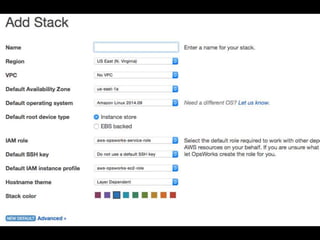
• Stacks are supposed to represent your entire 
application and all of it’s infrastructure dependencies. 
• In general each environment will be a different stack 
• Production / Staging / QA / etc. 
• This is not how L7 is doing it. I’ll explain why in a bit. 
• Stacks set default values for future layers and 
instances
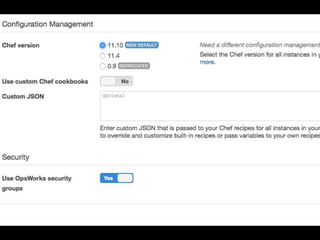
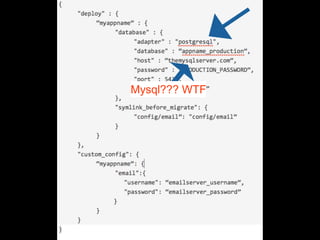
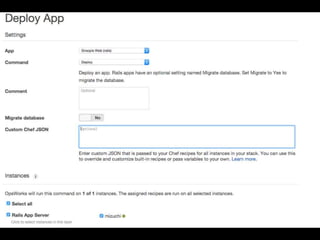
• Custom JSON 
• This is how you define config points for your 
app. 
• There’s a bunch of default JSON hooks that tie 
into opsworks recipes 
• You can use this in custom recipes 
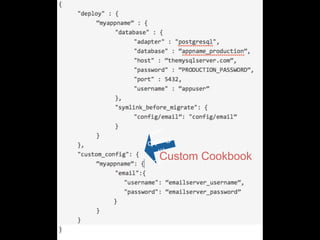
• How you configure your database if you’re NOT 
using RDS
Custom Cookbook
Mysql??? WTF
Layer 
• This is a slice of your application 
• Application Server / Web Server / Database / 
Task Server / etc. 
• OpsWorks predefines a bunch (including Rails) 
• Only 1 of each (except custom) 
• This is why we don’t use stacks correctly
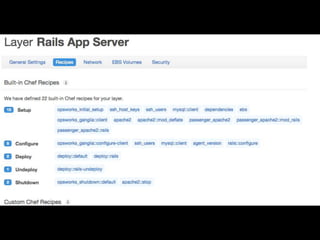
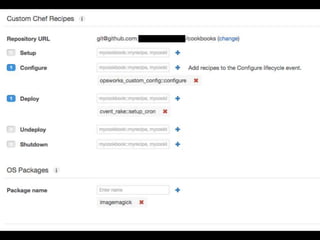
• Layer is where you setup individual chef recipes 
to run 
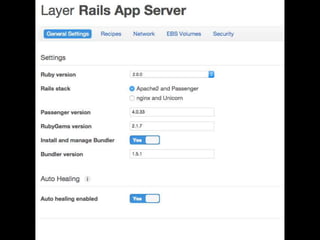
• You can also configure settings for the layer type 
• Ruby version, passenger vs nginx, bundler, 
load balancer and other resources 
• This will change based on the layer type and be 
pretty lean on custom layers
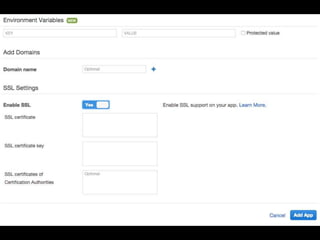
App 
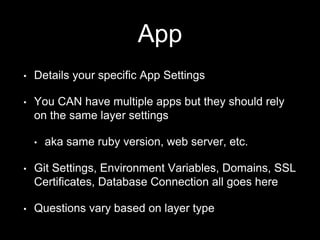
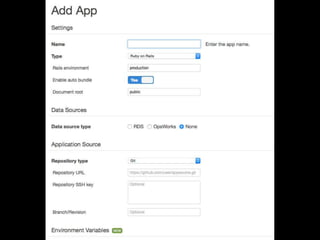
• Details your specific App Settings 
• You CAN have multiple apps but they should rely 
on the same layer settings 
• aka same ruby version, web server, etc. 
• Git Settings, Environment Variables, Domains, SSL 
Certificates, Database Connection all goes here 
• Questions vary based on layer type
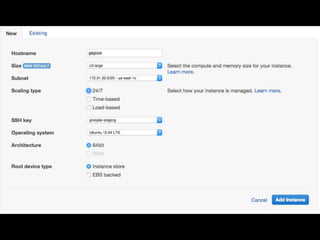
Instances 
• This defines the metal you’ll be running on 
• Inherits from Stack settings 
• Size, Name, Availability Zone, SSH Access, OS all 
configured here 
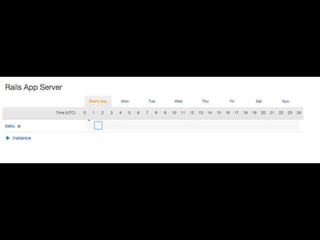
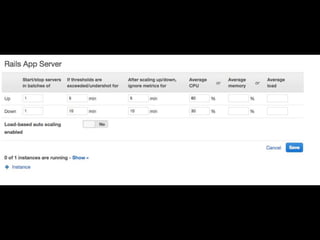
• You can also setup autoscaling here 
• Automatically spin up and down boxes based on 
load or time
Chef 
• Every Stack can define a Custom Cookbooks Repo 
• You can also use Berkshelf 
• If you don’t use Berkshelf I’d make each recipe an 
individual repo and submodule them in 
• Also: Make your cookbooks public if you can and keep 
sensitive info in environment variables 
• Getting a private repo to work is possible but a total 
PITA
• OpsWorks publishes their default cookbooks 
here: 
• https://github.com/aws/opsworks-cookbooks 
• Check the branch, master is useless the 
branches map to chef version 
• We fork this for each project and then edit 
• Matt Case told me I’m a bad person for doing 
this
Deployment 
• Goodbye Capistrano, hello mediocre Capistrano 
clone. 
• Same folder structure as cap 
• Terrible command line support. Working on rake 
tasks for this but who knows when we’ll be able to 
post them 
• 0 downtime deploys either need custom code or 
use the Web UI
• Deploy Hooks - /deploy folder in project, use for 
asset compile 
• Tasks - Create chef cookbook, execute as 
command 
• OpsWorks deploys are slower than other tools 
(getting better)
The Good 
• DevOps for Dummies (or developers like me) 
• Free* 
• Great integration with AWS (obviously) 
• Comprehensive API 
• Really detailed documentation
• Default server configs are pretty solid. (I’ve used 
Rails and Node) 
• Security Updates 
• Sidenote: Heartbleed and Shellshock 
• Amazon is actively improving the tool 
• RDS, Environment Vars both added recently
The Bad 
• Documentation is confusing at times 
• Reads like a technical manual because, well, it 
is a technical manual 
• Quick obsolescence 
• Chef updates, new features, etc.
AWS Integration 
• Recently added RDS support so no more giant JSON 
blocks 
• CloudWatch for monitoring as well as autoscaling 
• New Relic is still better for monitoring though 
• IAM Security makes it easier to control access 
• Servers are EC2, so you get all that stuff too 
• Can map resources within opsworks (load balancers, EBS 
volumes, etc.)
Questions? 
• Josh Schramm 
• @JoshReedSchramm on the twitters 
• josh.schramm@gmail.com 
• Slides on slideshare and I’ll try and remember to 
tweet that.

Dev-Friendly Ops

  • 1.
    Dev-Friendly Ops orhow OpsWorks has made my life way better
  • 2.
    A Little Background • Hi, I’m Josh • I’m not an Ops guy • Mostly a Ruby on Rails Dev • .Net in a previous life but OpsWorks doesn’t really support it • I’ve become an Ops guy by necessity
  • 3.
    “You’re doing everythingwrong.” –Every Programmer on Twitter
  • 4.
    How We UseIt • I Work There -> • We have ~8 clients on OpsWorks • This presentation is about how we’ve done things. Not always the “right” way. • Tell me why I’m wrong
  • 5.
    OpsWorks 101 •Hosted Infrastructure on Amazon Web Services • Free* • Chef Solo / Chef Client (based on chef version) • Evolving really really quickly * (with purchase of everything else)
  • 6.
    Four Structures 1.Stack 2. Layer 3. App 4. Instance
  • 7.
    Stack • Stacksare supposed to represent your entire application and all of it’s infrastructure dependencies. • In general each environment will be a different stack • Production / Staging / QA / etc. • This is not how L7 is doing it. I’ll explain why in a bit. • Stacks set default values for future layers and instances
  • 10.
    • Custom JSON • This is how you define config points for your app. • There’s a bunch of default JSON hooks that tie into opsworks recipes • You can use this in custom recipes • How you configure your database if you’re NOT using RDS
  • 11.
  • 12.
  • 13.
    Layer • Thisis a slice of your application • Application Server / Web Server / Database / Task Server / etc. • OpsWorks predefines a bunch (including Rails) • Only 1 of each (except custom) • This is why we don’t use stacks correctly
  • 14.
    • Layer iswhere you setup individual chef recipes to run • You can also configure settings for the layer type • Ruby version, passenger vs nginx, bundler, load balancer and other resources • This will change based on the layer type and be pretty lean on custom layers
  • 18.
    App • Detailsyour specific App Settings • You CAN have multiple apps but they should rely on the same layer settings • aka same ruby version, web server, etc. • Git Settings, Environment Variables, Domains, SSL Certificates, Database Connection all goes here • Questions vary based on layer type
  • 21.
    Instances • Thisdefines the metal you’ll be running on • Inherits from Stack settings • Size, Name, Availability Zone, SSH Access, OS all configured here • You can also setup autoscaling here • Automatically spin up and down boxes based on load or time
  • 25.
    Chef • EveryStack can define a Custom Cookbooks Repo • You can also use Berkshelf • If you don’t use Berkshelf I’d make each recipe an individual repo and submodule them in • Also: Make your cookbooks public if you can and keep sensitive info in environment variables • Getting a private repo to work is possible but a total PITA
  • 26.
    • OpsWorks publishestheir default cookbooks here: • https://github.com/aws/opsworks-cookbooks • Check the branch, master is useless the branches map to chef version • We fork this for each project and then edit • Matt Case told me I’m a bad person for doing this
  • 27.
    Deployment • GoodbyeCapistrano, hello mediocre Capistrano clone. • Same folder structure as cap • Terrible command line support. Working on rake tasks for this but who knows when we’ll be able to post them • 0 downtime deploys either need custom code or use the Web UI
  • 28.
    • Deploy Hooks- /deploy folder in project, use for asset compile • Tasks - Create chef cookbook, execute as command • OpsWorks deploys are slower than other tools (getting better)
  • 30.
    The Good •DevOps for Dummies (or developers like me) • Free* • Great integration with AWS (obviously) • Comprehensive API • Really detailed documentation
  • 31.
    • Default serverconfigs are pretty solid. (I’ve used Rails and Node) • Security Updates • Sidenote: Heartbleed and Shellshock • Amazon is actively improving the tool • RDS, Environment Vars both added recently
  • 32.
    The Bad •Documentation is confusing at times • Reads like a technical manual because, well, it is a technical manual • Quick obsolescence • Chef updates, new features, etc.
  • 33.
    AWS Integration •Recently added RDS support so no more giant JSON blocks • CloudWatch for monitoring as well as autoscaling • New Relic is still better for monitoring though • IAM Security makes it easier to control access • Servers are EC2, so you get all that stuff too • Can map resources within opsworks (load balancers, EBS volumes, etc.)
  • 34.
    Questions? • JoshSchramm • @JoshReedSchramm on the twitters • josh.schramm@gmail.com • Slides on slideshare and I’ll try and remember to tweet that.