Input/Output Devices
Grade Level: 6-8
Subject: Technology/Computer Science
Duration: 45-60 minutes
Objective:
Skilling.pk Diya.pk Stamflay.com
0314-4646739
Title:
0332-4646739
Introduction to
0336-4646739
Computer
differentiate between various input
Skilling.pk Diya.pk Stamflay.com
in computers,
identify and
and
and
output devices used
explain their functions.
0314-4646739 0332-4646739
Students will be able to
Materials:
0336-4646739
Computer or laptop with Internet access
and projector
Handouts with pictures and descriptions
of various input/output devices
 Whiteboard or chalkboard with
markers/chalk
Skilling.pk Diya.pk Stamflay.com
0314-4646739 0332-4646739 0336-4646739
Interactive quiz game (e.g. Kahoot or
Quizlet)
Skilling.pk Diya.pk Stamflay.com
0314-4646739 0332-4646739 0336-4646739
0314-4646739
Skilling.pk Diya.pk Stamflay.com
0332-4646739 0336-4646739
Begin the lesson by asking students if they
have ever used a computer, and if so, how
they interact with it. Ask them what they
think are the different parts of a computer that
they can use to interact with it.
Skilling.pk Diya.pk Stamflay.com
0314-4646739
Introduction:
0332-4646739 0336-4646739
0314-4646739
Body:
Skilling.pk Diya.pk Stamflay.com
Explain to the students that computers
have different parts that we use to give
input (commands) and receive output
(responses).
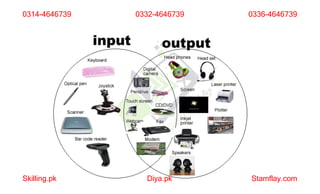
Show pictures of various input devices
such as keyboard, mouse, scanner, touch
0332-4646739 0336-4646739
Ask the students to identify other input
devices they have used before, and add
them to the list on the board.
Skilling.pk Diya.pk Stamflay.com
0314-4646739 0332-4646739 0336-4646739
screen, microphone, etc. Explain how each
device works and what kind of input it
provides to the computer.
Show pictures of various output devices
such as monitor, printer, speakers,
headphones, projector, etc. Explain how
each device works and what kind of output
it provides from the computer.
Skilling.pk Diya.pk Stamflay.com
0314-4646739 0332-4646739 0336-4646739
Ask the students to identify other output
devices they have used before, and add
them to the list on the board.
Have the students work in pairs or small
groups to create a chart listing all of the
input and output devices they have learned
Skilling.pk Diya.pk Stamflay.com
0314-4646739 0332-4646739 0336-4646739
Use an interactive quiz game (e.g. Kahoot
or Quizlet) to test the students' knowledge
of the different input and output devices.
Conclusion:
Skilling.pk Diya.pk Stamflay.com
0314-4646739 0332-4646739 0336-4646739
about, along with a brief description of each
device's function.
discussed in the lesson and their functions.
Emphasize the importance of these devices in
computer use, and how they enhance our
ability to interact with technology.
Assessment:
Skilling.pk Diya.pk Stamflay.com
0314-4646739 0332-4646739
Review the input and output
0336-4646739
devices
lesson by reviewing their charts and
observing their participation in the quiz
game. Encourage them to ask any remaining
questions they may have, and provide
feedback as needed.
Skilling.pk Diya.pk Stamflay.com
0314-4646739 0332-4646739 0336-4646739
Assess the students' understanding of the

Introduction to Computer Input Output Devices Final Lesson Plan_1.pptx

  • 1.
    Input/Output Devices Grade Level:6-8 Subject: Technology/Computer Science Duration: 45-60 minutes Objective: Skilling.pk Diya.pk Stamflay.com 0314-4646739 Title: 0332-4646739 Introduction to 0336-4646739 Computer
  • 2.
    differentiate between variousinput Skilling.pk Diya.pk Stamflay.com in computers, identify and and and output devices used explain their functions. 0314-4646739 0332-4646739 Students will be able to Materials: 0336-4646739
  • 3.
    Computer or laptopwith Internet access and projector Handouts with pictures and descriptions of various input/output devices  Whiteboard or chalkboard with markers/chalk Skilling.pk Diya.pk Stamflay.com 0314-4646739 0332-4646739 0336-4646739
  • 4.
    Interactive quiz game(e.g. Kahoot or Quizlet) Skilling.pk Diya.pk Stamflay.com 0314-4646739 0332-4646739 0336-4646739
  • 5.
  • 6.
    Begin the lessonby asking students if they have ever used a computer, and if so, how they interact with it. Ask them what they think are the different parts of a computer that they can use to interact with it. Skilling.pk Diya.pk Stamflay.com 0314-4646739 Introduction: 0332-4646739 0336-4646739
  • 7.
    0314-4646739 Body: Skilling.pk Diya.pk Stamflay.com Explainto the students that computers have different parts that we use to give input (commands) and receive output (responses). Show pictures of various input devices such as keyboard, mouse, scanner, touch 0332-4646739 0336-4646739
  • 8.
    Ask the studentsto identify other input devices they have used before, and add them to the list on the board. Skilling.pk Diya.pk Stamflay.com 0314-4646739 0332-4646739 0336-4646739 screen, microphone, etc. Explain how each device works and what kind of input it provides to the computer.
  • 9.
    Show pictures ofvarious output devices such as monitor, printer, speakers, headphones, projector, etc. Explain how each device works and what kind of output it provides from the computer. Skilling.pk Diya.pk Stamflay.com 0314-4646739 0332-4646739 0336-4646739
  • 10.
    Ask the studentsto identify other output devices they have used before, and add them to the list on the board. Have the students work in pairs or small groups to create a chart listing all of the input and output devices they have learned Skilling.pk Diya.pk Stamflay.com 0314-4646739 0332-4646739 0336-4646739
  • 11.
    Use an interactivequiz game (e.g. Kahoot or Quizlet) to test the students' knowledge of the different input and output devices. Conclusion: Skilling.pk Diya.pk Stamflay.com 0314-4646739 0332-4646739 0336-4646739 about, along with a brief description of each device's function.
  • 12.
    discussed in thelesson and their functions. Emphasize the importance of these devices in computer use, and how they enhance our ability to interact with technology. Assessment: Skilling.pk Diya.pk Stamflay.com 0314-4646739 0332-4646739 Review the input and output 0336-4646739 devices
  • 13.
    lesson by reviewingtheir charts and observing their participation in the quiz game. Encourage them to ask any remaining questions they may have, and provide feedback as needed. Skilling.pk Diya.pk Stamflay.com 0314-4646739 0332-4646739 0336-4646739 Assess the students' understanding of the