PRESENTATION ON INTRODUCTION TO
COMPUTER
Presented by :
Karan shah
1
PresentationByKaranShah
2
2
WHAT IS A COMPUTER ?
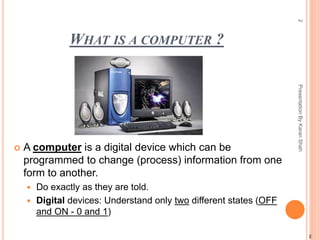
 A computer is a digital device which can be
programmed to change (process) information from one
form to another.
 Do exactly as they are told.
 Digital devices: Understand only two different states (OFF
and ON - 0 and 1)
PresentationByKaranShah
HISTORY OF COMPUTERS
 Origins of Computing Machines :
Early computing devices
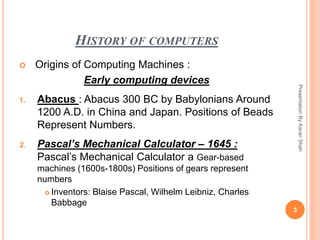
1. Abacus : Abacus 300 BC by Babylonians Around
1200 A.D. in China and Japan. Positions of Beads
Represent Numbers.
2. Pascal’s Mechanical Calculator – 1645 :
Pascal’s Mechanical Calculator a Gear-based
machines (1600s-1800s) Positions of gears represent
numbers
 Inventors: Blaise Pascal, Wilhelm Leibniz, Charles
Babbage
3
PresentationByKaranShah
EARLY COMPUTERS
PresentationByKaranShah
4
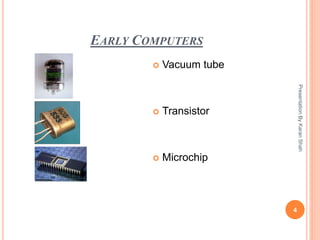
 Vacuum tube
 Transistor
 Microchip
EARLY COMPUTERS
First Generation
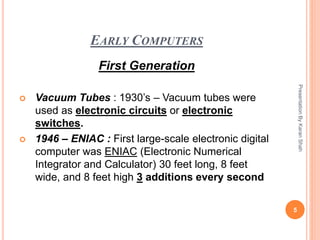
 Vacuum Tubes : 1930’s – Vacuum tubes were
used as electronic circuits or electronic
switches.
 1946 – ENIAC : First large-scale electronic digital
computer was ENIAC (Electronic Numerical
Integrator and Calculator) 30 feet long, 8 feet
wide, and 8 feet high 3 additions every second
5
PresentationByKaranShah
EARLY COMPUTERS
Second Generation – Transistors :
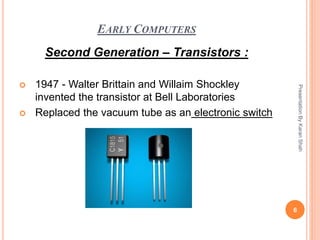
 1947 - Walter Brittain and Willaim Shockley
invented the transistor at Bell Laboratories
 Replaced the vacuum tube as an electronic switch
6
PresentationByKaranShah
EARLY COMPUTERS
Third Generation – Integrated Circuits
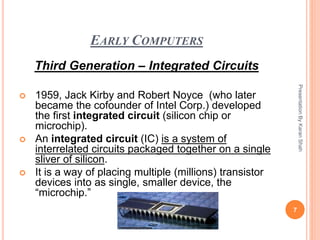
 1959, Jack Kirby and Robert Noyce (who later
became the cofounder of Intel Corp.) developed
the first integrated circuit (silicon chip or
microchip).
 An integrated circuit (IC) is a system of
interrelated circuits packaged together on a single
sliver of silicon.
 It is a way of placing multiple (millions) transistor
devices into as single, smaller device, the
“microchip.”
7
PresentationByKaranShah
EARLY COMPUTERS
Fourth Generation – Microprocessor
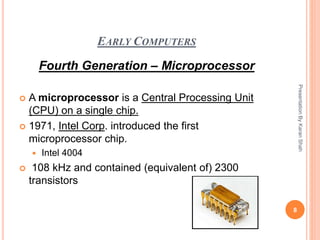
 A microprocessor is a Central Processing Unit
(CPU) on a single chip.
 1971, Intel Corp. introduced the first
microprocessor chip.
 Intel 4004
 108 kHz and contained (equivalent of) 2300
transistors
8
PresentationByKaranShah
TYPES OF COMPUTERS
General Purpose Computers :
 Super Computer
 Mainframe
 Personal Computer
9
PresentationByKaranShah
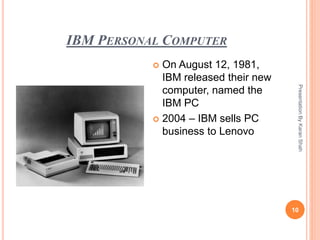
IBM PERSONAL COMPUTER
PresentationByKaranShah
10
 On August 12, 1981,
IBM released their new
computer, named the
IBM PC
 2004 – IBM sells PC
business to Lenovo
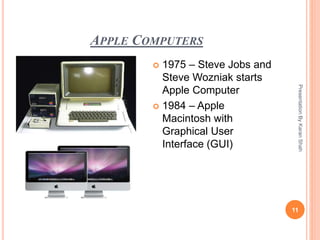
APPLE COMPUTERS
PresentationByKaranShah
11
 1975 – Steve Jobs and
Steve Wozniak starts
Apple Computer
 1984 – Apple
Macintosh with
Graphical User
Interface (GUI)
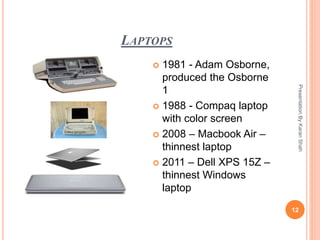
LAPTOPS
PresentationByKaranShah
12
 1981 - Adam Osborne,
produced the Osborne
1
 1988 - Compaq laptop
with color screen
 2008 – Macbook Air –
thinnest laptop
 2011 – Dell XPS 15Z –
thinnest Windows
laptop
STORAGE DEVICES
 There are two types of Storage devices they are:
1. Primary Storage Devices
2. Secondary Storage devices
13
PresentationByKaranShah
EARLY DATA STORAGE
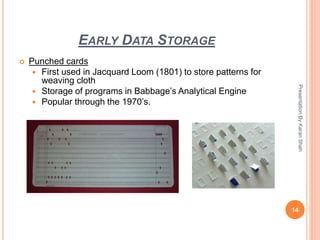
 Punched cards
 First used in Jacquard Loom (1801) to store patterns for
weaving cloth
 Storage of programs in Babbage’s Analytical Engine
 Popular through the 1970’s.
14
PresentationByKaranShah
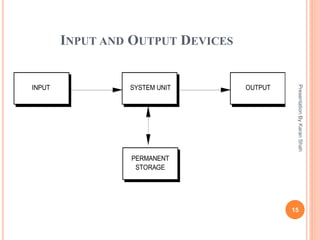
INPUT AND OUTPUT DEVICES
15
PresentationByKaranShah
SYSTEM UNITINPUT OUTPUT
PERMANENT
STORAGE
HARDWARE & SOFTWARE
PresentationByKaranShah
16
Hardware
 Hardware : The
physical components
that make up a
computer system.
 Hardware
Components : Mouse,
Keyboard, Monitor,
Webcam, Joystick,
Scanner, Printer, etc.
Software
 Softare : The
programs (instructions)
that tell the computer
what to do.
 System Software
 Application Software
 Stored on a storage
media such as hard
disk, CD-ROM, floppy
disk, tape, etc.
SOFTWARE
 System Software
 Application Software
17
PresentationByKaranShah
APPLICATION SOFTWARE
 Performs specific tasks:
 Word processing
 Calculations
 Information storage and retrieval
 Accounting
 Games
 Cannot function without the OS (Operating System)
 Written for a specific operating system and
computer hardware.
18
PresentationByKaranShah
OPERATING SYSTEM SOFTWARE
 Loads automatically when you switch on a
computer
 Main Functions:
 Controls hardware and software
 Permits you to manage files
 Acts as intermediary between user and applications
19
PresentationByKaranShah
TYPES OF OPERATING SYSTEM
 Windows
 Linux
 Ubuntu
 Firefox
 Mac
 Android & IOS (Mobile/Smart Phone OS)
20
PresentationByKaranShah
FUNCTIONS OF OPERATING SYSTEM
 Process Management
 Device Management
 Memory and Storage Management
 Communication & Security Management
 Application Interface
21
PresentationByKaranShah
TYPES OF USER INTERFACE
 There are 2 Types of User Interface They are :
1. GUI - Graphical User Interface
2. CLI – Command Line User Interface
22
PresentationByKaranShah
ADVANTAGES OF COMPUTER
 Fastest Medium Of Communication
 Used to Receive, Supply, & Process a Large
Volume of Data at a High Speed
 It Ensures Consistent and Error Free Prossing of
Data
 Computes every types of typical Mathematical
equations in seconds
 Mainly Reduces Man Work
 A Medium Of Entertainment & Knowledge
23
PresentationByKaranShah
24
THANk YOU

Introduction to computer by karan shah

  • 1.
    PRESENTATION ON INTRODUCTIONTO COMPUTER Presented by : Karan shah 1 PresentationByKaranShah
  • 2.
    2 2 WHAT IS ACOMPUTER ?  A computer is a digital device which can be programmed to change (process) information from one form to another.  Do exactly as they are told.  Digital devices: Understand only two different states (OFF and ON - 0 and 1) PresentationByKaranShah
  • 3.
    HISTORY OF COMPUTERS Origins of Computing Machines : Early computing devices 1. Abacus : Abacus 300 BC by Babylonians Around 1200 A.D. in China and Japan. Positions of Beads Represent Numbers. 2. Pascal’s Mechanical Calculator – 1645 : Pascal’s Mechanical Calculator a Gear-based machines (1600s-1800s) Positions of gears represent numbers  Inventors: Blaise Pascal, Wilhelm Leibniz, Charles Babbage 3 PresentationByKaranShah
  • 4.
  • 5.
    EARLY COMPUTERS First Generation Vacuum Tubes : 1930’s – Vacuum tubes were used as electronic circuits or electronic switches.  1946 – ENIAC : First large-scale electronic digital computer was ENIAC (Electronic Numerical Integrator and Calculator) 30 feet long, 8 feet wide, and 8 feet high 3 additions every second 5 PresentationByKaranShah
  • 6.
    EARLY COMPUTERS Second Generation– Transistors :  1947 - Walter Brittain and Willaim Shockley invented the transistor at Bell Laboratories  Replaced the vacuum tube as an electronic switch 6 PresentationByKaranShah
  • 7.
    EARLY COMPUTERS Third Generation– Integrated Circuits  1959, Jack Kirby and Robert Noyce (who later became the cofounder of Intel Corp.) developed the first integrated circuit (silicon chip or microchip).  An integrated circuit (IC) is a system of interrelated circuits packaged together on a single sliver of silicon.  It is a way of placing multiple (millions) transistor devices into as single, smaller device, the “microchip.” 7 PresentationByKaranShah
  • 8.
    EARLY COMPUTERS Fourth Generation– Microprocessor  A microprocessor is a Central Processing Unit (CPU) on a single chip.  1971, Intel Corp. introduced the first microprocessor chip.  Intel 4004  108 kHz and contained (equivalent of) 2300 transistors 8 PresentationByKaranShah
  • 9.
    TYPES OF COMPUTERS GeneralPurpose Computers :  Super Computer  Mainframe  Personal Computer 9 PresentationByKaranShah
  • 10.
    IBM PERSONAL COMPUTER PresentationByKaranShah 10 On August 12, 1981, IBM released their new computer, named the IBM PC  2004 – IBM sells PC business to Lenovo
  • 11.
    APPLE COMPUTERS PresentationByKaranShah 11  1975– Steve Jobs and Steve Wozniak starts Apple Computer  1984 – Apple Macintosh with Graphical User Interface (GUI)
  • 12.
    LAPTOPS PresentationByKaranShah 12  1981 -Adam Osborne, produced the Osborne 1  1988 - Compaq laptop with color screen  2008 – Macbook Air – thinnest laptop  2011 – Dell XPS 15Z – thinnest Windows laptop
  • 13.
    STORAGE DEVICES  Thereare two types of Storage devices they are: 1. Primary Storage Devices 2. Secondary Storage devices 13 PresentationByKaranShah
  • 14.
    EARLY DATA STORAGE Punched cards  First used in Jacquard Loom (1801) to store patterns for weaving cloth  Storage of programs in Babbage’s Analytical Engine  Popular through the 1970’s. 14 PresentationByKaranShah
  • 15.
    INPUT AND OUTPUTDEVICES 15 PresentationByKaranShah SYSTEM UNITINPUT OUTPUT PERMANENT STORAGE
  • 16.
    HARDWARE & SOFTWARE PresentationByKaranShah 16 Hardware Hardware : The physical components that make up a computer system.  Hardware Components : Mouse, Keyboard, Monitor, Webcam, Joystick, Scanner, Printer, etc. Software  Softare : The programs (instructions) that tell the computer what to do.  System Software  Application Software  Stored on a storage media such as hard disk, CD-ROM, floppy disk, tape, etc.
  • 17.
    SOFTWARE  System Software Application Software 17 PresentationByKaranShah
  • 18.
    APPLICATION SOFTWARE  Performsspecific tasks:  Word processing  Calculations  Information storage and retrieval  Accounting  Games  Cannot function without the OS (Operating System)  Written for a specific operating system and computer hardware. 18 PresentationByKaranShah
  • 19.
    OPERATING SYSTEM SOFTWARE Loads automatically when you switch on a computer  Main Functions:  Controls hardware and software  Permits you to manage files  Acts as intermediary between user and applications 19 PresentationByKaranShah
  • 20.
    TYPES OF OPERATINGSYSTEM  Windows  Linux  Ubuntu  Firefox  Mac  Android & IOS (Mobile/Smart Phone OS) 20 PresentationByKaranShah
  • 21.
    FUNCTIONS OF OPERATINGSYSTEM  Process Management  Device Management  Memory and Storage Management  Communication & Security Management  Application Interface 21 PresentationByKaranShah
  • 22.
    TYPES OF USERINTERFACE  There are 2 Types of User Interface They are : 1. GUI - Graphical User Interface 2. CLI – Command Line User Interface 22 PresentationByKaranShah
  • 23.
    ADVANTAGES OF COMPUTER Fastest Medium Of Communication  Used to Receive, Supply, & Process a Large Volume of Data at a High Speed  It Ensures Consistent and Error Free Prossing of Data  Computes every types of typical Mathematical equations in seconds  Mainly Reduces Man Work  A Medium Of Entertainment & Knowledge 23 PresentationByKaranShah
  • 24.

Editor's Notes