Bora	Bodur	
Nathalie	Duponsel	
Ann-Louise	Davidson
www.educationmakers.ca	
#MilieuxMakewww.educationmakers.ca
Introduction to Additive Manufacturing
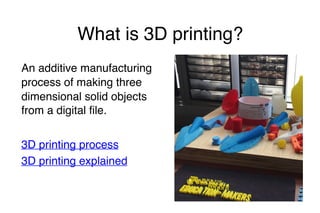
What is 3D printing?
An additive manufacturing
process of making three
dimensional solid objects
from a digital file.
3D printing process
3D printing explained
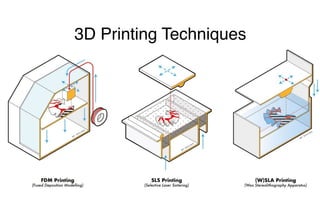
3D Printing Techniques
Plastic based: FDM
(Fused Deposition
Technique), where solid
filament shaped plastic
materials are melted in
fine strands and fused
together in layers to
form a solid object.
Resin based: SLA (Stereo
Lithoghraphic
Augmentation), where
liquid resin chemicals
sensitive to infrared light
are hardened by infrared
light emitting lasers guided
by mirrors in layers to form
a solid object
For	reference	only
3D Printing Techniques
Powder based: SLS
(Selective Laser
Sintering), where powder
materials are sintered as
a thin layer on a platform
and heated up by
powerful lasers that
instantly melts and fuses
the particles into a solid
layer and repeats the
process to form a solid
object.
Hybrid: APD (Augmented
Polymer Deposition) where
layers are formed just like
the FDM but augmented by
pigmented, conductive,
thermos-conductive or
insulating liquids between
the solid fused layers to
enrich the final solid object
with additional features.
For	reference	only
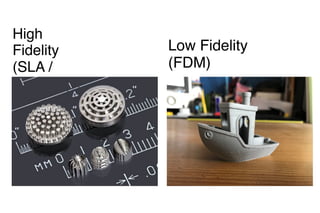
High
Fidelity
(SLA /
SLS)
Low Fidelity
(FDM)
What can be 3D printed?
Low-Fidelity (pixel based):
Based on FDM technique.
Cheaper -becoming popular
among home users
Can provide practical
solutions to daily life problems
Enables prototyping for
functional tools and utilities
Can print:
• replacement parts
• tools
• furniture
• edible models
• digitally formed sculptures
• homes
• pottery etc.
What can be 3D printed?
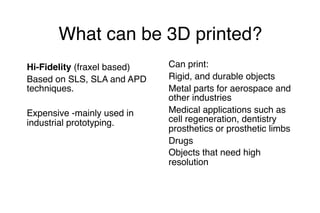
Hi-Fidelity (fraxel based)
Based on SLS, SLA and APD
techniques.
Expensive -mainly used in
industrial prototyping.
Can print:
Rigid, and durable objects
Metal parts for aerospace and
other industries
Medical applications such as
cell regeneration, dentistry
prosthetics or prosthetic limbs
Drugs
Objects that need high
resolution
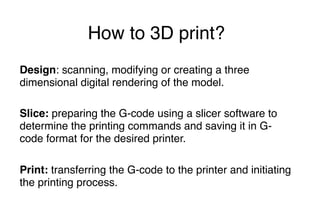
How to 3D print?
Design: scanning, modifying or creating a three
dimensional digital rendering of the model.
Slice: preparing the G-code using a slicer software to
determine the printing commands and saving it in G-
code format for the desired printer.
Print: transferring the G-code to the printer and initiating
the printing process.
Design
Design
Design
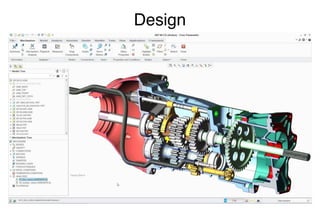
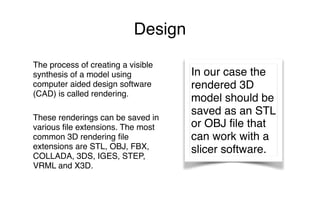
The process of creating a visible
synthesis of a model using
computer aided design software
(CAD) is called rendering.
These renderings can be saved in
various file extensions. The most
common 3D rendering file
extensions are STL, OBJ, FBX,
COLLADA, 3DS, IGES, STEP,
VRML and X3D.
In our case the
rendered 3D
model should be
saved as an STL
or OBJ file that
can work with a
slicer software.
Design
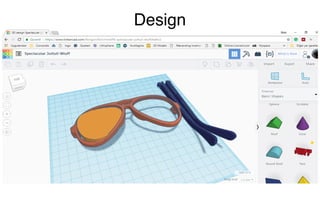
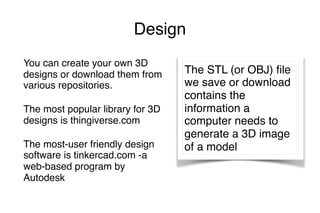
You can create your own 3D
designs or download them from
various repositories.
The most popular library for 3D
designs is thingiverse.com
The most-user friendly design
software is tinkercad.com -a
web-based program by
Autodesk
The STL (or OBJ) file
we save or download
contains the
information a
computer needs to
generate a 3D image
of a model	
Design
Slice
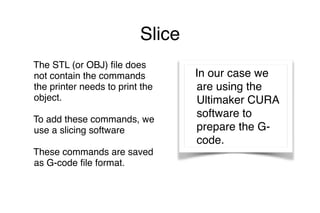
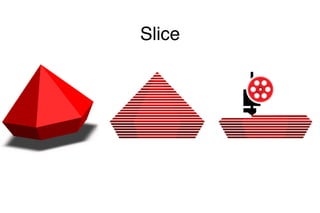
The STL (or OBJ) file does
not contain the commands
the printer needs to print the
object.
To add these commands, we
use a slicing software
These commands are saved
as G-code file format.
In our case we
are using the
Ultimaker CURA
software to
prepare the G-
code.
Slice
Print
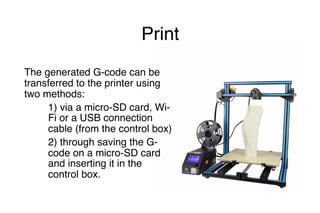
The generated G-code can be
transferred to the printer using
two methods:
1) via a micro-SD card, Wi-
Fi or a USB connection
cable (from the control box)
2) through saving the G-
code on a micro-SD card
and inserting it in the
control box.
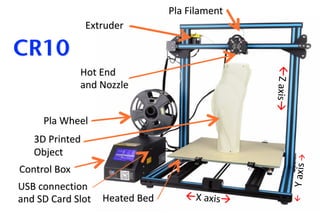
Control	Box
Pla	Wheel
Pla	Filament
Hot	End	
and	Nozzle
Heated	Bed
Extruder
3D	Printed		
Object
ßX	axisà
ßY	axis	à
ßZ	axisà
CR10
USB	connection		
and	SD	Card	Slot

Introduction to Additive Manufacturing

  • 1.
  • 2.
    What is 3Dprinting? An additive manufacturing process of making three dimensional solid objects from a digital file. 3D printing process 3D printing explained
  • 3.
  • 4.
    3D Printing Techniques Plasticbased: FDM (Fused Deposition Technique), where solid filament shaped plastic materials are melted in fine strands and fused together in layers to form a solid object. Resin based: SLA (Stereo Lithoghraphic Augmentation), where liquid resin chemicals sensitive to infrared light are hardened by infrared light emitting lasers guided by mirrors in layers to form a solid object For reference only
  • 5.
    3D Printing Techniques Powderbased: SLS (Selective Laser Sintering), where powder materials are sintered as a thin layer on a platform and heated up by powerful lasers that instantly melts and fuses the particles into a solid layer and repeats the process to form a solid object. Hybrid: APD (Augmented Polymer Deposition) where layers are formed just like the FDM but augmented by pigmented, conductive, thermos-conductive or insulating liquids between the solid fused layers to enrich the final solid object with additional features. For reference only
  • 6.
  • 7.
    What can be3D printed? Low-Fidelity (pixel based): Based on FDM technique. Cheaper -becoming popular among home users Can provide practical solutions to daily life problems Enables prototyping for functional tools and utilities Can print: • replacement parts • tools • furniture • edible models • digitally formed sculptures • homes • pottery etc.
  • 8.
    What can be3D printed? Hi-Fidelity (fraxel based) Based on SLS, SLA and APD techniques. Expensive -mainly used in industrial prototyping. Can print: Rigid, and durable objects Metal parts for aerospace and other industries Medical applications such as cell regeneration, dentistry prosthetics or prosthetic limbs Drugs Objects that need high resolution
  • 9.
    How to 3Dprint? Design: scanning, modifying or creating a three dimensional digital rendering of the model. Slice: preparing the G-code using a slicer software to determine the printing commands and saving it in G- code format for the desired printer. Print: transferring the G-code to the printer and initiating the printing process.
  • 10.
  • 11.
  • 12.
    The process ofcreating a visible synthesis of a model using computer aided design software (CAD) is called rendering. These renderings can be saved in various file extensions. The most common 3D rendering file extensions are STL, OBJ, FBX, COLLADA, 3DS, IGES, STEP, VRML and X3D. In our case the rendered 3D model should be saved as an STL or OBJ file that can work with a slicer software. Design
  • 13.
    You can createyour own 3D designs or download them from various repositories. The most popular library for 3D designs is thingiverse.com The most-user friendly design software is tinkercad.com -a web-based program by Autodesk The STL (or OBJ) file we save or download contains the information a computer needs to generate a 3D image of a model Design
  • 14.
    Slice The STL (orOBJ) file does not contain the commands the printer needs to print the object. To add these commands, we use a slicing software These commands are saved as G-code file format. In our case we are using the Ultimaker CURA software to prepare the G- code.
  • 15.
  • 16.
    Print The generated G-codecan be transferred to the printer using two methods: 1) via a micro-SD card, Wi- Fi or a USB connection cable (from the control box) 2) through saving the G- code on a micro-SD card and inserting it in the control box.
  • 17.