ACI Programmability
Ravi Chamarthy
ravchama@cisco.com
Principal Engineer, Cisco Systems
Agenda
• API Driven Design
• Managed Objects
• REST API Constructs
• Cobra SDK
• Live Code
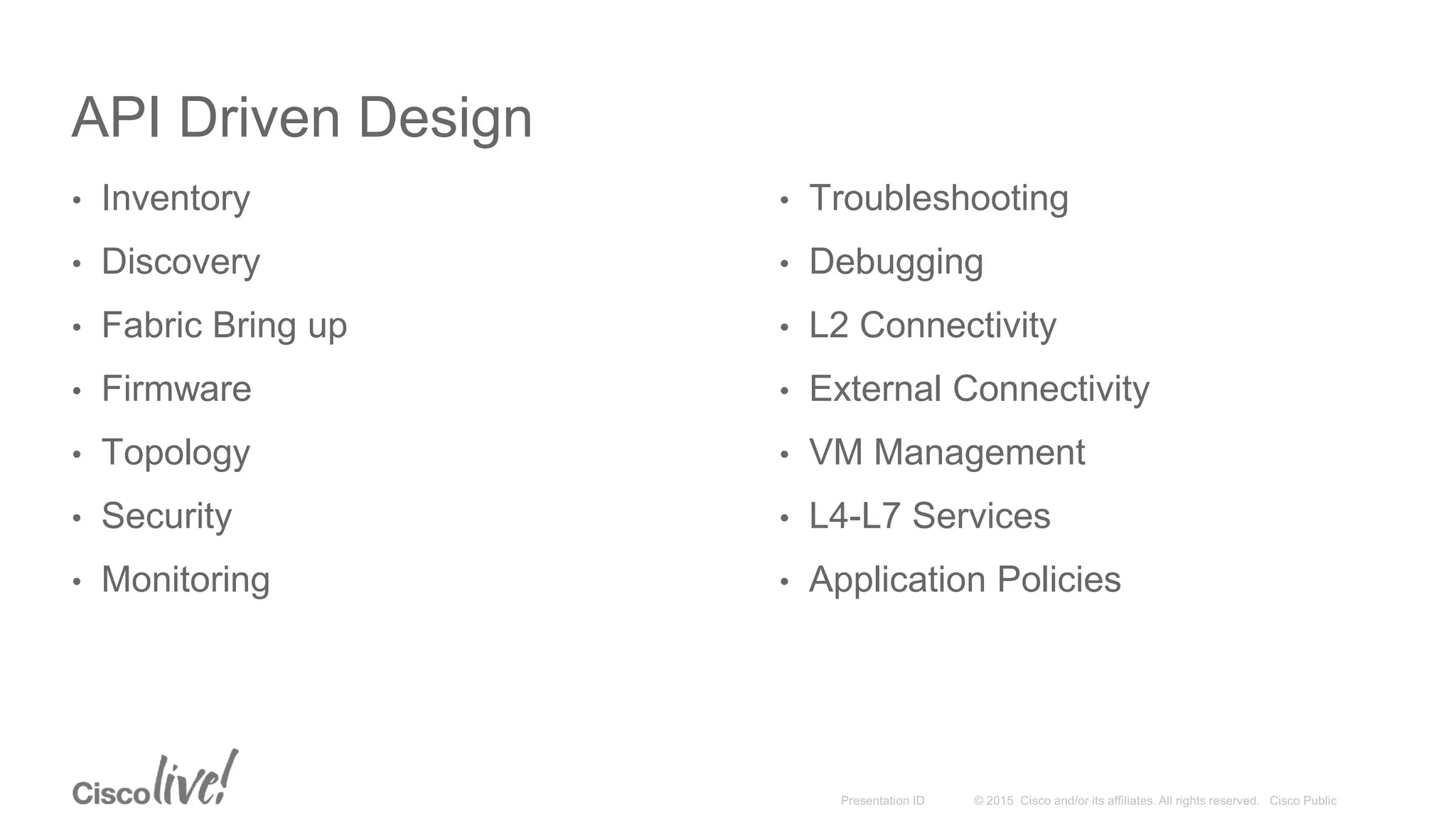
API Driven Design
• Inventory
• Discovery
• Fabric Bring up
• Firmware
• Topology
• Security
• Monitoring
• Troubleshooting
• Debugging
• L2 Connectivity
• External Connectivity
• VM Management
• L4-L7 Services
• Application Policies
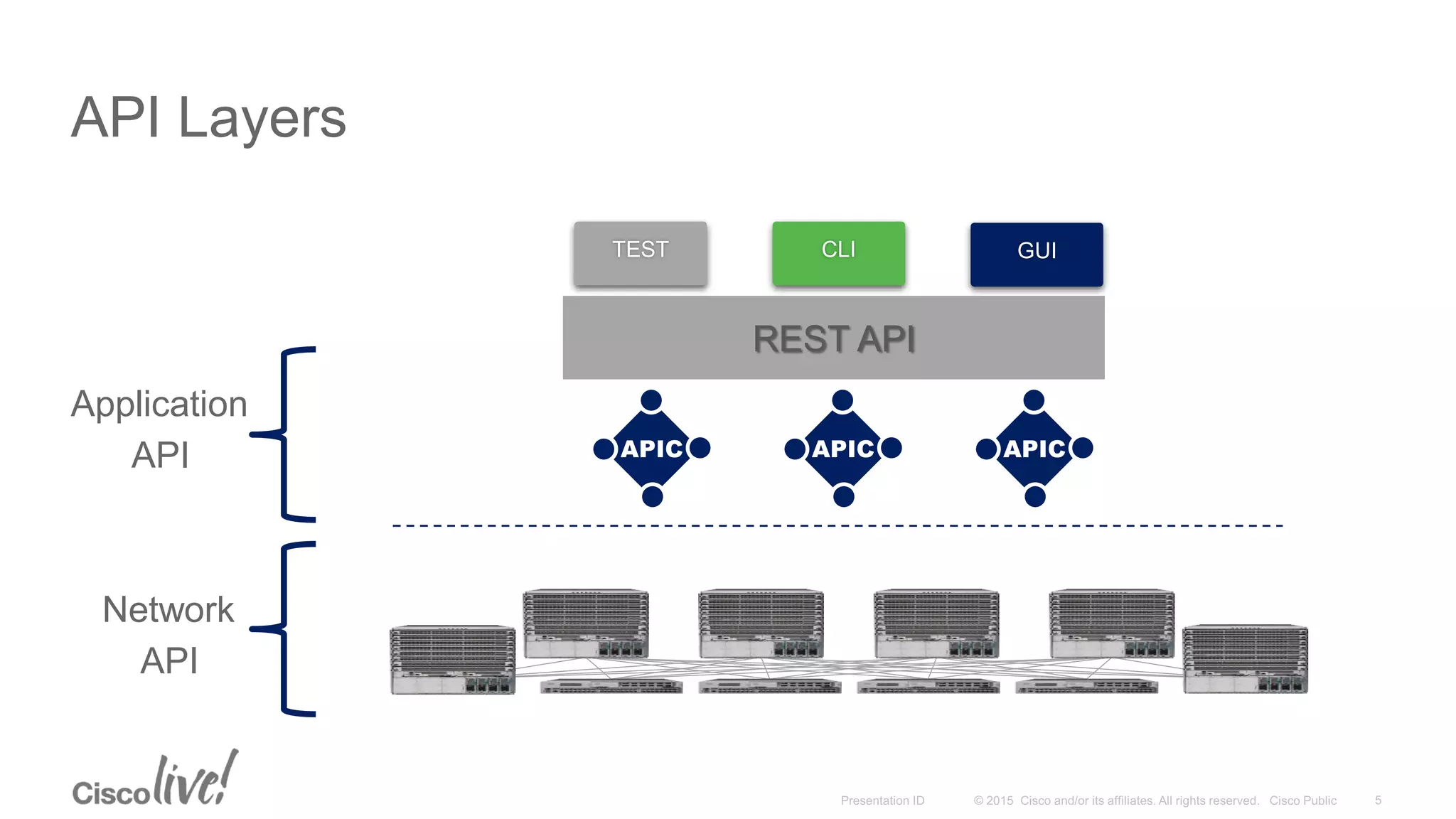
API Layers
Network
API
Application
API
REST API
CLITEST GUI
Cisco ACI: Object Model
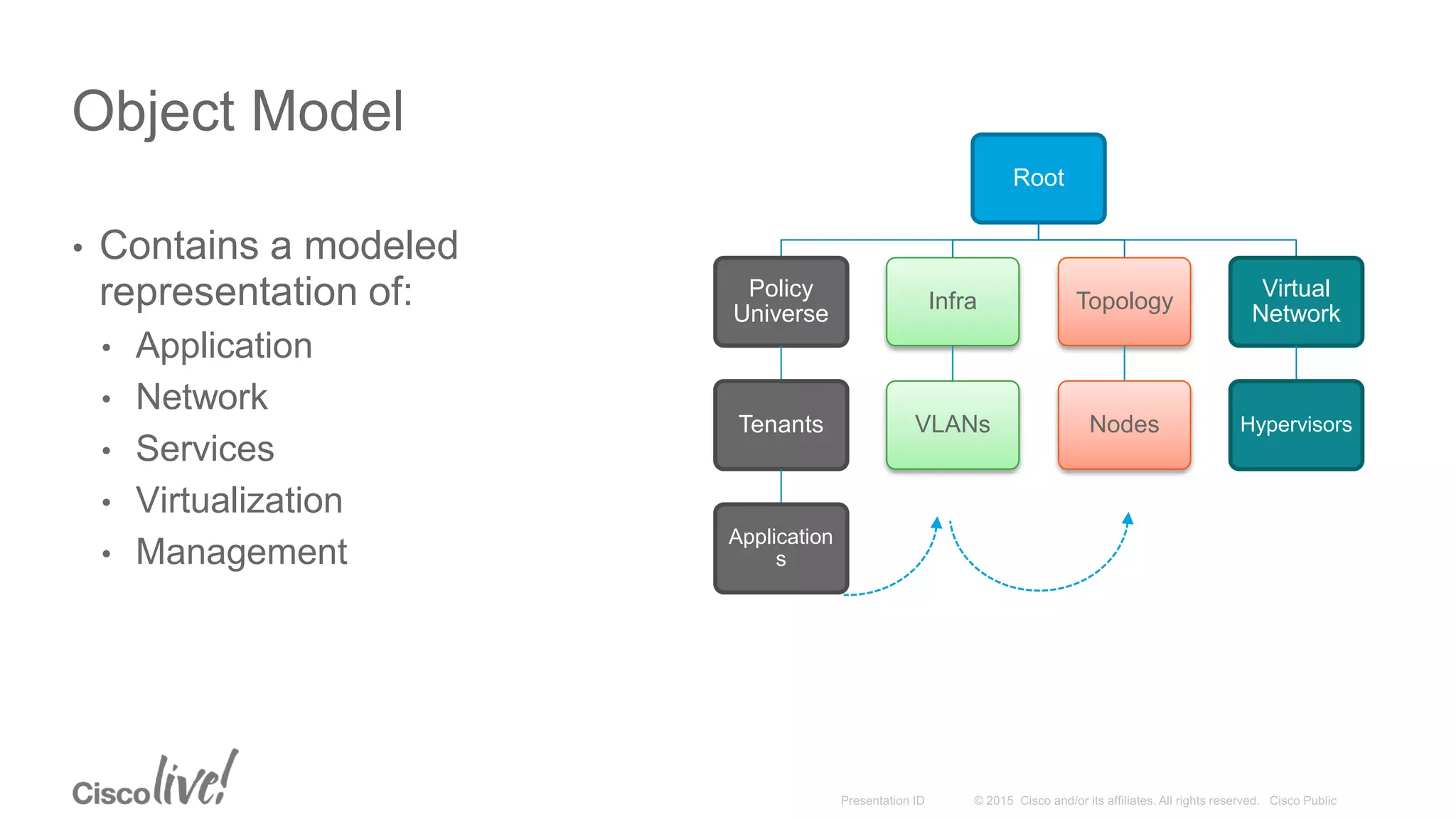
Object Model
• Contains a modeled
representation of:
• Application
• Network
• Services
• Virtualization
• Management
Root
Policy
Universe
Tenants
Application
s
Infra
VLANs
Topology
Nodes
Virtual
Network
Hypervisors
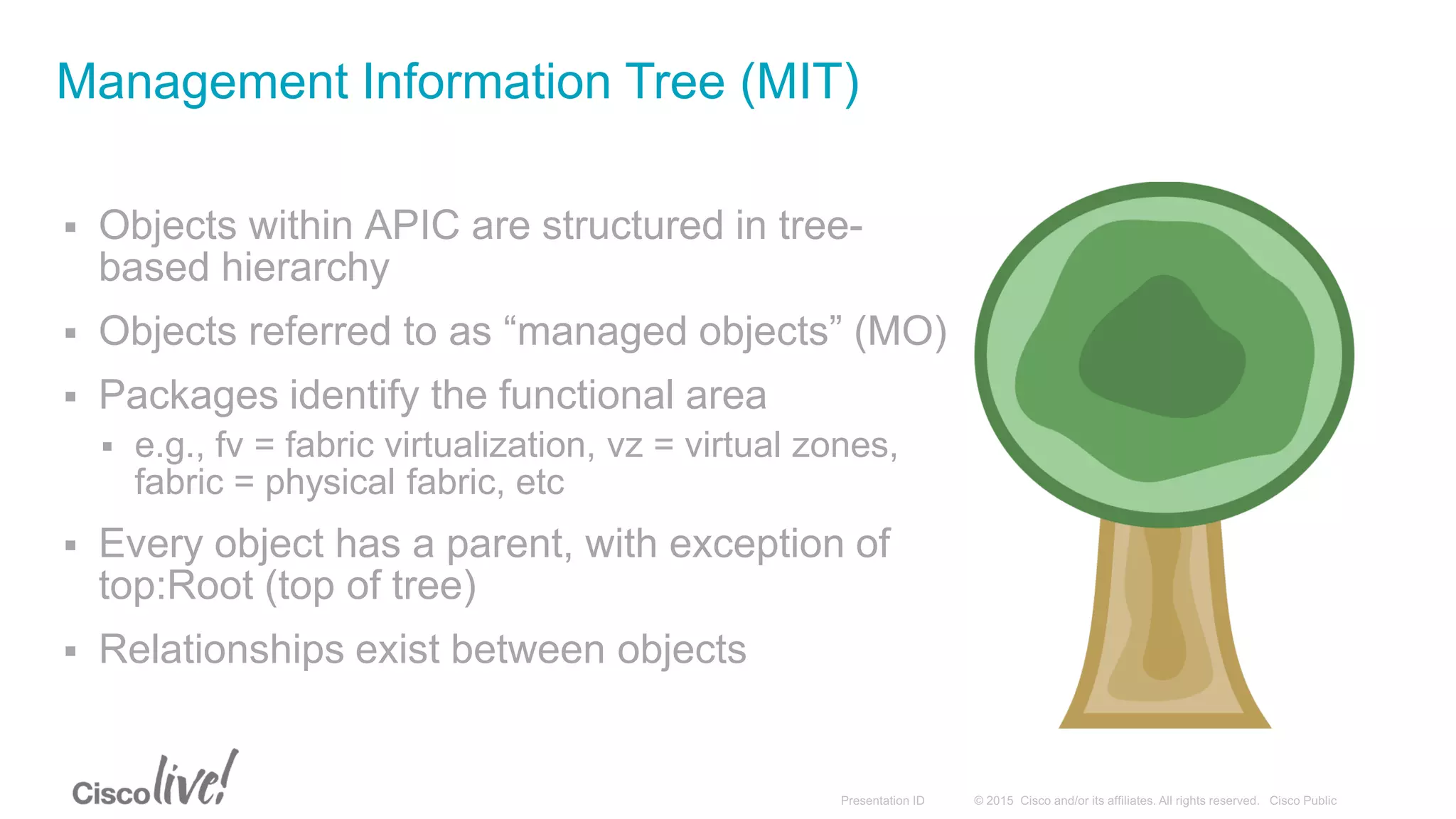
 Objects within APIC are structured in tree-
based hierarchy
 Objects referred to as “managed objects” (MO)
 Packages identify the functional area
 e.g., fv = fabric virtualization, vz = virtual zones,
fabric = physical fabric, etc
 Every object has a parent, with exception of
top:Root (top of tree)
 Relationships exist between objects
Management Information Tree (MIT)
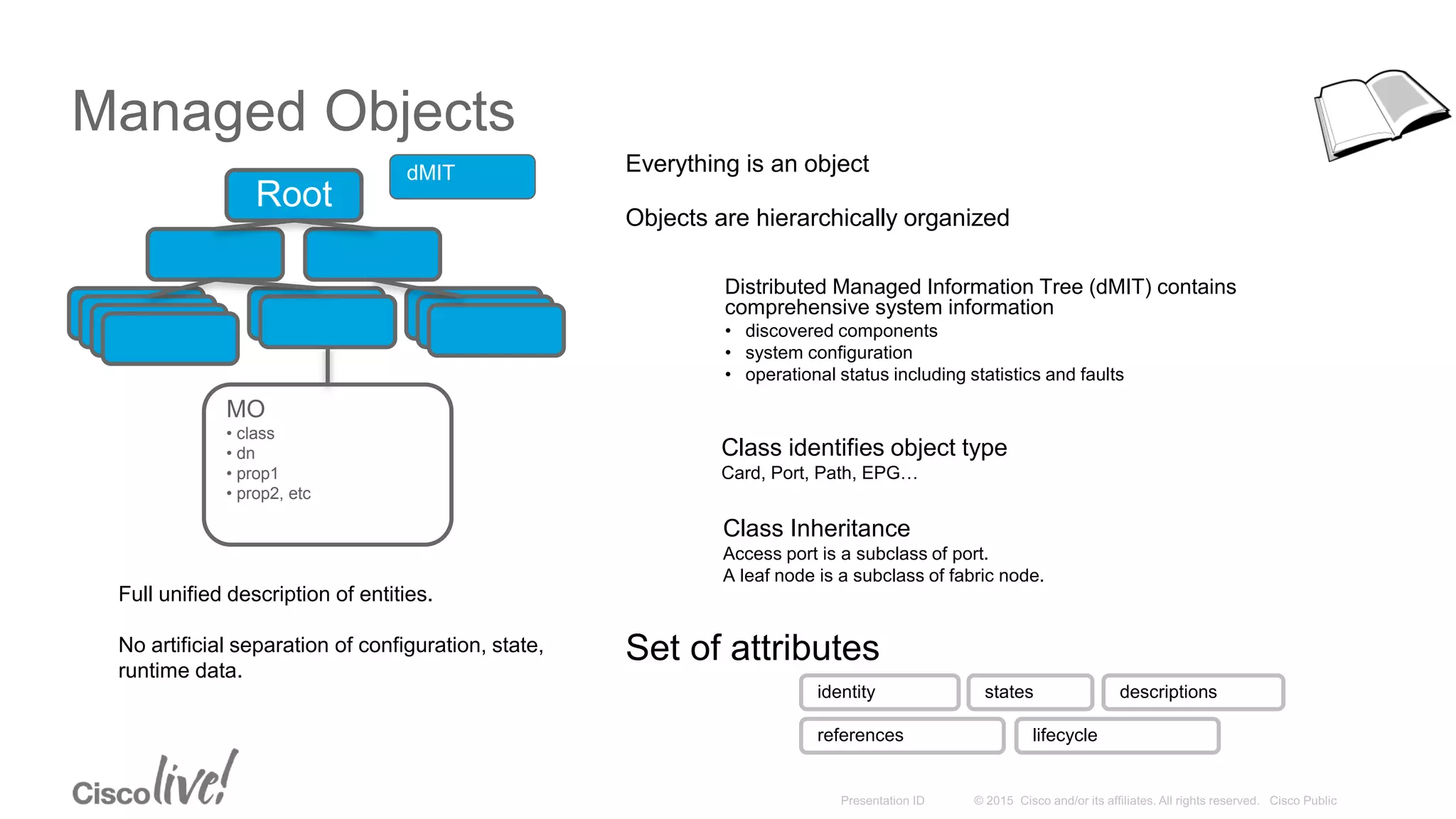
Managed Objects
Root
Everything is an object
Objects are hierarchically organized
Class identifies object type
Card, Port, Path, EPG…
Class Inheritance
Access port is a subclass of port.
A leaf node is a subclass of fabric node.
Set of attributes
identity states descriptions
references lifecycle
MO
• class
• dn
• prop1
• prop2, etc
Distributed Managed Information Tree (dMIT) contains
comprehensive system information
• discovered components
• system configuration
• operational status including statistics and faults
dMIT
Full unified description of entities.
No artificial separation of configuration, state,
runtime data.
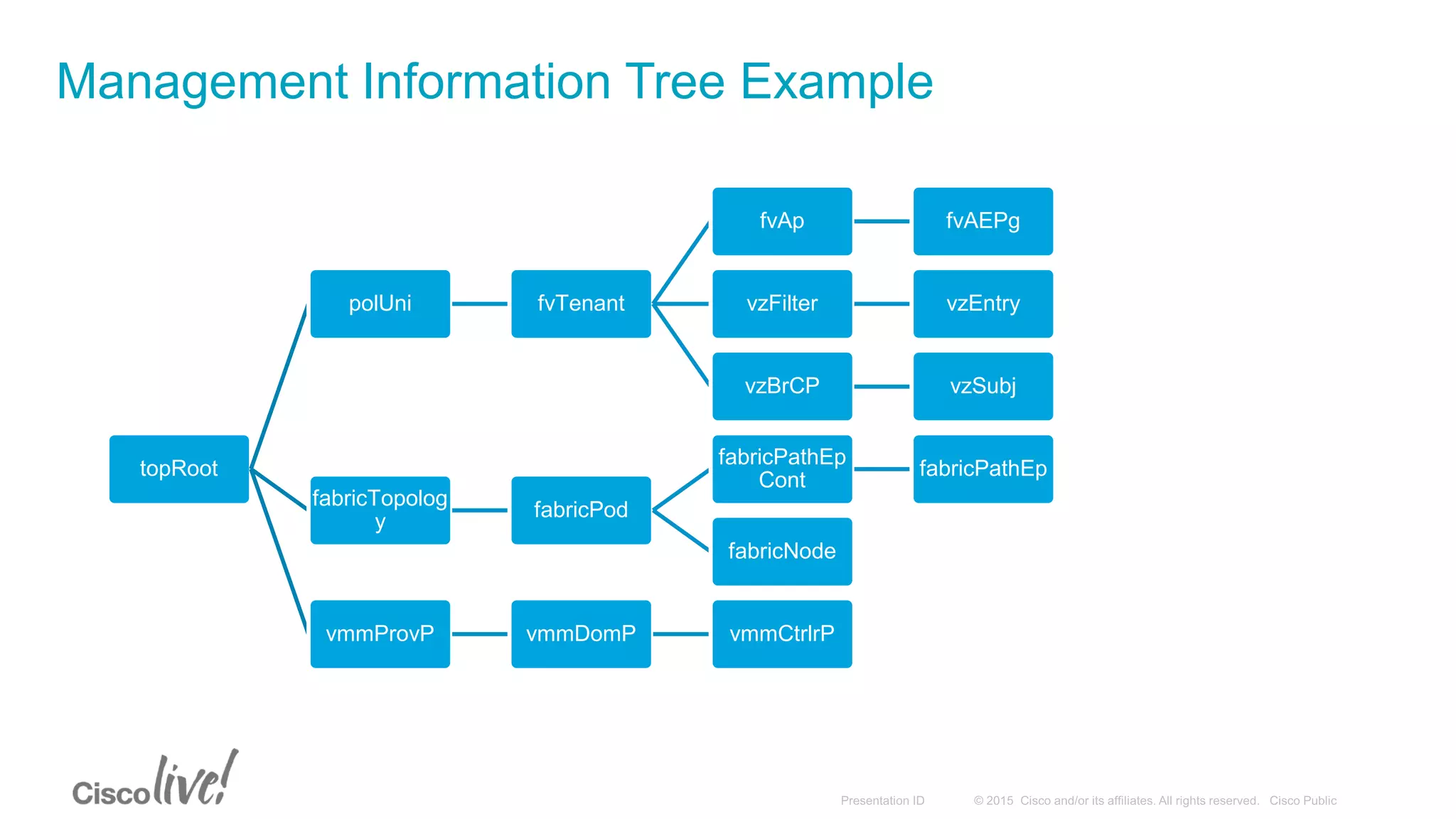
Management Information Tree Example
topRoot
polUni fvTenant
fvAp fvAEPg
vzFilter vzEntry
vzBrCP vzSubj
fabricTopolog
y
fabricPod
fabricPathEp
Cont
fabricPathEp
fabricNode
vmmProvP vmmDomP vmmCtrlrP
 DN is used as a globally unique identifier for an object in the MIT
 Formed by getting relative name (RN) and appending it to parent RN until reaching topRoot
 RN naming rule depends on object
 Can be found in APIC model documentation
Distinguished Name
topRoot
polUni fvTenant
fvAp fvAEPg
vzFilter vzEntry
vzBrCP vzSubj
fabricTopology fabricPod
fabricPathEpCont fabricPathEp
fabricNode
vmmProvP vmmDomP vmmCtrlrP
Example:
EPG in a tenant named “tenant” under
application “app1”
uni/tn-tenant/ap-app1/epg-epg1
Example:
Interface Eth1/3 on leaf 102 in pod 1
topology/pod-1/paths-102/pathep-[eth1/3]
Cisco ACI: REST API
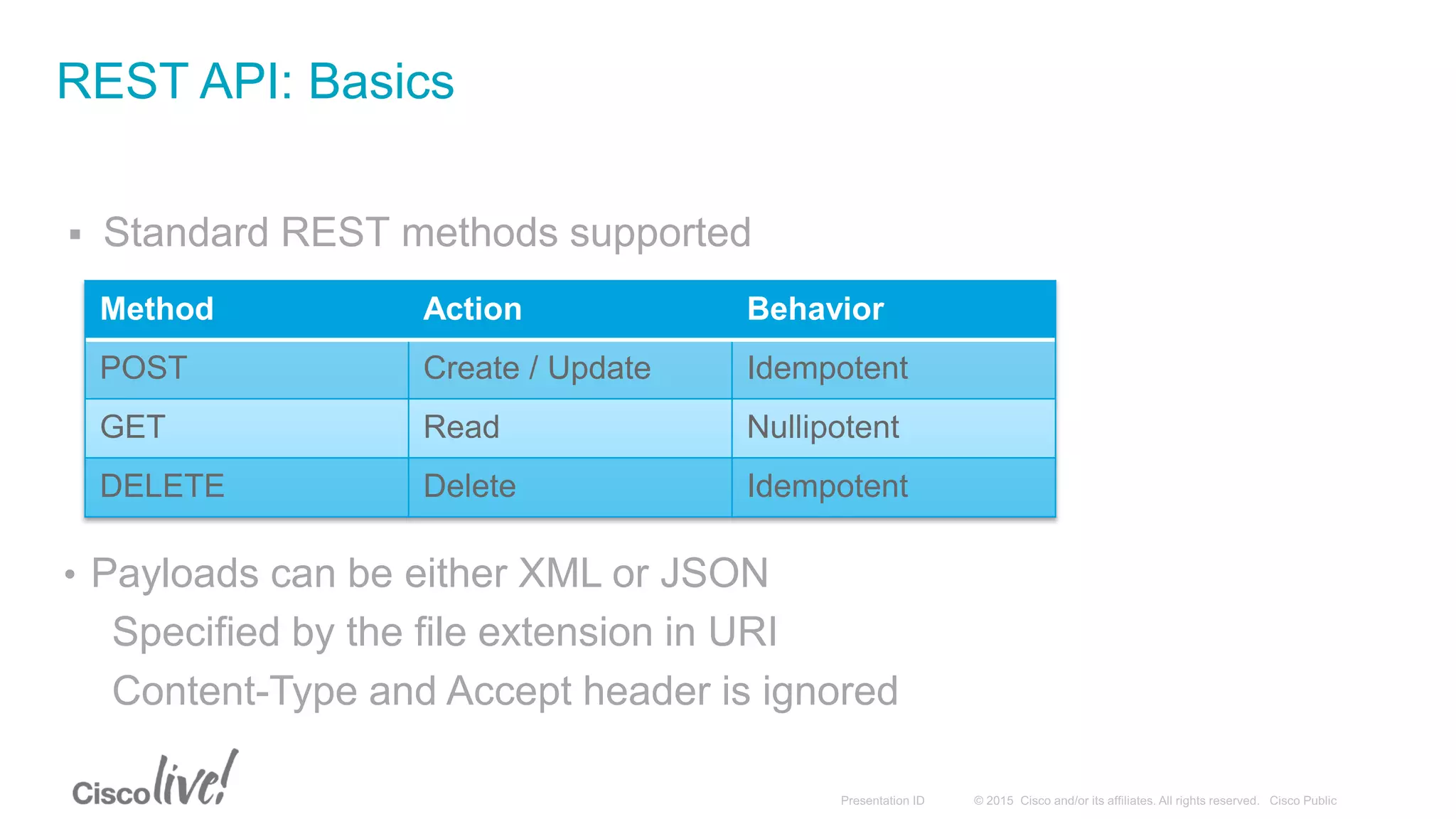
 Standard REST methods supported
REST API: Basics
Method Action Behavior
POST Create / Update Idempotent
GET Read Nullipotent
DELETE Delete Idempotent
• Payloads can be either XML or JSON
Specified by the file extension in URI
Content-Type and Accept header is ignored
REST API: Read Operations
/api
API
Operator
/{mo|class}
Specify
Managed
Object or Class
Operator
/{dn|classname}
Distinguished
name or Object
Class
.{xml|json}
Encoding for
response
?[options]
Specify filters,
selectors or
modifiers to query,
joined using
ampersand (&)
host:port
APIC host
and port
http(s)://
http or https
protocol
http://apic/api/mo/uni/tn-Cisco/ap-Software/epg-Download.xml
Read properties for an EPG by Distinguished Name
http://apic/api/class/l1PhysIf.xml?query-target-filter=eq(l1PhysIf.speed,"10G")
Find all 10G ports on Fabric
REST API: Create/Update Operations
/api /mo /dn .{xml|json} ?[options]host:porthttp(s)://
<fvTenant name="NewTenant">
<fvAp name="NewApplication">
<fvAEPg name="WebTier">
<fvRsPathAtt encap="vlan-1" mode="regular"
tDn="topology/pod-1/paths-17/pathep-[eth1/1]"/>
</fvAEPg>
</fvAp>
</fvTenant>
Payload is XML/JSON representation of API Command Body
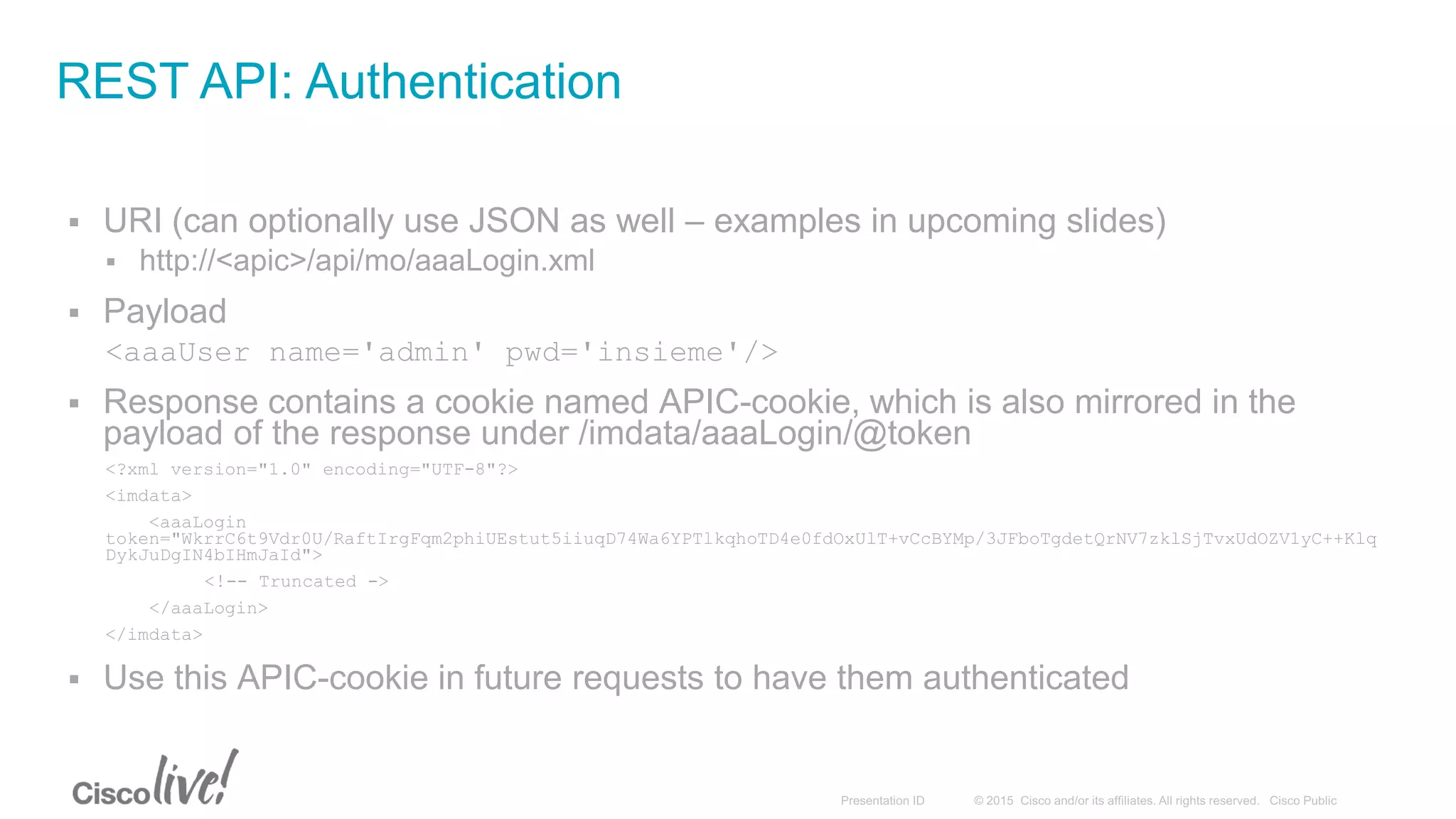
 URI (can optionally use JSON as well – examples in upcoming slides)
 http://<apic>/api/mo/aaaLogin.xml
 Payload
<aaaUser name='admin' pwd='insieme'/>
 Response contains a cookie named APIC-cookie, which is also mirrored in the
payload of the response under /imdata/aaaLogin/@token
<?xml version="1.0" encoding="UTF-8"?>
<imdata>
<aaaLogin
token="WkrrC6t9Vdr0U/RaftIrgFqm2phiUEstut5iiuqD74Wa6YPTlkqhoTD4e0fdOxUlT+vCcBYMp/3JFboTgdetQrNV7zklSjTvxUdOZV1yC++Klq
DykJuDgIN4bIHmJaId">
<!-- Truncated ->
</aaaLogin>
</imdata>
 Use this APIC-cookie in future requests to have them authenticated
REST API: Authentication
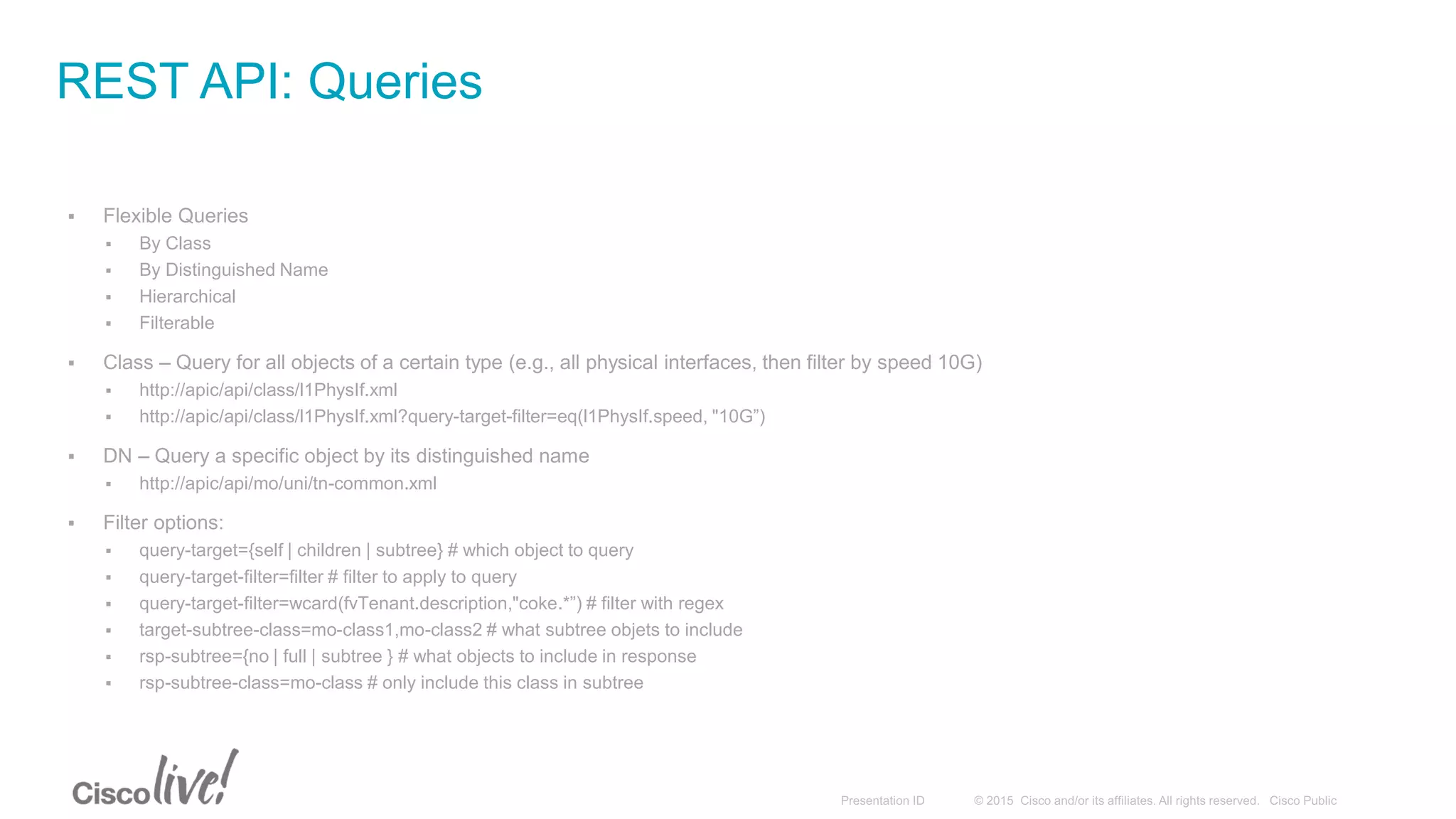
 Flexible Queries
 By Class
 By Distinguished Name
 Hierarchical
 Filterable
 Class – Query for all objects of a certain type (e.g., all physical interfaces, then filter by speed 10G)
 http://apic/api/class/l1PhysIf.xml
 http://apic/api/class/l1PhysIf.xml?query-target-filter=eq(l1PhysIf.speed, "10G”)
 DN – Query a specific object by its distinguished name
 http://apic/api/mo/uni/tn-common.xml
 Filter options:
 query-target={self | children | subtree} # which object to query
 query-target-filter=filter # filter to apply to query
 query-target-filter=wcard(fvTenant.description,"coke.*”) # filter with regex
 target-subtree-class=mo-class1,mo-class2 # what subtree objets to include
 rsp-subtree={no | full | subtree } # what objects to include in response
 rsp-subtree-class=mo-class # only include this class in subtree
REST API: Queries
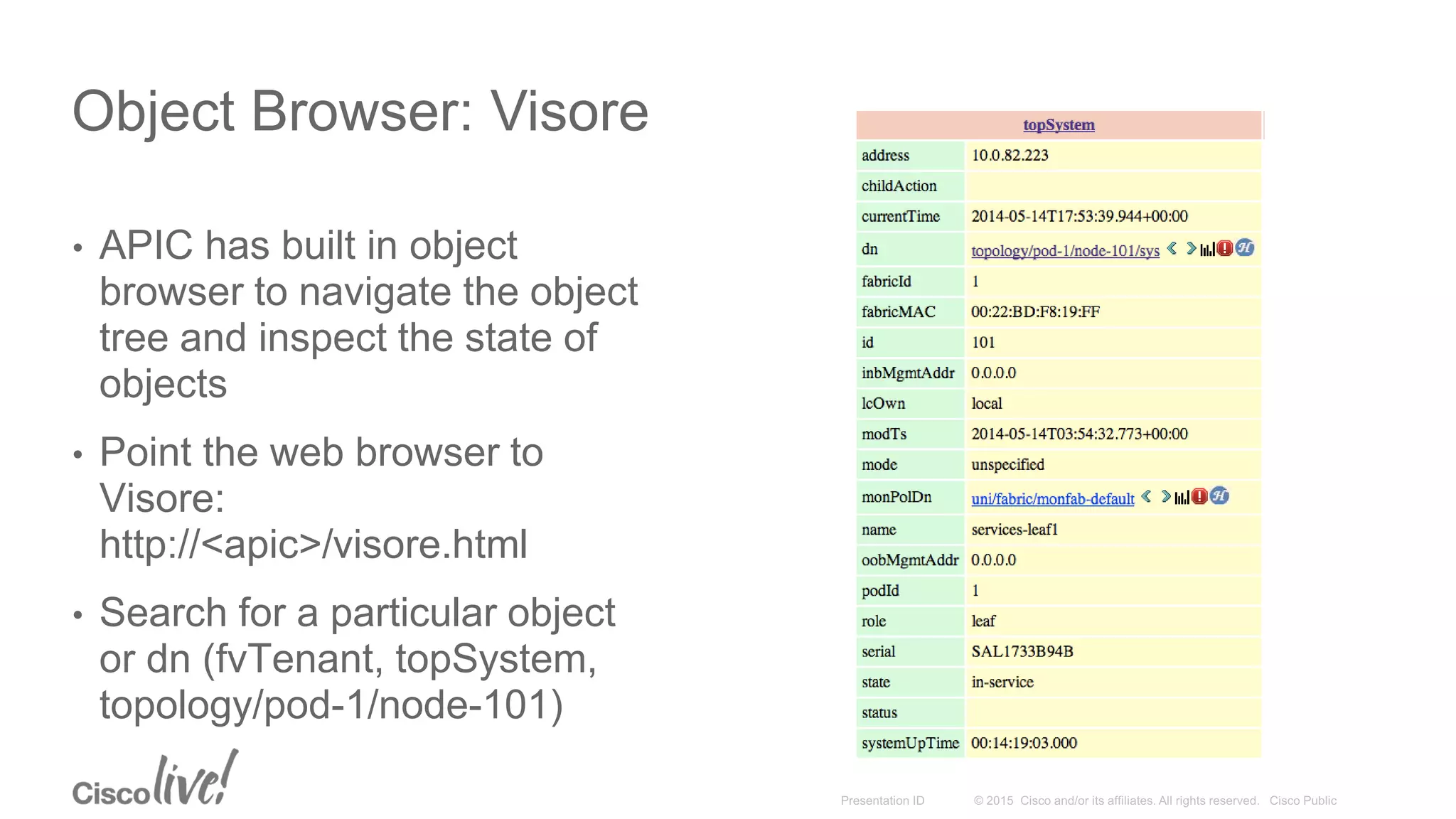
Object Browser: Visore
• APIC has built in object
browser to navigate the object
tree and inspect the state of
objects
• Point the web browser to
Visore:
http://<apic>/visore.html
• Search for a particular object
or dn (fvTenant, topSystem,
topology/pod-1/node-101)
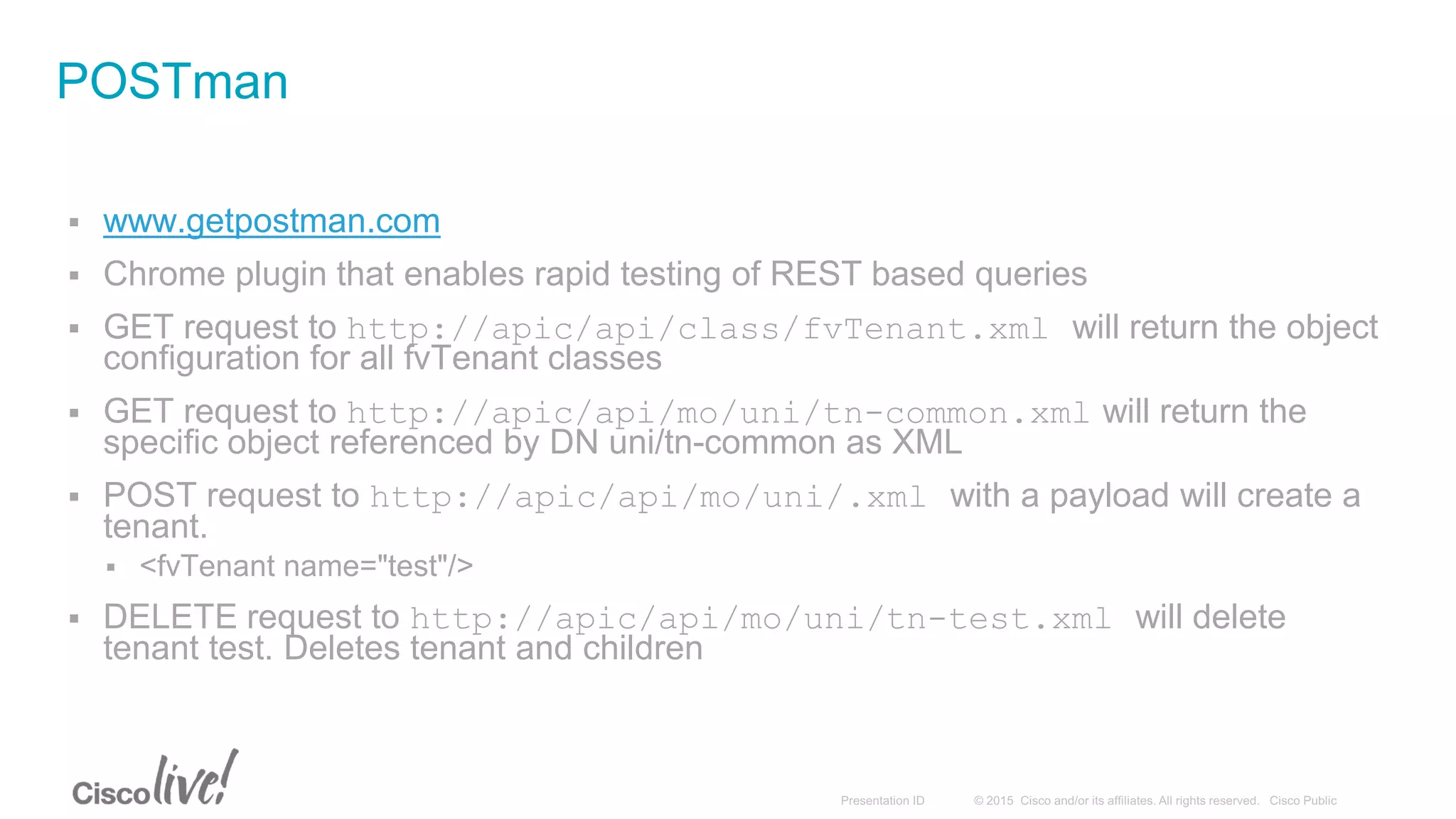
 www.getpostman.com
 Chrome plugin that enables rapid testing of REST based queries
 GET request to http://apic/api/class/fvTenant.xml will return the object
configuration for all fvTenant classes
 GET request to http://apic/api/mo/uni/tn-common.xml will return the
specific object referenced by DN uni/tn-common as XML
 POST request to http://apic/api/mo/uni/.xml with a payload will create a
tenant.
 <fvTenant name="test"/>
 DELETE request to http://apic/api/mo/uni/tn-test.xml will delete
tenant test. Deletes tenant and children
POSTman
Cisco ACI: SDK
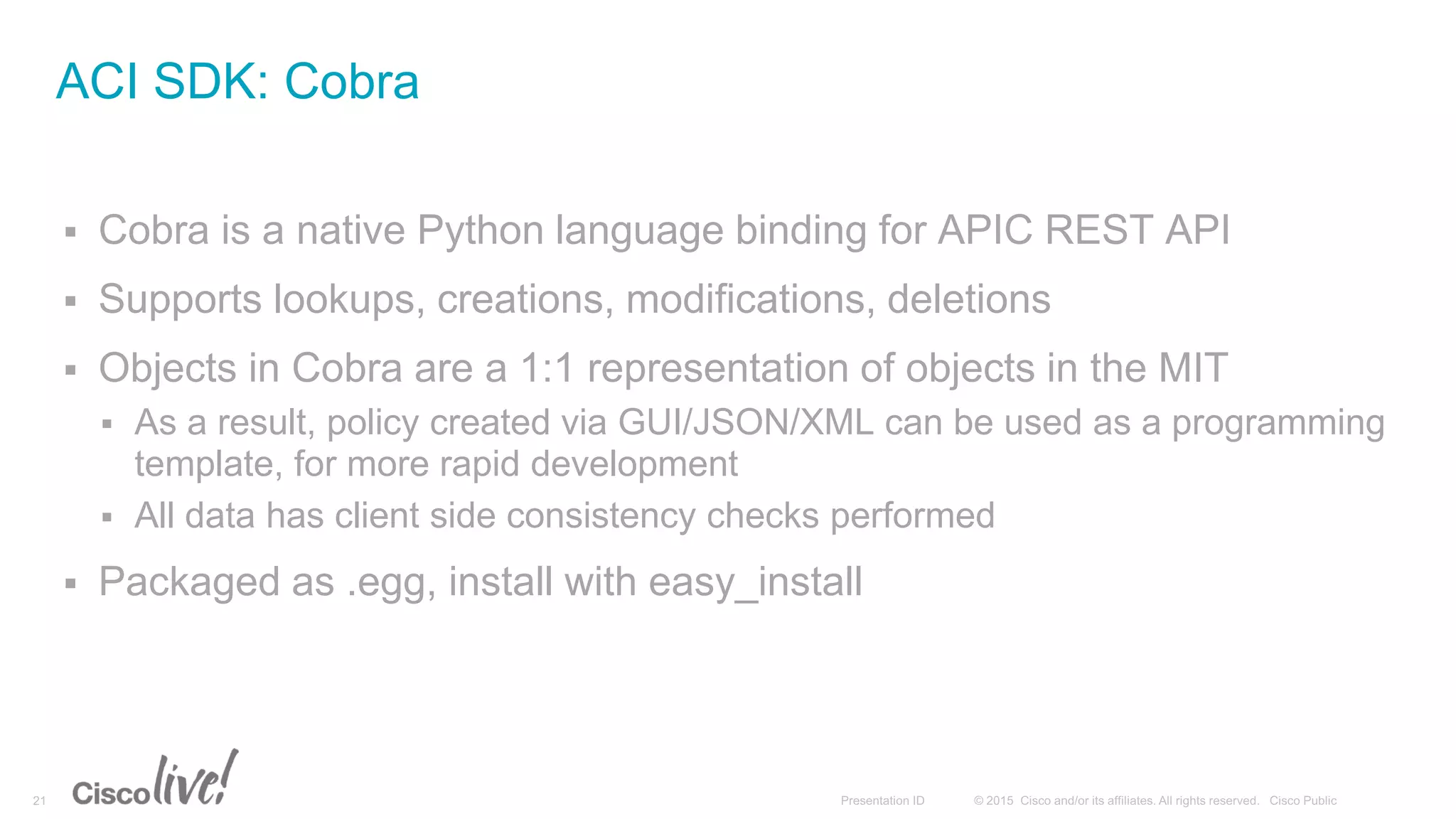
 Cobra is a native Python language binding for APIC REST API
 Supports lookups, creations, modifications, deletions
 Objects in Cobra are a 1:1 representation of objects in the MIT
 As a result, policy created via GUI/JSON/XML can be used as a programming
template, for more rapid development
 All data has client side consistency checks performed
 Packaged as .egg, install with easy_install
ACI SDK: Cobra
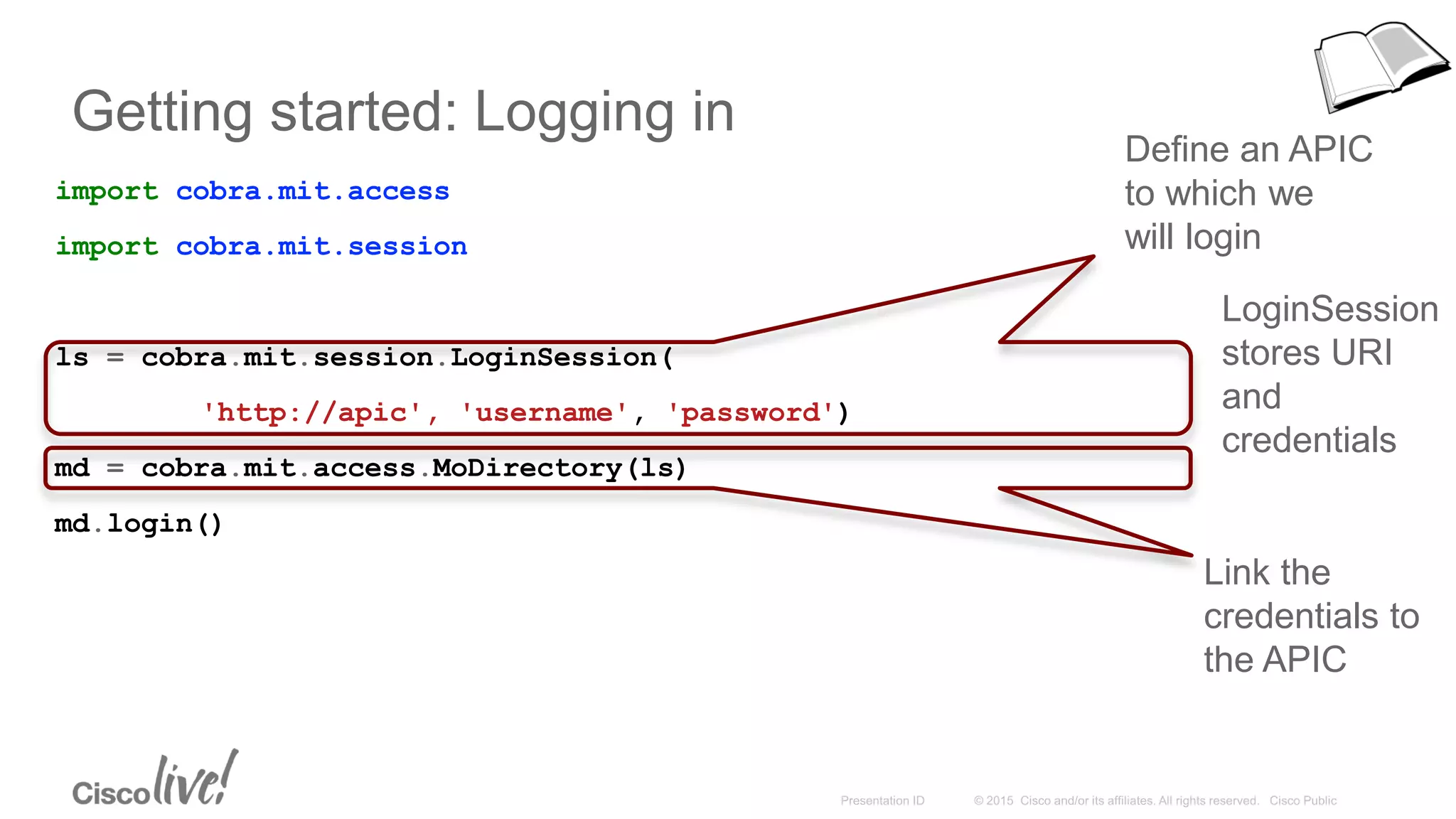
Getting started: Logging in
import cobra.mit.access
import cobra.mit.session
ls = cobra.mit.session.LoginSession(
'http://apic', 'username', 'password')
md = cobra.mit.access.MoDirectory(ls)
md.login()
Link the
credentials to
the APIC
Define an APIC
to which we
will login
LoginSession
stores URI
and
credentials
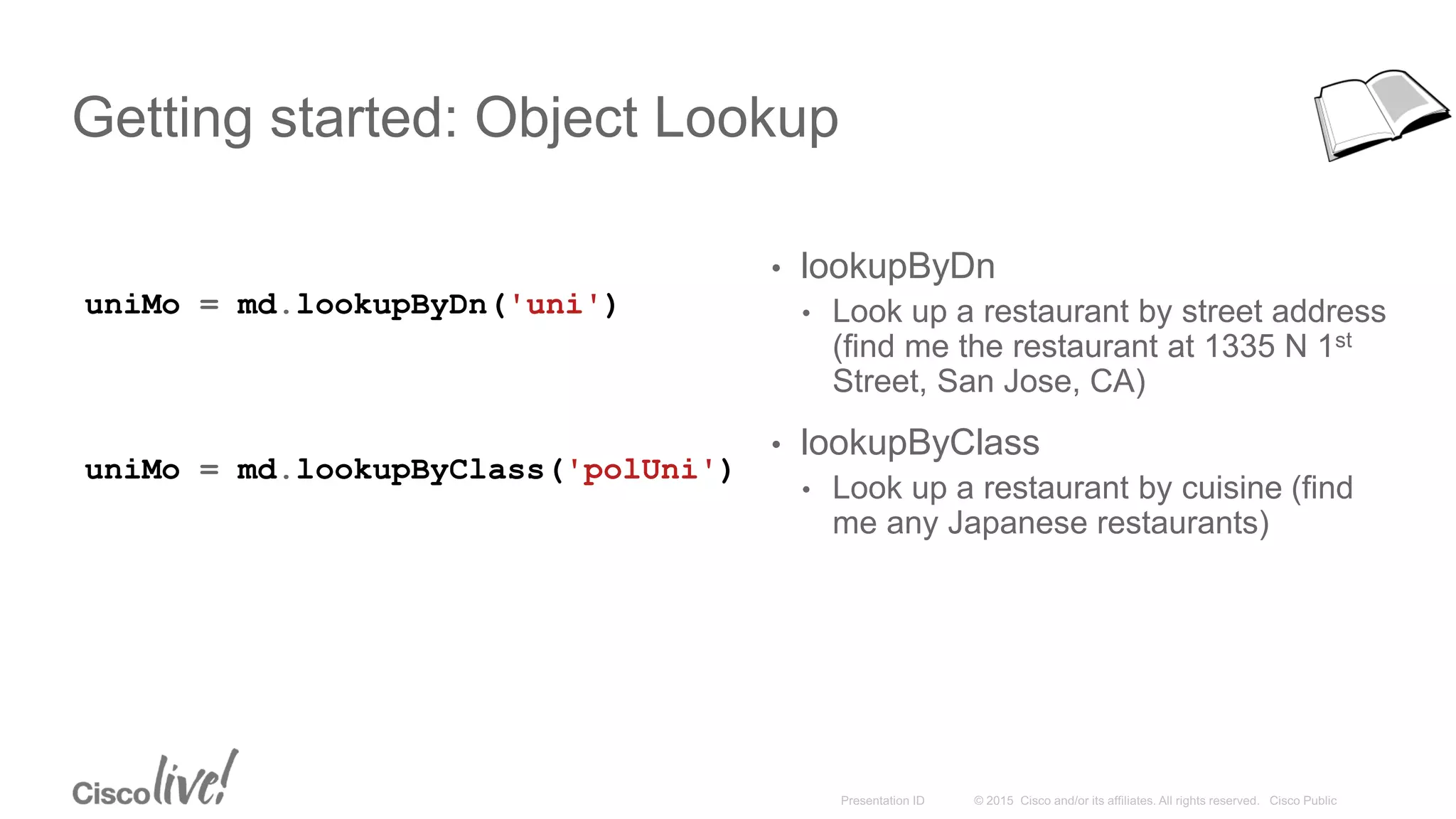
Getting started: Object Lookup
uniMo = md.lookupByDn('uni')
• lookupByDn
• Look up a restaurant by street address
(find me the restaurant at 1335 N 1st
Street, San Jose, CA)
• lookupByClass
• Look up a restaurant by cuisine (find
me any Japanese restaurants)
uniMo = md.lookupByClass('polUni')
Getting started: Object Creation
import cobra.model.fabric
# Advice: Don’t hardcode Dn’s.
topMo = md.lookupByDn('uni/controller/nodeidentpol')
leaf1IdentP = cobra.model.fabric.NodeIdentP(
topMo, serial='TEP-1-17', nodeId='17', name='leaf1')
spine1IdentP = cobra.model.fabric.NodeIdentP(
topMo, serial='TEP-1-19', nodeId='19', name='spine1')
Use Visore to
find the class
Note – These objects are created locally only,
to save them to the APIC use a
ConfigRequest.
Getting started: Committing configuration
import cobra.mit.request
topMo = md.lookupByClass('fabricNodeIdentPol')[0]
# Dn is no longer hard coded.
leaf1IdentP = cobra.model.fabric.NodeIdentP(
topMo, serial='TEP-1-17', nodeId='17', name='leaf1')
spine1IdentP = cobra.model.fabric.NodeIdentP(
topMo, serial='TEP-1-19', nodeId='19', name='spine1')
c = cobra.mit.request.ConfigRequest()
c.addMo(topMo) # Add and commit the most top level object that makes sense
md.commit(c)
Change a hard coded Dn
into a lookupByClass() call
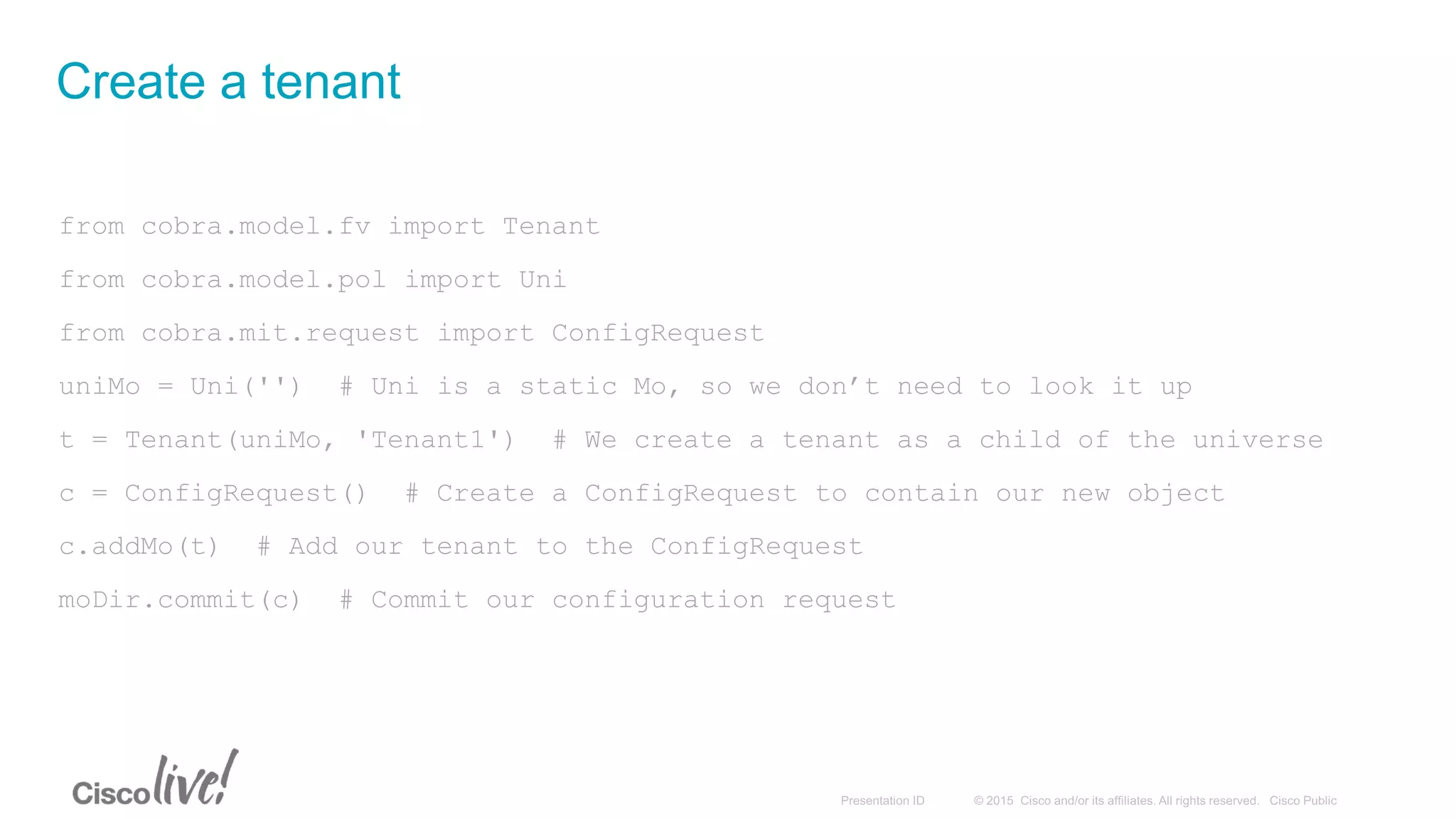
from cobra.model.fv import Tenant
from cobra.model.pol import Uni
from cobra.mit.request import ConfigRequest
uniMo = Uni('') # Uni is a static Mo, so we don’t need to look it up
t = Tenant(uniMo, 'Tenant1') # We create a tenant as a child of the universe
c = ConfigRequest() # Create a ConfigRequest to contain our new object
c.addMo(t) # Add our tenant to the ConfigRequest
moDir.commit(c) # Commit our configuration request
Create a tenant
from cobra.model.fv import *
from cobra.model.pol import Uni
uniMo = Uni('')
t = Tenant(uniMo, 'Tenant1')
ap = Ap(t, 'Exchange')
epg1 = AEPg(ap, 'OWA')
epg2 = AEPg(ap, 'FrontEnd')
epg3 = AEPg(ap, 'MailBox')
ep = RsPathAtt(epg1, tDn=‘topology/pod-1/paths-17/paths-[eth1/1]’,
mode=‘regular’, encap=‘vlan-10’)
c = ConfigRequest()
c.addMo(t)
moDir.commit(c)
Create a simple application
Note – Bridge Domain configuration omitted for
brevity. Please see the Cobra SDK or APIC
Configuration Guide for a complete configuration
Live Code!
Useful Links
• http://cobra.readthedocs.org
• https://github.com/datacenter/cobra
• https://acidev.cisco.com/
Introduction to ACI APIs

Introduction to ACI APIs

  • 2.
  • 3.
    Agenda • API DrivenDesign • Managed Objects • REST API Constructs • Cobra SDK • Live Code
  • 4.
    API Driven Design •Inventory • Discovery • Fabric Bring up • Firmware • Topology • Security • Monitoring • Troubleshooting • Debugging • L2 Connectivity • External Connectivity • VM Management • L4-L7 Services • Application Policies
  • 5.
  • 6.
  • 7.
    Object Model • Containsa modeled representation of: • Application • Network • Services • Virtualization • Management Root Policy Universe Tenants Application s Infra VLANs Topology Nodes Virtual Network Hypervisors
  • 8.
     Objects withinAPIC are structured in tree- based hierarchy  Objects referred to as “managed objects” (MO)  Packages identify the functional area  e.g., fv = fabric virtualization, vz = virtual zones, fabric = physical fabric, etc  Every object has a parent, with exception of top:Root (top of tree)  Relationships exist between objects Management Information Tree (MIT)
  • 9.
    Managed Objects Root Everything isan object Objects are hierarchically organized Class identifies object type Card, Port, Path, EPG… Class Inheritance Access port is a subclass of port. A leaf node is a subclass of fabric node. Set of attributes identity states descriptions references lifecycle MO • class • dn • prop1 • prop2, etc Distributed Managed Information Tree (dMIT) contains comprehensive system information • discovered components • system configuration • operational status including statistics and faults dMIT Full unified description of entities. No artificial separation of configuration, state, runtime data.
  • 10.
    Management Information TreeExample topRoot polUni fvTenant fvAp fvAEPg vzFilter vzEntry vzBrCP vzSubj fabricTopolog y fabricPod fabricPathEp Cont fabricPathEp fabricNode vmmProvP vmmDomP vmmCtrlrP
  • 11.
     DN isused as a globally unique identifier for an object in the MIT  Formed by getting relative name (RN) and appending it to parent RN until reaching topRoot  RN naming rule depends on object  Can be found in APIC model documentation Distinguished Name topRoot polUni fvTenant fvAp fvAEPg vzFilter vzEntry vzBrCP vzSubj fabricTopology fabricPod fabricPathEpCont fabricPathEp fabricNode vmmProvP vmmDomP vmmCtrlrP Example: EPG in a tenant named “tenant” under application “app1” uni/tn-tenant/ap-app1/epg-epg1 Example: Interface Eth1/3 on leaf 102 in pod 1 topology/pod-1/paths-102/pathep-[eth1/3]
  • 12.
  • 13.
     Standard RESTmethods supported REST API: Basics Method Action Behavior POST Create / Update Idempotent GET Read Nullipotent DELETE Delete Idempotent • Payloads can be either XML or JSON Specified by the file extension in URI Content-Type and Accept header is ignored
  • 14.
    REST API: ReadOperations /api API Operator /{mo|class} Specify Managed Object or Class Operator /{dn|classname} Distinguished name or Object Class .{xml|json} Encoding for response ?[options] Specify filters, selectors or modifiers to query, joined using ampersand (&) host:port APIC host and port http(s):// http or https protocol http://apic/api/mo/uni/tn-Cisco/ap-Software/epg-Download.xml Read properties for an EPG by Distinguished Name http://apic/api/class/l1PhysIf.xml?query-target-filter=eq(l1PhysIf.speed,"10G") Find all 10G ports on Fabric
  • 15.
    REST API: Create/UpdateOperations /api /mo /dn .{xml|json} ?[options]host:porthttp(s):// <fvTenant name="NewTenant"> <fvAp name="NewApplication"> <fvAEPg name="WebTier"> <fvRsPathAtt encap="vlan-1" mode="regular" tDn="topology/pod-1/paths-17/pathep-[eth1/1]"/> </fvAEPg> </fvAp> </fvTenant> Payload is XML/JSON representation of API Command Body
  • 16.
     URI (canoptionally use JSON as well – examples in upcoming slides)  http://<apic>/api/mo/aaaLogin.xml  Payload <aaaUser name='admin' pwd='insieme'/>  Response contains a cookie named APIC-cookie, which is also mirrored in the payload of the response under /imdata/aaaLogin/@token <?xml version="1.0" encoding="UTF-8"?> <imdata> <aaaLogin token="WkrrC6t9Vdr0U/RaftIrgFqm2phiUEstut5iiuqD74Wa6YPTlkqhoTD4e0fdOxUlT+vCcBYMp/3JFboTgdetQrNV7zklSjTvxUdOZV1yC++Klq DykJuDgIN4bIHmJaId"> <!-- Truncated -> </aaaLogin> </imdata>  Use this APIC-cookie in future requests to have them authenticated REST API: Authentication
  • 17.
     Flexible Queries By Class  By Distinguished Name  Hierarchical  Filterable  Class – Query for all objects of a certain type (e.g., all physical interfaces, then filter by speed 10G)  http://apic/api/class/l1PhysIf.xml  http://apic/api/class/l1PhysIf.xml?query-target-filter=eq(l1PhysIf.speed, "10G”)  DN – Query a specific object by its distinguished name  http://apic/api/mo/uni/tn-common.xml  Filter options:  query-target={self | children | subtree} # which object to query  query-target-filter=filter # filter to apply to query  query-target-filter=wcard(fvTenant.description,"coke.*”) # filter with regex  target-subtree-class=mo-class1,mo-class2 # what subtree objets to include  rsp-subtree={no | full | subtree } # what objects to include in response  rsp-subtree-class=mo-class # only include this class in subtree REST API: Queries
  • 18.
    Object Browser: Visore •APIC has built in object browser to navigate the object tree and inspect the state of objects • Point the web browser to Visore: http://<apic>/visore.html • Search for a particular object or dn (fvTenant, topSystem, topology/pod-1/node-101)
  • 19.
     www.getpostman.com  Chromeplugin that enables rapid testing of REST based queries  GET request to http://apic/api/class/fvTenant.xml will return the object configuration for all fvTenant classes  GET request to http://apic/api/mo/uni/tn-common.xml will return the specific object referenced by DN uni/tn-common as XML  POST request to http://apic/api/mo/uni/.xml with a payload will create a tenant.  <fvTenant name="test"/>  DELETE request to http://apic/api/mo/uni/tn-test.xml will delete tenant test. Deletes tenant and children POSTman
  • 20.
  • 21.
     Cobra isa native Python language binding for APIC REST API  Supports lookups, creations, modifications, deletions  Objects in Cobra are a 1:1 representation of objects in the MIT  As a result, policy created via GUI/JSON/XML can be used as a programming template, for more rapid development  All data has client side consistency checks performed  Packaged as .egg, install with easy_install ACI SDK: Cobra
  • 22.
    Getting started: Loggingin import cobra.mit.access import cobra.mit.session ls = cobra.mit.session.LoginSession( 'http://apic', 'username', 'password') md = cobra.mit.access.MoDirectory(ls) md.login() Link the credentials to the APIC Define an APIC to which we will login LoginSession stores URI and credentials
  • 23.
    Getting started: ObjectLookup uniMo = md.lookupByDn('uni') • lookupByDn • Look up a restaurant by street address (find me the restaurant at 1335 N 1st Street, San Jose, CA) • lookupByClass • Look up a restaurant by cuisine (find me any Japanese restaurants) uniMo = md.lookupByClass('polUni')
  • 24.
    Getting started: ObjectCreation import cobra.model.fabric # Advice: Don’t hardcode Dn’s. topMo = md.lookupByDn('uni/controller/nodeidentpol') leaf1IdentP = cobra.model.fabric.NodeIdentP( topMo, serial='TEP-1-17', nodeId='17', name='leaf1') spine1IdentP = cobra.model.fabric.NodeIdentP( topMo, serial='TEP-1-19', nodeId='19', name='spine1') Use Visore to find the class Note – These objects are created locally only, to save them to the APIC use a ConfigRequest.
  • 25.
    Getting started: Committingconfiguration import cobra.mit.request topMo = md.lookupByClass('fabricNodeIdentPol')[0] # Dn is no longer hard coded. leaf1IdentP = cobra.model.fabric.NodeIdentP( topMo, serial='TEP-1-17', nodeId='17', name='leaf1') spine1IdentP = cobra.model.fabric.NodeIdentP( topMo, serial='TEP-1-19', nodeId='19', name='spine1') c = cobra.mit.request.ConfigRequest() c.addMo(topMo) # Add and commit the most top level object that makes sense md.commit(c) Change a hard coded Dn into a lookupByClass() call
  • 26.
    from cobra.model.fv importTenant from cobra.model.pol import Uni from cobra.mit.request import ConfigRequest uniMo = Uni('') # Uni is a static Mo, so we don’t need to look it up t = Tenant(uniMo, 'Tenant1') # We create a tenant as a child of the universe c = ConfigRequest() # Create a ConfigRequest to contain our new object c.addMo(t) # Add our tenant to the ConfigRequest moDir.commit(c) # Commit our configuration request Create a tenant
  • 27.
    from cobra.model.fv import* from cobra.model.pol import Uni uniMo = Uni('') t = Tenant(uniMo, 'Tenant1') ap = Ap(t, 'Exchange') epg1 = AEPg(ap, 'OWA') epg2 = AEPg(ap, 'FrontEnd') epg3 = AEPg(ap, 'MailBox') ep = RsPathAtt(epg1, tDn=‘topology/pod-1/paths-17/paths-[eth1/1]’, mode=‘regular’, encap=‘vlan-10’) c = ConfigRequest() c.addMo(t) moDir.commit(c) Create a simple application Note – Bridge Domain configuration omitted for brevity. Please see the Cobra SDK or APIC Configuration Guide for a complete configuration
  • 28.
  • 29.
    Useful Links • http://cobra.readthedocs.org •https://github.com/datacenter/cobra • https://acidev.cisco.com/