APIC DC: API Deep Dive
DevNet-1003/1029
Paul Lesiak, Solutions Architect
© 2015 Cisco and/or its affiliates. All rights reserved.Presentation_ID Cisco Public
Agenda
• Introduction
– ACI and APIC DC
– Programmatic Interfaces
– API/SDK Features and Functionality
• Getting Started
• Best Practices
• Applicability
• Conclusion
3
Introduction
© 2015 Cisco and/or its affiliates. All rights reserved.Presentation_ID Cisco Public
Introduction
• Goal for this session:
– Introduce attendees to Cisco ACI and APIC DC
– Educate about the programmatic interfaces available
– Give steps to get started with developing for APIC
– Provide best practices for working with the API and SDK
• Out of scope for this session:
– Comprehensive course on ACI
– Teach Python programming
5
© 2015 Cisco and/or its affiliates. All rights reserved.Presentation_ID Cisco Public
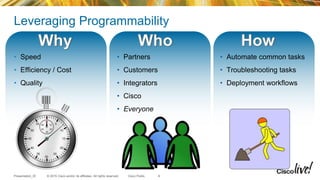
Leveraging Programmability
• Speed
• Efficiency / Cost
• Quality
• Automate common tasks
• Troubleshooting tasks
• Deployment workflows
• Partners
• Customers
• Integrators
• Cisco
• Everyone
6
© 2015 Cisco and/or its affiliates. All rights reserved.Presentation_ID Cisco Public
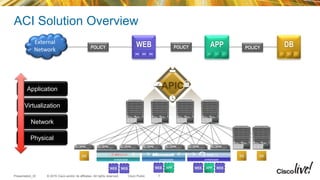
Physical
Virtualization
Network
APP DBPOLICY WEB
HYPERVISORHYPERVISOR HYPERVISOR
APICApplication
External
Network POLICY POLICY
ACI Solution Overview
7
© 2015 Cisco and/or its affiliates. All rights reserved.Presentation_ID Cisco Public
ACI and APIC DC
• Application Centric Infrastructure (ACI) represents network configuration with
application based semantics
• Fabric functions as single switch: Scale, Mobility, Telemetry, Automation
• Cisco APIC is a centralized point of management for physical, virtual and cloud
infrastructure
• Robust implementation designed around open standards and open APIs
8
© 2015 Cisco and/or its affiliates. All rights reserved.Presentation_ID Cisco Public
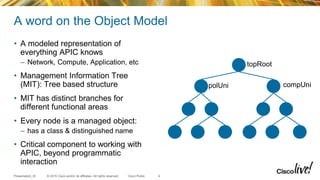
A word on the Object Model
• A modeled representation of
everything APIC knows
– Network, Compute, Application, etc
• Management Information Tree
(MIT): Tree based structure
• MIT has distinct branches for
different functional areas
• Every node is a managed object:
– has a class & distinguished name
• Critical component to working with
APIC, beyond programmatic
interaction
9
topRoot
polUni compUni
© 2015 Cisco and/or its affiliates. All rights reserved.Presentation_ID Cisco Public
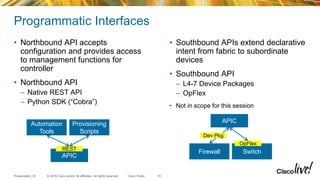
Programmatic Interfaces
• Northbound API accepts
configuration and provides access
to management functions for
controller
• Northbound API
– Native REST API
– Python SDK (“Cobra”)
• Southbound APIs extend declarative
intent from fabric to subordinate
devices
• Southbound API
– L4-7 Device Packages
– OpFlex
• Not in scope for this session
10
Automation
Tools
Provisioning
Scripts
APIC
REST
Firewall Switch
OpFlex
APIC
Dev Pkg
© 2015 Cisco and/or its affiliates. All rights reserved.Presentation_ID Cisco Public
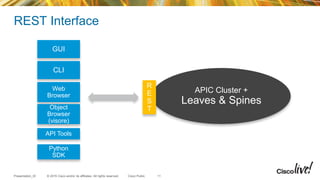
REST Interface
GUI
CLI
Web
Browser
API Tools
Object
Browser
(visore)
APIC Cluster +
Leaves & Spines
R
E
S
T
Python
SDK
11
© 2015 Cisco and/or its affiliates. All rights reserved.Presentation_ID Cisco Public
Features and Functionality
• Native REST interface
– GUI can be used as reference / how to get things done guide
• Robust querying and filtering interface
• Configured and operational state provided through same interface
• Object model supports parameters useful for overloading application state
• Event driven notification via websockets
12
Getting Started
13
© 2015 Cisco and/or its affiliates. All rights reserved.Presentation_ID Cisco Public
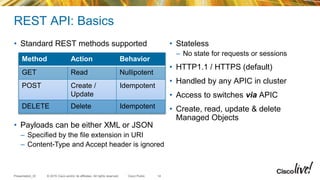
REST API: Basics
• Standard REST methods supported • Stateless
– No state for requests or sessions
• HTTP1.1 / HTTPS (default)
• Handled by any APIC in cluster
• Access to switches via APIC
• Create, read, update & delete
Managed Objects
Method Action Behavior
GET Read Nullipotent
POST Create /
Update
Idempotent
DELETE Delete Idempotent
• Payloads can be either XML or JSON
– Specified by the file extension in URI
– Content-Type and Accept header is ignored
14
© 2015 Cisco and/or its affiliates. All rights reserved.Presentation_ID Cisco Public
REST API: Read Operations
/api
API
Operator
/{mo|class}
Specify
Managed
Object or Class
Operator
/{dn|classname}
Distinguished
name or Object
Class
.{xml|json}
Encoding for
response
?[options]
Specify filters,
selectors or
modifiers to query,
joined using
ampersand (&)
host:port
APIC host
and port
http(s)://
http or
https
protocol
http://apic/api/mo/uni/tn-Cisco/ap-Software/epg-Download.xml
Read properties for an EPG by Distinguished Name
http://apic/api/class/l1PhysIf.xml?query-target-filter=eq(l1PhysIf.speed,"10G")
Find all 10G ports on Fabric
15
© 2015 Cisco and/or its affiliates. All rights reserved.Presentation_ID Cisco Public
REST API: Create/Update Operations
/api /mo /dn .{xml|json} ?[options]host:porthttp(s)://
<fvTenant name="NewTenant">
<fvAp name="NewApplication">
<fvAEPg name="WebTier">
<fvRsPathAtt encap="vlan-1" mode="regular"
tDn="topology/pod-1/paths-17/pathep-[eth1/1]"/>
</fvAEPg>
</fvAp>
</fvTenant>
Payload is XML/JSON representation of API Command Body
16
© 2015 Cisco and/or its affiliates. All rights reserved.Presentation_ID Cisco Public
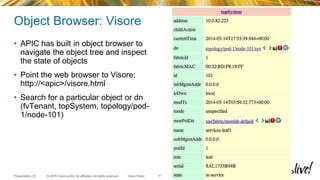
Object Browser: Visore
• APIC has built in object browser to
navigate the object tree and inspect
the state of objects
• Point the web browser to Visore:
http://<apic>/visore.html
• Search for a particular object or dn
(fvTenant, topSystem, topology/pod-
1/node-101)
17
© 2015 Cisco and/or its affiliates. All rights reserved.Presentation_ID Cisco Public
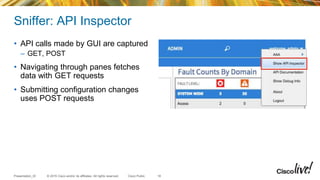
Sniffer: API Inspector
• API calls made by GUI are captured
– GET, POST
• Navigating through panes fetches
data with GET requests
• Submitting configuration changes
uses POST requests
18
© 2015 Cisco and/or its affiliates. All rights reserved.Presentation_ID Cisco Public
Capturing API Calls
19
POST
url: http://172.23.3.215/api/node/mo/uni/tn-Cisco.json
{
"fvTenant": {
"attributes": {
"name": "Cisco",
"status": "created"
},
"children": []
}
}
© 2015 Cisco and/or its affiliates. All rights reserved.Presentation_ID Cisco Public
Getting Started
1. Get the Cobra SDK
2. Get the documentation
3. Establish authenticated session
4. Simple queries
5. Inserting data into object store
20
© 2015 Cisco and/or its affiliates. All rights reserved.Presentation_ID Cisco Public
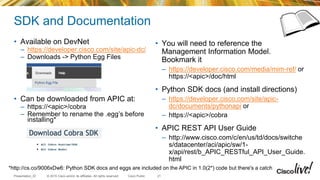
SDK and Documentation
• Available on DevNet
– https://developer.cisco.com/site/apic-dc/
– Downloads -> Python Egg Files
• Can be downloaded from APIC at:
– https://<apic>/cobra
– Remember to rename the .egg’s before
installing*
• You will need to reference the
Management Information Model.
Bookmark it
– https://developer.cisco.com/media/mim-ref/ or
https://<apic>/doc/html
• Python SDK docs (and install directions)
– https://developer.cisco.com/site/apic-
dc/documents/pythonapi or
– https://<apic>/cobra
• APIC REST API User Guide
– http://www.cisco.com/c/en/us/td/docs/switche
s/datacenter/aci/apic/sw/1-
x/api/rest/b_APIC_RESTful_API_User_Guide.
html
21
*http://cs.co/9006xDw6: Python SDK docs and eggs are included on the APIC in 1.0(2*) code but there's a catch
© 2015 Cisco and/or its affiliates. All rights reserved.Presentation_ID Cisco Public
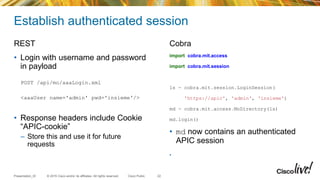
Establish authenticated session
REST
• Login with username and password
in payload
POST /api/mo/aaaLogin.xml
<aaaUser name='admin' pwd='insieme'/>
• Response headers include Cookie
“APIC-cookie”
– Store this and use it for future
requests
Cobra
import cobra.mit.access
import cobra.mit.session
ls = cobra.mit.session.LoginSession(
'https://apic', 'admin', 'insieme')
md = cobra.mit.access.MoDirectory(ls)
md.login()
• md now contains an authenticated
APIC session
•
22
© 2015 Cisco and/or its affiliates. All rights reserved.Presentation_ID Cisco Public
Simple Queries
REST
• Query for all client endpoint objects
GET /api/class/fvCEp.xml
<?xml?><imdata><fvCEp dn="uni/tn-
Cisco/ap-Blog/epg-MySQL/cep-
00:50:56:82:D2:FE" encap="vlan-501"
id="0" ip="0.0.0.0" lcC="vmm"
lcOwn="local" mac="00:50:56:82:D2:FE"
mcastAddr="not-applicable"
name="00:50:56:82:D2:FE”
uid="0"/></imdata>
• Parse XML results and process as
needed
Cobra
• Use the “lookupByClass” method to
find all endpoints (fvCEp)
endpoints = md.lookupByClass('fvCEp')
print([str(ep.dn) for ep in endpoints])
['uni/tn-Cisco/ap-Blog/epg-MySQL/cep-
00:50:56:82:D2:FE', 'uni/tn-Cisco/ap-
Blog/epg-MySQL/cep-00:50:56:82:C3:D0']
23
Tip: To inspect http requests use debuglevel on
httplib:
import httplib
httplib.HTTPConnection.debuglevel =
1
© 2015 Cisco and/or its affiliates. All rights reserved.Presentation_ID Cisco Public
Query Filters in Cobra
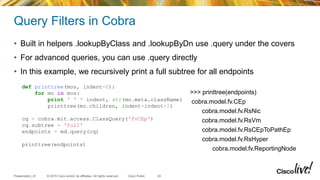
• Built in helpers .lookupByClass and .lookupByDn use .query under the covers
• For advanced queries, you can use .query directly
• In this example, we recursively print a full subtree for all endpoints
24
def printtree(mos, indent=0):
for mo in mos:
print ' ' * indent, str(mo.meta.className)
printtree(mo.children, indent=indent+2)
cq = cobra.mit.access.ClassQuery('fvCEp')
cq.subtree = 'full'
endpoints = md.query(cq)
printtree(endpoints)
>>> printtree(endpoints)
cobra.model.fv.CEp
cobra.model.fv.RsNic
cobra.model.fv.RsVm
cobra.model.fv.RsCEpToPathEp
cobra.model.fv.RsHyper
cobra.model.fv.ReportingNode
© 2015 Cisco and/or its affiliates. All rights reserved.Presentation_ID Cisco Public
Query Filters
• Usually more efficient as less number of MOs need to be serialized and returned
• Filter the response returned using the supplied condition(s):
– Syntax: http://URI?condition[&condition[&...]]
• Returns only the MOs that satisfies the condition(s)
Filter type Syntax Cobra Query Property Description
query-target {self | children | subtree} AbstractQuery.queryTarget Define the scope of query
target-subtree-class <class name> AbstractQuery.classFilter Respond only elements including specified class
query-target-filter <filter expressions> AbstractQuery.propFilter Respond only elements matching conditions
rsp-subtree {no | children | full} AbstractQuery.subtree specifies child object level included in the response
rsp-subtree-class <class name> AbstractQuery.subtreeClassFilter Respond only specified classes
rsp-subtree-filter <filter expressions> AbstractQuery.subtreePropFilter (>1.0.2m) Respond only classes matching conditions
rsp-subtree-include {faults | health :stats : …} AbstractQuery.subtreeInclude Request additional objects
order-by <classname.property>| {asc | desc} NotImplemented Sort the response based on the property values
25
© 2015 Cisco and/or its affiliates. All rights reserved.Presentation_ID Cisco Public
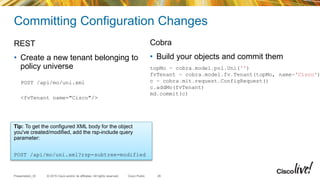
Committing Configuration Changes
REST
• Create a new tenant belonging to
policy universe
POST /api/mo/uni.xml
<fvTenant name="Cisco"/>
Cobra
• Build your objects and commit them
26
Tip: To get the configured XML body for the object
you've created/modified, add the rsp-include query
parameter:
POST /api/mo/uni.xml?rsp-subtree=modified
topMo = cobra.model.pol.Uni('')
fvTenant = cobra.model.fv.Tenant(topMo, name='Cisco')
c = cobra.mit.request.ConfigRequest()
c.addMo(fvTenant)
md.commit(c)
© 2015 Cisco and/or its affiliates. All rights reserved.Presentation_ID Cisco Public
APIC REST to Python Adapter: arya.py
• GUI creates REST
• API Inspector shows REST
• arya.py creates code from
REST
• Auto-generate code to
automate tasks, without
heavy lifting
• Available at
http://github.com/datacenter/ACI
XML/JSON
arya.py
Python
code
{"fvTenant":{"attributes":{"dn":"uni/tn-
Cisco","name":"Cisco","rn":"tn-
Cisco","status":"created"},"children":[{"fvBD":{"attribut
es":{"dn":"uni/tn-Cisco/BD-
CiscoBd","mac":"00:22:BD:F8:19:FF","name":"CiscoBd","rn":
"BD-
CiscoBd","status":"created"},"children":[{"fvRsCtx":{"att
ributes":{"tnFvCtxName":"CiscoNetwork","status":"created,
modified"},"children":[]}},{"fvSubnet":{"attributes":{"dn
":"uni/tn-Cisco/BD-CiscoBd/subnet-
[10.0.0.1/8]","ip":"10.0.0.1/8","rn":"subnet-
[10.0.0.1/8]","status":"created"},"children":[]}}]}},{"fv
Ctx":{"attributes":{"dn":"uni/tn-Cisco/ctx-
CiscoNetwork","name":"CiscoNetwork","rn":"ctx-
CiscoNetwork","status":"created"},"children":[]}}]}}
fvTenant = cobra.model.fv.Tenant(topMo, name='Cisco')
fvCtx = cobra.model.fv.Ctx(fvTenant, name='CiscoNetwork')
fvBD = cobra.model.fv.BD(fvTenant,
mac='00:22:BD:F8:19:FF', name='CiscoBd')
fvRsCtx = cobra.model.fv.RsCtx(fvBD,
tnFvCtxName=fvCtx.name)
fvSubnet = cobra.model.fv.Subnet(fvBD, ip='10.0.0.1/8')
27
© 2015 Cisco and/or its affiliates. All rights reserved.Presentation_ID Cisco Public
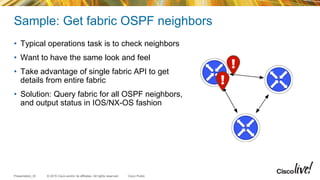
Sample: Get fabric OSPF neighbors
• Typical operations task is to check neighbors
• Want to have the same look and feel
• Take advantage of single fabric API to get
details from entire fabric
• Solution: Query fabric for all OSPF neighbors,
and output status in IOS/NX-OS fashion
© 2015 Cisco and/or its affiliates. All rights reserved.Presentation_ID Cisco Public
Get fabric OSPF neighbors: Code
29
def showOspf(md):
cq = cobra.mit.request.ClassQuery('ospfAdjEp')
cq.subtreeInclude = 'faults'
return md.query(cq)
neis = showOspf(md)
fields = [('Neighbor ID ', 'id'), ('Pri', 'prio'), ('State ',
'operSt'), ('Address ', 'peerIp'), ('Node', 'dn')]
for field in fields:
print '{:<{width}}'.format(field[0], width=len(field[0])),
for ne in neis:
for f in fields:
print '{:<{width}}'.format(getattr(ne, f[1]), width=len(f[0])),
for fault in ne.children:
print 'Fault Present: ', fault.descr
Fetch Neighbors
Print
© 2015 Cisco and/or its affiliates. All rights reserved.Presentation_ID Cisco Public
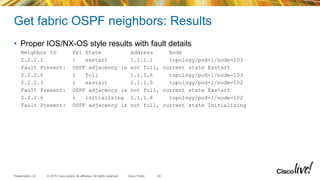
Get fabric OSPF neighbors: Results
• Proper IOS/NX-OS style results with fault details
Neighbor ID Pri State Address Node
2.2.2.1 1 exstart 1.1.1.1 topology/pod-1/node-103
Fault Present: OSPF adjacency is not full, current state Exstart
2.2.2.6 1 full 1.1.1.6 topology/pod-1/node-103
2.2.2.3 1 exstart 1.1.1.5 topology/pod-1/node-102
Fault Present: OSPF adjacency is not full, current state Exstart
2.2.2.6 1 initializing 1.1.1.6 topology/pod-1/node-102
Fault Present: OSPF adjacency is not full, current state Initializing
30
Best Practices
© 2015 Cisco and/or its affiliates. All rights reserved.Presentation_ID Cisco Public
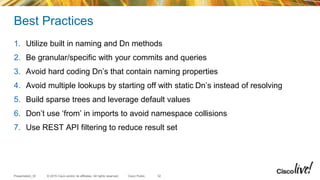
Best Practices
1. Utilize built in naming and Dn methods
2. Be granular/specific with your commits and queries
3. Avoid hard coding Dn’s that contain naming properties
4. Avoid multiple lookups by starting off with static Dn’s instead of resolving
5. Build sparse trees and leverage default values
6. Don’t use ‘from’ in imports to avoid namespace collisions
7. Use REST API filtering to reduce result set
32
© 2015 Cisco and/or its affiliates. All rights reserved.Presentation_ID Cisco Public
1. Built in naming and Dn methods
• When making references between
Managed Objects, do not manually
build Dn strings
• Instead, lookup the object and use the
.dn property
33
fvRsPathAtt =
cobra.model.fv.RsPathAtt(fvAEPg,
encap='vlan-2', tDn='topology/pod-
1/paths-101/pathep-[eth1/1]')
fvRsPathAtt =
cobra.model.fv.RsPathAtt(fvAEPg,
tDn=interface.dn)
© 2015 Cisco and/or its affiliates. All rights reserved.Presentation_ID Cisco Public
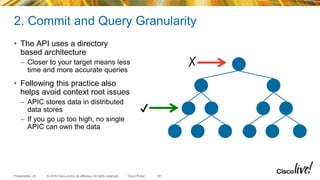
2. Commit and Query Granularity
• The API uses a directory
based architecture
– Closer to your target means less
time and more accurate queries
• Following this practice also
helps avoid context root issues
– APIC stores data in distributed
data stores
– If you go up too high, no single
APIC can own the data
34
✔
✗
© 2015 Cisco and/or its affiliates. All rights reserved.Presentation_ID Cisco Public
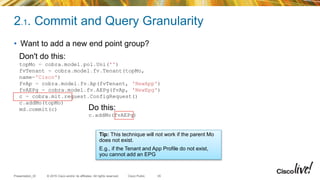
2.1. Commit and Query Granularity
35
• Want to add a new end point group?
Do this:
c.addMo(fvAEPg)
Don't do this:
topMo = cobra.model.pol.Uni('')
fvTenant = cobra.model.fv.Tenant(topMo,
name='Cisco')
fvAp = cobra.model.fv.Ap(fvTenant, 'NewApp')
fvAEPg = cobra.model.fv.AEPg(fvAp, 'NewEpg')
c = cobra.mit.request.ConfigRequest()
c.addMo(topMo)
md.commit(c)
Tip: This technique will not work if the parent Mo
does not exist.
E.g., if the Tenant and App Profile do not exist,
you cannot add an EPG
© 2015 Cisco and/or its affiliates. All rights reserved.Presentation_ID Cisco Public
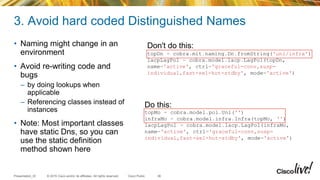
3. Avoid hard coded Distinguished Names
• Naming might change in an
environment
• Avoid re-writing code and
bugs
– by doing lookups when
applicable
– Referencing classes instead of
instances
• Note: Most important classes
have static Dns, so you can
use the static definition
method shown here
36
Don't do this:
topDn = cobra.mit.naming.Dn.fromString('uni/infra')
lacpLagPol = cobra.model.lacp.LagPol(topDn,
name='active', ctrl='graceful-conv,susp-
individual,fast-sel-hot-stdby', mode='active')
Do this:
topMo = cobra.model.pol.Uni('')
infraMo = cobra.model.infra.Infra(topMo, '')
lacpLagPol = cobra.model.lacp.LagPol(infraMo,
name='active', ctrl='graceful-conv,susp-
individual,fast-sel-hot-stdby', mode='active')
© 2015 Cisco and/or its affiliates. All rights reserved.Presentation_ID Cisco Public
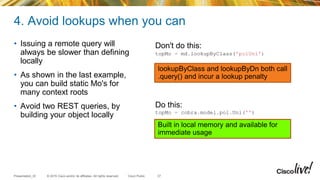
4. Avoid lookups when you can
• Issuing a remote query will
always be slower than defining
locally
• As shown in the last example,
you can build static Mo's for
many context roots
• Avoid two REST queries, by
building your object locally
37
Don't do this:
topMo = md.lookupByClass('polUni')
Do this:
topMo = cobra.model.pol.Uni('')
lookupByClass and lookupByDn both call
.query() and incur a lookup penalty
Built in local memory and available for
immediate usage
© 2015 Cisco and/or its affiliates. All rights reserved.Presentation_ID Cisco Public
5. Build sparse trees and use defaults
• The REST API is smart and populates defaults as needed
• Many values read back from the APIC are configuration defaults (e.g.,
monitoring policies)
• Passing all these defaults will add bloat to your code, and slow down API calls
38
© 2015 Cisco and/or its affiliates. All rights reserved.Presentation_ID Cisco Public
6. Don't import * and avoid 'from' in imports
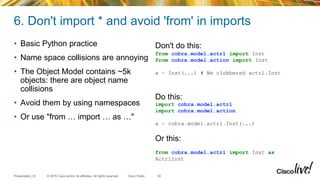
• Basic Python practice
• Name space collisions are annoying
• The Object Model contains ~5k
objects: there are object name
collisions
• Avoid them by using namespaces
• Or use "from … import … as …"
39
Don't do this:
from cobra.model.actrl import Inst
from cobra.model.action import Inst
a = Inst(...) # We clobbered actrl.Inst
Do this:
import cobra.model.actrl
import cobra.model.action
a = cobra.model.actrl.Inst(...)
Or this:
from cobra.model.actrl import Inst as
ActrlInst
© 2015 Cisco and/or its affiliates. All rights reserved.Presentation_ID Cisco Public
7. Server side filtering
• It's possible to perform multiple lookups, process results, and repeat for
complex searches
• The powerful filtering on the REST API allows concise queries
40
Get Mo for interface eth1/1 on node 101:
cq = cobra.mit.request.ClassQuery('fabricPathEpCont')
cq.propFilter = 'eq(fabricPathEpCont.nodeId, "101")'
cq.subtree = 'children'
cq.subtreeClassFilter = 'fabricPathEp'
interface = [i for i in md.query(cq)[0].children if i.name == 'eth1/1'][0]
print interface.dn
topology/pod-1/paths-101/pathep-[eth1/1]
Tip: Cobra >1.0.2m supports . subtreePropFilter
attribute, allowing this loop to be avoided
Applicability
41
© 2015 Cisco and/or its affiliates. All rights reserved.Presentation_ID Cisco Public
How others are using these
• Partners with application and business modeling
– Direct translation of business rules to application policy
• Customers with large / repeated deployments
– Repeated EPG-as-VLAN build outs
– Template based definitions for new tenant onboarding
• Within Cisco
– Fully automated QA / solution test process
– Advanced Services rapid testbed deployment
– Cisco IT heavily leveraging APIC automation
Conclusion
43
© 2015 Cisco and/or its affiliates. All rights reserved.Presentation_ID Cisco Public
Conclusion
• APIC APIs are being used today
• Cisco APIC provides open API for complete platform access
• Powerful data manipulation and processing
• True object oriented interface
• Rapid development and prototyping
Apic dc api deep dive

Apic dc api deep dive

  • 2.
    APIC DC: APIDeep Dive DevNet-1003/1029 Paul Lesiak, Solutions Architect
  • 3.
    © 2015 Ciscoand/or its affiliates. All rights reserved.Presentation_ID Cisco Public Agenda • Introduction – ACI and APIC DC – Programmatic Interfaces – API/SDK Features and Functionality • Getting Started • Best Practices • Applicability • Conclusion 3
  • 4.
  • 5.
    © 2015 Ciscoand/or its affiliates. All rights reserved.Presentation_ID Cisco Public Introduction • Goal for this session: – Introduce attendees to Cisco ACI and APIC DC – Educate about the programmatic interfaces available – Give steps to get started with developing for APIC – Provide best practices for working with the API and SDK • Out of scope for this session: – Comprehensive course on ACI – Teach Python programming 5
  • 6.
    © 2015 Ciscoand/or its affiliates. All rights reserved.Presentation_ID Cisco Public Leveraging Programmability • Speed • Efficiency / Cost • Quality • Automate common tasks • Troubleshooting tasks • Deployment workflows • Partners • Customers • Integrators • Cisco • Everyone 6
  • 7.
    © 2015 Ciscoand/or its affiliates. All rights reserved.Presentation_ID Cisco Public Physical Virtualization Network APP DBPOLICY WEB HYPERVISORHYPERVISOR HYPERVISOR APICApplication External Network POLICY POLICY ACI Solution Overview 7
  • 8.
    © 2015 Ciscoand/or its affiliates. All rights reserved.Presentation_ID Cisco Public ACI and APIC DC • Application Centric Infrastructure (ACI) represents network configuration with application based semantics • Fabric functions as single switch: Scale, Mobility, Telemetry, Automation • Cisco APIC is a centralized point of management for physical, virtual and cloud infrastructure • Robust implementation designed around open standards and open APIs 8
  • 9.
    © 2015 Ciscoand/or its affiliates. All rights reserved.Presentation_ID Cisco Public A word on the Object Model • A modeled representation of everything APIC knows – Network, Compute, Application, etc • Management Information Tree (MIT): Tree based structure • MIT has distinct branches for different functional areas • Every node is a managed object: – has a class & distinguished name • Critical component to working with APIC, beyond programmatic interaction 9 topRoot polUni compUni
  • 10.
    © 2015 Ciscoand/or its affiliates. All rights reserved.Presentation_ID Cisco Public Programmatic Interfaces • Northbound API accepts configuration and provides access to management functions for controller • Northbound API – Native REST API – Python SDK (“Cobra”) • Southbound APIs extend declarative intent from fabric to subordinate devices • Southbound API – L4-7 Device Packages – OpFlex • Not in scope for this session 10 Automation Tools Provisioning Scripts APIC REST Firewall Switch OpFlex APIC Dev Pkg
  • 11.
    © 2015 Ciscoand/or its affiliates. All rights reserved.Presentation_ID Cisco Public REST Interface GUI CLI Web Browser API Tools Object Browser (visore) APIC Cluster + Leaves & Spines R E S T Python SDK 11
  • 12.
    © 2015 Ciscoand/or its affiliates. All rights reserved.Presentation_ID Cisco Public Features and Functionality • Native REST interface – GUI can be used as reference / how to get things done guide • Robust querying and filtering interface • Configured and operational state provided through same interface • Object model supports parameters useful for overloading application state • Event driven notification via websockets 12
  • 13.
  • 14.
    © 2015 Ciscoand/or its affiliates. All rights reserved.Presentation_ID Cisco Public REST API: Basics • Standard REST methods supported • Stateless – No state for requests or sessions • HTTP1.1 / HTTPS (default) • Handled by any APIC in cluster • Access to switches via APIC • Create, read, update & delete Managed Objects Method Action Behavior GET Read Nullipotent POST Create / Update Idempotent DELETE Delete Idempotent • Payloads can be either XML or JSON – Specified by the file extension in URI – Content-Type and Accept header is ignored 14
  • 15.
    © 2015 Ciscoand/or its affiliates. All rights reserved.Presentation_ID Cisco Public REST API: Read Operations /api API Operator /{mo|class} Specify Managed Object or Class Operator /{dn|classname} Distinguished name or Object Class .{xml|json} Encoding for response ?[options] Specify filters, selectors or modifiers to query, joined using ampersand (&) host:port APIC host and port http(s):// http or https protocol http://apic/api/mo/uni/tn-Cisco/ap-Software/epg-Download.xml Read properties for an EPG by Distinguished Name http://apic/api/class/l1PhysIf.xml?query-target-filter=eq(l1PhysIf.speed,"10G") Find all 10G ports on Fabric 15
  • 16.
    © 2015 Ciscoand/or its affiliates. All rights reserved.Presentation_ID Cisco Public REST API: Create/Update Operations /api /mo /dn .{xml|json} ?[options]host:porthttp(s):// <fvTenant name="NewTenant"> <fvAp name="NewApplication"> <fvAEPg name="WebTier"> <fvRsPathAtt encap="vlan-1" mode="regular" tDn="topology/pod-1/paths-17/pathep-[eth1/1]"/> </fvAEPg> </fvAp> </fvTenant> Payload is XML/JSON representation of API Command Body 16
  • 17.
    © 2015 Ciscoand/or its affiliates. All rights reserved.Presentation_ID Cisco Public Object Browser: Visore • APIC has built in object browser to navigate the object tree and inspect the state of objects • Point the web browser to Visore: http://<apic>/visore.html • Search for a particular object or dn (fvTenant, topSystem, topology/pod- 1/node-101) 17
  • 18.
    © 2015 Ciscoand/or its affiliates. All rights reserved.Presentation_ID Cisco Public Sniffer: API Inspector • API calls made by GUI are captured – GET, POST • Navigating through panes fetches data with GET requests • Submitting configuration changes uses POST requests 18
  • 19.
    © 2015 Ciscoand/or its affiliates. All rights reserved.Presentation_ID Cisco Public Capturing API Calls 19 POST url: http://172.23.3.215/api/node/mo/uni/tn-Cisco.json { "fvTenant": { "attributes": { "name": "Cisco", "status": "created" }, "children": [] } }
  • 20.
    © 2015 Ciscoand/or its affiliates. All rights reserved.Presentation_ID Cisco Public Getting Started 1. Get the Cobra SDK 2. Get the documentation 3. Establish authenticated session 4. Simple queries 5. Inserting data into object store 20
  • 21.
    © 2015 Ciscoand/or its affiliates. All rights reserved.Presentation_ID Cisco Public SDK and Documentation • Available on DevNet – https://developer.cisco.com/site/apic-dc/ – Downloads -> Python Egg Files • Can be downloaded from APIC at: – https://<apic>/cobra – Remember to rename the .egg’s before installing* • You will need to reference the Management Information Model. Bookmark it – https://developer.cisco.com/media/mim-ref/ or https://<apic>/doc/html • Python SDK docs (and install directions) – https://developer.cisco.com/site/apic- dc/documents/pythonapi or – https://<apic>/cobra • APIC REST API User Guide – http://www.cisco.com/c/en/us/td/docs/switche s/datacenter/aci/apic/sw/1- x/api/rest/b_APIC_RESTful_API_User_Guide. html 21 *http://cs.co/9006xDw6: Python SDK docs and eggs are included on the APIC in 1.0(2*) code but there's a catch
  • 22.
    © 2015 Ciscoand/or its affiliates. All rights reserved.Presentation_ID Cisco Public Establish authenticated session REST • Login with username and password in payload POST /api/mo/aaaLogin.xml <aaaUser name='admin' pwd='insieme'/> • Response headers include Cookie “APIC-cookie” – Store this and use it for future requests Cobra import cobra.mit.access import cobra.mit.session ls = cobra.mit.session.LoginSession( 'https://apic', 'admin', 'insieme') md = cobra.mit.access.MoDirectory(ls) md.login() • md now contains an authenticated APIC session • 22
  • 23.
    © 2015 Ciscoand/or its affiliates. All rights reserved.Presentation_ID Cisco Public Simple Queries REST • Query for all client endpoint objects GET /api/class/fvCEp.xml <?xml?><imdata><fvCEp dn="uni/tn- Cisco/ap-Blog/epg-MySQL/cep- 00:50:56:82:D2:FE" encap="vlan-501" id="0" ip="0.0.0.0" lcC="vmm" lcOwn="local" mac="00:50:56:82:D2:FE" mcastAddr="not-applicable" name="00:50:56:82:D2:FE” uid="0"/></imdata> • Parse XML results and process as needed Cobra • Use the “lookupByClass” method to find all endpoints (fvCEp) endpoints = md.lookupByClass('fvCEp') print([str(ep.dn) for ep in endpoints]) ['uni/tn-Cisco/ap-Blog/epg-MySQL/cep- 00:50:56:82:D2:FE', 'uni/tn-Cisco/ap- Blog/epg-MySQL/cep-00:50:56:82:C3:D0'] 23 Tip: To inspect http requests use debuglevel on httplib: import httplib httplib.HTTPConnection.debuglevel = 1
  • 24.
    © 2015 Ciscoand/or its affiliates. All rights reserved.Presentation_ID Cisco Public Query Filters in Cobra • Built in helpers .lookupByClass and .lookupByDn use .query under the covers • For advanced queries, you can use .query directly • In this example, we recursively print a full subtree for all endpoints 24 def printtree(mos, indent=0): for mo in mos: print ' ' * indent, str(mo.meta.className) printtree(mo.children, indent=indent+2) cq = cobra.mit.access.ClassQuery('fvCEp') cq.subtree = 'full' endpoints = md.query(cq) printtree(endpoints) >>> printtree(endpoints) cobra.model.fv.CEp cobra.model.fv.RsNic cobra.model.fv.RsVm cobra.model.fv.RsCEpToPathEp cobra.model.fv.RsHyper cobra.model.fv.ReportingNode
  • 25.
    © 2015 Ciscoand/or its affiliates. All rights reserved.Presentation_ID Cisco Public Query Filters • Usually more efficient as less number of MOs need to be serialized and returned • Filter the response returned using the supplied condition(s): – Syntax: http://URI?condition[&condition[&...]] • Returns only the MOs that satisfies the condition(s) Filter type Syntax Cobra Query Property Description query-target {self | children | subtree} AbstractQuery.queryTarget Define the scope of query target-subtree-class <class name> AbstractQuery.classFilter Respond only elements including specified class query-target-filter <filter expressions> AbstractQuery.propFilter Respond only elements matching conditions rsp-subtree {no | children | full} AbstractQuery.subtree specifies child object level included in the response rsp-subtree-class <class name> AbstractQuery.subtreeClassFilter Respond only specified classes rsp-subtree-filter <filter expressions> AbstractQuery.subtreePropFilter (>1.0.2m) Respond only classes matching conditions rsp-subtree-include {faults | health :stats : …} AbstractQuery.subtreeInclude Request additional objects order-by <classname.property>| {asc | desc} NotImplemented Sort the response based on the property values 25
  • 26.
    © 2015 Ciscoand/or its affiliates. All rights reserved.Presentation_ID Cisco Public Committing Configuration Changes REST • Create a new tenant belonging to policy universe POST /api/mo/uni.xml <fvTenant name="Cisco"/> Cobra • Build your objects and commit them 26 Tip: To get the configured XML body for the object you've created/modified, add the rsp-include query parameter: POST /api/mo/uni.xml?rsp-subtree=modified topMo = cobra.model.pol.Uni('') fvTenant = cobra.model.fv.Tenant(topMo, name='Cisco') c = cobra.mit.request.ConfigRequest() c.addMo(fvTenant) md.commit(c)
  • 27.
    © 2015 Ciscoand/or its affiliates. All rights reserved.Presentation_ID Cisco Public APIC REST to Python Adapter: arya.py • GUI creates REST • API Inspector shows REST • arya.py creates code from REST • Auto-generate code to automate tasks, without heavy lifting • Available at http://github.com/datacenter/ACI XML/JSON arya.py Python code {"fvTenant":{"attributes":{"dn":"uni/tn- Cisco","name":"Cisco","rn":"tn- Cisco","status":"created"},"children":[{"fvBD":{"attribut es":{"dn":"uni/tn-Cisco/BD- CiscoBd","mac":"00:22:BD:F8:19:FF","name":"CiscoBd","rn": "BD- CiscoBd","status":"created"},"children":[{"fvRsCtx":{"att ributes":{"tnFvCtxName":"CiscoNetwork","status":"created, modified"},"children":[]}},{"fvSubnet":{"attributes":{"dn ":"uni/tn-Cisco/BD-CiscoBd/subnet- [10.0.0.1/8]","ip":"10.0.0.1/8","rn":"subnet- [10.0.0.1/8]","status":"created"},"children":[]}}]}},{"fv Ctx":{"attributes":{"dn":"uni/tn-Cisco/ctx- CiscoNetwork","name":"CiscoNetwork","rn":"ctx- CiscoNetwork","status":"created"},"children":[]}}]}} fvTenant = cobra.model.fv.Tenant(topMo, name='Cisco') fvCtx = cobra.model.fv.Ctx(fvTenant, name='CiscoNetwork') fvBD = cobra.model.fv.BD(fvTenant, mac='00:22:BD:F8:19:FF', name='CiscoBd') fvRsCtx = cobra.model.fv.RsCtx(fvBD, tnFvCtxName=fvCtx.name) fvSubnet = cobra.model.fv.Subnet(fvBD, ip='10.0.0.1/8') 27
  • 28.
    © 2015 Ciscoand/or its affiliates. All rights reserved.Presentation_ID Cisco Public Sample: Get fabric OSPF neighbors • Typical operations task is to check neighbors • Want to have the same look and feel • Take advantage of single fabric API to get details from entire fabric • Solution: Query fabric for all OSPF neighbors, and output status in IOS/NX-OS fashion
  • 29.
    © 2015 Ciscoand/or its affiliates. All rights reserved.Presentation_ID Cisco Public Get fabric OSPF neighbors: Code 29 def showOspf(md): cq = cobra.mit.request.ClassQuery('ospfAdjEp') cq.subtreeInclude = 'faults' return md.query(cq) neis = showOspf(md) fields = [('Neighbor ID ', 'id'), ('Pri', 'prio'), ('State ', 'operSt'), ('Address ', 'peerIp'), ('Node', 'dn')] for field in fields: print '{:<{width}}'.format(field[0], width=len(field[0])), for ne in neis: for f in fields: print '{:<{width}}'.format(getattr(ne, f[1]), width=len(f[0])), for fault in ne.children: print 'Fault Present: ', fault.descr Fetch Neighbors Print
  • 30.
    © 2015 Ciscoand/or its affiliates. All rights reserved.Presentation_ID Cisco Public Get fabric OSPF neighbors: Results • Proper IOS/NX-OS style results with fault details Neighbor ID Pri State Address Node 2.2.2.1 1 exstart 1.1.1.1 topology/pod-1/node-103 Fault Present: OSPF adjacency is not full, current state Exstart 2.2.2.6 1 full 1.1.1.6 topology/pod-1/node-103 2.2.2.3 1 exstart 1.1.1.5 topology/pod-1/node-102 Fault Present: OSPF adjacency is not full, current state Exstart 2.2.2.6 1 initializing 1.1.1.6 topology/pod-1/node-102 Fault Present: OSPF adjacency is not full, current state Initializing 30
  • 31.
  • 32.
    © 2015 Ciscoand/or its affiliates. All rights reserved.Presentation_ID Cisco Public Best Practices 1. Utilize built in naming and Dn methods 2. Be granular/specific with your commits and queries 3. Avoid hard coding Dn’s that contain naming properties 4. Avoid multiple lookups by starting off with static Dn’s instead of resolving 5. Build sparse trees and leverage default values 6. Don’t use ‘from’ in imports to avoid namespace collisions 7. Use REST API filtering to reduce result set 32
  • 33.
    © 2015 Ciscoand/or its affiliates. All rights reserved.Presentation_ID Cisco Public 1. Built in naming and Dn methods • When making references between Managed Objects, do not manually build Dn strings • Instead, lookup the object and use the .dn property 33 fvRsPathAtt = cobra.model.fv.RsPathAtt(fvAEPg, encap='vlan-2', tDn='topology/pod- 1/paths-101/pathep-[eth1/1]') fvRsPathAtt = cobra.model.fv.RsPathAtt(fvAEPg, tDn=interface.dn)
  • 34.
    © 2015 Ciscoand/or its affiliates. All rights reserved.Presentation_ID Cisco Public 2. Commit and Query Granularity • The API uses a directory based architecture – Closer to your target means less time and more accurate queries • Following this practice also helps avoid context root issues – APIC stores data in distributed data stores – If you go up too high, no single APIC can own the data 34 ✔ ✗
  • 35.
    © 2015 Ciscoand/or its affiliates. All rights reserved.Presentation_ID Cisco Public 2.1. Commit and Query Granularity 35 • Want to add a new end point group? Do this: c.addMo(fvAEPg) Don't do this: topMo = cobra.model.pol.Uni('') fvTenant = cobra.model.fv.Tenant(topMo, name='Cisco') fvAp = cobra.model.fv.Ap(fvTenant, 'NewApp') fvAEPg = cobra.model.fv.AEPg(fvAp, 'NewEpg') c = cobra.mit.request.ConfigRequest() c.addMo(topMo) md.commit(c) Tip: This technique will not work if the parent Mo does not exist. E.g., if the Tenant and App Profile do not exist, you cannot add an EPG
  • 36.
    © 2015 Ciscoand/or its affiliates. All rights reserved.Presentation_ID Cisco Public 3. Avoid hard coded Distinguished Names • Naming might change in an environment • Avoid re-writing code and bugs – by doing lookups when applicable – Referencing classes instead of instances • Note: Most important classes have static Dns, so you can use the static definition method shown here 36 Don't do this: topDn = cobra.mit.naming.Dn.fromString('uni/infra') lacpLagPol = cobra.model.lacp.LagPol(topDn, name='active', ctrl='graceful-conv,susp- individual,fast-sel-hot-stdby', mode='active') Do this: topMo = cobra.model.pol.Uni('') infraMo = cobra.model.infra.Infra(topMo, '') lacpLagPol = cobra.model.lacp.LagPol(infraMo, name='active', ctrl='graceful-conv,susp- individual,fast-sel-hot-stdby', mode='active')
  • 37.
    © 2015 Ciscoand/or its affiliates. All rights reserved.Presentation_ID Cisco Public 4. Avoid lookups when you can • Issuing a remote query will always be slower than defining locally • As shown in the last example, you can build static Mo's for many context roots • Avoid two REST queries, by building your object locally 37 Don't do this: topMo = md.lookupByClass('polUni') Do this: topMo = cobra.model.pol.Uni('') lookupByClass and lookupByDn both call .query() and incur a lookup penalty Built in local memory and available for immediate usage
  • 38.
    © 2015 Ciscoand/or its affiliates. All rights reserved.Presentation_ID Cisco Public 5. Build sparse trees and use defaults • The REST API is smart and populates defaults as needed • Many values read back from the APIC are configuration defaults (e.g., monitoring policies) • Passing all these defaults will add bloat to your code, and slow down API calls 38
  • 39.
    © 2015 Ciscoand/or its affiliates. All rights reserved.Presentation_ID Cisco Public 6. Don't import * and avoid 'from' in imports • Basic Python practice • Name space collisions are annoying • The Object Model contains ~5k objects: there are object name collisions • Avoid them by using namespaces • Or use "from … import … as …" 39 Don't do this: from cobra.model.actrl import Inst from cobra.model.action import Inst a = Inst(...) # We clobbered actrl.Inst Do this: import cobra.model.actrl import cobra.model.action a = cobra.model.actrl.Inst(...) Or this: from cobra.model.actrl import Inst as ActrlInst
  • 40.
    © 2015 Ciscoand/or its affiliates. All rights reserved.Presentation_ID Cisco Public 7. Server side filtering • It's possible to perform multiple lookups, process results, and repeat for complex searches • The powerful filtering on the REST API allows concise queries 40 Get Mo for interface eth1/1 on node 101: cq = cobra.mit.request.ClassQuery('fabricPathEpCont') cq.propFilter = 'eq(fabricPathEpCont.nodeId, "101")' cq.subtree = 'children' cq.subtreeClassFilter = 'fabricPathEp' interface = [i for i in md.query(cq)[0].children if i.name == 'eth1/1'][0] print interface.dn topology/pod-1/paths-101/pathep-[eth1/1] Tip: Cobra >1.0.2m supports . subtreePropFilter attribute, allowing this loop to be avoided
  • 41.
  • 42.
    © 2015 Ciscoand/or its affiliates. All rights reserved.Presentation_ID Cisco Public How others are using these • Partners with application and business modeling – Direct translation of business rules to application policy • Customers with large / repeated deployments – Repeated EPG-as-VLAN build outs – Template based definitions for new tenant onboarding • Within Cisco – Fully automated QA / solution test process – Advanced Services rapid testbed deployment – Cisco IT heavily leveraging APIC automation
  • 43.
  • 44.
    © 2015 Ciscoand/or its affiliates. All rights reserved.Presentation_ID Cisco Public Conclusion • APIC APIs are being used today • Cisco APIC provides open API for complete platform access • Powerful data manipulation and processing • True object oriented interface • Rapid development and prototyping

Editor's Notes