vSphere API Best PracticesTEXIBP1001Balaji Parimi, VMware Inc.
This session may contain product features that are currently under development.This session/overview of the new technology represents no commitment from VMware to deliver these features in any generally available product.Features are subject to change, and must not be included in contracts, purchase orders, or sales agreements of any kind.Technical feasibility and market demand will affect final delivery.Pricing and packaging for any new technologies or features discussed or presented have not been determined.Disclaimer“These features are representative of feature areas under development. Feature commitments are subject to change, and must not be included in contracts, purchase orders, or sales agreements of any kind. Technical feasibility and market demand will affect final delivery.”
Follow Us Facebook Search for VMware Partner NetworkTwitterSearch for VMware_Partnershttp://blogs.vmware.com/developer  Linkedin Search for VMware Partner NetworktJoin the conversationGet the latest scoopBe a part of the networkSubscribe to RSSFollow this event LIVE!#VMwarePEX2010Help us help you! Please fill out the survey at the end of the course.
IntroductionThis session assumes that the audience are familiar with the vSphere Web Services SDK.
The various use case scenarios outlined in this session are based on our experiences in working with various partners.About the SpeakerBalaji Parimi, Sr. MTS, VMware Inc.Current role and responsibilitiesVMware engineering consultant to the partners, focusing on creating solutions based on VMware’s vSphere platform. Train partner engineering teams on using the vSphere APIs.Review partner’s solution architecture.BackgroundHave a master’s degree in Computer Science, and a master’s degree in Software Engineering. Have been working in the industry since 1998.
AgendavSphere API Usage Best PracticesClient Session ManagementViewsManaged Object PropertiesPerformance StatisticsVirtual Hardware Provisioning TidbitsVMotion, Storage VMotion TidbitsChanging vCenter Configuration parameters using the SDKDebuggingResourcesQ & AClient Session ManagementUse Case: The client session times out after 30 minutes of inactivity. What are the options to maintain session validity with least overhead?Re-establish the session whenever it expires.Caveats:Requires exception handlers for all SDK API calls to re-establish session when session not authenticated exception occurs.Session specific objects need to be re-initialized whenever a new session is established. Maintain session validity by making sure that the interval between invoking two API calls is less than 30 minutes.Caveats:If invoking an API call, just to maintain session validity, make sure to invoke a method that generates the least amount of traffic. E.g.: Retrieve CurrentTime from the server.
ViewsUse Views to monitor changes, retrieve properties of managed objects or managed object referencesInventoryView covers the entire inventory.ListView covers the collection of specified managed objects.The onus is on the client application to provide the collection of managed object references required for creating the view.ContainerView covers the managed objects in a container.
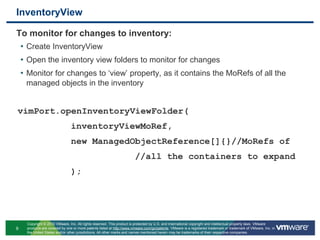
InventoryViewTo monitor for changes to inventory:Create InventoryViewOpen the inventory view folders to monitor for changesMonitor for changes to ‘view’ property, as it contains the MoRefs of all the managed objects in the inventoryvimPort.openInventoryViewFolder(
          inventoryViewMoRef,
          new ManagedObjectReference[]{}//MoRefs of
                      //all the containers to expand
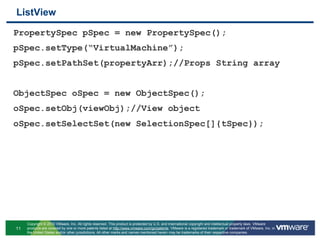
          );ListViewTo monitor for changes to the properties of a group of objects:Create ListView with the MoRefs of all the managed objectsCreate the appropriate TraversalSpec to start from the created ListViewMonitor for changes to the properties of the objects using PropertyCollectorvimPort.createListView (
          serviceContent.getViewManager(),
          new ManagedObjectReference[]{}//MoRefs of
                      //all the VMs
          );
TraversalSpec tSpec = new TraversalSpec();
tSpec.setType(“ListView”);
tSpec.setPath(“view”);ListViewPropertySpec pSpec = new PropertySpec();pSpec.setType(“VirtualMachine”);pSpec.setPathSet(propertyArr);//Props String arrayObjectSpec oSpec = new ObjectSpec();oSpec.setObj(viewObj);//View objectoSpec.setSelectSet(new SelectionSpec[]{tSpec});
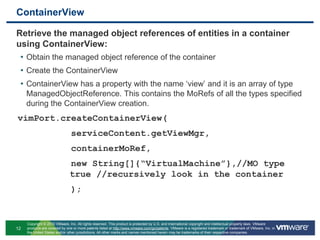
ContainerViewRetrieve the managed object references of entities in a container using ContainerView:Obtain the managed object reference of the containerCreate the ContainerViewContainerView has a property with the name ‘view’ and it is an array of type ManagedObjectReference. This contains the MoRefs of all the types specified during the ContainerView creation.vimPort.createContainerView(
          serviceContent.getViewMgr,
          containerMoRef,
          new String[]{“VirtualMachine”},//MO type           true //recursively look in the container
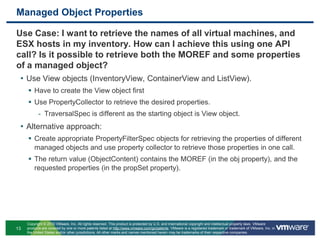
          );Managed Object PropertiesUse Case: I want to retrieve the names of all virtual machines, and ESX hosts in my inventory. How can I achieve this using one API call? Is it possible to retrieve both the MOREF and some properties of a managed object?Use View objects (InventoryView, ContainerView and ListView).Have to create the View object firstUse PropertyCollector to retrieve the desired properties.TraversalSpec is different as the starting object is View object.Alternative approach:Create appropriate PropertyFilterSpec objects for retrieving the properties of different managed objects and use property collector to retrieve those properties in one call.The return value (ObjectContent) contains the MOREF (in the obj property), and the requested properties (in the propSet property).
Managed Object PropertiesUse Case: What is the best caching strategy (caching the managed object properties or their references)?Caching the managed object properties makes sense when dealing with properties that seldom change (e.g.: data centre name, vm name etc.)Caching the managed object references rather than their properties makes sense for properties that change very often (e.g.: VM power state). Since, the managed object references do not change until the managed object is removed from the inventory, it is easier to maintain the cache.Caveats:Make sure to update the cache with the relevant MOREF whenever there is a change to the inventory.
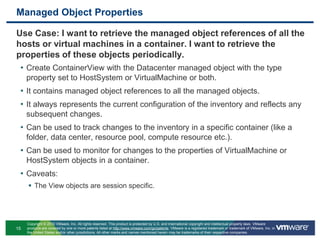
Managed Object PropertiesUse Case: I want to retrieve the managed object references of all the hosts or virtual machines in a container. I want to retrieve the properties of these objects periodically.Create ContainerView with the Datacenter managed object with the type property set to HostSystem or VirtualMachine or both.It contains managed object references to all the managed objects.It always represents the current configuration of the inventory and reflects any subsequent changes.Can be used to track changes to the inventory in a specific container (like a folder, data center, resource pool, compute resource etc.).Can be used to monitor for changes to the properties of VirtualMachine or HostSystem objects in a container.Caveats:The View objects are session specific.
Managed Object PropertiesUse Case: What are the different ways to monitor for changes to the properties of several different managed objects?Use View objects for getting updates on a specific set of objects (this can avoid creating / destroying PropertyFilter objects).This can allow you to add / remove objects to the View without having to create a new PropertyFilter object.Alternatively, create appropriate PropertyFilter objects for monitoring the properties of managed objects.Use this approach only when you are monitoring properties of very few specific objects.
Managed Object PropertiesSome tidbits for monitoring applicationsUse summary property whenever specific objects are being monitored. Since summary property encapsulates other useful properties of the object as well (e.g.: VM summary property contains VM runtime info, basic configuration, guest info etc.).All checkForUpdates and waitForUpdates return as soon as any change occurs to any of the properties in any of the PropertyFilter objects.Use checkForUpdates, if you want to find if there is a change since the last version you know.Use waitForUpdates, if you want to monitor the changes.Caveats:There is no notion of associating a specific PropertyFilter object to a specific check/waitForUpdates API method.The subsequent invocations of  check/waitForUpdates API method requires using the version string returned from the previous invocation for correct results.The PropertyFilter objects and ListView, ContainerView, and InventoryView are session specific.
Performance StatisticsUse case: Describe the best practices in retrieving the performance statistics?Retrieve the performance counters information once per vCenter / ESX server and reuse them.The counters information is the same for all ESX hosts. If your application is retrieving the statistics directly from the ESX host, you don’t have to retrieve the counters information for every host.Performance provider summary is not for a specific entity, but for an entity type. E.g.: The performance provider summary is the same for all virtual machine objects.Retrieve the available performance metrics information once per managed entity and reuse them.Need to retrieve these again if there is any change to the hardware (e.g.: a NIC is added / removed, a disk is added / removed etc.).Use wild card for performance metrics information instead of specific metric IDs.
Performance StatisticsCreate performance query specification based on the performance counters and metrics information already obtained.Reuse the performance query specification, if the performance statistics are being queried repeatedly for a managed entity.Use multiple query specifications instead of one query specification for every queryPerf API invocation.Use CSV format for stats query output, especially if your query retrieves more data.Caveats:Make sure the VC server stats level is set to the appropriate value for the counter in question.
Performance StatisticsUse case: Explain the intricacies in retrieving the real-time performance statistics?Check the performance provider summary for the entity to confirm that it supports real-time stats.Real-time statistics can be retrieved for any stats level irrespective of the vCenter Server stats level.Query the real-time stats at a slower rate than the supported refresh rate.Caveats:Do not compare the information with the results of “esxtop”. The ultimate source of information is the same, but the information metric and the refresh rate are different.
EventsUse case: How can my application receive event notifications for the events of interest?Create EventHistoryCollector with the appropriate EventFilterSpec, to get only the events of interest.Every event that passes the EventFilterSpec is appended to the ‘latestPage’ property of the EventHistoryCollector.Use waitForUpdates API method to keep track of changes to the ‘latestPage’ property of the EventHistoryCollector.Process the event and send notifications.Caveats:The application should keep track of the events it has processed.There is a risk of losing events if the events are generated faster than they could be processed.

Vmware vSphere Api Best Practices

  • 1.
    vSphere API BestPracticesTEXIBP1001Balaji Parimi, VMware Inc.
  • 2.
    This session maycontain product features that are currently under development.This session/overview of the new technology represents no commitment from VMware to deliver these features in any generally available product.Features are subject to change, and must not be included in contracts, purchase orders, or sales agreements of any kind.Technical feasibility and market demand will affect final delivery.Pricing and packaging for any new technologies or features discussed or presented have not been determined.Disclaimer“These features are representative of feature areas under development. Feature commitments are subject to change, and must not be included in contracts, purchase orders, or sales agreements of any kind. Technical feasibility and market demand will affect final delivery.”
  • 3.
    Follow Us FacebookSearch for VMware Partner NetworkTwitterSearch for VMware_Partnershttp://blogs.vmware.com/developer Linkedin Search for VMware Partner NetworktJoin the conversationGet the latest scoopBe a part of the networkSubscribe to RSSFollow this event LIVE!#VMwarePEX2010Help us help you! Please fill out the survey at the end of the course.
  • 4.
    IntroductionThis session assumesthat the audience are familiar with the vSphere Web Services SDK.
  • 5.
    The various usecase scenarios outlined in this session are based on our experiences in working with various partners.About the SpeakerBalaji Parimi, Sr. MTS, VMware Inc.Current role and responsibilitiesVMware engineering consultant to the partners, focusing on creating solutions based on VMware’s vSphere platform. Train partner engineering teams on using the vSphere APIs.Review partner’s solution architecture.BackgroundHave a master’s degree in Computer Science, and a master’s degree in Software Engineering. Have been working in the industry since 1998.
  • 6.
    AgendavSphere API UsageBest PracticesClient Session ManagementViewsManaged Object PropertiesPerformance StatisticsVirtual Hardware Provisioning TidbitsVMotion, Storage VMotion TidbitsChanging vCenter Configuration parameters using the SDKDebuggingResourcesQ & AClient Session ManagementUse Case: The client session times out after 30 minutes of inactivity. What are the options to maintain session validity with least overhead?Re-establish the session whenever it expires.Caveats:Requires exception handlers for all SDK API calls to re-establish session when session not authenticated exception occurs.Session specific objects need to be re-initialized whenever a new session is established. Maintain session validity by making sure that the interval between invoking two API calls is less than 30 minutes.Caveats:If invoking an API call, just to maintain session validity, make sure to invoke a method that generates the least amount of traffic. E.g.: Retrieve CurrentTime from the server.
  • 7.
    ViewsUse Views tomonitor changes, retrieve properties of managed objects or managed object referencesInventoryView covers the entire inventory.ListView covers the collection of specified managed objects.The onus is on the client application to provide the collection of managed object references required for creating the view.ContainerView covers the managed objects in a container.
  • 8.
    InventoryViewTo monitor forchanges to inventory:Create InventoryViewOpen the inventory view folders to monitor for changesMonitor for changes to ‘view’ property, as it contains the MoRefs of all the managed objects in the inventoryvimPort.openInventoryViewFolder(
  • 9.
    inventoryViewMoRef,
  • 10.
    new ManagedObjectReference[]{}//MoRefs of
  • 11.
    //all the containers to expand
  • 12.
    );ListViewTo monitor for changes to the properties of a group of objects:Create ListView with the MoRefs of all the managed objectsCreate the appropriate TraversalSpec to start from the created ListViewMonitor for changes to the properties of the objects using PropertyCollectorvimPort.createListView (
  • 13.
    serviceContent.getViewManager(),
  • 14.
    new ManagedObjectReference[]{}//MoRefs of
  • 15.
    //all the VMs
  • 16.
    );
  • 17.
    TraversalSpec tSpec =new TraversalSpec();
  • 18.
  • 19.
    tSpec.setPath(“view”);ListViewPropertySpec pSpec =new PropertySpec();pSpec.setType(“VirtualMachine”);pSpec.setPathSet(propertyArr);//Props String arrayObjectSpec oSpec = new ObjectSpec();oSpec.setObj(viewObj);//View objectoSpec.setSelectSet(new SelectionSpec[]{tSpec});
  • 20.
    ContainerViewRetrieve the managedobject references of entities in a container using ContainerView:Obtain the managed object reference of the containerCreate the ContainerViewContainerView has a property with the name ‘view’ and it is an array of type ManagedObjectReference. This contains the MoRefs of all the types specified during the ContainerView creation.vimPort.createContainerView(
  • 21.
    serviceContent.getViewMgr,
  • 22.
    containerMoRef,
  • 23.
    new String[]{“VirtualMachine”},//MO type true //recursively look in the container
  • 24.
    );Managed Object PropertiesUse Case: I want to retrieve the names of all virtual machines, and ESX hosts in my inventory. How can I achieve this using one API call? Is it possible to retrieve both the MOREF and some properties of a managed object?Use View objects (InventoryView, ContainerView and ListView).Have to create the View object firstUse PropertyCollector to retrieve the desired properties.TraversalSpec is different as the starting object is View object.Alternative approach:Create appropriate PropertyFilterSpec objects for retrieving the properties of different managed objects and use property collector to retrieve those properties in one call.The return value (ObjectContent) contains the MOREF (in the obj property), and the requested properties (in the propSet property).
  • 25.
    Managed Object PropertiesUseCase: What is the best caching strategy (caching the managed object properties or their references)?Caching the managed object properties makes sense when dealing with properties that seldom change (e.g.: data centre name, vm name etc.)Caching the managed object references rather than their properties makes sense for properties that change very often (e.g.: VM power state). Since, the managed object references do not change until the managed object is removed from the inventory, it is easier to maintain the cache.Caveats:Make sure to update the cache with the relevant MOREF whenever there is a change to the inventory.
  • 26.
    Managed Object PropertiesUseCase: I want to retrieve the managed object references of all the hosts or virtual machines in a container. I want to retrieve the properties of these objects periodically.Create ContainerView with the Datacenter managed object with the type property set to HostSystem or VirtualMachine or both.It contains managed object references to all the managed objects.It always represents the current configuration of the inventory and reflects any subsequent changes.Can be used to track changes to the inventory in a specific container (like a folder, data center, resource pool, compute resource etc.).Can be used to monitor for changes to the properties of VirtualMachine or HostSystem objects in a container.Caveats:The View objects are session specific.
  • 27.
    Managed Object PropertiesUseCase: What are the different ways to monitor for changes to the properties of several different managed objects?Use View objects for getting updates on a specific set of objects (this can avoid creating / destroying PropertyFilter objects).This can allow you to add / remove objects to the View without having to create a new PropertyFilter object.Alternatively, create appropriate PropertyFilter objects for monitoring the properties of managed objects.Use this approach only when you are monitoring properties of very few specific objects.
  • 28.
    Managed Object PropertiesSometidbits for monitoring applicationsUse summary property whenever specific objects are being monitored. Since summary property encapsulates other useful properties of the object as well (e.g.: VM summary property contains VM runtime info, basic configuration, guest info etc.).All checkForUpdates and waitForUpdates return as soon as any change occurs to any of the properties in any of the PropertyFilter objects.Use checkForUpdates, if you want to find if there is a change since the last version you know.Use waitForUpdates, if you want to monitor the changes.Caveats:There is no notion of associating a specific PropertyFilter object to a specific check/waitForUpdates API method.The subsequent invocations of check/waitForUpdates API method requires using the version string returned from the previous invocation for correct results.The PropertyFilter objects and ListView, ContainerView, and InventoryView are session specific.
  • 29.
    Performance StatisticsUse case:Describe the best practices in retrieving the performance statistics?Retrieve the performance counters information once per vCenter / ESX server and reuse them.The counters information is the same for all ESX hosts. If your application is retrieving the statistics directly from the ESX host, you don’t have to retrieve the counters information for every host.Performance provider summary is not for a specific entity, but for an entity type. E.g.: The performance provider summary is the same for all virtual machine objects.Retrieve the available performance metrics information once per managed entity and reuse them.Need to retrieve these again if there is any change to the hardware (e.g.: a NIC is added / removed, a disk is added / removed etc.).Use wild card for performance metrics information instead of specific metric IDs.
  • 30.
    Performance StatisticsCreate performancequery specification based on the performance counters and metrics information already obtained.Reuse the performance query specification, if the performance statistics are being queried repeatedly for a managed entity.Use multiple query specifications instead of one query specification for every queryPerf API invocation.Use CSV format for stats query output, especially if your query retrieves more data.Caveats:Make sure the VC server stats level is set to the appropriate value for the counter in question.
  • 31.
    Performance StatisticsUse case:Explain the intricacies in retrieving the real-time performance statistics?Check the performance provider summary for the entity to confirm that it supports real-time stats.Real-time statistics can be retrieved for any stats level irrespective of the vCenter Server stats level.Query the real-time stats at a slower rate than the supported refresh rate.Caveats:Do not compare the information with the results of “esxtop”. The ultimate source of information is the same, but the information metric and the refresh rate are different.
  • 32.
    EventsUse case: Howcan my application receive event notifications for the events of interest?Create EventHistoryCollector with the appropriate EventFilterSpec, to get only the events of interest.Every event that passes the EventFilterSpec is appended to the ‘latestPage’ property of the EventHistoryCollector.Use waitForUpdates API method to keep track of changes to the ‘latestPage’ property of the EventHistoryCollector.Process the event and send notifications.Caveats:The application should keep track of the events it has processed.There is a risk of losing events if the events are generated faster than they could be processed.

Editor's Notes

  • #4 VMware recognizes the critical role our partners play in analyzing, recommending and delivering customer solutions.Last year, based on feedback we received from customers, partners and our own sales teams, we re-structured our overall partner program, now called VMware Partner Network. We did this to ensure we not only provided customers with world-class solutions, but that we provided partners with one of the best partner programs in the industry. We believe the tools, education and incentives available to you will help you increase your profitability as you solve your customers’ business challenges through VMware virtualization solutions.The VMware Partner Network provides programs to support many different partner business models. This presentation will be focused on Solution Providers. If you’re interested in learning more about the other partner types, please go to vmware.com/partners for more information.