HTML
Dr. Lothe Savita A.
Department of Computer Science
Vasantrao Naik Mahavidyalaya, Aurangabad
Dr. Lothe Savita A. 1
Introduction
• Internet is a very large network of computers spread
across the world. The Internet allows for each of these
computers to send and receive information from each
other.
• One of the major applications of the Internet is the World
Wide Web (WWW). The World Wide Web or the web in
short, can be thought of as an interconnected set of
documents, images, audio, video files or software files.
Dr. Lothe Savita A. 2
Cont...
• When you connect to the Internet and look around (we
call it browsing), you are using a very interesting feature
of the web, hyperlinks.
• Each time you click on a highlighted piece of text or
image, you jump to another piece of text or image and this
could be on the same page, another page on the same
hard disk or on a page residing on another computer, half
way across the world. How it works??????????
Dr. Lothe Savita A. 3
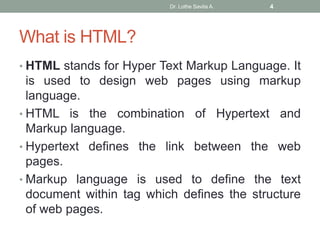
What is HTML?
• HTML stands for Hyper Text Markup Language. It
is used to design web pages using markup
language.
• HTML is the combination of Hypertext and
Markup language.
• Hypertext defines the link between the web
pages.
• Markup language is used to define the text
document within tag which defines the structure
of web pages.
Dr. Lothe Savita A. 4
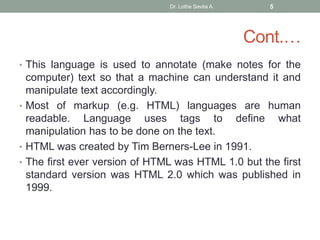
Cont.…
• This language is used to annotate (make notes for the
computer) text so that a machine can understand it and
manipulate text accordingly.
• Most of markup (e.g. HTML) languages are human
readable. Language uses tags to define what
manipulation has to be done on the text.
• HTML was created by Tim Berners-Lee in 1991.
• The first ever version of HTML was HTML 1.0 but the first
standard version was HTML 2.0 which was published in
1999.
Dr. Lothe Savita A. 5
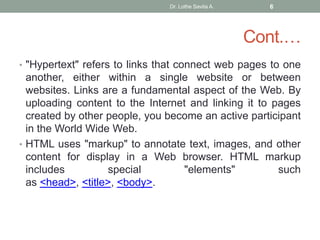
Cont.…
• "Hypertext" refers to links that connect web pages to one
another, either within a single website or between
websites. Links are a fundamental aspect of the Web. By
uploading content to the Internet and linking it to pages
created by other people, you become an active participant
in the World Wide Web.
• HTML uses "markup" to annotate text, images, and other
content for display in a Web browser. HTML markup
includes special "elements" such
as <head>, <title>, <body>.
Dr. Lothe Savita A. 6
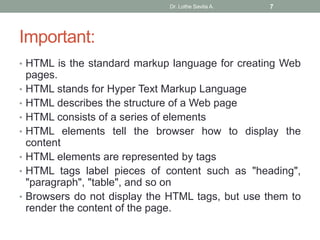
Important:
• HTML is the standard markup language for creating Web
pages.
• HTML stands for Hyper Text Markup Language
• HTML describes the structure of a Web page
• HTML consists of a series of elements
• HTML elements tell the browser how to display the
content
• HTML elements are represented by tags
• HTML tags label pieces of content such as "heading",
"paragraph", "table", and so on
• Browsers do not display the HTML tags, but use them to
render the content of the page.
Dr. Lothe Savita A. 7
Features of HTML:
• It is easy to learn and easy to use.
• It is platform independent.
• Images, video and audio can be added to a web page.
• Hypertext can be added to text.
• It is a markup language.
Dr. Lothe Savita A. 8
Cont.…
• Advantages:
• HTML is used to build a websites.
• It is supported by all browsers.
• It can be integrated with other languages like CSS,
JavaScript etc.
• Disadvantages:
• HTML can create only static webpages so for dynamic
web page other languages have to be used.
• Large amount of code has to be written to create a simple
web page.
• Security feature is not good.
Dr. Lothe Savita A. 9
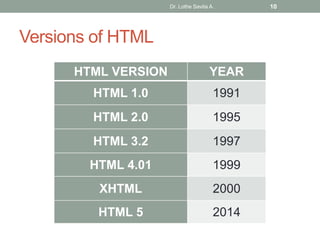
Versions of HTML
HTML VERSION YEAR
HTML 1.0 1991
HTML 2.0 1995
HTML 3.2 1997
HTML 4.01 1999
XHTML 2000
HTML 5 2014
Dr. Lothe Savita A. 10
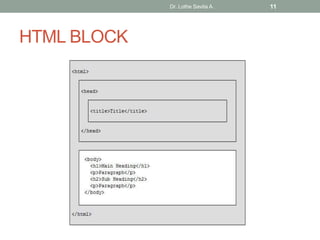
HTML BLOCK
Dr. Lothe Savita A. 11
Dr. Lothe Savita A. 12
Cont.…
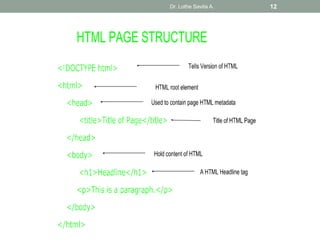
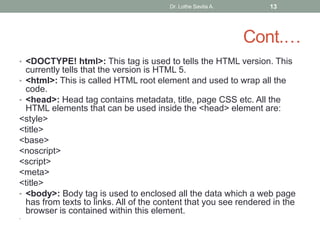
• <DOCTYPE! html>: This tag is used to tells the HTML version. This
currently tells that the version is HTML 5.
• <html>: This is called HTML root element and used to wrap all the
code.
• <head>: Head tag contains metadata, title, page CSS etc. All the
HTML elements that can be used inside the <head> element are:
<style>
<title>
<base>
<noscript>
<script>
<meta>
<title>
• <body>: Body tag is used to enclosed all the data which a web page
has from texts to links. All of the content that you see rendered in the
browser is contained within this element.
•
Dr. Lothe Savita A. 13
HTML | Attributes
• An attribute is used to provide extra or additional
information about an element.
• All HTML elements can have attributes. Attributes provide
additional information about an element.
• It takes two parameters : a name and a value.
• Syntax:
• <element attribute_name="attribute_value">
Dr. Lothe Savita A. 14
Cont.…
• These define the properties of the element and is placed
inside the opening tag of the element. The name
parameter takes the name of the property we would like to
assign to the element and the value takes the properties
value or extent of the property names that can be aligned
over the element.
• Every name has some value that must be written within
quotes.
Dr. Lothe Savita A. 15
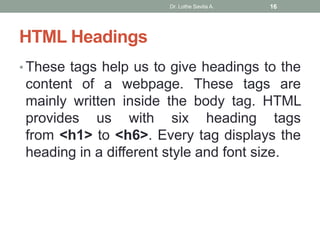
HTML Headings
• These tags help us to give headings to the
content of a webpage. These tags are
mainly written inside the body tag. HTML
provides us with six heading tags
from <h1> to <h6>. Every tag displays the
heading in a different style and font size.
Dr. Lothe Savita A. 16
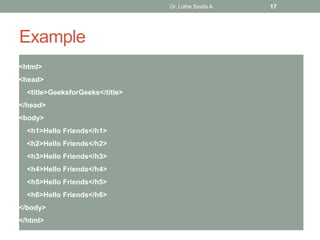
Example
<html>
<head>
<title>GeeksforGeeks</title>
</head>
<body>
<h1>Hello Friends</h1>
<h2>Hello Friends</h2>
<h3>Hello Friends</h3>
<h4>Hello Friends</h4>
<h5>Hello Friends</h5>
<h6>Hello Friends</h6>
</body>
</html>
Dr. Lothe Savita A. 17
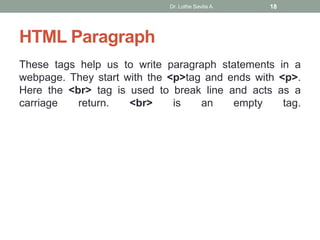
HTML Paragraph
These tags help us to write paragraph statements in a
webpage. They start with the <p>tag and ends with <p>.
Here the <br> tag is used to break line and acts as a
carriage return. <br> is an empty tag.
Dr. Lothe Savita A. 18
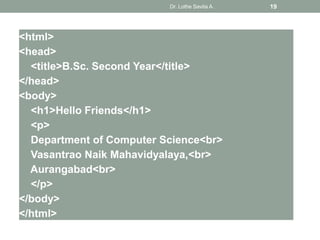
<html>
<head>
<title>B.Sc. Second Year</title>
</head>
<body>
<h1>Hello Friends</h1>
<p>
Department of Computer Science<br>
Vasantrao Naik Mahavidyalaya,<br>
Aurangabad<br>
</p>
</body>
</html>
Dr. Lothe Savita A. 19
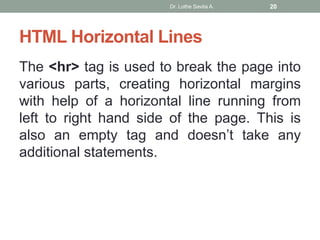
HTML Horizontal Lines
The <hr> tag is used to break the page into
various parts, creating horizontal margins
with help of a horizontal line running from
left to right hand side of the page. This is
also an empty tag and doesn’t take any
additional statements.
Dr. Lothe Savita A. 20
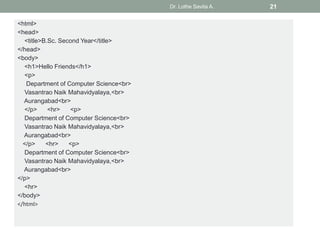
<html>
<head>
<title>B.Sc. Second Year</title>
</head>
<body>
<h1>Hello Friends</h1>
<p>
Department of Computer Science<br>
Vasantrao Naik Mahavidyalaya,<br>
Aurangabad<br>
</p> <hr> <p>
Department of Computer Science<br>
Vasantrao Naik Mahavidyalaya,<br>
Aurangabad<br>
</p> <hr> <p>
Department of Computer Science<br>
Vasantrao Naik Mahavidyalaya,<br>
Aurangabad<br>
</p>
<hr>
</body>
</html>
Dr. Lothe Savita A. 21
Thank you
Continued in next Presentation
Dr. Lothe Savita A. 22

Introduction html

  • 1.
    HTML Dr. Lothe SavitaA. Department of Computer Science Vasantrao Naik Mahavidyalaya, Aurangabad Dr. Lothe Savita A. 1
  • 2.
    Introduction • Internet isa very large network of computers spread across the world. The Internet allows for each of these computers to send and receive information from each other. • One of the major applications of the Internet is the World Wide Web (WWW). The World Wide Web or the web in short, can be thought of as an interconnected set of documents, images, audio, video files or software files. Dr. Lothe Savita A. 2
  • 3.
    Cont... • When youconnect to the Internet and look around (we call it browsing), you are using a very interesting feature of the web, hyperlinks. • Each time you click on a highlighted piece of text or image, you jump to another piece of text or image and this could be on the same page, another page on the same hard disk or on a page residing on another computer, half way across the world. How it works?????????? Dr. Lothe Savita A. 3
  • 4.
    What is HTML? •HTML stands for Hyper Text Markup Language. It is used to design web pages using markup language. • HTML is the combination of Hypertext and Markup language. • Hypertext defines the link between the web pages. • Markup language is used to define the text document within tag which defines the structure of web pages. Dr. Lothe Savita A. 4
  • 5.
    Cont.… • This languageis used to annotate (make notes for the computer) text so that a machine can understand it and manipulate text accordingly. • Most of markup (e.g. HTML) languages are human readable. Language uses tags to define what manipulation has to be done on the text. • HTML was created by Tim Berners-Lee in 1991. • The first ever version of HTML was HTML 1.0 but the first standard version was HTML 2.0 which was published in 1999. Dr. Lothe Savita A. 5
  • 6.
    Cont.… • "Hypertext" refersto links that connect web pages to one another, either within a single website or between websites. Links are a fundamental aspect of the Web. By uploading content to the Internet and linking it to pages created by other people, you become an active participant in the World Wide Web. • HTML uses "markup" to annotate text, images, and other content for display in a Web browser. HTML markup includes special "elements" such as <head>, <title>, <body>. Dr. Lothe Savita A. 6
  • 7.
    Important: • HTML isthe standard markup language for creating Web pages. • HTML stands for Hyper Text Markup Language • HTML describes the structure of a Web page • HTML consists of a series of elements • HTML elements tell the browser how to display the content • HTML elements are represented by tags • HTML tags label pieces of content such as "heading", "paragraph", "table", and so on • Browsers do not display the HTML tags, but use them to render the content of the page. Dr. Lothe Savita A. 7
  • 8.
    Features of HTML: •It is easy to learn and easy to use. • It is platform independent. • Images, video and audio can be added to a web page. • Hypertext can be added to text. • It is a markup language. Dr. Lothe Savita A. 8
  • 9.
    Cont.… • Advantages: • HTMLis used to build a websites. • It is supported by all browsers. • It can be integrated with other languages like CSS, JavaScript etc. • Disadvantages: • HTML can create only static webpages so for dynamic web page other languages have to be used. • Large amount of code has to be written to create a simple web page. • Security feature is not good. Dr. Lothe Savita A. 9
  • 10.
    Versions of HTML HTMLVERSION YEAR HTML 1.0 1991 HTML 2.0 1995 HTML 3.2 1997 HTML 4.01 1999 XHTML 2000 HTML 5 2014 Dr. Lothe Savita A. 10
  • 11.
  • 12.
  • 13.
    Cont.… • <DOCTYPE! html>:This tag is used to tells the HTML version. This currently tells that the version is HTML 5. • <html>: This is called HTML root element and used to wrap all the code. • <head>: Head tag contains metadata, title, page CSS etc. All the HTML elements that can be used inside the <head> element are: <style> <title> <base> <noscript> <script> <meta> <title> • <body>: Body tag is used to enclosed all the data which a web page has from texts to links. All of the content that you see rendered in the browser is contained within this element. • Dr. Lothe Savita A. 13
  • 14.
    HTML | Attributes •An attribute is used to provide extra or additional information about an element. • All HTML elements can have attributes. Attributes provide additional information about an element. • It takes two parameters : a name and a value. • Syntax: • <element attribute_name="attribute_value"> Dr. Lothe Savita A. 14
  • 15.
    Cont.… • These definethe properties of the element and is placed inside the opening tag of the element. The name parameter takes the name of the property we would like to assign to the element and the value takes the properties value or extent of the property names that can be aligned over the element. • Every name has some value that must be written within quotes. Dr. Lothe Savita A. 15
  • 16.
    HTML Headings • Thesetags help us to give headings to the content of a webpage. These tags are mainly written inside the body tag. HTML provides us with six heading tags from <h1> to <h6>. Every tag displays the heading in a different style and font size. Dr. Lothe Savita A. 16
  • 17.
    Example <html> <head> <title>GeeksforGeeks</title> </head> <body> <h1>Hello Friends</h1> <h2>Hello Friends</h2> <h3>HelloFriends</h3> <h4>Hello Friends</h4> <h5>Hello Friends</h5> <h6>Hello Friends</h6> </body> </html> Dr. Lothe Savita A. 17
  • 18.
    HTML Paragraph These tagshelp us to write paragraph statements in a webpage. They start with the <p>tag and ends with <p>. Here the <br> tag is used to break line and acts as a carriage return. <br> is an empty tag. Dr. Lothe Savita A. 18
  • 19.
    <html> <head> <title>B.Sc. Second Year</title> </head> <body> <h1>HelloFriends</h1> <p> Department of Computer Science<br> Vasantrao Naik Mahavidyalaya,<br> Aurangabad<br> </p> </body> </html> Dr. Lothe Savita A. 19
  • 20.
    HTML Horizontal Lines The<hr> tag is used to break the page into various parts, creating horizontal margins with help of a horizontal line running from left to right hand side of the page. This is also an empty tag and doesn’t take any additional statements. Dr. Lothe Savita A. 20
  • 21.
    <html> <head> <title>B.Sc. Second Year</title> </head> <body> <h1>HelloFriends</h1> <p> Department of Computer Science<br> Vasantrao Naik Mahavidyalaya,<br> Aurangabad<br> </p> <hr> <p> Department of Computer Science<br> Vasantrao Naik Mahavidyalaya,<br> Aurangabad<br> </p> <hr> <p> Department of Computer Science<br> Vasantrao Naik Mahavidyalaya,<br> Aurangabad<br> </p> <hr> </body> </html> Dr. Lothe Savita A. 21
  • 22.
    Thank you Continued innext Presentation Dr. Lothe Savita A. 22