YSR Engineering college of Yogi vemana
University
ROBOTICS
Presented by:
T.VISHNU VARDHAN
B.ASHA
SK.BIBI JOHN
SK.MAHABOOB BHASHA
Introduction
What is Robot
Why is Robot needed..?
Block diagram of Robots
Parts of Robots
Types of Robots
Advantages and disadvantages
Applications
Conclusions
CONTENTS
Robot is a system with a mechanical body, using computer as its brain.Robotics
is the science and study of robots.
Integrating the sensors and actuators built into the mechanical body,
the motions are realized with the computer software to execute the desired
task.
Robots are more flexible in terms of ability to perform new tasks or to
carry out complex sequence of motion than other categories of automated
manufacturing equipment.
INTRODUCTION:
There is no precise definition, a re-programmable ,
multifunctional ,automatic industrial machine designed to replace
human in hazardous work. It can be used as
• An automatic machine sweeper.
• An automatic car for a child to play with.
• A machine removing mines in a war field.
• In space.
• In military and many more…
WHAT IS A ROBOT…?
Robots can also do the same thing over and over again without getting
bored. Robots can explore inside gas tanks, inside volcanoes, travel the
surface of Mars or other places too dangerous for humans to go where
extreme temperatures or contaminated environments exist.
Can do work with accuracy.
WHY IS ROBOTS NEEDED…?
Ultrasonic Sensors
Motor Driver
Embedded controller
board PC
Speaker/Mic
WI-FI
Motor 2+Encoder IMU
Kinect
Motor 1+Encoder
BLOCK DIAGRAM:
The robot's movement is controlled by two Direct Current (DC) gear
motors with an encoder. The two motors are driven using a motor driver. The
motor driver is interfaced into an embedded controller board, which will send
commands to the motor driver to control the motor movements.
The encoder of the motor is interfaced into the controller board for
counting the number of rotations of the motor shaft. This data is the
odometry data from the robot.
There are ultrasonic sensors, which are interfaced into the controller
board for sensing the obstacles and measuring the distance from the
obstacles. There is an IMU sensor to improve odometry calculation. The
embedded controller board is interfaced into a PC, which does all the high-
end processing in the robot. Vision and sound sensors are interfaced into the
PC and Wi-Fi is attached for remote operations.
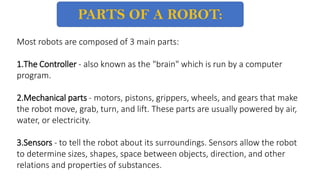
Most robots are composed of 3 main parts:
1.The Controller ‐ also known as the "brain" which is run by a computer
program.
2.Mechanical parts ‐ motors, pistons, grippers, wheels, and gears that make
the robot move, grab, turn, and lift. These parts are usually powered by air,
water, or electricity.
3.Sensors ‐ to tell the robot about its surroundings. Sensors allow the robot
to determine sizes, shapes, space between objects, direction, and other
relations and properties of substances.
PARTS OF A ROBOT:
Fig: Controller Fig: Mechanical part
Fig: Sensors
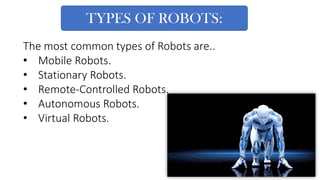
The most common types of Robots are..
• Mobile Robots.
• Stationary Robots.
• Remote-Controlled Robots.
• Autonomous Robots.
• Virtual Robots.
TYPES OF ROBOTS:
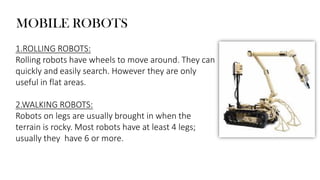
1.ROLLING ROBOTS:
Rolling robots have wheels to move around. They can
quickly and easily search. However they are only
useful in flat areas.
2.WALKING ROBOTS:
Robots on legs are usually brought in when the
terrain is rocky. Most robots have at least 4 legs;
usually they have 6 or more.
MOBILE ROBOTS
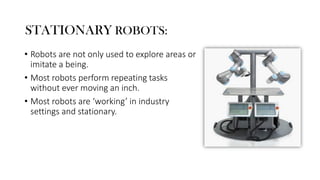
• Robots are not only used to explore areas or
imitate a being.
• Most robots perform repeating tasks
without ever moving an inch.
• Most robots are ‘working’ in industry
settings and stationary.
STATIONARY ROBOTS:
A person can guide a robot by remote control. A person can perform
difficult and usually dangerous tasks without being at the spot where the
tasks are performed.
REMOTE-CONTROL ROBOTS:
AUTONOMOUS ROBOTS:
Autonomous robots are self supporting or in other words
self contained. In a way they rely on their own ‘brains’.
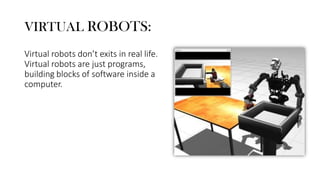
VIRTUAL ROBOTS:
Virtual robots don’t exits in real life.
Virtual robots are just programs,
building blocks of software inside a
computer.
1. Robotics and automation can, in many situations increase productivity,
safety, efficiency, quality and consistency of product.
2. Robot can work in hazardous environments without the need of life
support, comfort or concern about safety.
3. Robot needs no environmental comfort such as lightning, air conditioning,
ventilation and noise protection.
4. Robots work continuously without experiencing fatigue or boredom and
need medical insurance or vacation.
ADVANTAGES
1. High standard of maintenance maintenance required.
2. In case of the break down, the cost of repair may be very high.
3. Complex and expensive equipment to buy and install.
4. They can perform the repetitive tasks for long but they do not get better
with experience such as the humans do.
DISADVANTAGES
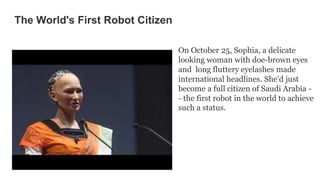
The World's First Robot Citizen
On October 25, Sophia, a delicate
looking woman with doe-brown eyes
and long fluttery eyelashes made
international headlines. She'd just
become a full citizen of Saudi Arabia -
- the first robot in the world to achieve
such a status.
1.Agriculture
2.Automobile
3.Construction
4.Entertainment
5.Health care: hospitals, patient-care, surgery , research, etc.
6.Law enforcement: surveillance, patrol, etc.
7.Manufacturing
8.Military: demining, surveillance, attack, etc.
9.Mining and exploration
10.Transportation: air, ground, rail, space, etc.
ROBOTICS FIELDS OF APPLICATION
Today we find most Robots working for people in industries,
factories, warehouses and laboratories. Robots are useful in many ways.
For instance, boosts economy because businesses need to be efficient to
keep up with the industry competition.
Therefore, having Robots help business owners to be competitive,
because Robots can do jobs better and faster than humans.
CONCLUSION
Introduction about robotics

Introduction about robotics

  • 1.
    YSR Engineering collegeof Yogi vemana University ROBOTICS Presented by: T.VISHNU VARDHAN B.ASHA SK.BIBI JOHN SK.MAHABOOB BHASHA
  • 2.
    Introduction What is Robot Whyis Robot needed..? Block diagram of Robots Parts of Robots Types of Robots Advantages and disadvantages Applications Conclusions CONTENTS
  • 3.
    Robot is asystem with a mechanical body, using computer as its brain.Robotics is the science and study of robots. Integrating the sensors and actuators built into the mechanical body, the motions are realized with the computer software to execute the desired task. Robots are more flexible in terms of ability to perform new tasks or to carry out complex sequence of motion than other categories of automated manufacturing equipment. INTRODUCTION:
  • 4.
    There is noprecise definition, a re-programmable , multifunctional ,automatic industrial machine designed to replace human in hazardous work. It can be used as • An automatic machine sweeper. • An automatic car for a child to play with. • A machine removing mines in a war field. • In space. • In military and many more… WHAT IS A ROBOT…?
  • 5.
    Robots can alsodo the same thing over and over again without getting bored. Robots can explore inside gas tanks, inside volcanoes, travel the surface of Mars or other places too dangerous for humans to go where extreme temperatures or contaminated environments exist. Can do work with accuracy. WHY IS ROBOTS NEEDED…?
  • 6.
    Ultrasonic Sensors Motor Driver Embeddedcontroller board PC Speaker/Mic WI-FI Motor 2+Encoder IMU Kinect Motor 1+Encoder BLOCK DIAGRAM:
  • 7.
    The robot's movementis controlled by two Direct Current (DC) gear motors with an encoder. The two motors are driven using a motor driver. The motor driver is interfaced into an embedded controller board, which will send commands to the motor driver to control the motor movements. The encoder of the motor is interfaced into the controller board for counting the number of rotations of the motor shaft. This data is the odometry data from the robot. There are ultrasonic sensors, which are interfaced into the controller board for sensing the obstacles and measuring the distance from the obstacles. There is an IMU sensor to improve odometry calculation. The embedded controller board is interfaced into a PC, which does all the high- end processing in the robot. Vision and sound sensors are interfaced into the PC and Wi-Fi is attached for remote operations.
  • 8.
    Most robots arecomposed of 3 main parts: 1.The Controller ‐ also known as the "brain" which is run by a computer program. 2.Mechanical parts ‐ motors, pistons, grippers, wheels, and gears that make the robot move, grab, turn, and lift. These parts are usually powered by air, water, or electricity. 3.Sensors ‐ to tell the robot about its surroundings. Sensors allow the robot to determine sizes, shapes, space between objects, direction, and other relations and properties of substances. PARTS OF A ROBOT:
  • 9.
    Fig: Controller Fig:Mechanical part Fig: Sensors
  • 10.
    The most commontypes of Robots are.. • Mobile Robots. • Stationary Robots. • Remote-Controlled Robots. • Autonomous Robots. • Virtual Robots. TYPES OF ROBOTS:
  • 11.
    1.ROLLING ROBOTS: Rolling robotshave wheels to move around. They can quickly and easily search. However they are only useful in flat areas. 2.WALKING ROBOTS: Robots on legs are usually brought in when the terrain is rocky. Most robots have at least 4 legs; usually they have 6 or more. MOBILE ROBOTS
  • 12.
    • Robots arenot only used to explore areas or imitate a being. • Most robots perform repeating tasks without ever moving an inch. • Most robots are ‘working’ in industry settings and stationary. STATIONARY ROBOTS:
  • 13.
    A person canguide a robot by remote control. A person can perform difficult and usually dangerous tasks without being at the spot where the tasks are performed. REMOTE-CONTROL ROBOTS:
  • 14.
    AUTONOMOUS ROBOTS: Autonomous robotsare self supporting or in other words self contained. In a way they rely on their own ‘brains’.
  • 15.
    VIRTUAL ROBOTS: Virtual robotsdon’t exits in real life. Virtual robots are just programs, building blocks of software inside a computer.
  • 16.
    1. Robotics andautomation can, in many situations increase productivity, safety, efficiency, quality and consistency of product. 2. Robot can work in hazardous environments without the need of life support, comfort or concern about safety. 3. Robot needs no environmental comfort such as lightning, air conditioning, ventilation and noise protection. 4. Robots work continuously without experiencing fatigue or boredom and need medical insurance or vacation. ADVANTAGES
  • 17.
    1. High standardof maintenance maintenance required. 2. In case of the break down, the cost of repair may be very high. 3. Complex and expensive equipment to buy and install. 4. They can perform the repetitive tasks for long but they do not get better with experience such as the humans do. DISADVANTAGES
  • 18.
    The World's FirstRobot Citizen On October 25, Sophia, a delicate looking woman with doe-brown eyes and long fluttery eyelashes made international headlines. She'd just become a full citizen of Saudi Arabia - - the first robot in the world to achieve such a status.
  • 19.
    1.Agriculture 2.Automobile 3.Construction 4.Entertainment 5.Health care: hospitals,patient-care, surgery , research, etc. 6.Law enforcement: surveillance, patrol, etc. 7.Manufacturing 8.Military: demining, surveillance, attack, etc. 9.Mining and exploration 10.Transportation: air, ground, rail, space, etc. ROBOTICS FIELDS OF APPLICATION
  • 20.
    Today we findmost Robots working for people in industries, factories, warehouses and laboratories. Robots are useful in many ways. For instance, boosts economy because businesses need to be efficient to keep up with the industry competition. Therefore, having Robots help business owners to be competitive, because Robots can do jobs better and faster than humans. CONCLUSION