Secure Private Cloud Storage
in Your Company


2012. 11. 23
Introduction of OfficeBox
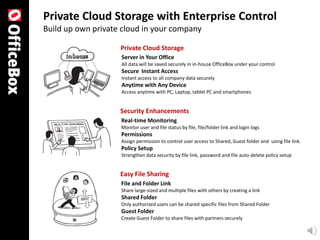
Private Cloud Storage with Enterprise Control
Build up own private cloud in your company

                    Private Cloud Storage
                    Server in Your Office
                    All data will be saved securely in in-house OfficeBox under your control
                    Secure Instant Access
                    Instant access to all company data securely
                    Anytime with Any Device
                    Access anytime with PC, Laptop, tablet PC and smartphones


                    Security Enhancements
                    Real-time Monitoring
                    Monitor user and file status by file, file/folder link and login logs
                    Permissions
                    Assign permission to control user access to Shared, Guest folder and using file link.
                    Policy Setup
                    Strengthen data security by file link, password and file auto-delete policy setup


                    Easy File Sharing
                    File and Folder Link
                    Share large-sized and multiple files with others by creating a link
                    Shared Folder
                    Only authorized users can be shared specific files from Shared Folder
                    Guest Folder
                    Create Guest Folder to share files with partners securely
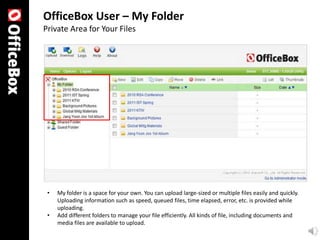
OfficeBox User – My Folder
Private Area for Your Files


 •   My folder is a space for your own. You can upload large-sized or multiple files easily and quickly.
     Uploading information such as speed, queued files, time elapsed, error, etc. is provided while
     uploading.
 •   Add different folders to manage your file efficiently. All kinds of file, including documents and
     media files are available to upload.
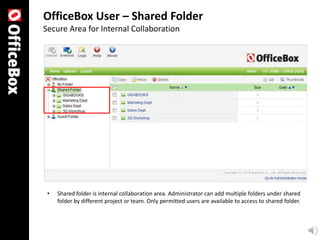
OfficeBox User – Shared Folder
Secure Area for Internal Collaboration


 •   Shared folder is internal collaboration area. Administrator can add multiple folders under shared
     folder by different project or team. Only permitted users are available to access to shared folder.
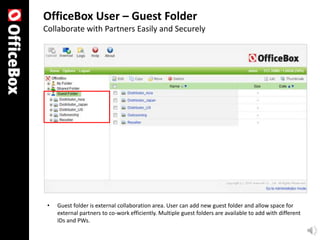
OfficeBox User – Guest Folder
Collaborate with Partners Easily and Securely


 •   Guest folder is external collaboration area. User can add new guest folder and allow space for
     external partners to co-work efficiently. Multiple guest folders are available to add with different
     IDs and PWs.
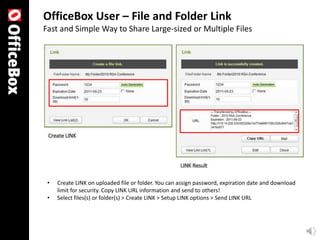
OfficeBox User – File and Folder Link
Fast and Simple Way to Share Large-sized or Multiple Files


 •   Create LINK on uploaded file or folder. You can assign password, expiration date and download
     limit for security. Copy LINK URL information and send to others!
 •   Select files(s) or folder(s) > Create LINK > Setup LINK options > Send LINK URL
OfficeBox User – OfficeBox Mini
PC Agent for Direct Access to OfficeBox


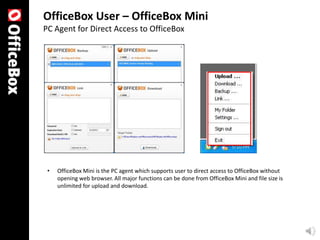
 •   OfficeBox Mini is the PC agent which supports user to direct access to OfficeBox without
     opening web browser. All major functions can be done from OfficeBox Mini and file size is
     unlimited for upload and download.
OfficeBox Admin. – Log Managements
Real-time Monitoring with File, File Link and Login Logs


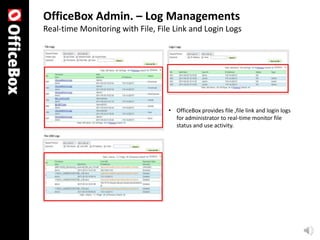
                                   • OfficeBox provides file ,file link and login logs
                                     for administrator to real-time monitor file
                                     status and use activity.
OfficeBox Admin – Permission and Access Controls
Control of Shared/Guest Folder Access and Use of File Link


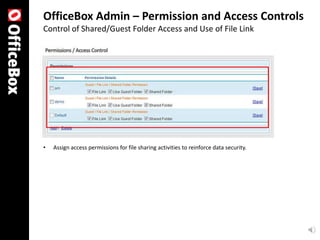
•   Assign access permissions for file sharing activities to reinforce data security.
OfficeBox Admin – System Policy Setup
File Link, Password Policy, File Auto-Delete


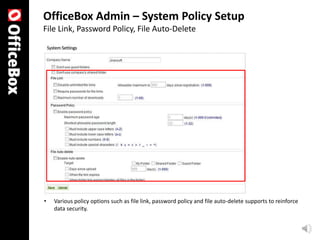
•   Various policy options such as file link, password policy and file auto-delete supports to reinforce
    data security.
Advantages of OfficeBox
Proven Product from Japan Market


 2,000+
 Corporates & Publics


 Best Alliance
 Japan Computer Software Association / Jun. 2008


 Contribution to the Japanese Informatization
 METI Japan / Oct. 2008


 No.3 in File Transfer Market
 ITR Market View / Mar. 2011
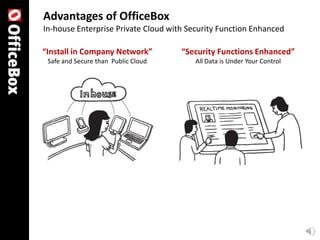
Advantages of OfficeBox
In-house Enterprise Private Cloud with Security Function Enhanced

“Install in Company Network”         “Security Functions Enhanced”
 Safe and Secure than Public Cloud       All Data is Under Your Control
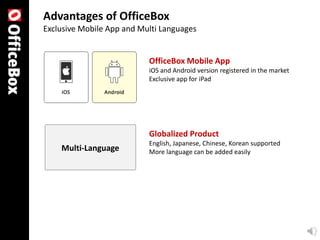
Advantages of OfficeBox
Exclusive Mobile App and Multi Languages


                           OfficeBox Mobile App
                           iOS and Android version registered in the market
                           Exclusive app for iPad


                           Globalized Product
                           English, Japanese, Chinese, Korean supported
    Multi-Language         More language can be added easily
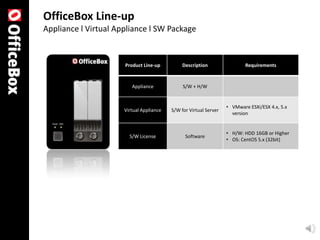
OfficeBox Line-up
OfficeBox Line-up
Appliance l Virtual Appliance l SW Package


                      Product Line-up          Description                 Requirements


                         Appliance             S/W + H/W


                                                                   • VMware ESXi/ESX 4.x, 5.x
                      Virtual Appliance   S/W for Virtual Server
                                                                     version


                                                                   • H/W: HDD 16GB or Higher
                        S/W License             Software
                                                                   • OS: CentOS 5.x (32bit)
Since 1994
Enterprise Security &
      Collaboration Solution

180 Happy People

   20,000 Corporates & 3M Individuals
Jiransoft Japan in 2011
Jiransoft USA in 2011

   US$13M in 2009
    US$19M in 2010
      US$22M in 2011
         US$38M in 2012
Secure Private Cloud for Your Office

Introducing OfficeBox

  • 1.
    Secure Private CloudStorage in Your Company 2012. 11. 23
  • 2.
  • 3.
    Private Cloud Storagewith Enterprise Control Build up own private cloud in your company Private Cloud Storage Server in Your Office All data will be saved securely in in-house OfficeBox under your control Secure Instant Access Instant access to all company data securely Anytime with Any Device Access anytime with PC, Laptop, tablet PC and smartphones Security Enhancements Real-time Monitoring Monitor user and file status by file, file/folder link and login logs Permissions Assign permission to control user access to Shared, Guest folder and using file link. Policy Setup Strengthen data security by file link, password and file auto-delete policy setup Easy File Sharing File and Folder Link Share large-sized and multiple files with others by creating a link Shared Folder Only authorized users can be shared specific files from Shared Folder Guest Folder Create Guest Folder to share files with partners securely
  • 4.
    OfficeBox User –My Folder Private Area for Your Files • My folder is a space for your own. You can upload large-sized or multiple files easily and quickly. Uploading information such as speed, queued files, time elapsed, error, etc. is provided while uploading. • Add different folders to manage your file efficiently. All kinds of file, including documents and media files are available to upload.
  • 5.
    OfficeBox User –Shared Folder Secure Area for Internal Collaboration • Shared folder is internal collaboration area. Administrator can add multiple folders under shared folder by different project or team. Only permitted users are available to access to shared folder.
  • 6.
    OfficeBox User –Guest Folder Collaborate with Partners Easily and Securely • Guest folder is external collaboration area. User can add new guest folder and allow space for external partners to co-work efficiently. Multiple guest folders are available to add with different IDs and PWs.
  • 7.
    OfficeBox User –File and Folder Link Fast and Simple Way to Share Large-sized or Multiple Files • Create LINK on uploaded file or folder. You can assign password, expiration date and download limit for security. Copy LINK URL information and send to others! • Select files(s) or folder(s) > Create LINK > Setup LINK options > Send LINK URL
  • 8.
    OfficeBox User –OfficeBox Mini PC Agent for Direct Access to OfficeBox • OfficeBox Mini is the PC agent which supports user to direct access to OfficeBox without opening web browser. All major functions can be done from OfficeBox Mini and file size is unlimited for upload and download.
  • 9.
    OfficeBox Admin. –Log Managements Real-time Monitoring with File, File Link and Login Logs • OfficeBox provides file ,file link and login logs for administrator to real-time monitor file status and use activity.
  • 10.
    OfficeBox Admin –Permission and Access Controls Control of Shared/Guest Folder Access and Use of File Link • Assign access permissions for file sharing activities to reinforce data security.
  • 11.
    OfficeBox Admin –System Policy Setup File Link, Password Policy, File Auto-Delete • Various policy options such as file link, password policy and file auto-delete supports to reinforce data security.
  • 12.
  • 13.
    Advantages of OfficeBox ProvenProduct from Japan Market 2,000+ Corporates & Publics Best Alliance Japan Computer Software Association / Jun. 2008 Contribution to the Japanese Informatization METI Japan / Oct. 2008 No.3 in File Transfer Market ITR Market View / Mar. 2011
  • 14.
    Advantages of OfficeBox In-houseEnterprise Private Cloud with Security Function Enhanced “Install in Company Network” “Security Functions Enhanced” Safe and Secure than Public Cloud All Data is Under Your Control
  • 15.
    Advantages of OfficeBox ExclusiveMobile App and Multi Languages OfficeBox Mobile App iOS and Android version registered in the market Exclusive app for iPad Globalized Product English, Japanese, Chinese, Korean supported Multi-Language More language can be added easily
  • 16.
  • 17.
    OfficeBox Line-up Appliance lVirtual Appliance l SW Package Product Line-up Description Requirements Appliance S/W + H/W • VMware ESXi/ESX 4.x, 5.x Virtual Appliance S/W for Virtual Server version • H/W: HDD 16GB or Higher S/W License Software • OS: CentOS 5.x (32bit)
  • 18.
    Since 1994 Enterprise Security& Collaboration Solution 180 Happy People 20,000 Corporates & 3M Individuals Jiransoft Japan in 2011 Jiransoft USA in 2011 US$13M in 2009 US$19M in 2010 US$22M in 2011 US$38M in 2012
  • 19.
    Secure Private Cloudfor Your Office