INTRO TO AUDIO
DESCRIPTION
• Type questions in the Q&A tab during the
presentation
• This webinar is being recorded & will be available
for replay
Presented by:
Elisa Edelberg
3Play Media
elisa@3playmedia.c
om
www.3playmedia.co
m
Live tweet:
#a11y @3playmedia
What will we cover?
▸WHAT is audio description?
▸HOW do you create audio description?
▸WHERE do you publish audio description?
▸WHY should you describe?
▸WHO is 3Play Media?
▸Q&A
WHAT IS AUDIO
DESCRIPTION?
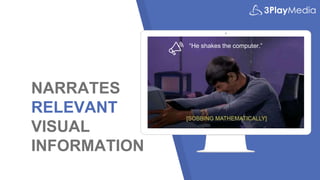
NARRATES
RELEVANT
VISUAL
INFORMATION
“He shakes the computer.”
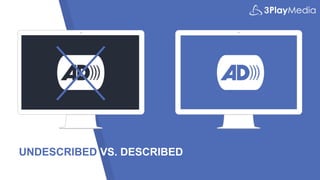
UNDESCRIBED VS. DESCRIBED
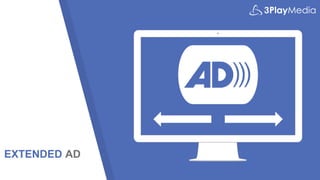
EXTENDED AD
HOW
DO YOU
CREATE
DESCRIPTION?
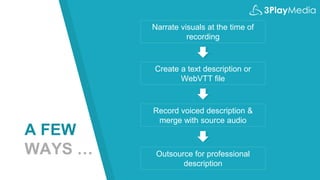
A FEW
WAYS …
Narrate visuals at the time of
recording
Create a text description or
WebVTT file
Record voiced description &
merge with source audio
Outsource for professional
description
QUALITY
STANDARDS
WHERE DO
YOU PUBLISH
DESCRIPTION
?
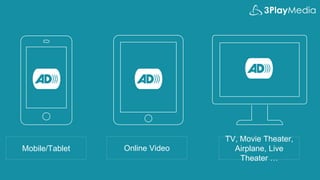
Mobile/Tablet Online Video
TV, Movie Theater,
Airplane, Live
Theater …
The short list
(of players that natively
support AD)
Able Player
OzPlayer
Brightcove
Ways to publish
description:
• Second video with description
• Secondary audio track
• WebVTT track
• Text-only merged transcript
• Audio description plugin
WHY
SHOULD
YOU
DESCRIBE
?
BENEFITS OF AUDIO DESCRIPTION
Accessibility
> Estimated 23.7
million Americans
(10%) have trouble
seeing.
Autism
> Helps to better
understand emotional
and social cues
Flexibility
> View videos in eyes-
free environments
Language
Development
> Listening is a key
step in learning
language.
Auditory Learners
> 20-30% of students
retain information best
through sound.
Inattentional Blindness
> Phenomena where you
fail to recognize visuals
“in plain sight.”
Legal Requirements
> May be required by
law
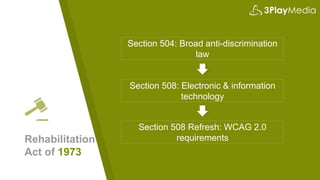
Rehabilitation
Act of 1973
Section 504: Broad anti-discrimination
law
Section 508: Electronic & information
technology
Section 508 Refresh: WCAG 2.0
requirements
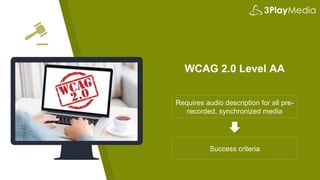
WCAG 2.0 Level AA
Requires audio description for all pre-
recorded, synchronized media
Success criteria
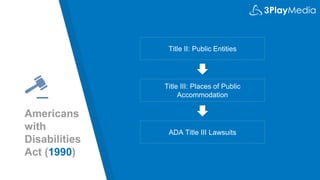
Americans
with
Disabilities
Act (1990)
Title II: Public Entities
Title III: Places of Public
Accommodation
ADA Title III Lawsuits
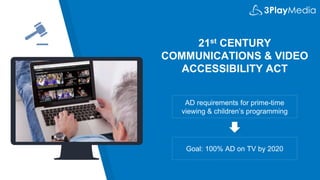
21st CENTURY
COMMUNICATIONS & VIDEO
ACCESSIBILITY ACT
AD requirements for prime-time
viewing & children’s programming
Goal: 100% AD on TV by 2020
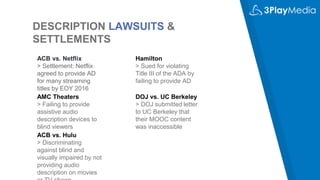
DESCRIPTION LAWSUITS &
SETTLEMENTS
ACB vs. Netflix
> Settlement: Netflix
agreed to provide AD
for many streaming
titles by EOY 2016
AMC Theaters
> Failing to provide
assistive audio
description devices to
blind viewers
Hamilton
> Sued for violating
Title III of the ADA by
failing to provide AD
DOJ vs. UC Berkeley
> DOJ submitted letter
to UC Berkeley that
their MOOC content
was inaccessible
ACB vs. Hulu
> Discriminating
against blind and
visually impaired by not
providing audio
description on movies
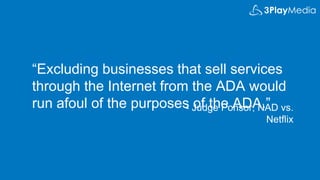
“Excluding businesses that sell services
through the Internet from the ADA would
run afoul of the purposes of the ADA.”- Judge Ponsor, NAD vs.
Netflix
WHO IS
3PLAY
MEDIA?
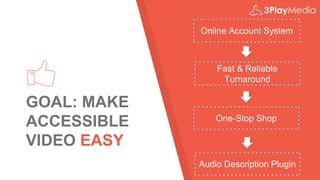
GOAL: MAKE
ACCESSIBLE
VIDEO EASY
Online Account System
Fast & Reliable
Turnaround
One-Stop Shop
Audio Description Plugin
INNOVATING
AUDIO
DESCRIPTION
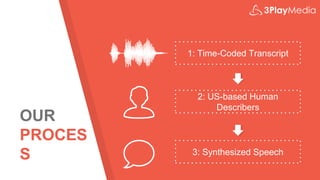
OUR
PROCES
S
1: Time-Coded Transcript
2: US-based Human
Describers
3: Synthesized Speech
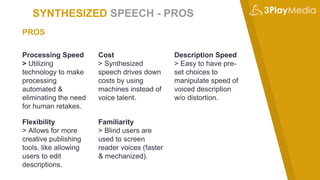
SYNTHESIZED SPEECH - PROS
Processing Speed
> Utilizing
technology to make
processing
automated &
eliminating the need
for human retakes.
Cost
> Synthesized
speech drives down
costs by using
machines instead of
voice talent.
Description Speed
> Easy to have pre-
set choices to
manipulate speed of
voiced description
w/o distortion.
PROS
Flexibility
> Allows for more
creative publishing
tools, like allowing
users to edit
descriptions.
Familiarity
> Blind users are
used to screen
reader voices (faster
& mechanized).
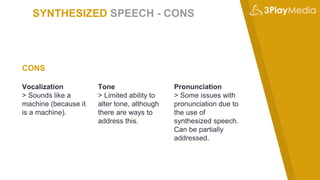
SYNTHESIZED SPEECH - CONS
Vocalization
> Sounds like a
machine (because it
is a machine).
Tone
> Limited ability to
alter tone, although
there are ways to
address this.
Pronunciation
> Some issues with
pronunciation due to
the use of
synthesized speech.
Can be partially
addressed.
CONS
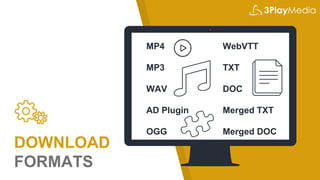
DOWNLOAD
FORMATS
MP4
MP3
WAV
AD Plugin
OGG
WebVTT
TXT
DOC
Merged TXT
Merged DOC
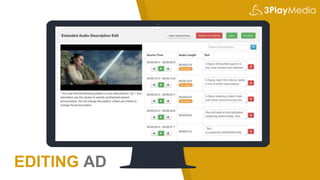
EDITING AD
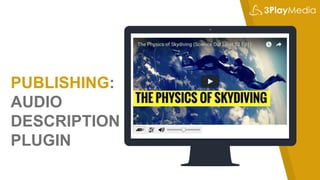
PUBLISHING:
AUDIO
DESCRIPTION
PLUGIN
Q&A
www.3playmedia.com/webinar
s/

Intro to Audio Description

Editor's Notes

  • #5 Secondary audio track that narrates the relevant visual information contained in a video Usually represented by an AD icon
  • #6 Audio description would vocalize the visual; captions would textualize the audio. Similar to captions, which people are much more familiar with, which transcribes the relevant auditory information. Captions assume a viewer can’t hear; audio description assumes a viewer can’t see. Difficult because in many cases, there is very little space to describe, so it is important to prioritize key visual information. For those who have never heard description before, it’s often described as similar to the sports announcer in a baseball game, narrating the plays over the radio.
  • #7 EXAMPLE – without audio description, then with audio description. WITHOUT DESCRIPTION: https://www.youtube.com/watch?v=-WdC4DaYIeQ WITH DESCRIPTION: https://www.youtube.com/watch?v=O7j4_aP8dWA Close your eyes and see how much you can understand w/o description.
  • #8 What is extended AD? Example: http://www.3playmedia.com/how-it-works/how-to-guides/audio-description/audio-description-examples/
  • #10 DIY methods – time consuming and expensive. For lecture or educational content, you can sometimes: Have professors or narrators narrate the visual information on their slides or in the background as they’re happening. Easiest way to cut costs. Create a text-only description; note that this will lose much of the cinematic detail for the viewer Create a text-only description that *fits into the spaces.* If using able player, set timings and add as a webvtt track Once you’ve created a text description, if you have good recording equipment and video editing software, you can record voice acted descriptions and merge it with your source audio, then output a second video with description. Outsource. Note that traditional vendors charge between $15-$75 per minute.
  • #11 Important to follow best practices for description quality. What is most important to describe? How do you describe credits, or text on screen? What to describe When to describe How to describe (things like text on screen, credits) DCMP description key is great.
  • #12 Unlike captions, description is not supported by most video players
  • #13 Has been around since the late 1970s, but with more broad adoption in the 90s. 1998 (508 Rehabilitation Act for federal programs) and 1999 (Notice of Proposed Rule Making from the FCC) saw audio description becoming more of a requirement for broadcast and online video. Now being applied to dozens of devices – if supported. Making description more widely available for online video is slightly dependent on video player & browser support. Description is being used on all devices, and more and more for online video. Also used for live theater, at movie theaters, on in-filght entertainment, and for broadcast TV.
  • #15 Most players don’t support description, so often the only way to publish is to link to a second version of your video with description (like the Frozen trailer) A few players support a secondary audio track, where users can select an AD audio for the same video source. Some support this by swapping in a new source video with description. HTML5 natively supports a WebVTT description track (just like with captions); however, browser support and player support are lacking. Must be read by a screen reader. Right now, Able player is the only one that reliably supports this. Text-only merged transcript & description; good for deaf/blind viewers, but not time synchronized. Would be like providing a transcript only for a video. We’ve developed a keyboard & screen-reader accessible audio description plugin, which allows your description to play with a video player without having to republish the video.
  • #16 Many reasons outside of accessibility
  • #17 1) Accessibility: 2015 National Health Interview Survey found that 23.7 million Americans (10%) have trouble seeing. 2) Autism: individuals on the autistic spectrum find that audio description helps better understand emotional and social cues only demonstrated through actions or facial expressions. Answers questions like “what does that smile mean?” 3) Flexibility: view videos in eyes-free environments (cooking, in the car, etc.) 4) Language development: listening is a key step in learning language and associating it with appropriate actions and behaviors. 5) Auditory learners: research into how the brain processes information reveals that there are two channels: auditory and visual. 20-30% of students say they retain information best through sound. 6) Inattentional blindness is the phenomena where you fail to recognize visual information in plain sight. We often have instances where we missed a key visual element in a video or image until it was pointed out to us. Audio description can help point those key visuals out to all viewers. 7) May be required by law.
  • #18 1973 Section 504: anti-discrimination law that requires equal access for individuals with disabilities. Applies to federal & federally funded programs. Section 508: introduced in 1998 to require federal communications and information technology to be accessible. Apples to federal programs, but often applied to federally funded programs through state & organization laws. Audio description is a requirement of Section 508, which was just refreshed to include language from the WCAG 2.0 Level AA guidelines.
  • #19 WCAG 2.0 is the international standard for web accessibility, which, until the 508 refresh, was not written into any US federal accessibility laws. AD requirements: required for all pre-recorded, synchronized media Provides success criteria for how to meet these requirements. Allows for no description if all visual information is articulated in the audio of the source video.
  • #20 1990 5 sections Title II: public entities; Title III: public accommodations (extends to private sector) "Places of public accommodation" – what constitutes this? Tested against online businesses Refresh coming?
  • #21 Phases in between 2010 and 2020 Currently: Top 60 TV markets required to describe 50 hours per quarter. Next phase in is July 1, 2018: Multi channel video distributers must provide 87.5 hours per quarter
  • #22 American Council of the Blind vs. Netflix: - Settlement; Netflix agreed to provide AD for many streaming titles by December, 2016. You can view a library of described Netflix videos by going to the footer on their site. Hamilton: Sued for “systematic civil rights violations” against the blind community under Title III of the ADA by not providing audio description Berkeley: DOJ underwent an investigation and submitted a letter to UC Berkeley last year finding their MOOCs to be inaccessible. Among violations: lack of audio description and closed captioning on video content Berkeley has since said they will take down their free MOOC content, citing many reasons in addition to the cost of making it accessible AMC: Claims they provide assistive listening devices for audio description; plaintiff claims they are often not available, broken, or drained of battery Cites violation of the ADA & seeks recourse for discrimination
  • #23 Because the laws were written before the proliferation of online video, we must turn to the courts to see what they believe about how the ADA and Section 504 should apply to the online sector: Case of National Association of the Deaf vs. Netflix: “Excluding businesses that sell services through the Internet from the ADA would run afoul of the purposes of the ADA”
  • #24 Traditionally: a captioning/transcription/subtitling company; as of Monday, we are also offering audio description, making us more focused on accessible video Out of MIT in 2007 Still based in Boston
  • #25 2,000+ customers in higher education, government, corporate, & media
  • #26 Our goal is to make accessible video easy. In addition to video search plugins and integrations for captioning, our description services include: An easy to use online account system Fast and reliable turnaround A one-stop shop for captioning, description, transcription, and subtitling An audio description plugin that helps alleviate the difficulty of publishing audio description
  • #27 Traditional audio description can be insurmountable for institutions, but technology is helping to innovate the process of audio description.
  • #28 Multi-step process combines technology and humans Perfectly time-coded to the word All US-based describers Synthesized speech w/ 3 speed and 3 speaker selections
  • #29 Why Synthesized Speech? PROS: Processing speed Cost Ability to manipulate speed of voiced description w/o distortion Because of all the above: make description editable & have flexible output Blind users are used to screen reader voices (more mechanized)
  • #30 Why Synthesized Speech? PROS: Processing speed Cost Ability to manipulate speed of voiced description w/o distortion Because of all the above: make description editable & have flexible output Blind users are used to screen reader voices (more mechanized) CONS: Sounds like a machine (but not that bad!) Limited ability to alter tone (‘say as’ concerned, happy, angry, etc.) Pronunciation issues – today; something we’re looking at, can be addressed.
  • #31 We offer a number of download formats; some text based, some media based. MP4 = video w/ description included in audio MP3 or WAV = audio track with source audio + description AD Plugin = publishable with existing video players WebVTT = publish with HTML5 video that supports description tracks TXT & DOC = description only text doc Merged TXT & Merged DOC = merged doc with transcript & description
  • #32 Traditional description vendors don’t allow the end user to edit their descriptions. Our workflow allows you to edit description frames after your files have been processed. If you have specific words you’d like changed, or the name of a speaker that your describer wasn’t sure about, you can edit those after the fact. When you finalize, your edits will propagate to all outputs. You can easily revert to the original description if you’re not happy with your edits.
  • #33 Demo how simple the audio description plugin is. http://www.3playmedia.com/how-it-works/how-to-guides/audio-description/audio-description-examples/