Quick Start to Captioning
August 6, 2015 at 2:00pm ET
Lily Bond
Marketing Manager
3Play Media
lily@3playmedia.com
(617)764-5189 x119
www.3playmedia.com
twitter: @3playmedia
 Type questions in the control panel during the presentation
 This presentation is being recorded and will be available for replay
 To view live captions, please follow the link in the chat window
Agenda
‣ Captioning basics
‣ Benefits
‣ Accessibility laws
‣ Captioning services & tools
‣ Q&A
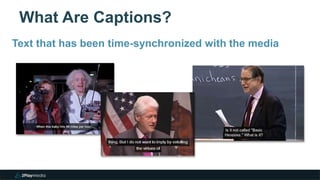
What Are Captions?
4
Text that has been time-synchronized with the media
What Are Captions?
Captions convey all spoken content and sound effects
What Are Captions?
6
Originated in the early 1980s for broadcast TV
Terminology
7
‣ Captions vs. Transcript
Terminology
8
‣ Captions vs. Transcript
‣ Captions vs. Subtitles
Terminology
‣ Captions vs. Transcript
‣ Captions vs. Subtitles
‣ Closed vs. Open Captions
Terminology
‣ Captions vs. Transcript
‣ Captions vs. Subtitles
‣ Closed vs. Open Captions
‣ Post Production vs. Real-Time
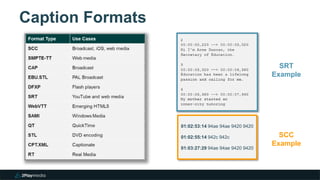
Caption Formats
SRT
Example
01:02:53:14 94ae 94ae 9420 9420
01:02:55:14 942c 942c
01:03:27:29 94ae 94ae 9420 9420
SCC
Example
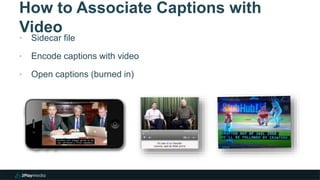
How to Associate Captions with
Video
‣ Sidecar file
‣ Encode captions with video
‣ Open captions (burned in)
Benefits
‣ Accessibility for hard of hearing
48 Million
Americans with hearing loss
Benefits
‣ Accessibility for hard of hearing
‣ Better comprehension
‣ Flexibility to view in noise-sensitive
environments
80%Of people who use captions
don’t have hearing disability
Benefits
‣ Accessibility for hard of hearing
‣ Better comprehension
‣ Flexibility to view in noise-sensitive
environments
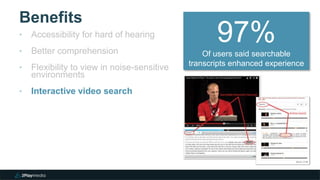
‣ Interactive video search
97%Of users said searchable
transcripts enhanced experience
Benefits
‣ Accessibility for hard of hearing
‣ Better comprehension
‣ Flexibility to view in noise-sensitive
environments
‣ Interactive video search
‣ SEO: more inbound traffic
7.3%
Increase in views
from captions
Benefits
‣ Accessibility for hard of hearing
‣ Better comprehension
‣ Flexibility to view in noise-sensitive
environments
‣ Interactive video search
‣ SEO: more inbound traffic
‣ Reusability
50%
Students who use
transcripts for study guides
Benefits
‣ Accessibility for hard of hearing
‣ Better comprehension
‣ Flexibility to view in noise-sensitive
environments
‣ Interactive video search
‣ SEO: more inbound traffic
‣ Reusability
‣ Translation to foreign languages
Benefits
‣ Accessibility for hard of hearing
‣ Better comprehension
‣ Flexibility to view in noise-sensitive
environments
‣ Interactive video search
‣ SEO: more inbound traffic
‣ Reusability
‣ Translation to foreign languages
‣ May be required by law
Accessibility Laws
Rehabilitation Act: Sections 508, 504
‣ Covers federal agencies and orgs with federal funding
‣ Assistive Technology Act
Accessibility Laws
Rehabilitation Act: Sections 508, 504
‣ Covers federal agencies and orgs with federal funding
‣ Assistive Technology Act
ADA: Titles II, III
‣ Covers public and commercial entities
‣ Lawsuits: What is a “place of public accommodation”?
Accessibility Laws
Rehabilitation Act: Sections 508, 504
‣ Covers federal agencies and orgs with federal funding
‣ Assistive Technology Act
ADA: Titles II, III
‣ Covers public and commercial entities
‣ Lawsuits: What is a “place of public accommodation”?
CVAA
‣ Covers Internet content that aired on TV
‣ Includes video clips
‣ Copyright owner bears responsibility
FCC Standards for Caption Quality
‣ Caption accuracy
– Must match spoken words to fullest extent possible and include non-verbal
information
– Allows some leniency for live captioning
‣ Caption synchronization
– Must coincide with their spoken words and sounds to the greatest extent possible
‣ Program completeness
– Captions must run from the beginning to the end of the program
‣ Onscreen caption placement
– Captions should not block other important visual content
About 3Play Media
2
‣ Captioning + transcription + translation
‣ MIT spinout in 2007
‣ Based in Cambridge, MA
About 3Play Media
‣ Captioning + transcription + translation
‣ MIT spinout in 2007
‣ Based in Cambridge, MA
‣ 1,600+ customers in higher education, government, corporate, & media
3Play Media’s Goal: Simplify the
Process
Online Account System
Fast + Reliable Turnaround
Automated Workflows
50+ Caption Formats
Caption Import
Video Search Tools
Spanish Captioning
Accuracy and Quality
Multi-Step Human Review Process
‣ More efficient, cost-effective
‣ At least 99% accuracy
‣ All work done in U.S.
‣ Consistent transcription standards
Flexible Upload + Turnaround
Platform Integrations
‣ Effortless integration with many platforms
‣ Out-of-the-box compatibility with most players
Video Player / Platform Integrations
50+ Output Formats
‣ Wide variety of output
formats
‣ Intelligent keyword
extraction
‣ Automated vertical
caption placement
‣ Encoded closed/open
captions
Caption & Translation Editor
Caption Import
‣ Import your existing captions
and translations
‣ Convert into 50+ formats
‣ Use interactive transcripts
‣ Securely manage your
assets
Automated Transcript Alignment
Interactive Transcripts
‣ Use captions to make videos
searchable and interactive
‣ Not a replacement for
captions
‣ Easy to set up
‣ Lots of customization options
Customer Support
“…What’s
important is the
customer
service you get,
and 3Play just plain rocks
when it comes to helping out.”
- Josh Harder, University of
Wisconsin
336
Lily Bond
Marketing Manager
3Play Media
lily@3playmedia.com
617-764-5189 x119
Q&A Upcoming Webinars
 8/27: HTML5 Video Accessibility Updates
 9/24: Video SEO - How to Get Your Videos to Rank
 10/1: Free Tools for Testing Website Accessibility
 10/8: 10 Tips for Creating Accessible Online Course
Content
Register at:
http://www.3playmedia.com/webinars/

Quick Start to Captioning

  • 1.
    Quick Start toCaptioning August 6, 2015 at 2:00pm ET Lily Bond Marketing Manager 3Play Media lily@3playmedia.com (617)764-5189 x119 www.3playmedia.com twitter: @3playmedia  Type questions in the control panel during the presentation  This presentation is being recorded and will be available for replay  To view live captions, please follow the link in the chat window
  • 3.
    Agenda ‣ Captioning basics ‣Benefits ‣ Accessibility laws ‣ Captioning services & tools ‣ Q&A
  • 4.
    What Are Captions? 4 Textthat has been time-synchronized with the media
  • 5.
    What Are Captions? Captionsconvey all spoken content and sound effects
  • 6.
    What Are Captions? 6 Originatedin the early 1980s for broadcast TV
  • 7.
  • 8.
    Terminology 8 ‣ Captions vs.Transcript ‣ Captions vs. Subtitles
  • 9.
    Terminology ‣ Captions vs.Transcript ‣ Captions vs. Subtitles ‣ Closed vs. Open Captions
  • 10.
    Terminology ‣ Captions vs.Transcript ‣ Captions vs. Subtitles ‣ Closed vs. Open Captions ‣ Post Production vs. Real-Time
  • 11.
    Caption Formats SRT Example 01:02:53:14 94ae94ae 9420 9420 01:02:55:14 942c 942c 01:03:27:29 94ae 94ae 9420 9420 SCC Example
  • 12.
    How to AssociateCaptions with Video ‣ Sidecar file ‣ Encode captions with video ‣ Open captions (burned in)
  • 13.
    Benefits ‣ Accessibility forhard of hearing 48 Million Americans with hearing loss
  • 14.
    Benefits ‣ Accessibility forhard of hearing ‣ Better comprehension ‣ Flexibility to view in noise-sensitive environments 80%Of people who use captions don’t have hearing disability
  • 15.
    Benefits ‣ Accessibility forhard of hearing ‣ Better comprehension ‣ Flexibility to view in noise-sensitive environments ‣ Interactive video search 97%Of users said searchable transcripts enhanced experience
  • 16.
    Benefits ‣ Accessibility forhard of hearing ‣ Better comprehension ‣ Flexibility to view in noise-sensitive environments ‣ Interactive video search ‣ SEO: more inbound traffic 7.3% Increase in views from captions
  • 17.
    Benefits ‣ Accessibility forhard of hearing ‣ Better comprehension ‣ Flexibility to view in noise-sensitive environments ‣ Interactive video search ‣ SEO: more inbound traffic ‣ Reusability 50% Students who use transcripts for study guides
  • 18.
    Benefits ‣ Accessibility forhard of hearing ‣ Better comprehension ‣ Flexibility to view in noise-sensitive environments ‣ Interactive video search ‣ SEO: more inbound traffic ‣ Reusability ‣ Translation to foreign languages
  • 19.
    Benefits ‣ Accessibility forhard of hearing ‣ Better comprehension ‣ Flexibility to view in noise-sensitive environments ‣ Interactive video search ‣ SEO: more inbound traffic ‣ Reusability ‣ Translation to foreign languages ‣ May be required by law
  • 20.
    Accessibility Laws Rehabilitation Act:Sections 508, 504 ‣ Covers federal agencies and orgs with federal funding ‣ Assistive Technology Act
  • 21.
    Accessibility Laws Rehabilitation Act:Sections 508, 504 ‣ Covers federal agencies and orgs with federal funding ‣ Assistive Technology Act ADA: Titles II, III ‣ Covers public and commercial entities ‣ Lawsuits: What is a “place of public accommodation”?
  • 22.
    Accessibility Laws Rehabilitation Act:Sections 508, 504 ‣ Covers federal agencies and orgs with federal funding ‣ Assistive Technology Act ADA: Titles II, III ‣ Covers public and commercial entities ‣ Lawsuits: What is a “place of public accommodation”? CVAA ‣ Covers Internet content that aired on TV ‣ Includes video clips ‣ Copyright owner bears responsibility
  • 23.
    FCC Standards forCaption Quality ‣ Caption accuracy – Must match spoken words to fullest extent possible and include non-verbal information – Allows some leniency for live captioning ‣ Caption synchronization – Must coincide with their spoken words and sounds to the greatest extent possible ‣ Program completeness – Captions must run from the beginning to the end of the program ‣ Onscreen caption placement – Captions should not block other important visual content
  • 24.
    About 3Play Media 2 ‣Captioning + transcription + translation ‣ MIT spinout in 2007 ‣ Based in Cambridge, MA
  • 25.
    About 3Play Media ‣Captioning + transcription + translation ‣ MIT spinout in 2007 ‣ Based in Cambridge, MA ‣ 1,600+ customers in higher education, government, corporate, & media
  • 26.
    3Play Media’s Goal:Simplify the Process Online Account System Fast + Reliable Turnaround Automated Workflows 50+ Caption Formats Caption Import Video Search Tools Spanish Captioning
  • 27.
    Accuracy and Quality Multi-StepHuman Review Process ‣ More efficient, cost-effective ‣ At least 99% accuracy ‣ All work done in U.S. ‣ Consistent transcription standards
  • 28.
  • 29.
    Platform Integrations ‣ Effortlessintegration with many platforms ‣ Out-of-the-box compatibility with most players Video Player / Platform Integrations
  • 30.
    50+ Output Formats ‣Wide variety of output formats ‣ Intelligent keyword extraction ‣ Automated vertical caption placement ‣ Encoded closed/open captions
  • 31.
  • 32.
    Caption Import ‣ Importyour existing captions and translations ‣ Convert into 50+ formats ‣ Use interactive transcripts ‣ Securely manage your assets
  • 33.
  • 34.
    Interactive Transcripts ‣ Usecaptions to make videos searchable and interactive ‣ Not a replacement for captions ‣ Easy to set up ‣ Lots of customization options
  • 35.
    Customer Support “…What’s important isthe customer service you get, and 3Play just plain rocks when it comes to helping out.” - Josh Harder, University of Wisconsin
  • 36.
    336 Lily Bond Marketing Manager 3PlayMedia lily@3playmedia.com 617-764-5189 x119 Q&A Upcoming Webinars  8/27: HTML5 Video Accessibility Updates  9/24: Video SEO - How to Get Your Videos to Rank  10/1: Free Tools for Testing Website Accessibility  10/8: 10 Tips for Creating Accessible Online Course Content Register at: http://www.3playmedia.com/webinars/