Copyright © 2006 by The McGraw-Hill Companies, Inc. All rights reserved.McGraw-Hill Technology Education
McGraw-Hill Technology Education Copyright © 2006 by The McGraw-Hill Companies, Inc. All rights reserved.
Copyright © 2006 by The McGraw-Hill Companies, Inc. All rights reserved.McGraw-Hill Technology Education
Chapter 5B
Modern CPUs
5B-3
A Look Inside The Processor
• Architecture
– Determines
• Location of CPU parts
• Bit size
• Number of registers
• Pipelines
– Main difference between CPUs
Microcomputer Processors
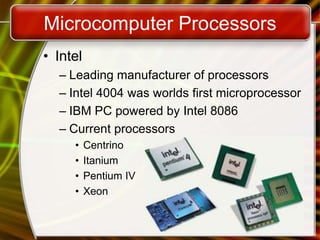
• Intel
– Leading manufacturer of processors
– Intel 4004 was worlds first microprocessor
– IBM PC powered by Intel 8086
– Current processors
• Centrino
• Itanium
• Pentium IV
• Xeon
Microcomputer Processors
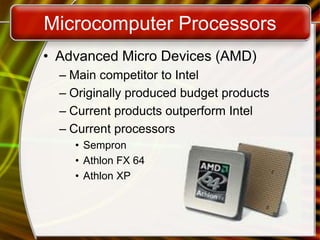
• Advanced Micro Devices (AMD)
– Main competitor to Intel
– Originally produced budget products
– Current products outperform Intel
– Current processors
• Sempron
• Athlon FX 64
• Athlon XP
Microcomputer Processors
• Freescale
– A subsidiary of Motorola
– Co-developed the Apple G4 PowerPC
– Currently focuses on the Linux market
Microcomputer Processors
• IBM
– Historically manufactured mainframes
– Partnered with Apple to develop G5
• First consumer 64 bit chip
Comparing Processors
• Speed of processor
• Size of cache
• Number of registers
• Bit size
• Speed of Front side bus
Advanced Processor Topics
• RISC processors
– Reduced Instruction Set Computing
– Smaller instruction sets
– May process data faster
– PowerPC and G5
Advanced Processor Topics
• Parallel Processing
– Multiple processors in a system
– Symmetric Multiple Processing
• Number of processors is a power of 2
– Massively Parallel Processing
• Thousands of processors
• Mainframes and super computers
Extending The Processors Power
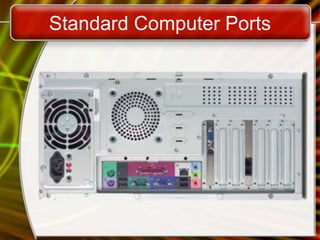
• Standard computer ports
– Keyboard and mouse ports
– USB ports
– Parallel
– Network
– Modem
– Audio
– Serial
– Video
Standard Computer Ports
Extending The Processors Power
• Serial and parallel ports
– Connect to printers or modems
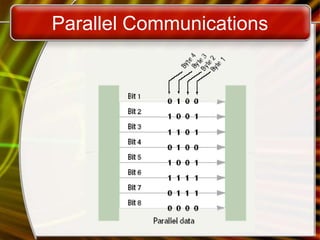
– Parallel ports move bits simultaneously
• Made of 8 – 32 wires
• Internal busses are parallel
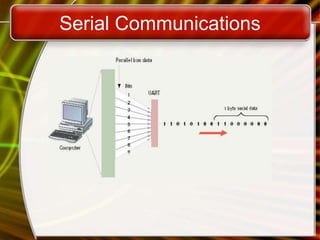
– Serial ports move one bit
• Lower data flow than parallel
• Requires control wires
• UART converts from serial to parallel
Serial Communications
Parallel Communications
Extending The Processors Power
• SCSI
– Small Computer System Interface
– Supports dozens of devices
– External devices daisy chain
– Fast hard drives and CD-ROMs
Extending The Processors Power
• USB
– Universal Serial Bus
– Most popular external bus
– Supports up to 127 devices
– Hot swappable
Extending the Processors Power
• FireWire
– IEEE 1384
– Cameras and video equipment
– Hot swappable
– Port is very expensive
Extending the Processors Power
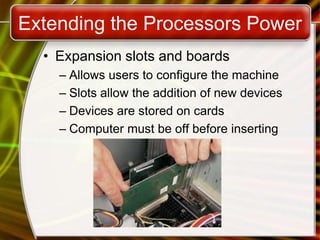
• Expansion slots and boards
– Allows users to configure the machine
– Slots allow the addition of new devices
– Devices are stored on cards
– Computer must be off before inserting
Extending the Processors Power
• PC Cards
– Expansion bus for laptops
– PCMCIA
– Hot swappable
– Small card size
– Three types, I, II and III
– Type II is most common
Extending the Processors Power
• Plug and play
– New hardware detected automatically
– Prompts to install drivers
– Non-technical users can install devices
Copyright © 2006 by The McGraw-Hill Companies, Inc. All rights reserved.McGraw-Hill Technology Education
Chapter 5B
End of Chapter

Intro ch 05_b

  • 1.
    Copyright © 2006by The McGraw-Hill Companies, Inc. All rights reserved.McGraw-Hill Technology Education McGraw-Hill Technology Education Copyright © 2006 by The McGraw-Hill Companies, Inc. All rights reserved.
  • 2.
    Copyright © 2006by The McGraw-Hill Companies, Inc. All rights reserved.McGraw-Hill Technology Education Chapter 5B Modern CPUs
  • 3.
    5B-3 A Look InsideThe Processor • Architecture – Determines • Location of CPU parts • Bit size • Number of registers • Pipelines – Main difference between CPUs
  • 4.
    Microcomputer Processors • Intel –Leading manufacturer of processors – Intel 4004 was worlds first microprocessor – IBM PC powered by Intel 8086 – Current processors • Centrino • Itanium • Pentium IV • Xeon
  • 5.
    Microcomputer Processors • AdvancedMicro Devices (AMD) – Main competitor to Intel – Originally produced budget products – Current products outperform Intel – Current processors • Sempron • Athlon FX 64 • Athlon XP
  • 6.
    Microcomputer Processors • Freescale –A subsidiary of Motorola – Co-developed the Apple G4 PowerPC – Currently focuses on the Linux market
  • 7.
    Microcomputer Processors • IBM –Historically manufactured mainframes – Partnered with Apple to develop G5 • First consumer 64 bit chip
  • 8.
    Comparing Processors • Speedof processor • Size of cache • Number of registers • Bit size • Speed of Front side bus
  • 9.
    Advanced Processor Topics •RISC processors – Reduced Instruction Set Computing – Smaller instruction sets – May process data faster – PowerPC and G5
  • 10.
    Advanced Processor Topics •Parallel Processing – Multiple processors in a system – Symmetric Multiple Processing • Number of processors is a power of 2 – Massively Parallel Processing • Thousands of processors • Mainframes and super computers
  • 11.
    Extending The ProcessorsPower • Standard computer ports – Keyboard and mouse ports – USB ports – Parallel – Network – Modem – Audio – Serial – Video
  • 12.
  • 13.
    Extending The ProcessorsPower • Serial and parallel ports – Connect to printers or modems – Parallel ports move bits simultaneously • Made of 8 – 32 wires • Internal busses are parallel – Serial ports move one bit • Lower data flow than parallel • Requires control wires • UART converts from serial to parallel
  • 14.
  • 15.
  • 16.
    Extending The ProcessorsPower • SCSI – Small Computer System Interface – Supports dozens of devices – External devices daisy chain – Fast hard drives and CD-ROMs
  • 17.
    Extending The ProcessorsPower • USB – Universal Serial Bus – Most popular external bus – Supports up to 127 devices – Hot swappable
  • 18.
    Extending the ProcessorsPower • FireWire – IEEE 1384 – Cameras and video equipment – Hot swappable – Port is very expensive
  • 19.
    Extending the ProcessorsPower • Expansion slots and boards – Allows users to configure the machine – Slots allow the addition of new devices – Devices are stored on cards – Computer must be off before inserting
  • 20.
    Extending the ProcessorsPower • PC Cards – Expansion bus for laptops – PCMCIA – Hot swappable – Small card size – Three types, I, II and III – Type II is most common
  • 21.
    Extending the ProcessorsPower • Plug and play – New hardware detected automatically – Prompts to install drivers – Non-technical users can install devices
  • 22.
    Copyright © 2006by The McGraw-Hill Companies, Inc. All rights reserved.McGraw-Hill Technology Education Chapter 5B End of Chapter