ASP (Active Server Pages)
A Technology to serve dynamic pages
Active Server Pages
Presented by
Mohit Joshi
Agenda
1. Discussing on Architecture of Web
1. What is ASP and Digging in the
development framework with ASP
3. Classic ASP at a glance
4. ASP Object and Components
Architecture of web
Difference between Browser and Server
Server
1. Software to serve documents on web.
2. Receive HTTP request and sends appropriate
HTTP response
3. Have area to store website documents
4. Eg Apache Server, Internet Information Server,
Heroku,AWS
Browser
1. Software to surf web pages and content
2. Sends a HTTP request and receives and
HTTP response
3. Store data in cookies in local machine
4. Eg. Google Chrome , Firefox
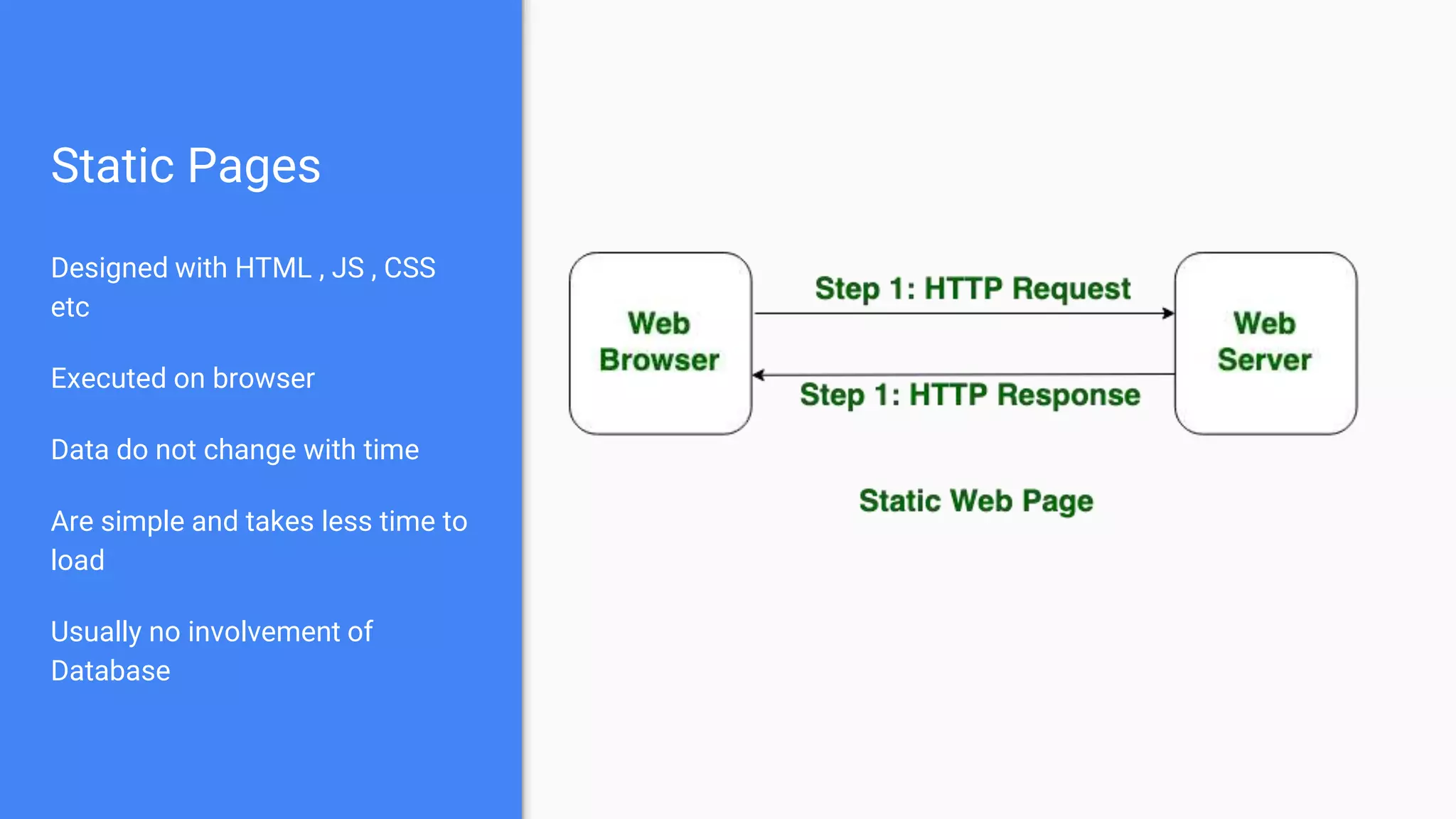
Static Pages
Designed with HTML , JS , CSS
etc
Executed on browser
Data do not change with time
Are simple and takes less time to
load
Usually no involvement of
Database
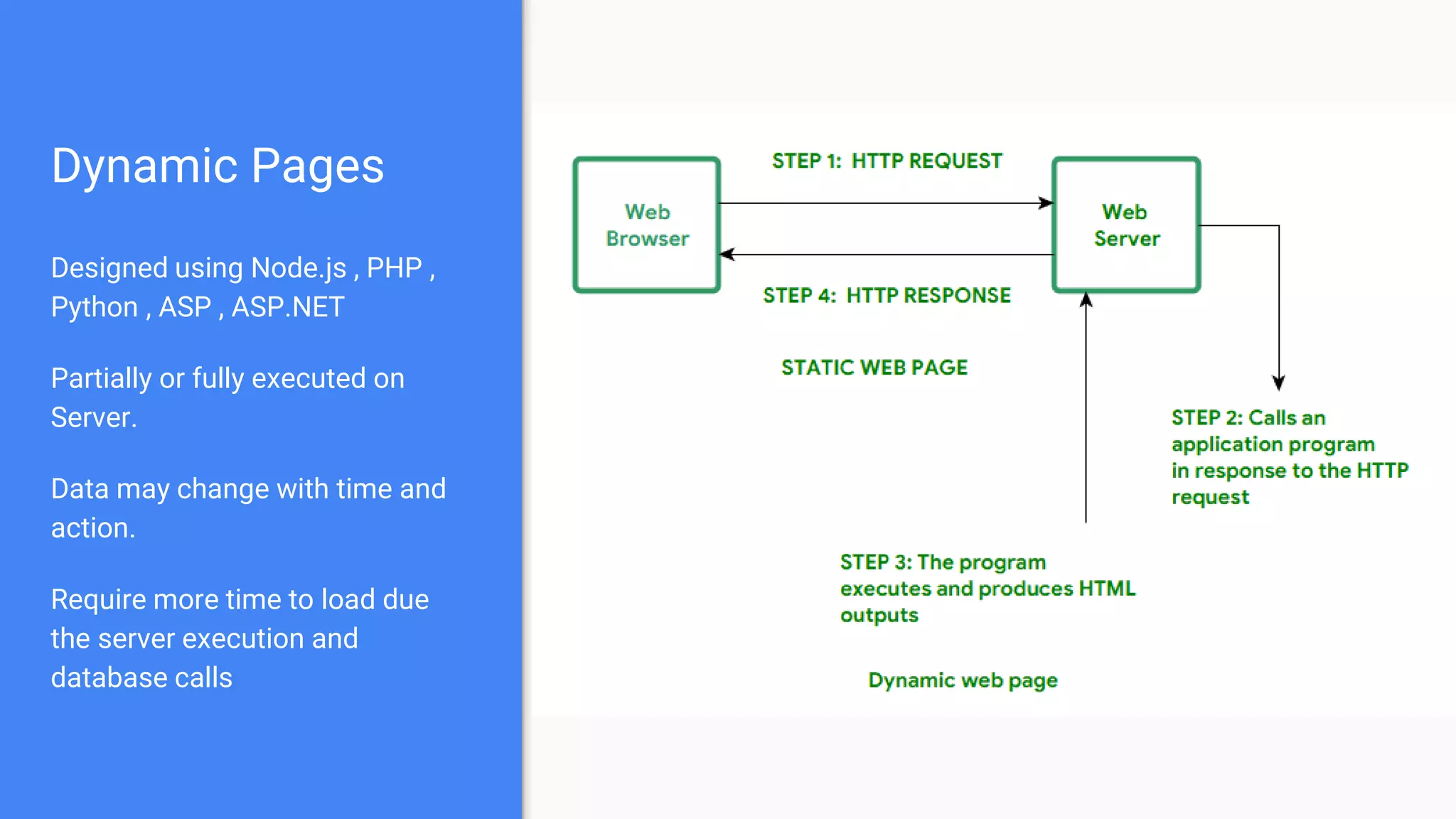
Dynamic Pages
Designed using Node.js , PHP ,
Python , ASP , ASP.NET
Partially or fully executed on
Server.
Data may change with time and
action.
Require more time to load due
the server execution and
database calls
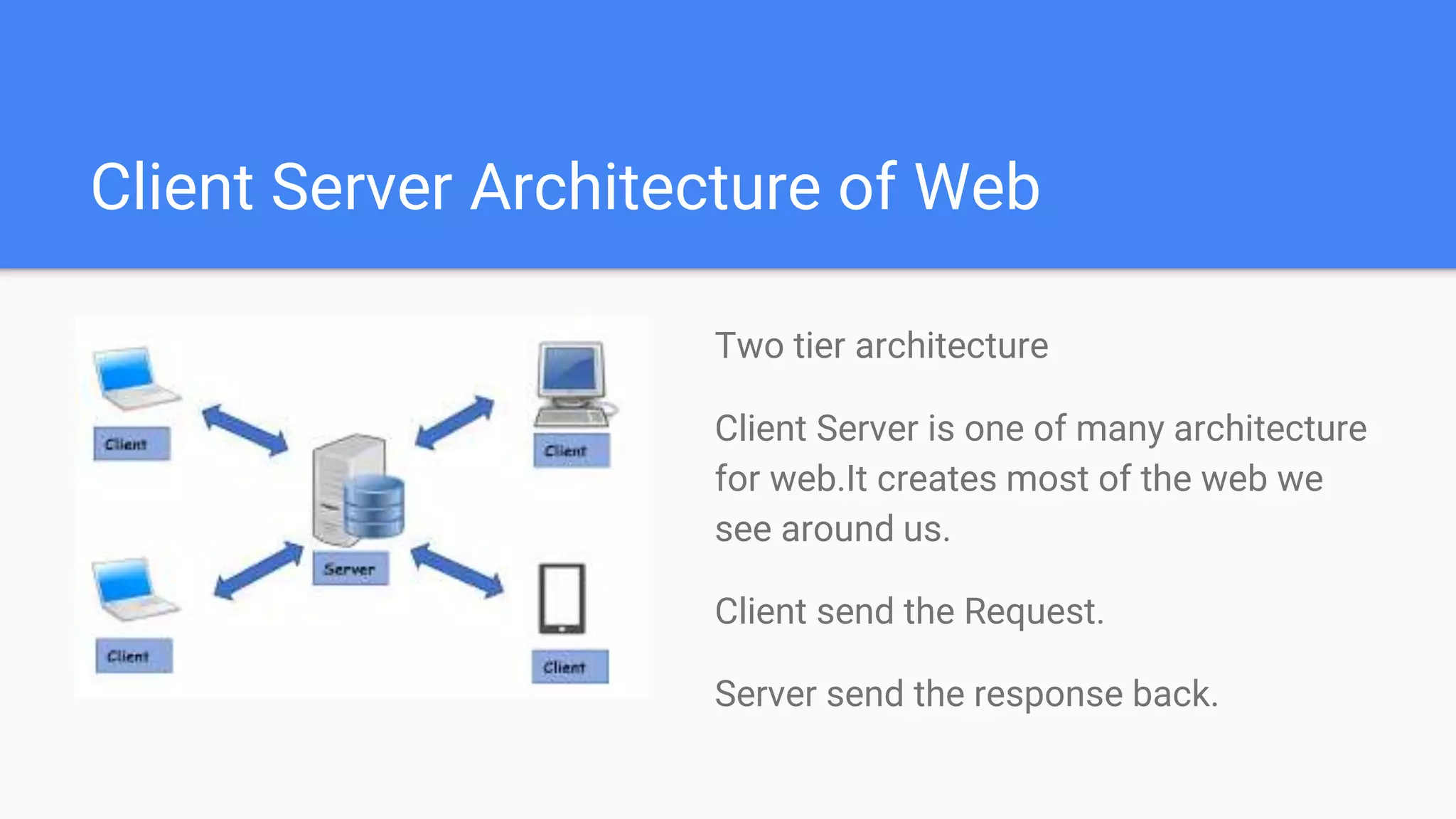
Client Server Architecture of Web
Two tier architecture
Client Server is one of many architecture
for web.It creates most of the web we
see around us.
Client send the Request.
Server send the response back.
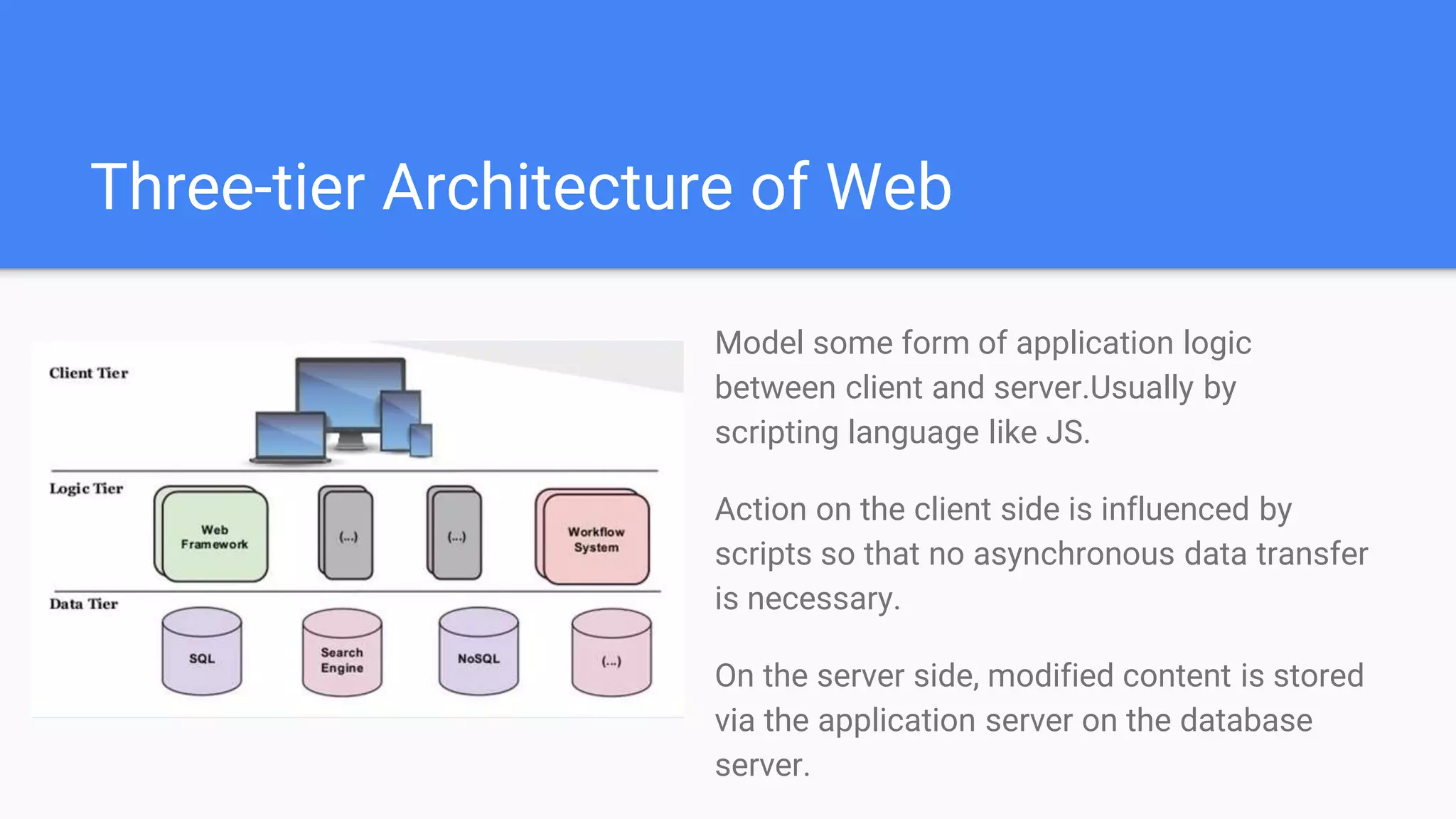
Three-tier Architecture of Web
Model some form of application logic
between client and server.Usually by
scripting language like JS.
Action on the client side is influenced by
scripts so that no asynchronous data transfer
is necessary.
On the server side, modified content is stored
via the application server on the database
server.
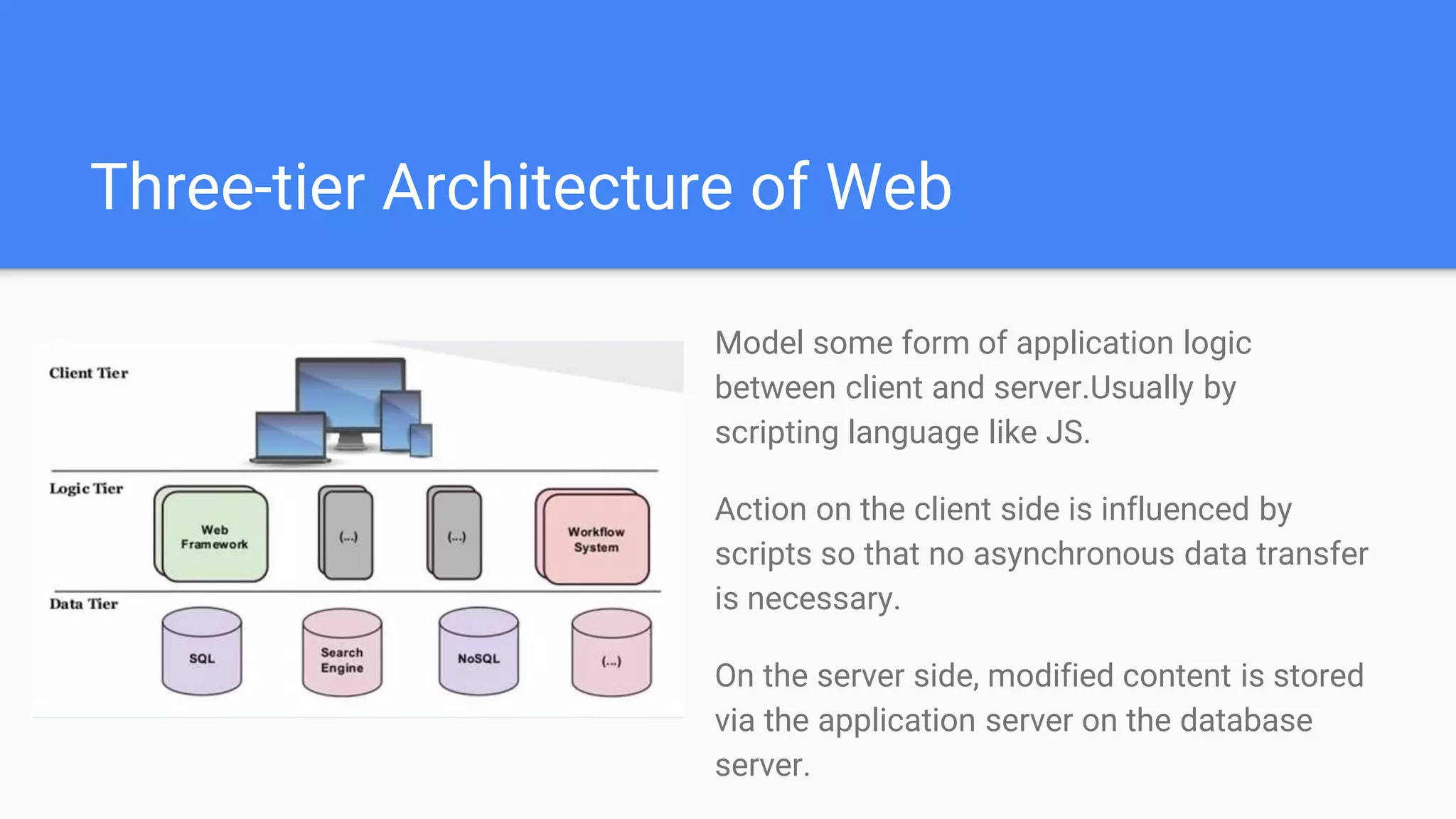
Three-tier Architecture of Web
Model some form of application logic
between client and server.Usually by
scripting language like JS.
Action on the client side is influenced by
scripts so that no asynchronous data transfer
is necessary.
On the server side, modified content is stored
via the application server on the database
server.
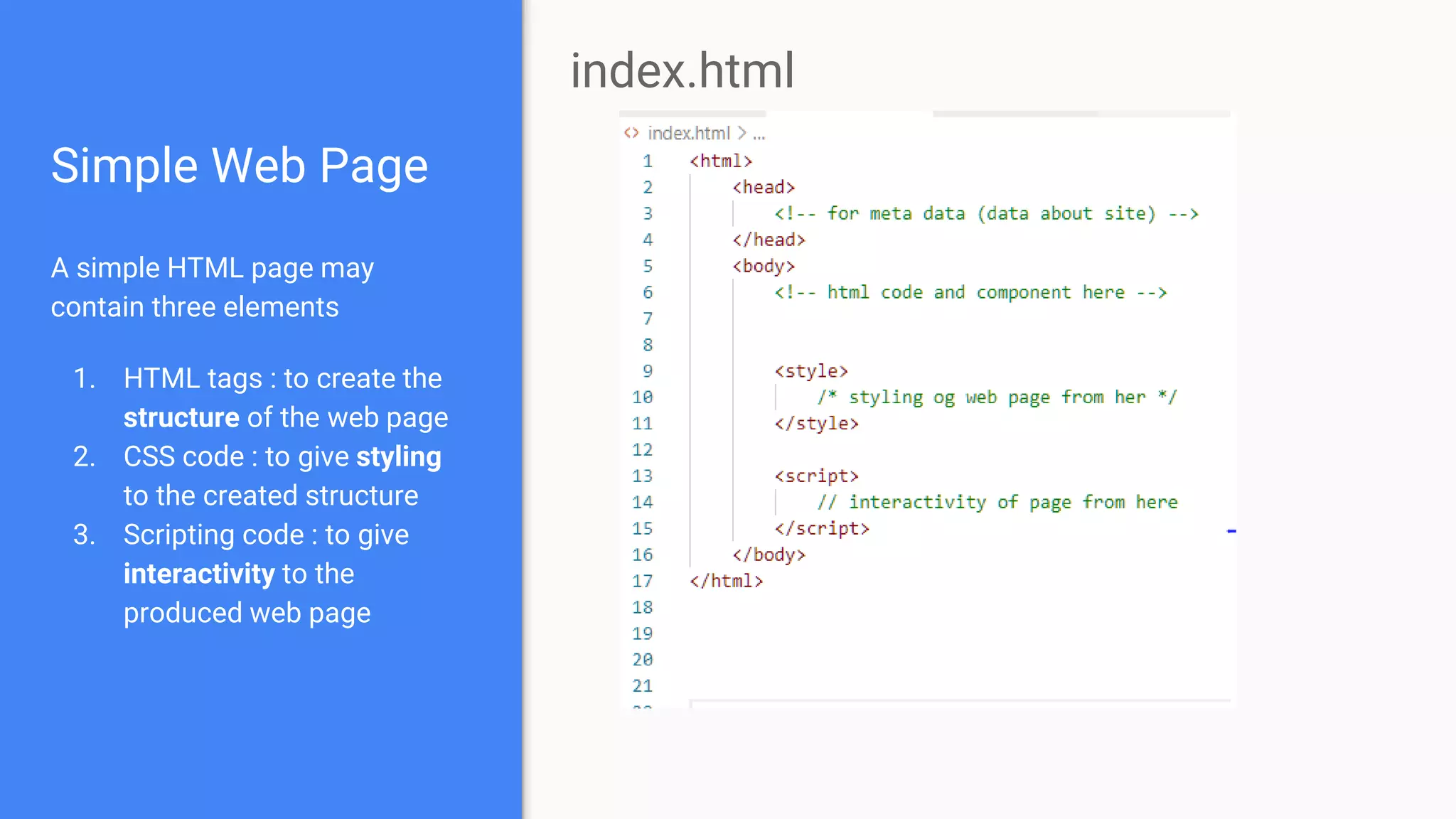
Simple Web Page
A simple HTML page may
contain three elements
1. HTML tags : to create the
structure of the web page
2. CSS code : to give styling
to the created structure
3. Scripting code : to give
interactivity to the
produced web page
index.html
ASP and Various Development
Framework
ASP
Active Server Pages
Program that runs inside IIS (Internet
Information Service) server
Used to create dynamic and interactive pages
Microsoft’s initiative to create dynamic web
pages
Internet Information Services Server
Windows Server-based web application used to
deliver website content over the internet to an
end user.
Bundled with all Microsoft windows Server
Products
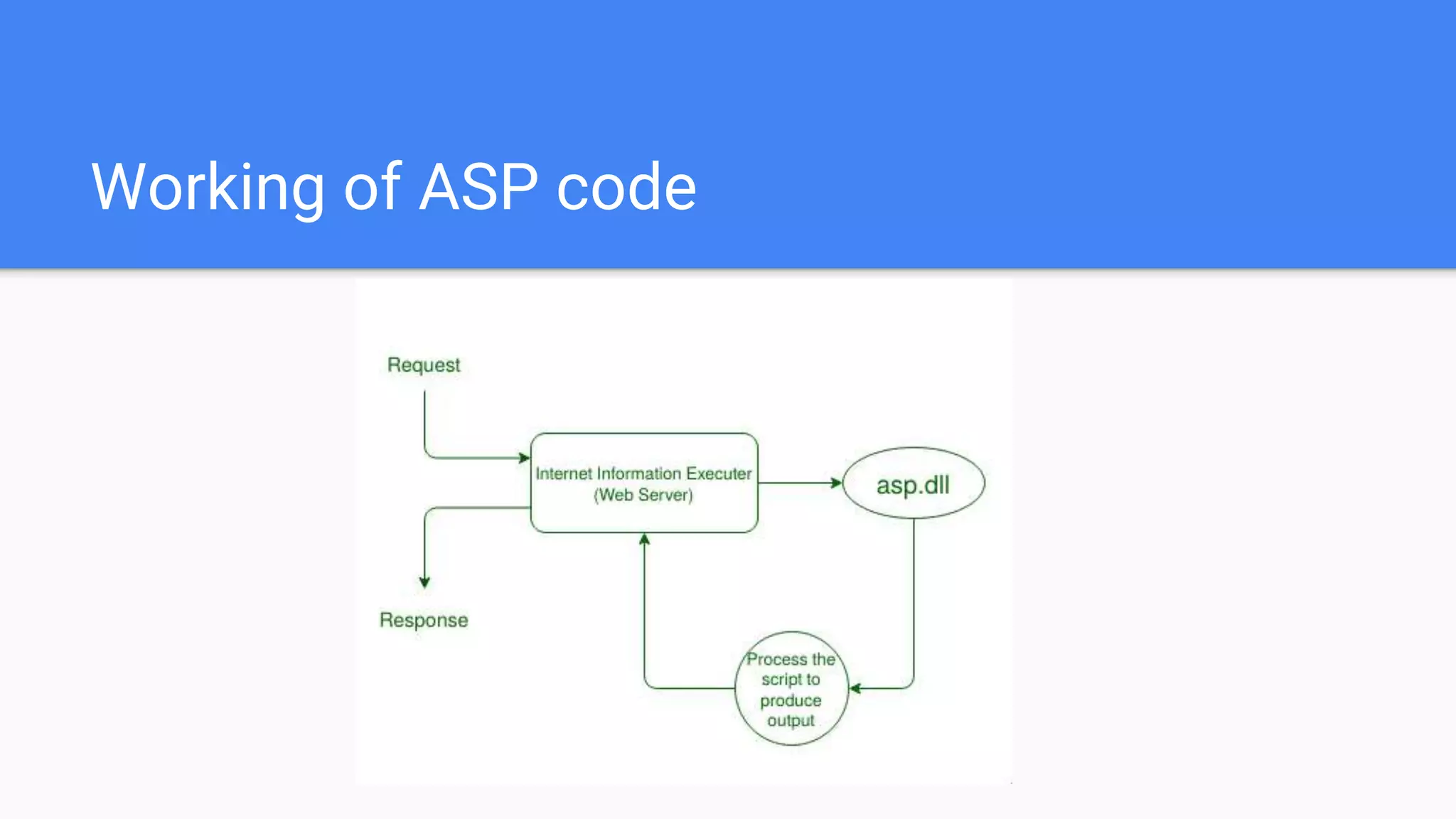
Working of ASP code
A Glance At Classic ASP
Classic ASP
A ASP page contain
1) HTML Tags - ASP can be regarded as
extension of a simple HTML file
2) Scripting Language - use to perform
operation on both client and server side .
Javascript and VBscript are available scripting
language here.
3) ASP Built-in Objects - encapsulation of
methods and user variable. Can have properties,
method, event, collections.
4) ASP Components - built in module to handle
some necessary tasks like database access, file
creation and exploration etc
Syntax for Classic ASP
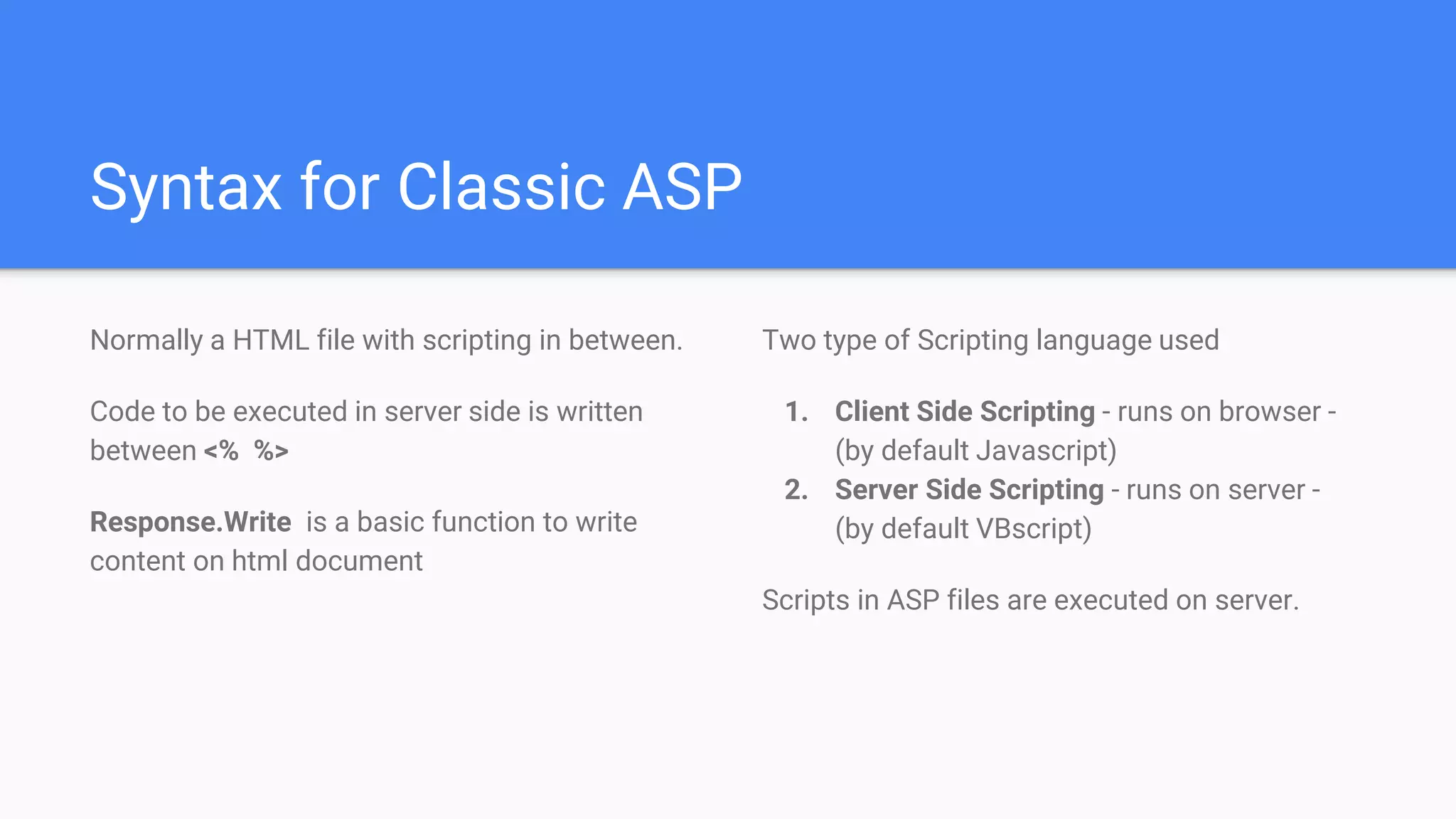
Normally a HTML file with scripting in between.
Code to be executed in server side is written
between <% %>
Response.Write is a basic function to write
content on html document
Two type of Scripting language used
1. Client Side Scripting - runs on browser -
(by default Javascript)
2. Server Side Scripting - runs on server -
(by default VBscript)
Scripts in ASP files are executed on server.
Simple ASP code
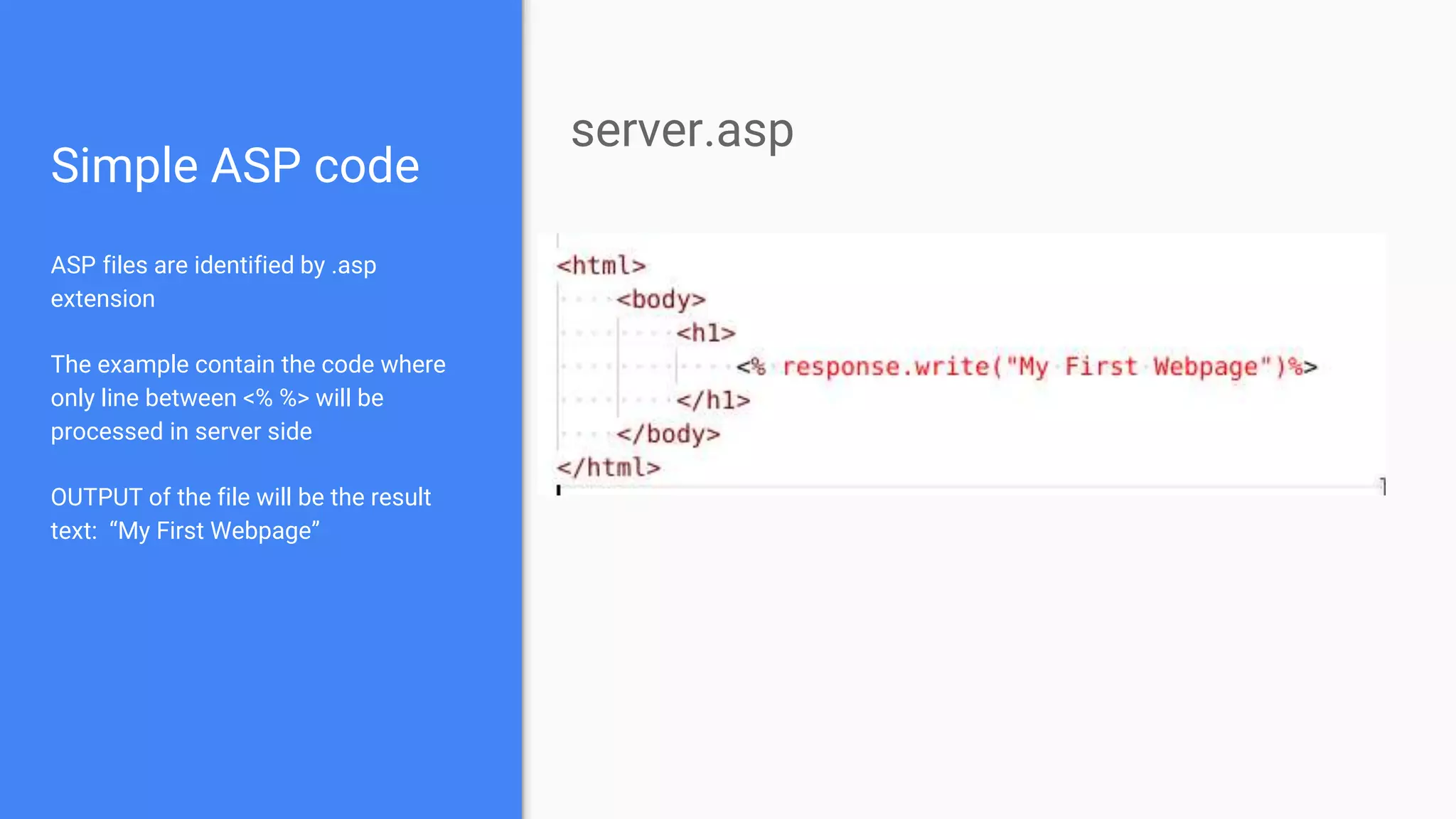
ASP files are identified by .asp
extension
The example contain the code where
only line between <% %> will be
processed in server side
OUTPUT of the file will be the result
text: “My First Webpage”
server.asp
Scripting in ASP
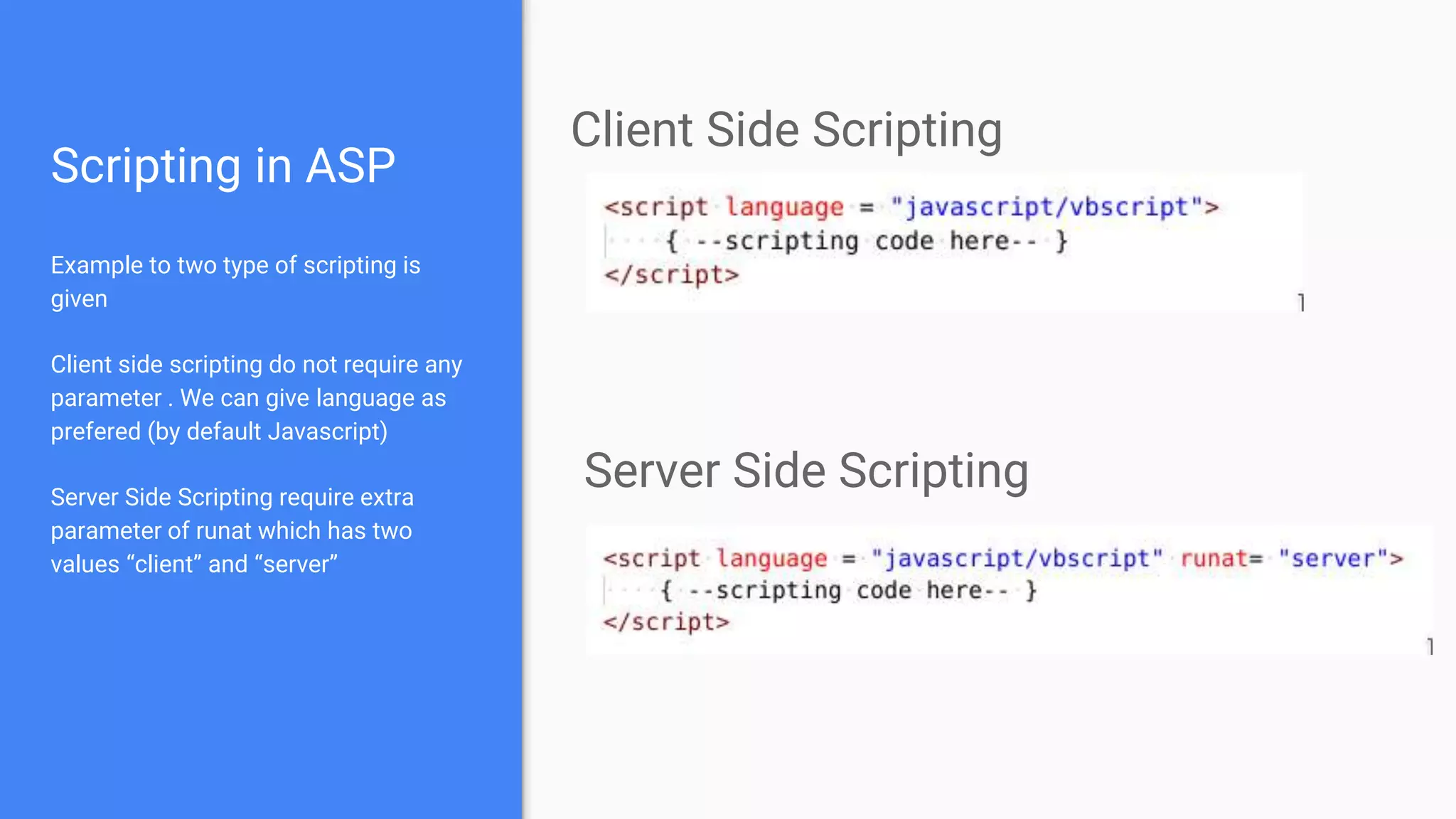
Example to two type of scripting is
given
Client side scripting do not require any
parameter . We can give language as
prefered (by default Javascript)
Server Side Scripting require extra
parameter of runat which has two
values “client” and “server”
Client Side Scripting
Server Side Scripting
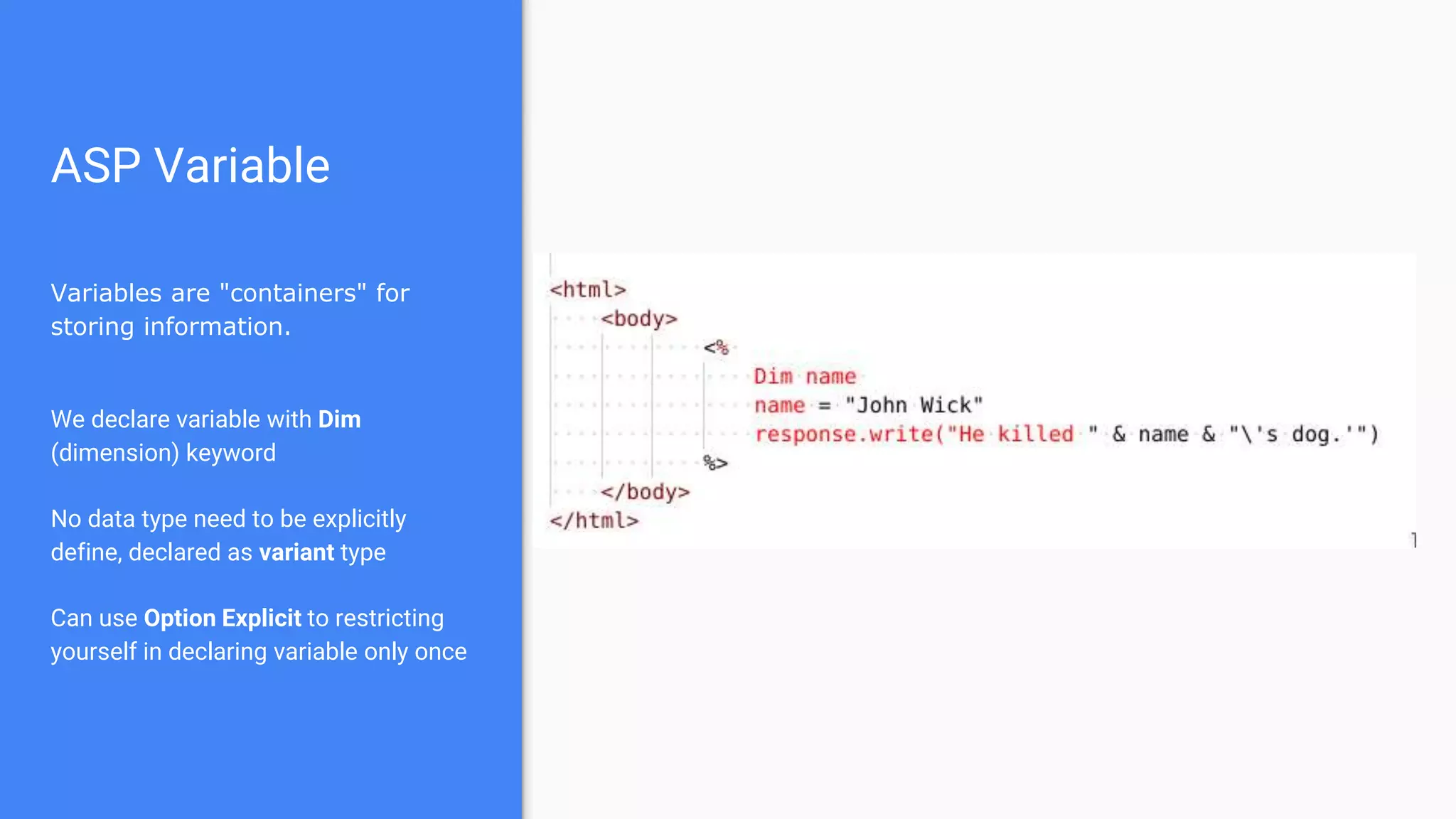
ASP Variable
Variables are "containers" for
storing information.
We declare variable with Dim
(dimension) keyword
No data type need to be explicitly
define, declared as variant type
Can use Option Explicit to restricting
yourself in declaring variable only once
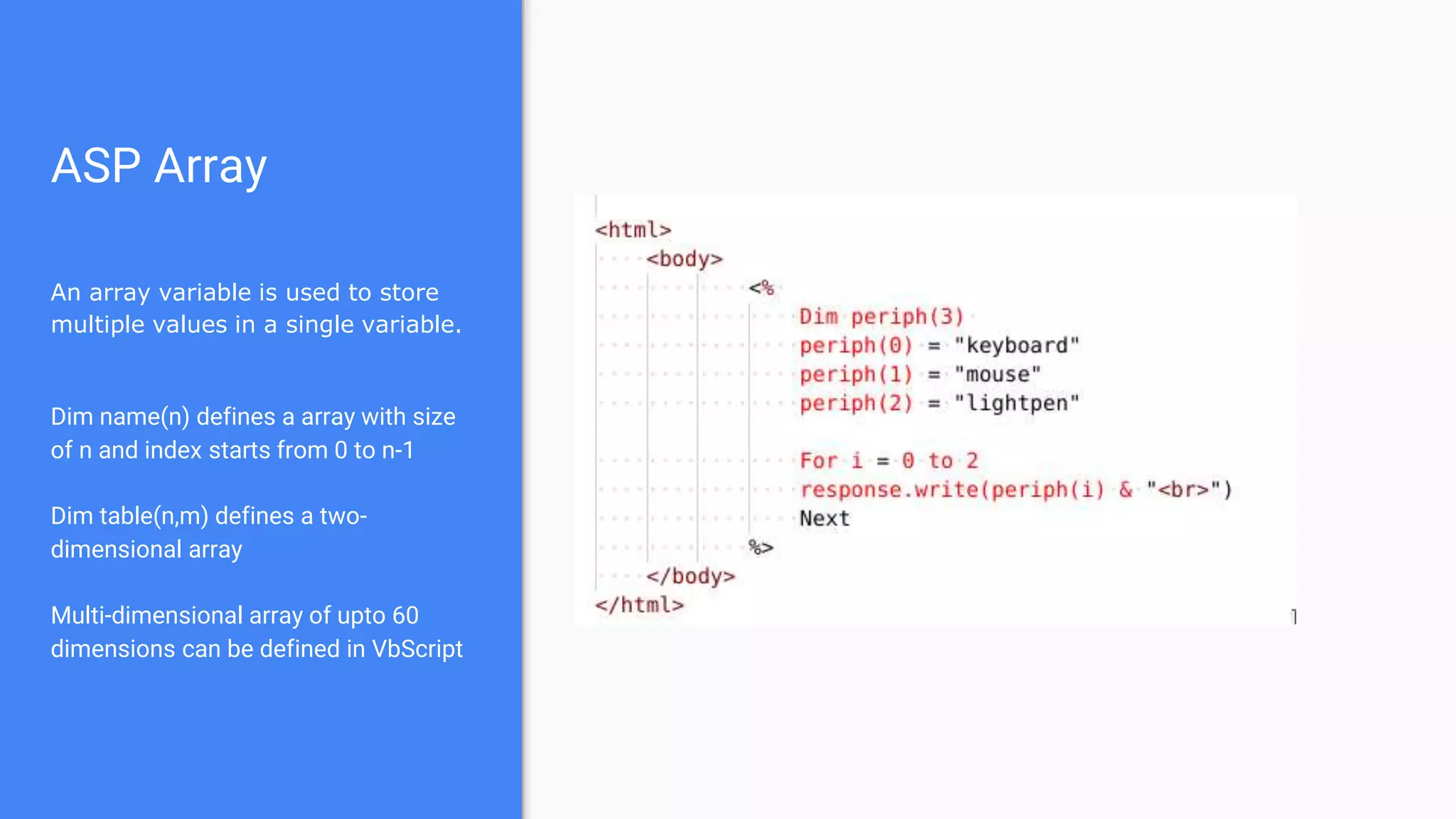
ASP Array
An array variable is used to store
multiple values in a single variable.
Dim name(n) defines a array with size
of n and index starts from 0 to n-1
Dim table(n,m) defines a two-
dimensional array
Multi-dimensional array of upto 60
dimensions can be defined in VbScript
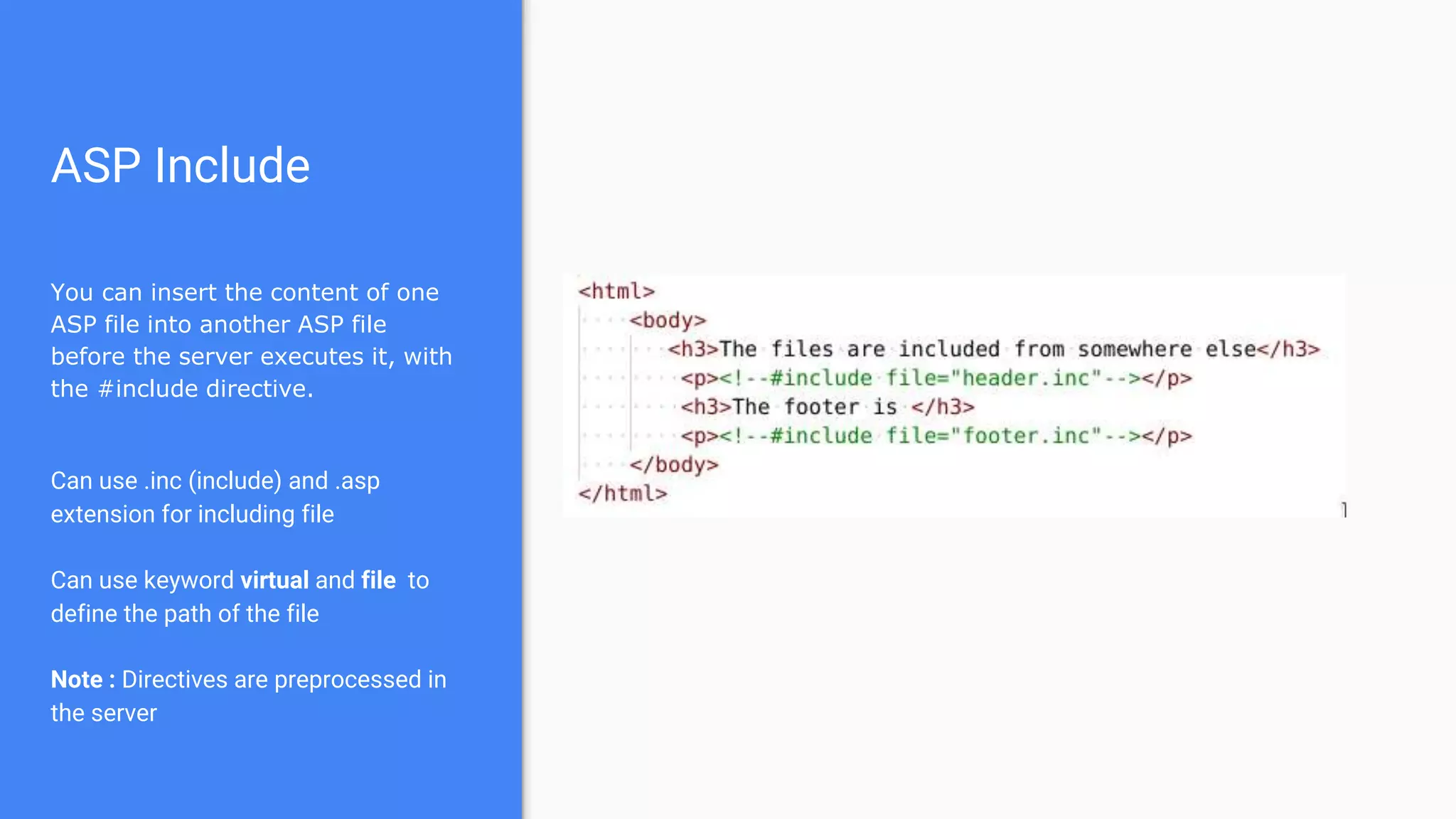
ASP Include
You can insert the content of one
ASP file into another ASP file
before the server executes it, with
the #include directive.
Can use .inc (include) and .asp
extension for including file
Can use keyword virtual and file to
define the path of the file
Note : Directives are preprocessed in
the server
ASP Objects and Components
ASP Objects
Objects are a way of encapsulating multiple
methods (they're like functions) and variables in
one easy to manage user-variable (called
objects)
Objects in ASP resemble other Object Oriented
Programming languages
An ASP Object can contain -
Collection , Properties , Methods , Events
Objects were created to combat the increasing
complexity of programming.
It makes programming easier and your code
more human readable.
Object in ASP is created by passing a name string to the
Server.CreateObject function
ASP Built-in Objects
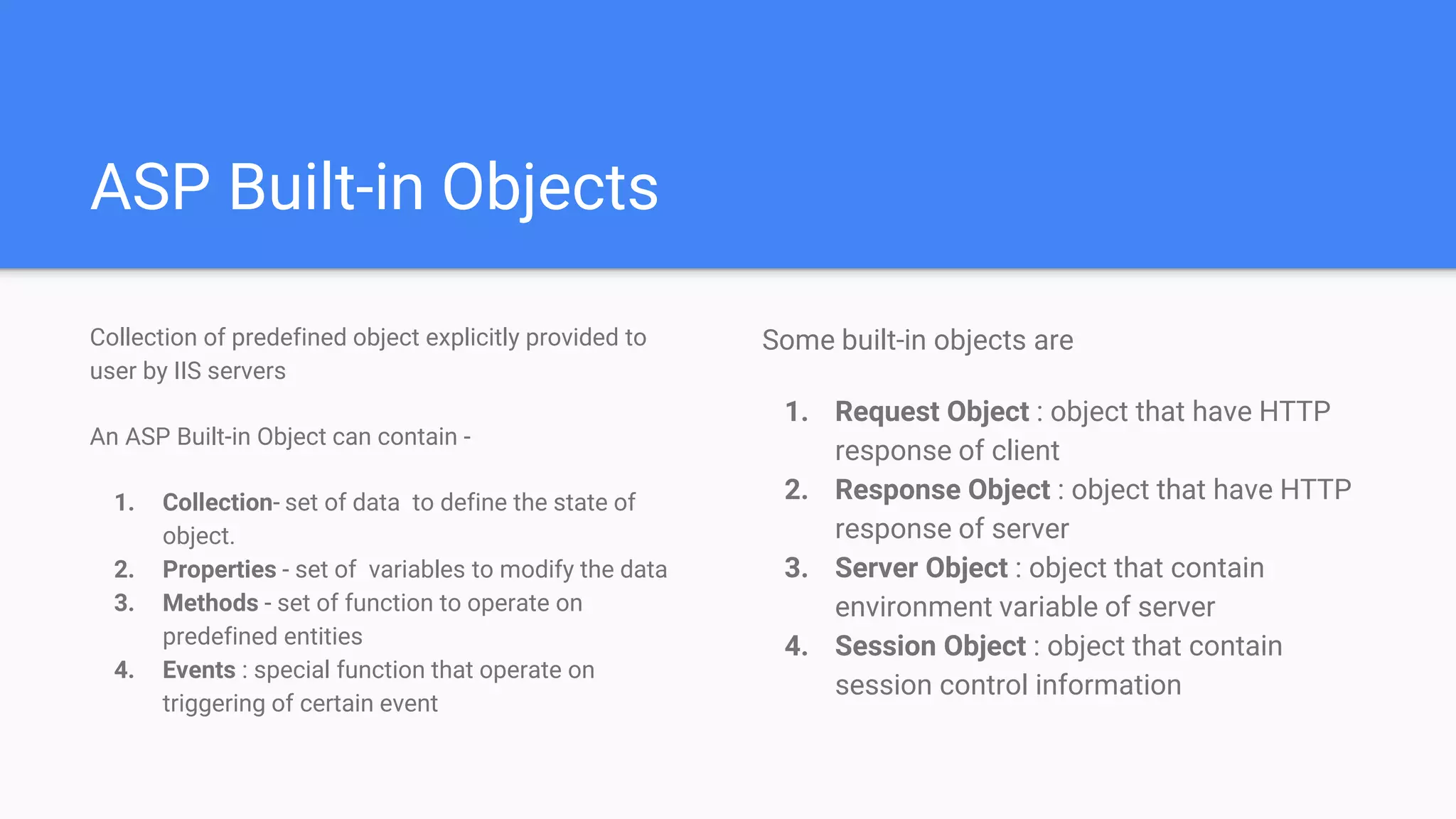
Collection of predefined object explicitly provided to
user by IIS servers
An ASP Built-in Object can contain -
1. Collection- set of data to define the state of
object.
2. Properties - set of variables to modify the data
3. Methods - set of function to operate on
predefined entities
4. Events : special function that operate on
triggering of certain event
Some built-in objects are
1. Request Object : object that have HTTP
response of client
2. Response Object : object that have HTTP
response of server
3. Server Object : object that contain
environment variable of server
4. Session Object : object that contain
session control information
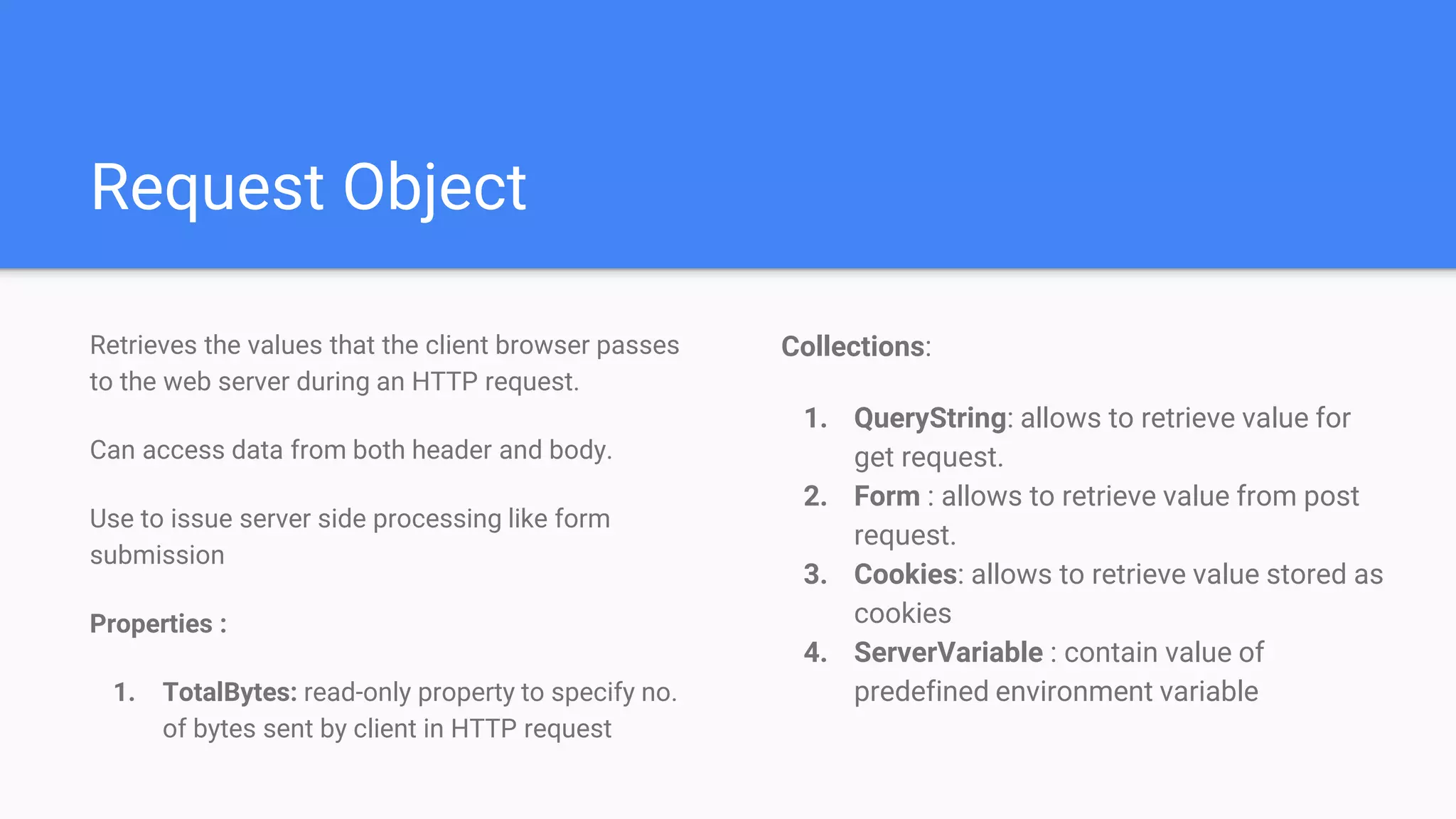
Request Object
Collections:
1. QueryString: allows to retrieve value for
get request.
2. Form : allows to retrieve value from post
request.
3. Cookies: allows to retrieve value stored as
cookies
4. ServerVariable : contain value of
predefined environment variable
Retrieves the values that the client browser passes
to the web server during an HTTP request.
Can access data from both header and body.
Use to issue server side processing like form
submission
Properties :
1. TotalBytes: read-only property to specify no.
of bytes sent by client in HTTP request
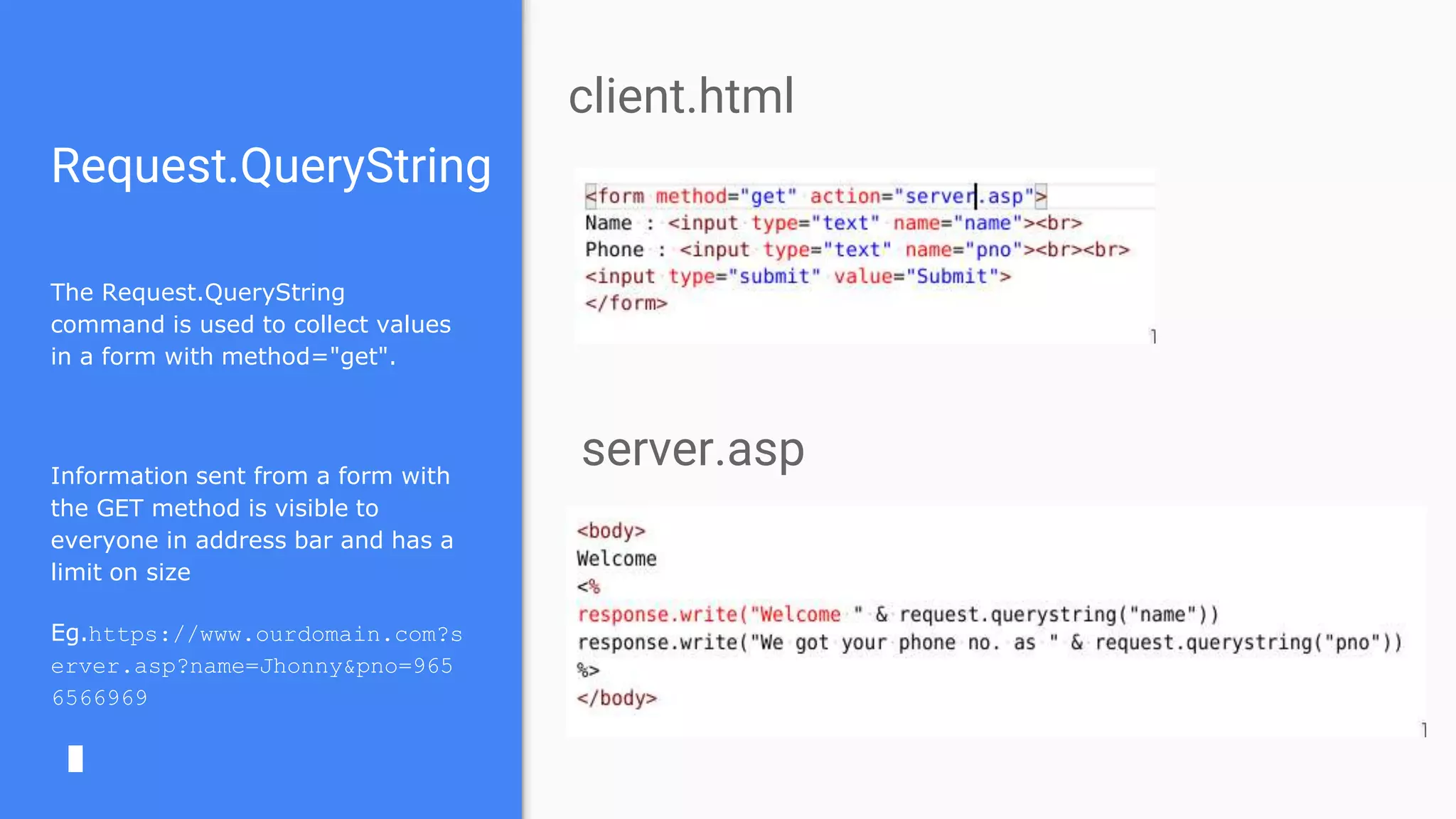
Request.QueryString
The Request.QueryString
command is used to collect values
in a form with method="get".
Information sent from a form with
the GET method is visible to
everyone in address bar and has a
limit on size
Eg.https://www.ourdomain.com?s
erver.asp?name=Jhonny&pno=965
6566969
client.html
server.asp
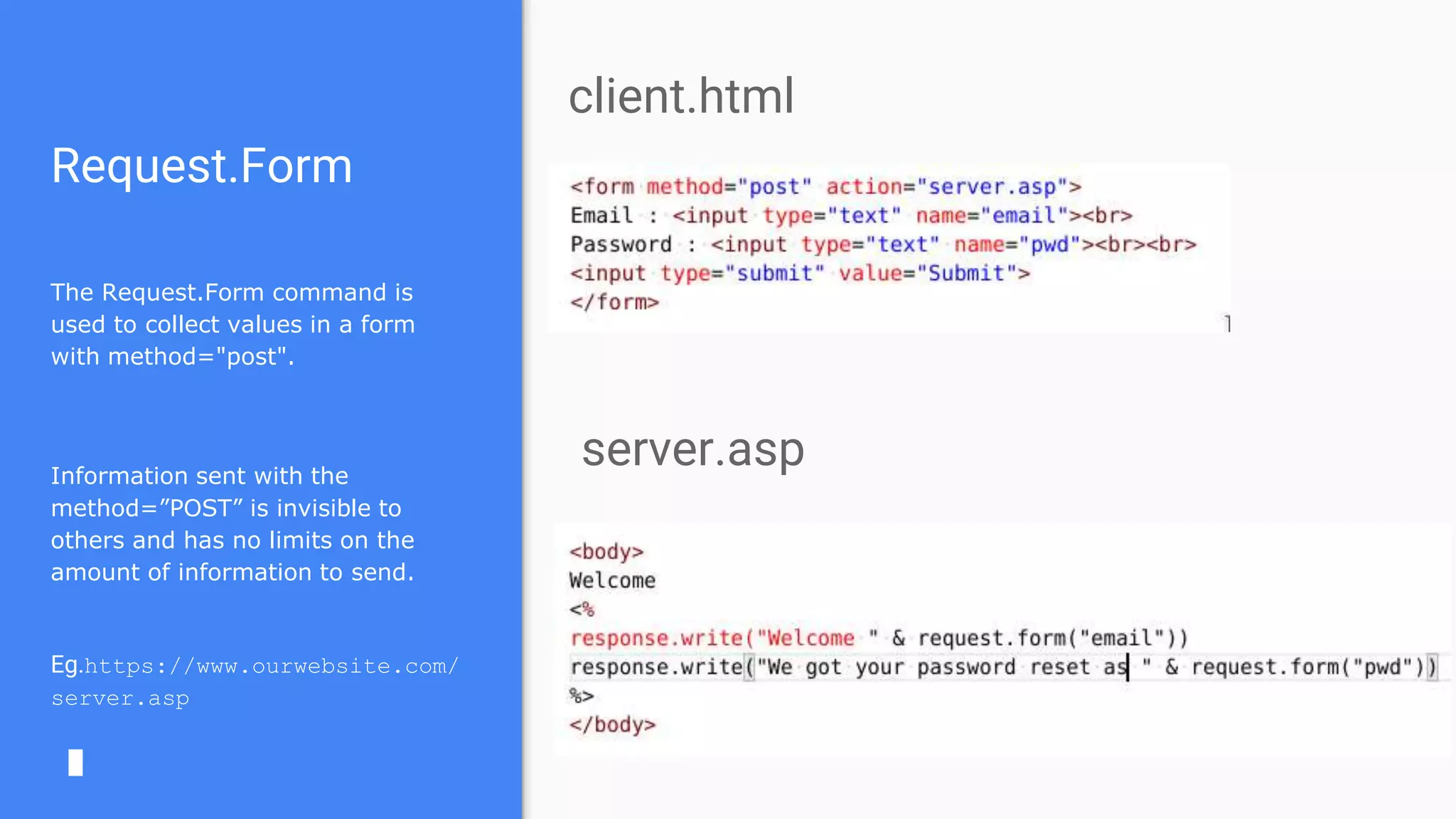
Request.Form
The Request.Form command is
used to collect values in a form
with method="post".
Information sent with the
method=”POST” is invisible to
others and has no limits on the
amount of information to send.
Eg.https://www.ourwebsite.com/
server.asp
client.html
server.asp
Response Object
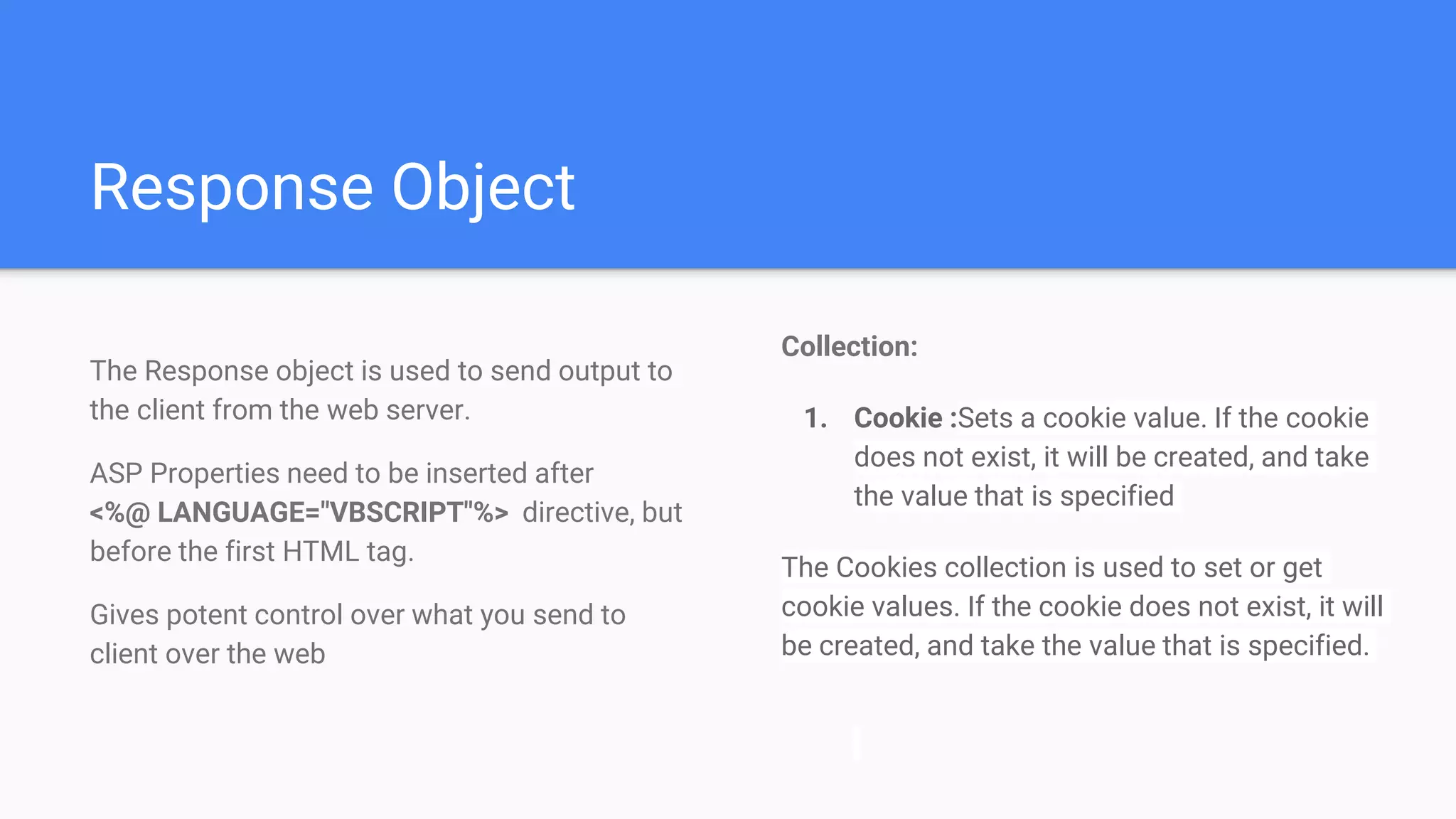
Collection:
1. Cookie :Sets a cookie value. If the cookie
does not exist, it will be created, and take
the value that is specified
The Cookies collection is used to set or get
cookie values. If the cookie does not exist, it will
be created, and take the value that is specified.
The Response object is used to send output to
the client from the web server.
ASP Properties need to be inserted after
<%@ LANGUAGE="VBSCRIPT"%> directive, but
before the first HTML tag.
Gives potent control over what you send to
client over the web
Response Object
Methods :
1. AddHeader : add a HTTP header and
value to the response.
2. AppendToLog: add specific string at the
end of server log
3. Redirect : redirect the user to different
URL
4. End : stops processing a script and return
current result
Properties:
1. ContentType :sets the HTTP content
type for response object
2. Expires : sets how long the page will be
cached in browser
3. IsClientConnected : specifies whether
client is still connected to server or not
4. Status : specifies the status send by
server
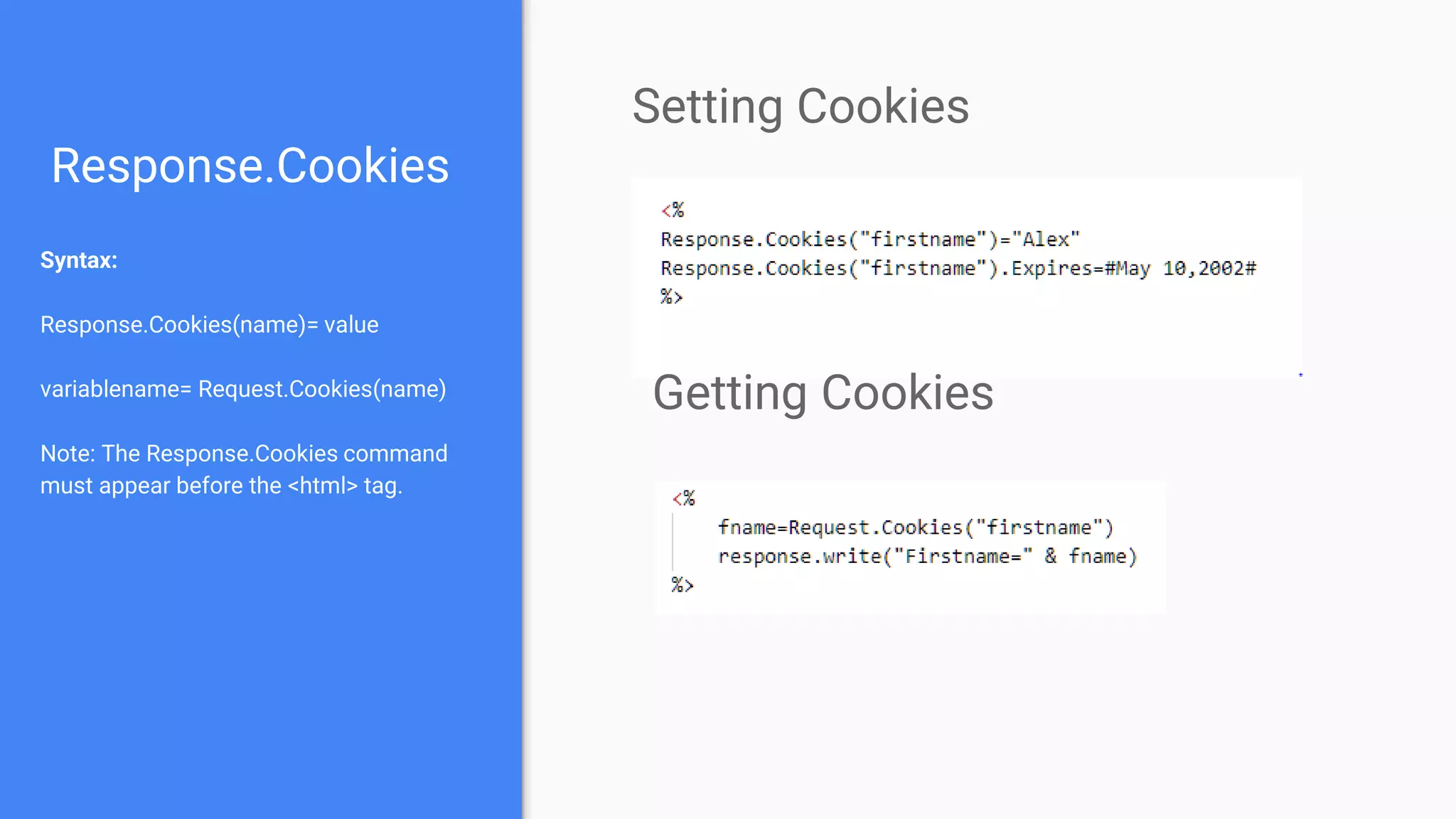
Response.Cookies
Syntax:
Response.Cookies(name)= value
variablename= Request.Cookies(name)
Note: The Response.Cookies command
must appear before the <html> tag.
Setting Cookies
Getting Cookies
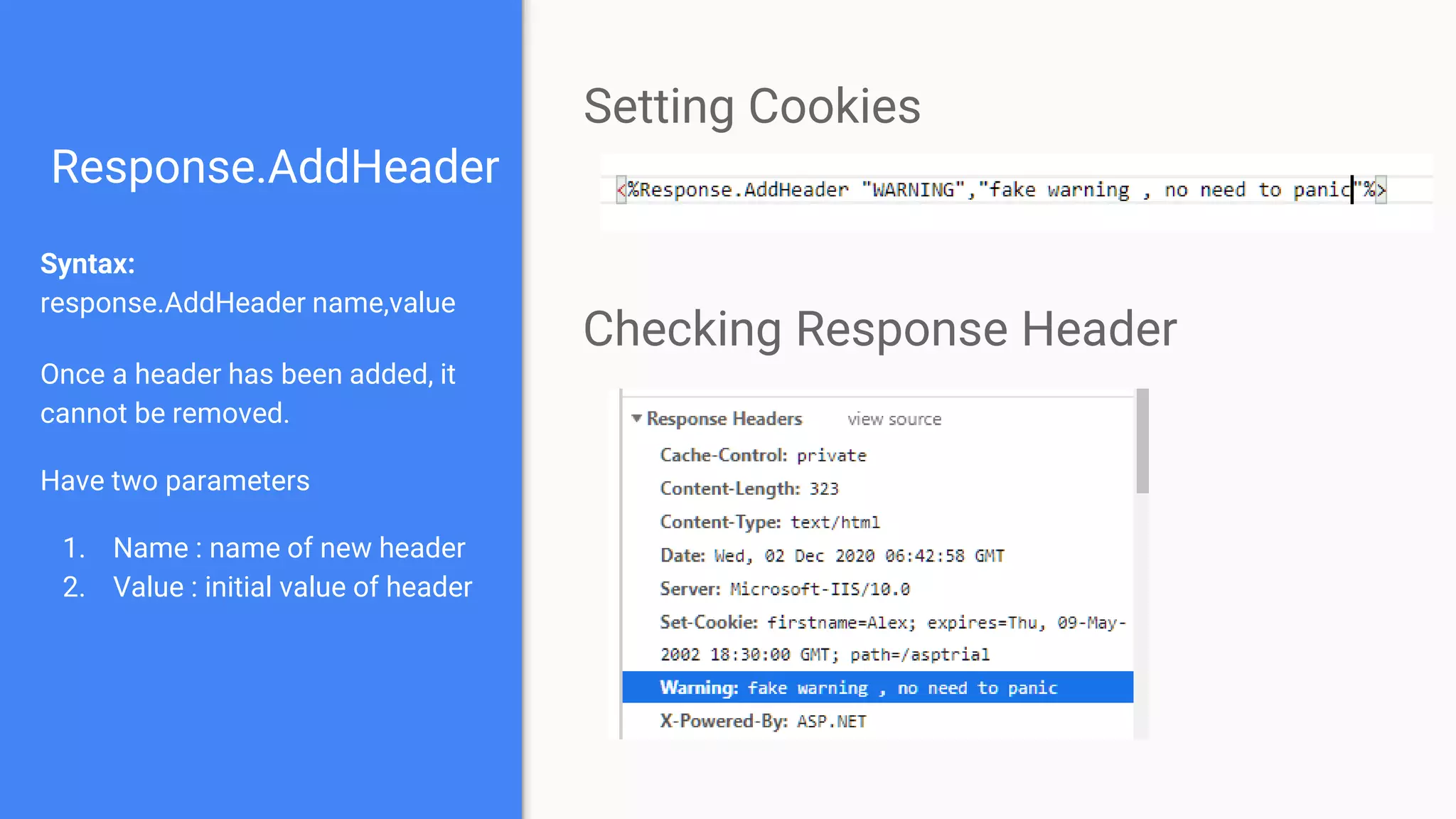
Response.AddHeader
Syntax:
response.AddHeader name,value
Once a header has been added, it
cannot be removed.
Have two parameters
1. Name : name of new header
2. Value : initial value of header
Setting Cookies
Checking Response Header
Response.ContentType
Syntax
response.ContentType[=contenttype]
Parameter
1. Contenttype :A string describing the
content type.
Some Common content types are :
<%response.ContentType="text/HTML"%>
<%response.ContentType="image/GIF"%>
<%response.ContentType="image/JPEG"%>
<%response.ContentType="text/plain"%>
Setting Content Type
Server Object
Methods :
1. CreateObject -Creates an instance of an
object
2. Execute -Executes an ASP file from inside
another ASP file
3. Transfer - Sends (transfers) all the
information created in one ASP file to a
second ASP file
4. URLEncode : Applies URL encoding rules to a
specified string
The Server object is designed to help you carry
out various tasks on the server.
It is used to access properties and methods on
the server.
Properties:
1. ScriptTimeout - Sets or returns the
maximum number of seconds a script can
run before it is terminated
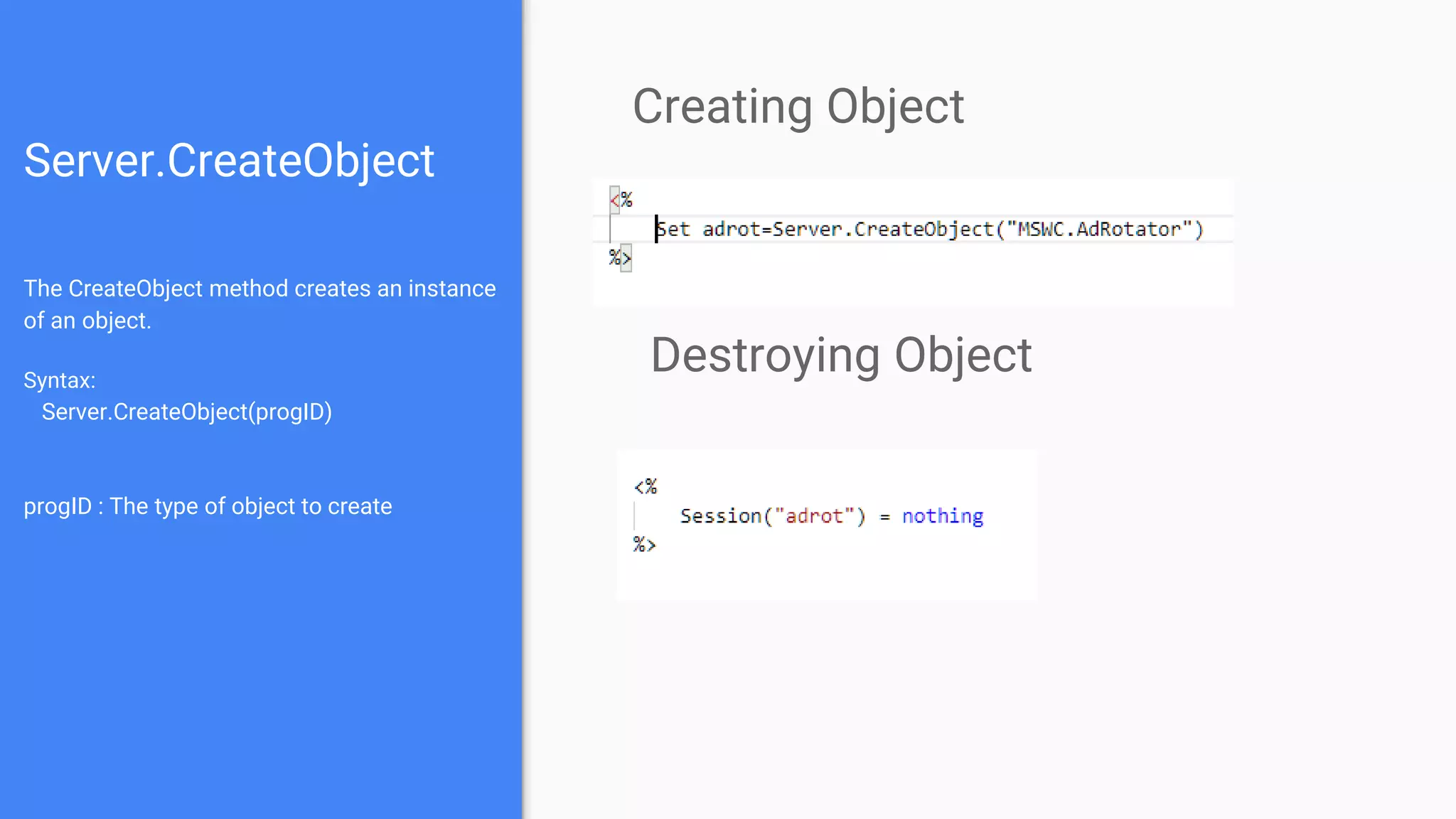
Server.CreateObject
The CreateObject method creates an instance
of an object.
Syntax:
Server.CreateObject(progID)
progID : The type of object to create
Creating Object
Destroying Object
Session Object
A Session object stores information about, or
change settings for a user session.
Collections:
1. Contents :Contains all the items
appended to the session through a script
command
2. StaticObjects : Contains all the objects
appended to the session with the HTML
<object> tag
Methods:
1. Abandon : Destroys a user session
2. Contents.Remove: Deletes an item from
the Contents collection
3. Contents.RemoveAll:Deletes all items
from the Contents collection
Session Object
Properties :
1. SessionID : returns a unique id for each
user generated at server
2. Timeout : set timeout period for session
3. LCID : return location integer according to
which date , time other content can be set
Events:
1. Session_OnEnd : occurs when session
end
2. Session_OnStart : occurs when session
start.
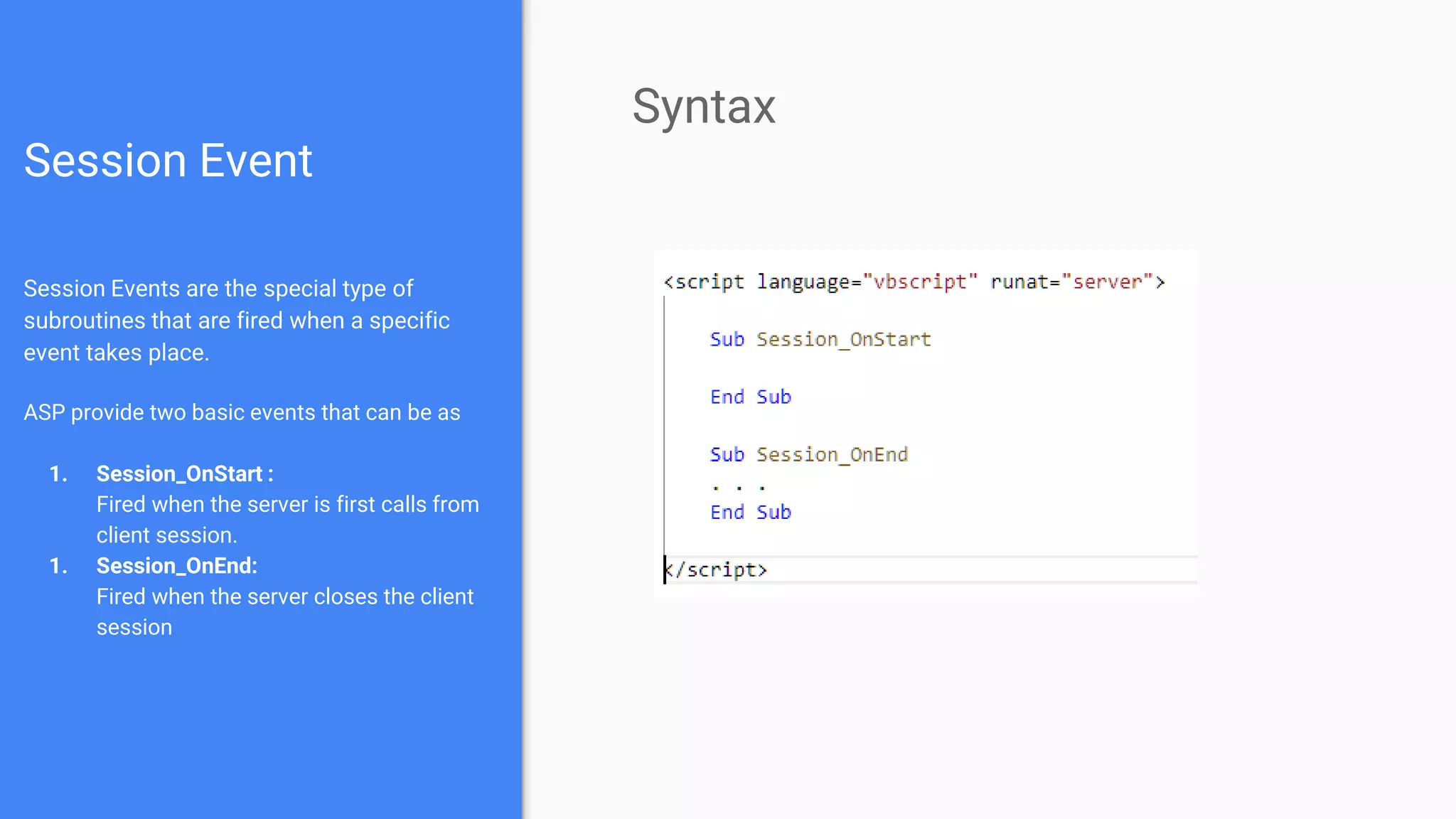
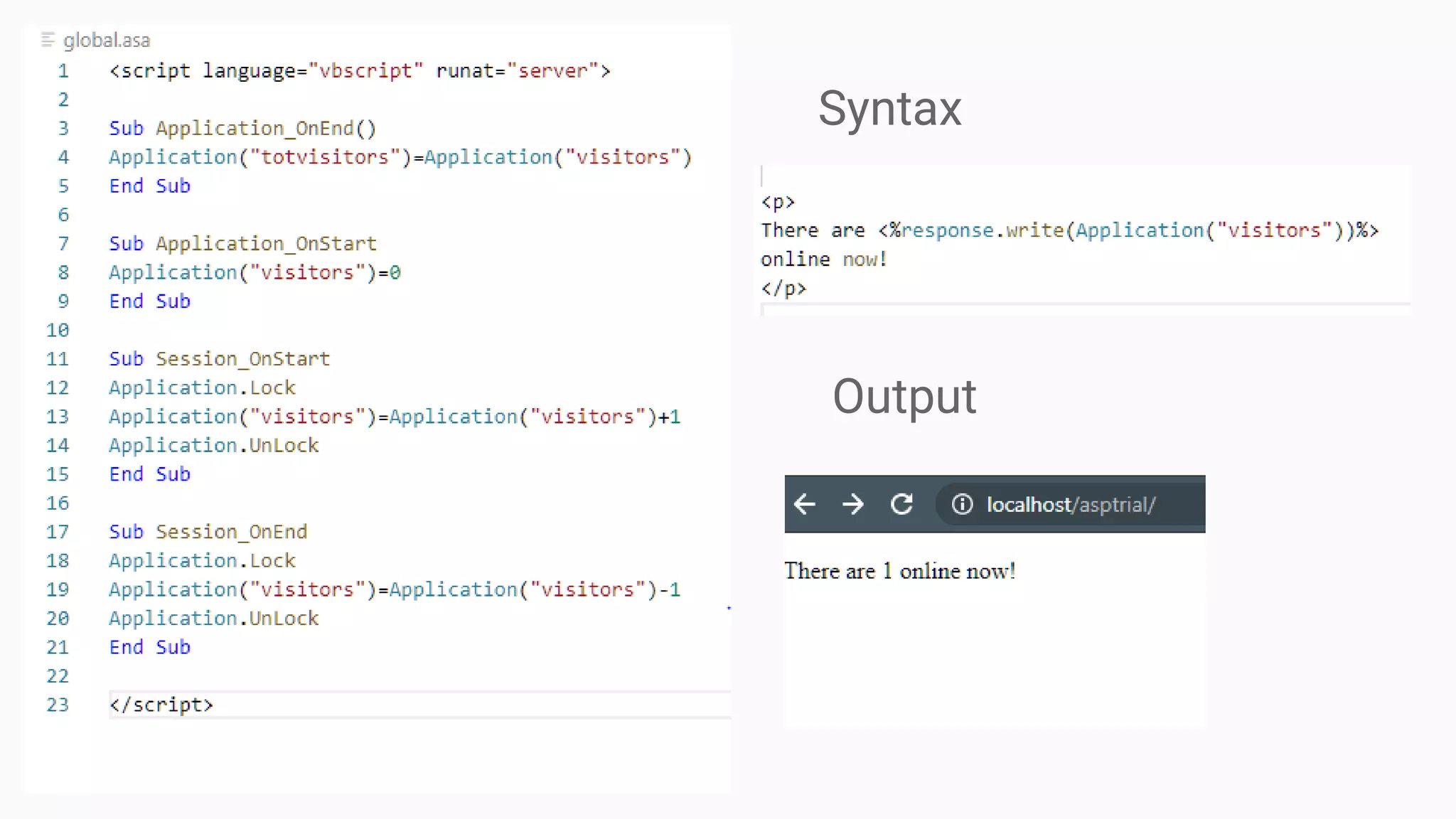
Session Event
Session Events are the special type of
subroutines that are fired when a specific
event takes place.
ASP provide two basic events that can be as
1. Session_OnStart :
Fired when the server is first calls from
client session.
1. Session_OnEnd:
Fired when the server closes the client
session
Syntax
Syntax
Output
ASP Components
Collection of code that has been made by
Microsoft and included in IIS. With the use of
ASP you can unlock the power of this pre-made
code.
These objects can be used to do a ton of things,
such as: an easy-to-use ad rotation service, an
interface to a database, a means of
manipulating files and much more.
Making use of Microsoft's ASP Components in
your ASP programming will allow you to do so much
with ASP that you'll be kicking yourself for not using
components earlier. You can access these built in
components by creating objects of them. See our
previous lesson if you need a refresher on what ASP
Objects are.
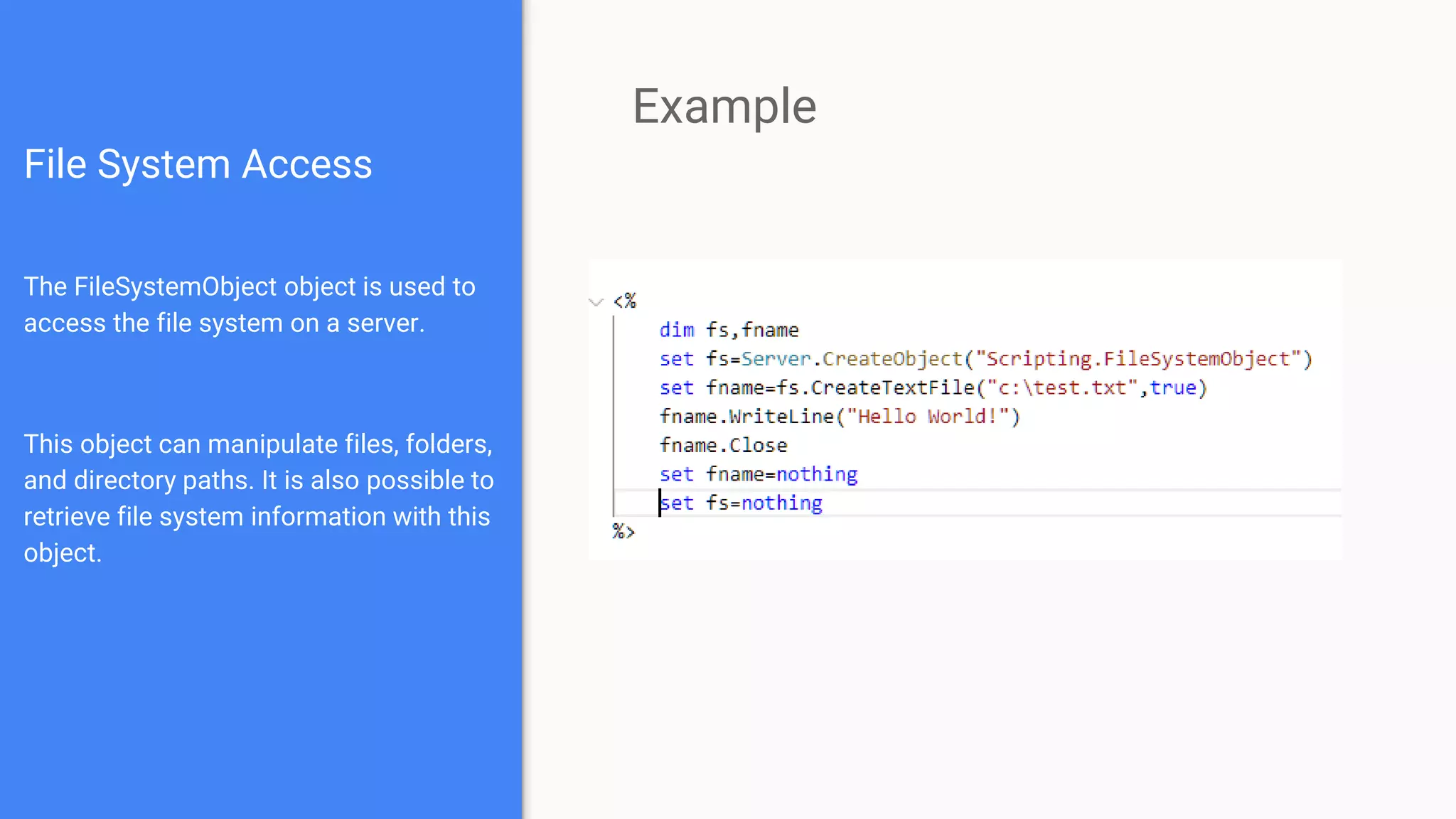
File System Access
The FileSystemObject object is used to
access the file system on a server.
This object can manipulate files, folders,
and directory paths. It is also possible to
retrieve file system information with this
object.
Example
“Thank You”
Presented by
Mohit Joshi
Msc(IT)
190401

Active Server Page - ( ASP )

  • 1.
    ASP (Active ServerPages) A Technology to serve dynamic pages
  • 2.
  • 3.
    Agenda 1. Discussing onArchitecture of Web 1. What is ASP and Digging in the development framework with ASP 3. Classic ASP at a glance 4. ASP Object and Components
  • 4.
  • 5.
    Difference between Browserand Server Server 1. Software to serve documents on web. 2. Receive HTTP request and sends appropriate HTTP response 3. Have area to store website documents 4. Eg Apache Server, Internet Information Server, Heroku,AWS Browser 1. Software to surf web pages and content 2. Sends a HTTP request and receives and HTTP response 3. Store data in cookies in local machine 4. Eg. Google Chrome , Firefox
  • 6.
    Static Pages Designed withHTML , JS , CSS etc Executed on browser Data do not change with time Are simple and takes less time to load Usually no involvement of Database
  • 7.
    Dynamic Pages Designed usingNode.js , PHP , Python , ASP , ASP.NET Partially or fully executed on Server. Data may change with time and action. Require more time to load due the server execution and database calls
  • 8.
    Client Server Architectureof Web Two tier architecture Client Server is one of many architecture for web.It creates most of the web we see around us. Client send the Request. Server send the response back.
  • 9.
    Three-tier Architecture ofWeb Model some form of application logic between client and server.Usually by scripting language like JS. Action on the client side is influenced by scripts so that no asynchronous data transfer is necessary. On the server side, modified content is stored via the application server on the database server.
  • 10.
    Three-tier Architecture ofWeb Model some form of application logic between client and server.Usually by scripting language like JS. Action on the client side is influenced by scripts so that no asynchronous data transfer is necessary. On the server side, modified content is stored via the application server on the database server.
  • 11.
    Simple Web Page Asimple HTML page may contain three elements 1. HTML tags : to create the structure of the web page 2. CSS code : to give styling to the created structure 3. Scripting code : to give interactivity to the produced web page index.html
  • 12.
    ASP and VariousDevelopment Framework
  • 13.
    ASP Active Server Pages Programthat runs inside IIS (Internet Information Service) server Used to create dynamic and interactive pages Microsoft’s initiative to create dynamic web pages Internet Information Services Server Windows Server-based web application used to deliver website content over the internet to an end user. Bundled with all Microsoft windows Server Products
  • 14.
  • 16.
    A Glance AtClassic ASP
  • 17.
    Classic ASP A ASPpage contain 1) HTML Tags - ASP can be regarded as extension of a simple HTML file 2) Scripting Language - use to perform operation on both client and server side . Javascript and VBscript are available scripting language here. 3) ASP Built-in Objects - encapsulation of methods and user variable. Can have properties, method, event, collections. 4) ASP Components - built in module to handle some necessary tasks like database access, file creation and exploration etc
  • 18.
    Syntax for ClassicASP Normally a HTML file with scripting in between. Code to be executed in server side is written between <% %> Response.Write is a basic function to write content on html document Two type of Scripting language used 1. Client Side Scripting - runs on browser - (by default Javascript) 2. Server Side Scripting - runs on server - (by default VBscript) Scripts in ASP files are executed on server.
  • 19.
    Simple ASP code ASPfiles are identified by .asp extension The example contain the code where only line between <% %> will be processed in server side OUTPUT of the file will be the result text: “My First Webpage” server.asp
  • 20.
    Scripting in ASP Exampleto two type of scripting is given Client side scripting do not require any parameter . We can give language as prefered (by default Javascript) Server Side Scripting require extra parameter of runat which has two values “client” and “server” Client Side Scripting Server Side Scripting
  • 21.
    ASP Variable Variables are"containers" for storing information. We declare variable with Dim (dimension) keyword No data type need to be explicitly define, declared as variant type Can use Option Explicit to restricting yourself in declaring variable only once
  • 22.
    ASP Array An arrayvariable is used to store multiple values in a single variable. Dim name(n) defines a array with size of n and index starts from 0 to n-1 Dim table(n,m) defines a two- dimensional array Multi-dimensional array of upto 60 dimensions can be defined in VbScript
  • 23.
    ASP Include You caninsert the content of one ASP file into another ASP file before the server executes it, with the #include directive. Can use .inc (include) and .asp extension for including file Can use keyword virtual and file to define the path of the file Note : Directives are preprocessed in the server
  • 24.
    ASP Objects andComponents
  • 25.
    ASP Objects Objects area way of encapsulating multiple methods (they're like functions) and variables in one easy to manage user-variable (called objects) Objects in ASP resemble other Object Oriented Programming languages An ASP Object can contain - Collection , Properties , Methods , Events Objects were created to combat the increasing complexity of programming. It makes programming easier and your code more human readable. Object in ASP is created by passing a name string to the Server.CreateObject function
  • 26.
    ASP Built-in Objects Collectionof predefined object explicitly provided to user by IIS servers An ASP Built-in Object can contain - 1. Collection- set of data to define the state of object. 2. Properties - set of variables to modify the data 3. Methods - set of function to operate on predefined entities 4. Events : special function that operate on triggering of certain event Some built-in objects are 1. Request Object : object that have HTTP response of client 2. Response Object : object that have HTTP response of server 3. Server Object : object that contain environment variable of server 4. Session Object : object that contain session control information
  • 27.
    Request Object Collections: 1. QueryString:allows to retrieve value for get request. 2. Form : allows to retrieve value from post request. 3. Cookies: allows to retrieve value stored as cookies 4. ServerVariable : contain value of predefined environment variable Retrieves the values that the client browser passes to the web server during an HTTP request. Can access data from both header and body. Use to issue server side processing like form submission Properties : 1. TotalBytes: read-only property to specify no. of bytes sent by client in HTTP request
  • 28.
    Request.QueryString The Request.QueryString command isused to collect values in a form with method="get". Information sent from a form with the GET method is visible to everyone in address bar and has a limit on size Eg.https://www.ourdomain.com?s erver.asp?name=Jhonny&pno=965 6566969 client.html server.asp
  • 29.
    Request.Form The Request.Form commandis used to collect values in a form with method="post". Information sent with the method=”POST” is invisible to others and has no limits on the amount of information to send. Eg.https://www.ourwebsite.com/ server.asp client.html server.asp
  • 30.
    Response Object Collection: 1. Cookie:Sets a cookie value. If the cookie does not exist, it will be created, and take the value that is specified The Cookies collection is used to set or get cookie values. If the cookie does not exist, it will be created, and take the value that is specified. The Response object is used to send output to the client from the web server. ASP Properties need to be inserted after <%@ LANGUAGE="VBSCRIPT"%> directive, but before the first HTML tag. Gives potent control over what you send to client over the web
  • 31.
    Response Object Methods : 1.AddHeader : add a HTTP header and value to the response. 2. AppendToLog: add specific string at the end of server log 3. Redirect : redirect the user to different URL 4. End : stops processing a script and return current result Properties: 1. ContentType :sets the HTTP content type for response object 2. Expires : sets how long the page will be cached in browser 3. IsClientConnected : specifies whether client is still connected to server or not 4. Status : specifies the status send by server
  • 32.
    Response.Cookies Syntax: Response.Cookies(name)= value variablename= Request.Cookies(name) Note:The Response.Cookies command must appear before the <html> tag. Setting Cookies Getting Cookies
  • 33.
    Response.AddHeader Syntax: response.AddHeader name,value Once aheader has been added, it cannot be removed. Have two parameters 1. Name : name of new header 2. Value : initial value of header Setting Cookies Checking Response Header
  • 34.
    Response.ContentType Syntax response.ContentType[=contenttype] Parameter 1. Contenttype :Astring describing the content type. Some Common content types are : <%response.ContentType="text/HTML"%> <%response.ContentType="image/GIF"%> <%response.ContentType="image/JPEG"%> <%response.ContentType="text/plain"%> Setting Content Type
  • 35.
    Server Object Methods : 1.CreateObject -Creates an instance of an object 2. Execute -Executes an ASP file from inside another ASP file 3. Transfer - Sends (transfers) all the information created in one ASP file to a second ASP file 4. URLEncode : Applies URL encoding rules to a specified string The Server object is designed to help you carry out various tasks on the server. It is used to access properties and methods on the server. Properties: 1. ScriptTimeout - Sets or returns the maximum number of seconds a script can run before it is terminated
  • 36.
    Server.CreateObject The CreateObject methodcreates an instance of an object. Syntax: Server.CreateObject(progID) progID : The type of object to create Creating Object Destroying Object
  • 37.
    Session Object A Sessionobject stores information about, or change settings for a user session. Collections: 1. Contents :Contains all the items appended to the session through a script command 2. StaticObjects : Contains all the objects appended to the session with the HTML <object> tag Methods: 1. Abandon : Destroys a user session 2. Contents.Remove: Deletes an item from the Contents collection 3. Contents.RemoveAll:Deletes all items from the Contents collection
  • 38.
    Session Object Properties : 1.SessionID : returns a unique id for each user generated at server 2. Timeout : set timeout period for session 3. LCID : return location integer according to which date , time other content can be set Events: 1. Session_OnEnd : occurs when session end 2. Session_OnStart : occurs when session start.
  • 39.
    Session Event Session Eventsare the special type of subroutines that are fired when a specific event takes place. ASP provide two basic events that can be as 1. Session_OnStart : Fired when the server is first calls from client session. 1. Session_OnEnd: Fired when the server closes the client session Syntax
  • 40.
  • 41.
    ASP Components Collection ofcode that has been made by Microsoft and included in IIS. With the use of ASP you can unlock the power of this pre-made code. These objects can be used to do a ton of things, such as: an easy-to-use ad rotation service, an interface to a database, a means of manipulating files and much more. Making use of Microsoft's ASP Components in your ASP programming will allow you to do so much with ASP that you'll be kicking yourself for not using components earlier. You can access these built in components by creating objects of them. See our previous lesson if you need a refresher on what ASP Objects are.
  • 42.
    File System Access TheFileSystemObject object is used to access the file system on a server. This object can manipulate files, folders, and directory paths. It is also possible to retrieve file system information with this object. Example
  • 43.