Interactive
teaching
Dr.K.Sreenivasulu,
Professor, Department of anatomy
•“ Teaching isn't
telling...learning
isn't listening” by
Dr Hendricks
•Students’ approach to
learning depends not only on
their learning style but also
on the learning environment
and context.
•In the process of teaching
and learning, the teacher
and the student have to
work mutually to make
the knowledge sharing
process enjoyable and
easier for comprehension.
Students’ approach to
learning depends not only on
their learning style but also
on the learning environment
and context.
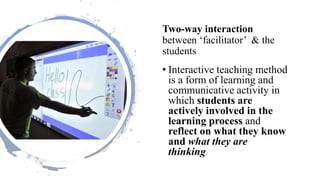
Two-way interaction
between ‘facilitator’ & the
students
• Interactive teaching method
is a form of learning and
communicative activity in
which students are
actively involved in the
learning process and
reflect on what they know
and what they are
thinking.
Brain storming
•Students are made to think
and interact. So this thought
process initiates further
reasoning, better learning
and better retention
It is engaging and
enjoyable. Teaching
session can be made into
whole lot of fun; It can be
made competitive by
making groups; Attractive
games or puzzles involving
subject can be introduced
• Makes the students
independent learners and
promotes self- directed
learning. The students will
then develop positive
feeling about achieving
knowledge and innovative
skills
No. Name of Method Description
1. Asking Questions Ask questions
Open-Ended Questions to think, analyze,
or evaluate.
Closed-Ended Questions - short, definite
answers.
2. Question and Answer
Period
Allow participants to ask questions
individually or in groups, orally or in
written at the beginning, middle or end of
the class.
Answer their questions while summarizing
key points learned before.
No. Name of Method Description
1. Asking Questions
3. Short Writing
Exercises
Ask participants to write their
responses on a card or sheet of paper.
Collect responses & review them.
Clarify all misunderstandings & answer
questions.
4. Muddiest Point Ask participants to write their least
clear or “muddiest” point.
5. Three Minute
Summary
Ask participants to summarize the key
points of the class.
6. Note Review Give participants 3 minutes to read their
notes thoroughly and underline
important points.
Ask them questions or we can clarify
their questions.
7. Audio/Video Clippings Using Audio/ visual aids.
8. Seminar Method A tutorial arrangement involving the
instructor and groups
A teaching in clinical setting: learner
centered and includes micro-skills of
clinical teaching; getting a
commitment, probing for supportive
evidence, teaching a general
principle, reinforcing what was done
well, giving feedback about errors
and lapses. It motivates the learner
to read more and stimulates critical
thinking for heuristic clinical
diagnosis and promotes self-directed
learning
Tell me and I will forget
show me and I will remember
involve me and I will remember
step back and I will act
Chinese proverb
Interactive
lecture
Don’t talk for the whole hourDon’t talk
Give the students things to do that aid their
learning
Give
Don’t worry about covering so much
Don’t
worry
about
Even give them a breakGive
Points to keep in mind
Lectures lowest
retention value
of all teaching
techniques
make
more
attractive
Strive for
a 40/60 %
split
40 %
lecture ,
60% active
discussion
This wont
always be
possible
Interactive techniques
keywords list
This method used to assess students ability to
recall or list items but not there depth of
understanding
Ask the student to write down 5 to 7 words or Hey
short phrases Hey that define or describe the
subject matter you have covered
Flipped class
There are many ways that Hey
classroom can be flipped but the
underlying promise is that Students
review lecture materials outside of
class and then came to class prepared
to participate in instructor guided
leaning activities.
Pose a question or problem.
Give one minute to THINK about their
answers individually.
As they PAIR with a partner to
compare answers.
Ask them to SHARE their responses
with the class.
Explain the topic.
Set a time limit.
Encourage the ideas.
Record the ideas.
Clarify.
•Provide small
groups of students
with details from
actual incidents
and then ask them
to develop a
workable solution.
Cross Over groups
•The class is sub-
divided into two
or more smaller
groups with
transfers of some
students between
groups at
appropriate times
Carousel
Fish bowl
• Each group is
given different
topic. Re-mix
groups with one
“expert” on each
topic, who will
teach his new
group.
Students try to
identify the key
words and
write them and
put it in the
flow chart
• PEYTON’S
FOUR Ds
•Demonstration- teacher will be doing without
describing
•Deconstruction- teacher will do the procedure
with explanation into steps and student will
follow and will do the procedure
•Describe - student will do the procedure
explain the steps to teacher
•Doing- student will performs individually
DOAP
• DOAP
•Demonstrate (by student),
Observe, Assist and Perform: A
practical session is planned that
allows the students to observe a
demonstration, perform in a
simulated environment, perform
under supervision or perform
independently
Mind mapping/
Concept mapping
Remind Remind map is a graphical
way to present ideas and concepts
visual thinking tool that helps
structuring information helping
one to better analyse comprehend
synthesise recall and generate new
ideas
Design and
development
of the
interactive
lecture
The design of an interactive
let's lecture Hey based on
true simple guide lines
Break the lecture into
segments
Build-in opportunities for
students to actively
participate
Outline the objectives and segment of day’s lecture -Time 3-5 minutes
Interactive technique (mini case) time 3-5 minutes
General lecture segment basic concept time 10 to 15 minutes
Change activity interactive technique time 5 minutes
General lecture segment time 10 to 15 minutes
Interactive technic time 5 minutes
Return to the mini case time 3-5 minutes
Interactive lecture
what prevents us
• fear losing control over
the class
• not covering all material
• time constraints
• anxiety not able to answer
students questions
• subject matter physical
setting
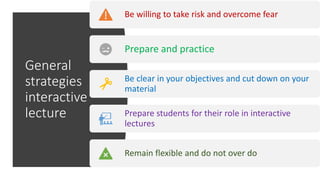
General
strategies
interactive
lecture
Be willing to take risk and overcome fear
Prepare and practice
Be clear in your objectives and cut down on your
material
Prepare students for their role in interactive
lectures
Remain flexible and do not over do
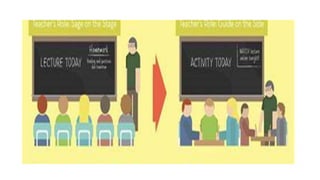
telling is not
teaching nor is
listening learning
Engage
participants in
learning activities
that leads to
higher level of
understanding and
application
Interactive teaching is a
two way process of
active participant
engagement with each
other the facilitator and
the content
keep in mind however
that interactive
means to a greater
end participant
learning
A. What happened
B. What was Good about the experience
C. What was Bad about the experience
D. What would you do if you were there
E. Suggest the measures to suatain
ethicaland professional values
F. Share any real incident related to the
visual media
non projected
•Chalk board
•Whiteboard
•Flannello graph
•Magnetic board
•Plastic graphs
•Models
•Posters/ flip charts
chalk and
white/black
board
advantages
EASILY
AVAILABLE
ECONOMICAL HELP STUDENTS
MAKES NOTES
CAN BUILD IDEAS STEP
BY STEP
GIVES US TIME TO
THINK
Whiteboard board do’s
use capital
letters
01
place board
at eye
distance- 3
metres
02
size of letters
64 feet
2inches 32
feet 1 inch
03
wipe from
Top to
bottom
04
PowerPoint presentations
versatile user friendly
easily editable
anytime
you can use a
variety of colours
& tables
The 6 / 6 rule
• Use only 6 lines in one slide
• each line to have six words
• same rule for OHP extrans
• too many lines confuse learners
• to many words offend them
• so remember the 6/6 rule always
Before you begin
• check the lecture Hall in
advance
•the hardware software the LCD
projector
•rehearse the topic thoroughly
•decide what you want to tell
Slide limit for
a lecture
Ideally a PowerPoint
presentation to have
one slide per minute
maximum
So in a class if you are
engaging them for 40
minutes have no more
than 40 minutes
But again if you were
slide are more it may
result in indigestion
Present generation of
students now like videos
Get short video clips and
show them in your picture
They will enhance learning

Interactive teaching

  • 1.
  • 3.
  • 4.
    •Students’ approach to learningdepends not only on their learning style but also on the learning environment and context.
  • 6.
    •In the processof teaching and learning, the teacher and the student have to work mutually to make the knowledge sharing process enjoyable and easier for comprehension.
  • 7.
    Students’ approach to learningdepends not only on their learning style but also on the learning environment and context.
  • 8.
    Two-way interaction between ‘facilitator’& the students • Interactive teaching method is a form of learning and communicative activity in which students are actively involved in the learning process and reflect on what they know and what they are thinking.
  • 9.
    Brain storming •Students aremade to think and interact. So this thought process initiates further reasoning, better learning and better retention
  • 10.
    It is engagingand enjoyable. Teaching session can be made into whole lot of fun; It can be made competitive by making groups; Attractive games or puzzles involving subject can be introduced
  • 11.
    • Makes thestudents independent learners and promotes self- directed learning. The students will then develop positive feeling about achieving knowledge and innovative skills
  • 12.
    No. Name ofMethod Description 1. Asking Questions Ask questions Open-Ended Questions to think, analyze, or evaluate. Closed-Ended Questions - short, definite answers. 2. Question and Answer Period Allow participants to ask questions individually or in groups, orally or in written at the beginning, middle or end of the class. Answer their questions while summarizing key points learned before.
  • 13.
    No. Name ofMethod Description 1. Asking Questions 3. Short Writing Exercises Ask participants to write their responses on a card or sheet of paper. Collect responses & review them. Clarify all misunderstandings & answer questions. 4. Muddiest Point Ask participants to write their least clear or “muddiest” point.
  • 14.
    5. Three Minute Summary Askparticipants to summarize the key points of the class. 6. Note Review Give participants 3 minutes to read their notes thoroughly and underline important points. Ask them questions or we can clarify their questions.
  • 15.
    7. Audio/Video ClippingsUsing Audio/ visual aids. 8. Seminar Method A tutorial arrangement involving the instructor and groups
  • 16.
    A teaching inclinical setting: learner centered and includes micro-skills of clinical teaching; getting a commitment, probing for supportive evidence, teaching a general principle, reinforcing what was done well, giving feedback about errors and lapses. It motivates the learner to read more and stimulates critical thinking for heuristic clinical diagnosis and promotes self-directed learning
  • 17.
    Tell me andI will forget show me and I will remember involve me and I will remember step back and I will act Chinese proverb
  • 18.
    Interactive lecture Don’t talk forthe whole hourDon’t talk Give the students things to do that aid their learning Give Don’t worry about covering so much Don’t worry about Even give them a breakGive
  • 19.
    Points to keepin mind Lectures lowest retention value of all teaching techniques make more attractive Strive for a 40/60 % split 40 % lecture , 60% active discussion This wont always be possible
  • 20.
    Interactive techniques keywords list Thismethod used to assess students ability to recall or list items but not there depth of understanding Ask the student to write down 5 to 7 words or Hey short phrases Hey that define or describe the subject matter you have covered
  • 21.
    Flipped class There aremany ways that Hey classroom can be flipped but the underlying promise is that Students review lecture materials outside of class and then came to class prepared to participate in instructor guided leaning activities.
  • 22.
    Pose a questionor problem. Give one minute to THINK about their answers individually. As they PAIR with a partner to compare answers. Ask them to SHARE their responses with the class.
  • 23.
    Explain the topic. Seta time limit. Encourage the ideas. Record the ideas. Clarify.
  • 24.
    •Provide small groups ofstudents with details from actual incidents and then ask them to develop a workable solution.
  • 25.
    Cross Over groups •Theclass is sub- divided into two or more smaller groups with transfers of some students between groups at appropriate times
  • 28.
  • 29.
  • 30.
    • Each groupis given different topic. Re-mix groups with one “expert” on each topic, who will teach his new group.
  • 31.
    Students try to identifythe key words and write them and put it in the flow chart
  • 32.
    • PEYTON’S FOUR Ds •Demonstration-teacher will be doing without describing •Deconstruction- teacher will do the procedure with explanation into steps and student will follow and will do the procedure •Describe - student will do the procedure explain the steps to teacher •Doing- student will performs individually
  • 33.
    DOAP • DOAP •Demonstrate (bystudent), Observe, Assist and Perform: A practical session is planned that allows the students to observe a demonstration, perform in a simulated environment, perform under supervision or perform independently
  • 34.
    Mind mapping/ Concept mapping RemindRemind map is a graphical way to present ideas and concepts visual thinking tool that helps structuring information helping one to better analyse comprehend synthesise recall and generate new ideas
  • 35.
    Design and development of the interactive lecture Thedesign of an interactive let's lecture Hey based on true simple guide lines Break the lecture into segments Build-in opportunities for students to actively participate
  • 36.
    Outline the objectivesand segment of day’s lecture -Time 3-5 minutes Interactive technique (mini case) time 3-5 minutes General lecture segment basic concept time 10 to 15 minutes Change activity interactive technique time 5 minutes General lecture segment time 10 to 15 minutes Interactive technic time 5 minutes Return to the mini case time 3-5 minutes
  • 37.
    Interactive lecture what preventsus • fear losing control over the class • not covering all material • time constraints • anxiety not able to answer students questions • subject matter physical setting
  • 38.
    General strategies interactive lecture Be willing totake risk and overcome fear Prepare and practice Be clear in your objectives and cut down on your material Prepare students for their role in interactive lectures Remain flexible and do not over do
  • 39.
    telling is not teachingnor is listening learning Engage participants in learning activities that leads to higher level of understanding and application Interactive teaching is a two way process of active participant engagement with each other the facilitator and the content keep in mind however that interactive means to a greater end participant learning
  • 41.
    A. What happened B.What was Good about the experience C. What was Bad about the experience D. What would you do if you were there E. Suggest the measures to suatain ethicaland professional values F. Share any real incident related to the
  • 42.
    visual media non projected •Chalkboard •Whiteboard •Flannello graph •Magnetic board •Plastic graphs •Models •Posters/ flip charts
  • 43.
    chalk and white/black board advantages EASILY AVAILABLE ECONOMICAL HELPSTUDENTS MAKES NOTES CAN BUILD IDEAS STEP BY STEP GIVES US TIME TO THINK
  • 44.
    Whiteboard board do’s usecapital letters 01 place board at eye distance- 3 metres 02 size of letters 64 feet 2inches 32 feet 1 inch 03 wipe from Top to bottom 04
  • 45.
    PowerPoint presentations versatile userfriendly easily editable anytime you can use a variety of colours & tables
  • 46.
    The 6 /6 rule • Use only 6 lines in one slide • each line to have six words • same rule for OHP extrans • too many lines confuse learners • to many words offend them • so remember the 6/6 rule always
  • 47.
    Before you begin •check the lecture Hall in advance •the hardware software the LCD projector •rehearse the topic thoroughly •decide what you want to tell
  • 48.
    Slide limit for alecture Ideally a PowerPoint presentation to have one slide per minute maximum So in a class if you are engaging them for 40 minutes have no more than 40 minutes But again if you were slide are more it may result in indigestion
  • 49.
    Present generation of studentsnow like videos Get short video clips and show them in your picture They will enhance learning