Customer Communication Management Interactive Customer Communication for Appeals & Grievance Process
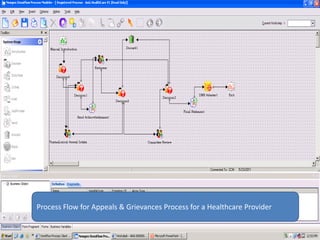
Process Flow for Appeals & Grievances Process for a Healthcare Provider
Appellant registers his appeals/ grievances via different channels like email, snail mail, fax,  telephonic call etc.. Process Flow for Appeals & Grievances Process for a Healthcare Provider
Auto generated acknowledgement mail is sent  to the appellant soon after the Data Entry Agent  registers  the  appeal into Newgen’s CCM solution for Interactive Communication Process Flow for Appeals & Grievances Process for a Healthcare Provider
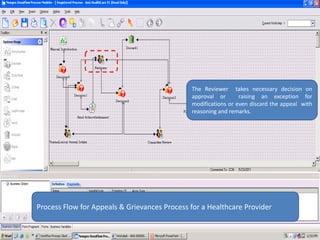
The Reviewer  takes necessary decision on approval or  raising an exception for modifications or even discard the appeal  with reasoning and remarks.Process Flow for Appeals & Grievances Process for a Healthcare Provider
The  committee reviews  the Reviewer’s decision and takes the final call on approval of the Appeal. Process Flow for Appeals & Grievances Process for a Healthcare Provider
Approval  Letter generated over the predefined templates is sent to the appellant and also archived into  OmniDocs –DMS , integrated part of  Newgen’s CCM SolutionProcess Flow for Appeals & Grievances Process for a Healthcare Provider
Data Entry Agent logs-in  to the OmniFlow Screen
DE Operator initiates a new transaction for every new appeal or grievance  entering from different channels.
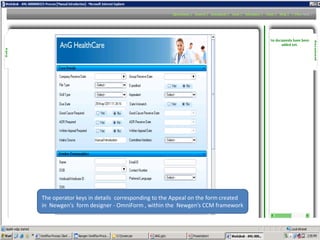
The operator keys in details  corresponding to the Appeal on the form created in  Newgen's  form designer - OmniForm , within the  Newgen’s CCM framework
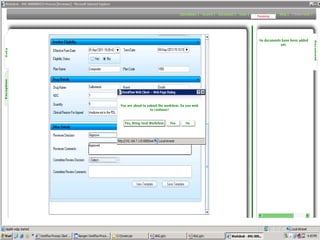
The system validates by a popup to check for the confirmation of the decision
Auto generated mail is triggered to appellant as an acknowledgement of the receipt and  initiation of the A&G process
Auto generated html mail from  the systemDynamic Data linking of the  template  to the databases
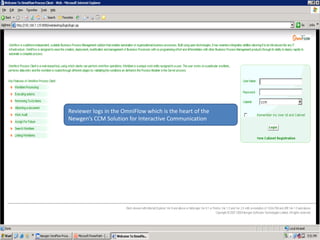
Reviewer logs in the OmniFlow which is the heart of the Newgen’s CCM Solution for Interactive Communication
The reviewer selects the corresponding transaction for necessary action execute
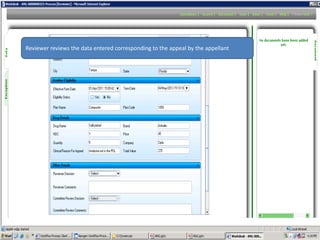
Reviewer reviews the data entered corresponding to the appeal by the appellant
Reviewer takes necessary action from the drop down with  comments corresponding to it.
The work item is sent back to the reviewer/ pharmalogical appeal department  to make necessary changes for the approval.
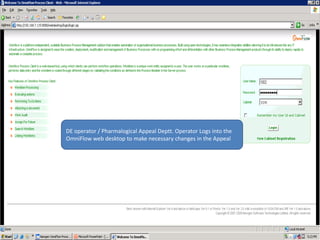
DE operator / Pharmalogical Appeal Deptt. Operator Logs into the OmniFlow web desktop to make necessary changes in the Appeal
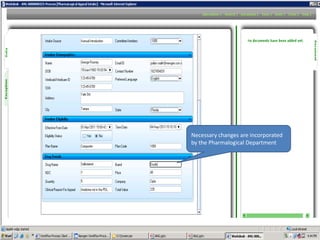
Necessary changes are incorporated by the Pharmalogical Department
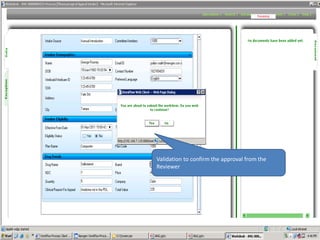
Validation to confirm the approval from the Reviewer
Reviewer’s Log In Screen
Newgen’s Solution framework enables Extensive search capabilities
Reviewer  again reviews and approves the appeal which is further sent  to the committee for further approval
Committee Reviewer logs In with the unique Id and password as provided to users  at different  stages of the  approval cycle
Committee Further reviews the appeal which has been approved by the reviewer and takes necessary action
System generates a final statement – approval letter  designed in the Composition Designer Module – part of the Newgen’s CCM solution
Approval letter documents are archived  for reference and compliance measures in the Omni Docs ,integral part of the Newgen’s CCM Solution
To view the appeal letters , supervisor logs into the OmniDocs - DMS web interface
Documents are maintained into folder and subfolders as per the Business use cases
Approval letter corresponding to appeals and the appellant is stored as pdf within the OmniDocs system
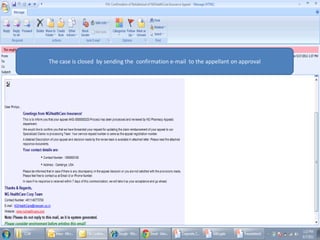
The case is closed  by sending the  confirmation e-mail  to the appellant on approval
Thank YouNewgen Software Technologies Ltd A-6, Satsang Vihar MargQutab Institutional AreaNew Delhi - 110067, IndiaTel: +91-11-26963571Newgen Software Inc1364 Beverly Rd., Ste. 300McLean, VA 22101, USA                     Tel: +1 (703) 749-2855

Interactive Customer Communication Management (CCM)

  • 1.
    Customer Communication ManagementInteractive Customer Communication for Appeals & Grievance Process
  • 2.
    Process Flow forAppeals & Grievances Process for a Healthcare Provider
  • 3.
    Appellant registers hisappeals/ grievances via different channels like email, snail mail, fax, telephonic call etc.. Process Flow for Appeals & Grievances Process for a Healthcare Provider
  • 4.
    Auto generated acknowledgementmail is sent to the appellant soon after the Data Entry Agent registers the appeal into Newgen’s CCM solution for Interactive Communication Process Flow for Appeals & Grievances Process for a Healthcare Provider
  • 5.
    The Reviewer takes necessary decision on approval or raising an exception for modifications or even discard the appeal with reasoning and remarks.Process Flow for Appeals & Grievances Process for a Healthcare Provider
  • 6.
    The committeereviews the Reviewer’s decision and takes the final call on approval of the Appeal. Process Flow for Appeals & Grievances Process for a Healthcare Provider
  • 7.
    Approval Lettergenerated over the predefined templates is sent to the appellant and also archived into OmniDocs –DMS , integrated part of Newgen’s CCM SolutionProcess Flow for Appeals & Grievances Process for a Healthcare Provider
  • 8.
    Data Entry Agentlogs-in to the OmniFlow Screen
  • 10.
    DE Operator initiatesa new transaction for every new appeal or grievance entering from different channels.
  • 11.
    The operator keysin details corresponding to the Appeal on the form created in Newgen's form designer - OmniForm , within the Newgen’s CCM framework
  • 14.
    The system validatesby a popup to check for the confirmation of the decision
  • 15.
    Auto generated mailis triggered to appellant as an acknowledgement of the receipt and initiation of the A&G process
  • 16.
    Auto generated htmlmail from the systemDynamic Data linking of the template to the databases
  • 17.
    Reviewer logs inthe OmniFlow which is the heart of the Newgen’s CCM Solution for Interactive Communication
  • 18.
    Reviewer logs inthe OmniFlow which is the heart of the Newgen’s CCM Solution for Interactive Communication
  • 19.
    The reviewer selectsthe corresponding transaction for necessary action execute
  • 20.
    Reviewer reviews thedata entered corresponding to the appeal by the appellant
  • 21.
    Reviewer reviews thedata entered corresponding to the appeal by the appellant
  • 22.
    Reviewer takes necessaryaction from the drop down with comments corresponding to it.
  • 23.
    Reviewer takes necessaryaction from the drop down with comments corresponding to it.
  • 24.
    The work itemis sent back to the reviewer/ pharmalogical appeal department to make necessary changes for the approval.
  • 25.
    DE operator /Pharmalogical Appeal Deptt. Operator Logs into the OmniFlow web desktop to make necessary changes in the Appeal
  • 26.
    DE operator /Pharmalogical Appeal Deptt. Operator Logs into the OmniFlow web desktop to make necessary changes in the Appeal
  • 28.
    Necessary changes areincorporated by the Pharmalogical Department
  • 29.
    Validation to confirmthe approval from the Reviewer
  • 30.
  • 31.
  • 32.
    Newgen’s Solution frameworkenables Extensive search capabilities
  • 33.
    Reviewer againreviews and approves the appeal which is further sent to the committee for further approval
  • 35.
    Committee Reviewer logsIn with the unique Id and password as provided to users at different stages of the approval cycle
  • 36.
    Committee Reviewer logsIn with the unique Id and password as provided to users at different stages of the approval cycle
  • 39.
    Committee Further reviewsthe appeal which has been approved by the reviewer and takes necessary action
  • 41.
    System generates afinal statement – approval letter designed in the Composition Designer Module – part of the Newgen’s CCM solution
  • 42.
    Approval letter documentsare archived for reference and compliance measures in the Omni Docs ,integral part of the Newgen’s CCM Solution
  • 43.
    To view theappeal letters , supervisor logs into the OmniDocs - DMS web interface
  • 44.
    Documents are maintainedinto folder and subfolders as per the Business use cases
  • 46.
    Approval letter correspondingto appeals and the appellant is stored as pdf within the OmniDocs system
  • 47.
    The case isclosed by sending the confirmation e-mail to the appellant on approval
  • 48.
    Thank YouNewgen SoftwareTechnologies Ltd A-6, Satsang Vihar MargQutab Institutional AreaNew Delhi - 110067, IndiaTel: +91-11-26963571Newgen Software Inc1364 Beverly Rd., Ste. 300McLean, VA 22101, USA Tel: +1 (703) 749-2855