INTERACTION DESIGN (IXD)
ANWAR SADAT
INTERACTION DESIGN THEORY
INTERACTION DESIGN
 Human
 Machine
 Interaction
S
core
U
task
O
output
I
input
user
input
system
output
ObservePresentation
ArticulatePerformance
Interaction Framework
interaction 
translation between
languages
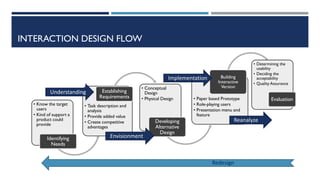
INTERACTION DESIGN FLOW
• Know the target
users
• Kind of support a
product could
provide
Identifying
Needs
• Task description and
analysis
• Provide added value
• Create competitive
advantages
Establishing
Requirements
• Conceptual
Design
• Physical Design
Developing
Alternative
Design
• Paper based Prototype
• Role-playing users
• Presentation menu and
feature
Building
Interactive
Version
• Determining the
usability
• Deciding the
acceptability
• Quality Assurance
Evaluation
Understanding
Envisionment
Implementation
Reanalyze
Redesign
ARTICULATE - OBSERVE
Seven Stage System Interation
1. User define goals
2. User formulate Intention
3. User specify action on Interface
4. User perform action
5. User perceives system state
6. User Interpret system state
7. User Evaluate System State with respect to Goal
Mental Model Norman
Cognitive /
Emotional
Design
a. Cognitive
b. Behavioral
c. visceral
Mental Model are images in the minds of users who inform their expectations of a particular interaction or system (intuitive).
Interface Metaphor take advantage of known actions to direct users to a new action. (e.g: a trash can icon to delete a file, a magnifying glass
to zoom in, etc.)
Affordances are things that are not only designed to do somewhat but are designed to look like designed to do something.
Signifiers is a physical form of a mark (like a sound, a word printed, or a picture) that is different from its meaning.
ARTICULATE - OBSERVE
1. Physical (through stimulation of the five senses)
2. Social (derived from the ownership group and
strengthen or improve one's social position)
3. Psychological (make people think about the
situation, consciously or unconsciously)
4. Ideological (related to values and beliefs, or right and
wrong)
Pleasure Model(Jordan, 2002)
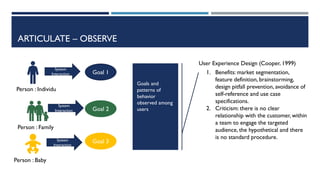
ARTICULATE – OBSERVE
Person : Individu
Person : Family
Person : Baby
Goal 1
Goal 2
Goal 3
System
Interaction
System
Interaction
System
Interaction
Goals and
patterns of
behavior
observed among
users
User Experience Design (Cooper, 1999)
1. Benefits: market segmentation,
feature definition, brainstorming,
design pitfall prevention, avoidance of
self-reference and use case
specifications.
2. Criticism: there is no clear
relationship with the customer, within
a team to engage the targeted
audience, the hypothetical and there
is no standard procedure.
ARTICULATION - OBSERVATION - PERFORMANCE - PRESENTATIONS
Person : Individu
Person : Family
Person : Baby
Goal 1
Goal 2
Goal 3
Interact with
system
Interact with
system
Interact with
system
Problem Solving
is highest
priority, Focused
on fulfill need
and special
wants of end
user
Goal Driven Design (Cooper, 1999)
1. Design first; program second.
2. Separation responsibility for design
then programming
3. Designer responsible to product
quality and end user acceptance.
4. Define your one specific user for
your product, then find person –
place name and environment and get
objective.
5. Working in 2 teams: designer and
design communicator
ARTICULATION - OBSERVATION - PERFORMANCE - PRESENTATIONS
 Learnability: how easily can a new
user learn to navigate the interface?
 Efficiency: how quickly can users
perform tasks?
 Memorability: if a user hasn’t visited
the system in a while, how well will they
remember the interface?
 Errors: how many errors do users
make, and how quickly can they recover
from errors?
 Satisfaction: do users enjoy using the
interface, and are they pleased with the
results?
 Learnability: how
easily can a new user learn to
navigate the interface?
 Flexibility: how many
ways can a user interact with
the system?
 Robustness: how well
are we supporting users when
they face errors?
Usability Compliance :
Jackob Nielsen, 1995
Usability Compliance :
Alan Dix, 2003
“Eight Golden Rules of
Interface Design”. -
Shneiderman
1. Strive for consistency.
2. Enable frequent users to use
shortcuts.
3. Offer informative feedback.
4. Design dialog to yield closure.
5. Offer simple error
handling.
6. Permit easy reversal of
actions.
7. Support internal locus of
control.
8. Reduce short-term
memory load.
USABILITY
 ISO 9241 (2002) defines usability as "The extent to
which a product can be used by specified users to
achieve specified goals with effectiveness,
efficiency, and satisfaction in a specified context
of use.“
ARTICULATION - OBSERVATION - PERFORMANCE - PRESENTATIONS
1D: words must be easy to understand, and written so that they convey
information easily to end users.
2D: visual representation is all graphics or images, basically everything that is not
text.They need to be used as needed, so as not to overwhelm.
3D:Physical or Space objects refer to physical devices, whether they are
mouse and keyboard, or cellular devices that interact with users.
4D: Time is when user interact with 3D, include activity when user can measure
progress, sound and animation
5D: Behavior added by Kevin Silver in his article,This is about the emotions and
user reactions when interacting with the system..
HIGH PRIORITY
1. Design – how should you do it? affordance, signifier, model, etc.
2. Technologies – what do you have? software, platforms, tools, devices, components, etc.
3. People – who will use the system? human errors, physical, psychology, cognitive, etc.
4. Activities – how to help? complex, cooperative, temporal aspect, safety, etc.
5. Contexts – in which situation/condition? social, cultural, organizational, political, health, etc.
USERVS
DESIGNER
PERSPECTIVE
GROUP
DISCUSSION :
ANALYSIS
BASED ON
THOSE THEORY

Interaction design introduction

  • 1.
    INTERACTION DESIGN (IXD) ANWARSADAT INTERACTION DESIGN THEORY
  • 2.
    INTERACTION DESIGN  Human Machine  Interaction S core U task O output I input user input system output ObservePresentation ArticulatePerformance Interaction Framework interaction  translation between languages
  • 3.
    INTERACTION DESIGN FLOW •Know the target users • Kind of support a product could provide Identifying Needs • Task description and analysis • Provide added value • Create competitive advantages Establishing Requirements • Conceptual Design • Physical Design Developing Alternative Design • Paper based Prototype • Role-playing users • Presentation menu and feature Building Interactive Version • Determining the usability • Deciding the acceptability • Quality Assurance Evaluation Understanding Envisionment Implementation Reanalyze Redesign
  • 4.
    ARTICULATE - OBSERVE SevenStage System Interation 1. User define goals 2. User formulate Intention 3. User specify action on Interface 4. User perform action 5. User perceives system state 6. User Interpret system state 7. User Evaluate System State with respect to Goal Mental Model Norman Cognitive / Emotional Design a. Cognitive b. Behavioral c. visceral Mental Model are images in the minds of users who inform their expectations of a particular interaction or system (intuitive). Interface Metaphor take advantage of known actions to direct users to a new action. (e.g: a trash can icon to delete a file, a magnifying glass to zoom in, etc.) Affordances are things that are not only designed to do somewhat but are designed to look like designed to do something. Signifiers is a physical form of a mark (like a sound, a word printed, or a picture) that is different from its meaning.
  • 5.
    ARTICULATE - OBSERVE 1.Physical (through stimulation of the five senses) 2. Social (derived from the ownership group and strengthen or improve one's social position) 3. Psychological (make people think about the situation, consciously or unconsciously) 4. Ideological (related to values and beliefs, or right and wrong) Pleasure Model(Jordan, 2002)
  • 6.
    ARTICULATE – OBSERVE Person: Individu Person : Family Person : Baby Goal 1 Goal 2 Goal 3 System Interaction System Interaction System Interaction Goals and patterns of behavior observed among users User Experience Design (Cooper, 1999) 1. Benefits: market segmentation, feature definition, brainstorming, design pitfall prevention, avoidance of self-reference and use case specifications. 2. Criticism: there is no clear relationship with the customer, within a team to engage the targeted audience, the hypothetical and there is no standard procedure.
  • 7.
    ARTICULATION - OBSERVATION- PERFORMANCE - PRESENTATIONS Person : Individu Person : Family Person : Baby Goal 1 Goal 2 Goal 3 Interact with system Interact with system Interact with system Problem Solving is highest priority, Focused on fulfill need and special wants of end user Goal Driven Design (Cooper, 1999) 1. Design first; program second. 2. Separation responsibility for design then programming 3. Designer responsible to product quality and end user acceptance. 4. Define your one specific user for your product, then find person – place name and environment and get objective. 5. Working in 2 teams: designer and design communicator
  • 8.
    ARTICULATION - OBSERVATION- PERFORMANCE - PRESENTATIONS  Learnability: how easily can a new user learn to navigate the interface?  Efficiency: how quickly can users perform tasks?  Memorability: if a user hasn’t visited the system in a while, how well will they remember the interface?  Errors: how many errors do users make, and how quickly can they recover from errors?  Satisfaction: do users enjoy using the interface, and are they pleased with the results?  Learnability: how easily can a new user learn to navigate the interface?  Flexibility: how many ways can a user interact with the system?  Robustness: how well are we supporting users when they face errors? Usability Compliance : Jackob Nielsen, 1995 Usability Compliance : Alan Dix, 2003 “Eight Golden Rules of Interface Design”. - Shneiderman 1. Strive for consistency. 2. Enable frequent users to use shortcuts. 3. Offer informative feedback. 4. Design dialog to yield closure. 5. Offer simple error handling. 6. Permit easy reversal of actions. 7. Support internal locus of control. 8. Reduce short-term memory load.
  • 9.
    USABILITY  ISO 9241(2002) defines usability as "The extent to which a product can be used by specified users to achieve specified goals with effectiveness, efficiency, and satisfaction in a specified context of use.“
  • 10.
    ARTICULATION - OBSERVATION- PERFORMANCE - PRESENTATIONS 1D: words must be easy to understand, and written so that they convey information easily to end users. 2D: visual representation is all graphics or images, basically everything that is not text.They need to be used as needed, so as not to overwhelm. 3D:Physical or Space objects refer to physical devices, whether they are mouse and keyboard, or cellular devices that interact with users. 4D: Time is when user interact with 3D, include activity when user can measure progress, sound and animation 5D: Behavior added by Kevin Silver in his article,This is about the emotions and user reactions when interacting with the system..
  • 11.
    HIGH PRIORITY 1. Design– how should you do it? affordance, signifier, model, etc. 2. Technologies – what do you have? software, platforms, tools, devices, components, etc. 3. People – who will use the system? human errors, physical, psychology, cognitive, etc. 4. Activities – how to help? complex, cooperative, temporal aspect, safety, etc. 5. Contexts – in which situation/condition? social, cultural, organizational, political, health, etc.
  • 12.
  • 13.