Past, Present, and Future
of User Interface Software Tools
Presented by
Hui Z,Peisheng H, Bo W,Wenjie L
BRAD MYERS, SCOTT E. HUDSON, and RANDY PAUSCH
ACM Transactions on Computer-Human Interaction
Vol. 7, No. 1, March 2000
Content
• 1. Introduction
• 2. Historical Perspective
• 3. Future Prospects and Visions
• 4. Operating System Issues
• 5. Conclusion
1. Introduction
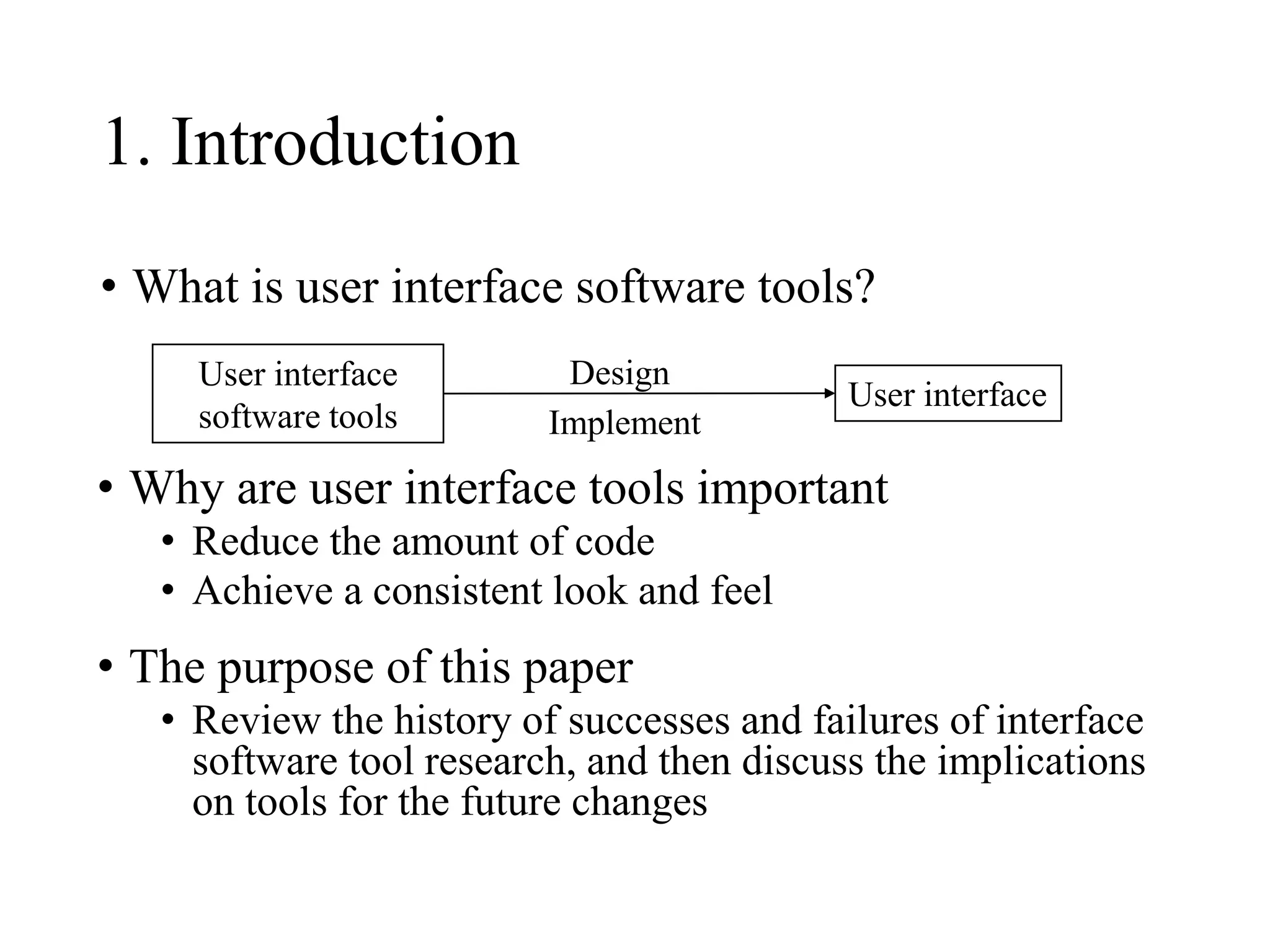
• What is user interface software tools?
User interface
User interface
software tools
• Why are user interface tools important
• Reduce the amount of code
• Achieve a consistent look and feel
• The purpose of this paper
• Review the history of successes and failures of interface
software tool research, and then discuss the implications
on tools for the future changes
Design
Implement
1. Introduction
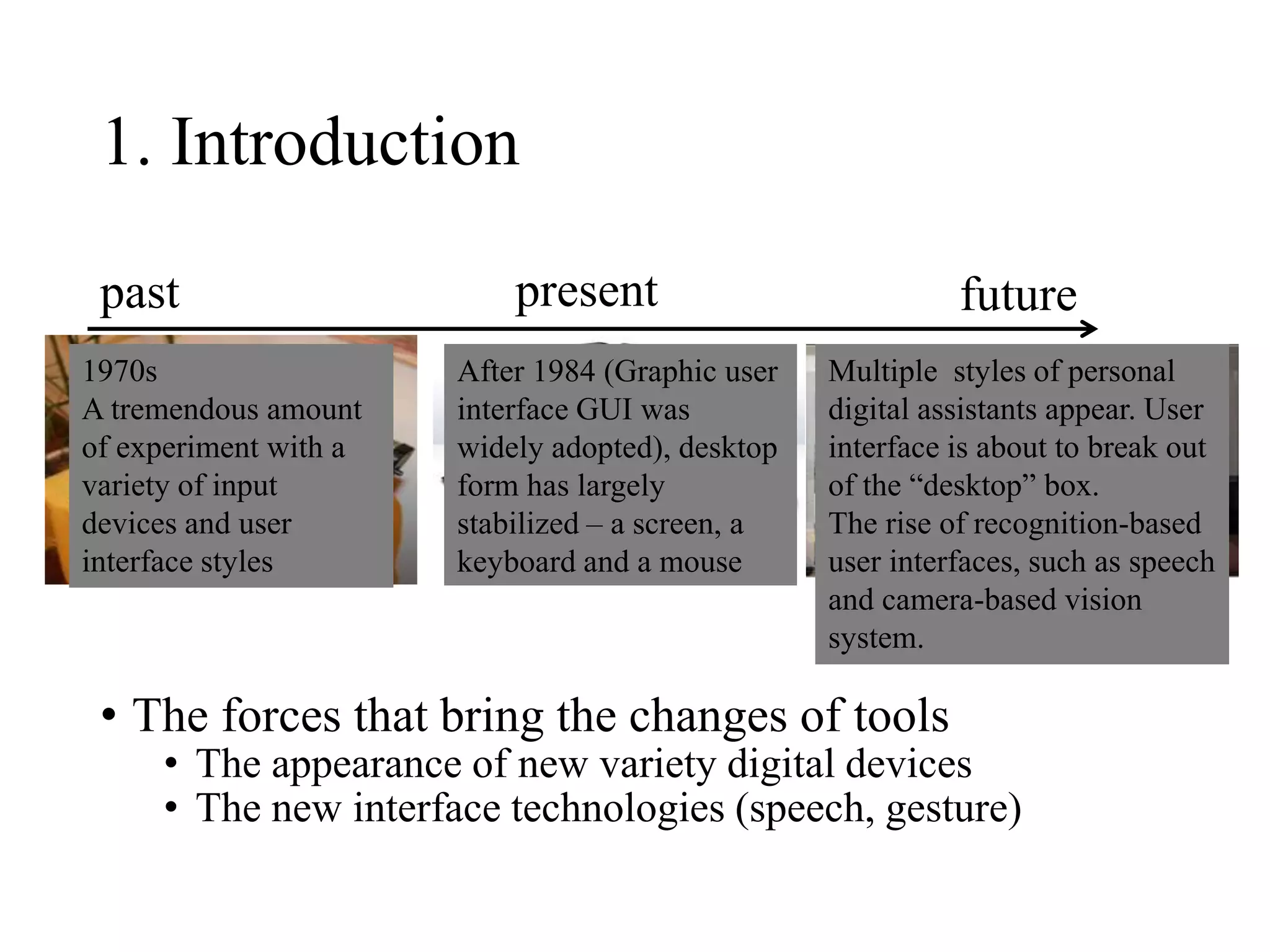
• The forces that bring the changes of tools
• The appearance of new variety digital devices
• The new interface technologies (speech, gesture)
past present future
1970s
A tremendous amount
of experiment with a
variety of input
devices and user
interface styles
After 1984 (Graphic user
interface GUI was
widely adopted), desktop
form has largely
stabilized – a screen, a
keyboard and a mouse
Multiple styles of personal
digital assistants appear. User
interface is about to break out
of the “desktop” box.
The rise of recognition-based
user interfaces, such as speech
and camera-based vision
system.
2. Historical Perspective
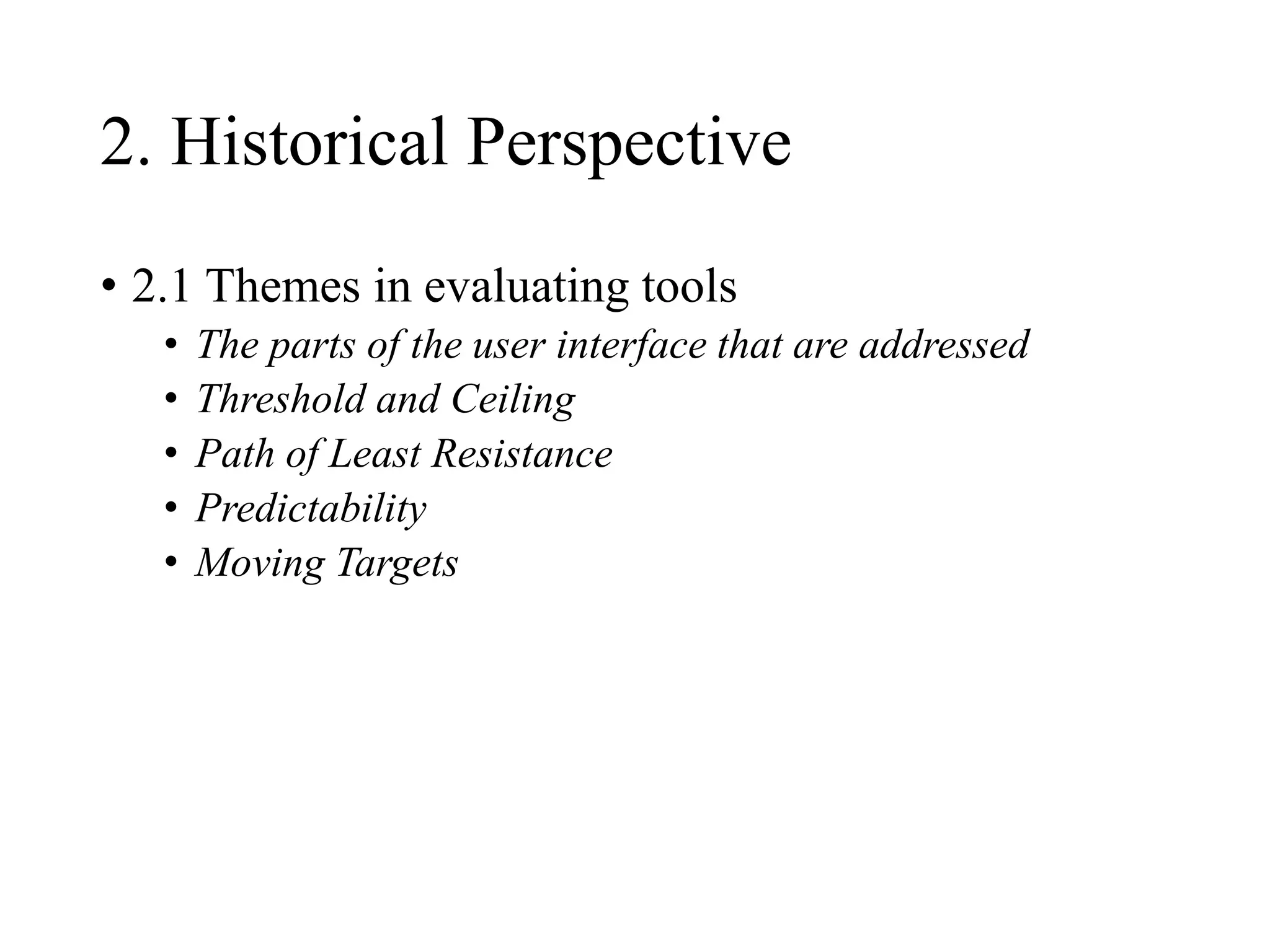
• 2.1 Themes in evaluating tools
• The parts of the user interface that are addressed
• Threshold and Ceiling
• Path of Least Resistance
• Predictability
• Moving Targets
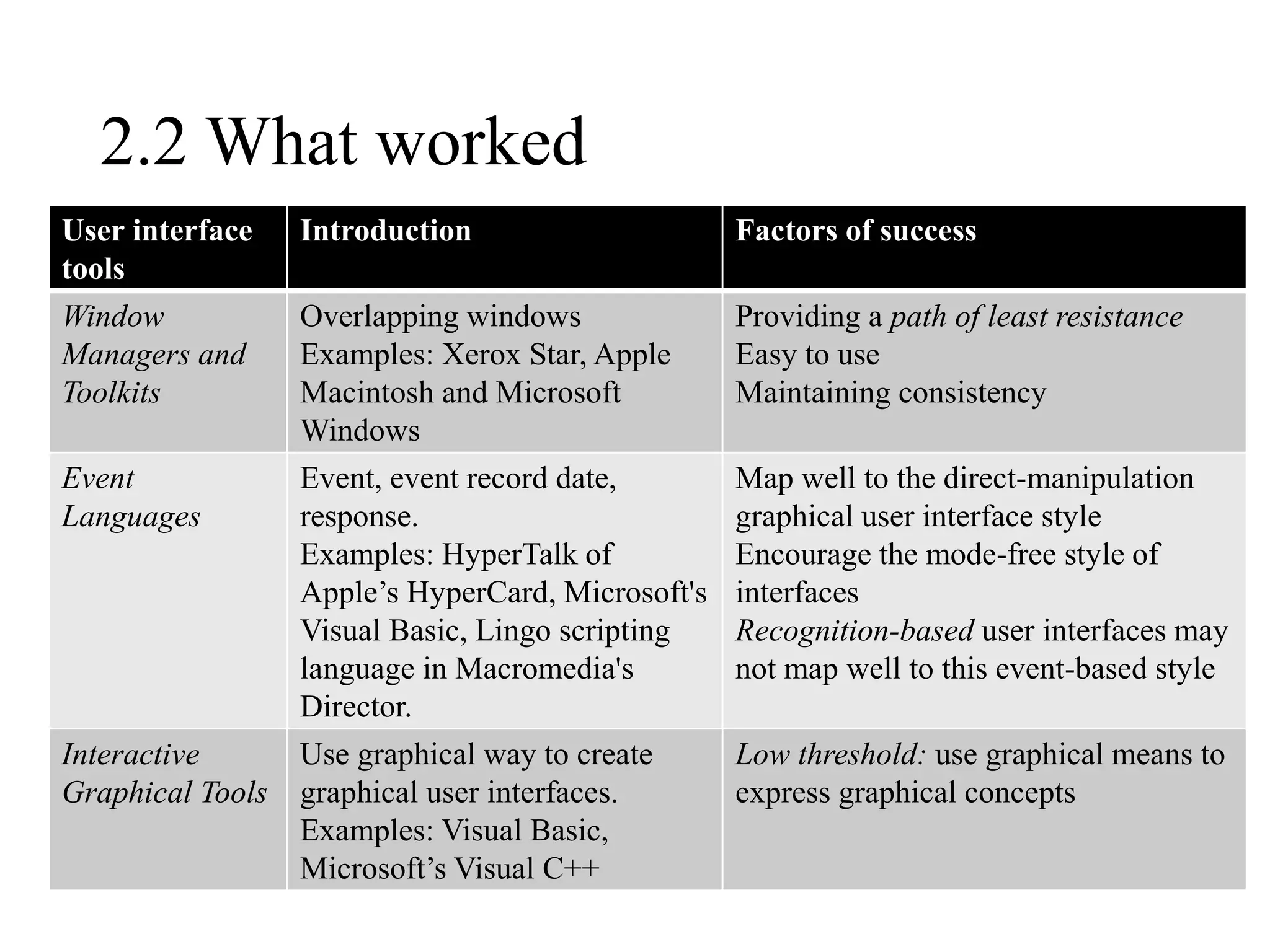
2.2 What worked
User interface
tools
Introduction Factors of success
Window
Managers and
Toolkits
Overlapping windows
Examples: Xerox Star, Apple
Macintosh and Microsoft
Windows
Providing a path of least resistance
Easy to use
Maintaining consistency
Event
Languages
Event, event record date,
response.
Examples: HyperTalk of
Apple’s HyperCard, Microsoft's
Visual Basic, Lingo scripting
language in Macromedia's
Director.
Map well to the direct-manipulation
graphical user interface style
Encourage the mode-free style of
interfaces
Recognition-based user interfaces may
not map well to this event-based style
Interactive
Graphical Tools
Use graphical way to create
graphical user interfaces.
Examples: Visual Basic,
Microsoft’s Visual C++
Low threshold: use graphical means to
express graphical concepts
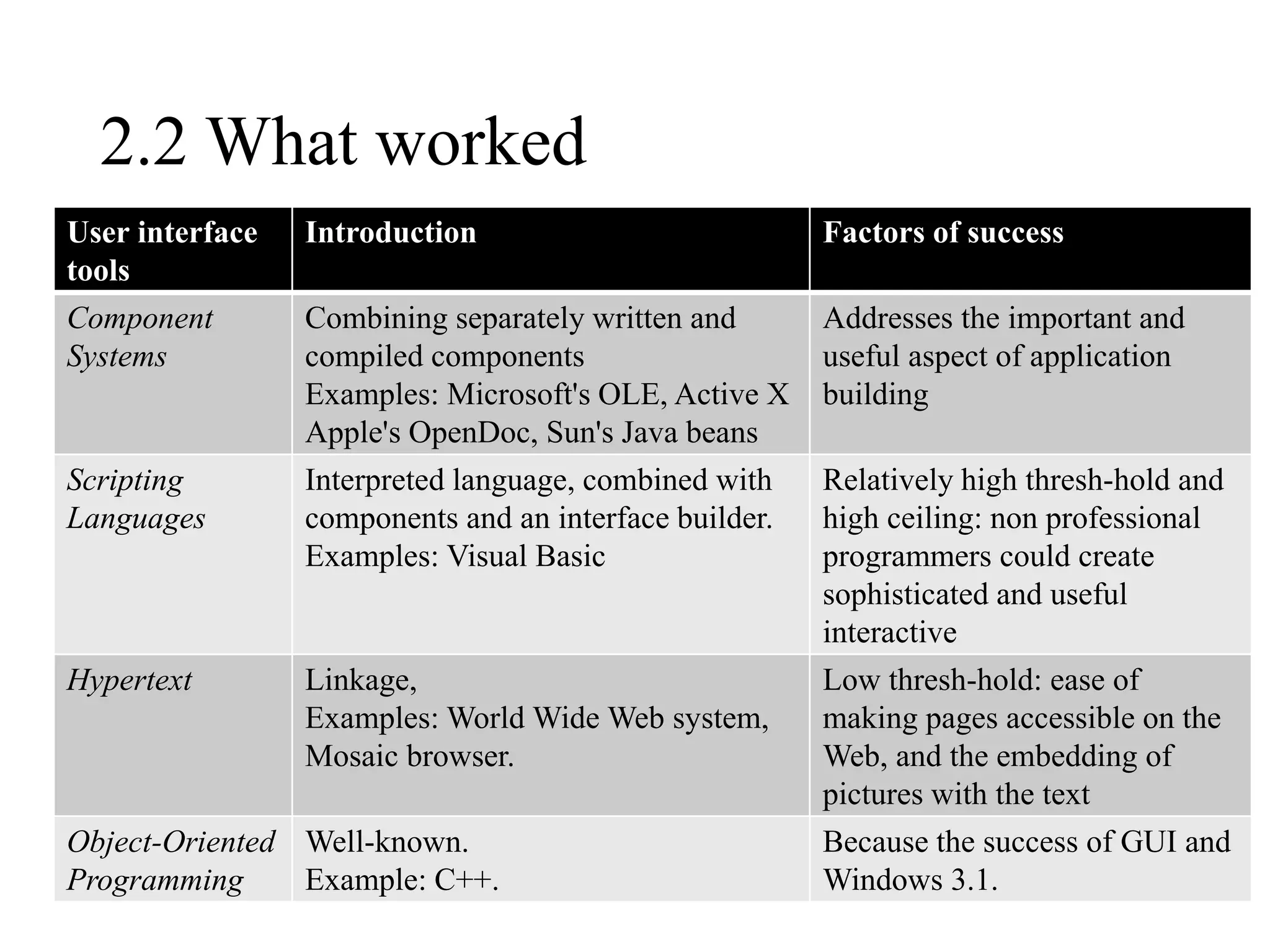
2.2 What worked
User interface
tools
Introduction Factors of success
Component
Systems
Combining separately written and
compiled components
Examples: Microsoft's OLE, Active X
Apple's OpenDoc, Sun's Java beans
Addresses the important and
useful aspect of application
building
Scripting
Languages
Interpreted language, combined with
components and an interface builder.
Examples: Visual Basic
Relatively high thresh-hold and
high ceiling: non professional
programmers could create
sophisticated and useful
interactive
Hypertext Linkage,
Examples: World Wide Web system,
Mosaic browser.
Low thresh-hold: ease of
making pages accessible on the
Web, and the embedding of
pictures with the text
Object-Oriented
Programming
Well-known.
Example: C++.
Because the success of GUI and
Windows 3.1.
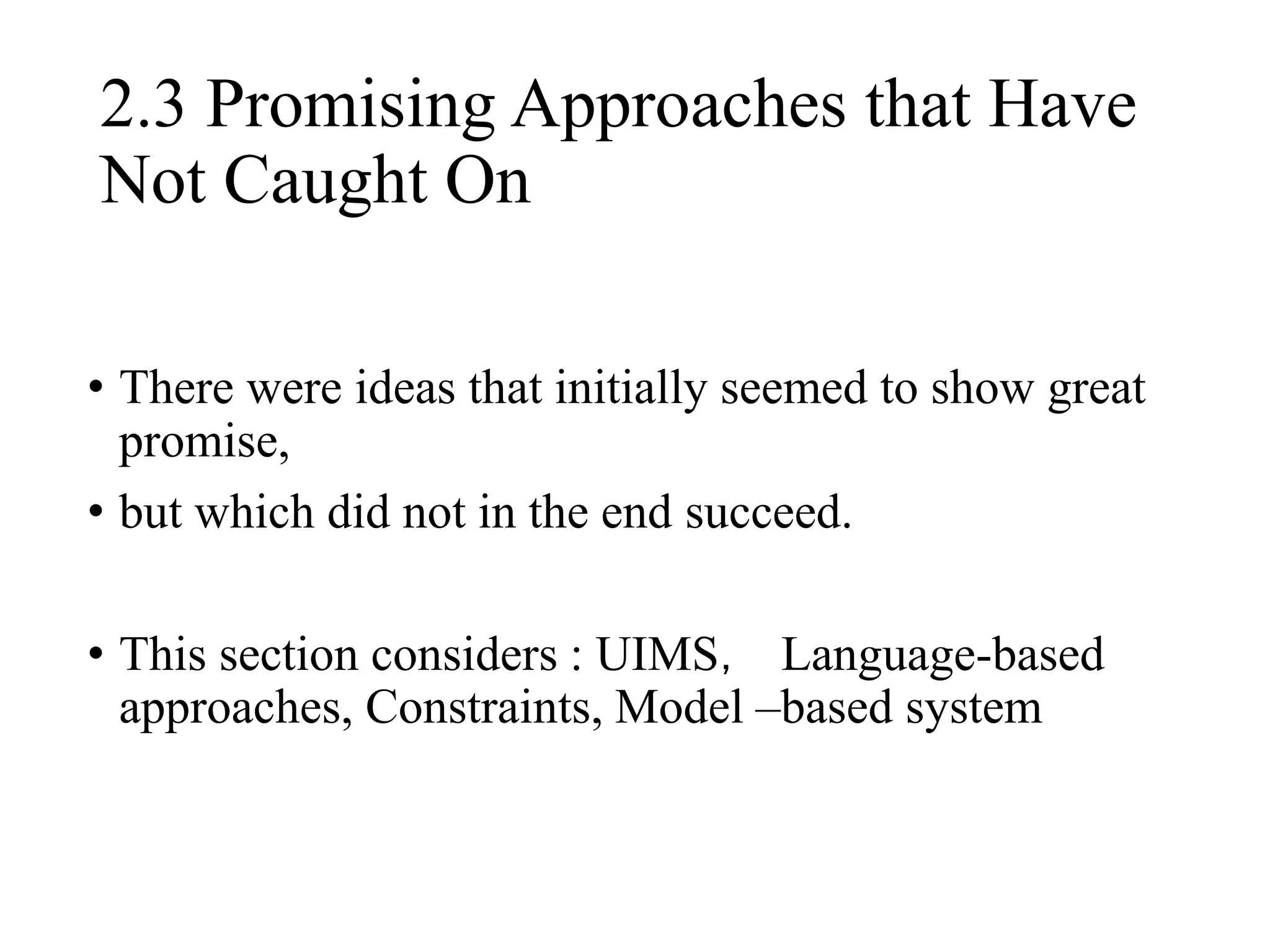
• There were ideas that initially seemed to show great
promise,
• but which did not in the end succeed.
• This section considers : UIMS, Language-based
approaches, Constraints, Model –based system
2.3 Promising Approaches that Have
Not Caught On
(1).UIMS
• Advantages:
• User interface management systems were to abstract
the details of input and output devices, providing
standard or automatically generated
implementations of interfaces, and generally
allowing interfaces to be specified at higher level of
abstraction.
(1).UIMS
• Reasons for fail:
• For every user interface, it is important to control
the low-level pragmatics of how the interactions
look and feel, which these UIMSes tried to isolate
from the designer.
• The standardization of the user interface elements
in the late 1980`s on the desktop paradigm made the
need for abstraction from the input devices mostly
unnecessary.
(2)Formal Language-Based Tools
• Reasons for fail:
• The use of formal language techniques was driven
in part by an early emphasis in UIMS work on the
task of dialog management . Just as these early
systems were being developed, the direct-
manipulation style of interface [Shneiderman 1983]
was quickly coming to prominence. The role of
dialog management is greatly reduced because
structuring of the dialog by the system is typically
detrimental to the concept of directness.
(2)Formal Language-Based Tools
• Reasons for fail:
• They had a high threshold for using them because
they required programmers to learn a new special-
purpose programming language (in addition to their
primary implementation language such as Pascal, C,
or C++ ).
• Formal-language-based systems often required the
programmers to use new programming concepts.
(3) Constraints
• Relationships that are declared once and then
maintained automatically by the system, for
implementing several different aspects of a user
interface.
• Examples:
• Sketchpad [Sutherland 1963], ThingLab [Borning 1981],
HIGGENS [Hudson and King 1986], CONSTRAINT
[Vander Zanden 1989], Garnet [Myers et al. 1990],
Rendezvous [Hill et al. 1994], Amulet [Myers et al.
1997], and subArctic [Hudson and Smith 1997].
(3) Constraints
• Advantages:
• Constraint systems offer simple, declarative
specifications for a capability useful in implementing
several different aspects of an interface. Further, a range
of efficient algorithms have been developed for their
implementation.
• Reasons for Fail:
• One of the central reasons for this is that programmers
do not like that constraint solvers are sometimes
unpredictable.
• Facing a more sophisticated problem, the programmer
may need to ensure that the set of constraints is of a
particular form, such as acyclic or linear only, or may
need to learn the details of how the solver works, which
presents a high threshold .
• Advantages:
• The goal of this work is generally to allow the designer to specify
interfaces at a very high level, with the details of the implementation
to be provided by the system.
• The systems might allow user interfaces to be created with less effort
(since parts would be generated automatically). There is the promise of
significant additional benefits such as automatic portability across
multiple types of devices, and automatic generation of help for the
application.
• Examples:
• Cousin [Hayes et al. 1985] and HP/Apollo’s Open-Dialogue [Schulert
et al. 1985]
• Mike [Olsen 1986], Jade [Vander Zanden and Myers 1990], UIDE
[Sukaviriya et al. 1993], ITS [Wiecha et al. 1990], and Humanoid
[Szekely et al. 1993]
(4) Model-Based and Automatic
Techniques
Reasons for fail:
Unpredictablity
Because heuristics are often involved, the connection between specification
and final result can be quite difficult to understand and control.
Programmers must also learn a new language for specifying the models,
which raises the threshold of use.
Low ceiling
Because automatically generating interfaces is a very difficult task,
automatic and model-based systems have placed significant limitations on
the kinds of interfaces they can produce.
An important motivation for model-based techniques was to provide
independence of the input-output specification from the details of the
specific user interface characteristics, but with the standardization of the
user interface elements, this separation became less important.
(4) Model-Based and Automatic
Techniques
2.4 Discussion of Themes
• We predict a new phase of increased experimentation and
change in user interfaces in the future, which will make the
moving-target problem an important issue again.
• The lessons of past tools indicate that in practice high-
threshold systems have not been adopted because their
intended audience never makes it past the initial threshold to
productivity, so tools must provide an easy entry and smooth
path to increased power. While very challenging, creating
systems with both a low threshold and a high ceiling is
possible, and will continue to be an important goal for future
tools.
2.4 Discussion of Themes
• The path of least resistance offered by a tool. Our
tools have a profound effect on how we think about
problems. It will remain imperative that our tools
make “doing the right thing” easy (in preference
to“ doing the wrong thing”).
3. FUTURE PROSPECTS AND
VISIONS
• 3.1 Computers Becoming a Commodity
• 3.2 Ubiquitous Computing
• 3.3 Recognition-Based User Interfaces
• 3.4 Three-Dimensional Technologies
• 3.5 End-User Programming, Customization, and
Scripting
• 3.6 Further Issues for Future Tools
3.1 Computers Becoming a Commodity
• This may have a profound impact on how and what
computer science research is performed.
Furthermore, the quantitative change in increased
performance makes a qualitative change in the kinds
of user interfaces possible.
• eg:
(1)The production of inexpensive palm-size
computers, and single-chip microprocessors can be
embedded in various devices;
(2) User interfaces are becoming more cinematic
3.2 Ubiquitous Computing
• Computation will be embedded in many different
kinds of devices, on many different scales.
• 3.2.1 Varying Input and Output Capabilities.
• 3.2.2 Tools to Rapidly Prototype Devices, not Just
Software.
• 3.2.3 Tools for Coordinating Multiple, Distributed
Communicating Devices.
3.3 Recognition-Based User
Interfaces
• We expect to see substantially more use of
techniques such as gestures, handwriting, and
speech input and output.
• To create speech user interfaces today requires
learning about vocabularies, parsers, and Hidden-
Markov-Models (HMMs). the user may determine
that in a given situation, textual natural language
output is preferred to speech, or that pictures may
be more appropriate than words.
3.4 Three-Dimensional Technologies
• Application areas that may benefit from three-
dimensional interfaces include training and
simulation, as well as interactive exploration of
complex data environments.
• Researchers are still at the stage where they are
developing new interaction techniques, gestures and
metaphors for 3D interfaces.
• A central aspect of three-dimensional interfaces is
“near-real-time” interactivity, the ability for the
system to respond quickly enough that the effect of
direct manipulation is achieved.
3.5. End-User Programming,
Customization, and Scripting
• One of the most successful computer programs of all
time is the spreadsheet, and the primary reason for its
success is that end users can program (by writing
formulas and macros).
• However, end user programming is rare in other
applications, and where it exists, usually requires
learning conventional programming.
• End-user programming will be increasingly important
in the future. No matter how successful interface
designers are, systems will still need to be customized
to the needs of particular users.
• Better interfaces and understandings of end-user
programming are needed.
3.6. Further Issues for Future Tools
• Some addition trends in the near future that will
contradict assumptions built into today's tools:
• Skill and dexterity levels of users. Most current
interfaces assume an average level of dexterity
and manual skill on the part of the user. However,
based on current demographics we know that as
time passes there will be many more older adults
using interactive systems (not to mention younger,
but disabled persons).
3.6. Further Issues for Future Tools
• Some addition trends in the near future that will
contradict assumptions built into today's tools:
• Non-overlapping layout or rectangular and opaque
interactive components. Early toolkits (such as the
Macintosh toolbox) assumed that interactive widgets such as
buttons and text fields would not overlap.
• These assumptions worked well for early GUI interfaces.
However, they havemore recently become rather limiting
and they typically preclude techniques such as translucency
[27] and Magic Lens interactions [3] which show great
promise and are now technically feasible
3.6. Further Issues for Future Tools
• Some addition trends in the near future that will
contradict assumptions built into today's tools:
• Most toolkits have long assumed that a fixed library
of interactive components covered the vast majority
of interfaces that were to be built.
• As a result, they have placed an emphasis on
making components from the library easy to employ,
while generally neglecting the issue of making it
easy to create new interactive components.
3.6. Further Issues for Future Tools
• Some addition trends in the near future that will
contradict assumptions built into today's tools:
• Most interfaces assume that the user is sitting, has
two hands available, and can look at the interface
while operating it. However, some of these
properties do not hold in many situations in the
world where computational support could be
valuable (e.g., while driving, or lying under a
machine being repaired).
3.6. Further Issues for Future Tools
• Some addition trends in the near future that will
contradict assumptions built into today's tools:
• Almost all current interfaces assume that they have
the user’s full attention—they typically do very
little unless the user pays attention to them and acts
upon them. However, with ubiquitous computing,
the number of devices for each user is multiplying.
3.6. Further Issues for Future Tools
• Some addition trends in the near future that will
contradict assumptions built into today's tools:
• Achieving the general goal of supporting rapid
iteration of designs
requires rapid evaluation, as well as rapid
implementation.
Unfortunately, few tools have provided explicit
support for evaluation.
4. Operating System Issues
• It seems clear that the facilities that are provided by
the “operating system” will continue to expand.
• End-user programming support will be needed
across multiple applications, so this should be
provided in a universally applicable form. Ideally,
all of these required capabilities will be available,
but not bundled with the operating system.
5. Conclusions
• We believe that user interface design is poised for a
radical change in the near future, primarily brought
on by the rise of ubiquitous computing, recognition-
based user interfaces, 3D and other technologies.
• All of these challenges provide new opportunities
and research problems for the user interface tools of
the future.

User interface software tools past present and future

  • 1.
    Past, Present, andFuture of User Interface Software Tools Presented by Hui Z,Peisheng H, Bo W,Wenjie L BRAD MYERS, SCOTT E. HUDSON, and RANDY PAUSCH ACM Transactions on Computer-Human Interaction Vol. 7, No. 1, March 2000
  • 2.
    Content • 1. Introduction •2. Historical Perspective • 3. Future Prospects and Visions • 4. Operating System Issues • 5. Conclusion
  • 3.
    1. Introduction • Whatis user interface software tools? User interface User interface software tools • Why are user interface tools important • Reduce the amount of code • Achieve a consistent look and feel • The purpose of this paper • Review the history of successes and failures of interface software tool research, and then discuss the implications on tools for the future changes Design Implement
  • 4.
    1. Introduction • Theforces that bring the changes of tools • The appearance of new variety digital devices • The new interface technologies (speech, gesture) past present future 1970s A tremendous amount of experiment with a variety of input devices and user interface styles After 1984 (Graphic user interface GUI was widely adopted), desktop form has largely stabilized – a screen, a keyboard and a mouse Multiple styles of personal digital assistants appear. User interface is about to break out of the “desktop” box. The rise of recognition-based user interfaces, such as speech and camera-based vision system.
  • 5.
    2. Historical Perspective •2.1 Themes in evaluating tools • The parts of the user interface that are addressed • Threshold and Ceiling • Path of Least Resistance • Predictability • Moving Targets
  • 6.
    2.2 What worked Userinterface tools Introduction Factors of success Window Managers and Toolkits Overlapping windows Examples: Xerox Star, Apple Macintosh and Microsoft Windows Providing a path of least resistance Easy to use Maintaining consistency Event Languages Event, event record date, response. Examples: HyperTalk of Apple’s HyperCard, Microsoft's Visual Basic, Lingo scripting language in Macromedia's Director. Map well to the direct-manipulation graphical user interface style Encourage the mode-free style of interfaces Recognition-based user interfaces may not map well to this event-based style Interactive Graphical Tools Use graphical way to create graphical user interfaces. Examples: Visual Basic, Microsoft’s Visual C++ Low threshold: use graphical means to express graphical concepts
  • 7.
    2.2 What worked Userinterface tools Introduction Factors of success Component Systems Combining separately written and compiled components Examples: Microsoft's OLE, Active X Apple's OpenDoc, Sun's Java beans Addresses the important and useful aspect of application building Scripting Languages Interpreted language, combined with components and an interface builder. Examples: Visual Basic Relatively high thresh-hold and high ceiling: non professional programmers could create sophisticated and useful interactive Hypertext Linkage, Examples: World Wide Web system, Mosaic browser. Low thresh-hold: ease of making pages accessible on the Web, and the embedding of pictures with the text Object-Oriented Programming Well-known. Example: C++. Because the success of GUI and Windows 3.1.
  • 8.
    • There wereideas that initially seemed to show great promise, • but which did not in the end succeed. • This section considers : UIMS, Language-based approaches, Constraints, Model –based system 2.3 Promising Approaches that Have Not Caught On
  • 9.
    (1).UIMS • Advantages: • Userinterface management systems were to abstract the details of input and output devices, providing standard or automatically generated implementations of interfaces, and generally allowing interfaces to be specified at higher level of abstraction.
  • 10.
    (1).UIMS • Reasons forfail: • For every user interface, it is important to control the low-level pragmatics of how the interactions look and feel, which these UIMSes tried to isolate from the designer. • The standardization of the user interface elements in the late 1980`s on the desktop paradigm made the need for abstraction from the input devices mostly unnecessary.
  • 11.
    (2)Formal Language-Based Tools •Reasons for fail: • The use of formal language techniques was driven in part by an early emphasis in UIMS work on the task of dialog management . Just as these early systems were being developed, the direct- manipulation style of interface [Shneiderman 1983] was quickly coming to prominence. The role of dialog management is greatly reduced because structuring of the dialog by the system is typically detrimental to the concept of directness.
  • 12.
    (2)Formal Language-Based Tools •Reasons for fail: • They had a high threshold for using them because they required programmers to learn a new special- purpose programming language (in addition to their primary implementation language such as Pascal, C, or C++ ). • Formal-language-based systems often required the programmers to use new programming concepts.
  • 13.
    (3) Constraints • Relationshipsthat are declared once and then maintained automatically by the system, for implementing several different aspects of a user interface. • Examples: • Sketchpad [Sutherland 1963], ThingLab [Borning 1981], HIGGENS [Hudson and King 1986], CONSTRAINT [Vander Zanden 1989], Garnet [Myers et al. 1990], Rendezvous [Hill et al. 1994], Amulet [Myers et al. 1997], and subArctic [Hudson and Smith 1997].
  • 14.
    (3) Constraints • Advantages: •Constraint systems offer simple, declarative specifications for a capability useful in implementing several different aspects of an interface. Further, a range of efficient algorithms have been developed for their implementation. • Reasons for Fail: • One of the central reasons for this is that programmers do not like that constraint solvers are sometimes unpredictable. • Facing a more sophisticated problem, the programmer may need to ensure that the set of constraints is of a particular form, such as acyclic or linear only, or may need to learn the details of how the solver works, which presents a high threshold .
  • 15.
    • Advantages: • Thegoal of this work is generally to allow the designer to specify interfaces at a very high level, with the details of the implementation to be provided by the system. • The systems might allow user interfaces to be created with less effort (since parts would be generated automatically). There is the promise of significant additional benefits such as automatic portability across multiple types of devices, and automatic generation of help for the application. • Examples: • Cousin [Hayes et al. 1985] and HP/Apollo’s Open-Dialogue [Schulert et al. 1985] • Mike [Olsen 1986], Jade [Vander Zanden and Myers 1990], UIDE [Sukaviriya et al. 1993], ITS [Wiecha et al. 1990], and Humanoid [Szekely et al. 1993] (4) Model-Based and Automatic Techniques
  • 16.
    Reasons for fail: Unpredictablity Becauseheuristics are often involved, the connection between specification and final result can be quite difficult to understand and control. Programmers must also learn a new language for specifying the models, which raises the threshold of use. Low ceiling Because automatically generating interfaces is a very difficult task, automatic and model-based systems have placed significant limitations on the kinds of interfaces they can produce. An important motivation for model-based techniques was to provide independence of the input-output specification from the details of the specific user interface characteristics, but with the standardization of the user interface elements, this separation became less important. (4) Model-Based and Automatic Techniques
  • 17.
    2.4 Discussion ofThemes • We predict a new phase of increased experimentation and change in user interfaces in the future, which will make the moving-target problem an important issue again. • The lessons of past tools indicate that in practice high- threshold systems have not been adopted because their intended audience never makes it past the initial threshold to productivity, so tools must provide an easy entry and smooth path to increased power. While very challenging, creating systems with both a low threshold and a high ceiling is possible, and will continue to be an important goal for future tools.
  • 18.
    2.4 Discussion ofThemes • The path of least resistance offered by a tool. Our tools have a profound effect on how we think about problems. It will remain imperative that our tools make “doing the right thing” easy (in preference to“ doing the wrong thing”).
  • 19.
    3. FUTURE PROSPECTSAND VISIONS • 3.1 Computers Becoming a Commodity • 3.2 Ubiquitous Computing • 3.3 Recognition-Based User Interfaces • 3.4 Three-Dimensional Technologies • 3.5 End-User Programming, Customization, and Scripting • 3.6 Further Issues for Future Tools
  • 20.
    3.1 Computers Becominga Commodity • This may have a profound impact on how and what computer science research is performed. Furthermore, the quantitative change in increased performance makes a qualitative change in the kinds of user interfaces possible. • eg: (1)The production of inexpensive palm-size computers, and single-chip microprocessors can be embedded in various devices; (2) User interfaces are becoming more cinematic
  • 21.
    3.2 Ubiquitous Computing •Computation will be embedded in many different kinds of devices, on many different scales. • 3.2.1 Varying Input and Output Capabilities. • 3.2.2 Tools to Rapidly Prototype Devices, not Just Software. • 3.2.3 Tools for Coordinating Multiple, Distributed Communicating Devices.
  • 22.
    3.3 Recognition-Based User Interfaces •We expect to see substantially more use of techniques such as gestures, handwriting, and speech input and output. • To create speech user interfaces today requires learning about vocabularies, parsers, and Hidden- Markov-Models (HMMs). the user may determine that in a given situation, textual natural language output is preferred to speech, or that pictures may be more appropriate than words.
  • 23.
    3.4 Three-Dimensional Technologies •Application areas that may benefit from three- dimensional interfaces include training and simulation, as well as interactive exploration of complex data environments. • Researchers are still at the stage where they are developing new interaction techniques, gestures and metaphors for 3D interfaces. • A central aspect of three-dimensional interfaces is “near-real-time” interactivity, the ability for the system to respond quickly enough that the effect of direct manipulation is achieved.
  • 24.
    3.5. End-User Programming, Customization,and Scripting • One of the most successful computer programs of all time is the spreadsheet, and the primary reason for its success is that end users can program (by writing formulas and macros). • However, end user programming is rare in other applications, and where it exists, usually requires learning conventional programming. • End-user programming will be increasingly important in the future. No matter how successful interface designers are, systems will still need to be customized to the needs of particular users. • Better interfaces and understandings of end-user programming are needed.
  • 25.
    3.6. Further Issuesfor Future Tools • Some addition trends in the near future that will contradict assumptions built into today's tools: • Skill and dexterity levels of users. Most current interfaces assume an average level of dexterity and manual skill on the part of the user. However, based on current demographics we know that as time passes there will be many more older adults using interactive systems (not to mention younger, but disabled persons).
  • 26.
    3.6. Further Issuesfor Future Tools • Some addition trends in the near future that will contradict assumptions built into today's tools: • Non-overlapping layout or rectangular and opaque interactive components. Early toolkits (such as the Macintosh toolbox) assumed that interactive widgets such as buttons and text fields would not overlap. • These assumptions worked well for early GUI interfaces. However, they havemore recently become rather limiting and they typically preclude techniques such as translucency [27] and Magic Lens interactions [3] which show great promise and are now technically feasible
  • 27.
    3.6. Further Issuesfor Future Tools • Some addition trends in the near future that will contradict assumptions built into today's tools: • Most toolkits have long assumed that a fixed library of interactive components covered the vast majority of interfaces that were to be built. • As a result, they have placed an emphasis on making components from the library easy to employ, while generally neglecting the issue of making it easy to create new interactive components.
  • 28.
    3.6. Further Issuesfor Future Tools • Some addition trends in the near future that will contradict assumptions built into today's tools: • Most interfaces assume that the user is sitting, has two hands available, and can look at the interface while operating it. However, some of these properties do not hold in many situations in the world where computational support could be valuable (e.g., while driving, or lying under a machine being repaired).
  • 29.
    3.6. Further Issuesfor Future Tools • Some addition trends in the near future that will contradict assumptions built into today's tools: • Almost all current interfaces assume that they have the user’s full attention—they typically do very little unless the user pays attention to them and acts upon them. However, with ubiquitous computing, the number of devices for each user is multiplying.
  • 30.
    3.6. Further Issuesfor Future Tools • Some addition trends in the near future that will contradict assumptions built into today's tools: • Achieving the general goal of supporting rapid iteration of designs requires rapid evaluation, as well as rapid implementation. Unfortunately, few tools have provided explicit support for evaluation.
  • 31.
    4. Operating SystemIssues • It seems clear that the facilities that are provided by the “operating system” will continue to expand. • End-user programming support will be needed across multiple applications, so this should be provided in a universally applicable form. Ideally, all of these required capabilities will be available, but not bundled with the operating system.
  • 32.
    5. Conclusions • Webelieve that user interface design is poised for a radical change in the near future, primarily brought on by the rise of ubiquitous computing, recognition- based user interfaces, 3D and other technologies. • All of these challenges provide new opportunities and research problems for the user interface tools of the future.

Editor's Notes

  • #5 未来趋势所带来的交互问题: 如何统一(在大屏幕或者小屏幕上的交互风格并不能适用于标准的台式电脑),新的交互技术又如何与传统交互技术统一。人们在同一时间面对不同设备时,又如何进行交互的统一。 这正隐含着交互正发生这变化,而同样,交互工具也需要发生变化
  • #27 时间序列,开放式创新,资源基础观念,