“INTELLIGENT PCB DRILLING MACHINE” 
CHAPTER 1 – INTRODUCTION 
1.1 AIM OF THE PROJECT: 
This project is mainly commercial purpose applicable project. This 
would be helpful for students related to electronics field. The development of 
electronic circuit usually uses PCB or Printed Circuit Board. One of the processes in 
making PCB is to make a hole. The aim of this project was to reduce the time and 
labour required for drilling holes in PCB using simple, user friendly and cost effective 
method, as PCBs are extensively used in electronics. In the making of a PCB, after 
etching process, the PCB will be placed to this system and then it will be drilled 
automatically according to user commands. 
1.2. HISTORICAL BACKGROUND: 
This project was first started by Stephen Williams; he loaded up a nice 
freeware PCB layout program. Many years ago he did PC board work for aerospace 
companies up until around 1984 when PC CAD systems were just coming into being. 
Since then he has been computing and wound up owning a couple ISP's and an 
amusements company dealing with vintage arcade video games. This prompted him to 
layout some simple boards like audio amplifiers and converters. These projects were 
very home brew, breadboard or simple single sided boards, limited quantities. 
FIG.1.2.1:TREADITIONAL PCB DRILL 
M/C 
Dr. J. J. Magdum College of Engineering, Jaysingpur Page 1
“INTELLIGENT PCB DRILLING MACHINE” 
1.3. CONVENTIONAL PCB DRILLING MACHINE: 
Drilling machine is a single purpose machine for the production of holes. It 
comes in many shapes and sizes, from small hand-held power drills to bench mounted 
and floor-mounted models. Apart from drilling some drilling machines can perform 
other operations such as tapping large or small holes, reaming, counter boring and 
countersinking. 
The two main categories of drilling equipment are the basic hand and power-feed 
drilling machines which is further classified as bench type drilling machines, 
pillar type drilling machines, column- type drilling machines, radial drilling machines, 
numerically controlled drilling machines, multiple spindle drilling machines, gang 
drilling machines, and turret drilling machines. These drilling equipment are designed 
for high-speed production and industrial shops. 
Drilling of the PCBs is inherent work in electronic industries or the place 
where electronic systems are comes in account. Every PCB should be drilled 
accurately so that system manufacturer can build the circuitry properly on it. Now 
days PCB of electronics circuitries are drilled manually. In this process first PCB is 
etched with some chemical. This etching involves the exact position of the points that 
driller is going to drill at. Then drilling is done. The alignment of drilling machine is 
done manually. The general picture of the drilling machine is given bellow. As we can 
see, it has a platform that holds the PCB on it. And the drilling equipment is fitted so, 
it can move in vertical direction. This vertical axis is moved manually to drill the 
PCB. 
FIG 1.3.1: CONVENTIONAL PCB 
DRILLING MACHINE 
Dr. J. J. Magdum College of Engineering, Jaysingpur Page 2
“INTELLIGENT PCB DRILLING MACHINE” 
1.3.1. DISADVANTAGES OF CONVENTIONAL PCB DRILLING MACHINE: 
This system has some disadvantages like cracking of PCB. Drill 
shifting also can happen here. Actually drill shift is responsible for cracking of the 
PCB which make all PCB wasted, off cores wastage of time and money. Some of the 
circuit boards even had hundreds of holes! It can be very frustrating if you make an 
error when drilling one of the last holes, and you have to start all over again. 
Disadvantages of Present PCB drilling machines: 
 Less accuracy: 
We can easily say that the system which is operated manually has no 
fix accuracy. As it highly dependent on human skill the drill shifting, wrong 
alignment of PCB and PCB platform, change of drill size can be happens. Which is 
undoubtablely ends into wastage of our printed circuit board. 
 Drill shifting: 
FIG 2.1: DRILL STRUCTURE IN PCB 
 Depends upon human skill 
The present system is highly dependent on human skills. If worker 
doing the drill is not well skilled definitely we will get our PCB converted into 
garbage. 
Dr. J. J. Magdum College of Engineering, Jaysingpur Page 3
“INTELLIGENT PCB DRILLING MACHINE” 
A. Time consumption: 
As we have seen present is operated manually, it requires more time to drill a 
particular PCB. As worker need to make sure that drilling machine is going to drill at 
exact right place, this confirmation requires some time to complete. And it is 
unavoidable as PCB drilling is very keen and careful work. 
B. Probability of mistakes as it has human involves: 
It’s a world known rule that machine does not make mistakes provided; human 
has not made any wrong settings in it. 
C. Capacity of work: 
Due to man operated work it has limited capacity than machine. 
Dr. J. J. Magdum College of Engineering, Jaysingpur Page 4
“INTELLIGENT PCB DRILLING MACHINE” 
CHAPTER 2-PROPOSED SYSTEM DESIGN IDEA 
2.1 PROJECT FEATURES: 
The system designed has the following capabilities: 
 Ability to be operated manually. 
 Ability to show the entered values to the user. 
 Ability to easily move the machine from one place to another. 
 Ability to start/stop motor manually. 
 Ability to start/stop motor automatically. 
2.2 DESIGN STRATEGY: 
This project deals with drilling of the PCB’s (Printed Circuit Boards) 
automatically. PCB’s are normally designed using O RCAD Software. While 
designing PCB Layout in the ORCAD layout software a TAP file is created. Using 
this TAP file, which consists of X axis & Y axis position and the drill bit details we 
are giving the orders for the X axis & Y axis drivers to drive the X axis &Y axis dc 
motors to take the positions on the drilling machine. And then Z axis which is 
attached with drilling motor drills that point on the PCB. 
Dr. J. J. Magdum College of Engineering, Jaysingpur Page 5
“INTELLIGENT PCB DRILLING MACHINE” 
The process of making the project will be completed by dividing it into 
different phases. The four phases involved will be: 
Phase 1: 
 Mechanical design it consist of arrangement of all mechanical hardware by 
using old inkjet dot-matrix printer. It consists of belt and pulley 
arrangement, stepper motor etc. 
 Design of chassis with using of suitable material design of support rods. 
 Design of rod holders. 
 Selection of screws for fitting all parts together. 
Phase 2: 
 Selection of stepper motors 
 Design of stepper motor drivers. 
 Selection of drill motor. 
 Design for servo motor driver 
Phase 3: 
 Programming using visual basic for microcontroller 89C51. 
 Creation of CNC machine window in visual basic. 
Phase 4: 
 Installation and assembly of all parts. 
 Commissioning of the machine. 
 Testing and trial. 
Dr. J. J. Magdum College of Engineering, Jaysingpur Page 6
“INTELLIGENT PCB DRILLING MACHINE” 
2.3 SYSTEM INTRODUCTION: 
PCBs drilling machine mainly consists of three blocks P.C (for 
software purpose), Controller Block and the Drilling machine. Computer which has 
software’s like ORCAD & Visual Basics forms the base for giving directions to the 
Controller Block. Microcontroller is very vital part in controlling the movements of 
axis on the drill machine. It also gives orders, when to start drilling and when to stop. 
There are three stepper motors connected in X, Y and Z axis. And they will be 
controlled or operated by the microcontroller AT89C51 connected to it. Of the three 
axis, two axis are used to move the PCB platform in x and y directions. And the one 
remaining that is z axis moves drilling machine in the vertical direction. 
As the PCB comes at the desired position, the third stepper motor 
moves the drilling machine along the third z (vertical) axis to drill there. This saves 
time and reduces errors due to manual handling and also gives much accuracy too. 
To make graphical sketch of the desired PCB and send all information 
to the microcontroller through RS323C.To make the drill file and Gerber information. 
Uses ORCAD & VB softwares for thework. ORCAD for designing the PCB 
skeleton.Visual Basics for extract the information to provide to AT89C51. 
As we complete the graphical presentation of the PCB layout, the 
software itself creates a file containing all the information about the PCB drilling, 
hole size, and hole positions on which we are going to make drill. All the data about 
the point where we have to drill is created in the ORCAD software, this information 
involves two dimensional details of the point. Now, the data about the dimensions of 
particular point’s position on the PCB position and the hole size etc is called as 
Gerber. And the all Gerber files of all drilling points is called as Drill file. 
Fig 2.1.:Drilling Skeleton on ORCAD. 
Dr. J. J. Magdum College of Engineering, Jaysingpur Page 7
“INTELLIGENT PCB DRILLING MACHINE” 
Table 2.1: Drill Chart. 
CNC Drilling is an automatic drilling process where the information of 
the hole position, sequence and hole diameter is stored in file (text file). This text file 
is generated by a cad software like ORCAD, PADS, EAGLE PCB design Tools. 
Our task is to read that hole position, sequence and hole diameter and 
send to mechanical system, means convert that information into movement of XYZ 
axis of mechanical system. Software developed using VB 6.0 is used to read that text 
file and it converts all info into movement of XYZ axis via serial port (COM Port of 
PC). 
In that text file all Dimensions are in mils, 1000mil = 1Inch = 25.4mm. 
The drill file is shown below, 
T1C0.038F200S100 This indicates 0.038mil hole diameter. 
X000500Y000500 x = 50mil y = 50mil 
X000500Y003500 
T3C0.040F200S100 This indicates 0.040mil hole diameter 
X014500Y004000 x = 1450mil y = 400mil 
X014500Y005000 
Dr. J. J. Magdum College of Engineering, Jaysingpur Page 8
“INTELLIGENT PCB DRILLING MACHINE” 
2.4 BLOCK DIAGRAM DISCRIPTION 
Stepper Driver X 
Stepper 
Motor 
Stepper Driver Y 
Stepper 
Motor 
Stepper Driver Z 
Stepper 
Motor 
Drill Motor Driver 
Drilling 
Machine 
DC Motor 
Micro- 
Controller 
AT89C51 
LCD Display 
Fig 2.2 :BLOCK DIAGRAM OF PROPOSED SYSTEM 
COMPUTER 
X Min 
X Max 
Y Min 
Y Max 
Z Min 
Z Max 
PCB’S are designed using PCB designing softwares like Orcad, PADS, 
PC 
Interfacewith 
RS232 
EAGLE PCB design Tools etc. While designing PCB a TAP file is created, in this 
TAP file details of drilling like drill bit, X & Y positions are saved in it. 
This TAP file is taken in the program provided along with this project. 
When this file is opened in this program all the positions of X & Y axis are taken and 
then sent to the Microcontroller 89C51 through the serial communication IC 
MAX232. Here RS232 cod is used for communication between PC & the 
Microcontroller. 
Then Microcontroller, according to the X & Y positions on the PCB, 
drives the X & Y axis DC Stepper motors. When position is taken the n 
Microcontroller gives order to drill motor relay & also to Z axis driver to start drilling 
at that point. Then it takes the next position given in the TAP file and drills that 
position. It continues drilling the positions given in the file until next drill bit is given. 
It continues in this way till the whole files are drilled. LCD is used to give the curre nt 
status of the drilling file. 
Dr. J. J. Magdum College of Engineering, Jaysingpur Page 9
“INTELLIGENT PCB DRILLING MACHINE” 
CHAPTER 3-MECHANICAL DESIGN PHILOSOPHY AND APPROACH 
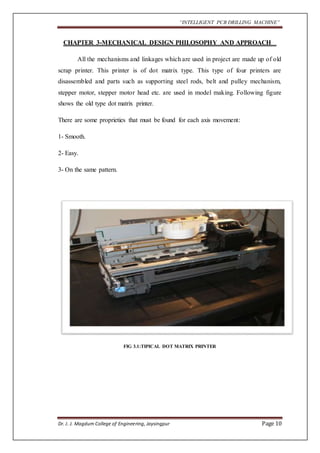
All the mechanisms and linkages which are used in project are made up of old 
scrap printer. This printer is of dot matrix type. This type of four printers are 
disassembled and parts such as supporting steel rods, belt and pulley mechanism, 
stepper motor, stepper motor head etc. are used in model making. Following figure 
shows the old type dot matrix printer. 
There are some proprieties that must be found for each axis movement: 
1- Smooth. 
2- Easy. 
3- On the same pattern. 
FIG 3.1:TIPICAL DOT MATRIX PRINTER 
Dr. J. J. Magdum College of Engineering, Jaysingpur Page 10
“INTELLIGENT PCB DRILLING MACHINE” 
3.1 PRINTERS DISASSEMBLED PARTS 
FIG 3.1.2: BELT PULLEY ASSEMBLY 
FIG 3.1.3: F.V OF PRINTER 
Dr. J. J. Magdum College of Engineering, Jaysingpur Page 11
“INTELLIGENT PCB DRILLING MACHINE” 
FIG 3.1.4: COMPLETE ASSEMBLY VIEW 
Dr. J. J. Magdum College of Engineering, Jaysingpur Page 12
“INTELLIGENT PCB DRILLING MACHINE” 
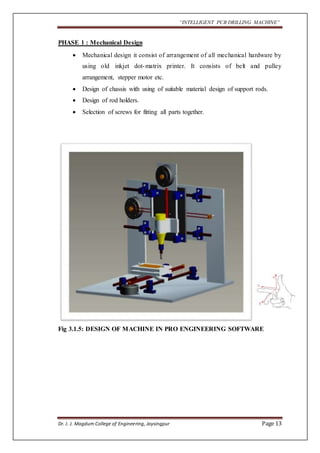
PHASE 1 : Mechanical Design 
 Mechanical design it consist of arrangement of all mechanical hardware by 
using old inkjet dot-matrix printer. It consists of belt and pulley 
arrangement, stepper motor etc. 
 Design of chassis with using of suitable material design of support rods. 
 Design of rod holders. 
 Selection of screws for fitting all parts together. 
Fig 3.1.5: DESIGN OF MACHINE IN PRO ENGINEERING SOFTWARE 
Dr. J. J. Magdum College of Engineering, Jaysingpur Page 13
“INTELLIGENT PCB DRILLING MACHINE” 
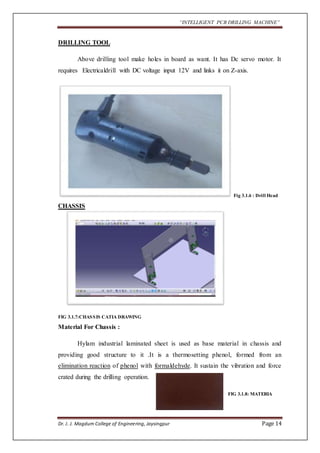
DRILLING TOOL 
Above drilling tool make holes in board as want. It has Dc servo motor. It 
requires Electricaldrill with DC voltage input 12V and links it on Z-axis. 
Fig 3.1.6 : Drill Head 
CHASSIS 
FIG 3.1.7:CHASSIS CATIA DRAWING 
Material For Chassis : 
Hylam industrial laminated sheet is used as base material in chassis and 
providing good structure to it .It is a thermosetting phenol, formed from an 
elimination reaction of phenol with formaldehyde. It sustain the vibration and force 
crated during the drilling operation. 
FIG 3.1.8: MATERIA 
Dr. J. J. Magdum College of Engineering, Jaysingpur Page 14
“INTELLIGENT PCB DRILLING MACHINE” 
L SHAPED ATTACHMENT 
Fig 3.1.9 : L SHAPED ATTACHMENT 
GUIDE BAR 
Fig3.1.10: GUIDE BAR 
It is directly taken from printer head support. In every printer one rod is 
present, such types of four rods are require for construction . It is made up of steel. 
Dr. J. J. Magdum College of Engineering, Jaysingpur Page 15
“INTELLIGENT PCB DRILLING MACHINE” 
BARSLIDER 
It is made up of plastic and got from printer. It gives smooth sliding through the bar. 
Fig 3.1.11 : BAR SLIDER 
MOTOR 
Fig 3.1.12: STEPPER MOTER 
Typical printer motors have the following specs +2 to +24 Volts, uses 600 
mA per phase, with a coil resistance around 30 ohms (unipolar) or 6 ohms (bipolar). 
Holding torque is probably around 0.2 Nm for unipolar and 0.1 Nm for bipolar. 
The above values can differ from printer to printer, but they are usually near these 
values. 
Dr. J. J. Magdum College of Engineering, Jaysingpur Page 16
“INTELLIGENT PCB DRILLING MACHINE” 
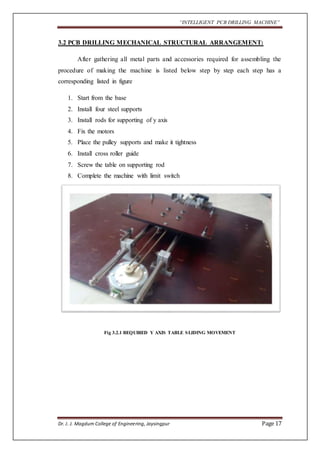
3.2 PCB DRILLING MECHANICAL STRUCTURAL ARRANGEMENT: 
After gathering all metal parts and accessories required for assembling the 
procedure of making the machine is listed below step by step each step has a 
corresponding listed in figure 
1. Start from the base 
2. Install four steel supports 
3. Install rods for supporting of y axis 
4. Fix the motors 
5. Place the pulley supports and make it tightness 
6. Install cross roller guide 
7. Screw the table on supporting rod 
8. Complete the machine with limit switch 
Fig 3.2.1 REQUIRED Y AXIS TABLE SLIDING MOVEMENT 
Dr. J. J. Magdum College of Engineering, Jaysingpur Page 17
“INTELLIGENT PCB DRILLING MACHINE” 
Fig 3.2.2:Z AXIS VERTICAL SLIDING MOVEMENT DRILLING HEAD 
Dr. J. J. Magdum College of Engineering, Jaysingpur Page 18
“INTELLIGENT PCB DRILLING MACHINE” 
COMPLETE ASSEMBLY OF PCB DRILLING MACHINE: 
Dr. J. J. Magdum College of Engineering, Jaysingpur Page 19
“INTELLIGENT PCB DRILLING MACHINE” 
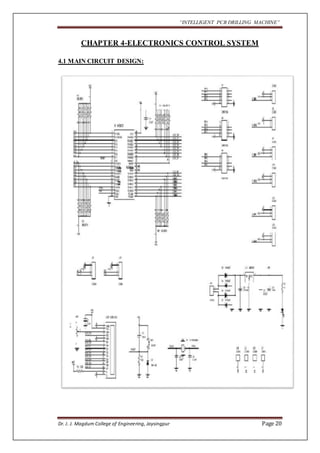
CHAPTER 4-ELECTRONICS CONTROL SYSTEM 
4.1 MAIN CIRCUIT DESIGN: 
Dr. J. J. Magdum College of Engineering, Jaysingpur Page 20
“INTELLIGENT PCB DRILLING MACHINE” 
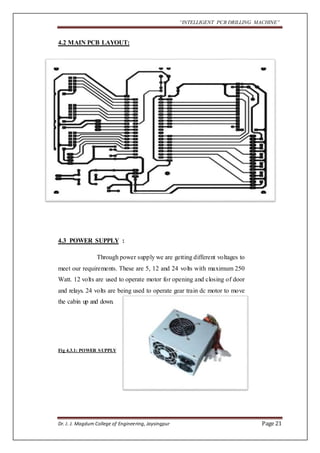
4.2 MAIN PCB LAYOUT: 
4.3 POWER SUPPLY : 
Through power supply we are getting different voltages to 
meet our requirements. These are 5, 12 and 24 volts with maximum 250 
Watt. 12 volts are used to operate motor for opening and closing of door 
and relays. 24 volts are being used to operate gear train dc motor to move 
the cabin up and down. 
Fig 4.3.1: POWER SUPPLY 
Dr. J. J. Magdum College of Engineering, Jaysingpur Page 21
“INTELLIGENT PCB DRILLING MACHINE” 
Fig 4.3.2: POWER SUPPLY CKT. 
4.4 LM78XX SERIES VOLTAGE REGULATORS: 
Features: 
 Output current in excess of 1A 
 Internal thermal overload protection 
 No external components required 
 Output transistor safe area protection 
 Internal short circuit current limit 
 Available in the aluminum TO-3 package 
Voltage Range: 
 LM7805C 5V 
 LM7812C 12V 
 LM7815C 15V 
Dr. J. J. Magdum College of Engineering, Jaysingpur Page 22
“INTELLIGENT PCB DRILLING MACHINE” 
4.5 GENERAL DESCRIPTION OF LM78XX: 
The LM78XX series of three terminal regulators is available with several 
fixed output voltages making them useful in a wide range of applications. One of 
these is local on card regulation, eliminating the distribution problems associated with 
single point regulation. 
The voltages available allow these regulators to be used in logic systems, 
instrumentation, Hi-Fi, and other solid state electronic equipment. Although designed 
primarily as fixed voltage regulator these devices can be used with external 
components to obtain adjustable voltages and currents. The LM78XX series is 
available in an aluminum TO-3 package which will allow over 1.0A load current if 
adequate heat sinking is provided. Current limiting is included to limit the peak output 
current to a safe value. Safe area protection for the output transistor is provided to 
limit internal power dissipation. If internal power dissipation becomes too high for the 
heat sinking provided, the thermal shutdown circuit takes over preventing the IC from 
overheating. Considerable effort was expanded to make the LM78XX series of 
regulators easy to use and minimize the number. 
Dr. J. J. Magdum College of Engineering, Jaysingpur Page 23
“INTELLIGENT PCB DRILLING MACHINE” 
4.6 CIRCUIT DIAGRAM LM7805 
Fig 4.16.1: CKT OF LM7805 
We need the regulated 5 V output for the most of the IC’s used in our 
system. Now the output of bridge rectifier is unregulated DC. To get 5V regulated Dc 
out put from it we have used regulator IC 7805.Following fig shows the pin out 
diagram of the regulator IC 7805. 
The 7805 series is a three terminal positive voltage regulator IC which 
gives regulated 5V D.C. output. The maximum input voltage that can be applied to 
input pin is the 35 V. The minimum difference between input and output voltage 
required is the 2 V. The pin no 1 is the input pin where the unregulated input voltage 
is applied. Pi no.2 is connected to the ground, whereas pin no.3 is the output pin at 
which the regulated 5V output can be obtained. 
Dr. J. J. Magdum College of Engineering, Jaysingpur Page 24
“INTELLIGENT PCB DRILLING MACHINE” 
CHAPTER 5- CONTROLLER BLOCK ASSEMBLY 
5.1 MICROCONTROLLER AT89C51 DESCRIPTION: 
The AT89C51 is a low-power, high-performance CMOS 8-bit 
microcomputer with 4K bytes of Flash programmable and erasable read only memory 
(PEROM). The device is manufactured using Atmel’s high-density nonvolatile 
memory technology and is compatible with the industry-standard MCS-51 instruction 
set and pin out. The on-chip Flash allows the program memory to be reprogrammed 
in-system or by a conventional nonvolatile memory programmer. By combining a 
versatile 8-bit CPU with Flash on a monolithic chip, the Atmel AT89C51 is a 
powerful microcomputer which provides a highly- flexible and cost-effective solution 
to many embedded control applications. 
Fig 5.1.1: MICROCONTROLLER AT89C51 
Dr. J. J. Magdum College of Engineering, Jaysingpur Page 25
“INTELLIGENT PCB DRILLING MACHINE” 
5.2 FEATURES 
• Compatible with MCS-51™ Products 
• 4K Bytes of In-System Reprogrammable Flash Memory 
Endurance: 1,000 Write/Erase Cycles 
• Fully Static Operation: 0 Hz to 24 MHz 
• Three-level Program Memory Lock 
• 128 x 8-bit Internal RAM 
• 32 Programmable I/O Lines 
• Two 16-bit Timer/Counters 
• Six Interrupt Sources 
• Programmable Serial Channel 
• Low-power Idle and Power-down Modes 
Dr. J. J. Magdum College of Engineering, Jaysingpur Page 26
“INTELLIGENT PCB DRILLING MACHINE” 
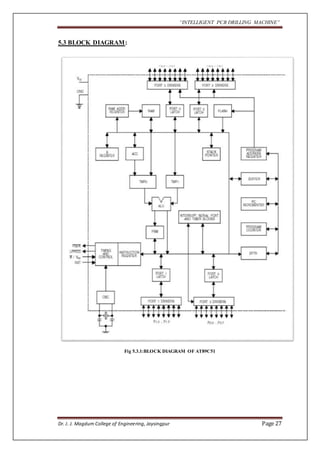
5.3 BLOCK DIAGRAM: 
Fig 5.3.1:BLOCK DIAGRAM OF AT89C51 
Dr. J. J. Magdum College of Engineering, Jaysingpur Page 27
“INTELLIGENT PCB DRILLING MACHINE” 
5.4 CHARACTERISTICS: 
The AT89C51 provides the following standard features: 4K bytes of 
flash, 128 bytes of RAM, 32 I/O lines, two 16-bit timer/counters, five vector two-level 
interrupt architecture, a full duplex serial port, on-chip oscillator and clock 
circuitry. In addition, the AT89C51 is designed with static logic for operation down to 
zero frequency and supports two software selectable power saving modes. The Idle 
Mode stops the CPU while allowing the RAM, timer/counters, serial port and 
interrupt system to continue functioning. The Power-down Mode saves the RAM 
contents but freezes the oscillator disabling all other chip functions until the next 
hardware reset 
5.5 PIN DIAGRAM: 
FIG 5.5.1: PIN DIAGRAM 
Dr. J. J. Magdum College of Engineering, Jaysingpur Page 28
“INTELLIGENT PCB DRILLING MACHINE” 
5.6 PIN DESCRIPTION: 
 VCC: 
Supply voltage 
 GND: 
Ground. 
 Port 0: 
Port 0 is an 8-bit open-drain bi-directional I/O port. As an output port, each pin can 
sink eight TTL inputs. When 1s are written to port 0 pins, the pins can be used as high 
impedance inputs. Port 0 may also be configured to be the multiplexed low order 
address/data bus during accesses to external program and data memory. In this mode 
P0 has internal minimize. Port 0 also receives the code bytes during Flash 
programming, and outputs the code bytes during program verification. External 
minimize are required during program verification. 
 Port 1: 
Port 1 is an 8-bit bi-directional I/O port with internal minimize. The Port 1 output 
buffers can sink/source four TTL inputs. When 1s are written to Port 1 pins they are 
pulled high by the internal minimize and can be used as inputs. As inputs, Port 1 pins 
that are externally being pulled low will source current (IIL) because of the internal 
minimize. Port 1 also receives the low-order address bytes during Flash programming 
and verification. 
 Port 2: 
Port 2 is an 8-bit bi-directional I/O port with internal minimize. The Port 2 output 
buffers can sink/source four TTL inputs. When 1s are written to Port 2 pins they are 
pulled high by the internal minimize and can be used as inputs. As inputs, Port 2 pins 
that are externally being pulled low will source current (IIL) because of the internal 
minimize. Port 2 emits the high-order address byte during fetches from external 
program memory and during accesses to external data memory that uses 16-bit 
addresses (MOVX @DPTR). In this application, it uses strong internal pull-ups when 
emitting 1’s. 
Dr. J. J. Magdum College of Engineering, Jaysingpur Page 29
“INTELLIGENT PCB DRILLING MACHINE” 
 Port 3: 
Port 3 is an 8-bit bi-directional I/O port with internal minimize. The Port 3 output 
buffers can sink/source four TTL inputs. When 1s are written to Port 3 pins they are 
pulled high by the internal minimize and can be used as inputs. As inputs, Port 3 pins 
that are externally being pulled low will source current (IIL) because of the minimize. 
Port 3 also serves the functions of various special features of the AT89C51 as listed 
below: Port 3 also receives some control signals for Flash programming and 
verification. 
 RST: 
Reset input. A high on this pin for two machine cycles while the oscillator is running 
resets the device. 
 ALE/PROG: 
Address Latch Enable output pulse for latching the low byte of the address during 
accesses to external memory. This pin is also the program pulse input (PROG) during 
Flash programming. In normal operation ALE is emitted at a constant rate of 1/6the 
oscillator frequency, and may be used for external timing or clocking purposes. Note, 
however, that one ALE pulse is skipped during each access to external Data Memory. 
If desired, ALE operation can be disabled by setting bit 0 of SFR location 8EH. With 
the bit set, ALE is active only during a MOVX or MOVC instruction. Otherwise, the 
pin is weakly pulled high. Setting the ALE-disable bit has no effect if the 
microcontroller is in external execution mode. 
 PSEN: 
Program Store Enable is the read strobe to external program memory. When the 
AT89C51 is executing code from external program memory, PSEN is activated twice 
each machine cycle, except that two PSEN activations are skipped during each access 
to external data memory. 
Dr. J. J. Magdum College of Engineering, Jaysingpur Page 30
“INTELLIGENT PCB DRILLING MACHINE” 
 EA/VPP: 
External Access Enable. EA must be strapped to GND in order to enable the device to 
fetch code from external program memory locations starting at 0000H up to 
FFFFH. Note, however, that if lock bit 1 is programmed, EA will be internally latched 
on reset. EA should be strapped to VCC for internal program executions. This pin also 
receives the 12-volt programming enable voltage (VPP) during Flash programming, 
for parts that require 12-volt VPP. 
 XTAL1: Input to the inverting oscillator amplifier and input to the internal clock 
operating circuit. 
 XTAL2: Output from the inverting oscillator amplifier. 
 Oscillator characteristics: 
FIG 5.6.1:LADDER DIAGRAM 
 XTAL1 and XTAL2 are the input and output, respectively, of an inverting 
amplifier which can be configured for use as an on-chip oscillator, as shown in 
Figure 1. Either a quartz crystal or ceramic resonator may be used. To drive the 
device from an external clock source, XTAL2 should be left unconnected while 
XTAL1 is driven as shown in Figure. There are no requirements on the duty cycle 
of the external clock signal, since the input to the internal clock ing circuitry is 
through a divide-by-two flip-flop, but minimum and maximum voltage high and 
low time specifications must be observed. 
Dr. J. J. Magdum College of Engineering, Jaysingpur Page 31
“INTELLIGENT PCB DRILLING MACHINE” 
 IDLE MODE: 
In idle mode, the CPU puts itself to sleep while all the on chip peripherals remain 
active. The mode is invoked by software. The content of the on-chip RAM and all the 
special functions registers remain unchanged during this mode. The idle mode can be 
terminated by any enabled interrupt or by a hardware reset. It should be noted that 
when idle is terminated by a hard ware reset, the device normally resumes program 
execution, from where it left off, up to two machine cycles before the internal reset 
algorithm takes control. On-chip hardware inhibits access to internal RAM in this 
event, but access to the port pins is not inhibited. To eliminate the possibility of an 
unexpected write to a port pin when Idle is terminated by reset, the instruction 
following the one that invokes Idle should not be one that writes to a port pin or to 
external memory. 
Dr. J. J. Magdum College of Engineering, Jaysingpur Page 32
“INTELLIGENT PCB DRILLING MACHINE” 
CHAPTER 6 - STEPPER MOTOR DRIVER 
Phase 2: 
 Selection of stepper motors 
 Design of stepper motor drivers. 
 Selection of drill motor. 
 Design for servo motor driver 
6.1 WORKING STEPPER MOTOR 
Stepper motors consist of a permanent magnet rotating shaft, called the 
rotor, and electromagnets on the stationary portion that surrounds the motor, called 
the stator. Figure 6.1.1, illustrates one complete rotation of a stepper motor. At 
position 1, we can see that the rotor is beginning at the upper electromagnet, which is 
currently active (has voltage applied to it). To move the rotor clockwise (CW), the 
upper electromagnet is deactivated and the right electromagnet is activated, causing 
the rotor to move 90 degrees CW, aligning itself with the active magnet. This process 
is repeated in the same manner at the south and west electromagnets until we once 
again reach the starting position. 
In the bellow example, we used a motor with a resolution of 90 degrees or 
demonstration purposes. In reality, this would not be a very practical motor for most 
applications. The average stepper motor's resolution -- the amount of degrees rotated 
per pulse -- is much higher than this. For example, a motor with a resolution of 5 
degrees would move its rotor 5 degrees per step, thereby requiring 72 pulses (steps) to 
complete a full 360 degree rotation. 
As you can see in Figure 2, in the first position only the upper electromagnet is 
active, and the rotor is drawn completely to it. In position 2, both the top and right 
electromagnets are active, causing the rotor to position itself between the two active 
poles. Finally, in position 3, the top magnet is deactivated and the rotor is drawn all 
the way right. This process can then be repeated for the entire rotation. 
Dr. J. J. Magdum College of Engineering, Jaysingpur Page 33
“INTELLIGENT PCB DRILLING MACHINE” 
Fig 6.1.1 
Fig 6.1.2 
Dr. J. J. Magdum College of Engineering, Jaysingpur Page 34
“INTELLIGENT PCB DRILLING MACHINE” 
There are several types of stepper motors. 4-wire stepper motors contain only 
two electromagnets; however the operation is more complicated than those with three 
or four magnets, because the driving circuit must be able to reverse the current after 
each step. For our purposes, we will be using a 6-wire motor. 
As you can see in Figure 2, in the first position only the upper electromagnet is 
active, and the rotor is drawn completely to it. In position 2, both the top and right 
electromagnets are active, causing the rotor to position itself between the two active 
poles. Finally, in position 3, the top magnet is deactivated and the rotor is drawn all 
the way right. This process can then be repeated for the entire rotation. 
There are several types of stepper motors. 4-wire stepper motors contain only 
two electromagnets; however the operation is more complicated than those with three 
or four magnets, because the driving circuit must be able to reverse the current after 
each step. For our purposes, we will be using a 6-wire motor. 
Unlike example motors which rotated 90 degrees per step, real-world motors 
employ a series of mini-poles on the stator and rotor to increase resolution. An 
example of a multipole motor can be seen in Figure 3. In position 1, the north pole of 
the rotor's permanent magnet is aligned with the south pole of the stator's 
electromagnet. In position 2, the upper electromagnet is deactivated and the next one 
to its immediate left is activated, causing the rotor to rotate a precise amount of 
degrees. In this example, after eight steps sequence repeats . 
Dr. J. J. Magdum College of Engineering, Jaysingpur Page 35
“INTELLIGENT PCB DRILLING MACHINE” 
6.2 LM6228 (STEPPER MOTOR CONTROLLER & DRIVER) FEATURES: 
 OPERATING SUPPLY VOLTAGE FROM 8 TO 52V 
 2.8A OUTPUT PEAK CURRENT (1.4 A RMS) 
 RDS(ON) 0.73W TYP. VALUE @ Tj = 25°C 
 OPERATING FREQUENCY UP TO 100KHz 
 NON DISSIPATIVE OVERCURRENT PROTECTION 
 DUAL INDEPENDENT CONSTANT tOFF PWM CURRENT 
CONTROLLERS 
 FAST/SLOW DECAY MODE SELECTION 
 FAST DECAY QUASI-SYNCHRONOUS RECTIFICATION 
 DECODING LOGIC FOR STEPPER MOTOR FULL AND HALF STEP 
DRIVE 
 CROSS CONDUCTION PROTECTION 
 THERMAL SHUTDOWN 
 UNDER VOLTAGE LOCKOUT 
 INTEGRATED FAST FREE WHEELING DIODES 
Dr. J. J. Magdum College of Engineering, Jaysingpur Page 36
“INTELLIGENT PCB DRILLING MACHINE” 
Relay Basics: 
Relays are one of the oldest, simplest, and yet, easiest and most useful devices. 
Before the advent of the mass produced transistor, computers were made from either 
relays or vacuum tubes, or both. 
A relay, quite simply, is a small machine consisting of an electromagnet (coil), 
a switch, and a spring. The spring holds the switch in one position, until a current is 
passed through the coil. The coil generates a magnetic field which moves the switch. 
It's that simple. You can use a very small amount of current to activate a relay, and the 
switch can often handle a lot of current. 
Relays really are not a big deal. They are relatively easy to use, and are very 
forgiving of stupidity. For many applications, a relay is the only way to go. 
Dr. J. J. Magdum College of Engineering, Jaysingpur Page 37
“INTELLIGENT PCB DRILLING MACHINE” 
6.3 CIRCUIT DESCRIPTION: 
POWER STAGES AND CHARGE PUMP: 
The L6228 integrates two independent Power MOS Full Bridges. Each 
Power MOS has an DS(ON) =0.73W (typical value @ 25°C), with intrinsic fast 
freewheeling diode. Switching patterns are generated by the PWM Current Controller 
and the Phase Sequence Generator (see below). Cross conduction protection is 
achieved using a dead time (tDT = 1mstypical value) between the switch off and 
switch on of two Power MOSFETSs in one leg of a bridge. Pins VSA and VSB 
MUST be connected together to the supply voltage VS. The device operates with a 
supply voltage in the range from 8V to 52V. It has to be noticed that the RDS(ON) 
increases of some percents when the supply voltage is in the range from 8Vto 
12V.Using N-Channel Power MOS for the upper transistor sin the bridge requires a 
gate drive voltage above the power supply voltage. The bootstrapped supply vo ltage 
VBOOT is obtained through an internal Oscillator and few external components to 
realize a charge pump circuit. The oscillator output (VCP) is a square wave at 600 
KHz (typical) with 10V amplitude. 
FIG 6.3.1 PIN DESCRIPTION OF LM6228 
Dr. J. J. Magdum College of Engineering, Jaysingpur Page 38
“INTELLIGENT PCB DRILLING MACHINE” 
HALF STEP MODE: 
A HIGH logic level on the HALF/FULL input selects Half Step Mode. Figure 16 
shows the motor current waveforms and the state diagram for the Phase Sequencer 
Generator. At Start-Up or after a RESET the Phase Sequencer is at state 1. After each 
clock pulse the state changes following the sequence 1,2,3,4,5,6,7,8,… if CW/CCW is 
high (Clockwise movement) or 1,8,7,6,5,4,3,2,… if CW/CCW is low 
(Counterclockwise movement). 
NORMAL DRIVE MODE (Full-step two-phase-on): 
A LOW level on the HALF/FULL input selects the Full Step mode. When the low 
level is applied when the state machine is at an ODD numbered state the Normal 
Drive Mode is selected. Figure Fig. 17 shows the motor current waveform state 
diagram for the state machine of the Phase Sequencer Generator. The Normal Drive 
Mode can easily be selected by holding the HALF/FULL input low and applying a 
RESET. AT start -up or after a RESET the State Machine is in state1. While the 
HALF/FULL input is kept low, state changes following the sequence 1,3,5,7,… if 
CW/CCW is high (Clockwise movement) or 1,7,5,3,… if CW/CCW is low 
(Counterclockwise movement). 
NON-DISSIPATIVE OVERCURRENT PROTECTION: 
The L6228 integrates an Over current Detection Circuit (OCD) for full protection. 
This circuit provides protection against a short circuit to ground or between two 
phases of the bridge. With this internal over current detection, the external current 
sense resistor normally used and its associated power dissipation are eliminated. 
To implement the over current detection, a sensing element that delivers a small but 
precise fraction of the output current is implemented with each high side power MOS. 
Since this current is a small fraction of the output current there is very little additional 
power dissipation. This current is compared with an internal reference current IREF. 
When the output current reaches the detection threshold (typically 2.8A) the OCD 
comparator signals a fault condition. When a fault condition is detected, the EN pin is 
pulled below the turn off threshold (1.3V typical) by an internal open drain MOS with 
a pull down capability of 4mA. By using an external R-C on the EN pin. 
Dr. J. J. Magdum College of Engineering, Jaysingpur Page 39
“INTELLIGENT PCB DRILLING MACHINE” 
FIG 6.3.2: STEPPER DRIVER PCB LAYOUT 
FIG 6.3.3: PCB LAYOUT 
CHAPTER 7-SERIAL INTERFACE 
Dr. J. J. Magdum College of Engineering, Jaysingpur Page 40
“INTELLIGENT PCB DRILLING MACHINE” 
Dr. J. J. Magdum College of Engineering, Jaysingpur Page 41
“INTELLIGENT PCB DRILLING MACHINE” 
7.1 RS232 STANDARDS 
RS232: DB9 Connector: 
In telecommunications, RS-232 is a standard for serial binary data 
interconnection between a DTE (Data terminal equipment) and a DCE (Data Circuit-terminating 
Equipment). It is commonly used in computer serial ports. 
Scope of the Standard: 
The Electronic Industries Alliance (EIA) standard RS-232-C [3] as of 1969 defines: 
 Electrical signal characteristics such as voltage levels, signaling rate, timing 
and slew-rate of signals, voltage withstand level, short-circuit behavior, 
maximum stray capacitance and cable length 
 Interface mechanical characteristics, pluggable connectors and pin 
identification 
 Functions of each circuit in the interface connector 
 Standard subsets of interface circuits for selected telecom applications 
Dr. J. J. Magdum College of Engineering, Jaysingpur Page 42
“INTELLIGENT PCB DRILLING MACHINE” 
The standard does not define such elements as character encoding (for 
example, ASCII, Baudot or EBCDIC), or the framing of characters in the data stream 
(bits per character, start/stop bits, parity). The standard does not define protocols for 
error detection or algorithms for data compression. 
The standard does not define bit rates for transmission, although the standard 
says it is intended for bit rates lower than 20,000 bits per second. Many modern 
devices can exceed this speed (38,400 and 57,600 bit/s being common, and 115,200 
and 230,400 bit/s making occasional appearances) while still using RS-232 
compatible signal levels. 
Details of character format and transmission bit rate are controlled by the 
serial port hardware, often a single integrated circuit called a UART that converts data 
from parallel to serial form. A typical serial port includes specialized driver and 
receiver integrated circuits to convert between internal logic levels and RS-232 
compatible signal levels. 
In this circuit the MAX 232 IC used as level logic converter. The 
MAX232 is a dual driver/receiver that includes a capacitive voltage generator to 
supply EIA 232 voltage levels from a single 5v supply. Each receiver converts EIA- 
232 to 5v TTL/CMOS levels. Each driver converts TLL/CMOS input levels into EIA- 
232 levels. 
Dr. J. J. Magdum College of Engineering, Jaysingpur Page 43
“INTELLIGENT PCB DRILLING MACHINE” 
7.2 RS232 CIRCUIT DESIGN: 
In this circuit the microcontroller transmitter pin is connected in the MAX232 
T2IN pin which converts input 5v TTL/CMOS level to RS232 level. Then T2OUT 
pin is connected to reviver pin of 9 pin D type serial connector which is directly 
connected to PC. 
In PC the transmitting data is given to R2IN of MAX232 through transmitting 
pin of 9 pin D type connector which converts the RS232 level to 5v TTL/CMOS 
level. The R2OUT pin is connected to receiver pin of the microcontroller. Likewise 
the data is transmitted and received between the microcontroller and PC or other 
device vice versa. 
Dr. J. J. Magdum College of Engineering, Jaysingpur Page 44
“INTELLIGENT PCB DRILLING MACHINE” 
7.3 MAX232: 
The MAX232 device is a dual driver/receiver that includes a capacitive 
voltage generator to supply EIA-232 voltage levels from a single 5-V supply. Each 
receiver converts EIA-232 inputs to 5-V TTL/CMOS levels. These receivers have a 
typical threshold of 1.3 V and a typical hysteresis of 0.5 V, and can accept -30 to +30 
V inputs. Each driver converts TTL/CMOS input levels into EIA-232 levels. 
Dr. J. J. Magdum College of Engineering, Jaysingpur Page 45
“INTELLIGENT PCB DRILLING MACHINE” 
7.4 FEATURES: 
 Operates With Single 5-V Power Supply 
 Two Drivers and Two Receivers 
 -30 to +30 V Input Levels 
 Low Supply Current of 8 mA Typical 
 Designed to be Interchangeable With Maxim MAX232 
 Package Options Include Plastic Small-Outline (D, DW) Packages and 
Standard Plastic (N) DIPs 
APPLICATIONS: 
 Battery-Powered Systems 
 Terminals 
 Modems 
 Computers 
Dr. J. J. Magdum College of Engineering, Jaysingpur Page 46
“INTELLIGENT PCB DRILLING MACHINE” 
CHAPTER 8 -DISPLAY UNIT 
8.1 LCD’s: 
Features: 
 16*2 lines display 
 5*7 dot matrix display 
 8 bit data interface 
 Recently a number of projects are using intelligent liquid crystal display 
(LCD) 
 It not only displays numbers but also characters & graphics. 
 This is in contrast to LED’s which are limited to numbers & few characters. 
 There are numbers of LCD’s with different shapes & sizes. We are using 16*2 
type of LCD. 
Back light: 
LED with a choice of colors 
 Bright and even back lighting 
 Long life expectancy, more than 100,000 hours 
 Simple to drive. Needs +5 volts only 
 Brightness can be easily adjusted 
CCFL (Cold Cathode Florescent Light) 
 Paper white, best for large graphic displays 
 Less power consumption than LED’s 
DISPLAY TYPE 
 Positive image (Dark dots on light background) 
 Negative image (Light dots on dark background) 
Dr. J. J. Magdum College of Engineering, Jaysingpur Page 47
“INTELLIGENT PCB DRILLING MACHINE” 
FIG 8.1.1: LCD DISPLAY 
DISPLAY CHARACTER POSITION AND CHARACTER ADDRESS 16 *2 LCD: 
16 x 2: HDM16216H-2, HDM16216H-4, HDM16216H-5, HDM16216H-B, 
HDM16216H-S, HDM16216L-2, HDM16216L-5, HDM16216L-6, HDM16216L-7, 
HDM16216L-B, HDM16216L-S 
Dr. J. J. Magdum College of Engineering, Jaysingpur Page 48
“INTELLIGENT PCB DRILLING MACHINE” 
8.2 LCD Pin Descriptions: 
PIN ASSIGNMENT FOR > 80 CHARACTER DISPLAYS 
Pin 
number 
Symbol Level I/O Function 
1 GND Ground 
2 VCC + 5 V 
3 CONTRAST Gnd 
4 E Enable 
5 RS Register Select 
6 R/W Read Write 
7 DB0 Data Line 
8 DB1 Data Line 
9 DB2 Data Line 
10 DB3 Data Line 
11 DB4 Data Line 
12 DB5 Data Line 
13 DB6 Data Line 
14 DB7 Data Line 
15 VCC + 5 V 
16 GND Gnd 
Dr. J. J. Magdum College of Engineering, Jaysingpur Page 49
“INTELLIGENT PCB DRILLING MACHINE” 
1. VCC, VSS and VEE:-- 
While VCC and VSS provide the +5V and ground, respectively, VEE is used for 
controlling LCD contrast. 
2. RS, register select:-- 
There are two very important registers inside the LCD. The RS pin is used for their 
selection 
If RS=0 , the instruction command code register is selected, allowing the user to send 
a command such as clear display , cursor at home, etc. 
If RS=1, the data register is selected, allowing the user to send data to be displayed on 
the LCD. 
3. R/W read/ write:-- 
R/W input allows the user to write information to the LCD or read information from 
it. 
R/W=1 when reading. 
R/W=0 when writing. 
4. E, enable:-- 
The enable pin is used by the LCD to latch information presented to its data pins. 
When data is supplied to data pins, a high-to- low pulse must be applied to this pin in 
order for the LCD to latch in the data present at the data pins. This pulse must be as 
minimum as 450ns wide. 
Dr. J. J. Magdum College of Engineering, Jaysingpur Page 50
“INTELLIGENT PCB DRILLING MACHINE” 
Operational Overview: 
1] Busy Flag (BF) 
When the busy flag is HIGH level, it indicates that the controller is in the internal 
operation mode and the next instruction will not be accepted. When R/W is ‘1’ and 
RS is ‘0’ the busy flag is output from DB. The next instruction must be written after 
the busy flag goes low. 
2] Address Counter (AC) 
The address counter (AC) generates the address for the DD RAM, the CG 
RAM and for the cursor display. When an instruction code for DD or CG RAM 
address is written to the controller, after deciding whether it is DD RAM or CG RAM, 
the address information is transferred to AC. After writing into (or reading from) DD 
or CG RAM display data, AC is automatically incremented (decremented). The data 
of the AC is output to DB0-DB6 when RS is ‘0’ and R/W is ‘1’. 
3] Character Generator ROM (CG ROM) 
The character generator ROM generates 5 x 7 dot or 5 x 10 dot character patterns 
from 8- bit character codes. It can generate 160 types of 5 x 7 dot character patterns 
and 32 types of 5 x 10 dot character patterns. When the 8-bit character code of a CG 
ROM is written to the DD RAM, the character pattern of the CG ROM corresponding 
to the code is displayed on the LCD display position corresponding to the DD RAM. 
Dr. J. J. Magdum College of Engineering, Jaysingpur Page 51
“INTELLIGENT PCB DRILLING MACHINE” 
4] Character Generator RAM (CG RAM) 
The character generator RAM (CG RAM) is the RAM with which the user can 
generate character patterns by program. The CG RAM has the capacity to store 8 
kinds of 5 x 7 dots or 4 kinds of 5 x 10 dots. Programming of these character patterns 
is explained in CG RAM programming. 
5] Display Data RAM (DD RAM) 
The display data RAM (DD RAM) stores display data represented in 8-bit 
(hexadecimal) character codes. Its capacity is 80 x 8 bits, or 80 characters. The 
display data RAM (DD RAM) that is not used for display can be used as general data 
RAM. Depending on the 8- bit character code that is written into the DD RAM. LCD 
will select the character pattern either from Character Generator RAM (CG RAM) or 
from Character Generator ROM (CG ROM). 
6] Underline/Blinking Block Cursor 
Cursor is under the control of the MPU Programmed. The display of the cursor on the 
LCD is made at a position corresponding to the DD RAM address set to the address 
counter (AC). 
Dr. J. J. Magdum College of Engineering, Jaysingpur Page 52
“INTELLIGENT PCB DRILLING MACHINE” 
CHAPTER 9- HARDWARE REQUIREMENT 
9.1 HARDWARE REQUIREMENT: 
Stepper motors-3, 
Transformer-2- 230V to 12V ac. step down. 
1. Main Power Supply 
Diode-1N4007-4, led-1, resistors-1, capacitors (in mF) - 1000-1, 10-2, 0.1-2, 
Voltage regulator- 7805C-1, 7812CT-1. 
2. Microcontroller PCB 
*power supply: diode-IN4007-4, led-1, resistors-1, 
Capacitors (in mF)- 1000-1, 10-2,0.1-2, 
Voltage regulator- 7805C- 1. 
*AT89C51, 3 axis driver pins, input from transformer & 
Output to stepper driver circuit, crystal oscillator-11.0592 MHz, capacitors-0.1mf-2, 
Resistor-1, pot, LCD notch, limitdef switch's notches-6. 
Reset circuit: 
Reset switch, capacitors-10mf-1, resistors-10k-1, and diode-1-1N4148. 
3. Stepper Driver & Controller PCB 
Input from 89V51, 
Stepper controller & driver LMS6228, resisots-4, capacitors-3.3nf-1, 0.1mf-1, preset, 
resistors 5W-2, capacitor-3.3nf-2, 1000mf-1, 
Power diode-1N5408-8, 
Input from power supply & output to stepper motor. 
MOC 7811 to check maximum and minimum XYZ axis limits. LCD DISPLAY 16x2 
Dr. J. J. Magdum College of Engineering, Jaysingpur Page 53
“INTELLIGENT PCB DRILLING MACHINE” 
Chapter 10 - SOFTWARE REQUIREMENT 
Phase 3: 
 Programming using visual basic for microcontroller 89C51. 
 Creation of CNC machine window in visual basic. 
10.1 SOFTWARE REQUIREMENT: 
ORCAD Software– for designing the PCB LAYOUT. And our VB based Program in 
which we give the drill file. 
COMPUTER SYSTEM: 
 To make graphical sketch of the desired pcb and send all information to the 
microcontroller through RS323C. 
 To make the drill file and Gerber information. 
 Uses ORCAD & VB softwares for the work. 
 ORCAD for designing the PCB skeleton. 
 Visual Basics for extract the information to provide to AT89C51. 
10.2. VISUAL BASIC: 
Microsoft Visual Basic, the fastest and easiest way to create applications for 
Microsoft Windows. Whether you are an experienced professional or brand new to 
windows programming, Visual Basics provides you with a complete set of tools to 
simplify rapid application development. 
WHAT IS IN VISUAL BASIC? 
“Visual” part refers to method used to create Graphical User Interface 
(GUI). Rather than writing numerous lines of code to describe appearance and 
location of an interface element, we simply add pre-built objects into place on a 
screen. If you have every used drawing program such as paint you already have most 
of skills necessary to create an effective user interface. 
Dr. J. J. Magdum College of Engineering, Jaysingpur Page 54
“INTELLIGENT PCB DRILLING MACHINE” 
The “Basic” part refers to BASIC (Beginners All purpose Symbolic 
Instruction Code) language, a language used by more programmers than any other 
language in the history of computing. Visual Basic has involved from original BASIC 
language and now contains several hundred Active X technologies allow you to use 
Microsoft Excel Spreadsheet and other window applications. You can even automate 
application and object created using professional enterprise edition of Visual Basic. In 
this project we have connected our hardware with VB. Because, the student data 
stored in memory chip is shown in the VB and connection of the software to the 
project hardware is done by using MSCOM of VB. 
Fig.10.1.1: VB Form for PCB Drilling Machine 
Dr. J. J. Magdum College of Engineering, Jaysingpur Page 55
“INTELLIGENT PCB DRILLING MACHINE” 
10.3 Program code in VISUAL BASIC: 
Dim SerialTxRxError AsBoolean 
Dim SerialRxBytes AsInteger 
Dim AutoManual AsBoolean 
Dim steps AsString 
Dim DelayComplete AsBoolean 
Dim DrillFileName AsString 
Dim DrillSelectFlag AsBoolean 
Dim PauseFlag AsBoolean 
Dim EndOfDrillFlag AsBoolean 
PrivateSub Form1_Load(ByVal sender As System.Object, ByVal e As 
System.EventArgs) HandlesMyBase.Load 
' check available serial ports 
For i AsInteger = 0 ToMy.Computer.Ports.SerialPortNames.Count - 1 
cboCommPorts.Items.Add(My.Computer.Ports.SerialPortNames(i)) 
Next 
' auto = true, manual = false 
AutoManual = True 
PauseFlag = False 
' Disable all controls 
GroupBoxManualControl.Enabled = False 
GroupBoxDistance.Enabled = False 
GroupBoxStepperSteps.Enabled = False 
GroupBoxDrillSelect.Enabled = False 
GroupBoxStatus.Enabled = False 
GroupBoxStartStop.Enabled = False 
BtnOpenFile.Enabled = False 
BtnPause.Enabled = False 
TextBoxCNCDrill.Enabled = False 
BtnComClose.Enabled = False 
BtnAutoManual.Enabled = False 
BtnPause.Enabled = False 
EndSub 
PrivateSub BtnOpenFile_Click(ByVal sender As System.Object, ByVal e 
As System.EventArgs) Handles BtnOpenFile.Click 
Try 
OpenFileDialogCNC.InitialDirectory = "C:Documents and 
SettingsRinkuDesktop" 
OpenFileDialogCNC.Filter = "Hex files (*.tap)|*.tap" 
OpenFileDialogCNC.FileName = "" 
OpenFileDialogCNC.ShowDialog() 
Dim stream_reader AsNew StreamReader(OpenFileDialogCNC.FileName) 
' Save path of opened file 
DrillFileName = OpenFileDialogCNC.FileName 
TextBoxCNCDrill.Text = 
My.Computer.FileSystem.ReadAllText(OpenFileDialogCNC.FileName) 
DrillInfoLine = stream_reader.ReadLine() 
Dr. J. J. Magdum College of Engineering, Jaysingpur Page 56
“INTELLIGENT PCB DRILLING MACHINE” 
If DrillInfoLine <>"%"Then 
MsgBox("NOT a CNC Drill File") 
TextBoxCNCDrill.Text = "" 
Else 
GroupBoxStartStop.Enabled = True 
BtnStart.Enabled = True 
EndIf 
Catch Ex As Exception 
MsgBox(Ex.Message, MsgBoxStyle.Critical, "") 
EndTry 
EndSub 
PrivateSub BtnStart_Click(ByVal sender As System.Object, ByVal e As 
System.EventArgs) Handles BtnStart.Click 
Dim drillbit AsDouble 
Dim XAxis AsDouble 
Dim YAxis AsDouble 
Dim CurrentXaxis AsInteger 
Dim CurrentYaxis AsInteger 
Dim NextXaxis AsInteger 
Dim NextYaxis AsInteger 
Dim Xsteps AsInteger 
Dim Ysteps AsInteger 
Dim Zsteps AsInteger 
Dim XStepsSign AsString 
Dim YStepsSign AsString 
Dim stream_reader AsNew StreamReader(DrillFileName) 
Try 
EndOfDrillFlag = False 
BtnStart.Enabled = False 
BtnPause.Enabled = True 
GroupBoxDistance.Enabled = True 
CurrentXaxis = 0 
CurrentYaxis = 0 
NextXaxis = 0 
NextYaxis = 0 
Xsteps = 0 
Ysteps = 0 
XStepsSign = "+" 
YStepsSign = "+" 
' read for % data 
DrillInfoLine = stream_reader.ReadLine() 
' read drill bit info 
DrillInfoLine = stream_reader.ReadLine() 
Do 
Dr. J. J. Magdum College of Engineering, Jaysingpur Page 57
“INTELLIGENT PCB DRILLING MACHINE” 
Application.DoEvents() 
If DrillInfoLine(0) = "T"Then 
drillbit = CDbl(DrillInfoLine(3) & 
DrillInfoLine(4) & DrillInfoLine(5) & DrillInfoLine(6) & 
DrillInfoLine(7)) 
drillbit = drillbit * 1000 ' convert 
to mil 
drillbit = (25.4 * drillbit) / 1000 ' convert 
to mm 
TextBoxDrillBit.Text = drillbit 
GroupBoxDrillSelect.Enabled = True 
MsgBox("Please Use Drill Bit = "& drillbit &" mm 
& Click Drill Select Button") 
EndIf 
' wait for drill bit change 
Do 
Application.DoEvents() 
If DrillSelectFlag = TrueThen 
DrillSelectFlag = False 
ExitDo 
EndIf 
If PauseFlag = TrueThen 
TextStatus.Text = "Operation Paused" 
EndIf 
Do 
Application.DoEvents() 
If PauseFlag = FalseThen 
ExitDo 
EndIf 
Loop 
Loop 
' Send x And y location to hardware 
Do 
Application.DoEvents() 
DrillInfoLine = stream_reader.ReadLine() 
If DrillInfoLine(0) = "T"Then 
ExitDo 
ElseIf DrillInfoLine(0) = "X"Then 
' read x axis data 
XAxis = CDbl(DrillInfoLine(1) & 
DrillInfoLine(2) & DrillInfoLine(3) & DrillInfoLine(4) & 
DrillInfoLine(5) & DrillInfoLine(6)) 
TextBoxXAxisMil.Text = XAxis 
XAxis = XAxis / 10 ' convert to mil 
XAxis = XAxis / 13.3 ' DEVIDE BY step 
resolution 
NextXaxis = CInt(XAxis) 
If NextXaxis = CurrentXaxis Then 
Xsteps = 0 
Dr. J. J. Magdum College of Engineering, Jaysingpur Page 58
“INTELLIGENT PCB DRILLING MACHINE” 
XStepsSign = "+" 
ElseIf NextXaxis > CurrentXaxis Then 
Xsteps = NextXaxis - CurrentXaxis 
XStepsSign = "+" 
ElseIf NextXaxis < CurrentXaxis Then 
Xsteps = CurrentXaxis - NextXaxis 
XStepsSign = "-" 
EndIf 
TextBoxXAxisSteps.Text = Xsteps 
' x axis data to hardware 
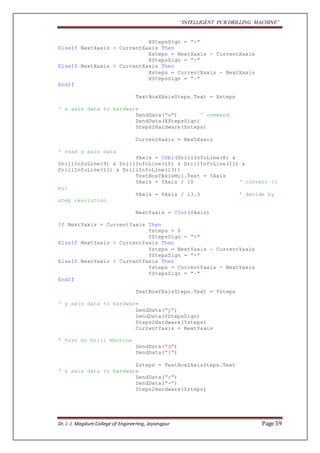
SendData("x") ' command 
SendData(XStepsSign) 
Steps2Hardware(Xsteps) 
CurrentXaxis = NextXaxis 
' read y axis data 
YAxis = CDbl(DrillInfoLine(8) & 
DrillInfoLine(9) & DrillInfoLine(10) & DrillInfoLine(11) & 
DrillInfoLine(12) & DrillInfoLine(13)) 
TextBoxYAxisMil.Text = YAxis 
YAxis = YAxis / 10 ' convert to 
mil 
YAxis = YAxis / 13.3 ' devide by 
step resolution 
NextYaxis = CInt(YAxis) 
If NextYaxis = CurrentYaxis Then 
Ysteps = 0 
YStepsSign = "+" 
ElseIf NextYaxis > CurrentYaxis Then 
Ysteps = NextYaxis - CurrentYaxis 
YStepsSign = "+" 
ElseIf NextYaxis < CurrentYaxis Then 
Ysteps = CurrentYaxis - NextYaxis 
YStepsSign = "-" 
EndIf 
TextBoxYAxisSteps.Text = Ysteps 
' y axis data to hardware 
SendData("y") 
SendData(YStepsSign) 
Steps2Hardware(Ysteps) 
CurrentYaxis = NextYaxis 
' Turn On Drill Machine 
SendData("d") 
SendData("1") 
Zsteps = TextBoxZAxisSteps.Text 
' z axis data to hardware 
SendData("z") 
SendData("+") 
Steps2Hardware(Zsteps) 
Dr. J. J. Magdum College of Engineering, Jaysingpur Page 59
“INTELLIGENT PCB DRILLING MACHINE” 
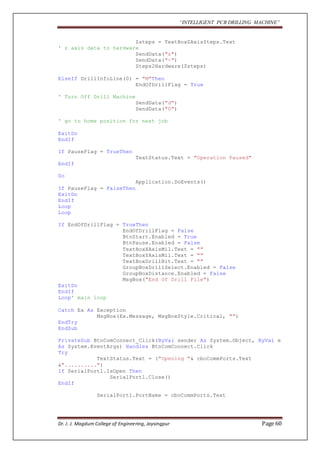
Zsteps = TextBoxZAxisSteps.Text 
' z axis data to hardware 
SendData("z") 
SendData("-") 
Steps2Hardware(Zsteps) 
ElseIf DrillInfoLine(0) = "M"Then 
EndOfDrillFlag = True 
' Turn Off Drill Machine 
SendData("d") 
SendData("0") 
' go to home position for next job 
ExitDo 
EndIf 
If PauseFlag = TrueThen 
TextStatus.Text = "Operation Paused" 
EndIf 
Do 
Application.DoEvents() 
If PauseFlag = FalseThen 
ExitDo 
EndIf 
Loop 
Loop 
If EndOfDrillFlag = TrueThen 
EndOfDrillFlag = False 
BtnStart.Enabled = True 
BtnPause.Enabled = False 
TextBoxXAxisMil.Text = "" 
TextBoxYAxisMil.Text = "" 
TextBoxDrillBit.Text = "" 
GroupBoxDrillSelect.Enabled = False 
GroupBoxDistance.Enabled = False 
MsgBox("End Of Drill File") 
ExitDo 
EndIf 
Loop' main loop 
Catch Ex As Exception 
MsgBox(Ex.Message, MsgBoxStyle.Critical, "") 
EndTry 
EndSub 
PrivateSub BtnComConnect_Click(ByVal sender As System.Object, ByVal e 
As System.EventArgs) Handles BtnComConnect.Click 
Try 
TextStatus.Text = ("Opening "& cboCommPorts.Text 
&"..........") 
If SerialPort1.IsOpen Then 
SerialPort1.Close() 
EndIf 
SerialPort1.PortName = cboCommPorts.Text 
Dr. J. J. Magdum College of Engineering, Jaysingpur Page 60
“INTELLIGENT PCB DRILLING MACHINE” 
SerialPort1.Open() 
If SerialPort1.IsOpen Then 
' clear serial out buffer 
SerialPort1.DiscardOutBuffer() 
SerialPort1.Encoding = System.Text.Encoding.Default 
' clear serial in buffer 
SerialPort1.DiscardInBuffer() 
BtnComConnect.Enabled = False 
cboCommPorts.Enabled = False 
BtnComClose.Enabled = True 
GroupBoxStatus.Enabled = True 
TextStatus.Text = ("Opened "& cboCommPorts.Text) 
If SendData("h") = TrueThen 
TextStatus.Text = ("Opened "& cboCommPorts.Text 
&", CNC Hardware Detected") 
BtnAutoManual.Enabled = True 
' enable auto mode 
BtnOpenFile.Enabled = True 
TextBoxCNCDrill.Enabled = True 
Else 
TextStatus.Text = ("Opened "& cboCommPorts.Text 
&", No CNC Hardware Detected") 
MsgBox("No CNC Hardware Detected Plz Check 
Connection") 
EndIf 
Else 
TextStatus.Text = "" 
MsgBox("ComPort "& cboCommPorts.Text &" can't open") 
EndIf 
Catch Ex As Exception 
MsgBox(Ex.Message, MsgBoxStyle.Critical, "") 
EndTry 
EndSub 
PrivateSub BtnComClose_Click(ByVal sender As System.Object, ByVal e 
As System.EventArgs) Handles BtnComClose.Click 
Try 
SerialPort1.Close() 
TextStatus.Text = ("Closed "& cboCommPorts.Text) 
' Disable all controls 
GroupBoxManualControl.Enabled = False 
GroupBoxDistance.Enabled = False 
GroupBoxStepperSteps.Enabled = False 
GroupBoxDrillSelect.Enabled = False 
GroupBoxStatus.Enabled = False 
GroupBoxStartStop.Enabled = False 
BtnOpenFile.Enabled = False 
TextBoxCNCDrill.Enabled = False 
Dr. J. J. Magdum College of Engineering, Jaysingpur Page 61
“INTELLIGENT PCB DRILLING MACHINE” 
BtnComConnect.Enabled = True 
cboCommPorts.Enabled = True 
BtnComClose.Enabled = False 
GroupBoxStatus.Enabled = False 
BtnAutoManual.Enabled = False 
TextBoxCNCDrill.Text = "" 
Catch Ex As Exception 
MsgBox(Ex.Message, MsgBoxStyle.Critical, "") 
EndTry 
EndSub 
PrivateSub TimerProcess_Tick_1(ByVal sender As System.Object, ByVal e 
As System.EventArgs) Handles TimerProcess.Tick 
TimerProcess.Enabled = False 
SerialTxRxError = True 
EndSub 
PrivateSub BtnAutoManual_Click(ByVal sender As System.Object, ByVal e 
As System.Even000000tArgs) Handles BtnAutoManual.Click 
AutoManual = Not AutoManual 
If AutoManual = TrueThen 
' enable auto mode 
BtnOpenFile.Enabled = True 
TextBoxCNCDrill.Enabled = True 
GroupBoxManualControl.Enabled = False 
BtnAutoManual.Text = "Auto Mode" 
TextStatus.Text = "Auto Mode Selected" 
Else 
' enable manual mode 
GroupBoxManualControl.Enabled = True 
BtnOpenFile.Enabled = False 
TextBoxCNCDrill.Enabled = False 
BtnAutoManual.Text = "Manual Mode" 
TextStatus.Text = "Manual Mode Selected" 
EndIf 
EndSub 
PrivateSub BtnXplus_Click(ByVal sender As System.Object, ByVal e As 
System.EventArgs) Handles BtnXplus.Click 
GroupBoxManualControl.Enabled = False 
steps = TextBoxStepsManual.Text 
If steps > 400 Then 
TextBoxStepsManual.Text = "1" 
MsgBox(" Step No. Should Be <= 400") 
GroupBoxManualControl.Enabled = True 
Else 
SendData("x") 
SendData("+") 
Steps2Hardware(steps) 
Dr. J. J. Magdum College of Engineering, Jaysingpur Page 62
“INTELLIGENT PCB DRILLING MACHINE” 
EndIf 
EndSub 
PrivateSub BtnXminus_Click(ByVal sender As System.Object, ByVal e As 
System.EventArgs) Handles BtnXminus.Click 
GroupBoxManualControl.Enabled = False 
steps = TextBoxStepsManual.Text 
If steps > 400 Then 
TextBoxStepsManual.Text = "1" 
MsgBox(" Step No. Should Be <= 400") 
GroupBoxManualControl.Enabled = True 
Else 
SendData("x") 
SendData("-") 
Steps2Hardware(steps) 
EndIf 
EndSub 
PrivateSub BtnYplus_Click(ByVal sender As System.Object, ByVal e As 
System.EventArgs) Handles BtnYplus.Click 
GroupBoxManualControl.Enabled = False 
steps = TextBoxStepsManual.Text 
If steps > 100 Then 
TextBoxStepsManual.Text = "1" 
MsgBox(" Step No. Should Be <= 100") 
GroupBoxManualControl.Enabled = True 
Else 
SendData("y") 
SendData("-") 
Steps2Hardware(steps) 
EndIf 
EndSub 
PrivateSub BtnYminus_Click(ByVal sender As System.Object, ByVal e As 
System.EventArgs) Handles BtnYminus.Click 
GroupBoxManualControl.Enabled = False 
steps = TextBoxStepsManual.Text 
If steps > 100 Then 
TextBoxStepsManual.Text = "1" 
MsgBox(" Step No. Should Be <= 100") 
GroupBoxManualControl.Enabled = True 
Else 
SendData("y") 
SendData("+") 
Steps2Hardware(steps) 
EndIf 
EndSub 
PrivateSub BtnZplus_Click(ByVal sender As System.Object, ByVal e As 
System.EventArgs) Handles BtnZplus.Click 
GroupBoxManualControl.Enabled = False 
steps = TextBoxStepsManual.Text 
If steps > 1000 Then 
TextBoxStepsManual.Text = "1" 
MsgBox(" Step No. Should Be <= 100") 
GroupBoxManualControl.Enabled = True 
Dr. J. J. Magdum College of Engineering, Jaysingpur Page 63
“INTELLIGENT PCB DRILLING MACHINE” 
Else 
SendData("z") 
SendData("+") 
Steps2Hardware(steps) 
EndIf 
EndSub 
PrivateSub BtnZminus_Click(ByVal sender As System.Object, ByVal e As 
System.EventArgs) Handles BtnZminus.Click 
GroupBoxManualControl.Enabled = False 
steps = TextBoxStepsManual.Text 
If steps > 1000 Then 
TextBoxStepsManual.Text = "1" 
MsgBox(" Step No. Should Be <= 100") 
GroupBoxManualControl.Enabled = True 
Else 
SendData("z") 
SendData("-") 
Steps2Hardware(steps) 
EndIf 
EndSub 
PrivateSub BtnDrill_Click(ByVal sender As System.Object, ByVal e As 
System.EventArgs) Handles BtnDrill.Click 
' Turn On Drill Machine 
SendData("d") 
SendData("1") 
steps = TextBoxStepsManual.Text 
SendData("z") 
SendData("+") 
Steps2Hardware(steps) 
steps = TextBoxStepsManual.Text 
SendData("z") 
SendData("-") 
Steps2Hardware(steps) 
' Turn Off Drill Machine 
SendData("d") 
SendData("0") 
EndSub 
PublicFunction Steps2Hardware(ByVal steps AsString) AsBoolean 
Dim SendDataFlag AsBoolean 
Dim Echo AsString 
Try 
If steps < 10 Then 
steps = "0000"& steps 
ElseIf steps < 100 Then 
steps = "000"& steps 
ElseIf steps < 1000 Then 
steps = "00"& steps 
ElseIf steps < 10000 Then 
steps = "0"& steps 
EndIf 
Dr. J. J. Magdum College of Engineering, Jaysingpur Page 64
“INTELLIGENT PCB DRILLING MACHINE” 
For i AsInteger = 0 To 4 
If SendData(steps(i)) = FalseThen 
SendDataFlag = False 
MsgBox("Communication Error With Hardware") 
ExitFor 
EndIf 
SendDataFlag = True 
Next 
TextStatus.Text = "Waiting for Operation Complete" 
If SendDataFlag = TrueThen 
Do 
Application.DoEvents() 
SerialRxBytes = SerialPort1.BytesToRead 
If SerialRxBytes > 0 Then 
Echo = Val(SerialPort1.ReadByte) 
If Echo = Val(Asc("R")) Then 
TextStatus.Text = "Operation Complete" 
GroupBoxManualControl.Enabled = True 
ExitDo 
Else 
TextStatus.Text = "Operation Not 
Complete" 
EndIf 
If Echo = Val(Asc("A")) Then 
MsgBox(" Xmax or Xmin ox Ymax or Ymin or 
Zmax or Zmin Sensor Active Or Wrong Step Move Sign") 
GroupBoxManualControl.Enabled = True 
ExitDo 
EndIf 
EndIf 
Loop 
EndIf 
Catch Ex As Exception 
MsgBox(Ex.Message, MsgBoxStyle.Critical, "") 
EndTry 
EndFunction 
PublicFunction SendData(ByVal Data AsString) AsBoolean 
Dim Echo AsString 
Try 
SerialPort1.DiscardInBuffer() ' clear serial input 
buffer 
' send Data to hardware 
SerialPort1.Write(Data) 
' wait for echo 
TimerProcess.Interval = 10000 ' mili seconds 
TimerProcess.Enabled = True 
SerialTxRxError = False 
' Wait for Echo 
Do 
Dr. J. J. Magdum College of Engineering, Jaysingpur Page 65
“INTELLIGENT PCB DRILLING MACHINE” 
Application.DoEvents() 
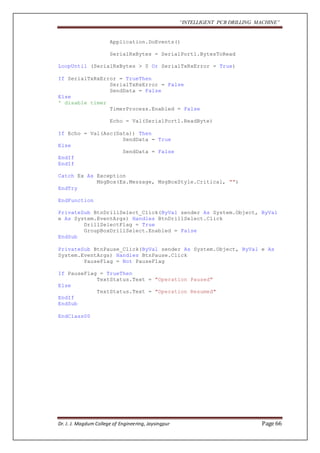
SerialRxBytes = SerialPort1.BytesToRead 
LoopUntil (SerialRxBytes > 0 Or SerialTxRxError = True) 
If SerialTxRxError = TrueThen 
SerialTxRxError = False 
SendData = False 
Else 
' disable timer 
TimerProcess.Enabled = False 
Echo = Val(SerialPort1.ReadByte) 
If Echo = Val(Asc(Data)) Then 
SendData = True 
Else 
SendData = False 
EndIf 
EndIf 
Catch Ex As Exception 
MsgBox(Ex.Message, MsgBoxStyle.Critical, "") 
EndTry 
EndFunction 
PrivateSub BtnDrillSelect_Click(ByVal sender As System.Object, ByVal 
e As System.EventArgs) Handles BtnDrillSelect.Click 
DrillSelectFlag = True 
GroupBoxDrillSelect.Enabled = False 
EndSub 
PrivateSub BtnPause_Click(ByVal sender As System.Object, ByVal e As 
System.EventArgs) Handles BtnPause.Click 
PauseFlag = Not PauseFlag 
If PauseFlag = TrueThen 
TextStatus.Text = "Operation Paused" 
Else 
TextStatus.Text = "Operation Resumed" 
EndIf 
EndSub 
EndClass00 
Dr. J. J. Magdum College of Engineering, Jaysingpur Page 66
“INTELLIGENT PCB DRILLING MACHINE” 
10.4 PROGRAMMING OF MICROCONTROLLER: 
KEIL μVISION: 
Keil μVision is used for the programming of this system. Keil was founded in 1986 to 
market add-on products for the development tools provided by many of the silicon 
vendors. Keil implemented the first C compiler designed from the ground-up 
specifically for the 8051 microcontroller. 
Keil provides a broad range of development tools like ANSI C compiler, macro 
assemblers, debuggers and simulators, linkers, IDE, library managers, real-time 
operating systems and evaluation boards for 8051, 251, ARM, and XC16x/C16x/ 
ST10 families. 
The μVision3 integrated development environment (IDE) is a Windows-based 
software development platform that combines a robust editor, project manager, and 
makes facility. μVision3 integrates all tools including the C compiler, macro 
assembler, linker/locator, and HEX file generator. The μVision3 IDE offers numerous 
features such as: 
 Source code editor, 
 Device database for configuring the development tool setting, 
 Project manager for creating and maintaining projects, 
 Integrated make facility for assembling, compiling, and linking embedded 
applications, 
 True integrated source- level Debugger with high-speed CPU and peripheral 
simulator, 
 Advanced interface for software debugging in the target hardware and for 
connection to Keil ULINK, 
 Flash programming utility for downloading the application program into Flash 
ROM, 
 The μVision3 IDE offers numerous features and advantages that help you 
quickly and successfully develop embedded applications. They are easy to use 
and are guaranteed to help you achieve your design goals. 
Dr. J. J. Magdum College of Engineering, Jaysingpur Page 67
“INTELLIGENT PCB DRILLING MACHINE” 
CHAPTER 11- FLOW CHART 
11.1 WORKING FLOWCHART: 
START 
INTIALISE HARDWARE, 
STACK,SERIAL PORT 
DISPLAY COLLEGE, 
PROJECT NAME 
IS 
COMMAND ? 
YES 
IS 
CMD = D ? 
DRILL ON OFF 
NO 
IS 
CMD = Y ? 
MOVE Y AXIS 
NO 
IS 
CMD = X ? 
MOVE X AXIS 
NO 
IS 
CMD = Z ? 
MOVE Z AXIS 
NO 
IS 
CMD = H ? 
ECHO CMD 
NO 
YES 
YES 
YES 
YES 
YES 
NO 
Dr. J. J. Magdum College of Engineering, Jaysingpur Page 68
“INTELLIGENT PCB DRILLING MACHINE” 
11.2 AXIS FLOW CHART 
Dr. J. J. Magdum College of Engineering, Jaysingpur Page 69
“INTELLIGENT PCB DRILLING MACHINE” 
CHAPTER 12- ADVANTAGES & DISADVANTAGES, 
APPLICATIONS 
ADVANTAGES: 
 Intelligent PCB Drilling Machines machines can be used continuously 24 
hours a day, 365 days a year and only need to be switched off for occasional 
maintenance. 
 Intelligent PCB Drilling Machines machines are programmed with a design 
which can then be manufactured hundreds or even thousands of times. Each 
manufactured product will be exactly the same. 
 Less skilled/trained people can Intelligent PCB Drilling Machines unlike 
manual lathes / milling machines etc.. which need skilled engineers. 
 Intelligent Intelligent PCB Drilling Machines Drilling Machines machines can 
be updated by improving the software used to drive the machines 
 Training in the use of Intelligent PCB Drilling Machines is available through 
the use of ‘virtual software’. This is software that allows the operator to 
practice using the INTELLIGENT PCB DRILLING MACHINE machine on 
the screen of a computer. The software is similar to a computer game. 
 INTELLIGENT PCB DRILLING MACHINE machines can be programmed 
by advanced design software such as Pro/DESKTOP®, enabling the 
manufacture of products that cannot be made by manual machines, even those 
used by skilled designers / engineers. 
 Modern design software allows the designer to simulate the manufacture of 
his/her idea. There is no need to make a prototype or model. . 
 One person can supervise many INTELLIGENT PCB DRILLING MACHINE 
machines as once they are programmed they can usually be left to work by 
themselves. Sometimes only the cutting tools need replacing occasionally. 
 A skilled engineer can make the same component many times. However, if 
each component is carefully studied, each one will vary slightly. A 
INTELLIGENT PCB DRILLING MACHINE machine will manufacture each 
component as an exact match. 
Disadvantages: 
 Less accuracy than CNC machine. 
 Slow speed than CNC machines 
APPLICATIONS: 
 1. In college project laboratories. 
 2. Small scale circuit designing Industries 
Dr. J. J. Magdum College of Engineering, Jaysingpur Page 70
“INTELLIGENT PCB DRILLING MACHINE” 
CHAPTER13 - FUTURE ENHANCEMENT 
FUTURE ENHANCEMENT: 
Stepper motors are used to move the PCB and drilling machine. Now they can 
provide 200-400 rpm in normal operating conditions. If anyone write stepper 
algorithms it can provide up to 1200 rpm variation . Again if servo motors is used 
then these rpm ratings can acquire value of 5000-7000. 
CNC machines are the advance part of drilling machine. They have tool 
changing facility. Also more than one PCB can be drilled at a time. These CNC 
machines have much greater speed with great accuracy. 
The stepper motors has more than 200 steps. That is stepper motors can give 
minimum step size of 0.9 degree. Whereas the proposed system has stepper motor hag 
step size of 1.8 degree. 
Dr. J. J. Magdum College of Engineering, Jaysingpur Page 71
“INTELLIGENT PCB DRILLING MACHINE” 
CHAPTER 14- CONCLUSION 
Cost = 
The cost of actual m/c which is available is approx. 30000 to 60000/- . This 
cost has been reduced by nearly 50% . This will help the small scale industries in 
making their shop floor atomized 
Raw material = 
The material used in making of this project has been used from the waste of 
old dot matrix printer. Hence the there is a reuse or recycle of old electronic waste. 
This is a major issue that current world faceing 
Accuracy = 
The work done by human can cause various error like positioning error, time 
consuming etc. This has been reduced by the project designed . 
Time consumptions = 
The time taken by human in drilling any PCB with accuracy is very much say 
about 10 min. this time has been reduce to 3-4 min. . This feature of the project will 
definitely be a reason for the higher rate of production. 
Thus the Moto of any industry of 
“GREAT PROFIT WITH LESS INVESTMENT ” is satisfied by our project 
Dr. J. J. Magdum College of Engineering, Jaysingpur Page 72
“INTELLIGENT PCB DRILLING MACHINE” 
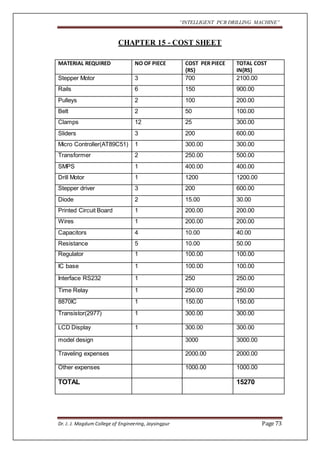
CHAPTER 15 - COST SHEET 
MATERIAL REQUIRED NO OF PIECE COST PER PIECE 
{RS} 
TOTAL COST 
IN{RS} 
Stepper Motor 3 700 2100.00 
Rails 6 150 900.00 
Pulleys 2 100 200.00 
Belt 2 50 100.00 
Clamps 12 25 300.00 
Sliders 3 200 600.00 
Micro Controller(AT89C51) 1 300.00 300.00 
Transformer 2 250.00 500.00 
SMPS 1 400.00 400.00 
Drill Motor 1 1200 1200.00 
Stepper driver 3 200 600.00 
Diode 2 15.00 30.00 
Printed Circuit Board 1 200.00 200.00 
Wires 1 200.00 200.00 
Capacitors 4 10.00 40.00 
Resistance 5 10.00 50.00 
Regulator 1 
100.00 100.00 
IC base 1 
100.00 100.00 
Interface RS232 1 
250 250.00 
Time Relay 1 250.00 250.00 
8870IC 1 150.00 150.00 
Transistor(2977) 1 
300.00 300.00 
LCD Display 1 300.00 300.00 
model design 
3000 3000.00 
Traveling expenses 
2000.00 2000.00 
Other expenses 
1000.00 1000.00 
TOTAL 
15270 
Dr. J. J. Magdum College of Engineering, Jaysingpur Page 73
“INTELLIGENT PCB DRILLING MACHINE” 
CHAPTER 16 - BIBILOGRAPHY 
REFERENCE: 
 Kenneth J. Ayala -The 8051 Micro controller Architecture, Programming & 
Applications Pen ram. 
 M.A. Mazidi -The 8051 Micro controller and Embedded Systems Pearson 
Education. 
 Noel Jerke- The Complete References Visual Basic 6 
 Atmel Data Book. 
 Websites: 
o www.nationalsemiconductors.com 
o www.atmel.com 
o www.dallassemi.com 
Dr. J. J. Magdum College of Engineering, Jaysingpur Page 74
“INTELLIGENT PCB DRILLING MACHINE” 
Dr. J. J. Magdum College of Engineering, Jaysingpur Page 75

Intelligent pcb drilling machine

  • 1.
    “INTELLIGENT PCB DRILLINGMACHINE” CHAPTER 1 – INTRODUCTION 1.1 AIM OF THE PROJECT: This project is mainly commercial purpose applicable project. This would be helpful for students related to electronics field. The development of electronic circuit usually uses PCB or Printed Circuit Board. One of the processes in making PCB is to make a hole. The aim of this project was to reduce the time and labour required for drilling holes in PCB using simple, user friendly and cost effective method, as PCBs are extensively used in electronics. In the making of a PCB, after etching process, the PCB will be placed to this system and then it will be drilled automatically according to user commands. 1.2. HISTORICAL BACKGROUND: This project was first started by Stephen Williams; he loaded up a nice freeware PCB layout program. Many years ago he did PC board work for aerospace companies up until around 1984 when PC CAD systems were just coming into being. Since then he has been computing and wound up owning a couple ISP's and an amusements company dealing with vintage arcade video games. This prompted him to layout some simple boards like audio amplifiers and converters. These projects were very home brew, breadboard or simple single sided boards, limited quantities. FIG.1.2.1:TREADITIONAL PCB DRILL M/C Dr. J. J. Magdum College of Engineering, Jaysingpur Page 1
  • 2.
    “INTELLIGENT PCB DRILLINGMACHINE” 1.3. CONVENTIONAL PCB DRILLING MACHINE: Drilling machine is a single purpose machine for the production of holes. It comes in many shapes and sizes, from small hand-held power drills to bench mounted and floor-mounted models. Apart from drilling some drilling machines can perform other operations such as tapping large or small holes, reaming, counter boring and countersinking. The two main categories of drilling equipment are the basic hand and power-feed drilling machines which is further classified as bench type drilling machines, pillar type drilling machines, column- type drilling machines, radial drilling machines, numerically controlled drilling machines, multiple spindle drilling machines, gang drilling machines, and turret drilling machines. These drilling equipment are designed for high-speed production and industrial shops. Drilling of the PCBs is inherent work in electronic industries or the place where electronic systems are comes in account. Every PCB should be drilled accurately so that system manufacturer can build the circuitry properly on it. Now days PCB of electronics circuitries are drilled manually. In this process first PCB is etched with some chemical. This etching involves the exact position of the points that driller is going to drill at. Then drilling is done. The alignment of drilling machine is done manually. The general picture of the drilling machine is given bellow. As we can see, it has a platform that holds the PCB on it. And the drilling equipment is fitted so, it can move in vertical direction. This vertical axis is moved manually to drill the PCB. FIG 1.3.1: CONVENTIONAL PCB DRILLING MACHINE Dr. J. J. Magdum College of Engineering, Jaysingpur Page 2
  • 3.
    “INTELLIGENT PCB DRILLINGMACHINE” 1.3.1. DISADVANTAGES OF CONVENTIONAL PCB DRILLING MACHINE: This system has some disadvantages like cracking of PCB. Drill shifting also can happen here. Actually drill shift is responsible for cracking of the PCB which make all PCB wasted, off cores wastage of time and money. Some of the circuit boards even had hundreds of holes! It can be very frustrating if you make an error when drilling one of the last holes, and you have to start all over again. Disadvantages of Present PCB drilling machines:  Less accuracy: We can easily say that the system which is operated manually has no fix accuracy. As it highly dependent on human skill the drill shifting, wrong alignment of PCB and PCB platform, change of drill size can be happens. Which is undoubtablely ends into wastage of our printed circuit board.  Drill shifting: FIG 2.1: DRILL STRUCTURE IN PCB  Depends upon human skill The present system is highly dependent on human skills. If worker doing the drill is not well skilled definitely we will get our PCB converted into garbage. Dr. J. J. Magdum College of Engineering, Jaysingpur Page 3
  • 4.
    “INTELLIGENT PCB DRILLINGMACHINE” A. Time consumption: As we have seen present is operated manually, it requires more time to drill a particular PCB. As worker need to make sure that drilling machine is going to drill at exact right place, this confirmation requires some time to complete. And it is unavoidable as PCB drilling is very keen and careful work. B. Probability of mistakes as it has human involves: It’s a world known rule that machine does not make mistakes provided; human has not made any wrong settings in it. C. Capacity of work: Due to man operated work it has limited capacity than machine. Dr. J. J. Magdum College of Engineering, Jaysingpur Page 4
  • 5.
    “INTELLIGENT PCB DRILLINGMACHINE” CHAPTER 2-PROPOSED SYSTEM DESIGN IDEA 2.1 PROJECT FEATURES: The system designed has the following capabilities:  Ability to be operated manually.  Ability to show the entered values to the user.  Ability to easily move the machine from one place to another.  Ability to start/stop motor manually.  Ability to start/stop motor automatically. 2.2 DESIGN STRATEGY: This project deals with drilling of the PCB’s (Printed Circuit Boards) automatically. PCB’s are normally designed using O RCAD Software. While designing PCB Layout in the ORCAD layout software a TAP file is created. Using this TAP file, which consists of X axis & Y axis position and the drill bit details we are giving the orders for the X axis & Y axis drivers to drive the X axis &Y axis dc motors to take the positions on the drilling machine. And then Z axis which is attached with drilling motor drills that point on the PCB. Dr. J. J. Magdum College of Engineering, Jaysingpur Page 5
  • 6.
    “INTELLIGENT PCB DRILLINGMACHINE” The process of making the project will be completed by dividing it into different phases. The four phases involved will be: Phase 1:  Mechanical design it consist of arrangement of all mechanical hardware by using old inkjet dot-matrix printer. It consists of belt and pulley arrangement, stepper motor etc.  Design of chassis with using of suitable material design of support rods.  Design of rod holders.  Selection of screws for fitting all parts together. Phase 2:  Selection of stepper motors  Design of stepper motor drivers.  Selection of drill motor.  Design for servo motor driver Phase 3:  Programming using visual basic for microcontroller 89C51.  Creation of CNC machine window in visual basic. Phase 4:  Installation and assembly of all parts.  Commissioning of the machine.  Testing and trial. Dr. J. J. Magdum College of Engineering, Jaysingpur Page 6
  • 7.
    “INTELLIGENT PCB DRILLINGMACHINE” 2.3 SYSTEM INTRODUCTION: PCBs drilling machine mainly consists of three blocks P.C (for software purpose), Controller Block and the Drilling machine. Computer which has software’s like ORCAD & Visual Basics forms the base for giving directions to the Controller Block. Microcontroller is very vital part in controlling the movements of axis on the drill machine. It also gives orders, when to start drilling and when to stop. There are three stepper motors connected in X, Y and Z axis. And they will be controlled or operated by the microcontroller AT89C51 connected to it. Of the three axis, two axis are used to move the PCB platform in x and y directions. And the one remaining that is z axis moves drilling machine in the vertical direction. As the PCB comes at the desired position, the third stepper motor moves the drilling machine along the third z (vertical) axis to drill there. This saves time and reduces errors due to manual handling and also gives much accuracy too. To make graphical sketch of the desired PCB and send all information to the microcontroller through RS323C.To make the drill file and Gerber information. Uses ORCAD & VB softwares for thework. ORCAD for designing the PCB skeleton.Visual Basics for extract the information to provide to AT89C51. As we complete the graphical presentation of the PCB layout, the software itself creates a file containing all the information about the PCB drilling, hole size, and hole positions on which we are going to make drill. All the data about the point where we have to drill is created in the ORCAD software, this information involves two dimensional details of the point. Now, the data about the dimensions of particular point’s position on the PCB position and the hole size etc is called as Gerber. And the all Gerber files of all drilling points is called as Drill file. Fig 2.1.:Drilling Skeleton on ORCAD. Dr. J. J. Magdum College of Engineering, Jaysingpur Page 7
  • 8.
    “INTELLIGENT PCB DRILLINGMACHINE” Table 2.1: Drill Chart. CNC Drilling is an automatic drilling process where the information of the hole position, sequence and hole diameter is stored in file (text file). This text file is generated by a cad software like ORCAD, PADS, EAGLE PCB design Tools. Our task is to read that hole position, sequence and hole diameter and send to mechanical system, means convert that information into movement of XYZ axis of mechanical system. Software developed using VB 6.0 is used to read that text file and it converts all info into movement of XYZ axis via serial port (COM Port of PC). In that text file all Dimensions are in mils, 1000mil = 1Inch = 25.4mm. The drill file is shown below, T1C0.038F200S100 This indicates 0.038mil hole diameter. X000500Y000500 x = 50mil y = 50mil X000500Y003500 T3C0.040F200S100 This indicates 0.040mil hole diameter X014500Y004000 x = 1450mil y = 400mil X014500Y005000 Dr. J. J. Magdum College of Engineering, Jaysingpur Page 8
  • 9.
    “INTELLIGENT PCB DRILLINGMACHINE” 2.4 BLOCK DIAGRAM DISCRIPTION Stepper Driver X Stepper Motor Stepper Driver Y Stepper Motor Stepper Driver Z Stepper Motor Drill Motor Driver Drilling Machine DC Motor Micro- Controller AT89C51 LCD Display Fig 2.2 :BLOCK DIAGRAM OF PROPOSED SYSTEM COMPUTER X Min X Max Y Min Y Max Z Min Z Max PCB’S are designed using PCB designing softwares like Orcad, PADS, PC Interfacewith RS232 EAGLE PCB design Tools etc. While designing PCB a TAP file is created, in this TAP file details of drilling like drill bit, X & Y positions are saved in it. This TAP file is taken in the program provided along with this project. When this file is opened in this program all the positions of X & Y axis are taken and then sent to the Microcontroller 89C51 through the serial communication IC MAX232. Here RS232 cod is used for communication between PC & the Microcontroller. Then Microcontroller, according to the X & Y positions on the PCB, drives the X & Y axis DC Stepper motors. When position is taken the n Microcontroller gives order to drill motor relay & also to Z axis driver to start drilling at that point. Then it takes the next position given in the TAP file and drills that position. It continues drilling the positions given in the file until next drill bit is given. It continues in this way till the whole files are drilled. LCD is used to give the curre nt status of the drilling file. Dr. J. J. Magdum College of Engineering, Jaysingpur Page 9
  • 10.
    “INTELLIGENT PCB DRILLINGMACHINE” CHAPTER 3-MECHANICAL DESIGN PHILOSOPHY AND APPROACH All the mechanisms and linkages which are used in project are made up of old scrap printer. This printer is of dot matrix type. This type of four printers are disassembled and parts such as supporting steel rods, belt and pulley mechanism, stepper motor, stepper motor head etc. are used in model making. Following figure shows the old type dot matrix printer. There are some proprieties that must be found for each axis movement: 1- Smooth. 2- Easy. 3- On the same pattern. FIG 3.1:TIPICAL DOT MATRIX PRINTER Dr. J. J. Magdum College of Engineering, Jaysingpur Page 10
  • 11.
    “INTELLIGENT PCB DRILLINGMACHINE” 3.1 PRINTERS DISASSEMBLED PARTS FIG 3.1.2: BELT PULLEY ASSEMBLY FIG 3.1.3: F.V OF PRINTER Dr. J. J. Magdum College of Engineering, Jaysingpur Page 11
  • 12.
    “INTELLIGENT PCB DRILLINGMACHINE” FIG 3.1.4: COMPLETE ASSEMBLY VIEW Dr. J. J. Magdum College of Engineering, Jaysingpur Page 12
  • 13.
    “INTELLIGENT PCB DRILLINGMACHINE” PHASE 1 : Mechanical Design  Mechanical design it consist of arrangement of all mechanical hardware by using old inkjet dot-matrix printer. It consists of belt and pulley arrangement, stepper motor etc.  Design of chassis with using of suitable material design of support rods.  Design of rod holders.  Selection of screws for fitting all parts together. Fig 3.1.5: DESIGN OF MACHINE IN PRO ENGINEERING SOFTWARE Dr. J. J. Magdum College of Engineering, Jaysingpur Page 13
  • 14.
    “INTELLIGENT PCB DRILLINGMACHINE” DRILLING TOOL Above drilling tool make holes in board as want. It has Dc servo motor. It requires Electricaldrill with DC voltage input 12V and links it on Z-axis. Fig 3.1.6 : Drill Head CHASSIS FIG 3.1.7:CHASSIS CATIA DRAWING Material For Chassis : Hylam industrial laminated sheet is used as base material in chassis and providing good structure to it .It is a thermosetting phenol, formed from an elimination reaction of phenol with formaldehyde. It sustain the vibration and force crated during the drilling operation. FIG 3.1.8: MATERIA Dr. J. J. Magdum College of Engineering, Jaysingpur Page 14
  • 15.
    “INTELLIGENT PCB DRILLINGMACHINE” L SHAPED ATTACHMENT Fig 3.1.9 : L SHAPED ATTACHMENT GUIDE BAR Fig3.1.10: GUIDE BAR It is directly taken from printer head support. In every printer one rod is present, such types of four rods are require for construction . It is made up of steel. Dr. J. J. Magdum College of Engineering, Jaysingpur Page 15
  • 16.
    “INTELLIGENT PCB DRILLINGMACHINE” BARSLIDER It is made up of plastic and got from printer. It gives smooth sliding through the bar. Fig 3.1.11 : BAR SLIDER MOTOR Fig 3.1.12: STEPPER MOTER Typical printer motors have the following specs +2 to +24 Volts, uses 600 mA per phase, with a coil resistance around 30 ohms (unipolar) or 6 ohms (bipolar). Holding torque is probably around 0.2 Nm for unipolar and 0.1 Nm for bipolar. The above values can differ from printer to printer, but they are usually near these values. Dr. J. J. Magdum College of Engineering, Jaysingpur Page 16
  • 17.
    “INTELLIGENT PCB DRILLINGMACHINE” 3.2 PCB DRILLING MECHANICAL STRUCTURAL ARRANGEMENT: After gathering all metal parts and accessories required for assembling the procedure of making the machine is listed below step by step each step has a corresponding listed in figure 1. Start from the base 2. Install four steel supports 3. Install rods for supporting of y axis 4. Fix the motors 5. Place the pulley supports and make it tightness 6. Install cross roller guide 7. Screw the table on supporting rod 8. Complete the machine with limit switch Fig 3.2.1 REQUIRED Y AXIS TABLE SLIDING MOVEMENT Dr. J. J. Magdum College of Engineering, Jaysingpur Page 17
  • 18.
    “INTELLIGENT PCB DRILLINGMACHINE” Fig 3.2.2:Z AXIS VERTICAL SLIDING MOVEMENT DRILLING HEAD Dr. J. J. Magdum College of Engineering, Jaysingpur Page 18
  • 19.
    “INTELLIGENT PCB DRILLINGMACHINE” COMPLETE ASSEMBLY OF PCB DRILLING MACHINE: Dr. J. J. Magdum College of Engineering, Jaysingpur Page 19
  • 20.
    “INTELLIGENT PCB DRILLINGMACHINE” CHAPTER 4-ELECTRONICS CONTROL SYSTEM 4.1 MAIN CIRCUIT DESIGN: Dr. J. J. Magdum College of Engineering, Jaysingpur Page 20
  • 21.
    “INTELLIGENT PCB DRILLINGMACHINE” 4.2 MAIN PCB LAYOUT: 4.3 POWER SUPPLY : Through power supply we are getting different voltages to meet our requirements. These are 5, 12 and 24 volts with maximum 250 Watt. 12 volts are used to operate motor for opening and closing of door and relays. 24 volts are being used to operate gear train dc motor to move the cabin up and down. Fig 4.3.1: POWER SUPPLY Dr. J. J. Magdum College of Engineering, Jaysingpur Page 21
  • 22.
    “INTELLIGENT PCB DRILLINGMACHINE” Fig 4.3.2: POWER SUPPLY CKT. 4.4 LM78XX SERIES VOLTAGE REGULATORS: Features:  Output current in excess of 1A  Internal thermal overload protection  No external components required  Output transistor safe area protection  Internal short circuit current limit  Available in the aluminum TO-3 package Voltage Range:  LM7805C 5V  LM7812C 12V  LM7815C 15V Dr. J. J. Magdum College of Engineering, Jaysingpur Page 22
  • 23.
    “INTELLIGENT PCB DRILLINGMACHINE” 4.5 GENERAL DESCRIPTION OF LM78XX: The LM78XX series of three terminal regulators is available with several fixed output voltages making them useful in a wide range of applications. One of these is local on card regulation, eliminating the distribution problems associated with single point regulation. The voltages available allow these regulators to be used in logic systems, instrumentation, Hi-Fi, and other solid state electronic equipment. Although designed primarily as fixed voltage regulator these devices can be used with external components to obtain adjustable voltages and currents. The LM78XX series is available in an aluminum TO-3 package which will allow over 1.0A load current if adequate heat sinking is provided. Current limiting is included to limit the peak output current to a safe value. Safe area protection for the output transistor is provided to limit internal power dissipation. If internal power dissipation becomes too high for the heat sinking provided, the thermal shutdown circuit takes over preventing the IC from overheating. Considerable effort was expanded to make the LM78XX series of regulators easy to use and minimize the number. Dr. J. J. Magdum College of Engineering, Jaysingpur Page 23
  • 24.
    “INTELLIGENT PCB DRILLINGMACHINE” 4.6 CIRCUIT DIAGRAM LM7805 Fig 4.16.1: CKT OF LM7805 We need the regulated 5 V output for the most of the IC’s used in our system. Now the output of bridge rectifier is unregulated DC. To get 5V regulated Dc out put from it we have used regulator IC 7805.Following fig shows the pin out diagram of the regulator IC 7805. The 7805 series is a three terminal positive voltage regulator IC which gives regulated 5V D.C. output. The maximum input voltage that can be applied to input pin is the 35 V. The minimum difference between input and output voltage required is the 2 V. The pin no 1 is the input pin where the unregulated input voltage is applied. Pi no.2 is connected to the ground, whereas pin no.3 is the output pin at which the regulated 5V output can be obtained. Dr. J. J. Magdum College of Engineering, Jaysingpur Page 24
  • 25.
    “INTELLIGENT PCB DRILLINGMACHINE” CHAPTER 5- CONTROLLER BLOCK ASSEMBLY 5.1 MICROCONTROLLER AT89C51 DESCRIPTION: The AT89C51 is a low-power, high-performance CMOS 8-bit microcomputer with 4K bytes of Flash programmable and erasable read only memory (PEROM). The device is manufactured using Atmel’s high-density nonvolatile memory technology and is compatible with the industry-standard MCS-51 instruction set and pin out. The on-chip Flash allows the program memory to be reprogrammed in-system or by a conventional nonvolatile memory programmer. By combining a versatile 8-bit CPU with Flash on a monolithic chip, the Atmel AT89C51 is a powerful microcomputer which provides a highly- flexible and cost-effective solution to many embedded control applications. Fig 5.1.1: MICROCONTROLLER AT89C51 Dr. J. J. Magdum College of Engineering, Jaysingpur Page 25
  • 26.
    “INTELLIGENT PCB DRILLINGMACHINE” 5.2 FEATURES • Compatible with MCS-51™ Products • 4K Bytes of In-System Reprogrammable Flash Memory Endurance: 1,000 Write/Erase Cycles • Fully Static Operation: 0 Hz to 24 MHz • Three-level Program Memory Lock • 128 x 8-bit Internal RAM • 32 Programmable I/O Lines • Two 16-bit Timer/Counters • Six Interrupt Sources • Programmable Serial Channel • Low-power Idle and Power-down Modes Dr. J. J. Magdum College of Engineering, Jaysingpur Page 26
  • 27.
    “INTELLIGENT PCB DRILLINGMACHINE” 5.3 BLOCK DIAGRAM: Fig 5.3.1:BLOCK DIAGRAM OF AT89C51 Dr. J. J. Magdum College of Engineering, Jaysingpur Page 27
  • 28.
    “INTELLIGENT PCB DRILLINGMACHINE” 5.4 CHARACTERISTICS: The AT89C51 provides the following standard features: 4K bytes of flash, 128 bytes of RAM, 32 I/O lines, two 16-bit timer/counters, five vector two-level interrupt architecture, a full duplex serial port, on-chip oscillator and clock circuitry. In addition, the AT89C51 is designed with static logic for operation down to zero frequency and supports two software selectable power saving modes. The Idle Mode stops the CPU while allowing the RAM, timer/counters, serial port and interrupt system to continue functioning. The Power-down Mode saves the RAM contents but freezes the oscillator disabling all other chip functions until the next hardware reset 5.5 PIN DIAGRAM: FIG 5.5.1: PIN DIAGRAM Dr. J. J. Magdum College of Engineering, Jaysingpur Page 28
  • 29.
    “INTELLIGENT PCB DRILLINGMACHINE” 5.6 PIN DESCRIPTION:  VCC: Supply voltage  GND: Ground.  Port 0: Port 0 is an 8-bit open-drain bi-directional I/O port. As an output port, each pin can sink eight TTL inputs. When 1s are written to port 0 pins, the pins can be used as high impedance inputs. Port 0 may also be configured to be the multiplexed low order address/data bus during accesses to external program and data memory. In this mode P0 has internal minimize. Port 0 also receives the code bytes during Flash programming, and outputs the code bytes during program verification. External minimize are required during program verification.  Port 1: Port 1 is an 8-bit bi-directional I/O port with internal minimize. The Port 1 output buffers can sink/source four TTL inputs. When 1s are written to Port 1 pins they are pulled high by the internal minimize and can be used as inputs. As inputs, Port 1 pins that are externally being pulled low will source current (IIL) because of the internal minimize. Port 1 also receives the low-order address bytes during Flash programming and verification.  Port 2: Port 2 is an 8-bit bi-directional I/O port with internal minimize. The Port 2 output buffers can sink/source four TTL inputs. When 1s are written to Port 2 pins they are pulled high by the internal minimize and can be used as inputs. As inputs, Port 2 pins that are externally being pulled low will source current (IIL) because of the internal minimize. Port 2 emits the high-order address byte during fetches from external program memory and during accesses to external data memory that uses 16-bit addresses (MOVX @DPTR). In this application, it uses strong internal pull-ups when emitting 1’s. Dr. J. J. Magdum College of Engineering, Jaysingpur Page 29
  • 30.
    “INTELLIGENT PCB DRILLINGMACHINE”  Port 3: Port 3 is an 8-bit bi-directional I/O port with internal minimize. The Port 3 output buffers can sink/source four TTL inputs. When 1s are written to Port 3 pins they are pulled high by the internal minimize and can be used as inputs. As inputs, Port 3 pins that are externally being pulled low will source current (IIL) because of the minimize. Port 3 also serves the functions of various special features of the AT89C51 as listed below: Port 3 also receives some control signals for Flash programming and verification.  RST: Reset input. A high on this pin for two machine cycles while the oscillator is running resets the device.  ALE/PROG: Address Latch Enable output pulse for latching the low byte of the address during accesses to external memory. This pin is also the program pulse input (PROG) during Flash programming. In normal operation ALE is emitted at a constant rate of 1/6the oscillator frequency, and may be used for external timing or clocking purposes. Note, however, that one ALE pulse is skipped during each access to external Data Memory. If desired, ALE operation can be disabled by setting bit 0 of SFR location 8EH. With the bit set, ALE is active only during a MOVX or MOVC instruction. Otherwise, the pin is weakly pulled high. Setting the ALE-disable bit has no effect if the microcontroller is in external execution mode.  PSEN: Program Store Enable is the read strobe to external program memory. When the AT89C51 is executing code from external program memory, PSEN is activated twice each machine cycle, except that two PSEN activations are skipped during each access to external data memory. Dr. J. J. Magdum College of Engineering, Jaysingpur Page 30
  • 31.
    “INTELLIGENT PCB DRILLINGMACHINE”  EA/VPP: External Access Enable. EA must be strapped to GND in order to enable the device to fetch code from external program memory locations starting at 0000H up to FFFFH. Note, however, that if lock bit 1 is programmed, EA will be internally latched on reset. EA should be strapped to VCC for internal program executions. This pin also receives the 12-volt programming enable voltage (VPP) during Flash programming, for parts that require 12-volt VPP.  XTAL1: Input to the inverting oscillator amplifier and input to the internal clock operating circuit.  XTAL2: Output from the inverting oscillator amplifier.  Oscillator characteristics: FIG 5.6.1:LADDER DIAGRAM  XTAL1 and XTAL2 are the input and output, respectively, of an inverting amplifier which can be configured for use as an on-chip oscillator, as shown in Figure 1. Either a quartz crystal or ceramic resonator may be used. To drive the device from an external clock source, XTAL2 should be left unconnected while XTAL1 is driven as shown in Figure. There are no requirements on the duty cycle of the external clock signal, since the input to the internal clock ing circuitry is through a divide-by-two flip-flop, but minimum and maximum voltage high and low time specifications must be observed. Dr. J. J. Magdum College of Engineering, Jaysingpur Page 31
  • 32.
    “INTELLIGENT PCB DRILLINGMACHINE”  IDLE MODE: In idle mode, the CPU puts itself to sleep while all the on chip peripherals remain active. The mode is invoked by software. The content of the on-chip RAM and all the special functions registers remain unchanged during this mode. The idle mode can be terminated by any enabled interrupt or by a hardware reset. It should be noted that when idle is terminated by a hard ware reset, the device normally resumes program execution, from where it left off, up to two machine cycles before the internal reset algorithm takes control. On-chip hardware inhibits access to internal RAM in this event, but access to the port pins is not inhibited. To eliminate the possibility of an unexpected write to a port pin when Idle is terminated by reset, the instruction following the one that invokes Idle should not be one that writes to a port pin or to external memory. Dr. J. J. Magdum College of Engineering, Jaysingpur Page 32
  • 33.
    “INTELLIGENT PCB DRILLINGMACHINE” CHAPTER 6 - STEPPER MOTOR DRIVER Phase 2:  Selection of stepper motors  Design of stepper motor drivers.  Selection of drill motor.  Design for servo motor driver 6.1 WORKING STEPPER MOTOR Stepper motors consist of a permanent magnet rotating shaft, called the rotor, and electromagnets on the stationary portion that surrounds the motor, called the stator. Figure 6.1.1, illustrates one complete rotation of a stepper motor. At position 1, we can see that the rotor is beginning at the upper electromagnet, which is currently active (has voltage applied to it). To move the rotor clockwise (CW), the upper electromagnet is deactivated and the right electromagnet is activated, causing the rotor to move 90 degrees CW, aligning itself with the active magnet. This process is repeated in the same manner at the south and west electromagnets until we once again reach the starting position. In the bellow example, we used a motor with a resolution of 90 degrees or demonstration purposes. In reality, this would not be a very practical motor for most applications. The average stepper motor's resolution -- the amount of degrees rotated per pulse -- is much higher than this. For example, a motor with a resolution of 5 degrees would move its rotor 5 degrees per step, thereby requiring 72 pulses (steps) to complete a full 360 degree rotation. As you can see in Figure 2, in the first position only the upper electromagnet is active, and the rotor is drawn completely to it. In position 2, both the top and right electromagnets are active, causing the rotor to position itself between the two active poles. Finally, in position 3, the top magnet is deactivated and the rotor is drawn all the way right. This process can then be repeated for the entire rotation. Dr. J. J. Magdum College of Engineering, Jaysingpur Page 33
  • 34.
    “INTELLIGENT PCB DRILLINGMACHINE” Fig 6.1.1 Fig 6.1.2 Dr. J. J. Magdum College of Engineering, Jaysingpur Page 34
  • 35.
    “INTELLIGENT PCB DRILLINGMACHINE” There are several types of stepper motors. 4-wire stepper motors contain only two electromagnets; however the operation is more complicated than those with three or four magnets, because the driving circuit must be able to reverse the current after each step. For our purposes, we will be using a 6-wire motor. As you can see in Figure 2, in the first position only the upper electromagnet is active, and the rotor is drawn completely to it. In position 2, both the top and right electromagnets are active, causing the rotor to position itself between the two active poles. Finally, in position 3, the top magnet is deactivated and the rotor is drawn all the way right. This process can then be repeated for the entire rotation. There are several types of stepper motors. 4-wire stepper motors contain only two electromagnets; however the operation is more complicated than those with three or four magnets, because the driving circuit must be able to reverse the current after each step. For our purposes, we will be using a 6-wire motor. Unlike example motors which rotated 90 degrees per step, real-world motors employ a series of mini-poles on the stator and rotor to increase resolution. An example of a multipole motor can be seen in Figure 3. In position 1, the north pole of the rotor's permanent magnet is aligned with the south pole of the stator's electromagnet. In position 2, the upper electromagnet is deactivated and the next one to its immediate left is activated, causing the rotor to rotate a precise amount of degrees. In this example, after eight steps sequence repeats . Dr. J. J. Magdum College of Engineering, Jaysingpur Page 35
  • 36.
    “INTELLIGENT PCB DRILLINGMACHINE” 6.2 LM6228 (STEPPER MOTOR CONTROLLER & DRIVER) FEATURES:  OPERATING SUPPLY VOLTAGE FROM 8 TO 52V  2.8A OUTPUT PEAK CURRENT (1.4 A RMS)  RDS(ON) 0.73W TYP. VALUE @ Tj = 25°C  OPERATING FREQUENCY UP TO 100KHz  NON DISSIPATIVE OVERCURRENT PROTECTION  DUAL INDEPENDENT CONSTANT tOFF PWM CURRENT CONTROLLERS  FAST/SLOW DECAY MODE SELECTION  FAST DECAY QUASI-SYNCHRONOUS RECTIFICATION  DECODING LOGIC FOR STEPPER MOTOR FULL AND HALF STEP DRIVE  CROSS CONDUCTION PROTECTION  THERMAL SHUTDOWN  UNDER VOLTAGE LOCKOUT  INTEGRATED FAST FREE WHEELING DIODES Dr. J. J. Magdum College of Engineering, Jaysingpur Page 36
  • 37.
    “INTELLIGENT PCB DRILLINGMACHINE” Relay Basics: Relays are one of the oldest, simplest, and yet, easiest and most useful devices. Before the advent of the mass produced transistor, computers were made from either relays or vacuum tubes, or both. A relay, quite simply, is a small machine consisting of an electromagnet (coil), a switch, and a spring. The spring holds the switch in one position, until a current is passed through the coil. The coil generates a magnetic field which moves the switch. It's that simple. You can use a very small amount of current to activate a relay, and the switch can often handle a lot of current. Relays really are not a big deal. They are relatively easy to use, and are very forgiving of stupidity. For many applications, a relay is the only way to go. Dr. J. J. Magdum College of Engineering, Jaysingpur Page 37
  • 38.
    “INTELLIGENT PCB DRILLINGMACHINE” 6.3 CIRCUIT DESCRIPTION: POWER STAGES AND CHARGE PUMP: The L6228 integrates two independent Power MOS Full Bridges. Each Power MOS has an DS(ON) =0.73W (typical value @ 25°C), with intrinsic fast freewheeling diode. Switching patterns are generated by the PWM Current Controller and the Phase Sequence Generator (see below). Cross conduction protection is achieved using a dead time (tDT = 1mstypical value) between the switch off and switch on of two Power MOSFETSs in one leg of a bridge. Pins VSA and VSB MUST be connected together to the supply voltage VS. The device operates with a supply voltage in the range from 8V to 52V. It has to be noticed that the RDS(ON) increases of some percents when the supply voltage is in the range from 8Vto 12V.Using N-Channel Power MOS for the upper transistor sin the bridge requires a gate drive voltage above the power supply voltage. The bootstrapped supply vo ltage VBOOT is obtained through an internal Oscillator and few external components to realize a charge pump circuit. The oscillator output (VCP) is a square wave at 600 KHz (typical) with 10V amplitude. FIG 6.3.1 PIN DESCRIPTION OF LM6228 Dr. J. J. Magdum College of Engineering, Jaysingpur Page 38
  • 39.
    “INTELLIGENT PCB DRILLINGMACHINE” HALF STEP MODE: A HIGH logic level on the HALF/FULL input selects Half Step Mode. Figure 16 shows the motor current waveforms and the state diagram for the Phase Sequencer Generator. At Start-Up or after a RESET the Phase Sequencer is at state 1. After each clock pulse the state changes following the sequence 1,2,3,4,5,6,7,8,… if CW/CCW is high (Clockwise movement) or 1,8,7,6,5,4,3,2,… if CW/CCW is low (Counterclockwise movement). NORMAL DRIVE MODE (Full-step two-phase-on): A LOW level on the HALF/FULL input selects the Full Step mode. When the low level is applied when the state machine is at an ODD numbered state the Normal Drive Mode is selected. Figure Fig. 17 shows the motor current waveform state diagram for the state machine of the Phase Sequencer Generator. The Normal Drive Mode can easily be selected by holding the HALF/FULL input low and applying a RESET. AT start -up or after a RESET the State Machine is in state1. While the HALF/FULL input is kept low, state changes following the sequence 1,3,5,7,… if CW/CCW is high (Clockwise movement) or 1,7,5,3,… if CW/CCW is low (Counterclockwise movement). NON-DISSIPATIVE OVERCURRENT PROTECTION: The L6228 integrates an Over current Detection Circuit (OCD) for full protection. This circuit provides protection against a short circuit to ground or between two phases of the bridge. With this internal over current detection, the external current sense resistor normally used and its associated power dissipation are eliminated. To implement the over current detection, a sensing element that delivers a small but precise fraction of the output current is implemented with each high side power MOS. Since this current is a small fraction of the output current there is very little additional power dissipation. This current is compared with an internal reference current IREF. When the output current reaches the detection threshold (typically 2.8A) the OCD comparator signals a fault condition. When a fault condition is detected, the EN pin is pulled below the turn off threshold (1.3V typical) by an internal open drain MOS with a pull down capability of 4mA. By using an external R-C on the EN pin. Dr. J. J. Magdum College of Engineering, Jaysingpur Page 39
  • 40.
    “INTELLIGENT PCB DRILLINGMACHINE” FIG 6.3.2: STEPPER DRIVER PCB LAYOUT FIG 6.3.3: PCB LAYOUT CHAPTER 7-SERIAL INTERFACE Dr. J. J. Magdum College of Engineering, Jaysingpur Page 40
  • 41.
    “INTELLIGENT PCB DRILLINGMACHINE” Dr. J. J. Magdum College of Engineering, Jaysingpur Page 41
  • 42.
    “INTELLIGENT PCB DRILLINGMACHINE” 7.1 RS232 STANDARDS RS232: DB9 Connector: In telecommunications, RS-232 is a standard for serial binary data interconnection between a DTE (Data terminal equipment) and a DCE (Data Circuit-terminating Equipment). It is commonly used in computer serial ports. Scope of the Standard: The Electronic Industries Alliance (EIA) standard RS-232-C [3] as of 1969 defines:  Electrical signal characteristics such as voltage levels, signaling rate, timing and slew-rate of signals, voltage withstand level, short-circuit behavior, maximum stray capacitance and cable length  Interface mechanical characteristics, pluggable connectors and pin identification  Functions of each circuit in the interface connector  Standard subsets of interface circuits for selected telecom applications Dr. J. J. Magdum College of Engineering, Jaysingpur Page 42
  • 43.
    “INTELLIGENT PCB DRILLINGMACHINE” The standard does not define such elements as character encoding (for example, ASCII, Baudot or EBCDIC), or the framing of characters in the data stream (bits per character, start/stop bits, parity). The standard does not define protocols for error detection or algorithms for data compression. The standard does not define bit rates for transmission, although the standard says it is intended for bit rates lower than 20,000 bits per second. Many modern devices can exceed this speed (38,400 and 57,600 bit/s being common, and 115,200 and 230,400 bit/s making occasional appearances) while still using RS-232 compatible signal levels. Details of character format and transmission bit rate are controlled by the serial port hardware, often a single integrated circuit called a UART that converts data from parallel to serial form. A typical serial port includes specialized driver and receiver integrated circuits to convert between internal logic levels and RS-232 compatible signal levels. In this circuit the MAX 232 IC used as level logic converter. The MAX232 is a dual driver/receiver that includes a capacitive voltage generator to supply EIA 232 voltage levels from a single 5v supply. Each receiver converts EIA- 232 to 5v TTL/CMOS levels. Each driver converts TLL/CMOS input levels into EIA- 232 levels. Dr. J. J. Magdum College of Engineering, Jaysingpur Page 43
  • 44.
    “INTELLIGENT PCB DRILLINGMACHINE” 7.2 RS232 CIRCUIT DESIGN: In this circuit the microcontroller transmitter pin is connected in the MAX232 T2IN pin which converts input 5v TTL/CMOS level to RS232 level. Then T2OUT pin is connected to reviver pin of 9 pin D type serial connector which is directly connected to PC. In PC the transmitting data is given to R2IN of MAX232 through transmitting pin of 9 pin D type connector which converts the RS232 level to 5v TTL/CMOS level. The R2OUT pin is connected to receiver pin of the microcontroller. Likewise the data is transmitted and received between the microcontroller and PC or other device vice versa. Dr. J. J. Magdum College of Engineering, Jaysingpur Page 44
  • 45.
    “INTELLIGENT PCB DRILLINGMACHINE” 7.3 MAX232: The MAX232 device is a dual driver/receiver that includes a capacitive voltage generator to supply EIA-232 voltage levels from a single 5-V supply. Each receiver converts EIA-232 inputs to 5-V TTL/CMOS levels. These receivers have a typical threshold of 1.3 V and a typical hysteresis of 0.5 V, and can accept -30 to +30 V inputs. Each driver converts TTL/CMOS input levels into EIA-232 levels. Dr. J. J. Magdum College of Engineering, Jaysingpur Page 45
  • 46.
    “INTELLIGENT PCB DRILLINGMACHINE” 7.4 FEATURES:  Operates With Single 5-V Power Supply  Two Drivers and Two Receivers  -30 to +30 V Input Levels  Low Supply Current of 8 mA Typical  Designed to be Interchangeable With Maxim MAX232  Package Options Include Plastic Small-Outline (D, DW) Packages and Standard Plastic (N) DIPs APPLICATIONS:  Battery-Powered Systems  Terminals  Modems  Computers Dr. J. J. Magdum College of Engineering, Jaysingpur Page 46
  • 47.
    “INTELLIGENT PCB DRILLINGMACHINE” CHAPTER 8 -DISPLAY UNIT 8.1 LCD’s: Features:  16*2 lines display  5*7 dot matrix display  8 bit data interface  Recently a number of projects are using intelligent liquid crystal display (LCD)  It not only displays numbers but also characters & graphics.  This is in contrast to LED’s which are limited to numbers & few characters.  There are numbers of LCD’s with different shapes & sizes. We are using 16*2 type of LCD. Back light: LED with a choice of colors  Bright and even back lighting  Long life expectancy, more than 100,000 hours  Simple to drive. Needs +5 volts only  Brightness can be easily adjusted CCFL (Cold Cathode Florescent Light)  Paper white, best for large graphic displays  Less power consumption than LED’s DISPLAY TYPE  Positive image (Dark dots on light background)  Negative image (Light dots on dark background) Dr. J. J. Magdum College of Engineering, Jaysingpur Page 47
  • 48.
    “INTELLIGENT PCB DRILLINGMACHINE” FIG 8.1.1: LCD DISPLAY DISPLAY CHARACTER POSITION AND CHARACTER ADDRESS 16 *2 LCD: 16 x 2: HDM16216H-2, HDM16216H-4, HDM16216H-5, HDM16216H-B, HDM16216H-S, HDM16216L-2, HDM16216L-5, HDM16216L-6, HDM16216L-7, HDM16216L-B, HDM16216L-S Dr. J. J. Magdum College of Engineering, Jaysingpur Page 48
  • 49.
    “INTELLIGENT PCB DRILLINGMACHINE” 8.2 LCD Pin Descriptions: PIN ASSIGNMENT FOR > 80 CHARACTER DISPLAYS Pin number Symbol Level I/O Function 1 GND Ground 2 VCC + 5 V 3 CONTRAST Gnd 4 E Enable 5 RS Register Select 6 R/W Read Write 7 DB0 Data Line 8 DB1 Data Line 9 DB2 Data Line 10 DB3 Data Line 11 DB4 Data Line 12 DB5 Data Line 13 DB6 Data Line 14 DB7 Data Line 15 VCC + 5 V 16 GND Gnd Dr. J. J. Magdum College of Engineering, Jaysingpur Page 49
  • 50.
    “INTELLIGENT PCB DRILLINGMACHINE” 1. VCC, VSS and VEE:-- While VCC and VSS provide the +5V and ground, respectively, VEE is used for controlling LCD contrast. 2. RS, register select:-- There are two very important registers inside the LCD. The RS pin is used for their selection If RS=0 , the instruction command code register is selected, allowing the user to send a command such as clear display , cursor at home, etc. If RS=1, the data register is selected, allowing the user to send data to be displayed on the LCD. 3. R/W read/ write:-- R/W input allows the user to write information to the LCD or read information from it. R/W=1 when reading. R/W=0 when writing. 4. E, enable:-- The enable pin is used by the LCD to latch information presented to its data pins. When data is supplied to data pins, a high-to- low pulse must be applied to this pin in order for the LCD to latch in the data present at the data pins. This pulse must be as minimum as 450ns wide. Dr. J. J. Magdum College of Engineering, Jaysingpur Page 50
  • 51.
    “INTELLIGENT PCB DRILLINGMACHINE” Operational Overview: 1] Busy Flag (BF) When the busy flag is HIGH level, it indicates that the controller is in the internal operation mode and the next instruction will not be accepted. When R/W is ‘1’ and RS is ‘0’ the busy flag is output from DB. The next instruction must be written after the busy flag goes low. 2] Address Counter (AC) The address counter (AC) generates the address for the DD RAM, the CG RAM and for the cursor display. When an instruction code for DD or CG RAM address is written to the controller, after deciding whether it is DD RAM or CG RAM, the address information is transferred to AC. After writing into (or reading from) DD or CG RAM display data, AC is automatically incremented (decremented). The data of the AC is output to DB0-DB6 when RS is ‘0’ and R/W is ‘1’. 3] Character Generator ROM (CG ROM) The character generator ROM generates 5 x 7 dot or 5 x 10 dot character patterns from 8- bit character codes. It can generate 160 types of 5 x 7 dot character patterns and 32 types of 5 x 10 dot character patterns. When the 8-bit character code of a CG ROM is written to the DD RAM, the character pattern of the CG ROM corresponding to the code is displayed on the LCD display position corresponding to the DD RAM. Dr. J. J. Magdum College of Engineering, Jaysingpur Page 51
  • 52.
    “INTELLIGENT PCB DRILLINGMACHINE” 4] Character Generator RAM (CG RAM) The character generator RAM (CG RAM) is the RAM with which the user can generate character patterns by program. The CG RAM has the capacity to store 8 kinds of 5 x 7 dots or 4 kinds of 5 x 10 dots. Programming of these character patterns is explained in CG RAM programming. 5] Display Data RAM (DD RAM) The display data RAM (DD RAM) stores display data represented in 8-bit (hexadecimal) character codes. Its capacity is 80 x 8 bits, or 80 characters. The display data RAM (DD RAM) that is not used for display can be used as general data RAM. Depending on the 8- bit character code that is written into the DD RAM. LCD will select the character pattern either from Character Generator RAM (CG RAM) or from Character Generator ROM (CG ROM). 6] Underline/Blinking Block Cursor Cursor is under the control of the MPU Programmed. The display of the cursor on the LCD is made at a position corresponding to the DD RAM address set to the address counter (AC). Dr. J. J. Magdum College of Engineering, Jaysingpur Page 52
  • 53.
    “INTELLIGENT PCB DRILLINGMACHINE” CHAPTER 9- HARDWARE REQUIREMENT 9.1 HARDWARE REQUIREMENT: Stepper motors-3, Transformer-2- 230V to 12V ac. step down. 1. Main Power Supply Diode-1N4007-4, led-1, resistors-1, capacitors (in mF) - 1000-1, 10-2, 0.1-2, Voltage regulator- 7805C-1, 7812CT-1. 2. Microcontroller PCB *power supply: diode-IN4007-4, led-1, resistors-1, Capacitors (in mF)- 1000-1, 10-2,0.1-2, Voltage regulator- 7805C- 1. *AT89C51, 3 axis driver pins, input from transformer & Output to stepper driver circuit, crystal oscillator-11.0592 MHz, capacitors-0.1mf-2, Resistor-1, pot, LCD notch, limitdef switch's notches-6. Reset circuit: Reset switch, capacitors-10mf-1, resistors-10k-1, and diode-1-1N4148. 3. Stepper Driver & Controller PCB Input from 89V51, Stepper controller & driver LMS6228, resisots-4, capacitors-3.3nf-1, 0.1mf-1, preset, resistors 5W-2, capacitor-3.3nf-2, 1000mf-1, Power diode-1N5408-8, Input from power supply & output to stepper motor. MOC 7811 to check maximum and minimum XYZ axis limits. LCD DISPLAY 16x2 Dr. J. J. Magdum College of Engineering, Jaysingpur Page 53
  • 54.
    “INTELLIGENT PCB DRILLINGMACHINE” Chapter 10 - SOFTWARE REQUIREMENT Phase 3:  Programming using visual basic for microcontroller 89C51.  Creation of CNC machine window in visual basic. 10.1 SOFTWARE REQUIREMENT: ORCAD Software– for designing the PCB LAYOUT. And our VB based Program in which we give the drill file. COMPUTER SYSTEM:  To make graphical sketch of the desired pcb and send all information to the microcontroller through RS323C.  To make the drill file and Gerber information.  Uses ORCAD & VB softwares for the work.  ORCAD for designing the PCB skeleton.  Visual Basics for extract the information to provide to AT89C51. 10.2. VISUAL BASIC: Microsoft Visual Basic, the fastest and easiest way to create applications for Microsoft Windows. Whether you are an experienced professional or brand new to windows programming, Visual Basics provides you with a complete set of tools to simplify rapid application development. WHAT IS IN VISUAL BASIC? “Visual” part refers to method used to create Graphical User Interface (GUI). Rather than writing numerous lines of code to describe appearance and location of an interface element, we simply add pre-built objects into place on a screen. If you have every used drawing program such as paint you already have most of skills necessary to create an effective user interface. Dr. J. J. Magdum College of Engineering, Jaysingpur Page 54
  • 55.
    “INTELLIGENT PCB DRILLINGMACHINE” The “Basic” part refers to BASIC (Beginners All purpose Symbolic Instruction Code) language, a language used by more programmers than any other language in the history of computing. Visual Basic has involved from original BASIC language and now contains several hundred Active X technologies allow you to use Microsoft Excel Spreadsheet and other window applications. You can even automate application and object created using professional enterprise edition of Visual Basic. In this project we have connected our hardware with VB. Because, the student data stored in memory chip is shown in the VB and connection of the software to the project hardware is done by using MSCOM of VB. Fig.10.1.1: VB Form for PCB Drilling Machine Dr. J. J. Magdum College of Engineering, Jaysingpur Page 55
  • 56.
    “INTELLIGENT PCB DRILLINGMACHINE” 10.3 Program code in VISUAL BASIC: Dim SerialTxRxError AsBoolean Dim SerialRxBytes AsInteger Dim AutoManual AsBoolean Dim steps AsString Dim DelayComplete AsBoolean Dim DrillFileName AsString Dim DrillSelectFlag AsBoolean Dim PauseFlag AsBoolean Dim EndOfDrillFlag AsBoolean PrivateSub Form1_Load(ByVal sender As System.Object, ByVal e As System.EventArgs) HandlesMyBase.Load ' check available serial ports For i AsInteger = 0 ToMy.Computer.Ports.SerialPortNames.Count - 1 cboCommPorts.Items.Add(My.Computer.Ports.SerialPortNames(i)) Next ' auto = true, manual = false AutoManual = True PauseFlag = False ' Disable all controls GroupBoxManualControl.Enabled = False GroupBoxDistance.Enabled = False GroupBoxStepperSteps.Enabled = False GroupBoxDrillSelect.Enabled = False GroupBoxStatus.Enabled = False GroupBoxStartStop.Enabled = False BtnOpenFile.Enabled = False BtnPause.Enabled = False TextBoxCNCDrill.Enabled = False BtnComClose.Enabled = False BtnAutoManual.Enabled = False BtnPause.Enabled = False EndSub PrivateSub BtnOpenFile_Click(ByVal sender As System.Object, ByVal e As System.EventArgs) Handles BtnOpenFile.Click Try OpenFileDialogCNC.InitialDirectory = "C:Documents and SettingsRinkuDesktop" OpenFileDialogCNC.Filter = "Hex files (*.tap)|*.tap" OpenFileDialogCNC.FileName = "" OpenFileDialogCNC.ShowDialog() Dim stream_reader AsNew StreamReader(OpenFileDialogCNC.FileName) ' Save path of opened file DrillFileName = OpenFileDialogCNC.FileName TextBoxCNCDrill.Text = My.Computer.FileSystem.ReadAllText(OpenFileDialogCNC.FileName) DrillInfoLine = stream_reader.ReadLine() Dr. J. J. Magdum College of Engineering, Jaysingpur Page 56
  • 57.
    “INTELLIGENT PCB DRILLINGMACHINE” If DrillInfoLine <>"%"Then MsgBox("NOT a CNC Drill File") TextBoxCNCDrill.Text = "" Else GroupBoxStartStop.Enabled = True BtnStart.Enabled = True EndIf Catch Ex As Exception MsgBox(Ex.Message, MsgBoxStyle.Critical, "") EndTry EndSub PrivateSub BtnStart_Click(ByVal sender As System.Object, ByVal e As System.EventArgs) Handles BtnStart.Click Dim drillbit AsDouble Dim XAxis AsDouble Dim YAxis AsDouble Dim CurrentXaxis AsInteger Dim CurrentYaxis AsInteger Dim NextXaxis AsInteger Dim NextYaxis AsInteger Dim Xsteps AsInteger Dim Ysteps AsInteger Dim Zsteps AsInteger Dim XStepsSign AsString Dim YStepsSign AsString Dim stream_reader AsNew StreamReader(DrillFileName) Try EndOfDrillFlag = False BtnStart.Enabled = False BtnPause.Enabled = True GroupBoxDistance.Enabled = True CurrentXaxis = 0 CurrentYaxis = 0 NextXaxis = 0 NextYaxis = 0 Xsteps = 0 Ysteps = 0 XStepsSign = "+" YStepsSign = "+" ' read for % data DrillInfoLine = stream_reader.ReadLine() ' read drill bit info DrillInfoLine = stream_reader.ReadLine() Do Dr. J. J. Magdum College of Engineering, Jaysingpur Page 57
  • 58.
    “INTELLIGENT PCB DRILLINGMACHINE” Application.DoEvents() If DrillInfoLine(0) = "T"Then drillbit = CDbl(DrillInfoLine(3) & DrillInfoLine(4) & DrillInfoLine(5) & DrillInfoLine(6) & DrillInfoLine(7)) drillbit = drillbit * 1000 ' convert to mil drillbit = (25.4 * drillbit) / 1000 ' convert to mm TextBoxDrillBit.Text = drillbit GroupBoxDrillSelect.Enabled = True MsgBox("Please Use Drill Bit = "& drillbit &" mm & Click Drill Select Button") EndIf ' wait for drill bit change Do Application.DoEvents() If DrillSelectFlag = TrueThen DrillSelectFlag = False ExitDo EndIf If PauseFlag = TrueThen TextStatus.Text = "Operation Paused" EndIf Do Application.DoEvents() If PauseFlag = FalseThen ExitDo EndIf Loop Loop ' Send x And y location to hardware Do Application.DoEvents() DrillInfoLine = stream_reader.ReadLine() If DrillInfoLine(0) = "T"Then ExitDo ElseIf DrillInfoLine(0) = "X"Then ' read x axis data XAxis = CDbl(DrillInfoLine(1) & DrillInfoLine(2) & DrillInfoLine(3) & DrillInfoLine(4) & DrillInfoLine(5) & DrillInfoLine(6)) TextBoxXAxisMil.Text = XAxis XAxis = XAxis / 10 ' convert to mil XAxis = XAxis / 13.3 ' DEVIDE BY step resolution NextXaxis = CInt(XAxis) If NextXaxis = CurrentXaxis Then Xsteps = 0 Dr. J. J. Magdum College of Engineering, Jaysingpur Page 58
  • 59.
    “INTELLIGENT PCB DRILLINGMACHINE” XStepsSign = "+" ElseIf NextXaxis > CurrentXaxis Then Xsteps = NextXaxis - CurrentXaxis XStepsSign = "+" ElseIf NextXaxis < CurrentXaxis Then Xsteps = CurrentXaxis - NextXaxis XStepsSign = "-" EndIf TextBoxXAxisSteps.Text = Xsteps ' x axis data to hardware SendData("x") ' command SendData(XStepsSign) Steps2Hardware(Xsteps) CurrentXaxis = NextXaxis ' read y axis data YAxis = CDbl(DrillInfoLine(8) & DrillInfoLine(9) & DrillInfoLine(10) & DrillInfoLine(11) & DrillInfoLine(12) & DrillInfoLine(13)) TextBoxYAxisMil.Text = YAxis YAxis = YAxis / 10 ' convert to mil YAxis = YAxis / 13.3 ' devide by step resolution NextYaxis = CInt(YAxis) If NextYaxis = CurrentYaxis Then Ysteps = 0 YStepsSign = "+" ElseIf NextYaxis > CurrentYaxis Then Ysteps = NextYaxis - CurrentYaxis YStepsSign = "+" ElseIf NextYaxis < CurrentYaxis Then Ysteps = CurrentYaxis - NextYaxis YStepsSign = "-" EndIf TextBoxYAxisSteps.Text = Ysteps ' y axis data to hardware SendData("y") SendData(YStepsSign) Steps2Hardware(Ysteps) CurrentYaxis = NextYaxis ' Turn On Drill Machine SendData("d") SendData("1") Zsteps = TextBoxZAxisSteps.Text ' z axis data to hardware SendData("z") SendData("+") Steps2Hardware(Zsteps) Dr. J. J. Magdum College of Engineering, Jaysingpur Page 59
  • 60.
    “INTELLIGENT PCB DRILLINGMACHINE” Zsteps = TextBoxZAxisSteps.Text ' z axis data to hardware SendData("z") SendData("-") Steps2Hardware(Zsteps) ElseIf DrillInfoLine(0) = "M"Then EndOfDrillFlag = True ' Turn Off Drill Machine SendData("d") SendData("0") ' go to home position for next job ExitDo EndIf If PauseFlag = TrueThen TextStatus.Text = "Operation Paused" EndIf Do Application.DoEvents() If PauseFlag = FalseThen ExitDo EndIf Loop Loop If EndOfDrillFlag = TrueThen EndOfDrillFlag = False BtnStart.Enabled = True BtnPause.Enabled = False TextBoxXAxisMil.Text = "" TextBoxYAxisMil.Text = "" TextBoxDrillBit.Text = "" GroupBoxDrillSelect.Enabled = False GroupBoxDistance.Enabled = False MsgBox("End Of Drill File") ExitDo EndIf Loop' main loop Catch Ex As Exception MsgBox(Ex.Message, MsgBoxStyle.Critical, "") EndTry EndSub PrivateSub BtnComConnect_Click(ByVal sender As System.Object, ByVal e As System.EventArgs) Handles BtnComConnect.Click Try TextStatus.Text = ("Opening "& cboCommPorts.Text &"..........") If SerialPort1.IsOpen Then SerialPort1.Close() EndIf SerialPort1.PortName = cboCommPorts.Text Dr. J. J. Magdum College of Engineering, Jaysingpur Page 60
  • 61.
    “INTELLIGENT PCB DRILLINGMACHINE” SerialPort1.Open() If SerialPort1.IsOpen Then ' clear serial out buffer SerialPort1.DiscardOutBuffer() SerialPort1.Encoding = System.Text.Encoding.Default ' clear serial in buffer SerialPort1.DiscardInBuffer() BtnComConnect.Enabled = False cboCommPorts.Enabled = False BtnComClose.Enabled = True GroupBoxStatus.Enabled = True TextStatus.Text = ("Opened "& cboCommPorts.Text) If SendData("h") = TrueThen TextStatus.Text = ("Opened "& cboCommPorts.Text &", CNC Hardware Detected") BtnAutoManual.Enabled = True ' enable auto mode BtnOpenFile.Enabled = True TextBoxCNCDrill.Enabled = True Else TextStatus.Text = ("Opened "& cboCommPorts.Text &", No CNC Hardware Detected") MsgBox("No CNC Hardware Detected Plz Check Connection") EndIf Else TextStatus.Text = "" MsgBox("ComPort "& cboCommPorts.Text &" can't open") EndIf Catch Ex As Exception MsgBox(Ex.Message, MsgBoxStyle.Critical, "") EndTry EndSub PrivateSub BtnComClose_Click(ByVal sender As System.Object, ByVal e As System.EventArgs) Handles BtnComClose.Click Try SerialPort1.Close() TextStatus.Text = ("Closed "& cboCommPorts.Text) ' Disable all controls GroupBoxManualControl.Enabled = False GroupBoxDistance.Enabled = False GroupBoxStepperSteps.Enabled = False GroupBoxDrillSelect.Enabled = False GroupBoxStatus.Enabled = False GroupBoxStartStop.Enabled = False BtnOpenFile.Enabled = False TextBoxCNCDrill.Enabled = False Dr. J. J. Magdum College of Engineering, Jaysingpur Page 61
  • 62.
    “INTELLIGENT PCB DRILLINGMACHINE” BtnComConnect.Enabled = True cboCommPorts.Enabled = True BtnComClose.Enabled = False GroupBoxStatus.Enabled = False BtnAutoManual.Enabled = False TextBoxCNCDrill.Text = "" Catch Ex As Exception MsgBox(Ex.Message, MsgBoxStyle.Critical, "") EndTry EndSub PrivateSub TimerProcess_Tick_1(ByVal sender As System.Object, ByVal e As System.EventArgs) Handles TimerProcess.Tick TimerProcess.Enabled = False SerialTxRxError = True EndSub PrivateSub BtnAutoManual_Click(ByVal sender As System.Object, ByVal e As System.Even000000tArgs) Handles BtnAutoManual.Click AutoManual = Not AutoManual If AutoManual = TrueThen ' enable auto mode BtnOpenFile.Enabled = True TextBoxCNCDrill.Enabled = True GroupBoxManualControl.Enabled = False BtnAutoManual.Text = "Auto Mode" TextStatus.Text = "Auto Mode Selected" Else ' enable manual mode GroupBoxManualControl.Enabled = True BtnOpenFile.Enabled = False TextBoxCNCDrill.Enabled = False BtnAutoManual.Text = "Manual Mode" TextStatus.Text = "Manual Mode Selected" EndIf EndSub PrivateSub BtnXplus_Click(ByVal sender As System.Object, ByVal e As System.EventArgs) Handles BtnXplus.Click GroupBoxManualControl.Enabled = False steps = TextBoxStepsManual.Text If steps > 400 Then TextBoxStepsManual.Text = "1" MsgBox(" Step No. Should Be <= 400") GroupBoxManualControl.Enabled = True Else SendData("x") SendData("+") Steps2Hardware(steps) Dr. J. J. Magdum College of Engineering, Jaysingpur Page 62
  • 63.
    “INTELLIGENT PCB DRILLINGMACHINE” EndIf EndSub PrivateSub BtnXminus_Click(ByVal sender As System.Object, ByVal e As System.EventArgs) Handles BtnXminus.Click GroupBoxManualControl.Enabled = False steps = TextBoxStepsManual.Text If steps > 400 Then TextBoxStepsManual.Text = "1" MsgBox(" Step No. Should Be <= 400") GroupBoxManualControl.Enabled = True Else SendData("x") SendData("-") Steps2Hardware(steps) EndIf EndSub PrivateSub BtnYplus_Click(ByVal sender As System.Object, ByVal e As System.EventArgs) Handles BtnYplus.Click GroupBoxManualControl.Enabled = False steps = TextBoxStepsManual.Text If steps > 100 Then TextBoxStepsManual.Text = "1" MsgBox(" Step No. Should Be <= 100") GroupBoxManualControl.Enabled = True Else SendData("y") SendData("-") Steps2Hardware(steps) EndIf EndSub PrivateSub BtnYminus_Click(ByVal sender As System.Object, ByVal e As System.EventArgs) Handles BtnYminus.Click GroupBoxManualControl.Enabled = False steps = TextBoxStepsManual.Text If steps > 100 Then TextBoxStepsManual.Text = "1" MsgBox(" Step No. Should Be <= 100") GroupBoxManualControl.Enabled = True Else SendData("y") SendData("+") Steps2Hardware(steps) EndIf EndSub PrivateSub BtnZplus_Click(ByVal sender As System.Object, ByVal e As System.EventArgs) Handles BtnZplus.Click GroupBoxManualControl.Enabled = False steps = TextBoxStepsManual.Text If steps > 1000 Then TextBoxStepsManual.Text = "1" MsgBox(" Step No. Should Be <= 100") GroupBoxManualControl.Enabled = True Dr. J. J. Magdum College of Engineering, Jaysingpur Page 63
  • 64.
    “INTELLIGENT PCB DRILLINGMACHINE” Else SendData("z") SendData("+") Steps2Hardware(steps) EndIf EndSub PrivateSub BtnZminus_Click(ByVal sender As System.Object, ByVal e As System.EventArgs) Handles BtnZminus.Click GroupBoxManualControl.Enabled = False steps = TextBoxStepsManual.Text If steps > 1000 Then TextBoxStepsManual.Text = "1" MsgBox(" Step No. Should Be <= 100") GroupBoxManualControl.Enabled = True Else SendData("z") SendData("-") Steps2Hardware(steps) EndIf EndSub PrivateSub BtnDrill_Click(ByVal sender As System.Object, ByVal e As System.EventArgs) Handles BtnDrill.Click ' Turn On Drill Machine SendData("d") SendData("1") steps = TextBoxStepsManual.Text SendData("z") SendData("+") Steps2Hardware(steps) steps = TextBoxStepsManual.Text SendData("z") SendData("-") Steps2Hardware(steps) ' Turn Off Drill Machine SendData("d") SendData("0") EndSub PublicFunction Steps2Hardware(ByVal steps AsString) AsBoolean Dim SendDataFlag AsBoolean Dim Echo AsString Try If steps < 10 Then steps = "0000"& steps ElseIf steps < 100 Then steps = "000"& steps ElseIf steps < 1000 Then steps = "00"& steps ElseIf steps < 10000 Then steps = "0"& steps EndIf Dr. J. J. Magdum College of Engineering, Jaysingpur Page 64
  • 65.
    “INTELLIGENT PCB DRILLINGMACHINE” For i AsInteger = 0 To 4 If SendData(steps(i)) = FalseThen SendDataFlag = False MsgBox("Communication Error With Hardware") ExitFor EndIf SendDataFlag = True Next TextStatus.Text = "Waiting for Operation Complete" If SendDataFlag = TrueThen Do Application.DoEvents() SerialRxBytes = SerialPort1.BytesToRead If SerialRxBytes > 0 Then Echo = Val(SerialPort1.ReadByte) If Echo = Val(Asc("R")) Then TextStatus.Text = "Operation Complete" GroupBoxManualControl.Enabled = True ExitDo Else TextStatus.Text = "Operation Not Complete" EndIf If Echo = Val(Asc("A")) Then MsgBox(" Xmax or Xmin ox Ymax or Ymin or Zmax or Zmin Sensor Active Or Wrong Step Move Sign") GroupBoxManualControl.Enabled = True ExitDo EndIf EndIf Loop EndIf Catch Ex As Exception MsgBox(Ex.Message, MsgBoxStyle.Critical, "") EndTry EndFunction PublicFunction SendData(ByVal Data AsString) AsBoolean Dim Echo AsString Try SerialPort1.DiscardInBuffer() ' clear serial input buffer ' send Data to hardware SerialPort1.Write(Data) ' wait for echo TimerProcess.Interval = 10000 ' mili seconds TimerProcess.Enabled = True SerialTxRxError = False ' Wait for Echo Do Dr. J. J. Magdum College of Engineering, Jaysingpur Page 65
  • 66.
    “INTELLIGENT PCB DRILLINGMACHINE” Application.DoEvents() SerialRxBytes = SerialPort1.BytesToRead LoopUntil (SerialRxBytes > 0 Or SerialTxRxError = True) If SerialTxRxError = TrueThen SerialTxRxError = False SendData = False Else ' disable timer TimerProcess.Enabled = False Echo = Val(SerialPort1.ReadByte) If Echo = Val(Asc(Data)) Then SendData = True Else SendData = False EndIf EndIf Catch Ex As Exception MsgBox(Ex.Message, MsgBoxStyle.Critical, "") EndTry EndFunction PrivateSub BtnDrillSelect_Click(ByVal sender As System.Object, ByVal e As System.EventArgs) Handles BtnDrillSelect.Click DrillSelectFlag = True GroupBoxDrillSelect.Enabled = False EndSub PrivateSub BtnPause_Click(ByVal sender As System.Object, ByVal e As System.EventArgs) Handles BtnPause.Click PauseFlag = Not PauseFlag If PauseFlag = TrueThen TextStatus.Text = "Operation Paused" Else TextStatus.Text = "Operation Resumed" EndIf EndSub EndClass00 Dr. J. J. Magdum College of Engineering, Jaysingpur Page 66
  • 67.
    “INTELLIGENT PCB DRILLINGMACHINE” 10.4 PROGRAMMING OF MICROCONTROLLER: KEIL μVISION: Keil μVision is used for the programming of this system. Keil was founded in 1986 to market add-on products for the development tools provided by many of the silicon vendors. Keil implemented the first C compiler designed from the ground-up specifically for the 8051 microcontroller. Keil provides a broad range of development tools like ANSI C compiler, macro assemblers, debuggers and simulators, linkers, IDE, library managers, real-time operating systems and evaluation boards for 8051, 251, ARM, and XC16x/C16x/ ST10 families. The μVision3 integrated development environment (IDE) is a Windows-based software development platform that combines a robust editor, project manager, and makes facility. μVision3 integrates all tools including the C compiler, macro assembler, linker/locator, and HEX file generator. The μVision3 IDE offers numerous features such as:  Source code editor,  Device database for configuring the development tool setting,  Project manager for creating and maintaining projects,  Integrated make facility for assembling, compiling, and linking embedded applications,  True integrated source- level Debugger with high-speed CPU and peripheral simulator,  Advanced interface for software debugging in the target hardware and for connection to Keil ULINK,  Flash programming utility for downloading the application program into Flash ROM,  The μVision3 IDE offers numerous features and advantages that help you quickly and successfully develop embedded applications. They are easy to use and are guaranteed to help you achieve your design goals. Dr. J. J. Magdum College of Engineering, Jaysingpur Page 67
  • 68.
    “INTELLIGENT PCB DRILLINGMACHINE” CHAPTER 11- FLOW CHART 11.1 WORKING FLOWCHART: START INTIALISE HARDWARE, STACK,SERIAL PORT DISPLAY COLLEGE, PROJECT NAME IS COMMAND ? YES IS CMD = D ? DRILL ON OFF NO IS CMD = Y ? MOVE Y AXIS NO IS CMD = X ? MOVE X AXIS NO IS CMD = Z ? MOVE Z AXIS NO IS CMD = H ? ECHO CMD NO YES YES YES YES YES NO Dr. J. J. Magdum College of Engineering, Jaysingpur Page 68
  • 69.
    “INTELLIGENT PCB DRILLINGMACHINE” 11.2 AXIS FLOW CHART Dr. J. J. Magdum College of Engineering, Jaysingpur Page 69
  • 70.
    “INTELLIGENT PCB DRILLINGMACHINE” CHAPTER 12- ADVANTAGES & DISADVANTAGES, APPLICATIONS ADVANTAGES:  Intelligent PCB Drilling Machines machines can be used continuously 24 hours a day, 365 days a year and only need to be switched off for occasional maintenance.  Intelligent PCB Drilling Machines machines are programmed with a design which can then be manufactured hundreds or even thousands of times. Each manufactured product will be exactly the same.  Less skilled/trained people can Intelligent PCB Drilling Machines unlike manual lathes / milling machines etc.. which need skilled engineers.  Intelligent Intelligent PCB Drilling Machines Drilling Machines machines can be updated by improving the software used to drive the machines  Training in the use of Intelligent PCB Drilling Machines is available through the use of ‘virtual software’. This is software that allows the operator to practice using the INTELLIGENT PCB DRILLING MACHINE machine on the screen of a computer. The software is similar to a computer game.  INTELLIGENT PCB DRILLING MACHINE machines can be programmed by advanced design software such as Pro/DESKTOP®, enabling the manufacture of products that cannot be made by manual machines, even those used by skilled designers / engineers.  Modern design software allows the designer to simulate the manufacture of his/her idea. There is no need to make a prototype or model. .  One person can supervise many INTELLIGENT PCB DRILLING MACHINE machines as once they are programmed they can usually be left to work by themselves. Sometimes only the cutting tools need replacing occasionally.  A skilled engineer can make the same component many times. However, if each component is carefully studied, each one will vary slightly. A INTELLIGENT PCB DRILLING MACHINE machine will manufacture each component as an exact match. Disadvantages:  Less accuracy than CNC machine.  Slow speed than CNC machines APPLICATIONS:  1. In college project laboratories.  2. Small scale circuit designing Industries Dr. J. J. Magdum College of Engineering, Jaysingpur Page 70
  • 71.
    “INTELLIGENT PCB DRILLINGMACHINE” CHAPTER13 - FUTURE ENHANCEMENT FUTURE ENHANCEMENT: Stepper motors are used to move the PCB and drilling machine. Now they can provide 200-400 rpm in normal operating conditions. If anyone write stepper algorithms it can provide up to 1200 rpm variation . Again if servo motors is used then these rpm ratings can acquire value of 5000-7000. CNC machines are the advance part of drilling machine. They have tool changing facility. Also more than one PCB can be drilled at a time. These CNC machines have much greater speed with great accuracy. The stepper motors has more than 200 steps. That is stepper motors can give minimum step size of 0.9 degree. Whereas the proposed system has stepper motor hag step size of 1.8 degree. Dr. J. J. Magdum College of Engineering, Jaysingpur Page 71
  • 72.
    “INTELLIGENT PCB DRILLINGMACHINE” CHAPTER 14- CONCLUSION Cost = The cost of actual m/c which is available is approx. 30000 to 60000/- . This cost has been reduced by nearly 50% . This will help the small scale industries in making their shop floor atomized Raw material = The material used in making of this project has been used from the waste of old dot matrix printer. Hence the there is a reuse or recycle of old electronic waste. This is a major issue that current world faceing Accuracy = The work done by human can cause various error like positioning error, time consuming etc. This has been reduced by the project designed . Time consumptions = The time taken by human in drilling any PCB with accuracy is very much say about 10 min. this time has been reduce to 3-4 min. . This feature of the project will definitely be a reason for the higher rate of production. Thus the Moto of any industry of “GREAT PROFIT WITH LESS INVESTMENT ” is satisfied by our project Dr. J. J. Magdum College of Engineering, Jaysingpur Page 72
  • 73.
    “INTELLIGENT PCB DRILLINGMACHINE” CHAPTER 15 - COST SHEET MATERIAL REQUIRED NO OF PIECE COST PER PIECE {RS} TOTAL COST IN{RS} Stepper Motor 3 700 2100.00 Rails 6 150 900.00 Pulleys 2 100 200.00 Belt 2 50 100.00 Clamps 12 25 300.00 Sliders 3 200 600.00 Micro Controller(AT89C51) 1 300.00 300.00 Transformer 2 250.00 500.00 SMPS 1 400.00 400.00 Drill Motor 1 1200 1200.00 Stepper driver 3 200 600.00 Diode 2 15.00 30.00 Printed Circuit Board 1 200.00 200.00 Wires 1 200.00 200.00 Capacitors 4 10.00 40.00 Resistance 5 10.00 50.00 Regulator 1 100.00 100.00 IC base 1 100.00 100.00 Interface RS232 1 250 250.00 Time Relay 1 250.00 250.00 8870IC 1 150.00 150.00 Transistor(2977) 1 300.00 300.00 LCD Display 1 300.00 300.00 model design 3000 3000.00 Traveling expenses 2000.00 2000.00 Other expenses 1000.00 1000.00 TOTAL 15270 Dr. J. J. Magdum College of Engineering, Jaysingpur Page 73
  • 74.
    “INTELLIGENT PCB DRILLINGMACHINE” CHAPTER 16 - BIBILOGRAPHY REFERENCE:  Kenneth J. Ayala -The 8051 Micro controller Architecture, Programming & Applications Pen ram.  M.A. Mazidi -The 8051 Micro controller and Embedded Systems Pearson Education.  Noel Jerke- The Complete References Visual Basic 6  Atmel Data Book.  Websites: o www.nationalsemiconductors.com o www.atmel.com o www.dallassemi.com Dr. J. J. Magdum College of Engineering, Jaysingpur Page 74
  • 75.
    “INTELLIGENT PCB DRILLINGMACHINE” Dr. J. J. Magdum College of Engineering, Jaysingpur Page 75