
Intelligent Content: A Case Study
Lisa Goldberg | User Focus | October 19, 2012


         © COPYRIGHT 2012 SAPIENT CORPORATION   1
Agenda


1. Welcome
2. What is Intelligent Content?
3. Case Study: m.cancer.gov
4. Q&A


       © COPYRIGHT 2012 SAPIENT CORPORATION   2
What is Intelligent Content?


    © COPYRIGHT 2012 SAPIENT CORPORATION   3
“ You can let your content go, without
fearing where it will end up. But you’ve
   got to start with some structure.”
       – Sara Wachter-Boettcher, “Responsive-Ready Content”
 http://sarawb.com/2012/03/07/content-strategy-responsive-design/


   © COPYRIGHT 2012 SAPIENT CORPORATION                             4
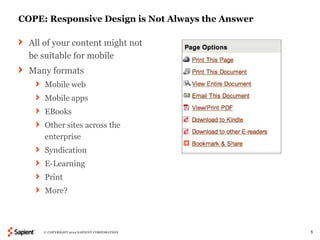
COPE: Responsive Design is Not Always the Answer

  All of your content might not
  be suitable for mobile
  Many formats
      Mobile web
      Mobile apps
      EBooks
      Other sites across the
      enterprise
      Syndication
      E-Learning
      Print
      More?


     © COPYRIGHT 2012 SAPIENT CORPORATION          5
Evaluate Existing Content

 What is the purpose of the content?
 Who is the target audience?
 What do we want them to do with the content?
 In what formats does the content appear?
 What content is reused now? Could be reused in the future?


     © COPYRIGHT 2012 SAPIENT CORPORATION                     6
Finding Patterns: Define the Semantic Markup

  Examples:                                 How do these pieces of content
     Long Title                             relate to one another?
     Short Title                            How might they be reused?
     Long Description
     Short Description
     Publication Date
     Byline
     Author Bio
     Contact Information
     Image
     Video
     Audio
     Ratings


     © COPYRIGHT 2012 SAPIENT CORPORATION                                    7
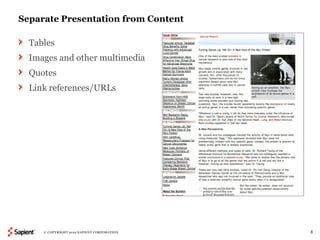
Separate Presentation from Content

  Tables
  Images and other multimedia
  Quotes
  Link references/URLs


     © COPYRIGHT 2012 SAPIENT CORPORATION   8
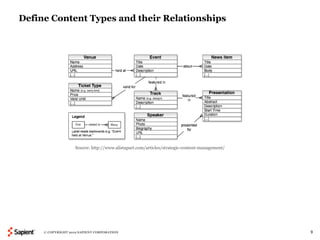
Define Content Types and their Relationships


                    Source: http://www.alistapart.com/articles/strategic-content-management/


     © COPYRIGHT 2012 SAPIENT CORPORATION                                                      9
Case Study: m.cancer.gov


    © COPYRIGHT 2012 SAPIENT CORPORATION   10
The National Cancer Institute

  The U.S. government’s principal agency for cancer research
  One of 27 institutes and centers that form the National Institutes of Health
  Sapient has worked for NCI’s Office of Communications and Education
  (OCE) since April 2010
  OCE provides evidence-based cancer information through many channels:
  digital, print, and a live help service


      © COPYRIGHT 2012 SAPIENT CORPORATION                                       11
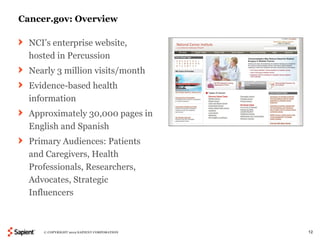
Cancer.gov: Overview

  NCI’s enterprise website,
  hosted in Percussion
  Nearly 3 million visits/month
  Evidence-based health
  information
  Approximately 30,000 pages in
  English and Spanish
  Primary Audiences: Patients
  and Caregivers, Health
  Professionals, Researchers,
  Advocates, Strategic
  Influencers


     © COPYRIGHT 2012 SAPIENT CORPORATION   12
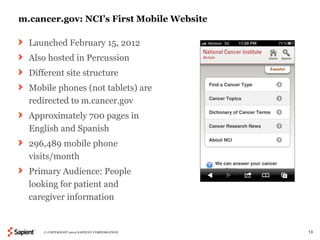
m.cancer.gov: NCI’s First Mobile Website

  Launched February 15, 2012
  Also hosted in Percussion
  Different site structure
  Mobile phones (not tablets) are
  redirected to m.cancer.gov
  Approximately 700 pages in
  English and Spanish
  296,489 mobile phone
  visits/month
  Primary Audience: People
  looking for patient and
  caregiver information


      © COPYRIGHT 2012 SAPIENT CORPORATION   13
Why Didn’t we Use a Responsive Design for Cancer.gov?

  Not all target audiences are looking for cancer content on their phones;
  patient content was the highest priority
  No need to optimize for tablets
  Cancer.gov was not designed with “mobile first” in mind
      Lack of navigation
      Lack of semantic markup and content standards
      If we restructured all legacy content, we would not have met our deadline
  The mobile site is responsive; its layout scales for different devices


      © COPYRIGHT 2012 SAPIENT CORPORATION                                        14
“There simply isn't room in a 320 by 480 pixel
screen for extraneous, unnecessary elements.
                        You have to prioritize.”

          – Luke Wroblewski, “Mobile First,” November 3, 2009


    © COPYRIGHT 2012 SAPIENT CORPORATION                        15
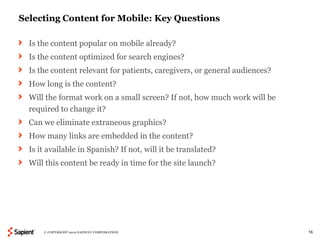
Selecting Content for Mobile: Key Questions

  Is the content popular on mobile already?
  Is the content optimized for search engines?
  Is the content relevant for patients, caregivers, or general audiences?
  How long is the content?
  Will the format work on a small screen? If not, how much work will be
  required to change it?
  Can we eliminate extraneous graphics?
  How many links are embedded in the content?
  Is it available in Spanish? If not, will it be translated?
  Will this content be ready in time for the site launch?


      © COPYRIGHT 2012 SAPIENT CORPORATION                                  16
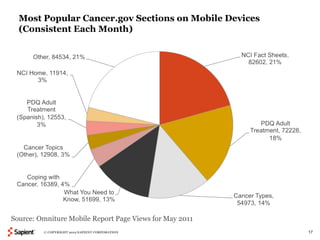
Most Popular Cancer.gov Sections on Mobile Devices
  (Consistent Each Month)


Source: Omniture Mobile Report Page Views for May 2011
         © COPYRIGHT 2012 SAPIENT CORPORATION            17
Content Types Included in First Release

  Home page
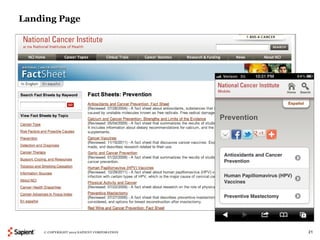
  Landing pages
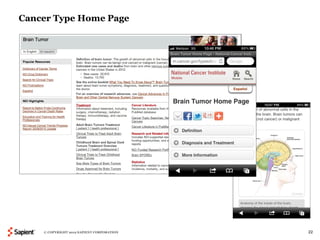
  Cancer type home pages
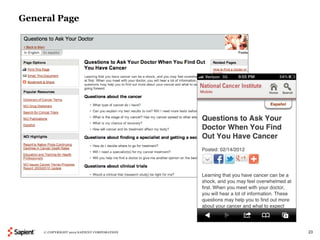
  General pages
  News releases
  PDQ patient treatment summaries
  Fact sheets (Q&As)


     © COPYRIGHT 2012 SAPIENT CORPORATION   18
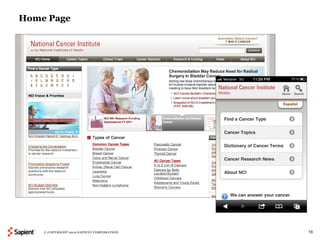
Home Page


    © COPYRIGHT 2012 SAPIENT CORPORATION   19
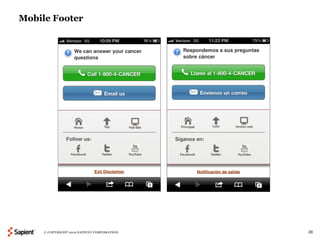
Mobile Footer


     © COPYRIGHT 2012 SAPIENT CORPORATION   20
Landing Page


    © COPYRIGHT 2012 SAPIENT CORPORATION   21
Cancer Type Home Page


    © COPYRIGHT 2012 SAPIENT CORPORATION   22
General Page


    © COPYRIGHT 2012 SAPIENT CORPORATION   23
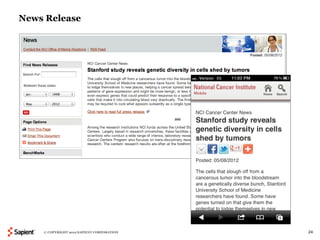
News Release


    © COPYRIGHT 2012 SAPIENT CORPORATION   24
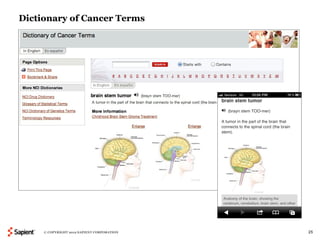
Dictionary of Cancer Terms


     © COPYRIGHT 2012 SAPIENT CORPORATION   25
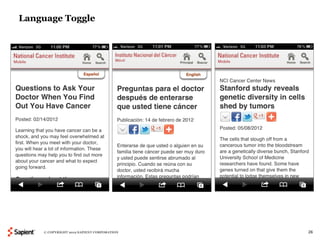
Language Toggle


    © COPYRIGHT 2012 SAPIENT CORPORATION   26
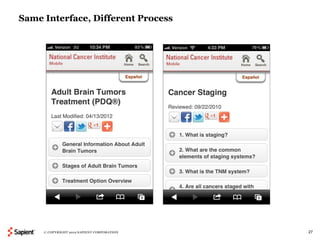
Same Interface, Different Process


     © COPYRIGHT 2012 SAPIENT CORPORATION   27
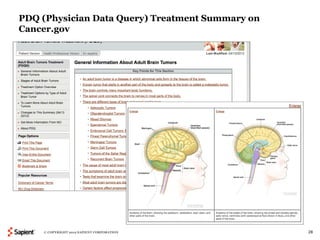
PDQ (Physician Data Query) Treatment Summary on
Cancer.gov


    © COPYRIGHT 2012 SAPIENT CORPORATION          28
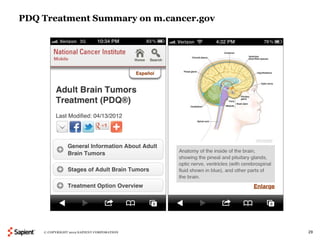
PDQ Treatment Summary on m.cancer.gov


    © COPYRIGHT 2012 SAPIENT CORPORATION   29
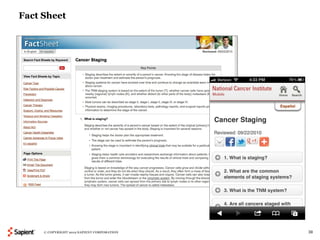
Fact Sheet


     © COPYRIGHT 2012 SAPIENT CORPORATION   30
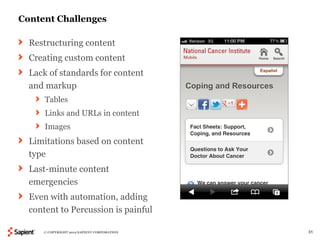
Content Challenges

  Restructuring content
  Creating custom content
  Lack of standards for content
  and markup
      Tables
      Links and URLs in content
      Images
  Limitations based on content
  type
  Last-minute content
  emergencies
  Even with automation, adding
  content to Percussion is painful

     © COPYRIGHT 2012 SAPIENT CORPORATION   31
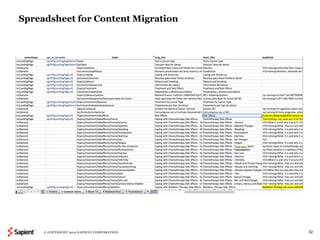
Spreadsheet for Content Migration


     © COPYRIGHT 2012 SAPIENT CORPORATION   32
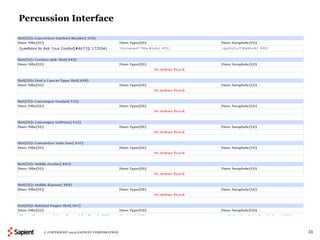
Percussion Interface


     © COPYRIGHT 2012 SAPIENT CORPORATION   33
Final Result

  Simple interface; during usability testing, even inexperienced mobile users
  could navigate the site
  Comprehensive content for patients, caregivers, and general audiences
     Information about treatments for almost 100 types of cancer
     More general information such as coping and side effects
     Dictionary of Cancer Terms
     Cancer research news
     Information about NCI
 One click to call or email the Cancer Information Service
 Easy to share content
 Easy to view NCI’s other social media channels
 Analytics support our design decisions


       © COPYRIGHT 2012 SAPIENT CORPORATION                                     34
“Dear NCI, today was my first time using
  mobile cancer.gov. Really like this!!
  Very easy to navigate on my phone!!
          Great use of federal resources!”
                    – Email from mobile user, March 24, 2012


  © COPYRIGHT 2012 SAPIENT CORPORATION                         35
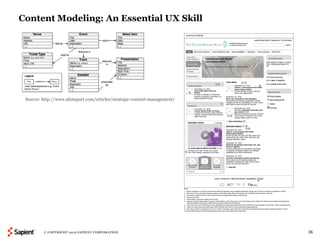
Content Modeling: An Essential UX Skill


 Source: http://www.alistapart.com/articles/strategic-content-management/


         © COPYRIGHT 2012 SAPIENT CORPORATION                               36
Questions?


“Future-Ready Content,” A List Apart, by Sara Wachter-Boettcher (2/28/12)

Managing Enterprise Content: A Unified Content Strategy, by Ann Rockley
and Charles Cooper


      © COPYRIGHT 2012 SAPIENT CORPORATION                                  37
Thank You!


Lisa Goldberg
lgoldberg@sapient.com | @LisaGDC | http://www.linkedin.com/in/lisagoldberg

Sapient Government Services
sapient.com | @sapientgov


     © COPYRIGHT 2012 SAPIENT CORPORATION                                    38

Intelligent Content: A Case Study

  • 1.
    Intelligent Content: ACase Study Lisa Goldberg | User Focus | October 19, 2012 © COPYRIGHT 2012 SAPIENT CORPORATION 1
  • 2.
    Agenda 1. Welcome 2. Whatis Intelligent Content? 3. Case Study: m.cancer.gov 4. Q&A © COPYRIGHT 2012 SAPIENT CORPORATION 2
  • 3.
    What is IntelligentContent? © COPYRIGHT 2012 SAPIENT CORPORATION 3
  • 4.
    “ You canlet your content go, without fearing where it will end up. But you’ve got to start with some structure.” – Sara Wachter-Boettcher, “Responsive-Ready Content” http://sarawb.com/2012/03/07/content-strategy-responsive-design/ © COPYRIGHT 2012 SAPIENT CORPORATION 4
  • 5.
    COPE: Responsive Designis Not Always the Answer All of your content might not be suitable for mobile Many formats Mobile web Mobile apps EBooks Other sites across the enterprise Syndication E-Learning Print More? © COPYRIGHT 2012 SAPIENT CORPORATION 5
  • 6.
    Evaluate Existing Content What is the purpose of the content? Who is the target audience? What do we want them to do with the content? In what formats does the content appear? What content is reused now? Could be reused in the future? © COPYRIGHT 2012 SAPIENT CORPORATION 6
  • 7.
    Finding Patterns: Definethe Semantic Markup Examples: How do these pieces of content Long Title relate to one another? Short Title How might they be reused? Long Description Short Description Publication Date Byline Author Bio Contact Information Image Video Audio Ratings © COPYRIGHT 2012 SAPIENT CORPORATION 7
  • 8.
    Separate Presentation fromContent Tables Images and other multimedia Quotes Link references/URLs © COPYRIGHT 2012 SAPIENT CORPORATION 8
  • 9.
    Define Content Typesand their Relationships Source: http://www.alistapart.com/articles/strategic-content-management/ © COPYRIGHT 2012 SAPIENT CORPORATION 9
  • 10.
    Case Study: m.cancer.gov © COPYRIGHT 2012 SAPIENT CORPORATION 10
  • 11.
    The National CancerInstitute The U.S. government’s principal agency for cancer research One of 27 institutes and centers that form the National Institutes of Health Sapient has worked for NCI’s Office of Communications and Education (OCE) since April 2010 OCE provides evidence-based cancer information through many channels: digital, print, and a live help service © COPYRIGHT 2012 SAPIENT CORPORATION 11
  • 12.
    Cancer.gov: Overview NCI’s enterprise website, hosted in Percussion Nearly 3 million visits/month Evidence-based health information Approximately 30,000 pages in English and Spanish Primary Audiences: Patients and Caregivers, Health Professionals, Researchers, Advocates, Strategic Influencers © COPYRIGHT 2012 SAPIENT CORPORATION 12
  • 13.
    m.cancer.gov: NCI’s FirstMobile Website Launched February 15, 2012 Also hosted in Percussion Different site structure Mobile phones (not tablets) are redirected to m.cancer.gov Approximately 700 pages in English and Spanish 296,489 mobile phone visits/month Primary Audience: People looking for patient and caregiver information © COPYRIGHT 2012 SAPIENT CORPORATION 13
  • 14.
    Why Didn’t weUse a Responsive Design for Cancer.gov? Not all target audiences are looking for cancer content on their phones; patient content was the highest priority No need to optimize for tablets Cancer.gov was not designed with “mobile first” in mind Lack of navigation Lack of semantic markup and content standards If we restructured all legacy content, we would not have met our deadline The mobile site is responsive; its layout scales for different devices © COPYRIGHT 2012 SAPIENT CORPORATION 14
  • 15.
    “There simply isn'troom in a 320 by 480 pixel screen for extraneous, unnecessary elements. You have to prioritize.” – Luke Wroblewski, “Mobile First,” November 3, 2009 © COPYRIGHT 2012 SAPIENT CORPORATION 15
  • 16.
    Selecting Content forMobile: Key Questions Is the content popular on mobile already? Is the content optimized for search engines? Is the content relevant for patients, caregivers, or general audiences? How long is the content? Will the format work on a small screen? If not, how much work will be required to change it? Can we eliminate extraneous graphics? How many links are embedded in the content? Is it available in Spanish? If not, will it be translated? Will this content be ready in time for the site launch? © COPYRIGHT 2012 SAPIENT CORPORATION 16
  • 17.
    Most Popular Cancer.govSections on Mobile Devices (Consistent Each Month) Source: Omniture Mobile Report Page Views for May 2011 © COPYRIGHT 2012 SAPIENT CORPORATION 17
  • 18.
    Content Types Includedin First Release Home page Landing pages Cancer type home pages General pages News releases PDQ patient treatment summaries Fact sheets (Q&As) © COPYRIGHT 2012 SAPIENT CORPORATION 18
  • 19.
    Home Page © COPYRIGHT 2012 SAPIENT CORPORATION 19
  • 20.
    Mobile Footer © COPYRIGHT 2012 SAPIENT CORPORATION 20
  • 21.
    Landing Page © COPYRIGHT 2012 SAPIENT CORPORATION 21
  • 22.
    Cancer Type HomePage © COPYRIGHT 2012 SAPIENT CORPORATION 22
  • 23.
    General Page © COPYRIGHT 2012 SAPIENT CORPORATION 23
  • 24.
    News Release © COPYRIGHT 2012 SAPIENT CORPORATION 24
  • 25.
    Dictionary of CancerTerms © COPYRIGHT 2012 SAPIENT CORPORATION 25
  • 26.
    Language Toggle © COPYRIGHT 2012 SAPIENT CORPORATION 26
  • 27.
    Same Interface, DifferentProcess © COPYRIGHT 2012 SAPIENT CORPORATION 27
  • 28.
    PDQ (Physician DataQuery) Treatment Summary on Cancer.gov © COPYRIGHT 2012 SAPIENT CORPORATION 28
  • 29.
    PDQ Treatment Summaryon m.cancer.gov © COPYRIGHT 2012 SAPIENT CORPORATION 29
  • 30.
    Fact Sheet © COPYRIGHT 2012 SAPIENT CORPORATION 30
  • 31.
    Content Challenges Restructuring content Creating custom content Lack of standards for content and markup Tables Links and URLs in content Images Limitations based on content type Last-minute content emergencies Even with automation, adding content to Percussion is painful © COPYRIGHT 2012 SAPIENT CORPORATION 31
  • 32.
    Spreadsheet for ContentMigration © COPYRIGHT 2012 SAPIENT CORPORATION 32
  • 33.
    Percussion Interface © COPYRIGHT 2012 SAPIENT CORPORATION 33
  • 34.
    Final Result Simple interface; during usability testing, even inexperienced mobile users could navigate the site Comprehensive content for patients, caregivers, and general audiences  Information about treatments for almost 100 types of cancer  More general information such as coping and side effects  Dictionary of Cancer Terms  Cancer research news  Information about NCI  One click to call or email the Cancer Information Service  Easy to share content  Easy to view NCI’s other social media channels  Analytics support our design decisions © COPYRIGHT 2012 SAPIENT CORPORATION 34
  • 35.
    “Dear NCI, todaywas my first time using mobile cancer.gov. Really like this!! Very easy to navigate on my phone!! Great use of federal resources!” – Email from mobile user, March 24, 2012 © COPYRIGHT 2012 SAPIENT CORPORATION 35
  • 36.
    Content Modeling: AnEssential UX Skill Source: http://www.alistapart.com/articles/strategic-content-management/ © COPYRIGHT 2012 SAPIENT CORPORATION 36
  • 37.
    Questions? “Future-Ready Content,” AList Apart, by Sara Wachter-Boettcher (2/28/12) Managing Enterprise Content: A Unified Content Strategy, by Ann Rockley and Charles Cooper © COPYRIGHT 2012 SAPIENT CORPORATION 37
  • 38.
    Thank You! Lisa Goldberg lgoldberg@sapient.com| @LisaGDC | http://www.linkedin.com/in/lisagoldberg Sapient Government Services sapient.com | @sapientgov © COPYRIGHT 2012 SAPIENT CORPORATION 38

Editor's Notes

  • #2 Intelligent Content: A Case Study Track: Content Strategy Room: Clover One piece of content can now appear in a wide range of platforms and devices, including Web, mobile Web, apps, e-­‐ books, and print. As we expand the scope of the Create Once, Publish Everywhere model, how do we ensure that content behaves as expected in these different interfaces? The answer is semantic structure, also known as intelligent content. Lisa will provide a high-level overview of issues to consider and illustrate those points with a case study from the National Cancer Institute’s mobile website. Reviewer feedback:  With so many different platforms and devices, and more coming in the future, this is a very relevant topic. The Create Once, Publish Everywhere idea needs to be explained to the audience. But even more so, semantic structure should be explained in detail. I fear the presenter may be too high level here in explaining relevant terms to get the audience up to speed before moving to the case study.
  • #37 Can’t afford to think that way anymore—UX people have to do this to get ahead of the game.