Structured Design
Modular Style for Modern Content
The problemDesigners don’t work with your content
models.
And that means they’re not designing to the
purpose or needs of content.
or maybe…
the content models aren’t clear or useful
or contain insufficient semantics
Content models
can enable great
design
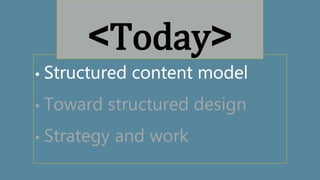
• Structured content model
• Toward structured design
• Strategy and work
<Today>
o In-house Content Strategist
o Background in writing and
editing
o Modeling, migration,
development
@crhess
• Name and job title, please (real or
aspirational)
• Content modeling time spent, %
• Burning question (optional)
<and you are…>
• Toward structured design
• Strategy and work
<Today>
The problem
It’s easier to do well what we know well
Structured content can feel limiting to design
Why this
problem?
• Structured content =
separation from
presentation
• Good user experience =
focus on design
The intentional recoupling of
structured content and
presentation
CONTENT STRATEGY
Make it clear
Make it useful
Make it available
Content model
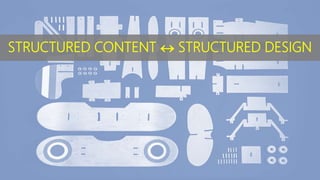
STRUCTURED CONTENT  STRUCTURED DESIGN
What your business needs it to be
What your CMS and APIs require it to be
What your taxonomy says it should be
What your users want it to be
What your business needs it to be
What your CMS and APIs require it to be
What your taxonomy says it should be
What your users want it to be
What your business needs it to be
What your CMS and APIs require it to be
What your taxonomy says it should be
What your users want it to be
What your business needs it to be
What your CMS and APIs require it to be
What your taxonomy says it should be
What your users want it to be
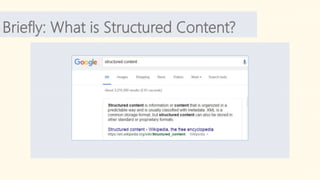
STRUCTUREDCONTENTis:
Clearly defined and focused topics
Separated from any single presentation
Modular, reusable, recombinable
hwEmphasis
Modeling
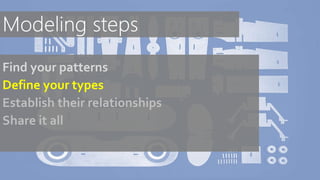
Find your patterns
Define your types
Establish their relationships
Share it all
Find your patterns
Define your types
Establish their relationships
Share it all
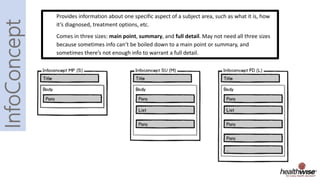
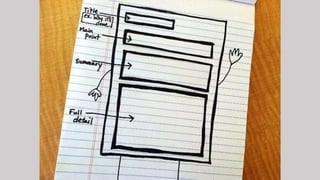
Provides information about one specific aspect of a subject area, such as what it is, how
it’s diagnosed, treatment options, etc.
Comes in three sizes: main point, summary, and full detail. May not need all three sizes
because sometimes info can’t be boiled down to a main point or summary, and
sometimes there’s not enough info to warrant a full detail.
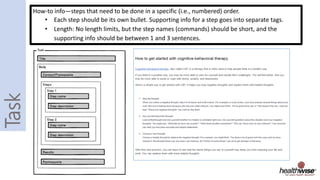
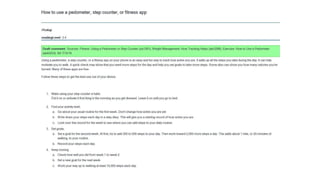
How-to info—steps that need to be done in a specific (i.e., numbered) order.
• Each step should be its own bullet. Supporting info for a step goes into separate tags.
• Length: No length limits, but the step names (commands) should be short, and the
supporting info should be between 1 and 3 sentences.
EXERCISE
Find your patterns
Find your patterns
Define your types
Establish their relationships
Share it all
STORY
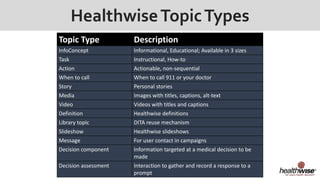
HealthwiseTopicTypes
Topic Type Description
InfoConcept Informational, Educational; Available in 3 sizes
Task Instructional, How-to
Action Actionable, non-sequential
When to call When to call 911 or your doctor
Story Personal stories
Media Images with titles, captions, alt-text
Video Videos with titles and captions
Definition Healthwise definitions
Library topic DITA reuse mechanism
Slideshow Healthwise slideshows
Message For user contact in campaigns
Decision component Information targeted at a medical decision to be
made
Decision assessment Interaction to gather and record a response to a
prompt
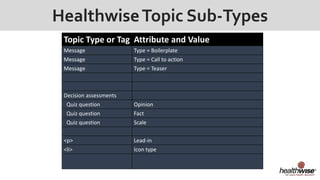
HealthwiseTopic Sub-Types
Topic Type or Tag Attribute and Value
Message Type = Boilerplate
Message Type = Call to action
Message Type = Teaser
Decision assessments
Quiz question Opinion
Quiz question Fact
Quiz question Scale
<p> Lead-in
<li> Icon type
EXERCISE
Define your types
Content Modeling = Balance
Find your patterns
Define your types
Establish their relationships
Share it all
•Educational/Informational
•Task instructions
•Actionable
•Stories
•Videos
•Images
•Messages
•Option comparison
•&c.
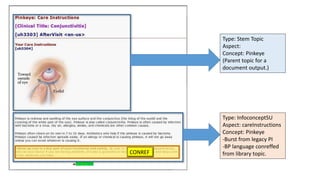
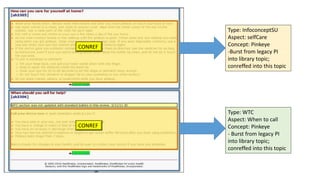
CONREF
Type: Stem Topic
Aspect:
Concept: Pinkeye
(Parent topic for a
document output.)
Type: InfoconceptSU
Aspect: careInstructions
Concept: Pinkeye
-Burst from legacy PI
-BP language conreffed
from library topic.
CONREF
CONREF
Type: InfoconceptSU
Aspect: selfCare
Concept: Pinkeye
-Burst from legacy PI
into library topic;
conreffed into this topic
Type: WTC
Aspect: When to call
Concept: Pinkeye
- Burst from legacy PI
into library topic;
conreffed into this topic
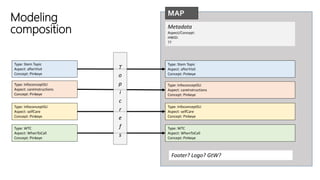
Type: Stem Topic
Aspect: afterVisit
Concept: Pinkeye
Type: InfoconceptSU
Aspect: careInstructions
Concept: Pinkeye
Type: InfoconceptSU
Aspect: selfCare
Concept: Pinkeye
Type: WTC
Aspect: WhenToCall
Concept: Pinkeye
MAP
Metadata
Aspect/Concept:
HWID:
??
Type: Stem Topic
Aspect: afterVisit
Concept: Pinkeye
Type: InfoconceptSU
Aspect: careInstructions
Concept: Pinkeye
Type: InfoconceptSU
Aspect: selfCare
Concept: Pinkeye
Type: WTC
Aspect: WhenToCall
Concept: Pinkeye
Footer? Logo? GtW?
T
o
p
i
c
r
e
f
s
Modeling
composition
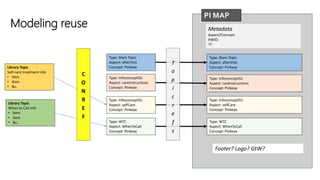
Type: Stem Topic
Aspect: afterVisit
Concept: Pinkeye
Type: InfoconceptSU
Aspect: careInstructions
Concept: Pinkeye
Type: InfoconceptSU
Aspect: selfCare
Concept: Pinkeye
Type: WTC
Aspect: WhenToCall
Concept: Pinkeye
PI MAP
Metadata
Aspect/Concept:
HWID:
??
Type: Stem Topic
Aspect: afterVisit
Concept: Pinkeye
Type: InfoconceptSU
Aspect: careInstructions
Concept: Pinkeye
Type: InfoconceptSU
Aspect: selfCare
Concept: Pinkeye
Type: WTC
Aspect: WhenToCall
Concept: Pinkeye
Footer? Logo? GtW?
T
o
p
i
c
r
e
f
s
Library Topic
Self-care treatment info
• Item
• Item
• &c.
Library Topic
When to Call info
• Item
• Item
• &c.
C
O
N
R
E
F
Modeling reuse
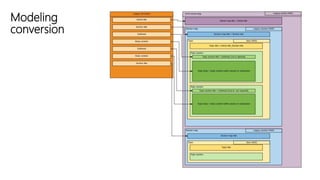
Modeling
conversion
Semantic::Meaning
se  man  tic
/sə’man(t)ik/
adjective
Relating to meaning in language or logic.
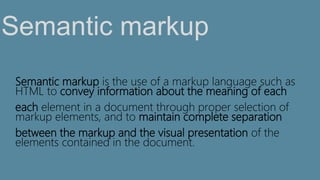
Semantic markup is the use of a markup language such as
HTML to convey information about the meaning of each
each element in a document through proper selection of
markup elements, and to maintain complete separation
between the markup and the visual presentation of the
elements contained in the document.
Semantic markup
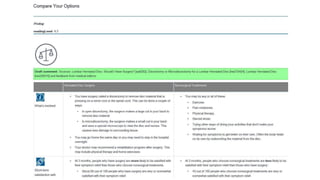
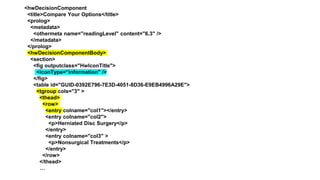
<hwDecisionComponent
<title>Compare Your Options</title>
<prolog>
<metadata>
<othermeta name="readingLevel" content="6.3" />
</metadata>
</prolog>
<hwDecisionComponentBody>
<section>
<fig outputclass="HwIconTitle">
<iconType=“information" />
</fig>
<table id="GUID-0392E796-7E3D-4051-8D36-E9EB4996A29E">
<tgroup cols="3" >
<thead>
<row>
<entry colname="col1"></entry>
<entry colname="col2">
<p>Herniated Disc Surgery</p>
</entry>
<entry colname="col3" >
<p>Nonsurgical Treatments</p>
</entry>
</row>
</thead>
…
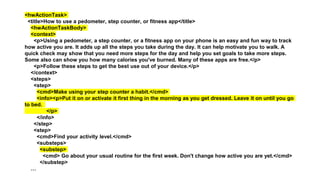
<hwActionTask>
<title>How to use a pedometer, step counter, or fitness app</title>
<hwActionTaskBody>
<context>
<p>Using a pedometer, a step counter, or a fitness app on your phone is an easy and fun way to track
how active you are. It adds up all the steps you take during the day. It can help motivate you to walk. A
quick check may show that you need more steps for the day and help you set goals to take more steps.
Some also can show you how many calories you've burned. Many of these apps are free.</p>
<p>Follow these steps to get the best use out of your device.</p>
</context>
<steps>
<step>
<cmd>Make using your step counter a habit.</cmd>
<info><p>Put it on or activate it first thing in the morning as you get dressed. Leave it on until you go
to bed.
</p>
</info>
</step>
<step>
<cmd>Find your activity level.</cmd>
<substeps>
<substep>
<cmd> Go about your usual routine for the first week. Don't change how active you are yet.</cmd>
</substep>
…
Find your patterns
Define your types
Establish their relationships
Share it all
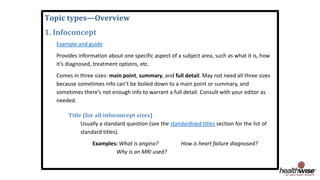
Topic types—Overview
1. Infoconcept
Example and guide
Provides information about one specific aspect of a subject area, such as what it is, how
it’s diagnosed, treatment options, etc.
Comes in three sizes: main point, summary, and full detail. May not need all three sizes
because sometimes info can’t be boiled down to a main point or summary, and
sometimes there’s not enough info to warrant a full detail. Consult with your editor as
needed.
Title (for all infoconcept sizes)
Usually a standard question (see the standardized titles section for the list of
standard titles).
Examples: What is angina? How is heart failure diagnosed?
Why is an MRI used?
EXERCISE
Establish the relationships
Share it all
It feels obsessive and fiddly to quibble over
terms.
Do it anyway. Get them straight.
See: Topic.
Terminology
• Think modular
• Think visual
• Think end-to-end
• Think meta
<Modeling>
Content Modeling = Balance
• Not just for indexers
• Makes it all work
• Think expandable
<metadata>
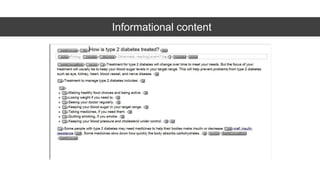
Informational content
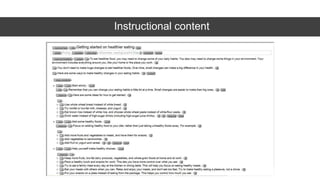
Instructional content
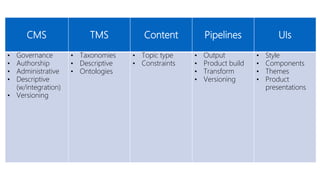
CMS TMS Content Pipelines UIs
• Governance
• Authorship
• Administrative
• Descriptive
(w/integration)
• Versioning
• Taxonomies
• Descriptive
• Ontologies
• Topic type
• Constraints
• Output
• Product build
• Transform
• Versioning
• Style
• Components
• Themes
• Product
presentations
EXERCISE
Give it meaning
How does it enable flexible application of style?
• Semantics can be designed to
• Change is consistent
• Purpose is common
Using that
model
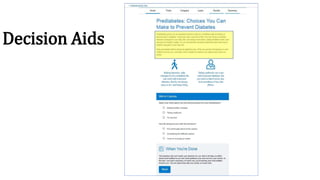
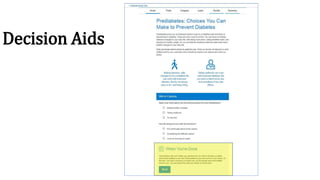
Decision Aids
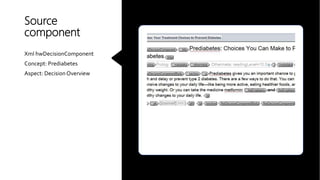
Source
component
Xml hwDecisionComponent
Concept: Prediabetes
Aspect: DecisionOverview
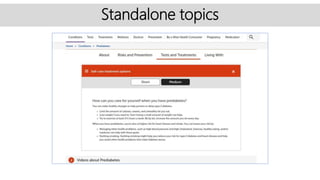
Standalone topics
Decision Aids
Model Accessibility
• Build it into your content model
• Create accessible components
• Lowers testing and rework burden
• Assures designing to accessibility which is just the right and
smart thing to do
EXERCISE
Produce output
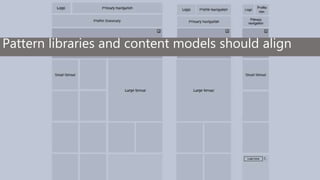
Pattern libraries and content models should align
Working with designers
Get involved early
Philosophize!
Get your hands dirty
BUSINESS GOALS
DESIGN GOALS
CONTENT GOALS
BUSINESS GOALS
DESIGN GOALS
CONTENT GOALS
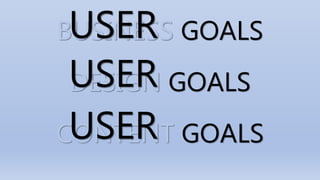
USER
USER
USER
Content Strategy’s Role
Editorial guidelines
• Character limits
• Element constraints
• General structure
Beyond the objects
Voice and tone
• All artifacts are useful for both writers and designers
• Trying to communicate and accomplish the same
thing
• Let one connect to the other
Beyond the objects
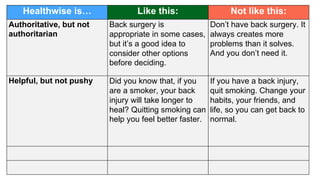
Healthwise is… Like this: Not like this:
Authoritative, but not
authoritarian
Back surgery is
appropriate in some cases,
but it’s a good idea to
consider other options
before deciding.
Don’t have back surgery. It
always creates more
problems than it solves.
And you don’t need it.
Helpful, but not pushy Did you know that, if you
are a smoker, your back
injury will take longer to
heal? Quitting smoking can
help you feel better faster.
If you have a back injury,
quit smoking. Change your
habits, your friends, and
life, so you can get back to
normal.
EXERCISE
Voice and tone
Making your place
•Own the idea and the message
•Face up to the soft skills
•Help other people get their stuff
done better
•Go above and beyond so they will
too
See it through
• FINISHED finished
• Do your documentation
• Handoffable
• Loose ends can undo lots
• Keep the dots connected
Thanks

Structured design: Modular style for modern content

  • 1.
  • 2.
    The problemDesigners don’twork with your content models. And that means they’re not designing to the purpose or needs of content.
  • 3.
    or maybe… the contentmodels aren’t clear or useful or contain insufficient semantics
  • 4.
  • 5.
    • Structured contentmodel • Toward structured design • Strategy and work <Today>
  • 6.
    o In-house ContentStrategist o Background in writing and editing o Modeling, migration, development @crhess
  • 7.
    • Name andjob title, please (real or aspirational) • Content modeling time spent, % • Burning question (optional) <and you are…>
  • 8.
    • Toward structureddesign • Strategy and work <Today>
  • 9.
    The problem It’s easierto do well what we know well Structured content can feel limiting to design
  • 10.
    Why this problem? • Structuredcontent = separation from presentation • Good user experience = focus on design
  • 11.
    The intentional recouplingof structured content and presentation CONTENT STRATEGY
  • 12.
    Make it clear Makeit useful Make it available Content model
  • 13.
    STRUCTURED CONTENT STRUCTURED DESIGN
  • 15.
    What your businessneeds it to be What your CMS and APIs require it to be What your taxonomy says it should be What your users want it to be
  • 16.
    What your businessneeds it to be What your CMS and APIs require it to be What your taxonomy says it should be What your users want it to be
  • 17.
    What your businessneeds it to be What your CMS and APIs require it to be What your taxonomy says it should be What your users want it to be
  • 18.
    What your businessneeds it to be What your CMS and APIs require it to be What your taxonomy says it should be What your users want it to be
  • 19.
    STRUCTUREDCONTENTis: Clearly defined andfocused topics Separated from any single presentation Modular, reusable, recombinable
  • 20.
  • 21.
  • 22.
    Find your patterns Defineyour types Establish their relationships Share it all
  • 23.
    Find your patterns Defineyour types Establish their relationships Share it all
  • 25.
    Provides information aboutone specific aspect of a subject area, such as what it is, how it’s diagnosed, treatment options, etc. Comes in three sizes: main point, summary, and full detail. May not need all three sizes because sometimes info can’t be boiled down to a main point or summary, and sometimes there’s not enough info to warrant a full detail.
  • 26.
    How-to info—steps thatneed to be done in a specific (i.e., numbered) order. • Each step should be its own bullet. Supporting info for a step goes into separate tags. • Length: No length limits, but the step names (commands) should be short, and the supporting info should be between 1 and 3 sentences.
  • 27.
  • 28.
    Find your patterns Defineyour types Establish their relationships Share it all
  • 29.
  • 33.
    HealthwiseTopicTypes Topic Type Description InfoConceptInformational, Educational; Available in 3 sizes Task Instructional, How-to Action Actionable, non-sequential When to call When to call 911 or your doctor Story Personal stories Media Images with titles, captions, alt-text Video Videos with titles and captions Definition Healthwise definitions Library topic DITA reuse mechanism Slideshow Healthwise slideshows Message For user contact in campaigns Decision component Information targeted at a medical decision to be made Decision assessment Interaction to gather and record a response to a prompt
  • 34.
    HealthwiseTopic Sub-Types Topic Typeor Tag Attribute and Value Message Type = Boilerplate Message Type = Call to action Message Type = Teaser Decision assessments Quiz question Opinion Quiz question Fact Quiz question Scale <p> Lead-in <li> Icon type
  • 35.
  • 36.
  • 37.
    Find your patterns Defineyour types Establish their relationships Share it all
  • 38.
  • 40.
    CONREF Type: Stem Topic Aspect: Concept:Pinkeye (Parent topic for a document output.) Type: InfoconceptSU Aspect: careInstructions Concept: Pinkeye -Burst from legacy PI -BP language conreffed from library topic.
  • 41.
    CONREF CONREF Type: InfoconceptSU Aspect: selfCare Concept:Pinkeye -Burst from legacy PI into library topic; conreffed into this topic Type: WTC Aspect: When to call Concept: Pinkeye - Burst from legacy PI into library topic; conreffed into this topic
  • 42.
    Type: Stem Topic Aspect:afterVisit Concept: Pinkeye Type: InfoconceptSU Aspect: careInstructions Concept: Pinkeye Type: InfoconceptSU Aspect: selfCare Concept: Pinkeye Type: WTC Aspect: WhenToCall Concept: Pinkeye MAP Metadata Aspect/Concept: HWID: ?? Type: Stem Topic Aspect: afterVisit Concept: Pinkeye Type: InfoconceptSU Aspect: careInstructions Concept: Pinkeye Type: InfoconceptSU Aspect: selfCare Concept: Pinkeye Type: WTC Aspect: WhenToCall Concept: Pinkeye Footer? Logo? GtW? T o p i c r e f s Modeling composition
  • 43.
    Type: Stem Topic Aspect:afterVisit Concept: Pinkeye Type: InfoconceptSU Aspect: careInstructions Concept: Pinkeye Type: InfoconceptSU Aspect: selfCare Concept: Pinkeye Type: WTC Aspect: WhenToCall Concept: Pinkeye PI MAP Metadata Aspect/Concept: HWID: ?? Type: Stem Topic Aspect: afterVisit Concept: Pinkeye Type: InfoconceptSU Aspect: careInstructions Concept: Pinkeye Type: InfoconceptSU Aspect: selfCare Concept: Pinkeye Type: WTC Aspect: WhenToCall Concept: Pinkeye Footer? Logo? GtW? T o p i c r e f s Library Topic Self-care treatment info • Item • Item • &c. Library Topic When to Call info • Item • Item • &c. C O N R E F Modeling reuse
  • 44.
  • 45.
    Semantic::Meaning se  man tic /sə’man(t)ik/ adjective Relating to meaning in language or logic.
  • 46.
    Semantic markup isthe use of a markup language such as HTML to convey information about the meaning of each each element in a document through proper selection of markup elements, and to maintain complete separation between the markup and the visual presentation of the elements contained in the document. Semantic markup
  • 48.
    <hwDecisionComponent <title>Compare Your Options</title> <prolog> <metadata> <othermetaname="readingLevel" content="6.3" /> </metadata> </prolog> <hwDecisionComponentBody> <section> <fig outputclass="HwIconTitle"> <iconType=“information" /> </fig> <table id="GUID-0392E796-7E3D-4051-8D36-E9EB4996A29E"> <tgroup cols="3" > <thead> <row> <entry colname="col1"></entry> <entry colname="col2"> <p>Herniated Disc Surgery</p> </entry> <entry colname="col3" > <p>Nonsurgical Treatments</p> </entry> </row> </thead> …
  • 50.
    <hwActionTask> <title>How to usea pedometer, step counter, or fitness app</title> <hwActionTaskBody> <context> <p>Using a pedometer, a step counter, or a fitness app on your phone is an easy and fun way to track how active you are. It adds up all the steps you take during the day. It can help motivate you to walk. A quick check may show that you need more steps for the day and help you set goals to take more steps. Some also can show you how many calories you've burned. Many of these apps are free.</p> <p>Follow these steps to get the best use out of your device.</p> </context> <steps> <step> <cmd>Make using your step counter a habit.</cmd> <info><p>Put it on or activate it first thing in the morning as you get dressed. Leave it on until you go to bed. </p> </info> </step> <step> <cmd>Find your activity level.</cmd> <substeps> <substep> <cmd> Go about your usual routine for the first week. Don't change how active you are yet.</cmd> </substep> …
  • 51.
    Find your patterns Defineyour types Establish their relationships Share it all
  • 52.
    Topic types—Overview 1. Infoconcept Exampleand guide Provides information about one specific aspect of a subject area, such as what it is, how it’s diagnosed, treatment options, etc. Comes in three sizes: main point, summary, and full detail. May not need all three sizes because sometimes info can’t be boiled down to a main point or summary, and sometimes there’s not enough info to warrant a full detail. Consult with your editor as needed. Title (for all infoconcept sizes) Usually a standard question (see the standardized titles section for the list of standard titles). Examples: What is angina? How is heart failure diagnosed? Why is an MRI used?
  • 55.
  • 56.
    It feels obsessiveand fiddly to quibble over terms. Do it anyway. Get them straight. See: Topic. Terminology
  • 57.
    • Think modular •Think visual • Think end-to-end • Think meta <Modeling>
  • 58.
  • 59.
    • Not justfor indexers • Makes it all work • Think expandable <metadata>
  • 61.
  • 62.
  • 63.
    CMS TMS ContentPipelines UIs • Governance • Authorship • Administrative • Descriptive (w/integration) • Versioning • Taxonomies • Descriptive • Ontologies • Topic type • Constraints • Output • Product build • Transform • Versioning • Style • Components • Themes • Product presentations
  • 64.
  • 65.
    How does itenable flexible application of style? • Semantics can be designed to • Change is consistent • Purpose is common Using that model
  • 66.
  • 67.
  • 68.
  • 69.
  • 70.
    Model Accessibility • Buildit into your content model • Create accessible components • Lowers testing and rework burden • Assures designing to accessibility which is just the right and smart thing to do
  • 71.
  • 72.
    Pattern libraries andcontent models should align
  • 73.
    Working with designers Getinvolved early Philosophize! Get your hands dirty
  • 74.
  • 75.
  • 76.
  • 77.
    Editorial guidelines • Characterlimits • Element constraints • General structure Beyond the objects
  • 78.
    Voice and tone •All artifacts are useful for both writers and designers • Trying to communicate and accomplish the same thing • Let one connect to the other Beyond the objects
  • 79.
    Healthwise is… Likethis: Not like this: Authoritative, but not authoritarian Back surgery is appropriate in some cases, but it’s a good idea to consider other options before deciding. Don’t have back surgery. It always creates more problems than it solves. And you don’t need it. Helpful, but not pushy Did you know that, if you are a smoker, your back injury will take longer to heal? Quitting smoking can help you feel better faster. If you have a back injury, quit smoking. Change your habits, your friends, and life, so you can get back to normal.
  • 80.
  • 81.
    Making your place •Ownthe idea and the message •Face up to the soft skills •Help other people get their stuff done better •Go above and beyond so they will too
  • 82.
    See it through •FINISHED finished • Do your documentation • Handoffable • Loose ends can undo lots • Keep the dots connected
  • 83.

Editor's Notes

  • #3 So when we’re thinking about design, about how our content looks and behaves once it hits the webpage or app or whatever, it’s critical that all of the meaning and intent of your content is understood and enabled. Maybe the problem is that those designers are just mean. Or lazy, or they don’t care about content… But probably not. https://images5.alphacoders.com/295/thumb-1920-295965.jpg
  • #38 \