Intel® Cyber-Security Briefing:
Trends, Solutions, and Opportunities
Matthew Rosenquist, Strategic Security Planner, PC Client Group, Intel
Corp
INFORMATION IN THIS DOCUMENT IS PROVIDED IN CONNECTION WITH INTEL® PRODUCTS. NO LICENSE, EXPRESS OR IMPLIED, BY
ESTOPPEL OR OTHERWISE, TO ANY INTELLECTUAL PROPERTY RIGHTS IS GRANTED BY THIS DOCUMENT. EXCEPT AS PROVIDED IN
INTEL’S TERMS AND CONDITIONS OF SALE FOR SUCH PRODUCTS, INTEL ASSUMES NO LIABILITY WHATSOEVER, AND INTEL DISCLAIMS
ANY EXPRESS OR IMPLIED WARRANTY, RELATING TO SALE AND/OR USE OF INTEL® PRODUCTS INCLUDING LIABILITY OR WARRANTIES
RELATING TO FITNESS FOR A PARTICULAR PURPOSE, MERCHANTABILITY, OR INFRINGEMENT OF ANY PATENT, COPYRIGHT OR OTHER
INTELLECTUAL PROPERTY RIGHT. INTEL PRODUCTS ARE NOT INTENDED FOR USE IN MEDICAL, LIFE SAVING, OR LIFE SUSTAINING
APPLICATIONS.
Intel may make changes to specifications and product descriptions at any time, without notice.
All products, dates, and figures specified are preliminary based on current expectations, and are subject to change without notice.
Intel, processors, chipsets, and desktop boards may contain design defects or errors known as errata, which may cause the product to deviate from
published specifications. Current characterized errata are available on request.
Software and workloads used in performance tests may have been optimized for performance only on Intel microprocessors. Performance tests, such
as SYSmark* and MobileMark*, are measured using specific computer systems, components, software, operations and functions. Any change to any
of those factors may cause the results to vary. You should consult other information and performance tests to assist you in fully evaluating your
contemplated purchases, including the performance of that product when combined with other products. For more information go to
http://www.intel.com/performance
Intel, Intel Inside, the Intel logo, Intel Core, and Xeon are trademarks of Intel Corporation in the United States and other countries.
Security features enabled by Intel® AMT require an enabled chipset, network hardware and software and a corporate network connection. Intel AMT
may not be available or certain capabilities may be limited over a host OS-based VPN or when connecting wirelessly, on battery power, sleeping,
hibernating or powered off. Setup requires configuration and may require scripting with the management console or further integration into existing
security frameworks, and modifications or implementation of new business processes. For more information, see
http://www.intel.com/technology/manage/iamt.
No system can provide absolute security under all conditions. Requires an enabled chipset, BIOS, firmware and software and a subscription with a
capable Service Provider. Consult your system manufacturer and Service Provider for availability and functionality. Intel assumes no liability for lost or
stolen data and/or systems or any other damages resulting thereof. For more information, visit http://www.intel.com/go/anti-theft
Intel® vPro™ Technology is sophisticated and requires setup and activation. Availability of features and results will depend upon the setup and
configuration of your hardware, software and IT environment. To learn more visit: http://www.intel.com/technology/vpro
The original equipment manufacturer must provide TPM functionality, which requires a TPM-supported BIOS. TPM functionality must be initialized and
may not be available in all countries.
Intel® AES-NI requires a computer system with an AES-NI enabled processor, as well as non-Intel software to execute the instructions in the correct
sequence. AES-NI is available on select Intel® processors. For availability, consult your reseller or system manufacturer. For more information,
see http://software.intel.com/en-us/articles/intel-advanced-encryption-standard-instructions-aes-ni/
*Other names and brands may be claimed as the property of others.
Copyright © 2011 Intel Corporation, All Rights Reserved
Legal Notices and Disclaimers
3
Agenda
• IT Security Trends and Landscape
• Intel + McAfee: What it means
• A comprehensive approach for security
• Examples of Hardware-assisted Security
• Open Discussion: Questions, Challenges,
Pain-Points
4
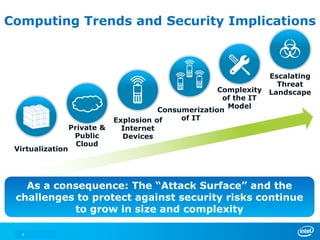
Computing Trends and Security Implications
Escalating
Threat
Landscape
Explosion of
Internet
Devices
Complexity
of the IT
Model
Private &
Public
Cloud
Virtualization
Consumerization
of IT
As a consequence: The “Attack Surface” and the
challenges to protect against security risks continue
to grow in size and complexity
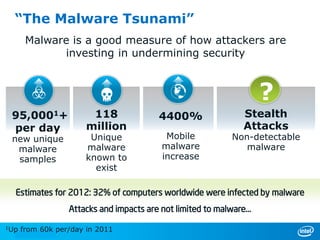
Estimates for 2012: 32% of computers worldwide were infected by malware
“The Malware Tsunami”
95,0001+
per day
new unique
malware
samples
118
million
Unique
malware
known to
exist
4400%
Mobile
malware
increase
Stealth
Attacks
Non-detectable
malware
?
Malware is a good measure of how attackers are
investing in undermining security
Attacks and impacts are not limited to malware…
1Up from 60k per/day in 2011
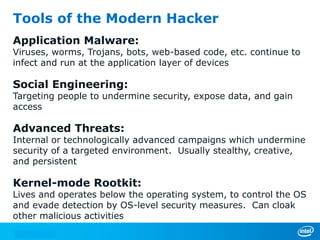
Tools of the Modern Hacker
Application Malware:
Viruses, worms, Trojans, bots, web-based code, etc. continue to
infect and run at the application layer of devices
Social Engineering:
Targeting people to undermine security, expose data, and gain
access
Advanced Threats:
Internal or technologically advanced campaigns which undermine
security of a targeted environment. Usually stealthy, creative,
and persistent
Kernel-mode Rootkit:
Lives and operates below the operating system, to control the OS
and evade detection by OS-level security measures. Can cloak
other malicious activities
7
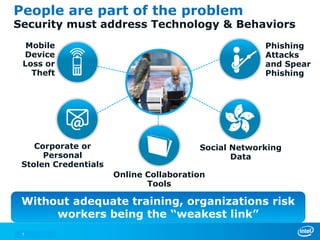
People are part of the problem
Security must address Technology & Behaviors
Mobile
Device
Loss or
Theft
Corporate or
Personal
Stolen Credentials
Online Collaboration
Tools
Social Networking
Data
Phishing
Attacks
and Spear
Phishing
Without adequate training, organizations risk
workers being the “weakest link”
8
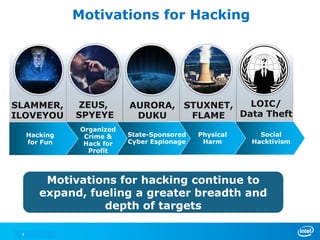
Motivations for Hacking
Motivations for hacking continue to
expand, fueling a greater breadth and
depth of targets
Social
Hacktivism
SLAMMER,
ILOVEYOU
ZEUS,
SPYEYE
AURORA,
DUKU
STUXNET,
FLAME
Physical
Harm
State-Sponsored
Cyber Espionage
Organized
Crime &
Hack for
Profit
Hacking
for Fun
LOIC/
Data Theft
* Other names and brands may be claimed as the property of others.
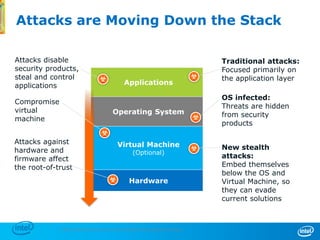
Attacks are Moving Down the Stack
9
Hardware
Applications
Operating System
Virtual Machine
(Optional)
Attacks disable
security products,
steal and control
applications
OS infected:
Threats are hidden
from security
products
Traditional attacks:
Focused primarily on
the application layer
Attacks against
hardware and
firmware affect
the root-of-trust
Compromise
virtual
machine
New stealth
attacks:
Embed themselves
below the OS and
Virtual Machine, so
they can evade
current solutions
* Other names and brands may be claimed as the property of others.
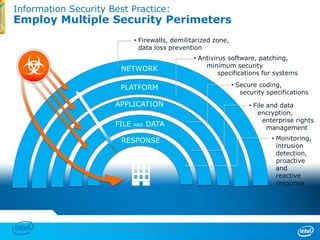
Information Security Best Practice:
Employ Multiple Security Perimeters
10
NETWORK
• Firewalls, demilitarized zone,
data loss prevention
PLATFORM
• Antivirus software, patching,
minimum security
specifications for systems
APPLICATION
• Secure coding,
security specifications
FILE AND DATA
• File and data
encryption,
enterprise rights
management
RESPONSE • Monitoring,
intrusion
detection,
proactive
and
reactive
response
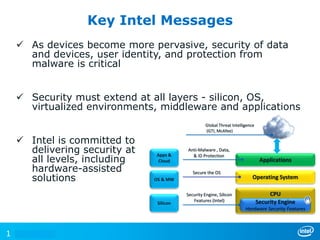
 As devices become more pervasive, security of data
and devices, user identity, and protection from
malware is critical
 Security must extend at all layers - silicon, OS,
virtualized environments, middleware and applications
 Intel is committed to
delivering security at
all levels, including
hardware-assisted
solutions
Key Intel Messages
1
Operating System
Applications
CPU
Anti-Malware , Data,
& ID Protection
Security Engine, Silicon
Features (Intel)
Secure the OS
Security Engine
Hardware Security Features
Apps &
Cloud
OS & MW
Silicon
Global Threat Intelligence
(GTI, McAfee)
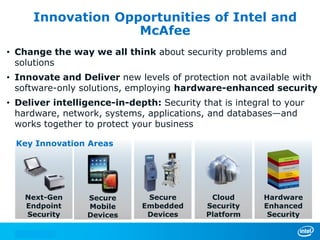
Innovation Opportunities of Intel and
McAfee
• Change the way we all think about security problems and
solutions
• Innovate and Deliver new levels of protection not available with
software-only solutions, employing hardware-enhanced security
• Deliver intelligence-in-depth: Security that is integral to your
hardware, network, systems, applications, and databases—and
works together to protect your business
Secure
Mobile
Devices
Secure
Embedded
Devices
Next-Gen
Endpoint
Security
Cloud
Security
Platform
Hardware
Enhanced
Security
Key Innovation Areas
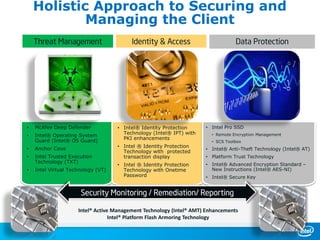
• McAfee Deep Defender
• Intel® Operating System
Guard (Intel® OS Guard)
• Anchor Cove
• Intel Trusted Execution
Technology (TXT)
• Intel Virtual Technology (VT)
• Intel® Identity Protection
Technology (Intel® IPT) with
PKI enhancements
• Intel ® Identity Protection
Technology with protected
transaction display
• Intel ® Identity Protection
Technology with Onetime
Password
• Intel Pro SSD
• Remote Encryption Management
• SCS Toolbox
• Intel® Anti-Theft Technology (Intel® AT)
• Platform Trust Technology
• Intel® Advanced Encryption Standard –
New Instructions (Intel® AES-NI)
• Intel® Secure Key
Holistic Approach to Securing and
Managing the Client
Security Monitoring / Remediation/ Reporting
Threat Management Identity & Access Data Protection
Intel® Active Management Technology (Intel® AMT) Enhancements
Intel® Platform Flash Armoring Technology
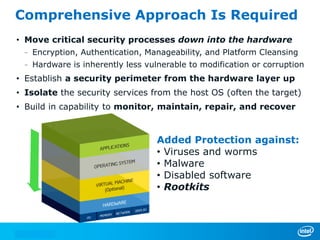
Comprehensive Approach Is Required
• Move critical security processes down into the hardware
– Encryption, Authentication, Manageability, and Platform Cleansing
– Hardware is inherently less vulnerable to modification or corruption
• Establish a security perimeter from the hardware layer up
• Isolate the security services from the host OS (often the target)
• Build in capability to monitor, maintain, repair, and recover
Added Protection against:
• Viruses and worms
• Malware
• Disabled software
• Rootkits
14
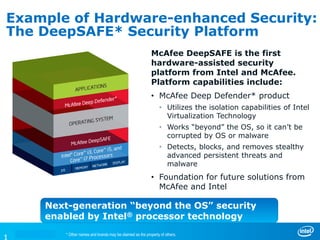
Example of Hardware-enhanced Security:
The DeepSAFE* Security Platform
McAfee DeepSAFE is the first
hardware-assisted security
platform from Intel and McAfee.
Platform capabilities include:
• McAfee Deep Defender* product
• Utilizes the isolation capabilities of Intel
Virtualization Technology
• Works “beyond” the OS, so it can’t be
corrupted by OS or malware
• Detects, blocks, and removes stealthy
advanced persistent threats and
malware
• Foundation for future solutions from
McAfee and Intel
Next-generation “beyond the OS” security
enabled by Intel® processor technology
* Other names and brands may be claimed as the property of others.
16
Hardware-enhanced Security:
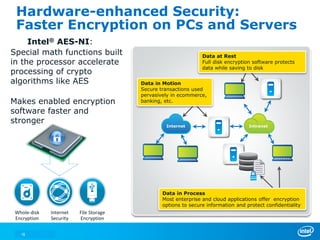
Faster Encryption on PCs and Servers
Whole-disk
Encryption
File Storage
Encryption
Internet
Security
Special math functions built
in the processor accelerate
processing of crypto
algorithms like AES
Makes enabled encryption
software faster and
stronger
Intel® AES-NI:
Internet Intranet
Data in Motion
Secure transactions used
pervasively in ecommerce,
banking, etc.
Data in Process
Most enterprise and cloud applications offer encryption
options to secure information and protect confidentiality
Data at Rest
Full disk encryption software protects
data while saving to disk
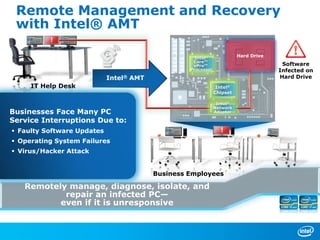
Remotely manage, diagnose, isolate, and
repair an infected PC—
even if it is unresponsive
Remote Management and Recovery
with Intel® AMT
IT Help Desk
Businesses Face Many PC
Service Interruptions Due to:
 Faulty Software Updates
 Operating System Failures
 Virus/Hacker Attack
Business Employees
Software
Infected on
Hard DriveIntel® AMT
Intel®
Core™
vPro™
Processor
Intel®
Chipset
Hard Drive
Intel®
Network
Adapter
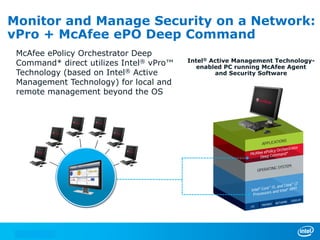
Intel® Active Management Technology-
enabled PC running McAfee Agent
and Security Software
Monitor and Manage Security on a Network:
vPro + McAfee ePO Deep Command
McAfee ePolicy Orchestrator Deep
Command* direct utilizes Intel® vPro™
Technology (based on Intel® Active
Management Technology) for local and
remote management beyond the OS
19
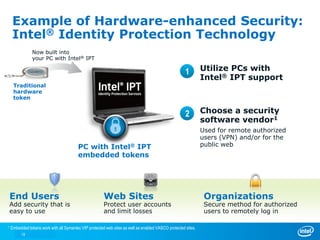
Example of Hardware-enhanced Security:
Intel® Identity Protection Technology
Utilize PCs with
Intel® IPT support
End Users
Add security that is
easy to use
Web Sites
Protect user accounts
and limit losses
Organizations
Secure method for authorized
users to remotely log in
1
Traditional
hardware
token
Now built into
your PC with Intel® IPT
Choose a security
software vendor1
Used for remote authorized
users (VPN) and/or for the
public webPC with Intel® IPT
embedded tokens
1 Embedded tokens work with all Symantec VIP protected web sites as well as enabled VASCO protected sites.
2
Traditional
hardware
token
Now built into
your PC with Intel® IPT
Example of Hardware-enhanced Security:
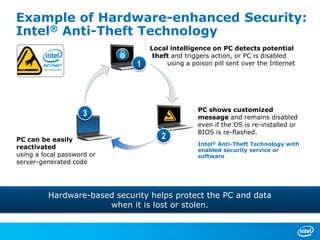
Intel® Anti-Theft Technology
Local intelligence on PC detects potential
theft and triggers action, or PC is disabled
using a poison pill sent over the Internet
PC shows customized
message and remains disabled
even if the OS is re-installed or
BIOS is re-flashed.
Intel® Anti-Theft Technology with
enabled security service or
software
PC can be easily
reactivated
using a local password or
server-generated code
Hardware-based security helps protect the PC and data
when it is lost or stolen.
1
2
3
21
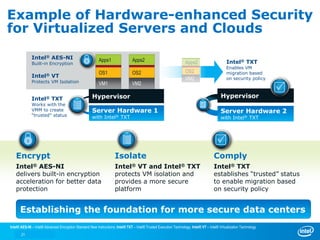
Example of Hardware-enhanced Security
for Virtualized Servers and Clouds
Establishing the foundation for more secure data centers
Isolate
Intel® VT and Intel® TXT
protects VM isolation and
provides a more secure
platform
Encrypt
Intel® AES-NI
delivers built-in encryption
acceleration for better data
protection
Comply
Intel® TXT
establishes “trusted” status
to enable migration based
on security policy
Apps1
OS1
VM1
Server Hardware 1
with Intel® TXT
HypervisorIntel® TXT
Works with the
VMM to create
“trusted” status
Intel® VT
Protects VM Isolation
Intel® TXT
Enables VM
migration based
on security policy
Apps2
OS2
VM2
Hypervisor
Intel® AES-NI
Built-in Encryption Apps2
OS2
VM2
Server Hardware 2
with Intel® TXT
Intel® AES-NI – Intel® Advanced Encryption Standard New Instructions; Intel® TXT – Intel® Trusted Execution Technology; Intel® VT – Intel® Virtualization Technology
22
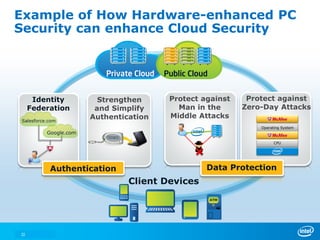
Protect against
Zero-Day Attacks
Identity
Federation
Strengthen
and Simplify
Authentication
Protect against
Man in the
Middle Attacks
Data ProtectionAuthentication
Operating System
CPU
Example of How Hardware-enhanced PC
Security can enhance Cloud Security
Private Cloud Public Cloud
Client Devices
Salesforce.com
Google.com
* Other names and brands may be claimed as the property of others.
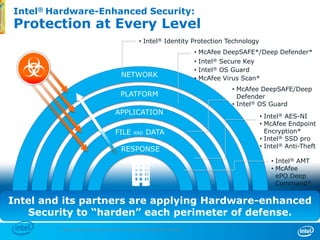
Intel® Hardware-Enhanced Security:
Protection at Every Level
23
NETWORK
RESPONSE
PLATFORM
APPLICATION
FILE AND DATA
• Intel® Identity Protection Technology
• Intel® AES-NI
• McAfee Endpoint
Encryption*
• Intel® SSD pro
• Intel® Anti-Theft
• McAfee DeepSAFE/Deep
Defender
• Intel® OS Guard
• McAfee DeepSAFE*/Deep Defender*
• Intel® Secure Key
• Intel® OS Guard
• McAfee Virus Scan*
• Intel® AMT
• McAfee
ePO Deep
Command*
Intel and its partners are applying Hardware-enhanced
Security to “harden” each perimeter of defense.
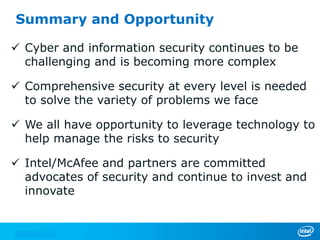
Summary and Opportunity
 Cyber and information security continues to be
challenging and is becoming more complex
 Comprehensive security at every level is needed
to solve the variety of problems we face
 We all have opportunity to leverage technology to
help manage the risks to security
 Intel/McAfee and partners are committed
advocates of security and continue to invest and
innovate
Thank You!

Intel IT Experts Tour Cyber Security - Matthew Rosenquist 2013

  • 1.
    Intel® Cyber-Security Briefing: Trends,Solutions, and Opportunities Matthew Rosenquist, Strategic Security Planner, PC Client Group, Intel Corp
  • 2.
    INFORMATION IN THISDOCUMENT IS PROVIDED IN CONNECTION WITH INTEL® PRODUCTS. NO LICENSE, EXPRESS OR IMPLIED, BY ESTOPPEL OR OTHERWISE, TO ANY INTELLECTUAL PROPERTY RIGHTS IS GRANTED BY THIS DOCUMENT. EXCEPT AS PROVIDED IN INTEL’S TERMS AND CONDITIONS OF SALE FOR SUCH PRODUCTS, INTEL ASSUMES NO LIABILITY WHATSOEVER, AND INTEL DISCLAIMS ANY EXPRESS OR IMPLIED WARRANTY, RELATING TO SALE AND/OR USE OF INTEL® PRODUCTS INCLUDING LIABILITY OR WARRANTIES RELATING TO FITNESS FOR A PARTICULAR PURPOSE, MERCHANTABILITY, OR INFRINGEMENT OF ANY PATENT, COPYRIGHT OR OTHER INTELLECTUAL PROPERTY RIGHT. INTEL PRODUCTS ARE NOT INTENDED FOR USE IN MEDICAL, LIFE SAVING, OR LIFE SUSTAINING APPLICATIONS. Intel may make changes to specifications and product descriptions at any time, without notice. All products, dates, and figures specified are preliminary based on current expectations, and are subject to change without notice. Intel, processors, chipsets, and desktop boards may contain design defects or errors known as errata, which may cause the product to deviate from published specifications. Current characterized errata are available on request. Software and workloads used in performance tests may have been optimized for performance only on Intel microprocessors. Performance tests, such as SYSmark* and MobileMark*, are measured using specific computer systems, components, software, operations and functions. Any change to any of those factors may cause the results to vary. You should consult other information and performance tests to assist you in fully evaluating your contemplated purchases, including the performance of that product when combined with other products. For more information go to http://www.intel.com/performance Intel, Intel Inside, the Intel logo, Intel Core, and Xeon are trademarks of Intel Corporation in the United States and other countries. Security features enabled by Intel® AMT require an enabled chipset, network hardware and software and a corporate network connection. Intel AMT may not be available or certain capabilities may be limited over a host OS-based VPN or when connecting wirelessly, on battery power, sleeping, hibernating or powered off. Setup requires configuration and may require scripting with the management console or further integration into existing security frameworks, and modifications or implementation of new business processes. For more information, see http://www.intel.com/technology/manage/iamt. No system can provide absolute security under all conditions. Requires an enabled chipset, BIOS, firmware and software and a subscription with a capable Service Provider. Consult your system manufacturer and Service Provider for availability and functionality. Intel assumes no liability for lost or stolen data and/or systems or any other damages resulting thereof. For more information, visit http://www.intel.com/go/anti-theft Intel® vPro™ Technology is sophisticated and requires setup and activation. Availability of features and results will depend upon the setup and configuration of your hardware, software and IT environment. To learn more visit: http://www.intel.com/technology/vpro The original equipment manufacturer must provide TPM functionality, which requires a TPM-supported BIOS. TPM functionality must be initialized and may not be available in all countries. Intel® AES-NI requires a computer system with an AES-NI enabled processor, as well as non-Intel software to execute the instructions in the correct sequence. AES-NI is available on select Intel® processors. For availability, consult your reseller or system manufacturer. For more information, see http://software.intel.com/en-us/articles/intel-advanced-encryption-standard-instructions-aes-ni/ *Other names and brands may be claimed as the property of others. Copyright © 2011 Intel Corporation, All Rights Reserved Legal Notices and Disclaimers
  • 3.
    3 Agenda • IT SecurityTrends and Landscape • Intel + McAfee: What it means • A comprehensive approach for security • Examples of Hardware-assisted Security • Open Discussion: Questions, Challenges, Pain-Points
  • 4.
    4 Computing Trends andSecurity Implications Escalating Threat Landscape Explosion of Internet Devices Complexity of the IT Model Private & Public Cloud Virtualization Consumerization of IT As a consequence: The “Attack Surface” and the challenges to protect against security risks continue to grow in size and complexity
  • 5.
    Estimates for 2012:32% of computers worldwide were infected by malware “The Malware Tsunami” 95,0001+ per day new unique malware samples 118 million Unique malware known to exist 4400% Mobile malware increase Stealth Attacks Non-detectable malware ? Malware is a good measure of how attackers are investing in undermining security Attacks and impacts are not limited to malware… 1Up from 60k per/day in 2011
  • 6.
    Tools of theModern Hacker Application Malware: Viruses, worms, Trojans, bots, web-based code, etc. continue to infect and run at the application layer of devices Social Engineering: Targeting people to undermine security, expose data, and gain access Advanced Threats: Internal or technologically advanced campaigns which undermine security of a targeted environment. Usually stealthy, creative, and persistent Kernel-mode Rootkit: Lives and operates below the operating system, to control the OS and evade detection by OS-level security measures. Can cloak other malicious activities
  • 7.
    7 People are partof the problem Security must address Technology & Behaviors Mobile Device Loss or Theft Corporate or Personal Stolen Credentials Online Collaboration Tools Social Networking Data Phishing Attacks and Spear Phishing Without adequate training, organizations risk workers being the “weakest link”
  • 8.
    8 Motivations for Hacking Motivationsfor hacking continue to expand, fueling a greater breadth and depth of targets Social Hacktivism SLAMMER, ILOVEYOU ZEUS, SPYEYE AURORA, DUKU STUXNET, FLAME Physical Harm State-Sponsored Cyber Espionage Organized Crime & Hack for Profit Hacking for Fun LOIC/ Data Theft
  • 9.
    * Other namesand brands may be claimed as the property of others. Attacks are Moving Down the Stack 9 Hardware Applications Operating System Virtual Machine (Optional) Attacks disable security products, steal and control applications OS infected: Threats are hidden from security products Traditional attacks: Focused primarily on the application layer Attacks against hardware and firmware affect the root-of-trust Compromise virtual machine New stealth attacks: Embed themselves below the OS and Virtual Machine, so they can evade current solutions
  • 10.
    * Other namesand brands may be claimed as the property of others. Information Security Best Practice: Employ Multiple Security Perimeters 10 NETWORK • Firewalls, demilitarized zone, data loss prevention PLATFORM • Antivirus software, patching, minimum security specifications for systems APPLICATION • Secure coding, security specifications FILE AND DATA • File and data encryption, enterprise rights management RESPONSE • Monitoring, intrusion detection, proactive and reactive response
  • 11.
     As devicesbecome more pervasive, security of data and devices, user identity, and protection from malware is critical  Security must extend at all layers - silicon, OS, virtualized environments, middleware and applications  Intel is committed to delivering security at all levels, including hardware-assisted solutions Key Intel Messages 1 Operating System Applications CPU Anti-Malware , Data, & ID Protection Security Engine, Silicon Features (Intel) Secure the OS Security Engine Hardware Security Features Apps & Cloud OS & MW Silicon Global Threat Intelligence (GTI, McAfee)
  • 12.
    Innovation Opportunities ofIntel and McAfee • Change the way we all think about security problems and solutions • Innovate and Deliver new levels of protection not available with software-only solutions, employing hardware-enhanced security • Deliver intelligence-in-depth: Security that is integral to your hardware, network, systems, applications, and databases—and works together to protect your business Secure Mobile Devices Secure Embedded Devices Next-Gen Endpoint Security Cloud Security Platform Hardware Enhanced Security Key Innovation Areas
  • 13.
    • McAfee DeepDefender • Intel® Operating System Guard (Intel® OS Guard) • Anchor Cove • Intel Trusted Execution Technology (TXT) • Intel Virtual Technology (VT) • Intel® Identity Protection Technology (Intel® IPT) with PKI enhancements • Intel ® Identity Protection Technology with protected transaction display • Intel ® Identity Protection Technology with Onetime Password • Intel Pro SSD • Remote Encryption Management • SCS Toolbox • Intel® Anti-Theft Technology (Intel® AT) • Platform Trust Technology • Intel® Advanced Encryption Standard – New Instructions (Intel® AES-NI) • Intel® Secure Key Holistic Approach to Securing and Managing the Client Security Monitoring / Remediation/ Reporting Threat Management Identity & Access Data Protection Intel® Active Management Technology (Intel® AMT) Enhancements Intel® Platform Flash Armoring Technology
  • 14.
    Comprehensive Approach IsRequired • Move critical security processes down into the hardware – Encryption, Authentication, Manageability, and Platform Cleansing – Hardware is inherently less vulnerable to modification or corruption • Establish a security perimeter from the hardware layer up • Isolate the security services from the host OS (often the target) • Build in capability to monitor, maintain, repair, and recover Added Protection against: • Viruses and worms • Malware • Disabled software • Rootkits 14
  • 15.
    Example of Hardware-enhancedSecurity: The DeepSAFE* Security Platform McAfee DeepSAFE is the first hardware-assisted security platform from Intel and McAfee. Platform capabilities include: • McAfee Deep Defender* product • Utilizes the isolation capabilities of Intel Virtualization Technology • Works “beyond” the OS, so it can’t be corrupted by OS or malware • Detects, blocks, and removes stealthy advanced persistent threats and malware • Foundation for future solutions from McAfee and Intel Next-generation “beyond the OS” security enabled by Intel® processor technology * Other names and brands may be claimed as the property of others.
  • 16.
    16 Hardware-enhanced Security: Faster Encryptionon PCs and Servers Whole-disk Encryption File Storage Encryption Internet Security Special math functions built in the processor accelerate processing of crypto algorithms like AES Makes enabled encryption software faster and stronger Intel® AES-NI: Internet Intranet Data in Motion Secure transactions used pervasively in ecommerce, banking, etc. Data in Process Most enterprise and cloud applications offer encryption options to secure information and protect confidentiality Data at Rest Full disk encryption software protects data while saving to disk
  • 17.
    Remotely manage, diagnose,isolate, and repair an infected PC— even if it is unresponsive Remote Management and Recovery with Intel® AMT IT Help Desk Businesses Face Many PC Service Interruptions Due to:  Faulty Software Updates  Operating System Failures  Virus/Hacker Attack Business Employees Software Infected on Hard DriveIntel® AMT Intel® Core™ vPro™ Processor Intel® Chipset Hard Drive Intel® Network Adapter
  • 18.
    Intel® Active ManagementTechnology- enabled PC running McAfee Agent and Security Software Monitor and Manage Security on a Network: vPro + McAfee ePO Deep Command McAfee ePolicy Orchestrator Deep Command* direct utilizes Intel® vPro™ Technology (based on Intel® Active Management Technology) for local and remote management beyond the OS
  • 19.
    19 Example of Hardware-enhancedSecurity: Intel® Identity Protection Technology Utilize PCs with Intel® IPT support End Users Add security that is easy to use Web Sites Protect user accounts and limit losses Organizations Secure method for authorized users to remotely log in 1 Traditional hardware token Now built into your PC with Intel® IPT Choose a security software vendor1 Used for remote authorized users (VPN) and/or for the public webPC with Intel® IPT embedded tokens 1 Embedded tokens work with all Symantec VIP protected web sites as well as enabled VASCO protected sites. 2 Traditional hardware token Now built into your PC with Intel® IPT
  • 20.
    Example of Hardware-enhancedSecurity: Intel® Anti-Theft Technology Local intelligence on PC detects potential theft and triggers action, or PC is disabled using a poison pill sent over the Internet PC shows customized message and remains disabled even if the OS is re-installed or BIOS is re-flashed. Intel® Anti-Theft Technology with enabled security service or software PC can be easily reactivated using a local password or server-generated code Hardware-based security helps protect the PC and data when it is lost or stolen. 1 2 3
  • 21.
    21 Example of Hardware-enhancedSecurity for Virtualized Servers and Clouds Establishing the foundation for more secure data centers Isolate Intel® VT and Intel® TXT protects VM isolation and provides a more secure platform Encrypt Intel® AES-NI delivers built-in encryption acceleration for better data protection Comply Intel® TXT establishes “trusted” status to enable migration based on security policy Apps1 OS1 VM1 Server Hardware 1 with Intel® TXT HypervisorIntel® TXT Works with the VMM to create “trusted” status Intel® VT Protects VM Isolation Intel® TXT Enables VM migration based on security policy Apps2 OS2 VM2 Hypervisor Intel® AES-NI Built-in Encryption Apps2 OS2 VM2 Server Hardware 2 with Intel® TXT Intel® AES-NI – Intel® Advanced Encryption Standard New Instructions; Intel® TXT – Intel® Trusted Execution Technology; Intel® VT – Intel® Virtualization Technology
  • 22.
    22 Protect against Zero-Day Attacks Identity Federation Strengthen andSimplify Authentication Protect against Man in the Middle Attacks Data ProtectionAuthentication Operating System CPU Example of How Hardware-enhanced PC Security can enhance Cloud Security Private Cloud Public Cloud Client Devices Salesforce.com Google.com
  • 23.
    * Other namesand brands may be claimed as the property of others. Intel® Hardware-Enhanced Security: Protection at Every Level 23 NETWORK RESPONSE PLATFORM APPLICATION FILE AND DATA • Intel® Identity Protection Technology • Intel® AES-NI • McAfee Endpoint Encryption* • Intel® SSD pro • Intel® Anti-Theft • McAfee DeepSAFE/Deep Defender • Intel® OS Guard • McAfee DeepSAFE*/Deep Defender* • Intel® Secure Key • Intel® OS Guard • McAfee Virus Scan* • Intel® AMT • McAfee ePO Deep Command* Intel and its partners are applying Hardware-enhanced Security to “harden” each perimeter of defense.
  • 24.
    Summary and Opportunity Cyber and information security continues to be challenging and is becoming more complex  Comprehensive security at every level is needed to solve the variety of problems we face  We all have opportunity to leverage technology to help manage the risks to security  Intel/McAfee and partners are committed advocates of security and continue to invest and innovate
  • 25.