Dell EMC validates your virtualized
Genetec video management system
before it reaches your hands
The Dell EMC PowerEdge R740xd2 server
powered by Intel Xeon processors handled a
240-camera workload without failure
Video surveillance is on the rise, with estimates of 180 million
network and CCTV surveillance cameras shipped worldwide in
2019 alone.1
For digital surveillance infrastructure to be effective,
your cameras have to record around the clock without issue, and
your servers must be able to process and store that data without
disruption due to hardware issues such as disk failures.
Dell EMC™
offers software and hardware solutions validated by
its Surveillance Validation Labs to attack this need. We worked
with engineers at the Dell EMC Surveillance Validation Labs in
Durham, NC, to validate the Dell EMC PowerEdge™
R740xd2
server, powered by Intel®
Xeon®
Gold 5120 processors, and a
virtualized instance of Genetec™
Security Center 5.8, a software
platform for managing video surveillance. The Dell EMC
solution passed validation testing with 240 cameras recording
continuously—first during normal operation and then during a
simulated disk failure and rebuild—indicating that it’s a reliable
surveillance infrastructure solution for the Genetec platform.
If your organization is considering a virtualized Genetec Security
Center video management solution (VMS), Dell EMC PowerEdge
R740xd2 servers powered by Intel processors offer a validated
surveillance infrastructure that could help protect your customers,
employees, inventory, and more.
Efficient recording
under normal load
Reliable performance
during simulated disk
failure and rebuild
192 MB/s average
disk throughput
15% average CPU
utilization
199 MB/s average
disk throughput
16% average CPU
utilization
Different surveillance
setups met stringent
verification standards
Dell EMC validates your virtualized Genetec video management system before it reaches your hands	 January 2020
A Principled Technologies report: Hands-on testing. Real-world results.
What is the Dell EMC Surveillance Validation Lab?
Not all major data center technology suppliers have their own validation lab for surveillance solutions, which is
what makes Dell EMC stand out in the surveillance infrastructure marketplace. The Surveillance Validation Lab
works with leading surveillance providers from the Dell EMC partner ecosystem to test their video management
solutions. Dell EMC then uses those findings to help organizations choose a tested and validated solution that
meets the organizations’ demands. Dell EMC believes their Surveillance Lab is the “most advanced, longest
running video surveillance validation lab in the world.”4
Globally, Dell EMC runs three surveillance testing and
validation labs, which are part of a network of 20 test centers total.5
Dell EMC claims to be the number one
global surveillance infrastructure provider.6
Engineers in the Surveillance Lab put hardware and software solutions through the paces in what Dell EMC calls
extreme, real-world scenarios.7
Extreme conditions include zero video frame drop over multiple failure scenarios,
including drive, network, and controllers failures. The performance numbers the Dell EMC Surveillance Lab
produces are not hero numbers, but worse case numbers, as the lab aims to show customers they can maintain
performance without video loss under strenuous conditions.
Because the Surveillance Lab looks for worst case realistic test scenarios, their results may vary when compared
to the results from other partners (i.e., integrators and VMS vendors).
Hardware and software validations include:8
• Virtual/non-virtual
• Best practices
• Compute
• Networking
• Storage
• ISV application
Dell EMC also provides validation support that includes “solution documentation including reference
architectures, white papers, technical notes, sizing guidelines, and technical presentations.”9
When your business
implements a VMS validated by Dell EMC, you do so knowing that Dell EMC has already tested and approved it
for use.
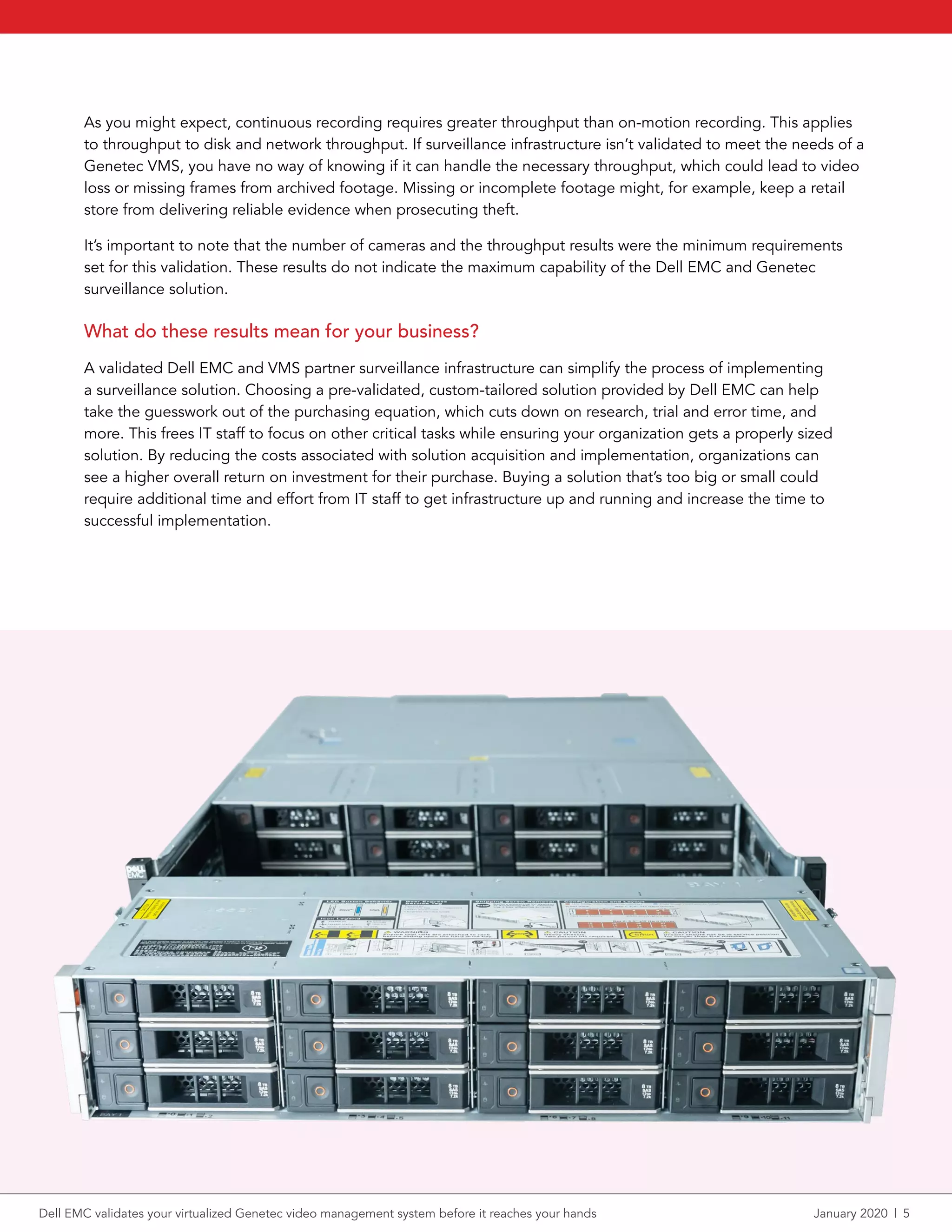
About the Dell EMC PowerEdge R740xd2 server
The enterprise-grade PowerEdge R740xd2 server allows organizations to “[b]ring compute closer to storage”
and help “save space” with 2U design.2
With the PowerEdge R740xd2, organizations can store up to 364 TB of
data in a 2U rack server or scale out to 7.2 PB (520 drives) in a 42U rack full of R740xd2 servers.3
Learn more in
the Dell EMC PowerEdge R740xd2 server data sheet.
The PowerEdge R740xd2 server used in this testing had two Intel Xeon Gold 5120 processors, 28 physical cores,
and 256 GB of memory, and it ran Microsoft®
Windows Server®
2016 Datacenter Edition. For storage, the server
had 26 8TB 3.5-inch NLSAS HDDs. We configured the storage under test using the Dell EMC PERC H730P Mini
controller and created a RAID6 disk group with two dedicated hot spares for a total usable capacity of 160 TB.
Dell EMC validates your virtualized Genetec video management system before it reaches your hands	 January 2020  |  2
About Genetec Security Center
According to Genetec, the unified security platform of Genetec Security Center merges IP security systems
within a single interface.10
About Security Center, Genetec says: “From access control, video surveillance, and
automatic license plate recognition to communications, intrusion detection, and analytics, Security Center
empowers your organization through enhanced situational awareness, unified command and control, and
connectivity to the cloud.”11
Security Center allows organizations to consolidate current independent security
tools into a unified security solution. Learn more about Genetec Security Center.
How we tested and what we found
We worked with Dell EMC engineers to validate the Intel Xeon processor-powered PowerEdge R740xd2 server
running the virtualized Genetec VMS. The Dell EMC Surveillance Lab in Durham, NC, housed the server under
test and testing equipment. Our engineers installed BIOS and firmware updates. Dell EMC engineers configured
the networking, deployed the software required to complete the validations, and performed the validation
testing. Our engineers ensured the server performed optimally during testing. We also reviewed raw testing
results as well as Dell EMC Live Optics™
storage and server performance reports captured during validation
testing to ensure that Dell EMC engineers completed the validation successfully without error.
A surveillance solution can fail to receive validation by either dropping one or more frames or losing video. The
virtualized Genetec solution passed the validation testing in two different use cases: (1) normal server load with
240 cameras recording continuously, and (2) 240 cameras simultaneously recording while experiencing a server
disk failure and a disk rebuild.
Genetec Security Center uses virtual Archivers, which discover camera feeds, check cameras to see if they are
recording, process all video and multimedia streams, and commit them to storage. The results in this report show
data for four virtual Archivers. In both use cases, each Archiver had 60 camera streams, for a total of 240.
About Intel Xeon Scalable processors
According to Intel, their Xeon Scalable processors support “hybrid cloud infrastructure[s] and most demanding
applications - including in-memory analytics, artifical intelligence, autonomous driving, high performance
computing (HPC), and network transformation.”12
Intel Xeon Scalable processors are available in four feature
configurations (Platinum, Gold, Silver, and Bronze) to match the needs of organizations operating at many
different levels. Learn more about Intel Xeon Scalable processors.
Dell EMC validates your virtualized Genetec video management system before it reaches your hands	 January 2020  |  3
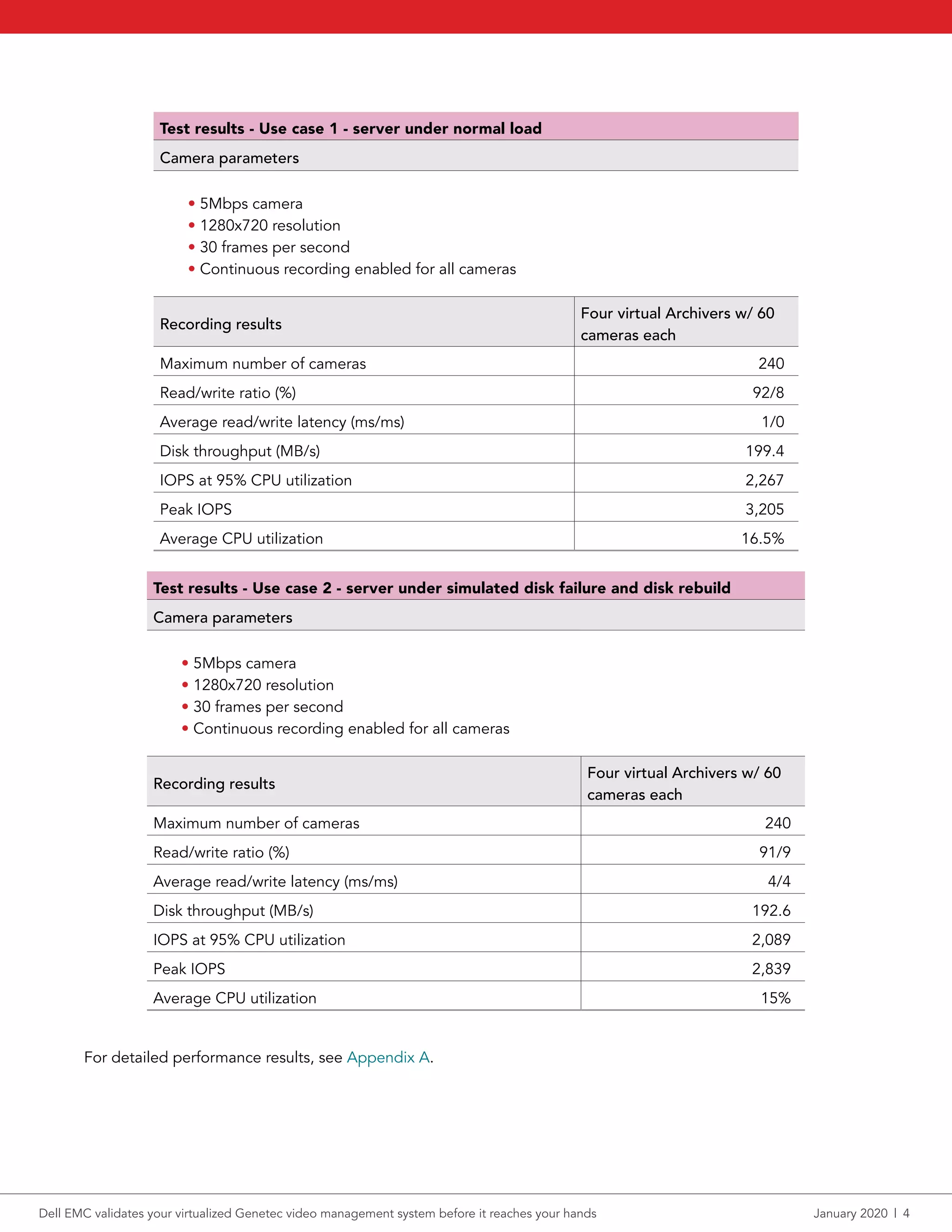
Test results - Use case 1 - server under normal load
Camera parameters
• 5Mbps camera
• 1280x720 resolution
• 30 frames per second
• Continuous recording enabled for all cameras
Recording results
Four virtual Archivers w/ 60
cameras each
Maximum number of cameras 240
Read/write ratio (%) 92/8
Average read/write latency (ms/ms) 1/0
Disk throughput (MB/s) 199.4
IOPS at 95% CPU utilization 2,267
Peak IOPS 3,205
Average CPU utilization 16.5%
Test results - Use case 2 - server under simulated disk failure and disk rebuild
Camera parameters
• 5Mbps camera
• 1280x720 resolution
• 30 frames per second
• Continuous recording enabled for all cameras
Recording results
Four virtual Archivers w/ 60
cameras each
Maximum number of cameras 240
Read/write ratio (%) 91/9
Average read/write latency (ms/ms) 4/4
Disk throughput (MB/s) 192.6
IOPS at 95% CPU utilization 2,089
Peak IOPS 2,839
Average CPU utilization 15%
For detailed performance results, see Appendix A.
Dell EMC validates your virtualized Genetec video management system before it reaches your hands	 January 2020  |  4
As you might expect, continuous recording requires greater throughput than on-motion recording. This applies
to throughput to disk and network throughput. If surveillance infrastructure isn’t validated to meet the needs of a
Genetec VMS, you have no way of knowing if it can handle the necessary throughput, which could lead to video
loss or missing frames from archived footage. Missing or incomplete footage might, for example, keep a retail
store from delivering reliable evidence when prosecuting theft.
It’s important to note that the number of cameras and the throughput results were the minimum requirements
set for this validation. These results do not indicate the maximum capability of the Dell EMC and Genetec
surveillance solution.
What do these results mean for your business?
A validated Dell EMC and VMS partner surveillance infrastructure can simplify the process of implementing
a surveillance solution. Choosing a pre-validated, custom-tailored solution provided by Dell EMC can help
take the guesswork out of the purchasing equation, which cuts down on research, trial and error time, and
more. This frees IT staff to focus on other critical tasks while ensuring your organization gets a properly sized
solution. By reducing the costs associated with solution acquisition and implementation, organizations can
see a higher overall return on investment for their purchase. Buying a solution that’s too big or small could
require additional time and effort from IT staff to get infrastructure up and running and increase the time to
successful implementation.
Dell EMC validates your virtualized Genetec video management system before it reaches your hands	 January 2020  |  5
Conclusion
The right digital surveillance infrastructure may put your organization in a good position to handle the security
issues of today and tomorrow. But reliability in surveillance infrastructure should be confirmed—you’re protecting
your customers, employees, and inventory, among other vital elements. The Dell EMC Surveillance Validation
Labs can help your organization choose tested and validated solutions that meet your needs. We worked with
engineers at the labs to validate a Genetec Security Center VMS on a Dell EMC PowerEdge R740xd2 server. The
solution proved to be reliable by meeting verification requirements in two use cases, demonstrating its reliability
by handling the tests with no dropped frames. This validation shows that your organization can be confident
running these Genetec Security Center VMS configurations on Dell EMC PowerEdge R740xd2 servers for a
dependable digital infrastructure.
1	 IHS Markit, “Top Video Surveillance Trends for 2019,” accessed December 19, 2019,
https://cdn.ihs.com/www/pdf/1218/IHSMarkit-Security-Technologies-Trends-2019.pdf.
2	 Dell EMC, “R740xd2 Spec Sheet,” accessed December 12, 2019,
https://i.dell.com/sites/csdocuments/Product_Docs/en/poweredge-r740xd2-spec-sheet.pdf.
3	 Dell EMC, “R740xd2 Spec Sheet.”
4	 Dell EMC, “The Secret To A Successful Surveillance Solution,” accessed December 12, 2019,
https://www.dellemc.com/en-us/collaterals/unauth/brochures/oem-surveillance-infographic.pdf.
5	 Dell EMC, “The Secret To A Successful Surveillance Solution.”
6	 Dell EMC, “Protecting what matters to make the world safer,” accessed December 12, 2019,
https://www.dellemc.com/en-us/solutions/surveillance-security.htm#scroll=off.
7	 Dell EMC, “Protecting what matters to make the world safer.”
8	 Dell EMC, “Dell EMC Safety & Surveillance Validation Labs: Protecting what matters to make the world safer,”
accessed December 19, 2019,
https://www.dellemc.com/th-th/collaterals/unauth/offering-overview-documents/h17004-dellemc-surveillence-sb.pdf.
9	 Dell EMC, “Dell EMC Safety & Surveillance Validation Labs: Protecting what matters to make the world safer.”
10	 Genetec, “Genetec Security Center: Comprehensive unified security,” accessed December 12, 2019,
https://www.genetec.com/solutions/all-products/security-center.
11	 Genetec, “Genetec Security Center: Comprehensive unified security.”
12	 Intel, “Intel Xeon Scalable processors,” accessed December 12, 2019,
https://www.intel.com/content/www/us/en/processors/xeon/scalable/xeon-scalable-platform.html.
Dell EMC validates your virtualized Genetec video management system before it reaches your hands	 January 2020  |  6
We concluded our validation on December 10, 2019. The results in this report reflect configurations that we
finalized with Dell EMC on December 10, 2019 or earlier. Unavoidably, these configurations may not represent
the latest versions available when this report appears.
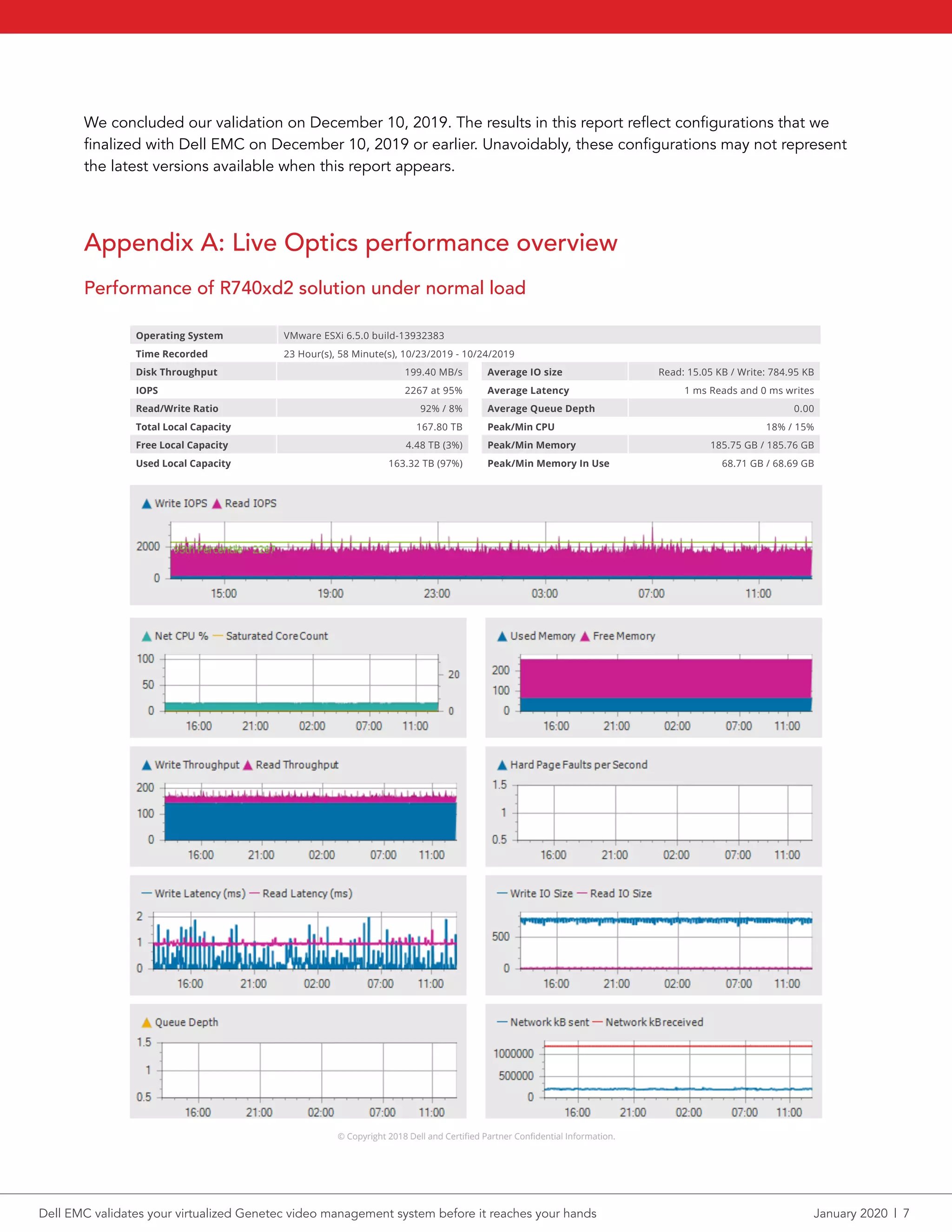
Appendix A: Live Optics performance overview
Performance of R740xd2 solution under normal load
© Copyright 2018 Dell and Certified Partner Confidential Information.
Disk Throughput 199.40 MB/s
IOPS 2267 at 95%
Read/Write Ratio 92% / 8%
Total Local Capacity 167.80 TB
Free Local Capacity 4.48 TB (3%)
Used Local Capacity 163.32 TB (97%)
Average IO size Read: 15.05 KB / Write: 784.95 KB
Average Latency 1 ms Reads and 0 ms writes
Average Queue Depth 0.00
Peak/Min CPU 18% / 15%
Peak/Min Memory 185.75 GB / 185.76 GB
Peak/Min Memory In Use 68.71 GB / 68.69 GB
Individual Server Report: r740xd2-5.physec.gso.lab.emc.com
Operating System VMware ESXi 6.5.0 build-13932383
Time Recorded 23 Hour(s), 58 Minute(s), 10/23/2019 - 10/24/2019
© Copyright 2018 Dell and Certified Partner Confidential Information.
Dell EMC validates your virtualized Genetec video management system before it reaches your hands	 January 2020  |  7
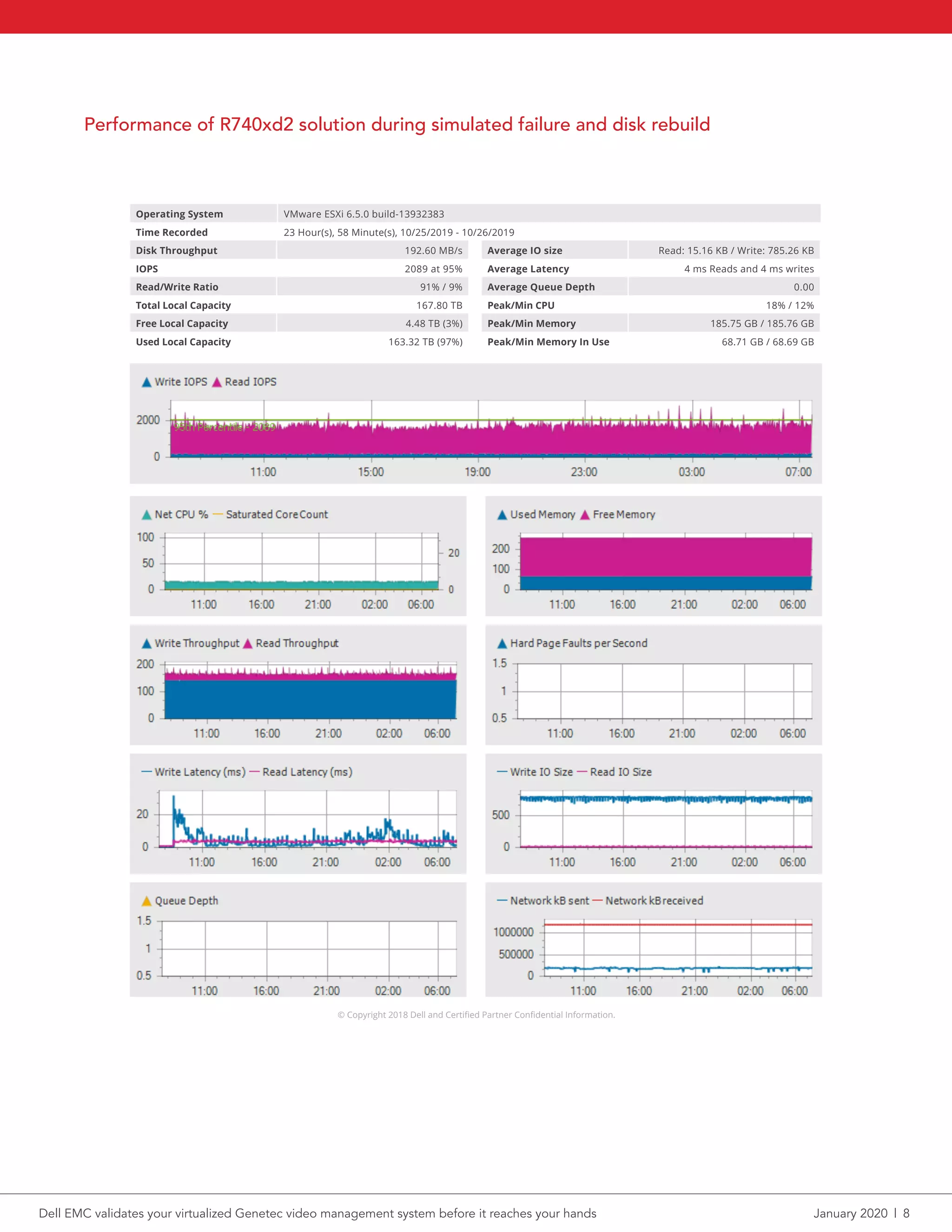
Performance of R740xd2 solution during simulated failure and disk rebuild
© Copyright 2018 Dell and Certified Partner Confidential Information.
Disk Throughput 192.60 MB/s
IOPS 2089 at 95%
Read/Write Ratio 91% / 9%
Total Local Capacity 167.80 TB
Free Local Capacity 4.48 TB (3%)
Used Local Capacity 163.32 TB (97%)
Average IO size Read: 15.16 KB / Write: 785.26 KB
Average Latency 4 ms Reads and 4 ms writes
Average Queue Depth 0.00
Peak/Min CPU 18% / 12%
Peak/Min Memory 185.75 GB / 185.76 GB
Peak/Min Memory In Use 68.71 GB / 68.69 GB
Individual Server Report: r740xd2-5.physec.gso.lab.emc.com
Operating System VMware ESXi 6.5.0 build-13932383
Time Recorded 23 Hour(s), 58 Minute(s), 10/25/2019 - 10/26/2019
© Copyright 2018 Dell and Certified Partner Confidential Information.
Individual Local Disk Report: datastore1 (5)
Operating System VMware ESXi 6.5.0 build-13932383
Dell EMC validates your virtualized Genetec video management system before it reaches your hands	 January 2020  |  8
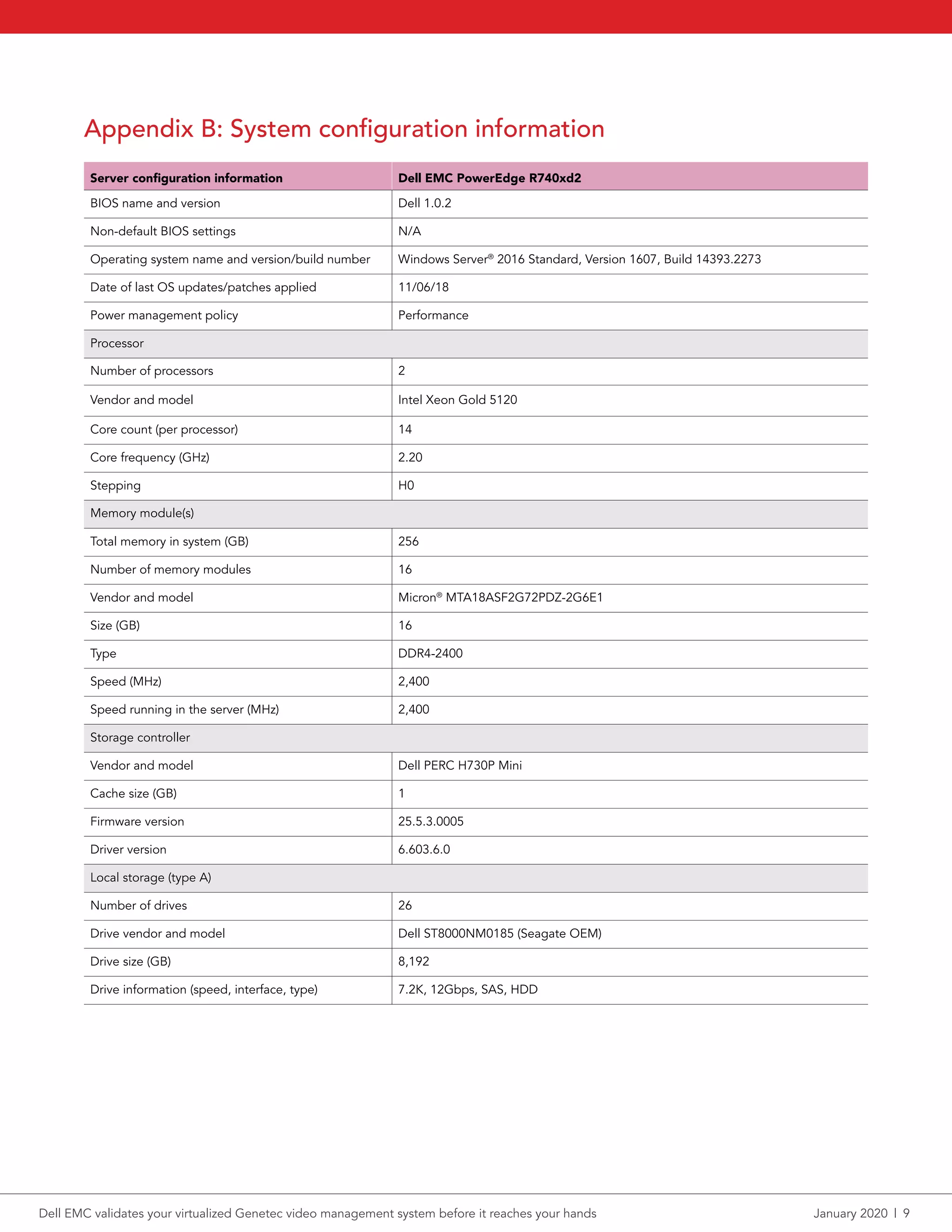
Appendix B: System configuration information
Server configuration information Dell EMC PowerEdge R740xd2
BIOS name and version Dell 1.0.2
Non-default BIOS settings N/A
Operating system name and version/build number Windows Server®
2016 Standard, Version 1607, Build 14393.2273
Date of last OS updates/patches applied 11/06/18
Power management policy Performance
Processor
Number of processors 2
Vendor and model Intel Xeon Gold 5120
Core count (per processor) 14
Core frequency (GHz) 2.20
Stepping H0
Memory module(s)
Total memory in system (GB) 256
Number of memory modules 16
Vendor and model Micron®
MTA18ASF2G72PDZ-2G6E1
Size (GB) 16
Type DDR4-2400
Speed (MHz) 2,400
Speed running in the server (MHz) 2,400
Storage controller
Vendor and model Dell PERC H730P Mini
Cache size (GB) 1
Firmware version 25.5.3.0005
Driver version 6.603.6.0
Local storage (type A)
Number of drives 26
Drive vendor and model Dell ST8000NM0185 (Seagate OEM)
Drive size (GB) 8,192
Drive information (speed, interface, type) 7.2K, 12Gbps, SAS, HDD
Dell EMC validates your virtualized Genetec video management system before it reaches your hands	 January 2020  |  9
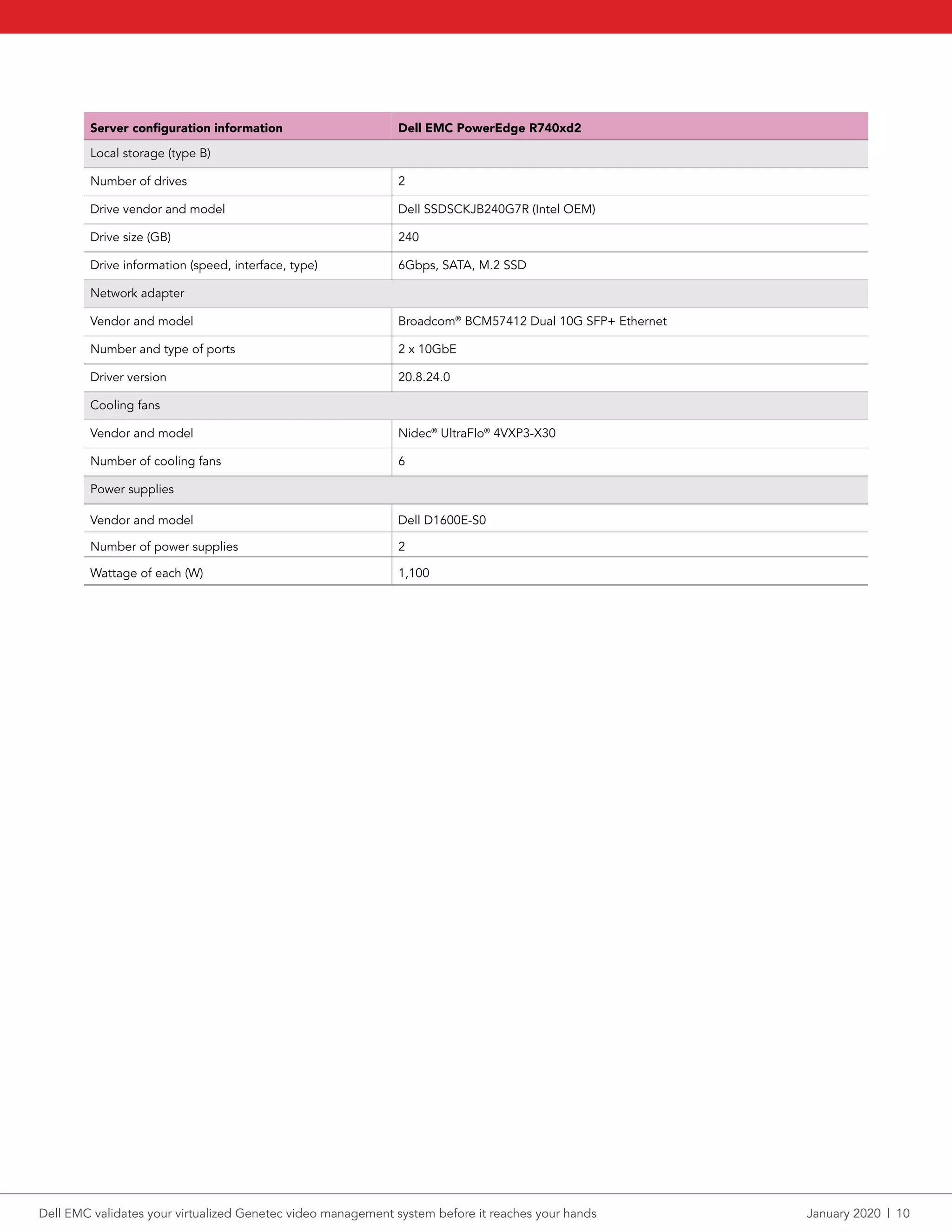
Server configuration information Dell EMC PowerEdge R740xd2
Local storage (type B)
Number of drives 2
Drive vendor and model Dell SSDSCKJB240G7R (Intel OEM)
Drive size (GB) 240
Drive information (speed, interface, type) 6Gbps, SATA, M.2 SSD
Network adapter
Vendor and model Broadcom®
BCM57412 Dual 10G SFP+ Ethernet
Number and type of ports 2 x 10GbE
Driver version 20.8.24.0
Cooling fans
Vendor and model Nidec®
UltraFlo®
4VXP3-X30
Number of cooling fans 6
Power supplies
Vendor and model Dell D1600E-S0
Number of power supplies 2
Wattage of each (W) 1,100
Dell EMC validates your virtualized Genetec video management system before it reaches your hands	 January 2020  |  10
Principled Technologies is a registered trademark of Principled Technologies, Inc.
All other product names are the trademarks of their respective owners.
DISCLAIMER OF WARRANTIES; LIMITATION OF LIABILITY:
Principled Technologies, Inc. has made reasonable efforts to ensure the accuracy and validity of its testing, however, Principled Technologies, Inc. specifically disclaims
any warranty, expressed or implied, relating to the test results and analysis, their accuracy, completeness or quality, including any implied warranty of fitness for any
particular purpose. All persons or entities relying on the results of any testing do so at their own risk, and agree that Principled Technologies, Inc., its employees and its
subcontractors shall have no liability whatsoever from any claim of loss or damage on account of any alleged error or defect in any testing procedure or result.
In no event shall Principled Technologies, Inc. be liable for indirect, special, incidental, or consequential damages in connection with its testing, even if advised of the
possibility of such damages. In no event shall Principled Technologies, Inc.’s liability, including for direct damages, exceed the amounts paid in connection with Principled
Technologies, Inc.’s testing. Customer’s sole and exclusive remedies are as set forth herein.
This project was commissioned by Dell EMC.
Principled
Technologies®
Facts matter.®Principled
Technologies®
Facts matter.®
Appendix C: How we tested
We installed BIOS and firmware updates. Dell EMC engineers configured the networking, installed the hypervisor, configured the VMs,
deployed the software required to complete the validations, and performed the validation testing. We ensured that server performance was
optimized during testing and reviewed raw testing results and Dell EMC Live Optics storage and server performance reports captured during
validation testing. We cannot disclose Dell EMC proprietary processes related to this testing.
Installing firmware updates on the PowerEdge R740xd2 server
1.	 Download all the firmware updates from the Dell EMC firmware repository.
2.	 To update the firmware on the following components, run the .exe files in this order:
a.	 Dell iDRAC
b.	 BIOS
c.	 CPLD
d.	 OS Driver Pack
e.	 Network firmware and drivers
3.	 Reboot the server as required between firmware updates.
Dell EMC validates your virtualized Genetec video management system before it reaches your hands	 January 2020  |  11

Dell EMC validates your virtualized Genetec video management system before it reaches your hands

  • 1.
    Dell EMC validatesyour virtualized Genetec video management system before it reaches your hands The Dell EMC PowerEdge R740xd2 server powered by Intel Xeon processors handled a 240-camera workload without failure Video surveillance is on the rise, with estimates of 180 million network and CCTV surveillance cameras shipped worldwide in 2019 alone.1 For digital surveillance infrastructure to be effective, your cameras have to record around the clock without issue, and your servers must be able to process and store that data without disruption due to hardware issues such as disk failures. Dell EMC™ offers software and hardware solutions validated by its Surveillance Validation Labs to attack this need. We worked with engineers at the Dell EMC Surveillance Validation Labs in Durham, NC, to validate the Dell EMC PowerEdge™ R740xd2 server, powered by Intel® Xeon® Gold 5120 processors, and a virtualized instance of Genetec™ Security Center 5.8, a software platform for managing video surveillance. The Dell EMC solution passed validation testing with 240 cameras recording continuously—first during normal operation and then during a simulated disk failure and rebuild—indicating that it’s a reliable surveillance infrastructure solution for the Genetec platform. If your organization is considering a virtualized Genetec Security Center video management solution (VMS), Dell EMC PowerEdge R740xd2 servers powered by Intel processors offer a validated surveillance infrastructure that could help protect your customers, employees, inventory, and more. Efficient recording under normal load Reliable performance during simulated disk failure and rebuild 192 MB/s average disk throughput 15% average CPU utilization 199 MB/s average disk throughput 16% average CPU utilization Different surveillance setups met stringent verification standards Dell EMC validates your virtualized Genetec video management system before it reaches your hands January 2020 A Principled Technologies report: Hands-on testing. Real-world results.
  • 2.
    What is theDell EMC Surveillance Validation Lab? Not all major data center technology suppliers have their own validation lab for surveillance solutions, which is what makes Dell EMC stand out in the surveillance infrastructure marketplace. The Surveillance Validation Lab works with leading surveillance providers from the Dell EMC partner ecosystem to test their video management solutions. Dell EMC then uses those findings to help organizations choose a tested and validated solution that meets the organizations’ demands. Dell EMC believes their Surveillance Lab is the “most advanced, longest running video surveillance validation lab in the world.”4 Globally, Dell EMC runs three surveillance testing and validation labs, which are part of a network of 20 test centers total.5 Dell EMC claims to be the number one global surveillance infrastructure provider.6 Engineers in the Surveillance Lab put hardware and software solutions through the paces in what Dell EMC calls extreme, real-world scenarios.7 Extreme conditions include zero video frame drop over multiple failure scenarios, including drive, network, and controllers failures. The performance numbers the Dell EMC Surveillance Lab produces are not hero numbers, but worse case numbers, as the lab aims to show customers they can maintain performance without video loss under strenuous conditions. Because the Surveillance Lab looks for worst case realistic test scenarios, their results may vary when compared to the results from other partners (i.e., integrators and VMS vendors). Hardware and software validations include:8 • Virtual/non-virtual • Best practices • Compute • Networking • Storage • ISV application Dell EMC also provides validation support that includes “solution documentation including reference architectures, white papers, technical notes, sizing guidelines, and technical presentations.”9 When your business implements a VMS validated by Dell EMC, you do so knowing that Dell EMC has already tested and approved it for use. About the Dell EMC PowerEdge R740xd2 server The enterprise-grade PowerEdge R740xd2 server allows organizations to “[b]ring compute closer to storage” and help “save space” with 2U design.2 With the PowerEdge R740xd2, organizations can store up to 364 TB of data in a 2U rack server or scale out to 7.2 PB (520 drives) in a 42U rack full of R740xd2 servers.3 Learn more in the Dell EMC PowerEdge R740xd2 server data sheet. The PowerEdge R740xd2 server used in this testing had two Intel Xeon Gold 5120 processors, 28 physical cores, and 256 GB of memory, and it ran Microsoft® Windows Server® 2016 Datacenter Edition. For storage, the server had 26 8TB 3.5-inch NLSAS HDDs. We configured the storage under test using the Dell EMC PERC H730P Mini controller and created a RAID6 disk group with two dedicated hot spares for a total usable capacity of 160 TB. Dell EMC validates your virtualized Genetec video management system before it reaches your hands January 2020  |  2
  • 3.
    About Genetec SecurityCenter According to Genetec, the unified security platform of Genetec Security Center merges IP security systems within a single interface.10 About Security Center, Genetec says: “From access control, video surveillance, and automatic license plate recognition to communications, intrusion detection, and analytics, Security Center empowers your organization through enhanced situational awareness, unified command and control, and connectivity to the cloud.”11 Security Center allows organizations to consolidate current independent security tools into a unified security solution. Learn more about Genetec Security Center. How we tested and what we found We worked with Dell EMC engineers to validate the Intel Xeon processor-powered PowerEdge R740xd2 server running the virtualized Genetec VMS. The Dell EMC Surveillance Lab in Durham, NC, housed the server under test and testing equipment. Our engineers installed BIOS and firmware updates. Dell EMC engineers configured the networking, deployed the software required to complete the validations, and performed the validation testing. Our engineers ensured the server performed optimally during testing. We also reviewed raw testing results as well as Dell EMC Live Optics™ storage and server performance reports captured during validation testing to ensure that Dell EMC engineers completed the validation successfully without error. A surveillance solution can fail to receive validation by either dropping one or more frames or losing video. The virtualized Genetec solution passed the validation testing in two different use cases: (1) normal server load with 240 cameras recording continuously, and (2) 240 cameras simultaneously recording while experiencing a server disk failure and a disk rebuild. Genetec Security Center uses virtual Archivers, which discover camera feeds, check cameras to see if they are recording, process all video and multimedia streams, and commit them to storage. The results in this report show data for four virtual Archivers. In both use cases, each Archiver had 60 camera streams, for a total of 240. About Intel Xeon Scalable processors According to Intel, their Xeon Scalable processors support “hybrid cloud infrastructure[s] and most demanding applications - including in-memory analytics, artifical intelligence, autonomous driving, high performance computing (HPC), and network transformation.”12 Intel Xeon Scalable processors are available in four feature configurations (Platinum, Gold, Silver, and Bronze) to match the needs of organizations operating at many different levels. Learn more about Intel Xeon Scalable processors. Dell EMC validates your virtualized Genetec video management system before it reaches your hands January 2020  |  3
  • 4.
    Test results -Use case 1 - server under normal load Camera parameters • 5Mbps camera • 1280x720 resolution • 30 frames per second • Continuous recording enabled for all cameras Recording results Four virtual Archivers w/ 60 cameras each Maximum number of cameras 240 Read/write ratio (%) 92/8 Average read/write latency (ms/ms) 1/0 Disk throughput (MB/s) 199.4 IOPS at 95% CPU utilization 2,267 Peak IOPS 3,205 Average CPU utilization 16.5% Test results - Use case 2 - server under simulated disk failure and disk rebuild Camera parameters • 5Mbps camera • 1280x720 resolution • 30 frames per second • Continuous recording enabled for all cameras Recording results Four virtual Archivers w/ 60 cameras each Maximum number of cameras 240 Read/write ratio (%) 91/9 Average read/write latency (ms/ms) 4/4 Disk throughput (MB/s) 192.6 IOPS at 95% CPU utilization 2,089 Peak IOPS 2,839 Average CPU utilization 15% For detailed performance results, see Appendix A. Dell EMC validates your virtualized Genetec video management system before it reaches your hands January 2020  |  4
  • 5.
    As you mightexpect, continuous recording requires greater throughput than on-motion recording. This applies to throughput to disk and network throughput. If surveillance infrastructure isn’t validated to meet the needs of a Genetec VMS, you have no way of knowing if it can handle the necessary throughput, which could lead to video loss or missing frames from archived footage. Missing or incomplete footage might, for example, keep a retail store from delivering reliable evidence when prosecuting theft. It’s important to note that the number of cameras and the throughput results were the minimum requirements set for this validation. These results do not indicate the maximum capability of the Dell EMC and Genetec surveillance solution. What do these results mean for your business? A validated Dell EMC and VMS partner surveillance infrastructure can simplify the process of implementing a surveillance solution. Choosing a pre-validated, custom-tailored solution provided by Dell EMC can help take the guesswork out of the purchasing equation, which cuts down on research, trial and error time, and more. This frees IT staff to focus on other critical tasks while ensuring your organization gets a properly sized solution. By reducing the costs associated with solution acquisition and implementation, organizations can see a higher overall return on investment for their purchase. Buying a solution that’s too big or small could require additional time and effort from IT staff to get infrastructure up and running and increase the time to successful implementation. Dell EMC validates your virtualized Genetec video management system before it reaches your hands January 2020  |  5
  • 6.
    Conclusion The right digitalsurveillance infrastructure may put your organization in a good position to handle the security issues of today and tomorrow. But reliability in surveillance infrastructure should be confirmed—you’re protecting your customers, employees, and inventory, among other vital elements. The Dell EMC Surveillance Validation Labs can help your organization choose tested and validated solutions that meet your needs. We worked with engineers at the labs to validate a Genetec Security Center VMS on a Dell EMC PowerEdge R740xd2 server. The solution proved to be reliable by meeting verification requirements in two use cases, demonstrating its reliability by handling the tests with no dropped frames. This validation shows that your organization can be confident running these Genetec Security Center VMS configurations on Dell EMC PowerEdge R740xd2 servers for a dependable digital infrastructure. 1 IHS Markit, “Top Video Surveillance Trends for 2019,” accessed December 19, 2019, https://cdn.ihs.com/www/pdf/1218/IHSMarkit-Security-Technologies-Trends-2019.pdf. 2 Dell EMC, “R740xd2 Spec Sheet,” accessed December 12, 2019, https://i.dell.com/sites/csdocuments/Product_Docs/en/poweredge-r740xd2-spec-sheet.pdf. 3 Dell EMC, “R740xd2 Spec Sheet.” 4 Dell EMC, “The Secret To A Successful Surveillance Solution,” accessed December 12, 2019, https://www.dellemc.com/en-us/collaterals/unauth/brochures/oem-surveillance-infographic.pdf. 5 Dell EMC, “The Secret To A Successful Surveillance Solution.” 6 Dell EMC, “Protecting what matters to make the world safer,” accessed December 12, 2019, https://www.dellemc.com/en-us/solutions/surveillance-security.htm#scroll=off. 7 Dell EMC, “Protecting what matters to make the world safer.” 8 Dell EMC, “Dell EMC Safety & Surveillance Validation Labs: Protecting what matters to make the world safer,” accessed December 19, 2019, https://www.dellemc.com/th-th/collaterals/unauth/offering-overview-documents/h17004-dellemc-surveillence-sb.pdf. 9 Dell EMC, “Dell EMC Safety & Surveillance Validation Labs: Protecting what matters to make the world safer.” 10 Genetec, “Genetec Security Center: Comprehensive unified security,” accessed December 12, 2019, https://www.genetec.com/solutions/all-products/security-center. 11 Genetec, “Genetec Security Center: Comprehensive unified security.” 12 Intel, “Intel Xeon Scalable processors,” accessed December 12, 2019, https://www.intel.com/content/www/us/en/processors/xeon/scalable/xeon-scalable-platform.html. Dell EMC validates your virtualized Genetec video management system before it reaches your hands January 2020  |  6
  • 7.
    We concluded ourvalidation on December 10, 2019. The results in this report reflect configurations that we finalized with Dell EMC on December 10, 2019 or earlier. Unavoidably, these configurations may not represent the latest versions available when this report appears. Appendix A: Live Optics performance overview Performance of R740xd2 solution under normal load © Copyright 2018 Dell and Certified Partner Confidential Information. Disk Throughput 199.40 MB/s IOPS 2267 at 95% Read/Write Ratio 92% / 8% Total Local Capacity 167.80 TB Free Local Capacity 4.48 TB (3%) Used Local Capacity 163.32 TB (97%) Average IO size Read: 15.05 KB / Write: 784.95 KB Average Latency 1 ms Reads and 0 ms writes Average Queue Depth 0.00 Peak/Min CPU 18% / 15% Peak/Min Memory 185.75 GB / 185.76 GB Peak/Min Memory In Use 68.71 GB / 68.69 GB Individual Server Report: r740xd2-5.physec.gso.lab.emc.com Operating System VMware ESXi 6.5.0 build-13932383 Time Recorded 23 Hour(s), 58 Minute(s), 10/23/2019 - 10/24/2019 © Copyright 2018 Dell and Certified Partner Confidential Information. Dell EMC validates your virtualized Genetec video management system before it reaches your hands January 2020  |  7
  • 8.
    Performance of R740xd2solution during simulated failure and disk rebuild © Copyright 2018 Dell and Certified Partner Confidential Information. Disk Throughput 192.60 MB/s IOPS 2089 at 95% Read/Write Ratio 91% / 9% Total Local Capacity 167.80 TB Free Local Capacity 4.48 TB (3%) Used Local Capacity 163.32 TB (97%) Average IO size Read: 15.16 KB / Write: 785.26 KB Average Latency 4 ms Reads and 4 ms writes Average Queue Depth 0.00 Peak/Min CPU 18% / 12% Peak/Min Memory 185.75 GB / 185.76 GB Peak/Min Memory In Use 68.71 GB / 68.69 GB Individual Server Report: r740xd2-5.physec.gso.lab.emc.com Operating System VMware ESXi 6.5.0 build-13932383 Time Recorded 23 Hour(s), 58 Minute(s), 10/25/2019 - 10/26/2019 © Copyright 2018 Dell and Certified Partner Confidential Information. Individual Local Disk Report: datastore1 (5) Operating System VMware ESXi 6.5.0 build-13932383 Dell EMC validates your virtualized Genetec video management system before it reaches your hands January 2020  |  8
  • 9.
    Appendix B: Systemconfiguration information Server configuration information Dell EMC PowerEdge R740xd2 BIOS name and version Dell 1.0.2 Non-default BIOS settings N/A Operating system name and version/build number Windows Server® 2016 Standard, Version 1607, Build 14393.2273 Date of last OS updates/patches applied 11/06/18 Power management policy Performance Processor Number of processors 2 Vendor and model Intel Xeon Gold 5120 Core count (per processor) 14 Core frequency (GHz) 2.20 Stepping H0 Memory module(s) Total memory in system (GB) 256 Number of memory modules 16 Vendor and model Micron® MTA18ASF2G72PDZ-2G6E1 Size (GB) 16 Type DDR4-2400 Speed (MHz) 2,400 Speed running in the server (MHz) 2,400 Storage controller Vendor and model Dell PERC H730P Mini Cache size (GB) 1 Firmware version 25.5.3.0005 Driver version 6.603.6.0 Local storage (type A) Number of drives 26 Drive vendor and model Dell ST8000NM0185 (Seagate OEM) Drive size (GB) 8,192 Drive information (speed, interface, type) 7.2K, 12Gbps, SAS, HDD Dell EMC validates your virtualized Genetec video management system before it reaches your hands January 2020  |  9
  • 10.
    Server configuration informationDell EMC PowerEdge R740xd2 Local storage (type B) Number of drives 2 Drive vendor and model Dell SSDSCKJB240G7R (Intel OEM) Drive size (GB) 240 Drive information (speed, interface, type) 6Gbps, SATA, M.2 SSD Network adapter Vendor and model Broadcom® BCM57412 Dual 10G SFP+ Ethernet Number and type of ports 2 x 10GbE Driver version 20.8.24.0 Cooling fans Vendor and model Nidec® UltraFlo® 4VXP3-X30 Number of cooling fans 6 Power supplies Vendor and model Dell D1600E-S0 Number of power supplies 2 Wattage of each (W) 1,100 Dell EMC validates your virtualized Genetec video management system before it reaches your hands January 2020  |  10
  • 11.
    Principled Technologies isa registered trademark of Principled Technologies, Inc. All other product names are the trademarks of their respective owners. DISCLAIMER OF WARRANTIES; LIMITATION OF LIABILITY: Principled Technologies, Inc. has made reasonable efforts to ensure the accuracy and validity of its testing, however, Principled Technologies, Inc. specifically disclaims any warranty, expressed or implied, relating to the test results and analysis, their accuracy, completeness or quality, including any implied warranty of fitness for any particular purpose. All persons or entities relying on the results of any testing do so at their own risk, and agree that Principled Technologies, Inc., its employees and its subcontractors shall have no liability whatsoever from any claim of loss or damage on account of any alleged error or defect in any testing procedure or result. In no event shall Principled Technologies, Inc. be liable for indirect, special, incidental, or consequential damages in connection with its testing, even if advised of the possibility of such damages. In no event shall Principled Technologies, Inc.’s liability, including for direct damages, exceed the amounts paid in connection with Principled Technologies, Inc.’s testing. Customer’s sole and exclusive remedies are as set forth herein. This project was commissioned by Dell EMC. Principled Technologies® Facts matter.®Principled Technologies® Facts matter.® Appendix C: How we tested We installed BIOS and firmware updates. Dell EMC engineers configured the networking, installed the hypervisor, configured the VMs, deployed the software required to complete the validations, and performed the validation testing. We ensured that server performance was optimized during testing and reviewed raw testing results and Dell EMC Live Optics storage and server performance reports captured during validation testing. We cannot disclose Dell EMC proprietary processes related to this testing. Installing firmware updates on the PowerEdge R740xd2 server 1. Download all the firmware updates from the Dell EMC firmware repository. 2. To update the firmware on the following components, run the .exe files in this order: a. Dell iDRAC b. BIOS c. CPLD d. OS Driver Pack e. Network firmware and drivers 3. Reboot the server as required between firmware updates. Dell EMC validates your virtualized Genetec video management system before it reaches your hands January 2020  |  11