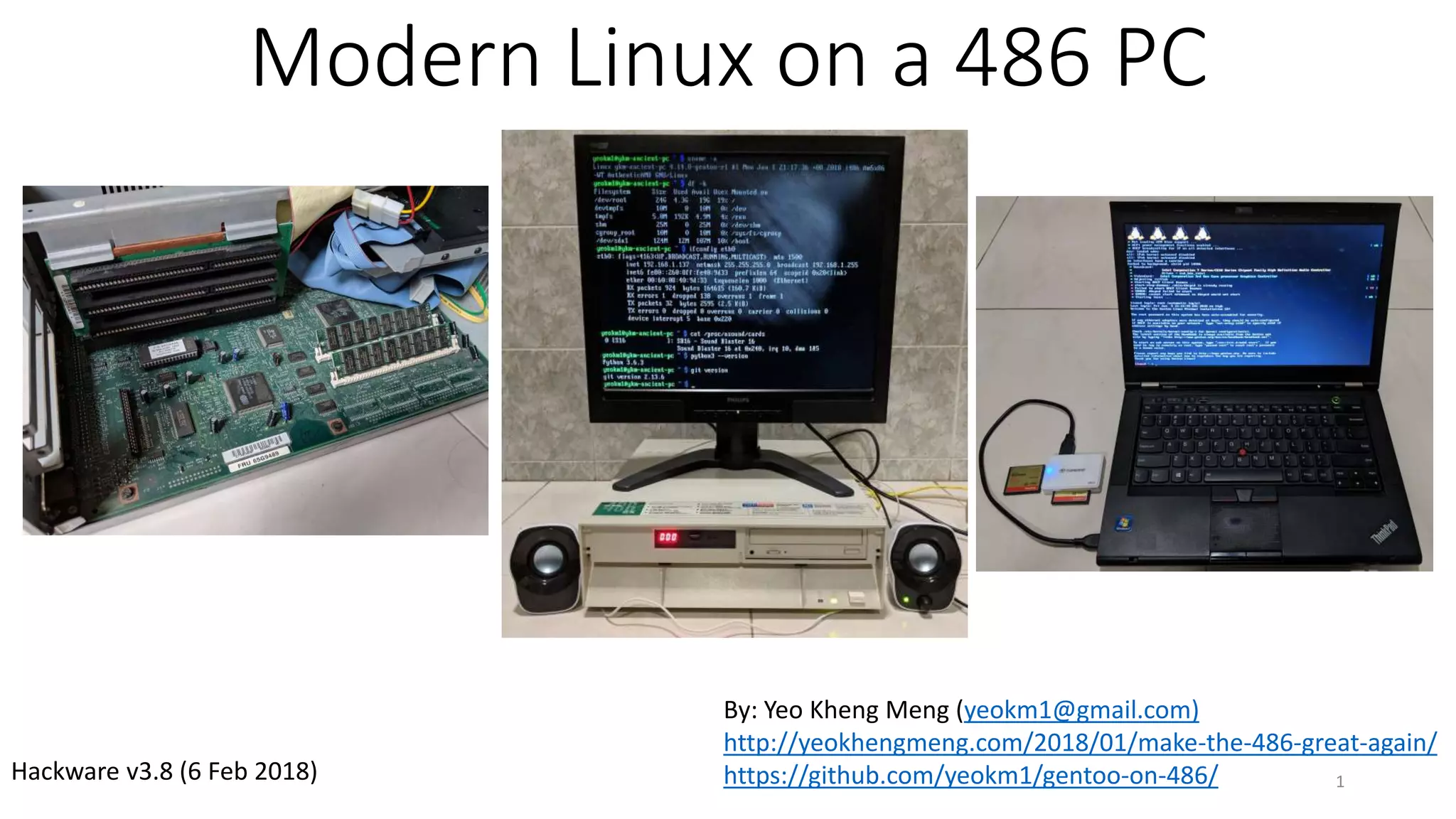
Modern Linux on a 486 PC
1
By: Yeo Kheng Meng (yeokm1@gmail.com)
http://yeokhengmeng.com/2018/01/make-the-486-great-again/
https://github.com/yeokm1/gentoo-on-486/Hackware v3.8 (6 Feb 2018)
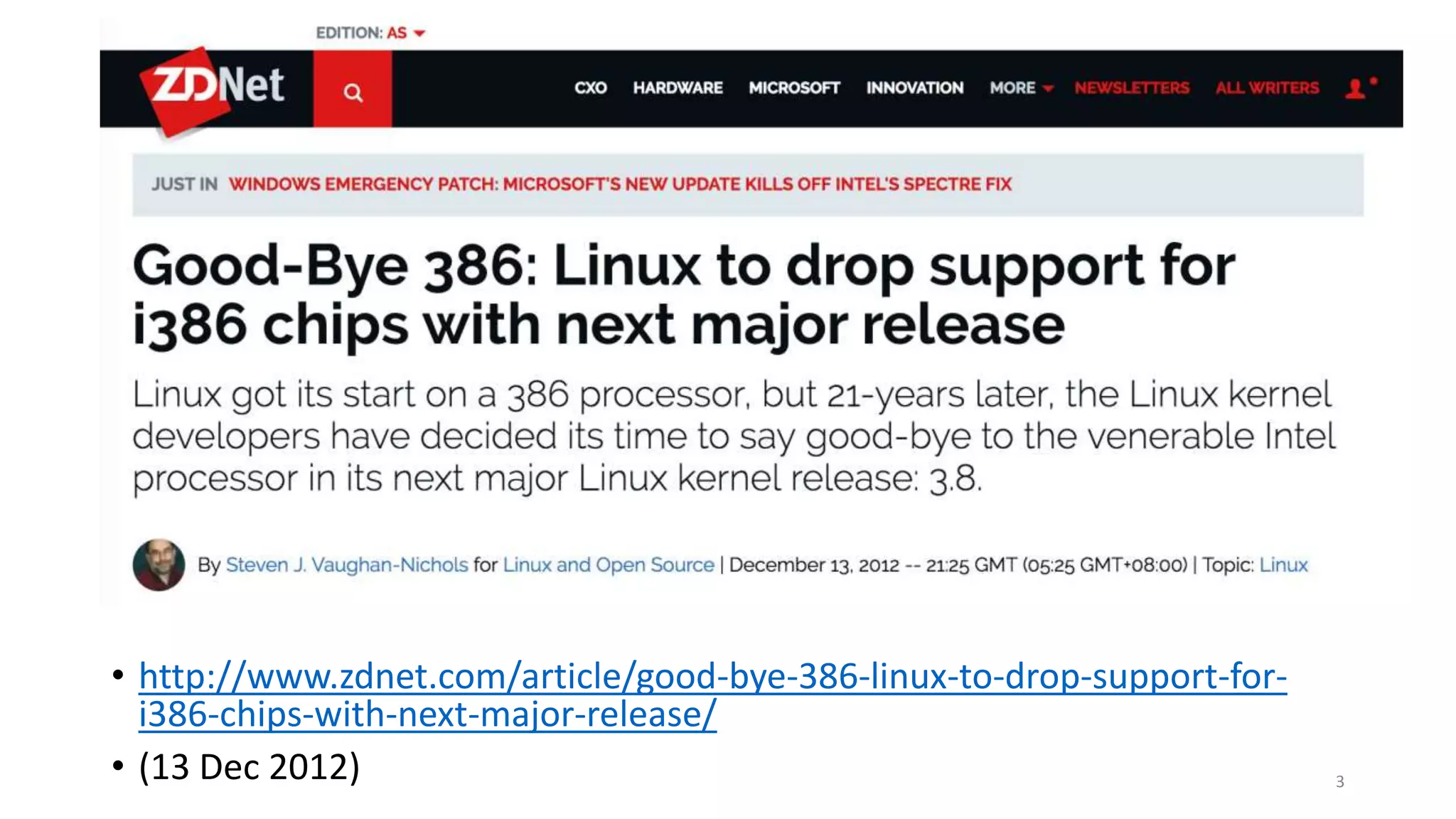
What is the oldest x86 processor that is still
supported by a modern Linux kernel?
2
• http://www.zdnet.com/article/good-bye-386-linux-to-drop-support-for-
i386-chips-with-next-major-release/
• (13 Dec 2012) 3
What is a 386 or 486?
4
The 386
• Released in 1985
• First 32-bit CPU by Intel
• 12 Mhz to 40 Mhz
5
The 486
6
• Released in 1989
• First to have 8KiB onboard L1 cache
• Variants
• 486DX: With Floating Point Unit (FPU)
• 486SX: Without FPU
• 16 MHz to 100 MHz
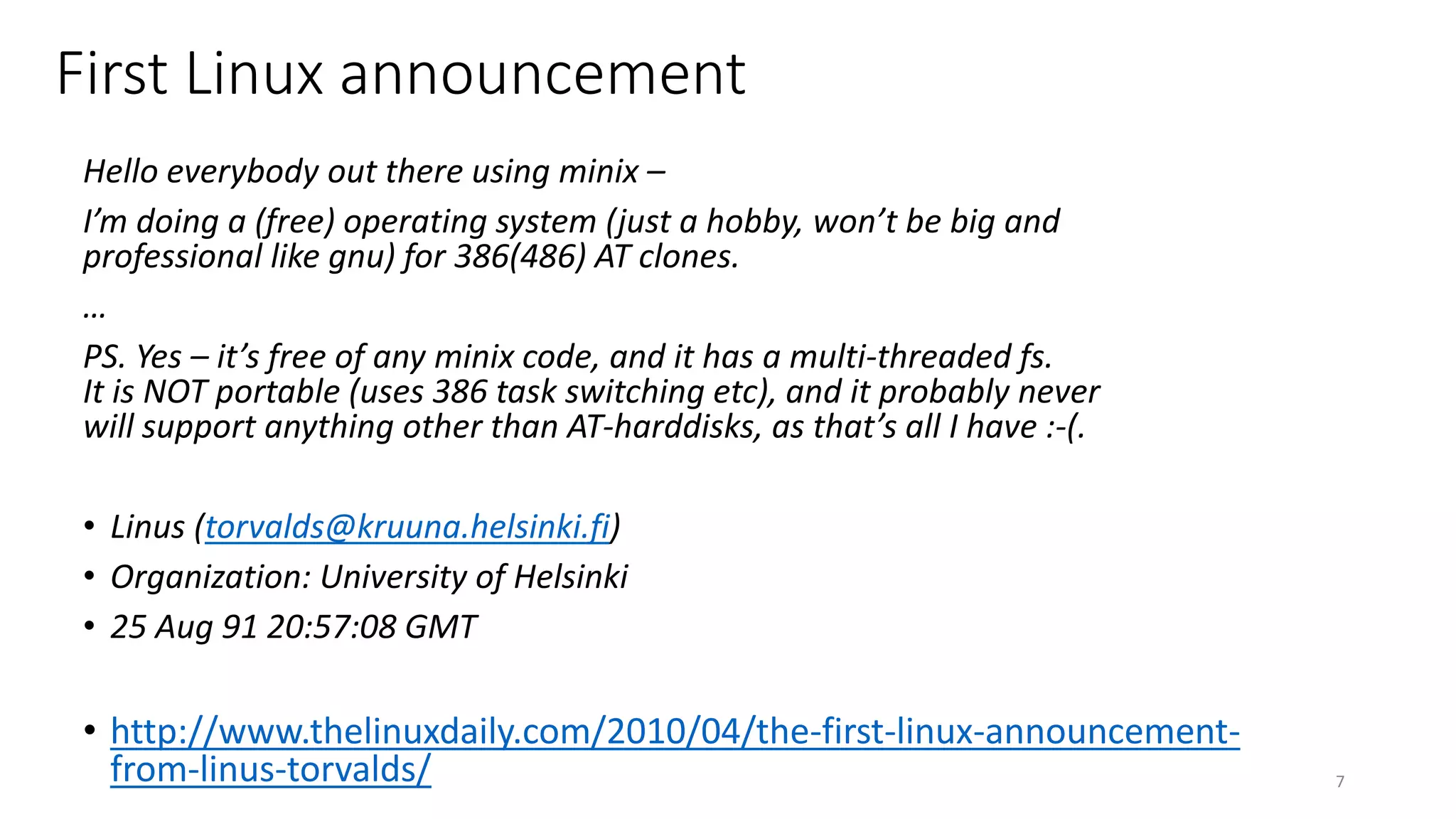
Hello everybody out there using minix –
I’m doing a (free) operating system (just a hobby, won’t be big and
professional like gnu) for 386(486) AT clones.
…
PS. Yes – it’s free of any minix code, and it has a multi-threaded fs.
It is NOT portable (uses 386 task switching etc), and it probably never
will support anything other than AT-harddisks, as that’s all I have :-(.
• Linus (torvalds@kruuna.helsinki.fi)
• Organization: University of Helsinki
• 25 Aug 91 20:57:08 GMT
• http://www.thelinuxdaily.com/2010/04/the-first-linux-announcement-
from-linus-torvalds/ 7
First Linux announcement
Prior Work
8
“Come together with fellow developers, engineers and designers to
build cool projects with absolutely no value whatsoever. Yes, the more
boliao the better.”
(9 December 2017) 9
Team 486 at Super Silly Hackathon
• Huijing and I
• Damn Small Linux + Web Page Hosting + Playing Music
10
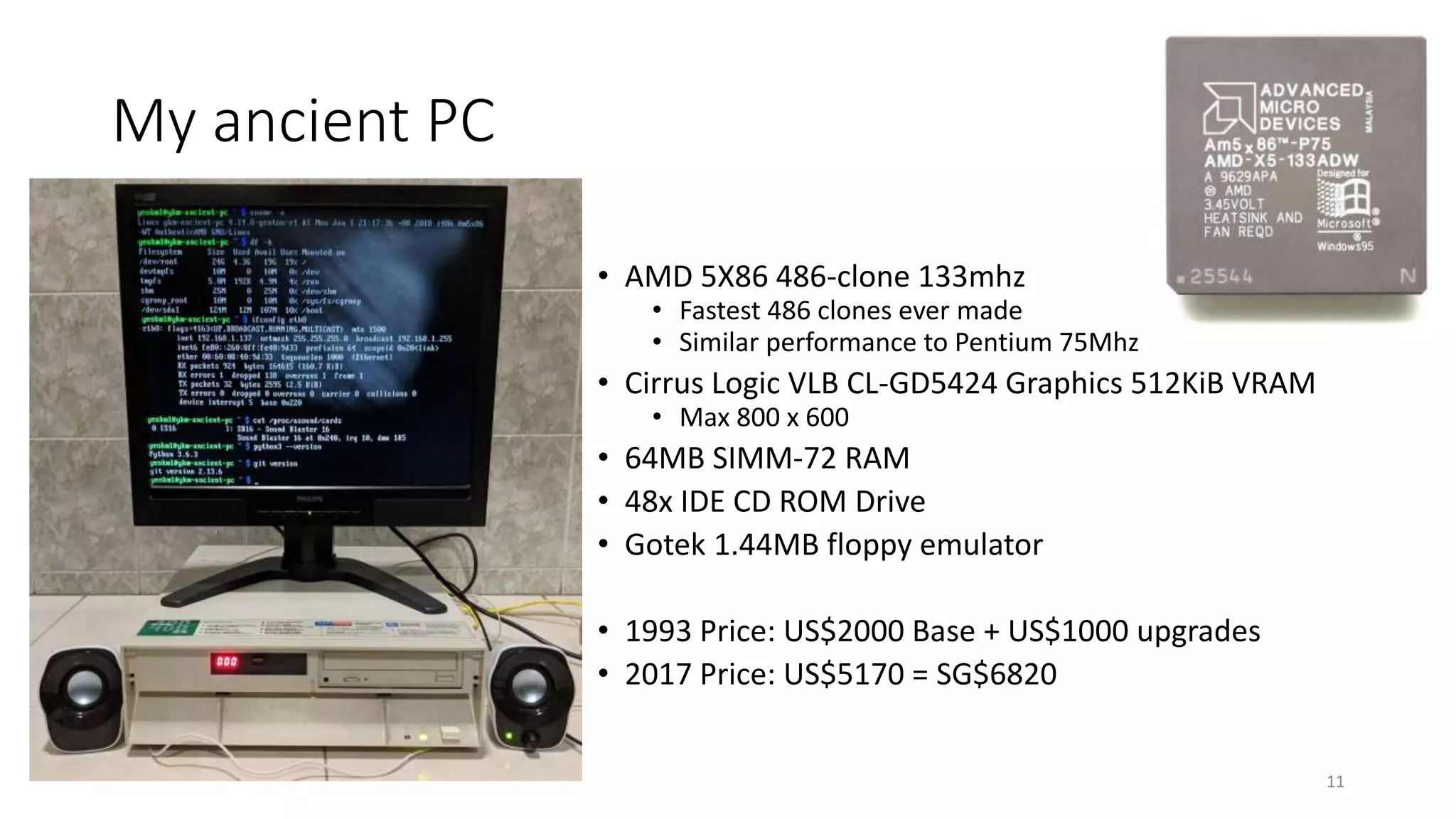
My ancient PC
• AMD 5X86 486-clone 133mhz
• Fastest 486 clones ever made
• Similar performance to Pentium 75Mhz
• Cirrus Logic VLB CL-GD5424 Graphics 512KiB VRAM
• Max 800 x 600
• 64MB SIMM-72 RAM
• 48x IDE CD ROM Drive
• Gotek 1.44MB floppy emulator
• 1993 Price: US$2000 Base + US$1000 upgrades
• 2017 Price: US$5170 = SG$6820
11
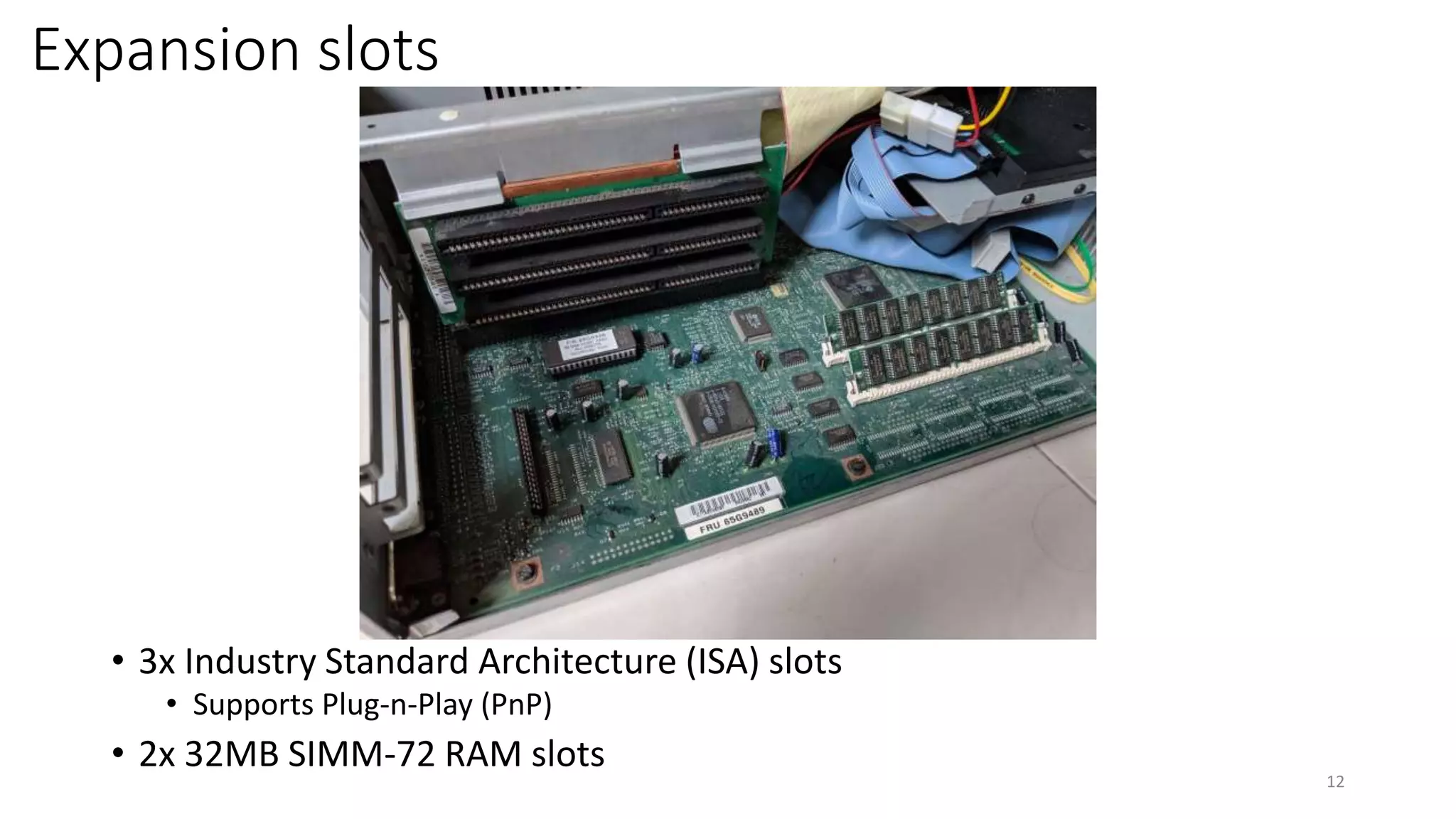
Expansion slots
• 3x Industry Standard Architecture (ISA) slots
• Supports Plug-n-Play (PnP)
• 2x 32MB SIMM-72 RAM slots
12
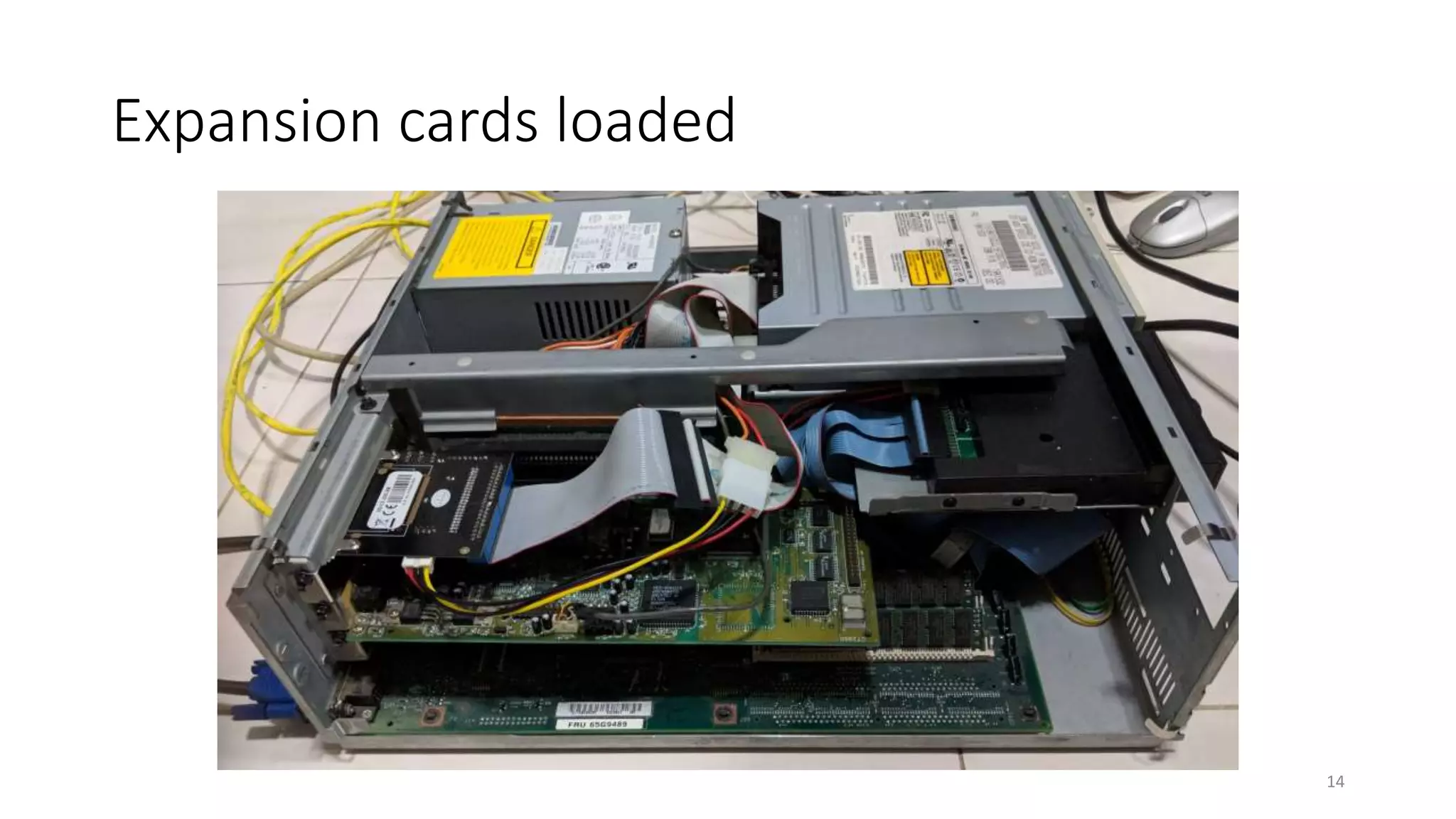
Expansion cards
• Sound Blaster 16 (PnP)
• 10Mbps 3Com Etherlink III 3c509B
• CompactFlash-IDE (CF-IDE)
• 32GB CF card
13
Expansion cards loaded
14
Demo
• uname –a
• ifconfig
• ping
• alsamixer
• mocp
• nginx
• SSH
• Git
• Python
• Go
15
How was this accomplished?
16
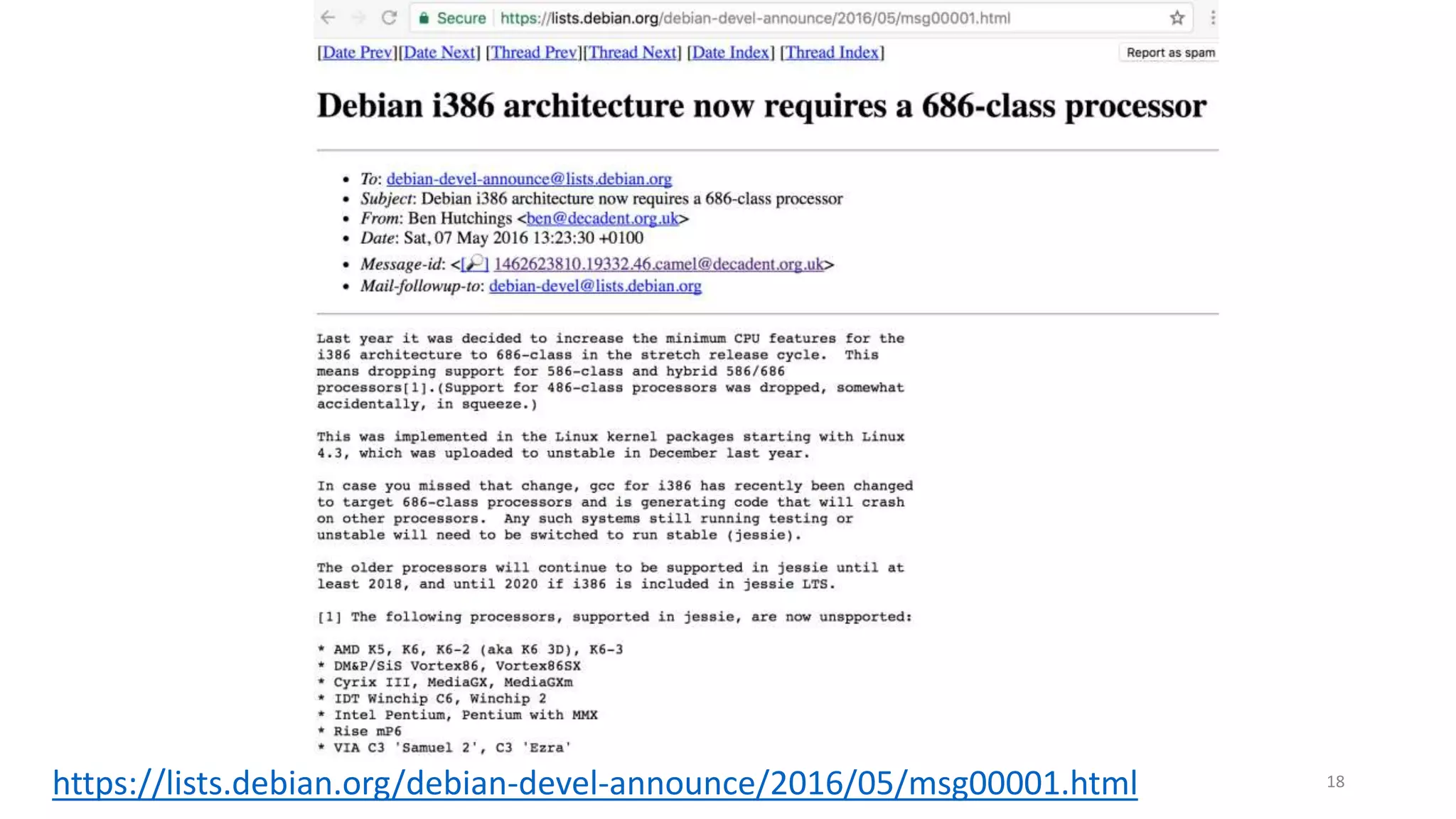
Use typical Linux distributions?
• Ubuntu
• Linux Mint
• Debian
• Arch Linux
• Open Suse
17
https://lists.debian.org/debian-devel-announce/2016/05/msg00001.html 18
“Gentoo Linux is a Linux distribution built using the Portage package
management system. Unlike a binary software distribution, the source
code is compiled locally according to the user’s preferences and is
often optimized for the specific type of computer.”
From https://en.wikipedia.org/wiki/Gentoo_Linux
19
Key steps
1. Prepare compilation laptop
2. Partition Disks
3. Set compilation parameters
4. Configure Linux Kernel
5. Compile kernel and other programs
6. Bootloader
7. Move CF card to ancient PC and hope it works!
20
Step 1: Prepare compilation laptop
• Intel Core i7-3520M (3.50 GHz,
4MB L3, 1333MHz FSB)
• Intel HD Graphics 4000
• 16GB DDR3 – 1600MHz
• Gigabit Ethernet
• Ultrabay DVD-RW
• USB-CF adapter
21
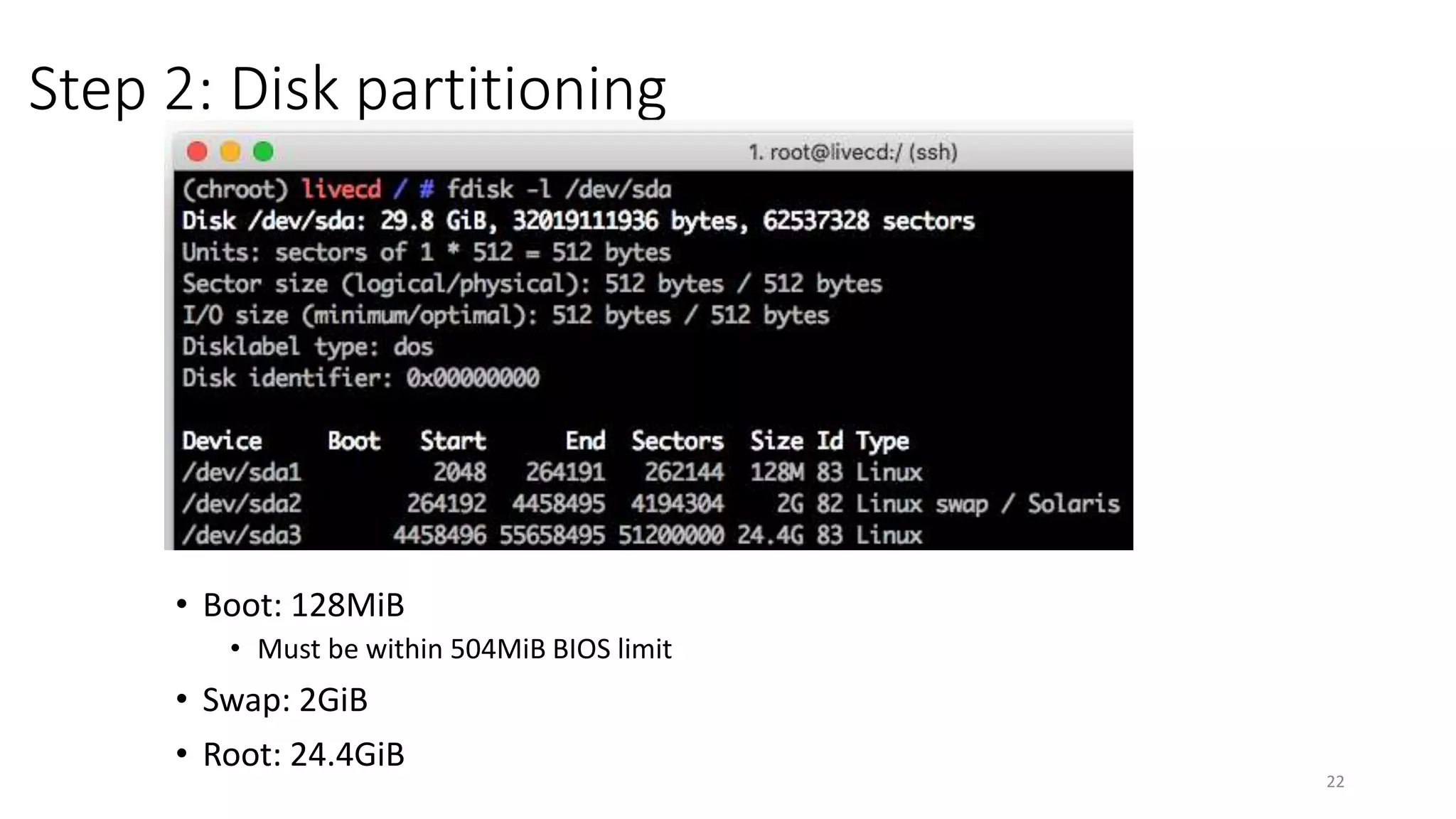
Step 2: Disk partitioning
22
• Boot: 128MiB
• Must be within 504MiB BIOS limit
• Swap: 2GiB
• Root: 24.4GiB
Step 3: Set GCC Compilation parameters
• /etc/portage/make.conf
• CFLAGS="-O2 -march=i486 -pipe"
• CHOST="i486-pc-linux-gnu"
23
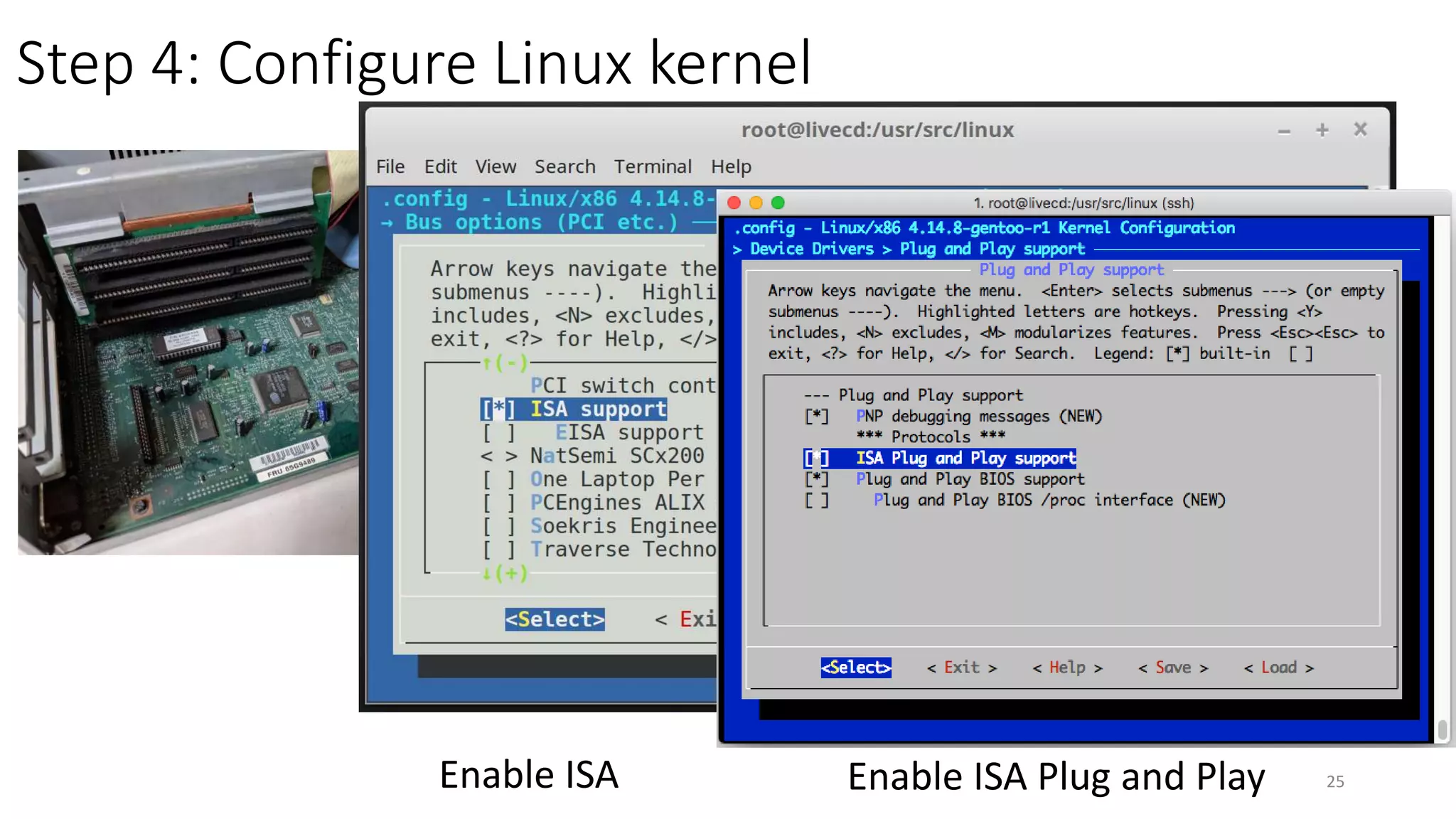
Step 4: Configure Linux kernel
Disable 64-bit kernel 24
Set lowest supported CPU to 486
Step 4: Configure Linux kernel
Enable ISA 25Enable ISA Plug and Play
Step 4: Configure Linux kernel
Add 3Com 3c509 driver
26
Step 4: Configure Linux kernel
Add Soundblaster 16 driver
27
Step 6: Compile kernel and other programs
28
Step 6: Install Bootloader
• Install LILO
• Grub2 causes reboot loop
29
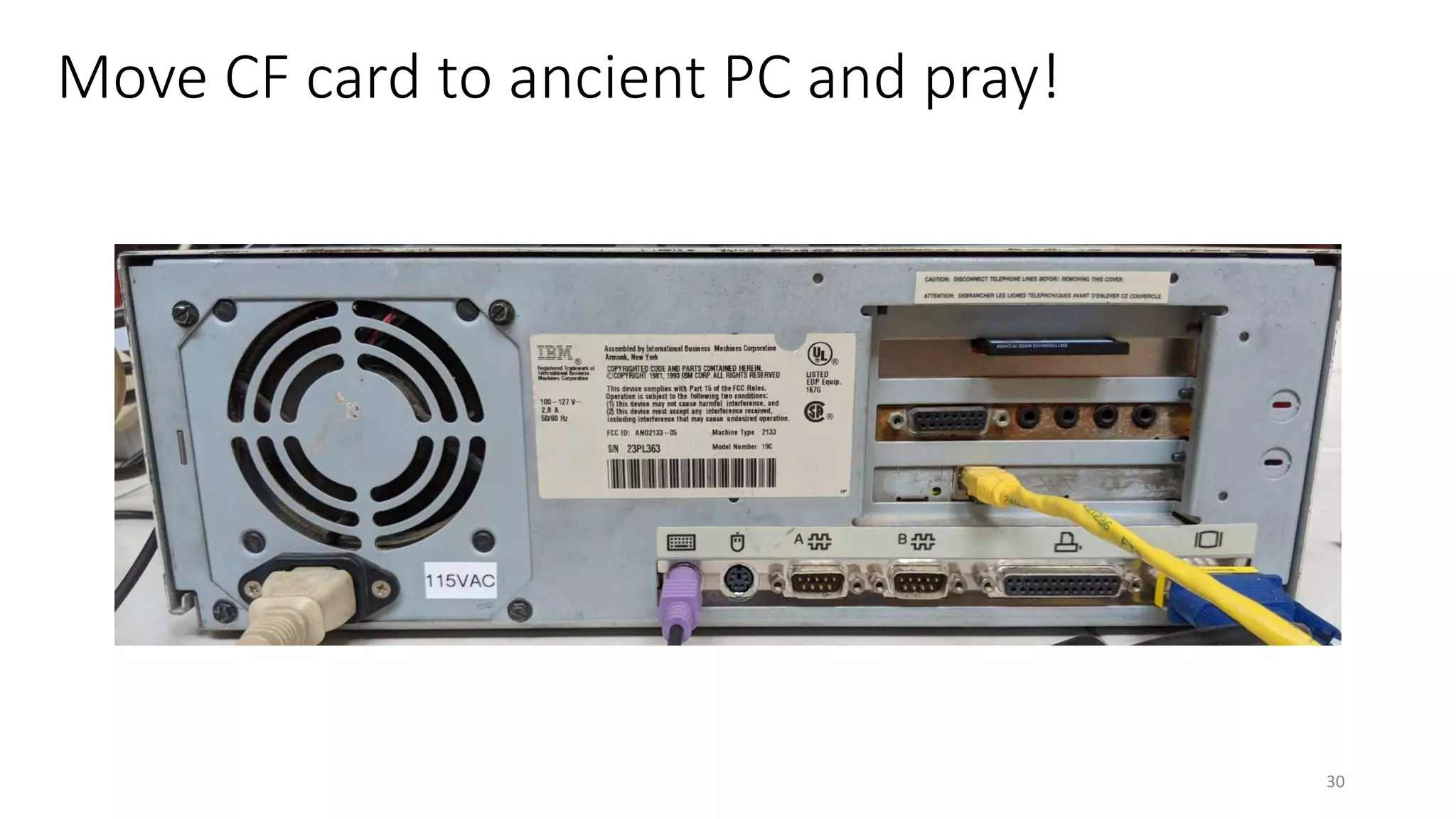
Move CF card to ancient PC and pray!
30
Problems
31
Data corruption with 80-pin PATA cable
32
Troubleshooting steps I took
1. Disconnect CD-ROM drive as primary slave
2. Replace the CF card
3. Trying different 80-pin conductor cables
4. Recompiling the Linux kernel many times with different SATA/PATA options
80-pin 40-pin
Tough Gentoo installation procedure
• Install all required packages manually
• Compile packages from source
• Configure all config files
33
Easy Difficult
Long iteration cycle
34
Move CF card to
compilation PC
Configure/Compile
Move CF card to
ancient PC
Watch bootup/Test
Low Profile Extension (LPX) Power Supply Failed 
• /
35
Replace with Small Form Factor (SFF) PSU?
36
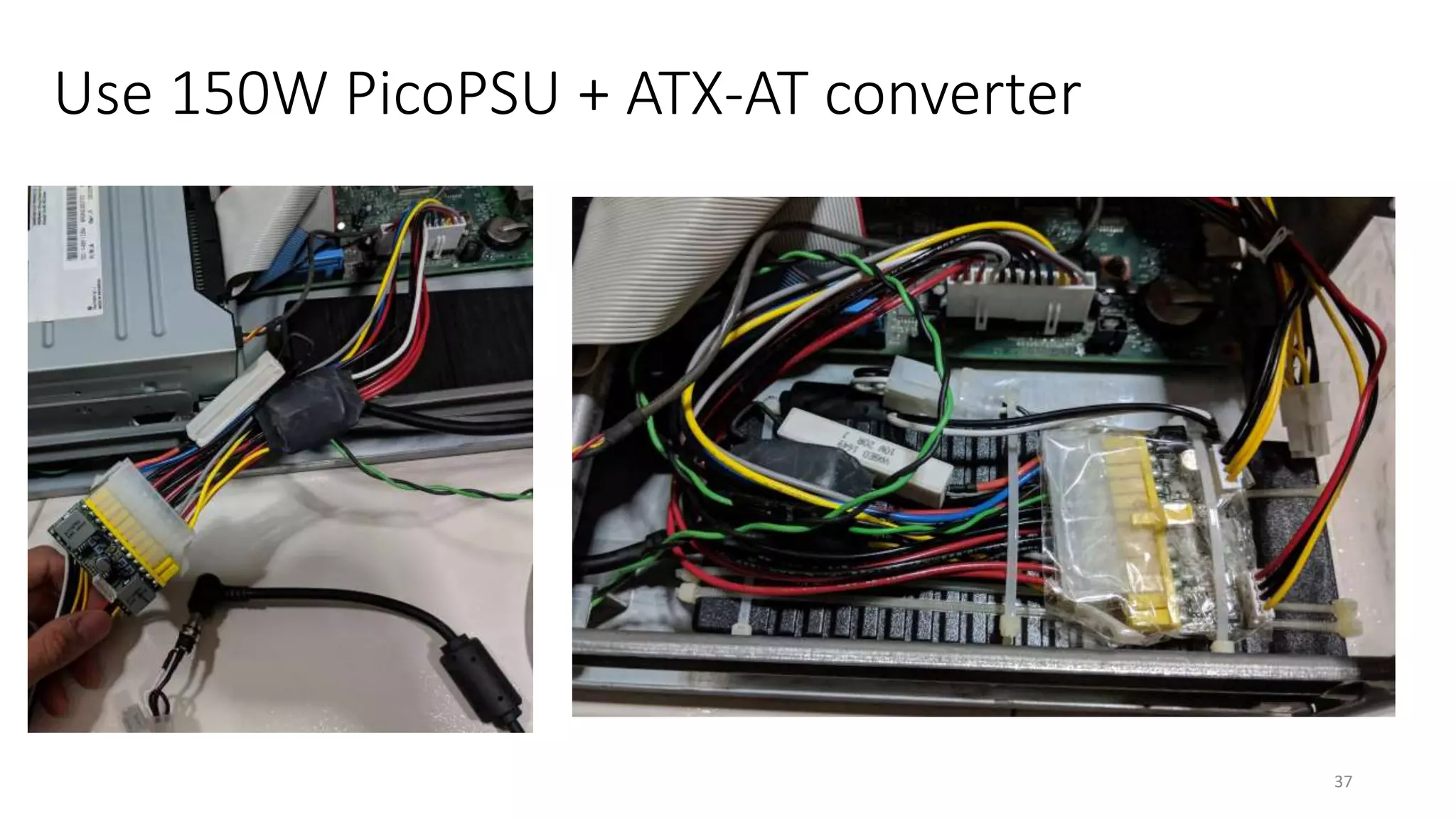
Use 150W PicoPSU + ATX-AT converter
37
38
Conclusion
• Linux still supports the 486 as claimed!!!
• Dog slow:
• 11 minutes to boot
• 5.5 minutes to shutdown
• Cannot multi-task well with modern software
• Meltdown and Spectre proof!
39
Slashdot and Hackaday
• https://linux.slashdot.org/story/18/01/07/228222/can-you-install-
linux-on-a-1993-pc
• https://hackaday.com/2018/01/07/go-retro-to-build-a-spectre-and-
meltdown-proof-x86-desktop/
40
Questions?
41
By: Yeo Kheng Meng (yeokm1@gmail.com)
http://yeokhengmeng.com/2018/01/make-the-486-great-again/
https://github.com/yeokm1/gentoo-on-486/

Gentoo on a 486

  • 1.
    Modern Linux ona 486 PC 1 By: Yeo Kheng Meng (yeokm1@gmail.com) http://yeokhengmeng.com/2018/01/make-the-486-great-again/ https://github.com/yeokm1/gentoo-on-486/Hackware v3.8 (6 Feb 2018)
  • 2.
    What is theoldest x86 processor that is still supported by a modern Linux kernel? 2
  • 3.
  • 4.
    What is a386 or 486? 4
  • 5.
    The 386 • Releasedin 1985 • First 32-bit CPU by Intel • 12 Mhz to 40 Mhz 5
  • 6.
    The 486 6 • Releasedin 1989 • First to have 8KiB onboard L1 cache • Variants • 486DX: With Floating Point Unit (FPU) • 486SX: Without FPU • 16 MHz to 100 MHz
  • 7.
    Hello everybody outthere using minix – I’m doing a (free) operating system (just a hobby, won’t be big and professional like gnu) for 386(486) AT clones. … PS. Yes – it’s free of any minix code, and it has a multi-threaded fs. It is NOT portable (uses 386 task switching etc), and it probably never will support anything other than AT-harddisks, as that’s all I have :-(. • Linus (torvalds@kruuna.helsinki.fi) • Organization: University of Helsinki • 25 Aug 91 20:57:08 GMT • http://www.thelinuxdaily.com/2010/04/the-first-linux-announcement- from-linus-torvalds/ 7 First Linux announcement
  • 8.
  • 9.
    “Come together withfellow developers, engineers and designers to build cool projects with absolutely no value whatsoever. Yes, the more boliao the better.” (9 December 2017) 9
  • 10.
    Team 486 atSuper Silly Hackathon • Huijing and I • Damn Small Linux + Web Page Hosting + Playing Music 10
  • 11.
    My ancient PC •AMD 5X86 486-clone 133mhz • Fastest 486 clones ever made • Similar performance to Pentium 75Mhz • Cirrus Logic VLB CL-GD5424 Graphics 512KiB VRAM • Max 800 x 600 • 64MB SIMM-72 RAM • 48x IDE CD ROM Drive • Gotek 1.44MB floppy emulator • 1993 Price: US$2000 Base + US$1000 upgrades • 2017 Price: US$5170 = SG$6820 11
  • 12.
    Expansion slots • 3xIndustry Standard Architecture (ISA) slots • Supports Plug-n-Play (PnP) • 2x 32MB SIMM-72 RAM slots 12
  • 13.
    Expansion cards • SoundBlaster 16 (PnP) • 10Mbps 3Com Etherlink III 3c509B • CompactFlash-IDE (CF-IDE) • 32GB CF card 13
  • 14.
  • 15.
    Demo • uname –a •ifconfig • ping • alsamixer • mocp • nginx • SSH • Git • Python • Go 15
  • 16.
    How was thisaccomplished? 16
  • 17.
    Use typical Linuxdistributions? • Ubuntu • Linux Mint • Debian • Arch Linux • Open Suse 17
  • 18.
  • 19.
    “Gentoo Linux isa Linux distribution built using the Portage package management system. Unlike a binary software distribution, the source code is compiled locally according to the user’s preferences and is often optimized for the specific type of computer.” From https://en.wikipedia.org/wiki/Gentoo_Linux 19
  • 20.
    Key steps 1. Preparecompilation laptop 2. Partition Disks 3. Set compilation parameters 4. Configure Linux Kernel 5. Compile kernel and other programs 6. Bootloader 7. Move CF card to ancient PC and hope it works! 20
  • 21.
    Step 1: Preparecompilation laptop • Intel Core i7-3520M (3.50 GHz, 4MB L3, 1333MHz FSB) • Intel HD Graphics 4000 • 16GB DDR3 – 1600MHz • Gigabit Ethernet • Ultrabay DVD-RW • USB-CF adapter 21
  • 22.
    Step 2: Diskpartitioning 22 • Boot: 128MiB • Must be within 504MiB BIOS limit • Swap: 2GiB • Root: 24.4GiB
  • 23.
    Step 3: SetGCC Compilation parameters • /etc/portage/make.conf • CFLAGS="-O2 -march=i486 -pipe" • CHOST="i486-pc-linux-gnu" 23
  • 24.
    Step 4: ConfigureLinux kernel Disable 64-bit kernel 24 Set lowest supported CPU to 486
  • 25.
    Step 4: ConfigureLinux kernel Enable ISA 25Enable ISA Plug and Play
  • 26.
    Step 4: ConfigureLinux kernel Add 3Com 3c509 driver 26
  • 27.
    Step 4: ConfigureLinux kernel Add Soundblaster 16 driver 27
  • 28.
    Step 6: Compilekernel and other programs 28
  • 29.
    Step 6: InstallBootloader • Install LILO • Grub2 causes reboot loop 29
  • 30.
    Move CF cardto ancient PC and pray! 30
  • 31.
  • 32.
    Data corruption with80-pin PATA cable 32 Troubleshooting steps I took 1. Disconnect CD-ROM drive as primary slave 2. Replace the CF card 3. Trying different 80-pin conductor cables 4. Recompiling the Linux kernel many times with different SATA/PATA options 80-pin 40-pin
  • 33.
    Tough Gentoo installationprocedure • Install all required packages manually • Compile packages from source • Configure all config files 33 Easy Difficult
  • 34.
    Long iteration cycle 34 MoveCF card to compilation PC Configure/Compile Move CF card to ancient PC Watch bootup/Test
  • 35.
    Low Profile Extension(LPX) Power Supply Failed  • / 35
  • 36.
    Replace with SmallForm Factor (SFF) PSU? 36
  • 37.
    Use 150W PicoPSU+ ATX-AT converter 37
  • 38.
  • 39.
    Conclusion • Linux stillsupports the 486 as claimed!!! • Dog slow: • 11 minutes to boot • 5.5 minutes to shutdown • Cannot multi-task well with modern software • Meltdown and Spectre proof! 39
  • 40.
    Slashdot and Hackaday •https://linux.slashdot.org/story/18/01/07/228222/can-you-install- linux-on-a-1993-pc • https://hackaday.com/2018/01/07/go-retro-to-build-a-spectre-and- meltdown-proof-x86-desktop/ 40
  • 41.
    Questions? 41 By: Yeo KhengMeng (yeokm1@gmail.com) http://yeokhengmeng.com/2018/01/make-the-486-great-again/ https://github.com/yeokm1/gentoo-on-486/