What is Blended 
Learning? 
Tim Hudson, PhD 
Sr Director of Curriculum Design 
DreamBox Learning
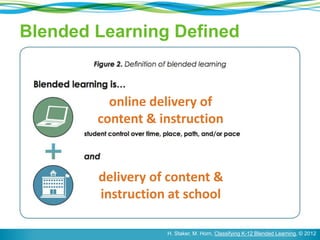
Blended Learning Defined 
online delivery of 
content & instruction 
delivery of content & 
instruction at school 
H. Staker, M. Horn, Classifying K-12 Blended Learning, © 2012
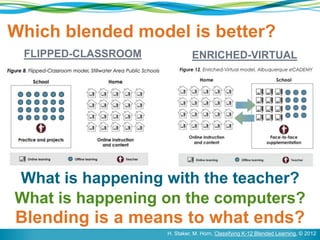
Which blended model is better? 
FLIPPED-CLASSROOM ENRICHED-VIRTUAL 
What is happening with the teacher? 
What is happening on the computers? 
Blending is a means to what ends? 
H. Staker, M. Horn, Classifying K-12 Blended Learning, © 2012
Plan Schooling Backwards 
“Contemporary school reform efforts… 
typically focus too much on various 
means: structures, schedules, 
programs, PD, curriculum, and 
instructional practices (like cooperative 
learning)” 
[or blended learning] 
[or flipped classrooms] 
[or iPads, hardware, etc] 
p. 234-235, Wiggins & McTighe, © 2007
Plan Schooling Backwards 
“Certainly such reforms serve 
as the fuel for the school 
improvement engine, but 
they must not be mistaken as 
the destination…[which is] 
improved learning.” 
p. 234-235, Wiggins & McTighe, © 2007
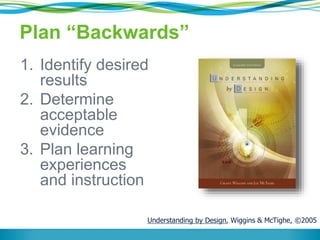
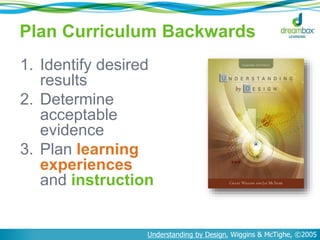
Plan “Backwards” 
1. Identify desired 
results 
2. Determine 
acceptable 
evidence 
3. Plan learning 
experiences 
and instruction 
Understanding by Design, Wiggins & McTighe, ©2005
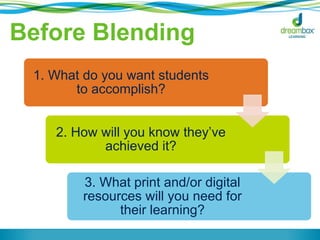
Before Blending 
1. What do you want students 
to accomplish? 
2. How will you know they’ve 
achieved it? 
3. What print and/or digital 
resources will you need for 
their learning?
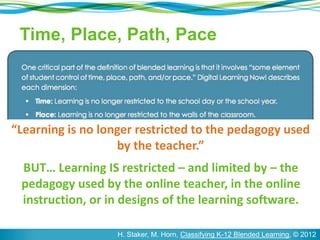
Time, Place, Path, Pace 
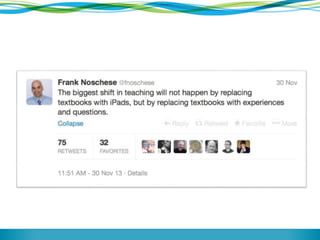
“Learning is no longer restricted to the pedagogy used 
by the teacher.” 
BUT… Learning IS restricted – and limited by – the 
pedagogy used by the online teacher, in the online 
instruction, or in designs of the learning software. 
H. Staker, M. Horn, Classifying K-12 Blended Learning, © 2012
Common Experience 
From a 5th grade teacher in NY: 
“I had a lot of good people teaching me math when I 
was a student – earnest and funny and caring. But 
the math they taught me wasn’t good math. Every 
class was the same for eight years: 
‘Get out your homework, go over the 
homework, here’s the new set of exercises, 
here’s how to do them. Now get started. I’ll 
be around.’” 
p. 55, Teaching What Matters Most, Strong, Silver, & Perini, ©2001
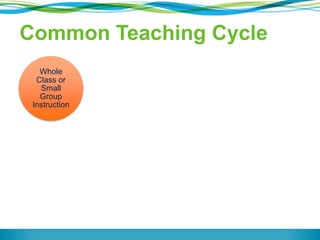
Common Teaching Cycle 
Whole 
Class or 
Small 
Group 
Instruction 
Independent 
Practice 
Whole 
Class 
Assessment 
Use Data 
Formatively 
to Plan 
Use Data 
Summatively
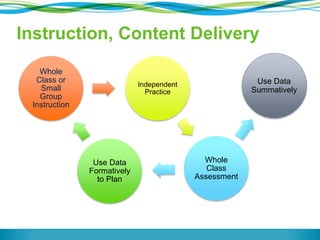
Instruction, Content Delivery 
Whole 
Class or 
Small 
Group 
Instruction 
Independent 
Practice 
Whole 
Class 
Assessment 
Use Data 
Formatively 
to Plan 
Use Data 
Summatively
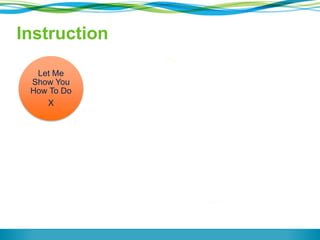
Let Me 
Show You 
How To Do 
X 
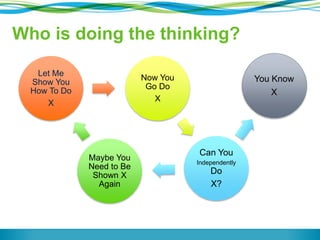
Now You 
Go Do 
X 
Can You 
Independently 
Do 
X? 
Maybe You 
Need to Be 
Shown X 
Again 
You Know 
X 
Instruction
Let Me 
Show You 
How To Do 
X 
Now You 
Go Do 
X 
Can You 
Independently 
Do 
X? 
Maybe You 
Need to Be 
Shown X 
Again 
You Know 
X 
Who is doing the thinking?
Fullan: Alive in the Swamp 
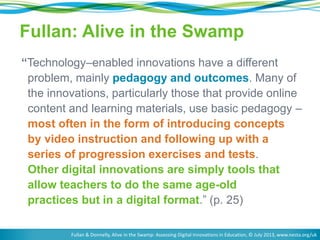
“Technology–enabled innovations have a different 
problem, mainly pedagogy and outcomes. Many of 
the innovations, particularly those that provide online 
content and learning materials, use basic pedagogy – 
most often in the form of introducing concepts 
by video instruction and following up with a 
series of progression exercises and tests. 
Other digital innovations are simply tools that 
allow teachers to do the same age-old 
practices but in a digital format.” (p. 25) 
Fullan & Donnelly, Alive in the Swamp: Assessing Digital Innovations in Education, © July 2013, www.nesta.org/uk
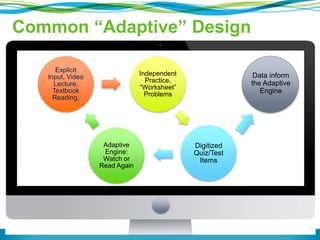
Data inform 
the Adaptive 
Engine 
Common “Adaptive” Design 
Explicit 
Input, Video 
Lecture, 
Textbook 
Reading, 
Independent 
Practice, 
“Worksheet” 
Problems 
Digitized 
Quiz/Test 
Items 
Adaptive 
Engine: 
Watch or 
Read Again
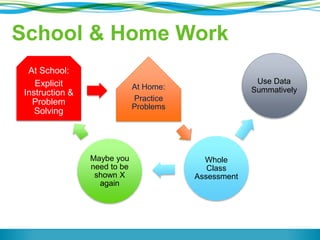
School & Home Work 
At School: 
Explicit 
Instruction & 
Problem 
Solving 
At Home: 
Practice 
Problems 
Whole 
Class 
Assessment 
Maybe you 
need to be 
shown X 
again 
Use Data 
Summatively
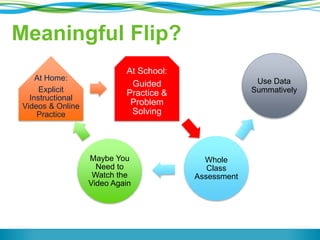
Meaningful Flip? 
At Home: 
Explicit 
Instructional 
Videos & Online 
Practice 
At School: 
Guided 
Practice & 
Problem 
Solving 
Whole 
Class 
Assessment 
Maybe You 
Need to 
Watch the 
Video Again 
Use Data 
Summatively
Fullan: Alive in the Swamp 
“While these innovations may be an 
incremental improvement such that there is 
less cost, minor classroom efficiency and 
general modernisation, they do not, by 
themselves, change the pedagogical 
practice of the teachers or the schools [or 
the online learning].” (p. 25) 
Fullan & Donnelly, Alive in the Swamp: Assessing Digital Innovations in Education, © July 2013, www.nesta.org/uk
Plan Curriculum Backwards 
1. Identify desired 
results 
2. Determine 
acceptable 
evidence 
3. Plan learning 
experiences 
and instruction 
Understanding by Design, Wiggins & McTighe, ©2005
The Quality of Digital 
Learning Experiences 
is just as important 
as the Quality of 
Classroom Learning 
Experiences
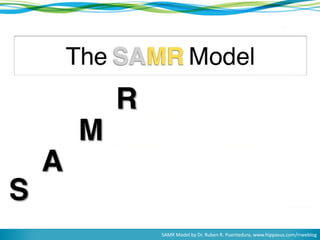
SAMR Model by Dr. Ruben R. Puentedura, www.hippasus.com/rrweblog
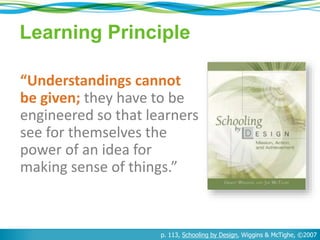
Learning Principle 
“Understandings cannot 
be given; they have to be 
engineered so that learners 
see for themselves the 
power of an idea for 
making sense of things.” 
p. 113, Schooling by Design, Wiggins & McTighe, ©2007
Pros & Cons 
Benefit of Blended 
Learning 
Becoming MORE 
thoughtful and 
strategic about the 
use of precious class 
time 
Danger of Blended 
Learning 
Becoming LESS 
thoughtful and 
strategic about how 
students understand 
and make sense of 
things
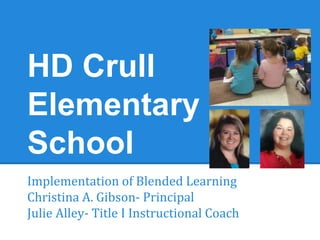
HD Crull 
Elementary 
School 
Implementation of Blended Learning 
Christina A. Gibson- Principal 
Julie Alley- Title I Instructional Coach
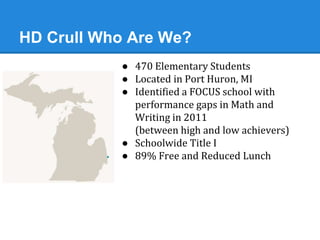
HD Crull Who Are We? 
● 470 Elementary Students 
● Located in Port Huron, MI 
● Identified a FOCUS school with 
performance gaps in Math and 
Writing in 2011 
(between high and low achievers) 
● Schoolwide Title I 
● 89% Free and Reduced Lunch
Why? Rationale for Implementation 
● Comprehensive Needs Assessment 
(Of learning, FOR learning) 
o Engaged a School Improvement Team 
o Data Analysis using multiple points (NWEA, DIBELS, Attendance, 
Discipline, Perception Data Surveys (teacher, student, 
community) 
o Honored Innovation to address high needs areas 
● Low overall academic performance 
● Large gaps 
● One room school house in 18 classrooms 
● Students lacked exposure and engagement
Research 
● Researched “What Works Clearinghouse” 
o http://ies.ed.gov/ncee/wwc/pdf/practice_guides/rti_math_pg_042109.pdf 
● John Hattie’s research 
o Student goal setting 
o Student engagement 
● Conferences using Title I Funds 
o Model Schools Conference 
o Technology Conferences- MACUL 
o National Reading Recovery 
● Multiple Site Visits 
o Beating the Odds schools 
o Similar Demographics 
o Technology Rich
Strategies to fit the needs 
● Student Goal Setting 
● Student Recognition of Achievements 
● Students Tracking Data 
● Individual and Small Group Instruction at Students Level 
● Student Engagement 
● Student Questioning and Discussion 
● Parent Involvement 
● Teacher Capacity 
= Blended Learning
Year One 2011-2012 
● 1 computer per classroom 
● 1 computer lab per building 
● Checked out all devices to staff 
● Instructional Coach Managed
Year One Spring 2012 
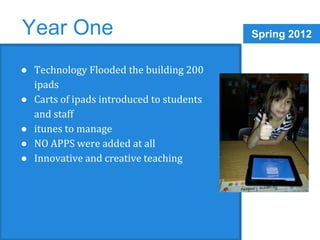
● Technology Flooded the building 200 
ipads 
● Carts of ipads introduced to students 
and staff 
● itunes to manage 
● NO APPS were added at all 
● Innovative and creative teaching
2012-2013 Year Two 
● Added ipads and laptops (400 devices) 
● All teachers true one-to-one total control 
● Volume vouchers for large 
● Apple configurator 
● Teachers used daily (app sitting) 
● Exploring community partnerships 
● Pilot kindergarten one to one ipad 
classroom 
● SMART Boards in every classroom
Year Two Teacher Learners 
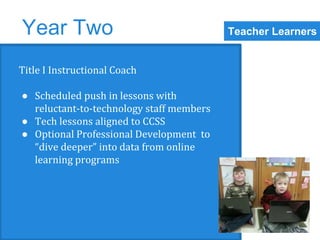
Title I Instructional Coach 
● Scheduled push in lessons with 
reluctant-to-technology staff members 
● Tech lessons aligned to CCSS 
● Optional Professional Development to 
“dive deeper” into data from online 
learning programs
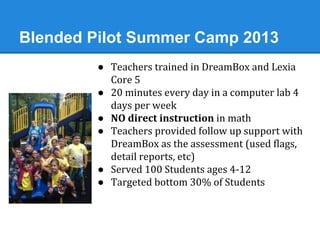
Blended Pilot Summer Camp 2013 
● Teachers trained in DreamBox and Lexia 
Core 5 
● 20 minutes every day in a computer lab 4 
days per week 
● NO direct instruction in math 
● Teachers provided follow up support with 
DreamBox as the assessment (used flags, 
detail reports, etc) 
● Served 100 Students ages 4-12 
● Targeted bottom 30% of Students
Data from Summer Camp 2013 
● Used NWEA Spring to Fall to assess growth 
● 64 students used in data (omitted pre-k and 6th graders) 
● .93 average points of RIT growth in math for students 
involved in summer 
● -1.54 average points of RIT loss in whole school 
population “Summer Slide”(using cohorts omitted pre-k 
and 6th graders)
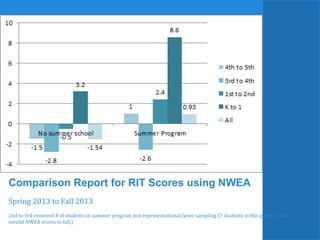
Comparison Report for RIT Scores using NWEA 
Spring 2013 to Fall 2013 
2nd to 3rd removed # of students in summer program non representational/poor sampling (7 students in this group 2 with 
invalid NWEA scores in fall.)
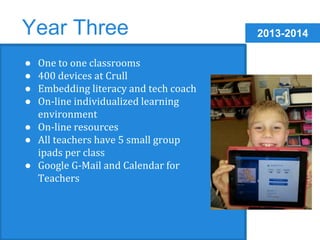
2013-2014 Year Three 
● One to one classrooms 
● 400 devices at Crull 
● Embedding literacy and tech coach 
● On-line individualized learning 
environment 
● On-line resources 
● All teachers have 5 small group 
ipads per class 
● Google G-Mail and Calendar for 
Teachers
School Improvement Plan 2013-14 
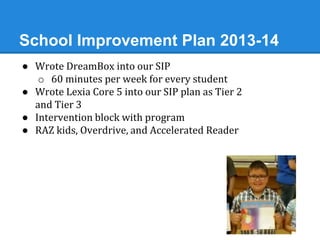
● Wrote DreamBox into our SIP 
o 60 minutes per week for every student 
● Wrote Lexia Core 5 into our SIP plan as Tier 2 
and Tier 3 
● Intervention block with program 
● RAZ kids, Overdrive, and Accelerated Reader
Year Three Teacher Learners 
Title I Instructional Coach 
● Pushing in and co-teaching with 
reluctant-to-tech teachers 
● Introducing innovative lessons from 
technology conference- MACUL 
● Permission to “try new things” 
● Working with “tech savy” classroom 
teachers on more challenging ideas 
○ Word of mouth success spreads to 
other classrooms
Implementation of blended learning 
School Year 2013/2014 
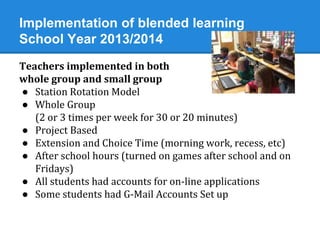
Teachers implemented in both 
whole group and small group 
● Station Rotation Model 
● Whole Group 
(2 or 3 times per week for 30 or 20 minutes) 
● Project Based 
● Extension and Choice Time (morning work, recess, etc) 
● After school hours (turned on games after school and on 
Fridays) 
● All students had accounts for on-line applications 
● Some students had G-Mail Accounts Set up
Year Three Parent Support 
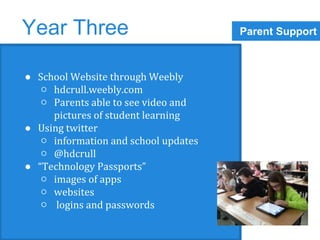
● School Website through Weebly 
○ hdcrull.weebly.com 
○ Parents able to see video and 
pictures of student learning 
● Using twitter 
○ information and school updates 
○ @hdcrull 
● “Technology Passports” 
○ images of apps 
○ websites 
○ logins and passwords
Data from School Year 
● Direct correlation to time in DreamBox and Lexia Core 5 
with Improved NWEA scores. 
● As intervention, not successful using on-line programs, 
more success for mid to high students 
(some were exception) 
o low students need direct instruction 
● Compare 2 second grade classrooms. Teachers follow 
same curriculum (math expressions), plan lessons 
together and have worked together for 4 years. 
● Variable was the AMOUNT of time in a computer based 
program. One embraced 60 minutes per week. 
One did not.
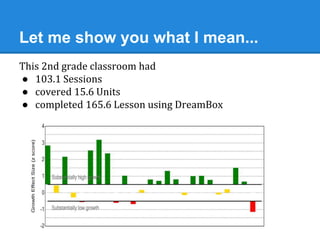
Let me show you what I mean... 
This 2nd grade classroom had 
● 103.1 Sessions 
● covered 15.6 Units 
● completed 165.6 Lesson using DreamBox
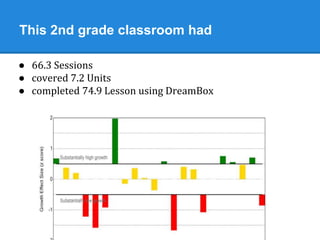
This 2nd grade classroom had 
● 66.3 Sessions 
● covered 7.2 Units 
● completed 74.9 Lesson using DreamBox
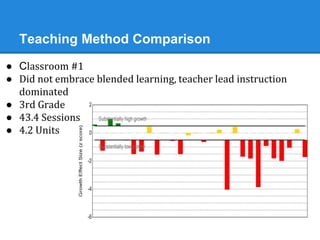
Teaching Method Comparison 
● Classroom #1 
● Did not embrace blended learning, teacher lead instruction 
dominated 
● 3rd Grade 
● 43.4 Sessions 
● 4.2 Units
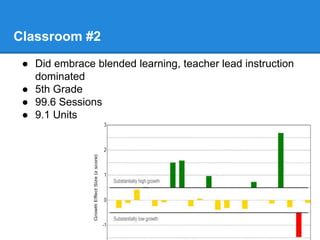
Classroom #2 
● Did embrace blended learning, teacher lead instruction 
dominated 
● 5th Grade 
● 99.6 Sessions 
● 9.1 Units
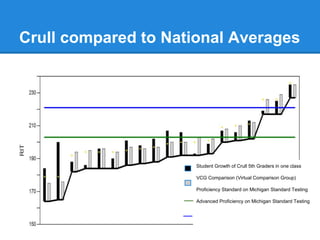
Crull compared to National Averages 
Student Growth of Crull 5th Graders in one class 
VCG Comparison (Virtual Comparison Group) 
Proficiency Standard on Michigan Standard Testing 
Advanced Proficiency on Michigan Standard Testing
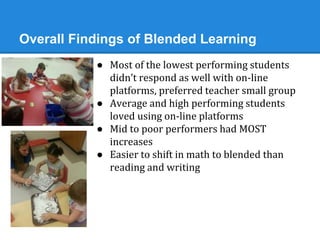
Overall Findings of Blended Learning 
● Most of the lowest performing students 
didn’t respond as well with on-line 
platforms, preferred teacher small group 
● Average and high performing students 
loved using on-line platforms 
● Mid to poor performers had MOST 
increases 
● Easier to shift in math to blended than 
reading and writing
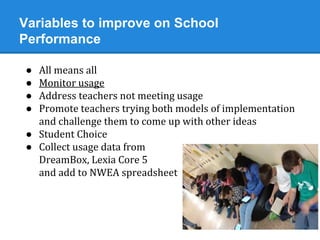
Variables to improve on School 
Performance 
● All means all 
● Monitor usage 
● Address teachers not meeting usage 
● Promote teachers trying both models of implementation 
and challenge them to come up with other ideas 
● Student Choice 
● Collect usage data from 
DreamBox, Lexia Core 5 
and add to NWEA spreadsheet
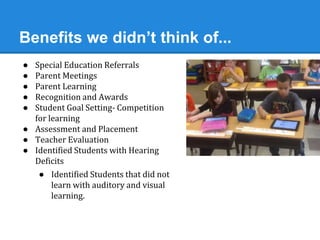
Benefits we didn’t think of... 
● Special Education Referrals 
● Parent Meetings 
● Parent Learning 
● Recognition and Awards 
● Student Goal Setting- Competition 
for learning 
● Assessment and Placement 
● Teacher Evaluation 
● Identified Students with Hearing 
Deficits 
● Identified Students that did not 
learn with auditory and visual 
learning.
Pitfalls/Room to Grow 
● After hours “others” using 
DreamBox and Lexia Core 5 
● Staff using in whole group, 
o One to one meetings were better with 
DreamBox 
o Small Group better in Reading Block 
o Refreshing the screen in whole group 
● Staff wanting more PD and 
training on fit with Curriculum 
● Logistics
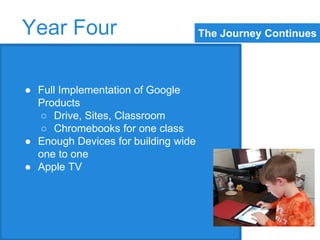
The Journey Continues Year Four 
● Full Implementation of Google 
Products 
○ Drive, Sites, Classroom 
○ Chromebooks for one class 
● Enough Devices for building wide 
one to one 
● Apple TV
Things to Consider as You Implement 
● Use of digital platforms as “intervention” 
● What programs will you use? 
o How will you track programs effectiveness 
o Will an app get the job done? 
o How long will you “stick” with it? 
● WHY? Why are you implementing? 
o Where is the need of the student (s), school etc. 
o What do you hope to accomplish 
o How will classroom instruction change to support? 
o What can a teacher do BETTER than a program?
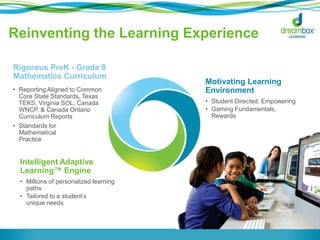
Reinventing the Learning Experience 
Intelligent Adaptive 
Learning™ Engine 
• Millions of personalized learning 
paths 
• Tailored to a student’s 
unique needs 
Motivating Learning 
Environment 
• Student Directed, Empowering 
• Gaming Fundamentals, 
Rewards 
Rigorous PreK - Grade 8 
Mathematics Curriculum 
• Reporting Aligned to Common 
Core State Standards, Texas 
TEKS, Virginia SOL, Canada 
WNCP, & Canada Ontario 
Curriculum Reports 
• Standards for 
Mathematical 
Practice
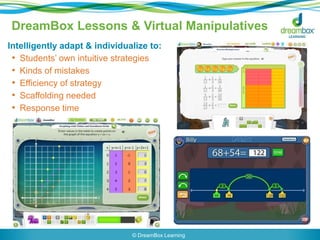
DreamBox Lessons & Virtual Manipulatives 
Intelligently adapt & individualize to: 
• Students’ own intuitive strategies 
• Kinds of mistakes 
• Efficiency of strategy 
• Scaffolding needed 
• Response time 
© DreamBox Learning
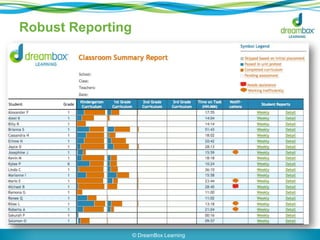
Robust Reporting 
© DreamBox Learning
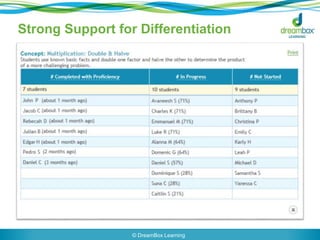
Strong Support for Differentiation 
© DreamBox Learning
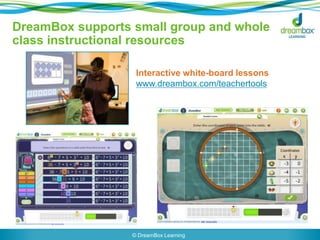
DreamBox supports small group and whole 
class instructional resources 
Interactive white-board lessons 
www.dreambox.com/teachertools 
© DreamBox Learning
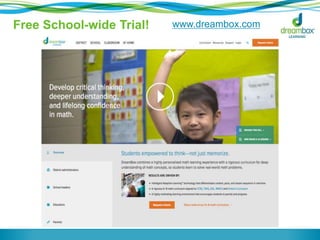
Free School-wide Trial! www.dreambox.com

Integrating Technology to Increase Student Engagement and Accelerate Math Learning

  • 1.
    What is Blended Learning? Tim Hudson, PhD Sr Director of Curriculum Design DreamBox Learning
  • 2.
    Blended Learning Defined online delivery of content & instruction delivery of content & instruction at school H. Staker, M. Horn, Classifying K-12 Blended Learning, © 2012
  • 3.
    Which blended modelis better? FLIPPED-CLASSROOM ENRICHED-VIRTUAL What is happening with the teacher? What is happening on the computers? Blending is a means to what ends? H. Staker, M. Horn, Classifying K-12 Blended Learning, © 2012
  • 4.
    Plan Schooling Backwards “Contemporary school reform efforts… typically focus too much on various means: structures, schedules, programs, PD, curriculum, and instructional practices (like cooperative learning)” [or blended learning] [or flipped classrooms] [or iPads, hardware, etc] p. 234-235, Wiggins & McTighe, © 2007
  • 5.
    Plan Schooling Backwards “Certainly such reforms serve as the fuel for the school improvement engine, but they must not be mistaken as the destination…[which is] improved learning.” p. 234-235, Wiggins & McTighe, © 2007
  • 6.
    Plan “Backwards” 1.Identify desired results 2. Determine acceptable evidence 3. Plan learning experiences and instruction Understanding by Design, Wiggins & McTighe, ©2005
  • 7.
    Before Blending 1.What do you want students to accomplish? 2. How will you know they’ve achieved it? 3. What print and/or digital resources will you need for their learning?
  • 8.
    Time, Place, Path,Pace “Learning is no longer restricted to the pedagogy used by the teacher.” BUT… Learning IS restricted – and limited by – the pedagogy used by the online teacher, in the online instruction, or in designs of the learning software. H. Staker, M. Horn, Classifying K-12 Blended Learning, © 2012
  • 9.
    Common Experience Froma 5th grade teacher in NY: “I had a lot of good people teaching me math when I was a student – earnest and funny and caring. But the math they taught me wasn’t good math. Every class was the same for eight years: ‘Get out your homework, go over the homework, here’s the new set of exercises, here’s how to do them. Now get started. I’ll be around.’” p. 55, Teaching What Matters Most, Strong, Silver, & Perini, ©2001
  • 10.
    Common Teaching Cycle Whole Class or Small Group Instruction Independent Practice Whole Class Assessment Use Data Formatively to Plan Use Data Summatively
  • 11.
    Instruction, Content Delivery Whole Class or Small Group Instruction Independent Practice Whole Class Assessment Use Data Formatively to Plan Use Data Summatively
  • 12.
    Let Me ShowYou How To Do X Now You Go Do X Can You Independently Do X? Maybe You Need to Be Shown X Again You Know X Instruction
  • 13.
    Let Me ShowYou How To Do X Now You Go Do X Can You Independently Do X? Maybe You Need to Be Shown X Again You Know X Who is doing the thinking?
  • 14.
    Fullan: Alive inthe Swamp “Technology–enabled innovations have a different problem, mainly pedagogy and outcomes. Many of the innovations, particularly those that provide online content and learning materials, use basic pedagogy – most often in the form of introducing concepts by video instruction and following up with a series of progression exercises and tests. Other digital innovations are simply tools that allow teachers to do the same age-old practices but in a digital format.” (p. 25) Fullan & Donnelly, Alive in the Swamp: Assessing Digital Innovations in Education, © July 2013, www.nesta.org/uk
  • 15.
    Data inform theAdaptive Engine Common “Adaptive” Design Explicit Input, Video Lecture, Textbook Reading, Independent Practice, “Worksheet” Problems Digitized Quiz/Test Items Adaptive Engine: Watch or Read Again
  • 16.
    School & HomeWork At School: Explicit Instruction & Problem Solving At Home: Practice Problems Whole Class Assessment Maybe you need to be shown X again Use Data Summatively
  • 17.
    Meaningful Flip? AtHome: Explicit Instructional Videos & Online Practice At School: Guided Practice & Problem Solving Whole Class Assessment Maybe You Need to Watch the Video Again Use Data Summatively
  • 18.
    Fullan: Alive inthe Swamp “While these innovations may be an incremental improvement such that there is less cost, minor classroom efficiency and general modernisation, they do not, by themselves, change the pedagogical practice of the teachers or the schools [or the online learning].” (p. 25) Fullan & Donnelly, Alive in the Swamp: Assessing Digital Innovations in Education, © July 2013, www.nesta.org/uk
  • 19.
    Plan Curriculum Backwards 1. Identify desired results 2. Determine acceptable evidence 3. Plan learning experiences and instruction Understanding by Design, Wiggins & McTighe, ©2005
  • 20.
    The Quality ofDigital Learning Experiences is just as important as the Quality of Classroom Learning Experiences
  • 21.
    SAMR Model byDr. Ruben R. Puentedura, www.hippasus.com/rrweblog
  • 23.
    Learning Principle “Understandingscannot be given; they have to be engineered so that learners see for themselves the power of an idea for making sense of things.” p. 113, Schooling by Design, Wiggins & McTighe, ©2007
  • 25.
    Pros & Cons Benefit of Blended Learning Becoming MORE thoughtful and strategic about the use of precious class time Danger of Blended Learning Becoming LESS thoughtful and strategic about how students understand and make sense of things
  • 26.
    HD Crull Elementary School Implementation of Blended Learning Christina A. Gibson- Principal Julie Alley- Title I Instructional Coach
  • 27.
    HD Crull WhoAre We? ● 470 Elementary Students ● Located in Port Huron, MI ● Identified a FOCUS school with performance gaps in Math and Writing in 2011 (between high and low achievers) ● Schoolwide Title I ● 89% Free and Reduced Lunch
  • 28.
    Why? Rationale forImplementation ● Comprehensive Needs Assessment (Of learning, FOR learning) o Engaged a School Improvement Team o Data Analysis using multiple points (NWEA, DIBELS, Attendance, Discipline, Perception Data Surveys (teacher, student, community) o Honored Innovation to address high needs areas ● Low overall academic performance ● Large gaps ● One room school house in 18 classrooms ● Students lacked exposure and engagement
  • 29.
    Research ● Researched“What Works Clearinghouse” o http://ies.ed.gov/ncee/wwc/pdf/practice_guides/rti_math_pg_042109.pdf ● John Hattie’s research o Student goal setting o Student engagement ● Conferences using Title I Funds o Model Schools Conference o Technology Conferences- MACUL o National Reading Recovery ● Multiple Site Visits o Beating the Odds schools o Similar Demographics o Technology Rich
  • 30.
    Strategies to fitthe needs ● Student Goal Setting ● Student Recognition of Achievements ● Students Tracking Data ● Individual and Small Group Instruction at Students Level ● Student Engagement ● Student Questioning and Discussion ● Parent Involvement ● Teacher Capacity = Blended Learning
  • 31.
    Year One 2011-2012 ● 1 computer per classroom ● 1 computer lab per building ● Checked out all devices to staff ● Instructional Coach Managed
  • 32.
    Year One Spring2012 ● Technology Flooded the building 200 ipads ● Carts of ipads introduced to students and staff ● itunes to manage ● NO APPS were added at all ● Innovative and creative teaching
  • 33.
    2012-2013 Year Two ● Added ipads and laptops (400 devices) ● All teachers true one-to-one total control ● Volume vouchers for large ● Apple configurator ● Teachers used daily (app sitting) ● Exploring community partnerships ● Pilot kindergarten one to one ipad classroom ● SMART Boards in every classroom
  • 34.
    Year Two TeacherLearners Title I Instructional Coach ● Scheduled push in lessons with reluctant-to-technology staff members ● Tech lessons aligned to CCSS ● Optional Professional Development to “dive deeper” into data from online learning programs
  • 35.
    Blended Pilot SummerCamp 2013 ● Teachers trained in DreamBox and Lexia Core 5 ● 20 minutes every day in a computer lab 4 days per week ● NO direct instruction in math ● Teachers provided follow up support with DreamBox as the assessment (used flags, detail reports, etc) ● Served 100 Students ages 4-12 ● Targeted bottom 30% of Students
  • 36.
    Data from SummerCamp 2013 ● Used NWEA Spring to Fall to assess growth ● 64 students used in data (omitted pre-k and 6th graders) ● .93 average points of RIT growth in math for students involved in summer ● -1.54 average points of RIT loss in whole school population “Summer Slide”(using cohorts omitted pre-k and 6th graders)
  • 37.
    Comparison Report forRIT Scores using NWEA Spring 2013 to Fall 2013 2nd to 3rd removed # of students in summer program non representational/poor sampling (7 students in this group 2 with invalid NWEA scores in fall.)
  • 38.
    2013-2014 Year Three ● One to one classrooms ● 400 devices at Crull ● Embedding literacy and tech coach ● On-line individualized learning environment ● On-line resources ● All teachers have 5 small group ipads per class ● Google G-Mail and Calendar for Teachers
  • 39.
    School Improvement Plan2013-14 ● Wrote DreamBox into our SIP o 60 minutes per week for every student ● Wrote Lexia Core 5 into our SIP plan as Tier 2 and Tier 3 ● Intervention block with program ● RAZ kids, Overdrive, and Accelerated Reader
  • 40.
    Year Three TeacherLearners Title I Instructional Coach ● Pushing in and co-teaching with reluctant-to-tech teachers ● Introducing innovative lessons from technology conference- MACUL ● Permission to “try new things” ● Working with “tech savy” classroom teachers on more challenging ideas ○ Word of mouth success spreads to other classrooms
  • 41.
    Implementation of blendedlearning School Year 2013/2014 Teachers implemented in both whole group and small group ● Station Rotation Model ● Whole Group (2 or 3 times per week for 30 or 20 minutes) ● Project Based ● Extension and Choice Time (morning work, recess, etc) ● After school hours (turned on games after school and on Fridays) ● All students had accounts for on-line applications ● Some students had G-Mail Accounts Set up
  • 42.
    Year Three ParentSupport ● School Website through Weebly ○ hdcrull.weebly.com ○ Parents able to see video and pictures of student learning ● Using twitter ○ information and school updates ○ @hdcrull ● “Technology Passports” ○ images of apps ○ websites ○ logins and passwords
  • 43.
    Data from SchoolYear ● Direct correlation to time in DreamBox and Lexia Core 5 with Improved NWEA scores. ● As intervention, not successful using on-line programs, more success for mid to high students (some were exception) o low students need direct instruction ● Compare 2 second grade classrooms. Teachers follow same curriculum (math expressions), plan lessons together and have worked together for 4 years. ● Variable was the AMOUNT of time in a computer based program. One embraced 60 minutes per week. One did not.
  • 44.
    Let me showyou what I mean... This 2nd grade classroom had ● 103.1 Sessions ● covered 15.6 Units ● completed 165.6 Lesson using DreamBox
  • 45.
    This 2nd gradeclassroom had ● 66.3 Sessions ● covered 7.2 Units ● completed 74.9 Lesson using DreamBox
  • 46.
    Teaching Method Comparison ● Classroom #1 ● Did not embrace blended learning, teacher lead instruction dominated ● 3rd Grade ● 43.4 Sessions ● 4.2 Units
  • 47.
    Classroom #2 ●Did embrace blended learning, teacher lead instruction dominated ● 5th Grade ● 99.6 Sessions ● 9.1 Units
  • 48.
    Crull compared toNational Averages Student Growth of Crull 5th Graders in one class VCG Comparison (Virtual Comparison Group) Proficiency Standard on Michigan Standard Testing Advanced Proficiency on Michigan Standard Testing
  • 49.
    Overall Findings ofBlended Learning ● Most of the lowest performing students didn’t respond as well with on-line platforms, preferred teacher small group ● Average and high performing students loved using on-line platforms ● Mid to poor performers had MOST increases ● Easier to shift in math to blended than reading and writing
  • 50.
    Variables to improveon School Performance ● All means all ● Monitor usage ● Address teachers not meeting usage ● Promote teachers trying both models of implementation and challenge them to come up with other ideas ● Student Choice ● Collect usage data from DreamBox, Lexia Core 5 and add to NWEA spreadsheet
  • 51.
    Benefits we didn’tthink of... ● Special Education Referrals ● Parent Meetings ● Parent Learning ● Recognition and Awards ● Student Goal Setting- Competition for learning ● Assessment and Placement ● Teacher Evaluation ● Identified Students with Hearing Deficits ● Identified Students that did not learn with auditory and visual learning.
  • 52.
    Pitfalls/Room to Grow ● After hours “others” using DreamBox and Lexia Core 5 ● Staff using in whole group, o One to one meetings were better with DreamBox o Small Group better in Reading Block o Refreshing the screen in whole group ● Staff wanting more PD and training on fit with Curriculum ● Logistics
  • 53.
    The Journey ContinuesYear Four ● Full Implementation of Google Products ○ Drive, Sites, Classroom ○ Chromebooks for one class ● Enough Devices for building wide one to one ● Apple TV
  • 54.
    Things to Consideras You Implement ● Use of digital platforms as “intervention” ● What programs will you use? o How will you track programs effectiveness o Will an app get the job done? o How long will you “stick” with it? ● WHY? Why are you implementing? o Where is the need of the student (s), school etc. o What do you hope to accomplish o How will classroom instruction change to support? o What can a teacher do BETTER than a program?
  • 55.
    Reinventing the LearningExperience Intelligent Adaptive Learning™ Engine • Millions of personalized learning paths • Tailored to a student’s unique needs Motivating Learning Environment • Student Directed, Empowering • Gaming Fundamentals, Rewards Rigorous PreK - Grade 8 Mathematics Curriculum • Reporting Aligned to Common Core State Standards, Texas TEKS, Virginia SOL, Canada WNCP, & Canada Ontario Curriculum Reports • Standards for Mathematical Practice
  • 56.
    DreamBox Lessons &Virtual Manipulatives Intelligently adapt & individualize to: • Students’ own intuitive strategies • Kinds of mistakes • Efficiency of strategy • Scaffolding needed • Response time © DreamBox Learning
  • 57.
    Robust Reporting ©DreamBox Learning
  • 58.
    Strong Support forDifferentiation © DreamBox Learning
  • 59.
    DreamBox supports smallgroup and whole class instructional resources Interactive white-board lessons www.dreambox.com/teachertools © DreamBox Learning
  • 60.
    Free School-wide Trial!www.dreambox.com

Editor's Notes

  • #28 I’ve been the principal for three years. I want to make sure that I remind you that we have used our Title I funds to implement on-line support programs and technology into our classrooms.
  • #29 (reading and math levels ranging many gradelevel spans)
  • #56 DreamBox Learning provides a new class of intelligent adaptive learning technology is the true game changer in education. Combines 3 essential elements 1) Mathematics- CCSSM & Standards for Mathematical Practice- unlike other programs that provide drill and practice DreamBox builds both conceptual understanding and procedural fluency 2) Motivating (persist and progress) 3) Powerful intelligent adaptive learning engine providing millions of personalized learning paths—each one—tailored to a student’s unique needs. Notes: DreamBox curriculum aligns with these Common Core Standards: Counting and Cardinality, Comparing, Operations and Algebraic Thinking, Number and Operations in Base Ten, and Number and Operations in Fractions.