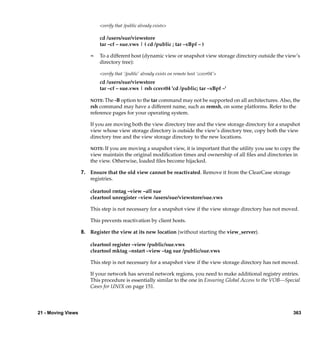
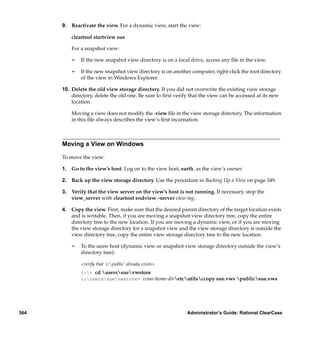
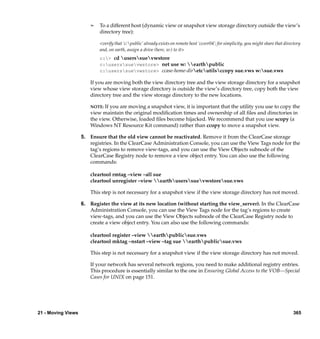
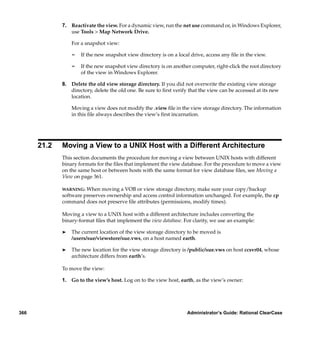
Rational Software Corporation®


RATIONAL® CLEARCASE®

ADMINISTRATOR’S GUIDE                UNIX/WINDOWS EDITION


VERSION: 2002.05.00 AND LATER

PART NUMBER: 800-025068-000
Administrator’s Guide
                        Document Number 800-025068-000 October 2001
          Rational Software Corporation 20 Maguire Road Lexington, Massachusetts 02421

IMPORTANT NOTICE
Copyright
Copyright © 1992, 2001 Rational Software Corporation. All rights reserved.
Copyright 1989, 1991 The Regents of the University of California
Copyright 1984–1991 by Raima Corporation
Permitted Usage
THIS DOCUMENT IS PROTECTED BY COPYRIGHT AND CONTAINS INFORMATION PROPRIETARY TO
RATIONAL. ANY COPYING, ADAPTATION, DISTRIBUTION, OR PUBLIC DISPLAY OF THIS
DOCUMENT WITHOUT THE EXPRESS WRITTEN CONSENT OF RATIONAL IS STRICTLY PROHIBITED.
THE RECEIPT OR POSSESSION OF THIS DOCUMENT DOES NOT CONVEY ANY RIGHTS TO
REPRODUCE OR DISTRIBUTE ITS CONTENTS, OR TO MANUFACTURE, USE, OR SELL ANYTHING
THAT IT MAY DESCRIBE, IN WHOLE OR IN PART, WITHOUT THE SPECIFIC WRITTEN CONSENT OF
RATIONAL.
Trademarks
Rational, Rational Software Corporation, the Rational logo, Rational the e-development company, Rational
Suite ContentStudio, ClearCase, ClearCase MultiSite ClearQuest, Object Testing, Object-Oriented Recording,
Objectory, PerformanceStudio, PureCoverage, PureDDTS, PureLink, Purify, Purify'd, Quantify, Rational Apex,
Rational CRC, Rational PerformanceArchitect, Rational Rose, Rational Suite, Rational Summit, Rational
Unified Process, Rational Visual Test, Requisite, RequisitePro, RUP, SiteCheck, SoDA, TestFactory, TestMate,
TestStudio, The Rational Watch, among others are trademarks or registered trademarks of Rational Software
Corporation in the United States and in other countries. All other names are used for identification purposes
only, and are trademarks or registered trademarks of their respective companies.
Sun, Solaris, and Java are trademarks or registered trademarks of Sun Microsystems, Inc.
Microsoft, the Microsoft logo, the Microsoft Internet Explorer logo, Windows, the Windows logo,
Windows NT, the Windows Start logo are trademarks or registered trademarks of Microsoft Corporation in the
United States and other countries.
Patent
U.S. Patent Nos. 5,574,898 and 5,649,200 and 5,675,802. Additional patents pending.
Government Rights Legend
Use, duplication, or disclosure by the U.S. Government is subject to restrictions set forth in the applicable
Rational License Agreement and in DFARS 227.7202-1(a) and 227.7202-3(a) (1995),
DFARS 252.227-7013(c)(1)(ii) (Oct 1988), FAR 12.212(a) 1995, FAR 52.227-19, or FAR 52.227-14, as applicable.
Warranty Disclaimer
This document and its associated software may be used as stated in the underlying license agreement. Rational
Software Corporation expressly disclaims all other warranties, express or implied, with respect to the media
and software product and its documentation, including without limitation, the warranties of merchantability
or fitness for a particular purpose or arising from a course of dealing, usage, or trade practice.
Technical Acknowledgments
This software and documentation is based in part on BSD Networking Software Release 2, licensed from the
Regents of the University of California. We acknowledge the role of the Computer Systems Research Group
and the Electrical Engineering and Computer Sciences Department of the University of California at Berkeley
and the Other Contributors in its development.
This product includes software developed by Greg Stein <gstein@lyra.org> for use in the mod_dav module
for Apache (http://www.webdav.org/mod_dav/).
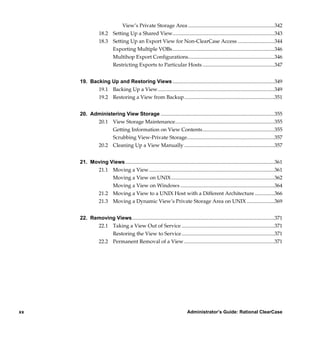
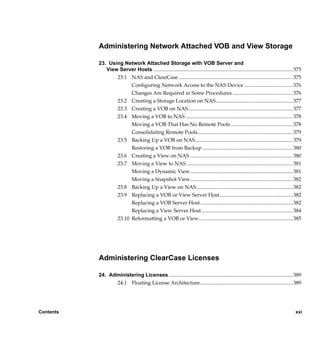
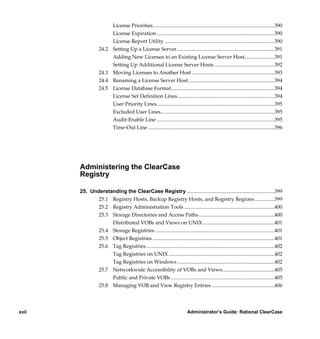
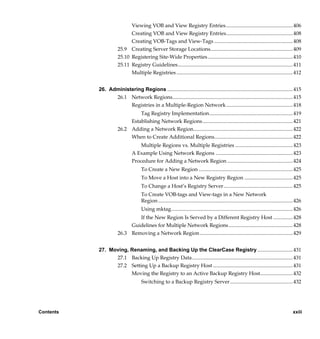
Contents

           Preface .................................................................................................................................. xxxv
                             About This Manual ..................................................................................... xxxv
                             ClearCase Documentation Roadmap ...................................................... xxxvi
                             Online Documentation ............................................................................. xxxvii
                             Technical Support .................................................................................... xxxviii


           Administering the ClearCase
           Network


           1. Understanding the ClearCase Network ......................................................................... 1
                 1.1 Network Overview ............................................................................................ 1
                 1.2 ClearCase Hosts.................................................................................................. 2
                 1.3 ClearCase Data Storage ..................................................................................... 3
                       Versioned Object Bases (VOBs)........................................................................ 4
                       Views.................................................................................................................... 5
                 1.4 ClearCase Users.................................................................................................. 6
                 1.5 The ClearCase Registry ..................................................................................... 6
                       Objects and Tags................................................................................................. 7
                       Registry Regions................................................................................................. 7
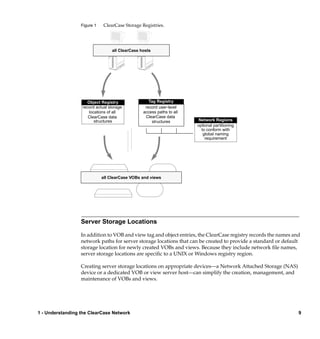
                       Server Storage Locations ................................................................................... 9
                 1.6 ClearCase Server Processes............................................................................. 10
                       albd_server ........................................................................................................ 10
                                      Port Assignment........................................................................................ 11
                                  admin_server .................................................................................................... 11
                                  view_server ....................................................................................................... 12


Contents                                                                                                                                               iii

                 /vobs/doc/ccase/admin/cc_adminTOC.fm — September 13, 2001 2:13 pm
vob_server .........................................................................................................12
                         db_server ...........................................................................................................13
                         vobrpc_server....................................................................................................13
                         lockmgr ..............................................................................................................14
                         Server Error Logs..............................................................................................14
                               Error Logging on UNIX............................................................................14
                             Error Logging on Windows .....................................................................15
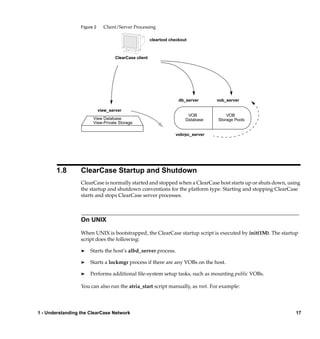
                1.7      ClearCase Client/Server Processing..............................................................16
                1.8      ClearCase Startup and Shutdown..................................................................17
                         On UNIX ............................................................................................................17
                         On Windows .....................................................................................................18


     2. Administering ClearCase Hosts .....................................................................................19
           2.1 ClearCase Administration Console................................................................19
                 Controlling Remote Administration..............................................................20
           2.2 Using DHCP with ClearCase..........................................................................21
           2.3 ClearCase Data and Non-ClearCase Hosts...................................................22
           2.4 Using Non-ClearCase Access on UNIX Hosts .............................................23
                 Restrictions on Use ...........................................................................................23
                 Using automount with Non-ClearCase Access............................................24
                 Problems with Non-ClearCase Access: NFS Client Caching .....................24
                 Problems with Non-ClearCase Access: NFS Locking .................................25
           2.5 Support for Multiple Network Interfaces on UNIX Hosts .........................26
           2.6 Using automount with ClearCase on UNIX.................................................26
                 Automounter Maps ..........................................................................................27
                               Using the –hosts Map ...............................................................................27
                            Not Using the –hosts Map........................................................................27
                         Specifying a Nonstandard Mount Directory ................................................27
                2.7      Administering Networkwide Release Areas................................................28
                         Changing the Location of the Release Area..................................................28
                         Renaming a Release Area Host.......................................................................28


     3. Understanding ClearCase Access Controls ...............................................................29
           3.1 Fundamentals of ClearCase Access Control.................................................29


iv                                                                           Administrator’s Guide: Rational ClearCase

          /vobs/doc/ccase/admin/cc_adminTOC.fm — September 13, 2001 2:13 pm
Users and Groups............................................................................................. 29
                       Privileged Users and Groups ......................................................................... 30
                           Restricted Privileges for Remote root .................................................... 31
                       User Processes................................................................................................... 31
                       ClearCase Objects............................................................................................. 32
                       Access to ClearCase Data................................................................................ 34
                3.2    Access Control for VOBs and VOB Objects.................................................. 35
                       Access Control for VOBs................................................................................. 35
                             Permission to Create VOBs...................................................................... 36
                             Permission to Delete VOBs...................................................................... 36
                             Permission to Read VOBs ........................................................................ 36
                             Permission to Write VOBs ....................................................................... 36
                          Permission to Execute VOBs ................................................................... 36
                       Access Control for Elements........................................................................... 36
                             Permission to Create Elements ............................................................... 37
                             Permission to Delete Elements................................................................ 38
                             Permission to Read Elements .................................................................. 38
                             Permission to Write Elements ................................................................. 38
                             Permission to Execute Elements ............................................................. 39
                       Access Control for Other VOB Objects ......................................................... 39
                             Permission to Create Other VOB Objects .............................................. 40
                             Permission to Delete Other VOB Objects .............................................. 40
                             Permission to Read Other VOB Objects................................................. 40
                          Permission to Write Other VOB Objects................................................ 40
                       Locks on VOB Objects ..................................................................................... 40
                          Locking Type Objects ............................................................................... 41
                3.3    Access Control for Views and View Objects ................................................ 41
                       Access Control for Dynamic Views ............................................................... 42
                             Permission to Create Views..................................................................... 43
                             Permission to Delete Views ..................................................................... 43
                             Permission to Read Views ....................................................................... 43
                             Permission to Write Views ...................................................................... 43
                             Permission to Execute Views................................................................... 44


Contents                                                                                                                                 v

           /vobs/doc/ccase/admin/cc_adminTOC.fm — September 13, 2001 2:13 pm
Access Control for View-Private Files ...........................................................44
                                Initial Owner, Group, and Protection Mode on UNIX ........................44
                                Initial Owner, Group, and Protection Mode on Windows..................45
                                Permission to Create View-Private Files................................................45
                                Permission to Delete View-Private Files ................................................46
                                Permission to Read View-Private Files ..................................................46
                                Permission to Write View-Private Files .................................................46
                              Permission to Execute View-Private Files .............................................46
                          Access Control for Derived Objects ...............................................................47
                 3.4      ClearCase and Native File-System Permissions ..........................................48


     4. ClearCase and Windows Domains ................................................................................49
            4.1 Domain Configurations Compatible with ClearCase .................................49
                 What ClearCase Requires from Any Domain ..............................................50
                 ClearCase on Nondomain Hosts ....................................................................50
            4.2 Domain User and Group Accounts................................................................51
                 Setting the ClearCase Primary Group ...........................................................52
                 Defining the Accounts Manually ...................................................................53
            4.3 Multiple User Account Domain Support ......................................................54
                 Using Active Directory Universal Groups....................................................54
                 Using Proxy Groups and Domain Mapping in Windows NT
                 Domains .............................................................................................................55
                                Setting VOB Element Permissions ..........................................................57
                              Setting VOB Storage ACLs.......................................................................57
                 4.4      Conversion to Active Directory......................................................................57
                          Understanding Active Directory....................................................................57
                          How Active Directory Affects ClearCase .....................................................58
                          Planning Your Active Directory Upgrade or Migration Strategy .............58
                          Preparing ClearCase Hosts .............................................................................59
                 4.5      Domain Upgrade Scenarios ............................................................................60
                          Upgrading a Single Domain ...........................................................................60
                          Upgrading a Master Domain and Its Resource Domains...........................61
                          Upgrading Multiple Master and Resource Domains ..................................61


vi                                                                        Administrator’s Guide: Rational ClearCase

          /vobs/doc/ccase/admin/cc_adminTOC.fm — September 13, 2001 2:13 pm
Converting Proxy Groups........................................................................ 62
                       4.6      Domain Migration Scenarios .......................................................................... 63
                                Migrating Multiple Domains.......................................................................... 63
                                       Migrating Users and Groups................................................................... 64
                                       If You Must Add a New User While Migration Is In Progress ..........65
                                       Migrating Individual ClearCase Hosts.................................................. 65
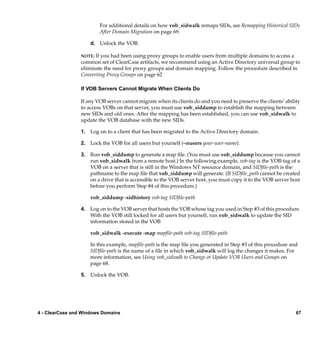
                                    If VOB Servers Cannot Migrate When Clients Do ...............................67
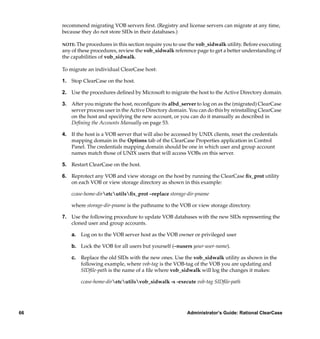
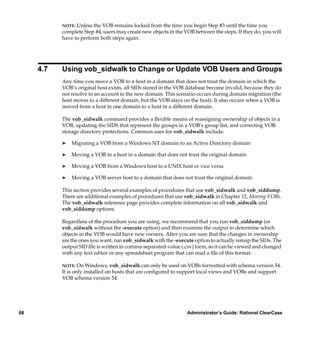
                       4.7      Using vob_sidwalk to Change or Update VOB Users and Groups..........68
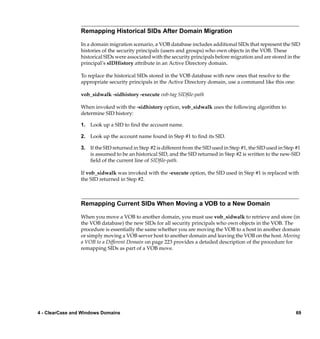
                                Remapping Historical SIDs After Domain Migration ................................69
                                Remapping Current SIDs When Moving a VOB to a New Domain.........69
                                Reassigning Ownership to the VOB Owner................................................. 70
                                Resetting VOB Storage Directory Protections.............................................. 70
                                Using -delete_groups With Ownership-Preserving Replicas....................70


           Administering a UNIX/Windows
           Network


           5. Configuring ClearCase in a Mixed Network................................................................ 75
                  5.1 When to Use ClearCase in a Mixed Network Environment......................75
                        When Not to Use a Mixed Environment ...................................................... 76
                  5.2 ClearCase Capabilities in a Mixed Environment......................................... 76
                        Windows............................................................................................................ 77
                        UNIX .................................................................................................................. 77
                        Constraints in a Mixed Environment ............................................................ 78
                  5.3 Managing User Accounts ............................................................................... 78
                        Creating a ClearCase Server Process User Account on UNIX...................79
                        Credentials Mapping and the Credentials Server ....................................... 79
                        Checking User and Group Assignments ..................................................... 80


Contents                                                                                                                                       vii

                 /vobs/doc/ccase/admin/cc_adminTOC.fm — September 13, 2001 2:13 pm
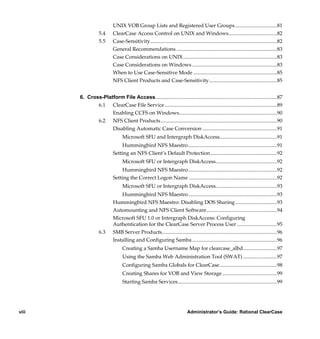
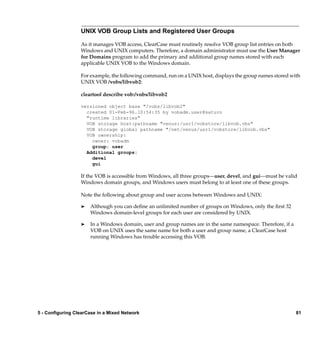
UNIX VOB Group Lists and Registered User Groups ................................81
                  5.4      ClearCase Access Control on UNIX and Windows.....................................82
                  5.5      Case-Sensitivity.................................................................................................82
                           General Recommendations .............................................................................83
                           Case Considerations on UNIX........................................................................83
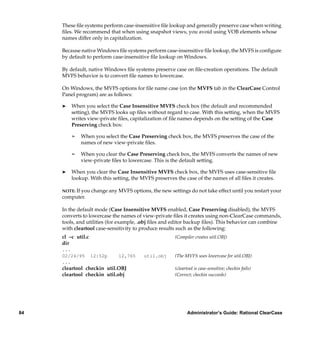
                           Case Considerations on Windows .................................................................83
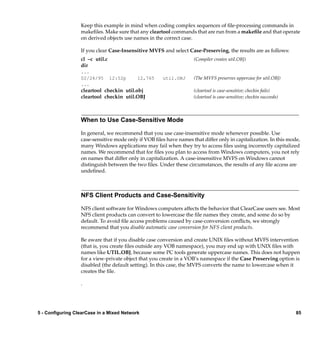
                           When to Use Case-Sensitive Mode ................................................................85
                           NFS Client Products and Case-Sensitivity....................................................85


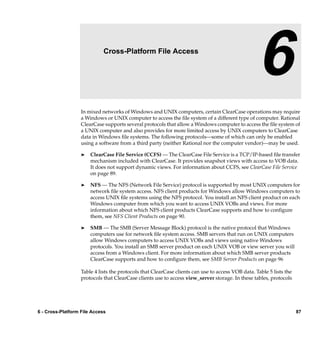
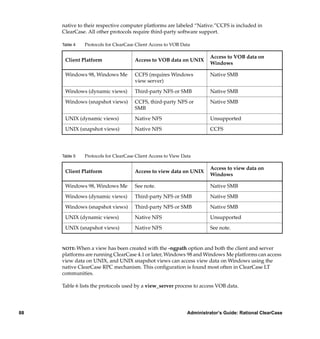
       6. Cross-Platform File Access.............................................................................................87
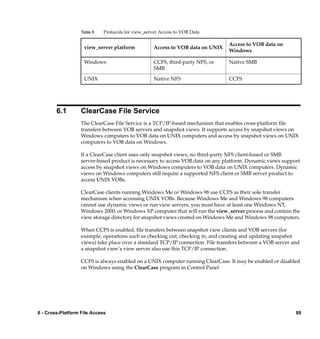
              6.1 ClearCase File Service ......................................................................................89
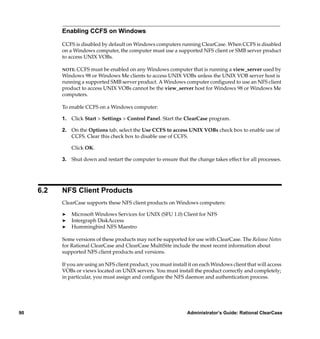
                    Enabling CCFS on Windows...........................................................................90
              6.2 NFS Client Products .........................................................................................90
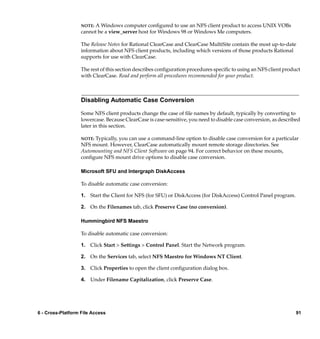
                    Disabling Automatic Case Conversion .........................................................91
                                 Microsoft SFU and Intergraph DiskAccess............................................91
                               Hummingbird NFS Maestro....................................................................91
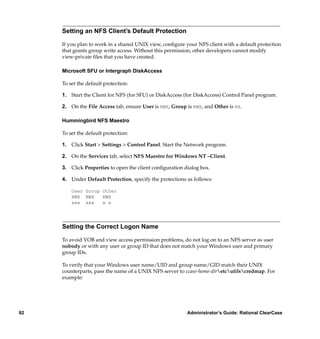
                           Setting an NFS Client’s Default Protection...................................................92
                                 Microsoft SFU or Intergraph DiskAccess...............................................92
                               Hummingbird NFS Maestro....................................................................92
                           Setting the Correct Logon Name ...................................................................92
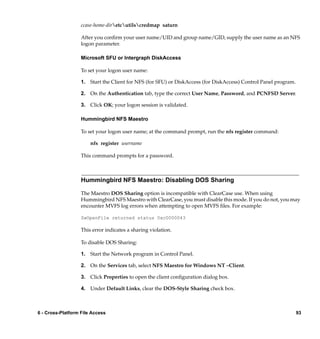
                                 Microsoft SFU or Intergraph DiskAccess...............................................93
                               Hummingbird NFS Maestro....................................................................93
                           Hummingbird NFS Maestro: Disabling DOS Sharing ................................93
                           Automounting and NFS Client Software......................................................94
                           Microsoft SFU 1.0 or Intergraph DiskAccess: Configuring
                           Authentication for the ClearCase Server Process User ...............................95
                  6.3      SMB Server Products........................................................................................96
                           Installing and Configuring Samba .................................................................96
                                 Creating a Samba Username Map for clearcase_albd..........................97
                                 Using the Samba Web Administration Tool (SWAT) ..........................97
                                 Configuring Samba Globals for ClearCase............................................98
                                 Creating Shares for VOB and View Storage ..........................................99
                                 Starting Samba Services............................................................................99


viii                                                                         Administrator’s Guide: Rational ClearCase

            /vobs/doc/ccase/admin/cc_adminTOC.fm — September 13, 2001 2:13 pm
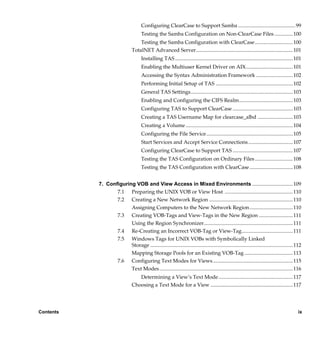
Configuring ClearCase to Support Samba ............................................ 99
                                  Testing the Samba Configuration on Non-ClearCase Files ..............100
                                Testing the Samba Configuration with ClearCase .............................100
                            TotalNET Advanced Server.......................................................................... 101
                                  Installing TAS .......................................................................................... 101
                                  Enabling the Multiuser Kernel Driver on AIX.................................... 101
                                  Accessing the Syntax Administration Framework ............................102
                                  Performing Initial Setup of TAS ........................................................... 102
                                  General TAS Settings.............................................................................. 103
                                  Enabling and Configuring the CIFS Realm......................................... 103
                                  Configuring TAS to Support ClearCase .............................................. 103
                                  Creating a TAS Username Map for clearcase_albd ...........................103
                                  Creating a Volume .................................................................................. 104
                                  Configuring the File Service .................................................................. 105
                                  Start Services and Accept Service Connections .................................. 107
                                  Configuring ClearCase to Support TAS .............................................. 107
                                  Testing the TAS Configuration on Ordinary Files .............................108
                                  Testing the TAS Configuration with ClearCase .................................108


           7. Configuring VOB and View Access in Mixed Environments ...............................109
                  7.1 Preparing the UNIX VOB or View Host .................................................... 110
                  7.2 Creating a New Network Region ................................................................ 110
                            Assigning Computers to the New Network Region .................................110
                     7.3    Creating VOB-Tags and View-Tags in the New Region ..........................111
                            Using the Region Synchronizer.................................................................... 111
                     7.4    Re-Creating an Incorrect VOB-Tag or View-Tag....................................... 111
                     7.5    Windows Tags for UNIX VOBs with Symbolically Linked
                            Storage ............................................................................................................. 112
                            Mapping Storage Pools for an Existing VOB-Tag ..................................... 113
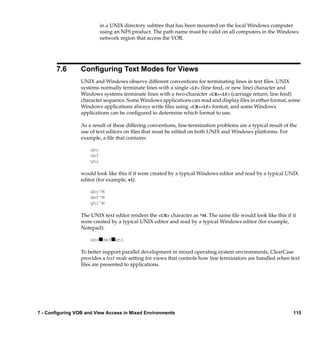
                     7.6    Configuring Text Modes for Views ............................................................. 115
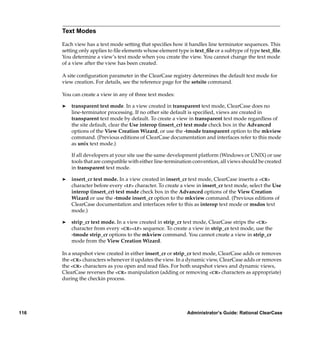
                            Text Modes ...................................................................................................... 116
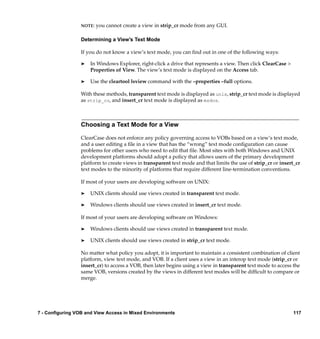
                                  Determining a View’s Text Mode......................................................... 117
                            Choosing a Text Mode for a View ............................................................... 117


Contents                                                                                                                                          ix

               /vobs/doc/ccase/admin/cc_adminTOC.fm — September 13, 2001 2:13 pm
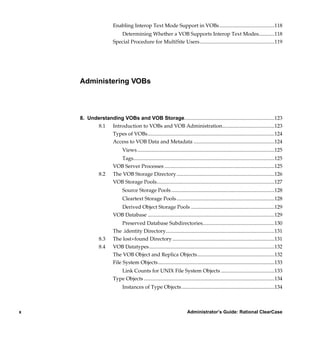
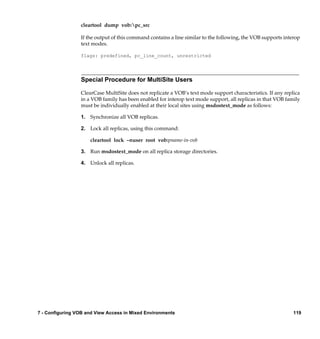
Enabling Interop Text Mode Support in VOBs ..........................................118
                           Determining Whether a VOB Supports Interop Text Modes............118
                        Special Procedure for MultiSite Users .........................................................119


    Administering VOBs


    8. Understanding VOBs and VOB Storage.....................................................................123
          8.1 Introduction to VOBs and VOB Administration........................................123
                Types of VOBs.................................................................................................124
                Access to VOB Data and Metadata ..............................................................124
                              Views.........................................................................................................125
                            Tags............................................................................................................125
                        VOB Server Processes ....................................................................................125
               8.2      The VOB Storage Directory...........................................................................126
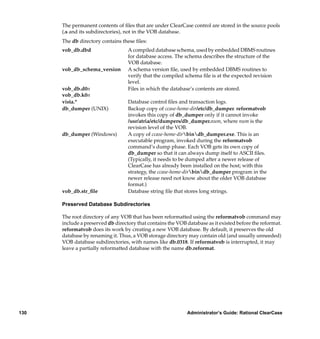
                        VOB Storage Pools..........................................................................................127
                              Source Storage Pools ...............................................................................128
                              Cleartext Storage Pools...........................................................................128
                          Derived Object Storage Pools ................................................................129
                        VOB Database .................................................................................................129
                             Preserved Database Subdirectories.......................................................130
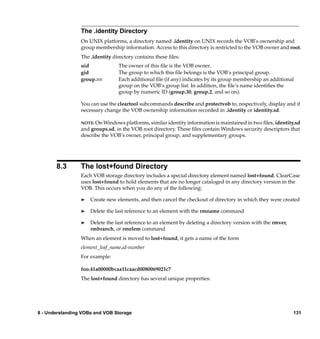
                        The .identity Directory...................................................................................131
               8.3      The lost+found Directory ..............................................................................131
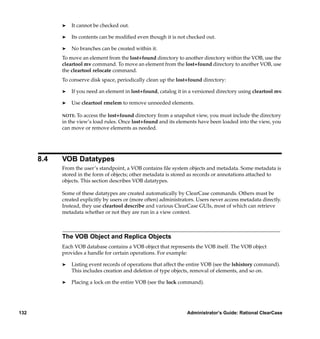
               8.4      VOB Datatypes................................................................................................132
                        The VOB Object and Replica Objects...........................................................132
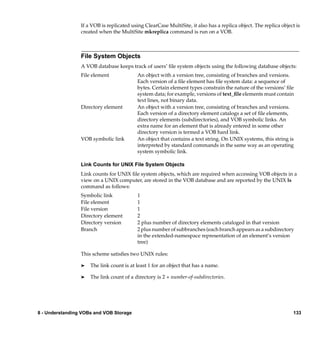
                        File System Objects.........................................................................................133
                           Link Counts for UNIX File System Objects .........................................133
                        Type Objects ....................................................................................................134
                              Instances of Type Objects .......................................................................134


x                                                                           Administrator’s Guide: Rational ClearCase

         /vobs/doc/ccase/admin/cc_adminTOC.fm — September 13, 2001 2:13 pm
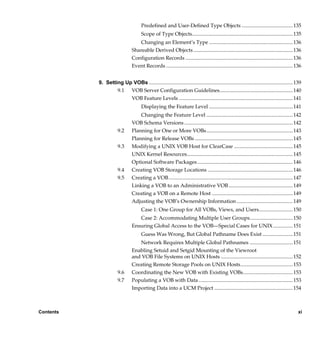
Predefined and User-Defined Type Objects ....................................... 135
                                      Scope of Type Objects............................................................................. 135
                                   Changing an Element’s Type ................................................................ 136
                                Shareable Derived Objects ............................................................................ 136
                                Configuration Records .................................................................................. 136
                                Event Records ................................................................................................. 136


           9. Setting Up VOBs .............................................................................................................. 139
                   9.1 VOB Server Configuration Guidelines........................................................ 140
                        VOB Feature Levels ....................................................................................... 141
                                      Displaying the Feature Level ................................................................ 141
                                    Changing the Feature Level .................................................................. 142
                                VOB Schema Versions ................................................................................... 142
                       9.2      Planning for One or More VOBs.................................................................. 143
                                Planning for Release VOBs ........................................................................... 145
                       9.3      Modifying a UNIX VOB Host for ClearCase ............................................. 145
                                UNIX Kernel Resources................................................................................. 145
                                Optional Software Packages ......................................................................... 146
                       9.4      Creating VOB Storage Locations ................................................................. 146
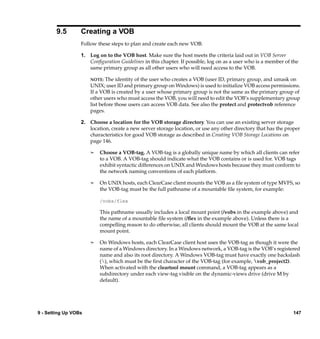
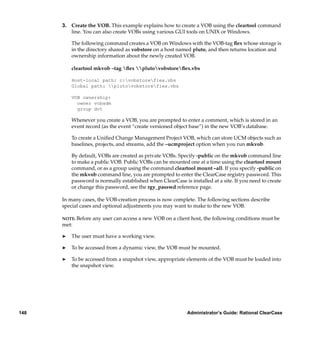
                       9.5      Creating a VOB............................................................................................... 147
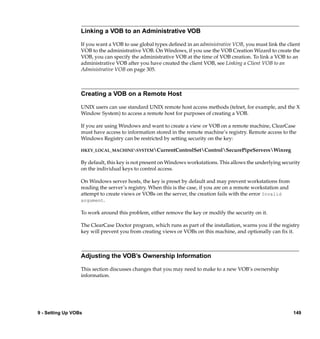
                                Linking a VOB to an Administrative VOB ................................................. 149
                                Creating a VOB on a Remote Host .............................................................. 149
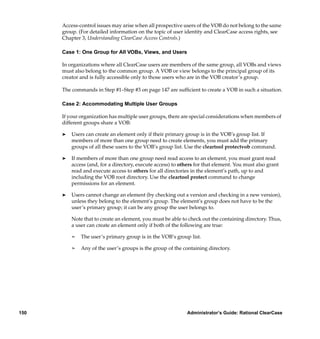
                                Adjusting the VOB’s Ownership Information ........................................... 149
                                      Case 1: One Group for All VOBs, Views, and Users..........................150
                                   Case 2: Accommodating Multiple User Groups.................................150
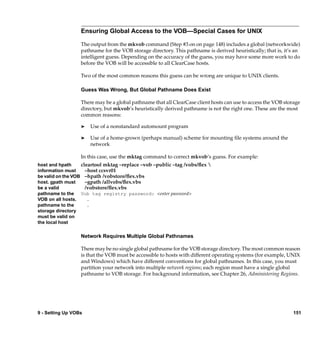
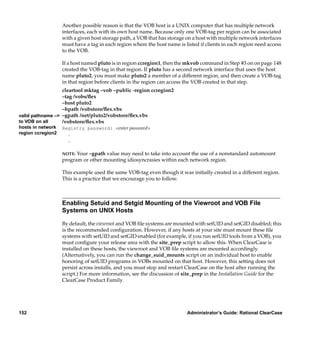
                                Ensuring Global Access to the VOB—Special Cases for UNIX ...............151
                                      Guess Was Wrong, But Global Pathname Does Exist .......................151
                                   Network Requires Multiple Global Pathnames .................................151
                                Enabling Setuid and Setgid Mounting of the Viewroot
                                and VOB File Systems on UNIX Hosts ....................................................... 152
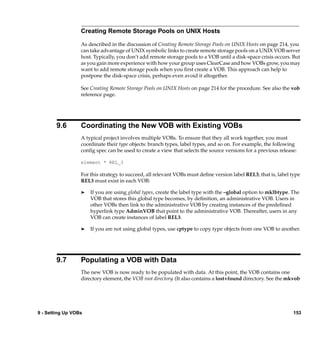
                                Creating Remote Storage Pools on UNIX Hosts........................................ 153
                       9.6      Coordinating the New VOB with Existing VOBs...................................... 153
                       9.7      Populating a VOB with Data ........................................................................ 153
                                Importing Data into a UCM Project ............................................................ 154


Contents                                                                                                                                        xi

                /vobs/doc/ccase/admin/cc_adminTOC.fm — September 13, 2001 2:13 pm
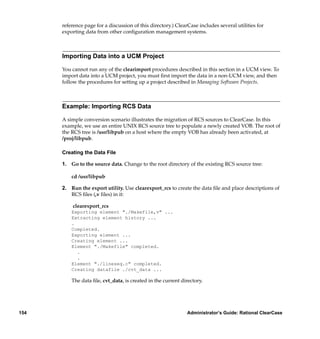
Example: Importing RCS Data......................................................................154
                               Creating the Data File .............................................................................154
                            Running clearimport...............................................................................155
                         Example: Importing PVCS Data...................................................................155
                               Creating the Data File .............................................................................155
                            Running the Conversion Scripts ...........................................................156
                 9.8     Converting a SourceSafe Configuration......................................................157
                         Overview of Payroll Configuration .............................................................157
                               Shares ........................................................................................................158
                               Branches....................................................................................................159
                               Labels ........................................................................................................159
                             Pins ............................................................................................................159
                         Setting Your Environment.............................................................................159
                               Setting Environment Variables..............................................................159
                               Setting Your SourceSafe Current Project .............................................160
                         Running clearexport_ssafe ............................................................................160
                               Using the Recursive Option ...................................................................160
                            Example ....................................................................................................160
                         Running clearimport ......................................................................................162
                         Examining the Results ...................................................................................163
                               Version Numbers ....................................................................................164
                               Labels ........................................................................................................164
                               Branches....................................................................................................165
                               Pins ............................................................................................................165
                               Shares ........................................................................................................165


      10. Backing Up and Restoring VOBs...............................................................................167
             10.1 Choosing Backup Tools .................................................................................167
                  UNIX Backup Issues.......................................................................................167
                  Windows Backup Issues ................................................................................168
             10.2 Backing Up a VOB ..........................................................................................169
                  Backing Up a VOB on UNIX .........................................................................169
                  Backing Up a VOB on Windows ..................................................................169


xii                                                                          Administrator’s Guide: Rational ClearCase

           /vobs/doc/ccase/admin/cc_adminTOC.fm — September 13, 2001 2:13 pm
Choosing Between Standard and Semi-Live Backup................................170
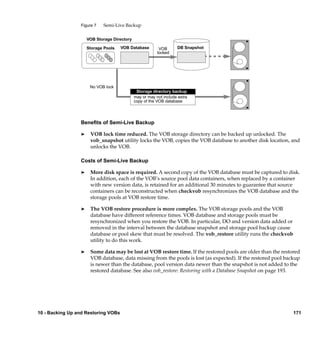
                              Benefits of Semi-Live Backup................................................................ 171
                              Costs of Semi-Live Backup .................................................................... 171
                              Enabling Semi-Live Backup................................................................... 172
                           Deferred Source Container Deletion .................................................... 172
                        Determining a VOB’s Location .................................................................... 172
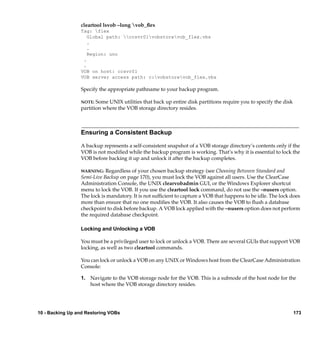
                        Ensuring a Consistent Backup...................................................................... 173
                            Locking and Unlocking a VOB ............................................................. 173
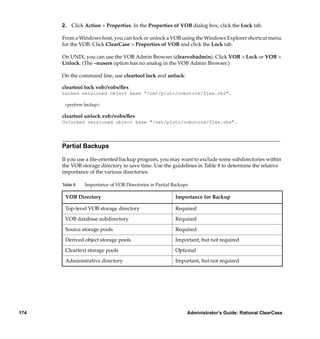
                        Partial Backups ............................................................................................... 174
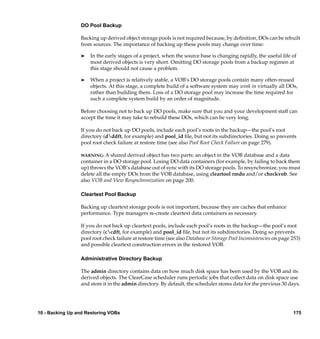
                              DO Pool Backup ...................................................................................... 175
                              Cleartext Pool Backup ............................................................................ 175
                         Administrative Directory Backup ........................................................ 175
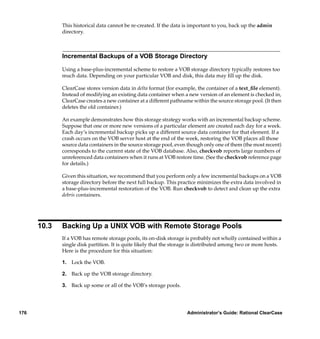
                     Incremental Backups of a VOB Storage Directory .................................... 176
                10.3 Backing Up a UNIX VOB with Remote Storage Pools .............................176
                10.4 Restoring a VOB from Backup with vob_restore ...................................... 177
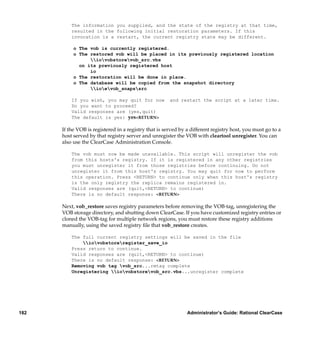
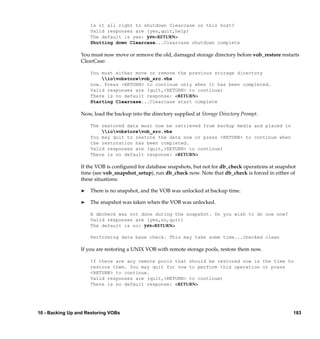
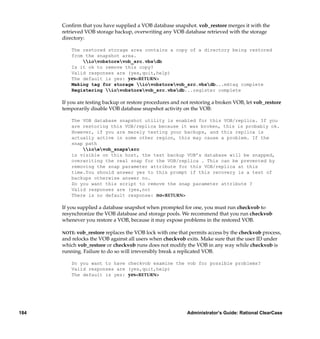
                     vob_restore: Sample Session......................................................................... 179
                              Target Prompt.......................................................................................... 180
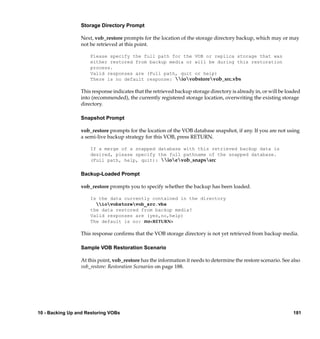
                              Storage Directory Prompt ...................................................................... 181
                              Snapshot Prompt..................................................................................... 181
                              Backup-Loaded Prompt ......................................................................... 181
                           Sample VOB Restoration Scenario........................................................ 181
                        vob_restore: Restoration Scenarios.............................................................. 188
                              How vob_restore Determines the Scenario......................................... 188
                              Restoration Rules and Guidelines ........................................................ 189
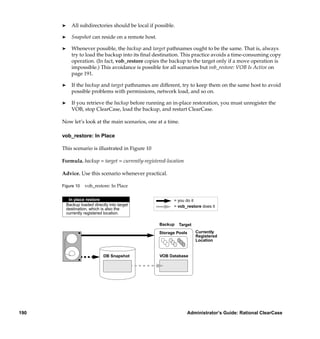
                              vob_restore: In Place............................................................................... 190
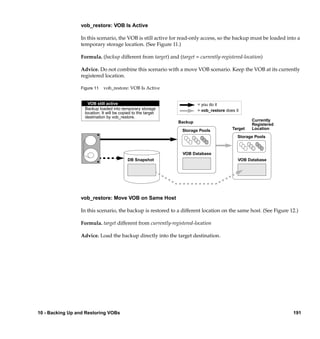
                              vob_restore: VOB Is Active.................................................................... 191
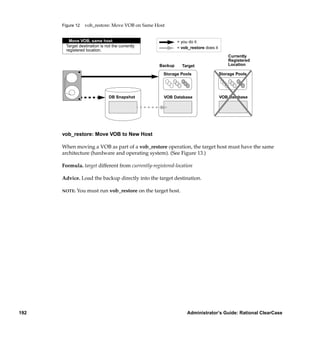
                              vob_restore: Move VOB on Same Host ............................................... 191
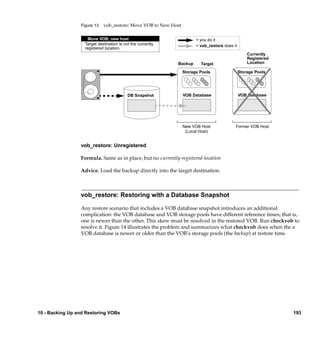
                              vob_restore: Move VOB to New Host ................................................. 192
                         vob_restore: Unregistered ..................................................................... 193
                     vob_restore: Restoring with a Database Snapshot .................................... 193
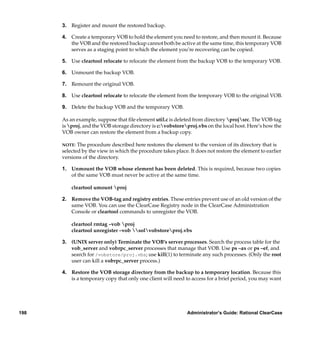
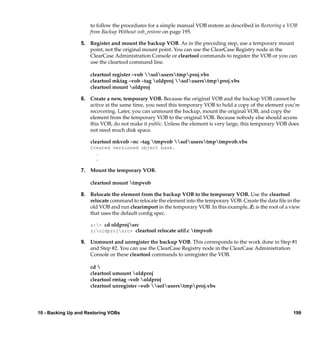
                10.5 Restoring a VOB from Backup Without vob_restore................................195
                10.6 Restoring an Individual Element from Backup ......................................... 197
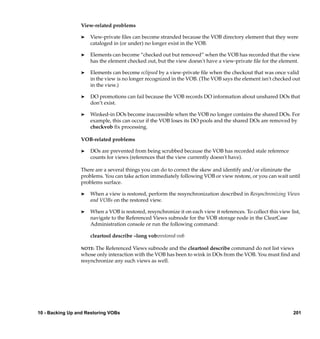
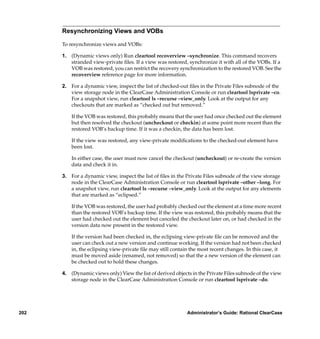
                10.7 VOB and View Resynchronization .............................................................. 200


Contents                                                                                                                               xiii

           /vobs/doc/ccase/admin/cc_adminTOC.fm — September 13, 2001 2:13 pm
Resynchronizing Views and VOBs ..............................................................202
                           Reestablishing Consistency of a View’s Derived Object State .................203


      11. Administering VOB Storage........................................................................................205
            11.1 VOB Storage Management ............................................................................205
                  Monitoring VOB Storage ...............................................................................206
                  Using the Scheduler .......................................................................................207
            11.2 Scrubbing to Control VOB Storage Growth ...............................................207
                  Scrubbing VOB Storage Pools.......................................................................208
                  Scrubbing VOB Databases.............................................................................208
                  Adjusting Default Scrubbing Parameters ...................................................209
                                 Scrubbing Derived Objects More Often ...............................................209
                                 Fine-Tuning Derived Object Scrubbing ...............................................209
                                 Scrubbing Less Aggressively .................................................................211
                  11.3 Removing Unneeded Versions from a VOB...............................................211
                  11.4 Creating Additional Storage Pools ..............................................................212
                       Tools for Working with Storage Pools.........................................................212
                          cleartool Subcommands .........................................................................213
                  11.5 Creating Remote Storage Pools on UNIX Hosts ........................................214
                       Example: Assigning All Files in a Directory to a New Pool.....................216
                       Example: Moving an Existing Storage Pool to Another Disk ..................217


      12. Moving VOBs...................................................................................................................219
            12.1 Important Steps to Take When Moving Any VOB ....................................220
            12.2 Special Considerations for Replicated VOBs..............................................220
            12.3 Moving a VOB on Windows .........................................................................221
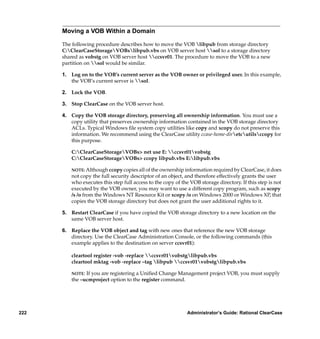
                  Moving a VOB Within a Domain .................................................................222
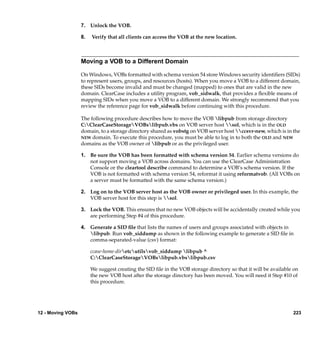
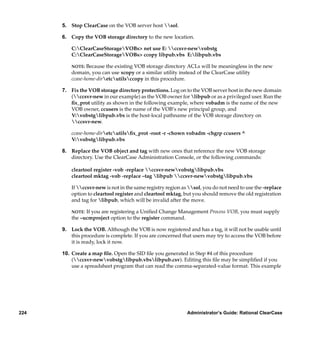
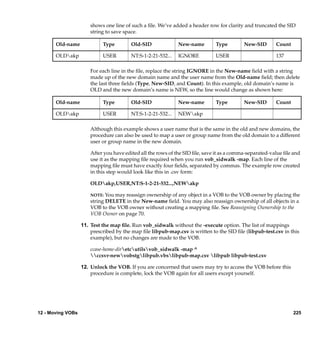
                  Moving a VOB to a Different Domain .........................................................223
            12.4 Moving a VOB on UNIX................................................................................226
                  If the VOB Has Remote Pools .......................................................................227
                                Consolidating Remote Pools..................................................................228
                           If the VOB Is Exported for Non-ClearCase Access....................................229
                           Moving a VOB Between UNIX Hosts (Same Architecture) .....................229


xiv                                                                         Administrator’s Guide: Rational ClearCase

           /vobs/doc/ccase/admin/cc_adminTOC.fm — September 13, 2001 2:13 pm
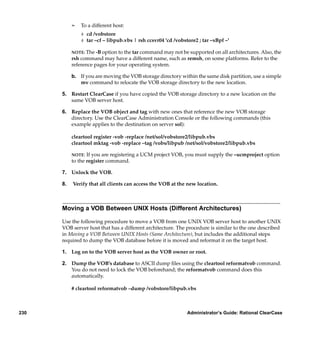
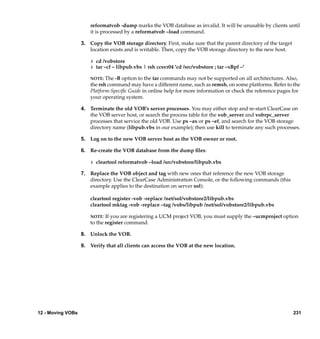
Moving a VOB Between UNIX Hosts (Different Architectures) .............230
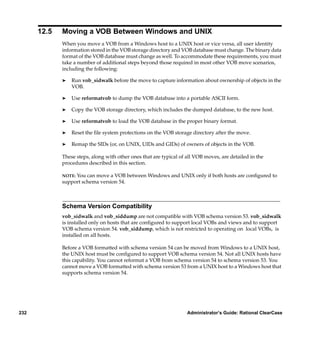
                       12.5 Moving a VOB Between Windows and UNIX........................................... 232
                            Schema Version Compatibility..................................................................... 232
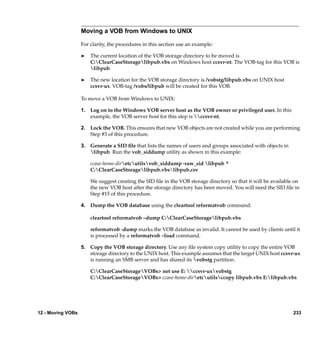
                            Moving a VOB from Windows to UNIX..................................................... 233
                            Moving a VOB from UNIX to Windows..................................................... 236


           13. Removing VOBs............................................................................................................. 241
                 13.1 Locking as an Alternative to VOB Deactivation........................................ 241
                 13.2 Taking a VOB Out of Service........................................................................ 241
                      Restoring the VOB to Service ....................................................................... 242
                 13.3 Removing a VOB ............................................................................................ 243


           14. Using checkvob ............................................................................................................. 245
                  14.1 When to Use checkvob .................................................................................. 245
                  14.2 Checking Hyperlinks..................................................................................... 246
                  14.3 Checking Global Types ................................................................................. 246
                       Fix Processing ................................................................................................. 246
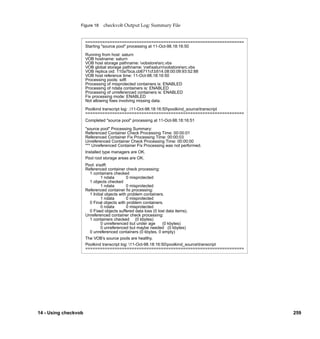
                       Output Log for Global Type Checking ....................................................... 247
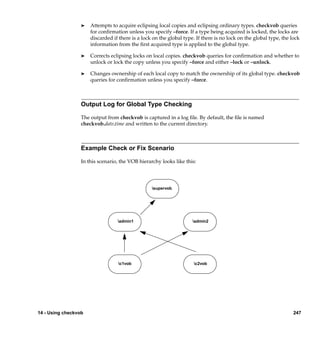
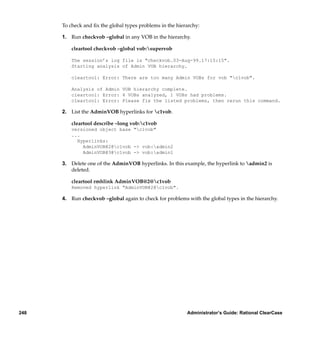
                       Example Check or Fix Scenario.................................................................... 247
                  14.4 Database or Storage Pool Inconsistencies................................................... 253
                       Updating the VOB Database ........................................................................ 255
                       Requirements for Using checkvob............................................................... 256
                       Replicated VOB Considerations................................................................... 257
                       Running checkvob.......................................................................................... 257
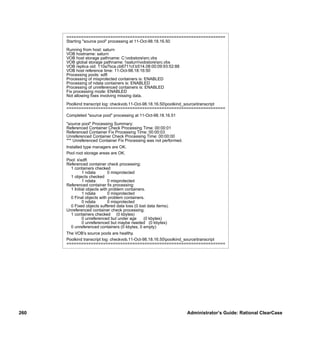
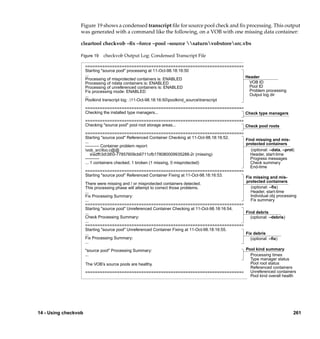
                       Output Log for Pool Checking ..................................................................... 258
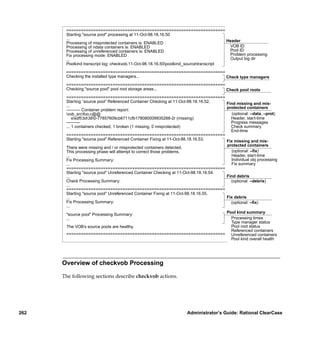
                       Overview of checkvob Processing ............................................................... 262
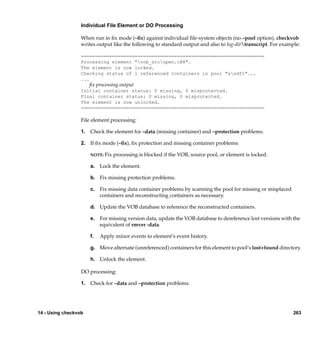
                                      Individual File Element or DO Processing.......................................... 263
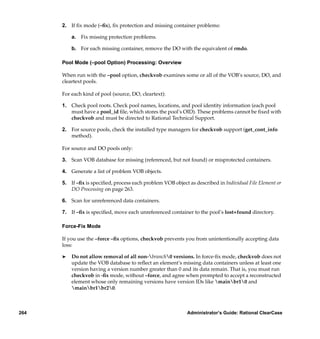
                                      Pool Mode (–pool Option) Processing: Overview..............................264
                                      Force-Fix Mode........................................................................................ 264
                                      Pool Setup Mode ..................................................................................... 265
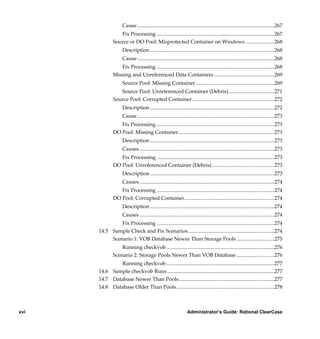
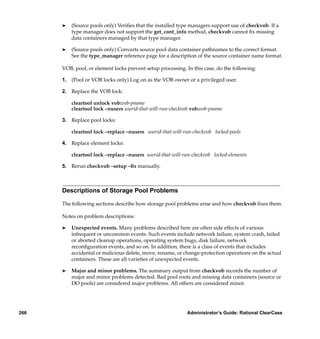
                                Descriptions of Storage Pool Problems ....................................................... 266
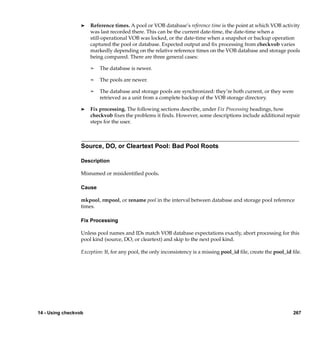
                                Source, DO, or Cleartext Pool: Bad Pool Roots.......................................... 267
                                      Description............................................................................................... 267


Contents                                                                                                                                        xv

                /vobs/doc/ccase/admin/cc_adminTOC.fm — September 13, 2001 2:13 pm
Cause .........................................................................................................267
                      Fix Processing ..........................................................................................267
                   Source or DO Pool: Misprotected Container on Windows ......................268
                         Description ...............................................................................................268
                         Cause .........................................................................................................268
                      Fix Processing ..........................................................................................268
                   Missing and Unreferenced Data Containers ..............................................269
                         Source Pool: Missing Container ............................................................269
                      Source Pool: Unreferenced Container (Debris)...................................271
                   Source Pool: Corrupted Container...............................................................272
                         Description ...............................................................................................272
                         Cause .........................................................................................................273
                      Fix Processing ..........................................................................................273
                   DO Pool: Missing Container .........................................................................273
                         Description ...............................................................................................273
                         Causes .......................................................................................................273
                      Fix Processing ..........................................................................................273
                   DO Pool: Unreferenced Container (Debris)................................................273
                         Description ...............................................................................................273
                         Causes .......................................................................................................274
                      Fix Processing ..........................................................................................274
                   DO Pool: Corrupted Container.....................................................................274
                         Description ...............................................................................................274
                         Causes .......................................................................................................274
                    Fix Processing ..........................................................................................274
           14.5 Sample Check and Fix Scenarios ..................................................................274
                Scenario 1: VOB Database Newer Than Storage Pools .............................275
                       Running checkvob...................................................................................276
                   Scenario 2: Storage Pools Newer Than VOB Database .............................276
                   Running checkvob...................................................................................277
           14.6 Sample checkvob Runs ..................................................................................277
           14.7 Database Newer Than Pools .........................................................................277
           14.8 Database Older Than Pools...........................................................................278


xvi                                                                    Administrator’s Guide: Rational ClearCase

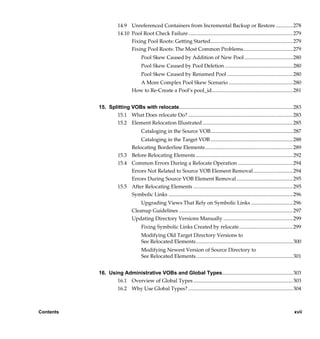
      /vobs/doc/ccase/admin/cc_adminTOC.fm — September 13, 2001 2:13 pm
14.9 Unreferenced Containers from Incremental Backup or Restore .............278
                      14.10 Pool Root Check Failure................................................................................ 279
                            Fixing Pool Roots: Getting Started............................................................... 279
                            Fixing Pool Roots: The Most Common Problems...................................... 279
                                     Pool Skew Caused by Addition of New Pool ..................................... 280
                                     Pool Skew Caused by Pool Deletion .................................................... 280
                                     Pool Skew Caused by Renamed Pool .................................................. 280
                                  A More Complex Pool Skew Scenario ................................................. 280
                               How to Re-Create a Pool’s pool_id.............................................................. 281


           15. Splitting VOBs with relocate....................................................................................... 283
                  15.1 What Does relocate Do? ................................................................................ 283
                  15.2 Element Relocation Illustrated ..................................................................... 285
                                     Cataloging in the Source VOB............................................................... 287
                               Cataloging in the Target VOB ............................................................... 288
                           Relocating Borderline Elements ................................................................... 289
                      15.3 Before Relocating Elements .......................................................................... 292
                      15.4 Common Errors During a Relocate Operation .......................................... 294
                           Errors Not Related to Source VOB Element Removal ..............................294
                           Errors During Source VOB Element Removal ........................................... 295
                      15.5 After Relocating Elements ............................................................................ 295
                           Symbolic Links ............................................................................................... 296
                                   Upgrading Views That Rely on Symbolic Links ................................296
                               Cleanup Guidelines ....................................................................................... 297
                               Updating Directory Versions Manually ..................................................... 299
                                     Fixing Symbolic Links Created by relocate......................................... 299
                                     Modifying Old Target Directory Versions to
                                     See Relocated Elements.......................................................................... 300
                                     Modifying Newest Version of Source Directory to
                                     See Relocated Elements.......................................................................... 301


           16. Using Administrative VOBs and Global Types...................................................... 303
                  16.1 Overview of Global Types ............................................................................ 303
                  16.2 Why Use Global Types? ................................................................................ 304


Contents                                                                                                                                xvii

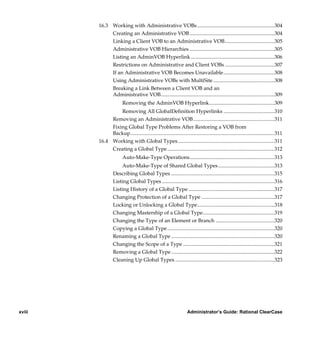
                /vobs/doc/ccase/admin/cc_adminTOC.fm — September 13, 2001 2:13 pm
16.3 Working with Administrative VOBs ...........................................................304
                  Creating an Administrative VOB .................................................................304
                  Linking a Client VOB to an Administrative VOB......................................305
                  Administrative VOB Hierarchies .................................................................305
                  Listing an AdminVOB Hyperlink ................................................................306
                  Restrictions on Administrative and Client VOBs ......................................307
                  If an Administrative VOB Becomes Unavailable.......................................308
                  Using Administrative VOBs with MultiSite ...............................................308
                  Breaking a Link Between a Client VOB and an
                  Administrative VOB.......................................................................................309
                            Removing the AdminVOB Hyperlink..................................................309
                      Removing All GlobalDefinition Hyperlinks .......................................310
                  Removing an Administrative VOB ..............................................................311
                  Fixing Global Type Problems After Restoring a VOB from
                  Backup..............................................................................................................311
             16.4 Working with Global Types..........................................................................311
                  Creating a Global Type ..................................................................................312
                            Auto-Make-Type Operations.................................................................313
                           Auto-Make-Type of Shared Global Types ...........................................313
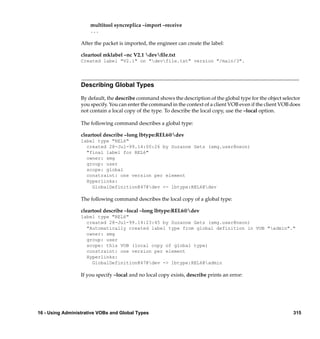
                      Describing Global Types ...............................................................................315
                      Listing Global Types ......................................................................................316
                      Listing History of a Global Type ..................................................................317
                      Changing Protection of a Global Type ........................................................317
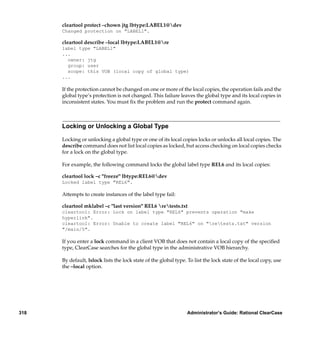
                      Locking or Unlocking a Global Type...........................................................318
                      Changing Mastership of a Global Type.......................................................319
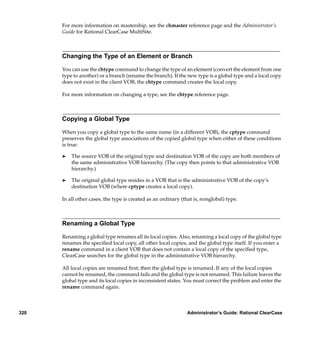
                      Changing the Type of an Element or Branch .............................................320
                      Copying a Global Type ..................................................................................320
                      Renaming a Global Type ...............................................................................320
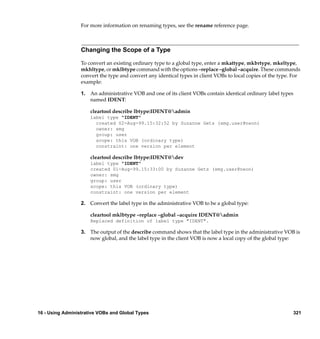
                      Changing the Scope of a Type ......................................................................321
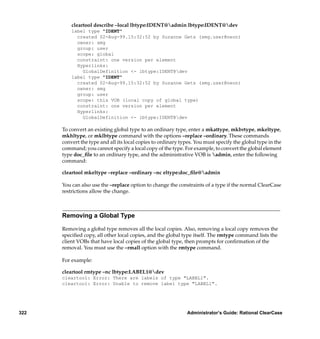
                      Removing a Global Type ...............................................................................322
                      Cleaning Up Global Types ............................................................................323


xviii                                                                   Administrator’s Guide: Rational ClearCase

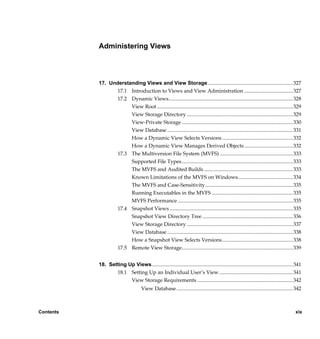
        /vobs/doc/ccase/admin/cc_adminTOC.fm — September 13, 2001 2:13 pm
Administering Views


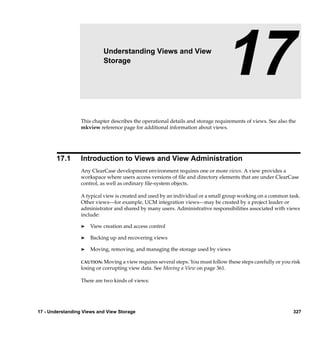
           17. Understanding Views and View Storage ................................................................. 327
                  17.1 Introduction to Views and View Administration ..................................... 327
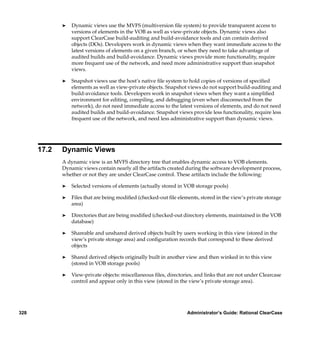
                  17.2 Dynamic Views............................................................................................... 328
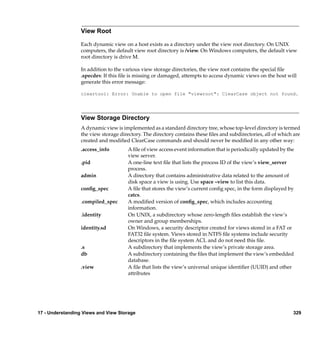
                       View Root ........................................................................................................ 329
                       View Storage Directory ................................................................................. 329
                       View-Private Storage ..................................................................................... 330
                       View Database ................................................................................................ 331
                       How a Dynamic View Selects Versions ...................................................... 332
                       How a Dynamic View Manages Derived Objects ..................................... 332
                  17.3 The Multiversion File System (MVFS) ........................................................ 333
                       Supported File Types..................................................................................... 333
                       The MVFS and Audited Builds .................................................................... 333
                       Known Limitations of the MVFS on Windows.......................................... 334
                       The MVFS and Case-Sensitivity................................................................... 335
                       Running Executables in the MVFS .............................................................. 335
                       MVFS Performance ........................................................................................ 335
                  17.4 Snapshot Views .............................................................................................. 335
                       Snapshot View Directory Tree ..................................................................... 336
                       View Storage Directory ................................................................................. 337
                       View Database ................................................................................................ 338
                       How a Snapshot View Selects Versions...................................................... 338
                  17.5 Remote View Storage..................................................................................... 339


           18. Setting Up Views............................................................................................................ 341
                  18.1 Setting Up an Individual User’s View ........................................................ 341
                        View Storage Requirements ......................................................................... 342
                                      View Database ......................................................................................... 342


Contents                                                                                                                                     xix

                /vobs/doc/ccase/admin/cc_adminTOC.fm — September 13, 2001 2:13 pm
View’s Private Storage Area ..................................................................342
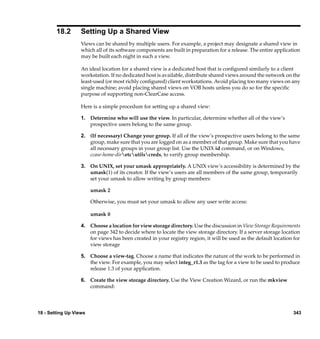
                 18.2 Setting Up a Shared View..............................................................................343
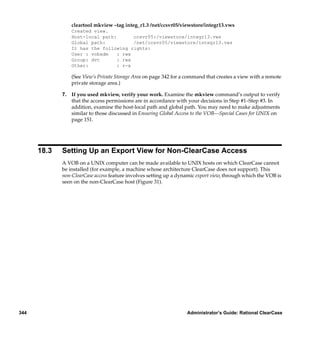
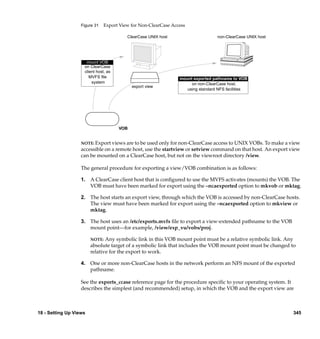
                 18.3 Setting Up an Export View for Non-ClearCase Access ............................344
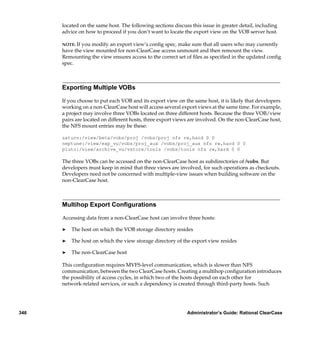
                      Exporting Multiple VOBs ..............................................................................346
                      Multihop Export Configurations..................................................................346
                      Restricting Exports to Particular Hosts .......................................................347


     19. Backing Up and Restoring Views ..............................................................................349
            19.1 Backing Up a View .........................................................................................349
            19.2 Restoring a View from Backup.....................................................................351


     20. Administering View Storage .......................................................................................355
           20.1 View Storage Maintenance............................................................................355
                 Getting Information on View Contents.......................................................355
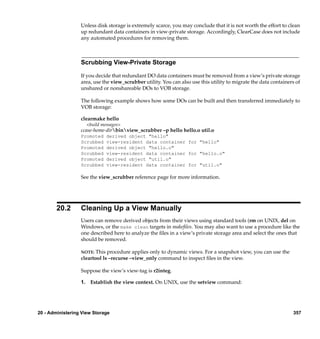
                 Scrubbing View-Private Storage...................................................................357
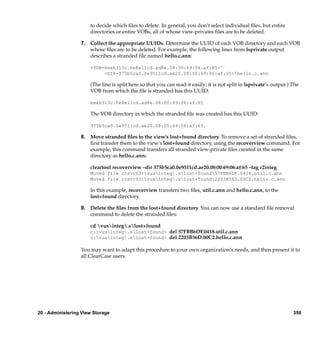
           20.2 Cleaning Up a View Manually .....................................................................357


     21. Moving Views ..................................................................................................................361
           21.1 Moving a View................................................................................................361
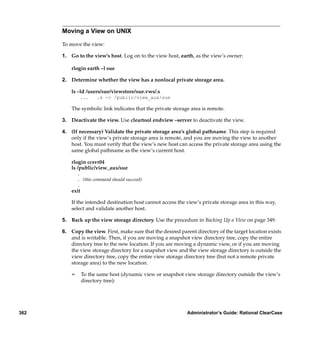
                 Moving a View on UNIX...............................................................................362
                 Moving a View on Windows ........................................................................364
           21.2 Moving a View to a UNIX Host with a Different Architecture ...............366
           21.3 Moving a Dynamic View’s Private Storage Area on UNIX .....................369


     22. Removing Views.............................................................................................................371
                 22.1 Taking a View Out of Service .......................................................................371
                      Restoring the View to Service .......................................................................371
                 22.2 Permanent Removal of a View .....................................................................371


xx                                                                         Administrator’s Guide: Rational ClearCase

           /vobs/doc/ccase/admin/cc_adminTOC.fm — September 13, 2001 2:13 pm
Administering Network Attached VOB and View Storage

           23. Using Network Attached Storage with VOB Server and
              View Server Hosts ........................................................................................................... 375
                  23.1 NAS and ClearCase ....................................................................................... 375
                        Configuring Network Access to the NAS Device ..................................... 376
                        Changes Are Required in Some Procedures .............................................. 376
                  23.2 Creating a Storage Location on NAS........................................................... 377
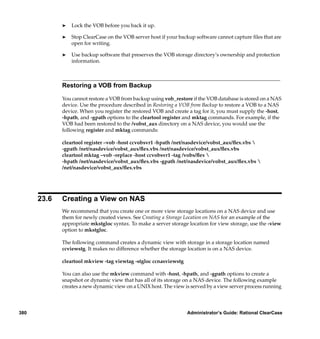
                  23.3 Creating a VOB on NAS................................................................................ 377
                  23.4 Moving a VOB to NAS .................................................................................. 378
                        Moving a VOB That Has No Remote Pools ............................................... 378
                        Consolidating Remote Pools......................................................................... 379
                  23.5 Backing Up a VOB on NAS........................................................................... 379
                        Restoring a VOB from Backup ..................................................................... 380
                  23.6 Creating a View on NAS ............................................................................... 380
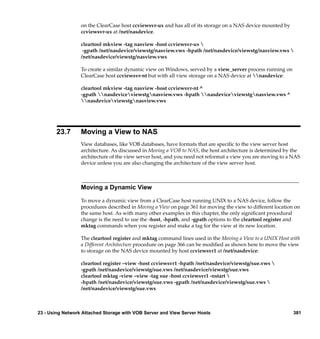
                  23.7 Moving a View to NAS ................................................................................. 381
                        Moving a Dynamic View .............................................................................. 381
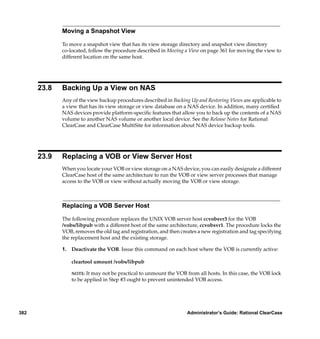
                        Moving a Snapshot View .............................................................................. 382
                  23.8 Backing Up a View on NAS.......................................................................... 382
                  23.9 Replacing a VOB or View Server Host........................................................ 382
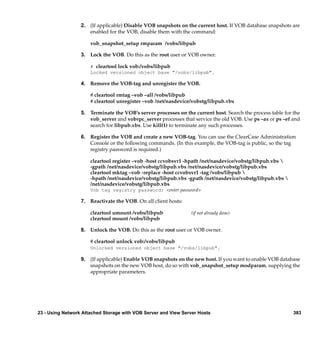
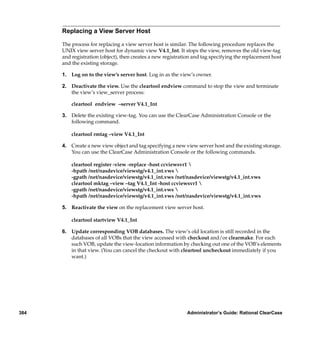
                        Replacing a VOB Server Host....................................................................... 382
                        Replacing a View Server Host...................................................................... 384
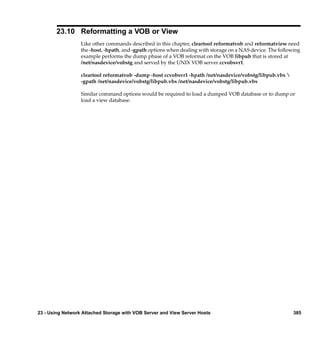
                  23.10 Reformatting a VOB or View........................................................................ 385


           Administering ClearCase Licenses

           24. Administering Licenses ............................................................................................... 389
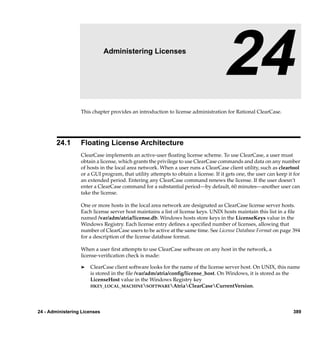
                 24.1 Floating License Architecture....................................................................... 389


Contents                                                                                                                                   xxi

                /vobs/doc/ccase/admin/cc_adminTOC.fm — September 13, 2001 2:13 pm
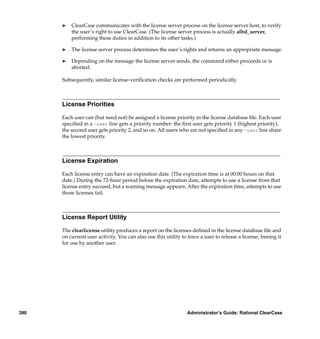
License Priorities.............................................................................................390
                           License Expiration ..........................................................................................390
                           License Report Utility ....................................................................................390
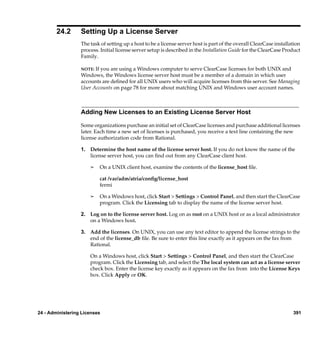
                  24.2     Setting Up a License Server...........................................................................391
                           Adding New Licenses to an Existing License Server Host.......................391
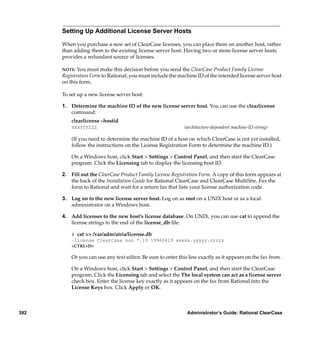
                           Setting Up Additional License Server Hosts ..............................................392
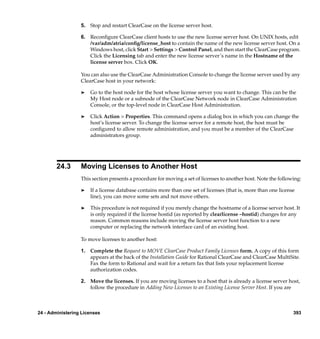
                  24.3     Moving Licenses to Another Host ...............................................................393
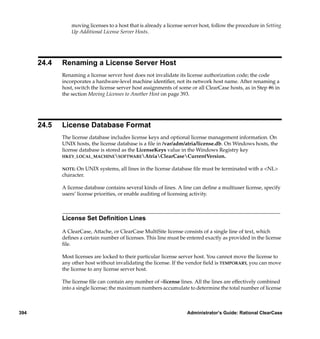
                  24.4     Renaming a License Server Host..................................................................394
                  24.5     License Database Format...............................................................................394
                           License Set Definition Lines ..........................................................................394
                           User Priority Lines..........................................................................................395
                           Excluded User Lines.......................................................................................395
                           Audit-Enable Line ..........................................................................................395
                           Time-Out Line .................................................................................................396


       Administering the ClearCase
       Registry

       25. Understanding the ClearCase Registry ...................................................................399
              25.1 Registry Hosts, Backup Registry Hosts, and Registry Regions ...............399
              25.2 Registry Administration Tools .....................................................................400
              25.3 Storage Directories and Access Paths ..........................................................400
                   Distributed VOBs and Views on UNIX .......................................................401
              25.4 Storage Registries ...........................................................................................401
              25.5 Object Registries .............................................................................................401
              25.6 Tag Registries ..................................................................................................402
                   Tag Registries on UNIX .................................................................................402
                   Tag Registries on Windows ..........................................................................402
              25.7 Networkwide Accessibility of VOBs and Views........................................405
                   Public and Private VOBs ...............................................................................405
              25.8 Managing VOB and View Registry Entries ................................................406


xxii                                                                        Administrator’s Guide: Rational ClearCase

            /vobs/doc/ccase/admin/cc_adminTOC.fm — September 13, 2001 2:13 pm
Viewing VOB and View Registry Entries ................................................... 406
                            Creating VOB and View Registry Entries................................................... 408
                            Creating VOB-Tags and View-Tags ............................................................ 408
                      25.9 Creating Server Storage Locations............................................................... 409
                      25.10 Registering Site-Wide Properties ................................................................. 410
                      25.11 Registry Guidelines........................................................................................ 411
                            Multiple Registries ......................................................................................... 412


           26. Administering Regions ................................................................................................ 415
                 26.1 Network Regions............................................................................................ 415
                       Registries in a Multiple-Region Network................................................... 418
                               Tag Registry Implementation................................................................ 419
                           Establishing Network Regions ..................................................................... 421
                      26.2 Adding a Network Region............................................................................ 422
                           When to Create Additional Regions............................................................ 422
                                   Multiple Regions vs. Multiple Registries ............................................ 423
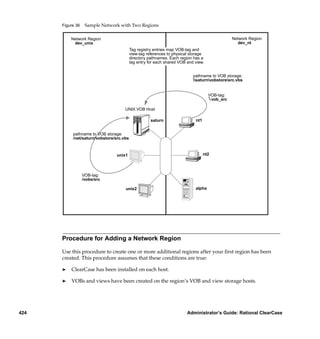
                               A Example Using Network Regions ........................................................... 423
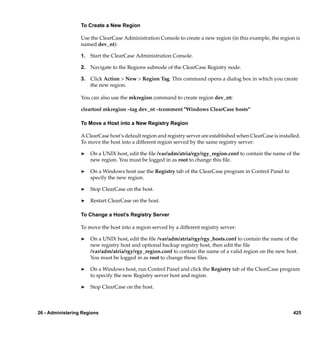
                               Procedure for Adding a Network Region .................................................. 424
                                     To Create a New Region ........................................................................ 425
                                     To Move a Host into a New Registry Region ..................................... 425
                                     To Change a Host’s Registry Server..................................................... 425
                                     To Create VOB-tags and View-tags in a New Network
                                     Region ....................................................................................................... 426
                                     Using mktag............................................................................................. 426
                              If the New Region Is Served by a Different Registry Host ...............428
                           Guidelines for Multiple Network Regions ................................................. 428
                      26.3 Removing a Network Region ....................................................................... 429


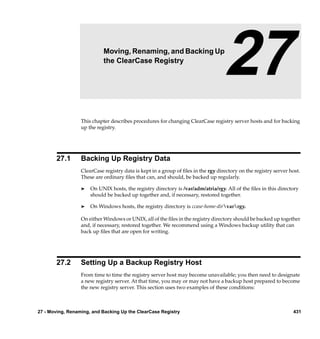
           27. Moving, Renaming, and Backing Up the ClearCase Registry ...........................431
                 27.1 Backing Up Registry Data............................................................................. 431
                 27.2 Setting Up a Backup Registry Host ............................................................. 431
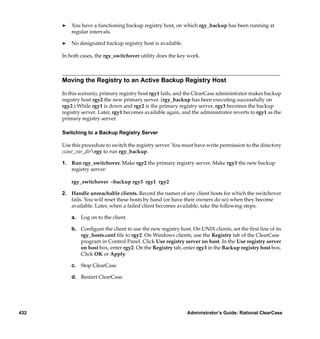
                       Moving the Registry to an Active Backup Registry Host.........................432
                                     Switching to a Backup Registry Server................................................ 432


Contents                                                                                                                                         xxiii

                /vobs/doc/ccase/admin/cc_adminTOC.fm — September 13, 2001 2:13 pm
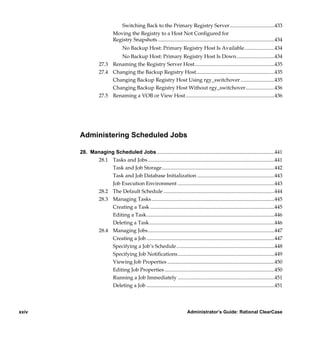
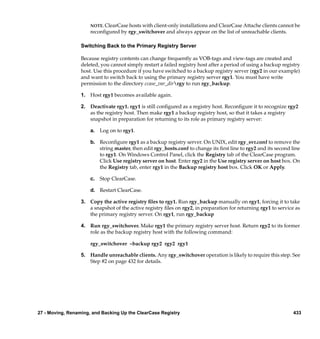
Switching Back to the Primary Registry Server ..................................433
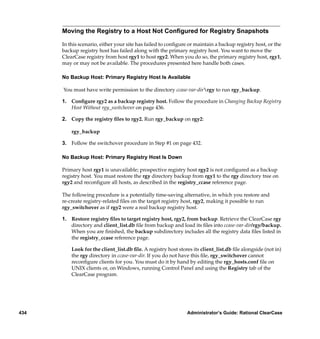
                           Moving the Registry to a Host Not Configured for
                           Registry Snapshots .........................................................................................434
                                 No Backup Host: Primary Registry Host Is Available.......................434
                          No Backup Host: Primary Registry Host Is Down.............................434
                  27.3 Renaming the Registry Server Host.............................................................435
                  27.4 Changing the Backup Registry Host............................................................435
                       Changing Backup Registry Host Using rgy_switchover ..........................435
                       Changing Backup Registry Host Without rgy_switchover......................436
                  27.5 Renaming a VOB or View Host....................................................................436


       Administering Scheduled Jobs

       28. Managing Scheduled Jobs ..........................................................................................441
             28.1 Tasks and Jobs.................................................................................................441
                  Task and Job Storage ......................................................................................442
                  Task and Job Database Initialization ...........................................................443
                  Job Execution Environment ..........................................................................443
             28.2 The Default Schedule .....................................................................................444
             28.3 Managing Tasks ..............................................................................................445
                  Creating a Task ...............................................................................................445
                  Editing a Task..................................................................................................446
                  Deleting a Task................................................................................................446
             28.4 Managing Jobs.................................................................................................447
                  Creating a Job ..................................................................................................447
                  Specifying a Job’s Schedule...........................................................................448
                  Specifying Job Notifications..........................................................................449
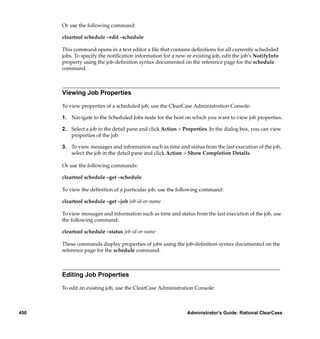
                  Viewing Job Properties ..................................................................................450
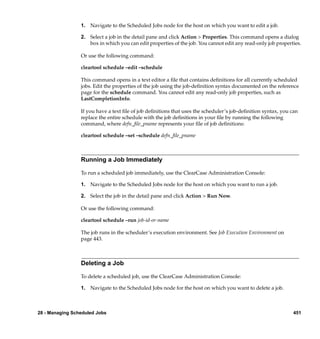
                  Editing Job Properties ....................................................................................450
                  Running a Job Immediately ..........................................................................451
                  Deleting a Job ..................................................................................................451


xxiv                                                                       Administrator’s Guide: Rational ClearCase

            /vobs/doc/ccase/admin/cc_adminTOC.fm — September 13, 2001 2:13 pm
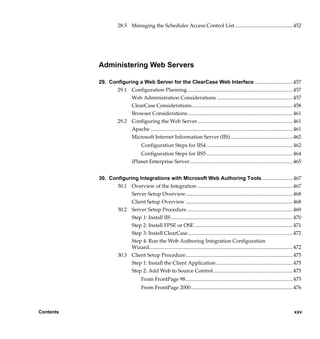
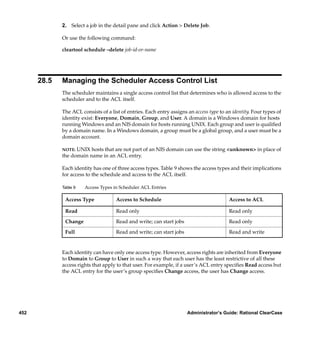
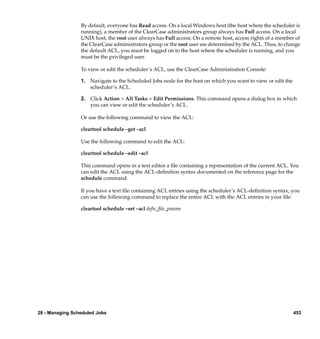
28.5 Managing the Scheduler Access Control List ............................................ 452


           Administering Web Servers

           29. Configuring a Web Server for the ClearCase Web Interface .............................457
                  29.1 Configuration Planning................................................................................. 457
                        Web Administration Considerations .......................................................... 457
                        ClearCase Considerations ............................................................................. 458
                        Browser Considerations ................................................................................ 461
                  29.2 Configuring the Web Server......................................................................... 461
                        Apache ............................................................................................................. 461
                        Microsoft Internet Information Server (IIS)................................................ 462
                                      Configuration Steps for IIS4 .................................................................. 462
                                    Configuration Steps for IIS5 .................................................................. 464
                                iPlanet Enterprise Server............................................................................... 465


           30. Configuring Integrations with Microsoft Web Authoring Tools........................467
                  30.1 Overview of the Integration ......................................................................... 467
                        Server Setup Overview.................................................................................. 468
                        Client Setup Overview .................................................................................. 468
                  30.2 Server Setup Procedure ................................................................................. 469
                        Step 1: Install IIS ............................................................................................. 470
                        Step 2: Install FPSE or OSE ........................................................................... 471
                        Step 3: Install ClearCase ................................................................................ 472
                        Step 4: Run the Web Authoring Integration Configuration
                        Wizard.............................................................................................................. 472
                  30.3 Client Setup Procedure.................................................................................. 475
                        Step 1: Install the Client Application........................................................... 475
                                Step 2: Add Web to Source Control............................................................. 475
                                      From FrontPage 98.................................................................................. 475
                                      From FrontPage 2000.............................................................................. 476


Contents                                                                                                                                   xxv

                /vobs/doc/ccase/admin/cc_adminTOC.fm — September 13, 2001 2:13 pm
From Visual InterDev 6.0 .......................................................................476
                           Step 3: Verify That New Web Content Is Added to Source
                           Control..............................................................................................................477
                           Step 4: Setting User Permissions ..................................................................479
                                 FrontPage 98.............................................................................................479
                                 FrontPage 2000.........................................................................................479
                               Visual InterDev 6.0..................................................................................479
                           Step 5: Local Mode Client Setup for FrontPage 2000 ................................479
                  30.4     Web Folders Support in Office 2000 and Microsoft Internet
                           Explorer 5.........................................................................................................481
                  30.5     Updating the Shared View on the Web Server ..........................................481
                  30.6     Considerations for Migrating and Converting Data to the
                           Integration .......................................................................................................481
                  30.7     Accessing Help Information for the Integration ........................................482


       31. Using Dynamic Views to Develop and Deliver Web Content .............................483
              31.1 Overview of Using Dynamic Views on a Web Server ..............................483
              31.2 Example Scenario............................................................................................484
                   VOB and Branch Configuration ...................................................................484
                   View Configuration for Tasks.......................................................................486
                                 Developing New Content ......................................................................486
                                 Merging and Testing Approved Changes ...........................................486
                                 Viewing and Testing Content................................................................486
                              Accessing Content from a Web Browser..............................................487
                           Implementing Policies ...................................................................................487
                                 Testing Source Files Before Checkin.....................................................487
                                 Restricting the Users Who Can Approve Changes ............................488
                           Labeling Approved Sources ..................................................................488
                       Synchronizing the Massachusetts and California VOB Replicas ............488
                       Copying Files to the Web Server ..................................................................489
                       Rolling Back to Previously Published Versions .........................................489
                  31.3 Configuring the Web Server .........................................................................489
                       Configuring the Apache Web Server...........................................................490
                                 To Configure an Apache Web Server on Windows ...........................490


xxvi                                                                           Administrator’s Guide: Rational ClearCase

            /vobs/doc/ccase/admin/cc_adminTOC.fm — September 13, 2001 2:13 pm
To Configure an Apache Web Server on UNIX.................................. 491
                              Configuring the Netscape Enterprise Web Server .................................... 492


           Tuning for Performance


           32. Improving VOB Host Performance ........................................................................... 495
                  32.1 Minimize Process Overhead......................................................................... 495
                  32.2 Maximize Disk Performance ........................................................................ 496
                  32.3 Add Memory for Disk Caching on Windows............................................ 496
                  32.4 Tune Block Buffer Caches on UNIX ............................................................ 497
                       Block Buffer Cache Statistics......................................................................... 497
                             Flushing the Block Buffer Cache........................................................... 498
                     32.5 Modify Lock Manager Startup Options...................................................... 498
                          Lock Manager Implementations .................................................................. 498
                          Lock Manager Startup Options .................................................................... 499


           33. Improving Client Host Performance ......................................................................... 501
                  33.1 Client Host Configuration Guidelines ........................................................ 501
                  33.2 Examining and Adjusting MVFS Cache Size ............................................. 502
                       Real-Time Updating of MVFS Cache Sizes ................................................ 506
                       Adjusting the MVFS Memory Initialization Factor................................... 507
                       Setting Individual Caching Parameters on UNIX ..................................... 508
                       Setting Individual Cache Sizes on Windows ............................................. 509
                       Minimizing Attribute Cache Misses............................................................ 509
                                   Attribute Cache Total Misses ................................................................ 510
                                   Close-to-Open Misses............................................................................. 510
                                   Generation Misses................................................................................... 510
                                   Cache Timeout Misses............................................................................ 510
                                   Cache Fill Misses ..................................................................................... 511
                                   Event Time Misses .................................................................................. 512


Contents                                                                                                                               xxvii

                /vobs/doc/ccase/admin/cc_adminTOC.fm — September 13, 2001 2:13 pm
33.3 View Caches ....................................................................................................512
                     33.4 Obtaining View Cache Information.............................................................513
                          Analyzing the Output ....................................................................................514
                     33.5 Reconfiguring a View ....................................................................................515


         Troubleshooting

         34. Determining a Data Container’s Location ...............................................................519
                34.1 Scenario ............................................................................................................519
                34.2 Determining the ClearCase Status of Files..................................................519
                34.3 Determining the Full UNIX Pathnames of Files ........................................520
                34.4 Where Is the VOB?..........................................................................................520
                34.5 Where Is the View?.........................................................................................521
                34.6 Where Are the Individual Files?...................................................................521
                     Locating a Checked-Out Version .................................................................522
                     Locating a Checked-In Version’s Cleartext Container ..............................523
                     Locating a Checked-In Version’s Source Container ..................................523
                     Locating a View-Private File .........................................................................523
                     Issues with Nonlocal UNIX Storage ............................................................523
                     Links and Directories on UNIX ....................................................................524


         35. Repairing VOB and View Storage Directory ACLs on Windows .......................525
                35.1 ClearCase ACLs ..............................................................................................525
                35.2 Causes of Protection Problems .....................................................................527
                      Copying the Storage Directory .....................................................................527
                      Converting the File System from FAT to NTFS .........................................528
                      Editing Permissions........................................................................................528
                35.3 Utilities for Fixing Protection Problems ......................................................529
                      fix_prot .............................................................................................................529
                                     Options......................................................................................................529
                                     Examples...................................................................................................530


xxviii                                                                            Administrator’s Guide: Rational ClearCase

               /vobs/doc/ccase/admin/cc_adminTOC.fm — September 13, 2001 2:13 pm
lsacl................................................................................................................... 531
                        35.4 Fixing Protection Problems........................................................................... 531


           36. Preventing Accidental Deletion of Data by crontab Entries ..............................533
                  36.1 Preventing Recursive Traversal of the Root Directory .............................533
                        crontab Modification During ClearCase Installation................................534
                        Modifying a crontab Entry............................................................................ 534


           Index ......................................................................................................................................... 537


Contents                                                                                                                                               xxix

                 /vobs/doc/ccase/admin/cc_adminTOC.fm — September 13, 2001 2:13 pm
xxx                                                      Administrator’s Guide: Rational ClearCase

      /vobs/doc/ccase/admin/cc_adminTOC.fm — September 13, 2001 2:13 pm
Figures

          Figure 1      ClearCase Storage Registries................................................................................ 9
          Figure 2      Client/Server Processing.................................................................................... 17
          Figure 3      VOB Database and VOB Storage Pools .......................................................... 128
          Figure 4      Linking Multiple VOBs into a Single Directory Tree ................................... 144
          Figure 5      Sample SourceSafe Payroll Configuration ..................................................... 158
          Figure 6      ClearCase Version Tree of bugfixmod_empl.c Element .........................164
          Figure 7      Semi-Live Backup .............................................................................................. 171
          Figure 8      VOB Restoration ................................................................................................ 189
          Figure 9      Restore Scenario Summarized by Output from vob_restore ......................189
          Figure 10     vob_restore: In Place.......................................................................................... 190
          Figure 11     vob_restore: VOB Is Active .............................................................................. 191
          Figure 12     vob_restore: Move VOB on Same Host .......................................................... 192
          Figure 13     vob_restore: Move VOB to New Host ............................................................ 193
          Figure 14     VOB Database or Storage Pool Skew Associated with VOB
                        Snapshots ............................................................................................................ 194
          Figure 15     Controlling VOB Growth.................................................................................. 206
          Figure 16     Local and Remote VOB Storage Pools ............................................................ 215
          Figure 17     Pool Access Through vob_server and VOB Database Access
                        Through db_server ............................................................................................ 256
          Figure 18     checkvob Output Log: Summary File ............................................................. 259
          Figure 19     checkvob Output Log: Condensed Transcript File ....................................... 261
          Figure 20     Common Scenarios in VOB Database or Storage Pool
                        Synchronization ................................................................................................. 275
          Figure 21     Elements Cataloged by Directory Versions Before Relocate
                        Operation ............................................................................................................ 286
          Figure 22     Directory Version Cataloging After Relocate Operation .............................287
          Figure 23     Destination VOB That Includes Multiple Versions ...................................... 288
          Figure 24     Source VOB That Includes a Borderline Element ......................................... 290
          Figure 25     Source and Destination VOBs with Borderline Element Relocated ...........291
          Figure 26     Source and Destination VOBs with Borderline Element Not
                        Relocated ............................................................................................................. 292


Figures                                                                                                                                    xxxi

              /vobs/doc/ccase/admin/cc_adminLOF.fm — September 13, 2001 2:15 pm
Figure 27     Source VOB with Multiple Branches on Parent Directory...........................298
        Figure 28     Destination VOB After Modifying Old Version of Destination Directory 301
        Figure 29     Administrative VOB Hierarchy .......................................................................305
        Figure 30     Replication Requirements of Administrative and Client VOBs..................308
        Figure 31     Export View for Non-ClearCase Access .........................................................345
        Figure 32     ClearCase Object and Tag Registries (Single Network Region)..................404
        Figure 33     cleartool Commands and the ClearCase Storage Registry...........................409
        Figure 34     Network with Global Naming .........................................................................416
        Figure 35     Network Regions and Their Tag Registries ...................................................420
        Figure 36     Sample Network with Two Regions ...............................................................424
        Figure 37     Setting Up the Root Web in the IIS Installation .............................................471
        Figure 38     Setting Up the VOB Storage for the Integration ............................................473
        Figure 39     Setting Up the View Storage for the Integration ...........................................474
        Figure 40     FrontPage Source Control Icons.......................................................................477
        Figure 41     Visual InterDev Source Control Icons.............................................................478
        Figure 42     Development and Publishing Branches..........................................................485
        Figure 43     VOB and Web Server Configuration ...............................................................485
        Figure 44     Directory as a Super-Root .................................................................................534


xxxii                                                                  Administrator’s Guide: Rational ClearCase

            /vobs/doc/ccase/admin/cc_adminLOF.fm — September 13, 2001 2:15 pm
Tables

         Table 1       Protection Mode for a ClearCase Object .......................................................... 33
         Table 2       Protection Mode Digits for a ClearCase Object............................................... 33
         Table 3       Characters Not Allowed in Windows File Names.......................................... 78
         Table 4       Protocols for ClearCase Client Access to VOB Data....................................... 88
         Table 5       Protocols for ClearCase Client Access to View Data...................................... 88
         Table 6       Protocols for view_server Access to VOB Data............................................... 89
         Table 7       Samba Global Settings for ClearCase................................................................ 98
         Table 8       Importance of VOB Directories in Partial Backups ...................................... 174
         Table 9       Access Types in Scheduler ACL Entries......................................................... 452
         Table 10      Supported Platforms for Web Servers ............................................................ 469
         Table 11      Supported Web Server Platforms.................................................................... 489
         Table 12      MVFS Cache Information ................................................................................. 504
         Table 13      How Memory Size Affects the MVFS Scaling Factor ................................... 507
         Table 14      How the MVFS Scaling Factor or mvfs_largeinit Affects
                       Individual MVFS Cache Sizes.......................................................................... 507
         Table 15      Storage Locations of MVFS Files ..................................................................... 522


Tables                                                                                                                     xxxiii

             /vobs/doc/ccase/admin/cc_adminLOT.fm — September 13, 2001 2:16 pm
xxxiv                                                      Administrator’s Guide: Rational ClearCase

        /vobs/doc/ccase/admin/cc_adminLOT.fm — September 13, 2001 2:16 pm
Preface


          About This Manual

          This manual is for ClearCase users or administrators who are responsible for tasks such as
          creating and maintaining data repositories, managing servers, and administering user and group
          accounts. This Administrator’s Guide discusses these subjects in depth:

          ®   Managing ClearCase client and server hosts and user and group accounts

          ®   Administering a network of UNIX and Windows computers running Rational ClearCase

          ®   Creating ClearCase VOBs, or data repositories, and managing their storage requirements

          ®   Creating ClearCase views, or user workspaces, and managing their storage requirements

          ®   Administering ClearCase licenses

          ®   Administering the ClearCase registry, a central directory of VOBs, views, and related
              information

          ®   Managing the ClearCase scheduler, which runs jobs periodically

          ®   Setting up Web servers for the ClearCase Web interface and integrations with Web
              authoring tools

          ®   Tuning VOB and view servers and ClearCase client hosts for better performance

          ®   Troubleshooting problems with ClearCase


Preface                                                                                               xxxv
ClearCase Documentation Roadmap


                                     Orientation


                                    Introduction
                                   Release Notes
                                   Online Tutorials


                                                                     Project
              Development                                          Management


           Developing Software                              Managing Software Projects


                                  More Information
                                 Command Reference
                                   Quick Reference
                                 Online documentation


                Build
              Management                                           Administration


             OMAKE Guide                                          Installation Guide
           (Windows platforms)                                 Administrator’s Guide
            Building Software                                  (Rational ClearCase)
                                                               Administrator’s Guide
                                                           (Rational ClearCase MultiSite)
                                                                Platform Information
                                                                  (See online help)


xxxvi                                                 Administrator’s Guide: Rational ClearCase
Online Documentation

          The ClearCase graphical interface includes an online help system.

          There are three basic ways to access the online help system: the Help menu, the Help button, or
          the F1 key. Help > Contents provides access to the complete set of ClearCase online
          documentation. For help on a particular context, press F1. Use the Help button on various dialog
          boxes to get information specific to that dialog box.

          ClearCase also provides access to full “reference pages” (detailed descriptions of ClearCase
          commands, utilities, and data structures) with the cleartool man subcommand. Without any
          argument, cleartool man displays the cleartool overview reference page. Specifying a command
          name as an argument gives information about using the specified command. For example:

          cleartool man                                      (display the cleartool overview page)

          cleartool man man                                  (display the cleartool man reference page)

          cleartool man checkout                             (display the cleartool checkout reference page)

          ClearCase’s –help command option or help command displays individual subcommand syntax.
          Without any argument, cleartool help displays the syntax for all cleartool commands. help
          checkout and checkout –help are equivalent.

          cleartool uncheckout –help
          Usage: uncheckout | unco [-keep | -rm] [-cact | -cwork ] pname ...

          Additionally, the online ClearCase Tutorial provides a step-by-step tour through ClearCase’s most
          important features. To start the tutorial:

          ®   On Windows, choose Tutorial in the appropriate ClearCase folder off the Start menu.

          ®   On UNIX, type hyperhelp cc_tut.hlp.


Preface                                                                                                        xxxvii
Technical Support

          If you have any problems with the software or documentation, please contact Rational Technical
          Support via telephone, fax, or electronic mail as described below. For information regarding
          support hours, languages spoken, or other support information, click the Technical Support link
          on the Rational Web site at www.rational.com.


           Your Location      Telephone            Facsimile             Electronic Mail

           North America      800-433-5444         408-863-4194          support@rational.com
                              toll free or         Cupertino, CA
                              408-863-4000         781-676-2460
                              Cupertino, CA        Lexington, MA

           Europe, Middle     +31-(0)20-4546-200   +31-(0)20-4546-201    support@europe.rational.com
           East, and Africa   Netherlands          Netherlands

           Asia Pacific        61-2-9419-0111       61-2-9419-0123        support@apac.rational.com
                              Australia            Australia


xxxviii                                                         Administrator’s Guide: Rational ClearCase
Administering the ClearCase
                    Network
1                   Understanding the ClearCase
                           Network
                                                                                               1
                  This chapter presents a system administrator’s overview of a local area network of computers
                  running Rational ClearCase and Rational ClearCase MultiSite. It also serves as a roadmap to
                  other chapters in this manual and to detailed reference information in the Command Reference.

                  This manual is intended for use by experienced UNIX or Windows administrators who also have
                  administrative responsibility for a ClearCase network. Many of the procedures we describe in
                  this manual assume that the reader is familiar with the scripting and command-line conventions,
                  file system access controls, networking protocols, and system administration tools for UNIX and
                  Windows computers.

                  In this manual, the term Windows refers to any of these operating systems:

                  ®   Windows XP Professional
                  ®   Windows 2000
                  ®   Windows NT

                  References to Windows Me or Windows 98 refer only to the specific operating system.
                  References to UNIX refer to all UNIX and Linux platforms supported by Rational ClearCase.


       1.1        Network Overview
                  A ClearCase administrator has three principal concerns:

                  ®   ClearCase hosts. ClearCase can be installed and used on any number of hosts in a network.
                      Different hosts use ClearCase software in different ways. For example, one host may be


1 - Understanding the ClearCase Network                                                                           1
used only to store version-controlled data; another may be used only to run ClearCase
              software development tools.

          ®   ClearCase data storage. ClearCase data is stored in versioned object bases (VOBs) and views,
              which can be located on any host where ClearCase is installed. A VOB or view hosted on
              UNIX can have auxiliary data storage on other UNIX hosts where ClearCase is not
              installed; such storage is accessed through UNIX symbolic links, which are not a feature of
              Windows. It is also possible to locate VOB or view storage on certain Network Attached
              Storage (NAS) devices.

              For many organizations, the set of all VOBs constitutes a central data repository, which you
              may need to administer as a unit. Most views are created and used by individuals; however,
              it is likely that one or more shared views will be created, requiring some central
              administration.

          ®   ClearCase users. ClearCase users are identified by the user name and group memberships
              established when they log on to either UNIX or Windows. Any number of people can use
              ClearCase on any number of hosts; the floating license scheme limits the number of
              concurrent users, but not the number of hosts.


    1.2   ClearCase Hosts
          ClearCase is a distributed application with a client/server architecture. Any development task
          (for example, execution of a single ClearCase command) may involve programs and data on
          several hosts. Every host in a ClearCase network plays one or more of the following roles.

          ®   Client host. Each ClearCase user works at a ClearCase client host, running programs such
              as cleartool, clearmake, and various ClearCase graphical user interfaces (GUIs), as well as
              other software (for example, development tools, a Rational Suite, and operating system
              utilities). ClearCase must be installed on each client host. A client installation can include
              the multiversion file system (MVFS), which provides support for dynamic views. If a client
              uses only snapshot views, it does not need the MVFS.

          ®   Server host. Any host on which a VOB or view is created is a server host. Some hosts may
              be dedicated servers on which client software rarely used (and may not even be installed).
              Other server hosts double as clients. ClearCase must be installed on each server host.

          ®   Registry server host. One host in the network acts as the ClearCase registry server host. Each
              host is assigned to a particular registry server host at ClearCase install time. This host stores
              access-path information for all the VOBs and views in the network. ClearCase client and
              server programs on all hosts communicate with the registry server host to determine the


2                                                                  Administrator’s Guide: Rational ClearCase
actual storage location of ClearCase data. You may also designate a backup registry server
                      host that can assume the ClearCase registry server role if the primary registry server host
                      fails.

                  ®   License server host. One or more hosts in the network act as license server hosts, authorizing
                      and limiting ClearCase use according to the terms of your license agreement. Each host on
                      which ClearCase is installed is assigned to a particular license server host and
                      communicates with that host periodically.

                  ®   Networkwide release host. One host in the network acts as the networkwide release host. A
                      directory on this host stores an entire ClearCase release that has been extracted from the
                      distribution CD. When necessary, ClearCase patches can be applied to a release area to
                      update the entire release with the latest enhancements and defect fixes. Certain installation
                      options allow ClearCase hosts running UNIX to access ClearCase programs and data
                      through symbolic links to the release area instead of having the programs and data installed
                      on local storage. ClearCase hosts running Windows do not access the networkwide release
                      host after installation is complete. The networkwide release host does not need to run
                      ClearCase.

                  ®   ClearCase Web server host. If you want to use the ClearCase Web interface, you’ll need at
                      least one ClearCase Web server host. See Chapter 29, Configuring a Web Server for the
                      ClearCase Web Interface, for more detail.

                  ®   Non-ClearCase UNIX hosts. ClearCase may not be installed on every host in your network.
                      In fact, it is not possible to install it on hosts whose architectures ClearCase does not yet
                      support. Such hosts cannot run ClearCase programs, but they can access ClearCase data,
                      through standard UNIX network file system facilities. You administer these export (or
                      share) mechanisms using standard UNIX tools.

                  ®   Network Attached Storage Devices. Certain Network Attached Storage (NAS) devices are
                      supported for use with ClearCase. These devices can be used to store any ClearCase
                      programs or data, including VOBs and views. NAS devices do not run ClearCase. They
                      simply provide storage that ClearCase hosts access over the local area network. The Release
                      Notes for Rational ClearCase and ClearCase MultiSite contain the most current information
                      about supported NAS devices.


       1.3        ClearCase Data Storage
                  All ClearCase data is stored in VOBs and views. VOBs and views reside on one or more VOB or
                  view server hosts in the ClearCase network. A networkwide registry of VOB-tags and view-tags


1 - Understanding the ClearCase Network                                                                            3
allows users to access VOBs and views without having to know the name of the host where they
    reside. VOB and view maintenance is a critical aspect of ClearCase administration.


    Versioned Object Bases (VOBs)

    The ClearCase network’s permanent data repository consists of one or (usually) more VOBs
    located on multiple hosts. Each VOB occupies a VOB storage directory, which holds file system
    objects and an embedded database.

    VOB administration responsibilities include the following:

    ®   Registration and tagging. Access information for all VOBs is kept in a networkwide
        registry. In a typical network, registry maintenance is minimal; ClearCase commands that
        create VOBs and VOB-tags update the registry automatically, though you may need to
        change a tag if you move a VOB. In addition, you may need to copy and modify tags to
        enable VOB access in mixed networks of UNIX and Windows computers.

    ®   Backup. VOBs have special backup and recovery requirements, and must be backed up
        frequently and reliably. ClearCase does not include data-backup tools. You will have to
        select appropriate operating system backup and archive utilities or third-party backup tools
        for this critical task. VOB backup and restore procedures are described in Chapter 10,
        Backing Up and Restoring VOBs.

    ®   Periodic maintenance. VOB administration requires that you balance the need to preserve
        important data with the need to conserve disk space. ClearCase includes tools for collecting
        data on disk space used and for occasional scrubbing of unneeded data. You can specify
        what data is unneeded on a per-VOB basis.

        ClearCase includes a job scheduler that manages periodic execution of various
        administrative tasks, including disk-space data collection and VOB scrubbing. The job
        scheduler is installed with a predefined schedule of these maintenance operations, which
        you can change as needed. For more information on creating and managing scheduled jobs,
        see Chapter 28, Managing Scheduled Jobs.

    ®   Access control. Each VOB has an owner, a primary group, a supplemental group list, and a
        protection mode. Together, they control access to VOB data. Understanding and managing
        VOB access controls is an important task for the ClearCase administrator. For more
        information, see Chapter 3, Understanding ClearCase Access Controls.


4                                                         Administrator’s Guide: Rational ClearCase
®   Growth. As new projects begin or existing projects are placed under ClearCase control, you
                      may need to create new VOBs and incorporate them into your data backup and periodic
                      maintenance schedule.

                  ®   Reformatting. Occasionally, a major new ClearCase release may include a feature that
                      requires reformatting of your existing VOBs. This process updates the schema of the
                      embedded VOB database.


                  Views

                  ClearCase views provide

                  ®   Access to VOB data

                  ®   Short-Term storage for other data created during the development process

                  A view stores checked-out versions of file elements, view-private files that have no counterpart in
                  the VOB (for example, text editor backup files), and newly built derived objects.

                  ClearCase supports two types of views:

                  ®   Snapshot views, which contain copies of versions of specified elements, along with
                      view-private objects. The view never updates itself with new versions created from other
                      views. Instead, the update command reevaluates the view’s config spec and loads the
                      newly selected versions into the view.

                  ®   Dynamic views, which provide transparent access to versions of elements in the VOB and
                      to view-private objects. Each time you access an element through a dynamic view, the
                      view’s view_server process evaluates the view’s config spec and selects a particular version
                      of the element. Thus, such a view updates itself with new versions created in other views.

                      NOTE:   Rational ClearCase LT does not support dynamic views.

                  Unlike VOBs, which are long-lived artifacts created by an administrator, views tend to be shorter
                  lived and are usually created by individual developers. View administration is simpler than VOB
                  administration, involving little more than occasional backups, periodic maintenance, and
                  attention to access control issues.


1 - Understanding the ClearCase Network                                                                           5
1.4   ClearCase Users
          ClearCase does not maintain a database of its users. Any user who is logged in to a ClearCase
          host and can acquire a license is able to use the software. Because ClearCase relies on a host’s
          operating system to establish a user’s identity (user ID, principal group ID, and optional
          supplementary group IDs), you must make certain that user identities are consistent on every
          ClearCase host. This consistency is usually achieved by using networkwide databases
          maintained by the operating system such as the NIS passwd and group maps on UNIX or, on
          Windows, Windows NT or Active Directory domains.

          NOTE:In environments where users access a common set of VOBs and views from UNIX and
          Windows hosts, we strongly recommend that each user’s user name, password, and group
          memberships be the same whether the user is logged in to UNIX or Windows.

          Most cleartool commands check the user’s identity before granting access to particular objects—
          element, version, and so on. See Chapter 3, Understanding ClearCase Access Controls, for detailed
          information on this topic. In addition to these checks, non-ClearCase commands and programs
          that access ClearCase data in a dynamic view must also go through the MVFS, which also checks
          file system access rights.


    1.5   The ClearCase Registry
          ClearCase maintains a networkwide registry of VOBs and views so that users and programs can
          access these objects without having to know the details of where they are stored.

          The ClearCase registry database is maintained on the registry server host. Because access to the
          registry and the information it contains is critical for nearly every ClearCase operation, this host
          should be robust, accessible, and highly available. It should also be backed up regularly.

          Your ClearCase network must have at least one registry server host. You may have additional
          registry server hosts if needed. Consider setting up an additional ClearCase registry host to
          accommodate disjoint user communities who need not (or must not) access each others VOBs
          and views. Otherwise, we recommend configuring a single ClearCase registry host per site to
          minimize registry administration overhead.


6                                                                  Administrator’s Guide: Rational ClearCase
Objects and Tags

                  The ClearCase registry contains two types of information for every VOB and every view:

                  ®   A single object entry that describes where the VOB or view is stored on the network (a host
                      name and storage directory, for example) and includes other information needed by
                      ClearCase.

                  ®   One or more tag entries that define the name by which the VOB or view is referenced by
                      other programs and provide a global path, expressed using network file naming
                      conventions, to the VOB or view storage directory.

                  NOTE: ClearCase administrators in charge of mixed networks of UNIX and Windows hosts must
                  be aware of several issues regarding VOB and view access in this environment. See Chapter 7,
                  Configuring VOB and View Access in Mixed Environments, for more on this topic.


                  Registry Regions

                  Because network file naming conventions are different on UNIX and Windows, a VOB-tag or
                  view-tag that works for a UNIX host does not work for a Windows host. For example, a network
                  file name in a UNIX network is typically expressed, using the naming conventions of the UNIX
                  Network File System (NFS) protocol, in terms of a mount point, host name, and exported
                  directory name:

                  /net/mercury/usr1

                  On Windows, a network file name takes the form of a Universal Naming Convention (UNC)
                  path, expressed as a host name and a share name

                  mercuryusr1

                  Because of these and other differences in network naming, any VOB or view that has to be
                  accessed by both UNIX and Windows clients has to have two tags: each with the network path
                  to the VOB or view storage expressed using the appropriate syntax. To accommodate this
                  requirement, the ClearCase registry can include multiple regions, each of which includes tags
                  appropriate for use by either UNIX or Windows hosts (but not both).

                  In addition to the differences in the network file names they contain, tag names themselves are
                  usually different between UNIX and Windows. Because a VOB has to be mounted (using the NFS


1 - Understanding the ClearCase Network                                                                         7
mount command) on UNIX, a UNIX VOB tag usually has two components: a mount point and a
    tag name:

    /vobs/sources

    The mount point is not required by ClearCase, but using it conserves resources in the UNIX
    client’s root partition and simplifies use of the NFS automounter to mount VOBs when a host
    starts up. Windows VOB tags only have a single component, for example:

    sources

    Figure 1 illustrates how registries mediate access to VOBs and views.


8                                                         Administrator’s Guide: Rational ClearCase
Figure 1   ClearCase Storage Registries.


                                 all ClearCase hosts


                    Object Registry                Tag Registry
                  record actual storage          record user-level
                     locations of all           access paths to all
                     ClearCase data              ClearCase data
                        structures                  structures         Network Regions
                                                                      optional partitioning
                                                                        to conform with
                                                                         global naming
                                                                          requirement


                             all ClearCase VOBs and views


                  Server Storage Locations

                  In addition to VOB and view tag and object entries, the ClearCase registry records the names and
                  network paths for server storage locations that can be created to provide a standard or default
                  storage location for newly created VOBs and views. Because they include network file names,
                  server storage locations are specific to a UNIX or Windows registry region.

                  Creating server storage locations on appropriate devices—a Network Attached Storage (NAS)
                  device or a dedicated VOB or view server host—can simplify the creation, management, and
                  maintenance of VOBs and views.


1 - Understanding the ClearCase Network                                                                          9
1.6   ClearCase Server Processes
           Two server processes—the albd_server and admin_server—run on every ClearCase host that
           has been configured to support local VOBs and views, regardless of whether any VOBs or views
           have been created on the host. Other server processes are started as necessary to manage any
           VOBs and views that reside on the host. This section provides brief descriptions of these servers.

           NOTE: A ClearCase host running Windows can be configured with no support for local VOBs and
           views. Hosts configured this way do not run any ClearCase server processes.


           albd_server
           The Atria location broker daemon or albd_server handles a variety of tasks on hosts configured
           to support local VOBs and views:

           ®   Manages the operation of all ClearCase services on a ClearCase VOB or view server host.

           ®   Helps set up network communications between ClearCase client and server programs.

           ®   Manages execution of tasks run by the ClearCase schedule service.

           ®   Fields license-verification requests on the ClearCase license server host.

           ®   Fields requests for registry information on a ClearCase registry server host.

           ®   On UNIX platforms, fields load-balancing queries from a remote clearmake process. See
               bldserver.control for details.

           When you start ClearCase (using the ClearCase control panel on Windows or the atria_start
           script on UNIX), the albd_server starts first. It then starts other servers as needed.
           When you stop ClearCase, the albd_server stops all running ClearCase servers and then exits.

           NOTE: On a ClearCase Windows client host configured with no support for local VOBs and
           views, no albd_server is installed, and there are no other ClearCase services to stop or start.

           In addition to starting and stopping services, the albd_server helps client programs like cleartool
           and ClearCase GUIs use remote procedure calls (RPCs) to connect with ClearCase servers. When
           a client program wants to access a service on a ClearCase host, it uses an RPC to send a request
           to the albd_server process on that host. The albd_server starts the requested service if it is not
           already started, then issues a response telling the client the service’s port number (socket


10                                                                 Administrator’s Guide: Rational ClearCase
address). Thereafter, the client communicates directly with the specific service, without
                  involving the albd_server.

                  Port Assignment

                  The albd_server listens for RPCs on a well-known port (port 371) that has been reserved for it by
                  the Internet Assigned Numbers Authority. ClearCase installation verifies that no other service
                  registered in the UNIX services database or NIS services map uses this port for UDP or TCP
                  communications. If a conflict is detected, we recommend modifying the conflicting service to use
                  another port. If you cannot reconfigure or remove the conflicting service, you can configure the
                  albd_server to use any free UDP port.

                  ®   On UNIX, edit the local host’s services database and/or the NIS services map.

                  ®   On Windows, create the appropriate entry in the file
                      %SystemRoot%System32driversetcservices. (If there is no entry for the albd_server
                      in this file, it will use port 371.)
                  NOTE: All albd_servers in a ClearCase network must use the same port number. If you change
                  the port assignment for the albd_server on any ClearCase host, you must change it for the
                  albd_server on every ClearCase host.

                  The albd_server reads configuration file albd.conf during startup to determine which services
                  to provide. Do not modify this file.


                  admin_server

                  The ClearCase administration server admin_server is invoked as needed by the albd_server
                  process. This short-lived server performs miscellaneous administrative support functions:

                  ®   Retrieving server log files for display by the getlog command and the ClearCase
                      Administration Console.

                  ®   Retrieving and changing the local host’s ClearCase properties when requested by the
                      ClearCase Administration Console.

                  ®   rgy_switchover processing—moving registry files and reconfiguring clients


1 - Understanding the ClearCase Network                                                                          11
view_server
     A view_server is a long-lived process that manages activity in a particular view. It interprets the
     rules in the view’s config spec, and (for dynamic views) tracks modifications to view-private files
     for other ClearCase software.

     For each view, a long-lived view_server process runs on the view host. The view_server is
     started by the host’s albd_server process when necessary. On UNIX systems, it runs with the
     identity of the owner of the view storage directory (usually, the user who created the view). On
     Windows systems, it runs with the identity of the albd_server (typically, user clearcase_albd and
     group clearcase) A view_server remains active until it is terminated by a cleartool endview
     –server command, a system shutdown, or an operating system command that terminates the
     view_server process.
     For a dynamic view, a view_server handles MVFS file system requests (such as create, delete,
     and rename) by querying one or more VOB databases and comparing them against the view’s
     own database. Using the view’s config spec, it selects versions of file elements and directory
     elements to be in the view. It also handles requests from cleartool, clearmake, and clearaudit to
     look up VOB-database objects and/or names.
     The view_server and the MVFS use caching techniques to reduce the computational
     requirements of this scheme. For information about managing view cache sizes for best
     performance, see View Caches on page 512.

     When it begins execution, a view_server reads configuration information from the .view file in
     the view-storage directory. Values in this file are established by mkview, chview, and similar
     commands. Do not edit this file yourself.


     vob_server
     For each VOB, a long-lived vob_server process runs on the VOB host. The vob_server runs with
     the identity of the VOB owner and manipulates data in the VOB’s storage pools in response to
     requests from client processes.
     The vob_server is the only process that ever creates or deletes data containers; the VOB owner is
     the only user who can modify data containers and storage pools. These severe restrictions protect
     VOB data against careless or malicious users.

     A vob_server process is started as needed by albd_server. It remains active until any of the
     following events occurs:

     ®   The operating system is restarted.


12                                                           Administrator’s Guide: Rational ClearCase
®   The VOB is deleted with the rmvob command.

                  ®   ClearCase is stopped (UNIX only, see the init_ccase reference page).
                  When it begins execution, the vob_server reads configuration information from the file
                  vob_server.conf in the VOB storage directory. Values in this file are established by the
                  vob_snapshot_setup utility and similar commands. Do not edit this file yourself.


                  db_server
                  A host’s db_server processes handle VOB database transactions on that host in response to
                  requests from client programs. Because client programs cannot access VOB databases directly,
                  they must send database transaction requests to a db_server process. Typical requests include:

                  ®   Creating and modifying metadata (such as attaching a label to a version)
                  ®   Reading metadata (such as finding the labels attached to a version)
                  ®   Writing event records (such as the one that records a checkout command)
                  ®   Writing configuration records
                  ®   Reading event records and configuration records
                  Each db_server process services a single client at a time, but can operate on any number of VOBs.
                  A client establishes a connection to a db_server with the help of the albd_server on the VOB host.
                  If necessary, the albd_server starts a new db_server process to handle a request. The connection
                  is broken when the client exits or becomes idle (stops requesting database transactions for an
                  extended period). At that point, the db_server becomes available for use by another client;
                  eventually, an unconnected db_server is terminated by albd_server.


                  vobrpc_server
                  Each VOB host runs up to five vobrpc_server processes for each of its VOBs. Each process
                  handles requests from view_server processes throughout the network. The request can generate
                  both metadata (VOB database) and file system data (storage pool) activity. The vobrpc_server
                  accesses the VOB database in exactly the same way as a db_server. It forwards storage pool
                  access requests to the vob_server.
                  Multiple server processes are started by albd_server, which also routes new requests to the
                  least-busy servers and terminates unneeded vobrpc_server processes when the system is lightly
                  loaded.


1 - Understanding the ClearCase Network                                                                           13
lockmgr
     Each VOB host runs one database lock manager process, lockmgr. This process arbitrates
     transaction requests to all VOB databases on that host from ClearCase client programs
     throughout the network. The calling program polls lockmgr, which either grants or prohibits
     access to the requested data. If the data is available, the transaction proceeds immediately: the
     data is read or written, and output is returned to the calling program. If the data is unavailable
     (locked because another caller has been granted write access to the data), the caller waits until
     lockmgr grants it access to the data.

     Unlike most other ClearCase services, the lockmgr is not started by the albd_server. Instead, it
     is started when the VOB host starts. On UNIX systems, the lockmgr is started by the atria_start
     script. On Windows, the lockmgr is started by the Service Control Manager.
     NOTE: On UNIX systems, the lockmgr communicates with other processes through
     var/adm/atria/almd, which is a shared-memory file on some platforms and a socket on others. To
     reduce the likelihood of accidental deletion, /var/adm/atria/almd is owned by root.

     Lock manager startup options can be changed if necessary to improve VOB server performance
     for certain configurations. See Lock Manager Startup Options on page 499 for more information on
     this topic.


     Server Error Logs

     Each ClearCase server process maintains an error log on the host where it executes. ClearCase
     has a distributed architecture, so an error resulting from a command entered on one host can
     generate an error log entry on another host. In such cases, the user is directed to the appropriate
     log file on the appropriate host. For details on the error logs and how to display them, see the
     getlog reference page in the Command Reference. In addition, Windows hosts can access error logs
     for all ClearCase hosts (Windows and UNIX) using the ClearCase Administration Console.

     Error Logging on UNIX

     On ClearCase hosts running UNIX, log files are located in the directory /var/adm/atria/log. Log
     files record error and status information from various server programs and user programs. These
     files include the following:
     abe_log                  Used by the audited build executor (abe) during parallel clearmake
                              builds
     albd_log                 Used by the albd_server
     db_server_log            Used by the db_server


14                                                           Administrator’s Guide: Rational ClearCase
error_log                General-purpose error log. Used by user programs such as cleartool
                  event_scrubber_log       Used by the event_scrubber program
                  export_mvfs_log          Used by the export_mvfs program
                  install_log              Used by install_release (installation script)
                  lockmgr_log              Used by the lockmgr program
                  mntrpc_server_log        Used by mntrpc_server program, which performs MVFS-file-system
                                           mounts requested by cleartool subcommand mount
                  msadm_log                Used by the MultiSite administrative server, which handles requests
                                           for mastership
                  promote_log              Used by the promote_server
                  scrubber_log             Used by the scrubber program
                  view_log                 Used by the view_server
                  vob_log                  Used by the vob_server
                  vob_scrubber_log         Used by vob_scrubber program
                  vobrpc_server_log        Used by vobrpc_server

                  Error log files are ordinary text files. A typical entry includes the date and time of the error, the
                  software module in which the error occurred, the current user, and an error-specific message.

                  As errors accumulate, the error log files grow. By default, the scheduler periodically runs a job
                  that renames error log files to logfile_name.old, and creates empty template files in their place. See
                  the schedule reference page for information on describing and changing scheduled jobs.

                  Error Logging on Windows

                  On ClearCase hosts running Windows, ClearCase server processes and other ClearCase
                  programs write informational, warning, and error messages to the Windows application event
                  log. The source of these messages is displayed as ClearCase. A typical event log entry includes
                  the date and time of the error, the software module in which the error occurred, the current user,
                  and an error-specific message.

                  As errors accumulate, the error log files grow. Use the Event Viewer to save or delete logs.

                  On Windows, the MVFS logs status messages to the file C:mvfslogs. You can use the MVFS tab
                  in the ClearCase Control Panel to change this pathname. By default, the scheduler periodically
                  runs a job that deletes MVFS log files more than seven days old. See the schedule reference page
                  for information on describing and changing scheduled jobs.


1 - Understanding the ClearCase Network                                                                            15
1.7   ClearCase Client/Server Processing
           Because ClearCase is a distributed client/server application, multiple processes, often running
           on multiple hosts, can play a role in the execution of ClearCase commands. For example, this is
           what happens when a user checks out a file element:

           1. The user’s client process—cleartool, for example, or a GUI—issues a checkout request, in the
              form of a remote procedure call.

           2. The checkout procedure requested in the RPC is handled by several server processes, which
              run on the host serving the VOB in which the requested element resides.

           3. A view-private copy is made of the version being checked out. Making this copy involves
              the view_server process that manages the user’s view. It can also involve other hosts:

               ¢   The user’s client process and the view may be on different hosts.

               ¢   The VOB storage pool that holds the version being checked out may be located on a
                   different host from the VOB storage directory.

               ¢   On UNIX, the view may have a private storage area that is located on a different host
                   from the view storage directory.

           ClearCase server processes handle all this automatically and reliably. Users need not be
           concerned with server-level processing. As an administrator, your responsibilities require a good
           understanding of the client and server process distribution across your local network.

           Figure 2 shows the communications paths that connect a client process with server processes.


16                                                                Administrator’s Guide: Rational ClearCase
Figure 2     Client/Server Processing

                                                        cleartool checkout


                                     ClearCase client


                                                                      db_server     vob_server

                             view_server
                                                                          VOB           VOB
                        View Database                                    Database   Storage Pools
                        View-Private Storage

                                                                    vobrpc_server


       1.8        ClearCase Startup and Shutdown
                  ClearCase is normally started and stopped when a ClearCase host starts up or shuts down, using
                  the startup and shutdown conventions for the platform type. Starting and stopping ClearCase
                  starts and stops ClearCase server processes.


                  On UNIX

                  When UNIX is bootstrapped, the ClearCase startup script is executed by init(1M). The startup
                  script does the following:

                  ®   Starts the host’s albd_server process.

                  ®   Starts a lockmgr process if there are any VOBs on the host.

                  ®   Performs additional file-system setup tasks, such as mounting public VOBs.

                  You can also run the atria_start script manually, as root. For example:


1 - Understanding the ClearCase Network                                                                       17
# ccase-home-dir/etc/atria_start stop

         Stops ClearCase.

     # ccase-home-dir/etc/atria_start start

         Starts (or restarts) ClearCase.

     See the init_ccase reference page for pointers to system-specific variants of these commands.


     On Windows

     Unless explicitly configured to be started manually, the lockmgr and albd_server services, as
     well as the MVFS if it is installed, are started when a ClearCase host starts. You can also start and
     stop ClearCase services manually from the ClearCase program in Control Panel. To stop and
     restart the MVFS, you must shut down and restart the computer.

     NOTE: On a ClearCase Windows client host configured with no support for local VOBs and
     views, no albd_server is installed, and there are no other ClearCase services to stop or start.


18                                                            Administrator’s Guide: Rational ClearCase
2                   Administering ClearCase Hosts

                                                                                                  2
                  This chapter discusses a variety of general issues related to ClearCase host administration. Other
                  chapters of this book discuss administration issues that are specific to hosts that function as
                  servers for VOBs, views, licenses, and the ClearCase registry.

                  NOTE: Sections    2.4 through 2.7 of this chapter apply only to ClearCase on UNIX hosts.


        2.1       ClearCase Administration Console
                  Rational ClearCase on Windows has an administration console that centralizes administration of
                  views, VOBs, scheduled jobs, server logs, and the ClearCase registry for UNIX and Windows
                  hosts. Because the ClearCase Administration Console is based on Microsoft Management
                  Console technology, the user interface runs only on Windows. But because it uses standard
                  ClearCase communication protocols to access data on other ClearCase hosts, it is an effective tool
                  for administering ClearCase on all platforms, and it provides a single point from which most
                  ClearCase administration functions can be managed even in a large, complex network.

                  The ClearCase Administration Console manages VOB and view storage, scheduled jobs, and
                  server logs for all ClearCase hosts known to the ClearCase registry server for the local host or to
                  any other accessible ClearCase registry server. It also manages registry information on the
                  registry server host and provides easy access to the ClearCase customer Web site. To start the
                  ClearCase Administration Console on a Windows host, click Start > Programs > Rational
                  ClearCase Administration > ClearCase Administration Console.

                  A restricted version of the console, ClearCase Host Administration, manages VOB and view
                  storage, scheduled jobs, and server logs for the local host. To start ClearCase Host


2 - Administering ClearCase Hosts                                                                                  19
Administration on a Windows host, click Start > Programs > Rational ClearCase
     Administration > ClearCase Host Administration.

     In this document, we usually suggest using the ClearCase Administration Console to perform
     any administrative operation of which it is capable. We also provide information on using the
     cleartool command line to perform administrative tasks. Any procedure described in this book
     that uses ClearCase Administration Console can also use ClearCase Host Administration if the
     procedure is confined to operating on the local host.

     NOTE: Because the Administration Console is implemented as an MMC snap-in, ClearCase users
     can create customized administration consoles by adding or removing snap-ins using the MMC
     model. At ClearCase installation, two .msc files (ClearCase snap-in configuration files) are
     installed in ccase-home-dirbin. Users gain access to the new administration tools by using MMC
     and these .msc files.

     Because these files are modified by MMC to store user preferences and can change over time, the
     installation also places copies of the installed versions of both files in
     ccase-home-dirconfiguipreferences. Users who need to restore the default version of one or
     both files can copy the versions in ccase-home-dirconfiguipreferences to ccase-home-dirbin.


     Controlling Remote Administration

     The ClearCase Administration Console is a powerful tool for remote administration of ClearCase
     on Windows and UNIX. You may want to prevent remote administrative access to certain hosts
     (for example, critical VOB servers), because it is possible for an inexperienced or malicious user
     to impair or disrupt ClearCase operations by changing various host properties.

     Every ClearCase host that supports local VOBs and views can be configured to allow or disallow
     remote administration, whether or not any VOBs or views exist on the host. If a host allows
     remote administration, a user who is a member of the ClearCase administrators group can use
     the host node of the ClearCase Administration Console to change some ClearCase properties of
     the host. These properties include registry regions, license server, registry server, and MVFS
     cache sizes. If the host does not allow remote administration, only a user who is logged on to that
     host can change these properties. (This setting also affects use of ClearCase Host Administration
     for local administration.)

     NOTE:A ClearCase Windows client host configured with no support for local VOBs and views
     cannot be administered remotely.


20                                                         AAdministrator’s Guide: Rational ClearCase
A host is normally configured to allow or disallow remote administration at the time ClearCase
                  is installed. To change this configuration after ClearCase is installed on a Windows host:

                  1. Click Start > Settings > Control Panel.

                  2. In the ClearCase program, click the Options tab and select the Allow ClearCase Remote
                     Administration check box. Then click OK.

                  To change this configuration after ClearCase is installed on a UNIX host:

                  1. As the root user, make the file /var/adm/atria/config/admin.conf writable.

                  2. Edit /var/adm/atria/config/admin.conf with a text editor and find the line containing the
                     DISALLOW_REMOTE_ADMIN parameter.

                  3. To enable remote administration, change the value of DISALLOW_REMOTE_ADMIN to 0.

                  4. To disable remote administration, change the value of DISALLOW_REMOTE_ADMIN to 1.

                  5. Save /var/adm/atria/config/admin.conf and make the file read-only.


        2.2       Using DHCP with ClearCase
                  The Dynamic Host Configuration Protocol (DHCP) is an Internet standard protocol that allows
                  a host to use a temporary, dynamically assigned IP address. This standard is widely
                  implemented on Windows computers and is also available on some UNIX computers. Because
                  ClearCase caches IP addresses for an extended period of time, you must understand potential
                  interactions between DHCP and ClearCase if the computers at your site that run ClearCase use
                  DHCP.

                  It is possible to configure DHCP in a variety of ways. In some configurations, the IP address of a
                  computer may change at boot time, which can present problems for ClearCase. Fortunately, in
                  most common scenarios (for example, when the DHCP lease time is set to be at least a few days,
                  and no computers that run ClearCase are down for more than half the lease time), IP addresses
                  do not change when the computer is rebooted, and you should have no problems running
                  ClearCase in a DHCP-based environment.


2 - Administering ClearCase Hosts                                                                               21
2.3   ClearCase Data and Non-ClearCase Hosts
           A host on which ClearCase has not been installed can still access VOB data. There are several
           ways to provide this access, some more restrictive than others:

           ®   Use a snapshot view on a ClearCase host. You can use this method when the
               non-ClearCase host can use a remote file access facility, such as NFS or Microsoft Windows
               networking, to access files in the snapshot view directory.

               This method offers good performance because it uses native software for remote file access.
               However, you are restricted to those element versions that the snapshot view selects, you
               cannot use version-extended or view-extended pathnames, and you cannot run ClearCase
               tools such as clearmake on the non-ClearCase host.

               To use this method:

               a. On a ClearCase host, create a snapshot view and load into it the files you want to access
                  from a non-ClearCase host.

               b. On this host, make the files accessible to other hosts on your network. For a UNIX host,
                  export the file system on which the snapshot view directory resides. For a Windows host,
                  share the drive or directory on which the snapshot view directory resides.

               c. On a non-ClearCase host, use remote file access to read and write files in the snapshot
                  view directory.

               d. To modify VOB data, check out and check in versions in the snapshot view on the
                  ClearCase host.

           ®   Use the ClearCase Web interface. You can use this method when the non-ClearCase host
               has a browser that the ClearCase Web interface supports and when a ClearCase host is
               configured as a Web server for the ClearCase interface. You can use the Web interface to
               modify VOB data without running ClearCase tools on the non-ClearCase host. For
               information about setting up the Web interface, see Chapter 29, Configuring a Web Server for
               the ClearCase Web Interface.

           ®   Use non-ClearCase access (UNIX only). On UNIX hosts, you can use this method when the
               non-ClearCase host implements the NFS client protocol. Performance is slower than
               accessing a snapshot view through NFS because the MVFS, a view server, and the
               disk-based file system take part in each file access. It also cannot faithfully implement some
               parts of the NFS protocol. Because of these limitations, snapshot views and the ClearCase
               Web interface, when available, are preferable methods for accessing VOB data. For
               information on non-ClearCase access, see Using Non-ClearCase Access on UNIX Hosts.


22                                                              AAdministrator’s Guide: Rational ClearCase
2.4       Using Non-ClearCase Access on UNIX Hosts
                  A UNIX host on which ClearCase has not been installed can use non-ClearCase access to read
                  VOB data from a UNIX VOB server. Typically, the technique is as follows:

                  ®   A UNIX host running ClearCase must export a view-extended pathname to the VOB mount
                      point (for example, /view/exportvu/vobs/vegaproj). Edit the file /etc/exports.mvfs to
                      specify this pathname.

                  ®   One or more non-ClearCase hosts access the VOB through a view-extended pathname. For
                      example, a host may have an entry in its file-system table that begins

                      mars:/view/exportvu/vobs/vegaproj /usr/vega nfs ...

                  For information on setting up an export view, see Setting Up an Export View for Non-ClearCase
                  Access on page 344.


                  Restrictions on Use

                  Non-ClearCase access is restricted to UNIX computers, and carries several restrictions:

                  ®   VOB access: Users on the non-ClearCase host can only read data from VOBs on UNIX VOB
                      server hosts configured for non-ClearCase access; they cannot modify the VOB in any way.
                      They are also restricted to using the element versions selected by the specified view. They
                      cannot use version-extended or view-extended pathnames to access other versions of the
                      VOB’s elements.

                  ®   Building: Although users cannot modify VOBs that are mounted through a view, they can
                      write to view-private storage. Users can modify these view-private files with an editor and
                      build them with a native make program or with scripts, though not with clearmake. Files
                      created by such builds do not become derived objects; they are view-private files, unless
                      developers take steps to convert them. (For more on this topic, see Building Software.)

                      Because clearmake does not run on the non-ClearCase host, configuration lookup and
                      derived object sharing are not available on these hosts.


2 - Administering ClearCase Hosts                                                                                 23
Using automount with Non-ClearCase Access

     After a ClearCase view/VOB pair has been exported from a ClearCase system using NFS, any
     properly authorized NFS client system can access the files within that view/VOB pair. If the NFS
     client can mount the view/VOB pair directly with a mount command, you can also put that
     view/VOB pair (explicitly or implicitly) into a map used by the NFS client’s automount daemon.
     Explicit entries name the exported view/VOB pair directly. Implicit entries may arise from
     wildcard syntax or other advanced automount features.

     For example, using the typical automount wildcard syntax, suppose an indirect map is
     configured at /remote/viewname with a map file listing server:/view/viewname/vobs/&. This
     means that when a process on the NFS client accesses a subdirectory of /remote/viewname, the
     automount process performs an NFS mount from the corresponding subdirectory of
     server:/view/viewname/vobs.

     NOTE: Listing the directory /remote/viewname usually shows only active mounts, not all possible
     mounts. This is similar to the result of listing /net for a hosts map.

     If this type of map does not work correctly, verify that an explicit mount command works
     properly. If it does, then it is likely that the problem lies in the client automounter. Please consult
     your NFS client’s documentation for full details on map syntax.

     NOTE: Using the –hosts map for automount access does not work properly if the root file system
     and a view/VOB pair are exported on a ClearCase server. Suppose an NFS client host tries to
     access /net/cchost/view/viewname/vobs/vobpath. The automounter mounts the server’s root
     directory on /net/cchost, then tries to mount the view/VOB on
     /net/cchost/view/viewname/vobs/vobpath. However, /net/cchost/view has no subdirectories,
     because NFS exports do not follow local file-system mounts such as /view. This mount fails
     because the local client is unable to find a directory on which to mount the view/VOB pair.

     For more information on automounting, see Using automount with ClearCase on UNIX on page 26.


     Problems with Non-ClearCase Access: NFS Client Caching

     Most NFS client implementations include caches to speed up access to frequently used file data
     and metadata. Newer client implementations typically cache more aggressively than older ones.
     When the NFS client believes its cache is valid, but something in the view or VOB has changed
     so that it is inconsistent with the cached data, the client may access the wrong file from the VOB.


24                                                            AAdministrator’s Guide: Rational ClearCase
A common inconsistency arises when a file is checked in from another view, or when the
                  exporting view’s config spec is changed. If, as a result, the view selects a new version of a file, the
                  NFS client may not notice the change. The NFS client expects that any change in the name-to-file
                  binding changes the time stamp of the directory that contains the file. In this case, the directory
                  in the exporting view has not changed, but the file cataloged in that directory has changed
                  versions. The NFS client may not revalidate its cached name-to-file binding (the association of
                  the name with a certain version of the file) until it believes the directory has changed or the entry
                  is pushed out of the cache because of capacity constraints.

                  Most NFS clients consider a cache to be valid for only a short period, typically 60 seconds or less.
                  If the cache is not updated in a short time, you can use one of the following methods to work
                  around this restriction:

                  ®   Create and remove a dummy file from the containing directory. This changes the directory
                      time stamp, which invalidates the client’s cache and forces the client to look up the new file
                      version.

                  ®   Disable the client’s attribute cache (usually with the noac mount option). However, our
                      testing indicates that this works only for some NFS V2 clients, and that it will increase the
                      network traffic between the NFS client and the exporting view server. If your client uses
                      NFS V3 by default, and you want to use noac, we recommend that you edit the mount
                      options to request NFS V2.

                  ®   As root user, unmount the file system, and then mount it. This flushes the NFS client cache
                      for the file system. (Even if the unmount fails, it flushes the cache.)

                  We also recommend that you limit the dynamic nature of non-ClearCase access by using config
                  specs that do not continually select new versions of files. For example, you can change the config
                  spec for an exported view to contain a label-based rule rather than the /main/LATEST rule.


                  Problems with Non-ClearCase Access: NFS Locking

                  Because non-ClearCase access does not support NFS file locking for its files, application
                  packages that use and require file locking do not work properly on files accessed with
                  non-ClearCase access. Though file locking may work for view-private files on some UNIX
                  operating systems running the MVFS, it may not work for VOB files and it does not work at all
                  on some operating systems. An application package can hang if it insists on retrying lock
                  requests until it can obtain a lock, and it can also be subject to file corruption if it continues when
                  it cannot obtain a lock and multiple clients are modifying the same file. If your application
                  requires file locking, use snapshot views or the ClearCase Web interface for access to VOB data.
                  (See ClearCase Data and Non-ClearCase Hosts on page 22.)


2 - Administering ClearCase Hosts                                                                                     25
2.5   Support for Multiple Network Interfaces on UNIX Hosts
           If any ClearCase host (client or server) running UNIX has two or more network interfaces (two
           or more separate lines in the /etc/hosts file or the hosts NIS map), you must create a file on that
           host, /var/adm/atria/config/alternate_hostnames, which lists each of its host names. For
           example, suppose that the /etc/hosts file includes these entries:

            .
            .
           159.0.10.16 widget sun-005 wid
            .
           159.0.16.103 widget-gte sun-105
            .

           In this case, the alternate_hostnames file on this host must contain these entries:

           widget
           widget-gte

           Note that only the first host name in each hosts entry must be included in the file. In general, the
           file must list each alternative host name on a separate line. There is no commenting facility; all
           lines are significant. If a host does not have multiple network interfaces, this file must not exist
           on that host.


     2.6   Using automount with ClearCase on UNIX
           This section discusses use of the standard UNIX automount(1M) program with ClearCase.
           Implementations of the facility vary from architecture to architecture; consult the documentation
           supplied by your hardware vendor.

           For information on automounting and access to ClearCase from non-ClearCase hosts, see Using
           automount with Non-ClearCase Access on page 24.


26                                                               AAdministrator’s Guide: Rational ClearCase
Automounter Maps

                  You can use any automount maps, including both direct and indirect maps, to access remote disk
                  storage where VOB storage areas reside. Keep in mind that within each network region, VOB
                  mount points must be consistent across all of the region’s hosts.

                  Using the –hosts Map

                  ClearCase looks for symbolic links to the mount points created through the –hosts map in any of
                  these directories:

                      /net                  (the automount default)
                      /hosts
                      /nfs

                  If your site uses another directory for this purpose (for example, /remote), create a UNIX
                  symbolic link to provide access to your directory through one of the expected pathnames. For
                  example:

                  # ln –s /remote /net

                  Not Using the –hosts Map

                  If a host does not use the –hosts map to make remote VOB and view storage directories
                  accessible, you must be careful when executing mkvob and mkview on that host. The heuristics
                  that these commands use to guess a networkwide pathname for the new storage directory will
                  fail. (See Ensuring Global Access to the VOB—Special Cases for UNIX on page 151.) On such hosts,
                  you must use the –host, –hpath, and –gpath options to mkvob and mkview to ensure that valid
                  information is recorded in the ClearCase storage registries.


                  Specifying a Nonstandard Mount Directory

                  By default, automount mounts directories under /tmp_mnt. If a ClearCase host uses another
                  location for a host’s automatic mounts (specified on some platforms using the -M option to
                  automount), you must specify it in the file /var/adm/atria/config/automount_prefix. For
                  example, if your automatic mounts take place within directory /autom, place this line in the
                  automount_prefix file:

                  /autom


2 - Administering ClearCase Hosts                                                                                27
2.7   Administering Networkwide Release Areas
           Networkwide release areas for ClearCase, which are described in detail in the Release Notes for
           Rational ClearCase and ClearCase MultiSite, are supported on both UNIX and Windows
           platforms. On Windows, these release areas require no special administrative attention. On
           UNIX, which supports use of symbolic links to the release area, some release area administration
           may be necessary.


           Changing the Location of the Release Area

           To change the location of the release area:

           1. Reload the distribution medium. Create a new release area, using the procedure in the
              Installation Guide for the ClearCase Product Family.

           2. Reinstall hosts, as appropriate. Reinstall any host whose previous installation involved one
              or more symbolic links to the networkwide release area. (The standard installation model
              copies some files and links others.) Use the procedure in the Installation Guide for the
              ClearCase Product Family.

           3. Remove the old release area. When all hosts have been reinstalled, you can remove the old
              release area.


           Renaming a Release Area Host

           Because UNIX installations sometimes include symbolic links to the release area—links that
           include the name of the release host—renaming the release host may make such installations
           inoperable. If you rename the networkwide release host, reinstall any host whose previous
           installation involved one or more symbolic links to the networkwide release area.


28                                                              AAdministrator’s Guide: Rational ClearCase
3                    Understanding ClearCase Access
                            Controls
                                                                                                  3
                  This chapter describes how Rational ClearCase controls access to the data it maintains.


       3.1        Fundamentals of ClearCase Access Control
                  ClearCase implements access controls that determine which users can create, read, write,
                  execute, and delete data in ClearCase. Access control depends on the interaction of users and the
                  groups they belong to, ClearCase objects, and user processes or application programs that access
                  ClearCase data on behalf of the users.


                  Users and Groups

                  ClearCase does not have its own implementation of user and group accounts. Instead, it relies on
                  the operating system to authenticate users at login time and to provide the details of user identity
                  and group membership that determine a user’s rights to execute various ClearCase operations.
                  Both UNIX and Windows provide networkwide databases of user and group names that are well
                  suited to the needs of a distributed application like ClearCase. On UNIX, this database is part of
                  the Network Information System (NIS, NIS+). On Windows, it is part of the Active Directory or
                  Windows NT Domain system.

                  On both operating systems, a user logs on with a unique user name, which ClearCase uses as the
                  user’s identification or user ID. A user ID can be a member of one or more groups, one of which
                  is distinguished as the user’s primary group. On UNIX, the primary group is part of the user’s


3 - Understanding ClearCase Access Controls                                                                         29
entry in the NIS passwd database. On Windows, a primary group can be specified when the user’s
     domain account is created, although each user should also set the user environment variable
     CLEARCASE_PRIMARY_GROUP to the name of that group (see Setting the ClearCase Primary Group
     on page 52). ClearCase considers both the user ID and primary group when determining a user’s
     access rights to ClearCase objects.

     In this document, the term community refers to a set of users and computers that access a common
     set of VOBs and views. A typical ClearCase community includes two classes of user:

     ®   Privileged users have rights to create, modify, and delete all artifacts under ClearCase
         control. Access to privileged user accounts should be restricted to a few ClearCase
         administrators and the ClearCase server process.

     ®   Ordinary users have rights to modify VOBs and views that they create, or that have been
         created by a member of their primary group. We recommend that all ClearCase users in a
         community be members of the same primary group. This can be a group that already exists,
         or one that you create expressly for use by the ClearCase community.

     NOTE: ClearCase on Windows has a few special requirements for creation of users and groups in
     Windows domains. See Domain User and Group Accounts on page 51.


     Privileged Users and Groups

     Some users and groups have special importance for ClearCase access control. For example, each
     ClearCase object has an owner, usually the creator of the object, who often has special access
     rights to the object. If the object is a container object, such as a VOB that contains elements, or a
     view that contains view-private files, the ownership of the container object may in part
     determine who has access to the objects it contains.

     ClearCase has a general notion of the privileged user, a term used throughout this book to describe
     a user who is authorized to perform certain critical operations.

     ®   On UNIX hosts, the privileged user is the root user logged in to the local host. Several
         limitations apply to the privileges of a root user logged in to a remote host. These
         limitations are described in detail in Restricted Privileges for Remote root on page 31.

     ®   On Windows hosts, the privileged user is a member of the ClearCase administrators group,
         described in Users and Groups on page 29.


30                                                            Administrator’s Guide: Rational ClearCase
On either UNIX or Windows, the privileged user has the right to create, delete, and modify VOBs
                  and the objects that VOBs contain. Access to the privileged user account should be restricted to
                  ClearCase administrators.

                  Restricted Privileges for Remote root

                  Although many ClearCase operations on UNIX hosts treat a remote root user (one who is not
                  logged in to the local host) as a privileged user, there are several exceptions to this rule.

                  ®   When a user logged in as root on a UNIX host attempts to access a view on another UNIX
                      host, the user’s identity is interpreted as nobody.nobody (unidentified user, unidentified
                      group). This interpretation is typical of NFS implementations on UNIX, and provides a
                      level of security comparable to that provided by NFS. ClearCase does not support any
                      mount option that controls how requests for access by a remote root user are treated, so it
                      will not allow view access by a remote root user unless the view has been created to be
                      usable by nobody.nobody.

                  ®   Operations that change the user or group ownership of an object in a VOB (cleartool protect
                      -chown or -chgrp) will not succeed if they are requested by a remote root user.


                  User Processes

                  Any user request to read or write ClearCase data causes a user process (such as a ClearCase GUI
                  or command-line program, or a non-ClearCase program such as a text editor that accesses
                  ClearCase data in a dynamic view) running with that user’s identity to request access to the data.

                  A user process has several properties that ClearCase evaluates to determine whether to grant the
                  process access to the requested data:

                  ®   User. This is the user who starts the process.

                  ®   Primary group. This is the primary group of the user who starts the process.

                  ®   Supplemental group list. These are any other groups of which the user who starts the
                      process is a member.

                  This chapter refers to a process’s primary group and other groups together as the process’s
                  groups.


3 - Understanding ClearCase Access Controls                                                                      31
ClearCase Objects

     The following ClearCase objects are subject to access control:

     ®   VOBs
     ®   Elements and versions
     ®   Types and instances of types, such as labels, branches, and attributes
     ®   Unified Change Management objects, such as projects, folders, activities, and streams
     ®   VOB storage pools
     ®   Views
     ®   In dynamic views, view-private files, view-private directories, and derived objects

     NOTE: The ClearCase scheduler maintains its own access control mechanism. See Managing the
     Scheduler Access Control List on page 452.

     Each of these objects has one or more of these properties, which are important for access control:

     ®   Owner. The owner is a user. The initial owner is the user identity of the process that creates
         the object. For some objects, the initial owner can be changed.

     ®   Group. The initial group is the primary group of the process that creates the object. For
         some objects, the initial group can be changed.

     ®   Protection mode. Some objects also have a protection mode. The mode consists of three sets
         of permissions, one for each of these user categories:

         ¢   The object’s owner
         ¢   Any member of the object’s group
         ¢   All other users

         Each set of permissions consists of three Boolean values for a user in its category. Each value
         determines whether the user has one of these permissions to act on the object:

         ¢   Read permission, or permission to view the object’s data.

         ¢   Write permission, or permission to modify the object’s data. For an object that contains
             other objects, such as a VOB or a directory, write permission generally means permission
             to create or delete objects within the containing object.

         ¢   Execute permission. For a file object, execute permission is permission to run the file as
             an executable program. For a directory object, execute permission is permission to search
             the directory.


32                                                           Administrator’s Guide: Rational ClearCase
The protection mode for a ClearCase object is summarized in Table 1. Information about an
                       object’s protection mode usually takes the form of a single-character abbreviation of each
                       Boolean value in the protection mode; these abbreviations appear in Table 1.

                  Table 1   Protection Mode for a ClearCase Object

                   User Category             Read Permission?           Write Permission?        Execute Permission?

                   Object’s Owner            Yes (r) or No (-)          Yes (w) or No (-)        Yes (x) or No (-)

                   Member of Object’s        Yes (r) or No (-)          Yes (w) or No (-)        Yes (x) or No (-)
                   Group

                   Other                     Yes (r) or No (-)          Yes (w) or No (-)        Yes (x) or No (-)


                  For example, suppose you are working in a view and want to see the protection mode for the
                  directory element myproj in the projects VOB. Suppose the owner and group of myproj have
                  read, write, and execute permission, but other users have only read and execute permissions. The
                  cleartool describe command displays the mode, along with the elements’s owner (sue) and
                  group (clearusers), as follows:

                  cleartool describe myproj
                  ...
                    Element Protection:
                      User : sue                rwx
                      Group: clearusers         rwx
                      Other:                    r-x
                  ...

                  In addition to these single-character abbreviations, ClearCase sometimes uses integers to display
                  object permissions in a compact form. For each user category (owner, group, and others), a single
                  digit from 0 through 7 represents the permissions for that category, as described in Table 2.

                  Table 2   Protection Mode Digits for a ClearCase Object (Part 1 of 2)

                   Digit          Read Permission?               Write Permission?          Execute Permission?

                   0              No                             No                         No

                   1              No                             No                         Yes

                   2              No                             Yes                        No

                   3              No                             Yes                        Yes


3 - Understanding ClearCase Access Controls                                                                          33
Table 2    Protection Mode Digits for a ClearCase Object (Part 2 of 2)

      Digit           Read Permission?              Write Permission?           Execute Permission?

      4               Yes                           No                          No

      5               Yes                           No                          Yes

      6               Yes                           Yes                         No

      7               Yes                           Yes                         Yes


     A sequence of three digits in a row expresses the protection mode for an object, in this order:
     owner’s permissions, group’s permissions, others’ permissions. For example, the protection
     mode 750 for an object means that it has these permissions:
     Digit          User Category               Permissions
     7              Owner                       Read, Write, Execute
     5              Group                       Read, Execute
     0              Others                      None


     Access to ClearCase Data

     Whether a process has access to a ClearCase object depends on these factors:

     ®    The user and groups of the process

     ®    The owner and group of the object

     ®    The protection mode of the object, if any

     When a process seeks access to a protected object, the following algorithm usually determines
     whether access is granted:

     1. Does the process have the user ID of the owner of the object?

          ¢    Yes: grant or deny access according to the object’s protection mode for the Owner
               category.

          ¢    No: go to Step #2.

     2. Does the process have the group ID of the group of the object


34                                                               Administrator’s Guide: Rational ClearCase
¢   Yes: grant or deny access according to the object’s protection mode for the Group
                          category.

                      ¢   No: go to Step #3.

                  3. Grant or deny access according to the object’s protection mode for the Other category.

                  If an object has no protection mode, ClearCase determines whether to grant access by using rules
                  that depend on the type of object. See the descriptions in Access Control for VOBs and VOB Objects
                  on page 35 and Access Control for Views and View Objects on page 41.

                  Sometimes ClearCase grants a process access to an object only if the process has access to one or
                  more containing objects as well. For example, suppose that a user wants to use a text editor to
                  create a view-private file in a dynamic view. The text editor process must have write permission
                  for both the directory in which the user wants to create the file and also for the view itself.


       3.2        Access Control for VOBs and VOB Objects
                  VOBs are the principal repositories for ClearCase data. Both VOBs themselves and objects within
                  VOBs participate in access control. These objects include the following:

                  ®   Elements and versions
                  ®   Types and instances of types, such as labels, branches, and attributes
                  ®   Unified Change Management objects, such as projects, folders, activities, and streams
                  ®   VOB storage pools


                  Access Control for VOBs

                  These VOB properties are important for access control:

                  ®   Owner. The initial owner is the user of the process that creates the VOB.

                  ®   Group. The initial group is the primary group of the process that creates the VOB.

                  ®   Supplemental group list. The initial supplemental group list is empty for a Windows VOB.
                      For a UNIX VOB, it contains the group list of the VOB owner.

                  A VOB has no protection mode. This chapter refers to a VOB’s primary group and other groups
                  as the VOB’s groups.


3 - Understanding ClearCase Access Controls                                                                       35
You can use the cleartool describe command to display the owner, group, and supplemental
     group list for a VOB.

     After a VOB is created, a privileged user can use the cleartool protectvob command to change
     the VOB’s owner, group, or supplemental group list.

     NOTE: You cannot use protectvob to add the ClearCase administrators group to a VOB’s
     supplemental group list. Members of this group already have full access rights to all VOB objects.

     Permission to Create VOBs

     Any user can create a VOB.

     Permission to Delete VOBs

     Only the VOB owner or a privileged user can delete a VOB.

     Permission to Read VOBs

     You cannot read a VOB directly. Read operations on a VOB are read operations on objects within
     the VOB. See Access Control for Elements and Access Control for Other VOB Objects.

     Permission to Write VOBs

     You cannot write a VOB directly. Write operations on a VOB include creating and deleting objects
     within the VOB. See Access Control for Elements and Access Control for Other VOB Objects.

     Permission to Execute VOBs

     You cannot execute a VOB directly. Execute operations on a VOB are execute operations on
     objects within the VOB. See Access Control for Elements and Access Control for Other VOB Objects.


     Access Control for Elements

     An element has these properties that are important for access control:

     ®   Owner. The initial owner is the user ID of the process that creates the element.

     ®   Group. The initial group is determined differently on UNIX and Windows hosts.


36                                                          Administrator’s Guide: Rational ClearCase
¢   On UNIX, it is the primary group ID of the process that creates the element.

                      ¢   On Windows, it is the primary group ID of the process that creates the element if that
                          group is on the VOB’s group list. Otherwise, it can be any group that appears on the
                          group list of process that creates the element and also on the group list of the VOB.

                      The group of an element must be one of the VOB’s groups.

                  ®   Protection mode. The initial protection mode for a file element is determined differently on
                      UNIX and Windows hosts.

                      ¢   On UNIX, if you create the element from an existing view-private file, the element has
                          the same protection mode as the view-private file, except that no user category has write
                          permission. If you create a file element any other way, the element has only read
                          permission for all user categories. If your umask is 0, a directory element initially has
                          read, write, and execute permission for all user categories. Otherwise, the initial read,
                          write and execute permissions are determined by the value of your umask.

                      ¢   On Windows, a file element initially has only read permission for all user categories. You
                          must explicitly add execute permission for an element by using the cleartool chmod
                          command. A directory element initially has read, write, and execute permission for all
                          user categories.

                  An element’s owner, group, and protection mode are the same for all versions of the element.

                  You can use the cleartool describe command or, on Windows, the Properties of Element dialog
                  box to display the owner, group, and protection mode for an element.

                  After an element is created, the element owner, the VOB owner, or the privileged user can use
                  the cleartool protect command to change the element’s owner, group, or protection mode.

                  Permission to Create Elements

                  When you create a VOB, ClearCase creates an initial element, the VOB root directory. This
                  element is the top-level container for other elements in the VOB. Its initial owner is the owner of
                  the VOB, and its initial group is the group of the VOB.

                  Only a process whose primary group is one of the VOB’s groups can create any other element.
                  That process must also have permission to check out a version of the directory element that
                  contains the new element. See Permission to Write Elements.


3 - Understanding ClearCase Access Controls                                                                        37
Permission to Delete Elements

     Only the element owner, the VOB owner, or the privileged user can delete an element. Deleting
     an element, using the cleartool rmelem command, is not the same as removing the element from
     a directory version. See Permission to Write Elements.

     The creator of a version, the element owner, the VOB owner, or the privileged user can delete the
     version.

     Permission to Read Elements

     An algorithm that considers the process’s user and group and the element’s owner, group, and
     protection mode determines whether to grant read permission for an element. See Access to
     ClearCase Data on page 34.

     Permission to Write Elements

     A process cannot write elements directly. You modify an element by checking out a version of it
     and checking in a new version.

     The element’s protection mode is not considered when determining whether a process can check
     out or check in a version. A process can check out a version if any of these conditions exist:

     ®   The process has the user identity of the element’s owner.
     ®   Any of the process’s group identities is the same as the element’s group.
     ®   The process has the user identity of the VOB owner.
     ®   The process has the user identity of the privileged user.

     A process can check in a version if any of these conditions exist:

     ®   The process has the user identity of the user who checked out the element.
     ®   The process has the user identity of the element’s owner.
     ®   The process has the user identity of the VOB owner.
     ®   The process has the user identity of the privileged user.

     When a directory element is checked out, you can modify the directory by creating elements or
     by removing elements from it. Removing an element’s name from a directory, using the cleartool
     rmname command, is not the same as deleting the element itself. See Permission to Delete
     Elements.


38                                                           Administrator’s Guide: Rational ClearCase
Permission to Execute Elements

                  An algorithm that considers the process’s user and group and the element’s owner, group, and
                  protection mode determines whether to grant execute permission for an element. See Access to
                  ClearCase Data on page 34. In addition, two special cases can restrict permission to execute an
                  element:

                  ®   On Windows, a file element does not have execute permission until you add it by using the
                      cleartool chmod command. For example:

                      cleartool chmod +x command.exe

                      If you add an executable program to source control, you will not be able to execute it until
                      you take this step.

                  ®   On UNIX, a VOB mounted with the nosuid mount option will not allow setuid executables
                      to run.


                  Access Control for Other VOB Objects

                  In addition to elements and versions, a VOB contains other kinds of objects that are subject to
                  access control:

                  ®   Metadata types, such as label types, branch types, and attribute types
                  ®   Unified Change Management objects, such as projects, activities, folders, and streams
                  ®   Storage pools
                  ®   Derived Objects

                  In general, each of these objects has two properties that are important for access control:

                  ®   Owner. The initial owner is the user of the process that creates the object.

                  ®   Group. The initial group is the primary group of the process that creates the object.

                  You can use the cleartool describe command to display the owner and group of an object. After
                  the object is created, the object’s owner, the VOB owner, or the privileged user can use the
                  cleartool protect command to change the object’s owner or group. The group of the object must
                  be one of the VOB’s groups.


3 - Understanding ClearCase Access Controls                                                                      39
Permission to Create Other VOB Objects

     Any user can create a type or a UCM object. Only the VOB owner or the privileged user can
     create a storage pool.

     Instances of types, such as labels, branches, and attributes, are usually associated with element
     versions. To create an instance of one of these types, one of the following conditions must exist:

     ®   The process has the user identity of the element’s owner.
     ®   Any of the process’s group identities is the same as the element’s group.
     ®   The process has the user identity of the VOB owner.
     ®   The process has the user identity of the privileged user.

     Permission to Delete Other VOB Objects

     The owner of the object, the owner of the VOB, or the privileged user can delete a type, a UCM
     object, or a storage pool.

     Instances of types, such as labels, branches, and attributes, are usually associated with element
     versions. In general, if you can create an instance of a type, you can also delete the instance. See
     Permission to Create Other VOB Objects. In addition, the creator of a branch can delete the branch.

     Permission to Read Other VOB Objects

     Any user can display information about a type, a UCM object, or a storage pool.

     Permission to Write Other VOB Objects

     Any user can change a UCM object. The owner of the object, the owner of the VOB, or the
     privileged user can change a type or a storage pool.


     Locks on VOB Objects

     The ClearCase permissions scheme is intended for use as a long-lived access-control mechanism.
     ClearCase also provides for temporary access control, through explicit locks on individual VOB
     objects. You can use the lock command to restrict or prohibit changes at various levels. At the
     lowest level, you can lock an individual element, or even an individual branch of an element. At
     the highest level, you can lock an entire VOB, preventing all modifications to it.


40                                                           Administrator’s Guide: Rational ClearCase
When an object is locked, it cannot be modified by anyone, even the privileged user or the user
                  who created the lock. (But these users have permission to unlock the object.) The lock command
                  accepts an exception list that specifies which users can modify the object despite the lock.

                  Locking Type Objects

                  You can lock type objects; this prevents changes to the instances of those types. For example:

                  ®   You can lock the branch type main to all but a select group of users. This group can then
                      perform integration or release-related cleanup work on the main branches of all elements.
                      All other users can continue to work, but must do so on subbranches, not on the main
                      branch.

                  ®   Locking a label type prevents anyone from creating or moving that label. Labeling all the
                      element versions used in a particular release, and then locking that label, provides an easy
                      way to re-create the release later.


       3.3        Access Control for Views and View Objects
                  Views mediate user access to ClearCase elements and versions. Like VOBs and objects within
                  VOBs, views participate in access control. In a dynamic view, permissions on elements and
                  versions interact with permissions on views and view-private files or directories to control access
                  to both VOB and view data.

                  For example, you must check out a version of an element to modify the element. The element
                  must grant permission to check out a version. In a dynamic view, checking out a version creates
                  a view-private file. You must have permission to create the view-private file in both the view and
                  the directory that contains the file. The containing directory, in turn, can be either an element
                  version or a view-private directory.

                  In general, access to ClearCase data in a dynamic view requires a process to pass a series of tests:

                  ®   It must have access to the view.
                  ®   It must have access to the containing directory.
                  ®   It must have access to the element.

                  In a snapshot view, native file-system permissions on the snapshot view directory tree determine
                  access to files and directories in the snapshot view, including copies of element versions.
                  Creating, deleting, and modifying elements in a snapshot view require the process to have the
                  appropriate permissions for those elements.


3 - Understanding ClearCase Access Controls                                                                        41
NOTE: On UNIX hosts, ClearCase treats view access requests from a remote root user as requests
     from the user nobody.nobody. See Restricted Privileges for Remote root on page 31 for details.


     Access Control for Dynamic Views

     A dynamic view has these properties that are important for access control:

     ®   Owner. The initial owner is the user of the process that creates the view.

     ®   Group. The initial group is the primary group of the process that creates the view.

     ®   Protection mode. The initial protection mode for a view is determined one way on UNIX
         hosts and another way on Windows hosts.

         ¢   On Windows, a view initially has read, write, and execute permission for the owner and
             group, and it has read and execute permission for others. You can use the Properties of
             View dialog box to display the owner, group, and protection mode for a view. You
             cannot change the owner and group after the view is created. You can use the chview
             command to change the protection mode to read/write or read-only.

         ¢   On UNIX, the initial protection mode depends on the umask of the user who creates the
             view. A umask is a UNIX setting that specifies that some permissions are not granted
             when the user creates a file. (For details, see the umask(1) reference page.) When a user
             creates a view, ClearCase begins with read, write, and execute permissions for all users
             and then removes the permissions specified by the user’s umask. For example, if the
             user’s umask is 002, ClearCase removes write permission for others.

             To locate the view storage directory and display the owner, group, and protection mode
             for a view, use the cleartool lsview command with the -properties and -full options:

             cleartool lsview -properties -full my_view
             * my_view          /net/myhost/views/myview.vws
             .
             .
             .
             Owner: sue        : rwx (all)
             Group: clearusers : rwx (all)
             Other:            : r-x (read)

             Use the UNIX ls command to list the view storage directory:


42                                                          Administrator’s Guide: Rational ClearCase
cd /net/myhost/views
                                ls –ld myview.vws
                                drwxrwxr-x      6   sue   clearusers     512    Nov 10 11:29 myview.vws

                          The output of this command shows the view’s owner (sue), group (clearusers), and
                          protection mode (drwxrwxr-x). Depending on your UNIX system, you may need to use
                          ls -g to view the group.

                  Permission to Create Views

                  Any user can create a view.

                  Permission to Delete Views

                  Only the view owner or the privileged user can delete a view.

                  Permission to Read Views

                  A process must have read permission for both a dynamic view and a file or directory in the view
                  to read the file or directory. To read a version of a file or directory element, the process must have
                  read permission for the element. See Permission to Read Elements on page 38. To read a
                  view-private file or directory, the process must have read permission for the view-private file or
                  directory. See Permission to Read View-Private Files on page 46.

                  ClearCase uses an algorithm that considers the process’s user and group and the view’s owner,
                  group, and protection mode to determine whether to grant read permission for a view. See Access
                  to ClearCase Data on page 34.

                  Permission to Write Views

                  A process must have write permission for a view to perform some operations that change the
                  view itself, such as setting its config spec.

                  A process must have write permission for both a dynamic view and a containing directory in the
                  view to create or delete a file or directory in the containing directory. If the containing directory
                  is an element version, the process must have write permission for the element. See Permission to
                  Write Elements on page 38. If the containing directory is a view-private directory, the process
                  must have write permission for the view-private directory. See Permission to Write View-Private
                  Files on page 46.


3 - Understanding ClearCase Access Controls                                                                         43
ClearCase uses an algorithm that considers the process’s user and group and the view’s owner,
     group, and protection mode to determine whether to grant read permission for a view. See Access
     to ClearCase Data on page 34.

     Permission to Execute Views

     A process must have execute permission for both a dynamic view and a file or directory in the
     view to execute the file or directory. To execute a version of a file or directory element, the process
     must have execute permission for the element. See Permission to Execute Elements on page 39. To
     execute a view-private file or directory, the process must have execute permission for the
     view-private file or directory. See Permission to Execute View-Private Files on page 46.

     ClearCase uses an algorithm that considers the process’s user and group and the view’s owner,
     group, and protection mode to determine whether to grant execute permission for a view. See
     Access to ClearCase Data on page 34.


     Access Control for View-Private Files

     This section discusses access control for view-private files in dynamic views. In a snapshot view,
     native file-system permissions on directories and files in the snapshot view directory tree
     determine access to those directories and files.

     In a dynamic view, the initial owner, group, and protection mode for a view-private file are
     determined differently on UNIX and Windows.

     Initial Owner, Group, and Protection Mode on UNIX

     On UNIX, the initial owner, group, and protection mode for a view-private file are determined
     using the following rules:

     ®   Owner. The initial owner is the user of the process that creates the file or directory.

     ®   Group. The initial group is the primary group of the process that creates the file or
         directory.

     ®   Protection mode. The initial protection mode for a view-private file depends on the umask
         of the user who creates the file or directory. A umask is a UNIX setting that specifies that
         some permissions are not granted when the user creates a file. (For details, see the umask(1)
         reference page.) When a user creates a view-private file or directory, ClearCase begins with
         a set of permissions that depend on how the file or directory is created. ClearCase then


44                                                            Administrator’s Guide: Rational ClearCase
removes the permissions specified by the user’s umask. For example, if the user’s umask is
                      002, ClearCase removes write permission for others.

                      You can use the cleartool describe command or the UNIX ls command to display the owner,
                      group, and protection mode for a view-private file or directory. You can use the UNIX chown
                      command to change the owner, the chgrp command to change the group, and the chmod
                      command to change the protection mode.

                  Initial Owner, Group, and Protection Mode on Windows

                  On Windows, the initial owner, group, and protection mode for a view-private file are
                  determined using the following rules:

                  ®   Owner. The initial owner is the user of the process that creates the file or directory.

                  ®   Group. The initial group is assigned in one of two ways based on the group of the process
                      that creates the file or directory:

                      a. If the process’s primary group is the same as the VOB’s group, that group is assigned.

                      b. Otherwise, the process’s group list is compared with the VOB’s supplementary group
                         list and the first group that appears on both lists is assigned.

                  ®   Protection mode. A view-private file or directory initially has read, write, and execute
                      permission for all users.

                      You can use the cleartool describe command to display the owner, group, and protection
                      mode for a view-private file or directory. The ClearCase > Properties of File or ClearCase >
                      Properties of Directory dialog box displays the owner and group. The Read-only check box
                      in either dialog box indicates whether all users have write permission.

                      You cannot change the owner or group of a view-private file or directory. You can use the
                      Read-only check box in the ClearCase > Properties of File or ClearCase > Properties of
                      Directory dialog boxes or the attrib +R and attrib –R commands to specify whether all users
                      have write permission. You cannot change any other permissions.

                  Permission to Create View-Private Files

                  A process must have write permission for both the view and a containing directory in the view
                  to create a file or directory in the containing directory. For view permissions, see Permission to
                  Write Views on page 43.


3 - Understanding ClearCase Access Controls                                                                      45
If the containing directory is an element version, the process must have write permission for the
     element. See Permission to Write Elements on page 38. If the containing directory is a view-private
     directory, the process must have write permission for the view-private directory. See Permission
     to Write View-Private Files.

     Permission to Delete View-Private Files

     A process must have write permission for both the view and a containing directory in the view
     to delete a file or directory in the containing directory. For view permissions, see Permission to
     Write Views on page 43.

     If the containing directory is an element version, the process must have write permission for the
     element. See Permission to Write Elements on page 38. If the containing directory is a view-private
     directory, the process must have write permission for the view-private directory. See Permission
     to Write View-Private Files.

     Permission to Read View-Private Files

     A process must have read permission for both the view and a view-private file or directory in the
     view to read the file or directory. For view permissions, see Permission to Write Views on page 43.

     ClearCase uses an algorithm that considers the process’s user and group and the view-private
     file or directory’s owner, group, and protection mode to determine whether to grant read
     permission for the file or directory. See Access to ClearCase Data on page 34.

     Permission to Write View-Private Files

     A process must have write permission for both the view and a view-private file or directory in
     the view to write the file or directory. For view permissions, see Permission to Write Views on
     page 43.

     ClearCase uses an algorithm that considers the process’s user and group and the view-private
     file or directory’s owner, group, and protection mode to determine whether to grant write
     permission for the file or directory. See Access to ClearCase Data on page 34.

     Permission to Execute View-Private Files

     A process must have execute permission for both the view and a view-private file or directory in
     the view to execute the file or directory. For view permissions, see Permission to Write Views on
     page 43.


46                                                           Administrator’s Guide: Rational ClearCase
ClearCase uses an algorithm that considers the process’s user and group and the view-private
                  file or directory’s owner, group, and protection mode to determine whether to grant execute
                  permission for the file or directory. See Access to ClearCase Data on page 34.


                  Access Control for Derived Objects

                  A derived object (DO) is a file created in a dynamic view by clearmake or during a clearaudit
                  session. These commands do not create derived objects in snapshot views.

                  A derived object is at first like a view-private file. You must have the same permissions to create
                  a DO as to create a view-private file. A DO has an owner, group, and protection mode,
                  determined initially in the same way as those of a view-private file. See Access Control for
                  View-Private Files on page 44.

                  A shareable derived object is one that other dynamic views can use by winking in the DO. When
                  a shareable DO is winked in for the first time, it is promoted from the view in which it was created
                  to become an object in the containing VOB. This VOB object is a shared DO.

                  A shared DO has an owner, group, and protection mode. The owner and group are initially those
                  of the shareable DO at the time it is promoted to the VOB. The group of a shareable DO must be
                  one of the VOB’s groups for the DO to be promoted to the VOB.

                  A shared DO’s owner, the VOB owner, or the privileged user can use the cleartool protect
                  command to change the DO’s owner, group, or protection mode.

                  A process that winks in a shared DO to a dynamic view must have read permission for the DO.
                  ClearCase uses an algorithm that considers the process’s user and group and the DO’s owner,
                  group, and protection mode to determine whether to grant read permission for the DO. See
                  Access to ClearCase Data on page 34.

                  A winked-in DO is like a copy-on-write view-private file in the dynamic view that winks it in. It
                  has the owner, group, and protection mode of the shared DO. If you change a winked-in DO in
                  the view, such as changing its permissions or writing it, ClearCase converts the DO to a
                  view-private copy.


3 - Understanding ClearCase Access Controls                                                                        47
3.4   ClearCase and Native File-System Permissions
           ClearCase maintains data for VOBs and views in special directory trees in the native file system
           on each VOB and view host. These special directory trees are the VOB storage directory and the
           view storage directory. ClearCase creates the VOB storage directory when you create a VOB and
           the view storage directory when you create a view.

           ClearCase manages all access to the VOB and view storage directories; users never read from or
           write to these directories directly. The VOB and view storage directories have native file-system
           permissions, but ClearCase itself creates and maintains these permissions. Although ClearCase
           stores objects subject to access control in these directories, you must manage ClearCase access
           control using the mechanisms described in this chapter.

           WARNING: Never change native file-system permissions on the directories and files in any
           VOB storage directory or view storage directory tree.

           If you have inadvertently changed permissions on a VOB or view storage directory, you may be
           able to repair the damage using ClearCase tools. See Chapter 35, Repairing VOB and View Storage
           Directory ACLs on Windows.

           A snapshot view directory is a native file-system directory tree that contains copies of ClearCase
           versions and file-system objects that are not under ClearCase control. The owner of a snapshot
           view can manage native file-system permissions on these files. For example, the view owner can
           add or remove group write permission for files in a snapshot view directory that are not under
           ClearCase control.

           Like a dynamic view, a snapshot view also has a view storage directory, which may or may not
           be located within the snapshot view directory. ClearCase creates and maintains the view storage
           directory for a snapshot view, just as it does for a dynamic view. Never change native file-system
           permissions on the view storage directoryfor a snapshot view.


48                                                                Administrator’s Guide: Rational ClearCase
4                  ClearCase and Windows Domains

                                                                                             4
                 Rational ClearCase relies on the operating system to establish a user’s identity. On Windows
                 computers, user and group identity are established when the user logs in to a Windows NT or
                 Active Directory domain. This chapter describes what a domain administrator needs to know
                 about the user, group, and resource accounts that ClearCase requires, and about the effect of
                 domain trust relationships on ClearCase.

                 This chapter is intended for domain administrators who have experience with Windows NT
                 domains, Active Directory domains, or both, and are familiar with Microsoft’s domain
                 administration and account maintenance tools.


       4.1       Domain Configurations Compatible with ClearCase
                 ClearCase is compatible with a wide variety of domain configurations. The simplest
                 configuration—a single domain that includes all users, groups, and computers—entails the least
                 administrative overhead, but other common configurations work equally well:

                 ®   Master and multi-master Windows NT domain configurations in which user and group
                     accounts are created in a master domain and host (computer) accounts are created in one or
                     more resource domains that trust the master domain.

                 ®   Active Directory domains that are part of a single forest.

                 ®   Domain upgrade and domain migration environments that support a combination of
                     Windows NT and Active Directory domains.


4 - ClearCase and Windows Domains                                                                            49
What ClearCase Requires from Any Domain

     ClearCase imposes a few simple requirements on any domain environment in which it operates:

     ®   All members of a ClearCase community (all users who access the same VOBs and views)
         must have domain accounts and have at least one group membership in common.

     ®   All ClearCase hosts must be members of a domain. If the hosts are not members of the same
         domain in which the user and group accounts are created, they must be members of a
         domain that trusts that domain.

     ®   If members of the ClearCase community access VOBs and views on UNIX hosts, user and
         group names for their domain accounts must be identical to those in UNIX account
         database. (Some cross-platform file access solutions require the passwords to be the same as
         well.)

     ®   A special domain account must be created to provide a user identity for the albd_server
         process.

     ®   Additional steps must be taken to enable users from multiple domains to access a common
         set of VOBs and views.


     ClearCase on Nondomain Hosts

     Windows computers that are not in a domain can be ClearCase hosts, though with severely
     limited functionality:

     ®   They cannot host ClearCase VOBs or views used by other ClearCase hosts.

     ®   They cannot access VOBs and views hosted on other Windows computers.

     Nondomain systems can function as ClearCase clients in networks in which all VOB and view
     storage resides on UNIX hosts.

     Nondomain systems can also function as stand-alone systems on which all VOBs and views are
     used locally. This situation typically arises when you are evaluating ClearCase software. For
     more information, see Installation Guide for the ClearCase Product Family.

     For information about administering nondomain systems, see Chapter 5, Configuring ClearCase
     in a Mixed Network.


50                                                         Administrator’s Guide: Rational ClearCase
4.2       Domain User and Group Accounts
                 Any ClearCase community must define a group to which all users who perform routine
                 ClearCase operations using a common set of VOBs and views belong. We refer to this group as
                 the ClearCase users group. It can be an existing domain global group or one created specifically
                 for this purpose. In examples throughout this document, the ClearCase users group is named
                 clearusers.

                 The ClearCase users group must have the following characteristics:

                 ®   It must be a domain global group or an Active Directory universal group. We recommend
                     using a domain global group unless the group needs to include other groups.

                 ®   Its name must be the same as the name of the ClearCase users group on UNIX if members
                     of the group must access VOBs or views on a UNIX host. UNIX and Windows place
                     different restrictions on the length of group names, as well as on the characters that are
                     allowed in them. Be sure that the ClearCase users group name is acceptable in both
                     environments.

                 NOTE: If your ClearCase community includes multiple groups that share VOBs and views among
                 their members but do not share these VOBs and views with members of other groups, you must
                 designate a different ClearCase users group for each of these groups.

                 In addition to the ClearCase users group, a ClearCase community requires two additional
                 domain accounts:

                 ®   A ClearCase administrators group. Members of this group can perform all ClearCase
                     operations, including those that permanently destroy data. Membership in this group
                     should be restricted to the ClearCase server process user and a few ClearCase
                     administrators. In examples throughout this document, the ClearCase administrators group
                     is named clearcase.

                 ®   A ClearCase server process user. The albd_server program runs with this identity. In
                     examples throughout this document, the ClearCase server process user is named
                     clearcase_albd. The ClearCase server process user must be a member of the ClearCase
                     administrators group. On UNIX, the ClearCase server process user is the root user.

                 The ClearCase server process user and ClearCase administrators group can be created by the
                 installation process if they do not already exist. They can also be created manually. See Defining
                 the Accounts Manually on page 53.


4 - ClearCase and Windows Domains                                                                               51
Setting the ClearCase Primary Group

     Although you can designate a user’s primary group using various Windows domain account
     maintenance tools, this group name is not always returned when an application requests the
     name of a user’s primary group. We strongly recommend that you ask each user to set the user
     environment variable CLEARCASE_PRIMARY_GROUP to the domain-qualified name of the
     ClearCase users group. For example:

     MYDOMAINclearusers

     This setting guarantees an unambiguous definition of the group that ClearCase considers the
     user’s primary group.

     The CLEARCASE_PRIMARY_GROUP assignment has no security or access-control implications
     outside the context of VOB access. Users who have not set CLEARCASE_PRIMARY_GROUP correctly
     are likely to have problems creating elements or otherwise accessing VOBs, especially in complex
     domain configurations.

     Users must set the value of CLEARCASE_PRIMARY_GROUP as a user environment variable on each
     Windows platform from which they will access any VOB or view.

     NOTE:Members of the ClearCase users group who are also members of the ClearCase
     administrators group must set CLEARCASE_PRIMARY_GROUP to the name of the ClearCase users
     group, not the name of the ClearCase administrators group.

     On a computer running Windows Me or Windows 98, you must set the
     CLEARCASE_PRIMARY_GROUP   variable in the AUTOEXEC.BAT file.

     To verify that CLEARCASE_PRIMARY_GROUP has been properly set.

     1. Click Start > Programs > Rational ClearCase Administration > ClearCase Doctor.

     2. Click Start Analysis.

     3. When the analysis is finished, click the Topics tab and open the User Login Account folder.

     4. Double-click Primary Group, read the user’s primary group, and verify that it is correct.


52                                                         Administrator’s Guide: Rational ClearCase
Defining the Accounts Manually

                 The ClearCase Site Preparation Wizard attempts to create the ClearCase administrators group
                 and ClearCase server process user accounts if they do not exist. The account and group names
                 specified during site preparation are presented as the defaults when users run the ClearCase
                 Installation program on individual hosts. In addition, the account names and the ClearCase
                 server process user’s password are used as the default when you rerun the wizard to create a new
                 release area on a host.

                 If the user running the ClearCase Site Preparation Wizard does not have Domain Administrator
                 privileges, the wizard cannot create these accounts. A domain administrator must create them
                 manually using the following procedure:

                 1. Log on as a user with domain administrator privileges.

                 2. Run the appropriate management tool:

                     ¢   On Windows NT, use the User Manager for Domains (Start > Programs >
                         Administrative Tools > User Manager for Domains). Click User >
                         New Global Group, and enter the group name.

                     ¢   On Windows 2000, open Control Panel. Open Administrative Tools, and then open the
                         Active Directory Users and Computers MMC snap-in. In the console tree, open the
                         Users node, click Action > New > Group, and enter the group name.

                 3. Create a new global group called clearcase (or another group name the community has
                    chosen). In the Description box, type the following text:

                     Used exclusively by the ClearCase server process user and ClearCase administrative
                     users.

                 4. Create a new user, clearcase_albd (or another user name the community has chosen), and
                    put the group name defined in Step #3 in the new user’s group list.

                     ¢   Select the Password never expires check box.

                     ¢   In the Description box, type the following text:

                         Used exclusively by ClearCase servers

                     ¢   On each ClearCase host that is configured to support local VOBs and views, give the
                         clearcase_albd user the right to Log on as a service.


4 - ClearCase and Windows Domains                                                                              53
On Windows NT, start the User Manager for Domains and click Policies to open the
                   User Rights Policy editor. Click Add, and select clearcase_albd from the list of users in
                   the Add Users and Groups dialog box. Select the Show Advanced Rights check box and
                   select Log on as a service from the list of rights. Click OK to grant the clearcase_albd
                   user the right to log on as a service.

                   On Windows 2000, click Control Panel > Administrative Tools and run the Local
                   Security Policy management console. Click Local Policies > User Rights Assignment.
                   From the list displayed, right-click Log on as a service and select the Security task to
                   open the local security policy setting dialog box. Click Add and select the clearcase_albd
                   user from the list of users displayed. Click OK to grant the clearcase_albd user the right
                   to log on as a service.


     4.3   Multiple User Account Domain Support
           If your existing domain configuration requires it, you can enable ClearCase access for users and
           computers in multiple domains. Because this configuration can be more complicated to set up
           and administer, we recommend that you avoid using it unless organizational or security
           concerns require you to do so.


           Using Active Directory Universal Groups

           When a ClearCase community includes users from multiple Active Directory domains that are
           part of the same forest, you can use an Active Directory universal group to provide users logged
           on to different domains with access to a common set of VOBs and views.

           To create an Active Directory universal group that can be used as the ClearCase primary group
           by users from multiple Active Directory domains in a single forest:

           1. Verify that the Active Directory environment is operating in native mode. (Universal groups
              cannot be created in an Active Directory domain that is operating in mixed mode.)

           2. Create the ClearCase users group as an Active Directory universal group.

           3. Make each domain global group whose members are part of the ClearCase community a
              member of the ClearCase users group. We do not recommend adding individual user
              accounts to a universal group. Instead, group the users from each Active Directory domain


54                                                                Administrator’s Guide: Rational ClearCase
into a domain global group defined in that domain, and make each of those domain global
                     group a member of the universal group.

                 4. Require each user in each of the domain global groups that are members of the ClearCase
                    users group to set CLEARCASE_PRIMARY_GROUP to the domain-qualified name of the
                    (universal) ClearCase users group. (You cannot use Active Directory account management
                    tools to specify a universal group as a user’s primary group.)

                 NOTE: If you are upgrading a multi-master Windows NT domain environment to Active
                 Directory, use the procedure described in Converting Proxy Groups on page 62 to convert the
                 proxy groups to members of an Active Directory universal group.


                 Using Proxy Groups and Domain Mapping in Windows NT Domains

                 When a ClearCase community includes users from multiple Windows NT domains, you must
                 enable the ClearCase domain mapping feature as described in this section to provide all users
                 with access to a common set of VOBs and views.

                 Suppose that ClearCase users have accounts in domains named ATLANTA, BOSTON, and
                 CUPERTINO, and that the primary group of each VOB they need to share is ATLANTAclearusers.
                 To use ClearCase in this environment, create proxy groups and enable the domain mapping
                 feature as follows:

                 1. Ensure that each ClearCase host is a member of a resource domain that trusts the ATLANTA,
                    BOSTON, and CUPERTINO domains.

                 2. Create the ClearCase users group in one of the user account domains. In this example, the
                    domain is Atlanta and the group is ATLANTAclearusers. VOBs to be shared by users taking
                    advantage of domain mapping must be owned by the ATLANTAclearusers group.

                 3. Configure the Atria Location Broker service on every ClearCase host in each of these
                    domains to log in as the clearcase_albd user in the primary ClearCase domain (in this case,
                    ATLANTAclearcase_albd).

                 4. Create two more domain global groups, one in each of the other domains:

                     ¢   In the Boston domain, create the group BOSTONclearusers_Boston.
                     ¢   In the Cupertino domain, create the group CUPERTINOclearusers_Cupertino.

                     When creating these groups, make sure their description strings contain the following
                     substring:


4 - ClearCase and Windows Domains                                                                              55
ClearCaseGroup(Atlantaclearusers)

        This string must be case-correct and contain no spaces. When this text string is present in a
        group description, ClearCase recognizes the group as a proxy group for the group whose
        name is delimited by the parentheses (in this case, the group ATLANTAclearusers). When
        evaluating VOB access rights, ClearCase treats members of a proxy group as though they
        were members of the group named in the ClearCaseGroup substring. In this example, a
        member of BOSTONclearusers_Boston will have the same VOB access rights as a member
        of ATLANTAclearusers if the description of BOSTONclearusers_Boston includes the string
        ClearCaseGroup(ATLANTAclearusers).

     5. Make ClearCase users members of the appropriate groups:

        ¢    Make users whose accounts are in domain Atlanta members of ATLANTAclearusers.
        ¢    Make users whose accounts are in domain Boston members of
             BOSTONclearusers_Boston.
        ¢    Make users whose accounts are in domain Cupertino members of
             CUPERTINOclearusers_Cupertino.

     6. Enable domain mapping on each ClearCase host. To do so, edit the Windows registry on that
        host using the following procedure:

        a. Using a Windows registry editor, navigate to
           HKEY_LOCAL_MACHINESOFTWAREAtriaClearCaseCurrentVersion.

        b. Click Edit > Add Value.

        c. In the Add Value dialog box, enter DomainMappingEnabled in the Value Name and
           select REG_DWORD as the value type.

        d. Click OK to start the DWORD editor

        e. In the DWORD editor, enter 1 in the Data box. Make sure that the Radix is set to Hex (the
           default).

        f.   Click OK to add the value.

        NOTE: To enable domain mapping for a Windows 98 or Windows Me computer, enable it on
        the Windows host that is designated as the credentials mapping server; then shut down and
        restart the Windows Me or Windows 98 computer.

     7. Require each ClearCase user to set the user environment variable
        CLEARCASE_PRIMARY_GROUP to the value ATLANTAclearusers. See Setting the ClearCase
        Primary Group on page 52.


56                                                         Administrator’s Guide: Rational ClearCase
Setting VOB Element Permissions

                 All elements in any VOB that will be accessed by users who are members of proxy groups must
                 allow Read rights for Other. Newly created elements grant this right by default. You can examine
                 an element’s protection from Windows Explorer:

                 1. Right-click the element to display the shortcut menu.

                 2. Click ClearCase > Properties of Element.

                 3. In the Properties of Element dialog box, click the Protection tab. The Read check box in the
                    Other group must be selected.

                 To reprotect a large number of elements, use the cleartool protect command.

                 Setting VOB Storage ACLs

                 If necessary, you can restrict access to world-readable elements to a smaller set of users by setting
                 the access control list (ACL) on the share that contains the VOB storage directory. For example,
                 if a VOB is registered with the global path myservervobstoragesrc_vob, you can set the
                 ACL on the vobstorage share to restrict access to members of the ClearCase administrators
                 group, ATLANTAclearusers, BOSTONclearusers_Boston, and
                 CUPERTINOclearusers_Cupertino.


       4.4       Conversion to Active Directory
                 Like any enterprise-scale application in a Windows network, ClearCase is affected when the
                 network is converted from Windows NT domains to Active Directory domains. This section and
                 the following sections describe how this conversion affects ClearCase, and how to manage
                 ClearCase users, groups, hosts, and data during and after the conversion.

                 NOTE:  If you are using ClearCase in an environment that is already running Active Directory,
                 these sections do not apply to you.


                 Understanding Active Directory

                 Microsoft provides tools and documentation to facilitate conversion of a Windows network from
                 Windows NT domains to Active Directory. In this section, we assume you have read the


4 - ClearCase and Windows Domains                                                                                   57
applicable documents from Microsoft and are familiar with the terminology they use and the
     procedures they describe. In particular, we assume you have read the Microsoft white paper
     entitled Planning Migration from Microsoft Windows NT to Microsoft Windows 2000. (It is distributed
     as part of the Windows 2000 Support Tools and is also available on Microsoft’s Web site.) That
     document and related documents introduce several key concepts— including native mode, mixed
     mode, domain upgrade, domain migration, SID history, and cloning of principals—that we use
     throughout this chapter.


     How Active Directory Affects ClearCase

     In an Active Directory environment, some details of user and group identity are handled
     differently than they are in a Windows NT domain environment. Depending on how your
     Windows NT domain environment is configured, where your ClearCase user and group
     accounts exist in this domain structure, and how your organization plans to convert
     Windows NT domains to Active Directory domains, you may need to take steps during and after
     the conversion process to maintain user access to artifacts under ClearCase control.

     Conversion to Active Directory affects ClearCase in several ways:

     ®   In Active Directory, trust relationships between domains are created and maintained
         differently than they are in Windows NT domains. During and after the conversion to
         Active Directory, these differences will affect ClearCase communities in which users from
         multiple domains access a common set of VOBs and views.

     ®   Windows Security Identifiers (SIDs) for users and groups can change in some conversion
         scenarios. Because ClearCase stores SIDs in VOB databases (to represent owners of objects),
         VOBs must be updated with new SIDs in these scenarios.

     In general, sites that have the simplest domain structure (all ClearCase users and hosts in a single
     domain) will encounter very few problems during the conversion process. Sites with more
     complex domain structures (users from multiple domains accessing a common set of VOBs and
     views) can benefit from Active Directory’s improved interdomain security features after they
     modify some existing user and group account information.


     Planning Your Active Directory Upgrade or Migration Strategy

     Microsoft provides tools and documentation to facilitate conversion of domains from
     Windows NT to Active Directory. The conversion can take one of two forms:


58                                                            Administrator’s Guide: Rational ClearCase
®   An upgrade (often referred to as an in-place upgrade), in which a Windows NT domain
                     controller is converted to an Active Directory domain controller operating in mixed or
                     native mode. After an upgrade, all users, groups, and resources have the same SIDs as they
                     had in their original Windows NT domain.

                 ®   A migration, in which user, group, and resource accounts migrate (using a process referred
                     to as cloning) from a Windows NT domain to an Active Directory domain. After a migration
                     is complete, all users, groups, and resources have new SIDs. Because a native mode Active
                     Directory maintains information about each principal’s current and former SIDs (referred to
                     by Microsoft as the principal’s SID history), both types of domains can be used together for
                     as long as needed.

                 We recommend that a knowledgeable ClearCase administrator who has reviewed this chapter
                 and applicable documents from Microsoft, and who understands the impact of various
                 conversion or migration strategies on ClearCase, be familiar with (and if possible help plan) your
                 organization’s conversion from Windows NT domains to Active Directory.

                 CAUTION: Microsoft supplies tools for converting the SIDs stored in NTFS ACLs. Never use these
                 tools (or any tools that change native file system protection information) on a VOB or view
                 storage directory. Only ClearCase utilities should be used to convert SIDs in VOB or view storage
                 directories. See Migrating Multiple Domains on page 63 for details.


                 Preparing ClearCase Hosts

                 Before you begin the conversion process, your ClearCase hosts must be configured for use in an
                 Active Directory environment.

                 ®   All ClearCase hosts must be running ClearCase version 5.0 or later.

                     NOTE: Hosts running earlier releases of ClearCase can be converted to Active Directory,
                     although various restrictions apply. For more information, see the ClearCase customer site
                     at www.rational.com. This chapter does not apply to hosts running earler releases.

                 ®   All VOBs on Windows hosts must be at schema version 54. Schema version 54 stores
                     Windows user and group identity information in SID form to better support Active
                     Directory’s improved handling of user and group authentication.

                 ®   All views must be reformatted. A view is reformatted automatically the first time it is
                     started after ClearCase version 5.0 has been installed on the view host. You can also
                     reformat a view manually using the reformatview command.


4 - ClearCase and Windows Domains                                                                                59
®   The user environment variable CLEARCASE_PRIMARY_GROUP must be defined for all users.
               We recommend that the value of this variable be a domain-qualified group name of the
               form DOMAIN_NAMEgroup_name.

           Verify that all ClearCase hosts have been configured as described in this section and that
           ClearCase is operating normally for all users and hosts before you proceed with the conversion
           to Active Directory.


     4.5   Domain Upgrade Scenarios
           This section describes several scenarios in which one or more Windows NT domains are
           upgraded to Active Directory domains using the in-place upgrade procedure defined by
           Microsoft. If your site is not using this procedure, see Domain Migration Scenarios on page 63.

           NOTE: In this section, references to upgrading a domain refer to upgrading the primary domain
           controller of that domain.


           Upgrading a Single Domain

           Use this procedure if all ClearCase users, groups, and hosts are members of a single Windows NT
           domain:

           1. Prepare ClearCase hosts as described in Preparing ClearCase Hosts on page 59.

           2. If you do not have a backup domain controller online during the upgrade, stop ClearCase on
              all ClearCase server hosts to prevent ClearCase operations during the upgrade process.

           3. Use the procedures defined by Microsoft to perform an in-place upgrade of the Windows NT
              domain to an active directory domain.

           4. After the upgrade of the primary domain controller is complete, shut down and restart all
              ClearCase hosts.


60                                                                Administrator’s Guide: Rational ClearCase
Upgrading a Master Domain and Its Resource Domains

                 Use this procedure if all ClearCase users and groups are members of a single Windows NT
                 domain (the master domain) that is trusted by one or more Windows NT resource domains to
                 which ClearCase hosts belong.

                 To upgrade a master domain and its resource domains:

                 1. Upgrade the master domain as described in Upgrading a Single Domain on page 60.

                 2. Upgrade each resource domain as described in Upgrading a Single Domain on page 60.
                    Configure the upgraded resource domain as a child of the upgraded master domain.

                 3. After the upgrade of a resource domain is complete, shut down and restart all ClearCase
                    hosts in that resource domain.


                 Upgrading Multiple Master and Resource Domains

                 Use this procedure if ClearCase users and groups are members of more than one Windows NT
                 domain and you are using proxy groups to enable users from these domains to access a common
                 set of VOBs and views. The domains can include resources as well as users and groups or can be
                 master domains trusted by resource domains.

                 After the upgrade is complete, we recommend converting the Active Directory domains to
                 native mode so that you can use an Active Directory universal group to eliminate the need for
                 proxy groups and domain mapping.

                 To upgrade multiple master and resource domains:

                 1. Prepare ClearCase hosts as described in Preparing ClearCase Hosts on page 59.

                 2. If you do not have a backup domain controller online for each of the master and resource
                    domains during the upgrade, stop ClearCase on all ClearCase server hostst to prevent
                    ClearCase operations during the upgrade process.

                 3. Use the procedures defined by Microsoft to perform an in-place upgrade of the first
                    Windows NT master domain to an Active Directory domain. Upgrade the domain in which
                    the ClearCase users group is defined before upgrading the domains in which the proxy
                    groups are defined.

                 4. Upgrade the remaining master domains.


4 - ClearCase and Windows Domains                                                                              61
5. After the master domains have been upgraded, you may begin to upgrade the resource
        domains. As long as you do not alter existing trust relationships between domains that have
        been upgraded and those that have not, you may upgrade the resource domains in any order
        and on any schedule that is appropriate for your organization. We recommend making all of
        the upgraded domains members of the same forest, which will allow you to take advantage
        of Active Directory universal groups, as described in Converting Proxy Groups.

     6. After the upgrade of a resource domain is complete, shut down and restart all ClearCase
        hosts in that resource domain.

     7. After all domains have been upgraded and the Active Directory domain has been converted
        to native mode, follow the procedure described in Converting Proxy Groups on page 62 to
        eliminate proxy groups and domain mapping.

     Converting Proxy Groups

     Use the following procedure to replace the proxy groups required in a Windows NT domain
     environment with a ClearCase users group that is an Active Directory universal group. The
     universal group includes the groups formerly used as proxy groups.

     NOTE: You can only use this procedure in an Active Directory domain that is operating in native
     mode. The ClearCase users group and the proxy groups must all exist in the same forest.

     1. Use Active Directory management tools to rename the ClearCase users group in the primary
        ClearCase domain. For example, the ATLANTAclearusers group created in the procedure
        described in Using Proxy Groups and Domain Mapping in Windows NT Domains on page 55
        could be renamed to ATLANTAclearusers_Atlanta.

     2. Use Active Directory management tools to create a new (universal) ClearCase users group.
        We suggest keeping the name the same (ATLANTAclearusers in our example), so that users
        do not have to change the value of their CLEARCASE_PRIMARY_GROUP environment variable.

     3. Use Active Directory management tools to add the former proxy groups
        (BOSTONclearusers_Boston and CUPERTINOclearusers_Cupertino in our example) and
        the group you renamed in Step #1 of this procedure as members of the new (universal)
        ClearCase users group.

     4. Disable domain mapping on all ClearCase client and server hosts. To disable domain
        mapping on a ClearCase host, use a registry editor to navigate to the registry key
        HKEY_CURRENT_USERSOFTWAREAtriaClearCaseCurrentVersion, and then remove the
        DWORD value DomainMappingEnabled. (Some ClearCase hosts may store this value in
        HKEY_LOCAL_MACHINESOFTWAREAtriaClearCaseCurrentVersion.)


62                                                         Administrator’s Guide: Rational ClearCase
5. Shut down and restart all ClearCase client and server hosts.


       4.6       Domain Migration Scenarios
                 Sites for which a domain upgrade is impossible can use a domain migration process. This process
                 uses Microsoft tools to populate a native-mode Active Directory domain with user, group, and
                 resource accounts that have been cloned from existing accounts in a Windows NT domain. Both
                 types of domain can operate in parallel and, if the appropriate trust relationships exist between
                 the Windows NT and Active Directory domains, users and groups in either type of domain have
                 equivalent ClearCase access rights.

                 Migration can take place over an extended period, if necessary. When all user and group
                 accounts have been migrated to the Active Directory domain, the migration process can be
                 completed and the Windows NT domains decommissioned. After a migration, all users, groups,
                 and hosts have new SIDs. This has several implications for ClearCase:

                 ®   After a host has become a member of an Active Directory domain, you must reconfigure the
                     host’s albd_server process to log on using the ClearCase server process user (typically
                     called clearcase_albd) and ClearCase administrators group (clearcase) that exist in the
                     Active Directory domain. The names of the accounts are still the same, but their SIDs have
                     changed.

                 ®   VOB storage directories must be re-protected so that they include the new SIDs of the VOB
                     owner in the directory ACL.

                 ®   VOB databases must be updated with the new SIDs. The ClearCase utility program
                     vob_sidwalk replaces old SIDs with new ones. See Using vob_sidwalk to Change or Update
                     VOB Users and Groups on page 68 and the vob_sidwalk reference page for more information
                     on this program.

                 Detailed instructions for performing these procedures are included in the remainder of this
                 section.


                 Migrating Multiple Domains

                 All migration scenarios are essentially the same, differing only in their level of complexity as
                 measured by the number of domains being migrated and the trust relationships among them.


4 - ClearCase and Windows Domains                                                                               63
The procedure defined in this section can be used whether you are migrating a single domain or
     multiple master and resource domains.

     NOTE: Before  you begin any migration process, prepare all ClearCase hosts as described in
     Preparing ClearCase Hosts on page 59. Even though the hosts may not be migrating right away,
     they will not be accessible by migrated users and groups until you have taken this step.

     Migrating Users and Groups

     We recommend that you begin any domain migration by migrating users and groups from the
     Windows NT domains in which they were created to new Active Directory domains. Follow
     these steps to migrate ClearCase users and groups:

     1. Use the procedures defined by Microsoft to migrate users and groups from the Windows NT
        domains to the Active Directory domains. Be sure to include the ClearCase users group,
        ClearCase administrators group, and clearcase_albd account in the migration.

     2. In many migration scenarios, there will be a period when users logged in to the Active
        Directory domain will share a VOB with users logged in to a Windows NT domain. To
        ensure access to VOBs by users in either type of domain, do one of the following:

         ¢   Add the domain-qualified name of the ClearCase users group that has been migrated to
             the Active Directory domain to the VOB’s supplemental group list. For example, you can
             use the cleartool protectvob command as shown here to add the clearusers group in the
             Active Directory domain AD-DOMAIN to the group list of the VOB with storage on the
             VOB server host at C:vobsvrvobstgsrcs.vbs:

             cleartool protectvob -add_group AD-DOMAINclearusers C:vobstgsrcs.vbs

         ¢   Ask users logged in to an Active Directory domain to set their
             CLEARCASE_PRIMARY_GROUP environment variable to the string representation of the
             SID of the ClearCase users group in the Windows NT domain. To find the SID string, run
             the creds command—on a computer that is a member of the Windows NT domain or a
             domain that trusts the Windows NT domain—as shown in this example:

             ccase-home-diretcutilscreds –g NT-DOMAINclearusers
             .
             .
             .
             ClearCase group info:
             Name: NT-DOMAINclearusers
             GID: 0x100423
             SID credentials NT:S-1-5-21-103034363-981818062-1465874335-1064


64                                                        Administrator’s Guide: Rational ClearCase
In this case, the user should set CLEARCASE_PRIMARY_GROUP to the value
                         NT:S-1-5-21-103034363-981818062-1465874335-1064

                 3. Because migrated accounts include SID history, user accounts in the Active Directory
                    domain include twice as many group memberships as they had in the Windows NT domain.
                    (Each user’s group list includes groups from both domains.) Users who are members of
                    multiple groups in a Windows NT domain may find that their group list includes more than
                    32 groups after migration. Because ClearCase only recognizes 32 groups, these users should
                    set their CLEARCASE_GROUPS environment variable to include the SID string that represents
                    the ClearCase users group in the Windows NT domain, as well as the name of the ClearCase
                    users group in the Active Directory domain. See Step #2 of this procedure for information on
                    how to use creds to obtain the SID string.

                     If the user environment variable CLEARCASE_GROUPS exists for any user, ClearCase will
                     consider the semicolon-separated list of groups specified in the value of this variable first
                     when determining (or displaying) which groups a user belongs to. This example includes the
                     name of the ClearCase users group from the Active Directory domain and the SID of the
                     ClearCase users group from the Windows NT domain.

                     CLEARCASE_GROUPS=AD-DOMAINclearusers;NT:S-1-5-21-103034363-981818062-146587433
                     5-1064

                 If You Must Add a New User While Migration Is In Progress

                 If a new ClearCase user must be created while a domain migration is in progress, use either of
                 the following methods:

                 ®   Create the user’s account in the Active Directory domain and ask the user to set
                     CLEARCASE_PRIMARY_GROUP environment variable to the domain-qualified name of the
                     ClearCase users group that has already been cloned and exists in the Active Directory
                     domain.

                 ®   Create the user in the Windows NT domain, and then migrate the user account.

                 These users may also need to change their CLEARCASE_PRIMARY_GROUP and CLEARCASE_GROUPS
                 environment variables as described in Migrating Users and Groups.

                 Migrating Individual ClearCase Hosts

                 When all users and groups have been migrated and no users are required to log in to the
                 Windows NT domain, take the following steps to migrate ClearCase hosts to the Active
                 Directory domain. If you cannot migrate all your ClearCase hosts at the same time, we


4 - ClearCase and Windows Domains                                                                             65
recommend migrating VOB servers first. (Registry and license servers can migrate at any time,
     because they do not store SIDs in their databases.)

     NOTE: The procedures in this section require you to use the vob_sidwalk utility. Before executing
     any of these procedures, review the vob_sidwalk reference page to get a better understanding of
     the capabilities of vob_sidwalk.

     To migrate an individual ClearCase host:

     1. Stop ClearCase on the host.

     2. Use the procedures defined by Microsoft to migrate the host to the Active Directory domain.

     3. After you migrate the host, reconfigure its albd_server to log on as the (migrated) ClearCase
        server process user in the Active Directory domain. You can do this by reinstalling ClearCase
        on the host and specifying the new account, or you can do it manually as described in
        Defining the Accounts Manually on page 53.

     4. If the host is a VOB server that will also be accessed by UNIX clients, reset the credentials
        mapping domain in the Options tab of the ClearCase Properties application in Control
        Panel. The credentials mapping domain should be one in which user and group account
        names match those of UNIX users that will access VOBs on this server.

     5. Restart ClearCase on the host.

     6. Reprotect any VOB and view storage on the host by running the ClearCase fix_prot utility
        on each VOB or view storage directory as shown in this example:

         ccase-home-diretcutilsfix_prot –replace storage-dir-pname

         where storage-dir-pname is the pathname to the VOB or view storage directory.

     7. Use the following procedure to update VOB databases with the new SIDs representing the
        cloned user and group accounts.

         a. Log on to the VOB server host as the VOB owner or privileged user

         b. Lock the VOB for all users but yourself (–nusers your-user-name).

         c. Replace the old SIDs with the new ones. Use the vob_sidwalk utility as shown in the
            following example, where vob-tag is the VOB-tag of the VOB you are updating and
            SIDfile-path is the name of a file where vob_sidwalk will log the changes it makes:

             ccase-home-diretcutilsvob_sidwalk -s -execute vob-tag SIDfile-path


66                                                          Administrator’s Guide: Rational ClearCase
For additional details on how vob_sidwalk remaps SIDs, see Remapping Historical SIDs
                         After Domain Migration on page 69.

                     d. Unlock the VOB.

                 NOTE: If you had been using proxy groups to enable users from multiple domains to access a
                 common set of ClearCase artifacts, we recommend using an Active Directory universal group to
                 eliminate the need for proxy groups and domain mapping. Follow the procedure described in
                 Converting Proxy Groups on page 62

                 If VOB Servers Cannot Migrate When Clients Do

                 If any VOB server cannot migrate when its clients do and you need to preserve the clients’ ability
                 to access VOBs on that server, you must use vob_siddump to establish the mapping between
                 new SIDs and old ones. After the mapping has been established, you can use vob_sidwalk to
                 update the VOB database with the new SIDs.

                 1. Log on to a client that has been migrated to the Active Directory domain.

                 2. Lock the VOB for all users but yourself (–nusers your-user-name).

                 3. Run vob_siddump to generate a map file. (You must use vob_siddump because you cannot
                    run vob_sidwalk from a remote host.) In the following example, vob-tag is the VOB-tag of a
                    VOB on a server that is still in the Windows NT resource domain, and SIDfile-path is the
                    pathname to the map file that vob_siddump will generate. (If SIDfile_path cannot be created
                    on a drive that is accessible to the VOB server host, you must copy it to the VOB server host
                    before you perform Step #4 of this procedure.)

                     vob_siddump -sidhistory vob-tag SIDfile-path

                 4. Log on to the VOB server that hosts the VOB whose tag you used in Step #3 of this procedure.
                    With the VOB still locked for all users but yourself, run vob_sidwalk to update the SID
                    information stored in the VOB

                     vob_sidwalk -execute -map mapfile-path vob-tag SIDfile-path

                     In this example, mapfile-path is the map file you generated in Step #3 of this procedure and
                     SIDfile-path is the name of a file in which vob_sidwalk will log the changes it makes. For
                     more information, see Using vob_sidwalk to Change or Update VOB Users and Groups on
                     page 68.

                 5. Unlock the VOB.


4 - ClearCase and Windows Domains                                                                                67
NOTE: Unless the VOB remains locked from the time you begin Step #3 until the time you
           complete Step #4, users may create new objects in the VOB between the steps. If they do, you will
           have to perform both steps again.


     4.7   Using vob_sidwalk to Change or Update VOB Users and Groups
           Any time you move a VOB to a host in a domain that does not trust the domain in which the
           VOB’s original host exists, all SIDs stored in the VOB database become invalid, because they do
           not resolve to an account in the new domain. This scenario occurs during domain migration (the
           host moves to a different domain, but the VOB stays on the host). It also occurs when a VOB is
           moved from a host in one domain to a host in a different domain.

           The vob_sidwalk command provides a flexible means of reassigning ownership of objects in a
           VOB, updating the SIDS that represent the groups in a VOB’s group list, and correcting VOB
           storage directory protections. Common uses for vob_sidwalk include:

           ®   Migrating a VOB from a Windows NT domain to an Active Directory domain

           ®   Moving a VOB to a host in a domain that does not trust the original domain

           ®   Moving a VOB from a Windows host to a UNIX host or vice versa

           ®   Moving a VOB server host to a domain that does not trust the original domain

           This section provides several examples of procedures that use vob_sidwalk and vob_siddump.
           There are additional examples of procedures that use vob_sidwalk in Chapter 12, Moving VOBs.
           The vob_sidwalk reference page provides complete information on all vob_sidwalk and
           vob_siddump options.

           Regardless of the procedure you are using, we recommend that you run vob_siddump (or
           vob_sidwalk without the -execute option) and then examine the output to determine which
           objects in the VOB would have new owners. After you are sure that the changes in ownership
           are the ones you want, run vob_sidwalk with the -execute option to actually remap the SIDs. The
           output SID file is written in comma-separated-value (.csv) form, so it can be viewed and changed
           with any text editor or any spreadsheet program that can read a file of this format.

           NOTE: On Windows, vob_sidwalk can only be used on VOBs formatted with schema version 54.
           It is only installed on hosts that are configured to support local views and VOBs and support
           VOB schema version 54.


68                                                                Administrator’s Guide: Rational ClearCase
Remapping Historical SIDs After Domain Migration

                 In a domain migration scenario, a VOB database includes additional SIDs that represent the SID
                 histories of the security principals (users and groups) who own objects in the VOB. These
                 historical SIDs were associated with the security principals before migration and are stored in the
                 principal’s sIDHistory attribute in an Active Directory domain.

                 To replace the historical SIDs stored in the VOB database with new ones that resolve to the
                 appropriate security principals in the Active Directory domain, use a command like this one:

                 vob_sidwalk -sidhistory -execute vob-tag SIDfile-path

                 When invoked with the -sidhistory option, vob_sidwalk uses the following algorithm to
                 determine SID history:

                 1. Look up a SID to find the account name.

                 2. Look up the account name found in Step #1 to find its SID.

                 3. If the SID returned in Step #2 is different from the SID used in Step #1, the SID used in Step #1
                    is assumed to be an historical SID, and the SID returned in Step #2 is written to the new-SID
                    field of the current line of SIDfile-path.

                 If vob_sidwalk was invoked with the -execute option, the SID used in Step #1 is replaced with
                 the SID returned in Step #2.


                 Remapping Current SIDs When Moving a VOB to a New Domain

                 When you move a VOB to another domain, you must use vob_sidwalk to retrieve and store (in
                 the VOB database) the new SIDs for all security principals who own objects in the VOB. The
                 procedure is essentially the same whether you are moving the VOB to a host in another domain
                 or simply moving a VOB server host to another domain and leaving the VOB on the host. Moving
                 a VOB to a Different Domain on page 223 provides a detailed description of the procedure for
                 remapping SIDs as part of a VOB move.


4 - ClearCase and Windows Domains                                                                                  69
Reassigning Ownership to the VOB Owner

     To reassign ownership of objects in the VOB by mapping all existing SIDs to the new SIDs of the
     VOB owner and group, use a command line like this one:

     vob_sidwalk -unknown -execute vob-tag SIDfile-path

     When invoked with the -unknown and -execute options, vob_sidwalk maps unresolvable user
     SIDs to the SID of the VOB owner and maps unresolvable group SIDs to the SID of the VOB’s
     group.

     NOTE: If you are using UCM, you may not want to reassign ownership with -unknown.
     Reassigning an open activity to the VOB owner makes it unusable by its creator (unless it was
     created by the VOB owner).


     Resetting VOB Storage Directory Protections

     If VOB storage directory ACLs have been damaged during a migration (or by any other event),
     you can use vob_sidwalk as shown here to correct the ACLs on the VOB storage directory and
     container files:

     vob_sidwalk -recover_filesystem vob-tag SIDfile-path

     When used with the -recover_filesystem option, vob_sidwalk also corrects the SIDs for the
     VOB’s supplementary group list.


     Using -delete_groups With Ownership-Preserving Replicas

     Rational ClearCase MultiSite customers who use ownership-preserving replicas (created with
     mkreplica -preserve) must take several additional steps when they migrate those replicas’ hosts
     from Windows NT domains to Active Directory.

     Because the changes in SIDs made by vob_sidwalk are not therefore not propagated by
     replication, the MultiSite administrator must run vob_sidwalk on each ownership-preserving
     replica in a replica family when the server that hosts the replica is migrated to Active Directory.
     When it is run on an ownership-preserving replica, vob_sidwalk preserves the original SIDs on
     VOB’s group list, so that operations which require container creation continue to succeed


70                                                           Administrator’s Guide: Rational ClearCase
whether or not all ownership-preserving replicas in a family have been updated. After all
                 ownership-preserving members of a replica family have been updated, the administrator must
                 run vob_sidwalk again using the -delete_groups option to remove these historical group SIDs.
                 We recommend removing historical SIDs because a VOB has a limit of 32 groups on its group list.
                 Keeping unused historical SIDs on the list may cause the list to overflow as new groups are
                 added.

                 NOTE: This procedure assumes that you have already migrated user and group accounts for all
                 users of all replicas to Active Directory, and that all users have set their
                 CLEARCASE_PRIMARY_GROUP environment variable to the name of the ClearCase users group in
                 the Active Directory domain.

                 1. Synchronize all replicas in the family to be sure that each replica includes the same set of user
                    and group SIDs.

                 2. Follow the procedure in Migrating Individual ClearCase Hosts on page 65 to migrate hosts. All
                    ownership-preserving replicas in a family must be processed using the same vob_sidwalk
                    options. If the -map option is used, you can save time by generating one mapping file and
                    using it on all ownership-preserving replicas in a family.

                 3. After the replica has been synchronized again with other replicas whose SIDs have been
                    updated as described in Step #2 of this procedure, run the command

                     vob_sidwalk -sid_history vob-tag SIDfile-path

                     and examine the resulting SID file to see whether any new SID mappings are needed
                     (because new user or group identities have been added to the replica). If new SID mappings
                     are required, run vob_sidwalk again using the options you used in Step #2 of this procedure.

                 4. After all ownership-preserving replicas have been updated as described in Step #2 of this
                    procedure and the SID file generated in Step #3 of this procedure shows that no new SID
                    mappings are needed, run vob_sidwalk -execute -delete_groups on each of the replicas.
                    This deletes historical group SIDs from the VOB’s group list.


4 - ClearCase and Windows Domains                                                                                  71
72   Administrator’s Guide: Rational ClearCase
Administering a UNIX/Windows
                     Network
5                   Configuring ClearCase in a Mixed
                            Network
                                                                                              5
                  If your network environment includes a mixture of hosts running Windows and UNIX operating
                  systems, you can share ClearCase data across these platforms. In general, ClearCase hosts on
                  Windows can access VOBs and views that are stored on ClearCase hosts running either Windows
                  or UNIX. ClearCase hosts on UNIX can access VOBs stored on Windows hosts, but only from
                  snapshot views. Dynamic view access from a ClearCase host on UNIX to a VOB on Windows is
                  not supported. UNIX computers can also use the ClearCase Web interface to access data stored
                  on Windows computers.

                  This chapter describes how you can share ClearCase data across platforms and describes a few
                  constraints that must be considered when implementing cross-platform access.


        5.1       When to Use ClearCase in a Mixed Network Environment
                  Working across platforms provides flexibility and may save time and development resources. It
                  also requires extra planning and maintenance. The scenarios that follow represent situations in
                  which it is beneficial to use Rational ClearCase in a mixed environment:

                  ®   A group of Windows developers and a group of UNIX developers work on the same source
                      code.

                      To allow users on both Windows and UNIX to access the source code, the Windows
                      developers use UNIX VOBs. However, the Windows developers have no need to see
                      view-private changes to the UNIX source code, so they use Windows views for optimal
                      performance.


5 - Configuring ClearCase in a Mixed Network                                                                   75
®   One group of developers maintains a code base for both UNIX and Windows.

               In this scenario, developers on Windows use the UNIX VOB in which the source code
               resides. They also use their UNIX views from their Windows computers so they have access
               to the same view-private files on both platforms.

           ®   A group of Windows developers works primarily on a separate source code base but keeps
               the source code on a UNIX VOB for administrative purposes (for example, the backup
               procedure resides on UNIX).

               In this case, the developers use UNIX VOBs and Windows views.


           When Not to Use a Mixed Environment

           When you run ClearCase on Windows, you can access views and VOBs on both Windows and
           UNIX. If your developers do not need to access ClearCase data from UNIX computers, and you
           have no administrative reasons to maintain UNIX VOBs and views (for example, backup
           requirements), we recommend that you use Windows views and VOBs. This strategy yields
           better performance than does accessing UNIX VOBs and views from Windows computers


     5.2   ClearCase Capabilities in a Mixed Environment
           This section describes the access to ClearCase data that is possible between Windows and UNIX
           computers. The description assumes that you have configured the computers and your network
           to support cross-platform access to ClearCase data structures. Specifically:

           ®   You have configured your ClearCase installation to enable all view- and VOB-access
               capabilities possible for that computer’s operating system.

               The view- and VOB-access capabilities of a given ClearCase host often are a function of how
               the computer was configured during ClearCase installation. This is especially true of
               ClearCase on Windows hosts. For more information, see the Release Notes for Rational
               ClearCase and ClearCase MultiSite.

           ®   You have installed a cross-platform file access product where necessary.

               If you are using snapshot views on either UNIX or Windows, you can enable ClearCase File
               Service (CCFS) to allow these views to access VOBs on either UNIX or Windows. You need
               not install a third-party file access product.


76                                                               Administrator’s Guide: Rational ClearCase
If you are using Windows dynamic views to access files and directories in UNIX VOBs or
                      want to access UNIX dynamic views, you must install a third-party file-access product, such
                      as an NFS client product or an SMB server product.

                      See Chapter 6, Cross-Platform File Access for details about CCFS and third-party file-access
                      products.


                  Windows

                  Windows computers can access Windows snapshot and dynamic views and UNIX dynamic
                  views. They cannot access UNIX snapshot views.

                  Windows computers can access Windows VOBs using Windows snapshot and dynamic views.
                  They can access UNIX VOBs using Windows snapshot and dynamic views, and also using UNIX
                  dynamic views.

                  NOTE:Although Windows computers can access UNIX dynamic views, they cannot use those
                  UNIX views to access Windows VOBs.

                  Windows Me and Windows 98 computers can access Windows snapshot views whose view
                  storage directories are located on Windows computers. They cannot access Windows dynamic
                  views or UNIX snapshot or dynamic views.

                  Windows Me and Windows 98 computers can access Windows and UNIX VOBs using Windows
                  snapshot views.


                  UNIX

                  Using dynamic views, UNIX computers can access UNIX VOBs. Using snapshot views, UNIX
                  computers can access UNIX VOBs or Windows VOBs. UNIX computers cannot access Windows
                  snapshot or dynamic views.

                  UNIX computers can also use the ClearCase Web interface to access VOBs on Windows. For more
                  information, see Chapter 29, Configuring a Web Server for the ClearCase Web Interface.


5 - Configuring ClearCase in a Mixed Network                                                                    77
Constraints in a Mixed Environment

           This section lists specific constraints to consider when using ClearCase in a mixed network
           environment:

           ®    To access UNIX views, Windows computers must be configured to support dynamic views.

           ®    ClearCase supports dynamic views only on UNIX and Windows computers; you cannot
                create or access dynamic views on a Windows Me or Windows 98 computer.

           ®    To avoid incompatibilities caused by differences in the way the Windows and UNIX
                operating systems address case-sensitivity, you may need to perform some additional
                configuration steps. See Case-Sensitivity on page 82 for details.

           ®    You cannot create a UNIX VOB or view from a Windows computer. You cannot create a
                Windows VOB or view from a UNIX computer.

           ®    You cannot use the cleartool relocate command to move elements between UNIX VOBs and
                Windows VOBs.

           ®    A Windows computer cannot use a UNIX view that has symbolically linked view-private
                storage (mkview –ln).

           ®    Various characters that are legal in UNIX file names are illegal in Windows file names. File
                names that include these characters are not recognized by the MVFS on Windows and
                cannot be loaded into a Windows snapshot view. VOB element names that include these
                characters are not visible in Windows views. Table 3 lists these characters.


           Table 3   Characters Not Allowed in Windows File Names

            ?              *            /                           |             <            >


     5.3   Managing User Accounts
           On UNIX, ClearCase relies on user and group IDs to maintain access control. For details, see
           Chapter 3, Understanding ClearCase Access Controls. To access UNIX VOBs and views correctly:

                Each Windows user’s user name and primary group name must match that user’s user
                name and primary group name on UNIX.


78                                                                  Administrator’s Guide: Rational ClearCase
NOTE: UNIX and Windows place different restrictions on the length of user and group names, as
                  well as on the characters that are allowed in them. Be sure the user and group names you create
                  are acceptable in both environments.


                  Creating a ClearCase Server Process User Account on UNIX

                  Domain User and Group Accounts on page 51 describes a special domain account, called the
                  ClearCase server process user account, that ClearCase requires on Windows. ClearCase does not
                  require a ClearCase server process user account on UNIX (it uses the root account for this
                  purpose), but many of the cross-platform file access strategies described in Chapter 6 will be
                  easier to administer and use of you create a UNIX user account that has the same name and
                  password as the ClearCase server process user account on Windows. ClearCase processes that
                  run on UNIX computers do not use this account in the same way that ClearCase processes that
                  run on Windows computers do, but some ClearCase operations on Windows computers require
                  the ClearCase server process user to be authenticated on a UNIX host.

                  If you create a ClearCase server process user account on UNIX, it should be a member of any
                  group that owns a VOB or view hosted on UNIX, and its primary group should be the group you
                  have defined as the CLEARCASE_PRIMARY_GROUP. See Setting the ClearCase Primary Group on
                  page 52 for more information about this topic.


                  Credentials Mapping and the Credentials Server

                  Whenever a user on one type of a computer tries to access an object under ClearCase control on
                  another type of computer (for example, when a user logged in to a Windows computer tries to
                  access a VOB or view on a UNIX computer), a credentials mapping server (credmap_server)
                  authenticates the user in the other environment. The credmap_server is started automatically by
                  the albd_server when the first such access occurs.

                  NOTE: Because Windows 98 and Windows Me computers cannot be members of a domain, they
                  must explicitly specify a credentials server running on a Windows computer that is a member of
                  a domain and is running ClearCase. This credentials server host name is usually specified during
                  ClearCase site preparation. It can be confirmed or overridden by the user during the client install.
                  If a Windows 98 or Windows Me computer is not configured with the name of a valid credentials
                  server host, most ClearCase operations will fail on that computer.

                  Credentials mapping will not work for any user who has a different user name in the Windows
                  domain and the NIS passwd map, or who logs on to Windows 98 or Windows Me with a name


5 - Configuring ClearCase in a Mixed Network                                                                       79
that is not valid in the domain in which the credentials server is running. See Users and Groups
     on page 29 for more on this topic.


     Checking User and Group Assignments

     Individual users can check the validity of their current user and group assignments with the
     credmap and creds utilities in ccase-home-diretcutils. If the primary group is incorrect, follow
     the procedure described in Setting the ClearCase Primary Group on page 52 to set the
     CLEARCASE_PRIMARY_GROUP environment variable.


     After your Windows primary group is established, you can verify that it matches the
     corresponding UNIX user and group IDs with ccase-home-diretcutilscredmap. The credmap
     utility takes one argument: a target UNIX computer that is running the VOB or view server. The
     following command checks the user and group IDs for user anne on Windows against their
     counterparts on UNIX computer saturn:

     ccase-home-diretcutils> credmap saturn

     Identity on local Windows system:
       User: anne (0x1003f2)
       Primary group: user (0x1003ff)
       Groups:
         Administrators (0x20220)
         Domain Users (0x100201)

     Identity on host "saturn":
       User ID: 1149 (0x47d)
       Primary group ID: 20 (0x14)
       Group ID list:
         -2 (0xfffffffe)


     In this example, if Anne is unsure whether the UNIX user ID and primary group ID values are
     correct (they must correspond to UNIX user anne and group user), she can use the id command
     on a UNIX system:

     id
     uid=1149(anne) gid=20(user)


80                                                          Administrator’s Guide: Rational ClearCase
UNIX VOB Group Lists and Registered User Groups

                  As it manages VOB access, ClearCase must routinely resolve VOB group list entries on both
                  Windows and UNIX computers. Therefore, a domain administrator must use the User Manager
                  for Domains program to add the primary and additional group names stored with each
                  applicable UNIX VOB to the Windows domain.

                  For example, the following command, run on a UNIX host, displays the group names stored with
                  UNIX VOB /vobs/libvob2:

                  cleartool describe vob:/vobs/libvob2

                  versioned object base "/vobs/libvob2"
                    created 01-Feb-96.10:54:35 by vobadm.user@saturn
                    "runtime libraries"
                    VOB storage host:pathname "venus:/usr1/vobstore/libvob.vbs"
                    VOB storage global pathname "/net/venus/usr1/vobstore/libvob.vbs"
                    VOB ownership:
                      owner: vobadm
                      group: user
                    Additional groups:
                      devel
                      gui

                  If the VOB is accessible from Windows, all three groups—user, devel, and gui—must be valid
                  Windows domain groups, and Windows users must belong to at least one of these groups.

                  Note the following about group and user access between Windows and UNIX:

                  ®   Although you can define an unlimited number of groups on Windows, only the first 32
                      Windows domain-level groups for each user are considered by UNIX.

                  ®   In a Windows domain, user and group names are in the same namespace. Therefore, if a
                      VOB on UNIX uses the same name for both a user and group name, a ClearCase host
                      running Windows has trouble accessing this VOB.


5 - Configuring ClearCase in a Mixed Network                                                                 81
5.4   ClearCase Access Control on UNIX and Windows
           This section presents the differences between the UNIX and Windows implementations of
           ClearCase security features. For more information on ClearCase access control, see Chapter 3,
           Understanding ClearCase Access Controls.

           ®   View protection mode—A Windows view always has read, write, and execute permission
               for the view’s owner and group, and it has read and execute permission for others. On
               UNIX, a view’s protection mode is determined by the umask of the view’s creator.

           ®   View-private file protection mode—In a Windows dynamic view, view-private files
               (including checked-out files) initially have read, write, and execute permission for all users.
               You can later specify whether all users have write permission, but you cannot change any
               other permissions. On UNIX, a view-private file’s initial protection mode is determined by
               the umask of the file’s creator, and you can change it later.

           ®   Reporting protection modes for elements—On Windows, you cannot use standard
               operating system commands to view ClearCase protection modes for elements. Instead, in
               Windows Explorer, click ClearCase > Properties of Element on an element’s shortcut
               menu, and then click the Protection tab.

           ®   Adding executable files to source control—When you add an executable file to source
               control on Windows, ClearCase makes the file read-only by setting its protection to 0444. To
               make the file executable, run the following command:

               cleartool protect –chmod +x filename

               Alternately, from Windows Explorer, select the executable, and click ClearCase >
               Properties of Element on the shortcut menu. On the Protection tab, select Execute under
               Owner, Group, or Other, as appropriate.


     5.5   Case-Sensitivity
           In general, you can work with ClearCase on either operating system with little consideration for
           case-sensitivity issues. In the event you encounter unexpected behavior, read this section
           carefully.

           This section applies only to the ClearCase multiversion file system (MVFS), and thus applies
           only to dynamic views.


82                                                                Administrator’s Guide: Rational ClearCase
General Recommendations

                  To avoid common problems, follow these general recommendations:

                  ®   Click Start > Settings > Control Panel. Start the ClearCase program. On the MVFS tab,
                      verify that ClearCase is using Case-Insensitive MVFS file lookup. This is the default
                      setting.

                  ®   Disable automatic case conversion for your NFS client or SMB server product.

                  ®   Do not rely on case-sensitive names (names that differ only character case) for elements that
                      you store in a VOB.

                  ®   Consider enabling the Case Preserving option (on the MVFS tab of the ClearCase Control
                      Panel program), especially if you are using a Java compiler or other application that expects
                      object file names in mixed case.

                      WARNING:   If you change the setting of the Case Preserving option, you may encounter
                      problems when you write new versions of files that were created when the previous setting
                      was in effect. For example, conflicts may arise if a development environment automatically
                      generates files with mixed-case and uppercase names.

                  The remainder of this section explains the pertinent case-sensitivity issues on both UNIX and
                  Windows and discusses each recommendation in more detail.


                  Case Considerations on UNIX

                  On UNIX, the native file system and all ClearCase components (MVFS, cleartool, and so on) are
                  case-sensitive. The MVFS uses case-sensitive file lookup and performs no automatic case
                  conversion of any kind.


                  Case Considerations on Windows

                  Regardless of how you configure ClearCase, all ClearCase applications that refer to pathnames
                  in VOBs, including cleartool and clearmake, are case-sensitive on both UNIX and Windows.

                  The remainder of this section discusses issues of case-sensitivity for dynamic views on Windows.
                  Snapshot views use native Windows file systems (FAT, NTFS, and so on) to read and write files.


5 - Configuring ClearCase in a Mixed Network                                                                      83
These file systems perform case-insensitive file lookup and generally preserve case when writing
     files. We recommend that when using snapshot views, you avoid using VOB elements whose
     names differ only in capitalization.

     Because native Windows file systems perform case-insensitive file lookup, the MVFS is configure
     by default to perform case-insensitive file lookup on Windows.

     By default, native Windows file systems preserve case on file-creation operations. The default
     MVFS behavior is to convert file names to lowercase.

     On Windows, the MVFS options for file name case (on the MVFS tab in the ClearCase Control
     Panel program) are as follows:

     ®   When you select the Case Insensitive MVFS check box (the default and recommended
         setting), the MVFS looks up files without regard to case. With this setting, when the MVFS
         writes view-private files, capitalization of file names depends on the setting of the Case
         Preserving check box:

         ¢   When you select the Case Preserving check box, the MVFS preserves the case of the
             names of new view-private files.

         ¢   When you clear the Case Preserving check box, the MVFS converts the names of new
             view-private files to lowercase. This is the default setting.

     ®   When you clear the Case Insensitive MVFS check box, the MVFS uses case-sensitive file
         lookup. With this setting, the MVFS preserves the case of the names of all files it creates.

     NOTE: If you change any MVFS options, the new settings do not take effect until you restart your
     computer.

     In the default mode (Case Insensitive MVFS enabled, Case Preserving disabled), the MVFS
     converts to lowercase the names of view-private files it creates using non-ClearCase commands,
     tools, and utilities (for example, .obj files and editor backup files). This behavior can combine
     with cleartool case-sensitivity to produce results such as the following:
     cl –c util.c                                      (Compiler creates util.OBJ)
     dir
     ...
     02/24/95       12:52p   12,765      util.obj      (The MVFS uses lowercase for util.OBJ)
     ...
     cleartool checkin util.OBJ                        (cleartool is case-sensitive; checkin fails)
     cleartool checkin util.obj                        (Correct; checkin succeeds)


84                                                            Administrator’s Guide: Rational ClearCase
Keep this example in mind when coding complex sequences of file-processing commands in
                  makefiles. Make sure that any cleartool commands that are run from a makefile and that operate
                  on derived objects use names in the correct case.

                  If you clear Case-Insensitive MVFS and select Case-Preserving, the results are as follows:
                  cl –c util.c                                      (Compiler creates util.OBJ)
                  dir
                  ...
                  02/24/95       12:52p    12,765     util.OBJ      (The MVFS preserves uppercase for util.OBJ)
                  ...
                  cleartool checkin util.obj                        (cleartool is case-sensitive; checkin fails)
                  cleartool checkin util.OBJ                        (cleartool is case-sensitive; checkin succeeds)


                  When to Use Case-Sensitive Mode

                  In general, we recommend that you use case-insensitive mode whenever possible. Use
                  case-sensitive mode only if VOB files have names that differ only in capitalization. In this mode,
                  many Windows applications may fail when they try to access files using incorrectly capitalized
                  names. We recommend that for files you plan to access from Windows computers, you not rely
                  on names that differ only in capitalization. A case-insensitive MVFS on Windows cannot
                  distinguish between the two files. Under these circumstances, the results of any file access are
                  undefined.


                  NFS Client Products and Case-Sensitivity

                  NFS client software for Windows computers affects the behavior that ClearCase users see. Most
                  NFS client products can convert to lowercase the file names they create, and some do so by
                  default. To avoid file access problems caused by case-conversion conflicts, we strongly
                  recommend that you disable automatic case conversion for NFS client products.

                  Be aware that if you disable case conversion and create UNIX files without MVFS intervention
                  (that is, you create files outside any VOB namespace), you may end up with UNIX files with
                  names like UTIL.OBJ, because some PC tools generate uppercase names. This does not happen
                  for a view-private object that you create in a VOB’s namespace if the Case Preserving option is
                  disabled (the default setting). In this case, the MVFS converts the name to lowercase when it
                  creates the file.

                  .


5 - Configuring ClearCase in a Mixed Network                                                                          85
86   Administrator’s Guide: Rational ClearCase
6                    Cross-Platform File Access

                                                                                                   6
                   In mixed networks of Windows and UNIX computers, certain ClearCase operations may require
                   a Windows or UNIX computer to access the file system of a different type of computer. Rational
                   ClearCase supports several protocols that allow a Windows computer to access the file system of
                   a UNIX computer and also provides for more limited access by UNIX computers to ClearCase
                   data in Windows file systems. The following protocols—some of which can only be enabled
                   using a software from a third party (neither Rational nor the computer vendor)—may be used.

                   ®   ClearCase File Service (CCFS) — The ClearCase File Service is a TCP/IP-based file transfer
                       mechanism included with ClearCase. It provides snapshot views with access to VOB data.
                       It does not support dynamic views. For information about CCFS, see ClearCase File Service
                       on page 89.

                   ®   NFS — The NFS (Network File Service) protocol is supported by most UNIX computers for
                       network file system access. NFS client products for Windows allow Windows computers to
                       access UNIX file systems using the NFS protocol. You install an NFS client product on each
                       Windows computer from which you want to access UNIX VOBs and views. For more
                       information about which NFS client products ClearCase supports and how to configure
                       them, see NFS Client Products on page 90.

                   ®   SMB — The SMB (Server Message Block) protocol is the native protocol that Windows
                       computers use for network file system access. SMB servers that run on UNIX computers
                       allow Windows computers to access UNIX VOBs and views using native Windows
                       protocols. You install an SMB server product on each UNIX VOB or view server you will
                       access from a Windows client. For more information about which SMB server products
                       ClearCase supports and how to configure them, see SMB Server Products on page 96

                   Table 4 lists the protocols that ClearCase clients can use to access VOB data. Table 5 lists the
                   protocols that ClearCase clients use to access view_server storage. In these tables, protocols


6 - Cross-Platform File Access                                                                                        87
native to their respective computer platforms are labeled “Native.”CCFS is included in
     ClearCase. All other protocols require third-party software support.

     Table 4   Protocols for ClearCase Client Access to VOB Data

                                                                        Access to VOB data on
      Client Platform                 Access to VOB data on UNIX
                                                                        Windows

      Windows 98, Windows Me          CCFS (requires Windows            Native SMB
                                      view server)

      Windows (dynamic views)         Third-party NFS or SMB            Native SMB

      Windows (snapshot views)        CCFS, third-party NFS or          Native SMB
                                      SMB

      UNIX (dynamic views)            Native NFS                        Unsupported

      UNIX (snapshot views)           Native NFS                        CCFS


     Table 5   Protocols for ClearCase Client Access to View Data

                                                                        Access to view data on
      Client Platform                 Access to view data on UNIX
                                                                        Windows

      Windows 98, Windows Me          See note.                         Native SMB

      Windows (dynamic views)         Third-party NFS or SMB            Native SMB

      Windows (snapshot views)        Third-party NFS or SMB            Native SMB

      UNIX (dynamic views)            Native NFS                        Unsupported

      UNIX (snapshot views)           Native NFS                        See note.


     NOTE: When   a view has been created with the -ngpath option and both the client and server
     platforms are running ClearCase 4.1 or later, Windows 98 and Windows Me platforms can access
     view data on UNIX, and UNIX snapshot views can access view data on Windows using the
     native ClearCase RPC mechanism. This configuration is found most often in ClearCase LT
     communities.

     Table 6 lists the protocols used by a view_server process to access VOB data.


88                                                             Administrator’s Guide: Rational ClearCase
Table 6   Protocols for view_server Access to VOB Data

                                                                                 Access to VOB data on
                    view_server platform            Access to VOB data on UNIX
                                                                                 Windows

                    Windows                         CCFS, third-party NFS, or    Native SMB
                                                    SMB

                    UNIX                            Native NFS                   CCFS


        6.1        ClearCase File Service
                   The ClearCase File Service is a TCP/IP-based mechanism that enables cross-platform file
                   transfers between VOB servers and snapshot views. It supports access by snapshot views on
                   Windows computers to VOB data on UNIX computers and access by snapshot views on UNIX
                   computers to VOB data on Windows.

                   If a ClearCase client uses only snapshot views, no third-party NFS client-based or SMB
                   server-based product is necessary to access VOB data on any platform. Dynamic views support
                   access by snapshot views on Windows computers to VOB data on UNIX computers. Dynamic
                   views on Windows computers still require a supported NFS client or SMB server product to
                   access UNIX VOBs.

                   ClearCase clients running Windows Me or Windows 98 use CCFS as their sole transfer
                   mechanism when accessing UNIX VOBs. Because Windows Me and Windows 98 computers
                   cannot use dynamic views or run view servers, you must have at least one Windows NT,
                   Windows 2000, or Windows XP computer that will run the view_server process and contain the
                   view storage directory for snapshot views created on Windows Me and Windows 98 computers.

                   When CCFS is enabled, file transfers between snapshot view clients and VOB servers (for
                   example, operations such as checking out, checking in, and creating and updating snapshot
                   views) take place over a standard TCP/IP connection. File transfers between a VOB server and
                   a snapshot view’s view server also use this TCP/IP connection.

                   CCFS is always enabled on a UNIX computer running ClearCase. It may be enabled or disabled
                   on Windows using the ClearCase program in Control Panel


6 - Cross-Platform File Access                                                                               89
Enabling CCFS on Windows

           CCFS is disabled by default on Windows computers running ClearCase. When CCFS is disabled
           on a Windows computer, the computer must use a supported NFS client or SMB server product
           to access UNIX VOBs.

           NOTE: CCFS must be enabled on any Windows computer that is running a view_server used by
           Windows 98 or Windows Me clients to access UNIX VOBs unless the UNIX VOB server host is
           running a supported SMB server product. A Windows computer configured to use an NFS client
           product to access UNIX VOBs cannot be the view_server host for Windows 98 or Windows Me
           computers.

           To enable CCFS on a Windows computer:

           1. Click Start > Settings > Control Panel. Start the ClearCase program.

           2. On the Options tab, select the Use CCFS to access UNIX VOBs check box to enable use of
              CCFS. Clear this check box to disable use of CCFS.

               Click OK.

           3. Shut down and restart the computer to ensure that the change takes effect for all processes.


     6.2   NFS Client Products
           ClearCase supports these NFS client products on Windows computers:

           ®   Microsoft Windows Services for UNIX (SFU 1.0) Client for NFS
           ®   Intergraph DiskAccess
           ®   Hummingbird NFS Maestro

           Some versions of these products may not be supported for use with ClearCase. The Release Notes
           for Rational ClearCase and ClearCase MultiSite include the most recent information about
           supported NFS client products and versions.

           If you are using an NFS client product, you must install it on each Windows client that will access
           VOBs or views located on UNIX servers. You must install the product correctly and completely;
           in particular, you must assign and configure the NFS daemon and authentication process.


90                                                                 Administrator’s Guide: Rational ClearCase
NOTE:A Windows computer configured to use an NFS client product to access UNIX VOBs
                   cannot be a view_server host for Windows 98 or Windows Me computers.

                   The Release Notes for Rational ClearCase and ClearCase MultiSite contain the most up-to-date
                   information about NFS client products, including which versions of those products Rational
                   supports for use with ClearCase.

                   The rest of this section describes configuration procedures specific to using an NFS client product
                   with ClearCase. Read and perform all procedures recommended for your product.


                   Disabling Automatic Case Conversion

                   Some NFS client products change the case of file names by default, typically by converting to
                   lowercase. Because ClearCase is case-sensitive, you need to disable case conversion, as described
                   later in this section.

                   NOTE:Typically, you can use a command-line option to disable case conversion for a particular
                   NFS mount. However, ClearCase automatically mount remote storage directories. See
                   Automounting and NFS Client Software on page 94. For correct behavior on these mounts,
                   configure NFS mount drive options to disable case conversion.

                   Microsoft SFU and Intergraph DiskAccess

                   To disable automatic case conversion:

                   1. Start the Client for NFS (for SFU) or DiskAccess (for DiskAccess) Control Panel program.

                   2. On the Filenames tab, click Preserve Case (no conversion).

                   Hummingbird NFS Maestro

                   To disable automatic case conversion:

                   1. Click Start > Settings > Control Panel. Start the Network program.

                   2. On the Services tab, select NFS Maestro for Windows NT Client.

                   3. Click Properties to open the client configuration dialog box.

                   4. Under Filename Capitalization, click Preserve Case.


6 - Cross-Platform File Access                                                                                    91
Setting an NFS Client’s Default Protection

     If you plan to work in a shared UNIX view, configure your NFS client with a default protection
     that grants group write access. Without this permission, other developers cannot modify
     view-private files that you have created.

     Microsoft SFU or Intergraph DiskAccess

     To set the default protection:

     1. Start the Client for NFS (for SFU) or DiskAccess (for DiskAccess) Control Panel program.

     2. On the File Access tab, ensure User is RWX, Group is RWX, and Other is RX.

     Hummingbird NFS Maestro

     To set the default protection:

     1. Click Start > Settings > Control Panel. Start the Network program.

     2. On the Services tab, select NFS Maestro for Windows NT –Client.

     3. Click Properties to open the client configuration dialog box.

     4. Under Default Protection, specify the protections as follows:

         User Group Other
         RWX RWX    RWX
         xxx xxx    x x


     Setting the Correct Logon Name

     To avoid VOB and view access permission problems, do not log on to an NFS server as user
     nobody or with any user or group ID that does not match your Windows user and primary
     group IDs.

     To verify that your Windows user name/UID and group name/GID match their UNIX
     counterparts, pass the name of a UNIX NFS server to ccase-home-diretcutilscredmap. For
     example:


92                                                        Administrator’s Guide: Rational ClearCase
ccase-home-diretcutilscredmap saturn

                   After you confirm your user name/UID and group name/GID, supply the user name as an NFS
                   logon parameter.

                   Microsoft SFU or Intergraph DiskAccess

                   To set your logon user name:

                   1. Start the Client for NFS (for SFU) or DiskAccess (for DiskAccess) Control Panel program.

                   2. On the Authentication tab, type the correct User Name, Password, and PCNFSD Server.

                   3. Click OK; your logon session is validated.

                   Hummingbird NFS Maestro

                   To set your logon user name; at the command prompt, run the nfs register command:

                       nfs register username

                   This command prompts for a password.


                   Hummingbird NFS Maestro: Disabling DOS Sharing

                   The Maestro DOS Sharing option is incompatible with ClearCase use. When using
                   Hummingbird NFS Maestro with ClearCase, you must disable this mode. If you do not, you may
                   encounter MVFS log errors when attempting to open MVFS files. For example:

                   ZwOpenFile returned status 0xc0000043

                   This error indicates a sharing violation.

                   To disable DOS Sharing:

                   1. Start the Network program in Control Panel.

                   2. On the Services tab, select NFS Maestro for Windows NT –Client.

                   3. Click Properties to open the client configuration dialog box.

                   4. Under Default Links, clear the DOS-Style Sharing check box.


6 - Cross-Platform File Access                                                                                   93
Automounting and NFS Client Software

     When you mount a UNIX VOB or start a UNIX dynamic view, ClearCase needs to access the VOB
     storage directory or view storage directory on the UNIX file-system partition. In the ClearCase
     program in Control Panel, the setting of the Enable automatic mounting of NFS storage
     directories check box determines how ClearCase accesses those directories when you use NFS
     client products.

     All supported NFS client products can process UNC names. If you are using one of these
     products, clear the Enable automatic mounting of NFS storage directories check box. ClearCase
     then uses UNC names to access UNIX VOB and view storage directories. We recommend that
     you configure ClearCase hosts in this way.

     If you have been using ClearCase with the Enable automatic mounting of NFS storage
     directories check box selected, you can continue to do so. ClearCase then maps Windows drive
     letters to UNIX VOB and view storage directories and accesses the directories through those
     drive letters.

     NOTE: These drive letters are for internal ClearCase use. They are different from the drive letters
     you can assign and use for your own work within views. In particular, do not confuse them with
     the drive letters you can assign to dynamic views when you start those views.

     We recommend that you disable automounting when using any supported NFS client product.
     If you install Microsoft SFU or Intergraph DiskAccess before you install ClearCase, the ClearCase
     installation procedure disables automounting for you.

     If you are using Hummingbird NFS Maestro or if you install a supported NFS product after you
     have installed ClearCase, you can disable automounting using the ClearCase program in Control
     Panel.

     1. Click Start > Settings > Control Panel. Start the ClearCase program.

     2. On the Options tab, clear the Enable automatic mounting of NFS storage directories check
        box.

     3. Click OK.


94                                                           Administrator’s Guide: Rational ClearCase
Microsoft SFU 1.0 or Intergraph DiskAccess: Configuring Authentication
                   for the ClearCase Server Process User

                   SFU and DiskAccess must be configured to allow logins by an individual user (typically the
                   owner of the of the workstation) as well as by the ClearCase server process user. After you install
                   SFU or DiskAccess on a computer, use the following procedure to configure an additional SFU
                   or DiskAccess log-in for the UNIX clearcase_albd user.

                   NOTE: This procedure requires a UNIX account for the ClearCase server process user. See Creating
                   a ClearCase Server Process User Account on UNIX on page 79 for more information about how to
                   create this account.

                   1. Log in as the ClearCase server process user (clearcase_albd).

                   2. Start the Client for NFS (for SFU) or DiskAccess (for DiskAccess) Control Panel program.

                   3. On the Authentication tab, specify the UNIX user name and password for the ClearCase
                      server process user (the name and password that you used in Step #1 of this procedure).

                   4. Click OK.

                   5. When you exit the program, read the confirmation dialog box. It should show that you have
                      been authenticated on UNIX as the ClearCase server process user. If there is an error, or if the
                      confirmation dialog box shows a UID of -1 and GID of -2, you did not supply a valid name
                      and password in Step #1 of this procedure.

                   6. Optionally, take the following additional steps to generate a Windows registry key file that
                      other users can run to add support for this clearcase_albd login without having to log in as
                      the clearcase_albd.

                       a. Run the creds utility to display the user SID of the clearcase_albd user. You will need
                          this SID in a later step.

                           ccase-home-diretcutilscreds clearcase_albd
                           Windows NT user info (on local system):
                           .
                           .
                           SID S-1-5-21-103034363-981818062-1465874335-1064
                           .

                       b. In a Windows Registry Editor, navigate to the key:

                           HKEY_LOCAL_MACHINESOFTWAREIntergraphDiskAccessCurrentVersionUsers


6 - Cross-Platform File Access                                                                                      95
c. Select the subkey that matches the SID of the clearcase_albd user as returned by creds.

               d. Save the key to a registry file by clicking Registry > Export Registry File in the Registry
                  Editor. When this saved file is executed on any Windows computer that has SFU or
                  DiskAccess installed, it creates the Windows registry key that enables SFU and
                  DiskAccess logins for the ClearCase server process user on UNIX.


     6.3   SMB Server Products
           Rational supports two SMB products— Samba, available from www.samba.org, and Syntax
           TotalNET Advanced Server (TAS) from LSI Logic Corporation—to enable access to UNIX file
           systems from Windows computers. This section describes how to install and configure Samba
           and TAS.

           Only a few versions of Samba and TAS (on a few UNIX platforms) are supported for use with
           ClearCase. The Release Notes for Rational ClearCase and ClearCase MultiSite include the most
           up-to-date information about SMB server products, including information on supported
           versions and platforms.


           Installing and Configuring Samba

           ClearCase supports use of Samba to provide Windows computers that use dynamic views with
           access to VOBs and views on several UNIX platforms.

           Samba can be downloaded from www.samba.org. Download it and follow the installation
           instructions for the operating system on which you are installing it. Samba must be installed and
           configured on each UNIX VOB and view server that you want to access from Windows.

           To configure Samba for use by ClearCase, you must do the following:

           1. Create a Samba username map for the clearcase_albd user.

           2. Configure Samba globals.

           3. Create shares for VOB and view storage.

           4. Start Samba services.


96                                                                Administrator’s Guide: Rational ClearCase
Creating a Samba Username Map for clearcase_albd

                   NOTE:  In this section, we assume that the user account for the ClearCase server process on
                   Windows is named clearcase_albd. If your user account for this server process is configured to
                   use a different name, use that name instead.

                   Samba requires a username map that associates the user account for ClearCase server process
                   Windows with a UNIX user account.

                   To create the Samba username map, use any text editor to create a file named username.map on
                   the host where Samba is installed. We recommend that you create the file in the same directory
                   where you have installed other Samba configuration files (such as smb.conf).

                   The file must contain a line of the form

                   account = clearcase_albd

                   where account is the name of an existing UNIX user account. We strongly recommend that this
                   user's primary group (the group listed in the user's entry in the passwd database) be one to which
                   all ClearCase users accessing VOBs and views on this server belong. For details about group- and
                   user-level access to ClearCase data, see Understanding ClearCase Access Controls on page 29.

                   For more information about the username.map file, see the Samba documentation.

                   Using the Samba Web Administration Tool (SWAT)

                   Samba can be configured using various methods that range from a simple text editor to graphical
                   tools. The examples in this document describe the configuration of Samba through the use of the
                   Samba Web Administration Tool (SWAT), which is included in the Samba download.
                   Instructions included with the download explain how to enable this tool.

                   To access the SWAT interface:

                   1. Type a URL of this format in a Web browser:

                       http://computer:port#

                       where computer is the host name of a UNIX VOB server or view server host on which you
                       have installed Samba and port# represents the SWAT port number. (The default value is 901.)

                   2. Log on as root. The SWAT interface now appears in your browser.


6 - Cross-Platform File Access                                                                                     97
Configuring Samba Globals for ClearCase

     Click the GLOBALS icon at the top of the SWAT interface's home page. Then click Advanced
     View. Set the global options as described in Table 7.

     Table 7     Samba Global Settings for ClearCase

      Base options

      workgroup                           Set to the name of the Windows domain to which ClearCase
                                          hosts accessing this server belong

      netbios name                        Set to the host name of this computer

      Security options

      security                            DOMAIN (recommended) or USER (see note)

      encrypt passwords                   Yes

      create mask                         0775

      directory mask                      0775

      username map                        Set to the local pathname of the username.map file

      Locking options

      oplocks                             No

      kernel oplocks                      No

      File-name handling options

      case sensitive                      No

      preserve case                       Yes


     NOTE: If you select USER security, you must enter every user that will access Samba file services
     in a local password encryption database on the server that supports those file services. Click the
     PASSWORD icon on the SWAT home page. In the Server Password Management section, enter
     the name and password of each user.

     ClearCase has no special requirements for other Samba globals, so you may configure them in
     any way that's appropriate for your site.


98                                                            Administrator’s Guide: Rational ClearCase
Creating Shares for VOB and View Storage

                   You must create one or more Samba shares to hold server storage locations or individual VOB or
                   view storage directories. To create a Samba share:

                   1. Click the SHARES icon at the top of the SWAT interface's home page.

                   2. Enter a name for the share in the text box to the right of the Create Share button. To simplify
                      administration, we recommend that the share name be similar or identical to that of the
                      UNIX directory whose name you will enter in Step #4.

                   3. Click Create Share.

                   4. Edit the path option under Base Options. Set its value to be a directory under which the VOB
                      or view storage areas reside. The VOB or view storage areas do not need to be in the directory
                      specified, but they must be somewhere below the specified directory.

                   5. Click Commit Changes.

                   Starting Samba Services

                   The Samba smbd and nmbd services must be running before Windows computers can access
                   files using Samba. We recommend that you configure your UNIX host to start the smbd and
                   nmbd services at boot time. Platform-specific instructions for configuring automatic service
                   startup are included in the Samba documentation.

                   Samba services can also be started manually from the SWAT interface using the following
                   procedure:

                   1. Click the STATUS icon at the top of the SWAT interface's home page.

                   2. Click Start smbd. The page refreshes and should display the smbd status as running.

                   3. Click Start nmbd. The page refreshes and should display the nmbd status as running.

                   Configuring ClearCase to Support Samba

                   For all ClearCase clients on Windows that have the MVFS installed and that will access Samba
                   shares, change the MVFS Performance settings in the ClearCase program in Control Panel as
                   follows:

                   1. Click Start > Settings > Control Panel. Start ClearCase.

                   2. On the MVFS Performance tab:


6 - Cross-Platform File Access                                                                                     99
¢   Select Override for both Maximum number of mnodes to keep on the free list and
              Maximum number of mnodes to keep for cleartext free list.

          ¢   Set the value for both to 800.

      3. Click OK to apply the changes and close the dialog box.

      4. Restart Windows.

      Testing the Samba Configuration on Non-ClearCase Files

      We recommend that you test the Samba installation and configuration using non-ClearCase files
      and directories before attempting to use Samba to provide file access to VOBs and views, as
      follows:

      1. Create a directory on your Samba server (for example, /testshare/testdir) and a test file in
         that directory (for example, /testshare/testdir/testfile).

      2. Create a Samba share using testshare as the share name and /testshare as the path name for
         the share.

      3. From a Windows client, create a file in the Samba share. Then verify that the UNIX user and
         group settings for that file are correct.

      4. Verify that all Windows clients can access the Samba share, including testing permission and
         access restrictions, until you are confident that Samba is working properly.

      Testing the Samba Configuration with ClearCase

      To verify that ClearCase and Samba are working together properly:

      1. On a UNIX VOB or view server, install and configure Samba as described in this chapter,
         creating shares for VOB and/or view storage.

      2. Verify that your ClearCase user and group assignments are appropriate, as described in
         Understanding ClearCase Access Controls on page 29.

      3. Verify that you can access VOBs and views on the server from a UNIX client.

      4. Log on to a ClearCase client on Windows. Use the Region Synchronizer to import VOB and
         view tags for VOBs and views hosted on the UNIX server into the Windows region.

      5. Ensure that you can use these views and VOBs by performing some basic ClearCase
         operations (for example, mkelem, checkin, and checkout) in them.


100                                                         Administrator’s Guide: Rational ClearCase
TotalNET Advanced Server

                   ClearCase supports the TotalNET Advanced Server (TAS) SMB server product from LSI Logic
                   Corporation to provide Windows computers using dynamic views with access to VOBs and
                   views on several UNIX platforms.

                   Installing TAS

                   This section describes how to install TAS, including how to configure TAS and ClearCase to
                   support mixed-environment file access. If you are using TAS, you must install and configure it
                   on each UNIX VOB and view server that you want to access from a Windows client.

                   Follow the instructions in the appropriate platform-specific installation section of TotalNET
                   Advanced Server Release Notes to install TAS on each VOB and view server requiring access from
                   Windows.

                   Enabling the Multiuser Kernel Driver on AIX

                   If you are installing TotalNET Advanced Server on an AIX platform, you must enable the
                   multiuser kernel driver after installing TAS. This step provides support for the TAS SMB
                   multiplexor, which is required when using ClearCase with TAS on AIX.

                   To enable the multiuser kernel driver, use the TAS smbmxenable command. This command does
                   not take any command-line options or arguments.

                   cd /var/totalnet/usr/sbin
                   ./smbmxenable

                   To disable the multiuser kernel driver, use the TAS smbmxdisable command. This command
                   does not take any command-line options or arguments.

                   cd /var/totalnet/usr/sbin
                   ./smbmxdisable

                   NOTE: You cannot enable or disable the multiuser support from the Framework interface. You
                   must use the command line. For details about multiuser support on AIX platforms, see the TAS
                   Administration Manual.


6 - Cross-Platform File Access                                                                                101
Accessing the Syntax Administration Framework

      You can configure and administer TAS using the Syntax Administration Framework (formerly
      known as the TotalNET Administration Suite, or TNAS) Web interface. For details, see the
      chapter on syntax administration framework in TotalNET Advanced Server Administration Manual.

      To access the Syntax Administration Framework Web interface:

      1. Type a URL of this format in a Web browser:

          http://computer:port#

          where

          ¢   computer is the host name of a UNIX VOB- or view-server host on which you have
              installed TAS

          ¢   port# represents the Framework port number (the default is 7777)

          The Syntax Enterprise Services page appears.

      2. Click Syntax Administration Framework; a Framework logon program appears.

      3. Log on as root, using the root password for the TAS server. The Framework interface now
         appears in your browser.

      4. Click TAS Configuration and Administration in the sphere frame (that is, the frame at the
         upper right of the interface).

          The TAS configuration and administration menu now appears in the menu frame (that is, the
          frame at the lower left of the interface).

      Performing Initial Setup of TAS

      NOTE: If you are upgrading an existing installation of TAS, the upgrade procedures preserve the
      previous configuration, including existing TAS volumes and file services supporting ClearCase,
      so you can skip the remaining sections of this chapter. After you have upgraded, ensure that
      opportunistic locks are disabled for each TAS volume that contains ClearCase storage. (The
      Support opportunistic locks check box in the volume definition should be cleared.) For details,
      see the TAS Administration Manual.

      The first time you install TAS on a server, you must perform an initial setup on that TAS
      installation as described in the TAS Administration Manual. Click Initial Setup in the menu frame


102                                                          Administrator’s Guide: Rational ClearCase
of the Framework Web interface, and follow the instructions in the TAS documentation, subject
                   to the changes noted in these sections that are specific to use of TAS with ClearCase.

                   For more information on any of the topics related to configuring TAS, see the TAS Administration
                   Manual.

                   General TAS Settings

                   Accept the defaults for Admin user, Admin group, and so on in the General TAS Settings pane.

                   Enabling and Configuring the CIFS Realm

                   In the Select Realms to Configure pane, enable the CIFS realm, and click Next; the CIFS Realm
                   Configuration pane appears.

                   NOTE:   ClearCase does not require that the NetWare and AppleTalk realms be enabled.

                   Configure the CIFS realm as follows:

                   ®   Server name — Type the name of the VOB or view server, if it is not already the default.

                   ®   Workgroup — Type the name of the Windows domain to which your ClearCase clients
                       belong.

                   ®   Transports — Select the protocols appropriate for your site.

                   ®   Device for NetBEUI — Accept the default.

                   ®   WINS Server(s) — If you are using proxy server authentication mode for CIFS file services
                       (see Configuring the File Service on page 105), you may have to specify the IP addresses of the
                       WINS servers for the network on which the authentication proxy server resides.

                   Configuring TAS to Support ClearCase

                   After initial setup, configure the TAS server to support ClearCase, using the Framework Web
                   interface.

                   Creating a TAS Username Map for clearcase_albd

                   Create a TAS username map from the user account for the ClearCase server process user on
                   Windows (see Defining the Accounts Manually on page 53) to a UNIX user account whose primary
                   group ID (GID) can access all VOBs and views that will be accessed by TAS file services. In this


6 - Cross-Platform File Access                                                                                   103
section, we assume that this user account is named clearcase_albd. If the user account for your
      server process is configured to use a different name, use that name instead.

      To create the TAS username map:

      1. Click TAS System in the menu frame; the TAS System Configuration and Administration
         pane appears.

      2. Click Username Maps; the Username Maps pane appears. Make these changes to support
         ClearCase:

          ¢   In the text box, type the name of an existing UNIX user account and click Create. We
              strongly recommend that this user’s primary group (the group listed in the user’s entry
              in the passwd database) be one to which all ClearCase users who access VOBs and views
              on this server belong.

              For details about how user and group identities control access to ClearCase data, see
              Chapter 3, Understanding ClearCase Access Controls

          ¢   In List of client accounts, type clearcase_albd.

          Click Submit at the bottom of the form; then click OK in the confirmation message.

      Creating a Volume

      Create a TAS volume that exports the directory in which the VOB and/or view storage are
      physically located. Clients use the volume name to represent the path to the physical VOB or
      view storage location.

      NOTE: We recommend that you test the TAS installation and configuration using ordinary files
      before using TAS to access VOBs and views. For details, see Testing the TAS Configuration on
      Ordinary Files on page 108.

      The procedure required to support ClearCase is summarized here:

      1. Click TAS System in the menu frame; then click Volumes in the TAS System Configuration
         and Administration pane.

      2. Type a name (for example, ccstore) in the text box.

          Ensure that the volume name is of a form that is acceptable for all realms that will access it.
          For example, some realms do not accept names longer than 12 characters.


104                                                           Administrator’s Guide: Rational ClearCase
NOTE:  The text box contains a symbolic name for the volume, not the pathname to the
                       volume storage. However, it is a good idea to specify TAS volume names that correlate to the
                       VOB and view storage paths. (For example, a TAS volume named ccstore may be associated
                       with /ccstore on the UNIX computer.) If these names do not correlate, examine the volume
                       properties to determine which pathnames are associated with which volumes.

                   3. Click Create; a New Volume Definition pane appears. Make these changes to support
                      ClearCase:

                       ¢   Pathname — Type the pathname to the virtual root of the storage area. This pathname is
                           the root of the VOB or view storage areas for the VOB or view server. In other words, all
                           VOB or view storage areas must be located below this pathname (but they need not be
                           direct subdirectories of this pathname).

                           For example, if you type /ccstore, legal VOB and view storage names for this volume are
                           /ccstore/vobstore, /ccstore/home/vobstore, and /ccstore/home/project/viewstore.

                       ¢   Volume umask — Type 002.

                       ¢   Filename Case — Select preserve.

                       ¢   Support opportunistic locks — Clear the check box.

                       Click Submit at the bottom of the form; then click OK in the confirmation pane.

                   Configuring the File Service

                   To configure the TAS file service to support ClearCase:

                   1. Access the file service:

                       a. Click CIFS (NB) Realm in the menu frame.

                       b. Click Manage CIFS File Services; a list of the file services appears.

                       c. Click the file service that corresponds to your TAS server; then click Administer. A
                          menu of file service operations appears.

                   2. Click Configuration; an update file service form appears. Make these changes to support
                      ClearCase:

                       ¢   Volume references — Select the TAS volumes this file service references and exports.

                       ¢   Browse master — Select off.


6 - Cross-Platform File Access                                                                                  105
¢   Umask — Type 002.

          ¢   Freespace report method — Select root.

          ¢   Windows 95 logon server — Clear this check box.

          ¢   Windows NT logon server — Clear this check box.

              NOTE: You cannot use the Windows    NT Logon Server feature if the TAS volumes are to
              include ClearCase storage.

          Click Submit at the bottom of the form; then click OK in the confirmation pane to return to
          the menu of file service operations.

      3. Click Authentication Options; the Authentication Options form appears. Under
         User-mode authentication options, click Local or Remote.

          NOTE: You cannot use Share mode authentication if the TAS volumes are to include
          ClearCase storage.

          For assistance in determining the authentication mode for your site, see your system
          administrator.

      4. If you select Remote authentication, configure the authentication as follows:

          ¢   Proxies—Click Proxies and type the name of the proxy servers in this text box, one per
              line.

              NOTE:  You may need to specify in the CIFS realm the IP addresses of the WINS servers
              for the network on which the authentication proxy server resides. (See Enabling and
              Configuring the CIFS Realm on page 103.)

          ¢   Use Username map — Select this check box to ensure that the file service references the
              clearcase_albd username map specified in Creating a TAS Username Map for clearcase_albd
              on page 103.

          If you select Local authentication, configure the authentication as follows:

          ¢   Use Secure Passwords — Select this check box.

              NOTE: If you select Local authentication, you must enter every user that will access TAS
              file services in a local password encryption database on the server supporting those file
              services. If your CIFS realm contains multiple servers supporting TAS file services, you
              must configure a local password encryption database on each server.


106                                                         Administrator’s Guide: Rational ClearCase
¢   Use Username map — Select this check box to ensure that the file service references the
                           clearcase_albd username map specified in Creating a TAS Username Map for clearcase_albd
                           on page 103.

                       Click Submit at the bottom of the authentication options form. Then click OK in the
                       confirmation pane to return to the menu of file service operations.

                   Start Services and Accept Service Connections

                   To start the TAS file services and accept service connections:

                   1. Click TAS System in the menu frame and then click TAS System Administration.

                   2. Click Start Services in the TAS System Administration pane.

                       Click OK in the Confirmation pane; then click OK to return to the TAS System
                       Administration pane.

                   3. In the TAS System Administration pane, click Accept Service Connections.

                       Click OK in the Confirmation pane; then click OK to return to the TAS System
                       Administration pane.

                   At this point, TAS is configured to support ClearCase. You can exit the Framework Web interface.

                   Configuring ClearCase to Support TAS

                   For all ClearCase clients on Windows that have the MVFS installed and will access TAS volumes,
                   change the MVFS Performance settings in the ClearCase program in Control Panel as follows:

                   1. Click Start > Settings > Control Panel. Start ClearCase.

                   2. On the MVFS Performance tab:

                       ¢   Select Override for both Maximum number of mnodes to keep on the free list and
                           Maximum number of mnodes to keep for cleartext free list.

                       ¢   Set the value for both to 800.

                   3. Click OK to apply the changes and close the dialog box.

                   4. Restart the Windows client.


6 - Cross-Platform File Access                                                                                107
Testing the TAS Configuration on Ordinary Files

      We recommend that you test the TAS installation and configuration using non-ClearCase files
      and directories before attempting to use TAS to provide file access to VOBs and views, as follows:

      1. Create a directory structure on your TAS server (for example, /tasstore/testdir) and a test file
         in that directory (for example, /tasstore/testdir/testfile).

      2. Install and configure TAS as described in this chapter, using tasstore as the volume name and
         /tasstore as the path name for the volume.

      3. From a Windows client, create a file in the TAS volume. Then verify that the UNIX user and
         group settings for that file are correct.

      4. Verify that all Windows clients can access the TAS volume, including testing permission and
         access restrictions, until you are confident that TAS is working properly.

      Testing the TAS Configuration with ClearCase

      To verify that ClearCase and TAS are working together properly:

      1. On a UNIX VOB or view server, install and configure TAS as described in this chapter,
         creating volumes containing VOB and/or view storage.

      2. Verify that your ClearCase user and group assignments are appropriate. To do so, use the
         tests described in the chapter on configuring ClearCase in a mixed network in Checking User
         and Group Assignments on page 80.

      3. Verify that you can access VOBs and views on the server from a UNIX client.

      4. Log on to a ClearCase client on Windows. Use the Region Synchronizer to import VOB-tags
         and view-tags for VOBs and views hosted on the UNIX server into the Windows region.

      5. Ensure that you can use these views and VOBs by performing some basic ClearCase
         operations (for example, mkelem, checkin, and checkout) in them.


108                                                          Administrator’s Guide: Rational ClearCase
7                   Configuring VOB and View Access
                           in Mixed Environments
                                                                                              7
                 Rational ClearCase supports cross-platform VOB and view access with some restrictions. This
                 chapter describes the tasks required to make VOBs and views on UNIX hosts accessible by
                 Windows hosts, and to make VOBs on WIndows hosts accessible use by UNIX hosts using
                 snapshot views. UNIX computers cannot access Windows VOBs using dynamic views and
                 cannot access dynamic views on Windows computers. Only Windows computers that are set up
                 to support dynamic views can access UNIX dynamic views.

                 These are the most significant tasks associated with enabling cross-platform VOB and view
                 access:

                 ®   Creating a new region in the ClearCase registry. UNIX and Windows have different
                     network file naming conventions, so each VOB or view must have two tags: one used by
                     UNIX computers and another used by Windows computers.

                     NOTE:If you have not already done so, read about network regions in Chapter 26,
                     Administering Regions.

                 ®   Creating an additional tag for each VOB or view that must be accessible to a computer that
                     is not running the same operating system (Windows or UNIX) as the computer that hosts
                     the VOB or view.

                 ®   Establishing conventions for the treatment of platform-specific text-file line-terminator
                     conventions by views and VOBs.


7 - Configuring VOB and View Access in Mixed Environments                                                      109
7.1   Preparing the UNIX VOB or View Host
            To prepare the UNIX VOB or view host so that you can use its VOBs or views on Windows:

            1. If you have not already done so, install patches as instructed in the ClearCase customer area
               of the Rational Web site.

            2. Determine whether any UNIX VOBs use symbolically linked storage pools (such pools are
               created with mkpool –ln). Windows Tags for UNIX VOBs with Symbolically Linked Storage on
               page 112 describes how to make this determination and how to perform a required extra step
               before registering such VOBs for a Windows region.

                NOTE: If a UNIX view has symbolically linked private storage (mkview –ln), you cannot use
                the view from a Windows computer if you access that view using an NFS client product. You
                can use that view if you are accessing the view using the Syntax TAS SMB server product.


      7.2   Creating a New Network Region
            Because Windows and UNIX have different network file naming conventions, Windows and
            UNIX computers each need to use platform-specific VOB- and view-tags that conform to those
            naming conventions. Whenever you must create two tags that refer to the same VOB or view,
            each tag must be created in a separate ClearCase network region. Creating a new network region
            is a software procedure; it implies no change in hardware configuration, and the region need not
            reflect physical locations or geographic regions.

            Like VOBs and views, network regions are registered in the ClearCase registry. To create a new
            region, use the cleartool mkregion –tag region-name command. From a ClearCase host running
            Windows, you can also create a region using the ClearCase Registry snap-in to the ClearCase
            Administration Console. See Adding a Network Region on page 422 for more information on this
            subject.


            Assigning Computers to the New Network Region

            After the new region has been created, follow the procedures in To Move a Host into a New Registry
            Region on page 425 to add computers to it.


110                                                                Administrator’s Guide: Rational ClearCase
7.3       Creating VOB-Tags and View-Tags in the New Region
                 Use the Regions subnode of the ClearCase Registry node of the ClearCase Administration
                 Console to create tags in the new region for VOBs and views. You can drag tags from one region
                 into another, or copy them from one region and paste them into another. After you have copied
                 a tag from one region to another, you must edit the tag’s name and other properties so that they
                 conform to the network file naming requirements of the platform for which the region was
                 intended to serve.

                 You can also use the ClearCase Administration Console to create new tags that have the correct
                 global access information. Or you can use the mktag command on either UNIX or Windows.

                 Administering Regions on page 415 has more information on creating VOB- and view-tags in
                 multiple regions.


                 Using the Region Synchronizer

                 You can also use the Region Synchronizer on Windows to import the UNIX VOB-tags and
                 view-tags into the ClearCase region to which you have assigned Windows computers.

                 To use the Region Synchronizer, click Start > Programs > Rational ClearCase Administration >
                 Region Synchronizer. For help on using the Region Synchronizer, click Help in the Synchronize
                 ClearCase Regions dialog box that opens when you start the Region Synchronizer.

                 NOTE:  The Region Synchronizer expects a single ClearCase registry—one registry server. If you
                 are registering UNIX VOBs and views for a network region that is managed by a separate
                 registry server, use cleartool mktag to register VOB-tags and view-tags.


       7.4       Re-Creating an Incorrect VOB-Tag or View-Tag
                 If you need to re-create an incorrect VOB-tag or view-tag, you can use the ClearCase
                 Administration Console on a ClearCase host running Windows to change properties of the tag:

                 1. Navigate to one of the following nodes:

                     ¢   The Tags subnode of the VOB or view storage node for the host where the VOB or view
                         storage directory resides


7 - Configuring VOB and View Access in Mixed Environments                                                     111
¢   The VOB Tags or View Tags subnode for the tag’s region in the ClearCase Registry node

            2. Select a VOB-tag or view-tag in the Details pane.

            3. Click Action > Properties. This command opens a dialog box in which you can edit
               properties of the tag if you are a member of the ClearCase administrators group.

            You can also use the command-line interface to re-create a tag:

            ®   Use cleartool mktag, with the –replace option.

                For example:

                cleartool mktag –vob –tag libvob –replace saturnvobstorelibvob.vbs

            ®   Use cleartool rmtag to remove the erroneous tag, and then use the Region Synchronizer to
                create a new one.

                The following command removes the tag for view anne_main:

                cleartool rmtag –view anne_main


      7.5   Windows Tags for UNIX VOBs with Symbolically Linked Storage
            NOTE:  This section applies only if you are using an NFS Client product to access VOBs with
            symbolically linked storage pools; if you are using a supported SMB server product, you need
            not follow the instructions in this section.

            If a UNIX VOB includes one or more symbolically linked storage pools, the VOB requires special
            handling when you register it in a Windows network region. Before you do so, check for linked
            storage pools. If you discover you have already registered a VOB without accounting for its
            linked storage pools, see Mapping Storage Pools for an Existing VOB-Tag on page 113.

            To check a VOB for linked storage pools, move to a UNIX computer and type a command similar
            to this one:


112                                                                Administrator’s Guide: Rational ClearCase
cleartool lspool –long –invob /vobs/libvob
                  ...
                 pool "libvob"
                  18-Jun-97.17:00:06 by VobAdmin(VobAdmin.sys@starfield)
                   kind: source pool
                   pool storage link target pathname "/net/gamma/pools/libvob.1"
                   pool storage global pathname "/net/io/vb_store/myvob/s/sdft"
                  ...

                 If the output includes one or more pool storage link ... lines, follow this procedure when
                 you create the VOB-tag with the Region Synchronizer:

                 1. Select the VOB-tag, and click Import.

                 2. In the Create VOB Tag dialog box, click Show Mount Options.

                 3. Under NT-Only Options, in the Split Pool Map box, supply a one-line text string that
                    specifies all remote storage pools. For example, the following line (which is broken, illegally,
                    so you can read it) defines three remote pools, separated by vertical bars:

                      ssdft=gammapoolsslibvob.1
                     |ccdft=gammapoolsclibvob.1
                     |dddft=gammapoolsdlibvob.1

                     In this example, the VOB storage directory is on io but includes symbolic links to source,
                     cleartext, and derived object pools on gamma.

                     NOTE: Pathnames are specified with UNC names, a backslash () terminates each path name,
                     and vertical bars (|) separate individual pool mappings.


                 Mapping Storage Pools for an Existing VOB-Tag

                 If you discover that you have already registered a VOB without accounting for its linked storage
                 pools, use the ClearCase Administration Console on a ClearCase host running Windows to
                 change properties of the tag:

                 1. Navigate to one of the following nodes:

                     ¢   The Tags subnode of the VOB storage node for the host where the VOB storage directory
                         resides

                     ¢   The VOB Tags subnode for the tag’s region in the ClearCase Registry node


7 - Configuring VOB and View Access in Mixed Environments                                                      113
2. Select a VOB-tag in the details pane.

      3. Click Action > Properties. This command opens a dialog box in which you can edit
         properties of the tag if you are a member of the ClearCase administrators group.

      4. In the dialog box, click the Mount Options tab. Enter a pool map string in the Split Pool Map
         box using the syntax described in Windows Tags for UNIX VOBs with Symbolically Linked
         Storage on page 112.

      You can also delete the VOB-tag with cleartool rmtag and re-create it with the Region
      Synchronizer.

      Alternately, you can re-create the VOB-tag with mktag –replace. A sample mktag command
      follows:

      cleartool mktag –vob –tag libvob –region dev_nt –replace           ^
      More? –options poolmap=ssdft=gammapoolsslibvob.1 ^
      More?                  ^|ccdft=gammapoolsclibvob.1 ^
      More?                  ^|dddft=gammapoolsdlibvob.1   ^
      More? –host io ^
      More? –hpath /usr1/vb_store/libvob.vbs ^
      More? –gpath iousr1vb_storelibvob.vbs ^
      More? iousr1vb_storelibvob.vbs

      This command illustrates several important rules to follow when composing the command line:

      ®   A poolmap string commonly specifies multiple pools. Use vertical bars (|) to separate
          individual pool specifications. Escape each vertical bar with a caret (^).

      ®   Use UNC names to specify pool locations.

      ®   Specify all of the –host, –hpath, and –gpath arguments.

      ®   Supply a UNC name to the VOB storage directory as the –gpath argument.

      Here is formal syntax for each pool specification in a poolmap mount option to cleartool mktag:

      pool-spec := symlink-source=symlink-target

      symlink-source
              The symbolic link to the remote pool, relative to the VOB storage directory.

      symlink-target
              The full pathname, in UNC format, of the linked pool. The pool must reside somewhere


114                                                         Administrator’s Guide: Rational ClearCase
in a UNIX directory subtree that has been mounted on the local Windows computer
                           using an NFS product. The path name must be valid on all computers in the Windows
                           network region that access the VOB.


       7.6       Configuring Text Modes for Views
                 UNIX and Windows observe different conventions for terminating lines in text files. UNIX
                 systems normally terminate lines with a single <LF> (line feed, or new line) character and
                 Windows systems terminate lines with a two-character <CR><LF> (carriage return, line feed)
                 character sequence. Some Windows applications can read and display files in either format, some
                 Windows applications always write files using <CR><LF> format, and some Windows
                 applications can be configured to determine which format to use.

                 As a result of these differing conventions, line-termination problems are a typical result of the
                 use of text editors on files that must be edited on both UNIX and Windows platforms. For
                 example, a file that contains:

                     abc
                     def
                     ghi

                 would look like this if it were created by a typical Windows editor and read by a typical UNIX
                 editor (for example, vi):

                     abc^M
                     def^M
                     ghi^M

                 The UNIX text editor renders the <CR> character as ^M. The same file would look like this if it
                 were created by a typical UNIX editor and read by a typical Windows editor (for example,
                 Notepad):

                     abcsdefsghi

                 To better support parallel development in mixed operating system environments, ClearCase
                 provides a text mode setting for views that controls how line terminators are handled when text
                 files are presented to applications.


7 - Configuring VOB and View Access in Mixed Environments                                                       115
Text Modes

      Each view has a text mode setting that specifies how it handles line terminator sequences. This
      setting only applies to file elements whose element type is text_file or a subtype of type text_file.
      You determine a view’s text mode when you create the view. You cannot change the text mode
      of a view after the view has been created.

      A site configuration parameter in the ClearCase registry determines the default text mode for
      view creation. For details, see the reference page for the setsite command.

      You can create a view in any of three text modes:

      ®   transparent text mode. In a view created in transparent text mode, ClearCase does no
          line-terminator processing. If no other site default is specified, views are created in
          transparent text mode by default. To create a view in transparent text mode regardless of
          the site default, clear the Use interop (insert_cr) text mode check box in the Advanced
          options of the View Creation Wizard, or use the -tmode transparent option to the mkview
          command. (Previous editions of ClearCase documentation and interfaces refer to this mode
          as unix text mode.)

          If all developers at your site use the same development platform (Windows or UNIX) or use
          tools that are compatible with either line-termination convention, all views should be created
          in transparent text mode.

      ®   insert_cr text mode. In a view created in insert_cr text mode, ClearCase inserts a <CR>
          character before every <LF> character. To create a view in insert_cr text mode, select the Use
          interop (insert_cr) text mode check box in the Advanced options of the View Creation
          Wizard or use the -tmode insert_cr option to the mkview command. (Previous editions of
          ClearCase documentation and interfaces refer to this as interop text mode or msdos text
          mode.)

      ®   strip_cr text mode. In a view created in strip_cr text mode, ClearCase strips the <CR>
          character from every <CR><LF> sequence. To create a view in strip_cr text mode, use the
          -tmode strip_cr options to the mkview command. You cannot create a view in strip_cr
          mode from the View Creation Wizard.

      In a snapshot view created in either insert_cr or strip_cr text mode, ClearCase adds or removes
      the <CR> characters whenever it updates the view. In a dynamic view, ClearCase adds or removes
      the <CR> characters as you open and read files. For both snapshot views and dynamic views,
      ClearCase reverses the <CR> manipulation (adding or removing <CR> characters as appropriate)
      during the checkin process.


116                                                          Administrator’s Guide: Rational ClearCase
NOTE:   you cannot create a view in strip_cr mode from any GUI.

                 Determining a View’s Text Mode

                 If you do not know a view’s text mode, you can find out in one of the following ways:

                 ®   In Windows Explorer, right-click a drive that represents a view. Then click ClearCase >
                     Properties of View. The view’s text mode is displayed on the Access tab.

                 ®   Use the cleartool lsview command with the –properties –full options.

                 With these methods, transparent text mode is displayed as unix, strip_cr text mode is displayed
                 as strip_cr, and insert_cr text mode is displayed as msdos.


                 Choosing a Text Mode for a View

                 ClearCase does not enforce any policy governing access to VOBs based on a view’s text mode,
                 and a user editing a file in a view that has the “wrong” text mode configuration can cause
                 problems for other users who need to edit that file. Most sites with both Windows and UNIX
                 development platforms should adopt a policy that allows users of the primary development
                 platform to create views in transparent text mode and that limits the use of strip_cr or insert_cr
                 text modes to the minority of platforms that require different line-termination conventions.

                 If most of your users are developing software on UNIX:

                 ®   UNIX clients should use views created in transparent text mode.

                 ®   Windows clients should use views created in insert_cr text mode.

                 If most of your users are developing software on Windows:

                 ®   Windows clients should use views created in transparent text mode.

                 ®   UNIX clients should use views created in strip_cr text mode.

                 No matter what policy you adopt, it is important to maintain a consistent combination of client
                 platform, view text mode, and VOB. If a client uses a view in an interop text mode (strip_cr or
                 insert_cr) to access a VOB, then later begins using a view in transparent text mode to access the
                 same VOB, versions created by the views in different text modes will be difficult to compare or
                 merge.


7 - Configuring VOB and View Access in Mixed Environments                                                       117
Enabling Interop Text Mode Support in VOBs

      VOBs created with ClearCase version 4.1 or later are compatible with views in any text mode.
      VOBs created with earlier versions of ClearCase are compatible only with views in transparent
      text mode until you run the msdostext_mode command on the VOB. Previous editions of
      ClearCase documentation and interfaces refer to VOBs on which msdostext_mode has been run
      as interop-enabled VOBs. Beginning with version 4.1, we further generalize this by saying the
      msdostext_mode enables VOBs to support access from views in either transparent or interop text
      modes.

      If you need to enable interop text mode support in a VOB created by an earlier version of
      ClearCase, use the msdostext_mode command. Note that msdostext_mode does not convert or
      modify files in any way. It affects only the information recorded for text file versions in the VOB
      database.

      Only the VOB owner the privileged user can run msdostext_mode. The command syntax is

      ccase-home-dir/etc/utils/msdostext_mode [ –d ] vob-storage-pname

      With no options, msdostext_mode does the following:

      ®   For all versions of all file elements whose element type is text_file or a subtype of type
          text_file, generates and stores in the VOB database the information required to support
          access to these versions by views created in strip_cr or insert_cr text modes.

      ®   Turns on interop text mode support, so that this information can be recorded for newly
          created versions.

      With the –d option, msdostext_mode disables support for interop text modes.

      Determining Whether a VOB Supports Interop Text Modes

      To determine whether a entire VOB supports interop text modes, use the following command on
      either UNIX or Windows:

      cleartool dump vob:vob-tag

      If the flags line in the output contains the string pc_line_count, the VOB supports interop text
      modes.

      For example, to determine whether the VOB pc_src supports interop text modes:


118                                                          Administrator’s Guide: Rational ClearCase
cleartool dump vob:pc_src

                 If the output of this command contains a line similar to the following, the VOB supports interop
                 text modes.

                 flags: predefined, pc_line_count, unrestricted


                 Special Procedure for MultiSite Users

                 ClearCase MultiSite does not replicate a VOB’s text mode support characteristics. If any replica
                 in a VOB family has been enabled for interop text mode support, all replicas in that VOB family
                 must be individually enabled at their local sites using msdostext_mode as follows:

                 1. Synchronize all VOB replicas.

                 2. Lock all replicas, using this command:

                     cleartool lock –nuser root vob:pname-in-vob

                 3. Run msdostext_mode on all replica storage directories.

                 4. Unlock all replicas.


7 - Configuring VOB and View Access in Mixed Environments                                                     119
120   Administrator’s Guide: Rational ClearCase
Administering VOBs
8                  Understanding VOBs and VOB
                          Storage
                                                                                              8
                 This chapter introduces the operational details, storage layout, and data model of versioned
                 object bases, or VOBs. The mkvob reference page has additional information about VOBs.


       8.1       Introduction to VOBs and VOB Administration
                 Any ClearCase development environment requires one or more VOBs. A VOB is the principal
                 repository for ClearCase data and metadata. VOBs are a global resource; any VOB on any host in
                 the network can be made accessible to any ClearCase user. Data can be centralized in a few VOBs,
                 organized into multiple components at the VOB level, or distributed across a number of VOBs in
                 other ways. If you have purchased Rational ClearCase MultiSite, VOBs can also be replicated.

                 A typical VOB is created and populated with an initial collection of data by an administrator or
                 project leader and accessed by many users. Significant administrative responsibilities associated
                 with VOBs include the following:

                 ®   VOB creation and access control

                 ®   Importing data into a VOB from another source control system

                 ®   Backing up and recovering VOBs

                 ®   Relocating data from one VOB to another VOB

                 ®   Monitoring VOB integrity


8 - Understanding VOBs and VOB Storage                                                                          123
®   Moving, removing, and managing the storage used by VOBs

      CAUTION:  Moving a VOB is a complex procedure that requires several steps. You must follow
      these steps carefully or you risk losing or corrupting VOB data. See Chapter 12, Moving VOBs,
      for more information.

      Rational ClearCase provides various VOB storage management tools as well as a job scheduler
      that can automate many routine VOB maintenance tasks. Chapter 28, Managing Scheduled Jobs,
      provides details on the job scheduler and related tools.


      Types of VOBs

      There are four types of VOBs. All have the same on-disk directory structure, and all have similar
      administrative requirements. You may not need all types at your site.

      ®   Ordinary VOBs serve as the permanent repositories for data under ClearCase control. Most
          of the VOBs in a ClearCase network are ordinary VOBs. These VOBs are likely to consume
          more disk space and other server resources (memory, CPU cycles, and network bandwidth)
          than the other types of VOBs.

      ®   Administrative VOBs allow centralized management of certain types of metadata that can
          be shared by other VOBs. Administrative VOBs are optional. See Chapter 16, Using
          Administrative VOBs and Global Types for more on this topic.

      ®   UCM component VOBs, which function like ordinary VOBs but are treated by UCM as
          components used by a project.

      ®   UCM project VOBs that store information about UCM artifacts such as projects, baselines,
          folders, and components. If your site does not use UCM, you will not need any UCM
          project VOBs. A UCM project VOB is the default administrative VOB for all of the UCM
          component VOBs that are included in the UCM projects stored in that VOB.


      Access to VOB Data and Metadata

      Users cannot access VOB data directly. They must access it using a view and refer to the VOB by
      its VOB-tag.


124                                                          Administrator’s Guide: Rational ClearCase
Views

                 Users access VOB data through views, which select specific versions of file and directory
                 elements stored in the VOB and present them to a ClearCase user as part of the file system—a
                 standard directory tree, whose top-level directory is called the VOB root directory. Users can also
                 access VOB data and metadata using cleartool commands and ClearCase GUIs that do not need
                 to use a view. Users cannot access VOB data directly.

                 Chapter 17, Understanding Views and View Storage, introduces views and provides more
                 information about the relationship of views to VOBs.

                 Tags

                 ClearCase commands and utilities access a VOB by referring to its VOB-tag, which is a name with
                 an associated global path that all ClearCase hosts can use to access the VOB. A VOB-tag is created
                 whenever a VOB is created. All VOB tags are stored in the ClearCase registry, where they are
                 accessible to all ClearCase hosts. Certain network configurations may require you to create
                 additional tags or modify existing ones to ensure access to VOB data by all hosts.

                 Chapter 25, Understanding the ClearCase Registry, provides more information about VOB-tags and
                 the ClearCase registry.


                 VOB Server Processes

                 Access to VOB data is managed by several server processes that run on the VOB server host:

                 ®   A db_server process handles requests from a single client program for access to any VOB
                     on a VOB server host.

                 ®   One or more vobrpc_server processes are started for each VOB on the VOB server host.
                     Each vobrpc_server process handles requests from one or more view_server processes.

                 ®   A vob_server process provides access to VOB storage pools. This process handles
                     data-access requests from clients, forwarded to it by the vobrpc_server.

                 ®   A single lockmgr (lock manager) process manages transactions in the VOB databases of all
                     VOBs on a VOB server host

                 These server processes run on the host where the VOB database directory physically resides, or
                 on a host that is using a supported Network Attached Storage (NAS) device for VOB storage.


8 - Understanding VOBs and VOB Storage                                                                          125
ClearCase Server Processes on page 10 provides additional information on these and other
            ClearCase server processes.


      8.2   The VOB Storage Directory
            Every VOB has a VOB storage directory. This directory can reside on the VOB server host or on a
            supported network attached storage device. On UNIX platforms, you can take advantage of
            UNIX symbolic links to create any or all of a VOB’s storage pools on a remote volume.

            CAUTION: A VOB storage directory and all of its contents are created and managed by ClearCase
            commands and services. Never use non-ClearCase commands or utilities to alter either the
            contents or the protection of the VOB storage directory or any of its files or subdirectories.

            A VOB’s directory structure is visible when you use native operating system utilities to list the
            VOB storage directory and its subdirectories and files, which include the following:
.           .pid                A one-line text file that lists the process ID of the VOB’s associated
                                vob_server process.
            admin               A directory that contains administrative data related to the amount of disk
                                space a VOB and its derived objects are using. Use cleartool space –vob to
                                list this data.
            vob_oid             A one-line text file that lists the VOB’s object identified (OID) expressed as
                                a universal unique identifier (UUID). This UUID is the same for all the
                                replicas in a VOB family (ClearCase MultiSite). This value is also stored in
                                the VOB’s database; do not change it.
            replica_uuid        A one-line text file that lists the replica UUID of this particular replica of
                                the VOB. Different replicas created with ClearCase MultiSite have
                                different identifiers.
            .identity           On UNIX hosts, a subdirectory whose files establish the VOB’s owner and
                                group memberships. See The .identity Directory on page 131.
            identity.sd         On Windows hosts, a binary data file that contains the security descriptor
                                for the VOB storage directory. This security descriptor includes a
                                Windows ACL that assigns all permissions (full control) to the VOB
                                owner and also to the ClearCase administrators group (the ClearCase
                                servers run under this user ID).
            groups.sd           On Windows, security descriptors of the VOB’s supplementary groups.
            s                   A subdirectory in which the VOB’s source storage pools reside.
            d                   A subdirectory in which the VOB’s derived object storage pools reside.
            c                   A subdirectory in which the VOB’s cleartext storage pools reside.


126                                                                 Administrator’s Guide: Rational ClearCase
db                  A subdirectory containing the files that implement the VOB’s embedded
                                     database. See VOB Database on page 129.
                 vob_server.conf     A text file read by the vob_server at startup. It contains the setting for
                                     deferred deletion of source containers; deferred deletion is activated if you
                                     have turned on semi-live backup. See the vob_snapshot_setup reference
                                     page for more information.
                 .hostname           A text file that records the name of the VOB’s server host. This will contain
                                     either the name of the local host or, if the VOB database is stored on a
                                     Network Attached Storage device, the name of the ClearCase host on
                                     which the VOB’s vob_server process runs.
                 .msadm_acls         Stores MultiSite administration server’s ACL

                 The sections that follow discuss the subdirectories of the VOB storage directory.


                 VOB Storage Pools

                 The c, d, and s subdirectories of the VOB storage directory contain the VOB’s storage pools, each
                 of which can be either an ordinary directory in the host’s native file system or, on UNIX, a
                 symbolic link to a directory on another UNIX host. The storage pools in these directories hold
                 data container files, which store versions of elements and shared binaries. Depending on the
                 element type, the versions of an element may be stored in separate data container files or may be
                 combined into a single structured file that contains interleaved deltas (version-to-version
                 differences).
                 Each VOB storage pool directory is created with a single subdirectory known as the default
                 storage pool. There are three default pools.
                 ssdft                   Default source storage pool, for permanent storage of the contents of
                                          files under ClearCase control.
                 ccdft                   Default cleartext storage pool, for temporary storage of the cleartext
                                          versions currently in use (for example, reconstructed versions of
                                          text_file elements).
                 dddft                   Default derived object storage pool, for storage of promoted/shared
                                          derived objects.

                 You may create additional pools as needed using the cleartool mkpool or chpool commands.
                 Each storage pool holds data containers of one kind (Figure 3). See Chapter 11, Administering
                 VOB Storage, for more on managing storage pools.


8 - Understanding VOBs and VOB Storage                                                                           127
Figure 3   VOB Database and VOB Storage Pools

          = default storage pool
          = user-created storage pool                                         VOB database
                                                                  stores all version-control structures:
                                                                      elements, branches, versions


             s subdirectory        c subdirectory      d subdirectory           db subdirectory


      source storage pools      cleartext storage pools       derived object storage pools
       all of a file element’s    for some file elements,    all of a directory element’s derived
      versions are stored in        recently accessed        objects (pathnames within that
        a particular source     versions are also cached          directory) are stored in a
                 pool                in a cleartext pool             particular DO pool


      Source Storage Pools

      Each source pool holds all the source data containers for a set of file elements. A source data
      container holds the contents of one or more versions of a file element. For example, a single
      source data container holds all the versions of an element of type text_file. The type manager
      program for this element type handles the task of generating individual cleartext versions from
      deltas in the data container. It also updates the source container with a new delta when a new
      version is checked in.

      Source pools are accessed by cleartool commands such as checkout and checkin, as well as by
      any program that opens a file or directory in a dynamic view (whether or not the file or directory
      is checked out). If a cleartext version of the element is available, it is used. If it is not available,
      the request to access the file element causes the cleartext to be constructed and stored in the
      cleartext pool.

      Cleartext Storage Pools

      Each cleartext pool holds all the cleartext data containers for a set of file elements. A cleartext data
      container holds the contents of one version of an element. These pools are caches that accelerate
      access to element types (text_file and compressed_text_file) for which all versions are stored in
      a single data container.

      For example, the first time a version of a text_file element is required, the text_file_delta type
      manager reconstructs the version from the element’s source data container. The version is cached


128                                                                     Administrator’s Guide: Rational ClearCase
as a cleartext data container—an ordinary text file—located in a cleartext storage pool. On
                 subsequent accesses, ClearCase looks first in the cleartext pool. A cache hit eliminates the need
                 to access a source pool, thus reducing the load on that pool; it also eliminates the need for the
                 type manager to reconstruct the requested version.

                 Cache hits are not guaranteed, because cleartext storage pools are periodically scrubbed. (See
                 Chapter 11, Administering VOB Storage.) A cache miss forces the type manager to reconstruct the
                 version.

                 Derived Object Storage Pools

                 Each derived object storage pool holds a collection of derived object data containers. A derived
                 object data container holds the file system data (usually binary data) of one DO, created by a
                 ClearCase build tool (clearmake, for example, or clearaudit).

                 DO storage pools contain data containers only for the derived objects that have been promoted
                 to the VOB by the winkin command. Each directory element is assigned to a particular DO
                 storage pool. The first time a DO created within that directory is winked in, its data container is
                 copied to the corresponding DO storage pool. The data containers for unshared and
                 nonshareable derived objects reside in view-private storage.

                 By default, derived object pools are periodically scrubbed to remove extraneous DOs, as
                 described in Chapter 11.


                 VOB Database

                 Each VOB has its own database, which is managed by an embedded database management
                 system (DBMS) and implemented as a set of files in the db subdirectory of the VOB storage
                 directory. The database stores several kinds of data:

                 ®   Version-control information: elements, their branch structures, and their versions

                 ®   Metadata associated with the file system objects: version labels, attributes, and so on

                 ®   Event records and configuration records, which document ClearCase development activities

                 ®   Type objects, which are involved in the implementation of both the version-control
                     structures and the metadata

                 ®   (UCM project VOBs only) UCM objects: folders, projects, streams, activities, components,
                     baselines, and so on


8 - Understanding VOBs and VOB Storage                                                                          129
The permanent contents of files that are under ClearCase control are stored in the source pools
      (.s and its subdirectories), not in the VOB database.
      The db directory contains these files:
      vob_db.dbd                   A compiled database schema, used by embedded DBMS routines
                                   for database access. The schema describes the structure of the
                                   VOB database.
      vob_db_schema_version        A schema version file, used by embedded DBMS routines to
                                   verify that the compiled schema file is at the expected revision
                                   level.
      vob_db.d0n                   Files in which the database’s contents are stored.
      vob_db.k0n
      vista.*                      Database control files and transaction logs.
      db_dumper (UNIX)             Backup copy of ccase-home-dir/etc/db_dumper. reformatvob
                                   invokes this copy of db_dumper only if it cannot invoke
                                   /usr/atria/etc/dumpers/db_dumper.num, where num is the
                                   revision level of the VOB.
      db_dumper (Windows)          A copy of ccase-home-dirbindb_dumper.exe. This is an
                                   executable program, invoked during the reformatvob
                                   command’s dump phase. Each VOB gets its own copy of
                                   db_dumper so that it can always dump itself to ASCII files.
                                   (Typically, it needs to be dumped after a newer release of
                                   ClearCase has already been installed on the host; with this
                                   strategy, the ccase-home-dirbindb_dumper program in the
                                   newer release need not know about the older VOB database
                                   format.)
      vob_db.str_file               Database string file that stores long strings.

      Preserved Database Subdirectories

      The root directory of any VOB that has been reformatted using the reformatvob command may
      include a preserved db directory that contains the VOB database as it existed before the reformat.
      reformatvob does its work by creating a new VOB database. By default, it preserves the old
      database by renaming it. Thus, a VOB storage directory may contain old (and usually unneeded)
      VOB database subdirectories, with names like db.0318. If reformatvob is interrupted, it may
      leave a partially reformatted database with the name db.reformat.


130                                                          Administrator’s Guide: Rational ClearCase
The .identity Directory
                 On UNIX platforms, a directory named .identity on UNIX records the VOB’s ownership and
                 group membership information. Access to this directory is restricted to the VOB owner and root.
                 The .identity directory contains these files:
                 uid             The owner of this file is the VOB owner.
                 gid             The group to which this file belongs is the VOB’s principal group.
                 group.nn        Each additional file (if any) indicates by its group membership an additional
                                 group on the VOB’s group list. In addition, the file’s name identifies the
                                 group by numeric ID (group.30, group.2, and so on).

                 You can use the cleartool subcommands describe and protectvob to, respectively, display and if
                 necessary change the VOB ownership information recorded in .identity or identity.sd.

                 NOTE: On Windows platforms, similar identity information is maintained in two files, identity.sd
                 and groups.sd, in the VOB root directory. These files contain Windows security descriptors that
                 describe the VOB’s owner, principal group, and supplementary groups.


       8.3       The lost+found Directory
                 Each VOB storage directory includes a special directory element named lost+found. ClearCase
                 uses lost+found to hold elements that are no longer cataloged in any directory version in the
                 VOB. This occurs when you do any of the following:

                 ®   Create new elements, and then cancel the checkout of directory in which they were created

                 ®   Delete the last reference to an element with the rmname command

                 ®   Delete the last reference to an element by deleting a directory version with the rmver,
                     rmbranch, or rmelem command
                 When an element is moved to lost+found, it gets a name of the form
                 element_leaf_name.id-number
                 For example:

                 foo.41a00000bcaa11caacd0080069021c7
                 The lost+found directory has several unique properties:


8 - Understanding VOBs and VOB Storage                                                                         131
®   It cannot be checked out.

            ®   Its contents can be modified even though it is not checked out.

            ®   No branches can be created within it.
            To move an element from the lost+found directory to another directory within the VOB, use the
            cleartool mv command. To move an element from the lost+found directory to another VOB, use
            the cleartool relocate command.
            To conserve disk space, periodically clean up the lost+found directory:

            ®   If you need an element in lost+found, catalog it in a versioned directory using cleartool mv.

            ®   Use cleartool rmelem to remove unneeded elements.

            NOTE:  To access the lost+found directory from a snapshot view, you must include the directory
            in the view’s load rules. Once lost+found and its elements have been loaded into the view, you
            can move or remove elements as needed.


      8.4   VOB Datatypes
            From the user’s standpoint, a VOB contains file system objects and metadata. Some metadata is
            stored in the form of objects; other metadata is stored as records or annotations attached to
            objects. This section describes VOB datatypes.

            Some of these datatypes are created automatically by ClearCase commands. Others must be
            created explicitly by users or (more often) administrators. Users never access metadata directly.
            Instead, they use cleartool describe and various ClearCase GUIs, most of which can retrieve
            metadata whether or not they are run in a view context.


            The VOB Object and Replica Objects
            Each VOB database contains a VOB object that represents the VOB itself. The VOB object
            provides a handle for certain operations. For example:

            ®   Listing event records of operations that affect the entire VOB (see the lshistory command).
                This includes creation and deletion of type objects, removal of elements, and so on.

            ®   Placing a lock on the entire VOB (see the lock command).


132                                                                Administrator’s Guide: Rational ClearCase
If a VOB is replicated using ClearCase MultiSite, it also has a replica object. The replica object is
                 created when the MultiSite mkreplica command is run on a VOB.


                 File System Objects
                 A VOB database keeps track of users’ file system objects using the following database objects:
                 File element              An object with a version tree, consisting of branches and versions.
                                           Each version of a file element has file system data: a sequence of
                                           bytes. Certain element types constrain the nature of the versions’ file
                                           system data; for example, versions of text_file elements must contain
                                           text lines, not binary data.
                 Directory element         An object with a version tree, consisting of branches and versions.
                                           Each version of a directory element catalogs a set of file elements,
                                           directory elements (subdirectories), and VOB symbolic links. An
                                           extra name for an element that is already entered in some other
                                           directory version is termed a VOB hard link.
                 VOB symbolic link         An object that contains a text string. On UNIX systems, this string is
                                           interpreted by standard commands in the same way as an operating
                                           system symbolic link.

                 Link Counts for UNIX File System Objects
                 Link counts for UNIX file system objects, which are required when accessing VOB objects in a
                 view on a UNIX computer, are stored in the VOB database and are reported by the UNIX ls
                 command as follows:
                 Symbolic link             1
                 File element              1
                 File version              1
                 Directory element         2
                 Directory version         2 plus number of directory elements cataloged in that version
                 Branch                    2 plus number of subbranches (each branch appears as a subdirectory
                                           in the extended-namespace representation of an element’s version
                                           tree)

                 This scheme satisfies two UNIX rules:

                 ®   The link count is at least 1 for an object that has a name.

                 ®   The link count of a directory is 2 + number-of-subdirectories.


8 - Understanding VOBs and VOB Storage                                                                            133
The scheme does not satisfy the rule that the link count should be the number of names the object
      has in the current namespace.


      Type Objects
      A type object is a prototype for one or more instances of type objects stored in a VOB database.
      If a type object exists, a user can create an instance of it by entering the appropriate command
      (for example, cleartool mklabel to create an instance of a label type object).
      A VOB can store several kinds of type objects:
      Type                 Mnemonic        Description
      Element type         eltype          Instances are elements.
      Branch type          brtype          Instances are branches.
      Hyperlink type       hltype          Instances are VOB hyperlinks (used to connect pairs of
                                           objects).
      Trigger type         trtype          Instances are triggers.

      In addition, VOBs can store type objects that can only be used to modify instances of other type
      objects:
      Type                 Mnemonic        Description
      Label type           lbtype          Instances are labels that can be attached to any version
                                           object.
      Attribute type       attype          Instances are attributes (name/value pairs) that can be
                                           attached to any instance of a type object.

      The mnemonic associated with each type object can be used in an object-selector prefix to
      cleartool commands like describe. For example, to describe a branch type named v4_patch, use
      the brtype mnemonic as shown here:

      cleartool describe brtype:v4_patch

      Instances of Type Objects

      After a type object is created, users can create any number of instances of the type. Creating an
      instance of a type object creates a reference to the type object. For example, attaching version
      label BASELEVEL_4.2 to a particular version does not make a copy of the BASELEVEL_4.2 type
      object. Instead, it establishes a connection between the version object and the label type object.


134                                                          Administrator’s Guide: Rational ClearCase
This scheme makes it easy to administer type objects and their instances. For example, renaming
                 the label type object from BASELEVEL_4.2 to BL4.2 renames all its existing instances.

                 NOTE:  Creating an instance does not make a copy of the type object, but in certain cases it does
                 create a new object. For example, the mkbranch command creates a new branch object and
                 creates a reference connecting the new branch object to an existing branch type object.
                 Element              Each file or directory element in a VOB is created by mkelem or mkdir as
                                      an instance of an existing element type in that VOB.
                 Branch               Each branch in an element is created by mkbranch as an instance of an
                                      existing branch type in that element’s VOB.
                 Version label        The mklabel command annotates a version with a version label, by
                                      creating an instance of an existing label type.
                 Attribute            The mkattr command annotates a version, branch, element, VOB
                                      symbolic link, or hyperlink with an attribute, by creating an instance of
                                      an existing attribute type. Each instance of an attribute has a particular
                                      value—a string, an integer, and so on.
                 Hyperlink            The mkhlink command creates a hyperlink object, which is an instance
                                      of an existing hyperlink type. A typical hyperlink connects two objects,
                                      in the same VOB or in different VOBs.
                 Trigger              The mktrigger command creates a trigger object, which is an instance of
                                      an existing trigger type. The trigger may be attached to one or more
                                      elements.

                 Predefined and User-Defined Type Objects

                 Each VOB is created with a set of predefined type objects. Users can create additional type objects
                 as needed using the cleartool mkeltype command. The online help for mkeltype lists the
                 predefined element types for the current release of ClearCase. You can also use the ClearCase
                 Administrator Console or the cleartool lstype command to list the type objects defined in a given
                 VOB.

                 Scope of Type Objects

                 Each VOB has its own set of type objects, for use in creating instances of the types in that
                 particular VOB. ClearCase also provides a global type facility that you can use to increase the
                 scope of a type object from a single VOB to a group of VOBs. For more information about using
                 global types, see Chapter 16, Using Administrative VOBs and Global Types.


8 - Understanding VOBs and VOB Storage                                                                         135
Changing an Element’s Type

      You can use chtype to convert an element from one element type to another (for example, from
      file to text_file). Typically, you change an element’s type to change the way its versions are
      stored. For example, versions of a file element are stored in separate data containers in a VOB
      source pool. Converting the element to type text_file causes all its versions to be stored in a
      single data container, as a set of deltas (version-to-version differences); this saves disk space.

      NOTE:All versions of an element must fit the new element type. For example, converting an
      element to type text_file fails if any of its versions contains binary data, rather than text. You
      cannot convert files to directories, and vice versa.


      Shareable Derived Objects
      A VOB’s database stores information on all the shareable derived objects (DOs) created at
      pathnames within the VOB. For each DO, the database catalogs this information:

      ®   The directory element, along with the location of the DO within the directory (for example,
          util.o)

      ®   The DO’s unique identifier, its DO-ID

      ®   Shopping information for the DO
      DOs are accessible only through a dynamic view.


      Configuration Records
      A VOB’s database stores the configuration records (CRs) associated with shareable derived
      objects and DO versions (derived objects that have been checked in as versions of elements). Each
      CR documents a single target-rebuild, which typically involves execution of one build script.


      Event Records
      Nearly every operation that modifies the VOB creates an event record in the VOB database. See
      the events_ccase reference page for more information.


136                                                           Administrator’s Guide: Rational ClearCase
The vob_scrubber utility deletes unneeded event records. By default, the scheduler runs
                 vob_scrubber periodically. See the schedule reference page for information on describing and
                 changing scheduled jobs.


8 - Understanding VOBs and VOB Storage                                                                     137
138   Administrator’s Guide: Rational ClearCase
9                  Setting Up VOBs

                                                                                                9
                  This chapter presents a procedure for setting up your network’s ClearCase data repository, a set
                  of globally accessible VOBs. These are the major steps:

                  ®   Select a host for a new VOB.

                  ®   Modify operating system resources, if necessary.

                  ®   Create one or more VOB storage locations if you want.

                  ®   Create the VOB (and, if necessary, adjust its registry and identity information, to ensure
                      global accessibility and implement access controls).

                  ®   Coordinate the VOB with other existing VOBs.

                  ®   Populate the VOB with new or existing development data.

                  After VOBs are set up, they can be activated for use with dynamic views with the cleartool
                  mount command (or from the VOB Admin Browser on UNIX or, on Windows, with the Rational
                  ClearCase Explorer or Windows Explorer). Two common user mistakes users make that can
                  make a VOB invisible to their dynamic views are forgetting to mount the VOB and forgetting to
                  work in a view. Users of snapshot views must load the view from a VOB before they can access
                  VOB data. Chapter 18, Setting Up Views, discusses the procedure for setting up views.

                  By default, UNIX hosts mount all public VOBs at ClearCase startup time. See the reference page
                  for the cleartool mount command for details.

                  To arrange for a Windows host to mount a VOB each time you log on, do one of the following:

                  ®   Select the Reconnect at Logon check box in the Mount dialog box when you first mount the
                      VOB.


9 - Setting Up VOBs                                                                                                139
®   Use the –persistent option to cleartool mount.

            ®   Add a cleartool mount command to a .BAT file in the Startup program group.


      9.1   VOB Server Configuration Guidelines
            A host on which one or more VOB storage directories reside is a VOB host. A typical network
            distributes its VOBs among several VOB hosts. Nearly any host supported by ClearCase can be
            a VOB host (the exceptions are Windows Me and Windows 98). Selecting and configuring an
            appropriate VOB host are crucial to obtaining satisfactory ClearCase performance.

            NOTE: ClearCase has special requirements for the Windows domain membership of VOB hosts,
            view hosts, and users. See Chapter 4, ClearCase and Windows Domains.

            The computer chosen as a VOB host must satisfy these requirements:

            ®   Main memory (RAM). The minimum recommended main memory size is 128 MB or half
                the size of all the VOB databases the server will host, whichever is greater. To this amount,
                add 7 MB of memory per VOB, regardless of VOB database size, as well as 750 KB of
                memory for any view_server process that will run on the VOB host. Adequate physical
                memory is the most important factor in VOB performance; increasing the size of a VOB
                host’s main memory is the easiest (and most cost-efficient) way to make VOB access faster
                and to increase the number of concurrent users without degrading performance. For the
                best performance, configure the VOB host with enough main memory to hold the entire
                VOB database.

            ®   Disk capacity. A VOB database must fit in a single disk partition, and VOB databases tend
                to grow significantly as development proceeds and projects mature. We recommend a high-
                performance disk subsystem, one with high rotational speed, low seek times, and a capacity
                of at least 10 GB.

                If possible, use a RAID or similar disk subsystem that takes advantage of disk striping and
                mirroring. Mirrors are useful for backups, although there is a slight performance
                degradation associated with their use. However, striping helps overall performance and
                more than makes up for any degradation caused by mirroring. For more information, see
                Maximize Disk Performance on page 496.

            ®   Processing power. A VOB host must have adequate CPU capacity. The definition of
                adequate in this context varies from one hardware architecture to another. With ClearCase
                and similar enterprise applications, server CPU capacity is a critical factor governing


140                                                                Administrator’s Guide: Rational ClearCase
performance of client operations. Make the most of the available server CPU cycles by
                      keeping nonessential processes—including ClearCase client tools and views—off the VOB
                      host.

                  ®   Availability. A VOB intended for shared access must be located in a disk partition that is
                      accessible to all ClearCase client hosts. Wherever possible, select a host that can be accessed
                      with the same host name by all ClearCase hosts. (A host with multiple network interfaces
                      presents a different name through each interface.) If a VOB host has multiple names, you
                      must create multiple network regions, to logically partition the network.

                  See also Chapter 32, Improving VOB Host Performance.


                  VOB Feature Levels

                  A feature level is an integer that defines the set of features that a VOB supports. Whenever a
                  ClearCase release introduces features that require support in the VOB database, you must raise
                  the feature level of a VOB before clients can take advantage of the new features when accessing
                  data in that VOB. The primary purpose of feature levels is to manage VOBs that are replicated
                  (using ClearCase MultiSite) across server machines that are not all running the same ClearCase
                  release.

                  Every ClearCase release is associated with a feature level. See the Release Notes for Rational
                  ClearCase and ClearCase MultiSite for information on which feature levels a release supports.

                  Displaying the Feature Level

                  To display the feature level of a replica, use the Windows explorer or ClearCase Administration
                  Console to display the properties of the VOB. The feature level is listed on the Custom tab. You
                  can also use the cleartool command line.

                  To display the feature level of a replica family, use the command cleartool describe
                  replica:replica-name@vob-tag. For example:

                      cleartool describe replica:tokyo@dev
                      replica "tokyo"
                        created 20-Aug-00.13:35:37 by John Cole (jcole@goldengate)
                        replica type: unfiltered
                        master replica: sanfran_hub@dev
                      ...
                        feature level: 2
                      ...


9 - Setting Up VOBs                                                                                              141
To display the feature level of a VOB family, use the command cleartool describe vob:vob-tag.
      For example:

      cleartool describe vob:/vobs/dev
      versioned object base "/vobs/dev"
        created 15-Aug-00.14:19:03 by Susan Goechs (susan.user@minuteman)
        master replica: boston_hub@/vobs/dev
        replica name: boston_hub
        VOB family feature level: 2
      ...

      NOTE:  Before you set the feature level for a newly created replica, its value is recorded as
      unknown. For example, if you use the describe command to show the properties of a new
      replica, the output looks like this:

      cleartool describe replica:sanfran_hub@/vobs/dev
      ...
        feature level: unknown

      Changing the Feature Level

      The chflevel command changes the feature level of a VOB. To raise the feature level of an
      unreplicated VOB:

      1. Log on to the host that contains VOB storage directories for the VOBs you want to upgrade.

      2. Issue the chflevel command with the –auto option. The command lists each VOB served by
         the host. It then offers to raise the feature level of each unreplicated VOB that is not already
         at the feature level corresponding to the release of ClearCase that is installed on the host.

      When you use MultiSite, each VOB replica has a feature level, and the VOB family has a feature
      level. Replicas in the same family can have different feature levels. The family feature level is the
      feature level that is equal to or less than the lowest replica feature level found among members
      of the VOB family. Before you raise the feature level of a VOB family, you must raise the feature
      levels of all replicas in that family. For more information about feature levels and VOB replicas,
      see the Administrator’s Guide for Rational ClearCase MultiSite.


      VOB Schema Versions

      Every VOB has a database schema version that denotes the format of the VOB database, and
      determines the types of data the VOB can accommodate. There are two schema versions:


142                                                            Administrator’s Guide: Rational ClearCase
®   Schema version 53, which has been supported by every ClearCase release since 3.0, but is
                      not supported by ClearCase LT

                  ®   Schema version 54, which provides better support for Windows security identifiers and is
                      required when using ClearCase in an Active Directory environment. Schema version 54 also
                      provides support for larger VOB database files (greater than 2 GB) on certain platforms.

                  All VOBs on a VOB server host must be formatted with the same schema version. When you
                  install ClearCase server software on a host, you are prompted to select a schema version to be
                  used by VOBs created on that host.

                  To change the schema version of an existing VOB to a higher-numbered schema version, use the
                  reformatvob command. You cannot reformat a VOB to a lower-numbered schema version.


        9.2       Planning for One or More VOBs
                  Your organization must decide how to allocate data to one or more VOBs on a VOB host. These
                  are the principal trade-offs to consider:

                  ®   Splitting data into several small VOBs increases your flexibility. It is easy to move an entire
                      VOB to another host. It is more difficult to split a large VOB into several new VOBs and
                      move one or more of them to another host.

                  ®   Typically, you have fewer performance bottlenecks when you use several smaller VOBs
                      rather than one very large VOB.

                  ®   Having fewer VOBs facilitates data backup.

                  ®   Having fewer VOBs facilitates synchronizing label, branch, and other definitions across all
                      the VOBs. It reduces reliance on the availability of administrative VOBs and globally
                      defined metadata types.

                  To users, a VOB appears to be a single directory tree. Thus, it makes sense to consider whether
                  to organize your development artifacts into logically separate trees and create a VOB for each
                  one. If two projects do not share source files, you may want to place the sources in different
                  VOBs. Typically, several or all projects share some header (.h) files. You may want to assign these
                  shared sources to their own VOB.

                  In your VOB planning, keep in mind that you can make several VOBs appear to be a single
                  directory tree, using VOB symbolic links (Figure 4).


9 - Setting Up VOBs                                                                                              143
Figure 4   Linking Multiple VOBs into a Single Directory Tree
          Directory Tree Implemented as One VOB


                                        vob_proj1
                                                                      VOB


                         lib              cmd              doc


          Directory Tree Implemented as Four VOBs


                                        vob_proj1                    VOB


                         lib              cmd              doc


                                                                       VOB symbolic links


                                 lib                      cmd             doc


                           VOB                       VOB              VOB


      NOTE:Be sure that the text of a VOB symbolic link is a relative pathname, not a full or absolute
      pathname. For example, the following command creates a VOB symbolic link that makes the
      VOB vob_lib appear as a subdirectory named lib in the VOB vob_proj1:

      cleartool ln –s ..vob_lib lib                                                  (..vob_lib, not vob_lib)
      Link created: "lib".

      cleartool ls lib
      lib --> ../lib


144                                                               Administrator’s Guide: Rational ClearCase
dir
                  ...
                  12/18/94 10:23a                <DIR>            lib
                  ...

                  Relative pathnames ensure that the link is traversed correctly in all view contexts. See the
                  pathnames_ccase reference page for more on this topic.


                  Planning for Release VOBs

                  VOBs are not for source files only; you can also use them to store product releases (binaries,
                  configuration files, bitmaps, and so on). Such VOBs tend to grow quickly; we recommend that in
                  a multiple-architecture environment, you store releases for different platforms in separate VOBs.


        9.3       Modifying a UNIX VOB Host for ClearCase
                  Each VOB is managed by several server processes, which run on the VOB server host. Because
                  these servers make significant demands on system resources, server configuration is an
                  important contributor to application performance.


                  UNIX Kernel Resources

                  You may need to adjust the following kernel resources on a UNIX VOB host:

                  ®     Overall process table. The operating system’s process table must support 96 or more
                        concurrent user processes. If more than three or four VOBs are to reside on the host,
                        increase the size of the process table to at least 128.

                  ®     Overall file descriptor table. The size of the operating system’s file descriptor table must be
                        at least 700. If more than three or four VOBs are to reside on the host, increase the size of the
                        file descriptor table.

                  You may also find it beneficial to adjust kernel resources for the VOB host after ClearCase has
                  been up and running for some time. For more information, see Tune Block Buffer Caches on UNIX
                  on page 497.


9 - Setting Up VOBs                                                                                                  145
Optional Software Packages

            To ensure correct ClearCase operation, you may need to install one or more optional software
            packages available from your hardware vendor. For more information, see the Installation Guide
            for the ClearCase Product Family.


      9.4   Creating VOB Storage Locations
            You may specify one or more server storage locations for each network region defined in your
            ClearCase registry. You designate whether a server storage location is to be used for VOB or view
            storage when you create it. VOB storage locations provide administrators with a way to
            designate specific hosts and disks that will be recommended to users or other administrators
            creating new VOBs. Although these storage locations are not the default choice for VOB-creation
            tools, creating and using them can simplify many VOB setup and administration tasks.VOB
            storage locations should be created on a disk partition that has plenty of room for VOB database
            growth and is accessible to all ClearCase client hosts in the region. VOB storage locations can also
            be created on a supported network attached storage device.

            On UNIX hosts, the partition where the VOB storage location is created must be exported so that
            other UNIX clients can mount it. If you plan to make the VOB accessible to Windows clients
            using CCFS or TAS, the server will need to be configured for that purpose, as described in
            Chapter 6.

            For Windows hosts, the directory (folder) must be shared. You can control whether a directory is
            shared by using the Windows net share command or by setting the directory’s sharing properties
            using Windows Explorer.

            NOTE:  By default, newly created shares have few access restrictions. If you modify the ACL of a
            share that corresponds to one or more VOB or view storage directories, you must preserve full
            access rights for all users who need access to the VOB or view. In addition, you must grant full
            access to the ClearCase administrators group.

            See the mkstgloc reference page for more on this topic.


146                                                                  Administrator’s Guide: Rational ClearCase
9.5       Creating a VOB
                  Follow these steps to plan and create each new VOB:

                  1. Log on to the VOB host. Make sure the host meets the criteria laid out in VOB Server
                     Configuration Guidelines in this chapter. If possible, log on as a user who is a member of the
                     same primary group as all other users who will need access to the VOB.

                      NOTE:   The identity of the user who creates a VOB (user ID, primary group, and umask on
                      UNIX; user ID and primary group on Windows) is used to initialize VOB access permissions.
                      If a VOB is created by a user whose primary group is not the same as the primary group of
                      other users who must access the VOB, you will need to edit the VOB’s supplementary group
                      list before those users can access VOB data. See also the protect and protectvob reference
                      pages.

                  2. Choose a location for the VOB storage directory. You can use an existing server storage
                     location, create a new server storage location, or use any other directory that has the proper
                     characteristics for good VOB storage as described in Creating VOB Storage Locations on
                     page 146.

                      ¢   Choose a VOB-tag. A VOB-tag is a globally unique name by which all clients can refer
                          to a VOB. A VOB-tag should indicate what the VOB contains or is used for. VOB tags
                          exhibit syntactic differences on UNIX and Windows hosts because they must conform to
                          the network naming conventions of each platform.

                      ¢   On UNIX hosts, each ClearCase client mounts the VOB as a file system of type MVFS, so
                          the VOB-tag must be the full pathname of a mountable file system, for example:

                          /vobs/flex

                          This pathname usually includes a local mount point (/vobs in the example above) and
                          the name of a mountable file system (/flex in the example above). Unless there is a
                          compelling reason to do otherwise, all clients should mount the VOB at the same local
                          mount point.

                      ¢   On Windows hosts, each ClearCase client host uses the VOB-tag as though it were the
                          name of a Windows directory. In a Windows network, a VOB-tag is the VOB’s registered
                          name and also its root directory. A Windows VOB-tag must have exactly one backslash
                          (), which must be the first character of the VOB-tag (for example, vob_project2).
                          When activated with the cleartool mount command, a VOB-tag appears as a
                          subdirectory under each view-tag visible on the dynamic-views drive (drive M by
                          default).


9 - Setting Up VOBs                                                                                             147
3. Create the VOB. This example explains how to create a VOB using the cleartool command
         line. You can also create VOBs using various GUI tools on UNIX or Windows.

          The following command creates a VOB on Windows with the VOB-tag flex whose storage is
          in the directory shared as vobstore on a host named pluto, and then returns location and
          ownership information about the newly created VOB.

          cleartool mkvob –tag flex plutovobstoreflex.vbs

          Host-local path: c:vobstoreflex.vbs
          Global path: plutovobstoreflex.vbs

          VOB ownership:
            owner vobadm
            group dvt

          Whenever you create a VOB, you are prompted to enter a comment, which is stored in an
          event record (as the event “create versioned object base”) in the new VOB’s database.

          To create a Unified Change Management Project VOB, which can store UCM objects such as
          baselines, projects, and streams, add the –ucmproject option when you run mkvob.

          By default, VOBs are created as private VOBs. Specify -public on the mkvob command line
          to make a public VOB. Public VOBs can be mounted one at a time using the cleartool mount
          command, or as a group using the command cleartool mount –all. If you specify -public on
          the mkvob command line, you are prompted to enter the ClearCase registry password. This
          password is normally established when ClearCase is installed at a site. If you need to create
          or change this password, see the rgy_passwd reference page.

      In many cases, the VOB-creation process is now complete. The following sections describe
      special cases and optional adjustments you may want to make to the new VOB.

      NOTE: Before   any user can access a new VOB on a client host, the following conditions must be
      met:

      ®   The user must have a working view.

      ®   To be accessed from a dynamic view, the VOB must be mounted.

      ®   To be accessed from a snapshot view, appropriate elements of the VOB must be loaded into
          the snapshot view.


148                                                          Administrator’s Guide: Rational ClearCase
Linking a VOB to an Administrative VOB

                  If you want a VOB to use global types defined in an administrative VOB, you must link the client
                  VOB to the administrative VOB. On Windows, if you use the VOB Creation Wizard to create the
                  VOB, you can specify the administrative VOB at the time of VOB creation. To link a VOB to an
                  administrative VOB after you have created the client VOB, see Linking a Client VOB to an
                  Administrative VOB on page 305.


                  Creating a VOB on a Remote Host

                  UNIX users can use standard UNIX remote host access methods (telnet, for example, and the X
                  Window System) to access a remote host for purposes of creating a VOB.

                  If you are using Windows and want to create a view or VOB on a remote machine, ClearCase
                  must have access to information stored in the remote machine’s registry. Remote access to the
                  Windows Registry can be restricted by setting security on the key:

                  HKEY_LOCAL_MACHINESYSTEMCurrentControlSetControlSecurePipeServersWinreg

                  By default, this key is not present on Windows workstations. This allows the underlying security
                  on the individual keys to control access.

                  On Windows server hosts, the key is preset by default and may prevent workstations from
                  reading the server’s registry. When this is the case, if you are on a remote workstation and
                  attempt to create views or VOBs on the server, the creation fails with the error Invalid
                  argument.

                  To work around this problem, either remove the key or modify the security on it.

                  The ClearCase Doctor program, which runs as part of the installation, warns you if the registry
                  key will prevent you from creating views or VOBs on this machine, and optionally can fix it.


                  Adjusting the VOB’s Ownership Information

                  This section discusses changes that you may need to make to a new VOB’s ownership
                  information.


9 - Setting Up VOBs                                                                                              149
Access-control issues may arise when all prospective users of the VOB do not belong to the same
      group. (For detailed information on the topic of user identity and ClearCase access rights, see
      Chapter 3, Understanding ClearCase Access Controls.)

      Case 1: One Group for All VOBs, Views, and Users

      In organizations where all ClearCase users are members of the same group, all VOBs and views
      must also belong to the common group. A VOB or view belongs to the principal group of its
      creator and is fully accessible only to those users who are in the VOB creator’s group.

      The commands in Step #1–Step #3 on page 147 are sufficient to create a VOB in such a situation.

      Case 2: Accommodating Multiple User Groups

      If your organization has multiple user groups, there are special considerations when members of
      different groups share a VOB:

      ®   Users can create an element only if their primary group is in the VOB’s group list. If
          members of more than one group need to create elements, you must add the primary
          groups of all these users to the VOB’s group list. Use the cleartool protectvob command.

      ®   If members of more than one group need read access to an element, you must grant read
          access (and, for a directory, execute access) to others for that element. You must also grant
          read and execute access to others for all directories in the element’s path, up to and
          including the VOB root directory. Use the cleartool protect command to change
          permissions for an element.

      ®   Users cannot change an element (by checking out a version and checking in a new version),
          unless they belong to the element’s group. The element’s group does not have to be the
          user’s primary group; it can be any group the user belongs to.

          Note that to create an element, you must be able to check out the containing directory. Thus,
          a user can create an element only if both of the following are true:

          ¢   The user’s primary group is in the VOB’s group list.

          ¢   Any of the user’s groups is the group of the containing directory.


150                                                          Administrator’s Guide: Rational ClearCase
Ensuring Global Access to the VOB—Special Cases for UNIX

                  The output from the mkvob command (Step #3 on on page 148) includes a global (networkwide)
                  pathname for the VOB storage directory. This pathname is derived heuristically; that is, it’s an
                  intelligent guess. Depending on the accuracy of the guess, you may have some more work to do
                  before the VOB will be accessible to all ClearCase hosts.

                  Two of the most common reasons this guess can be wrong are unique to UNIX clients.

                  Guess Was Wrong, But Global Pathname Does Exist

                  There may be a global pathname that all ClearCase client hosts can use to access the VOB storage
                  directory, but mkvob’s heuristically derived pathname is not the right one. These are the most
                  common reasons:

                  ®   Use of a nonstandard automount program

                  ®   Use of a home-grown (perhaps manual) scheme for mounting file systems around the
                      network

                  In this case, use the mktag command to correct mkvob’s guess. For example:
host and hpath     cleartool mktag –replace –vob –public –tag /vobs/flex 
information must     –host ccsvr01
be valid on the VOB –hpath /vobstore/flex.vbs
host. gpath must     –gpath /allvobs/flex.vbs
be a valid           /vobstore/flex.vbs
pathname to the Vob tag registry password: <enter password>
VOB on all hosts.     .
pathname to the       .
storage directory
must be valid on
the local host

                  Network Requires Multiple Global Pathnames

                  There may be no single global pathname for the VOB storage directory. The most common reason
                  is that the VOB must be accessible to hosts with different operating systems (for example, UNIX
                  and Windows) which have different conventions for global pathnames. In this case, you must
                  partition your network into multiple network regions; each region must have a single global
                  pathname to VOB storage. For background information, see Chapter 26, Administering Regions.


9 - Setting Up VOBs                                                                                            151
Another possible reason is that the VOB host is a UNIX computer that has multiple network
                   interfaces, each with its own host name. Because only one VOB-tag per region can be associated
                   with a given host storage path, a VOB that has storage on a host with multiple network interfaces
                   must have a tag in each region where the host name is listed if clients in each region need access
                   to the VOB.

                   If a host named pluto is in region ccregion1, then the mkvob command in Step #3 on on page 148
                   created the VOB-tag in that region. If pluto has a second network interface that uses the host
                   name pluto2, you must make pluto2 a member of a different region, and then create a VOB-tag
                   in that region before clients in the region can access the VOB created in that step.
                  cleartool mktag –vob –public -region ccregion2
                  –tag /vobs/flex
                  –host pluto2
                  –hpath /vobstore/flex.vbs
valid pathname –> –gpath /net/pluto2/vobstore/flex.vbs
to VOB on all     /vobstore/flex.vbs
hosts in network   Registry password: <enter password>
region ccregion2     .
                     .

                   NOTE: Your –gpath value may need to take into account the use of a nonstandard automount
                   program or other mounting idiosyncrasies within each network region.

                   This example used the same VOB-tag even though it was initially created in a different region.
                   This is a practice that we encourage you to follow.


                   Enabling Setuid and Setgid Mounting of the Viewroot and VOB File
                   Systems on UNIX Hosts

                   By default, the viewroot and VOB file systems are mounted with setUID and setGID disabled; this
                   is the recommended configuration. However, if any hosts at your site must mount these file
                   systems with setUID and setGID enabled (for example, if you run setUID tools from a VOB), you
                   must configure your release area with the site_prep script to allow this. When ClearCase is
                   installed on these hosts, the viewroot and VOB file systems are mounted accordingly.
                   (Alternatively, you can run the change_suid_mounts script on an individual host to enable
                   honoring of setUID programs in VOBs mounted on that host. However, this setting does not
                   persist across installs, and you must stop and restart ClearCase on the host after running the
                   script.) For more information, see the discussion of site_prep in the Installation Guide for the
                   ClearCase Product Family.


152                                                                       Administrator’s Guide: Rational ClearCase
Creating Remote Storage Pools on UNIX Hosts

                  As described in the discussion of Creating Remote Storage Pools on UNIX Hosts on page 214, you
                  can take advantage of UNIX symbolic links to create remote storage pools on a UNIX VOB server
                  host. Typically, you don’t add remote storage pools to a VOB until a disk-space crisis occurs. But
                  as you gain more experience with how your group uses ClearCase and how VOBs grow, you may
                  want to add remote storage pools when you first create a VOB. This approach can help to
                  postpone the disk-space crisis, perhaps even avoid it altogether.

                  See Creating Remote Storage Pools on UNIX Hosts on page 214 for the procedure. See also the vob
                  reference page.


        9.6       Coordinating the New VOB with Existing VOBs
                  A typical project involves multiple VOBs. To ensure that they all work together, you must
                  coordinate their type objects: branch types, label types, and so on. For example, the following
                  config spec can be used to create a view that selects the source versions for a previous release:

                  element * REL_3

                  For this strategy to succeed, all relevant VOBs must define version label REL3; that is, label type
                  REL3 must exist in each VOB:

                  ®   If you are using global types, create the label type with the –global option to mklbtype. The
                      VOB that stores this global type becomes, by definition, an administrative VOB. Users in
                      other VOBs then link to the administrative VOB by creating instances of the predefined
                      hyperlink type AdminVOB that point to the administrative VOB. Thereafter, users in any
                      VOB can create instances of label REL3.

                  ®   If you are not using global types, use cptype to copy type objects from one VOB to another.


        9.7       Populating a VOB with Data
                  The new VOB is now ready to be populated with data. At this point, the VOB contains one
                  directory element, the VOB root directory. (It also contains a lost+found directory. See the mkvob


9 - Setting Up VOBs                                                                                              153
reference page for a discussion of this directory.) ClearCase includes several utilities for
      exporting data from other configuration management systems.


      Importing Data into a UCM Project

      You cannot run any of the clearimport procedures described in this section in a UCM view. To
      import data into a UCM project, you must first import the data in a non-UCM view, and then
      follow the procedures for setting up a project described in Managing Software Projects.


      Example: Importing RCS Data

      A simple conversion scenario illustrates the migration of RCS sources to ClearCase. In this
      example, we use an entire UNIX RCS source tree to populate a newly created VOB. The root of
      the RCS tree is /usr/libpub on a host where the empty VOB has already been activated, at
      /proj/libpub.

      Creating the Data File

      1. Go to the source data. Change to the root directory of the existing RCS source tree:

          cd /usr/libpub

      2. Run the export utility. Use clearexport_rcs to create the data file and place descriptions of
         RCS files (,v files) in it:

          clearexport_rcs
          Exporting element "./Makefile,v" ...
          Extracting element history ...
          .
          Completed.
          Exporting element ...
          Creating element ...
          Element "./Makefile" completed.
            .
            .
          Element "./lineseq.c" completed.
          Creating datafile ./cvt_data ...

          The data file, cvt_data, is created in the current directory.


154                                                            Administrator’s Guide: Rational ClearCase
Running clearimport

                  3. Use any view. clearimport ignores the config spec. Importing in a dynamic view improves
                     the performance of the import operation.

                  4. Go to the target VOB. Change to the root directory of the newly created libpub VOB—that
                     is, the directory specified by its VOB-tag:

                      cd /proj/libpub

                  5. Run clearimport. Run clearimport on the data file, cvt_data, to populate the libpub VOB:

                      clearimport /usr/libpub/cvt_data
                      Converting files from /usr/libpub to .
                      Created element "././Makefile" (type "text_file").
                      Changed protection on "././Makefile".

                      Making version of ././Makefile

                      Checked out "././Makefile" from version "/main/0".
                      Comment for all listed objects:
                      Checked in "././Makefile" version "/main/1".
                        .
                        .

                      There is no need to check out or check in the VOB’s root directory element; this is handled
                      automatically. If problems cause clearimport to terminate prematurely, you can fix the
                      problems and run clearimport again.


                  Example: Importing PVCS Data

                  A simple conversion scenario illustrates the migration of PVCS sources to ClearCase. In this
                  example, entire Windows PVCS source tree is used to populate a newly created VOB. The PVCS
                  tree is located at c:libpub, on a host where the empty VOB has been activated, at vob_libpub.

                  Creating the Data File

                  1. Go to the source data. Change to the directory of the existing PVCS source tree:

                      c:> cd libpub

                  2. Run the export utility. Use clearexport_pvcs to create the data file and place descriptions of
                     PVCS files in it:


9 - Setting Up VOBs                                                                                            155
c:libpub> clearexport_pvcs
         Exporting element ".makefile" ...
         Extracting element history ...
         .
         Completed.
         Exporting element ...
         Creating element ...
         Element ".makefile" completed.
           .
           .
         Element ".lineseq.c" completed.
         Creating datafile .cvt_data ...

         The data file, cvt_data, is created in the current directory.

      Running the Conversion Scripts

      3. Use any view. clearimport ignores the config spec. Importing in a dynamic view improves
         the performance of the import operation.

         NOTE:   You cannot run clearimport in a UCM view.

      4. Go to the target VOB. Change to the root directory of the newly created vob_libpub
         VOB—that is, to the directory specified by its VOB-tag:

      5. Run clearimport. Run clearimport on the datafile, cvt_data, to populate the vob_libpub
         VOB:

         z:vob_libpub> clearimport c:libpubcvt_data
         Converting files from c:libpub to .
         Created element "..makefile" (type "text_file").
         Changed protection on "..makefile".

         Making version of ..makefile

         Checked out "..makefile" from version "main0".
         Comment for all listed objects:
         Checked in "..makefile" version "main1".
           .
           .

         There is no need to check out or check in the VOB’s root directory element; this is handled
         automatically. If problems cause clearimport to terminate prematurely, you can fix the
         problems and run clearimport again.


156                                                          Administrator’s Guide: Rational ClearCase
For more information on the ClearCase exporters and importer, see the clearexport_ccase,
                      clearexport_pvcs, clearexport_rcs, clearexport_sccs, clearexport_ssafe, clearexport_cvs,
                      clearimport and clearfsimport reference pages.


        9.8       Converting a SourceSafe Configuration
                  This section uses a sample configuration to show how to use the clearexport_ssafe and
                  clearimport utilities to migrate a set of source files from the SourceSafe configuration
                  management tool to ClearCase control. This section describes the sample SourceSafe
                  configuration, shows how to convert it to a ClearCase configuration, and examines how the
                  conversion process treats various SourceSafe features.

                  This example assumes that you have created and mounted a VOB named payroll to hold the
                  imported data.


                  Overview of Payroll Configuration

                  The sample payroll configuration contains source files used to build a payroll application.


9 - Setting Up VOBs                                                                                           157
Figure 5       Sample SourceSafe Payroll Configuration


                                                        $/payroll


                       /progs                            /bugfix                                /queries


          new_empl.c        mod_empl.c         mod_empl.c           add.sql             add.sql      update.sql

                                                                                              REL1
                 1              1                   1                 1                   1               1


                 2              2                   2                 2                   2               2
                                    REL1                 REL1


                 3                                  3                 3                   3               3
                     REL1                                Pin                                                  REL1


                                                    4                 4                   4               4
                                                                          REL1


      Figure 5 shows the configuration hierarchy in SourceSafe, which consists of these projects:

      ®   $/payroll project

      ®   /progs subproject for storing C programs

      ®   /bugfix subproject where developers store source files while fixing bugs

      ®   /queries subproject for storing SQL database access files

      The payroll configuration contains the following objects: shares, branches, labels, and pins.
      clearexport_ssafe recognizes and handles some of them during the export phase of the
      conversion process.

      Shares

      In SourceSafe, shares are similar to hard links. In the example, the $/payroll/bugfix/add.sql and
      $/payroll/queries/add.sql files are SourceSafe shares. In SourceSafe, any changes that you make
      to one of these shares appears in the other file.


158                                                                       Administrator’s Guide: Rational ClearCase
Branches

                  In SourceSafe, you must create a share before you can create a branch. The
                  $payroll/progs/mod_empl.c and $payroll/bugfix/mod_empl.c files are shared for versions 1
                  and 2. At version 3, the $payroll/bugfix/mod_empl.c file forms its own branch.

                  Labels

                  Labels identify a particular version or a project. The Payroll configuration uses the REL1 label to
                  identify the versions of source files used to build the first release of the Payroll application.

                  Pins

                  By default, SourceSafe uses the latest version of files. Pins allow you to direct SourceSafe to use
                  a version other than the latest. In the Payroll configuration, version three of
                  $payroll/bugfix/mod_empl.c is pinned.


                  Setting Your Environment

                  Before you start the conversion process, make sure that certain environment variables and your
                  SourceSafe current project are set correctly.

                  Setting Environment Variables

                  Verify that the PATH environment variable includes the location of the SourceSafe executable file,
                  ss.exe in SourceSafe Version 5.0, and the ssafeget.bat batch file. For example, if ss.exe is in
                  C:ss5.0win32, and ssafeget.bat is in C:atriabin, set the PATH environment variable, as
                  follows:

                  set path=c:ss5.0win32;c:atriabin;%PATH%

                  Set the TMP environment variable to a location where clearimport can safely store temporary
                  files. For example:

                  set TMP=c:temp


9 - Setting Up VOBs                                                                                              159
Setting Your SourceSafe Current Project

      The clearexport_ssafe utility exports data for files and directories in your SourceSafe current
      project. Before running clearexport_ssafe, verify that your SourceSafe current project is set so
      that clearexport_ssafe exports the desired files and directories. For example:

      ss cp
      Current Project is $/payroll/bugfix

      ss cp ..
      Current Project is $/payroll

      ss dir
      $/payroll
      $bugfix
      $progs
      $queries
      3 item(s)


      Running clearexport_ssafe

      The clearexport_ssafe utility reads the files and subprojects in your SourceSafe current project
      and generates a data file, which clearimport uses to create equivalent ClearCase elements. By
      default, clearexport_ssafe names the data file cvt_data and stores it in your current working
      directory. You can specify a different name and storage location for the data file by using the –o
      option.

      Using the Recursive Option

      By default clearexport_ssafe exports the files and subprojects in the SourceSafe current project,
      but it does not export any files contained in subprojects. For example, with the SourceSafe
      current project set to $/payroll, clearexport_ssafe exports subprojects /progs, /bugfix, and
      /queries but does not export any of the files in those subprojects. To export all files in all
      subprojects, specify the –r option.

      Example

      In the following example, the SourceSafe current project is $/payroll. Because the command line
      specifies the –r option, clearexport_ssafe exports all files in the /progs, /bugfix, and /queries
      subprojects. The –o option directs clearexport_ssafe to store the output in a data file named
      paycvt in the c:datafiles directory.


160                                                          Administrator’s Guide: Rational ClearCase
ss cd
                  Current project is $/payroll

                  clearexport_ssafe –r –o c:datafilespaycvt
                  VOB directory element “.”.
                  VOB directory element “bugfix”.
                  Converting element “bugfixadd.sql” ...
                  Extracting element history ...
                  ....
                  Completed.
                  Converting element ...
                  Creating element ...
                  Element “bugfix/add.sql” completed.
                  Converting element “bugfixmod_empl.c;3” ...
                  Extracting element history ...
                  ...
                  Completed.
                  Converting element ...
                  Creating element ...
                  Element “bugfix/mod_empl.c” completed.
                  VOB directory element “progs”.
                  Converting element “progsmod_empl.c” ...
                  Extracting element history ...
                  ...
                  Completed.
                  Converting element ...
                  Creating element ...
                  Element “progs/mod_empl.c” completed.
                  Converting element “progsnew_empl.c” ...
                  Extracting element history ...
                  ...
                  Completed.
                  Converting element ...
                  Creating element ...
                  Element “progs/new_empl.c” completed.


9 - Setting Up VOBs                                              161
VOB directory element “queries”.
      Converting element “queriesadd.sql” ...
      Extracting element history ...
      ...
      Completed.
      Converting element ...
      Element “queries/add.sql” completed.
      Converting element “queriesupdate.sql” ...
      Extracting element history ...
      ...
      Completed.
      Converting element ...
      Creating element ...
      Element “queries/update.sql” completed.
      Creating script file c:datafilespaycvt ...


      Running clearimport

      Use any view. clearimport ignores the config spec. Importing in a dynamic view improves the
      performance of the import operation.

      NOTE:   You cannot run clearimport in a UCM view.

      Set your working directory to the VOB directory in which you plan to import the configuration.
      You can run clearimport from a location other than the VOB directory by specifying the VOB
      directory with the –d option. You must specify the pathname of the data file created by
      clearexport_ssafe.

      clearimport c:datafilespaycvt
      Validating label types.
      Validating directories and symbolic links.
      Validating elements.
      Creating element “.bugfix/add.sql”.
           version “1”
           version “2”
           version “3”
           version “4”
      Creating element “.bugfix/mod_empl.c”.
           version “1”
           version “2”
           version “3”
           version “4”
      Creating element “.progs/mod_empl.c”.


162                                                        Administrator’s Guide: Rational ClearCase
version “1”
                       version “2”
                  Creating element “.progs/new_empl.c”.
                       version “1”
                       version “2”
                       version “3”
                  Creating element “.queries/add.sql”.
                       version “1”
                       version “2”
                       version “3”
                       version “4”
                  Creating element “.queries/update.sql”.
                       version “1”
                       version “2”
                       version “3”
                       version “4”
                  Closing directories.


                  Examining the Results

                  After clearimport finishes populating the VOB, examine the version trees of the new ClearCase
                  elements to verify that clearexport_ssafe and clearimport converted the SourceSafe
                  configuration as you expected. In Windows Explorer, open the VOB folder and select an element.
                  Then, click File > ClearCase > Version Tree. Figure 6 shows the version tree for the
                  bugfixmod_empl.c element.


9 - Setting Up VOBs                                                                                         163
Figure 6   ClearCase Version Tree of bugfixmod_empl.c Element


      Version Numbers

      As it does with all elements, ClearCase adds a version 0 as a placeholder at the start of the version
      tree.

      Labels

      The conversion process maps SourceSafe labels directly to ClearCase labels, so version 2 of
      mod_empl.c has the REL1 label as it does in the SourceSafe configuration.


164                                                            Administrator’s Guide: Rational ClearCase
Branches

                  In the SourceSafe Payroll configuration, at version 3, the $payroll/bugfix/mod_empl.c file forms
                  its own branch. clearexport_ssafe does not convert SourceSafe branches to ClearCase branches.
                  Instead, clearexport_ssafe creates separate elements. In this case, it creates versions 1 and 2 of
                  the mod_empl.c element in the progs directory, and versions 1 through 4 of mod_empl.c in the
                  bugfix directory.

                  Pins

                  ClearCase does not have a feature equivalent to a SourceSafe pin. Sometimes, pins perform the
                  same function as labels; therefore, the conversion process maps pins to labels. In the SourceSafe
                  Payroll configuration, version 3 of mod_empl.c is pinned. The conversion process applies a label
                  with the name PINNED.

                  Shares

                  ClearCase does not have a feature equivalent to a SourceSafe share. clearexport_ssafe does not
                  preserve shares as hard links during conversion. Instead, shares become separate elements.


9 - Setting Up VOBs                                                                                             165
166   Administrator’s Guide: Rational ClearCase
10                  Backing Up and Restoring VOBs

                                                                                 10
                 The most important maintenance task for a ClearCase administrator is to ensure frequent,
                 reliable backups of essential ClearCase data. To ensure the integrity of your VOB backups, follow
                 closely the instructions and guidelines in this chapter.

                 This chapter describes these operations:

                 ®   Backing up VOBs
                 ®   Restoring VOBs
                 ®   Synchronizing VOBs and views after restoring a VOB.

                 For information on backing up views, see Backing Up a View on page 229.


       10.1      Choosing Backup Tools
                 Rational ClearCase does not include any backup tools. All ClearCase data is stored in standard
                 files, within standard directory trees; thus, you can use any backup tools available to you that can
                 handle the special needs of VOB backup and recovery. Because file-system conventions and
                 backup tools for UNIX and Windows differ, keep platform-specific considerations in mind when
                 choosing a VOB backup tool.


                 UNIX Backup Issues

                 On some systems (HP-UX and Solaris, for example), tar resets file access times, which can disrupt
                 DO and cleartext storage pool scrubbing patterns. For example, the scrubber utility, by default,


10 - Backing Up and Restoring VOBs                                                                              167
scrubs cleartext files that have not been accessed in more than 96 hours. A nightly tar operation
      that backs up cleartext pools and resets cleartext file access times will prevent the pools from ever
      being scrubbed.

      On UNIX hosts, VOBs can be created with remote storage pools. If you are backing up a VOB
      with remote storage pools, it is important to back up these pools as well.

      The standard UNIX utility cpio(1) is well suited to backing up ClearCase data.


      Windows Backup Issues

      On Windows, VOB backup programs must be able to handle the file system protection and file
      locking issues unique to that platform. In particular:

      ®   It must preserve the protections of the VOB storage directory so that they can be restored
          correctly when the backup is recovered.

      ®   If possible, it should be able to copy files even when they open for writing.

      Common Windows backup utilities do not back up files that are open for writing. Unless you
      have stopped ClearCase on the VOB server host, several VOB database files remain open for
      writing even when the VOB is locked. If a backup operation skips these files, the backup will be
      useless. To avoid this problem, do one of the following:

      ®   Purchase and configure backup software that can back up files that are open for writing.

      ®   Stop ClearCase before performing the backup. The VOB will be inaccessible while
          ClearCase is stopped. You may be able to decrease the length of time the VOB is inaccessible
          by copying the VOB storage directory to another on-disk location, re-starting ClearCase,
          and then backing up the copy

      NOTE: Utilities such as ccopy (a ClearCase utility) and scopy (from the Windows NT Resource
      Kit) do not back up files that are open for writing.


168                                                            Administrator’s Guide: Rational ClearCase
10.2      Backing Up a VOB
                 Because of operating system differences, VOB backup operations are handled differently on
                 UNIX and Windows. All VOB backup operations begin with locking the VOB. This step is critical
                 to the integrity of any VOB backup.


                 Backing Up a VOB on UNIX

                 A VOB backup on UNIX can be summarized as follows:

                 1. Lock the VOB.

                 2. Back up the VOB storage directory.

                 3. Unlock the VOB.

                 By default, a VOB storage directory is wholly contained in a single directory tree, which resides
                 in a single disk partition. If you use a file-oriented backup tool, you specify only the VOB storage
                 directory to ensure a complete backup. If you use a disk-partition-oriented backup tool, you
                 specify only the partition name. (Remote storage pools complicate the picture. See Backing Up a
                 UNIX VOB with Remote Storage Pools on page 176.)


                 Backing Up a VOB on Windows

                 VOB storage on Windows is wholly contained in a single directory tree, which simplifies the
                 backup process. A VOB backup on Windows can be summarized as follows:

                 1. If your backup software can be configured to capture files that are open for write access:

                     a. Lock the VOB

                     b. Back up the VOB storage directory.

                     c. Unlock the VOB.

                 2. If your backup software cannot process files that are open for write access, you must stop
                    ClearCase on the VOB host, back up the VOB storage directory, restart ClearCase, and unlock
                    the VOB.


10 - Backing Up and Restoring VOBs                                                                              169
WARNING: Many Windows backup utilities do not back up files that are open for writing. Because
      the VOB database files are typically in this state while ClearCase is running, even when the VOB
      is locked, your backup operation skips these files unless you stop ClearCase before performing
      the backup. Unless your backup software can capture files open for write access, you must stop
      ClearCase on the VOB host before performing a backup. To stop ClearCase, use the ClearCase
      program in Control Panel.


      Choosing Between Standard and Semi-Live Backup

      The standard backup procedure is to lock the VOB and back up the entire VOB—VOB database,
      plus VOB storage pools and various other files in the VOB storage directory. The VOB must
      remain locked for the duration of the backup. Keeping VOB database and storage pools
      synchronized on backup media is desirable; the standard backup procedure is recommended for
      all sites that can accept the duration of required locks. Note that ClearCase build programs are
      designed to cope with locked VOBs. They will “sleep” when they are unable to open an object in
      a locked VOB, and then retry as described on the clearmake reference page.

      As illustrated in Figure 7, semi-live backup involves backing up the two major pieces of a VOB
      separately, as follows:

      ®   VOB database. Configure the VOB to have the vob_snapshot utility periodically lock the
          VOB and copy the VOB database to another location on disk (from which it can be backed
          up as part of the site’s normal backup process).

      ®   VOB storage pools. Back up the VOB storage directory routinely, without locking the VOB.
          The backed up VOB storage directory may include a copy of the VOB database. However,
          because it is backed up while the VOB is unlocked, this database is useless and is discarded
          when the VOB is restored.

          If your UNIX VOB servers have remote storage pools, you must back the pools up as well.


170                                                         Administrator’s Guide: Rational ClearCase
Figure 7   Semi-Live Backup

                     VOB Storage Directory

                     Storage Pools   VOB Database         VOB      DB Snapshot
                                                         locked


                      No VOB lock
                                              Storage directory backup
                                             may or may not include extra
                                             copy of the VOB database


                 Benefits of Semi-Live Backup

                 ®    VOB lock time reduced. The VOB storage directory can be backed up unlocked. The
                      vob_snapshot utility locks the VOB, copies the VOB database to another disk location, and
                      unlocks the VOB.

                 Costs of Semi-Live Backup

                 ®    More disk space is required. A second copy of the VOB database must be captured to disk.
                      In addition, each of the VOB’s source pool data containers, when replaced by a container
                      with new version data, is retained for an additional 30 minutes to guarantee that source
                      containers can be reconstructed when checkvob resynchronizes the VOB database and the
                      storage pools at VOB restore time.

                 ®    The VOB restore procedure is more complex. The VOB storage pools and the VOB
                      database have different reference times. VOB database and storage pools must be
                      resynchronized when you restore the VOB. In particular, DO and version data added or
                      removed in the interval between the database snapshot and storage pool backup cause
                      database or pool skew that must be resolved. The vob_restore utility runs the checkvob
                      utility to do this work.

                 ®    Some data may be lost at VOB restore time. If the restored pools are older than the restored
                      VOB database, data missing from the pools is lost (as expected). If the restored pool backup
                      is newer than the database, pool version data newer than the snapshot is not added to the
                      restored database. See also vob_restore: Restoring with a Database Snapshot on page 193.


10 - Backing Up and Restoring VOBs                                                                             171
Enabling Semi-Live Backup

      To enable database snapshots, run vob_snapshot_setup on a VOB. This command causes the
      ClearCase scheduler to run vob_snapshot periodically on the VOB (daily, by default). The
      vob_snapshot and vob_snapshot_setup reference pages explain these operations. Consult them
      if you choose to use semi-live backup.

      The backup procedures that follow accommodate (but do not require) snapshot-enabled VOBs.
      However, their focus is the standard backup approach, which requires the VOB to be locked for
      long enough to back up the database and all the pools. The vob_restore procedure applies
      equally to VOBs with and without database snapshots.

      NOTE: The commands used in the following sections do not require a ClearCase view context or
      mounted VOBs.

      Deferred Source Container Deletion

      Deferred deletion is enabled by the vob_snapshot_setup program. It ensures that the source pool
      will contain all needed containers when a backup program archives an active VOB. When a
      container is replaced by new version data (for example, during a checkin), the new container is
      created and the client requests the vob_server to remove the old container. If deferred deletion
      is deactivated, the container is immediately removed. If deferred deletion is enabled, the old
      container is added to a list of pending deletions, and it is removed in 30 minutes. Keeping source
      data containers for 30 minutes increases disk space requirements. The increase can be substantial
      during any 30-minute interval of heavy VOB checkin activity.

      On UNIX platforms, you can execute the kill –HUP command on the vob_server process to send
      deferred deletion statistics to the vob_server log (see also getlog and getlog –gr).

      When checkvob examines source pools, it reports containers on the deferred deletion list.

      The deferred deletion list is written every five minutes to the file delete_list.db in the VOB
      storage directory.


      Determining a VOB’s Location

      To determine the location of a VOB storage directory, use the ClearCase Administration Console
      or the cleartool lsvob command. If your backup program runs locally, it probably uses the VOB
      server access path. If your backup program runs over the network, it probably uses the
      Global path.


172                                                          Administrator’s Guide: Rational ClearCase
cleartool lsvob –long vob_flex
                 Tag: flex
                    Global path: ccsvr01vobstorevob_flex.vbs
                    .
                    .
                    Region: uno
                  .
                  .
                 VOB on host: ccsvr01
                 VOB server access path: c:vobstorevob_flex.vbs

                 Specify the appropriate pathname to your backup program.

                 NOTE:  Some UNIX utilities that back up entire disk partitions require you to specify the disk
                 partition where the VOB storage directory resides.


                 Ensuring a Consistent Backup

                 A backup represents a self-consistent snapshot of a VOB storage directory’s contents only if the
                 VOB is not modified while the backup program is working. That’s why it is essential to lock the
                 VOB before backing it up and unlock it after the backup completes.

                 WARNING: Regardless of your chosen backup strategy (see Choosing Between Standard and
                 Semi-Live Backup on page 170), you must lock the VOB against all users. Use the ClearCase
                 Administration Console, the UNIX clearvobadmin GUI, or the Windows Explorer shortcut
                 menu to lock the VOB. If you use the cleartool lock command, do not use the –nusers option.
                 The lock is mandatory. It is not sufficient to capture a VOB that happens to be idle. The lock does
                 more than ensure that no one modifies the VOB. It also causes the VOB to flush a database
                 checkpoint to disk before backup. A VOB lock applied with the –nusers option does not perform
                 the required database checkpoint.

                 Locking and Unlocking a VOB

                 You must be a privileged user to lock or unlock a VOB. There are several GUIs that support VOB
                 locking, as well as two cleartool commands.

                 You can lock or unlock a VOB on any UNIX or Windows host from the ClearCase Administration
                 Console:

                 1. Navigate to the VOB storage node for the VOB. This is a subnode of the host node for the
                    host where the VOB storage directory resides.


10 - Backing Up and Restoring VOBs                                                                                173
2. Click Action > Properties. In the Properties of VOB dialog box, click the Lock tab.

      From a Windows host, you can lock or unlock a VOB using the Windows Explorer shortcut menu
      for the VOB. Click ClearCase > Properties of VOB and click the Lock tab.

      On UNIX, you can use the VOB Admin Browser (clearvobadmin). Click VOB > Lock or VOB >
      Unlock. (The –nusers option has no analog in the VOB Admin Browser.)

      On the command line, use cleartool lock and unlock:

      cleartool lock vob:/vobs/flex
      Locked versioned object base "/net/pluto/vobstore/flex.vbs".

       <perform backup>

      cleartool unlock vob:/vobs/flex
      Unlocked versioned object base "/net/pluto/vobstore/flex.vbs".


      Partial Backups

      If you use a file-oriented backup program, you may want to exclude some subdirectories within
      the VOB storage directory to save time. Use the guidelines in Table 8 to determine the relative
      importance of the various directories.

      Table 8   Importance of VOB Directories in Partial Backups

       VOB Directory                                      Importance for Backup

       Top-level VOB storage directory                    Required

       VOB database subdirectory                          Required

       Source storage pools                               Required

       Derived object storage pools                       Important, but not required

       Cleartext storage pools                            Optional

       Administrative directory                           Important, but not required


174                                                            Administrator’s Guide: Rational ClearCase
DO Pool Backup

                 Backing up derived object storage pools is not required because, by definition, DOs can be rebuilt
                 from sources. The importance of backing up these pools may change over time:

                 ®   In the early stages of a project, when the source base is changing rapidly, the useful life of
                     most derived objects is very short. Omitting DO storage pools from a backup regimen at
                     this stage should not cause a problem.

                 ®   When a project is relatively stable, a VOB’s DO storage pools contain many often-reused
                     objects. At this stage, a complete build of a software system may wink in virtually all DOs,
                     rather than building them. Loss of a DO storage pool may increase the time required for
                     such a complete system build by an order of magnitude.

                 Before choosing not to back up DO pools, make sure that you and your development staff can
                 accept the time it may take to rebuild these DOs, which can be very long.

                 If you do not back up DO pools, include each pool’s roots in the backup—the pool’s root
                 directory (dddft, for example) and pool_id file, but not its subdirectories. Doing so prevents
                 pool root check failure at restore time (see also Pool Root Check Failure on page 279).

                 WARNING: A    shared derived object has two parts: an object in the VOB database and a data
                 container in a DO storage pool. Losing DO data containers (for example, by failing to back them
                 up) throws the VOB’s database out of sync with its DO storage pools. To resynchronize, you must
                 delete all the empty DOs from the VOB database, using cleartool rmdo and/or checkvob. See
                 also VOB and View Resynchronization on page 200.

                 Cleartext Pool Backup

                 Backing up cleartext storage pools is not important, because they are caches that enhance
                 performance. Type managers re-create cleartext data containers as necessary.

                 If you do not back up cleartext pools, include each pool’s roots in the backup—the pool’s root
                 directory (ccdft, for example) and pool_id file, but not its subdirectories. Doing so prevents
                 pool root check failure at restore time (see also Database or Storage Pool Inconsistencies on page 253)
                 and possible cleartext construction errors in the restored VOB.

                 Administrative Directory Backup

                 The admin directory contains data on how much disk space has been used by the VOB and its
                 derived objects. The ClearCase scheduler runs periodic jobs that collect data on disk space use
                 and store it in the admin directory. By default, the scheduler stores data for the previous 30 days.


10 - Backing Up and Restoring VOBs                                                                                  175
This historical data cannot be re-created. If the data is important to you, back up the admin
             directory.


             Incremental Backups of a VOB Storage Directory

             Using a base-plus-incremental scheme to restore a VOB storage directory typically restores too
             much data. Depending on your particular VOB and disk, this data may fill up the disk.

             ClearCase stores version data in delta format (for example, the container of a text_file element).
             Instead of modifying an existing data container when a new version of an element is checked in,
             ClearCase creates a new container at a different pathname within the source storage pool. (It then
             deletes the old container.)

             An example demonstrates how this storage strategy works with an incremental backup scheme.
             Suppose that one or more new versions of a particular element are created each day for a week.
             Each day’s incremental backup picks up a different source data container for that element. If a
             crash occurs on the VOB server host at the end of the week, restoring the VOB places all those
             source data containers in the source storage pool, even though only one of them (the most recent)
             corresponds to the current state of the VOB database. Also, checkvob reports large numbers of
             unreferenced data containers when it runs at VOB restore time. (See the checkvob reference page
             for details.)

             Given this situation, we recommend that you perform only a few incremental backups on a VOB
             storage directory before the next full backup. This practice minimizes the extra data involved in
             a base-plus-incremental restoration of the VOB. Run checkvob to detect and clean up the extra
             debris containers.


      10.3   Backing Up a UNIX VOB with Remote Storage Pools
             If a VOB has remote storage pools, its on-disk storage is probably not wholly contained within a
             single disk partition. It is quite likely that the storage is distributed among two or more hosts.
             Here is the procedure for this situation:

             1. Lock the VOB.

             2. Back up the VOB storage directory.

             3. Back up some or all of the VOB’s storage pools.


176                                                                 Administrator’s Guide: Rational ClearCase
Use the lspool command in any view to determine which storage pools are remote, and their
                     actual locations:

                     cleartool lspool –invob vob:/vobs/flex
                     13-Jan.16:58   vobadm     pool "cdft"
                       "Predefined pool used to store cleartext versions."
                     26-Jan.22:02   vobadm     pool "cltxt01"
                       "remote cleartext storage pool for 'flex' VOB"
                     13-Jan.16:58   vobadm     pool "ddft"
                       "Predefined pool used to store derived objects."
                     13-Jan.16:58   vobadm     pool "sdft"
                       "Predefined pool used to store versions."

                     In this example, there is one remote pool, cltxt01. If you are not sure which storage pools are
                     remote, enter the lspool –long command to list the pool storage global pathname of every
                     pool. Examine these pathnames to determine which ones specify remote locations:

                     cleartool lspool –long –invob vob:/vobs/flex
                     pool "cltxt01"
                          .
                          .
                       pool storage global pathname
                        "/vobstore/flex.vbs/c/cltxt01"
                          .
                          .

                 4. Unlock the VOB.


       10.4      Restoring a VOB from Backup with vob_restore
                 Given a complete and consistent VOB storage backup, vob_restore can accommodate a variety
                 of restore scenarios. You can use vob_restore with or without a VOB snapshot. Any valid VOB
                 backup (as defined in section 10.2 and 10.3) will work. vob_restore handles all of the following
                 subtasks:

                 ®   Stops and restarts ClearCase
                 ®   Updates the ClearCase VOB registry
                 ®   Merges the VOB database snapshot and VOB storage directory
                 ®   Copies the temporary storage directory to the target location
                 ®   Runs checkvob to resynchronize the VOB database and storage pools


10 - Backing Up and Restoring VOBs                                                                              177
NOTE: You cannot use vob_restore to restore a VOB that is located on a Network Attached
      Storage device.

      Before examining alternative restore scenarios, it is useful to summarize the restoration
      procedure. We recommend that you do not retrieve VOB storage from backup media until
      vob_restore prompts you to do so in Step #3.

      1. Log on to the VOB host. Log on as a user with permission to stop and start ClearCase—
         typically the root user on UNIX or a local administrator on Windows.

      2. Check available disk space. If you are not restoring the VOB to the same location, make sure
         that there is enough free space in the VOB’s disk partition to load the backup copy into a
         temporary storage location. To do so, use the VOB storage node in the ClearCase
         Administration Console or the cleartool space command.

          # cleartool space /vobstore/flex.vbs
            Use(Mb) %Use Directory
                27.0     2% VOB database /net/pluto/vobstore/flex.vbs
                33.0     3% cleartext pool /net/pluto/vobstore/flex.vbs/c/cdft
             .
             .
          ----------------------------------------------------------------------
             312.9     28% Subtotal
             828.4     74% Filesystem /net/pluto/vobstore (capacity 1115.1 Mb)

          If the available space is insufficient, delete the VOB storage directory or use other means to
          make enough space available.

      3. Run vob_restore. Exit any current working view and run a command like this one:

          vob_restore /vobs/flex              (the VOB-tag is the only argument)

          When prompted, supply the information required by vob_restore—target directory for VOB
          restoration, location of database snapshot (if any), and so on.

          NOTE: On Windows, you must use UNC names (hostsharerest-of-path) for all path
          information you supply to vob_restore.

          For more information on vob_restore operations, refer to these sections:

          ¢   vob_restore: Sample Session on page 179
          ¢   vob_restore: Restoration Scenarios on page 188
          ¢   vob_restore: Restoring with a Database Snapshot on page 193


178                                                           Administrator’s Guide: Rational ClearCase
4. (If necessary) Re-create additional VOB-tags. When it re-registers the VOB, vob_restore
                    creates or re-creates a VOB-tag for the current network region. If the VOB had tags in
                    multiple regions, use the vob-stg-dir/../register_save_tagleaf file to re-create the remaining
                    tags. (vob_restore runs cleartool lsvob –region * –long –storage registered-stg-location and
                    saves its output in the register_save file.)

                     If your site registers the VOB in another registry (not in another region, but in a second
                     registry, served by a second registry host), you must go to a host served by the second
                     registry host and re-register the VOB manually.

                 5. If the VOB is replicated, run the MultiSite restorereplica command. It is critical to perform
                    this processing while the VOB is still locked.

                 6. While the VOB is still locked, run some consistency checks. Activate the VOB on a single
                    host with cleartool mount and confirm that it is intact by checking event history on various
                    components, examining recently changed elements, and so on.

                 7. Unlock the restored VOB. vob_restore always leaves the VOB locked when it exits.

                     # cleartool unlock vob:/vobs/flex
                     Unlocked versioned object base "/vobstore/flex.vbs".

                 8. Mount the restored VOB on all hosts. The restored VOB is now ready to use. Have users
                    remount the VOB on their workstations, using cleartool mount.

                 9. If necessary, resynchronize the VOB and views. See VOB and View Resynchronization on
                    page 200.


                 vob_restore: Sample Session

                 The sample session presented here restores VOB vob_src. To complete the recovery, checkvob
                 is run to find and fix inconsistencies between the restored VOB database and the restored VOB
                 storage pools.

                 Additional details about this scenario:

                 ®   The VOB is being restored to its current location (iovobstorevob_src.vbs). This is the
                     in-place scenario, which is the most common.

                 ®   The data currently in the VOB is invalid, so there is no need to maintain read-only access to
                     the VOB during the restore operation.


10 - Backing Up and Restoring VOBs                                                                                179
®   A database snapshot for this VOB, ioevob_snapssrc, is used.

      ®   The administrator is logged on as Administrator on the VOB host, io.

      ®   As is recommended, the restored data is not retrieved from backup media before running
          vob_restore.

      To start the process, run the vob_restore command.

      ccase-home-diretcvob_restore vob_src

      This utility helps recover a damaged VOB or replica from backup. It will first
      prompt you for the information it needs to perform its job. Then, it will
      describe the 'restore scenario' it believes you have in mind, based on the
      information you have supplied. You will then be asked various questions as the
      script proceeds through the restoration process. Some prompts ask for more
      information, others simply request verification for the next step. Each prompt
      includes a list of valid responses and the default, where appropriate.

      At many prompts, a possible response is the string 'quit'. If you choose to
      quit at one of these prompts, a '–restart <pathname>' string will be displayed
      as the script exits. Save this output and supply it as a command line option
      to vob_restore (before the VOB-tag argument) when you want to resume the
      interrupted restore operation on the same VOB or replica. If you choose to
      quit at any point, DO NOT in any way alter the state of the VOB or replica
      before restarting the restore operation.

      Valid responses are (quit,<RETURN> to continue)
      There is no default response: <RETURN>

      Target Prompt

      vob_restore prompts for a target destination for the reassembled VOB storage directory.

          Specify the full path for target storage directory to contain the VOB or
          VOB replica. The default is the currently registered local path:
              iovobstorevob_src.vbs
          Type a full pathname, "help", or "quit": <RETURN>

      Pressing RETURN restores the VOB to its current, registered location. Supplying a different
      pathname moves the VOB. The pathname supplied here must be on the local host.


180                                                         Administrator’s Guide: Rational ClearCase
Storage Directory Prompt

                 Next, vob_restore prompts for the location of the storage directory backup, which may or may
                 not be retrieved at this point.

                     Please specify the full path for the VOB or replica storage that was
                     either restored from backup media or will be during this restoration
                     process.
                     Valid responses are (Full path, quit or help)
                     There is no default response: iovobstorevob_src.vbs

                 This response indicates that the retrieved backup storage directory is already in, or will be loaded
                 into (recommended), the currently registered storage location, overwriting the existing storage
                 directory.

                 Snapshot Prompt

                 vob_restore prompts for the location of the VOB database snapshot, if any. If you are not using
                 a semi-live backup strategy for this VOB, press RETURN.

                     If a merge of a snapped database with this retrieved backup data is
                     desired, please specify the full pathname of the snapped database.
                     (Full path, help, quit): ioevob_snapssrc

                 Backup-Loaded Prompt

                 vob_restore prompts you to specify whether the backup has been loaded.

                     Is the data currently contained in the directory
                       iovobstorevob_src.vbs
                     the data restored from backup media?
                     Valid responses are (yes,no,help)
                     The default is no: no<RETURN>

                 This response confirms that the VOB storage directory is not yet retrieved from backup media.

                 Sample VOB Restoration Scenario

                 At this point, vob_restore has the information it needs to determine the restore scenario. See also
                 vob_restore: Restoration Scenarios on page 188.


10 - Backing Up and Restoring VOBs                                                                               181
The information you supplied, and the state of the registry at that time,
          resulted in the following initial restoration parameters. If this
          invocation is a restart, the current registry state may be different.

           o The vob is currently registered.
           o The restored vob will be placed in its previously registered location
                 iovobstorevob_src.vbs
             on its previously registered host
                 io
           o The restoration will be done in place.
           o The database will be copied from the snapshot directory
                 ioevob_snapssrc

          If you wish, you may quit for now            and restart the script at a later time.
          Do you want to proceed?
          Valid responses are (yes,quit)
          The default is yes: yes<RETURN>

      If the VOB is registered in a registry that is served by a different registry host, you must go to a
      host served by that registry server and unregister the VOB with cleartool unregister. You can
      also use the ClearCase Administration Console.

          The vob must now be made unavailable. This script will unregister the vob
          from this hosts's registry. If it is registered in any other registries
          you must unregister it from those registries before continuing. Do not
          unregister it from this host's registry. You may quit for now to perform
          this operation. Press <RETURN> to continue only when this host's registry
          is the only registry the replica remains registered in.
          Valid responses are (quit,<RETURN> to continue)
          There is no default response: <RETURN>

      Next, vob_restore saves registry parameters before removing the VOB-tag, unregistering the
      VOB storage directory, and shutting down ClearCase. If you have customized registry entries or
      cloned the VOB-tag for multiple network regions, you must restore these registry additions
      manually, using the saved registry file that vob_restore creates.

          The full current registry settings will be saved in the file
              iovobstoreregister_save_io
          Press return to continue.
          Valid responses are (quit,<RETURN> to continue)
          There is no default response: <RETURN>
          Removing vob tag vob_src...rmtag complete
          Unregistering iovobstorevob_src.vbs...unregister complete


182                                                            Administrator’s Guide: Rational ClearCase
Is it all right to shutdown Clearcase on this host?
                     Valid responses are (yes,quit,help)
                     The default is yes: yes<RETURN>
                     Shutting down Clearcase...Clearcase shutdown complete

                 You must now move or remove the old, damaged storage directory before vob_restore restarts
                 ClearCase:

                     You must either move or remove the previous storage directory
                         iovobstorevob_src.vbs
                     now. Press <RETURN> to continue only when it has been completed.
                     Valid responses are (quit,<RETURN> to continue)
                     There is no default response: <RETURN>
                     Starting Clearcase...Clearcase start complete

                 Now, load the backup into the directory supplied at Storage Directory Prompt.

                     The restored data must now be retrieved from backup media and placed in
                         iovobstorevob_src.vbs
                     You may quit to restore the data now or press <RETURN> to continue when
                     the restoration has been completed.
                     Valid responses are (quit,<RETURN> to continue)
                     There is no default response: <RETURN>

                 If the VOB is configured for database snapshots, but not for db_check operations at snapshot
                 time (see vob_snapshot_setup), run db_check now. Note that db_check is forced in either of
                 these situations:

                 ®   There is no snapshot, and the VOB was unlocked at backup time.

                 ®   The snapshot was taken when the VOB was unlocked.

                     A dbcheck was not done during the snapshot. Do you wish to do one now?
                     Valid responses are (yes,no,quit)
                     The default is no: yes<RETURN>

                     Performing data base check. This may take some time...checked clean

                 If you are restoring a UNIX VOB with remote storage pools, restore them now.

                     If there are any remote pools that should be restored now is the time to
                     restore them. You may quit for now to perform this operation or press
                     <RETURN> to continue.
                     Valid responses are (quit,<RETURN> to continue)
                     There is no default response: <RETURN>


10 - Backing Up and Restoring VOBs                                                                         183
Confirm that you have supplied a VOB database snapshot. vob_restore merges it with the
      retrieved VOB storage backup, overwriting any VOB database retrieved with the storage
      directory:

          The restored storage area contains a copy of a directory being restored
          from the snapshot area.
              iovobstorevob_src.vbsdb
          Is it ok to remove this copy?
          Valid responses are (yes,quit,help)
          The default is yes: yes<RETURN>
          Making tag for storage iovobstorevob_src.vbsdb...mktag complete
          Registering iovobstorevob_src.vbsdb...register complete

      If you are testing backup or restore procedures and not restoring a broken VOB, let vob_restore
      temporarily disable VOB database snapshot activity on the VOB:

          The VOB database snapshot utility is enabled for this VOB/replica. If you
          are restoring this VOB/replica because it was broken, this is probably ok.
          However, if you are merely testing your backups, and this replica is
          actually active in some other region, this may cause a problem. If the
          snap path
              ioevob_snapssrc
          is visible on this host, the test backup VOB’s database will be snapped,
          overwriting the real snap for the VOB/replica . This can be prevented by
          removing the snap parameter attribute for this VOB/replica at this
          time.You should answer yes to this prompt if this recovery is a test of
          backups otherwise answer no.
          Do you want this script to remove the snap parameter attribute ?
          Valid responses are (yes,no)
          There is no default response: no<RETURN>

      If you supplied a database snapshot when prompted for one, you must run checkvob to
      resynchronize the VOB database and storage pools. We recommend that you run checkvob
      whenever you restore a VOB, because it may expose problems in the restored VOB.

      NOTE: vob_restore replaces the VOB lock with one that permits access by the checkvob process,
      and relocks the VOB against all users when checkvob exits. Make sure that the user ID under
      which vob_restore or checkvob runs does not modify the VOB in any way while checkvob is
      running. Failure to do so will irreversibly break a replicated VOB.

          Do you want to have checkvob examine the vob for possible problems?
          Valid responses are (yes,quit,help)
          The default is yes: yes<RETURN>


184                                                         Administrator’s Guide: Rational ClearCase
Would you like to have checkvob run in 'check only' mode?
                     Valid responses are (yes,no,quit,help)
                     The default is yes: yes<RETURN>

                     Source pools?
                     Valid responses are (yes,no)
                     The default is yes: yes<RETURN>

                     Derived object pools?
                     Valid responses are (yes,no)
                     The default is yes: yes<RETURN>

                     Cleartext pools?
                     Valid responses are (yes,no)
                     The default is yes: yes<RETURN>

                     Checkvob expects to be run in a view context. If you are not currently in
                     a view, checkvob will accept a view tag argument. Supply one now if you
                     are not in a view.
                     view_tag: adm_view<RETURN>

                     Checkvob will now be run in 'check only' mode. This may take a while on
                     large vobs. Checkvob will generate logs in the directory
                         checkvob_sum.03-Oct-96.14.21.06
                     It will emit rather verbose information to standard output as it runs. All
                     of this information is also saved in the log directory for later viewing.
                     You may be prompted for information as well. You may quit for now or press
                     <RETURN> to continue.
                     Valid responses are (quit,<RETURN> to continue)
                     There is no default response: <RETURN>

                 At this point, checkvob takes control temporarily from vob_restore:

                     The session's log directory is 'checkvob_sum.03-Oct-96.14.21.06'.
                     =================================================================
                     Starting "source pool" processing at 03-Sep-96.14:21:59

                     ... lots of checkvob output ...

                     The VOB's derived pools are healthy.

                     Poolkind transcript log:
                     checkvob_sum.03-Oct-96.14.21.06poolkind_derivedtranscript
                     =================================================================


10 - Backing Up and Restoring VOBs                                                           185
checkvob’s check-only pass is complete. Control has returned to vob_restore, which
      summarizes the results and prompts you run checkvob in fix mode to repair any problems:

         1 source containers are either missing or corrupt
         0 derived object containers are either missing or corrupt
         0 source containers are misprotected
         0 derived object containers are misprotected
         Cleartext containers were not checked.
         More details may be found in the log files in the above directory

         Do you want to have checkvob run in repair mode?
         Valid responses are (yes,no,quit)
         The default is yes: yes<RETURN>

         Source pools?
         Valid responses are (yes,no)
         The default is yes: yes<RETURN>

         Checkvob will now be run in fix mode. This may take a while on
         large vobs. Checkvob will generate logs in the directory
             checkvob_fix.03-Oct-96.14.22.02
         It will also emit rather verbose information to standard output as it
         runs. All of this information is also saved in the log directory for
         later viewing. You may be prompted for information as well.
         Do you want to proceed?
         Valid responses are (yes,quit)
         The default is yes: yes<RETURN>

         While running checkvob the the vob will be locked for all but user
         Administrator (or other account used to invoke vob_restore)
         The vob will be open to possible modifications by anyone running as
         this user. This MUST NOT be allowed to happen. If you need to make
         arrangements to ensure that no one with this identity will attempt to
         modify this vob before proceeding you may quit for now. Press <RETURN>
         if you are satisfied that no such modifications will occur.
         Valid responses are (quit,<RETURN> to continue)
         There is no default response: <RETURN>

      Once again, checkvob is back in control, running in fix mode.

         The session's log directory is 'checkvob_fix.03-Oct-96.14.22.02'.

         If any version data is missing from source pool data containers,
         fix processing involves irreversibly updating the VOB database
         with the equivalent of 'cleartool rmver -data' operations.
         By default, checkvob does not allow this class of fix processing.


186                                                       Administrator’s Guide: Rational ClearCase
Do you want to override the default and fix elements with
                     missing version data? [no] yes<RETURN>

                     You must specify a time limit for acceptable missing data.
                     Refer to the reference manual for more information.

                     Allow missing version data created since: [date-time, <CR>] <RETURN>

                     Allowing missing version data created since 02-Oct-96.00:00:00.

                     WARNING: You are allowing fix processing for missing version data.
                     If the allowable missing version data limit encompasses
                     more versions than you expected, you will have to restore
                     this VOB from backup media to undo the effects of this fix
                     processing.

                     Do you want to continue with force mode processing? [no] yes<RETURN>

                     =================================================================
                     Starting "source pool" processing at 03-Oct-96.14:26:21

                     ... lots of checkvob output ...

                     The VOB's source pools are healthy.

                     Poolkind transcript log:
                     checkvob_fix.03-Oct-96.14.22.02poolkind_sourcetranscript
                     =================================================================

                     0 source containers remain either missing or corrupt
                     0 source containers remain misprotected
                     0 source elements experienced loss of version data
                     0 source versions were lost
                     0 derived object containers remain either missing or corrupt
                     0 derived object containers remain misprotected
                     0 rmdo operations were done
                     0 derived objects were lost
                     Cleartext containers were not checked.

                     Check has either detected no problems or has repaired what it did detect.
                     This is a non replicated vob so no further action should be required.

                 If you restore a VOB replica, vob_restore directs you to run restorereplica immediately. If you
                 fail to do so, the replica will remain unsynchronized permanently.

                 VOB restoration is now complete. Go to Step #6 on page 179.


10 - Backing Up and Restoring VOBs                                                                           187
vob_restore: Restoration Scenarios

      vob_restore can accommodate a number of restoration scenarios:

      ®   In place: restore a VOB without changing its location
      ®   VOB is active: restore a VOB that has read-only access
      ®   Move VOB on same host
      ®   Move VOB to new host
      ®   VOB is unregistered

      All have two variants: with and without a VOB snapshot.

      The previous example restored a VOB in place, loading the backed up VOB storage directly into
      the currently registered location. The examples also merged in a VOB database snapshot from its
      on-disk location. This scenario can be called “in place, with snapshot.” There are other
      possibilities.

      How vob_restore Determines the Scenario

      When you run vob_restore, it prompts for three critical pieces of information:

      ®   What is the target? That is, where will the restored VOB storage ultimately reside?

      ®   Where are you going to put the VOB storage directory backup (or, where did you put it)?

      ®   If you want to merge in a VOB database snapshot, where is it?

      vob_restore also derives the VOB’s currently registered storage location from the VOB-tag
      argument supplied on the command line. (It may not be registered.)

      As shown in Figure 8, vob_restore’s task is to merge the backup and the snapshot (if there is one)
      at the target, and to correctly re-register the target, which may be at a location other than the
      VOB’s currently registered location.


188                                                          Administrator’s Guide: Rational ClearCase
Figure 8    VOB Restoration


                                                   DB Snapshot


             VOB database snapshot                                                      Target
            should be available in its on-disk                                                                Currently
            snap directory. Otherwise, it may                                                                 Registered
            be retrieved from backup.                                                                         Location


                   Backup                        Backup

                                                   Storage Pools

                                                                              VOB database in backup
                                                                            gets overwritten at the target,
                                                                            if there is a DB snapshot
                                                   VOB Database


                   vob_restore uses your input to describe the restore scenario. For example, Figure 9 shows the
                   scenario from the sample restore session in the previous section.

                   Figure 9    Restore Scenario Summarized by Output from vob_restore

                         o The vob is currently registered.
                         o The restored vob will be placed in its previously registered location
                               iovobstorevob_src.vbs
                           on its previously registered host
                               io
                         o The restoration will be done in place.
                         o The database will be copied from the snapshot directory
                               ioevob_snapssrc

                   This output can vary, depending on the information you supply at vob_restore prompts.

                   Restoration Rules and Guidelines

                   At restore time, remember these rules and guidelines:

                   ®    Target must be local.


10 - Backing Up and Restoring VOBs                                                                                         189
®     All subdirectories should be local if possible.

      ®     Snapshot can reside on a remote host.

      ®     Whenever possible, the backup and target pathnames ought to be the same. That is, always
            try to load the backup into its final destination. This practice avoids a time-consuming copy
            operation. (In fact, vob_restore copies the backup to the target only if a move operation is
            impossible.) This avoidance is possible for all scenarios but vob_restore: VOB Is Active on
            page 191.

      ®     If the backup and target pathnames are different, try to keep them on the same host to avoid
            possible problems with permissions, network load, and so on.

      ®     If you retrieve the backup before running an in-place restoration, you must unregister the
            VOB, stop ClearCase, load the backup, and restart ClearCase.

      Now let’s look at the main scenarios, one at a time.

      vob_restore: In Place

      This scenario is illustrated in Figure 10

      Formula. backup = target = currently-registered-location

      Advice. Use this scenario whenever practical.

      Figure 10     vob_restore: In Place

           In place restore                               = you do it
          Backup loaded directly into target              = vob_restore does it
          destination, which is also the
          currently registered location.

                                                    Backup    Target
                                                    Storage Pools      Currently
                                                                       Registered
                                                                       Location


                              DB Snapshot           VOB Database


190                                                              Administrator’s Guide: Rational ClearCase
vob_restore: VOB Is Active

                 In this scenario, the VOB is still active for read-only access, so the backup must be loaded into a
                 temporary storage location. (See Figure 11.)

                 Formula. (backup different from target) and (target = currently-registered-location)

                 Advice. Do not combine this scenario with a move VOB scenario. Keep the VOB at its currently
                 registered location.

                 Figure 11   vob_restore: VOB Is Active


                     VOB still active                                   = you do it
                   Backup loaded into temporary storage                 = vob_restore does it
                   location. It will be copied to the target
                   destination by vob_restore.
                                                               Backup                             Currently
                                                                                                  Registered
                                                                Storage Pools            Target   Location
                                                                                            Storage Pools


                                                                VOB Database
                                           DB Snapshot                                      VOB Database


                 vob_restore: Move VOB on Same Host

                 In this scenario, the backup is restored to a different location on the same host. (See Figure 12.)

                 Formula. target different from currently-registered-location

                 Advice. Load the backup directly into the target destination.


10 - Backing Up and Restoring VOBs                                                                               191
Figure 12   vob_restore: Move VOB on Same Host


          Move VOB, same host                              = you do it
        Target destination is not the currently            = vob_restore does it
        registered location.
                                                                                       Currently
                                                                                       Registered
                                                  Backup     Target                    Location

                                                    Storage Pools                  Storage Pools


                                DB Snapshot         VOB Database                   VOB Database


      vob_restore: Move VOB to New Host

      When moving a VOB as part of a vob_restore operation, the target host must have the same
      architecture (hardware and operating system). (See Figure 13.)

      Formula. target different from currently-registered-location

      Advice. Load the backup directly into the target destination.

      NOTE:   You must run vob_restore on the target host.


192                                                             Administrator’s Guide: Rational ClearCase
Figure 13   vob_restore: Move VOB to New Host

                     Move VOB, new host                                = you do it
                   Target destination is not the currently             = vob_restore does it
                   registered location.
                                                                                                   Currently
                                                                                                   Registered
                                                             Backup      Target                    Location

                                                                 Storage Pools                 Storage Pools


                                           DB Snapshot           VOB Database                  VOB Database


                                                                 New VOB Host              Former VOB Host
                                                                  (Local Host)


                 vob_restore: Unregistered

                 Formula. Same as in place, but no currently-registered-location

                 Advice. Load the backup directly into the target destination.


                 vob_restore: Restoring with a Database Snapshot

                 Any restore scenario that includes a VOB database snapshot introduces an additional
                 complication: the VOB database and VOB storage pools have different reference times; that is,
                 one is newer than the other. This skew must be resolved in the restored VOB. Run checkvob to
                 resolve it. Figure 14 illustrates the problem and summarizes what checkvob does when the a
                 VOB database is newer or older than the VOB’s storage pools (the backup) at restore time.


10 - Backing Up and Restoring VOBs                                                                              193
Figure 14   VOB Database or Storage Pool Skew Associated with VOB Snapshots


                                                  Snapshot from
                                                  disk or newer
                          Pools from backup       backup media

         DB Newer                      Pools        VOB DB

                                                                                          Pool data (versions or
                                                                              t           DOs) created during this
                                                                                          time interval are lost.
                                               vob_restore and checkvob                   (There may also be extra
                                                                                          data from rmver or rmbranch
                                                                                          operations in this interval.)

                          Older snapshot
                          from disk or           Pools from more
                          backup media           recent backup

         DB Older           VOB DB                                Pools

                                                                                          Pool data (versions or
                                                                              t           DOs) created during this
                                                                                          time interval may be
                                               vob_restore and checkvob                   copied to the pool’s
                                                                                          .
                                                                                          lost+found directory,
                                                                                          but this data is
                                                                                          presumed lost. checkvob
                                                                                          never adds new version
                                                 No snapshot: DB and                      or DO data to the DB.
                                                 pools from same backup


          DB and Pools                                                                    If DB and pools are the same
          the Same Age                                                                    age, data loss is unexpected.
                                                    VOB DB                                Unreferenced containers
                                                                                          are common if pools and DB
                                                                                          were restored from one or
                                                                              t           more incremental backups.

                                               vob_restore and checkvob


      VOB snapshots have minimal impact on the your work at restore time. When prompted by
      vob_restore, you need only supply the correct snapshot directory. However, the checkvob
      portion of a vob_restore operation is critical. You must be prepared to respond intelligently to
      checkvob prompts and to understand the implications of any errors reported in its output.
      Typically, checkvob finds and repairs numerous small problems, but it reports version and DO
      data loss for the interval between storage pool and VOB database reference times.

      For more information, see the checkvob reference page and Chapter 14, Using checkvob.


194                                                                       Administrator’s Guide: Rational ClearCase
10.5      Restoring a VOB from Backup Without vob_restore
                 In most cases, the easiest way to restore your VOB is to run the vob_restore utility and follow its
                 instructions. The procedure presented here is an alternative approach for circumstances in which
                 you cannot use vob_restore and for administrators who prefer to do it themselves.

                 The following procedure restores a VOB backup without disrupting ongoing work. The VOB is
                 the same one discussed in Backing Up a VOB on page 169.

                 NOTE: You can restore a VOB to a new location, on the same host or on another host. In this case,
                 you must re-register the VOB at its new location (Step #9).

                 1. Unmount the VOB. The VOB must be unmounted on each client host. For example:

                     # cleartool umount /vobs/flex

                 2. Log on to the VOB host. Log on as a user with permission to stop and start ClearCase—
                    typically the root user on UNIX or a local administrator on Windows.

                 3. Check available disk space. If you are restoring the VOB to a new location, make sure that
                    there is enough free space in the VOB’s disk partition to load the backup copy into temporary
                    storage. Use the VOB storage node in the ClearCase Administration Console or the cleartool
                    space command to check available disk space.

                     # cleartool space /vobstore/flex.vbs
                       Use(Mb) %Use Directory
                           27.0     2% VOB database /net/pluto/vobstore/flex.vbs
                           33.0     3% cleartext pool /net/pluto/vobstore/flex.vbs/c/cdft
                        .
                        .
                     ----------------------------------------------------------------------
                        312.9     28% Subtotal
                        828.4     74% Filesystem /net/pluto/vobstore (capacity 1115.1 Mb)

                     If the available space is insufficient, delete the VOB storage directory, or use other means to
                     make enough space available.

                 WARNING:   Step #4 and Step #5 are critical to the integrity of your restored VOB.

                 4. Shut down ClearCase on this host. This ensures that ClearCase processes associated with
                    the VOB are terminated. On Windows, use the ClearCase program in Control Panel. On
                    UNIX, use the following command:

                     # ccase-home-dir/etc/atria_start stop


10 - Backing Up and Restoring VOBs                                                                              195
5. Rename the VOB storage directory. If it still exists, rename the VOB storage directory. A new
         one with the same name will be created during restore.

          # mv /vobstore/vob_flex.vbs /vobstore/vob_flex.OLD

      6. Restart ClearCase on this host. Starting ClearCase makes other VOBs on the host available.
         Do this on Windows by using the ClearCase program in Control Panel. On UNIX, use the
         following command:

          # ccase-home-dir/etc/atria_start start

      7. Load the backup. Re-create the VOB storage directory if necessary; then restore the VOB
         storage directory’s contents from the backup medium.

          # mkdir /vobstore/vob_flex.vbs
          # cd /vobstore/vob_flex.vbs
          <enter restore command>

          If your Windows backup tool does not backup and restore ACLs correctly, you may need to
          fix them now. See Chapter 35, Repairing VOB and View Storage Directory ACLs on Windows, for
          details.

          NOTE: Each UNIX VOB storage area includes a directory named .identity, which stores files
          with special permissions: the setUID bit is set on file uid; the setGID bit is set on file gid. You
          must preserve these special permissions when you restore a VOB backup:

          ¢   If you used tar(1) to back up the VOB, use the –p option when restoring the VOB. In
              addition, make sure to enter the tar command as the root user. If you do not, the –p flag
              is ignored.

          ¢   If you used cpio(1) to back up the VOB, no special options are required in the cpio
              command that restores the backup data.

          If the VOB is on UNIX and has remote storage pools, restore the backups of these pools at
          this point.

      8. Lock the VOB. As a precaution, lock the VOB as soon as the restore is complete. This will
         prevent any users from changing VOB data until the restore has been checked for
         consistency.

      9. If you restored the VOB to a new location, re-register the VOB. You can use the ClearCase
         Registry node in the ClearCase Administration Console or cleartool commands to re-register
         the VOB. For example, if you restored the VOB to new location /vobst_aux/flex.vbs:


196                                                            Administrator’s Guide: Rational ClearCase
# cleartool unregister –vob /vobstore/flex.vbs (run unregister first)
                     # cleartool register –vob /vobst_aux/flex.vbs
                     # cleartool mktag –vob –replace –tag /vobs/flex /vobst_aux/flex.vbs

                 10. If the VOB is replicated, run the MultiSite restorereplica command. It is critical that this
                     processing is performed while the VOB is still locked.

                 11. While the VOB is still locked, run some consistency checks. Activate the VOB on a single host
                     with cleartool mount and confirm that it is intact by checking event history on various
                     components, examining recently changed elements, running checkvob as described in Using
                     checkvob on page 245, and so on.

                 12. Unlock the restored VOB.

                     # cleartool unlock vob:/flex
                     Unlocked versioned object base "/vobstore/flex.vbs".

                 13. Mount the restored VOB on all hosts. The restored copy of the VOB is now ready to use.
                     Have users remount the VOB on their workstations, using cleartool mount.

                 14. If necessary, resynchronize the VOB and views. See VOB and View Resynchronization on
                     page 200.


       10.6      Restoring an Individual Element from Backup
                 If you mistakenly delete an element with rmelem, you can restore it from a backup copy, using
                 the procedure presented in this section.

                 NOTE:   This procedure cannot be used to recover an element in a UCM (component) VOB.

                 Removing a directory element does not remove the file elements cataloged within it; file
                 elements exist independently of directory elements. In many cases, deleting a directory element
                 causes the files within it to be transferred to the VOB’s lost+found directory. Look there first if
                 you’ve accidentally removed a directory element.

                 This is the procedure for restoring a single element from a backup of a non-UCM VOB:

                 1. Unmount and unregister the VOB whose element has been deleted.

                 2. Restore the most recent backup of the VOB storage directory to a temporary location on a
                    VOB server disk.


10 - Backing Up and Restoring VOBs                                                                             197
3. Register and mount the restored backup.

      4. Create a temporary VOB to hold the element you need to restore, and then mount it. Because
         the VOB and the restored backup cannot both be active at the same time, this temporary VOB
         serves as a staging point to which the element you’re recovering can be copied.

      5. Use cleartool relocate to relocate the element from the backup VOB to the temporary VOB.

      6. Unmount the backup VOB.

      7. Remount the original VOB.

      8. Use cleartool relocate to relocate the element from the temporary VOB to the original VOB.

      9. Delete the backup VOB and the temporary VOB.

      As an example, suppose that file element util.c is deleted from directory projsrc. The VOB-tag
      is proj, and the VOB storage directory is c:vobstoreproj.vbs on the local host. Here’s how the
      VOB owner can restore the element from a backup copy.

      NOTE:  The procedure described here restores the element to the version of its directory that is
      selected by the view in which the procedure takes place. It does not restore the element to earlier
      versions of the directory.

      1. Unmount the VOB whose element has been deleted. This is required, because two copies
         of the same VOB must never be active at the same time.

          cleartool umount proj

      2. Remove the VOB-tag and registry entries. These entries prevent use of an old version of the
         same VOB. You can use the ClearCase Registry node in the ClearCase Administration
         Console or cleartool commands to unregister the VOB.

          cleartool rmtag –vob proj
          cleartool unregister –vob solvobstoreproj.vbs

      3. (UNIX server only) Terminate the VOB’s server processes. Search the process table for the
         vob_server and vobrpc_server processes that manage that VOB. Use ps –ax or ps –ef, and
         search for /vobstore/proj.vbs; use kill(1) to terminate any such processes. (Only the root
         user can kill a vobrpc_server process.)

      4. Restore the VOB storage directory from the backup to a temporary location. Because this
         is a temporary copy that only one client will need to access for a brief period, you may want


198                                                           Administrator’s Guide: Rational ClearCase
to follow the procedures for a simple manual VOB restore as described in Restoring a VOB
                     from Backup Without vob_restore on page 195.

                 5. Register and mount the backup VOB. As in the preceding step, use a temporary mount
                    point, not the original mount point. You can use the ClearCase Registry node in the
                    ClearCase Administration Console or cleartool commands to register the VOB or you can
                    use the cleartool command line.

                     cleartool register –vob soluserstmpproj.vbs
                     cleartool mktag –vob –tag oldproj soluserstmpproj.vbs
                     cleartool mount oldproj

                 6. Create a new, temporary VOB. Because the original VOB and the backup VOB cannot be
                    active at the same time, you need this temporary VOB to hold a copy of the element you’re
                    recovering. Later, you can unmount the backup, mount the original VOB, and copy the
                    element from the temporary VOB to the original VOB. Because nobody else should access
                    this VOB, do not make it public. Unless the element is very large, this temporary VOB does
                    not need much disk space.

                     cleartool mkvob –nc –tag tmpvob soluserstmptmpvob.vbs
                     Created versioned object base.
                       .
                       .

                 7. Mount the temporary VOB.

                     cleartool mount tmpvob

                 8. Relocate the element from the backup VOB to the temporary VOB. Use the cleartool
                    relocate command to relocate the element into the temporary VOB. Create the data file in the
                    old VOB and run clearimport in the temporary VOB. In this example, Z: is the root of a view
                    that uses the default config spec.

                     z:> cd oldprojsrc
                     z:oldprojsrc> cleartool relocate util.c tmpvob

                 9. Unmount and unregister the backup VOB. This corresponds to the work done in Step #1
                    and Step #2. You can use the ClearCase Registry node in the ClearCase Administration
                    Console or these cleartool commands to unregister the VOB.

                     cd 
                     cleartool umount oldproj
                     cleartool rmtag –vob oldproj
                     cleartool unregister –vob soluserstmpproj.vbs


10 - Backing Up and Restoring VOBs                                                                          199
10. (UNIX server only) Terminate the backup VOB’s server processes. This is similar to Step #3
                 of this procedure. This time, search the process table for a vob_server and/or vobrpc_server
                 invoked with /usr/tmp/proj.vbs.

             11. Re-register and remount the original VOB. This time, make a public VOB-tag. You can use
                 these cleartool commands to re-register the VOB.

                 cleartool register –vob solvobstoreproj.vbs
                 cleartool mktag –vob –public –tag proj solvobstoreproj.vbs
                 Vob tag registry password: <enter password>
                 cleartool mount proj

                 NOTE: If you are registering a UCM project VOB, you must use the –ucmproject option with
                 the register command.

             12. Relocate the element from the backup VOB to the temporary VOB. Use the cleartool
                 relocate command program as in Step #8 to relocate the element from the temporary VOB to
                 the original VOB.

                 z:> cd tmpvob
                 z:tmpvob> cleartool relocate util.c projsrc

             13. Clean Up. Unregister and unmount the temporary VOB. Remove the temporary VOB and
                 the backup VOB. Use the VOB storage node for the VOB in the ClearCase Administration
                 Console or the rmvob command, which removes the VOB’s registry entries and terminates
                 all of its server processes.

                 cleartool umount tmpvob

                 cleartool rmvob c:userstmptmpvob.vbs
                 Remove versioned object base "c:userstmptmpvob.vbs"[no] yes
                 Removed versioned object base "c:userstmptmpvob.vbs".

                 cleartool rmvob c:userstmpoldproj.vbs
                 Remove versioned object base "c:userstmpoldproj.vbs"[no] yes
                 Removed versioned object base "c:userstmpoldproj.vbs".


      10.7   VOB and View Resynchronization
             A VOB database maintains references to one or more view databases, and vice versa. When a
             VOB or view is restored from backup, the view and VOB are potentially out of sync; some of the
             references are no longer valid. This skew can cause a variety of problems.


200                                                                Administrator’s Guide: Rational ClearCase
View-related problems

                 ®   View-private files can become stranded because the VOB directory element that they were
                     cataloged in (or under) no longer exist in the VOB.

                 ®   Elements can become “checked out but removed” when the VOB has recorded that the view
                     has the element checked out, but the view doesn't have a view-private file for the element.

                 ®   Elements can become eclipsed by a view-private file when the checkout that was once valid
                     in the view is no longer recognized in the VOB. (The VOB says the element isn't checked out
                     in the view.)

                 ®   DO promotions can fail because the VOB records DO information about unshared DOs that
                     don’t exist.

                 ®   Winked-in DOs become inaccessible when the VOB no longer contains the shared DOs. For
                     example, this can occur if the VOB loses its DO pools and the shared DOs are removed by
                     checkvob fix processing.

                 VOB-related problems

                 ®   DOs are prevented from being scrubbed because the VOB has recorded stale reference
                     counts for views (references that the view currently doesn't have).

                 There are a several things you can do to correct the skew and identify and/or eliminate the
                 problems. You can take action immediately following VOB or view restore, or you can wait until
                 problems surface.

                 ®   When a view is restored, perform the resynchronization described in Resynchronizing Views
                     and VOBs on the restored view.

                 ®   When a VOB is restored, resynchronize it on each view it references. To collect this view list,
                     navigate to the Referenced Views subnode for the VOB storage node in the ClearCase
                     Administration console or run the following command:

                     cleartool describe –long vob:restored-vob

                 NOTE: The Referenced Views subnode and the cleartool describe command do not list views
                 whose only interaction with the VOB has been to wink in DOs from the VOB. You must find and
                 resynchronize any such views as well.


10 - Backing Up and Restoring VOBs                                                                              201
Resynchronizing Views and VOBs

      To resynchronize views and VOBs:

      1. (Dynamic views only) Run cleartool recoverview –synchronize. This command recovers
         stranded view-private files. If a view was restored, synchronize it with all of the VOBs. If a
         VOB was restored, you can restrict the recovery synchronization to the restored VOB. See the
         recoverview reference page for more information.

      2. For a dynamic view, inspect the list of checked-out files in the Private Files subnode of the
         view storage node in the ClearCase Administration Console or run cleartool lsprivate –co.
         For a snapshot view, run cleartool ls –recurse –view_only. Look at the output for any
         checkouts that are marked as “checked out but removed.”

          If the VOB was restored, this probably means that the user had once checked out the element
          but then resolved the checkout (uncheckout or checkin) at some point more recent than the
          restored VOB’s backup time. If it was a checkin, the data has been lost.

          If the view was restored, any view-private modifications to the checked-out element have
          been lost.

          In either case, the user must now cancel the checkout (uncheckout) or re-create the version
          data and check it in.

      3. For a dynamic view, inspect the list of files in the Private Files subnode of the view storage
         node in the ClearCase Administration Console or run cleartool lsprivate –other –long. For
         a snapshot view, run cleartool ls –recurse –view_only. Look at the output for any elements
         that are marked as “eclipsed.”

          If the VOB was restored, the user had probably checked out the element at a time more recent
          than the restored VOB’s backup time. If the view was restored, this probably means that the
          user had checked out the element but canceled the checkout later on, or had checked in the
          version data now present in the restored view.

          If the version had been checked in, the eclipsing view-private file can be removed and the
          user can check out a new version and continue working. If the version had not been checked
          in, the eclipsing view-private file may still contain the most recent changes. In this case, it
          must be moved aside (renamed, not removed) so that the a new version of the element can
          be checked out to hold these changes.

      4. (Dynamic views only) View the list of derived objects in the Private Files subnode of the view
         storage node in the ClearCase Administration Console or run cleartool lsprivate –do.


202                                                          Administrator’s Guide: Rational ClearCase
Attempt to open each file. The view then detects winked-in DOs that are no longer valid and
                     removes them.

                     NOTE: On UNIX systems, you can use the UNIX xargs utility to automatically open the file
                     names returned by lsprivate. This command does the job for 50 DOs:

                     cleartool lsprivate –do | xargs –n50 file

                 5. (Dynamic views only) Remove all of the view's .cmake.state files. The view then queries the
                    VOB regarding the state of DOs created by this view. Rebuilding in the view causes the view
                    to detect view-private files that are no longer recognized as DOs and rebuild them.

                 After you fix DO promotion problems for a dynamic view, isolated problems may still occur (for
                 example, when a view's DO container does not exist). To prevent this problem from reoccurring,
                 remove the offending DO with rmdo. The following section shows a sample cleanup of DOs
                 whose config records have been lost, causing errors at build time.


                 Reestablishing Consistency of a View’s Derived Object State

                 This section applies to dynamic views in any situation where a VOB’s database has been rolled
                 back to a previous state.

                 After you restore a VOB from backup, its VOB database may be out of date with respect to certain
                 derived objects. The old database does not store config records for any DOs that were created in
                 subsequent builds. As a result, errors occur during hierarchical builds that reuse those
                 late-arriving DOs to construct higher-level targets. The following example is typical of the error
                 messages generated when this problem occurs:

                 ======== Rebuilding "libbld.a"========
                 building libbld.a
                         rm -f libbld.a
                         rm -f /vobs/atria/sun5/pvtlib/libbld.a
                         /opt/SUNWspro/bin/cc -c -o ...
                         ar cq libbld.a bld.o bld_pp.o ...

                 Will store derived object "/vobs/proj/sun5/libbld_V.o"
                 Will store derived object "/vobs/proj/sun5/libbld.a"
                 clearmake: Error: INTERNAL ERROR detected and logged in
                 "/var/adm/atria/error_log".

                 The error_log file shows:


10 - Backing Up and Restoring VOBs                                                                             203
Sunday 12/19/93 15:55:02. host "scandium", pid 440, user "chase"
      Internal Error detected in "../bldr_vob.c"line 114
      clearmake/cm/bldr_vob:
      Error: VOB "scandium:/vobs/proj"
      missing config record for derived object (OID)
      "0b5759d0.fb1811cc.a0af.08:00:69:02:2e:aa"

      To reestablish the view’s consistency with the VOB:

      1. Determine which DOs are causing the inconsistency. The cleartool ls command annotates
         them with [no config record]:

          cleartool ls
          bldr_comm.ugh@@09-Dec.18:26.287028
          bldr_cr.msg.o [no config record]
          bldr_cr.o [no config record]
          bldr_cr.ugh [no config record]
          bldr_cr_cache.msg.c@@24-May.20:51.42929
            .
            .
            .

      2. Remove the DOs that have no config record. Use the standard rm(1) command on UNIX:

          rm bldr_cr.msg.o bldr_cr.o bldr_cr.ugh

          Use the del command on Windows.

          del bldr_cr.msg.o bldr_cr.o bldr_cr.ugh


204                                                         Administrator’s Guide: Rational ClearCase
11                  Administering VOB Storage

                                                                                11
                  VOB storage administration has two primary goals:

                  ®   Preserving critical data and metadata

                  ®   Managing the disk space required for VOB storage

                  Implementation of a daily routine for backing up VOB data is the more critical task of the two.
                  See Chapter 10, Backing Up and Restoring VOBs for more information on this topic. After you have
                  implemented a backup and recovery strategy for VOB storage, consider the ways in which you
                  can minimize the amount of storage your VOBs require and manage distribution of that storage
                  across an appropriate set of network resources. These topics are covered in this chapter.


       11.1       VOB Storage Management
                  VOB storage grows in proportion to the number of developers using the VOB and the rate at
                  which they create and change the data under ClearCase control. Much of this data needs to be
                  preserved, often for an extended period. But some of it loses value quickly and can be safely
                  removed from the VOB. Rational ClearCase provides tools that perform the following tasks:

                  ®   Monitor the disk space used by VOBs

                  ®   Scrub VOBs to remove unneeded data and metadata on a schedule you define, using
                      criteria you specify

                  ®   Create additional storage pools for existing VOBs

                  ®   Relocate data from one VOB to another


11 - Administering VOB Storage                                                                                205
®     Remove versions and, if necessary, elements when they are no longer needed

      You can use any or all of these tools to keep VOB storage requirements to a practical minimum.

      Figure 15 shows how VOB storage pools and VOB databases grow in regular use; it also lists the
      maintenance commands (scrubbers) that control growth of these storage areas.

      Figure 15     Controlling VOB Growth

              Operations that expand storage pools                Operations that expand VOB database
            checkin new    builds with      standard               - creating new elements, versions, links
            versions of    ClearCase        commands               - creating type objects
            elements       build tools      that access            - creating derived objects in builds
                                            source                 - creating and attaching triggers
                           view_scrubber    versions               - merge versions
                           maintenance                             - attach meta-data annotations


          VOB                    Derived                       VOB
                      Source     Object    Cleartext
          Storage                                            Database
          Pools


                Storage Pool Maintenance                  VOB Database Maintenance
               scrubber (derived object                   vob_scrubber (removes event records)
               and cleartext pools only)


      Monitoring VOB Storage

      ClearCase provides command line and GUI tools that display information about disk space used
      by VOBs.

      ®     In the ClearCase Administration Console, the VOB storage node for a VOB subnode of the
            ClearCase Server node shows current and historical disk space use for the VOB. The
            Derived Objects subnode of a VOB storage node shows disk space used by shared derived
            objects in the VOB and also shows which views have references to these DOs.


206                                                                     Administrator’s Guide: Rational ClearCase
®   The cleartool space –vob command shows current and historical disk space use for a VOB.

                  ®   The dospace command shows disk space used by shared derived objects in the VOB. The
                      display also shows which views hold references to these DOs.


                  Using the Scheduler

                  The ClearCase scheduler runs several jobs that gather data about disk space used by VOBs and
                  that can reclaim excess disk space used by local VOBs:

                  ®   Daily data gathering on VOB disk space used
                  ®   Weekly data gathering on disk space used by shared derived objects
                  ®   Daily scrubbing of VOB storage pools using the scrubber utility
                  ®   Weekly scrubbing of VOB databases using the vob_scrubber utility
                  ®   Daily and weekly execution of jobs that you can customize to run your own programs

                  In their default configuration, many of these jobs do little or nothing. (For example, the daily
                  VOB space monitoring job does not gather statistics on any VOB until it has been configured to
                  do so.) We recommend reviewing the list of scheduled jobs and enabling all of the ones your VOB
                  storage management routine requires. For more information on the ClearCase scheduler, see
                  Chapter 28, Managing Scheduled Jobs.


       11.2       Scrubbing to Control VOB Storage Growth
                  The first step in managing the growth of VOB storage is to understand the scrubber and
                  configure each VOB’s pools to be scrubbed in a way that is appropriate to the growth and access
                  patterns of the VOB. Several basic rules the govern use of the scrubber:

                  ®   Cleartext pools are scrubbed to control their size. These pools are essentially caches;
                      scrubbing unneeded data containers in a cleartext pool has little or no effect on ClearCase
                      performance.

                  ®   Derived object pools are scrubbed to delete DO data containers that are no longer being
                      used by any view (those whose reference counts are zero). Scrubbing also removes the
                      corresponding derived objects from the VOB database.

                  ®   Source pools are never scrubbed.


11 - Administering VOB Storage                                                                                  207
In the default configuration, the scrubber runs nightly as part of a scheduled task managed by
      the ClearCase schedule service. You can also run it manually.

      ClearCase also includes a vob_scrubber utility that can remove unneeded metadata from the
      VOB database itself.


      Scrubbing VOB Storage Pools

      Storage pools are scrubbed by the scrubber utility. Each derived object and cleartext storage pool
      has its own scrubbing parameters, which control how the scrubber processes that pool. To
      change the way VOB storage pools are scrubbed, you can change the scrubbing parameters for
      an individual pool using the ClearCase Administration Console or a mkpool –update command.
      See Adjusting Default Scrubbing Parameters on page 209 for more information on modifying a
      pool’s scrubbing parameters.


      Scrubbing VOB Databases

      Almost every change to a VOB is recorded in the VOB database as an event record. Some event
      records have permanent value, such as those for the creation of elements and versions. Others
      may not be useful to your organization or may lose their value as time passes. (For example, you
      probably don’t care about the removal of an unneeded or obsolete version label.)

      Each host has a scrubber configuration file, ccase-home-dirconfigvobvob_scrubber_params,
      which controls vob_scrubber operation for all VOBs on that host. If you need more control over
      scrubbing schedules, you can create a scrubber parameters file for each VOB. This file is also
      named vob_scrubber_params, but it is located in the VOB storage directory. See the
      vob_scrubber reference page for more information.

      NOTE: Deleting event records and other metadata from the VOB database, using the
      vob_scrubber or any other mechanism (rmver, rmelem, relocate, and so on) increases the
      amount of free space within these files so that they can accommodate newly created event
      records and derived objects, but does not reduce the disk space used by the VOB database. A
      regularly scrubbed VOB database grows slowly and should not require further intervention to
      keep growth under control. However, if you must occasionally force a reduction in the size of a
      VOB database, scrub it, and then run the reformatvob command.


208                                                          Administrator’s Guide: Rational ClearCase
Adjusting Default Scrubbing Parameters

                  Typical motivations for adjusting a VOB host’s default procedures for storage pool scrubbing
                  include:

                  ®   Not enough space. The disk partitions in which VOB storage pools reside may fill up
                      frequently. A more aggressive scrubbing strategy may be necessary.

                  ®   Not enough time. The scrubber utility may be taking too much time to complete,
                      interfering with other overnight activities, such as nightly software builds. A less aggressive
                      scrubbing strategy may be necessary.

                  You may need to experiment. For example, adjusting scrubbing to take place less frequently may
                  cause disk-space problems that you had not previously experienced. Before making any
                  scrubbing adjustments on a VOB host, be sure to analyze its scrubber_log file. The scrubber
                  reference page explains how to read this file.

                  NOTE: If you use a Windows backup tool that changes the time stamps in VOB storage directories,
                  the DO and cleartext pools in those directories may never be scrubbed. The scrubber command,
                  by default, scrubs objects that have not been referenced for the last 96 hours. If such a backup tool
                  runs every night, the access time on objects in the pools is reset every night and the objects are
                  never scrubbed.

                  The following sections present some simple examples of adjusting the way VOB storage pools
                  are scrubbed.

                  Scrubbing Derived Objects More Often

                  By default, scrubber allows data containers of unreferenced derived objects to remain in their
                  storage pools for 4 days (96 hours). If DOs are filling up a VOB’s disk partition, you can shorten
                  this grace period. This command empties a VOB’s default DO storage pool (ddft) of unneeded
                  data containers every 24 hours:

                  cleartool mkpool –update –age 24 ddft@vob-tag
                  Updated pool "ddft".

                  Fine-Tuning Derived Object Scrubbing

                  Suppose that the adjustment in the grace period is not enough to keep the disk partition from
                  filling up. You may decide to run the scrubber utility more often: during the work day as well as
                  overnight. To minimize the impact on users during the work day, you can pinpoint the


11 - Administering VOB Storage                                                                                     209
scrubbing—perhaps to the DOs created in a particular directory. This example shows the UNIX
      command line syntax for moving a DO pool and scrubbing it more often:

      1. Determine the directory’s current DO storage pool assignment. You will need to clean up
         this storage pool.

          cd /vobs/proj
          cleartool describe –long reorg@@
          directory element "reorg@@":
            .
            .
            ... derived pool: ddft

          This directory uses the default DO pool.

      2. Assign the directory to a separate storage pool. This assignment enables finer control of
         scrubbing, which can be invoked on a per-pool basis:

          cd /vobs/proj
          cleartool mkpool –derived new_do_pool
          Comments for "new_do_pool":
          pool for DOs created in /vobs/proj/reorg
          .
          Created pool "new_do_pool".
          cleartool chpool new_do_pool reorg
          Changed pool for "reorg" to "new_do_pool".

      3. Determine the location of the VOB storage directory. You’ll need the pathname of the
         VOB’s storage directory for scrubber. Use lsvob to determine the pathname:

          cleartool lsvob /vobs/proj
          * /vobs/proj /net/ccsvr03/vobstore/proj.vbs

      4. Scrub the new storage pool thoroughly and often. There are many ways to accomplish this.
         You can create a new task for the ClearCase scheduler that invokes the scrubber utility for
         your new pool:

          "$ATRIAHOME/etc/scrubber –e –p new_do_pool 
             /net/ccsvr03/vobstore/proj.vbs"

          This script invokes the scrubber utility on the derived object storage pool new_do_pool. The
          –e option to scrubber empties the pool of all zero-referenced DOs.


210                                                         Administrator’s Guide: Rational ClearCase
You can then register your task in the scheduler’s task database and create a new scheduled
                      job to execute the task several times per day. For more information on tasks and jobs, see
                      Chapter 28, Managing Scheduled Jobs.

                  5. Clean up the old DO storage pool. The chpool command in Step #2 does not move existing
                     DO data containers; it only affects where a new DO’s data container is stored. Accordingly,
                     you should clean up the old storage pool:

                      ccase-home-dir/etc/scrubber –e –p ddft /net/ccsvr03/vobstore/proj.vbs

                  Scrubbing Less Aggressively

                  If the ClearCase scheduler’s scrubbing regimen takes too long (perhaps spilling over into the
                  work day), you can make the starting time for the ClearCase default Daily VOB Pool Scrubbing
                  job earlier. Alternatively, you can disable the Daily VOB Pool Scrubbing job and define your own
                  job that changes the way that scrubber is invoked, so that it takes less time to run.

                  Here’s how you can revise scrubbing to process DO pools only, leaving cleartext pools alone:

                  1. Define a task whose executable program invokes the scrubber as follows:

                      ccase_home_dir/etc/scrubber –f –a –k do

                  2. Register the task in the scheduler’s task database.

                  3. Define a new job in the scheduler that runs your task daily. Choose an appropriate starting
                     time.

                  4. Disable the ClearCase default Daily VOB Pool Scrubbing Job in the scheduler. You can
                     disable a job by setting its end date to a time in the past or by deleting the job.

                  5. Check all other jobs with sequential schedules. Change the schedule for any job that is
                     defined to follow the ClearCase default Daily VOB Pool Scrubbing job to follow your new
                     job instead. The ClearCase default Daily VOB Snapshots job follows Daily VOB Pool
                     Scrubbing, so you must change this job to follow your new job.


       11.3       Removing Unneeded Versions from a VOB
                  Scrubbing only removes artifacts that can be regenerated. Scrubbing never removes versions of
                  elements. Because elements and versions are historical data, you should approach their removal
                  with extreme caution. Removing entire elements, using rmelem, is particularly dangerous:


11 - Administering VOB Storage                                                                                211
®   Even if an element is no longer needed for ongoing work, you may need it to reproduce and
                 maintain earlier work.

             ®   rmelem removes the element’s name from all directory versions in which it was ever
                 cataloged. This erasing of history means that the element does not appear in listings or
                 comparisons of old directory versions. Removing an element’s name from a VOB directory,
                 using the rmname command, preserves its history but makes its name invisible in
                 subsequent versions of the directory.

             ®   Making a mistake can be costly; there is a procedure for recovering from backup an element
                 that was deleted mistakenly, but it’s cumbersome. (See Restoring an Individual Element from
                 Backup on page 197.)

             If you need to reclaim disk space, it is more prudent to remove individual versions of elements,
             rather than entire elements. The rmver command makes it easy to remove versions that you
             believe you will probably never need again.

             By default, rmver removes only versions of little use:

             ®   Versions that are unrelated to branching: not located at a branch point and not the first or
                 last version on a branch

             ®   Versions that have no metadata annotations: version labels, attributes, or hyperlinks

             You can also use the cleartool relocate command to move entire VOB directories and all the
             element versions they contain from one VOB to another. Chapter 15, Splitting VOBs with relocate,
             has more information on this procedure.


      11.4   Creating Additional Storage Pools
             You can create as many additional storage pools as you need and adjust their contents as
             necessary using the ClearCase Administration Console or the cleartool command line. On UNIX
             hosts, you can optionally create remote storage pools.


             Tools for Working with Storage Pools

             You can use the ClearCase Administration Console on a Windows host to manage storage pools
             on Windows or UNIX hosts anywhere in your ClearCase network. Navigate to the Pools


212                                                                   Administrator’s Guide: Rational ClearCase
subnode of the VOB storage node for a VOB. The VOB storage node is itself a subnode of the host
                  node for the host on which the VOB storage directory resides. Using the Pools node, you can
                  create, delete, and rename a storage pool and change the parameters used for scrubbing a pool.

                  You can also use the cleartool command line. The following cleartool subcommands are basic
                  tools for working with VOB storage pools. Each has its own reference page in the Command
                  Reference, which provides complete details on its use.

                  cleartool Subcommands

                  mkpool
                           Creates a new storage pool; with –update, it adjusts an existing pool’s scrubbing
                           parameters.

                  lspool
                           Lists basic information about one or more storage pools. The describe pool:pool-name
                           command lists the same information.

                  rename pool:pool-name
                         Renames a storage pool.

                  rmpool
                           Deletes a storage pool.

                  chpool
                           Reassigns elements to a different pool.

                  checkvob
                         Finds and fixes inconsistencies between the VOB database and VOB storage pools.

                  space –vob
                          Reports disk space used by the VOB database and each storage pool.

                  dospace
                         Reports disk space used by shared derived objects.


11 - Administering VOB Storage                                                                                 213
11.5   Creating Remote Storage Pools on UNIX Hosts
             On UNIX hosts, which support symbolic links to file systems on other UNIX hosts or on Network
             Attached Storage devices, you can distribute a VOB’s storage pools to provide additional
             expansion capacity for VOB storage. These remote pools can be on another host or in another
             disk partition on the local host (Figure 16). Either way, this capability enables a VOB to
             circumvent the UNIX restriction that a directory tree must be wholly contained within a single
             disk partition. It also allows you to locate storage pools on dedicated file server hosts on which
             ClearCase is not installed.

             There are several requirements to consider when deciding whether to use remote storage pools:

             ®   VOB backup and recovery can be more complicated for a VOB that uses remote storage
                 pools than for a VOB that is contained within in a single disk partition. See Backing Up a
                 UNIX VOB with Remote Storage Pools on page 176.

             ®   The remote location must accessible over the network by all ClearCase hosts that use the
                 VOB. A remote host with multiple network interfaces (and multiple host names) may not
                 work in this role.

             ®   Unless the entire VOB storage directory is located on a Network Attached Storage device,
                 the VOB database (db subdirectory) must be physically located on the VOB server host. You
                 may not use a symbolic link for the VOB database directory.


214                                                                 Administrator’s Guide: Rational ClearCase
Figure 16   Local and Remote VOB Storage Pools


                                           VOB storage pools         VOB database


                                   local storage pool


                  VOB host
                                        remote storage pools
                                       can be located on another
                                      disk partition on same host,
                                           or on another host


                                                                           remote host


                  When deciding which hosts to use for new storage pools, consider that each kind of storage pool
                  has a different pattern of use:

                  ®   Source pools. These pools store the most precious data: checked-in versions of file
                      elements. Traffic to and from these pools is relatively light, but data integrity is very
                      important. We recommend that you keep source storage pools local, within the VOB storage
                      directory. This strategy optimizes data integrity: a single disk partition contains all of the
                      VOB’s essential data. It also simplifies backup/restore procedures. These concerns typically
                      override performance considerations, because losing a source pool means that developers
                      must re-create the lost versions If you decide to use remote source pools, choose a robust
                      file server for which you provide frequent, reliable data backups.

                  ®   Cleartext pools. These pools probably get the heaviest traffic (assuming that many of your
                      file elements are stored in delta and/or compressed format). But the data in cleartext pools
                      is expendable, because ClearCase can reconstruct it from the source pools. The ideal
                      location for cleartext pools is a machine with a fast file system.

                  ®   Derived object pools. These pools can become quite large, depending on the number of
                      active configurations (three new development projects, two old releases in maintenance,
                      and so on) you need to maintain. Anticipate the storage requirements in the new pool for


11 - Administering VOB Storage                                                                                  215
each active configuration; make sure the disk partition can handle the total storage
          requirement.


      Example: Assigning All Files in a Directory to a New Pool

      The following example shows how to create a new, remote source storage pool, and then reassign
      all the current and future elements in a particular directory to the new pool.

      1. Create the new storage pool. Specify a global pathname for the remote pool that is valid for
         all hosts that will access the VOB.

          cd /vobs/bgr
          cleartool mkpool –source –ln /net/ccsvr02/ccase_pools/bgrsrc2 bgrsrc2
          Comments for "bgrsrc2":
          remote source storage pool
          .
          Created pool "bgrsrc2".

      2. Reassign existing file elements to the new pool. This example reassigns all the file elements
         in a particular development subdirectory.

          cd libbgr
          cleartool find . –type f –exec 'cleartool chpool –force bgrsrc2 $CLEARCASE_PN'
          Changed   pool   for   "./Makefile" to "bgrsrc2".
          Changed   pool   for   "./errmsg.c" to "bgrsrc2".
          Changed   pool   for   "./fork3.c" to "bgrsrc2".
          Changed   pool   for   "./get.c" to "bgrsrc2".
          Changed   pool   for   "./getcwd.c" to "bgrsrc2".
            .
            .
          Changed   pool for "./stint.h" to "bgrsrc2".
          Changed   pool for "./strut.c" to "bgrsrc2".

      3. Reassign the directory element to the new pool, too. All newly created file (and directory)
         elements in this directory use the new pool, also.

          cleartool chpool bgrsrc2 .
          Changed pool for "." to "bgrsrc2".


216                                                         Administrator’s Guide: Rational ClearCase
Example: Moving an Existing Storage Pool to Another Disk

                  Use the following procedure to move an existing storage pool:

                  1. Determine the location of the storage pool. Use the lspool command:

                      cleartool lspool –long d_aux@/vobs/bgr
                      pool "d_aux"
                       .
                       .
                      pool storage global pathname
                      "/net/ccsvr01/vobstore/bgr.vbs/d/d_aux"

                  2. Lock the VOB. Any new shared DOs are not being placed in the storage pool while you are
                     working on it:

                      cleartool lock vob:/vobs/bgr
                      Locked versioned object base "/net/ccsvr01/vobstore/bgr.vbs".

                  3. Copy the contents of the storage pool. The storage pool is a standard UNIX directory. You
                     can copy its contents to a new location using cp, rcp, tar, or other commands. For example:

                      rlogin ccsvr01
                      mkdir –p /vobstore_2/DO_pools
                      cp –r /vobstore/bgr.vbs/d/d_aux /vobstore_2/DO_pools

                  4. Replace the old storage pool with a symbolic link. Move the old storage pool aside; then
                     create the link in its place.

                      cd /vobstore/bgr.vbs/d
                      mv d_aux d_aux.MOVED
                      ln –s /net/ccsvr01/vobstore_2/DO_pools/d_aux d_aux

                      Be sure the text of the symbolic link is a globally valid pathname to the new storage pool
                      location.

                  5. Unlock the VOB.

                      cleartool unlock vob:/vobs/bgr
                      Unlocked versioned object base "/net/ccsvr01/vobstore/bgr.vbs".

                  6. Remove the old storage pool. When you have verified that the storage pool is working well
                     in its new location, you can remove the old pool:


11 - Administering VOB Storage                                                                                 217
rm –fr /vobstore/bgr.vbs/d/d_aux.MOVED

      NOTE:  If a VOB-tag exists for the VOB in a Windows region, you need to re-create that VOB-tag
      to account for the relocated storage pool. See Windows Tags for UNIX VOBs with Symbolically
      Linked Storage on page 112.


218                                                        Administrator’s Guide: Rational ClearCase
12                   Moving VOBs

                                                                                12
                   VOBs cannot be copied from one location to another using an ordinary file copy utility. Special
                   procedures must be followed to maintain the integrity of VOB data and to preserve permissions
                   and ownership on VOB storage directories. This chapter presents procedures for moving VOBs.
                   The following scenarios are covered:

                   ®   Moving a VOB from one disk partition to another on Windows or between two Windows
                       hosts in the same domain.

                   ®   Moving a VOB from a Windows host in one domain to a Windows host in another domain.

                   ®   Moving a VOB from one disk partition to another on UNIX or between one UNIX host and
                       another UNIX host with the same binary format.

                   ®   Moving a VOB from one UNIX host to another UNIX host with a different binary data
                       format.

                   ®   Moving a VOB from a Windows host to a UNIX host.

                   ®   Moving a VOB from a UNIX host to a Windows host.

                   In addition, this chapter describes special considerations you must take when moving a
                   replicated VOB.

                   CAUTION: Failure to follow the instructions in this chapter when you move a replicated VOB may
                   result in replica divergence and data loss.


12 - Moving VOBs                                                                                              219
12.1   Important Steps to Take When Moving Any VOB
             Although the procedures described in this section differ in various ways, the following steps
             should be considered when moving any VOB.

             ®   Unless you are moving a VOB between UNIX and Windows, or from one Windows domain
                 to another, make sure that the ownership and access control information for the VOB
                 storage directory is preserved when the directory is copied. Not all file system copy
                 utilities—especially on Windows—preserve this information. If this information is changed
                 during the copy step of the VOB move procedure, the VOB will not be usable in its new
                 location until the protections are corrected. Rational ClearCase provides several programs
                 that can correct damaged file system protections if necessary. See Chapter 35, Repairing VOB
                 and View Storage Directory ACLs on Windows for more information on this topic.

             ®   All of the VOB move procedures described in this chapter preserve the original VOB
                 storage directory. After you are sure that the VOB can be accessed at its new location, delete
                 the old VOB storage directory to free the storage it would otherwise consume.

             ®   If VOB database snapshot backups are enabled for the VOB, use the vob_snapshot_setup
                 program to disable them before you begin the move, and enable them again after the move
                 is complete.

             ®   Optionally, scrub the VOB’s cleartext pools before moving the VOB. This reduces the size of
                 the VOB storage directory.

             ®   Ask users who are working in dynamic views to unmount the VOB before you begin any
                 VOB move procedure and remount it after the procedure is complete.

             CAUTION:  Never register more than one copy of a VOB in a ClearCase registry. Although the
             procedures described in this chapter copy the VOB storage directory, none of them registers the
             copy before the original has been unregistered. If more than one copy of a VOB is registered in
             the same registry, even if they have tags in separate regions, severe ClearCase errors, including
             potential data loss, will occur.


      12.2   Special Considerations for Replicated VOBs
             If you are moving a VOB replica to a new host, take the following steps first:

             1. Make sure the replica masters its own replica object. For a replica named portland:


220                                                                 Administrator’s Guide: Rational ClearCase
a. Check which replica has mastership of the portland replica object:
                           cleartool describe replica:portland@libpub
                           ...
                           master replica: west

                       b. If the replica object is not self-mastered, change its mastership. At the replica that
                          masters the replica object:
                           multitool chmaster replica:portland@libpub replica:portland@libpub

                       This step is not mandatory, but it is generally recommended that all replicas master their own
                       replica objects. (You can make this change at any time, as long as the replicas are
                       synchronized.) For the purposes of moving a replica, this self-mastership prevents your team
                       from having to diagnose and repair misdirected packet problems that may result after the
                       move. If the replica object names the wrong host, packets are sent to that host. (If this
                       happens, move misdirected packets to the correct host and then import them.)

                   2. Change the replica’s host name property. After the last export from the replica’s current
                      location, use multitool chreplica to update the replica’s host name. You must run this
                      command from the site that masters the replica, which is the current site in most cases:

                       multitool chreplica –host target-host replica:portland@libpub
                       Updated replica information for "portland".

                   NOTE: All replicas that export to the replica to be moved must be updated after the move through
                   synchronizations from the moved replica’s site (or from the site that executed the chreplica
                   command in Step #2, if it was not the current site).


       12.3        Moving a VOB on Windows
                   This section describes procedures for the following types of VOB moves involving Windows
                   platforms:

                   ®   moving a VOB to another host in the same domain. This procedure also applies when
                       moving a VOB from one partition to another on a host.

                   ®   moving a VOB to a host in another domain


12 - Moving VOBs                                                                                                   221
Moving a VOB Within a Domain

      The following procedure describes how to move the VOB libpub from storage directory
      C:ClearCaseStorageVOBslibpub.vbs on VOB server host sol to a storage directory
      shared as vobstg on VOB server host ccsvr01. The procedure to move the VOB to a new
      partition on sol would be similar.

      1. Log on to the VOB’s current server as the VOB owner or privileged user. In this example,
         the VOB’s current server is sol.

      2. Lock the VOB.

      3. Stop ClearCase on the VOB server host.

      4. Copy the VOB storage directory, preserving all ownership information. You must use a
         copy utility that preserves ownership information contained in the VOB storage directory
         ACLs. Typical Windows file system copy utilities like copy and xcopy do not preserve this
         information. We recommend using the ClearCase utility ccase-home-diretcutilsccopy for
         this purpose.

         C:ClearCaseStorageVOBs> net use E: ccsvr01vobstg
         C:ClearCaseStorageVOBs> ccopy libpub.vbs E:libpub.vbs

         NOTE: Although ccopy copies all of the ownership information required by ClearCase, it does
         not copy the full security descriptor of an object, and therefore effectively grants the user
         who executes this step full access to the copy of the VOB storage directory. If this step is not
         executed by the VOB owner, you may want to use a different copy program, such as scopy
         /s /o from the Windows NT Resource Kit or xcopy /o on Windows 2000 or Windows XP, that
         copies the VOB storage directory but does not grant the user additional rights to it.

      5. Restart ClearCase if you have copied the VOB storage directory to a new location on the
         same VOB server host.

      6. Replace the VOB object and tag with new ones that reference the new VOB storage
         directory. Use the ClearCase Administration Console, or the following commands (this
         example applies to the destination on server ccsvr01):

         cleartool register -vob -replace ccsvr01vobstglibpub.vbs
         cleartool mktag -vob -replace –tag libpub ccsvr01vobstglibpub.vbs

         NOTE: If you are registering a Unified Change Management project VOB, you must supply
         the –ucmproject option to the register command.


222                                                          Administrator’s Guide: Rational ClearCase
7. Unlock the VOB.

                   8.   Verify that all clients can access the VOB at the new location.


                   Moving a VOB to a Different Domain

                   On Windows, VOBs formatted with schema version 54 store Windows security identifiers (SIDs)
                   to represent users, groups, and resources (hosts). When you move a VOB to a different domain,
                   these SIDs become invalid and must be changed (mapped) to ones that are valid in the new
                   domain. ClearCase includes a utility program, vob_sidwalk, that provides a flexible means of
                   mapping SIDs when you move a VOB to a different domain. We strongly recommend that you
                   review the reference page for vob_sidwalk before continuing with this procedure.

                   The following procedure describes how to move the VOB libpub from storage directory
                   C:ClearCaseStorageVOBslibpub.vbs on VOB server host sol, which is in the OLD
                   domain, to a storage directory shared as vobstg on VOB server host ccsvr-new, which is in the
                   NEW domain. To execute this procedure, you must be able to log in to both the OLD and NEW
                   domains as the VOB owner of libpub or as the privileged user.

                   1. Be sure the VOB has been formatted with schema version 54. Earlier schema versions do
                      not support moving a VOB across domains. You can use the ClearCase Administration
                      Console or the cleartool describe command to determine a VOB’s schema version. If the
                      VOB is not formatted with schema version 54, reformat it using reformatvob. (All VOBs on
                      a server must be formatted with the same schema version.)

                   2. Log on to the VOB server host as the VOB owner or privileged user. In this example, the
                      VOB server host for this step is sol.

                   3. Lock the VOB. This ensures that no new VOB objects will be accidentally created while you
                      are performing Step #4 of this procedure.

                   4. Generate a SID file that lists the names of users and groups associated with objects in
                      libpub. Run vob_siddump as shown in the following example to generate a SID file in
                      comma-separated-value (csv) format:

                        ccase-home-diretcutilsvob_siddump libpub ^
                        C:ClearCaseStorageVOBslibpub.vbslibpub.csv

                        We suggest creating the SID file in the VOB storage directory so that it will be available on
                        the new VOB host after the storage directory has been moved. You will need it Step #10 of
                        this procedure.


12 - Moving VOBs                                                                                                 223
5. Stop ClearCase on the VOB server host sol.

      6. Copy the VOB storage directory to the new location.

          C:ClearCaseStorageVOBs> net use E: ccsvr-newvobstg
          C:ClearCaseStorageVOBs> ccopy libpub.vbs E:libpub.vbs

          NOTE:  Because the existing VOB storage directory ACLs will be meaningless in the new
          domain, you can use xcopy or a similar utility instead of the ClearCase utility
          ccase-home-diretcutilsccopy in this procedure.

      7. Fix the VOB storage directory protections. Log on to the VOB server host in the new domain
         (ccsvr-new in our example) as the VOB owner for libpub or as a privileged user. Run the
         fix_prot utility as shown in the following example, where vobadm is the name of the new
         VOB owner, ccusers is the name of the VOB’s new principal group, and
         V:vobstglibpub.vbs is the host-local pathname of the VOB storage directory on
         ccsvr-new.

          ccase-home-diretcutilsfix_prot -root -r -chown vobadm -chgrp ccusers ^
          V:vobstglibpub.vbs

      8. Replace the VOB object and tag with new ones that reference the new VOB storage
         directory. Use the ClearCase Administration Console, or the following commands:

          cleartool register -vob -replace ccsvr-newvobstglibpub.vbs
          cleartool mktag -vob -replace –tag libpub ccsvr-newvobstglibpub.vbs

          If ccsvr-new is not in the same registry region as sol, you do not need to use the -replace
          option to cleartool register and cleartool mktag, but you should remove the old registration
          and tag for libpub, which will be invalid after the move.

          NOTE: If you are registering a Unified Change Management Process VOB, you must supply
          the –ucmproject option to the register command.

      9. Lock the VOB. Although the VOB is now registered and has a tag, it will not be usable until
         this procedure is complete. If you are concerned that users may try to access the VOB before
         it is ready, lock it now.

      10. Create a map file. Open the SID file you generated in Step #4 of this procedure
          (ccsvr-newvobstglibpub.vbslibpub.csv). Editing this file may be simplified if you
          use a spreadsheet program that can read the comma-separated-value format. This example


224                                                           Administrator’s Guide: Rational ClearCase
shows one line of such a file. We’ve added a header row for clarity and truncated the SID
                       string to save space.

       Old-name             Type         Old-SID              New-name        Type         New-SID       Count

       OLDakp              USER         NT:S-1-2-21-532...   IGNORE          USER                       137

                       For each line in the file, replace the string IGNORE in the New-name field with a string
                       made up of the new domain name and the user name from the Old-name field; then delete
                       the last three fields (Type, New-SID, and Count). In this example, old domain’s name is
                       OLD and the new domain’s name is NEW, so the line would change as shown here:

       Old-name             Type         Old-SID              New-name        Type         New-SID       Count

       OLDakp              USER         NT:S-1-2-21-532...   NEWakp

                       Although this example shows a user name that is the same in the old and new domains, the
                       procedure can also be used to map a user or group name from the old domain to a different
                       user or group name in the new domain.

                       After you have edited all the rows of the SID file, save it as a comma-separated-value file and
                       use it as the mapping file required when you run vob_sidwalk -map. Each line of the
                       mapping file must have exactly four fields, separated by commas. The example row created
                       in this step would look like this in .csv form:

                       OLDakp,USER,NT:S-1-2-21-532...,NEWakp

                       NOTE: You may reassign ownership of any object in a VOB to the VOB owner by placing the
                       string DELETE in the New-name field. You may also reassign ownership of all objects in a
                       VOB to the VOB owner without creating a mapping file. See Reassigning Ownership to the
                       VOB Owner on page 70.

                   11. Test the map file. Run vob_sidwalk without the -execute option. The list of mappings
                       prescribed by the map file libpub-map.csv is written to the SID file (libpub-test.csv in this
                       example), but no changes are made to the VOB.

                       ccase-home-diretcutilsvob_sidwalk -map ^
                       ccsvr-newvobstglibpub.vbslibpub-map.csv libpub libpub-test.csv

                   12. Unlock the VOB. If you are concerned that users may try to access the VOB before this
                       procedure is complete, lock the VOB again for all users except yourself.


12 - Moving VOBs                                                                                                 225
13. Update user and group identities stored in the VOB. When you are satisfied that the map
                 file is correct, run vob_sidwalk as shown in the following example, where libpub-map.csv
                 is the map file you created in Step #10 of this procedure:

                 ccase-home-diretcutilsvob_sidwalk -execute -map ^
                 ccsvr-newvobstglibpub.vbslibpub-map.csv libpub libpub-exec.csv

                 vob_sidwalk remaps ownership as specified in the map file and records the changes that
                 were made in libpub-exec.csv.

             14. Recover file system ACLs. Finally, while you are still logged in to ccsvr-new as the VOB
                 owner or privileged user, use vob_sidwalk with the -recover_filesystem option to apply the
                 correct ACLs to the VOB storage directory.

                 ccase-home-diretcutilsvob_sidwalk -recover_filesystem vobstore2libpub

             15. Verify that all clients in the new domain can access the VOB. Unlock the VOB if it is still
                 locked.

             16. Verify that all ClearCase users in the new domain can access objects in the VOB. Users
                 should be able to create new objects as well as change or remove objects they own.

                 NOTE: If the user’s name in the new domain is not the same as in the old domain, the user ill
                 loses rights associated with the creator of a version or a branch. For example, the user would
                 not be able to remove a version even though the user had created that version. These
                 operations can still be executed by a more privileged user (VOB owner, member of the
                 ClearCase administrators group).


      12.4   Moving a VOB on UNIX
             This section describes procedures for the following types of VOB moves involving UNIX
             platforms:

             ®   Moving a VOB to another UNIX VOB server host that has the same architecture (binary
                 data format). This procedure also applies when moving a VOB from one partition to
                 another on a UNIX VOB server host.

             ®   Moving a VOB to another UNIX VOB server host that has a different architecture.

             For clarity, the procedures in this section use an example:


226                                                                  Administrator’s Guide: Rational ClearCase
®   The current location of the VOB storage directory to be moved is /vobstore/libpub.vbs, on a
                       host named sol.

                   ®   The VOB tag is /vobs/libpub.

                   ®   The new location for the VOB storage directory is /vobstore2/libpub.vbs. The example
                       includes these cases:

                       ¢   The new location is also on sol.

                       ¢   The new location is on another host, named ccsvr04.


                   If the VOB Has Remote Pools

                   Any of the VOB move procedures described in this section can be used to move a VOB that has
                   remote pools. Before you begin the VOB move procedure, take the following steps to determine
                   whether the VOB has any remote pools, and to ensure that the pools will be accessible after the
                   VOB has been moved.

                   1. Determine whether the VOB has any remote storage pools.

                       cleartool lspool –long –invob /proj/libpub | egrep '(^pool|link)'
                       pool "cdft"
                       pool "ddft"
                       pool "sdft"
                       pool "s_2"
                         pool storage link target pathname "/net/ccsvr04/ccase_pools/s_2"

                       The output of lspool shows that this VOB has remote pool, s_2.

                   2. Verify that the remote pools are accessible on the target host. Moving a VOB storage
                      directory does not move any of its remote storage pools. You must make sure that the VOB’s
                      new host can access each remote storage pool using the same global pathname as the VOB’s
                      current host:

                       ¢   If you are moving the VOB to another location on the same host, the validity of remote
                           storage pool global pathnames is assured.

                       ¢   If you are moving the VOB to a different host, log on to that host and verify that all the
                           remote storage pool global pathnames are valid on that host.


12 - Moving VOBs                                                                                                  227
Consolidating Remote Pools

      If you are moving a VOB that has remote pools from UNIX to Windows, you must consolidate
      the remote pools before you move the VOB. You may also want to use this procedure to
      consolidate a VOB’s remote pools after the VOB has been moved to a NAS device (see Moving a
      VOB to NAS on page 378).

      1. Log in to the VOB server host as the VOB owner or root.

      2. Find the remote pools. Go to the VOB storage directory and determine the locations of all
         remote pools and the links that point to them. In this example, the UNIX find(1) command
         shows a single symbolic link to a remote pool.

          cd /vobstg/libpub.vbs
          find . -type l -exec ls -l {} ;
              lrwxrwxrwx   1 root           12 Dec 30 1999
              d/ddft_2 ->/net/ccsvr5/pools/libpub/d/ddft_2

      3. Replace each remote pool with a local directory. For each remote pool, replace the link with
         a local copy of the pool. You must preserve file and directory protection and ownership
         information during this operation. These two UNIX commands would remove the symbolic
         link d/ddft_2, and then replace it with the contents of the link’s target,
         /net/ccsvr5/pools/libpub/d/ddft_2. (Note that if the target had a different terminal leaf, you
         would need to ensure that the contents were copied into a local directory named ddft_2.)

          # rm d/ddft_2
          # cd /net/ccsvr5/pools/libpub/d; tar -cf - ddft_2 | (cd /vobstg/libpub.vbs; tar -xBpf-)

      4. Verify that the VOB has no remote pools. Stop and restart ClearCase on the VOB server
         host; then verify that the VOB has no remote pools by using the lspool command.

          cleartool lspool -long -invob /vobs/libpub

          The output of lspool should list no link targets.

      5. Modify the VOB tag. If the consolidated VOB is not being moved to a new host (for example,
         if the VOB storage is being moved to a NAS device but the VOB server host remains the
         same) and has a tag in a Windows region, the tag must be modified to remove the split pool
         map. Use the ClearCase Administration Console’s Registry Regions node. The Properties
         page for the VOB-tag has a Mount Options tab that allows you to edit the split pool map if
         you are logged in as a member of the ClearCase administrators group (or another group that
         has permission to change the tag registry). If you cannot use the ClearCase Administration
         Console, use cleartool mktag -replace to remove the VOB-tag and re-create it without a split
         pool map.


228                                                           Administrator’s Guide: Rational ClearCase
6. Verify that users can access the consolidated pools. After you have tested the VOB, you
                      may delete the old remote pool storage.

                   NOTE:  Check and modify your VOB backup procedures after you have consolidated remote
                   pools. Be sure that the newly consolidated pools are backed up with the rest of the VOB and that
                   the old remote pools are no longer being backed up. If you restore backups of the VOB that were
                   made before the pools were consolidated, the remote pools are re-created, and the restored VOB
                   is not usable.


                   If the VOB Is Exported for Non-ClearCase Access

                   Any of the VOB move procedures described in this section can be used to move a VOB that has
                   been exported for non-ClearCase access. Before you begin the VOB move procedure, stop any
                   export views that export this VOB. After the move is complete, restart the export views.

                   See Setting Up an Export View for Non-ClearCase Access on page 344 for more information on
                   export views.


                   Moving a VOB Between UNIX Hosts (Same Architecture)

                   Use the following procedure to move a VOB from one disk partition to another on a UNIX VOB
                   server host, or between one UNIX VOB server host and another one with the same architecture.

                   1. Log on to the VOB server host as root.

                   2. Lock the VOB.

                   3. Stop ClearCase on the VOB server host:

                   4. Copy the VOB storage directory. The procedure you use depends on whether you’re
                      moving the VOB within the same disk partition or to another disk partition.

                       a. If you are moving the VOB to another disk partition, use tar or a similar command to
                          copy the entire VOB storage directory tree, but not any remote storage pools, to the new
                          location.

                       ¢   To the same host on a different disk partition:
                           # cd /vobstore
                           # tar –cf – libpub.vbs | ( cd /vobstore2 ; tar –xBpf – )


12 - Moving VOBs                                                                                                229
¢   To a different host:
               # cd /vobstore
               # tar –cf – libpub.vbs | rsh ccsvr04 'cd /vobstore2 ; tar –xBpf –'

           NOTE: The -B option to the tar command may not be supported on all architectures. Also, the
           rsh command may have a different name, such as remsh, on some platforms. Refer to the
           reference pages for your operating system.

           b. If you are moving the VOB storage directory within the same disk partition, use a simple
              mv command to relocate the VOB storage directory to the new location.

      5. Restart ClearCase if you have copied the VOB storage directory to a new location on the
         same VOB server host.

      6. Replace the VOB object and tag with new ones that reference the new VOB storage
         directory. Use the ClearCase Administration Console or the following commands (this
         example applies to the destination on server sol):

           cleartool register -vob -replace /net/sol/vobstore2/libpub.vbs
           cleartool mktag -vob -replace –tag /vobs/libpub /net/sol/vobstore2/libpub.vbs

           NOTE: If you are registering a UCM project VOB, you must supply the –ucmproject option
           to the register command.

      7. Unlock the VOB.

      8.   Verify that all clients can access the VOB at the new location.


      Moving a VOB Between UNIX Hosts (Different Architectures)

      Use the following procedure to move a VOB from one UNIX VOB server host to another UNIX
      VOB server host that has a different architecture. The procedure is similar to the one described
      in Moving a VOB Between UNIX Hosts (Same Architecture), but includes the additional steps
      required to dump the VOB database before it is moved and reformat it on the target host.

      1. Log on to the VOB server host as the VOB owner or root.

      2. Dump the VOB’s database to ASCII dump files using the cleartool reformatvob command.
         You do not need to lock the VOB beforehand; the reformatvob command does this
         automatically.

           # cleartool reformatvob –dump /vobstore/libpub.vbs


230                                                           Administrator’s Guide: Rational ClearCase
reformatvob -dump marks the VOB database as invalid. It will be unusable by clients until
                       it is processed by a reformatvob –load command.

                   3. Copy the VOB storage directory. First, make sure that the parent directory of the target
                      location exists and is writable. Then, copy the VOB storage directory to the new host.

                       # cd /vobstore
                       # tar –cf – libpub.vbs | rsh ccsvr04 'cd /src/vobstore ; tar –xBpf –'

                       NOTE:  The -B option to the tar commands may not be supported on all architectures. Also,
                       the rsh command may have a different name, such as remsh, on some platforms. Refer to the
                       Platform-Specific Guide in online help for more information or check the reference pages for
                       your operating system.

                   4. Terminate the old VOB’s server processes. You may either stop and re-start ClearCase on
                      the VOB server host, or search the process table for the vob_server and vobrpc_server
                      processes that service the old VOB. Use ps –ax or ps –ef, and search for the VOB storage
                      directory name (libpub.vbs in our example); then use kill to terminate any such processes.

                   5. Log on to the new VOB server host as the VOB owner or root.

                   6. Re-create the VOB database from the dump files:

                       # cleartool reformatvob –load /src/vobstore/libpub.vbs

                   7. Replace the VOB object and tag with new ones that reference the new VOB storage
                      directory. Use the ClearCase Administration Console, or the following commands (this
                      example applies to the destination on server sol):

                       cleartool register -vob -replace /net/sol/vobstore2/libpub.vbs
                       cleartool mktag -vob -replace –tag /vobs/libpub /net/sol/vobstore2/libpub.vbs

                       NOTE: If you are registering a UCM project VOB, you must supply the –ucmproject option
                       to the register command.

                   8. Unlock the VOB.

                   9. Verify that all clients can access the VOB at the new location.


12 - Moving VOBs                                                                                                 231
12.5   Moving a VOB Between Windows and UNIX
             When you move a VOB from a Windows host to a UNIX host or vice versa, all user identity
             information stored in the VOB storage directory and VOB database must change. The binary data
             format of the VOB database must change as well. To accommodate these requirements, you must
             take a number of additional steps beyond those required in most other VOB move scenarios,
             including the following:

             ®   Run vob_sidwalk before the move to capture information about ownership of objects in the
                 VOB.

             ®   Use reformatvob to dump the VOB database into a portable ASCII form.

             ®   Copy the VOB storage directory, which includes the dumped database, to the new host.

             ®   Use reformatvob to load the VOB database in the proper binary format.

             ®   Reset the file system protections on the VOB storage directory after the move.

             ®   Remap the SIDs (or, on UNIX, UIDs and GIDs) of owners of objects in the VOB.

             These steps, along with other ones that are typical of all VOB moves, are detailed in the
             procedures described in this section.

             NOTE:You can move a VOB between Windows and UNIX only if both hosts are configured to
             support schema version 54.


             Schema Version Compatibility
             vob_sidwalk and vob_siddump are not compatible with VOB schema version 53. vob_sidwalk
             is installed only on hosts that are configured to support local VOBs and views and to support
             VOB schema version 54. vob_siddump, which is not restricted to operating on local VOBs, is
             installed on all hosts.

             Before a VOB formatted with schema version 54 can be moved from Windows to a UNIX host,
             the UNIX host must be configured to support VOB schema version 54. Not all UNIX hosts have
             this capability. You cannot reformat a VOB from schema version 54 to schema version 53. You
             cannot move a VOB formatted with schema version 53 from a UNIX host to a Windows host that
             supports schema version 54.


232                                                                 Administrator’s Guide: Rational ClearCase
Moving a VOB from Windows to UNIX

                   For clarity, the procedures in this section use an example:

                   ®   The current location of the VOB storage directory to be moved is
                       C:ClearCaseStoragelibpub.vbs on Windows host ccsvr-nt. The VOB-tag for this VOB is
                       libpub.

                   ®   The new location for the VOB storage directory is /vobstg/libpub.vbs on UNIX host
                       ccsvr-ux. VOB-tag /vobs/libpub will be created for this VOB.

                   To move a VOB from Windows to UNIX:

                   1. Log on to the Windows VOB server host as the VOB owner or privileged user. In this
                      example, the VOB server host for this step is ccsvr-nt.

                   2. Lock the VOB. This ensures that new VOB objects are not created while you are performing
                      Step #3 of this procedure.

                   3. Generate a SID file that lists the names of users and groups associated with objects in
                      libpub. Run the vob_siddump utility as shown in this example:

                       ccase-home-diretcutilsvob_siddump -raw_sid libpub ^
                       C:ClearCaseStoragelibpub.vbslibpub.csv

                       We suggest creating the SID file in the VOB storage directory so that it will be available on
                       the new VOB host after the storage directory has been moved. You will need the SID file in
                       Step #15 of this procedure.

                   4. Dump the VOB database using the cleartool reformatvob command:

                       cleartool reformatvob –dump C:ClearCaseStoragelibpub.vbs

                       reformatvob -dump marks the VOB database as invalid. It cannot be used by clients until it
                       is processed by a reformatvob –load command.

                   5. Copy the VOB storage directory. Use any file system copy utility to copy the entire VOB
                      storage directory to the UNIX host. This example assumes that the target UNIX host ccsvr-ux
                      is running an SMB server and has shared its vobstg partition.

                       C:ClearCaseStorageVOBs> net use E: ccsvr-uxvobstg
                       C:ClearCaseStorageVOBs> ccase-home-diretcutilsccopy libpub.vbs E:libpub.vbs


12 - Moving VOBs                                                                                                233
NOTE:  Because the existing VOB storage directory ACLs will be meaningless on the UNIX
                     host, you can use xcopy or another copy program instead of the ClearCase ccopy utility in
                     this case.

                 6. Terminate the VOB’s server processes on Windows. Stop and restart ClearCase on the
                    Windows VOB server host (ccsvr-nt in our example).

                 7. Log on to the UNIX VOB server host as root.

                 8. Update VOB owner identity information. Use the fix_prot utility as shown here to create a
                    new .identity directory for the VOB. This example sets the VOB’s owner to user vobadm and
                    the VOB’s primary group to ccusers:

                     ccase-home-dir/etc/utils/fix_prot -root -recurse -chown vobadm -chgrp ccusers ^
                      /vobstg/libpub.vbs

                 9. Re-create the VOB database from the dump files. Use the cleartool reformatvob command:

                     # cleartool reformatvob –load /vobstg/libpub.vbs

                 10. Create a tag for the VOB. Use the ClearCase Administration Console, or the following
                     command:

                     cleartool mktag -vob -tag /vobs/libpub /net/ccsvr-ux/vobstg/libpub.vbs

                     NOTE:  You do not need to register the VOB, because reformatvob -load registers the VOB
                     after the reformat is complete.

                 11. Create a map file. Open the SID file generated in Step #3 of this procedure
                     (/vobstg/libpub.vbs/libpub.csv). Editing this file may be easier if you use a spreadsheet
                     program that can read the comma-separated-value format. This example shows one line of
                     such a file. We’ve added a header row for clarity and truncated the SID string to save space.

      Old-name            Type         Old-SID             New-name         Type         New-SID       Count

      OLDakp             USER         SID:3.0105037...    IGNORE           USER                       137

                     For each line in the file, replace the string IGNORE in the New-name field with a user or
                     group name that is valid on the UNIX VOB server host; then delete the last three fields (Type,
                     New-SID, and Count).

      Old-name            Type         Old-SID             New-name         Type         New-SID       Count

      OLDakp             USER         SID:3.0105037...    akp


234                                                                     Administrator’s Guide: Rational ClearCase
Although this example shows a user name that is the same on UNIX as it was on Windows,
                       the procedure can also be used to map a Windows user or group name to a different user or
                       group name on UNIX.

                       After you have edited all the rows of the SID file, save it as a comma-separated-value file and
                       use it as the mapping file required when you run vob_sidwalk -map. Each line of the
                       mapping file must have exactly four fields, separated by commas. The example row created
                       in this step looks like this in .csv format:

                       OLDakp,USER,SID:3.0105037...,akp

                       NOTE: You may reassign ownership of any object in a VOB to the VOB owner by placing the
                       string DELETE in the New-name field. You may also reassign ownership of all objects in a
                       VOB to the VOB owner without creating a mapping file. See Reassigning Ownership to the
                       VOB Owner on page 70

                   12. Test the map file. Run vob_sidwalk without the -execute option. The list of mappings
                       prescribed by the file libpub-map.csv is written to the SID file (libpub-test.csv in this
                       example), but no changes are made to the VOB.

                       ccase-home-dir/etc/utils/vob_sidwalk -map /vobstg/libpub.vbs/libpub-map.csv 
                       /vobs/libpub /libpub-test.csv

                   13. Unlock the VOB. If you are concerned that users may try to access the VOB before this
                       procedure is complete, lock the VOB again for all users except yourself.

                   14. Update user and group identities stored in the VOB. When you are satisfied that the map
                       file is correct, run vob_sidwalk as shown in the following example, where libpub-map.csv
                       is the map file created in Step #11 of this procedure:

                       ccase-home-dir/etc/utils/vob_sidwalk -execute -map /vobstg/libpub.vbs/libpub-map.csv 
                       /vobs/libpub /libpub-exec.csv

                       vob_sidwalk makes the changes specified in the map file and records the changes that were
                       made in a new SID file, libpub-exec.csv.

                   15. Update the VOB’s group list and container protections. Use the vob_sidwalk program as
                       shown in the following example:

                       ccase-home-dir/etc/utils/vob_sidwalk -recover_filesystem /vobs/libpub libpub.csv

                   16. Verify that all clients can access the VOB at the new location. Unlock the VOB if it is still
                       locked.


12 - Moving VOBs                                                                                                 235
17. Verify that all ClearCase users in the new domain can access objects in the VOB. Users
          should be able to create new objects as well as change or remove objects they own.


      Moving a VOB from UNIX to Windows

      For clarity, the procedures in this section use an example:

      ®   The current location of the VOB storage directory to be moved is /vobstg/libpub.vbs on
          UNIX host ccsvr-ux. The VOB-tag for this VOB is /vobs/libpub.

      ®   The new location of the VOB storage directory is C:ClearCaseStorageVOBslibpub.vbs
          on Windows host ccsvr-nt. VOB-tag libpub will be created for this VOB.

      To move a VOB from UNIX to Windows:

      NOTE: If the VOB has remote storage pools, you must first consolidate those pools under the VOB
      root directory. UNIX symbolic links are not supported on Windows, so the entire VOB storage
      directory must reside on a single partition on the Windows host. See Consolidating Remote Pools
      on page 228 for the procedure.

      1. Log on to the VOB server host as the VOB owner or root. In this example, the VOB server
         host for this step is ccsvr-ux.

      2. Lock the VOB. This ensures that new VOB objects are not created while you are performing
         Step #3 of this procedure.

      3. Generate a SID file that lists the names and UIDs/GIDs of users and groups associated with
         objects in /vobs/libpub. Run the vob_siddump utility as shown in this example:

          ccase-home-dir/etc/utils/vob_siddump /vobs/libpub /vobstg/libpub.vbs/libpub.csv

          We suggest creating the SID file in the VOB storage directory so that it will be available on
          the new VOB host after the storage directory has been moved. You will need it in Step #15 of
          this procedure.

      4. Dump the VOB database using the cleartool reformatvob command:

          cleartool reformatvob –dump /vobstg/libpub.vbs

          reformatvob -dump marks the VOB database as invalid. It will be unusable by clients until
          it is processed by a reformatvob –load command.


236                                                           Administrator’s Guide: Rational ClearCase
5. Copy the VOB storage directory. Use any file system copy utility to copy the entire VOB
                      storage directory to the Windows host. This example assumes that the UNIX host ccsvr-ux is
                      running an SMB server and has shared its vobstg partition. From the Windows host, run
                      these commands:

                       C:ClearCaseStorageVOBs> net use E: ccsvr-uxvobstg
                       C:ClearCaseStorageVOBs> ccase-home-diretcutilsccopy E:libpub.vbs libpub.vbs

                       NOTE: Because the existing VOB storage directory ACLs are not supported on the UNIX host,
                       you can use xcopy or a similar utility instead of the ClearCase utility
                       ccase-home-diretcutilsccopy in this case.

                   6. Terminate the VOB’s server processes on UNIX. You may either stop and restart ClearCase
                      on the VOB server host or search the process table for the vob_server and vobrpc_server
                      processes that service the old VOB. Use ps –ax or ps –ef, and search for the VOB storage
                      directory name (libpub.vbs in our example), then use kill(1) to terminate any such
                      processes.

                   7. Fix the VOB storage directory protections. Log in to the Windows VOB server host
                      (ccsvr-nt in our example) as the VOB owner of libpub or as a privileged user. Run the
                      fix_prot utility as shown in the following example, where vobadm is the name of the new
                      VOB owner, ccusers is the name of the VOB’s new principal group, and
                      C:ClearCaseStorageVOBslibpub.vbs is the host-local pathname of the VOB storage
                      directory.

                       ccase-home-diretcutilsfix_prot -root -r -chown vobadm -chgrp ccusers ^
                       C:ClearCaseStorageVOBslibpub.vbs

                   8. Re-create the VOB database from the dump files. Use the cleartool reformatvob command:

                       cleartool reformatvob -load C:ClearCaseStorageVOBslibpub.vbs

                   9. Create a tag for the VOB. Use the ClearCase Administration Console, or the following
                      command (assuming that C:ClearCaseStorage is shared as ccsvr-ntClearCaseStorage):

                       cleartool mktag -vob -tag libpub ccsvr-ntClearCaseStorageVOBslibpub.vbs

                       NOTE:  You do not need to register the VOB, because reformatvob -load registers the VOB
                       after the reformat is complete.

                   10. Lock the VOB. Although the VOB is now registered and has a tag, it will not be usable until
                       this procedure is complete. If you are concerned that users may try to access the VOB before
                       it is ready, lock it now.


12 - Moving VOBs                                                                                                237
11. Create a map file. Open the SID file generated in Step #4 of this procedure
                     (ccsvr-ntClearCaseStorageVOBslibpub.vbslibpub.csv). Editing this file may be
                     easier if you use a spreadsheet program that can read the comma-separated-value format.
                     This example shows one line of such a file. We’ve added a header row for clarity.

      Old-name            Type         Old-SID             New-name         Type         New-SID       Count

      akp                 USER         UNIX:UID-1247       IGNORE           USER                       137

                     For each line in the file, replace the string IGNORE in the New-name field with a
                     domain-qualified name of the user or group to which the old name should be mapped; then
                     delete the last three fields (Type, New-SID, and Count).

      Old-name            Type         Old-SID             New-name         Type         New-SID       Count

      akp                 USER         UNIX:UID-1247       NEWakp

                     Although this example shows a user name that is the same on Windows as it was on UNIX,
                     this procedure can also be used to map a UNIX user or group name to a different user or
                     group name on Windows.

                     After you have edited all the rows of the SID file, save it as a comma-separated-value file and
                     use it as the mapping file required when you run vob_sidwalk -map. Each line of the
                     mapping file must have exactly four fields, separated by commas. The example row created
                     in this step looks like this in .csv format:

                     akp,USER,UNIX:UID-1247,NEWakp

                     NOTE: You may reassign ownership of any object in a VOB to the VOB owner by placing the
                     string DELETE in the New-name field. You may also reassign ownership of all objects in a
                     VOB to the VOB owner without creating a mapping file. See Reassigning Ownership to the
                     VOB Owner on page 70.

                 12. Test the map file. Run vob_sidwalk without the -execute option. The list of mappings
                     prescribed by the file libpub-map.csv is written to the SID file (libpub-test.csv in this
                     example), but no changes are made to the VOB.

                     ccase-home-diretcutilsvob_sidwalk -map^
                     ccsvr-ntClearCaseStorageVOBslibpub.vbslibpub-map.csv ^
                     libpub libpub-test.csv

                 13. Unlock the VOB. If you are concerned that users may try to access the VOB before this
                     procedure is complete, lock the VOB again for all users except yourself.


238                                                                     Administrator’s Guide: Rational ClearCase
14. Update user and group identities stored in the VOB. When you are satisfied that the map
                       file is correct, run vob_sidwalk as shown in the following example, where libpub-map.csv
                       is the map file you created in Step #10 of this procedure:

                       ccase-home-diretcutilsvob_sidwalk -execute -map
                             ccsvr-ntClearCaseStorageVOBslibpub.vbslibpub-map.csv libpub
                             libpub-exec.csv

                       vob_sidwalk remaps ownership as specified in the map file and records the changes that
                       were made in a new SID file, libpub-exec.csv.

                   15. Recover file system ACLs. Finally, while you are still logged in to ccsvr-nt as the VOB
                       owner or privileges user, use vob_sidwalk with the -recover_filesystem option to apply the
                       correct ACLs to the VOB storage directory.

                       ccase-home-diretcutilsvob_sidwalk -recover_filesystem libpub libpub.csv

                   16. Verify that all clients in the region can access the VOB. Unlock the VOB if it is still locked.

                   17. Verify that all ClearCase users on Windows can access objects in the VOB. Users should
                       be able to create new objects as well as change or remove objects they own.

                       NOTE: If the user’s name on Windows is not the same as on UNIX, the user loses rights
                       associated with the creator of a version or a branch. For example, the user would not be able
                       to remove a version even though the user had created that version. These operations can still
                       be executed by a more privileged user (VOB owner, member of the ClearCase administrators
                       group).


12 - Moving VOBs                                                                                                   239
240   Administrator’s Guide: Rational ClearCase
13                 Removing VOBs

                                                                             13
                This chapter presents procedures for making a VOB inaccessible to clients temporarily and for
                removing a VOB altogether.


       13.1     Locking as an Alternative to VOB Deactivation
                In some situations, you may not need to make the VOB inaccessible. For example, to prevent a
                VOB from being modified, you can lock it using the ClearCase Administration Console, the
                UNIX clearvobadmin tool, or the following command:

                cleartool lock vob:vob-specifier

                To lock a VOB, you must be the VOB owner or the privileged user. The pathname you specify as
                the vob-specifier can be either the VOB storage directory or the VOB-tag.


       13.2     Taking a VOB Out of Service
                Suppose that the VOB to be taken out of service has storage directory
                /net/sol/vobstore/libpub.vbs and has VOB-tag /proj/libpub. To make the VOB inaccessible:

                1. Have all clients unmount the VOB. On each client, this command unmounts the VOB:

                     cleartool umount /proj/libpub


13 - Removing VOBs                                                                                         241
NOTE:You can also unmount and unregister a VOB from the ClearCase shortcut menu in
          Windows Explorer or, on UNIX, using the clearvobadmin utility

      2. Remove the VOB from the object registry. Removal prevents anyone from reactivating the
         VOB. Use the ClearCase Administration Console’s VOB Objects node (a subnode of the
         ClearCase Registry node) to remove the VOB object. You can also use this command:

          cleartool unregister –vob /net/sol/vobstore/libpub.vbs

      3. (Optional) Remove the VOB from the tag registry. Use the VOB Tags node of the ClearCase
         Administration Console to remove the VOB’s VOB-tag from each region where you want to
         temporarily take the VOB out of service. If you do not remove the VOB-tag from the tags
         registry, attempts to mount the VOB produce the following error message at the client:

          cleartool mount /proj/libpub
          cleartool: Error: An error occurred mounting.
          Refer to the log file "/var/adm/atria/log/mntrpc_server_log"
          for more information on the warning or failure.

          If you remove the VOB-tag, the error message from cleartool mount is more informative:

          cleartool rmtag –all –vob /proj/libpub
          cleartool mount /proj/libpub
          cleartool: Error: /proj/libpub is not a registered vob tag.

          (The –all option ensures correctness in a network with multiple regions; the VOB-tag is
          removed from all the logically distinct tags registries.)

      4. Terminate the VOB’s server processes. If the VOB host is a UNIX computer, search the
         server’s process table for the vob_server and vobrpc_server processes that manage that
         VOB. Use ps –ax or ps –ef, and search for /vobstore/libpub.vbs; use kill(1) to terminate any
         such processes. (On UNIX, only the root user can kill a vobrpc_server process.)


      Restoring the VOB to Service

      To restore a VOB to service:

      1. Restore the VOB to the object registry. Use the VOB Objects subnode of the Registry node
         in ClearCase Administration Console to create a VOB object entry. Or use this command:

          cleartool register –vob /net/sol/vobstore/libpub.vbs


242                                                         Administrator’s Guide: Rational ClearCase
NOTE: If you are registering a UCM project VOB, you must use the –ucmproject option with
                     the register command.

                2. (If necessary) Restore the VOB to the tag registry. This is necessary only if you removed the
                   VOB-tag in Step #3 of Taking a VOB Out of Service. Use the VOB-Tags node of the ClearCase
                   Administration Console. Or use this command:

                     cleartool mktag –vob –tag /proj/libpub /net/sol/vobstore/libpub.vbs

                     (Repeat, as necessary, for other network regions.)

                3. Have clients reactivate the VOB. On each client host, this command mounts the VOB:

                     cleartool mount /proj/libpub


       13.3     Removing a VOB
                VOBs are usually repositories for critical data. Removing a VOB destroys all of its data. Do not
                remove a VOB unless the data it contains is no longer valuable.

                To remove a VOB:

                1. Unmount the VOB on all hosts where it is active.

                2. Use the ClearCase Administration Console to remove the VOB.

                     ¢     Navigate to the VOB storage node for the VOB. This is a subnode of the host node for the
                           host where the VOB storage directory resides.

                     ¢     Click Action > All Tasks > Remove VOB.

                     You can also use the cleartool rmvob command

                3. Stop and restart ClearCase on the host where the VOB storage directory resides.

                NOTE: Ifthe VOB is replicated, you must follow the procedures for removing replicas that are
                described in the Administrator’s Guide for Rational ClearCase MultiSite.


13 - Removing VOBs                                                                                             243
244   Administrator’s Guide: Rational ClearCase
14                  Using checkvob

                                                                               14
                  This chapter explains how to use the checkvob utility to find and fix inconsistencies between a
                  VOB database and its storage pools, to clean up broken cross-VOB hyperlinks, and to find and
                  fix global type problems.

                  See also the checkvob reference page.


       14.1       When to Use checkvob
                  Use checkvob for these purposes:

                  ®   Checking VOB database or storage pool consistency after a VOB restore operation
                  ®   (Optional) Cleaning up broken cross-VOB hyperlinks
                  ®   (Optional) Finding and fixing problems in an administrative VOB hierarchy
                  ®   (Optional) Monitoring VOBs
                  ®   (Optional) Diagnosing and repairing damaged VOBs

                      Running checkvob to verify a VOB restore operation is always recommended, but it is
                      required (and happens automatically) when you restore a VOB that uses the semi-live
                      backup strategy. (See also vob_snapshot, vob_restore, and Choosing Between Standard and
                      Semi-Live Backup on page 170.) We recommend that you run checkvob as part of your normal
                      maintenance routine.


14 - Using checkvob                                                                                         245
14.2   Checking Hyperlinks
             In hyperlink mode (–hlinks), checkvob cleans up hyperlinks that rmhlink does not delete
             because they appear to be broken. It examines the hyperlinks on each object you specify and tries
             to determine whether they are intact. Hyperlinks typically break because an object in a
             cross-VOB hyperlink is unavailable. This usually happens when a VOB at one end of a cross-VOB
             hyperlink is offline. By default, checkvob prompts you before deleting each partially unavailable
             hyperlink that it detects. Use –force to suppress prompts.

             NOTE:  When you specify a VOB, checkvob –hlinks does not look at all hyperlinks in that VOB;
             it looks only at hyperlinks attached to the VOB object itself.


      14.3   Checking Global Types
             In global types mode (–global), checkvob verifies that no VOB has more than one administrative
             VOB. If any VOB has more than one administrative VOB, checkvob lists it and stops. If the
             administrative VOB hierarchy is valid, checkvob lists this information:

             ®   Global types with local copies whose names do not match
             ®   Eclipsing types
             ®   Eclipsing locks on local copies of global types
             ®   Mismatched protections between global types and their local copies

             If you specify a VOB selector, checkvob starts its search for global types in that VOB and checks
             all global types it finds in the administrative VOB hierarchy associated with that VOB. If you
             specify a type selector, checkvob checks only the specified type.

             You can restrict the checks by specifying one or more of –acquire, –protections, –lock, or
             –unlock. See the checkvob reference page for descriptions of these options.


             Fix Processing

             With the –fix option, checkvob does the following:

             ®   Changes the name of each local copy to match the name of its global type. checkvob queries
                 for confirmation unless you specify –force.


246                                                                 Administrator’s Guide: Rational ClearCase
®   Attempts to acquire eclipsing local copies and eclipsing ordinary types. checkvob queries
                      for confirmation unless you specify –force. If a type being acquired is locked, the locks are
                      discarded if there is a lock on the global type. If there is no lock on the global type, the lock
                      information from the first acquired type is applied to the global type.

                  ®   Corrects eclipsing locks on local copies. checkvob queries for confirmation and whether to
                      unlock or lock the copy unless you specify –force and either –lock or –unlock.

                  ®   Changes ownership of each local copy to match the ownership of its global type. checkvob
                      queries for confirmation unless you specify –force.


                  Output Log for Global Type Checking

                  The output from checkvob is captured in a log file. By default, the file is named
                  checkvob.date.time and written to the current directory.


                  Example Check or Fix Scenario

                  In this scenario, the VOB hierarchy looks like this:


                                                  supervob


                                  admin1                            admin2


                                  c1vob                              c2vob


14 - Using checkvob                                                                                                 247
To check and fix the global types problems in the hierarchy:

      1. Run checkvob –global in any VOB in the hierarchy.

          cleartool checkvob –global vob:supervob

          The session’s log file is "checkvob.03-Aug-99.17:15:15".
          Starting analysis of Admin VOB hierarchy.

          cleartool: Error: There are too many Admin VOBs for vob "c1vob".

          Analysis of Admin VOB hierarchy complete.
          cleartool: Error: 4 VOBs analyzed, 1 VOBs had problems.
          cleartool: Error: Please fix the listed problems, then rerun this command.

      2. List the AdminVOB hyperlinks for c1vob.

          cleartool describe –long vob:c1vob
          versioned object base "c1vob"
          ...
            Hyperlinks:
              AdminVOB@2@c1vob -> vob:admin2
              AdminVOB@3@c1vob -> vob:admin1

      3. Delete one of the AdminVOB hyperlinks. In this example, the hyperlink to admin2 is
         deleted.

          cleartool rmhlink AdminVOB@2@c1vob
          Removed hyperlink "AdminVOB@2@c1vob".

      4. Run checkvob –global again to check for problems with the global types in the hierarchy.


248                                                        Administrator’s Guide: Rational ClearCase
cleartool checkvob –global vob:supervob

                      The session’s log file is "checkvob.03-Aug-99.17:23:25".
                      Starting analysis of Admin VOB hierarchy.

                      Analysis of Admin VOB hierarchy complete.
                      4 VOBs analyzed, no hierarchy errors found.

                      Starting "global type" processing.

                      Detection of eclipsing local copies is: ENABLED
                      Detection of protection mis-matches is: ENABLED
                      Detection of eclipsing local locks is: ENABLED
                      Correction of detected errors is: DISABLED
                      cleartool: Error: Definition of element type "global_el" in supervob is
                      eclipsed by definition(s):
                              element type "global_el" in admin1
                              element type "global_el" in c2vob
                      cleartool: Error: Definition of branch type "global_br" in supervob is
                      eclipsed by definition(s):
                              branch type "global_br" in admin1
                              branch type "global_br" in c2vob
                      cleartool: Error: Global branch type "global_br" in "supervob" has local
                      copies with non-matching names:
                              "global_br_mismatch" in "c1vob"
                      cleartool: Error: Definition of attribute type "global_at" in supervob is
                      eclipsed by definition(s):
                              attribute type "global_at" in admin1
                              attribute type "global_at" in c2vob
                      cleartool: Error: Definition of hyperlink type "global_hl" in supervob is
                      eclipsed by definition(s):
                              hyperlink type "global_hl" in c2vob
                      cleartool: Error: Global hyperlink type "global_hl" in "supervob" has
                      local copies with non-matching names:
                              "global_hl_wrong" in "admin1"


14 - Using checkvob                                                                           249
cleartool: Error: Definition of label type "global_lb" in supervob is
      eclipsed by definition(s):
              label type "global_lb" in admin1
      cleartool: Error: Definition of element type "global_el" in admin1 is
      eclipsed by definition(s):
              element type "global_el" in c2vob
      cleartool: Error: Definition of branch type "global_br" in admin1 is
      eclipsed by definition(s):
              branch type "global_br" in c2vob
      cleartool: Error: Definition of attribute type "global_at" in admin1 is
      eclipsed by definition(s):
              attribute type "global_at" in c2vob
      cleartool: Error: Global label type "global_lb" in "admin1" has local
      copies with non-matching names:
              "nt_global_lb" in "c2vob"


      Completed "global type" processing.
      Processed 9 global types in 4 VOBs.
      The following 9 global types may still have problems:
              element type "global_el" in "supervob"
              branch type "global_br" in "supervob"
              attribute type "global_at" in "supervob"
              hyperlink type "global_hl" in "supervob"
              label type "global_lb" in "supervob"
              element type "global_el" in "admin1"
              branch type "global_br" in "admin1"
              attribute type "global_at" in "admin1"
              label type "global_lb" in "admin1"


250                                           Administrator’s Guide: Rational ClearCase
5. Review the log file, and then run checkvob –global –fix to correct the problems.

                      cleartool checkvob –global –fix vob:supervob

                      The session’s log file is "checkvob.03-Aug-99.17:31:06".
                      Starting analysis of Admin VOB hierarchy.

                      Analysis of Admin VOB hierarchy complete.
                      4 VOBs analyzed, no hierarchy errors found.

                      Starting "global type" processing.

                      Detection of eclipsing local copies is: ENABLED
                      Detection of protection mis-matches is: ENABLED
                      Detection of eclipsing local locks is: ENABLED
                      Correction of detected errors is: ENABLED
                      Global element type "global_el" in "admin1" is eclipsed by acquirable
                      types.
                      Correct this problem? [no] yes
                      Attempting to acquire ... acquire completed successfully.
                      cleartool: Error: Global element type "global_el" in "admin1" has local
                      copies with inconsistent protections in VOBs:
                              c2vob
                      Correct this problem? [no] yes
                      Attempting to correct this problem ... corrected.
                      Global branch type "global_br" in "admin1" is eclipsed by acquirable
                      types.
                      Correct this problem? [no] yes
                      Attempting to acquire ... acquire completed successfully.
                      cleartool: Error: Global branch type "global_br" in "admin1" has local
                      copies with inconsistent protections in VOBs:
                              c2vob
                      Correct this problem? [no] yes
                      Attempting to correct this problem ... corrected.
                      Global attribute type "global_at" in "admin1" is eclipsed by acquirable
                      types.
                      Correct this problem? [no] yes
                      Attempting to acquire ... acquire completed successfully.
                      cleartool: Error: Global attribute type "global_at" in "admin1" has local
                      copies with inconsistent protections in VOBs:
                              c2vob
                      Correct this problem? [no] yes
                      Attempting to correct this problem ... corrected.
                      cleartool: Error: Global label type "global_lb" in "admin1" has local
                      copies with non-matching names:
                              "nt_global_lb" in "c2vob"


14 - Using checkvob                                                                                   251
Correct this problem? [no] yes
      Attempting to correct this problem ... corrected.
      Global element type "global_el" in "supervob" is eclipsed by acquirable
      types.
      Correct this problem? [no] yes
      Attempting to acquire ... acquire completed successfully.
      Global branch type "global_br" in "supervob" is eclipsed by acquirable
      types.
      Correct this problem? [no] yes
      Attempting to acquire ... acquire completed successfully.
      cleartool: Error: Global branch type "global_br" in "supervob" has local
      copies with non-matching names:
              "global_br_mismatch" in "c1vob"
      Correct this problem? [no] yes
      Attempting to correct this problem ... corrected.
      Global attribute type "global_at" in "supervob" is eclipsed by acquirable
      types.
      Correct this problem? [no] yes
      Attempting to acquire ... acquire completed successfully.
      Global hyperlink type "global_hl" in "supervob" is eclipsed by acquirable
      types.
      Correct this problem? [no] yes
      Attempting to acquire ... acquire completed successfully.
      cleartool: Error: Global hyperlink type "global_hl" in "supervob" has
      local copies with non-matching names:
              "global_hl_wrong" in "admin1"
      Correct this problem? [no] yes
      Attempting to correct this problem ... corrected.
      cleartool: Error: Global hyperlink type "global_hl" in "supervob" has
      local copies with inconsistent protections in VOBs:
              c2vob
      Correct this problem? [no] yes
      Attempting to correct this problem ... corrected.
      Global label type "global_lb" in "supervob" is eclipsed by acquirable
      types.
      Correct this problem? [no] yes
      Attempting to acquire ... acquire completed successfully.

      Completed "global type" processing.
      Processed 9 global types in 4 VOBs.


252                                            Administrator’s Guide: Rational ClearCase
6. Run checkvob –global again to confirm that there are no problems.

                      cleartool checkvob -global vob:supervob

                      The session’s log file is "checkvob.03-Aug-99.17:36:49".
                      Starting analysis of Admin VOB hierarchy.


                      Analysis of Admin VOB hierarchy complete.
                      4 VOBs analyzed, no hierarchy errors found.

                      Starting "global type" processing.

                      Detection of eclipsing local copies is: ENABLED
                      Detection of protection mis-matches is: ENABLED
                      Detection of eclipsing local locks is: ENABLED
                      Correction of detected errors is: DISABLED

                      Completed "global type" processing.
                      Processed 5 global types in 4 VOBs.


       14.4       Database or Storage Pool Inconsistencies
                  Under normal circumstances, the VOB database maintains a complete and uninterrupted record
                  of all activity in the VOB’s source and derived object pools. (Cleartext pools are caches and are
                  expendable.) The VOB database reflects all additions (checkins, branch creation, element
                  creation, DO promotion, and so on) and deletions (removal of DOs, versions, branches, and
                  elements) in the pools. Each data container is referenced from the database.

                  In general, inconsistencies between the database and storage pools occur because of damage to
                  the VOB database, to the storage pools, or to both. If the damage requires VOB restoration from
                  backup, database or pool inconsistency occurs at restore time if the VOB has been backed up
                  using the semi-live backup approach (database and pools were backed up at different times).
                  That is why a vob_restore operation includes checkvob. In general, checkvob tries to make the
                  pools match the database. If the pools are missing data, checkvob cannot re-create the data, and
                  must adjust the database to compensate for the missing information.

                  Here are three scenarios:


14 - Using checkvob                                                                                             253
®   VOB database damage. The database must be retrieved from snapshot or backup and is
          older than existing storage pools. It does not record recent pool changes (checkin, rmver,
          and so on).

      ®   VOB storage pool damage. The database is newer than the storage pools, which must be
          retrieved from backup. The database records development activity that is not reflected in
          the older pools.

      ®   Database and pool damage, with semi-live VOB backup procedures in use. The database
          snapshot and storage pool backups occur at different times (see vob_snapshot). The
          database retrieved from backup may be older or newer than storage pools retrieved from
          backup.

      In addition, system crashes or network failures can prevent cleartool operations from
      completing cleanup tasks. This often results in unreferenced data containers. Any aborted
      operation that fails to clean up properly can have the same effect, as can OS bugs and disk
      problems.

      Given a time lapse between current instances of VOB database and storage pools:

      ®   Any operation that modifies storage pools can create database or source pool
          inconsistencies: protectvob, mkpool, rename, mkelem, rmelem, checkin, checkout with
          auto-make-branch, mkbranch, rmbranch, rmver, chtype, chpool, protect.

      ®   Any operation that creates or deletes shared DOs can create database or DO pool
          inconsistencies: clearmake, winkin, clearaudit, rmdo, scrubber, protectvob, mkpool,
          rename, chpool, protect.

      checkvob can identify—and in most cases, fix—these kinds of data container problems:

      ®   Misprotected data containers—containers with incorrect access control information

      ®   Missing data containers—VOB database references to nonexistent data containers

      ®   Unreferenced data containers—data containers for which there is no corresponding VOB
          database entry


254                                                         Administrator’s Guide: Rational ClearCase
Of these problems, missing containers is the most serious, as it may represent loss of data.


                      Problem                                                          Found by checkvob

                      All pool kinds (source, DO, cleartext)

                          Bad pool roots (pool names, identity info)                   Yes (–pool)

                      Source and DO pools only

                          Misprotected containers                                      Yes (–protections)

                          Missing containers                                           Yes (–data)

                          Unreferenced containers (debris)                             Yes (–debris)

                          Corrupted containers                                         No


                  By default, checkvob prints detailed reports on one or more storage pools (–pool) or on specific
                  file elements or DOs passed in the command line. With the –fix option, checkvob fixes as many
                  problems as it can, adjusting data containers to match what is expected by the VOB database.

                  WARNING: Fixing problems detected with –data can update the VOB irreversibly. If version or DO
                  data is recorded in the database but missing from the storage pools, checkvob updates the VOB
                  database, dereferencing this data with the equivalents of rmver -data (missing source containers)
                  and rmdo (missing DO containers).


                  Updating the VOB Database

                  checkvob never updates the VOB database to reference newer pool data. If versions or DOs are
                  stored in the pools but not recorded in the database, checkvob moves the unreferenced data
                  containers to the pool’s lost+found directory. That is, if pool storage is newer than the database,
                  checkvob does not salvage the latest versions from the unreferenced pool containers and update
                  the database. It uses the unreferenced containers to return the pool to the state expected by the
                  database, and it moves the unreferenced containers (with the latest version data) to
                  pool-dirlost+found. These versions should be presumed lost. Contact Rational Technical
                  Support for more information. (By contrast, barring unexpected events, any missing data that
                  checkvob reports in this scenario can generally be attributed to rmver operations that were not
                  recorded in the older database; and the fix processing that accepts this data loss is
                  inconsequential.)


14 - Using checkvob                                                                                              255
Although it does not add new version or DO information to the VOB database, checkvob
      updates the VOB database in the following ways:

      ®     It removes references to versions and DOs that are confirmed missing by checkvob and
            accepted as missing by the user (interactive yes or –force –fix option).

      ®     After successfully reconstructing a missing container, in whole or part, checkvob adjusts
            the database to reference the newly reconstructed container, not the old, missing container.


      Requirements for Using checkvob

      If you use a customized type manager, it must include the get_cont_info method; if it does not,
      checkvob cannot repair data containers managed by this type manager. See the type_manager
      reference page for more information.

      checkvob requires operational vob_server and db_server processes on the VOB host where it
      executes. As shown in Figure 17, the vob_server, which runs as the VOB owner on UNIX and as
      the clearcase_albd user identity on Windows, is the only process that can create or delete data
      containers. Similarly, the db_server mediates all VOB database access.

      Figure 17   Pool Access Through vob_server and VOB Database Access Through db_server

          checkvob                                            Storage Pools
                                vob_server
           (client)
                                                          s      d      c


                                 db_server                    VOB Database


      To understand the checkvob results, you must understand how ClearCase type managers
      operate on data containers. For example, changes to a data container (checkin, in particular)
      always result in a new, renamed container, regardless of the applicable type manager. See the
      type_manager reference page for more details.


256                                                            Administrator’s Guide: Rational ClearCase
Replicated VOB Considerations

                  checkvob is a per-replica operation. You run it to achieve local pool or database consistency.
                  checkvob does not create oplog entries for its updates. (In fact, this is a requirement, because in
                  a VOB replica restoration scenario, checkvob must be able to run before restorereplica.) To
                  synchronize replicas after running checkvob, run the restorereplica command.

                  When fixing a data loss (missing container) problem, checkvob does not search other replicas for
                  missing containers or version data. Similarly, after the current replica’s database is updated with
                  rmver –data to reflect missing version data, you cannot repopulate this database with version
                  data from another replica, other than by hand. If you choose this approach (create new branches
                  and versions, move labels, and so on), version selection based on config records is not affected;
                  the old versions (now with no version data) are still selected.

                  Data loss (missing containers) at the current replica does not affect synchronization exports or
                  imports. Data loss at the current replica can be propagated only with mkreplica. In this case, the
                  new replica inherits the “lost data” state. For example, if data loss occurs on the replica that
                  created the lost version, there are two synchronizing export scenarios:

                  ®   Subsequent export packet contains a dataless “create version” operation (as if rmver –data
                      followed checkin).

                      The system appends a comment at the end of the event record for a dataless sync-import
                      “create version” event. The additional text says the a dataless checkin occurred, and it
                      identifies the replica (OID) from which this dataless “create version” originated.

                  ®   A full data “create version” operation was already propagated to a sibling replica. The
                      sibling replica retains the data.


                  Running checkvob

                  To accept as lost any pool data (versions or DOs) added in the interval between the pool and
                  database reference times, run checkvob –force –fix and supply an appropriate time interval (see
                  Force-Fix Mode on page 264).

                  To accept the default data loss interval of one day, run checkvob –force –fix. Then, run checkvob
                  without –force, and fix any remaining elements with missing containers manually (as prompted
                  for).


14 - Using checkvob                                                                                               257
Output Log for Pool Checking

      The output from checkvob is captured in a log file directory created each time checkvob runs.
      The default location of the log directory is current-dircheckvob.date-time, but you can move it
      with the –log option. A checkvob log directory’s contents:

      .checkvob.11-Oct-99.18.30.45
           poolkind_sourcetranscript
           poolkind_derivedtranscript
           poolkind_cleartexttranscript
           summary

      NOTE:   The output log is a single summary file if you run checkvob on a single object.

      Each transcript file contains a detailed report on check and fix processing for each existing pool
      kind. The summary file contains the header and tail sections from each transcript file.

      Figure 18 shows a summary log file. This output was generated with a command like the
      following, on a VOB with one missing data container:

      cleartool checkvob –pool –fix saturnvobstoresrc.vbs


258                                                          Administrator’s Guide: Rational ClearCase
Figure 18     checkvob Output Log: Summary File


                      =================================================================
                      Starting "source pool" processing at 11-Oct-98.18:16:50

                      Running from host: saturn
                      VOB hostname: saturn
                      VOB host storage pathname: vobstoresrc.vbs
                      VOB global storage pathname: netsaturnvobstoresrc.vbs
                      VOB replica oid: 110a7bca.cb6711cf.b514.08:00:09:93:52:88
                      VOB host reference time: 11-Oct-98.18:16:50
                      Processing pools: sdft
                      Processing of misprotected containers is: ENABLED
                      Processing of ndata containers is: ENABLED
                      Processing of unreferenced containers is: ENABLED
                      Fix processing mode: ENABLED
                      Not allowing fixes involving missing data.

                      Poolkind transcript log: .11-Oct-98.18:16:50poolkind_sourcetranscript
                      =================================================================
                      Completed "source pool" processing at 11-Oct-98.18:16:51

                      "source pool" Processing Summary:
                      Referenced Container Check Processing Time: 00:00:01
                      Referenced Container Fix Processing Time: 00:00:03
                      Unreferenced Container Check Processing Time: 00:00:00
                      *** Unreferenced Container Fix Processing was not performed.
                      Installed type managers are OK.
                      Pool root storage areas are OK.
                      Pool: ssdft
                      Referenced container check processing:
                        1 containers checked
                               1 ndata        0 misprotected
                        1 objects checked
                               1 ndata        0 misprotected
                      Referenced container fix processing:
                        1 Initial objects with problem containers.
                               1 ndata        0 misprotected
                        0 Final objects with problem containers.
                               0 ndata        0 misprotected
                        0 Fixed objects suffered data loss (0 lost data items).
                      Unreferenced container check processing:
                        1 containers checked (0 kbytes)
                               0 unreferenced but under age      (0 kbytes)
                               0 unreferenced but maybe needed (0 kbytes)
                        0 unreferenced containers (0 kbytes, 0 empty)
                      The VOB’s source pools are healthy.
                      Poolkind transcript log: 11-Oct-98.18:16:50poolkind_sourcetranscript
                      =================================================================


14 - Using checkvob                                                                              259
=================================================================
      Starting "source pool" processing at 11-Oct-98.18.16.50

      Running from host: saturn
      VOB hostname: saturn
      VOB host storage pathname: C:vobstoresrc.vbs
      VOB global storage pathname: saturnvobstoresrc.vbs
      VOB replica oid: 110a7bca.cb6711cf.b514.08:00:09:93:52:88
      VOB host reference time: 11-Oct-98.18:16:50
      Processing pools: sdft
      Processing of misprotected containers is: ENABLED
      Processing of ndata containers is: ENABLED
      Processing of unreferenced containers is: ENABLED
      Fix processing mode: ENABLED
      Not allowing fixes involving missing data.

      Poolkind transcript log: checkvob.11-Oct-98.18.16.50poolkind_sourcetranscript
      =================================================================
      Completed "source pool" processing at 11-Oct-98.18.16.51

      "source pool" Processing Summary:
      Referenced Container Check Processing Time: 00:00:01
      Referenced Container Fix Processing Time: 00:00:03
      Unreferenced Container Check Processing Time: 00:00:00
      *** Unreferenced Container Fix Processing was not performed.
      Installed type managers are OK.
      Pool root storage areas are OK.
      Pool: ssdft
      Referenced container check processing:
        1 containers checked
               1 ndata        0 misprotected
        1 objects checked
               1 ndata        0 misprotected
      Referenced container fix processing:
        1 Initial objects with problem containers.
               1 ndata        0 misprotected
        0 Final objects with problem containers.
               0 ndata        0 misprotected
        0 Fixed objects suffered data loss (0 lost data items).
      Unreferenced container check processing:
        1 containers checked (0 kbytes)
               0 unreferenced but under age      (0 kbytes)
               0 unreferenced but maybe needed (0 kbytes)
        0 unreferenced containers (0 kbytes, 0 empty)
      The VOB’s source pools are healthy.
      Poolkind transcript log: checkvob.11-Oct-98.18.16.50poolkind_sourcetranscript
      =================================================================


260                                                                  Administrator’s Guide: Rational ClearCase
Figure 19 shows a condensed transcript file for source pool check and fix processing. This output
                  was generated with a command like the following, on a VOB with one missing data container:

                  cleartool checkvob –fix –force –pool –source saturnvobstoresrc.vbs

                  Figure 19    checkvob Output Log: Condensed Transcript File

                      =================================================================
                      Starting "source pool" processing at 11-Oct-98.18:16:50
                      ...                                                                      Header
                      Processing of misprotected containers is: ENABLED
                      Processing of ndata containers is: ENABLED                                VOB ID
                      Processing of unreferenced containers is: ENABLED                         Pool ID
                      Fix processing mode: ENABLED                                              Problem processing
                      ...                                                                       Output log dir
                      Poolkind transcript log: .11-Oct-98.18:16:50poolkind_sourcetranscript

                      =================================================================
                      Checking the installed type managers...                           Check type managers
                      =================================================================
                      Checking "source pool" pool root storage areas...                 Check pool roots
                      =================================================================
                      Starting "source pool" Referenced Container Checking at 11-Oct-98.18:16:52.
                      ...                                                                           Find missing and mis-
                                                                                                    protected containers
                      ---------- Container problem report:
                      vob_srcfoo.c@@                                                                 (optional: –data, –prot)
                          ssdft3d380-77857609cb6711cfb178080009935288-2r (missing)                Header, start-time
                      ----------                                                                      Progress messages
                      ... 1 containers checked; 1 broken (1 missing, 0 misprotected)                  Check summary
                                                                                                      End-time
                      =================================================================
                      Starting "source pool" Referenced Container Fixing at 11-Oct-98.18:16:53.     Fix missing and mis-
                                                                                                    protected containers
                      There were missing and / or misprotected containers detected.
                      This processing phase will attempt to correct those problems.                    (optional: –fix)
                      ...                                                                             Header, start-time
                      Fix Processing Summary:                                                         Individual obj processing
                      ...                                                                             Fix summary
                      =================================================================
                      Starting "source pool" Unreferenced Container Checking at 11-Oct-98.18:16:54.
                      ...                                                                           Find debris
                      Check Processing Summary:                                                       (optional: –debris)
                      ...
                      =================================================================
                      Starting "source pool" Unreferenced Container Fixing at 11-Oct-98.18:16:55.
                      ...                                                                           Fix debris
                      Fix Processing Summary:                                                         (optional: –fix)
                      ...

                      "source pool" Processing Summary:                                 Pool kind summary
                      ...                                                                 Processing times
                                                                                          Type manager status
                      The VOB’s source pools are healthy.                                 Pool root status
                                                                                          Referenced containers
                      =================================================================   Unreferenced containers
                                                                                          Pool kind overall health


14 - Using checkvob                                                                                                          261
=================================================================
       Starting "source pool" processing at 11-Oct-98.18.16.50
       ...                                                                             Header
       Processing of misprotected containers is: ENABLED
       Processing of ndata containers is: ENABLED                                       VOB ID
       Processing of unreferenced containers is: ENABLED                                Pool ID
       Fix processing mode: ENABLED                                                     Problem processing
       ...                                                                              Output log dir
       Poolkind transcript log: checkvob.11-Oct-98.18.16.50poolkind_sourcetranscript

       =================================================================
       Checking the installed type managers...                           Check type managers
       =================================================================
       Checking "source pool" pool root storage areas...                 Check pool roots
       =================================================================
       Starting “source pool” Referenced Container Checking at 11-Oct-98.18.16.52.   Find missing and mis-
       ...                                                                           protected containers
       ---------- Container problem report:
       vob_srcfoo.c@@                                                                 (optional: –data, –prot)
           ssdft3d380-77857609cb6711cfb178080009935288-2r (missing)                Header, start-time
       ----------                                                                      Progress messages
       ... 1 containers checked; 1 broken (1 missing, 0 misprotected)                  Check summary
                                                                                       End-time
       =================================================================
       Starting "source pool" Referenced Container Fixing at 11-Oct-98.18.16.53.     Fix missing and mis-
                                                                                     protected containers
       There were missing and / or misprotected containers detected.
       This processing phase will attempt to correct those problems.                    (optional: –fix)
       ...                                                                             Header, start-time
       Fix Processing Summary:                                                         Individual obj processing
       ...                                                                             Fix summary
       =================================================================
       Starting "source pool" Unreferenced Container Checking at 11-Oct-98.18.16.54.
       ...                                                                           Find debris
       Check Processing Summary:                                                       (optional: –debris)
       ...
       =================================================================
       Starting "source pool" Unreferenced Container Fixing at 11-Oct-98.18.16.55.
       ...                                                                           Fix debris
       Fix Processing Summary:                                                         (optional: –fix)
       ...
                                                                                     Pool kind summary
       "source pool" Processing Summary:
       ...                                                                             Processing times
                                                                                       Type manager status
       The VOB’s source pools are healthy.                                             Pool root status
                                                                                       Referenced containers
       ================================================================= Unreferenced containers
                                                                                       Pool kind overall health


      Overview of checkvob Processing

      The following sections describe checkvob actions.


262                                                                Administrator’s Guide: Rational ClearCase
Individual File Element or DO Processing

                  When run in fix mode (–fix) against individual file-system objects (no –pool option), checkvob
                  writes output like the following to standard output and also to log-dirtranscript. For example:

                  =================================================================
                  Processing element "vob_srcopen.c@@".
                  The element is now locked.
                  Checking status of 1 referenced containers in pool "ssdft"...
                  ...
                      fix processing output
                  Initial container status: 0 missing, 0 misprotected.
                  Final container status: 0 missing, 0 misprotected.
                  The element is now unlocked.
                  =================================================================

                  File element processing:

                  1. Check the element for –data (missing container) and –protection problems.

                  2. If fix mode (–fix), fix protection and missing container problems:

                      NOTE: Fix   processing is blocked if the VOB, source pool, or element is locked.

                      a. Lock the element.

                      b. Fix missing protection problems.

                      c. Fix missing data container problems by scanning the pool for missing or misplaced
                         containers and reconstructing containers as necessary.

                      d. Update the VOB database to reference the reconstructed containers.

                      e. For missing version data, update the VOB database to dereference lost versions with the
                         equivalent of rmver -data.

                      f.   Apply minor events to element’s event history.

                      g. Move alternate (unreferenced) containers for this element to pool’s lost+found directory.

                      h. Unlock the element.

                  DO processing:

                  1. Check for –data and –protection problems.


14 - Using checkvob                                                                                            263
2. If fix mode (–fix), fix protection and missing container problems:

          a. Fix missing protection problems.

          b. For each missing container, remove the DO with the equivalent of rmdo.

      Pool Mode (–pool Option) Processing: Overview

      When run with the –pool option, checkvob examines some or all of the VOB’s source, DO, and
      cleartext pools.

      For each kind of pool (source, DO, cleartext):

      1. Check pool roots. Check pool names, locations, and pool identity information (each pool
         must have a pool_id file, which stores the pool’s OID). These problems cannot be fixed with
         checkvob and must be directed to Rational Technical Support.

      2. For source pools, check the installed type managers for checkvob support (get_cont_info
         method).

      For source and DO pools only:

      3. Scan VOB database for missing (referenced, but not found) or misprotected containers.

      4. Generate a list of problem VOB objects.

      5. If –fix is specified, process each problem VOB object as described in Individual File Element or
         DO Processing on page 263.

      6. Scan for unreferenced data containers.

      7. If –fix is specified, move each unreferenced container to the pool’s lost+found directory.

      Force-Fix Mode

      If you use the –force –fix options, checkvob prevents you from unintentionally accepting data
      loss:

      ®   Do not allow removal of all non-branch0 versions. In force-fix mode, checkvob does not
          update the VOB database to reflect an element’s missing data containers unless at least one
          version having a version number greater than 0 and its data remain. That is, you must run
          checkvob in -fix mode, without –force, and agree when prompted to accept a reconstructed
          element whose only remaining versions have version IDs like mainbr10 and
          mainbr1br20.


264                                                          Administrator’s Guide: Rational ClearCase
®   Prompts to allow data loss. In force-fix mode, checkvob prints the following prompt:

                      Do you want to override the default and allow fixing of
                      elements involving missing version data? [no] n

                      If you answer yes, checkvob prompts you to specify a time interval for which data loss is
                      allowable (or expected). For example, if you restored source pools from a backup with
                      date-time 6-Oct-99.00:02:00, and your VOB database is current, you can reasonably expect to
                      lose version data created since that time. In this case, you can direct checkvob to allow the
                      loss of data created and recorded in the VOB database after that time:

                      cleartool checkvob –force –fix –data –pool –source c:vobstoreproj1.vbs
                      ...
                      Allow missing data created since: [date-time, <CR>] 6-Oct-99.00:02:00

                      If checkvob cannot find an expected container with data that was created before
                      6-Oct-99.00:02:00, it records this fact in the output log but does not update the VOB to
                      dismiss the missing container; it does not accept the data loss. Run checkvob again without
                      the –force option to process such elements individually, or adjust the allowed data loss time.

                  To silently accept (fix) all missing data containers without regard for creation time, use a very old
                  date-time. The default time interval for allowed data loss is “since yesterday at 00:00:00.” If you
                  supply a date older than one week, checkvob forces you to confirm it.

                  checkvob log files do not capture the time-interval dialogue from –force –fix operations.

                  See the description of the date-time argument in the lshistory reference page for a list of
                  acceptable values.

                  Pool Setup Mode

                  checkvob –setup –fix –pool is run by reformatvob (and by mkreplica –import, for replicated
                  VOBs) when you upgrade a VOB server host to a new ClearCase release. If this part of the
                  reformatvob or mkreplica operation fails, you must run checkvob –setup –fix manually. This
                  command must complete successfully to enable checkvob processing in the VOB’s storage pools
                  (which is a prerequisite to using the vob_snapshot utility successfully.)

                  checkvob –setup –fix –pool does the following:

                  ®   Checks pool roots—pool names, locations, and pool identity information. (Each pool must
                      have a pool_id file, which stores the pool’s OID). For any pool, if a missing pool_id file is
                      the only detected error, checkvob adds the file.


14 - Using checkvob                                                                                               265
®   (Source pools only) Verifies that the installed type managers support use of checkvob. If a
          type manager does not support the get_cont_info method, checkvob cannot fix missing
          data containers managed by that type manager.

      ®   (Source pools only) Converts source pool data container pathnames to the correct format.
          See the type_manager reference page for a description of the source container name format.

      VOB, pool, or element locks prevent setup processing. In this case, do the following:

      1. (Pool or VOB locks only) Log on as the VOB owner or a privileged user.

      2. Replace the VOB lock:

          cleartool unlock vob:vob-pname
          cleartool lock –nusers userid-that-will-run-checkvob vob:vob-pname

      3. Replace pool locks:

          cleartool lock –replace –nusers userid-that-will-run-checkvob locked-pools

      4. Replace element locks:

          cleartool lock –replace –nusers userid-that-will-run-checkvob locked-elements

      5. Rerun checkvob –setup –fix manually.


      Descriptions of Storage Pool Problems

      The following sections describe how storage pool problems arise and how checkvob fixes them.

      Notes on problem descriptions:

      ®   Unexpected events. Many problems described here are often side effects of various
          infrequent or uncommon events. Such events include network failure, system crash, failed
          or aborted cleanup operations, operating system bugs, disk failure, network
          reconfiguration events, and so on. In addition, there is a class of events that includes
          accidental or malicious delete, move, rename, or change-protection operations on the actual
          containers. These are all varieties of unexpected events.

      ®   Major and minor problems. The summary output from checkvob records the number of
          major and minor problems detected. Bad pool roots and missing data containers (source or
          DO pools) are considered major problems. All others are considered minor.


266                                                         Administrator’s Guide: Rational ClearCase
®   Reference times. A pool or VOB database’s reference time is the point at which VOB activity
                      was last recorded there. This can be the current date-time, the date-time when a
                      still-operational VOB was locked, or the date-time when a snapshot or backup operation
                      captured the pool or database. Expected output and fix processing from checkvob varies
                      markedly depending on the relative reference times on the VOB database and storage pools
                      being compared. There are three general cases:

                      ¢   The database is newer.

                      ¢   The pools are newer.

                      ¢   The database and storage pools are synchronized: they’re both current, or they were
                          retrieved as a unit from a complete backup of the VOB storage directory.

                  ®   Fix processing. The following sections describe, under Fix Processing headings, how
                      checkvob fixes the problems it finds. However, some descriptions include additional repair
                      steps for the user.


                  Source, DO, or Cleartext Pool: Bad Pool Roots

                  Description

                  Misnamed or misidentified pools.

                  Cause

                  mkpool, rmpool, or rename pool in the interval between database and storage pool reference
                  times.

                  Fix Processing

                  Unless pool names and IDs match VOB database expectations exactly, abort processing for this
                  pool kind (source, DO, or cleartext) and skip to the next pool kind.

                  Exception: If, for any pool, the only inconsistency is a missing pool_id file, create the pool_id file.


14 - Using checkvob                                                                                                267
Source or DO Pool: Misprotected Container on Windows

      Description

      FAT file system: incorrect RO attribute.
      NTFS file system: incorrect RO attribute or ACL.

      Cause

      User copied or restored pools or containers without preserving protection information.

      Fix Processing

      Reset container’s RO attribute and ACL as necessary. If the VOB owner’s rights to pool contents
      are insufficient, checkvob reports, but cannot fix, container ACLs. If checkvob cannot repair
      protection problems, you must take the following steps:

      1. Log on as a member of the ClearCase administrators group.

      2. In Windows Explorer, click File > Properties. On the Security tab, take ownership of all files
         and directories in the VOB’s storage directory tree.

          NOTE: Ifyou have identified only a small number of affected files, take ownership of these
          files only, to avoid a time-consuming checkvob operation in Step #6.

      3. For all files and directories in the VOB storage directory, use the Security tab to grant full
         rights to the clearcase and vob-owner accounts.

      4. Log out. Log on as VOB owner.

      5. Take ownership of all files and directories in the VOB storage directory tree.

      6. Run checkvob to fix protections on storage pools:

          cleartool checkvob –force –fix –protection –pool c:vobstoremyvob.vbs


268                                                          Administrator’s Guide: Rational ClearCase
Missing and Unreferenced Data Containers

                  checkvob works to reconcile the contents of VOB storage with the information in the VOB
                  database. This reconciliation requires checkvob to categorize data containers based on their
                  relationship to this information. There are two categories:

                  ®   Missing data container. A container is considered missing if it does not appear under the
                      exact name and location recorded in the VOB database. This definition implies missing
                      version data (for a source pool) or a missing derived object (for a DO pool). During
                      fix-mode processing, checkvob attempts to fix missing containers by scanning all storage
                      pools, looking for alternate containers from which to reconstruct containers for the missing
                      data.

                  ®   Debris. A container is considered debris if its pathname is not recorded in the VOB
                      database. During –fix –debris processing, checkvob finds all debris in the source and DO
                      pools. It checks various aspects of an unreferenced container before moving it to the
                      applicable pool’s lost+found directory.

                  Whenever the VOB database and storage pools have different reference times (one is older than
                  the other), checkvob is likely to find both missing and unreferenced containers. For example,
                  consider a container whose location has changed as a result of a rename operation on a pool: it
                  stores the data that the database is trying to reference, but at the wrong location in the storage
                  pool. checkvob reports a missing container and an unreferenced container. Note that in fix mode,
                  checkvob resolves these simple location problems.

                  Source Pool: Missing Container

                  Description

                  The VOB database references a source pool data container that does not exist at the expected
                  location. A container is considered missing if it does not appear under the exact name and
                  location recorded in the VOB database.

                  Causes

                  ®   (Database newer) Database records checkin not found in (older) pool.

                  ®   (Pool newer) Pool stores updated, renamed container with new checkin data, but (older)
                      database references pre-checkin container name, which no longer exists.

                  ®   (Pool newer) Pool stores updated container to reflect versions removed with rmver or
                      rmbranch, but the database references old container.


14 - Using checkvob                                                                                              269
®   (Pool or database reference times differ) A chpool operation on a file element in the interval
          between pool and database reference times leaves the database pointing at wrong pool.

      ®   Unexpected events.

      Fix Processing

      During fix mode processing, checkvob uses the following algorithm to fix missing containers by
      scanning all storage pools for alternate containers from which to reconstruct missing data
      containers.

      1. Scan pools for alternate containers.

          In a previous pass over the pools, checkvob found all referenced containers. It now scans for
          unreferenced containers for that element, looking for alternate containers that can be used to
          reconstruct a replacement for the missing container by rebinding the alternate container to
          take the place of the missing one. There are two types of rebind operations:

          Optimized rebind: find alternates maintained by the right type manager.

          a. Find best match: identical, superset, or subset.

              identical—container with correct contents (user ran chpool during interval between
              pool and database reference times).

              superset—container with superset of versions expected by database. This is common
              when the pool is newer than the database.

              subset—container with subset of versions expected by database. This is common when
              the database is newer than the pool.

          b. Clone and prune best match. Create a new container and copy the best alternate’s
             contents. Delete extra version data from the new container.

          Nonoptimized rebind: alternate containers with the right type manager not available (no
          “best match” found).

          a. Construct container one version at a time from whatever sources are available:
             containers maintained by other type managers and cleartext pools.

      2. If container reconstruction is incomplete, collect and report a list of missing versions.

      3. If –force is not specified, prompt user to accept fix.


270                                                           Administrator’s Guide: Rational ClearCase
If –force is specified, safety features prevent some kinds of inadvertent data loss. See
                      Force-Fix Mode on page 264 for details.

                  4. If –force is in effect, or if user accepted fix prompt, update VOB database:

                      a. Adjust database to reference reconstructed containers.

                      b. With the equivalent of rmver –data, adjust the database to dereference lost version data.

                  5. Move all of the element’s alternate containers to pool’s lost+found directory.

                      NOTE: Because (unreferenced) alternate containers are moved to lost+found now, rather than
                      during checkvob’s subsequent debris processing pass, you have an opportunity to reclaim
                      disk space from lost+found if the disk fills up during reconstruction. Reconstruction can
                      consume substantial disk space. For example:

                      ¢    A chtype binary_delta *.gif operation (from element type file) been lost to the (older)
                           database. checkvob uses the newer pool’s (unreferenced) delta containers to reconstruct
                           the missing whole copy containers expected by the (older) database.

                      ¢    A chpool operation is not reflected by older, rolled-back storage pools. checkvob may
                           have to find and clone hundreds, or thousands, of unreferenced data containers.

                  Source Pool: Unreferenced Container (Debris)

                  Description

                  Source pool includes a data container that is not referenced by the VOB database. Such containers
                  are tentatively classified as debris, but must pass several tests before being moved to the
                  applicable pool’s lost+found directory.

                  Causes

                  ®   (Database newer) Database references newer, post-checkin container name (which is
                      missing), but pool stores older, unreferenced container.

                  ®   (Database newer) Database records rmver or rmbranch events, but older pool stores
                      container with branches or versions still in place.

                  ®   (Pool newer) Pool has container with versions from one or more checkin operations not
                      recorded in the older database.


14 - Using checkvob                                                                                             271
®   (Pool or database reference times differ) A chpool operation on a file element in the interval
          between pool and database reference times leaves the database pointing at the wrong pool.
          The containers, being at an unexpected location, are unreferenced.

      ®   Restoring a pool from incremental backups.

      ®   Unexpected events.

      Fix Processing

      checkvob usually moves an unreferenced container to the applicable pool’s lost+found
      subdirectory (vob-storage-dirssdftlost+found, by default). It leaves in place unreferenced
      containers that fit into these categories:

      ®   May be needed. checkvob found, but did not fix, a missing container problem, and the
          pathname of the current unreferenced container suggests that it may be able to contribute to
          reconstruction of the missing container on a subsequent checkvob run. If you specify
          [–force] –fix –debris, without –data, checkvob performs –data check (not fix) processing to
          identify debris that may be needed.

      ®   Underage. The container is less than one hour old. checkvob skips underage containers to
          avoid removing a newly created container before the VOB database has been updated to
          reference it. Typically, the time between new container creation and database reference
          update is less than one second, but checkvob takes a conservative approach because of the
          critical nature of source containers.

      ®   Scheduled for deletion. The VOB is configured for deferred source container deletion (see
          vob_snapshot_setup and vob_server), and the container is already marked for deletion.

      NOTE: When the pool is newer than the database and includes more recent versions not recorded
      in the (older) database, checkvob does not salvage versions from the unreferenced containers
      and update the database. It uses the unreferenced containers to return the pool to the state
      expected by the database, and it moves the unreferenced containers (with the latest version data)
      to pool-dirlost+found. These versions should be presumed lost. Contact Rational Technical
      Support for more information.


      Source Pool: Corrupted Container

      Description

      File truncated and similar conditions


272                                                          Administrator’s Guide: Rational ClearCase
Cause

                  Unexpected events

                  Fix Processing

                  None. checkvob does not find or fix corrupted data containers. A container with the right
                  pathname is considered healthy.


                  DO Pool: Missing Container

                  Description

                  VOB database references a DO pool data container that does not exist at the expected location.

                  Causes

                  ®   (Database newer) Database references recently promoted DO, but the older pool does not
                      include its container.

                  ®   (Pool newer) Older database references a DO that has been scrubbed from the newer pool.
                      See also the scrubber reference page.

                  ®   Unexpected events.

                  Fix Processing

                  With the equivalent of rmdo, adjust the database to dereference the DO container.


                  DO Pool: Unreferenced Container (Debris)

                  Description

                  DO pool includes a data container that is not referenced by the VOB database. Such containers
                  are classified as debris and moved to the pool’s lost+found directory. (The scrubber does not
                  remove unreferenced DO data containers, only those with zero reference counts.)


14 - Using checkvob                                                                                          273
Causes

             ®   (Database newer) Older pool includes DO that was subsequently scrubbed.

             ®   (Pool newer) DO was promoted to the DO pool, but the older database is not aware of it.

             ®   Unexpected events.

             Fix Processing

             Container moved to pool’s lost+found directory.


             DO Pool: Corrupted Container

             Description

             Blocks of NUL characters and similar conditions

             Causes

             ®   Unexpected events

             Fix Processing

             None. checkvob does not find or fix corrupted data containers. A container with the right
             identify information at the right location is considered healthy for the purposes of checkvob.


      14.5   Sample Check and Fix Scenarios
             The following sample scenarios (see Figure 20) illustrate some general guidelines for using
             checkvob.


274                                                                Administrator’s Guide: Rational ClearCase
Figure 20   Common Scenarios in VOB Database or Storage Pool Synchronization

                                                                                            Somewhere in this time
                                                                                            interval is t c — the
                                                               (current, or from            point at which you run
                                      (from backup)            more recent backup)          checkvob. If t c t ' ,
                                                                                            VOB activity in the
                      DB Newer                        Pools       VOB DB                    i
                                                                                            lnterval is lost

                                                                                            Pool data
                                                                                      t     created during this
                                                                      t'       tc           time interval is lost.
                                                                           checkvob         (There may also be “extra”
                                                                                            data from rmver or rmbranch
                                                                                            operations in this interval.)


                                      (snapshot, or            (current, or from
                                      from backup)             more recent backup)

                      DB Older          VOB DB                                Pools

                                                                                            Pool data
                                                                                      t     created during this
                                                                      t'       tc           time interval may get
                                                                           checkvob         copied to the pool’s
                                                                                            .
                                                                                            lost+found directory,
                                                                                            but this data should be
                                                                                            presumed lost. checkvob
                                                                                            never adds new version
                                                              (all current, or all          or DO data to the DB.
                                                              from same backup)


                      DB and Pools                                                          If DB and pools are the same
                      the Same Age                                                          age, data loss is unexpected.
                                                                  VOB DB                    Unreferenced containers
                                                                                            are common if pools and DB
                                                                                            were restored from one or
                                                                                      t     more incremental backups.
                                                                      t'       tc
                                                                           checkvob


                  Scenario 1: VOB Database Newer Than Storage Pools

                  A disk crash destroyed remote storage pools, which have been retrieved from backup. The VOB
                  database is current, and the VOB is locked against any further write operations.

                  The VOB database records development activity that is not substantiated in the storage pools.
                  Under these circumstances, checkvob ought to find these anomalies:


14 - Using checkvob                                                                                                   275
®   File element or source pool problems: missing and unreferenced data containers. Checkins
          have been recorded in the VOB database, but they do not appear in the storage pools. This
          represents real data loss. checkvob synchronizes the VOB database with the storage pool by
          executing rmver -data on missing versions.

      ®   DO or DO pool problems: missing data containers. The database references DOs that were
          promoted to VOB storage containers, but these containers are not found in the (older) pool.
          checkvob deletes these DOs from the database with the equivalent of rmdo.

      ®   DO or DO pool problems: unreferenced data containers. DOs were scrubbed from VOB
          storage, but the (older) pool still includes their containers.

      Running checkvob

      To accept as lost any pool data (versions or DOs) added in the interval between the pool and
      database reference times, run checkvob –force –fix and supply an appropriate time interval (see
      Force-Fix Mode).

      To accept the default, one-day data loss interval, run checkvob –force –fix; then, run checkvob
      without –force and fix any remaining elements with missing containers manually (as you are
      prompted by checkvob).


      Scenario 2: Storage Pools Newer Than VOB Database

      The VOB database is corrupted. The storage pools are current, and you have a recent VOB
      database snapshot on disk. You have run vob_restore to recover the VOB database and storage
      pools. checkvob runs to complete the restoration process.

      The VOB storage pools reflect development activity that has not been recorded in the VOB
      database. This scenario, like the previous one, is consistent with using a semi-live VOB backup
      scheme, as described in Backing Up a VOB on page 169. Under these circumstances, checkvob
      ought to find these anomalies:

      ®   File element or source pool problems: missing and unreferenced data containers. New
          checked-in versions have been written to VOB storage after the reference time on the
          available VOB database. Note that if any rmver, rmbranch, or rmelem events occurred
          during the time gap, recovering all versions is not possible (and, presumably, not desirable).

      ®   DO or DO pool problems: missing data containers. The scrubber has deleted DOs from the
          (newer) pool, but the (older) database still references them.


276                                                          Administrator’s Guide: Rational ClearCase
®   DO or DO pool problems: unreferenced data containers. DOs have been promoted from
                      view-private to VOB storage, but the (older) database does not know about them.

                  Running checkvob

                  Run checkvob –force –fix and supply an appropriate time interval (see Force-Fix Mode). Most
                  new work (versions found in the newer pools, but unknown to the older database) will be
                  captured in containers identified as debris and moved to the pool’s lost+found subdirectory
                  (from where you can, under some circumstances, retrieve it successfully). Note that under no
                  circumstances does checkvob update a VOB database with “new” version data found in more
                  recent pools. You may be able to construct versions from containers in lost+found and check
                  them in as new versions, but checkvob cannot do so. The safety net features (see Force-Fix Mode)
                  prevent large scale data loss. The only expected data loss reports should be the result of rmver
                  or rmbranch operations no longer reflected by the (older) database.


       14.6       Sample checkvob Runs
                  The remaining sections in this chapter describe some common problem scenarios for storage
                  pools, and they refer to checkvob log files that can be found online in
                  ccase-home-dirdocexamplescheckvob_sample_logs.

                  Notes on the sample logs:

                  ®   The –force option is not used in the sample runs. (Runs without –force do not illustrate the
                      acceptable data-loss-interval dialogue.)

                  ®   The log transcripts do not capture user input.


       14.7       Database Newer Than Pools
                  Log: ccase-home-dirdocexamplescheckvob_sample_logscheckvob.DB_newer

                  Highlights from this run:

                  ®   The database records a missing data container for a checkin (foo.c) that is newer than the
                      source pool. A corresponding older unreferenced container appears in the source pool.


14 - Using checkvob                                                                                            277
®   A promoted DO is reported missing.

             The only alternate container for element foo.c is missing version main2 (a newer checkin).
             Note that nothing happened during the check and fix processing of unreferenced containers
             because the only unreferenced containers in the pool were for this broken element. These
             unreferenced containers were moved to the pool’s lost+found directory.


      14.8   Database Older Than Pools
             Log: ccase-home-dirdocexamplescheckvob_sample_logscheckvob.DB_older

             Highlights from this run:

             ®   An unreferenced container for foo.c stores the newest checkin data. There is a
                 corresponding missing container, because the database is looking for a different, older one.

             ®   An rmver operation took place in the source pool for bar.c but is not reflected in the
                 database, which continues to look for a missing container.

             ®   A scrubbed DO is reported missing.

             The only alternate container for element foo.c has an extra, unreferenced version, main3. This
             version appears to have been checked in sometime in the future, from the database’s point of
             view. The only alternate container for element bar.c is the missing version main2. It was
             removed in the future from the database point of view. Note that the unreferenced container
             check or fix phase found nothing to do, because the only unreferenced containers in the pool
             were for these broken elements, and these unreferenced containers were moved to the pool’s
             lost+found directory.

             NOTE: From checkvob's perspective (and its output), there is no difference between the foo.c and
             bar.c cases; both containers are missing version data.


      14.9   Unreferenced Containers from Incremental Backup or Restore
             Log: ccase-home-dirdocexamplescheckvob_sample_logscheckvob.incremental


278                                                                Administrator’s Guide: Rational ClearCase
In this case, a synchronized, healthy VOB underwent incremental backup and restore operations,
                  resulting in unreferenced containers.

                  Highlights of this run:

                  ®   The backup captured two replaced containers each for foo.c and bar.c.


       14.10 Pool Root Check Failure
                  Log: ccase-home-dirdocexamplescheckvob_sample_logscheckvob.pool_roots

                  In this case, we created a new source pool, sdft2, and restored an older pool set that was missing
                  sdft2. As a result, checkvob reports pool roots are not healthy.

                  Pool check failure can happen in response to various kinds of pool-related events—especially
                  events that occur in any interval between VOB database and storage pool reference times.

                  Use the following procedures to diagnose and fix pool root problems.


                  Fixing Pool Roots: Getting Started

                  Try to determine the failure scenario. Use lshistory to see what has happened recently in the
                  VOB:

                  ®   Run lshistory on any problem pools (newly created pools or renamed pools, for example).

                      cleartool lshistory –l pool:sdft@vob:vob-tag

                  ®   Run lshistory on the VOB itself (to find pools that have been removed, for example).

                      cleartool lshistory vob:vob-tag


                  Fixing Pool Roots: The Most Common Problems

                  The following sections explain how to fix common pool root inconsistencies.


14 - Using checkvob                                                                                             279
For the following sections, the term skew refers to inconsistency in what the VOB database
      expects and what actually appears in the storage directory.

      Pool Skew Caused by Addition of New Pool

      Problem: An older storage directory doesn't include the newest pool (which is known to the
      newer VOB database). To fix the skew:

      1. In the VOB storage directory, create the pool root with mkdir (or, for a remote pool on a
         UNIX host, using ln -s.):

      2. Add a pool_id file as described in How to Re-Create a Pool’s pool_id on page 281.

          If the pool is a remote pool on a UNIX host, it is probably intact and needs only a new
          symbolic link, not a pool_id file.

      Pool Skew Caused by Pool Deletion

      Problem: An older database looks for a pool that has been removed from the more recent storage
      directory.

      To fix the skew, see Pool Skew Caused by Addition of New Pool on page 280.

      Pool Skew Caused by Renamed Pool

      To fix the skew, rename the pool root in the storage directory so that it matches the database. The
      pool_id info is already correct. Only the pool's name has changed, not its identity or OID.

      A More Complex Pool Skew Scenario

      Problem: You removed pools sdft1 and sdft2 and redistributed their containers to new pools
      sdft3 and sdft4, and then renamed sdft3 to sdft2. As a result:

      ®   Some new pools were created.
      ®   Some pools were deleted.
      ®   A new pool was renamed to reuse the name of a deleted pool.

      The database is older than the storage directory. Therefore, from the database's perspective:

      ®   sdft2 is has the wrong pool_id info. (The pool is a different object.)
      ®   sdft4 is extra.


280                                                           Administrator’s Guide: Rational ClearCase
To fix the storage directory to match what is expected by the database:

                  ®   Create a sdft2 pool that has the correct identity.
                  ®   Eliminate sdft3 without losing its containers.

                  To fix the skew:

                  1. Edit the storage directory’s sdft2pool_id information to set the pool's OID to that which the
                     database associates with sdft2.

                  2. Merge the extra pools into the existing pools and remove the extra pools. It is critical that the
                     merged-in containers retain the same tree structure. For example, sdft401leaf becomes
                     sdft201leaf

                      To merge sdft4 into sdft2:

                      a. Log on as the privileged user.

                      b. Go to the s/sdft pool directory.

                      c. Make sure that the pool_id file for sdft2 is not overwritten.

                      d. Copy the pool directory trees, making sure to preserve container ownership and access
                         control information.

                          NOTE: If you fail to preserve protection data, checkvob detects and fixes the errors in the
                          moved containers.

                      e. Delete the extra pool.


                  How to Re-Create a Pool’s pool_id

                  The pool_id file must have a single line with the following format:

                  poolkind=poolkind pool_oid=pool-oid replica_uuid=replica-uuid vob_oid=vob-oid

                  ®   poolkind. s, d, or c for source, derived, cleartext respectively.

                  ®   pool-oid. The pool's OID, as determined from a command like this one:

                      cleartool describe –fmt '%Onn' pool:sdft2


14 - Using checkvob                                                                                               281
®   replica-uuid. The VOB's replica UUID (from the VOB storage directory’s replica_uuid file or
          from lsvob –long (VOB replica UUID field))

      ®   vob_oid. The VOB's family OID (from the VOB storage directory’s vob_oid file or from lsvob
          –long (VOB family UUID field))


282                                                        Administrator’s Guide: Rational ClearCase
15                    Splitting VOBs with relocate

                                                                                   15
                   The export/import utilities included with Rational ClearCase provide a way to copy elements
                   between VOBs. To move directory elements, file elements, and VOB symbolic links from one
                   VOB to another, use the relocate command. A relocate operation is appropriate if you need to
                   reorganize VOB data to reflect changes in component architecture or organizational structure or
                   if you need to groups of elements out of a VOB to reduce its size, or provide better load balancing
                   across more VOB servers.

                   Relocating elements is a complex operation. All of the data and metadata associated with each
                   relocated element must be preserved, and all clients must be able to access the relocated elements
                   along with their metadata.

                   This chapter first describes how relocate works. Then, it examines what happens before, during,
                   and after a relocate operation from an administrator’s point of view.

                   NOTE: You cannot use relocate in a UCM VOB. Do not perform any relocate operation without
                   also consulting the relocate reference page.


        15.1       What Does relocate Do?
                   The relocate command moves a designated set of elements from one VOB (the source VOB) to
                   another VOB (the target VOB)—typically, a new VOB created for this purpose. The relocate
                   command does all of the following:

                   ®    Moves elements from one VOB to another, including these:

                        ¢   Data containers


15 - Splitting VOBs with relocate                                                                                 283
¢   Event histories (some minor events are lost)

          ¢   Bidirectional hyperlinks (see also mkhlink)

          ¢   Related VOB database records

          ¢   The config records associated with checked-in derived objects (DOs)

      ®   Creates VOB symbolic links from the source VOB to the target directory, generally preserving
          the source VOB’s namespace for views bound to specific, preexisting versions of relocated
          elements.

      ®   Copies metadata types associated with moved elements to the target VOB, as necessary
          (label, attribute, element, trigger, and hyperlink types).

      ®   Leaves behind an event history for each relocated element—a remove element event in the
          source VOB, and a relocate event in the target VOB.

      ®   Deletes nonversioned DOs and config records for DOs contained in relocated directories.
          (See the rmdo reference page.)

      ®   Strands view-private files and DOs contained in relocated directories (recoverview –sync
          view-tag recovers these files to view-stg-dir.slost+found).

      ®   Creates a log of its activities—by default, in the file relocate.log.date-time in the current
          directory.

      relocate does not do the following:

      ®   Relocate elements when either the source or the destination VOB is a UCM VOB.

      ®   Copy elements; it moves them. (relocate is not a backup tool.)

      ®   Move view-private files and nonversioned DOs stored in relocated directories.

      ®   Move elements to a new location in the same VOB. (Use cleartool mv for this purpose.)

      NOTE:Because nonversioned DOs do not move with relocated directories (they are instead
      removed, as if by rmdo), any views that exist to help re-create past releases must rebuild any
      nonversioned DOs that were stored in relocated directories.


284                                                            Administrator’s Guide: Rational ClearCase
15.2       Element Relocation Illustrated
                   The following series of figures illustrates several variants of a comparatively simple relocate
                   operation and emphasizes how the various versions of affected directories catalog elements after
                   the move. The figures assume these conditions:

                   ®    The view used for the relocate operation selects mainLATEST for all elements being
                        relocated. This approach is recommended because it is least likely to generate confusing
                        results for VOB users and administrators. (You can use a different branch, as long as the
                        config spec selects the latest version on that branch.)

                   ®    The target VOB was created to accommodate the relocated elements. This approach is not
                        mandatory, but we recommend it. It minimizes the chances of name collision between an
                        existing element and a relocated one and of encountering locked type objects in the target
                        VOB.

                   NOTE: All   figures use the following shorthand notation for directory versions:

                   dir11 = dir1@@main1

                   Figure 21 shows the source and target VOBs, bigdir and new, before relocating one directory
                   element (dir1) and four file elements (three contained by dir1, plus the single element f4). This is
                   the applicable relocate command sequence:

                   c:> net use v: viewmain         (view selects mainLATEST in source and target VOBs)
                   c:> v:
                   v:> cd bigdir
                   v:bigdir> cleartool relocate dir1 f4 new


15 - Splitting VOBs with relocate                                                                                   285
Figure 21   Elements Cataloged by Directory Versions Before Relocate Operation
      Key
                  = contained in directory catalog
                  = VOB symbolic link                                           Directory cataloging
                  = dir/file elements                                            Since directory versions catalog elements,
                  = dir/file versions                                            not versions, file versions are not shown.
                                                                                File element version trees are moved,
            dir12 = dir1@@main2                                              intact, to the new destination VOB.


                                          VOBs before command:
                                             cleartool relocate dir1 f4 new

      “From VOB” — bigdir                                                     “To VOB” —new


         bigdir               dir1                                               new
                                                                                                 Create and mount
                                 dir10                                                          new VOB, new
             bigdir0                                                               new0


                                 dir11              f1
             bigdir1
                                                                 relocate
                                 dir12              f2
             bigdir2
                                                                                                      lost+found
                                 dir13
                                                     f3


                                     f4          Selection Set


                                                                                 Version 0
                                     f5
                                                                                on a directory element branch
                                                                                catalogs no elements


      The relocate command defines a selection set that includes dir1, f1, f2, f3, and f4.

      Figure 22 shows the VOBs after relocate runs.


286                                                                     Administrator’s Guide: Rational ClearCase
Figure 22    Directory Version Cataloging After Relocate Operation
           Key
                        = contained in directory catalog
                        = VOB symbolic link
                        = dir/file elements
                        = dir/file versions                       VOBs after command:
                 dir12 = dir1@@main2                            cleartool relocate dir1 f4 new


         “From VOB” — bigdir                                               “To VOB” — new


            bigdir                                                              new                  dir1
                                   bigdir@@main1
                 bigdir0         and bigdir@@main2                             new0               dir10
                                    catalog symbolic link dir1
                                     with link text:.newdir1
                                                                                                       dir11      f1
                 bigdir1


                 bigdir2                                                                              dir12      f2
                                                                                   new1

                                                                                                       dir13
                                                                                                                   f3
                                       bigdir@@main3                 new@@main1
                 bigdir3            created by relocate. It       created by relocate. It
                                     does not include links to       catalogs relocated                     f4   Relocate Set
                                       relocated elements.          elements dir1 and f4.


                                       f5


                      Cataloging in the Source VOB

                      In the source VOB, after relocate completes, preexisting parent directory versions
                      (bigdir@@main1 and bigdir@@main2 in Figure 22) include symbolic links to the moved
                      elements. These links provide stability for historical views, which can continue to view the VOB
                      as it existed before the relocate operation.

                      relocate checks in a new version of each relocated element’s containing directory
                      (bigdir@@main3 in Figure 22). The new directory version created by relocate does not catalog


15 - Splitting VOBs with relocate                                                                                           287
any relocated elements. In general, this result is desirable; it forces you to address any anomalies
      in your active development environment that may have resulted from the relocate operation. A
      guiding principle is that as many views, scripts, and so on, as possible find relocated elements at
      their new locations, rather than through VOB symbolic links left behind in the original VOB. See
      Symbolic Links on page 296 for some reasons to avoid relying too heavily on VOB symbolic links.
      See Updating Directory Versions Manually on page 299 for information on adding symbolic links
      to relocated elements where circumstances warrant it.

      Cataloging in the Target VOB

      In the destination VOB, only the latest version of the target directory catalogs relocated elements.
      Figure 22 illustrates the common, recommended scenario involving a new destination VOB.
      However, even if the new directory has many versions, only the version created automatically
      by relocate—on the target directory branch selected by the current config spec—catalogs the
      moved elements. Figure 23 shows the destination VOB from Figure 22, expanded to include
      multiple versions of the target directory.

      Figure 23   Destination VOB That Includes Multiple Versions

                                   “To VOB” — new


                                     new             dir1

                                        new0          dir10


                                                       dir11          f1
           Symbolic links to
           dir1 from source VOB
                                        new1
                                                       dir12          f2
                                        new2

                                           .           dir13
                                           .                           f3
                                           .

             new@@main23                                           Relocate Set
                                        new23              f4
         created by relocate. It
           catalogs relocated
          elements dir1 and f4.


      See Updating Directory Versions Manually on page 299 for information on adding symbolic links
      to relocated elements where circumstances warrant it.


288                                                              Administrator’s Guide: Rational ClearCase
Relocating Borderline Elements

                   Figure 24 illustrates the relocate operation shown in Figure 21 and Figure 22, but this time the
                   source VOB includes a borderline element (f3). This element is cataloged both in a version of a
                   directory in the selection set and in some version of a directory outside the selection set (in a
                   directory that stays behind). (See key in Figure 21 on page 286.)


15 - Splitting VOBs with relocate                                                                                 289
Figure 24   Source VOB That Includes a Borderline Element

                                         VOBs before command:
                                           cleartool relocate dir1 f4 new

      “From VOB” — bigdir                                                   “To VOB” — new


         bigdir              dir1                                              new
                                                                                                  Create and mount
                               dir10                                                             new VOB, new
            bigdir0                                                              new0


                               dir11            f1
            bigdir1
                                                                relocate
                               dir12            f2
            bigdir2
                                                                                                      lost+found
                               dir13
                                                 f3


                                    f4        Selection Set


                             dir2
                                                              Borderline element f3
                               dir20                   is cataloged by dir1, which is in the
                                                      selection set, and by dir2, which is not.
                                                        f3 was moved (cleartool mv) from
                                                         dir2 to dir1 to create this situation.
                               dir21
                                                        In this example, f3 is visible in the
                                                       working view, and so it gets relocated
                                                                    by default.
                               dir22


      File element f3 is cataloged in both dir1 and dir2. dir1 is in the selection set, but dir2 is not.
      Assume for now that the config spec for the administrator’s working view includes a
      mainLATEST rule that makes f3 visible as bigdirdir1f3. Because f3 is visible to the
      working view, relocate moves it by default, as shown in Figure 25.


290                                                                   Administrator’s Guide: Rational ClearCase
Figure 25    Source and Destination VOBs with Borderline Element Relocated

                                                 VOBs after command:
                                                   cleartool relocate dir1 f4 newvob


         “From VOB” — bigdir                                                          “To VOB” — newvob


            bigdir                                                                      new                dir1
                                   bigdir@@/main/1
               bigdir0           and bigdir@@/main/2                                      new0             dir10
                                  catalog VOB symbolic link dir1
                                    with link text: ..newdir1
                                                                                                              dir11      f1
               bigdir1


               bigdir2                                                                                       dir12      f2
                                                                                            new1

                                                                                                              dir13
                                                                                                                          f3
                                     dir2
               bigdir3
                                       dir20        bigdirdir1@@/main/1
                                                                                                                   f4   Relocate Set
                                                    catalogs VOB symbolic link f3
                                                    with link text ....newdir1f3
                                       dir21

           bigdir@@/main/3
          created by relocate.
           It does not include         dir22
             links to relocated
                 elements.


                      Element f3 is relocated, and the directory version in the source VOB that referenced it
                      (dir2@@main1) is updated with a VOB symbolic link to its new location.

                      Figure 26 shows borderline element f3 left behind in the source VOB. These different scenarios
                      may yield this result:

                      ®   The –qall option to relocate is used. In this case, each borderline element triggers the
                          relocate this element or not? prompt.

                      ®   At relocate time, if the working view selects no version of f3, it stays behind by default. (In
                          this case, using –qall yields an opportunity to relocate f3 anyway.)


15 - Splitting VOBs with relocate                                                                                                  291
Figure 26    Source and Destination VOBs with Borderline Element Not Relocated
                                              VOBs after command:
                                                cleartool relocate –qall dir1 f4 new


      “From VOB” — bigdir                                                    “To VOB” — new


         bigdir                                                                  new                    dir1
                                bigdir@@main1
           bigdir0            and bigdir@@main/2                                   new0                 dir10
                               catalog VOB symbolic link dir1
                                 with link text: ..newdir1
                                                                                                            dir11              f1
           bigdir1


           bigdir2                                                                                         dir12              f2
                                                                                      new1

                                                                                                            dir13
                                  dir2                Borderline element f3
                                                    was not relocated because –qall
           bigdir3                                 option was used and user
                                    dir20                                                                      f4            Relocate Set
                                                   rejected relocate f3? prompt.


                                    dir21            f3
                                                                                         new/dir1@@main3
                                                                                        catalogs VOB symbolic link f3
                                    dir22                                              with link text ....bigdirdir2f3


                   The next section follows on these examples to examine the administrator’s role in a relocate
                   operation.


      15.3         Before Relocating Elements
                   Take the following steps before moving elements from one VOB to another:

                   1. Inform users of your intentions. The affected source and target VOB elements must be
                      inactive during the relocate operation.


292                                                                                     Administrator’s Guide: Rational ClearCase
Inform users that relocated elements will cause rebuilding of DOs that include them as
                        dependencies.

                   2. Have users move view-private files out of directories that are to be relocated. If
                      view-private files are not moved from relocated directories, they become stranded.

                        These files can be recovered to view-stg-dir.slost+found with recoverview –sync view-tag.
                        However, it is easier to move them to new locations before running relocate.

                        Checked-out files are also view-private and must be resolved before running relocate. The
                        command aborts if any files are checked out from a directory it is trying to relocate.

                   3. Coordinate with administrators of all other VOB replicas, if any. Affected elements must
                      be inactive at all replica sites. See the section on replicated VOBs in the relocate reference
                      page.

                   4. Check for views with checkouts or DOs in the VOB. Use the VOBs node in ClearCase
                      Administration Console. This node has DOs and Referenced Views subnodes that list all
                      views with checkouts and/or DOs in the VOB and allow you to manage these objects from
                      the console window. You can also use the cleartool lsdo and lscheckout commands to list
                      DOs and checkouts on a per-view basis.

                   5. Resolve any checkouts. Resolving checkouts typically involves notifying the appropriate
                      users about the problem. relocate aborts if it encounters an active checkout in any directory
                      it is trying to move.

                   6. Establish a working view. Use a working view whose config spec selects the branch
                      (typically main) on which the move is to occur.

                        This step is very important. Your view must be able to see and check out elements in both
                        the source and destination VOBs. Therefore, a working view configured without a
                        CHECKEDOUT rule, for example, is inappropriate. Also, run relocate with the same view
                        or with the same config spec that you will use to adjust makefiles, rebuild libraries, reset
                        config specs, modify development tools, or complete any other work that may accompany
                        the relocate task. See also After Relocating Elements on page 295.

                   7. Run relocate in test mode. Run the intended relocate command and monitor its output, but
                      stop short of moving any elements by responding no at this prompt:

                        Do you want to relocate these objects? [no]

                        You may want to include the –qall option in your test run, to examine relocate’s potential
                        handling of borderline elements:


15 - Splitting VOBs with relocate                                                                                293
cleartool relocate –qall dir1 new

                 When relocate encounters a borderline element, its output looks like this:

                 Element "f3" is
                   located outside the selection tree as "f3" in
                   directory "bigdirdir2",
                   located inside the selection tree as "f3" in
                   directory "bigdirdir1".
                 Do you want to relocate it? [no]


      15.4   Common Errors During a Relocate Operation
             The following conditions are the most frequent causes of failed relocate operations:

             ®   Checked-out files in relocated directories
             ®   Locked type objects in the target VOB
             ®   Triggers on rmelem that prevent relocate from removing elements from the source VOB after
                 they have been created in the target VOB

             In general, you can restart relocate. You fix the reported error and restart relocate with the same
             command line. Errors that occur during source VOB element removal require manual repair.


             Errors Not Related to Source VOB Element Removal

             In the event of an error:

             1. Stop and fix the problem. For example, if relocate reports a locked type in the target VOB,
                unlock it. If it reports a checked-out version in the relocate set, resolve it.

             2. Restart relocate. When invoked with an identical command line, relocate resumes
                processing from the interrupt point, provided that these conditions are met:

                 ¢   You do not release source VOB element locks that relocate sets automatically.
                 ¢   No user modifies the elements being moved (new checked-in versions, new labels, and
                     so on).
                 ¢   (–qall only) You answer all relocate this object? queries the same way.


294                                                                 Administrator’s Guide: Rational ClearCase
If any of these conditions is not met, relocate starts processing from the beginning, and it
                        may encounter new problems that return you to Step #1 of this procedure.


                   Errors During Source VOB Element Removal

                   After relocate has re-created elements in the target VOB, it removes the elements from the source
                   VOB. If this step fails (typically, due to a trigger on the rmelem operation), you must remove the
                   elements manually, as follows:

                   1. Find element OIDs from log file. Examine the relocate log file
                      (view-stg-dirrelocate.log.date-time) and find the lines that specify the unique object IDs
                      (OIDs) of the elements that relocate tried to remove but could not. You must remove these
                      elements manually.

                   2. Remove the elements. For each element reported in the log file, run this command:

                        cleartool rmelem oid:OID-reported-in-relocate-output

                   3. If necessary, remove the trigger that prevented relocate from removing the elements.

                   To avoid these errors, remove any rmelem triggers on elements before relocating them.


        15.5       After Relocating Elements
                   Although relocate leaves behind symbolic links to keep VOB namespace consistent, you
                   probably need to make some additional adjustments in your development environment. Check
                   existing views (config specs), build scripts, triggers, and any other tools that may rely on access
                   to the relocated elements. Update these tools to access relocated elements at their new location,
                   rather than relying on symbolic links.

                   The section Symbolic Links addresses potential problems associated with symbolic links. The
                   section Cleanup Guidelines outlines the steps you must take to stabilize the development
                   environment. Finally, Updating Directory Versions Manually offers techniques for fine-tuning the
                   symbolic links left behind by relocate.


15 - Splitting VOBs with relocate                                                                                  295
Symbolic Links

      VOB symbolic links provide a powerful mechanism for linking MVFS objects, but you must be
      aware of their limitations:

      ®   In general, cleartool commands do not traverse VOB symbolic links. Instead, they operate
          on the link objects themselves. For example:

          ¢   You cannot check out a VOB symbolic link, even if it points to an element.

          ¢   A describe command lists information on a VOB symbolic link object, not on the object
              to which it points.

          ¢   A mklabel –recurse command walks the entire subtree of a directory element, but it does
              not traverse any VOB symbolic links it encounters.

      ®   Config specs do not follow symbolic links to other VOBs.

      ®   Build scripts may include operations that fail on symbolic links.

      ®   If you move a relocated element with cleartool mv, any symbolic links from the source VOB
          are broken.

      ®   On UNIX hosts, broken symbolic links—those with nonexistent targets—are not visible to
          most file-system commands. These include those links that have accurate pathname
          information but point to elements not selected by the current view. The cleartool ls
          command lists these objects.

      Upgrading Views That Rely on Symbolic Links

      Views left to access relocated elements by means of symbolic links may have problems, even
      though they see relocated elements without difficulty. For example, you cannot check out a VOB
      symbolic link, even if it points to an element. There are several ways around this limitation, if a
      view with a more direct path to elements in the target VOB exists:

      ®   Reset the view’s config spec to use absolute pathnames to the new VOB. This is the most
          thorough and predictable approach. But it may not be practical when many elements have
          been relocated and the config spec needs rules that specify a large number of individual
          elements.

      ®   Add labels to relocated versions, and configure the view to select these elements with a
          label-based rule.


296                                                           Administrator’s Guide: Rational ClearCase
®    Apply a particular branch type to relocated elements, and configure the view to select this
                        branch.


                   Cleanup Guidelines

                   To clean up after the relocate operation:

                   ®    Use the view that was used for the relocate operation. Before adjusting config specs,
                        modifying build rules, and so on, activate the same view, or the same config spec, that was
                        in effect at relocate time.

                        In the source VOB, relocate completes its operation by checking in the parent directories of
                        all relocated elements. Recall that this last checked-in directory version does not include
                        symbolic links to relocated elements. Presumably, your view selects this version, in which
                        relocated elements do not appear. Working in this view also allows you to track tools, build
                        rules, and other potentially broken references to the relocated elements.

                   ®    Check important and historical views to see whether symbolic links work. Some kinds of
                        config specs are likely to have trouble:

                        ¢   Config specs with explicit pathname rules to relocated elements. (Config specs do not
                            follow symbolic links to other VOBs.)

                        ¢   Config specs that use predominantly label-based rules. In this case, you may choose to
                            add labels to relocated elements and their containing directories in the target VOB.

                        ¢   Config specs that look for relocated elements on a branch other than that on which the
                            relocate operation was performed. Figure 27 shows the source VOB from Figure 22,
                            expanded to include a second branch on the directory that contained the relocated
                            elements. Note that relocate adds symbolic links only to versions on the branch used to
                            select the element at relocate time. (See the key in Figure 21 on page 286.)


15 - Splitting VOBs with relocate                                                                                297
Figure 27   Source VOB with Multiple Branches on Parent Directory

      “From VOB” — bigdir


                            bigdir
                                            bigdir@@main1
                              bigdir0     and bigdir@@main2
                                             catalog symbolic link dir1
                                             with link text: ..newdir1

             bigdirbr20     bigdir1


             bigdirbr21     bigdir2

                   .
                   .
                   .
                                                bigdir@@main3
                              bigdir3        created by relocate. It
                                              does not include links to
                                                relocated elements.


                                                 f5


      ®   Fix broken views. After you find the problem config specs, use one of the techniques listed
          in Upgrading Views That Rely on Symbolic Links on page 296 to make relocated elements
          visible again.

      ®   Recover any stranded view-private files. Run (or have users run) recoverview –sync on
          each view used to access the source VOB. Any view-private files and DO data files are
          moved to the view storage directory’s lost+found directory, where they appear under the
          expected names (f2, test.c, and so on). For example:

          cleartool recoverview –sync alh_main

          NOTE: cleartool    lsprivate lists stranded objects by their object IDs (OIDs).


298                                                                   Administrator’s Guide: Rational ClearCase
Updating Directory Versions Manually

                   You can modify the results of a relocate operation by adding and removing VOB symbolic links
                   to specific directory versions manually. However, these operations alter the intended results of
                   relocate, and they are rarely necessary.

                   WARNING:   The techniques described here are powerful and potentially dangerous. Do not use
                   cleartool ln –nco or its companion command rmname –nco carelessly; they make permanent
                   VOB changes without leaving behind an event history that you can trace easily. To use these
                   commands, you must be the VOB owner or the privileged user. Also, you cannot use these
                   commands in a replicated VOB.

                   Fixing Symbolic Links Created by relocate

                   In some cases, the VOB symbolic links that relocate creates automatically may have to be
                   modified to point to their intended targets. An incorrect symbolic link in a specific directory
                   version can be removed with cleartool rmname –nco and replaced with cleartool ln –nco.

                   relocate has to make an educated guess about the relationship between the source and target
                   VOB roots and about the relationship between the source and target directories. The local host
                   map, VOB mounting and naming conventions on UNIX, as well as drive assignment, disk
                   sharing, and naming conventions on Windows can sometimes lead to an incorrect guess.

                   To help identify the sources and targets for symbolic links, relocate connects a symbolic link
                   object to the target element object with a hyperlink of type HyperSlink. Use the cleartool
                   describe command on the symbolic link to display information about this hyperlink, which can
                   help to repair the symbolic link.

                   After you relocate elements, if you move any of them again with cleartool mv, symbolic links are
                   not updated automatically. You can use this technique to update the links manually.

                   The following commands replace a relative symbolic link created by relocate with an alternative
                   absolute pathname to the target VOB.

                   cd bigdir
                   cleartool rmname –nco bigdir@@main2dir1
                   Modify non-checkedout directory version "bigdir@@main2"? [no] yes
                   Link removed: "bigdir@@main2dir1"

                   cleartool ln –nco newproj2dir1 bigdir@@main2dir1
                   Modify non-checkedout directory version "bigdir@@main2"? [no] yes
                   Link created: "bigdir@main2dir1"


15 - Splitting VOBs with relocate                                                                                  299
Modifying Old Target Directory Versions to See Relocated Elements

      In Figure 23 on page 288, relocate checks in a new version of the destination directory, and only
      that version catalogs the relocated elements. Now, consider this scenario:

      ®   You have a view, alh_port, that selects a previous version of the target directory
          (new@@main2, for example).

      ®   You want the alh_port view to be able to see the newly relocated dir1 element at its new
          home, newdir1, rather than at its old location, bigdirdir1.

      In a case like this, you can manually update previous versions of relocate’s destination directory
      to catalog relocated elements. For example, to add dir1 to directory version new@@main2:

      1. Log on as the privileged user.

      2. Create the VOB symbolic link. The following command requires special privileges because
         it modifies a directory version’s contents without checking it out or changing its event
         history.

          cd new                      (and your working view must select some version of dir1)
          cleartool ln –slink –nco dir1 new@@main2dir1
          Modify non-checkedout directory version "new@@main2"? [no] yes
          Link created: "new@@main2dir1"

      Figure 28 shows the effect of the cleartool ln –nco command. (See the key in Figure 21 on
      page 286.)


300                                                               Administrator’s Guide: Rational ClearCase
Figure 28    Destination VOB After Modifying Old Version of Destination Directory
                                                      “To VOB” — new


                                                        new             dir1

                                                           new0          dir10


                                                                          dir11         f1
                               Symbolic links to
                               dir1 from source VOB
                                                           new1
                                                                          dir12         f2
                                                           new2

                                                              .           dir13
                       Two versions of target                 .                          f3
                         directory now catalog                .
                      dir1, main23 and main2

                                                           new23              f4      Relocate Set


                   Modifying Newest Version of Source Directory to See Relocated Elements

                   In Figure 22 on page 287 and Figure 25 on page 291, the latest version of a relocated element’s
                   parent directory does not catalog that relocated element. In some circumstances, you may want
                   to add such cataloging manually, in the form of symbolic links. For example, the following
                   command sequence updates the from-directory version bigdir@@main3 (Figure 22) to see
                   relocated directory dir1 at its new location:

                   cd new
                   cleartool ln –slink –nco dir1 bigdir@@main3dir1
                   Modify non-checkedout directory version "bigdir@@main3"? [no] yes
                   Link created: "bigdir@@main3dir1"


15 - Splitting VOBs with relocate                                                                              301
302   Administrator’s Guide: Rational ClearCase
16                   Using Administrative VOBs and
                            Global Types
                                                                                   16
                  This chapter describes how to use administrative VOBs and global types.


       16.1       Overview of Global Types
                  An administrative VOB stores definitions of global types and makes them available to all client
                  VOBs that link to the administrative VOB. You can use global types to increase the scope of a type
                  object from a single VOB to a group of VOBs. For example, you can have all VOBs in your local
                  area network use the same set of type objects by linking them to the same administrative VOB.
                  You can create any number of global type objects in one or more administrative VOBs.

                  A client VOB uses global types from an administrative VOB as follows:

                  1. A developer attempts to create an instance of a type, but there is no type object in the client
                     VOB. For example, a developer wants to create a v3_bugfix branch in a particular element,
                     but branch type v3_bugfix does not exist in the client VOB.

                  2. Rational ClearCase determines which administrative VOB is associated with the client VOB
                     by scanning for an AdminVOB hyperlink in the client VOB.

                  3. If it finds a global type (branch type v3_bugfix in this example) in the administrative VOB,
                     ClearCase creates a copy of the type object in the client VOB. This capability is called
                     auto-make-type.

                  4. ClearCase uses the local copy of the type object to create the instance that the developer wants.
                     (In this case, it creates the v3_bugfix branch for the desired element in the client VOB.)


16 - Using Administrative VOBs and Global Types                                                                   303
A local copy is linked to the global type object by a GlobalDefinition hyperlink. Operations
             performed on a global type affect all its local copies. Similarly, operations performed on a local
             copy affect the global type, and by extension, all other local copies.


      16.2   Why Use Global Types?
             Using global types offers the following benefits:

             ®   Automatic creation of types. Local metadata types are created from global types as needed
                 at client VOBs when you create instances of the types (with the mkattr, mkbranch, mkelem,
                 mkhlink, and mklabel commands).

             ®   Centralized administration. Groups of VOBs can share metadata type definitions. You can
                 control global type objects and their local copies from the administrative VOB.


      16.3   Working with Administrative VOBs
             The following sections describe how to work with administrative VOBs.


             Creating an Administrative VOB

             To create an administrative VOB, follow the procedures described in Creating a VOB on page 147.

             NOTE:   An administrative VOB can also store elements.

             To put a VOB into use as an administrative VOB:

             1. Link client VOBs to it. See Linking a Client VOB to an Administrative VOB on page 305.

             2. Create global types in it. See Creating a Global Type on page 312.


304                                                                   Administrator’s Guide: Rational ClearCase
Linking a Client VOB to an Administrative VOB

                  To associate a client VOB with an administrative VOB, create a hyperlink of type AdminVOB
                  from the client VOB to the administrative VOB.

                  cleartool mkhlink –c "link to admin VOB" AdminVOB vob:dev vob:admin_dev
                  Created hyperlink "AdminVOB@40@dev".


                  Administrative VOB Hierarchies

                  A client VOB can have only one administrative VOB. However, you can create administrative
                  VOB hierarchies, in which a client VOB is linked to an administrative VOB, which is linked to
                  another administrative VOB. (Circular relationships are prohibited.) For example, you can create
                  an administrative VOB that contains global types used by all VOBs at your site, plus two other
                  administrative VOBs, each containing global types specific to the needs of particular teams.
                  Figure 29 illustrates this example.

                  Figure 29   Administrative VOB Hierarchy


                                                    admin_dev                    dev


                       admin


                                                     admin_re                     re


                  You can add an administrative VOB to the middle of a hierarchy by removing an existing
                  AdminVOB hyperlink and adding two new ones. This operation does not disrupt existing type
                  definitions, because the hyperlink between a local copy and its associated global type remains
                  intact.

                  To add an administrative VOB to a hierarchy:

                  1. Remove the AdminVOB hyperlink at the point where you want to add the new
                     administrative VOB. For example, if you want to add an administrative VOB between
                     admin and admin_re:


16 - Using Administrative VOBs and Global Types                                                                305
cleartool describe –l vob:admin
          ...
            Hyperlinks:
              AdminVOB@40@admin_re <- vob:admin_re

          cleartool rmhlink –c "insert admin VOB" AdminVOB@40@admin_re
          Removed hyperlink "AdminVOB@40@admin_re"

      2. Create the new administrative VOB.

      3. Associate the new administrative VOB with its higher level administrative VOB. For
         example, if the new administrative VOB is admin_lb:

          cleartool mkhlink –c "link admin_lb to admin" AdminVOB vob:admin_lb vob:admin
          Created hyperlink "AdminVOB@40@admin_lb".

      4. Associate the client VOB with the new administrative VOB.

          cleartool mkhlink –c "link re to admin_lb" AdminVOB vob:re vob:admin_lb
          Created hyperlink "AdminVOB@40@re".


      Listing an AdminVOB Hyperlink

      Use the ClearCase Administration Console or the cleartool describe command. The describe
      command shows the hyperlink that associates a client VOB with an administrative VOB. The
      hyperlink always points from the client VOB to the administrative VOB. The following examples
      show AdminVOB hyperlinks.

      ®   Client VOB dev, whose administrative VOB is admin_dev

          cleartool describe vob:dev
          versioned object base "dev"
          ...
            Hyperlinks:
              AdminVOB -> vob:admin_dev

      ®   Administrative VOB admin with two client VOBs


306                                                        Administrator’s Guide: Rational ClearCase
cleartool describe vob:admin
                      versioned object base "admin"
                      ...
                        Hyperlinks:
                          AdminVOB <- vob:admin_dev
                          AdminVOB <- vob:admin_re

                  ®   A VOB that is both a client VOB and an administrative VOB

                      cleartool describe vob:admin_dev
                      versioned object base "admin_dev"
                      ...
                        Hyperlinks:
                          AdminVOB -> vob:admin
                          AdminVOB <- vob:dev

                  To display the hyperlink ID, use describe –long. The hyperlink ID includes the VOB-tag of the
                  VOB in which the hyperlink was created. For example:

                  cleartool describe –long vob:admin_dev
                  ...
                    Hyperlinks:
                      AdminVOB@40@admin_dev -> vob:admin
                      AdminVOB@40@dev <- vob:dev


                  Restrictions on Administrative and Client VOBs

                  The following restrictions apply to administrative and client VOBs:

                  ®   If you try to link a client VOB to an administrative VOB and any global type definitions in
                      the administrative VOB would be eclipsed by ordinary types in the client VOB, the
                      operation fails unless the -acquire option has been used. See the mkhlink reference page for
                      more information.

                  ®   A VOB can have only one AdminVOB hyperlink pointing from a client VOB to an
                      administrative VOB. The mkhlink command prevents the creation of a second AdminVOB
                      hyperlink to any administrative VOB.

                  ®   If a client VOB is restored (from backup) to a different registry region, the client’s
                      administrative VOB must also be accessible in that region.


16 - Using Administrative VOBs and Global Types                                                                307
If an Administrative VOB Becomes Unavailable

      If an administrative VOB becomes unavailable to a client VOB for any reason, attempts at the
      client VOB to create instances based on a now-inaccessible global type definition produce the
      following error:

      cleartool: Error: Unable to access administrative VOB "adminVOB" of clientVOB

      In addition, the output of cleartool describe for the client VOB may not show the administrative
      VOB.

      An administrative VOB does not have to be mounted to give client VOBs access to global type
      definitions. However, the administrative VOB must be registered and must have a VOB-tag.


      Using Administrative VOBs with MultiSite

      When you use administrative VOBs in a Rational ClearCase MultiSite environment,
      auto-make-type operations are logged as “make type” events at the client replica.

      If a client VOB is replicated, the client’s administrative VOB must also be replicated. In the
      example shown in Figure 30, re is a client of admin, re is replicated, so all sites that have a
      replica of re must also have a replica of admin.

      Figure 30   Replication Requirements of Administrative and Client VOBs

      Lexington
                                                               dev            (not replicated)

                              admin

                                                               re             (replicated)
                           (must be replicated)


      London


                              admin

                                                               re


308                                                             Administrator’s Guide: Rational ClearCase
If you replicate a VOB that is linked to an administrative VOB, the MultiSite mkreplica –export
                  command prints a reminder that you must replicate all administrative VOBs in the hierarchy
                  above the VOB you are replicating. The output lists the administrative VOBs. The command does
                  not check whether these administrative VOBs are replicated, so you can ignore the message if
                  you have already replicated them

                  Because local type objects in a client VOB are linked to global type objects in the administrative
                  VOB, we recommend that you synchronize a client VOB and its administrative VOB at the same
                  time. If you do not, users may have trouble accessing type objects.

                      In the example shown in Figure 30, a client VOB of admin, dev, is not replicated.
                  NOTE:
                  Whenever an administrative VOB replica exists but some of its client VOBs do not, mk**type
                  commands will result in error messages of the form:

                  Error: Unable to find replica in registry for VOB with object ID:"<VOB-oid>"
                  Error: Unable to locate versioned object base with object id:"<VOB-oid>"

                  These errors do not prevent creation of the type as specified.


                  Breaking a Link Between a Client VOB and an Administrative VOB

                  You can convert a client VOB to a regular VOB by removing the AdminVOB hyperlink and all
                  GlobalDefinition hyperlinks between the client VOB and its administrative VOB. You must
                  remove all such hyperlinks to sever the connection between a VOB and its administrative VOB.
                  The following sections describe how to remove the hyperlinks using the command line. You can
                  also use the ClearCase Administration Console.

                  Removing the AdminVOB Hyperlink

                  To remove the AdminVOB hyperlink between the client VOB and the administrative VOB:

                  1. Determine the name and ID of the AdminVOB hyperlink:

                      cleartool describe vob:dev
                      versioned object base "dev"
                      ...
                        Hyperlinks:
                          AdminVOB@40@dev -> vob:admin_dev

                  2. Remove the hyperlink with the rmhlink command:


16 - Using Administrative VOBs and Global Types                                                                  309
cleartool rmhlink AdminVOB@40@dev
          Removed hyperlink "AdminVOB@40@dev".

      Removing All GlobalDefinition Hyperlinks

      To remove all GlobalDefinition hyperlinks that connect local copies in the client VOB to global
      types in the administrative VOB:

      1. Determine the names of all local copies:

          cleartool lstype –local –fmt "%nt%[type_scope]pn" –kind attype –invob dev
          Tested            local copy
          Feature Level     ordinary
          ...

          cleartool lstype –local –fmt "%nt%[type_scope]pn" –kind brtype –invob dev
          ...

          cleartool lstype –local –fmt "%nt%[type_scope]pn" –kind eltype –invob dev
          ...

          cleartool lstype –local –fmt "%nt%[type_scope]pn" –kind hltype –invob dev
          ...

          cleartool lstype –local –fmt "%nt%[type_scope]pn" –kind lbtype –invob dev
          ...

      2. For each local copy, determine the name and ID of the hyperlink linking the local copy to its
         global type. For example:

          cleartool describe –local –long –ahlink GlobalDefinition attype:Tested
          Tested
            Hyperlinks:
              GlobalDefinition@58@dev -> attype:Tested@admin_dev

      3. Remove each hyperlink with the rmhlink command:

          cleartool rmhlink GlobalDefinition@58@dev
          Removed hyperlink "GlobalDefinition@58@dev".


310                                                         Administrator’s Guide: Rational ClearCase
Removing an Administrative VOB

                  Remove an administrative VOB with the rmvob command or by using the ClearCase
                  Administration Console. When you remove an administrative VOB:

                  ®   All AdminVOB hyperlinks connecting to the deleted VOB are removed.
                  ®   All GlobalDefinition hyperlinks connecting to global types in the deleted VOB are
                      removed.
                  ®   All local copies in the deleted VOB’s client VOBs are converted to ordinary types.


                  Fixing Global Type Problems After Restoring a VOB from Backup

                  Any time you restore an administrative VOB or any of its clients from backup, there is the
                  possibility of a mismatch in global type information (AdminVOB hyperlinks) if the VOBs were
                  backed up on different schedules. For example, if an administrative VOB is backed up before a
                  new global type is created, its client VOBs will not be able to use instances of the new global type
                  after that backup is restored. To prevent problems caused by this type of mismatch:

                  ®   After you restore an administrative VOB from backup, you should check for and fix any
                      broken hyperlinks in that VOB and all of its client VOBs.

                  ®   After you restore a client VOB from backup, you must check for and clean up any broken
                      hyperlinks from that VOB to its administrative VOB.

                  To remove broken hyperlinks, use checkvob –hlink. For more information, see Checking
                  Hyperlinks on page 246 and the checkvob reference page.


       16.4       Working with Global Types
                  In general, all operations on a global type or a local copy of a global type apply to the global type
                  and all its local copies. ClearCase prevents attempts to eclipse global types (that is, it prevents
                  creating an ordinary type with the same name as a global type).

                  Examples in this section use the cleartool command line. You can also use the Metadata subnode
                  of a VOB node in the ClearCase Administration Console.


16 - Using Administrative VOBs and Global Types                                                                    311
Creating a Global Type

      The cleartool commands mkattype, mkbrtype, mkeltype, mkhltype, and mklbtype include the
      –global option, which creates a global type object in the current VOB. Client VOBs linked to this
      VOB can use the global types.

      Local copies of global types are created in client VOBs only when a user creates an instance of the
      type in the client VOB.

      The following command creates a global label type in VOB admin:

      cleartool mklbtype –c "final label for REL6" –global REL6@admin
      Created label type "REL6".

      You cannot create a global type if any client VOB contains types with the same name. When you
      create a new global type, you can check for types with the same name in client VOBs. If the types
      are identical (except for comments and locks, which can be different), the creation operation
      converts the existing types to local copies of the global type and changes their comments to
      match. Use the –acquire option with the mk**type command to check for and acquire identical
      ordinary types.

      For example:

      cleartool describe –fmt "%nt%[type_scope]pn" lbtype:V3.2@dev
      V3.2      ordinary

      cleartool mklbtype –c "Release 3.2" –global –acquire V3.2@admin
      Created label type "V3.2".

      cleartool describe –local –fmt "%nt%[type_scope]pn" lbtype:V3.2@dev
      V3.2      local copy

      If the types are not identical, the operation prints a warning and fails. If a type is locked, it is
      reported as not acquirable, and the operation continues with other types. To correct this problem,
      remove the lock and enter a new mk**type command with the –replace –global –acquire
      options, or use the checkvob –global command.

      Use the –replace –global –acquire options either to acquire and replace eclipsing ordinary types
      that were created after the global type was first created or to convert an ordinary type in an
      administrative VOB to a global type.


312                                                            Administrator’s Guide: Rational ClearCase
Auto-Make-Type Operations

                  In general, when you create an instance of a global type in a client VOB, ClearCase creates a local
                  copy of the global type in the client VOB. Specifically:

                  ®   When you create attributes, branches, elements, hyperlinks, or labels, ClearCase creates a
                      local copy of the global type.

                  ®   When a checkout operation causes the creation of a branch (auto-make-branch), ClearCase
                      creates a local copy of the global branch type.

                  ®   When you attach an attribute or a hyperlink to a local copy of a type, ClearCase creates the
                      local copy if it does not already exist.

                  ®   If the global type has supertypes, ClearCase creates local copies of the supertypes and fires
                      any mk**type triggers associated with them.

                  In addition, ClearCase sets the permissions and ownership of the local copy to be the same as
                  those of the global type.

                  EXCEPTION: When you create a trigger type and specify a global type as an argument to a built-in
                  action (the arguments –mklabel, –mkattr, and so on), ClearCase does not create a local copy of
                  the global type. This behavior preserves the rule that built-in actions cannot cause cascading
                  triggers. Therefore, if you create the trigger in a client VOB that does not contain a local copy of
                  the global type, the mktrtype command fails.

                  The following example shows the creation of an instance of a global label type. The output of the
                  command includes the VOB-tag of the administrative VOB.

                  cleartool mklabel –c "Release 6" REL6 devfile.c
                  Automatically created label type "REL6" from global definition in VOB
                  "admin".
                  Created label "REL6" on "devfile.c" version "/main/rel6_main/31".

                  Auto-Make-Type of Shared Global Types

                  This section applies only if you use global types in replicated VOBs.

                  If a global type is shared, ClearCase can create a local copy of the type only if the type is mastered
                  by the administrative VOB replica at the current site. If the shared global type is not mastered at
                  the current site, you can create instances of the type only if the client VOB replica contains a local
                  copy of the type. This restriction applies even if your current replica masters the object to which


16 - Using Administrative VOBs and Global Types                                                                     313
you are attaching the instance. This mastership restriction prevents conflicting, simultaneous
      creation of a given type with a given name at multiple sites.

      If the client VOB at your site does not contain a local copy of the type, you must create a local
      copy at the site that masters the type. Then, export an update packet from the client VOB at that
      site to the client VOB at your site and import the packet at your site.

      For example, a release engineer at your site (London) tries to apply the V2.1 label to a version in
      the dev VOB. The command fails because the label type is shared, no local copy of the type
      exists, and the type is mastered at a different site.

      cleartool mklabel –nc V2.1 devfile.txt
      cleartool: Error: Type must be mastered in original replica "london" to use
      copy type.
      cleartool: Error: Unable to create label "V2.1" on "devfile.txt" version
      "/main/3".

      To create a local copy of the type in the replica at your site:

      1. Determine the VOB-tag of the administrative VOB.

          cleartool describe vob:dev
          versioned object base "dev"
          ...
            Hyperlinks:
              AdminVOB -> vob:admin

      2. Determine which replica of the administrative VOB masters the type.

          cleartool describe –fmt "%nt%[master]pn" lbtype:V2.1@admin
          V2.1        lex@admin

      3. At the site where the type is mastered, create a local copy of the type in the client VOB.

          cleartool cptype –c "forcing creation of local copy" lbtype:V2.1@admin 
          lbtype:V2.1@dev
          Copied type "V2.1".

      4. At the site where the type is mastered, export an update packet to the replica at your site.

          multitool syncreplica –export –fship london@dev
          ...

      5. At your site, import the update packet.


314                                                             Administrator’s Guide: Rational ClearCase
multitool syncreplica –import –receive
                      ...

                  After the packet is imported, the engineer can create the label:

                  cleartool mklabel –nc V2.1 devfile.txt
                  Created label "V2.1" on "devfile.txt" version "/main/3".


                  Describing Global Types

                  By default, the describe command shows the description of the global type for the object selector
                  you specify. You can enter the command in the context of a client VOB even if the client VOB does
                  not contain a local copy of the type. To describe the local copy, use the –local option.

                  The following command describes a global type:

                  cleartool describe –long lbtype:REL6@dev
                  label type "REL6"
                    created 28-Jul-99.14:00:26 by Suzanne Gets (smg.user@neon)
                    "final label for REL6"
                    owner: smg
                    group: user
                    scope: global
                    constraint: one version per element
                    Hyperlinks:
                      GlobalDefinition@47@dev <- lbtype:REL6@dev

                  The following command describes the local copy of a global type:

                  cleartool describe –local –long lbtype:REL6@dev
                  label type "REL6"
                    created 28-Jul-99.14:23:45 by Suzanne Gets (smg.user@neon)
                    "Automatically created label type from global definition in VOB "admin"."
                    owner: smg
                    group: user
                    scope: this VOB (local copy of global type)
                    constraint: one version per element
                    Hyperlinks:
                      GlobalDefinition@47@dev -> lbtype:REL6@admin

                  If you specify –local and no local copy exists, describe prints an error:


16 - Using Administrative VOBs and Global Types                                                                315
cleartool describe –local lbtype:NOLOCAL@dev
      cleartool: Error: Not a vob object: "lbtype:NOLOCAL@dev".

      The following command describes a global type in a replicated VOB. Note that because the
      master replica of the type is in a different VOB family than the replica in which you enter the
      command, the output includes the VOB-tag of the master replica in addition to the replica name.

      cleartool describe –long lbtype:SHARED@tests
      label type "SHARED"
        created 03-Aug-99.12:29:01 by Pete Sharon (pds.user@argon)
        master replica: raleigh@tests_admin
        instance mastership: shared
        owner: pds
        group: user
        scope: global
        constraint: one version per branch
        Hyperlinks:
          GlobalDefinition@43@tests <- lbtype:SHARED@tests


      Listing Global Types

      By default, the lstype command lists global types associated with local copies, even if you specify
      the client VOB in the –invob option. The output also includes global types from all
      administrative VOBs above this VOB in the administrative VOB hierarchy, even if the client VOB
      does not contain local copies of the type. To show client information only, use the –local option.

      The following command lists all label types in the client VOB, including all global types from
      administrative VOBs in the hierarchy:

      cleartool lstype –fmt "%nt%[type_scope]pn" –kind lbtype –invob dev
      BACKSTOP       ordinary
      CHECKEDOUT     ordinary
      LABEL1 global
      LATEST ordinary
      REL6    global

      The following command lists ordinary types and local copies of global types (if the specified
      VOB is an administrative VOB, global types are also listed):


316                                                           Administrator’s Guide: Rational ClearCase
cleartool lstype –local –fmt "%nt%[type_scope]pn" –kind lbtype –invob dev
                  BACKSTOP         ordinary
                  CHECKEDOUT       ordinary
                  LATEST ordinary
                  REL6     local copy


                  Listing History of a Global Type

                  By default, the lshistory command lists the history of the global type for the object selector you
                  specify, even if there is no local copy of the type in the client VOB. To list the history of a local
                  copy, use the –local option. Specifying –all or –avobs implicitly specifies –local.

                  The following command lists the history of a global label type:

                  cleartool lshistory –minor lbtype:REL6@dev
                  28-Jul.14:00 smg         make hyperlink "GlobalDefinition" on label type
                  "REL6"
                  "Attached hyperlink "GlobalDefinition@47@dev".
                  Automatically created label type from global definition in VOB "admin"."
                  28-Jul.13:57 smg        create label type "REL6"

                  The following command lists the history of a local copy of a global label type:

                  cleartool lshistory –local –minor lbtype:REL6@dev
                  28-Jul.14:00 smg         make hyperlink "GlobalDefinition" on label type
                  "REL6"
                  "Attached hyperlink "GlobalDefinition@47@dev".
                  Automatically created label type from global definition in VOB "admin"."
                  28-Jul.14:00 smg        create label type "REL6"
                  "Automatically created label type from global definition in VOB "admin"."


                  Changing Protection of a Global Type

                  Changing the protection of a global type or of a local copy of a global type changes the protection
                  of the global type and all its local copies. You must have permission to change the protection of
                  the global type. You can enter the command in the context of a client VOB even if the client VOB
                  does not contain a local copy of the type.

                  In this example, the owner of the label type LABEL1 is changed to jtg. The describe command
                  shows that the protection change is made to all local copies of the global type.


16 - Using Administrative VOBs and Global Types                                                                    317
cleartool protect –chown jtg lbtype:LABEL1@dev
      Changed protection on "LABEL1".

      cleartool describe –local lbtype:LABEL1@re
      label type "LABEL1"
      ...
        owner: jtg
        group: user
        scope: this VOB (local copy of global type)
      ...

      If the protection cannot be changed on one or more of the local copies, the operation fails and the
      global type’s protection is not changed. This failure leaves the global type and its local copies in
      inconsistent states. You must fix the problem and run the protect command again.


      Locking or Unlocking a Global Type

      Locking or unlocking a global type or one of its local copies locks or unlocks all local copies. The
      describe command does not list local copies as locked, but access checking on local copies checks
      for a lock on the global type.

      For example, the following command locks the global label type REL6 and its local copies:

      cleartool lock –c "freeze" lbtype:REL6@dev
      Locked label type "REL6".

      Attempts to create instances of the label type fail:

      cleartool mklabel –c "last version" REL6 retests.txt
      cleartool: Error: Lock on label type "REL6" prevents operation "make
      hyperlink".
      cleartool: Error: Unable to create label "REL6" on "retests.txt" version
      "/main/5".

      If you enter a lock command in a client VOB that does not contain a local copy of the specified
      type, ClearCase searches for the global type in the administrative VOB hierarchy.

      By default, lslock lists the lock state of the global type. To list the lock state of the local copy, use
      the –local option.


318                                                              Administrator’s Guide: Rational ClearCase
Changing Mastership of a Global Type

                  Changing mastership of a global type does not change the mastership of its local copies.
                  Likewise, changing the mastership of a local copy changes the mastership of the local copy only.
                  Mastership of the global type and all other local copies is not changed.

                  For example, the global label type V3.2 is mastered by the london replica in the VOB family
                  admin, and the local copy in the client VOB client is mastered by the london replica in the
                  VOB family client:

                  cleartool describe –fmt "%nn %[master]pn %[type_scope]pn" lbtype:V3.2@admin
                  V3.2
                    london@admin
                    global

                  cleartool describe –local –fmt "%nn %[master]pn %[type_scope]pn" 
                  lbtype:V3.2@client
                  V3.2
                    london@client
                    local copy

                  When the mastership of the global type is transferred to the lex replica, the mastership of the
                  local copy remains the same:

                  multitool chmaster lex@admin lbtype:V3.2@admin
                  Changed mastership of label type "V3.2" to "lex@admin"

                  cleartool describe –fmt "%nn %[master]pn %[type_scope]pn" lbtype:V3.2@admin
                  V3.2
                    lex@admin
                    global

                  cleartool describe –local –fmt "%nn %[master]pn %[type_scope]pn" ^
                  lbtype:V3.2@client
                  V3.2
                    london@client
                    local copy

                  If you enter a chmaster command in a client VOB that does not contain a local copy of the
                  specified type, the command fails with the message type not found. For example:

                  multitool chmaster lex@client lbtype:DOC_SOURCE@client
                  multitool: Error: Label type not found: "DOC_SOURCE".


16 - Using Administrative VOBs and Global Types                                                                 319
For more information on mastership, see the chmaster reference page and the Administrator’s
      Guide for Rational ClearCase MultiSite.


      Changing the Type of an Element or Branch

      You can use the chtype command to change the type of an element (convert the element from one
      type to another) or a branch (rename the branch). If the new type is a global type and a local copy
      does not exist in the client VOB, the chtype command creates the local copy.

      For more information on changing a type, see the chtype reference page.


      Copying a Global Type

      When you copy a global type to the same name (in a different VOB), the cptype command
      preserves the global type associations of the copied global type when either of these conditions
      is true:

      ®   The source VOB of the original type and destination VOB of the copy are both members of
          the same administrative VOB hierarchy. (The copy then points to that administrative VOB
          hierarchy.)

      ®   The original global type resides in a VOB that is the administrative VOB of the copy’s
          destination VOB (where cptype creates a local copy).

      In all other cases, the type is created as an ordinary (that is, nonglobal) type.


      Renaming a Global Type

      Renaming a global type renames all its local copies. Also, renaming a local copy of the global type
      renames the specified local copy, all other local copies, and the global type itself. If you enter a
      rename command in a client VOB that does not contain a local copy of the specified type,
      ClearCase searches for the global type in the administrative VOB hierarchy.

      All local copies are renamed first; then the global type is renamed. If any of the local copies
      cannot be renamed, the command fails and the global type is not renamed. This failure leaves the
      global type and its local copies in inconsistent states. You must correct the problem and enter the
      rename command again.


320                                                            Administrator’s Guide: Rational ClearCase
For more information on renaming types, see the rename reference page.


                  Changing the Scope of a Type

                  To convert an existing ordinary type to a global type, enter a mkattype, mkbrtype, mkeltype,
                  mkhltype, or mklbtype command with the options –replace –global –acquire. These commands
                  convert the type and convert any identical types in client VOBs to local copies of the type. For
                  example:

                  1. An administrative VOB and one of its client VOBs contain identical ordinary label types
                     named IDENT:

                      cleartool describe lbtype:IDENT@admin
                      label type "IDENT"
                        created 02-Aug-99.15:32:52 by Suzanne Gets (smg.user@neon)
                        owner: smg
                        group: user
                        scope: this VOB (ordinary type)
                        constraint: one version per element

                      cleartool describe lbtype:IDENT@dev
                      label type "IDENT"
                      created 01-Aug-99.15:33:00 by Suzanne Gets (smg.user@neon)
                      owner: smg
                      group: user
                      scope: this VOB (ordinary type)
                      constraint: one version per element

                  2. Convert the label type in the administrative VOB to be a global type:

                      cleartool mklbtype –replace –global –acquire IDENT@admin
                      Replaced definition of label type "IDENT".

                  3. The output of the describe command shows that the label type in the administrative VOB is
                     now global, and the label type in the client VOB is now a local copy of the global type:


16 - Using Administrative VOBs and Global Types                                                                321
cleartool describe –local lbtype:IDENT@admin lbtype:IDENT@dev
          label type "IDENT"
            created 02-Aug-99.15:32:52 by Suzanne Gets (smg.user@neon)
            owner: smg
            group: user
            scope: global
            constraint: one version per element
            Hyperlinks:
              GlobalDefinition <- lbtype:IDENT@dev
          label type "IDENT"
            created 02-Aug-99.15:32:52 by Suzanne Gets (smg.user@neon)
            owner: smg
            group: user
            scope: this VOB (local copy of global type)
            constraint: one version per element
            Hyperlinks:
              GlobalDefinition <- lbtype:IDENT@dev

      To convert an existing global type to an ordinary type, enter a mkattype, mkbrtype, mkeltype,
      mkhltype, or mklbtype command with the options –replace –ordinary. These commands
      convert the type and all its local copies to ordinary types. You must specify the global type in the
      command; you cannot specify a local copy of the type. For example, to convert the global element
      type doc_file to an ordinary type, and the administrative VOB is admin, enter the following
      command:

      cleartool mkeltype –replace –ordinary –nc eltype:doc_file@admin

      You can also use the –replace option to change the constraints of a type if the normal ClearCase
      restrictions allow the change.


      Removing a Global Type

      Removing a global type removes all the local copies. Also, removing a local copy removes the
      specified copy, all other local copies, and the global type itself. The rmtype command lists the
      client VOBs that have local copies of the global type, then prompts for confirmation of the
      removal. You must use the –rmall option with the rmtype command.

      For example:

      cleartool rmtype –nc lbtype:LABEL1@dev
      cleartool: Error: There are labels of type "LABEL1".
      cleartool: Error: Unable to remove label type "LABEL1".


322                                                            Administrator’s Guide: Rational ClearCase
cleartool rmtype –nc –rmall lbtype:LABEL1@dev
                  There are 1 instance(s) of label type "LABEL1" in re.
                  There are 1 instance(s) of label type "LABEL1" in dev.
                  Remove all instances of label type "LABEL1"? [no] yes
                  Removed label type "LABEL1".

                  Notes on removing global types:

                  ®   If you enter a rmtype command in a client VOB that does not contain a local copy of the
                      global type, ClearCase tries to find a matching global type in the administrative VOB
                      hierarchy.

                  ®   All local copies are deleted first; then the global type is removed. If any of the local copies
                      cannot be removed, the command fails and the global type is not removed. You must
                      correct the problem and enter the rmtype command again.

                  For more information on removing types, see the rmtype reference page.


                  Cleaning Up Global Types

                  Use checkvob –global to check and fix global types that are in an inconsistent state. For more
                  information, see Chapter 14, Using checkvob.


16 - Using Administrative VOBs and Global Types                                                                   323
324   Administrator’s Guide: Rational ClearCase
Administering Views
17                  Understanding Views and View
                           Storage
                                                                                17
                  This chapter describes the operational details and storage requirements of views. See also the
                  mkview reference page for additional information about views.


       17.1       Introduction to Views and View Administration
                  Any ClearCase development environment requires one or more views. A view provides a
                  workspace where users access versions of file and directory elements that are under ClearCase
                  control, as well as ordinary file-system objects.

                  A typical view is created and used by an individual or a small group working on a common task.
                  Other views—for example, UCM integration views—may be created by a project leader or
                  administrator and shared by many users. Administrative responsibilities associated with views
                  include:

                  ®   View creation and access control

                  ®   Backing up and recovering views

                  ®   Moving, removing, and managing the storage used by views

                  CAUTION: Moving a view requires several steps. You must follow these steps carefully or you risk
                  losing or corrupting view data. See Moving a View on page 361.

                  There are two kinds of views:


17 - Understanding Views and View Storage                                                                     327
®   Dynamic views use the MVFS (multiversion file system) to provide transparent access to
                 versions of elements in the VOB as well as view-private objects. Dynamic views also
                 support ClearCase build-auditing and build-avoidance tools and can contain derived
                 objects (DOs). Developers work in dynamic views when they want immediate access to the
                 latest versions of elements on a given branch, or when they need to take advantage of
                 audited builds and build-avoidance. Dynamic views provide more functionality, require
                 more frequent use of the network, and need more administrative support than snapshot
                 views.

             ®   Snapshot views use the host’s native file system to hold copies of versions of specified
                 elements as well as view-private objects. Snapshot views do not support build-auditing and
                 build-avoidance tools. Developers work in snapshot views when they want a simplified
                 environment for editing, compiling, and debugging (even when disconnected from the
                 network), do not need immediate access to the latest versions of elements, and do not need
                 audited builds and build-avoidance. Snapshot views provide less functionality, require less
                 frequent use of the network, and need less administrative support than dynamic views.


      17.2   Dynamic Views
             A dynamic view is an MVFS directory tree that enables dynamic access to VOB elements.
             Dynamic views contain nearly all the artifacts created during the software development process,
             whether or not they are under ClearCase control. These artifacts include the following:

             ®   Selected versions of elements (actually stored in VOB storage pools)

             ®   Files that are being modified (checked-out file elements, stored in the view’s private storage
                 area)

             ®   Directories that are being modified (checked-out directory elements, maintained in the VOB
                 database)

             ®   Shareable and unshared derived objects built by users working in this view (stored in the
                 view’s private storage area) and configuration records that correspond to these derived
                 objects

             ®   Shared derived objects originally built in another view and then winked in to this view
                 (stored in VOB storage pools)

             ®   View-private objects: miscellaneous files, directories, and links that are not under Clearcase
                 control and appear only in this view (stored in the view’s private storage area).


328                                                                 Administrator’s Guide: Rational ClearCase
View Root

                  Each dynamic view on a host exists as a directory under the view root directory. On UNIX
                  computers, the default view root directory is /view. On Windows computers, the default view
                  root directory is drive M.

                  In addition to the various view storage directories, the view root contains the special file
                  .specdev. If this file is missing or damaged, attempts to access dynamic views on the host will
                  generate this error message:

                  cleartool: Error: Unable to open file "viewroot": ClearCase object not found.


                  View Storage Directory
                  A dynamic view is implemented as a standard directory tree, whose top-level directory is termed
                  the view storage directory. The directory contains these files and subdirectories, all of which are
                  created and modified ClearCase commands and should never be modified in any other way:
                  .access_info         A file of view access event information that is periodically updated by the
                                       view server.
                  .pid                 A one-line text file that lists the process ID of the view’s view_server
                                       process.
                  admin                A directory that contains administrative data related to the amount of
                                       disk space a view is using. Use space –view to list this data.
                  config_spec           A file that stores the view’s current config spec, in the form displayed by
                                       catcs.
                  .compiled_spec       A modified version of config_spec, which includes accounting
                                       information.
                  .identity            On UNIX, a subdirectory whose zero-length files establish the view’s
                                       owner and group memberships.
                  identity.sd          On Windows, a security descriptor created for views stored in a FAT or
                                       FAT32 file system. Views stored in NTFS file systems include security
                                       descriptors in the file system ACL and do not need this file.
                  .s                   A subdirectory that implements the view’s private storage area.
                  db                   A subdirectory containing the files that implement the view’s embedded
                                       database.
                  .view                A file that lists the view’s universal unique identifier (UUID) and other
                                       attributes


17 - Understanding Views and View Storage                                                                       329
View-Private Storage

      Subdirectory .s of the view storage directory is the root of a subtree that implements the view’s
      private storage area. On UNIX platforms, .s can be either a local directory or a UNIX symbolic
      link to a directory on another UNIX computer or Network Attached Storage device.

      The private storage area holds several kinds of objects:

      ®   View-Private objects. A view-private object is a file-system object—file, directory, or UNIX
          link—created by a standard program within a VOB directory. Such objects are stored only
          within the view’s private storage area. No VOB maintains any record of such objects.

          NOTE: In a dynamic view on UNIX, you cannot create any of the UNIX special file types
          (sockets, named pipes, character device files, or block device files).

      ®   Checked-out versions. A checked-out version is a file created by the checkout command.
          This file is an editable copy of the version being checked out. A checked-out version is very
          much like a view-private file, except that there is a corresponding object in the VOB
          database: the special “placeholder” version with the CHECKEDOUT version label.

      ®   Unshared derived objects. An unshared derived object is a data container created by
          execution of a build script by clearmake, omake, or by any program invoked by clearaudit.
          When the DO becomes shareable, it is promoted and a corresponding derived object is
          created in the VOB database.

          NOTE:  Even after the DO becomes shared, a copy of it remains in the view’s private storage
          area. DOs can consume a great deal of space and should be scrubbed when they are no longer
          needed. The winkin command and view_scrubber utility remove unshared derived objects
          from a view’s private storage area.

      ®   Nonshareable derived objects. A nonshareable derived object is a data container created
          by execution of a makefile build script by clearmake, omake, or by any program invoked
          by clearaudit, from a dynamic view. No information about the DO is stored in the VOB
          database. When you use winkin or view_scrubber –p to convert a nonshareable DO to a
          shareable DO, the command promotes the DO’s data container to the VOB, and removes
          the data container from view storage.

      ®   Configuration records. The file view_db.crs_file in the .s subdirectory is actually part of
          the view’s database, as described in the following section. It is the part that stores the
          configuration records (config recs) of derived objects built in the view.

      ®   Stranded files. The directory lost+found in the .s subdirectory contains stranded files, that
          is, files that were view-private and are no longer accessible through normal ClearCase or


330                                                          Administrator’s Guide: Rational ClearCase
Attache operations. A file becomes stranded when there is no VOB pathname through
                      which it can be accessed. For example:

                      ¢   A VOB can become temporarily unavailable, for example, by being unmounted.
                      ¢   A VOB can become permanently unavailable, for example, by being deleted.
                      ¢   A VOB directory can become permanently unavailable when it is deleted with a rmelem
                          command.

                      See the description of the recoverview command for more information about recovering
                      stranded files.


                  View Database

                  The view database subdirectory, db, contains these files, all of which are created and modified
                  by ClearCase commands and should never be modified in any other way:
                  view_db.dbd                       A compiled database schema, used by embedded DBMS
                                                    routines for database access. The schema describes the
                                                    structure of the view database.
                  view_db_schema_version            A schema version file, used by embedded DBMS routines to
                                                    verify that the compiled schema file is at the expected
                                                    revision level.
                  view_db.d0n                       Files in which the database’s contents are stored.
                  view_db.k01
                  vista.*                           Database control files and transaction logs.
                  view_db.crs_file                   Stores the configuration records of nonshareable and
                                                    unshared derived objects. This file resides in subdirectory .s
                                                    of the view storage directory, allowing it to be remote.
                                                    Compressed copies of the configuration records are cached
                                                    in a view-private file, .cmake.state, located in the directory
                                                    that was current when the build started. This speeds up
                                                    configuration lookup during subsequent builds in the view.

                  The view database keeps track of the objects in its private storage area: view-private objects (files,
                  directories, and links), checked-out versions, nonshareable derived objects, and unshared
                  derived objects.


17 - Understanding Views and View Storage                                                                          331
How a Dynamic View Selects Versions

      A dynamic view provides transparent access to versions of elements. Each time you access an
      element, the view_server evaluates the view’s config spec and selects a version of the element. It
      uses the following procedure for resolving element names to versions.
      1. User-level software (for example, an invocation of the C compiler) references a pathname.
         The ClearCase MVFS, which processes all pathnames within VOBs, passes the pathname to
         the appropriate view_server process.
      2. The view_server attempts to locate a version of the element that matches the first rule in the
         config spec. If this fails, it proceeds to the next rule and, if necessary, to succeeding rules until
         it locates a matching version.
      3. When it finds a matching version, the view_server selects it and has the MVFS pass a handle
         to that version back to the user-level software.


      How a Dynamic View Manages Derived Objects

      In addition to storing view-private files, a dynamic view’s private storage area contains derived
      objects built in that view by clearmake (and, on Windows, omake). Nonshareable and unshared
      derived objects typically consume the most disk space in a view’s private storage area. When a
      derived object is created, both its data container file and its configuration record are stored in the
      view. The first time the derived object is winked in to another view or promoted to the VOB, the
      view interacts with the VOB as follows:

      ®   The configuration record is moved to the appropriate VOB database or databases. If the
          build script creates derived objects in several VOBs, each VOB database gets a copy of the
          same configuration record.

      ®   The data container is copied (not moved) to a VOB storage pool. If the winkin was done by
          a clearmake or omake build, the original data container remains in view storage, to avoid
          interference with user processes that are currently accessing the data container. If the
          winkin was done with the winkin or view_scrubber –p command, the data container in the
          view is removed after it is promoted to the VOB storage pool.

          From time to time, you (or the view owner) may find it worthwhile to remove the redundant
          storage containers from views with the view_scrubber utility. (See Chapter 20, Administering
          View Storage.)


332                                                             Administrator’s Guide: Rational ClearCase
17.3       The Multiversion File System (MVFS)
                  The multiversion file system (MVFS) is a feature of Rational ClearCase that supports dynamic
                  views. Dynamic views use the MVFS to present a selected combination of local and remote files
                  as if they were stored in the native file system when accessed by your application. The selected
                  files are versions of VOB files and view-private files. Before accessing ClearCase data using the
                  MVFS, you must activate a view and mount one or more VOBs. The VOB is mounted as a file
                  system of type MVFS.

                  Snapshot views do not use the MVFS.

                  The MVFS is installed as an extension to a host’s native operating system. On UNIX computers,
                  code that implements the MVFS is linked with a host’s operating system. It can be linked
                  statically, which requires generating a new version of the operating system that includes the
                  MVFS, or dynamically, which means the MVFS code is loaded at system startup time. How the
                  MVFS is linked depends on the type and version of the operating system.

                  On Windows computers, the MVFS is a file system driver. It is loaded by the Service Control
                  Manager at system start time.

                  The MVFS is not supported on Windows 98 and Windows Me.


                  Supported File Types

                  The MVFS supports the following file types:

                  ®   Files
                  ®   Directories
                  ®   Symbolic links (on UNIX only)

                  You cannot create other file types within a VOB.


                  The MVFS and Audited Builds

                  When you build software in a dynamic view and a build tool (for example, a compiler) references
                  a pathname, the MVFS passes the pathname on to the appropriate view_server process. During
                  build script execution, clearmake works with the MVFS to audit low-level system calls that


17 - Understanding Views and View Storage                                                                     333
reference ClearCase data, recording every instance when a file or directory is created, deleted, or
      opened for read access. Calls involving these objects are monitored:

      ®   Versions of elements used as build input

      ®   View-private files used as build input—for example, the checked-out version of a file
          element

      ®   Files created within VOB directories during the build


      Known Limitations of the MVFS on Windows

      On Windows, the MVFS has the following known limitations:

      ®   File attributes such as System and Hidden are not supported.

      ®   OS/2 Extended Attributes (EAs) are not supported.

      ®   DOS sharing modes are not supported.

      ®   If your application queries an MVFS volume for the amount of disk space, the MVFS
          always returns the value 512 MB.

          The reason for this behavior is as follows: the application may be about to perform
          operations that require space in the view storage directory or the VOB storage directory. The
          MVFS does not know whether the application needs to know how much disk space is
          available for view storage or for VOB storage. Therefore, the MVFS always returns a constant
          equal to 512 MB, so that the application always tries the operation. Thus, MVFS never causes
          an operation that may succeed to fail.

      ®   Alternate, or short, names inside a VOB on an MVFS file system on Windows are not
          always valid.

          The MVFS cannot guarantee that a file name mapping from a particular long name to a
          particular short name (a name that is 8.3 compliant) is always valid. For example, a short
          name may already exist in another version of the given directory. In this case, ClearCase may
          return the wrong file data. As a result the MVFS does not return a short name for file names
          that are not 8.3 compliant.

          You can run applications that require short names on MVFS in one of the following ways:


334                                                          Administrator’s Guide: Rational ClearCase
¢   By using pathnames that are entirely 8.3 compliant, including view and VOB tags and
                          directory names

                      ¢   By using a VOB symbolic links to create 8.3 compliant names as needed


                  The MVFS and Case-Sensitivity

                  On Windows, the MVFS can be configured to do case-sensitive or case-insensitive name lookups.
                  In the default configuration, the MVFS performs case-insensitive name lookups, which is the
                  behavior that Windows applications expect. When using dynamic views in mixed networks of
                  Windows and UNIX computers, you may need to change case-sensitivity setting of the MVFS on
                  Windows. See Case-Sensitivity on page 82 for details.


                  Running Executables in the MVFS

                  If you add an executable to source control and want to run it in a dynamic view, you must give
                  it explicit ClearCase execute permission. Use the cleartool protect command, as shown in this
                  example:

                  cleartool protect –chmod +x executable_filename


                  MVFS Performance

                  The MVFS has several caches that it uses to provide improved performance. For many users, the
                  default cache sizes will provide the best balance between MVFS performance and memory
                  requirements. You may change most of theses caches to help tune the MVFS to better serve
                  special needs. See Examining and Adjusting MVFS Cache Size on page 502 for more details.


       17.4       Snapshot Views
                  A snapshot view uses a host’s native file system to hold versions of file and directory elements
                  that have been loaded from a VOB. After the snapshot view has been created, versions of file and
                  directory elements must be copied, or loaded, into the view’s snapshot view directory. The
                  snapshot view directory is usually on the local host but can be located on any host that the view


17 - Understanding Views and View Storage                                                                      335
server can access over the network, even if that host does not have ClearCase installed (see the
      mkview reference page for information on the -vws option).

      In addition to copies of versions, the snapshot view directory can contain view-private
      file-system objects that are not under ClearCase control. It also contains some files that ClearCase
      creates to help manage the view.

      Any snapshot view storage directory contains two subdirectories:

      ®   View database. The db subdirectory contains the binary files managed by the embedded
          DBMS. The database keeps track of the loaded VOB objects and checked-out versions in the
          view.

      ®   Administrative directory. The admin directory contains data on disk space used by the
          view. A job that the ClearCase scheduler runs by default generates this data periodically.

      Snapshot views cannot contain derived objects. You can run clearmake and omake in a snapshot
      view, but none of their build auditing and build avoidance features will be enabled.

      A snapshot view must have an associated view_server process. Some ClearCase hosts cannot
      run view_server processes. Snapshot view directories can reside on these hosts, but the view
      storage directories for these snapshot views must reside on a host that can run a view_server
      process.

      For administrative purposes, it is important to know whether the view storage directory of a
      snapshot view is a subdirectory of the snapshot view directory. For example, when you back up
      or move a snapshot view, you must take account of both the snapshot view directory and the
      view storage directory. For more information, see Chapter 19, Backing Up and Restoring Views and
      Chapter 21, Moving Views.


      Snapshot View Directory Tree
      The snapshot view directory tree is part of the host’s native file system (as opposed to the
      directory tree of a dynamic view, which is part of the MVFS, or multiversion file system). In
      addition to copies of elements, the root of this directory tree (referred to as the snapshot view’s
      root directory) contains the following files and subdirectories, which are created and modified
      ClearCase commands and should never be modified in any other way:
      view.dat                  A read-only text file used to identify the current directory as part of
                                a view. (.view.dat on UNIX.)


336                                                           Administrator’s Guide: Rational ClearCase
view.stg or a             A directory used to maintain the view. (.view.stg on UNIX.) For a
                  generated directory       colocated view storage directory only, the default name of this
                  name                      directory is named view.stg; for any other view storage directory, this
                                            directory has a generated name. Certain view configurations require
                                            that this directory be located somewhere outside the snapshot view’s
                                            root directory. (Refer to the mkview reference page for information
                                            on view configurations.)

                  NOTE: When   referring to a snapshot view, many ClearCase commands require the
                  snapshot-view-directory-pname argument (rather than an argument specifying the view-tag). By
                  reading the view.dat file, which is in the root directory of the snapshot view, ClearCase can find
                  the view storage directory.


                  View Storage Directory

                  The snapshot view’s view-storage directory is used by ClearCase to manage the contents of the
                  snapshot view directory. It contains the following files and subdirectories, all of which are
                  created and modified by ClearCase commands and should never be modified in any other way:
                  .access_info       A file of view access event information that is periodically updated by the
                                     view server.
                  .pid               A one-line text file that lists the process ID of the view’s view_server
                                     process.
                  admin              A directory that contains administrative data related to the amount of
                                     disk space a view is using. Use space –view to list this data.
                  config_spec         A file that stores the view’s current config spec, in the form displayed by
                                     catcs.
                  .compiled_spec     A modified version of config_spec, which includes accounting
                                     information.
                  .identity          On UNIX, a subdirectory whose zero-length files establish the view’s
                                     owner and group memberships.
                  identity.sd        On Windows, a security descriptor created for views stored in a FAT or
                                     FAT32 file system. Views stored in NTFS file systems include security
                                     descriptors in the file system ACL and do not need this file.
                  .s                 A subdirectory that implements the view’s private storage area.
                  db                 A subdirectory containing the files that implement the view’s embedded
                                     database.
                  .view              A file that lists the view’s universal unique identifier (UUID) and other
                                     attributes
                  view_db.state      A file that records the current state of the view.


17 - Understanding Views and View Storage                                                                         337
View Database

      The view database subdirectory, db, contains these files, all of which are created and modified
      ClearCase commands and should never be modified in any other way:
      view_db.dbd                        A compiled database schema, used by embedded DBMS
                                         routines for database access. The schema describes the
                                         structure of the view database.
      view_db_schema_version             A schema version file, used by embedded DBMS routines to
                                         verify that the compiled schema file is at the expected
                                         revision level.
      view_db.d0n                        Files in which the database’s contents are stored.
      view_db.k01
      vista.*                            Database control files and transaction logs.

      For a snapshot view, the view database keeps track of the loaded VOB objects and checked-out
      versions in the view.


      How a Snapshot View Selects Versions

      A snapshot view has a config spec that, in conjunction with the view’s load rules, determines
      which versions of elements are loaded into the snapshot view directory by the cleartool update
      command. Each time you update the view, the view_server evaluates the view’s config spec,
      selects a version of each element defined in the view’s load rules, and copies a new version of
      each element in the snapshot view directory if the one already there does not match the selected
      version. It uses the following procedure for resolving element names to versions.

      1. The view_server attempts to locate a version of the element that matches the first rule in the
         config spec. If this fails, it proceeds to the next rule and, if necessary, to succeeding rules until
         it locates a matching version.
      2. When it finds a matching version, the view_server selects it, updates the view’s database,
         and passes a handle to that version to the CCFS server, which copies it into the snapshot view
         directory.


338                                                             Administrator’s Guide: Rational ClearCase
17.5       Remote View Storage
                  Like VOB storage, view storage may be located on a remote host (one that is not running the
                  view’s associated view_server process) using either of the following techniques:

                  ®   You may locate some or all of a view’s storage on a supported Network Attached Storage
                      (NAS) device. Not all NAS devices support remote location of view databases. See Using
                      Network Attached Storage with VOB Server and View Server Hosts on page 375 for more
                      information on using a NAS device for remote view database storage.

                  ®   On a UNIX host, a view’s private storage area (but not its database) can be located remotely
                      and accessed through a UNIX symbolic link. This arrangement resembles the remote VOB
                      storage pool facility, discussed in Creating Remote Storage Pools on UNIX Hosts on page 214,
                      but the facility for views is less elaborate.


17 - Understanding Views and View Storage                                                                      339
340   Administrator’s Guide: Rational ClearCase
18                   Setting Up Views

                                                                                   18
                   This chapter discusses setting up views for individual users, views to be shared by groups of
                   users, and views through which ClearCase data is made accessible to non-ClearCase hosts.


        18.1       Setting Up an Individual User’s View
                   In a typical ClearCase development environment, most views are created by individual
                   developers on their own workstations for their own use. If a user’s workstation has local storage,
                   it makes sense for the user’s views to reside in that storage. Alternatively, you can place the
                   storage for some or all views on a file server host. In either case, view storage must be backed up
                   regularly. There may be important view-private files, including checked-out files, in the view
                   that do not exist in VOB storage.

                   In deciding where to place views, keep in mind these architectural constraints:

                   ®    Each view has an associated server process, its view_server, which executes on the host
                        where the view’s storage directory is created.

                   ®    Rational ClearCase must be installed on the host where a view storage directory is created
                        and the view_server process runs.

                   ®    If a host is to keep several views (and their several view_server processes) active
                        concurrently, it must be configured with more main memory.


18 - Setting Up Views                                                                                             341
View Storage Requirements

      Each ClearCase view is associated with a view storage directory, a directory tree that holds a
      database, along with a private storage area. In a dynamic view, the private storage area contains
      view-private files, checked-out versions of elements, and unshared derived objects. In a snapshot
      view, the private storage area does not contain data; copies of versions and files that are not
      under ClearCase control reside in the snapshot view directory tree, not in the view storage
      directory.

      View Database

      The view database is a set of ordinary files, located in subdirectory .db of the view storage
      directory.

      View’s Private Storage Area

      A view’s private storage area is implemented as a directory tree named .s in the view storage
      directory. On UNIX computers, .s is an actual subdirectory, so that all data stored in the view
      occupies a single disk partition.

      When deciding where to create view storage for a dynamic view, consider that nonshareable and
      unshared derived objects typically make the greatest storage demand on the view. To obtain a
      useful estimate of the maximum disk space required for a view, calculate the total size of all the
      binaries, libraries, and executables for the largest software system to be built in that view. If
      several ports (or other variants) of a software system will be built in the same view, it must be
      able to accommodate the several kinds of binaries.

      For a snapshot view, the snapshot view directory must be located on a partition with enough
      space to accommodate all copies of versions loaded into the view as well as all file-system objects
      in the view that are not under ClearCase control. The view storage directory may or may not
      reside within the snapshot view directory. The view storage directory must reside on a ClearCase
      host that is configured to run view_server processes. You may use one or more such ClearCase
      hosts as central locations for snapshot view storage directories.


342                                                          Administrator’s Guide: Rational ClearCase
18.2       Setting Up a Shared View
                   Views can be shared by multiple users. For example, a project may designate a shared view in
                   which all of its software components are built in preparation for a release. The entire application
                   may be built each night in such a view.

                   An ideal location for a shared view is a dedicated host that is configured similarly to a client
                   workstation. If no dedicated host is available, distribute shared views around the network on the
                   least-used (or most richly configured) client workstations. Avoid placing too many views on any
                   single machine; avoid placing shared views on VOB hosts unless you do so for the specific
                   purpose of supporting non-ClearCase access.

                   Here is a simple procedure for setting up a shared view:

                   1. Determine who will use the view. In particular, determine whether all of the view’s
                      prospective users belong to the same group.

                   2. (If necessary) Change your group. If all of the view’s prospective users belong to the same
                      group, make sure that you are logged on as a member of that group. Make sure that you have
                      all necessary groups in your group list. Use the UNIX id command, or on Windows,
                      ccase-home-diretcutilscreds, to verify group membership.

                   3. On UNIX, set your umask appropriately. A UNIX view’s accessibility is determined by the
                      umask(1) of its creator. If the view’s users are all members of the same group, temporarily
                      set your umask to allow writing by group members:

                        umask 2

                        Otherwise, you must set your umask to allow any user write access:

                        umask 0

                   4. Choose a location for view storage directory. Use the discussion in View Storage Requirements
                      on page 342 to decide where to locate the view storage directory. If a server storage location
                      for views has been created in your registry region, it will be used as the default location for
                      view storage

                   5. Choose a view-tag. Choose a name that indicates the nature of the work to be performed in
                      the view. For example, you may select integ_r1.3 as the tag for a view to be used to produce
                      release 1.3 of your application.

                   6. Create the view storage directory. Use the View Creation Wizard, or run the mkview
                      command:


18 - Setting Up Views                                                                                             343
cleartool mkview –tag integ_r1.3 /net/ccsvr05/viewstore/integr13.vws
                 Created view.
                 Host-local path:       ccsvr05:/viewstore/integr13.vws
                 Global path:           /net/ccsvr05/viewstore/integr13.vws
                 It has the following rights:
                 User : vobadm    : rwx
                 Group: dvt       : rwx
                 Other:           : r-x

                 (See View’s Private Storage Area on page 342 for a command that creates a view with a remote
                 private storage area.)

             7. If you used mkview, verify your work. Examine the mkview command’s output to verify
                that the access permissions are in accordance with your decisions in Step #1–Step #3. In
                addition, examine the host-local path and global path. You may need to make adjustments
                similar to those discussed in Ensuring Global Access to the VOB—Special Cases for UNIX on
                page 151.


      18.3   Setting Up an Export View for Non-ClearCase Access
             A VOB on a UNIX computer can be made available to UNIX hosts on which ClearCase cannot
             be installed (for example, a machine whose architecture ClearCase does not support). This
             non-ClearCase access feature involves setting up a dynamic export view, through which the VOB is
             seen on the non-ClearCase host (Figure 31).


344                                                                Administrator’s Guide: Rational ClearCase
Figure 31   Export View for Non-ClearCase Access

                                         ClearCase UNIX host                     non-ClearCase UNIX host


                     mount VOB
                    on ClearCase
                    client host, as
                       MVFS file                                 mount exported pathname to VOB
                        system                                       on non-ClearCase host,
                                            export view
                                                                   using standard NFS facilities


                                      VOB


                   NOTE: Export views are to be used only for non-ClearCase access to UNIX VOBs. To make a view
                   accessible on a remote host, use the startview or setview command on that host. An export view
                   can be mounted on a ClearCase host, but not on the viewroot directory /view.

                   The general procedure for exporting a view/VOB combination is as follows:

                   1. A ClearCase client host that is configured to use the MVFS activates (mounts) the VOB. The
                      VOB must have been marked for export using the –ncaexported option to mkvob or mktag.

                   2. The host starts an export view, through which the VOB is accessed by non-ClearCase hosts.
                      The view must have been marked for export using the –ncaexported option to mkview or
                      mktag.

                   3. The host uses an /etc/exports.mvfs file to export a view-extended pathname to the VOB
                      mount point—for example, /view/exp_vu/vobs/proj.

                        NOTE:  Any symbolic link in this VOB mount point must be a relative symbolic link. Any
                        absolute target of a symbolic link that includes the VOB mount point must be changed to
                        relative for the export to work.

                   4. One or more non-ClearCase hosts in the network perform an NFS mount of the exported
                      pathname.

                   See the exports_ccase reference page for the procedure specific to your operating system. It
                   describes the simplest (and recommended) setup, in which the VOB and the export view are


18 - Setting Up Views                                                                                         345
located on the same host. The following sections discuss this issue in greater detail, including
      advice on how to proceed if you don’t want to locate the export view on the VOB server host.

      NOTE: If you modify an export view’s config spec, make sure that all users who may currently
      have the view mounted for non-ClearCase access unmount and then remount the view.
      Remounting the view ensures access to the correct set of files as specified in the updated config
      spec.


      Exporting Multiple VOBs

      If you choose to put each VOB and its export view on the same host, it is likely that developers
      working on a non-ClearCase host will access several export views at the same time. For example,
      a project may involve three VOBs located on three different hosts. Because the three VOB/view
      pairs are located on different hosts, three export views are involved. On the non-ClearCase host,
      the NFS mount entries may be these:

      saturn:/view/beta/vobs/proj /vobs/proj nfs rw,hard 0 0
      neptune:/view/exp_vu/vobs/proj_aux /vobs/proj_aux nfs rw,hard 0 0
      pluto:/view/archive_vu/vstore/tools /vobs/tools nfs rw,hard 0 0

      The three VOBs can be accessed on the non-ClearCase host as subdirectories of /vobs. But
      developers must keep in mind that three views are involved, for such operations as checkouts.
      Developers need not be concerned with multiple-view issues when building software on the
      non-ClearCase host.


      Multihop Export Configurations

      Accessing data from a non-ClearCase host can involve three hosts:

      ®   The host on which the VOB storage directory resides

      ®   The host on which the view storage directory of the export view resides

      ®   The non-ClearCase host

      This configuration requires MVFS-level communication, which is slower than NFS
      communication, between the two ClearCase hosts. Creating a multihop configuration introduces
      the possibility of access cycles, in which two of the hosts depend on each other for
      network-related services, or such a dependency is created through third-party hosts. Such


346                                                          Administrator’s Guide: Rational ClearCase
situations result in time-outs (if VOBs are soft-mounted) or deadlocks (if VOBs are
                   hard-mounted).

                   A sure way to avoid access cycles is to avoid multihop configurations.

                   ®    Locate the storage directory of the export view on the same host as the storage directory for
                        the VOB.

                   ®    Make sure that neither the VOB nor the view has remote data storage. That is, the VOB
                        cannot have any remote storage pools, and the view’s private storage area (.s directory tree)
                        must be an actual subdirectory, not a symbolic link to another host.


                   Restricting Exports to Particular Hosts

                   In a multihop situation, we recommend using an –access option in each entry in the ClearCase
                   exports file, /etc/exports.mvfs. This option restricts the export to specified non-ClearCase hosts
                   and/or netgroups. This restriction greatly reduces the likelihood of creating access cycles. For
                   example:

                   /view/exp_vu/usr/src/proj –access=galileo:newton:bohr:pcgroup

                   When combining –access with other options, be sure to specify options as a comma-separated
                   list that begins with a single hyphen.

                   NOTE:   Be sure to read the reference pages for your operating system’s nfs options.


18 - Setting Up Views                                                                                             347
348   Administrator’s Guide: Rational ClearCase
19                   Backing Up and Restoring Views

                                                                                  19
                  This chapter describes procedures for backing up and restoring a view. For information on
                  backing up a VOB, see Chapter 10, Backing Up and Restoring VOBs. In particular, when restoring
                  a view, see VOB and View Resynchronization on page 200.

                  Usually, backing up VOBs is more important than backing up views. Views are expendable and
                  often short-lived work areas, not data repositories. Encourage users to check in files regularly so
                  that views do not contain irreplaceable data.


       19.1       Backing Up a View
                  Backing up views is similar to backing up VOBs, but simpler:

                  ®   Users can create views under their home directories. In this case, whatever backup regimen
                      you have in place to back up users’ home directories picks up their view storage directories
                      as well.

                  ®   Views do not have multiple storage pools. A dynamic view has a single private storage
                      area, its .s subdirectory. If the view is on a UNIX host, this directory can be located on a
                      remote computer. Otherwise it must be located on the host where the view_server runs. A
                      snapshot view’s files and directories reside in the snapshot view directory tree.

                  ®   It never makes sense to attempt a partial backup of a view storage directory (or, for a
                      snapshot view, a view directory tree); all the data is important, because it’s the only copy of
                      one or more users’ current work.


19 - Backing Up and Restoring Views                                                                               349
If you are backing up a snapshot view, you must back up both the view directory tree and the
      view storage directory. If the view storage directory is located outside the view’s directory tree,
      you must be sure to back up both.

      Use the following procedure to back up a view:

      1. Determine the location of the view storage directory. Use the ClearCase Administration
         Console or run lsview to display view storage information. If your backup program runs
         over the network, you need the Global path. If your backup program runs locally, you need
         the View server access path:

          cleartool lsview –long akp_vu
          Tag: akp_vu
               Global path: /net/neptune/home/akp/views/akp.vws
           ...
               Region: dvt
           ...
          View on host: neptune
          View server access path: /home/akp/views/akp.vws
           ...

      2. Ensure integrity and consistency of the backup. To keep the view inactive while it is backed
         up, warn ClearCase users not to use it during the backup, or use the chview command to
         prevent users from updating the view database.

          cleartool chview –readonly akp_vu
          Properties: readonly

          This command does not prevent changes to the view’s config spec. To keep the config spec
          from being changed during backup, rename the view storage directory before backing it up,
          and then stop the view_server with cleartool endview –server view-tag.

      3. On Windows, stop ClearCase on the view host. Common Windows backup utilities do not
         back up files that are open for write. Because the view database files are typically held open
         for write while Rational ClearCase is running, your backup operation skips these files, unless
         you stop ClearCase before performing the backup. Unless your backup software is known to
         capture files open for write access, you must stop ClearCase on the view host before performing a
         backup. Use the ClearCase program in Control Panel to stop ClearCase on the view host. If
         you are backing up a snapshot view, ensure that no users are working with files in the view’s
         directory tree.

      4. On UNIX, determine whether the view has remote storage. You can use a standard ls(1)
         command:


350                                                           Administrator’s Guide: Rational ClearCase
cd /home/akp/views/akp.vws
                      ls –ld .s
                          ...   .s -> /net/ccsvr04/viewstore/akp.stg

                      A symbolic link indicates remote private storage area.

                  5. Enter the backup commands. For a snapshot view, back up the entire view directory tree.
                     For a dynamic view or for a snapshot view whose view storage directory is outside the
                     view’s directory tree, back up the entire view storage directory tree. Use the local address or
                     the networkwide address listed by lsview in Step #1.

                      If you are backing up a snapshot view and its view storage directory is outside the view’s
                      directory tree, be sure to back up both the view directory tree and the view storage directory.

                      NOTE: When you back up and later restore a snapshot view, it is important that the utility you
                      use for the backup maintains the original modification times and ownership of all files and
                      directories in the view. If it does not, loaded files become hijacked.

                      If the view’s private storage area is remote, you need to perform a second backup (typically,
                      using a different backup tape):

                  6. If you made the view read-only in Step #2, make it writable.

                      cleartool chview –readwrite akp_vu
                      Properties: readwrite

                  7. If you renamed the view storage directory in Step #2, rename it back to its registered location.


       19.2       Restoring a View from Backup
                  Use the following procedure to restore a backup view storage directory. The view is the same one
                  discussed in Backing Up a View on page 349.

                  If you are restoring a snapshot view, you must restore both the view directory tree and the view
                  storage directory. If the view storage directory is located outside the view’s directory tree, you
                  must be sure to restore both.

                  NOTE: You  can restore a view to a new location, on the same host or on another host. If you are
                  restoring the view storage directory to a new location, you must re-register the view at its new
                  location (Step #7). If you are restoring a snapshot view’s directory tree to a new location, but the


19 - Backing Up and Restoring Views                                                                               351
location of the view storage directory (outside the view directory tree) does not change you do
      not need to re-register the view.

      1. Log on to the view host. Log on to the host where the view storage directory (or, for a
         snapshot view, the directory tree) resides.

      2. Check disk space availability. Make sure that there is enough free space in the view’s disk
         partition to load the backup copy. If necessary, delete the view storage directory (or, for a
         snapshot view, the directory tree), or use other means to make enough space available.

      3. Stop the view server. Use endview –server to stop the view_server process:

          cleartool endview –server akp_vu

      4. Move the original view aside. For a snapshot view, rename or delete the view directory tree.
         For a dynamic view or for a snapshot view whose view storage directory is outside the
         view’s directory tree, rename or delete the view storage directory:

          If you are restoring a snapshot view and its view storage directory is outside the view’s
          directory tree, rename or delete both the view directory tree and the view storage directory.

      5. Make sure that the restored view will have the correct ownership. Depending on your
         platform and your backup tool, you may have to observe one or more precautions now to
         ensure that the view is restored with the correct owner and group identities.

          On UNIX platforms, each view storage area includes a directory named .identity, which
          stores files with special permissions: the setuid bit is set on file uid; the setgid bit is set on file
          gid. You must preserve these special permissions when you restore a view backup:

          ¢   If you used tar to back up the view, use the –p option when restoring the view. In
              addition, make sure to enter the tar command as the root user. If you do not, the –p flag
              is ignored.

          ¢   If you used cpio to back up the view, no special options are required in the cpio
              command that restores the backup data.

          On Windows, if your backup tool does not maintain ACLs correctly, you may need to fix
          them after the restore with fix_prot. See Chapter 35, Repairing VOB and View Storage Directory
          ACLs on Windows, for details.

      6. Restore the backup. For a snapshot view, restore the view directory tree from the backup
         medium. For a dynamic view or for a snapshot view whose view storage directory is outside
         the view’s directory tree, restore the view storage directory from the backup medium.


352                                                              Administrator’s Guide: Rational ClearCase
If you are restoring a snapshot view and its view storage directory is outside the view’s
                      directory tree, be sure to restore the backups of both the view directory tree and the view
                      storage directory.

                      NOTE:  When you restore a snapshot view, the utility you use to restore the backup must
                      maintain the original modification times and ownership of all files and directories in the
                      view. If it does not, loaded files become hijacked.

                  7. Re-register the view. This is necessary only if you restored the view storage directory to a
                     new location. In the ClearCase Administration Console, you can use the View Tags node for
                     the tag’s regions to change the properties of view-tags, and you can use the View Objects
                     subnode of the ClearCase Registry node to change the properties of a view object entry. You
                     can also use cleartool commands. For example, if you restored the view storage directory to
                     new location /usr2/akp.vws:

                      cleartool unregister –view /usr2/akp.vws
                      cleartool register –view /usr2/akp.vws
                      cleartool mktag –view –replace –tag akp_vu /usr2/akp.vws

                  8. Run cleartool recoverview. Use the following command to update the view database:

                      cleartool recoverview –tag akp_vu

                  The view is now ready for use.


19 - Backing Up and Restoring Views                                                                             353
354   Administrator’s Guide: Rational ClearCase
20                  Administering View Storage

                                                                                20
                  This chapter discusses procedures for managing disk storage used by views.


        20.1      View Storage Maintenance
                  View storage maintenance includes two principal tasks:

                  ®   Removal of unneeded views. Views can outlive their usefulness and should be regularly
                      considered as candidates for removal using rmview. Any view can be completely
                      reconstructed from information stored in VOBs, so it’s easy to undo the removal of a view if
                      you discover that it is still needed. In addition to consuming storage, inactive views can
                      have an adverse impact on build performance if they are still being searched for candidate
                      DOs.

                  ®   Removal of unneeded view-private objects. Like any other isolated work area, a view’s
                      private storage area tends to accumulate some unneeded files: temporary files, text-editor
                      backup files, excerpts from mail messages and source files, and so on.

                  Encourage users to review, remove, and clean up their own views periodically; for shared views,
                  the cleanup task may fall to you. See Cleaning Up a View Manually on page 357.


                  Getting Information on View Contents

                  The ClearCase Administration Console displays information on disk space used in views:


20 - Administering View Storage                                                                                355
®   The Derived Objects subnode of a VOB storage node shows disk space used by shared
          derived objects in the VOB. The display shows which views have references to these DOs.

      ®   The view storage node for a view (a subnode of the host node for the host where the view
          storage directory resides) shows current and historical disk space used for the view.

      ®   The Private Files subnode of the view storage node for a dynamic view lists view-private
          objects, including files and derived objects, in the view.

      Several cleartool subcommands also display information on disk space used in views:

      ®   The dospace command shows disk space used by shared derived objects in a VOB. The
          display shows which views have references to these DOs.

      ®   The space –view command shows current and historical disk space used for a view.

      The ClearCase scheduler runs several jobs that gather data on view disk space use:

      ®   Daily data gathering on view disk space use
      ®   Weekly data gathering on disk space used by shared derived objects
      ®   Daily and weekly execution of jobs that you can customize to run your own programs

      For more information on the ClearCase scheduler, see Chapter 28, Managing Scheduled Jobs.

      From an administrator’s standpoint, limiting the growth of a dynamic view storage directory
      typically involves one issue: removing redundant derived object (DO) data containers. When a
      DO is first built by clearmake, omake, or clearaudit, its data container is placed in the private
      storage area of the user’s view. The first time a DO is winked in during a clearmake or omake
      build, the data container is copied to a VOB’s derived object storage pool. (Moving it may disrupt
      user processes that are currently accessing the DO.) This leaves a redundant copy of the data
      container in view-private storage. (When you wink in a derived object with the winkin or
      view_scrubber –p command, the data container in the view is removed after it is promoted to
      the VOB storage pool.)

      Typically, you need not do anything about these redundant copies:

      ®   In a view that is frequently used for builds, old (and potentially redundant) DO data
          containers are replaced by newer ones by the execution of build scripts.

      ®   There can be at most one redundant copy of each DO in a view. (Contrast this with the
          situation for VOBs: if the scrubber utility never runs, the VOB accumulates many DOs that
          are no longer used.)


356                                                          Administrator’s Guide: Rational ClearCase
Unless disk storage is extremely scarce, you may conclude that it is not worth the effort to clean
                  up redundant data containers in view-private storage. Accordingly, ClearCase does not include
                  any automated procedures for removing them.


                  Scrubbing View-Private Storage

                  If you decide that redundant DO data containers must be removed from a view’s private storage
                  area, use the view_scrubber utility. You can also use this utility to migrate the data containers of
                  unshared or nonshareable DOs to VOB storage.

                  The following example shows how some DOs can be built and then transferred immediately to
                  VOB storage:

                  clearmake hello
                     <build messages>
                  ccase-home-dirbinview_scrubber –p hello hello.o util.o
                  Promoted    derived object "hello"
                  Scrubbed    view-resident data container for "hello"
                  Promoted    derived object "hello.o"
                  Scrubbed    view-resident data container for "hello.o"
                  Promoted    derived object "util.o"
                  Scrubbed    view-resident data container for "util.o"

                  See the view_scrubber reference page for more information.


        20.2      Cleaning Up a View Manually
                  Users can remove derived objects from their views using standard tools (rm on UNIX, del on
                  Windows, or the make clean targets in makefiles. You may also want to use a procedure like the
                  one described here to analyze the files in a view’s private storage area and select the ones that
                  should be removed.

                  NOTE:  This procedure applies only to dynamic views. For a snapshot view, you can use the
                  cleartool ls –recurse –view_only command to inspect files in the view.

                  Suppose the view’s view-tag is r2integ.

                  1. Establish the view context. On UNIX, use the setview command:


20 - Administering View Storage                                                                                   357
cleartool setview r2integ

          On Windows, use the net use command:

          net use * viewr2integ

          In Windows Explorer, use Tools > Map Network Drive.

      2. Take inventory of the view’s private files with lsprivate. The Private Files subnode of the
         view storage node in the ClearCase Administration Console or the lsprivate command lists
         view-private files using the pathnames at which they appear in VOBs.

          cleartool lsprivate >C:tmpr2integ.lsp
          type C:tmpr2integ.lsp
          projlibpick.o
          projlibspar.o
          projlibget.c [checkedout]
          projlibget.c~
          projlibquerytty.c [checkedout]
          projlibquerytty.c~
          projlibstrut.c [checkedout]
            .
            .
            .

          Be sure to place the output in a scratch inventory file, as in this example. Don’t worry if some
          not available - deleted perhaps? error messages appear. Such messages are also
          captured in the scratch file.

      3. Extract the names of unneeded files. Use a text editor or any text filtering tool to extract
         from the scratch file the names of files that can safely be deleted. Write this list to another
         file—for example, c:tmpr2integ.deleteme. Exclude from the this list any checked-out files.
         Such files are annotated with [checkedout] in the lsprivate output, as shown in Step #2.

      4. Double-check the list. Make sure it contains only files to be deleted.

      5. Delete the view-private files.

          NOTE: The following steps are appropriate only if not available - deleted perhaps?
          error messages appeared in Step #2.

      6. Decide which stranded files to delete. The error messages, and corresponding lines with
         VOB– or DIR– in the inventory file, describe stranded view-private files. Such files belong to
         VOBs or directories that are not currently accessible—and, in some cases, may never become
         accessible again. Consult the lsprivate reference page to learn more about stranded files, and


358                                                           Administrator’s Guide: Rational ClearCase
to decide which files to delete. In general, you don’t select individual files, but entire
                      directories or entire VOBs, all of whose view-privates files are to be deleted.

                  7. Collect the appropriate UUIDs. Determine the UUID of each VOB directory and each VOB
                     whose files are to be deleted. For example, the following lines from lsprivate output
                     describes a stranded file named hello.c.ann:

                      <VOB-beeb313c.0e8e11cd.ad8e.08:00:69:06:af:65>^
                           <DIR-375b5ca0.0e9511cd.ae20.08:00:69:06:af:65>hello.c.ann

                      (The line is split here so that you can read it easily; it is not split in lsprivate’s output.) The
                      VOB from which the file is stranded has this UUID:

                      beeb313c.0e8e11cd.ad8e.08:00:69:06:af:65

                      The VOB directory in which the stranded file was created has this UUID:

                      375b5ca0.0e9511cd.ae20.08:00:69:06:af:65.

                  8. Move stranded files to the view’s lost+found directory. To remove a set of stranded files,
                     first transfer them to the view’s lost+found directory, using the recoverview command. For
                     example, this command transfers all stranded view-private files created in the same
                     directory as hello.c.ann:

                      cleartool recoverview –dir 375b5ca0.0e9511cd.ae20.08:00:69:06:af:65 –tag r2integ
                      Moved file ccsvr03:vusinteg.slost+found57FBB6DF.0418.util.c.ann
                      Moved file ccsvr03:vusinteg.slost+found2203B56D.00C2.hello.c.ann

                      In this example, recoverview transfers two files, util.c.ann and hello.c.ann, to the
                      lost+found directory.

                  9. Delete the files from the lost+found directory. You can now use a standard file removal
                     command to delete the stranded files:

                      cd vusinteg.slost+found
                      c:vusinteg.slost+found> del 57FBB6DF.0418.util.c.ann
                      c:vusinteg.slost+found> del 2203B56D.00C2.hello.c.ann

                  You may want to adapt this procedure to your own organization’s needs, and then present it to
                  all ClearCase users.


20 - Administering View Storage                                                                                       359
360   Administrator’s Guide: Rational ClearCase
21                    Moving Views

                                                                                   21
                    This chapter presents procedures for moving views.


       21.1         Moving a View
                    WARNING:  When moving a VOB or view storage directory, make sure that the copy or backup
                    software you use does not change file and directory ownership and access control information.

                    This section presents a procedure for moving a view to another location, either on the same host
                    or on another host with the same architecture. For a snapshot view, you can move the entire view;
                    if the view storage directory is outside the view directory tree, you can move either the view
                    directory tree, the view storage directory, or both. (To move a view to a host of a different
                    architecture, see Moving a View to a UNIX Host with a Different Architecture on page 366.) For
                    clarity, this section uses an example:

                    ®   The current location of the view storage directory to be moved is
                        /users/sue/viewstore/sue.vws, on a host named earth.

                    ®   The new location for the view storage directory is /public/sue.vws. We consider these cases:

                        ¢   The new location is also on earth.

                        ¢   The new location is on another host, named ccsvr04.


21 - Moving Views                                                                                                361
Moving a View on UNIX

      To move the view:

      1. Go to the view’s host. Log on to the view host, earth, as the view’s owner:

          rlogin earth –l sue

      2. Determine whether the view has a nonlocal private storage area.

          ls –ld /users/sue/viewstore/sue.vws/.s
               ...     .s -> /public/view_aux/sue

          The symbolic link indicates that the private storage area is remote.

      3. Deactivate the view. Use cleartool endview –server to deactivate the view.

      4. (If necessary) Validate the private storage area’s global pathname. This step is required
         only if the view’s private storage area is remote, and you are moving the view to another
         host. You must verify that the view’s new host can access the private storage area using the
         same global pathname as the view’s current host.

          rlogin ccsvr04
          ls /public/view_aux/sue
              .
              . (this command should succeed)
              .
          exit

          If the intended destination host cannot access the view’s private storage area in this way,
          select and validate another host.

      5. Back up the view storage directory. Use the procedure in Backing Up a View on page 349.

      6. Copy the view. First, make sure that the desired parent directory of the target location exists
         and is writable. Then, if you are moving a snapshot view directory tree, copy the entire
         directory tree to the new location. If you are moving a dynamic view, or if you are moving
         the view storage directory for a snapshot view and the view storage directory is outside the
         view directory tree, copy the entire view storage directory tree (but not a remote private
         storage area) to the new location.

          ¢      To the same host (dynamic view or snapshot view storage directory outside the view’s
                 directory tree):


362                                                          Administrator’s Guide: Rational ClearCase
<verify that /public already exists>

                            cd /users/sue/viewstore
                            tar –cf – sue.vws | ( cd /public ; tar –xBpf – )

                        ¢   To a different host (dynamic view or snapshot view storage directory outside the view’s
                            directory tree):

                            <verify that ‘/public’ already exists on remote host ‘ccsvr04’>
                            cd /users/sue/viewstore
                            tar –cf – sue.vws | rsh ccsvr04 'cd /public; tar –xBpf –'

                        NOTE: The -B option to the tar command may not be supported on all architectures. Also, the
                        rsh command may have a different name, such as remsh, on some platforms. Refer to the
                        reference pages for your operating system.

                        If you are moving both the view directory tree and the view storage directory for a snapshot
                        view whose view storage directory is outside the view’s directory tree, copy both the view
                        directory tree and the view storage directory to the new locations.

                        NOTE: If you are moving a snapshot view, it is important that the utility you use to copy the
                        view maintain the original modification times and ownership of all files and directories in
                        the view. Otherwise, loaded files become hijacked.

                    7. Ensure that the old view cannot be reactivated. Remove it from the ClearCase storage
                       registries.

                        cleartool rmtag –view –all sue
                        cleartool unregister –view /users/sue/viewstore/sue.vws

                        This step is not necessary for a snapshot view if the view storage directory has not moved.

                        This prevents reactivation by client hosts.

                    8. Register the view at its new location (without starting the view_server).

                        cleartool register –view /public/sue.vws
                        cleartool mktag –nstart –view –tag sue /public/sue.vws

                        This step is not necessary for a snapshot view if the view storage directory has not moved.

                        If your network has several network regions, you need to make additional registry entries.
                        This procedure is essentially similar to the one in Ensuring Global Access to the VOB—Special
                        Cases for UNIX on page 151.


21 - Moving Views                                                                                                 363
9. Reactivate the view. For a dynamic view, start the view:

          cleartool startview sue

          For a snapshot view:

          ¢   If the new snapshot view directory is on a local drive, access any file in the view.

          ¢   If the new snapshot view directory is on another computer, right-click the root directory
              of the view in Windows Explorer.

      10. Delete the old view storage directory. If you did not overwrite the existing view storage
          directory, delete the old one. Be sure to first verify that the view can be accessed at its new
          location.

          Moving a view does not modify the .view file in the view storage directory. The information
          in this file always describes the view’s first incarnation.


      Moving a View on Windows

      To move the view:

      1. Go to the view’s host. Log on to the view host, earth, as the view’s owner.

      2. Back up the view storage directory. Use the procedure in Backing Up a View on page 349.

      3. Verify that the view server on the view’s host is not running. If necessary, stop the
         view_server with cleartool endview –server view-tag.

      4. Copy the view. First, make sure that the desired parent directory of the target location exists
         and is writable. Then, if you are moving a snapshot view directory tree, copy the entire
         directory tree to the new location. If you are moving a dynamic view, or if you are moving
         the view storage directory for a snapshot view and the view storage directory is outside the
         view directory tree, copy the entire view storage directory tree to the new location.

          ¢   To the same host (dynamic view or snapshot view storage directory outside the view’s
              directory tree):

              <verify that ‘c:public’ already exists>
              c:> cd userssuevwstore
              c:userssuevwstore> ccase-home-diretcutilsccopy sue.vws publicsue.vws


364                                                           Administrator’s Guide: Rational ClearCase
¢   To a different host (dynamic view or snapshot view storage directory outside the view’s
                            directory tree):

                            <verify that ‘c:public’ already exists on remote host ‘ccsvr04’; for simplicity, you might share that directory
                            and, on earth, assign a drive (here, w:) to it>
                            c:> cd userssuevwstore
                            c:userssuevwstore> net use w: earthpublic
                            c:userssuevwstore> ccase-home-diretcutilsccopy sue.vws w:sue.vws

                        If you are moving both the view directory tree and the view storage directory for a snapshot
                        view whose view storage directory is outside the view’s directory tree, copy both the view
                        directory tree and the view storage directory to the new locations.

                        NOTE: If you are moving a snapshot view, it is important that the utility you use to copy the
                        view maintain the original modification times and ownership of all files and directories in
                        the view. Otherwise, loaded files become hijacked. We recommend that you use scopy (a
                        Windows NT Resource Kit command) rather than ccopy to move a snapshot view.

                    5. Ensure that the old view cannot be reactivated. Remove it from the ClearCase storage
                       registries. In the ClearCase Administration Console, you can use the View Tags node for the
                       tag’s regions to remove view-tags, and you can use the View Objects subnode of the
                       ClearCase Registry node to remove a view object entry. You can also use the following
                       commands:

                        cleartool rmtag –view –all sue
                        cleartool unregister –view earthuserssuevwstoresue.vws

                        This step is not necessary for a snapshot view if the view storage directory has not moved.

                    6. Register the view at its new location (without starting the view_server). In the ClearCase
                       Administration Console, you can use the View Tags node for the tag’s regions to create
                       view-tags, and you can use the View Objects subnode of the ClearCase Registry node to
                       create a view object entry. You can also use the following commands:

                        cleartool register –view earthpublicsue.vws
                        cleartool mktag –nstart –view –tag sue earthpublicsue.vws

                        This step is not necessary for a snapshot view if the view storage directory has not moved.

                        If your network has several network regions, you need to make additional registry entries.
                        This procedure is essentially similar to the one in Ensuring Global Access to the VOB—Special
                        Cases for UNIX on page 151.


21 - Moving Views                                                                                                                       365
7. Reactivate the view. For a dynamic view, run the net use command or, in Windows Explorer,
                use Tools > Map Network Drive.

                 For a snapshot view:

                 ¢   If the new snapshot view directory is on a local drive, access any file in the view.

                 ¢   If the new snapshot view directory is on another computer, right-click the root directory
                     of the view in Windows Explorer.

             8. Delete the old view storage directory. If you did not overwrite the existing view storage
                directory, delete the old one. Be sure to first verify that the view can be accessed at its new
                location.

                 Moving a view does not modify the .view file in the view storage directory. The information
                 in this file always describes the view’s first incarnation.


      21.2   Moving a View to a UNIX Host with a Different Architecture
             This section documents the procedure for moving a view between UNIX hosts with different
             binary formats for the files that implement the view database. For the procedure to move a view
             on the same host or between hosts with the same format for view database files, see Moving a
             View on page 361.

             WARNING:  When moving a VOB or view storage directory, make sure your copy/backup
             software preserves ownership and access control information unchanged. For example, the cp
             command does not preserve file attributes (permissions, modify times).

             Moving a view to a UNIX host with a different architecture includes converting the
             binary-format files that implement the view database. For clarity, we use an example:

             ®   The current location of the view storage directory to be moved is
                 /users/sue/viewstore/sue.vws, on a host named earth.

             ®   The new location for the view storage directory is /public/sue.vws on host ccsvr04, whose
                 architecture differs from earth’s.

             To move the view:

             1. Go to the view’s host. Log on to the view host, earth, as the view’s owner:


366                                                                 Administrator’s Guide: Rational ClearCase
rlogin earth –l sue

                    2. Determine whether the view has a nonlocal private storage area.

                        ls –ld /users/sue/viewstore/sue.vws/.s
                            ...      .s -> /public/view_aux/sue

                        The symbolic link indicates a remote storage pool.

                    3. Deactivate the view. Use cleartool endview –server to deactivate the view.

                    4. (If necessary) Validate the private storage area’s global pathname. This step is required
                       only if the view’s private storage area is remote, and you are moving the view to another
                       host. You must verify that the view’s new host can access the private storage area using the
                       same global pathname as the view’s current host.

                        rlogin ccsvr04
                        ls /public/view_aux/sue
                           .
                           . (this command should succeed)
                           .
                        exit

                        If the intended destination host cannot access the view’s private storage area in this way,
                        select and validate another host.

                    5. Back up the view storage directory. Use the procedure in Backing Up a View on page 349.

                    6. Dump the view’s database to ASCII dump files.

                        cleartool reformatview –dump /users/sue/viewstore/sue.vws

                        This command creates files view_db.dump_file and view_db.state in the view storage
                        directory. It also renames the view database subdirectory to db.dumped.

                    7. Copy the view storage directory. First, make sure that the desired parent directory of the
                       target location exists and is writable. Then, if you are moving a snapshot view directory tree,
                       copy the entire directory tree to the new location. If you are moving a dynamic view, or if you
                       are moving the view storage directory for a snapshot view and the view storage directory is
                       outside the view directory tree, copy the entire view storage directory tree (but not a remote
                       private storage area) to the new location.

                        <verify that ‘/public’ already exists on remote host ‘ccsvr04’>


21 - Moving Views                                                                                                 367
cd /users/sue/viewstore
         tar –cf – sue.vws | rsh ccsvr04 'cd /public; tar –xBpf –'

         NOTE:  The -B option to the tar command may not be supported on all architectures. Check
         the tar reference pages for your operating system.

         If you are moving both the view directory tree and the view storage directory for a snapshot
         view, and if the view storage directory is outside the view’s directory tree, copy both the
         view directory tree and the view storage directory to the new locations.

         NOTE: If you are moving a snapshot view, it is important that the utility you use to copy the
         view maintains the original modification times of all files and directories in the view. If it
         does not, loaded files become hijacked.

      8. Ensure that the old view cannot be reactivated. Remove it from the ClearCase storage
         registries:

         cleartool rmtag –view –all sue
         cleartool unregister –view /users/sue/viewstore/sue.vws

         Removal prevents reactivation by ClearCase client hosts.

      9. Register the view at its new location.

         cleartool register –view /public/sue.vws
         cleartool mktag –view –nstart –tag sue /public/sue.vws

         If your network has several network regions, you need to make additional view-tag entries.
         This procedure is essentially similar to the one in Ensuring Global Access to the VOB—Special
         Cases for UNIX on page 151.

         NOTE:   The mktag command fails if you omit the –nstart option.

      10. Re-create the view database from the dump files.

         cleartool reformatview –load –tag sue

      11. Reactivate the view.

         cleartool startview sue

      12. On the new view host, delete the backup view database. This backup, named db.dumped,
          was created on ccsvr04 by reformatview –load in Step #6.


368                                                          Administrator’s Guide: Rational ClearCase
rm –fr /public/sue.vws/db.dumped

                    13. Delete the old view storage directory. If you did not overwrite the existing view storage
                        directory, delete the old one. Be sure to first verify that the view can be accessed at its new
                        location.

                    NOTE: Moving a view does not modify the .view file in the view storage directory. The
                    information in this file always describes the view’s first incarnation.


       21.3         Moving a Dynamic View’s Private Storage Area on UNIX
                    Use the following procedure on a UNIX host to move a dynamic view’s private storage area to
                    another location. For clarity, we use an example involving view storage directory
                    /users/sue/viewstore/sue.vws, on host earth. The procedure works both when the private
                    storage area is local (.s is an actual subdirectory of the view storage directory) and when it is
                    remote (.s is a UNIX-level symbolic link to a remote location).

                    1. Log on to the view’s host as the view’s owner.

                        rlogin earth –l sue

                    2. Deactivate the view. Use cleartool endview –server to deactivate the view.

                    3. Go to the private storage area. The private storage area is a standard UNIX directory tree,
                       with .s as its root.

                        cd /users/sue/viewstore/sue.vws/.s

                    4. Copy the entire directory tree. You can copy the directory tree to a new location using cp,
                       rcp, tar, or other commands. For example:

                        mkdir –p /public/view_aux/sue.priv
                        cp –r * /public/view_aux/sue.priv

                        Be sure to select a new location that is globally accessible.

                    5. Replace the old .s directory with a symbolic link. It doesn’t matter whether the existing .s
                       is an actual subdirectory or a symbolic link. Move it aside and create a (new) symbolic link
                       in its place.


21 - Moving Views                                                                                                   369
cd ..
         mv .s .s.MOVED
         ln –s /public/view_aux/sue.priv .s

      6. Reactivate the view. Use startview or setview.

      7. Remove the private storage area. When you have verified that the private storage pool is
         working well in its new location, you can remove the old one:

         ¢   If old private storage area .s.MOVED is an actual directory:

             rm –fr /users/sue/viewstore/sue.vws/.s.MOVED

         ¢   If old private storage area .s.MOVED is a UNIX symbolic link:

             cd /users/sue/viewstore/sue.vws/.s.MOVED
             rm –fr *
             cd ..
             rmdir .s.MOVED


370                                                        Administrator’s Guide: Rational ClearCase
22                  Removing Views

                                                                                 22
                 This chapter presents procedures for rendering a view inaccessible.


       22.1      Taking a View Out of Service
                 The procedure for taking a view out of service temporarily is essentially equivalent to the VOB
                 procedure described in Taking a VOB Out of Service on page 241. The primary difference is in the
                 way you terminate the supporting process. For a view, you use cleartool endview to stop the
                 single view-related server process, the view_server, which runs on the host where the view
                 storage directory resides (the view host):

                 cleartool endview –server alh_main


                 Restoring the View to Service

                 The procedure for restoring a view to service is similar to that described in Restoring the VOB to
                 Service on page 242.


       22.2      Permanent Removal of a View
                 To permanently remove a view, use the ClearCase Administration Console:


22 - Removing Views                                                                                             371
1. Navigate to the view storage node for the view. This is a subnode of the host node for the
         host where the view storage directory resides.

      2. Click Action > All Tasks > Remove View.

      You can also use the rmview command to remove a view permanently. These commands remove
      all relevant entries from the ClearCase storage registry. The procedure for removing a view also
      removes references to the view from VOBs.

      If you have tried to remove a view by removing its storage directory, you may need to remove
      references to the view (checkouts and derived objects) from some VOBs. Use the following
      procedure:

      1. Use the following command, and note the view’s UUID from the list of views referenced by
         a VOB:

          cleartool describe –long vob:vob_tag

          If the view-tag still exists, you can use the lsview –long command to find the view UUID.

      2. If the view-tag still exists, remove the tag from the registry. In the ClearCase Administration
         Console, you can use the View Tags node for the tag’s regions to remove view-tags. You can
         also use the following commands:

          cleartool endview –server view_tag
          cleartool rmtag –view view_tag

      3. Unregister the view. In the ClearCase Administration Console, you can use the View Object
         node to remove a view object. You can also execute the following command, using the view’s
         UUID from Step #1:

          cleartool unregister –view –uuid uuid

      4. For each VOB that holds references to the view, remove the view-related records from the
         VOB. In the ClearCase Administration Console, you can use the Referenced Views subnode
         of a VOB storage node to remove a view’s records from a VOB. You can also execute the
         following command, using the view’s UUID from Step #1:

          cleartool rmview –all –uuid uuid

      After you have removed references to the view from all VOBs, remove the view storage directory
      if any of it remains.


372                                                          Administrator’s Guide: Rational ClearCase
Administering Network Attached
         VOB and View Storage
23                  Using Network Attached Storage
                           with VOB Server and View Server
                           Hosts                                                23
                  Network attached storage (NAS) is a term used to describe shared storage devices that
                  communicate with other hosts on a local area network using a network file system protocol like
                  the Network File System (NFS) or the Common Internet File System (CIFS). Any NAS device can
                  provide storage for ordinary files—for example, VOB storage pools, view-private files and
                  directories, snapshot view directories, and networkwide release areas—that are created and used
                  with Rational ClearCase. In addition, several NAS devices have been certified by Rational
                  Software to provide storage, when properly configured and used, for VOB and view databases
                  in addition to ordinary files.


       23.1       NAS and ClearCase
                  Putting view and (especially) VOB storage on a certified NAS device can provide several
                  advantages:

                  ®   Enhanced scalability. VOB or view storage can grow well beyond the physical limits
                      typically imposed when the VOB or view is stored on a ClearCase server host.

                  ®   Enhanced flexibility. By separating the VOB server or view server process from the VOB
                      storage, server hosts can be upgraded more easily

                  ®   Simplified administration. NAS devices often have enhanced backup and restore features
                      that can simplify this process for ClearCase administrators. When you use the mkstgloc


23 - Using Network Attached Storage with VOB Server and View Server Hosts                                    375
command to create ClearCase server storage location on NAS devices, VOB and view
          creation and administration can be further simplified.

      CAUTION:   Every certified NAS device must be specially configured to support remote VOB or
      view databases. Configuration requirements for each certified device are described in the Release
      Notes for Rational ClearCase and ClearCase MultiSite. If you do not configure a certified NAS
      device as described in that document, any VOB or view data stored on that device is at risk. If
      you put a VOB or view database on a NAS device that has not been certified for this purpose,
      the data is at risk.


      Configuring Network Access to the NAS Device

      A NAS device used for VOB or view storage should be on a robust network, preferably on the
      same subnet as the ClearCase VOB or view server hosts that use it, but at most no more than one
      hop away. Network access to the NAS device can be configured as follows:

      ®   UNIX VOB or view server hosts must mount the NAS device using an NFS hard mount (the
          default for most systems). If a soft mount is used, the VOB or view server will fail at startup
          and write an error message in its log file.

      ®   Windows hosts must establish access to the NAS device with the net use command (or Map
          Network Drive in the Windows Explorer).

      The examples in this chapter assume that you have configured a NAS device on your local area
      network, and that it can be accessed by UNIX hosts at /net/nasdevice and by Windows hosts at
      nasdevice.

      NOTE: Rational only supports use of the NFS protocol to connect a UNIX VOB server host with a
      VOB database on a NAS device. You must use the CIFS protocol to connect with NAS devices
      from Windows hosts. Use of NFS software to connect Windows hosts to NAS devices is not
      supported by Rational.


      Changes Are Required in Some Procedures

      When a UNIX VOB or view has its database on a NAS device, the ClearCase server process that
      manages access to the VOB or view runs on a ClearCase host and accesses its storage over the
      network. This configuration requires several few changes to the standard procedures that we
      recommend for creating and managing VOBs and views.


376                                                           Administrator’s Guide: Rational ClearCase
Most of the procedural changes described in this chapter are necessary because cleartool
                  commands that deal with creating, registering, or tagging VOB or view storage—including
                  mkvob, mkview, register, mktag, and mkstgloc—need to be invoked with the -host, -hpath, and
                  -gpath options when the VOB or view has its storage on a NAS device.

                  When run on a UNIX computer, some of these commands generate an informational message
                  indicating that the storage pathname may not reside on the local host.


       23.2       Creating a Storage Location on NAS
                  Creating ClearCase server storage locations on a NAS device provides an easy way to start taking
                  advantage of the device’s storage capacity. This example uses the cleartool mkstgloc command
                  to create a VOB storage location named ccnasvobstg in a UNIX region.

                  cleartool mkstgloc -vob -host ccvobsvr1 -gpath /net/nasdevice/vobstg/nasvobstg 
                  -hpath /net/nasdevice/vobstg/nasvobstg ccnasvobstg /net/nasdevice/vobstg/nasvobstg

                  A similar example creates a storage location in a Windows region:

                  cleartool mkstgloc -vob -host ccvobsvr1 -gpath nasdevicevobstgnasvobstg ^
                  -hpath nasdevicevobstgnasvobstg ccnasvobstg nasdevicevobstgnasvobstg

                  Use cleartool mkstgloc -view with similar options to create a view storage location.

                  The ClearCase processes serving VOBs or views in a server storage location that resides on a
                  NAS device run on the host you name in the -host option to mkstgloc. Choose a host that has
                  enough processing power to handle the VOBs or views you intend to create in a NAS-based
                  server storage location.

                  NOTE: You cannot use the ClearCase Server Storage Wizard to create a server storage location on
                  a NAS device.


       23.3       Creating a VOB on NAS
                  We recommend creating one or more VOB storage locations on your NAS device and then using
                  the mkvob -stgloc option to create new VOBs with storage on the NAS device. The following


23 - Using Network Attached Storage with VOB Server and View Server Hosts                                     377
command would create a VOB with storage in the ccnasvobstg storage location created in
             Creating a Storage Location on NAS on page 377:

             cleartool mkvob -tag /vobs/nasvob -stgloc ccnasvobstg

             You can also use the mkvob command to create a VOB that has all of its storage on a NAS device
             as long as you specify the host name, global path, host-local path, and VOB-storage pathname.
             For example, the following command creates a new VOB in a UNIX region with the VOB-tag
             nasvob. The VOB is served by a vob_server process running on ClearCase host ccvobsvr1 and
             has all of its storage on NAS device mounted by ccvobsvr1 at /net/nasdevice.

             cleartool mkvob -tag /vobs/nasvob -host ccvobsvr1 
             -gpath /net/nasdevice/vobstg/nasvob.vbs -hpath /net/nasdevice/vobstg/nasvob.vbs 
             /net/nasdevice/vobstg/nasvob.vbs

             To create a similar VOB in a Windows region with a Windows VOB server host:

             cleartool mkvob -tag nasvob -host ccvobsvr2 -gpath nasdevicevobstgnasvob.vbs ^
             -hpath nasdevicevobstgnasvob.vbs nasdevicevobstgnasvob.vbs


      23.4   Moving a VOB to NAS
             All of the procedures for moving VOBs described in Chapter 12, Moving VOBs, refer to the
             architecture of the VOB host. VOB database formats are architecture-dependent, and the
             database must be reformatted if the VOB is moved from a host of one architecture to a host of
             another architecture (for example, from Solaris to HP-UX).

             When a VOB’s database resides on a NAS device, the host architecture is determined by the
             architecture of the VOB server host, not the NAS device. You need to reformat a VOB database
             only if you are changing the architecture of the server host. If you move a VOB from one NAS
             device to another one—even if the device comes from a different manufacturer—you do not have
             to reformat the VOB database as long as the VOB server host architecture does not change.


             Moving a VOB That Has No Remote Pools

             To move a VOB that has no remote pools from a ClearCase host running UNIX to a NAS device,
             follow the procedures described in Moving a VOB on UNIX on page 226, but remember to use the
             -host, -hpath, and -gpath options to the register and mktag commands. The example here has


378                                                               Administrator’s Guide: Rational ClearCase
been modified to register the VOB libpub that has been moved to /net/nasdevice/vobstg and is
                  served by the UNIX host ccvobsvr1.

                  cleartool register –vob -replace -host ccvobsvr1 -hpath /net/nasdevice/vobstg/libpub.vbs 
                  -gpath /net/nasdevice/vobstg/libpub.vbs /net/nasdevice/vobstg/libpub.vbs
                  cleartool mktag –vob -replace –tag /vobs/libpub -host ccvobsvr1 
                  -hpath /net/nasdevice/vobstg/libpub.vbs -gpath /net/nasdevice/vobstg/libpub.vbs 
                  /net/nasdevice/vobstg/libpub.vbs

                  A similar change is required when moving a VOB from a Windows VOB server host to a NAS
                  device. Follow the procedure described in Moving a VOB Within a Domain on page 222, but
                  modify the register and mktag commands as shown here:

                  cleartool register –vob -replace -host sol -hpath solvobstore2libpub.vbs ^
                  -gpath solvobstore2libpub.vbs solvobstore2libpub.vbs
                  cleartool mktag –vob -replace –tag libpub -host ccvobsvr1 ^
                  -hpath solvobstore2libpub.vbs -gpath solvobstore2libpub.vbs ^
                  solvobstore2libpub.vbs


                  Consolidating Remote Pools

                  A VOB hosted on a UNIX platform can have one or more of its storage pools located on a remote
                  UNIX host and accessed by means of a symbolic link. If you move a VOB with this configuration
                  to a NAS device, you may want to consolidate the remote pools by replacing the symbolic links
                  with local directories. As long as the remote pools are accessible to the VOB server host (see If the
                  VOB Has Remote Pools on page 227) you do not need to consolidate them, but doing so will
                  simplify VOB backups and other administrative tasks.


       23.5       Backing Up a VOB on NAS
                  Any of the VOB backup procedures described in Chapter 10, Backing Up and Restoring VOBs are
                  applicable to a VOB that has its database on a NAS device. In addition, many NAS devices
                  provide platform-specific features that allow you to back up the contents of a NAS volume to
                  another NAS volume or similar local device. See the information about certified NAS devices in
                  the Release Notes for Rational ClearCase and ClearCase MultiSite for information about NAS
                  device backup tools.

                  With any VOB backup method, it is imperative that you do the following:


23 - Using Network Attached Storage with VOB Server and View Server Hosts                                          379
®   Lock the VOB before you back it up.

             ®   Stop ClearCase on the VOB server host if your backup software cannot capture files that are
                 open for writing.

             ®   Use backup software that preserves the VOB storage directory’s ownership and protection
                 information.


             Restoring a VOB from Backup

             You cannot restore a VOB from backup using vob_restore if the VOB database is stored on a NAS
             device. Use the procedure described in Restoring a VOB from Backup to restore a VOB to a NAS
             device. When you register the restored VOB and create a tag for it, you must supply the -host,
             -hpath, and -gpath options to the cleartool register and mktag commands. For example, if the
             VOB had been restored to the /vobst_aux directory on a NAS device, you would use the
             following register and mktag commands:

             cleartool register –vob -host ccvobsvr1 -hpath /net/nasdevice/vobst_aux/flex.vbs 
             -gpath /net/nasdevice/vobst_aux/flex.vbs /net/nasdevice/vobst_aux/flex.vbs
             cleartool mktag –vob -replace -host ccvobsvr1 -tag /vobs/flex 
             -hpath /net/nasdevice/vobst_aux/flex.vbs -gpath /net/nasdevice/vobst_aux/flex.vbs 
             /net/nasdevice/vobst_aux/flex.vbs


      23.6   Creating a View on NAS
             We recommend that you create one or more view storage locations on a NAS device and use
             them for newly created views. See Creating a Storage Location on NAS for an example of the
             appropriate mkstgloc syntax. To make a server storage location for view storage, use the -view
             option to mkstgloc.

             The following command creates a dynamic view with storage in a storage location named
             ccviewstg. It makes no difference whether the storage location is on a NAS device.

             cleartool mkview -tag viewtag -stgloc ccnasviewstg

             You can also use the mkview command with -host, -hpath, and -gpath options to create a
             snapshot or dynamic view that has all of its storage on a NAS device. The following example
             creates a new dynamic view on a UNIX host. The view is served by a view server process running


380                                                               Administrator’s Guide: Rational ClearCase
on the ClearCase host ccviewsvr-ux and has all of its storage on a NAS device mounted by
                  ccviewsvr-ux at /net/nasdevice.

                  cleartool mkview -tag nasview -host ccviewsvr-ux 
                   -gpath /net/nasdevice/viewstg/nasview.vws -hpath /net/nasdevice/viewstg/nasview.vws 
                  /net/nasdevice/viewstg/nasview.vws

                  To create a similar dynamic view on Windows, served by a view_server process running on
                  ClearCase host ccviewsvr-nt but with all view storage on a NAS device at nasdevice:

                  cleartool mkview -tag nasview -host ccviewsvr-nt ^
                  -gpath nasdeviceviewstgnasview.vws -hpath nasdeviceviewstgnasview.vws ^
                  nasdeviceviewstgnasview.vws


       23.7       Moving a View to NAS
                  View databases, like VOB databases, have formats that are specific to the view server host
                  architecture. As discussed in Moving a VOB to NAS, the host architecture is determined by the
                  architecture of the view server host, and you need not reformat a view you are moving to a NAS
                  device unless you are also changing the architecture of the view server host.


                  Moving a Dynamic View

                  To move a dynamic view from a ClearCase host running UNIX to a NAS device, follow the
                  procedures described in Moving a View on page 361 for moving the view to different location on
                  the same host. As with many other examples in this chapter, the only significant procedural
                  change is the need to use the -host, -hpath, and -gpath options to the cleartool register and
                  mktag commands when you register and make a tag for the view at its new location.

                  The cleartool register and mktag command lines used in the Moving a View to a UNIX Host with
                  a Different Architecture procedure on page 366 can be modified as shown here to move the view
                  to storage on the NAS device mounted by host ccviewsvr1 at /net/nasdevice:

                  cleartool register –view -host ccviewsvr1 -hpath /net/nasdevice/viewstg/sue.vws 
                  -gpath /net/nasdevice/viewstg/sue.vws /net/nasdevice/viewstg/sue.vws
                  cleartool mktag -view –view -tag sue -host ccviewsvr1 -nstart 
                  -hpath /net/nasdevice/viewstg/sue.vws -gpath /net/nasdevice/viewstg/sue.vws 
                  /net/nasdevice/viewstg/sue.vws


23 - Using Network Attached Storage with VOB Server and View Server Hosts                                    381
Moving a Snapshot View

             To move a snapshot view that has its view storage directory and snapshot view directory
             co-located, follow the procedure described in Moving a View on page 361 for moving the view to
             different location on the same host.


      23.8   Backing Up a View on NAS
             Any of the view backup procedures described in Backing Up and Restoring Views are applicable to
             a view that has its view storage or view database on a NAS device. In addition, many certified
             NAS devices provide platform-specific features that allow you to back up the contents of a NAS
             volume to another NAS volume or another local device. See the Release Notes for Rational
             ClearCase and ClearCase MultiSite for information about NAS device backup tools.


      23.9   Replacing a VOB or View Server Host
             When you locate your VOB or view storage on a NAS device, you can easily designate a different
             ClearCase host of the same architecture to run the VOB or view server processes that manage
             access to the VOB or view without actually moving the VOB or view storage.


             Replacing a VOB Server Host

             The following procedure replaces the UNIX VOB server host ccvobsvr3 for the VOB
             /vobs/libpub with a different host of the same architecture, ccvobsvr1. The procedure locks the
             VOB, removes the old tag and registration, and then creates a new registration and tag specifying
             the replacement host and the existing storage.

             1. Deactivate the VOB. Issue this command on each host where the VOB is currently active:

                 cleartool umount /vobs/libpub

                 NOTE: It may not be practical to unmount the VOB from all hosts. In this case, the VOB lock
                 to be applied in Step #3 ought to prevent unintended VOB access.


382                                                                 Administrator’s Guide: Rational ClearCase
2. (If applicable) Disable VOB snapshots on the current host. If VOB database snapshots are
                     enabled for the VOB, disable them with the command:

                      vob_snapshot_setup rmparam /vobs/libpub

                  3. Lock the VOB. Do this as the root user or VOB owner.

                      # cleartool lock vob:/vobs/libpub
                      Locked versioned object base "/vobs/libpub".

                  4. Remove the VOB-tag and unregister the VOB.

                      # cleartool rmtag –vob –all /vobs/libpub
                      # cleartool unregister –vob /net/nasdevice/vobstg/libpub.vbs

                  5. Terminate the VOB’s server processes on the current host. Search the process table for the
                     vob_server and vobrpc_server processes that service the old VOB. Use ps –ax or ps –ef and
                     search for libpub.vbs. Use kill(1) to terminate any such processes.

                  6. Register the VOB and create a new VOB-tag. You can use the ClearCase Administration
                     Console or the following commands. (In this example, the VOB-tag is public, so the tag
                     registry password is required.)

                      cleartool register –vob -host ccvobsvr1 -hpath /net/nasdevice/vobstg/libpub.vbs 
                      -gpath /net/nasdevice/vobstg/libpub.vbs /net/nasdevice/vobstg/libpub.vbs
                      cleartool mktag –vob -replace -host ccvobsvr1 -tag /vobs/libpub 
                      -hpath /net/nasdevice/vobstg/libpub.vbs -gpath /net/nasdevice/vobstg/libpub.vbs 
                      /net/nasdevice/vobstg/libpub.vbs
                      Vob tag registry password: <enter password>

                  7. Reactivate the VOB. On all client hosts:

                      cleartool umount /vobs/libpub             (if not already done)
                      cleartool mount /vobs/libpub

                  8. Unlock the VOB. Do this as the root user or VOB owner.

                      # cleartool unlock vob:/vobs/libpub
                      Unlocked versioned object base "/vobs/libpub".

                  9. (If applicable) Enable VOB snapshots on the new host. If you want to enable VOB database
                     snapshots on the new VOB host, do so with vob_snapshot_setup modparam, supplying the
                     appropriate parameters.


23 - Using Network Attached Storage with VOB Server and View Server Hosts                                   383
Replacing a View Server Host

      The process for replacing a view server host is similar. The following procedure replaces the
      UNIX view server host for dynamic view V4.1_Int. It stops the view, removes the old view-tag
      and registration (object), then creates a new registration and tag specifying the replacement host
      and the existing storage.

      1. Log on to the view’s server host. Log in as the view’s owner.

      2. Deactivate the view. Use the cleartool endview command to stop the view and terminate
         the view’s view_server process:

          cleartool endview –server V4.1_Int

      3. Delete the existing view-tag. You can use the ClearCase Administration Console or the
         following command.

          cleartool rmtag –view V4.1_Int

      4. Create a new view object and tag specifying a new view server host and the existing storage.
         You can use the ClearCase Administration Console or the following commands.

          cleartool register -view -replace -host ccviewsvr1 
          -hpath /net/nasdevice/viewstg/v4.1_int.vws 
          -gpath /net/nasdevice/viewstg/v4.1_int.vws /net/nasdevice/viewstg/v4.1_int.vws
          cleartool mktag –view –tag V4.1_Int -host ccviewsvr1 
          -gpath /net/nasdevice/viewstg/v4.1_int.vws 
          -hpath /net/nasdevice/viewstg/v4.1_int.vws /net/nasdevice/viewstg/v4.1_int.vws

      5. Reactivate the view on the replacement view server host.

          cleartool startview V4.1_Int

      6. Update corresponding VOB databases. The view’s old location is still recorded in the
         databases of all VOBs that the view accessed with checkout and/or clearmake. For each
         such VOB, update the view-location information by checking out one of the VOB’s elements
         in that view. (You can cancel the checkout with cleartool uncheckout immediately if you
         want.)


384                                                          Administrator’s Guide: Rational ClearCase
23.10 Reformatting a VOB or View
                  Like other commands described in this chapter, cleartool reformatvob and reformatview need
                  the -host, -hpath, and -gpath options when dealing with storage on a NAS device. The following
                  example performs the dump phase of a VOB reformat on the VOB libpub that is stored at
                  /net/nasdevice/vobstg and served by the UNIX VOB server ccvobsvr1.

                  cleartool reformatvob -dump -host ccvobsvr1 -hpath /net/nasdevice/vobstg/libpub.vbs 
                  -gpath /net/nasdevice/vobstg/libpub.vbs /net/nasdevice/vobstg/libpub.vbs

                  Similar command options would be required to load a dumped VOB database or to dump or
                  load a view database.


23 - Using Network Attached Storage with VOB Server and View Server Hosts                                    385
386   Administrator’s Guide: Rational ClearCase
Administering ClearCase Licenses
24                    Administering Licenses

                                                                                    24
                  This chapter provides an introduction to license administration for Rational ClearCase.


        24.1      Floating License Architecture
                  ClearCase implements an active-user floating license scheme. To use ClearCase, a user must
                  obtain a license, which grants the privilege to use ClearCase commands and data on any number
                  of hosts in the local area network. When a user runs a ClearCase client utility, such as cleartool
                  or a GUI program, that utility attempts to obtain a license. If it gets one, the user can keep it for
                  an extended period. Entering any ClearCase command renews the license. If the user doesn’t
                  enter a ClearCase command for a substantial period—by default, 60 minutes—another user can
                  take the license.

                  One or more hosts in the local area network are designated as ClearCase license server hosts.
                  Each license server host maintains a list of license keys. UNIX hosts maintain this list in a file
                  named /var/adm/atria/license.db. Windows hosts store keys in the LicenseKeys value in the
                  Windows Registry. Each license entry defines a specified number of licenses, allowing that
                  number of ClearCase users to be active at the same time. See License Database Format on page 394
                  for a description of the license database format.

                  When a user first attempts to use ClearCase software on any host in the network, a
                  license-verification check is made:

                  ®   ClearCase client software looks for the name of the license server host. On UNIX, this name
                      is stored in the file /var/adm/atria/config/license_host. On Windows, it is stored as the
                      LicenseHost value in the Windows Registry key
                      HKEY_LOCAL_MACHINESOFTWAREAtriaClearCaseCurrentVersion.


24 - Administering Licenses                                                                                        389
®   ClearCase communicates with the license server process on the license server host, to verify
          the user’s right to use ClearCase. (The license server process is actually albd_server,
          performing these duties in addition to its other tasks.)

      ®   The license server process determines the user’s rights and returns an appropriate message.

      ®   Depending on the message the license server sends, the command either proceeds or is
          aborted.

      Subsequently, similar license-verification checks are performed periodically.


      License Priorities

      Each user can (but need not) be assigned a license priority in the license database file. Each user
      specified in a –user line gets a priority number: the first user gets priority 1 (highest priority),
      the second user gets priority 2, and so on. All users who are not specified in any –user line share
      the lowest priority.


      License Expiration

      Each license entry can have an expiration date. (The expiration time is at 00:00 hours on that
      date.) During the 72-hour period before the expiration date, attempts to use a license from that
      license entry succeed, but a warning message appears. After the expiration time, attempts to use
      those licenses fail.


      License Report Utility

      The clearlicense utility produces a report on the licenses defined in the license database file and
      on current user activity. You can also use this utility to force a user to release a license, freeing it
      for use by another user.


390                                                              Administrator’s Guide: Rational ClearCase
24.2      Setting Up a License Server
                  The task of setting up a host to be a license server host is part of the overall ClearCase installation
                  process. Initial license server setup is described in the Installation Guide for the ClearCase Product
                  Family.

                  NOTE: If you are using a Windows computer to serve ClearCase licenses for both UNIX and
                  Windows, the Windows license server host must be a member of a domain in which user
                  accounts are defined for all UNIX users who will acquire licenses from this server. See Managing
                  User Accounts on page 78 for more about matching UNIX and Windows user account names.


                  Adding New Licenses to an Existing License Server Host

                  Some organizations purchase an initial set of ClearCase licenses and purchase additional licenses
                  later. Each time a new set of licenses is purchased, you receive a text line containing the new
                  license authorization code from Rational.

                  1. Determine the host name of the license server host. If you do not know the name of the
                     license server host, you can find out from any ClearCase client host.

                      ¢   On a UNIX client host, examine the contents of the license_host file.

                          cat /var/adm/atria/config/license_host
                          fermi

                      ¢   On a Windows host, click Start > Settings > Control Panel, and then start the ClearCase
                          program. Click the Licensing tab to display the name of the license server host.

                  2. Log on to the license server host. Log on as root on a UNIX host or as a local administrator
                     on a Windows host.

                  3. Add the licenses. On UNIX, you can use any text editor to append the license strings to the
                     end of the license_db file. Be sure to enter this line exactly as it appears on the fax from
                     Rational.

                      On a Windows host, click Start > Settings > Control Panel, and then start the ClearCase
                      program. Click the Licensing tab, and select the The local system can act as a license server
                      check box. Enter the license key exactly as it appears on the fax from into the License Keys
                      box. Click Apply or OK.


24 - Administering Licenses                                                                                          391
Setting Up Additional License Server Hosts

      When you purchase a new set of ClearCase licenses, you can place them on another host, rather
      than adding them to the existing license server host. Having two or more license server hosts
      provides a redundant source of licenses.

      NOTE:  You must make this decision before you send the ClearCase Product Family License
      Registration Form to Rational; you must include the machine ID of the intended license server host
      on this form.

      To set up a new license server host:

      1. Determine the machine ID of the new license server host. You can use the clearlicense
         command:
          clearlicense –hostid
          XXXYYYZZZ                                           (architecture-dependent machine-ID string)

          (If you need to determine the machine ID of a host on which ClearCase is not yet installed,
          follow the instructions on the License Registration Form to determine the machine ID.)

          On a Windows host, click Start > Settings > Control Panel, and then start the ClearCase
          program. Click the Licensing tab to display the licensing host ID.

      2. Fill out the ClearCase Product Family License Registration Form. A copy of this form appears at
         the back of the Installation Guide for Rational ClearCase and ClearCase MultiSite. Fax the
         form to Rational and wait for a return fax that lists your license authorization code.

      3. Log on to the new license server host. Log on as root on a UNIX host or as a local
         administrator on a Windows host.

      4. Add licenses to the new host’s license database. On UNIX, you can use cat to append the
         license strings to the end of the license_db file:

          # cat >> /var/adm/atria/license.db
          –license ClearCase sun *.19 19960419 xxxxx.yyyyy.zzzzz
          <CTRL+D>

          Or you can use any text editor. Be sure to enter this line exactly as it appears on the fax from .

          On a Windows host, click Start > Settings > Control Panel, and then start the ClearCase
          program. Click the Licensing tab and select the The local system can act as a license server
          check box. Enter the license key exactly as it appears on the fax from Rational into the
          License Keys box. Click Apply or OK.


392                                                            Administrator’s Guide: Rational ClearCase
5. Stop and restart ClearCase on the license server host.

                  6. Reconfigure ClearCase client hosts to use the new license server host. On UNIX hosts, edit
                     /var/adm/atria/config/license_host to contain the name of the new license server host. On a
                     Windows host, click Start > Settings > Control Panel, and then start the ClearCase program.
                     Click the Licensing tab and enter the new license server’s name in the Hostname of the
                     license server box. Click OK.

                  You can also use the ClearCase Administration Console to change the license server used by any
                  ClearCase host in your network:

                  ®   Go to the host node for the host whose license server you want to change. This can be the
                      My Host node or a subnode of the ClearCase Network node in ClearCase Administration
                      Console, or the top-level node in ClearCase Host Administration.

                  ®   Click Action > Properties. This command opens a dialog box in which you can change the
                      host’s license server. To change the license server for a remote host, the host must be
                      configured to allow remote administration, and you must be a member of the ClearCase
                      administrators group.


        24.3      Moving Licenses to Another Host
                  This section presents a procedure for moving a set of licenses to another host. Note the following:

                  ®   If a license database contains more than one set of licenses (that is, more than one license
                      line), you can move some sets and not move others.

                  ®   This procedure is not required if you merely change the hostname of a license server host. It
                      is only required if the license hostid (as reported by clearlicense –hostid) changes for any
                      reason. Common reasons include moving the license server host function to a new
                      computer or replacing the network interface card of an existing host.

                  To move licenses to another host:

                  1. Complete the Request to MOVE ClearCase Product Family Licenses form. A copy of this form
                     appears at the back of the Installation Guide for Rational ClearCase and ClearCase MultiSite.
                     Fax the form to Rational and wait for a return fax that lists your replacement license
                     authorization codes.

                  2. Move the licenses. If you are moving licenses to a host that is already a license server host,
                     follow the procedure in Adding New Licenses to an Existing License Server Host. If you are


24 - Administering Licenses                                                                                      393
moving licenses to a host that is already a license server host, follow the procedure in Setting
                 Up Additional License Server Hosts.


      24.4   Renaming a License Server Host
             Renaming a license server host does not invalidate its license authorization code; the code
             incorporates a hardware-level machine identifier, not its network host name. After renaming a
             host, switch the license server host assignments of some or all ClearCase hosts, as in Step #6 in
             the section Moving Licenses to Another Host on page 393.


      24.5   License Database Format
             The license database includes license keys and optional license management information. On
             UNIX hosts, the license database is a file in /var/adm/atria/license.db. On Windows hosts, the
             license database is stored as the LicenseKeys value in the Windows Registry key
             HKEY_LOCAL_MACHINESOFTWAREAtriaClearCaseCurrentVersion.


             NOTE: On UNIX systems, all lines in the license database file must be terminated with a <NL>
             character.

             A license database contains several kinds of lines. A line can define a multiuser license, specify
             users’ license priorities, or enable auditing of licensing activity.


             License Set Definition Lines

             A ClearCase, Attache, or ClearCase MultiSite license consists of a single line of text, which
             defines a certain number of licenses. This line must be entered exactly as provided in the license
             file.

             Most licenses are locked to their particular license server host. You cannot move the license to
             any other host without invalidating the license. If the vendor field is TEMPORARY, you can move
             the license to any license server host.

             The license file can contain any number of –license lines. All the lines are effectively combined
             into a single license; the maximum numbers accumulate to determine the total number of license


394                                                                  Administrator’s Guide: Rational ClearCase
slots. Alternatively, it may be better to split licenses among two or more license servers. This
                  increases product availability: if one license server host goes down, the licenses on the other
                  license server hosts can still be used.


                  User Priority Lines

                  The license file can contain any number of –user lines, each of which specifies one or more users
                  (by name or by numeric ID). All these lines are effectively concatenated into a single license
                  priority list. The first user on the list has the highest priority; each successive user has a lower
                  priority. Users not listed can use the products, but they share the lowest priority.


                  Excluded User Lines

                  The license file can contain any number of –nuser lines, each of which specifies one or more users
                  (by name or by numeric ID). The specified users cannot obtain a license and thus are completely
                  forbidden from using the product.

                  –user and –nuser lines can be intermixed. If a user is named in both kinds of line, the first entry
                  is used.


                  Audit-Enable Line

                  A line consisting of the single word –audit enables auditing of license activity. On UNIX,
                  licensing audit messages are written in the file /var/adm/atria/log/albd_log. On Windows, these
                  messages are written in the Windows event log. On either platform, the following license events
                  are logged:

                  ®   A user is granted a new license.

                  ®   A user is denied a license because all licenses are in use.

                  ®   A user entered a clearlicense –release command (the success or failure of the command is
                      also logged).


24 - Administering Licenses                                                                                      395
Time-Out Line

      By default, a ClearCase license granted to a user expires in 60 minutes if the user does not enter
      any additional ClearCase commands. A –timeout line changes the expiration interval to the
      specified number of minutes. The minimum interval is 30 minutes; there is no maximum
      interval.

      The time-out for Attache licenses is one week and cannot be changed.


396                                                          Administrator’s Guide: Rational ClearCase
Administering the ClearCase
                    Registry
25                  Understanding the ClearCase
                            Registry
                                                                                    25
                  Because it is a distributed application, Rational ClearCase includes a mechanism that allows all
                  ClearCase hosts in a network to access VOB and view data wherever it is stored. When a VOB,
                  view, or server storage location is created, all the information that any ClearCase program needs
                  to gain access to that VOB or view is registered in the ClearCase registry. Users can then refer to
                  the VOB or view using simple names (called tags) and do not need to know the name of the host
                  where the VOB or view is stored, the path to the storage directory, or any of the other information
                  usually required to obtain access to a network resource.

                  This chapter introduces the ClearCase registry and describes some of the related administrative
                  responsibilities.


        25.1      Registry Hosts, Backup Registry Hosts, and Registry Regions
                  When you run the site preparation tool on a ClearCase networkwide release area, you designate
                  one host in the local area network to be the ClearCase registry server host. The ClearCase
                  albd_server program running on the registry server host acts as the registry server process: it
                  responds to remote procedure call (RPC) requests from ClearCase hosts that need to read or
                  modify registry data.

                  Access to the registry is critical for nearly all ClearCase operations. Because registry data is such
                  an important resource, you can designate another ClearCase host as a backup registry server and
                  periodically copy registry data to it using the rgy_backup command. If the primary registry
                  server fails, you can run the rgy_switchover program to promote the backup registry server to
                  be the primary registry server and reset all client hosts to use it.


25 - Understanding the ClearCase Registry                                                                          399
Many registry entries include information that enables a ClearCase host to access a VOB or view
             over the network. Because the conventions for expressing network pathnames differ between
             UNIX and Windows, and because there may be other reasons why you need to register multiple
             network pathnames to a single VOB or view (perhaps the VOB or view is on a host that has
             multiple network interface cards and multiple host names), any ClearCase registry can support
             multiple registry regions. Each region is a consistent naming domain: all hosts in the same region
             must be able to access all VOB storage directories and view storage directories using the same
             network naming conventions. Registry regions are most often used when a mixed network of
             UNIX and Windows hosts need to access a common set of VOBs.

             Every ClearCase host exists in exactly one network region. The cleartool hostinfo –long
             command displays a host’s network region.

             NOTE:   Each VOB and view that resides on a host must have a tag in the host’s registry region.


      25.2   Registry Administration Tools
             You can use the ClearCase Registry node of the ClearCase Administration Console to administer
             the registry server. You must be a member of the clearcase administrators group to modify data
             in the registry using the ClearCase Administration Console.


      25.3   Storage Directories and Access Paths
             Each ClearCase VOB and view has a physical location and a global name:

             ®   Physical location. Each VOB storage directory and view storage directory is actually a
                 directory tree, located on a ClearCase host in a regular file system. For daily work,
                 developers need not know the actual locations of these storage directories.

             ®   Global name. Each VOB and view also has a tag, a name that is associated with a global
                 path to the VOB or view storage directory. In their daily work, developers use VOB-tags
                 and view-tags to access the data structures.


400                                                                 Administrator’s Guide: Rational ClearCase
Distributed VOBs and Views on UNIX

                  On UNIX computers, ClearCase allows you to distribute the data storage for a given VOB or
                  view to more than one host. You can create any number of additional VOB storage pools that are
                  remote from the VOB storage directory (mkpool command); similarly, you can place a view’s
                  private storage area on a remote host (mkview –ln command).

                  In both cases, remote data storage is implemented at the UNIX level. As far as ClearCase servers
                  are concerned, the data is located within the VOB or view storage directory; standard UNIX
                  symbolic links implement the reference to remote storage.

                  NOTE: Remote data storage is outside the scope of this chapter; see Chapter 8, Understanding
                  VOBs and VOB Storage, for more information. The ClearCase storage registries discussed here are
                  not used to resolve the symbolic links that implement distributed data storage.


        25.4      Storage Registries
                  All VOB storage directories are registered in a database that constitutes the VOB registry; all view
                  storage directories are registered in a database that constitutes the view registry. These storage
                  registries record physical locations—host names and pathnames on those hosts. They also record
                  the logical access paths that clients and servers use to access VOB and view data. These databases
                  reside on a host on the network, called the ClearCase registry host, that is accessed by all
                  ClearCase client and server applications.

                  A storage registry has two parts: an object registry and a tag registry. The following sections
                  provide an overview of these components.


        25.5      Object Registries
                  The VOB object and view object registries record the location of each VOB and view storage
                  directory using a host-local pathname. That is, the pathname is valid on the host where the
                  storage directory resides. These pathnames are used by the ClearCase server processes
                  (view_server, vob_server, and so on), which run on that host.

                  An entry is placed in the appropriate object registry when a VOB or view is first created (mkvob,
                  mkview). The entry is updated whenever the VOB or view is reformatted (reformatvob,


25 - Understanding the ClearCase Registry                                                                           401
reformatview). You can also update or remove the entry manually (register, unregister) when
             you move a VOB or view or rename a server host.

             Object registry entries are used mostly by ClearCase server processes.


      25.6   Tag Registries
             For most purposes (including virtually all daily development activities), VOBs and views are not
             referenced by their physical storage locations. Instead, they are referenced by their VOB-tags and
             view-tags.


             Tag Registries on UNIX
             ®   The view-tag of an active dynamic view appears as a subdirectory entry in a host’s viewroot
                 directory, /view. For example, a dynamic view with tag oldwork appears in the host’s file
                 system as directory /view/oldwork. To access ClearCase data, developers must use a view,
                 either implicitly (by setting a dynamic view) or explicitly (by using a view-extended
                 pathname for a dynamic view or by loading element versions into a snapshot view).

             ®   In a dynamic view, the VOB-tag of a VOB is its mount point as a file system of type MVFS.
                 Developers access all ClearCase data in dynamic views at pathnames below VOB mount
                 points. In a snapshot view, a VOB-tag appears as a subdirectory of the snapshot view root
                 directory.


             Tag Registries on Windows
             ®   The view-tag of an active dynamic view appears in the dynamic-views root directory
                 (view by default) or the dynamic-views drive (drive M by default). For example, a view
                 with tag oldwork appears in the file system as directory viewoldwork or M:oldwork.

             ®   The VOB-tag of a VOB is its registered name and its logical root directory. A VOB-tag has a
                 single component and begins with a backslash (). For example, myvob and
                 vob_project2 are legal VOB-tags. When a VOB is mounted, its VOB-tag appears as a
                 subdirectory under each dynamic view’s view-tag visible on drive M. In a snapshot view,
                 the VOB-tag of any VOB configured in the view’s load rules appears as a subdirectory of the


402                                                                 Administrator’s Guide: Rational ClearCase
snapshot view root directory. Developers access all ClearCase data at pathnames below
                      VOB-tags.

                  Thus, any reference to a ClearCase file-system object involves both a VOB-tag and a view-tag.
                  ClearCase uses the networkwide VOB-tag and view-tag registries to resolve these logical
                  locations to physical storage locations. Each tag registry entry includes a global pathname to the
                  storage area—a pathname that is valid on all ClearCase client hosts. Figure 32 illustrates how tag
                  registries and object registries are used to access the network’s set of data storage areas.

                  In some networks, it is not possible to devise global pathnames to all ClearCase storage areas that
                  are valid from every host at a site. The ClearCase registry region facility handles such situations;
                  see Chapter 26, Administering Regions. Figure 32 illustrates a network that has a single network
                  region.


25 - Understanding the ClearCase Registry                                                                         403
Figure 32   ClearCase Object and Tag Registries (Single Network Region)

                                  ClearCase client programs


                      View-Tag Registry               VOB-Tag Registry
                   provides user-level access     provides user-level access
                          to all views                   to all VOBs


                         all VOBs and views in local area network


                      View Object Registry         VOB Object Registry
                      lists all views in the       lists all VOBs in the
                       local area network            local area network


                                  ClearCase server programs


404                                                                  Administrator’s Guide: Rational ClearCase
25.7      Networkwide Accessibility of VOBs and Views
                  Networkwide storage registries make all VOBs and views visible to all users. You can use the All
                  VOBs and All Views nodes of the ClearCase Administration Console or the lsvob and lsview
                  commands to list them all.

                  Typically, VOBs and views have different patterns of use:

                  ®   Most users require access to most (or all) VOBs.

                  ®   Most users require access to only a few views.

                  Accordingly, there are different schemes for activating VOBs and dynamic views on each client
                  host.

                  ®   All public VOBs are usually activated (mounted) automatically when ClearCase starts on a
                      client host.

                  ®   Users activate their views as needed, using explicit commands.


                  Public and Private VOBs

                  To provide control over how a VOB is activated, each VOB-tag is designated as public or private
                  when it is created.

                  ®   On UNIX computers, all public VOBs are mounted as a group when ClearCase starts. To
                      defeat this behavior, use the noauto mount option at VOB creation time (see
                      mkvob –options).

                  ®   On Windows computers, all public VOBs are mounted as a group when you issue the
                      following command:

                      cleartool mount –all

                      If you use the –persistent option to cleartool mount, the specified VOBs will be mounted
                      automatically each time you log on. To force all public VOBs to be mounted automatically
                      each time you log on, use the following command:

                      cleartool mount –all –persistent


25 - Understanding the ClearCase Registry                                                                      405
You can also arrange to have a VOB mounted automatically when you log on by selecting
                 the Reconnect at Logon check box in the Mount dialog box when you first mount the VOB
                 from the ClearCase shortcut menu.

                 NOTE:If you are using Unified Change Management, your project’s VOBs are mounted
                 automatically when you start a UCM view.

             A password facility controls public VOB creation. When creating a public VOB or VOB-tag (with
             the ClearCase Administration Console or with mkvob or mktag –vob), you must enter a
             password that is usually established when ClearCase is installed. (For information on how to
             create or change the VOB registry password, see the rgy_passwd reference page.)

             NOTE: Any user can mount any VOB, public or private. The private designation means only that
             a VOB will not be mounted by a cleartool mount -all command, but must be mounted explicitly,
             by name.


      25.8   Managing VOB and View Registry Entries
             ClearCase creates VOB-tag and VOB object registry entries when you create a VOB. It creates
             view-tag and view object registry entries when you create a view. You can use the ClearCase
             Registry node of the ClearCase Administration Console or various cleartool subcommands to
             inspect, create, and repair registry entries.


             Viewing VOB and View Registry Entries

             Use the VOB Objects and View Objects subnodes of the ClearCase Registry node in the ClearCase
             Administration Console to inspect VOB and view object entries:

             1. Start the ClearCase Administration Console.

             2. Navigate to the VOB Objects or View Objects subnode of the ClearCase Registry node.

             3. Select a VOB object or view object in the details pane.

             4. Click Action > Properties.

             Use the VOB Tags and View Tags subnodes of a region in the ClearCase Registry node in the
             ClearCase Administration Console to inspect VOB-tag and view-tag entries:


406                                                                Administrator’s Guide: Rational ClearCase
1. Start the ClearCase Administration Console.

                  2. Navigate to the VOB Tags or View Tags subnode of a region in the ClearCase Registry node.

                  3. Select a VOB-tag or view-tag in the details pane.

                  4. Click Action > Properties.

                  You can also use lsvob or lsview with the –long option to report key registry information. If you
                  cannot see a VOB with lsvob or a view with lsview, then no tag for the view is registered in the
                  current network region (or for the region specified in the command). For a VOB or view with a
                  registered tag, the output from lsvob –long and lsview –long includes this information:

                  ®   The VOB-tag or view-tag
                  ®   The host name for the host on which the storage directory resides
                  ®   The host-local access pathname (from the vob_object or view_object file), which the
                      relevant VOB or view server uses to access the storage directory
                  ®   The global pathname (from the vob_tag or view_tag file), which is used to resolve references
                      to the newly created VOB

                  For example:

                  cleartool lsvob –long
                    .
                    .
                  Tag: /vobs/src
                    Global path: /net/venus/vobstore/src.vbs
                    Server host: venus
                    .
                    .
                    Vob server access path: /vobstore/src.vbs
                    .
                    .

                  cleartool lsview –long
                    .
                    .
                  Tag: main
                    Global path: /net/venus/viewstore/main.vws
                    Server host: venus
                    .
                    .
                    View server access path: /viewstore/main.vws
                    .
                    .


25 - Understanding the ClearCase Registry                                                                       407
If the global and server access paths are identical or if they don’t look right to you, then you may
      anticipate problem reports regarding access to the VOB or view.


      Creating VOB and View Registry Entries

      The mkvob and mkview commands and the GUI tools that create VOBs and views create both
      the object and tag registry entries necessary for ClearCase client access. (There is one exception:
      if you create a VOB with a public tag, but the tag password fails, the VOB is created without the
      tag. You must create the tag in a separate operation with mktag.) mkvob and mkview output
      includes this information:

      ®   The host-local access pathname (from the vob_object or view_object file)
      ®   The global pathname (from the vob_tag or view_tag file)

      Sample mkvob output:

        .
        .
      Host-local path: venus:/vobstore/src.vbs
      Global path:     /net/venus/vobstore/src.vbs
        .
        .

      Sample mkview output:

        .
        .
      Host-local path: venus:/viewstore/main.vws
      Global path:     /net/venus/viewstore/main.vws
        .
        .


      Creating VOB-Tags and View-Tags

      Use the ClearCase Administration Console or mktag to add or replace tag entries for existing
      VOBs and views. These are two common uses:

      ®   Creating additional VOB-tags and view-tags to support multiple network regions
      ®   Converting a private VOB to a public VOB


408                                                            Administrator’s Guide: Rational ClearCase
To change a tag’s name or its assigned region, use the ClearCase Administration Console to
                  remove the tag and create a new one, or use rmtag and then mktag, not mktag –replace. See the
                  mktag and rmtag reference pages for details on tag creation and removal.

                  To change the assigned network region for a tag or to copy a tag in another region, you can drag
                  the tag from one region to another using the Regions subnode of the ClearCase Registry node in
                  the ClearCase Administration Console. If you change a tag’s region, be sure that the global path
                  is valid in the new region.

                  Figure 33 shows the cleartool commands that affect registry files.

                  Figure 33     cleartool Commands and the ClearCase Storage Registry
                   Key
                         = remove
                         = add or replace

                                                        mkvob         reformatvob
                          rmtag –vob mktag –vob                       register –vob unregister –vob
                                                        rmvob


                                                   VOB Registry

                      lsvob           vob_tag                         vob_object


                      lsview
                                     view_tag       View Registry     view_object


                                                       rmview
                         rmtag –view mktag –view                    register –view   unregister –view
                                                       mkview


        25.9      Creating Server Storage Locations
                  The ClearCase registry includes information about server storage locations for VOBs and views.
                  A VOB server storage location is a shared directory on a ClearCase server that appears in a list
                  of recommended VOB storage locations when a user creates a VOB. A view server storage
                  location is a shared directory on a ClearCase server that appears in a list of recommended view
                  storage locations when a user creates a view.

                  Each server storage location is valid for a particular region. It is a global path that must be valid
                  for all ClearCase hosts in the region.


25 - Understanding the ClearCase Registry                                                                          409
You can create an initial set of server storage locations after you install ClearCase on a server.

            ®   On a Windows computer, if you specify during installation that locations on that server are
                to be available to ClearCase clients for creating VOB and view storage directories, the
                ClearCase Server Storage Configuration Wizard runs when you first log on after the
                installation restart. You can use the wizard to establish the initial a set of storage locations
                for VOBs and views.

            ®   On a UNIX or Windows computer, you can use the mkstgloc command to create server
                storage locations for VOB and view storage.

            You can also use the ClearCase Administration Console to add, change, or remove server storage
            locations for a given registry region:

            1. Start the ClearCase Administration Console.

            2. Navigate to the Storage Locations subnode of the ClearCase Registry node.

            3. To create a new storage path, click Action > New > Server Storage Location.

            4. To change the properties of an existing storage location, select one and click Action >
               Properties.

            5. To remove an existing storage location, select one from the list and click Action > Remove
               Server Storage Location.


      25.10 Registering Site-Wide Properties
            The ClearCase registry maintains a set of properties for ClearCase. ClearCase uses the value for
            a site-wide property when you perform an operation that uses that property and you don’t
            specify the property’s value. For example, when you create a view and do not specify one of the
            shareable DOs options, ClearCase uses the site-wide value.

            You can use the ClearCase Administration Console to view or edit site-wide properties on the
            ClearCase registry server for a region:

            1. Start the ClearCase Administration Console.

            2. Navigate to the ClearCase Registry node.

            3. Click Action > Properties.


410                                                                  Administrator’s Guide: Rational ClearCase
You can also use the cleartool lssite command to display the set of site-wide properties and their
                  values. Use the cleartool setsite command to set new values for site-wide properties. For
                  information about the available properties and possible values for them, see the reference page
                  for the setsite command.


        25.11 Registry Guidelines
                  Following are some general tips, warnings, and guidelines regarding ClearCase storage registry
                  administration:

                  ®   You cannot access a VOB or view (even to remove it) unless it has both a tag registry entry
                      and an object registry entry. Use the ClearCase Administration console or lsvob or lsview to
                      see whether the tag is missing (no listing at all) or the object entry is missing (no storage
                      paths appear in the –long output).

                      If you cannot access a VOB or view, first make sure it has a tag. If it does not appear in the
                      output of an lsvob or lsview command, it has no tag. Create one with the ClearCase
                      Administration console or mktag.

                      If it has a tag, list the tag with the ClearCase Administration console or lsvob –long or lsview
                      –long. If the output includes incorrect pathnames (identical local and global pathnames
                      usually mean trouble), you can try to re-register the object (with mktag and/or register) to
                      supply correct pathnames. If everything looks correct and you still cannot access the VOB,
                      contact Technical Support.

                  ®   When using UNIX symbolic links, make sure the links can be resolved by all hosts that need
                      to access the VOB. For example:

                      /usr/vobs -> /usr/vobstore          <--- wrong

                      When this link is resolved on a client host, the full pathname /usr/vobstore references the
                      /usr directory on the client host.

                      /usr/vobs -> ../vobstore            <--- right

                      When this link is resolved on a client host, the relative pathname ../vobstore references a
                      location on the VOB host.

                      Similarly, beware of full pathnames in VOB symbolic links that point to locations in other
                      VOBs.


25 - Understanding the ClearCase Registry                                                                         411
®   On UNIX VOB and view hosts, watch out for links to unexported disk partitions. If you
          cannot access a VOB and suspect a faulty registry pathname, follow the registered global
          pathname to the storage host and pwd to see where you are. Make sure a link does not
          point to a location in an unexported partition. For example:

          /usr/vobs -> ../vobstore

          This link causes failures if the location /usr/vobstore is in another partition that is not
          exported.

      ®   Don’t try to rename a tag; replace it using mktag -replace.

      ®   Don’t use operating system utilities such as rm, rmdir, or GUIs such as Windows Explorer
          to delete a VOB or view a storage directory; this doesn’t clean up the registry entries.

      ®   Don’t delete tags before deleting the storage directory; let rmvob or rmview delete tags for
          you.

      ®   When creating a VOB or view, creating a VOB-tag or view-tag, registering or unregistering a
          storage directory, or reformatting a VOB—especially when using the –host –hpath –gpath
          options together—execute the command on the host where the VOB or view storage
          directory resides. This enables ClearCase to validate some pathnames, which it cannot do
          when the command is executed from a remote host.

      ®   Use the rgy_check utility to diagnose problems or for periodic cleanup of obsolete or
          stranded registry entries.


      Multiple Registries

      We do not recommend configuring multiple registry hosts to serve clients in the same network
      region. A network configuration that includes a separate registry server for each region can be
      used if organizational or other concerns require it. However, maintaining multiple registry
      servers can significantly increase administrative workload. Registry access does not usually
      create significant server load, and any benefit that might be achieved through registry server
      load-balancing will most likely be outweighed by the costs of maintaining registry data on
      multiple registry hosts.

      If you decide to maintain multiple registry hosts, keep the following points in mind:

      ®   If you want clients in separate registries to share one or more VOBs or views, create all
          shared VOBs and views in the same region before registering them in additional registries.


412                                                            Administrator’s Guide: Rational ClearCase
®   When registering a VOB or view in an additional registry, run the mktag and register
                      commands from a host assigned to that registry.

                  ®   The rgy_check, rgy_switchover, and Region Synchronizer commands cannot be used
                      effectively in a multiple registry installation.

                  ®   Although you can create regions with the same name in different registries, this is likely to
                      cause confusion and is not recommended.


25 - Understanding the ClearCase Registry                                                                       413
414   Administrator’s Guide: Rational ClearCase
26                   Administering Regions

                                                                                26
                  This chapter discusses administration of network regions. A region is a conceptual subset of a
                  ClearCase registry in which hosts refer to shared resources using the same network naming
                  conventions. You do not need to create multiple registry regions if all ClearCase hosts in your
                  network can use the same pathname to access each VOB and view storage directory. In any
                  mixed network of UNIX and Windows computers, differences between UNIX and Windows
                  network naming conventions require that global pathnames and other information in VOB-tags
                  and view-tags be entered in a platform-specific syntax. If you are administering a mixed
                  UNIX/Windows network, or if your network includes ClearCase servers that have multiple
                  network interfaces, you must define separate network regions for hosts with different naming
                  conventions. Regions are maintained by the ClearCase registry.


        26.1      Network Regions
                  Ideally, your network’s VOB and view storage directories are accessible at the same pathnames
                  throughout the network. Figure 34 shows a simple network in which global naming has been
                  achieved.


26 - Administering Regions                                                                                    415
Figure 34   Network with Global Naming


                                                   local pathname of VOB:
                                                      /V/releases.vbstg
             local pathname of view:
              /home/akp/work.vws

         host name:                                           host name:
         einstein                                             saturn


                        global pathnames of VOBs and views:

                        /net/saturn/V/releases.vbstg
                        /net/neptune/vobstore/monet.vbs
                        /net/einstein/home/akp/work.vws


                                                     host name:
                                                     neptune


                                                      local pathname of VOB:
                                                      /vobstore/monet.vbs


416                                                                 Administrator’s Guide: Rational ClearCase
local pathname of VOB:
                                                            c:vobstorereleases.vbstg
                        local pathname of view:
                        c:usersannework.vws

                      host name:                                           host name:
                      einstein                                             saturn


                                     global pathnames of VOBs and views:         Note: These global
                                                                                 pathnames assume share
                                                                                 names created on the
                                     saturnvobstorereleases.vbstg            various server hosts with
                                     neptunevobstoremonet.vbs                the File->Properties
                                     einsteinusersannework.vws              command in the Explorer.


                                                                 host name:
                                                                 neptune


                                                                local pathname of VOB:
                                                                c:vobstoremonet.vbs


                  Uniform global naming may not be achievable if your network supports both Windows and
                  UNIX hosts, hosts with multiple network interfaces, or UNIX computers with multiple aliases.

                  ClearCase servers require consistent pathnames to shared storage areas. If you cannot achieve
                  global consistency, you must partition your network into a set of network regions, each of which
                  is a consistent naming domain. Each region has the following characteristics:

                  ®    Each ClearCase host must belong to a single network region.

                  ®    All hosts in a given network region must be able to access ClearCase physical data storage
                       (that is, all VOB storage directories and the storage directories of shared views) using the
                       same full pathnames.

                  ®    All hosts in a given network region must use the same locale setting if VOB-tags or
                       view-tags use multibyte characters.


26 - Administering Regions                                                                                      417
®   Developers access VOBs and views through their VOB-tags and view-tags. All hosts in a
          given network region use the same tags.

      ®   Each VOB must have a tag in the region of the host on which the VOB storage directory
          resides. Each view must have a tag in the region of the host on which the view storage
          directory resides. A VOB or view can have tags in other regions as well.

      For example, a VOB and a view may be accessed in different network regions as follows:

      Region: nt_dev
              VOB storage: neptunepublicvega_project.vbs
              VOB-tag: vega
              View storage: saturnshared_viewsint_43.vws
              View-tag: int_43

      Region: unix_dev
              VOB storage: /net/neptune/public/vega_project.vbs
              VOB-tag: /vobs/vega
              View storage: /net/saturn/shared_views/int_43.vws
              View-tag: int_43

      Use the Regions subnode of the ClearCase Registry node in the ClearCase Administration
      Console to create, view, and remove regions. You can also use the mkregion, lsregion, and
      rmregion commands to create, view, and remove regions.


      Registries in a Multiple-Region Network

      Conceptually, each network region has its own view-tag registry and VOB-tag registry. Each
      VOB can have at most one tag in a region. In a network with two regions, each VOB or view has
      at most two tag entries.

      Not every VOB or view needs a tag in every region. VOBs or views that are not used by all hosts
      only need tags in the region(s) used by the hosts that access them. By selectively excluding
      VOB-tags or view-tags from certain regions, you can use network regions to limit access to VOBs
      and views. (However, a VOB must have a tag in the region to which the VOB server host belongs,
      and a view must have a tag in the region to which the view storage directory’s host belongs.)


418                                                         Administrator’s Guide: Rational ClearCase
It will simplify administration if you use the same text in the tag name in all regions. For
                  example:


                   Region           VOB-tag          Pathname to Storage Area in Region

                   nt1              project         neptunepublicvega_project.vbs

                   unix1            /project         /net/neptune/public/vega_project.vbs


                  NOTE:  In a mixed Windows and UNIX environment, VOB-tags that differ only in their initial
                  directory separator character—backslash () or slash (/)— are equivalent.

                  This set of tags provides a standard way for users to refer to a VOB by name, even though the
                  network file naming conventions are different.

                  Tag Registry Implementation

                  Figure 35 illustrates a simple two-region network, each with its own logical set of tag registries.
                  All hosts in a network region use the same VOB-tags and view-tags, and access ClearCase data
                  storage areas using the same pathnames, provided by registry lookups.


26 - Administering Regions                                                                                        419
Figure 35   Network Regions and Their Tag Registries

          network region                                                                      network region
              uno                                                                                 dos


              View-Tag Registry                                          View-Tag Registry
              for all hosts in this                                       for all hosts in this
                network region                                              network region
              VOB-Tag Registry                                           VOB-Tag Registry
              for all hosts in this                                       for all hosts in this
                network region                                              network region

                                 pathname to VOB storage:
                              /net/neptune/vobstore/incl.vbs
                                                                    pathname to VOB storage:
                                                               /net/neptune-gw/vobstore/incl.vbs


            VOB-tag:
            /vobs/include

                                                                                              VOB-tag:
                                                                                              /vobs/include

                                               host name:      host name:
                                               neptune         neptune-gw


                                               host name:      host name:
                                               saturn          saturn-gw


420                                                              Administrator’s Guide: Rational ClearCase
network region                                                                                   network region
                     dev_unix                                                                                           dev_nt

                                                        Tag registry entries map VOB-tag and
                                                        view-tag references to physical storage
                                                        directory pathnames. Each region has a
                                                        tag entry for each (shared) VOB and view.
                         View-Tag Registry                                                                View-Tag Registry
                         for all hosts in this                                                             for all hosts in this
                           network region                                                                    network region
                         VOB-Tag Registry                                                                 VOB-Tag Registry
                         for all hosts in this                                                             for all hosts in this
                           network region                                                                    network region


                                                                                 pathname to VOB storage:
                                                                                   saturnvobstoresrc.vbs


                                                                                                  VOB-tag:
                                                       UNIX VOB Host                              vob_src

                                                                    saturn                  nt1
                                                                    (server)               (client)

                      pathname to VOB storage:
                    /net/saturn/vobstore/src.vbs


                                                  unix1                                           nt2
                                                 (client)                                      (client)

                                      VOB-tag:
                                      /vobs/src


                                                       unix2
                                                      (client)


                  Establishing Network Regions

                  The site preparation program (described in the Installation Guide for the ClearCase Product
                  Family) prompts you to specify the name of a network region. This name becomes the default
                  region, which can be accepted or overridden during ClearCase installation on individual hosts.
                  To list a host’s network region, use the host node of the ClearCase Administration Console, the
                  ClearCase program in Control Panel, or the cleartool hostinfo –long command.


26 - Administering Regions                                                                                                            421
26.2   Adding a Network Region
             Ensuring Global Access to the VOB—Special Cases for UNIX on page 151 outlines the circumstances
             that may require you to adjust the registry entry generated for a VOB or view. That section
             presents some sample mktag commands that fix the storage registry by explicitly specifying, for
             a VOB or view, the host-local and global access paths. This section addresses the situation in
             which a single, global pathname to a VOB or view storage directory does not exist for all network
             hosts that must access it, so you must partition your network into at least two network regions.

             NOTE: The most common multiple region scenario involves a mixed network environment of
             Windows and UNIX hosts. If you are working in, or planning, such an environment, read the
             remainder of this section to acquaint yourself with the procedure for adding a network region.
             Then use procedures described in Chapter 7, Configuring VOB and View Access in Mixed
             Environments, to perform the actual work of registering VOBs and views.


             When to Create Additional Regions

             There are several aspects of a computer network that may require you to create one or more
             additional registry regions:

             ®   Multiple host architectures. Network naming conventions differ between UNIX and
                 Windows. If you have to support ClearCase on both UNIX and Windows hosts, you will
                 need at least two registry regions. For example, a VOB that is accessed as
                 /net/neptune/vobstore/incl.vbs on a UNIX host may be accessed as
                 neptunevobstoreincl.vbs on a Windows host.

             ®   Multiple network interfaces. A UNIX or Windows VOB host or view host may have two or
                 more interfaces to the network, each corresponding to a different host name. A VOB with
                 storage on such a host will have one global storage pathname for each network interface
                 (and host name) the host supports. For example, for a host with two interfaces and two
                 names (neptune and neptune-gw), the global storage path to a VOB with local storage at
                 /public/project.vbs is different for each host name:

                 /net/neptune/public/project.vbs
                 /net/neptune-gw/public/project.vbs

             ®   UNIX hosts with multiple aliases. The standard UNIX facilities for assigning names to
                 hosts—file /etc/hosts or NIS map hosts—allow each host to have any number of alternate
                 names, or aliases. This is a possible hosts entry:


422                                                                 Administrator’s Guide: Rational ClearCase
195.34.208.17 betelgeuse bg                                       (alias)

                      If shared storage resides on this host, ClearCase clients may be able to access the storage
                      using either a /net/betelgeuse/... pathname or a /net/bg/... pathname.

                  There is another partitioning scenario with a different focus: you want to prevent, not promote,
                  VOB and view sharing. You can create a separate region—or even a separate registry, served by
                  a second registry host—to administer a cluster of hosts for which some or all VOBs and views
                  visible in another region are not registered and, hence, not visible.

                  Multiple locales. ClearCase supports use of multibyte characters in VOB-tags and view-tags.
                  Because the interpretation of multibyte characters is controlled by a host’s locale setting
                  (established on UNIX through the LOCALE environment variable and on Windows using the
                  Regional Options tool in Control Panel), all hosts in a region must use the same locale setting or
                  they will not be able to interpret multibyte VOB-tags and view-tags correctly.

                  No matter how many regions you have, each ClearCase host can belong to only one region.

                  Multiple Regions vs. Multiple Registries

                  Instead of, or in addition to, creating multiple network regions in a single ClearCase registry, you
                  can construct a network with multiple registry hosts, each serving separate clusters of ClearCase
                  hosts that may or may not share VOBs and views. This approach complicates the administration
                  process; it is not recommended unless specific circumstances require it.

                  The procedures here are intended primarily to support single registry installations and offer only
                  basic guidance for multiple registry (as opposed to multiple region) sites. Some general
                  guidelines are available in the section Multiple Registries on page 412.


                  A Example Using Network Regions

                  Figure 36 illustrates a mixed-architecture (Windows and UNIX) network. There are two network
                  regions, one for Windows hosts and one for UNIX hosts. Two regions are required because UNIX
                  servers store VOBs and views that must be accessed by all network hosts. In this example, hosts
                  in both regions use the same view-tags, but not the same VOB-tags. Furthermore, each region’s
                  hosts access VOB and view storage using different pathnames. Therefore, separate tag registry
                  entries are required.


26 - Administering Regions                                                                                        423
Figure 36    Sample Network with Two Regions

          Network Region                                                                       Network Region
           dev_unix                                                                              dev_nt
                                          Tag registry entries map VOB-tag and
                                          view-tag references to physical storage
                                          directory pathnames. Each region has a
                                          tag entry for each shared VOB and view.


                                                                           pathname to VOB storage:
                                                                           saturnvobstoresrc.vbs


                                                                                    VOB-tag:
                                                                                    vob_src
                                     UNIX VOB Host

                                                     saturn                 nt1


           pathname to VOB storage:
           /net/saturn/vobstore/src.vbs


                                unix1                                             nt2


                  VOB-tag:
                  /vobs/src

                                     unix2                                  alpha


      Procedure for Adding a Network Region

      Use this procedure to create one or more additional regions after your first region has been
      created. This procedure assumes that these conditions are true:

      ®   ClearCase has been installed on each host.

      ®   VOBs and views have been created on the region’s VOB and view storage hosts.


424                                                                     Administrator’s Guide: Rational ClearCase
To Create a New Region

                  Use the ClearCase Administration Console to create a new region (in this example, the region is
                  named dev_nt):

                  1. Start the ClearCase Administration Console.

                  2. Navigate to the Regions subnode of the ClearCase Registry node.

                  3. Click Action > New > Region Tag. This command opens a dialog box in which you create
                     the new region.

                  You can also use the mkregion command to create region dev_nt:

                  cleartool mkregion –tag dev_nt –tcomment "Windows ClearCase hosts"

                  To Move a Host into a New Registry Region

                  A ClearCase host’s default region and registry server are established when ClearCase is installed.
                  To move the host into a different region served by the same registry server:

                  ®   On a UNIX host, edit the file /var/adm/atria/rgy/rgy_region.conf to contain the name of the
                      new region. You must be logged in as root to change this file.

                  ®   On a Windows host use the Registry tab of the ClearCase program in Control Panel to
                      specify the new region.

                  ®   Stop ClearCase on the host.

                  ®   Restart ClearCase on the host.

                  To Change a Host’s Registry Server

                  To move the host into a region served by a different registry server:

                  ®   On a UNIX host, edit the file /var/adm/atria/rgy/rgy_hosts.conf to contain the name of the
                      new registry host and optional backup registry host, then edit the file
                      /var/adm/atria/rgy/rgy_region.conf to contain the name of a valid region on the new host.
                      You must be logged in as root to change these files.

                  ®   On a Windows host, run Control Panel and click the Registry tab of the ClearCase program
                      to specify the new Registry server host and region.

                  ®   Stop ClearCase on the host.


26 - Administering Regions                                                                                      425
®   Restart ClearCase on the host.

      You can verify that the new region assignment is in effect by running the hostinfo command to
      display the current registry host and network region.

          cleartool hostinfo –long

      NOTE: Ifa host has been configured to allow remote administration, you can also use the host
      node of the ClearCase Administration Console to change the host’s region, though you cannot
      use the ClearCase Administration Console to stop or start ClearCase on a host.

      To Create VOB-tags and View-tags in a New Network Region

      There are several ways to populate a newly created registry region with VOB-tags and view-tags:

      ®   The Region Synchronizer, a Windows GUI, makes it easy to import VOB-tags and view-tags
          from a UNIX region to a Windows region. To start the Region Synchronizer, click Start >
          Programs > Rational ClearCase Administration > Region Synchronizer.

      ®   The ClearCase Administration Console provides a more general interface to regions and
          tags. The ClearCase Administration Console is a Windows GUI that runs on Windows. It
          can be used to manipulate tags regardless of whether the registry host is running UINX or
          Windows. You can use it to create and delete tags, and also to copy tags to another region.
          When you use ClearCase Administration Console to manipulate tags, you must be careful
          to change the global paths of the new tags you create in this way to ensure that they are
          valid in the new regions. (The Region Synchronizer automates this operation for the specific
          case of importing a tag from a UNIX region to a Windows region.) To start the ClearCase
          Administration Console, click Start > Programs > Rational ClearCase Administration >
          ClearCase Administration Console.

      ®   You can use the cleartool mktag command, as described in Using mktag.

      Using mktag

      VOB-tags and view-tags are created for the new region using mktag commands of the form:

      cleartool mktag –vob –tag vob-tag –region new-network-region
          –host host name
          –hpath host-local-pathname
          –gpath global-pathname
           storage-dir


426                                                         Administrator’s Guide: Rational ClearCase
cleartool mktag –view –tag view-tag –region new-network-region
                      –host host name
                      –hpath host-local-pathname
                      –gpath global-pathname
                       storage-dir

                  For example, host nt1 in Figure 36 accesses a UNIX VOB through VOB-tag vob_src, which was
                  created for the dev_nt region with the following command:

                  cleartool mktag –vob –tag vob_src –region dev_nt ^
                    –host saturn ^
                    –hpath /vobstore/src.vbs ^
                    –gpath saturnvobstoresrc.vbs ^
                     saturnvobstoresrc.vbs

                  From this point on, each new shared VOB or view created on the network requires a tag entry for
                  each region. That is, if a new VOB or view is created anywhere on the network, and it must be
                  visible to hosts in both the dev_unix and dev_nt regions, you must use the ClearCase
                  Administration Console or an additional mktag command to create a new tag in the second
                  region. For example:

                  ®   After creating VOB /vobs/lib on saturn in the dev_unix region

                      cleartool mktag –vob –tag lib ^        (Create, for all Windows hosts
                          –region dev_nt ^                              in the dev_nt region, a VOB-tag
                          –host saturn ^                                registry entry for the VOB
                          –hpath /vobstore/lib.vbs ^                    whose storage directory resides
                          –gpath saturnvobstorelib2.vbs ^          at saturnvobstorelib.vbs)
                          saturnvobstorelib.vbs

                      The mktag command can be executed on a UNIX host. But the final argument, used by
                      mktag itself to find the storage directory, is different on UNIX—/vobstore/lib.vbs, for
                      example, rather than saturnvobstorelib.vbs.

                  ®   After creating view view4 on host nt2 in the dev_nt region

                      Do nothing. UNIX hosts cannot use Windows views, so there is no need to create a new tag
                      for the dev_unix region.

                      NOTE: There must be separate tag entries for each region, but actual tag names (src or
                      vob_src, myview or r2.1_view, for example) should, if possible, be the same for all regions.
                      The ideal is consistent, transparent VOB access from any network region. However, this ideal
                      may be impractical in some environments, because Windows VOB-tags are limited to a
                      single pathname component.


26 - Administering Regions                                                                                     427
If the New Region Is Served by a Different Registry Host

      If the new region belongs to a different ClearCase registry (that is, the region is served by a
      separate registry host):

      ®   You cannot use the Region Synchronizer to create tags for the new region.

      ®   In addition to mktag, you must also use the ClearCase Administration Console or the
          register command to add entries to the second registry’s VOB or view object file
          (vob_object or view_object). For example:

          cleartool register –view saturnviewstoreview1.vws


      Guidelines for Multiple Network Regions
      ®   If possible, use the same VOB-tags in all network regions. Each VOB or view that must be
          visible in multiple network regions must have a separate tag entry in each region. Making
          the name the same for all regions provides consistent, transparent access from any network
          region.

      ®   Use consistent naming conventions for directories that hold UNIX VOB mount points and
          for directories that store VOB or view storage directories.

      ®   Don’t use remote VOB storage pools for a UNIX VOB that must be accessed by hosts in
          more than one network region. If you use a remote storage pool for a shared VOB, the pool
          must be accessible from all hosts, in all regions, using the same global pathname.

      ®   You can isolate an arbitrary group of hosts either with a separate network region or by
          setting up a separate registry host with its own registry files and assigning the desired hosts
          to the new registry. It is more common (and easier to administer) to use a network region
          for this purpose.

      ®   A VOB’s first tag (the one created by the VOB Creation Wizard or mkvob) must be in the
          home region—the region in which the VOB host resides. The same restriction applies to a
          view’s first tag. You can then create additional tags for other regions, but make sure that a
          home region tag always exists.


428                                                           Administrator’s Guide: Rational ClearCase
26.3      Removing a Network Region
                  At some point, you may want to dissolve a network region and reincorporate its hosts into one
                  or more existing regions. Move each host to its new region as described in Adding a Network
                  Region on page 422. Then, use the ClearCase Administration Console to delete the region:

                  1. Start the ClearCase Administration Console.

                  2. Navigate to the subnode for the region you want to remove under the ClearCase Registry
                     node.

                  3. Click Action > All Tasks > Remove Region Tag.

                  You can also remove the region with the rmregion command:

                      cleartool rmregion –tag dev_nt –rmall


26 - Administering Regions                                                                                  429
430   Administrator’s Guide: Rational ClearCase
27                   Moving, Renaming, and Backing Up
                            the ClearCase Registry
                                                                                   27
                  This chapter describes procedures for changing ClearCase registry server hosts and for backing
                  up the registry.


       27.1       Backing Up Registry Data
                  ClearCase registry data is kept in a group of files in the rgy directory on the registry server host.
                  These are ordinary files that can, and should, be backed up regularly.

                  ®   On UNIX hosts, the registry directory is /var/adm/atria/rgy. All of the files in this directory
                      should be backed up together and, if necessary, restored together.

                  ®   On Windows hosts, the registry directory is ccase-home-dirvarrgy.

                  On either Windows or UNIX, all of the files in the registry directory should be backed up together
                  and, if necessary, restored together. We recommend using a Windows backup utility that can
                  back up files that are open for writing.


       27.2       Setting Up a Backup Registry Host
                  From time to time the registry server host may become unavailable; you then need to designate
                  a new registry server. At that time, you may or may not have a backup host prepared to become
                  the new registry server. This section uses two examples of these conditions:


27 - Moving, Renaming, and Backing Up the ClearCase Registry                                                      431
®   You have a functioning backup registry host, on which rgy_backup has been running at
          regular intervals.

      ®   No designated backup registry host is available.

      In both cases, the rgy_switchover utility does the key work.


      Moving the Registry to an Active Backup Registry Host

      In this scenario, primary registry host rgy1 fails, and the ClearCase administrator makes backup
      registry host rgy2 the new primary server. (rgy_backup has been executing successfully on
      rgy2.) While rgy1 is down and rgy2 is the primary registry server, rgy3 becomes the backup
      registry server. Later, rgy1 becomes available again, and the administrator reverts to rgy1 as the
      primary registry server.

      Switching to a Backup Registry Server

      Use this procedure to switch the registry server. You must have write permission to the directory
      ccase_var_dirrgy to run rgy_backup.

      1. Run rgy_switchover. Make rgy2 the primary registry server. Make rgy3 the new backup
         registry server:

          rgy_switchover –backup rgy3 rgy1 rgy2

      2. Handle unreachable clients. Record the names of any client hosts for which the switchover
         fails. You will reset these hosts by hand (or have their owners do so) when they become
         available. Later, when a failed client becomes available, take the following steps:

          a. Log on to the client.

          b. Configure the client to use the new registry host. On UNIX clients, set the first line of its
             rgy_hosts.conf file to rgy2. On Windows clients, use the Registry tab of the ClearCase
             program in Control Panel. Click Use registry server on host. In the Use registry server
             on host box, enter rgy2. On the Registry tab, enter rgy3 in the Backup registry host box.
             Click OK or Apply.

          c. Stop ClearCase.

          d. Restart ClearCase.


432                                                          Administrator’s Guide: Rational ClearCase
NOTE. ClearCase hosts with client-only installations and ClearCase Attache clients cannot be
                      reconfigured by rgy_switchover and always appear on the list of unreachable clients.

                  Switching Back to the Primary Registry Server

                  Because registry contents can change frequently as VOB-tags and view-tags are created and
                  deleted, you cannot simply restart a failed registry host after a period of using a backup registry
                  host. Use this procedure if you have switched to a backup registry server (rgy2 in our example)
                  and want to switch back to using the primary registry server rgy1. You must have write
                  permission to the directory ccase_var_dirrgy to run rgy_backup.

                  1. Host rgy1 becomes available again.

                  2. Deactivate rgy1. rgy1 is still configured as a registry host. Reconfigure it to recognize rgy2
                     as the registry host. Then make rgy1 a backup registry host, so that it takes a registry
                     snapshot in preparation for returning to its role as primary registry server:

                      a. Log on to rgy1.

                      b. Reconfigure rgy1 as a backup registry server. On UNIX, edit rgy_svr.conf to remove the
                         string master, then edit rgy_hosts.conf to change its first line to rgy2 and its second line
                         to rgy1. On Windows Control Panel, click the Registry tab of the ClearCase program.
                         Click Use registry server on host. Enter rgy2 in the Use registry server on host box. On
                         the Registry tab, enter rgy1 in the Backup registry host box. Click OK or Apply.

                      c. Stop ClearCase.

                      d. Restart ClearCase.

                  3. Copy the active registry files to rgy1. Run rgy_backup manually on rgy1, forcing it to take
                     a snapshot of the active registry files on rgy2, in preparation for returning rgy1 to service as
                     the primary registry server. On rgy1, run rgy_backup

                  4. Run rgy_switchover. Make rgy1 the primary registry server host. Return rgy2 to its former
                     role as the backup registry host with the following command:

                      rgy_switchover –backup rgy2 rgy2 rgy1

                  5. Handle unreachable clients. Any rgy_switchover operation is likely to require this step. See
                     Step #2 on page 432 for details.


27 - Moving, Renaming, and Backing Up the ClearCase Registry                                                     433
Moving the Registry to a Host Not Configured for Registry Snapshots

      In this scenario, either your site has failed to configure or maintain a backup registry host, or the
      backup registry host has failed along with the primary registry host. You want to move the
      ClearCase registry from host rgy1 to host rgy2. When you do so, the primary registry host, rgy1,
      may or may not be available. The procedures presented here handle both cases.

      No Backup Host: Primary Registry Host Is Available

      You must have write permission to the directory ccase-var-dirrgy to run rgy_backup.

      1. Configure rgy2 as a backup registry host. Follow the procedure in Changing Backup Registry
         Host Without rgy_switchover on page 436.

      2. Copy the registry files to rgy2. Run rgy_backup on rgy2:

          rgy_backup

      3. Follow the switchover procedure in Step #1 on page 432.

      No Backup Host: Primary Registry Host Is Down

      Primary host rgy1 is unavailable; prospective registry host rgy2 is not configured as a backup
      registry host. You must restore the rgy directory backup from rgy1 to the rgy directory tree on
      rgy2 and reconfigure all hosts, as described in the registry_ccase reference page.

      The following procedure is a potentially time-saving alternative, in which you restore and
      re-create registry-related files on the target registry host, rgy2, making it possible to run
      rgy_switchover as if rgy2 were a real backup registry host.

      1. Restore registry files to target registry host, rgy2, from backup. Retrieve the ClearCase rgy
         directory and client_list.db file from backup and load its files into ccase-var-dir/rgy/backup.
         When you are finished, the backup subdirectory includes all the registry data files listed in
         the registry_ccase reference page.

          Look for the client_list.db file. A registry host stores its client_list.db file alongside (not in)
          the rgy directory in ccase-var-dir. If you do not have this file, rgy_switchover cannot
          reconfigure clients for you. You must do it by hand by editing the rgy_hosts.conf file on
          UNIX clients or, on Windows, running Control Panel and using the Registry tab of the
          ClearCase program.


434                                                            Administrator’s Guide: Rational ClearCase
2. Create a backup_list file. Create a text file named backup_list and put it into the backup
                     directory. The first line of backup_list must be the name of the primary registry server, in this
                     case rgy1. The remaining lines of backup_list must be the names of all the registry data files
                     listed in the registry_ccase reference page, one file name per line. List only the name of each
                     file, not the path to the file.

                  3. Follow the switchover procedure in Step #1 on page 432.


       27.3       Renaming the Registry Server Host
                  ClearCase client hosts cache the name of the registry server host. To rename the network’s
                  registry server host:

                  1. Shut down ClearCase on each client host.

                  2. Switch registry server host assignments. Do this on all ClearCase hosts, as described in
                     Step #2 on page 432.

                  3. Rename the registry server host. Make the change using the vendor-supplied procedure or
                     tool.

                  4. Restart ClearCase on all hosts.


       27.4       Changing the Backup Registry Host
                  You can change the backup host as part of a rgy_switchover operation or without changing the
                  primary registry host.


                  Changing Backup Registry Host Using rgy_switchover

                  You are promoting the current backup registry host to primary host, as described in Moving the
                  Registry to an Active Backup Registry Host on page 432. In this case, the –backup argument to
                  rgy_switchover specifies the new backup registry host. In addition, rgy_switchover updates all
                  reachable clients to recognize the new configuration.


27 - Moving, Renaming, and Backing Up the ClearCase Registry                                                     435
Changing Backup Registry Host Without rgy_switchover

             You are changing the backup registry host, without changing the primary registry host with
             rgy_switchover. The following procedure makes host rgy3 the backup registry host while
             leaving rgy1 the primary registry host:

             1. Log on as the privileged user on each ClearCase host.

             2. Stop ClearCase.

             3. Reconfigure the host to use rgy3 as the backup registry host. On UNIX, open
                /var/adm/atria/rgy/rgy_hosts.conf and change its second line to rgy3. On Windows, use the
                Registry tab of the ClearCase program in Control Panel. Enter rgy3 in the Backup registry
                host box. Click OK or Apply.

             4. Restart ClearCase.


      27.5   Renaming a VOB or View Host
             If you rename a host that holds the physical storage for one or more VOBs or views, the existing
             registry entries for those VOBs and views become invalid. Until you re-register those VOBs and
             views and replace their old tags, the VOBs and views will be inaccessible. From the registry
             perspective, the rename-host procedure is quite similar to the move-storage-directory
             procedures described in Chapter 12, Moving VOBs and Chapter 21, Moving Views.

             1. Make sure that the storage directories are not being used. If the host is home to one or more
                VOBs, make sure that all clients unmount those VOBs (cleartool umount). If the host is home
                to one or more views, terminate all processes using the views.

             2. Shut down ClearCase on the host.

             3. Rename the host. Make the change using the vendor-supplied procedure or tool. In most
                cases, this involves a restart of the operating system, which also restarts ClearCase
                processing. In any event, make sure that ClearCase processing is restarted on the host.

                 NOTE: If the host is a license or registry server host, you must reconfigure the host’s clients to
                 know its new name.


436                                                                   Administrator’s Guide: Rational ClearCase
4. Create new registry entries for each VOB and view on the host. Use register –replace to
                     update object registry entries, use mktag –replace to update tag entries, and use mkstgloc to
                     update server storage locations.

                  5. Update view information in VOBs as needed. If any dynamic views have their storage
                     directories on the host, you must update the information that each VOB keeps about
                     dynamic view storage directory locations. To do this, use each dynamic view on the renamed
                     host to check out a single element from each VOB that the view has ever accessed. You can
                     cancel the checkout (uncheckout) immediately if you want.


27 - Moving, Renaming, and Backing Up the ClearCase Registry                                                   437
438   Administrator’s Guide: Rational ClearCase
Administering Scheduled Jobs
28                  Managing Scheduled Jobs

                                                                                 28
                 The ClearCase job scheduling service runs programs periodically. Using the scheduler, you can
                 define jobs to be run one or more times at specified intervals or in specified sequences. The
                 scheduler also provides the following features:

                 ®   E-mail notifications of job-related events

                 ®   Remote administration using the ClearCase Administration Console

                 ®   An access control list (ACL) that controls access to the schedule and to the ACL itself

                 ®   A predefined set of jobs for managing disk space used by VOBs and views

                 The scheduler runs on any host where the albd_server is installed.


       28.1      Tasks and Jobs
                 The scheduler manages ClearCase jobs and arranges to run them at specified times. A job
                 consists of an executable program, or task, that the scheduler runs one or more times with a given
                 set of arguments. A task is a program that is available for scheduling. A job is a combination of
                 a task with a schedule that specifies when and under what conditions the task actually runs. For
                 a job to run, two conditions must exist:

                 ®   The task must be defined for the scheduler.

                 ®   A job that runs the task must be defined and given a schedule (and possibly other
                     attributes).


28 - Managing Scheduled Jobs                                                                                   441
This section discusses how ClearCase distinguishes and initializes tasks and jobs. For
      information on creating, editing, and deleting tasks and jobs, see Managing Tasks on page 445 and
      Managing Jobs on page 447.


      Task and Job Storage

      The scheduler relies on two data repositories:

      ®   A database of tasks available for scheduling

      ®   A database of jobs, or scheduled tasks

      The database and the jobs, along with various other ClearCase administrative tools, are installed
      under the directory represented here as ccase-var-dir. On UNIX, this directory is /var/adm/atria.
      On Windows, the file is in ccase-home-dirvar.

      A task must be defined in the task database before you can schedule it. The task database is a
      single text file ccase-var-dirschedulertaskstask_registry. You can add task definitions to the
      task database by editing this file in a text editor. You must not change the definitions of standard
      ClearCase tasks, but you may add your own task definitions at the end of the file. For more
      information, see Managing Tasks on page 445.

      Standard ClearCase tasks reside in the directory ccase-home-dirconfigschedulertasks. You
      cannot edit these tasks. Tasks that you define can reside anywhere in the file system, but the
      recommended location is the directory ccase-var-dirschedulertasks. This directory initially
      contains two task placeholder scripts that run on a regular basis but by default do nothing. To
      change this default:

      ®   Edit ccase_local_day.[sh|bat] to add any user-defined operations to be run daily.

      ®   Edit ccase_local_wk.[sh|bat] to add user-defined tasks to be run weekly.

      The database of jobs is a binary file (ccase-var-dirschedulerdb) that you can read and edit only
      by using the Scheduled Jobs node of the ClearCase Administration Console or the cleartool
      schedule command. For more information, see Managing Jobs on page 447.


442                                                          Administrator’s Guide: Rational ClearCase
Task and Job Database Initialization

                 ClearCase installs a template for an initial task database, containing definitions for standard
                 tasks, as the file ccase-home-dirconfigschedulertaskstemplatestask_registry. The
                 albd_server uses this template to create the first version of the actual task database,
                 ccase-var-dirschedulertaskstask_registry.

                 ClearCase installs templates for two customized tasks, ccase_local_day.bat and
                 ccase_local_wk.bat, in the directory ccase-home-dirconfigschedulertaskstemplates. The
                 albd_server uses these templates to create initial versions of these tasks in the directory
                 ccase-var-dirschedulertasks.

                 ClearCase installs an initial set of job definitions as the text file
                 ccase-home-dirconfigschedulerinitial_schedule. These job definitions rely on task definitions
                 in the task registry template. The albd_server uses these job definitions to create the first version
                 of the job database, ccase-var-dirschedulerdb.

                 NOTE:  Do not edit or delete any files in the directory tree whose root is
                 ccase-home-dirconfigscheduler.


                 Job Execution Environment

                 Each task runs in a separate process started by the albd_server. A task has the following
                 execution environment:

                 ®   The task runs with the identity of the albd_server (root on UNIX and usually the
                     clearcase_albd account on Windows).

                 ®   The standard input stream is set to an empty file.

                 ®   Standard output and error messages are redirected to a file and captured by the scheduler
                     as part of the job’s last completion information.

                 ®   The current directory is undefined.

                 ®   Environment variables are those in effect for the albd_server identity on Windows and for
                     root on UNIX. In addition, on Windows, ATRIAHOME is set to ccase-home-dir.


28 - Managing Scheduled Jobs                                                                                      443
28.2   The Default Schedule
             Rational ClearCase has a set of standard jobs, most of which manage disk space in VOB and view
             storage directories. Some of these jobs run daily. Others run weekly.

             Daily jobs:

             ®   Scrub cleartext and derived object storage pools of all local VOBs, using scrubber.

             ®   Copy the VOB database for all local VOBs that are configured for snapshots, using
                 vob_snapshot.

             ®   Copy the ClearCase registry from the primary registry server host (when run on a backup
                 registry server host), using rgy_backup.

             ®   Run user-defined daily operations in ccase_local_day.[sh|bat].

             ®   Generate and cache data on disk space used by all local views, using space.

             ®   Generate and cache data on disk space used by all local VOBs, using space.

             Weekly jobs:

             ®   Scrub some ClearCase logs.

             ®   Scrub the databases of all local VOBs, using vob_scrubber.

             ®   Run user-defined weekly operations in ccase_local_wk.[sh|bat].

             ®   Generate and cache data on disk space used by derived objects in all local VOBs, using
                 dospace.

             For information about how these jobs operate, see the reference page for the command or utility
             that the job uses. For information on managing VOB storage, see Chapter 11, Administering VOB
             Storage. For more information on managing view storage, see Chapter 20, Administering View
             Storage.

             The default schedule also includes jobs to automate the synchronization of MultiSite replicas.
             These jobs are designed to run daily but are disabled by default, whether or not MultiSite is
             installed. For more information on these jobs and how to enable them for use with MultiSite, see
             the Administrator’s Guide for Rational ClearCase MultiSite


444                                                                Administrator’s Guide: Rational ClearCase
28.3      Managing Tasks
                 A task has two components:

                 ®   A program (job) to be executed when the task runs

                 ®   A definition for the task in the scheduler’s task database

                 ClearCase has a set of standard executable tasks and standard definitions for these tasks in the
                 task database. You cannot create, change, or delete any standard ClearCase tasks or task
                 definitions. You can, however, define new tasks in the task database. You can also customize two
                 predefined ClearCase tasks, one of which is run daily and the other weekly in the default
                 schedule. You can add your own procedures to these tasks and can change their schedules.

                 To view all task definitions in the task registry, use the following command:

                 cleartool schedule –get –tasks


                 Creating a Task

                 To create a new task:

                 1. Create an executable program suitable to be run in the scheduler’s execution environment
                    (see Job Execution Environment on page 443). You can place the program anywhere in the file
                    system, but the recommended location is the directory ccase-var-dirschedulertasks.

                 2. If you want the program to run daily, you can run it from the existing task
                    ccase_local_day.[sh|bat]. If you want the program to run weekly, you can run it from the
                    existing task ccase_local_wk.[sh|bat]. Both tasks are in the directory
                    ccase-var-dirschedulertasks. If you add your program to one of these customizable tasks,
                    you need take no further action.

                 3. If you prefer to run your program as a new task, you must add the task to the scheduler’s
                    task registry, ccase-var-dir/scheduler/tasks/task_registry. To add a task to this file, use a text
                    editor.

                     Tasks are defined using a job-definition syntax documented on the reference page for the
                     schedule command. The essential components of a task definition are the following:

                     ¢   A unique numeric ID used by a scheduled job to refer to the task


28 - Managing Scheduled Jobs                                                                                      445
¢   A unique name for the task

          ¢   The pathname to the executable program

          WARNING: Place new task definitions at the end of the task registry file. Do not alter or delete
          any of the standard ClearCase tasks defined in that file.

      4. If you have added a task to the scheduler’s task registry, you must create a new job to run
         the task. See Creating a Job on page 447. You do not need to create a new job if you have added
         your program to an existing scheduled job such as ccase_local_day.[sh|bat].


      Editing a Task

      You may need to edit an existing task definition in the scheduler’s task registry. For example, if
      you move the task’s executable program to another directory, you must change the pathname in
      the task definition in the task registry.

      WARNING:  Edit only tasks that have been added at your site. Do not alter or delete any of the
      standard ClearCase tasks defined in the task registry.

      To change a task definition, use a text editor to edit the task registry file,
      ccase-var-dirschedulertaskstask_registry. When you edit a task, you must use the
      task-definition syntax documented on the reference page for the schedule command.

      CAUTION:  The scheduler uses a task definition’s numeric ID to refer to the task when it runs a
      scheduled job that uses that task. If you change a task’s numeric ID, you must change all
      references to the task in all scheduled jobs. See Editing Job Properties on page 450.


      Deleting a Task

      Before you delete a task definition, you must remove all references to the task in all scheduled
      jobs. See Editing Job Properties on page 450. To delete a task definition, use a text editor to edit the
      task registry file ccase-var-dirschedulertaskstask_registry.

      WARNING:  Delete only tasks that have been added at your site. Do not alter or delete any of the
      standard ClearCase tasks defined in the task registry.


446                                                             Administrator’s Guide: Rational ClearCase
28.4      Managing Jobs
                 You can create, delete, or edit jobs run by the ClearCase scheduler. You can also run a scheduled
                 job immediately. To manage a scheduled job on any Windows or UNIX host, use the ClearCase
                 Administration Console. The Host snap-in on the console has a Scheduled Jobs node from which
                 you can manage jobs on any Windows or UNIX host accessible to the console. If the schedule
                 ACL supports write access (see Managing the Scheduler Access Control List on page 452), you can
                 also use the cleartool schedule command on the host where the job scheduler is running.

                 To create, edit, delete, or run a scheduled job, you must have Change or Full access in the
                 scheduler ACL. To view scheduled jobs, you must have Read access in the scheduler ACL. See
                 Managing the Scheduler Access Control List on page 452.


                 Creating a Job

                 When you create a job, you supply the following information:

                 ®   A name and an optional description for the job.

                 ®   The task that the job runs. The task must already be defined in the task registry. For more
                     information see Managing Tasks on page 445.

                 ®   Any arguments that the scheduler passes to the task when the task runs. For a standard
                     ClearCase task that operates on VOBs or views, you can specify that the task operates on
                     particular VOBs or views, or on all VOBs or views on the local host.

                 ®   The schedule on which the job runs. See Specifying a Job’s Schedule on page 448.

                 ®   Job-related events that trigger e-mail notifications and recipients for the notifications. See
                     Specifying Job Notifications on page 449.

                 ®   Whether the scheduler deletes the job after it runs.

                 To create a new job using the ClearCase Administration Console:

                 1. In ClearCase Administration Console, navigate to the Scheduled Jobs node for the host on
                    which you want the new job to run.

                 2. Click Action > New > Job. This command opens a dialog box in which you supply the
                    information needed to define a new job.


28 - Managing Scheduled Jobs                                                                                   447
To create a new job using the command line, use the following command:

      cleartool schedule –edit –schedule

      This command opens in a text editor a file that contains definitions for all currently scheduled
      jobs. To create a new job, add a definition using the job-definition syntax documented on the
      reference page for the schedule command. You cannot specify any read-only job properties, such
      as LastCompletionInfo. The job runs in the environment described in Job Execution Environment
      on page 443.


      Specifying a Job’s Schedule

      You can arrange for a job to run under two kinds of schedules:

      ®   Sequential. The job runs immediately after another job finishes.

      ®   Periodic. The job runs on specified days at specified times.

      To specify a sequential job, you designate a scheduled job after which the current job is to run. To
      specify a periodic job, you designate the times when the job is to run. A periodic job can run at
      four kinds of intervals:

      ®   Run once. Specify the date and time at which the job runs once only. A job runs only one
          time when you specify identical start and end dates. You can also use the Scheduled Jobs
          node on the ClearCase Administration Console to force immediate one-time execution of
          any scheduled job.

      ®   Run daily or every n days. Specify the frequency of the job and the time of day the job
          starts.

      ®   Run weekly or every n weeks. Specify the frequency of the job, the days of the week it runs,
          and the time of day the job starts.

      ®   Run monthly or every n months. Specify the frequency of the job, the day of the month it
          runs, and the time of day the job starts.

      For daily, weekly, and monthly schedules, you can also specify starting and ending dates for the
      job, and you can set the job to repeat at intervals during the day.

      To specify the schedule for a job, use the ClearCase Administration Console:


448                                                            Administrator’s Guide: Rational ClearCase
1. Navigate to the Scheduled Jobs node of the host on which you want to specify a job’s
                    schedule.

                 2. To specify the schedule for a new job, click Action > New > Job. This command opens a
                    dialog box in which you supply the information needed to define a new job. After you
                    specify the task, click the Schedule tab to specify the schedule.

                 3. To specify the schedule for an existing job, select a job in the detail pane and click Action >
                    Properties. This command opens a dialog box. Click the Schedule tab to specify the
                    schedule.

                 Or run the following command:

                 cleartool schedule –edit –schedule

                 This command opens in a text editor a file that contains the definitions for all currently scheduled
                 jobs. To specify the schedule for a new or existing job, edit the job’s Schedule property using the
                 job-definition syntax documented on the reference page for the schedule command.


                 Specifying Job Notifications

                 The scheduler can send e-mail notifications to recipients you specify. You can also determine
                 particular events that trigger notifications, such as the start of a job or the end of a job that fails.

                 NOTE: Job notifications require the scheduler to contact an SMTP mail server. On Windows, you
                 must specify the name of this server on the Options tab of the ClearCase program in Control
                 Panel on each host where the scheduler runs. On UNIX, the scheduler uses the /bin/mail
                 program to send notifications.

                 To specify the notification information for a job, use the ClearCase Administration Console:

                 1. Navigate to the Scheduled Jobs node for the host on which you want to specify a job’s
                    notification information.

                 2. To specify the notification information for a new job, click Action > New > Job. In the dialog
                    box, supply the information needed to define a new job. After you specify the task, click the
                    Settings tab to specify notification events and recipients.

                 3. To specify the notification information for an existing job, select a job in the detail pane and
                    click Action > Properties. In the dialog box, click the Settings tab to specify notification
                    events and recipients.


28 - Managing Scheduled Jobs                                                                                        449
Or use the following command:

      cleartool schedule –edit –schedule

      This command opens in a text editor a file that contains definitions for all currently scheduled
      jobs. To specify the notification information for a new or existing job, edit the job’s NotifyInfo
      property using the job-definition syntax documented on the reference page for the schedule
      command.


      Viewing Job Properties

      To view properties of a scheduled job, use the ClearCase Administration Console:

      1. Navigate to the Scheduled Jobs node for the host on which you want to view job properties.

      2. Select a job in the detail pane and click Action > Properties. In the dialog box, you can view
         properties of the job.

      3. To view messages and information such as time and status from the last execution of the job,
         select the job in the detail pane and click Action > Show Completion Details.

      Or use the following commands:

      cleartool schedule –get –schedule

      To view the definition of a particular job, use the following command:

      cleartool schedule –get –job job-id-or-name

      To view messages and information such as time and status from the last execution of the job, use
      the following command:

      cleartool schedule –status job-id-or-name

      These commands display properties of jobs using the job-definition syntax documented on the
      reference page for the schedule command.


      Editing Job Properties

      To edit an existing job, use the ClearCase Administration Console:


450                                                           Administrator’s Guide: Rational ClearCase
1. Navigate to the Scheduled Jobs node for the host on which you want to edit a job.

                 2. Select a job in the detail pane and click Action > Properties. This command opens a dialog
                    box in which you can edit properties of the job. You cannot edit any read-only job properties.

                 Or use the following command:

                 cleartool schedule –edit –schedule

                 This command opens in a text editor a file that contains definitions for all currently scheduled
                 jobs. Edit the properties of the job using the job-definition syntax documented on the reference
                 page for the schedule command. You cannot edit any read-only job properties, such as
                 LastCompletionInfo.

                 If you have a text file of job definitions that uses the scheduler’s job-definition syntax, you can
                 replace the entire schedule with the job definitions in your file by running the following
                 command, where defn_file_pname represents your file of job definitions:

                 cleartool schedule –set –schedule defn_file_pname


                 Running a Job Immediately

                 To run a scheduled job immediately, use the ClearCase Administration Console:

                 1. Navigate to the Scheduled Jobs node for the host on which you want to run a job.

                 2. Select the job in the detail pane and click Action > Run Now.

                 Or use the following command:

                 cleartool schedule –run job-id-or-name

                 The job runs in the scheduler’s execution environment. See Job Execution Environment on
                 page 443.


                 Deleting a Job

                 To delete a scheduled job, use the ClearCase Administration Console:

                 1. Navigate to the Scheduled Jobs node for the host on which you want to delete a job.


28 - Managing Scheduled Jobs                                                                                   451
2. Select a job in the detail pane and click Action > Delete Job.

             Or use the following command:

             cleartool schedule –delete job-id-or-name


      28.5   Managing the Scheduler Access Control List
             The scheduler maintains a single access control list that determines who is allowed access to the
             scheduler and to the ACL itself.

             The ACL consists of a list of entries. Each entry assigns an access type to an identity. Four types of
             identity exist: Everyone, Domain, Group, and User. A domain is a Windows domain for hosts
             running Windows and an NIS domain for hosts running UNIX. Each group and user is qualified
             by a domain name. In a Windows domain, a group must be a global group, and a user must be a
             domain account.

             NOTE: UNIX hosts that are not part of an NIS domain can use the string <unknown> in place of
             the domain name in an ACL entry.

             Each identity has one of three access types. Table 9 shows the access types and their implications
             for access to the schedule and access to the ACL itself.

             Table 9   Access Types in Scheduler ACL Entries

              Access Type             Access to Schedule                                  Access to ACL

              Read                    Read only                                           Read only

              Change                  Read and write; can start jobs                      Read only

              Full                    Read and write; can start jobs                      Read and write


             Each identity can have only one access type. However, access rights are inherited from Everyone
             to Domain to Group to User in such a way that each user has the least restrictive of all these
             access rights that apply to that user. For example, if a user’s ACL entry specifies Read access but
             the ACL entry for the user’s group specifies Change access, the user has Change access.


452                                                                    Administrator’s Guide: Rational ClearCase
By default, everyone has Read access. On a local Windows host (the host where the scheduler is
                 running), a member of the ClearCase administrators group always has Full access. On a local
                 UNIX host, the root user always has Full access. On a remote host, access rights of a member of
                 the ClearCase administrators group or the root user are determined by the ACL. Thus, to change
                 the default ACL, you must be logged on to the host where the scheduler is running, and you
                 must be the privileged user.

                 To view or edit the scheduler’s ACL, use the ClearCase Administration Console:

                 1. Navigate to the Scheduled Jobs node for the host on which you want to view or edit the
                    scheduler’s ACL.

                 2. Click Action > All Tasks > Edit Permissions. This command opens a dialog box in which
                    you can view or edit the scheduler’s ACL.

                 Or use the following command to view the ACL:

                 cleartool schedule –get –acl

                 Use the following command to edit the ACL:

                 cleartool schedule –edit –acl

                 This command opens in a text editor a file containing a representation of the current ACL. You
                 can edit the ACL using the ACL-definition syntax documented on the reference page for the
                 schedule command.

                 If you have a text file containing ACL entries using the scheduler’s ACL-definition syntax, you
                 can use the following command to replace the entire ACL with the ACL entries in your file:

                 cleartool schedule –set –acl defn_file_pname


28 - Managing Scheduled Jobs                                                                                 453
454   Administrator’s Guide: Rational ClearCase
Administering Web Servers
29                  Configuring a Web Server for the
                            ClearCase Web Interface
                                                                                  29
                  This chapter explains how to configure a ClearCase Web server and to enable use of the
                  ClearCase Web interface.


        29.1      Configuration Planning
                  Configuring a Web server to run the ClearCase Web interface includes both ClearCase
                  administration and Web administration tasks. In many cases, especially when setting up the
                  interface for Internet access, the two types of tasks are not handled by the same person. As an aid
                  to planning the configuration, this chapter includes lines for recording information that may
                  need to be shared between the ClearCase administrator and the Web administrator. We
                  recommend that you record information on the lines provided and share it as appropriate.


                  Web Administration Considerations

                  This section discusses decisions that a Web administrator must make before beginning
                  configuration. It assumes that the Web administrator has experience setting up corporate Web
                  servers and is familiar with such things as security issues.

                  ®    Running the ClearCase Web interface requires that ClearCase be installed on a system
                       running a Web server. Supported Web servers are Apache, Microsoft Internet Information
                       Server (IIS), and iPlanet. If a ClearCase view server is run on the same computer (not
                       required but preferable), the server needs enough free disk space to load ClearCase plus


29 - Configuring a Web Server for the ClearCase Web Interface                                                    457
approximately 0.5 to 1.0 MB for each user who will use the Web interface through the
          server. Because a large site may have many systems operating as multiple Web servers, first
          choose a server on which to install ClearCase.

          Server Name:                            ____________________

          Server Type (UNIX or Windows)           ____________________

          The Server Name can be either a system name (for example, within an intranet) or a domain
          name (for an Internet server).

          Approximate disk space required         ____________________

      ®   In a number of places, the installation requires a pathname beginning with the base URL for
          the interface. The base URL (referred to as ccbase-url in the instructions) can be any arbitrary
          string, for example, ccaseweb or ccweb. Select a base URL name.

          ClearCase Base URL:                     ____________________

          The full URL for the Web interface:

          http://server-name/ccbase-url/bin/ccweb (UNIX computers)
          http://server-name/ccbase-url/bin/ccweb.exe (Windows computers)

      ®   If the Web server on the system to be configured is an iPlanet server, the configuration
          requires the name of the iPlanet administration server. The URL for the iPlanet
          administration server is identified during installation of the iPlanet server.

          iPlanet Administration Server           ____________________

      ®   If there are security concerns, you may want to provide a secure port through which to
          access ClearCase. The ClearCase Web interface can run through either a secure port using
          the Secure Socket Layer (SSL) or through a standard HTTP port. If the server is on a secure
          port, the URL begins with https rather than http.


      ClearCase Considerations

      This section discusses issues for consideration by the site’s ClearCase administrator.

      ®   In addition to the ClearCase base URL, configuration requires the location of the ClearCase
          installation directory. This is typically C:Program FilesRationalClearCase on Windows


458                                                           Administrator’s Guide: Rational ClearCase
computers and /usr/atria on UNIX computers. This location is denoted by ccase-home-dir in
                       the configuration instructions.

                       ClearCase installation directory:____________________

                  ®    ClearCase requires only a snapshot view client configuration (no MVFS is needed) on the
                       Web server. For best performance, allow view servers to run on the Web server. If you
                       choose to run the view server on another host, the view must use a storage location
                       registered in the ClearCase registry.

                  ®    The Web interface creates snapshot view directories for client users on the server only if
                       view servers are allowed to run on the Web server.

                       Although the snapshot view directories on the ClearCase server are typically empty (no files
                       loaded), they are used for temporary storage of files that are checked out or that are to be
                       created as elements. Therefore, they must be on a disk volume that has enough space for the
                       number of users to be supported. Depending on how many files a typical user will have
                       checked out at once, or how many new elements are to be created at once, allow for at least
                       0.5 MB to 1 MB of disk space for each user.

                       By default, the Web interface creates those directories under what is known as the "host data"
                       area for ClearCase. On UNIX systems, this is typically /var/adm/atria. On Windows systems,
                       it is the var subdirectory under the ClearCase installation directory. A ccweb subdirectory is
                       created in the host-data directory at ClearCase installation time, and all snapshot view
                       directories are stored under that ccweb directory. (If ClearCase is installed in a pathname
                       that contains spaces, such as C:Program Files, the ccweb directory is created in the root of
                       the drive on which ClearCase is installed.)

                       However, if the default directory is not appropriate, you can select a different area by
                       modifying the ccweb.conf file in ccase-home-dir/config/ccweb. Add the line

                       –view_storage pathname

                       to ccweb.conf, where pathname is the directory in which you want snapshot view directories
                       used by the Web interface to be created. This pathname must be local to the Web server host.

                       NOTE: Even though the Web interface may create a separate ccweb directory for view storage,
                       it continues to keep administrative information in a ccweb subdirectory under the ClearCase
                       installation directory (for example, C:Program FilesRationalClearCasevarccweb).

                  ®    You may want to limit the size of files that can be uploaded to the Web server, to reduce the
                       likelihood of denial of service attacks. If an extremely large file is uploaded and the Web
                       server disk is filled, operation of the server computer may be disrupted, (depending on
                       which disk it is).


29 - Configuring a Web Server for the ClearCase Web Interface                                                       459
To limit the size of uploaded files, modify the following line in the ccweb.conf file:

          –upload_limit size

          where size is the approximate desired size limit in bytes. An attempt to upload a file that is
          too large results in an error message in the Client Upload output window.

      ®   We recommend that you specify the primary group for all users who access ClearCase
          using this Web server by modifying the following line in the ccweb.conf file:

          –primary_group group-name

          where group-name is the name of the ClearCase users group. See Setting the ClearCase Primary
          Group on page 52 for more information on this topic.

      ®   You can configure the session timeout interval, which controls how long a user login
          remains valid. The default value is 14400 seconds (four hours). You can change this default
          by modifying the line

          –session_timeout seconds

          in the ccweb.conf file, where seconds is an integer number of seconds between 600 (10
          minutes) and 2147483647 (about 68 days). Values lower than 600 will be interpreted as 600.

      ®   You can designate a directory where the ClearCase Web interface will store temporary files
          by adding a line of the form

          –tmpdir directory-name

          to the ccweb.conf file, where directory-name is a directory on the Web server host. If this line
          is not present in the ccweb.conf file, the ClearCase Web interface uses the value of the TMP
          or TEMP environment variables, if they exist. The ClearCase Web interface must be able to
          create and delete files in this directory regardless of the files’ ownership or permissions.

      ®   If users from multiple domains will access ClearCase using this Web server, you must
          enable domain mapping as described in Using Proxy Groups and Domain Mapping in
          Windows NT Domains on page 55. If you enable domain mapping, you must also specify the
          primary group of each user of the ClearCase Web interface by setting the primary_group in
          ccweb.conf.

          NOTE: When the Web server runs on a Windows computer, ClearCase Web interface users
          must be given permission to Log On Locally to the Web server host. Windows NT Server
          and Windows 2000 Server do not grant this permission by default. (Microsoft Internet
          Information Server can be configured in a way that does not require users to have this


460                                                           Administrator’s Guide: Rational ClearCase
permission. See Microsoft Internet Information Server (IIS) on page 462 for more information
                       on this topic.)


                  Browser Considerations

                  Because Windows 2000 and Windows XP require special privileges to download components
                  through Internet Explorer, users accessing the ClearCase Web interface on one of these platforms
                  must be members of the Power Users or local Administrators groups to download the Web
                  interface applets. After the applets have been downloaded (the first time the Web interface is
                  used), these privileges are no longer required, although new releases of ClearCase and ClearCase
                  patches may change the applets, which will require them to be downloaded again.


        29.2      Configuring the Web Server
                  Each of the supported Web servers has a different configuration mechanism.

                  Note that a Windows Web server must run as a service and must be configured to log on as the
                  System account. This is the default for the Microsoft and iPlanet Web servers; the instructions
                  below for configuring an Apache Web server include this setup. If you start a Windows Web
                  server as a console application, rather than as a service, it is not likely to have the rights required
                  to perform logons for client users.


                  Apache

                  Configure the Apache server by editing the httpd.conf text file in the conf subdirectory of the
                  Apache installation area. Add the following two lines to the file, substituting appropriate values
                  for ccase-home-dir and ccbase-url.

                  ScriptAlias /ccbase-url/bin/ "ccase-home-dir/web/bin/"
                  Alias /ccbase-url/ "ccase-home-dir/web/"

                  Note that:

                  ®    On Windows as well as UNIX, all pathname component separators must be slashes (/);
                       Apache on Windows does not recognize backslashes ().


29 - Configuring a Web Server for the ClearCase Web Interface                                                        461
®   The ScriptAlias directive must precede the Alias directive.

      For example, on a Windows system where ccase-home-dir is
      C:Program FilesRationalClearCase and ccbase-url is ccase, add these lines to httpd.conf:

      ScriptAlias /ccase/bin/ "C:/Program Files/Rational/ClearCase/web/bin/"
      Alias /ccase/ "C:/Program Files/Rational/ClearCase/web/"

      For a ClearCase host running UNIX where ccase-home-dir is /usr/atria and ccbase-url is ccaseweb,
      add these two lines to httpd.conf:

      ScriptAlias /ccaseweb/bin/ "/usr/atria/web/bin/"
      Alias /ccaseweb/ "/usr/atria/web/"

      For a ClearCase host running Windows, configure the Apache Web server as a Windows service.
      To do so, execute the Install Apache as Service entry in the Apache folder which was added to
      the Start menu during installation. (Newer versions of the Apache Web server provide an
      install-time option to install the Web server as a service.)

      Restart the Apache server if it is running. (Note that only Apache servers require restarting.)


      Microsoft Internet Information Server (IIS)

      Configure IIS by running the Internet Service Manager; you must be logged on using the same
      account that you use to perform standard Web administrative operations. There is both a
      Microsoft Management Console version and an HTML version of the interface. These
      instructions apply to the MMC version. The tasks are the same in the HTML version, but the
      navigation is somewhat different.

      NOTE: Configuration options are slightly different for IIS4 (supported on Windows    NT) and IIS5
      (supported on Windows 2000 and Windows XP).

      Configuration Steps for IIS4

      To configure the ClearCase Web Interface in IIS4:

      1. Start the Internet Service Manager.

      2. From the list presented, select the Web site in which you want to place the ClearCase
         interface.


462                                                          Administrator’s Guide: Rational ClearCase
3. Click the Action button in the toolbar, and then click New > Virtual Directory. The New
                     Virtual Directory Wizard starts.

                  4. In the New Virtual Directory Wizard, enter the value of ccbase-url (for example, ccase), and
                     click Next.

                  5. Enter the pathname of the ccase-home-dirweb directory (for example,
                     C:Program FilesRationalClearCaseweb). To find the directory, click Browse; then click
                     Next.

                  6. Make sure that the Allow Read Access and Allow Execute Access check boxes are selected,
                     and that Allow Write Access and Allow Directory Browsing are cleared. (It doesn't matter
                     whether Allow Script Access is selected.) Click Finish.

                  7. The new virtual directory appears as a folder under the chosen Web site. Right-click the
                     folder and select Properties from the shortcut menu. On the Virtual Directory page, under
                     Content Control, make sure that the Directory browsing allowed and Index this directory
                     check boxes are cleared.

                  8. Click the Directory Security tab, and then click Edit. In the Authentication Methods dialog
                     box, clear Allow Anonymous Access and select Basic Authentication.

                       Basic authentication requires client users to supply a user name and password to access the
                       Web site. Windows Challenge/Response authentication allows Internet Explorer clients, if
                       they are running on Windows and logged on to a domain, to access the Web site as the client
                       user without having to specify a user name and password. Access to other network resources
                       from the Web server is not allowed. Basic authentication must always be enabled, so it can
                       be used when needed. To simplify access for Internet Explorer users who are logged into a
                       domain, you can also enable Windows Challenge/Response authentication when either of
                       the following conditions is true:

                       ¢   All VOBs accessed through the Web interface reside on the Web server.

                       ¢   All VOBs accessed through the Web reside on UNIX servers, and CCFS access is enabled.

                       NFS access to UNIX VOBs is not supported, because there is no way to establish the
                       credentials of the Web client user with the NFS server. CCFS must be used to access UNIX
                       VOBs through a Windows Web server.

                       NOTE: ClearCase Web interface users do not need permission to Log On Locally to the Web
                       server host if Windows Challenge/Response authentication is used.

                  9. Click OK to close the Authentication Methods dialog box. Then click OK to close the
                     Properties sheet.


29 - Configuring a Web Server for the ClearCase Web Interface                                                  463
IIS4 is now configured for ClearCase Web access.

      Configuration Steps for IIS5

      To configure the ClearCase Web Interface in IIS5:

      1. Start the Internet Service Manager.

      2. From the list presented, select the Web site in which you want to place the ClearCase
         interface.

      3. Click the Action button in the toolbar, and then click New > Virtual Directory. The New
         Virtual Directory Creation Wizard starts.

      4. In the New Virtual Directory Creation Wizard, enter the value of ccbase-url (for example,
         ccase), and click Next.

      5. Enter the pathname of the ccase-home-dirweb directory (for example,
         C:Program FilesRationalClearCaseweb). To find the directory, click Browse; then click
         Next.

      6. Make sure that the Read and Execute check boxes are selected and the Write and Browse
         check boxes are cleared. (It doesn't matter whether Run Scripts is selected.) Click Next to get
         to the confirmation page, then click Finish.

      7. The new virtual directory appears as a folder under the chosen Web site. Right-click the
         folder and select Properties from the shortcut menu. On the Virtual Directory page, make
         sure that the Directory browsing and Index this resource check boxes are cleared.

      8. Click the Directory Security tab, and then click the Edit button in the Anonymous access
         and authentication control group. In the Authentication Methods dialog box, clear Allow
         Anonymous Access and select Basic Authentication.

          Basic authentication requires client users to supply a user name and password to access the
          Web site. Integrated Windows authentication allows Internet Explorer clients, if they are
          running on Windows and logged on to a domain, to access the Web site as the client user
          without having to specify a user name and password. Access to other network resources
          from the Web server is not allowed. Basic authentication must be enabled, so it can be used
          when needed. To simplify access for Internet Explorer users who are logged in to a domain,
          you can also enable Integrated Windows authentication when either of the following
          conditions is true:

          ¢   All VOBs accessed through the Web interface reside on the Web server.


464                                                          Administrator’s Guide: Rational ClearCase
¢   All VOBs accessed through the Web reside on UNIX servers, and CCFS access is enabled.

                       NFS access to UNIX VOBs is not supported, because there is no way to establish the
                       credentials of the Web client user with the NFS server. CCFS must be used to access UNIX
                       VOBs through a Windows Web server.

                       NOTE:  ClearCase Web interface users do not need permission to Log On Locally to the Web
                       server host if Integrated Windows authentication is used. ClearCase does not support use
                       of the Kerberos-based version of Integrated Windows authentication

                  9. Click OK to close the Authentication Methods dialog box. Then click OK to close the
                     Properties sheet.

                  IIS5 is now configured for ClearCase Web access.


                  iPlanet Enterprise Server

                  Configure the iPlanet Web server by connecting to the iPlanet administration server. The
                  procedure is the same for both Windows and UNIX. Connect to the URL for the administration
                  server with a browser.

                  To configure the ClearCase Web Interface in iPlanet:

                  1. Select the server to configure from the drop-down list of servers, and then click the Manage
                     button.

                  2. On the next page, click the Class Manager link in the upper right.

                  3. Click the Programs tab.

                  4. Make sure the CGI Directory option is selected.

                  5. In the CGI Directory form, enter the value of ccbase-url/bin as the URL prefix, and enter
                     ccase-home-dir/web/bin as the CGI directory. For example, if ccbase-url is ccase, and
                     ccase-home-dir is /usr/atria, enter ccase/bin as the URL prefix and enter /usr/atria/web/bin as
                     the CGI directory.

                  6. Click OK, and then click OK in the confirmation dialog box.

                  7. In the row of tabs at the top of the page, click Content Management.

                  8. Click Additional Document Directories at the left of the page.


29 - Configuring a Web Server for the ClearCase Web Interface                                                   465
9. Enter the value of ccbase-url in the URL prefix box, and enter ccase-home-dir/web in the Map
         To Directory box.

      10. Click OK, and then click OK in the confirmation dialog box.

      11. Click the Apply link at the upper right of the page, and then click the Apply Changes button
          the next page.

      12. Click the OK button in the confirmation dialog box.

      The iPlanet server is now configured for ClearCase Web access.


466                                                         Administrator’s Guide: Rational ClearCase
30                  Configuring Integrations with
                            Microsoft Web Authoring Tools
                                                                                  30
                  This chapter explains how to configure an IIS Web server and enable use of the ClearCase
                  integrations with Microsoft Web authoring tools.


        30.1      Overview of the Integration
                  On Windows platforms, Rational ClearCase includes integrations with these Microsoft products:

                  ®    FrontPage 98

                  ®    FrontPage 2000

                  ®    Visual InterDev 6.0

                  ®    Office 2000 Web Folders functionality for Word, Excel, PowerPoint

                  ®    Internet Explorer 5.0 Web Folders

                  These integrations provide ClearCase configuration management capability for Web content and
                  Web applications created using these tools. There are two installations, one on the server and one
                  on the client.

                  The client is a Windows computer that runs a supported Web authoring application. Clients open
                  Webs on the server using a URL and perform checkouts and checkins to a shared view that
                  resides on the server. There can be multiple servers in your ClearCase region. Each server is


30 - Configuring Integrations with Microsoft Web Authoring Tools                                                467
associated with a single Web content VOB using the default IIS alias. Multiple servers can be
      configured to share the same Web content VOB.


      Server Setup Overview

      A summary of the server installation is as follows. Detailed instructions for each step are in Server
      Set-Up Details on page 383.

      1. Install IIS 4.0 (from Windows NT 4.0 Option Pack) or IIS 5.0 (from Windows 2000). IIS 5.0 is
         installed by default on Windows 2000 Server. If IIS is already installed on Windows NT 4.0,
         verify that the version of IIS is 4.0. If the IIS version is 2.0 or 3.0, upgrade to 4.0 by installing
         Windows NT 4.0 Option Pack. To determine the IIS version number, check the value of
         registry key HKEY_LOCAL_MACHINESYSTEMCurrentControlSetServicesW3SVC
         ParametersMajorVersion.

      2. Install FrontPage Server Extensions (FPSE) version 3.0.2 (from Windows NT 4.0 Option
         Pack) or version 4.0.2 (from Office 2000 CD3, Office Server Extensions, or Windows 2000).
         The FPSE are installed by default when Option Pack on Windows NT 4.0 Server and
         Windows 2000 Server are installed. If FPSE were installed along with IIS, you do not need to
         reinstall them. If version 3 was installed by a previous Option Pack install, you can upgrade
         to Office Server Extensions.

      3. Install ClearCase (client or server, server recommended, MVFS not required). This sets the
         value of the Windows registry key HKEY_LOCAL_MACHINESoftwareAtriaClearCase
         CurrentVersionProductHome to the directory in which you install the product.

      4. Run the Web Authoring Integration Configuration Wizard and follow the instructions. To
         start the wizard, click Start > Programs > Rational ClearCase Administration >
         Integrations > Web Authoring Integration Configuration.

          Online help is available. Specify server mode always. Specify local mode only if you have or
          plan to install FrontPage 2000 on the Web server.


      Client Setup Overview

      A summary of the client installation follows. Refer to the detailed instructions for each step in
      Client Setup Procedure.

      1. Install one or more supported authoring tools:


468                                                              Administrator’s Guide: Rational ClearCase
¢     FrontPage 98

                       ¢     FrontPage 2000

                       ¢     Visual InterDev 6.0

                       ¢     Internet Explorer 5.0 (for Web Folder functionality in Windows Explorer)

                       ¢     Office 2000 (for Save to Web Folder functionality in Word, Excel, PowerPoint)

                  2. Create and add Webs to source control using FrontPage 98, FrontPage 2000, or Visual
                     InterDev 6.0.

                  3. Verify that the new Web content is added to source control.

                  4. Enable Author/Administrator privilege for users who need to deliver content using
                     FrontPage 98, FrontPage 2000, or Visual InterDev 6.0.

                  5. Optionally, enable local mode support for FrontPage 2000 clients.


        30.2      Server Setup Procedure
                  The supported server platforms and required software versions for the Web server are listed in
                  Table 10.

                  Table 10    Supported Platforms for Web Servers

                    Operating System                                          FrontPage Server Extensions /
                                                   Web Server Software
                    Platform                                                  Office Server Extensions

                    Windows NT 4.0                 IIS 4.0                    3.0.2.1105 (ships on FrontPage 98
                                                                              CD)

                    Windows NT 4.0                 IIS 4.0                    3.0.2.1706 (ships on Windows NT
                                                                              4.0 Option Pack CD)

                    Windows NT 4.0 or              IIS 4.0 or IIS 5.0         4.0.2.2717 (ships with Office 2000)
                    Windows 2000

                    Windows 2000                   IIS 5.0                    4.0.2.3xxx (ships with Windows
                                                                              2000)


30 - Configuring Integrations with Microsoft Web Authoring Tools                                                  469
Step 1: Install IIS

      We recommend that IIS be the only Web server on the host and that the default port (80) be used.
      Check for other Web server software before proceeding to install IIS.

      Note that if IIS version 2.0 or version 3.0 is installed, you must uninstall it before you install IIS
      version 4.0 from the Windows NT 4.0 Option Pack.

      If you are using a Windows 2000 server and have taken all the defaults for the Windows 2000
      server installation, IIS 5.0 and FrontPage 2000 Server Extensions are installed on your server. If
      you have not performed a default Windows 2000 server installation, use the Windows 2000
      Control Panel to add the required components.

      If you are using Windows NT 4.0 server, you need to install IIS 4.0 and either FrontPage Server
      Extensions or Office Server Extensions.

      When installing IIS 4.0 from the Windows NT 4.0 Option Pack on Windows NT 4.0 or IIS 5.0 from
      the Windows 2000 Control Panel, the following components are required for the
      FrontPage/InterDev integrations. All other components are optional.

      ®   Internet Information Server (when you select this component, you will also have to select a
          number of other components, like Windows NT Option Pack common files, on which this
          component depends)

      ®   Internet Service Manager

      ®   FrontPage Server Extensions (if you plan to install OSE later, installing FPSE at this time is
          optional)

      ®   Windows Scripting Host

      When you install IIS, a screen similar to Figure 37 appears. The default Web alias directory
      determines the VOB-tag of the Web content VOB that will be created in Step 4. (See Step 4: Run
      the Web Authoring Integration Configuration Wizard on page 472.) You need to choose the VOB-tag
      you want this Web server to access. By default, this is wwwroot as shown in Figure 36. If this
      VOB-tag is already registered in this machine’s ClearCase registry or if you want another name
      (for example, wwwroot_<host>, or a descriptive name, sales_Webs) you must change the
      default now. The remainder of this pathname becomes a snapshot view root when the Web
      Authoring Integration Configuration Wizard is run, as shown in Figure 37.


470                                                             Administrator’s Guide: Rational ClearCase
Figure 37   Setting Up the Root Web in the IIS Installation
n


    VOB-tag


    Snapshot view root


                         After IIS is installed, you may need to run Internet Service Manager to add IIS operators and
                         enable Basic Authentication. If you use a local VOB and view on the Web server that you are
                         setting up, you do not need to enable Basic Authentication.

                         If Office 2000 was installed on the Windows NT 4.0 server before IIS 4.0 was installed, the FPSE
                         will not be installed on the Web server even though you chose to install FPSE from the Windows
                         NT 4.0 Option Pack. In this case, we recommend that you install OSE after the Windows NT 4.0
                         Option Pack to upgrade to version 4.0 server extensions.


                         Step 2: Install FPSE or OSE

                         If FPSE were installed in Step 1: Install IIS, it is not necessary to reinstall. If version 3 FPSE were
                         installed by a previous Option Pack install, you can upgrade to OSE, but it is not necessary.


30 - Configuring Integrations with Microsoft Web Authoring Tools                                                             471
If FPSE were not installed in Step 1: Install IIS, install FPSE version 3.0 (from NT Option Pack) or
      version 4.0 (from Office 2000 CD3, Office Server Extensions (OSE), or Windows 2000). The FPSE
      are installed when you install Windows NT 4.0 Option Pack on Windows NT 4.0 Server and
      Windows 2000 Server.


      Step 3: Install ClearCase

      Install ClearCase with the following installation configuration:

      ®   Local servers only (view_server, VOB_server, and albd_server)

      ®   No MVFS

      The Web Authoring Integration Configuration Wizard installed with ClearCase requires
      configured storage locations to create a VOB. We recommend that you create the default storage
      locations on the server as a part of ClearCase installation. The storage locations configured by the
      ClearCase installation are in the form <hostname>ccstg_<disk>.

      If you have selected the Server option for the ClearCase installation, SvrStor.exe runs on reboot
      after installing ClearCase to enable you to create storage locations. Alternatively, if you have
      selected the Client option for the ClearCase installation, you can create storage locations by
      running the SvrStor.exe, located in ccase-home-diretc. You can also use cleartool mkstgloc
      command with the –view or –vob options.


      Step 4: Run the Web Authoring Integration Configuration Wizard

      Run the Web Authoring Integration Configuration Wizard and follow the instructions. To start
      the wizard, click Start > Programs > Rational ClearCase Administration > Integrations > Web
      Authoring Integration Configuration.

      Online help is available for each wizard screen. When running the wizard, always specify Server
      Mode Configuration. Specify Local Mode Configuration only if you plan to install FrontPage
      2000 client on the Web server.

      If you have previously installed SourceSafe on your Web server, the wizard displays a Replace
      SourceSafe screen. To use the integration, you must click Yes. Doing so does not disable any part
      of SourceSafe except for the SourceSafe COM API.


472                                                            Administrator’s Guide: Rational ClearCase
After the Web Authoring Integration Configuration Wizard checks the versions of IIS and server
                  extensions on the Web server, you are prompted to create a content area VOB. You can accept the
                  default VOB storage location, as in Figure 38, or use the wizard to select another VOB storage
                  location.

                  Figure 38   Setting Up the VOB Storage for the Integration


                  The wizard then prompts you to create a content area view, as in Figure 39.


30 - Configuring Integrations with Microsoft Web Authoring Tools                                              473
Figure 39   Setting Up the View Storage for the Integration


      If you have not prepared storage locations for creation of the content VOB, you must create them
      and then rerun the wizard. We recommend that you put the VOB on the Web server, which
      improves performance and avoids the use of basic authentication.

      If you decide to use an existing VOB (on UNIX or Windows NT) as the Web content VOB, it must
      be created and registered with the expected VOB-tag as described in Step 1: Install IIS. If this VOB
      is created before the wizard is run, the wizard shows the existing VOB-tag and skips the VOB
      creation step.

      Any VOB accessed through the integration has the same trigger restrictions that ClearCase Web
      client access imposes, that is, interactive triggers fail.

      The integration can only use views that are created either by the wizard or in FrontPage 2000
      (with ClearCase > Create Snapshot View). The integration uses snapshot views that have a
      different hijacked-file detection mechanism than do standard snapshot views. This is necessary
      because FrontPage and InterDev rewrite files frequently. Attempts to use snapshot views created
      in any other way will fail. The integration does not support UCM-enabled snapshot views.


474                                                                 Administrator’s Guide: Rational ClearCase
The Web Authoring Integration Configuration Wizard maintains a log file at
                  ccase-home-dirvarlogwebintegration_log. You can review this log in the event of unexpected
                  behavior or errors.


        30.3      Client Setup Procedure
                  This section explains how to set up a ClearCase Web client on Windows.


                  Step 1: Install the Client Application

                  Install one or more of the supported client applications on your client computers:

                  ®    FrontPage 98

                  ®    FrontPage 2000

                  ®    Visual InterDev 6.0

                  ®    Internet Explorer 5.0

                  ®    Office 2000


                  Step 2: Add Web to Source Control

                  Using FrontPage 98, FrontPage 2000, or Visual InterDev 6.0, you can add a new Web to source
                  control on the IIS server.

                  When you add a new Web to source control, the integration expects the Web to be a top-level
                  Web, for example, http://<cc Web server>/<Web to be placed under source control>.

                  From FrontPage 98

                  1. Create a new Web. Click File > New > FrontPage Web and complete the New FrontPage
                     Web Wizard.


30 - Configuring Integrations with Microsoft Web Authoring Tools                                            475
2. Add the new Web to source control by clicking Tools > Web Settings. In the FrontPage Web
         Settings dialog box, click the Configuration tab and complete the Source Control Project
         box, using the name of your new Web in Step #1.

          The Web name in the Source Control Project box must start with $/. For example, if you
          created a Web at http://ccWebs/sales_collateral, the Source Control Project name must be
          $/sales_collateral. The Web name may be different from the actual Web directory. You must
          use the Web directory as the Source Control Project name.

      From FrontPage 2000

      1. Install ClearCase on your client computer.

      2. Run the Web Authoring Integration Configuration Wizard. Click Start > Programs >
         Rational ClearCase Administration > Integrations > Web Authoring Integration
         Configuration.

          From the Web Authoring Integration Configuration Wizard, select Local Mode
          Configuration.

      3. In FrontPage 2000, create a new Web. Click File > New > Web and complete the New dialog
         box.

      4. Click ClearCase > Add Web to source control to add the new Web to source control.

      From Visual InterDev 6.0

      To use Visual InterDev 6.0 with the ClearCase integration, you do not need to install ClearCase
      on the client computer. If ClearCase is installed on the client, the online help for the Visual
      InterDev integration is enabled.

      1. Click File > New Project to create a new Web project.

      2. Select the project from the Visual InterDev Project Explorer and click Project > Source
         Control > Add to Source Control to open the Initial Solution Add dialog box.

      3. To open the Enable Source Control dialog box, click Selection.

      4. In the Source control project name box, delete the _Web suffix from the default text. For
         example, if the Web project is named stock_trading the default text is $/stock_trading_Web
         and the correct project name is $/stock_trading.

      5. Click OK. The project is now added to source control on the IIS server.


476                                                         Administrator’s Guide: Rational ClearCase
Step 3: Verify That New Web Content Is Added to Source Control

                  After you add a new Web to source control in FrontPage 98, FrontPage 2000, or Visual InterDev
                  6.0, look for the special source control icons that indicate successful completion. In FrontPage,
                  these icons are green dots (Figure 40); in Visual InterDev, they are locks (Figure 41).

                  Figure 40   FrontPage Source Control Icons


30 - Configuring Integrations with Microsoft Web Authoring Tools                                                477
Figure 41   Visual InterDev Source Control Icons


      If no source control icons appear in FrontPage or Visual InterDev, or if there are errors or other
      unexpected results during these procedures, the integration DLL maintains a log file at
      ccase-home-dirvarlogssapi_log that you can inspect to diagnose the error.

      If you have existing content in flat files or on another Web server, you can also use the import
      features of FrontPage and Visual InterDev to pull additional content into your new Web and
      place it under source control.


478                                                           Administrator’s Guide: Rational ClearCase
Step 4: Setting User Permissions

                  FPSE maintain access control for Web authoring and administrative actions. To edit Web content,
                  a user or group must have Author permission for the Web. Add all users and/or groups that
                  need access to your Web content.

                  FrontPage 98

                  1. Click File > Open FrontPage Web to access the new Web.

                  2. Click Tools > Permissions. In the Permissions dialog box, click the Users tab or Groups tab
                     to add user or group permissions.

                  FrontPage 2000

                  1. Click File > Open Web to access the new Web.

                  2. Click Tools > Security > Permissions. In the Permissions dialog box, click the Users tab or
                     Groups tab to add user or group permissions.

                  Visual InterDev 6.0

                  1. Click File > Open Project to access the new Web.

                  2. Click Project > Web Project > Web Permissions. In the Permissions dialog box, click the
                     Users tab or Groups tab to add user or group permissions.

                  In addition, ensure that you add any appropriate domain groups to the content VOB’s group list.
                  Values of CLEARCASE_PRIMARY_GROUP on client machines are not translated on the server end,
                  so you need to add all groups at this time.

                  Every time an integration user opens a source control enabled Web, that user takes a ClearCase
                  license.


                  Step 5: Local Mode Client Setup for FrontPage 2000

                  The integration supports two modes: server mode and local mode. Server mode operation is
                  available on all the supported authoring tools. In server mode, the authoring tool runs locally,
                  and all ClearCase operations run remotely on the ClearCase Web server. Webs are opened by
                  accessing a URL. You do not need to install ClearCase on the client system, but doing so provides


30 - Configuring Integrations with Microsoft Web Authoring Tools                                               479
the user with online help, as well as a limited ClearCase menu in FrontPage 2000 and a ClearCase
      toolbar in Visual InterDev.

      Server mode operation provides access to a limited set of ClearCase features. When running in
      server mode, the interface to ClearCase resembles the interface between FrontPage or Visual
      InterDev and Microsoft Visual SourceSafe. All users share a single snapshot view on the Web
      server.

      Local mode operation is supported only for FrontPage 2000; ClearCase must be installed on the
      same computer that is running FrontPage 2000. Local mode operation provides extra
      functionality, including a ClearCase menu that is available on the FrontPage 2000 GUI. Webs are
      opened by accessing a pathname (a disk-based Web) for a Web located in the user’s own
      snapshot view. Multiple views and full access to ClearCase GUIs are available using local mode.
      Checkouts performed in local mode are unreserved by default.

      To configure local mode for FrontPage 2000:

      1. Install FrontPage 2000.

      2. Install ClearCase (minimum client, view servers recommended).

      3. Run Web Authoring Integration Configuration Wizard. Click Start > Programs > Rational
         ClearCase Administration > Integrations > Web Authoring Integration Configuration.

          From the Web Authoring Integration Configuration Wizard, select Local Mode
          Configuration.

      4. In FrontPage 2000, click ClearCase > Create Snapshot View and complete the View Creation
         Wizard.

      If you access Webs with FrontPage borders, you must reapply them in a local-mode view. We
      recommend not using FrontPage themes unless only server-mode access is used. Theme binding
      information is not stored under source control; reapplication of themes is time consuming, and
      many extra versions of essentially identical files are checked in.

      Use of local mode requires any server-mode users to update the shared view periodically. If there
      are no local-mode users (or other write activity to the Web content VOB), updating the shared
      view is not necessary. You can mix and match local and server mode access in your installation.


480                                                          Administrator’s Guide: Rational ClearCase
30.4      Web Folders Support in Office 2000 and Microsoft Internet
                  Explorer 5
                  The server mode integration option also enables you to configure your IIS Web server for the
                  ClearCase integration with Office 2000 and Internet Explorer 5.0 Web Folders.

                  If you are using any of the Office 2000 applications or Internet Explorer 5.0, you can log on to an
                  IIS Web server using the Web Folders feature and access the shared view of Web content as a Web
                  address.

                  The ClearCase integration for Web Folders supports two cases:

                  ®    If the file is under source control, saving the file copies it to a Web Folder. ClearCase then
                       checks in the file.

                  ®    If the file is not under source control, saving the file copies it to a Web Folder. ClearCase
                       then adds the file to source control and checks it in.


        30.5      Updating the Shared View on the Web Server
                  From time to time, users may want to update the shared Web content view. There is a script on
                  the Web server that performs this function (ccase-home-diretciisfix.bat). Users can access this
                  function from their client systems by opening the URL http://<Web server name>/ccase_tools and
                  clicking Update Shared View. You may want to run this script on the IIS server periodically by
                  using the Windows NT Task Scheduling service and specifying an appropriate user as the
                  account to run the task. Using the Windows NT at command or the ClearCase Scheduler for this
                  purpose is not supported.


        30.6      Considerations for Migrating and Converting Data to the
                  Integration
                  You can also use the integration with data from an existing Web. You may need to do so to
                  migrate data from an existing VOB, or to convert data under source control from another source
                  control vendor.

                  ®    Migration


30 - Configuring Integrations with Microsoft Web Authoring Tools                                                     481
The integration expects Webs under source control to be rooted in a subdirectory of the Web
                 content VOB root. If you are relocating Webs from existing VOBs using cleartool relocate
                 into the Web content VOB, relocate them to a VOB root subdirectory.

             ®   Conversion

                 The Web at sourceqe_groupWebsqe_Web is currently in Visual SourceSafe. To convert
                 it to ClearCase, run clearexport_ssafe on the VSS library where these files reside. Then use
                 clearimport, specifying wwwrootqe_Web as the target VOB directory (assuming that the
                 default Web content VOB-tag is wwwroot).

             In either scenario, it is necessary to run a script (ccase-home-diretciisfix.bat) to install the FPSE
             and register the IIS alias and Source Control operations necessary to make such Webs visible and
             under source control in FrontPage and InterDev. After this has been done, the source control
             icons appear when the Web is opened in FrontPage and Visual InterDev.

             NOTE:   Use of VOB symbolic links in integration Webs is not supported.


      30.7   Accessing Help Information for the Integration
             When ClearCase is installed on client systems, online help for the integration is available. A
             ClearCase toolbar with a Help icon is available in Visual InterDev and a ClearCase menu,
             including a Help command, is available in FrontPage 2000. However, this online help is not
             available to users who have not installed ClearCase on their local systems. That is, if the elements
             are under ClearCase control, but ClearCase is not running on the local system, the only help
             available is the online help provided by the authoring tools. This online help on source control
             topics is for Visual SourceSafe.


482                                                                    Administrator’s Guide: Rational ClearCase
31                  Using Dynamic Views to Develop
                           and Deliver Web Content
                                                                                 31
                  This chapter presents a model for using dynamic views to manage Web content. It also explains
                  how to configure Netscape or Apache Web servers to support this model.


       31.1       Overview of Using Dynamic Views on a Web Server
                  The difficulty in keeping Web content current and accurate increases as change cycles become
                  shorter and more frequent. Using dynamic views as the basis for managing Web sites, you can
                  update Web content without risk of the redundancy and delay common to copy-based update
                  models. The model presented here uses three dynamic views to support the work flow for Web
                  site development: one to create prototypes, one to test changes, and one to deliver completed
                  work. This configuration allows your Web team to test changes thoroughly in the most current
                  Web context without affecting the performance or availability of the external site.

                  Using dynamic views to develop and deliver Web content offers several advantages:

                  ®   You can keep Web content under ClearCase version control, and Rational ClearCase
                      supports a seamless interface with HTML editing tools.

                  ®   You can isolate testing, changing, and staging of Web content from the external Web site.

                  ®   You can restrict the group of people who can make changes to Web content.

                  ®   You can identify baseline states for the Web content. For example, after work that supports a
                      new product release is complete, you can capture the state of the data by labeling the
                      version of all elements included in this new baseline. If the Web site must return to a


31 - Using Dynamic Views to Develop and Deliver Web Content                                                     483
previous version of the content, it is easy to roll back by using ClearCase views configured
                 to select an earlier baseline.

             ®   If some Web developers are not working at the same site as the external Web server, you can
                 use ClearCase MultiSite to distribute and manage development.


      31.2   Example Scenario
             The Web team consists of a content development team in Massachusetts and a publishing team
             in California. The Web server for the external Web site is in California.

             The Web team follows this publishing cycle:

             1. Developers change the source files.

             2. Development team leaders approve the changes.

             3. Approved changes are tested in Massachusetts.

             4. Changes are sent to California.

             5. The publishing team runs a final test on the new content.

             6. New content is published.

             The team leaders at both sites established these policies:

             ®   All source files must be tested for correctness of links, style, and colors, and the presence of
                 ALT tags for images before developers can submit them for approval.

             ®   Only the team leaders can approve changes for publishing.

             The following sections describe how each team uses ClearCase to control the publishing cycle
             and enforce policies.


             VOB and Branch Configuration

             All source files (.HTML, .PDF, .GIF, and .DOC) are stored in ClearCase VOBs. The Web team uses
             branches to separate ongoing development work from the work approved for publication. The


484                                                                  Administrator’s Guide: Rational ClearCase
development team uses the devweb branch. Approved changes are merged to the main branch,
                  and the Web site is published from the latest versions on the main branch. Figure 42 shows a
                  version tree, including merges, for an element.

                  Figure 42   Development and Publishing Branches


                    main


                      0                 devweb

                      1                    0

                      2                    1

                      3                    2

                                           3

                                           4


                  Because the development team works at a different site, the VOB that stores Web content is
                  replicated. The developers work in the mass VOB replica, and the publishing team publishes
                  files from the calif replica. Because no development is done in California, synchronization of the
                  replicas is unidirectional (changes are sent from mass to calif). The Web server is located outside
                  the firewall, so the publishing team uses custom scripts to copy the content from the VOB to the
                  external Web server.

                  Figure 43   VOB and Web Server Configuration


                                                                    Firewall
                  VOB Replica                       VOB Replica

                     mass                               calif                   Web Server
                                  MultiSite                         script
                                  synchronization


                  If development were also done in California, each site would have a site-specific branch (for
                  example, devweb_ma and devweb_ca), and changes would be merged to the main branch at one
                  site. Synchronization of the replica would occur in both directions, and depending on the speed
                  of development, synchronization might be as frequent as four times an hour.


31 - Using Dynamic Views to Develop and Deliver Web Content                                                      485
View Configuration for Tasks

      By displaying the Web content in different views, the webmaster can use versioning and
      branching to control when and where content changes. Three dynamic views support the
      publishing cycle.

      Developing New Content

      The web_devel view is used to design site enhancements. Developers prototype and test new
      content designs in this view. New development is done on a new branch, to isolate changes from
      the other views. This is the config spec for this view:

      element * CHECKEDOUT
      element * /main/devweb/LATEST
      element * /main/LATEST –mkbranch devweb

      When developers are satisfied with new work, they check in their changes to the devweb branch.
      If a file does not meet the publication submission standards (see Testing Source Files Before Checkin
      on page 487), the checkin fails, and the developer must fix the problems and attempt the checkin
      again.

      Merging and Testing Approved Changes

      Development team leaders use the web_merge view to merge changes from the devweb branch
      to the main branch. Before checking in the merged changes, the team leaders test them. This is
      the config spec for the web_merge view:

      element * CHECKEDOUT
      element * /main/LATEST

      The team leaders use this command to find changes that need to be merged:

      cleartool findmerge . –all –fversion maindevwebLATEST –query –merge

      Viewing and Testing Content

      The web_public view is used for internal intranet access and provides a read-only view of the
      latest version of the content. The config spec for this view contains one rule:

      element * /main/LATEST -nocheckout


486                                                            Administrator’s Guide: Rational ClearCase
New baselines for the Web site are tested extensively in this view. Thus, problems are identified
                  and fixed before updated files are transferred to the external staging area.

                  Accessing Content from a Web Browser

                  To access files from a Web browser, the Web team uses different server port numbers to load each
                  dynamic view through different URLs. For example, after the server process is started at ports
                  80, 5990, and 6990, each view is accessible through these URLs:


                   View                                                URL

                   web_public                                          http://mass

                   web_merge                                           http://mass:5990

                   web_devel                                           http://mass:6990


                  For information on configuring multiple dynamic views on an Apache or Netscape Web servers,
                  refer to Configuring the Web Server on page 489.


                  Implementing Policies

                  The following sections describe how the Web team uses ClearCase to enforce policies.

                  Testing Source Files Before Checkin

                  When a developer tries to check in a file on the devweb branch, a trigger fires and runs a script
                  that performs the following tasks:

                  ®   It writes an entry to a report log to track the state of checkins and checkouts at the
                      Massachusetts site. The Massachusetts Web administrator uses the report log to audit all
                      development work.

                  ®   It runs a link-check script to check any hypertext or image references in the file. Relative
                      paths are used in URL addresses so that all hyperlinks work regardless of which view is
                      being accessed.

                  ®   It checks for ALT tags for all images and consistent page background colors.

                  ®   It checks for stylistic consistency, including font face and font size.


31 - Using Dynamic Views to Develop and Deliver Web Content                                                         487
If the script finds any problems, the checkin fails and the developer receives an e-mail message
      that lists the problems. If the script does not find any problems, the checkin succeeds.

      Restricting the Users Who Can Approve Changes

      Only the team leaders are allowed to check in changes on the main branch. To enforce this
      policy, the main branch type is locked for all users except the team leaders. For example:

      cleartool lock –nusers emma,greg,maia brtype:main@web

      This lock prevents all users except emma, greg, and maia from checking out versions from the
      main branch of any element in the VOB.

      Labeling Approved Sources

      The team uses date-based labels to indicate which files have been published on the external Web
      site. The publishing team applies the label before copying the latest files on the main branch to
      the Web server.

      cleartool mklbtype –c "June 1, 2000 update" WEB_UPDATE_2000_06_01@web

      cleartool mklabel –recurse –c "June 1, 2000 update" WEB_UPDATE_2000_06_01 web


      Synchronizing the Massachusetts and California VOB Replicas

      The team uses the MultiSite synchronization scripts to synchronize the replicas:

      1. In Massachusetts, the sync_export_list script runs every night to send changes to the
         California replica. The team uses the ClearCase scheduler run the script nightly.

      2. When a synchronization update packet is received at the California replica, the sync_receive
         receipt handler runs to import the packet. The sync_receive script is listed as the receipt
         handler in the shipping.conf file on UNIX or MultiSite Control Panel on Windows.

      For more information about synchronization, see the Administrator’s Guide for Rational
      ClearCase MultiSite.


488                                                         Administrator’s Guide: Rational ClearCase
Copying Files to the Web Server

                  Because the Web server is outside the firewall, the publishing team uses custom scripts to copy
                  files from the VOB replica to the Web server. The script uses a view that selects the latest versions
                  on the main branch.


                  Rolling Back to Previously Published Versions

                  If any problems occur with published material, the publishing team can use a ClearCase view to
                  select a previous baseline and copy those files to the Web server. For example, the team uses a
                  view with the following config spec to roll back to the files published on May 15, 2000:

                  element * WEB_UPDATE_2000_05_15


       31.3       Configuring the Web Server
                  Table 11 lists the supported platforms for Web servers.

                  Table 11   Supported Web Server Platforms

                   Web Server Software                                Supported Operating System

                   Apache                                             Windows NT 4.0
                                                                      Windows 2000
                                                                      Windows 98
                                                                      Windows Me
                                                                      Sun
                                                                      HP
                                                                      AIX
                                                                      IRIX
                                                                      LINUX

                   Netscape Enterprise Server                         Windows NT 4.0 (SP5)
                                                                      Windows 2000
                                                                      Sun
                                                                      HP
                                                                      Linux


31 - Using Dynamic Views to Develop and Deliver Web Content                                                       489
When configuring a Web server using a Windows platform, ensure that the dynamic views are
      started and the required VOBs are mounted at boot time. The process that starts the views and
      mounts the VOBs should be completed before the Web server process starts. Refer to the
      Windows NT 4.0 Resource Kit for information on using the srvany.exe function to start views and
      mount VOBs at boot time.

      The steps for making the contents of a dynamic view accessible through a URL are different for
      each Web server.

      NOTE: When you configure ClearCase on your Web server, do not locate the ClearCase license or
      registry server processes on the Web server because this introduces a single point of failure into
      your network architecture.


      Configuring the Apache Web Server

      Using the configuration file, you can load each dynamic view as a different instance of the
      Apache Web server process using different server port numbers.

      To Configure an Apache Web Server on Windows

      1. Install ClearCase Release 4.0 or later on the Apache Web server. Install ClearCase as a server
         only if VOBs will be local to the Apache host; you will also need to enable MVFS to use
         dynamic views.

      2. Create the dynamic views to support the different stages of content development.

      3. Edit <server-root>confhttpd.conf on the Windows Web server to add a new virtual host
         for each dynamic view by specifying a different port number for each view using the Listen
         directive.

          Listen 9990
          NameVirtualHost 172.21.170.146:9990
          <VirtualHost 172.21.170.146:9990>
          ServerAdmin admin@rational.com
          DocumentRoot "//view/web_public/vobs/web"
          DirectoryIndex index.html
          ServerName plankroad.atria.com
          ErrorLog logs/error_status.log
          TransferLog logs/access_status.log
          </VirtualHost>


490                                                          Administrator’s Guide: Rational ClearCase
The DocumentRoot directive specifies the dynamic view using the following syntax:

                      //view/<view-tag>/<VOB location>

                      Additionally, you can define the default document file name with the DirectoryIndex
                      directive to enable all users to access a common file when requesting the URL of the Web site
                      root directory.

                  To Configure an Apache Web Server on UNIX

                  1. Install ClearCase Release 4.0 or later on the Apache Web server. Install ClearCase as a server
                     only if VOBs will be local to Apache machine; you will also need to enable MVFS to use
                     dynamic views.

                  2. Create the dynamic views to support the different stages of content development.

                  3. Create and edit /etc/init.d/httpd on the UNIX Web server to add a new server instance for
                     each dynamic view by specifying a different port number for each view using the Command
                     directive where N would be 1, 2, 3 up to the number of server instances required.

                      COMMANDN="-c “Port 7990”
                      -c “User http”
                      -c “Group http”
                      -c ”ErrorLog /xweb/apache_m/logs/error_log”
                      -c ”Options Indexes”
                      -c ”CustomLog /xweb/apache_m/logs/access_log common”
                      -c ”PidFile /xweb/apache_m/logs/httpd.pid”
                      -c ”ScoreBoardFile /xweb/apache_m/logs/httpd.scoreboard”


                  4. For each of the command blocks you have created in Step 3, you must include a command
                     to start the Web server. Within the /etc/init.d/httpd script, add the following cleartool
                     command:

                  cleartool setview –exec “<path-to-Web-server-executable> $COMMANDN” <dynamic-view-name>

                  5. Create a symbolic link for /etc/init.d/httpd from the appropriate /etc/rc.n directory (where
                     n=1,2,3 and so on). For example, suppose that ClearCase is started up in /etc/rc2.d/ S77atria,
                     then you can create a symbolic link to httpd with the following command:

                      ln -s /etc/init.d/httpd S99httpd


31 - Using Dynamic Views to Develop and Deliver Web Content                                                     491
Configuring the Netscape Enterprise Web Server

      Using the Netscape Enterprise Server Administration tools, you can load each dynamic view as
      a new server instance, using a different port address, of the Netscape Enterprise Server.

      To configure a Netscape Enterprise Web server on Windows or UNIX:

      1. Install ClearCase Release 4.0 or later on the Netscape Enterprise Web server host. Install
         ClearCase as a server only if VOBs will be local to Netscape machine; you will also need to
         enable MVFS to use dynamic views.

      2. Create the dynamic views as necessary to support the different stages of content
         development.

      3. On the Netscape Server General Administration page, click Create New Netscape
         Enterprise Server.

      4. Create a new virtual Web service by editing the Netscape Server Installation screen and
         assigning a unique server port number.

          ¢   If you are creating a new virtual Web service on Windows, specify the dynamic view in
              the Document Root box using the following syntax:

              //view/<view-tag>/<VOB location>

          ¢   If you are creating a new virtual Web service on UNIX, specify the dynamic view in the
              Document Root box using the following syntax:

              /view/<view-tag>/<VOB location>

      5. Click the Content Management tab and then click Document Preferences. Type the name of
         the default document in the Index Filenames box.


492                                                        Administrator’s Guide: Rational ClearCase
Tuning for Performance
32                 Improving VOB Host Performance

                                                                               32
                 This chapter presents techniques for improving the performance of Rational ClearCase on VOB
                 hosts.

                 Your organization’s VOBs constitute a central data repository. Good VOB host performance
                 ensures that this centralized resource does not become a bottleneck.

                 The work of a VOB host involves both read and write access to the VOB database as well as
                 periods of significant computation. VOB access patterns can greatly influence the number of
                 concurrent users that a VOB host can support at a given level of performance. For example, many
                 more users can read from a VOB directory at a level of good performance than can write to the
                 same directory. For information about the characteristics of a good a VOB host, see Chapter 9,
                 VOB Server Configuration Guidelines.


       32.1      Minimize Process Overhead
                 The most effective measures for ensuring good performance from VOB hosts are also the easiest
                 to implement:

                 ®   Keep non-ClearCase processes off the VOB host. Don’t use the VOB host as a server host
                     for another application (for example, a DBMS or Web Server) or for a critical network
                     resources such as an NIS server on UNIX or a Primary Domain Controller on Windows.

                 ®   Keep ClearCase client processes off the VOB host. Do not use the VOB server host for
                     other ClearCase tasks such as building or other CM activities (diff/merge, cleartool find,
                     and so on). The VOB server host should not also be used as a developer’s desktop system.


32 - Improving VOB Host Performance                                                                          495
®   Keep view_server processes off the VOB host. This recommendation may be harder to
                 implement; many organizations create shared views on the same hosts as VOBs. If possible,
                 minimize this double use of VOB hosts.

                 EXCEPTION: For reliable non-ClearCase access (avoiding multihop network access paths),
                 place the VOB and the view through which it is exported on the same host. For more
                 information, see Setting Up an Export View for Non-ClearCase Access on page 344.


      32.2   Maximize Disk Performance
             Follow these recommendations to obtain the best I/O performance on VOB hosts:

             ®   Use disks with fast seek times and high rotational speeds.
             ®   Where practical, dedicate a disk spindle for each VOB.
             ®   For very busy VOBs, dedicate two disk spindles per VOB if the VOB server host provides
                 such a feature: one for the database and source directories, and one for the cleartext and DO
                 pools.
             ®   Use stripe technology (RAID 0) for improved performance.
             ®   Use mirroring (RAID 1) if high availability is desired.
             ®   Avoid RAID 5, unless your benchmarks show equal performance to RAID (0+1).

             Consult your system documentation for details about how to use disk striping and mirroring


      32.3   Add Memory for Disk Caching on Windows
             Windows systems have a dynamic disk buffer cache. As much main memory as possible is used
             to cache blocks of data files that have been updated by user processes. Periodically, the disk
             buffer cache is flushed to disk. The cache size increases when you add more memory to the host.

             This feature speeds up disk I/O significantly; making full use of it is an important factor in good
             VOB host performance. An inadequate disk buffer cache causes thrashing of VOB database files.
             The result is a significant performance degradation. These are the symptoms:

             ®   Extended periods required for scrubber and vob_scrubber execution
             ®   Very slow omake or clearmake builds
             ®   ClearCase clients experience RPC time-out errors


496                                                                 Administrator’s Guide: Rational ClearCase
There is additional information about the relationship of main memory to VOB size in VOB
                 Server Configuration Guidelines on page 140.


       32.4      Tune Block Buffer Caches on UNIX
                 Most of the UNIX operating systems that ClearCase supports have a dynamic block buffer cache.
                 As much main memory as possible is used to cache blocks of data files that have been updated
                 by user processes. Periodically, the block buffer cache is flushed to disk.

                 We recommend that the size of a VOB host’s block buffer cache average roughly 50% of the total
                 size of all VOB database directories (vob-stg-dir/db) on the host. On most UNIX operating
                 systems, the cache size increases when you add more main memory to the host. For information
                 on architecture-dependent block buffer cache operation, see the Platform-Specific Guide in online
                 help.

                 If there is a substantial amount of non-ClearCase activity or ClearCase client activity on the host,
                 it will need even more main memory to assure good VOB database performance.


                 Block Buffer Cache Statistics

                 The standard UNIX SystemV sar(1M) utility reports block buffer cache activity. For example, this
                 command reports activity over a 5-minute period, with a cumulative sample taken every 60
                 seconds:

                 sar –b 60 5
                 12:14:22 bread/s lread/s         %rcache bwrit/s lwrit/s         %wcache pread/s pwrit/s
                 12:15:22       0       1             100       1       1               0       0       0
                 12:16:23       1       1             -60       2       2               0       0       0
                 12:17:24       0       4             100       4      17              77       0       0
                 12:18:25       0       6             100       3     145              98       0       0
                 12:19:25      17      91              81      28     335              92       0       0

                 12:19:25 bread/s lread/s         %rcache bwrit/s lwrit/s         %wcache pread/s pwrit/s
                 Average        4      21              83       8     100              92       0       0

                 If your block buffer caches are sized correctly, cache reads are in the 90% to 95% range and cache
                 writes are 75% or above.


32 - Improving VOB Host Performance                                                                              497
Some UNIX variants provide special tools for monitoring buffer cache performance. See the
             Platform-Specific Guide in online help.

             Flushing the Block Buffer Cache

             Interactive performance suffers considerably when the block buffer cache is flushed to disk. Most
             UNIX systems provide no user-level control over the frequency of flushing; HP-UX does,
             through the syncer(1M) utility. The larger the block buffer cache, the less frequently it should be
             flushed.


      32.5   Modify Lock Manager Startup Options
             Every VOB server host must run a single lock manager process, which controls database access
             for every VOB on the system. The lock manager runs with a default set of startup options that
             are intended to deliver good performance under a wide range of loads. However, you may want
             to experiment with changing certain lock manager startup options on VOB server hosts that
             support many VOBs or many users.


             Lock Manager Implementations

             There are two implementations of the lock manager: one reads and writes data using a socket,
             the other, which is available on certain UNIX platforms, uses shared memory, which results in
             lower latency for each request. In many cases, the shared memory implementation can provide
             better performance on hosts that must support many VOBs and/or many concurrent users. You
             can tell which type of lock manager is on a system by examining its startup message in
             lockmgr_log file. The conventional lock manager prints the following lines:

             db_VISTA Version 3.20
             Database Lock Manager for UNIX BSD

             The shared memory lock manager prints the following lines:

             db_VISTA Version 3.20
             Database Lock Manager for UNIX System V shared memory


498                                                                  Administrator’s Guide: Rational ClearCase
Lock Manager Startup Options

                 On UNIX platforms, lock manager startup options are defined in the startup script
                 ccase-home-dir/etc/atria_start. To change these values, open the startup script in a text editor and
                 edit the command that starts lockmgr:
                 ${ATRIA}/etc/lockmgr ...

                 On Windows platforms, lock manager startup options are defined internally. To change these
                 defaults, create the following Windows registry key as a REG_SZ value:
                 HKEY_LOCAL_MACHINESOFTWAREAtriaClearCaseCurrentVersion
                    LockMgrCmdLine: REG_SZ : –a almd –f num –u num –q num

                 NOTE: If you change any lock manager startup option on UNIX or Windows, you must stop and
                 re-start ClearCase on the host before the change will take effect.
                 SPECIFYING THE LOCKMGR SOCKET.        Default: almd
                 –a almd
                           Specifies the name of the socket or shared memory file created by the lockmgr. Do not
                           change this name.
                 SPECIFYING THE NUMBER OF FILES.      Default on Windows: 128. Default on UNIX: 256.
                 –f num
                           Specifies the number of database files that can be open concurrently. Each VOB database
                           consists of seven database files. The default startup values allow the lock manager to
                           handle a maximum of 36 VOBs on a UNIX host and 18 on a Windows host. If there are
                           more VOBs on the host, the lock manager will not be able to service requests for all of the
                           VOBs concurrently. User response times will degrade, and the db_server or
                           vobrpc_server log files will include messages of the form:

                           Error: Too many open databases on host (try increasing the -f argument
                           on lockmgr command line).

                           When this happens, you should either move some of the VOBs to another host, or
                           increase the value of the -f option to 7*V where V represents the number of VOBs on the
                           host.
                 SPECIFYING THE NUMBER OF USERS.       Default on Windows: 128. Default on UNIX: 256
                 –u num
                           Specifies the number of db_server or vobrpc_server processes that can concurrently
                           request locks. Each active view requires one vobrpc_server process for each VOB that
                           the view accesses. In addition, various operations that change VOB metadata cause a


32 - Improving VOB Host Performance                                                                               499
db_server process to access the VOB through the lock manager. Poor user response time
               and messages of the form

               db_VISTA database -922: lockmgr is busy

               in the lockmgr_log file may indicate that the value of the -u option should be raised.

               On hosts that do not support the shared-memory lock manager, the -u option cannot be
               set higher than 1018. On hosts that support the shared-memory lock manager, the -u
               option is bounded only by available virtual memory.

               You can compute an approximate worst case value for -u using the formula:

               V*(N/4 + 5)

               where V is the number of VOBs on the host, and N is the number of users who access
               those VOBs. For a more realistic value—one that will not cause the lock manager to
               consume unnecessary virtual memory on the VOB server host—monitor the total
               number of vob_server and vobrpc_server processes running on the VOB server host for
               an extended period of typical use (perhaps a week or two), then multiply the peak value
               by a factor that will accommodate growth (two, or perhaps a little more).
      SPECIFYING THE SIZE OF THE REQUEST QUEUE.     Default on Windows: 128. Default on UNIX: 1024.
      –q num
               Specifies the number of lock requests for locks to be queued. The lock manager delays
               queuing lock requests in excess of this value. Poor user response time and messages of
               the form

               db_VISTA database -922: lockmgr is busy

               in the db_server_log or vobrpc_server_log files (and, often, concurrently in a view_log
               file) may indicate that the value of the -q option should be raised. As a rule, this value
               should be no greater that five times the value of the -u option.


500                                                           Administrator’s Guide: Rational ClearCase
33                  Improving Client Host Performance

                                                                                 33
                  This chapter presents techniques for improving ClearCase performance on the client host. The
                  primary administrative responsibilities related to client host performance include the following:

                  ®   Establishing standards for client host configurations (memory, processing power, network
                      interface characteristics, and local storage).

                  ®   Understanding and establishing sitewide defaults for MVFS cache sizes.

                  ®   Understanding view caches and how to adjust them.


        33.1      Client Host Configuration Guidelines
                  ClearCase client software makes demands on host memory, CPU, and disk subsystems that are
                  comparable to the demands made by similar workstation applications. Any computer
                  configured to support such applications will deliver good performance on the majority of
                  ClearCase client tasks.

                  Because Rational ClearCase is a distributed application, it also requires good performance from
                  the client host’s network interface and the network to which it is connected. Poor network
                  performance will have a negative impact on the performance of even a well-configured
                  ClearCase client host.

                  Additional memory may be appropriate for some client hosts. For example, a client host that is
                  expected to do additional work, such as hosting distributed builds or shared views, will need
                  additional memory and perhaps a larger, higher-performance disk subsystem. And any client


33 - Improving Client Host Performance                                                                         501
that must run other workstation applications while it is also running ClearCase may need to have
             its resources adjusted to adequately support simultaneous use of both.


      33.2   Examining and Adjusting MVFS Cache Size
             Client hosts that use dynamic views may be able to benefit from MVFS cache tuning. Use the
             getcache command to print information about your MVFS cache. For example:

             cleartool getcache –mvfs
             Mnodes: (active/max)          1791/8192 (21.863%)
             Mnode freelist:               1701/1800 (94.500%)
             Cltxt freelist:               737/1800 (40.944%)

             DNC:     Files:               848/1600 (53.000%)
                      Directories:         185/400 (46.250%)
                      ENOENT:              827/1600 (51.688%)

             RPC handles:                  4/10 (40.000%)

             NOTE:  The statistics presented above are in the form current-number-on-list/list-capacity and
             (percentage-of-list-capacity).

             Attribute cache miss summary (for tuning suggestions, see the
             documentation for administering ClearCase):
             Attribute cache total misses:               49609       (100.00%)
             Close-to-open (view pvt) misses:            18964       ( 38.23%)
             Generation (parallel build) misses:          1179       ( 2.38%)
             Cache timeout misses:                         234       ( 0.47%)
             Cache fill (new file) misses:                   0       ( 0.00%)
             Event time (vob/view mod) misses:           29232       ( 58.92%)

             You may want to change ClearCase MVFS cache sizes to improve performance, if your host
             performs builds that involve a large (greater than 400) number of files.

             Remember, the size of physical memory is the key factor, but caching changes may help.

             To resize the MVFS caches, do one of the following:

             ®   Use cleartool setcache –mvfs to test different MVFS cache sizes. This method allows you to
                 evaluate results before making a permanent change. See Real-Time Updating of MVFS Cache
                 Sizes on page 506 for details.


502                                                                  Administrator’s Guide: Rational ClearCase
®   On a UNIX host, set the mvfs_largeinit option. This affects a number of other default sizing
                      values and is the preferred method for making a long-lived change. For details, see
                      Adjusting the MVFS Memory Initialization Factor on page 507.

                  ®   On a Windows host, increase the scaling factor on the MVFS Performance tab in the
                      ClearCase program in Control Panel. This raises a number of default sizing values and is
                      the preferred method for a long-lived change. See the online help for the MVFS
                      Performance tab as well as Adjusting the MVFS Memory Initialization Factor on page 507 for
                      more details.

                  ®   Override selected values for some or all of the specific caching components. (See Setting
                      Individual Caching Parameters on UNIX on page 508.) This method provides somewhat finer
                      control, but the suggested values are generally close to those used by mvfs_largeinit. On
                      Windows computers, this value is represented in the ClearCase Control Panel as the scaling
                      factor on the MVFS Performance tab.

                  NOTE: On some UNIX computers, you must recompile the kernel after changing mvfs_largeinit.
                  For details, see the Platform-Specific Guide in online help.

                  Increasing mvfs_largeinit adds about 500 KB to the size of kernel (200 KB nonpageable, 300 KB
                  pageable) memory for each increment of the mvfs_largeinit value or scaling factor. Enlarging the
                  MVFS caches reduces the amount of memory available to applications but provides better
                  performance when the working set of objects in a build or command exceeds the default cache
                  allocations. Increase the value gradually and check the cache utilization with cleartool getcache
                  –mvfs. If you change your MVFS configuration, also consider reconfiguring each view that is
                  used to access ClearCase data on that host, increasing its view_server cache size. See
                  Reconfiguring a View on page 515.

                  Table 12 describes each tunable caching parameter with recommendations for setting its size.
                  Also shown is the relationship among the fields in the getcache output, the setcache options, and
                  the names of the caching parameters.


33 - Improving Client Host Performance                                                                         503
Table 12   MVFS Cache Information (Part 1 of 2)

                                                                             Make Adjustments with:

 getcache Output                                                                               Caching Parameter
                        Description
 Field Name                                                                                    (UNIX)
                                                                             setcache Option
                                                                                               Control Panel Value
                                                                                               (Windows)

 Mnodes                 An mnode is a data structure used in the             (N/A)             mvfs_mnmax on UNIX,
                        MVFS to keep track of a file or directory. The                          (N/A on Windows)
                        number of mnodes grows dynamically.
 Mnode freelist         Maximum number of mnodes to keep on the              –vobfree          mvfs_vobfreemax
                        VOB free list                                                          (UNIX)
                        Mnodes on the VOB free list were used (open                            Control Panel value
                        or had statistics fetched from them) recently                          (Windows)
                        but are currently idle. By keeping more
                        mnodes on a free list, the time needed to
                        reopen the associated file is reduced.

 (N/A)                  Minimum number of mnodes to keep on the              (N/A)             mvfs_vobfreemin
                        VOB free list. When the number of mnodes                               (UNIX)
                        on the VOB free list reaches the value                                 Control Panel value
                        specified by mvfs_vobfreemax, the number                                (Windows)
                        will be reduced to the value specified by
                        mvfs_vobfreemin

 Cltxt freelist         Mnodes on the free list may also contain             –cvpfree          mvfs_cvpfreemax
                        pointers to underlying storage pool file                                Mnodes to keep for
                        objects. The cleartext free list is the collection                     cleartext free list (Do not
                        of these file objects. Keeping these object                             change this value except
                        pointers cached in the mnode speeds the                                to fix error #2009 in the
                        reopening of an MVFS-resident file, but                                 event log: server
                        consumes additional memory resources on                                could not expand a
                        the client machine. (On a Windows                                      table because it
                        computer, these resources include open file                             reached the maximum
                        descriptors, for example, on a LAN Manager                             size.)
                        connection if the storage is on a remote
                        computer.)


504                                                                             Administrator’s Guide: Rational ClearCase
Table 12   MVFS Cache Information (Part 2 of 2)

                                                                          Make Adjustments with:

 getcache Output                                                                            Caching Parameter
                        Description
 Field Name                                                                                 (UNIX)
                                                                          setcache Option
                                                                                            Control Panel Value
                                                                                            (Windows)

 DNC Files              These caches perform name translations to         –regdnc           mvfs_dncregmax
                        files, directories, or nonexistent names. If a                       Maximum number of
                        file name is looked up but not in the cache,                         entries for files
                        the MVFS must perform a remote procedure
 DNC Directories        call (RPC) to the view_server to translate the    –dirdnc           mvfs_dncdirmax
                        name to a file or directory (or receive an error                     Maximum number of
                        that the name is not found). When a name is                         entries for directories
                        found in the cache, the MVFS saves time by
 DNC ENOENT             avoiding the RPC. The capacity of each of         –noentdnc         mvfs_dncnoentmax
                        these categories can be adjusted                                    Maximum number of
                        independently.                                                      entries for non-existent
                                                                                            names

 RPC handles            One RPC handle is used for each RPC in            –rpchandles       mvfs_client_cache_size
                        progress from the MVFS to a view_server. If                         RPC handles
                        the cache is 100% full and you perform large
                        builds with many simultaneously active
                        processes, you may want to increase this
                        cache size to reduce the time taken to
                        perform an RPC. After an RPC handle is
                        added to this cache, it stays on the list until
                        ClearCase is stopped on that host. If no RPC
                        handles are available in the cache, a new one
                        is created on demand. If the cache is not full,
                        the new RPC handle is returned to the cache
                        when the RPC completes. Otherwise, it is
                        destroyed when the RPC completes.


33 - Improving Client Host Performance                                                                                505
Real-Time Updating of MVFS Cache Sizes

      To perform real-time updating of the MVFS cache sizes, use cleartool setcache –mvfs, which
      modifies cache sizes without requiring you to shut down and restart your computer. Real-time
      updating is useful for testing different configurations until you find the one that is best for you.

      ®   On UNIX computers, these changes are not persistent until you edit the values for each
          significant caching component as described in Setting Individual Caching Parameters on UNIX
          on page 508.

      ®   On Windows computers, these changes are not persistent until you update the values on
          the MVFS Performance tab of the ClearCase Control Panel, and then shut down and restart
          your computer.

      The entries in the sample output show the corresponding setcache options that can be used to
      make adjustments to these caches.

      cleartool getcache –mvfs
      Mnodes: (active/max)           1791/8192 (21.863%)                     (grows automatically)
      Mnode freelist:                1701/1800 (94.500%)                     (adjust with –vobfree option)
      Cltxt freelist:                737/1800 (40.944%)                      (adjust with –cvpfree option)

      DNC:     Files:               848/1600 (53.000%)                       (adjust with –regdnc option)
               Directories:         185/400 (46.250%)                        (adjust with –dirdnc option)
               ENOENT:              827/1600 (51.688%)                       (adjust with –noentdnc option)

      RPC handles:                   4/10 (40.000%)                          (adjust with –rpchandles option)
      .
      .
      .

      You probably also need to use the mvfsstat and mvfstime commands to determine the
      effectiveness of your cache before manipulating its size. A full cache is not necessarily ineffective
      if its hit rate is high enough. We recommend maintaining a hit rate of 85% or better.

      NOTE: setcache can sometimes fail with a "Device busy" error. Such errors are usually transient
      and indicate that some other process is also trying to use the MVFS.


506                                                            Administrator’s Guide: Rational ClearCase
Adjusting the MVFS Memory Initialization Factor

                    You can specify how much memory the MVFS uses for various caches by changing the MVFS
                    scaling factor.

                    The MVFS scaling factor is set automatically, as shown in Table 13, based on the amount of
                    physical memory installed in the host computer.

                    Table 13   How Memory Size Affects the MVFS Scaling Factor

                        Memory Size             <24MB        24MB-256MB          256MB-1GB         >1GB

                        MVFS Scaling Factor     0            1                   2                 size/512MB +1

                    If you wish, you can manually override the automatic setting.

                    ®    On UNIX platforms, the scaling factor is the value of mvfs_largeinit. The way in which
                         mvfs_largeinit is set is platform specific. The Platform-Specific Guide, in online help, has
                         more information about platform-specific values for mvfs_largeinit. For greater control
                         over your cache sizes, you can set the individual caching parameters as described in Setting
                         Individual Caching Parameters on UNIX on page 508.

                    ®    On Windows platforms, the scaling factor is set to 1 by default. To change the scaling factor,
                         start the ClearCase Control Panel. On the MVFS Performance tab, set the scaling factor
                         value in the Scaling factor to initialize MVFS with more memory for better performance
                         box. Click OK. Changes take effect after you shut down and restart your computer. For
                         finer control over the individual cache sizes, you can change some of the individual values.
                         See Setting Individual Cache Sizes on Windows on page 509.

                    Changing the value of mvfs_largeinit or the Scaling Factor scales all of the MVFS cache sizes
                    proportionally as shown in Table 14.

Table 14   How the MVFS Scaling Factor or mvfs_largeinit Affects Individual MVFS Cache Sizes

                                    scaling factor or    scaling factor or     scaling factor or    scaling factor or
              MVFS Cache
                                    mvfs_largeinit       mvfs_largeinit        mvfs_largeinit       mvfs_largeinit
              Name
                                    =0                   =1                    =2                   >0

              DNC File Cache        800 bytes            1600 bytes            2400 bytes           800(N+1) bytes

              DNC Directory         200 bytes            400 bytes             600 bytes            200(N+1) bytes
              Cache


33 - Improving Client Host Performance                                                                               507
Table 14   How the MVFS Scaling Factor or mvfs_largeinit Affects Individual MVFS Cache Sizes

                                    scaling factor or    scaling factor or     scaling factor or   scaling factor or
              MVFS Cache
                                    mvfs_largeinit       mvfs_largeinit        mvfs_largeinit      mvfs_largeinit
              Name
                                    =0                   =1                    =2                  >0

              DNC ENOENT            800                  1600                  2400                800(N+1)
              Cache

              Cleartext File        900                  1800                  2700                900(N+1)
              Cache (UNIX)

              Cleartext File        900                  1800                  1800                1800
              Cache(Windows)

              RPC Handle            5                    10                    15                  5(N+1)
              Cache

              Mnode Freelist        900                  1800                  2700                900(N+1)
              Cache

              Mnode Cache           4096                 8192                  1288                4096(N+1),N<4;
                                                                                                   2048(N+7),N>4


                    Setting Individual Caching Parameters on UNIX

                    Platform-specific instructions for changing caching parameters on all supported UNIX systems
                    are provided in the Platform-Specific Guide in online help.

                    The following list identifies all significant caching components and provides the default values
                    as loaded at system startup. You can bypass this level of detail by choosing the mvfs_largeinit
                    option as described in Adjusting the MVFS Memory Initialization Factor on page 507.

                    ®   Cache for the systemwide maximum number of mnodes is set with the mvfs_mnmax
                        parameter at up to 4,096 MVFS objects. The cache grows dynamically if more is required.

                    ®   The maximum number of unused mnodes to cache (at 400 bytes/object) is set with the
                        mvfs_vobfreemax parameter, which has a default value of 900.

                    ®   The minimum number of unused mnodes to keep on the VOB free list set with the
                        mvfs_vobfreemin parameter. This parameter has a default value of 0, which causes
                        mvfs_vobfreemin to be set at 90% of mvfs_vobfreemax.


508                                                                          Administrator’s Guide: Rational ClearCase
®   The maximum number of unused cleartext files to cache differs by system. The value is set
                      by mvfs_cvpfreemax. The Platform-Specific Guide provides detailed information.

                  ®   Caches for MVFS directory name objects are set with these parameters:

                      ¢   The number of regular file names to cache (at 100 bytes/entry) is set by
                          mvfs_dncregmax.

                      ¢   The number of directory names to cache (at 100 bytes/entry) is set by mvfs_dncdirmax.

                      ¢   The number of names that produce name-not-found returns (at 100 bytes/entry) is set
                          by mvfs_dncnoentmax.

                      The default value for each of these parameters is 0, which causes the size of the cache to be
                      determined by the value of mvfs_largeinit.

                  For the individual cache sizes associated with particular values of mvfs_largeinit, see Adjusting
                  the MVFS Memory Initialization Factor on page 507.


                  Setting Individual Cache Sizes on Windows

                  Use the ClearCase Control Panel to modify individual cache sizes. On the MVFS Performance
                  tab, select the Override check box for a particular value. Enter a new value for the parameter.
                  When you have finished modifying fields, click OK.

                  Each mnode in the mnode freelist cache uses about 400 bytes. Each entry in the DNC files,
                  directories, and ENOENT caches uses about 100 bytes.

                  After changing cache sizes, you must shut down and restart your computer to make your
                  changes take effect.


                  Minimizing Attribute Cache Misses

                  The sections that follow this sample output describe each cache-miss category and the ways to
                  reduce the miss count.


33 - Improving Client Host Performance                                                                          509
cleartool getcache –mvfs
      .
      .
      .
      Attribute cache miss summary (for tuning suggestions, see the
      documentation for administering ClearCase):
      Attribute cache total misses:               49609       (100.00%)
      Close-to-open (view pvt) misses:            18964       ( 38.23%)
      Generation (parallel build) misses:          1179       ( 2.38%)
      Cache timeout misses:                         234       ( 0.47%)
      Cache fill (new file) misses:                   0       ( 0.00%)
      Event time (vob/view mod) misses:           29232       ( 58.92%)

      Attribute Cache Total Misses

      Total misses is the sum of all the misses entries. This total is reduced by reducing the other
      categories of misses entries described below.

      Close-to-Open Misses

      Close-to-open misses occur when an open view-private file is reopened by another process. The
      MVFS rechecks with the view_server when a view-private file is reopened to refresh its cached
      attributes in case the file was modified by another MVFS client.

      This behavior can be disabled on a per-computer (not a per-view) basis. If you are absolutely sure
      that no other client on the network is updating view-private files in any views you are using from
      an MVFS client, you may want to disable this behavior to reduce these cache misses.

      Use mvfscache to change this setting.

      Generation Misses

      Generation misses occur during a parallel build. If you are doing parallel builds, you cannot
      avoid these misses.

      Cache Timeout Misses

      Cache timeout misses occur when a file’s attributes have not been verified recently. The MVFS
      periodically rechecks a file’s attributes to ensure that it does not cache stale copies of the
      attributes.


510                                                           Administrator’s Guide: Rational ClearCase
These misses cannot be completely eliminated. However, the time-out period for the attributes
                  may be adjusted. The cache timeout varies, depending on how recently a file or directory was
                  modified; the more recently the file was modified, the shorter the time-out period. The value for
                  this initial time-out period is constrained to lie within the minimum and maximum
                  attribute-cache lifetimes as specified at VOB mount time through the acregmin/acregmax (for
                  regular files) and acdirmin/acdirmax (for directories) parameters. These are the default values:

                  ®   acregmin: 3 seconds
                  ®   acregmax: 60 seconds
                  ®   acdirmin: 30 seconds
                  ®   acdirmax: 60 seconds

                  If you consider changing these values, be aware that a longer timeout means that this client may
                  not notice other clients’ updates to the VOB or view for longer periods.

                  To change these values, specify a mount option for the VOB in one of the following ways:

                  ®   At mount time. For example:

                      cleartool mount –options acregmin=30 vob-tag

                      This is a privileged operation. You must be the privileged user to do this.

                  ®   In the registry (either at VOB creation with mkvob or later using mktag). For example:

                      cleartool mktag –vob –tag vob-tag –replace –options mount-options ...

                  NOTE:  The time-out values specified in these mount options affect the view’s metadata latency
                  (the delay before changes to VOB metadata become visible in a dynamic view other than the one
                  in which the changes were made). Longer time-out values improve performance at the expense
                  of greater latency. Shorter time out values decrease latency, but also have an impact on view
                  performance because the caches must be refreshed more frequently.

                  Cache Fill Misses

                  Cache fill misses occur when a file’s attributes are not in the cache. If the percentage of these is
                  high (above 20%), your cache may be too small for your working set. Consider increasing the
                  number of mnodes on the free list by changing the mvfs_vobfreemax parameter as described in
                  Setting Individual Caching Parameters on UNIX on page 508 and Setting Individual Cache Sizes on
                  Windows on page 509.


33 - Improving Client Host Performance                                                                           511
Event Time Misses

             Event time misses occur when a cached name-to-object translation requires revalidation of the
             attributes on the resulting object (for example, the name cache has “foo” mapped to a particular
             file object, but the attribute cache on that object needs to be refreshed because of a timeout or a
             parallel-build-induced generation miss).

             These misses cannot be completely eliminated, but as with Cache Timeout Misses they can be
             reduced by adjusting minimum/maximum cache lifetimes.


      33.3   View Caches
             To speed its performance, the view_server process associated with a view maintains a cache. The
             default size of this cache is 500 KB (1 MB for some 64-bit UNIX platforms). You can configure a
             larger cache size to boost performance. A larger cache is particularly useful for views in which
             very large software systems are built by omake or clearmake.

             The view_server maintains a number of caches, consisting mostly of data retrieved from the
             VOB, to respond faster to RPCs from client machines. These are the view caches:

             ®   Object cache, which facilitates retrieval of VOB and view objects (for example, versions and
                 branches)

             ®   Directory cache, which facilitates file system directory read access

             ®   Stat cache, which stores file attributes

             ®   Name cache, which stores names (of existing files and names that do not exist in a directory)
                 and accelerates name lookups
             When a view_server process is started, it chooses its cache size from the first one of these that
             yields a value:

             ®   A persistent value set when the view was created (cleartool mkview –cachesize) or
                 modified with the cleartool setcache –view –cachesize command.

             ®   Contents of the file /var/adm/atria/config/view_cache_size or
                 ccase-home-dirvarconfigview_cache_size (decimal number; set with setcache –view
                 –host)

             ®   Site-wide cache default stored in the ClearCase registry (set with setcache –view –site)


512                                                                 Administrator’s Guide: Rational ClearCase
®   Default value: 512 KB on 32-bit platforms, 1 MB on 64-bit platforms

                  The view cache size represents the total number of bytes available for allocation among the
                  individual view caches.
                  See the setcache reference page for information about setting the cache size for a view and for a
                  site, and the getcache reference page for information about displaying cache information.


        33.4      Obtaining View Cache Information
                  To examine a view’s cache information, use cleartool getcache -view. The view server prints
                  information about the view cache sizes and hit rates. You can use this information in several
                  ways:

                  ®   To determine whether to increase the view cache
                  ®   To check the results after changing the view cache
                  ®   To analyze other view server processes

                  Example:

                  cleartool getcache –view jo_main
                  Lookup cache:    29% full,    1121 entries ( 56.8K),              15832   requests, 75% hits
                  Readdir cache:    4% full,      24 entries ( 36.5K),               4159   requests, 83% hits
                  Fstat cache:     31% full,     281 entries (105.1K),              55164   requests, 100% hits
                  Object cache:    26% full,    1281 entries (176.6K),              40626   requests, 72% hits
                  Total memory used for view caches: 375.0Kbytes
                  The current view server cache limits are:
                  Lookup cache:              201312 bytes
                  Readdir cache:             838860 bytes
                  Fstat cache:               352296 bytes
                  Object cache:              704592 bytes
                  Total cache size limit: 2097152 bytes

                  The view cache includes these types of subcaches:

                  ®   Lookup. Stores data used to accelerate the mapping of names to objects in the view.

                  ®   Read Directory. Stores data used to accelerate read-directory operations (for example, ls or
                      dir) by the view.

                  ®   File Stats. Stores data on file attributes used by the view.


33 - Improving Client Host Performance                                                                          513
®   Object. Stores data pertaining to objects used by the view.

      To find the size of the total view cache, sum the sizes of these components.
      NOTE: On UNIX computers, you can force a view_server process to write cumulative
      cache-performance (and other) statistics to its log file, /var/adm/atria/log/view_log then reset all
      the statistics accumulators to zero, by running the following command on the host where the
      view_server executes:
      kill -HUP view_server-process-ID


      Analyzing the Output

      getcache -view provides this information:

      ®   Cache type
      ®   Percentage of the view cache being used
      ®   Number of entries in cache
      ®   Number of requests made
      ®   Percentage of cache hit rates
      ®   Amount of view cache memory being used

      Here are some suggestions for analyzing this information:

      ®   Check the percentage of view cache being used. This value is very important.

          ¢   If the hit rate is 90% or less and the view cache is 100% full, the view cache may be too
              small. The combination of a hit rate greater than 90% and view cache that is 100% full
              indicates that the cache size is about right.

          ¢   If you are at less than 50% on every portion, your cache is probably too large.

      ®   Check this value more than once to be sure you are not seeing a transitory value, such as for
          a newly started or restarted view server.

      ®   If you decide to increase the view cache size for a view, use the procedure described in
          Reconfiguring a View.


514                                                           Administrator’s Guide: Rational ClearCase
33.5      Reconfiguring a View
                  Use setcache to reconfigure a view_server’s cache to a new size. The ratio of memory allotted to
                  each subcache is fixed. When specifying a cache size, keep the following guidelines in mind:

                  ®   The value cannot be smaller than 50 KB for 32-bit platforms or 100 KB for 64-bit platforms.

                  ®   Do not specify a value larger than the amount of physical memory on the server host that
                      you want to dedicate to this view.

                  ®   Larger cache sizes generally improve view performance, though as cache sizes approach
                      4 MB, the performance improvement usually becomes less noticeable.

                  ®   Verify your changes by checking the hit rates and utilization percentages periodically to see
                      whether they have improved.

                  To specify a new cache size for a single view, use the setcache –view command:

                  cleartool setcache –view –cachesize nnn view-tag

                  Note that you must be the privileged user or the view owner to use this command. See the
                  setcache reference page for details.


33 - Improving Client Host Performance                                                                          515
516   Administrator’s Guide: Rational ClearCase
Troubleshooting
34                  Determining a Data Container’s
                            Location
                                                                                 34
                  This chapter demonstrates how to determine the actual storage locations of MVFS files—those
                  accessed through VOB directories in dynamic views. Both standard operating system utilities
                  and the ClearCase mvfsstorage utility are used. These tools can help diagnose problems in
                  accessing ClearCase files.


        34.1      Scenario
                  This chapter focuses on three files within VOB directory monetsrc, as seen through view
                  allison_vu:

                  ®    Element cmd.c has element type text_file, and is currently checked out.

                  ®    Element monet.icon has element type file, and is not currently checked out.

                  ®    File ralph_msg is a view-private file, created by saving an electronic mail message to disk.

                  NOTE: On a UNIX computer, the VOB-tag would probably include a standard VOB mount point.
                  For example, if this mount-point was /vobs, then the directory would be /vobs/monet/src.


        34.2      Determining the ClearCase Status of Files
                  The describe command verifies that the three files are as described:


34 - Determining a Data Container’s Location                                                                   519
cleartool describe cmd.c monet.icon ralph_msg
             version "cmd.c@@mainCHECKEDOUT" from main6 (reserved)
               checked out 03-Feb-93.20:40:30 by (allison.mon@phobos)
               by view: allison_vu ("phobos:d:userspeoplearbvw_storearb.vws")
               element type: text_file

             version "monet.icon@@main1"
               created 03-Feb-93.20:17:04 by (allison.mon@phobos)
               element type: file

             View private file "ralph_msg"
               Modified: Wednesday 02/03/93 21:39:49


      34.3   Determining the Full UNIX Pathnames of Files
             The standard ls(1) and pwd(1) commands show the full pathnames of the files on UNIX:

             ls –l ‘pwd‘/cmd.c
             -rw-rw-r--     1 allison   mon       211 Feb    2 12:03 /proj/monet/src/cmd.c

             ls –l ‘pwd‘/monet.icon
             -r--r--r--     1 allison   mon       266 Feb    3 20:17 /proj/monet/src/monet.icon

             ls –l ‘pwd‘/ralph_msg
             -rw-rw-r--     1 allison   mon       852 Feb    3 20:40 /proj/monet/src/ralph_msg


      34.4   Where Is the VOB?
             The describe command shows you the path to the VOB root over the network and also relative
             to the host on which the VOB storage resides:

             cleartool describe vob:monetsrc
             versioned object base "monet"
               created 01-Feb-93.17:35:03 by (vobadm.vobadm@sol)
               VOB storage host:pathname "sol:c:vbstoremonet.vbs"
               VOB storage global pathname "sol_vbstoremonet.vbs"
               VOB ownership:
                 owner vobadm
                 group vobadm


520                                                             Administrator’s Guide: Rational ClearCase
You can also get this information from the All VOBs node of the ClearCase Administration
                  Console, which lists all VOB-tags registered in the local host’s region on the local host’s registry
                  server. The Taskpad and Detail views show the host and global path of the VOB storage
                  directory along with other information about each VOB. From this listing you can navigate to the
                  VOB storage node for the specific VOB in the ClearCase Administration Console, where you can
                  manage VOB storage.


        34.5      Where Is the View?
                  The pwv (print working view) and lsview (list view-tag) commands show the location of the
                  view storage area:

                  cleartool pwv
                  Working directory view: allison_vu
                  Set view: allison_vu

                  cleartool lsview allison_vu
                  * allison_vu phobos_userspeoplearbvw_storearb.vws

                  NOTE: On UNIX computers, you may need to use the mount command to identify the host on
                  which the view storage area resides (to answer the question "Which host contains directory
                  /net/phobos?").

                  The All Views node of the ClearCase Administration Console lists all view-tags registered in the
                  local host’s region on the local host’s registry server. The Taskpad and Detail views show the
                  host and global path of the view storage directory along with other information about each view.
                  From this listing you can navigate to the view storage node for the specific view in the ClearCase
                  Administration Console, where you can manage view storage.


        34.6      Where Are the Individual Files?
                  The data containers for all MVFS files are logically stored within a VOB or view storage area, as
                  shown in Table 15.


34 - Determining a Data Container’s Location                                                                      521
Table 15   Storage Locations of MVFS Files

       Kind of File                        Storage Location

       Version (checked-in)                VOB source storage pool (s subdirectory of the VOB storage
                                           directory) and perhaps VOB cleartext storage pool (c
                                           subdirectory of the VOB storage directory)

       Checked-out version                 View-private data storage (.s subdirectory of the view
                                           storage directory)

       Unshared or nonshareable            View-private data storage (.s subdirectory of the view
       derived object                      storage directory)

       Shared derived object               VOB derived object storage pool (d subdirectory of the VOB
                                           storage directory)

       View-private file                    View-private data storage (.s subdirectory of the view
                                           storage directory)


      The following sections show how the mvfsstorage utility indicates the exact storage location of
      an MVFS file.

      NOTE: On UNIX computers, this utility is located in directory ccase-home-dir/etc. If this directory
      is not in your search path (and it usually isn’t), run mvfsstorage using its full pathname.


      Locating a Checked-Out Version

      mvfsstorage shows the location in view-private data storage of the checked-out version of
      text_file element cmd.c:

      mvfsstorage cmd.c
      phobosvw_storearb.vws.s000508000000B.00B0.cmd.c


522                                                           Administrator’s Guide: Rational ClearCase
Locating a Checked-In Version’s Cleartext Container

                  For a checked-in version of an element that uses a single data container to store all its versions,
                  mvfsstorage shows the location of the cleartext data container into which the type manager
                  extracts the version:

                  mvfsstorage cmd.c@@main1
                  solvobstoremonet.vbsccdft28328a1a9a50010e11cca2ca080069021822

                  mvfsstorage cmd.c@@main2
                  solvobstoremonet.vbsccdft3a338e4a9a54010e11cca2ca080069021822


                  Locating a Checked-In Version’s Source Container

                  For a checked-in version of an element that uses a separate data container for each version,
                  mvfsstorage shows the location of the data container in the source pool:

                  mvfsstorage monet.icon
                  solvobstoremonet.vbsssdft264474fa2f4021e11cca42f0800690605d8

                  Element types that store each version in a separate container do not use the cleartext pool.
                  Instead, programs access the data container in the source pool.


                  Locating a View-Private File

                  Like a checked-out version, a view-private file is located in a view’s private data storage:

                  mvfsstorage ralph_msg
                  solview_storearb.vws.s000508000000C.00BD.ralph_msg


                  Issues with Nonlocal UNIX Storage

                  On UNIX computers, VOB storage pools can be located outside the VOB storage directory itself;
                  likewise, a view’s private storage area can be located outside the view storage directory.


34 - Determining a Data Container’s Location                                                                      523
If mvfsstorage indicates that a data container is in a nondefault VOB storage pool, use the lspool
      command to determine the location of the pool. The default pools are sdft (default source pool),
      cdft (default cleartext pool), and ddft (default derived object pool). For example:

      ccase-home-dir/etc/mvfsstorage hello.h
      /vobstore/monet.vbs/c/clrtxt.1/36/f/6b6ed22b08da11cca0ef0800690605d8

      cleartool lspool –l clrtxt.1
      pool "clrtxt.1"
       08-Feb-93.10:25:46 by (vobadm.vobadm@starfield)
        "nonlocal cleartext storage for monet VOB"
        kind: cleartext pool
        pool storage remote host:path "sol:/netwide/public/ccase_pools/clrtxt.1"
        pool storage local pathname "/vobstore/monet.vbs/c/clrtxt.1"
        maximum size: 0 reclaim size: 0 age: 96

      clrtxt.1 is a nondefault cleartext pool.

      Use UNIX ls to determine whether a view’s private storage area (subdirectory .s) is nonlocal:

      ls –ld ~jones/view_store/temp.vws/.s
      lrwxrwxr-x   1 jones    dvt        34 Feb 17 17:06
      /usr/people/jones/view_store/temp.vws/.s -> /public/jones_temp


      Links and Directories on UNIX

      On UNIX computers, mvfsstorage deals with VOB and file-system link and directory objects as
      follows:

      ®   For a link, mvfsstorage indicates the storage location of the object to which the link points.
          This applies to all links: view-private hard links and symbolic links, VOB hard links, and
          VOB symbolic links.

      ®   A view-private directory does not have a data container; nor does a directory element. In
          both cases, mvfsstorage echoes the directory pathname.


524                                                           Administrator’s Guide: Rational ClearCase
35                  Repairing VOB and View Storage
                           Directory ACLs on Windows
                                                                                  35
                 We recommend that you use NTFS-formatted disks for holding VOB and view storage
                 directories. NTFS file-system objects are protected by Security Descriptors, which contain
                 ownership information and discretionary access control list (DACL). (DACL and ACL are often
                 used to mean the same thing.) FAT file-system objects are not protected in this way. Although the
                 readonly attribute is available in both NTFS and FAT, it is not enforced; that is, it can be removed
                 easily.

                 On NTFS, the ClearCase storage directory’s ownership (its owner and primary group ID) is
                 determined from the storage directory root’s Security Descriptor. Because FAT file systems do
                 not support the Security Descriptor, ClearCase creates the identity.sd file to store it. A copy of
                 the storage directory root’s Security Descriptor is always stored in the identity.sd file, regardless
                 of the file system type, and the groups.sd file holds the supplementary VOB group list.


       35.1      ClearCase ACLs
                 Rational ClearCase establishes ACLs for VOB and view storage directories when VOBs and
                 views are created. These ACLs have a particular form that ClearCase relies on. The following
                 example shows the correct ACL for a VOB storage directory, myvob.vbs, created by user
                 ccase_adm, who has primary group user, in domain nt_west:


35 - Repairing VOB and View Storage Directory ACLs on Windows                                                    525
cacls c:vobstoremyvob.vbs
      NT_WESTuser:(CI)R                                (VOB’s principal group)
      Everyone:(CI)R
      NT_WESTccase_adm:(CI)(special access:)           (VOB owner)
              STANDARD_RIGHTS_ALL
              DELETE
              READ_CONTROL
              WRITE_DAC
              WRITE_OWNER
              SYNCHRONIZE
              STANDARD_RIGHTS_REQUIRED
              FILE_GENERIC_READ
              FILE_GENERIC_WRITE
              FILE_GENERIC_EXECUTE
              FILE_READ_DATA
              FILE_WRITE_DATA
              FILE_APPEND_DATA
              FILE_READ_EA
              FILE_WRITE_EA
              FILE_EXECUTE
              FILE_READ_ATTRIBUTES
              FILE_WRITE_ATTRIBUTES

      NT_WESTclearcase:(CI)F                           (clearcase group)
      NT_WESTuser:(OI)(IO)(special access:)            (VOB’s principal group)
              GENERIC_READ
              GENERIC_EXECUTE

      Everyone:(OI)(IO)(special access:)
              GENERIC_READ
              GENERIC_EXECUTE

      NT_WESTccase_adm:(OI)(IO)(special access:)       (VOB owner)
              DELETE
              WRITE_DAC
              WRITE_OWNER
              GENERIC_READ
              GENERIC_WRITE
              GENERIC_EXECUTE


526                                                 Administrator’s Guide: Rational ClearCase
NT_WESTclearcase:(OI)(IO)F
                 BUILTINAdministrators:(OI)(special access:)
                         DELETE
                         READ_CONTROL
                         WRITE_DAC
                         SYNCHRONIZE
                         FILE_GENERIC_READ
                         FILE_GENERIC_WRITE
                         FILE_GENERIC_EXECUTE
                         FILE_READ_DATA
                         FILE_WRITE_DATA
                         FILE_APPEND_DATA
                         FILE_READ_EA
                         FILE_WRITE_EA
                         FILE_EXECUTE
                         FILE_READ_ATTRIBUTES
                         FILE_WRITE_ATTRIBUTES


       35.2      Causes of Protection Problems
                 This section describes typical scenarios that can lead to inappropriate storage protections and
                 suggests how to avoid these situations.


                 Copying the Storage Directory

                 If you use xcopy or Windows Explorer to copy or restore the storage directory, Windows does
                 not retain the Security Descriptor and its protection is incorrect. We recommend that you use one
                 or more of the following procedures to copy the storage directory:

                 ®   Use scopy (Windows NT Resource Kit command)

                     scopy source destination /o /s

                     You must log on as a member of the Administrators or Backup Operators group. If you are
                     copying across the network, your domain account must belong to one of these groups on
                     both host machines.

                 ®   Use an offline backup tool


35 - Repairing VOB and View Storage Directory ACLs on Windows                                                 527
Use commercially available offline backup/restore tools for Windows, such as tape backup,
          which retain the Security Descriptors. You must log on as a member of the Administrators
          or Backup Operators group.

      ®   Use ccopy (ccase-home-diretcutilsccopy)

          ccopy source destination

          You must log in as VOB owner.

          NOTE: ccopy does not always preserve ownership when copying files. If this is a concern, use
          scopy.

      For information about fixing protection problems caused by copying the directory, see Fixing
      Protection Problems on page 531.


      Converting the File System from FAT to NTFS

      If you create the storage directory in FAT and later convert that partition to NTFS, its protection
      will be incorrect. ClearCase reports a different VOB owner after the conversion. VOB and view
      servers do not start because the identity.sd file does not agree with the storage directory root’s
      Security Descriptor. There is no way to avoid this behavior.

      For information about fixing protection problems caused by converting from FAT to NTFS, see
      Fixing Protection Problems on page 531.


      Editing Permissions

      If you edit a file permission, for example, by using Windows Explorer or cacls, ClearCase users
      will begin experiencing access and protection problems.

      WARNING: Never click OK in the File Permissions dialog box if the changes will affect VOB
      and/or view storage. Doing so changes DACL (the order of access control entries) even if you
      have not changed anything. To detect protection problems, run this command:

      cleartool checkvob –protections –pool vob-stg-pname


528                                                           Administrator’s Guide: Rational ClearCase
For information about fixing protection problems caused by editing permissions, see Fixing
                 Protection Problems on page 531. For more information about the options to the checkvob
                 command, see the checkvob reference page.


       35.3      Utilities for Fixing Protection Problems
                 ClearCase includes three utility programs for fixing protection problems on Windows:

                 ®   ccase-home-diretcutilsvob_sidwalk.exe repairs permissions on VOB storage directories.
                     It can also be used to change ownership on VOB objects. For details, see Using vob_sidwalk to
                     Change or Update VOB Users and Groups on page 68.

                 ®   ccase-home-diretcutilsfix_prot.exe repairs permissions on VOB or view storage
                     directories

                 ®   ccase-home-diretcutilslsacl.exe displays NTFS DACLs for file-system objects


                 fix_prot

                 fix_prot [-f⋅orce] { -root [-r⋅ecurse] [-recover {-chown user | -chgrp group } |
                 -replace⋅_server_process_group|
                 [-r⋅ecurse] [-type { d | f }] [-chown user] [-chgrp group] [-chmod permissions] } pname ...

                 Options

                 –f⋅orce
                           Do not prompt for confirmation.

                 –r⋅ecurse
                         Recursively fix protections.

                 –root
                           Specifies that pname is a VOB or view storage directory root.

                 –type
                           Specifies the type of file-system objects to fix. Use d for directories and f for files. If -type
                           is not specified, fix_prot operates on both directories and files.


35 - Repairing VOB and View Storage Directory ACLs on Windows                                                       529
–chown
               Specifies the new owner. Mandatory with –root.

      –chgrp
               Specifies the new primary group. Mandatory with –root.

      –chmod
            Specifies the new access rights: owner, group, other (world). Both symbolic and absolute
            codes are valid, such as go-x (symbolic) or 0644 (absolute).

      -recover
              (Windows only.) Restores correct file system ACLs in a view storage directory based on
              the information in the view’s identity.sd and groups.sd files. Not valid on VOB storage
              (use vob_sidwalk -recover_filesystem instead).

      -replace⋅_server_process_group
              (Windows only.) Replaces ACL entries for the ClearCase administrators group. Use this
              option if you have changed the ClearCase administrators group name or have moved a
              view to a new domain that has a different SID for this group.

      Examples

      To create a UNIX .identity directory after moving a VOB from Windows to UNIX. The VOB has
      been moved to the storage directory /vobstg/winvob.vbs. The new owner is vobadm and the
      new group is ccusers. You must run this command as root.

      ccase-home-dir/etc/utils/fix_prot -root -recurse -chown vobadm -chgrp ccusers
             /vobstg/winvob.vbs

      To repair ACLs damaged when a view storage directory was coped to
      C:ClearCaseStorageintegration.vws using a copy utility that did not preserve Windows
      ACLs:

      ccase-home-diretcutilsfix_prot -root -recover C:ClearCaseStorageintegration.vws

      To display the protection modes Clearcase associates with the directory E:vobstgmyvob:

      ccase-home-diretcutilsfix_prot E:vobstgmyvob
      drwxr-xr-x          MYDOMAINme          MYDOMAINmygroup          E:vobstgmyvob

      NOTE: fix_prot   may return an error message that begins with the following text:


530                                                          Administrator’s Guide: Rational ClearCase
fix_prot: Error: unknown style protections on foo: The data is invalid.

                 If it does, you must rerun fix_prot and specify all of the –chown, –chgrp, and –chmod options
                 with the absolute codes. For example:

                 ccase-home-diretcutilsfix_prot –chown owner –chgrp group –chmod 0666 pname


                 lsacl

                 lsacl [ –s | –l ] [ –n ] [ –f ] path-name

                 Options:

                 –s | –l
                           Specifies short or long format; displays generic rights, by default.

                 –n
                           Specifies that the numeric security ID (SID) is not to be translated into the user’s name.
                           Use this option if the domain controller is down or if the user’s account has been
                           removed.

                 –f
                           Reads a security descriptor from a file; allows you to display the contents of the
                           identity.sd and groups.sd files.

                 Note that you can also use %SystemRoot%system32cacls to display a DACL, but cacls cannot
                 read a security descriptor from a file.


       35.4      Fixing Protection Problems
                 The following sections describe how to fix the protection problems described in Causes of
                 Protection Problems on page 527.

                 To fix most protection problems:

                 1. Log on as a member of the Administrators or Backup Operators group.

                 2. If the groups.sd file exists in the storage directory root, run this command:


35 - Repairing VOB and View Storage Directory ACLs on Windows                                                    531
ccase-home-diretcutilslsacl –f stg-pnamegroups.sd

         Note the supplementary group list. The following is sample output:
         ===== stg-pnamegroups.sd
         Owner: FOObob (User) (non-defaulted)                          (Owner)
         Group: FOOusersnt (Group) (non-defaulted)                     (Primary group)
         ACL (revision 2):
         0: allowed
         SID: FOOuser (Group)                                          (Supplementary group)
         rights (00000000)

         1: allowed
         SID: FOOtester (Group)                                        (Supplementary group)
         rights (00000000)

         ===== stg-pnamegroups.sd
         Owner: FOObob (User) (non-defaulted)                          (Owner)
         Group: FOOusersnt (Group) (non-defaulted)                     (Primary group)
         ACL (revision 2):
         Empty ACL: all access denied                                   (No supplementary group)

      3. Issue the following command:

         ccase-home-diretcutilsfix_prot –r –root –chown owner –chgrp group stg-pname

         fix_prot –root removes the supplementary group list.

         If you are fixing view storage, you are finished. There should be no supplementary groups
         for the view storage directory.

      4. If you are fixing VOB storage and your VOB had the supplementary group list, run this
         command:

         ccase-home-dirbincleartool protectvob –add_group group-name[,...] vob-stg-pname

      5. Remove the cleartext containers. To do so, log on as the VOB owner and run this command:

         ccase-home-dirbinscrubber –e –k cltxt vob-stg-pname

         This step is necessary because cleartool checkvob cannot fix the cleartext containers.

      6. Fix the storage pool’s protections. Log on as the VOB owner and run this command:

         ccase-home-dirbincleartool checkvob –force –fix –protections –pool vob-stg-pname


532                                                        Administrator’s Guide: Rational ClearCase
36                   Preventing Accidental Deletion of
                             Data by crontab Entries
                                                                                     36
                   This chapter describes changes made during ClearCase installation to ensure that crontab(1)
                   scripts do not accidentally delete ClearCase data. In addition, we describe situations in which
                   you may need to take measures to prevent such accidents from occurring.


        36.1       Preventing Recursive Traversal of the Root Directory
                   When the MVFS is active on a client host, a /view directory, the viewroot, is created. This directory
                   functions as a mount point for the MVFS namespace (see Figure 44). The /view directory causes
                   the root directory to contain itself recursively, which makes certain recursive pathnames valid.
                   For example:

                   /view/alpha/view/beta/view/alpha/view/gamma/usr/src/lib

                   As a result, commands that traverse the entire directory tree, starting at the UNIX root directory
                   ( / ), loop infinitely. In particular, many UNIX systems configure the root user to have a daily
                   crontab(1) script that performs a cleanup on the file-system tree. If the script uses a find /
                   command, it runs the risk of looping infinitely.

                   NOTE:  This situation applies equally to commands and programs executed by any user, either
                   interactively or through a script.


36 - Preventing Accidental Deletion of Data by crontab Entries                                                      533
Figure 44    Directory as a Super-Root


                    UNIX root directory
                    occurs here                     /
                                                                           viewroot directory
                                                                           (super-root)

                                                  /view

                                                                               view-tags appear in
                                                                               extended namespace
                                view-tag1       view-tag2    view-tag3         as subdirectories
                                                                               of the viewroot
  UNIX root directory
  occurs here also                                                             Entire file system
                                                                               appears under
                                                                               each view-tag


                    crontab Modification During ClearCase Installation

                    The ClearCase installation script, install_release, analyzes the crontab file of the root user on a
                    client host. It modifies entries in this file to prevent the recursive traversal problem (or displays
                    a message warning that it cannot perform the modification).

                    After installation, verify the correctness of the install_release changes. In addition, modify the
                    crontab entries of other users, according to the instructions in Modifying a crontab Entry.


                    Modifying a crontab Entry

                    Use the following procedure to analyze and, if necessary, modify all of a host’s crontab entries.

                    1. Analyze the crontab entries. Determine which entries will encounter the recursion problem:

                         % su
                         Password: <enter root password>
                         # grep "find /" /usr/spool/cron/crontabs/*
                         /usr/spool/cron/crontabs/root:15 3 * * * find / –name .nfs*
                             –mtime +7 –exec rm –f {} ; –o –fstype nfs –prune


534                                                                         Administrator’s Guide: Rational ClearCase
In the example above, long lines are broken for readability. In actual crontab files, each entry
                       must be contained on a single physical text line.

                   2. Revise crontab entries. You must modify each crontab file in which an offending entry was
                      found. For example:
                       # su – username               (switch user identity)
                       # crontab –l > /tmp/C         (create temporary file with that user’s crontab entries)
                       # vi /tmp/C                   (modify those entries)
                       # crontab < /tmp/C            (configure the modified entries)

                       During the edit session, change the command containing find / by adding the
                       host-appropriate options. Detailed information on platform-specific options is in the
                       Platform-Specific Guide in online help. It is also a good idea to add comments to the crontab
                       files warning others not to add entries that cause recursive traversal problems.


36 - Preventing Accidental Deletion of Data by crontab Entries                                                    535
536   Administrator’s Guide: Rational ClearCase
Index


A                                                                      B
access control                                                         backing up views 349
    See also permissions
                                                                       backing up VOBs
    about 29
                                                                           about 167
    algorithm used 34
                                                                           checkvob run on incremental backup 279
    executables, running in MVFS 335
                                                                           finding pathname 172
    groups and group lists 4
                                                                           incremental backups 176
    in mixed environment 82
                                                                           locking the VOB 173
    locking VOBs 241
                                                                           partial backups 174
    locks 40
                                                                           remote storage pools (procedure) 176
    protection mode scheme 32
                                                                           semi-live vs. standard procedure 170
    protection problems, fixing (procedure)   531
                                                                           storage pools 170
    storage directories 48
                                                                           summary of procedure 169
    to VOBs for nongroup members 150
                                                                           tools for 4
    views and contents 41
                                                                           vob_snapshot and 170
    VOBs and contents 35
                                                                       backup tools, recommendations 167
access to ClearCase
    consistent user data 6                                             block buffer cache
    non-ClearCase hosts 22                                                 how used 497
    pathname heuristic 151                                                 statistics 497
    resolving registry problems 411                                    build scripts
ACLs                                                                       auditing system calls in 333
    managing for scheduler 452                                         building software
Administration Console 19                                                  on non-ClearCase host 23
    storage pools 212                                                      views on non-ClearCase hosts 346
                                                                           when VOBs are locked 170
administrative VOBs
    checking and fixing global types 246
    creating (procedure) 304
    MultiSite implications 308
                                                                       C
    removing 311
    restrictions 307                                                   caches
    unavailable 308                                                        cleartext storage pools 128
                                                                           MVFS, techniques for resizing 502
aliases, and global naming 422                                             NFS clients, invalid 24
Apache server, configuring 461                                          case-sensitivity
automount program                                                          disabling case conversion on NFS clients   91
    ClearCase use 26                                                       in mixed environment 82
    non-ClearCase access 24                                                MVFS and 335
automounting                                                           CCFS (ClearCase File Server) 89
    NFS clients 94                                                     checkvob utility
                                                                           broken hyperlinks 246
                                                                           check/fix scenarios 274
                                                                           detecting file protection problems 528
                                                                           diagnostic uses of 257


Index                                                                                                                      537

                                     /vobs/doc/ccase/admin/cc_adminIX.fm — September 13, 2001 2:01 pm
force fix mode 264                                                       relocated, how cataloged in source VOB 287
    log files 258                                                            relocated, how cataloged in target VOB 288
    requirements for type manager 256                                       removing, effect on file elements 197
    running on replicas 257                                                 symbolic links to relocated 299
    synchronizing database with storage pool 193                            viewroot, view-tag and 402
    using -force -fix options 257                                        disk buffer cache, how used 496
    when to use 245                                                     disk space
checkvob utility, sample runs                                               conserving, and versions 212
    about 277                                                               consumed by view storage, displaying 355–356
    database newer than pools 277                                           estimating for view storage 342
    database older than pools 278                                           required for VOB host 140
    incremental backup/restore 279                                          semi-live backup 171
    pool root check failure 279                                         DO pools
ClearCase group                                                             about 129
    defining 53                                                              backing up 175
    setting up for NFS clients 95                                           corrupted containers 274
clearexport_rcs command 154                                                 debris 273
clearexport_ssafe command                                                   incorrect permissions 268
    conversion example 160                                                  missing containers 273
clearlicense utility 390                                                    name of default 524
                                                                            scrubbing 207
cleartext pools
    about 128                                                               unreferenced containers 273
    backing up 175                                                          usage patterns and location 215
    name of default 524                                                 documentation
    scrubbing 207                                                           online help description xxxvii
    storage location of data containers 523                             domains
    usage patterns and choice of location 215                               server process user and ClearCase group 53
                                                                            user accounts across multiple 54
client hosts 2
                                                                        DOs (derived objects)
client/server processing 16                                                 access control scheme 47
config specs                                                                 checkvob processing 263
    modifying for export view 346                                           data containers 129
configuration lookup                                                         data containers, removing 356
    and view-private storage 332                                            restoring consistency of VOB database (procedure)   203
    on non-ClearCase host 23                                                scrubbing, adjusting frequency 209
crontab scripts                                                             scrubbing, adjusting scope 209
    deletion of ClearCase data by 533                                       sharing on non-ClearCase host 23
    modifying entries in 534                                                transferring to VOB storage (example) 357
                                                                            unversioned, in relocated directories 284

D
                                                                        E
DACLs, about 525
data containers                                                         elements
    DO 129                                                                  access control scheme 36
    DO, removing 356                                                        checkvob processing 263
    examining with checkvob 245                                             directory, removing 197
    finding storage location 519                                             moving to another VOB 283
    fixing inconsistencies in 255                                            moving to another VOB (illustrations) 285
    missing 269                                                             relocating borderline 289
    types of 127                                                            relocating, preliminary procedures 292
data loss, VOB restored from backup    171                                  restoring removed 197
db_server process 125
directories
    finding location of 524


538                                                                                      Administrator’s Guide: Rational ClearCase

                                      /vobs/doc/ccase/admin/cc_adminIX.fm — September 13, 2001 2:01 pm
error logs 14                                                           H
error logs, for servers 14
event records, scrubbing 208                                            Host Administration 19
export views                                                                storage pools 212
    about 344                                                           hosts
    multihop configurations 346                                              See also license server hosts; registry server hosts; VOB hosts
    restricting hosts for 347                                               client 2
                                                                            consistency of user IDs 6
                                                                            non-ClearCase 3
F                                                                           release, renaming 28
                                                                            remote administration 20
                                                                            renaming (procedure) 436
FAT file system
    converting to NTFS, security information 528                            server 2
    security of storage directories 525                                     Windows NT, assigning to new network regions 425
                                                                        -hosts map
feature levels 141
                                                                            use of and workarounds for 27
    displaying 141
                                                                        hyperlinks, checking 246
file descriptor table
    modifying for VOB host 145
file elements
    determining status of 519
                                                                        I
    editing permissions, and ClearCase protections   528
    location of source data containers 128                              IIS, configuring 462
floating license scheme 389                                              importing data to VOBs
                                                                             about 153
                                                                             from PVCS (example) 155
                                                                             from SourceSafe (example) 157
G
                                                                        init command, ClearCase startup script 17
global pathnames                                                        install_release script
    how derived 151                                                          crontab modification by 534
global types                                                            installing ClearCase, changing release area location      28
    about 303                                                           IP addresses, managing with DHCP 21
    changing mastership 319
    changing protection 317
    changing scope 321                                                  L
    checking and fixing 246
    copying 320                                                         license server hosts
    creating 312                                                            about 389
    describing 315                                                          additional 392
    how they work 303                                                       renaming 394
    listing 316                                                             setting up 391
    listing history 317                                                 licenses
    locking and unlocking 318                                               adding information to database (procedure)      391
    removing 322                                                            expiration 390
    renaming 320                                                            licensing scheme 389
group IDs, consistency on ClearCase hosts 6                                 moving to another host 393
group lists                                                                 priorities 390
    in mixed environment 81                                                 reports on user activity 390
    role in access control 4                                                verification check 389
groups                                                                  links
    adjusting VOB identity information 149                                  absolute pathnames in 411
                                                                            finding location of 524
                                                                            unexported disk partitions 412
                                                                        locking VOBs
                                                                            locking objects in 40


Index                                                                                                                                         539

                                      /vobs/doc/ccase/admin/cc_adminIX.fm — September 13, 2001 2:01 pm
procedure 173                                                          administering 415
    techniques to reduce duration   173                                    assigning Windows computers to 110
log files, checkvob 258                                                     creating for mixed environment 110
                                                                           establishing 421
logon name, for NFS clients 92
                                                                           example 423
lost+found directory                                                       multiple registry hosts as alternative 423
    files in deleted directory 197                                          multiple, administration guidelines 428
                                                                           multiple, registries in 418
                                                                           registry hosts for, separate 428
M                                                                          removing 429
                                                                        NFS clients
mastership of global type, changing 319                                    case-sensitive file names 85
memory                                                                     configuring for MFVS 90
   client host minimum 501                                                 disabling DOS file-sharing (procedure) 93
   required for VOB host 140                                               invalid cache problems 24
Microsoft Internet Information Server, configuring    462                   VOBs with linked storage pools 112
mount point of VOB, finding 520                                          NFS file locking 25
moving VOBs                                                             non-ClearCase hosts
   danger when moving database 124                                         about 3
   different architecture (procedure) 230, 366                             access to VOBs 22
   moving elements to other VOBs 283                                       export views 344
   precautions 220                                                      NTFS file system
   replicas 220                                                            converting from FAT, security information 528
MultiSite                                                                  security of storage directories 525
   changing global type mastership 319
   checkvob operations on replicas 257
   interop-enabled mode 119                                             O
   moving replicas 220
   shared global types 313                                              object registries 401
MVFS (multiversion file system)                                          online help, accessing   xxxvii
   about 333
   case-sensitivity 335
   finding file storage location 519                                      P
   limitations of 334
   NFS configuration setup 90
                                                                        pathnames
   performance 335
                                                                            absolute, in links 411
MVFS cache                                                                  determining full 520
   adjustment techniques 502                                                recursive traversal 533
   cache-miss categories 509
                                                                        performance
   changing size in real time 506
                                                                            client hosts 501
   setting individual sizes 509
                                                                            disk I/O on VOB servers 496
mvfs_larginit                                                               MVFS file lookup 335
   effect on MVFS cache size 507                                            VOB hosts, improving 495
mvfsstorage utility 522                                                     VOB memory and storage required 140
                                                                        permissions
                                                                            See also access control
N                                                                           editing, and ClearCase protections 528
                                                                            for executables in MVFS 335
Netscape Enterprise Server, configuring    465                               incorrect, on pools 268
network                                                                 pools
   ClearCase components in 1                                                See storage pools
   record of interfaces 26                                              principal group
network regions                                                             role in access control 4
   about 415                                                            private VOBs
   adding 422                                                               activating and deactivating 405


540                                                                                      Administrator’s Guide: Rational ClearCase

                                      /vobs/doc/ccase/admin/cc_adminIX.fm — September 13, 2001 2:01 pm
process table                                                           S
    modifying for VOB host 145
processes                                                               scheduler
    extraneous, on VOB host 495                                             about 441
properties of site, registering 410                                         creating jobs 447
protection mode 32                                                          creating tasks 445
                                                                            default job schedule 444
public VOBs
                                                                            deleting jobs 451
    activating and deactivating 405
                                                                            deleting tasks 446
    creating 148
                                                                            editing job properties 450
PVCS, data conversion example 155                                           editing task definition 446
                                                                            job notification mechanisms 449
                                                                            managing jobs 447
R                                                                           managing tasks 445
                                                                            running jobs 451
Region Synchronizer 111                                                     schedule types 448
registry                                                                    viewing job properties 450
    creating entries 408                                                scrubbing
    default pathnames for storage directories 409                           about 4
    listing entries 406                                                     impact on cache hits 129
    moving 431                                                              view-private storage 357
    moving to active backup host (procedure) 432                            VOB databases 208
    site properties 410                                                 Security Descriptor
registry server hosts                                                       effect of file-system conversion 528
    backup, moving registry to 432                                      semi-live backup
    changing backup (procedure) 436                                         costs and benefits 171
    changing backup to primary 435                                          how it works 170
    moving registry to another (procedure) 434
                                                                        server hosts 2
    multiple vs. network regions 423
    renaming 435                                                        server process user
    separate, for new network region 428                                    defining 53
    spreading access load 412                                               setting up on NFS clients 95
    VOB-tag password file location 148                                   servers, error logs 14
release area, changing location 28                                      setGID and setUID
                                                                            enabled for mounting 152
release hosts
    about 3                                                             shutdown script, how invoked 17
    renaming 28                                                         site_prep program
relocate utility                                                            establishing network regions 421
    about 283                                                           SMB server
    sample operations (illustrations) 285                                   See TAS SMB server
replicas                                                                source pools
    checkvob operations 257                                                 about 128
    moving 220                                                              checkvob sample run 277
    shared global types 313                                                 corrupted containers 272
restoring VOBs from backup                                                  debris 271
    checkvob run from incremental backup 279                                incorrect permissions 268
    costs of semi-live backup 171                                           missing containers 269
    database snapshot 193                                                   name of default 524
    procedure 177                                                           scrubbing 207
    rules and guidelines 189                                                unreferenced containers 271
    sample session 179                                                      usage patterns and choice of location 215
    scenarios 188                                                       SourceSafe, data conversion example 157
    synchronizing views and VOBs 200                                    splitting VOBs
    without vob_restore (procedure) 195                                     about 283
                                                                            causes of common failures 294
                                                                            cleanup 295


Index                                                                                                                   541

                                      /vobs/doc/ccase/admin/cc_adminIX.fm — September 13, 2001 2:01 pm
cleanup guidelines 297                                                    configuring ClearCase to support 107
    element removal errors 295                                                configuring for ClearCase 103
    handling unrelated errors 294                                             initial setup 102
    preliminary procedures 292                                                starting file service 107
    sample operations (illustrations) 285                                technical support xxxviii
startup script, how invoked 17                                           text modes
storage directories                                                           configuring for mixed environment 115
    default pathnames in registry 409                                    type managers
    global access to shared 417                                               about 128
    native file-system permissions 48                                          checkvob requirements 256
    retaining protection information of copied 527                       type objects
    security on NTFS vs. FAT 525                                              changing 320
storage pools                                                                 coordinating for multiple VOBs 153
    See also cleartext pools; DO pools; source pools                          global 303
    about 127                                                                 locking 41
    adjusting scrubbing procedures 209
    backing up 170
    checkvob processing 264                                              U
    cleartext, backing up 175
    commands for 213                                                     umask setting
    creating remote 153                                                      for NFS client 92
    creating remote (example) 216                                            for shared view 343
    distributed, implementation of 401
                                                                         UNIX/Windows interoperation
    finding and fixing problems in 254
                                                                             access control 82
    fixing root 279
                                                                             capabilities and constraints 76
    host criteria for remote 215
                                                                             case-sensitive names 82
    inconsistent with VOB database 253
                                                                             ClearCase configurations 75
    locating files in remote 523
                                                                             managing user accounts 78
    misnamed 267
                                                                             preparing UNIX hosts 110
    moving (example) 217
                                                                             preparing UNIX VOBs and views 109
    names of default 524
                                                                             when useful 75
    remote, backing up 176
    remote, when not to use 428                                          user accounts
    setup mode in checkvob 265                                               in multiple domains 54
    symbolically linked, and NFS clients 112                                 managing in mixed environment 78
    synchronizing with VOB database 193
storage registries
    about 401
                                                                         V
    administration guidelines 411
    guidelines for multiple 412                                          versions
    maintenance required 4                                                   finding location of checked out 522
                                                                             finding storage location 521
symbolic links                                                               removing from VOB 212
    access to remote storage 401
    for moved elements 284                                               view database
    limitations 296                                                          skew after VOB restoration 200
                                                                         view hosts, preparing for mixed environment 110
                                                                         view registry 401
T                                                                        view storage
                                                                             disk space, estimating required 342
tag registries                                                           view storage directories
    about 402                                                                about 5
    creating and removing entries 408                                        creating 343
    implementation in multiple-region network     419                        requirements 342
    in multiple-region networks 418                                          .view file, impact of moved view 364, 366
TAS SMB server                                                           view_scrubber utility
    about 101                                                                example 357


542                                                                                       Administrator’s Guide: Rational ClearCase

                                       /vobs/doc/ccase/admin/cc_adminIX.fm — September 13, 2001 2:01 pm
view_server process                                                   VOB file system, mounting 152
   location requirements 341                                          VOB hosts
   performance of VOB host 496                                           cache size to VOB database 497
   setting cache size 515                                                criteria for selecting 140
view-private files                                                        export views on 346
   access control scheme 44                                              improving performance 495
   finding storage location 521                                           kernel resource adjustments 145
view-private storage                                                     modifying for ClearCase access 145
   about 332                                                             non-ClearCase access 344
   builds on non-ClearCase hosts 23                                      preparing for mixed environment 110
   dynamic view, moving (procedure) 369                                  remote 149
   finding location of checked-out versions in 522                     VOB registry 401
   location 342                                                       VOB storage
viewroot directory                                                       maintenance trade-offs 205
   mounting 152                                                       vob_restore
   recursive traversal of 533                                            about 177
   view-tag and 402                                                      database snapshot 193
views                                                                    restoration scenarios 188
   about 5, 327                                                          sample session 179
   access control scheme 41                                           vob_server process 125
   activating dynamic 405
   analyzing cache information 513                                    VOBs
                                                                         about 123
   backing up 349
                                                                         about 4
   configuring text modes for mixed environment 115
                                                                         access control scheme 35
   finding storage location 521
                                                                         access, strategies for ensuring 151
   limitations of symbolic links 296
                                                                         activating 405
   location, architectural constraints 341
                                                                         configuring text modes for mixed environment   115
   moving (procedure) 361
                                                                         coordinating type objects 153
   moving to host with same architecture (procedure) 361
                                                                         creating (procedure) 147
   removing permanently 371
                                                                         creating on remote host 149
   removing VOB references to 372
                                                                         finding mount point 520
   restoring consistency of DO state (procedure) 203
                                                                         identity information adjustments 149
   restoring from backup (procedure) 351
                                                                         importing data 153
   restoring to service 371
                                                                         locking objects in 40
   setting up shared 343
                                                                         locking 241
   setting up single 341
                                                                         public and private, activating 405
   taking out of service 371
                                                                         public, creating 148
   umask setting 343
                                                                         removing permanently 243
view-tags                                                                removing temporarily (procedure) 241
   about 400                                                             removing view references 372
   characteristics of 402                                                restoring to service (procedure) 242
   first in network region 428                                            setting up 139
   importing in mixed environment 111                                    size and distribution trade-offs 143
   re-creating incorrect 111
   renaming vs. removing 412                                          VOB-tags
                                                                         about 400
   shared view 343
                                                                         characteristics of 402
VOB database                                                             creating 147
   about 129                                                             first in network region 428
   danger when moving 124                                                importing in mixed environment 111
   inconsistent with storage pools 253                                   multiple-region network 428
   location of 125                                                       password file location 148
   proportion of cache size 497                                          re-creating incorrect 111
   scope of checkvob updating 255                                        renaming vs. removing 412
   scrubbing 208                                                         repairing 113
   skew after VOB restoration 200
   synchronizing with storage pools 193


Index                                                                                                                        543

                                    /vobs/doc/ccase/admin/cc_adminIX.fm — September 13, 2001 2:01 pm
W
Web servers
   configuration checklist 457
   configuration procedures 461
Windows NT hosts, assigning to new network region   425


544                                                                                  Administrator’s Guide: Rational ClearCase

                                  /vobs/doc/ccase/admin/cc_adminIX.fm — September 13, 2001 2:01 pm

Cc admin

  • 1.
    Rational Software Corporation® RATIONAL®CLEARCASE® ADMINISTRATOR’S GUIDE UNIX/WINDOWS EDITION VERSION: 2002.05.00 AND LATER PART NUMBER: 800-025068-000
  • 2.
    Administrator’s Guide Document Number 800-025068-000 October 2001 Rational Software Corporation 20 Maguire Road Lexington, Massachusetts 02421 IMPORTANT NOTICE Copyright Copyright © 1992, 2001 Rational Software Corporation. All rights reserved. Copyright 1989, 1991 The Regents of the University of California Copyright 1984–1991 by Raima Corporation Permitted Usage THIS DOCUMENT IS PROTECTED BY COPYRIGHT AND CONTAINS INFORMATION PROPRIETARY TO RATIONAL. ANY COPYING, ADAPTATION, DISTRIBUTION, OR PUBLIC DISPLAY OF THIS DOCUMENT WITHOUT THE EXPRESS WRITTEN CONSENT OF RATIONAL IS STRICTLY PROHIBITED. THE RECEIPT OR POSSESSION OF THIS DOCUMENT DOES NOT CONVEY ANY RIGHTS TO REPRODUCE OR DISTRIBUTE ITS CONTENTS, OR TO MANUFACTURE, USE, OR SELL ANYTHING THAT IT MAY DESCRIBE, IN WHOLE OR IN PART, WITHOUT THE SPECIFIC WRITTEN CONSENT OF RATIONAL. Trademarks Rational, Rational Software Corporation, the Rational logo, Rational the e-development company, Rational Suite ContentStudio, ClearCase, ClearCase MultiSite ClearQuest, Object Testing, Object-Oriented Recording, Objectory, PerformanceStudio, PureCoverage, PureDDTS, PureLink, Purify, Purify'd, Quantify, Rational Apex, Rational CRC, Rational PerformanceArchitect, Rational Rose, Rational Suite, Rational Summit, Rational Unified Process, Rational Visual Test, Requisite, RequisitePro, RUP, SiteCheck, SoDA, TestFactory, TestMate, TestStudio, The Rational Watch, among others are trademarks or registered trademarks of Rational Software Corporation in the United States and in other countries. All other names are used for identification purposes only, and are trademarks or registered trademarks of their respective companies. Sun, Solaris, and Java are trademarks or registered trademarks of Sun Microsystems, Inc. Microsoft, the Microsoft logo, the Microsoft Internet Explorer logo, Windows, the Windows logo, Windows NT, the Windows Start logo are trademarks or registered trademarks of Microsoft Corporation in the United States and other countries. Patent U.S. Patent Nos. 5,574,898 and 5,649,200 and 5,675,802. Additional patents pending. Government Rights Legend Use, duplication, or disclosure by the U.S. Government is subject to restrictions set forth in the applicable Rational License Agreement and in DFARS 227.7202-1(a) and 227.7202-3(a) (1995), DFARS 252.227-7013(c)(1)(ii) (Oct 1988), FAR 12.212(a) 1995, FAR 52.227-19, or FAR 52.227-14, as applicable. Warranty Disclaimer This document and its associated software may be used as stated in the underlying license agreement. Rational Software Corporation expressly disclaims all other warranties, express or implied, with respect to the media and software product and its documentation, including without limitation, the warranties of merchantability or fitness for a particular purpose or arising from a course of dealing, usage, or trade practice. Technical Acknowledgments This software and documentation is based in part on BSD Networking Software Release 2, licensed from the Regents of the University of California. We acknowledge the role of the Computer Systems Research Group and the Electrical Engineering and Computer Sciences Department of the University of California at Berkeley and the Other Contributors in its development. This product includes software developed by Greg Stein <gstein@lyra.org> for use in the mod_dav module for Apache (http://www.webdav.org/mod_dav/).
  • 3.
    Contents Preface .................................................................................................................................. xxxv About This Manual ..................................................................................... xxxv ClearCase Documentation Roadmap ...................................................... xxxvi Online Documentation ............................................................................. xxxvii Technical Support .................................................................................... xxxviii Administering the ClearCase Network 1. Understanding the ClearCase Network ......................................................................... 1 1.1 Network Overview ............................................................................................ 1 1.2 ClearCase Hosts.................................................................................................. 2 1.3 ClearCase Data Storage ..................................................................................... 3 Versioned Object Bases (VOBs)........................................................................ 4 Views.................................................................................................................... 5 1.4 ClearCase Users.................................................................................................. 6 1.5 The ClearCase Registry ..................................................................................... 6 Objects and Tags................................................................................................. 7 Registry Regions................................................................................................. 7 Server Storage Locations ................................................................................... 9 1.6 ClearCase Server Processes............................................................................. 10 albd_server ........................................................................................................ 10 Port Assignment........................................................................................ 11 admin_server .................................................................................................... 11 view_server ....................................................................................................... 12 Contents iii /vobs/doc/ccase/admin/cc_adminTOC.fm — September 13, 2001 2:13 pm
  • 4.
    vob_server .........................................................................................................12 db_server ...........................................................................................................13 vobrpc_server....................................................................................................13 lockmgr ..............................................................................................................14 Server Error Logs..............................................................................................14 Error Logging on UNIX............................................................................14 Error Logging on Windows .....................................................................15 1.7 ClearCase Client/Server Processing..............................................................16 1.8 ClearCase Startup and Shutdown..................................................................17 On UNIX ............................................................................................................17 On Windows .....................................................................................................18 2. Administering ClearCase Hosts .....................................................................................19 2.1 ClearCase Administration Console................................................................19 Controlling Remote Administration..............................................................20 2.2 Using DHCP with ClearCase..........................................................................21 2.3 ClearCase Data and Non-ClearCase Hosts...................................................22 2.4 Using Non-ClearCase Access on UNIX Hosts .............................................23 Restrictions on Use ...........................................................................................23 Using automount with Non-ClearCase Access............................................24 Problems with Non-ClearCase Access: NFS Client Caching .....................24 Problems with Non-ClearCase Access: NFS Locking .................................25 2.5 Support for Multiple Network Interfaces on UNIX Hosts .........................26 2.6 Using automount with ClearCase on UNIX.................................................26 Automounter Maps ..........................................................................................27 Using the –hosts Map ...............................................................................27 Not Using the –hosts Map........................................................................27 Specifying a Nonstandard Mount Directory ................................................27 2.7 Administering Networkwide Release Areas................................................28 Changing the Location of the Release Area..................................................28 Renaming a Release Area Host.......................................................................28 3. Understanding ClearCase Access Controls ...............................................................29 3.1 Fundamentals of ClearCase Access Control.................................................29 iv Administrator’s Guide: Rational ClearCase /vobs/doc/ccase/admin/cc_adminTOC.fm — September 13, 2001 2:13 pm
  • 5.
    Users and Groups.............................................................................................29 Privileged Users and Groups ......................................................................... 30 Restricted Privileges for Remote root .................................................... 31 User Processes................................................................................................... 31 ClearCase Objects............................................................................................. 32 Access to ClearCase Data................................................................................ 34 3.2 Access Control for VOBs and VOB Objects.................................................. 35 Access Control for VOBs................................................................................. 35 Permission to Create VOBs...................................................................... 36 Permission to Delete VOBs...................................................................... 36 Permission to Read VOBs ........................................................................ 36 Permission to Write VOBs ....................................................................... 36 Permission to Execute VOBs ................................................................... 36 Access Control for Elements........................................................................... 36 Permission to Create Elements ............................................................... 37 Permission to Delete Elements................................................................ 38 Permission to Read Elements .................................................................. 38 Permission to Write Elements ................................................................. 38 Permission to Execute Elements ............................................................. 39 Access Control for Other VOB Objects ......................................................... 39 Permission to Create Other VOB Objects .............................................. 40 Permission to Delete Other VOB Objects .............................................. 40 Permission to Read Other VOB Objects................................................. 40 Permission to Write Other VOB Objects................................................ 40 Locks on VOB Objects ..................................................................................... 40 Locking Type Objects ............................................................................... 41 3.3 Access Control for Views and View Objects ................................................ 41 Access Control for Dynamic Views ............................................................... 42 Permission to Create Views..................................................................... 43 Permission to Delete Views ..................................................................... 43 Permission to Read Views ....................................................................... 43 Permission to Write Views ...................................................................... 43 Permission to Execute Views................................................................... 44 Contents v /vobs/doc/ccase/admin/cc_adminTOC.fm — September 13, 2001 2:13 pm
  • 6.
    Access Control forView-Private Files ...........................................................44 Initial Owner, Group, and Protection Mode on UNIX ........................44 Initial Owner, Group, and Protection Mode on Windows..................45 Permission to Create View-Private Files................................................45 Permission to Delete View-Private Files ................................................46 Permission to Read View-Private Files ..................................................46 Permission to Write View-Private Files .................................................46 Permission to Execute View-Private Files .............................................46 Access Control for Derived Objects ...............................................................47 3.4 ClearCase and Native File-System Permissions ..........................................48 4. ClearCase and Windows Domains ................................................................................49 4.1 Domain Configurations Compatible with ClearCase .................................49 What ClearCase Requires from Any Domain ..............................................50 ClearCase on Nondomain Hosts ....................................................................50 4.2 Domain User and Group Accounts................................................................51 Setting the ClearCase Primary Group ...........................................................52 Defining the Accounts Manually ...................................................................53 4.3 Multiple User Account Domain Support ......................................................54 Using Active Directory Universal Groups....................................................54 Using Proxy Groups and Domain Mapping in Windows NT Domains .............................................................................................................55 Setting VOB Element Permissions ..........................................................57 Setting VOB Storage ACLs.......................................................................57 4.4 Conversion to Active Directory......................................................................57 Understanding Active Directory....................................................................57 How Active Directory Affects ClearCase .....................................................58 Planning Your Active Directory Upgrade or Migration Strategy .............58 Preparing ClearCase Hosts .............................................................................59 4.5 Domain Upgrade Scenarios ............................................................................60 Upgrading a Single Domain ...........................................................................60 Upgrading a Master Domain and Its Resource Domains...........................61 Upgrading Multiple Master and Resource Domains ..................................61 vi Administrator’s Guide: Rational ClearCase /vobs/doc/ccase/admin/cc_adminTOC.fm — September 13, 2001 2:13 pm
  • 7.
    Converting Proxy Groups........................................................................62 4.6 Domain Migration Scenarios .......................................................................... 63 Migrating Multiple Domains.......................................................................... 63 Migrating Users and Groups................................................................... 64 If You Must Add a New User While Migration Is In Progress ..........65 Migrating Individual ClearCase Hosts.................................................. 65 If VOB Servers Cannot Migrate When Clients Do ...............................67 4.7 Using vob_sidwalk to Change or Update VOB Users and Groups..........68 Remapping Historical SIDs After Domain Migration ................................69 Remapping Current SIDs When Moving a VOB to a New Domain.........69 Reassigning Ownership to the VOB Owner................................................. 70 Resetting VOB Storage Directory Protections.............................................. 70 Using -delete_groups With Ownership-Preserving Replicas....................70 Administering a UNIX/Windows Network 5. Configuring ClearCase in a Mixed Network................................................................ 75 5.1 When to Use ClearCase in a Mixed Network Environment......................75 When Not to Use a Mixed Environment ...................................................... 76 5.2 ClearCase Capabilities in a Mixed Environment......................................... 76 Windows............................................................................................................ 77 UNIX .................................................................................................................. 77 Constraints in a Mixed Environment ............................................................ 78 5.3 Managing User Accounts ............................................................................... 78 Creating a ClearCase Server Process User Account on UNIX...................79 Credentials Mapping and the Credentials Server ....................................... 79 Checking User and Group Assignments ..................................................... 80 Contents vii /vobs/doc/ccase/admin/cc_adminTOC.fm — September 13, 2001 2:13 pm
  • 8.
    UNIX VOB GroupLists and Registered User Groups ................................81 5.4 ClearCase Access Control on UNIX and Windows.....................................82 5.5 Case-Sensitivity.................................................................................................82 General Recommendations .............................................................................83 Case Considerations on UNIX........................................................................83 Case Considerations on Windows .................................................................83 When to Use Case-Sensitive Mode ................................................................85 NFS Client Products and Case-Sensitivity....................................................85 6. Cross-Platform File Access.............................................................................................87 6.1 ClearCase File Service ......................................................................................89 Enabling CCFS on Windows...........................................................................90 6.2 NFS Client Products .........................................................................................90 Disabling Automatic Case Conversion .........................................................91 Microsoft SFU and Intergraph DiskAccess............................................91 Hummingbird NFS Maestro....................................................................91 Setting an NFS Client’s Default Protection...................................................92 Microsoft SFU or Intergraph DiskAccess...............................................92 Hummingbird NFS Maestro....................................................................92 Setting the Correct Logon Name ...................................................................92 Microsoft SFU or Intergraph DiskAccess...............................................93 Hummingbird NFS Maestro....................................................................93 Hummingbird NFS Maestro: Disabling DOS Sharing ................................93 Automounting and NFS Client Software......................................................94 Microsoft SFU 1.0 or Intergraph DiskAccess: Configuring Authentication for the ClearCase Server Process User ...............................95 6.3 SMB Server Products........................................................................................96 Installing and Configuring Samba .................................................................96 Creating a Samba Username Map for clearcase_albd..........................97 Using the Samba Web Administration Tool (SWAT) ..........................97 Configuring Samba Globals for ClearCase............................................98 Creating Shares for VOB and View Storage ..........................................99 Starting Samba Services............................................................................99 viii Administrator’s Guide: Rational ClearCase /vobs/doc/ccase/admin/cc_adminTOC.fm — September 13, 2001 2:13 pm
  • 9.
    Configuring ClearCase toSupport Samba ............................................ 99 Testing the Samba Configuration on Non-ClearCase Files ..............100 Testing the Samba Configuration with ClearCase .............................100 TotalNET Advanced Server.......................................................................... 101 Installing TAS .......................................................................................... 101 Enabling the Multiuser Kernel Driver on AIX.................................... 101 Accessing the Syntax Administration Framework ............................102 Performing Initial Setup of TAS ........................................................... 102 General TAS Settings.............................................................................. 103 Enabling and Configuring the CIFS Realm......................................... 103 Configuring TAS to Support ClearCase .............................................. 103 Creating a TAS Username Map for clearcase_albd ...........................103 Creating a Volume .................................................................................. 104 Configuring the File Service .................................................................. 105 Start Services and Accept Service Connections .................................. 107 Configuring ClearCase to Support TAS .............................................. 107 Testing the TAS Configuration on Ordinary Files .............................108 Testing the TAS Configuration with ClearCase .................................108 7. Configuring VOB and View Access in Mixed Environments ...............................109 7.1 Preparing the UNIX VOB or View Host .................................................... 110 7.2 Creating a New Network Region ................................................................ 110 Assigning Computers to the New Network Region .................................110 7.3 Creating VOB-Tags and View-Tags in the New Region ..........................111 Using the Region Synchronizer.................................................................... 111 7.4 Re-Creating an Incorrect VOB-Tag or View-Tag....................................... 111 7.5 Windows Tags for UNIX VOBs with Symbolically Linked Storage ............................................................................................................. 112 Mapping Storage Pools for an Existing VOB-Tag ..................................... 113 7.6 Configuring Text Modes for Views ............................................................. 115 Text Modes ...................................................................................................... 116 Determining a View’s Text Mode......................................................... 117 Choosing a Text Mode for a View ............................................................... 117 Contents ix /vobs/doc/ccase/admin/cc_adminTOC.fm — September 13, 2001 2:13 pm
  • 10.
    Enabling Interop TextMode Support in VOBs ..........................................118 Determining Whether a VOB Supports Interop Text Modes............118 Special Procedure for MultiSite Users .........................................................119 Administering VOBs 8. Understanding VOBs and VOB Storage.....................................................................123 8.1 Introduction to VOBs and VOB Administration........................................123 Types of VOBs.................................................................................................124 Access to VOB Data and Metadata ..............................................................124 Views.........................................................................................................125 Tags............................................................................................................125 VOB Server Processes ....................................................................................125 8.2 The VOB Storage Directory...........................................................................126 VOB Storage Pools..........................................................................................127 Source Storage Pools ...............................................................................128 Cleartext Storage Pools...........................................................................128 Derived Object Storage Pools ................................................................129 VOB Database .................................................................................................129 Preserved Database Subdirectories.......................................................130 The .identity Directory...................................................................................131 8.3 The lost+found Directory ..............................................................................131 8.4 VOB Datatypes................................................................................................132 The VOB Object and Replica Objects...........................................................132 File System Objects.........................................................................................133 Link Counts for UNIX File System Objects .........................................133 Type Objects ....................................................................................................134 Instances of Type Objects .......................................................................134 x Administrator’s Guide: Rational ClearCase /vobs/doc/ccase/admin/cc_adminTOC.fm — September 13, 2001 2:13 pm
  • 11.
    Predefined and User-DefinedType Objects ....................................... 135 Scope of Type Objects............................................................................. 135 Changing an Element’s Type ................................................................ 136 Shareable Derived Objects ............................................................................ 136 Configuration Records .................................................................................. 136 Event Records ................................................................................................. 136 9. Setting Up VOBs .............................................................................................................. 139 9.1 VOB Server Configuration Guidelines........................................................ 140 VOB Feature Levels ....................................................................................... 141 Displaying the Feature Level ................................................................ 141 Changing the Feature Level .................................................................. 142 VOB Schema Versions ................................................................................... 142 9.2 Planning for One or More VOBs.................................................................. 143 Planning for Release VOBs ........................................................................... 145 9.3 Modifying a UNIX VOB Host for ClearCase ............................................. 145 UNIX Kernel Resources................................................................................. 145 Optional Software Packages ......................................................................... 146 9.4 Creating VOB Storage Locations ................................................................. 146 9.5 Creating a VOB............................................................................................... 147 Linking a VOB to an Administrative VOB ................................................. 149 Creating a VOB on a Remote Host .............................................................. 149 Adjusting the VOB’s Ownership Information ........................................... 149 Case 1: One Group for All VOBs, Views, and Users..........................150 Case 2: Accommodating Multiple User Groups.................................150 Ensuring Global Access to the VOB—Special Cases for UNIX ...............151 Guess Was Wrong, But Global Pathname Does Exist .......................151 Network Requires Multiple Global Pathnames .................................151 Enabling Setuid and Setgid Mounting of the Viewroot and VOB File Systems on UNIX Hosts ....................................................... 152 Creating Remote Storage Pools on UNIX Hosts........................................ 153 9.6 Coordinating the New VOB with Existing VOBs...................................... 153 9.7 Populating a VOB with Data ........................................................................ 153 Importing Data into a UCM Project ............................................................ 154 Contents xi /vobs/doc/ccase/admin/cc_adminTOC.fm — September 13, 2001 2:13 pm
  • 12.
    Example: Importing RCSData......................................................................154 Creating the Data File .............................................................................154 Running clearimport...............................................................................155 Example: Importing PVCS Data...................................................................155 Creating the Data File .............................................................................155 Running the Conversion Scripts ...........................................................156 9.8 Converting a SourceSafe Configuration......................................................157 Overview of Payroll Configuration .............................................................157 Shares ........................................................................................................158 Branches....................................................................................................159 Labels ........................................................................................................159 Pins ............................................................................................................159 Setting Your Environment.............................................................................159 Setting Environment Variables..............................................................159 Setting Your SourceSafe Current Project .............................................160 Running clearexport_ssafe ............................................................................160 Using the Recursive Option ...................................................................160 Example ....................................................................................................160 Running clearimport ......................................................................................162 Examining the Results ...................................................................................163 Version Numbers ....................................................................................164 Labels ........................................................................................................164 Branches....................................................................................................165 Pins ............................................................................................................165 Shares ........................................................................................................165 10. Backing Up and Restoring VOBs...............................................................................167 10.1 Choosing Backup Tools .................................................................................167 UNIX Backup Issues.......................................................................................167 Windows Backup Issues ................................................................................168 10.2 Backing Up a VOB ..........................................................................................169 Backing Up a VOB on UNIX .........................................................................169 Backing Up a VOB on Windows ..................................................................169 xii Administrator’s Guide: Rational ClearCase /vobs/doc/ccase/admin/cc_adminTOC.fm — September 13, 2001 2:13 pm
  • 13.
    Choosing Between Standardand Semi-Live Backup................................170 Benefits of Semi-Live Backup................................................................ 171 Costs of Semi-Live Backup .................................................................... 171 Enabling Semi-Live Backup................................................................... 172 Deferred Source Container Deletion .................................................... 172 Determining a VOB’s Location .................................................................... 172 Ensuring a Consistent Backup...................................................................... 173 Locking and Unlocking a VOB ............................................................. 173 Partial Backups ............................................................................................... 174 DO Pool Backup ...................................................................................... 175 Cleartext Pool Backup ............................................................................ 175 Administrative Directory Backup ........................................................ 175 Incremental Backups of a VOB Storage Directory .................................... 176 10.3 Backing Up a UNIX VOB with Remote Storage Pools .............................176 10.4 Restoring a VOB from Backup with vob_restore ...................................... 177 vob_restore: Sample Session......................................................................... 179 Target Prompt.......................................................................................... 180 Storage Directory Prompt ...................................................................... 181 Snapshot Prompt..................................................................................... 181 Backup-Loaded Prompt ......................................................................... 181 Sample VOB Restoration Scenario........................................................ 181 vob_restore: Restoration Scenarios.............................................................. 188 How vob_restore Determines the Scenario......................................... 188 Restoration Rules and Guidelines ........................................................ 189 vob_restore: In Place............................................................................... 190 vob_restore: VOB Is Active.................................................................... 191 vob_restore: Move VOB on Same Host ............................................... 191 vob_restore: Move VOB to New Host ................................................. 192 vob_restore: Unregistered ..................................................................... 193 vob_restore: Restoring with a Database Snapshot .................................... 193 10.5 Restoring a VOB from Backup Without vob_restore................................195 10.6 Restoring an Individual Element from Backup ......................................... 197 10.7 VOB and View Resynchronization .............................................................. 200 Contents xiii /vobs/doc/ccase/admin/cc_adminTOC.fm — September 13, 2001 2:13 pm
  • 14.
    Resynchronizing Views andVOBs ..............................................................202 Reestablishing Consistency of a View’s Derived Object State .................203 11. Administering VOB Storage........................................................................................205 11.1 VOB Storage Management ............................................................................205 Monitoring VOB Storage ...............................................................................206 Using the Scheduler .......................................................................................207 11.2 Scrubbing to Control VOB Storage Growth ...............................................207 Scrubbing VOB Storage Pools.......................................................................208 Scrubbing VOB Databases.............................................................................208 Adjusting Default Scrubbing Parameters ...................................................209 Scrubbing Derived Objects More Often ...............................................209 Fine-Tuning Derived Object Scrubbing ...............................................209 Scrubbing Less Aggressively .................................................................211 11.3 Removing Unneeded Versions from a VOB...............................................211 11.4 Creating Additional Storage Pools ..............................................................212 Tools for Working with Storage Pools.........................................................212 cleartool Subcommands .........................................................................213 11.5 Creating Remote Storage Pools on UNIX Hosts ........................................214 Example: Assigning All Files in a Directory to a New Pool.....................216 Example: Moving an Existing Storage Pool to Another Disk ..................217 12. Moving VOBs...................................................................................................................219 12.1 Important Steps to Take When Moving Any VOB ....................................220 12.2 Special Considerations for Replicated VOBs..............................................220 12.3 Moving a VOB on Windows .........................................................................221 Moving a VOB Within a Domain .................................................................222 Moving a VOB to a Different Domain .........................................................223 12.4 Moving a VOB on UNIX................................................................................226 If the VOB Has Remote Pools .......................................................................227 Consolidating Remote Pools..................................................................228 If the VOB Is Exported for Non-ClearCase Access....................................229 Moving a VOB Between UNIX Hosts (Same Architecture) .....................229 xiv Administrator’s Guide: Rational ClearCase /vobs/doc/ccase/admin/cc_adminTOC.fm — September 13, 2001 2:13 pm
  • 15.
    Moving a VOBBetween UNIX Hosts (Different Architectures) .............230 12.5 Moving a VOB Between Windows and UNIX........................................... 232 Schema Version Compatibility..................................................................... 232 Moving a VOB from Windows to UNIX..................................................... 233 Moving a VOB from UNIX to Windows..................................................... 236 13. Removing VOBs............................................................................................................. 241 13.1 Locking as an Alternative to VOB Deactivation........................................ 241 13.2 Taking a VOB Out of Service........................................................................ 241 Restoring the VOB to Service ....................................................................... 242 13.3 Removing a VOB ............................................................................................ 243 14. Using checkvob ............................................................................................................. 245 14.1 When to Use checkvob .................................................................................. 245 14.2 Checking Hyperlinks..................................................................................... 246 14.3 Checking Global Types ................................................................................. 246 Fix Processing ................................................................................................. 246 Output Log for Global Type Checking ....................................................... 247 Example Check or Fix Scenario.................................................................... 247 14.4 Database or Storage Pool Inconsistencies................................................... 253 Updating the VOB Database ........................................................................ 255 Requirements for Using checkvob............................................................... 256 Replicated VOB Considerations................................................................... 257 Running checkvob.......................................................................................... 257 Output Log for Pool Checking ..................................................................... 258 Overview of checkvob Processing ............................................................... 262 Individual File Element or DO Processing.......................................... 263 Pool Mode (–pool Option) Processing: Overview..............................264 Force-Fix Mode........................................................................................ 264 Pool Setup Mode ..................................................................................... 265 Descriptions of Storage Pool Problems ....................................................... 266 Source, DO, or Cleartext Pool: Bad Pool Roots.......................................... 267 Description............................................................................................... 267 Contents xv /vobs/doc/ccase/admin/cc_adminTOC.fm — September 13, 2001 2:13 pm
  • 16.
    Cause .........................................................................................................267 Fix Processing ..........................................................................................267 Source or DO Pool: Misprotected Container on Windows ......................268 Description ...............................................................................................268 Cause .........................................................................................................268 Fix Processing ..........................................................................................268 Missing and Unreferenced Data Containers ..............................................269 Source Pool: Missing Container ............................................................269 Source Pool: Unreferenced Container (Debris)...................................271 Source Pool: Corrupted Container...............................................................272 Description ...............................................................................................272 Cause .........................................................................................................273 Fix Processing ..........................................................................................273 DO Pool: Missing Container .........................................................................273 Description ...............................................................................................273 Causes .......................................................................................................273 Fix Processing ..........................................................................................273 DO Pool: Unreferenced Container (Debris)................................................273 Description ...............................................................................................273 Causes .......................................................................................................274 Fix Processing ..........................................................................................274 DO Pool: Corrupted Container.....................................................................274 Description ...............................................................................................274 Causes .......................................................................................................274 Fix Processing ..........................................................................................274 14.5 Sample Check and Fix Scenarios ..................................................................274 Scenario 1: VOB Database Newer Than Storage Pools .............................275 Running checkvob...................................................................................276 Scenario 2: Storage Pools Newer Than VOB Database .............................276 Running checkvob...................................................................................277 14.6 Sample checkvob Runs ..................................................................................277 14.7 Database Newer Than Pools .........................................................................277 14.8 Database Older Than Pools...........................................................................278 xvi Administrator’s Guide: Rational ClearCase /vobs/doc/ccase/admin/cc_adminTOC.fm — September 13, 2001 2:13 pm
  • 17.
    14.9 Unreferenced Containersfrom Incremental Backup or Restore .............278 14.10 Pool Root Check Failure................................................................................ 279 Fixing Pool Roots: Getting Started............................................................... 279 Fixing Pool Roots: The Most Common Problems...................................... 279 Pool Skew Caused by Addition of New Pool ..................................... 280 Pool Skew Caused by Pool Deletion .................................................... 280 Pool Skew Caused by Renamed Pool .................................................. 280 A More Complex Pool Skew Scenario ................................................. 280 How to Re-Create a Pool’s pool_id.............................................................. 281 15. Splitting VOBs with relocate....................................................................................... 283 15.1 What Does relocate Do? ................................................................................ 283 15.2 Element Relocation Illustrated ..................................................................... 285 Cataloging in the Source VOB............................................................... 287 Cataloging in the Target VOB ............................................................... 288 Relocating Borderline Elements ................................................................... 289 15.3 Before Relocating Elements .......................................................................... 292 15.4 Common Errors During a Relocate Operation .......................................... 294 Errors Not Related to Source VOB Element Removal ..............................294 Errors During Source VOB Element Removal ........................................... 295 15.5 After Relocating Elements ............................................................................ 295 Symbolic Links ............................................................................................... 296 Upgrading Views That Rely on Symbolic Links ................................296 Cleanup Guidelines ....................................................................................... 297 Updating Directory Versions Manually ..................................................... 299 Fixing Symbolic Links Created by relocate......................................... 299 Modifying Old Target Directory Versions to See Relocated Elements.......................................................................... 300 Modifying Newest Version of Source Directory to See Relocated Elements.......................................................................... 301 16. Using Administrative VOBs and Global Types...................................................... 303 16.1 Overview of Global Types ............................................................................ 303 16.2 Why Use Global Types? ................................................................................ 304 Contents xvii /vobs/doc/ccase/admin/cc_adminTOC.fm — September 13, 2001 2:13 pm
  • 18.
    16.3 Working withAdministrative VOBs ...........................................................304 Creating an Administrative VOB .................................................................304 Linking a Client VOB to an Administrative VOB......................................305 Administrative VOB Hierarchies .................................................................305 Listing an AdminVOB Hyperlink ................................................................306 Restrictions on Administrative and Client VOBs ......................................307 If an Administrative VOB Becomes Unavailable.......................................308 Using Administrative VOBs with MultiSite ...............................................308 Breaking a Link Between a Client VOB and an Administrative VOB.......................................................................................309 Removing the AdminVOB Hyperlink..................................................309 Removing All GlobalDefinition Hyperlinks .......................................310 Removing an Administrative VOB ..............................................................311 Fixing Global Type Problems After Restoring a VOB from Backup..............................................................................................................311 16.4 Working with Global Types..........................................................................311 Creating a Global Type ..................................................................................312 Auto-Make-Type Operations.................................................................313 Auto-Make-Type of Shared Global Types ...........................................313 Describing Global Types ...............................................................................315 Listing Global Types ......................................................................................316 Listing History of a Global Type ..................................................................317 Changing Protection of a Global Type ........................................................317 Locking or Unlocking a Global Type...........................................................318 Changing Mastership of a Global Type.......................................................319 Changing the Type of an Element or Branch .............................................320 Copying a Global Type ..................................................................................320 Renaming a Global Type ...............................................................................320 Changing the Scope of a Type ......................................................................321 Removing a Global Type ...............................................................................322 Cleaning Up Global Types ............................................................................323 xviii Administrator’s Guide: Rational ClearCase /vobs/doc/ccase/admin/cc_adminTOC.fm — September 13, 2001 2:13 pm
  • 19.
    Administering Views 17. Understanding Views and View Storage ................................................................. 327 17.1 Introduction to Views and View Administration ..................................... 327 17.2 Dynamic Views............................................................................................... 328 View Root ........................................................................................................ 329 View Storage Directory ................................................................................. 329 View-Private Storage ..................................................................................... 330 View Database ................................................................................................ 331 How a Dynamic View Selects Versions ...................................................... 332 How a Dynamic View Manages Derived Objects ..................................... 332 17.3 The Multiversion File System (MVFS) ........................................................ 333 Supported File Types..................................................................................... 333 The MVFS and Audited Builds .................................................................... 333 Known Limitations of the MVFS on Windows.......................................... 334 The MVFS and Case-Sensitivity................................................................... 335 Running Executables in the MVFS .............................................................. 335 MVFS Performance ........................................................................................ 335 17.4 Snapshot Views .............................................................................................. 335 Snapshot View Directory Tree ..................................................................... 336 View Storage Directory ................................................................................. 337 View Database ................................................................................................ 338 How a Snapshot View Selects Versions...................................................... 338 17.5 Remote View Storage..................................................................................... 339 18. Setting Up Views............................................................................................................ 341 18.1 Setting Up an Individual User’s View ........................................................ 341 View Storage Requirements ......................................................................... 342 View Database ......................................................................................... 342 Contents xix /vobs/doc/ccase/admin/cc_adminTOC.fm — September 13, 2001 2:13 pm
  • 20.
    View’s Private StorageArea ..................................................................342 18.2 Setting Up a Shared View..............................................................................343 18.3 Setting Up an Export View for Non-ClearCase Access ............................344 Exporting Multiple VOBs ..............................................................................346 Multihop Export Configurations..................................................................346 Restricting Exports to Particular Hosts .......................................................347 19. Backing Up and Restoring Views ..............................................................................349 19.1 Backing Up a View .........................................................................................349 19.2 Restoring a View from Backup.....................................................................351 20. Administering View Storage .......................................................................................355 20.1 View Storage Maintenance............................................................................355 Getting Information on View Contents.......................................................355 Scrubbing View-Private Storage...................................................................357 20.2 Cleaning Up a View Manually .....................................................................357 21. Moving Views ..................................................................................................................361 21.1 Moving a View................................................................................................361 Moving a View on UNIX...............................................................................362 Moving a View on Windows ........................................................................364 21.2 Moving a View to a UNIX Host with a Different Architecture ...............366 21.3 Moving a Dynamic View’s Private Storage Area on UNIX .....................369 22. Removing Views.............................................................................................................371 22.1 Taking a View Out of Service .......................................................................371 Restoring the View to Service .......................................................................371 22.2 Permanent Removal of a View .....................................................................371 xx Administrator’s Guide: Rational ClearCase /vobs/doc/ccase/admin/cc_adminTOC.fm — September 13, 2001 2:13 pm
  • 21.
    Administering Network AttachedVOB and View Storage 23. Using Network Attached Storage with VOB Server and View Server Hosts ........................................................................................................... 375 23.1 NAS and ClearCase ....................................................................................... 375 Configuring Network Access to the NAS Device ..................................... 376 Changes Are Required in Some Procedures .............................................. 376 23.2 Creating a Storage Location on NAS........................................................... 377 23.3 Creating a VOB on NAS................................................................................ 377 23.4 Moving a VOB to NAS .................................................................................. 378 Moving a VOB That Has No Remote Pools ............................................... 378 Consolidating Remote Pools......................................................................... 379 23.5 Backing Up a VOB on NAS........................................................................... 379 Restoring a VOB from Backup ..................................................................... 380 23.6 Creating a View on NAS ............................................................................... 380 23.7 Moving a View to NAS ................................................................................. 381 Moving a Dynamic View .............................................................................. 381 Moving a Snapshot View .............................................................................. 382 23.8 Backing Up a View on NAS.......................................................................... 382 23.9 Replacing a VOB or View Server Host........................................................ 382 Replacing a VOB Server Host....................................................................... 382 Replacing a View Server Host...................................................................... 384 23.10 Reformatting a VOB or View........................................................................ 385 Administering ClearCase Licenses 24. Administering Licenses ............................................................................................... 389 24.1 Floating License Architecture....................................................................... 389 Contents xxi /vobs/doc/ccase/admin/cc_adminTOC.fm — September 13, 2001 2:13 pm
  • 22.
    License Priorities.............................................................................................390 License Expiration ..........................................................................................390 License Report Utility ....................................................................................390 24.2 Setting Up a License Server...........................................................................391 Adding New Licenses to an Existing License Server Host.......................391 Setting Up Additional License Server Hosts ..............................................392 24.3 Moving Licenses to Another Host ...............................................................393 24.4 Renaming a License Server Host..................................................................394 24.5 License Database Format...............................................................................394 License Set Definition Lines ..........................................................................394 User Priority Lines..........................................................................................395 Excluded User Lines.......................................................................................395 Audit-Enable Line ..........................................................................................395 Time-Out Line .................................................................................................396 Administering the ClearCase Registry 25. Understanding the ClearCase Registry ...................................................................399 25.1 Registry Hosts, Backup Registry Hosts, and Registry Regions ...............399 25.2 Registry Administration Tools .....................................................................400 25.3 Storage Directories and Access Paths ..........................................................400 Distributed VOBs and Views on UNIX .......................................................401 25.4 Storage Registries ...........................................................................................401 25.5 Object Registries .............................................................................................401 25.6 Tag Registries ..................................................................................................402 Tag Registries on UNIX .................................................................................402 Tag Registries on Windows ..........................................................................402 25.7 Networkwide Accessibility of VOBs and Views........................................405 Public and Private VOBs ...............................................................................405 25.8 Managing VOB and View Registry Entries ................................................406 xxii Administrator’s Guide: Rational ClearCase /vobs/doc/ccase/admin/cc_adminTOC.fm — September 13, 2001 2:13 pm
  • 23.
    Viewing VOB andView Registry Entries ................................................... 406 Creating VOB and View Registry Entries................................................... 408 Creating VOB-Tags and View-Tags ............................................................ 408 25.9 Creating Server Storage Locations............................................................... 409 25.10 Registering Site-Wide Properties ................................................................. 410 25.11 Registry Guidelines........................................................................................ 411 Multiple Registries ......................................................................................... 412 26. Administering Regions ................................................................................................ 415 26.1 Network Regions............................................................................................ 415 Registries in a Multiple-Region Network................................................... 418 Tag Registry Implementation................................................................ 419 Establishing Network Regions ..................................................................... 421 26.2 Adding a Network Region............................................................................ 422 When to Create Additional Regions............................................................ 422 Multiple Regions vs. Multiple Registries ............................................ 423 A Example Using Network Regions ........................................................... 423 Procedure for Adding a Network Region .................................................. 424 To Create a New Region ........................................................................ 425 To Move a Host into a New Registry Region ..................................... 425 To Change a Host’s Registry Server..................................................... 425 To Create VOB-tags and View-tags in a New Network Region ....................................................................................................... 426 Using mktag............................................................................................. 426 If the New Region Is Served by a Different Registry Host ...............428 Guidelines for Multiple Network Regions ................................................. 428 26.3 Removing a Network Region ....................................................................... 429 27. Moving, Renaming, and Backing Up the ClearCase Registry ...........................431 27.1 Backing Up Registry Data............................................................................. 431 27.2 Setting Up a Backup Registry Host ............................................................. 431 Moving the Registry to an Active Backup Registry Host.........................432 Switching to a Backup Registry Server................................................ 432 Contents xxiii /vobs/doc/ccase/admin/cc_adminTOC.fm — September 13, 2001 2:13 pm
  • 24.
    Switching Back tothe Primary Registry Server ..................................433 Moving the Registry to a Host Not Configured for Registry Snapshots .........................................................................................434 No Backup Host: Primary Registry Host Is Available.......................434 No Backup Host: Primary Registry Host Is Down.............................434 27.3 Renaming the Registry Server Host.............................................................435 27.4 Changing the Backup Registry Host............................................................435 Changing Backup Registry Host Using rgy_switchover ..........................435 Changing Backup Registry Host Without rgy_switchover......................436 27.5 Renaming a VOB or View Host....................................................................436 Administering Scheduled Jobs 28. Managing Scheduled Jobs ..........................................................................................441 28.1 Tasks and Jobs.................................................................................................441 Task and Job Storage ......................................................................................442 Task and Job Database Initialization ...........................................................443 Job Execution Environment ..........................................................................443 28.2 The Default Schedule .....................................................................................444 28.3 Managing Tasks ..............................................................................................445 Creating a Task ...............................................................................................445 Editing a Task..................................................................................................446 Deleting a Task................................................................................................446 28.4 Managing Jobs.................................................................................................447 Creating a Job ..................................................................................................447 Specifying a Job’s Schedule...........................................................................448 Specifying Job Notifications..........................................................................449 Viewing Job Properties ..................................................................................450 Editing Job Properties ....................................................................................450 Running a Job Immediately ..........................................................................451 Deleting a Job ..................................................................................................451 xxiv Administrator’s Guide: Rational ClearCase /vobs/doc/ccase/admin/cc_adminTOC.fm — September 13, 2001 2:13 pm
  • 25.
    28.5 Managing theScheduler Access Control List ............................................ 452 Administering Web Servers 29. Configuring a Web Server for the ClearCase Web Interface .............................457 29.1 Configuration Planning................................................................................. 457 Web Administration Considerations .......................................................... 457 ClearCase Considerations ............................................................................. 458 Browser Considerations ................................................................................ 461 29.2 Configuring the Web Server......................................................................... 461 Apache ............................................................................................................. 461 Microsoft Internet Information Server (IIS)................................................ 462 Configuration Steps for IIS4 .................................................................. 462 Configuration Steps for IIS5 .................................................................. 464 iPlanet Enterprise Server............................................................................... 465 30. Configuring Integrations with Microsoft Web Authoring Tools........................467 30.1 Overview of the Integration ......................................................................... 467 Server Setup Overview.................................................................................. 468 Client Setup Overview .................................................................................. 468 30.2 Server Setup Procedure ................................................................................. 469 Step 1: Install IIS ............................................................................................. 470 Step 2: Install FPSE or OSE ........................................................................... 471 Step 3: Install ClearCase ................................................................................ 472 Step 4: Run the Web Authoring Integration Configuration Wizard.............................................................................................................. 472 30.3 Client Setup Procedure.................................................................................. 475 Step 1: Install the Client Application........................................................... 475 Step 2: Add Web to Source Control............................................................. 475 From FrontPage 98.................................................................................. 475 From FrontPage 2000.............................................................................. 476 Contents xxv /vobs/doc/ccase/admin/cc_adminTOC.fm — September 13, 2001 2:13 pm
  • 26.
    From Visual InterDev6.0 .......................................................................476 Step 3: Verify That New Web Content Is Added to Source Control..............................................................................................................477 Step 4: Setting User Permissions ..................................................................479 FrontPage 98.............................................................................................479 FrontPage 2000.........................................................................................479 Visual InterDev 6.0..................................................................................479 Step 5: Local Mode Client Setup for FrontPage 2000 ................................479 30.4 Web Folders Support in Office 2000 and Microsoft Internet Explorer 5.........................................................................................................481 30.5 Updating the Shared View on the Web Server ..........................................481 30.6 Considerations for Migrating and Converting Data to the Integration .......................................................................................................481 30.7 Accessing Help Information for the Integration ........................................482 31. Using Dynamic Views to Develop and Deliver Web Content .............................483 31.1 Overview of Using Dynamic Views on a Web Server ..............................483 31.2 Example Scenario............................................................................................484 VOB and Branch Configuration ...................................................................484 View Configuration for Tasks.......................................................................486 Developing New Content ......................................................................486 Merging and Testing Approved Changes ...........................................486 Viewing and Testing Content................................................................486 Accessing Content from a Web Browser..............................................487 Implementing Policies ...................................................................................487 Testing Source Files Before Checkin.....................................................487 Restricting the Users Who Can Approve Changes ............................488 Labeling Approved Sources ..................................................................488 Synchronizing the Massachusetts and California VOB Replicas ............488 Copying Files to the Web Server ..................................................................489 Rolling Back to Previously Published Versions .........................................489 31.3 Configuring the Web Server .........................................................................489 Configuring the Apache Web Server...........................................................490 To Configure an Apache Web Server on Windows ...........................490 xxvi Administrator’s Guide: Rational ClearCase /vobs/doc/ccase/admin/cc_adminTOC.fm — September 13, 2001 2:13 pm
  • 27.
    To Configure anApache Web Server on UNIX.................................. 491 Configuring the Netscape Enterprise Web Server .................................... 492 Tuning for Performance 32. Improving VOB Host Performance ........................................................................... 495 32.1 Minimize Process Overhead......................................................................... 495 32.2 Maximize Disk Performance ........................................................................ 496 32.3 Add Memory for Disk Caching on Windows............................................ 496 32.4 Tune Block Buffer Caches on UNIX ............................................................ 497 Block Buffer Cache Statistics......................................................................... 497 Flushing the Block Buffer Cache........................................................... 498 32.5 Modify Lock Manager Startup Options...................................................... 498 Lock Manager Implementations .................................................................. 498 Lock Manager Startup Options .................................................................... 499 33. Improving Client Host Performance ......................................................................... 501 33.1 Client Host Configuration Guidelines ........................................................ 501 33.2 Examining and Adjusting MVFS Cache Size ............................................. 502 Real-Time Updating of MVFS Cache Sizes ................................................ 506 Adjusting the MVFS Memory Initialization Factor................................... 507 Setting Individual Caching Parameters on UNIX ..................................... 508 Setting Individual Cache Sizes on Windows ............................................. 509 Minimizing Attribute Cache Misses............................................................ 509 Attribute Cache Total Misses ................................................................ 510 Close-to-Open Misses............................................................................. 510 Generation Misses................................................................................... 510 Cache Timeout Misses............................................................................ 510 Cache Fill Misses ..................................................................................... 511 Event Time Misses .................................................................................. 512 Contents xxvii /vobs/doc/ccase/admin/cc_adminTOC.fm — September 13, 2001 2:13 pm
  • 28.
    33.3 View Caches....................................................................................................512 33.4 Obtaining View Cache Information.............................................................513 Analyzing the Output ....................................................................................514 33.5 Reconfiguring a View ....................................................................................515 Troubleshooting 34. Determining a Data Container’s Location ...............................................................519 34.1 Scenario ............................................................................................................519 34.2 Determining the ClearCase Status of Files..................................................519 34.3 Determining the Full UNIX Pathnames of Files ........................................520 34.4 Where Is the VOB?..........................................................................................520 34.5 Where Is the View?.........................................................................................521 34.6 Where Are the Individual Files?...................................................................521 Locating a Checked-Out Version .................................................................522 Locating a Checked-In Version’s Cleartext Container ..............................523 Locating a Checked-In Version’s Source Container ..................................523 Locating a View-Private File .........................................................................523 Issues with Nonlocal UNIX Storage ............................................................523 Links and Directories on UNIX ....................................................................524 35. Repairing VOB and View Storage Directory ACLs on Windows .......................525 35.1 ClearCase ACLs ..............................................................................................525 35.2 Causes of Protection Problems .....................................................................527 Copying the Storage Directory .....................................................................527 Converting the File System from FAT to NTFS .........................................528 Editing Permissions........................................................................................528 35.3 Utilities for Fixing Protection Problems ......................................................529 fix_prot .............................................................................................................529 Options......................................................................................................529 Examples...................................................................................................530 xxviii Administrator’s Guide: Rational ClearCase /vobs/doc/ccase/admin/cc_adminTOC.fm — September 13, 2001 2:13 pm
  • 29.
    lsacl................................................................................................................... 531 35.4 Fixing Protection Problems........................................................................... 531 36. Preventing Accidental Deletion of Data by crontab Entries ..............................533 36.1 Preventing Recursive Traversal of the Root Directory .............................533 crontab Modification During ClearCase Installation................................534 Modifying a crontab Entry............................................................................ 534 Index ......................................................................................................................................... 537 Contents xxix /vobs/doc/ccase/admin/cc_adminTOC.fm — September 13, 2001 2:13 pm
  • 30.
    xxx Administrator’s Guide: Rational ClearCase /vobs/doc/ccase/admin/cc_adminTOC.fm — September 13, 2001 2:13 pm
  • 31.
    Figures Figure 1 ClearCase Storage Registries................................................................................ 9 Figure 2 Client/Server Processing.................................................................................... 17 Figure 3 VOB Database and VOB Storage Pools .......................................................... 128 Figure 4 Linking Multiple VOBs into a Single Directory Tree ................................... 144 Figure 5 Sample SourceSafe Payroll Configuration ..................................................... 158 Figure 6 ClearCase Version Tree of bugfixmod_empl.c Element .........................164 Figure 7 Semi-Live Backup .............................................................................................. 171 Figure 8 VOB Restoration ................................................................................................ 189 Figure 9 Restore Scenario Summarized by Output from vob_restore ......................189 Figure 10 vob_restore: In Place.......................................................................................... 190 Figure 11 vob_restore: VOB Is Active .............................................................................. 191 Figure 12 vob_restore: Move VOB on Same Host .......................................................... 192 Figure 13 vob_restore: Move VOB to New Host ............................................................ 193 Figure 14 VOB Database or Storage Pool Skew Associated with VOB Snapshots ............................................................................................................ 194 Figure 15 Controlling VOB Growth.................................................................................. 206 Figure 16 Local and Remote VOB Storage Pools ............................................................ 215 Figure 17 Pool Access Through vob_server and VOB Database Access Through db_server ............................................................................................ 256 Figure 18 checkvob Output Log: Summary File ............................................................. 259 Figure 19 checkvob Output Log: Condensed Transcript File ....................................... 261 Figure 20 Common Scenarios in VOB Database or Storage Pool Synchronization ................................................................................................. 275 Figure 21 Elements Cataloged by Directory Versions Before Relocate Operation ............................................................................................................ 286 Figure 22 Directory Version Cataloging After Relocate Operation .............................287 Figure 23 Destination VOB That Includes Multiple Versions ...................................... 288 Figure 24 Source VOB That Includes a Borderline Element ......................................... 290 Figure 25 Source and Destination VOBs with Borderline Element Relocated ...........291 Figure 26 Source and Destination VOBs with Borderline Element Not Relocated ............................................................................................................. 292 Figures xxxi /vobs/doc/ccase/admin/cc_adminLOF.fm — September 13, 2001 2:15 pm
  • 32.
    Figure 27 Source VOB with Multiple Branches on Parent Directory...........................298 Figure 28 Destination VOB After Modifying Old Version of Destination Directory 301 Figure 29 Administrative VOB Hierarchy .......................................................................305 Figure 30 Replication Requirements of Administrative and Client VOBs..................308 Figure 31 Export View for Non-ClearCase Access .........................................................345 Figure 32 ClearCase Object and Tag Registries (Single Network Region)..................404 Figure 33 cleartool Commands and the ClearCase Storage Registry...........................409 Figure 34 Network with Global Naming .........................................................................416 Figure 35 Network Regions and Their Tag Registries ...................................................420 Figure 36 Sample Network with Two Regions ...............................................................424 Figure 37 Setting Up the Root Web in the IIS Installation .............................................471 Figure 38 Setting Up the VOB Storage for the Integration ............................................473 Figure 39 Setting Up the View Storage for the Integration ...........................................474 Figure 40 FrontPage Source Control Icons.......................................................................477 Figure 41 Visual InterDev Source Control Icons.............................................................478 Figure 42 Development and Publishing Branches..........................................................485 Figure 43 VOB and Web Server Configuration ...............................................................485 Figure 44 Directory as a Super-Root .................................................................................534 xxxii Administrator’s Guide: Rational ClearCase /vobs/doc/ccase/admin/cc_adminLOF.fm — September 13, 2001 2:15 pm
  • 33.
    Tables Table 1 Protection Mode for a ClearCase Object .......................................................... 33 Table 2 Protection Mode Digits for a ClearCase Object............................................... 33 Table 3 Characters Not Allowed in Windows File Names.......................................... 78 Table 4 Protocols for ClearCase Client Access to VOB Data....................................... 88 Table 5 Protocols for ClearCase Client Access to View Data...................................... 88 Table 6 Protocols for view_server Access to VOB Data............................................... 89 Table 7 Samba Global Settings for ClearCase................................................................ 98 Table 8 Importance of VOB Directories in Partial Backups ...................................... 174 Table 9 Access Types in Scheduler ACL Entries......................................................... 452 Table 10 Supported Platforms for Web Servers ............................................................ 469 Table 11 Supported Web Server Platforms.................................................................... 489 Table 12 MVFS Cache Information ................................................................................. 504 Table 13 How Memory Size Affects the MVFS Scaling Factor ................................... 507 Table 14 How the MVFS Scaling Factor or mvfs_largeinit Affects Individual MVFS Cache Sizes.......................................................................... 507 Table 15 Storage Locations of MVFS Files ..................................................................... 522 Tables xxxiii /vobs/doc/ccase/admin/cc_adminLOT.fm — September 13, 2001 2:16 pm
  • 34.
    xxxiv Administrator’s Guide: Rational ClearCase /vobs/doc/ccase/admin/cc_adminLOT.fm — September 13, 2001 2:16 pm
  • 35.
    Preface About This Manual This manual is for ClearCase users or administrators who are responsible for tasks such as creating and maintaining data repositories, managing servers, and administering user and group accounts. This Administrator’s Guide discusses these subjects in depth: ® Managing ClearCase client and server hosts and user and group accounts ® Administering a network of UNIX and Windows computers running Rational ClearCase ® Creating ClearCase VOBs, or data repositories, and managing their storage requirements ® Creating ClearCase views, or user workspaces, and managing their storage requirements ® Administering ClearCase licenses ® Administering the ClearCase registry, a central directory of VOBs, views, and related information ® Managing the ClearCase scheduler, which runs jobs periodically ® Setting up Web servers for the ClearCase Web interface and integrations with Web authoring tools ® Tuning VOB and view servers and ClearCase client hosts for better performance ® Troubleshooting problems with ClearCase Preface xxxv
  • 36.
    ClearCase Documentation Roadmap Orientation Introduction Release Notes Online Tutorials Project Development Management Developing Software Managing Software Projects More Information Command Reference Quick Reference Online documentation Build Management Administration OMAKE Guide Installation Guide (Windows platforms) Administrator’s Guide Building Software (Rational ClearCase) Administrator’s Guide (Rational ClearCase MultiSite) Platform Information (See online help) xxxvi Administrator’s Guide: Rational ClearCase
  • 37.
    Online Documentation The ClearCase graphical interface includes an online help system. There are three basic ways to access the online help system: the Help menu, the Help button, or the F1 key. Help > Contents provides access to the complete set of ClearCase online documentation. For help on a particular context, press F1. Use the Help button on various dialog boxes to get information specific to that dialog box. ClearCase also provides access to full “reference pages” (detailed descriptions of ClearCase commands, utilities, and data structures) with the cleartool man subcommand. Without any argument, cleartool man displays the cleartool overview reference page. Specifying a command name as an argument gives information about using the specified command. For example: cleartool man (display the cleartool overview page) cleartool man man (display the cleartool man reference page) cleartool man checkout (display the cleartool checkout reference page) ClearCase’s –help command option or help command displays individual subcommand syntax. Without any argument, cleartool help displays the syntax for all cleartool commands. help checkout and checkout –help are equivalent. cleartool uncheckout –help Usage: uncheckout | unco [-keep | -rm] [-cact | -cwork ] pname ... Additionally, the online ClearCase Tutorial provides a step-by-step tour through ClearCase’s most important features. To start the tutorial: ® On Windows, choose Tutorial in the appropriate ClearCase folder off the Start menu. ® On UNIX, type hyperhelp cc_tut.hlp. Preface xxxvii
  • 38.
    Technical Support If you have any problems with the software or documentation, please contact Rational Technical Support via telephone, fax, or electronic mail as described below. For information regarding support hours, languages spoken, or other support information, click the Technical Support link on the Rational Web site at www.rational.com. Your Location Telephone Facsimile Electronic Mail North America 800-433-5444 408-863-4194 support@rational.com toll free or Cupertino, CA 408-863-4000 781-676-2460 Cupertino, CA Lexington, MA Europe, Middle +31-(0)20-4546-200 +31-(0)20-4546-201 support@europe.rational.com East, and Africa Netherlands Netherlands Asia Pacific 61-2-9419-0111 61-2-9419-0123 support@apac.rational.com Australia Australia xxxviii Administrator’s Guide: Rational ClearCase
  • 39.
  • 41.
    1 Understanding the ClearCase Network 1 This chapter presents a system administrator’s overview of a local area network of computers running Rational ClearCase and Rational ClearCase MultiSite. It also serves as a roadmap to other chapters in this manual and to detailed reference information in the Command Reference. This manual is intended for use by experienced UNIX or Windows administrators who also have administrative responsibility for a ClearCase network. Many of the procedures we describe in this manual assume that the reader is familiar with the scripting and command-line conventions, file system access controls, networking protocols, and system administration tools for UNIX and Windows computers. In this manual, the term Windows refers to any of these operating systems: ® Windows XP Professional ® Windows 2000 ® Windows NT References to Windows Me or Windows 98 refer only to the specific operating system. References to UNIX refer to all UNIX and Linux platforms supported by Rational ClearCase. 1.1 Network Overview A ClearCase administrator has three principal concerns: ® ClearCase hosts. ClearCase can be installed and used on any number of hosts in a network. Different hosts use ClearCase software in different ways. For example, one host may be 1 - Understanding the ClearCase Network 1
  • 42.
    used only tostore version-controlled data; another may be used only to run ClearCase software development tools. ® ClearCase data storage. ClearCase data is stored in versioned object bases (VOBs) and views, which can be located on any host where ClearCase is installed. A VOB or view hosted on UNIX can have auxiliary data storage on other UNIX hosts where ClearCase is not installed; such storage is accessed through UNIX symbolic links, which are not a feature of Windows. It is also possible to locate VOB or view storage on certain Network Attached Storage (NAS) devices. For many organizations, the set of all VOBs constitutes a central data repository, which you may need to administer as a unit. Most views are created and used by individuals; however, it is likely that one or more shared views will be created, requiring some central administration. ® ClearCase users. ClearCase users are identified by the user name and group memberships established when they log on to either UNIX or Windows. Any number of people can use ClearCase on any number of hosts; the floating license scheme limits the number of concurrent users, but not the number of hosts. 1.2 ClearCase Hosts ClearCase is a distributed application with a client/server architecture. Any development task (for example, execution of a single ClearCase command) may involve programs and data on several hosts. Every host in a ClearCase network plays one or more of the following roles. ® Client host. Each ClearCase user works at a ClearCase client host, running programs such as cleartool, clearmake, and various ClearCase graphical user interfaces (GUIs), as well as other software (for example, development tools, a Rational Suite, and operating system utilities). ClearCase must be installed on each client host. A client installation can include the multiversion file system (MVFS), which provides support for dynamic views. If a client uses only snapshot views, it does not need the MVFS. ® Server host. Any host on which a VOB or view is created is a server host. Some hosts may be dedicated servers on which client software rarely used (and may not even be installed). Other server hosts double as clients. ClearCase must be installed on each server host. ® Registry server host. One host in the network acts as the ClearCase registry server host. Each host is assigned to a particular registry server host at ClearCase install time. This host stores access-path information for all the VOBs and views in the network. ClearCase client and server programs on all hosts communicate with the registry server host to determine the 2 Administrator’s Guide: Rational ClearCase
  • 43.
    actual storage locationof ClearCase data. You may also designate a backup registry server host that can assume the ClearCase registry server role if the primary registry server host fails. ® License server host. One or more hosts in the network act as license server hosts, authorizing and limiting ClearCase use according to the terms of your license agreement. Each host on which ClearCase is installed is assigned to a particular license server host and communicates with that host periodically. ® Networkwide release host. One host in the network acts as the networkwide release host. A directory on this host stores an entire ClearCase release that has been extracted from the distribution CD. When necessary, ClearCase patches can be applied to a release area to update the entire release with the latest enhancements and defect fixes. Certain installation options allow ClearCase hosts running UNIX to access ClearCase programs and data through symbolic links to the release area instead of having the programs and data installed on local storage. ClearCase hosts running Windows do not access the networkwide release host after installation is complete. The networkwide release host does not need to run ClearCase. ® ClearCase Web server host. If you want to use the ClearCase Web interface, you’ll need at least one ClearCase Web server host. See Chapter 29, Configuring a Web Server for the ClearCase Web Interface, for more detail. ® Non-ClearCase UNIX hosts. ClearCase may not be installed on every host in your network. In fact, it is not possible to install it on hosts whose architectures ClearCase does not yet support. Such hosts cannot run ClearCase programs, but they can access ClearCase data, through standard UNIX network file system facilities. You administer these export (or share) mechanisms using standard UNIX tools. ® Network Attached Storage Devices. Certain Network Attached Storage (NAS) devices are supported for use with ClearCase. These devices can be used to store any ClearCase programs or data, including VOBs and views. NAS devices do not run ClearCase. They simply provide storage that ClearCase hosts access over the local area network. The Release Notes for Rational ClearCase and ClearCase MultiSite contain the most current information about supported NAS devices. 1.3 ClearCase Data Storage All ClearCase data is stored in VOBs and views. VOBs and views reside on one or more VOB or view server hosts in the ClearCase network. A networkwide registry of VOB-tags and view-tags 1 - Understanding the ClearCase Network 3
  • 44.
    allows users toaccess VOBs and views without having to know the name of the host where they reside. VOB and view maintenance is a critical aspect of ClearCase administration. Versioned Object Bases (VOBs) The ClearCase network’s permanent data repository consists of one or (usually) more VOBs located on multiple hosts. Each VOB occupies a VOB storage directory, which holds file system objects and an embedded database. VOB administration responsibilities include the following: ® Registration and tagging. Access information for all VOBs is kept in a networkwide registry. In a typical network, registry maintenance is minimal; ClearCase commands that create VOBs and VOB-tags update the registry automatically, though you may need to change a tag if you move a VOB. In addition, you may need to copy and modify tags to enable VOB access in mixed networks of UNIX and Windows computers. ® Backup. VOBs have special backup and recovery requirements, and must be backed up frequently and reliably. ClearCase does not include data-backup tools. You will have to select appropriate operating system backup and archive utilities or third-party backup tools for this critical task. VOB backup and restore procedures are described in Chapter 10, Backing Up and Restoring VOBs. ® Periodic maintenance. VOB administration requires that you balance the need to preserve important data with the need to conserve disk space. ClearCase includes tools for collecting data on disk space used and for occasional scrubbing of unneeded data. You can specify what data is unneeded on a per-VOB basis. ClearCase includes a job scheduler that manages periodic execution of various administrative tasks, including disk-space data collection and VOB scrubbing. The job scheduler is installed with a predefined schedule of these maintenance operations, which you can change as needed. For more information on creating and managing scheduled jobs, see Chapter 28, Managing Scheduled Jobs. ® Access control. Each VOB has an owner, a primary group, a supplemental group list, and a protection mode. Together, they control access to VOB data. Understanding and managing VOB access controls is an important task for the ClearCase administrator. For more information, see Chapter 3, Understanding ClearCase Access Controls. 4 Administrator’s Guide: Rational ClearCase
  • 45.
    ® Growth. As new projects begin or existing projects are placed under ClearCase control, you may need to create new VOBs and incorporate them into your data backup and periodic maintenance schedule. ® Reformatting. Occasionally, a major new ClearCase release may include a feature that requires reformatting of your existing VOBs. This process updates the schema of the embedded VOB database. Views ClearCase views provide ® Access to VOB data ® Short-Term storage for other data created during the development process A view stores checked-out versions of file elements, view-private files that have no counterpart in the VOB (for example, text editor backup files), and newly built derived objects. ClearCase supports two types of views: ® Snapshot views, which contain copies of versions of specified elements, along with view-private objects. The view never updates itself with new versions created from other views. Instead, the update command reevaluates the view’s config spec and loads the newly selected versions into the view. ® Dynamic views, which provide transparent access to versions of elements in the VOB and to view-private objects. Each time you access an element through a dynamic view, the view’s view_server process evaluates the view’s config spec and selects a particular version of the element. Thus, such a view updates itself with new versions created in other views. NOTE: Rational ClearCase LT does not support dynamic views. Unlike VOBs, which are long-lived artifacts created by an administrator, views tend to be shorter lived and are usually created by individual developers. View administration is simpler than VOB administration, involving little more than occasional backups, periodic maintenance, and attention to access control issues. 1 - Understanding the ClearCase Network 5
  • 46.
    1.4 ClearCase Users ClearCase does not maintain a database of its users. Any user who is logged in to a ClearCase host and can acquire a license is able to use the software. Because ClearCase relies on a host’s operating system to establish a user’s identity (user ID, principal group ID, and optional supplementary group IDs), you must make certain that user identities are consistent on every ClearCase host. This consistency is usually achieved by using networkwide databases maintained by the operating system such as the NIS passwd and group maps on UNIX or, on Windows, Windows NT or Active Directory domains. NOTE:In environments where users access a common set of VOBs and views from UNIX and Windows hosts, we strongly recommend that each user’s user name, password, and group memberships be the same whether the user is logged in to UNIX or Windows. Most cleartool commands check the user’s identity before granting access to particular objects— element, version, and so on. See Chapter 3, Understanding ClearCase Access Controls, for detailed information on this topic. In addition to these checks, non-ClearCase commands and programs that access ClearCase data in a dynamic view must also go through the MVFS, which also checks file system access rights. 1.5 The ClearCase Registry ClearCase maintains a networkwide registry of VOBs and views so that users and programs can access these objects without having to know the details of where they are stored. The ClearCase registry database is maintained on the registry server host. Because access to the registry and the information it contains is critical for nearly every ClearCase operation, this host should be robust, accessible, and highly available. It should also be backed up regularly. Your ClearCase network must have at least one registry server host. You may have additional registry server hosts if needed. Consider setting up an additional ClearCase registry host to accommodate disjoint user communities who need not (or must not) access each others VOBs and views. Otherwise, we recommend configuring a single ClearCase registry host per site to minimize registry administration overhead. 6 Administrator’s Guide: Rational ClearCase
  • 47.
    Objects and Tags The ClearCase registry contains two types of information for every VOB and every view: ® A single object entry that describes where the VOB or view is stored on the network (a host name and storage directory, for example) and includes other information needed by ClearCase. ® One or more tag entries that define the name by which the VOB or view is referenced by other programs and provide a global path, expressed using network file naming conventions, to the VOB or view storage directory. NOTE: ClearCase administrators in charge of mixed networks of UNIX and Windows hosts must be aware of several issues regarding VOB and view access in this environment. See Chapter 7, Configuring VOB and View Access in Mixed Environments, for more on this topic. Registry Regions Because network file naming conventions are different on UNIX and Windows, a VOB-tag or view-tag that works for a UNIX host does not work for a Windows host. For example, a network file name in a UNIX network is typically expressed, using the naming conventions of the UNIX Network File System (NFS) protocol, in terms of a mount point, host name, and exported directory name: /net/mercury/usr1 On Windows, a network file name takes the form of a Universal Naming Convention (UNC) path, expressed as a host name and a share name mercuryusr1 Because of these and other differences in network naming, any VOB or view that has to be accessed by both UNIX and Windows clients has to have two tags: each with the network path to the VOB or view storage expressed using the appropriate syntax. To accommodate this requirement, the ClearCase registry can include multiple regions, each of which includes tags appropriate for use by either UNIX or Windows hosts (but not both). In addition to the differences in the network file names they contain, tag names themselves are usually different between UNIX and Windows. Because a VOB has to be mounted (using the NFS 1 - Understanding the ClearCase Network 7
  • 48.
    mount command) onUNIX, a UNIX VOB tag usually has two components: a mount point and a tag name: /vobs/sources The mount point is not required by ClearCase, but using it conserves resources in the UNIX client’s root partition and simplifies use of the NFS automounter to mount VOBs when a host starts up. Windows VOB tags only have a single component, for example: sources Figure 1 illustrates how registries mediate access to VOBs and views. 8 Administrator’s Guide: Rational ClearCase
  • 49.
    Figure 1 ClearCase Storage Registries. all ClearCase hosts Object Registry Tag Registry record actual storage record user-level locations of all access paths to all ClearCase data ClearCase data structures structures Network Regions optional partitioning to conform with global naming requirement all ClearCase VOBs and views Server Storage Locations In addition to VOB and view tag and object entries, the ClearCase registry records the names and network paths for server storage locations that can be created to provide a standard or default storage location for newly created VOBs and views. Because they include network file names, server storage locations are specific to a UNIX or Windows registry region. Creating server storage locations on appropriate devices—a Network Attached Storage (NAS) device or a dedicated VOB or view server host—can simplify the creation, management, and maintenance of VOBs and views. 1 - Understanding the ClearCase Network 9
  • 50.
    1.6 ClearCase Server Processes Two server processes—the albd_server and admin_server—run on every ClearCase host that has been configured to support local VOBs and views, regardless of whether any VOBs or views have been created on the host. Other server processes are started as necessary to manage any VOBs and views that reside on the host. This section provides brief descriptions of these servers. NOTE: A ClearCase host running Windows can be configured with no support for local VOBs and views. Hosts configured this way do not run any ClearCase server processes. albd_server The Atria location broker daemon or albd_server handles a variety of tasks on hosts configured to support local VOBs and views: ® Manages the operation of all ClearCase services on a ClearCase VOB or view server host. ® Helps set up network communications between ClearCase client and server programs. ® Manages execution of tasks run by the ClearCase schedule service. ® Fields license-verification requests on the ClearCase license server host. ® Fields requests for registry information on a ClearCase registry server host. ® On UNIX platforms, fields load-balancing queries from a remote clearmake process. See bldserver.control for details. When you start ClearCase (using the ClearCase control panel on Windows or the atria_start script on UNIX), the albd_server starts first. It then starts other servers as needed. When you stop ClearCase, the albd_server stops all running ClearCase servers and then exits. NOTE: On a ClearCase Windows client host configured with no support for local VOBs and views, no albd_server is installed, and there are no other ClearCase services to stop or start. In addition to starting and stopping services, the albd_server helps client programs like cleartool and ClearCase GUIs use remote procedure calls (RPCs) to connect with ClearCase servers. When a client program wants to access a service on a ClearCase host, it uses an RPC to send a request to the albd_server process on that host. The albd_server starts the requested service if it is not already started, then issues a response telling the client the service’s port number (socket 10 Administrator’s Guide: Rational ClearCase
  • 51.
    address). Thereafter, theclient communicates directly with the specific service, without involving the albd_server. Port Assignment The albd_server listens for RPCs on a well-known port (port 371) that has been reserved for it by the Internet Assigned Numbers Authority. ClearCase installation verifies that no other service registered in the UNIX services database or NIS services map uses this port for UDP or TCP communications. If a conflict is detected, we recommend modifying the conflicting service to use another port. If you cannot reconfigure or remove the conflicting service, you can configure the albd_server to use any free UDP port. ® On UNIX, edit the local host’s services database and/or the NIS services map. ® On Windows, create the appropriate entry in the file %SystemRoot%System32driversetcservices. (If there is no entry for the albd_server in this file, it will use port 371.) NOTE: All albd_servers in a ClearCase network must use the same port number. If you change the port assignment for the albd_server on any ClearCase host, you must change it for the albd_server on every ClearCase host. The albd_server reads configuration file albd.conf during startup to determine which services to provide. Do not modify this file. admin_server The ClearCase administration server admin_server is invoked as needed by the albd_server process. This short-lived server performs miscellaneous administrative support functions: ® Retrieving server log files for display by the getlog command and the ClearCase Administration Console. ® Retrieving and changing the local host’s ClearCase properties when requested by the ClearCase Administration Console. ® rgy_switchover processing—moving registry files and reconfiguring clients 1 - Understanding the ClearCase Network 11
  • 52.
    view_server A view_server is a long-lived process that manages activity in a particular view. It interprets the rules in the view’s config spec, and (for dynamic views) tracks modifications to view-private files for other ClearCase software. For each view, a long-lived view_server process runs on the view host. The view_server is started by the host’s albd_server process when necessary. On UNIX systems, it runs with the identity of the owner of the view storage directory (usually, the user who created the view). On Windows systems, it runs with the identity of the albd_server (typically, user clearcase_albd and group clearcase) A view_server remains active until it is terminated by a cleartool endview –server command, a system shutdown, or an operating system command that terminates the view_server process. For a dynamic view, a view_server handles MVFS file system requests (such as create, delete, and rename) by querying one or more VOB databases and comparing them against the view’s own database. Using the view’s config spec, it selects versions of file elements and directory elements to be in the view. It also handles requests from cleartool, clearmake, and clearaudit to look up VOB-database objects and/or names. The view_server and the MVFS use caching techniques to reduce the computational requirements of this scheme. For information about managing view cache sizes for best performance, see View Caches on page 512. When it begins execution, a view_server reads configuration information from the .view file in the view-storage directory. Values in this file are established by mkview, chview, and similar commands. Do not edit this file yourself. vob_server For each VOB, a long-lived vob_server process runs on the VOB host. The vob_server runs with the identity of the VOB owner and manipulates data in the VOB’s storage pools in response to requests from client processes. The vob_server is the only process that ever creates or deletes data containers; the VOB owner is the only user who can modify data containers and storage pools. These severe restrictions protect VOB data against careless or malicious users. A vob_server process is started as needed by albd_server. It remains active until any of the following events occurs: ® The operating system is restarted. 12 Administrator’s Guide: Rational ClearCase
  • 53.
    ® The VOB is deleted with the rmvob command. ® ClearCase is stopped (UNIX only, see the init_ccase reference page). When it begins execution, the vob_server reads configuration information from the file vob_server.conf in the VOB storage directory. Values in this file are established by the vob_snapshot_setup utility and similar commands. Do not edit this file yourself. db_server A host’s db_server processes handle VOB database transactions on that host in response to requests from client programs. Because client programs cannot access VOB databases directly, they must send database transaction requests to a db_server process. Typical requests include: ® Creating and modifying metadata (such as attaching a label to a version) ® Reading metadata (such as finding the labels attached to a version) ® Writing event records (such as the one that records a checkout command) ® Writing configuration records ® Reading event records and configuration records Each db_server process services a single client at a time, but can operate on any number of VOBs. A client establishes a connection to a db_server with the help of the albd_server on the VOB host. If necessary, the albd_server starts a new db_server process to handle a request. The connection is broken when the client exits or becomes idle (stops requesting database transactions for an extended period). At that point, the db_server becomes available for use by another client; eventually, an unconnected db_server is terminated by albd_server. vobrpc_server Each VOB host runs up to five vobrpc_server processes for each of its VOBs. Each process handles requests from view_server processes throughout the network. The request can generate both metadata (VOB database) and file system data (storage pool) activity. The vobrpc_server accesses the VOB database in exactly the same way as a db_server. It forwards storage pool access requests to the vob_server. Multiple server processes are started by albd_server, which also routes new requests to the least-busy servers and terminates unneeded vobrpc_server processes when the system is lightly loaded. 1 - Understanding the ClearCase Network 13
  • 54.
    lockmgr Each VOB host runs one database lock manager process, lockmgr. This process arbitrates transaction requests to all VOB databases on that host from ClearCase client programs throughout the network. The calling program polls lockmgr, which either grants or prohibits access to the requested data. If the data is available, the transaction proceeds immediately: the data is read or written, and output is returned to the calling program. If the data is unavailable (locked because another caller has been granted write access to the data), the caller waits until lockmgr grants it access to the data. Unlike most other ClearCase services, the lockmgr is not started by the albd_server. Instead, it is started when the VOB host starts. On UNIX systems, the lockmgr is started by the atria_start script. On Windows, the lockmgr is started by the Service Control Manager. NOTE: On UNIX systems, the lockmgr communicates with other processes through var/adm/atria/almd, which is a shared-memory file on some platforms and a socket on others. To reduce the likelihood of accidental deletion, /var/adm/atria/almd is owned by root. Lock manager startup options can be changed if necessary to improve VOB server performance for certain configurations. See Lock Manager Startup Options on page 499 for more information on this topic. Server Error Logs Each ClearCase server process maintains an error log on the host where it executes. ClearCase has a distributed architecture, so an error resulting from a command entered on one host can generate an error log entry on another host. In such cases, the user is directed to the appropriate log file on the appropriate host. For details on the error logs and how to display them, see the getlog reference page in the Command Reference. In addition, Windows hosts can access error logs for all ClearCase hosts (Windows and UNIX) using the ClearCase Administration Console. Error Logging on UNIX On ClearCase hosts running UNIX, log files are located in the directory /var/adm/atria/log. Log files record error and status information from various server programs and user programs. These files include the following: abe_log Used by the audited build executor (abe) during parallel clearmake builds albd_log Used by the albd_server db_server_log Used by the db_server 14 Administrator’s Guide: Rational ClearCase
  • 55.
    error_log General-purpose error log. Used by user programs such as cleartool event_scrubber_log Used by the event_scrubber program export_mvfs_log Used by the export_mvfs program install_log Used by install_release (installation script) lockmgr_log Used by the lockmgr program mntrpc_server_log Used by mntrpc_server program, which performs MVFS-file-system mounts requested by cleartool subcommand mount msadm_log Used by the MultiSite administrative server, which handles requests for mastership promote_log Used by the promote_server scrubber_log Used by the scrubber program view_log Used by the view_server vob_log Used by the vob_server vob_scrubber_log Used by vob_scrubber program vobrpc_server_log Used by vobrpc_server Error log files are ordinary text files. A typical entry includes the date and time of the error, the software module in which the error occurred, the current user, and an error-specific message. As errors accumulate, the error log files grow. By default, the scheduler periodically runs a job that renames error log files to logfile_name.old, and creates empty template files in their place. See the schedule reference page for information on describing and changing scheduled jobs. Error Logging on Windows On ClearCase hosts running Windows, ClearCase server processes and other ClearCase programs write informational, warning, and error messages to the Windows application event log. The source of these messages is displayed as ClearCase. A typical event log entry includes the date and time of the error, the software module in which the error occurred, the current user, and an error-specific message. As errors accumulate, the error log files grow. Use the Event Viewer to save or delete logs. On Windows, the MVFS logs status messages to the file C:mvfslogs. You can use the MVFS tab in the ClearCase Control Panel to change this pathname. By default, the scheduler periodically runs a job that deletes MVFS log files more than seven days old. See the schedule reference page for information on describing and changing scheduled jobs. 1 - Understanding the ClearCase Network 15
  • 56.
    1.7 ClearCase Client/Server Processing Because ClearCase is a distributed client/server application, multiple processes, often running on multiple hosts, can play a role in the execution of ClearCase commands. For example, this is what happens when a user checks out a file element: 1. The user’s client process—cleartool, for example, or a GUI—issues a checkout request, in the form of a remote procedure call. 2. The checkout procedure requested in the RPC is handled by several server processes, which run on the host serving the VOB in which the requested element resides. 3. A view-private copy is made of the version being checked out. Making this copy involves the view_server process that manages the user’s view. It can also involve other hosts: ¢ The user’s client process and the view may be on different hosts. ¢ The VOB storage pool that holds the version being checked out may be located on a different host from the VOB storage directory. ¢ On UNIX, the view may have a private storage area that is located on a different host from the view storage directory. ClearCase server processes handle all this automatically and reliably. Users need not be concerned with server-level processing. As an administrator, your responsibilities require a good understanding of the client and server process distribution across your local network. Figure 2 shows the communications paths that connect a client process with server processes. 16 Administrator’s Guide: Rational ClearCase
  • 57.
    Figure 2 Client/Server Processing cleartool checkout ClearCase client db_server vob_server view_server VOB VOB View Database Database Storage Pools View-Private Storage vobrpc_server 1.8 ClearCase Startup and Shutdown ClearCase is normally started and stopped when a ClearCase host starts up or shuts down, using the startup and shutdown conventions for the platform type. Starting and stopping ClearCase starts and stops ClearCase server processes. On UNIX When UNIX is bootstrapped, the ClearCase startup script is executed by init(1M). The startup script does the following: ® Starts the host’s albd_server process. ® Starts a lockmgr process if there are any VOBs on the host. ® Performs additional file-system setup tasks, such as mounting public VOBs. You can also run the atria_start script manually, as root. For example: 1 - Understanding the ClearCase Network 17
  • 58.
    # ccase-home-dir/etc/atria_start stop Stops ClearCase. # ccase-home-dir/etc/atria_start start Starts (or restarts) ClearCase. See the init_ccase reference page for pointers to system-specific variants of these commands. On Windows Unless explicitly configured to be started manually, the lockmgr and albd_server services, as well as the MVFS if it is installed, are started when a ClearCase host starts. You can also start and stop ClearCase services manually from the ClearCase program in Control Panel. To stop and restart the MVFS, you must shut down and restart the computer. NOTE: On a ClearCase Windows client host configured with no support for local VOBs and views, no albd_server is installed, and there are no other ClearCase services to stop or start. 18 Administrator’s Guide: Rational ClearCase
  • 59.
    2 Administering ClearCase Hosts 2 This chapter discusses a variety of general issues related to ClearCase host administration. Other chapters of this book discuss administration issues that are specific to hosts that function as servers for VOBs, views, licenses, and the ClearCase registry. NOTE: Sections 2.4 through 2.7 of this chapter apply only to ClearCase on UNIX hosts. 2.1 ClearCase Administration Console Rational ClearCase on Windows has an administration console that centralizes administration of views, VOBs, scheduled jobs, server logs, and the ClearCase registry for UNIX and Windows hosts. Because the ClearCase Administration Console is based on Microsoft Management Console technology, the user interface runs only on Windows. But because it uses standard ClearCase communication protocols to access data on other ClearCase hosts, it is an effective tool for administering ClearCase on all platforms, and it provides a single point from which most ClearCase administration functions can be managed even in a large, complex network. The ClearCase Administration Console manages VOB and view storage, scheduled jobs, and server logs for all ClearCase hosts known to the ClearCase registry server for the local host or to any other accessible ClearCase registry server. It also manages registry information on the registry server host and provides easy access to the ClearCase customer Web site. To start the ClearCase Administration Console on a Windows host, click Start > Programs > Rational ClearCase Administration > ClearCase Administration Console. A restricted version of the console, ClearCase Host Administration, manages VOB and view storage, scheduled jobs, and server logs for the local host. To start ClearCase Host 2 - Administering ClearCase Hosts 19
  • 60.
    Administration on aWindows host, click Start > Programs > Rational ClearCase Administration > ClearCase Host Administration. In this document, we usually suggest using the ClearCase Administration Console to perform any administrative operation of which it is capable. We also provide information on using the cleartool command line to perform administrative tasks. Any procedure described in this book that uses ClearCase Administration Console can also use ClearCase Host Administration if the procedure is confined to operating on the local host. NOTE: Because the Administration Console is implemented as an MMC snap-in, ClearCase users can create customized administration consoles by adding or removing snap-ins using the MMC model. At ClearCase installation, two .msc files (ClearCase snap-in configuration files) are installed in ccase-home-dirbin. Users gain access to the new administration tools by using MMC and these .msc files. Because these files are modified by MMC to store user preferences and can change over time, the installation also places copies of the installed versions of both files in ccase-home-dirconfiguipreferences. Users who need to restore the default version of one or both files can copy the versions in ccase-home-dirconfiguipreferences to ccase-home-dirbin. Controlling Remote Administration The ClearCase Administration Console is a powerful tool for remote administration of ClearCase on Windows and UNIX. You may want to prevent remote administrative access to certain hosts (for example, critical VOB servers), because it is possible for an inexperienced or malicious user to impair or disrupt ClearCase operations by changing various host properties. Every ClearCase host that supports local VOBs and views can be configured to allow or disallow remote administration, whether or not any VOBs or views exist on the host. If a host allows remote administration, a user who is a member of the ClearCase administrators group can use the host node of the ClearCase Administration Console to change some ClearCase properties of the host. These properties include registry regions, license server, registry server, and MVFS cache sizes. If the host does not allow remote administration, only a user who is logged on to that host can change these properties. (This setting also affects use of ClearCase Host Administration for local administration.) NOTE:A ClearCase Windows client host configured with no support for local VOBs and views cannot be administered remotely. 20 AAdministrator’s Guide: Rational ClearCase
  • 61.
    A host isnormally configured to allow or disallow remote administration at the time ClearCase is installed. To change this configuration after ClearCase is installed on a Windows host: 1. Click Start > Settings > Control Panel. 2. In the ClearCase program, click the Options tab and select the Allow ClearCase Remote Administration check box. Then click OK. To change this configuration after ClearCase is installed on a UNIX host: 1. As the root user, make the file /var/adm/atria/config/admin.conf writable. 2. Edit /var/adm/atria/config/admin.conf with a text editor and find the line containing the DISALLOW_REMOTE_ADMIN parameter. 3. To enable remote administration, change the value of DISALLOW_REMOTE_ADMIN to 0. 4. To disable remote administration, change the value of DISALLOW_REMOTE_ADMIN to 1. 5. Save /var/adm/atria/config/admin.conf and make the file read-only. 2.2 Using DHCP with ClearCase The Dynamic Host Configuration Protocol (DHCP) is an Internet standard protocol that allows a host to use a temporary, dynamically assigned IP address. This standard is widely implemented on Windows computers and is also available on some UNIX computers. Because ClearCase caches IP addresses for an extended period of time, you must understand potential interactions between DHCP and ClearCase if the computers at your site that run ClearCase use DHCP. It is possible to configure DHCP in a variety of ways. In some configurations, the IP address of a computer may change at boot time, which can present problems for ClearCase. Fortunately, in most common scenarios (for example, when the DHCP lease time is set to be at least a few days, and no computers that run ClearCase are down for more than half the lease time), IP addresses do not change when the computer is rebooted, and you should have no problems running ClearCase in a DHCP-based environment. 2 - Administering ClearCase Hosts 21
  • 62.
    2.3 ClearCase Data and Non-ClearCase Hosts A host on which ClearCase has not been installed can still access VOB data. There are several ways to provide this access, some more restrictive than others: ® Use a snapshot view on a ClearCase host. You can use this method when the non-ClearCase host can use a remote file access facility, such as NFS or Microsoft Windows networking, to access files in the snapshot view directory. This method offers good performance because it uses native software for remote file access. However, you are restricted to those element versions that the snapshot view selects, you cannot use version-extended or view-extended pathnames, and you cannot run ClearCase tools such as clearmake on the non-ClearCase host. To use this method: a. On a ClearCase host, create a snapshot view and load into it the files you want to access from a non-ClearCase host. b. On this host, make the files accessible to other hosts on your network. For a UNIX host, export the file system on which the snapshot view directory resides. For a Windows host, share the drive or directory on which the snapshot view directory resides. c. On a non-ClearCase host, use remote file access to read and write files in the snapshot view directory. d. To modify VOB data, check out and check in versions in the snapshot view on the ClearCase host. ® Use the ClearCase Web interface. You can use this method when the non-ClearCase host has a browser that the ClearCase Web interface supports and when a ClearCase host is configured as a Web server for the ClearCase interface. You can use the Web interface to modify VOB data without running ClearCase tools on the non-ClearCase host. For information about setting up the Web interface, see Chapter 29, Configuring a Web Server for the ClearCase Web Interface. ® Use non-ClearCase access (UNIX only). On UNIX hosts, you can use this method when the non-ClearCase host implements the NFS client protocol. Performance is slower than accessing a snapshot view through NFS because the MVFS, a view server, and the disk-based file system take part in each file access. It also cannot faithfully implement some parts of the NFS protocol. Because of these limitations, snapshot views and the ClearCase Web interface, when available, are preferable methods for accessing VOB data. For information on non-ClearCase access, see Using Non-ClearCase Access on UNIX Hosts. 22 AAdministrator’s Guide: Rational ClearCase
  • 63.
    2.4 Using Non-ClearCase Access on UNIX Hosts A UNIX host on which ClearCase has not been installed can use non-ClearCase access to read VOB data from a UNIX VOB server. Typically, the technique is as follows: ® A UNIX host running ClearCase must export a view-extended pathname to the VOB mount point (for example, /view/exportvu/vobs/vegaproj). Edit the file /etc/exports.mvfs to specify this pathname. ® One or more non-ClearCase hosts access the VOB through a view-extended pathname. For example, a host may have an entry in its file-system table that begins mars:/view/exportvu/vobs/vegaproj /usr/vega nfs ... For information on setting up an export view, see Setting Up an Export View for Non-ClearCase Access on page 344. Restrictions on Use Non-ClearCase access is restricted to UNIX computers, and carries several restrictions: ® VOB access: Users on the non-ClearCase host can only read data from VOBs on UNIX VOB server hosts configured for non-ClearCase access; they cannot modify the VOB in any way. They are also restricted to using the element versions selected by the specified view. They cannot use version-extended or view-extended pathnames to access other versions of the VOB’s elements. ® Building: Although users cannot modify VOBs that are mounted through a view, they can write to view-private storage. Users can modify these view-private files with an editor and build them with a native make program or with scripts, though not with clearmake. Files created by such builds do not become derived objects; they are view-private files, unless developers take steps to convert them. (For more on this topic, see Building Software.) Because clearmake does not run on the non-ClearCase host, configuration lookup and derived object sharing are not available on these hosts. 2 - Administering ClearCase Hosts 23
  • 64.
    Using automount withNon-ClearCase Access After a ClearCase view/VOB pair has been exported from a ClearCase system using NFS, any properly authorized NFS client system can access the files within that view/VOB pair. If the NFS client can mount the view/VOB pair directly with a mount command, you can also put that view/VOB pair (explicitly or implicitly) into a map used by the NFS client’s automount daemon. Explicit entries name the exported view/VOB pair directly. Implicit entries may arise from wildcard syntax or other advanced automount features. For example, using the typical automount wildcard syntax, suppose an indirect map is configured at /remote/viewname with a map file listing server:/view/viewname/vobs/&. This means that when a process on the NFS client accesses a subdirectory of /remote/viewname, the automount process performs an NFS mount from the corresponding subdirectory of server:/view/viewname/vobs. NOTE: Listing the directory /remote/viewname usually shows only active mounts, not all possible mounts. This is similar to the result of listing /net for a hosts map. If this type of map does not work correctly, verify that an explicit mount command works properly. If it does, then it is likely that the problem lies in the client automounter. Please consult your NFS client’s documentation for full details on map syntax. NOTE: Using the –hosts map for automount access does not work properly if the root file system and a view/VOB pair are exported on a ClearCase server. Suppose an NFS client host tries to access /net/cchost/view/viewname/vobs/vobpath. The automounter mounts the server’s root directory on /net/cchost, then tries to mount the view/VOB on /net/cchost/view/viewname/vobs/vobpath. However, /net/cchost/view has no subdirectories, because NFS exports do not follow local file-system mounts such as /view. This mount fails because the local client is unable to find a directory on which to mount the view/VOB pair. For more information on automounting, see Using automount with ClearCase on UNIX on page 26. Problems with Non-ClearCase Access: NFS Client Caching Most NFS client implementations include caches to speed up access to frequently used file data and metadata. Newer client implementations typically cache more aggressively than older ones. When the NFS client believes its cache is valid, but something in the view or VOB has changed so that it is inconsistent with the cached data, the client may access the wrong file from the VOB. 24 AAdministrator’s Guide: Rational ClearCase
  • 65.
    A common inconsistencyarises when a file is checked in from another view, or when the exporting view’s config spec is changed. If, as a result, the view selects a new version of a file, the NFS client may not notice the change. The NFS client expects that any change in the name-to-file binding changes the time stamp of the directory that contains the file. In this case, the directory in the exporting view has not changed, but the file cataloged in that directory has changed versions. The NFS client may not revalidate its cached name-to-file binding (the association of the name with a certain version of the file) until it believes the directory has changed or the entry is pushed out of the cache because of capacity constraints. Most NFS clients consider a cache to be valid for only a short period, typically 60 seconds or less. If the cache is not updated in a short time, you can use one of the following methods to work around this restriction: ® Create and remove a dummy file from the containing directory. This changes the directory time stamp, which invalidates the client’s cache and forces the client to look up the new file version. ® Disable the client’s attribute cache (usually with the noac mount option). However, our testing indicates that this works only for some NFS V2 clients, and that it will increase the network traffic between the NFS client and the exporting view server. If your client uses NFS V3 by default, and you want to use noac, we recommend that you edit the mount options to request NFS V2. ® As root user, unmount the file system, and then mount it. This flushes the NFS client cache for the file system. (Even if the unmount fails, it flushes the cache.) We also recommend that you limit the dynamic nature of non-ClearCase access by using config specs that do not continually select new versions of files. For example, you can change the config spec for an exported view to contain a label-based rule rather than the /main/LATEST rule. Problems with Non-ClearCase Access: NFS Locking Because non-ClearCase access does not support NFS file locking for its files, application packages that use and require file locking do not work properly on files accessed with non-ClearCase access. Though file locking may work for view-private files on some UNIX operating systems running the MVFS, it may not work for VOB files and it does not work at all on some operating systems. An application package can hang if it insists on retrying lock requests until it can obtain a lock, and it can also be subject to file corruption if it continues when it cannot obtain a lock and multiple clients are modifying the same file. If your application requires file locking, use snapshot views or the ClearCase Web interface for access to VOB data. (See ClearCase Data and Non-ClearCase Hosts on page 22.) 2 - Administering ClearCase Hosts 25
  • 66.
    2.5 Support for Multiple Network Interfaces on UNIX Hosts If any ClearCase host (client or server) running UNIX has two or more network interfaces (two or more separate lines in the /etc/hosts file or the hosts NIS map), you must create a file on that host, /var/adm/atria/config/alternate_hostnames, which lists each of its host names. For example, suppose that the /etc/hosts file includes these entries: . . 159.0.10.16 widget sun-005 wid . 159.0.16.103 widget-gte sun-105 . In this case, the alternate_hostnames file on this host must contain these entries: widget widget-gte Note that only the first host name in each hosts entry must be included in the file. In general, the file must list each alternative host name on a separate line. There is no commenting facility; all lines are significant. If a host does not have multiple network interfaces, this file must not exist on that host. 2.6 Using automount with ClearCase on UNIX This section discusses use of the standard UNIX automount(1M) program with ClearCase. Implementations of the facility vary from architecture to architecture; consult the documentation supplied by your hardware vendor. For information on automounting and access to ClearCase from non-ClearCase hosts, see Using automount with Non-ClearCase Access on page 24. 26 AAdministrator’s Guide: Rational ClearCase
  • 67.
    Automounter Maps You can use any automount maps, including both direct and indirect maps, to access remote disk storage where VOB storage areas reside. Keep in mind that within each network region, VOB mount points must be consistent across all of the region’s hosts. Using the –hosts Map ClearCase looks for symbolic links to the mount points created through the –hosts map in any of these directories: /net (the automount default) /hosts /nfs If your site uses another directory for this purpose (for example, /remote), create a UNIX symbolic link to provide access to your directory through one of the expected pathnames. For example: # ln –s /remote /net Not Using the –hosts Map If a host does not use the –hosts map to make remote VOB and view storage directories accessible, you must be careful when executing mkvob and mkview on that host. The heuristics that these commands use to guess a networkwide pathname for the new storage directory will fail. (See Ensuring Global Access to the VOB—Special Cases for UNIX on page 151.) On such hosts, you must use the –host, –hpath, and –gpath options to mkvob and mkview to ensure that valid information is recorded in the ClearCase storage registries. Specifying a Nonstandard Mount Directory By default, automount mounts directories under /tmp_mnt. If a ClearCase host uses another location for a host’s automatic mounts (specified on some platforms using the -M option to automount), you must specify it in the file /var/adm/atria/config/automount_prefix. For example, if your automatic mounts take place within directory /autom, place this line in the automount_prefix file: /autom 2 - Administering ClearCase Hosts 27
  • 68.
    2.7 Administering Networkwide Release Areas Networkwide release areas for ClearCase, which are described in detail in the Release Notes for Rational ClearCase and ClearCase MultiSite, are supported on both UNIX and Windows platforms. On Windows, these release areas require no special administrative attention. On UNIX, which supports use of symbolic links to the release area, some release area administration may be necessary. Changing the Location of the Release Area To change the location of the release area: 1. Reload the distribution medium. Create a new release area, using the procedure in the Installation Guide for the ClearCase Product Family. 2. Reinstall hosts, as appropriate. Reinstall any host whose previous installation involved one or more symbolic links to the networkwide release area. (The standard installation model copies some files and links others.) Use the procedure in the Installation Guide for the ClearCase Product Family. 3. Remove the old release area. When all hosts have been reinstalled, you can remove the old release area. Renaming a Release Area Host Because UNIX installations sometimes include symbolic links to the release area—links that include the name of the release host—renaming the release host may make such installations inoperable. If you rename the networkwide release host, reinstall any host whose previous installation involved one or more symbolic links to the networkwide release area. 28 AAdministrator’s Guide: Rational ClearCase
  • 69.
    3 Understanding ClearCase Access Controls 3 This chapter describes how Rational ClearCase controls access to the data it maintains. 3.1 Fundamentals of ClearCase Access Control ClearCase implements access controls that determine which users can create, read, write, execute, and delete data in ClearCase. Access control depends on the interaction of users and the groups they belong to, ClearCase objects, and user processes or application programs that access ClearCase data on behalf of the users. Users and Groups ClearCase does not have its own implementation of user and group accounts. Instead, it relies on the operating system to authenticate users at login time and to provide the details of user identity and group membership that determine a user’s rights to execute various ClearCase operations. Both UNIX and Windows provide networkwide databases of user and group names that are well suited to the needs of a distributed application like ClearCase. On UNIX, this database is part of the Network Information System (NIS, NIS+). On Windows, it is part of the Active Directory or Windows NT Domain system. On both operating systems, a user logs on with a unique user name, which ClearCase uses as the user’s identification or user ID. A user ID can be a member of one or more groups, one of which is distinguished as the user’s primary group. On UNIX, the primary group is part of the user’s 3 - Understanding ClearCase Access Controls 29
  • 70.
    entry in theNIS passwd database. On Windows, a primary group can be specified when the user’s domain account is created, although each user should also set the user environment variable CLEARCASE_PRIMARY_GROUP to the name of that group (see Setting the ClearCase Primary Group on page 52). ClearCase considers both the user ID and primary group when determining a user’s access rights to ClearCase objects. In this document, the term community refers to a set of users and computers that access a common set of VOBs and views. A typical ClearCase community includes two classes of user: ® Privileged users have rights to create, modify, and delete all artifacts under ClearCase control. Access to privileged user accounts should be restricted to a few ClearCase administrators and the ClearCase server process. ® Ordinary users have rights to modify VOBs and views that they create, or that have been created by a member of their primary group. We recommend that all ClearCase users in a community be members of the same primary group. This can be a group that already exists, or one that you create expressly for use by the ClearCase community. NOTE: ClearCase on Windows has a few special requirements for creation of users and groups in Windows domains. See Domain User and Group Accounts on page 51. Privileged Users and Groups Some users and groups have special importance for ClearCase access control. For example, each ClearCase object has an owner, usually the creator of the object, who often has special access rights to the object. If the object is a container object, such as a VOB that contains elements, or a view that contains view-private files, the ownership of the container object may in part determine who has access to the objects it contains. ClearCase has a general notion of the privileged user, a term used throughout this book to describe a user who is authorized to perform certain critical operations. ® On UNIX hosts, the privileged user is the root user logged in to the local host. Several limitations apply to the privileges of a root user logged in to a remote host. These limitations are described in detail in Restricted Privileges for Remote root on page 31. ® On Windows hosts, the privileged user is a member of the ClearCase administrators group, described in Users and Groups on page 29. 30 Administrator’s Guide: Rational ClearCase
  • 71.
    On either UNIXor Windows, the privileged user has the right to create, delete, and modify VOBs and the objects that VOBs contain. Access to the privileged user account should be restricted to ClearCase administrators. Restricted Privileges for Remote root Although many ClearCase operations on UNIX hosts treat a remote root user (one who is not logged in to the local host) as a privileged user, there are several exceptions to this rule. ® When a user logged in as root on a UNIX host attempts to access a view on another UNIX host, the user’s identity is interpreted as nobody.nobody (unidentified user, unidentified group). This interpretation is typical of NFS implementations on UNIX, and provides a level of security comparable to that provided by NFS. ClearCase does not support any mount option that controls how requests for access by a remote root user are treated, so it will not allow view access by a remote root user unless the view has been created to be usable by nobody.nobody. ® Operations that change the user or group ownership of an object in a VOB (cleartool protect -chown or -chgrp) will not succeed if they are requested by a remote root user. User Processes Any user request to read or write ClearCase data causes a user process (such as a ClearCase GUI or command-line program, or a non-ClearCase program such as a text editor that accesses ClearCase data in a dynamic view) running with that user’s identity to request access to the data. A user process has several properties that ClearCase evaluates to determine whether to grant the process access to the requested data: ® User. This is the user who starts the process. ® Primary group. This is the primary group of the user who starts the process. ® Supplemental group list. These are any other groups of which the user who starts the process is a member. This chapter refers to a process’s primary group and other groups together as the process’s groups. 3 - Understanding ClearCase Access Controls 31
  • 72.
    ClearCase Objects The following ClearCase objects are subject to access control: ® VOBs ® Elements and versions ® Types and instances of types, such as labels, branches, and attributes ® Unified Change Management objects, such as projects, folders, activities, and streams ® VOB storage pools ® Views ® In dynamic views, view-private files, view-private directories, and derived objects NOTE: The ClearCase scheduler maintains its own access control mechanism. See Managing the Scheduler Access Control List on page 452. Each of these objects has one or more of these properties, which are important for access control: ® Owner. The owner is a user. The initial owner is the user identity of the process that creates the object. For some objects, the initial owner can be changed. ® Group. The initial group is the primary group of the process that creates the object. For some objects, the initial group can be changed. ® Protection mode. Some objects also have a protection mode. The mode consists of three sets of permissions, one for each of these user categories: ¢ The object’s owner ¢ Any member of the object’s group ¢ All other users Each set of permissions consists of three Boolean values for a user in its category. Each value determines whether the user has one of these permissions to act on the object: ¢ Read permission, or permission to view the object’s data. ¢ Write permission, or permission to modify the object’s data. For an object that contains other objects, such as a VOB or a directory, write permission generally means permission to create or delete objects within the containing object. ¢ Execute permission. For a file object, execute permission is permission to run the file as an executable program. For a directory object, execute permission is permission to search the directory. 32 Administrator’s Guide: Rational ClearCase
  • 73.
    The protection modefor a ClearCase object is summarized in Table 1. Information about an object’s protection mode usually takes the form of a single-character abbreviation of each Boolean value in the protection mode; these abbreviations appear in Table 1. Table 1 Protection Mode for a ClearCase Object User Category Read Permission? Write Permission? Execute Permission? Object’s Owner Yes (r) or No (-) Yes (w) or No (-) Yes (x) or No (-) Member of Object’s Yes (r) or No (-) Yes (w) or No (-) Yes (x) or No (-) Group Other Yes (r) or No (-) Yes (w) or No (-) Yes (x) or No (-) For example, suppose you are working in a view and want to see the protection mode for the directory element myproj in the projects VOB. Suppose the owner and group of myproj have read, write, and execute permission, but other users have only read and execute permissions. The cleartool describe command displays the mode, along with the elements’s owner (sue) and group (clearusers), as follows: cleartool describe myproj ... Element Protection: User : sue rwx Group: clearusers rwx Other: r-x ... In addition to these single-character abbreviations, ClearCase sometimes uses integers to display object permissions in a compact form. For each user category (owner, group, and others), a single digit from 0 through 7 represents the permissions for that category, as described in Table 2. Table 2 Protection Mode Digits for a ClearCase Object (Part 1 of 2) Digit Read Permission? Write Permission? Execute Permission? 0 No No No 1 No No Yes 2 No Yes No 3 No Yes Yes 3 - Understanding ClearCase Access Controls 33
  • 74.
    Table 2 Protection Mode Digits for a ClearCase Object (Part 2 of 2) Digit Read Permission? Write Permission? Execute Permission? 4 Yes No No 5 Yes No Yes 6 Yes Yes No 7 Yes Yes Yes A sequence of three digits in a row expresses the protection mode for an object, in this order: owner’s permissions, group’s permissions, others’ permissions. For example, the protection mode 750 for an object means that it has these permissions: Digit User Category Permissions 7 Owner Read, Write, Execute 5 Group Read, Execute 0 Others None Access to ClearCase Data Whether a process has access to a ClearCase object depends on these factors: ® The user and groups of the process ® The owner and group of the object ® The protection mode of the object, if any When a process seeks access to a protected object, the following algorithm usually determines whether access is granted: 1. Does the process have the user ID of the owner of the object? ¢ Yes: grant or deny access according to the object’s protection mode for the Owner category. ¢ No: go to Step #2. 2. Does the process have the group ID of the group of the object 34 Administrator’s Guide: Rational ClearCase
  • 75.
    ¢ Yes: grant or deny access according to the object’s protection mode for the Group category. ¢ No: go to Step #3. 3. Grant or deny access according to the object’s protection mode for the Other category. If an object has no protection mode, ClearCase determines whether to grant access by using rules that depend on the type of object. See the descriptions in Access Control for VOBs and VOB Objects on page 35 and Access Control for Views and View Objects on page 41. Sometimes ClearCase grants a process access to an object only if the process has access to one or more containing objects as well. For example, suppose that a user wants to use a text editor to create a view-private file in a dynamic view. The text editor process must have write permission for both the directory in which the user wants to create the file and also for the view itself. 3.2 Access Control for VOBs and VOB Objects VOBs are the principal repositories for ClearCase data. Both VOBs themselves and objects within VOBs participate in access control. These objects include the following: ® Elements and versions ® Types and instances of types, such as labels, branches, and attributes ® Unified Change Management objects, such as projects, folders, activities, and streams ® VOB storage pools Access Control for VOBs These VOB properties are important for access control: ® Owner. The initial owner is the user of the process that creates the VOB. ® Group. The initial group is the primary group of the process that creates the VOB. ® Supplemental group list. The initial supplemental group list is empty for a Windows VOB. For a UNIX VOB, it contains the group list of the VOB owner. A VOB has no protection mode. This chapter refers to a VOB’s primary group and other groups as the VOB’s groups. 3 - Understanding ClearCase Access Controls 35
  • 76.
    You can usethe cleartool describe command to display the owner, group, and supplemental group list for a VOB. After a VOB is created, a privileged user can use the cleartool protectvob command to change the VOB’s owner, group, or supplemental group list. NOTE: You cannot use protectvob to add the ClearCase administrators group to a VOB’s supplemental group list. Members of this group already have full access rights to all VOB objects. Permission to Create VOBs Any user can create a VOB. Permission to Delete VOBs Only the VOB owner or a privileged user can delete a VOB. Permission to Read VOBs You cannot read a VOB directly. Read operations on a VOB are read operations on objects within the VOB. See Access Control for Elements and Access Control for Other VOB Objects. Permission to Write VOBs You cannot write a VOB directly. Write operations on a VOB include creating and deleting objects within the VOB. See Access Control for Elements and Access Control for Other VOB Objects. Permission to Execute VOBs You cannot execute a VOB directly. Execute operations on a VOB are execute operations on objects within the VOB. See Access Control for Elements and Access Control for Other VOB Objects. Access Control for Elements An element has these properties that are important for access control: ® Owner. The initial owner is the user ID of the process that creates the element. ® Group. The initial group is determined differently on UNIX and Windows hosts. 36 Administrator’s Guide: Rational ClearCase
  • 77.
    ¢ On UNIX, it is the primary group ID of the process that creates the element. ¢ On Windows, it is the primary group ID of the process that creates the element if that group is on the VOB’s group list. Otherwise, it can be any group that appears on the group list of process that creates the element and also on the group list of the VOB. The group of an element must be one of the VOB’s groups. ® Protection mode. The initial protection mode for a file element is determined differently on UNIX and Windows hosts. ¢ On UNIX, if you create the element from an existing view-private file, the element has the same protection mode as the view-private file, except that no user category has write permission. If you create a file element any other way, the element has only read permission for all user categories. If your umask is 0, a directory element initially has read, write, and execute permission for all user categories. Otherwise, the initial read, write and execute permissions are determined by the value of your umask. ¢ On Windows, a file element initially has only read permission for all user categories. You must explicitly add execute permission for an element by using the cleartool chmod command. A directory element initially has read, write, and execute permission for all user categories. An element’s owner, group, and protection mode are the same for all versions of the element. You can use the cleartool describe command or, on Windows, the Properties of Element dialog box to display the owner, group, and protection mode for an element. After an element is created, the element owner, the VOB owner, or the privileged user can use the cleartool protect command to change the element’s owner, group, or protection mode. Permission to Create Elements When you create a VOB, ClearCase creates an initial element, the VOB root directory. This element is the top-level container for other elements in the VOB. Its initial owner is the owner of the VOB, and its initial group is the group of the VOB. Only a process whose primary group is one of the VOB’s groups can create any other element. That process must also have permission to check out a version of the directory element that contains the new element. See Permission to Write Elements. 3 - Understanding ClearCase Access Controls 37
  • 78.
    Permission to DeleteElements Only the element owner, the VOB owner, or the privileged user can delete an element. Deleting an element, using the cleartool rmelem command, is not the same as removing the element from a directory version. See Permission to Write Elements. The creator of a version, the element owner, the VOB owner, or the privileged user can delete the version. Permission to Read Elements An algorithm that considers the process’s user and group and the element’s owner, group, and protection mode determines whether to grant read permission for an element. See Access to ClearCase Data on page 34. Permission to Write Elements A process cannot write elements directly. You modify an element by checking out a version of it and checking in a new version. The element’s protection mode is not considered when determining whether a process can check out or check in a version. A process can check out a version if any of these conditions exist: ® The process has the user identity of the element’s owner. ® Any of the process’s group identities is the same as the element’s group. ® The process has the user identity of the VOB owner. ® The process has the user identity of the privileged user. A process can check in a version if any of these conditions exist: ® The process has the user identity of the user who checked out the element. ® The process has the user identity of the element’s owner. ® The process has the user identity of the VOB owner. ® The process has the user identity of the privileged user. When a directory element is checked out, you can modify the directory by creating elements or by removing elements from it. Removing an element’s name from a directory, using the cleartool rmname command, is not the same as deleting the element itself. See Permission to Delete Elements. 38 Administrator’s Guide: Rational ClearCase
  • 79.
    Permission to ExecuteElements An algorithm that considers the process’s user and group and the element’s owner, group, and protection mode determines whether to grant execute permission for an element. See Access to ClearCase Data on page 34. In addition, two special cases can restrict permission to execute an element: ® On Windows, a file element does not have execute permission until you add it by using the cleartool chmod command. For example: cleartool chmod +x command.exe If you add an executable program to source control, you will not be able to execute it until you take this step. ® On UNIX, a VOB mounted with the nosuid mount option will not allow setuid executables to run. Access Control for Other VOB Objects In addition to elements and versions, a VOB contains other kinds of objects that are subject to access control: ® Metadata types, such as label types, branch types, and attribute types ® Unified Change Management objects, such as projects, activities, folders, and streams ® Storage pools ® Derived Objects In general, each of these objects has two properties that are important for access control: ® Owner. The initial owner is the user of the process that creates the object. ® Group. The initial group is the primary group of the process that creates the object. You can use the cleartool describe command to display the owner and group of an object. After the object is created, the object’s owner, the VOB owner, or the privileged user can use the cleartool protect command to change the object’s owner or group. The group of the object must be one of the VOB’s groups. 3 - Understanding ClearCase Access Controls 39
  • 80.
    Permission to CreateOther VOB Objects Any user can create a type or a UCM object. Only the VOB owner or the privileged user can create a storage pool. Instances of types, such as labels, branches, and attributes, are usually associated with element versions. To create an instance of one of these types, one of the following conditions must exist: ® The process has the user identity of the element’s owner. ® Any of the process’s group identities is the same as the element’s group. ® The process has the user identity of the VOB owner. ® The process has the user identity of the privileged user. Permission to Delete Other VOB Objects The owner of the object, the owner of the VOB, or the privileged user can delete a type, a UCM object, or a storage pool. Instances of types, such as labels, branches, and attributes, are usually associated with element versions. In general, if you can create an instance of a type, you can also delete the instance. See Permission to Create Other VOB Objects. In addition, the creator of a branch can delete the branch. Permission to Read Other VOB Objects Any user can display information about a type, a UCM object, or a storage pool. Permission to Write Other VOB Objects Any user can change a UCM object. The owner of the object, the owner of the VOB, or the privileged user can change a type or a storage pool. Locks on VOB Objects The ClearCase permissions scheme is intended for use as a long-lived access-control mechanism. ClearCase also provides for temporary access control, through explicit locks on individual VOB objects. You can use the lock command to restrict or prohibit changes at various levels. At the lowest level, you can lock an individual element, or even an individual branch of an element. At the highest level, you can lock an entire VOB, preventing all modifications to it. 40 Administrator’s Guide: Rational ClearCase
  • 81.
    When an objectis locked, it cannot be modified by anyone, even the privileged user or the user who created the lock. (But these users have permission to unlock the object.) The lock command accepts an exception list that specifies which users can modify the object despite the lock. Locking Type Objects You can lock type objects; this prevents changes to the instances of those types. For example: ® You can lock the branch type main to all but a select group of users. This group can then perform integration or release-related cleanup work on the main branches of all elements. All other users can continue to work, but must do so on subbranches, not on the main branch. ® Locking a label type prevents anyone from creating or moving that label. Labeling all the element versions used in a particular release, and then locking that label, provides an easy way to re-create the release later. 3.3 Access Control for Views and View Objects Views mediate user access to ClearCase elements and versions. Like VOBs and objects within VOBs, views participate in access control. In a dynamic view, permissions on elements and versions interact with permissions on views and view-private files or directories to control access to both VOB and view data. For example, you must check out a version of an element to modify the element. The element must grant permission to check out a version. In a dynamic view, checking out a version creates a view-private file. You must have permission to create the view-private file in both the view and the directory that contains the file. The containing directory, in turn, can be either an element version or a view-private directory. In general, access to ClearCase data in a dynamic view requires a process to pass a series of tests: ® It must have access to the view. ® It must have access to the containing directory. ® It must have access to the element. In a snapshot view, native file-system permissions on the snapshot view directory tree determine access to files and directories in the snapshot view, including copies of element versions. Creating, deleting, and modifying elements in a snapshot view require the process to have the appropriate permissions for those elements. 3 - Understanding ClearCase Access Controls 41
  • 82.
    NOTE: On UNIXhosts, ClearCase treats view access requests from a remote root user as requests from the user nobody.nobody. See Restricted Privileges for Remote root on page 31 for details. Access Control for Dynamic Views A dynamic view has these properties that are important for access control: ® Owner. The initial owner is the user of the process that creates the view. ® Group. The initial group is the primary group of the process that creates the view. ® Protection mode. The initial protection mode for a view is determined one way on UNIX hosts and another way on Windows hosts. ¢ On Windows, a view initially has read, write, and execute permission for the owner and group, and it has read and execute permission for others. You can use the Properties of View dialog box to display the owner, group, and protection mode for a view. You cannot change the owner and group after the view is created. You can use the chview command to change the protection mode to read/write or read-only. ¢ On UNIX, the initial protection mode depends on the umask of the user who creates the view. A umask is a UNIX setting that specifies that some permissions are not granted when the user creates a file. (For details, see the umask(1) reference page.) When a user creates a view, ClearCase begins with read, write, and execute permissions for all users and then removes the permissions specified by the user’s umask. For example, if the user’s umask is 002, ClearCase removes write permission for others. To locate the view storage directory and display the owner, group, and protection mode for a view, use the cleartool lsview command with the -properties and -full options: cleartool lsview -properties -full my_view * my_view /net/myhost/views/myview.vws . . . Owner: sue : rwx (all) Group: clearusers : rwx (all) Other: : r-x (read) Use the UNIX ls command to list the view storage directory: 42 Administrator’s Guide: Rational ClearCase
  • 83.
    cd /net/myhost/views ls –ld myview.vws drwxrwxr-x 6 sue clearusers 512 Nov 10 11:29 myview.vws The output of this command shows the view’s owner (sue), group (clearusers), and protection mode (drwxrwxr-x). Depending on your UNIX system, you may need to use ls -g to view the group. Permission to Create Views Any user can create a view. Permission to Delete Views Only the view owner or the privileged user can delete a view. Permission to Read Views A process must have read permission for both a dynamic view and a file or directory in the view to read the file or directory. To read a version of a file or directory element, the process must have read permission for the element. See Permission to Read Elements on page 38. To read a view-private file or directory, the process must have read permission for the view-private file or directory. See Permission to Read View-Private Files on page 46. ClearCase uses an algorithm that considers the process’s user and group and the view’s owner, group, and protection mode to determine whether to grant read permission for a view. See Access to ClearCase Data on page 34. Permission to Write Views A process must have write permission for a view to perform some operations that change the view itself, such as setting its config spec. A process must have write permission for both a dynamic view and a containing directory in the view to create or delete a file or directory in the containing directory. If the containing directory is an element version, the process must have write permission for the element. See Permission to Write Elements on page 38. If the containing directory is a view-private directory, the process must have write permission for the view-private directory. See Permission to Write View-Private Files on page 46. 3 - Understanding ClearCase Access Controls 43
  • 84.
    ClearCase uses analgorithm that considers the process’s user and group and the view’s owner, group, and protection mode to determine whether to grant read permission for a view. See Access to ClearCase Data on page 34. Permission to Execute Views A process must have execute permission for both a dynamic view and a file or directory in the view to execute the file or directory. To execute a version of a file or directory element, the process must have execute permission for the element. See Permission to Execute Elements on page 39. To execute a view-private file or directory, the process must have execute permission for the view-private file or directory. See Permission to Execute View-Private Files on page 46. ClearCase uses an algorithm that considers the process’s user and group and the view’s owner, group, and protection mode to determine whether to grant execute permission for a view. See Access to ClearCase Data on page 34. Access Control for View-Private Files This section discusses access control for view-private files in dynamic views. In a snapshot view, native file-system permissions on directories and files in the snapshot view directory tree determine access to those directories and files. In a dynamic view, the initial owner, group, and protection mode for a view-private file are determined differently on UNIX and Windows. Initial Owner, Group, and Protection Mode on UNIX On UNIX, the initial owner, group, and protection mode for a view-private file are determined using the following rules: ® Owner. The initial owner is the user of the process that creates the file or directory. ® Group. The initial group is the primary group of the process that creates the file or directory. ® Protection mode. The initial protection mode for a view-private file depends on the umask of the user who creates the file or directory. A umask is a UNIX setting that specifies that some permissions are not granted when the user creates a file. (For details, see the umask(1) reference page.) When a user creates a view-private file or directory, ClearCase begins with a set of permissions that depend on how the file or directory is created. ClearCase then 44 Administrator’s Guide: Rational ClearCase
  • 85.
    removes the permissionsspecified by the user’s umask. For example, if the user’s umask is 002, ClearCase removes write permission for others. You can use the cleartool describe command or the UNIX ls command to display the owner, group, and protection mode for a view-private file or directory. You can use the UNIX chown command to change the owner, the chgrp command to change the group, and the chmod command to change the protection mode. Initial Owner, Group, and Protection Mode on Windows On Windows, the initial owner, group, and protection mode for a view-private file are determined using the following rules: ® Owner. The initial owner is the user of the process that creates the file or directory. ® Group. The initial group is assigned in one of two ways based on the group of the process that creates the file or directory: a. If the process’s primary group is the same as the VOB’s group, that group is assigned. b. Otherwise, the process’s group list is compared with the VOB’s supplementary group list and the first group that appears on both lists is assigned. ® Protection mode. A view-private file or directory initially has read, write, and execute permission for all users. You can use the cleartool describe command to display the owner, group, and protection mode for a view-private file or directory. The ClearCase > Properties of File or ClearCase > Properties of Directory dialog box displays the owner and group. The Read-only check box in either dialog box indicates whether all users have write permission. You cannot change the owner or group of a view-private file or directory. You can use the Read-only check box in the ClearCase > Properties of File or ClearCase > Properties of Directory dialog boxes or the attrib +R and attrib –R commands to specify whether all users have write permission. You cannot change any other permissions. Permission to Create View-Private Files A process must have write permission for both the view and a containing directory in the view to create a file or directory in the containing directory. For view permissions, see Permission to Write Views on page 43. 3 - Understanding ClearCase Access Controls 45
  • 86.
    If the containingdirectory is an element version, the process must have write permission for the element. See Permission to Write Elements on page 38. If the containing directory is a view-private directory, the process must have write permission for the view-private directory. See Permission to Write View-Private Files. Permission to Delete View-Private Files A process must have write permission for both the view and a containing directory in the view to delete a file or directory in the containing directory. For view permissions, see Permission to Write Views on page 43. If the containing directory is an element version, the process must have write permission for the element. See Permission to Write Elements on page 38. If the containing directory is a view-private directory, the process must have write permission for the view-private directory. See Permission to Write View-Private Files. Permission to Read View-Private Files A process must have read permission for both the view and a view-private file or directory in the view to read the file or directory. For view permissions, see Permission to Write Views on page 43. ClearCase uses an algorithm that considers the process’s user and group and the view-private file or directory’s owner, group, and protection mode to determine whether to grant read permission for the file or directory. See Access to ClearCase Data on page 34. Permission to Write View-Private Files A process must have write permission for both the view and a view-private file or directory in the view to write the file or directory. For view permissions, see Permission to Write Views on page 43. ClearCase uses an algorithm that considers the process’s user and group and the view-private file or directory’s owner, group, and protection mode to determine whether to grant write permission for the file or directory. See Access to ClearCase Data on page 34. Permission to Execute View-Private Files A process must have execute permission for both the view and a view-private file or directory in the view to execute the file or directory. For view permissions, see Permission to Write Views on page 43. 46 Administrator’s Guide: Rational ClearCase
  • 87.
    ClearCase uses analgorithm that considers the process’s user and group and the view-private file or directory’s owner, group, and protection mode to determine whether to grant execute permission for the file or directory. See Access to ClearCase Data on page 34. Access Control for Derived Objects A derived object (DO) is a file created in a dynamic view by clearmake or during a clearaudit session. These commands do not create derived objects in snapshot views. A derived object is at first like a view-private file. You must have the same permissions to create a DO as to create a view-private file. A DO has an owner, group, and protection mode, determined initially in the same way as those of a view-private file. See Access Control for View-Private Files on page 44. A shareable derived object is one that other dynamic views can use by winking in the DO. When a shareable DO is winked in for the first time, it is promoted from the view in which it was created to become an object in the containing VOB. This VOB object is a shared DO. A shared DO has an owner, group, and protection mode. The owner and group are initially those of the shareable DO at the time it is promoted to the VOB. The group of a shareable DO must be one of the VOB’s groups for the DO to be promoted to the VOB. A shared DO’s owner, the VOB owner, or the privileged user can use the cleartool protect command to change the DO’s owner, group, or protection mode. A process that winks in a shared DO to a dynamic view must have read permission for the DO. ClearCase uses an algorithm that considers the process’s user and group and the DO’s owner, group, and protection mode to determine whether to grant read permission for the DO. See Access to ClearCase Data on page 34. A winked-in DO is like a copy-on-write view-private file in the dynamic view that winks it in. It has the owner, group, and protection mode of the shared DO. If you change a winked-in DO in the view, such as changing its permissions or writing it, ClearCase converts the DO to a view-private copy. 3 - Understanding ClearCase Access Controls 47
  • 88.
    3.4 ClearCase and Native File-System Permissions ClearCase maintains data for VOBs and views in special directory trees in the native file system on each VOB and view host. These special directory trees are the VOB storage directory and the view storage directory. ClearCase creates the VOB storage directory when you create a VOB and the view storage directory when you create a view. ClearCase manages all access to the VOB and view storage directories; users never read from or write to these directories directly. The VOB and view storage directories have native file-system permissions, but ClearCase itself creates and maintains these permissions. Although ClearCase stores objects subject to access control in these directories, you must manage ClearCase access control using the mechanisms described in this chapter. WARNING: Never change native file-system permissions on the directories and files in any VOB storage directory or view storage directory tree. If you have inadvertently changed permissions on a VOB or view storage directory, you may be able to repair the damage using ClearCase tools. See Chapter 35, Repairing VOB and View Storage Directory ACLs on Windows. A snapshot view directory is a native file-system directory tree that contains copies of ClearCase versions and file-system objects that are not under ClearCase control. The owner of a snapshot view can manage native file-system permissions on these files. For example, the view owner can add or remove group write permission for files in a snapshot view directory that are not under ClearCase control. Like a dynamic view, a snapshot view also has a view storage directory, which may or may not be located within the snapshot view directory. ClearCase creates and maintains the view storage directory for a snapshot view, just as it does for a dynamic view. Never change native file-system permissions on the view storage directoryfor a snapshot view. 48 Administrator’s Guide: Rational ClearCase
  • 89.
    4 ClearCase and Windows Domains 4 Rational ClearCase relies on the operating system to establish a user’s identity. On Windows computers, user and group identity are established when the user logs in to a Windows NT or Active Directory domain. This chapter describes what a domain administrator needs to know about the user, group, and resource accounts that ClearCase requires, and about the effect of domain trust relationships on ClearCase. This chapter is intended for domain administrators who have experience with Windows NT domains, Active Directory domains, or both, and are familiar with Microsoft’s domain administration and account maintenance tools. 4.1 Domain Configurations Compatible with ClearCase ClearCase is compatible with a wide variety of domain configurations. The simplest configuration—a single domain that includes all users, groups, and computers—entails the least administrative overhead, but other common configurations work equally well: ® Master and multi-master Windows NT domain configurations in which user and group accounts are created in a master domain and host (computer) accounts are created in one or more resource domains that trust the master domain. ® Active Directory domains that are part of a single forest. ® Domain upgrade and domain migration environments that support a combination of Windows NT and Active Directory domains. 4 - ClearCase and Windows Domains 49
  • 90.
    What ClearCase Requiresfrom Any Domain ClearCase imposes a few simple requirements on any domain environment in which it operates: ® All members of a ClearCase community (all users who access the same VOBs and views) must have domain accounts and have at least one group membership in common. ® All ClearCase hosts must be members of a domain. If the hosts are not members of the same domain in which the user and group accounts are created, they must be members of a domain that trusts that domain. ® If members of the ClearCase community access VOBs and views on UNIX hosts, user and group names for their domain accounts must be identical to those in UNIX account database. (Some cross-platform file access solutions require the passwords to be the same as well.) ® A special domain account must be created to provide a user identity for the albd_server process. ® Additional steps must be taken to enable users from multiple domains to access a common set of VOBs and views. ClearCase on Nondomain Hosts Windows computers that are not in a domain can be ClearCase hosts, though with severely limited functionality: ® They cannot host ClearCase VOBs or views used by other ClearCase hosts. ® They cannot access VOBs and views hosted on other Windows computers. Nondomain systems can function as ClearCase clients in networks in which all VOB and view storage resides on UNIX hosts. Nondomain systems can also function as stand-alone systems on which all VOBs and views are used locally. This situation typically arises when you are evaluating ClearCase software. For more information, see Installation Guide for the ClearCase Product Family. For information about administering nondomain systems, see Chapter 5, Configuring ClearCase in a Mixed Network. 50 Administrator’s Guide: Rational ClearCase
  • 91.
    4.2 Domain User and Group Accounts Any ClearCase community must define a group to which all users who perform routine ClearCase operations using a common set of VOBs and views belong. We refer to this group as the ClearCase users group. It can be an existing domain global group or one created specifically for this purpose. In examples throughout this document, the ClearCase users group is named clearusers. The ClearCase users group must have the following characteristics: ® It must be a domain global group or an Active Directory universal group. We recommend using a domain global group unless the group needs to include other groups. ® Its name must be the same as the name of the ClearCase users group on UNIX if members of the group must access VOBs or views on a UNIX host. UNIX and Windows place different restrictions on the length of group names, as well as on the characters that are allowed in them. Be sure that the ClearCase users group name is acceptable in both environments. NOTE: If your ClearCase community includes multiple groups that share VOBs and views among their members but do not share these VOBs and views with members of other groups, you must designate a different ClearCase users group for each of these groups. In addition to the ClearCase users group, a ClearCase community requires two additional domain accounts: ® A ClearCase administrators group. Members of this group can perform all ClearCase operations, including those that permanently destroy data. Membership in this group should be restricted to the ClearCase server process user and a few ClearCase administrators. In examples throughout this document, the ClearCase administrators group is named clearcase. ® A ClearCase server process user. The albd_server program runs with this identity. In examples throughout this document, the ClearCase server process user is named clearcase_albd. The ClearCase server process user must be a member of the ClearCase administrators group. On UNIX, the ClearCase server process user is the root user. The ClearCase server process user and ClearCase administrators group can be created by the installation process if they do not already exist. They can also be created manually. See Defining the Accounts Manually on page 53. 4 - ClearCase and Windows Domains 51
  • 92.
    Setting the ClearCasePrimary Group Although you can designate a user’s primary group using various Windows domain account maintenance tools, this group name is not always returned when an application requests the name of a user’s primary group. We strongly recommend that you ask each user to set the user environment variable CLEARCASE_PRIMARY_GROUP to the domain-qualified name of the ClearCase users group. For example: MYDOMAINclearusers This setting guarantees an unambiguous definition of the group that ClearCase considers the user’s primary group. The CLEARCASE_PRIMARY_GROUP assignment has no security or access-control implications outside the context of VOB access. Users who have not set CLEARCASE_PRIMARY_GROUP correctly are likely to have problems creating elements or otherwise accessing VOBs, especially in complex domain configurations. Users must set the value of CLEARCASE_PRIMARY_GROUP as a user environment variable on each Windows platform from which they will access any VOB or view. NOTE:Members of the ClearCase users group who are also members of the ClearCase administrators group must set CLEARCASE_PRIMARY_GROUP to the name of the ClearCase users group, not the name of the ClearCase administrators group. On a computer running Windows Me or Windows 98, you must set the CLEARCASE_PRIMARY_GROUP variable in the AUTOEXEC.BAT file. To verify that CLEARCASE_PRIMARY_GROUP has been properly set. 1. Click Start > Programs > Rational ClearCase Administration > ClearCase Doctor. 2. Click Start Analysis. 3. When the analysis is finished, click the Topics tab and open the User Login Account folder. 4. Double-click Primary Group, read the user’s primary group, and verify that it is correct. 52 Administrator’s Guide: Rational ClearCase
  • 93.
    Defining the AccountsManually The ClearCase Site Preparation Wizard attempts to create the ClearCase administrators group and ClearCase server process user accounts if they do not exist. The account and group names specified during site preparation are presented as the defaults when users run the ClearCase Installation program on individual hosts. In addition, the account names and the ClearCase server process user’s password are used as the default when you rerun the wizard to create a new release area on a host. If the user running the ClearCase Site Preparation Wizard does not have Domain Administrator privileges, the wizard cannot create these accounts. A domain administrator must create them manually using the following procedure: 1. Log on as a user with domain administrator privileges. 2. Run the appropriate management tool: ¢ On Windows NT, use the User Manager for Domains (Start > Programs > Administrative Tools > User Manager for Domains). Click User > New Global Group, and enter the group name. ¢ On Windows 2000, open Control Panel. Open Administrative Tools, and then open the Active Directory Users and Computers MMC snap-in. In the console tree, open the Users node, click Action > New > Group, and enter the group name. 3. Create a new global group called clearcase (or another group name the community has chosen). In the Description box, type the following text: Used exclusively by the ClearCase server process user and ClearCase administrative users. 4. Create a new user, clearcase_albd (or another user name the community has chosen), and put the group name defined in Step #3 in the new user’s group list. ¢ Select the Password never expires check box. ¢ In the Description box, type the following text: Used exclusively by ClearCase servers ¢ On each ClearCase host that is configured to support local VOBs and views, give the clearcase_albd user the right to Log on as a service. 4 - ClearCase and Windows Domains 53
  • 94.
    On Windows NT,start the User Manager for Domains and click Policies to open the User Rights Policy editor. Click Add, and select clearcase_albd from the list of users in the Add Users and Groups dialog box. Select the Show Advanced Rights check box and select Log on as a service from the list of rights. Click OK to grant the clearcase_albd user the right to log on as a service. On Windows 2000, click Control Panel > Administrative Tools and run the Local Security Policy management console. Click Local Policies > User Rights Assignment. From the list displayed, right-click Log on as a service and select the Security task to open the local security policy setting dialog box. Click Add and select the clearcase_albd user from the list of users displayed. Click OK to grant the clearcase_albd user the right to log on as a service. 4.3 Multiple User Account Domain Support If your existing domain configuration requires it, you can enable ClearCase access for users and computers in multiple domains. Because this configuration can be more complicated to set up and administer, we recommend that you avoid using it unless organizational or security concerns require you to do so. Using Active Directory Universal Groups When a ClearCase community includes users from multiple Active Directory domains that are part of the same forest, you can use an Active Directory universal group to provide users logged on to different domains with access to a common set of VOBs and views. To create an Active Directory universal group that can be used as the ClearCase primary group by users from multiple Active Directory domains in a single forest: 1. Verify that the Active Directory environment is operating in native mode. (Universal groups cannot be created in an Active Directory domain that is operating in mixed mode.) 2. Create the ClearCase users group as an Active Directory universal group. 3. Make each domain global group whose members are part of the ClearCase community a member of the ClearCase users group. We do not recommend adding individual user accounts to a universal group. Instead, group the users from each Active Directory domain 54 Administrator’s Guide: Rational ClearCase
  • 95.
    into a domainglobal group defined in that domain, and make each of those domain global group a member of the universal group. 4. Require each user in each of the domain global groups that are members of the ClearCase users group to set CLEARCASE_PRIMARY_GROUP to the domain-qualified name of the (universal) ClearCase users group. (You cannot use Active Directory account management tools to specify a universal group as a user’s primary group.) NOTE: If you are upgrading a multi-master Windows NT domain environment to Active Directory, use the procedure described in Converting Proxy Groups on page 62 to convert the proxy groups to members of an Active Directory universal group. Using Proxy Groups and Domain Mapping in Windows NT Domains When a ClearCase community includes users from multiple Windows NT domains, you must enable the ClearCase domain mapping feature as described in this section to provide all users with access to a common set of VOBs and views. Suppose that ClearCase users have accounts in domains named ATLANTA, BOSTON, and CUPERTINO, and that the primary group of each VOB they need to share is ATLANTAclearusers. To use ClearCase in this environment, create proxy groups and enable the domain mapping feature as follows: 1. Ensure that each ClearCase host is a member of a resource domain that trusts the ATLANTA, BOSTON, and CUPERTINO domains. 2. Create the ClearCase users group in one of the user account domains. In this example, the domain is Atlanta and the group is ATLANTAclearusers. VOBs to be shared by users taking advantage of domain mapping must be owned by the ATLANTAclearusers group. 3. Configure the Atria Location Broker service on every ClearCase host in each of these domains to log in as the clearcase_albd user in the primary ClearCase domain (in this case, ATLANTAclearcase_albd). 4. Create two more domain global groups, one in each of the other domains: ¢ In the Boston domain, create the group BOSTONclearusers_Boston. ¢ In the Cupertino domain, create the group CUPERTINOclearusers_Cupertino. When creating these groups, make sure their description strings contain the following substring: 4 - ClearCase and Windows Domains 55
  • 96.
    ClearCaseGroup(Atlantaclearusers) This string must be case-correct and contain no spaces. When this text string is present in a group description, ClearCase recognizes the group as a proxy group for the group whose name is delimited by the parentheses (in this case, the group ATLANTAclearusers). When evaluating VOB access rights, ClearCase treats members of a proxy group as though they were members of the group named in the ClearCaseGroup substring. In this example, a member of BOSTONclearusers_Boston will have the same VOB access rights as a member of ATLANTAclearusers if the description of BOSTONclearusers_Boston includes the string ClearCaseGroup(ATLANTAclearusers). 5. Make ClearCase users members of the appropriate groups: ¢ Make users whose accounts are in domain Atlanta members of ATLANTAclearusers. ¢ Make users whose accounts are in domain Boston members of BOSTONclearusers_Boston. ¢ Make users whose accounts are in domain Cupertino members of CUPERTINOclearusers_Cupertino. 6. Enable domain mapping on each ClearCase host. To do so, edit the Windows registry on that host using the following procedure: a. Using a Windows registry editor, navigate to HKEY_LOCAL_MACHINESOFTWAREAtriaClearCaseCurrentVersion. b. Click Edit > Add Value. c. In the Add Value dialog box, enter DomainMappingEnabled in the Value Name and select REG_DWORD as the value type. d. Click OK to start the DWORD editor e. In the DWORD editor, enter 1 in the Data box. Make sure that the Radix is set to Hex (the default). f. Click OK to add the value. NOTE: To enable domain mapping for a Windows 98 or Windows Me computer, enable it on the Windows host that is designated as the credentials mapping server; then shut down and restart the Windows Me or Windows 98 computer. 7. Require each ClearCase user to set the user environment variable CLEARCASE_PRIMARY_GROUP to the value ATLANTAclearusers. See Setting the ClearCase Primary Group on page 52. 56 Administrator’s Guide: Rational ClearCase
  • 97.
    Setting VOB ElementPermissions All elements in any VOB that will be accessed by users who are members of proxy groups must allow Read rights for Other. Newly created elements grant this right by default. You can examine an element’s protection from Windows Explorer: 1. Right-click the element to display the shortcut menu. 2. Click ClearCase > Properties of Element. 3. In the Properties of Element dialog box, click the Protection tab. The Read check box in the Other group must be selected. To reprotect a large number of elements, use the cleartool protect command. Setting VOB Storage ACLs If necessary, you can restrict access to world-readable elements to a smaller set of users by setting the access control list (ACL) on the share that contains the VOB storage directory. For example, if a VOB is registered with the global path myservervobstoragesrc_vob, you can set the ACL on the vobstorage share to restrict access to members of the ClearCase administrators group, ATLANTAclearusers, BOSTONclearusers_Boston, and CUPERTINOclearusers_Cupertino. 4.4 Conversion to Active Directory Like any enterprise-scale application in a Windows network, ClearCase is affected when the network is converted from Windows NT domains to Active Directory domains. This section and the following sections describe how this conversion affects ClearCase, and how to manage ClearCase users, groups, hosts, and data during and after the conversion. NOTE: If you are using ClearCase in an environment that is already running Active Directory, these sections do not apply to you. Understanding Active Directory Microsoft provides tools and documentation to facilitate conversion of a Windows network from Windows NT domains to Active Directory. In this section, we assume you have read the 4 - ClearCase and Windows Domains 57
  • 98.
    applicable documents fromMicrosoft and are familiar with the terminology they use and the procedures they describe. In particular, we assume you have read the Microsoft white paper entitled Planning Migration from Microsoft Windows NT to Microsoft Windows 2000. (It is distributed as part of the Windows 2000 Support Tools and is also available on Microsoft’s Web site.) That document and related documents introduce several key concepts— including native mode, mixed mode, domain upgrade, domain migration, SID history, and cloning of principals—that we use throughout this chapter. How Active Directory Affects ClearCase In an Active Directory environment, some details of user and group identity are handled differently than they are in a Windows NT domain environment. Depending on how your Windows NT domain environment is configured, where your ClearCase user and group accounts exist in this domain structure, and how your organization plans to convert Windows NT domains to Active Directory domains, you may need to take steps during and after the conversion process to maintain user access to artifacts under ClearCase control. Conversion to Active Directory affects ClearCase in several ways: ® In Active Directory, trust relationships between domains are created and maintained differently than they are in Windows NT domains. During and after the conversion to Active Directory, these differences will affect ClearCase communities in which users from multiple domains access a common set of VOBs and views. ® Windows Security Identifiers (SIDs) for users and groups can change in some conversion scenarios. Because ClearCase stores SIDs in VOB databases (to represent owners of objects), VOBs must be updated with new SIDs in these scenarios. In general, sites that have the simplest domain structure (all ClearCase users and hosts in a single domain) will encounter very few problems during the conversion process. Sites with more complex domain structures (users from multiple domains accessing a common set of VOBs and views) can benefit from Active Directory’s improved interdomain security features after they modify some existing user and group account information. Planning Your Active Directory Upgrade or Migration Strategy Microsoft provides tools and documentation to facilitate conversion of domains from Windows NT to Active Directory. The conversion can take one of two forms: 58 Administrator’s Guide: Rational ClearCase
  • 99.
    ® An upgrade (often referred to as an in-place upgrade), in which a Windows NT domain controller is converted to an Active Directory domain controller operating in mixed or native mode. After an upgrade, all users, groups, and resources have the same SIDs as they had in their original Windows NT domain. ® A migration, in which user, group, and resource accounts migrate (using a process referred to as cloning) from a Windows NT domain to an Active Directory domain. After a migration is complete, all users, groups, and resources have new SIDs. Because a native mode Active Directory maintains information about each principal’s current and former SIDs (referred to by Microsoft as the principal’s SID history), both types of domains can be used together for as long as needed. We recommend that a knowledgeable ClearCase administrator who has reviewed this chapter and applicable documents from Microsoft, and who understands the impact of various conversion or migration strategies on ClearCase, be familiar with (and if possible help plan) your organization’s conversion from Windows NT domains to Active Directory. CAUTION: Microsoft supplies tools for converting the SIDs stored in NTFS ACLs. Never use these tools (or any tools that change native file system protection information) on a VOB or view storage directory. Only ClearCase utilities should be used to convert SIDs in VOB or view storage directories. See Migrating Multiple Domains on page 63 for details. Preparing ClearCase Hosts Before you begin the conversion process, your ClearCase hosts must be configured for use in an Active Directory environment. ® All ClearCase hosts must be running ClearCase version 5.0 or later. NOTE: Hosts running earlier releases of ClearCase can be converted to Active Directory, although various restrictions apply. For more information, see the ClearCase customer site at www.rational.com. This chapter does not apply to hosts running earler releases. ® All VOBs on Windows hosts must be at schema version 54. Schema version 54 stores Windows user and group identity information in SID form to better support Active Directory’s improved handling of user and group authentication. ® All views must be reformatted. A view is reformatted automatically the first time it is started after ClearCase version 5.0 has been installed on the view host. You can also reformat a view manually using the reformatview command. 4 - ClearCase and Windows Domains 59
  • 100.
    ® The user environment variable CLEARCASE_PRIMARY_GROUP must be defined for all users. We recommend that the value of this variable be a domain-qualified group name of the form DOMAIN_NAMEgroup_name. Verify that all ClearCase hosts have been configured as described in this section and that ClearCase is operating normally for all users and hosts before you proceed with the conversion to Active Directory. 4.5 Domain Upgrade Scenarios This section describes several scenarios in which one or more Windows NT domains are upgraded to Active Directory domains using the in-place upgrade procedure defined by Microsoft. If your site is not using this procedure, see Domain Migration Scenarios on page 63. NOTE: In this section, references to upgrading a domain refer to upgrading the primary domain controller of that domain. Upgrading a Single Domain Use this procedure if all ClearCase users, groups, and hosts are members of a single Windows NT domain: 1. Prepare ClearCase hosts as described in Preparing ClearCase Hosts on page 59. 2. If you do not have a backup domain controller online during the upgrade, stop ClearCase on all ClearCase server hosts to prevent ClearCase operations during the upgrade process. 3. Use the procedures defined by Microsoft to perform an in-place upgrade of the Windows NT domain to an active directory domain. 4. After the upgrade of the primary domain controller is complete, shut down and restart all ClearCase hosts. 60 Administrator’s Guide: Rational ClearCase
  • 101.
    Upgrading a MasterDomain and Its Resource Domains Use this procedure if all ClearCase users and groups are members of a single Windows NT domain (the master domain) that is trusted by one or more Windows NT resource domains to which ClearCase hosts belong. To upgrade a master domain and its resource domains: 1. Upgrade the master domain as described in Upgrading a Single Domain on page 60. 2. Upgrade each resource domain as described in Upgrading a Single Domain on page 60. Configure the upgraded resource domain as a child of the upgraded master domain. 3. After the upgrade of a resource domain is complete, shut down and restart all ClearCase hosts in that resource domain. Upgrading Multiple Master and Resource Domains Use this procedure if ClearCase users and groups are members of more than one Windows NT domain and you are using proxy groups to enable users from these domains to access a common set of VOBs and views. The domains can include resources as well as users and groups or can be master domains trusted by resource domains. After the upgrade is complete, we recommend converting the Active Directory domains to native mode so that you can use an Active Directory universal group to eliminate the need for proxy groups and domain mapping. To upgrade multiple master and resource domains: 1. Prepare ClearCase hosts as described in Preparing ClearCase Hosts on page 59. 2. If you do not have a backup domain controller online for each of the master and resource domains during the upgrade, stop ClearCase on all ClearCase server hostst to prevent ClearCase operations during the upgrade process. 3. Use the procedures defined by Microsoft to perform an in-place upgrade of the first Windows NT master domain to an Active Directory domain. Upgrade the domain in which the ClearCase users group is defined before upgrading the domains in which the proxy groups are defined. 4. Upgrade the remaining master domains. 4 - ClearCase and Windows Domains 61
  • 102.
    5. After themaster domains have been upgraded, you may begin to upgrade the resource domains. As long as you do not alter existing trust relationships between domains that have been upgraded and those that have not, you may upgrade the resource domains in any order and on any schedule that is appropriate for your organization. We recommend making all of the upgraded domains members of the same forest, which will allow you to take advantage of Active Directory universal groups, as described in Converting Proxy Groups. 6. After the upgrade of a resource domain is complete, shut down and restart all ClearCase hosts in that resource domain. 7. After all domains have been upgraded and the Active Directory domain has been converted to native mode, follow the procedure described in Converting Proxy Groups on page 62 to eliminate proxy groups and domain mapping. Converting Proxy Groups Use the following procedure to replace the proxy groups required in a Windows NT domain environment with a ClearCase users group that is an Active Directory universal group. The universal group includes the groups formerly used as proxy groups. NOTE: You can only use this procedure in an Active Directory domain that is operating in native mode. The ClearCase users group and the proxy groups must all exist in the same forest. 1. Use Active Directory management tools to rename the ClearCase users group in the primary ClearCase domain. For example, the ATLANTAclearusers group created in the procedure described in Using Proxy Groups and Domain Mapping in Windows NT Domains on page 55 could be renamed to ATLANTAclearusers_Atlanta. 2. Use Active Directory management tools to create a new (universal) ClearCase users group. We suggest keeping the name the same (ATLANTAclearusers in our example), so that users do not have to change the value of their CLEARCASE_PRIMARY_GROUP environment variable. 3. Use Active Directory management tools to add the former proxy groups (BOSTONclearusers_Boston and CUPERTINOclearusers_Cupertino in our example) and the group you renamed in Step #1 of this procedure as members of the new (universal) ClearCase users group. 4. Disable domain mapping on all ClearCase client and server hosts. To disable domain mapping on a ClearCase host, use a registry editor to navigate to the registry key HKEY_CURRENT_USERSOFTWAREAtriaClearCaseCurrentVersion, and then remove the DWORD value DomainMappingEnabled. (Some ClearCase hosts may store this value in HKEY_LOCAL_MACHINESOFTWAREAtriaClearCaseCurrentVersion.) 62 Administrator’s Guide: Rational ClearCase
  • 103.
    5. Shut downand restart all ClearCase client and server hosts. 4.6 Domain Migration Scenarios Sites for which a domain upgrade is impossible can use a domain migration process. This process uses Microsoft tools to populate a native-mode Active Directory domain with user, group, and resource accounts that have been cloned from existing accounts in a Windows NT domain. Both types of domain can operate in parallel and, if the appropriate trust relationships exist between the Windows NT and Active Directory domains, users and groups in either type of domain have equivalent ClearCase access rights. Migration can take place over an extended period, if necessary. When all user and group accounts have been migrated to the Active Directory domain, the migration process can be completed and the Windows NT domains decommissioned. After a migration, all users, groups, and hosts have new SIDs. This has several implications for ClearCase: ® After a host has become a member of an Active Directory domain, you must reconfigure the host’s albd_server process to log on using the ClearCase server process user (typically called clearcase_albd) and ClearCase administrators group (clearcase) that exist in the Active Directory domain. The names of the accounts are still the same, but their SIDs have changed. ® VOB storage directories must be re-protected so that they include the new SIDs of the VOB owner in the directory ACL. ® VOB databases must be updated with the new SIDs. The ClearCase utility program vob_sidwalk replaces old SIDs with new ones. See Using vob_sidwalk to Change or Update VOB Users and Groups on page 68 and the vob_sidwalk reference page for more information on this program. Detailed instructions for performing these procedures are included in the remainder of this section. Migrating Multiple Domains All migration scenarios are essentially the same, differing only in their level of complexity as measured by the number of domains being migrated and the trust relationships among them. 4 - ClearCase and Windows Domains 63
  • 104.
    The procedure definedin this section can be used whether you are migrating a single domain or multiple master and resource domains. NOTE: Before you begin any migration process, prepare all ClearCase hosts as described in Preparing ClearCase Hosts on page 59. Even though the hosts may not be migrating right away, they will not be accessible by migrated users and groups until you have taken this step. Migrating Users and Groups We recommend that you begin any domain migration by migrating users and groups from the Windows NT domains in which they were created to new Active Directory domains. Follow these steps to migrate ClearCase users and groups: 1. Use the procedures defined by Microsoft to migrate users and groups from the Windows NT domains to the Active Directory domains. Be sure to include the ClearCase users group, ClearCase administrators group, and clearcase_albd account in the migration. 2. In many migration scenarios, there will be a period when users logged in to the Active Directory domain will share a VOB with users logged in to a Windows NT domain. To ensure access to VOBs by users in either type of domain, do one of the following: ¢ Add the domain-qualified name of the ClearCase users group that has been migrated to the Active Directory domain to the VOB’s supplemental group list. For example, you can use the cleartool protectvob command as shown here to add the clearusers group in the Active Directory domain AD-DOMAIN to the group list of the VOB with storage on the VOB server host at C:vobsvrvobstgsrcs.vbs: cleartool protectvob -add_group AD-DOMAINclearusers C:vobstgsrcs.vbs ¢ Ask users logged in to an Active Directory domain to set their CLEARCASE_PRIMARY_GROUP environment variable to the string representation of the SID of the ClearCase users group in the Windows NT domain. To find the SID string, run the creds command—on a computer that is a member of the Windows NT domain or a domain that trusts the Windows NT domain—as shown in this example: ccase-home-diretcutilscreds –g NT-DOMAINclearusers . . . ClearCase group info: Name: NT-DOMAINclearusers GID: 0x100423 SID credentials NT:S-1-5-21-103034363-981818062-1465874335-1064 64 Administrator’s Guide: Rational ClearCase
  • 105.
    In this case,the user should set CLEARCASE_PRIMARY_GROUP to the value NT:S-1-5-21-103034363-981818062-1465874335-1064 3. Because migrated accounts include SID history, user accounts in the Active Directory domain include twice as many group memberships as they had in the Windows NT domain. (Each user’s group list includes groups from both domains.) Users who are members of multiple groups in a Windows NT domain may find that their group list includes more than 32 groups after migration. Because ClearCase only recognizes 32 groups, these users should set their CLEARCASE_GROUPS environment variable to include the SID string that represents the ClearCase users group in the Windows NT domain, as well as the name of the ClearCase users group in the Active Directory domain. See Step #2 of this procedure for information on how to use creds to obtain the SID string. If the user environment variable CLEARCASE_GROUPS exists for any user, ClearCase will consider the semicolon-separated list of groups specified in the value of this variable first when determining (or displaying) which groups a user belongs to. This example includes the name of the ClearCase users group from the Active Directory domain and the SID of the ClearCase users group from the Windows NT domain. CLEARCASE_GROUPS=AD-DOMAINclearusers;NT:S-1-5-21-103034363-981818062-146587433 5-1064 If You Must Add a New User While Migration Is In Progress If a new ClearCase user must be created while a domain migration is in progress, use either of the following methods: ® Create the user’s account in the Active Directory domain and ask the user to set CLEARCASE_PRIMARY_GROUP environment variable to the domain-qualified name of the ClearCase users group that has already been cloned and exists in the Active Directory domain. ® Create the user in the Windows NT domain, and then migrate the user account. These users may also need to change their CLEARCASE_PRIMARY_GROUP and CLEARCASE_GROUPS environment variables as described in Migrating Users and Groups. Migrating Individual ClearCase Hosts When all users and groups have been migrated and no users are required to log in to the Windows NT domain, take the following steps to migrate ClearCase hosts to the Active Directory domain. If you cannot migrate all your ClearCase hosts at the same time, we 4 - ClearCase and Windows Domains 65
  • 106.
    recommend migrating VOBservers first. (Registry and license servers can migrate at any time, because they do not store SIDs in their databases.) NOTE: The procedures in this section require you to use the vob_sidwalk utility. Before executing any of these procedures, review the vob_sidwalk reference page to get a better understanding of the capabilities of vob_sidwalk. To migrate an individual ClearCase host: 1. Stop ClearCase on the host. 2. Use the procedures defined by Microsoft to migrate the host to the Active Directory domain. 3. After you migrate the host, reconfigure its albd_server to log on as the (migrated) ClearCase server process user in the Active Directory domain. You can do this by reinstalling ClearCase on the host and specifying the new account, or you can do it manually as described in Defining the Accounts Manually on page 53. 4. If the host is a VOB server that will also be accessed by UNIX clients, reset the credentials mapping domain in the Options tab of the ClearCase Properties application in Control Panel. The credentials mapping domain should be one in which user and group account names match those of UNIX users that will access VOBs on this server. 5. Restart ClearCase on the host. 6. Reprotect any VOB and view storage on the host by running the ClearCase fix_prot utility on each VOB or view storage directory as shown in this example: ccase-home-diretcutilsfix_prot –replace storage-dir-pname where storage-dir-pname is the pathname to the VOB or view storage directory. 7. Use the following procedure to update VOB databases with the new SIDs representing the cloned user and group accounts. a. Log on to the VOB server host as the VOB owner or privileged user b. Lock the VOB for all users but yourself (–nusers your-user-name). c. Replace the old SIDs with the new ones. Use the vob_sidwalk utility as shown in the following example, where vob-tag is the VOB-tag of the VOB you are updating and SIDfile-path is the name of a file where vob_sidwalk will log the changes it makes: ccase-home-diretcutilsvob_sidwalk -s -execute vob-tag SIDfile-path 66 Administrator’s Guide: Rational ClearCase
  • 107.
    For additional detailson how vob_sidwalk remaps SIDs, see Remapping Historical SIDs After Domain Migration on page 69. d. Unlock the VOB. NOTE: If you had been using proxy groups to enable users from multiple domains to access a common set of ClearCase artifacts, we recommend using an Active Directory universal group to eliminate the need for proxy groups and domain mapping. Follow the procedure described in Converting Proxy Groups on page 62 If VOB Servers Cannot Migrate When Clients Do If any VOB server cannot migrate when its clients do and you need to preserve the clients’ ability to access VOBs on that server, you must use vob_siddump to establish the mapping between new SIDs and old ones. After the mapping has been established, you can use vob_sidwalk to update the VOB database with the new SIDs. 1. Log on to a client that has been migrated to the Active Directory domain. 2. Lock the VOB for all users but yourself (–nusers your-user-name). 3. Run vob_siddump to generate a map file. (You must use vob_siddump because you cannot run vob_sidwalk from a remote host.) In the following example, vob-tag is the VOB-tag of a VOB on a server that is still in the Windows NT resource domain, and SIDfile-path is the pathname to the map file that vob_siddump will generate. (If SIDfile_path cannot be created on a drive that is accessible to the VOB server host, you must copy it to the VOB server host before you perform Step #4 of this procedure.) vob_siddump -sidhistory vob-tag SIDfile-path 4. Log on to the VOB server that hosts the VOB whose tag you used in Step #3 of this procedure. With the VOB still locked for all users but yourself, run vob_sidwalk to update the SID information stored in the VOB vob_sidwalk -execute -map mapfile-path vob-tag SIDfile-path In this example, mapfile-path is the map file you generated in Step #3 of this procedure and SIDfile-path is the name of a file in which vob_sidwalk will log the changes it makes. For more information, see Using vob_sidwalk to Change or Update VOB Users and Groups on page 68. 5. Unlock the VOB. 4 - ClearCase and Windows Domains 67
  • 108.
    NOTE: Unless theVOB remains locked from the time you begin Step #3 until the time you complete Step #4, users may create new objects in the VOB between the steps. If they do, you will have to perform both steps again. 4.7 Using vob_sidwalk to Change or Update VOB Users and Groups Any time you move a VOB to a host in a domain that does not trust the domain in which the VOB’s original host exists, all SIDs stored in the VOB database become invalid, because they do not resolve to an account in the new domain. This scenario occurs during domain migration (the host moves to a different domain, but the VOB stays on the host). It also occurs when a VOB is moved from a host in one domain to a host in a different domain. The vob_sidwalk command provides a flexible means of reassigning ownership of objects in a VOB, updating the SIDS that represent the groups in a VOB’s group list, and correcting VOB storage directory protections. Common uses for vob_sidwalk include: ® Migrating a VOB from a Windows NT domain to an Active Directory domain ® Moving a VOB to a host in a domain that does not trust the original domain ® Moving a VOB from a Windows host to a UNIX host or vice versa ® Moving a VOB server host to a domain that does not trust the original domain This section provides several examples of procedures that use vob_sidwalk and vob_siddump. There are additional examples of procedures that use vob_sidwalk in Chapter 12, Moving VOBs. The vob_sidwalk reference page provides complete information on all vob_sidwalk and vob_siddump options. Regardless of the procedure you are using, we recommend that you run vob_siddump (or vob_sidwalk without the -execute option) and then examine the output to determine which objects in the VOB would have new owners. After you are sure that the changes in ownership are the ones you want, run vob_sidwalk with the -execute option to actually remap the SIDs. The output SID file is written in comma-separated-value (.csv) form, so it can be viewed and changed with any text editor or any spreadsheet program that can read a file of this format. NOTE: On Windows, vob_sidwalk can only be used on VOBs formatted with schema version 54. It is only installed on hosts that are configured to support local views and VOBs and support VOB schema version 54. 68 Administrator’s Guide: Rational ClearCase
  • 109.
    Remapping Historical SIDsAfter Domain Migration In a domain migration scenario, a VOB database includes additional SIDs that represent the SID histories of the security principals (users and groups) who own objects in the VOB. These historical SIDs were associated with the security principals before migration and are stored in the principal’s sIDHistory attribute in an Active Directory domain. To replace the historical SIDs stored in the VOB database with new ones that resolve to the appropriate security principals in the Active Directory domain, use a command like this one: vob_sidwalk -sidhistory -execute vob-tag SIDfile-path When invoked with the -sidhistory option, vob_sidwalk uses the following algorithm to determine SID history: 1. Look up a SID to find the account name. 2. Look up the account name found in Step #1 to find its SID. 3. If the SID returned in Step #2 is different from the SID used in Step #1, the SID used in Step #1 is assumed to be an historical SID, and the SID returned in Step #2 is written to the new-SID field of the current line of SIDfile-path. If vob_sidwalk was invoked with the -execute option, the SID used in Step #1 is replaced with the SID returned in Step #2. Remapping Current SIDs When Moving a VOB to a New Domain When you move a VOB to another domain, you must use vob_sidwalk to retrieve and store (in the VOB database) the new SIDs for all security principals who own objects in the VOB. The procedure is essentially the same whether you are moving the VOB to a host in another domain or simply moving a VOB server host to another domain and leaving the VOB on the host. Moving a VOB to a Different Domain on page 223 provides a detailed description of the procedure for remapping SIDs as part of a VOB move. 4 - ClearCase and Windows Domains 69
  • 110.
    Reassigning Ownership tothe VOB Owner To reassign ownership of objects in the VOB by mapping all existing SIDs to the new SIDs of the VOB owner and group, use a command line like this one: vob_sidwalk -unknown -execute vob-tag SIDfile-path When invoked with the -unknown and -execute options, vob_sidwalk maps unresolvable user SIDs to the SID of the VOB owner and maps unresolvable group SIDs to the SID of the VOB’s group. NOTE: If you are using UCM, you may not want to reassign ownership with -unknown. Reassigning an open activity to the VOB owner makes it unusable by its creator (unless it was created by the VOB owner). Resetting VOB Storage Directory Protections If VOB storage directory ACLs have been damaged during a migration (or by any other event), you can use vob_sidwalk as shown here to correct the ACLs on the VOB storage directory and container files: vob_sidwalk -recover_filesystem vob-tag SIDfile-path When used with the -recover_filesystem option, vob_sidwalk also corrects the SIDs for the VOB’s supplementary group list. Using -delete_groups With Ownership-Preserving Replicas Rational ClearCase MultiSite customers who use ownership-preserving replicas (created with mkreplica -preserve) must take several additional steps when they migrate those replicas’ hosts from Windows NT domains to Active Directory. Because the changes in SIDs made by vob_sidwalk are not therefore not propagated by replication, the MultiSite administrator must run vob_sidwalk on each ownership-preserving replica in a replica family when the server that hosts the replica is migrated to Active Directory. When it is run on an ownership-preserving replica, vob_sidwalk preserves the original SIDs on VOB’s group list, so that operations which require container creation continue to succeed 70 Administrator’s Guide: Rational ClearCase
  • 111.
    whether or notall ownership-preserving replicas in a family have been updated. After all ownership-preserving members of a replica family have been updated, the administrator must run vob_sidwalk again using the -delete_groups option to remove these historical group SIDs. We recommend removing historical SIDs because a VOB has a limit of 32 groups on its group list. Keeping unused historical SIDs on the list may cause the list to overflow as new groups are added. NOTE: This procedure assumes that you have already migrated user and group accounts for all users of all replicas to Active Directory, and that all users have set their CLEARCASE_PRIMARY_GROUP environment variable to the name of the ClearCase users group in the Active Directory domain. 1. Synchronize all replicas in the family to be sure that each replica includes the same set of user and group SIDs. 2. Follow the procedure in Migrating Individual ClearCase Hosts on page 65 to migrate hosts. All ownership-preserving replicas in a family must be processed using the same vob_sidwalk options. If the -map option is used, you can save time by generating one mapping file and using it on all ownership-preserving replicas in a family. 3. After the replica has been synchronized again with other replicas whose SIDs have been updated as described in Step #2 of this procedure, run the command vob_sidwalk -sid_history vob-tag SIDfile-path and examine the resulting SID file to see whether any new SID mappings are needed (because new user or group identities have been added to the replica). If new SID mappings are required, run vob_sidwalk again using the options you used in Step #2 of this procedure. 4. After all ownership-preserving replicas have been updated as described in Step #2 of this procedure and the SID file generated in Step #3 of this procedure shows that no new SID mappings are needed, run vob_sidwalk -execute -delete_groups on each of the replicas. This deletes historical group SIDs from the VOB’s group list. 4 - ClearCase and Windows Domains 71
  • 112.
    72 Administrator’s Guide: Rational ClearCase
  • 113.
  • 115.
    5 Configuring ClearCase in a Mixed Network 5 If your network environment includes a mixture of hosts running Windows and UNIX operating systems, you can share ClearCase data across these platforms. In general, ClearCase hosts on Windows can access VOBs and views that are stored on ClearCase hosts running either Windows or UNIX. ClearCase hosts on UNIX can access VOBs stored on Windows hosts, but only from snapshot views. Dynamic view access from a ClearCase host on UNIX to a VOB on Windows is not supported. UNIX computers can also use the ClearCase Web interface to access data stored on Windows computers. This chapter describes how you can share ClearCase data across platforms and describes a few constraints that must be considered when implementing cross-platform access. 5.1 When to Use ClearCase in a Mixed Network Environment Working across platforms provides flexibility and may save time and development resources. It also requires extra planning and maintenance. The scenarios that follow represent situations in which it is beneficial to use Rational ClearCase in a mixed environment: ® A group of Windows developers and a group of UNIX developers work on the same source code. To allow users on both Windows and UNIX to access the source code, the Windows developers use UNIX VOBs. However, the Windows developers have no need to see view-private changes to the UNIX source code, so they use Windows views for optimal performance. 5 - Configuring ClearCase in a Mixed Network 75
  • 116.
    ® One group of developers maintains a code base for both UNIX and Windows. In this scenario, developers on Windows use the UNIX VOB in which the source code resides. They also use their UNIX views from their Windows computers so they have access to the same view-private files on both platforms. ® A group of Windows developers works primarily on a separate source code base but keeps the source code on a UNIX VOB for administrative purposes (for example, the backup procedure resides on UNIX). In this case, the developers use UNIX VOBs and Windows views. When Not to Use a Mixed Environment When you run ClearCase on Windows, you can access views and VOBs on both Windows and UNIX. If your developers do not need to access ClearCase data from UNIX computers, and you have no administrative reasons to maintain UNIX VOBs and views (for example, backup requirements), we recommend that you use Windows views and VOBs. This strategy yields better performance than does accessing UNIX VOBs and views from Windows computers 5.2 ClearCase Capabilities in a Mixed Environment This section describes the access to ClearCase data that is possible between Windows and UNIX computers. The description assumes that you have configured the computers and your network to support cross-platform access to ClearCase data structures. Specifically: ® You have configured your ClearCase installation to enable all view- and VOB-access capabilities possible for that computer’s operating system. The view- and VOB-access capabilities of a given ClearCase host often are a function of how the computer was configured during ClearCase installation. This is especially true of ClearCase on Windows hosts. For more information, see the Release Notes for Rational ClearCase and ClearCase MultiSite. ® You have installed a cross-platform file access product where necessary. If you are using snapshot views on either UNIX or Windows, you can enable ClearCase File Service (CCFS) to allow these views to access VOBs on either UNIX or Windows. You need not install a third-party file access product. 76 Administrator’s Guide: Rational ClearCase
  • 117.
    If you areusing Windows dynamic views to access files and directories in UNIX VOBs or want to access UNIX dynamic views, you must install a third-party file-access product, such as an NFS client product or an SMB server product. See Chapter 6, Cross-Platform File Access for details about CCFS and third-party file-access products. Windows Windows computers can access Windows snapshot and dynamic views and UNIX dynamic views. They cannot access UNIX snapshot views. Windows computers can access Windows VOBs using Windows snapshot and dynamic views. They can access UNIX VOBs using Windows snapshot and dynamic views, and also using UNIX dynamic views. NOTE:Although Windows computers can access UNIX dynamic views, they cannot use those UNIX views to access Windows VOBs. Windows Me and Windows 98 computers can access Windows snapshot views whose view storage directories are located on Windows computers. They cannot access Windows dynamic views or UNIX snapshot or dynamic views. Windows Me and Windows 98 computers can access Windows and UNIX VOBs using Windows snapshot views. UNIX Using dynamic views, UNIX computers can access UNIX VOBs. Using snapshot views, UNIX computers can access UNIX VOBs or Windows VOBs. UNIX computers cannot access Windows snapshot or dynamic views. UNIX computers can also use the ClearCase Web interface to access VOBs on Windows. For more information, see Chapter 29, Configuring a Web Server for the ClearCase Web Interface. 5 - Configuring ClearCase in a Mixed Network 77
  • 118.
    Constraints in aMixed Environment This section lists specific constraints to consider when using ClearCase in a mixed network environment: ® To access UNIX views, Windows computers must be configured to support dynamic views. ® ClearCase supports dynamic views only on UNIX and Windows computers; you cannot create or access dynamic views on a Windows Me or Windows 98 computer. ® To avoid incompatibilities caused by differences in the way the Windows and UNIX operating systems address case-sensitivity, you may need to perform some additional configuration steps. See Case-Sensitivity on page 82 for details. ® You cannot create a UNIX VOB or view from a Windows computer. You cannot create a Windows VOB or view from a UNIX computer. ® You cannot use the cleartool relocate command to move elements between UNIX VOBs and Windows VOBs. ® A Windows computer cannot use a UNIX view that has symbolically linked view-private storage (mkview –ln). ® Various characters that are legal in UNIX file names are illegal in Windows file names. File names that include these characters are not recognized by the MVFS on Windows and cannot be loaded into a Windows snapshot view. VOB element names that include these characters are not visible in Windows views. Table 3 lists these characters. Table 3 Characters Not Allowed in Windows File Names ? * / | < > 5.3 Managing User Accounts On UNIX, ClearCase relies on user and group IDs to maintain access control. For details, see Chapter 3, Understanding ClearCase Access Controls. To access UNIX VOBs and views correctly: Each Windows user’s user name and primary group name must match that user’s user name and primary group name on UNIX. 78 Administrator’s Guide: Rational ClearCase
  • 119.
    NOTE: UNIX andWindows place different restrictions on the length of user and group names, as well as on the characters that are allowed in them. Be sure the user and group names you create are acceptable in both environments. Creating a ClearCase Server Process User Account on UNIX Domain User and Group Accounts on page 51 describes a special domain account, called the ClearCase server process user account, that ClearCase requires on Windows. ClearCase does not require a ClearCase server process user account on UNIX (it uses the root account for this purpose), but many of the cross-platform file access strategies described in Chapter 6 will be easier to administer and use of you create a UNIX user account that has the same name and password as the ClearCase server process user account on Windows. ClearCase processes that run on UNIX computers do not use this account in the same way that ClearCase processes that run on Windows computers do, but some ClearCase operations on Windows computers require the ClearCase server process user to be authenticated on a UNIX host. If you create a ClearCase server process user account on UNIX, it should be a member of any group that owns a VOB or view hosted on UNIX, and its primary group should be the group you have defined as the CLEARCASE_PRIMARY_GROUP. See Setting the ClearCase Primary Group on page 52 for more information about this topic. Credentials Mapping and the Credentials Server Whenever a user on one type of a computer tries to access an object under ClearCase control on another type of computer (for example, when a user logged in to a Windows computer tries to access a VOB or view on a UNIX computer), a credentials mapping server (credmap_server) authenticates the user in the other environment. The credmap_server is started automatically by the albd_server when the first such access occurs. NOTE: Because Windows 98 and Windows Me computers cannot be members of a domain, they must explicitly specify a credentials server running on a Windows computer that is a member of a domain and is running ClearCase. This credentials server host name is usually specified during ClearCase site preparation. It can be confirmed or overridden by the user during the client install. If a Windows 98 or Windows Me computer is not configured with the name of a valid credentials server host, most ClearCase operations will fail on that computer. Credentials mapping will not work for any user who has a different user name in the Windows domain and the NIS passwd map, or who logs on to Windows 98 or Windows Me with a name 5 - Configuring ClearCase in a Mixed Network 79
  • 120.
    that is notvalid in the domain in which the credentials server is running. See Users and Groups on page 29 for more on this topic. Checking User and Group Assignments Individual users can check the validity of their current user and group assignments with the credmap and creds utilities in ccase-home-diretcutils. If the primary group is incorrect, follow the procedure described in Setting the ClearCase Primary Group on page 52 to set the CLEARCASE_PRIMARY_GROUP environment variable. After your Windows primary group is established, you can verify that it matches the corresponding UNIX user and group IDs with ccase-home-diretcutilscredmap. The credmap utility takes one argument: a target UNIX computer that is running the VOB or view server. The following command checks the user and group IDs for user anne on Windows against their counterparts on UNIX computer saturn: ccase-home-diretcutils> credmap saturn Identity on local Windows system: User: anne (0x1003f2) Primary group: user (0x1003ff) Groups: Administrators (0x20220) Domain Users (0x100201) Identity on host "saturn": User ID: 1149 (0x47d) Primary group ID: 20 (0x14) Group ID list: -2 (0xfffffffe) In this example, if Anne is unsure whether the UNIX user ID and primary group ID values are correct (they must correspond to UNIX user anne and group user), she can use the id command on a UNIX system: id uid=1149(anne) gid=20(user) 80 Administrator’s Guide: Rational ClearCase
  • 121.
    UNIX VOB GroupLists and Registered User Groups As it manages VOB access, ClearCase must routinely resolve VOB group list entries on both Windows and UNIX computers. Therefore, a domain administrator must use the User Manager for Domains program to add the primary and additional group names stored with each applicable UNIX VOB to the Windows domain. For example, the following command, run on a UNIX host, displays the group names stored with UNIX VOB /vobs/libvob2: cleartool describe vob:/vobs/libvob2 versioned object base "/vobs/libvob2" created 01-Feb-96.10:54:35 by vobadm.user@saturn "runtime libraries" VOB storage host:pathname "venus:/usr1/vobstore/libvob.vbs" VOB storage global pathname "/net/venus/usr1/vobstore/libvob.vbs" VOB ownership: owner: vobadm group: user Additional groups: devel gui If the VOB is accessible from Windows, all three groups—user, devel, and gui—must be valid Windows domain groups, and Windows users must belong to at least one of these groups. Note the following about group and user access between Windows and UNIX: ® Although you can define an unlimited number of groups on Windows, only the first 32 Windows domain-level groups for each user are considered by UNIX. ® In a Windows domain, user and group names are in the same namespace. Therefore, if a VOB on UNIX uses the same name for both a user and group name, a ClearCase host running Windows has trouble accessing this VOB. 5 - Configuring ClearCase in a Mixed Network 81
  • 122.
    5.4 ClearCase Access Control on UNIX and Windows This section presents the differences between the UNIX and Windows implementations of ClearCase security features. For more information on ClearCase access control, see Chapter 3, Understanding ClearCase Access Controls. ® View protection mode—A Windows view always has read, write, and execute permission for the view’s owner and group, and it has read and execute permission for others. On UNIX, a view’s protection mode is determined by the umask of the view’s creator. ® View-private file protection mode—In a Windows dynamic view, view-private files (including checked-out files) initially have read, write, and execute permission for all users. You can later specify whether all users have write permission, but you cannot change any other permissions. On UNIX, a view-private file’s initial protection mode is determined by the umask of the file’s creator, and you can change it later. ® Reporting protection modes for elements—On Windows, you cannot use standard operating system commands to view ClearCase protection modes for elements. Instead, in Windows Explorer, click ClearCase > Properties of Element on an element’s shortcut menu, and then click the Protection tab. ® Adding executable files to source control—When you add an executable file to source control on Windows, ClearCase makes the file read-only by setting its protection to 0444. To make the file executable, run the following command: cleartool protect –chmod +x filename Alternately, from Windows Explorer, select the executable, and click ClearCase > Properties of Element on the shortcut menu. On the Protection tab, select Execute under Owner, Group, or Other, as appropriate. 5.5 Case-Sensitivity In general, you can work with ClearCase on either operating system with little consideration for case-sensitivity issues. In the event you encounter unexpected behavior, read this section carefully. This section applies only to the ClearCase multiversion file system (MVFS), and thus applies only to dynamic views. 82 Administrator’s Guide: Rational ClearCase
  • 123.
    General Recommendations To avoid common problems, follow these general recommendations: ® Click Start > Settings > Control Panel. Start the ClearCase program. On the MVFS tab, verify that ClearCase is using Case-Insensitive MVFS file lookup. This is the default setting. ® Disable automatic case conversion for your NFS client or SMB server product. ® Do not rely on case-sensitive names (names that differ only character case) for elements that you store in a VOB. ® Consider enabling the Case Preserving option (on the MVFS tab of the ClearCase Control Panel program), especially if you are using a Java compiler or other application that expects object file names in mixed case. WARNING: If you change the setting of the Case Preserving option, you may encounter problems when you write new versions of files that were created when the previous setting was in effect. For example, conflicts may arise if a development environment automatically generates files with mixed-case and uppercase names. The remainder of this section explains the pertinent case-sensitivity issues on both UNIX and Windows and discusses each recommendation in more detail. Case Considerations on UNIX On UNIX, the native file system and all ClearCase components (MVFS, cleartool, and so on) are case-sensitive. The MVFS uses case-sensitive file lookup and performs no automatic case conversion of any kind. Case Considerations on Windows Regardless of how you configure ClearCase, all ClearCase applications that refer to pathnames in VOBs, including cleartool and clearmake, are case-sensitive on both UNIX and Windows. The remainder of this section discusses issues of case-sensitivity for dynamic views on Windows. Snapshot views use native Windows file systems (FAT, NTFS, and so on) to read and write files. 5 - Configuring ClearCase in a Mixed Network 83
  • 124.
    These file systemsperform case-insensitive file lookup and generally preserve case when writing files. We recommend that when using snapshot views, you avoid using VOB elements whose names differ only in capitalization. Because native Windows file systems perform case-insensitive file lookup, the MVFS is configure by default to perform case-insensitive file lookup on Windows. By default, native Windows file systems preserve case on file-creation operations. The default MVFS behavior is to convert file names to lowercase. On Windows, the MVFS options for file name case (on the MVFS tab in the ClearCase Control Panel program) are as follows: ® When you select the Case Insensitive MVFS check box (the default and recommended setting), the MVFS looks up files without regard to case. With this setting, when the MVFS writes view-private files, capitalization of file names depends on the setting of the Case Preserving check box: ¢ When you select the Case Preserving check box, the MVFS preserves the case of the names of new view-private files. ¢ When you clear the Case Preserving check box, the MVFS converts the names of new view-private files to lowercase. This is the default setting. ® When you clear the Case Insensitive MVFS check box, the MVFS uses case-sensitive file lookup. With this setting, the MVFS preserves the case of the names of all files it creates. NOTE: If you change any MVFS options, the new settings do not take effect until you restart your computer. In the default mode (Case Insensitive MVFS enabled, Case Preserving disabled), the MVFS converts to lowercase the names of view-private files it creates using non-ClearCase commands, tools, and utilities (for example, .obj files and editor backup files). This behavior can combine with cleartool case-sensitivity to produce results such as the following: cl –c util.c (Compiler creates util.OBJ) dir ... 02/24/95 12:52p 12,765 util.obj (The MVFS uses lowercase for util.OBJ) ... cleartool checkin util.OBJ (cleartool is case-sensitive; checkin fails) cleartool checkin util.obj (Correct; checkin succeeds) 84 Administrator’s Guide: Rational ClearCase
  • 125.
    Keep this examplein mind when coding complex sequences of file-processing commands in makefiles. Make sure that any cleartool commands that are run from a makefile and that operate on derived objects use names in the correct case. If you clear Case-Insensitive MVFS and select Case-Preserving, the results are as follows: cl –c util.c (Compiler creates util.OBJ) dir ... 02/24/95 12:52p 12,765 util.OBJ (The MVFS preserves uppercase for util.OBJ) ... cleartool checkin util.obj (cleartool is case-sensitive; checkin fails) cleartool checkin util.OBJ (cleartool is case-sensitive; checkin succeeds) When to Use Case-Sensitive Mode In general, we recommend that you use case-insensitive mode whenever possible. Use case-sensitive mode only if VOB files have names that differ only in capitalization. In this mode, many Windows applications may fail when they try to access files using incorrectly capitalized names. We recommend that for files you plan to access from Windows computers, you not rely on names that differ only in capitalization. A case-insensitive MVFS on Windows cannot distinguish between the two files. Under these circumstances, the results of any file access are undefined. NFS Client Products and Case-Sensitivity NFS client software for Windows computers affects the behavior that ClearCase users see. Most NFS client products can convert to lowercase the file names they create, and some do so by default. To avoid file access problems caused by case-conversion conflicts, we strongly recommend that you disable automatic case conversion for NFS client products. Be aware that if you disable case conversion and create UNIX files without MVFS intervention (that is, you create files outside any VOB namespace), you may end up with UNIX files with names like UTIL.OBJ, because some PC tools generate uppercase names. This does not happen for a view-private object that you create in a VOB’s namespace if the Case Preserving option is disabled (the default setting). In this case, the MVFS converts the name to lowercase when it creates the file. . 5 - Configuring ClearCase in a Mixed Network 85
  • 126.
    86 Administrator’s Guide: Rational ClearCase
  • 127.
    6 Cross-Platform File Access 6 In mixed networks of Windows and UNIX computers, certain ClearCase operations may require a Windows or UNIX computer to access the file system of a different type of computer. Rational ClearCase supports several protocols that allow a Windows computer to access the file system of a UNIX computer and also provides for more limited access by UNIX computers to ClearCase data in Windows file systems. The following protocols—some of which can only be enabled using a software from a third party (neither Rational nor the computer vendor)—may be used. ® ClearCase File Service (CCFS) — The ClearCase File Service is a TCP/IP-based file transfer mechanism included with ClearCase. It provides snapshot views with access to VOB data. It does not support dynamic views. For information about CCFS, see ClearCase File Service on page 89. ® NFS — The NFS (Network File Service) protocol is supported by most UNIX computers for network file system access. NFS client products for Windows allow Windows computers to access UNIX file systems using the NFS protocol. You install an NFS client product on each Windows computer from which you want to access UNIX VOBs and views. For more information about which NFS client products ClearCase supports and how to configure them, see NFS Client Products on page 90. ® SMB — The SMB (Server Message Block) protocol is the native protocol that Windows computers use for network file system access. SMB servers that run on UNIX computers allow Windows computers to access UNIX VOBs and views using native Windows protocols. You install an SMB server product on each UNIX VOB or view server you will access from a Windows client. For more information about which SMB server products ClearCase supports and how to configure them, see SMB Server Products on page 96 Table 4 lists the protocols that ClearCase clients can use to access VOB data. Table 5 lists the protocols that ClearCase clients use to access view_server storage. In these tables, protocols 6 - Cross-Platform File Access 87
  • 128.
    native to theirrespective computer platforms are labeled “Native.”CCFS is included in ClearCase. All other protocols require third-party software support. Table 4 Protocols for ClearCase Client Access to VOB Data Access to VOB data on Client Platform Access to VOB data on UNIX Windows Windows 98, Windows Me CCFS (requires Windows Native SMB view server) Windows (dynamic views) Third-party NFS or SMB Native SMB Windows (snapshot views) CCFS, third-party NFS or Native SMB SMB UNIX (dynamic views) Native NFS Unsupported UNIX (snapshot views) Native NFS CCFS Table 5 Protocols for ClearCase Client Access to View Data Access to view data on Client Platform Access to view data on UNIX Windows Windows 98, Windows Me See note. Native SMB Windows (dynamic views) Third-party NFS or SMB Native SMB Windows (snapshot views) Third-party NFS or SMB Native SMB UNIX (dynamic views) Native NFS Unsupported UNIX (snapshot views) Native NFS See note. NOTE: When a view has been created with the -ngpath option and both the client and server platforms are running ClearCase 4.1 or later, Windows 98 and Windows Me platforms can access view data on UNIX, and UNIX snapshot views can access view data on Windows using the native ClearCase RPC mechanism. This configuration is found most often in ClearCase LT communities. Table 6 lists the protocols used by a view_server process to access VOB data. 88 Administrator’s Guide: Rational ClearCase
  • 129.
    Table 6 Protocols for view_server Access to VOB Data Access to VOB data on view_server platform Access to VOB data on UNIX Windows Windows CCFS, third-party NFS, or Native SMB SMB UNIX Native NFS CCFS 6.1 ClearCase File Service The ClearCase File Service is a TCP/IP-based mechanism that enables cross-platform file transfers between VOB servers and snapshot views. It supports access by snapshot views on Windows computers to VOB data on UNIX computers and access by snapshot views on UNIX computers to VOB data on Windows. If a ClearCase client uses only snapshot views, no third-party NFS client-based or SMB server-based product is necessary to access VOB data on any platform. Dynamic views support access by snapshot views on Windows computers to VOB data on UNIX computers. Dynamic views on Windows computers still require a supported NFS client or SMB server product to access UNIX VOBs. ClearCase clients running Windows Me or Windows 98 use CCFS as their sole transfer mechanism when accessing UNIX VOBs. Because Windows Me and Windows 98 computers cannot use dynamic views or run view servers, you must have at least one Windows NT, Windows 2000, or Windows XP computer that will run the view_server process and contain the view storage directory for snapshot views created on Windows Me and Windows 98 computers. When CCFS is enabled, file transfers between snapshot view clients and VOB servers (for example, operations such as checking out, checking in, and creating and updating snapshot views) take place over a standard TCP/IP connection. File transfers between a VOB server and a snapshot view’s view server also use this TCP/IP connection. CCFS is always enabled on a UNIX computer running ClearCase. It may be enabled or disabled on Windows using the ClearCase program in Control Panel 6 - Cross-Platform File Access 89
  • 130.
    Enabling CCFS onWindows CCFS is disabled by default on Windows computers running ClearCase. When CCFS is disabled on a Windows computer, the computer must use a supported NFS client or SMB server product to access UNIX VOBs. NOTE: CCFS must be enabled on any Windows computer that is running a view_server used by Windows 98 or Windows Me clients to access UNIX VOBs unless the UNIX VOB server host is running a supported SMB server product. A Windows computer configured to use an NFS client product to access UNIX VOBs cannot be the view_server host for Windows 98 or Windows Me computers. To enable CCFS on a Windows computer: 1. Click Start > Settings > Control Panel. Start the ClearCase program. 2. On the Options tab, select the Use CCFS to access UNIX VOBs check box to enable use of CCFS. Clear this check box to disable use of CCFS. Click OK. 3. Shut down and restart the computer to ensure that the change takes effect for all processes. 6.2 NFS Client Products ClearCase supports these NFS client products on Windows computers: ® Microsoft Windows Services for UNIX (SFU 1.0) Client for NFS ® Intergraph DiskAccess ® Hummingbird NFS Maestro Some versions of these products may not be supported for use with ClearCase. The Release Notes for Rational ClearCase and ClearCase MultiSite include the most recent information about supported NFS client products and versions. If you are using an NFS client product, you must install it on each Windows client that will access VOBs or views located on UNIX servers. You must install the product correctly and completely; in particular, you must assign and configure the NFS daemon and authentication process. 90 Administrator’s Guide: Rational ClearCase
  • 131.
    NOTE:A Windows computerconfigured to use an NFS client product to access UNIX VOBs cannot be a view_server host for Windows 98 or Windows Me computers. The Release Notes for Rational ClearCase and ClearCase MultiSite contain the most up-to-date information about NFS client products, including which versions of those products Rational supports for use with ClearCase. The rest of this section describes configuration procedures specific to using an NFS client product with ClearCase. Read and perform all procedures recommended for your product. Disabling Automatic Case Conversion Some NFS client products change the case of file names by default, typically by converting to lowercase. Because ClearCase is case-sensitive, you need to disable case conversion, as described later in this section. NOTE:Typically, you can use a command-line option to disable case conversion for a particular NFS mount. However, ClearCase automatically mount remote storage directories. See Automounting and NFS Client Software on page 94. For correct behavior on these mounts, configure NFS mount drive options to disable case conversion. Microsoft SFU and Intergraph DiskAccess To disable automatic case conversion: 1. Start the Client for NFS (for SFU) or DiskAccess (for DiskAccess) Control Panel program. 2. On the Filenames tab, click Preserve Case (no conversion). Hummingbird NFS Maestro To disable automatic case conversion: 1. Click Start > Settings > Control Panel. Start the Network program. 2. On the Services tab, select NFS Maestro for Windows NT Client. 3. Click Properties to open the client configuration dialog box. 4. Under Filename Capitalization, click Preserve Case. 6 - Cross-Platform File Access 91
  • 132.
    Setting an NFSClient’s Default Protection If you plan to work in a shared UNIX view, configure your NFS client with a default protection that grants group write access. Without this permission, other developers cannot modify view-private files that you have created. Microsoft SFU or Intergraph DiskAccess To set the default protection: 1. Start the Client for NFS (for SFU) or DiskAccess (for DiskAccess) Control Panel program. 2. On the File Access tab, ensure User is RWX, Group is RWX, and Other is RX. Hummingbird NFS Maestro To set the default protection: 1. Click Start > Settings > Control Panel. Start the Network program. 2. On the Services tab, select NFS Maestro for Windows NT –Client. 3. Click Properties to open the client configuration dialog box. 4. Under Default Protection, specify the protections as follows: User Group Other RWX RWX RWX xxx xxx x x Setting the Correct Logon Name To avoid VOB and view access permission problems, do not log on to an NFS server as user nobody or with any user or group ID that does not match your Windows user and primary group IDs. To verify that your Windows user name/UID and group name/GID match their UNIX counterparts, pass the name of a UNIX NFS server to ccase-home-diretcutilscredmap. For example: 92 Administrator’s Guide: Rational ClearCase
  • 133.
    ccase-home-diretcutilscredmap saturn After you confirm your user name/UID and group name/GID, supply the user name as an NFS logon parameter. Microsoft SFU or Intergraph DiskAccess To set your logon user name: 1. Start the Client for NFS (for SFU) or DiskAccess (for DiskAccess) Control Panel program. 2. On the Authentication tab, type the correct User Name, Password, and PCNFSD Server. 3. Click OK; your logon session is validated. Hummingbird NFS Maestro To set your logon user name; at the command prompt, run the nfs register command: nfs register username This command prompts for a password. Hummingbird NFS Maestro: Disabling DOS Sharing The Maestro DOS Sharing option is incompatible with ClearCase use. When using Hummingbird NFS Maestro with ClearCase, you must disable this mode. If you do not, you may encounter MVFS log errors when attempting to open MVFS files. For example: ZwOpenFile returned status 0xc0000043 This error indicates a sharing violation. To disable DOS Sharing: 1. Start the Network program in Control Panel. 2. On the Services tab, select NFS Maestro for Windows NT –Client. 3. Click Properties to open the client configuration dialog box. 4. Under Default Links, clear the DOS-Style Sharing check box. 6 - Cross-Platform File Access 93
  • 134.
    Automounting and NFSClient Software When you mount a UNIX VOB or start a UNIX dynamic view, ClearCase needs to access the VOB storage directory or view storage directory on the UNIX file-system partition. In the ClearCase program in Control Panel, the setting of the Enable automatic mounting of NFS storage directories check box determines how ClearCase accesses those directories when you use NFS client products. All supported NFS client products can process UNC names. If you are using one of these products, clear the Enable automatic mounting of NFS storage directories check box. ClearCase then uses UNC names to access UNIX VOB and view storage directories. We recommend that you configure ClearCase hosts in this way. If you have been using ClearCase with the Enable automatic mounting of NFS storage directories check box selected, you can continue to do so. ClearCase then maps Windows drive letters to UNIX VOB and view storage directories and accesses the directories through those drive letters. NOTE: These drive letters are for internal ClearCase use. They are different from the drive letters you can assign and use for your own work within views. In particular, do not confuse them with the drive letters you can assign to dynamic views when you start those views. We recommend that you disable automounting when using any supported NFS client product. If you install Microsoft SFU or Intergraph DiskAccess before you install ClearCase, the ClearCase installation procedure disables automounting for you. If you are using Hummingbird NFS Maestro or if you install a supported NFS product after you have installed ClearCase, you can disable automounting using the ClearCase program in Control Panel. 1. Click Start > Settings > Control Panel. Start the ClearCase program. 2. On the Options tab, clear the Enable automatic mounting of NFS storage directories check box. 3. Click OK. 94 Administrator’s Guide: Rational ClearCase
  • 135.
    Microsoft SFU 1.0or Intergraph DiskAccess: Configuring Authentication for the ClearCase Server Process User SFU and DiskAccess must be configured to allow logins by an individual user (typically the owner of the of the workstation) as well as by the ClearCase server process user. After you install SFU or DiskAccess on a computer, use the following procedure to configure an additional SFU or DiskAccess log-in for the UNIX clearcase_albd user. NOTE: This procedure requires a UNIX account for the ClearCase server process user. See Creating a ClearCase Server Process User Account on UNIX on page 79 for more information about how to create this account. 1. Log in as the ClearCase server process user (clearcase_albd). 2. Start the Client for NFS (for SFU) or DiskAccess (for DiskAccess) Control Panel program. 3. On the Authentication tab, specify the UNIX user name and password for the ClearCase server process user (the name and password that you used in Step #1 of this procedure). 4. Click OK. 5. When you exit the program, read the confirmation dialog box. It should show that you have been authenticated on UNIX as the ClearCase server process user. If there is an error, or if the confirmation dialog box shows a UID of -1 and GID of -2, you did not supply a valid name and password in Step #1 of this procedure. 6. Optionally, take the following additional steps to generate a Windows registry key file that other users can run to add support for this clearcase_albd login without having to log in as the clearcase_albd. a. Run the creds utility to display the user SID of the clearcase_albd user. You will need this SID in a later step. ccase-home-diretcutilscreds clearcase_albd Windows NT user info (on local system): . . SID S-1-5-21-103034363-981818062-1465874335-1064 . b. In a Windows Registry Editor, navigate to the key: HKEY_LOCAL_MACHINESOFTWAREIntergraphDiskAccessCurrentVersionUsers 6 - Cross-Platform File Access 95
  • 136.
    c. Select thesubkey that matches the SID of the clearcase_albd user as returned by creds. d. Save the key to a registry file by clicking Registry > Export Registry File in the Registry Editor. When this saved file is executed on any Windows computer that has SFU or DiskAccess installed, it creates the Windows registry key that enables SFU and DiskAccess logins for the ClearCase server process user on UNIX. 6.3 SMB Server Products Rational supports two SMB products— Samba, available from www.samba.org, and Syntax TotalNET Advanced Server (TAS) from LSI Logic Corporation—to enable access to UNIX file systems from Windows computers. This section describes how to install and configure Samba and TAS. Only a few versions of Samba and TAS (on a few UNIX platforms) are supported for use with ClearCase. The Release Notes for Rational ClearCase and ClearCase MultiSite include the most up-to-date information about SMB server products, including information on supported versions and platforms. Installing and Configuring Samba ClearCase supports use of Samba to provide Windows computers that use dynamic views with access to VOBs and views on several UNIX platforms. Samba can be downloaded from www.samba.org. Download it and follow the installation instructions for the operating system on which you are installing it. Samba must be installed and configured on each UNIX VOB and view server that you want to access from Windows. To configure Samba for use by ClearCase, you must do the following: 1. Create a Samba username map for the clearcase_albd user. 2. Configure Samba globals. 3. Create shares for VOB and view storage. 4. Start Samba services. 96 Administrator’s Guide: Rational ClearCase
  • 137.
    Creating a SambaUsername Map for clearcase_albd NOTE: In this section, we assume that the user account for the ClearCase server process on Windows is named clearcase_albd. If your user account for this server process is configured to use a different name, use that name instead. Samba requires a username map that associates the user account for ClearCase server process Windows with a UNIX user account. To create the Samba username map, use any text editor to create a file named username.map on the host where Samba is installed. We recommend that you create the file in the same directory where you have installed other Samba configuration files (such as smb.conf). The file must contain a line of the form account = clearcase_albd where account is the name of an existing UNIX user account. We strongly recommend that this user's primary group (the group listed in the user's entry in the passwd database) be one to which all ClearCase users accessing VOBs and views on this server belong. For details about group- and user-level access to ClearCase data, see Understanding ClearCase Access Controls on page 29. For more information about the username.map file, see the Samba documentation. Using the Samba Web Administration Tool (SWAT) Samba can be configured using various methods that range from a simple text editor to graphical tools. The examples in this document describe the configuration of Samba through the use of the Samba Web Administration Tool (SWAT), which is included in the Samba download. Instructions included with the download explain how to enable this tool. To access the SWAT interface: 1. Type a URL of this format in a Web browser: http://computer:port# where computer is the host name of a UNIX VOB server or view server host on which you have installed Samba and port# represents the SWAT port number. (The default value is 901.) 2. Log on as root. The SWAT interface now appears in your browser. 6 - Cross-Platform File Access 97
  • 138.
    Configuring Samba Globalsfor ClearCase Click the GLOBALS icon at the top of the SWAT interface's home page. Then click Advanced View. Set the global options as described in Table 7. Table 7 Samba Global Settings for ClearCase Base options workgroup Set to the name of the Windows domain to which ClearCase hosts accessing this server belong netbios name Set to the host name of this computer Security options security DOMAIN (recommended) or USER (see note) encrypt passwords Yes create mask 0775 directory mask 0775 username map Set to the local pathname of the username.map file Locking options oplocks No kernel oplocks No File-name handling options case sensitive No preserve case Yes NOTE: If you select USER security, you must enter every user that will access Samba file services in a local password encryption database on the server that supports those file services. Click the PASSWORD icon on the SWAT home page. In the Server Password Management section, enter the name and password of each user. ClearCase has no special requirements for other Samba globals, so you may configure them in any way that's appropriate for your site. 98 Administrator’s Guide: Rational ClearCase
  • 139.
    Creating Shares forVOB and View Storage You must create one or more Samba shares to hold server storage locations or individual VOB or view storage directories. To create a Samba share: 1. Click the SHARES icon at the top of the SWAT interface's home page. 2. Enter a name for the share in the text box to the right of the Create Share button. To simplify administration, we recommend that the share name be similar or identical to that of the UNIX directory whose name you will enter in Step #4. 3. Click Create Share. 4. Edit the path option under Base Options. Set its value to be a directory under which the VOB or view storage areas reside. The VOB or view storage areas do not need to be in the directory specified, but they must be somewhere below the specified directory. 5. Click Commit Changes. Starting Samba Services The Samba smbd and nmbd services must be running before Windows computers can access files using Samba. We recommend that you configure your UNIX host to start the smbd and nmbd services at boot time. Platform-specific instructions for configuring automatic service startup are included in the Samba documentation. Samba services can also be started manually from the SWAT interface using the following procedure: 1. Click the STATUS icon at the top of the SWAT interface's home page. 2. Click Start smbd. The page refreshes and should display the smbd status as running. 3. Click Start nmbd. The page refreshes and should display the nmbd status as running. Configuring ClearCase to Support Samba For all ClearCase clients on Windows that have the MVFS installed and that will access Samba shares, change the MVFS Performance settings in the ClearCase program in Control Panel as follows: 1. Click Start > Settings > Control Panel. Start ClearCase. 2. On the MVFS Performance tab: 6 - Cross-Platform File Access 99
  • 140.
    ¢ Select Override for both Maximum number of mnodes to keep on the free list and Maximum number of mnodes to keep for cleartext free list. ¢ Set the value for both to 800. 3. Click OK to apply the changes and close the dialog box. 4. Restart Windows. Testing the Samba Configuration on Non-ClearCase Files We recommend that you test the Samba installation and configuration using non-ClearCase files and directories before attempting to use Samba to provide file access to VOBs and views, as follows: 1. Create a directory on your Samba server (for example, /testshare/testdir) and a test file in that directory (for example, /testshare/testdir/testfile). 2. Create a Samba share using testshare as the share name and /testshare as the path name for the share. 3. From a Windows client, create a file in the Samba share. Then verify that the UNIX user and group settings for that file are correct. 4. Verify that all Windows clients can access the Samba share, including testing permission and access restrictions, until you are confident that Samba is working properly. Testing the Samba Configuration with ClearCase To verify that ClearCase and Samba are working together properly: 1. On a UNIX VOB or view server, install and configure Samba as described in this chapter, creating shares for VOB and/or view storage. 2. Verify that your ClearCase user and group assignments are appropriate, as described in Understanding ClearCase Access Controls on page 29. 3. Verify that you can access VOBs and views on the server from a UNIX client. 4. Log on to a ClearCase client on Windows. Use the Region Synchronizer to import VOB and view tags for VOBs and views hosted on the UNIX server into the Windows region. 5. Ensure that you can use these views and VOBs by performing some basic ClearCase operations (for example, mkelem, checkin, and checkout) in them. 100 Administrator’s Guide: Rational ClearCase
  • 141.
    TotalNET Advanced Server ClearCase supports the TotalNET Advanced Server (TAS) SMB server product from LSI Logic Corporation to provide Windows computers using dynamic views with access to VOBs and views on several UNIX platforms. Installing TAS This section describes how to install TAS, including how to configure TAS and ClearCase to support mixed-environment file access. If you are using TAS, you must install and configure it on each UNIX VOB and view server that you want to access from a Windows client. Follow the instructions in the appropriate platform-specific installation section of TotalNET Advanced Server Release Notes to install TAS on each VOB and view server requiring access from Windows. Enabling the Multiuser Kernel Driver on AIX If you are installing TotalNET Advanced Server on an AIX platform, you must enable the multiuser kernel driver after installing TAS. This step provides support for the TAS SMB multiplexor, which is required when using ClearCase with TAS on AIX. To enable the multiuser kernel driver, use the TAS smbmxenable command. This command does not take any command-line options or arguments. cd /var/totalnet/usr/sbin ./smbmxenable To disable the multiuser kernel driver, use the TAS smbmxdisable command. This command does not take any command-line options or arguments. cd /var/totalnet/usr/sbin ./smbmxdisable NOTE: You cannot enable or disable the multiuser support from the Framework interface. You must use the command line. For details about multiuser support on AIX platforms, see the TAS Administration Manual. 6 - Cross-Platform File Access 101
  • 142.
    Accessing the SyntaxAdministration Framework You can configure and administer TAS using the Syntax Administration Framework (formerly known as the TotalNET Administration Suite, or TNAS) Web interface. For details, see the chapter on syntax administration framework in TotalNET Advanced Server Administration Manual. To access the Syntax Administration Framework Web interface: 1. Type a URL of this format in a Web browser: http://computer:port# where ¢ computer is the host name of a UNIX VOB- or view-server host on which you have installed TAS ¢ port# represents the Framework port number (the default is 7777) The Syntax Enterprise Services page appears. 2. Click Syntax Administration Framework; a Framework logon program appears. 3. Log on as root, using the root password for the TAS server. The Framework interface now appears in your browser. 4. Click TAS Configuration and Administration in the sphere frame (that is, the frame at the upper right of the interface). The TAS configuration and administration menu now appears in the menu frame (that is, the frame at the lower left of the interface). Performing Initial Setup of TAS NOTE: If you are upgrading an existing installation of TAS, the upgrade procedures preserve the previous configuration, including existing TAS volumes and file services supporting ClearCase, so you can skip the remaining sections of this chapter. After you have upgraded, ensure that opportunistic locks are disabled for each TAS volume that contains ClearCase storage. (The Support opportunistic locks check box in the volume definition should be cleared.) For details, see the TAS Administration Manual. The first time you install TAS on a server, you must perform an initial setup on that TAS installation as described in the TAS Administration Manual. Click Initial Setup in the menu frame 102 Administrator’s Guide: Rational ClearCase
  • 143.
    of the FrameworkWeb interface, and follow the instructions in the TAS documentation, subject to the changes noted in these sections that are specific to use of TAS with ClearCase. For more information on any of the topics related to configuring TAS, see the TAS Administration Manual. General TAS Settings Accept the defaults for Admin user, Admin group, and so on in the General TAS Settings pane. Enabling and Configuring the CIFS Realm In the Select Realms to Configure pane, enable the CIFS realm, and click Next; the CIFS Realm Configuration pane appears. NOTE: ClearCase does not require that the NetWare and AppleTalk realms be enabled. Configure the CIFS realm as follows: ® Server name — Type the name of the VOB or view server, if it is not already the default. ® Workgroup — Type the name of the Windows domain to which your ClearCase clients belong. ® Transports — Select the protocols appropriate for your site. ® Device for NetBEUI — Accept the default. ® WINS Server(s) — If you are using proxy server authentication mode for CIFS file services (see Configuring the File Service on page 105), you may have to specify the IP addresses of the WINS servers for the network on which the authentication proxy server resides. Configuring TAS to Support ClearCase After initial setup, configure the TAS server to support ClearCase, using the Framework Web interface. Creating a TAS Username Map for clearcase_albd Create a TAS username map from the user account for the ClearCase server process user on Windows (see Defining the Accounts Manually on page 53) to a UNIX user account whose primary group ID (GID) can access all VOBs and views that will be accessed by TAS file services. In this 6 - Cross-Platform File Access 103
  • 144.
    section, we assumethat this user account is named clearcase_albd. If the user account for your server process is configured to use a different name, use that name instead. To create the TAS username map: 1. Click TAS System in the menu frame; the TAS System Configuration and Administration pane appears. 2. Click Username Maps; the Username Maps pane appears. Make these changes to support ClearCase: ¢ In the text box, type the name of an existing UNIX user account and click Create. We strongly recommend that this user’s primary group (the group listed in the user’s entry in the passwd database) be one to which all ClearCase users who access VOBs and views on this server belong. For details about how user and group identities control access to ClearCase data, see Chapter 3, Understanding ClearCase Access Controls ¢ In List of client accounts, type clearcase_albd. Click Submit at the bottom of the form; then click OK in the confirmation message. Creating a Volume Create a TAS volume that exports the directory in which the VOB and/or view storage are physically located. Clients use the volume name to represent the path to the physical VOB or view storage location. NOTE: We recommend that you test the TAS installation and configuration using ordinary files before using TAS to access VOBs and views. For details, see Testing the TAS Configuration on Ordinary Files on page 108. The procedure required to support ClearCase is summarized here: 1. Click TAS System in the menu frame; then click Volumes in the TAS System Configuration and Administration pane. 2. Type a name (for example, ccstore) in the text box. Ensure that the volume name is of a form that is acceptable for all realms that will access it. For example, some realms do not accept names longer than 12 characters. 104 Administrator’s Guide: Rational ClearCase
  • 145.
    NOTE: Thetext box contains a symbolic name for the volume, not the pathname to the volume storage. However, it is a good idea to specify TAS volume names that correlate to the VOB and view storage paths. (For example, a TAS volume named ccstore may be associated with /ccstore on the UNIX computer.) If these names do not correlate, examine the volume properties to determine which pathnames are associated with which volumes. 3. Click Create; a New Volume Definition pane appears. Make these changes to support ClearCase: ¢ Pathname — Type the pathname to the virtual root of the storage area. This pathname is the root of the VOB or view storage areas for the VOB or view server. In other words, all VOB or view storage areas must be located below this pathname (but they need not be direct subdirectories of this pathname). For example, if you type /ccstore, legal VOB and view storage names for this volume are /ccstore/vobstore, /ccstore/home/vobstore, and /ccstore/home/project/viewstore. ¢ Volume umask — Type 002. ¢ Filename Case — Select preserve. ¢ Support opportunistic locks — Clear the check box. Click Submit at the bottom of the form; then click OK in the confirmation pane. Configuring the File Service To configure the TAS file service to support ClearCase: 1. Access the file service: a. Click CIFS (NB) Realm in the menu frame. b. Click Manage CIFS File Services; a list of the file services appears. c. Click the file service that corresponds to your TAS server; then click Administer. A menu of file service operations appears. 2. Click Configuration; an update file service form appears. Make these changes to support ClearCase: ¢ Volume references — Select the TAS volumes this file service references and exports. ¢ Browse master — Select off. 6 - Cross-Platform File Access 105
  • 146.
    ¢ Umask — Type 002. ¢ Freespace report method — Select root. ¢ Windows 95 logon server — Clear this check box. ¢ Windows NT logon server — Clear this check box. NOTE: You cannot use the Windows NT Logon Server feature if the TAS volumes are to include ClearCase storage. Click Submit at the bottom of the form; then click OK in the confirmation pane to return to the menu of file service operations. 3. Click Authentication Options; the Authentication Options form appears. Under User-mode authentication options, click Local or Remote. NOTE: You cannot use Share mode authentication if the TAS volumes are to include ClearCase storage. For assistance in determining the authentication mode for your site, see your system administrator. 4. If you select Remote authentication, configure the authentication as follows: ¢ Proxies—Click Proxies and type the name of the proxy servers in this text box, one per line. NOTE: You may need to specify in the CIFS realm the IP addresses of the WINS servers for the network on which the authentication proxy server resides. (See Enabling and Configuring the CIFS Realm on page 103.) ¢ Use Username map — Select this check box to ensure that the file service references the clearcase_albd username map specified in Creating a TAS Username Map for clearcase_albd on page 103. If you select Local authentication, configure the authentication as follows: ¢ Use Secure Passwords — Select this check box. NOTE: If you select Local authentication, you must enter every user that will access TAS file services in a local password encryption database on the server supporting those file services. If your CIFS realm contains multiple servers supporting TAS file services, you must configure a local password encryption database on each server. 106 Administrator’s Guide: Rational ClearCase
  • 147.
    ¢ Use Username map — Select this check box to ensure that the file service references the clearcase_albd username map specified in Creating a TAS Username Map for clearcase_albd on page 103. Click Submit at the bottom of the authentication options form. Then click OK in the confirmation pane to return to the menu of file service operations. Start Services and Accept Service Connections To start the TAS file services and accept service connections: 1. Click TAS System in the menu frame and then click TAS System Administration. 2. Click Start Services in the TAS System Administration pane. Click OK in the Confirmation pane; then click OK to return to the TAS System Administration pane. 3. In the TAS System Administration pane, click Accept Service Connections. Click OK in the Confirmation pane; then click OK to return to the TAS System Administration pane. At this point, TAS is configured to support ClearCase. You can exit the Framework Web interface. Configuring ClearCase to Support TAS For all ClearCase clients on Windows that have the MVFS installed and will access TAS volumes, change the MVFS Performance settings in the ClearCase program in Control Panel as follows: 1. Click Start > Settings > Control Panel. Start ClearCase. 2. On the MVFS Performance tab: ¢ Select Override for both Maximum number of mnodes to keep on the free list and Maximum number of mnodes to keep for cleartext free list. ¢ Set the value for both to 800. 3. Click OK to apply the changes and close the dialog box. 4. Restart the Windows client. 6 - Cross-Platform File Access 107
  • 148.
    Testing the TASConfiguration on Ordinary Files We recommend that you test the TAS installation and configuration using non-ClearCase files and directories before attempting to use TAS to provide file access to VOBs and views, as follows: 1. Create a directory structure on your TAS server (for example, /tasstore/testdir) and a test file in that directory (for example, /tasstore/testdir/testfile). 2. Install and configure TAS as described in this chapter, using tasstore as the volume name and /tasstore as the path name for the volume. 3. From a Windows client, create a file in the TAS volume. Then verify that the UNIX user and group settings for that file are correct. 4. Verify that all Windows clients can access the TAS volume, including testing permission and access restrictions, until you are confident that TAS is working properly. Testing the TAS Configuration with ClearCase To verify that ClearCase and TAS are working together properly: 1. On a UNIX VOB or view server, install and configure TAS as described in this chapter, creating volumes containing VOB and/or view storage. 2. Verify that your ClearCase user and group assignments are appropriate. To do so, use the tests described in the chapter on configuring ClearCase in a mixed network in Checking User and Group Assignments on page 80. 3. Verify that you can access VOBs and views on the server from a UNIX client. 4. Log on to a ClearCase client on Windows. Use the Region Synchronizer to import VOB-tags and view-tags for VOBs and views hosted on the UNIX server into the Windows region. 5. Ensure that you can use these views and VOBs by performing some basic ClearCase operations (for example, mkelem, checkin, and checkout) in them. 108 Administrator’s Guide: Rational ClearCase
  • 149.
    7 Configuring VOB and View Access in Mixed Environments 7 Rational ClearCase supports cross-platform VOB and view access with some restrictions. This chapter describes the tasks required to make VOBs and views on UNIX hosts accessible by Windows hosts, and to make VOBs on WIndows hosts accessible use by UNIX hosts using snapshot views. UNIX computers cannot access Windows VOBs using dynamic views and cannot access dynamic views on Windows computers. Only Windows computers that are set up to support dynamic views can access UNIX dynamic views. These are the most significant tasks associated with enabling cross-platform VOB and view access: ® Creating a new region in the ClearCase registry. UNIX and Windows have different network file naming conventions, so each VOB or view must have two tags: one used by UNIX computers and another used by Windows computers. NOTE:If you have not already done so, read about network regions in Chapter 26, Administering Regions. ® Creating an additional tag for each VOB or view that must be accessible to a computer that is not running the same operating system (Windows or UNIX) as the computer that hosts the VOB or view. ® Establishing conventions for the treatment of platform-specific text-file line-terminator conventions by views and VOBs. 7 - Configuring VOB and View Access in Mixed Environments 109
  • 150.
    7.1 Preparing the UNIX VOB or View Host To prepare the UNIX VOB or view host so that you can use its VOBs or views on Windows: 1. If you have not already done so, install patches as instructed in the ClearCase customer area of the Rational Web site. 2. Determine whether any UNIX VOBs use symbolically linked storage pools (such pools are created with mkpool –ln). Windows Tags for UNIX VOBs with Symbolically Linked Storage on page 112 describes how to make this determination and how to perform a required extra step before registering such VOBs for a Windows region. NOTE: If a UNIX view has symbolically linked private storage (mkview –ln), you cannot use the view from a Windows computer if you access that view using an NFS client product. You can use that view if you are accessing the view using the Syntax TAS SMB server product. 7.2 Creating a New Network Region Because Windows and UNIX have different network file naming conventions, Windows and UNIX computers each need to use platform-specific VOB- and view-tags that conform to those naming conventions. Whenever you must create two tags that refer to the same VOB or view, each tag must be created in a separate ClearCase network region. Creating a new network region is a software procedure; it implies no change in hardware configuration, and the region need not reflect physical locations or geographic regions. Like VOBs and views, network regions are registered in the ClearCase registry. To create a new region, use the cleartool mkregion –tag region-name command. From a ClearCase host running Windows, you can also create a region using the ClearCase Registry snap-in to the ClearCase Administration Console. See Adding a Network Region on page 422 for more information on this subject. Assigning Computers to the New Network Region After the new region has been created, follow the procedures in To Move a Host into a New Registry Region on page 425 to add computers to it. 110 Administrator’s Guide: Rational ClearCase
  • 151.
    7.3 Creating VOB-Tags and View-Tags in the New Region Use the Regions subnode of the ClearCase Registry node of the ClearCase Administration Console to create tags in the new region for VOBs and views. You can drag tags from one region into another, or copy them from one region and paste them into another. After you have copied a tag from one region to another, you must edit the tag’s name and other properties so that they conform to the network file naming requirements of the platform for which the region was intended to serve. You can also use the ClearCase Administration Console to create new tags that have the correct global access information. Or you can use the mktag command on either UNIX or Windows. Administering Regions on page 415 has more information on creating VOB- and view-tags in multiple regions. Using the Region Synchronizer You can also use the Region Synchronizer on Windows to import the UNIX VOB-tags and view-tags into the ClearCase region to which you have assigned Windows computers. To use the Region Synchronizer, click Start > Programs > Rational ClearCase Administration > Region Synchronizer. For help on using the Region Synchronizer, click Help in the Synchronize ClearCase Regions dialog box that opens when you start the Region Synchronizer. NOTE: The Region Synchronizer expects a single ClearCase registry—one registry server. If you are registering UNIX VOBs and views for a network region that is managed by a separate registry server, use cleartool mktag to register VOB-tags and view-tags. 7.4 Re-Creating an Incorrect VOB-Tag or View-Tag If you need to re-create an incorrect VOB-tag or view-tag, you can use the ClearCase Administration Console on a ClearCase host running Windows to change properties of the tag: 1. Navigate to one of the following nodes: ¢ The Tags subnode of the VOB or view storage node for the host where the VOB or view storage directory resides 7 - Configuring VOB and View Access in Mixed Environments 111
  • 152.
    ¢ The VOB Tags or View Tags subnode for the tag’s region in the ClearCase Registry node 2. Select a VOB-tag or view-tag in the Details pane. 3. Click Action > Properties. This command opens a dialog box in which you can edit properties of the tag if you are a member of the ClearCase administrators group. You can also use the command-line interface to re-create a tag: ® Use cleartool mktag, with the –replace option. For example: cleartool mktag –vob –tag libvob –replace saturnvobstorelibvob.vbs ® Use cleartool rmtag to remove the erroneous tag, and then use the Region Synchronizer to create a new one. The following command removes the tag for view anne_main: cleartool rmtag –view anne_main 7.5 Windows Tags for UNIX VOBs with Symbolically Linked Storage NOTE: This section applies only if you are using an NFS Client product to access VOBs with symbolically linked storage pools; if you are using a supported SMB server product, you need not follow the instructions in this section. If a UNIX VOB includes one or more symbolically linked storage pools, the VOB requires special handling when you register it in a Windows network region. Before you do so, check for linked storage pools. If you discover you have already registered a VOB without accounting for its linked storage pools, see Mapping Storage Pools for an Existing VOB-Tag on page 113. To check a VOB for linked storage pools, move to a UNIX computer and type a command similar to this one: 112 Administrator’s Guide: Rational ClearCase
  • 153.
    cleartool lspool –long–invob /vobs/libvob ... pool "libvob" 18-Jun-97.17:00:06 by VobAdmin(VobAdmin.sys@starfield) kind: source pool pool storage link target pathname "/net/gamma/pools/libvob.1" pool storage global pathname "/net/io/vb_store/myvob/s/sdft" ... If the output includes one or more pool storage link ... lines, follow this procedure when you create the VOB-tag with the Region Synchronizer: 1. Select the VOB-tag, and click Import. 2. In the Create VOB Tag dialog box, click Show Mount Options. 3. Under NT-Only Options, in the Split Pool Map box, supply a one-line text string that specifies all remote storage pools. For example, the following line (which is broken, illegally, so you can read it) defines three remote pools, separated by vertical bars: ssdft=gammapoolsslibvob.1 |ccdft=gammapoolsclibvob.1 |dddft=gammapoolsdlibvob.1 In this example, the VOB storage directory is on io but includes symbolic links to source, cleartext, and derived object pools on gamma. NOTE: Pathnames are specified with UNC names, a backslash () terminates each path name, and vertical bars (|) separate individual pool mappings. Mapping Storage Pools for an Existing VOB-Tag If you discover that you have already registered a VOB without accounting for its linked storage pools, use the ClearCase Administration Console on a ClearCase host running Windows to change properties of the tag: 1. Navigate to one of the following nodes: ¢ The Tags subnode of the VOB storage node for the host where the VOB storage directory resides ¢ The VOB Tags subnode for the tag’s region in the ClearCase Registry node 7 - Configuring VOB and View Access in Mixed Environments 113
  • 154.
    2. Select aVOB-tag in the details pane. 3. Click Action > Properties. This command opens a dialog box in which you can edit properties of the tag if you are a member of the ClearCase administrators group. 4. In the dialog box, click the Mount Options tab. Enter a pool map string in the Split Pool Map box using the syntax described in Windows Tags for UNIX VOBs with Symbolically Linked Storage on page 112. You can also delete the VOB-tag with cleartool rmtag and re-create it with the Region Synchronizer. Alternately, you can re-create the VOB-tag with mktag –replace. A sample mktag command follows: cleartool mktag –vob –tag libvob –region dev_nt –replace ^ More? –options poolmap=ssdft=gammapoolsslibvob.1 ^ More? ^|ccdft=gammapoolsclibvob.1 ^ More? ^|dddft=gammapoolsdlibvob.1 ^ More? –host io ^ More? –hpath /usr1/vb_store/libvob.vbs ^ More? –gpath iousr1vb_storelibvob.vbs ^ More? iousr1vb_storelibvob.vbs This command illustrates several important rules to follow when composing the command line: ® A poolmap string commonly specifies multiple pools. Use vertical bars (|) to separate individual pool specifications. Escape each vertical bar with a caret (^). ® Use UNC names to specify pool locations. ® Specify all of the –host, –hpath, and –gpath arguments. ® Supply a UNC name to the VOB storage directory as the –gpath argument. Here is formal syntax for each pool specification in a poolmap mount option to cleartool mktag: pool-spec := symlink-source=symlink-target symlink-source The symbolic link to the remote pool, relative to the VOB storage directory. symlink-target The full pathname, in UNC format, of the linked pool. The pool must reside somewhere 114 Administrator’s Guide: Rational ClearCase
  • 155.
    in a UNIXdirectory subtree that has been mounted on the local Windows computer using an NFS product. The path name must be valid on all computers in the Windows network region that access the VOB. 7.6 Configuring Text Modes for Views UNIX and Windows observe different conventions for terminating lines in text files. UNIX systems normally terminate lines with a single <LF> (line feed, or new line) character and Windows systems terminate lines with a two-character <CR><LF> (carriage return, line feed) character sequence. Some Windows applications can read and display files in either format, some Windows applications always write files using <CR><LF> format, and some Windows applications can be configured to determine which format to use. As a result of these differing conventions, line-termination problems are a typical result of the use of text editors on files that must be edited on both UNIX and Windows platforms. For example, a file that contains: abc def ghi would look like this if it were created by a typical Windows editor and read by a typical UNIX editor (for example, vi): abc^M def^M ghi^M The UNIX text editor renders the <CR> character as ^M. The same file would look like this if it were created by a typical UNIX editor and read by a typical Windows editor (for example, Notepad): abcsdefsghi To better support parallel development in mixed operating system environments, ClearCase provides a text mode setting for views that controls how line terminators are handled when text files are presented to applications. 7 - Configuring VOB and View Access in Mixed Environments 115
  • 156.
    Text Modes Each view has a text mode setting that specifies how it handles line terminator sequences. This setting only applies to file elements whose element type is text_file or a subtype of type text_file. You determine a view’s text mode when you create the view. You cannot change the text mode of a view after the view has been created. A site configuration parameter in the ClearCase registry determines the default text mode for view creation. For details, see the reference page for the setsite command. You can create a view in any of three text modes: ® transparent text mode. In a view created in transparent text mode, ClearCase does no line-terminator processing. If no other site default is specified, views are created in transparent text mode by default. To create a view in transparent text mode regardless of the site default, clear the Use interop (insert_cr) text mode check box in the Advanced options of the View Creation Wizard, or use the -tmode transparent option to the mkview command. (Previous editions of ClearCase documentation and interfaces refer to this mode as unix text mode.) If all developers at your site use the same development platform (Windows or UNIX) or use tools that are compatible with either line-termination convention, all views should be created in transparent text mode. ® insert_cr text mode. In a view created in insert_cr text mode, ClearCase inserts a <CR> character before every <LF> character. To create a view in insert_cr text mode, select the Use interop (insert_cr) text mode check box in the Advanced options of the View Creation Wizard or use the -tmode insert_cr option to the mkview command. (Previous editions of ClearCase documentation and interfaces refer to this as interop text mode or msdos text mode.) ® strip_cr text mode. In a view created in strip_cr text mode, ClearCase strips the <CR> character from every <CR><LF> sequence. To create a view in strip_cr text mode, use the -tmode strip_cr options to the mkview command. You cannot create a view in strip_cr mode from the View Creation Wizard. In a snapshot view created in either insert_cr or strip_cr text mode, ClearCase adds or removes the <CR> characters whenever it updates the view. In a dynamic view, ClearCase adds or removes the <CR> characters as you open and read files. For both snapshot views and dynamic views, ClearCase reverses the <CR> manipulation (adding or removing <CR> characters as appropriate) during the checkin process. 116 Administrator’s Guide: Rational ClearCase
  • 157.
    NOTE: you cannot create a view in strip_cr mode from any GUI. Determining a View’s Text Mode If you do not know a view’s text mode, you can find out in one of the following ways: ® In Windows Explorer, right-click a drive that represents a view. Then click ClearCase > Properties of View. The view’s text mode is displayed on the Access tab. ® Use the cleartool lsview command with the –properties –full options. With these methods, transparent text mode is displayed as unix, strip_cr text mode is displayed as strip_cr, and insert_cr text mode is displayed as msdos. Choosing a Text Mode for a View ClearCase does not enforce any policy governing access to VOBs based on a view’s text mode, and a user editing a file in a view that has the “wrong” text mode configuration can cause problems for other users who need to edit that file. Most sites with both Windows and UNIX development platforms should adopt a policy that allows users of the primary development platform to create views in transparent text mode and that limits the use of strip_cr or insert_cr text modes to the minority of platforms that require different line-termination conventions. If most of your users are developing software on UNIX: ® UNIX clients should use views created in transparent text mode. ® Windows clients should use views created in insert_cr text mode. If most of your users are developing software on Windows: ® Windows clients should use views created in transparent text mode. ® UNIX clients should use views created in strip_cr text mode. No matter what policy you adopt, it is important to maintain a consistent combination of client platform, view text mode, and VOB. If a client uses a view in an interop text mode (strip_cr or insert_cr) to access a VOB, then later begins using a view in transparent text mode to access the same VOB, versions created by the views in different text modes will be difficult to compare or merge. 7 - Configuring VOB and View Access in Mixed Environments 117
  • 158.
    Enabling Interop TextMode Support in VOBs VOBs created with ClearCase version 4.1 or later are compatible with views in any text mode. VOBs created with earlier versions of ClearCase are compatible only with views in transparent text mode until you run the msdostext_mode command on the VOB. Previous editions of ClearCase documentation and interfaces refer to VOBs on which msdostext_mode has been run as interop-enabled VOBs. Beginning with version 4.1, we further generalize this by saying the msdostext_mode enables VOBs to support access from views in either transparent or interop text modes. If you need to enable interop text mode support in a VOB created by an earlier version of ClearCase, use the msdostext_mode command. Note that msdostext_mode does not convert or modify files in any way. It affects only the information recorded for text file versions in the VOB database. Only the VOB owner the privileged user can run msdostext_mode. The command syntax is ccase-home-dir/etc/utils/msdostext_mode [ –d ] vob-storage-pname With no options, msdostext_mode does the following: ® For all versions of all file elements whose element type is text_file or a subtype of type text_file, generates and stores in the VOB database the information required to support access to these versions by views created in strip_cr or insert_cr text modes. ® Turns on interop text mode support, so that this information can be recorded for newly created versions. With the –d option, msdostext_mode disables support for interop text modes. Determining Whether a VOB Supports Interop Text Modes To determine whether a entire VOB supports interop text modes, use the following command on either UNIX or Windows: cleartool dump vob:vob-tag If the flags line in the output contains the string pc_line_count, the VOB supports interop text modes. For example, to determine whether the VOB pc_src supports interop text modes: 118 Administrator’s Guide: Rational ClearCase
  • 159.
    cleartool dump vob:pc_src If the output of this command contains a line similar to the following, the VOB supports interop text modes. flags: predefined, pc_line_count, unrestricted Special Procedure for MultiSite Users ClearCase MultiSite does not replicate a VOB’s text mode support characteristics. If any replica in a VOB family has been enabled for interop text mode support, all replicas in that VOB family must be individually enabled at their local sites using msdostext_mode as follows: 1. Synchronize all VOB replicas. 2. Lock all replicas, using this command: cleartool lock –nuser root vob:pname-in-vob 3. Run msdostext_mode on all replica storage directories. 4. Unlock all replicas. 7 - Configuring VOB and View Access in Mixed Environments 119
  • 160.
    120 Administrator’s Guide: Rational ClearCase
  • 161.
  • 163.
    8 Understanding VOBs and VOB Storage 8 This chapter introduces the operational details, storage layout, and data model of versioned object bases, or VOBs. The mkvob reference page has additional information about VOBs. 8.1 Introduction to VOBs and VOB Administration Any ClearCase development environment requires one or more VOBs. A VOB is the principal repository for ClearCase data and metadata. VOBs are a global resource; any VOB on any host in the network can be made accessible to any ClearCase user. Data can be centralized in a few VOBs, organized into multiple components at the VOB level, or distributed across a number of VOBs in other ways. If you have purchased Rational ClearCase MultiSite, VOBs can also be replicated. A typical VOB is created and populated with an initial collection of data by an administrator or project leader and accessed by many users. Significant administrative responsibilities associated with VOBs include the following: ® VOB creation and access control ® Importing data into a VOB from another source control system ® Backing up and recovering VOBs ® Relocating data from one VOB to another VOB ® Monitoring VOB integrity 8 - Understanding VOBs and VOB Storage 123
  • 164.
    ® Moving, removing, and managing the storage used by VOBs CAUTION: Moving a VOB is a complex procedure that requires several steps. You must follow these steps carefully or you risk losing or corrupting VOB data. See Chapter 12, Moving VOBs, for more information. Rational ClearCase provides various VOB storage management tools as well as a job scheduler that can automate many routine VOB maintenance tasks. Chapter 28, Managing Scheduled Jobs, provides details on the job scheduler and related tools. Types of VOBs There are four types of VOBs. All have the same on-disk directory structure, and all have similar administrative requirements. You may not need all types at your site. ® Ordinary VOBs serve as the permanent repositories for data under ClearCase control. Most of the VOBs in a ClearCase network are ordinary VOBs. These VOBs are likely to consume more disk space and other server resources (memory, CPU cycles, and network bandwidth) than the other types of VOBs. ® Administrative VOBs allow centralized management of certain types of metadata that can be shared by other VOBs. Administrative VOBs are optional. See Chapter 16, Using Administrative VOBs and Global Types for more on this topic. ® UCM component VOBs, which function like ordinary VOBs but are treated by UCM as components used by a project. ® UCM project VOBs that store information about UCM artifacts such as projects, baselines, folders, and components. If your site does not use UCM, you will not need any UCM project VOBs. A UCM project VOB is the default administrative VOB for all of the UCM component VOBs that are included in the UCM projects stored in that VOB. Access to VOB Data and Metadata Users cannot access VOB data directly. They must access it using a view and refer to the VOB by its VOB-tag. 124 Administrator’s Guide: Rational ClearCase
  • 165.
    Views Users access VOB data through views, which select specific versions of file and directory elements stored in the VOB and present them to a ClearCase user as part of the file system—a standard directory tree, whose top-level directory is called the VOB root directory. Users can also access VOB data and metadata using cleartool commands and ClearCase GUIs that do not need to use a view. Users cannot access VOB data directly. Chapter 17, Understanding Views and View Storage, introduces views and provides more information about the relationship of views to VOBs. Tags ClearCase commands and utilities access a VOB by referring to its VOB-tag, which is a name with an associated global path that all ClearCase hosts can use to access the VOB. A VOB-tag is created whenever a VOB is created. All VOB tags are stored in the ClearCase registry, where they are accessible to all ClearCase hosts. Certain network configurations may require you to create additional tags or modify existing ones to ensure access to VOB data by all hosts. Chapter 25, Understanding the ClearCase Registry, provides more information about VOB-tags and the ClearCase registry. VOB Server Processes Access to VOB data is managed by several server processes that run on the VOB server host: ® A db_server process handles requests from a single client program for access to any VOB on a VOB server host. ® One or more vobrpc_server processes are started for each VOB on the VOB server host. Each vobrpc_server process handles requests from one or more view_server processes. ® A vob_server process provides access to VOB storage pools. This process handles data-access requests from clients, forwarded to it by the vobrpc_server. ® A single lockmgr (lock manager) process manages transactions in the VOB databases of all VOBs on a VOB server host These server processes run on the host where the VOB database directory physically resides, or on a host that is using a supported Network Attached Storage (NAS) device for VOB storage. 8 - Understanding VOBs and VOB Storage 125
  • 166.
    ClearCase Server Processeson page 10 provides additional information on these and other ClearCase server processes. 8.2 The VOB Storage Directory Every VOB has a VOB storage directory. This directory can reside on the VOB server host or on a supported network attached storage device. On UNIX platforms, you can take advantage of UNIX symbolic links to create any or all of a VOB’s storage pools on a remote volume. CAUTION: A VOB storage directory and all of its contents are created and managed by ClearCase commands and services. Never use non-ClearCase commands or utilities to alter either the contents or the protection of the VOB storage directory or any of its files or subdirectories. A VOB’s directory structure is visible when you use native operating system utilities to list the VOB storage directory and its subdirectories and files, which include the following: . .pid A one-line text file that lists the process ID of the VOB’s associated vob_server process. admin A directory that contains administrative data related to the amount of disk space a VOB and its derived objects are using. Use cleartool space –vob to list this data. vob_oid A one-line text file that lists the VOB’s object identified (OID) expressed as a universal unique identifier (UUID). This UUID is the same for all the replicas in a VOB family (ClearCase MultiSite). This value is also stored in the VOB’s database; do not change it. replica_uuid A one-line text file that lists the replica UUID of this particular replica of the VOB. Different replicas created with ClearCase MultiSite have different identifiers. .identity On UNIX hosts, a subdirectory whose files establish the VOB’s owner and group memberships. See The .identity Directory on page 131. identity.sd On Windows hosts, a binary data file that contains the security descriptor for the VOB storage directory. This security descriptor includes a Windows ACL that assigns all permissions (full control) to the VOB owner and also to the ClearCase administrators group (the ClearCase servers run under this user ID). groups.sd On Windows, security descriptors of the VOB’s supplementary groups. s A subdirectory in which the VOB’s source storage pools reside. d A subdirectory in which the VOB’s derived object storage pools reside. c A subdirectory in which the VOB’s cleartext storage pools reside. 126 Administrator’s Guide: Rational ClearCase
  • 167.
    db A subdirectory containing the files that implement the VOB’s embedded database. See VOB Database on page 129. vob_server.conf A text file read by the vob_server at startup. It contains the setting for deferred deletion of source containers; deferred deletion is activated if you have turned on semi-live backup. See the vob_snapshot_setup reference page for more information. .hostname A text file that records the name of the VOB’s server host. This will contain either the name of the local host or, if the VOB database is stored on a Network Attached Storage device, the name of the ClearCase host on which the VOB’s vob_server process runs. .msadm_acls Stores MultiSite administration server’s ACL The sections that follow discuss the subdirectories of the VOB storage directory. VOB Storage Pools The c, d, and s subdirectories of the VOB storage directory contain the VOB’s storage pools, each of which can be either an ordinary directory in the host’s native file system or, on UNIX, a symbolic link to a directory on another UNIX host. The storage pools in these directories hold data container files, which store versions of elements and shared binaries. Depending on the element type, the versions of an element may be stored in separate data container files or may be combined into a single structured file that contains interleaved deltas (version-to-version differences). Each VOB storage pool directory is created with a single subdirectory known as the default storage pool. There are three default pools. ssdft Default source storage pool, for permanent storage of the contents of files under ClearCase control. ccdft Default cleartext storage pool, for temporary storage of the cleartext versions currently in use (for example, reconstructed versions of text_file elements). dddft Default derived object storage pool, for storage of promoted/shared derived objects. You may create additional pools as needed using the cleartool mkpool or chpool commands. Each storage pool holds data containers of one kind (Figure 3). See Chapter 11, Administering VOB Storage, for more on managing storage pools. 8 - Understanding VOBs and VOB Storage 127
  • 168.
    Figure 3 VOB Database and VOB Storage Pools = default storage pool = user-created storage pool VOB database stores all version-control structures: elements, branches, versions s subdirectory c subdirectory d subdirectory db subdirectory source storage pools cleartext storage pools derived object storage pools all of a file element’s for some file elements, all of a directory element’s derived versions are stored in recently accessed objects (pathnames within that a particular source versions are also cached directory) are stored in a pool in a cleartext pool particular DO pool Source Storage Pools Each source pool holds all the source data containers for a set of file elements. A source data container holds the contents of one or more versions of a file element. For example, a single source data container holds all the versions of an element of type text_file. The type manager program for this element type handles the task of generating individual cleartext versions from deltas in the data container. It also updates the source container with a new delta when a new version is checked in. Source pools are accessed by cleartool commands such as checkout and checkin, as well as by any program that opens a file or directory in a dynamic view (whether or not the file or directory is checked out). If a cleartext version of the element is available, it is used. If it is not available, the request to access the file element causes the cleartext to be constructed and stored in the cleartext pool. Cleartext Storage Pools Each cleartext pool holds all the cleartext data containers for a set of file elements. A cleartext data container holds the contents of one version of an element. These pools are caches that accelerate access to element types (text_file and compressed_text_file) for which all versions are stored in a single data container. For example, the first time a version of a text_file element is required, the text_file_delta type manager reconstructs the version from the element’s source data container. The version is cached 128 Administrator’s Guide: Rational ClearCase
  • 169.
    as a cleartextdata container—an ordinary text file—located in a cleartext storage pool. On subsequent accesses, ClearCase looks first in the cleartext pool. A cache hit eliminates the need to access a source pool, thus reducing the load on that pool; it also eliminates the need for the type manager to reconstruct the requested version. Cache hits are not guaranteed, because cleartext storage pools are periodically scrubbed. (See Chapter 11, Administering VOB Storage.) A cache miss forces the type manager to reconstruct the version. Derived Object Storage Pools Each derived object storage pool holds a collection of derived object data containers. A derived object data container holds the file system data (usually binary data) of one DO, created by a ClearCase build tool (clearmake, for example, or clearaudit). DO storage pools contain data containers only for the derived objects that have been promoted to the VOB by the winkin command. Each directory element is assigned to a particular DO storage pool. The first time a DO created within that directory is winked in, its data container is copied to the corresponding DO storage pool. The data containers for unshared and nonshareable derived objects reside in view-private storage. By default, derived object pools are periodically scrubbed to remove extraneous DOs, as described in Chapter 11. VOB Database Each VOB has its own database, which is managed by an embedded database management system (DBMS) and implemented as a set of files in the db subdirectory of the VOB storage directory. The database stores several kinds of data: ® Version-control information: elements, their branch structures, and their versions ® Metadata associated with the file system objects: version labels, attributes, and so on ® Event records and configuration records, which document ClearCase development activities ® Type objects, which are involved in the implementation of both the version-control structures and the metadata ® (UCM project VOBs only) UCM objects: folders, projects, streams, activities, components, baselines, and so on 8 - Understanding VOBs and VOB Storage 129
  • 170.
    The permanent contentsof files that are under ClearCase control are stored in the source pools (.s and its subdirectories), not in the VOB database. The db directory contains these files: vob_db.dbd A compiled database schema, used by embedded DBMS routines for database access. The schema describes the structure of the VOB database. vob_db_schema_version A schema version file, used by embedded DBMS routines to verify that the compiled schema file is at the expected revision level. vob_db.d0n Files in which the database’s contents are stored. vob_db.k0n vista.* Database control files and transaction logs. db_dumper (UNIX) Backup copy of ccase-home-dir/etc/db_dumper. reformatvob invokes this copy of db_dumper only if it cannot invoke /usr/atria/etc/dumpers/db_dumper.num, where num is the revision level of the VOB. db_dumper (Windows) A copy of ccase-home-dirbindb_dumper.exe. This is an executable program, invoked during the reformatvob command’s dump phase. Each VOB gets its own copy of db_dumper so that it can always dump itself to ASCII files. (Typically, it needs to be dumped after a newer release of ClearCase has already been installed on the host; with this strategy, the ccase-home-dirbindb_dumper program in the newer release need not know about the older VOB database format.) vob_db.str_file Database string file that stores long strings. Preserved Database Subdirectories The root directory of any VOB that has been reformatted using the reformatvob command may include a preserved db directory that contains the VOB database as it existed before the reformat. reformatvob does its work by creating a new VOB database. By default, it preserves the old database by renaming it. Thus, a VOB storage directory may contain old (and usually unneeded) VOB database subdirectories, with names like db.0318. If reformatvob is interrupted, it may leave a partially reformatted database with the name db.reformat. 130 Administrator’s Guide: Rational ClearCase
  • 171.
    The .identity Directory On UNIX platforms, a directory named .identity on UNIX records the VOB’s ownership and group membership information. Access to this directory is restricted to the VOB owner and root. The .identity directory contains these files: uid The owner of this file is the VOB owner. gid The group to which this file belongs is the VOB’s principal group. group.nn Each additional file (if any) indicates by its group membership an additional group on the VOB’s group list. In addition, the file’s name identifies the group by numeric ID (group.30, group.2, and so on). You can use the cleartool subcommands describe and protectvob to, respectively, display and if necessary change the VOB ownership information recorded in .identity or identity.sd. NOTE: On Windows platforms, similar identity information is maintained in two files, identity.sd and groups.sd, in the VOB root directory. These files contain Windows security descriptors that describe the VOB’s owner, principal group, and supplementary groups. 8.3 The lost+found Directory Each VOB storage directory includes a special directory element named lost+found. ClearCase uses lost+found to hold elements that are no longer cataloged in any directory version in the VOB. This occurs when you do any of the following: ® Create new elements, and then cancel the checkout of directory in which they were created ® Delete the last reference to an element with the rmname command ® Delete the last reference to an element by deleting a directory version with the rmver, rmbranch, or rmelem command When an element is moved to lost+found, it gets a name of the form element_leaf_name.id-number For example: foo.41a00000bcaa11caacd0080069021c7 The lost+found directory has several unique properties: 8 - Understanding VOBs and VOB Storage 131
  • 172.
    ® It cannot be checked out. ® Its contents can be modified even though it is not checked out. ® No branches can be created within it. To move an element from the lost+found directory to another directory within the VOB, use the cleartool mv command. To move an element from the lost+found directory to another VOB, use the cleartool relocate command. To conserve disk space, periodically clean up the lost+found directory: ® If you need an element in lost+found, catalog it in a versioned directory using cleartool mv. ® Use cleartool rmelem to remove unneeded elements. NOTE: To access the lost+found directory from a snapshot view, you must include the directory in the view’s load rules. Once lost+found and its elements have been loaded into the view, you can move or remove elements as needed. 8.4 VOB Datatypes From the user’s standpoint, a VOB contains file system objects and metadata. Some metadata is stored in the form of objects; other metadata is stored as records or annotations attached to objects. This section describes VOB datatypes. Some of these datatypes are created automatically by ClearCase commands. Others must be created explicitly by users or (more often) administrators. Users never access metadata directly. Instead, they use cleartool describe and various ClearCase GUIs, most of which can retrieve metadata whether or not they are run in a view context. The VOB Object and Replica Objects Each VOB database contains a VOB object that represents the VOB itself. The VOB object provides a handle for certain operations. For example: ® Listing event records of operations that affect the entire VOB (see the lshistory command). This includes creation and deletion of type objects, removal of elements, and so on. ® Placing a lock on the entire VOB (see the lock command). 132 Administrator’s Guide: Rational ClearCase
  • 173.
    If a VOBis replicated using ClearCase MultiSite, it also has a replica object. The replica object is created when the MultiSite mkreplica command is run on a VOB. File System Objects A VOB database keeps track of users’ file system objects using the following database objects: File element An object with a version tree, consisting of branches and versions. Each version of a file element has file system data: a sequence of bytes. Certain element types constrain the nature of the versions’ file system data; for example, versions of text_file elements must contain text lines, not binary data. Directory element An object with a version tree, consisting of branches and versions. Each version of a directory element catalogs a set of file elements, directory elements (subdirectories), and VOB symbolic links. An extra name for an element that is already entered in some other directory version is termed a VOB hard link. VOB symbolic link An object that contains a text string. On UNIX systems, this string is interpreted by standard commands in the same way as an operating system symbolic link. Link Counts for UNIX File System Objects Link counts for UNIX file system objects, which are required when accessing VOB objects in a view on a UNIX computer, are stored in the VOB database and are reported by the UNIX ls command as follows: Symbolic link 1 File element 1 File version 1 Directory element 2 Directory version 2 plus number of directory elements cataloged in that version Branch 2 plus number of subbranches (each branch appears as a subdirectory in the extended-namespace representation of an element’s version tree) This scheme satisfies two UNIX rules: ® The link count is at least 1 for an object that has a name. ® The link count of a directory is 2 + number-of-subdirectories. 8 - Understanding VOBs and VOB Storage 133
  • 174.
    The scheme doesnot satisfy the rule that the link count should be the number of names the object has in the current namespace. Type Objects A type object is a prototype for one or more instances of type objects stored in a VOB database. If a type object exists, a user can create an instance of it by entering the appropriate command (for example, cleartool mklabel to create an instance of a label type object). A VOB can store several kinds of type objects: Type Mnemonic Description Element type eltype Instances are elements. Branch type brtype Instances are branches. Hyperlink type hltype Instances are VOB hyperlinks (used to connect pairs of objects). Trigger type trtype Instances are triggers. In addition, VOBs can store type objects that can only be used to modify instances of other type objects: Type Mnemonic Description Label type lbtype Instances are labels that can be attached to any version object. Attribute type attype Instances are attributes (name/value pairs) that can be attached to any instance of a type object. The mnemonic associated with each type object can be used in an object-selector prefix to cleartool commands like describe. For example, to describe a branch type named v4_patch, use the brtype mnemonic as shown here: cleartool describe brtype:v4_patch Instances of Type Objects After a type object is created, users can create any number of instances of the type. Creating an instance of a type object creates a reference to the type object. For example, attaching version label BASELEVEL_4.2 to a particular version does not make a copy of the BASELEVEL_4.2 type object. Instead, it establishes a connection between the version object and the label type object. 134 Administrator’s Guide: Rational ClearCase
  • 175.
    This scheme makesit easy to administer type objects and their instances. For example, renaming the label type object from BASELEVEL_4.2 to BL4.2 renames all its existing instances. NOTE: Creating an instance does not make a copy of the type object, but in certain cases it does create a new object. For example, the mkbranch command creates a new branch object and creates a reference connecting the new branch object to an existing branch type object. Element Each file or directory element in a VOB is created by mkelem or mkdir as an instance of an existing element type in that VOB. Branch Each branch in an element is created by mkbranch as an instance of an existing branch type in that element’s VOB. Version label The mklabel command annotates a version with a version label, by creating an instance of an existing label type. Attribute The mkattr command annotates a version, branch, element, VOB symbolic link, or hyperlink with an attribute, by creating an instance of an existing attribute type. Each instance of an attribute has a particular value—a string, an integer, and so on. Hyperlink The mkhlink command creates a hyperlink object, which is an instance of an existing hyperlink type. A typical hyperlink connects two objects, in the same VOB or in different VOBs. Trigger The mktrigger command creates a trigger object, which is an instance of an existing trigger type. The trigger may be attached to one or more elements. Predefined and User-Defined Type Objects Each VOB is created with a set of predefined type objects. Users can create additional type objects as needed using the cleartool mkeltype command. The online help for mkeltype lists the predefined element types for the current release of ClearCase. You can also use the ClearCase Administrator Console or the cleartool lstype command to list the type objects defined in a given VOB. Scope of Type Objects Each VOB has its own set of type objects, for use in creating instances of the types in that particular VOB. ClearCase also provides a global type facility that you can use to increase the scope of a type object from a single VOB to a group of VOBs. For more information about using global types, see Chapter 16, Using Administrative VOBs and Global Types. 8 - Understanding VOBs and VOB Storage 135
  • 176.
    Changing an Element’sType You can use chtype to convert an element from one element type to another (for example, from file to text_file). Typically, you change an element’s type to change the way its versions are stored. For example, versions of a file element are stored in separate data containers in a VOB source pool. Converting the element to type text_file causes all its versions to be stored in a single data container, as a set of deltas (version-to-version differences); this saves disk space. NOTE:All versions of an element must fit the new element type. For example, converting an element to type text_file fails if any of its versions contains binary data, rather than text. You cannot convert files to directories, and vice versa. Shareable Derived Objects A VOB’s database stores information on all the shareable derived objects (DOs) created at pathnames within the VOB. For each DO, the database catalogs this information: ® The directory element, along with the location of the DO within the directory (for example, util.o) ® The DO’s unique identifier, its DO-ID ® Shopping information for the DO DOs are accessible only through a dynamic view. Configuration Records A VOB’s database stores the configuration records (CRs) associated with shareable derived objects and DO versions (derived objects that have been checked in as versions of elements). Each CR documents a single target-rebuild, which typically involves execution of one build script. Event Records Nearly every operation that modifies the VOB creates an event record in the VOB database. See the events_ccase reference page for more information. 136 Administrator’s Guide: Rational ClearCase
  • 177.
    The vob_scrubber utilitydeletes unneeded event records. By default, the scheduler runs vob_scrubber periodically. See the schedule reference page for information on describing and changing scheduled jobs. 8 - Understanding VOBs and VOB Storage 137
  • 178.
    138 Administrator’s Guide: Rational ClearCase
  • 179.
    9 Setting Up VOBs 9 This chapter presents a procedure for setting up your network’s ClearCase data repository, a set of globally accessible VOBs. These are the major steps: ® Select a host for a new VOB. ® Modify operating system resources, if necessary. ® Create one or more VOB storage locations if you want. ® Create the VOB (and, if necessary, adjust its registry and identity information, to ensure global accessibility and implement access controls). ® Coordinate the VOB with other existing VOBs. ® Populate the VOB with new or existing development data. After VOBs are set up, they can be activated for use with dynamic views with the cleartool mount command (or from the VOB Admin Browser on UNIX or, on Windows, with the Rational ClearCase Explorer or Windows Explorer). Two common user mistakes users make that can make a VOB invisible to their dynamic views are forgetting to mount the VOB and forgetting to work in a view. Users of snapshot views must load the view from a VOB before they can access VOB data. Chapter 18, Setting Up Views, discusses the procedure for setting up views. By default, UNIX hosts mount all public VOBs at ClearCase startup time. See the reference page for the cleartool mount command for details. To arrange for a Windows host to mount a VOB each time you log on, do one of the following: ® Select the Reconnect at Logon check box in the Mount dialog box when you first mount the VOB. 9 - Setting Up VOBs 139
  • 180.
    ® Use the –persistent option to cleartool mount. ® Add a cleartool mount command to a .BAT file in the Startup program group. 9.1 VOB Server Configuration Guidelines A host on which one or more VOB storage directories reside is a VOB host. A typical network distributes its VOBs among several VOB hosts. Nearly any host supported by ClearCase can be a VOB host (the exceptions are Windows Me and Windows 98). Selecting and configuring an appropriate VOB host are crucial to obtaining satisfactory ClearCase performance. NOTE: ClearCase has special requirements for the Windows domain membership of VOB hosts, view hosts, and users. See Chapter 4, ClearCase and Windows Domains. The computer chosen as a VOB host must satisfy these requirements: ® Main memory (RAM). The minimum recommended main memory size is 128 MB or half the size of all the VOB databases the server will host, whichever is greater. To this amount, add 7 MB of memory per VOB, regardless of VOB database size, as well as 750 KB of memory for any view_server process that will run on the VOB host. Adequate physical memory is the most important factor in VOB performance; increasing the size of a VOB host’s main memory is the easiest (and most cost-efficient) way to make VOB access faster and to increase the number of concurrent users without degrading performance. For the best performance, configure the VOB host with enough main memory to hold the entire VOB database. ® Disk capacity. A VOB database must fit in a single disk partition, and VOB databases tend to grow significantly as development proceeds and projects mature. We recommend a high- performance disk subsystem, one with high rotational speed, low seek times, and a capacity of at least 10 GB. If possible, use a RAID or similar disk subsystem that takes advantage of disk striping and mirroring. Mirrors are useful for backups, although there is a slight performance degradation associated with their use. However, striping helps overall performance and more than makes up for any degradation caused by mirroring. For more information, see Maximize Disk Performance on page 496. ® Processing power. A VOB host must have adequate CPU capacity. The definition of adequate in this context varies from one hardware architecture to another. With ClearCase and similar enterprise applications, server CPU capacity is a critical factor governing 140 Administrator’s Guide: Rational ClearCase
  • 181.
    performance of clientoperations. Make the most of the available server CPU cycles by keeping nonessential processes—including ClearCase client tools and views—off the VOB host. ® Availability. A VOB intended for shared access must be located in a disk partition that is accessible to all ClearCase client hosts. Wherever possible, select a host that can be accessed with the same host name by all ClearCase hosts. (A host with multiple network interfaces presents a different name through each interface.) If a VOB host has multiple names, you must create multiple network regions, to logically partition the network. See also Chapter 32, Improving VOB Host Performance. VOB Feature Levels A feature level is an integer that defines the set of features that a VOB supports. Whenever a ClearCase release introduces features that require support in the VOB database, you must raise the feature level of a VOB before clients can take advantage of the new features when accessing data in that VOB. The primary purpose of feature levels is to manage VOBs that are replicated (using ClearCase MultiSite) across server machines that are not all running the same ClearCase release. Every ClearCase release is associated with a feature level. See the Release Notes for Rational ClearCase and ClearCase MultiSite for information on which feature levels a release supports. Displaying the Feature Level To display the feature level of a replica, use the Windows explorer or ClearCase Administration Console to display the properties of the VOB. The feature level is listed on the Custom tab. You can also use the cleartool command line. To display the feature level of a replica family, use the command cleartool describe replica:replica-name@vob-tag. For example: cleartool describe replica:tokyo@dev replica "tokyo" created 20-Aug-00.13:35:37 by John Cole (jcole@goldengate) replica type: unfiltered master replica: sanfran_hub@dev ... feature level: 2 ... 9 - Setting Up VOBs 141
  • 182.
    To display thefeature level of a VOB family, use the command cleartool describe vob:vob-tag. For example: cleartool describe vob:/vobs/dev versioned object base "/vobs/dev" created 15-Aug-00.14:19:03 by Susan Goechs (susan.user@minuteman) master replica: boston_hub@/vobs/dev replica name: boston_hub VOB family feature level: 2 ... NOTE: Before you set the feature level for a newly created replica, its value is recorded as unknown. For example, if you use the describe command to show the properties of a new replica, the output looks like this: cleartool describe replica:sanfran_hub@/vobs/dev ... feature level: unknown Changing the Feature Level The chflevel command changes the feature level of a VOB. To raise the feature level of an unreplicated VOB: 1. Log on to the host that contains VOB storage directories for the VOBs you want to upgrade. 2. Issue the chflevel command with the –auto option. The command lists each VOB served by the host. It then offers to raise the feature level of each unreplicated VOB that is not already at the feature level corresponding to the release of ClearCase that is installed on the host. When you use MultiSite, each VOB replica has a feature level, and the VOB family has a feature level. Replicas in the same family can have different feature levels. The family feature level is the feature level that is equal to or less than the lowest replica feature level found among members of the VOB family. Before you raise the feature level of a VOB family, you must raise the feature levels of all replicas in that family. For more information about feature levels and VOB replicas, see the Administrator’s Guide for Rational ClearCase MultiSite. VOB Schema Versions Every VOB has a database schema version that denotes the format of the VOB database, and determines the types of data the VOB can accommodate. There are two schema versions: 142 Administrator’s Guide: Rational ClearCase
  • 183.
    ® Schema version 53, which has been supported by every ClearCase release since 3.0, but is not supported by ClearCase LT ® Schema version 54, which provides better support for Windows security identifiers and is required when using ClearCase in an Active Directory environment. Schema version 54 also provides support for larger VOB database files (greater than 2 GB) on certain platforms. All VOBs on a VOB server host must be formatted with the same schema version. When you install ClearCase server software on a host, you are prompted to select a schema version to be used by VOBs created on that host. To change the schema version of an existing VOB to a higher-numbered schema version, use the reformatvob command. You cannot reformat a VOB to a lower-numbered schema version. 9.2 Planning for One or More VOBs Your organization must decide how to allocate data to one or more VOBs on a VOB host. These are the principal trade-offs to consider: ® Splitting data into several small VOBs increases your flexibility. It is easy to move an entire VOB to another host. It is more difficult to split a large VOB into several new VOBs and move one or more of them to another host. ® Typically, you have fewer performance bottlenecks when you use several smaller VOBs rather than one very large VOB. ® Having fewer VOBs facilitates data backup. ® Having fewer VOBs facilitates synchronizing label, branch, and other definitions across all the VOBs. It reduces reliance on the availability of administrative VOBs and globally defined metadata types. To users, a VOB appears to be a single directory tree. Thus, it makes sense to consider whether to organize your development artifacts into logically separate trees and create a VOB for each one. If two projects do not share source files, you may want to place the sources in different VOBs. Typically, several or all projects share some header (.h) files. You may want to assign these shared sources to their own VOB. In your VOB planning, keep in mind that you can make several VOBs appear to be a single directory tree, using VOB symbolic links (Figure 4). 9 - Setting Up VOBs 143
  • 184.
    Figure 4 Linking Multiple VOBs into a Single Directory Tree Directory Tree Implemented as One VOB vob_proj1 VOB lib cmd doc Directory Tree Implemented as Four VOBs vob_proj1 VOB lib cmd doc VOB symbolic links lib cmd doc VOB VOB VOB NOTE:Be sure that the text of a VOB symbolic link is a relative pathname, not a full or absolute pathname. For example, the following command creates a VOB symbolic link that makes the VOB vob_lib appear as a subdirectory named lib in the VOB vob_proj1: cleartool ln –s ..vob_lib lib (..vob_lib, not vob_lib) Link created: "lib". cleartool ls lib lib --> ../lib 144 Administrator’s Guide: Rational ClearCase
  • 185.
    dir ... 12/18/94 10:23a <DIR> lib ... Relative pathnames ensure that the link is traversed correctly in all view contexts. See the pathnames_ccase reference page for more on this topic. Planning for Release VOBs VOBs are not for source files only; you can also use them to store product releases (binaries, configuration files, bitmaps, and so on). Such VOBs tend to grow quickly; we recommend that in a multiple-architecture environment, you store releases for different platforms in separate VOBs. 9.3 Modifying a UNIX VOB Host for ClearCase Each VOB is managed by several server processes, which run on the VOB server host. Because these servers make significant demands on system resources, server configuration is an important contributor to application performance. UNIX Kernel Resources You may need to adjust the following kernel resources on a UNIX VOB host: ® Overall process table. The operating system’s process table must support 96 or more concurrent user processes. If more than three or four VOBs are to reside on the host, increase the size of the process table to at least 128. ® Overall file descriptor table. The size of the operating system’s file descriptor table must be at least 700. If more than three or four VOBs are to reside on the host, increase the size of the file descriptor table. You may also find it beneficial to adjust kernel resources for the VOB host after ClearCase has been up and running for some time. For more information, see Tune Block Buffer Caches on UNIX on page 497. 9 - Setting Up VOBs 145
  • 186.
    Optional Software Packages To ensure correct ClearCase operation, you may need to install one or more optional software packages available from your hardware vendor. For more information, see the Installation Guide for the ClearCase Product Family. 9.4 Creating VOB Storage Locations You may specify one or more server storage locations for each network region defined in your ClearCase registry. You designate whether a server storage location is to be used for VOB or view storage when you create it. VOB storage locations provide administrators with a way to designate specific hosts and disks that will be recommended to users or other administrators creating new VOBs. Although these storage locations are not the default choice for VOB-creation tools, creating and using them can simplify many VOB setup and administration tasks.VOB storage locations should be created on a disk partition that has plenty of room for VOB database growth and is accessible to all ClearCase client hosts in the region. VOB storage locations can also be created on a supported network attached storage device. On UNIX hosts, the partition where the VOB storage location is created must be exported so that other UNIX clients can mount it. If you plan to make the VOB accessible to Windows clients using CCFS or TAS, the server will need to be configured for that purpose, as described in Chapter 6. For Windows hosts, the directory (folder) must be shared. You can control whether a directory is shared by using the Windows net share command or by setting the directory’s sharing properties using Windows Explorer. NOTE: By default, newly created shares have few access restrictions. If you modify the ACL of a share that corresponds to one or more VOB or view storage directories, you must preserve full access rights for all users who need access to the VOB or view. In addition, you must grant full access to the ClearCase administrators group. See the mkstgloc reference page for more on this topic. 146 Administrator’s Guide: Rational ClearCase
  • 187.
    9.5 Creating a VOB Follow these steps to plan and create each new VOB: 1. Log on to the VOB host. Make sure the host meets the criteria laid out in VOB Server Configuration Guidelines in this chapter. If possible, log on as a user who is a member of the same primary group as all other users who will need access to the VOB. NOTE: The identity of the user who creates a VOB (user ID, primary group, and umask on UNIX; user ID and primary group on Windows) is used to initialize VOB access permissions. If a VOB is created by a user whose primary group is not the same as the primary group of other users who must access the VOB, you will need to edit the VOB’s supplementary group list before those users can access VOB data. See also the protect and protectvob reference pages. 2. Choose a location for the VOB storage directory. You can use an existing server storage location, create a new server storage location, or use any other directory that has the proper characteristics for good VOB storage as described in Creating VOB Storage Locations on page 146. ¢ Choose a VOB-tag. A VOB-tag is a globally unique name by which all clients can refer to a VOB. A VOB-tag should indicate what the VOB contains or is used for. VOB tags exhibit syntactic differences on UNIX and Windows hosts because they must conform to the network naming conventions of each platform. ¢ On UNIX hosts, each ClearCase client mounts the VOB as a file system of type MVFS, so the VOB-tag must be the full pathname of a mountable file system, for example: /vobs/flex This pathname usually includes a local mount point (/vobs in the example above) and the name of a mountable file system (/flex in the example above). Unless there is a compelling reason to do otherwise, all clients should mount the VOB at the same local mount point. ¢ On Windows hosts, each ClearCase client host uses the VOB-tag as though it were the name of a Windows directory. In a Windows network, a VOB-tag is the VOB’s registered name and also its root directory. A Windows VOB-tag must have exactly one backslash (), which must be the first character of the VOB-tag (for example, vob_project2). When activated with the cleartool mount command, a VOB-tag appears as a subdirectory under each view-tag visible on the dynamic-views drive (drive M by default). 9 - Setting Up VOBs 147
  • 188.
    3. Create theVOB. This example explains how to create a VOB using the cleartool command line. You can also create VOBs using various GUI tools on UNIX or Windows. The following command creates a VOB on Windows with the VOB-tag flex whose storage is in the directory shared as vobstore on a host named pluto, and then returns location and ownership information about the newly created VOB. cleartool mkvob –tag flex plutovobstoreflex.vbs Host-local path: c:vobstoreflex.vbs Global path: plutovobstoreflex.vbs VOB ownership: owner vobadm group dvt Whenever you create a VOB, you are prompted to enter a comment, which is stored in an event record (as the event “create versioned object base”) in the new VOB’s database. To create a Unified Change Management Project VOB, which can store UCM objects such as baselines, projects, and streams, add the –ucmproject option when you run mkvob. By default, VOBs are created as private VOBs. Specify -public on the mkvob command line to make a public VOB. Public VOBs can be mounted one at a time using the cleartool mount command, or as a group using the command cleartool mount –all. If you specify -public on the mkvob command line, you are prompted to enter the ClearCase registry password. This password is normally established when ClearCase is installed at a site. If you need to create or change this password, see the rgy_passwd reference page. In many cases, the VOB-creation process is now complete. The following sections describe special cases and optional adjustments you may want to make to the new VOB. NOTE: Before any user can access a new VOB on a client host, the following conditions must be met: ® The user must have a working view. ® To be accessed from a dynamic view, the VOB must be mounted. ® To be accessed from a snapshot view, appropriate elements of the VOB must be loaded into the snapshot view. 148 Administrator’s Guide: Rational ClearCase
  • 189.
    Linking a VOBto an Administrative VOB If you want a VOB to use global types defined in an administrative VOB, you must link the client VOB to the administrative VOB. On Windows, if you use the VOB Creation Wizard to create the VOB, you can specify the administrative VOB at the time of VOB creation. To link a VOB to an administrative VOB after you have created the client VOB, see Linking a Client VOB to an Administrative VOB on page 305. Creating a VOB on a Remote Host UNIX users can use standard UNIX remote host access methods (telnet, for example, and the X Window System) to access a remote host for purposes of creating a VOB. If you are using Windows and want to create a view or VOB on a remote machine, ClearCase must have access to information stored in the remote machine’s registry. Remote access to the Windows Registry can be restricted by setting security on the key: HKEY_LOCAL_MACHINESYSTEMCurrentControlSetControlSecurePipeServersWinreg By default, this key is not present on Windows workstations. This allows the underlying security on the individual keys to control access. On Windows server hosts, the key is preset by default and may prevent workstations from reading the server’s registry. When this is the case, if you are on a remote workstation and attempt to create views or VOBs on the server, the creation fails with the error Invalid argument. To work around this problem, either remove the key or modify the security on it. The ClearCase Doctor program, which runs as part of the installation, warns you if the registry key will prevent you from creating views or VOBs on this machine, and optionally can fix it. Adjusting the VOB’s Ownership Information This section discusses changes that you may need to make to a new VOB’s ownership information. 9 - Setting Up VOBs 149
  • 190.
    Access-control issues mayarise when all prospective users of the VOB do not belong to the same group. (For detailed information on the topic of user identity and ClearCase access rights, see Chapter 3, Understanding ClearCase Access Controls.) Case 1: One Group for All VOBs, Views, and Users In organizations where all ClearCase users are members of the same group, all VOBs and views must also belong to the common group. A VOB or view belongs to the principal group of its creator and is fully accessible only to those users who are in the VOB creator’s group. The commands in Step #1–Step #3 on page 147 are sufficient to create a VOB in such a situation. Case 2: Accommodating Multiple User Groups If your organization has multiple user groups, there are special considerations when members of different groups share a VOB: ® Users can create an element only if their primary group is in the VOB’s group list. If members of more than one group need to create elements, you must add the primary groups of all these users to the VOB’s group list. Use the cleartool protectvob command. ® If members of more than one group need read access to an element, you must grant read access (and, for a directory, execute access) to others for that element. You must also grant read and execute access to others for all directories in the element’s path, up to and including the VOB root directory. Use the cleartool protect command to change permissions for an element. ® Users cannot change an element (by checking out a version and checking in a new version), unless they belong to the element’s group. The element’s group does not have to be the user’s primary group; it can be any group the user belongs to. Note that to create an element, you must be able to check out the containing directory. Thus, a user can create an element only if both of the following are true: ¢ The user’s primary group is in the VOB’s group list. ¢ Any of the user’s groups is the group of the containing directory. 150 Administrator’s Guide: Rational ClearCase
  • 191.
    Ensuring Global Accessto the VOB—Special Cases for UNIX The output from the mkvob command (Step #3 on on page 148) includes a global (networkwide) pathname for the VOB storage directory. This pathname is derived heuristically; that is, it’s an intelligent guess. Depending on the accuracy of the guess, you may have some more work to do before the VOB will be accessible to all ClearCase hosts. Two of the most common reasons this guess can be wrong are unique to UNIX clients. Guess Was Wrong, But Global Pathname Does Exist There may be a global pathname that all ClearCase client hosts can use to access the VOB storage directory, but mkvob’s heuristically derived pathname is not the right one. These are the most common reasons: ® Use of a nonstandard automount program ® Use of a home-grown (perhaps manual) scheme for mounting file systems around the network In this case, use the mktag command to correct mkvob’s guess. For example: host and hpath cleartool mktag –replace –vob –public –tag /vobs/flex information must –host ccsvr01 be valid on the VOB –hpath /vobstore/flex.vbs host. gpath must –gpath /allvobs/flex.vbs be a valid /vobstore/flex.vbs pathname to the Vob tag registry password: <enter password> VOB on all hosts. . pathname to the . storage directory must be valid on the local host Network Requires Multiple Global Pathnames There may be no single global pathname for the VOB storage directory. The most common reason is that the VOB must be accessible to hosts with different operating systems (for example, UNIX and Windows) which have different conventions for global pathnames. In this case, you must partition your network into multiple network regions; each region must have a single global pathname to VOB storage. For background information, see Chapter 26, Administering Regions. 9 - Setting Up VOBs 151
  • 192.
    Another possible reasonis that the VOB host is a UNIX computer that has multiple network interfaces, each with its own host name. Because only one VOB-tag per region can be associated with a given host storage path, a VOB that has storage on a host with multiple network interfaces must have a tag in each region where the host name is listed if clients in each region need access to the VOB. If a host named pluto is in region ccregion1, then the mkvob command in Step #3 on on page 148 created the VOB-tag in that region. If pluto has a second network interface that uses the host name pluto2, you must make pluto2 a member of a different region, and then create a VOB-tag in that region before clients in the region can access the VOB created in that step. cleartool mktag –vob –public -region ccregion2 –tag /vobs/flex –host pluto2 –hpath /vobstore/flex.vbs valid pathname –> –gpath /net/pluto2/vobstore/flex.vbs to VOB on all /vobstore/flex.vbs hosts in network Registry password: <enter password> region ccregion2 . . NOTE: Your –gpath value may need to take into account the use of a nonstandard automount program or other mounting idiosyncrasies within each network region. This example used the same VOB-tag even though it was initially created in a different region. This is a practice that we encourage you to follow. Enabling Setuid and Setgid Mounting of the Viewroot and VOB File Systems on UNIX Hosts By default, the viewroot and VOB file systems are mounted with setUID and setGID disabled; this is the recommended configuration. However, if any hosts at your site must mount these file systems with setUID and setGID enabled (for example, if you run setUID tools from a VOB), you must configure your release area with the site_prep script to allow this. When ClearCase is installed on these hosts, the viewroot and VOB file systems are mounted accordingly. (Alternatively, you can run the change_suid_mounts script on an individual host to enable honoring of setUID programs in VOBs mounted on that host. However, this setting does not persist across installs, and you must stop and restart ClearCase on the host after running the script.) For more information, see the discussion of site_prep in the Installation Guide for the ClearCase Product Family. 152 Administrator’s Guide: Rational ClearCase
  • 193.
    Creating Remote StoragePools on UNIX Hosts As described in the discussion of Creating Remote Storage Pools on UNIX Hosts on page 214, you can take advantage of UNIX symbolic links to create remote storage pools on a UNIX VOB server host. Typically, you don’t add remote storage pools to a VOB until a disk-space crisis occurs. But as you gain more experience with how your group uses ClearCase and how VOBs grow, you may want to add remote storage pools when you first create a VOB. This approach can help to postpone the disk-space crisis, perhaps even avoid it altogether. See Creating Remote Storage Pools on UNIX Hosts on page 214 for the procedure. See also the vob reference page. 9.6 Coordinating the New VOB with Existing VOBs A typical project involves multiple VOBs. To ensure that they all work together, you must coordinate their type objects: branch types, label types, and so on. For example, the following config spec can be used to create a view that selects the source versions for a previous release: element * REL_3 For this strategy to succeed, all relevant VOBs must define version label REL3; that is, label type REL3 must exist in each VOB: ® If you are using global types, create the label type with the –global option to mklbtype. The VOB that stores this global type becomes, by definition, an administrative VOB. Users in other VOBs then link to the administrative VOB by creating instances of the predefined hyperlink type AdminVOB that point to the administrative VOB. Thereafter, users in any VOB can create instances of label REL3. ® If you are not using global types, use cptype to copy type objects from one VOB to another. 9.7 Populating a VOB with Data The new VOB is now ready to be populated with data. At this point, the VOB contains one directory element, the VOB root directory. (It also contains a lost+found directory. See the mkvob 9 - Setting Up VOBs 153
  • 194.
    reference page fora discussion of this directory.) ClearCase includes several utilities for exporting data from other configuration management systems. Importing Data into a UCM Project You cannot run any of the clearimport procedures described in this section in a UCM view. To import data into a UCM project, you must first import the data in a non-UCM view, and then follow the procedures for setting up a project described in Managing Software Projects. Example: Importing RCS Data A simple conversion scenario illustrates the migration of RCS sources to ClearCase. In this example, we use an entire UNIX RCS source tree to populate a newly created VOB. The root of the RCS tree is /usr/libpub on a host where the empty VOB has already been activated, at /proj/libpub. Creating the Data File 1. Go to the source data. Change to the root directory of the existing RCS source tree: cd /usr/libpub 2. Run the export utility. Use clearexport_rcs to create the data file and place descriptions of RCS files (,v files) in it: clearexport_rcs Exporting element "./Makefile,v" ... Extracting element history ... . Completed. Exporting element ... Creating element ... Element "./Makefile" completed. . . Element "./lineseq.c" completed. Creating datafile ./cvt_data ... The data file, cvt_data, is created in the current directory. 154 Administrator’s Guide: Rational ClearCase
  • 195.
    Running clearimport 3. Use any view. clearimport ignores the config spec. Importing in a dynamic view improves the performance of the import operation. 4. Go to the target VOB. Change to the root directory of the newly created libpub VOB—that is, the directory specified by its VOB-tag: cd /proj/libpub 5. Run clearimport. Run clearimport on the data file, cvt_data, to populate the libpub VOB: clearimport /usr/libpub/cvt_data Converting files from /usr/libpub to . Created element "././Makefile" (type "text_file"). Changed protection on "././Makefile". Making version of ././Makefile Checked out "././Makefile" from version "/main/0". Comment for all listed objects: Checked in "././Makefile" version "/main/1". . . There is no need to check out or check in the VOB’s root directory element; this is handled automatically. If problems cause clearimport to terminate prematurely, you can fix the problems and run clearimport again. Example: Importing PVCS Data A simple conversion scenario illustrates the migration of PVCS sources to ClearCase. In this example, entire Windows PVCS source tree is used to populate a newly created VOB. The PVCS tree is located at c:libpub, on a host where the empty VOB has been activated, at vob_libpub. Creating the Data File 1. Go to the source data. Change to the directory of the existing PVCS source tree: c:> cd libpub 2. Run the export utility. Use clearexport_pvcs to create the data file and place descriptions of PVCS files in it: 9 - Setting Up VOBs 155
  • 196.
    c:libpub> clearexport_pvcs Exporting element ".makefile" ... Extracting element history ... . Completed. Exporting element ... Creating element ... Element ".makefile" completed. . . Element ".lineseq.c" completed. Creating datafile .cvt_data ... The data file, cvt_data, is created in the current directory. Running the Conversion Scripts 3. Use any view. clearimport ignores the config spec. Importing in a dynamic view improves the performance of the import operation. NOTE: You cannot run clearimport in a UCM view. 4. Go to the target VOB. Change to the root directory of the newly created vob_libpub VOB—that is, to the directory specified by its VOB-tag: 5. Run clearimport. Run clearimport on the datafile, cvt_data, to populate the vob_libpub VOB: z:vob_libpub> clearimport c:libpubcvt_data Converting files from c:libpub to . Created element "..makefile" (type "text_file"). Changed protection on "..makefile". Making version of ..makefile Checked out "..makefile" from version "main0". Comment for all listed objects: Checked in "..makefile" version "main1". . . There is no need to check out or check in the VOB’s root directory element; this is handled automatically. If problems cause clearimport to terminate prematurely, you can fix the problems and run clearimport again. 156 Administrator’s Guide: Rational ClearCase
  • 197.
    For more informationon the ClearCase exporters and importer, see the clearexport_ccase, clearexport_pvcs, clearexport_rcs, clearexport_sccs, clearexport_ssafe, clearexport_cvs, clearimport and clearfsimport reference pages. 9.8 Converting a SourceSafe Configuration This section uses a sample configuration to show how to use the clearexport_ssafe and clearimport utilities to migrate a set of source files from the SourceSafe configuration management tool to ClearCase control. This section describes the sample SourceSafe configuration, shows how to convert it to a ClearCase configuration, and examines how the conversion process treats various SourceSafe features. This example assumes that you have created and mounted a VOB named payroll to hold the imported data. Overview of Payroll Configuration The sample payroll configuration contains source files used to build a payroll application. 9 - Setting Up VOBs 157
  • 198.
    Figure 5 Sample SourceSafe Payroll Configuration $/payroll /progs /bugfix /queries new_empl.c mod_empl.c mod_empl.c add.sql add.sql update.sql REL1 1 1 1 1 1 1 2 2 2 2 2 2 REL1 REL1 3 3 3 3 3 REL1 Pin REL1 4 4 4 4 REL1 Figure 5 shows the configuration hierarchy in SourceSafe, which consists of these projects: ® $/payroll project ® /progs subproject for storing C programs ® /bugfix subproject where developers store source files while fixing bugs ® /queries subproject for storing SQL database access files The payroll configuration contains the following objects: shares, branches, labels, and pins. clearexport_ssafe recognizes and handles some of them during the export phase of the conversion process. Shares In SourceSafe, shares are similar to hard links. In the example, the $/payroll/bugfix/add.sql and $/payroll/queries/add.sql files are SourceSafe shares. In SourceSafe, any changes that you make to one of these shares appears in the other file. 158 Administrator’s Guide: Rational ClearCase
  • 199.
    Branches In SourceSafe, you must create a share before you can create a branch. The $payroll/progs/mod_empl.c and $payroll/bugfix/mod_empl.c files are shared for versions 1 and 2. At version 3, the $payroll/bugfix/mod_empl.c file forms its own branch. Labels Labels identify a particular version or a project. The Payroll configuration uses the REL1 label to identify the versions of source files used to build the first release of the Payroll application. Pins By default, SourceSafe uses the latest version of files. Pins allow you to direct SourceSafe to use a version other than the latest. In the Payroll configuration, version three of $payroll/bugfix/mod_empl.c is pinned. Setting Your Environment Before you start the conversion process, make sure that certain environment variables and your SourceSafe current project are set correctly. Setting Environment Variables Verify that the PATH environment variable includes the location of the SourceSafe executable file, ss.exe in SourceSafe Version 5.0, and the ssafeget.bat batch file. For example, if ss.exe is in C:ss5.0win32, and ssafeget.bat is in C:atriabin, set the PATH environment variable, as follows: set path=c:ss5.0win32;c:atriabin;%PATH% Set the TMP environment variable to a location where clearimport can safely store temporary files. For example: set TMP=c:temp 9 - Setting Up VOBs 159
  • 200.
    Setting Your SourceSafeCurrent Project The clearexport_ssafe utility exports data for files and directories in your SourceSafe current project. Before running clearexport_ssafe, verify that your SourceSafe current project is set so that clearexport_ssafe exports the desired files and directories. For example: ss cp Current Project is $/payroll/bugfix ss cp .. Current Project is $/payroll ss dir $/payroll $bugfix $progs $queries 3 item(s) Running clearexport_ssafe The clearexport_ssafe utility reads the files and subprojects in your SourceSafe current project and generates a data file, which clearimport uses to create equivalent ClearCase elements. By default, clearexport_ssafe names the data file cvt_data and stores it in your current working directory. You can specify a different name and storage location for the data file by using the –o option. Using the Recursive Option By default clearexport_ssafe exports the files and subprojects in the SourceSafe current project, but it does not export any files contained in subprojects. For example, with the SourceSafe current project set to $/payroll, clearexport_ssafe exports subprojects /progs, /bugfix, and /queries but does not export any of the files in those subprojects. To export all files in all subprojects, specify the –r option. Example In the following example, the SourceSafe current project is $/payroll. Because the command line specifies the –r option, clearexport_ssafe exports all files in the /progs, /bugfix, and /queries subprojects. The –o option directs clearexport_ssafe to store the output in a data file named paycvt in the c:datafiles directory. 160 Administrator’s Guide: Rational ClearCase
  • 201.
    ss cd Current project is $/payroll clearexport_ssafe –r –o c:datafilespaycvt VOB directory element “.”. VOB directory element “bugfix”. Converting element “bugfixadd.sql” ... Extracting element history ... .... Completed. Converting element ... Creating element ... Element “bugfix/add.sql” completed. Converting element “bugfixmod_empl.c;3” ... Extracting element history ... ... Completed. Converting element ... Creating element ... Element “bugfix/mod_empl.c” completed. VOB directory element “progs”. Converting element “progsmod_empl.c” ... Extracting element history ... ... Completed. Converting element ... Creating element ... Element “progs/mod_empl.c” completed. Converting element “progsnew_empl.c” ... Extracting element history ... ... Completed. Converting element ... Creating element ... Element “progs/new_empl.c” completed. 9 - Setting Up VOBs 161
  • 202.
    VOB directory element“queries”. Converting element “queriesadd.sql” ... Extracting element history ... ... Completed. Converting element ... Element “queries/add.sql” completed. Converting element “queriesupdate.sql” ... Extracting element history ... ... Completed. Converting element ... Creating element ... Element “queries/update.sql” completed. Creating script file c:datafilespaycvt ... Running clearimport Use any view. clearimport ignores the config spec. Importing in a dynamic view improves the performance of the import operation. NOTE: You cannot run clearimport in a UCM view. Set your working directory to the VOB directory in which you plan to import the configuration. You can run clearimport from a location other than the VOB directory by specifying the VOB directory with the –d option. You must specify the pathname of the data file created by clearexport_ssafe. clearimport c:datafilespaycvt Validating label types. Validating directories and symbolic links. Validating elements. Creating element “.bugfix/add.sql”. version “1” version “2” version “3” version “4” Creating element “.bugfix/mod_empl.c”. version “1” version “2” version “3” version “4” Creating element “.progs/mod_empl.c”. 162 Administrator’s Guide: Rational ClearCase
  • 203.
    version “1” version “2” Creating element “.progs/new_empl.c”. version “1” version “2” version “3” Creating element “.queries/add.sql”. version “1” version “2” version “3” version “4” Creating element “.queries/update.sql”. version “1” version “2” version “3” version “4” Closing directories. Examining the Results After clearimport finishes populating the VOB, examine the version trees of the new ClearCase elements to verify that clearexport_ssafe and clearimport converted the SourceSafe configuration as you expected. In Windows Explorer, open the VOB folder and select an element. Then, click File > ClearCase > Version Tree. Figure 6 shows the version tree for the bugfixmod_empl.c element. 9 - Setting Up VOBs 163
  • 204.
    Figure 6 ClearCase Version Tree of bugfixmod_empl.c Element Version Numbers As it does with all elements, ClearCase adds a version 0 as a placeholder at the start of the version tree. Labels The conversion process maps SourceSafe labels directly to ClearCase labels, so version 2 of mod_empl.c has the REL1 label as it does in the SourceSafe configuration. 164 Administrator’s Guide: Rational ClearCase
  • 205.
    Branches In the SourceSafe Payroll configuration, at version 3, the $payroll/bugfix/mod_empl.c file forms its own branch. clearexport_ssafe does not convert SourceSafe branches to ClearCase branches. Instead, clearexport_ssafe creates separate elements. In this case, it creates versions 1 and 2 of the mod_empl.c element in the progs directory, and versions 1 through 4 of mod_empl.c in the bugfix directory. Pins ClearCase does not have a feature equivalent to a SourceSafe pin. Sometimes, pins perform the same function as labels; therefore, the conversion process maps pins to labels. In the SourceSafe Payroll configuration, version 3 of mod_empl.c is pinned. The conversion process applies a label with the name PINNED. Shares ClearCase does not have a feature equivalent to a SourceSafe share. clearexport_ssafe does not preserve shares as hard links during conversion. Instead, shares become separate elements. 9 - Setting Up VOBs 165
  • 206.
    166 Administrator’s Guide: Rational ClearCase
  • 207.
    10 Backing Up and Restoring VOBs 10 The most important maintenance task for a ClearCase administrator is to ensure frequent, reliable backups of essential ClearCase data. To ensure the integrity of your VOB backups, follow closely the instructions and guidelines in this chapter. This chapter describes these operations: ® Backing up VOBs ® Restoring VOBs ® Synchronizing VOBs and views after restoring a VOB. For information on backing up views, see Backing Up a View on page 229. 10.1 Choosing Backup Tools Rational ClearCase does not include any backup tools. All ClearCase data is stored in standard files, within standard directory trees; thus, you can use any backup tools available to you that can handle the special needs of VOB backup and recovery. Because file-system conventions and backup tools for UNIX and Windows differ, keep platform-specific considerations in mind when choosing a VOB backup tool. UNIX Backup Issues On some systems (HP-UX and Solaris, for example), tar resets file access times, which can disrupt DO and cleartext storage pool scrubbing patterns. For example, the scrubber utility, by default, 10 - Backing Up and Restoring VOBs 167
  • 208.
    scrubs cleartext filesthat have not been accessed in more than 96 hours. A nightly tar operation that backs up cleartext pools and resets cleartext file access times will prevent the pools from ever being scrubbed. On UNIX hosts, VOBs can be created with remote storage pools. If you are backing up a VOB with remote storage pools, it is important to back up these pools as well. The standard UNIX utility cpio(1) is well suited to backing up ClearCase data. Windows Backup Issues On Windows, VOB backup programs must be able to handle the file system protection and file locking issues unique to that platform. In particular: ® It must preserve the protections of the VOB storage directory so that they can be restored correctly when the backup is recovered. ® If possible, it should be able to copy files even when they open for writing. Common Windows backup utilities do not back up files that are open for writing. Unless you have stopped ClearCase on the VOB server host, several VOB database files remain open for writing even when the VOB is locked. If a backup operation skips these files, the backup will be useless. To avoid this problem, do one of the following: ® Purchase and configure backup software that can back up files that are open for writing. ® Stop ClearCase before performing the backup. The VOB will be inaccessible while ClearCase is stopped. You may be able to decrease the length of time the VOB is inaccessible by copying the VOB storage directory to another on-disk location, re-starting ClearCase, and then backing up the copy NOTE: Utilities such as ccopy (a ClearCase utility) and scopy (from the Windows NT Resource Kit) do not back up files that are open for writing. 168 Administrator’s Guide: Rational ClearCase
  • 209.
    10.2 Backing Up a VOB Because of operating system differences, VOB backup operations are handled differently on UNIX and Windows. All VOB backup operations begin with locking the VOB. This step is critical to the integrity of any VOB backup. Backing Up a VOB on UNIX A VOB backup on UNIX can be summarized as follows: 1. Lock the VOB. 2. Back up the VOB storage directory. 3. Unlock the VOB. By default, a VOB storage directory is wholly contained in a single directory tree, which resides in a single disk partition. If you use a file-oriented backup tool, you specify only the VOB storage directory to ensure a complete backup. If you use a disk-partition-oriented backup tool, you specify only the partition name. (Remote storage pools complicate the picture. See Backing Up a UNIX VOB with Remote Storage Pools on page 176.) Backing Up a VOB on Windows VOB storage on Windows is wholly contained in a single directory tree, which simplifies the backup process. A VOB backup on Windows can be summarized as follows: 1. If your backup software can be configured to capture files that are open for write access: a. Lock the VOB b. Back up the VOB storage directory. c. Unlock the VOB. 2. If your backup software cannot process files that are open for write access, you must stop ClearCase on the VOB host, back up the VOB storage directory, restart ClearCase, and unlock the VOB. 10 - Backing Up and Restoring VOBs 169
  • 210.
    WARNING: Many Windowsbackup utilities do not back up files that are open for writing. Because the VOB database files are typically in this state while ClearCase is running, even when the VOB is locked, your backup operation skips these files unless you stop ClearCase before performing the backup. Unless your backup software can capture files open for write access, you must stop ClearCase on the VOB host before performing a backup. To stop ClearCase, use the ClearCase program in Control Panel. Choosing Between Standard and Semi-Live Backup The standard backup procedure is to lock the VOB and back up the entire VOB—VOB database, plus VOB storage pools and various other files in the VOB storage directory. The VOB must remain locked for the duration of the backup. Keeping VOB database and storage pools synchronized on backup media is desirable; the standard backup procedure is recommended for all sites that can accept the duration of required locks. Note that ClearCase build programs are designed to cope with locked VOBs. They will “sleep” when they are unable to open an object in a locked VOB, and then retry as described on the clearmake reference page. As illustrated in Figure 7, semi-live backup involves backing up the two major pieces of a VOB separately, as follows: ® VOB database. Configure the VOB to have the vob_snapshot utility periodically lock the VOB and copy the VOB database to another location on disk (from which it can be backed up as part of the site’s normal backup process). ® VOB storage pools. Back up the VOB storage directory routinely, without locking the VOB. The backed up VOB storage directory may include a copy of the VOB database. However, because it is backed up while the VOB is unlocked, this database is useless and is discarded when the VOB is restored. If your UNIX VOB servers have remote storage pools, you must back the pools up as well. 170 Administrator’s Guide: Rational ClearCase
  • 211.
    Figure 7 Semi-Live Backup VOB Storage Directory Storage Pools VOB Database VOB DB Snapshot locked No VOB lock Storage directory backup may or may not include extra copy of the VOB database Benefits of Semi-Live Backup ® VOB lock time reduced. The VOB storage directory can be backed up unlocked. The vob_snapshot utility locks the VOB, copies the VOB database to another disk location, and unlocks the VOB. Costs of Semi-Live Backup ® More disk space is required. A second copy of the VOB database must be captured to disk. In addition, each of the VOB’s source pool data containers, when replaced by a container with new version data, is retained for an additional 30 minutes to guarantee that source containers can be reconstructed when checkvob resynchronizes the VOB database and the storage pools at VOB restore time. ® The VOB restore procedure is more complex. The VOB storage pools and the VOB database have different reference times. VOB database and storage pools must be resynchronized when you restore the VOB. In particular, DO and version data added or removed in the interval between the database snapshot and storage pool backup cause database or pool skew that must be resolved. The vob_restore utility runs the checkvob utility to do this work. ® Some data may be lost at VOB restore time. If the restored pools are older than the restored VOB database, data missing from the pools is lost (as expected). If the restored pool backup is newer than the database, pool version data newer than the snapshot is not added to the restored database. See also vob_restore: Restoring with a Database Snapshot on page 193. 10 - Backing Up and Restoring VOBs 171
  • 212.
    Enabling Semi-Live Backup To enable database snapshots, run vob_snapshot_setup on a VOB. This command causes the ClearCase scheduler to run vob_snapshot periodically on the VOB (daily, by default). The vob_snapshot and vob_snapshot_setup reference pages explain these operations. Consult them if you choose to use semi-live backup. The backup procedures that follow accommodate (but do not require) snapshot-enabled VOBs. However, their focus is the standard backup approach, which requires the VOB to be locked for long enough to back up the database and all the pools. The vob_restore procedure applies equally to VOBs with and without database snapshots. NOTE: The commands used in the following sections do not require a ClearCase view context or mounted VOBs. Deferred Source Container Deletion Deferred deletion is enabled by the vob_snapshot_setup program. It ensures that the source pool will contain all needed containers when a backup program archives an active VOB. When a container is replaced by new version data (for example, during a checkin), the new container is created and the client requests the vob_server to remove the old container. If deferred deletion is deactivated, the container is immediately removed. If deferred deletion is enabled, the old container is added to a list of pending deletions, and it is removed in 30 minutes. Keeping source data containers for 30 minutes increases disk space requirements. The increase can be substantial during any 30-minute interval of heavy VOB checkin activity. On UNIX platforms, you can execute the kill –HUP command on the vob_server process to send deferred deletion statistics to the vob_server log (see also getlog and getlog –gr). When checkvob examines source pools, it reports containers on the deferred deletion list. The deferred deletion list is written every five minutes to the file delete_list.db in the VOB storage directory. Determining a VOB’s Location To determine the location of a VOB storage directory, use the ClearCase Administration Console or the cleartool lsvob command. If your backup program runs locally, it probably uses the VOB server access path. If your backup program runs over the network, it probably uses the Global path. 172 Administrator’s Guide: Rational ClearCase
  • 213.
    cleartool lsvob –longvob_flex Tag: flex Global path: ccsvr01vobstorevob_flex.vbs . . Region: uno . . VOB on host: ccsvr01 VOB server access path: c:vobstorevob_flex.vbs Specify the appropriate pathname to your backup program. NOTE: Some UNIX utilities that back up entire disk partitions require you to specify the disk partition where the VOB storage directory resides. Ensuring a Consistent Backup A backup represents a self-consistent snapshot of a VOB storage directory’s contents only if the VOB is not modified while the backup program is working. That’s why it is essential to lock the VOB before backing it up and unlock it after the backup completes. WARNING: Regardless of your chosen backup strategy (see Choosing Between Standard and Semi-Live Backup on page 170), you must lock the VOB against all users. Use the ClearCase Administration Console, the UNIX clearvobadmin GUI, or the Windows Explorer shortcut menu to lock the VOB. If you use the cleartool lock command, do not use the –nusers option. The lock is mandatory. It is not sufficient to capture a VOB that happens to be idle. The lock does more than ensure that no one modifies the VOB. It also causes the VOB to flush a database checkpoint to disk before backup. A VOB lock applied with the –nusers option does not perform the required database checkpoint. Locking and Unlocking a VOB You must be a privileged user to lock or unlock a VOB. There are several GUIs that support VOB locking, as well as two cleartool commands. You can lock or unlock a VOB on any UNIX or Windows host from the ClearCase Administration Console: 1. Navigate to the VOB storage node for the VOB. This is a subnode of the host node for the host where the VOB storage directory resides. 10 - Backing Up and Restoring VOBs 173
  • 214.
    2. Click Action> Properties. In the Properties of VOB dialog box, click the Lock tab. From a Windows host, you can lock or unlock a VOB using the Windows Explorer shortcut menu for the VOB. Click ClearCase > Properties of VOB and click the Lock tab. On UNIX, you can use the VOB Admin Browser (clearvobadmin). Click VOB > Lock or VOB > Unlock. (The –nusers option has no analog in the VOB Admin Browser.) On the command line, use cleartool lock and unlock: cleartool lock vob:/vobs/flex Locked versioned object base "/net/pluto/vobstore/flex.vbs". <perform backup> cleartool unlock vob:/vobs/flex Unlocked versioned object base "/net/pluto/vobstore/flex.vbs". Partial Backups If you use a file-oriented backup program, you may want to exclude some subdirectories within the VOB storage directory to save time. Use the guidelines in Table 8 to determine the relative importance of the various directories. Table 8 Importance of VOB Directories in Partial Backups VOB Directory Importance for Backup Top-level VOB storage directory Required VOB database subdirectory Required Source storage pools Required Derived object storage pools Important, but not required Cleartext storage pools Optional Administrative directory Important, but not required 174 Administrator’s Guide: Rational ClearCase
  • 215.
    DO Pool Backup Backing up derived object storage pools is not required because, by definition, DOs can be rebuilt from sources. The importance of backing up these pools may change over time: ® In the early stages of a project, when the source base is changing rapidly, the useful life of most derived objects is very short. Omitting DO storage pools from a backup regimen at this stage should not cause a problem. ® When a project is relatively stable, a VOB’s DO storage pools contain many often-reused objects. At this stage, a complete build of a software system may wink in virtually all DOs, rather than building them. Loss of a DO storage pool may increase the time required for such a complete system build by an order of magnitude. Before choosing not to back up DO pools, make sure that you and your development staff can accept the time it may take to rebuild these DOs, which can be very long. If you do not back up DO pools, include each pool’s roots in the backup—the pool’s root directory (dddft, for example) and pool_id file, but not its subdirectories. Doing so prevents pool root check failure at restore time (see also Pool Root Check Failure on page 279). WARNING: A shared derived object has two parts: an object in the VOB database and a data container in a DO storage pool. Losing DO data containers (for example, by failing to back them up) throws the VOB’s database out of sync with its DO storage pools. To resynchronize, you must delete all the empty DOs from the VOB database, using cleartool rmdo and/or checkvob. See also VOB and View Resynchronization on page 200. Cleartext Pool Backup Backing up cleartext storage pools is not important, because they are caches that enhance performance. Type managers re-create cleartext data containers as necessary. If you do not back up cleartext pools, include each pool’s roots in the backup—the pool’s root directory (ccdft, for example) and pool_id file, but not its subdirectories. Doing so prevents pool root check failure at restore time (see also Database or Storage Pool Inconsistencies on page 253) and possible cleartext construction errors in the restored VOB. Administrative Directory Backup The admin directory contains data on how much disk space has been used by the VOB and its derived objects. The ClearCase scheduler runs periodic jobs that collect data on disk space use and store it in the admin directory. By default, the scheduler stores data for the previous 30 days. 10 - Backing Up and Restoring VOBs 175
  • 216.
    This historical datacannot be re-created. If the data is important to you, back up the admin directory. Incremental Backups of a VOB Storage Directory Using a base-plus-incremental scheme to restore a VOB storage directory typically restores too much data. Depending on your particular VOB and disk, this data may fill up the disk. ClearCase stores version data in delta format (for example, the container of a text_file element). Instead of modifying an existing data container when a new version of an element is checked in, ClearCase creates a new container at a different pathname within the source storage pool. (It then deletes the old container.) An example demonstrates how this storage strategy works with an incremental backup scheme. Suppose that one or more new versions of a particular element are created each day for a week. Each day’s incremental backup picks up a different source data container for that element. If a crash occurs on the VOB server host at the end of the week, restoring the VOB places all those source data containers in the source storage pool, even though only one of them (the most recent) corresponds to the current state of the VOB database. Also, checkvob reports large numbers of unreferenced data containers when it runs at VOB restore time. (See the checkvob reference page for details.) Given this situation, we recommend that you perform only a few incremental backups on a VOB storage directory before the next full backup. This practice minimizes the extra data involved in a base-plus-incremental restoration of the VOB. Run checkvob to detect and clean up the extra debris containers. 10.3 Backing Up a UNIX VOB with Remote Storage Pools If a VOB has remote storage pools, its on-disk storage is probably not wholly contained within a single disk partition. It is quite likely that the storage is distributed among two or more hosts. Here is the procedure for this situation: 1. Lock the VOB. 2. Back up the VOB storage directory. 3. Back up some or all of the VOB’s storage pools. 176 Administrator’s Guide: Rational ClearCase
  • 217.
    Use the lspoolcommand in any view to determine which storage pools are remote, and their actual locations: cleartool lspool –invob vob:/vobs/flex 13-Jan.16:58 vobadm pool "cdft" "Predefined pool used to store cleartext versions." 26-Jan.22:02 vobadm pool "cltxt01" "remote cleartext storage pool for 'flex' VOB" 13-Jan.16:58 vobadm pool "ddft" "Predefined pool used to store derived objects." 13-Jan.16:58 vobadm pool "sdft" "Predefined pool used to store versions." In this example, there is one remote pool, cltxt01. If you are not sure which storage pools are remote, enter the lspool –long command to list the pool storage global pathname of every pool. Examine these pathnames to determine which ones specify remote locations: cleartool lspool –long –invob vob:/vobs/flex pool "cltxt01" . . pool storage global pathname "/vobstore/flex.vbs/c/cltxt01" . . 4. Unlock the VOB. 10.4 Restoring a VOB from Backup with vob_restore Given a complete and consistent VOB storage backup, vob_restore can accommodate a variety of restore scenarios. You can use vob_restore with or without a VOB snapshot. Any valid VOB backup (as defined in section 10.2 and 10.3) will work. vob_restore handles all of the following subtasks: ® Stops and restarts ClearCase ® Updates the ClearCase VOB registry ® Merges the VOB database snapshot and VOB storage directory ® Copies the temporary storage directory to the target location ® Runs checkvob to resynchronize the VOB database and storage pools 10 - Backing Up and Restoring VOBs 177
  • 218.
    NOTE: You cannotuse vob_restore to restore a VOB that is located on a Network Attached Storage device. Before examining alternative restore scenarios, it is useful to summarize the restoration procedure. We recommend that you do not retrieve VOB storage from backup media until vob_restore prompts you to do so in Step #3. 1. Log on to the VOB host. Log on as a user with permission to stop and start ClearCase— typically the root user on UNIX or a local administrator on Windows. 2. Check available disk space. If you are not restoring the VOB to the same location, make sure that there is enough free space in the VOB’s disk partition to load the backup copy into a temporary storage location. To do so, use the VOB storage node in the ClearCase Administration Console or the cleartool space command. # cleartool space /vobstore/flex.vbs Use(Mb) %Use Directory 27.0 2% VOB database /net/pluto/vobstore/flex.vbs 33.0 3% cleartext pool /net/pluto/vobstore/flex.vbs/c/cdft . . ---------------------------------------------------------------------- 312.9 28% Subtotal 828.4 74% Filesystem /net/pluto/vobstore (capacity 1115.1 Mb) If the available space is insufficient, delete the VOB storage directory or use other means to make enough space available. 3. Run vob_restore. Exit any current working view and run a command like this one: vob_restore /vobs/flex (the VOB-tag is the only argument) When prompted, supply the information required by vob_restore—target directory for VOB restoration, location of database snapshot (if any), and so on. NOTE: On Windows, you must use UNC names (hostsharerest-of-path) for all path information you supply to vob_restore. For more information on vob_restore operations, refer to these sections: ¢ vob_restore: Sample Session on page 179 ¢ vob_restore: Restoration Scenarios on page 188 ¢ vob_restore: Restoring with a Database Snapshot on page 193 178 Administrator’s Guide: Rational ClearCase
  • 219.
    4. (If necessary)Re-create additional VOB-tags. When it re-registers the VOB, vob_restore creates or re-creates a VOB-tag for the current network region. If the VOB had tags in multiple regions, use the vob-stg-dir/../register_save_tagleaf file to re-create the remaining tags. (vob_restore runs cleartool lsvob –region * –long –storage registered-stg-location and saves its output in the register_save file.) If your site registers the VOB in another registry (not in another region, but in a second registry, served by a second registry host), you must go to a host served by the second registry host and re-register the VOB manually. 5. If the VOB is replicated, run the MultiSite restorereplica command. It is critical to perform this processing while the VOB is still locked. 6. While the VOB is still locked, run some consistency checks. Activate the VOB on a single host with cleartool mount and confirm that it is intact by checking event history on various components, examining recently changed elements, and so on. 7. Unlock the restored VOB. vob_restore always leaves the VOB locked when it exits. # cleartool unlock vob:/vobs/flex Unlocked versioned object base "/vobstore/flex.vbs". 8. Mount the restored VOB on all hosts. The restored VOB is now ready to use. Have users remount the VOB on their workstations, using cleartool mount. 9. If necessary, resynchronize the VOB and views. See VOB and View Resynchronization on page 200. vob_restore: Sample Session The sample session presented here restores VOB vob_src. To complete the recovery, checkvob is run to find and fix inconsistencies between the restored VOB database and the restored VOB storage pools. Additional details about this scenario: ® The VOB is being restored to its current location (iovobstorevob_src.vbs). This is the in-place scenario, which is the most common. ® The data currently in the VOB is invalid, so there is no need to maintain read-only access to the VOB during the restore operation. 10 - Backing Up and Restoring VOBs 179
  • 220.
    ® A database snapshot for this VOB, ioevob_snapssrc, is used. ® The administrator is logged on as Administrator on the VOB host, io. ® As is recommended, the restored data is not retrieved from backup media before running vob_restore. To start the process, run the vob_restore command. ccase-home-diretcvob_restore vob_src This utility helps recover a damaged VOB or replica from backup. It will first prompt you for the information it needs to perform its job. Then, it will describe the 'restore scenario' it believes you have in mind, based on the information you have supplied. You will then be asked various questions as the script proceeds through the restoration process. Some prompts ask for more information, others simply request verification for the next step. Each prompt includes a list of valid responses and the default, where appropriate. At many prompts, a possible response is the string 'quit'. If you choose to quit at one of these prompts, a '–restart <pathname>' string will be displayed as the script exits. Save this output and supply it as a command line option to vob_restore (before the VOB-tag argument) when you want to resume the interrupted restore operation on the same VOB or replica. If you choose to quit at any point, DO NOT in any way alter the state of the VOB or replica before restarting the restore operation. Valid responses are (quit,<RETURN> to continue) There is no default response: <RETURN> Target Prompt vob_restore prompts for a target destination for the reassembled VOB storage directory. Specify the full path for target storage directory to contain the VOB or VOB replica. The default is the currently registered local path: iovobstorevob_src.vbs Type a full pathname, "help", or "quit": <RETURN> Pressing RETURN restores the VOB to its current, registered location. Supplying a different pathname moves the VOB. The pathname supplied here must be on the local host. 180 Administrator’s Guide: Rational ClearCase
  • 221.
    Storage Directory Prompt Next, vob_restore prompts for the location of the storage directory backup, which may or may not be retrieved at this point. Please specify the full path for the VOB or replica storage that was either restored from backup media or will be during this restoration process. Valid responses are (Full path, quit or help) There is no default response: iovobstorevob_src.vbs This response indicates that the retrieved backup storage directory is already in, or will be loaded into (recommended), the currently registered storage location, overwriting the existing storage directory. Snapshot Prompt vob_restore prompts for the location of the VOB database snapshot, if any. If you are not using a semi-live backup strategy for this VOB, press RETURN. If a merge of a snapped database with this retrieved backup data is desired, please specify the full pathname of the snapped database. (Full path, help, quit): ioevob_snapssrc Backup-Loaded Prompt vob_restore prompts you to specify whether the backup has been loaded. Is the data currently contained in the directory iovobstorevob_src.vbs the data restored from backup media? Valid responses are (yes,no,help) The default is no: no<RETURN> This response confirms that the VOB storage directory is not yet retrieved from backup media. Sample VOB Restoration Scenario At this point, vob_restore has the information it needs to determine the restore scenario. See also vob_restore: Restoration Scenarios on page 188. 10 - Backing Up and Restoring VOBs 181
  • 222.
    The information yousupplied, and the state of the registry at that time, resulted in the following initial restoration parameters. If this invocation is a restart, the current registry state may be different. o The vob is currently registered. o The restored vob will be placed in its previously registered location iovobstorevob_src.vbs on its previously registered host io o The restoration will be done in place. o The database will be copied from the snapshot directory ioevob_snapssrc If you wish, you may quit for now and restart the script at a later time. Do you want to proceed? Valid responses are (yes,quit) The default is yes: yes<RETURN> If the VOB is registered in a registry that is served by a different registry host, you must go to a host served by that registry server and unregister the VOB with cleartool unregister. You can also use the ClearCase Administration Console. The vob must now be made unavailable. This script will unregister the vob from this hosts's registry. If it is registered in any other registries you must unregister it from those registries before continuing. Do not unregister it from this host's registry. You may quit for now to perform this operation. Press <RETURN> to continue only when this host's registry is the only registry the replica remains registered in. Valid responses are (quit,<RETURN> to continue) There is no default response: <RETURN> Next, vob_restore saves registry parameters before removing the VOB-tag, unregistering the VOB storage directory, and shutting down ClearCase. If you have customized registry entries or cloned the VOB-tag for multiple network regions, you must restore these registry additions manually, using the saved registry file that vob_restore creates. The full current registry settings will be saved in the file iovobstoreregister_save_io Press return to continue. Valid responses are (quit,<RETURN> to continue) There is no default response: <RETURN> Removing vob tag vob_src...rmtag complete Unregistering iovobstorevob_src.vbs...unregister complete 182 Administrator’s Guide: Rational ClearCase
  • 223.
    Is it allright to shutdown Clearcase on this host? Valid responses are (yes,quit,help) The default is yes: yes<RETURN> Shutting down Clearcase...Clearcase shutdown complete You must now move or remove the old, damaged storage directory before vob_restore restarts ClearCase: You must either move or remove the previous storage directory iovobstorevob_src.vbs now. Press <RETURN> to continue only when it has been completed. Valid responses are (quit,<RETURN> to continue) There is no default response: <RETURN> Starting Clearcase...Clearcase start complete Now, load the backup into the directory supplied at Storage Directory Prompt. The restored data must now be retrieved from backup media and placed in iovobstorevob_src.vbs You may quit to restore the data now or press <RETURN> to continue when the restoration has been completed. Valid responses are (quit,<RETURN> to continue) There is no default response: <RETURN> If the VOB is configured for database snapshots, but not for db_check operations at snapshot time (see vob_snapshot_setup), run db_check now. Note that db_check is forced in either of these situations: ® There is no snapshot, and the VOB was unlocked at backup time. ® The snapshot was taken when the VOB was unlocked. A dbcheck was not done during the snapshot. Do you wish to do one now? Valid responses are (yes,no,quit) The default is no: yes<RETURN> Performing data base check. This may take some time...checked clean If you are restoring a UNIX VOB with remote storage pools, restore them now. If there are any remote pools that should be restored now is the time to restore them. You may quit for now to perform this operation or press <RETURN> to continue. Valid responses are (quit,<RETURN> to continue) There is no default response: <RETURN> 10 - Backing Up and Restoring VOBs 183
  • 224.
    Confirm that youhave supplied a VOB database snapshot. vob_restore merges it with the retrieved VOB storage backup, overwriting any VOB database retrieved with the storage directory: The restored storage area contains a copy of a directory being restored from the snapshot area. iovobstorevob_src.vbsdb Is it ok to remove this copy? Valid responses are (yes,quit,help) The default is yes: yes<RETURN> Making tag for storage iovobstorevob_src.vbsdb...mktag complete Registering iovobstorevob_src.vbsdb...register complete If you are testing backup or restore procedures and not restoring a broken VOB, let vob_restore temporarily disable VOB database snapshot activity on the VOB: The VOB database snapshot utility is enabled for this VOB/replica. If you are restoring this VOB/replica because it was broken, this is probably ok. However, if you are merely testing your backups, and this replica is actually active in some other region, this may cause a problem. If the snap path ioevob_snapssrc is visible on this host, the test backup VOB’s database will be snapped, overwriting the real snap for the VOB/replica . This can be prevented by removing the snap parameter attribute for this VOB/replica at this time.You should answer yes to this prompt if this recovery is a test of backups otherwise answer no. Do you want this script to remove the snap parameter attribute ? Valid responses are (yes,no) There is no default response: no<RETURN> If you supplied a database snapshot when prompted for one, you must run checkvob to resynchronize the VOB database and storage pools. We recommend that you run checkvob whenever you restore a VOB, because it may expose problems in the restored VOB. NOTE: vob_restore replaces the VOB lock with one that permits access by the checkvob process, and relocks the VOB against all users when checkvob exits. Make sure that the user ID under which vob_restore or checkvob runs does not modify the VOB in any way while checkvob is running. Failure to do so will irreversibly break a replicated VOB. Do you want to have checkvob examine the vob for possible problems? Valid responses are (yes,quit,help) The default is yes: yes<RETURN> 184 Administrator’s Guide: Rational ClearCase
  • 225.
    Would you liketo have checkvob run in 'check only' mode? Valid responses are (yes,no,quit,help) The default is yes: yes<RETURN> Source pools? Valid responses are (yes,no) The default is yes: yes<RETURN> Derived object pools? Valid responses are (yes,no) The default is yes: yes<RETURN> Cleartext pools? Valid responses are (yes,no) The default is yes: yes<RETURN> Checkvob expects to be run in a view context. If you are not currently in a view, checkvob will accept a view tag argument. Supply one now if you are not in a view. view_tag: adm_view<RETURN> Checkvob will now be run in 'check only' mode. This may take a while on large vobs. Checkvob will generate logs in the directory checkvob_sum.03-Oct-96.14.21.06 It will emit rather verbose information to standard output as it runs. All of this information is also saved in the log directory for later viewing. You may be prompted for information as well. You may quit for now or press <RETURN> to continue. Valid responses are (quit,<RETURN> to continue) There is no default response: <RETURN> At this point, checkvob takes control temporarily from vob_restore: The session's log directory is 'checkvob_sum.03-Oct-96.14.21.06'. ================================================================= Starting "source pool" processing at 03-Sep-96.14:21:59 ... lots of checkvob output ... The VOB's derived pools are healthy. Poolkind transcript log: checkvob_sum.03-Oct-96.14.21.06poolkind_derivedtranscript ================================================================= 10 - Backing Up and Restoring VOBs 185
  • 226.
    checkvob’s check-only passis complete. Control has returned to vob_restore, which summarizes the results and prompts you run checkvob in fix mode to repair any problems: 1 source containers are either missing or corrupt 0 derived object containers are either missing or corrupt 0 source containers are misprotected 0 derived object containers are misprotected Cleartext containers were not checked. More details may be found in the log files in the above directory Do you want to have checkvob run in repair mode? Valid responses are (yes,no,quit) The default is yes: yes<RETURN> Source pools? Valid responses are (yes,no) The default is yes: yes<RETURN> Checkvob will now be run in fix mode. This may take a while on large vobs. Checkvob will generate logs in the directory checkvob_fix.03-Oct-96.14.22.02 It will also emit rather verbose information to standard output as it runs. All of this information is also saved in the log directory for later viewing. You may be prompted for information as well. Do you want to proceed? Valid responses are (yes,quit) The default is yes: yes<RETURN> While running checkvob the the vob will be locked for all but user Administrator (or other account used to invoke vob_restore) The vob will be open to possible modifications by anyone running as this user. This MUST NOT be allowed to happen. If you need to make arrangements to ensure that no one with this identity will attempt to modify this vob before proceeding you may quit for now. Press <RETURN> if you are satisfied that no such modifications will occur. Valid responses are (quit,<RETURN> to continue) There is no default response: <RETURN> Once again, checkvob is back in control, running in fix mode. The session's log directory is 'checkvob_fix.03-Oct-96.14.22.02'. If any version data is missing from source pool data containers, fix processing involves irreversibly updating the VOB database with the equivalent of 'cleartool rmver -data' operations. By default, checkvob does not allow this class of fix processing. 186 Administrator’s Guide: Rational ClearCase
  • 227.
    Do you wantto override the default and fix elements with missing version data? [no] yes<RETURN> You must specify a time limit for acceptable missing data. Refer to the reference manual for more information. Allow missing version data created since: [date-time, <CR>] <RETURN> Allowing missing version data created since 02-Oct-96.00:00:00. WARNING: You are allowing fix processing for missing version data. If the allowable missing version data limit encompasses more versions than you expected, you will have to restore this VOB from backup media to undo the effects of this fix processing. Do you want to continue with force mode processing? [no] yes<RETURN> ================================================================= Starting "source pool" processing at 03-Oct-96.14:26:21 ... lots of checkvob output ... The VOB's source pools are healthy. Poolkind transcript log: checkvob_fix.03-Oct-96.14.22.02poolkind_sourcetranscript ================================================================= 0 source containers remain either missing or corrupt 0 source containers remain misprotected 0 source elements experienced loss of version data 0 source versions were lost 0 derived object containers remain either missing or corrupt 0 derived object containers remain misprotected 0 rmdo operations were done 0 derived objects were lost Cleartext containers were not checked. Check has either detected no problems or has repaired what it did detect. This is a non replicated vob so no further action should be required. If you restore a VOB replica, vob_restore directs you to run restorereplica immediately. If you fail to do so, the replica will remain unsynchronized permanently. VOB restoration is now complete. Go to Step #6 on page 179. 10 - Backing Up and Restoring VOBs 187
  • 228.
    vob_restore: Restoration Scenarios vob_restore can accommodate a number of restoration scenarios: ® In place: restore a VOB without changing its location ® VOB is active: restore a VOB that has read-only access ® Move VOB on same host ® Move VOB to new host ® VOB is unregistered All have two variants: with and without a VOB snapshot. The previous example restored a VOB in place, loading the backed up VOB storage directly into the currently registered location. The examples also merged in a VOB database snapshot from its on-disk location. This scenario can be called “in place, with snapshot.” There are other possibilities. How vob_restore Determines the Scenario When you run vob_restore, it prompts for three critical pieces of information: ® What is the target? That is, where will the restored VOB storage ultimately reside? ® Where are you going to put the VOB storage directory backup (or, where did you put it)? ® If you want to merge in a VOB database snapshot, where is it? vob_restore also derives the VOB’s currently registered storage location from the VOB-tag argument supplied on the command line. (It may not be registered.) As shown in Figure 8, vob_restore’s task is to merge the backup and the snapshot (if there is one) at the target, and to correctly re-register the target, which may be at a location other than the VOB’s currently registered location. 188 Administrator’s Guide: Rational ClearCase
  • 229.
    Figure 8 VOB Restoration DB Snapshot VOB database snapshot Target should be available in its on-disk Currently snap directory. Otherwise, it may Registered be retrieved from backup. Location Backup Backup Storage Pools VOB database in backup gets overwritten at the target, if there is a DB snapshot VOB Database vob_restore uses your input to describe the restore scenario. For example, Figure 9 shows the scenario from the sample restore session in the previous section. Figure 9 Restore Scenario Summarized by Output from vob_restore o The vob is currently registered. o The restored vob will be placed in its previously registered location iovobstorevob_src.vbs on its previously registered host io o The restoration will be done in place. o The database will be copied from the snapshot directory ioevob_snapssrc This output can vary, depending on the information you supply at vob_restore prompts. Restoration Rules and Guidelines At restore time, remember these rules and guidelines: ® Target must be local. 10 - Backing Up and Restoring VOBs 189
  • 230.
    ® All subdirectories should be local if possible. ® Snapshot can reside on a remote host. ® Whenever possible, the backup and target pathnames ought to be the same. That is, always try to load the backup into its final destination. This practice avoids a time-consuming copy operation. (In fact, vob_restore copies the backup to the target only if a move operation is impossible.) This avoidance is possible for all scenarios but vob_restore: VOB Is Active on page 191. ® If the backup and target pathnames are different, try to keep them on the same host to avoid possible problems with permissions, network load, and so on. ® If you retrieve the backup before running an in-place restoration, you must unregister the VOB, stop ClearCase, load the backup, and restart ClearCase. Now let’s look at the main scenarios, one at a time. vob_restore: In Place This scenario is illustrated in Figure 10 Formula. backup = target = currently-registered-location Advice. Use this scenario whenever practical. Figure 10 vob_restore: In Place In place restore = you do it Backup loaded directly into target = vob_restore does it destination, which is also the currently registered location. Backup Target Storage Pools Currently Registered Location DB Snapshot VOB Database 190 Administrator’s Guide: Rational ClearCase
  • 231.
    vob_restore: VOB IsActive In this scenario, the VOB is still active for read-only access, so the backup must be loaded into a temporary storage location. (See Figure 11.) Formula. (backup different from target) and (target = currently-registered-location) Advice. Do not combine this scenario with a move VOB scenario. Keep the VOB at its currently registered location. Figure 11 vob_restore: VOB Is Active VOB still active = you do it Backup loaded into temporary storage = vob_restore does it location. It will be copied to the target destination by vob_restore. Backup Currently Registered Storage Pools Target Location Storage Pools VOB Database DB Snapshot VOB Database vob_restore: Move VOB on Same Host In this scenario, the backup is restored to a different location on the same host. (See Figure 12.) Formula. target different from currently-registered-location Advice. Load the backup directly into the target destination. 10 - Backing Up and Restoring VOBs 191
  • 232.
    Figure 12 vob_restore: Move VOB on Same Host Move VOB, same host = you do it Target destination is not the currently = vob_restore does it registered location. Currently Registered Backup Target Location Storage Pools Storage Pools DB Snapshot VOB Database VOB Database vob_restore: Move VOB to New Host When moving a VOB as part of a vob_restore operation, the target host must have the same architecture (hardware and operating system). (See Figure 13.) Formula. target different from currently-registered-location Advice. Load the backup directly into the target destination. NOTE: You must run vob_restore on the target host. 192 Administrator’s Guide: Rational ClearCase
  • 233.
    Figure 13 vob_restore: Move VOB to New Host Move VOB, new host = you do it Target destination is not the currently = vob_restore does it registered location. Currently Registered Backup Target Location Storage Pools Storage Pools DB Snapshot VOB Database VOB Database New VOB Host Former VOB Host (Local Host) vob_restore: Unregistered Formula. Same as in place, but no currently-registered-location Advice. Load the backup directly into the target destination. vob_restore: Restoring with a Database Snapshot Any restore scenario that includes a VOB database snapshot introduces an additional complication: the VOB database and VOB storage pools have different reference times; that is, one is newer than the other. This skew must be resolved in the restored VOB. Run checkvob to resolve it. Figure 14 illustrates the problem and summarizes what checkvob does when the a VOB database is newer or older than the VOB’s storage pools (the backup) at restore time. 10 - Backing Up and Restoring VOBs 193
  • 234.
    Figure 14 VOB Database or Storage Pool Skew Associated with VOB Snapshots Snapshot from disk or newer Pools from backup backup media DB Newer Pools VOB DB Pool data (versions or t DOs) created during this time interval are lost. vob_restore and checkvob (There may also be extra data from rmver or rmbranch operations in this interval.) Older snapshot from disk or Pools from more backup media recent backup DB Older VOB DB Pools Pool data (versions or t DOs) created during this time interval may be vob_restore and checkvob copied to the pool’s . lost+found directory, but this data is presumed lost. checkvob never adds new version No snapshot: DB and or DO data to the DB. pools from same backup DB and Pools If DB and pools are the same the Same Age age, data loss is unexpected. VOB DB Unreferenced containers are common if pools and DB were restored from one or t more incremental backups. vob_restore and checkvob VOB snapshots have minimal impact on the your work at restore time. When prompted by vob_restore, you need only supply the correct snapshot directory. However, the checkvob portion of a vob_restore operation is critical. You must be prepared to respond intelligently to checkvob prompts and to understand the implications of any errors reported in its output. Typically, checkvob finds and repairs numerous small problems, but it reports version and DO data loss for the interval between storage pool and VOB database reference times. For more information, see the checkvob reference page and Chapter 14, Using checkvob. 194 Administrator’s Guide: Rational ClearCase
  • 235.
    10.5 Restoring a VOB from Backup Without vob_restore In most cases, the easiest way to restore your VOB is to run the vob_restore utility and follow its instructions. The procedure presented here is an alternative approach for circumstances in which you cannot use vob_restore and for administrators who prefer to do it themselves. The following procedure restores a VOB backup without disrupting ongoing work. The VOB is the same one discussed in Backing Up a VOB on page 169. NOTE: You can restore a VOB to a new location, on the same host or on another host. In this case, you must re-register the VOB at its new location (Step #9). 1. Unmount the VOB. The VOB must be unmounted on each client host. For example: # cleartool umount /vobs/flex 2. Log on to the VOB host. Log on as a user with permission to stop and start ClearCase— typically the root user on UNIX or a local administrator on Windows. 3. Check available disk space. If you are restoring the VOB to a new location, make sure that there is enough free space in the VOB’s disk partition to load the backup copy into temporary storage. Use the VOB storage node in the ClearCase Administration Console or the cleartool space command to check available disk space. # cleartool space /vobstore/flex.vbs Use(Mb) %Use Directory 27.0 2% VOB database /net/pluto/vobstore/flex.vbs 33.0 3% cleartext pool /net/pluto/vobstore/flex.vbs/c/cdft . . ---------------------------------------------------------------------- 312.9 28% Subtotal 828.4 74% Filesystem /net/pluto/vobstore (capacity 1115.1 Mb) If the available space is insufficient, delete the VOB storage directory, or use other means to make enough space available. WARNING: Step #4 and Step #5 are critical to the integrity of your restored VOB. 4. Shut down ClearCase on this host. This ensures that ClearCase processes associated with the VOB are terminated. On Windows, use the ClearCase program in Control Panel. On UNIX, use the following command: # ccase-home-dir/etc/atria_start stop 10 - Backing Up and Restoring VOBs 195
  • 236.
    5. Rename theVOB storage directory. If it still exists, rename the VOB storage directory. A new one with the same name will be created during restore. # mv /vobstore/vob_flex.vbs /vobstore/vob_flex.OLD 6. Restart ClearCase on this host. Starting ClearCase makes other VOBs on the host available. Do this on Windows by using the ClearCase program in Control Panel. On UNIX, use the following command: # ccase-home-dir/etc/atria_start start 7. Load the backup. Re-create the VOB storage directory if necessary; then restore the VOB storage directory’s contents from the backup medium. # mkdir /vobstore/vob_flex.vbs # cd /vobstore/vob_flex.vbs <enter restore command> If your Windows backup tool does not backup and restore ACLs correctly, you may need to fix them now. See Chapter 35, Repairing VOB and View Storage Directory ACLs on Windows, for details. NOTE: Each UNIX VOB storage area includes a directory named .identity, which stores files with special permissions: the setUID bit is set on file uid; the setGID bit is set on file gid. You must preserve these special permissions when you restore a VOB backup: ¢ If you used tar(1) to back up the VOB, use the –p option when restoring the VOB. In addition, make sure to enter the tar command as the root user. If you do not, the –p flag is ignored. ¢ If you used cpio(1) to back up the VOB, no special options are required in the cpio command that restores the backup data. If the VOB is on UNIX and has remote storage pools, restore the backups of these pools at this point. 8. Lock the VOB. As a precaution, lock the VOB as soon as the restore is complete. This will prevent any users from changing VOB data until the restore has been checked for consistency. 9. If you restored the VOB to a new location, re-register the VOB. You can use the ClearCase Registry node in the ClearCase Administration Console or cleartool commands to re-register the VOB. For example, if you restored the VOB to new location /vobst_aux/flex.vbs: 196 Administrator’s Guide: Rational ClearCase
  • 237.
    # cleartool unregister–vob /vobstore/flex.vbs (run unregister first) # cleartool register –vob /vobst_aux/flex.vbs # cleartool mktag –vob –replace –tag /vobs/flex /vobst_aux/flex.vbs 10. If the VOB is replicated, run the MultiSite restorereplica command. It is critical that this processing is performed while the VOB is still locked. 11. While the VOB is still locked, run some consistency checks. Activate the VOB on a single host with cleartool mount and confirm that it is intact by checking event history on various components, examining recently changed elements, running checkvob as described in Using checkvob on page 245, and so on. 12. Unlock the restored VOB. # cleartool unlock vob:/flex Unlocked versioned object base "/vobstore/flex.vbs". 13. Mount the restored VOB on all hosts. The restored copy of the VOB is now ready to use. Have users remount the VOB on their workstations, using cleartool mount. 14. If necessary, resynchronize the VOB and views. See VOB and View Resynchronization on page 200. 10.6 Restoring an Individual Element from Backup If you mistakenly delete an element with rmelem, you can restore it from a backup copy, using the procedure presented in this section. NOTE: This procedure cannot be used to recover an element in a UCM (component) VOB. Removing a directory element does not remove the file elements cataloged within it; file elements exist independently of directory elements. In many cases, deleting a directory element causes the files within it to be transferred to the VOB’s lost+found directory. Look there first if you’ve accidentally removed a directory element. This is the procedure for restoring a single element from a backup of a non-UCM VOB: 1. Unmount and unregister the VOB whose element has been deleted. 2. Restore the most recent backup of the VOB storage directory to a temporary location on a VOB server disk. 10 - Backing Up and Restoring VOBs 197
  • 238.
    3. Register andmount the restored backup. 4. Create a temporary VOB to hold the element you need to restore, and then mount it. Because the VOB and the restored backup cannot both be active at the same time, this temporary VOB serves as a staging point to which the element you’re recovering can be copied. 5. Use cleartool relocate to relocate the element from the backup VOB to the temporary VOB. 6. Unmount the backup VOB. 7. Remount the original VOB. 8. Use cleartool relocate to relocate the element from the temporary VOB to the original VOB. 9. Delete the backup VOB and the temporary VOB. As an example, suppose that file element util.c is deleted from directory projsrc. The VOB-tag is proj, and the VOB storage directory is c:vobstoreproj.vbs on the local host. Here’s how the VOB owner can restore the element from a backup copy. NOTE: The procedure described here restores the element to the version of its directory that is selected by the view in which the procedure takes place. It does not restore the element to earlier versions of the directory. 1. Unmount the VOB whose element has been deleted. This is required, because two copies of the same VOB must never be active at the same time. cleartool umount proj 2. Remove the VOB-tag and registry entries. These entries prevent use of an old version of the same VOB. You can use the ClearCase Registry node in the ClearCase Administration Console or cleartool commands to unregister the VOB. cleartool rmtag –vob proj cleartool unregister –vob solvobstoreproj.vbs 3. (UNIX server only) Terminate the VOB’s server processes. Search the process table for the vob_server and vobrpc_server processes that manage that VOB. Use ps –ax or ps –ef, and search for /vobstore/proj.vbs; use kill(1) to terminate any such processes. (Only the root user can kill a vobrpc_server process.) 4. Restore the VOB storage directory from the backup to a temporary location. Because this is a temporary copy that only one client will need to access for a brief period, you may want 198 Administrator’s Guide: Rational ClearCase
  • 239.
    to follow theprocedures for a simple manual VOB restore as described in Restoring a VOB from Backup Without vob_restore on page 195. 5. Register and mount the backup VOB. As in the preceding step, use a temporary mount point, not the original mount point. You can use the ClearCase Registry node in the ClearCase Administration Console or cleartool commands to register the VOB or you can use the cleartool command line. cleartool register –vob soluserstmpproj.vbs cleartool mktag –vob –tag oldproj soluserstmpproj.vbs cleartool mount oldproj 6. Create a new, temporary VOB. Because the original VOB and the backup VOB cannot be active at the same time, you need this temporary VOB to hold a copy of the element you’re recovering. Later, you can unmount the backup, mount the original VOB, and copy the element from the temporary VOB to the original VOB. Because nobody else should access this VOB, do not make it public. Unless the element is very large, this temporary VOB does not need much disk space. cleartool mkvob –nc –tag tmpvob soluserstmptmpvob.vbs Created versioned object base. . . 7. Mount the temporary VOB. cleartool mount tmpvob 8. Relocate the element from the backup VOB to the temporary VOB. Use the cleartool relocate command to relocate the element into the temporary VOB. Create the data file in the old VOB and run clearimport in the temporary VOB. In this example, Z: is the root of a view that uses the default config spec. z:> cd oldprojsrc z:oldprojsrc> cleartool relocate util.c tmpvob 9. Unmount and unregister the backup VOB. This corresponds to the work done in Step #1 and Step #2. You can use the ClearCase Registry node in the ClearCase Administration Console or these cleartool commands to unregister the VOB. cd cleartool umount oldproj cleartool rmtag –vob oldproj cleartool unregister –vob soluserstmpproj.vbs 10 - Backing Up and Restoring VOBs 199
  • 240.
    10. (UNIX serveronly) Terminate the backup VOB’s server processes. This is similar to Step #3 of this procedure. This time, search the process table for a vob_server and/or vobrpc_server invoked with /usr/tmp/proj.vbs. 11. Re-register and remount the original VOB. This time, make a public VOB-tag. You can use these cleartool commands to re-register the VOB. cleartool register –vob solvobstoreproj.vbs cleartool mktag –vob –public –tag proj solvobstoreproj.vbs Vob tag registry password: <enter password> cleartool mount proj NOTE: If you are registering a UCM project VOB, you must use the –ucmproject option with the register command. 12. Relocate the element from the backup VOB to the temporary VOB. Use the cleartool relocate command program as in Step #8 to relocate the element from the temporary VOB to the original VOB. z:> cd tmpvob z:tmpvob> cleartool relocate util.c projsrc 13. Clean Up. Unregister and unmount the temporary VOB. Remove the temporary VOB and the backup VOB. Use the VOB storage node for the VOB in the ClearCase Administration Console or the rmvob command, which removes the VOB’s registry entries and terminates all of its server processes. cleartool umount tmpvob cleartool rmvob c:userstmptmpvob.vbs Remove versioned object base "c:userstmptmpvob.vbs"[no] yes Removed versioned object base "c:userstmptmpvob.vbs". cleartool rmvob c:userstmpoldproj.vbs Remove versioned object base "c:userstmpoldproj.vbs"[no] yes Removed versioned object base "c:userstmpoldproj.vbs". 10.7 VOB and View Resynchronization A VOB database maintains references to one or more view databases, and vice versa. When a VOB or view is restored from backup, the view and VOB are potentially out of sync; some of the references are no longer valid. This skew can cause a variety of problems. 200 Administrator’s Guide: Rational ClearCase
  • 241.
    View-related problems ® View-private files can become stranded because the VOB directory element that they were cataloged in (or under) no longer exist in the VOB. ® Elements can become “checked out but removed” when the VOB has recorded that the view has the element checked out, but the view doesn't have a view-private file for the element. ® Elements can become eclipsed by a view-private file when the checkout that was once valid in the view is no longer recognized in the VOB. (The VOB says the element isn't checked out in the view.) ® DO promotions can fail because the VOB records DO information about unshared DOs that don’t exist. ® Winked-in DOs become inaccessible when the VOB no longer contains the shared DOs. For example, this can occur if the VOB loses its DO pools and the shared DOs are removed by checkvob fix processing. VOB-related problems ® DOs are prevented from being scrubbed because the VOB has recorded stale reference counts for views (references that the view currently doesn't have). There are a several things you can do to correct the skew and identify and/or eliminate the problems. You can take action immediately following VOB or view restore, or you can wait until problems surface. ® When a view is restored, perform the resynchronization described in Resynchronizing Views and VOBs on the restored view. ® When a VOB is restored, resynchronize it on each view it references. To collect this view list, navigate to the Referenced Views subnode for the VOB storage node in the ClearCase Administration console or run the following command: cleartool describe –long vob:restored-vob NOTE: The Referenced Views subnode and the cleartool describe command do not list views whose only interaction with the VOB has been to wink in DOs from the VOB. You must find and resynchronize any such views as well. 10 - Backing Up and Restoring VOBs 201
  • 242.
    Resynchronizing Views andVOBs To resynchronize views and VOBs: 1. (Dynamic views only) Run cleartool recoverview –synchronize. This command recovers stranded view-private files. If a view was restored, synchronize it with all of the VOBs. If a VOB was restored, you can restrict the recovery synchronization to the restored VOB. See the recoverview reference page for more information. 2. For a dynamic view, inspect the list of checked-out files in the Private Files subnode of the view storage node in the ClearCase Administration Console or run cleartool lsprivate –co. For a snapshot view, run cleartool ls –recurse –view_only. Look at the output for any checkouts that are marked as “checked out but removed.” If the VOB was restored, this probably means that the user had once checked out the element but then resolved the checkout (uncheckout or checkin) at some point more recent than the restored VOB’s backup time. If it was a checkin, the data has been lost. If the view was restored, any view-private modifications to the checked-out element have been lost. In either case, the user must now cancel the checkout (uncheckout) or re-create the version data and check it in. 3. For a dynamic view, inspect the list of files in the Private Files subnode of the view storage node in the ClearCase Administration Console or run cleartool lsprivate –other –long. For a snapshot view, run cleartool ls –recurse –view_only. Look at the output for any elements that are marked as “eclipsed.” If the VOB was restored, the user had probably checked out the element at a time more recent than the restored VOB’s backup time. If the view was restored, this probably means that the user had checked out the element but canceled the checkout later on, or had checked in the version data now present in the restored view. If the version had been checked in, the eclipsing view-private file can be removed and the user can check out a new version and continue working. If the version had not been checked in, the eclipsing view-private file may still contain the most recent changes. In this case, it must be moved aside (renamed, not removed) so that the a new version of the element can be checked out to hold these changes. 4. (Dynamic views only) View the list of derived objects in the Private Files subnode of the view storage node in the ClearCase Administration Console or run cleartool lsprivate –do. 202 Administrator’s Guide: Rational ClearCase
  • 243.
    Attempt to openeach file. The view then detects winked-in DOs that are no longer valid and removes them. NOTE: On UNIX systems, you can use the UNIX xargs utility to automatically open the file names returned by lsprivate. This command does the job for 50 DOs: cleartool lsprivate –do | xargs –n50 file 5. (Dynamic views only) Remove all of the view's .cmake.state files. The view then queries the VOB regarding the state of DOs created by this view. Rebuilding in the view causes the view to detect view-private files that are no longer recognized as DOs and rebuild them. After you fix DO promotion problems for a dynamic view, isolated problems may still occur (for example, when a view's DO container does not exist). To prevent this problem from reoccurring, remove the offending DO with rmdo. The following section shows a sample cleanup of DOs whose config records have been lost, causing errors at build time. Reestablishing Consistency of a View’s Derived Object State This section applies to dynamic views in any situation where a VOB’s database has been rolled back to a previous state. After you restore a VOB from backup, its VOB database may be out of date with respect to certain derived objects. The old database does not store config records for any DOs that were created in subsequent builds. As a result, errors occur during hierarchical builds that reuse those late-arriving DOs to construct higher-level targets. The following example is typical of the error messages generated when this problem occurs: ======== Rebuilding "libbld.a"======== building libbld.a rm -f libbld.a rm -f /vobs/atria/sun5/pvtlib/libbld.a /opt/SUNWspro/bin/cc -c -o ... ar cq libbld.a bld.o bld_pp.o ... Will store derived object "/vobs/proj/sun5/libbld_V.o" Will store derived object "/vobs/proj/sun5/libbld.a" clearmake: Error: INTERNAL ERROR detected and logged in "/var/adm/atria/error_log". The error_log file shows: 10 - Backing Up and Restoring VOBs 203
  • 244.
    Sunday 12/19/93 15:55:02.host "scandium", pid 440, user "chase" Internal Error detected in "../bldr_vob.c"line 114 clearmake/cm/bldr_vob: Error: VOB "scandium:/vobs/proj" missing config record for derived object (OID) "0b5759d0.fb1811cc.a0af.08:00:69:02:2e:aa" To reestablish the view’s consistency with the VOB: 1. Determine which DOs are causing the inconsistency. The cleartool ls command annotates them with [no config record]: cleartool ls bldr_comm.ugh@@09-Dec.18:26.287028 bldr_cr.msg.o [no config record] bldr_cr.o [no config record] bldr_cr.ugh [no config record] bldr_cr_cache.msg.c@@24-May.20:51.42929 . . . 2. Remove the DOs that have no config record. Use the standard rm(1) command on UNIX: rm bldr_cr.msg.o bldr_cr.o bldr_cr.ugh Use the del command on Windows. del bldr_cr.msg.o bldr_cr.o bldr_cr.ugh 204 Administrator’s Guide: Rational ClearCase
  • 245.
    11 Administering VOB Storage 11 VOB storage administration has two primary goals: ® Preserving critical data and metadata ® Managing the disk space required for VOB storage Implementation of a daily routine for backing up VOB data is the more critical task of the two. See Chapter 10, Backing Up and Restoring VOBs for more information on this topic. After you have implemented a backup and recovery strategy for VOB storage, consider the ways in which you can minimize the amount of storage your VOBs require and manage distribution of that storage across an appropriate set of network resources. These topics are covered in this chapter. 11.1 VOB Storage Management VOB storage grows in proportion to the number of developers using the VOB and the rate at which they create and change the data under ClearCase control. Much of this data needs to be preserved, often for an extended period. But some of it loses value quickly and can be safely removed from the VOB. Rational ClearCase provides tools that perform the following tasks: ® Monitor the disk space used by VOBs ® Scrub VOBs to remove unneeded data and metadata on a schedule you define, using criteria you specify ® Create additional storage pools for existing VOBs ® Relocate data from one VOB to another 11 - Administering VOB Storage 205
  • 246.
    ® Remove versions and, if necessary, elements when they are no longer needed You can use any or all of these tools to keep VOB storage requirements to a practical minimum. Figure 15 shows how VOB storage pools and VOB databases grow in regular use; it also lists the maintenance commands (scrubbers) that control growth of these storage areas. Figure 15 Controlling VOB Growth Operations that expand storage pools Operations that expand VOB database checkin new builds with standard - creating new elements, versions, links versions of ClearCase commands - creating type objects elements build tools that access - creating derived objects in builds source - creating and attaching triggers view_scrubber versions - merge versions maintenance - attach meta-data annotations VOB Derived VOB Source Object Cleartext Storage Database Pools Storage Pool Maintenance VOB Database Maintenance scrubber (derived object vob_scrubber (removes event records) and cleartext pools only) Monitoring VOB Storage ClearCase provides command line and GUI tools that display information about disk space used by VOBs. ® In the ClearCase Administration Console, the VOB storage node for a VOB subnode of the ClearCase Server node shows current and historical disk space use for the VOB. The Derived Objects subnode of a VOB storage node shows disk space used by shared derived objects in the VOB and also shows which views have references to these DOs. 206 Administrator’s Guide: Rational ClearCase
  • 247.
    ® The cleartool space –vob command shows current and historical disk space use for a VOB. ® The dospace command shows disk space used by shared derived objects in the VOB. The display also shows which views hold references to these DOs. Using the Scheduler The ClearCase scheduler runs several jobs that gather data about disk space used by VOBs and that can reclaim excess disk space used by local VOBs: ® Daily data gathering on VOB disk space used ® Weekly data gathering on disk space used by shared derived objects ® Daily scrubbing of VOB storage pools using the scrubber utility ® Weekly scrubbing of VOB databases using the vob_scrubber utility ® Daily and weekly execution of jobs that you can customize to run your own programs In their default configuration, many of these jobs do little or nothing. (For example, the daily VOB space monitoring job does not gather statistics on any VOB until it has been configured to do so.) We recommend reviewing the list of scheduled jobs and enabling all of the ones your VOB storage management routine requires. For more information on the ClearCase scheduler, see Chapter 28, Managing Scheduled Jobs. 11.2 Scrubbing to Control VOB Storage Growth The first step in managing the growth of VOB storage is to understand the scrubber and configure each VOB’s pools to be scrubbed in a way that is appropriate to the growth and access patterns of the VOB. Several basic rules the govern use of the scrubber: ® Cleartext pools are scrubbed to control their size. These pools are essentially caches; scrubbing unneeded data containers in a cleartext pool has little or no effect on ClearCase performance. ® Derived object pools are scrubbed to delete DO data containers that are no longer being used by any view (those whose reference counts are zero). Scrubbing also removes the corresponding derived objects from the VOB database. ® Source pools are never scrubbed. 11 - Administering VOB Storage 207
  • 248.
    In the defaultconfiguration, the scrubber runs nightly as part of a scheduled task managed by the ClearCase schedule service. You can also run it manually. ClearCase also includes a vob_scrubber utility that can remove unneeded metadata from the VOB database itself. Scrubbing VOB Storage Pools Storage pools are scrubbed by the scrubber utility. Each derived object and cleartext storage pool has its own scrubbing parameters, which control how the scrubber processes that pool. To change the way VOB storage pools are scrubbed, you can change the scrubbing parameters for an individual pool using the ClearCase Administration Console or a mkpool –update command. See Adjusting Default Scrubbing Parameters on page 209 for more information on modifying a pool’s scrubbing parameters. Scrubbing VOB Databases Almost every change to a VOB is recorded in the VOB database as an event record. Some event records have permanent value, such as those for the creation of elements and versions. Others may not be useful to your organization or may lose their value as time passes. (For example, you probably don’t care about the removal of an unneeded or obsolete version label.) Each host has a scrubber configuration file, ccase-home-dirconfigvobvob_scrubber_params, which controls vob_scrubber operation for all VOBs on that host. If you need more control over scrubbing schedules, you can create a scrubber parameters file for each VOB. This file is also named vob_scrubber_params, but it is located in the VOB storage directory. See the vob_scrubber reference page for more information. NOTE: Deleting event records and other metadata from the VOB database, using the vob_scrubber or any other mechanism (rmver, rmelem, relocate, and so on) increases the amount of free space within these files so that they can accommodate newly created event records and derived objects, but does not reduce the disk space used by the VOB database. A regularly scrubbed VOB database grows slowly and should not require further intervention to keep growth under control. However, if you must occasionally force a reduction in the size of a VOB database, scrub it, and then run the reformatvob command. 208 Administrator’s Guide: Rational ClearCase
  • 249.
    Adjusting Default ScrubbingParameters Typical motivations for adjusting a VOB host’s default procedures for storage pool scrubbing include: ® Not enough space. The disk partitions in which VOB storage pools reside may fill up frequently. A more aggressive scrubbing strategy may be necessary. ® Not enough time. The scrubber utility may be taking too much time to complete, interfering with other overnight activities, such as nightly software builds. A less aggressive scrubbing strategy may be necessary. You may need to experiment. For example, adjusting scrubbing to take place less frequently may cause disk-space problems that you had not previously experienced. Before making any scrubbing adjustments on a VOB host, be sure to analyze its scrubber_log file. The scrubber reference page explains how to read this file. NOTE: If you use a Windows backup tool that changes the time stamps in VOB storage directories, the DO and cleartext pools in those directories may never be scrubbed. The scrubber command, by default, scrubs objects that have not been referenced for the last 96 hours. If such a backup tool runs every night, the access time on objects in the pools is reset every night and the objects are never scrubbed. The following sections present some simple examples of adjusting the way VOB storage pools are scrubbed. Scrubbing Derived Objects More Often By default, scrubber allows data containers of unreferenced derived objects to remain in their storage pools for 4 days (96 hours). If DOs are filling up a VOB’s disk partition, you can shorten this grace period. This command empties a VOB’s default DO storage pool (ddft) of unneeded data containers every 24 hours: cleartool mkpool –update –age 24 ddft@vob-tag Updated pool "ddft". Fine-Tuning Derived Object Scrubbing Suppose that the adjustment in the grace period is not enough to keep the disk partition from filling up. You may decide to run the scrubber utility more often: during the work day as well as overnight. To minimize the impact on users during the work day, you can pinpoint the 11 - Administering VOB Storage 209
  • 250.
    scrubbing—perhaps to theDOs created in a particular directory. This example shows the UNIX command line syntax for moving a DO pool and scrubbing it more often: 1. Determine the directory’s current DO storage pool assignment. You will need to clean up this storage pool. cd /vobs/proj cleartool describe –long reorg@@ directory element "reorg@@": . . ... derived pool: ddft This directory uses the default DO pool. 2. Assign the directory to a separate storage pool. This assignment enables finer control of scrubbing, which can be invoked on a per-pool basis: cd /vobs/proj cleartool mkpool –derived new_do_pool Comments for "new_do_pool": pool for DOs created in /vobs/proj/reorg . Created pool "new_do_pool". cleartool chpool new_do_pool reorg Changed pool for "reorg" to "new_do_pool". 3. Determine the location of the VOB storage directory. You’ll need the pathname of the VOB’s storage directory for scrubber. Use lsvob to determine the pathname: cleartool lsvob /vobs/proj * /vobs/proj /net/ccsvr03/vobstore/proj.vbs 4. Scrub the new storage pool thoroughly and often. There are many ways to accomplish this. You can create a new task for the ClearCase scheduler that invokes the scrubber utility for your new pool: "$ATRIAHOME/etc/scrubber –e –p new_do_pool /net/ccsvr03/vobstore/proj.vbs" This script invokes the scrubber utility on the derived object storage pool new_do_pool. The –e option to scrubber empties the pool of all zero-referenced DOs. 210 Administrator’s Guide: Rational ClearCase
  • 251.
    You can thenregister your task in the scheduler’s task database and create a new scheduled job to execute the task several times per day. For more information on tasks and jobs, see Chapter 28, Managing Scheduled Jobs. 5. Clean up the old DO storage pool. The chpool command in Step #2 does not move existing DO data containers; it only affects where a new DO’s data container is stored. Accordingly, you should clean up the old storage pool: ccase-home-dir/etc/scrubber –e –p ddft /net/ccsvr03/vobstore/proj.vbs Scrubbing Less Aggressively If the ClearCase scheduler’s scrubbing regimen takes too long (perhaps spilling over into the work day), you can make the starting time for the ClearCase default Daily VOB Pool Scrubbing job earlier. Alternatively, you can disable the Daily VOB Pool Scrubbing job and define your own job that changes the way that scrubber is invoked, so that it takes less time to run. Here’s how you can revise scrubbing to process DO pools only, leaving cleartext pools alone: 1. Define a task whose executable program invokes the scrubber as follows: ccase_home_dir/etc/scrubber –f –a –k do 2. Register the task in the scheduler’s task database. 3. Define a new job in the scheduler that runs your task daily. Choose an appropriate starting time. 4. Disable the ClearCase default Daily VOB Pool Scrubbing Job in the scheduler. You can disable a job by setting its end date to a time in the past or by deleting the job. 5. Check all other jobs with sequential schedules. Change the schedule for any job that is defined to follow the ClearCase default Daily VOB Pool Scrubbing job to follow your new job instead. The ClearCase default Daily VOB Snapshots job follows Daily VOB Pool Scrubbing, so you must change this job to follow your new job. 11.3 Removing Unneeded Versions from a VOB Scrubbing only removes artifacts that can be regenerated. Scrubbing never removes versions of elements. Because elements and versions are historical data, you should approach their removal with extreme caution. Removing entire elements, using rmelem, is particularly dangerous: 11 - Administering VOB Storage 211
  • 252.
    ® Even if an element is no longer needed for ongoing work, you may need it to reproduce and maintain earlier work. ® rmelem removes the element’s name from all directory versions in which it was ever cataloged. This erasing of history means that the element does not appear in listings or comparisons of old directory versions. Removing an element’s name from a VOB directory, using the rmname command, preserves its history but makes its name invisible in subsequent versions of the directory. ® Making a mistake can be costly; there is a procedure for recovering from backup an element that was deleted mistakenly, but it’s cumbersome. (See Restoring an Individual Element from Backup on page 197.) If you need to reclaim disk space, it is more prudent to remove individual versions of elements, rather than entire elements. The rmver command makes it easy to remove versions that you believe you will probably never need again. By default, rmver removes only versions of little use: ® Versions that are unrelated to branching: not located at a branch point and not the first or last version on a branch ® Versions that have no metadata annotations: version labels, attributes, or hyperlinks You can also use the cleartool relocate command to move entire VOB directories and all the element versions they contain from one VOB to another. Chapter 15, Splitting VOBs with relocate, has more information on this procedure. 11.4 Creating Additional Storage Pools You can create as many additional storage pools as you need and adjust their contents as necessary using the ClearCase Administration Console or the cleartool command line. On UNIX hosts, you can optionally create remote storage pools. Tools for Working with Storage Pools You can use the ClearCase Administration Console on a Windows host to manage storage pools on Windows or UNIX hosts anywhere in your ClearCase network. Navigate to the Pools 212 Administrator’s Guide: Rational ClearCase
  • 253.
    subnode of theVOB storage node for a VOB. The VOB storage node is itself a subnode of the host node for the host on which the VOB storage directory resides. Using the Pools node, you can create, delete, and rename a storage pool and change the parameters used for scrubbing a pool. You can also use the cleartool command line. The following cleartool subcommands are basic tools for working with VOB storage pools. Each has its own reference page in the Command Reference, which provides complete details on its use. cleartool Subcommands mkpool Creates a new storage pool; with –update, it adjusts an existing pool’s scrubbing parameters. lspool Lists basic information about one or more storage pools. The describe pool:pool-name command lists the same information. rename pool:pool-name Renames a storage pool. rmpool Deletes a storage pool. chpool Reassigns elements to a different pool. checkvob Finds and fixes inconsistencies between the VOB database and VOB storage pools. space –vob Reports disk space used by the VOB database and each storage pool. dospace Reports disk space used by shared derived objects. 11 - Administering VOB Storage 213
  • 254.
    11.5 Creating Remote Storage Pools on UNIX Hosts On UNIX hosts, which support symbolic links to file systems on other UNIX hosts or on Network Attached Storage devices, you can distribute a VOB’s storage pools to provide additional expansion capacity for VOB storage. These remote pools can be on another host or in another disk partition on the local host (Figure 16). Either way, this capability enables a VOB to circumvent the UNIX restriction that a directory tree must be wholly contained within a single disk partition. It also allows you to locate storage pools on dedicated file server hosts on which ClearCase is not installed. There are several requirements to consider when deciding whether to use remote storage pools: ® VOB backup and recovery can be more complicated for a VOB that uses remote storage pools than for a VOB that is contained within in a single disk partition. See Backing Up a UNIX VOB with Remote Storage Pools on page 176. ® The remote location must accessible over the network by all ClearCase hosts that use the VOB. A remote host with multiple network interfaces (and multiple host names) may not work in this role. ® Unless the entire VOB storage directory is located on a Network Attached Storage device, the VOB database (db subdirectory) must be physically located on the VOB server host. You may not use a symbolic link for the VOB database directory. 214 Administrator’s Guide: Rational ClearCase
  • 255.
    Figure 16 Local and Remote VOB Storage Pools VOB storage pools VOB database local storage pool VOB host remote storage pools can be located on another disk partition on same host, or on another host remote host When deciding which hosts to use for new storage pools, consider that each kind of storage pool has a different pattern of use: ® Source pools. These pools store the most precious data: checked-in versions of file elements. Traffic to and from these pools is relatively light, but data integrity is very important. We recommend that you keep source storage pools local, within the VOB storage directory. This strategy optimizes data integrity: a single disk partition contains all of the VOB’s essential data. It also simplifies backup/restore procedures. These concerns typically override performance considerations, because losing a source pool means that developers must re-create the lost versions If you decide to use remote source pools, choose a robust file server for which you provide frequent, reliable data backups. ® Cleartext pools. These pools probably get the heaviest traffic (assuming that many of your file elements are stored in delta and/or compressed format). But the data in cleartext pools is expendable, because ClearCase can reconstruct it from the source pools. The ideal location for cleartext pools is a machine with a fast file system. ® Derived object pools. These pools can become quite large, depending on the number of active configurations (three new development projects, two old releases in maintenance, and so on) you need to maintain. Anticipate the storage requirements in the new pool for 11 - Administering VOB Storage 215
  • 256.
    each active configuration;make sure the disk partition can handle the total storage requirement. Example: Assigning All Files in a Directory to a New Pool The following example shows how to create a new, remote source storage pool, and then reassign all the current and future elements in a particular directory to the new pool. 1. Create the new storage pool. Specify a global pathname for the remote pool that is valid for all hosts that will access the VOB. cd /vobs/bgr cleartool mkpool –source –ln /net/ccsvr02/ccase_pools/bgrsrc2 bgrsrc2 Comments for "bgrsrc2": remote source storage pool . Created pool "bgrsrc2". 2. Reassign existing file elements to the new pool. This example reassigns all the file elements in a particular development subdirectory. cd libbgr cleartool find . –type f –exec 'cleartool chpool –force bgrsrc2 $CLEARCASE_PN' Changed pool for "./Makefile" to "bgrsrc2". Changed pool for "./errmsg.c" to "bgrsrc2". Changed pool for "./fork3.c" to "bgrsrc2". Changed pool for "./get.c" to "bgrsrc2". Changed pool for "./getcwd.c" to "bgrsrc2". . . Changed pool for "./stint.h" to "bgrsrc2". Changed pool for "./strut.c" to "bgrsrc2". 3. Reassign the directory element to the new pool, too. All newly created file (and directory) elements in this directory use the new pool, also. cleartool chpool bgrsrc2 . Changed pool for "." to "bgrsrc2". 216 Administrator’s Guide: Rational ClearCase
  • 257.
    Example: Moving anExisting Storage Pool to Another Disk Use the following procedure to move an existing storage pool: 1. Determine the location of the storage pool. Use the lspool command: cleartool lspool –long d_aux@/vobs/bgr pool "d_aux" . . pool storage global pathname "/net/ccsvr01/vobstore/bgr.vbs/d/d_aux" 2. Lock the VOB. Any new shared DOs are not being placed in the storage pool while you are working on it: cleartool lock vob:/vobs/bgr Locked versioned object base "/net/ccsvr01/vobstore/bgr.vbs". 3. Copy the contents of the storage pool. The storage pool is a standard UNIX directory. You can copy its contents to a new location using cp, rcp, tar, or other commands. For example: rlogin ccsvr01 mkdir –p /vobstore_2/DO_pools cp –r /vobstore/bgr.vbs/d/d_aux /vobstore_2/DO_pools 4. Replace the old storage pool with a symbolic link. Move the old storage pool aside; then create the link in its place. cd /vobstore/bgr.vbs/d mv d_aux d_aux.MOVED ln –s /net/ccsvr01/vobstore_2/DO_pools/d_aux d_aux Be sure the text of the symbolic link is a globally valid pathname to the new storage pool location. 5. Unlock the VOB. cleartool unlock vob:/vobs/bgr Unlocked versioned object base "/net/ccsvr01/vobstore/bgr.vbs". 6. Remove the old storage pool. When you have verified that the storage pool is working well in its new location, you can remove the old pool: 11 - Administering VOB Storage 217
  • 258.
    rm –fr /vobstore/bgr.vbs/d/d_aux.MOVED NOTE: If a VOB-tag exists for the VOB in a Windows region, you need to re-create that VOB-tag to account for the relocated storage pool. See Windows Tags for UNIX VOBs with Symbolically Linked Storage on page 112. 218 Administrator’s Guide: Rational ClearCase
  • 259.
    12 Moving VOBs 12 VOBs cannot be copied from one location to another using an ordinary file copy utility. Special procedures must be followed to maintain the integrity of VOB data and to preserve permissions and ownership on VOB storage directories. This chapter presents procedures for moving VOBs. The following scenarios are covered: ® Moving a VOB from one disk partition to another on Windows or between two Windows hosts in the same domain. ® Moving a VOB from a Windows host in one domain to a Windows host in another domain. ® Moving a VOB from one disk partition to another on UNIX or between one UNIX host and another UNIX host with the same binary format. ® Moving a VOB from one UNIX host to another UNIX host with a different binary data format. ® Moving a VOB from a Windows host to a UNIX host. ® Moving a VOB from a UNIX host to a Windows host. In addition, this chapter describes special considerations you must take when moving a replicated VOB. CAUTION: Failure to follow the instructions in this chapter when you move a replicated VOB may result in replica divergence and data loss. 12 - Moving VOBs 219
  • 260.
    12.1 Important Steps to Take When Moving Any VOB Although the procedures described in this section differ in various ways, the following steps should be considered when moving any VOB. ® Unless you are moving a VOB between UNIX and Windows, or from one Windows domain to another, make sure that the ownership and access control information for the VOB storage directory is preserved when the directory is copied. Not all file system copy utilities—especially on Windows—preserve this information. If this information is changed during the copy step of the VOB move procedure, the VOB will not be usable in its new location until the protections are corrected. Rational ClearCase provides several programs that can correct damaged file system protections if necessary. See Chapter 35, Repairing VOB and View Storage Directory ACLs on Windows for more information on this topic. ® All of the VOB move procedures described in this chapter preserve the original VOB storage directory. After you are sure that the VOB can be accessed at its new location, delete the old VOB storage directory to free the storage it would otherwise consume. ® If VOB database snapshot backups are enabled for the VOB, use the vob_snapshot_setup program to disable them before you begin the move, and enable them again after the move is complete. ® Optionally, scrub the VOB’s cleartext pools before moving the VOB. This reduces the size of the VOB storage directory. ® Ask users who are working in dynamic views to unmount the VOB before you begin any VOB move procedure and remount it after the procedure is complete. CAUTION: Never register more than one copy of a VOB in a ClearCase registry. Although the procedures described in this chapter copy the VOB storage directory, none of them registers the copy before the original has been unregistered. If more than one copy of a VOB is registered in the same registry, even if they have tags in separate regions, severe ClearCase errors, including potential data loss, will occur. 12.2 Special Considerations for Replicated VOBs If you are moving a VOB replica to a new host, take the following steps first: 1. Make sure the replica masters its own replica object. For a replica named portland: 220 Administrator’s Guide: Rational ClearCase
  • 261.
    a. Check whichreplica has mastership of the portland replica object: cleartool describe replica:portland@libpub ... master replica: west b. If the replica object is not self-mastered, change its mastership. At the replica that masters the replica object: multitool chmaster replica:portland@libpub replica:portland@libpub This step is not mandatory, but it is generally recommended that all replicas master their own replica objects. (You can make this change at any time, as long as the replicas are synchronized.) For the purposes of moving a replica, this self-mastership prevents your team from having to diagnose and repair misdirected packet problems that may result after the move. If the replica object names the wrong host, packets are sent to that host. (If this happens, move misdirected packets to the correct host and then import them.) 2. Change the replica’s host name property. After the last export from the replica’s current location, use multitool chreplica to update the replica’s host name. You must run this command from the site that masters the replica, which is the current site in most cases: multitool chreplica –host target-host replica:portland@libpub Updated replica information for "portland". NOTE: All replicas that export to the replica to be moved must be updated after the move through synchronizations from the moved replica’s site (or from the site that executed the chreplica command in Step #2, if it was not the current site). 12.3 Moving a VOB on Windows This section describes procedures for the following types of VOB moves involving Windows platforms: ® moving a VOB to another host in the same domain. This procedure also applies when moving a VOB from one partition to another on a host. ® moving a VOB to a host in another domain 12 - Moving VOBs 221
  • 262.
    Moving a VOBWithin a Domain The following procedure describes how to move the VOB libpub from storage directory C:ClearCaseStorageVOBslibpub.vbs on VOB server host sol to a storage directory shared as vobstg on VOB server host ccsvr01. The procedure to move the VOB to a new partition on sol would be similar. 1. Log on to the VOB’s current server as the VOB owner or privileged user. In this example, the VOB’s current server is sol. 2. Lock the VOB. 3. Stop ClearCase on the VOB server host. 4. Copy the VOB storage directory, preserving all ownership information. You must use a copy utility that preserves ownership information contained in the VOB storage directory ACLs. Typical Windows file system copy utilities like copy and xcopy do not preserve this information. We recommend using the ClearCase utility ccase-home-diretcutilsccopy for this purpose. C:ClearCaseStorageVOBs> net use E: ccsvr01vobstg C:ClearCaseStorageVOBs> ccopy libpub.vbs E:libpub.vbs NOTE: Although ccopy copies all of the ownership information required by ClearCase, it does not copy the full security descriptor of an object, and therefore effectively grants the user who executes this step full access to the copy of the VOB storage directory. If this step is not executed by the VOB owner, you may want to use a different copy program, such as scopy /s /o from the Windows NT Resource Kit or xcopy /o on Windows 2000 or Windows XP, that copies the VOB storage directory but does not grant the user additional rights to it. 5. Restart ClearCase if you have copied the VOB storage directory to a new location on the same VOB server host. 6. Replace the VOB object and tag with new ones that reference the new VOB storage directory. Use the ClearCase Administration Console, or the following commands (this example applies to the destination on server ccsvr01): cleartool register -vob -replace ccsvr01vobstglibpub.vbs cleartool mktag -vob -replace –tag libpub ccsvr01vobstglibpub.vbs NOTE: If you are registering a Unified Change Management project VOB, you must supply the –ucmproject option to the register command. 222 Administrator’s Guide: Rational ClearCase
  • 263.
    7. Unlock theVOB. 8. Verify that all clients can access the VOB at the new location. Moving a VOB to a Different Domain On Windows, VOBs formatted with schema version 54 store Windows security identifiers (SIDs) to represent users, groups, and resources (hosts). When you move a VOB to a different domain, these SIDs become invalid and must be changed (mapped) to ones that are valid in the new domain. ClearCase includes a utility program, vob_sidwalk, that provides a flexible means of mapping SIDs when you move a VOB to a different domain. We strongly recommend that you review the reference page for vob_sidwalk before continuing with this procedure. The following procedure describes how to move the VOB libpub from storage directory C:ClearCaseStorageVOBslibpub.vbs on VOB server host sol, which is in the OLD domain, to a storage directory shared as vobstg on VOB server host ccsvr-new, which is in the NEW domain. To execute this procedure, you must be able to log in to both the OLD and NEW domains as the VOB owner of libpub or as the privileged user. 1. Be sure the VOB has been formatted with schema version 54. Earlier schema versions do not support moving a VOB across domains. You can use the ClearCase Administration Console or the cleartool describe command to determine a VOB’s schema version. If the VOB is not formatted with schema version 54, reformat it using reformatvob. (All VOBs on a server must be formatted with the same schema version.) 2. Log on to the VOB server host as the VOB owner or privileged user. In this example, the VOB server host for this step is sol. 3. Lock the VOB. This ensures that no new VOB objects will be accidentally created while you are performing Step #4 of this procedure. 4. Generate a SID file that lists the names of users and groups associated with objects in libpub. Run vob_siddump as shown in the following example to generate a SID file in comma-separated-value (csv) format: ccase-home-diretcutilsvob_siddump libpub ^ C:ClearCaseStorageVOBslibpub.vbslibpub.csv We suggest creating the SID file in the VOB storage directory so that it will be available on the new VOB host after the storage directory has been moved. You will need it Step #10 of this procedure. 12 - Moving VOBs 223
  • 264.
    5. Stop ClearCaseon the VOB server host sol. 6. Copy the VOB storage directory to the new location. C:ClearCaseStorageVOBs> net use E: ccsvr-newvobstg C:ClearCaseStorageVOBs> ccopy libpub.vbs E:libpub.vbs NOTE: Because the existing VOB storage directory ACLs will be meaningless in the new domain, you can use xcopy or a similar utility instead of the ClearCase utility ccase-home-diretcutilsccopy in this procedure. 7. Fix the VOB storage directory protections. Log on to the VOB server host in the new domain (ccsvr-new in our example) as the VOB owner for libpub or as a privileged user. Run the fix_prot utility as shown in the following example, where vobadm is the name of the new VOB owner, ccusers is the name of the VOB’s new principal group, and V:vobstglibpub.vbs is the host-local pathname of the VOB storage directory on ccsvr-new. ccase-home-diretcutilsfix_prot -root -r -chown vobadm -chgrp ccusers ^ V:vobstglibpub.vbs 8. Replace the VOB object and tag with new ones that reference the new VOB storage directory. Use the ClearCase Administration Console, or the following commands: cleartool register -vob -replace ccsvr-newvobstglibpub.vbs cleartool mktag -vob -replace –tag libpub ccsvr-newvobstglibpub.vbs If ccsvr-new is not in the same registry region as sol, you do not need to use the -replace option to cleartool register and cleartool mktag, but you should remove the old registration and tag for libpub, which will be invalid after the move. NOTE: If you are registering a Unified Change Management Process VOB, you must supply the –ucmproject option to the register command. 9. Lock the VOB. Although the VOB is now registered and has a tag, it will not be usable until this procedure is complete. If you are concerned that users may try to access the VOB before it is ready, lock it now. 10. Create a map file. Open the SID file you generated in Step #4 of this procedure (ccsvr-newvobstglibpub.vbslibpub.csv). Editing this file may be simplified if you use a spreadsheet program that can read the comma-separated-value format. This example 224 Administrator’s Guide: Rational ClearCase
  • 265.
    shows one lineof such a file. We’ve added a header row for clarity and truncated the SID string to save space. Old-name Type Old-SID New-name Type New-SID Count OLDakp USER NT:S-1-2-21-532... IGNORE USER 137 For each line in the file, replace the string IGNORE in the New-name field with a string made up of the new domain name and the user name from the Old-name field; then delete the last three fields (Type, New-SID, and Count). In this example, old domain’s name is OLD and the new domain’s name is NEW, so the line would change as shown here: Old-name Type Old-SID New-name Type New-SID Count OLDakp USER NT:S-1-2-21-532... NEWakp Although this example shows a user name that is the same in the old and new domains, the procedure can also be used to map a user or group name from the old domain to a different user or group name in the new domain. After you have edited all the rows of the SID file, save it as a comma-separated-value file and use it as the mapping file required when you run vob_sidwalk -map. Each line of the mapping file must have exactly four fields, separated by commas. The example row created in this step would look like this in .csv form: OLDakp,USER,NT:S-1-2-21-532...,NEWakp NOTE: You may reassign ownership of any object in a VOB to the VOB owner by placing the string DELETE in the New-name field. You may also reassign ownership of all objects in a VOB to the VOB owner without creating a mapping file. See Reassigning Ownership to the VOB Owner on page 70. 11. Test the map file. Run vob_sidwalk without the -execute option. The list of mappings prescribed by the map file libpub-map.csv is written to the SID file (libpub-test.csv in this example), but no changes are made to the VOB. ccase-home-diretcutilsvob_sidwalk -map ^ ccsvr-newvobstglibpub.vbslibpub-map.csv libpub libpub-test.csv 12. Unlock the VOB. If you are concerned that users may try to access the VOB before this procedure is complete, lock the VOB again for all users except yourself. 12 - Moving VOBs 225
  • 266.
    13. Update userand group identities stored in the VOB. When you are satisfied that the map file is correct, run vob_sidwalk as shown in the following example, where libpub-map.csv is the map file you created in Step #10 of this procedure: ccase-home-diretcutilsvob_sidwalk -execute -map ^ ccsvr-newvobstglibpub.vbslibpub-map.csv libpub libpub-exec.csv vob_sidwalk remaps ownership as specified in the map file and records the changes that were made in libpub-exec.csv. 14. Recover file system ACLs. Finally, while you are still logged in to ccsvr-new as the VOB owner or privileged user, use vob_sidwalk with the -recover_filesystem option to apply the correct ACLs to the VOB storage directory. ccase-home-diretcutilsvob_sidwalk -recover_filesystem vobstore2libpub 15. Verify that all clients in the new domain can access the VOB. Unlock the VOB if it is still locked. 16. Verify that all ClearCase users in the new domain can access objects in the VOB. Users should be able to create new objects as well as change or remove objects they own. NOTE: If the user’s name in the new domain is not the same as in the old domain, the user ill loses rights associated with the creator of a version or a branch. For example, the user would not be able to remove a version even though the user had created that version. These operations can still be executed by a more privileged user (VOB owner, member of the ClearCase administrators group). 12.4 Moving a VOB on UNIX This section describes procedures for the following types of VOB moves involving UNIX platforms: ® Moving a VOB to another UNIX VOB server host that has the same architecture (binary data format). This procedure also applies when moving a VOB from one partition to another on a UNIX VOB server host. ® Moving a VOB to another UNIX VOB server host that has a different architecture. For clarity, the procedures in this section use an example: 226 Administrator’s Guide: Rational ClearCase
  • 267.
    ® The current location of the VOB storage directory to be moved is /vobstore/libpub.vbs, on a host named sol. ® The VOB tag is /vobs/libpub. ® The new location for the VOB storage directory is /vobstore2/libpub.vbs. The example includes these cases: ¢ The new location is also on sol. ¢ The new location is on another host, named ccsvr04. If the VOB Has Remote Pools Any of the VOB move procedures described in this section can be used to move a VOB that has remote pools. Before you begin the VOB move procedure, take the following steps to determine whether the VOB has any remote pools, and to ensure that the pools will be accessible after the VOB has been moved. 1. Determine whether the VOB has any remote storage pools. cleartool lspool –long –invob /proj/libpub | egrep '(^pool|link)' pool "cdft" pool "ddft" pool "sdft" pool "s_2" pool storage link target pathname "/net/ccsvr04/ccase_pools/s_2" The output of lspool shows that this VOB has remote pool, s_2. 2. Verify that the remote pools are accessible on the target host. Moving a VOB storage directory does not move any of its remote storage pools. You must make sure that the VOB’s new host can access each remote storage pool using the same global pathname as the VOB’s current host: ¢ If you are moving the VOB to another location on the same host, the validity of remote storage pool global pathnames is assured. ¢ If you are moving the VOB to a different host, log on to that host and verify that all the remote storage pool global pathnames are valid on that host. 12 - Moving VOBs 227
  • 268.
    Consolidating Remote Pools If you are moving a VOB that has remote pools from UNIX to Windows, you must consolidate the remote pools before you move the VOB. You may also want to use this procedure to consolidate a VOB’s remote pools after the VOB has been moved to a NAS device (see Moving a VOB to NAS on page 378). 1. Log in to the VOB server host as the VOB owner or root. 2. Find the remote pools. Go to the VOB storage directory and determine the locations of all remote pools and the links that point to them. In this example, the UNIX find(1) command shows a single symbolic link to a remote pool. cd /vobstg/libpub.vbs find . -type l -exec ls -l {} ; lrwxrwxrwx 1 root 12 Dec 30 1999 d/ddft_2 ->/net/ccsvr5/pools/libpub/d/ddft_2 3. Replace each remote pool with a local directory. For each remote pool, replace the link with a local copy of the pool. You must preserve file and directory protection and ownership information during this operation. These two UNIX commands would remove the symbolic link d/ddft_2, and then replace it with the contents of the link’s target, /net/ccsvr5/pools/libpub/d/ddft_2. (Note that if the target had a different terminal leaf, you would need to ensure that the contents were copied into a local directory named ddft_2.) # rm d/ddft_2 # cd /net/ccsvr5/pools/libpub/d; tar -cf - ddft_2 | (cd /vobstg/libpub.vbs; tar -xBpf-) 4. Verify that the VOB has no remote pools. Stop and restart ClearCase on the VOB server host; then verify that the VOB has no remote pools by using the lspool command. cleartool lspool -long -invob /vobs/libpub The output of lspool should list no link targets. 5. Modify the VOB tag. If the consolidated VOB is not being moved to a new host (for example, if the VOB storage is being moved to a NAS device but the VOB server host remains the same) and has a tag in a Windows region, the tag must be modified to remove the split pool map. Use the ClearCase Administration Console’s Registry Regions node. The Properties page for the VOB-tag has a Mount Options tab that allows you to edit the split pool map if you are logged in as a member of the ClearCase administrators group (or another group that has permission to change the tag registry). If you cannot use the ClearCase Administration Console, use cleartool mktag -replace to remove the VOB-tag and re-create it without a split pool map. 228 Administrator’s Guide: Rational ClearCase
  • 269.
    6. Verify thatusers can access the consolidated pools. After you have tested the VOB, you may delete the old remote pool storage. NOTE: Check and modify your VOB backup procedures after you have consolidated remote pools. Be sure that the newly consolidated pools are backed up with the rest of the VOB and that the old remote pools are no longer being backed up. If you restore backups of the VOB that were made before the pools were consolidated, the remote pools are re-created, and the restored VOB is not usable. If the VOB Is Exported for Non-ClearCase Access Any of the VOB move procedures described in this section can be used to move a VOB that has been exported for non-ClearCase access. Before you begin the VOB move procedure, stop any export views that export this VOB. After the move is complete, restart the export views. See Setting Up an Export View for Non-ClearCase Access on page 344 for more information on export views. Moving a VOB Between UNIX Hosts (Same Architecture) Use the following procedure to move a VOB from one disk partition to another on a UNIX VOB server host, or between one UNIX VOB server host and another one with the same architecture. 1. Log on to the VOB server host as root. 2. Lock the VOB. 3. Stop ClearCase on the VOB server host: 4. Copy the VOB storage directory. The procedure you use depends on whether you’re moving the VOB within the same disk partition or to another disk partition. a. If you are moving the VOB to another disk partition, use tar or a similar command to copy the entire VOB storage directory tree, but not any remote storage pools, to the new location. ¢ To the same host on a different disk partition: # cd /vobstore # tar –cf – libpub.vbs | ( cd /vobstore2 ; tar –xBpf – ) 12 - Moving VOBs 229
  • 270.
    ¢ To a different host: # cd /vobstore # tar –cf – libpub.vbs | rsh ccsvr04 'cd /vobstore2 ; tar –xBpf –' NOTE: The -B option to the tar command may not be supported on all architectures. Also, the rsh command may have a different name, such as remsh, on some platforms. Refer to the reference pages for your operating system. b. If you are moving the VOB storage directory within the same disk partition, use a simple mv command to relocate the VOB storage directory to the new location. 5. Restart ClearCase if you have copied the VOB storage directory to a new location on the same VOB server host. 6. Replace the VOB object and tag with new ones that reference the new VOB storage directory. Use the ClearCase Administration Console or the following commands (this example applies to the destination on server sol): cleartool register -vob -replace /net/sol/vobstore2/libpub.vbs cleartool mktag -vob -replace –tag /vobs/libpub /net/sol/vobstore2/libpub.vbs NOTE: If you are registering a UCM project VOB, you must supply the –ucmproject option to the register command. 7. Unlock the VOB. 8. Verify that all clients can access the VOB at the new location. Moving a VOB Between UNIX Hosts (Different Architectures) Use the following procedure to move a VOB from one UNIX VOB server host to another UNIX VOB server host that has a different architecture. The procedure is similar to the one described in Moving a VOB Between UNIX Hosts (Same Architecture), but includes the additional steps required to dump the VOB database before it is moved and reformat it on the target host. 1. Log on to the VOB server host as the VOB owner or root. 2. Dump the VOB’s database to ASCII dump files using the cleartool reformatvob command. You do not need to lock the VOB beforehand; the reformatvob command does this automatically. # cleartool reformatvob –dump /vobstore/libpub.vbs 230 Administrator’s Guide: Rational ClearCase
  • 271.
    reformatvob -dump marksthe VOB database as invalid. It will be unusable by clients until it is processed by a reformatvob –load command. 3. Copy the VOB storage directory. First, make sure that the parent directory of the target location exists and is writable. Then, copy the VOB storage directory to the new host. # cd /vobstore # tar –cf – libpub.vbs | rsh ccsvr04 'cd /src/vobstore ; tar –xBpf –' NOTE: The -B option to the tar commands may not be supported on all architectures. Also, the rsh command may have a different name, such as remsh, on some platforms. Refer to the Platform-Specific Guide in online help for more information or check the reference pages for your operating system. 4. Terminate the old VOB’s server processes. You may either stop and re-start ClearCase on the VOB server host, or search the process table for the vob_server and vobrpc_server processes that service the old VOB. Use ps –ax or ps –ef, and search for the VOB storage directory name (libpub.vbs in our example); then use kill to terminate any such processes. 5. Log on to the new VOB server host as the VOB owner or root. 6. Re-create the VOB database from the dump files: # cleartool reformatvob –load /src/vobstore/libpub.vbs 7. Replace the VOB object and tag with new ones that reference the new VOB storage directory. Use the ClearCase Administration Console, or the following commands (this example applies to the destination on server sol): cleartool register -vob -replace /net/sol/vobstore2/libpub.vbs cleartool mktag -vob -replace –tag /vobs/libpub /net/sol/vobstore2/libpub.vbs NOTE: If you are registering a UCM project VOB, you must supply the –ucmproject option to the register command. 8. Unlock the VOB. 9. Verify that all clients can access the VOB at the new location. 12 - Moving VOBs 231
  • 272.
    12.5 Moving a VOB Between Windows and UNIX When you move a VOB from a Windows host to a UNIX host or vice versa, all user identity information stored in the VOB storage directory and VOB database must change. The binary data format of the VOB database must change as well. To accommodate these requirements, you must take a number of additional steps beyond those required in most other VOB move scenarios, including the following: ® Run vob_sidwalk before the move to capture information about ownership of objects in the VOB. ® Use reformatvob to dump the VOB database into a portable ASCII form. ® Copy the VOB storage directory, which includes the dumped database, to the new host. ® Use reformatvob to load the VOB database in the proper binary format. ® Reset the file system protections on the VOB storage directory after the move. ® Remap the SIDs (or, on UNIX, UIDs and GIDs) of owners of objects in the VOB. These steps, along with other ones that are typical of all VOB moves, are detailed in the procedures described in this section. NOTE:You can move a VOB between Windows and UNIX only if both hosts are configured to support schema version 54. Schema Version Compatibility vob_sidwalk and vob_siddump are not compatible with VOB schema version 53. vob_sidwalk is installed only on hosts that are configured to support local VOBs and views and to support VOB schema version 54. vob_siddump, which is not restricted to operating on local VOBs, is installed on all hosts. Before a VOB formatted with schema version 54 can be moved from Windows to a UNIX host, the UNIX host must be configured to support VOB schema version 54. Not all UNIX hosts have this capability. You cannot reformat a VOB from schema version 54 to schema version 53. You cannot move a VOB formatted with schema version 53 from a UNIX host to a Windows host that supports schema version 54. 232 Administrator’s Guide: Rational ClearCase
  • 273.
    Moving a VOBfrom Windows to UNIX For clarity, the procedures in this section use an example: ® The current location of the VOB storage directory to be moved is C:ClearCaseStoragelibpub.vbs on Windows host ccsvr-nt. The VOB-tag for this VOB is libpub. ® The new location for the VOB storage directory is /vobstg/libpub.vbs on UNIX host ccsvr-ux. VOB-tag /vobs/libpub will be created for this VOB. To move a VOB from Windows to UNIX: 1. Log on to the Windows VOB server host as the VOB owner or privileged user. In this example, the VOB server host for this step is ccsvr-nt. 2. Lock the VOB. This ensures that new VOB objects are not created while you are performing Step #3 of this procedure. 3. Generate a SID file that lists the names of users and groups associated with objects in libpub. Run the vob_siddump utility as shown in this example: ccase-home-diretcutilsvob_siddump -raw_sid libpub ^ C:ClearCaseStoragelibpub.vbslibpub.csv We suggest creating the SID file in the VOB storage directory so that it will be available on the new VOB host after the storage directory has been moved. You will need the SID file in Step #15 of this procedure. 4. Dump the VOB database using the cleartool reformatvob command: cleartool reformatvob –dump C:ClearCaseStoragelibpub.vbs reformatvob -dump marks the VOB database as invalid. It cannot be used by clients until it is processed by a reformatvob –load command. 5. Copy the VOB storage directory. Use any file system copy utility to copy the entire VOB storage directory to the UNIX host. This example assumes that the target UNIX host ccsvr-ux is running an SMB server and has shared its vobstg partition. C:ClearCaseStorageVOBs> net use E: ccsvr-uxvobstg C:ClearCaseStorageVOBs> ccase-home-diretcutilsccopy libpub.vbs E:libpub.vbs 12 - Moving VOBs 233
  • 274.
    NOTE: Becausethe existing VOB storage directory ACLs will be meaningless on the UNIX host, you can use xcopy or another copy program instead of the ClearCase ccopy utility in this case. 6. Terminate the VOB’s server processes on Windows. Stop and restart ClearCase on the Windows VOB server host (ccsvr-nt in our example). 7. Log on to the UNIX VOB server host as root. 8. Update VOB owner identity information. Use the fix_prot utility as shown here to create a new .identity directory for the VOB. This example sets the VOB’s owner to user vobadm and the VOB’s primary group to ccusers: ccase-home-dir/etc/utils/fix_prot -root -recurse -chown vobadm -chgrp ccusers ^ /vobstg/libpub.vbs 9. Re-create the VOB database from the dump files. Use the cleartool reformatvob command: # cleartool reformatvob –load /vobstg/libpub.vbs 10. Create a tag for the VOB. Use the ClearCase Administration Console, or the following command: cleartool mktag -vob -tag /vobs/libpub /net/ccsvr-ux/vobstg/libpub.vbs NOTE: You do not need to register the VOB, because reformatvob -load registers the VOB after the reformat is complete. 11. Create a map file. Open the SID file generated in Step #3 of this procedure (/vobstg/libpub.vbs/libpub.csv). Editing this file may be easier if you use a spreadsheet program that can read the comma-separated-value format. This example shows one line of such a file. We’ve added a header row for clarity and truncated the SID string to save space. Old-name Type Old-SID New-name Type New-SID Count OLDakp USER SID:3.0105037... IGNORE USER 137 For each line in the file, replace the string IGNORE in the New-name field with a user or group name that is valid on the UNIX VOB server host; then delete the last three fields (Type, New-SID, and Count). Old-name Type Old-SID New-name Type New-SID Count OLDakp USER SID:3.0105037... akp 234 Administrator’s Guide: Rational ClearCase
  • 275.
    Although this exampleshows a user name that is the same on UNIX as it was on Windows, the procedure can also be used to map a Windows user or group name to a different user or group name on UNIX. After you have edited all the rows of the SID file, save it as a comma-separated-value file and use it as the mapping file required when you run vob_sidwalk -map. Each line of the mapping file must have exactly four fields, separated by commas. The example row created in this step looks like this in .csv format: OLDakp,USER,SID:3.0105037...,akp NOTE: You may reassign ownership of any object in a VOB to the VOB owner by placing the string DELETE in the New-name field. You may also reassign ownership of all objects in a VOB to the VOB owner without creating a mapping file. See Reassigning Ownership to the VOB Owner on page 70 12. Test the map file. Run vob_sidwalk without the -execute option. The list of mappings prescribed by the file libpub-map.csv is written to the SID file (libpub-test.csv in this example), but no changes are made to the VOB. ccase-home-dir/etc/utils/vob_sidwalk -map /vobstg/libpub.vbs/libpub-map.csv /vobs/libpub /libpub-test.csv 13. Unlock the VOB. If you are concerned that users may try to access the VOB before this procedure is complete, lock the VOB again for all users except yourself. 14. Update user and group identities stored in the VOB. When you are satisfied that the map file is correct, run vob_sidwalk as shown in the following example, where libpub-map.csv is the map file created in Step #11 of this procedure: ccase-home-dir/etc/utils/vob_sidwalk -execute -map /vobstg/libpub.vbs/libpub-map.csv /vobs/libpub /libpub-exec.csv vob_sidwalk makes the changes specified in the map file and records the changes that were made in a new SID file, libpub-exec.csv. 15. Update the VOB’s group list and container protections. Use the vob_sidwalk program as shown in the following example: ccase-home-dir/etc/utils/vob_sidwalk -recover_filesystem /vobs/libpub libpub.csv 16. Verify that all clients can access the VOB at the new location. Unlock the VOB if it is still locked. 12 - Moving VOBs 235
  • 276.
    17. Verify thatall ClearCase users in the new domain can access objects in the VOB. Users should be able to create new objects as well as change or remove objects they own. Moving a VOB from UNIX to Windows For clarity, the procedures in this section use an example: ® The current location of the VOB storage directory to be moved is /vobstg/libpub.vbs on UNIX host ccsvr-ux. The VOB-tag for this VOB is /vobs/libpub. ® The new location of the VOB storage directory is C:ClearCaseStorageVOBslibpub.vbs on Windows host ccsvr-nt. VOB-tag libpub will be created for this VOB. To move a VOB from UNIX to Windows: NOTE: If the VOB has remote storage pools, you must first consolidate those pools under the VOB root directory. UNIX symbolic links are not supported on Windows, so the entire VOB storage directory must reside on a single partition on the Windows host. See Consolidating Remote Pools on page 228 for the procedure. 1. Log on to the VOB server host as the VOB owner or root. In this example, the VOB server host for this step is ccsvr-ux. 2. Lock the VOB. This ensures that new VOB objects are not created while you are performing Step #3 of this procedure. 3. Generate a SID file that lists the names and UIDs/GIDs of users and groups associated with objects in /vobs/libpub. Run the vob_siddump utility as shown in this example: ccase-home-dir/etc/utils/vob_siddump /vobs/libpub /vobstg/libpub.vbs/libpub.csv We suggest creating the SID file in the VOB storage directory so that it will be available on the new VOB host after the storage directory has been moved. You will need it in Step #15 of this procedure. 4. Dump the VOB database using the cleartool reformatvob command: cleartool reformatvob –dump /vobstg/libpub.vbs reformatvob -dump marks the VOB database as invalid. It will be unusable by clients until it is processed by a reformatvob –load command. 236 Administrator’s Guide: Rational ClearCase
  • 277.
    5. Copy theVOB storage directory. Use any file system copy utility to copy the entire VOB storage directory to the Windows host. This example assumes that the UNIX host ccsvr-ux is running an SMB server and has shared its vobstg partition. From the Windows host, run these commands: C:ClearCaseStorageVOBs> net use E: ccsvr-uxvobstg C:ClearCaseStorageVOBs> ccase-home-diretcutilsccopy E:libpub.vbs libpub.vbs NOTE: Because the existing VOB storage directory ACLs are not supported on the UNIX host, you can use xcopy or a similar utility instead of the ClearCase utility ccase-home-diretcutilsccopy in this case. 6. Terminate the VOB’s server processes on UNIX. You may either stop and restart ClearCase on the VOB server host or search the process table for the vob_server and vobrpc_server processes that service the old VOB. Use ps –ax or ps –ef, and search for the VOB storage directory name (libpub.vbs in our example), then use kill(1) to terminate any such processes. 7. Fix the VOB storage directory protections. Log in to the Windows VOB server host (ccsvr-nt in our example) as the VOB owner of libpub or as a privileged user. Run the fix_prot utility as shown in the following example, where vobadm is the name of the new VOB owner, ccusers is the name of the VOB’s new principal group, and C:ClearCaseStorageVOBslibpub.vbs is the host-local pathname of the VOB storage directory. ccase-home-diretcutilsfix_prot -root -r -chown vobadm -chgrp ccusers ^ C:ClearCaseStorageVOBslibpub.vbs 8. Re-create the VOB database from the dump files. Use the cleartool reformatvob command: cleartool reformatvob -load C:ClearCaseStorageVOBslibpub.vbs 9. Create a tag for the VOB. Use the ClearCase Administration Console, or the following command (assuming that C:ClearCaseStorage is shared as ccsvr-ntClearCaseStorage): cleartool mktag -vob -tag libpub ccsvr-ntClearCaseStorageVOBslibpub.vbs NOTE: You do not need to register the VOB, because reformatvob -load registers the VOB after the reformat is complete. 10. Lock the VOB. Although the VOB is now registered and has a tag, it will not be usable until this procedure is complete. If you are concerned that users may try to access the VOB before it is ready, lock it now. 12 - Moving VOBs 237
  • 278.
    11. Create amap file. Open the SID file generated in Step #4 of this procedure (ccsvr-ntClearCaseStorageVOBslibpub.vbslibpub.csv). Editing this file may be easier if you use a spreadsheet program that can read the comma-separated-value format. This example shows one line of such a file. We’ve added a header row for clarity. Old-name Type Old-SID New-name Type New-SID Count akp USER UNIX:UID-1247 IGNORE USER 137 For each line in the file, replace the string IGNORE in the New-name field with a domain-qualified name of the user or group to which the old name should be mapped; then delete the last three fields (Type, New-SID, and Count). Old-name Type Old-SID New-name Type New-SID Count akp USER UNIX:UID-1247 NEWakp Although this example shows a user name that is the same on Windows as it was on UNIX, this procedure can also be used to map a UNIX user or group name to a different user or group name on Windows. After you have edited all the rows of the SID file, save it as a comma-separated-value file and use it as the mapping file required when you run vob_sidwalk -map. Each line of the mapping file must have exactly four fields, separated by commas. The example row created in this step looks like this in .csv format: akp,USER,UNIX:UID-1247,NEWakp NOTE: You may reassign ownership of any object in a VOB to the VOB owner by placing the string DELETE in the New-name field. You may also reassign ownership of all objects in a VOB to the VOB owner without creating a mapping file. See Reassigning Ownership to the VOB Owner on page 70. 12. Test the map file. Run vob_sidwalk without the -execute option. The list of mappings prescribed by the file libpub-map.csv is written to the SID file (libpub-test.csv in this example), but no changes are made to the VOB. ccase-home-diretcutilsvob_sidwalk -map^ ccsvr-ntClearCaseStorageVOBslibpub.vbslibpub-map.csv ^ libpub libpub-test.csv 13. Unlock the VOB. If you are concerned that users may try to access the VOB before this procedure is complete, lock the VOB again for all users except yourself. 238 Administrator’s Guide: Rational ClearCase
  • 279.
    14. Update userand group identities stored in the VOB. When you are satisfied that the map file is correct, run vob_sidwalk as shown in the following example, where libpub-map.csv is the map file you created in Step #10 of this procedure: ccase-home-diretcutilsvob_sidwalk -execute -map ccsvr-ntClearCaseStorageVOBslibpub.vbslibpub-map.csv libpub libpub-exec.csv vob_sidwalk remaps ownership as specified in the map file and records the changes that were made in a new SID file, libpub-exec.csv. 15. Recover file system ACLs. Finally, while you are still logged in to ccsvr-nt as the VOB owner or privileges user, use vob_sidwalk with the -recover_filesystem option to apply the correct ACLs to the VOB storage directory. ccase-home-diretcutilsvob_sidwalk -recover_filesystem libpub libpub.csv 16. Verify that all clients in the region can access the VOB. Unlock the VOB if it is still locked. 17. Verify that all ClearCase users on Windows can access objects in the VOB. Users should be able to create new objects as well as change or remove objects they own. NOTE: If the user’s name on Windows is not the same as on UNIX, the user loses rights associated with the creator of a version or a branch. For example, the user would not be able to remove a version even though the user had created that version. These operations can still be executed by a more privileged user (VOB owner, member of the ClearCase administrators group). 12 - Moving VOBs 239
  • 280.
    240 Administrator’s Guide: Rational ClearCase
  • 281.
    13 Removing VOBs 13 This chapter presents procedures for making a VOB inaccessible to clients temporarily and for removing a VOB altogether. 13.1 Locking as an Alternative to VOB Deactivation In some situations, you may not need to make the VOB inaccessible. For example, to prevent a VOB from being modified, you can lock it using the ClearCase Administration Console, the UNIX clearvobadmin tool, or the following command: cleartool lock vob:vob-specifier To lock a VOB, you must be the VOB owner or the privileged user. The pathname you specify as the vob-specifier can be either the VOB storage directory or the VOB-tag. 13.2 Taking a VOB Out of Service Suppose that the VOB to be taken out of service has storage directory /net/sol/vobstore/libpub.vbs and has VOB-tag /proj/libpub. To make the VOB inaccessible: 1. Have all clients unmount the VOB. On each client, this command unmounts the VOB: cleartool umount /proj/libpub 13 - Removing VOBs 241
  • 282.
    NOTE:You can alsounmount and unregister a VOB from the ClearCase shortcut menu in Windows Explorer or, on UNIX, using the clearvobadmin utility 2. Remove the VOB from the object registry. Removal prevents anyone from reactivating the VOB. Use the ClearCase Administration Console’s VOB Objects node (a subnode of the ClearCase Registry node) to remove the VOB object. You can also use this command: cleartool unregister –vob /net/sol/vobstore/libpub.vbs 3. (Optional) Remove the VOB from the tag registry. Use the VOB Tags node of the ClearCase Administration Console to remove the VOB’s VOB-tag from each region where you want to temporarily take the VOB out of service. If you do not remove the VOB-tag from the tags registry, attempts to mount the VOB produce the following error message at the client: cleartool mount /proj/libpub cleartool: Error: An error occurred mounting. Refer to the log file "/var/adm/atria/log/mntrpc_server_log" for more information on the warning or failure. If you remove the VOB-tag, the error message from cleartool mount is more informative: cleartool rmtag –all –vob /proj/libpub cleartool mount /proj/libpub cleartool: Error: /proj/libpub is not a registered vob tag. (The –all option ensures correctness in a network with multiple regions; the VOB-tag is removed from all the logically distinct tags registries.) 4. Terminate the VOB’s server processes. If the VOB host is a UNIX computer, search the server’s process table for the vob_server and vobrpc_server processes that manage that VOB. Use ps –ax or ps –ef, and search for /vobstore/libpub.vbs; use kill(1) to terminate any such processes. (On UNIX, only the root user can kill a vobrpc_server process.) Restoring the VOB to Service To restore a VOB to service: 1. Restore the VOB to the object registry. Use the VOB Objects subnode of the Registry node in ClearCase Administration Console to create a VOB object entry. Or use this command: cleartool register –vob /net/sol/vobstore/libpub.vbs 242 Administrator’s Guide: Rational ClearCase
  • 283.
    NOTE: If youare registering a UCM project VOB, you must use the –ucmproject option with the register command. 2. (If necessary) Restore the VOB to the tag registry. This is necessary only if you removed the VOB-tag in Step #3 of Taking a VOB Out of Service. Use the VOB-Tags node of the ClearCase Administration Console. Or use this command: cleartool mktag –vob –tag /proj/libpub /net/sol/vobstore/libpub.vbs (Repeat, as necessary, for other network regions.) 3. Have clients reactivate the VOB. On each client host, this command mounts the VOB: cleartool mount /proj/libpub 13.3 Removing a VOB VOBs are usually repositories for critical data. Removing a VOB destroys all of its data. Do not remove a VOB unless the data it contains is no longer valuable. To remove a VOB: 1. Unmount the VOB on all hosts where it is active. 2. Use the ClearCase Administration Console to remove the VOB. ¢ Navigate to the VOB storage node for the VOB. This is a subnode of the host node for the host where the VOB storage directory resides. ¢ Click Action > All Tasks > Remove VOB. You can also use the cleartool rmvob command 3. Stop and restart ClearCase on the host where the VOB storage directory resides. NOTE: Ifthe VOB is replicated, you must follow the procedures for removing replicas that are described in the Administrator’s Guide for Rational ClearCase MultiSite. 13 - Removing VOBs 243
  • 284.
    244 Administrator’s Guide: Rational ClearCase
  • 285.
    14 Using checkvob 14 This chapter explains how to use the checkvob utility to find and fix inconsistencies between a VOB database and its storage pools, to clean up broken cross-VOB hyperlinks, and to find and fix global type problems. See also the checkvob reference page. 14.1 When to Use checkvob Use checkvob for these purposes: ® Checking VOB database or storage pool consistency after a VOB restore operation ® (Optional) Cleaning up broken cross-VOB hyperlinks ® (Optional) Finding and fixing problems in an administrative VOB hierarchy ® (Optional) Monitoring VOBs ® (Optional) Diagnosing and repairing damaged VOBs Running checkvob to verify a VOB restore operation is always recommended, but it is required (and happens automatically) when you restore a VOB that uses the semi-live backup strategy. (See also vob_snapshot, vob_restore, and Choosing Between Standard and Semi-Live Backup on page 170.) We recommend that you run checkvob as part of your normal maintenance routine. 14 - Using checkvob 245
  • 286.
    14.2 Checking Hyperlinks In hyperlink mode (–hlinks), checkvob cleans up hyperlinks that rmhlink does not delete because they appear to be broken. It examines the hyperlinks on each object you specify and tries to determine whether they are intact. Hyperlinks typically break because an object in a cross-VOB hyperlink is unavailable. This usually happens when a VOB at one end of a cross-VOB hyperlink is offline. By default, checkvob prompts you before deleting each partially unavailable hyperlink that it detects. Use –force to suppress prompts. NOTE: When you specify a VOB, checkvob –hlinks does not look at all hyperlinks in that VOB; it looks only at hyperlinks attached to the VOB object itself. 14.3 Checking Global Types In global types mode (–global), checkvob verifies that no VOB has more than one administrative VOB. If any VOB has more than one administrative VOB, checkvob lists it and stops. If the administrative VOB hierarchy is valid, checkvob lists this information: ® Global types with local copies whose names do not match ® Eclipsing types ® Eclipsing locks on local copies of global types ® Mismatched protections between global types and their local copies If you specify a VOB selector, checkvob starts its search for global types in that VOB and checks all global types it finds in the administrative VOB hierarchy associated with that VOB. If you specify a type selector, checkvob checks only the specified type. You can restrict the checks by specifying one or more of –acquire, –protections, –lock, or –unlock. See the checkvob reference page for descriptions of these options. Fix Processing With the –fix option, checkvob does the following: ® Changes the name of each local copy to match the name of its global type. checkvob queries for confirmation unless you specify –force. 246 Administrator’s Guide: Rational ClearCase
  • 287.
    ® Attempts to acquire eclipsing local copies and eclipsing ordinary types. checkvob queries for confirmation unless you specify –force. If a type being acquired is locked, the locks are discarded if there is a lock on the global type. If there is no lock on the global type, the lock information from the first acquired type is applied to the global type. ® Corrects eclipsing locks on local copies. checkvob queries for confirmation and whether to unlock or lock the copy unless you specify –force and either –lock or –unlock. ® Changes ownership of each local copy to match the ownership of its global type. checkvob queries for confirmation unless you specify –force. Output Log for Global Type Checking The output from checkvob is captured in a log file. By default, the file is named checkvob.date.time and written to the current directory. Example Check or Fix Scenario In this scenario, the VOB hierarchy looks like this: supervob admin1 admin2 c1vob c2vob 14 - Using checkvob 247
  • 288.
    To check andfix the global types problems in the hierarchy: 1. Run checkvob –global in any VOB in the hierarchy. cleartool checkvob –global vob:supervob The session’s log file is "checkvob.03-Aug-99.17:15:15". Starting analysis of Admin VOB hierarchy. cleartool: Error: There are too many Admin VOBs for vob "c1vob". Analysis of Admin VOB hierarchy complete. cleartool: Error: 4 VOBs analyzed, 1 VOBs had problems. cleartool: Error: Please fix the listed problems, then rerun this command. 2. List the AdminVOB hyperlinks for c1vob. cleartool describe –long vob:c1vob versioned object base "c1vob" ... Hyperlinks: AdminVOB@2@c1vob -> vob:admin2 AdminVOB@3@c1vob -> vob:admin1 3. Delete one of the AdminVOB hyperlinks. In this example, the hyperlink to admin2 is deleted. cleartool rmhlink AdminVOB@2@c1vob Removed hyperlink "AdminVOB@2@c1vob". 4. Run checkvob –global again to check for problems with the global types in the hierarchy. 248 Administrator’s Guide: Rational ClearCase
  • 289.
    cleartool checkvob –globalvob:supervob The session’s log file is "checkvob.03-Aug-99.17:23:25". Starting analysis of Admin VOB hierarchy. Analysis of Admin VOB hierarchy complete. 4 VOBs analyzed, no hierarchy errors found. Starting "global type" processing. Detection of eclipsing local copies is: ENABLED Detection of protection mis-matches is: ENABLED Detection of eclipsing local locks is: ENABLED Correction of detected errors is: DISABLED cleartool: Error: Definition of element type "global_el" in supervob is eclipsed by definition(s): element type "global_el" in admin1 element type "global_el" in c2vob cleartool: Error: Definition of branch type "global_br" in supervob is eclipsed by definition(s): branch type "global_br" in admin1 branch type "global_br" in c2vob cleartool: Error: Global branch type "global_br" in "supervob" has local copies with non-matching names: "global_br_mismatch" in "c1vob" cleartool: Error: Definition of attribute type "global_at" in supervob is eclipsed by definition(s): attribute type "global_at" in admin1 attribute type "global_at" in c2vob cleartool: Error: Definition of hyperlink type "global_hl" in supervob is eclipsed by definition(s): hyperlink type "global_hl" in c2vob cleartool: Error: Global hyperlink type "global_hl" in "supervob" has local copies with non-matching names: "global_hl_wrong" in "admin1" 14 - Using checkvob 249
  • 290.
    cleartool: Error: Definitionof label type "global_lb" in supervob is eclipsed by definition(s): label type "global_lb" in admin1 cleartool: Error: Definition of element type "global_el" in admin1 is eclipsed by definition(s): element type "global_el" in c2vob cleartool: Error: Definition of branch type "global_br" in admin1 is eclipsed by definition(s): branch type "global_br" in c2vob cleartool: Error: Definition of attribute type "global_at" in admin1 is eclipsed by definition(s): attribute type "global_at" in c2vob cleartool: Error: Global label type "global_lb" in "admin1" has local copies with non-matching names: "nt_global_lb" in "c2vob" Completed "global type" processing. Processed 9 global types in 4 VOBs. The following 9 global types may still have problems: element type "global_el" in "supervob" branch type "global_br" in "supervob" attribute type "global_at" in "supervob" hyperlink type "global_hl" in "supervob" label type "global_lb" in "supervob" element type "global_el" in "admin1" branch type "global_br" in "admin1" attribute type "global_at" in "admin1" label type "global_lb" in "admin1" 250 Administrator’s Guide: Rational ClearCase
  • 291.
    5. Review thelog file, and then run checkvob –global –fix to correct the problems. cleartool checkvob –global –fix vob:supervob The session’s log file is "checkvob.03-Aug-99.17:31:06". Starting analysis of Admin VOB hierarchy. Analysis of Admin VOB hierarchy complete. 4 VOBs analyzed, no hierarchy errors found. Starting "global type" processing. Detection of eclipsing local copies is: ENABLED Detection of protection mis-matches is: ENABLED Detection of eclipsing local locks is: ENABLED Correction of detected errors is: ENABLED Global element type "global_el" in "admin1" is eclipsed by acquirable types. Correct this problem? [no] yes Attempting to acquire ... acquire completed successfully. cleartool: Error: Global element type "global_el" in "admin1" has local copies with inconsistent protections in VOBs: c2vob Correct this problem? [no] yes Attempting to correct this problem ... corrected. Global branch type "global_br" in "admin1" is eclipsed by acquirable types. Correct this problem? [no] yes Attempting to acquire ... acquire completed successfully. cleartool: Error: Global branch type "global_br" in "admin1" has local copies with inconsistent protections in VOBs: c2vob Correct this problem? [no] yes Attempting to correct this problem ... corrected. Global attribute type "global_at" in "admin1" is eclipsed by acquirable types. Correct this problem? [no] yes Attempting to acquire ... acquire completed successfully. cleartool: Error: Global attribute type "global_at" in "admin1" has local copies with inconsistent protections in VOBs: c2vob Correct this problem? [no] yes Attempting to correct this problem ... corrected. cleartool: Error: Global label type "global_lb" in "admin1" has local copies with non-matching names: "nt_global_lb" in "c2vob" 14 - Using checkvob 251
  • 292.
    Correct this problem?[no] yes Attempting to correct this problem ... corrected. Global element type "global_el" in "supervob" is eclipsed by acquirable types. Correct this problem? [no] yes Attempting to acquire ... acquire completed successfully. Global branch type "global_br" in "supervob" is eclipsed by acquirable types. Correct this problem? [no] yes Attempting to acquire ... acquire completed successfully. cleartool: Error: Global branch type "global_br" in "supervob" has local copies with non-matching names: "global_br_mismatch" in "c1vob" Correct this problem? [no] yes Attempting to correct this problem ... corrected. Global attribute type "global_at" in "supervob" is eclipsed by acquirable types. Correct this problem? [no] yes Attempting to acquire ... acquire completed successfully. Global hyperlink type "global_hl" in "supervob" is eclipsed by acquirable types. Correct this problem? [no] yes Attempting to acquire ... acquire completed successfully. cleartool: Error: Global hyperlink type "global_hl" in "supervob" has local copies with non-matching names: "global_hl_wrong" in "admin1" Correct this problem? [no] yes Attempting to correct this problem ... corrected. cleartool: Error: Global hyperlink type "global_hl" in "supervob" has local copies with inconsistent protections in VOBs: c2vob Correct this problem? [no] yes Attempting to correct this problem ... corrected. Global label type "global_lb" in "supervob" is eclipsed by acquirable types. Correct this problem? [no] yes Attempting to acquire ... acquire completed successfully. Completed "global type" processing. Processed 9 global types in 4 VOBs. 252 Administrator’s Guide: Rational ClearCase
  • 293.
    6. Run checkvob–global again to confirm that there are no problems. cleartool checkvob -global vob:supervob The session’s log file is "checkvob.03-Aug-99.17:36:49". Starting analysis of Admin VOB hierarchy. Analysis of Admin VOB hierarchy complete. 4 VOBs analyzed, no hierarchy errors found. Starting "global type" processing. Detection of eclipsing local copies is: ENABLED Detection of protection mis-matches is: ENABLED Detection of eclipsing local locks is: ENABLED Correction of detected errors is: DISABLED Completed "global type" processing. Processed 5 global types in 4 VOBs. 14.4 Database or Storage Pool Inconsistencies Under normal circumstances, the VOB database maintains a complete and uninterrupted record of all activity in the VOB’s source and derived object pools. (Cleartext pools are caches and are expendable.) The VOB database reflects all additions (checkins, branch creation, element creation, DO promotion, and so on) and deletions (removal of DOs, versions, branches, and elements) in the pools. Each data container is referenced from the database. In general, inconsistencies between the database and storage pools occur because of damage to the VOB database, to the storage pools, or to both. If the damage requires VOB restoration from backup, database or pool inconsistency occurs at restore time if the VOB has been backed up using the semi-live backup approach (database and pools were backed up at different times). That is why a vob_restore operation includes checkvob. In general, checkvob tries to make the pools match the database. If the pools are missing data, checkvob cannot re-create the data, and must adjust the database to compensate for the missing information. Here are three scenarios: 14 - Using checkvob 253
  • 294.
    ® VOB database damage. The database must be retrieved from snapshot or backup and is older than existing storage pools. It does not record recent pool changes (checkin, rmver, and so on). ® VOB storage pool damage. The database is newer than the storage pools, which must be retrieved from backup. The database records development activity that is not reflected in the older pools. ® Database and pool damage, with semi-live VOB backup procedures in use. The database snapshot and storage pool backups occur at different times (see vob_snapshot). The database retrieved from backup may be older or newer than storage pools retrieved from backup. In addition, system crashes or network failures can prevent cleartool operations from completing cleanup tasks. This often results in unreferenced data containers. Any aborted operation that fails to clean up properly can have the same effect, as can OS bugs and disk problems. Given a time lapse between current instances of VOB database and storage pools: ® Any operation that modifies storage pools can create database or source pool inconsistencies: protectvob, mkpool, rename, mkelem, rmelem, checkin, checkout with auto-make-branch, mkbranch, rmbranch, rmver, chtype, chpool, protect. ® Any operation that creates or deletes shared DOs can create database or DO pool inconsistencies: clearmake, winkin, clearaudit, rmdo, scrubber, protectvob, mkpool, rename, chpool, protect. checkvob can identify—and in most cases, fix—these kinds of data container problems: ® Misprotected data containers—containers with incorrect access control information ® Missing data containers—VOB database references to nonexistent data containers ® Unreferenced data containers—data containers for which there is no corresponding VOB database entry 254 Administrator’s Guide: Rational ClearCase
  • 295.
    Of these problems,missing containers is the most serious, as it may represent loss of data. Problem Found by checkvob All pool kinds (source, DO, cleartext) Bad pool roots (pool names, identity info) Yes (–pool) Source and DO pools only Misprotected containers Yes (–protections) Missing containers Yes (–data) Unreferenced containers (debris) Yes (–debris) Corrupted containers No By default, checkvob prints detailed reports on one or more storage pools (–pool) or on specific file elements or DOs passed in the command line. With the –fix option, checkvob fixes as many problems as it can, adjusting data containers to match what is expected by the VOB database. WARNING: Fixing problems detected with –data can update the VOB irreversibly. If version or DO data is recorded in the database but missing from the storage pools, checkvob updates the VOB database, dereferencing this data with the equivalents of rmver -data (missing source containers) and rmdo (missing DO containers). Updating the VOB Database checkvob never updates the VOB database to reference newer pool data. If versions or DOs are stored in the pools but not recorded in the database, checkvob moves the unreferenced data containers to the pool’s lost+found directory. That is, if pool storage is newer than the database, checkvob does not salvage the latest versions from the unreferenced pool containers and update the database. It uses the unreferenced containers to return the pool to the state expected by the database, and it moves the unreferenced containers (with the latest version data) to pool-dirlost+found. These versions should be presumed lost. Contact Rational Technical Support for more information. (By contrast, barring unexpected events, any missing data that checkvob reports in this scenario can generally be attributed to rmver operations that were not recorded in the older database; and the fix processing that accepts this data loss is inconsequential.) 14 - Using checkvob 255
  • 296.
    Although it doesnot add new version or DO information to the VOB database, checkvob updates the VOB database in the following ways: ® It removes references to versions and DOs that are confirmed missing by checkvob and accepted as missing by the user (interactive yes or –force –fix option). ® After successfully reconstructing a missing container, in whole or part, checkvob adjusts the database to reference the newly reconstructed container, not the old, missing container. Requirements for Using checkvob If you use a customized type manager, it must include the get_cont_info method; if it does not, checkvob cannot repair data containers managed by this type manager. See the type_manager reference page for more information. checkvob requires operational vob_server and db_server processes on the VOB host where it executes. As shown in Figure 17, the vob_server, which runs as the VOB owner on UNIX and as the clearcase_albd user identity on Windows, is the only process that can create or delete data containers. Similarly, the db_server mediates all VOB database access. Figure 17 Pool Access Through vob_server and VOB Database Access Through db_server checkvob Storage Pools vob_server (client) s d c db_server VOB Database To understand the checkvob results, you must understand how ClearCase type managers operate on data containers. For example, changes to a data container (checkin, in particular) always result in a new, renamed container, regardless of the applicable type manager. See the type_manager reference page for more details. 256 Administrator’s Guide: Rational ClearCase
  • 297.
    Replicated VOB Considerations checkvob is a per-replica operation. You run it to achieve local pool or database consistency. checkvob does not create oplog entries for its updates. (In fact, this is a requirement, because in a VOB replica restoration scenario, checkvob must be able to run before restorereplica.) To synchronize replicas after running checkvob, run the restorereplica command. When fixing a data loss (missing container) problem, checkvob does not search other replicas for missing containers or version data. Similarly, after the current replica’s database is updated with rmver –data to reflect missing version data, you cannot repopulate this database with version data from another replica, other than by hand. If you choose this approach (create new branches and versions, move labels, and so on), version selection based on config records is not affected; the old versions (now with no version data) are still selected. Data loss (missing containers) at the current replica does not affect synchronization exports or imports. Data loss at the current replica can be propagated only with mkreplica. In this case, the new replica inherits the “lost data” state. For example, if data loss occurs on the replica that created the lost version, there are two synchronizing export scenarios: ® Subsequent export packet contains a dataless “create version” operation (as if rmver –data followed checkin). The system appends a comment at the end of the event record for a dataless sync-import “create version” event. The additional text says the a dataless checkin occurred, and it identifies the replica (OID) from which this dataless “create version” originated. ® A full data “create version” operation was already propagated to a sibling replica. The sibling replica retains the data. Running checkvob To accept as lost any pool data (versions or DOs) added in the interval between the pool and database reference times, run checkvob –force –fix and supply an appropriate time interval (see Force-Fix Mode on page 264). To accept the default data loss interval of one day, run checkvob –force –fix. Then, run checkvob without –force, and fix any remaining elements with missing containers manually (as prompted for). 14 - Using checkvob 257
  • 298.
    Output Log forPool Checking The output from checkvob is captured in a log file directory created each time checkvob runs. The default location of the log directory is current-dircheckvob.date-time, but you can move it with the –log option. A checkvob log directory’s contents: .checkvob.11-Oct-99.18.30.45 poolkind_sourcetranscript poolkind_derivedtranscript poolkind_cleartexttranscript summary NOTE: The output log is a single summary file if you run checkvob on a single object. Each transcript file contains a detailed report on check and fix processing for each existing pool kind. The summary file contains the header and tail sections from each transcript file. Figure 18 shows a summary log file. This output was generated with a command like the following, on a VOB with one missing data container: cleartool checkvob –pool –fix saturnvobstoresrc.vbs 258 Administrator’s Guide: Rational ClearCase
  • 299.
    Figure 18 checkvob Output Log: Summary File ================================================================= Starting "source pool" processing at 11-Oct-98.18:16:50 Running from host: saturn VOB hostname: saturn VOB host storage pathname: vobstoresrc.vbs VOB global storage pathname: netsaturnvobstoresrc.vbs VOB replica oid: 110a7bca.cb6711cf.b514.08:00:09:93:52:88 VOB host reference time: 11-Oct-98.18:16:50 Processing pools: sdft Processing of misprotected containers is: ENABLED Processing of ndata containers is: ENABLED Processing of unreferenced containers is: ENABLED Fix processing mode: ENABLED Not allowing fixes involving missing data. Poolkind transcript log: .11-Oct-98.18:16:50poolkind_sourcetranscript ================================================================= Completed "source pool" processing at 11-Oct-98.18:16:51 "source pool" Processing Summary: Referenced Container Check Processing Time: 00:00:01 Referenced Container Fix Processing Time: 00:00:03 Unreferenced Container Check Processing Time: 00:00:00 *** Unreferenced Container Fix Processing was not performed. Installed type managers are OK. Pool root storage areas are OK. Pool: ssdft Referenced container check processing: 1 containers checked 1 ndata 0 misprotected 1 objects checked 1 ndata 0 misprotected Referenced container fix processing: 1 Initial objects with problem containers. 1 ndata 0 misprotected 0 Final objects with problem containers. 0 ndata 0 misprotected 0 Fixed objects suffered data loss (0 lost data items). Unreferenced container check processing: 1 containers checked (0 kbytes) 0 unreferenced but under age (0 kbytes) 0 unreferenced but maybe needed (0 kbytes) 0 unreferenced containers (0 kbytes, 0 empty) The VOB’s source pools are healthy. Poolkind transcript log: 11-Oct-98.18:16:50poolkind_sourcetranscript ================================================================= 14 - Using checkvob 259
  • 300.
    ================================================================= Starting "source pool" processing at 11-Oct-98.18.16.50 Running from host: saturn VOB hostname: saturn VOB host storage pathname: C:vobstoresrc.vbs VOB global storage pathname: saturnvobstoresrc.vbs VOB replica oid: 110a7bca.cb6711cf.b514.08:00:09:93:52:88 VOB host reference time: 11-Oct-98.18:16:50 Processing pools: sdft Processing of misprotected containers is: ENABLED Processing of ndata containers is: ENABLED Processing of unreferenced containers is: ENABLED Fix processing mode: ENABLED Not allowing fixes involving missing data. Poolkind transcript log: checkvob.11-Oct-98.18.16.50poolkind_sourcetranscript ================================================================= Completed "source pool" processing at 11-Oct-98.18.16.51 "source pool" Processing Summary: Referenced Container Check Processing Time: 00:00:01 Referenced Container Fix Processing Time: 00:00:03 Unreferenced Container Check Processing Time: 00:00:00 *** Unreferenced Container Fix Processing was not performed. Installed type managers are OK. Pool root storage areas are OK. Pool: ssdft Referenced container check processing: 1 containers checked 1 ndata 0 misprotected 1 objects checked 1 ndata 0 misprotected Referenced container fix processing: 1 Initial objects with problem containers. 1 ndata 0 misprotected 0 Final objects with problem containers. 0 ndata 0 misprotected 0 Fixed objects suffered data loss (0 lost data items). Unreferenced container check processing: 1 containers checked (0 kbytes) 0 unreferenced but under age (0 kbytes) 0 unreferenced but maybe needed (0 kbytes) 0 unreferenced containers (0 kbytes, 0 empty) The VOB’s source pools are healthy. Poolkind transcript log: checkvob.11-Oct-98.18.16.50poolkind_sourcetranscript ================================================================= 260 Administrator’s Guide: Rational ClearCase
  • 301.
    Figure 19 showsa condensed transcript file for source pool check and fix processing. This output was generated with a command like the following, on a VOB with one missing data container: cleartool checkvob –fix –force –pool –source saturnvobstoresrc.vbs Figure 19 checkvob Output Log: Condensed Transcript File ================================================================= Starting "source pool" processing at 11-Oct-98.18:16:50 ... Header Processing of misprotected containers is: ENABLED Processing of ndata containers is: ENABLED VOB ID Processing of unreferenced containers is: ENABLED Pool ID Fix processing mode: ENABLED Problem processing ... Output log dir Poolkind transcript log: .11-Oct-98.18:16:50poolkind_sourcetranscript ================================================================= Checking the installed type managers... Check type managers ================================================================= Checking "source pool" pool root storage areas... Check pool roots ================================================================= Starting "source pool" Referenced Container Checking at 11-Oct-98.18:16:52. ... Find missing and mis- protected containers ---------- Container problem report: vob_srcfoo.c@@ (optional: –data, –prot) ssdft3d380-77857609cb6711cfb178080009935288-2r (missing) Header, start-time ---------- Progress messages ... 1 containers checked; 1 broken (1 missing, 0 misprotected) Check summary End-time ================================================================= Starting "source pool" Referenced Container Fixing at 11-Oct-98.18:16:53. Fix missing and mis- protected containers There were missing and / or misprotected containers detected. This processing phase will attempt to correct those problems. (optional: –fix) ... Header, start-time Fix Processing Summary: Individual obj processing ... Fix summary ================================================================= Starting "source pool" Unreferenced Container Checking at 11-Oct-98.18:16:54. ... Find debris Check Processing Summary: (optional: –debris) ... ================================================================= Starting "source pool" Unreferenced Container Fixing at 11-Oct-98.18:16:55. ... Fix debris Fix Processing Summary: (optional: –fix) ... "source pool" Processing Summary: Pool kind summary ... Processing times Type manager status The VOB’s source pools are healthy. Pool root status Referenced containers ================================================================= Unreferenced containers Pool kind overall health 14 - Using checkvob 261
  • 302.
    ================================================================= Starting "source pool" processing at 11-Oct-98.18.16.50 ... Header Processing of misprotected containers is: ENABLED Processing of ndata containers is: ENABLED VOB ID Processing of unreferenced containers is: ENABLED Pool ID Fix processing mode: ENABLED Problem processing ... Output log dir Poolkind transcript log: checkvob.11-Oct-98.18.16.50poolkind_sourcetranscript ================================================================= Checking the installed type managers... Check type managers ================================================================= Checking "source pool" pool root storage areas... Check pool roots ================================================================= Starting “source pool” Referenced Container Checking at 11-Oct-98.18.16.52. Find missing and mis- ... protected containers ---------- Container problem report: vob_srcfoo.c@@ (optional: –data, –prot) ssdft3d380-77857609cb6711cfb178080009935288-2r (missing) Header, start-time ---------- Progress messages ... 1 containers checked; 1 broken (1 missing, 0 misprotected) Check summary End-time ================================================================= Starting "source pool" Referenced Container Fixing at 11-Oct-98.18.16.53. Fix missing and mis- protected containers There were missing and / or misprotected containers detected. This processing phase will attempt to correct those problems. (optional: –fix) ... Header, start-time Fix Processing Summary: Individual obj processing ... Fix summary ================================================================= Starting "source pool" Unreferenced Container Checking at 11-Oct-98.18.16.54. ... Find debris Check Processing Summary: (optional: –debris) ... ================================================================= Starting "source pool" Unreferenced Container Fixing at 11-Oct-98.18.16.55. ... Fix debris Fix Processing Summary: (optional: –fix) ... Pool kind summary "source pool" Processing Summary: ... Processing times Type manager status The VOB’s source pools are healthy. Pool root status Referenced containers ================================================================= Unreferenced containers Pool kind overall health Overview of checkvob Processing The following sections describe checkvob actions. 262 Administrator’s Guide: Rational ClearCase
  • 303.
    Individual File Elementor DO Processing When run in fix mode (–fix) against individual file-system objects (no –pool option), checkvob writes output like the following to standard output and also to log-dirtranscript. For example: ================================================================= Processing element "vob_srcopen.c@@". The element is now locked. Checking status of 1 referenced containers in pool "ssdft"... ... fix processing output Initial container status: 0 missing, 0 misprotected. Final container status: 0 missing, 0 misprotected. The element is now unlocked. ================================================================= File element processing: 1. Check the element for –data (missing container) and –protection problems. 2. If fix mode (–fix), fix protection and missing container problems: NOTE: Fix processing is blocked if the VOB, source pool, or element is locked. a. Lock the element. b. Fix missing protection problems. c. Fix missing data container problems by scanning the pool for missing or misplaced containers and reconstructing containers as necessary. d. Update the VOB database to reference the reconstructed containers. e. For missing version data, update the VOB database to dereference lost versions with the equivalent of rmver -data. f. Apply minor events to element’s event history. g. Move alternate (unreferenced) containers for this element to pool’s lost+found directory. h. Unlock the element. DO processing: 1. Check for –data and –protection problems. 14 - Using checkvob 263
  • 304.
    2. If fixmode (–fix), fix protection and missing container problems: a. Fix missing protection problems. b. For each missing container, remove the DO with the equivalent of rmdo. Pool Mode (–pool Option) Processing: Overview When run with the –pool option, checkvob examines some or all of the VOB’s source, DO, and cleartext pools. For each kind of pool (source, DO, cleartext): 1. Check pool roots. Check pool names, locations, and pool identity information (each pool must have a pool_id file, which stores the pool’s OID). These problems cannot be fixed with checkvob and must be directed to Rational Technical Support. 2. For source pools, check the installed type managers for checkvob support (get_cont_info method). For source and DO pools only: 3. Scan VOB database for missing (referenced, but not found) or misprotected containers. 4. Generate a list of problem VOB objects. 5. If –fix is specified, process each problem VOB object as described in Individual File Element or DO Processing on page 263. 6. Scan for unreferenced data containers. 7. If –fix is specified, move each unreferenced container to the pool’s lost+found directory. Force-Fix Mode If you use the –force –fix options, checkvob prevents you from unintentionally accepting data loss: ® Do not allow removal of all non-branch0 versions. In force-fix mode, checkvob does not update the VOB database to reflect an element’s missing data containers unless at least one version having a version number greater than 0 and its data remain. That is, you must run checkvob in -fix mode, without –force, and agree when prompted to accept a reconstructed element whose only remaining versions have version IDs like mainbr10 and mainbr1br20. 264 Administrator’s Guide: Rational ClearCase
  • 305.
    ® Prompts to allow data loss. In force-fix mode, checkvob prints the following prompt: Do you want to override the default and allow fixing of elements involving missing version data? [no] n If you answer yes, checkvob prompts you to specify a time interval for which data loss is allowable (or expected). For example, if you restored source pools from a backup with date-time 6-Oct-99.00:02:00, and your VOB database is current, you can reasonably expect to lose version data created since that time. In this case, you can direct checkvob to allow the loss of data created and recorded in the VOB database after that time: cleartool checkvob –force –fix –data –pool –source c:vobstoreproj1.vbs ... Allow missing data created since: [date-time, <CR>] 6-Oct-99.00:02:00 If checkvob cannot find an expected container with data that was created before 6-Oct-99.00:02:00, it records this fact in the output log but does not update the VOB to dismiss the missing container; it does not accept the data loss. Run checkvob again without the –force option to process such elements individually, or adjust the allowed data loss time. To silently accept (fix) all missing data containers without regard for creation time, use a very old date-time. The default time interval for allowed data loss is “since yesterday at 00:00:00.” If you supply a date older than one week, checkvob forces you to confirm it. checkvob log files do not capture the time-interval dialogue from –force –fix operations. See the description of the date-time argument in the lshistory reference page for a list of acceptable values. Pool Setup Mode checkvob –setup –fix –pool is run by reformatvob (and by mkreplica –import, for replicated VOBs) when you upgrade a VOB server host to a new ClearCase release. If this part of the reformatvob or mkreplica operation fails, you must run checkvob –setup –fix manually. This command must complete successfully to enable checkvob processing in the VOB’s storage pools (which is a prerequisite to using the vob_snapshot utility successfully.) checkvob –setup –fix –pool does the following: ® Checks pool roots—pool names, locations, and pool identity information. (Each pool must have a pool_id file, which stores the pool’s OID). For any pool, if a missing pool_id file is the only detected error, checkvob adds the file. 14 - Using checkvob 265
  • 306.
    ® (Source pools only) Verifies that the installed type managers support use of checkvob. If a type manager does not support the get_cont_info method, checkvob cannot fix missing data containers managed by that type manager. ® (Source pools only) Converts source pool data container pathnames to the correct format. See the type_manager reference page for a description of the source container name format. VOB, pool, or element locks prevent setup processing. In this case, do the following: 1. (Pool or VOB locks only) Log on as the VOB owner or a privileged user. 2. Replace the VOB lock: cleartool unlock vob:vob-pname cleartool lock –nusers userid-that-will-run-checkvob vob:vob-pname 3. Replace pool locks: cleartool lock –replace –nusers userid-that-will-run-checkvob locked-pools 4. Replace element locks: cleartool lock –replace –nusers userid-that-will-run-checkvob locked-elements 5. Rerun checkvob –setup –fix manually. Descriptions of Storage Pool Problems The following sections describe how storage pool problems arise and how checkvob fixes them. Notes on problem descriptions: ® Unexpected events. Many problems described here are often side effects of various infrequent or uncommon events. Such events include network failure, system crash, failed or aborted cleanup operations, operating system bugs, disk failure, network reconfiguration events, and so on. In addition, there is a class of events that includes accidental or malicious delete, move, rename, or change-protection operations on the actual containers. These are all varieties of unexpected events. ® Major and minor problems. The summary output from checkvob records the number of major and minor problems detected. Bad pool roots and missing data containers (source or DO pools) are considered major problems. All others are considered minor. 266 Administrator’s Guide: Rational ClearCase
  • 307.
    ® Reference times. A pool or VOB database’s reference time is the point at which VOB activity was last recorded there. This can be the current date-time, the date-time when a still-operational VOB was locked, or the date-time when a snapshot or backup operation captured the pool or database. Expected output and fix processing from checkvob varies markedly depending on the relative reference times on the VOB database and storage pools being compared. There are three general cases: ¢ The database is newer. ¢ The pools are newer. ¢ The database and storage pools are synchronized: they’re both current, or they were retrieved as a unit from a complete backup of the VOB storage directory. ® Fix processing. The following sections describe, under Fix Processing headings, how checkvob fixes the problems it finds. However, some descriptions include additional repair steps for the user. Source, DO, or Cleartext Pool: Bad Pool Roots Description Misnamed or misidentified pools. Cause mkpool, rmpool, or rename pool in the interval between database and storage pool reference times. Fix Processing Unless pool names and IDs match VOB database expectations exactly, abort processing for this pool kind (source, DO, or cleartext) and skip to the next pool kind. Exception: If, for any pool, the only inconsistency is a missing pool_id file, create the pool_id file. 14 - Using checkvob 267
  • 308.
    Source or DOPool: Misprotected Container on Windows Description FAT file system: incorrect RO attribute. NTFS file system: incorrect RO attribute or ACL. Cause User copied or restored pools or containers without preserving protection information. Fix Processing Reset container’s RO attribute and ACL as necessary. If the VOB owner’s rights to pool contents are insufficient, checkvob reports, but cannot fix, container ACLs. If checkvob cannot repair protection problems, you must take the following steps: 1. Log on as a member of the ClearCase administrators group. 2. In Windows Explorer, click File > Properties. On the Security tab, take ownership of all files and directories in the VOB’s storage directory tree. NOTE: Ifyou have identified only a small number of affected files, take ownership of these files only, to avoid a time-consuming checkvob operation in Step #6. 3. For all files and directories in the VOB storage directory, use the Security tab to grant full rights to the clearcase and vob-owner accounts. 4. Log out. Log on as VOB owner. 5. Take ownership of all files and directories in the VOB storage directory tree. 6. Run checkvob to fix protections on storage pools: cleartool checkvob –force –fix –protection –pool c:vobstoremyvob.vbs 268 Administrator’s Guide: Rational ClearCase
  • 309.
    Missing and UnreferencedData Containers checkvob works to reconcile the contents of VOB storage with the information in the VOB database. This reconciliation requires checkvob to categorize data containers based on their relationship to this information. There are two categories: ® Missing data container. A container is considered missing if it does not appear under the exact name and location recorded in the VOB database. This definition implies missing version data (for a source pool) or a missing derived object (for a DO pool). During fix-mode processing, checkvob attempts to fix missing containers by scanning all storage pools, looking for alternate containers from which to reconstruct containers for the missing data. ® Debris. A container is considered debris if its pathname is not recorded in the VOB database. During –fix –debris processing, checkvob finds all debris in the source and DO pools. It checks various aspects of an unreferenced container before moving it to the applicable pool’s lost+found directory. Whenever the VOB database and storage pools have different reference times (one is older than the other), checkvob is likely to find both missing and unreferenced containers. For example, consider a container whose location has changed as a result of a rename operation on a pool: it stores the data that the database is trying to reference, but at the wrong location in the storage pool. checkvob reports a missing container and an unreferenced container. Note that in fix mode, checkvob resolves these simple location problems. Source Pool: Missing Container Description The VOB database references a source pool data container that does not exist at the expected location. A container is considered missing if it does not appear under the exact name and location recorded in the VOB database. Causes ® (Database newer) Database records checkin not found in (older) pool. ® (Pool newer) Pool stores updated, renamed container with new checkin data, but (older) database references pre-checkin container name, which no longer exists. ® (Pool newer) Pool stores updated container to reflect versions removed with rmver or rmbranch, but the database references old container. 14 - Using checkvob 269
  • 310.
    ® (Pool or database reference times differ) A chpool operation on a file element in the interval between pool and database reference times leaves the database pointing at wrong pool. ® Unexpected events. Fix Processing During fix mode processing, checkvob uses the following algorithm to fix missing containers by scanning all storage pools for alternate containers from which to reconstruct missing data containers. 1. Scan pools for alternate containers. In a previous pass over the pools, checkvob found all referenced containers. It now scans for unreferenced containers for that element, looking for alternate containers that can be used to reconstruct a replacement for the missing container by rebinding the alternate container to take the place of the missing one. There are two types of rebind operations: Optimized rebind: find alternates maintained by the right type manager. a. Find best match: identical, superset, or subset. identical—container with correct contents (user ran chpool during interval between pool and database reference times). superset—container with superset of versions expected by database. This is common when the pool is newer than the database. subset—container with subset of versions expected by database. This is common when the database is newer than the pool. b. Clone and prune best match. Create a new container and copy the best alternate’s contents. Delete extra version data from the new container. Nonoptimized rebind: alternate containers with the right type manager not available (no “best match” found). a. Construct container one version at a time from whatever sources are available: containers maintained by other type managers and cleartext pools. 2. If container reconstruction is incomplete, collect and report a list of missing versions. 3. If –force is not specified, prompt user to accept fix. 270 Administrator’s Guide: Rational ClearCase
  • 311.
    If –force isspecified, safety features prevent some kinds of inadvertent data loss. See Force-Fix Mode on page 264 for details. 4. If –force is in effect, or if user accepted fix prompt, update VOB database: a. Adjust database to reference reconstructed containers. b. With the equivalent of rmver –data, adjust the database to dereference lost version data. 5. Move all of the element’s alternate containers to pool’s lost+found directory. NOTE: Because (unreferenced) alternate containers are moved to lost+found now, rather than during checkvob’s subsequent debris processing pass, you have an opportunity to reclaim disk space from lost+found if the disk fills up during reconstruction. Reconstruction can consume substantial disk space. For example: ¢ A chtype binary_delta *.gif operation (from element type file) been lost to the (older) database. checkvob uses the newer pool’s (unreferenced) delta containers to reconstruct the missing whole copy containers expected by the (older) database. ¢ A chpool operation is not reflected by older, rolled-back storage pools. checkvob may have to find and clone hundreds, or thousands, of unreferenced data containers. Source Pool: Unreferenced Container (Debris) Description Source pool includes a data container that is not referenced by the VOB database. Such containers are tentatively classified as debris, but must pass several tests before being moved to the applicable pool’s lost+found directory. Causes ® (Database newer) Database references newer, post-checkin container name (which is missing), but pool stores older, unreferenced container. ® (Database newer) Database records rmver or rmbranch events, but older pool stores container with branches or versions still in place. ® (Pool newer) Pool has container with versions from one or more checkin operations not recorded in the older database. 14 - Using checkvob 271
  • 312.
    ® (Pool or database reference times differ) A chpool operation on a file element in the interval between pool and database reference times leaves the database pointing at the wrong pool. The containers, being at an unexpected location, are unreferenced. ® Restoring a pool from incremental backups. ® Unexpected events. Fix Processing checkvob usually moves an unreferenced container to the applicable pool’s lost+found subdirectory (vob-storage-dirssdftlost+found, by default). It leaves in place unreferenced containers that fit into these categories: ® May be needed. checkvob found, but did not fix, a missing container problem, and the pathname of the current unreferenced container suggests that it may be able to contribute to reconstruction of the missing container on a subsequent checkvob run. If you specify [–force] –fix –debris, without –data, checkvob performs –data check (not fix) processing to identify debris that may be needed. ® Underage. The container is less than one hour old. checkvob skips underage containers to avoid removing a newly created container before the VOB database has been updated to reference it. Typically, the time between new container creation and database reference update is less than one second, but checkvob takes a conservative approach because of the critical nature of source containers. ® Scheduled for deletion. The VOB is configured for deferred source container deletion (see vob_snapshot_setup and vob_server), and the container is already marked for deletion. NOTE: When the pool is newer than the database and includes more recent versions not recorded in the (older) database, checkvob does not salvage versions from the unreferenced containers and update the database. It uses the unreferenced containers to return the pool to the state expected by the database, and it moves the unreferenced containers (with the latest version data) to pool-dirlost+found. These versions should be presumed lost. Contact Rational Technical Support for more information. Source Pool: Corrupted Container Description File truncated and similar conditions 272 Administrator’s Guide: Rational ClearCase
  • 313.
    Cause Unexpected events Fix Processing None. checkvob does not find or fix corrupted data containers. A container with the right pathname is considered healthy. DO Pool: Missing Container Description VOB database references a DO pool data container that does not exist at the expected location. Causes ® (Database newer) Database references recently promoted DO, but the older pool does not include its container. ® (Pool newer) Older database references a DO that has been scrubbed from the newer pool. See also the scrubber reference page. ® Unexpected events. Fix Processing With the equivalent of rmdo, adjust the database to dereference the DO container. DO Pool: Unreferenced Container (Debris) Description DO pool includes a data container that is not referenced by the VOB database. Such containers are classified as debris and moved to the pool’s lost+found directory. (The scrubber does not remove unreferenced DO data containers, only those with zero reference counts.) 14 - Using checkvob 273
  • 314.
    Causes ® (Database newer) Older pool includes DO that was subsequently scrubbed. ® (Pool newer) DO was promoted to the DO pool, but the older database is not aware of it. ® Unexpected events. Fix Processing Container moved to pool’s lost+found directory. DO Pool: Corrupted Container Description Blocks of NUL characters and similar conditions Causes ® Unexpected events Fix Processing None. checkvob does not find or fix corrupted data containers. A container with the right identify information at the right location is considered healthy for the purposes of checkvob. 14.5 Sample Check and Fix Scenarios The following sample scenarios (see Figure 20) illustrate some general guidelines for using checkvob. 274 Administrator’s Guide: Rational ClearCase
  • 315.
    Figure 20 Common Scenarios in VOB Database or Storage Pool Synchronization Somewhere in this time interval is t c — the (current, or from point at which you run (from backup) more recent backup) checkvob. If t c t ' , VOB activity in the DB Newer Pools VOB DB i lnterval is lost Pool data t created during this t' tc time interval is lost. checkvob (There may also be “extra” data from rmver or rmbranch operations in this interval.) (snapshot, or (current, or from from backup) more recent backup) DB Older VOB DB Pools Pool data t created during this t' tc time interval may get checkvob copied to the pool’s . lost+found directory, but this data should be presumed lost. checkvob never adds new version (all current, or all or DO data to the DB. from same backup) DB and Pools If DB and pools are the same the Same Age age, data loss is unexpected. VOB DB Unreferenced containers are common if pools and DB were restored from one or t more incremental backups. t' tc checkvob Scenario 1: VOB Database Newer Than Storage Pools A disk crash destroyed remote storage pools, which have been retrieved from backup. The VOB database is current, and the VOB is locked against any further write operations. The VOB database records development activity that is not substantiated in the storage pools. Under these circumstances, checkvob ought to find these anomalies: 14 - Using checkvob 275
  • 316.
    ® File element or source pool problems: missing and unreferenced data containers. Checkins have been recorded in the VOB database, but they do not appear in the storage pools. This represents real data loss. checkvob synchronizes the VOB database with the storage pool by executing rmver -data on missing versions. ® DO or DO pool problems: missing data containers. The database references DOs that were promoted to VOB storage containers, but these containers are not found in the (older) pool. checkvob deletes these DOs from the database with the equivalent of rmdo. ® DO or DO pool problems: unreferenced data containers. DOs were scrubbed from VOB storage, but the (older) pool still includes their containers. Running checkvob To accept as lost any pool data (versions or DOs) added in the interval between the pool and database reference times, run checkvob –force –fix and supply an appropriate time interval (see Force-Fix Mode). To accept the default, one-day data loss interval, run checkvob –force –fix; then, run checkvob without –force and fix any remaining elements with missing containers manually (as you are prompted by checkvob). Scenario 2: Storage Pools Newer Than VOB Database The VOB database is corrupted. The storage pools are current, and you have a recent VOB database snapshot on disk. You have run vob_restore to recover the VOB database and storage pools. checkvob runs to complete the restoration process. The VOB storage pools reflect development activity that has not been recorded in the VOB database. This scenario, like the previous one, is consistent with using a semi-live VOB backup scheme, as described in Backing Up a VOB on page 169. Under these circumstances, checkvob ought to find these anomalies: ® File element or source pool problems: missing and unreferenced data containers. New checked-in versions have been written to VOB storage after the reference time on the available VOB database. Note that if any rmver, rmbranch, or rmelem events occurred during the time gap, recovering all versions is not possible (and, presumably, not desirable). ® DO or DO pool problems: missing data containers. The scrubber has deleted DOs from the (newer) pool, but the (older) database still references them. 276 Administrator’s Guide: Rational ClearCase
  • 317.
    ® DO or DO pool problems: unreferenced data containers. DOs have been promoted from view-private to VOB storage, but the (older) database does not know about them. Running checkvob Run checkvob –force –fix and supply an appropriate time interval (see Force-Fix Mode). Most new work (versions found in the newer pools, but unknown to the older database) will be captured in containers identified as debris and moved to the pool’s lost+found subdirectory (from where you can, under some circumstances, retrieve it successfully). Note that under no circumstances does checkvob update a VOB database with “new” version data found in more recent pools. You may be able to construct versions from containers in lost+found and check them in as new versions, but checkvob cannot do so. The safety net features (see Force-Fix Mode) prevent large scale data loss. The only expected data loss reports should be the result of rmver or rmbranch operations no longer reflected by the (older) database. 14.6 Sample checkvob Runs The remaining sections in this chapter describe some common problem scenarios for storage pools, and they refer to checkvob log files that can be found online in ccase-home-dirdocexamplescheckvob_sample_logs. Notes on the sample logs: ® The –force option is not used in the sample runs. (Runs without –force do not illustrate the acceptable data-loss-interval dialogue.) ® The log transcripts do not capture user input. 14.7 Database Newer Than Pools Log: ccase-home-dirdocexamplescheckvob_sample_logscheckvob.DB_newer Highlights from this run: ® The database records a missing data container for a checkin (foo.c) that is newer than the source pool. A corresponding older unreferenced container appears in the source pool. 14 - Using checkvob 277
  • 318.
    ® A promoted DO is reported missing. The only alternate container for element foo.c is missing version main2 (a newer checkin). Note that nothing happened during the check and fix processing of unreferenced containers because the only unreferenced containers in the pool were for this broken element. These unreferenced containers were moved to the pool’s lost+found directory. 14.8 Database Older Than Pools Log: ccase-home-dirdocexamplescheckvob_sample_logscheckvob.DB_older Highlights from this run: ® An unreferenced container for foo.c stores the newest checkin data. There is a corresponding missing container, because the database is looking for a different, older one. ® An rmver operation took place in the source pool for bar.c but is not reflected in the database, which continues to look for a missing container. ® A scrubbed DO is reported missing. The only alternate container for element foo.c has an extra, unreferenced version, main3. This version appears to have been checked in sometime in the future, from the database’s point of view. The only alternate container for element bar.c is the missing version main2. It was removed in the future from the database point of view. Note that the unreferenced container check or fix phase found nothing to do, because the only unreferenced containers in the pool were for these broken elements, and these unreferenced containers were moved to the pool’s lost+found directory. NOTE: From checkvob's perspective (and its output), there is no difference between the foo.c and bar.c cases; both containers are missing version data. 14.9 Unreferenced Containers from Incremental Backup or Restore Log: ccase-home-dirdocexamplescheckvob_sample_logscheckvob.incremental 278 Administrator’s Guide: Rational ClearCase
  • 319.
    In this case,a synchronized, healthy VOB underwent incremental backup and restore operations, resulting in unreferenced containers. Highlights of this run: ® The backup captured two replaced containers each for foo.c and bar.c. 14.10 Pool Root Check Failure Log: ccase-home-dirdocexamplescheckvob_sample_logscheckvob.pool_roots In this case, we created a new source pool, sdft2, and restored an older pool set that was missing sdft2. As a result, checkvob reports pool roots are not healthy. Pool check failure can happen in response to various kinds of pool-related events—especially events that occur in any interval between VOB database and storage pool reference times. Use the following procedures to diagnose and fix pool root problems. Fixing Pool Roots: Getting Started Try to determine the failure scenario. Use lshistory to see what has happened recently in the VOB: ® Run lshistory on any problem pools (newly created pools or renamed pools, for example). cleartool lshistory –l pool:sdft@vob:vob-tag ® Run lshistory on the VOB itself (to find pools that have been removed, for example). cleartool lshistory vob:vob-tag Fixing Pool Roots: The Most Common Problems The following sections explain how to fix common pool root inconsistencies. 14 - Using checkvob 279
  • 320.
    For the followingsections, the term skew refers to inconsistency in what the VOB database expects and what actually appears in the storage directory. Pool Skew Caused by Addition of New Pool Problem: An older storage directory doesn't include the newest pool (which is known to the newer VOB database). To fix the skew: 1. In the VOB storage directory, create the pool root with mkdir (or, for a remote pool on a UNIX host, using ln -s.): 2. Add a pool_id file as described in How to Re-Create a Pool’s pool_id on page 281. If the pool is a remote pool on a UNIX host, it is probably intact and needs only a new symbolic link, not a pool_id file. Pool Skew Caused by Pool Deletion Problem: An older database looks for a pool that has been removed from the more recent storage directory. To fix the skew, see Pool Skew Caused by Addition of New Pool on page 280. Pool Skew Caused by Renamed Pool To fix the skew, rename the pool root in the storage directory so that it matches the database. The pool_id info is already correct. Only the pool's name has changed, not its identity or OID. A More Complex Pool Skew Scenario Problem: You removed pools sdft1 and sdft2 and redistributed their containers to new pools sdft3 and sdft4, and then renamed sdft3 to sdft2. As a result: ® Some new pools were created. ® Some pools were deleted. ® A new pool was renamed to reuse the name of a deleted pool. The database is older than the storage directory. Therefore, from the database's perspective: ® sdft2 is has the wrong pool_id info. (The pool is a different object.) ® sdft4 is extra. 280 Administrator’s Guide: Rational ClearCase
  • 321.
    To fix thestorage directory to match what is expected by the database: ® Create a sdft2 pool that has the correct identity. ® Eliminate sdft3 without losing its containers. To fix the skew: 1. Edit the storage directory’s sdft2pool_id information to set the pool's OID to that which the database associates with sdft2. 2. Merge the extra pools into the existing pools and remove the extra pools. It is critical that the merged-in containers retain the same tree structure. For example, sdft401leaf becomes sdft201leaf To merge sdft4 into sdft2: a. Log on as the privileged user. b. Go to the s/sdft pool directory. c. Make sure that the pool_id file for sdft2 is not overwritten. d. Copy the pool directory trees, making sure to preserve container ownership and access control information. NOTE: If you fail to preserve protection data, checkvob detects and fixes the errors in the moved containers. e. Delete the extra pool. How to Re-Create a Pool’s pool_id The pool_id file must have a single line with the following format: poolkind=poolkind pool_oid=pool-oid replica_uuid=replica-uuid vob_oid=vob-oid ® poolkind. s, d, or c for source, derived, cleartext respectively. ® pool-oid. The pool's OID, as determined from a command like this one: cleartool describe –fmt '%Onn' pool:sdft2 14 - Using checkvob 281
  • 322.
    ® replica-uuid. The VOB's replica UUID (from the VOB storage directory’s replica_uuid file or from lsvob –long (VOB replica UUID field)) ® vob_oid. The VOB's family OID (from the VOB storage directory’s vob_oid file or from lsvob –long (VOB family UUID field)) 282 Administrator’s Guide: Rational ClearCase
  • 323.
    15 Splitting VOBs with relocate 15 The export/import utilities included with Rational ClearCase provide a way to copy elements between VOBs. To move directory elements, file elements, and VOB symbolic links from one VOB to another, use the relocate command. A relocate operation is appropriate if you need to reorganize VOB data to reflect changes in component architecture or organizational structure or if you need to groups of elements out of a VOB to reduce its size, or provide better load balancing across more VOB servers. Relocating elements is a complex operation. All of the data and metadata associated with each relocated element must be preserved, and all clients must be able to access the relocated elements along with their metadata. This chapter first describes how relocate works. Then, it examines what happens before, during, and after a relocate operation from an administrator’s point of view. NOTE: You cannot use relocate in a UCM VOB. Do not perform any relocate operation without also consulting the relocate reference page. 15.1 What Does relocate Do? The relocate command moves a designated set of elements from one VOB (the source VOB) to another VOB (the target VOB)—typically, a new VOB created for this purpose. The relocate command does all of the following: ® Moves elements from one VOB to another, including these: ¢ Data containers 15 - Splitting VOBs with relocate 283
  • 324.
    ¢ Event histories (some minor events are lost) ¢ Bidirectional hyperlinks (see also mkhlink) ¢ Related VOB database records ¢ The config records associated with checked-in derived objects (DOs) ® Creates VOB symbolic links from the source VOB to the target directory, generally preserving the source VOB’s namespace for views bound to specific, preexisting versions of relocated elements. ® Copies metadata types associated with moved elements to the target VOB, as necessary (label, attribute, element, trigger, and hyperlink types). ® Leaves behind an event history for each relocated element—a remove element event in the source VOB, and a relocate event in the target VOB. ® Deletes nonversioned DOs and config records for DOs contained in relocated directories. (See the rmdo reference page.) ® Strands view-private files and DOs contained in relocated directories (recoverview –sync view-tag recovers these files to view-stg-dir.slost+found). ® Creates a log of its activities—by default, in the file relocate.log.date-time in the current directory. relocate does not do the following: ® Relocate elements when either the source or the destination VOB is a UCM VOB. ® Copy elements; it moves them. (relocate is not a backup tool.) ® Move view-private files and nonversioned DOs stored in relocated directories. ® Move elements to a new location in the same VOB. (Use cleartool mv for this purpose.) NOTE:Because nonversioned DOs do not move with relocated directories (they are instead removed, as if by rmdo), any views that exist to help re-create past releases must rebuild any nonversioned DOs that were stored in relocated directories. 284 Administrator’s Guide: Rational ClearCase
  • 325.
    15.2 Element Relocation Illustrated The following series of figures illustrates several variants of a comparatively simple relocate operation and emphasizes how the various versions of affected directories catalog elements after the move. The figures assume these conditions: ® The view used for the relocate operation selects mainLATEST for all elements being relocated. This approach is recommended because it is least likely to generate confusing results for VOB users and administrators. (You can use a different branch, as long as the config spec selects the latest version on that branch.) ® The target VOB was created to accommodate the relocated elements. This approach is not mandatory, but we recommend it. It minimizes the chances of name collision between an existing element and a relocated one and of encountering locked type objects in the target VOB. NOTE: All figures use the following shorthand notation for directory versions: dir11 = dir1@@main1 Figure 21 shows the source and target VOBs, bigdir and new, before relocating one directory element (dir1) and four file elements (three contained by dir1, plus the single element f4). This is the applicable relocate command sequence: c:> net use v: viewmain (view selects mainLATEST in source and target VOBs) c:> v: v:> cd bigdir v:bigdir> cleartool relocate dir1 f4 new 15 - Splitting VOBs with relocate 285
  • 326.
    Figure 21 Elements Cataloged by Directory Versions Before Relocate Operation Key = contained in directory catalog = VOB symbolic link Directory cataloging = dir/file elements Since directory versions catalog elements, = dir/file versions not versions, file versions are not shown. File element version trees are moved, dir12 = dir1@@main2 intact, to the new destination VOB. VOBs before command: cleartool relocate dir1 f4 new “From VOB” — bigdir “To VOB” —new bigdir dir1 new Create and mount dir10 new VOB, new bigdir0 new0 dir11 f1 bigdir1 relocate dir12 f2 bigdir2 lost+found dir13 f3 f4 Selection Set Version 0 f5 on a directory element branch catalogs no elements The relocate command defines a selection set that includes dir1, f1, f2, f3, and f4. Figure 22 shows the VOBs after relocate runs. 286 Administrator’s Guide: Rational ClearCase
  • 327.
    Figure 22 Directory Version Cataloging After Relocate Operation Key = contained in directory catalog = VOB symbolic link = dir/file elements = dir/file versions VOBs after command: dir12 = dir1@@main2 cleartool relocate dir1 f4 new “From VOB” — bigdir “To VOB” — new bigdir new dir1 bigdir@@main1 bigdir0 and bigdir@@main2 new0 dir10 catalog symbolic link dir1 with link text:.newdir1 dir11 f1 bigdir1 bigdir2 dir12 f2 new1 dir13 f3 bigdir@@main3 new@@main1 bigdir3 created by relocate. It created by relocate. It does not include links to catalogs relocated f4 Relocate Set relocated elements. elements dir1 and f4. f5 Cataloging in the Source VOB In the source VOB, after relocate completes, preexisting parent directory versions (bigdir@@main1 and bigdir@@main2 in Figure 22) include symbolic links to the moved elements. These links provide stability for historical views, which can continue to view the VOB as it existed before the relocate operation. relocate checks in a new version of each relocated element’s containing directory (bigdir@@main3 in Figure 22). The new directory version created by relocate does not catalog 15 - Splitting VOBs with relocate 287
  • 328.
    any relocated elements.In general, this result is desirable; it forces you to address any anomalies in your active development environment that may have resulted from the relocate operation. A guiding principle is that as many views, scripts, and so on, as possible find relocated elements at their new locations, rather than through VOB symbolic links left behind in the original VOB. See Symbolic Links on page 296 for some reasons to avoid relying too heavily on VOB symbolic links. See Updating Directory Versions Manually on page 299 for information on adding symbolic links to relocated elements where circumstances warrant it. Cataloging in the Target VOB In the destination VOB, only the latest version of the target directory catalogs relocated elements. Figure 22 illustrates the common, recommended scenario involving a new destination VOB. However, even if the new directory has many versions, only the version created automatically by relocate—on the target directory branch selected by the current config spec—catalogs the moved elements. Figure 23 shows the destination VOB from Figure 22, expanded to include multiple versions of the target directory. Figure 23 Destination VOB That Includes Multiple Versions “To VOB” — new new dir1 new0 dir10 dir11 f1 Symbolic links to dir1 from source VOB new1 dir12 f2 new2 . dir13 . f3 . new@@main23 Relocate Set new23 f4 created by relocate. It catalogs relocated elements dir1 and f4. See Updating Directory Versions Manually on page 299 for information on adding symbolic links to relocated elements where circumstances warrant it. 288 Administrator’s Guide: Rational ClearCase
  • 329.
    Relocating Borderline Elements Figure 24 illustrates the relocate operation shown in Figure 21 and Figure 22, but this time the source VOB includes a borderline element (f3). This element is cataloged both in a version of a directory in the selection set and in some version of a directory outside the selection set (in a directory that stays behind). (See key in Figure 21 on page 286.) 15 - Splitting VOBs with relocate 289
  • 330.
    Figure 24 Source VOB That Includes a Borderline Element VOBs before command: cleartool relocate dir1 f4 new “From VOB” — bigdir “To VOB” — new bigdir dir1 new Create and mount dir10 new VOB, new bigdir0 new0 dir11 f1 bigdir1 relocate dir12 f2 bigdir2 lost+found dir13 f3 f4 Selection Set dir2 Borderline element f3 dir20 is cataloged by dir1, which is in the selection set, and by dir2, which is not. f3 was moved (cleartool mv) from dir2 to dir1 to create this situation. dir21 In this example, f3 is visible in the working view, and so it gets relocated by default. dir22 File element f3 is cataloged in both dir1 and dir2. dir1 is in the selection set, but dir2 is not. Assume for now that the config spec for the administrator’s working view includes a mainLATEST rule that makes f3 visible as bigdirdir1f3. Because f3 is visible to the working view, relocate moves it by default, as shown in Figure 25. 290 Administrator’s Guide: Rational ClearCase
  • 331.
    Figure 25 Source and Destination VOBs with Borderline Element Relocated VOBs after command: cleartool relocate dir1 f4 newvob “From VOB” — bigdir “To VOB” — newvob bigdir new dir1 bigdir@@/main/1 bigdir0 and bigdir@@/main/2 new0 dir10 catalog VOB symbolic link dir1 with link text: ..newdir1 dir11 f1 bigdir1 bigdir2 dir12 f2 new1 dir13 f3 dir2 bigdir3 dir20 bigdirdir1@@/main/1 f4 Relocate Set catalogs VOB symbolic link f3 with link text ....newdir1f3 dir21 bigdir@@/main/3 created by relocate. It does not include dir22 links to relocated elements. Element f3 is relocated, and the directory version in the source VOB that referenced it (dir2@@main1) is updated with a VOB symbolic link to its new location. Figure 26 shows borderline element f3 left behind in the source VOB. These different scenarios may yield this result: ® The –qall option to relocate is used. In this case, each borderline element triggers the relocate this element or not? prompt. ® At relocate time, if the working view selects no version of f3, it stays behind by default. (In this case, using –qall yields an opportunity to relocate f3 anyway.) 15 - Splitting VOBs with relocate 291
  • 332.
    Figure 26 Source and Destination VOBs with Borderline Element Not Relocated VOBs after command: cleartool relocate –qall dir1 f4 new “From VOB” — bigdir “To VOB” — new bigdir new dir1 bigdir@@main1 bigdir0 and bigdir@@main/2 new0 dir10 catalog VOB symbolic link dir1 with link text: ..newdir1 dir11 f1 bigdir1 bigdir2 dir12 f2 new1 dir13 dir2 Borderline element f3 was not relocated because –qall bigdir3 option was used and user dir20 f4 Relocate Set rejected relocate f3? prompt. dir21 f3 new/dir1@@main3 catalogs VOB symbolic link f3 dir22 with link text ....bigdirdir2f3 The next section follows on these examples to examine the administrator’s role in a relocate operation. 15.3 Before Relocating Elements Take the following steps before moving elements from one VOB to another: 1. Inform users of your intentions. The affected source and target VOB elements must be inactive during the relocate operation. 292 Administrator’s Guide: Rational ClearCase
  • 333.
    Inform users thatrelocated elements will cause rebuilding of DOs that include them as dependencies. 2. Have users move view-private files out of directories that are to be relocated. If view-private files are not moved from relocated directories, they become stranded. These files can be recovered to view-stg-dir.slost+found with recoverview –sync view-tag. However, it is easier to move them to new locations before running relocate. Checked-out files are also view-private and must be resolved before running relocate. The command aborts if any files are checked out from a directory it is trying to relocate. 3. Coordinate with administrators of all other VOB replicas, if any. Affected elements must be inactive at all replica sites. See the section on replicated VOBs in the relocate reference page. 4. Check for views with checkouts or DOs in the VOB. Use the VOBs node in ClearCase Administration Console. This node has DOs and Referenced Views subnodes that list all views with checkouts and/or DOs in the VOB and allow you to manage these objects from the console window. You can also use the cleartool lsdo and lscheckout commands to list DOs and checkouts on a per-view basis. 5. Resolve any checkouts. Resolving checkouts typically involves notifying the appropriate users about the problem. relocate aborts if it encounters an active checkout in any directory it is trying to move. 6. Establish a working view. Use a working view whose config spec selects the branch (typically main) on which the move is to occur. This step is very important. Your view must be able to see and check out elements in both the source and destination VOBs. Therefore, a working view configured without a CHECKEDOUT rule, for example, is inappropriate. Also, run relocate with the same view or with the same config spec that you will use to adjust makefiles, rebuild libraries, reset config specs, modify development tools, or complete any other work that may accompany the relocate task. See also After Relocating Elements on page 295. 7. Run relocate in test mode. Run the intended relocate command and monitor its output, but stop short of moving any elements by responding no at this prompt: Do you want to relocate these objects? [no] You may want to include the –qall option in your test run, to examine relocate’s potential handling of borderline elements: 15 - Splitting VOBs with relocate 293
  • 334.
    cleartool relocate –qalldir1 new When relocate encounters a borderline element, its output looks like this: Element "f3" is located outside the selection tree as "f3" in directory "bigdirdir2", located inside the selection tree as "f3" in directory "bigdirdir1". Do you want to relocate it? [no] 15.4 Common Errors During a Relocate Operation The following conditions are the most frequent causes of failed relocate operations: ® Checked-out files in relocated directories ® Locked type objects in the target VOB ® Triggers on rmelem that prevent relocate from removing elements from the source VOB after they have been created in the target VOB In general, you can restart relocate. You fix the reported error and restart relocate with the same command line. Errors that occur during source VOB element removal require manual repair. Errors Not Related to Source VOB Element Removal In the event of an error: 1. Stop and fix the problem. For example, if relocate reports a locked type in the target VOB, unlock it. If it reports a checked-out version in the relocate set, resolve it. 2. Restart relocate. When invoked with an identical command line, relocate resumes processing from the interrupt point, provided that these conditions are met: ¢ You do not release source VOB element locks that relocate sets automatically. ¢ No user modifies the elements being moved (new checked-in versions, new labels, and so on). ¢ (–qall only) You answer all relocate this object? queries the same way. 294 Administrator’s Guide: Rational ClearCase
  • 335.
    If any ofthese conditions is not met, relocate starts processing from the beginning, and it may encounter new problems that return you to Step #1 of this procedure. Errors During Source VOB Element Removal After relocate has re-created elements in the target VOB, it removes the elements from the source VOB. If this step fails (typically, due to a trigger on the rmelem operation), you must remove the elements manually, as follows: 1. Find element OIDs from log file. Examine the relocate log file (view-stg-dirrelocate.log.date-time) and find the lines that specify the unique object IDs (OIDs) of the elements that relocate tried to remove but could not. You must remove these elements manually. 2. Remove the elements. For each element reported in the log file, run this command: cleartool rmelem oid:OID-reported-in-relocate-output 3. If necessary, remove the trigger that prevented relocate from removing the elements. To avoid these errors, remove any rmelem triggers on elements before relocating them. 15.5 After Relocating Elements Although relocate leaves behind symbolic links to keep VOB namespace consistent, you probably need to make some additional adjustments in your development environment. Check existing views (config specs), build scripts, triggers, and any other tools that may rely on access to the relocated elements. Update these tools to access relocated elements at their new location, rather than relying on symbolic links. The section Symbolic Links addresses potential problems associated with symbolic links. The section Cleanup Guidelines outlines the steps you must take to stabilize the development environment. Finally, Updating Directory Versions Manually offers techniques for fine-tuning the symbolic links left behind by relocate. 15 - Splitting VOBs with relocate 295
  • 336.
    Symbolic Links VOB symbolic links provide a powerful mechanism for linking MVFS objects, but you must be aware of their limitations: ® In general, cleartool commands do not traverse VOB symbolic links. Instead, they operate on the link objects themselves. For example: ¢ You cannot check out a VOB symbolic link, even if it points to an element. ¢ A describe command lists information on a VOB symbolic link object, not on the object to which it points. ¢ A mklabel –recurse command walks the entire subtree of a directory element, but it does not traverse any VOB symbolic links it encounters. ® Config specs do not follow symbolic links to other VOBs. ® Build scripts may include operations that fail on symbolic links. ® If you move a relocated element with cleartool mv, any symbolic links from the source VOB are broken. ® On UNIX hosts, broken symbolic links—those with nonexistent targets—are not visible to most file-system commands. These include those links that have accurate pathname information but point to elements not selected by the current view. The cleartool ls command lists these objects. Upgrading Views That Rely on Symbolic Links Views left to access relocated elements by means of symbolic links may have problems, even though they see relocated elements without difficulty. For example, you cannot check out a VOB symbolic link, even if it points to an element. There are several ways around this limitation, if a view with a more direct path to elements in the target VOB exists: ® Reset the view’s config spec to use absolute pathnames to the new VOB. This is the most thorough and predictable approach. But it may not be practical when many elements have been relocated and the config spec needs rules that specify a large number of individual elements. ® Add labels to relocated versions, and configure the view to select these elements with a label-based rule. 296 Administrator’s Guide: Rational ClearCase
  • 337.
    ® Apply a particular branch type to relocated elements, and configure the view to select this branch. Cleanup Guidelines To clean up after the relocate operation: ® Use the view that was used for the relocate operation. Before adjusting config specs, modifying build rules, and so on, activate the same view, or the same config spec, that was in effect at relocate time. In the source VOB, relocate completes its operation by checking in the parent directories of all relocated elements. Recall that this last checked-in directory version does not include symbolic links to relocated elements. Presumably, your view selects this version, in which relocated elements do not appear. Working in this view also allows you to track tools, build rules, and other potentially broken references to the relocated elements. ® Check important and historical views to see whether symbolic links work. Some kinds of config specs are likely to have trouble: ¢ Config specs with explicit pathname rules to relocated elements. (Config specs do not follow symbolic links to other VOBs.) ¢ Config specs that use predominantly label-based rules. In this case, you may choose to add labels to relocated elements and their containing directories in the target VOB. ¢ Config specs that look for relocated elements on a branch other than that on which the relocate operation was performed. Figure 27 shows the source VOB from Figure 22, expanded to include a second branch on the directory that contained the relocated elements. Note that relocate adds symbolic links only to versions on the branch used to select the element at relocate time. (See the key in Figure 21 on page 286.) 15 - Splitting VOBs with relocate 297
  • 338.
    Figure 27 Source VOB with Multiple Branches on Parent Directory “From VOB” — bigdir bigdir bigdir@@main1 bigdir0 and bigdir@@main2 catalog symbolic link dir1 with link text: ..newdir1 bigdirbr20 bigdir1 bigdirbr21 bigdir2 . . . bigdir@@main3 bigdir3 created by relocate. It does not include links to relocated elements. f5 ® Fix broken views. After you find the problem config specs, use one of the techniques listed in Upgrading Views That Rely on Symbolic Links on page 296 to make relocated elements visible again. ® Recover any stranded view-private files. Run (or have users run) recoverview –sync on each view used to access the source VOB. Any view-private files and DO data files are moved to the view storage directory’s lost+found directory, where they appear under the expected names (f2, test.c, and so on). For example: cleartool recoverview –sync alh_main NOTE: cleartool lsprivate lists stranded objects by their object IDs (OIDs). 298 Administrator’s Guide: Rational ClearCase
  • 339.
    Updating Directory VersionsManually You can modify the results of a relocate operation by adding and removing VOB symbolic links to specific directory versions manually. However, these operations alter the intended results of relocate, and they are rarely necessary. WARNING: The techniques described here are powerful and potentially dangerous. Do not use cleartool ln –nco or its companion command rmname –nco carelessly; they make permanent VOB changes without leaving behind an event history that you can trace easily. To use these commands, you must be the VOB owner or the privileged user. Also, you cannot use these commands in a replicated VOB. Fixing Symbolic Links Created by relocate In some cases, the VOB symbolic links that relocate creates automatically may have to be modified to point to their intended targets. An incorrect symbolic link in a specific directory version can be removed with cleartool rmname –nco and replaced with cleartool ln –nco. relocate has to make an educated guess about the relationship between the source and target VOB roots and about the relationship between the source and target directories. The local host map, VOB mounting and naming conventions on UNIX, as well as drive assignment, disk sharing, and naming conventions on Windows can sometimes lead to an incorrect guess. To help identify the sources and targets for symbolic links, relocate connects a symbolic link object to the target element object with a hyperlink of type HyperSlink. Use the cleartool describe command on the symbolic link to display information about this hyperlink, which can help to repair the symbolic link. After you relocate elements, if you move any of them again with cleartool mv, symbolic links are not updated automatically. You can use this technique to update the links manually. The following commands replace a relative symbolic link created by relocate with an alternative absolute pathname to the target VOB. cd bigdir cleartool rmname –nco bigdir@@main2dir1 Modify non-checkedout directory version "bigdir@@main2"? [no] yes Link removed: "bigdir@@main2dir1" cleartool ln –nco newproj2dir1 bigdir@@main2dir1 Modify non-checkedout directory version "bigdir@@main2"? [no] yes Link created: "bigdir@main2dir1" 15 - Splitting VOBs with relocate 299
  • 340.
    Modifying Old TargetDirectory Versions to See Relocated Elements In Figure 23 on page 288, relocate checks in a new version of the destination directory, and only that version catalogs the relocated elements. Now, consider this scenario: ® You have a view, alh_port, that selects a previous version of the target directory (new@@main2, for example). ® You want the alh_port view to be able to see the newly relocated dir1 element at its new home, newdir1, rather than at its old location, bigdirdir1. In a case like this, you can manually update previous versions of relocate’s destination directory to catalog relocated elements. For example, to add dir1 to directory version new@@main2: 1. Log on as the privileged user. 2. Create the VOB symbolic link. The following command requires special privileges because it modifies a directory version’s contents without checking it out or changing its event history. cd new (and your working view must select some version of dir1) cleartool ln –slink –nco dir1 new@@main2dir1 Modify non-checkedout directory version "new@@main2"? [no] yes Link created: "new@@main2dir1" Figure 28 shows the effect of the cleartool ln –nco command. (See the key in Figure 21 on page 286.) 300 Administrator’s Guide: Rational ClearCase
  • 341.
    Figure 28 Destination VOB After Modifying Old Version of Destination Directory “To VOB” — new new dir1 new0 dir10 dir11 f1 Symbolic links to dir1 from source VOB new1 dir12 f2 new2 . dir13 Two versions of target . f3 directory now catalog . dir1, main23 and main2 new23 f4 Relocate Set Modifying Newest Version of Source Directory to See Relocated Elements In Figure 22 on page 287 and Figure 25 on page 291, the latest version of a relocated element’s parent directory does not catalog that relocated element. In some circumstances, you may want to add such cataloging manually, in the form of symbolic links. For example, the following command sequence updates the from-directory version bigdir@@main3 (Figure 22) to see relocated directory dir1 at its new location: cd new cleartool ln –slink –nco dir1 bigdir@@main3dir1 Modify non-checkedout directory version "bigdir@@main3"? [no] yes Link created: "bigdir@@main3dir1" 15 - Splitting VOBs with relocate 301
  • 342.
    302 Administrator’s Guide: Rational ClearCase
  • 343.
    16 Using Administrative VOBs and Global Types 16 This chapter describes how to use administrative VOBs and global types. 16.1 Overview of Global Types An administrative VOB stores definitions of global types and makes them available to all client VOBs that link to the administrative VOB. You can use global types to increase the scope of a type object from a single VOB to a group of VOBs. For example, you can have all VOBs in your local area network use the same set of type objects by linking them to the same administrative VOB. You can create any number of global type objects in one or more administrative VOBs. A client VOB uses global types from an administrative VOB as follows: 1. A developer attempts to create an instance of a type, but there is no type object in the client VOB. For example, a developer wants to create a v3_bugfix branch in a particular element, but branch type v3_bugfix does not exist in the client VOB. 2. Rational ClearCase determines which administrative VOB is associated with the client VOB by scanning for an AdminVOB hyperlink in the client VOB. 3. If it finds a global type (branch type v3_bugfix in this example) in the administrative VOB, ClearCase creates a copy of the type object in the client VOB. This capability is called auto-make-type. 4. ClearCase uses the local copy of the type object to create the instance that the developer wants. (In this case, it creates the v3_bugfix branch for the desired element in the client VOB.) 16 - Using Administrative VOBs and Global Types 303
  • 344.
    A local copyis linked to the global type object by a GlobalDefinition hyperlink. Operations performed on a global type affect all its local copies. Similarly, operations performed on a local copy affect the global type, and by extension, all other local copies. 16.2 Why Use Global Types? Using global types offers the following benefits: ® Automatic creation of types. Local metadata types are created from global types as needed at client VOBs when you create instances of the types (with the mkattr, mkbranch, mkelem, mkhlink, and mklabel commands). ® Centralized administration. Groups of VOBs can share metadata type definitions. You can control global type objects and their local copies from the administrative VOB. 16.3 Working with Administrative VOBs The following sections describe how to work with administrative VOBs. Creating an Administrative VOB To create an administrative VOB, follow the procedures described in Creating a VOB on page 147. NOTE: An administrative VOB can also store elements. To put a VOB into use as an administrative VOB: 1. Link client VOBs to it. See Linking a Client VOB to an Administrative VOB on page 305. 2. Create global types in it. See Creating a Global Type on page 312. 304 Administrator’s Guide: Rational ClearCase
  • 345.
    Linking a ClientVOB to an Administrative VOB To associate a client VOB with an administrative VOB, create a hyperlink of type AdminVOB from the client VOB to the administrative VOB. cleartool mkhlink –c "link to admin VOB" AdminVOB vob:dev vob:admin_dev Created hyperlink "AdminVOB@40@dev". Administrative VOB Hierarchies A client VOB can have only one administrative VOB. However, you can create administrative VOB hierarchies, in which a client VOB is linked to an administrative VOB, which is linked to another administrative VOB. (Circular relationships are prohibited.) For example, you can create an administrative VOB that contains global types used by all VOBs at your site, plus two other administrative VOBs, each containing global types specific to the needs of particular teams. Figure 29 illustrates this example. Figure 29 Administrative VOB Hierarchy admin_dev dev admin admin_re re You can add an administrative VOB to the middle of a hierarchy by removing an existing AdminVOB hyperlink and adding two new ones. This operation does not disrupt existing type definitions, because the hyperlink between a local copy and its associated global type remains intact. To add an administrative VOB to a hierarchy: 1. Remove the AdminVOB hyperlink at the point where you want to add the new administrative VOB. For example, if you want to add an administrative VOB between admin and admin_re: 16 - Using Administrative VOBs and Global Types 305
  • 346.
    cleartool describe –lvob:admin ... Hyperlinks: AdminVOB@40@admin_re <- vob:admin_re cleartool rmhlink –c "insert admin VOB" AdminVOB@40@admin_re Removed hyperlink "AdminVOB@40@admin_re" 2. Create the new administrative VOB. 3. Associate the new administrative VOB with its higher level administrative VOB. For example, if the new administrative VOB is admin_lb: cleartool mkhlink –c "link admin_lb to admin" AdminVOB vob:admin_lb vob:admin Created hyperlink "AdminVOB@40@admin_lb". 4. Associate the client VOB with the new administrative VOB. cleartool mkhlink –c "link re to admin_lb" AdminVOB vob:re vob:admin_lb Created hyperlink "AdminVOB@40@re". Listing an AdminVOB Hyperlink Use the ClearCase Administration Console or the cleartool describe command. The describe command shows the hyperlink that associates a client VOB with an administrative VOB. The hyperlink always points from the client VOB to the administrative VOB. The following examples show AdminVOB hyperlinks. ® Client VOB dev, whose administrative VOB is admin_dev cleartool describe vob:dev versioned object base "dev" ... Hyperlinks: AdminVOB -> vob:admin_dev ® Administrative VOB admin with two client VOBs 306 Administrator’s Guide: Rational ClearCase
  • 347.
    cleartool describe vob:admin versioned object base "admin" ... Hyperlinks: AdminVOB <- vob:admin_dev AdminVOB <- vob:admin_re ® A VOB that is both a client VOB and an administrative VOB cleartool describe vob:admin_dev versioned object base "admin_dev" ... Hyperlinks: AdminVOB -> vob:admin AdminVOB <- vob:dev To display the hyperlink ID, use describe –long. The hyperlink ID includes the VOB-tag of the VOB in which the hyperlink was created. For example: cleartool describe –long vob:admin_dev ... Hyperlinks: AdminVOB@40@admin_dev -> vob:admin AdminVOB@40@dev <- vob:dev Restrictions on Administrative and Client VOBs The following restrictions apply to administrative and client VOBs: ® If you try to link a client VOB to an administrative VOB and any global type definitions in the administrative VOB would be eclipsed by ordinary types in the client VOB, the operation fails unless the -acquire option has been used. See the mkhlink reference page for more information. ® A VOB can have only one AdminVOB hyperlink pointing from a client VOB to an administrative VOB. The mkhlink command prevents the creation of a second AdminVOB hyperlink to any administrative VOB. ® If a client VOB is restored (from backup) to a different registry region, the client’s administrative VOB must also be accessible in that region. 16 - Using Administrative VOBs and Global Types 307
  • 348.
    If an AdministrativeVOB Becomes Unavailable If an administrative VOB becomes unavailable to a client VOB for any reason, attempts at the client VOB to create instances based on a now-inaccessible global type definition produce the following error: cleartool: Error: Unable to access administrative VOB "adminVOB" of clientVOB In addition, the output of cleartool describe for the client VOB may not show the administrative VOB. An administrative VOB does not have to be mounted to give client VOBs access to global type definitions. However, the administrative VOB must be registered and must have a VOB-tag. Using Administrative VOBs with MultiSite When you use administrative VOBs in a Rational ClearCase MultiSite environment, auto-make-type operations are logged as “make type” events at the client replica. If a client VOB is replicated, the client’s administrative VOB must also be replicated. In the example shown in Figure 30, re is a client of admin, re is replicated, so all sites that have a replica of re must also have a replica of admin. Figure 30 Replication Requirements of Administrative and Client VOBs Lexington dev (not replicated) admin re (replicated) (must be replicated) London admin re 308 Administrator’s Guide: Rational ClearCase
  • 349.
    If you replicatea VOB that is linked to an administrative VOB, the MultiSite mkreplica –export command prints a reminder that you must replicate all administrative VOBs in the hierarchy above the VOB you are replicating. The output lists the administrative VOBs. The command does not check whether these administrative VOBs are replicated, so you can ignore the message if you have already replicated them Because local type objects in a client VOB are linked to global type objects in the administrative VOB, we recommend that you synchronize a client VOB and its administrative VOB at the same time. If you do not, users may have trouble accessing type objects. In the example shown in Figure 30, a client VOB of admin, dev, is not replicated. NOTE: Whenever an administrative VOB replica exists but some of its client VOBs do not, mk**type commands will result in error messages of the form: Error: Unable to find replica in registry for VOB with object ID:"<VOB-oid>" Error: Unable to locate versioned object base with object id:"<VOB-oid>" These errors do not prevent creation of the type as specified. Breaking a Link Between a Client VOB and an Administrative VOB You can convert a client VOB to a regular VOB by removing the AdminVOB hyperlink and all GlobalDefinition hyperlinks between the client VOB and its administrative VOB. You must remove all such hyperlinks to sever the connection between a VOB and its administrative VOB. The following sections describe how to remove the hyperlinks using the command line. You can also use the ClearCase Administration Console. Removing the AdminVOB Hyperlink To remove the AdminVOB hyperlink between the client VOB and the administrative VOB: 1. Determine the name and ID of the AdminVOB hyperlink: cleartool describe vob:dev versioned object base "dev" ... Hyperlinks: AdminVOB@40@dev -> vob:admin_dev 2. Remove the hyperlink with the rmhlink command: 16 - Using Administrative VOBs and Global Types 309
  • 350.
    cleartool rmhlink AdminVOB@40@dev Removed hyperlink "AdminVOB@40@dev". Removing All GlobalDefinition Hyperlinks To remove all GlobalDefinition hyperlinks that connect local copies in the client VOB to global types in the administrative VOB: 1. Determine the names of all local copies: cleartool lstype –local –fmt "%nt%[type_scope]pn" –kind attype –invob dev Tested local copy Feature Level ordinary ... cleartool lstype –local –fmt "%nt%[type_scope]pn" –kind brtype –invob dev ... cleartool lstype –local –fmt "%nt%[type_scope]pn" –kind eltype –invob dev ... cleartool lstype –local –fmt "%nt%[type_scope]pn" –kind hltype –invob dev ... cleartool lstype –local –fmt "%nt%[type_scope]pn" –kind lbtype –invob dev ... 2. For each local copy, determine the name and ID of the hyperlink linking the local copy to its global type. For example: cleartool describe –local –long –ahlink GlobalDefinition attype:Tested Tested Hyperlinks: GlobalDefinition@58@dev -> attype:Tested@admin_dev 3. Remove each hyperlink with the rmhlink command: cleartool rmhlink GlobalDefinition@58@dev Removed hyperlink "GlobalDefinition@58@dev". 310 Administrator’s Guide: Rational ClearCase
  • 351.
    Removing an AdministrativeVOB Remove an administrative VOB with the rmvob command or by using the ClearCase Administration Console. When you remove an administrative VOB: ® All AdminVOB hyperlinks connecting to the deleted VOB are removed. ® All GlobalDefinition hyperlinks connecting to global types in the deleted VOB are removed. ® All local copies in the deleted VOB’s client VOBs are converted to ordinary types. Fixing Global Type Problems After Restoring a VOB from Backup Any time you restore an administrative VOB or any of its clients from backup, there is the possibility of a mismatch in global type information (AdminVOB hyperlinks) if the VOBs were backed up on different schedules. For example, if an administrative VOB is backed up before a new global type is created, its client VOBs will not be able to use instances of the new global type after that backup is restored. To prevent problems caused by this type of mismatch: ® After you restore an administrative VOB from backup, you should check for and fix any broken hyperlinks in that VOB and all of its client VOBs. ® After you restore a client VOB from backup, you must check for and clean up any broken hyperlinks from that VOB to its administrative VOB. To remove broken hyperlinks, use checkvob –hlink. For more information, see Checking Hyperlinks on page 246 and the checkvob reference page. 16.4 Working with Global Types In general, all operations on a global type or a local copy of a global type apply to the global type and all its local copies. ClearCase prevents attempts to eclipse global types (that is, it prevents creating an ordinary type with the same name as a global type). Examples in this section use the cleartool command line. You can also use the Metadata subnode of a VOB node in the ClearCase Administration Console. 16 - Using Administrative VOBs and Global Types 311
  • 352.
    Creating a GlobalType The cleartool commands mkattype, mkbrtype, mkeltype, mkhltype, and mklbtype include the –global option, which creates a global type object in the current VOB. Client VOBs linked to this VOB can use the global types. Local copies of global types are created in client VOBs only when a user creates an instance of the type in the client VOB. The following command creates a global label type in VOB admin: cleartool mklbtype –c "final label for REL6" –global REL6@admin Created label type "REL6". You cannot create a global type if any client VOB contains types with the same name. When you create a new global type, you can check for types with the same name in client VOBs. If the types are identical (except for comments and locks, which can be different), the creation operation converts the existing types to local copies of the global type and changes their comments to match. Use the –acquire option with the mk**type command to check for and acquire identical ordinary types. For example: cleartool describe –fmt "%nt%[type_scope]pn" lbtype:V3.2@dev V3.2 ordinary cleartool mklbtype –c "Release 3.2" –global –acquire V3.2@admin Created label type "V3.2". cleartool describe –local –fmt "%nt%[type_scope]pn" lbtype:V3.2@dev V3.2 local copy If the types are not identical, the operation prints a warning and fails. If a type is locked, it is reported as not acquirable, and the operation continues with other types. To correct this problem, remove the lock and enter a new mk**type command with the –replace –global –acquire options, or use the checkvob –global command. Use the –replace –global –acquire options either to acquire and replace eclipsing ordinary types that were created after the global type was first created or to convert an ordinary type in an administrative VOB to a global type. 312 Administrator’s Guide: Rational ClearCase
  • 353.
    Auto-Make-Type Operations In general, when you create an instance of a global type in a client VOB, ClearCase creates a local copy of the global type in the client VOB. Specifically: ® When you create attributes, branches, elements, hyperlinks, or labels, ClearCase creates a local copy of the global type. ® When a checkout operation causes the creation of a branch (auto-make-branch), ClearCase creates a local copy of the global branch type. ® When you attach an attribute or a hyperlink to a local copy of a type, ClearCase creates the local copy if it does not already exist. ® If the global type has supertypes, ClearCase creates local copies of the supertypes and fires any mk**type triggers associated with them. In addition, ClearCase sets the permissions and ownership of the local copy to be the same as those of the global type. EXCEPTION: When you create a trigger type and specify a global type as an argument to a built-in action (the arguments –mklabel, –mkattr, and so on), ClearCase does not create a local copy of the global type. This behavior preserves the rule that built-in actions cannot cause cascading triggers. Therefore, if you create the trigger in a client VOB that does not contain a local copy of the global type, the mktrtype command fails. The following example shows the creation of an instance of a global label type. The output of the command includes the VOB-tag of the administrative VOB. cleartool mklabel –c "Release 6" REL6 devfile.c Automatically created label type "REL6" from global definition in VOB "admin". Created label "REL6" on "devfile.c" version "/main/rel6_main/31". Auto-Make-Type of Shared Global Types This section applies only if you use global types in replicated VOBs. If a global type is shared, ClearCase can create a local copy of the type only if the type is mastered by the administrative VOB replica at the current site. If the shared global type is not mastered at the current site, you can create instances of the type only if the client VOB replica contains a local copy of the type. This restriction applies even if your current replica masters the object to which 16 - Using Administrative VOBs and Global Types 313
  • 354.
    you are attachingthe instance. This mastership restriction prevents conflicting, simultaneous creation of a given type with a given name at multiple sites. If the client VOB at your site does not contain a local copy of the type, you must create a local copy at the site that masters the type. Then, export an update packet from the client VOB at that site to the client VOB at your site and import the packet at your site. For example, a release engineer at your site (London) tries to apply the V2.1 label to a version in the dev VOB. The command fails because the label type is shared, no local copy of the type exists, and the type is mastered at a different site. cleartool mklabel –nc V2.1 devfile.txt cleartool: Error: Type must be mastered in original replica "london" to use copy type. cleartool: Error: Unable to create label "V2.1" on "devfile.txt" version "/main/3". To create a local copy of the type in the replica at your site: 1. Determine the VOB-tag of the administrative VOB. cleartool describe vob:dev versioned object base "dev" ... Hyperlinks: AdminVOB -> vob:admin 2. Determine which replica of the administrative VOB masters the type. cleartool describe –fmt "%nt%[master]pn" lbtype:V2.1@admin V2.1 lex@admin 3. At the site where the type is mastered, create a local copy of the type in the client VOB. cleartool cptype –c "forcing creation of local copy" lbtype:V2.1@admin lbtype:V2.1@dev Copied type "V2.1". 4. At the site where the type is mastered, export an update packet to the replica at your site. multitool syncreplica –export –fship london@dev ... 5. At your site, import the update packet. 314 Administrator’s Guide: Rational ClearCase
  • 355.
    multitool syncreplica –import–receive ... After the packet is imported, the engineer can create the label: cleartool mklabel –nc V2.1 devfile.txt Created label "V2.1" on "devfile.txt" version "/main/3". Describing Global Types By default, the describe command shows the description of the global type for the object selector you specify. You can enter the command in the context of a client VOB even if the client VOB does not contain a local copy of the type. To describe the local copy, use the –local option. The following command describes a global type: cleartool describe –long lbtype:REL6@dev label type "REL6" created 28-Jul-99.14:00:26 by Suzanne Gets (smg.user@neon) "final label for REL6" owner: smg group: user scope: global constraint: one version per element Hyperlinks: GlobalDefinition@47@dev <- lbtype:REL6@dev The following command describes the local copy of a global type: cleartool describe –local –long lbtype:REL6@dev label type "REL6" created 28-Jul-99.14:23:45 by Suzanne Gets (smg.user@neon) "Automatically created label type from global definition in VOB "admin"." owner: smg group: user scope: this VOB (local copy of global type) constraint: one version per element Hyperlinks: GlobalDefinition@47@dev -> lbtype:REL6@admin If you specify –local and no local copy exists, describe prints an error: 16 - Using Administrative VOBs and Global Types 315
  • 356.
    cleartool describe –locallbtype:NOLOCAL@dev cleartool: Error: Not a vob object: "lbtype:NOLOCAL@dev". The following command describes a global type in a replicated VOB. Note that because the master replica of the type is in a different VOB family than the replica in which you enter the command, the output includes the VOB-tag of the master replica in addition to the replica name. cleartool describe –long lbtype:SHARED@tests label type "SHARED" created 03-Aug-99.12:29:01 by Pete Sharon (pds.user@argon) master replica: raleigh@tests_admin instance mastership: shared owner: pds group: user scope: global constraint: one version per branch Hyperlinks: GlobalDefinition@43@tests <- lbtype:SHARED@tests Listing Global Types By default, the lstype command lists global types associated with local copies, even if you specify the client VOB in the –invob option. The output also includes global types from all administrative VOBs above this VOB in the administrative VOB hierarchy, even if the client VOB does not contain local copies of the type. To show client information only, use the –local option. The following command lists all label types in the client VOB, including all global types from administrative VOBs in the hierarchy: cleartool lstype –fmt "%nt%[type_scope]pn" –kind lbtype –invob dev BACKSTOP ordinary CHECKEDOUT ordinary LABEL1 global LATEST ordinary REL6 global The following command lists ordinary types and local copies of global types (if the specified VOB is an administrative VOB, global types are also listed): 316 Administrator’s Guide: Rational ClearCase
  • 357.
    cleartool lstype –local–fmt "%nt%[type_scope]pn" –kind lbtype –invob dev BACKSTOP ordinary CHECKEDOUT ordinary LATEST ordinary REL6 local copy Listing History of a Global Type By default, the lshistory command lists the history of the global type for the object selector you specify, even if there is no local copy of the type in the client VOB. To list the history of a local copy, use the –local option. Specifying –all or –avobs implicitly specifies –local. The following command lists the history of a global label type: cleartool lshistory –minor lbtype:REL6@dev 28-Jul.14:00 smg make hyperlink "GlobalDefinition" on label type "REL6" "Attached hyperlink "GlobalDefinition@47@dev". Automatically created label type from global definition in VOB "admin"." 28-Jul.13:57 smg create label type "REL6" The following command lists the history of a local copy of a global label type: cleartool lshistory –local –minor lbtype:REL6@dev 28-Jul.14:00 smg make hyperlink "GlobalDefinition" on label type "REL6" "Attached hyperlink "GlobalDefinition@47@dev". Automatically created label type from global definition in VOB "admin"." 28-Jul.14:00 smg create label type "REL6" "Automatically created label type from global definition in VOB "admin"." Changing Protection of a Global Type Changing the protection of a global type or of a local copy of a global type changes the protection of the global type and all its local copies. You must have permission to change the protection of the global type. You can enter the command in the context of a client VOB even if the client VOB does not contain a local copy of the type. In this example, the owner of the label type LABEL1 is changed to jtg. The describe command shows that the protection change is made to all local copies of the global type. 16 - Using Administrative VOBs and Global Types 317
  • 358.
    cleartool protect –chownjtg lbtype:LABEL1@dev Changed protection on "LABEL1". cleartool describe –local lbtype:LABEL1@re label type "LABEL1" ... owner: jtg group: user scope: this VOB (local copy of global type) ... If the protection cannot be changed on one or more of the local copies, the operation fails and the global type’s protection is not changed. This failure leaves the global type and its local copies in inconsistent states. You must fix the problem and run the protect command again. Locking or Unlocking a Global Type Locking or unlocking a global type or one of its local copies locks or unlocks all local copies. The describe command does not list local copies as locked, but access checking on local copies checks for a lock on the global type. For example, the following command locks the global label type REL6 and its local copies: cleartool lock –c "freeze" lbtype:REL6@dev Locked label type "REL6". Attempts to create instances of the label type fail: cleartool mklabel –c "last version" REL6 retests.txt cleartool: Error: Lock on label type "REL6" prevents operation "make hyperlink". cleartool: Error: Unable to create label "REL6" on "retests.txt" version "/main/5". If you enter a lock command in a client VOB that does not contain a local copy of the specified type, ClearCase searches for the global type in the administrative VOB hierarchy. By default, lslock lists the lock state of the global type. To list the lock state of the local copy, use the –local option. 318 Administrator’s Guide: Rational ClearCase
  • 359.
    Changing Mastership ofa Global Type Changing mastership of a global type does not change the mastership of its local copies. Likewise, changing the mastership of a local copy changes the mastership of the local copy only. Mastership of the global type and all other local copies is not changed. For example, the global label type V3.2 is mastered by the london replica in the VOB family admin, and the local copy in the client VOB client is mastered by the london replica in the VOB family client: cleartool describe –fmt "%nn %[master]pn %[type_scope]pn" lbtype:V3.2@admin V3.2 london@admin global cleartool describe –local –fmt "%nn %[master]pn %[type_scope]pn" lbtype:V3.2@client V3.2 london@client local copy When the mastership of the global type is transferred to the lex replica, the mastership of the local copy remains the same: multitool chmaster lex@admin lbtype:V3.2@admin Changed mastership of label type "V3.2" to "lex@admin" cleartool describe –fmt "%nn %[master]pn %[type_scope]pn" lbtype:V3.2@admin V3.2 lex@admin global cleartool describe –local –fmt "%nn %[master]pn %[type_scope]pn" ^ lbtype:V3.2@client V3.2 london@client local copy If you enter a chmaster command in a client VOB that does not contain a local copy of the specified type, the command fails with the message type not found. For example: multitool chmaster lex@client lbtype:DOC_SOURCE@client multitool: Error: Label type not found: "DOC_SOURCE". 16 - Using Administrative VOBs and Global Types 319
  • 360.
    For more informationon mastership, see the chmaster reference page and the Administrator’s Guide for Rational ClearCase MultiSite. Changing the Type of an Element or Branch You can use the chtype command to change the type of an element (convert the element from one type to another) or a branch (rename the branch). If the new type is a global type and a local copy does not exist in the client VOB, the chtype command creates the local copy. For more information on changing a type, see the chtype reference page. Copying a Global Type When you copy a global type to the same name (in a different VOB), the cptype command preserves the global type associations of the copied global type when either of these conditions is true: ® The source VOB of the original type and destination VOB of the copy are both members of the same administrative VOB hierarchy. (The copy then points to that administrative VOB hierarchy.) ® The original global type resides in a VOB that is the administrative VOB of the copy’s destination VOB (where cptype creates a local copy). In all other cases, the type is created as an ordinary (that is, nonglobal) type. Renaming a Global Type Renaming a global type renames all its local copies. Also, renaming a local copy of the global type renames the specified local copy, all other local copies, and the global type itself. If you enter a rename command in a client VOB that does not contain a local copy of the specified type, ClearCase searches for the global type in the administrative VOB hierarchy. All local copies are renamed first; then the global type is renamed. If any of the local copies cannot be renamed, the command fails and the global type is not renamed. This failure leaves the global type and its local copies in inconsistent states. You must correct the problem and enter the rename command again. 320 Administrator’s Guide: Rational ClearCase
  • 361.
    For more informationon renaming types, see the rename reference page. Changing the Scope of a Type To convert an existing ordinary type to a global type, enter a mkattype, mkbrtype, mkeltype, mkhltype, or mklbtype command with the options –replace –global –acquire. These commands convert the type and convert any identical types in client VOBs to local copies of the type. For example: 1. An administrative VOB and one of its client VOBs contain identical ordinary label types named IDENT: cleartool describe lbtype:IDENT@admin label type "IDENT" created 02-Aug-99.15:32:52 by Suzanne Gets (smg.user@neon) owner: smg group: user scope: this VOB (ordinary type) constraint: one version per element cleartool describe lbtype:IDENT@dev label type "IDENT" created 01-Aug-99.15:33:00 by Suzanne Gets (smg.user@neon) owner: smg group: user scope: this VOB (ordinary type) constraint: one version per element 2. Convert the label type in the administrative VOB to be a global type: cleartool mklbtype –replace –global –acquire IDENT@admin Replaced definition of label type "IDENT". 3. The output of the describe command shows that the label type in the administrative VOB is now global, and the label type in the client VOB is now a local copy of the global type: 16 - Using Administrative VOBs and Global Types 321
  • 362.
    cleartool describe –locallbtype:IDENT@admin lbtype:IDENT@dev label type "IDENT" created 02-Aug-99.15:32:52 by Suzanne Gets (smg.user@neon) owner: smg group: user scope: global constraint: one version per element Hyperlinks: GlobalDefinition <- lbtype:IDENT@dev label type "IDENT" created 02-Aug-99.15:32:52 by Suzanne Gets (smg.user@neon) owner: smg group: user scope: this VOB (local copy of global type) constraint: one version per element Hyperlinks: GlobalDefinition <- lbtype:IDENT@dev To convert an existing global type to an ordinary type, enter a mkattype, mkbrtype, mkeltype, mkhltype, or mklbtype command with the options –replace –ordinary. These commands convert the type and all its local copies to ordinary types. You must specify the global type in the command; you cannot specify a local copy of the type. For example, to convert the global element type doc_file to an ordinary type, and the administrative VOB is admin, enter the following command: cleartool mkeltype –replace –ordinary –nc eltype:doc_file@admin You can also use the –replace option to change the constraints of a type if the normal ClearCase restrictions allow the change. Removing a Global Type Removing a global type removes all the local copies. Also, removing a local copy removes the specified copy, all other local copies, and the global type itself. The rmtype command lists the client VOBs that have local copies of the global type, then prompts for confirmation of the removal. You must use the –rmall option with the rmtype command. For example: cleartool rmtype –nc lbtype:LABEL1@dev cleartool: Error: There are labels of type "LABEL1". cleartool: Error: Unable to remove label type "LABEL1". 322 Administrator’s Guide: Rational ClearCase
  • 363.
    cleartool rmtype –nc–rmall lbtype:LABEL1@dev There are 1 instance(s) of label type "LABEL1" in re. There are 1 instance(s) of label type "LABEL1" in dev. Remove all instances of label type "LABEL1"? [no] yes Removed label type "LABEL1". Notes on removing global types: ® If you enter a rmtype command in a client VOB that does not contain a local copy of the global type, ClearCase tries to find a matching global type in the administrative VOB hierarchy. ® All local copies are deleted first; then the global type is removed. If any of the local copies cannot be removed, the command fails and the global type is not removed. You must correct the problem and enter the rmtype command again. For more information on removing types, see the rmtype reference page. Cleaning Up Global Types Use checkvob –global to check and fix global types that are in an inconsistent state. For more information, see Chapter 14, Using checkvob. 16 - Using Administrative VOBs and Global Types 323
  • 364.
    324 Administrator’s Guide: Rational ClearCase
  • 365.
  • 367.
    17 Understanding Views and View Storage 17 This chapter describes the operational details and storage requirements of views. See also the mkview reference page for additional information about views. 17.1 Introduction to Views and View Administration Any ClearCase development environment requires one or more views. A view provides a workspace where users access versions of file and directory elements that are under ClearCase control, as well as ordinary file-system objects. A typical view is created and used by an individual or a small group working on a common task. Other views—for example, UCM integration views—may be created by a project leader or administrator and shared by many users. Administrative responsibilities associated with views include: ® View creation and access control ® Backing up and recovering views ® Moving, removing, and managing the storage used by views CAUTION: Moving a view requires several steps. You must follow these steps carefully or you risk losing or corrupting view data. See Moving a View on page 361. There are two kinds of views: 17 - Understanding Views and View Storage 327
  • 368.
    ® Dynamic views use the MVFS (multiversion file system) to provide transparent access to versions of elements in the VOB as well as view-private objects. Dynamic views also support ClearCase build-auditing and build-avoidance tools and can contain derived objects (DOs). Developers work in dynamic views when they want immediate access to the latest versions of elements on a given branch, or when they need to take advantage of audited builds and build-avoidance. Dynamic views provide more functionality, require more frequent use of the network, and need more administrative support than snapshot views. ® Snapshot views use the host’s native file system to hold copies of versions of specified elements as well as view-private objects. Snapshot views do not support build-auditing and build-avoidance tools. Developers work in snapshot views when they want a simplified environment for editing, compiling, and debugging (even when disconnected from the network), do not need immediate access to the latest versions of elements, and do not need audited builds and build-avoidance. Snapshot views provide less functionality, require less frequent use of the network, and need less administrative support than dynamic views. 17.2 Dynamic Views A dynamic view is an MVFS directory tree that enables dynamic access to VOB elements. Dynamic views contain nearly all the artifacts created during the software development process, whether or not they are under ClearCase control. These artifacts include the following: ® Selected versions of elements (actually stored in VOB storage pools) ® Files that are being modified (checked-out file elements, stored in the view’s private storage area) ® Directories that are being modified (checked-out directory elements, maintained in the VOB database) ® Shareable and unshared derived objects built by users working in this view (stored in the view’s private storage area) and configuration records that correspond to these derived objects ® Shared derived objects originally built in another view and then winked in to this view (stored in VOB storage pools) ® View-private objects: miscellaneous files, directories, and links that are not under Clearcase control and appear only in this view (stored in the view’s private storage area). 328 Administrator’s Guide: Rational ClearCase
  • 369.
    View Root Each dynamic view on a host exists as a directory under the view root directory. On UNIX computers, the default view root directory is /view. On Windows computers, the default view root directory is drive M. In addition to the various view storage directories, the view root contains the special file .specdev. If this file is missing or damaged, attempts to access dynamic views on the host will generate this error message: cleartool: Error: Unable to open file "viewroot": ClearCase object not found. View Storage Directory A dynamic view is implemented as a standard directory tree, whose top-level directory is termed the view storage directory. The directory contains these files and subdirectories, all of which are created and modified ClearCase commands and should never be modified in any other way: .access_info A file of view access event information that is periodically updated by the view server. .pid A one-line text file that lists the process ID of the view’s view_server process. admin A directory that contains administrative data related to the amount of disk space a view is using. Use space –view to list this data. config_spec A file that stores the view’s current config spec, in the form displayed by catcs. .compiled_spec A modified version of config_spec, which includes accounting information. .identity On UNIX, a subdirectory whose zero-length files establish the view’s owner and group memberships. identity.sd On Windows, a security descriptor created for views stored in a FAT or FAT32 file system. Views stored in NTFS file systems include security descriptors in the file system ACL and do not need this file. .s A subdirectory that implements the view’s private storage area. db A subdirectory containing the files that implement the view’s embedded database. .view A file that lists the view’s universal unique identifier (UUID) and other attributes 17 - Understanding Views and View Storage 329
  • 370.
    View-Private Storage Subdirectory .s of the view storage directory is the root of a subtree that implements the view’s private storage area. On UNIX platforms, .s can be either a local directory or a UNIX symbolic link to a directory on another UNIX computer or Network Attached Storage device. The private storage area holds several kinds of objects: ® View-Private objects. A view-private object is a file-system object—file, directory, or UNIX link—created by a standard program within a VOB directory. Such objects are stored only within the view’s private storage area. No VOB maintains any record of such objects. NOTE: In a dynamic view on UNIX, you cannot create any of the UNIX special file types (sockets, named pipes, character device files, or block device files). ® Checked-out versions. A checked-out version is a file created by the checkout command. This file is an editable copy of the version being checked out. A checked-out version is very much like a view-private file, except that there is a corresponding object in the VOB database: the special “placeholder” version with the CHECKEDOUT version label. ® Unshared derived objects. An unshared derived object is a data container created by execution of a build script by clearmake, omake, or by any program invoked by clearaudit. When the DO becomes shareable, it is promoted and a corresponding derived object is created in the VOB database. NOTE: Even after the DO becomes shared, a copy of it remains in the view’s private storage area. DOs can consume a great deal of space and should be scrubbed when they are no longer needed. The winkin command and view_scrubber utility remove unshared derived objects from a view’s private storage area. ® Nonshareable derived objects. A nonshareable derived object is a data container created by execution of a makefile build script by clearmake, omake, or by any program invoked by clearaudit, from a dynamic view. No information about the DO is stored in the VOB database. When you use winkin or view_scrubber –p to convert a nonshareable DO to a shareable DO, the command promotes the DO’s data container to the VOB, and removes the data container from view storage. ® Configuration records. The file view_db.crs_file in the .s subdirectory is actually part of the view’s database, as described in the following section. It is the part that stores the configuration records (config recs) of derived objects built in the view. ® Stranded files. The directory lost+found in the .s subdirectory contains stranded files, that is, files that were view-private and are no longer accessible through normal ClearCase or 330 Administrator’s Guide: Rational ClearCase
  • 371.
    Attache operations. Afile becomes stranded when there is no VOB pathname through which it can be accessed. For example: ¢ A VOB can become temporarily unavailable, for example, by being unmounted. ¢ A VOB can become permanently unavailable, for example, by being deleted. ¢ A VOB directory can become permanently unavailable when it is deleted with a rmelem command. See the description of the recoverview command for more information about recovering stranded files. View Database The view database subdirectory, db, contains these files, all of which are created and modified by ClearCase commands and should never be modified in any other way: view_db.dbd A compiled database schema, used by embedded DBMS routines for database access. The schema describes the structure of the view database. view_db_schema_version A schema version file, used by embedded DBMS routines to verify that the compiled schema file is at the expected revision level. view_db.d0n Files in which the database’s contents are stored. view_db.k01 vista.* Database control files and transaction logs. view_db.crs_file Stores the configuration records of nonshareable and unshared derived objects. This file resides in subdirectory .s of the view storage directory, allowing it to be remote. Compressed copies of the configuration records are cached in a view-private file, .cmake.state, located in the directory that was current when the build started. This speeds up configuration lookup during subsequent builds in the view. The view database keeps track of the objects in its private storage area: view-private objects (files, directories, and links), checked-out versions, nonshareable derived objects, and unshared derived objects. 17 - Understanding Views and View Storage 331
  • 372.
    How a DynamicView Selects Versions A dynamic view provides transparent access to versions of elements. Each time you access an element, the view_server evaluates the view’s config spec and selects a version of the element. It uses the following procedure for resolving element names to versions. 1. User-level software (for example, an invocation of the C compiler) references a pathname. The ClearCase MVFS, which processes all pathnames within VOBs, passes the pathname to the appropriate view_server process. 2. The view_server attempts to locate a version of the element that matches the first rule in the config spec. If this fails, it proceeds to the next rule and, if necessary, to succeeding rules until it locates a matching version. 3. When it finds a matching version, the view_server selects it and has the MVFS pass a handle to that version back to the user-level software. How a Dynamic View Manages Derived Objects In addition to storing view-private files, a dynamic view’s private storage area contains derived objects built in that view by clearmake (and, on Windows, omake). Nonshareable and unshared derived objects typically consume the most disk space in a view’s private storage area. When a derived object is created, both its data container file and its configuration record are stored in the view. The first time the derived object is winked in to another view or promoted to the VOB, the view interacts with the VOB as follows: ® The configuration record is moved to the appropriate VOB database or databases. If the build script creates derived objects in several VOBs, each VOB database gets a copy of the same configuration record. ® The data container is copied (not moved) to a VOB storage pool. If the winkin was done by a clearmake or omake build, the original data container remains in view storage, to avoid interference with user processes that are currently accessing the data container. If the winkin was done with the winkin or view_scrubber –p command, the data container in the view is removed after it is promoted to the VOB storage pool. From time to time, you (or the view owner) may find it worthwhile to remove the redundant storage containers from views with the view_scrubber utility. (See Chapter 20, Administering View Storage.) 332 Administrator’s Guide: Rational ClearCase
  • 373.
    17.3 The Multiversion File System (MVFS) The multiversion file system (MVFS) is a feature of Rational ClearCase that supports dynamic views. Dynamic views use the MVFS to present a selected combination of local and remote files as if they were stored in the native file system when accessed by your application. The selected files are versions of VOB files and view-private files. Before accessing ClearCase data using the MVFS, you must activate a view and mount one or more VOBs. The VOB is mounted as a file system of type MVFS. Snapshot views do not use the MVFS. The MVFS is installed as an extension to a host’s native operating system. On UNIX computers, code that implements the MVFS is linked with a host’s operating system. It can be linked statically, which requires generating a new version of the operating system that includes the MVFS, or dynamically, which means the MVFS code is loaded at system startup time. How the MVFS is linked depends on the type and version of the operating system. On Windows computers, the MVFS is a file system driver. It is loaded by the Service Control Manager at system start time. The MVFS is not supported on Windows 98 and Windows Me. Supported File Types The MVFS supports the following file types: ® Files ® Directories ® Symbolic links (on UNIX only) You cannot create other file types within a VOB. The MVFS and Audited Builds When you build software in a dynamic view and a build tool (for example, a compiler) references a pathname, the MVFS passes the pathname on to the appropriate view_server process. During build script execution, clearmake works with the MVFS to audit low-level system calls that 17 - Understanding Views and View Storage 333
  • 374.
    reference ClearCase data,recording every instance when a file or directory is created, deleted, or opened for read access. Calls involving these objects are monitored: ® Versions of elements used as build input ® View-private files used as build input—for example, the checked-out version of a file element ® Files created within VOB directories during the build Known Limitations of the MVFS on Windows On Windows, the MVFS has the following known limitations: ® File attributes such as System and Hidden are not supported. ® OS/2 Extended Attributes (EAs) are not supported. ® DOS sharing modes are not supported. ® If your application queries an MVFS volume for the amount of disk space, the MVFS always returns the value 512 MB. The reason for this behavior is as follows: the application may be about to perform operations that require space in the view storage directory or the VOB storage directory. The MVFS does not know whether the application needs to know how much disk space is available for view storage or for VOB storage. Therefore, the MVFS always returns a constant equal to 512 MB, so that the application always tries the operation. Thus, MVFS never causes an operation that may succeed to fail. ® Alternate, or short, names inside a VOB on an MVFS file system on Windows are not always valid. The MVFS cannot guarantee that a file name mapping from a particular long name to a particular short name (a name that is 8.3 compliant) is always valid. For example, a short name may already exist in another version of the given directory. In this case, ClearCase may return the wrong file data. As a result the MVFS does not return a short name for file names that are not 8.3 compliant. You can run applications that require short names on MVFS in one of the following ways: 334 Administrator’s Guide: Rational ClearCase
  • 375.
    ¢ By using pathnames that are entirely 8.3 compliant, including view and VOB tags and directory names ¢ By using a VOB symbolic links to create 8.3 compliant names as needed The MVFS and Case-Sensitivity On Windows, the MVFS can be configured to do case-sensitive or case-insensitive name lookups. In the default configuration, the MVFS performs case-insensitive name lookups, which is the behavior that Windows applications expect. When using dynamic views in mixed networks of Windows and UNIX computers, you may need to change case-sensitivity setting of the MVFS on Windows. See Case-Sensitivity on page 82 for details. Running Executables in the MVFS If you add an executable to source control and want to run it in a dynamic view, you must give it explicit ClearCase execute permission. Use the cleartool protect command, as shown in this example: cleartool protect –chmod +x executable_filename MVFS Performance The MVFS has several caches that it uses to provide improved performance. For many users, the default cache sizes will provide the best balance between MVFS performance and memory requirements. You may change most of theses caches to help tune the MVFS to better serve special needs. See Examining and Adjusting MVFS Cache Size on page 502 for more details. 17.4 Snapshot Views A snapshot view uses a host’s native file system to hold versions of file and directory elements that have been loaded from a VOB. After the snapshot view has been created, versions of file and directory elements must be copied, or loaded, into the view’s snapshot view directory. The snapshot view directory is usually on the local host but can be located on any host that the view 17 - Understanding Views and View Storage 335
  • 376.
    server can accessover the network, even if that host does not have ClearCase installed (see the mkview reference page for information on the -vws option). In addition to copies of versions, the snapshot view directory can contain view-private file-system objects that are not under ClearCase control. It also contains some files that ClearCase creates to help manage the view. Any snapshot view storage directory contains two subdirectories: ® View database. The db subdirectory contains the binary files managed by the embedded DBMS. The database keeps track of the loaded VOB objects and checked-out versions in the view. ® Administrative directory. The admin directory contains data on disk space used by the view. A job that the ClearCase scheduler runs by default generates this data periodically. Snapshot views cannot contain derived objects. You can run clearmake and omake in a snapshot view, but none of their build auditing and build avoidance features will be enabled. A snapshot view must have an associated view_server process. Some ClearCase hosts cannot run view_server processes. Snapshot view directories can reside on these hosts, but the view storage directories for these snapshot views must reside on a host that can run a view_server process. For administrative purposes, it is important to know whether the view storage directory of a snapshot view is a subdirectory of the snapshot view directory. For example, when you back up or move a snapshot view, you must take account of both the snapshot view directory and the view storage directory. For more information, see Chapter 19, Backing Up and Restoring Views and Chapter 21, Moving Views. Snapshot View Directory Tree The snapshot view directory tree is part of the host’s native file system (as opposed to the directory tree of a dynamic view, which is part of the MVFS, or multiversion file system). In addition to copies of elements, the root of this directory tree (referred to as the snapshot view’s root directory) contains the following files and subdirectories, which are created and modified ClearCase commands and should never be modified in any other way: view.dat A read-only text file used to identify the current directory as part of a view. (.view.dat on UNIX.) 336 Administrator’s Guide: Rational ClearCase
  • 377.
    view.stg or a A directory used to maintain the view. (.view.stg on UNIX.) For a generated directory colocated view storage directory only, the default name of this name directory is named view.stg; for any other view storage directory, this directory has a generated name. Certain view configurations require that this directory be located somewhere outside the snapshot view’s root directory. (Refer to the mkview reference page for information on view configurations.) NOTE: When referring to a snapshot view, many ClearCase commands require the snapshot-view-directory-pname argument (rather than an argument specifying the view-tag). By reading the view.dat file, which is in the root directory of the snapshot view, ClearCase can find the view storage directory. View Storage Directory The snapshot view’s view-storage directory is used by ClearCase to manage the contents of the snapshot view directory. It contains the following files and subdirectories, all of which are created and modified by ClearCase commands and should never be modified in any other way: .access_info A file of view access event information that is periodically updated by the view server. .pid A one-line text file that lists the process ID of the view’s view_server process. admin A directory that contains administrative data related to the amount of disk space a view is using. Use space –view to list this data. config_spec A file that stores the view’s current config spec, in the form displayed by catcs. .compiled_spec A modified version of config_spec, which includes accounting information. .identity On UNIX, a subdirectory whose zero-length files establish the view’s owner and group memberships. identity.sd On Windows, a security descriptor created for views stored in a FAT or FAT32 file system. Views stored in NTFS file systems include security descriptors in the file system ACL and do not need this file. .s A subdirectory that implements the view’s private storage area. db A subdirectory containing the files that implement the view’s embedded database. .view A file that lists the view’s universal unique identifier (UUID) and other attributes view_db.state A file that records the current state of the view. 17 - Understanding Views and View Storage 337
  • 378.
    View Database The view database subdirectory, db, contains these files, all of which are created and modified ClearCase commands and should never be modified in any other way: view_db.dbd A compiled database schema, used by embedded DBMS routines for database access. The schema describes the structure of the view database. view_db_schema_version A schema version file, used by embedded DBMS routines to verify that the compiled schema file is at the expected revision level. view_db.d0n Files in which the database’s contents are stored. view_db.k01 vista.* Database control files and transaction logs. For a snapshot view, the view database keeps track of the loaded VOB objects and checked-out versions in the view. How a Snapshot View Selects Versions A snapshot view has a config spec that, in conjunction with the view’s load rules, determines which versions of elements are loaded into the snapshot view directory by the cleartool update command. Each time you update the view, the view_server evaluates the view’s config spec, selects a version of each element defined in the view’s load rules, and copies a new version of each element in the snapshot view directory if the one already there does not match the selected version. It uses the following procedure for resolving element names to versions. 1. The view_server attempts to locate a version of the element that matches the first rule in the config spec. If this fails, it proceeds to the next rule and, if necessary, to succeeding rules until it locates a matching version. 2. When it finds a matching version, the view_server selects it, updates the view’s database, and passes a handle to that version to the CCFS server, which copies it into the snapshot view directory. 338 Administrator’s Guide: Rational ClearCase
  • 379.
    17.5 Remote View Storage Like VOB storage, view storage may be located on a remote host (one that is not running the view’s associated view_server process) using either of the following techniques: ® You may locate some or all of a view’s storage on a supported Network Attached Storage (NAS) device. Not all NAS devices support remote location of view databases. See Using Network Attached Storage with VOB Server and View Server Hosts on page 375 for more information on using a NAS device for remote view database storage. ® On a UNIX host, a view’s private storage area (but not its database) can be located remotely and accessed through a UNIX symbolic link. This arrangement resembles the remote VOB storage pool facility, discussed in Creating Remote Storage Pools on UNIX Hosts on page 214, but the facility for views is less elaborate. 17 - Understanding Views and View Storage 339
  • 380.
    340 Administrator’s Guide: Rational ClearCase
  • 381.
    18 Setting Up Views 18 This chapter discusses setting up views for individual users, views to be shared by groups of users, and views through which ClearCase data is made accessible to non-ClearCase hosts. 18.1 Setting Up an Individual User’s View In a typical ClearCase development environment, most views are created by individual developers on their own workstations for their own use. If a user’s workstation has local storage, it makes sense for the user’s views to reside in that storage. Alternatively, you can place the storage for some or all views on a file server host. In either case, view storage must be backed up regularly. There may be important view-private files, including checked-out files, in the view that do not exist in VOB storage. In deciding where to place views, keep in mind these architectural constraints: ® Each view has an associated server process, its view_server, which executes on the host where the view’s storage directory is created. ® Rational ClearCase must be installed on the host where a view storage directory is created and the view_server process runs. ® If a host is to keep several views (and their several view_server processes) active concurrently, it must be configured with more main memory. 18 - Setting Up Views 341
  • 382.
    View Storage Requirements Each ClearCase view is associated with a view storage directory, a directory tree that holds a database, along with a private storage area. In a dynamic view, the private storage area contains view-private files, checked-out versions of elements, and unshared derived objects. In a snapshot view, the private storage area does not contain data; copies of versions and files that are not under ClearCase control reside in the snapshot view directory tree, not in the view storage directory. View Database The view database is a set of ordinary files, located in subdirectory .db of the view storage directory. View’s Private Storage Area A view’s private storage area is implemented as a directory tree named .s in the view storage directory. On UNIX computers, .s is an actual subdirectory, so that all data stored in the view occupies a single disk partition. When deciding where to create view storage for a dynamic view, consider that nonshareable and unshared derived objects typically make the greatest storage demand on the view. To obtain a useful estimate of the maximum disk space required for a view, calculate the total size of all the binaries, libraries, and executables for the largest software system to be built in that view. If several ports (or other variants) of a software system will be built in the same view, it must be able to accommodate the several kinds of binaries. For a snapshot view, the snapshot view directory must be located on a partition with enough space to accommodate all copies of versions loaded into the view as well as all file-system objects in the view that are not under ClearCase control. The view storage directory may or may not reside within the snapshot view directory. The view storage directory must reside on a ClearCase host that is configured to run view_server processes. You may use one or more such ClearCase hosts as central locations for snapshot view storage directories. 342 Administrator’s Guide: Rational ClearCase
  • 383.
    18.2 Setting Up a Shared View Views can be shared by multiple users. For example, a project may designate a shared view in which all of its software components are built in preparation for a release. The entire application may be built each night in such a view. An ideal location for a shared view is a dedicated host that is configured similarly to a client workstation. If no dedicated host is available, distribute shared views around the network on the least-used (or most richly configured) client workstations. Avoid placing too many views on any single machine; avoid placing shared views on VOB hosts unless you do so for the specific purpose of supporting non-ClearCase access. Here is a simple procedure for setting up a shared view: 1. Determine who will use the view. In particular, determine whether all of the view’s prospective users belong to the same group. 2. (If necessary) Change your group. If all of the view’s prospective users belong to the same group, make sure that you are logged on as a member of that group. Make sure that you have all necessary groups in your group list. Use the UNIX id command, or on Windows, ccase-home-diretcutilscreds, to verify group membership. 3. On UNIX, set your umask appropriately. A UNIX view’s accessibility is determined by the umask(1) of its creator. If the view’s users are all members of the same group, temporarily set your umask to allow writing by group members: umask 2 Otherwise, you must set your umask to allow any user write access: umask 0 4. Choose a location for view storage directory. Use the discussion in View Storage Requirements on page 342 to decide where to locate the view storage directory. If a server storage location for views has been created in your registry region, it will be used as the default location for view storage 5. Choose a view-tag. Choose a name that indicates the nature of the work to be performed in the view. For example, you may select integ_r1.3 as the tag for a view to be used to produce release 1.3 of your application. 6. Create the view storage directory. Use the View Creation Wizard, or run the mkview command: 18 - Setting Up Views 343
  • 384.
    cleartool mkview –taginteg_r1.3 /net/ccsvr05/viewstore/integr13.vws Created view. Host-local path: ccsvr05:/viewstore/integr13.vws Global path: /net/ccsvr05/viewstore/integr13.vws It has the following rights: User : vobadm : rwx Group: dvt : rwx Other: : r-x (See View’s Private Storage Area on page 342 for a command that creates a view with a remote private storage area.) 7. If you used mkview, verify your work. Examine the mkview command’s output to verify that the access permissions are in accordance with your decisions in Step #1–Step #3. In addition, examine the host-local path and global path. You may need to make adjustments similar to those discussed in Ensuring Global Access to the VOB—Special Cases for UNIX on page 151. 18.3 Setting Up an Export View for Non-ClearCase Access A VOB on a UNIX computer can be made available to UNIX hosts on which ClearCase cannot be installed (for example, a machine whose architecture ClearCase does not support). This non-ClearCase access feature involves setting up a dynamic export view, through which the VOB is seen on the non-ClearCase host (Figure 31). 344 Administrator’s Guide: Rational ClearCase
  • 385.
    Figure 31 Export View for Non-ClearCase Access ClearCase UNIX host non-ClearCase UNIX host mount VOB on ClearCase client host, as MVFS file mount exported pathname to VOB system on non-ClearCase host, export view using standard NFS facilities VOB NOTE: Export views are to be used only for non-ClearCase access to UNIX VOBs. To make a view accessible on a remote host, use the startview or setview command on that host. An export view can be mounted on a ClearCase host, but not on the viewroot directory /view. The general procedure for exporting a view/VOB combination is as follows: 1. A ClearCase client host that is configured to use the MVFS activates (mounts) the VOB. The VOB must have been marked for export using the –ncaexported option to mkvob or mktag. 2. The host starts an export view, through which the VOB is accessed by non-ClearCase hosts. The view must have been marked for export using the –ncaexported option to mkview or mktag. 3. The host uses an /etc/exports.mvfs file to export a view-extended pathname to the VOB mount point—for example, /view/exp_vu/vobs/proj. NOTE: Any symbolic link in this VOB mount point must be a relative symbolic link. Any absolute target of a symbolic link that includes the VOB mount point must be changed to relative for the export to work. 4. One or more non-ClearCase hosts in the network perform an NFS mount of the exported pathname. See the exports_ccase reference page for the procedure specific to your operating system. It describes the simplest (and recommended) setup, in which the VOB and the export view are 18 - Setting Up Views 345
  • 386.
    located on thesame host. The following sections discuss this issue in greater detail, including advice on how to proceed if you don’t want to locate the export view on the VOB server host. NOTE: If you modify an export view’s config spec, make sure that all users who may currently have the view mounted for non-ClearCase access unmount and then remount the view. Remounting the view ensures access to the correct set of files as specified in the updated config spec. Exporting Multiple VOBs If you choose to put each VOB and its export view on the same host, it is likely that developers working on a non-ClearCase host will access several export views at the same time. For example, a project may involve three VOBs located on three different hosts. Because the three VOB/view pairs are located on different hosts, three export views are involved. On the non-ClearCase host, the NFS mount entries may be these: saturn:/view/beta/vobs/proj /vobs/proj nfs rw,hard 0 0 neptune:/view/exp_vu/vobs/proj_aux /vobs/proj_aux nfs rw,hard 0 0 pluto:/view/archive_vu/vstore/tools /vobs/tools nfs rw,hard 0 0 The three VOBs can be accessed on the non-ClearCase host as subdirectories of /vobs. But developers must keep in mind that three views are involved, for such operations as checkouts. Developers need not be concerned with multiple-view issues when building software on the non-ClearCase host. Multihop Export Configurations Accessing data from a non-ClearCase host can involve three hosts: ® The host on which the VOB storage directory resides ® The host on which the view storage directory of the export view resides ® The non-ClearCase host This configuration requires MVFS-level communication, which is slower than NFS communication, between the two ClearCase hosts. Creating a multihop configuration introduces the possibility of access cycles, in which two of the hosts depend on each other for network-related services, or such a dependency is created through third-party hosts. Such 346 Administrator’s Guide: Rational ClearCase
  • 387.
    situations result intime-outs (if VOBs are soft-mounted) or deadlocks (if VOBs are hard-mounted). A sure way to avoid access cycles is to avoid multihop configurations. ® Locate the storage directory of the export view on the same host as the storage directory for the VOB. ® Make sure that neither the VOB nor the view has remote data storage. That is, the VOB cannot have any remote storage pools, and the view’s private storage area (.s directory tree) must be an actual subdirectory, not a symbolic link to another host. Restricting Exports to Particular Hosts In a multihop situation, we recommend using an –access option in each entry in the ClearCase exports file, /etc/exports.mvfs. This option restricts the export to specified non-ClearCase hosts and/or netgroups. This restriction greatly reduces the likelihood of creating access cycles. For example: /view/exp_vu/usr/src/proj –access=galileo:newton:bohr:pcgroup When combining –access with other options, be sure to specify options as a comma-separated list that begins with a single hyphen. NOTE: Be sure to read the reference pages for your operating system’s nfs options. 18 - Setting Up Views 347
  • 388.
    348 Administrator’s Guide: Rational ClearCase
  • 389.
    19 Backing Up and Restoring Views 19 This chapter describes procedures for backing up and restoring a view. For information on backing up a VOB, see Chapter 10, Backing Up and Restoring VOBs. In particular, when restoring a view, see VOB and View Resynchronization on page 200. Usually, backing up VOBs is more important than backing up views. Views are expendable and often short-lived work areas, not data repositories. Encourage users to check in files regularly so that views do not contain irreplaceable data. 19.1 Backing Up a View Backing up views is similar to backing up VOBs, but simpler: ® Users can create views under their home directories. In this case, whatever backup regimen you have in place to back up users’ home directories picks up their view storage directories as well. ® Views do not have multiple storage pools. A dynamic view has a single private storage area, its .s subdirectory. If the view is on a UNIX host, this directory can be located on a remote computer. Otherwise it must be located on the host where the view_server runs. A snapshot view’s files and directories reside in the snapshot view directory tree. ® It never makes sense to attempt a partial backup of a view storage directory (or, for a snapshot view, a view directory tree); all the data is important, because it’s the only copy of one or more users’ current work. 19 - Backing Up and Restoring Views 349
  • 390.
    If you arebacking up a snapshot view, you must back up both the view directory tree and the view storage directory. If the view storage directory is located outside the view’s directory tree, you must be sure to back up both. Use the following procedure to back up a view: 1. Determine the location of the view storage directory. Use the ClearCase Administration Console or run lsview to display view storage information. If your backup program runs over the network, you need the Global path. If your backup program runs locally, you need the View server access path: cleartool lsview –long akp_vu Tag: akp_vu Global path: /net/neptune/home/akp/views/akp.vws ... Region: dvt ... View on host: neptune View server access path: /home/akp/views/akp.vws ... 2. Ensure integrity and consistency of the backup. To keep the view inactive while it is backed up, warn ClearCase users not to use it during the backup, or use the chview command to prevent users from updating the view database. cleartool chview –readonly akp_vu Properties: readonly This command does not prevent changes to the view’s config spec. To keep the config spec from being changed during backup, rename the view storage directory before backing it up, and then stop the view_server with cleartool endview –server view-tag. 3. On Windows, stop ClearCase on the view host. Common Windows backup utilities do not back up files that are open for write. Because the view database files are typically held open for write while Rational ClearCase is running, your backup operation skips these files, unless you stop ClearCase before performing the backup. Unless your backup software is known to capture files open for write access, you must stop ClearCase on the view host before performing a backup. Use the ClearCase program in Control Panel to stop ClearCase on the view host. If you are backing up a snapshot view, ensure that no users are working with files in the view’s directory tree. 4. On UNIX, determine whether the view has remote storage. You can use a standard ls(1) command: 350 Administrator’s Guide: Rational ClearCase
  • 391.
    cd /home/akp/views/akp.vws ls –ld .s ... .s -> /net/ccsvr04/viewstore/akp.stg A symbolic link indicates remote private storage area. 5. Enter the backup commands. For a snapshot view, back up the entire view directory tree. For a dynamic view or for a snapshot view whose view storage directory is outside the view’s directory tree, back up the entire view storage directory tree. Use the local address or the networkwide address listed by lsview in Step #1. If you are backing up a snapshot view and its view storage directory is outside the view’s directory tree, be sure to back up both the view directory tree and the view storage directory. NOTE: When you back up and later restore a snapshot view, it is important that the utility you use for the backup maintains the original modification times and ownership of all files and directories in the view. If it does not, loaded files become hijacked. If the view’s private storage area is remote, you need to perform a second backup (typically, using a different backup tape): 6. If you made the view read-only in Step #2, make it writable. cleartool chview –readwrite akp_vu Properties: readwrite 7. If you renamed the view storage directory in Step #2, rename it back to its registered location. 19.2 Restoring a View from Backup Use the following procedure to restore a backup view storage directory. The view is the same one discussed in Backing Up a View on page 349. If you are restoring a snapshot view, you must restore both the view directory tree and the view storage directory. If the view storage directory is located outside the view’s directory tree, you must be sure to restore both. NOTE: You can restore a view to a new location, on the same host or on another host. If you are restoring the view storage directory to a new location, you must re-register the view at its new location (Step #7). If you are restoring a snapshot view’s directory tree to a new location, but the 19 - Backing Up and Restoring Views 351
  • 392.
    location of theview storage directory (outside the view directory tree) does not change you do not need to re-register the view. 1. Log on to the view host. Log on to the host where the view storage directory (or, for a snapshot view, the directory tree) resides. 2. Check disk space availability. Make sure that there is enough free space in the view’s disk partition to load the backup copy. If necessary, delete the view storage directory (or, for a snapshot view, the directory tree), or use other means to make enough space available. 3. Stop the view server. Use endview –server to stop the view_server process: cleartool endview –server akp_vu 4. Move the original view aside. For a snapshot view, rename or delete the view directory tree. For a dynamic view or for a snapshot view whose view storage directory is outside the view’s directory tree, rename or delete the view storage directory: If you are restoring a snapshot view and its view storage directory is outside the view’s directory tree, rename or delete both the view directory tree and the view storage directory. 5. Make sure that the restored view will have the correct ownership. Depending on your platform and your backup tool, you may have to observe one or more precautions now to ensure that the view is restored with the correct owner and group identities. On UNIX platforms, each view storage area includes a directory named .identity, which stores files with special permissions: the setuid bit is set on file uid; the setgid bit is set on file gid. You must preserve these special permissions when you restore a view backup: ¢ If you used tar to back up the view, use the –p option when restoring the view. In addition, make sure to enter the tar command as the root user. If you do not, the –p flag is ignored. ¢ If you used cpio to back up the view, no special options are required in the cpio command that restores the backup data. On Windows, if your backup tool does not maintain ACLs correctly, you may need to fix them after the restore with fix_prot. See Chapter 35, Repairing VOB and View Storage Directory ACLs on Windows, for details. 6. Restore the backup. For a snapshot view, restore the view directory tree from the backup medium. For a dynamic view or for a snapshot view whose view storage directory is outside the view’s directory tree, restore the view storage directory from the backup medium. 352 Administrator’s Guide: Rational ClearCase
  • 393.
    If you arerestoring a snapshot view and its view storage directory is outside the view’s directory tree, be sure to restore the backups of both the view directory tree and the view storage directory. NOTE: When you restore a snapshot view, the utility you use to restore the backup must maintain the original modification times and ownership of all files and directories in the view. If it does not, loaded files become hijacked. 7. Re-register the view. This is necessary only if you restored the view storage directory to a new location. In the ClearCase Administration Console, you can use the View Tags node for the tag’s regions to change the properties of view-tags, and you can use the View Objects subnode of the ClearCase Registry node to change the properties of a view object entry. You can also use cleartool commands. For example, if you restored the view storage directory to new location /usr2/akp.vws: cleartool unregister –view /usr2/akp.vws cleartool register –view /usr2/akp.vws cleartool mktag –view –replace –tag akp_vu /usr2/akp.vws 8. Run cleartool recoverview. Use the following command to update the view database: cleartool recoverview –tag akp_vu The view is now ready for use. 19 - Backing Up and Restoring Views 353
  • 394.
    354 Administrator’s Guide: Rational ClearCase
  • 395.
    20 Administering View Storage 20 This chapter discusses procedures for managing disk storage used by views. 20.1 View Storage Maintenance View storage maintenance includes two principal tasks: ® Removal of unneeded views. Views can outlive their usefulness and should be regularly considered as candidates for removal using rmview. Any view can be completely reconstructed from information stored in VOBs, so it’s easy to undo the removal of a view if you discover that it is still needed. In addition to consuming storage, inactive views can have an adverse impact on build performance if they are still being searched for candidate DOs. ® Removal of unneeded view-private objects. Like any other isolated work area, a view’s private storage area tends to accumulate some unneeded files: temporary files, text-editor backup files, excerpts from mail messages and source files, and so on. Encourage users to review, remove, and clean up their own views periodically; for shared views, the cleanup task may fall to you. See Cleaning Up a View Manually on page 357. Getting Information on View Contents The ClearCase Administration Console displays information on disk space used in views: 20 - Administering View Storage 355
  • 396.
    ® The Derived Objects subnode of a VOB storage node shows disk space used by shared derived objects in the VOB. The display shows which views have references to these DOs. ® The view storage node for a view (a subnode of the host node for the host where the view storage directory resides) shows current and historical disk space used for the view. ® The Private Files subnode of the view storage node for a dynamic view lists view-private objects, including files and derived objects, in the view. Several cleartool subcommands also display information on disk space used in views: ® The dospace command shows disk space used by shared derived objects in a VOB. The display shows which views have references to these DOs. ® The space –view command shows current and historical disk space used for a view. The ClearCase scheduler runs several jobs that gather data on view disk space use: ® Daily data gathering on view disk space use ® Weekly data gathering on disk space used by shared derived objects ® Daily and weekly execution of jobs that you can customize to run your own programs For more information on the ClearCase scheduler, see Chapter 28, Managing Scheduled Jobs. From an administrator’s standpoint, limiting the growth of a dynamic view storage directory typically involves one issue: removing redundant derived object (DO) data containers. When a DO is first built by clearmake, omake, or clearaudit, its data container is placed in the private storage area of the user’s view. The first time a DO is winked in during a clearmake or omake build, the data container is copied to a VOB’s derived object storage pool. (Moving it may disrupt user processes that are currently accessing the DO.) This leaves a redundant copy of the data container in view-private storage. (When you wink in a derived object with the winkin or view_scrubber –p command, the data container in the view is removed after it is promoted to the VOB storage pool.) Typically, you need not do anything about these redundant copies: ® In a view that is frequently used for builds, old (and potentially redundant) DO data containers are replaced by newer ones by the execution of build scripts. ® There can be at most one redundant copy of each DO in a view. (Contrast this with the situation for VOBs: if the scrubber utility never runs, the VOB accumulates many DOs that are no longer used.) 356 Administrator’s Guide: Rational ClearCase
  • 397.
    Unless disk storageis extremely scarce, you may conclude that it is not worth the effort to clean up redundant data containers in view-private storage. Accordingly, ClearCase does not include any automated procedures for removing them. Scrubbing View-Private Storage If you decide that redundant DO data containers must be removed from a view’s private storage area, use the view_scrubber utility. You can also use this utility to migrate the data containers of unshared or nonshareable DOs to VOB storage. The following example shows how some DOs can be built and then transferred immediately to VOB storage: clearmake hello <build messages> ccase-home-dirbinview_scrubber –p hello hello.o util.o Promoted derived object "hello" Scrubbed view-resident data container for "hello" Promoted derived object "hello.o" Scrubbed view-resident data container for "hello.o" Promoted derived object "util.o" Scrubbed view-resident data container for "util.o" See the view_scrubber reference page for more information. 20.2 Cleaning Up a View Manually Users can remove derived objects from their views using standard tools (rm on UNIX, del on Windows, or the make clean targets in makefiles. You may also want to use a procedure like the one described here to analyze the files in a view’s private storage area and select the ones that should be removed. NOTE: This procedure applies only to dynamic views. For a snapshot view, you can use the cleartool ls –recurse –view_only command to inspect files in the view. Suppose the view’s view-tag is r2integ. 1. Establish the view context. On UNIX, use the setview command: 20 - Administering View Storage 357
  • 398.
    cleartool setview r2integ On Windows, use the net use command: net use * viewr2integ In Windows Explorer, use Tools > Map Network Drive. 2. Take inventory of the view’s private files with lsprivate. The Private Files subnode of the view storage node in the ClearCase Administration Console or the lsprivate command lists view-private files using the pathnames at which they appear in VOBs. cleartool lsprivate >C:tmpr2integ.lsp type C:tmpr2integ.lsp projlibpick.o projlibspar.o projlibget.c [checkedout] projlibget.c~ projlibquerytty.c [checkedout] projlibquerytty.c~ projlibstrut.c [checkedout] . . . Be sure to place the output in a scratch inventory file, as in this example. Don’t worry if some not available - deleted perhaps? error messages appear. Such messages are also captured in the scratch file. 3. Extract the names of unneeded files. Use a text editor or any text filtering tool to extract from the scratch file the names of files that can safely be deleted. Write this list to another file—for example, c:tmpr2integ.deleteme. Exclude from the this list any checked-out files. Such files are annotated with [checkedout] in the lsprivate output, as shown in Step #2. 4. Double-check the list. Make sure it contains only files to be deleted. 5. Delete the view-private files. NOTE: The following steps are appropriate only if not available - deleted perhaps? error messages appeared in Step #2. 6. Decide which stranded files to delete. The error messages, and corresponding lines with VOB– or DIR– in the inventory file, describe stranded view-private files. Such files belong to VOBs or directories that are not currently accessible—and, in some cases, may never become accessible again. Consult the lsprivate reference page to learn more about stranded files, and 358 Administrator’s Guide: Rational ClearCase
  • 399.
    to decide whichfiles to delete. In general, you don’t select individual files, but entire directories or entire VOBs, all of whose view-privates files are to be deleted. 7. Collect the appropriate UUIDs. Determine the UUID of each VOB directory and each VOB whose files are to be deleted. For example, the following lines from lsprivate output describes a stranded file named hello.c.ann: <VOB-beeb313c.0e8e11cd.ad8e.08:00:69:06:af:65>^ <DIR-375b5ca0.0e9511cd.ae20.08:00:69:06:af:65>hello.c.ann (The line is split here so that you can read it easily; it is not split in lsprivate’s output.) The VOB from which the file is stranded has this UUID: beeb313c.0e8e11cd.ad8e.08:00:69:06:af:65 The VOB directory in which the stranded file was created has this UUID: 375b5ca0.0e9511cd.ae20.08:00:69:06:af:65. 8. Move stranded files to the view’s lost+found directory. To remove a set of stranded files, first transfer them to the view’s lost+found directory, using the recoverview command. For example, this command transfers all stranded view-private files created in the same directory as hello.c.ann: cleartool recoverview –dir 375b5ca0.0e9511cd.ae20.08:00:69:06:af:65 –tag r2integ Moved file ccsvr03:vusinteg.slost+found57FBB6DF.0418.util.c.ann Moved file ccsvr03:vusinteg.slost+found2203B56D.00C2.hello.c.ann In this example, recoverview transfers two files, util.c.ann and hello.c.ann, to the lost+found directory. 9. Delete the files from the lost+found directory. You can now use a standard file removal command to delete the stranded files: cd vusinteg.slost+found c:vusinteg.slost+found> del 57FBB6DF.0418.util.c.ann c:vusinteg.slost+found> del 2203B56D.00C2.hello.c.ann You may want to adapt this procedure to your own organization’s needs, and then present it to all ClearCase users. 20 - Administering View Storage 359
  • 400.
    360 Administrator’s Guide: Rational ClearCase
  • 401.
    21 Moving Views 21 This chapter presents procedures for moving views. 21.1 Moving a View WARNING: When moving a VOB or view storage directory, make sure that the copy or backup software you use does not change file and directory ownership and access control information. This section presents a procedure for moving a view to another location, either on the same host or on another host with the same architecture. For a snapshot view, you can move the entire view; if the view storage directory is outside the view directory tree, you can move either the view directory tree, the view storage directory, or both. (To move a view to a host of a different architecture, see Moving a View to a UNIX Host with a Different Architecture on page 366.) For clarity, this section uses an example: ® The current location of the view storage directory to be moved is /users/sue/viewstore/sue.vws, on a host named earth. ® The new location for the view storage directory is /public/sue.vws. We consider these cases: ¢ The new location is also on earth. ¢ The new location is on another host, named ccsvr04. 21 - Moving Views 361
  • 402.
    Moving a Viewon UNIX To move the view: 1. Go to the view’s host. Log on to the view host, earth, as the view’s owner: rlogin earth –l sue 2. Determine whether the view has a nonlocal private storage area. ls –ld /users/sue/viewstore/sue.vws/.s ... .s -> /public/view_aux/sue The symbolic link indicates that the private storage area is remote. 3. Deactivate the view. Use cleartool endview –server to deactivate the view. 4. (If necessary) Validate the private storage area’s global pathname. This step is required only if the view’s private storage area is remote, and you are moving the view to another host. You must verify that the view’s new host can access the private storage area using the same global pathname as the view’s current host. rlogin ccsvr04 ls /public/view_aux/sue . . (this command should succeed) . exit If the intended destination host cannot access the view’s private storage area in this way, select and validate another host. 5. Back up the view storage directory. Use the procedure in Backing Up a View on page 349. 6. Copy the view. First, make sure that the desired parent directory of the target location exists and is writable. Then, if you are moving a snapshot view directory tree, copy the entire directory tree to the new location. If you are moving a dynamic view, or if you are moving the view storage directory for a snapshot view and the view storage directory is outside the view directory tree, copy the entire view storage directory tree (but not a remote private storage area) to the new location. ¢ To the same host (dynamic view or snapshot view storage directory outside the view’s directory tree): 362 Administrator’s Guide: Rational ClearCase
  • 403.
    <verify that /publicalready exists> cd /users/sue/viewstore tar –cf – sue.vws | ( cd /public ; tar –xBpf – ) ¢ To a different host (dynamic view or snapshot view storage directory outside the view’s directory tree): <verify that ‘/public’ already exists on remote host ‘ccsvr04’> cd /users/sue/viewstore tar –cf – sue.vws | rsh ccsvr04 'cd /public; tar –xBpf –' NOTE: The -B option to the tar command may not be supported on all architectures. Also, the rsh command may have a different name, such as remsh, on some platforms. Refer to the reference pages for your operating system. If you are moving both the view directory tree and the view storage directory for a snapshot view whose view storage directory is outside the view’s directory tree, copy both the view directory tree and the view storage directory to the new locations. NOTE: If you are moving a snapshot view, it is important that the utility you use to copy the view maintain the original modification times and ownership of all files and directories in the view. Otherwise, loaded files become hijacked. 7. Ensure that the old view cannot be reactivated. Remove it from the ClearCase storage registries. cleartool rmtag –view –all sue cleartool unregister –view /users/sue/viewstore/sue.vws This step is not necessary for a snapshot view if the view storage directory has not moved. This prevents reactivation by client hosts. 8. Register the view at its new location (without starting the view_server). cleartool register –view /public/sue.vws cleartool mktag –nstart –view –tag sue /public/sue.vws This step is not necessary for a snapshot view if the view storage directory has not moved. If your network has several network regions, you need to make additional registry entries. This procedure is essentially similar to the one in Ensuring Global Access to the VOB—Special Cases for UNIX on page 151. 21 - Moving Views 363
  • 404.
    9. Reactivate theview. For a dynamic view, start the view: cleartool startview sue For a snapshot view: ¢ If the new snapshot view directory is on a local drive, access any file in the view. ¢ If the new snapshot view directory is on another computer, right-click the root directory of the view in Windows Explorer. 10. Delete the old view storage directory. If you did not overwrite the existing view storage directory, delete the old one. Be sure to first verify that the view can be accessed at its new location. Moving a view does not modify the .view file in the view storage directory. The information in this file always describes the view’s first incarnation. Moving a View on Windows To move the view: 1. Go to the view’s host. Log on to the view host, earth, as the view’s owner. 2. Back up the view storage directory. Use the procedure in Backing Up a View on page 349. 3. Verify that the view server on the view’s host is not running. If necessary, stop the view_server with cleartool endview –server view-tag. 4. Copy the view. First, make sure that the desired parent directory of the target location exists and is writable. Then, if you are moving a snapshot view directory tree, copy the entire directory tree to the new location. If you are moving a dynamic view, or if you are moving the view storage directory for a snapshot view and the view storage directory is outside the view directory tree, copy the entire view storage directory tree to the new location. ¢ To the same host (dynamic view or snapshot view storage directory outside the view’s directory tree): <verify that ‘c:public’ already exists> c:> cd userssuevwstore c:userssuevwstore> ccase-home-diretcutilsccopy sue.vws publicsue.vws 364 Administrator’s Guide: Rational ClearCase
  • 405.
    ¢ To a different host (dynamic view or snapshot view storage directory outside the view’s directory tree): <verify that ‘c:public’ already exists on remote host ‘ccsvr04’; for simplicity, you might share that directory and, on earth, assign a drive (here, w:) to it> c:> cd userssuevwstore c:userssuevwstore> net use w: earthpublic c:userssuevwstore> ccase-home-diretcutilsccopy sue.vws w:sue.vws If you are moving both the view directory tree and the view storage directory for a snapshot view whose view storage directory is outside the view’s directory tree, copy both the view directory tree and the view storage directory to the new locations. NOTE: If you are moving a snapshot view, it is important that the utility you use to copy the view maintain the original modification times and ownership of all files and directories in the view. Otherwise, loaded files become hijacked. We recommend that you use scopy (a Windows NT Resource Kit command) rather than ccopy to move a snapshot view. 5. Ensure that the old view cannot be reactivated. Remove it from the ClearCase storage registries. In the ClearCase Administration Console, you can use the View Tags node for the tag’s regions to remove view-tags, and you can use the View Objects subnode of the ClearCase Registry node to remove a view object entry. You can also use the following commands: cleartool rmtag –view –all sue cleartool unregister –view earthuserssuevwstoresue.vws This step is not necessary for a snapshot view if the view storage directory has not moved. 6. Register the view at its new location (without starting the view_server). In the ClearCase Administration Console, you can use the View Tags node for the tag’s regions to create view-tags, and you can use the View Objects subnode of the ClearCase Registry node to create a view object entry. You can also use the following commands: cleartool register –view earthpublicsue.vws cleartool mktag –nstart –view –tag sue earthpublicsue.vws This step is not necessary for a snapshot view if the view storage directory has not moved. If your network has several network regions, you need to make additional registry entries. This procedure is essentially similar to the one in Ensuring Global Access to the VOB—Special Cases for UNIX on page 151. 21 - Moving Views 365
  • 406.
    7. Reactivate theview. For a dynamic view, run the net use command or, in Windows Explorer, use Tools > Map Network Drive. For a snapshot view: ¢ If the new snapshot view directory is on a local drive, access any file in the view. ¢ If the new snapshot view directory is on another computer, right-click the root directory of the view in Windows Explorer. 8. Delete the old view storage directory. If you did not overwrite the existing view storage directory, delete the old one. Be sure to first verify that the view can be accessed at its new location. Moving a view does not modify the .view file in the view storage directory. The information in this file always describes the view’s first incarnation. 21.2 Moving a View to a UNIX Host with a Different Architecture This section documents the procedure for moving a view between UNIX hosts with different binary formats for the files that implement the view database. For the procedure to move a view on the same host or between hosts with the same format for view database files, see Moving a View on page 361. WARNING: When moving a VOB or view storage directory, make sure your copy/backup software preserves ownership and access control information unchanged. For example, the cp command does not preserve file attributes (permissions, modify times). Moving a view to a UNIX host with a different architecture includes converting the binary-format files that implement the view database. For clarity, we use an example: ® The current location of the view storage directory to be moved is /users/sue/viewstore/sue.vws, on a host named earth. ® The new location for the view storage directory is /public/sue.vws on host ccsvr04, whose architecture differs from earth’s. To move the view: 1. Go to the view’s host. Log on to the view host, earth, as the view’s owner: 366 Administrator’s Guide: Rational ClearCase
  • 407.
    rlogin earth –lsue 2. Determine whether the view has a nonlocal private storage area. ls –ld /users/sue/viewstore/sue.vws/.s ... .s -> /public/view_aux/sue The symbolic link indicates a remote storage pool. 3. Deactivate the view. Use cleartool endview –server to deactivate the view. 4. (If necessary) Validate the private storage area’s global pathname. This step is required only if the view’s private storage area is remote, and you are moving the view to another host. You must verify that the view’s new host can access the private storage area using the same global pathname as the view’s current host. rlogin ccsvr04 ls /public/view_aux/sue . . (this command should succeed) . exit If the intended destination host cannot access the view’s private storage area in this way, select and validate another host. 5. Back up the view storage directory. Use the procedure in Backing Up a View on page 349. 6. Dump the view’s database to ASCII dump files. cleartool reformatview –dump /users/sue/viewstore/sue.vws This command creates files view_db.dump_file and view_db.state in the view storage directory. It also renames the view database subdirectory to db.dumped. 7. Copy the view storage directory. First, make sure that the desired parent directory of the target location exists and is writable. Then, if you are moving a snapshot view directory tree, copy the entire directory tree to the new location. If you are moving a dynamic view, or if you are moving the view storage directory for a snapshot view and the view storage directory is outside the view directory tree, copy the entire view storage directory tree (but not a remote private storage area) to the new location. <verify that ‘/public’ already exists on remote host ‘ccsvr04’> 21 - Moving Views 367
  • 408.
    cd /users/sue/viewstore tar –cf – sue.vws | rsh ccsvr04 'cd /public; tar –xBpf –' NOTE: The -B option to the tar command may not be supported on all architectures. Check the tar reference pages for your operating system. If you are moving both the view directory tree and the view storage directory for a snapshot view, and if the view storage directory is outside the view’s directory tree, copy both the view directory tree and the view storage directory to the new locations. NOTE: If you are moving a snapshot view, it is important that the utility you use to copy the view maintains the original modification times of all files and directories in the view. If it does not, loaded files become hijacked. 8. Ensure that the old view cannot be reactivated. Remove it from the ClearCase storage registries: cleartool rmtag –view –all sue cleartool unregister –view /users/sue/viewstore/sue.vws Removal prevents reactivation by ClearCase client hosts. 9. Register the view at its new location. cleartool register –view /public/sue.vws cleartool mktag –view –nstart –tag sue /public/sue.vws If your network has several network regions, you need to make additional view-tag entries. This procedure is essentially similar to the one in Ensuring Global Access to the VOB—Special Cases for UNIX on page 151. NOTE: The mktag command fails if you omit the –nstart option. 10. Re-create the view database from the dump files. cleartool reformatview –load –tag sue 11. Reactivate the view. cleartool startview sue 12. On the new view host, delete the backup view database. This backup, named db.dumped, was created on ccsvr04 by reformatview –load in Step #6. 368 Administrator’s Guide: Rational ClearCase
  • 409.
    rm –fr /public/sue.vws/db.dumped 13. Delete the old view storage directory. If you did not overwrite the existing view storage directory, delete the old one. Be sure to first verify that the view can be accessed at its new location. NOTE: Moving a view does not modify the .view file in the view storage directory. The information in this file always describes the view’s first incarnation. 21.3 Moving a Dynamic View’s Private Storage Area on UNIX Use the following procedure on a UNIX host to move a dynamic view’s private storage area to another location. For clarity, we use an example involving view storage directory /users/sue/viewstore/sue.vws, on host earth. The procedure works both when the private storage area is local (.s is an actual subdirectory of the view storage directory) and when it is remote (.s is a UNIX-level symbolic link to a remote location). 1. Log on to the view’s host as the view’s owner. rlogin earth –l sue 2. Deactivate the view. Use cleartool endview –server to deactivate the view. 3. Go to the private storage area. The private storage area is a standard UNIX directory tree, with .s as its root. cd /users/sue/viewstore/sue.vws/.s 4. Copy the entire directory tree. You can copy the directory tree to a new location using cp, rcp, tar, or other commands. For example: mkdir –p /public/view_aux/sue.priv cp –r * /public/view_aux/sue.priv Be sure to select a new location that is globally accessible. 5. Replace the old .s directory with a symbolic link. It doesn’t matter whether the existing .s is an actual subdirectory or a symbolic link. Move it aside and create a (new) symbolic link in its place. 21 - Moving Views 369
  • 410.
    cd .. mv .s .s.MOVED ln –s /public/view_aux/sue.priv .s 6. Reactivate the view. Use startview or setview. 7. Remove the private storage area. When you have verified that the private storage pool is working well in its new location, you can remove the old one: ¢ If old private storage area .s.MOVED is an actual directory: rm –fr /users/sue/viewstore/sue.vws/.s.MOVED ¢ If old private storage area .s.MOVED is a UNIX symbolic link: cd /users/sue/viewstore/sue.vws/.s.MOVED rm –fr * cd .. rmdir .s.MOVED 370 Administrator’s Guide: Rational ClearCase
  • 411.
    22 Removing Views 22 This chapter presents procedures for rendering a view inaccessible. 22.1 Taking a View Out of Service The procedure for taking a view out of service temporarily is essentially equivalent to the VOB procedure described in Taking a VOB Out of Service on page 241. The primary difference is in the way you terminate the supporting process. For a view, you use cleartool endview to stop the single view-related server process, the view_server, which runs on the host where the view storage directory resides (the view host): cleartool endview –server alh_main Restoring the View to Service The procedure for restoring a view to service is similar to that described in Restoring the VOB to Service on page 242. 22.2 Permanent Removal of a View To permanently remove a view, use the ClearCase Administration Console: 22 - Removing Views 371
  • 412.
    1. Navigate tothe view storage node for the view. This is a subnode of the host node for the host where the view storage directory resides. 2. Click Action > All Tasks > Remove View. You can also use the rmview command to remove a view permanently. These commands remove all relevant entries from the ClearCase storage registry. The procedure for removing a view also removes references to the view from VOBs. If you have tried to remove a view by removing its storage directory, you may need to remove references to the view (checkouts and derived objects) from some VOBs. Use the following procedure: 1. Use the following command, and note the view’s UUID from the list of views referenced by a VOB: cleartool describe –long vob:vob_tag If the view-tag still exists, you can use the lsview –long command to find the view UUID. 2. If the view-tag still exists, remove the tag from the registry. In the ClearCase Administration Console, you can use the View Tags node for the tag’s regions to remove view-tags. You can also use the following commands: cleartool endview –server view_tag cleartool rmtag –view view_tag 3. Unregister the view. In the ClearCase Administration Console, you can use the View Object node to remove a view object. You can also execute the following command, using the view’s UUID from Step #1: cleartool unregister –view –uuid uuid 4. For each VOB that holds references to the view, remove the view-related records from the VOB. In the ClearCase Administration Console, you can use the Referenced Views subnode of a VOB storage node to remove a view’s records from a VOB. You can also execute the following command, using the view’s UUID from Step #1: cleartool rmview –all –uuid uuid After you have removed references to the view from all VOBs, remove the view storage directory if any of it remains. 372 Administrator’s Guide: Rational ClearCase
  • 413.
    Administering Network Attached VOB and View Storage
  • 415.
    23 Using Network Attached Storage with VOB Server and View Server Hosts 23 Network attached storage (NAS) is a term used to describe shared storage devices that communicate with other hosts on a local area network using a network file system protocol like the Network File System (NFS) or the Common Internet File System (CIFS). Any NAS device can provide storage for ordinary files—for example, VOB storage pools, view-private files and directories, snapshot view directories, and networkwide release areas—that are created and used with Rational ClearCase. In addition, several NAS devices have been certified by Rational Software to provide storage, when properly configured and used, for VOB and view databases in addition to ordinary files. 23.1 NAS and ClearCase Putting view and (especially) VOB storage on a certified NAS device can provide several advantages: ® Enhanced scalability. VOB or view storage can grow well beyond the physical limits typically imposed when the VOB or view is stored on a ClearCase server host. ® Enhanced flexibility. By separating the VOB server or view server process from the VOB storage, server hosts can be upgraded more easily ® Simplified administration. NAS devices often have enhanced backup and restore features that can simplify this process for ClearCase administrators. When you use the mkstgloc 23 - Using Network Attached Storage with VOB Server and View Server Hosts 375
  • 416.
    command to createClearCase server storage location on NAS devices, VOB and view creation and administration can be further simplified. CAUTION: Every certified NAS device must be specially configured to support remote VOB or view databases. Configuration requirements for each certified device are described in the Release Notes for Rational ClearCase and ClearCase MultiSite. If you do not configure a certified NAS device as described in that document, any VOB or view data stored on that device is at risk. If you put a VOB or view database on a NAS device that has not been certified for this purpose, the data is at risk. Configuring Network Access to the NAS Device A NAS device used for VOB or view storage should be on a robust network, preferably on the same subnet as the ClearCase VOB or view server hosts that use it, but at most no more than one hop away. Network access to the NAS device can be configured as follows: ® UNIX VOB or view server hosts must mount the NAS device using an NFS hard mount (the default for most systems). If a soft mount is used, the VOB or view server will fail at startup and write an error message in its log file. ® Windows hosts must establish access to the NAS device with the net use command (or Map Network Drive in the Windows Explorer). The examples in this chapter assume that you have configured a NAS device on your local area network, and that it can be accessed by UNIX hosts at /net/nasdevice and by Windows hosts at nasdevice. NOTE: Rational only supports use of the NFS protocol to connect a UNIX VOB server host with a VOB database on a NAS device. You must use the CIFS protocol to connect with NAS devices from Windows hosts. Use of NFS software to connect Windows hosts to NAS devices is not supported by Rational. Changes Are Required in Some Procedures When a UNIX VOB or view has its database on a NAS device, the ClearCase server process that manages access to the VOB or view runs on a ClearCase host and accesses its storage over the network. This configuration requires several few changes to the standard procedures that we recommend for creating and managing VOBs and views. 376 Administrator’s Guide: Rational ClearCase
  • 417.
    Most of theprocedural changes described in this chapter are necessary because cleartool commands that deal with creating, registering, or tagging VOB or view storage—including mkvob, mkview, register, mktag, and mkstgloc—need to be invoked with the -host, -hpath, and -gpath options when the VOB or view has its storage on a NAS device. When run on a UNIX computer, some of these commands generate an informational message indicating that the storage pathname may not reside on the local host. 23.2 Creating a Storage Location on NAS Creating ClearCase server storage locations on a NAS device provides an easy way to start taking advantage of the device’s storage capacity. This example uses the cleartool mkstgloc command to create a VOB storage location named ccnasvobstg in a UNIX region. cleartool mkstgloc -vob -host ccvobsvr1 -gpath /net/nasdevice/vobstg/nasvobstg -hpath /net/nasdevice/vobstg/nasvobstg ccnasvobstg /net/nasdevice/vobstg/nasvobstg A similar example creates a storage location in a Windows region: cleartool mkstgloc -vob -host ccvobsvr1 -gpath nasdevicevobstgnasvobstg ^ -hpath nasdevicevobstgnasvobstg ccnasvobstg nasdevicevobstgnasvobstg Use cleartool mkstgloc -view with similar options to create a view storage location. The ClearCase processes serving VOBs or views in a server storage location that resides on a NAS device run on the host you name in the -host option to mkstgloc. Choose a host that has enough processing power to handle the VOBs or views you intend to create in a NAS-based server storage location. NOTE: You cannot use the ClearCase Server Storage Wizard to create a server storage location on a NAS device. 23.3 Creating a VOB on NAS We recommend creating one or more VOB storage locations on your NAS device and then using the mkvob -stgloc option to create new VOBs with storage on the NAS device. The following 23 - Using Network Attached Storage with VOB Server and View Server Hosts 377
  • 418.
    command would createa VOB with storage in the ccnasvobstg storage location created in Creating a Storage Location on NAS on page 377: cleartool mkvob -tag /vobs/nasvob -stgloc ccnasvobstg You can also use the mkvob command to create a VOB that has all of its storage on a NAS device as long as you specify the host name, global path, host-local path, and VOB-storage pathname. For example, the following command creates a new VOB in a UNIX region with the VOB-tag nasvob. The VOB is served by a vob_server process running on ClearCase host ccvobsvr1 and has all of its storage on NAS device mounted by ccvobsvr1 at /net/nasdevice. cleartool mkvob -tag /vobs/nasvob -host ccvobsvr1 -gpath /net/nasdevice/vobstg/nasvob.vbs -hpath /net/nasdevice/vobstg/nasvob.vbs /net/nasdevice/vobstg/nasvob.vbs To create a similar VOB in a Windows region with a Windows VOB server host: cleartool mkvob -tag nasvob -host ccvobsvr2 -gpath nasdevicevobstgnasvob.vbs ^ -hpath nasdevicevobstgnasvob.vbs nasdevicevobstgnasvob.vbs 23.4 Moving a VOB to NAS All of the procedures for moving VOBs described in Chapter 12, Moving VOBs, refer to the architecture of the VOB host. VOB database formats are architecture-dependent, and the database must be reformatted if the VOB is moved from a host of one architecture to a host of another architecture (for example, from Solaris to HP-UX). When a VOB’s database resides on a NAS device, the host architecture is determined by the architecture of the VOB server host, not the NAS device. You need to reformat a VOB database only if you are changing the architecture of the server host. If you move a VOB from one NAS device to another one—even if the device comes from a different manufacturer—you do not have to reformat the VOB database as long as the VOB server host architecture does not change. Moving a VOB That Has No Remote Pools To move a VOB that has no remote pools from a ClearCase host running UNIX to a NAS device, follow the procedures described in Moving a VOB on UNIX on page 226, but remember to use the -host, -hpath, and -gpath options to the register and mktag commands. The example here has 378 Administrator’s Guide: Rational ClearCase
  • 419.
    been modified toregister the VOB libpub that has been moved to /net/nasdevice/vobstg and is served by the UNIX host ccvobsvr1. cleartool register –vob -replace -host ccvobsvr1 -hpath /net/nasdevice/vobstg/libpub.vbs -gpath /net/nasdevice/vobstg/libpub.vbs /net/nasdevice/vobstg/libpub.vbs cleartool mktag –vob -replace –tag /vobs/libpub -host ccvobsvr1 -hpath /net/nasdevice/vobstg/libpub.vbs -gpath /net/nasdevice/vobstg/libpub.vbs /net/nasdevice/vobstg/libpub.vbs A similar change is required when moving a VOB from a Windows VOB server host to a NAS device. Follow the procedure described in Moving a VOB Within a Domain on page 222, but modify the register and mktag commands as shown here: cleartool register –vob -replace -host sol -hpath solvobstore2libpub.vbs ^ -gpath solvobstore2libpub.vbs solvobstore2libpub.vbs cleartool mktag –vob -replace –tag libpub -host ccvobsvr1 ^ -hpath solvobstore2libpub.vbs -gpath solvobstore2libpub.vbs ^ solvobstore2libpub.vbs Consolidating Remote Pools A VOB hosted on a UNIX platform can have one or more of its storage pools located on a remote UNIX host and accessed by means of a symbolic link. If you move a VOB with this configuration to a NAS device, you may want to consolidate the remote pools by replacing the symbolic links with local directories. As long as the remote pools are accessible to the VOB server host (see If the VOB Has Remote Pools on page 227) you do not need to consolidate them, but doing so will simplify VOB backups and other administrative tasks. 23.5 Backing Up a VOB on NAS Any of the VOB backup procedures described in Chapter 10, Backing Up and Restoring VOBs are applicable to a VOB that has its database on a NAS device. In addition, many NAS devices provide platform-specific features that allow you to back up the contents of a NAS volume to another NAS volume or similar local device. See the information about certified NAS devices in the Release Notes for Rational ClearCase and ClearCase MultiSite for information about NAS device backup tools. With any VOB backup method, it is imperative that you do the following: 23 - Using Network Attached Storage with VOB Server and View Server Hosts 379
  • 420.
    ® Lock the VOB before you back it up. ® Stop ClearCase on the VOB server host if your backup software cannot capture files that are open for writing. ® Use backup software that preserves the VOB storage directory’s ownership and protection information. Restoring a VOB from Backup You cannot restore a VOB from backup using vob_restore if the VOB database is stored on a NAS device. Use the procedure described in Restoring a VOB from Backup to restore a VOB to a NAS device. When you register the restored VOB and create a tag for it, you must supply the -host, -hpath, and -gpath options to the cleartool register and mktag commands. For example, if the VOB had been restored to the /vobst_aux directory on a NAS device, you would use the following register and mktag commands: cleartool register –vob -host ccvobsvr1 -hpath /net/nasdevice/vobst_aux/flex.vbs -gpath /net/nasdevice/vobst_aux/flex.vbs /net/nasdevice/vobst_aux/flex.vbs cleartool mktag –vob -replace -host ccvobsvr1 -tag /vobs/flex -hpath /net/nasdevice/vobst_aux/flex.vbs -gpath /net/nasdevice/vobst_aux/flex.vbs /net/nasdevice/vobst_aux/flex.vbs 23.6 Creating a View on NAS We recommend that you create one or more view storage locations on a NAS device and use them for newly created views. See Creating a Storage Location on NAS for an example of the appropriate mkstgloc syntax. To make a server storage location for view storage, use the -view option to mkstgloc. The following command creates a dynamic view with storage in a storage location named ccviewstg. It makes no difference whether the storage location is on a NAS device. cleartool mkview -tag viewtag -stgloc ccnasviewstg You can also use the mkview command with -host, -hpath, and -gpath options to create a snapshot or dynamic view that has all of its storage on a NAS device. The following example creates a new dynamic view on a UNIX host. The view is served by a view server process running 380 Administrator’s Guide: Rational ClearCase
  • 421.
    on the ClearCasehost ccviewsvr-ux and has all of its storage on a NAS device mounted by ccviewsvr-ux at /net/nasdevice. cleartool mkview -tag nasview -host ccviewsvr-ux -gpath /net/nasdevice/viewstg/nasview.vws -hpath /net/nasdevice/viewstg/nasview.vws /net/nasdevice/viewstg/nasview.vws To create a similar dynamic view on Windows, served by a view_server process running on ClearCase host ccviewsvr-nt but with all view storage on a NAS device at nasdevice: cleartool mkview -tag nasview -host ccviewsvr-nt ^ -gpath nasdeviceviewstgnasview.vws -hpath nasdeviceviewstgnasview.vws ^ nasdeviceviewstgnasview.vws 23.7 Moving a View to NAS View databases, like VOB databases, have formats that are specific to the view server host architecture. As discussed in Moving a VOB to NAS, the host architecture is determined by the architecture of the view server host, and you need not reformat a view you are moving to a NAS device unless you are also changing the architecture of the view server host. Moving a Dynamic View To move a dynamic view from a ClearCase host running UNIX to a NAS device, follow the procedures described in Moving a View on page 361 for moving the view to different location on the same host. As with many other examples in this chapter, the only significant procedural change is the need to use the -host, -hpath, and -gpath options to the cleartool register and mktag commands when you register and make a tag for the view at its new location. The cleartool register and mktag command lines used in the Moving a View to a UNIX Host with a Different Architecture procedure on page 366 can be modified as shown here to move the view to storage on the NAS device mounted by host ccviewsvr1 at /net/nasdevice: cleartool register –view -host ccviewsvr1 -hpath /net/nasdevice/viewstg/sue.vws -gpath /net/nasdevice/viewstg/sue.vws /net/nasdevice/viewstg/sue.vws cleartool mktag -view –view -tag sue -host ccviewsvr1 -nstart -hpath /net/nasdevice/viewstg/sue.vws -gpath /net/nasdevice/viewstg/sue.vws /net/nasdevice/viewstg/sue.vws 23 - Using Network Attached Storage with VOB Server and View Server Hosts 381
  • 422.
    Moving a SnapshotView To move a snapshot view that has its view storage directory and snapshot view directory co-located, follow the procedure described in Moving a View on page 361 for moving the view to different location on the same host. 23.8 Backing Up a View on NAS Any of the view backup procedures described in Backing Up and Restoring Views are applicable to a view that has its view storage or view database on a NAS device. In addition, many certified NAS devices provide platform-specific features that allow you to back up the contents of a NAS volume to another NAS volume or another local device. See the Release Notes for Rational ClearCase and ClearCase MultiSite for information about NAS device backup tools. 23.9 Replacing a VOB or View Server Host When you locate your VOB or view storage on a NAS device, you can easily designate a different ClearCase host of the same architecture to run the VOB or view server processes that manage access to the VOB or view without actually moving the VOB or view storage. Replacing a VOB Server Host The following procedure replaces the UNIX VOB server host ccvobsvr3 for the VOB /vobs/libpub with a different host of the same architecture, ccvobsvr1. The procedure locks the VOB, removes the old tag and registration, and then creates a new registration and tag specifying the replacement host and the existing storage. 1. Deactivate the VOB. Issue this command on each host where the VOB is currently active: cleartool umount /vobs/libpub NOTE: It may not be practical to unmount the VOB from all hosts. In this case, the VOB lock to be applied in Step #3 ought to prevent unintended VOB access. 382 Administrator’s Guide: Rational ClearCase
  • 423.
    2. (If applicable)Disable VOB snapshots on the current host. If VOB database snapshots are enabled for the VOB, disable them with the command: vob_snapshot_setup rmparam /vobs/libpub 3. Lock the VOB. Do this as the root user or VOB owner. # cleartool lock vob:/vobs/libpub Locked versioned object base "/vobs/libpub". 4. Remove the VOB-tag and unregister the VOB. # cleartool rmtag –vob –all /vobs/libpub # cleartool unregister –vob /net/nasdevice/vobstg/libpub.vbs 5. Terminate the VOB’s server processes on the current host. Search the process table for the vob_server and vobrpc_server processes that service the old VOB. Use ps –ax or ps –ef and search for libpub.vbs. Use kill(1) to terminate any such processes. 6. Register the VOB and create a new VOB-tag. You can use the ClearCase Administration Console or the following commands. (In this example, the VOB-tag is public, so the tag registry password is required.) cleartool register –vob -host ccvobsvr1 -hpath /net/nasdevice/vobstg/libpub.vbs -gpath /net/nasdevice/vobstg/libpub.vbs /net/nasdevice/vobstg/libpub.vbs cleartool mktag –vob -replace -host ccvobsvr1 -tag /vobs/libpub -hpath /net/nasdevice/vobstg/libpub.vbs -gpath /net/nasdevice/vobstg/libpub.vbs /net/nasdevice/vobstg/libpub.vbs Vob tag registry password: <enter password> 7. Reactivate the VOB. On all client hosts: cleartool umount /vobs/libpub (if not already done) cleartool mount /vobs/libpub 8. Unlock the VOB. Do this as the root user or VOB owner. # cleartool unlock vob:/vobs/libpub Unlocked versioned object base "/vobs/libpub". 9. (If applicable) Enable VOB snapshots on the new host. If you want to enable VOB database snapshots on the new VOB host, do so with vob_snapshot_setup modparam, supplying the appropriate parameters. 23 - Using Network Attached Storage with VOB Server and View Server Hosts 383
  • 424.
    Replacing a ViewServer Host The process for replacing a view server host is similar. The following procedure replaces the UNIX view server host for dynamic view V4.1_Int. It stops the view, removes the old view-tag and registration (object), then creates a new registration and tag specifying the replacement host and the existing storage. 1. Log on to the view’s server host. Log in as the view’s owner. 2. Deactivate the view. Use the cleartool endview command to stop the view and terminate the view’s view_server process: cleartool endview –server V4.1_Int 3. Delete the existing view-tag. You can use the ClearCase Administration Console or the following command. cleartool rmtag –view V4.1_Int 4. Create a new view object and tag specifying a new view server host and the existing storage. You can use the ClearCase Administration Console or the following commands. cleartool register -view -replace -host ccviewsvr1 -hpath /net/nasdevice/viewstg/v4.1_int.vws -gpath /net/nasdevice/viewstg/v4.1_int.vws /net/nasdevice/viewstg/v4.1_int.vws cleartool mktag –view –tag V4.1_Int -host ccviewsvr1 -gpath /net/nasdevice/viewstg/v4.1_int.vws -hpath /net/nasdevice/viewstg/v4.1_int.vws /net/nasdevice/viewstg/v4.1_int.vws 5. Reactivate the view on the replacement view server host. cleartool startview V4.1_Int 6. Update corresponding VOB databases. The view’s old location is still recorded in the databases of all VOBs that the view accessed with checkout and/or clearmake. For each such VOB, update the view-location information by checking out one of the VOB’s elements in that view. (You can cancel the checkout with cleartool uncheckout immediately if you want.) 384 Administrator’s Guide: Rational ClearCase
  • 425.
    23.10 Reformatting aVOB or View Like other commands described in this chapter, cleartool reformatvob and reformatview need the -host, -hpath, and -gpath options when dealing with storage on a NAS device. The following example performs the dump phase of a VOB reformat on the VOB libpub that is stored at /net/nasdevice/vobstg and served by the UNIX VOB server ccvobsvr1. cleartool reformatvob -dump -host ccvobsvr1 -hpath /net/nasdevice/vobstg/libpub.vbs -gpath /net/nasdevice/vobstg/libpub.vbs /net/nasdevice/vobstg/libpub.vbs Similar command options would be required to load a dumped VOB database or to dump or load a view database. 23 - Using Network Attached Storage with VOB Server and View Server Hosts 385
  • 426.
    386 Administrator’s Guide: Rational ClearCase
  • 427.
  • 429.
    24 Administering Licenses 24 This chapter provides an introduction to license administration for Rational ClearCase. 24.1 Floating License Architecture ClearCase implements an active-user floating license scheme. To use ClearCase, a user must obtain a license, which grants the privilege to use ClearCase commands and data on any number of hosts in the local area network. When a user runs a ClearCase client utility, such as cleartool or a GUI program, that utility attempts to obtain a license. If it gets one, the user can keep it for an extended period. Entering any ClearCase command renews the license. If the user doesn’t enter a ClearCase command for a substantial period—by default, 60 minutes—another user can take the license. One or more hosts in the local area network are designated as ClearCase license server hosts. Each license server host maintains a list of license keys. UNIX hosts maintain this list in a file named /var/adm/atria/license.db. Windows hosts store keys in the LicenseKeys value in the Windows Registry. Each license entry defines a specified number of licenses, allowing that number of ClearCase users to be active at the same time. See License Database Format on page 394 for a description of the license database format. When a user first attempts to use ClearCase software on any host in the network, a license-verification check is made: ® ClearCase client software looks for the name of the license server host. On UNIX, this name is stored in the file /var/adm/atria/config/license_host. On Windows, it is stored as the LicenseHost value in the Windows Registry key HKEY_LOCAL_MACHINESOFTWAREAtriaClearCaseCurrentVersion. 24 - Administering Licenses 389
  • 430.
    ® ClearCase communicates with the license server process on the license server host, to verify the user’s right to use ClearCase. (The license server process is actually albd_server, performing these duties in addition to its other tasks.) ® The license server process determines the user’s rights and returns an appropriate message. ® Depending on the message the license server sends, the command either proceeds or is aborted. Subsequently, similar license-verification checks are performed periodically. License Priorities Each user can (but need not) be assigned a license priority in the license database file. Each user specified in a –user line gets a priority number: the first user gets priority 1 (highest priority), the second user gets priority 2, and so on. All users who are not specified in any –user line share the lowest priority. License Expiration Each license entry can have an expiration date. (The expiration time is at 00:00 hours on that date.) During the 72-hour period before the expiration date, attempts to use a license from that license entry succeed, but a warning message appears. After the expiration time, attempts to use those licenses fail. License Report Utility The clearlicense utility produces a report on the licenses defined in the license database file and on current user activity. You can also use this utility to force a user to release a license, freeing it for use by another user. 390 Administrator’s Guide: Rational ClearCase
  • 431.
    24.2 Setting Up a License Server The task of setting up a host to be a license server host is part of the overall ClearCase installation process. Initial license server setup is described in the Installation Guide for the ClearCase Product Family. NOTE: If you are using a Windows computer to serve ClearCase licenses for both UNIX and Windows, the Windows license server host must be a member of a domain in which user accounts are defined for all UNIX users who will acquire licenses from this server. See Managing User Accounts on page 78 for more about matching UNIX and Windows user account names. Adding New Licenses to an Existing License Server Host Some organizations purchase an initial set of ClearCase licenses and purchase additional licenses later. Each time a new set of licenses is purchased, you receive a text line containing the new license authorization code from Rational. 1. Determine the host name of the license server host. If you do not know the name of the license server host, you can find out from any ClearCase client host. ¢ On a UNIX client host, examine the contents of the license_host file. cat /var/adm/atria/config/license_host fermi ¢ On a Windows host, click Start > Settings > Control Panel, and then start the ClearCase program. Click the Licensing tab to display the name of the license server host. 2. Log on to the license server host. Log on as root on a UNIX host or as a local administrator on a Windows host. 3. Add the licenses. On UNIX, you can use any text editor to append the license strings to the end of the license_db file. Be sure to enter this line exactly as it appears on the fax from Rational. On a Windows host, click Start > Settings > Control Panel, and then start the ClearCase program. Click the Licensing tab, and select the The local system can act as a license server check box. Enter the license key exactly as it appears on the fax from into the License Keys box. Click Apply or OK. 24 - Administering Licenses 391
  • 432.
    Setting Up AdditionalLicense Server Hosts When you purchase a new set of ClearCase licenses, you can place them on another host, rather than adding them to the existing license server host. Having two or more license server hosts provides a redundant source of licenses. NOTE: You must make this decision before you send the ClearCase Product Family License Registration Form to Rational; you must include the machine ID of the intended license server host on this form. To set up a new license server host: 1. Determine the machine ID of the new license server host. You can use the clearlicense command: clearlicense –hostid XXXYYYZZZ (architecture-dependent machine-ID string) (If you need to determine the machine ID of a host on which ClearCase is not yet installed, follow the instructions on the License Registration Form to determine the machine ID.) On a Windows host, click Start > Settings > Control Panel, and then start the ClearCase program. Click the Licensing tab to display the licensing host ID. 2. Fill out the ClearCase Product Family License Registration Form. A copy of this form appears at the back of the Installation Guide for Rational ClearCase and ClearCase MultiSite. Fax the form to Rational and wait for a return fax that lists your license authorization code. 3. Log on to the new license server host. Log on as root on a UNIX host or as a local administrator on a Windows host. 4. Add licenses to the new host’s license database. On UNIX, you can use cat to append the license strings to the end of the license_db file: # cat >> /var/adm/atria/license.db –license ClearCase sun *.19 19960419 xxxxx.yyyyy.zzzzz <CTRL+D> Or you can use any text editor. Be sure to enter this line exactly as it appears on the fax from . On a Windows host, click Start > Settings > Control Panel, and then start the ClearCase program. Click the Licensing tab and select the The local system can act as a license server check box. Enter the license key exactly as it appears on the fax from Rational into the License Keys box. Click Apply or OK. 392 Administrator’s Guide: Rational ClearCase
  • 433.
    5. Stop andrestart ClearCase on the license server host. 6. Reconfigure ClearCase client hosts to use the new license server host. On UNIX hosts, edit /var/adm/atria/config/license_host to contain the name of the new license server host. On a Windows host, click Start > Settings > Control Panel, and then start the ClearCase program. Click the Licensing tab and enter the new license server’s name in the Hostname of the license server box. Click OK. You can also use the ClearCase Administration Console to change the license server used by any ClearCase host in your network: ® Go to the host node for the host whose license server you want to change. This can be the My Host node or a subnode of the ClearCase Network node in ClearCase Administration Console, or the top-level node in ClearCase Host Administration. ® Click Action > Properties. This command opens a dialog box in which you can change the host’s license server. To change the license server for a remote host, the host must be configured to allow remote administration, and you must be a member of the ClearCase administrators group. 24.3 Moving Licenses to Another Host This section presents a procedure for moving a set of licenses to another host. Note the following: ® If a license database contains more than one set of licenses (that is, more than one license line), you can move some sets and not move others. ® This procedure is not required if you merely change the hostname of a license server host. It is only required if the license hostid (as reported by clearlicense –hostid) changes for any reason. Common reasons include moving the license server host function to a new computer or replacing the network interface card of an existing host. To move licenses to another host: 1. Complete the Request to MOVE ClearCase Product Family Licenses form. A copy of this form appears at the back of the Installation Guide for Rational ClearCase and ClearCase MultiSite. Fax the form to Rational and wait for a return fax that lists your replacement license authorization codes. 2. Move the licenses. If you are moving licenses to a host that is already a license server host, follow the procedure in Adding New Licenses to an Existing License Server Host. If you are 24 - Administering Licenses 393
  • 434.
    moving licenses toa host that is already a license server host, follow the procedure in Setting Up Additional License Server Hosts. 24.4 Renaming a License Server Host Renaming a license server host does not invalidate its license authorization code; the code incorporates a hardware-level machine identifier, not its network host name. After renaming a host, switch the license server host assignments of some or all ClearCase hosts, as in Step #6 in the section Moving Licenses to Another Host on page 393. 24.5 License Database Format The license database includes license keys and optional license management information. On UNIX hosts, the license database is a file in /var/adm/atria/license.db. On Windows hosts, the license database is stored as the LicenseKeys value in the Windows Registry key HKEY_LOCAL_MACHINESOFTWAREAtriaClearCaseCurrentVersion. NOTE: On UNIX systems, all lines in the license database file must be terminated with a <NL> character. A license database contains several kinds of lines. A line can define a multiuser license, specify users’ license priorities, or enable auditing of licensing activity. License Set Definition Lines A ClearCase, Attache, or ClearCase MultiSite license consists of a single line of text, which defines a certain number of licenses. This line must be entered exactly as provided in the license file. Most licenses are locked to their particular license server host. You cannot move the license to any other host without invalidating the license. If the vendor field is TEMPORARY, you can move the license to any license server host. The license file can contain any number of –license lines. All the lines are effectively combined into a single license; the maximum numbers accumulate to determine the total number of license 394 Administrator’s Guide: Rational ClearCase
  • 435.
    slots. Alternatively, itmay be better to split licenses among two or more license servers. This increases product availability: if one license server host goes down, the licenses on the other license server hosts can still be used. User Priority Lines The license file can contain any number of –user lines, each of which specifies one or more users (by name or by numeric ID). All these lines are effectively concatenated into a single license priority list. The first user on the list has the highest priority; each successive user has a lower priority. Users not listed can use the products, but they share the lowest priority. Excluded User Lines The license file can contain any number of –nuser lines, each of which specifies one or more users (by name or by numeric ID). The specified users cannot obtain a license and thus are completely forbidden from using the product. –user and –nuser lines can be intermixed. If a user is named in both kinds of line, the first entry is used. Audit-Enable Line A line consisting of the single word –audit enables auditing of license activity. On UNIX, licensing audit messages are written in the file /var/adm/atria/log/albd_log. On Windows, these messages are written in the Windows event log. On either platform, the following license events are logged: ® A user is granted a new license. ® A user is denied a license because all licenses are in use. ® A user entered a clearlicense –release command (the success or failure of the command is also logged). 24 - Administering Licenses 395
  • 436.
    Time-Out Line By default, a ClearCase license granted to a user expires in 60 minutes if the user does not enter any additional ClearCase commands. A –timeout line changes the expiration interval to the specified number of minutes. The minimum interval is 30 minutes; there is no maximum interval. The time-out for Attache licenses is one week and cannot be changed. 396 Administrator’s Guide: Rational ClearCase
  • 437.
  • 439.
    25 Understanding the ClearCase Registry 25 Because it is a distributed application, Rational ClearCase includes a mechanism that allows all ClearCase hosts in a network to access VOB and view data wherever it is stored. When a VOB, view, or server storage location is created, all the information that any ClearCase program needs to gain access to that VOB or view is registered in the ClearCase registry. Users can then refer to the VOB or view using simple names (called tags) and do not need to know the name of the host where the VOB or view is stored, the path to the storage directory, or any of the other information usually required to obtain access to a network resource. This chapter introduces the ClearCase registry and describes some of the related administrative responsibilities. 25.1 Registry Hosts, Backup Registry Hosts, and Registry Regions When you run the site preparation tool on a ClearCase networkwide release area, you designate one host in the local area network to be the ClearCase registry server host. The ClearCase albd_server program running on the registry server host acts as the registry server process: it responds to remote procedure call (RPC) requests from ClearCase hosts that need to read or modify registry data. Access to the registry is critical for nearly all ClearCase operations. Because registry data is such an important resource, you can designate another ClearCase host as a backup registry server and periodically copy registry data to it using the rgy_backup command. If the primary registry server fails, you can run the rgy_switchover program to promote the backup registry server to be the primary registry server and reset all client hosts to use it. 25 - Understanding the ClearCase Registry 399
  • 440.
    Many registry entriesinclude information that enables a ClearCase host to access a VOB or view over the network. Because the conventions for expressing network pathnames differ between UNIX and Windows, and because there may be other reasons why you need to register multiple network pathnames to a single VOB or view (perhaps the VOB or view is on a host that has multiple network interface cards and multiple host names), any ClearCase registry can support multiple registry regions. Each region is a consistent naming domain: all hosts in the same region must be able to access all VOB storage directories and view storage directories using the same network naming conventions. Registry regions are most often used when a mixed network of UNIX and Windows hosts need to access a common set of VOBs. Every ClearCase host exists in exactly one network region. The cleartool hostinfo –long command displays a host’s network region. NOTE: Each VOB and view that resides on a host must have a tag in the host’s registry region. 25.2 Registry Administration Tools You can use the ClearCase Registry node of the ClearCase Administration Console to administer the registry server. You must be a member of the clearcase administrators group to modify data in the registry using the ClearCase Administration Console. 25.3 Storage Directories and Access Paths Each ClearCase VOB and view has a physical location and a global name: ® Physical location. Each VOB storage directory and view storage directory is actually a directory tree, located on a ClearCase host in a regular file system. For daily work, developers need not know the actual locations of these storage directories. ® Global name. Each VOB and view also has a tag, a name that is associated with a global path to the VOB or view storage directory. In their daily work, developers use VOB-tags and view-tags to access the data structures. 400 Administrator’s Guide: Rational ClearCase
  • 441.
    Distributed VOBs andViews on UNIX On UNIX computers, ClearCase allows you to distribute the data storage for a given VOB or view to more than one host. You can create any number of additional VOB storage pools that are remote from the VOB storage directory (mkpool command); similarly, you can place a view’s private storage area on a remote host (mkview –ln command). In both cases, remote data storage is implemented at the UNIX level. As far as ClearCase servers are concerned, the data is located within the VOB or view storage directory; standard UNIX symbolic links implement the reference to remote storage. NOTE: Remote data storage is outside the scope of this chapter; see Chapter 8, Understanding VOBs and VOB Storage, for more information. The ClearCase storage registries discussed here are not used to resolve the symbolic links that implement distributed data storage. 25.4 Storage Registries All VOB storage directories are registered in a database that constitutes the VOB registry; all view storage directories are registered in a database that constitutes the view registry. These storage registries record physical locations—host names and pathnames on those hosts. They also record the logical access paths that clients and servers use to access VOB and view data. These databases reside on a host on the network, called the ClearCase registry host, that is accessed by all ClearCase client and server applications. A storage registry has two parts: an object registry and a tag registry. The following sections provide an overview of these components. 25.5 Object Registries The VOB object and view object registries record the location of each VOB and view storage directory using a host-local pathname. That is, the pathname is valid on the host where the storage directory resides. These pathnames are used by the ClearCase server processes (view_server, vob_server, and so on), which run on that host. An entry is placed in the appropriate object registry when a VOB or view is first created (mkvob, mkview). The entry is updated whenever the VOB or view is reformatted (reformatvob, 25 - Understanding the ClearCase Registry 401
  • 442.
    reformatview). You canalso update or remove the entry manually (register, unregister) when you move a VOB or view or rename a server host. Object registry entries are used mostly by ClearCase server processes. 25.6 Tag Registries For most purposes (including virtually all daily development activities), VOBs and views are not referenced by their physical storage locations. Instead, they are referenced by their VOB-tags and view-tags. Tag Registries on UNIX ® The view-tag of an active dynamic view appears as a subdirectory entry in a host’s viewroot directory, /view. For example, a dynamic view with tag oldwork appears in the host’s file system as directory /view/oldwork. To access ClearCase data, developers must use a view, either implicitly (by setting a dynamic view) or explicitly (by using a view-extended pathname for a dynamic view or by loading element versions into a snapshot view). ® In a dynamic view, the VOB-tag of a VOB is its mount point as a file system of type MVFS. Developers access all ClearCase data in dynamic views at pathnames below VOB mount points. In a snapshot view, a VOB-tag appears as a subdirectory of the snapshot view root directory. Tag Registries on Windows ® The view-tag of an active dynamic view appears in the dynamic-views root directory (view by default) or the dynamic-views drive (drive M by default). For example, a view with tag oldwork appears in the file system as directory viewoldwork or M:oldwork. ® The VOB-tag of a VOB is its registered name and its logical root directory. A VOB-tag has a single component and begins with a backslash (). For example, myvob and vob_project2 are legal VOB-tags. When a VOB is mounted, its VOB-tag appears as a subdirectory under each dynamic view’s view-tag visible on drive M. In a snapshot view, the VOB-tag of any VOB configured in the view’s load rules appears as a subdirectory of the 402 Administrator’s Guide: Rational ClearCase
  • 443.
    snapshot view rootdirectory. Developers access all ClearCase data at pathnames below VOB-tags. Thus, any reference to a ClearCase file-system object involves both a VOB-tag and a view-tag. ClearCase uses the networkwide VOB-tag and view-tag registries to resolve these logical locations to physical storage locations. Each tag registry entry includes a global pathname to the storage area—a pathname that is valid on all ClearCase client hosts. Figure 32 illustrates how tag registries and object registries are used to access the network’s set of data storage areas. In some networks, it is not possible to devise global pathnames to all ClearCase storage areas that are valid from every host at a site. The ClearCase registry region facility handles such situations; see Chapter 26, Administering Regions. Figure 32 illustrates a network that has a single network region. 25 - Understanding the ClearCase Registry 403
  • 444.
    Figure 32 ClearCase Object and Tag Registries (Single Network Region) ClearCase client programs View-Tag Registry VOB-Tag Registry provides user-level access provides user-level access to all views to all VOBs all VOBs and views in local area network View Object Registry VOB Object Registry lists all views in the lists all VOBs in the local area network local area network ClearCase server programs 404 Administrator’s Guide: Rational ClearCase
  • 445.
    25.7 Networkwide Accessibility of VOBs and Views Networkwide storage registries make all VOBs and views visible to all users. You can use the All VOBs and All Views nodes of the ClearCase Administration Console or the lsvob and lsview commands to list them all. Typically, VOBs and views have different patterns of use: ® Most users require access to most (or all) VOBs. ® Most users require access to only a few views. Accordingly, there are different schemes for activating VOBs and dynamic views on each client host. ® All public VOBs are usually activated (mounted) automatically when ClearCase starts on a client host. ® Users activate their views as needed, using explicit commands. Public and Private VOBs To provide control over how a VOB is activated, each VOB-tag is designated as public or private when it is created. ® On UNIX computers, all public VOBs are mounted as a group when ClearCase starts. To defeat this behavior, use the noauto mount option at VOB creation time (see mkvob –options). ® On Windows computers, all public VOBs are mounted as a group when you issue the following command: cleartool mount –all If you use the –persistent option to cleartool mount, the specified VOBs will be mounted automatically each time you log on. To force all public VOBs to be mounted automatically each time you log on, use the following command: cleartool mount –all –persistent 25 - Understanding the ClearCase Registry 405
  • 446.
    You can alsoarrange to have a VOB mounted automatically when you log on by selecting the Reconnect at Logon check box in the Mount dialog box when you first mount the VOB from the ClearCase shortcut menu. NOTE:If you are using Unified Change Management, your project’s VOBs are mounted automatically when you start a UCM view. A password facility controls public VOB creation. When creating a public VOB or VOB-tag (with the ClearCase Administration Console or with mkvob or mktag –vob), you must enter a password that is usually established when ClearCase is installed. (For information on how to create or change the VOB registry password, see the rgy_passwd reference page.) NOTE: Any user can mount any VOB, public or private. The private designation means only that a VOB will not be mounted by a cleartool mount -all command, but must be mounted explicitly, by name. 25.8 Managing VOB and View Registry Entries ClearCase creates VOB-tag and VOB object registry entries when you create a VOB. It creates view-tag and view object registry entries when you create a view. You can use the ClearCase Registry node of the ClearCase Administration Console or various cleartool subcommands to inspect, create, and repair registry entries. Viewing VOB and View Registry Entries Use the VOB Objects and View Objects subnodes of the ClearCase Registry node in the ClearCase Administration Console to inspect VOB and view object entries: 1. Start the ClearCase Administration Console. 2. Navigate to the VOB Objects or View Objects subnode of the ClearCase Registry node. 3. Select a VOB object or view object in the details pane. 4. Click Action > Properties. Use the VOB Tags and View Tags subnodes of a region in the ClearCase Registry node in the ClearCase Administration Console to inspect VOB-tag and view-tag entries: 406 Administrator’s Guide: Rational ClearCase
  • 447.
    1. Start theClearCase Administration Console. 2. Navigate to the VOB Tags or View Tags subnode of a region in the ClearCase Registry node. 3. Select a VOB-tag or view-tag in the details pane. 4. Click Action > Properties. You can also use lsvob or lsview with the –long option to report key registry information. If you cannot see a VOB with lsvob or a view with lsview, then no tag for the view is registered in the current network region (or for the region specified in the command). For a VOB or view with a registered tag, the output from lsvob –long and lsview –long includes this information: ® The VOB-tag or view-tag ® The host name for the host on which the storage directory resides ® The host-local access pathname (from the vob_object or view_object file), which the relevant VOB or view server uses to access the storage directory ® The global pathname (from the vob_tag or view_tag file), which is used to resolve references to the newly created VOB For example: cleartool lsvob –long . . Tag: /vobs/src Global path: /net/venus/vobstore/src.vbs Server host: venus . . Vob server access path: /vobstore/src.vbs . . cleartool lsview –long . . Tag: main Global path: /net/venus/viewstore/main.vws Server host: venus . . View server access path: /viewstore/main.vws . . 25 - Understanding the ClearCase Registry 407
  • 448.
    If the globaland server access paths are identical or if they don’t look right to you, then you may anticipate problem reports regarding access to the VOB or view. Creating VOB and View Registry Entries The mkvob and mkview commands and the GUI tools that create VOBs and views create both the object and tag registry entries necessary for ClearCase client access. (There is one exception: if you create a VOB with a public tag, but the tag password fails, the VOB is created without the tag. You must create the tag in a separate operation with mktag.) mkvob and mkview output includes this information: ® The host-local access pathname (from the vob_object or view_object file) ® The global pathname (from the vob_tag or view_tag file) Sample mkvob output: . . Host-local path: venus:/vobstore/src.vbs Global path: /net/venus/vobstore/src.vbs . . Sample mkview output: . . Host-local path: venus:/viewstore/main.vws Global path: /net/venus/viewstore/main.vws . . Creating VOB-Tags and View-Tags Use the ClearCase Administration Console or mktag to add or replace tag entries for existing VOBs and views. These are two common uses: ® Creating additional VOB-tags and view-tags to support multiple network regions ® Converting a private VOB to a public VOB 408 Administrator’s Guide: Rational ClearCase
  • 449.
    To change atag’s name or its assigned region, use the ClearCase Administration Console to remove the tag and create a new one, or use rmtag and then mktag, not mktag –replace. See the mktag and rmtag reference pages for details on tag creation and removal. To change the assigned network region for a tag or to copy a tag in another region, you can drag the tag from one region to another using the Regions subnode of the ClearCase Registry node in the ClearCase Administration Console. If you change a tag’s region, be sure that the global path is valid in the new region. Figure 33 shows the cleartool commands that affect registry files. Figure 33 cleartool Commands and the ClearCase Storage Registry Key = remove = add or replace mkvob reformatvob rmtag –vob mktag –vob register –vob unregister –vob rmvob VOB Registry lsvob vob_tag vob_object lsview view_tag View Registry view_object rmview rmtag –view mktag –view register –view unregister –view mkview 25.9 Creating Server Storage Locations The ClearCase registry includes information about server storage locations for VOBs and views. A VOB server storage location is a shared directory on a ClearCase server that appears in a list of recommended VOB storage locations when a user creates a VOB. A view server storage location is a shared directory on a ClearCase server that appears in a list of recommended view storage locations when a user creates a view. Each server storage location is valid for a particular region. It is a global path that must be valid for all ClearCase hosts in the region. 25 - Understanding the ClearCase Registry 409
  • 450.
    You can createan initial set of server storage locations after you install ClearCase on a server. ® On a Windows computer, if you specify during installation that locations on that server are to be available to ClearCase clients for creating VOB and view storage directories, the ClearCase Server Storage Configuration Wizard runs when you first log on after the installation restart. You can use the wizard to establish the initial a set of storage locations for VOBs and views. ® On a UNIX or Windows computer, you can use the mkstgloc command to create server storage locations for VOB and view storage. You can also use the ClearCase Administration Console to add, change, or remove server storage locations for a given registry region: 1. Start the ClearCase Administration Console. 2. Navigate to the Storage Locations subnode of the ClearCase Registry node. 3. To create a new storage path, click Action > New > Server Storage Location. 4. To change the properties of an existing storage location, select one and click Action > Properties. 5. To remove an existing storage location, select one from the list and click Action > Remove Server Storage Location. 25.10 Registering Site-Wide Properties The ClearCase registry maintains a set of properties for ClearCase. ClearCase uses the value for a site-wide property when you perform an operation that uses that property and you don’t specify the property’s value. For example, when you create a view and do not specify one of the shareable DOs options, ClearCase uses the site-wide value. You can use the ClearCase Administration Console to view or edit site-wide properties on the ClearCase registry server for a region: 1. Start the ClearCase Administration Console. 2. Navigate to the ClearCase Registry node. 3. Click Action > Properties. 410 Administrator’s Guide: Rational ClearCase
  • 451.
    You can alsouse the cleartool lssite command to display the set of site-wide properties and their values. Use the cleartool setsite command to set new values for site-wide properties. For information about the available properties and possible values for them, see the reference page for the setsite command. 25.11 Registry Guidelines Following are some general tips, warnings, and guidelines regarding ClearCase storage registry administration: ® You cannot access a VOB or view (even to remove it) unless it has both a tag registry entry and an object registry entry. Use the ClearCase Administration console or lsvob or lsview to see whether the tag is missing (no listing at all) or the object entry is missing (no storage paths appear in the –long output). If you cannot access a VOB or view, first make sure it has a tag. If it does not appear in the output of an lsvob or lsview command, it has no tag. Create one with the ClearCase Administration console or mktag. If it has a tag, list the tag with the ClearCase Administration console or lsvob –long or lsview –long. If the output includes incorrect pathnames (identical local and global pathnames usually mean trouble), you can try to re-register the object (with mktag and/or register) to supply correct pathnames. If everything looks correct and you still cannot access the VOB, contact Technical Support. ® When using UNIX symbolic links, make sure the links can be resolved by all hosts that need to access the VOB. For example: /usr/vobs -> /usr/vobstore <--- wrong When this link is resolved on a client host, the full pathname /usr/vobstore references the /usr directory on the client host. /usr/vobs -> ../vobstore <--- right When this link is resolved on a client host, the relative pathname ../vobstore references a location on the VOB host. Similarly, beware of full pathnames in VOB symbolic links that point to locations in other VOBs. 25 - Understanding the ClearCase Registry 411
  • 452.
    ® On UNIX VOB and view hosts, watch out for links to unexported disk partitions. If you cannot access a VOB and suspect a faulty registry pathname, follow the registered global pathname to the storage host and pwd to see where you are. Make sure a link does not point to a location in an unexported partition. For example: /usr/vobs -> ../vobstore This link causes failures if the location /usr/vobstore is in another partition that is not exported. ® Don’t try to rename a tag; replace it using mktag -replace. ® Don’t use operating system utilities such as rm, rmdir, or GUIs such as Windows Explorer to delete a VOB or view a storage directory; this doesn’t clean up the registry entries. ® Don’t delete tags before deleting the storage directory; let rmvob or rmview delete tags for you. ® When creating a VOB or view, creating a VOB-tag or view-tag, registering or unregistering a storage directory, or reformatting a VOB—especially when using the –host –hpath –gpath options together—execute the command on the host where the VOB or view storage directory resides. This enables ClearCase to validate some pathnames, which it cannot do when the command is executed from a remote host. ® Use the rgy_check utility to diagnose problems or for periodic cleanup of obsolete or stranded registry entries. Multiple Registries We do not recommend configuring multiple registry hosts to serve clients in the same network region. A network configuration that includes a separate registry server for each region can be used if organizational or other concerns require it. However, maintaining multiple registry servers can significantly increase administrative workload. Registry access does not usually create significant server load, and any benefit that might be achieved through registry server load-balancing will most likely be outweighed by the costs of maintaining registry data on multiple registry hosts. If you decide to maintain multiple registry hosts, keep the following points in mind: ® If you want clients in separate registries to share one or more VOBs or views, create all shared VOBs and views in the same region before registering them in additional registries. 412 Administrator’s Guide: Rational ClearCase
  • 453.
    ® When registering a VOB or view in an additional registry, run the mktag and register commands from a host assigned to that registry. ® The rgy_check, rgy_switchover, and Region Synchronizer commands cannot be used effectively in a multiple registry installation. ® Although you can create regions with the same name in different registries, this is likely to cause confusion and is not recommended. 25 - Understanding the ClearCase Registry 413
  • 454.
    414 Administrator’s Guide: Rational ClearCase
  • 455.
    26 Administering Regions 26 This chapter discusses administration of network regions. A region is a conceptual subset of a ClearCase registry in which hosts refer to shared resources using the same network naming conventions. You do not need to create multiple registry regions if all ClearCase hosts in your network can use the same pathname to access each VOB and view storage directory. In any mixed network of UNIX and Windows computers, differences between UNIX and Windows network naming conventions require that global pathnames and other information in VOB-tags and view-tags be entered in a platform-specific syntax. If you are administering a mixed UNIX/Windows network, or if your network includes ClearCase servers that have multiple network interfaces, you must define separate network regions for hosts with different naming conventions. Regions are maintained by the ClearCase registry. 26.1 Network Regions Ideally, your network’s VOB and view storage directories are accessible at the same pathnames throughout the network. Figure 34 shows a simple network in which global naming has been achieved. 26 - Administering Regions 415
  • 456.
    Figure 34 Network with Global Naming local pathname of VOB: /V/releases.vbstg local pathname of view: /home/akp/work.vws host name: host name: einstein saturn global pathnames of VOBs and views: /net/saturn/V/releases.vbstg /net/neptune/vobstore/monet.vbs /net/einstein/home/akp/work.vws host name: neptune local pathname of VOB: /vobstore/monet.vbs 416 Administrator’s Guide: Rational ClearCase
  • 457.
    local pathname ofVOB: c:vobstorereleases.vbstg local pathname of view: c:usersannework.vws host name: host name: einstein saturn global pathnames of VOBs and views: Note: These global pathnames assume share names created on the saturnvobstorereleases.vbstg various server hosts with neptunevobstoremonet.vbs the File->Properties einsteinusersannework.vws command in the Explorer. host name: neptune local pathname of VOB: c:vobstoremonet.vbs Uniform global naming may not be achievable if your network supports both Windows and UNIX hosts, hosts with multiple network interfaces, or UNIX computers with multiple aliases. ClearCase servers require consistent pathnames to shared storage areas. If you cannot achieve global consistency, you must partition your network into a set of network regions, each of which is a consistent naming domain. Each region has the following characteristics: ® Each ClearCase host must belong to a single network region. ® All hosts in a given network region must be able to access ClearCase physical data storage (that is, all VOB storage directories and the storage directories of shared views) using the same full pathnames. ® All hosts in a given network region must use the same locale setting if VOB-tags or view-tags use multibyte characters. 26 - Administering Regions 417
  • 458.
    ® Developers access VOBs and views through their VOB-tags and view-tags. All hosts in a given network region use the same tags. ® Each VOB must have a tag in the region of the host on which the VOB storage directory resides. Each view must have a tag in the region of the host on which the view storage directory resides. A VOB or view can have tags in other regions as well. For example, a VOB and a view may be accessed in different network regions as follows: Region: nt_dev VOB storage: neptunepublicvega_project.vbs VOB-tag: vega View storage: saturnshared_viewsint_43.vws View-tag: int_43 Region: unix_dev VOB storage: /net/neptune/public/vega_project.vbs VOB-tag: /vobs/vega View storage: /net/saturn/shared_views/int_43.vws View-tag: int_43 Use the Regions subnode of the ClearCase Registry node in the ClearCase Administration Console to create, view, and remove regions. You can also use the mkregion, lsregion, and rmregion commands to create, view, and remove regions. Registries in a Multiple-Region Network Conceptually, each network region has its own view-tag registry and VOB-tag registry. Each VOB can have at most one tag in a region. In a network with two regions, each VOB or view has at most two tag entries. Not every VOB or view needs a tag in every region. VOBs or views that are not used by all hosts only need tags in the region(s) used by the hosts that access them. By selectively excluding VOB-tags or view-tags from certain regions, you can use network regions to limit access to VOBs and views. (However, a VOB must have a tag in the region to which the VOB server host belongs, and a view must have a tag in the region to which the view storage directory’s host belongs.) 418 Administrator’s Guide: Rational ClearCase
  • 459.
    It will simplifyadministration if you use the same text in the tag name in all regions. For example: Region VOB-tag Pathname to Storage Area in Region nt1 project neptunepublicvega_project.vbs unix1 /project /net/neptune/public/vega_project.vbs NOTE: In a mixed Windows and UNIX environment, VOB-tags that differ only in their initial directory separator character—backslash () or slash (/)— are equivalent. This set of tags provides a standard way for users to refer to a VOB by name, even though the network file naming conventions are different. Tag Registry Implementation Figure 35 illustrates a simple two-region network, each with its own logical set of tag registries. All hosts in a network region use the same VOB-tags and view-tags, and access ClearCase data storage areas using the same pathnames, provided by registry lookups. 26 - Administering Regions 419
  • 460.
    Figure 35 Network Regions and Their Tag Registries network region network region uno dos View-Tag Registry View-Tag Registry for all hosts in this for all hosts in this network region network region VOB-Tag Registry VOB-Tag Registry for all hosts in this for all hosts in this network region network region pathname to VOB storage: /net/neptune/vobstore/incl.vbs pathname to VOB storage: /net/neptune-gw/vobstore/incl.vbs VOB-tag: /vobs/include VOB-tag: /vobs/include host name: host name: neptune neptune-gw host name: host name: saturn saturn-gw 420 Administrator’s Guide: Rational ClearCase
  • 461.
    network region network region dev_unix dev_nt Tag registry entries map VOB-tag and view-tag references to physical storage directory pathnames. Each region has a tag entry for each (shared) VOB and view. View-Tag Registry View-Tag Registry for all hosts in this for all hosts in this network region network region VOB-Tag Registry VOB-Tag Registry for all hosts in this for all hosts in this network region network region pathname to VOB storage: saturnvobstoresrc.vbs VOB-tag: UNIX VOB Host vob_src saturn nt1 (server) (client) pathname to VOB storage: /net/saturn/vobstore/src.vbs unix1 nt2 (client) (client) VOB-tag: /vobs/src unix2 (client) Establishing Network Regions The site preparation program (described in the Installation Guide for the ClearCase Product Family) prompts you to specify the name of a network region. This name becomes the default region, which can be accepted or overridden during ClearCase installation on individual hosts. To list a host’s network region, use the host node of the ClearCase Administration Console, the ClearCase program in Control Panel, or the cleartool hostinfo –long command. 26 - Administering Regions 421
  • 462.
    26.2 Adding a Network Region Ensuring Global Access to the VOB—Special Cases for UNIX on page 151 outlines the circumstances that may require you to adjust the registry entry generated for a VOB or view. That section presents some sample mktag commands that fix the storage registry by explicitly specifying, for a VOB or view, the host-local and global access paths. This section addresses the situation in which a single, global pathname to a VOB or view storage directory does not exist for all network hosts that must access it, so you must partition your network into at least two network regions. NOTE: The most common multiple region scenario involves a mixed network environment of Windows and UNIX hosts. If you are working in, or planning, such an environment, read the remainder of this section to acquaint yourself with the procedure for adding a network region. Then use procedures described in Chapter 7, Configuring VOB and View Access in Mixed Environments, to perform the actual work of registering VOBs and views. When to Create Additional Regions There are several aspects of a computer network that may require you to create one or more additional registry regions: ® Multiple host architectures. Network naming conventions differ between UNIX and Windows. If you have to support ClearCase on both UNIX and Windows hosts, you will need at least two registry regions. For example, a VOB that is accessed as /net/neptune/vobstore/incl.vbs on a UNIX host may be accessed as neptunevobstoreincl.vbs on a Windows host. ® Multiple network interfaces. A UNIX or Windows VOB host or view host may have two or more interfaces to the network, each corresponding to a different host name. A VOB with storage on such a host will have one global storage pathname for each network interface (and host name) the host supports. For example, for a host with two interfaces and two names (neptune and neptune-gw), the global storage path to a VOB with local storage at /public/project.vbs is different for each host name: /net/neptune/public/project.vbs /net/neptune-gw/public/project.vbs ® UNIX hosts with multiple aliases. The standard UNIX facilities for assigning names to hosts—file /etc/hosts or NIS map hosts—allow each host to have any number of alternate names, or aliases. This is a possible hosts entry: 422 Administrator’s Guide: Rational ClearCase
  • 463.
    195.34.208.17 betelgeuse bg (alias) If shared storage resides on this host, ClearCase clients may be able to access the storage using either a /net/betelgeuse/... pathname or a /net/bg/... pathname. There is another partitioning scenario with a different focus: you want to prevent, not promote, VOB and view sharing. You can create a separate region—or even a separate registry, served by a second registry host—to administer a cluster of hosts for which some or all VOBs and views visible in another region are not registered and, hence, not visible. Multiple locales. ClearCase supports use of multibyte characters in VOB-tags and view-tags. Because the interpretation of multibyte characters is controlled by a host’s locale setting (established on UNIX through the LOCALE environment variable and on Windows using the Regional Options tool in Control Panel), all hosts in a region must use the same locale setting or they will not be able to interpret multibyte VOB-tags and view-tags correctly. No matter how many regions you have, each ClearCase host can belong to only one region. Multiple Regions vs. Multiple Registries Instead of, or in addition to, creating multiple network regions in a single ClearCase registry, you can construct a network with multiple registry hosts, each serving separate clusters of ClearCase hosts that may or may not share VOBs and views. This approach complicates the administration process; it is not recommended unless specific circumstances require it. The procedures here are intended primarily to support single registry installations and offer only basic guidance for multiple registry (as opposed to multiple region) sites. Some general guidelines are available in the section Multiple Registries on page 412. A Example Using Network Regions Figure 36 illustrates a mixed-architecture (Windows and UNIX) network. There are two network regions, one for Windows hosts and one for UNIX hosts. Two regions are required because UNIX servers store VOBs and views that must be accessed by all network hosts. In this example, hosts in both regions use the same view-tags, but not the same VOB-tags. Furthermore, each region’s hosts access VOB and view storage using different pathnames. Therefore, separate tag registry entries are required. 26 - Administering Regions 423
  • 464.
    Figure 36 Sample Network with Two Regions Network Region Network Region dev_unix dev_nt Tag registry entries map VOB-tag and view-tag references to physical storage directory pathnames. Each region has a tag entry for each shared VOB and view. pathname to VOB storage: saturnvobstoresrc.vbs VOB-tag: vob_src UNIX VOB Host saturn nt1 pathname to VOB storage: /net/saturn/vobstore/src.vbs unix1 nt2 VOB-tag: /vobs/src unix2 alpha Procedure for Adding a Network Region Use this procedure to create one or more additional regions after your first region has been created. This procedure assumes that these conditions are true: ® ClearCase has been installed on each host. ® VOBs and views have been created on the region’s VOB and view storage hosts. 424 Administrator’s Guide: Rational ClearCase
  • 465.
    To Create aNew Region Use the ClearCase Administration Console to create a new region (in this example, the region is named dev_nt): 1. Start the ClearCase Administration Console. 2. Navigate to the Regions subnode of the ClearCase Registry node. 3. Click Action > New > Region Tag. This command opens a dialog box in which you create the new region. You can also use the mkregion command to create region dev_nt: cleartool mkregion –tag dev_nt –tcomment "Windows ClearCase hosts" To Move a Host into a New Registry Region A ClearCase host’s default region and registry server are established when ClearCase is installed. To move the host into a different region served by the same registry server: ® On a UNIX host, edit the file /var/adm/atria/rgy/rgy_region.conf to contain the name of the new region. You must be logged in as root to change this file. ® On a Windows host use the Registry tab of the ClearCase program in Control Panel to specify the new region. ® Stop ClearCase on the host. ® Restart ClearCase on the host. To Change a Host’s Registry Server To move the host into a region served by a different registry server: ® On a UNIX host, edit the file /var/adm/atria/rgy/rgy_hosts.conf to contain the name of the new registry host and optional backup registry host, then edit the file /var/adm/atria/rgy/rgy_region.conf to contain the name of a valid region on the new host. You must be logged in as root to change these files. ® On a Windows host, run Control Panel and click the Registry tab of the ClearCase program to specify the new Registry server host and region. ® Stop ClearCase on the host. 26 - Administering Regions 425
  • 466.
    ® Restart ClearCase on the host. You can verify that the new region assignment is in effect by running the hostinfo command to display the current registry host and network region. cleartool hostinfo –long NOTE: Ifa host has been configured to allow remote administration, you can also use the host node of the ClearCase Administration Console to change the host’s region, though you cannot use the ClearCase Administration Console to stop or start ClearCase on a host. To Create VOB-tags and View-tags in a New Network Region There are several ways to populate a newly created registry region with VOB-tags and view-tags: ® The Region Synchronizer, a Windows GUI, makes it easy to import VOB-tags and view-tags from a UNIX region to a Windows region. To start the Region Synchronizer, click Start > Programs > Rational ClearCase Administration > Region Synchronizer. ® The ClearCase Administration Console provides a more general interface to regions and tags. The ClearCase Administration Console is a Windows GUI that runs on Windows. It can be used to manipulate tags regardless of whether the registry host is running UINX or Windows. You can use it to create and delete tags, and also to copy tags to another region. When you use ClearCase Administration Console to manipulate tags, you must be careful to change the global paths of the new tags you create in this way to ensure that they are valid in the new regions. (The Region Synchronizer automates this operation for the specific case of importing a tag from a UNIX region to a Windows region.) To start the ClearCase Administration Console, click Start > Programs > Rational ClearCase Administration > ClearCase Administration Console. ® You can use the cleartool mktag command, as described in Using mktag. Using mktag VOB-tags and view-tags are created for the new region using mktag commands of the form: cleartool mktag –vob –tag vob-tag –region new-network-region –host host name –hpath host-local-pathname –gpath global-pathname storage-dir 426 Administrator’s Guide: Rational ClearCase
  • 467.
    cleartool mktag –view–tag view-tag –region new-network-region –host host name –hpath host-local-pathname –gpath global-pathname storage-dir For example, host nt1 in Figure 36 accesses a UNIX VOB through VOB-tag vob_src, which was created for the dev_nt region with the following command: cleartool mktag –vob –tag vob_src –region dev_nt ^ –host saturn ^ –hpath /vobstore/src.vbs ^ –gpath saturnvobstoresrc.vbs ^ saturnvobstoresrc.vbs From this point on, each new shared VOB or view created on the network requires a tag entry for each region. That is, if a new VOB or view is created anywhere on the network, and it must be visible to hosts in both the dev_unix and dev_nt regions, you must use the ClearCase Administration Console or an additional mktag command to create a new tag in the second region. For example: ® After creating VOB /vobs/lib on saturn in the dev_unix region cleartool mktag –vob –tag lib ^ (Create, for all Windows hosts –region dev_nt ^ in the dev_nt region, a VOB-tag –host saturn ^ registry entry for the VOB –hpath /vobstore/lib.vbs ^ whose storage directory resides –gpath saturnvobstorelib2.vbs ^ at saturnvobstorelib.vbs) saturnvobstorelib.vbs The mktag command can be executed on a UNIX host. But the final argument, used by mktag itself to find the storage directory, is different on UNIX—/vobstore/lib.vbs, for example, rather than saturnvobstorelib.vbs. ® After creating view view4 on host nt2 in the dev_nt region Do nothing. UNIX hosts cannot use Windows views, so there is no need to create a new tag for the dev_unix region. NOTE: There must be separate tag entries for each region, but actual tag names (src or vob_src, myview or r2.1_view, for example) should, if possible, be the same for all regions. The ideal is consistent, transparent VOB access from any network region. However, this ideal may be impractical in some environments, because Windows VOB-tags are limited to a single pathname component. 26 - Administering Regions 427
  • 468.
    If the NewRegion Is Served by a Different Registry Host If the new region belongs to a different ClearCase registry (that is, the region is served by a separate registry host): ® You cannot use the Region Synchronizer to create tags for the new region. ® In addition to mktag, you must also use the ClearCase Administration Console or the register command to add entries to the second registry’s VOB or view object file (vob_object or view_object). For example: cleartool register –view saturnviewstoreview1.vws Guidelines for Multiple Network Regions ® If possible, use the same VOB-tags in all network regions. Each VOB or view that must be visible in multiple network regions must have a separate tag entry in each region. Making the name the same for all regions provides consistent, transparent access from any network region. ® Use consistent naming conventions for directories that hold UNIX VOB mount points and for directories that store VOB or view storage directories. ® Don’t use remote VOB storage pools for a UNIX VOB that must be accessed by hosts in more than one network region. If you use a remote storage pool for a shared VOB, the pool must be accessible from all hosts, in all regions, using the same global pathname. ® You can isolate an arbitrary group of hosts either with a separate network region or by setting up a separate registry host with its own registry files and assigning the desired hosts to the new registry. It is more common (and easier to administer) to use a network region for this purpose. ® A VOB’s first tag (the one created by the VOB Creation Wizard or mkvob) must be in the home region—the region in which the VOB host resides. The same restriction applies to a view’s first tag. You can then create additional tags for other regions, but make sure that a home region tag always exists. 428 Administrator’s Guide: Rational ClearCase
  • 469.
    26.3 Removing a Network Region At some point, you may want to dissolve a network region and reincorporate its hosts into one or more existing regions. Move each host to its new region as described in Adding a Network Region on page 422. Then, use the ClearCase Administration Console to delete the region: 1. Start the ClearCase Administration Console. 2. Navigate to the subnode for the region you want to remove under the ClearCase Registry node. 3. Click Action > All Tasks > Remove Region Tag. You can also remove the region with the rmregion command: cleartool rmregion –tag dev_nt –rmall 26 - Administering Regions 429
  • 470.
    430 Administrator’s Guide: Rational ClearCase
  • 471.
    27 Moving, Renaming, and Backing Up the ClearCase Registry 27 This chapter describes procedures for changing ClearCase registry server hosts and for backing up the registry. 27.1 Backing Up Registry Data ClearCase registry data is kept in a group of files in the rgy directory on the registry server host. These are ordinary files that can, and should, be backed up regularly. ® On UNIX hosts, the registry directory is /var/adm/atria/rgy. All of the files in this directory should be backed up together and, if necessary, restored together. ® On Windows hosts, the registry directory is ccase-home-dirvarrgy. On either Windows or UNIX, all of the files in the registry directory should be backed up together and, if necessary, restored together. We recommend using a Windows backup utility that can back up files that are open for writing. 27.2 Setting Up a Backup Registry Host From time to time the registry server host may become unavailable; you then need to designate a new registry server. At that time, you may or may not have a backup host prepared to become the new registry server. This section uses two examples of these conditions: 27 - Moving, Renaming, and Backing Up the ClearCase Registry 431
  • 472.
    ® You have a functioning backup registry host, on which rgy_backup has been running at regular intervals. ® No designated backup registry host is available. In both cases, the rgy_switchover utility does the key work. Moving the Registry to an Active Backup Registry Host In this scenario, primary registry host rgy1 fails, and the ClearCase administrator makes backup registry host rgy2 the new primary server. (rgy_backup has been executing successfully on rgy2.) While rgy1 is down and rgy2 is the primary registry server, rgy3 becomes the backup registry server. Later, rgy1 becomes available again, and the administrator reverts to rgy1 as the primary registry server. Switching to a Backup Registry Server Use this procedure to switch the registry server. You must have write permission to the directory ccase_var_dirrgy to run rgy_backup. 1. Run rgy_switchover. Make rgy2 the primary registry server. Make rgy3 the new backup registry server: rgy_switchover –backup rgy3 rgy1 rgy2 2. Handle unreachable clients. Record the names of any client hosts for which the switchover fails. You will reset these hosts by hand (or have their owners do so) when they become available. Later, when a failed client becomes available, take the following steps: a. Log on to the client. b. Configure the client to use the new registry host. On UNIX clients, set the first line of its rgy_hosts.conf file to rgy2. On Windows clients, use the Registry tab of the ClearCase program in Control Panel. Click Use registry server on host. In the Use registry server on host box, enter rgy2. On the Registry tab, enter rgy3 in the Backup registry host box. Click OK or Apply. c. Stop ClearCase. d. Restart ClearCase. 432 Administrator’s Guide: Rational ClearCase
  • 473.
    NOTE. ClearCase hostswith client-only installations and ClearCase Attache clients cannot be reconfigured by rgy_switchover and always appear on the list of unreachable clients. Switching Back to the Primary Registry Server Because registry contents can change frequently as VOB-tags and view-tags are created and deleted, you cannot simply restart a failed registry host after a period of using a backup registry host. Use this procedure if you have switched to a backup registry server (rgy2 in our example) and want to switch back to using the primary registry server rgy1. You must have write permission to the directory ccase_var_dirrgy to run rgy_backup. 1. Host rgy1 becomes available again. 2. Deactivate rgy1. rgy1 is still configured as a registry host. Reconfigure it to recognize rgy2 as the registry host. Then make rgy1 a backup registry host, so that it takes a registry snapshot in preparation for returning to its role as primary registry server: a. Log on to rgy1. b. Reconfigure rgy1 as a backup registry server. On UNIX, edit rgy_svr.conf to remove the string master, then edit rgy_hosts.conf to change its first line to rgy2 and its second line to rgy1. On Windows Control Panel, click the Registry tab of the ClearCase program. Click Use registry server on host. Enter rgy2 in the Use registry server on host box. On the Registry tab, enter rgy1 in the Backup registry host box. Click OK or Apply. c. Stop ClearCase. d. Restart ClearCase. 3. Copy the active registry files to rgy1. Run rgy_backup manually on rgy1, forcing it to take a snapshot of the active registry files on rgy2, in preparation for returning rgy1 to service as the primary registry server. On rgy1, run rgy_backup 4. Run rgy_switchover. Make rgy1 the primary registry server host. Return rgy2 to its former role as the backup registry host with the following command: rgy_switchover –backup rgy2 rgy2 rgy1 5. Handle unreachable clients. Any rgy_switchover operation is likely to require this step. See Step #2 on page 432 for details. 27 - Moving, Renaming, and Backing Up the ClearCase Registry 433
  • 474.
    Moving the Registryto a Host Not Configured for Registry Snapshots In this scenario, either your site has failed to configure or maintain a backup registry host, or the backup registry host has failed along with the primary registry host. You want to move the ClearCase registry from host rgy1 to host rgy2. When you do so, the primary registry host, rgy1, may or may not be available. The procedures presented here handle both cases. No Backup Host: Primary Registry Host Is Available You must have write permission to the directory ccase-var-dirrgy to run rgy_backup. 1. Configure rgy2 as a backup registry host. Follow the procedure in Changing Backup Registry Host Without rgy_switchover on page 436. 2. Copy the registry files to rgy2. Run rgy_backup on rgy2: rgy_backup 3. Follow the switchover procedure in Step #1 on page 432. No Backup Host: Primary Registry Host Is Down Primary host rgy1 is unavailable; prospective registry host rgy2 is not configured as a backup registry host. You must restore the rgy directory backup from rgy1 to the rgy directory tree on rgy2 and reconfigure all hosts, as described in the registry_ccase reference page. The following procedure is a potentially time-saving alternative, in which you restore and re-create registry-related files on the target registry host, rgy2, making it possible to run rgy_switchover as if rgy2 were a real backup registry host. 1. Restore registry files to target registry host, rgy2, from backup. Retrieve the ClearCase rgy directory and client_list.db file from backup and load its files into ccase-var-dir/rgy/backup. When you are finished, the backup subdirectory includes all the registry data files listed in the registry_ccase reference page. Look for the client_list.db file. A registry host stores its client_list.db file alongside (not in) the rgy directory in ccase-var-dir. If you do not have this file, rgy_switchover cannot reconfigure clients for you. You must do it by hand by editing the rgy_hosts.conf file on UNIX clients or, on Windows, running Control Panel and using the Registry tab of the ClearCase program. 434 Administrator’s Guide: Rational ClearCase
  • 475.
    2. Create abackup_list file. Create a text file named backup_list and put it into the backup directory. The first line of backup_list must be the name of the primary registry server, in this case rgy1. The remaining lines of backup_list must be the names of all the registry data files listed in the registry_ccase reference page, one file name per line. List only the name of each file, not the path to the file. 3. Follow the switchover procedure in Step #1 on page 432. 27.3 Renaming the Registry Server Host ClearCase client hosts cache the name of the registry server host. To rename the network’s registry server host: 1. Shut down ClearCase on each client host. 2. Switch registry server host assignments. Do this on all ClearCase hosts, as described in Step #2 on page 432. 3. Rename the registry server host. Make the change using the vendor-supplied procedure or tool. 4. Restart ClearCase on all hosts. 27.4 Changing the Backup Registry Host You can change the backup host as part of a rgy_switchover operation or without changing the primary registry host. Changing Backup Registry Host Using rgy_switchover You are promoting the current backup registry host to primary host, as described in Moving the Registry to an Active Backup Registry Host on page 432. In this case, the –backup argument to rgy_switchover specifies the new backup registry host. In addition, rgy_switchover updates all reachable clients to recognize the new configuration. 27 - Moving, Renaming, and Backing Up the ClearCase Registry 435
  • 476.
    Changing Backup RegistryHost Without rgy_switchover You are changing the backup registry host, without changing the primary registry host with rgy_switchover. The following procedure makes host rgy3 the backup registry host while leaving rgy1 the primary registry host: 1. Log on as the privileged user on each ClearCase host. 2. Stop ClearCase. 3. Reconfigure the host to use rgy3 as the backup registry host. On UNIX, open /var/adm/atria/rgy/rgy_hosts.conf and change its second line to rgy3. On Windows, use the Registry tab of the ClearCase program in Control Panel. Enter rgy3 in the Backup registry host box. Click OK or Apply. 4. Restart ClearCase. 27.5 Renaming a VOB or View Host If you rename a host that holds the physical storage for one or more VOBs or views, the existing registry entries for those VOBs and views become invalid. Until you re-register those VOBs and views and replace their old tags, the VOBs and views will be inaccessible. From the registry perspective, the rename-host procedure is quite similar to the move-storage-directory procedures described in Chapter 12, Moving VOBs and Chapter 21, Moving Views. 1. Make sure that the storage directories are not being used. If the host is home to one or more VOBs, make sure that all clients unmount those VOBs (cleartool umount). If the host is home to one or more views, terminate all processes using the views. 2. Shut down ClearCase on the host. 3. Rename the host. Make the change using the vendor-supplied procedure or tool. In most cases, this involves a restart of the operating system, which also restarts ClearCase processing. In any event, make sure that ClearCase processing is restarted on the host. NOTE: If the host is a license or registry server host, you must reconfigure the host’s clients to know its new name. 436 Administrator’s Guide: Rational ClearCase
  • 477.
    4. Create newregistry entries for each VOB and view on the host. Use register –replace to update object registry entries, use mktag –replace to update tag entries, and use mkstgloc to update server storage locations. 5. Update view information in VOBs as needed. If any dynamic views have their storage directories on the host, you must update the information that each VOB keeps about dynamic view storage directory locations. To do this, use each dynamic view on the renamed host to check out a single element from each VOB that the view has ever accessed. You can cancel the checkout (uncheckout) immediately if you want. 27 - Moving, Renaming, and Backing Up the ClearCase Registry 437
  • 478.
    438 Administrator’s Guide: Rational ClearCase
  • 479.
  • 481.
    28 Managing Scheduled Jobs 28 The ClearCase job scheduling service runs programs periodically. Using the scheduler, you can define jobs to be run one or more times at specified intervals or in specified sequences. The scheduler also provides the following features: ® E-mail notifications of job-related events ® Remote administration using the ClearCase Administration Console ® An access control list (ACL) that controls access to the schedule and to the ACL itself ® A predefined set of jobs for managing disk space used by VOBs and views The scheduler runs on any host where the albd_server is installed. 28.1 Tasks and Jobs The scheduler manages ClearCase jobs and arranges to run them at specified times. A job consists of an executable program, or task, that the scheduler runs one or more times with a given set of arguments. A task is a program that is available for scheduling. A job is a combination of a task with a schedule that specifies when and under what conditions the task actually runs. For a job to run, two conditions must exist: ® The task must be defined for the scheduler. ® A job that runs the task must be defined and given a schedule (and possibly other attributes). 28 - Managing Scheduled Jobs 441
  • 482.
    This section discusseshow ClearCase distinguishes and initializes tasks and jobs. For information on creating, editing, and deleting tasks and jobs, see Managing Tasks on page 445 and Managing Jobs on page 447. Task and Job Storage The scheduler relies on two data repositories: ® A database of tasks available for scheduling ® A database of jobs, or scheduled tasks The database and the jobs, along with various other ClearCase administrative tools, are installed under the directory represented here as ccase-var-dir. On UNIX, this directory is /var/adm/atria. On Windows, the file is in ccase-home-dirvar. A task must be defined in the task database before you can schedule it. The task database is a single text file ccase-var-dirschedulertaskstask_registry. You can add task definitions to the task database by editing this file in a text editor. You must not change the definitions of standard ClearCase tasks, but you may add your own task definitions at the end of the file. For more information, see Managing Tasks on page 445. Standard ClearCase tasks reside in the directory ccase-home-dirconfigschedulertasks. You cannot edit these tasks. Tasks that you define can reside anywhere in the file system, but the recommended location is the directory ccase-var-dirschedulertasks. This directory initially contains two task placeholder scripts that run on a regular basis but by default do nothing. To change this default: ® Edit ccase_local_day.[sh|bat] to add any user-defined operations to be run daily. ® Edit ccase_local_wk.[sh|bat] to add user-defined tasks to be run weekly. The database of jobs is a binary file (ccase-var-dirschedulerdb) that you can read and edit only by using the Scheduled Jobs node of the ClearCase Administration Console or the cleartool schedule command. For more information, see Managing Jobs on page 447. 442 Administrator’s Guide: Rational ClearCase
  • 483.
    Task and JobDatabase Initialization ClearCase installs a template for an initial task database, containing definitions for standard tasks, as the file ccase-home-dirconfigschedulertaskstemplatestask_registry. The albd_server uses this template to create the first version of the actual task database, ccase-var-dirschedulertaskstask_registry. ClearCase installs templates for two customized tasks, ccase_local_day.bat and ccase_local_wk.bat, in the directory ccase-home-dirconfigschedulertaskstemplates. The albd_server uses these templates to create initial versions of these tasks in the directory ccase-var-dirschedulertasks. ClearCase installs an initial set of job definitions as the text file ccase-home-dirconfigschedulerinitial_schedule. These job definitions rely on task definitions in the task registry template. The albd_server uses these job definitions to create the first version of the job database, ccase-var-dirschedulerdb. NOTE: Do not edit or delete any files in the directory tree whose root is ccase-home-dirconfigscheduler. Job Execution Environment Each task runs in a separate process started by the albd_server. A task has the following execution environment: ® The task runs with the identity of the albd_server (root on UNIX and usually the clearcase_albd account on Windows). ® The standard input stream is set to an empty file. ® Standard output and error messages are redirected to a file and captured by the scheduler as part of the job’s last completion information. ® The current directory is undefined. ® Environment variables are those in effect for the albd_server identity on Windows and for root on UNIX. In addition, on Windows, ATRIAHOME is set to ccase-home-dir. 28 - Managing Scheduled Jobs 443
  • 484.
    28.2 The Default Schedule Rational ClearCase has a set of standard jobs, most of which manage disk space in VOB and view storage directories. Some of these jobs run daily. Others run weekly. Daily jobs: ® Scrub cleartext and derived object storage pools of all local VOBs, using scrubber. ® Copy the VOB database for all local VOBs that are configured for snapshots, using vob_snapshot. ® Copy the ClearCase registry from the primary registry server host (when run on a backup registry server host), using rgy_backup. ® Run user-defined daily operations in ccase_local_day.[sh|bat]. ® Generate and cache data on disk space used by all local views, using space. ® Generate and cache data on disk space used by all local VOBs, using space. Weekly jobs: ® Scrub some ClearCase logs. ® Scrub the databases of all local VOBs, using vob_scrubber. ® Run user-defined weekly operations in ccase_local_wk.[sh|bat]. ® Generate and cache data on disk space used by derived objects in all local VOBs, using dospace. For information about how these jobs operate, see the reference page for the command or utility that the job uses. For information on managing VOB storage, see Chapter 11, Administering VOB Storage. For more information on managing view storage, see Chapter 20, Administering View Storage. The default schedule also includes jobs to automate the synchronization of MultiSite replicas. These jobs are designed to run daily but are disabled by default, whether or not MultiSite is installed. For more information on these jobs and how to enable them for use with MultiSite, see the Administrator’s Guide for Rational ClearCase MultiSite 444 Administrator’s Guide: Rational ClearCase
  • 485.
    28.3 Managing Tasks A task has two components: ® A program (job) to be executed when the task runs ® A definition for the task in the scheduler’s task database ClearCase has a set of standard executable tasks and standard definitions for these tasks in the task database. You cannot create, change, or delete any standard ClearCase tasks or task definitions. You can, however, define new tasks in the task database. You can also customize two predefined ClearCase tasks, one of which is run daily and the other weekly in the default schedule. You can add your own procedures to these tasks and can change their schedules. To view all task definitions in the task registry, use the following command: cleartool schedule –get –tasks Creating a Task To create a new task: 1. Create an executable program suitable to be run in the scheduler’s execution environment (see Job Execution Environment on page 443). You can place the program anywhere in the file system, but the recommended location is the directory ccase-var-dirschedulertasks. 2. If you want the program to run daily, you can run it from the existing task ccase_local_day.[sh|bat]. If you want the program to run weekly, you can run it from the existing task ccase_local_wk.[sh|bat]. Both tasks are in the directory ccase-var-dirschedulertasks. If you add your program to one of these customizable tasks, you need take no further action. 3. If you prefer to run your program as a new task, you must add the task to the scheduler’s task registry, ccase-var-dir/scheduler/tasks/task_registry. To add a task to this file, use a text editor. Tasks are defined using a job-definition syntax documented on the reference page for the schedule command. The essential components of a task definition are the following: ¢ A unique numeric ID used by a scheduled job to refer to the task 28 - Managing Scheduled Jobs 445
  • 486.
    ¢ A unique name for the task ¢ The pathname to the executable program WARNING: Place new task definitions at the end of the task registry file. Do not alter or delete any of the standard ClearCase tasks defined in that file. 4. If you have added a task to the scheduler’s task registry, you must create a new job to run the task. See Creating a Job on page 447. You do not need to create a new job if you have added your program to an existing scheduled job such as ccase_local_day.[sh|bat]. Editing a Task You may need to edit an existing task definition in the scheduler’s task registry. For example, if you move the task’s executable program to another directory, you must change the pathname in the task definition in the task registry. WARNING: Edit only tasks that have been added at your site. Do not alter or delete any of the standard ClearCase tasks defined in the task registry. To change a task definition, use a text editor to edit the task registry file, ccase-var-dirschedulertaskstask_registry. When you edit a task, you must use the task-definition syntax documented on the reference page for the schedule command. CAUTION: The scheduler uses a task definition’s numeric ID to refer to the task when it runs a scheduled job that uses that task. If you change a task’s numeric ID, you must change all references to the task in all scheduled jobs. See Editing Job Properties on page 450. Deleting a Task Before you delete a task definition, you must remove all references to the task in all scheduled jobs. See Editing Job Properties on page 450. To delete a task definition, use a text editor to edit the task registry file ccase-var-dirschedulertaskstask_registry. WARNING: Delete only tasks that have been added at your site. Do not alter or delete any of the standard ClearCase tasks defined in the task registry. 446 Administrator’s Guide: Rational ClearCase
  • 487.
    28.4 Managing Jobs You can create, delete, or edit jobs run by the ClearCase scheduler. You can also run a scheduled job immediately. To manage a scheduled job on any Windows or UNIX host, use the ClearCase Administration Console. The Host snap-in on the console has a Scheduled Jobs node from which you can manage jobs on any Windows or UNIX host accessible to the console. If the schedule ACL supports write access (see Managing the Scheduler Access Control List on page 452), you can also use the cleartool schedule command on the host where the job scheduler is running. To create, edit, delete, or run a scheduled job, you must have Change or Full access in the scheduler ACL. To view scheduled jobs, you must have Read access in the scheduler ACL. See Managing the Scheduler Access Control List on page 452. Creating a Job When you create a job, you supply the following information: ® A name and an optional description for the job. ® The task that the job runs. The task must already be defined in the task registry. For more information see Managing Tasks on page 445. ® Any arguments that the scheduler passes to the task when the task runs. For a standard ClearCase task that operates on VOBs or views, you can specify that the task operates on particular VOBs or views, or on all VOBs or views on the local host. ® The schedule on which the job runs. See Specifying a Job’s Schedule on page 448. ® Job-related events that trigger e-mail notifications and recipients for the notifications. See Specifying Job Notifications on page 449. ® Whether the scheduler deletes the job after it runs. To create a new job using the ClearCase Administration Console: 1. In ClearCase Administration Console, navigate to the Scheduled Jobs node for the host on which you want the new job to run. 2. Click Action > New > Job. This command opens a dialog box in which you supply the information needed to define a new job. 28 - Managing Scheduled Jobs 447
  • 488.
    To create anew job using the command line, use the following command: cleartool schedule –edit –schedule This command opens in a text editor a file that contains definitions for all currently scheduled jobs. To create a new job, add a definition using the job-definition syntax documented on the reference page for the schedule command. You cannot specify any read-only job properties, such as LastCompletionInfo. The job runs in the environment described in Job Execution Environment on page 443. Specifying a Job’s Schedule You can arrange for a job to run under two kinds of schedules: ® Sequential. The job runs immediately after another job finishes. ® Periodic. The job runs on specified days at specified times. To specify a sequential job, you designate a scheduled job after which the current job is to run. To specify a periodic job, you designate the times when the job is to run. A periodic job can run at four kinds of intervals: ® Run once. Specify the date and time at which the job runs once only. A job runs only one time when you specify identical start and end dates. You can also use the Scheduled Jobs node on the ClearCase Administration Console to force immediate one-time execution of any scheduled job. ® Run daily or every n days. Specify the frequency of the job and the time of day the job starts. ® Run weekly or every n weeks. Specify the frequency of the job, the days of the week it runs, and the time of day the job starts. ® Run monthly or every n months. Specify the frequency of the job, the day of the month it runs, and the time of day the job starts. For daily, weekly, and monthly schedules, you can also specify starting and ending dates for the job, and you can set the job to repeat at intervals during the day. To specify the schedule for a job, use the ClearCase Administration Console: 448 Administrator’s Guide: Rational ClearCase
  • 489.
    1. Navigate tothe Scheduled Jobs node of the host on which you want to specify a job’s schedule. 2. To specify the schedule for a new job, click Action > New > Job. This command opens a dialog box in which you supply the information needed to define a new job. After you specify the task, click the Schedule tab to specify the schedule. 3. To specify the schedule for an existing job, select a job in the detail pane and click Action > Properties. This command opens a dialog box. Click the Schedule tab to specify the schedule. Or run the following command: cleartool schedule –edit –schedule This command opens in a text editor a file that contains the definitions for all currently scheduled jobs. To specify the schedule for a new or existing job, edit the job’s Schedule property using the job-definition syntax documented on the reference page for the schedule command. Specifying Job Notifications The scheduler can send e-mail notifications to recipients you specify. You can also determine particular events that trigger notifications, such as the start of a job or the end of a job that fails. NOTE: Job notifications require the scheduler to contact an SMTP mail server. On Windows, you must specify the name of this server on the Options tab of the ClearCase program in Control Panel on each host where the scheduler runs. On UNIX, the scheduler uses the /bin/mail program to send notifications. To specify the notification information for a job, use the ClearCase Administration Console: 1. Navigate to the Scheduled Jobs node for the host on which you want to specify a job’s notification information. 2. To specify the notification information for a new job, click Action > New > Job. In the dialog box, supply the information needed to define a new job. After you specify the task, click the Settings tab to specify notification events and recipients. 3. To specify the notification information for an existing job, select a job in the detail pane and click Action > Properties. In the dialog box, click the Settings tab to specify notification events and recipients. 28 - Managing Scheduled Jobs 449
  • 490.
    Or use thefollowing command: cleartool schedule –edit –schedule This command opens in a text editor a file that contains definitions for all currently scheduled jobs. To specify the notification information for a new or existing job, edit the job’s NotifyInfo property using the job-definition syntax documented on the reference page for the schedule command. Viewing Job Properties To view properties of a scheduled job, use the ClearCase Administration Console: 1. Navigate to the Scheduled Jobs node for the host on which you want to view job properties. 2. Select a job in the detail pane and click Action > Properties. In the dialog box, you can view properties of the job. 3. To view messages and information such as time and status from the last execution of the job, select the job in the detail pane and click Action > Show Completion Details. Or use the following commands: cleartool schedule –get –schedule To view the definition of a particular job, use the following command: cleartool schedule –get –job job-id-or-name To view messages and information such as time and status from the last execution of the job, use the following command: cleartool schedule –status job-id-or-name These commands display properties of jobs using the job-definition syntax documented on the reference page for the schedule command. Editing Job Properties To edit an existing job, use the ClearCase Administration Console: 450 Administrator’s Guide: Rational ClearCase
  • 491.
    1. Navigate tothe Scheduled Jobs node for the host on which you want to edit a job. 2. Select a job in the detail pane and click Action > Properties. This command opens a dialog box in which you can edit properties of the job. You cannot edit any read-only job properties. Or use the following command: cleartool schedule –edit –schedule This command opens in a text editor a file that contains definitions for all currently scheduled jobs. Edit the properties of the job using the job-definition syntax documented on the reference page for the schedule command. You cannot edit any read-only job properties, such as LastCompletionInfo. If you have a text file of job definitions that uses the scheduler’s job-definition syntax, you can replace the entire schedule with the job definitions in your file by running the following command, where defn_file_pname represents your file of job definitions: cleartool schedule –set –schedule defn_file_pname Running a Job Immediately To run a scheduled job immediately, use the ClearCase Administration Console: 1. Navigate to the Scheduled Jobs node for the host on which you want to run a job. 2. Select the job in the detail pane and click Action > Run Now. Or use the following command: cleartool schedule –run job-id-or-name The job runs in the scheduler’s execution environment. See Job Execution Environment on page 443. Deleting a Job To delete a scheduled job, use the ClearCase Administration Console: 1. Navigate to the Scheduled Jobs node for the host on which you want to delete a job. 28 - Managing Scheduled Jobs 451
  • 492.
    2. Select ajob in the detail pane and click Action > Delete Job. Or use the following command: cleartool schedule –delete job-id-or-name 28.5 Managing the Scheduler Access Control List The scheduler maintains a single access control list that determines who is allowed access to the scheduler and to the ACL itself. The ACL consists of a list of entries. Each entry assigns an access type to an identity. Four types of identity exist: Everyone, Domain, Group, and User. A domain is a Windows domain for hosts running Windows and an NIS domain for hosts running UNIX. Each group and user is qualified by a domain name. In a Windows domain, a group must be a global group, and a user must be a domain account. NOTE: UNIX hosts that are not part of an NIS domain can use the string <unknown> in place of the domain name in an ACL entry. Each identity has one of three access types. Table 9 shows the access types and their implications for access to the schedule and access to the ACL itself. Table 9 Access Types in Scheduler ACL Entries Access Type Access to Schedule Access to ACL Read Read only Read only Change Read and write; can start jobs Read only Full Read and write; can start jobs Read and write Each identity can have only one access type. However, access rights are inherited from Everyone to Domain to Group to User in such a way that each user has the least restrictive of all these access rights that apply to that user. For example, if a user’s ACL entry specifies Read access but the ACL entry for the user’s group specifies Change access, the user has Change access. 452 Administrator’s Guide: Rational ClearCase
  • 493.
    By default, everyonehas Read access. On a local Windows host (the host where the scheduler is running), a member of the ClearCase administrators group always has Full access. On a local UNIX host, the root user always has Full access. On a remote host, access rights of a member of the ClearCase administrators group or the root user are determined by the ACL. Thus, to change the default ACL, you must be logged on to the host where the scheduler is running, and you must be the privileged user. To view or edit the scheduler’s ACL, use the ClearCase Administration Console: 1. Navigate to the Scheduled Jobs node for the host on which you want to view or edit the scheduler’s ACL. 2. Click Action > All Tasks > Edit Permissions. This command opens a dialog box in which you can view or edit the scheduler’s ACL. Or use the following command to view the ACL: cleartool schedule –get –acl Use the following command to edit the ACL: cleartool schedule –edit –acl This command opens in a text editor a file containing a representation of the current ACL. You can edit the ACL using the ACL-definition syntax documented on the reference page for the schedule command. If you have a text file containing ACL entries using the scheduler’s ACL-definition syntax, you can use the following command to replace the entire ACL with the ACL entries in your file: cleartool schedule –set –acl defn_file_pname 28 - Managing Scheduled Jobs 453
  • 494.
    454 Administrator’s Guide: Rational ClearCase
  • 495.
  • 497.
    29 Configuring a Web Server for the ClearCase Web Interface 29 This chapter explains how to configure a ClearCase Web server and to enable use of the ClearCase Web interface. 29.1 Configuration Planning Configuring a Web server to run the ClearCase Web interface includes both ClearCase administration and Web administration tasks. In many cases, especially when setting up the interface for Internet access, the two types of tasks are not handled by the same person. As an aid to planning the configuration, this chapter includes lines for recording information that may need to be shared between the ClearCase administrator and the Web administrator. We recommend that you record information on the lines provided and share it as appropriate. Web Administration Considerations This section discusses decisions that a Web administrator must make before beginning configuration. It assumes that the Web administrator has experience setting up corporate Web servers and is familiar with such things as security issues. ® Running the ClearCase Web interface requires that ClearCase be installed on a system running a Web server. Supported Web servers are Apache, Microsoft Internet Information Server (IIS), and iPlanet. If a ClearCase view server is run on the same computer (not required but preferable), the server needs enough free disk space to load ClearCase plus 29 - Configuring a Web Server for the ClearCase Web Interface 457
  • 498.
    approximately 0.5 to1.0 MB for each user who will use the Web interface through the server. Because a large site may have many systems operating as multiple Web servers, first choose a server on which to install ClearCase. Server Name: ____________________ Server Type (UNIX or Windows) ____________________ The Server Name can be either a system name (for example, within an intranet) or a domain name (for an Internet server). Approximate disk space required ____________________ ® In a number of places, the installation requires a pathname beginning with the base URL for the interface. The base URL (referred to as ccbase-url in the instructions) can be any arbitrary string, for example, ccaseweb or ccweb. Select a base URL name. ClearCase Base URL: ____________________ The full URL for the Web interface: http://server-name/ccbase-url/bin/ccweb (UNIX computers) http://server-name/ccbase-url/bin/ccweb.exe (Windows computers) ® If the Web server on the system to be configured is an iPlanet server, the configuration requires the name of the iPlanet administration server. The URL for the iPlanet administration server is identified during installation of the iPlanet server. iPlanet Administration Server ____________________ ® If there are security concerns, you may want to provide a secure port through which to access ClearCase. The ClearCase Web interface can run through either a secure port using the Secure Socket Layer (SSL) or through a standard HTTP port. If the server is on a secure port, the URL begins with https rather than http. ClearCase Considerations This section discusses issues for consideration by the site’s ClearCase administrator. ® In addition to the ClearCase base URL, configuration requires the location of the ClearCase installation directory. This is typically C:Program FilesRationalClearCase on Windows 458 Administrator’s Guide: Rational ClearCase
  • 499.
    computers and /usr/atriaon UNIX computers. This location is denoted by ccase-home-dir in the configuration instructions. ClearCase installation directory:____________________ ® ClearCase requires only a snapshot view client configuration (no MVFS is needed) on the Web server. For best performance, allow view servers to run on the Web server. If you choose to run the view server on another host, the view must use a storage location registered in the ClearCase registry. ® The Web interface creates snapshot view directories for client users on the server only if view servers are allowed to run on the Web server. Although the snapshot view directories on the ClearCase server are typically empty (no files loaded), they are used for temporary storage of files that are checked out or that are to be created as elements. Therefore, they must be on a disk volume that has enough space for the number of users to be supported. Depending on how many files a typical user will have checked out at once, or how many new elements are to be created at once, allow for at least 0.5 MB to 1 MB of disk space for each user. By default, the Web interface creates those directories under what is known as the "host data" area for ClearCase. On UNIX systems, this is typically /var/adm/atria. On Windows systems, it is the var subdirectory under the ClearCase installation directory. A ccweb subdirectory is created in the host-data directory at ClearCase installation time, and all snapshot view directories are stored under that ccweb directory. (If ClearCase is installed in a pathname that contains spaces, such as C:Program Files, the ccweb directory is created in the root of the drive on which ClearCase is installed.) However, if the default directory is not appropriate, you can select a different area by modifying the ccweb.conf file in ccase-home-dir/config/ccweb. Add the line –view_storage pathname to ccweb.conf, where pathname is the directory in which you want snapshot view directories used by the Web interface to be created. This pathname must be local to the Web server host. NOTE: Even though the Web interface may create a separate ccweb directory for view storage, it continues to keep administrative information in a ccweb subdirectory under the ClearCase installation directory (for example, C:Program FilesRationalClearCasevarccweb). ® You may want to limit the size of files that can be uploaded to the Web server, to reduce the likelihood of denial of service attacks. If an extremely large file is uploaded and the Web server disk is filled, operation of the server computer may be disrupted, (depending on which disk it is). 29 - Configuring a Web Server for the ClearCase Web Interface 459
  • 500.
    To limit thesize of uploaded files, modify the following line in the ccweb.conf file: –upload_limit size where size is the approximate desired size limit in bytes. An attempt to upload a file that is too large results in an error message in the Client Upload output window. ® We recommend that you specify the primary group for all users who access ClearCase using this Web server by modifying the following line in the ccweb.conf file: –primary_group group-name where group-name is the name of the ClearCase users group. See Setting the ClearCase Primary Group on page 52 for more information on this topic. ® You can configure the session timeout interval, which controls how long a user login remains valid. The default value is 14400 seconds (four hours). You can change this default by modifying the line –session_timeout seconds in the ccweb.conf file, where seconds is an integer number of seconds between 600 (10 minutes) and 2147483647 (about 68 days). Values lower than 600 will be interpreted as 600. ® You can designate a directory where the ClearCase Web interface will store temporary files by adding a line of the form –tmpdir directory-name to the ccweb.conf file, where directory-name is a directory on the Web server host. If this line is not present in the ccweb.conf file, the ClearCase Web interface uses the value of the TMP or TEMP environment variables, if they exist. The ClearCase Web interface must be able to create and delete files in this directory regardless of the files’ ownership or permissions. ® If users from multiple domains will access ClearCase using this Web server, you must enable domain mapping as described in Using Proxy Groups and Domain Mapping in Windows NT Domains on page 55. If you enable domain mapping, you must also specify the primary group of each user of the ClearCase Web interface by setting the primary_group in ccweb.conf. NOTE: When the Web server runs on a Windows computer, ClearCase Web interface users must be given permission to Log On Locally to the Web server host. Windows NT Server and Windows 2000 Server do not grant this permission by default. (Microsoft Internet Information Server can be configured in a way that does not require users to have this 460 Administrator’s Guide: Rational ClearCase
  • 501.
    permission. See MicrosoftInternet Information Server (IIS) on page 462 for more information on this topic.) Browser Considerations Because Windows 2000 and Windows XP require special privileges to download components through Internet Explorer, users accessing the ClearCase Web interface on one of these platforms must be members of the Power Users or local Administrators groups to download the Web interface applets. After the applets have been downloaded (the first time the Web interface is used), these privileges are no longer required, although new releases of ClearCase and ClearCase patches may change the applets, which will require them to be downloaded again. 29.2 Configuring the Web Server Each of the supported Web servers has a different configuration mechanism. Note that a Windows Web server must run as a service and must be configured to log on as the System account. This is the default for the Microsoft and iPlanet Web servers; the instructions below for configuring an Apache Web server include this setup. If you start a Windows Web server as a console application, rather than as a service, it is not likely to have the rights required to perform logons for client users. Apache Configure the Apache server by editing the httpd.conf text file in the conf subdirectory of the Apache installation area. Add the following two lines to the file, substituting appropriate values for ccase-home-dir and ccbase-url. ScriptAlias /ccbase-url/bin/ "ccase-home-dir/web/bin/" Alias /ccbase-url/ "ccase-home-dir/web/" Note that: ® On Windows as well as UNIX, all pathname component separators must be slashes (/); Apache on Windows does not recognize backslashes (). 29 - Configuring a Web Server for the ClearCase Web Interface 461
  • 502.
    ® The ScriptAlias directive must precede the Alias directive. For example, on a Windows system where ccase-home-dir is C:Program FilesRationalClearCase and ccbase-url is ccase, add these lines to httpd.conf: ScriptAlias /ccase/bin/ "C:/Program Files/Rational/ClearCase/web/bin/" Alias /ccase/ "C:/Program Files/Rational/ClearCase/web/" For a ClearCase host running UNIX where ccase-home-dir is /usr/atria and ccbase-url is ccaseweb, add these two lines to httpd.conf: ScriptAlias /ccaseweb/bin/ "/usr/atria/web/bin/" Alias /ccaseweb/ "/usr/atria/web/" For a ClearCase host running Windows, configure the Apache Web server as a Windows service. To do so, execute the Install Apache as Service entry in the Apache folder which was added to the Start menu during installation. (Newer versions of the Apache Web server provide an install-time option to install the Web server as a service.) Restart the Apache server if it is running. (Note that only Apache servers require restarting.) Microsoft Internet Information Server (IIS) Configure IIS by running the Internet Service Manager; you must be logged on using the same account that you use to perform standard Web administrative operations. There is both a Microsoft Management Console version and an HTML version of the interface. These instructions apply to the MMC version. The tasks are the same in the HTML version, but the navigation is somewhat different. NOTE: Configuration options are slightly different for IIS4 (supported on Windows NT) and IIS5 (supported on Windows 2000 and Windows XP). Configuration Steps for IIS4 To configure the ClearCase Web Interface in IIS4: 1. Start the Internet Service Manager. 2. From the list presented, select the Web site in which you want to place the ClearCase interface. 462 Administrator’s Guide: Rational ClearCase
  • 503.
    3. Click theAction button in the toolbar, and then click New > Virtual Directory. The New Virtual Directory Wizard starts. 4. In the New Virtual Directory Wizard, enter the value of ccbase-url (for example, ccase), and click Next. 5. Enter the pathname of the ccase-home-dirweb directory (for example, C:Program FilesRationalClearCaseweb). To find the directory, click Browse; then click Next. 6. Make sure that the Allow Read Access and Allow Execute Access check boxes are selected, and that Allow Write Access and Allow Directory Browsing are cleared. (It doesn't matter whether Allow Script Access is selected.) Click Finish. 7. The new virtual directory appears as a folder under the chosen Web site. Right-click the folder and select Properties from the shortcut menu. On the Virtual Directory page, under Content Control, make sure that the Directory browsing allowed and Index this directory check boxes are cleared. 8. Click the Directory Security tab, and then click Edit. In the Authentication Methods dialog box, clear Allow Anonymous Access and select Basic Authentication. Basic authentication requires client users to supply a user name and password to access the Web site. Windows Challenge/Response authentication allows Internet Explorer clients, if they are running on Windows and logged on to a domain, to access the Web site as the client user without having to specify a user name and password. Access to other network resources from the Web server is not allowed. Basic authentication must always be enabled, so it can be used when needed. To simplify access for Internet Explorer users who are logged into a domain, you can also enable Windows Challenge/Response authentication when either of the following conditions is true: ¢ All VOBs accessed through the Web interface reside on the Web server. ¢ All VOBs accessed through the Web reside on UNIX servers, and CCFS access is enabled. NFS access to UNIX VOBs is not supported, because there is no way to establish the credentials of the Web client user with the NFS server. CCFS must be used to access UNIX VOBs through a Windows Web server. NOTE: ClearCase Web interface users do not need permission to Log On Locally to the Web server host if Windows Challenge/Response authentication is used. 9. Click OK to close the Authentication Methods dialog box. Then click OK to close the Properties sheet. 29 - Configuring a Web Server for the ClearCase Web Interface 463
  • 504.
    IIS4 is nowconfigured for ClearCase Web access. Configuration Steps for IIS5 To configure the ClearCase Web Interface in IIS5: 1. Start the Internet Service Manager. 2. From the list presented, select the Web site in which you want to place the ClearCase interface. 3. Click the Action button in the toolbar, and then click New > Virtual Directory. The New Virtual Directory Creation Wizard starts. 4. In the New Virtual Directory Creation Wizard, enter the value of ccbase-url (for example, ccase), and click Next. 5. Enter the pathname of the ccase-home-dirweb directory (for example, C:Program FilesRationalClearCaseweb). To find the directory, click Browse; then click Next. 6. Make sure that the Read and Execute check boxes are selected and the Write and Browse check boxes are cleared. (It doesn't matter whether Run Scripts is selected.) Click Next to get to the confirmation page, then click Finish. 7. The new virtual directory appears as a folder under the chosen Web site. Right-click the folder and select Properties from the shortcut menu. On the Virtual Directory page, make sure that the Directory browsing and Index this resource check boxes are cleared. 8. Click the Directory Security tab, and then click the Edit button in the Anonymous access and authentication control group. In the Authentication Methods dialog box, clear Allow Anonymous Access and select Basic Authentication. Basic authentication requires client users to supply a user name and password to access the Web site. Integrated Windows authentication allows Internet Explorer clients, if they are running on Windows and logged on to a domain, to access the Web site as the client user without having to specify a user name and password. Access to other network resources from the Web server is not allowed. Basic authentication must be enabled, so it can be used when needed. To simplify access for Internet Explorer users who are logged in to a domain, you can also enable Integrated Windows authentication when either of the following conditions is true: ¢ All VOBs accessed through the Web interface reside on the Web server. 464 Administrator’s Guide: Rational ClearCase
  • 505.
    ¢ All VOBs accessed through the Web reside on UNIX servers, and CCFS access is enabled. NFS access to UNIX VOBs is not supported, because there is no way to establish the credentials of the Web client user with the NFS server. CCFS must be used to access UNIX VOBs through a Windows Web server. NOTE: ClearCase Web interface users do not need permission to Log On Locally to the Web server host if Integrated Windows authentication is used. ClearCase does not support use of the Kerberos-based version of Integrated Windows authentication 9. Click OK to close the Authentication Methods dialog box. Then click OK to close the Properties sheet. IIS5 is now configured for ClearCase Web access. iPlanet Enterprise Server Configure the iPlanet Web server by connecting to the iPlanet administration server. The procedure is the same for both Windows and UNIX. Connect to the URL for the administration server with a browser. To configure the ClearCase Web Interface in iPlanet: 1. Select the server to configure from the drop-down list of servers, and then click the Manage button. 2. On the next page, click the Class Manager link in the upper right. 3. Click the Programs tab. 4. Make sure the CGI Directory option is selected. 5. In the CGI Directory form, enter the value of ccbase-url/bin as the URL prefix, and enter ccase-home-dir/web/bin as the CGI directory. For example, if ccbase-url is ccase, and ccase-home-dir is /usr/atria, enter ccase/bin as the URL prefix and enter /usr/atria/web/bin as the CGI directory. 6. Click OK, and then click OK in the confirmation dialog box. 7. In the row of tabs at the top of the page, click Content Management. 8. Click Additional Document Directories at the left of the page. 29 - Configuring a Web Server for the ClearCase Web Interface 465
  • 506.
    9. Enter thevalue of ccbase-url in the URL prefix box, and enter ccase-home-dir/web in the Map To Directory box. 10. Click OK, and then click OK in the confirmation dialog box. 11. Click the Apply link at the upper right of the page, and then click the Apply Changes button the next page. 12. Click the OK button in the confirmation dialog box. The iPlanet server is now configured for ClearCase Web access. 466 Administrator’s Guide: Rational ClearCase
  • 507.
    30 Configuring Integrations with Microsoft Web Authoring Tools 30 This chapter explains how to configure an IIS Web server and enable use of the ClearCase integrations with Microsoft Web authoring tools. 30.1 Overview of the Integration On Windows platforms, Rational ClearCase includes integrations with these Microsoft products: ® FrontPage 98 ® FrontPage 2000 ® Visual InterDev 6.0 ® Office 2000 Web Folders functionality for Word, Excel, PowerPoint ® Internet Explorer 5.0 Web Folders These integrations provide ClearCase configuration management capability for Web content and Web applications created using these tools. There are two installations, one on the server and one on the client. The client is a Windows computer that runs a supported Web authoring application. Clients open Webs on the server using a URL and perform checkouts and checkins to a shared view that resides on the server. There can be multiple servers in your ClearCase region. Each server is 30 - Configuring Integrations with Microsoft Web Authoring Tools 467
  • 508.
    associated with asingle Web content VOB using the default IIS alias. Multiple servers can be configured to share the same Web content VOB. Server Setup Overview A summary of the server installation is as follows. Detailed instructions for each step are in Server Set-Up Details on page 383. 1. Install IIS 4.0 (from Windows NT 4.0 Option Pack) or IIS 5.0 (from Windows 2000). IIS 5.0 is installed by default on Windows 2000 Server. If IIS is already installed on Windows NT 4.0, verify that the version of IIS is 4.0. If the IIS version is 2.0 or 3.0, upgrade to 4.0 by installing Windows NT 4.0 Option Pack. To determine the IIS version number, check the value of registry key HKEY_LOCAL_MACHINESYSTEMCurrentControlSetServicesW3SVC ParametersMajorVersion. 2. Install FrontPage Server Extensions (FPSE) version 3.0.2 (from Windows NT 4.0 Option Pack) or version 4.0.2 (from Office 2000 CD3, Office Server Extensions, or Windows 2000). The FPSE are installed by default when Option Pack on Windows NT 4.0 Server and Windows 2000 Server are installed. If FPSE were installed along with IIS, you do not need to reinstall them. If version 3 was installed by a previous Option Pack install, you can upgrade to Office Server Extensions. 3. Install ClearCase (client or server, server recommended, MVFS not required). This sets the value of the Windows registry key HKEY_LOCAL_MACHINESoftwareAtriaClearCase CurrentVersionProductHome to the directory in which you install the product. 4. Run the Web Authoring Integration Configuration Wizard and follow the instructions. To start the wizard, click Start > Programs > Rational ClearCase Administration > Integrations > Web Authoring Integration Configuration. Online help is available. Specify server mode always. Specify local mode only if you have or plan to install FrontPage 2000 on the Web server. Client Setup Overview A summary of the client installation follows. Refer to the detailed instructions for each step in Client Setup Procedure. 1. Install one or more supported authoring tools: 468 Administrator’s Guide: Rational ClearCase
  • 509.
    ¢ FrontPage 98 ¢ FrontPage 2000 ¢ Visual InterDev 6.0 ¢ Internet Explorer 5.0 (for Web Folder functionality in Windows Explorer) ¢ Office 2000 (for Save to Web Folder functionality in Word, Excel, PowerPoint) 2. Create and add Webs to source control using FrontPage 98, FrontPage 2000, or Visual InterDev 6.0. 3. Verify that the new Web content is added to source control. 4. Enable Author/Administrator privilege for users who need to deliver content using FrontPage 98, FrontPage 2000, or Visual InterDev 6.0. 5. Optionally, enable local mode support for FrontPage 2000 clients. 30.2 Server Setup Procedure The supported server platforms and required software versions for the Web server are listed in Table 10. Table 10 Supported Platforms for Web Servers Operating System FrontPage Server Extensions / Web Server Software Platform Office Server Extensions Windows NT 4.0 IIS 4.0 3.0.2.1105 (ships on FrontPage 98 CD) Windows NT 4.0 IIS 4.0 3.0.2.1706 (ships on Windows NT 4.0 Option Pack CD) Windows NT 4.0 or IIS 4.0 or IIS 5.0 4.0.2.2717 (ships with Office 2000) Windows 2000 Windows 2000 IIS 5.0 4.0.2.3xxx (ships with Windows 2000) 30 - Configuring Integrations with Microsoft Web Authoring Tools 469
  • 510.
    Step 1: InstallIIS We recommend that IIS be the only Web server on the host and that the default port (80) be used. Check for other Web server software before proceeding to install IIS. Note that if IIS version 2.0 or version 3.0 is installed, you must uninstall it before you install IIS version 4.0 from the Windows NT 4.0 Option Pack. If you are using a Windows 2000 server and have taken all the defaults for the Windows 2000 server installation, IIS 5.0 and FrontPage 2000 Server Extensions are installed on your server. If you have not performed a default Windows 2000 server installation, use the Windows 2000 Control Panel to add the required components. If you are using Windows NT 4.0 server, you need to install IIS 4.0 and either FrontPage Server Extensions or Office Server Extensions. When installing IIS 4.0 from the Windows NT 4.0 Option Pack on Windows NT 4.0 or IIS 5.0 from the Windows 2000 Control Panel, the following components are required for the FrontPage/InterDev integrations. All other components are optional. ® Internet Information Server (when you select this component, you will also have to select a number of other components, like Windows NT Option Pack common files, on which this component depends) ® Internet Service Manager ® FrontPage Server Extensions (if you plan to install OSE later, installing FPSE at this time is optional) ® Windows Scripting Host When you install IIS, a screen similar to Figure 37 appears. The default Web alias directory determines the VOB-tag of the Web content VOB that will be created in Step 4. (See Step 4: Run the Web Authoring Integration Configuration Wizard on page 472.) You need to choose the VOB-tag you want this Web server to access. By default, this is wwwroot as shown in Figure 36. If this VOB-tag is already registered in this machine’s ClearCase registry or if you want another name (for example, wwwroot_<host>, or a descriptive name, sales_Webs) you must change the default now. The remainder of this pathname becomes a snapshot view root when the Web Authoring Integration Configuration Wizard is run, as shown in Figure 37. 470 Administrator’s Guide: Rational ClearCase
  • 511.
    Figure 37 Setting Up the Root Web in the IIS Installation n VOB-tag Snapshot view root After IIS is installed, you may need to run Internet Service Manager to add IIS operators and enable Basic Authentication. If you use a local VOB and view on the Web server that you are setting up, you do not need to enable Basic Authentication. If Office 2000 was installed on the Windows NT 4.0 server before IIS 4.0 was installed, the FPSE will not be installed on the Web server even though you chose to install FPSE from the Windows NT 4.0 Option Pack. In this case, we recommend that you install OSE after the Windows NT 4.0 Option Pack to upgrade to version 4.0 server extensions. Step 2: Install FPSE or OSE If FPSE were installed in Step 1: Install IIS, it is not necessary to reinstall. If version 3 FPSE were installed by a previous Option Pack install, you can upgrade to OSE, but it is not necessary. 30 - Configuring Integrations with Microsoft Web Authoring Tools 471
  • 512.
    If FPSE werenot installed in Step 1: Install IIS, install FPSE version 3.0 (from NT Option Pack) or version 4.0 (from Office 2000 CD3, Office Server Extensions (OSE), or Windows 2000). The FPSE are installed when you install Windows NT 4.0 Option Pack on Windows NT 4.0 Server and Windows 2000 Server. Step 3: Install ClearCase Install ClearCase with the following installation configuration: ® Local servers only (view_server, VOB_server, and albd_server) ® No MVFS The Web Authoring Integration Configuration Wizard installed with ClearCase requires configured storage locations to create a VOB. We recommend that you create the default storage locations on the server as a part of ClearCase installation. The storage locations configured by the ClearCase installation are in the form <hostname>ccstg_<disk>. If you have selected the Server option for the ClearCase installation, SvrStor.exe runs on reboot after installing ClearCase to enable you to create storage locations. Alternatively, if you have selected the Client option for the ClearCase installation, you can create storage locations by running the SvrStor.exe, located in ccase-home-diretc. You can also use cleartool mkstgloc command with the –view or –vob options. Step 4: Run the Web Authoring Integration Configuration Wizard Run the Web Authoring Integration Configuration Wizard and follow the instructions. To start the wizard, click Start > Programs > Rational ClearCase Administration > Integrations > Web Authoring Integration Configuration. Online help is available for each wizard screen. When running the wizard, always specify Server Mode Configuration. Specify Local Mode Configuration only if you plan to install FrontPage 2000 client on the Web server. If you have previously installed SourceSafe on your Web server, the wizard displays a Replace SourceSafe screen. To use the integration, you must click Yes. Doing so does not disable any part of SourceSafe except for the SourceSafe COM API. 472 Administrator’s Guide: Rational ClearCase
  • 513.
    After the WebAuthoring Integration Configuration Wizard checks the versions of IIS and server extensions on the Web server, you are prompted to create a content area VOB. You can accept the default VOB storage location, as in Figure 38, or use the wizard to select another VOB storage location. Figure 38 Setting Up the VOB Storage for the Integration The wizard then prompts you to create a content area view, as in Figure 39. 30 - Configuring Integrations with Microsoft Web Authoring Tools 473
  • 514.
    Figure 39 Setting Up the View Storage for the Integration If you have not prepared storage locations for creation of the content VOB, you must create them and then rerun the wizard. We recommend that you put the VOB on the Web server, which improves performance and avoids the use of basic authentication. If you decide to use an existing VOB (on UNIX or Windows NT) as the Web content VOB, it must be created and registered with the expected VOB-tag as described in Step 1: Install IIS. If this VOB is created before the wizard is run, the wizard shows the existing VOB-tag and skips the VOB creation step. Any VOB accessed through the integration has the same trigger restrictions that ClearCase Web client access imposes, that is, interactive triggers fail. The integration can only use views that are created either by the wizard or in FrontPage 2000 (with ClearCase > Create Snapshot View). The integration uses snapshot views that have a different hijacked-file detection mechanism than do standard snapshot views. This is necessary because FrontPage and InterDev rewrite files frequently. Attempts to use snapshot views created in any other way will fail. The integration does not support UCM-enabled snapshot views. 474 Administrator’s Guide: Rational ClearCase
  • 515.
    The Web AuthoringIntegration Configuration Wizard maintains a log file at ccase-home-dirvarlogwebintegration_log. You can review this log in the event of unexpected behavior or errors. 30.3 Client Setup Procedure This section explains how to set up a ClearCase Web client on Windows. Step 1: Install the Client Application Install one or more of the supported client applications on your client computers: ® FrontPage 98 ® FrontPage 2000 ® Visual InterDev 6.0 ® Internet Explorer 5.0 ® Office 2000 Step 2: Add Web to Source Control Using FrontPage 98, FrontPage 2000, or Visual InterDev 6.0, you can add a new Web to source control on the IIS server. When you add a new Web to source control, the integration expects the Web to be a top-level Web, for example, http://<cc Web server>/<Web to be placed under source control>. From FrontPage 98 1. Create a new Web. Click File > New > FrontPage Web and complete the New FrontPage Web Wizard. 30 - Configuring Integrations with Microsoft Web Authoring Tools 475
  • 516.
    2. Add thenew Web to source control by clicking Tools > Web Settings. In the FrontPage Web Settings dialog box, click the Configuration tab and complete the Source Control Project box, using the name of your new Web in Step #1. The Web name in the Source Control Project box must start with $/. For example, if you created a Web at http://ccWebs/sales_collateral, the Source Control Project name must be $/sales_collateral. The Web name may be different from the actual Web directory. You must use the Web directory as the Source Control Project name. From FrontPage 2000 1. Install ClearCase on your client computer. 2. Run the Web Authoring Integration Configuration Wizard. Click Start > Programs > Rational ClearCase Administration > Integrations > Web Authoring Integration Configuration. From the Web Authoring Integration Configuration Wizard, select Local Mode Configuration. 3. In FrontPage 2000, create a new Web. Click File > New > Web and complete the New dialog box. 4. Click ClearCase > Add Web to source control to add the new Web to source control. From Visual InterDev 6.0 To use Visual InterDev 6.0 with the ClearCase integration, you do not need to install ClearCase on the client computer. If ClearCase is installed on the client, the online help for the Visual InterDev integration is enabled. 1. Click File > New Project to create a new Web project. 2. Select the project from the Visual InterDev Project Explorer and click Project > Source Control > Add to Source Control to open the Initial Solution Add dialog box. 3. To open the Enable Source Control dialog box, click Selection. 4. In the Source control project name box, delete the _Web suffix from the default text. For example, if the Web project is named stock_trading the default text is $/stock_trading_Web and the correct project name is $/stock_trading. 5. Click OK. The project is now added to source control on the IIS server. 476 Administrator’s Guide: Rational ClearCase
  • 517.
    Step 3: VerifyThat New Web Content Is Added to Source Control After you add a new Web to source control in FrontPage 98, FrontPage 2000, or Visual InterDev 6.0, look for the special source control icons that indicate successful completion. In FrontPage, these icons are green dots (Figure 40); in Visual InterDev, they are locks (Figure 41). Figure 40 FrontPage Source Control Icons 30 - Configuring Integrations with Microsoft Web Authoring Tools 477
  • 518.
    Figure 41 Visual InterDev Source Control Icons If no source control icons appear in FrontPage or Visual InterDev, or if there are errors or other unexpected results during these procedures, the integration DLL maintains a log file at ccase-home-dirvarlogssapi_log that you can inspect to diagnose the error. If you have existing content in flat files or on another Web server, you can also use the import features of FrontPage and Visual InterDev to pull additional content into your new Web and place it under source control. 478 Administrator’s Guide: Rational ClearCase
  • 519.
    Step 4: SettingUser Permissions FPSE maintain access control for Web authoring and administrative actions. To edit Web content, a user or group must have Author permission for the Web. Add all users and/or groups that need access to your Web content. FrontPage 98 1. Click File > Open FrontPage Web to access the new Web. 2. Click Tools > Permissions. In the Permissions dialog box, click the Users tab or Groups tab to add user or group permissions. FrontPage 2000 1. Click File > Open Web to access the new Web. 2. Click Tools > Security > Permissions. In the Permissions dialog box, click the Users tab or Groups tab to add user or group permissions. Visual InterDev 6.0 1. Click File > Open Project to access the new Web. 2. Click Project > Web Project > Web Permissions. In the Permissions dialog box, click the Users tab or Groups tab to add user or group permissions. In addition, ensure that you add any appropriate domain groups to the content VOB’s group list. Values of CLEARCASE_PRIMARY_GROUP on client machines are not translated on the server end, so you need to add all groups at this time. Every time an integration user opens a source control enabled Web, that user takes a ClearCase license. Step 5: Local Mode Client Setup for FrontPage 2000 The integration supports two modes: server mode and local mode. Server mode operation is available on all the supported authoring tools. In server mode, the authoring tool runs locally, and all ClearCase operations run remotely on the ClearCase Web server. Webs are opened by accessing a URL. You do not need to install ClearCase on the client system, but doing so provides 30 - Configuring Integrations with Microsoft Web Authoring Tools 479
  • 520.
    the user withonline help, as well as a limited ClearCase menu in FrontPage 2000 and a ClearCase toolbar in Visual InterDev. Server mode operation provides access to a limited set of ClearCase features. When running in server mode, the interface to ClearCase resembles the interface between FrontPage or Visual InterDev and Microsoft Visual SourceSafe. All users share a single snapshot view on the Web server. Local mode operation is supported only for FrontPage 2000; ClearCase must be installed on the same computer that is running FrontPage 2000. Local mode operation provides extra functionality, including a ClearCase menu that is available on the FrontPage 2000 GUI. Webs are opened by accessing a pathname (a disk-based Web) for a Web located in the user’s own snapshot view. Multiple views and full access to ClearCase GUIs are available using local mode. Checkouts performed in local mode are unreserved by default. To configure local mode for FrontPage 2000: 1. Install FrontPage 2000. 2. Install ClearCase (minimum client, view servers recommended). 3. Run Web Authoring Integration Configuration Wizard. Click Start > Programs > Rational ClearCase Administration > Integrations > Web Authoring Integration Configuration. From the Web Authoring Integration Configuration Wizard, select Local Mode Configuration. 4. In FrontPage 2000, click ClearCase > Create Snapshot View and complete the View Creation Wizard. If you access Webs with FrontPage borders, you must reapply them in a local-mode view. We recommend not using FrontPage themes unless only server-mode access is used. Theme binding information is not stored under source control; reapplication of themes is time consuming, and many extra versions of essentially identical files are checked in. Use of local mode requires any server-mode users to update the shared view periodically. If there are no local-mode users (or other write activity to the Web content VOB), updating the shared view is not necessary. You can mix and match local and server mode access in your installation. 480 Administrator’s Guide: Rational ClearCase
  • 521.
    30.4 Web Folders Support in Office 2000 and Microsoft Internet Explorer 5 The server mode integration option also enables you to configure your IIS Web server for the ClearCase integration with Office 2000 and Internet Explorer 5.0 Web Folders. If you are using any of the Office 2000 applications or Internet Explorer 5.0, you can log on to an IIS Web server using the Web Folders feature and access the shared view of Web content as a Web address. The ClearCase integration for Web Folders supports two cases: ® If the file is under source control, saving the file copies it to a Web Folder. ClearCase then checks in the file. ® If the file is not under source control, saving the file copies it to a Web Folder. ClearCase then adds the file to source control and checks it in. 30.5 Updating the Shared View on the Web Server From time to time, users may want to update the shared Web content view. There is a script on the Web server that performs this function (ccase-home-diretciisfix.bat). Users can access this function from their client systems by opening the URL http://<Web server name>/ccase_tools and clicking Update Shared View. You may want to run this script on the IIS server periodically by using the Windows NT Task Scheduling service and specifying an appropriate user as the account to run the task. Using the Windows NT at command or the ClearCase Scheduler for this purpose is not supported. 30.6 Considerations for Migrating and Converting Data to the Integration You can also use the integration with data from an existing Web. You may need to do so to migrate data from an existing VOB, or to convert data under source control from another source control vendor. ® Migration 30 - Configuring Integrations with Microsoft Web Authoring Tools 481
  • 522.
    The integration expectsWebs under source control to be rooted in a subdirectory of the Web content VOB root. If you are relocating Webs from existing VOBs using cleartool relocate into the Web content VOB, relocate them to a VOB root subdirectory. ® Conversion The Web at sourceqe_groupWebsqe_Web is currently in Visual SourceSafe. To convert it to ClearCase, run clearexport_ssafe on the VSS library where these files reside. Then use clearimport, specifying wwwrootqe_Web as the target VOB directory (assuming that the default Web content VOB-tag is wwwroot). In either scenario, it is necessary to run a script (ccase-home-diretciisfix.bat) to install the FPSE and register the IIS alias and Source Control operations necessary to make such Webs visible and under source control in FrontPage and InterDev. After this has been done, the source control icons appear when the Web is opened in FrontPage and Visual InterDev. NOTE: Use of VOB symbolic links in integration Webs is not supported. 30.7 Accessing Help Information for the Integration When ClearCase is installed on client systems, online help for the integration is available. A ClearCase toolbar with a Help icon is available in Visual InterDev and a ClearCase menu, including a Help command, is available in FrontPage 2000. However, this online help is not available to users who have not installed ClearCase on their local systems. That is, if the elements are under ClearCase control, but ClearCase is not running on the local system, the only help available is the online help provided by the authoring tools. This online help on source control topics is for Visual SourceSafe. 482 Administrator’s Guide: Rational ClearCase
  • 523.
    31 Using Dynamic Views to Develop and Deliver Web Content 31 This chapter presents a model for using dynamic views to manage Web content. It also explains how to configure Netscape or Apache Web servers to support this model. 31.1 Overview of Using Dynamic Views on a Web Server The difficulty in keeping Web content current and accurate increases as change cycles become shorter and more frequent. Using dynamic views as the basis for managing Web sites, you can update Web content without risk of the redundancy and delay common to copy-based update models. The model presented here uses three dynamic views to support the work flow for Web site development: one to create prototypes, one to test changes, and one to deliver completed work. This configuration allows your Web team to test changes thoroughly in the most current Web context without affecting the performance or availability of the external site. Using dynamic views to develop and deliver Web content offers several advantages: ® You can keep Web content under ClearCase version control, and Rational ClearCase supports a seamless interface with HTML editing tools. ® You can isolate testing, changing, and staging of Web content from the external Web site. ® You can restrict the group of people who can make changes to Web content. ® You can identify baseline states for the Web content. For example, after work that supports a new product release is complete, you can capture the state of the data by labeling the version of all elements included in this new baseline. If the Web site must return to a 31 - Using Dynamic Views to Develop and Deliver Web Content 483
  • 524.
    previous version ofthe content, it is easy to roll back by using ClearCase views configured to select an earlier baseline. ® If some Web developers are not working at the same site as the external Web server, you can use ClearCase MultiSite to distribute and manage development. 31.2 Example Scenario The Web team consists of a content development team in Massachusetts and a publishing team in California. The Web server for the external Web site is in California. The Web team follows this publishing cycle: 1. Developers change the source files. 2. Development team leaders approve the changes. 3. Approved changes are tested in Massachusetts. 4. Changes are sent to California. 5. The publishing team runs a final test on the new content. 6. New content is published. The team leaders at both sites established these policies: ® All source files must be tested for correctness of links, style, and colors, and the presence of ALT tags for images before developers can submit them for approval. ® Only the team leaders can approve changes for publishing. The following sections describe how each team uses ClearCase to control the publishing cycle and enforce policies. VOB and Branch Configuration All source files (.HTML, .PDF, .GIF, and .DOC) are stored in ClearCase VOBs. The Web team uses branches to separate ongoing development work from the work approved for publication. The 484 Administrator’s Guide: Rational ClearCase
  • 525.
    development team usesthe devweb branch. Approved changes are merged to the main branch, and the Web site is published from the latest versions on the main branch. Figure 42 shows a version tree, including merges, for an element. Figure 42 Development and Publishing Branches main 0 devweb 1 0 2 1 3 2 3 4 Because the development team works at a different site, the VOB that stores Web content is replicated. The developers work in the mass VOB replica, and the publishing team publishes files from the calif replica. Because no development is done in California, synchronization of the replicas is unidirectional (changes are sent from mass to calif). The Web server is located outside the firewall, so the publishing team uses custom scripts to copy the content from the VOB to the external Web server. Figure 43 VOB and Web Server Configuration Firewall VOB Replica VOB Replica mass calif Web Server MultiSite script synchronization If development were also done in California, each site would have a site-specific branch (for example, devweb_ma and devweb_ca), and changes would be merged to the main branch at one site. Synchronization of the replica would occur in both directions, and depending on the speed of development, synchronization might be as frequent as four times an hour. 31 - Using Dynamic Views to Develop and Deliver Web Content 485
  • 526.
    View Configuration forTasks By displaying the Web content in different views, the webmaster can use versioning and branching to control when and where content changes. Three dynamic views support the publishing cycle. Developing New Content The web_devel view is used to design site enhancements. Developers prototype and test new content designs in this view. New development is done on a new branch, to isolate changes from the other views. This is the config spec for this view: element * CHECKEDOUT element * /main/devweb/LATEST element * /main/LATEST –mkbranch devweb When developers are satisfied with new work, they check in their changes to the devweb branch. If a file does not meet the publication submission standards (see Testing Source Files Before Checkin on page 487), the checkin fails, and the developer must fix the problems and attempt the checkin again. Merging and Testing Approved Changes Development team leaders use the web_merge view to merge changes from the devweb branch to the main branch. Before checking in the merged changes, the team leaders test them. This is the config spec for the web_merge view: element * CHECKEDOUT element * /main/LATEST The team leaders use this command to find changes that need to be merged: cleartool findmerge . –all –fversion maindevwebLATEST –query –merge Viewing and Testing Content The web_public view is used for internal intranet access and provides a read-only view of the latest version of the content. The config spec for this view contains one rule: element * /main/LATEST -nocheckout 486 Administrator’s Guide: Rational ClearCase
  • 527.
    New baselines forthe Web site are tested extensively in this view. Thus, problems are identified and fixed before updated files are transferred to the external staging area. Accessing Content from a Web Browser To access files from a Web browser, the Web team uses different server port numbers to load each dynamic view through different URLs. For example, after the server process is started at ports 80, 5990, and 6990, each view is accessible through these URLs: View URL web_public http://mass web_merge http://mass:5990 web_devel http://mass:6990 For information on configuring multiple dynamic views on an Apache or Netscape Web servers, refer to Configuring the Web Server on page 489. Implementing Policies The following sections describe how the Web team uses ClearCase to enforce policies. Testing Source Files Before Checkin When a developer tries to check in a file on the devweb branch, a trigger fires and runs a script that performs the following tasks: ® It writes an entry to a report log to track the state of checkins and checkouts at the Massachusetts site. The Massachusetts Web administrator uses the report log to audit all development work. ® It runs a link-check script to check any hypertext or image references in the file. Relative paths are used in URL addresses so that all hyperlinks work regardless of which view is being accessed. ® It checks for ALT tags for all images and consistent page background colors. ® It checks for stylistic consistency, including font face and font size. 31 - Using Dynamic Views to Develop and Deliver Web Content 487
  • 528.
    If the scriptfinds any problems, the checkin fails and the developer receives an e-mail message that lists the problems. If the script does not find any problems, the checkin succeeds. Restricting the Users Who Can Approve Changes Only the team leaders are allowed to check in changes on the main branch. To enforce this policy, the main branch type is locked for all users except the team leaders. For example: cleartool lock –nusers emma,greg,maia brtype:main@web This lock prevents all users except emma, greg, and maia from checking out versions from the main branch of any element in the VOB. Labeling Approved Sources The team uses date-based labels to indicate which files have been published on the external Web site. The publishing team applies the label before copying the latest files on the main branch to the Web server. cleartool mklbtype –c "June 1, 2000 update" WEB_UPDATE_2000_06_01@web cleartool mklabel –recurse –c "June 1, 2000 update" WEB_UPDATE_2000_06_01 web Synchronizing the Massachusetts and California VOB Replicas The team uses the MultiSite synchronization scripts to synchronize the replicas: 1. In Massachusetts, the sync_export_list script runs every night to send changes to the California replica. The team uses the ClearCase scheduler run the script nightly. 2. When a synchronization update packet is received at the California replica, the sync_receive receipt handler runs to import the packet. The sync_receive script is listed as the receipt handler in the shipping.conf file on UNIX or MultiSite Control Panel on Windows. For more information about synchronization, see the Administrator’s Guide for Rational ClearCase MultiSite. 488 Administrator’s Guide: Rational ClearCase
  • 529.
    Copying Files tothe Web Server Because the Web server is outside the firewall, the publishing team uses custom scripts to copy files from the VOB replica to the Web server. The script uses a view that selects the latest versions on the main branch. Rolling Back to Previously Published Versions If any problems occur with published material, the publishing team can use a ClearCase view to select a previous baseline and copy those files to the Web server. For example, the team uses a view with the following config spec to roll back to the files published on May 15, 2000: element * WEB_UPDATE_2000_05_15 31.3 Configuring the Web Server Table 11 lists the supported platforms for Web servers. Table 11 Supported Web Server Platforms Web Server Software Supported Operating System Apache Windows NT 4.0 Windows 2000 Windows 98 Windows Me Sun HP AIX IRIX LINUX Netscape Enterprise Server Windows NT 4.0 (SP5) Windows 2000 Sun HP Linux 31 - Using Dynamic Views to Develop and Deliver Web Content 489
  • 530.
    When configuring aWeb server using a Windows platform, ensure that the dynamic views are started and the required VOBs are mounted at boot time. The process that starts the views and mounts the VOBs should be completed before the Web server process starts. Refer to the Windows NT 4.0 Resource Kit for information on using the srvany.exe function to start views and mount VOBs at boot time. The steps for making the contents of a dynamic view accessible through a URL are different for each Web server. NOTE: When you configure ClearCase on your Web server, do not locate the ClearCase license or registry server processes on the Web server because this introduces a single point of failure into your network architecture. Configuring the Apache Web Server Using the configuration file, you can load each dynamic view as a different instance of the Apache Web server process using different server port numbers. To Configure an Apache Web Server on Windows 1. Install ClearCase Release 4.0 or later on the Apache Web server. Install ClearCase as a server only if VOBs will be local to the Apache host; you will also need to enable MVFS to use dynamic views. 2. Create the dynamic views to support the different stages of content development. 3. Edit <server-root>confhttpd.conf on the Windows Web server to add a new virtual host for each dynamic view by specifying a different port number for each view using the Listen directive. Listen 9990 NameVirtualHost 172.21.170.146:9990 <VirtualHost 172.21.170.146:9990> ServerAdmin admin@rational.com DocumentRoot "//view/web_public/vobs/web" DirectoryIndex index.html ServerName plankroad.atria.com ErrorLog logs/error_status.log TransferLog logs/access_status.log </VirtualHost> 490 Administrator’s Guide: Rational ClearCase
  • 531.
    The DocumentRoot directivespecifies the dynamic view using the following syntax: //view/<view-tag>/<VOB location> Additionally, you can define the default document file name with the DirectoryIndex directive to enable all users to access a common file when requesting the URL of the Web site root directory. To Configure an Apache Web Server on UNIX 1. Install ClearCase Release 4.0 or later on the Apache Web server. Install ClearCase as a server only if VOBs will be local to Apache machine; you will also need to enable MVFS to use dynamic views. 2. Create the dynamic views to support the different stages of content development. 3. Create and edit /etc/init.d/httpd on the UNIX Web server to add a new server instance for each dynamic view by specifying a different port number for each view using the Command directive where N would be 1, 2, 3 up to the number of server instances required. COMMANDN="-c “Port 7990” -c “User http” -c “Group http” -c ”ErrorLog /xweb/apache_m/logs/error_log” -c ”Options Indexes” -c ”CustomLog /xweb/apache_m/logs/access_log common” -c ”PidFile /xweb/apache_m/logs/httpd.pid” -c ”ScoreBoardFile /xweb/apache_m/logs/httpd.scoreboard” 4. For each of the command blocks you have created in Step 3, you must include a command to start the Web server. Within the /etc/init.d/httpd script, add the following cleartool command: cleartool setview –exec “<path-to-Web-server-executable> $COMMANDN” <dynamic-view-name> 5. Create a symbolic link for /etc/init.d/httpd from the appropriate /etc/rc.n directory (where n=1,2,3 and so on). For example, suppose that ClearCase is started up in /etc/rc2.d/ S77atria, then you can create a symbolic link to httpd with the following command: ln -s /etc/init.d/httpd S99httpd 31 - Using Dynamic Views to Develop and Deliver Web Content 491
  • 532.
    Configuring the NetscapeEnterprise Web Server Using the Netscape Enterprise Server Administration tools, you can load each dynamic view as a new server instance, using a different port address, of the Netscape Enterprise Server. To configure a Netscape Enterprise Web server on Windows or UNIX: 1. Install ClearCase Release 4.0 or later on the Netscape Enterprise Web server host. Install ClearCase as a server only if VOBs will be local to Netscape machine; you will also need to enable MVFS to use dynamic views. 2. Create the dynamic views as necessary to support the different stages of content development. 3. On the Netscape Server General Administration page, click Create New Netscape Enterprise Server. 4. Create a new virtual Web service by editing the Netscape Server Installation screen and assigning a unique server port number. ¢ If you are creating a new virtual Web service on Windows, specify the dynamic view in the Document Root box using the following syntax: //view/<view-tag>/<VOB location> ¢ If you are creating a new virtual Web service on UNIX, specify the dynamic view in the Document Root box using the following syntax: /view/<view-tag>/<VOB location> 5. Click the Content Management tab and then click Document Preferences. Type the name of the default document in the Index Filenames box. 492 Administrator’s Guide: Rational ClearCase
  • 533.
  • 535.
    32 Improving VOB Host Performance 32 This chapter presents techniques for improving the performance of Rational ClearCase on VOB hosts. Your organization’s VOBs constitute a central data repository. Good VOB host performance ensures that this centralized resource does not become a bottleneck. The work of a VOB host involves both read and write access to the VOB database as well as periods of significant computation. VOB access patterns can greatly influence the number of concurrent users that a VOB host can support at a given level of performance. For example, many more users can read from a VOB directory at a level of good performance than can write to the same directory. For information about the characteristics of a good a VOB host, see Chapter 9, VOB Server Configuration Guidelines. 32.1 Minimize Process Overhead The most effective measures for ensuring good performance from VOB hosts are also the easiest to implement: ® Keep non-ClearCase processes off the VOB host. Don’t use the VOB host as a server host for another application (for example, a DBMS or Web Server) or for a critical network resources such as an NIS server on UNIX or a Primary Domain Controller on Windows. ® Keep ClearCase client processes off the VOB host. Do not use the VOB server host for other ClearCase tasks such as building or other CM activities (diff/merge, cleartool find, and so on). The VOB server host should not also be used as a developer’s desktop system. 32 - Improving VOB Host Performance 495
  • 536.
    ® Keep view_server processes off the VOB host. This recommendation may be harder to implement; many organizations create shared views on the same hosts as VOBs. If possible, minimize this double use of VOB hosts. EXCEPTION: For reliable non-ClearCase access (avoiding multihop network access paths), place the VOB and the view through which it is exported on the same host. For more information, see Setting Up an Export View for Non-ClearCase Access on page 344. 32.2 Maximize Disk Performance Follow these recommendations to obtain the best I/O performance on VOB hosts: ® Use disks with fast seek times and high rotational speeds. ® Where practical, dedicate a disk spindle for each VOB. ® For very busy VOBs, dedicate two disk spindles per VOB if the VOB server host provides such a feature: one for the database and source directories, and one for the cleartext and DO pools. ® Use stripe technology (RAID 0) for improved performance. ® Use mirroring (RAID 1) if high availability is desired. ® Avoid RAID 5, unless your benchmarks show equal performance to RAID (0+1). Consult your system documentation for details about how to use disk striping and mirroring 32.3 Add Memory for Disk Caching on Windows Windows systems have a dynamic disk buffer cache. As much main memory as possible is used to cache blocks of data files that have been updated by user processes. Periodically, the disk buffer cache is flushed to disk. The cache size increases when you add more memory to the host. This feature speeds up disk I/O significantly; making full use of it is an important factor in good VOB host performance. An inadequate disk buffer cache causes thrashing of VOB database files. The result is a significant performance degradation. These are the symptoms: ® Extended periods required for scrubber and vob_scrubber execution ® Very slow omake or clearmake builds ® ClearCase clients experience RPC time-out errors 496 Administrator’s Guide: Rational ClearCase
  • 537.
    There is additionalinformation about the relationship of main memory to VOB size in VOB Server Configuration Guidelines on page 140. 32.4 Tune Block Buffer Caches on UNIX Most of the UNIX operating systems that ClearCase supports have a dynamic block buffer cache. As much main memory as possible is used to cache blocks of data files that have been updated by user processes. Periodically, the block buffer cache is flushed to disk. We recommend that the size of a VOB host’s block buffer cache average roughly 50% of the total size of all VOB database directories (vob-stg-dir/db) on the host. On most UNIX operating systems, the cache size increases when you add more main memory to the host. For information on architecture-dependent block buffer cache operation, see the Platform-Specific Guide in online help. If there is a substantial amount of non-ClearCase activity or ClearCase client activity on the host, it will need even more main memory to assure good VOB database performance. Block Buffer Cache Statistics The standard UNIX SystemV sar(1M) utility reports block buffer cache activity. For example, this command reports activity over a 5-minute period, with a cumulative sample taken every 60 seconds: sar –b 60 5 12:14:22 bread/s lread/s %rcache bwrit/s lwrit/s %wcache pread/s pwrit/s 12:15:22 0 1 100 1 1 0 0 0 12:16:23 1 1 -60 2 2 0 0 0 12:17:24 0 4 100 4 17 77 0 0 12:18:25 0 6 100 3 145 98 0 0 12:19:25 17 91 81 28 335 92 0 0 12:19:25 bread/s lread/s %rcache bwrit/s lwrit/s %wcache pread/s pwrit/s Average 4 21 83 8 100 92 0 0 If your block buffer caches are sized correctly, cache reads are in the 90% to 95% range and cache writes are 75% or above. 32 - Improving VOB Host Performance 497
  • 538.
    Some UNIX variantsprovide special tools for monitoring buffer cache performance. See the Platform-Specific Guide in online help. Flushing the Block Buffer Cache Interactive performance suffers considerably when the block buffer cache is flushed to disk. Most UNIX systems provide no user-level control over the frequency of flushing; HP-UX does, through the syncer(1M) utility. The larger the block buffer cache, the less frequently it should be flushed. 32.5 Modify Lock Manager Startup Options Every VOB server host must run a single lock manager process, which controls database access for every VOB on the system. The lock manager runs with a default set of startup options that are intended to deliver good performance under a wide range of loads. However, you may want to experiment with changing certain lock manager startup options on VOB server hosts that support many VOBs or many users. Lock Manager Implementations There are two implementations of the lock manager: one reads and writes data using a socket, the other, which is available on certain UNIX platforms, uses shared memory, which results in lower latency for each request. In many cases, the shared memory implementation can provide better performance on hosts that must support many VOBs and/or many concurrent users. You can tell which type of lock manager is on a system by examining its startup message in lockmgr_log file. The conventional lock manager prints the following lines: db_VISTA Version 3.20 Database Lock Manager for UNIX BSD The shared memory lock manager prints the following lines: db_VISTA Version 3.20 Database Lock Manager for UNIX System V shared memory 498 Administrator’s Guide: Rational ClearCase
  • 539.
    Lock Manager StartupOptions On UNIX platforms, lock manager startup options are defined in the startup script ccase-home-dir/etc/atria_start. To change these values, open the startup script in a text editor and edit the command that starts lockmgr: ${ATRIA}/etc/lockmgr ... On Windows platforms, lock manager startup options are defined internally. To change these defaults, create the following Windows registry key as a REG_SZ value: HKEY_LOCAL_MACHINESOFTWAREAtriaClearCaseCurrentVersion LockMgrCmdLine: REG_SZ : –a almd –f num –u num –q num NOTE: If you change any lock manager startup option on UNIX or Windows, you must stop and re-start ClearCase on the host before the change will take effect. SPECIFYING THE LOCKMGR SOCKET. Default: almd –a almd Specifies the name of the socket or shared memory file created by the lockmgr. Do not change this name. SPECIFYING THE NUMBER OF FILES. Default on Windows: 128. Default on UNIX: 256. –f num Specifies the number of database files that can be open concurrently. Each VOB database consists of seven database files. The default startup values allow the lock manager to handle a maximum of 36 VOBs on a UNIX host and 18 on a Windows host. If there are more VOBs on the host, the lock manager will not be able to service requests for all of the VOBs concurrently. User response times will degrade, and the db_server or vobrpc_server log files will include messages of the form: Error: Too many open databases on host (try increasing the -f argument on lockmgr command line). When this happens, you should either move some of the VOBs to another host, or increase the value of the -f option to 7*V where V represents the number of VOBs on the host. SPECIFYING THE NUMBER OF USERS. Default on Windows: 128. Default on UNIX: 256 –u num Specifies the number of db_server or vobrpc_server processes that can concurrently request locks. Each active view requires one vobrpc_server process for each VOB that the view accesses. In addition, various operations that change VOB metadata cause a 32 - Improving VOB Host Performance 499
  • 540.
    db_server process toaccess the VOB through the lock manager. Poor user response time and messages of the form db_VISTA database -922: lockmgr is busy in the lockmgr_log file may indicate that the value of the -u option should be raised. On hosts that do not support the shared-memory lock manager, the -u option cannot be set higher than 1018. On hosts that support the shared-memory lock manager, the -u option is bounded only by available virtual memory. You can compute an approximate worst case value for -u using the formula: V*(N/4 + 5) where V is the number of VOBs on the host, and N is the number of users who access those VOBs. For a more realistic value—one that will not cause the lock manager to consume unnecessary virtual memory on the VOB server host—monitor the total number of vob_server and vobrpc_server processes running on the VOB server host for an extended period of typical use (perhaps a week or two), then multiply the peak value by a factor that will accommodate growth (two, or perhaps a little more). SPECIFYING THE SIZE OF THE REQUEST QUEUE. Default on Windows: 128. Default on UNIX: 1024. –q num Specifies the number of lock requests for locks to be queued. The lock manager delays queuing lock requests in excess of this value. Poor user response time and messages of the form db_VISTA database -922: lockmgr is busy in the db_server_log or vobrpc_server_log files (and, often, concurrently in a view_log file) may indicate that the value of the -q option should be raised. As a rule, this value should be no greater that five times the value of the -u option. 500 Administrator’s Guide: Rational ClearCase
  • 541.
    33 Improving Client Host Performance 33 This chapter presents techniques for improving ClearCase performance on the client host. The primary administrative responsibilities related to client host performance include the following: ® Establishing standards for client host configurations (memory, processing power, network interface characteristics, and local storage). ® Understanding and establishing sitewide defaults for MVFS cache sizes. ® Understanding view caches and how to adjust them. 33.1 Client Host Configuration Guidelines ClearCase client software makes demands on host memory, CPU, and disk subsystems that are comparable to the demands made by similar workstation applications. Any computer configured to support such applications will deliver good performance on the majority of ClearCase client tasks. Because Rational ClearCase is a distributed application, it also requires good performance from the client host’s network interface and the network to which it is connected. Poor network performance will have a negative impact on the performance of even a well-configured ClearCase client host. Additional memory may be appropriate for some client hosts. For example, a client host that is expected to do additional work, such as hosting distributed builds or shared views, will need additional memory and perhaps a larger, higher-performance disk subsystem. And any client 33 - Improving Client Host Performance 501
  • 542.
    that must runother workstation applications while it is also running ClearCase may need to have its resources adjusted to adequately support simultaneous use of both. 33.2 Examining and Adjusting MVFS Cache Size Client hosts that use dynamic views may be able to benefit from MVFS cache tuning. Use the getcache command to print information about your MVFS cache. For example: cleartool getcache –mvfs Mnodes: (active/max) 1791/8192 (21.863%) Mnode freelist: 1701/1800 (94.500%) Cltxt freelist: 737/1800 (40.944%) DNC: Files: 848/1600 (53.000%) Directories: 185/400 (46.250%) ENOENT: 827/1600 (51.688%) RPC handles: 4/10 (40.000%) NOTE: The statistics presented above are in the form current-number-on-list/list-capacity and (percentage-of-list-capacity). Attribute cache miss summary (for tuning suggestions, see the documentation for administering ClearCase): Attribute cache total misses: 49609 (100.00%) Close-to-open (view pvt) misses: 18964 ( 38.23%) Generation (parallel build) misses: 1179 ( 2.38%) Cache timeout misses: 234 ( 0.47%) Cache fill (new file) misses: 0 ( 0.00%) Event time (vob/view mod) misses: 29232 ( 58.92%) You may want to change ClearCase MVFS cache sizes to improve performance, if your host performs builds that involve a large (greater than 400) number of files. Remember, the size of physical memory is the key factor, but caching changes may help. To resize the MVFS caches, do one of the following: ® Use cleartool setcache –mvfs to test different MVFS cache sizes. This method allows you to evaluate results before making a permanent change. See Real-Time Updating of MVFS Cache Sizes on page 506 for details. 502 Administrator’s Guide: Rational ClearCase
  • 543.
    ® On a UNIX host, set the mvfs_largeinit option. This affects a number of other default sizing values and is the preferred method for making a long-lived change. For details, see Adjusting the MVFS Memory Initialization Factor on page 507. ® On a Windows host, increase the scaling factor on the MVFS Performance tab in the ClearCase program in Control Panel. This raises a number of default sizing values and is the preferred method for a long-lived change. See the online help for the MVFS Performance tab as well as Adjusting the MVFS Memory Initialization Factor on page 507 for more details. ® Override selected values for some or all of the specific caching components. (See Setting Individual Caching Parameters on UNIX on page 508.) This method provides somewhat finer control, but the suggested values are generally close to those used by mvfs_largeinit. On Windows computers, this value is represented in the ClearCase Control Panel as the scaling factor on the MVFS Performance tab. NOTE: On some UNIX computers, you must recompile the kernel after changing mvfs_largeinit. For details, see the Platform-Specific Guide in online help. Increasing mvfs_largeinit adds about 500 KB to the size of kernel (200 KB nonpageable, 300 KB pageable) memory for each increment of the mvfs_largeinit value or scaling factor. Enlarging the MVFS caches reduces the amount of memory available to applications but provides better performance when the working set of objects in a build or command exceeds the default cache allocations. Increase the value gradually and check the cache utilization with cleartool getcache –mvfs. If you change your MVFS configuration, also consider reconfiguring each view that is used to access ClearCase data on that host, increasing its view_server cache size. See Reconfiguring a View on page 515. Table 12 describes each tunable caching parameter with recommendations for setting its size. Also shown is the relationship among the fields in the getcache output, the setcache options, and the names of the caching parameters. 33 - Improving Client Host Performance 503
  • 544.
    Table 12 MVFS Cache Information (Part 1 of 2) Make Adjustments with: getcache Output Caching Parameter Description Field Name (UNIX) setcache Option Control Panel Value (Windows) Mnodes An mnode is a data structure used in the (N/A) mvfs_mnmax on UNIX, MVFS to keep track of a file or directory. The (N/A on Windows) number of mnodes grows dynamically. Mnode freelist Maximum number of mnodes to keep on the –vobfree mvfs_vobfreemax VOB free list (UNIX) Mnodes on the VOB free list were used (open Control Panel value or had statistics fetched from them) recently (Windows) but are currently idle. By keeping more mnodes on a free list, the time needed to reopen the associated file is reduced. (N/A) Minimum number of mnodes to keep on the (N/A) mvfs_vobfreemin VOB free list. When the number of mnodes (UNIX) on the VOB free list reaches the value Control Panel value specified by mvfs_vobfreemax, the number (Windows) will be reduced to the value specified by mvfs_vobfreemin Cltxt freelist Mnodes on the free list may also contain –cvpfree mvfs_cvpfreemax pointers to underlying storage pool file Mnodes to keep for objects. The cleartext free list is the collection cleartext free list (Do not of these file objects. Keeping these object change this value except pointers cached in the mnode speeds the to fix error #2009 in the reopening of an MVFS-resident file, but event log: server consumes additional memory resources on could not expand a the client machine. (On a Windows table because it computer, these resources include open file reached the maximum descriptors, for example, on a LAN Manager size.) connection if the storage is on a remote computer.) 504 Administrator’s Guide: Rational ClearCase
  • 545.
    Table 12 MVFS Cache Information (Part 2 of 2) Make Adjustments with: getcache Output Caching Parameter Description Field Name (UNIX) setcache Option Control Panel Value (Windows) DNC Files These caches perform name translations to –regdnc mvfs_dncregmax files, directories, or nonexistent names. If a Maximum number of file name is looked up but not in the cache, entries for files the MVFS must perform a remote procedure DNC Directories call (RPC) to the view_server to translate the –dirdnc mvfs_dncdirmax name to a file or directory (or receive an error Maximum number of that the name is not found). When a name is entries for directories found in the cache, the MVFS saves time by DNC ENOENT avoiding the RPC. The capacity of each of –noentdnc mvfs_dncnoentmax these categories can be adjusted Maximum number of independently. entries for non-existent names RPC handles One RPC handle is used for each RPC in –rpchandles mvfs_client_cache_size progress from the MVFS to a view_server. If RPC handles the cache is 100% full and you perform large builds with many simultaneously active processes, you may want to increase this cache size to reduce the time taken to perform an RPC. After an RPC handle is added to this cache, it stays on the list until ClearCase is stopped on that host. If no RPC handles are available in the cache, a new one is created on demand. If the cache is not full, the new RPC handle is returned to the cache when the RPC completes. Otherwise, it is destroyed when the RPC completes. 33 - Improving Client Host Performance 505
  • 546.
    Real-Time Updating ofMVFS Cache Sizes To perform real-time updating of the MVFS cache sizes, use cleartool setcache –mvfs, which modifies cache sizes without requiring you to shut down and restart your computer. Real-time updating is useful for testing different configurations until you find the one that is best for you. ® On UNIX computers, these changes are not persistent until you edit the values for each significant caching component as described in Setting Individual Caching Parameters on UNIX on page 508. ® On Windows computers, these changes are not persistent until you update the values on the MVFS Performance tab of the ClearCase Control Panel, and then shut down and restart your computer. The entries in the sample output show the corresponding setcache options that can be used to make adjustments to these caches. cleartool getcache –mvfs Mnodes: (active/max) 1791/8192 (21.863%) (grows automatically) Mnode freelist: 1701/1800 (94.500%) (adjust with –vobfree option) Cltxt freelist: 737/1800 (40.944%) (adjust with –cvpfree option) DNC: Files: 848/1600 (53.000%) (adjust with –regdnc option) Directories: 185/400 (46.250%) (adjust with –dirdnc option) ENOENT: 827/1600 (51.688%) (adjust with –noentdnc option) RPC handles: 4/10 (40.000%) (adjust with –rpchandles option) . . . You probably also need to use the mvfsstat and mvfstime commands to determine the effectiveness of your cache before manipulating its size. A full cache is not necessarily ineffective if its hit rate is high enough. We recommend maintaining a hit rate of 85% or better. NOTE: setcache can sometimes fail with a "Device busy" error. Such errors are usually transient and indicate that some other process is also trying to use the MVFS. 506 Administrator’s Guide: Rational ClearCase
  • 547.
    Adjusting the MVFSMemory Initialization Factor You can specify how much memory the MVFS uses for various caches by changing the MVFS scaling factor. The MVFS scaling factor is set automatically, as shown in Table 13, based on the amount of physical memory installed in the host computer. Table 13 How Memory Size Affects the MVFS Scaling Factor Memory Size <24MB 24MB-256MB 256MB-1GB >1GB MVFS Scaling Factor 0 1 2 size/512MB +1 If you wish, you can manually override the automatic setting. ® On UNIX platforms, the scaling factor is the value of mvfs_largeinit. The way in which mvfs_largeinit is set is platform specific. The Platform-Specific Guide, in online help, has more information about platform-specific values for mvfs_largeinit. For greater control over your cache sizes, you can set the individual caching parameters as described in Setting Individual Caching Parameters on UNIX on page 508. ® On Windows platforms, the scaling factor is set to 1 by default. To change the scaling factor, start the ClearCase Control Panel. On the MVFS Performance tab, set the scaling factor value in the Scaling factor to initialize MVFS with more memory for better performance box. Click OK. Changes take effect after you shut down and restart your computer. For finer control over the individual cache sizes, you can change some of the individual values. See Setting Individual Cache Sizes on Windows on page 509. Changing the value of mvfs_largeinit or the Scaling Factor scales all of the MVFS cache sizes proportionally as shown in Table 14. Table 14 How the MVFS Scaling Factor or mvfs_largeinit Affects Individual MVFS Cache Sizes scaling factor or scaling factor or scaling factor or scaling factor or MVFS Cache mvfs_largeinit mvfs_largeinit mvfs_largeinit mvfs_largeinit Name =0 =1 =2 >0 DNC File Cache 800 bytes 1600 bytes 2400 bytes 800(N+1) bytes DNC Directory 200 bytes 400 bytes 600 bytes 200(N+1) bytes Cache 33 - Improving Client Host Performance 507
  • 548.
    Table 14 How the MVFS Scaling Factor or mvfs_largeinit Affects Individual MVFS Cache Sizes scaling factor or scaling factor or scaling factor or scaling factor or MVFS Cache mvfs_largeinit mvfs_largeinit mvfs_largeinit mvfs_largeinit Name =0 =1 =2 >0 DNC ENOENT 800 1600 2400 800(N+1) Cache Cleartext File 900 1800 2700 900(N+1) Cache (UNIX) Cleartext File 900 1800 1800 1800 Cache(Windows) RPC Handle 5 10 15 5(N+1) Cache Mnode Freelist 900 1800 2700 900(N+1) Cache Mnode Cache 4096 8192 1288 4096(N+1),N<4; 2048(N+7),N>4 Setting Individual Caching Parameters on UNIX Platform-specific instructions for changing caching parameters on all supported UNIX systems are provided in the Platform-Specific Guide in online help. The following list identifies all significant caching components and provides the default values as loaded at system startup. You can bypass this level of detail by choosing the mvfs_largeinit option as described in Adjusting the MVFS Memory Initialization Factor on page 507. ® Cache for the systemwide maximum number of mnodes is set with the mvfs_mnmax parameter at up to 4,096 MVFS objects. The cache grows dynamically if more is required. ® The maximum number of unused mnodes to cache (at 400 bytes/object) is set with the mvfs_vobfreemax parameter, which has a default value of 900. ® The minimum number of unused mnodes to keep on the VOB free list set with the mvfs_vobfreemin parameter. This parameter has a default value of 0, which causes mvfs_vobfreemin to be set at 90% of mvfs_vobfreemax. 508 Administrator’s Guide: Rational ClearCase
  • 549.
    ® The maximum number of unused cleartext files to cache differs by system. The value is set by mvfs_cvpfreemax. The Platform-Specific Guide provides detailed information. ® Caches for MVFS directory name objects are set with these parameters: ¢ The number of regular file names to cache (at 100 bytes/entry) is set by mvfs_dncregmax. ¢ The number of directory names to cache (at 100 bytes/entry) is set by mvfs_dncdirmax. ¢ The number of names that produce name-not-found returns (at 100 bytes/entry) is set by mvfs_dncnoentmax. The default value for each of these parameters is 0, which causes the size of the cache to be determined by the value of mvfs_largeinit. For the individual cache sizes associated with particular values of mvfs_largeinit, see Adjusting the MVFS Memory Initialization Factor on page 507. Setting Individual Cache Sizes on Windows Use the ClearCase Control Panel to modify individual cache sizes. On the MVFS Performance tab, select the Override check box for a particular value. Enter a new value for the parameter. When you have finished modifying fields, click OK. Each mnode in the mnode freelist cache uses about 400 bytes. Each entry in the DNC files, directories, and ENOENT caches uses about 100 bytes. After changing cache sizes, you must shut down and restart your computer to make your changes take effect. Minimizing Attribute Cache Misses The sections that follow this sample output describe each cache-miss category and the ways to reduce the miss count. 33 - Improving Client Host Performance 509
  • 550.
    cleartool getcache –mvfs . . . Attribute cache miss summary (for tuning suggestions, see the documentation for administering ClearCase): Attribute cache total misses: 49609 (100.00%) Close-to-open (view pvt) misses: 18964 ( 38.23%) Generation (parallel build) misses: 1179 ( 2.38%) Cache timeout misses: 234 ( 0.47%) Cache fill (new file) misses: 0 ( 0.00%) Event time (vob/view mod) misses: 29232 ( 58.92%) Attribute Cache Total Misses Total misses is the sum of all the misses entries. This total is reduced by reducing the other categories of misses entries described below. Close-to-Open Misses Close-to-open misses occur when an open view-private file is reopened by another process. The MVFS rechecks with the view_server when a view-private file is reopened to refresh its cached attributes in case the file was modified by another MVFS client. This behavior can be disabled on a per-computer (not a per-view) basis. If you are absolutely sure that no other client on the network is updating view-private files in any views you are using from an MVFS client, you may want to disable this behavior to reduce these cache misses. Use mvfscache to change this setting. Generation Misses Generation misses occur during a parallel build. If you are doing parallel builds, you cannot avoid these misses. Cache Timeout Misses Cache timeout misses occur when a file’s attributes have not been verified recently. The MVFS periodically rechecks a file’s attributes to ensure that it does not cache stale copies of the attributes. 510 Administrator’s Guide: Rational ClearCase
  • 551.
    These misses cannotbe completely eliminated. However, the time-out period for the attributes may be adjusted. The cache timeout varies, depending on how recently a file or directory was modified; the more recently the file was modified, the shorter the time-out period. The value for this initial time-out period is constrained to lie within the minimum and maximum attribute-cache lifetimes as specified at VOB mount time through the acregmin/acregmax (for regular files) and acdirmin/acdirmax (for directories) parameters. These are the default values: ® acregmin: 3 seconds ® acregmax: 60 seconds ® acdirmin: 30 seconds ® acdirmax: 60 seconds If you consider changing these values, be aware that a longer timeout means that this client may not notice other clients’ updates to the VOB or view for longer periods. To change these values, specify a mount option for the VOB in one of the following ways: ® At mount time. For example: cleartool mount –options acregmin=30 vob-tag This is a privileged operation. You must be the privileged user to do this. ® In the registry (either at VOB creation with mkvob or later using mktag). For example: cleartool mktag –vob –tag vob-tag –replace –options mount-options ... NOTE: The time-out values specified in these mount options affect the view’s metadata latency (the delay before changes to VOB metadata become visible in a dynamic view other than the one in which the changes were made). Longer time-out values improve performance at the expense of greater latency. Shorter time out values decrease latency, but also have an impact on view performance because the caches must be refreshed more frequently. Cache Fill Misses Cache fill misses occur when a file’s attributes are not in the cache. If the percentage of these is high (above 20%), your cache may be too small for your working set. Consider increasing the number of mnodes on the free list by changing the mvfs_vobfreemax parameter as described in Setting Individual Caching Parameters on UNIX on page 508 and Setting Individual Cache Sizes on Windows on page 509. 33 - Improving Client Host Performance 511
  • 552.
    Event Time Misses Event time misses occur when a cached name-to-object translation requires revalidation of the attributes on the resulting object (for example, the name cache has “foo” mapped to a particular file object, but the attribute cache on that object needs to be refreshed because of a timeout or a parallel-build-induced generation miss). These misses cannot be completely eliminated, but as with Cache Timeout Misses they can be reduced by adjusting minimum/maximum cache lifetimes. 33.3 View Caches To speed its performance, the view_server process associated with a view maintains a cache. The default size of this cache is 500 KB (1 MB for some 64-bit UNIX platforms). You can configure a larger cache size to boost performance. A larger cache is particularly useful for views in which very large software systems are built by omake or clearmake. The view_server maintains a number of caches, consisting mostly of data retrieved from the VOB, to respond faster to RPCs from client machines. These are the view caches: ® Object cache, which facilitates retrieval of VOB and view objects (for example, versions and branches) ® Directory cache, which facilitates file system directory read access ® Stat cache, which stores file attributes ® Name cache, which stores names (of existing files and names that do not exist in a directory) and accelerates name lookups When a view_server process is started, it chooses its cache size from the first one of these that yields a value: ® A persistent value set when the view was created (cleartool mkview –cachesize) or modified with the cleartool setcache –view –cachesize command. ® Contents of the file /var/adm/atria/config/view_cache_size or ccase-home-dirvarconfigview_cache_size (decimal number; set with setcache –view –host) ® Site-wide cache default stored in the ClearCase registry (set with setcache –view –site) 512 Administrator’s Guide: Rational ClearCase
  • 553.
    ® Default value: 512 KB on 32-bit platforms, 1 MB on 64-bit platforms The view cache size represents the total number of bytes available for allocation among the individual view caches. See the setcache reference page for information about setting the cache size for a view and for a site, and the getcache reference page for information about displaying cache information. 33.4 Obtaining View Cache Information To examine a view’s cache information, use cleartool getcache -view. The view server prints information about the view cache sizes and hit rates. You can use this information in several ways: ® To determine whether to increase the view cache ® To check the results after changing the view cache ® To analyze other view server processes Example: cleartool getcache –view jo_main Lookup cache: 29% full, 1121 entries ( 56.8K), 15832 requests, 75% hits Readdir cache: 4% full, 24 entries ( 36.5K), 4159 requests, 83% hits Fstat cache: 31% full, 281 entries (105.1K), 55164 requests, 100% hits Object cache: 26% full, 1281 entries (176.6K), 40626 requests, 72% hits Total memory used for view caches: 375.0Kbytes The current view server cache limits are: Lookup cache: 201312 bytes Readdir cache: 838860 bytes Fstat cache: 352296 bytes Object cache: 704592 bytes Total cache size limit: 2097152 bytes The view cache includes these types of subcaches: ® Lookup. Stores data used to accelerate the mapping of names to objects in the view. ® Read Directory. Stores data used to accelerate read-directory operations (for example, ls or dir) by the view. ® File Stats. Stores data on file attributes used by the view. 33 - Improving Client Host Performance 513
  • 554.
    ® Object. Stores data pertaining to objects used by the view. To find the size of the total view cache, sum the sizes of these components. NOTE: On UNIX computers, you can force a view_server process to write cumulative cache-performance (and other) statistics to its log file, /var/adm/atria/log/view_log then reset all the statistics accumulators to zero, by running the following command on the host where the view_server executes: kill -HUP view_server-process-ID Analyzing the Output getcache -view provides this information: ® Cache type ® Percentage of the view cache being used ® Number of entries in cache ® Number of requests made ® Percentage of cache hit rates ® Amount of view cache memory being used Here are some suggestions for analyzing this information: ® Check the percentage of view cache being used. This value is very important. ¢ If the hit rate is 90% or less and the view cache is 100% full, the view cache may be too small. The combination of a hit rate greater than 90% and view cache that is 100% full indicates that the cache size is about right. ¢ If you are at less than 50% on every portion, your cache is probably too large. ® Check this value more than once to be sure you are not seeing a transitory value, such as for a newly started or restarted view server. ® If you decide to increase the view cache size for a view, use the procedure described in Reconfiguring a View. 514 Administrator’s Guide: Rational ClearCase
  • 555.
    33.5 Reconfiguring a View Use setcache to reconfigure a view_server’s cache to a new size. The ratio of memory allotted to each subcache is fixed. When specifying a cache size, keep the following guidelines in mind: ® The value cannot be smaller than 50 KB for 32-bit platforms or 100 KB for 64-bit platforms. ® Do not specify a value larger than the amount of physical memory on the server host that you want to dedicate to this view. ® Larger cache sizes generally improve view performance, though as cache sizes approach 4 MB, the performance improvement usually becomes less noticeable. ® Verify your changes by checking the hit rates and utilization percentages periodically to see whether they have improved. To specify a new cache size for a single view, use the setcache –view command: cleartool setcache –view –cachesize nnn view-tag Note that you must be the privileged user or the view owner to use this command. See the setcache reference page for details. 33 - Improving Client Host Performance 515
  • 556.
    516 Administrator’s Guide: Rational ClearCase
  • 557.
  • 559.
    34 Determining a Data Container’s Location 34 This chapter demonstrates how to determine the actual storage locations of MVFS files—those accessed through VOB directories in dynamic views. Both standard operating system utilities and the ClearCase mvfsstorage utility are used. These tools can help diagnose problems in accessing ClearCase files. 34.1 Scenario This chapter focuses on three files within VOB directory monetsrc, as seen through view allison_vu: ® Element cmd.c has element type text_file, and is currently checked out. ® Element monet.icon has element type file, and is not currently checked out. ® File ralph_msg is a view-private file, created by saving an electronic mail message to disk. NOTE: On a UNIX computer, the VOB-tag would probably include a standard VOB mount point. For example, if this mount-point was /vobs, then the directory would be /vobs/monet/src. 34.2 Determining the ClearCase Status of Files The describe command verifies that the three files are as described: 34 - Determining a Data Container’s Location 519
  • 560.
    cleartool describe cmd.cmonet.icon ralph_msg version "cmd.c@@mainCHECKEDOUT" from main6 (reserved) checked out 03-Feb-93.20:40:30 by (allison.mon@phobos) by view: allison_vu ("phobos:d:userspeoplearbvw_storearb.vws") element type: text_file version "monet.icon@@main1" created 03-Feb-93.20:17:04 by (allison.mon@phobos) element type: file View private file "ralph_msg" Modified: Wednesday 02/03/93 21:39:49 34.3 Determining the Full UNIX Pathnames of Files The standard ls(1) and pwd(1) commands show the full pathnames of the files on UNIX: ls –l ‘pwd‘/cmd.c -rw-rw-r-- 1 allison mon 211 Feb 2 12:03 /proj/monet/src/cmd.c ls –l ‘pwd‘/monet.icon -r--r--r-- 1 allison mon 266 Feb 3 20:17 /proj/monet/src/monet.icon ls –l ‘pwd‘/ralph_msg -rw-rw-r-- 1 allison mon 852 Feb 3 20:40 /proj/monet/src/ralph_msg 34.4 Where Is the VOB? The describe command shows you the path to the VOB root over the network and also relative to the host on which the VOB storage resides: cleartool describe vob:monetsrc versioned object base "monet" created 01-Feb-93.17:35:03 by (vobadm.vobadm@sol) VOB storage host:pathname "sol:c:vbstoremonet.vbs" VOB storage global pathname "sol_vbstoremonet.vbs" VOB ownership: owner vobadm group vobadm 520 Administrator’s Guide: Rational ClearCase
  • 561.
    You can alsoget this information from the All VOBs node of the ClearCase Administration Console, which lists all VOB-tags registered in the local host’s region on the local host’s registry server. The Taskpad and Detail views show the host and global path of the VOB storage directory along with other information about each VOB. From this listing you can navigate to the VOB storage node for the specific VOB in the ClearCase Administration Console, where you can manage VOB storage. 34.5 Where Is the View? The pwv (print working view) and lsview (list view-tag) commands show the location of the view storage area: cleartool pwv Working directory view: allison_vu Set view: allison_vu cleartool lsview allison_vu * allison_vu phobos_userspeoplearbvw_storearb.vws NOTE: On UNIX computers, you may need to use the mount command to identify the host on which the view storage area resides (to answer the question "Which host contains directory /net/phobos?"). The All Views node of the ClearCase Administration Console lists all view-tags registered in the local host’s region on the local host’s registry server. The Taskpad and Detail views show the host and global path of the view storage directory along with other information about each view. From this listing you can navigate to the view storage node for the specific view in the ClearCase Administration Console, where you can manage view storage. 34.6 Where Are the Individual Files? The data containers for all MVFS files are logically stored within a VOB or view storage area, as shown in Table 15. 34 - Determining a Data Container’s Location 521
  • 562.
    Table 15 Storage Locations of MVFS Files Kind of File Storage Location Version (checked-in) VOB source storage pool (s subdirectory of the VOB storage directory) and perhaps VOB cleartext storage pool (c subdirectory of the VOB storage directory) Checked-out version View-private data storage (.s subdirectory of the view storage directory) Unshared or nonshareable View-private data storage (.s subdirectory of the view derived object storage directory) Shared derived object VOB derived object storage pool (d subdirectory of the VOB storage directory) View-private file View-private data storage (.s subdirectory of the view storage directory) The following sections show how the mvfsstorage utility indicates the exact storage location of an MVFS file. NOTE: On UNIX computers, this utility is located in directory ccase-home-dir/etc. If this directory is not in your search path (and it usually isn’t), run mvfsstorage using its full pathname. Locating a Checked-Out Version mvfsstorage shows the location in view-private data storage of the checked-out version of text_file element cmd.c: mvfsstorage cmd.c phobosvw_storearb.vws.s000508000000B.00B0.cmd.c 522 Administrator’s Guide: Rational ClearCase
  • 563.
    Locating a Checked-InVersion’s Cleartext Container For a checked-in version of an element that uses a single data container to store all its versions, mvfsstorage shows the location of the cleartext data container into which the type manager extracts the version: mvfsstorage cmd.c@@main1 solvobstoremonet.vbsccdft28328a1a9a50010e11cca2ca080069021822 mvfsstorage cmd.c@@main2 solvobstoremonet.vbsccdft3a338e4a9a54010e11cca2ca080069021822 Locating a Checked-In Version’s Source Container For a checked-in version of an element that uses a separate data container for each version, mvfsstorage shows the location of the data container in the source pool: mvfsstorage monet.icon solvobstoremonet.vbsssdft264474fa2f4021e11cca42f0800690605d8 Element types that store each version in a separate container do not use the cleartext pool. Instead, programs access the data container in the source pool. Locating a View-Private File Like a checked-out version, a view-private file is located in a view’s private data storage: mvfsstorage ralph_msg solview_storearb.vws.s000508000000C.00BD.ralph_msg Issues with Nonlocal UNIX Storage On UNIX computers, VOB storage pools can be located outside the VOB storage directory itself; likewise, a view’s private storage area can be located outside the view storage directory. 34 - Determining a Data Container’s Location 523
  • 564.
    If mvfsstorage indicatesthat a data container is in a nondefault VOB storage pool, use the lspool command to determine the location of the pool. The default pools are sdft (default source pool), cdft (default cleartext pool), and ddft (default derived object pool). For example: ccase-home-dir/etc/mvfsstorage hello.h /vobstore/monet.vbs/c/clrtxt.1/36/f/6b6ed22b08da11cca0ef0800690605d8 cleartool lspool –l clrtxt.1 pool "clrtxt.1" 08-Feb-93.10:25:46 by (vobadm.vobadm@starfield) "nonlocal cleartext storage for monet VOB" kind: cleartext pool pool storage remote host:path "sol:/netwide/public/ccase_pools/clrtxt.1" pool storage local pathname "/vobstore/monet.vbs/c/clrtxt.1" maximum size: 0 reclaim size: 0 age: 96 clrtxt.1 is a nondefault cleartext pool. Use UNIX ls to determine whether a view’s private storage area (subdirectory .s) is nonlocal: ls –ld ~jones/view_store/temp.vws/.s lrwxrwxr-x 1 jones dvt 34 Feb 17 17:06 /usr/people/jones/view_store/temp.vws/.s -> /public/jones_temp Links and Directories on UNIX On UNIX computers, mvfsstorage deals with VOB and file-system link and directory objects as follows: ® For a link, mvfsstorage indicates the storage location of the object to which the link points. This applies to all links: view-private hard links and symbolic links, VOB hard links, and VOB symbolic links. ® A view-private directory does not have a data container; nor does a directory element. In both cases, mvfsstorage echoes the directory pathname. 524 Administrator’s Guide: Rational ClearCase
  • 565.
    35 Repairing VOB and View Storage Directory ACLs on Windows 35 We recommend that you use NTFS-formatted disks for holding VOB and view storage directories. NTFS file-system objects are protected by Security Descriptors, which contain ownership information and discretionary access control list (DACL). (DACL and ACL are often used to mean the same thing.) FAT file-system objects are not protected in this way. Although the readonly attribute is available in both NTFS and FAT, it is not enforced; that is, it can be removed easily. On NTFS, the ClearCase storage directory’s ownership (its owner and primary group ID) is determined from the storage directory root’s Security Descriptor. Because FAT file systems do not support the Security Descriptor, ClearCase creates the identity.sd file to store it. A copy of the storage directory root’s Security Descriptor is always stored in the identity.sd file, regardless of the file system type, and the groups.sd file holds the supplementary VOB group list. 35.1 ClearCase ACLs Rational ClearCase establishes ACLs for VOB and view storage directories when VOBs and views are created. These ACLs have a particular form that ClearCase relies on. The following example shows the correct ACL for a VOB storage directory, myvob.vbs, created by user ccase_adm, who has primary group user, in domain nt_west: 35 - Repairing VOB and View Storage Directory ACLs on Windows 525
  • 566.
    cacls c:vobstoremyvob.vbs NT_WESTuser:(CI)R (VOB’s principal group) Everyone:(CI)R NT_WESTccase_adm:(CI)(special access:) (VOB owner) STANDARD_RIGHTS_ALL DELETE READ_CONTROL WRITE_DAC WRITE_OWNER SYNCHRONIZE STANDARD_RIGHTS_REQUIRED FILE_GENERIC_READ FILE_GENERIC_WRITE FILE_GENERIC_EXECUTE FILE_READ_DATA FILE_WRITE_DATA FILE_APPEND_DATA FILE_READ_EA FILE_WRITE_EA FILE_EXECUTE FILE_READ_ATTRIBUTES FILE_WRITE_ATTRIBUTES NT_WESTclearcase:(CI)F (clearcase group) NT_WESTuser:(OI)(IO)(special access:) (VOB’s principal group) GENERIC_READ GENERIC_EXECUTE Everyone:(OI)(IO)(special access:) GENERIC_READ GENERIC_EXECUTE NT_WESTccase_adm:(OI)(IO)(special access:) (VOB owner) DELETE WRITE_DAC WRITE_OWNER GENERIC_READ GENERIC_WRITE GENERIC_EXECUTE 526 Administrator’s Guide: Rational ClearCase
  • 567.
    NT_WESTclearcase:(OI)(IO)F BUILTINAdministrators:(OI)(special access:) DELETE READ_CONTROL WRITE_DAC SYNCHRONIZE FILE_GENERIC_READ FILE_GENERIC_WRITE FILE_GENERIC_EXECUTE FILE_READ_DATA FILE_WRITE_DATA FILE_APPEND_DATA FILE_READ_EA FILE_WRITE_EA FILE_EXECUTE FILE_READ_ATTRIBUTES FILE_WRITE_ATTRIBUTES 35.2 Causes of Protection Problems This section describes typical scenarios that can lead to inappropriate storage protections and suggests how to avoid these situations. Copying the Storage Directory If you use xcopy or Windows Explorer to copy or restore the storage directory, Windows does not retain the Security Descriptor and its protection is incorrect. We recommend that you use one or more of the following procedures to copy the storage directory: ® Use scopy (Windows NT Resource Kit command) scopy source destination /o /s You must log on as a member of the Administrators or Backup Operators group. If you are copying across the network, your domain account must belong to one of these groups on both host machines. ® Use an offline backup tool 35 - Repairing VOB and View Storage Directory ACLs on Windows 527
  • 568.
    Use commercially availableoffline backup/restore tools for Windows, such as tape backup, which retain the Security Descriptors. You must log on as a member of the Administrators or Backup Operators group. ® Use ccopy (ccase-home-diretcutilsccopy) ccopy source destination You must log in as VOB owner. NOTE: ccopy does not always preserve ownership when copying files. If this is a concern, use scopy. For information about fixing protection problems caused by copying the directory, see Fixing Protection Problems on page 531. Converting the File System from FAT to NTFS If you create the storage directory in FAT and later convert that partition to NTFS, its protection will be incorrect. ClearCase reports a different VOB owner after the conversion. VOB and view servers do not start because the identity.sd file does not agree with the storage directory root’s Security Descriptor. There is no way to avoid this behavior. For information about fixing protection problems caused by converting from FAT to NTFS, see Fixing Protection Problems on page 531. Editing Permissions If you edit a file permission, for example, by using Windows Explorer or cacls, ClearCase users will begin experiencing access and protection problems. WARNING: Never click OK in the File Permissions dialog box if the changes will affect VOB and/or view storage. Doing so changes DACL (the order of access control entries) even if you have not changed anything. To detect protection problems, run this command: cleartool checkvob –protections –pool vob-stg-pname 528 Administrator’s Guide: Rational ClearCase

  • 569.
    For information aboutfixing protection problems caused by editing permissions, see Fixing Protection Problems on page 531. For more information about the options to the checkvob command, see the checkvob reference page. 35.3 Utilities for Fixing Protection Problems ClearCase includes three utility programs for fixing protection problems on Windows: ® ccase-home-diretcutilsvob_sidwalk.exe repairs permissions on VOB storage directories. It can also be used to change ownership on VOB objects. For details, see Using vob_sidwalk to Change or Update VOB Users and Groups on page 68. ® ccase-home-diretcutilsfix_prot.exe repairs permissions on VOB or view storage directories ® ccase-home-diretcutilslsacl.exe displays NTFS DACLs for file-system objects fix_prot fix_prot [-f⋅orce] { -root [-r⋅ecurse] [-recover {-chown user | -chgrp group } | -replace⋅_server_process_group| [-r⋅ecurse] [-type { d | f }] [-chown user] [-chgrp group] [-chmod permissions] } pname ... Options –f⋅orce Do not prompt for confirmation. –r⋅ecurse Recursively fix protections. –root Specifies that pname is a VOB or view storage directory root. –type Specifies the type of file-system objects to fix. Use d for directories and f for files. If -type is not specified, fix_prot operates on both directories and files. 35 - Repairing VOB and View Storage Directory ACLs on Windows 529
  • 570.
    –chown Specifies the new owner. Mandatory with –root. –chgrp Specifies the new primary group. Mandatory with –root. –chmod Specifies the new access rights: owner, group, other (world). Both symbolic and absolute codes are valid, such as go-x (symbolic) or 0644 (absolute). -recover (Windows only.) Restores correct file system ACLs in a view storage directory based on the information in the view’s identity.sd and groups.sd files. Not valid on VOB storage (use vob_sidwalk -recover_filesystem instead). -replace⋅_server_process_group (Windows only.) Replaces ACL entries for the ClearCase administrators group. Use this option if you have changed the ClearCase administrators group name or have moved a view to a new domain that has a different SID for this group. Examples To create a UNIX .identity directory after moving a VOB from Windows to UNIX. The VOB has been moved to the storage directory /vobstg/winvob.vbs. The new owner is vobadm and the new group is ccusers. You must run this command as root. ccase-home-dir/etc/utils/fix_prot -root -recurse -chown vobadm -chgrp ccusers /vobstg/winvob.vbs To repair ACLs damaged when a view storage directory was coped to C:ClearCaseStorageintegration.vws using a copy utility that did not preserve Windows ACLs: ccase-home-diretcutilsfix_prot -root -recover C:ClearCaseStorageintegration.vws To display the protection modes Clearcase associates with the directory E:vobstgmyvob: ccase-home-diretcutilsfix_prot E:vobstgmyvob drwxr-xr-x MYDOMAINme MYDOMAINmygroup E:vobstgmyvob NOTE: fix_prot may return an error message that begins with the following text: 530 Administrator’s Guide: Rational ClearCase
  • 571.
    fix_prot: Error: unknownstyle protections on foo: The data is invalid. If it does, you must rerun fix_prot and specify all of the –chown, –chgrp, and –chmod options with the absolute codes. For example: ccase-home-diretcutilsfix_prot –chown owner –chgrp group –chmod 0666 pname lsacl lsacl [ –s | –l ] [ –n ] [ –f ] path-name Options: –s | –l Specifies short or long format; displays generic rights, by default. –n Specifies that the numeric security ID (SID) is not to be translated into the user’s name. Use this option if the domain controller is down or if the user’s account has been removed. –f Reads a security descriptor from a file; allows you to display the contents of the identity.sd and groups.sd files. Note that you can also use %SystemRoot%system32cacls to display a DACL, but cacls cannot read a security descriptor from a file. 35.4 Fixing Protection Problems The following sections describe how to fix the protection problems described in Causes of Protection Problems on page 527. To fix most protection problems: 1. Log on as a member of the Administrators or Backup Operators group. 2. If the groups.sd file exists in the storage directory root, run this command: 35 - Repairing VOB and View Storage Directory ACLs on Windows 531
  • 572.
    ccase-home-diretcutilslsacl –f stg-pnamegroups.sd Note the supplementary group list. The following is sample output: ===== stg-pnamegroups.sd Owner: FOObob (User) (non-defaulted) (Owner) Group: FOOusersnt (Group) (non-defaulted) (Primary group) ACL (revision 2): 0: allowed SID: FOOuser (Group) (Supplementary group) rights (00000000) 1: allowed SID: FOOtester (Group) (Supplementary group) rights (00000000) ===== stg-pnamegroups.sd Owner: FOObob (User) (non-defaulted) (Owner) Group: FOOusersnt (Group) (non-defaulted) (Primary group) ACL (revision 2): Empty ACL: all access denied (No supplementary group) 3. Issue the following command: ccase-home-diretcutilsfix_prot –r –root –chown owner –chgrp group stg-pname fix_prot –root removes the supplementary group list. If you are fixing view storage, you are finished. There should be no supplementary groups for the view storage directory. 4. If you are fixing VOB storage and your VOB had the supplementary group list, run this command: ccase-home-dirbincleartool protectvob –add_group group-name[,...] vob-stg-pname 5. Remove the cleartext containers. To do so, log on as the VOB owner and run this command: ccase-home-dirbinscrubber –e –k cltxt vob-stg-pname This step is necessary because cleartool checkvob cannot fix the cleartext containers. 6. Fix the storage pool’s protections. Log on as the VOB owner and run this command: ccase-home-dirbincleartool checkvob –force –fix –protections –pool vob-stg-pname 532 Administrator’s Guide: Rational ClearCase
  • 573.
    36 Preventing Accidental Deletion of Data by crontab Entries 36 This chapter describes changes made during ClearCase installation to ensure that crontab(1) scripts do not accidentally delete ClearCase data. In addition, we describe situations in which you may need to take measures to prevent such accidents from occurring. 36.1 Preventing Recursive Traversal of the Root Directory When the MVFS is active on a client host, a /view directory, the viewroot, is created. This directory functions as a mount point for the MVFS namespace (see Figure 44). The /view directory causes the root directory to contain itself recursively, which makes certain recursive pathnames valid. For example: /view/alpha/view/beta/view/alpha/view/gamma/usr/src/lib As a result, commands that traverse the entire directory tree, starting at the UNIX root directory ( / ), loop infinitely. In particular, many UNIX systems configure the root user to have a daily crontab(1) script that performs a cleanup on the file-system tree. If the script uses a find / command, it runs the risk of looping infinitely. NOTE: This situation applies equally to commands and programs executed by any user, either interactively or through a script. 36 - Preventing Accidental Deletion of Data by crontab Entries 533
  • 574.
    Figure 44 Directory as a Super-Root UNIX root directory occurs here / viewroot directory (super-root) /view view-tags appear in extended namespace view-tag1 view-tag2 view-tag3 as subdirectories of the viewroot UNIX root directory occurs here also Entire file system appears under each view-tag crontab Modification During ClearCase Installation The ClearCase installation script, install_release, analyzes the crontab file of the root user on a client host. It modifies entries in this file to prevent the recursive traversal problem (or displays a message warning that it cannot perform the modification). After installation, verify the correctness of the install_release changes. In addition, modify the crontab entries of other users, according to the instructions in Modifying a crontab Entry. Modifying a crontab Entry Use the following procedure to analyze and, if necessary, modify all of a host’s crontab entries. 1. Analyze the crontab entries. Determine which entries will encounter the recursion problem: % su Password: <enter root password> # grep "find /" /usr/spool/cron/crontabs/* /usr/spool/cron/crontabs/root:15 3 * * * find / –name .nfs* –mtime +7 –exec rm –f {} ; –o –fstype nfs –prune 534 Administrator’s Guide: Rational ClearCase
  • 575.
    In the exampleabove, long lines are broken for readability. In actual crontab files, each entry must be contained on a single physical text line. 2. Revise crontab entries. You must modify each crontab file in which an offending entry was found. For example: # su – username (switch user identity) # crontab –l > /tmp/C (create temporary file with that user’s crontab entries) # vi /tmp/C (modify those entries) # crontab < /tmp/C (configure the modified entries) During the edit session, change the command containing find / by adding the host-appropriate options. Detailed information on platform-specific options is in the Platform-Specific Guide in online help. It is also a good idea to add comments to the crontab files warning others not to add entries that cause recursive traversal problems. 36 - Preventing Accidental Deletion of Data by crontab Entries 535
  • 576.
    536 Administrator’s Guide: Rational ClearCase
  • 577.
    Index A B access control backing up views 349 See also permissions backing up VOBs about 29 about 167 algorithm used 34 checkvob run on incremental backup 279 executables, running in MVFS 335 finding pathname 172 groups and group lists 4 incremental backups 176 in mixed environment 82 locking the VOB 173 locking VOBs 241 partial backups 174 locks 40 remote storage pools (procedure) 176 protection mode scheme 32 semi-live vs. standard procedure 170 protection problems, fixing (procedure) 531 storage pools 170 storage directories 48 summary of procedure 169 to VOBs for nongroup members 150 tools for 4 views and contents 41 vob_snapshot and 170 VOBs and contents 35 backup tools, recommendations 167 access to ClearCase consistent user data 6 block buffer cache non-ClearCase hosts 22 how used 497 pathname heuristic 151 statistics 497 resolving registry problems 411 build scripts ACLs auditing system calls in 333 managing for scheduler 452 building software Administration Console 19 on non-ClearCase host 23 storage pools 212 views on non-ClearCase hosts 346 when VOBs are locked 170 administrative VOBs checking and fixing global types 246 creating (procedure) 304 MultiSite implications 308 C removing 311 restrictions 307 caches unavailable 308 cleartext storage pools 128 MVFS, techniques for resizing 502 aliases, and global naming 422 NFS clients, invalid 24 Apache server, configuring 461 case-sensitivity automount program disabling case conversion on NFS clients 91 ClearCase use 26 in mixed environment 82 non-ClearCase access 24 MVFS and 335 automounting CCFS (ClearCase File Server) 89 NFS clients 94 checkvob utility broken hyperlinks 246 check/fix scenarios 274 detecting file protection problems 528 diagnostic uses of 257 Index 537 /vobs/doc/ccase/admin/cc_adminIX.fm — September 13, 2001 2:01 pm
  • 578.
    force fix mode264 relocated, how cataloged in source VOB 287 log files 258 relocated, how cataloged in target VOB 288 requirements for type manager 256 removing, effect on file elements 197 running on replicas 257 symbolic links to relocated 299 synchronizing database with storage pool 193 viewroot, view-tag and 402 using -force -fix options 257 disk buffer cache, how used 496 when to use 245 disk space checkvob utility, sample runs conserving, and versions 212 about 277 consumed by view storage, displaying 355–356 database newer than pools 277 estimating for view storage 342 database older than pools 278 required for VOB host 140 incremental backup/restore 279 semi-live backup 171 pool root check failure 279 DO pools ClearCase group about 129 defining 53 backing up 175 setting up for NFS clients 95 corrupted containers 274 clearexport_rcs command 154 debris 273 clearexport_ssafe command incorrect permissions 268 conversion example 160 missing containers 273 clearlicense utility 390 name of default 524 scrubbing 207 cleartext pools about 128 unreferenced containers 273 backing up 175 usage patterns and location 215 name of default 524 documentation scrubbing 207 online help description xxxvii storage location of data containers 523 domains usage patterns and choice of location 215 server process user and ClearCase group 53 user accounts across multiple 54 client hosts 2 DOs (derived objects) client/server processing 16 access control scheme 47 config specs checkvob processing 263 modifying for export view 346 data containers 129 configuration lookup data containers, removing 356 and view-private storage 332 restoring consistency of VOB database (procedure) 203 on non-ClearCase host 23 scrubbing, adjusting frequency 209 crontab scripts scrubbing, adjusting scope 209 deletion of ClearCase data by 533 sharing on non-ClearCase host 23 modifying entries in 534 transferring to VOB storage (example) 357 unversioned, in relocated directories 284 D E DACLs, about 525 data containers elements DO 129 access control scheme 36 DO, removing 356 checkvob processing 263 examining with checkvob 245 directory, removing 197 finding storage location 519 moving to another VOB 283 fixing inconsistencies in 255 moving to another VOB (illustrations) 285 missing 269 relocating borderline 289 types of 127 relocating, preliminary procedures 292 data loss, VOB restored from backup 171 restoring removed 197 db_server process 125 directories finding location of 524 538 Administrator’s Guide: Rational ClearCase /vobs/doc/ccase/admin/cc_adminIX.fm — September 13, 2001 2:01 pm
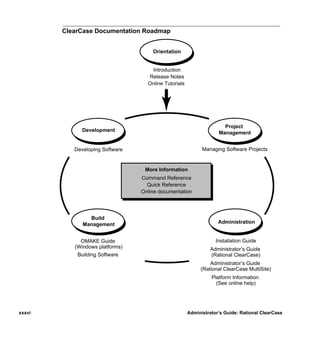
  • 579.
    error logs 14 H error logs, for servers 14 event records, scrubbing 208 Host Administration 19 export views storage pools 212 about 344 hosts multihop configurations 346 See also license server hosts; registry server hosts; VOB hosts restricting hosts for 347 client 2 consistency of user IDs 6 non-ClearCase 3 F release, renaming 28 remote administration 20 renaming (procedure) 436 FAT file system converting to NTFS, security information 528 server 2 security of storage directories 525 Windows NT, assigning to new network regions 425 -hosts map feature levels 141 use of and workarounds for 27 displaying 141 hyperlinks, checking 246 file descriptor table modifying for VOB host 145 file elements determining status of 519 I editing permissions, and ClearCase protections 528 location of source data containers 128 IIS, configuring 462 floating license scheme 389 importing data to VOBs about 153 from PVCS (example) 155 from SourceSafe (example) 157 G init command, ClearCase startup script 17 global pathnames install_release script how derived 151 crontab modification by 534 global types installing ClearCase, changing release area location 28 about 303 IP addresses, managing with DHCP 21 changing mastership 319 changing protection 317 changing scope 321 L checking and fixing 246 copying 320 license server hosts creating 312 about 389 describing 315 additional 392 how they work 303 renaming 394 listing 316 setting up 391 listing history 317 licenses locking and unlocking 318 adding information to database (procedure) 391 removing 322 expiration 390 renaming 320 licensing scheme 389 group IDs, consistency on ClearCase hosts 6 moving to another host 393 group lists priorities 390 in mixed environment 81 reports on user activity 390 role in access control 4 verification check 389 groups links adjusting VOB identity information 149 absolute pathnames in 411 finding location of 524 unexported disk partitions 412 locking VOBs locking objects in 40 Index 539 /vobs/doc/ccase/admin/cc_adminIX.fm — September 13, 2001 2:01 pm
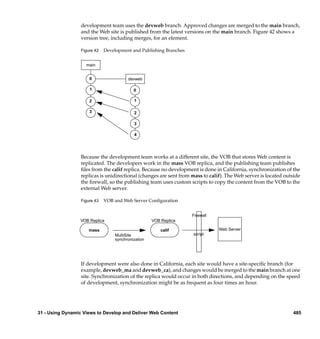
  • 580.
    procedure 173 administering 415 techniques to reduce duration 173 assigning Windows computers to 110 log files, checkvob 258 creating for mixed environment 110 establishing 421 logon name, for NFS clients 92 example 423 lost+found directory multiple registry hosts as alternative 423 files in deleted directory 197 multiple, administration guidelines 428 multiple, registries in 418 registry hosts for, separate 428 M removing 429 NFS clients mastership of global type, changing 319 case-sensitive file names 85 memory configuring for MFVS 90 client host minimum 501 disabling DOS file-sharing (procedure) 93 required for VOB host 140 invalid cache problems 24 Microsoft Internet Information Server, configuring 462 VOBs with linked storage pools 112 mount point of VOB, finding 520 NFS file locking 25 moving VOBs non-ClearCase hosts danger when moving database 124 about 3 different architecture (procedure) 230, 366 access to VOBs 22 moving elements to other VOBs 283 export views 344 precautions 220 NTFS file system replicas 220 converting from FAT, security information 528 MultiSite security of storage directories 525 changing global type mastership 319 checkvob operations on replicas 257 interop-enabled mode 119 O moving replicas 220 shared global types 313 object registries 401 MVFS (multiversion file system) online help, accessing xxxvii about 333 case-sensitivity 335 finding file storage location 519 P limitations of 334 NFS configuration setup 90 pathnames performance 335 absolute, in links 411 MVFS cache determining full 520 adjustment techniques 502 recursive traversal 533 cache-miss categories 509 performance changing size in real time 506 client hosts 501 setting individual sizes 509 disk I/O on VOB servers 496 mvfs_larginit MVFS file lookup 335 effect on MVFS cache size 507 VOB hosts, improving 495 mvfsstorage utility 522 VOB memory and storage required 140 permissions See also access control N editing, and ClearCase protections 528 for executables in MVFS 335 Netscape Enterprise Server, configuring 465 incorrect, on pools 268 network pools ClearCase components in 1 See storage pools record of interfaces 26 principal group network regions role in access control 4 about 415 private VOBs adding 422 activating and deactivating 405 540 Administrator’s Guide: Rational ClearCase /vobs/doc/ccase/admin/cc_adminIX.fm — September 13, 2001 2:01 pm
  • 581.
    process table S modifying for VOB host 145 processes scheduler extraneous, on VOB host 495 about 441 properties of site, registering 410 creating jobs 447 protection mode 32 creating tasks 445 default job schedule 444 public VOBs deleting jobs 451 activating and deactivating 405 deleting tasks 446 creating 148 editing job properties 450 PVCS, data conversion example 155 editing task definition 446 job notification mechanisms 449 managing jobs 447 R managing tasks 445 running jobs 451 Region Synchronizer 111 schedule types 448 registry viewing job properties 450 creating entries 408 scrubbing default pathnames for storage directories 409 about 4 listing entries 406 impact on cache hits 129 moving 431 view-private storage 357 moving to active backup host (procedure) 432 VOB databases 208 site properties 410 Security Descriptor registry server hosts effect of file-system conversion 528 backup, moving registry to 432 semi-live backup changing backup (procedure) 436 costs and benefits 171 changing backup to primary 435 how it works 170 moving registry to another (procedure) 434 server hosts 2 multiple vs. network regions 423 renaming 435 server process user separate, for new network region 428 defining 53 spreading access load 412 setting up on NFS clients 95 VOB-tag password file location 148 servers, error logs 14 release area, changing location 28 setGID and setUID enabled for mounting 152 release hosts about 3 shutdown script, how invoked 17 renaming 28 site_prep program relocate utility establishing network regions 421 about 283 SMB server sample operations (illustrations) 285 See TAS SMB server replicas source pools checkvob operations 257 about 128 moving 220 checkvob sample run 277 shared global types 313 corrupted containers 272 restoring VOBs from backup debris 271 checkvob run from incremental backup 279 incorrect permissions 268 costs of semi-live backup 171 missing containers 269 database snapshot 193 name of default 524 procedure 177 scrubbing 207 rules and guidelines 189 unreferenced containers 271 sample session 179 usage patterns and choice of location 215 scenarios 188 SourceSafe, data conversion example 157 synchronizing views and VOBs 200 splitting VOBs without vob_restore (procedure) 195 about 283 causes of common failures 294 cleanup 295 Index 541 /vobs/doc/ccase/admin/cc_adminIX.fm — September 13, 2001 2:01 pm
  • 582.
    cleanup guidelines 297 configuring ClearCase to support 107 element removal errors 295 configuring for ClearCase 103 handling unrelated errors 294 initial setup 102 preliminary procedures 292 starting file service 107 sample operations (illustrations) 285 technical support xxxviii startup script, how invoked 17 text modes storage directories configuring for mixed environment 115 default pathnames in registry 409 type managers global access to shared 417 about 128 native file-system permissions 48 checkvob requirements 256 retaining protection information of copied 527 type objects security on NTFS vs. FAT 525 changing 320 storage pools coordinating for multiple VOBs 153 See also cleartext pools; DO pools; source pools global 303 about 127 locking 41 adjusting scrubbing procedures 209 backing up 170 checkvob processing 264 U cleartext, backing up 175 commands for 213 umask setting creating remote 153 for NFS client 92 creating remote (example) 216 for shared view 343 distributed, implementation of 401 UNIX/Windows interoperation finding and fixing problems in 254 access control 82 fixing root 279 capabilities and constraints 76 host criteria for remote 215 case-sensitive names 82 inconsistent with VOB database 253 ClearCase configurations 75 locating files in remote 523 managing user accounts 78 misnamed 267 preparing UNIX hosts 110 moving (example) 217 preparing UNIX VOBs and views 109 names of default 524 when useful 75 remote, backing up 176 remote, when not to use 428 user accounts setup mode in checkvob 265 in multiple domains 54 symbolically linked, and NFS clients 112 managing in mixed environment 78 synchronizing with VOB database 193 storage registries about 401 V administration guidelines 411 guidelines for multiple 412 versions maintenance required 4 finding location of checked out 522 finding storage location 521 symbolic links removing from VOB 212 access to remote storage 401 for moved elements 284 view database limitations 296 skew after VOB restoration 200 view hosts, preparing for mixed environment 110 view registry 401 T view storage disk space, estimating required 342 tag registries view storage directories about 402 about 5 creating and removing entries 408 creating 343 implementation in multiple-region network 419 requirements 342 in multiple-region networks 418 .view file, impact of moved view 364, 366 TAS SMB server view_scrubber utility about 101 example 357 542 Administrator’s Guide: Rational ClearCase /vobs/doc/ccase/admin/cc_adminIX.fm — September 13, 2001 2:01 pm
  • 583.
    view_server process VOB file system, mounting 152 location requirements 341 VOB hosts performance of VOB host 496 cache size to VOB database 497 setting cache size 515 criteria for selecting 140 view-private files export views on 346 access control scheme 44 improving performance 495 finding storage location 521 kernel resource adjustments 145 view-private storage modifying for ClearCase access 145 about 332 non-ClearCase access 344 builds on non-ClearCase hosts 23 preparing for mixed environment 110 dynamic view, moving (procedure) 369 remote 149 finding location of checked-out versions in 522 VOB registry 401 location 342 VOB storage viewroot directory maintenance trade-offs 205 mounting 152 vob_restore recursive traversal of 533 about 177 view-tag and 402 database snapshot 193 views restoration scenarios 188 about 5, 327 sample session 179 access control scheme 41 vob_server process 125 activating dynamic 405 analyzing cache information 513 VOBs about 123 backing up 349 about 4 configuring text modes for mixed environment 115 access control scheme 35 finding storage location 521 access, strategies for ensuring 151 limitations of symbolic links 296 activating 405 location, architectural constraints 341 configuring text modes for mixed environment 115 moving (procedure) 361 coordinating type objects 153 moving to host with same architecture (procedure) 361 creating (procedure) 147 removing permanently 371 creating on remote host 149 removing VOB references to 372 finding mount point 520 restoring consistency of DO state (procedure) 203 identity information adjustments 149 restoring from backup (procedure) 351 importing data 153 restoring to service 371 locking objects in 40 setting up shared 343 locking 241 setting up single 341 public and private, activating 405 taking out of service 371 public, creating 148 umask setting 343 removing permanently 243 view-tags removing temporarily (procedure) 241 about 400 removing view references 372 characteristics of 402 restoring to service (procedure) 242 first in network region 428 setting up 139 importing in mixed environment 111 size and distribution trade-offs 143 re-creating incorrect 111 renaming vs. removing 412 VOB-tags about 400 shared view 343 characteristics of 402 VOB database creating 147 about 129 first in network region 428 danger when moving 124 importing in mixed environment 111 inconsistent with storage pools 253 multiple-region network 428 location of 125 password file location 148 proportion of cache size 497 re-creating incorrect 111 scope of checkvob updating 255 renaming vs. removing 412 scrubbing 208 repairing 113 skew after VOB restoration 200 synchronizing with storage pools 193 Index 543 /vobs/doc/ccase/admin/cc_adminIX.fm — September 13, 2001 2:01 pm
  • 584.
    W Web servers configuration checklist 457 configuration procedures 461 Windows NT hosts, assigning to new network region 425 544 Administrator’s Guide: Rational ClearCase /vobs/doc/ccase/admin/cc_adminIX.fm — September 13, 2001 2:01 pm