Data ONTAP 7G Cook Book

Data ONTAP 8.x 7-Mode Cook Book

Version: 1.1
Sep 2012

An unofficial compilation of step-by-step procedures for performing common tasks in the 7-Mode
version of Data ONTAP 8. Most of the content is based on Data ONTAP 8.0.3. Features exclusive to
Data ONTAP 8.1 are preceded by [8.1]
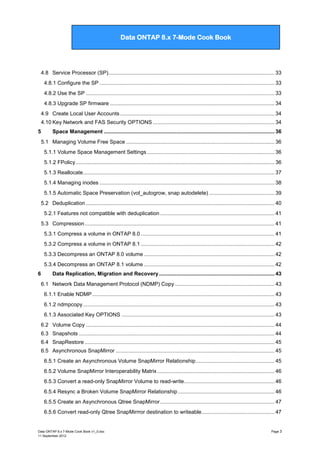
Table of Contents
Best Practices for Installation and Maintenance ................................................................................ 7
1

Aggregates and FlexVols ............................................................................................................ 8
1.1 Creating Aggregates ...................................................................................................................... 8
1.1.1. Software Disk Ownership ......................................................................................................... 8
1.1.1.1
1.1.1.2

Modifying disk ownership ........................................................................................... 8
Associated Key OPTIONS .......................................................................................... 9

1.1.2 Aggregates ................................................................................................................................. 9
1.1.2.1
1.1.2.2
1.1.2.3

Add disks to Aggregates ............................................................................................. 9
Disk right-size and max disk per aggregate matrix .................................................. 10
Key aggregate OPTIONS ......................................................................................... 11

1.1.3 Modifying RAID groups............................................................................................................. 11
1.1.4 Create Flexible Volumes (FlexVols) ......................................................................................... 12
1.1.4.1

Root volume minimum size ...................................................................................... 12

1.1.5 Manage Flexible Volumes (FlexVols) ....................................................................................... 13
1.1.5.1
1.1.5.2
1.1.5.3
1.1.5.4

General management commands ............................................................................ 13
Resize a FlexVol ....................................................................................................... 13
Prioritize volume I/O with FlexShare ........................................................................ 13
Key Volume command Options ................................................................................ 14

1.1.6 SnapLock volumes [8.1] ........................................................................................................... 14
1.1.6.1

Associated Key OPTIONS ........................................................................................ 15

1.1.7 Create Qtrees ........................................................................................................................... 15
2

NAS Implementation .................................................................................................................. 16
2.1 NFS exports ................................................................................................................................. 16
2.1.1 Support NFSv4 clients .............................................................................................................. 17
2.1.2 Associated Key NFS OPTIONS ............................................................................................... 17
2.2 CIFS shares ................................................................................................................................. 17
2.2.1 Associated Key CIFS Shares OPTIONS .................................................................................. 19
2.3 Using Quotas ............................................................................................................................... 20
2.3.1 Guidelines for using quotas ...................................................................................................... 20

3

SAN Implementation .................................................................................................................. 21
3.1 Fiber Channel SAN ...................................................................................................................... 21
3.1.1 Enable the Fibre Channel Protocol .......................................................................................... 21
3.1.2 Configure FCP ports ................................................................................................................. 22

Data ONTAP 8.x 7-Mode Cook Book v1_0.doc
11 September 2012

Page 1
Data ONTAP 7G Cook Book

Data ONTAP 8.x 7-Mode Cook Book

3.1.3 Create WWPN aliases .............................................................................................................. 22
3.1.4 Create a LUN ............................................................................................................................ 22
3.1.5 Access LUNs on a Unix/Linux Host .......................................................................................... 23
3.1.6 Access LUNs on a Windows Host ............................................................................................ 23
3.1.7 Obtain HBA information ............................................................................................................ 23
3.1.8 Resolving “FCP Partner Path Misconfigured” messages ......................................................... 24
3.2 iSCSI SAN ................................................................................................................................... 24
3.2.1 Enable the iSCSI Protocol ........................................................................................................ 24
3.2.2 Install iSCSI Initiator and SnapDrive for Windows ................................................................... 24
3.2.3 Connect Windows to a LUN with iSCSI.................................................................................... 25
3.2.4 Create an iSCSI LUN using SnapDrive for Windows ............................................................... 25
3.3 Resize a LUN ............................................................................................................................... 26
3.4 Clone a LUN ................................................................................................................................ 26
3.5 FlexClone a LUN .......................................................................................................................... 26
3.6 Delete a LUN ............................................................................................................................... 27
3.7 Access a LUN with NFS/CIFS protocols...................................................................................... 27
4

Networking and Appliance Access .......................................................................................... 28
4.1 Configure Network Interfaces ...................................................................................................... 28
4.2 Setting Time and Date ................................................................................................................. 28
4.2.1 Synchronize with a time server ................................................................................................ 28
4.3 Creating VLANS ........................................................................................................................... 28
4.4 Managing Interface Groups ......................................................................................................... 29
4.4.1 Create an ifgrp .......................................................................................................................... 29
4.4.2 Delete an ifgrp or ifgrp interface ............................................................................................... 30
4.5 IP version 6 [8.1] .......................................................................................................................... 30
4.5.1 Associated Key OPTIONS ....................................................................................................... 30
4.6 Baseboard Management Controller (BMC) ................................................................................. 30
4.6.1 Configure the BMC ................................................................................................................... 30
4.6.2 Using the BMC ......................................................................................................................... 30
4.6.3 Upgrade the BMC ..................................................................................................................... 31
4.7 Remote LAN Module (RLM) ........................................................................................................ 31
4.7.1 Configure the RLM ................................................................................................................... 32
4.7.2 Configure the Remote Support Agent (RSA) ........................................................................... 32
4.7.3 Use the RLM ............................................................................................................................. 32
4.7.4 Upgrade RLM firmware ............................................................................................................ 33

Data ONTAP 8.x 7-Mode Cook Book v1_0.doc
11 September 2012

Page 2
Data ONTAP 7G Cook Book

Data ONTAP 8.x 7-Mode Cook Book

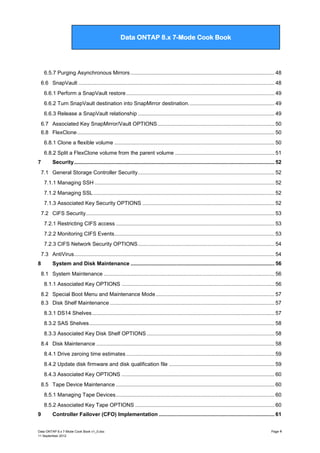
4.8 Service Processor (SP)................................................................................................................ 33
4.8.1 Configure the SP ...................................................................................................................... 33
4.8.2 Use the SP ............................................................................................................................... 33
4.8.3 Upgrade SP firmware ............................................................................................................... 34
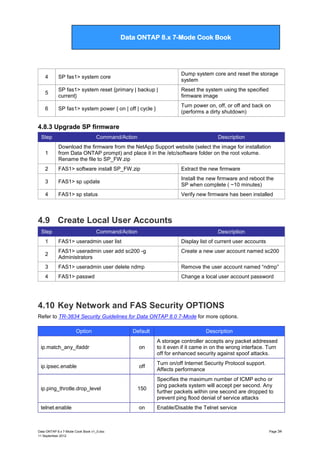
4.9 Create Local User Accounts ........................................................................................................ 34
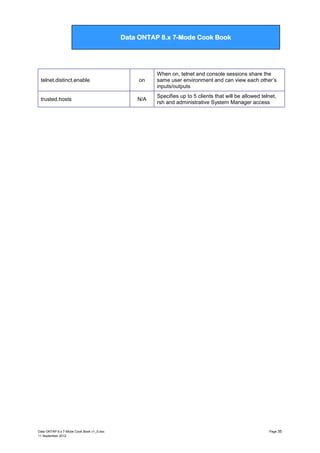
4.10 Key Network and FAS Security OPTIONS .................................................................................. 34
5

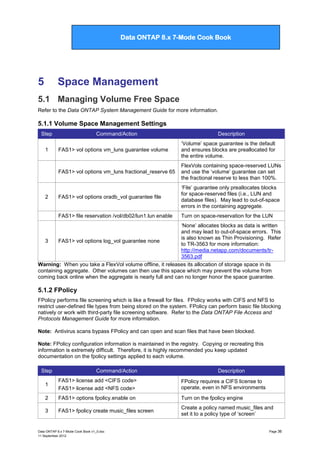
Space Management ................................................................................................................... 36
5.1 Managing Volume Free Space .................................................................................................... 36
5.1.1 Volume Space Management Settings ...................................................................................... 36
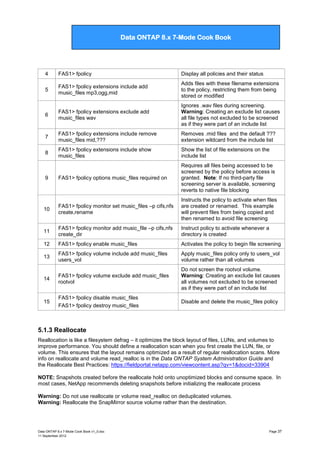
5.1.2 FPolicy ...................................................................................................................................... 36
5.1.3 Reallocate ................................................................................................................................. 37
5.1.4 Managing inodes ...................................................................................................................... 38
5.1.5 Automatic Space Preservation (vol_autogrow, snap autodelete) ............................................ 39
5.2 Deduplication ............................................................................................................................... 40
5.2.1 Features not compatible with deduplication ............................................................................. 41
5.3 Compression ................................................................................................................................ 41
5.3.1 Compress a volume in ONTAP 8.0 .......................................................................................... 41
5.3.2 Compress a volume in ONTAP 8.1 .......................................................................................... 42
5.3.3 Decompress an ONTAP 8.0 volume ........................................................................................ 42
5.3.4 Decompress an ONTAP 8.1 volume ........................................................................................ 42

6

Data Replication, Migration and Recovery .............................................................................. 43
6.1 Network Data Management Protocol (NDMP) Copy ................................................................... 43
6.1.1 Enable NDMP ........................................................................................................................... 43
6.1.2 ndmpcopy ................................................................................................................................. 43
6.1.3 Associated Key OPTIONS ....................................................................................................... 43
6.2 Volume Copy ............................................................................................................................... 44
6.3 Snapshots .................................................................................................................................... 44
6.4 SnapRestore ................................................................................................................................ 45
6.5 Asynchronous SnapMirror ........................................................................................................... 45
6.5.1 Create an Asynchronous Volume SnapMirror Relationship ..................................................... 45
6.5.2 Volume SnapMirror Interoperability Matrix ............................................................................... 46
6.5.3 Convert a read-only SnapMirror Volume to read-write............................................................. 46
6.5.4 Resync a Broken Volume SnapMirror Relationship ................................................................. 46
6.5.5 Create an Asynchronous Qtree SnapMirror ............................................................................. 47
6.5.6 Convert read-only Qtree SnapMirrror destination to writeable ................................................. 47

Data ONTAP 8.x 7-Mode Cook Book v1_0.doc
11 September 2012

Page 3
Data ONTAP 7G Cook Book

Data ONTAP 8.x 7-Mode Cook Book

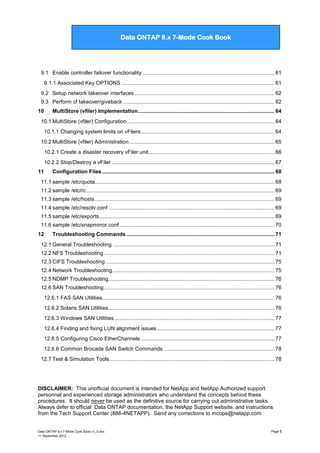
6.5.7 Purging Asynchronous Mirrors ................................................................................................. 48
6.6 SnapVault .................................................................................................................................... 48
6.6.1 Perform a SnapVault restore .................................................................................................... 49
6.6.2 Turn SnapVault destination into SnapMirror destination. ......................................................... 49
6.6.3 Release a SnapVault relationship ............................................................................................ 49
6.7 Associated Key SnapMirror/Vault OPTIONS ............................................................................... 50
6.8 FlexClone ..................................................................................................................................... 50
6.8.1 Clone a flexible volume ............................................................................................................ 50
6.8.2 Split a FlexClone volume from the parent volume ................................................................... 51
7

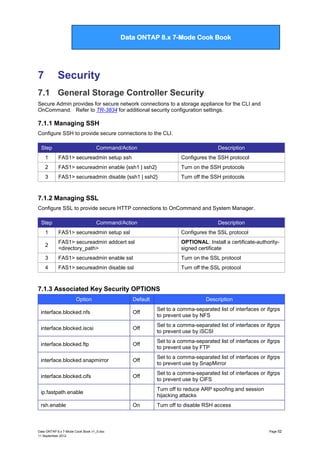
Security ....................................................................................................................................... 52
7.1 General Storage Controller Security ............................................................................................ 52
7.1.1 Managing SSH ......................................................................................................................... 52
7.1.2 Managing SSL .......................................................................................................................... 52
7.1.3 Associated Key Security OPTIONS ......................................................................................... 52
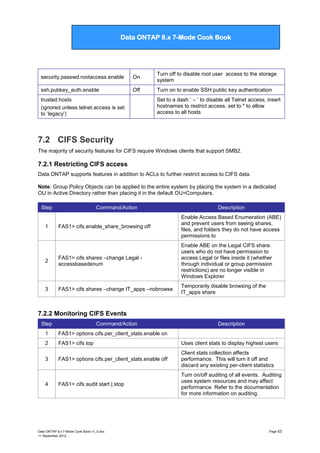
7.2 CIFS Security ............................................................................................................................... 53
7.2.1 Restricting CIFS access ........................................................................................................... 53
7.2.2 Monitoring CIFS Events............................................................................................................ 53
7.2.3 CIFS Network Security OPTIONS ............................................................................................ 54
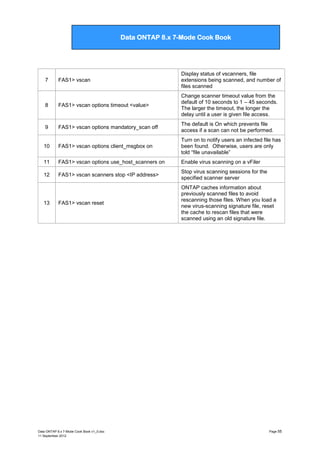
7.3 AntiVirus ....................................................................................................................................... 54

8

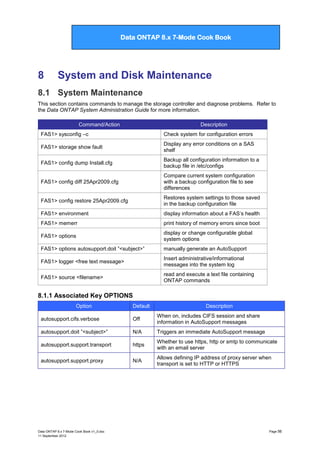
System and Disk Maintenance ................................................................................................. 56
8.1 System Maintenance ................................................................................................................... 56
8.1.1 Associated Key OPTIONS ....................................................................................................... 56
8.2 Special Boot Menu and Maintenance Mode ................................................................................ 57
8.3 Disk Shelf Maintenance ............................................................................................................... 57
8.3.1 DS14 Shelves ........................................................................................................................... 57
8.3.2 SAS Shelves ............................................................................................................................. 58
8.3.3 Associated Key Disk Shelf OPTIONS ...................................................................................... 58
8.4 Disk Maintenance ........................................................................................................................ 58
8.4.1 Drive zeroing time estimates .................................................................................................... 59
8.4.2 Update disk firmware and disk qualification file ....................................................................... 59
8.4.3 Associated Key OPTIONS ....................................................................................................... 60
8.5 Tape Device Maintenance ........................................................................................................... 60
8.5.1 Managing Tape Devices ........................................................................................................... 60
8.5.2 Associated Key Tape OPTIONS .............................................................................................. 60

9

Controller Failover (CFO) Implementation .............................................................................. 61

Data ONTAP 8.x 7-Mode Cook Book v1_0.doc
11 September 2012

Page 4
Data ONTAP 7G Cook Book

Data ONTAP 8.x 7-Mode Cook Book

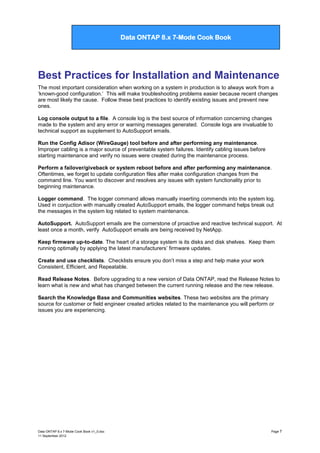
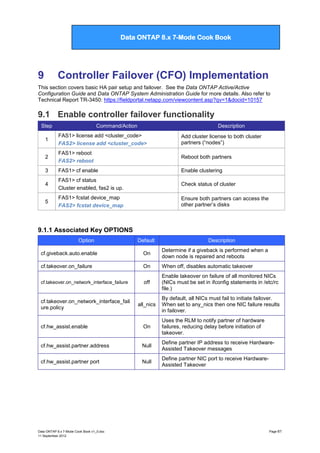
9.1 Enable controller failover functionality ......................................................................................... 61
9.1.1 Associated Key OPTIONS ....................................................................................................... 61
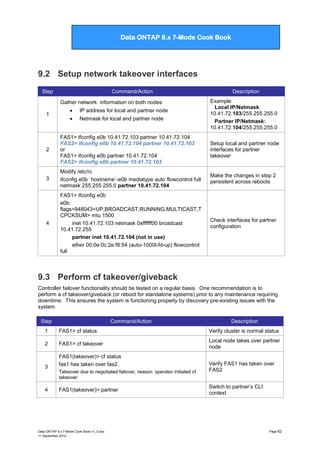
9.2 Setup network takeover interfaces .............................................................................................. 62
9.3 Perform cf takeover/giveback ...................................................................................................... 62
10

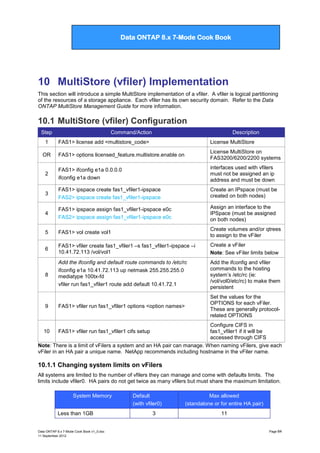
MultiStore (vfiler) Implementation ............................................................................................ 64

10.1 MultiStore (vfiler) Configuration ................................................................................................... 64
10.1.1 Changing system limits on vFilers .......................................................................................... 64
10.2 MultiStore (vfiler) Administration .................................................................................................. 65
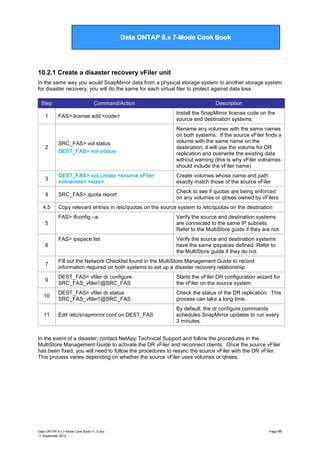
10.2.1 Create a disaster recovery vFiler unit..................................................................................... 66
10.2.2 Stop/Destroy a vFiler .............................................................................................................. 67
11

Configuration Files .................................................................................................................... 68

11.1 sample /etc/quota......................................................................................................................... 68
11.2 sample /etc/rc ............................................................................................................................... 69
11.3 sample /etc/hosts ......................................................................................................................... 69
11.4 sample /etc/resolv.conf ................................................................................................................ 69
11.5 sample /etc/exports ...................................................................................................................... 69
11.6 sample /etc/snapmirror.conf ........................................................................................................ 70
12

Troubleshooting Commands .................................................................................................... 71

12.1 General Troubleshooting ............................................................................................................. 71
12.2 NFS Troubleshooting ................................................................................................................... 71
12.3 CIFS Troubleshooting .................................................................................................................. 75
12.4 Network Troubleshooting ............................................................................................................. 75
12.5 NDMP Troubleshooting................................................................................................................ 76
12.6 SAN Troubleshooting ................................................................................................................... 76
12.6.1 FAS SAN Utilities.................................................................................................................... 76
12.6.2 Solaris SAN Utilities................................................................................................................ 76
12.6.3 Windows SAN Utilities ............................................................................................................ 77
12.6.4 Finding and fixing LUN alignment issues ............................................................................... 77
12.6.5 Configuring Cisco EtherChannels .......................................................................................... 77
12.6.6 Common Brocade SAN Switch Commands ........................................................................... 78
12.7 Test & Simulation Tools ............................................................................................................... 78

DISCLAIMER: This unofficial document is intended for NetApp and NetApp Authorized support
personnel and experienced storage administrators who understand the concepts behind these
procedures. It should never be used as the definitive source for carrying out administrative tasks.
Always defer to official Data ONTAP documentation, the NetApp Support website, and instructions
from the Tech Support Center (888-4NETAPP). Send any corrections to mcope@netapp.com

Data ONTAP 8.x 7-Mode Cook Book v1_0.doc
11 September 2012

Page 5
Data ONTAP 7G Cook Book

Data ONTAP 8.x 7-Mode Cook Book

Follow Best Practices by running Config Advisor (aka WireGauge) and generating an AutoSupport email
before and after making changes to a production storage system.

Data ONTAP 8.x 7-Mode Cook Book v1_0.doc
11 September 2012

Page 6
Data ONTAP 7G Cook Book

Data ONTAP 8.x 7-Mode Cook Book

Best Practices for Installation and Maintenance
The most important consideration when working on a system in production is to always work from a
„known-good configuration.‟ This will make troubleshooting problems easier because recent changes
are most likely the cause. Follow these best practices to identify existing issues and prevent new
ones.
Log console output to a file. A console log is the best source of information concerning changes
made to the system and any error or warning messages generated. Console logs are invaluable to
technical support as supplement to AutoSupport emails.
Run the Config Adisor (WireGauge) tool before and after performing any maintenance.
Improper cabling is a major source of preventable system failures. Identify cabling issues before
starting maintenance and verify no issues were created during the maintenance process.
Perform a failover/giveback or system reboot before and after performing any maintenance.
Oftentimes, we forget to update configuration files after make configuration changes from the
command line. You want to discover and resolves any issues with system functionality prior to
beginning maintenance.
Logger command. The logger command allows manually inserting commends into the system log.
Used in conjuction with manually created AutoSupport emails, the logger command helps break out
the messages in the system log related to system maintenance.
AutoSupport. AutoSupport emails are the cornerstone of proactive and reactive technical support. At
least once a month, verify AutoSupport emails are being received by NetApp.
Keep firmware up-to-date. The heart of a storage system is its disks and disk shelves. Keep them
running optimally by applying the latest manufacturers‟ firmware updates.
Create and use checklists. Checklists ensure you don‟t miss a step and help make your work
Consistent, Efficient, and Repeatable.
Read Release Notes. Before upgrading to a new version of Data ONTAP, read the Release Notes to
learn what is new and what has changed between the current running release and the new release.
Search the Knowledge Base and Communities websites. These two websites are the primary
source for customer or field engineer created articles related to the maintenance you will perform or
issues you are experiencing.

Data ONTAP 8.x 7-Mode Cook Book v1_0.doc
11 September 2012

Page 7
Data ONTAP 7G Cook Book

Data ONTAP 8.x 7-Mode Cook Book

1

Aggregates and FlexVols

1.1 Creating Aggregates
Refer to the Data ONTAP Storage Management Guide for more information.

1.1.1. Software Disk Ownership
NetApp storage controllers rely on ownership labels written to disk rather than physical connections to
a shelf to determine ownership of a disk drive. This section describes how to assign and remove disk
ownership.
NOTE: Unowned disks cannot be used for data or as spares without being assigned ownership.
Step

Command/Action

Description

1

*> disk upgrade_ownership

Used in Maintenance Mode to convert
hardware-based disk ownership systems
to use software disk ownership

2

FAS1> disk show -v

Display all visible disks and whether they
are owned or not

3

FAS1> disk show –n

Show all unowned disks

4

FAS1> disk assign 0b.43 0b.41

Assigns the listed unowned disks to FAS1

OR

FAS1> storage show shelf
[8.1] FAS1> disk assign –T –shelf 2b.1

In ONTAP 8.1, assign all unowned disks
in shelf 1 on port 2b to FAS1

OR

FAS1> disk assign 2a.*

Assigns all unowned disks connected to
the 2a adapter interface to FAS1

OR

FAS1> disk assign all
Warning: Use with caution. Not restricted by A
and B loop connections in HA pairs

Assign all unowned disks to FAS1

V-FAS1> disk assign <lun_id_list> –c {block |
zoned}

Assign LUNs to a V-Series controller

-

1.1.1.1 Modifying disk ownership
Step

Command/Action

1

FAS1> disk assign 0b.43 0b.41 –s unowned [ -f ]

Change disks from owned to unowned

FAS1> priv set advanced
FAS1*> disk remove_ownership 0b.41 0b.43

Removes ownership from two disk drives

FAS1> disk show -n

Verify disks are available for assignment.

OR
2

Description

Alternative: reboot system and go into Maintenance Mode
1

*> storage release disk
*> disk reassign -s <old sysid> -d <new sysid>

2

Data ONTAP 8.x 7-Mode Cook Book v1_0.doc
11 September 2012

Used in Maintenance Mode to release
disk reservations
Used in Maintenance Mode to reassign
disk ownership of all disks owned by a
single system to another system

Page 8
Data ONTAP 7G Cook Book

Data ONTAP 8.x 7-Mode Cook Book

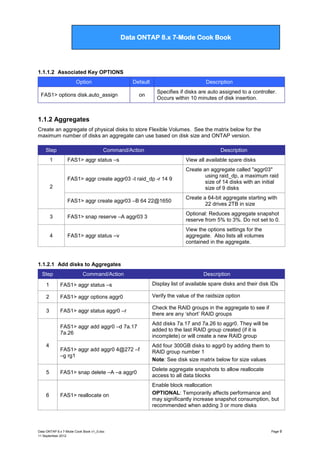
1.1.1.2 Associated Key OPTIONS
Option

Default

FAS1> options disk.auto_assign

on

Description
Specifies if disks are auto assigned to a controller.
Occurs within 10 minutes of disk insertion.

1.1.2 Aggregates
Create an aggregate of physical disks to store Flexible Volumes. See the matrix below for the
maximum number of disks an aggregate can use based on disk size and ONTAP version.
Step

Command/Action

Description

FAS1> aggr status –s

View all available spare disks

FAS1> aggr create aggr03 -t raid_dp -r 14 9

Create an aggregate called "aggr03"
using raid_dp, a maximum raid
size of 14 disks with an initial
size of 9 disks

FAS1> aggr create aggr03 –B 64 22@1650

Create a 64-bit aggregate starting with
22 drives 2TB in size

3

FAS1> snap reserve –A aggr03 3

Optional: Reduces aggregate snapshot
reserve from 5% to 3%. Do not set to 0.

4

FAS1> aggr status –v

View the options settings for the
aggregate. Also lists all volumes
contained in the aggregate.

1

2

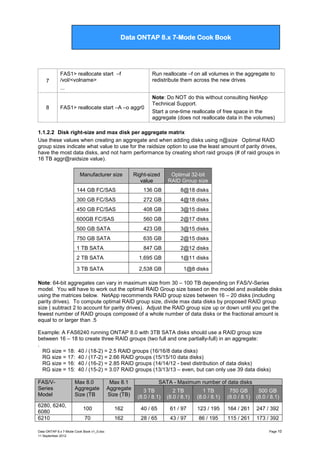
1.1.2.1 Add disks to Aggregates
Step

Command/Action

Description

1

FAS1> aggr status –s

Display list of available spare disks and their disk IDs

2

FAS1> aggr options aggr0

Verify the value of the raidsize option

3

FAS1> aggr status aggr0 –r

Check the RAID groups in the aggregate to see if
there are any „short‟ RAID groups

FAS1> aggr add aggr0 –d 7a.17
7a.26

Add disks 7a.17 and 7a.26 to aggr0. They will be
added to the last RAID group created (if it is
incomplete) or will create a new RAID group

FAS1> aggr add aggr0 4@272 –f
–g rg1

Add four 300GB disks to aggr0 by adding them to
RAID group number 1
Note: See disk size matrix below for size values

FAS1> snap delete –A –a aggr0

Delete aggregate snapshots to allow reallocate
access to all data blocks

FAS1> reallocate on

Enable block reallocation
OPTIONAL: Temporarily affects performance and
may significantly increase snapshot consumption, but
recommended when adding 3 or more disks

4

5

6

Data ONTAP 8.x 7-Mode Cook Book v1_0.doc
11 September 2012

Page 9
Data ONTAP 7G Cook Book

Data ONTAP 8.x 7-Mode Cook Book

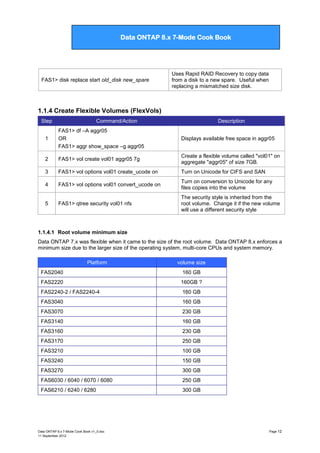
7

8

FAS1> reallocate start –f
/vol/<volname>
...

Run reallocate –f on all volumes in the aggregate to
redistribute them across the new drives

FAS1> reallocate start –A –o aggr0

Note: Do NOT do this without consulting NetApp
Technical Support.
Start a one-time reallocate of free space in the
aggregate (does not reallocate data in the volumes)

1.1.2.2 Disk right-size and max disk per aggregate matrix
Use these values when creating an aggregate and when adding disks using n@size Optimal RAID
group sizes indicate what value to use for the raidsize option to use the least amount of parity drives,
have the most data disks, and not harm performance by creating short raid groups (# of raid groups in
16 TB aggr@raidsize value).
Manufacturer size

Right-sized
value

Optimal 32-bit
RAID Group size

144 GB FC/SAS

136 GB

8@18 disks

300 GB FC/SAS

272 GB

4@18 disks

450 GB FC/SAS

408 GB

3@15 disks

600GB FC/SAS

560 GB

2@17 disks

500 GB SATA

423 GB

3@15 disks

750 GB SATA

635 GB

2@15 disks

1 TB SATA

847 GB

2@12 disks

2 TB SATA

1,695 GB

1@11 disks

3 TB SATA

2,538 GB

1@8 disks

Note: 64-bit aggregates can vary in maximum size from 30 – 100 TB depending on FAS/V-Series
model. You will have to work out the optimal RAID Group size based on the model and available disks
using the matrices below. NetApp recommends RAID group sizes between 16 – 20 disks (including
parity drives). To compute optimal RAID group size, divide max data disks by proposed RAID group
size ( subtract 2 to account for parity drives). Adjust the RAID group size up or down until you get the
fewest number of RAID groups composed of a whole number of data disks or the fractional amount is
equal to or larger than .5
Example: A FAS6240 running ONTAP 8.0 with 3TB SATA disks should use a RAID group size
between 16 – 18 to create three RAID groups (two full and one partially-full) in an aggregate:
.
RG size = 18: 40 / (18-2) = 2.5 RAID groups (16/16/8 data disks)
RG size = 17: 40 / (17-2) = 2.66 RAID groups (15/15/10 data disks)
RG size = 16: 40 / (16-2) = 2.85 RAID groups (14/14/12 - best distribution of data disks)
RG size = 15: 40 / (15-2) = 3.07 RAID groups (13/13/13 – even, but can only use 39 data disks)
FAS/VSeries
Model
6280, 6240,
6080
6210

Max 8.0
Aggregate
Size (TB

Max 8.1
Aggregate
Size (TB)

3 TB
(8.0 / 8.1)

2 TB
(8.0 / 8.1)

1 TB
(8.0 / 8.1)

750 GB
(8.0 / 8.1)

500 GB
(8.0 / 8.1)

100

162

40 / 65

61 / 97

123 / 195

164 / 261

247 / 392

70

162

28 / 65

43 / 97

86 / 195

115 / 261

173 / 392

Data ONTAP 8.x 7-Mode Cook Book v1_0.doc
11 September 2012

SATA - Maximum number of data disks

Page 10
Data ONTAP 7G Cook Book

Data ONTAP 8.x 7-Mode Cook Book

6040, 3270,
3170
3240, 3160
3210, 3140
2240-2 / -4
2040

70

28 / 42

43 / 63

86 / 126

115 / 169

173 / 254

50
50
30

FAS/V-Series
Model

105
90
75
60
30

20 / 36
20 / 30
- / 24
12 / 12

30 / 54
30 / 45
- / 36
18 / 18

61 / 108
61 / 90
- / 72
37 / 37

82 / 145
82 / 120
- / 96
49 / 49

123 / 217
123 / 181
- / 145
74 / 74

Max 8.0
Aggregate
Size (TB

Max 8.1
Aggregate
Size (TB)

SAS/FC - Maximum number of data disks
600 GB
450 GB
300 GB
(8.0 / 8.1)
(8.0 / 8.1)
(8.0 / 8.1)

6280, 6240,
100
162
187 / 296
6080
6210
70
162
131 / 296
6040, 3270,
70
105
131 / 192
3170
3240, 3160
50
90
93 / 164
3210, 3140
50
75
93 / 137
2240-2, 2240-4
60
- / 109
2040
30
30
56 / 56
* actual value exceeds model‟s maximum spindles

250 / 406

385 / 609

175 / 406

269 / 609

175 / 263

269 / 395

125 / 225
125 / 188
- / 144*
75 / 75

192 / 338
192 / 282
- / 144*
115 / 115

Refer to TR-3786 A Thorough Introduction to 64-Bit Aggregates for more information.
https://fieldportal.netapp.com/viewcontent.asp?qv=1&docid=29411
1.1.2.3 Key aggregate OPTIONS
Option

Default

Description

fas> aggr options raidsize**

16 (FC/SAS)
14 (SATA)

Maximum number of disks in each RAID group

fas> aggr options raidtype

raid_dp

Set RAID parity type to raid4, raid_dp or raid0

fas> aggr options nosnap

Off

When on, disables aggregate snapshots

options raid.disktype.enable

Off

Enforces separations of disks by disk type to prevent
mixing of disk types in aggregates

options raid.rpm.ata.enable

On

Enforce separation of ATA drives by rotational speed
(5400 and 7200 RPM)

options raid.rpm.fcal.enable

On

Enforces separation of FC drives by rotational speed
(10k and 15k RPM)

1.1.3 Modifying RAID groups
Command/Action

Description

FAS1> aggr options aggr_name raidtype
[ raid_dp | raid4 ]

switch RAID type in an aggregate or
traditional volume to RAID-DP or RAID 4

FAS1> aggr options aggr_name raidsize <numeric
value>

Change the number of disks that compose a
raid group in an aggregate or traditional
volume

Data ONTAP 8.x 7-Mode Cook Book v1_0.doc
11 September 2012

Page 11
Data ONTAP 7G Cook Book

Data ONTAP 8.x 7-Mode Cook Book

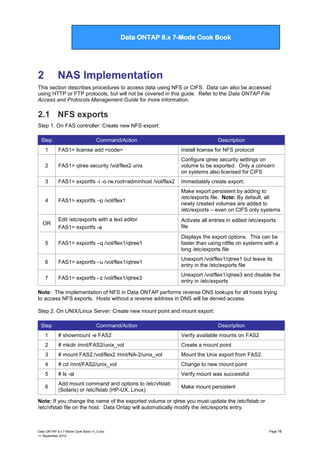
FAS1> disk replace start old_disk new_spare

Uses Rapid RAID Recovery to copy data
from a disk to a new spare. Useful when
replacing a mismatched size disk.

1.1.4 Create Flexible Volumes (FlexVols)
Step

Command/Action

Description

1

FAS1> df –A aggr05
OR
FAS1> aggr show_space –g aggr05

Displays available free space in aggr05

2

FAS1> vol create vol01 aggr05 7g

Create a flexible volume called "vol01" on
aggregate "aggr05" of size 7GB.

3

FAS1> vol options vol01 create_ucode on

Turn on Unicode for CIFS and SAN

4

FAS1> vol options vol01 convert_ucode on

Turn on conversion to Unicode for any
files copies into the volume

5

FAS1> qtree security vol01 nfs

The security style is inherited from the
root volume. Change it if the new volume
will use a different security style

1.1.4.1 Root volume minimum size
Data ONTAP 7.x was flexible when it came to the size of the root volume. Data ONTAP 8.x enforces a
minimum size due to the larger size of the operating system, multi-core CPUs and system memory.
Platform

volume size

FAS2040

160 GB

FAS2220

160GB ?

FAS2240-2 / FAS2240-4

160 GB

FAS3040

160 GB

FAS3070

230 GB

FAS3140

160 GB

FAS3160

230 GB

FAS3170

250 GB

FAS3210

100 GB

FAS3240

150 GB

FAS3270

300 GB

FAS6030 / 6040 / 6070 / 6080

250 GB

FAS6210 / 6240 / 6280

300 GB

Data ONTAP 8.x 7-Mode Cook Book v1_0.doc
11 September 2012

Page 12
Data ONTAP 7G Cook Book

Data ONTAP 8.x 7-Mode Cook Book

1.1.5 Manage Flexible Volumes (FlexVols)
1.1.5.1 General management commands
Command/Action

Description

FAS1> vol options <vol_name> <option>

Change volume specific options

FAS1> vol rename flex1 vol1

Rename volume flex1 to vol1
NOTE: Do NOT change names of SnapMirror or
SnapVault volumes

FAS1> vol container flex1

Displays which aggregate the volume is
contained within

FAS1> aggr status aggr05 –i

Lists all flexvols contained in aggr05

FAS1> df –[k | m | g] <vol_name>

Display volume size and space usage in
kilobytes, megabytes, or gigabytes.

FAS1> df –x <vol_name>

Suppress the display of the .snapshot output.
May be combined with other command flags

FAS1> vol restrict <vol_name>

Make a flexvol read-only

1.1.5.2 Resize a FlexVol
Step

Command/Action

Description

1

FAS1> vol container vol4

Determine which aggregate vol4 resides in.

2

FAS1> df –A aggr07
OR
FAS1> aggr show_space –g aggr07

Check size and available space in the
containing aggregate named “aggr07”

FAS1> vol size vol4 150g

Set the size of flexvol vol4 to 150GB

FAS1> vol size vol4 [+ | -] 30g

Add or remove 30GB from flexvol vol4

3

Note: See chapter 5 of this guide for procedures to auto-manage volume growth.
1.1.5.3 Prioritize volume I/O with FlexShare
FlexShare is built into ONTAP for prioritizing system resources for volumes. If you assign a priority to
one volume, you should assign a priority to all volumes. Any volumes without a priority are assigned
to the default queue where they share the same resources. This may degrade their performance.
Step

Command/Action

Description

1

FAS1> priority on
FAS2> priority on

Enables FlexShare. Both nodes of an
HA cluster must enable FlexShare even
if only one uses it

2

FAS1> priority set volume dbvol
level=VeryHigh system=30

dbvol is given the highest priority and
system operations (e.g, SnapMirror)
are selected over user operations 30%
of the time

Data ONTAP 8.x 7-Mode Cook Book v1_0.doc
11 September 2012

Page 13
Data ONTAP 7G Cook Book

Data ONTAP 8.x 7-Mode Cook Book

3

FAS1> priority set volume dbvol cache=keep

Instruct ONTAP to retain data in the
buffer cache from dbvol as long as
possible

4

FAS1> priority set volume db_logs
cache=reuse

Instruct ONTAP to quickly flush data in
the buffer cache from db_logs

5

FAS1> priority show volume user_vol03

Display the priority assigned to
user_vol03

6

FAS1> priority set volume testvol1 service=off

Temporarily disable priority on testvol1
and places it into the default queu

7

FAS1> priority delete volume testvol1

Removes all priority settings on testvol1
and places it into the default queue

1.1.5.4 Key Volume command Options
Volume option

Default

Description

convert_ucode

off

Turns UNICODE character set on/off. Should be on for
SnapMirror and SnapVault volumes

create_ucode

off

Force UNICODE character use on/off when files are
created. Turn on for SnapMirror and SnapVault volumes

volume

Volume setting preallocates disk space for entire
volume. File only allocates space for space reserved
files and LUNs in the volume. None means no disk
space is guaranteed

minra

off

When on, turns speculative file read-ahead OFF and
may reduce performance.

no_atime_update

off

When on, prevents update of access time in inode when
a file is read, possibly increasing performance. Use with
caution.

nosnap

off

When on, disables automatic snapshots of the volume

nosnapdir

off

When on, disables the .snapshot directory for NFS

root

N/A

Designates the volume as the root volume.

guarantee

1.1.6 SnapLock volumes [8.1]
Not all versions of Data ONTAP support SnapLock. SnapLock volumes are special volumes (WORM)
which, after a user-specified delay, turn new files inside to read-only and cannot be edited or deleted
until a user defined retention period has expired. Read the Data ONTAP Archive and Complaiance
Guide and the SnapLock Tech Reports before creating or altering SnapLock volumes.
Step

Command/Action

1

FAS1> aggr create aggr_name -L
<compliance | enterprise> -t raid_dp [other
aggr create options]

2

FAS1> aggr status

3

FAS1> date –c initialize

Data ONTAP 8.x 7-Mode Cook Book v1_0.doc
11 September 2012

Description
NOTE: ALL volumes in this aggregate will be
SnapLock volumes by default and inherit the
aggregate‟s SnapLock attributes.
Verify creation and SnapLock settings of new
aggregate
Runs a wizard to initiate the ComplianceClock
Page 14
Data ONTAP 7G Cook Book

Data ONTAP 8.x 7-Mode Cook Book

4
5

FAS1> date –c
FAS1> vol create lock_vol01 lock_aggr01
100g

6

FAS1> vol options lock_vol01
snaplock_minimum_period 6m

7

FAS1> vol options lock_vol01
snaplock_maximum_period 10y

8

FAS1> vol options lock_vol01
snaplock_default_period 7y

View the ComplianceClock time
Create a 100GB FlexVol named lock_vol01
inside the lock_aggr01 aggregate
Sets the minimum retention period that can be
assigned to WORM files in lock_vol01 to 6
months
Sets the maximum retention period that can
be assigned to WORM files in lock_vol01 to
10 years
Sets the default retention period for WORM
files in lock_vol01 to 7 years

1.1.6.1 Associated Key OPTIONS
Option
snaplock.autocommit_period
none | {count|h|d|m|y}
snaplock.compliance.write_verify

Default
none

Off

snaplock.log.default_retention

6
months

Snaplock.log.maximum_size

10 MB

Description
When set, files not changed during the delay period are
turned into WORM files
An immediate verification occurs after every write to
provide an additional level of data integrity.
NOTE: effects performance and may affect data
throughput. Only valid with a Compliance license
Determines how long the SnapLock log file is kept.
Cannot be less than 6 months.
Specifies maximum size of the SnapLock log file before
a new log file is created.

1.1.7 Create Qtrees
Step

Command/Action

Description

1

FAS1> qtree status flex1

Display lists of qtrees in the volume flex1

2

FAS1> qtree create /vol/flex1/qt_alpha

Create a Qtree called "qt_alpha" on
flexible volume flex1

3

FAS1> qtree security /vol/flex1/qt_alpha [ ntfs |
unix ]

Configure the security style for the Qtree
to be NTFS or Unix

Data ONTAP 8.x 7-Mode Cook Book v1_0.doc
11 September 2012

Page 15
Data ONTAP 7G Cook Book

Data ONTAP 8.x 7-Mode Cook Book

2

NAS Implementation

This section describes procedures to access data using NFS or CIFS. Data can also be accessed
using HTTP or FTP protocols, but will not be covered in this guide. Refer to the Data ONTAP File
Access and Protocols Management Guide for more information.

2.1 NFS exports
Step 1. On FAS controller: Create new NFS export:
Step

Command/Action

Description

1

FAS1> license add <code>

Install license for NFS protocol

2

FAS1> qtree security /vol/flex2 unix

Configure qtree security settings on
volume to be exported. Only a concern
on systems also licensed for CIFS

3

FAS1> exportfs -i -o rw,root=adminhost /vol/flex2

Immediately create export.

FAS1> exportfs –p /vol/flex1

Make export persistent by adding to
/etc/exports file. Note: By default, all
newly created volumes are added to
/etc/exports – even on CIFS only systems

Edit /etc/exports with a text editor
FAS1> exportfs -a

Activate all entries in edited /etc/exports
file

5

FAS1> exportfs –q /vol/flex1/qtree1

Displays the export options. This can be
faster than using rdfile on systems with a
long /etc/exports file

6

FAS1> exportfs –u /vol/flex1/qtree1

Unexport /vol/flex1/qtree1 but leave its
entry in the /etc/exports file

7

FAS1> exportfs –z /vol/flex1/qtree3

Unexport /vol/flex1/qtree3 and disable the
entry in /etc/exports

4

OR

Note: The implementation of NFS in Data ONTAP performs reverse DNS lookups for all hosts trying
to access NFS exports. Hosts without a reverse address in DNS will be denied access.
Step 2. On UNIX/Linux Server: Create new mount point and mount export:
Step

Command/Action

Description

1

# showmount -e FAS2

Verify available mounts on FAS2

2

# mkdir /mnt/FAS2/unix_vol

Create a mount point

3

# mount FAS2:/vol/flex2 /mnt/NA-2/unix_vol

Mount the Unix export from FAS2.

4

# cd /mnt/FAS2/unix_vol

Change to new mount point

5

# ls -al

Verify mount was successful

6

Add mount command and options to /etc/vfstab
(Solaris) or /etc/fstab (HP-UX, Linux)

Make mount persistent

Note: If you change the name of the exported volume or qtree you must update the /etc/fstab or
/etc/vfstab file on the host. Data Ontap will automatically modify the /etc/exports entry.

Data ONTAP 8.x 7-Mode Cook Book v1_0.doc
11 September 2012

Page 16
Data ONTAP 7G Cook Book

Data ONTAP 8.x 7-Mode Cook Book

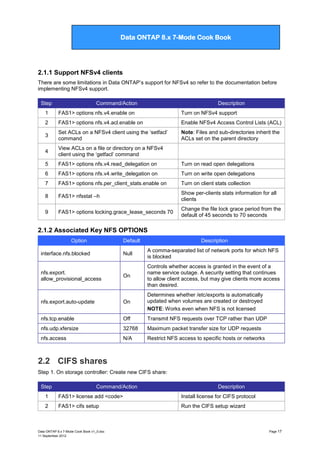
2.1.1 Support NFSv4 clients
There are some limitations in Data ONTAP‟s support for NFSv4 so refer to the documentation before
implementing NFSv4 support.
Step

Command/Action

Description

1

FAS1> options nfs.v4.enable on

Turn on NFSv4 support

2

FAS1> options nfs.v4.acl.enable on

Enable NFSv4 Access Control Lists (ACL)

3

Set ACLs on a NFSv4 client using the „setfacl‟
command

Note: Files and sub-directories inherit the
ACLs set on the parent directory

4

View ACLs on a file or directory on a NFSv4
client using the „getfacl‟ command

5

FAS1> options nfs.v4.read_delegation on

Turn on read open delegations

6

FAS1> options nfs.v4.write_delegation on

Turn on write open delegations

7

FAS1> options nfs.per_client_stats.enable on

Turn on client stats collection

8

FAS1> nfsstat –h

Show per-clients stats information for all
clients

9

FAS1> options locking.grace_lease_seconds 70

Change the file lock grace period from the
default of 45 seconds to 70 seconds

2.1.2 Associated Key NFS OPTIONS
Option

Default

Description

Null

A comma-separated list of network ports for which NFS
is blocked

On

Controls whether access is granted in the event of a
name service outage. A security setting that continues
to allow client access, but may give clients more access
than desired.

nfs.export.auto-update

On

Determines whether /etc/exports is automatically
updated when volumes are created or destroyed
NOTE: Works even when NFS is not licensed

nfs.tcp.enable

Off

Transmit NFS requests over TCP rather than UDP

nfs.udp.xfersize

32768

Maximum packet transfer size for UDP requests

nfs.access

N/A

Restrict NFS access to specific hosts or networks

interface.nfs.blocked

nfs.export.
allow_provisional_access

2.2 CIFS shares
Step 1. On storage controller: Create new CIFS share:
Step

Command/Action

Description

1

FAS1> license add <code>

Install license for CIFS protocol

2

FAS1> cifs setup

Run the CIFS setup wizard

Data ONTAP 8.x 7-Mode Cook Book v1_0.doc
11 September 2012

Page 17
Data ONTAP 7G Cook Book

Data ONTAP 8.x 7-Mode Cook Book

3

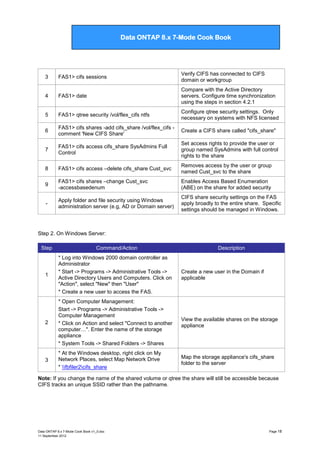
FAS1> cifs sessions

Verify CIFS has connected to CIFS
domain or workgroup

4

FAS1> date

Compare with the Active Directory
servers. Configure time synchronization
using the steps in section 4.2.1

5

FAS1> qtree security /vol/flex_cifs ntfs

Configure qtree security settings. Only
necessary on systems with NFS licensed

6

FAS1> cifs shares -add cifs_share /vol/flex_cifs comment 'New CIFS Share'

Create a CIFS share called "cifs_share"

7

FAS1> cifs access cifs_share SysAdmins Full
Control

Set access rights to provide the user or
group named SysAdmins with full control
rights to the share

8

FAS1> cifs access –delete cifs_share Cust_svc

Removes access by the user or group
named Cust_svc to the share

9

FAS1> cifs shares –change Cust_svc
-accessbasedenum

Enables Access Based Enumeration
(ABE) on the share for added security

-

Apply folder and file security using Windows
administration server (e.g, AD or Domain server)

CIFS share security settings on the FAS
apply broadly to the entire share. Specific
settings should be managed in Windows.

Step 2. On Windows Server:
Step

Command/Action

Description

1

* Log into Windows 2000 domain controller as
Administrator
* Start -> Programs -> Administrative Tools ->
Active Directory Users and Computers. Click on
"Action", select "New" then "User"
* Create a new user to access the FAS.

Create a new user in the Domain if
applicable

2

* Open Computer Management:
Start -> Programs -> Administrative Tools ->
Computer Management
* Click on Action and select "Connect to another
computer…". Enter the name of the storage
appliance
* System Tools -> Shared Folders -> Shares

View the available shares on the storage
appliance

3

* At the Windows desktop, right click on My
Network Places, select Map Network Drive
* fbfiler2cifs_share

Map the storage appliance's cifs_share
folder to the server

Note: If you change the name of the shared volume or qtree the share will still be accessible because
CIFS tracks an unique SSID rather than the pathname.

Data ONTAP 8.x 7-Mode Cook Book v1_0.doc
11 September 2012

Page 18
Data ONTAP 7G Cook Book

Data ONTAP 8.x 7-Mode Cook Book

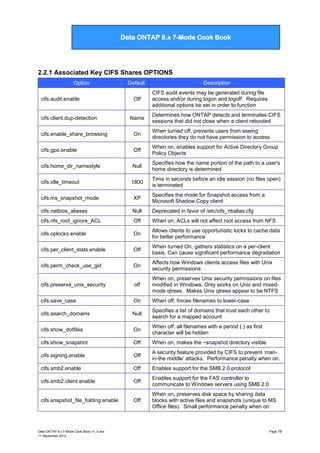
2.2.1 Associated Key CIFS Shares OPTIONS
Option
cifs.audit.enable

cifs.client.dup-detection

Default
Off

Name

Description
CIFS audit events may be generated during file
access and/or during logon and logoff. Requires
additional options be set in order to function
Determines how ONTAP detects and terminates CIFS
sessions that did not close when a client rebooted

cifs.enable_share_browsing

On

When turned off, prevents users from seeing
directories they do not have permission to access

cifs.gpo.enable

Off

When on, enables support for Active Directory Group
Policy Objects

cifs.home_dir_namestyle

Null

Specifies how the name portion of the path to a user's
home directory is determined

cifs.idle_timeout

1800

Time in seconds before an idle session (no files open)
is terminated

cifs.ms_snapshot_mode

XP

Specifies the mode for Snapshot access from a
Microsoft Shadow Copy client

cifs.netbios_aliases

Null

Deprecated in favor of /etc/cifs_nbalias.cfg

cifs.nfs_root_ignore_ACL

Off

When on, ACLs will not affect root access from NFS

cifs.oplocks.enable

On

Allows clients to use opportunistic locks to cache data
for better performance

cifs.per_client_stats.enable

Off

When turned On, gathers statistics on a per-client
basis. Can cause significant performance degradation

cifs.perm_check_use_gid

On

Affects how Windows clients access files with Unix
security permissions

cifs.preserve_unix_security

off

When on, preserves Unix security permissions on files
modified in Windows. Only works on Unix and mixedmode qtrees. Makes Unix qtrees appear to be NTFS

cifs.save_case

On

When off, forces filenames to lower-case

cifs.search_domains

Null

Specifies a list of domains that trust each other to
search for a mapped account

cifs.show_dotfiles

On

When off, all filenames with a period (.) as first
character will be hidden

cifs.show_snapshot

Off

When on, makes the ~snapshot directory visible

cifs.signing.enable

Off

A security feature provided by CIFS to prevent „manin-the middle‟ attacks. Performance penalty when on.

cifs.smb2.enable

Off

Enables support for the SMB 2.0 protocol

cifs.smb2.client.enable

Off

Enables support for the FAS controller to
communicate to Windows servers using SMB 2.0

cifs.snapshot_file_folding.enable

Off

When on, preserves disk space by sharing data
blocks with active files and snapshots (unique to MS
Office files). Small performance penalty when on

Data ONTAP 8.x 7-Mode Cook Book v1_0.doc
11 September 2012

Page 19
Data ONTAP 7G Cook Book

Data ONTAP 8.x 7-Mode Cook Book

interface.cifs.blocked

Null

A comma-seperated list of network interfaces for
which CIFS is blocked

2.3 Using Quotas
This section describes the commands uses to manage qtree and volume quotas.
Step

Command/Action

Description

1

FAS1> wrfile –a /etc/quotas <text>

Create/append to quota configuration file
(See chapter 13 for sample /etc/quotas)

2

FAS1> quota on /vol/vol2

Enables quotas if /etc/quotas exists or
implement changes in /etc/quotas for vol2

3

FAS1> quota off /vol/vol_db1

Disables quotas applied to /vol/vol_db1

4

FAS1> quota resize

Implements updates made to /etc/quotas

5

FAS1> quota off /vol/user_vol
FAS1> quota on /vol/user_vol

Reinitilize quotas after modifying a qtree
or adding a new entry to /etc/quotas

6

FAS1> quota report

prints the current file and space
consumption for each user or group with a
quota and for each qtree.

2.3.1 Guidelines for using quotas
a. Update the /etc/quotas file after renaming a qtree
b. Reinitialize quotas after changing the qtree security style. This process may take some time
and quotas are not enforced until the process has completed.
c.

When using quotas with MultiStore, the quotas for a volume are deactivated when the volume
moves to another vfiler. Quotas are linked to a vfiler and not to a volume.

d. The syntax of a quota entry in the quotas file is quota_target
type[@/vol/dir/qtree_path] disk [files] [threshold] [soft_disk] [soft_files]. Fields are separated by
space characters or tabs.

The following sample quotas file contains both default and explicit quotas:
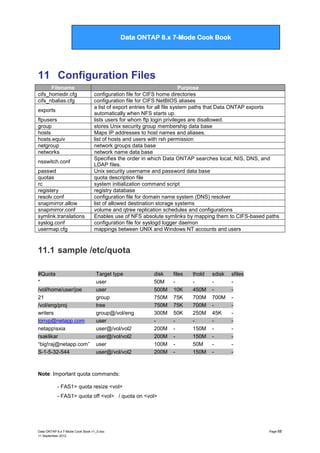
#Quota Target
#-----------*
*
*
jdoe
msmith
msmith

type
disk files
------- ----user@/vol/vol1
50M
15K
group@/vol/vol1
750M 85K
tree@/vol/vol1
100M 75K
user@/vol/vol1/proj1 100M 75K
user@/vol/vol1
75M
75K
user@/vol/vol1/proj1 75M
75K

Data ONTAP 8.x 7-Mode Cook Book v1_0.doc
11 September 2012

thold
-----

sdisk
-----

sfile
-----

Page 20
Data ONTAP 7G Cook Book

Data ONTAP 8.x 7-Mode Cook Book

3

SAN Implementation

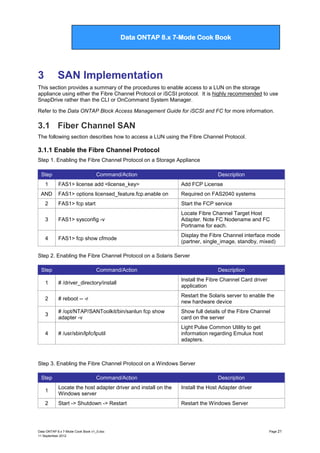
This section provides a summary of the procedures to enable access to a LUN on the storage
appliance using either the Fibre Channel Protocol or iSCSI protocol. It is highly recommended to use
SnapDrive rather than the CLI or OnCommand System Manager.
Refer to the Data ONTAP Block Access Management Guide for iSCSI and FC for more information.

3.1 Fiber Channel SAN
The following section describes how to access a LUN using the Fibre Channel Protocol.

3.1.1 Enable the Fibre Channel Protocol
Step 1. Enabling the Fibre Channel Protocol on a Storage Appliance
Step
1

Command/Action

Description

FAS1> license add <license_key>

Add FCP License

FAS1> options licensed_feature.fcp.enable on

Required on FAS2040 systems

2

FAS1> fcp start

Start the FCP service

3

FAS1> sysconfig -v

Locate Fibre Channel Target Host
Adapter. Note FC Nodename and FC
Portname for each.

4

FAS1> fcp show cfmode

Display the Fibre Channel interface mode
(partner, single_image, standby, mixed)

AND

Step 2. Enabling the Fibre Channel Protocol on a Solaris Server
Step

Command/Action

Description

1

# /driver_directory/install

Install the Fibre Channel Card driver
application

2

# reboot -- -r

Restart the Solaris server to enable the
new hardware device

3

# /opt/NTAP/SANToolkit/bin/sanlun fcp show
adapter -v

Show full details of the Fibre Channel
card on the server

4

# /usr/sbin/lpfc/lputil

Light Pulse Common Utility to get
information regarding Emulux host
adapters.

Step 3. Enabling the Fibre Channel Protocol on a Windows Server
Step

Command/Action

Description

1

Locate the host adapter driver and install on the
Windows server

Install the Host Adapter driver

2

Start -> Shutdown -> Restart

Restart the Windows Server

Data ONTAP 8.x 7-Mode Cook Book v1_0.doc
11 September 2012

Page 21
Data ONTAP 7G Cook Book

Data ONTAP 8.x 7-Mode Cook Book

3

C:WINNTsystem32lputilnt.exe

Run Light Pulse Common Utility to gather
information regarding the host adapter

3.1.2 Configure FCP ports
Changes the settings of onboard adapter ports to serve as target or initiators.
NOTE: in most cases, expansion cards can not be disabled or configured
Step

Command/Action

1

FAS1> fcadmin config

2

FAS1> storage disable adapter 0c
OR
FAS1> fcadmin config –d 0c

3

FAS1> fcadmin config –t [ target ] initiator ] 0c

4

FAS1> reboot

5

FAS1> storage enable adapter 0c

Description
lists all available FC ports and their
current settings
disables adapter port 0c so it can be
reconfigured.
Changes the port to be a target or an
initiator.
The system must be rebooted for the
changes to take effect
Turn the port back on

3.1.3 Create WWPN aliases
Data ONTAP 7.3 introduced user created 32-character long aliases for World Wide Port Names which
can be referenced by the fcp and igroup commands.
Command/Action
FAS1> fcp wwpn-alias set <alias> <wwpn>
FAS1> fcp wwpn-alias remove { -a <alias> | -w
<wwwpn> }
FAS1> fcp wwpn-alias show

Description
Assign an alias to a WWPN
Remove a given alias or all aliases from a
specific WWPN
Displays all WWPN aliases

3.1.4 Create a LUN
Step

1

2

Command/Action

Description

Create a LUN:
* SnapDrive on client
* lun setup
* System Manager: Storage -> LUNs -> Create

Create a LUN on the storage appliance
via a CLI script or through System
Manager.
NOTE: ALWAYS use SnapDrive to create
and manage LUNs on clients with
SnapDrive installed

Enter LUN details during setup process:
* LUN Path: /vol/flex1/QTUser/UserLun
* LUN Size: 2g
* Space-reserved: Yes
* Protocol: Solaris
* Description: User LUNa
* iGroup Name: UserIG
* iGroup Type: FCP
* OS: Solaris

Enter the appropriate details for the LUN

Data ONTAP 8.x 7-Mode Cook Book v1_0.doc
11 September 2012

Page 22
Data ONTAP 7G Cook Book

Data ONTAP 8.x 7-Mode Cook Book

Note:

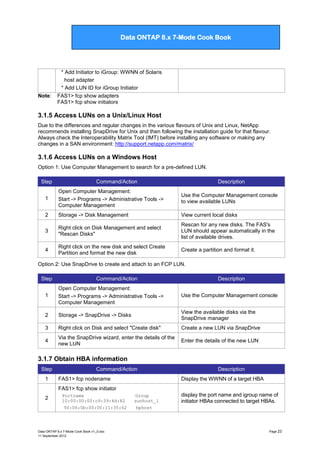
* Add Initiator to iGroup: WWNN of Solaris
host adapter
* Add LUN ID for iGroup Initiator
FAS1> fcp show adapters
FAS1> fcp show initiators

3.1.5 Access LUNs on a Unix/Linux Host
Due to the differences and regular changes in the various flavours of Unix and Linux, NetApp
recommends installing SnapDrive for Unix and then following the installation guide for that flavour.
Always check the Interoperability Matrix Tool (IMT) before installing any software or making any
changes in a SAN environment: http://support.netapp.com/matrix/

3.1.6 Access LUNs on a Windows Host
Option 1: Use Computer Management to search for a pre-defined LUN.
Step

Command/Action

Description

1

Open Computer Management:
Start -> Programs -> Administrative Tools ->
Computer Management

Use the Computer Management console
to view available LUNs

2

Storage -> Disk Management

View current local disks

3

Right click on Disk Management and select
"Rescan Disks"

Rescan for any new disks. The FAS's
LUN should appear automatically in the
list of available drives.

4

Right click on the new disk and select Create
Partition and format the new disk

Create a partition and format it.

Option 2: Use SnapDrive to create and attach to an FCP LUN.
Step

Command/Action

Description

1

Open Computer Management:
Start -> Programs -> Administrative Tools ->
Computer Management

Use the Computer Management console

2

Storage -> SnapDrive -> Disks

View the available disks via the
SnapDrive manager

3

Right click on Disk and select "Create disk"

Create a new LUN via SnapDrive

4

Via the SnapDrive wizard, enter the details of the
new LUN

Enter the details of the new LUN

3.1.7 Obtain HBA information
Step
1

Command/Action
FAS1> fcp nodename

Description
Display the WWNN of a target HBA

FAS1> fcp show initiator
2

Portname
10:00:00:00:c9:39:4d:82
50:06:0b:00:00:11:35:62

Data ONTAP 8.x 7-Mode Cook Book v1_0.doc
11 September 2012

Group
sunhost_1
hphost

display the port name and igroup name of
initiator HBAs connected to target HBAs.

Page 23
Data ONTAP 7G Cook Book

Data ONTAP 8.x 7-Mode Cook Book

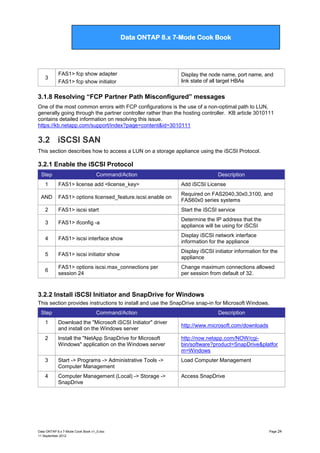
3

FAS1> fcp show adapter
FAS1> fcp show initiator

Display the node name, port name, and
link state of all target HBAs

3.1.8 Resolving “FCP Partner Path Misconfigured” messages
One of the most common errors with FCP configurations is the use of a non-optimal path to LUN,
generally going through the partner controller rather than the hosting controller. KB article 3010111
contains detailed information on resolving this issue.
https://kb.netapp.com/support/index?page=content&id=3010111

3.2 iSCSI SAN
This section describes how to access a LUN on a storage appliance using the iSCSI Protocol.

3.2.1 Enable the iSCSI Protocol
Step
1

Command/Action

Description

FAS1> license add <license_key>

Add iSCSI License

FAS1> options licensed_feature.iscsi.enable on

Required on FAS2040,30x0,3100, and
FAS60x0 series systems

2

FAS1> iscsi start

Start the iSCSI service

3

FAS1> ifconfig -a

Determine the IP address that the
appliance will be using for iSCSI

4

FAS1> iscsi interface show

Display iSCSI network interface
information for the appliance

5

FAS1> iscsi initiator show

Display iSCSI initiator information for the
appliance

6

FAS1> options iscsi.max_connections per
session 24

Change maximum connections allowed
per session from default of 32.

AND

3.2.2 Install iSCSI Initiator and SnapDrive for Windows
This section provides instructions to install and use the SnapDrive snap-in for Microsoft Windows.
Step

Command/Action

Description

1

Download the "Microsoft iSCSI Initiator" driver
and install on the Windows server

2

Install the "NetApp SnapDrive for Microsoft
Windows" application on the Windows server

http://now.netapp.com/NOW/cgibin/software?product=SnapDrive&platfor
m=Windows

3

Start -> Programs -> Administrative Tools ->
Computer Management

Load Computer Management

4

Computer Management (Local) -> Storage ->
SnapDrive

Access SnapDrive

Data ONTAP 8.x 7-Mode Cook Book v1_0.doc
11 September 2012

http://www.microsoft.com/downloads

Page 24
Data ONTAP 7G Cook Book

Data ONTAP 8.x 7-Mode Cook Book

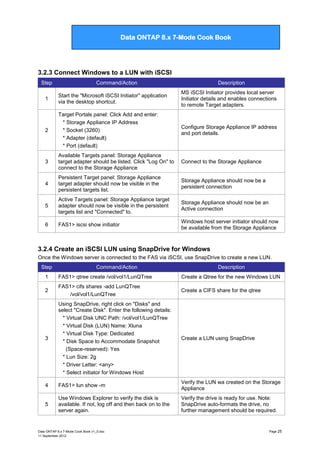
3.2.3 Connect Windows to a LUN with iSCSI
Step

Command/Action

Description

1

Start the "Microsoft iSCSI Initiator" application
via the desktop shortcut.

MS iSCSI Initiator provides local server
Initiator details and enables connections
to remote Target adapters.

2

Target Portals panel: Click Add and enter:
* Storage Appliance IP Address
* Socket (3260)
* Adapter (default)
* Port (default)

Configure Storage Appliance IP address
and port details.

3

Available Targets panel: Storage Appliance
target adapter should be listed. Click "Log On" to
connect to the Storage Appliance

Connect to the Storage Appliance

4

Persistent Target panel: Storage Appliance
target adapter should now be visible in the
persistent targets list.

Storage Appliance should now be a
persistent connection

5

Active Targets panel: Storage Appliance target
adapter should now be visible in the persistent
targets list and "Connected" to.

Storage Appliance should now be an
Active connection

6

FAS1> iscsi show initiator

Windows host server initiator should now
be available from the Storage Appliance

3.2.4 Create an iSCSI LUN using SnapDrive for Windows
Once the Windows server is connected to the FAS via iSCSI, use SnapDrive to create a new LUN.
Step

Command/Action

Description

1

FAS1> qtree create /vol/vol1/LunQTree

Create a Qtree for the new Windows LUN

2

FAS1> cifs shares -add LunQTree
/vol/vol1/LunQTree

Create a CIFS share for the qtree

3

Using SnapDrive, right click on "Disks" and
select "Create Disk". Enter the following details:
* Virtual Disk UNC Path: /vol/vol1/LunQTree
* Virtual Disk (LUN) Name: Xluna
* Virtual Disk Type: Dedicated
* Disk Space to Accommodate Snapshot
(Space-reserved): Yes
* Lun Size: 2g
* Driver Letter: <any>
* Select initiator for Windows Host

Create a LUN using SnapDrive

4

FAS1> lun show -m

Verify the LUN wa created on the Storage
Appliance

5

Use Windows Explorer to verify the disk is
available. If not, log off and then back on to the
server again.

Verify the drive is ready for use. Note:
SnapDrive auto-formats the drive, no
further management should be required.

Data ONTAP 8.x 7-Mode Cook Book v1_0.doc
11 September 2012

Page 25
Data ONTAP 7G Cook Book

Data ONTAP 8.x 7-Mode Cook Book

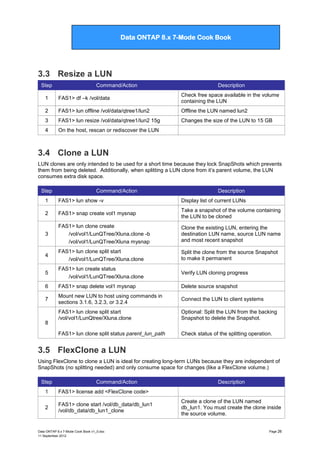
3.3 Resize a LUN
Step

Command/Action

Description

1

FAS1> df –k /vol/data

Check free space available in the volume
containing the LUN

2

FAS1> lun offline /vol/data/qtree1/lun2

Offline the LUN named lun2

3

FAS1> lun resize /vol/data/qtree1/lun2 15g

Changes the size of the LUN to 15 GB

4

On the host, rescan or rediscover the LUN

3.4 Clone a LUN
LUN clones are only intended to be used for a short time because they lock SnapShots which prevents
them from being deleted. Additionally, when splitting a LUN clone from it‟s parent volume, the LUN
consumes extra disk space.
Step

Command/Action

Description

1

FAS1> lun show -v

Display list of current LUNs

2

FAS1> snap create vol1 mysnap

Take a snapshot of the volume containing
the LUN to be cloned

3

FAS1> lun clone create
/vol/vol1/LunQTree/Xluna.clone -b
/vol/vol1/LunQTree/Xluna mysnap

Clone the existing LUN, entering the
destination LUN name, source LUN name
and most recent snapshot

4

FAS1> lun clone split start
/vol/vol1/LunQTree/Xluna.clone

Split the clone from the source Snapshot
to make it permanent

5

FAS1> lun create status
/vol/vol1/LunQTree/Xluna.clone

Verify LUN cloning progress

6

FAS1> snap delete vol1 mysnap

Delete source snapshot

7

Mount new LUN to host using commands in
sections 3.1.6, 3.2.3, or 3.2.4

Connect the LUN to client systems

FAS1> lun clone split start
/vol/vol1/LunQtree/Xluna.clone

Optional: Split the LUN from the backing
Snapshot to delete the Snapshot.

FAS1> lun clone split status parent_lun_path

Check status of the splitting operation.

8

3.5 FlexClone a LUN
Using FlexClone to clone a LUN is ideal for creating long-term LUNs because they are independent of
SnapShots (no splitting needed) and only consume space for changes (like a FlexClone volume.)
Step

Command/Action

1

FAS1> license add <FlexClone code>

2

FAS1> clone start /vol/db_data/db_lun1
/vol/db_data/db_lun1_clone

Description

Data ONTAP 8.x 7-Mode Cook Book v1_0.doc
11 September 2012

Create a clone of the LUN named
db_lun1. You must create the clone inside
the source volume.

Page 26
Data ONTAP 7G Cook Book

Data ONTAP 8.x 7-Mode Cook Book

3

FAS1> clone status <vol_name>

Reports status of running or failed clone
operations

4

FAS1> clone clear <vol_name> <ID>

Clears information about a failed clone
operation

3

Mount the new LUN to a host using commands
in sections 3.1.6, 3.2.3, or 3.2.4

Connect the LUN to client systems

3.6 Delete a LUN
Step

Command/Action

Description

1

FAS1> lun show -m

Show lun mapping information

2

FAS1> lun unmap /vol/vol1/lun1.lun

Unmap the LUN from any clients

3

FAS1> lun destroy /vol/vol1/lun1.lun

Delete the LUN file from vol1

3.7 Access a LUN with NFS/CIFS protocols
NOTE: By default the LUN will be read-only. The LUN must be unmapped from FCP/iSCSI targets
and taken offline to be writeable.
Step
1

Command/Action
FAS1> lun share /vol/data/lun2
[none|read|write|all]

Data ONTAP 8.x 7-Mode Cook Book v1_0.doc
11 September 2012

Description
Makes the LUN named lun2 accessible by
NFS or CIFS and assigns the designated
permissions.

Page 27
Data ONTAP 7G Cook Book

Data ONTAP 8.x 7-Mode Cook Book

4

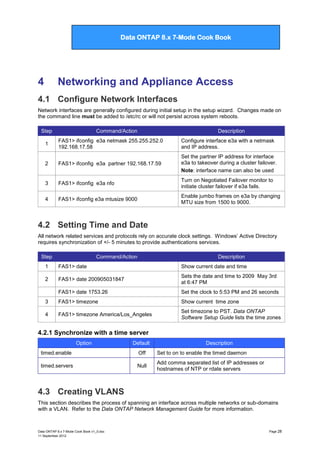
Networking and Appliance Access

4.1 Configure Network Interfaces
Network interfaces are generally configured during initial setup in the setup wizard. Changes made on
the command line must be added to /etc/rc or will not persist across system reboots.
Step

Command/Action

Description

1

FAS1> ifconfig e3a netmask 255.255.252.0
192.168.17.58

Configure interface e3a with a netmask
and IP address.

2

FAS1> ifconfig e3a partner 192.168.17.59

Set the partner IP address for interface
e3a to takeover during a cluster failover.
Note: interface name can also be used

3

FAS1> ifconfig e3a nfo

Turn on Negotiated Failover monitor to
initiate cluster failover if e3a fails.

4

FAS1> ifconfig e3a mtusize 9000

Enable jumbo frames on e3a by changing
MTU size from 1500 to 9000.

4.2 Setting Time and Date
All network related services and protocols rely on accurate clock settings. Windows‟ Active Directory
requires synchronization of +/- 5 minutes to provide authentications services.
Step

Command/Action

Description

1

FAS1> date

Show current date and time

2

FAS1> date 200905031847

Sets the date and time to 2009 May 3rd
at 6:47 PM

FAS1> date 1753.26

Set the clock to 5:53 PM and 26 seconds

3

FAS1> timezone

Show current time zone

4

FAS1> timezone America/Los_Angeles

Set timezone to PST. Data ONTAP
Software Setup Guide lists the time zones

4.2.1 Synchronize with a time server
Option

Default

Description

timed.enable

Off

Set to on to enable the timed daemon

timed.servers

Null

Add comma separated list of IP addresses or
hostnames of NTP or rdate servers

4.3 Creating VLANS
This section describes the process of spanning an interface across multiple networks or sub-domains
with a VLAN. Refer to the Data ONTAP Network Management Guide for more information.

Data ONTAP 8.x 7-Mode Cook Book v1_0.doc
11 September 2012

Page 28
Data ONTAP 7G Cook Book

Data ONTAP 8.x 7-Mode Cook Book

NOTE: VLAN commands are NOT persistent across a reboot and must be added to the /etc/rc file to
be permanently configured. See the example /etc/rc file in chapter 11.
Step

Command/Action

Description

1

FAS1> ifconfig –a

show configuration of all network
interfaces

2

FAS1> vlan create e4 10 20 30

Create three VLAN identifiers on interface
e4

3

FAS1> vlan add e4 40

Add fourth VLAN identifier to interface e4

4

FAS1> ifconfig e4-10 172.25.66.11 netmask
255.255.255.0

Configure the VLAN interface e4-10
NOTE: Add to /etc/rc to make permanent

5

FAS1> vlan delete e4 e4-40

Delete VLAN identifier e4-40 from
interface e4

6

FAS1> vlan delete e4

Delete all VLANs on interface e4

7

FAS1> vlan stat e4

Displays number of packets received on
all VLANS associated with interface e4

4.4 Managing Interface Groups
This section describes the process of trunking/bonding multiple network interfaces (link aggregation)
into a virtual interface. NOTE: ifgrp commands are NOT persistent across a reboot and must be
added to the /etc/rc file to be permanently configured. See the example /etc/rc in chapter 11.

4.4.1 Create an ifgrp
The commands in this section should be run from a console connection because they require downing
network interfaces prior to aggregating them. Additionally, System Manager frequently contains bugs
which corrupt the /etc/rc file
Step

Command/Action

1

Ensure the network port switches are configured
to support trunking

On a Cisco Catalyst switch use set
port channel commands

2

FAS1> ifconfig <interfaces> down

Down the network interfaces to trunk

FAS1> ifgrp create {single | multi | lacp}
<ifgrp_name> <interface_list>

Create an ifgrp from the listed interfaces.
single – only one interface active
multi – all interfaces are active
lacp – network switch manages traffic

3

e.g.:

ifgrp create multi MultiTrunk1 e0a e1a

Description

4

FAS1> ifconfig MultiTrunk 172.25.66.10

Assign an IP address to the ifgrp

5

FAS1> ifgrp status

Verify ifgrp is functioning

6

FAS1> ifgrp favor e1a

Set the interface e1 to be the
primary/active ifgrp interface

7

FAS1> ifgrp nofavor e1a

e1 became active when e0 failed. Now e0
is repaired and should be the primary.

8

FAS1> ifgrp stat <ifgrp_name> <interval>

Display usage statistics of an ifgrp

Data ONTAP 8.x 7-Mode Cook Book v1_0.doc
11 September 2012

Page 29
Data ONTAP 7G Cook Book

Data ONTAP 8.x 7-Mode Cook Book

4.4.2 Delete an ifgrp or ifgrp interface
Note: Remove or edit the ifgrp creation entries in /etc/rc to make these changes persistent
Step

Command/Action

Description

1

FAS1> ifconfig Trunk1 down

Down the ifgrp named “Trunk1”

2

FAS1> ifgrp delete Trunk1 e4

remove interface e4 from ifgrp “Trunk1”

3

FAS1> ifgrp destroy Trunk1

Delete the entire ifgrp

4.5 IP version 6 [8.1]
4.5.1 Associated Key OPTIONS
Option

Default

Description

ip.v6.enable

Off

Turn on to enable support for IPv6. See options
below to enable IPv6 by protocol.

ip.v6.ra_enable

off

Turn on to enable router-advertised address
autoconfiguration.

cifs.ipv6.enable

Off

Turn on to pass CIFS traffic over IPv6

nfs.ipv6.enable

Off

Turn on to pass NFS traffic over IPv6

4.6 Baseboard Management Controller (BMC)
The FAS2000 series has a Baseboard Management Controller for remote management. Refer to the
Data ONTAP System Administration Guide and KB 3101254 for more information
https://kb.netapp.com/support/index?page=content&id=3011254

4.6.1 Configure the BMC
Step

Command/Action

Description

1

Obtain an IP address for the BMC and the gateway IP address.

2

FAS1> bmc setup

Run the setup wizard

3

FAS1> bmc status

Verify functionality

4

FAS1> bmc test autosupport

Send a test ASUP to verify network
settings

5

FAS1> bmc reboot

Reboot the BMC and perform a self-test

4.6.2 Using the BMC
Step
1
OR

Command/Action
SSH to the BMC IP address and log in as user
“naroot”

Description
The naroot user is a restricted account
proving enhanced security

Press Ctrl+G while in a console session

Data ONTAP 8.x 7-Mode Cook Book v1_0.doc
11 September 2012

Page 30
Data ONTAP 7G Cook Book

Data ONTAP 8.x 7-Mode Cook Book

2

bmc shell -> sensors show

Get current values of system sensors

3

bmc shell -> events [ all | info | latest {N} ]

Displays storage system events logged by
the BMC

4

bmc shell -> system console

Access the system console CLI

5

bmc shell -> system core

Dump system core and reset the
appliance

6

bmc shell -> system reset {primary | backup |
current}

Reset the system using the specified
firmware image

7

bmc shell -> system power { on | off | cycle }

Turn power on, off, or off and back on
(performs a dirty shutdown)

4.6.3 Upgrade the BMC
Step

Command/Action

Description

1

Download the Data ONTAP software from the NetApp Support website and place in the
/etc/software folder on the root volume

2

FAS1> version -b

Display current firmware version info

3

FAS1> software update 7311_setup_e.exe –d -r

Extract the systems files but do not run
the download or reboot commands

4

FAS1> priv set advanced
FAS1> download –d
FAS1> priv set

Copy the system firmware executable
image to the CompactFlash card.

5

For standalone systems:
FAS1> halt

Halt the system to get the system prompt

For HA pairs:
FAS2> cf takeover

Takeover system from partner and press
CTRL+C on FAS1 to get system prompt

LOADER> update_bmc

Install the new firmware

LOADER> bye

Reset the hardware and boot the system
into Data ONTAP

7

For HA pairs:
LOADER-A> bye
FAS2> cf giveback

Reset the system then perform a
giveback to boot FAS1 into Data ONTAP.
Repeat steps 2 – 7 on FAS2

8

FAS1> bmc status

Check status of BMC

9

FAS1> version -b

Verify new firmware has been installed

6

4.7 Remote LAN Module (RLM)
The RLM is a management interface on the FAS3000, FAS3100 and FAS6000 series. The RLM is
better than a console connection because it remains available when the storage controller has crashed
or is powered off. RLM firmware version 3.0 and newer includes the Remote Support Agent (RSA)
which provides more information to Technical Support which can reduce case resolution times. Refer
to the Data ONTAP System Administration Guide and KB 3011169 for more information.
https://kb.netapp.com/support/index?page=content&id=3011169
Data ONTAP 8.x 7-Mode Cook Book v1_0.doc
11 September 2012

Page 31
Data ONTAP 7G Cook Book

Data ONTAP 8.x 7-Mode Cook Book

4.7.1 Configure the RLM
Step

Command/Action

Description

1

Obtain an IP address for the RLM, the gateway IP address, the mail server hostname and IP
address.

2

FAS1> rlm setup

Run the setup wizard

3

FAS1> rlm status

Verify proper functioning

4

FAS1> rlm test autosupport

Send a test ASUP to verify network
settings

5

FAS1> rlm reboot

Reset RLM and force self-test

4.7.2 Configure the Remote Support Agent (RSA)
Step

Command/Action

Description

In a web browser, go to:
https://remotesupportagent.netapp.com:443/

Verify Internet connectivity through the
firewall to NetApp

For HTTP:
FAS1> options httpd.admin.enable on
FAS1> options httpd.autoindex.enable on

1

Setup communication between RSA and
NetApp.

2
For HTTPS:
FAS1> options httpd.admin.ssl.enable on
FAS1> options httpd.autoindex.enable on
3

FAS1> useradmin user add <username> -g
Administrators

Create an account for RSA to use

4

% ssh naroot@<RLM IP address>

Use SSH to connect to the RLM

5

RLM fas1> rsa setup

Configure the RSA feature

6

RLM fas1> rsa show

View the configuration information

7

RLM fas1> rsa status

Show the status of the RSA feature

4.7.3 Use the RLM
Use RLM to perform remote management of a problematic or down storage appliance.
Step

Command/Action

1

SSH to the RLM network port and log in as user
“naroot”

The RLM port is active as long as the
system is plugged into a power outlet

2

RLM FAS> rlm sensors –c

Get current values of environmental
sensors

3

RLM FAS> system console

Access the system console CLI

4

RLM FAS> system core

Dump system core and reset the
appliance

Data ONTAP 8.x 7-Mode Cook Book v1_0.doc
11 September 2012

Description

Page 32
Data ONTAP 7G Cook Book

Data ONTAP 8.x 7-Mode Cook Book

5

RLM FAS> system reset {primary | backup |
current}

Reset the system using the specified
firmware image

6

RLM FAS> system power { on | off | cycle }

Turn power on, off, or off and back on
(performs a dirty shutdown)

4.7.4 Upgrade RLM firmware
Step

Command/Action

Description

1

Download RLM_FW.zip from the NetApp Support website and place in the /etc/software
folder on the root volume

2

FAS1> software install RLM_FW.zip

Extract the new firmware

3

FAS1> rlm update

Install the new firmware and reboot the
RLM when complete ( ~10 minutes)

4

FAS1> rlm status

Verify new firmware has been installed

4.8 Service Processor (SP)
4.8.1 Configure the SP
The Service Processor allows you to access, monitor, and troubleshoot a storage system remotely. It
is currently available on the FAS22xx, 32xx, and FAS62xx systems. It can also provide hardwareassisted takeover to reduce the time for a failure to trigger a controller failover. Refer to the Data
ONTAP System Administration Guide and KB 3012997 for more information.
https://kb.netapp.com/support/index?page=content&id=3012997
Step

Command/Action

Description

1

Obtain an IP address for the SP, the gateway IP address, the mail server hostname and IP
address.

2

FAS1> sp setup

Run the setup wizard

3

FAS1> sp status

Verify proper functioning

4

FAS1> rlm test autosupport

Send a test ASUP to verify network
settings

5

FAS1> sp reboot

Reset SP and force self-test

4.8.2 Use the SP
Step

1

Command/Action
SSH to the SP network port and log in as user
“naroot”

Description
The SP port is active as long as the
system is plugged into a power outlet

In a console session, press CTRL+G to enter the
Service Processor. CTRL+D and Enter to exit

2

SP fas1> events {all|info|newest number|
oldest number|search keyword}

Display storage system events that are
logged by the SP

3

SP fas1> system console

Access the system console CLI

Data ONTAP 8.x 7-Mode Cook Book v1_0.doc
11 September 2012

Page 33
Data ONTAP 7G Cook Book

Data ONTAP 8.x 7-Mode Cook Book

4

SP fas1> system core

Dump system core and reset the storage
system

5

SP fas1> system reset {primary | backup |
current}

Reset the system using the specified
firmware image

6

SP fas1> system power { on | off | cycle }

Turn power on, off, or off and back on
(performs a dirty shutdown)

4.8.3 Upgrade SP firmware
Step

Command/Action

Description

1

Download the firmware from the NetApp Support website (select the image for installation
from Data ONTAP prompt) and place it in the /etc/software folder on the root volume.
Rename the file to SP_FW.zip

2

FAS1> software install SP_FW.zip

Extract the new firmware

3

FAS1> sp update

Install the new firmware and reboot the
SP when complete ( ~10 minutes)

4

FAS1> sp status

Verify new firmware has been installed

4.9 Create Local User Accounts
Step

Command/Action

Description

1

FAS1> useradmin user list

Display list of current user accounts

2

FAS1> useradmin user add sc200 -g
Administrators

Create a new user account named sc200

3

FAS1> useradmin user delete ndmp

Remove the user account named “ndmp”

4

FAS1> passwd

Change a local user account password

4.10 Key Network and FAS Security OPTIONS
Refer to TR-3834 Security Guidelines for Data ONTAP 8.0 7-Mode for more options.
Option

Default

Description

ip.match_any_ifaddr

on

A storage controller accepts any packet addressed
to it even if it came in on the wrong interface. Turn
off for enhanced security against spoof attacks.

ip.ipsec.enable

off

Turn on/off Internet Security Protocol support.
Affects performance

ip.ping_throtle.drop_level

150

Specifies the maximum number of ICMP echo or
ping packets system will accept per second. Any
further packets within one second are dropped to
prevent ping flood denial of service attacks

telnet.enable

on

Enable/Disable the Telnet service

Data ONTAP 8.x 7-Mode Cook Book v1_0.doc
11 September 2012

Page 34
Data ONTAP 7G Cook Book

Data ONTAP 8.x 7-Mode Cook Book

telnet.distinct.enable

on

When on, telnet and console sessions share the
same user environment and can view each other‟s
inputs/outputs

trusted.hosts

N/A

Specifies up to 5 clients that will be allowed telnet,
rsh and administrative System Manager access

Data ONTAP 8.x 7-Mode Cook Book v1_0.doc
11 September 2012

Page 35
Data ONTAP 7G Cook Book

Data ONTAP 8.x 7-Mode Cook Book

5

Space Management

5.1 Managing Volume Free Space
Refer to the Data ONTAP System Management Guide for more information.

5.1.1 Volume Space Management Settings
Step

Command/Action

Description
„Volume‟ space guarantee is the default
and ensures blocks are preallocated for
the entire volume.
FlexVols containing space-reserved LUNs
and use the „volume‟ guarantee can set
the fractional reserve to less than 100%.

FAS1> vol options oradb_vol guarantee file

„File‟ guarantee only preallocates blocks
for space-reserved files (i.e., LUN and
database files). May lead to out-of-space
errors in the containing aggregate.

FAS1> file reservation /vol/db02/lun1.lun enable

2

FAS1> vol options vm_luns guarantee volume

FAS1> vol options vm_luns fractional_reserve 65

1

Turn on space-reservation for the LUN

„None‟ allocates blocks as data is written
and may lead to out-of-space errors. This
is also known as Thin Provisioning. Refer
3
FAS1> vol options log_vol guarantee none
to TR-3563 for more information:
http://media.netapp.com/documents/tr3563.pdf
Warning: When you take a FlexVol volume offline, it releases its allocation of storage space in its
containing aggregate. Other volumes can then use this space which may prevent the volume from
coming back online when the aggregate is nearly full and can no longer honor the space guarantee.

5.1.2 FPolicy
FPolicy performs file screening which is like a firewall for files. FPolicy works with CIFS and NFS to
restrict user-defined file types from being stored on the system. FPolicy can perform basic file blocking
natively or work with third-party file screening software. Refer to the Data ONTAP File Access and
Protocols Management Guide for more information.
Note: Antivirus scans bypass FPolicy and can open and scan files that have been blocked.
Note: FPolicy configuration information is maintained in the registry. Copying or recreating this
information is extremely difficult. Therefore, it is highly recommended you keep updated
documentation on the fpolicy settings applied to each volume.
Step

Command/Action

Description

1

FAS1> license add <CIFS code>
FAS1> license add <NFS code>

FPolicy requires a CIFS license to
operate, even in NFS environments

2

FAS1> options fpolicy.enable on

Turn on the fpolicy engine

3

FAS1> fpolicy create music_files screen

Create a policy named music_files and
set it to a policy type of „screen‟

Data ONTAP 8.x 7-Mode Cook Book v1_0.doc
11 September 2012

Page 36
Data ONTAP 7G Cook Book

Data ONTAP 8.x 7-Mode Cook Book

4

FAS1> fpolicy

Display all policies and their status

5

FAS1> fpolicy extensions include add
music_files mp3,ogg,mid

Adds files with these filename extensions
to the policy, restricting them from being
stored or modified

6

FAS1> fpolicy extensions exclude add
music_files wav

Ignores .wav files during screening.
Warning: Creating an exclude list causes
all file types not excluded to be screened
as if they were part of an include list

7

FAS1> fpolicy extensions include remove
music_files mid,???

Removes .mid files and the default ???
extension wildcard from the include list

8

FAS1> fpolicy extensions include show
music_files

Show the list of file extensions on the
include list

9

FAS1> fpolicy options music_files required on

Requires all files being accessed to be
screened by the policy before access is
granted. Note: If no third-party file
screening server is available, screening
reverts to native file blocking

10

FAS1> fpolicy monitor set music_files –p cifs,nfs
create,rename

Instructs the policy to activate when files
are created or renamed. This example
will prevent files from being copied and
then renamed to avoid file screening

11

FAS1> fpolicy monitor add music_file –p cifs,nfs
create_dir

Instruct policy to activate whenever a
directory is created

12

FAS1> fpolicy enable music_files

Activates the policy to begin file screening

13

FAS1> fpolicy volume include add music_files
users_vol

Apply music_files policy only to users_vol
volume rather than all volumes

14

FAS1> fpolicy volume exclude add music_files
rootvol

Do not screen the rootvol volume.
Warning: Creating an exclude list causes
all volumes not excluded to be screened
as if they were part of an include list

15

FAS1> fpolicy disable music_files
FAS1> fpolicy destroy music_files

Disable and delete the music_files policy

5.1.3 Reallocate
Reallocation is like a filesystem defrag – it optimizes the block layout of files, LUNs, and volumes to
improve performance. You should define a reallocation scan when you first create the LUN, file, or
volume. This ensures that the layout remains optimized as a result of regular reallocation scans. More
info on reallocate and volume read_realloc is in the Data ONTAP System Administration Guide and
the Reallocate Best Practices: https://fieldportal.netapp.com/viewcontent.asp?qv=1&docid=33904
NOTE: Snapshots created before the reallocate hold onto unoptimized blocks and consume space. In
most cases, NetApp recommends deleting snapshots before initializing the reallocate process
Warning: Do not use reallocate or volume read_realloc on deduplicated volumes.
Warning: Reallocate the SnapMirror source volume rather than the destination.

Data ONTAP 8.x 7-Mode Cook Book v1_0.doc
11 September 2012

Page 37
Data ONTAP 7G Cook Book

Data ONTAP 8.x 7-Mode Cook Book

Step

Command/Action

Description

1

FAS1> reallocate on

Turn on the reallocation process on the
storage controller.

2

FAS1> vol options oradb03 guarantee=volume

Set the space guarantee to „volume‟ to
ensure reallocate does not create an
overcommitment issue in the aggregate

3

FAS1> snap list oradb3

Snapshots lock blocks in place so delete
unneeded snapshots for better results

FAS1> reallocate start /vol/oradb03

Enable reallocation on the oradb03
volume. now reallocate will run on the
volume every day at midnight (see step 3)

FAS1> reallocate start –p /vol/oradb03

Run reallocate, but do not change logical
layout so snapshots may be preserved.
Warning: This will degrade performance
when reading old, unoptimized snapshots
(e.g,. SnapRestores and using cloned
LUNs and volumes).

FAS1> reallocate start –A –o aggr03

Reallocate free space in aggr03. This will
not move data blocks

5

FAS1> reallocate schedule -s "0 23 * 6"
/vol/db/lun1

Run reallocate on the LUN every
Saturday at 11 PM.

6

FAS1> reallocate status [ pathname ]

Display status of reallocation jobs for
entire system or specified pathname.

7

FAS1> reallocate stop /vol/exchdb/lun2.lun

Delete a reallocate job.

4

The read_realloc volume option is not part of the reallocation command but uses many of the same
system processes to perform a similar function to defragment files read sequentially.
Note: Files in a volume are identified as defragmented only after they have been read into memory
once and determined to be fragmented. Not all files will be reallocated and volumes with small files
and mostly random reads may not see any benefit.
Step
1

2

Command/Action

Description

FAS1> vol options testvol read_realloc on

Turn on file read reallocation . Use on
volumes with few snapshots because it
may duplicate blocks and consume space

FAS1> vol options VM_vol05 read_realloc
space_optimized

Turn on file read reallocation but save
space by not reallocating files in
snapshots. This will reduce read
performance when reading files in a
snapshot (during file restore or using
FlexClone volumes)

5.1.4 Managing inodes
Inodes determine how many „files‟ a volume can hold. The default inode points to a 32KB chunk of
data blocks to handle a typical mix of large and small files. Volumes with many small files and volumes
larger than 1TB can run out of inodes before they run out of free space.

Data ONTAP 8.x 7-Mode Cook Book v1_0.doc
11 September 2012

Page 38
Data ONTAP 7G Cook Book

Data ONTAP 8.x 7-Mode Cook Book

Warning: Inodes consume disk space and some system memory. They can only be increased so
make small changes. Aggregates can reference up to 2 billion inodes. For high file count environments
refer to the Best Practices: https://fieldportal.netapp.com/viewcontent.asp?qv=1&docid=26076
Step

Command/Action

Description

1

FAS1> df –i users_vol

Display inode usage in the users_vol
volume.

2

FAS1> maxfiles users_vol

Display current maximum number of files
as well as number of files present in the
volume.

3

FAS1> maxfiles users_vol <number>

Increase the number of inodes (increase
by number divisible by 4).

5.1.5 Automatic Space Preservation (vol_autogrow, snap autodelete)
Data ONTAP can automatically make free space available when a FlexVol volume reaches 98% full by
growing the volume and/or deleting snapshots. One or both options can be configured on a volume.
Note: These options are not recommended on volumes smaller than 100GB because the volume may
fill up before the triggers execute.
Step

Command/Action

Description

FAS1> vol options vol17 try_first volume_grow

When vol17 fills up ONTAP will try to
grow the volume before deleting
snapshots. This is the default.

FAS1> vol options vol17 try_first snap_delete

ONTAP will try to delete snapshots before
growing the volume.

FAS1> vol autosize vol17 on

Turn space preservation on using default
settings. The volume will grow to 120% of
original size in increments of 5% of the
original volume size.

FAS1> vol size apps_vol
FAS1> vol autosize apps_vol –m 50g –i 500m on

Check size of volume then set maximum
volume size to 50GB and grow by 500MB
increments

3

FAS1> vol status –v apps_vol

View the autogrow maximum size and
increment settings (bottom of listing)

4

FAS1> snap autodelete vol17 show
FAS1> snap autodelete vol17 on

View current settings then enable
snapshot autodelete

5

FAS1> snap autodelete vol17 commitment
[ try | disrupt ]

The default, try only permits snapshots
not locked by data protection utilities
(mirroring, NDMPcopy) AND data backing
functionalities (volume and LUN clones)
to be deleted. disrupt only permits
snapshots not locked by data backing
functionalities (volume and LUN clones)
to be deleted.

6

FAS1> snap autodelete vol17 trigger volume

The default, volume triggers snapshot
delete when the volume reaches 98% full
AND the snap reserve is full.

1

2

Data ONTAP 8.x 7-Mode Cook Book v1_0.doc
11 September 2012

Page 39
Data ONTAP 7G Cook Book

Data ONTAP 8.x 7-Mode Cook Book

FAS1> snap autodelete vol17 trigger
snap_reserve

snap_reserve triggers snapshot delete
when the snap reserve reaches 98%.

7

FAS1> snap autodelete vol17
target_free_space 10

Stop deleting snapshots when either
volume or snap_reserve (determined by
the „trigger‟ setting) reaches 10%. Default
setting is 20%.

8

FAS1> snap autodelete vol17 delete order
[ newest_first | oldest_first ]

The default is to delete oldest snapshots
first.

FAS1> snap autodelete vol17 defer_delete
[ scheduled | user_created ]

By default, user_created (manual or
script created snapshots - including
SnapDrive, SnapMirror, and SnapVault)
are deleted last. If set to scheduled then
snapshots created by snap sched are
deleted last.

8

5.2 Deduplication
Deduplication is a form of compression that looks for identical data blocks in a volume and deletes
duplicates blocks by adding reference counters in the metadata of a few „master‟ blocks. Read TR3505 for detailed information: http://media.netapp.com/documents/tr-3505.pdf. For Data ONTAP 8.1,
read TR-3958. Field Portal contains at least seven Deployment Implementation Guides for
Deduplication titled TR-3505i.<a - g> that address dedupe with applications like Exchange and SQL.
Note: NDMP copies and backups, SnapVault and Qtree SnapMirror decompress or “rehydrate” the
data which will consume space on the destination tape or disk system.
Warning: Each storage controller model has a volume size limit and limit on how much non-duplicate
and deduplicated data those volumes can hold. Check the matrix in TR-3505 for your systems‟ limits.
Deduplication requires some free space to store metadata. General recommendations are to maintain
2% volume free space and 4% aggregate free space (snapshot reserve is not counted as free space).
Step

Command/Action

Description

1

FAS1> license add <code>

Add licenses for A_SIS and Nearstore to
use deduplication.

2

FAS1> sis on /vol/group_vol

Enable duplication on specified volume.

3

FAS1> sis start –s /vol/group_vol

Start a scan of the volume and then run
every day at midnight.

4

FAS1> sis config /vol/group_vol

Display the schedules of SIS enabled
volumes.

FAS1> sis config –s /vol/group_vol wed, sat@03

Schedule deduplication scan every
Wednesday and Saturday at 3 AM.
Note: Stagger schedules because an HA
cluster can only support 8 concurrent
deduplication operations.

5

Data ONTAP 8.x 7-Mode Cook Book v1_0.doc
11 September 2012

Page 40
Data ONTAP 7G Cook Book

Data ONTAP 8.x 7-Mode Cook Book

FAS1> sis config –s auto@35 /vol/vol01

No schedule. Run deduplication scans
run when new or changed blocks
changed since last scan exceed 35% of
total deduplicated blocks. Without a
number, the default for auto is 20%

6

FAS1> sis status

Display status of all SIS enabled volumes.

7

FAS1> df –s

Display space savings created by
deduplication

8

FAS1> sis stop /vol/temp_vol

Abort the currently active SIS operation.

FAS1> options cifs.snapshot_file_folding.enable on

This option reduces the duplication of
blocks from temp files (which are a copyon-save process) in CIFS volumes. File
folding compares blocks in the active file
(temp file) with blocks in snapshot copies
of the file and re-uses common blocks.
There is a small trade-off between
performance and space utilization. If the
folding process begins to consume
memory, it is suspended until later.

9

5.2.1 Features not compatible with deduplication
-

synchronous SnapMirror

- NDMP backup to tape

-

read reallocation (realloc)

- DataFort encryption

-

(not recommend) VM swap files, pagefiles, user and system temp directories

5.3 Compression
Data ONTAP uses a lossless compression algorithm to reduce the size of files. Compression requires
the SIS license and can coexist with deduplication. Compression uses the deduplication engine so
deduplication must be enabled even if it will be not used. Refer to the Storage Management Guide for
more information.
Note: Data ONTAP 8.0 and 8.1 have different procedures for using compression.

5.3.1 Compress a volume in ONTAP 8.0
Step

Command/Action

Description

1

FAS1> license add <code>

Install the SIS license

2

FAS1> vol options temp_vol compression on

Enable compression on temp_vol volume

3

FAS1> vol compress start –a –s temp_vol

Compress data in the volume named
temp_vol, including blocks that are shared
(-a) and blocks locked in snapshots (-s)

4

FAS1> vol compress status temp_vol

Displays status of compression scanner
operations in /vol/temp_vol

5

FAS1> vol status temp_vol

View the compression status of temp_vol

6

FAS1> df –S /vol/user_vol

View the space savings achieved

Data ONTAP 8.x 7-Mode Cook Book v1_0.doc
11 September 2012

Page 41
Data ONTAP 7G Cook Book

Data ONTAP 8.x 7-Mode Cook Book

5.3.2 Compress a volume in ONTAP 8.1
Step

Command/Action

Description

1

FAS1> license add <code>

Install the SIS license

2

FAS1> sis on /vol/user_vol

Enables deduplication and compression
on user_vol (required even if only using
compression)

3

FAS1> sis config –C true /vol/user_vol

Configure post-process compression of
data in user_vol

OR

FAS1> sis config –I true /vol/user_vol

Configure in-line compression of data in
user_vol

4

FAS1> sis status –l /vol/user_vol

Display the status of compression
operations on user_vol

5

FAS1> df –S /vol/user_vol

View the space savings achieved

5.3.3 Decompress an ONTAP 8.0 volume
Step

Command/Action

Description

1

FAS1> vol options temp_vol compression off

Disables compression on temp_vol

2

FAS1> vol compress stop temp_vol

Stops any active compression scanner
operations

3

FAS1> vol decompress start temp_vol

Decompresses data in the volume

FAS1> vol decompress revert temp_vol

Decompresses data in the volume and
removes compression settings so the
volume is accessible by version of Data
ONTAP that do not support compression

OR

5.3.4 Decompress an ONTAP 8.1 volume
Step

Command/Action

Description

1

FAS1> sis off /vol/temp_vol

Disables compression on temp_vol

2

FAS1> sis undo temp_vol

Decompresses data in the volume

FAS1> sis revert_to /vol/temp_vol

Decompresses and expands deduped
data in the volume so the volume is
accessible by version of Data ONTAP that
do not support compression

OR

FAS1> sis revert_to –cleanup

Downgrades metafiles on all SIS enabled
volumes to revert to earlier version of
ONTAP 8

OR

FAS1> sis revert_to 7.3

Reverts all deduped and/or compressed
volumes so they can be used on systems
running ONTAP 7.3

3

Data ONTAP 8.x 7-Mode Cook Book v1_0.doc
11 September 2012

Page 42
Data ONTAP 7G Cook Book

Data ONTAP 8.x 7-Mode Cook Book

6

Data Replication, Migration and Recovery

This chapter introduces some of the data backup and recovery applications. Refer to the Data ONTAP
Data Protection Online Backup and Recovery Guide for more information.

6.1 Network Data Management Protocol (NDMP) Copy
NDMP is an open standard allowing backup applications to control native backup and recovery
function in NetApp and other NDMP servers. Refer to the Data ONTAP Data Protection Online Backup
and Recovery Guide for more information.

6.1.1 Enable NDMP
Step

Command/Action

Description

1

FAS1> ndmpd on
OR
FAS1> options ndmpd.enable on

Enable NDMP on the system

2

FAS1> options ndmpd.connectlog.enable on

Enables logging all NDMP connections to
/etc/messages for security purposes

3

FAS1> options ndmpd.access host=10.20.20.16

List the hosts that may access the FAS
via NDMP

4

FAS1> options ndmpd.authtype

Configure the authorisation method for
NDMP access (Challenge and/or
plaintext)

Note: Debugging NDMP connection: "ndmpd debug 50"

6.1.2 ndmpcopy
Copy volumes, qtrees or single files between multiples systems or within a single system.
Note: Even for internal copying, ndmpcopy requires a network connection. Data is sent through the
loopback adapter so be sure to use the fast network connection available.
Step

Command/Action

Description

1

FAS1> ndmpcopy fas1:/vol/data/my_stuff
fas2:/vol/users/

Copies the qtree my_stuff on FAS1 to the
volume /vol/users on FAS2

2

FAS1> backup status

display all active instances of backup jobs

6.1.3 Associated Key OPTIONS
Option
ndmpd.ignore_ctime.enabled
ndmpd.preferred_interface
<interface>

Data ONTAP 8.x 7-Mode Cook Book v1_0.doc
11 September 2012

Default
off
disabled

Description
When on, allows users to exclude files with their
ctime changed from inclusion in incremental dumps.
When enabled, restricts NDMP traffic to specific
network interfaces

Page 43
Data ONTAP 7G Cook Book

Data ONTAP 8.x 7-Mode Cook Book

6.2 Volume Copy
Volume copy is a block-level copy of a volume, and optionally its snapshots, to another volume of
equal or greater size. The destination volume may be on the same system or on a remote system.
Step

Command/Action

Description

1

FAS2> vol restrict destination_vol

Restrict the destination volume

2

FAS2> options rsh.enable on

Enable RSH on the destination FAS

3

Add an entry in /etc/hosts.equiv on both systems
for the other system

Create a trusted relationship between the
systems

4

FAS1> vol copy start [-S] source_vol
fas2:destination_vol

Start copying the source volume (and it‟s
SnapShots with –S) to the destination
volume on a remote system

OR

FAS1> vol copy start [-S] source_vol
destination_vol

Start copying the source volume (and it‟s
SnapShots with –S) to the local
destination volume

5

FAS1> vol copy status

Check on progress of vol copy operation

6

FAS1> options vol.copy.throttle [value]

Optional: Set the speed of the copy from
1 (10%) to 10 (100%) to reduce impact on
network traffic

7

FAS1> vol copy abort [operation_number]

Cancel one or more volume copy
operations

8

FAS1> vol options destination_vol online

Make the new volume useable

6.3 Snapshots
Step

Command/Action

Description

1

FAS1> snap reserve vol1 12

set the snap reserve on vol1 to 12%

2

FAS1> snap create vol1 mysnap

Create a snapshot of volume vol1

3

FAS1> snap sched vol1 1 6
12@8,10,12.14,16,18

Shedule snapshots of vol1 to retain 1
weekly, 6 nightly and 12 hourly
snapshots. Take the snapshots at 0800,
1000, 1200, 1400, 1600 and 1800

4

FAS1> snap list vol1

List all snapshots for vol1

5

FAS1> snap delta vol1 [snap1 snap2]

Show the amount of change between
snapshots on vol1 (or between 2
snapshots)

6

FAS1> snap reclaimable vol1 snap1 [snap2 …]

List amount of space freed if listed
snapshot(s) were deleted

7

FAS1> snap rename vol1 old_name new_name

Rename a snapshot in vol1

8

FAS1> snap delete vol1 snap1

Delete snapshot snap1 in vol1

9

FAS1> snap autodelete vol1

set/change settings to automatically
delete snapshots when volume and snap
reserve are nearly full

Data ONTAP 8.x 7-Mode Cook Book v1_0.doc
11 September 2012

Page 44
Data ONTAP 7G Cook Book

Data ONTAP 8.x 7-Mode Cook Book

6.4 SnapRestore
Warning: All file changes and snapshots created after the snapshot used for the SnapRestore will be
permanently lost
Step

Command/Action

Description

1

FAS1> license add <code>

Install license code for SnapRestore

2

FAS1> snap restore -t file /vol/root/etc/rc

SnapRestore specific file from snapshot

3

FAS1> snap restore -t vol –s weekly.1 vol1

SnapRestore entire volume from a weekly
Snapshot

Command syntax:
snap restore [ -t file|vol] [-s snapshot_name] [ -r restore_as_path] vol_name

6.5 Asynchronous SnapMirror
SnapMirror is a replication function for maintaining up-to-date copies of data in another volume or
another storage controller which may be thousands of kilometres away. Refer to the Data ONTAP
Data Protection Online Backup and Recovery Guide and the best practices for more information:
https://fieldportal.netapp.com/viewcontent.asp?qv=1&docid=12199

6.5.1 Create an Asynchronous Volume SnapMirror Relationship
This section describes the procedure to set up asynchronous Volume SnapMirror replication between
two storage controllers.
Step

Command/Action

Description

1

FAS1> license add <snapmirror_code>

License snapmirror on the source and
destination Storage Appliance.

2

FAS1> df –k vol1
FAS2> df –k vol1

Ensure destination volume is equal to or
larger than source volume. FAS1 is the
source and FAS2 is the destination.

3

FAS1> vol options vol1 convert_ucode on

Set the source volume to Unicode ON for
source volumes that support CIFS clients

4

FAS1> vol status vol1

Verify volume status and unicode setting

5

FAS2> vol create vol1

Create a volume of the same size or
larger on the destination system

6

FAS2> vol restrict vol1

Restrict the destination volume

7

FAS2> vol status vol1

Verify volume is now restricted

8

FAS1> options snapmirror.access host=fas2
FAS2> options snapmirror.access host=fas1

Allow snapmirror access by each storage
controller to the other.

9

FAS2> wrfile -a /etc/snapmirror.conf
fas1:vol1 fas2:vol1 - * * * *
or
fas1:vol1 fas2:vol1 – 0-55/5 * * *
(every 5 mins of every hour)

Create a snapmirror schedule on the
destination FAS defining when to
synchronise (Min of Hr, Hr of Day, Day of
Mth, Day of Wk)
See section 11.6 for a sample
snapmirror.conf file

Data ONTAP 8.x 7-Mode Cook Book v1_0.doc
11 September 2012

Page 45
Data ONTAP 7G Cook Book

Data ONTAP 8.x 7-Mode Cook Book

10

FAS1> snapmirror on
FAS2> snapmirror on

Enable snapmirror on both the source and
destination systems.

11

FAS2> snapmirror initialize -S fas1:vol1
fas2:vol1

Initialize transfer of files from source to
destination system and create a baseline
from which to mirror.

12

FAS2> snapmirror status -l

Verify status of transfer or of mirror

6.5.2 Volume SnapMirror Interoperability Matrix
There are some differences in how the three major releases of ONTAP implement SnapMirror.
Combined with 32- and 64-bit aggregate differences, these difference result in some incompatibilities.
For most versions of Data ONTAP, you can VSM from 32-bit to 64-bit but not in the opposite direction.
Destination Volume
7.3

ONTAP
Version
Source
Volume

7.3
8.0
8.1

Aggr type

32-bit

32-bit

8.0
32-bit



8.1

64-bit

32-bit

64-bit

NO

32-bit

NO

NO

64-bit

NO

NO

32-bit

NO

NO

NO

64-bit

NO

NO

NO

6.5.3 Convert a read-only SnapMirror Volume to read-write
Step

Command/Action

Description

1

FAS1> snapmirror status (if possible)
FAS2> snapmirror status

Verify the status of the snapmirrors

2

FAS2> snapmirror quiesce fas1_vol1

Finish writes to fas1_vol1

3

FAS2> snapmirror break fas1_vol1

Break volume fas1_vol1 from the
snapmirror relationship

6.5.4 Resync a Broken Volume SnapMirror Relationship
Step

Command/Action

Description

1

FAS2> rdfile /etc/snapmirror.conf

Verify snapmirror schedule is still correct

2

FAS1> vol status vol1
FAS2> vol status fas1_vol1

Verify both volumes are online and readwriteable.

3

FAS1> snapmirror on

Turn on SnapMirror for both systems

4

Ensure all applications and users activities to the
volumes are halted

This is a recommendation to reduce the
replication time and reduce changes

Data ONTAP 8.x 7-Mode Cook Book v1_0.doc
11 September 2012

Page 46
Data ONTAP 7G Cook Book

Data ONTAP 8.x 7-Mode Cook Book

5

FAS1> snapmirror resync -S fas2:fas1_vol1 vol1

From the original source, perform a
resync of the data from the original
destination system

6

FAS1> snapmirror update -S fas2:fas1_vol1 vol1

Update any changes since the baseline
snapshot of the resync

7a

FAS1> snapmirror break vol1

Break the current snapmirror relationship
so it can be reversed and set to its
original direction.

7b

FAS1> snapmirror quiesce fas1:/vol/vol1/mytree
FAS1> snapmirror break fas1:/vol/vol1/mytree

For Qtrees, the snapmirror must be first
quiesced and then broken.

8a

FAS2> snapmirror resync -S fas1:vol1
fas1_vol1

Perform a second resync, setting FAS1
as the source again.

8b

FAS2> snapmirror resync -S
fas1:/vol/vol1/mytree /vol/fas1_vol1/mymirror

Perform a second resync on a Qtree.

6.5.5 Create an Asynchronous Qtree SnapMirror
Step

Command/Action

Description

1

FAS> license add <snapmirror_code>

License snapmirror on the source and
destination Storage Appliance.

2

FAS1> options snapmirror.access host=fas2
FAS2> options snapmirror.access host=fas1

Allow snapmirror access by each storage
controller to the other.

3

FAS1> snapmirror on
FAS2> snapmirror on

Enable snapmirror on both the source and
destination systems

4

FAS2> snapmirror initialize -S
fas1:/volvol1/mydata
fas2:/vol/backup_vol/mydata_copy

Initialize transfer of files from source to
destination system and create a baseline
from which to mirror.

5

FAS2> snapmirror status -l

Verify status of transfer or of mirror

6

FAS2> wrfile /etc/snapmirror.conf
fas1:/volvol1/mydata
fas2:/vol/backup_vol/mydata_copy - 10 * * *
<ctrl+c>

Create a snapmirror schedule on the
destination system defining when to
synchronize (Minute of Hour, Hour of Day,
Day of Month, Day of Week)

6.5.6 Convert read-only Qtree SnapMirrror destination to writeable
Step

Command/Action

Description

1

FAS2> snapmirror status

Verify the status of the snapmirrors.
SnapMirror must be on.

2

FAS2> snapmirror quiesce /vol/vol0/mymirror

Finishes any write activity and then
disables further updates

3

FAS2> snapmirror break
fas2:/vol/vol0/mymirror

Data ONTAP 8.x 7-Mode Cook Book v1_0.doc
11 September 2012

Break the snapmirror relationship

Page 47
Data ONTAP 7G Cook Book

Data ONTAP 8.x 7-Mode Cook Book

6.5.7 Purging Asynchronous Mirrors
Step

Command/Action

Description

1

FAS2> wrfile /etc/snapmirror.conf

Remove redundant entries

2

FAS2> snapmirror quiesce <dst_qtree>
FAS2> snapmirror break <dst_vol_or_qtree>

Quiesce any qtree snapmirrors and break
SnapMirror relationships.

3

FAS1> snapmirror destinations

Display any snapmirror destinations

4

FAS1> snapmirror release <src_path>
<dst_hostname>:<dst_path>

Release the source associated with
snapmirror relationships.

5

FAS1> snap list <vol>
FAS1> snap delete <vol> <snapshot>

List and delete any snapshots that are for
redundant snapmirror relationships.

6

FAS> snapmirror off

Disable snapmirror on source and
destination if appropriate.

6.6 SnapVault
SnapVault performs backup of qtrees and directories from a primary storage system (source) to a
secondary storage system (destination).
Step

Command/Action

Description

1

FAS1> license add <sv_primary_license>
FAS2> license add <sv_secondary_license>

License SnapVault on the primary and
secondary systems.

2

FAS> ndmpd on

Enable the NDMP service.

3

FAS> options snapvault.enable on

Enable SnapVault.

FAS1> options snapvault.access host=fas2

Allow host access from the SnapVault
Secondary (destination) system.

5

FAS2> options snapvault.access
host=fas1,fas3

Allow host access from all the clients.

6

FAS2> snapvault start –S fas1:/vol/vol1/qtree1
/vol/sv_vol/na1_qtree1

Initialize the relationship between source
qtree1 on FAS1 to a unique destination
qtree in /vol/sv_vol

7

FAS1> snapvault snap sched vol1 sv_weekly
1@sat@19
FAS1> snapvault snap sched vol1 sv_nightly
6@mon-fri@19
FAS1> snapvault snap sched vol1 sv_hourly
14@mon-fri@7-18

Create a schedule of snapshots for
SnapVault use on each client volume
containing qtrees to backup. There are
weekly, nightly and hourly snapshots.
Specify number to retain, @what days
to run, @what times to take snapshots

8

FAS2> snapvault snap sched -x vol1
sv_weekly 1@sat@19
FAS2> snapvault snap sched –x vol1
sv_nightly 6@mon-fri@19
FAS2> snapvault snap sched –x vol1 sv_hourly
14@mon-fri@7-18

Create a schedule of transfers from all
clients containing qtrees in vol1. There
are weekly, nightly and hourly
snapshots. Specify number to retain,
@what days to run, @what times to take
snapshots

9

FAS> snapvault status [-l] [-s]

Check on the status of SnapVault
transfers

4

Data ONTAP 8.x 7-Mode Cook Book v1_0.doc
11 September 2012

Page 48
Data ONTAP 7G Cook Book

Data ONTAP 8.x 7-Mode Cook Book

6.6.1 Perform a SnapVault restore
Step

Command/Action

Description

1

FAS1> snapvault restore –S
fas2:/vol/sv_vol/fas1_qtree1 /vol/vol1/qtree1

Restores the data in qtree1 from FAS2
using the most recent common snapshot.

2

FAS1> snapvault release
fas2:/vol/sv_vol/fas1_qtree1 /vol/vol1/qtree1
FAS2> snapvault release
/vol/sv_vol/fas1_qtree1 fas1:/vol/vol1/qtree1

Removes the reverse relationship created
during the restore process.

3

FAS2> snapvault start –r –S
fas1:/vol/vol1/qtree1 /vol/sv_vol/fas1_qtree1

Restart the snapvault backup relationship
with qtree1 on FAS1

6.6.2 Turn SnapVault destination into SnapMirror destination.
Convert a SnapVault destination qtree into a SnapMirror qtree so clients may access it or for disaster
recovery purposes.
Step

Command/Action

Description

1

FAS2> snapmirror off

Halt all SnapMirror operations on the
secondary FAS

2

FAS2> options snapvault.enable off

Halt all SnapVault operations

3

FAS2> priv set diag

Warning: This enables an advanced set
of commands. Consult Tech Support
before using them.

4

FAS2*> snapmirror convert
/vol/sv_vol/fas1_qtree1

Converts the SnapVault qtree into a
SnapMirror qtree

5

FAS2*> priv set

Return to the standard command set

6

FAS2> snapmirror on

Enable SnapMirror

7

FAS2> snapmirror quiesce
/vol/sv_vol/fas1_qtree1

Ensure there are no SnapMirror
operations on /vol/sv_vol/fas1_qtree1

8

FAS2> snapmirror break
/vol/sv_vol/fas1_qtree1

Make the qtree writeable

6.6.3 Release a SnapVault relationship
Step

Command/Action

Description

1

FAS2> snapvault unsched sv_vol sv_hourly
FAS2> snapvault unsched sv_vol sv_nightly
FAS2> snapvault unsched sv_vol sv_weekly

Remove all snapshot schedules for the
volume sv_vol on the destination FAS

2

FAS2> snapvault stop fas2:/vol/sv_vol/q1

Stop the existing relationship

3

FAS2> snapvault status

Verify the relationship no longer exists

4

FAS2> qtree status sv_vol

Verify qtree q1 no longer exists

Data ONTAP 8.x 7-Mode Cook Book v1_0.doc
11 September 2012

Page 49
Data ONTAP 7G Cook Book

Data ONTAP 8.x 7-Mode Cook Book

5

FAS1> snapvault unsched vol1 sv_hourly
FAS1> snapvault unsched vol1 sv_nightly
FAS1> snapvault unsched vol1 sv_weekly

Remove all snapshot schedules for the
volume vol1 on the source FAS

6

FAS1> snapvault destinations

List the existing relationships

7

FAS1> snapvault release /vol/vol1/q1
fas2:/vol/sv_vol/q1

Release the relationship between
/vol/vol1/q1 and the qtree on FAS2

8

FAS1> snapvault status

Verify the relationship no longer exists

6.7

Associated Key SnapMirror/Vault OPTIONS
Option

Default

Description

replication.logical.reserved_transfers

0

Guarantees the specified number of qtree
SnapMirrors or SnapVault source/destination
transfers can always be run

replication.throttle.enable

off

Enables global network throttling of SnapMirror
and SnapVault transfers

replication.throttle.incoming.max_kbs

unlimited

Specifies maximum bandwidth for all incoming
(destination FAS) snapmirror/vault transfers.
Requires replication.throttle.enable on

replication.throttle.outgoing.max_kbs

unlimited

Specifies maximum bandwidth for all outgoing
(source FAS) snapmirror/vault transfers.
Requires replication.throttle.enable on

replication.volume.reserved_transfers

0

Guarantees specified number of volume
SnapMirror source/destination transfers can
always be run

snapmirror.checkip.enable

off

Enables IP address based verification of
SnapMirror destination FASes by source FASes

6.8 FlexClone
This section describes how to create replicas of flexible volumes using the licensed product FlexClone.
A flexclone volume saves space by using the blocks in a shared snapshot rather than duplicating the
blocks. Only changes or additions to the data in the volume clone consume space.

6.8.1 Clone a flexible volume
Step

Command/Action

Description

1

FAS1> license add <code>

Install license for FlexClone

2

FAS1> snap list vol1

Display list of snapshots in vol1

3

FAS1> vol clone create newvol –b vol1 nightly.1

Create a clone volume named newvol
using the nightly.1 snapshot in vol1

4

FAS1> vol status –v newvol

verify newvol was created

Data ONTAP 8.x 7-Mode Cook Book v1_0.doc
11 September 2012

Page 50
Data ONTAP 7G Cook Book

Data ONTAP 8.x 7-Mode Cook Book

5

FAS1> snap list vol1

Look for snapshots listed as busy,
vclone. These are shared with
flexclones of vol1 and should not be
deleted or the clone will grow to full size

6

FAS1> df –m newvol

Display space consumed by new and
changed data in the flexclone volume.

6.8.2 Split a FlexClone volume from the parent volume
Step

Command/Action

Description

1

FAS1> vol clone split estimate newvol

Determine amount of space required to
split newvol from its parent flexvol.

2

FAS1> df –A <aggr name>

Display space available in the aggregate
containing the parent volume (vol1)

3

FAS1> vol clone split start newvol

Begin splitting newvol from its parent
volume (vol1)

4

FAS1> vol clone split status newvol

Check the status of the splitting operation

5

FAS1> vol clone split stop newvol

Halt split process.
NOTE: All data copied to this point
remains duplicated and snapshots of the
FlexClone volume are deleted.

6

FAS1> vol clone status –v newvol

Verify newvol has been split from its
parent volume

Data ONTAP 8.x 7-Mode Cook Book v1_0.doc
11 September 2012

Page 51
Data ONTAP 7G Cook Book

Data ONTAP 8.x 7-Mode Cook Book

7

Security

7.1 General Storage Controller Security
Secure Admin provides for secure network connections to a storage appliance for the CLI and
OnCommand. Refer to TR-3834 for additional security configuration settings.

7.1.1 Managing SSH
Configure SSH to provide secure connections to the CLI.
Step

Command/Action

Description

1

FAS1> secureadmin setup ssh

Configures the SSH protocol

2

FAS1> secureadmin enable {ssh1 | ssh2}

Turn on the SSH protocols

3

FAS1> secureadmin disable {ssh1 | ssh2}

Turn off the SSH protocols

7.1.2 Managing SSL
Configure SSL to provide secure HTTP connections to OnCommand and System Manager.
Step

Command/Action

Description

1

FAS1> secureadmin setup ssl

Configures the SSL protocol

2

FAS1> secureadmin addcert ssl
<directory_path>

OPTIONAL: Install a certificate-authoritysigned certificate

3

FAS1> secureadmin enable ssl

Turn on the SSL protocol

4

FAS1> secureadmin disable ssl

Turn off the SSL protocol

7.1.3 Associated Key Security OPTIONS
Option

Default

Description

interface.blocked.nfs

Off

Set to a comma-separated list of interfaces or ifgrps
to prevent use by NFS

interface.blocked.iscsi

Off

Set to a comma-separated list of interfaces or ifgrps
to prevent use by iSCSI

interface.blocked.ftp

Off

Set to a comma-separated list of interfaces or ifgrps
to prevent use by FTP

interface.blocked.snapmirror

Off

Set to a comma-separated list of interfaces or ifgrps
to prevent use by SnapMirror

interface.blocked.cifs

Off

Set to a comma-separated list of interfaces or ifgrps
to prevent use by CIFS
Turn off to reduce ARP spoofing and session
hijacking attacks

ip.fastpath.enable
rsh.enable

Data ONTAP 8.x 7-Mode Cook Book v1_0.doc
11 September 2012

On

Turn off to disable RSH access

Page 52
Data ONTAP 7G Cook Book

Data ONTAP 8.x 7-Mode Cook Book

security.passwd.rootaccess.enable

On

Turn off to disable root user access to the storage
system

ssh.pubkey_auth.enable

Off

Turn on to enable SSH public key authentication

trusted.hosts
(ignored unless telnet.access is set
to „legacy‟)

Set to a dash „ – „ to disable all Telnet access, insert
hostnames to restrict access, set to * to allow
access to all hosts

7.2 CIFS Security
The majority of security features for CIFS require Windows clients that support SMB2.

7.2.1 Restricting CIFS access
Data ONTAP supports features in addition to ACLs to further restrict access to CIFS data.
Note: Group Policy Objects can be applied to the entire system by placing the system in a dedicated
OU in Active Directory rather than placing it in the default OU=Computers.
Step

Command/Action

Description

FAS1> cifs.enable_share_browsing off

Enable Access Based Enumeration (ABE)
and prevent users from seeing shares,
files, and folders they do not have access
permissions to

2

FAS1> cifs shares –change Legal accessbasedenum

Enable ABE on the Legal CIFS share.
users who do not have permission to
access Legal or files inside it (whether
through individual or group permission
restrictions) are no longer visible in
Windows Explorer

3

FAS1> cifs shares –change IT_apps –nobrowse

Temporarily disable browsing of the
IT_apps share

1

7.2.2 Monitoring CIFS Events
Step

Command/Action

Description

1

FAS1> options cifs.per_client_stats.enable on

2

FAS1> cifs top

Uses client stats to display highest users

3

FAS1> options cifs.per_client_stats.enable off

Client stats collection affects
performance. This will turn it off and
discard any existing per-client statistics

FAS1> cifs audit start | stop

Turn on/off auditing of all events. Auditing
uses system resources and may affect
performance. Refer to the documentation
for more information on auditing.

4

Data ONTAP 8.x 7-Mode Cook Book v1_0.doc
11 September 2012

Page 53
Data ONTAP 7G Cook Book

Data ONTAP 8.x 7-Mode Cook Book

7.2.3 CIFS Network Security OPTIONS
Option

Default

Description

cifs.enable_share_browsing

On

Turn off to enable Access Based Enumeration
(ABE)

cifs.idle_timout <time>

30

Specify how many minutes ONTAP will wait
before disconnecting an idle CIFS session

cifs.restrict_anonymous.enable

0

See below

0

Controls the access restrictions of nonauthenticated sessions. Default is no access
restrictions. Set to 1 disallows enumeration of
users and shares. Set to 2 to fully restrict
access.

cifs.signing.enable

Off

Turn on to enable SMB signing to prevent „manin-the-middle‟ intrusions by requiring each CIFS
sessions use a security signatures. Imposes a
performance penalty on the client and controller.

cifs.smb2.client.enable

Off

Turn on support for clients using SMB2

cifs.smb2.durable_handle.enable

On

Preserves open files when a client unexpectedly
disconnects and later reconnects to a share

cifs.smb2.durable_handle.timeout

16m

Delay to allow a client to reconnect before
closing their open files

cifs.smb2.enable

off

Turn on SMB2

cifs.smb2.signing.required

off

Turn on SMB signing for the SMB2 protocol

interface.blocked.cifs [port | ifgrp ]

Null

Blocks CIFS traffic from using the commaseparated list of Ethernet ports and/or ifgrps.

cifs.restrict_anonymous [ 0|1|2 ]
(replaces cifs.restrict_anonymous.enable)

7.3 AntiVirus
Data ONTAP is not vulnerable to viruses or other malware. However, the data stored on the system is
not protected by Data ONTAP so external antivirus servers must screen files for viruses.
Step

Command/Action

Description

1

Install and configure a Data ONTAP compliant
virus scanner on a PC server(s)

Most major AV vendors have compliant
versions of their software

2

FAS1> vscan scanners

Scan the network for AV servers

3

FAS1> vscan scanners secondary_scanners <IP
addresses>

For multiple AV scanners, designate all
but one as secondary scanners

4

FAS1> vscan on

Enable virus scanning. By default, Data
ONTAP sends every CIFS file a client
accesses to the scanner(s) for scanning

5

FAS1> cifs shares –change cifs.homedir -vscan

Turn on scanning of the home directories

6

FAS1> cifs shares –change App_logs –novscan

Disable virus scanning of the App_logs
CIFS share

Data ONTAP 8.x 7-Mode Cook Book v1_0.doc
11 September 2012

Page 54
Data ONTAP 7G Cook Book

Data ONTAP 8.x 7-Mode Cook Book

FAS1> vscan

Display status of vscanners, file
extensions being scanned, and number of
files scanned

8

FAS1> vscan options timeout <value>

Change scanner timeout value from the
default of 10 seconds to 1 – 45 seconds.
The larger the timeout, the longer the
delay until a user is given file access.

9

FAS1> vscan options mandatory_scan off

The default is On which prevents file
access if a scan can not be performed.

10

FAS1> vscan options client_msgbox on

Turn on to notify users an infected file has
been found. Otherwise, users are only
told “file unavailable”

11

FAS1> vscan options use_host_scanners on

Enable virus scanning on a vFiler

12

FAS1> vscan scanners stop <IP address>

Stop virus scanning sessions for the
specified scanner server

FAS1> vscan reset

ONTAP caches information about
previously scanned files to avoid
rescanning those files. When you load a
new virus-scanning signature file, reset
the cache to rescan files that were
scanned using an old signature file.

7

13

Data ONTAP 8.x 7-Mode Cook Book v1_0.doc
11 September 2012

Page 55
Data ONTAP 7G Cook Book

Data ONTAP 8.x 7-Mode Cook Book

8

System and Disk Maintenance

8.1 System Maintenance
This section contains commands to manage the storage controller and diagnose problems. Refer to
the Data ONTAP System Administration Guide for more information.
Command/Action

Description

FAS1> sysconfig –c

Check system for configuration errors

FAS1> storage show fault

Display any error conditions on a SAS
shelf

FAS1> config dump Install.cfg

Backup all configuration information to a
backup file in /etc/configs

FAS1> config diff 25Apr2009.cfg

Compare current system configuration
with a backup configuration file to see
differences

FAS1> config restore 25Apr2009.cfg

Restores system settings to those saved
in the backup configuration file

FAS1> environment

display information about a FAS‟s health

FAS1> memerr

print history of memory errors since boot

FAS1> options

display or change configurable global
system options

FAS1> options autosupport.doit ”<subject>”

manually generate an AutoSupport

FAS1> logger <free text message>

Insert administrative/informational
messages into the system log

FAS1> source <filename>

read and execute a text file containing
ONTAP commands

8.1.1 Associated Key OPTIONS
Option

Default

Description

autosupport.cifs.verbose

Off

When on, includes CIFS session and share
information in AutoSupport messages

autosupport.doit ”<subject>”

N/A

Triggers an immediate AutoSupport message

autosupport.support.transport

https

Whether to use https, http or smtp to communicate
with an email server

autosupport.support.proxy

N/A

Allows defining IP address of proxy server when
transport is set to HTTP or HTTPS

Data ONTAP 8.x 7-Mode Cook Book v1_0.doc
11 September 2012

Page 56
Data ONTAP 7G Cook Book

Data ONTAP 8.x 7-Mode Cook Book

8.2 Special Boot Menu and Maintenance Mode
The Special Boot Menu (Maintenance Mode in particular) allows you to work on a system before Data
ONTAP loads. This mode loads from the flash boot device and can be run even without attached disk
shelves. During a reboot/power cycle, press Ctrl+C when prompted for the Special Boot Menu.
Menu Option

Description

1) Normal Boot

Boots into Data ONTAP

2) Boot without /etc/rc

Boots into Data ONTAP but bypasses /etc/rc so
networking is not configured. Used to diagnose
/etc/rc issues

3) Change password

Only way to change the root password if it is
forgotten

4) Initialize all disks

Reformats all the disk drives and creates a sparse
FlexVol root volume. Install Data ONTAP after
completing the Setup wizard

5) Maintenance Mode

A special run environment with a subset of
commands for diagnosing hardware problems and
manipulating disks and aggregates. No
networking configured.

6) Update flash from backup config

If the boot device becomes corrupted or needs to
be replaced, you use this menu option to restore
the configuration information from the root volume
back to the boot device.

7) Install new software first

Only used on V-Series without a root volume

8) Reboot node

Reboots the storage system

8.3 Disk Shelf Maintenance
8.3.1 DS14 Shelves
Step

Command/Action

Description

1

FAS1> sysconfig –a

Displays disks, shelf controllers, and
shelves and their firmware levels

2

FAS1> fcadmin device_map

Display all shelves and disks known to
the system by FC port adapter address

3

FAS1> shelfchk

Interactive command to visually verify
communications between disk shelves
and the FAS by turning LEDs on and off.

4

FAS1> storage show disk -p

Shows all paths to every disk and disk
shelf. With Multipath High-Availability
(MPHA) cabling each disk should show
an A and B path.

5

FAS1> priv set advanced
FAS1*> storage download shelf
FAS1*> priv set

Manually start installation of new shelf
controller firmware written to
/etc/shelf_fw folder on the root volume.

Data ONTAP 8.x 7-Mode Cook Book v1_0.doc
11 September 2012

Page 57
Data ONTAP 7G Cook Book

Data ONTAP 8.x 7-Mode Cook Book

6

Display all the FC disk adapters in the
system and then disable adapter 7b in
preparation to replace a shelf controller
module connected to the 7b interface.

FAS1> storage show adapter
FAS1> storage disable adapter 7b

8.3.2 SAS Shelves
Step

Command/Action

Description

1

FAS1> sasadmin expander_map

Verify all SAS shelves are visible to the
system. Run on both nodes of a cluster.

2

FAS1> sasdmin shelf <adapter ID>

Displays a list of all shelves and their
shelf IDs (or lists shelves on a specific
adapter)

3

FAS1> sasadmin shelf

Displays a pictorial representation of the
drive population of all SAS shelves.

4

FAS1> priv set advanced
FAS1> sasadmin adapter_online <adapter
name>

SAS ports should come online when a
QSFP cable is plugged in. Use this
command if it does not.

5

FAS1> options acp.enabled on

Turn on Alternate Control Path (ACP)
functionality

6

FAS1> storage show acp

Verify the ACP cabling is correct

8.3.3 Associated Key Disk Shelf OPTIONS
Option

Default

Description

shelf.atfcx.auto.reset.enable

Auto

Enables automatic shelf power-cycling for AT-FCX
shelves with the required power supply and shelf
firmware version 37 or higher.

shelf.esh4.auto.reset.enable

Off

Enables automatic shelf power-cycling for ESH4
shelves with the required power supply and shelf
firmware version.

acp.enabled

Off

Set to on to install ACP cables on SAS shelves.

8.4 Disk Maintenance
Step

Command/Action

Description

1

FAS1> aggr status –f

Lists all failed disks

2

FAS1> priv set advanced
FAS1*> disk led_on 0a.21
FAS1*> disk led_off 8c.65
FAS1*> priv set

Turn on the amber led on disk 0a.21 and
turn off the amber LED on disk 8c.65. If
led_on doesn‟t work, type led_off and
then led_on.

3

FAS1> disk maint 0a.25

Sends disk 0a.25 to Maintenance Center
for analysis.
NOTE: This forces a disk failure

4

FAS1> disk maint status

Show status of any disks in Maintenance
Center

Data ONTAP 8.x 7-Mode Cook Book v1_0.doc
11 September 2012

Page 58
Data ONTAP 7G Cook Book

Data ONTAP 8.x 7-Mode Cook Book

5

FAS1> disk fail 0a.27

Manually fail disk 0a.27 to a spare drive.
This initiates Rapid RAID recovery and
will take time to copy data to the spare.

6

FAS1> disk replace 0a.25

Uses Rapid RAID Recovery to swap a
spare drive with drive 0a.25

7

FAS1> disk remove 0a.25

Spin down spare disk 0a.25 before
removing from FAS

8

FAS1> disk zero spares

Convert disks from a destroyed
aggregate/tradvol into spares

9

Boot into Maintenance Mode :
*> disktest -v

Runs about 5 minutes to diagnose loop
and disk issues. A confidence factor less
than 1 indicates problems. Any disk with
hard disk errors should be failed manually

8.4.1 Drive zeroing time estimates
Capacity

Type

Speed

100 GB
300 GB
450 GB
600 GB

SSD

-

FC

15k rpm

300 GB
450 GB
600 GB
450 GB
600 GB
500 GB

SAS

15k rpm

SAS

10k rpm

1TB
2TB
3TB

SATA

Estimate zeroing time
(hours)

7.2k rpm

0.1
1.5
2.2

2.5
1.5
2.2
2.5
2.3
2.6
2.5
4.3
5.6
7.0

8.4.2 Update disk firmware and disk qualification file
Step

Command/Action

1

Download the „all.zip‟ file and extract
the files into /etc/disk_fw folder in the
root volume

2

FAS1> disk_fw_update

Description
http://now.netapp.com/cgibin/diskfwmustread.cgi/download/tools/diskfw/bin/all
Manually install disk firmware files placed in
/etc/disk_fw

Note : New models of disk drives often require updating the disk qualification list in order to be
properly recognized by Data ONTAP
1

Download the qual_devices.zip (or
.tar.gz) file and extract into the /etc
folder on the root volume

2

Wait 5 minutes for ONTAP to process
the file

Data ONTAP 8.x 7-Mode Cook Book v1_0.doc
11 September 2012

http://now.netapp.com/NOW/download/tools/diskqual/

Page 59
Data ONTAP 7G Cook Book

Data ONTAP 8.x 7-Mode Cook Book

3

Insert new drives or attach new shelf
to system

(Assuming you knew beforehand there would be an
issue with the new disks)

8.4.3 Associated Key OPTIONS
Option

Default

Description

disk.asup._on_mp_loss

On

Controls whether an AutoSupport message is sent
if the redundant cabling path is lost/disconnected

raid.background_disk_fw_update.
enable

On

When off, disk firmware updates will only occur at
boot time or during disk insertion. Turning this on
also allows system to come back up faster.

medium

Determines performance impact of RAID
reconstruction. Does NOT affect reconstructions
in progress – only future reconstructs.

raid.reconstruct.perf_impact

raid.rpm.ata.enable

Off

When on, ONTAP always selects ATA disks of
same RPM (5400 or 7200) when creating new
aggregates or adding disks to an existing
aggregate

raid.rpm.fcal.enable

On

When off, allows mixing 10K and 15K RPM drives
in an aggregate

8.5 Tape Device Maintenance
8.5.1 Managing Tape Devices
Step

Command/Action

Description

1

FAS1> sysconfig –m

Show attached tape media changers

2

FAS1> sysconfig -t

Show attached tape devices

3

FAS1> storage show tape

Display information about attached tape
devices

4

FAS1> ndmpd sessions

Display open/active ndmp backup
sessions

5

FAS1> storage stats tape nrst01

Display statistics for nrst01 tape drive

6

FAS1> mt –f nrst0a offline

Rewind and eject tape

8.5.2 Associated Key Tape OPTIONS
Option
tape.reservations

Data ONTAP 8.x 7-Mode Cook Book v1_0.doc
11 September 2012

Default
Off

Description
Allow reserving specific tape devices to prevent
conflicts with other systems trying to backup to the
tape device using NDMP

Page 60
Data ONTAP 7G Cook Book

Data ONTAP 8.x 7-Mode Cook Book

9

Controller Failover (CFO) Implementation

This section covers basic HA pair setup and failover. See the Data ONTAP Active/Active
Configuration Guide and Data ONTAP System Administration Guide for more details. Also refer to
Technical Report TR-3450: https://fieldportal.netapp.com/viewcontent.asp?qv=1&docid=10157

9.1 Enable controller failover functionality
Step

Command/Action

Description

1

FAS1> license add <cluster_code>
FAS2> license add <cluster_code>

Add cluster license to both cluster
partners (“nodes”)

2

FAS1> reboot
FAS2> reboot

Reboot both partners

3

FAS1> cf enable

Enable clustering

4

FAS1> cf status
Cluster enabled, fas2 is up.

Check status of cluster

5

FAS1> fcstat device_map
FAS2> fcstat device_map

Ensure both partners can access the
other partner‟s disks

9.1.1 Associated Key OPTIONS
Option

Default

Description

cf.giveback.auto.enable

On

Determine if a giveback is performed when a
down node is repaired and reboots

cf.takeover.on_failure

On

When off, disables automatic takeover

cf.takeover.on_network_interface_failure

off

Enable takeover on failure of all monitored NICs
(NICs must be set in ifconfig statements in /etc/rc
file.)

cf.takeover.on_network_interface_fail
ure.policy

all_nics

By default, all NICs must fail to initiate failover.
When set to any_nics then one NIC failure results
in failover.

cf.hw_assist.enable

On

Uses the RLM to notify partner of hardware
failures, reducing delay before initiation of
takeover.

cf.hw_assist.partner.address

Null

Define partner IP address to receive HardwareAssisted Takeover messages

cf.hw_assist.partner port

Null

Define partner NIC port to receive HardwareAssisted Takeover

Data ONTAP 8.x 7-Mode Cook Book v1_0.doc
11 September 2012

Page 61
Data ONTAP 7G Cook Book

Data ONTAP 8.x 7-Mode Cook Book

9.2 Setup network takeover interfaces
Step

Command/Action
Gather network information on both nodes

1



IP address for local and partner node



Netmask for local and partner node

Description
Example:
Local IP/Netmask:
10.41.72.103/255.255.255.0
Partner IP/Netmask:
10.41.72.104/255.255.255.0

2

FAS1> ifconfig e0b 10.41.72.103 partner 10.41.72.104
FAS2> ifconfig e0b 10.41.72.104 partner 10.41.72.103
or
FAS1> ifconfig e0b partner 10.41.72.104
FAS2> ifconfig e0b partner 10.41.72.103

Setup local and partner node
interfaces for partner
takeover

3

Modify /etc/rc
ifconfig e0b `hostname`-e0b mediatype auto flowcontrol full
netmask 255.255.255.0 partner 10.41.72.104

Make the changes in step 2
persistent across reboots

4

FAS1> ifconfig e0b
e0b:
flags=948043<UP,BROADCAST,RUNNING,MULTICAST,T
CPCKSUM> mtu 1500
inet 10.41.72.103 netmask 0xffffff00 broadcast
10.41.72.255
partner inet 10.41.72.104 (not in use)
ether 00:0e:0c:2e:f8:54 (auto-1000t-fd-up) flowcontrol
full

Check interfaces for partner
configuration

9.3 Perform cf takeover/giveback
Controller failover functionality should be tested on a regular basis. One recommendation is to
perform a cf takeover/giveback (or reboot for standalone systems) prior to any maintenance requiring
downtime. This ensures the system is functioning properly by discovery pre-existing issues with the
system.
Step

Command/Action

Description

1

FAS1> cf status

Verify cluster is normal status

2

FAS1> cf takeover

Local node takes over partner
node

3

FAS1(takeover)> cf status
fas1 has taken over fas2.
Takeover due to negotiated failover, reason: operator initiated cf
takeover

4

FAS1(takeover)> partner

Data ONTAP 8.x 7-Mode Cook Book v1_0.doc
11 September 2012

Verify FAS1 has taken over
FAS2
Switch to partner‟s CLI
context

Page 62
Data ONTAP 7G Cook Book

Data ONTAP 8.x 7-Mode Cook Book

5

FAS2/FAS1> sysconfig -v
*** This system has been taken over by fas1
…
No hardware device information is available.

Check to verify FAS1 has
taken over partner.

6

FAS2/FAS1> ifconfig –a
FAS2/FAS1> ifgrp status

Verify FAS2‟s network
interfaces and ifgrps have
been created and are online.

7

FAS2/FAS1> partner

Switch back to FAS1 CLI

8

FAS1(takeover)> cf giveback
[lots of console messages]
Cluster monitor: takeover of fas2 enabled

Partner node reboots and
functions normally
Note: It is sometimes
necessary to run cf giveback
–f to terminate certain
services that will prevent a
giveback.

9

Verify clients can access data using all licensed protocols

10

FAS1> cf status
Cluster enabled, fas2 is up.

Data ONTAP 8.x 7-Mode Cook Book v1_0.doc
11 September 2012

Verify cluster is back to
normal status

Page 63
Data ONTAP 7G Cook Book

Data ONTAP 8.x 7-Mode Cook Book

10 MultiStore (vfiler) Implementation
This section will introduce a simple MultiStore implementation of a vfiler. A vfiler is logical partitioning
of the resources of a storage appliance. Each vfiler has its own security domain. Refer to the Data
ONTAP MultiStore Management Guide for more information.

10.1 MultiStore (vfiler) Configuration
Step
1

Command/Action

Description

FAS1> license add <multistore_code>

License MultiStore

FAS1> options licensed_feature.multistore.enable on

License MultiStore on
FAS3200/6200/2200 systems

2

FAS1> ifconfig e1a 0.0.0.0
ifconfig e1a down

interfaces used with vfilers
must not be assigned an ip
address and must be down

3

FAS1> ipspace create fas1_vfiler1-ipspace
FAS2> ipspace create fas1_vfiler1-ipspace

Create an IPspace (must be
created on both nodes)

4

FAS1> ipspace assign fas1_vfiler1-ipspace e0c
FAS2> ipspace assign fas1_vfiler1-ipspace e0c

Assign an interface to the
IPSpace (must be assigned
on both nodes)

5

FAS1> vol create vol1

Create volumes and/or qtrees
to assign to the vFiler

6

FAS1> vfiler create fas1_vfiler1 –s fas1_vfiler1-ipspace –i
10.41.72.113 /vol/vol1

Create a vFiler
Note: See vFiler limits below

8

Add the ifconfig and default route commands to /etc/rc
ifconfig e1a 10.41.72.113 up netmask 255.255.255.0
mediatype 100tx-fd
vfiler run fas1_vfiler1 route add default 10.41.72.1

Add the ifconfig and vfiler
commands to the hosting
system‟s /etc/rc (ie:
/vol/vol0/etc/rc) to make them
persistent

FAS1> vfiler run fas1_vfiler1 options <option names>

Set the values for the
OPTIONS for each vFiler.
These are generally protocolrelated OPTIONS

OR

9

Configure CIFS in
fas1_vfiler1 if it will be
accessed through CIFS
Note: There is a limit of vFilers a system and an HA pair can manage. When naming vFilers, give each
vFiler in an HA pair a unique name. NetApp recommends including hostname in the vFiler name.
10

FAS1> vfiler run fas1_vfiler1 cifs setup

10.1.1 Changing system limits on vFilers
All systems are limited to the number of vfilers they can manage and come with defaults limits. The
limits include vfiler0. HA pairs do not get twice as many vfilers but must share the maximum limitation.
System Memory
Less than 1GB

Data ONTAP 8.x 7-Mode Cook Book v1_0.doc
11 September 2012

Default
(with vfiler0)
3

Max allowed
(standalone or for entire HA pair)
11

Page 64
Data ONTAP 7G Cook Book

Data ONTAP 8.x 7-Mode Cook Book

1Gb – 2GB

5

26

2GB or more

11

65

Step

Command/Action

Description

1

FAS1> sysconfig -v

Verify system memory size

2

FAS1> vfiler limit

Display current limit setting

3

FAS1> vfiler limit <number>

Increase/decrease limit to number
specified (using maximums above)

10.2 MultiStore (vfiler) Administration
Step

Command/Action

Description

1

FAS1> vfiler status [-a|-r]
fas1_vfiler1 running

Check vFiler status [-a shows Allowed
protocols]

2

FAS1> ipspace list

Display IPspaces configured

3

FAS1> vfiler disallow fas1_vfiler1
proto=nfs

Disallow nfs protocol on a per-vFiler basis

4

FAS1> vfiler add fas1_vfiler1 –I
10.10.17.102

Assigns another IP address to fas1_vfiler1

5

FAS1> vfiler add fa1_vfiler1 /vol/vol3

Assigns vol3 to fas1_vfiler1

6

FAS1> vfiler context fas1_vfiler1*

Switch CLI context to run all subsequent
commands from within the specified vFiler.

7

vfiler1> setup

Run setup on the vFiler

8

vfiler1> cifs setup

Setup CIFS on vfiler. Be sure to give the vFiler
a unique default name in the domain being
configured.

9

vfiler1> qtree create eng /vol/vol1/eng

Create a qtree in the volume. Only possible if
the vFiler is assigned to a volume.

10

vfiler1> cifs shares –add eng /vol/vol1/eng

Create CIFS shares in the vfiler

11

Verify clients in the same IPspace can
access the share within this vfiler

Verify everything worked

FAS1> vfiler rename fas1_vfiler1
fas1_vfiler2

Renames fas1_vfiler1 to fas1_vfiler2

-

-

FAS1> vfiler move fas1_vfiler1 fas1_vfiler3
/vol/vol3

Moves vol3 (with all data intact) to fas1_vfiler3
Note: When moving resources, network traffic
to both vfilers is terminated during the move

FAS1> vfiler remove fas1_vfiler1 –I
Removes an IP address and vol3 from
10.10.17.102 /vol/vol3
fas1_vfiler1
* To return to the root vFiler, type vfiler context vfiler0. Additionally, you may type vfiler run before
every command to run the command on the specified vFiler‟s context.
-

Data ONTAP 8.x 7-Mode Cook Book v1_0.doc
11 September 2012

Page 65
Data ONTAP 7G Cook Book

Data ONTAP 8.x 7-Mode Cook Book

10.2.1 Create a disaster recovery vFiler unit
In the same way you would SnapMirror data from a physical storage system to another storage system
for disaster recovery, you will do the same for each virtual filer to protect against data loss.
Step

Command/Action

Description

FAS> license add <code>

Install the SnapMirror license code on the
source and destination systems

2

SRC_FAS> vol status
DEST_FAS> vol status

Rename any volumes with the same names
on both systems. If the source vFiler finds a
volume with the same name on the
destination, it will use the volume for DR
replication and overwrite the existing data
without warning (this is why vFiler volnames
should include the vFiler name)

3

DEST_FAS> vol create <source vFiler
volnames> <size>

Create volumes whose name and path
exactly match those of the source vFiler

4

SRC_FAS> quota report

Check to see if quotas are being enforced
on any volumes or qtrees owned by vFilers

1

4.5

Copy relevant entries in /etc/quotas on the source system to /etc/quotas on the destination
FAS> ifconfig –a

Verify the source and destination systems
are connected to the same IP subnets.
Refer to the MultiStore guide if they are not.

FAS> ipspace list

Verify the source and destination systems
have the same ipspaces defined. Refer to
the MultiStore guide if they do not.

5

6

7

Fill out the Network Checklist found in the MultiStore Management Guide to record
information required on both systems to set up a disaster recovery relationship

9

DEST_FAS> vfiler dr configure
SRC_FAS_vfiler1@SRC_FAS

Starts the vFiler DR configuration wizard for
the vFiler on the source system

10

DEST_FAS> vfiler dr status
SRC_FAS_vfiler1@SRC_FAS

Check the status of the DR replication. This
process can take a long time.

11

Edit /etc/snapmirror.conf on DEST_FAS

By default, the dr configure commands
schedules SnapMirror updates to run every
3 minutes.

In the event of a disaster, contact NetApp Technical Support and follow the procedures in the
MultiStore Management Guide to activate the DR vFiler and reconnect clients. Once the source vFiler
has been fixed, you will need to follow the procedures to resync the source vFiler with the DR vFiler.
This process varies depending on whether the source vFiler uses volumes or qtrees.

Data ONTAP 8.x 7-Mode Cook Book v1_0.doc
11 September 2012

Page 66
Data ONTAP 7G Cook Book

Data ONTAP 8.x 7-Mode Cook Book

10.2.2 Stop/Destroy a vFiler
Step

Command/Action

Description

1

FAS1> vfiler stop vfiler1

Stops vfiler1 from receiving incoming
packets

2

FAS1> ifconfig e0 down
or
FAS1> ifconfig –alias <alias interface>

Down the interface associated with the
vFiler‟s IPspace
-alias if the interface is an alias

3

FAS1> vfiler destroy vfiler1
[...]
Resources for vfiler1 moved to hosting system.

Disassociate resources from a vFiler.
This will not destroy any of the user data.
All resources return to vfiler0

4

FAS1> vfiler status vfiler1

Check status of vfilers

Data ONTAP 8.x 7-Mode Cook Book v1_0.doc
11 September 2012

Page 67
Data ONTAP 7G Cook Book

Data ONTAP 8.x 7-Mode Cook Book

11 Configuration Files
Filename
cifs_homedir.cfg
cifs_nbalias.cfg
exports
ftpusers
group
hosts
hosts.equiv
netgroup
networks
nsswitch.conf
passwd
quotas
rc
registery
resolv.conf
snapmirror.allow
snapmirror.conf
symlink.translations
syslog.conf
usermap.cfg

Purpose
configuration file for CIFS home directories
configuration file for CIFS NetBIOS aliases
a list of export entries for all file system paths that Data ONTAP exports
automatically when NFS starts up.
lists users for whom ftp login privileges are disallowed.
stores Unix security group membership data base
Maps IP addresses to host names and aliases.
list of hosts and users with rsh permission
network groups data base
network name data base
Specifies the order in which Data ONTAP searches local, NIS, DNS, and
LDAP files.
Unix security username and password data base
quota description file
system initialization command script
registry database
configuration file for domain name system (DNS) resolver
list of allowed destination storage systems
volume and qtree replication schedules and configurations
Enables use of NFS absolute symlinks by mapping them to CIFS-based paths
configuration file for syslogd logger daemon
mappings between UNIX and Windows NT accounts and users

11.1 sample /etc/quota
#Quota
*
/vol/home/user/joe
21
/vol/eng/proj
writers
tonyp@netapp.com
netappsxia
rsaklikar
“big!raj@netapp.com”
S-1-5-32-544

Target type
user
user
group
tree
group@/vol/eng
user
user@/vol/vol2
user@/vol/vol2
user
user@/vol/vol2

disk
50M
500M
750M
750M
300M
200M
200M
100M
200M

files
10K
75K
75K
50K
-

thold
450M
700M
700M
250M
150M
150M
50M
150M

sdisk
700M
45K
-

sfiles
-

Note: Important quota commands:
- FAS1> quota resize <vol>
- FAS1> quota off <vol> / quota on <vol>

Data ONTAP 8.x 7-Mode Cook Book v1_0.doc
11 September 2012

Page 68
Data ONTAP 7G Cook Book

Data ONTAP 8.x 7-Mode Cook Book

11.2 sample /etc/rc
#Auto-generated by setup Mon Mar 14 08:18:30 GMT 2005
hostname FAS1
ifgrp create multi MultiTrunk1 e0b e1c
ifconfig MultiTrunk1 172.25.66.10 partner MultiTrunk2
ifgrp favor e0b
ifconfig e5a `hostname`-e5a mediatype auto flowcontrol full netmask 255.255.255.0 partner
10.41.72.101
vlan create e4a 10 20 30
ifconfig e4a-10 172.25.66.11 netmask 255.255.255.0
route add default 10.41.72.1 1
routed on
options dns.domainname corp.acme.com
options dns.enable on
options nis.enable off
savecore

11.3 sample /etc/hosts
127.0.0.1
10.41.72.100
10.41.72.3
172.25.66.10

localhost
FAS1 FAS1-e5a
mailhost
MultiTrunk1

11.4 sample /etc/resolv.conf
#Auto-generated by setup Thu May 31 23:43:09 GMT 2007
nameserver 10.41.72.5
nameserver 172.25.66.5

11.5 sample /etc/exports
#Auto-generated by setup Mon Mar 14 08:18:30 GMT 2005
/vol/vol0
-sec=sys,ro,rw=fbsun1,root=fbsun1,nosuid
/vol/vol0/home
-sec=sys,rw,root=fbsun1,nosuid
/vol/perf
-sec=sys,rw,root=fbsun1,nosuid
/vol/perf/qtree
-sec=sys,rw=Adminhost:fbsun1
/vol/vol0/unix_tree
-sec=sys,rw=Adminhost:fbsun1,root=fbsun1
/vol/vol0/mktg
-sec=sys,ro
/vol/perf/subnet
-sec=sys,rw=10.41.72.0/24,root=10.41.72.0/24
/vol/perf/netgroup
-sec=sys,rw=trusted-hosts
/vol/cifsvol1
-sec=sys,rw,root=fbsun1,nosuid
/vol/flex1
-sec=sys,rw,root=fbsun1,nosuid
/vol/flex2
-sec=sys,rw,root=fbsun1,nosuid
Data ONTAP 8.x 7-Mode Cook Book v1_0.doc
11 September 2012

Page 69
Data ONTAP 7G Cook Book

Data ONTAP 8.x 7-Mode Cook Book

11.6 sample /etc/snapmirror.conf
The snapmirror.conf file uses the same syntax as the Unix crontab file. Because SnapMirror is a pull
technology, you should edit the snapmirror.conf file on the destination. The following examples show
different ways to set up snapmirror schedules.
The following entry indicates that fridge's qtree home, in volume vol2 will mirror qtree home, in
volume vol1 from toaster. Transfer speed is set at a maximum rate of 2,000 kilobytes per second. The
four asterisks mean transfers to the mirror are initiated every minute, if possible. (If a previous transfer
is in progress at the minute edge, it will continue; a new transfer will be initiated at the first minute edge
after the transfer has completed.)
toaster:/vol/vol1/home fridge:/vol/vol2/home kbs=2000 * * * *
The following entry, between the db volumes on fridge-gig dev and icebox, is kicked off every five
minutes, starting at 0. (Note fridge-gig is just a network interface name. In this case, a gigabit ethernet
link on fridge.)
fridge-gig:db icebox:db - 0-55/5 * * *
The following entry makes transfers every half hour, with the first at 8:15 a.m., and the last at 6:45 p.m.
The asterisks mean that the data replication schedule is not affected by the day of month or week; in
other words, this series of transfers are initiated every day.
filer1:build filer2:backup - 15,45 8,9,10,11,12,13,14,15,16,17,18 * *
Data ONTAP 7.3 introduced compression to SnapMirror which makes some significant changes to the
config file. Each relationship now requires a „connection‟ definition line at the top of the file that
defines the network path(s) to connect a source and destination together using the following syntax:
connection_name=mode (source_IP, destination_IP) (source_IP, dest_IP)
fas1_DR=multi(10.10.10.50,10.10.10.200) (192.168.1.52,192.168.1.202)
fas1_DR:user_vol fas2:user_vol_dr compression=enable 15,45 ***
In this example 10.10.10.50 is the 10Gb/E interface for FAS1 and .200 is the 10Gb/E interface on
FAS2. In the second parentheses, 192.168.1.52 is a 1Gb ifgrp on FAS1 and .202 is the 1Gb ifgrp on
FAS2. The „multi‟ says to use the 10Gb/E interfaces first and if they fail to use the 1Gb ifgrp
connections. The next line is the standard schedule but with the compression option included.
Note: Currently, SnapMirror compression will NOT work if you use hostnames instead of IP addresses
(you must add the systems to /etc/hosts – which defeats the purpose of DNS). Old snapmirror.conf
files may need to be changed to use IP addresses in order to work with compression.

# minute hour dayofmonth dayofweek(0-Sunday to 6-Sat)
####define snapmirror compression relationships
na01-na02=multi (192.168.1.107,192.168.1.112)
fas1=multi(10.10.10.50,10.10.10.200) (192.168.1.52,192.168.1.202)
###end
##Start snapmirror
fridge-gig:db icebox:db - 0-55/5 * * *
filer1:build filer2:backup - 15,45 8,9,10,11,12,13,14,15,16 * *
fas1_DR:user_vol fas2:user_vol_dr compression=enable 15,45 * * *
na01-na02:vmware013 na02:sm_vmware013 compression=enable - - - -

Data ONTAP 8.x 7-Mode Cook Book v1_0.doc
11 September 2012

Page 70
Data ONTAP 7G Cook Book

Data ONTAP 8.x 7-Mode Cook Book

12 Troubleshooting Commands
12.1 General Troubleshooting
1.
2.
3.
4.
5.
6.
7.
8.

Define the problem.
Gather facts related to the problem.
Identify potential cause of problem.
Create an action plan.
Test the plan.
Implement the plan.
Observe results.
Document the solution.
Command

Description

FAS1> sysstat –x 1

Display total system statistics every second

FAS1> statit –b, statit -e

Storage Appliance statistics printout (a priv set
advanced command)

FAS1> stats

Collects statistical data

FAS1> wafl_susp -w

Display WAFL Statistics

FAS1> perfstat

Collects performance statistics
(Note: May increase load on system)

FAS1> sysconfig -v

System hardware configuration information

FAS1> sysconfig -r

System raid group information

FAS1> sysconfig -c

Checks config levels of hardware against DOT
software requirement.

FAS1> environment status

Display power and temperature conditions

FAS1> memerr

print history of memory errors since boot

FAS1> disk shm_stats

Display I/O statistics per disk

FAS1> aggr status –f

List failed disks

FAS1> aggr status –m

list any disks in Maintenance Center or being
sanitized

FAS1> aggr show_space <aggr name>

Display usage of space by volumes, snapshots and
WAFL overhead

FAS1> fcstat device_map

Display shelves and drives attached to FC ports

12.2 NFS Troubleshooting
The following section describes NFS specific troubleshooting commands.
Command

Description

FAS1> options cifs.nfs_root_ignore_acl on

If this is off, NFS can mount NTFS volumes but not
read or write to them (permissions error)

FAS1> qtree security

Ensure the volume or qtree isn‟t using NTFS security

Data ONTAP 8.x 7-Mode Cook Book v1_0.doc
11 September 2012

Page 71
Data ONTAP 7G Cook Book

Data ONTAP 8.x 7-Mode Cook Book

FAS1> nfsstat

Display NFS statistics

FAS1> exportfs

Display currently exported volumes or qtrees

FAS1> rdfile /etc/exports

Display persistent volume or qtree exports

FAS1> showmount -e <FAS_ip>

Run from Unix server to display a list of currently
available exported volumes or qtrees

Data ONTAP 8.x 7-Mode Cook Book v1_0.doc
11 September 2012

Page 72
Data ONTAP 7G Cook Book

Data ONTAP 8.x 7-Mode Cook Book

Data ONTAP 8.x 7-Mode Cook Book v1_0.doc
11 September 2012

Page 73
Data ONTAP 7G Cook Book

Data ONTAP 8.x 7-Mode Cook Book

Data ONTAP 8.x 7-Mode Cook Book v1_0.doc
11 September 2012

Page 74
Data ONTAP 7G Cook Book

Data ONTAP 8.x 7-Mode Cook Book

12.3 CIFS Troubleshooting
The following section describes CIFS specific troubleshooting commands.
Command

Description

FAS1> cifs domaininfo

Display Domain Controller information

FAS1> cifs stat

Display CIFS statistics

FAS1> cifs stat -h <Domain_Controller_IP>
OR
FAS1> cifs stat -f <Workstation_IP>

Review CIFS per client statistics

FAS1> options cifs.per_client_stats.enable on

Enable per client CIFS statistics

FAS1> wcc {-u uname | -s ntname}

Diagnose security checking for both UNIX-style
(uname) and NT-style security (ntname)

FAS1> options cifs.trace_login on

Monitor CIFS login attempts.

FAS1> cifs testdc

Test domain controller communications

C:WindowsProgram Filesssaccess.exe

SecureShare Access application for windows. Shows
UNIX/NTFS ACLs

12.4 Network Troubleshooting
The following sections describes IP network issue troubleshooting commands
Command

Description

FAS1> ifconfig -a

Display all ethernet interfaces, configuration and
status

FAS1> netstat -rn

Display Routing Table

FAS1> routed status

Display route daemon status, default route info and
routing protocols

FAS1> netstat -s

Packet statistics per protocol

FAS1> netstat -i

Packet statistics per Ethernet port

FAS1> netstat -m

Network interface memory buffer utilisation

FAS1> ping <hostname | IP >

Node accessibility check over IP network

FAS1> netstat –p icmp

Determine if the ping throttling threshold has been
exceeded

FAS1> netdiag

Network Diagnostics command

FAS1> ifinfo

Print interface driver information

FAS1> ifstat

Print interface driver statistics

C:net use

From Windows server - displays network connections

pktt

Gathers network traffic information

Ethereal

Analyze pktt output

Data ONTAP 8.x 7-Mode Cook Book v1_0.doc
11 September 2012

Page 75
Data ONTAP 7G Cook Book

Data ONTAP 8.x 7-Mode Cook Book

12.5 NDMP Troubleshooting
Command

Description

FAS1> ndmpd debug 50

Increase the debug level to view connection attempts
and NDMP communications with the FAS

FAS1> ndmpd status

View the status of connections

FAS1> ndmpd probe
FAS1> ndmpd kill
FAS1> pktt

Packet tracing on the FAS

12.6 SAN Troubleshooting
12.6.1 FAS SAN Utilities
Command

Description

FAS1> fcp nodename

If returns all zeros, then this adapter is not a target but
an initiator

FAS1> fcp show adapter

Display the WWPN for the HBA adapter on the FAS

FAS1> fcp show initiator

Display FCP initiators connected to FAS

FAS1> iscsi initiator show

Display ISCSI initiators connected to FAS

FAS1> lun show -m

Display information about lun_path to initiator_group
mappings

FAS1> igroup show

Check for correct WWPN -> Initiator name mappings

FAS1> iswt interface

Check appropriate interfaces are enabled for ISCSI
(7.0 and below)

FAS1> iscsi interface

Check appropriate interfaces are enabled for ISCSI

FAS1> iscsi security

Check and reconfigure initiator security settings

12.6.2 Solaris SAN Utilities
Command

Description

solaris# lputil

Configure/view/verify HBA bindings

solaris# sanlun fcp show adapters -v

Display information about host HBAs

solaris# sanlun lun show

Display LUNs that are mapped to host

solaris# reboot -- -r

Reboot reconfigure option. Used after changes to
/kernel/drv files.

solaris# devfsadm

Discovery of new LUNs

solaris# solaris_info/filer_info/brocade_info

Utilities installed as part of the FCP attach kit. Used
to collect all config info on the respective devices.

solaris# modinfo | grep lpfc

Check if lpfc driver is loaded

Data ONTAP 8.x 7-Mode Cook Book v1_0.doc
11 September 2012

Page 76
Data ONTAP 7G Cook Book

Data ONTAP 8.x 7-Mode Cook Book

12.6.3 Windows SAN Utilities
Command

Description

SnapDriveDC

Gathers Windows and FAS information

C:>lputilnt

Light Pulse Utility used to view Revision/Firmware,
Persistent Bindings, configuration data (WWNN,
WWPN), status of adapters

Control Panel->ISCSI

ISCSI Control Panel used to set/verify persistent
bindings, login and logoff from targets

12.6.4 Finding and fixing LUN alignment issues
Refer to TR-3747 Best Practices for File System Alignment in Virtual Environments for the steps to fix
misaligned LUNs.
Operating System

Tool

Description

Windows

diskpart.exe

Disk partition utility

Linux

fdisk

Disk partition utility

mbrscan

Identifies misalignment. Included in ESX Host
Utilities Kit

mbralign

Fixed misalignment. Included in ESX Host Utilities
Kit

ESX
ESX

12.6.5 Configuring Cisco EtherChannels
From the Catalyst 3750 Switch Software Configuration Guide:
This example shows how to configure an EtherChannel on a single switch in the stack. It assigns two
ports as static-access ports in VLAN 10 to channel 5 with the PAgP mode desirable:
Switch# configure terminal
Switch(config)# interface range gigabitethernet2/0/1 -2
Switch(config-if-range)# switchport mode access
Switch(config-if-range)# switchport access vlan 10
Switch(config-if-range)# channel-group 5 mode desirable non-silent
Switch(config-if-range)# end

This example shows how to configure an EtherChannel on a single switch in the stack. It assigns two
ports as static-access ports in VLAN 10 to channel 5 with the LACP mode active:
Switch# configure terminal
Switch(config)# interface range gigabitethernet2/0/1 -2
Switch(config-if-range)# switchport mode access
Switch(config-if-range)# switchport access vlan 10
Switch(config-if-range)# channel-group 5 mode active
Switch(config-if-range)# end

This example shows how to configure cross-stack EtherChannel. It assigns two ports on stack
member
2 and one port on stack member 3 as static-access ports in VLAN 10 to channel 5 with the PAgP and
LACP modes disabled (on):
Data ONTAP 8.x 7-Mode Cook Book v1_0.doc
11 September 2012

Page 77
Data ONTAP 7G Cook Book

Data ONTAP 8.x 7-Mode Cook Book

Switch# configure terminal
Switch(config)# interface range gigabitethernet2/0/3 -4
Switch(config-if-range)# switchport mode access
Switch(config-if-range)# switchport access vlan 10
Switch(config-if-range)# channel-group 5 mode on
Switch(config-if-range)# exit
Switch(config)# interface gigabitethernet3/0/3
Switch(config-if)# switchport mode access
Switch(config-if)# switchport access vlan 10
Switch(config-if)# channel-group 5 mode on
Switch(config-if)# exit

12.6.6 Common Brocade SAN Switch Commands
Command

Description

Brocade> switchshow

Displays switch and port status information

Brocade> cfgshow

Displays all zone configuration information

Brocade> portperfshow

Displays port throughput numbers for all ports on the
switch

Brocade> portdisable/portenable

Used to test storage controller port response

Brocade> portshow <port number>

Show port information

12.7 Test & Simulation Tools
Tool

Description

sio_ntap_win32

Simulated I/O tool for Windows

sio_ntap_sol

Simulated I/O tool for Unix

perfstat.sh

Performance Statistics

Ontap Simulator

A utility downloadable from the tool chest on the NOW
website which can be run on a Linux system or in a
Linux virtual machine. Fully functional except for
hardware commands.

Data ONTAP 8.x 7-Mode Cook Book v1_0.doc
11 September 2012

Page 78

Data ontap 8.x 7 mode cook book v1 1

  • 1.
    Data ONTAP 7GCook Book Data ONTAP 8.x 7-Mode Cook Book Version: 1.1 Sep 2012 An unofficial compilation of step-by-step procedures for performing common tasks in the 7-Mode version of Data ONTAP 8. Most of the content is based on Data ONTAP 8.0.3. Features exclusive to Data ONTAP 8.1 are preceded by [8.1] Table of Contents Best Practices for Installation and Maintenance ................................................................................ 7 1 Aggregates and FlexVols ............................................................................................................ 8 1.1 Creating Aggregates ...................................................................................................................... 8 1.1.1. Software Disk Ownership ......................................................................................................... 8 1.1.1.1 1.1.1.2 Modifying disk ownership ........................................................................................... 8 Associated Key OPTIONS .......................................................................................... 9 1.1.2 Aggregates ................................................................................................................................. 9 1.1.2.1 1.1.2.2 1.1.2.3 Add disks to Aggregates ............................................................................................. 9 Disk right-size and max disk per aggregate matrix .................................................. 10 Key aggregate OPTIONS ......................................................................................... 11 1.1.3 Modifying RAID groups............................................................................................................. 11 1.1.4 Create Flexible Volumes (FlexVols) ......................................................................................... 12 1.1.4.1 Root volume minimum size ...................................................................................... 12 1.1.5 Manage Flexible Volumes (FlexVols) ....................................................................................... 13 1.1.5.1 1.1.5.2 1.1.5.3 1.1.5.4 General management commands ............................................................................ 13 Resize a FlexVol ....................................................................................................... 13 Prioritize volume I/O with FlexShare ........................................................................ 13 Key Volume command Options ................................................................................ 14 1.1.6 SnapLock volumes [8.1] ........................................................................................................... 14 1.1.6.1 Associated Key OPTIONS ........................................................................................ 15 1.1.7 Create Qtrees ........................................................................................................................... 15 2 NAS Implementation .................................................................................................................. 16 2.1 NFS exports ................................................................................................................................. 16 2.1.1 Support NFSv4 clients .............................................................................................................. 17 2.1.2 Associated Key NFS OPTIONS ............................................................................................... 17 2.2 CIFS shares ................................................................................................................................. 17 2.2.1 Associated Key CIFS Shares OPTIONS .................................................................................. 19 2.3 Using Quotas ............................................................................................................................... 20 2.3.1 Guidelines for using quotas ...................................................................................................... 20 3 SAN Implementation .................................................................................................................. 21 3.1 Fiber Channel SAN ...................................................................................................................... 21 3.1.1 Enable the Fibre Channel Protocol .......................................................................................... 21 3.1.2 Configure FCP ports ................................................................................................................. 22 Data ONTAP 8.x 7-Mode Cook Book v1_0.doc 11 September 2012 Page 1
  • 2.
    Data ONTAP 7GCook Book Data ONTAP 8.x 7-Mode Cook Book 3.1.3 Create WWPN aliases .............................................................................................................. 22 3.1.4 Create a LUN ............................................................................................................................ 22 3.1.5 Access LUNs on a Unix/Linux Host .......................................................................................... 23 3.1.6 Access LUNs on a Windows Host ............................................................................................ 23 3.1.7 Obtain HBA information ............................................................................................................ 23 3.1.8 Resolving “FCP Partner Path Misconfigured” messages ......................................................... 24 3.2 iSCSI SAN ................................................................................................................................... 24 3.2.1 Enable the iSCSI Protocol ........................................................................................................ 24 3.2.2 Install iSCSI Initiator and SnapDrive for Windows ................................................................... 24 3.2.3 Connect Windows to a LUN with iSCSI.................................................................................... 25 3.2.4 Create an iSCSI LUN using SnapDrive for Windows ............................................................... 25 3.3 Resize a LUN ............................................................................................................................... 26 3.4 Clone a LUN ................................................................................................................................ 26 3.5 FlexClone a LUN .......................................................................................................................... 26 3.6 Delete a LUN ............................................................................................................................... 27 3.7 Access a LUN with NFS/CIFS protocols...................................................................................... 27 4 Networking and Appliance Access .......................................................................................... 28 4.1 Configure Network Interfaces ...................................................................................................... 28 4.2 Setting Time and Date ................................................................................................................. 28 4.2.1 Synchronize with a time server ................................................................................................ 28 4.3 Creating VLANS ........................................................................................................................... 28 4.4 Managing Interface Groups ......................................................................................................... 29 4.4.1 Create an ifgrp .......................................................................................................................... 29 4.4.2 Delete an ifgrp or ifgrp interface ............................................................................................... 30 4.5 IP version 6 [8.1] .......................................................................................................................... 30 4.5.1 Associated Key OPTIONS ....................................................................................................... 30 4.6 Baseboard Management Controller (BMC) ................................................................................. 30 4.6.1 Configure the BMC ................................................................................................................... 30 4.6.2 Using the BMC ......................................................................................................................... 30 4.6.3 Upgrade the BMC ..................................................................................................................... 31 4.7 Remote LAN Module (RLM) ........................................................................................................ 31 4.7.1 Configure the RLM ................................................................................................................... 32 4.7.2 Configure the Remote Support Agent (RSA) ........................................................................... 32 4.7.3 Use the RLM ............................................................................................................................. 32 4.7.4 Upgrade RLM firmware ............................................................................................................ 33 Data ONTAP 8.x 7-Mode Cook Book v1_0.doc 11 September 2012 Page 2
  • 3.
    Data ONTAP 7GCook Book Data ONTAP 8.x 7-Mode Cook Book 4.8 Service Processor (SP)................................................................................................................ 33 4.8.1 Configure the SP ...................................................................................................................... 33 4.8.2 Use the SP ............................................................................................................................... 33 4.8.3 Upgrade SP firmware ............................................................................................................... 34 4.9 Create Local User Accounts ........................................................................................................ 34 4.10 Key Network and FAS Security OPTIONS .................................................................................. 34 5 Space Management ................................................................................................................... 36 5.1 Managing Volume Free Space .................................................................................................... 36 5.1.1 Volume Space Management Settings ...................................................................................... 36 5.1.2 FPolicy ...................................................................................................................................... 36 5.1.3 Reallocate ................................................................................................................................. 37 5.1.4 Managing inodes ...................................................................................................................... 38 5.1.5 Automatic Space Preservation (vol_autogrow, snap autodelete) ............................................ 39 5.2 Deduplication ............................................................................................................................... 40 5.2.1 Features not compatible with deduplication ............................................................................. 41 5.3 Compression ................................................................................................................................ 41 5.3.1 Compress a volume in ONTAP 8.0 .......................................................................................... 41 5.3.2 Compress a volume in ONTAP 8.1 .......................................................................................... 42 5.3.3 Decompress an ONTAP 8.0 volume ........................................................................................ 42 5.3.4 Decompress an ONTAP 8.1 volume ........................................................................................ 42 6 Data Replication, Migration and Recovery .............................................................................. 43 6.1 Network Data Management Protocol (NDMP) Copy ................................................................... 43 6.1.1 Enable NDMP ........................................................................................................................... 43 6.1.2 ndmpcopy ................................................................................................................................. 43 6.1.3 Associated Key OPTIONS ....................................................................................................... 43 6.2 Volume Copy ............................................................................................................................... 44 6.3 Snapshots .................................................................................................................................... 44 6.4 SnapRestore ................................................................................................................................ 45 6.5 Asynchronous SnapMirror ........................................................................................................... 45 6.5.1 Create an Asynchronous Volume SnapMirror Relationship ..................................................... 45 6.5.2 Volume SnapMirror Interoperability Matrix ............................................................................... 46 6.5.3 Convert a read-only SnapMirror Volume to read-write............................................................. 46 6.5.4 Resync a Broken Volume SnapMirror Relationship ................................................................. 46 6.5.5 Create an Asynchronous Qtree SnapMirror ............................................................................. 47 6.5.6 Convert read-only Qtree SnapMirrror destination to writeable ................................................. 47 Data ONTAP 8.x 7-Mode Cook Book v1_0.doc 11 September 2012 Page 3
  • 4.
    Data ONTAP 7GCook Book Data ONTAP 8.x 7-Mode Cook Book 6.5.7 Purging Asynchronous Mirrors ................................................................................................. 48 6.6 SnapVault .................................................................................................................................... 48 6.6.1 Perform a SnapVault restore .................................................................................................... 49 6.6.2 Turn SnapVault destination into SnapMirror destination. ......................................................... 49 6.6.3 Release a SnapVault relationship ............................................................................................ 49 6.7 Associated Key SnapMirror/Vault OPTIONS ............................................................................... 50 6.8 FlexClone ..................................................................................................................................... 50 6.8.1 Clone a flexible volume ............................................................................................................ 50 6.8.2 Split a FlexClone volume from the parent volume ................................................................... 51 7 Security ....................................................................................................................................... 52 7.1 General Storage Controller Security ............................................................................................ 52 7.1.1 Managing SSH ......................................................................................................................... 52 7.1.2 Managing SSL .......................................................................................................................... 52 7.1.3 Associated Key Security OPTIONS ......................................................................................... 52 7.2 CIFS Security ............................................................................................................................... 53 7.2.1 Restricting CIFS access ........................................................................................................... 53 7.2.2 Monitoring CIFS Events............................................................................................................ 53 7.2.3 CIFS Network Security OPTIONS ............................................................................................ 54 7.3 AntiVirus ....................................................................................................................................... 54 8 System and Disk Maintenance ................................................................................................. 56 8.1 System Maintenance ................................................................................................................... 56 8.1.1 Associated Key OPTIONS ....................................................................................................... 56 8.2 Special Boot Menu and Maintenance Mode ................................................................................ 57 8.3 Disk Shelf Maintenance ............................................................................................................... 57 8.3.1 DS14 Shelves ........................................................................................................................... 57 8.3.2 SAS Shelves ............................................................................................................................. 58 8.3.3 Associated Key Disk Shelf OPTIONS ...................................................................................... 58 8.4 Disk Maintenance ........................................................................................................................ 58 8.4.1 Drive zeroing time estimates .................................................................................................... 59 8.4.2 Update disk firmware and disk qualification file ....................................................................... 59 8.4.3 Associated Key OPTIONS ....................................................................................................... 60 8.5 Tape Device Maintenance ........................................................................................................... 60 8.5.1 Managing Tape Devices ........................................................................................................... 60 8.5.2 Associated Key Tape OPTIONS .............................................................................................. 60 9 Controller Failover (CFO) Implementation .............................................................................. 61 Data ONTAP 8.x 7-Mode Cook Book v1_0.doc 11 September 2012 Page 4
  • 5.
    Data ONTAP 7GCook Book Data ONTAP 8.x 7-Mode Cook Book 9.1 Enable controller failover functionality ......................................................................................... 61 9.1.1 Associated Key OPTIONS ....................................................................................................... 61 9.2 Setup network takeover interfaces .............................................................................................. 62 9.3 Perform cf takeover/giveback ...................................................................................................... 62 10 MultiStore (vfiler) Implementation ............................................................................................ 64 10.1 MultiStore (vfiler) Configuration ................................................................................................... 64 10.1.1 Changing system limits on vFilers .......................................................................................... 64 10.2 MultiStore (vfiler) Administration .................................................................................................. 65 10.2.1 Create a disaster recovery vFiler unit..................................................................................... 66 10.2.2 Stop/Destroy a vFiler .............................................................................................................. 67 11 Configuration Files .................................................................................................................... 68 11.1 sample /etc/quota......................................................................................................................... 68 11.2 sample /etc/rc ............................................................................................................................... 69 11.3 sample /etc/hosts ......................................................................................................................... 69 11.4 sample /etc/resolv.conf ................................................................................................................ 69 11.5 sample /etc/exports ...................................................................................................................... 69 11.6 sample /etc/snapmirror.conf ........................................................................................................ 70 12 Troubleshooting Commands .................................................................................................... 71 12.1 General Troubleshooting ............................................................................................................. 71 12.2 NFS Troubleshooting ................................................................................................................... 71 12.3 CIFS Troubleshooting .................................................................................................................. 75 12.4 Network Troubleshooting ............................................................................................................. 75 12.5 NDMP Troubleshooting................................................................................................................ 76 12.6 SAN Troubleshooting ................................................................................................................... 76 12.6.1 FAS SAN Utilities.................................................................................................................... 76 12.6.2 Solaris SAN Utilities................................................................................................................ 76 12.6.3 Windows SAN Utilities ............................................................................................................ 77 12.6.4 Finding and fixing LUN alignment issues ............................................................................... 77 12.6.5 Configuring Cisco EtherChannels .......................................................................................... 77 12.6.6 Common Brocade SAN Switch Commands ........................................................................... 78 12.7 Test & Simulation Tools ............................................................................................................... 78 DISCLAIMER: This unofficial document is intended for NetApp and NetApp Authorized support personnel and experienced storage administrators who understand the concepts behind these procedures. It should never be used as the definitive source for carrying out administrative tasks. Always defer to official Data ONTAP documentation, the NetApp Support website, and instructions from the Tech Support Center (888-4NETAPP). Send any corrections to mcope@netapp.com Data ONTAP 8.x 7-Mode Cook Book v1_0.doc 11 September 2012 Page 5
  • 6.
    Data ONTAP 7GCook Book Data ONTAP 8.x 7-Mode Cook Book Follow Best Practices by running Config Advisor (aka WireGauge) and generating an AutoSupport email before and after making changes to a production storage system. Data ONTAP 8.x 7-Mode Cook Book v1_0.doc 11 September 2012 Page 6
  • 7.
    Data ONTAP 7GCook Book Data ONTAP 8.x 7-Mode Cook Book Best Practices for Installation and Maintenance The most important consideration when working on a system in production is to always work from a „known-good configuration.‟ This will make troubleshooting problems easier because recent changes are most likely the cause. Follow these best practices to identify existing issues and prevent new ones. Log console output to a file. A console log is the best source of information concerning changes made to the system and any error or warning messages generated. Console logs are invaluable to technical support as supplement to AutoSupport emails. Run the Config Adisor (WireGauge) tool before and after performing any maintenance. Improper cabling is a major source of preventable system failures. Identify cabling issues before starting maintenance and verify no issues were created during the maintenance process. Perform a failover/giveback or system reboot before and after performing any maintenance. Oftentimes, we forget to update configuration files after make configuration changes from the command line. You want to discover and resolves any issues with system functionality prior to beginning maintenance. Logger command. The logger command allows manually inserting commends into the system log. Used in conjuction with manually created AutoSupport emails, the logger command helps break out the messages in the system log related to system maintenance. AutoSupport. AutoSupport emails are the cornerstone of proactive and reactive technical support. At least once a month, verify AutoSupport emails are being received by NetApp. Keep firmware up-to-date. The heart of a storage system is its disks and disk shelves. Keep them running optimally by applying the latest manufacturers‟ firmware updates. Create and use checklists. Checklists ensure you don‟t miss a step and help make your work Consistent, Efficient, and Repeatable. Read Release Notes. Before upgrading to a new version of Data ONTAP, read the Release Notes to learn what is new and what has changed between the current running release and the new release. Search the Knowledge Base and Communities websites. These two websites are the primary source for customer or field engineer created articles related to the maintenance you will perform or issues you are experiencing. Data ONTAP 8.x 7-Mode Cook Book v1_0.doc 11 September 2012 Page 7
  • 8.
    Data ONTAP 7GCook Book Data ONTAP 8.x 7-Mode Cook Book 1 Aggregates and FlexVols 1.1 Creating Aggregates Refer to the Data ONTAP Storage Management Guide for more information. 1.1.1. Software Disk Ownership NetApp storage controllers rely on ownership labels written to disk rather than physical connections to a shelf to determine ownership of a disk drive. This section describes how to assign and remove disk ownership. NOTE: Unowned disks cannot be used for data or as spares without being assigned ownership. Step Command/Action Description 1 *> disk upgrade_ownership Used in Maintenance Mode to convert hardware-based disk ownership systems to use software disk ownership 2 FAS1> disk show -v Display all visible disks and whether they are owned or not 3 FAS1> disk show –n Show all unowned disks 4 FAS1> disk assign 0b.43 0b.41 Assigns the listed unowned disks to FAS1 OR FAS1> storage show shelf [8.1] FAS1> disk assign –T –shelf 2b.1 In ONTAP 8.1, assign all unowned disks in shelf 1 on port 2b to FAS1 OR FAS1> disk assign 2a.* Assigns all unowned disks connected to the 2a adapter interface to FAS1 OR FAS1> disk assign all Warning: Use with caution. Not restricted by A and B loop connections in HA pairs Assign all unowned disks to FAS1 V-FAS1> disk assign <lun_id_list> –c {block | zoned} Assign LUNs to a V-Series controller - 1.1.1.1 Modifying disk ownership Step Command/Action 1 FAS1> disk assign 0b.43 0b.41 –s unowned [ -f ] Change disks from owned to unowned FAS1> priv set advanced FAS1*> disk remove_ownership 0b.41 0b.43 Removes ownership from two disk drives FAS1> disk show -n Verify disks are available for assignment. OR 2 Description Alternative: reboot system and go into Maintenance Mode 1 *> storage release disk *> disk reassign -s <old sysid> -d <new sysid> 2 Data ONTAP 8.x 7-Mode Cook Book v1_0.doc 11 September 2012 Used in Maintenance Mode to release disk reservations Used in Maintenance Mode to reassign disk ownership of all disks owned by a single system to another system Page 8
  • 9.
    Data ONTAP 7GCook Book Data ONTAP 8.x 7-Mode Cook Book 1.1.1.2 Associated Key OPTIONS Option Default FAS1> options disk.auto_assign on Description Specifies if disks are auto assigned to a controller. Occurs within 10 minutes of disk insertion. 1.1.2 Aggregates Create an aggregate of physical disks to store Flexible Volumes. See the matrix below for the maximum number of disks an aggregate can use based on disk size and ONTAP version. Step Command/Action Description FAS1> aggr status –s View all available spare disks FAS1> aggr create aggr03 -t raid_dp -r 14 9 Create an aggregate called "aggr03" using raid_dp, a maximum raid size of 14 disks with an initial size of 9 disks FAS1> aggr create aggr03 –B 64 22@1650 Create a 64-bit aggregate starting with 22 drives 2TB in size 3 FAS1> snap reserve –A aggr03 3 Optional: Reduces aggregate snapshot reserve from 5% to 3%. Do not set to 0. 4 FAS1> aggr status –v View the options settings for the aggregate. Also lists all volumes contained in the aggregate. 1 2 1.1.2.1 Add disks to Aggregates Step Command/Action Description 1 FAS1> aggr status –s Display list of available spare disks and their disk IDs 2 FAS1> aggr options aggr0 Verify the value of the raidsize option 3 FAS1> aggr status aggr0 –r Check the RAID groups in the aggregate to see if there are any „short‟ RAID groups FAS1> aggr add aggr0 –d 7a.17 7a.26 Add disks 7a.17 and 7a.26 to aggr0. They will be added to the last RAID group created (if it is incomplete) or will create a new RAID group FAS1> aggr add aggr0 4@272 –f –g rg1 Add four 300GB disks to aggr0 by adding them to RAID group number 1 Note: See disk size matrix below for size values FAS1> snap delete –A –a aggr0 Delete aggregate snapshots to allow reallocate access to all data blocks FAS1> reallocate on Enable block reallocation OPTIONAL: Temporarily affects performance and may significantly increase snapshot consumption, but recommended when adding 3 or more disks 4 5 6 Data ONTAP 8.x 7-Mode Cook Book v1_0.doc 11 September 2012 Page 9
  • 10.
    Data ONTAP 7GCook Book Data ONTAP 8.x 7-Mode Cook Book 7 8 FAS1> reallocate start –f /vol/<volname> ... Run reallocate –f on all volumes in the aggregate to redistribute them across the new drives FAS1> reallocate start –A –o aggr0 Note: Do NOT do this without consulting NetApp Technical Support. Start a one-time reallocate of free space in the aggregate (does not reallocate data in the volumes) 1.1.2.2 Disk right-size and max disk per aggregate matrix Use these values when creating an aggregate and when adding disks using n@size Optimal RAID group sizes indicate what value to use for the raidsize option to use the least amount of parity drives, have the most data disks, and not harm performance by creating short raid groups (# of raid groups in 16 TB aggr@raidsize value). Manufacturer size Right-sized value Optimal 32-bit RAID Group size 144 GB FC/SAS 136 GB 8@18 disks 300 GB FC/SAS 272 GB 4@18 disks 450 GB FC/SAS 408 GB 3@15 disks 600GB FC/SAS 560 GB 2@17 disks 500 GB SATA 423 GB 3@15 disks 750 GB SATA 635 GB 2@15 disks 1 TB SATA 847 GB 2@12 disks 2 TB SATA 1,695 GB 1@11 disks 3 TB SATA 2,538 GB 1@8 disks Note: 64-bit aggregates can vary in maximum size from 30 – 100 TB depending on FAS/V-Series model. You will have to work out the optimal RAID Group size based on the model and available disks using the matrices below. NetApp recommends RAID group sizes between 16 – 20 disks (including parity drives). To compute optimal RAID group size, divide max data disks by proposed RAID group size ( subtract 2 to account for parity drives). Adjust the RAID group size up or down until you get the fewest number of RAID groups composed of a whole number of data disks or the fractional amount is equal to or larger than .5 Example: A FAS6240 running ONTAP 8.0 with 3TB SATA disks should use a RAID group size between 16 – 18 to create three RAID groups (two full and one partially-full) in an aggregate: . RG size = 18: 40 / (18-2) = 2.5 RAID groups (16/16/8 data disks) RG size = 17: 40 / (17-2) = 2.66 RAID groups (15/15/10 data disks) RG size = 16: 40 / (16-2) = 2.85 RAID groups (14/14/12 - best distribution of data disks) RG size = 15: 40 / (15-2) = 3.07 RAID groups (13/13/13 – even, but can only use 39 data disks) FAS/VSeries Model 6280, 6240, 6080 6210 Max 8.0 Aggregate Size (TB Max 8.1 Aggregate Size (TB) 3 TB (8.0 / 8.1) 2 TB (8.0 / 8.1) 1 TB (8.0 / 8.1) 750 GB (8.0 / 8.1) 500 GB (8.0 / 8.1) 100 162 40 / 65 61 / 97 123 / 195 164 / 261 247 / 392 70 162 28 / 65 43 / 97 86 / 195 115 / 261 173 / 392 Data ONTAP 8.x 7-Mode Cook Book v1_0.doc 11 September 2012 SATA - Maximum number of data disks Page 10
  • 11.
    Data ONTAP 7GCook Book Data ONTAP 8.x 7-Mode Cook Book 6040, 3270, 3170 3240, 3160 3210, 3140 2240-2 / -4 2040 70 28 / 42 43 / 63 86 / 126 115 / 169 173 / 254 50 50 30 FAS/V-Series Model 105 90 75 60 30 20 / 36 20 / 30 - / 24 12 / 12 30 / 54 30 / 45 - / 36 18 / 18 61 / 108 61 / 90 - / 72 37 / 37 82 / 145 82 / 120 - / 96 49 / 49 123 / 217 123 / 181 - / 145 74 / 74 Max 8.0 Aggregate Size (TB Max 8.1 Aggregate Size (TB) SAS/FC - Maximum number of data disks 600 GB 450 GB 300 GB (8.0 / 8.1) (8.0 / 8.1) (8.0 / 8.1) 6280, 6240, 100 162 187 / 296 6080 6210 70 162 131 / 296 6040, 3270, 70 105 131 / 192 3170 3240, 3160 50 90 93 / 164 3210, 3140 50 75 93 / 137 2240-2, 2240-4 60 - / 109 2040 30 30 56 / 56 * actual value exceeds model‟s maximum spindles 250 / 406 385 / 609 175 / 406 269 / 609 175 / 263 269 / 395 125 / 225 125 / 188 - / 144* 75 / 75 192 / 338 192 / 282 - / 144* 115 / 115 Refer to TR-3786 A Thorough Introduction to 64-Bit Aggregates for more information. https://fieldportal.netapp.com/viewcontent.asp?qv=1&docid=29411 1.1.2.3 Key aggregate OPTIONS Option Default Description fas> aggr options raidsize** 16 (FC/SAS) 14 (SATA) Maximum number of disks in each RAID group fas> aggr options raidtype raid_dp Set RAID parity type to raid4, raid_dp or raid0 fas> aggr options nosnap Off When on, disables aggregate snapshots options raid.disktype.enable Off Enforces separations of disks by disk type to prevent mixing of disk types in aggregates options raid.rpm.ata.enable On Enforce separation of ATA drives by rotational speed (5400 and 7200 RPM) options raid.rpm.fcal.enable On Enforces separation of FC drives by rotational speed (10k and 15k RPM) 1.1.3 Modifying RAID groups Command/Action Description FAS1> aggr options aggr_name raidtype [ raid_dp | raid4 ] switch RAID type in an aggregate or traditional volume to RAID-DP or RAID 4 FAS1> aggr options aggr_name raidsize <numeric value> Change the number of disks that compose a raid group in an aggregate or traditional volume Data ONTAP 8.x 7-Mode Cook Book v1_0.doc 11 September 2012 Page 11
  • 12.
    Data ONTAP 7GCook Book Data ONTAP 8.x 7-Mode Cook Book FAS1> disk replace start old_disk new_spare Uses Rapid RAID Recovery to copy data from a disk to a new spare. Useful when replacing a mismatched size disk. 1.1.4 Create Flexible Volumes (FlexVols) Step Command/Action Description 1 FAS1> df –A aggr05 OR FAS1> aggr show_space –g aggr05 Displays available free space in aggr05 2 FAS1> vol create vol01 aggr05 7g Create a flexible volume called "vol01" on aggregate "aggr05" of size 7GB. 3 FAS1> vol options vol01 create_ucode on Turn on Unicode for CIFS and SAN 4 FAS1> vol options vol01 convert_ucode on Turn on conversion to Unicode for any files copies into the volume 5 FAS1> qtree security vol01 nfs The security style is inherited from the root volume. Change it if the new volume will use a different security style 1.1.4.1 Root volume minimum size Data ONTAP 7.x was flexible when it came to the size of the root volume. Data ONTAP 8.x enforces a minimum size due to the larger size of the operating system, multi-core CPUs and system memory. Platform volume size FAS2040 160 GB FAS2220 160GB ? FAS2240-2 / FAS2240-4 160 GB FAS3040 160 GB FAS3070 230 GB FAS3140 160 GB FAS3160 230 GB FAS3170 250 GB FAS3210 100 GB FAS3240 150 GB FAS3270 300 GB FAS6030 / 6040 / 6070 / 6080 250 GB FAS6210 / 6240 / 6280 300 GB Data ONTAP 8.x 7-Mode Cook Book v1_0.doc 11 September 2012 Page 12
  • 13.
    Data ONTAP 7GCook Book Data ONTAP 8.x 7-Mode Cook Book 1.1.5 Manage Flexible Volumes (FlexVols) 1.1.5.1 General management commands Command/Action Description FAS1> vol options <vol_name> <option> Change volume specific options FAS1> vol rename flex1 vol1 Rename volume flex1 to vol1 NOTE: Do NOT change names of SnapMirror or SnapVault volumes FAS1> vol container flex1 Displays which aggregate the volume is contained within FAS1> aggr status aggr05 –i Lists all flexvols contained in aggr05 FAS1> df –[k | m | g] <vol_name> Display volume size and space usage in kilobytes, megabytes, or gigabytes. FAS1> df –x <vol_name> Suppress the display of the .snapshot output. May be combined with other command flags FAS1> vol restrict <vol_name> Make a flexvol read-only 1.1.5.2 Resize a FlexVol Step Command/Action Description 1 FAS1> vol container vol4 Determine which aggregate vol4 resides in. 2 FAS1> df –A aggr07 OR FAS1> aggr show_space –g aggr07 Check size and available space in the containing aggregate named “aggr07” FAS1> vol size vol4 150g Set the size of flexvol vol4 to 150GB FAS1> vol size vol4 [+ | -] 30g Add or remove 30GB from flexvol vol4 3 Note: See chapter 5 of this guide for procedures to auto-manage volume growth. 1.1.5.3 Prioritize volume I/O with FlexShare FlexShare is built into ONTAP for prioritizing system resources for volumes. If you assign a priority to one volume, you should assign a priority to all volumes. Any volumes without a priority are assigned to the default queue where they share the same resources. This may degrade their performance. Step Command/Action Description 1 FAS1> priority on FAS2> priority on Enables FlexShare. Both nodes of an HA cluster must enable FlexShare even if only one uses it 2 FAS1> priority set volume dbvol level=VeryHigh system=30 dbvol is given the highest priority and system operations (e.g, SnapMirror) are selected over user operations 30% of the time Data ONTAP 8.x 7-Mode Cook Book v1_0.doc 11 September 2012 Page 13
  • 14.
    Data ONTAP 7GCook Book Data ONTAP 8.x 7-Mode Cook Book 3 FAS1> priority set volume dbvol cache=keep Instruct ONTAP to retain data in the buffer cache from dbvol as long as possible 4 FAS1> priority set volume db_logs cache=reuse Instruct ONTAP to quickly flush data in the buffer cache from db_logs 5 FAS1> priority show volume user_vol03 Display the priority assigned to user_vol03 6 FAS1> priority set volume testvol1 service=off Temporarily disable priority on testvol1 and places it into the default queu 7 FAS1> priority delete volume testvol1 Removes all priority settings on testvol1 and places it into the default queue 1.1.5.4 Key Volume command Options Volume option Default Description convert_ucode off Turns UNICODE character set on/off. Should be on for SnapMirror and SnapVault volumes create_ucode off Force UNICODE character use on/off when files are created. Turn on for SnapMirror and SnapVault volumes volume Volume setting preallocates disk space for entire volume. File only allocates space for space reserved files and LUNs in the volume. None means no disk space is guaranteed minra off When on, turns speculative file read-ahead OFF and may reduce performance. no_atime_update off When on, prevents update of access time in inode when a file is read, possibly increasing performance. Use with caution. nosnap off When on, disables automatic snapshots of the volume nosnapdir off When on, disables the .snapshot directory for NFS root N/A Designates the volume as the root volume. guarantee 1.1.6 SnapLock volumes [8.1] Not all versions of Data ONTAP support SnapLock. SnapLock volumes are special volumes (WORM) which, after a user-specified delay, turn new files inside to read-only and cannot be edited or deleted until a user defined retention period has expired. Read the Data ONTAP Archive and Complaiance Guide and the SnapLock Tech Reports before creating or altering SnapLock volumes. Step Command/Action 1 FAS1> aggr create aggr_name -L <compliance | enterprise> -t raid_dp [other aggr create options] 2 FAS1> aggr status 3 FAS1> date –c initialize Data ONTAP 8.x 7-Mode Cook Book v1_0.doc 11 September 2012 Description NOTE: ALL volumes in this aggregate will be SnapLock volumes by default and inherit the aggregate‟s SnapLock attributes. Verify creation and SnapLock settings of new aggregate Runs a wizard to initiate the ComplianceClock Page 14
  • 15.
    Data ONTAP 7GCook Book Data ONTAP 8.x 7-Mode Cook Book 4 5 FAS1> date –c FAS1> vol create lock_vol01 lock_aggr01 100g 6 FAS1> vol options lock_vol01 snaplock_minimum_period 6m 7 FAS1> vol options lock_vol01 snaplock_maximum_period 10y 8 FAS1> vol options lock_vol01 snaplock_default_period 7y View the ComplianceClock time Create a 100GB FlexVol named lock_vol01 inside the lock_aggr01 aggregate Sets the minimum retention period that can be assigned to WORM files in lock_vol01 to 6 months Sets the maximum retention period that can be assigned to WORM files in lock_vol01 to 10 years Sets the default retention period for WORM files in lock_vol01 to 7 years 1.1.6.1 Associated Key OPTIONS Option snaplock.autocommit_period none | {count|h|d|m|y} snaplock.compliance.write_verify Default none Off snaplock.log.default_retention 6 months Snaplock.log.maximum_size 10 MB Description When set, files not changed during the delay period are turned into WORM files An immediate verification occurs after every write to provide an additional level of data integrity. NOTE: effects performance and may affect data throughput. Only valid with a Compliance license Determines how long the SnapLock log file is kept. Cannot be less than 6 months. Specifies maximum size of the SnapLock log file before a new log file is created. 1.1.7 Create Qtrees Step Command/Action Description 1 FAS1> qtree status flex1 Display lists of qtrees in the volume flex1 2 FAS1> qtree create /vol/flex1/qt_alpha Create a Qtree called "qt_alpha" on flexible volume flex1 3 FAS1> qtree security /vol/flex1/qt_alpha [ ntfs | unix ] Configure the security style for the Qtree to be NTFS or Unix Data ONTAP 8.x 7-Mode Cook Book v1_0.doc 11 September 2012 Page 15
  • 16.
    Data ONTAP 7GCook Book Data ONTAP 8.x 7-Mode Cook Book 2 NAS Implementation This section describes procedures to access data using NFS or CIFS. Data can also be accessed using HTTP or FTP protocols, but will not be covered in this guide. Refer to the Data ONTAP File Access and Protocols Management Guide for more information. 2.1 NFS exports Step 1. On FAS controller: Create new NFS export: Step Command/Action Description 1 FAS1> license add <code> Install license for NFS protocol 2 FAS1> qtree security /vol/flex2 unix Configure qtree security settings on volume to be exported. Only a concern on systems also licensed for CIFS 3 FAS1> exportfs -i -o rw,root=adminhost /vol/flex2 Immediately create export. FAS1> exportfs –p /vol/flex1 Make export persistent by adding to /etc/exports file. Note: By default, all newly created volumes are added to /etc/exports – even on CIFS only systems Edit /etc/exports with a text editor FAS1> exportfs -a Activate all entries in edited /etc/exports file 5 FAS1> exportfs –q /vol/flex1/qtree1 Displays the export options. This can be faster than using rdfile on systems with a long /etc/exports file 6 FAS1> exportfs –u /vol/flex1/qtree1 Unexport /vol/flex1/qtree1 but leave its entry in the /etc/exports file 7 FAS1> exportfs –z /vol/flex1/qtree3 Unexport /vol/flex1/qtree3 and disable the entry in /etc/exports 4 OR Note: The implementation of NFS in Data ONTAP performs reverse DNS lookups for all hosts trying to access NFS exports. Hosts without a reverse address in DNS will be denied access. Step 2. On UNIX/Linux Server: Create new mount point and mount export: Step Command/Action Description 1 # showmount -e FAS2 Verify available mounts on FAS2 2 # mkdir /mnt/FAS2/unix_vol Create a mount point 3 # mount FAS2:/vol/flex2 /mnt/NA-2/unix_vol Mount the Unix export from FAS2. 4 # cd /mnt/FAS2/unix_vol Change to new mount point 5 # ls -al Verify mount was successful 6 Add mount command and options to /etc/vfstab (Solaris) or /etc/fstab (HP-UX, Linux) Make mount persistent Note: If you change the name of the exported volume or qtree you must update the /etc/fstab or /etc/vfstab file on the host. Data Ontap will automatically modify the /etc/exports entry. Data ONTAP 8.x 7-Mode Cook Book v1_0.doc 11 September 2012 Page 16
  • 17.
    Data ONTAP 7GCook Book Data ONTAP 8.x 7-Mode Cook Book 2.1.1 Support NFSv4 clients There are some limitations in Data ONTAP‟s support for NFSv4 so refer to the documentation before implementing NFSv4 support. Step Command/Action Description 1 FAS1> options nfs.v4.enable on Turn on NFSv4 support 2 FAS1> options nfs.v4.acl.enable on Enable NFSv4 Access Control Lists (ACL) 3 Set ACLs on a NFSv4 client using the „setfacl‟ command Note: Files and sub-directories inherit the ACLs set on the parent directory 4 View ACLs on a file or directory on a NFSv4 client using the „getfacl‟ command 5 FAS1> options nfs.v4.read_delegation on Turn on read open delegations 6 FAS1> options nfs.v4.write_delegation on Turn on write open delegations 7 FAS1> options nfs.per_client_stats.enable on Turn on client stats collection 8 FAS1> nfsstat –h Show per-clients stats information for all clients 9 FAS1> options locking.grace_lease_seconds 70 Change the file lock grace period from the default of 45 seconds to 70 seconds 2.1.2 Associated Key NFS OPTIONS Option Default Description Null A comma-separated list of network ports for which NFS is blocked On Controls whether access is granted in the event of a name service outage. A security setting that continues to allow client access, but may give clients more access than desired. nfs.export.auto-update On Determines whether /etc/exports is automatically updated when volumes are created or destroyed NOTE: Works even when NFS is not licensed nfs.tcp.enable Off Transmit NFS requests over TCP rather than UDP nfs.udp.xfersize 32768 Maximum packet transfer size for UDP requests nfs.access N/A Restrict NFS access to specific hosts or networks interface.nfs.blocked nfs.export. allow_provisional_access 2.2 CIFS shares Step 1. On storage controller: Create new CIFS share: Step Command/Action Description 1 FAS1> license add <code> Install license for CIFS protocol 2 FAS1> cifs setup Run the CIFS setup wizard Data ONTAP 8.x 7-Mode Cook Book v1_0.doc 11 September 2012 Page 17
  • 18.
    Data ONTAP 7GCook Book Data ONTAP 8.x 7-Mode Cook Book 3 FAS1> cifs sessions Verify CIFS has connected to CIFS domain or workgroup 4 FAS1> date Compare with the Active Directory servers. Configure time synchronization using the steps in section 4.2.1 5 FAS1> qtree security /vol/flex_cifs ntfs Configure qtree security settings. Only necessary on systems with NFS licensed 6 FAS1> cifs shares -add cifs_share /vol/flex_cifs comment 'New CIFS Share' Create a CIFS share called "cifs_share" 7 FAS1> cifs access cifs_share SysAdmins Full Control Set access rights to provide the user or group named SysAdmins with full control rights to the share 8 FAS1> cifs access –delete cifs_share Cust_svc Removes access by the user or group named Cust_svc to the share 9 FAS1> cifs shares –change Cust_svc -accessbasedenum Enables Access Based Enumeration (ABE) on the share for added security - Apply folder and file security using Windows administration server (e.g, AD or Domain server) CIFS share security settings on the FAS apply broadly to the entire share. Specific settings should be managed in Windows. Step 2. On Windows Server: Step Command/Action Description 1 * Log into Windows 2000 domain controller as Administrator * Start -> Programs -> Administrative Tools -> Active Directory Users and Computers. Click on "Action", select "New" then "User" * Create a new user to access the FAS. Create a new user in the Domain if applicable 2 * Open Computer Management: Start -> Programs -> Administrative Tools -> Computer Management * Click on Action and select "Connect to another computer…". Enter the name of the storage appliance * System Tools -> Shared Folders -> Shares View the available shares on the storage appliance 3 * At the Windows desktop, right click on My Network Places, select Map Network Drive * fbfiler2cifs_share Map the storage appliance's cifs_share folder to the server Note: If you change the name of the shared volume or qtree the share will still be accessible because CIFS tracks an unique SSID rather than the pathname. Data ONTAP 8.x 7-Mode Cook Book v1_0.doc 11 September 2012 Page 18
  • 19.
    Data ONTAP 7GCook Book Data ONTAP 8.x 7-Mode Cook Book 2.2.1 Associated Key CIFS Shares OPTIONS Option cifs.audit.enable cifs.client.dup-detection Default Off Name Description CIFS audit events may be generated during file access and/or during logon and logoff. Requires additional options be set in order to function Determines how ONTAP detects and terminates CIFS sessions that did not close when a client rebooted cifs.enable_share_browsing On When turned off, prevents users from seeing directories they do not have permission to access cifs.gpo.enable Off When on, enables support for Active Directory Group Policy Objects cifs.home_dir_namestyle Null Specifies how the name portion of the path to a user's home directory is determined cifs.idle_timeout 1800 Time in seconds before an idle session (no files open) is terminated cifs.ms_snapshot_mode XP Specifies the mode for Snapshot access from a Microsoft Shadow Copy client cifs.netbios_aliases Null Deprecated in favor of /etc/cifs_nbalias.cfg cifs.nfs_root_ignore_ACL Off When on, ACLs will not affect root access from NFS cifs.oplocks.enable On Allows clients to use opportunistic locks to cache data for better performance cifs.per_client_stats.enable Off When turned On, gathers statistics on a per-client basis. Can cause significant performance degradation cifs.perm_check_use_gid On Affects how Windows clients access files with Unix security permissions cifs.preserve_unix_security off When on, preserves Unix security permissions on files modified in Windows. Only works on Unix and mixedmode qtrees. Makes Unix qtrees appear to be NTFS cifs.save_case On When off, forces filenames to lower-case cifs.search_domains Null Specifies a list of domains that trust each other to search for a mapped account cifs.show_dotfiles On When off, all filenames with a period (.) as first character will be hidden cifs.show_snapshot Off When on, makes the ~snapshot directory visible cifs.signing.enable Off A security feature provided by CIFS to prevent „manin-the middle‟ attacks. Performance penalty when on. cifs.smb2.enable Off Enables support for the SMB 2.0 protocol cifs.smb2.client.enable Off Enables support for the FAS controller to communicate to Windows servers using SMB 2.0 cifs.snapshot_file_folding.enable Off When on, preserves disk space by sharing data blocks with active files and snapshots (unique to MS Office files). Small performance penalty when on Data ONTAP 8.x 7-Mode Cook Book v1_0.doc 11 September 2012 Page 19
  • 20.
    Data ONTAP 7GCook Book Data ONTAP 8.x 7-Mode Cook Book interface.cifs.blocked Null A comma-seperated list of network interfaces for which CIFS is blocked 2.3 Using Quotas This section describes the commands uses to manage qtree and volume quotas. Step Command/Action Description 1 FAS1> wrfile –a /etc/quotas <text> Create/append to quota configuration file (See chapter 13 for sample /etc/quotas) 2 FAS1> quota on /vol/vol2 Enables quotas if /etc/quotas exists or implement changes in /etc/quotas for vol2 3 FAS1> quota off /vol/vol_db1 Disables quotas applied to /vol/vol_db1 4 FAS1> quota resize Implements updates made to /etc/quotas 5 FAS1> quota off /vol/user_vol FAS1> quota on /vol/user_vol Reinitilize quotas after modifying a qtree or adding a new entry to /etc/quotas 6 FAS1> quota report prints the current file and space consumption for each user or group with a quota and for each qtree. 2.3.1 Guidelines for using quotas a. Update the /etc/quotas file after renaming a qtree b. Reinitialize quotas after changing the qtree security style. This process may take some time and quotas are not enforced until the process has completed. c. When using quotas with MultiStore, the quotas for a volume are deactivated when the volume moves to another vfiler. Quotas are linked to a vfiler and not to a volume. d. The syntax of a quota entry in the quotas file is quota_target type[@/vol/dir/qtree_path] disk [files] [threshold] [soft_disk] [soft_files]. Fields are separated by space characters or tabs. The following sample quotas file contains both default and explicit quotas: #Quota Target #-----------* * * jdoe msmith msmith type disk files ------- ----user@/vol/vol1 50M 15K group@/vol/vol1 750M 85K tree@/vol/vol1 100M 75K user@/vol/vol1/proj1 100M 75K user@/vol/vol1 75M 75K user@/vol/vol1/proj1 75M 75K Data ONTAP 8.x 7-Mode Cook Book v1_0.doc 11 September 2012 thold ----- sdisk ----- sfile ----- Page 20
  • 21.
    Data ONTAP 7GCook Book Data ONTAP 8.x 7-Mode Cook Book 3 SAN Implementation This section provides a summary of the procedures to enable access to a LUN on the storage appliance using either the Fibre Channel Protocol or iSCSI protocol. It is highly recommended to use SnapDrive rather than the CLI or OnCommand System Manager. Refer to the Data ONTAP Block Access Management Guide for iSCSI and FC for more information. 3.1 Fiber Channel SAN The following section describes how to access a LUN using the Fibre Channel Protocol. 3.1.1 Enable the Fibre Channel Protocol Step 1. Enabling the Fibre Channel Protocol on a Storage Appliance Step 1 Command/Action Description FAS1> license add <license_key> Add FCP License FAS1> options licensed_feature.fcp.enable on Required on FAS2040 systems 2 FAS1> fcp start Start the FCP service 3 FAS1> sysconfig -v Locate Fibre Channel Target Host Adapter. Note FC Nodename and FC Portname for each. 4 FAS1> fcp show cfmode Display the Fibre Channel interface mode (partner, single_image, standby, mixed) AND Step 2. Enabling the Fibre Channel Protocol on a Solaris Server Step Command/Action Description 1 # /driver_directory/install Install the Fibre Channel Card driver application 2 # reboot -- -r Restart the Solaris server to enable the new hardware device 3 # /opt/NTAP/SANToolkit/bin/sanlun fcp show adapter -v Show full details of the Fibre Channel card on the server 4 # /usr/sbin/lpfc/lputil Light Pulse Common Utility to get information regarding Emulux host adapters. Step 3. Enabling the Fibre Channel Protocol on a Windows Server Step Command/Action Description 1 Locate the host adapter driver and install on the Windows server Install the Host Adapter driver 2 Start -> Shutdown -> Restart Restart the Windows Server Data ONTAP 8.x 7-Mode Cook Book v1_0.doc 11 September 2012 Page 21
  • 22.
    Data ONTAP 7GCook Book Data ONTAP 8.x 7-Mode Cook Book 3 C:WINNTsystem32lputilnt.exe Run Light Pulse Common Utility to gather information regarding the host adapter 3.1.2 Configure FCP ports Changes the settings of onboard adapter ports to serve as target or initiators. NOTE: in most cases, expansion cards can not be disabled or configured Step Command/Action 1 FAS1> fcadmin config 2 FAS1> storage disable adapter 0c OR FAS1> fcadmin config –d 0c 3 FAS1> fcadmin config –t [ target ] initiator ] 0c 4 FAS1> reboot 5 FAS1> storage enable adapter 0c Description lists all available FC ports and their current settings disables adapter port 0c so it can be reconfigured. Changes the port to be a target or an initiator. The system must be rebooted for the changes to take effect Turn the port back on 3.1.3 Create WWPN aliases Data ONTAP 7.3 introduced user created 32-character long aliases for World Wide Port Names which can be referenced by the fcp and igroup commands. Command/Action FAS1> fcp wwpn-alias set <alias> <wwpn> FAS1> fcp wwpn-alias remove { -a <alias> | -w <wwwpn> } FAS1> fcp wwpn-alias show Description Assign an alias to a WWPN Remove a given alias or all aliases from a specific WWPN Displays all WWPN aliases 3.1.4 Create a LUN Step 1 2 Command/Action Description Create a LUN: * SnapDrive on client * lun setup * System Manager: Storage -> LUNs -> Create Create a LUN on the storage appliance via a CLI script or through System Manager. NOTE: ALWAYS use SnapDrive to create and manage LUNs on clients with SnapDrive installed Enter LUN details during setup process: * LUN Path: /vol/flex1/QTUser/UserLun * LUN Size: 2g * Space-reserved: Yes * Protocol: Solaris * Description: User LUNa * iGroup Name: UserIG * iGroup Type: FCP * OS: Solaris Enter the appropriate details for the LUN Data ONTAP 8.x 7-Mode Cook Book v1_0.doc 11 September 2012 Page 22
  • 23.
    Data ONTAP 7GCook Book Data ONTAP 8.x 7-Mode Cook Book Note: * Add Initiator to iGroup: WWNN of Solaris host adapter * Add LUN ID for iGroup Initiator FAS1> fcp show adapters FAS1> fcp show initiators 3.1.5 Access LUNs on a Unix/Linux Host Due to the differences and regular changes in the various flavours of Unix and Linux, NetApp recommends installing SnapDrive for Unix and then following the installation guide for that flavour. Always check the Interoperability Matrix Tool (IMT) before installing any software or making any changes in a SAN environment: http://support.netapp.com/matrix/ 3.1.6 Access LUNs on a Windows Host Option 1: Use Computer Management to search for a pre-defined LUN. Step Command/Action Description 1 Open Computer Management: Start -> Programs -> Administrative Tools -> Computer Management Use the Computer Management console to view available LUNs 2 Storage -> Disk Management View current local disks 3 Right click on Disk Management and select "Rescan Disks" Rescan for any new disks. The FAS's LUN should appear automatically in the list of available drives. 4 Right click on the new disk and select Create Partition and format the new disk Create a partition and format it. Option 2: Use SnapDrive to create and attach to an FCP LUN. Step Command/Action Description 1 Open Computer Management: Start -> Programs -> Administrative Tools -> Computer Management Use the Computer Management console 2 Storage -> SnapDrive -> Disks View the available disks via the SnapDrive manager 3 Right click on Disk and select "Create disk" Create a new LUN via SnapDrive 4 Via the SnapDrive wizard, enter the details of the new LUN Enter the details of the new LUN 3.1.7 Obtain HBA information Step 1 Command/Action FAS1> fcp nodename Description Display the WWNN of a target HBA FAS1> fcp show initiator 2 Portname 10:00:00:00:c9:39:4d:82 50:06:0b:00:00:11:35:62 Data ONTAP 8.x 7-Mode Cook Book v1_0.doc 11 September 2012 Group sunhost_1 hphost display the port name and igroup name of initiator HBAs connected to target HBAs. Page 23
  • 24.
    Data ONTAP 7GCook Book Data ONTAP 8.x 7-Mode Cook Book 3 FAS1> fcp show adapter FAS1> fcp show initiator Display the node name, port name, and link state of all target HBAs 3.1.8 Resolving “FCP Partner Path Misconfigured” messages One of the most common errors with FCP configurations is the use of a non-optimal path to LUN, generally going through the partner controller rather than the hosting controller. KB article 3010111 contains detailed information on resolving this issue. https://kb.netapp.com/support/index?page=content&id=3010111 3.2 iSCSI SAN This section describes how to access a LUN on a storage appliance using the iSCSI Protocol. 3.2.1 Enable the iSCSI Protocol Step 1 Command/Action Description FAS1> license add <license_key> Add iSCSI License FAS1> options licensed_feature.iscsi.enable on Required on FAS2040,30x0,3100, and FAS60x0 series systems 2 FAS1> iscsi start Start the iSCSI service 3 FAS1> ifconfig -a Determine the IP address that the appliance will be using for iSCSI 4 FAS1> iscsi interface show Display iSCSI network interface information for the appliance 5 FAS1> iscsi initiator show Display iSCSI initiator information for the appliance 6 FAS1> options iscsi.max_connections per session 24 Change maximum connections allowed per session from default of 32. AND 3.2.2 Install iSCSI Initiator and SnapDrive for Windows This section provides instructions to install and use the SnapDrive snap-in for Microsoft Windows. Step Command/Action Description 1 Download the "Microsoft iSCSI Initiator" driver and install on the Windows server 2 Install the "NetApp SnapDrive for Microsoft Windows" application on the Windows server http://now.netapp.com/NOW/cgibin/software?product=SnapDrive&platfor m=Windows 3 Start -> Programs -> Administrative Tools -> Computer Management Load Computer Management 4 Computer Management (Local) -> Storage -> SnapDrive Access SnapDrive Data ONTAP 8.x 7-Mode Cook Book v1_0.doc 11 September 2012 http://www.microsoft.com/downloads Page 24
  • 25.
    Data ONTAP 7GCook Book Data ONTAP 8.x 7-Mode Cook Book 3.2.3 Connect Windows to a LUN with iSCSI Step Command/Action Description 1 Start the "Microsoft iSCSI Initiator" application via the desktop shortcut. MS iSCSI Initiator provides local server Initiator details and enables connections to remote Target adapters. 2 Target Portals panel: Click Add and enter: * Storage Appliance IP Address * Socket (3260) * Adapter (default) * Port (default) Configure Storage Appliance IP address and port details. 3 Available Targets panel: Storage Appliance target adapter should be listed. Click "Log On" to connect to the Storage Appliance Connect to the Storage Appliance 4 Persistent Target panel: Storage Appliance target adapter should now be visible in the persistent targets list. Storage Appliance should now be a persistent connection 5 Active Targets panel: Storage Appliance target adapter should now be visible in the persistent targets list and "Connected" to. Storage Appliance should now be an Active connection 6 FAS1> iscsi show initiator Windows host server initiator should now be available from the Storage Appliance 3.2.4 Create an iSCSI LUN using SnapDrive for Windows Once the Windows server is connected to the FAS via iSCSI, use SnapDrive to create a new LUN. Step Command/Action Description 1 FAS1> qtree create /vol/vol1/LunQTree Create a Qtree for the new Windows LUN 2 FAS1> cifs shares -add LunQTree /vol/vol1/LunQTree Create a CIFS share for the qtree 3 Using SnapDrive, right click on "Disks" and select "Create Disk". Enter the following details: * Virtual Disk UNC Path: /vol/vol1/LunQTree * Virtual Disk (LUN) Name: Xluna * Virtual Disk Type: Dedicated * Disk Space to Accommodate Snapshot (Space-reserved): Yes * Lun Size: 2g * Driver Letter: <any> * Select initiator for Windows Host Create a LUN using SnapDrive 4 FAS1> lun show -m Verify the LUN wa created on the Storage Appliance 5 Use Windows Explorer to verify the disk is available. If not, log off and then back on to the server again. Verify the drive is ready for use. Note: SnapDrive auto-formats the drive, no further management should be required. Data ONTAP 8.x 7-Mode Cook Book v1_0.doc 11 September 2012 Page 25
  • 26.
    Data ONTAP 7GCook Book Data ONTAP 8.x 7-Mode Cook Book 3.3 Resize a LUN Step Command/Action Description 1 FAS1> df –k /vol/data Check free space available in the volume containing the LUN 2 FAS1> lun offline /vol/data/qtree1/lun2 Offline the LUN named lun2 3 FAS1> lun resize /vol/data/qtree1/lun2 15g Changes the size of the LUN to 15 GB 4 On the host, rescan or rediscover the LUN 3.4 Clone a LUN LUN clones are only intended to be used for a short time because they lock SnapShots which prevents them from being deleted. Additionally, when splitting a LUN clone from it‟s parent volume, the LUN consumes extra disk space. Step Command/Action Description 1 FAS1> lun show -v Display list of current LUNs 2 FAS1> snap create vol1 mysnap Take a snapshot of the volume containing the LUN to be cloned 3 FAS1> lun clone create /vol/vol1/LunQTree/Xluna.clone -b /vol/vol1/LunQTree/Xluna mysnap Clone the existing LUN, entering the destination LUN name, source LUN name and most recent snapshot 4 FAS1> lun clone split start /vol/vol1/LunQTree/Xluna.clone Split the clone from the source Snapshot to make it permanent 5 FAS1> lun create status /vol/vol1/LunQTree/Xluna.clone Verify LUN cloning progress 6 FAS1> snap delete vol1 mysnap Delete source snapshot 7 Mount new LUN to host using commands in sections 3.1.6, 3.2.3, or 3.2.4 Connect the LUN to client systems FAS1> lun clone split start /vol/vol1/LunQtree/Xluna.clone Optional: Split the LUN from the backing Snapshot to delete the Snapshot. FAS1> lun clone split status parent_lun_path Check status of the splitting operation. 8 3.5 FlexClone a LUN Using FlexClone to clone a LUN is ideal for creating long-term LUNs because they are independent of SnapShots (no splitting needed) and only consume space for changes (like a FlexClone volume.) Step Command/Action 1 FAS1> license add <FlexClone code> 2 FAS1> clone start /vol/db_data/db_lun1 /vol/db_data/db_lun1_clone Description Data ONTAP 8.x 7-Mode Cook Book v1_0.doc 11 September 2012 Create a clone of the LUN named db_lun1. You must create the clone inside the source volume. Page 26
  • 27.
    Data ONTAP 7GCook Book Data ONTAP 8.x 7-Mode Cook Book 3 FAS1> clone status <vol_name> Reports status of running or failed clone operations 4 FAS1> clone clear <vol_name> <ID> Clears information about a failed clone operation 3 Mount the new LUN to a host using commands in sections 3.1.6, 3.2.3, or 3.2.4 Connect the LUN to client systems 3.6 Delete a LUN Step Command/Action Description 1 FAS1> lun show -m Show lun mapping information 2 FAS1> lun unmap /vol/vol1/lun1.lun Unmap the LUN from any clients 3 FAS1> lun destroy /vol/vol1/lun1.lun Delete the LUN file from vol1 3.7 Access a LUN with NFS/CIFS protocols NOTE: By default the LUN will be read-only. The LUN must be unmapped from FCP/iSCSI targets and taken offline to be writeable. Step 1 Command/Action FAS1> lun share /vol/data/lun2 [none|read|write|all] Data ONTAP 8.x 7-Mode Cook Book v1_0.doc 11 September 2012 Description Makes the LUN named lun2 accessible by NFS or CIFS and assigns the designated permissions. Page 27
  • 28.
    Data ONTAP 7GCook Book Data ONTAP 8.x 7-Mode Cook Book 4 Networking and Appliance Access 4.1 Configure Network Interfaces Network interfaces are generally configured during initial setup in the setup wizard. Changes made on the command line must be added to /etc/rc or will not persist across system reboots. Step Command/Action Description 1 FAS1> ifconfig e3a netmask 255.255.252.0 192.168.17.58 Configure interface e3a with a netmask and IP address. 2 FAS1> ifconfig e3a partner 192.168.17.59 Set the partner IP address for interface e3a to takeover during a cluster failover. Note: interface name can also be used 3 FAS1> ifconfig e3a nfo Turn on Negotiated Failover monitor to initiate cluster failover if e3a fails. 4 FAS1> ifconfig e3a mtusize 9000 Enable jumbo frames on e3a by changing MTU size from 1500 to 9000. 4.2 Setting Time and Date All network related services and protocols rely on accurate clock settings. Windows‟ Active Directory requires synchronization of +/- 5 minutes to provide authentications services. Step Command/Action Description 1 FAS1> date Show current date and time 2 FAS1> date 200905031847 Sets the date and time to 2009 May 3rd at 6:47 PM FAS1> date 1753.26 Set the clock to 5:53 PM and 26 seconds 3 FAS1> timezone Show current time zone 4 FAS1> timezone America/Los_Angeles Set timezone to PST. Data ONTAP Software Setup Guide lists the time zones 4.2.1 Synchronize with a time server Option Default Description timed.enable Off Set to on to enable the timed daemon timed.servers Null Add comma separated list of IP addresses or hostnames of NTP or rdate servers 4.3 Creating VLANS This section describes the process of spanning an interface across multiple networks or sub-domains with a VLAN. Refer to the Data ONTAP Network Management Guide for more information. Data ONTAP 8.x 7-Mode Cook Book v1_0.doc 11 September 2012 Page 28
  • 29.
    Data ONTAP 7GCook Book Data ONTAP 8.x 7-Mode Cook Book NOTE: VLAN commands are NOT persistent across a reboot and must be added to the /etc/rc file to be permanently configured. See the example /etc/rc file in chapter 11. Step Command/Action Description 1 FAS1> ifconfig –a show configuration of all network interfaces 2 FAS1> vlan create e4 10 20 30 Create three VLAN identifiers on interface e4 3 FAS1> vlan add e4 40 Add fourth VLAN identifier to interface e4 4 FAS1> ifconfig e4-10 172.25.66.11 netmask 255.255.255.0 Configure the VLAN interface e4-10 NOTE: Add to /etc/rc to make permanent 5 FAS1> vlan delete e4 e4-40 Delete VLAN identifier e4-40 from interface e4 6 FAS1> vlan delete e4 Delete all VLANs on interface e4 7 FAS1> vlan stat e4 Displays number of packets received on all VLANS associated with interface e4 4.4 Managing Interface Groups This section describes the process of trunking/bonding multiple network interfaces (link aggregation) into a virtual interface. NOTE: ifgrp commands are NOT persistent across a reboot and must be added to the /etc/rc file to be permanently configured. See the example /etc/rc in chapter 11. 4.4.1 Create an ifgrp The commands in this section should be run from a console connection because they require downing network interfaces prior to aggregating them. Additionally, System Manager frequently contains bugs which corrupt the /etc/rc file Step Command/Action 1 Ensure the network port switches are configured to support trunking On a Cisco Catalyst switch use set port channel commands 2 FAS1> ifconfig <interfaces> down Down the network interfaces to trunk FAS1> ifgrp create {single | multi | lacp} <ifgrp_name> <interface_list> Create an ifgrp from the listed interfaces. single – only one interface active multi – all interfaces are active lacp – network switch manages traffic 3 e.g.: ifgrp create multi MultiTrunk1 e0a e1a Description 4 FAS1> ifconfig MultiTrunk 172.25.66.10 Assign an IP address to the ifgrp 5 FAS1> ifgrp status Verify ifgrp is functioning 6 FAS1> ifgrp favor e1a Set the interface e1 to be the primary/active ifgrp interface 7 FAS1> ifgrp nofavor e1a e1 became active when e0 failed. Now e0 is repaired and should be the primary. 8 FAS1> ifgrp stat <ifgrp_name> <interval> Display usage statistics of an ifgrp Data ONTAP 8.x 7-Mode Cook Book v1_0.doc 11 September 2012 Page 29
  • 30.
    Data ONTAP 7GCook Book Data ONTAP 8.x 7-Mode Cook Book 4.4.2 Delete an ifgrp or ifgrp interface Note: Remove or edit the ifgrp creation entries in /etc/rc to make these changes persistent Step Command/Action Description 1 FAS1> ifconfig Trunk1 down Down the ifgrp named “Trunk1” 2 FAS1> ifgrp delete Trunk1 e4 remove interface e4 from ifgrp “Trunk1” 3 FAS1> ifgrp destroy Trunk1 Delete the entire ifgrp 4.5 IP version 6 [8.1] 4.5.1 Associated Key OPTIONS Option Default Description ip.v6.enable Off Turn on to enable support for IPv6. See options below to enable IPv6 by protocol. ip.v6.ra_enable off Turn on to enable router-advertised address autoconfiguration. cifs.ipv6.enable Off Turn on to pass CIFS traffic over IPv6 nfs.ipv6.enable Off Turn on to pass NFS traffic over IPv6 4.6 Baseboard Management Controller (BMC) The FAS2000 series has a Baseboard Management Controller for remote management. Refer to the Data ONTAP System Administration Guide and KB 3101254 for more information https://kb.netapp.com/support/index?page=content&id=3011254 4.6.1 Configure the BMC Step Command/Action Description 1 Obtain an IP address for the BMC and the gateway IP address. 2 FAS1> bmc setup Run the setup wizard 3 FAS1> bmc status Verify functionality 4 FAS1> bmc test autosupport Send a test ASUP to verify network settings 5 FAS1> bmc reboot Reboot the BMC and perform a self-test 4.6.2 Using the BMC Step 1 OR Command/Action SSH to the BMC IP address and log in as user “naroot” Description The naroot user is a restricted account proving enhanced security Press Ctrl+G while in a console session Data ONTAP 8.x 7-Mode Cook Book v1_0.doc 11 September 2012 Page 30
  • 31.
    Data ONTAP 7GCook Book Data ONTAP 8.x 7-Mode Cook Book 2 bmc shell -> sensors show Get current values of system sensors 3 bmc shell -> events [ all | info | latest {N} ] Displays storage system events logged by the BMC 4 bmc shell -> system console Access the system console CLI 5 bmc shell -> system core Dump system core and reset the appliance 6 bmc shell -> system reset {primary | backup | current} Reset the system using the specified firmware image 7 bmc shell -> system power { on | off | cycle } Turn power on, off, or off and back on (performs a dirty shutdown) 4.6.3 Upgrade the BMC Step Command/Action Description 1 Download the Data ONTAP software from the NetApp Support website and place in the /etc/software folder on the root volume 2 FAS1> version -b Display current firmware version info 3 FAS1> software update 7311_setup_e.exe –d -r Extract the systems files but do not run the download or reboot commands 4 FAS1> priv set advanced FAS1> download –d FAS1> priv set Copy the system firmware executable image to the CompactFlash card. 5 For standalone systems: FAS1> halt Halt the system to get the system prompt For HA pairs: FAS2> cf takeover Takeover system from partner and press CTRL+C on FAS1 to get system prompt LOADER> update_bmc Install the new firmware LOADER> bye Reset the hardware and boot the system into Data ONTAP 7 For HA pairs: LOADER-A> bye FAS2> cf giveback Reset the system then perform a giveback to boot FAS1 into Data ONTAP. Repeat steps 2 – 7 on FAS2 8 FAS1> bmc status Check status of BMC 9 FAS1> version -b Verify new firmware has been installed 6 4.7 Remote LAN Module (RLM) The RLM is a management interface on the FAS3000, FAS3100 and FAS6000 series. The RLM is better than a console connection because it remains available when the storage controller has crashed or is powered off. RLM firmware version 3.0 and newer includes the Remote Support Agent (RSA) which provides more information to Technical Support which can reduce case resolution times. Refer to the Data ONTAP System Administration Guide and KB 3011169 for more information. https://kb.netapp.com/support/index?page=content&id=3011169 Data ONTAP 8.x 7-Mode Cook Book v1_0.doc 11 September 2012 Page 31
  • 32.
    Data ONTAP 7GCook Book Data ONTAP 8.x 7-Mode Cook Book 4.7.1 Configure the RLM Step Command/Action Description 1 Obtain an IP address for the RLM, the gateway IP address, the mail server hostname and IP address. 2 FAS1> rlm setup Run the setup wizard 3 FAS1> rlm status Verify proper functioning 4 FAS1> rlm test autosupport Send a test ASUP to verify network settings 5 FAS1> rlm reboot Reset RLM and force self-test 4.7.2 Configure the Remote Support Agent (RSA) Step Command/Action Description In a web browser, go to: https://remotesupportagent.netapp.com:443/ Verify Internet connectivity through the firewall to NetApp For HTTP: FAS1> options httpd.admin.enable on FAS1> options httpd.autoindex.enable on 1 Setup communication between RSA and NetApp. 2 For HTTPS: FAS1> options httpd.admin.ssl.enable on FAS1> options httpd.autoindex.enable on 3 FAS1> useradmin user add <username> -g Administrators Create an account for RSA to use 4 % ssh naroot@<RLM IP address> Use SSH to connect to the RLM 5 RLM fas1> rsa setup Configure the RSA feature 6 RLM fas1> rsa show View the configuration information 7 RLM fas1> rsa status Show the status of the RSA feature 4.7.3 Use the RLM Use RLM to perform remote management of a problematic or down storage appliance. Step Command/Action 1 SSH to the RLM network port and log in as user “naroot” The RLM port is active as long as the system is plugged into a power outlet 2 RLM FAS> rlm sensors –c Get current values of environmental sensors 3 RLM FAS> system console Access the system console CLI 4 RLM FAS> system core Dump system core and reset the appliance Data ONTAP 8.x 7-Mode Cook Book v1_0.doc 11 September 2012 Description Page 32
  • 33.
    Data ONTAP 7GCook Book Data ONTAP 8.x 7-Mode Cook Book 5 RLM FAS> system reset {primary | backup | current} Reset the system using the specified firmware image 6 RLM FAS> system power { on | off | cycle } Turn power on, off, or off and back on (performs a dirty shutdown) 4.7.4 Upgrade RLM firmware Step Command/Action Description 1 Download RLM_FW.zip from the NetApp Support website and place in the /etc/software folder on the root volume 2 FAS1> software install RLM_FW.zip Extract the new firmware 3 FAS1> rlm update Install the new firmware and reboot the RLM when complete ( ~10 minutes) 4 FAS1> rlm status Verify new firmware has been installed 4.8 Service Processor (SP) 4.8.1 Configure the SP The Service Processor allows you to access, monitor, and troubleshoot a storage system remotely. It is currently available on the FAS22xx, 32xx, and FAS62xx systems. It can also provide hardwareassisted takeover to reduce the time for a failure to trigger a controller failover. Refer to the Data ONTAP System Administration Guide and KB 3012997 for more information. https://kb.netapp.com/support/index?page=content&id=3012997 Step Command/Action Description 1 Obtain an IP address for the SP, the gateway IP address, the mail server hostname and IP address. 2 FAS1> sp setup Run the setup wizard 3 FAS1> sp status Verify proper functioning 4 FAS1> rlm test autosupport Send a test ASUP to verify network settings 5 FAS1> sp reboot Reset SP and force self-test 4.8.2 Use the SP Step 1 Command/Action SSH to the SP network port and log in as user “naroot” Description The SP port is active as long as the system is plugged into a power outlet In a console session, press CTRL+G to enter the Service Processor. CTRL+D and Enter to exit 2 SP fas1> events {all|info|newest number| oldest number|search keyword} Display storage system events that are logged by the SP 3 SP fas1> system console Access the system console CLI Data ONTAP 8.x 7-Mode Cook Book v1_0.doc 11 September 2012 Page 33
  • 34.
    Data ONTAP 7GCook Book Data ONTAP 8.x 7-Mode Cook Book 4 SP fas1> system core Dump system core and reset the storage system 5 SP fas1> system reset {primary | backup | current} Reset the system using the specified firmware image 6 SP fas1> system power { on | off | cycle } Turn power on, off, or off and back on (performs a dirty shutdown) 4.8.3 Upgrade SP firmware Step Command/Action Description 1 Download the firmware from the NetApp Support website (select the image for installation from Data ONTAP prompt) and place it in the /etc/software folder on the root volume. Rename the file to SP_FW.zip 2 FAS1> software install SP_FW.zip Extract the new firmware 3 FAS1> sp update Install the new firmware and reboot the SP when complete ( ~10 minutes) 4 FAS1> sp status Verify new firmware has been installed 4.9 Create Local User Accounts Step Command/Action Description 1 FAS1> useradmin user list Display list of current user accounts 2 FAS1> useradmin user add sc200 -g Administrators Create a new user account named sc200 3 FAS1> useradmin user delete ndmp Remove the user account named “ndmp” 4 FAS1> passwd Change a local user account password 4.10 Key Network and FAS Security OPTIONS Refer to TR-3834 Security Guidelines for Data ONTAP 8.0 7-Mode for more options. Option Default Description ip.match_any_ifaddr on A storage controller accepts any packet addressed to it even if it came in on the wrong interface. Turn off for enhanced security against spoof attacks. ip.ipsec.enable off Turn on/off Internet Security Protocol support. Affects performance ip.ping_throtle.drop_level 150 Specifies the maximum number of ICMP echo or ping packets system will accept per second. Any further packets within one second are dropped to prevent ping flood denial of service attacks telnet.enable on Enable/Disable the Telnet service Data ONTAP 8.x 7-Mode Cook Book v1_0.doc 11 September 2012 Page 34
  • 35.
    Data ONTAP 7GCook Book Data ONTAP 8.x 7-Mode Cook Book telnet.distinct.enable on When on, telnet and console sessions share the same user environment and can view each other‟s inputs/outputs trusted.hosts N/A Specifies up to 5 clients that will be allowed telnet, rsh and administrative System Manager access Data ONTAP 8.x 7-Mode Cook Book v1_0.doc 11 September 2012 Page 35
  • 36.
    Data ONTAP 7GCook Book Data ONTAP 8.x 7-Mode Cook Book 5 Space Management 5.1 Managing Volume Free Space Refer to the Data ONTAP System Management Guide for more information. 5.1.1 Volume Space Management Settings Step Command/Action Description „Volume‟ space guarantee is the default and ensures blocks are preallocated for the entire volume. FlexVols containing space-reserved LUNs and use the „volume‟ guarantee can set the fractional reserve to less than 100%. FAS1> vol options oradb_vol guarantee file „File‟ guarantee only preallocates blocks for space-reserved files (i.e., LUN and database files). May lead to out-of-space errors in the containing aggregate. FAS1> file reservation /vol/db02/lun1.lun enable 2 FAS1> vol options vm_luns guarantee volume FAS1> vol options vm_luns fractional_reserve 65 1 Turn on space-reservation for the LUN „None‟ allocates blocks as data is written and may lead to out-of-space errors. This is also known as Thin Provisioning. Refer 3 FAS1> vol options log_vol guarantee none to TR-3563 for more information: http://media.netapp.com/documents/tr3563.pdf Warning: When you take a FlexVol volume offline, it releases its allocation of storage space in its containing aggregate. Other volumes can then use this space which may prevent the volume from coming back online when the aggregate is nearly full and can no longer honor the space guarantee. 5.1.2 FPolicy FPolicy performs file screening which is like a firewall for files. FPolicy works with CIFS and NFS to restrict user-defined file types from being stored on the system. FPolicy can perform basic file blocking natively or work with third-party file screening software. Refer to the Data ONTAP File Access and Protocols Management Guide for more information. Note: Antivirus scans bypass FPolicy and can open and scan files that have been blocked. Note: FPolicy configuration information is maintained in the registry. Copying or recreating this information is extremely difficult. Therefore, it is highly recommended you keep updated documentation on the fpolicy settings applied to each volume. Step Command/Action Description 1 FAS1> license add <CIFS code> FAS1> license add <NFS code> FPolicy requires a CIFS license to operate, even in NFS environments 2 FAS1> options fpolicy.enable on Turn on the fpolicy engine 3 FAS1> fpolicy create music_files screen Create a policy named music_files and set it to a policy type of „screen‟ Data ONTAP 8.x 7-Mode Cook Book v1_0.doc 11 September 2012 Page 36
  • 37.
    Data ONTAP 7GCook Book Data ONTAP 8.x 7-Mode Cook Book 4 FAS1> fpolicy Display all policies and their status 5 FAS1> fpolicy extensions include add music_files mp3,ogg,mid Adds files with these filename extensions to the policy, restricting them from being stored or modified 6 FAS1> fpolicy extensions exclude add music_files wav Ignores .wav files during screening. Warning: Creating an exclude list causes all file types not excluded to be screened as if they were part of an include list 7 FAS1> fpolicy extensions include remove music_files mid,??? Removes .mid files and the default ??? extension wildcard from the include list 8 FAS1> fpolicy extensions include show music_files Show the list of file extensions on the include list 9 FAS1> fpolicy options music_files required on Requires all files being accessed to be screened by the policy before access is granted. Note: If no third-party file screening server is available, screening reverts to native file blocking 10 FAS1> fpolicy monitor set music_files –p cifs,nfs create,rename Instructs the policy to activate when files are created or renamed. This example will prevent files from being copied and then renamed to avoid file screening 11 FAS1> fpolicy monitor add music_file –p cifs,nfs create_dir Instruct policy to activate whenever a directory is created 12 FAS1> fpolicy enable music_files Activates the policy to begin file screening 13 FAS1> fpolicy volume include add music_files users_vol Apply music_files policy only to users_vol volume rather than all volumes 14 FAS1> fpolicy volume exclude add music_files rootvol Do not screen the rootvol volume. Warning: Creating an exclude list causes all volumes not excluded to be screened as if they were part of an include list 15 FAS1> fpolicy disable music_files FAS1> fpolicy destroy music_files Disable and delete the music_files policy 5.1.3 Reallocate Reallocation is like a filesystem defrag – it optimizes the block layout of files, LUNs, and volumes to improve performance. You should define a reallocation scan when you first create the LUN, file, or volume. This ensures that the layout remains optimized as a result of regular reallocation scans. More info on reallocate and volume read_realloc is in the Data ONTAP System Administration Guide and the Reallocate Best Practices: https://fieldportal.netapp.com/viewcontent.asp?qv=1&docid=33904 NOTE: Snapshots created before the reallocate hold onto unoptimized blocks and consume space. In most cases, NetApp recommends deleting snapshots before initializing the reallocate process Warning: Do not use reallocate or volume read_realloc on deduplicated volumes. Warning: Reallocate the SnapMirror source volume rather than the destination. Data ONTAP 8.x 7-Mode Cook Book v1_0.doc 11 September 2012 Page 37
  • 38.
    Data ONTAP 7GCook Book Data ONTAP 8.x 7-Mode Cook Book Step Command/Action Description 1 FAS1> reallocate on Turn on the reallocation process on the storage controller. 2 FAS1> vol options oradb03 guarantee=volume Set the space guarantee to „volume‟ to ensure reallocate does not create an overcommitment issue in the aggregate 3 FAS1> snap list oradb3 Snapshots lock blocks in place so delete unneeded snapshots for better results FAS1> reallocate start /vol/oradb03 Enable reallocation on the oradb03 volume. now reallocate will run on the volume every day at midnight (see step 3) FAS1> reallocate start –p /vol/oradb03 Run reallocate, but do not change logical layout so snapshots may be preserved. Warning: This will degrade performance when reading old, unoptimized snapshots (e.g,. SnapRestores and using cloned LUNs and volumes). FAS1> reallocate start –A –o aggr03 Reallocate free space in aggr03. This will not move data blocks 5 FAS1> reallocate schedule -s "0 23 * 6" /vol/db/lun1 Run reallocate on the LUN every Saturday at 11 PM. 6 FAS1> reallocate status [ pathname ] Display status of reallocation jobs for entire system or specified pathname. 7 FAS1> reallocate stop /vol/exchdb/lun2.lun Delete a reallocate job. 4 The read_realloc volume option is not part of the reallocation command but uses many of the same system processes to perform a similar function to defragment files read sequentially. Note: Files in a volume are identified as defragmented only after they have been read into memory once and determined to be fragmented. Not all files will be reallocated and volumes with small files and mostly random reads may not see any benefit. Step 1 2 Command/Action Description FAS1> vol options testvol read_realloc on Turn on file read reallocation . Use on volumes with few snapshots because it may duplicate blocks and consume space FAS1> vol options VM_vol05 read_realloc space_optimized Turn on file read reallocation but save space by not reallocating files in snapshots. This will reduce read performance when reading files in a snapshot (during file restore or using FlexClone volumes) 5.1.4 Managing inodes Inodes determine how many „files‟ a volume can hold. The default inode points to a 32KB chunk of data blocks to handle a typical mix of large and small files. Volumes with many small files and volumes larger than 1TB can run out of inodes before they run out of free space. Data ONTAP 8.x 7-Mode Cook Book v1_0.doc 11 September 2012 Page 38
  • 39.
    Data ONTAP 7GCook Book Data ONTAP 8.x 7-Mode Cook Book Warning: Inodes consume disk space and some system memory. They can only be increased so make small changes. Aggregates can reference up to 2 billion inodes. For high file count environments refer to the Best Practices: https://fieldportal.netapp.com/viewcontent.asp?qv=1&docid=26076 Step Command/Action Description 1 FAS1> df –i users_vol Display inode usage in the users_vol volume. 2 FAS1> maxfiles users_vol Display current maximum number of files as well as number of files present in the volume. 3 FAS1> maxfiles users_vol <number> Increase the number of inodes (increase by number divisible by 4). 5.1.5 Automatic Space Preservation (vol_autogrow, snap autodelete) Data ONTAP can automatically make free space available when a FlexVol volume reaches 98% full by growing the volume and/or deleting snapshots. One or both options can be configured on a volume. Note: These options are not recommended on volumes smaller than 100GB because the volume may fill up before the triggers execute. Step Command/Action Description FAS1> vol options vol17 try_first volume_grow When vol17 fills up ONTAP will try to grow the volume before deleting snapshots. This is the default. FAS1> vol options vol17 try_first snap_delete ONTAP will try to delete snapshots before growing the volume. FAS1> vol autosize vol17 on Turn space preservation on using default settings. The volume will grow to 120% of original size in increments of 5% of the original volume size. FAS1> vol size apps_vol FAS1> vol autosize apps_vol –m 50g –i 500m on Check size of volume then set maximum volume size to 50GB and grow by 500MB increments 3 FAS1> vol status –v apps_vol View the autogrow maximum size and increment settings (bottom of listing) 4 FAS1> snap autodelete vol17 show FAS1> snap autodelete vol17 on View current settings then enable snapshot autodelete 5 FAS1> snap autodelete vol17 commitment [ try | disrupt ] The default, try only permits snapshots not locked by data protection utilities (mirroring, NDMPcopy) AND data backing functionalities (volume and LUN clones) to be deleted. disrupt only permits snapshots not locked by data backing functionalities (volume and LUN clones) to be deleted. 6 FAS1> snap autodelete vol17 trigger volume The default, volume triggers snapshot delete when the volume reaches 98% full AND the snap reserve is full. 1 2 Data ONTAP 8.x 7-Mode Cook Book v1_0.doc 11 September 2012 Page 39
  • 40.
    Data ONTAP 7GCook Book Data ONTAP 8.x 7-Mode Cook Book FAS1> snap autodelete vol17 trigger snap_reserve snap_reserve triggers snapshot delete when the snap reserve reaches 98%. 7 FAS1> snap autodelete vol17 target_free_space 10 Stop deleting snapshots when either volume or snap_reserve (determined by the „trigger‟ setting) reaches 10%. Default setting is 20%. 8 FAS1> snap autodelete vol17 delete order [ newest_first | oldest_first ] The default is to delete oldest snapshots first. FAS1> snap autodelete vol17 defer_delete [ scheduled | user_created ] By default, user_created (manual or script created snapshots - including SnapDrive, SnapMirror, and SnapVault) are deleted last. If set to scheduled then snapshots created by snap sched are deleted last. 8 5.2 Deduplication Deduplication is a form of compression that looks for identical data blocks in a volume and deletes duplicates blocks by adding reference counters in the metadata of a few „master‟ blocks. Read TR3505 for detailed information: http://media.netapp.com/documents/tr-3505.pdf. For Data ONTAP 8.1, read TR-3958. Field Portal contains at least seven Deployment Implementation Guides for Deduplication titled TR-3505i.<a - g> that address dedupe with applications like Exchange and SQL. Note: NDMP copies and backups, SnapVault and Qtree SnapMirror decompress or “rehydrate” the data which will consume space on the destination tape or disk system. Warning: Each storage controller model has a volume size limit and limit on how much non-duplicate and deduplicated data those volumes can hold. Check the matrix in TR-3505 for your systems‟ limits. Deduplication requires some free space to store metadata. General recommendations are to maintain 2% volume free space and 4% aggregate free space (snapshot reserve is not counted as free space). Step Command/Action Description 1 FAS1> license add <code> Add licenses for A_SIS and Nearstore to use deduplication. 2 FAS1> sis on /vol/group_vol Enable duplication on specified volume. 3 FAS1> sis start –s /vol/group_vol Start a scan of the volume and then run every day at midnight. 4 FAS1> sis config /vol/group_vol Display the schedules of SIS enabled volumes. FAS1> sis config –s /vol/group_vol wed, sat@03 Schedule deduplication scan every Wednesday and Saturday at 3 AM. Note: Stagger schedules because an HA cluster can only support 8 concurrent deduplication operations. 5 Data ONTAP 8.x 7-Mode Cook Book v1_0.doc 11 September 2012 Page 40
  • 41.
    Data ONTAP 7GCook Book Data ONTAP 8.x 7-Mode Cook Book FAS1> sis config –s auto@35 /vol/vol01 No schedule. Run deduplication scans run when new or changed blocks changed since last scan exceed 35% of total deduplicated blocks. Without a number, the default for auto is 20% 6 FAS1> sis status Display status of all SIS enabled volumes. 7 FAS1> df –s Display space savings created by deduplication 8 FAS1> sis stop /vol/temp_vol Abort the currently active SIS operation. FAS1> options cifs.snapshot_file_folding.enable on This option reduces the duplication of blocks from temp files (which are a copyon-save process) in CIFS volumes. File folding compares blocks in the active file (temp file) with blocks in snapshot copies of the file and re-uses common blocks. There is a small trade-off between performance and space utilization. If the folding process begins to consume memory, it is suspended until later. 9 5.2.1 Features not compatible with deduplication - synchronous SnapMirror - NDMP backup to tape - read reallocation (realloc) - DataFort encryption - (not recommend) VM swap files, pagefiles, user and system temp directories 5.3 Compression Data ONTAP uses a lossless compression algorithm to reduce the size of files. Compression requires the SIS license and can coexist with deduplication. Compression uses the deduplication engine so deduplication must be enabled even if it will be not used. Refer to the Storage Management Guide for more information. Note: Data ONTAP 8.0 and 8.1 have different procedures for using compression. 5.3.1 Compress a volume in ONTAP 8.0 Step Command/Action Description 1 FAS1> license add <code> Install the SIS license 2 FAS1> vol options temp_vol compression on Enable compression on temp_vol volume 3 FAS1> vol compress start –a –s temp_vol Compress data in the volume named temp_vol, including blocks that are shared (-a) and blocks locked in snapshots (-s) 4 FAS1> vol compress status temp_vol Displays status of compression scanner operations in /vol/temp_vol 5 FAS1> vol status temp_vol View the compression status of temp_vol 6 FAS1> df –S /vol/user_vol View the space savings achieved Data ONTAP 8.x 7-Mode Cook Book v1_0.doc 11 September 2012 Page 41
  • 42.
    Data ONTAP 7GCook Book Data ONTAP 8.x 7-Mode Cook Book 5.3.2 Compress a volume in ONTAP 8.1 Step Command/Action Description 1 FAS1> license add <code> Install the SIS license 2 FAS1> sis on /vol/user_vol Enables deduplication and compression on user_vol (required even if only using compression) 3 FAS1> sis config –C true /vol/user_vol Configure post-process compression of data in user_vol OR FAS1> sis config –I true /vol/user_vol Configure in-line compression of data in user_vol 4 FAS1> sis status –l /vol/user_vol Display the status of compression operations on user_vol 5 FAS1> df –S /vol/user_vol View the space savings achieved 5.3.3 Decompress an ONTAP 8.0 volume Step Command/Action Description 1 FAS1> vol options temp_vol compression off Disables compression on temp_vol 2 FAS1> vol compress stop temp_vol Stops any active compression scanner operations 3 FAS1> vol decompress start temp_vol Decompresses data in the volume FAS1> vol decompress revert temp_vol Decompresses data in the volume and removes compression settings so the volume is accessible by version of Data ONTAP that do not support compression OR 5.3.4 Decompress an ONTAP 8.1 volume Step Command/Action Description 1 FAS1> sis off /vol/temp_vol Disables compression on temp_vol 2 FAS1> sis undo temp_vol Decompresses data in the volume FAS1> sis revert_to /vol/temp_vol Decompresses and expands deduped data in the volume so the volume is accessible by version of Data ONTAP that do not support compression OR FAS1> sis revert_to –cleanup Downgrades metafiles on all SIS enabled volumes to revert to earlier version of ONTAP 8 OR FAS1> sis revert_to 7.3 Reverts all deduped and/or compressed volumes so they can be used on systems running ONTAP 7.3 3 Data ONTAP 8.x 7-Mode Cook Book v1_0.doc 11 September 2012 Page 42
  • 43.
    Data ONTAP 7GCook Book Data ONTAP 8.x 7-Mode Cook Book 6 Data Replication, Migration and Recovery This chapter introduces some of the data backup and recovery applications. Refer to the Data ONTAP Data Protection Online Backup and Recovery Guide for more information. 6.1 Network Data Management Protocol (NDMP) Copy NDMP is an open standard allowing backup applications to control native backup and recovery function in NetApp and other NDMP servers. Refer to the Data ONTAP Data Protection Online Backup and Recovery Guide for more information. 6.1.1 Enable NDMP Step Command/Action Description 1 FAS1> ndmpd on OR FAS1> options ndmpd.enable on Enable NDMP on the system 2 FAS1> options ndmpd.connectlog.enable on Enables logging all NDMP connections to /etc/messages for security purposes 3 FAS1> options ndmpd.access host=10.20.20.16 List the hosts that may access the FAS via NDMP 4 FAS1> options ndmpd.authtype Configure the authorisation method for NDMP access (Challenge and/or plaintext) Note: Debugging NDMP connection: "ndmpd debug 50" 6.1.2 ndmpcopy Copy volumes, qtrees or single files between multiples systems or within a single system. Note: Even for internal copying, ndmpcopy requires a network connection. Data is sent through the loopback adapter so be sure to use the fast network connection available. Step Command/Action Description 1 FAS1> ndmpcopy fas1:/vol/data/my_stuff fas2:/vol/users/ Copies the qtree my_stuff on FAS1 to the volume /vol/users on FAS2 2 FAS1> backup status display all active instances of backup jobs 6.1.3 Associated Key OPTIONS Option ndmpd.ignore_ctime.enabled ndmpd.preferred_interface <interface> Data ONTAP 8.x 7-Mode Cook Book v1_0.doc 11 September 2012 Default off disabled Description When on, allows users to exclude files with their ctime changed from inclusion in incremental dumps. When enabled, restricts NDMP traffic to specific network interfaces Page 43
  • 44.
    Data ONTAP 7GCook Book Data ONTAP 8.x 7-Mode Cook Book 6.2 Volume Copy Volume copy is a block-level copy of a volume, and optionally its snapshots, to another volume of equal or greater size. The destination volume may be on the same system or on a remote system. Step Command/Action Description 1 FAS2> vol restrict destination_vol Restrict the destination volume 2 FAS2> options rsh.enable on Enable RSH on the destination FAS 3 Add an entry in /etc/hosts.equiv on both systems for the other system Create a trusted relationship between the systems 4 FAS1> vol copy start [-S] source_vol fas2:destination_vol Start copying the source volume (and it‟s SnapShots with –S) to the destination volume on a remote system OR FAS1> vol copy start [-S] source_vol destination_vol Start copying the source volume (and it‟s SnapShots with –S) to the local destination volume 5 FAS1> vol copy status Check on progress of vol copy operation 6 FAS1> options vol.copy.throttle [value] Optional: Set the speed of the copy from 1 (10%) to 10 (100%) to reduce impact on network traffic 7 FAS1> vol copy abort [operation_number] Cancel one or more volume copy operations 8 FAS1> vol options destination_vol online Make the new volume useable 6.3 Snapshots Step Command/Action Description 1 FAS1> snap reserve vol1 12 set the snap reserve on vol1 to 12% 2 FAS1> snap create vol1 mysnap Create a snapshot of volume vol1 3 FAS1> snap sched vol1 1 6 12@8,10,12.14,16,18 Shedule snapshots of vol1 to retain 1 weekly, 6 nightly and 12 hourly snapshots. Take the snapshots at 0800, 1000, 1200, 1400, 1600 and 1800 4 FAS1> snap list vol1 List all snapshots for vol1 5 FAS1> snap delta vol1 [snap1 snap2] Show the amount of change between snapshots on vol1 (or between 2 snapshots) 6 FAS1> snap reclaimable vol1 snap1 [snap2 …] List amount of space freed if listed snapshot(s) were deleted 7 FAS1> snap rename vol1 old_name new_name Rename a snapshot in vol1 8 FAS1> snap delete vol1 snap1 Delete snapshot snap1 in vol1 9 FAS1> snap autodelete vol1 set/change settings to automatically delete snapshots when volume and snap reserve are nearly full Data ONTAP 8.x 7-Mode Cook Book v1_0.doc 11 September 2012 Page 44
  • 45.
    Data ONTAP 7GCook Book Data ONTAP 8.x 7-Mode Cook Book 6.4 SnapRestore Warning: All file changes and snapshots created after the snapshot used for the SnapRestore will be permanently lost Step Command/Action Description 1 FAS1> license add <code> Install license code for SnapRestore 2 FAS1> snap restore -t file /vol/root/etc/rc SnapRestore specific file from snapshot 3 FAS1> snap restore -t vol –s weekly.1 vol1 SnapRestore entire volume from a weekly Snapshot Command syntax: snap restore [ -t file|vol] [-s snapshot_name] [ -r restore_as_path] vol_name 6.5 Asynchronous SnapMirror SnapMirror is a replication function for maintaining up-to-date copies of data in another volume or another storage controller which may be thousands of kilometres away. Refer to the Data ONTAP Data Protection Online Backup and Recovery Guide and the best practices for more information: https://fieldportal.netapp.com/viewcontent.asp?qv=1&docid=12199 6.5.1 Create an Asynchronous Volume SnapMirror Relationship This section describes the procedure to set up asynchronous Volume SnapMirror replication between two storage controllers. Step Command/Action Description 1 FAS1> license add <snapmirror_code> License snapmirror on the source and destination Storage Appliance. 2 FAS1> df –k vol1 FAS2> df –k vol1 Ensure destination volume is equal to or larger than source volume. FAS1 is the source and FAS2 is the destination. 3 FAS1> vol options vol1 convert_ucode on Set the source volume to Unicode ON for source volumes that support CIFS clients 4 FAS1> vol status vol1 Verify volume status and unicode setting 5 FAS2> vol create vol1 Create a volume of the same size or larger on the destination system 6 FAS2> vol restrict vol1 Restrict the destination volume 7 FAS2> vol status vol1 Verify volume is now restricted 8 FAS1> options snapmirror.access host=fas2 FAS2> options snapmirror.access host=fas1 Allow snapmirror access by each storage controller to the other. 9 FAS2> wrfile -a /etc/snapmirror.conf fas1:vol1 fas2:vol1 - * * * * or fas1:vol1 fas2:vol1 – 0-55/5 * * * (every 5 mins of every hour) Create a snapmirror schedule on the destination FAS defining when to synchronise (Min of Hr, Hr of Day, Day of Mth, Day of Wk) See section 11.6 for a sample snapmirror.conf file Data ONTAP 8.x 7-Mode Cook Book v1_0.doc 11 September 2012 Page 45
  • 46.
    Data ONTAP 7GCook Book Data ONTAP 8.x 7-Mode Cook Book 10 FAS1> snapmirror on FAS2> snapmirror on Enable snapmirror on both the source and destination systems. 11 FAS2> snapmirror initialize -S fas1:vol1 fas2:vol1 Initialize transfer of files from source to destination system and create a baseline from which to mirror. 12 FAS2> snapmirror status -l Verify status of transfer or of mirror 6.5.2 Volume SnapMirror Interoperability Matrix There are some differences in how the three major releases of ONTAP implement SnapMirror. Combined with 32- and 64-bit aggregate differences, these difference result in some incompatibilities. For most versions of Data ONTAP, you can VSM from 32-bit to 64-bit but not in the opposite direction. Destination Volume 7.3 ONTAP Version Source Volume 7.3 8.0 8.1 Aggr type 32-bit 32-bit 8.0 32-bit  8.1 64-bit 32-bit 64-bit NO 32-bit NO NO 64-bit NO NO 32-bit NO NO NO 64-bit NO NO NO 6.5.3 Convert a read-only SnapMirror Volume to read-write Step Command/Action Description 1 FAS1> snapmirror status (if possible) FAS2> snapmirror status Verify the status of the snapmirrors 2 FAS2> snapmirror quiesce fas1_vol1 Finish writes to fas1_vol1 3 FAS2> snapmirror break fas1_vol1 Break volume fas1_vol1 from the snapmirror relationship 6.5.4 Resync a Broken Volume SnapMirror Relationship Step Command/Action Description 1 FAS2> rdfile /etc/snapmirror.conf Verify snapmirror schedule is still correct 2 FAS1> vol status vol1 FAS2> vol status fas1_vol1 Verify both volumes are online and readwriteable. 3 FAS1> snapmirror on Turn on SnapMirror for both systems 4 Ensure all applications and users activities to the volumes are halted This is a recommendation to reduce the replication time and reduce changes Data ONTAP 8.x 7-Mode Cook Book v1_0.doc 11 September 2012 Page 46
  • 47.
    Data ONTAP 7GCook Book Data ONTAP 8.x 7-Mode Cook Book 5 FAS1> snapmirror resync -S fas2:fas1_vol1 vol1 From the original source, perform a resync of the data from the original destination system 6 FAS1> snapmirror update -S fas2:fas1_vol1 vol1 Update any changes since the baseline snapshot of the resync 7a FAS1> snapmirror break vol1 Break the current snapmirror relationship so it can be reversed and set to its original direction. 7b FAS1> snapmirror quiesce fas1:/vol/vol1/mytree FAS1> snapmirror break fas1:/vol/vol1/mytree For Qtrees, the snapmirror must be first quiesced and then broken. 8a FAS2> snapmirror resync -S fas1:vol1 fas1_vol1 Perform a second resync, setting FAS1 as the source again. 8b FAS2> snapmirror resync -S fas1:/vol/vol1/mytree /vol/fas1_vol1/mymirror Perform a second resync on a Qtree. 6.5.5 Create an Asynchronous Qtree SnapMirror Step Command/Action Description 1 FAS> license add <snapmirror_code> License snapmirror on the source and destination Storage Appliance. 2 FAS1> options snapmirror.access host=fas2 FAS2> options snapmirror.access host=fas1 Allow snapmirror access by each storage controller to the other. 3 FAS1> snapmirror on FAS2> snapmirror on Enable snapmirror on both the source and destination systems 4 FAS2> snapmirror initialize -S fas1:/volvol1/mydata fas2:/vol/backup_vol/mydata_copy Initialize transfer of files from source to destination system and create a baseline from which to mirror. 5 FAS2> snapmirror status -l Verify status of transfer or of mirror 6 FAS2> wrfile /etc/snapmirror.conf fas1:/volvol1/mydata fas2:/vol/backup_vol/mydata_copy - 10 * * * <ctrl+c> Create a snapmirror schedule on the destination system defining when to synchronize (Minute of Hour, Hour of Day, Day of Month, Day of Week) 6.5.6 Convert read-only Qtree SnapMirrror destination to writeable Step Command/Action Description 1 FAS2> snapmirror status Verify the status of the snapmirrors. SnapMirror must be on. 2 FAS2> snapmirror quiesce /vol/vol0/mymirror Finishes any write activity and then disables further updates 3 FAS2> snapmirror break fas2:/vol/vol0/mymirror Data ONTAP 8.x 7-Mode Cook Book v1_0.doc 11 September 2012 Break the snapmirror relationship Page 47
  • 48.
    Data ONTAP 7GCook Book Data ONTAP 8.x 7-Mode Cook Book 6.5.7 Purging Asynchronous Mirrors Step Command/Action Description 1 FAS2> wrfile /etc/snapmirror.conf Remove redundant entries 2 FAS2> snapmirror quiesce <dst_qtree> FAS2> snapmirror break <dst_vol_or_qtree> Quiesce any qtree snapmirrors and break SnapMirror relationships. 3 FAS1> snapmirror destinations Display any snapmirror destinations 4 FAS1> snapmirror release <src_path> <dst_hostname>:<dst_path> Release the source associated with snapmirror relationships. 5 FAS1> snap list <vol> FAS1> snap delete <vol> <snapshot> List and delete any snapshots that are for redundant snapmirror relationships. 6 FAS> snapmirror off Disable snapmirror on source and destination if appropriate. 6.6 SnapVault SnapVault performs backup of qtrees and directories from a primary storage system (source) to a secondary storage system (destination). Step Command/Action Description 1 FAS1> license add <sv_primary_license> FAS2> license add <sv_secondary_license> License SnapVault on the primary and secondary systems. 2 FAS> ndmpd on Enable the NDMP service. 3 FAS> options snapvault.enable on Enable SnapVault. FAS1> options snapvault.access host=fas2 Allow host access from the SnapVault Secondary (destination) system. 5 FAS2> options snapvault.access host=fas1,fas3 Allow host access from all the clients. 6 FAS2> snapvault start –S fas1:/vol/vol1/qtree1 /vol/sv_vol/na1_qtree1 Initialize the relationship between source qtree1 on FAS1 to a unique destination qtree in /vol/sv_vol 7 FAS1> snapvault snap sched vol1 sv_weekly 1@sat@19 FAS1> snapvault snap sched vol1 sv_nightly 6@mon-fri@19 FAS1> snapvault snap sched vol1 sv_hourly 14@mon-fri@7-18 Create a schedule of snapshots for SnapVault use on each client volume containing qtrees to backup. There are weekly, nightly and hourly snapshots. Specify number to retain, @what days to run, @what times to take snapshots 8 FAS2> snapvault snap sched -x vol1 sv_weekly 1@sat@19 FAS2> snapvault snap sched –x vol1 sv_nightly 6@mon-fri@19 FAS2> snapvault snap sched –x vol1 sv_hourly 14@mon-fri@7-18 Create a schedule of transfers from all clients containing qtrees in vol1. There are weekly, nightly and hourly snapshots. Specify number to retain, @what days to run, @what times to take snapshots 9 FAS> snapvault status [-l] [-s] Check on the status of SnapVault transfers 4 Data ONTAP 8.x 7-Mode Cook Book v1_0.doc 11 September 2012 Page 48
  • 49.
    Data ONTAP 7GCook Book Data ONTAP 8.x 7-Mode Cook Book 6.6.1 Perform a SnapVault restore Step Command/Action Description 1 FAS1> snapvault restore –S fas2:/vol/sv_vol/fas1_qtree1 /vol/vol1/qtree1 Restores the data in qtree1 from FAS2 using the most recent common snapshot. 2 FAS1> snapvault release fas2:/vol/sv_vol/fas1_qtree1 /vol/vol1/qtree1 FAS2> snapvault release /vol/sv_vol/fas1_qtree1 fas1:/vol/vol1/qtree1 Removes the reverse relationship created during the restore process. 3 FAS2> snapvault start –r –S fas1:/vol/vol1/qtree1 /vol/sv_vol/fas1_qtree1 Restart the snapvault backup relationship with qtree1 on FAS1 6.6.2 Turn SnapVault destination into SnapMirror destination. Convert a SnapVault destination qtree into a SnapMirror qtree so clients may access it or for disaster recovery purposes. Step Command/Action Description 1 FAS2> snapmirror off Halt all SnapMirror operations on the secondary FAS 2 FAS2> options snapvault.enable off Halt all SnapVault operations 3 FAS2> priv set diag Warning: This enables an advanced set of commands. Consult Tech Support before using them. 4 FAS2*> snapmirror convert /vol/sv_vol/fas1_qtree1 Converts the SnapVault qtree into a SnapMirror qtree 5 FAS2*> priv set Return to the standard command set 6 FAS2> snapmirror on Enable SnapMirror 7 FAS2> snapmirror quiesce /vol/sv_vol/fas1_qtree1 Ensure there are no SnapMirror operations on /vol/sv_vol/fas1_qtree1 8 FAS2> snapmirror break /vol/sv_vol/fas1_qtree1 Make the qtree writeable 6.6.3 Release a SnapVault relationship Step Command/Action Description 1 FAS2> snapvault unsched sv_vol sv_hourly FAS2> snapvault unsched sv_vol sv_nightly FAS2> snapvault unsched sv_vol sv_weekly Remove all snapshot schedules for the volume sv_vol on the destination FAS 2 FAS2> snapvault stop fas2:/vol/sv_vol/q1 Stop the existing relationship 3 FAS2> snapvault status Verify the relationship no longer exists 4 FAS2> qtree status sv_vol Verify qtree q1 no longer exists Data ONTAP 8.x 7-Mode Cook Book v1_0.doc 11 September 2012 Page 49
  • 50.
    Data ONTAP 7GCook Book Data ONTAP 8.x 7-Mode Cook Book 5 FAS1> snapvault unsched vol1 sv_hourly FAS1> snapvault unsched vol1 sv_nightly FAS1> snapvault unsched vol1 sv_weekly Remove all snapshot schedules for the volume vol1 on the source FAS 6 FAS1> snapvault destinations List the existing relationships 7 FAS1> snapvault release /vol/vol1/q1 fas2:/vol/sv_vol/q1 Release the relationship between /vol/vol1/q1 and the qtree on FAS2 8 FAS1> snapvault status Verify the relationship no longer exists 6.7 Associated Key SnapMirror/Vault OPTIONS Option Default Description replication.logical.reserved_transfers 0 Guarantees the specified number of qtree SnapMirrors or SnapVault source/destination transfers can always be run replication.throttle.enable off Enables global network throttling of SnapMirror and SnapVault transfers replication.throttle.incoming.max_kbs unlimited Specifies maximum bandwidth for all incoming (destination FAS) snapmirror/vault transfers. Requires replication.throttle.enable on replication.throttle.outgoing.max_kbs unlimited Specifies maximum bandwidth for all outgoing (source FAS) snapmirror/vault transfers. Requires replication.throttle.enable on replication.volume.reserved_transfers 0 Guarantees specified number of volume SnapMirror source/destination transfers can always be run snapmirror.checkip.enable off Enables IP address based verification of SnapMirror destination FASes by source FASes 6.8 FlexClone This section describes how to create replicas of flexible volumes using the licensed product FlexClone. A flexclone volume saves space by using the blocks in a shared snapshot rather than duplicating the blocks. Only changes or additions to the data in the volume clone consume space. 6.8.1 Clone a flexible volume Step Command/Action Description 1 FAS1> license add <code> Install license for FlexClone 2 FAS1> snap list vol1 Display list of snapshots in vol1 3 FAS1> vol clone create newvol –b vol1 nightly.1 Create a clone volume named newvol using the nightly.1 snapshot in vol1 4 FAS1> vol status –v newvol verify newvol was created Data ONTAP 8.x 7-Mode Cook Book v1_0.doc 11 September 2012 Page 50
  • 51.
    Data ONTAP 7GCook Book Data ONTAP 8.x 7-Mode Cook Book 5 FAS1> snap list vol1 Look for snapshots listed as busy, vclone. These are shared with flexclones of vol1 and should not be deleted or the clone will grow to full size 6 FAS1> df –m newvol Display space consumed by new and changed data in the flexclone volume. 6.8.2 Split a FlexClone volume from the parent volume Step Command/Action Description 1 FAS1> vol clone split estimate newvol Determine amount of space required to split newvol from its parent flexvol. 2 FAS1> df –A <aggr name> Display space available in the aggregate containing the parent volume (vol1) 3 FAS1> vol clone split start newvol Begin splitting newvol from its parent volume (vol1) 4 FAS1> vol clone split status newvol Check the status of the splitting operation 5 FAS1> vol clone split stop newvol Halt split process. NOTE: All data copied to this point remains duplicated and snapshots of the FlexClone volume are deleted. 6 FAS1> vol clone status –v newvol Verify newvol has been split from its parent volume Data ONTAP 8.x 7-Mode Cook Book v1_0.doc 11 September 2012 Page 51
  • 52.
    Data ONTAP 7GCook Book Data ONTAP 8.x 7-Mode Cook Book 7 Security 7.1 General Storage Controller Security Secure Admin provides for secure network connections to a storage appliance for the CLI and OnCommand. Refer to TR-3834 for additional security configuration settings. 7.1.1 Managing SSH Configure SSH to provide secure connections to the CLI. Step Command/Action Description 1 FAS1> secureadmin setup ssh Configures the SSH protocol 2 FAS1> secureadmin enable {ssh1 | ssh2} Turn on the SSH protocols 3 FAS1> secureadmin disable {ssh1 | ssh2} Turn off the SSH protocols 7.1.2 Managing SSL Configure SSL to provide secure HTTP connections to OnCommand and System Manager. Step Command/Action Description 1 FAS1> secureadmin setup ssl Configures the SSL protocol 2 FAS1> secureadmin addcert ssl <directory_path> OPTIONAL: Install a certificate-authoritysigned certificate 3 FAS1> secureadmin enable ssl Turn on the SSL protocol 4 FAS1> secureadmin disable ssl Turn off the SSL protocol 7.1.3 Associated Key Security OPTIONS Option Default Description interface.blocked.nfs Off Set to a comma-separated list of interfaces or ifgrps to prevent use by NFS interface.blocked.iscsi Off Set to a comma-separated list of interfaces or ifgrps to prevent use by iSCSI interface.blocked.ftp Off Set to a comma-separated list of interfaces or ifgrps to prevent use by FTP interface.blocked.snapmirror Off Set to a comma-separated list of interfaces or ifgrps to prevent use by SnapMirror interface.blocked.cifs Off Set to a comma-separated list of interfaces or ifgrps to prevent use by CIFS Turn off to reduce ARP spoofing and session hijacking attacks ip.fastpath.enable rsh.enable Data ONTAP 8.x 7-Mode Cook Book v1_0.doc 11 September 2012 On Turn off to disable RSH access Page 52
  • 53.
    Data ONTAP 7GCook Book Data ONTAP 8.x 7-Mode Cook Book security.passwd.rootaccess.enable On Turn off to disable root user access to the storage system ssh.pubkey_auth.enable Off Turn on to enable SSH public key authentication trusted.hosts (ignored unless telnet.access is set to „legacy‟) Set to a dash „ – „ to disable all Telnet access, insert hostnames to restrict access, set to * to allow access to all hosts 7.2 CIFS Security The majority of security features for CIFS require Windows clients that support SMB2. 7.2.1 Restricting CIFS access Data ONTAP supports features in addition to ACLs to further restrict access to CIFS data. Note: Group Policy Objects can be applied to the entire system by placing the system in a dedicated OU in Active Directory rather than placing it in the default OU=Computers. Step Command/Action Description FAS1> cifs.enable_share_browsing off Enable Access Based Enumeration (ABE) and prevent users from seeing shares, files, and folders they do not have access permissions to 2 FAS1> cifs shares –change Legal accessbasedenum Enable ABE on the Legal CIFS share. users who do not have permission to access Legal or files inside it (whether through individual or group permission restrictions) are no longer visible in Windows Explorer 3 FAS1> cifs shares –change IT_apps –nobrowse Temporarily disable browsing of the IT_apps share 1 7.2.2 Monitoring CIFS Events Step Command/Action Description 1 FAS1> options cifs.per_client_stats.enable on 2 FAS1> cifs top Uses client stats to display highest users 3 FAS1> options cifs.per_client_stats.enable off Client stats collection affects performance. This will turn it off and discard any existing per-client statistics FAS1> cifs audit start | stop Turn on/off auditing of all events. Auditing uses system resources and may affect performance. Refer to the documentation for more information on auditing. 4 Data ONTAP 8.x 7-Mode Cook Book v1_0.doc 11 September 2012 Page 53
  • 54.
    Data ONTAP 7GCook Book Data ONTAP 8.x 7-Mode Cook Book 7.2.3 CIFS Network Security OPTIONS Option Default Description cifs.enable_share_browsing On Turn off to enable Access Based Enumeration (ABE) cifs.idle_timout <time> 30 Specify how many minutes ONTAP will wait before disconnecting an idle CIFS session cifs.restrict_anonymous.enable 0 See below 0 Controls the access restrictions of nonauthenticated sessions. Default is no access restrictions. Set to 1 disallows enumeration of users and shares. Set to 2 to fully restrict access. cifs.signing.enable Off Turn on to enable SMB signing to prevent „manin-the-middle‟ intrusions by requiring each CIFS sessions use a security signatures. Imposes a performance penalty on the client and controller. cifs.smb2.client.enable Off Turn on support for clients using SMB2 cifs.smb2.durable_handle.enable On Preserves open files when a client unexpectedly disconnects and later reconnects to a share cifs.smb2.durable_handle.timeout 16m Delay to allow a client to reconnect before closing their open files cifs.smb2.enable off Turn on SMB2 cifs.smb2.signing.required off Turn on SMB signing for the SMB2 protocol interface.blocked.cifs [port | ifgrp ] Null Blocks CIFS traffic from using the commaseparated list of Ethernet ports and/or ifgrps. cifs.restrict_anonymous [ 0|1|2 ] (replaces cifs.restrict_anonymous.enable) 7.3 AntiVirus Data ONTAP is not vulnerable to viruses or other malware. However, the data stored on the system is not protected by Data ONTAP so external antivirus servers must screen files for viruses. Step Command/Action Description 1 Install and configure a Data ONTAP compliant virus scanner on a PC server(s) Most major AV vendors have compliant versions of their software 2 FAS1> vscan scanners Scan the network for AV servers 3 FAS1> vscan scanners secondary_scanners <IP addresses> For multiple AV scanners, designate all but one as secondary scanners 4 FAS1> vscan on Enable virus scanning. By default, Data ONTAP sends every CIFS file a client accesses to the scanner(s) for scanning 5 FAS1> cifs shares –change cifs.homedir -vscan Turn on scanning of the home directories 6 FAS1> cifs shares –change App_logs –novscan Disable virus scanning of the App_logs CIFS share Data ONTAP 8.x 7-Mode Cook Book v1_0.doc 11 September 2012 Page 54
  • 55.
    Data ONTAP 7GCook Book Data ONTAP 8.x 7-Mode Cook Book FAS1> vscan Display status of vscanners, file extensions being scanned, and number of files scanned 8 FAS1> vscan options timeout <value> Change scanner timeout value from the default of 10 seconds to 1 – 45 seconds. The larger the timeout, the longer the delay until a user is given file access. 9 FAS1> vscan options mandatory_scan off The default is On which prevents file access if a scan can not be performed. 10 FAS1> vscan options client_msgbox on Turn on to notify users an infected file has been found. Otherwise, users are only told “file unavailable” 11 FAS1> vscan options use_host_scanners on Enable virus scanning on a vFiler 12 FAS1> vscan scanners stop <IP address> Stop virus scanning sessions for the specified scanner server FAS1> vscan reset ONTAP caches information about previously scanned files to avoid rescanning those files. When you load a new virus-scanning signature file, reset the cache to rescan files that were scanned using an old signature file. 7 13 Data ONTAP 8.x 7-Mode Cook Book v1_0.doc 11 September 2012 Page 55
  • 56.
    Data ONTAP 7GCook Book Data ONTAP 8.x 7-Mode Cook Book 8 System and Disk Maintenance 8.1 System Maintenance This section contains commands to manage the storage controller and diagnose problems. Refer to the Data ONTAP System Administration Guide for more information. Command/Action Description FAS1> sysconfig –c Check system for configuration errors FAS1> storage show fault Display any error conditions on a SAS shelf FAS1> config dump Install.cfg Backup all configuration information to a backup file in /etc/configs FAS1> config diff 25Apr2009.cfg Compare current system configuration with a backup configuration file to see differences FAS1> config restore 25Apr2009.cfg Restores system settings to those saved in the backup configuration file FAS1> environment display information about a FAS‟s health FAS1> memerr print history of memory errors since boot FAS1> options display or change configurable global system options FAS1> options autosupport.doit ”<subject>” manually generate an AutoSupport FAS1> logger <free text message> Insert administrative/informational messages into the system log FAS1> source <filename> read and execute a text file containing ONTAP commands 8.1.1 Associated Key OPTIONS Option Default Description autosupport.cifs.verbose Off When on, includes CIFS session and share information in AutoSupport messages autosupport.doit ”<subject>” N/A Triggers an immediate AutoSupport message autosupport.support.transport https Whether to use https, http or smtp to communicate with an email server autosupport.support.proxy N/A Allows defining IP address of proxy server when transport is set to HTTP or HTTPS Data ONTAP 8.x 7-Mode Cook Book v1_0.doc 11 September 2012 Page 56
  • 57.
    Data ONTAP 7GCook Book Data ONTAP 8.x 7-Mode Cook Book 8.2 Special Boot Menu and Maintenance Mode The Special Boot Menu (Maintenance Mode in particular) allows you to work on a system before Data ONTAP loads. This mode loads from the flash boot device and can be run even without attached disk shelves. During a reboot/power cycle, press Ctrl+C when prompted for the Special Boot Menu. Menu Option Description 1) Normal Boot Boots into Data ONTAP 2) Boot without /etc/rc Boots into Data ONTAP but bypasses /etc/rc so networking is not configured. Used to diagnose /etc/rc issues 3) Change password Only way to change the root password if it is forgotten 4) Initialize all disks Reformats all the disk drives and creates a sparse FlexVol root volume. Install Data ONTAP after completing the Setup wizard 5) Maintenance Mode A special run environment with a subset of commands for diagnosing hardware problems and manipulating disks and aggregates. No networking configured. 6) Update flash from backup config If the boot device becomes corrupted or needs to be replaced, you use this menu option to restore the configuration information from the root volume back to the boot device. 7) Install new software first Only used on V-Series without a root volume 8) Reboot node Reboots the storage system 8.3 Disk Shelf Maintenance 8.3.1 DS14 Shelves Step Command/Action Description 1 FAS1> sysconfig –a Displays disks, shelf controllers, and shelves and their firmware levels 2 FAS1> fcadmin device_map Display all shelves and disks known to the system by FC port adapter address 3 FAS1> shelfchk Interactive command to visually verify communications between disk shelves and the FAS by turning LEDs on and off. 4 FAS1> storage show disk -p Shows all paths to every disk and disk shelf. With Multipath High-Availability (MPHA) cabling each disk should show an A and B path. 5 FAS1> priv set advanced FAS1*> storage download shelf FAS1*> priv set Manually start installation of new shelf controller firmware written to /etc/shelf_fw folder on the root volume. Data ONTAP 8.x 7-Mode Cook Book v1_0.doc 11 September 2012 Page 57
  • 58.
    Data ONTAP 7GCook Book Data ONTAP 8.x 7-Mode Cook Book 6 Display all the FC disk adapters in the system and then disable adapter 7b in preparation to replace a shelf controller module connected to the 7b interface. FAS1> storage show adapter FAS1> storage disable adapter 7b 8.3.2 SAS Shelves Step Command/Action Description 1 FAS1> sasadmin expander_map Verify all SAS shelves are visible to the system. Run on both nodes of a cluster. 2 FAS1> sasdmin shelf <adapter ID> Displays a list of all shelves and their shelf IDs (or lists shelves on a specific adapter) 3 FAS1> sasadmin shelf Displays a pictorial representation of the drive population of all SAS shelves. 4 FAS1> priv set advanced FAS1> sasadmin adapter_online <adapter name> SAS ports should come online when a QSFP cable is plugged in. Use this command if it does not. 5 FAS1> options acp.enabled on Turn on Alternate Control Path (ACP) functionality 6 FAS1> storage show acp Verify the ACP cabling is correct 8.3.3 Associated Key Disk Shelf OPTIONS Option Default Description shelf.atfcx.auto.reset.enable Auto Enables automatic shelf power-cycling for AT-FCX shelves with the required power supply and shelf firmware version 37 or higher. shelf.esh4.auto.reset.enable Off Enables automatic shelf power-cycling for ESH4 shelves with the required power supply and shelf firmware version. acp.enabled Off Set to on to install ACP cables on SAS shelves. 8.4 Disk Maintenance Step Command/Action Description 1 FAS1> aggr status –f Lists all failed disks 2 FAS1> priv set advanced FAS1*> disk led_on 0a.21 FAS1*> disk led_off 8c.65 FAS1*> priv set Turn on the amber led on disk 0a.21 and turn off the amber LED on disk 8c.65. If led_on doesn‟t work, type led_off and then led_on. 3 FAS1> disk maint 0a.25 Sends disk 0a.25 to Maintenance Center for analysis. NOTE: This forces a disk failure 4 FAS1> disk maint status Show status of any disks in Maintenance Center Data ONTAP 8.x 7-Mode Cook Book v1_0.doc 11 September 2012 Page 58
  • 59.
    Data ONTAP 7GCook Book Data ONTAP 8.x 7-Mode Cook Book 5 FAS1> disk fail 0a.27 Manually fail disk 0a.27 to a spare drive. This initiates Rapid RAID recovery and will take time to copy data to the spare. 6 FAS1> disk replace 0a.25 Uses Rapid RAID Recovery to swap a spare drive with drive 0a.25 7 FAS1> disk remove 0a.25 Spin down spare disk 0a.25 before removing from FAS 8 FAS1> disk zero spares Convert disks from a destroyed aggregate/tradvol into spares 9 Boot into Maintenance Mode : *> disktest -v Runs about 5 minutes to diagnose loop and disk issues. A confidence factor less than 1 indicates problems. Any disk with hard disk errors should be failed manually 8.4.1 Drive zeroing time estimates Capacity Type Speed 100 GB 300 GB 450 GB 600 GB SSD - FC 15k rpm 300 GB 450 GB 600 GB 450 GB 600 GB 500 GB SAS 15k rpm SAS 10k rpm 1TB 2TB 3TB SATA Estimate zeroing time (hours) 7.2k rpm 0.1 1.5 2.2 2.5 1.5 2.2 2.5 2.3 2.6 2.5 4.3 5.6 7.0 8.4.2 Update disk firmware and disk qualification file Step Command/Action 1 Download the „all.zip‟ file and extract the files into /etc/disk_fw folder in the root volume 2 FAS1> disk_fw_update Description http://now.netapp.com/cgibin/diskfwmustread.cgi/download/tools/diskfw/bin/all Manually install disk firmware files placed in /etc/disk_fw Note : New models of disk drives often require updating the disk qualification list in order to be properly recognized by Data ONTAP 1 Download the qual_devices.zip (or .tar.gz) file and extract into the /etc folder on the root volume 2 Wait 5 minutes for ONTAP to process the file Data ONTAP 8.x 7-Mode Cook Book v1_0.doc 11 September 2012 http://now.netapp.com/NOW/download/tools/diskqual/ Page 59
  • 60.
    Data ONTAP 7GCook Book Data ONTAP 8.x 7-Mode Cook Book 3 Insert new drives or attach new shelf to system (Assuming you knew beforehand there would be an issue with the new disks) 8.4.3 Associated Key OPTIONS Option Default Description disk.asup._on_mp_loss On Controls whether an AutoSupport message is sent if the redundant cabling path is lost/disconnected raid.background_disk_fw_update. enable On When off, disk firmware updates will only occur at boot time or during disk insertion. Turning this on also allows system to come back up faster. medium Determines performance impact of RAID reconstruction. Does NOT affect reconstructions in progress – only future reconstructs. raid.reconstruct.perf_impact raid.rpm.ata.enable Off When on, ONTAP always selects ATA disks of same RPM (5400 or 7200) when creating new aggregates or adding disks to an existing aggregate raid.rpm.fcal.enable On When off, allows mixing 10K and 15K RPM drives in an aggregate 8.5 Tape Device Maintenance 8.5.1 Managing Tape Devices Step Command/Action Description 1 FAS1> sysconfig –m Show attached tape media changers 2 FAS1> sysconfig -t Show attached tape devices 3 FAS1> storage show tape Display information about attached tape devices 4 FAS1> ndmpd sessions Display open/active ndmp backup sessions 5 FAS1> storage stats tape nrst01 Display statistics for nrst01 tape drive 6 FAS1> mt –f nrst0a offline Rewind and eject tape 8.5.2 Associated Key Tape OPTIONS Option tape.reservations Data ONTAP 8.x 7-Mode Cook Book v1_0.doc 11 September 2012 Default Off Description Allow reserving specific tape devices to prevent conflicts with other systems trying to backup to the tape device using NDMP Page 60
  • 61.
    Data ONTAP 7GCook Book Data ONTAP 8.x 7-Mode Cook Book 9 Controller Failover (CFO) Implementation This section covers basic HA pair setup and failover. See the Data ONTAP Active/Active Configuration Guide and Data ONTAP System Administration Guide for more details. Also refer to Technical Report TR-3450: https://fieldportal.netapp.com/viewcontent.asp?qv=1&docid=10157 9.1 Enable controller failover functionality Step Command/Action Description 1 FAS1> license add <cluster_code> FAS2> license add <cluster_code> Add cluster license to both cluster partners (“nodes”) 2 FAS1> reboot FAS2> reboot Reboot both partners 3 FAS1> cf enable Enable clustering 4 FAS1> cf status Cluster enabled, fas2 is up. Check status of cluster 5 FAS1> fcstat device_map FAS2> fcstat device_map Ensure both partners can access the other partner‟s disks 9.1.1 Associated Key OPTIONS Option Default Description cf.giveback.auto.enable On Determine if a giveback is performed when a down node is repaired and reboots cf.takeover.on_failure On When off, disables automatic takeover cf.takeover.on_network_interface_failure off Enable takeover on failure of all monitored NICs (NICs must be set in ifconfig statements in /etc/rc file.) cf.takeover.on_network_interface_fail ure.policy all_nics By default, all NICs must fail to initiate failover. When set to any_nics then one NIC failure results in failover. cf.hw_assist.enable On Uses the RLM to notify partner of hardware failures, reducing delay before initiation of takeover. cf.hw_assist.partner.address Null Define partner IP address to receive HardwareAssisted Takeover messages cf.hw_assist.partner port Null Define partner NIC port to receive HardwareAssisted Takeover Data ONTAP 8.x 7-Mode Cook Book v1_0.doc 11 September 2012 Page 61
  • 62.
    Data ONTAP 7GCook Book Data ONTAP 8.x 7-Mode Cook Book 9.2 Setup network takeover interfaces Step Command/Action Gather network information on both nodes 1  IP address for local and partner node  Netmask for local and partner node Description Example: Local IP/Netmask: 10.41.72.103/255.255.255.0 Partner IP/Netmask: 10.41.72.104/255.255.255.0 2 FAS1> ifconfig e0b 10.41.72.103 partner 10.41.72.104 FAS2> ifconfig e0b 10.41.72.104 partner 10.41.72.103 or FAS1> ifconfig e0b partner 10.41.72.104 FAS2> ifconfig e0b partner 10.41.72.103 Setup local and partner node interfaces for partner takeover 3 Modify /etc/rc ifconfig e0b `hostname`-e0b mediatype auto flowcontrol full netmask 255.255.255.0 partner 10.41.72.104 Make the changes in step 2 persistent across reboots 4 FAS1> ifconfig e0b e0b: flags=948043<UP,BROADCAST,RUNNING,MULTICAST,T CPCKSUM> mtu 1500 inet 10.41.72.103 netmask 0xffffff00 broadcast 10.41.72.255 partner inet 10.41.72.104 (not in use) ether 00:0e:0c:2e:f8:54 (auto-1000t-fd-up) flowcontrol full Check interfaces for partner configuration 9.3 Perform cf takeover/giveback Controller failover functionality should be tested on a regular basis. One recommendation is to perform a cf takeover/giveback (or reboot for standalone systems) prior to any maintenance requiring downtime. This ensures the system is functioning properly by discovery pre-existing issues with the system. Step Command/Action Description 1 FAS1> cf status Verify cluster is normal status 2 FAS1> cf takeover Local node takes over partner node 3 FAS1(takeover)> cf status fas1 has taken over fas2. Takeover due to negotiated failover, reason: operator initiated cf takeover 4 FAS1(takeover)> partner Data ONTAP 8.x 7-Mode Cook Book v1_0.doc 11 September 2012 Verify FAS1 has taken over FAS2 Switch to partner‟s CLI context Page 62
  • 63.
    Data ONTAP 7GCook Book Data ONTAP 8.x 7-Mode Cook Book 5 FAS2/FAS1> sysconfig -v *** This system has been taken over by fas1 … No hardware device information is available. Check to verify FAS1 has taken over partner. 6 FAS2/FAS1> ifconfig –a FAS2/FAS1> ifgrp status Verify FAS2‟s network interfaces and ifgrps have been created and are online. 7 FAS2/FAS1> partner Switch back to FAS1 CLI 8 FAS1(takeover)> cf giveback [lots of console messages] Cluster monitor: takeover of fas2 enabled Partner node reboots and functions normally Note: It is sometimes necessary to run cf giveback –f to terminate certain services that will prevent a giveback. 9 Verify clients can access data using all licensed protocols 10 FAS1> cf status Cluster enabled, fas2 is up. Data ONTAP 8.x 7-Mode Cook Book v1_0.doc 11 September 2012 Verify cluster is back to normal status Page 63
  • 64.
    Data ONTAP 7GCook Book Data ONTAP 8.x 7-Mode Cook Book 10 MultiStore (vfiler) Implementation This section will introduce a simple MultiStore implementation of a vfiler. A vfiler is logical partitioning of the resources of a storage appliance. Each vfiler has its own security domain. Refer to the Data ONTAP MultiStore Management Guide for more information. 10.1 MultiStore (vfiler) Configuration Step 1 Command/Action Description FAS1> license add <multistore_code> License MultiStore FAS1> options licensed_feature.multistore.enable on License MultiStore on FAS3200/6200/2200 systems 2 FAS1> ifconfig e1a 0.0.0.0 ifconfig e1a down interfaces used with vfilers must not be assigned an ip address and must be down 3 FAS1> ipspace create fas1_vfiler1-ipspace FAS2> ipspace create fas1_vfiler1-ipspace Create an IPspace (must be created on both nodes) 4 FAS1> ipspace assign fas1_vfiler1-ipspace e0c FAS2> ipspace assign fas1_vfiler1-ipspace e0c Assign an interface to the IPSpace (must be assigned on both nodes) 5 FAS1> vol create vol1 Create volumes and/or qtrees to assign to the vFiler 6 FAS1> vfiler create fas1_vfiler1 –s fas1_vfiler1-ipspace –i 10.41.72.113 /vol/vol1 Create a vFiler Note: See vFiler limits below 8 Add the ifconfig and default route commands to /etc/rc ifconfig e1a 10.41.72.113 up netmask 255.255.255.0 mediatype 100tx-fd vfiler run fas1_vfiler1 route add default 10.41.72.1 Add the ifconfig and vfiler commands to the hosting system‟s /etc/rc (ie: /vol/vol0/etc/rc) to make them persistent FAS1> vfiler run fas1_vfiler1 options <option names> Set the values for the OPTIONS for each vFiler. These are generally protocolrelated OPTIONS OR 9 Configure CIFS in fas1_vfiler1 if it will be accessed through CIFS Note: There is a limit of vFilers a system and an HA pair can manage. When naming vFilers, give each vFiler in an HA pair a unique name. NetApp recommends including hostname in the vFiler name. 10 FAS1> vfiler run fas1_vfiler1 cifs setup 10.1.1 Changing system limits on vFilers All systems are limited to the number of vfilers they can manage and come with defaults limits. The limits include vfiler0. HA pairs do not get twice as many vfilers but must share the maximum limitation. System Memory Less than 1GB Data ONTAP 8.x 7-Mode Cook Book v1_0.doc 11 September 2012 Default (with vfiler0) 3 Max allowed (standalone or for entire HA pair) 11 Page 64
  • 65.
    Data ONTAP 7GCook Book Data ONTAP 8.x 7-Mode Cook Book 1Gb – 2GB 5 26 2GB or more 11 65 Step Command/Action Description 1 FAS1> sysconfig -v Verify system memory size 2 FAS1> vfiler limit Display current limit setting 3 FAS1> vfiler limit <number> Increase/decrease limit to number specified (using maximums above) 10.2 MultiStore (vfiler) Administration Step Command/Action Description 1 FAS1> vfiler status [-a|-r] fas1_vfiler1 running Check vFiler status [-a shows Allowed protocols] 2 FAS1> ipspace list Display IPspaces configured 3 FAS1> vfiler disallow fas1_vfiler1 proto=nfs Disallow nfs protocol on a per-vFiler basis 4 FAS1> vfiler add fas1_vfiler1 –I 10.10.17.102 Assigns another IP address to fas1_vfiler1 5 FAS1> vfiler add fa1_vfiler1 /vol/vol3 Assigns vol3 to fas1_vfiler1 6 FAS1> vfiler context fas1_vfiler1* Switch CLI context to run all subsequent commands from within the specified vFiler. 7 vfiler1> setup Run setup on the vFiler 8 vfiler1> cifs setup Setup CIFS on vfiler. Be sure to give the vFiler a unique default name in the domain being configured. 9 vfiler1> qtree create eng /vol/vol1/eng Create a qtree in the volume. Only possible if the vFiler is assigned to a volume. 10 vfiler1> cifs shares –add eng /vol/vol1/eng Create CIFS shares in the vfiler 11 Verify clients in the same IPspace can access the share within this vfiler Verify everything worked FAS1> vfiler rename fas1_vfiler1 fas1_vfiler2 Renames fas1_vfiler1 to fas1_vfiler2 - - FAS1> vfiler move fas1_vfiler1 fas1_vfiler3 /vol/vol3 Moves vol3 (with all data intact) to fas1_vfiler3 Note: When moving resources, network traffic to both vfilers is terminated during the move FAS1> vfiler remove fas1_vfiler1 –I Removes an IP address and vol3 from 10.10.17.102 /vol/vol3 fas1_vfiler1 * To return to the root vFiler, type vfiler context vfiler0. Additionally, you may type vfiler run before every command to run the command on the specified vFiler‟s context. - Data ONTAP 8.x 7-Mode Cook Book v1_0.doc 11 September 2012 Page 65
  • 66.
    Data ONTAP 7GCook Book Data ONTAP 8.x 7-Mode Cook Book 10.2.1 Create a disaster recovery vFiler unit In the same way you would SnapMirror data from a physical storage system to another storage system for disaster recovery, you will do the same for each virtual filer to protect against data loss. Step Command/Action Description FAS> license add <code> Install the SnapMirror license code on the source and destination systems 2 SRC_FAS> vol status DEST_FAS> vol status Rename any volumes with the same names on both systems. If the source vFiler finds a volume with the same name on the destination, it will use the volume for DR replication and overwrite the existing data without warning (this is why vFiler volnames should include the vFiler name) 3 DEST_FAS> vol create <source vFiler volnames> <size> Create volumes whose name and path exactly match those of the source vFiler 4 SRC_FAS> quota report Check to see if quotas are being enforced on any volumes or qtrees owned by vFilers 1 4.5 Copy relevant entries in /etc/quotas on the source system to /etc/quotas on the destination FAS> ifconfig –a Verify the source and destination systems are connected to the same IP subnets. Refer to the MultiStore guide if they are not. FAS> ipspace list Verify the source and destination systems have the same ipspaces defined. Refer to the MultiStore guide if they do not. 5 6 7 Fill out the Network Checklist found in the MultiStore Management Guide to record information required on both systems to set up a disaster recovery relationship 9 DEST_FAS> vfiler dr configure SRC_FAS_vfiler1@SRC_FAS Starts the vFiler DR configuration wizard for the vFiler on the source system 10 DEST_FAS> vfiler dr status SRC_FAS_vfiler1@SRC_FAS Check the status of the DR replication. This process can take a long time. 11 Edit /etc/snapmirror.conf on DEST_FAS By default, the dr configure commands schedules SnapMirror updates to run every 3 minutes. In the event of a disaster, contact NetApp Technical Support and follow the procedures in the MultiStore Management Guide to activate the DR vFiler and reconnect clients. Once the source vFiler has been fixed, you will need to follow the procedures to resync the source vFiler with the DR vFiler. This process varies depending on whether the source vFiler uses volumes or qtrees. Data ONTAP 8.x 7-Mode Cook Book v1_0.doc 11 September 2012 Page 66
  • 67.
    Data ONTAP 7GCook Book Data ONTAP 8.x 7-Mode Cook Book 10.2.2 Stop/Destroy a vFiler Step Command/Action Description 1 FAS1> vfiler stop vfiler1 Stops vfiler1 from receiving incoming packets 2 FAS1> ifconfig e0 down or FAS1> ifconfig –alias <alias interface> Down the interface associated with the vFiler‟s IPspace -alias if the interface is an alias 3 FAS1> vfiler destroy vfiler1 [...] Resources for vfiler1 moved to hosting system. Disassociate resources from a vFiler. This will not destroy any of the user data. All resources return to vfiler0 4 FAS1> vfiler status vfiler1 Check status of vfilers Data ONTAP 8.x 7-Mode Cook Book v1_0.doc 11 September 2012 Page 67
  • 68.
    Data ONTAP 7GCook Book Data ONTAP 8.x 7-Mode Cook Book 11 Configuration Files Filename cifs_homedir.cfg cifs_nbalias.cfg exports ftpusers group hosts hosts.equiv netgroup networks nsswitch.conf passwd quotas rc registery resolv.conf snapmirror.allow snapmirror.conf symlink.translations syslog.conf usermap.cfg Purpose configuration file for CIFS home directories configuration file for CIFS NetBIOS aliases a list of export entries for all file system paths that Data ONTAP exports automatically when NFS starts up. lists users for whom ftp login privileges are disallowed. stores Unix security group membership data base Maps IP addresses to host names and aliases. list of hosts and users with rsh permission network groups data base network name data base Specifies the order in which Data ONTAP searches local, NIS, DNS, and LDAP files. Unix security username and password data base quota description file system initialization command script registry database configuration file for domain name system (DNS) resolver list of allowed destination storage systems volume and qtree replication schedules and configurations Enables use of NFS absolute symlinks by mapping them to CIFS-based paths configuration file for syslogd logger daemon mappings between UNIX and Windows NT accounts and users 11.1 sample /etc/quota #Quota * /vol/home/user/joe 21 /vol/eng/proj writers tonyp@netapp.com netappsxia rsaklikar “big!raj@netapp.com” S-1-5-32-544 Target type user user group tree group@/vol/eng user user@/vol/vol2 user@/vol/vol2 user user@/vol/vol2 disk 50M 500M 750M 750M 300M 200M 200M 100M 200M files 10K 75K 75K 50K - thold 450M 700M 700M 250M 150M 150M 50M 150M sdisk 700M 45K - sfiles - Note: Important quota commands: - FAS1> quota resize <vol> - FAS1> quota off <vol> / quota on <vol> Data ONTAP 8.x 7-Mode Cook Book v1_0.doc 11 September 2012 Page 68
  • 69.
    Data ONTAP 7GCook Book Data ONTAP 8.x 7-Mode Cook Book 11.2 sample /etc/rc #Auto-generated by setup Mon Mar 14 08:18:30 GMT 2005 hostname FAS1 ifgrp create multi MultiTrunk1 e0b e1c ifconfig MultiTrunk1 172.25.66.10 partner MultiTrunk2 ifgrp favor e0b ifconfig e5a `hostname`-e5a mediatype auto flowcontrol full netmask 255.255.255.0 partner 10.41.72.101 vlan create e4a 10 20 30 ifconfig e4a-10 172.25.66.11 netmask 255.255.255.0 route add default 10.41.72.1 1 routed on options dns.domainname corp.acme.com options dns.enable on options nis.enable off savecore 11.3 sample /etc/hosts 127.0.0.1 10.41.72.100 10.41.72.3 172.25.66.10 localhost FAS1 FAS1-e5a mailhost MultiTrunk1 11.4 sample /etc/resolv.conf #Auto-generated by setup Thu May 31 23:43:09 GMT 2007 nameserver 10.41.72.5 nameserver 172.25.66.5 11.5 sample /etc/exports #Auto-generated by setup Mon Mar 14 08:18:30 GMT 2005 /vol/vol0 -sec=sys,ro,rw=fbsun1,root=fbsun1,nosuid /vol/vol0/home -sec=sys,rw,root=fbsun1,nosuid /vol/perf -sec=sys,rw,root=fbsun1,nosuid /vol/perf/qtree -sec=sys,rw=Adminhost:fbsun1 /vol/vol0/unix_tree -sec=sys,rw=Adminhost:fbsun1,root=fbsun1 /vol/vol0/mktg -sec=sys,ro /vol/perf/subnet -sec=sys,rw=10.41.72.0/24,root=10.41.72.0/24 /vol/perf/netgroup -sec=sys,rw=trusted-hosts /vol/cifsvol1 -sec=sys,rw,root=fbsun1,nosuid /vol/flex1 -sec=sys,rw,root=fbsun1,nosuid /vol/flex2 -sec=sys,rw,root=fbsun1,nosuid Data ONTAP 8.x 7-Mode Cook Book v1_0.doc 11 September 2012 Page 69
  • 70.
    Data ONTAP 7GCook Book Data ONTAP 8.x 7-Mode Cook Book 11.6 sample /etc/snapmirror.conf The snapmirror.conf file uses the same syntax as the Unix crontab file. Because SnapMirror is a pull technology, you should edit the snapmirror.conf file on the destination. The following examples show different ways to set up snapmirror schedules. The following entry indicates that fridge's qtree home, in volume vol2 will mirror qtree home, in volume vol1 from toaster. Transfer speed is set at a maximum rate of 2,000 kilobytes per second. The four asterisks mean transfers to the mirror are initiated every minute, if possible. (If a previous transfer is in progress at the minute edge, it will continue; a new transfer will be initiated at the first minute edge after the transfer has completed.) toaster:/vol/vol1/home fridge:/vol/vol2/home kbs=2000 * * * * The following entry, between the db volumes on fridge-gig dev and icebox, is kicked off every five minutes, starting at 0. (Note fridge-gig is just a network interface name. In this case, a gigabit ethernet link on fridge.) fridge-gig:db icebox:db - 0-55/5 * * * The following entry makes transfers every half hour, with the first at 8:15 a.m., and the last at 6:45 p.m. The asterisks mean that the data replication schedule is not affected by the day of month or week; in other words, this series of transfers are initiated every day. filer1:build filer2:backup - 15,45 8,9,10,11,12,13,14,15,16,17,18 * * Data ONTAP 7.3 introduced compression to SnapMirror which makes some significant changes to the config file. Each relationship now requires a „connection‟ definition line at the top of the file that defines the network path(s) to connect a source and destination together using the following syntax: connection_name=mode (source_IP, destination_IP) (source_IP, dest_IP) fas1_DR=multi(10.10.10.50,10.10.10.200) (192.168.1.52,192.168.1.202) fas1_DR:user_vol fas2:user_vol_dr compression=enable 15,45 *** In this example 10.10.10.50 is the 10Gb/E interface for FAS1 and .200 is the 10Gb/E interface on FAS2. In the second parentheses, 192.168.1.52 is a 1Gb ifgrp on FAS1 and .202 is the 1Gb ifgrp on FAS2. The „multi‟ says to use the 10Gb/E interfaces first and if they fail to use the 1Gb ifgrp connections. The next line is the standard schedule but with the compression option included. Note: Currently, SnapMirror compression will NOT work if you use hostnames instead of IP addresses (you must add the systems to /etc/hosts – which defeats the purpose of DNS). Old snapmirror.conf files may need to be changed to use IP addresses in order to work with compression. # minute hour dayofmonth dayofweek(0-Sunday to 6-Sat) ####define snapmirror compression relationships na01-na02=multi (192.168.1.107,192.168.1.112) fas1=multi(10.10.10.50,10.10.10.200) (192.168.1.52,192.168.1.202) ###end ##Start snapmirror fridge-gig:db icebox:db - 0-55/5 * * * filer1:build filer2:backup - 15,45 8,9,10,11,12,13,14,15,16 * * fas1_DR:user_vol fas2:user_vol_dr compression=enable 15,45 * * * na01-na02:vmware013 na02:sm_vmware013 compression=enable - - - - Data ONTAP 8.x 7-Mode Cook Book v1_0.doc 11 September 2012 Page 70
  • 71.
    Data ONTAP 7GCook Book Data ONTAP 8.x 7-Mode Cook Book 12 Troubleshooting Commands 12.1 General Troubleshooting 1. 2. 3. 4. 5. 6. 7. 8. Define the problem. Gather facts related to the problem. Identify potential cause of problem. Create an action plan. Test the plan. Implement the plan. Observe results. Document the solution. Command Description FAS1> sysstat –x 1 Display total system statistics every second FAS1> statit –b, statit -e Storage Appliance statistics printout (a priv set advanced command) FAS1> stats Collects statistical data FAS1> wafl_susp -w Display WAFL Statistics FAS1> perfstat Collects performance statistics (Note: May increase load on system) FAS1> sysconfig -v System hardware configuration information FAS1> sysconfig -r System raid group information FAS1> sysconfig -c Checks config levels of hardware against DOT software requirement. FAS1> environment status Display power and temperature conditions FAS1> memerr print history of memory errors since boot FAS1> disk shm_stats Display I/O statistics per disk FAS1> aggr status –f List failed disks FAS1> aggr status –m list any disks in Maintenance Center or being sanitized FAS1> aggr show_space <aggr name> Display usage of space by volumes, snapshots and WAFL overhead FAS1> fcstat device_map Display shelves and drives attached to FC ports 12.2 NFS Troubleshooting The following section describes NFS specific troubleshooting commands. Command Description FAS1> options cifs.nfs_root_ignore_acl on If this is off, NFS can mount NTFS volumes but not read or write to them (permissions error) FAS1> qtree security Ensure the volume or qtree isn‟t using NTFS security Data ONTAP 8.x 7-Mode Cook Book v1_0.doc 11 September 2012 Page 71
  • 72.
    Data ONTAP 7GCook Book Data ONTAP 8.x 7-Mode Cook Book FAS1> nfsstat Display NFS statistics FAS1> exportfs Display currently exported volumes or qtrees FAS1> rdfile /etc/exports Display persistent volume or qtree exports FAS1> showmount -e <FAS_ip> Run from Unix server to display a list of currently available exported volumes or qtrees Data ONTAP 8.x 7-Mode Cook Book v1_0.doc 11 September 2012 Page 72
  • 73.
    Data ONTAP 7GCook Book Data ONTAP 8.x 7-Mode Cook Book Data ONTAP 8.x 7-Mode Cook Book v1_0.doc 11 September 2012 Page 73
  • 74.
    Data ONTAP 7GCook Book Data ONTAP 8.x 7-Mode Cook Book Data ONTAP 8.x 7-Mode Cook Book v1_0.doc 11 September 2012 Page 74
  • 75.
    Data ONTAP 7GCook Book Data ONTAP 8.x 7-Mode Cook Book 12.3 CIFS Troubleshooting The following section describes CIFS specific troubleshooting commands. Command Description FAS1> cifs domaininfo Display Domain Controller information FAS1> cifs stat Display CIFS statistics FAS1> cifs stat -h <Domain_Controller_IP> OR FAS1> cifs stat -f <Workstation_IP> Review CIFS per client statistics FAS1> options cifs.per_client_stats.enable on Enable per client CIFS statistics FAS1> wcc {-u uname | -s ntname} Diagnose security checking for both UNIX-style (uname) and NT-style security (ntname) FAS1> options cifs.trace_login on Monitor CIFS login attempts. FAS1> cifs testdc Test domain controller communications C:WindowsProgram Filesssaccess.exe SecureShare Access application for windows. Shows UNIX/NTFS ACLs 12.4 Network Troubleshooting The following sections describes IP network issue troubleshooting commands Command Description FAS1> ifconfig -a Display all ethernet interfaces, configuration and status FAS1> netstat -rn Display Routing Table FAS1> routed status Display route daemon status, default route info and routing protocols FAS1> netstat -s Packet statistics per protocol FAS1> netstat -i Packet statistics per Ethernet port FAS1> netstat -m Network interface memory buffer utilisation FAS1> ping <hostname | IP > Node accessibility check over IP network FAS1> netstat –p icmp Determine if the ping throttling threshold has been exceeded FAS1> netdiag Network Diagnostics command FAS1> ifinfo Print interface driver information FAS1> ifstat Print interface driver statistics C:net use From Windows server - displays network connections pktt Gathers network traffic information Ethereal Analyze pktt output Data ONTAP 8.x 7-Mode Cook Book v1_0.doc 11 September 2012 Page 75
  • 76.
    Data ONTAP 7GCook Book Data ONTAP 8.x 7-Mode Cook Book 12.5 NDMP Troubleshooting Command Description FAS1> ndmpd debug 50 Increase the debug level to view connection attempts and NDMP communications with the FAS FAS1> ndmpd status View the status of connections FAS1> ndmpd probe FAS1> ndmpd kill FAS1> pktt Packet tracing on the FAS 12.6 SAN Troubleshooting 12.6.1 FAS SAN Utilities Command Description FAS1> fcp nodename If returns all zeros, then this adapter is not a target but an initiator FAS1> fcp show adapter Display the WWPN for the HBA adapter on the FAS FAS1> fcp show initiator Display FCP initiators connected to FAS FAS1> iscsi initiator show Display ISCSI initiators connected to FAS FAS1> lun show -m Display information about lun_path to initiator_group mappings FAS1> igroup show Check for correct WWPN -> Initiator name mappings FAS1> iswt interface Check appropriate interfaces are enabled for ISCSI (7.0 and below) FAS1> iscsi interface Check appropriate interfaces are enabled for ISCSI FAS1> iscsi security Check and reconfigure initiator security settings 12.6.2 Solaris SAN Utilities Command Description solaris# lputil Configure/view/verify HBA bindings solaris# sanlun fcp show adapters -v Display information about host HBAs solaris# sanlun lun show Display LUNs that are mapped to host solaris# reboot -- -r Reboot reconfigure option. Used after changes to /kernel/drv files. solaris# devfsadm Discovery of new LUNs solaris# solaris_info/filer_info/brocade_info Utilities installed as part of the FCP attach kit. Used to collect all config info on the respective devices. solaris# modinfo | grep lpfc Check if lpfc driver is loaded Data ONTAP 8.x 7-Mode Cook Book v1_0.doc 11 September 2012 Page 76
  • 77.
    Data ONTAP 7GCook Book Data ONTAP 8.x 7-Mode Cook Book 12.6.3 Windows SAN Utilities Command Description SnapDriveDC Gathers Windows and FAS information C:>lputilnt Light Pulse Utility used to view Revision/Firmware, Persistent Bindings, configuration data (WWNN, WWPN), status of adapters Control Panel->ISCSI ISCSI Control Panel used to set/verify persistent bindings, login and logoff from targets 12.6.4 Finding and fixing LUN alignment issues Refer to TR-3747 Best Practices for File System Alignment in Virtual Environments for the steps to fix misaligned LUNs. Operating System Tool Description Windows diskpart.exe Disk partition utility Linux fdisk Disk partition utility mbrscan Identifies misalignment. Included in ESX Host Utilities Kit mbralign Fixed misalignment. Included in ESX Host Utilities Kit ESX ESX 12.6.5 Configuring Cisco EtherChannels From the Catalyst 3750 Switch Software Configuration Guide: This example shows how to configure an EtherChannel on a single switch in the stack. It assigns two ports as static-access ports in VLAN 10 to channel 5 with the PAgP mode desirable: Switch# configure terminal Switch(config)# interface range gigabitethernet2/0/1 -2 Switch(config-if-range)# switchport mode access Switch(config-if-range)# switchport access vlan 10 Switch(config-if-range)# channel-group 5 mode desirable non-silent Switch(config-if-range)# end This example shows how to configure an EtherChannel on a single switch in the stack. It assigns two ports as static-access ports in VLAN 10 to channel 5 with the LACP mode active: Switch# configure terminal Switch(config)# interface range gigabitethernet2/0/1 -2 Switch(config-if-range)# switchport mode access Switch(config-if-range)# switchport access vlan 10 Switch(config-if-range)# channel-group 5 mode active Switch(config-if-range)# end This example shows how to configure cross-stack EtherChannel. It assigns two ports on stack member 2 and one port on stack member 3 as static-access ports in VLAN 10 to channel 5 with the PAgP and LACP modes disabled (on): Data ONTAP 8.x 7-Mode Cook Book v1_0.doc 11 September 2012 Page 77
  • 78.
    Data ONTAP 7GCook Book Data ONTAP 8.x 7-Mode Cook Book Switch# configure terminal Switch(config)# interface range gigabitethernet2/0/3 -4 Switch(config-if-range)# switchport mode access Switch(config-if-range)# switchport access vlan 10 Switch(config-if-range)# channel-group 5 mode on Switch(config-if-range)# exit Switch(config)# interface gigabitethernet3/0/3 Switch(config-if)# switchport mode access Switch(config-if)# switchport access vlan 10 Switch(config-if)# channel-group 5 mode on Switch(config-if)# exit 12.6.6 Common Brocade SAN Switch Commands Command Description Brocade> switchshow Displays switch and port status information Brocade> cfgshow Displays all zone configuration information Brocade> portperfshow Displays port throughput numbers for all ports on the switch Brocade> portdisable/portenable Used to test storage controller port response Brocade> portshow <port number> Show port information 12.7 Test & Simulation Tools Tool Description sio_ntap_win32 Simulated I/O tool for Windows sio_ntap_sol Simulated I/O tool for Unix perfstat.sh Performance Statistics Ontap Simulator A utility downloadable from the tool chest on the NOW website which can be run on a Linux system or in a Linux virtual machine. Fully functional except for hardware commands. Data ONTAP 8.x 7-Mode Cook Book v1_0.doc 11 September 2012 Page 78