Why People use Access?
What problems is Microsoft solving in Access Services 2013?
Introduction to Access Services
Need for Migration of existing Access Databases
Migration Methodology
Demo
- Deploying an Access Services App
(Forms, Database, Reporting)
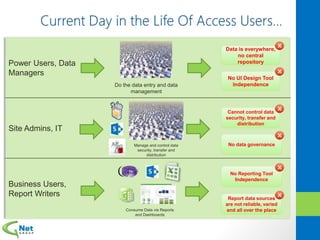
Power Users, Data
Managers
Site Admins, IT
Business Users,
Report Writers
Do the data entry and data
management
Manage and control data
security, transfer and
distribution
Consume Data via Reports
and Dashboards
Data is everywhere,
no central
repository
Cannot control data
security, transfer and
distribution
No data governance
No UI Design Tool
Independence
No Reporting Tool
Independence
Report data sources
are not reliable, varied
and all over the place
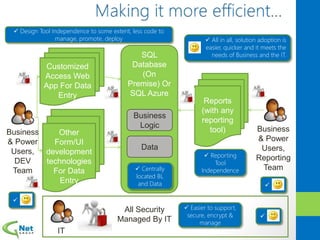
SQL
Database
(On
Premise) Or
SQL Azure
Other
Form/UI
development
technologies
For Data
Entry
Customized
Access Web
App For Data
Entry
Business
& Power
Users,
DEV
Team
Business
Logic
Data
IT
Reports
(with any
reporting
tool) Business
& Power
Users,
Reporting
Team
All Security
Managed By IT
 Reporting
Tool
Independence

 Design Tool Independence to some extent, less code to
manage, promote, deploy

 Centrally
located BL
and Data
 Easier to support,
secure, encrypt &
manage

 All in all, solution adoption is
easier, quicker and it meets the
needs of Business and the IT.
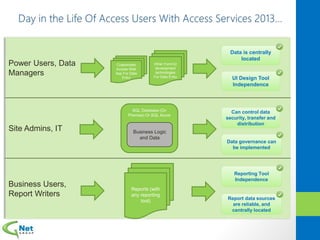
Power Users, Data
Managers
Site Admins, IT
Business Users,
Report Writers
Data is centrally
located
Can control data
security, transfer and
distribution
Data governance can
be implemented
UI Design Tool
Independence
Reporting Tool
Independence
Report data sources
are reliable, and
centrally located
Other Form/UI
development
technologies
For Data Entry
Customized
Access Web
App For Data
Entry
SQL Database (On
Premise) Or SQL Azure
Business Logic
and Data
Reports (with
any reporting
tool)
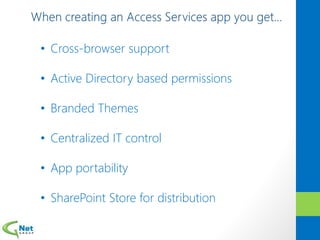
• Cross-browser support
• Active Directory based permissions
• Branded Themes
• Centralized IT control
• App portability
• SharePoint Store for distribution
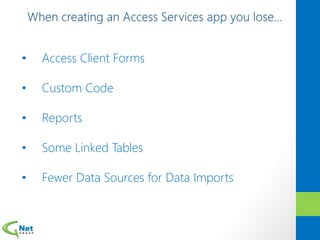
• Access Client Forms
• Custom Code
• Reports
• Some Linked Tables
• Fewer Data Sources for Data Imports
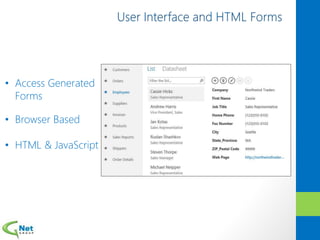
• Access Generated
Forms
• Browser Based
• HTML & JavaScript
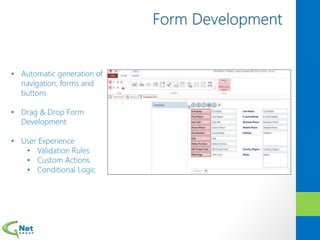
• Automatic generation of
navigation, forms and
buttons
• Drag & Drop Form
Development
• User Experience
• Validation Rules
• Custom Actions
• Conditional Logic
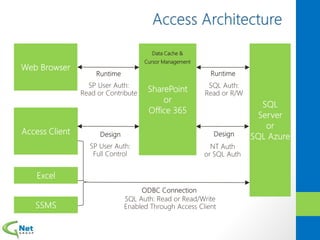
Data Cache &
Cursor Management
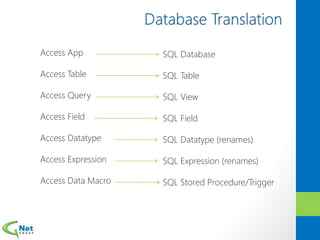
Access App
Access Table
Access Query
Access Field
Access Datatype
Access Expression
Access Data Macro
SQL Database
SQL Table
SQL View
SQL Field
SQL Datatype (renames)
SQL Expression (renames)
SQL Stored Procedure/Trigger
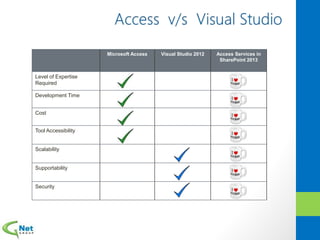
Microsoft Access Visual Studio 2012 Access Services in
SharePoint 2013
Level of Expertise
Required
Development Time
Cost
Tool Accessibility
Scalability
Supportability
Security
• SharePoint Server 2013 on at least Windows 2008 R2
• SQL Server 2012 Standard or SQL Server 2012 Enterprise
• SQL Server 2012 Feature Pack Components on the SharePoint Server:
• Microsoft SQL Server 2012 Local DB (SQLLocalDB.msi)
• Microsoft SQL Server 2012 Data-Tier Application Framework
(Dacframework.msi)
• Microsoft SQL Server 2012 Native Client (sqlncli.msi)
• Microsoft SQL Server 2012 Transact-SQL ScriptDom (SQLDOM.MSI)
• Microsoft System CLR Types for Microsoft SQL Server 2012
(SQLSysClrTypes.msi)
Software Prerequisites for creating and modifying Access apps:
• Access 2013 (required for Access app design)
• A web browser (required for viewing and updating data)
• Landscape is changing with the advent of Cloud and Mobile
• Microsoft is going all out with the “Cloud First, Mobile First”
approach
• Data governance, centralization and security needs to be a priority
• Data volume considerations have to be made as increasing
volumes have to be dealt with
• Performance of reports and applications has to improve
• At the same time, new solutions have to be easy to develop, have
be cost effective, efficient and easy to maintain and manage on an
on-going basis
• Need to leverage full potential, capabilities and support of the
MSBI stack for reporting and BI
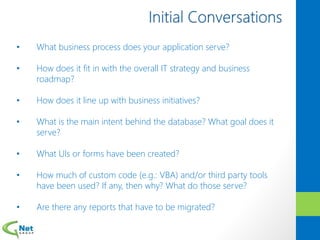
• What business process does your application serve?
• How does it fit in with the overall IT strategy and business
roadmap?
• How does it line up with business initiatives?
• What is the main intent behind the database? What goal does it
serve?
• What UIs or forms have been created?
• How much of custom code (e.g.: VBA) and/or third party tools
have been used? If any, then why? What do those serve?
• Are there any reports that have to be migrated?
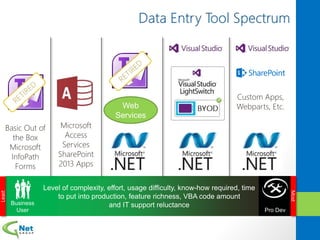
Least
Most
Web
Services
Custom Apps,
Webparts, Etc.
Basic Out of
the Box
Microsoft
InfoPath
Forms
Microsoft
Access
Services
SharePoint
2013 Apps
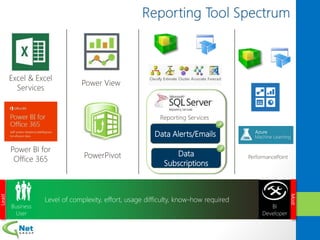
Power View
Excel & Excel
Services
Least
Most
PowerPivot PerformancePoint
Power BI for
Office 365
Data Alerts/Emails
Data
Subscriptions
Reporting Services
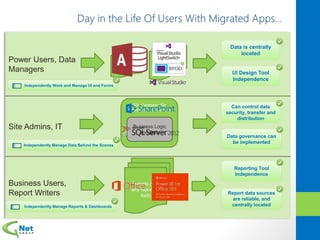
Power Users, Data
Managers
Site Admins, IT
Business Users,
Report Writers
Data is centrally
located
Can control data
security, transfer and
distribution
Data governance can
be implemented
UI Design Tool
Independence
Reporting Tool
Independence
Report data sources
are reliable, and
centrally located
Other Form/UI
development
technologies
For Data Entry
Customized
Access Web
App For Data
Entry
SQL Database (On
Premise) Or SQL Azure
Business Logic
and Data
Reports (with
any reporting
tool)
Independently Work and Manage UI and Forms
Independently Manage Data Behind the Scenes
Independently Manage Reports & Dashboards
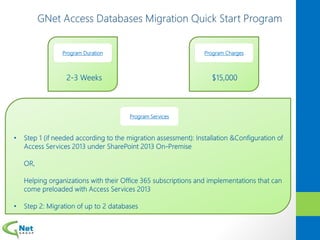
Program Services
Program Duration Program Charges
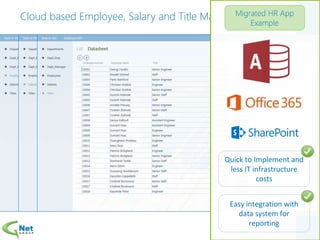
Cloud based Employee, Salary and Title Management System
Quick to Implement and
less IT infrastructure
costs
Easy integration with
data system for
reporting
Questions?
Follow Us
GNet Group
@GNetGroup
http://www.linkedin.com/company/143712
http://www.youtube.com/user/GNetGroup
Blog http://blog.gnetgroup.com/
Tejpal Thatte
Tejpal.Thatte@gnetgroup.com
@tejpalatwork
http://www.linkedin.com/in/tejpalthatte

Share point saturday access services 2015 final 2

  • 4.
    Why People useAccess? What problems is Microsoft solving in Access Services 2013? Introduction to Access Services Need for Migration of existing Access Databases Migration Methodology Demo - Deploying an Access Services App (Forms, Database, Reporting)
  • 10.
    Power Users, Data Managers SiteAdmins, IT Business Users, Report Writers Do the data entry and data management Manage and control data security, transfer and distribution Consume Data via Reports and Dashboards Data is everywhere, no central repository Cannot control data security, transfer and distribution No data governance No UI Design Tool Independence No Reporting Tool Independence Report data sources are not reliable, varied and all over the place
  • 11.
    SQL Database (On Premise) Or SQL Azure Other Form/UI development technologies ForData Entry Customized Access Web App For Data Entry Business & Power Users, DEV Team Business Logic Data IT Reports (with any reporting tool) Business & Power Users, Reporting Team All Security Managed By IT  Reporting Tool Independence   Design Tool Independence to some extent, less code to manage, promote, deploy   Centrally located BL and Data  Easier to support, secure, encrypt & manage   All in all, solution adoption is easier, quicker and it meets the needs of Business and the IT.
  • 12.
    Power Users, Data Managers SiteAdmins, IT Business Users, Report Writers Data is centrally located Can control data security, transfer and distribution Data governance can be implemented UI Design Tool Independence Reporting Tool Independence Report data sources are reliable, and centrally located Other Form/UI development technologies For Data Entry Customized Access Web App For Data Entry SQL Database (On Premise) Or SQL Azure Business Logic and Data Reports (with any reporting tool)
  • 14.
    • Cross-browser support •Active Directory based permissions • Branded Themes • Centralized IT control • App portability • SharePoint Store for distribution
  • 15.
    • Access ClientForms • Custom Code • Reports • Some Linked Tables • Fewer Data Sources for Data Imports
  • 16.
    • Access Generated Forms •Browser Based • HTML & JavaScript
  • 17.
    • Automatic generationof navigation, forms and buttons • Drag & Drop Form Development • User Experience • Validation Rules • Custom Actions • Conditional Logic
  • 18.
  • 19.
    Access App Access Table AccessQuery Access Field Access Datatype Access Expression Access Data Macro SQL Database SQL Table SQL View SQL Field SQL Datatype (renames) SQL Expression (renames) SQL Stored Procedure/Trigger
  • 20.
    Microsoft Access VisualStudio 2012 Access Services in SharePoint 2013 Level of Expertise Required Development Time Cost Tool Accessibility Scalability Supportability Security
  • 21.
    • SharePoint Server2013 on at least Windows 2008 R2 • SQL Server 2012 Standard or SQL Server 2012 Enterprise • SQL Server 2012 Feature Pack Components on the SharePoint Server: • Microsoft SQL Server 2012 Local DB (SQLLocalDB.msi) • Microsoft SQL Server 2012 Data-Tier Application Framework (Dacframework.msi) • Microsoft SQL Server 2012 Native Client (sqlncli.msi) • Microsoft SQL Server 2012 Transact-SQL ScriptDom (SQLDOM.MSI) • Microsoft System CLR Types for Microsoft SQL Server 2012 (SQLSysClrTypes.msi) Software Prerequisites for creating and modifying Access apps: • Access 2013 (required for Access app design) • A web browser (required for viewing and updating data)
  • 24.
    • Landscape ischanging with the advent of Cloud and Mobile • Microsoft is going all out with the “Cloud First, Mobile First” approach • Data governance, centralization and security needs to be a priority • Data volume considerations have to be made as increasing volumes have to be dealt with • Performance of reports and applications has to improve • At the same time, new solutions have to be easy to develop, have be cost effective, efficient and easy to maintain and manage on an on-going basis • Need to leverage full potential, capabilities and support of the MSBI stack for reporting and BI
  • 26.
    • What businessprocess does your application serve? • How does it fit in with the overall IT strategy and business roadmap? • How does it line up with business initiatives? • What is the main intent behind the database? What goal does it serve? • What UIs or forms have been created? • How much of custom code (e.g.: VBA) and/or third party tools have been used? If any, then why? What do those serve? • Are there any reports that have to be migrated?
  • 27.
    Least Most Web Services Custom Apps, Webparts, Etc. BasicOut of the Box Microsoft InfoPath Forms Microsoft Access Services SharePoint 2013 Apps
  • 28.
    Power View Excel &Excel Services Least Most PowerPivot PerformancePoint Power BI for Office 365 Data Alerts/Emails Data Subscriptions Reporting Services
  • 29.
    Power Users, Data Managers SiteAdmins, IT Business Users, Report Writers Data is centrally located Can control data security, transfer and distribution Data governance can be implemented UI Design Tool Independence Reporting Tool Independence Report data sources are reliable, and centrally located Other Form/UI development technologies For Data Entry Customized Access Web App For Data Entry SQL Database (On Premise) Or SQL Azure Business Logic and Data Reports (with any reporting tool) Independently Work and Manage UI and Forms Independently Manage Data Behind the Scenes Independently Manage Reports & Dashboards
  • 30.
  • 32.
    Cloud based Employee,Salary and Title Management System Quick to Implement and less IT infrastructure costs Easy integration with data system for reporting
  • 33.
    Questions? Follow Us GNet Group @GNetGroup http://www.linkedin.com/company/143712 http://www.youtube.com/user/GNetGroup Bloghttp://blog.gnetgroup.com/ Tejpal Thatte Tejpal.Thatte@gnetgroup.com @tejpalatwork http://www.linkedin.com/in/tejpalthatte

Editor's Notes

  • #2 1] Hello, Good afternoon, my name is Tejpal Thatte 2] Today we are going to discuss a little bit about Access Services 2013 3] Right from the onset we will be discussing two main things: a] Introduction to Access Services 2013 and b] A migration methodology for existing databases
  • #3 1] We primarily have two practices: BI and SharePoint 2] HQ in MN, other offices as well 3] “Go-To MS Partner”. Time and again MS has said this.
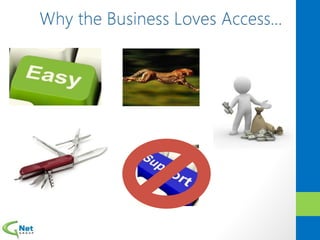
  • #8 1] It’s Easy… 2] It’s Fast… 3] It’s Cheap… 4] It’s Available… 5] It’s can perform multiple functions….. 6] It doesn’t require IT’s Support… 7] A lot of these things can change overtime though. Things like performance which is file size dependent, IT support requirement, security etc. can change over time
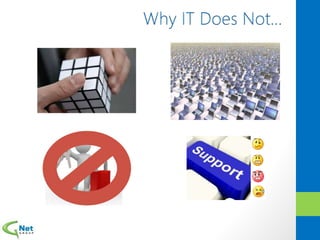
  • #10 Why IT Does Not… It’s Too Easy… It Doesn’t Scale… It’s Not Secure… IT Will Eventually Have To Support…Which can go from being confusing, to being irritating, to being frustrating to finally being something that makes IT cry…
  • #13 0] Microsoft said -> Let’s have a system where UI and report independence can be provided, and data is centrally located. 1] High level 3 parts in diagram: UI, Data and BL, Reporting: Most business processes have at least two parts to them viz. Data Entry and Reporting 2] IT Manages all security, Access Apps or any custom UI can be created as BL and Data is centrally located. Same case with Reports. 3] Since data is in SQL, the Access App solution is thus reporting tool independent, so reporting team is happy 4] Design tool independence is there to some extent as BL is centrally located in the SQL database in the form of stored procedures and triggers, so business is happy 5] Less to deploy, manage and promote so DEV team and power users are happy 6] Data and BL is centrally located, easier to support, secure, encrypt and manage so IT is happy
  • #16 1] Access apps are SharePoint apps, so you get all these things OOB
  • #17 1] Most of you might say all that remains is data, every other important thing is stripped off ?!?!?!??! 2] There is a reasoning for that though. Traditional Access databases seemed great to begin with but over time became unmanageable and degraded performance 3] Something had to be done to abstract each Business and IT user’s activities and have a clear separation for better management, collaboration, scalability and centralization of business logic and data. 4] You still can create forms which are called views here. You still can create reports on a much broader scale with the reporting tool of your choice. 5] Traditional linked tables (link to file etc.) are not provided but you can have links to SharePoint lists with a few limitations. Linking to SharePoint Lists Forms, Lookups, and Queries with SharePoint Lists Limitations for this release… Read-Only No Data Macro support List must be in the same site collection SharePoint Lists is the only supported Linking
  • #18 1] This is how the form HTML UI looks like 2] There are two forms or views as they are called here created for you OOB that handle all the CRUD operations, data bound fields, searching, filtering, etc.
  • #19 1] Form Dev is easy with the user friendly UI 2] Drag and Drop Controls, set properties 3] Set validation rules, custom actions on button click events and conditional logic
  • #20 1] At runtime, over web requests, forms are displayed to users. Data entry is easy as app is in SharePoint 2] Big Reveal: All your data is now in SQL (on premise or Azure) 3] The communication between browser and SP – SP User Auth. SP to DB is SQL Auth with a username-password pair generated for you OOB (because SQL doesn’t support claims auth) 4] In design mode, Access client again connects to SP using SP auth to design apps LIVE against the server. The server on the other hand here, connects to SQL backend using NT auth or SQL auth if one has been created 5] Since data is in SQL, you can connect other applications to that data as well through ODBC connections
  • #21 1] Since data is in SQL, how do all new 2013 components translate back to SQL
  • #25 1] Access App = SharePoint App