SQL Server Tips From The Field
Three Things IT Leaders Need to Know…
Web: www.sqlwatchmen.com
Email: Jim.Murphy@sqlwatchmen.com
Twitter: @SQLMurph
Jim Murphy
CEO
SQLWatchmen, LLC.
Who is SQLWatchmen?
 DBA Services – performance tuning,
disaster recovery planning, maintenance
 SQL Programming - views, SPs,
triggers
 Integration Services - SSIS for trying
systems together
 Reporting - SSRS for custom analytics to
fill business needs
 Cloud Migration
2
 Austin based tech company
 Can serve as Remote / Fractional DBAs
 SQL Server Specialists (We work alongside
general tech consulting firms)
 Compliance (HIPAA, SOX, SOC2)
How can we assist you?
3
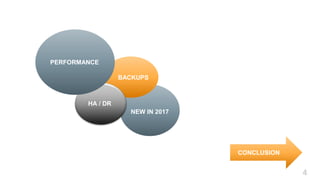
4
NEW IN 2017
BACKUPS
HA / DR
PERFORMANCE
CONCLUSION
DEMO
Database Performance and Speed Matter
55
6
1. Identifying the problem & why you should care
Problem:
 The database is the foundation of the entire
application or corporate stack. If the database
is slow…
2. There are many reasons for databases to get slower over time
(i.e. bottlenecks)
7
Cause is usually:
 CPU
 Memory
 Disk IO
 Network
3. Slow-downs happen when queries are inefficient
8
But Why Jim:
 More users
 More data
volume
 More complex
queries
4. Which solution is faster & cheaper?
9
Solution:
A. Upgrade hardware and migrate.
B. Figure out which queries are the biggest resource hogs
and make adjustments.
That doesn’t sound
cheap!
So offending queries
use far fewer resources.
5. Performance Tuning gets to the root cause of slowdowns
10
 Benefit = Lower Cost
 Benefit = Tuning is more effective at improving
speed & performance
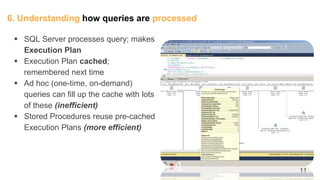
6. Understanding how queries are processed
11
 SQL Server processes query; makes
Execution Plan
 Execution Plan cached;
remembered next time
 Ad hoc (one-time, on-demand)
queries can fill up the cache with lots
of these (inefficient)
 Stored Procedures reuse pre-cached
Execution Plans (more efficient)
12
Measuring results with Perfmon:
SQL Server Statistics -> Batch Executions/sec
Backups and Disaster
Recovery Plans are
not all created equal
13
14
1. Identifying the problem & why you should care
What’s the difference between a backup and a disaster recovery
plan?
15
2. There are lots of different technologies you might consider
using:
 VM Snapshots
 SAN Replication
 Volume Shadow Copy
 VEEAM
 SQL Dump Files – Microsoft recommended
16
3. Transaction Log explained
 Diary of data changes
 Diary won’t ‘clear’ (Truncate) and be reused until it is backed up (if
database in FULL mode)
 T-Log (.LDF file) will grow and grow until drive fills up
 DANGER! Full drive = corrupt database (and also bring it offline)!
17
4. Transaction Log explained (continued)
 FULL backup hurts performance
 Saves off all data pages with valid data on it
 Locks tables and indexes to access up to date data
 T-Log backup DOES NOT hurt performance
 T-Log is circular in usage. Segments (VLF)
 T-Log backup backs up each VLF & “truncates” T-Log
 Doesn’t lock tables
18
5. There are also 2 different recovery modes to consider:
SIMPLE
 Only non-production
 Uses Transaction Log for current
transactions only.
 T-Log only grows if a long transaction
with lots of data changes runs.
 No point-in-time recovery (can only
recover to most recent FULL or
Differential backup).
FULL
 Use for all Production databases.
 Keeps T-Log as diary for all data
changes until T-Log is backed up (and
also ‘replicated’ if an HA/DR technology
is configured).
 T-Log will grow until drive is filled if not
backed up.
 Can perform point-in-time recovery
(restore to an exact millisecond before a
disaster so no data is lost).
19
6. An example of Point in Time Recovery
Image Source: https://sqlbak.com/blog/sql-server-backup-and-restore/
20
PRO TIP
If T-Log backup is getting too big,
and you can’t backup or shrink
- Switch your Recovery Mode to Simple*
[ ]
21
Demo
High Availability / Disaster Recovery
(HA/DR)
is a set of procedures and methods
used for proactive disaster protection
22
23
1. Identifying the problem & why you should care
Reasons why you might want to consider HA/DR for your
company:
 What does High Availability mean?
 What is Disaster Recovery in this context?
 What is AlwaysOn?
 What are Availability Groups?
24
2. Solutions involve removing the single point of failure
 Clustering - redundant hardware
 RAID - redundant individual disks
 “Replication” - redundant databases
 Transactional Replication Issues
 Log Shipping Issues
 Mirroring Issues
25
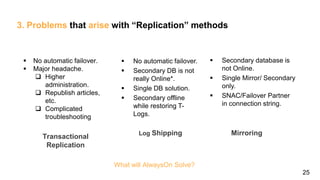
3. Problems that arise with “Replication” methods
Transactional
Replication
MirroringLog Shipping
 No automatic failover.
 Secondary DB is not
really Online*.
 Single DB solution.
 Secondary offline
while restoring T-
Logs.
 Secondary database is
not Online.
 Single Mirror/ Secondary
only.
 SNAC/Failover Partner
in connection string.
What will AlwaysOn Solve?
 No automatic failover.
 Major headache.
 Higher
administration.
 Republish articles,
etc.
 Complicated
troubleshooting
26
4. AlwaysOn Solves World Hunger!
…and peace on earth and goodwill toward men.
 Automatic Failover
 Multiple Replicas (secondaries) – and readable!
 “Replication” - redundant databases
 Offload Backups, Reporting, etc.
 Availability Groups - assists with using multiple DBs
 Lower administrative costs
 Plus more!
27
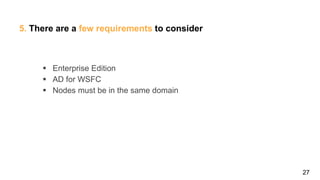
5. There are a few requirements to consider
 Enterprise Edition
 AD for WSFC
 Nodes must be in the same domain
28
7. HA, DR, or Both?
 Synchronous
 Asynchronous
Sync Async
Legend
29
8. Listener
(Virtual Network Name)
Node 1 Node 2
DENALI02 DENALI03
VNN
Node 1 Node 2
30
What’s New in SQL Server 2017?
32
 Columnstore indexes for big data
 Query Store – better diagnostics for a DBA
 In-Memory Databases
 30x in-memory OLTP speed
 100x in-memory Columnstore speed
 Stretch databases (Auto-archiving)
 Always Encrypted (at rest, in motion, cloud)
 Temporal DB – track historical changes
 Row-level security.
 …and a lot more.
In case you missed these 2016 features…
What’s New in 2017…
33
 Always On Availibility Group – supporting the ability to cross database
transactions among all databases, as well as, clusterless support in
Availibility Groups.
 Machine Learning Services – SQL Server R Services have been
renamed in this release and now supports Python in addition to R.
 In-memory and memory-optimized object enhancements.
 SQL Server Reporting Services 2017 – the REST API and the “all in
one” on-premise, self-service Power BI.
 Scale Out for SSIS.
 Resumable online index rebuild – Pause & resume index builds to fit
your tight maintenance window. Each night, it can chip away a little at a
time.
 For a full list of details visit: https://docs.microsoft.com/en-us/sql/sql-
server/what-s-new-in-sql-server-2017
CONCLUSION
SQL Server is beautiful…
but it can be a beast[ ]
34
You don’t need new hardware -
Tune for Performance[ ]
35
Keep your backups secure.
Disaster recovery methods should
be tested!
[ ]
36
Treated properly, MS SQL Server
can contribute a solid foundation to
the efforts of any business ][
37
Next Steps
● For another slide deck that delves deeper on SQL backups -
visit http://www.sqlwatchmen.com/contact-us
● To check out if a Database Diagnostic Exam is right for you
-
visit http://www.sqlwatchmen.com/services/database-
diagnostic-analysis
38
Let us help you
Protect Your Data
][
39
QUESTIONS
www.sqlwatchmen.com
Jim.Murphy@sqlwatchmen.com
@SQLMurph

Sql Server tips from the field

  • 1.
    SQL Server TipsFrom The Field Three Things IT Leaders Need to Know… Web: www.sqlwatchmen.com Email: Jim.Murphy@sqlwatchmen.com Twitter: @SQLMurph Jim Murphy CEO SQLWatchmen, LLC.
  • 2.
    Who is SQLWatchmen? DBA Services – performance tuning, disaster recovery planning, maintenance  SQL Programming - views, SPs, triggers  Integration Services - SSIS for trying systems together  Reporting - SSRS for custom analytics to fill business needs  Cloud Migration 2  Austin based tech company  Can serve as Remote / Fractional DBAs  SQL Server Specialists (We work alongside general tech consulting firms)  Compliance (HIPAA, SOX, SOC2) How can we assist you?
  • 3.
  • 4.
    4 NEW IN 2017 BACKUPS HA/ DR PERFORMANCE CONCLUSION DEMO
  • 5.
    Database Performance andSpeed Matter 55
  • 6.
    6 1. Identifying theproblem & why you should care Problem:  The database is the foundation of the entire application or corporate stack. If the database is slow…
  • 7.
    2. There aremany reasons for databases to get slower over time (i.e. bottlenecks) 7 Cause is usually:  CPU  Memory  Disk IO  Network
  • 8.
    3. Slow-downs happenwhen queries are inefficient 8 But Why Jim:  More users  More data volume  More complex queries
  • 9.
    4. Which solutionis faster & cheaper? 9 Solution: A. Upgrade hardware and migrate. B. Figure out which queries are the biggest resource hogs and make adjustments. That doesn’t sound cheap! So offending queries use far fewer resources.
  • 10.
    5. Performance Tuninggets to the root cause of slowdowns 10  Benefit = Lower Cost  Benefit = Tuning is more effective at improving speed & performance
  • 11.
    6. Understanding howqueries are processed 11  SQL Server processes query; makes Execution Plan  Execution Plan cached; remembered next time  Ad hoc (one-time, on-demand) queries can fill up the cache with lots of these (inefficient)  Stored Procedures reuse pre-cached Execution Plans (more efficient)
  • 12.
    12 Measuring results withPerfmon: SQL Server Statistics -> Batch Executions/sec
  • 13.
    Backups and Disaster RecoveryPlans are not all created equal 13
  • 14.
    14 1. Identifying theproblem & why you should care What’s the difference between a backup and a disaster recovery plan?
  • 15.
    15 2. There arelots of different technologies you might consider using:  VM Snapshots  SAN Replication  Volume Shadow Copy  VEEAM  SQL Dump Files – Microsoft recommended
  • 16.
    16 3. Transaction Logexplained  Diary of data changes  Diary won’t ‘clear’ (Truncate) and be reused until it is backed up (if database in FULL mode)  T-Log (.LDF file) will grow and grow until drive fills up  DANGER! Full drive = corrupt database (and also bring it offline)!
  • 17.
    17 4. Transaction Logexplained (continued)  FULL backup hurts performance  Saves off all data pages with valid data on it  Locks tables and indexes to access up to date data  T-Log backup DOES NOT hurt performance  T-Log is circular in usage. Segments (VLF)  T-Log backup backs up each VLF & “truncates” T-Log  Doesn’t lock tables
  • 18.
    18 5. There arealso 2 different recovery modes to consider: SIMPLE  Only non-production  Uses Transaction Log for current transactions only.  T-Log only grows if a long transaction with lots of data changes runs.  No point-in-time recovery (can only recover to most recent FULL or Differential backup). FULL  Use for all Production databases.  Keeps T-Log as diary for all data changes until T-Log is backed up (and also ‘replicated’ if an HA/DR technology is configured).  T-Log will grow until drive is filled if not backed up.  Can perform point-in-time recovery (restore to an exact millisecond before a disaster so no data is lost).
  • 19.
    19 6. An exampleof Point in Time Recovery Image Source: https://sqlbak.com/blog/sql-server-backup-and-restore/
  • 20.
    20 PRO TIP If T-Logbackup is getting too big, and you can’t backup or shrink - Switch your Recovery Mode to Simple* [ ]
  • 21.
  • 22.
    High Availability /Disaster Recovery (HA/DR) is a set of procedures and methods used for proactive disaster protection 22
  • 23.
    23 1. Identifying theproblem & why you should care Reasons why you might want to consider HA/DR for your company:  What does High Availability mean?  What is Disaster Recovery in this context?  What is AlwaysOn?  What are Availability Groups?
  • 24.
    24 2. Solutions involveremoving the single point of failure  Clustering - redundant hardware  RAID - redundant individual disks  “Replication” - redundant databases  Transactional Replication Issues  Log Shipping Issues  Mirroring Issues
  • 25.
    25 3. Problems thatarise with “Replication” methods Transactional Replication MirroringLog Shipping  No automatic failover.  Secondary DB is not really Online*.  Single DB solution.  Secondary offline while restoring T- Logs.  Secondary database is not Online.  Single Mirror/ Secondary only.  SNAC/Failover Partner in connection string. What will AlwaysOn Solve?  No automatic failover.  Major headache.  Higher administration.  Republish articles, etc.  Complicated troubleshooting
  • 26.
    26 4. AlwaysOn SolvesWorld Hunger! …and peace on earth and goodwill toward men.  Automatic Failover  Multiple Replicas (secondaries) – and readable!  “Replication” - redundant databases  Offload Backups, Reporting, etc.  Availability Groups - assists with using multiple DBs  Lower administrative costs  Plus more!
  • 27.
    27 5. There area few requirements to consider  Enterprise Edition  AD for WSFC  Nodes must be in the same domain
  • 28.
    28 7. HA, DR,or Both?  Synchronous  Asynchronous Sync Async Legend
  • 29.
    29 8. Listener (Virtual NetworkName) Node 1 Node 2 DENALI02 DENALI03 VNN Node 1 Node 2
  • 30.
  • 31.
    What’s New inSQL Server 2017?
  • 32.
    32  Columnstore indexesfor big data  Query Store – better diagnostics for a DBA  In-Memory Databases  30x in-memory OLTP speed  100x in-memory Columnstore speed  Stretch databases (Auto-archiving)  Always Encrypted (at rest, in motion, cloud)  Temporal DB – track historical changes  Row-level security.  …and a lot more. In case you missed these 2016 features…
  • 33.
    What’s New in2017… 33  Always On Availibility Group – supporting the ability to cross database transactions among all databases, as well as, clusterless support in Availibility Groups.  Machine Learning Services – SQL Server R Services have been renamed in this release and now supports Python in addition to R.  In-memory and memory-optimized object enhancements.  SQL Server Reporting Services 2017 – the REST API and the “all in one” on-premise, self-service Power BI.  Scale Out for SSIS.  Resumable online index rebuild – Pause & resume index builds to fit your tight maintenance window. Each night, it can chip away a little at a time.  For a full list of details visit: https://docs.microsoft.com/en-us/sql/sql- server/what-s-new-in-sql-server-2017 CONCLUSION
  • 34.
    SQL Server isbeautiful… but it can be a beast[ ] 34
  • 35.
    You don’t neednew hardware - Tune for Performance[ ] 35
  • 36.
    Keep your backupssecure. Disaster recovery methods should be tested! [ ] 36
  • 37.
    Treated properly, MSSQL Server can contribute a solid foundation to the efforts of any business ][ 37
  • 38.
    Next Steps ● Foranother slide deck that delves deeper on SQL backups - visit http://www.sqlwatchmen.com/contact-us ● To check out if a Database Diagnostic Exam is right for you - visit http://www.sqlwatchmen.com/services/database- diagnostic-analysis 38
  • 39.
    Let us helpyou Protect Your Data ][ 39 QUESTIONS www.sqlwatchmen.com Jim.Murphy@sqlwatchmen.com @SQLMurph

Editor's Notes

  • #7 Customers are frustrated; hurts your reputation Employees are frustrated; hourglass of time wasted