Infographics	
  
Conveying	
  Informa3on	
  Visually	
  
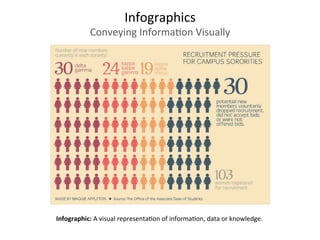
Infographic:	
  A	
  visual	
  representa3on	
  of	
  informa3on,	
  data	
  or	
  knowledge.	


Infographics	
  
Why	
  Use	
  Infographics?	
  
• 	
  Charts,	
  diagrams,	
  images:	
  visual	
  info	
  
• “Visual	
  shorthand”	
  for	
  complex	
  info	


• Puts	
  the	
  informa3on	
  into	
  new	
  context	
  
Infographics	
  
Dissec3ng	
  the	
  Parts	
  
	
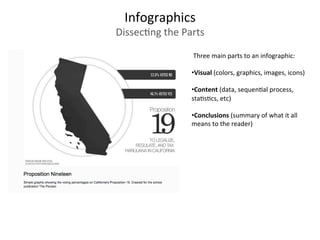
  Three	
  main	
  parts	
  to	
  an	
  infographic:	


• Visual	
  (colors,	
  graphics,	
  images,	
  icons)	


• Content	
  (data,	
  sequen3al	
  process,	
  
sta3s3cs,	
  etc)	


• Conclusions	
  (summary	
  of	
  what	
  it	
  all	
  
means	
  to	
  the	
  reader)	
  
 Three	
  main	
  parts	
  to	
  an	
  infographic:	


• Visual	
  (colors,	
  graphics,	
  images,	
  icons)	


• Content	
  (data,	
  sequen3al	
  process,	
  
sta3s3cs,	
  etc)	


• Conclusions	
  (summary	
  of	
  what	
  it	
  all	
  
means	
  to	
  the	
  reader)	
  
Infographics	
  
Dissec3ng	
  the	
  Parts	
  
 Three	
  main	
  parts	
  to	
  an	
  infographic:	


• Visual	
  (colors,	
  graphics,	
  images,	
  icons)	


• Content	
  (data,	
  sequen3al	
  process,	
  
sta3s3cs,	
  etc)	


• Conclusions	
  (summary	
  of	
  what	
  it	
  all	
  
means	
  to	
  the	
  reader)	
  
Infographics	
  
Dissec3ng	
  the	
  Parts	
  
Infographics	
  
Tips	
  from	
  the	
  San	
  Fran	
  Beat	
  Online	
  
Be	
  Concise:	
  Design	
  to	
  convey	
  one	
  idea	
  really	
  well.	
  	
  
Not	
  too	
  much	
  detail.	


Be	
  Visual:	
  Design	
  your	
  with	
  your	
  final	
  for	
  viewing	
  size	
  in	
  mind.	


Be	
  Smarter:	
  Build	
  your	
  data	
  and	
  explana3on	
  right	
  into	
  design,	
  
and	
  don’t	
  make	
  your	
  readers	
  have	
  to	
  work	
  hard	
  to	
  understand	
  
what	
  they’re	
  seeing.	


Be	
  Transparent:	
  Infographics	
  can	
  be	
  used	
  to	
  lead	
  readers	
  to	
  the	
  
wrong	
  conclusions.	
  Always	
  cite	
  data	
  sources	
  and	
  allow	
  readers	
  
to	
  dig	
  deeper	
  if	
  they	
  have	
  the	
  desire.	


Be	
  Different:	
  If	
  you	
  can	
  avoid	
  it,	
  don’t	
  use	
  a	
  bar	
  chart,	
  a	
  line	
  
chart	
  or	
  a	
  pie	
  chart.	


Be	
  Accurate:	
  Remember	
  your	
  geometry	
  and	
  visualize	
  
differences	
  using	
  area.	


When	
  trying	
  to	
  convey	
  the	
  scale	
  of	
  your	
  data,	
  many	
  graphics	
  use	
  
different	
  sized	
  shapes	
  or	
  images	
  to	
  show	
  amounts	
  rela3ve	
  to	
  
each	
  other.	


Be	
  ADracEve:	
  Include	
  visuals:	
  Illustra3ons	
  and	
  photos	
  included	
  
in	
  the	
  infographic	
  make	
  a	
  big	
  difference.	


Be	
  Varied:	
  Find	
  a	
  good	
  visual	
  style	
  that’s	
  right	
  for	
  the	
  data	
  
you’re	
  trying	
  to	
  share.	


If	
  your	
  data	
  is	
  about	
  countries,	
  plot	
  it	
  on	
  a	
  world	
  map	
  not	
  a	
  bar	
  
chart	
  that	
  lists	
  countries.	


Infographics	
  
Tips	
  from	
  the	
  San	
  Fran	
  Beat	
  Online	
  
Be	
  Gracious:	
  Work	
  on	
  the	
  assump3on	
  that	
  your	
  infographic	
  may	
  be	
  
viewed	
  or	
  shared	
  without	
  the	
  ar3cle	
  you	
  originally	
  designed	
  it	
  for.	
  
Make	
  sure	
  that	
  the	
  final	
  graphic	
  includes	
  the	
  following	
  pieces:	


Copyright,	
  to	
  be	
  explicit	
  about	
  any	
  rights	
  and	
  terms	
  of	
  use	
  
Source	
  data,	
  so	
  anyone	
  can	
  check	
  your	
  facts	
  
Designer’s	
  name,	
  always	
  give	
  credit	
  to	
  the	
  ar3st/illustrator/
programmer/designer	
  
Original	
  image/ar9cle	
  address,	
  so	
  anyone	
  who	
  sees	
  the	
  image	
  can	
  
find	
  your	
  original	
  ar3cle	


Be	
  CreaEve:	
  Use	
  whatever	
  tools	
  you	
  have	
  available	
  to	
  create	
  your	
  
infographic.	
  Many	
  infographics	
  can	
  be	
  created	
  using	
  simple	
  
applica3ons	
  like	
  a	
  vector	
  drawing	
  or	
  an	
  image	
  edi3ng	
  program.	


Infographics	
  
Tips	
  from	
  the	
  San	
  Fran	
  Beat	
  Online	
  
Online	
  Tools	
  
Vizualize.me	
  hDp://vizualize.me	
  	
  Create	
  data-­‐driven	
  resumes	


Piktochart	
  hDp://piktochart.com	
  DIY	
  design	
  tools	
  for	
  crea3ng	
  infographics	


Venngage:	
  hDps://venngage.com	
  Create	
  infographics	
  from	
  templates	


Wordle:	
  hDp://www.wordle.net	
  Build	
  word	
  clouds	
  from	
  tags	
  and	
  text	


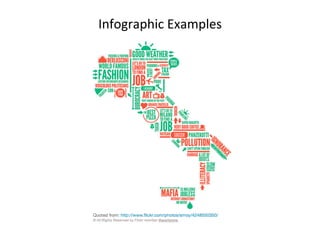
Infographic	
  Examples	
  
Best	
  Infographics	
  of	
  2014:	
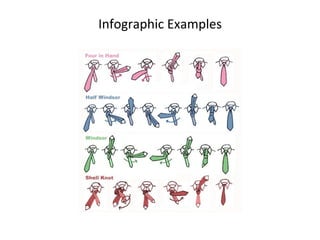
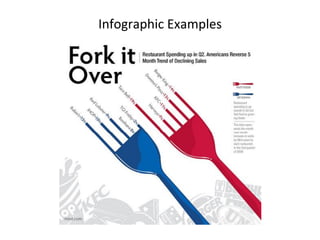
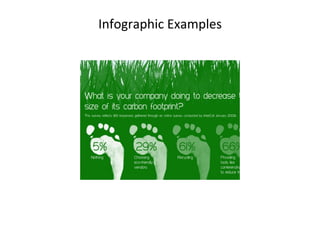
  hcp://blog.hubspot.com/marke3ng/best-­‐infographics-­‐2014	


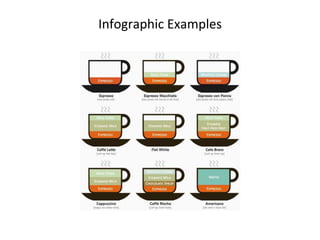
Infographic	
  Examples	
  
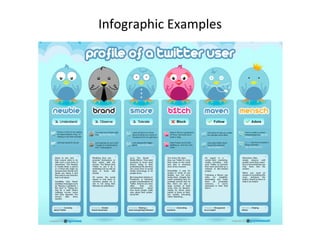
Infographic	
  Examples	
  
Infographic	
  Examples	
  
Infographic	
  Examples	
  
Infographic	
  Examples	
  
Infographic	
  Examples	
  

Infographics

  • 1.
    Infographics   Conveying  Informa3on  Visually   Infographic:  A  visual  representa3on  of  informa3on,  data  or  knowledge.      
  • 2.
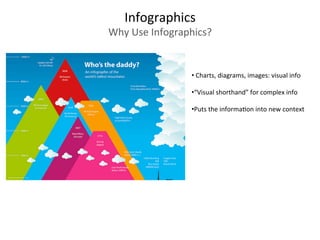
    Infographics   Why  Use  Infographics?   •   Charts,  diagrams,  images:  visual  info   • “Visual  shorthand”  for  complex  info         • Puts  the  informa3on  into  new  context  
  • 3.
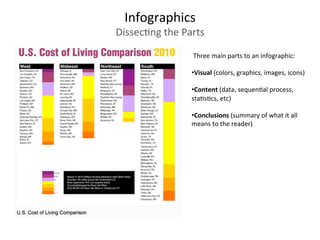
    Infographics   Dissec3ng  the  Parts    Three  main  parts  to  an  infographic:       • Visual  (colors,  graphics,  images,  icons)       • Content  (data,  sequen3al  process,   sta3s3cs,  etc)       • Conclusions  (summary  of  what  it  all   means  to  the  reader)  
  • 4.
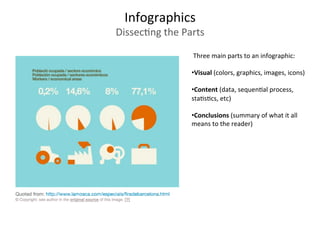
     Three  main  parts  to  an  infographic:       • Visual  (colors,  graphics,  images,  icons)       • Content  (data,  sequen3al  process,   sta3s3cs,  etc)       • Conclusions  (summary  of  what  it  all   means  to  the  reader)   Infographics   Dissec3ng  the  Parts  
  • 5.
     Three  main  parts  to  an  infographic:       • Visual  (colors,  graphics,  images,  icons)       • Content  (data,  sequen3al  process,   sta3s3cs,  etc)       • Conclusions  (summary  of  what  it  all   means  to  the  reader)   Infographics   Dissec3ng  the  Parts  
  • 6.
    Infographics   Tips  from  the  San  Fran  Beat  Online   Be  Concise:  Design  to  convey  one  idea  really  well.     Not  too  much  detail.       Be  Visual:  Design  your  with  your  final  for  viewing  size  in  mind.       Be  Smarter:  Build  your  data  and  explana3on  right  into  design,   and  don’t  make  your  readers  have  to  work  hard  to  understand   what  they’re  seeing.         Be  Transparent:  Infographics  can  be  used  to  lead  readers  to  the   wrong  conclusions.  Always  cite  data  sources  and  allow  readers   to  dig  deeper  if  they  have  the  desire.       Be  Different:  If  you  can  avoid  it,  don’t  use  a  bar  chart,  a  line   chart  or  a  pie  chart.        
  • 7.
    Be  Accurate:  Remember  your  geometry  and  visualize   differences  using  area.       When  trying  to  convey  the  scale  of  your  data,  many  graphics  use   different  sized  shapes  or  images  to  show  amounts  rela3ve  to   each  other.       Be  ADracEve:  Include  visuals:  Illustra3ons  and  photos  included   in  the  infographic  make  a  big  difference.       Be  Varied:  Find  a  good  visual  style  that’s  right  for  the  data   you’re  trying  to  share.       If  your  data  is  about  countries,  plot  it  on  a  world  map  not  a  bar   chart  that  lists  countries.         Infographics   Tips  from  the  San  Fran  Beat  Online  
  • 8.
    Be  Gracious:  Work  on  the  assump3on  that  your  infographic  may  be   viewed  or  shared  without  the  ar3cle  you  originally  designed  it  for.   Make  sure  that  the  final  graphic  includes  the  following  pieces:     Copyright,  to  be  explicit  about  any  rights  and  terms  of  use   Source  data,  so  anyone  can  check  your  facts   Designer’s  name,  always  give  credit  to  the  ar3st/illustrator/ programmer/designer   Original  image/ar9cle  address,  so  anyone  who  sees  the  image  can   find  your  original  ar3cle       Be  CreaEve:  Use  whatever  tools  you  have  available  to  create  your   infographic.  Many  infographics  can  be  created  using  simple   applica3ons  like  a  vector  drawing  or  an  image  edi3ng  program.           Infographics   Tips  from  the  San  Fran  Beat  Online  
  • 9.
    Online  Tools   Vizualize.me  hDp://vizualize.me    Create  data-­‐driven  resumes     Piktochart  hDp://piktochart.com  DIY  design  tools  for  crea3ng  infographics       Venngage:  hDps://venngage.com  Create  infographics  from  templates     Wordle:  hDp://www.wordle.net  Build  word  clouds  from  tags  and  text          
  • 10.
    Infographic  Examples   Best  Infographics  of  2014:  hcp://blog.hubspot.com/marke3ng/best-­‐infographics-­‐2014    
  • 11.
  • 12.
  • 13.
  • 14.
  • 15.
  • 16.