+
Alcohol Prevention Project (APP)
Implementation Training: Sept 30 – Oct 8
Developed by CITF Coaching team at GSU
Breaking New Ground
APP Implementation Step 4
+
Congratulations!
Welcome to Implementation!
+
Special Announcement
Starting October 1, 2013
GASPS.org gets a refresh
+
Getting started…
 Review the prerecorded overview of the
Implementation Tools and Guidance Document
(GD).
 Attend the training or review the slides and
materials.
 Review with your CPAW.
 Use the tools and GD to complete and submit
your plan.
 Plans will be reviewed by RPS.
+
Training Objectives
 List the 4 core areas of
Implementation in the SPF
 Describe the functions and
purpose of the APP
Implementation Process
 Apply the 3 parts of the
Implementation Plan
Participants will be able to….
+
Agenda
I. Provide an overview of Implementation within the
context of the SPF Steps
II. Provide an overview of the APP Implementation‟s
approach and steps
III. Review APP Implementation tools
IV. Review Implementation guidelines & requirements
During today‟s training we will…
+
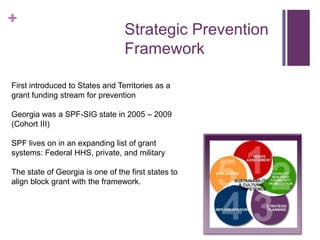
Strategic Prevention
Framework
First introduced to States and Territories as a
grant funding stream for prevention
Georgia was a SPF-SIG state in 2005 – 2009
(Cohort III)
SPF lives on in an expanding list of grant
systems: Federal HHS, private, and military
The state of Georgia is one of the first states to
align block grant with the framework.
+
Guiding Principals
of the SPF
 Data drives decisions
 Comprehensive approach using a public health
model
 System is developed or strengthened in a
manner that works towards outcomes
 Emphasis on outcome-based substance abuse
prevention
 What it means to be “strategic”
 How the Strategic Prevention Framework will
guide your work to produce outcomes
+
Overview of the APP
Implementation Approach
+
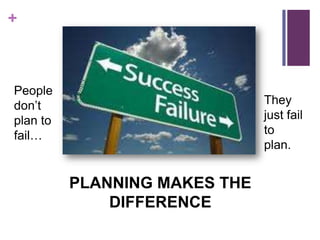
People
don‟t
plan to
fail…
They
just fail
to
plan.
PLANNING MAKES THE
DIFFERENCE
+
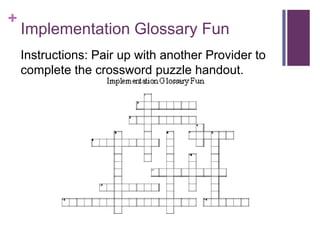
Implementation Glossary Fun
Instructions: Pair up with another Provider to
complete the crossword puzzle handout.
+
What is an
implementation
plan?
Management tool
 Illustrate critical steps in
starting a project
 Guide or map
A guide for
developing the
program
 Proactive vs. reactive
 Identify challenges early in
the process
+
Why is an implementation plan
important?
 Creates time and a
process for thinking
through critical
components.
 Allows for
anticipation of
challenges
 Proactive vs. Reactive
 Critical steps detailed
in advance
 Common understanding
among staff and collaborators
(i.e. CPAW, Partners)
 Regardless of level of
involvement or development,
everyone understands the goal
of the program
 Identify and resolve
discrepancies before they
become costly
 Time spent on
implementing quality plan
and not putting out fires
+
How will the implementation plan
be used?
Charts the course from thought to action
LIVING DOCUMENT
 Should be reviewed at staff/CPAW meetings
 Should be revised as necessary
+
APP Implementation Plan
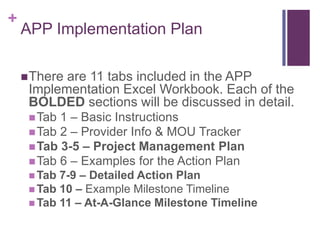
There are 11 tabs included in the APP
Implementation Excel Workbook. Each of the
BOLDED sections will be discussed in detail.
Tab 1 – Basic Instructions
Tab 2 – Provider Info & MOU Tracker
Tab 3-5 – Project Management Plan
Tab 6 – Examples for the Action Plan
 Tab 7-9 – Detailed Action Plan
 Tab 10 – Example Milestone Timeline
 Tab 11 – At-A-Glance Milestone Timeline
+
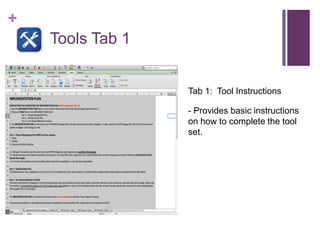
Tools Tab 1
Tab 1: Tool Instructions
- Provides basic instructions
on how to complete the tool
set.
+
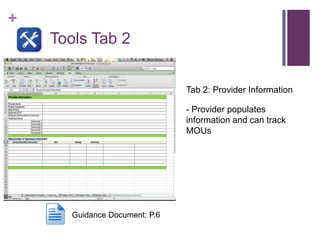
Tools Tab 2
Tab 2: Provider Information
- Provider populates
information and can track
MOUs
Guidance Document: P.6
+
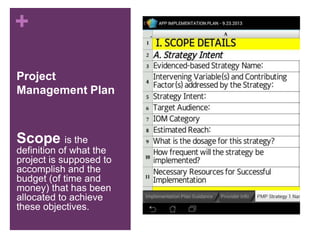
Project
Management Plan
Scope is the
definition of what the
project is supposed to
accomplish and the
budget (of time and
money) that has been
allocated to achieve
these objectives.
+
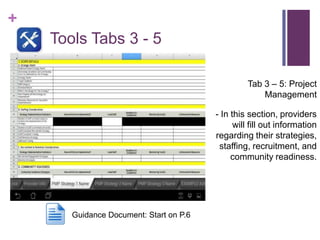
Tools Tabs 3 - 5
Tab 3 – 5: Project
Management
- In this section, providers
will fill out information
regarding their strategies,
staffing, recruitment, and
community readiness.
Guidance Document: Start on P.6
+
Project Management Plan (con’t)
 Staffing
 Recruitment
 Retention
 Training(s) – Best Practice
 Target Population
 Recruitment
 Retention
 Community Readiness
 Planned Activities to increase readiness around APPROVED
Prevention Portfolio Strategies
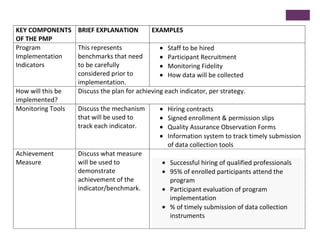
KEY COMPONENTS
OF THE PMP
BRIEF EXPLANATION EXAMPLES
Program
Implementation
Indicators
This represents
benchmarks that need
to be carefully
considered prior to
implementation.
Staff to be hired
Participant Recruitment
Monitoring Fidelity
How data will be collected
How will this be
implemented?
Discuss the plan for achieving each indicator, per strategy.
Monitoring Tools Discuss the mechanism
that will be used to
track each indicator.
Hiring contracts
Signed enrollment & permission slips
Quality Assurance Observation Forms
Information system to track timely submission
of data collection tools
Achievement
Measure
Discuss what measure
will be used to
demonstrate
achievement of the
indicator/benchmark.
Successful hiring of qualified professionals
95% of enrolled participants attend the
program
Participant evaluation of program
implementation
% of timely submission of data collection
instruments
+
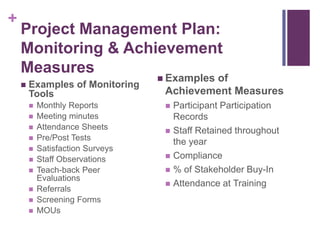
Project Management Plan:
Monitoring & Achievement
Measures
 Examples of Monitoring
Tools
 Monthly Reports
 Meeting minutes
 Attendance Sheets
 Pre/Post Tests
 Satisfaction Surveys
 Staff Observations
 Teach-back Peer
Evaluations
 Referrals
 Screening Forms
 MOUs
 Examples of
Achievement Measures
 Participant Participation
Records
 Staff Retained throughout
the year
 Compliance
 % of Stakeholder Buy-In
 Attendance at Training
+
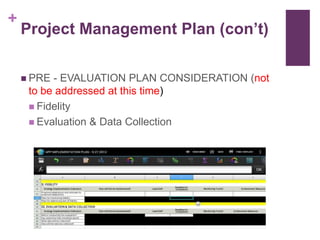
Project Management Plan (con’t)
 PRE - EVALUATION PLAN CONSIDERATION (not
to be addressed at this time)
 Fidelity
 Evaluation & Data Collection
+
ACTIVITY
Scope Scenarios
 Pair up with another participant to review one of two Scope
Scenarios and to process the questions at the end.
 After 7 minutes, the two scenarios will be processed together
as a group.
+
ACTIVITY (optional)
Recruitment & Retention Roundtables
 Divide into two groups.
 Each group is given a newsprint and asked to discuss
strategies related to recruitment or retention.
 After 6 minutes, the groups will swap newsprints and attempt to
generate additional strategies related to the topic.
 Newsprints will be posted on the walls for everyone to see.
+
The Action Plan
Action plans lay out how
each component of a
strategy will be carried
out. It should specify:
 What you are doing?
 Why you are doing it?
 How you plan to do it?
 Who will be involved?
 Where will it take place
(as applicable)?
 When will it take place
(i.e. start and end)?
+
Tools Tabs 6-9
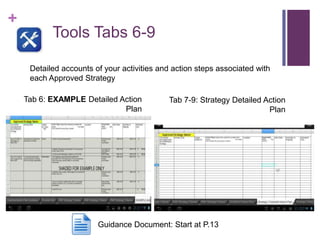
Tab 6: EXAMPLE Detailed Action
Plan
Tab 7-9: Strategy Detailed Action
Plan
Detailed accounts of your activities and action steps associated with
each Approved Strategy
Guidance Document: Start at P.13
+
Action Plan
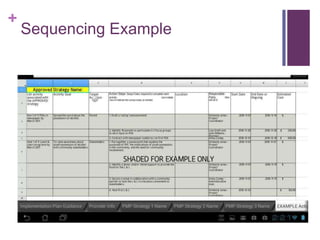
 Activities refer to the main components of a
strategy that will contribute to the achievement of the
project‟s goals and objectives.
 Action Steps are the various tasks necessary to
achieve the activity.
 Although its important to be specific, its not
necessary to list the minute tasks (i.e. make
photocopies).
 Activities and Action Steps must be presented in a
logical sequence.
+
Sequencing Example
+
Action Plan Reminders:
 If a strategy entails multiple cycles
of a particular activity (i.e. Run 4
PSAs), then remember to outline
the specific details for each cycle
of the activity.
 Example: 1st PSA schedule to
run in December, 2nd PSA
schedule to run in January, 3rd to
run in February and 4th to run in
March.
 Since there may be some
difference with each PSA (i.e.
different target populations), then
be sure to clearly outline the
tasks, even if it‟s the same the
next time.
 Clearly communicate the
community
 When working in multiple
communities, sometimes its
feasible to start strategies at
the same time and other
times its better to stagger.
 Example: If the tasks and
anticipated start and end
date are the same for
multiple communities,
 Be REALISTIC regarding
the expected start and end
time to complete an activity
in its entirety.
+
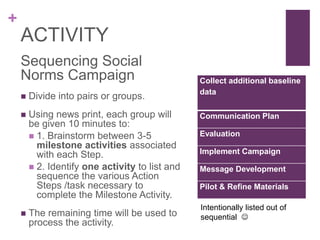
ACTIVITY
Sequencing Social
Norms Campaign
 Divide into pairs or groups.
 Using news print, each group will
be given 10 minutes to:
 1. Brainstorm between 3-5
milestone activities associated
with each Step.
 2. Identify one activity to list and
sequence the various Action
Steps /task necessary to
complete the Milestone Activity.
 The remaining time will be used to
process the activity.
Collect additional baseline
data
Communication Plan
Evaluation
Implement Campaign
Message Development
Pilot & Refine Materials
Intentionally listed out of
sequential 
+
At-A-Glance
Milestone Timeline
Milestones is another
way to think of your main
activities. The completion
of a milestone puts you
one step closer to
completing a cycle of the
strategy or the strategy in
its entirety.
+
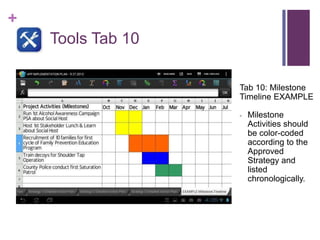
Tools Tab 10
Tab 10: Milestone
Timeline EXAMPLE
- Milestone
Activities should
be color-coded
according to the
Approved
Strategy and
listed
chronologically.
+
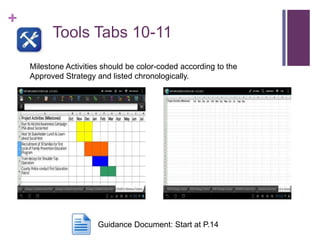
Tools Tabs 10-11
Tab 6: EXAMPLE Detailed Action
Plan
Milestone Activities should be color-coded according to the
Approved Strategy and listed chronologically.
Guidance Document: Start at P.14
+
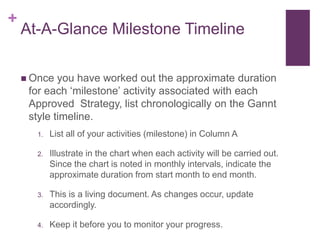
At-A-Glance Milestone Timeline
 Once you have worked out the approximate duration
for each „milestone‟ activity associated with each
Approved Strategy, list chronologically on the Gannt
style timeline.
1. List all of your activities (milestone) in Column A
2. Illustrate in the chart when each activity will be carried out.
Since the chart is noted in monthly intervals, indicate the
approximate duration from start month to end month.
3. This is a living document. As changes occur, update
accordingly.
4. Keep it before you to monitor your progress.
+
Guidelines & Requirements
+
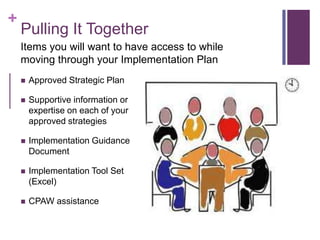
Pulling It Together
 Approved Strategic Plan
 Supportive information or
expertise on each of your
approved strategies
 Implementation Guidance
Document
 Implementation Tool Set
(Excel)
 CPAW assistance
Items you will want to have access to while
moving through your Implementation Plan
+
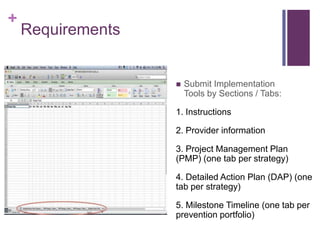
Requirements
 Submit Implementation
Tools by Sections / Tabs:
1. Instructions
2. Provider information
3. Project Management Plan
(PMP) (one tab per strategy)
4. Detailed Action Plan (DAP) (one
tab per strategy)
5. Milestone Timeline (one tab per
prevention portfolio)
+
Guidelines
 You will have 2 weeks (14 days) from
the training date to complete your
Implementation Plan
 Do not change any of the tools or
tool formatting. (This makes the review
process more difficult, so use as is.)
 When complete, clear your SP from
Lunch-Box and upload your
Implementation report.
 If you have a challenge, submit an
ECCO or contact your RPS.
+
Closing Reflections & Evaluation
PLUSES
WISHES

Implementation training updated 9.27.13

  • 1.
    + Alcohol Prevention Project(APP) Implementation Training: Sept 30 – Oct 8 Developed by CITF Coaching team at GSU Breaking New Ground APP Implementation Step 4
  • 2.
  • 3.
    + Special Announcement Starting October1, 2013 GASPS.org gets a refresh
  • 4.
    + Getting started…  Reviewthe prerecorded overview of the Implementation Tools and Guidance Document (GD).  Attend the training or review the slides and materials.  Review with your CPAW.  Use the tools and GD to complete and submit your plan.  Plans will be reviewed by RPS.
  • 5.
    + Training Objectives  Listthe 4 core areas of Implementation in the SPF  Describe the functions and purpose of the APP Implementation Process  Apply the 3 parts of the Implementation Plan Participants will be able to….
  • 6.
    + Agenda I. Provide anoverview of Implementation within the context of the SPF Steps II. Provide an overview of the APP Implementation‟s approach and steps III. Review APP Implementation tools IV. Review Implementation guidelines & requirements During today‟s training we will…
  • 7.
    + Strategic Prevention Framework First introducedto States and Territories as a grant funding stream for prevention Georgia was a SPF-SIG state in 2005 – 2009 (Cohort III) SPF lives on in an expanding list of grant systems: Federal HHS, private, and military The state of Georgia is one of the first states to align block grant with the framework.
  • 8.
    + Guiding Principals of theSPF  Data drives decisions  Comprehensive approach using a public health model  System is developed or strengthened in a manner that works towards outcomes  Emphasis on outcome-based substance abuse prevention  What it means to be “strategic”  How the Strategic Prevention Framework will guide your work to produce outcomes
  • 9.
    + Overview of theAPP Implementation Approach
  • 10.
  • 11.
    + Implementation Glossary Fun Instructions:Pair up with another Provider to complete the crossword puzzle handout.
  • 12.
    + What is an implementation plan? Managementtool  Illustrate critical steps in starting a project  Guide or map A guide for developing the program  Proactive vs. reactive  Identify challenges early in the process
  • 13.
    + Why is animplementation plan important?  Creates time and a process for thinking through critical components.  Allows for anticipation of challenges  Proactive vs. Reactive  Critical steps detailed in advance  Common understanding among staff and collaborators (i.e. CPAW, Partners)  Regardless of level of involvement or development, everyone understands the goal of the program  Identify and resolve discrepancies before they become costly  Time spent on implementing quality plan and not putting out fires
  • 14.
    + How will theimplementation plan be used? Charts the course from thought to action LIVING DOCUMENT  Should be reviewed at staff/CPAW meetings  Should be revised as necessary
  • 15.
    + APP Implementation Plan Thereare 11 tabs included in the APP Implementation Excel Workbook. Each of the BOLDED sections will be discussed in detail. Tab 1 – Basic Instructions Tab 2 – Provider Info & MOU Tracker Tab 3-5 – Project Management Plan Tab 6 – Examples for the Action Plan  Tab 7-9 – Detailed Action Plan  Tab 10 – Example Milestone Timeline  Tab 11 – At-A-Glance Milestone Timeline
  • 16.
    + Tools Tab 1 Tab1: Tool Instructions - Provides basic instructions on how to complete the tool set.
  • 17.
    + Tools Tab 2 Tab2: Provider Information - Provider populates information and can track MOUs Guidance Document: P.6
  • 18.
    + Project Management Plan Scope isthe definition of what the project is supposed to accomplish and the budget (of time and money) that has been allocated to achieve these objectives.
  • 19.
    + Tools Tabs 3- 5 Tab 3 – 5: Project Management - In this section, providers will fill out information regarding their strategies, staffing, recruitment, and community readiness. Guidance Document: Start on P.6
  • 20.
    + Project Management Plan(con’t)  Staffing  Recruitment  Retention  Training(s) – Best Practice  Target Population  Recruitment  Retention  Community Readiness  Planned Activities to increase readiness around APPROVED Prevention Portfolio Strategies
  • 21.
    KEY COMPONENTS OF THEPMP BRIEF EXPLANATION EXAMPLES Program Implementation Indicators This represents benchmarks that need to be carefully considered prior to implementation. Staff to be hired Participant Recruitment Monitoring Fidelity How data will be collected How will this be implemented? Discuss the plan for achieving each indicator, per strategy. Monitoring Tools Discuss the mechanism that will be used to track each indicator. Hiring contracts Signed enrollment & permission slips Quality Assurance Observation Forms Information system to track timely submission of data collection tools Achievement Measure Discuss what measure will be used to demonstrate achievement of the indicator/benchmark. Successful hiring of qualified professionals 95% of enrolled participants attend the program Participant evaluation of program implementation % of timely submission of data collection instruments
  • 22.
    + Project Management Plan: Monitoring& Achievement Measures  Examples of Monitoring Tools  Monthly Reports  Meeting minutes  Attendance Sheets  Pre/Post Tests  Satisfaction Surveys  Staff Observations  Teach-back Peer Evaluations  Referrals  Screening Forms  MOUs  Examples of Achievement Measures  Participant Participation Records  Staff Retained throughout the year  Compliance  % of Stakeholder Buy-In  Attendance at Training
  • 23.
    + Project Management Plan(con’t)  PRE - EVALUATION PLAN CONSIDERATION (not to be addressed at this time)  Fidelity  Evaluation & Data Collection
  • 24.
    + ACTIVITY Scope Scenarios  Pairup with another participant to review one of two Scope Scenarios and to process the questions at the end.  After 7 minutes, the two scenarios will be processed together as a group.
  • 25.
    + ACTIVITY (optional) Recruitment &Retention Roundtables  Divide into two groups.  Each group is given a newsprint and asked to discuss strategies related to recruitment or retention.  After 6 minutes, the groups will swap newsprints and attempt to generate additional strategies related to the topic.  Newsprints will be posted on the walls for everyone to see.
  • 26.
    + The Action Plan Actionplans lay out how each component of a strategy will be carried out. It should specify:  What you are doing?  Why you are doing it?  How you plan to do it?  Who will be involved?  Where will it take place (as applicable)?  When will it take place (i.e. start and end)?
  • 27.
    + Tools Tabs 6-9 Tab6: EXAMPLE Detailed Action Plan Tab 7-9: Strategy Detailed Action Plan Detailed accounts of your activities and action steps associated with each Approved Strategy Guidance Document: Start at P.13
  • 28.
    + Action Plan  Activitiesrefer to the main components of a strategy that will contribute to the achievement of the project‟s goals and objectives.  Action Steps are the various tasks necessary to achieve the activity.  Although its important to be specific, its not necessary to list the minute tasks (i.e. make photocopies).  Activities and Action Steps must be presented in a logical sequence.
  • 29.
  • 30.
    + Action Plan Reminders: If a strategy entails multiple cycles of a particular activity (i.e. Run 4 PSAs), then remember to outline the specific details for each cycle of the activity.  Example: 1st PSA schedule to run in December, 2nd PSA schedule to run in January, 3rd to run in February and 4th to run in March.  Since there may be some difference with each PSA (i.e. different target populations), then be sure to clearly outline the tasks, even if it‟s the same the next time.  Clearly communicate the community  When working in multiple communities, sometimes its feasible to start strategies at the same time and other times its better to stagger.  Example: If the tasks and anticipated start and end date are the same for multiple communities,  Be REALISTIC regarding the expected start and end time to complete an activity in its entirety.
  • 31.
    + ACTIVITY Sequencing Social Norms Campaign Divide into pairs or groups.  Using news print, each group will be given 10 minutes to:  1. Brainstorm between 3-5 milestone activities associated with each Step.  2. Identify one activity to list and sequence the various Action Steps /task necessary to complete the Milestone Activity.  The remaining time will be used to process the activity. Collect additional baseline data Communication Plan Evaluation Implement Campaign Message Development Pilot & Refine Materials Intentionally listed out of sequential 
  • 32.
    + At-A-Glance Milestone Timeline Milestones isanother way to think of your main activities. The completion of a milestone puts you one step closer to completing a cycle of the strategy or the strategy in its entirety.
  • 33.
    + Tools Tab 10 Tab10: Milestone Timeline EXAMPLE - Milestone Activities should be color-coded according to the Approved Strategy and listed chronologically.
  • 34.
    + Tools Tabs 10-11 Tab6: EXAMPLE Detailed Action Plan Milestone Activities should be color-coded according to the Approved Strategy and listed chronologically. Guidance Document: Start at P.14
  • 35.
    + At-A-Glance Milestone Timeline Once you have worked out the approximate duration for each „milestone‟ activity associated with each Approved Strategy, list chronologically on the Gannt style timeline. 1. List all of your activities (milestone) in Column A 2. Illustrate in the chart when each activity will be carried out. Since the chart is noted in monthly intervals, indicate the approximate duration from start month to end month. 3. This is a living document. As changes occur, update accordingly. 4. Keep it before you to monitor your progress.
  • 36.
  • 37.
    + Pulling It Together Approved Strategic Plan  Supportive information or expertise on each of your approved strategies  Implementation Guidance Document  Implementation Tool Set (Excel)  CPAW assistance Items you will want to have access to while moving through your Implementation Plan
  • 38.
    + Requirements  Submit Implementation Toolsby Sections / Tabs: 1. Instructions 2. Provider information 3. Project Management Plan (PMP) (one tab per strategy) 4. Detailed Action Plan (DAP) (one tab per strategy) 5. Milestone Timeline (one tab per prevention portfolio)
  • 39.
    + Guidelines  You willhave 2 weeks (14 days) from the training date to complete your Implementation Plan  Do not change any of the tools or tool formatting. (This makes the review process more difficult, so use as is.)  When complete, clear your SP from Lunch-Box and upload your Implementation report.  If you have a challenge, submit an ECCO or contact your RPS.
  • 41.
    + Closing Reflections &Evaluation PLUSES WISHES

Editor's Notes

  • #19 Dosage & Frequency – Take 1 vitamin three times a day for 10 days.