Azure security basics
Stanislav Lebedenko
senior software developer @Sigma Software
Security overview
Security components
01 | Data security at rest and in transit
02 | Identity provider
03 | Network isolation
04 | Hybrid cloud components - VPN and Express Route
05 | Logging and Monitoring
06 | Third party security solutions
07 | Shared security model
Before we start,
know your
application access
patterns.
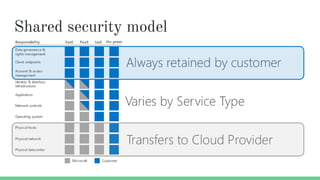
Shared security model
Azure security services
01 | Azure Security Center
02 | Azure Key Vault
03 | Microsoft Identity Platform
04 | Azure storage and disk encryption
05 | Azure Firewall and Web Application Firewall
06 | Virtual networks and Network Security Groups (NSG)
07 | Azure DDoS protection
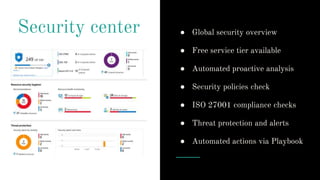
Security center ● Global security overview
● Free service tier available
● Automated proactive analysis
● Security policies check
● ISO 27001 compliance checks
● Threat protection and alerts
● Automated actions via Playbook
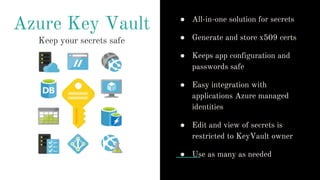
Azure Key Vault
Keep your secrets safe
● All-in-one solution for secrets
● Generate and store x509 certs
● Keeps app configuration and
passwords safe
● Easy integration with
applications Azure managed
identities
● Edit and view of secrets is
restricted to KeyVault owner
● Use as many as needed
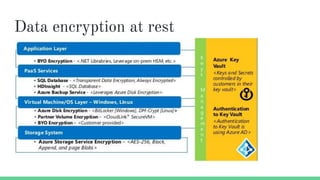
Data encryption at rest
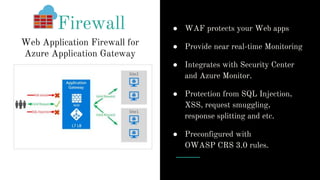
Firewall ● WAF protects your Web apps
● Provide near real-time Monitoring
● Integrates with Security Center
and Azure Monitor.
● Protection from SQL Injection,
XSS, request smuggling,
response splitting and etc.
● Preconfigured with
OWASP CRS 3.0 rules.
Web Application Firewall for
Azure Application Gateway
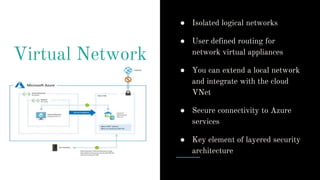
Virtual Network
● Isolated logical networks
● User defined routing for
network virtual appliances
● You can extend a local network
and integrate with the cloud
VNet
● Secure connectivity to Azure
services
● Key element of layered security
architecture
Setup security
alerts and test
them. Or else...
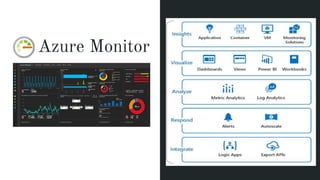
Azure Monitor
All-in-one solution
High level overview
Resource group insights
Log Analytics workspaces
Security & ISO 27001 checks
Network performance
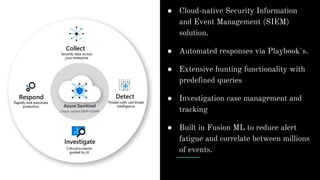
● Cloud-native Security Information
and Event Management (SIEM)
solution.
● Automated responses via Playbook`s.
● Extensive hunting functionality with
predefined queries
● Investigation case management and
tracking
● Built in Fusion ML to reduce alert
fatigue and correlate between millions
of events.
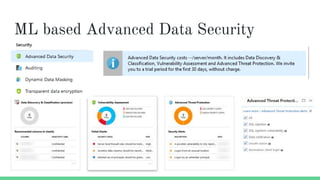
ML based Advanced Data Security
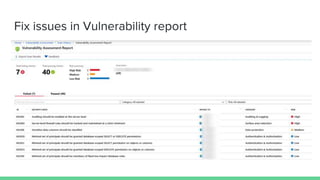
Fix issues in Vulnerability report
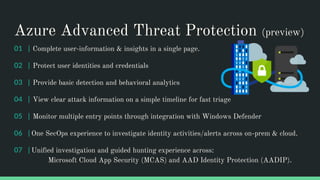
Azure Advanced Threat Protection (preview)
01 | Complete user-information & insights in a single page.
02 | Protect user identities and credentials
03 | Provide basic detection and behavioral analytics
04 | View clear attack information on a simple timeline for fast triage
05 | Monitor multiple entry points through integration with Windows Defender
06 | One SecOps experience to investigate identity activities/alerts across on-prem & cloud.
07 | Unified investigation and guided hunting experience across:
Microsoft Cloud App Security (MCAS) and AAD Identity Protection (AADIP).
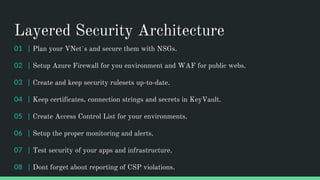
Layered Security Architecture
01 | Plan your VNet`s and secure them with NSGs.
02 | Setup Azure Firewall for you environment and WAF for public webs.
03 | Create and keep security rulesets up-to-date.
04 | Keep certificates, connection strings and secrets in KeyVault.
05 | Create Access Control List for your environments.
06 | Setup the proper monitoring and alerts.
07 | Test security of your apps and infrastructure.
08 | Dont forget about reporting of CSP violations.
Identity
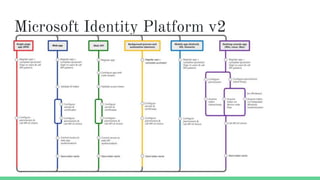
Microsoft Identity Platform v2
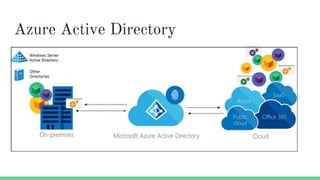
Azure Active Directory
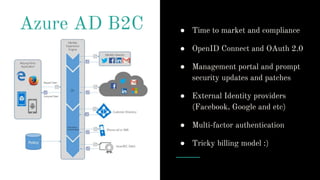
Azure AD B2C ● Time to market and compliance
● OpenID Connect and OAuth 2.0
● Management portal and prompt
security updates and patches
● External Identity providers
(Facebook, Google and etc)
● Multi-factor authentication
● Tricky billing model :)
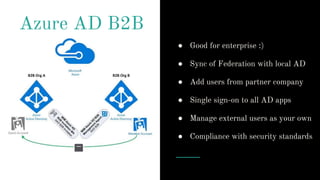
Azure AD B2B
● Good for enterprise :)
● Sync of Federation with local AD
● Add users from partner company
● Single sign-on to all AD apps
● Manage external users as your own
● Compliance with security standards
Identity Server
4
● Fully customized solution :)
● Manual patching of server and
client applications
● Great community
● Ability to deeply understand
OIDC and OAuth 2.0 flows
● Steep learning curve
Identity summary
01 | Choose wisely your Identity provider
02 | OIDC certified Microsoft Identity platform v2 is an option
03 | Identity server 4 as alternative fully customizable solution
04 | Use classic Azure AD for enterprise applications.
05 | Isolate and secure your identity provider storage
06 | Setup proper monitoring and loggins for SecOps
Security breach
What happens
when there is a
security breach?
Security incident response process
01 | Detect. First indication of a potential incident.
02 | Assess. Responsible team member assesses the impact and severity of the event
And escalate it to the security response team.
03 | Diagnose. Security team conduct investigation, identify containment, mitigation and
workaround strategies. Start Customer incident notification process if needed.
04 | Stabilize and Recover. Team creates recovery plan to mitigate the issue.
05 | Close and Post-mortem. Team creates a document that outlines the details of the
incident, with the intention to revise policies and procedures to prevent a recurrence of
the event.
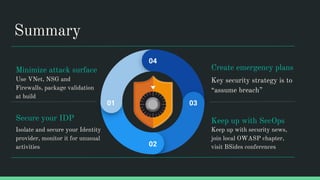
Summary
Use VNet, NSG and
Firewalls, package validation
at build
Secure your IDP
Isolate and secure your Identity
provider, monitor it for unusual
activities
Create emergency plans
Key security strategy is to
“assume breach”
Keep up with SecOps
Keep up with security news,
join local OWASP chapter,
visit BSides conferences
01
02
03
04
Minimize attack surface
Questions?

Azure security basics

  • 1.
    Azure security basics StanislavLebedenko senior software developer @Sigma Software
  • 2.
  • 3.
    Security components 01 |Data security at rest and in transit 02 | Identity provider 03 | Network isolation 04 | Hybrid cloud components - VPN and Express Route 05 | Logging and Monitoring 06 | Third party security solutions 07 | Shared security model
  • 4.
    Before we start, knowyour application access patterns.
  • 5.
  • 6.
    Azure security services 01| Azure Security Center 02 | Azure Key Vault 03 | Microsoft Identity Platform 04 | Azure storage and disk encryption 05 | Azure Firewall and Web Application Firewall 06 | Virtual networks and Network Security Groups (NSG) 07 | Azure DDoS protection
  • 7.
    Security center ●Global security overview ● Free service tier available ● Automated proactive analysis ● Security policies check ● ISO 27001 compliance checks ● Threat protection and alerts ● Automated actions via Playbook
  • 8.
    Azure Key Vault Keepyour secrets safe ● All-in-one solution for secrets ● Generate and store x509 certs ● Keeps app configuration and passwords safe ● Easy integration with applications Azure managed identities ● Edit and view of secrets is restricted to KeyVault owner ● Use as many as needed
  • 9.
  • 10.
    Firewall ● WAFprotects your Web apps ● Provide near real-time Monitoring ● Integrates with Security Center and Azure Monitor. ● Protection from SQL Injection, XSS, request smuggling, response splitting and etc. ● Preconfigured with OWASP CRS 3.0 rules. Web Application Firewall for Azure Application Gateway
  • 11.
    Virtual Network ● Isolatedlogical networks ● User defined routing for network virtual appliances ● You can extend a local network and integrate with the cloud VNet ● Secure connectivity to Azure services ● Key element of layered security architecture
  • 13.
    Setup security alerts andtest them. Or else...
  • 14.
    Azure Monitor All-in-one solution Highlevel overview Resource group insights Log Analytics workspaces Security & ISO 27001 checks Network performance
  • 15.
    ● Cloud-native SecurityInformation and Event Management (SIEM) solution. ● Automated responses via Playbook`s. ● Extensive hunting functionality with predefined queries ● Investigation case management and tracking ● Built in Fusion ML to reduce alert fatigue and correlate between millions of events.
  • 16.
    ML based AdvancedData Security
  • 17.
    Fix issues inVulnerability report
  • 18.
    Azure Advanced ThreatProtection (preview) 01 | Complete user-information & insights in a single page. 02 | Protect user identities and credentials 03 | Provide basic detection and behavioral analytics 04 | View clear attack information on a simple timeline for fast triage 05 | Monitor multiple entry points through integration with Windows Defender 06 | One SecOps experience to investigate identity activities/alerts across on-prem & cloud. 07 | Unified investigation and guided hunting experience across: Microsoft Cloud App Security (MCAS) and AAD Identity Protection (AADIP).
  • 19.
    Layered Security Architecture 01| Plan your VNet`s and secure them with NSGs. 02 | Setup Azure Firewall for you environment and WAF for public webs. 03 | Create and keep security rulesets up-to-date. 04 | Keep certificates, connection strings and secrets in KeyVault. 05 | Create Access Control List for your environments. 06 | Setup the proper monitoring and alerts. 07 | Test security of your apps and infrastructure. 08 | Dont forget about reporting of CSP violations.
  • 20.
  • 21.
  • 22.
  • 23.
    Azure AD B2C● Time to market and compliance ● OpenID Connect and OAuth 2.0 ● Management portal and prompt security updates and patches ● External Identity providers (Facebook, Google and etc) ● Multi-factor authentication ● Tricky billing model :)
  • 24.
    Azure AD B2B ●Good for enterprise :) ● Sync of Federation with local AD ● Add users from partner company ● Single sign-on to all AD apps ● Manage external users as your own ● Compliance with security standards
  • 25.
    Identity Server 4 ● Fullycustomized solution :) ● Manual patching of server and client applications ● Great community ● Ability to deeply understand OIDC and OAuth 2.0 flows ● Steep learning curve
  • 26.
    Identity summary 01 |Choose wisely your Identity provider 02 | OIDC certified Microsoft Identity platform v2 is an option 03 | Identity server 4 as alternative fully customizable solution 04 | Use classic Azure AD for enterprise applications. 05 | Isolate and secure your identity provider storage 06 | Setup proper monitoring and loggins for SecOps
  • 27.
  • 28.
    What happens when thereis a security breach?
  • 29.
    Security incident responseprocess 01 | Detect. First indication of a potential incident. 02 | Assess. Responsible team member assesses the impact and severity of the event And escalate it to the security response team. 03 | Diagnose. Security team conduct investigation, identify containment, mitigation and workaround strategies. Start Customer incident notification process if needed. 04 | Stabilize and Recover. Team creates recovery plan to mitigate the issue. 05 | Close and Post-mortem. Team creates a document that outlines the details of the incident, with the intention to revise policies and procedures to prevent a recurrence of the event.
  • 30.
    Summary Use VNet, NSGand Firewalls, package validation at build Secure your IDP Isolate and secure your Identity provider, monitor it for unusual activities Create emergency plans Key security strategy is to “assume breach” Keep up with SecOps Keep up with security news, join local OWASP chapter, visit BSides conferences 01 02 03 04 Minimize attack surface
  • 31.

Editor's Notes

  • #6 It’s important to understand the division of responsibility between you and Microsoft. On-premises, you own the whole stack, but as you move to the cloud, some responsibilities transfer to Microsoft. The following graphic illustrates the areas of responsibility, according to the type of deployment of your stack (software as a service [SaaS], platform as a service [PaaS], infrastructure as a service [IaaS], and on-premises).
  • #11 https://docs.microsoft.com/en-us/azure/application-gateway/waf-overview SQL-injection protection. Cross-site scripting protection. Protection against other common web attacks, such as command injection, HTTP request smuggling, HTTP response splitting, and remote file inclusion. Protection against HTTP protocol violations. Protection against HTTP protocol anomalies, such as missing host user-agent and accept headers. Protection against bots, crawlers, and scanners. Detection of common application misconfigurations (for example, Apache and IIS). Configurable request size limits with lower and upper bounds. Exclusion lists let you omit certain request attributes from a WAF evaluation. A common example is Active Directory-inserted tokens that are used for authentication or password fields.
  • #14 https://docs.microsoft.com/en-us/azure/app-service/environment/app-service-app-service-environment-layered-security Determine the outbound IP address of upstream callers: What is the IP address or addresses of the upstream callers? These addresses will need to be explicitly allowed access in the NSG. Since calls between App Service Environments are considered "Internet" calls, the outbound IP address assigned to each of the three upstream App Service Environments needs to be allowed access in the NSG for the "apiase" subnet. For more information on determining the outbound IP address for apps running in an App Service Environment Will the back-end API app need to call itself? A sometimes overlooked and subtle point is the scenario where the back-end application needs to call itself. If a back-end API application on an App Service Environment needs to call itself, it is also treated as an "Internet" call. In the sample architecture, this requires allowing access from the outbound IP address of the "apiase" App Service Environment as well.
  • #16 https://azure.microsoft.com/en-in/services/azure-sentinel/ https://github.com/Azure/Azure-Sentinel/tree/master/Detections/SecurityEvent sample of detection events. Can only be connected to Standard tier of Security Center, which install agents on endpoints Start preview to understand where Azure is moving https://docs.microsoft.com/en-us/azure/sentinel/connect-fusion Azure Active Directory signins from new locations. New processes observed in last 24 hours Summary of users created using uncommon & undocumented commandline switches powershell downloads Cscript script daily summary breakdown New user agents associated with a clientIP for sharepoint file uploads/downloads
  • #22 https://docs.microsoft.com/en-us/azure/active-directory/develop/v2-overview https://login.microsoftonline.com/common/v2.0/.well-known/openid-configuration
  • #23 https://docs.microsoft.com/en-us/azure/active-directory/develop/v2-overview https://docs.microsoft.com/en-gb/graph/overview https://docs.microsoft.com/en-us/azure/active-directory/develop/azure-ad-endpoint-comparison
  • #24 Self service in Premium only ) Pay as you go licence for B2C MFA and MFA service too.