12.1  Input Devices An  input device  is the hardware that allows users to enter data into a computer and converts the data into a computer-readable form. Examples: Keyboards Pointing devices Scanners Optical readers Microphones Digital cameras Digital video cameras
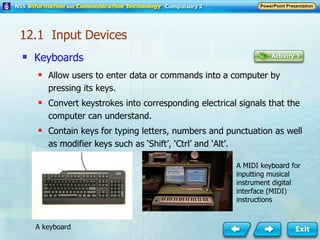
Keyboards Allow users to enter data or commands into a computer by pressing its keys. Convert keystrokes into corresponding electrical signals that the computer can understand. Contain keys for typing letters, numbers and punctuation as well as modifier keys such as ‘Shift’, ‘Ctrl’ and ‘Alt’. 12.1  Input Devices A MIDI keyboard for inputting musical instrument digital interface (MIDI) instructions A keyboard
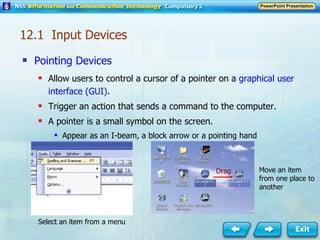
Pointing Devices Allow users to control a cursor of a pointer on a  graphical user interface (GUI) . Trigger an action that sends a command to the computer. A pointer is a small symbol on the screen. Appear as an I-beam, a block arrow or a pointing hand Select an item from a menu Move an item from one place to another Drag 12.1  Input Devices
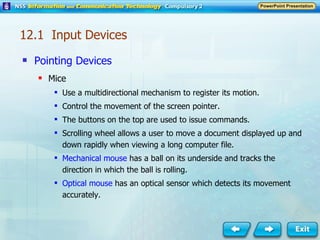
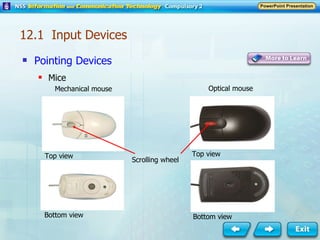
Pointing Devices Mice Use a multidirectional mechanism to register its motion. Control the movement of the screen pointer. The buttons on the top are used to issue commands. Scrolling wheel allows a user to move a document displayed up and down rapidly when viewing a long computer file. Mechanical mouse  has a ball on its underside and tracks the direction in which the ball is rolling. Optical mouse  has an optical sensor which detects its movement accurately. 12.1  Input Devices
Pointing Devices   Mice Mechanical mouse Optical mouse Top view Top view Bottom view Bottom view Scrolling wheel 12.1  Input Devices
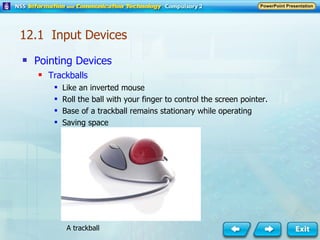
Pointing Devices Trackballs Like an inverted mouse Roll the ball with your finger to control the screen pointer. Base of a trackball remains stationary while operating Saving space A trackball 12.1  Input Devices
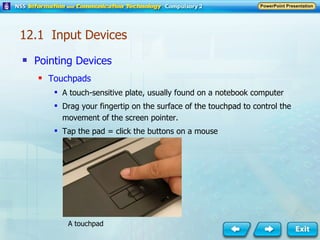
Pointing Devices Touchpads A touch-sensitive plate, usually found on a notebook computer Drag your fingertip on the surface of the touchpad to control the movement of the screen pointer. Tap the pad = click the buttons on a mouse A touchpad 12.1  Input Devices
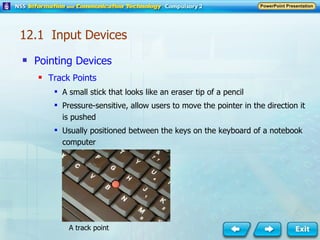
Pointing Devices   Track Points A small stick that looks like an eraser tip of a pencil Pressure-sensitive, allow users to move the pointer in the direction it is pushed Usually positioned between the keys on the keyboard of a notebook computer A track point 12.1  Input Devices
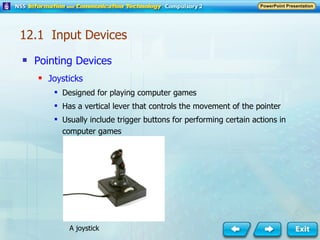
Pointing Devices Joysticks Designed for playing computer games Has a vertical lever that controls the movement of the pointer Usually include trigger buttons for performing certain actions in computer games A joystick 12.1  Input Devices
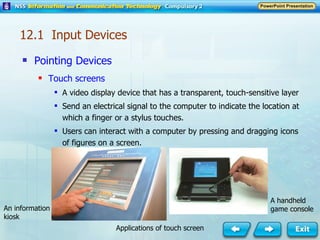
Pointing Devices Touch screens A video display device that has a transparent, touch-sensitive layer Send an electrical signal to the computer to indicate the location at which a finger or a stylus touches. Users can interact with a computer by pressing and dragging icons of figures on a screen. 12.1  Input Devices A handheld game console An information kiosk Applications of touch screen
Pointing Devices Touch screens Widely used in: Information kiosks in airports Libraries Shopping centres Personal digital assistants (PDAs) Smart phones Handheld game consoles Notebook computers 12.1  Input Devices
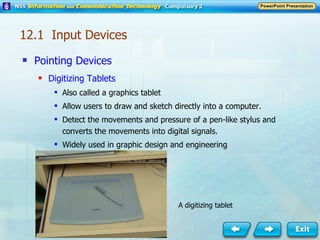
Pointing Devices Digitizing Tablets Also called a graphics tablet Allow users to draw and sketch directly into a computer. Detect the movements and pressure of a pen-like stylus and converts the movements into digital signals. Widely used in graphic design and engineering 12.1  Input Devices A digitizing tablet
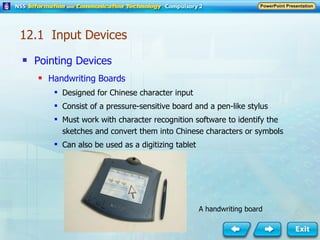
Pointing Devices Handwriting Boards Designed for Chinese character input Consist of a pressure-sensitive board and a pen-like stylus Must work with character recognition software to identify the sketches and convert them into Chinese characters or symbols Can also be used as a digitizing tablet A handwriting board 12.1  Input Devices
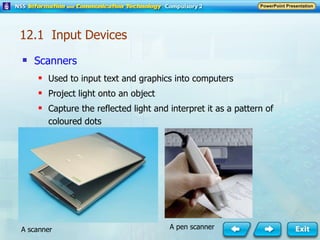
Scanners Used to input text and graphics into computers Project light onto an object Capture the reflected light and interpret it as a pattern of coloured dots A pen scanner A scanner 12.1  Input Devices
Scanners Pattern of dots forms a bitmap image The  resolution , measured in dots per inch (dpi), determines the sharpness of the picture. The colour depth (or bit depth) of a scanner indicates the number of colours used to represent each dot. The accuracy of a scanned image depends on its likeness to the original object. Quality of scanned image is determined by: Resolution Colour depth Accuracy  12.1  Input Devices
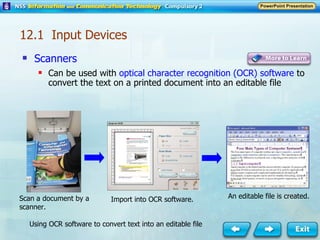
Scanners Can be used with  optical character recognition (OCR) software  to convert the text on a printed document into an editable file Scan a document by a scanner. Import into OCR software. An editable file is created. Using OCR software to convert text into an editable file 12.1  Input Devices
Optical Readers Read predetermined characters, marks or codes and translate them into digital data. Examples: Bar code readers Optical mark readers 12.1  Input Devices
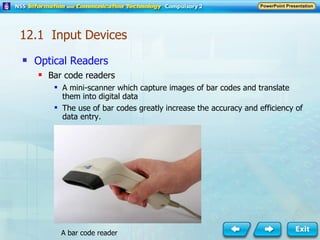
Optical Readers Bar code readers A mini-scanner which capture images of bar codes and translate them into digital data The use of bar codes greatly increase the accuracy and efficiency of data entry. A bar code reader 12.1  Input Devices
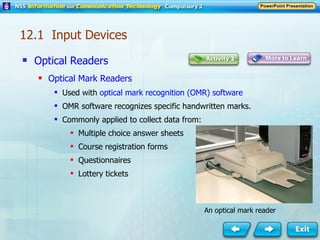
Optical Readers Optical Mark Readers Used with  optical mark recognition (OMR) software OMR software recognizes specific handwritten marks. Commonly applied to collect data from: Multiple choice answer sheets Course registration forms Questionnaires Lottery tickets An optical mark reader 12.1  Input Devices
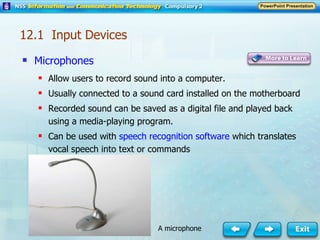
Microphones Allow users to record sound into a computer. Usually connected to a sound card installed on the motherboard Recorded sound can be saved as a digital file and played back using a media-playing program. Can be used with  speech recognition software  which translates vocal speech into text or commands 12.1  Input Devices A microphone
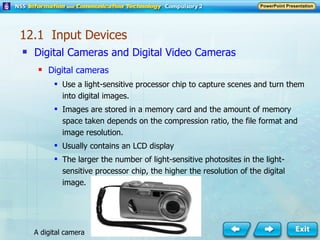
Digital Cameras and Digital Video Cameras Digital cameras Use a light-sensitive processor chip to capture scenes and turn them into digital images. Images are stored in a memory card and the amount of memory space taken depends on the compression ratio, the file format and image resolution. Usually contains an LCD display The larger the number of light-sensitive photosites in the light-sensitive processor chip, the higher the resolution of the digital image. 12.1  Input Devices A digital camera
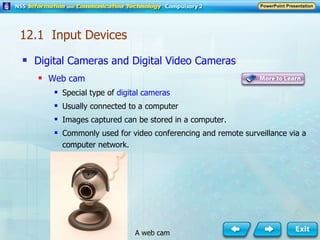
Digital Cameras and Digital Video Cameras Web cam Special type of  digital cameras Usually connected to a computer Images captured can be stored in a computer. Commonly used for video conferencing and remote surveillance via a computer network. 12.1  Input Devices A web cam
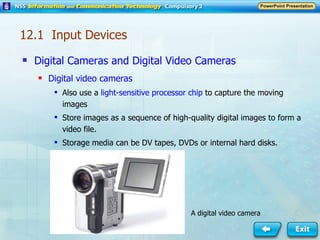
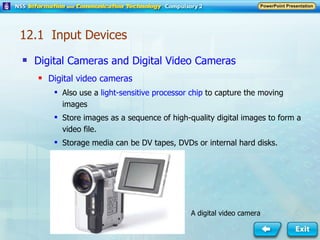
Digital Cameras and Digital Video Cameras Digital video cameras Also use a  light-sensitive processor chip  to capture the moving images Store images as a sequence of high-quality digital images to form a video file. Storage media can be DV tapes, DVDs or internal hard disks. A digital video camera 12.1  Input Devices
12.2  Output Devices Output Devices Hardware that translates computer processes and information into a form that humans can understand Examples: Visual display units Speakers Printers Video projectors
Visual Display Units (VDU) Also called monitor Allow a user to view a computer’s output instantly on a screen Information on the screen is intangible. Examples: Cathode ray tube (CRT) monitors Liquid crystal display (LCD) monitors 12.2  Output Devices
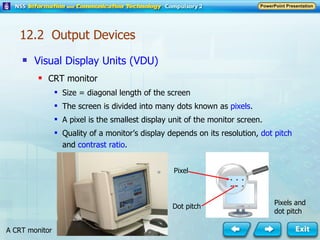
Visual Display Units (VDU) CRT monitor Size = diagonal length of the screen The screen is divided into many dots known as  pixels . A pixel is the smallest display unit of the monitor screen. Quality of a monitor’s display depends on its resolution,  dot pitch  and  contrast ratio . A CRT monitor Pixel  Dot pitch Pixels and dot pitch 12.2  Output Devices
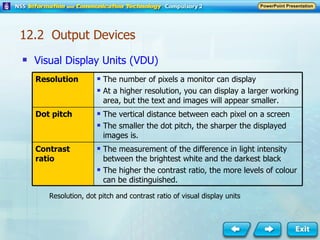
Visual Display Units (VDU) Resolution, dot pitch and contrast ratio of visual display units 12.2  Output Devices Resolution The number of pixels a monitor can display At a higher resolution, you can display a larger working area, but the text and images will appear smaller. Dot pitch The vertical distance between each pixel on a screen The smaller the dot pitch, the sharper the displayed images is. Contrast ratio The measurement of the difference in light intensity between the brightest white and the darkest black The higher the contrast ratio, the more levels of colour can be distinguished.
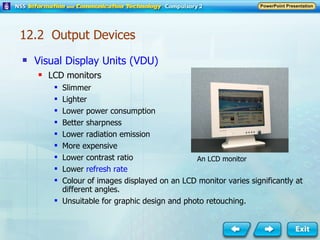
Visual Display Units (VDU) LCD monitors Slimmer Lighter Lower power consumption Better sharpness Lower radiation emission More expensive Lower contrast ratio Lower  refresh rate Colour of images displayed on an LCD monitor varies significantly at different angles. Unsuitable for graphic design and photo retouching. An LCD monitor 12.2  Output Devices
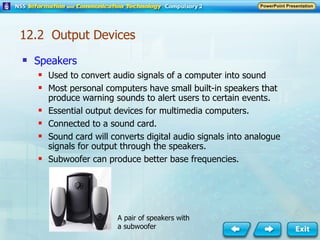
Speakers Used to convert audio signals of a computer into sound Most personal computers have small built-in speakers that produce warning sounds to alert users to certain events. Essential output devices for multimedia computers. Connected to a sound card. Sound card will converts digital audio signals into analogue signals for output through the speakers. Subwoofer can produce better base frequencies. A pair of speakers with a subwoofer 12.2  Output Devices
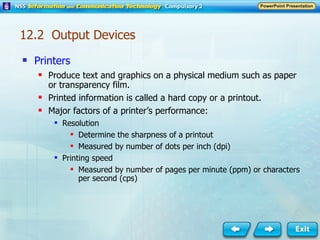
Printers Produce text and graphics on a physical medium such as paper or transparency film. Printed information is called a hard copy or a printout. Major factors of a printer’s performance: Resolution Determine the sharpness of a printout Measured by number of dots per inch (dpi) Printing speed Measured by number of pages per minute (ppm) or characters per second (cps) 12.2  Output Devices
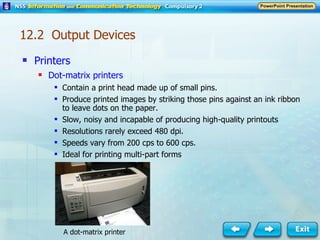
Printers Dot-matrix printers Contain a print head made up of small pins. Produce printed images by striking those pins against an ink ribbon to leave dots on the paper. Slow, noisy and incapable of producing high-quality printouts Resolutions rarely exceed 480 dpi. Speeds vary from 200 cps to 600 cps. Ideal for printing multi-part forms A dot-matrix printer 12.2  Output Devices
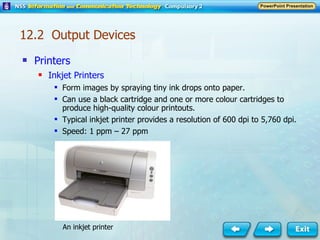
Printers Inkjet Printers Form images by spraying tiny ink drops onto paper. Can use a black cartridge and one or more colour cartridges to produce high-quality colour printouts. Typical inkjet printer provides a resolution of 600 dpi to 5,760 dpi. Speed: 1 ppm – 27 ppm An inkjet printer 12.2  Output Devices
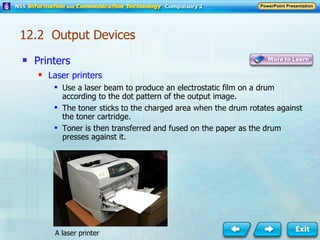
Printers Laser printers Use a laser beam to produce an electrostatic film on a drum according to the dot pattern of the output image. The toner sticks to the charged area when the drum rotates against the toner cartridge. Toner is then transferred and fused on the paper as the drum presses against it. A laser printer 12.2  Output Devices
Printers Laser printers Can produce high resolution printouts at high speed Resolution: 600 dpi – 4,800 dpi Speed: 4 ppm  –  50 ppm Has to store the whole image of the page before the printing process begins More complicated graphics printed at high resolution requires much more memory than a page with simple text only. Colour laser print one page in four passes with four different colour toners. 12.2  Output Devices
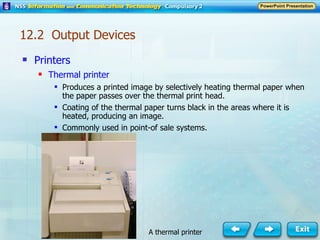
Printers Thermal printer Produces a printed image by selectively heating thermal paper when the paper passes over the thermal print head. Coating of the thermal paper turns black in the areas where it is heated, producing an image. Commonly used in point-of sale systems. A thermal printer 12.2  Output Devices
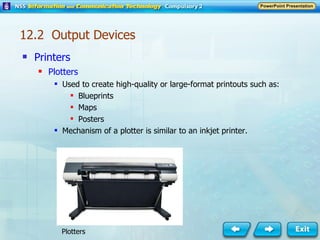
Printers Plotters Used to create high-quality or large-format printouts such as: Blueprints  Maps  Posters  Mechanism of a plotter is similar to an inkjet printer. Plotters 12.2  Output Devices
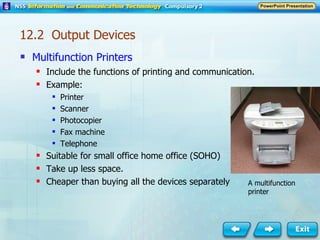
Multifunction Printers Include the functions of printing and communication. Example: Printer Scanner Photocopier Fax machine Telephone Suitable for small office home office (SOHO) Take up less space. Cheaper than buying all the devices separately A multifunction printer 12.2  Output Devices
Video Projectors Project the computer display onto a large screen Use high intensity light bulb and a set of optical lenses Examples: Liquid crystal display (LCD) projectors Digital light processing (DLP) projectors 12.2  Output Devices
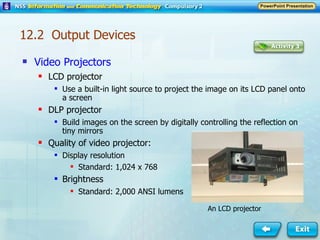
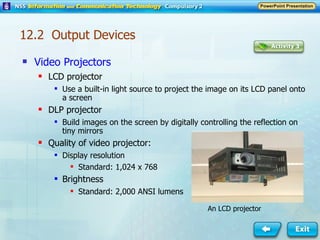
Video Projectors LCD projector Use a built-in light source to project the image on its LCD panel onto a screen DLP projector Build images on the screen by digitally controlling the reflection on tiny mirrors Quality of video projector: Display resolution Standard: 1,024 x 768 Brightness  Standard: 2,000 ANSI lumens An LCD projector 12.2  Output Devices
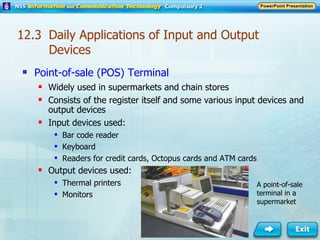
12.3  Daily Applications of Input and Output Devices Point-of-sale (POS) Terminal Widely used in supermarkets and chain stores Consists of the register itself and some various input devices and output devices Input devices used: Bar code reader Keyboard Readers for credit cards, Octopus cards and ATM cards Output devices used: Thermal printers Monitors A point-of-sale terminal in a supermarket
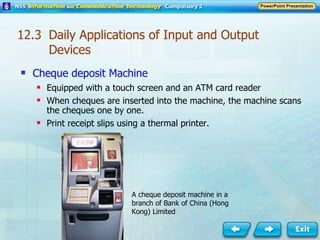
Cheque deposit Machine Equipped with a touch screen and an ATM card reader When cheques are inserted into the machine, the machine scans the cheques one by one. Print receipt slips using a thermal printer. A cheque deposit machine in a branch of Bank of China (Hong Kong) Limited 12.3  Daily Applications of Input and Output Devices
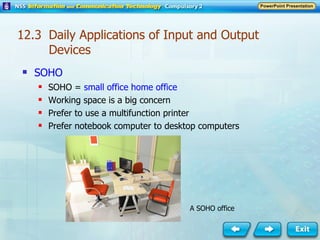
SOHO SOHO =  small office home office Working space is a big concern Prefer to use a multifunction printer Prefer notebook computer to desktop computers A SOHO office 12.3  Daily Applications of Input and Output Devices
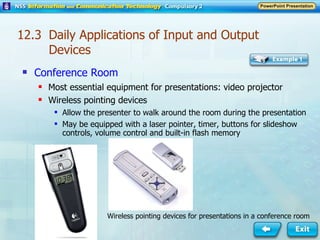
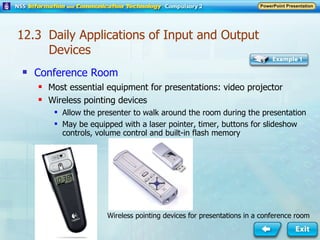
Conference Room Most essential equipment for presentations: video projector Wireless pointing devices  Allow the presenter to walk around the room during the presentation May be equipped with a laser pointer, timer, buttons for slideshow controls, volume control and built-in flash memory Wireless pointing devices for presentations in a conference room 12.3  Daily Applications of Input and Output Devices

ICTCoreCh12

  • 1.
    12.1 InputDevices An input device is the hardware that allows users to enter data into a computer and converts the data into a computer-readable form. Examples: Keyboards Pointing devices Scanners Optical readers Microphones Digital cameras Digital video cameras
  • 2.
    Keyboards Allow usersto enter data or commands into a computer by pressing its keys. Convert keystrokes into corresponding electrical signals that the computer can understand. Contain keys for typing letters, numbers and punctuation as well as modifier keys such as ‘Shift’, ‘Ctrl’ and ‘Alt’. 12.1 Input Devices A MIDI keyboard for inputting musical instrument digital interface (MIDI) instructions A keyboard
  • 3.
    Pointing Devices Allowusers to control a cursor of a pointer on a graphical user interface (GUI) . Trigger an action that sends a command to the computer. A pointer is a small symbol on the screen. Appear as an I-beam, a block arrow or a pointing hand Select an item from a menu Move an item from one place to another Drag 12.1 Input Devices
  • 4.
    Pointing Devices MiceUse a multidirectional mechanism to register its motion. Control the movement of the screen pointer. The buttons on the top are used to issue commands. Scrolling wheel allows a user to move a document displayed up and down rapidly when viewing a long computer file. Mechanical mouse has a ball on its underside and tracks the direction in which the ball is rolling. Optical mouse has an optical sensor which detects its movement accurately. 12.1 Input Devices
  • 5.
    Pointing Devices Mice Mechanical mouse Optical mouse Top view Top view Bottom view Bottom view Scrolling wheel 12.1 Input Devices
  • 6.
    Pointing Devices TrackballsLike an inverted mouse Roll the ball with your finger to control the screen pointer. Base of a trackball remains stationary while operating Saving space A trackball 12.1 Input Devices
  • 7.
    Pointing Devices TouchpadsA touch-sensitive plate, usually found on a notebook computer Drag your fingertip on the surface of the touchpad to control the movement of the screen pointer. Tap the pad = click the buttons on a mouse A touchpad 12.1 Input Devices
  • 8.
    Pointing Devices Track Points A small stick that looks like an eraser tip of a pencil Pressure-sensitive, allow users to move the pointer in the direction it is pushed Usually positioned between the keys on the keyboard of a notebook computer A track point 12.1 Input Devices
  • 9.
    Pointing Devices JoysticksDesigned for playing computer games Has a vertical lever that controls the movement of the pointer Usually include trigger buttons for performing certain actions in computer games A joystick 12.1 Input Devices
  • 10.
    Pointing Devices Touchscreens A video display device that has a transparent, touch-sensitive layer Send an electrical signal to the computer to indicate the location at which a finger or a stylus touches. Users can interact with a computer by pressing and dragging icons of figures on a screen. 12.1 Input Devices A handheld game console An information kiosk Applications of touch screen
  • 11.
    Pointing Devices Touchscreens Widely used in: Information kiosks in airports Libraries Shopping centres Personal digital assistants (PDAs) Smart phones Handheld game consoles Notebook computers 12.1 Input Devices
  • 12.
    Pointing Devices DigitizingTablets Also called a graphics tablet Allow users to draw and sketch directly into a computer. Detect the movements and pressure of a pen-like stylus and converts the movements into digital signals. Widely used in graphic design and engineering 12.1 Input Devices A digitizing tablet
  • 13.
    Pointing Devices HandwritingBoards Designed for Chinese character input Consist of a pressure-sensitive board and a pen-like stylus Must work with character recognition software to identify the sketches and convert them into Chinese characters or symbols Can also be used as a digitizing tablet A handwriting board 12.1 Input Devices
  • 14.
    Scanners Used toinput text and graphics into computers Project light onto an object Capture the reflected light and interpret it as a pattern of coloured dots A pen scanner A scanner 12.1 Input Devices
  • 15.
    Scanners Pattern ofdots forms a bitmap image The resolution , measured in dots per inch (dpi), determines the sharpness of the picture. The colour depth (or bit depth) of a scanner indicates the number of colours used to represent each dot. The accuracy of a scanned image depends on its likeness to the original object. Quality of scanned image is determined by: Resolution Colour depth Accuracy 12.1 Input Devices
  • 16.
    Scanners Can beused with optical character recognition (OCR) software to convert the text on a printed document into an editable file Scan a document by a scanner. Import into OCR software. An editable file is created. Using OCR software to convert text into an editable file 12.1 Input Devices
  • 17.
    Optical Readers Readpredetermined characters, marks or codes and translate them into digital data. Examples: Bar code readers Optical mark readers 12.1 Input Devices
  • 18.
    Optical Readers Barcode readers A mini-scanner which capture images of bar codes and translate them into digital data The use of bar codes greatly increase the accuracy and efficiency of data entry. A bar code reader 12.1 Input Devices
  • 19.
    Optical Readers OpticalMark Readers Used with optical mark recognition (OMR) software OMR software recognizes specific handwritten marks. Commonly applied to collect data from: Multiple choice answer sheets Course registration forms Questionnaires Lottery tickets An optical mark reader 12.1 Input Devices
  • 20.
    Microphones Allow usersto record sound into a computer. Usually connected to a sound card installed on the motherboard Recorded sound can be saved as a digital file and played back using a media-playing program. Can be used with speech recognition software which translates vocal speech into text or commands 12.1 Input Devices A microphone
  • 21.
    Digital Cameras andDigital Video Cameras Digital cameras Use a light-sensitive processor chip to capture scenes and turn them into digital images. Images are stored in a memory card and the amount of memory space taken depends on the compression ratio, the file format and image resolution. Usually contains an LCD display The larger the number of light-sensitive photosites in the light-sensitive processor chip, the higher the resolution of the digital image. 12.1 Input Devices A digital camera
  • 22.
    Digital Cameras andDigital Video Cameras Web cam Special type of digital cameras Usually connected to a computer Images captured can be stored in a computer. Commonly used for video conferencing and remote surveillance via a computer network. 12.1 Input Devices A web cam
  • 23.
    Digital Cameras andDigital Video Cameras Digital video cameras Also use a light-sensitive processor chip to capture the moving images Store images as a sequence of high-quality digital images to form a video file. Storage media can be DV tapes, DVDs or internal hard disks. A digital video camera 12.1 Input Devices
  • 24.
    Digital Cameras andDigital Video Cameras Digital video cameras Also use a light-sensitive processor chip to capture the moving images Store images as a sequence of high-quality digital images to form a video file. Storage media can be DV tapes, DVDs or internal hard disks. A digital video camera 12.1 Input Devices
  • 25.
    12.2 OutputDevices Output Devices Hardware that translates computer processes and information into a form that humans can understand Examples: Visual display units Speakers Printers Video projectors
  • 26.
    Visual Display Units(VDU) Also called monitor Allow a user to view a computer’s output instantly on a screen Information on the screen is intangible. Examples: Cathode ray tube (CRT) monitors Liquid crystal display (LCD) monitors 12.2 Output Devices
  • 27.
    Visual Display Units(VDU) CRT monitor Size = diagonal length of the screen The screen is divided into many dots known as pixels . A pixel is the smallest display unit of the monitor screen. Quality of a monitor’s display depends on its resolution, dot pitch and contrast ratio . A CRT monitor Pixel Dot pitch Pixels and dot pitch 12.2 Output Devices
  • 28.
    Visual Display Units(VDU) Resolution, dot pitch and contrast ratio of visual display units 12.2 Output Devices Resolution The number of pixels a monitor can display At a higher resolution, you can display a larger working area, but the text and images will appear smaller. Dot pitch The vertical distance between each pixel on a screen The smaller the dot pitch, the sharper the displayed images is. Contrast ratio The measurement of the difference in light intensity between the brightest white and the darkest black The higher the contrast ratio, the more levels of colour can be distinguished.
  • 29.
    Visual Display Units(VDU) LCD monitors Slimmer Lighter Lower power consumption Better sharpness Lower radiation emission More expensive Lower contrast ratio Lower refresh rate Colour of images displayed on an LCD monitor varies significantly at different angles. Unsuitable for graphic design and photo retouching. An LCD monitor 12.2 Output Devices
  • 30.
    Speakers Used toconvert audio signals of a computer into sound Most personal computers have small built-in speakers that produce warning sounds to alert users to certain events. Essential output devices for multimedia computers. Connected to a sound card. Sound card will converts digital audio signals into analogue signals for output through the speakers. Subwoofer can produce better base frequencies. A pair of speakers with a subwoofer 12.2 Output Devices
  • 31.
    Printers Produce textand graphics on a physical medium such as paper or transparency film. Printed information is called a hard copy or a printout. Major factors of a printer’s performance: Resolution Determine the sharpness of a printout Measured by number of dots per inch (dpi) Printing speed Measured by number of pages per minute (ppm) or characters per second (cps) 12.2 Output Devices
  • 32.
    Printers Dot-matrix printersContain a print head made up of small pins. Produce printed images by striking those pins against an ink ribbon to leave dots on the paper. Slow, noisy and incapable of producing high-quality printouts Resolutions rarely exceed 480 dpi. Speeds vary from 200 cps to 600 cps. Ideal for printing multi-part forms A dot-matrix printer 12.2 Output Devices
  • 33.
    Printers Inkjet PrintersForm images by spraying tiny ink drops onto paper. Can use a black cartridge and one or more colour cartridges to produce high-quality colour printouts. Typical inkjet printer provides a resolution of 600 dpi to 5,760 dpi. Speed: 1 ppm – 27 ppm An inkjet printer 12.2 Output Devices
  • 34.
    Printers Laser printersUse a laser beam to produce an electrostatic film on a drum according to the dot pattern of the output image. The toner sticks to the charged area when the drum rotates against the toner cartridge. Toner is then transferred and fused on the paper as the drum presses against it. A laser printer 12.2 Output Devices
  • 35.
    Printers Laser printersCan produce high resolution printouts at high speed Resolution: 600 dpi – 4,800 dpi Speed: 4 ppm – 50 ppm Has to store the whole image of the page before the printing process begins More complicated graphics printed at high resolution requires much more memory than a page with simple text only. Colour laser print one page in four passes with four different colour toners. 12.2 Output Devices
  • 36.
    Printers Thermal printerProduces a printed image by selectively heating thermal paper when the paper passes over the thermal print head. Coating of the thermal paper turns black in the areas where it is heated, producing an image. Commonly used in point-of sale systems. A thermal printer 12.2 Output Devices
  • 37.
    Printers Plotters Usedto create high-quality or large-format printouts such as: Blueprints Maps Posters Mechanism of a plotter is similar to an inkjet printer. Plotters 12.2 Output Devices
  • 38.
    Multifunction Printers Includethe functions of printing and communication. Example: Printer Scanner Photocopier Fax machine Telephone Suitable for small office home office (SOHO) Take up less space. Cheaper than buying all the devices separately A multifunction printer 12.2 Output Devices
  • 39.
    Video Projectors Projectthe computer display onto a large screen Use high intensity light bulb and a set of optical lenses Examples: Liquid crystal display (LCD) projectors Digital light processing (DLP) projectors 12.2 Output Devices
  • 40.
    Video Projectors LCDprojector Use a built-in light source to project the image on its LCD panel onto a screen DLP projector Build images on the screen by digitally controlling the reflection on tiny mirrors Quality of video projector: Display resolution Standard: 1,024 x 768 Brightness Standard: 2,000 ANSI lumens An LCD projector 12.2 Output Devices
  • 41.
    Video Projectors LCDprojector Use a built-in light source to project the image on its LCD panel onto a screen DLP projector Build images on the screen by digitally controlling the reflection on tiny mirrors Quality of video projector: Display resolution Standard: 1,024 x 768 Brightness Standard: 2,000 ANSI lumens An LCD projector 12.2 Output Devices
  • 42.
    12.3 DailyApplications of Input and Output Devices Point-of-sale (POS) Terminal Widely used in supermarkets and chain stores Consists of the register itself and some various input devices and output devices Input devices used: Bar code reader Keyboard Readers for credit cards, Octopus cards and ATM cards Output devices used: Thermal printers Monitors A point-of-sale terminal in a supermarket
  • 43.
    Cheque deposit MachineEquipped with a touch screen and an ATM card reader When cheques are inserted into the machine, the machine scans the cheques one by one. Print receipt slips using a thermal printer. A cheque deposit machine in a branch of Bank of China (Hong Kong) Limited 12.3 Daily Applications of Input and Output Devices
  • 44.
    SOHO SOHO = small office home office Working space is a big concern Prefer to use a multifunction printer Prefer notebook computer to desktop computers A SOHO office 12.3 Daily Applications of Input and Output Devices
  • 45.
    Conference Room Mostessential equipment for presentations: video projector Wireless pointing devices Allow the presenter to walk around the room during the presentation May be equipped with a laser pointer, timer, buttons for slideshow controls, volume control and built-in flash memory Wireless pointing devices for presentations in a conference room 12.3 Daily Applications of Input and Output Devices
  • 46.
    Conference Room Mostessential equipment for presentations: video projector Wireless pointing devices Allow the presenter to walk around the room during the presentation May be equipped with a laser pointer, timer, buttons for slideshow controls, volume control and built-in flash memory Wireless pointing devices for presentations in a conference room 12.3 Daily Applications of Input and Output Devices