DELHI TEACHERS’ TRAINING
COLLEGE
DEENPUR, NAJAFGARH, NEW DELHI – 110043
(Affiliated to G.G.S.I.P. University, Delhi – 110075)
B.Ed. 2015 – 2017
Semester - II
Submitted By:-
Swati Ghansela
Enrollment No.- 05940202115
Roll No.- 59
B.Ed-154
Critical Understanding
of ICT
1. Explore different Sources
of Data, Read and Make
meaning
DATA
• Data is facts and figures from which conclusions can
be drawn.
USES:-
• Data can provide a snapshot of what students know,
what they should know, and what can be done to meet
their academic needs.
• Give information about particular group
• Data can be visualized using graphs and images
• Data can be used for research purposes.
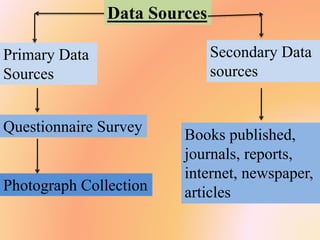
Data Sources
Primary Data
Sources
Secondary Data
sources
Questionnaire Survey
Photograph Collection
Books published,
journals, reports,
internet, newspaper,
articles
Name of Student Nisha Saini Father’s Name Dinesh Saini
Roll No. B0725 Mother’s Name Bimla Saini
Class 6-R Blood Group B+
D.O.B 22-Sep-2003 Specific
Ailment, If any
None
Part-1:- Scholastic Areas
Subjects FA-1 (10.0)
Grade
English B1
Hindi A2
Maths A2
Science A2
Social A1
Sanskrit A1
Report Card
Minor
Subjects
Grade
Comput
er
C
G.K B
Moral
Science
B
Drawing C
Example of Data
Part-2(A):- Co-Scholastic Areas
Life Skills Grade
Self Awareness A
Problem Solving A
Decision Making A
Critical Thinking A
Interpersonal
relationships
A
Life Skills Grade
Effective
communication
A
Empathy A
Managing
Emotions
A
Dealing with
Stress
A
2(B) Work Education A
2(C) Visual &
Performing Arts
B
Attitude towards Grade
Teachers A
School-mates A
School programmes
and environment
A
Value systems A
2(D):- Attitudes &
Values
Part-3(A):- Co- Scholastic Activities
Activities Grade
Literary & Creative skills B
Scientific skills B
3(B):- Health & Physical Education
Activities Grade
Sports/ Indigenous sports B
Yoga B
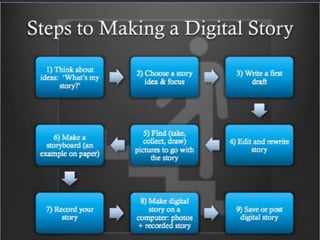
My Digital Story
Video
3.Analysing a Lesson,
Identifying the need for
ICT
Multimedia Lesson Plan
• Multimedia lesson plan refers to the
involvement and using multimedia
equipments like computer, TV screen, for
educational purpose.
• Evaluating various software used in
multimedia projects and using statistical
shapes like bar graphs, pie chart, tables
etc for the finding.
Use of ICT
• Softwares like PowerPoint, ms word,
excel plays and important role in
multimedia lesson plan
• Use of internet t make PPT and research
• Software to operate hardware like
projector
• Multimedia lesson seems impossible
without a desktop or computer, because
these are most important equipment
needed for multimedia lesson plan.
Resources used in Multimedia lesson
plan
• Computer with presentation software such as
PowerPoint
• Desktop publishing software such as
Microsoft publisher
• Word processing software such as word
• Spreadsheet software such as excel
• LCD projector
• Internet access
4. Preparing and
transacting a lesson
infusing ICT resources
MENSURATION
Multimedia Lesson Plan
Contents
Introduction
Important Terms
Figures
Measuring Plain Figures
Measuring Solid Figures
Review Of Formulae
Group Members
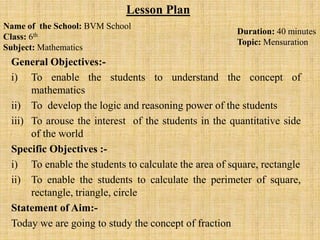
General Objectives:-
i) To enable the students to understand the concept of
mathematics
ii) To develop the logic and reasoning power of the students
iii) To arouse the interest of the students in the quantitative side
of the world
Specific Objectives :-
i) To enable the students to calculate the area of square, rectangle
ii) To enable the students to calculate the perimeter of square,
rectangle, triangle, circle
Statement of Aim:-
Today we are going to study the concept of fraction
Name of the School: BVM School
Class: 6th
Subject: Mathematics
Lesson Plan
Duration: 40 minutes
Topic: Mensuration
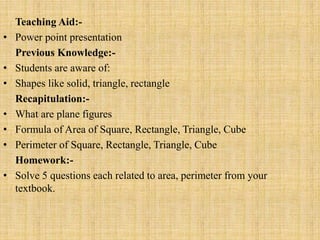
Teaching Aid:-
• Power point presentation
Previous Knowledge:-
• Students are aware of:
• Shapes like solid, triangle, rectangle
Recapitulation:-
• What are plane figures
• Formula of Area of Square, Rectangle, Triangle, Cube
• Perimeter of Square, Rectangle, Triangle, Cube
Homework:-
• Solve 5 questions each related to area, perimeter from your
textbook.
Teaching Points Behavioural
Change
Teaching
method
Teacher’s
Activity
Pupil’s Activity
Area of a Rectangle The students will
be recognise the
shape of the
rectangle
Demonstration and
inductive method
Q1 what is the
shape or your
copy’s page?
Q2. How many
dimension does the
page has?
Q3. What is the
area of rectangle?
1. Page is
rectangle in
shape
2. Two
dimensions
3. Students will
not be able to
give answer
Demonstration
method
Teacher's
Statement:-
The teacher will
show a table top
and show its length
and breadth
The students will
listen and will try to
understand
The students will
be able to analyse
the shape of the
table top, page,
black board
Inductive method Q4. What is the
shape of the black
board?
Q5. What is the
area of the black
board?
4. The black board
is rectangular in
shape
5. Problematic
Teacher’s
Statement:
Area of rectangle is
length X Breadth
Students will listen
and will try to
understand
INTRODUCTION
• Mensuration is the branch of geometry which
deals with the measurement of area, length or
volume. It is also the act or process of
measuring.
• The Mensuration took its birth in Egypt.
Then it was applied and expanded by great
people like Pythagoras, Euclid, Archimedes,
Ptolemy etc and further developed by Halley,
Bernoulli's, Euler, Newton etc.
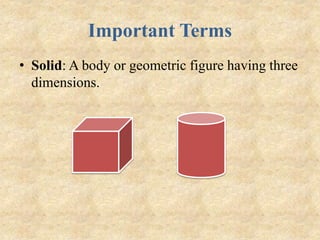
Important Terms
• Solid: A body or geometric figure having three
dimensions.
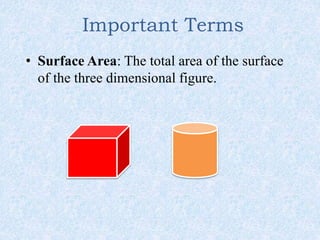
Important Terms
• Surface Area: The total area of the surface
of the three dimensional figure.
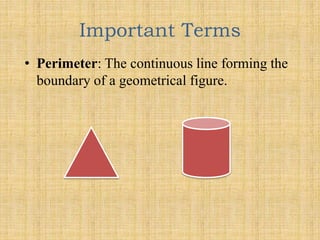
Important Terms
• Perimeter: The continuous line forming the
boundary of a geometrical figure.
Figures
• Plain figures: Plain figures are all about flat
2-dimensional shapes such as circle, rectangle,
etc.
• Solid Figures: Solid Geometry consists of all
3-dimensional figures like cubes, spheres, etc.
Measuring Plain Figures
 SQUARE :-
All sides are equal in a square, therefore,
No. of sides = 4
Perimeter = 4 X Side
Area of Square: Side X Side
Side
Example
Measuring Plain Figures
 TRIANGLE:-
• Area of Triangle: ½ X base X height
• Perimeter of Triangle: Side +Side +Side
Example
Measuring Plain Figures
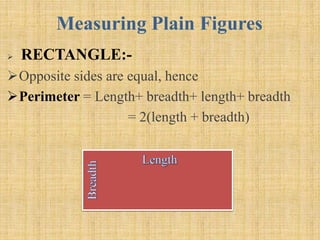
 RECTANGLE:-
Opposite sides are equal, hence
Perimeter = Length+ breadth+ length+ breadth
= 2(length + breadth)
Measuring Solid Figures
CUBE:-
 Surface Area of Cube: 6 a^2
Number of Faces = 6
Area of each face= Side X Side
= a X a
= a^2
Total Area = 6 a^2
Example
 Let a cube have a side measuring 2 cm. Find its area
 Side=2 cm
Surface area= 6a^2
= 6(2 X 2)
= 6 X 4
Surface Area= 24 cm^2
2cm
2 cm
Review Of Formulae
Shapes Perimeter Area Curved
Surface
Area
Total
Surface
Area
Volume
Square 4 X Side Side ^2
Rectangle 2(l + b) Length x
Breadth
Triangle Side+side+si
de
½ X b X h
Cube 12a 6a^2 Length^3
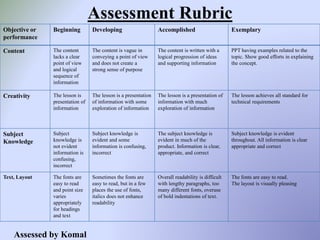
Assessment Rubric
Objective or
performance
Beginning Developing Accomplished Exemplary
Content The content
lacks a clear
point of view
and logical
sequence of
information
The content is vague in
conveying a point of view
and does not create a
strong sense of purpose
The content is written with a
logical progression of ideas
and supporting information
PPT having examples related to the
topic. Show good efforts in explaining
the concept.
Creativity The lesson is
presentation of
information
The lesson is a presentation
of information with some
exploration of information
The lesson is a presentation of
information with much
exploration of information
The lesson achieves all standard for
technical requirements
Subject
Knowledge
Subject
knowledge is
not evident
information is
confusing,
incorrect
Subject knowledge is
evident and some
information is confusing,
incorrect
The subject knowledge is
evident in much of the
product. Information is clear,
appropriate, and correct
Subject knowledge is evident
throughout. All information is clear
appropriate and correct
Text, Layout The fonts are
easy to read
and point size
varies
appropriately
for headings
and text
Sometimes the fonts are
easy to read, but in a few
places the use of fonts,
italics does not enhance
readability
Overall readability is difficult
with lengthy paragraphs, too
many different fonts, overuse
of bold indentations of text.
The fonts are easy to read.
The layout is visually pleasing
Assessed by Komal
5.Creating a discussion
forum around an uploaded
content in teaching-learning
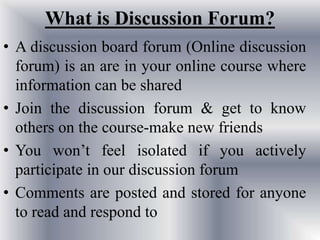
What is Discussion Forum?
• A discussion board forum (Online discussion
forum) is an are in your online course where
information can be shared
• Join the discussion forum & get to know
others on the course-make new friends
• You won’t feel isolated if you actively
participate in our discussion forum
• Comments are posted and stored for anyone
to read and respond to
Uses of discussion forums
• Applications
• Higher-order analysis
• Debate
• Debriefing
• Use of web based resources
• Personal narrative
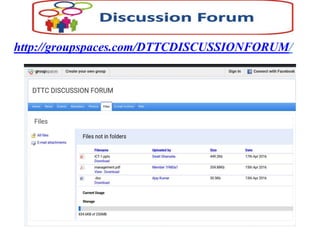
http://groupspaces.com/DTTCDISCUSSIONFORUM/
6.Creating a Peer Network
using Social Networking
Platforms
Peer to Peer Network
• In peer to peer network each computer is
responsible for making its own resources
available to other computer on the
network
• Each computer is responsible for setting
up and maintaining its own security for
these resources
• Also each computer is responsible for
accessing the required network resources
from peer to peer relationships
• It is useful for a small network containing
less than to computers on a single LAN
• In peer to peer network each computer
can function as both client and server
• It do not have a central control system.
There are no servers in peer networks
• Peer networks are amplified into home
group
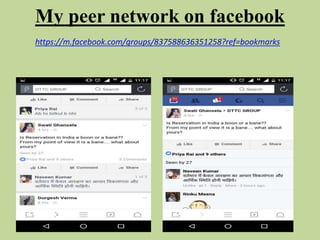
My peer network on facebook
https://m.facebook.com/groups/837588636351258?ref=bookmarks
7. Creating a Blog for
building an online community
to share resources
• A Blog is an abbreviated word used for term
‘‘Weblog’, This is a word used to describe
different type of websites and Portals which
share information on specific topics or wider
categories. It usually includes Features like
Blog Posts, Videos, Comments, Links to
other websites, Widgets, etc
Uses of Blog
• Can be used in lessons/ To set homework
tasks
• Show links to useful websites
• Upload/ Embed videos
• Allows students to give feedback safely
My Blog
www.swatighansela.blogspot.in
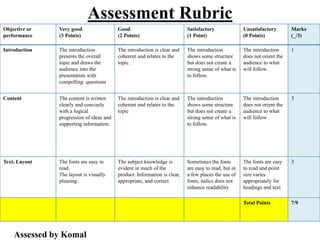
Assessment Rubric
Objective or
performance
Very good
(3 Points)
Good
(2 Points)
Satisfactory
(1 Point)
Unsatisfactory
(0 Points)
Marks
(_/3)
Introduction The introduction
presents the overall
topic and draws the
audience into the
presentation with
compelling questions
The introduction is clear and
coherent and relates to the
topic.
The introduction
shows some structure
but does not create a
strong sense of what is
to follow.
The introduction
does not orient the
audience to what
will follow.
1
Content The content is written
clearly and concisely
with a logical
progression of ideas and
supporting information.
The introduction is clear and
coherent and relates to the
topic
The introduction
shows some structure
but does not create a
strong sense of what is
to follow.
The introduction
does not orient the
audience to what
will follow
3
Text, Layout The fonts are easy to
read.
The layout is visually
pleasing.
The subject knowledge is
evident in much of the
product. Information is clear,
appropriate, and correct
Sometimes the fonts
are easy to read, but in
a few places the use of
fonts, italics does not
enhance readability
The fonts are easy
to read and point
size varies
appropriately for
headings and text
3
Total Points 7/9
Assessed by Komal

ICT

  • 1.
    DELHI TEACHERS’ TRAINING COLLEGE DEENPUR,NAJAFGARH, NEW DELHI – 110043 (Affiliated to G.G.S.I.P. University, Delhi – 110075) B.Ed. 2015 – 2017 Semester - II Submitted By:- Swati Ghansela Enrollment No.- 05940202115 Roll No.- 59
  • 2.
  • 3.
    1. Explore differentSources of Data, Read and Make meaning
  • 4.
    DATA • Data isfacts and figures from which conclusions can be drawn. USES:- • Data can provide a snapshot of what students know, what they should know, and what can be done to meet their academic needs. • Give information about particular group • Data can be visualized using graphs and images • Data can be used for research purposes.
  • 5.
    Data Sources Primary Data Sources SecondaryData sources Questionnaire Survey Photograph Collection Books published, journals, reports, internet, newspaper, articles
  • 6.
    Name of StudentNisha Saini Father’s Name Dinesh Saini Roll No. B0725 Mother’s Name Bimla Saini Class 6-R Blood Group B+ D.O.B 22-Sep-2003 Specific Ailment, If any None Part-1:- Scholastic Areas Subjects FA-1 (10.0) Grade English B1 Hindi A2 Maths A2 Science A2 Social A1 Sanskrit A1 Report Card Minor Subjects Grade Comput er C G.K B Moral Science B Drawing C Example of Data
  • 7.
    Part-2(A):- Co-Scholastic Areas LifeSkills Grade Self Awareness A Problem Solving A Decision Making A Critical Thinking A Interpersonal relationships A Life Skills Grade Effective communication A Empathy A Managing Emotions A Dealing with Stress A 2(B) Work Education A 2(C) Visual & Performing Arts B Attitude towards Grade Teachers A School-mates A School programmes and environment A Value systems A 2(D):- Attitudes & Values Part-3(A):- Co- Scholastic Activities Activities Grade Literary & Creative skills B Scientific skills B 3(B):- Health & Physical Education Activities Grade Sports/ Indigenous sports B Yoga B
  • 10.
  • 11.
  • 12.
    Multimedia Lesson Plan •Multimedia lesson plan refers to the involvement and using multimedia equipments like computer, TV screen, for educational purpose. • Evaluating various software used in multimedia projects and using statistical shapes like bar graphs, pie chart, tables etc for the finding.
  • 13.
    Use of ICT •Softwares like PowerPoint, ms word, excel plays and important role in multimedia lesson plan • Use of internet t make PPT and research • Software to operate hardware like projector • Multimedia lesson seems impossible without a desktop or computer, because these are most important equipment needed for multimedia lesson plan.
  • 14.
    Resources used inMultimedia lesson plan • Computer with presentation software such as PowerPoint • Desktop publishing software such as Microsoft publisher • Word processing software such as word • Spreadsheet software such as excel • LCD projector • Internet access
  • 15.
    4. Preparing and transactinga lesson infusing ICT resources
  • 16.
  • 17.
    Contents Introduction Important Terms Figures Measuring PlainFigures Measuring Solid Figures Review Of Formulae Group Members
  • 18.
    General Objectives:- i) Toenable the students to understand the concept of mathematics ii) To develop the logic and reasoning power of the students iii) To arouse the interest of the students in the quantitative side of the world Specific Objectives :- i) To enable the students to calculate the area of square, rectangle ii) To enable the students to calculate the perimeter of square, rectangle, triangle, circle Statement of Aim:- Today we are going to study the concept of fraction Name of the School: BVM School Class: 6th Subject: Mathematics Lesson Plan Duration: 40 minutes Topic: Mensuration
  • 19.
    Teaching Aid:- • Powerpoint presentation Previous Knowledge:- • Students are aware of: • Shapes like solid, triangle, rectangle Recapitulation:- • What are plane figures • Formula of Area of Square, Rectangle, Triangle, Cube • Perimeter of Square, Rectangle, Triangle, Cube Homework:- • Solve 5 questions each related to area, perimeter from your textbook.
  • 20.
    Teaching Points Behavioural Change Teaching method Teacher’s Activity Pupil’sActivity Area of a Rectangle The students will be recognise the shape of the rectangle Demonstration and inductive method Q1 what is the shape or your copy’s page? Q2. How many dimension does the page has? Q3. What is the area of rectangle? 1. Page is rectangle in shape 2. Two dimensions 3. Students will not be able to give answer Demonstration method Teacher's Statement:- The teacher will show a table top and show its length and breadth The students will listen and will try to understand The students will be able to analyse the shape of the table top, page, black board Inductive method Q4. What is the shape of the black board? Q5. What is the area of the black board? 4. The black board is rectangular in shape 5. Problematic Teacher’s Statement: Area of rectangle is length X Breadth Students will listen and will try to understand
  • 21.
    INTRODUCTION • Mensuration isthe branch of geometry which deals with the measurement of area, length or volume. It is also the act or process of measuring. • The Mensuration took its birth in Egypt. Then it was applied and expanded by great people like Pythagoras, Euclid, Archimedes, Ptolemy etc and further developed by Halley, Bernoulli's, Euler, Newton etc.
  • 22.
    Important Terms • Solid:A body or geometric figure having three dimensions.
  • 23.
    Important Terms • SurfaceArea: The total area of the surface of the three dimensional figure.
  • 24.
    Important Terms • Perimeter:The continuous line forming the boundary of a geometrical figure.
  • 25.
    Figures • Plain figures:Plain figures are all about flat 2-dimensional shapes such as circle, rectangle, etc. • Solid Figures: Solid Geometry consists of all 3-dimensional figures like cubes, spheres, etc.
  • 26.
    Measuring Plain Figures SQUARE :- All sides are equal in a square, therefore, No. of sides = 4 Perimeter = 4 X Side Area of Square: Side X Side Side
  • 27.
  • 28.
    Measuring Plain Figures TRIANGLE:- • Area of Triangle: ½ X base X height • Perimeter of Triangle: Side +Side +Side
  • 29.
  • 30.
    Measuring Plain Figures RECTANGLE:- Opposite sides are equal, hence Perimeter = Length+ breadth+ length+ breadth = 2(length + breadth)
  • 31.
    Measuring Solid Figures CUBE:- Surface Area of Cube: 6 a^2 Number of Faces = 6 Area of each face= Side X Side = a X a = a^2 Total Area = 6 a^2
  • 32.
    Example  Let acube have a side measuring 2 cm. Find its area  Side=2 cm Surface area= 6a^2 = 6(2 X 2) = 6 X 4 Surface Area= 24 cm^2 2cm 2 cm
  • 33.
    Review Of Formulae ShapesPerimeter Area Curved Surface Area Total Surface Area Volume Square 4 X Side Side ^2 Rectangle 2(l + b) Length x Breadth Triangle Side+side+si de ½ X b X h Cube 12a 6a^2 Length^3
  • 34.
    Assessment Rubric Objective or performance BeginningDeveloping Accomplished Exemplary Content The content lacks a clear point of view and logical sequence of information The content is vague in conveying a point of view and does not create a strong sense of purpose The content is written with a logical progression of ideas and supporting information PPT having examples related to the topic. Show good efforts in explaining the concept. Creativity The lesson is presentation of information The lesson is a presentation of information with some exploration of information The lesson is a presentation of information with much exploration of information The lesson achieves all standard for technical requirements Subject Knowledge Subject knowledge is not evident information is confusing, incorrect Subject knowledge is evident and some information is confusing, incorrect The subject knowledge is evident in much of the product. Information is clear, appropriate, and correct Subject knowledge is evident throughout. All information is clear appropriate and correct Text, Layout The fonts are easy to read and point size varies appropriately for headings and text Sometimes the fonts are easy to read, but in a few places the use of fonts, italics does not enhance readability Overall readability is difficult with lengthy paragraphs, too many different fonts, overuse of bold indentations of text. The fonts are easy to read. The layout is visually pleasing Assessed by Komal
  • 35.
    5.Creating a discussion forumaround an uploaded content in teaching-learning
  • 36.
    What is DiscussionForum? • A discussion board forum (Online discussion forum) is an are in your online course where information can be shared • Join the discussion forum & get to know others on the course-make new friends • You won’t feel isolated if you actively participate in our discussion forum • Comments are posted and stored for anyone to read and respond to
  • 37.
    Uses of discussionforums • Applications • Higher-order analysis • Debate • Debriefing • Use of web based resources • Personal narrative
  • 38.
  • 39.
    6.Creating a PeerNetwork using Social Networking Platforms
  • 40.
    Peer to PeerNetwork • In peer to peer network each computer is responsible for making its own resources available to other computer on the network • Each computer is responsible for setting up and maintaining its own security for these resources • Also each computer is responsible for accessing the required network resources from peer to peer relationships
  • 41.
    • It isuseful for a small network containing less than to computers on a single LAN • In peer to peer network each computer can function as both client and server • It do not have a central control system. There are no servers in peer networks • Peer networks are amplified into home group
  • 42.
    My peer networkon facebook https://m.facebook.com/groups/837588636351258?ref=bookmarks
  • 43.
    7. Creating aBlog for building an online community to share resources
  • 44.
    • A Blogis an abbreviated word used for term ‘‘Weblog’, This is a word used to describe different type of websites and Portals which share information on specific topics or wider categories. It usually includes Features like Blog Posts, Videos, Comments, Links to other websites, Widgets, etc
  • 45.
    Uses of Blog •Can be used in lessons/ To set homework tasks • Show links to useful websites • Upload/ Embed videos • Allows students to give feedback safely
  • 46.
  • 47.
    Assessment Rubric Objective or performance Verygood (3 Points) Good (2 Points) Satisfactory (1 Point) Unsatisfactory (0 Points) Marks (_/3) Introduction The introduction presents the overall topic and draws the audience into the presentation with compelling questions The introduction is clear and coherent and relates to the topic. The introduction shows some structure but does not create a strong sense of what is to follow. The introduction does not orient the audience to what will follow. 1 Content The content is written clearly and concisely with a logical progression of ideas and supporting information. The introduction is clear and coherent and relates to the topic The introduction shows some structure but does not create a strong sense of what is to follow. The introduction does not orient the audience to what will follow 3 Text, Layout The fonts are easy to read. The layout is visually pleasing. The subject knowledge is evident in much of the product. Information is clear, appropriate, and correct Sometimes the fonts are easy to read, but in a few places the use of fonts, italics does not enhance readability The fonts are easy to read and point size varies appropriately for headings and text 3 Total Points 7/9 Assessed by Komal