ICT in CCHS
Office365
• Email
• Calendars
• Office online
• Onedrive
• Sharepoint
• Lync
Email
• In school
• At home
• On mobile devices
50 Gb of storage (1000x more than pre-Office365) and
attachments can be accessed from outside the BT network.
Storage
• Onedrive for Business
Each member of staff has 50Gb of personal storage. This is cloud
based and can be accessed from school and home.
• School server
80Gb for the whole school!
• Sharepoint
This is additional storage that is shared, similar to folder in the staff
and resources folders on the network.
Pupil Access
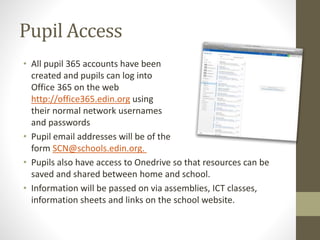
• All pupil 365 accounts have been
created and pupils can log into
Office 365 on the web
http://office365.edin.org using
their normal network usernames
and passwords
• Pupil email addresses will be of the
form SCN@schools.edin.org.
• Pupils also have access to Onedrive so that resources can be
saved and shared between home and school.
• Information will be passed on via assemblies, ICT classes,
information sheets and links on the school website.
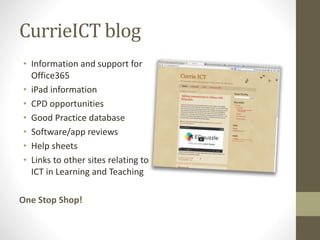
CurrieICT blog
• Information and support for
Office365
• iPad information
• CPD opportunities
• Good Practice database
• Software/app reviews
• Help sheets
• Links to other sites relating to
ICT in Learning and Teaching
One Stop Shop!
CPD
Training and Support
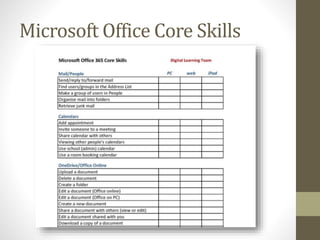
Microsoft Office Core Skills
Apple Professional Development
Courses
• iPad for Learning
Staff who are familiar with iPads
but want to learn how to use the
device to enhance learning and
teaching
• iOS Creativity
Staff who have a basic iPad knowledge but want to learn more about
how to use the iPad creatively to enhance learning and teaching
• iOS Productivity
Staff who have a basic iPad knowledge but want to learn more about
how to use the iPad productively for themselves and learners.
In-house CPD and support
• Office365
Setting up email on the iPad
Using calendars
Access to Office365 at home
Onedrive
• Smartboard training
More than a writing surface…
• iPad training
Basic skills
iWorks
apps to enhance learning and teaching
• Drop-in sessions
• ICT ‘champions’
iPads – where are we now?
• iPad issued to all teaching staff to gain knowledge and
confidence in their use in enhancing learning and teaching.
• The ICT budget will be used to purchase core applications for
all staff and purchase a number of subject specific applications
for departments.
• Move towards 1-1 devices for pupils in S1, 2 and 3 with one of
the year groups being implemented this session – funding
permitting!
• Classroom iPads in a box to be retained…for now.
Thank you.

Ict 110814

  • 1.
  • 2.
    Office365 • Email • Calendars •Office online • Onedrive • Sharepoint • Lync
  • 3.
    Email • In school •At home • On mobile devices 50 Gb of storage (1000x more than pre-Office365) and attachments can be accessed from outside the BT network.
  • 4.
    Storage • Onedrive forBusiness Each member of staff has 50Gb of personal storage. This is cloud based and can be accessed from school and home. • School server 80Gb for the whole school! • Sharepoint This is additional storage that is shared, similar to folder in the staff and resources folders on the network.
  • 5.
    Pupil Access • Allpupil 365 accounts have been created and pupils can log into Office 365 on the web http://office365.edin.org using their normal network usernames and passwords • Pupil email addresses will be of the form SCN@schools.edin.org. • Pupils also have access to Onedrive so that resources can be saved and shared between home and school. • Information will be passed on via assemblies, ICT classes, information sheets and links on the school website.
  • 6.
    CurrieICT blog • Informationand support for Office365 • iPad information • CPD opportunities • Good Practice database • Software/app reviews • Help sheets • Links to other sites relating to ICT in Learning and Teaching One Stop Shop!
  • 7.
  • 8.
  • 9.
    Apple Professional Development Courses •iPad for Learning Staff who are familiar with iPads but want to learn how to use the device to enhance learning and teaching • iOS Creativity Staff who have a basic iPad knowledge but want to learn more about how to use the iPad creatively to enhance learning and teaching • iOS Productivity Staff who have a basic iPad knowledge but want to learn more about how to use the iPad productively for themselves and learners.
  • 10.
    In-house CPD andsupport • Office365 Setting up email on the iPad Using calendars Access to Office365 at home Onedrive • Smartboard training More than a writing surface… • iPad training Basic skills iWorks apps to enhance learning and teaching • Drop-in sessions • ICT ‘champions’
  • 11.
    iPads – whereare we now? • iPad issued to all teaching staff to gain knowledge and confidence in their use in enhancing learning and teaching. • The ICT budget will be used to purchase core applications for all staff and purchase a number of subject specific applications for departments. • Move towards 1-1 devices for pupils in S1, 2 and 3 with one of the year groups being implemented this session – funding permitting! • Classroom iPads in a box to be retained…for now.
  • 12.