Virtual Desktop Virtualization
Peter Nilsson


                                 © 2011 IBM Corporation
System x
Smarter Systems for a Smarter Planet

Desktop Virtualization
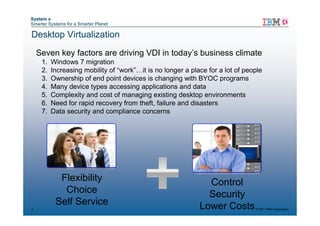
    Seven key factors are driving VDI in today’s business climate
     1.   Windows 7 migration
     2.   Increasing mobility of “work”…it is no longer a place for a lot of people
     3.   Ownership of end point devices is changing with BYOC programs
     4.   Many device types accessing applications and data
     5.   Complexity and cost of managing existing desktop environments
     6.   Need for rapid recovery from theft, failure and disasters
     7.   Data security and compliance concerns


            Flexibility                                        Control
             Choice                                            Security
           Self Service                                      Lower Costs
2                                                                               © 2011 IBM Corporation
System x
Smarter Systems for a Smarter Planet


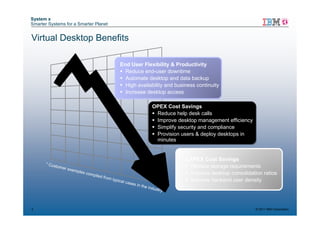
Virtual Desktop Benefits

                                                       End User Flexibility & Productivity
                                                         Reduce end-user downtime
                                                         Automate desktop and data backup
                                                         High availability and business continuity
                                                         Increase desktop access

                                                                                OPEX Cost Savings
                                                                                 Reduce help desk calls
                                                                                 Improve desktop management efficiency
                                                                                 Simplify security and compliance
                                                                                 Provision users & deploy desktops in
                                                                                 minutes


                                                                                            CAPEX Cost Savings
      * C us
            tomer
                    exam
                                                                                             Reduce storage requirements
                           ples c
                                    ompile                                                   Improve desktop consolidation ratios
                                          d from
                                                   typica                                    Improve backend user density
                                                            l case
                                                                  s in th
                                                                            e indu
                                                                                     stry


3                                                                                                                        © 2011 IBM Corporation
VMware

    S Erik Hjalmarsson


4                        © 2011 IBM Corporation
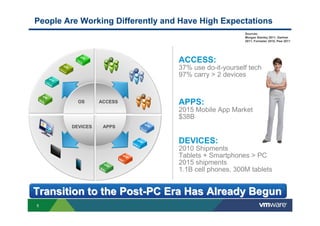
People Are Working Differently and Have High Expectations
                                                       Sources:
                                                       Morgan Stanley 2011, Gartner
                                                       2011, Forrester 2010, Pew 2011


                                  ACCESS:
                                  37% use do-it-yourself tech
                                  97% carry > 2 devices


          OS      ACCESS          APPS:
                                  2015 Mobile App Market
                                  $38B
        DEVICES    APPS


                                  DEVICES:
                                  2010 Shipments
                                  Tablets + Smartphones > PC
                                  2015 shipments
                                  1.1B cell phones, 300M tablets


Transition to the Post-PC Era Has Already Begun
5
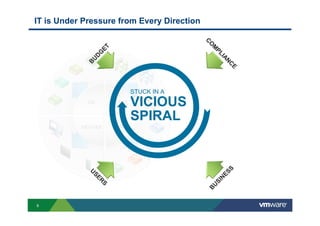
IT is Under Pressure from Every Direction


                                               C
                                               CO
                                                 O
                    ET


                                                  M
                                                  M
                                                   PL
                                                    PL
                   G
                 D


                                                      IIA
                                                        AN
               U


                                                          NC
             B


                                                           CE
                                                             E
                                  STUCK IN A
             OS          ACCESS
                                  VICIOUS
                                  SPIRAL
           DEVICES        APPS


                                                          S
             U


                                                        ES
             US
               SE


                                                      N
                ER


                                                    SI
                  RS
                   S


                                                  U
                                                B
6
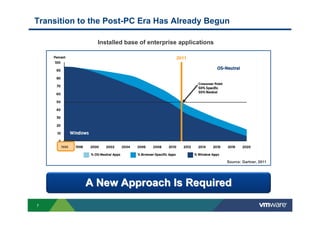
Transition to the Post-PC Era Has Already Begun

               Installed base of enterprise applications

                                          2011


                                                           Source: Gartner, 2011


            A New Approach Is Required
7
The EUC Platform for the Post-PC Era

                      Simplify           Manage             Connect


                    Desktop Service


                                         Universal
                                         Services
                                          Broker
    SaaS   Mobile


                      App Catalog
                        Service


                                      Users, Application,
                                        Data Policies           Secure
                    Data Service                            Universal Access


8
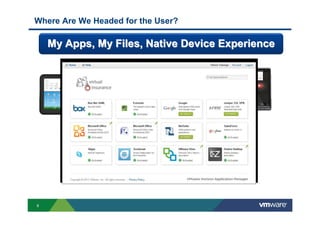
Where Are We Headed for the User?

    My Apps, My Files, Native Device Experience


9
Break the Cycle and Move to the Post-PC Era


                        Escape to
                        Your Cloud


      Embrace                             Improve what
      the Cloud                           you have now


10
Improve      New Apps
         what you     Project Octopus
         have now
                      Project AppBlast
         Prepare to
         Break Out    Horizon
                      ThinApp
                      ThinApp
                      View 5
                      View
                      Better Desktops,
                      Better Applications


    11
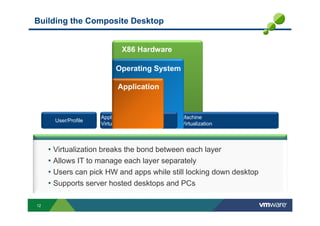
Building the Composite Desktop


                               X86 Hardware

                            Operating System

                             Application


                      Application              Machine
       User/Profile
                      Virtualization           Virtualization


     • Virtualization breaks the bond between each layer
     • Allows IT to manage each layer separately
     • Users can pick HW and apps while still locking down desktop
     • Supports server hosted desktops and PCs

12
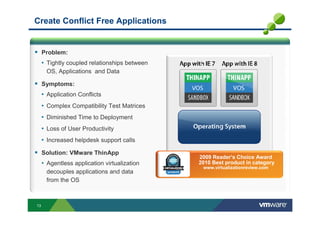
Create Conflict Free Applications


     Problem:
     • Tightly coupled relationships between
      OS, Applications and Data

     Symptoms:
     • Application Conflicts
     • Complex Compatibility Test Matrices
     • Diminished Time to Deployment
     • Loss of User Productivity
     • Increased helpdesk support calls
     Solution: VMware ThinApp
                                               2009 Reader’s Choice Award
     • Agentless application virtualization    2010 Best product in category
                                                www.virtualizationreview.com
      decouples applications and data
      from the OS


13
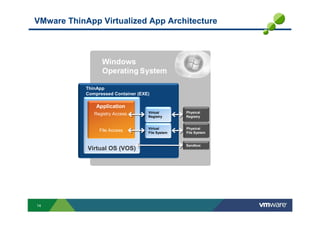
VMware ThinApp Virtualized App Architecture


            ThinApp
            Compressed Container (EXE)

                Application
               Registry Access       Virtual       Physical
                                     Registry      Registry


                                     Virtual       Physical
                 File Access         File System   File System


                                                   Sandbox
            Virtual OS (VOS)


14
The VMware ThinApp Solution


Agentless architecture
 • Single file – EXE, MSI
 • No installation or changes to registry
 • Zero management required on end point device
Seamlessly fits into any environment
 • No streaming server hardware or software needed
 • Plugs into any existing management framework
 Run Virtually Any Application from Any Device
 • Desktop, USB, flash, terminal services, Citrix
 • Any windows application – simple to complex
 • Supporting components can be run side by side (java, .Net)
Ensuring security without compromising user flexibility
•User-Mode execution
•Virtual Registry protects underlying host OS
 • No device drivers installed on underlying OS


15
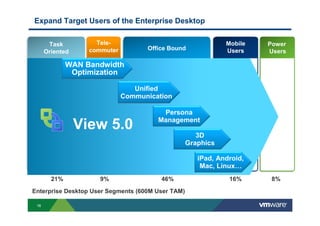
Expand Target Users of the Enterprise Desktop


       Task          Tele-                                    Mobile   Power
                     Power          Office Bound
      Oriented     commuter                                   Users    Users
                     Users

              WAN Bandwidth
               Optimization

                                 Unified
                              Communication
       Virtual
       2121
       2121
                                        Persona
                                       Management
      Desktop 5.0
           View
                                                      3D
                                                   Graphics

                                                      iPad, Android,
                                                       Mac, Linux…
        21%           9%                46%                    16%      8%

Enterprise Desktop User Segments (600M User TAM)

 16
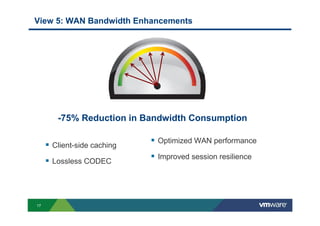
View 5: WAN Bandwidth Enhancements


      -75% Reduction in Bandwidth Consumption

                           Optimized WAN performance
     Client-side caching
                           Improved session resilience
     Lossless CODEC


17
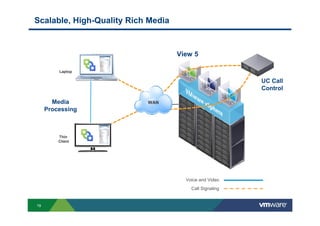
View 5 with Unified Communications


             Seamless and Scalable
18
Scalable, High-Quality Rich Media


                                    View 5

         Laptop

                                                         UC Call
                                                         Control

       Media               WAN
     Processing


         Thin
         Client


                                      Voice and Video
                                        Call Signaling


19
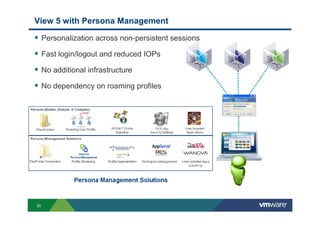
View 5 with Persona Management

     Personalization across non-persistent sessions

     Fast login/logout and reduced IOPs

     No additional infrastructure

     No dependency on roaming profiles


20
Delivering High Performance 3D Graphics with View 5


                                                  View 5


            Non-hardware acceleration

            No Windows client-side dependencies


21
VMware View Architecture

      View Composer
                                                     ThinApp


                                                      View Agent
Security Server


                  Connection               ESXi
                  Server


                                           vCenter
                               Active
View Client                    Directory             Transfer Server


 22
End-to-End Performance Monitoring and Troubleshooting

                                                           Centralized Virtual
                                                               Desktops


                                           vCenter Operations
                                                for View


                                                     VMWARE                              Parent
                                                  VIEW MANAGER                           Image
        Thin Client

                                                                                   VMWARE
                      Desktop
                                                                                    VIEW
                                                                                  COMPOSER
                                Local
                                Mode
                                                             VMWARE
                                        Tablets              THINAPP


     Clients               Network                  vSphere                      Storage          View Manager
23
“View Users” Dashboard – Troubleshooting Overview


         List/Search
                               1       Display a View end-user
         Users
                                       with all supporting
                  dey@vmware           infrastructure
                                       components


         Ranked Root-Causes
         for selected object


Raw metrics for                              Metric charts for
selected object                    4         selected metrics


24
Horizon: Bridge to the Cloud and Mobile

                   Simplify          Manage              Connect


                 Desktop Service


                                      Horizon
 SaaS   Mobile


                   App Catalog
                     Service


                                   Users, Application,
                                     Data Policies           Secure
                    Data Service                         Universal Access


25
Horizon: Setting Application, Data and Device Policies

                            Simplify                    Manage                Connect


              Federated         User         Usage           Device      File/Data     Payment
              Directory    Entitlements,
                          Desktop Service   Tracking        Policies     Policies      Services
               Services       Settings,       and
                                and         Reporting
                          SaaS Policies
                                                        Horizon
     Mobile


                            App Catalog
                              Service


                                                   Users, Application,
                                                     Data Policies                 Secure
                            Data Service                                       Universal Access


26
Horizon: User Workspace Delivered as a Service to Any Device

                 Simplify         Manage              Connect


              Desktop Service


              SaaS
                                   Horizon
     Mobile


                 App Catalog
                   Service


                                Users, Application,
                                  Data Policies           Secure
                 Data Service                         Universal Access


27
Horizon: User Workspace Delivered as a Service to Any Device

                 Simplify         Manage              Connect


              Desktop Service


              SaaS
                                   Horizon
     Mobile


                 App Catalog
                   Service


                                Users, Application,
                                  Data Policies           Secure
                 Data Service                         Universal Access


28
Horizon Mobile: Bridging Personal, Enterprise Mobile Workspaces

                   Simplify         Manage              Connect


                Desktop Service


                SaaS

                                     Horizon
                       Mobile

       Mobile

                   App Catalog
                     Service


                                  Users, Application,
                                    Data Policies           Secure
                   Data Service                         Universal Access


  29
Horizon Mobile: Bridging Personal, Enterprise Mobile Workspaces


                                        Enterprise
Personal
                                         Virtual “Work” Phone –
 Unrestricted access to personal        fully-encrypted, runs locally
data and applications
                                         Fully managed by IT
 Make calls, share pictures
                                         Corporate applications and
 Personal (“home”) phone cannot         infrastructure support
be viewed/altered by the enterprise
                                         Complete separation


  30
Project AppBlast: Universal Application Access

                 Simplify         Manage              Connect


              Desktop Service


              SaaS
                                  Universal
                                  Services
                     Mobile        Broker

                 App Catalog
                   Service


                                Users, Application,       Secure
                                  Data Policies       Universal Access
                 Data Service
     Access Windows, Linux Apps from the Browser
31
AppBlast Technology Preview


                                   From the cloud

     Deliver just an application


32
Project Octopus: Secure Data Sync and Collaboration Service

                 Simplify         Manage              Connect


              Desktop Service


              SaaS
                                  Universal
                                  Services
                     Mobile        Broker

                 App Catalog
                   Service


                                Users, Application,
                                  Data Policies           Secure
                 Data Service                         Universal Access


33
What Your Users Are Doing Today

Unsecure Unsanctioned File Access
          and Sharing               Users are frustrated with their
                                    file- sharing experience and are
                                    less productive
                                    Leveraging multiple unsanctioned
                                    services to meet needs

     Internal
      Users


                                      37% of U.S. information
                                        workers use do-it-
                                       yourself technology!*
                     Unsanctioned
File Servers           Access
                                                                  *Forrester


34
VMware Octopus Technology Preview

             Access & Share
                                                     IT Control
           Anytime & Anywhere


                                                 Remote Device
                                                    Control
                                                 & Device Wipe


                                                            Storage, Retention,
                                                               Sharing and
                                                            Versioning Policies


                                                 Auditing

            Personal and Shared Data;
     Collaboration with Real-Time Notification


35
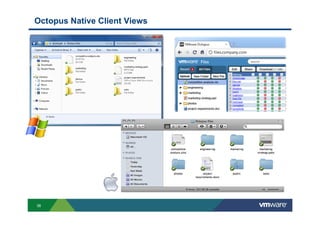
Octopus Native Client Views


36
The Desktop of the Future–“Context-Aware” User Workspace

                                   Cross-Platform Portal


                           Mobility and Offline

                           Enterprise “App Store”
                                                           Virtual Desktops
 End-User Workspace
                                                       App Management


                                                       SaaS Applications


                                                           App Publishing

     Admin Console
                                                            Data Services

                      AD     Cloud Identity
                             Foundation

                             App Entitlement and
                             Tracking
                             Policy and Access Management
                                                                      Optimized for users,
                                                                     applications and data
                             ……


37
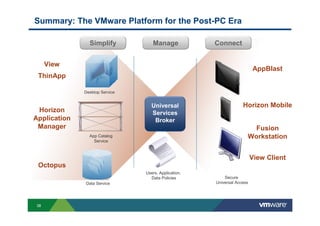
Summary: The VMware Platform for the Post-PC Era

                Simplify           Manage             Connect


      View
                                                                         AppBlast
 ThinApp

              Desktop Service


                                   Universal                       Horizon Mobile
 Horizon                           Services
Application                         Broker
 Manager                                                               Fusion
                App Catalog                                          Workstation
                  Service


                                                                         View Client
 Octopus
                                Users, Application,
                                  Data Policies           Secure
              Data Service                            Universal Access


 38
39
System x
Smarter Systems for a Smarter Planet


     The IBM SmartCloud Desktop Project Framework
     Using Best Practices - transitioning to a virtualized end user model


          Desktop Cloud         Assessment
            Workshop          Proof of Concept

                  Desktop Cloud
           Assessment & Planning Process                Design           Implementation          Operation

           Business needs      Data gathering and    Detailed solution    Setup of              Adjustments of
           Technical           analysis              design               production            the system
                               Findings              Setup of pre-        Application testing   environment
           requirements
                               High level solution   production           Piloting              Administration
           Possible
           scenarios           design                Application          Changes               Support
           TCO (high level)    Solution interfaces   testing              due to piloting       Cloud services
           Understand MS       PoC environment       Verification of      Rollout
           license                                   time and cost
                               Labor and cost                             Handing over of
                                                     estimate
           optimization /      estimates                                  solution
           application                               Order hardware
                               Project                                    Project
           migration                                 and software
                               management                                 management
                                                      Project
                                                      management
          Develop Business    Create Analysis and    Create a Design     Implement the          Provide Ongoing
          Case                Strategy Document      Document            Solution               Services

40   40                                                                                             © 2011 IBM Corporation
System x
Smarter Systems for a Smarter Planet

An SmartCloud Desktop Assessment is highly recommended to
establish sound approach for transformation
          Standard Pre-defined Engagement – estimated 6-9 wks
          Standard SOW
           – Data Gathering
           – Pre-virtualisation Analysis
           – Access Strategy Document provides the go-forward plan

          Application / workload Insights –
           – What applications / workloads do I have in my environment?
           – Which ones would thrive in a virtualized environment?
           – Which ones will have problems if virtualized?
          User Insights –
           – Which user environments should be virtualized?
          Virtualization Options –
           – Which architecture? Should I use Application Virtualization? Which apps?
           – How should I configure storage?
          Capacity –
           – How much CPU, memory and IO am I currently consuming?
           – How should I define the virtual machines based on the resource demands?
           – How do I account for workload, user need, time of day, geography and other factors?
          Migration –
           – What is the best path to transition from a traditional to a virtualized environment without disrupting
               operations?
          Management –
           – How do I manage the resulting physical and virtual servers?


     Drives clear understanding of scope and impact of project, the resources required and builds a valuable
     detailed planning and requirements document.

41   41                  IBM Smart Business Desktop Cloud – Assessment Process Overview                     © 2011 IBM Corporation
Frågor


42            © 2011 IBM Corporation

IBM Virtual Desktop Virtualization

  • 1.
    Virtual Desktop Virtualization PeterNilsson © 2011 IBM Corporation
  • 2.
    System x Smarter Systemsfor a Smarter Planet Desktop Virtualization Seven key factors are driving VDI in today’s business climate 1. Windows 7 migration 2. Increasing mobility of “work”…it is no longer a place for a lot of people 3. Ownership of end point devices is changing with BYOC programs 4. Many device types accessing applications and data 5. Complexity and cost of managing existing desktop environments 6. Need for rapid recovery from theft, failure and disasters 7. Data security and compliance concerns Flexibility Control Choice Security Self Service Lower Costs 2 © 2011 IBM Corporation
  • 3.
    System x Smarter Systemsfor a Smarter Planet Virtual Desktop Benefits End User Flexibility & Productivity Reduce end-user downtime Automate desktop and data backup High availability and business continuity Increase desktop access OPEX Cost Savings Reduce help desk calls Improve desktop management efficiency Simplify security and compliance Provision users & deploy desktops in minutes CAPEX Cost Savings * C us tomer exam Reduce storage requirements ples c ompile Improve desktop consolidation ratios d from typica Improve backend user density l case s in th e indu stry 3 © 2011 IBM Corporation
  • 4.
    VMware S Erik Hjalmarsson 4 © 2011 IBM Corporation
  • 5.
    People Are WorkingDifferently and Have High Expectations Sources: Morgan Stanley 2011, Gartner 2011, Forrester 2010, Pew 2011 ACCESS: 37% use do-it-yourself tech 97% carry > 2 devices OS ACCESS APPS: 2015 Mobile App Market $38B DEVICES APPS DEVICES: 2010 Shipments Tablets + Smartphones > PC 2015 shipments 1.1B cell phones, 300M tablets Transition to the Post-PC Era Has Already Begun 5
  • 6.
    IT is UnderPressure from Every Direction C CO O ET M M PL PL G D IIA AN U NC B CE E STUCK IN A OS ACCESS VICIOUS SPIRAL DEVICES APPS S U ES US SE N ER SI RS S U B 6
  • 7.
    Transition to thePost-PC Era Has Already Begun Installed base of enterprise applications 2011 Source: Gartner, 2011 A New Approach Is Required 7
  • 8.
    The EUC Platformfor the Post-PC Era Simplify Manage Connect Desktop Service Universal Services Broker SaaS Mobile App Catalog Service Users, Application, Data Policies Secure Data Service Universal Access 8
  • 9.
    Where Are WeHeaded for the User? My Apps, My Files, Native Device Experience 9
  • 10.
    Break the Cycleand Move to the Post-PC Era Escape to Your Cloud Embrace Improve what the Cloud you have now 10
  • 11.
    Improve New Apps what you Project Octopus have now Project AppBlast Prepare to Break Out Horizon ThinApp ThinApp View 5 View Better Desktops, Better Applications 11
  • 12.
    Building the CompositeDesktop X86 Hardware Operating System Application Application Machine User/Profile Virtualization Virtualization • Virtualization breaks the bond between each layer • Allows IT to manage each layer separately • Users can pick HW and apps while still locking down desktop • Supports server hosted desktops and PCs 12
  • 13.
    Create Conflict FreeApplications Problem: • Tightly coupled relationships between OS, Applications and Data Symptoms: • Application Conflicts • Complex Compatibility Test Matrices • Diminished Time to Deployment • Loss of User Productivity • Increased helpdesk support calls Solution: VMware ThinApp 2009 Reader’s Choice Award • Agentless application virtualization 2010 Best product in category www.virtualizationreview.com decouples applications and data from the OS 13
  • 14.
    VMware ThinApp VirtualizedApp Architecture ThinApp Compressed Container (EXE) Application Registry Access Virtual Physical Registry Registry Virtual Physical File Access File System File System Sandbox Virtual OS (VOS) 14
  • 15.
    The VMware ThinAppSolution Agentless architecture • Single file – EXE, MSI • No installation or changes to registry • Zero management required on end point device Seamlessly fits into any environment • No streaming server hardware or software needed • Plugs into any existing management framework Run Virtually Any Application from Any Device • Desktop, USB, flash, terminal services, Citrix • Any windows application – simple to complex • Supporting components can be run side by side (java, .Net) Ensuring security without compromising user flexibility •User-Mode execution •Virtual Registry protects underlying host OS • No device drivers installed on underlying OS 15
  • 16.
    Expand Target Usersof the Enterprise Desktop Task Tele- Mobile Power Power Office Bound Oriented commuter Users Users Users WAN Bandwidth Optimization Unified Communication Virtual 2121 2121 Persona Management Desktop 5.0 View 3D Graphics iPad, Android, Mac, Linux… 21% 9% 46% 16% 8% Enterprise Desktop User Segments (600M User TAM) 16
  • 17.
    View 5: WANBandwidth Enhancements -75% Reduction in Bandwidth Consumption Optimized WAN performance Client-side caching Improved session resilience Lossless CODEC 17
  • 18.
    View 5 withUnified Communications Seamless and Scalable 18
  • 19.
    Scalable, High-Quality RichMedia View 5 Laptop UC Call Control Media WAN Processing Thin Client Voice and Video Call Signaling 19
  • 20.
    View 5 withPersona Management Personalization across non-persistent sessions Fast login/logout and reduced IOPs No additional infrastructure No dependency on roaming profiles 20
  • 21.
    Delivering High Performance3D Graphics with View 5 View 5 Non-hardware acceleration No Windows client-side dependencies 21
  • 22.
    VMware View Architecture View Composer ThinApp View Agent Security Server Connection ESXi Server vCenter Active View Client Directory Transfer Server 22
  • 23.
    End-to-End Performance Monitoringand Troubleshooting Centralized Virtual Desktops vCenter Operations for View VMWARE Parent VIEW MANAGER Image Thin Client VMWARE Desktop VIEW COMPOSER Local Mode VMWARE Tablets THINAPP Clients Network vSphere Storage View Manager 23
  • 24.
    “View Users” Dashboard– Troubleshooting Overview List/Search 1 Display a View end-user Users with all supporting dey@vmware infrastructure components Ranked Root-Causes for selected object Raw metrics for Metric charts for selected object 4 selected metrics 24
  • 25.
    Horizon: Bridge tothe Cloud and Mobile Simplify Manage Connect Desktop Service Horizon SaaS Mobile App Catalog Service Users, Application, Data Policies Secure Data Service Universal Access 25
  • 26.
    Horizon: Setting Application,Data and Device Policies Simplify Manage Connect Federated User Usage Device File/Data Payment Directory Entitlements, Desktop Service Tracking Policies Policies Services Services Settings, and and Reporting SaaS Policies Horizon Mobile App Catalog Service Users, Application, Data Policies Secure Data Service Universal Access 26
  • 27.
    Horizon: User WorkspaceDelivered as a Service to Any Device Simplify Manage Connect Desktop Service SaaS Horizon Mobile App Catalog Service Users, Application, Data Policies Secure Data Service Universal Access 27
  • 28.
    Horizon: User WorkspaceDelivered as a Service to Any Device Simplify Manage Connect Desktop Service SaaS Horizon Mobile App Catalog Service Users, Application, Data Policies Secure Data Service Universal Access 28
  • 29.
    Horizon Mobile: BridgingPersonal, Enterprise Mobile Workspaces Simplify Manage Connect Desktop Service SaaS Horizon Mobile Mobile App Catalog Service Users, Application, Data Policies Secure Data Service Universal Access 29
  • 30.
    Horizon Mobile: BridgingPersonal, Enterprise Mobile Workspaces Enterprise Personal Virtual “Work” Phone – Unrestricted access to personal fully-encrypted, runs locally data and applications Fully managed by IT Make calls, share pictures Corporate applications and Personal (“home”) phone cannot infrastructure support be viewed/altered by the enterprise Complete separation 30
  • 31.
    Project AppBlast: UniversalApplication Access Simplify Manage Connect Desktop Service SaaS Universal Services Mobile Broker App Catalog Service Users, Application, Secure Data Policies Universal Access Data Service Access Windows, Linux Apps from the Browser 31
  • 32.
    AppBlast Technology Preview From the cloud Deliver just an application 32
  • 33.
    Project Octopus: SecureData Sync and Collaboration Service Simplify Manage Connect Desktop Service SaaS Universal Services Mobile Broker App Catalog Service Users, Application, Data Policies Secure Data Service Universal Access 33
  • 34.
    What Your UsersAre Doing Today Unsecure Unsanctioned File Access and Sharing Users are frustrated with their file- sharing experience and are less productive Leveraging multiple unsanctioned services to meet needs Internal Users 37% of U.S. information workers use do-it- yourself technology!* Unsanctioned File Servers Access *Forrester 34
  • 35.
    VMware Octopus TechnologyPreview Access & Share IT Control Anytime & Anywhere Remote Device Control & Device Wipe Storage, Retention, Sharing and Versioning Policies Auditing Personal and Shared Data; Collaboration with Real-Time Notification 35
  • 36.
  • 37.
    The Desktop ofthe Future–“Context-Aware” User Workspace Cross-Platform Portal Mobility and Offline Enterprise “App Store” Virtual Desktops End-User Workspace App Management SaaS Applications App Publishing Admin Console Data Services AD Cloud Identity Foundation App Entitlement and Tracking Policy and Access Management Optimized for users, applications and data …… 37
  • 38.
    Summary: The VMwarePlatform for the Post-PC Era Simplify Manage Connect View AppBlast ThinApp Desktop Service Universal Horizon Mobile Horizon Services Application Broker Manager Fusion App Catalog Workstation Service View Client Octopus Users, Application, Data Policies Secure Data Service Universal Access 38
  • 39.
  • 40.
    System x Smarter Systemsfor a Smarter Planet The IBM SmartCloud Desktop Project Framework Using Best Practices - transitioning to a virtualized end user model Desktop Cloud Assessment Workshop Proof of Concept Desktop Cloud Assessment & Planning Process Design Implementation Operation Business needs Data gathering and Detailed solution Setup of Adjustments of Technical analysis design production the system Findings Setup of pre- Application testing environment requirements High level solution production Piloting Administration Possible scenarios design Application Changes Support TCO (high level) Solution interfaces testing due to piloting Cloud services Understand MS PoC environment Verification of Rollout license time and cost Labor and cost Handing over of estimate optimization / estimates solution application Order hardware Project Project migration and software management management Project management Develop Business Create Analysis and Create a Design Implement the Provide Ongoing Case Strategy Document Document Solution Services 40 40 © 2011 IBM Corporation
  • 41.
    System x Smarter Systemsfor a Smarter Planet An SmartCloud Desktop Assessment is highly recommended to establish sound approach for transformation Standard Pre-defined Engagement – estimated 6-9 wks Standard SOW – Data Gathering – Pre-virtualisation Analysis – Access Strategy Document provides the go-forward plan Application / workload Insights – – What applications / workloads do I have in my environment? – Which ones would thrive in a virtualized environment? – Which ones will have problems if virtualized? User Insights – – Which user environments should be virtualized? Virtualization Options – – Which architecture? Should I use Application Virtualization? Which apps? – How should I configure storage? Capacity – – How much CPU, memory and IO am I currently consuming? – How should I define the virtual machines based on the resource demands? – How do I account for workload, user need, time of day, geography and other factors? Migration – – What is the best path to transition from a traditional to a virtualized environment without disrupting operations? Management – – How do I manage the resulting physical and virtual servers? Drives clear understanding of scope and impact of project, the resources required and builds a valuable detailed planning and requirements document. 41 41 IBM Smart Business Desktop Cloud – Assessment Process Overview © 2011 IBM Corporation
  • 42.
    Frågor 42 © 2011 IBM Corporation