Program controller 
For RCA2/RCA 
List of models 
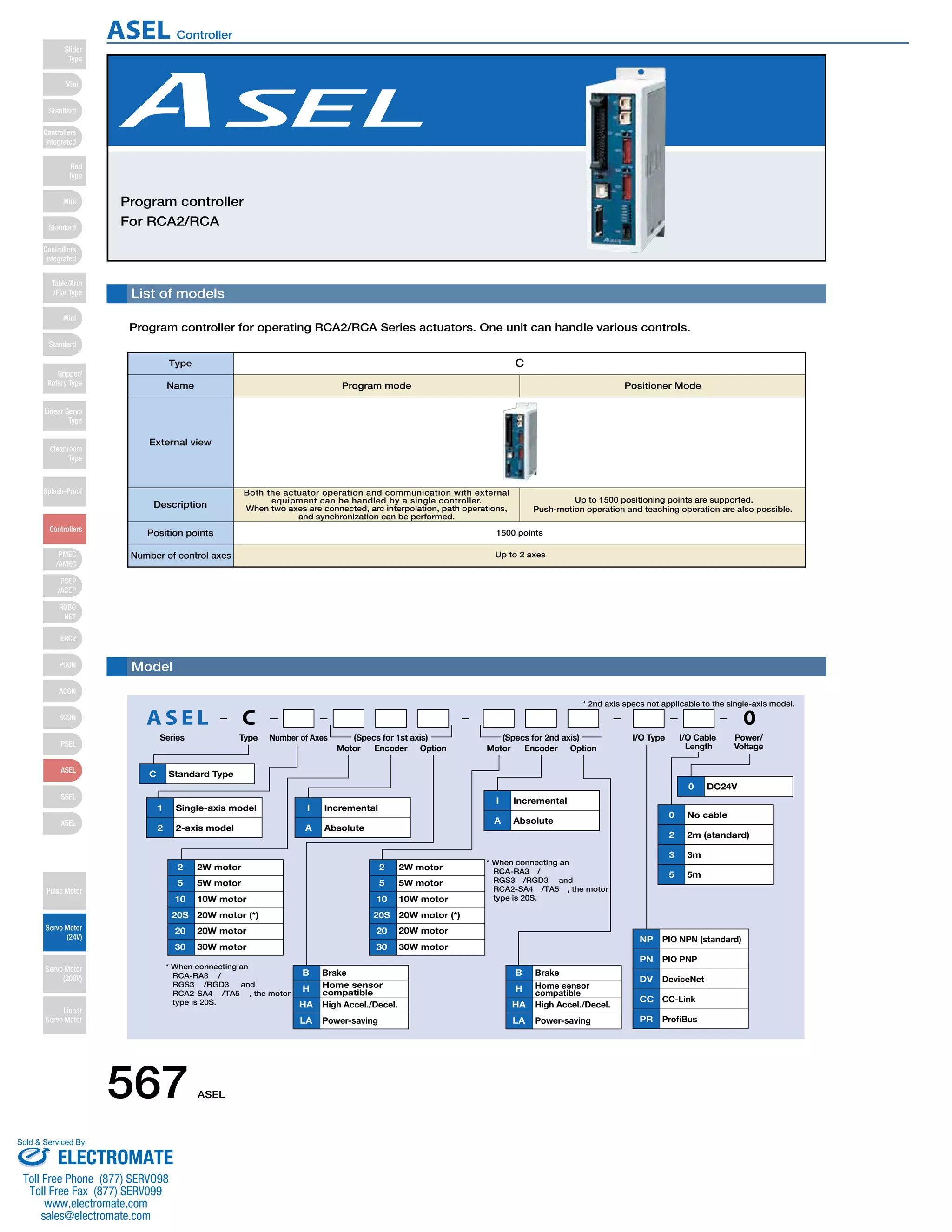
Program controller for operating RCA2/RCA Series actuators. One unit can handle various controls. 
Type C 
Name Program mode Positioner Mode 
* 2nd axis specs not applicable to the single-axis model. 
External view 
Description 
Model 
Both the actuator operation and communication with external 
equipment can be handled by a single controller. 
When two axes are connected, arc interpolation, path operations, 
AS E L C 0 
Series Type Number of Axes 
Motor Encoder Option Motor Encoder Option 
I/O Cable 
Length 
Power/ 
Voltage 
I/O Type 
C Standard Type 
2 2W motor 
5 5W motor 
10 10W motor 
20S 
20 
20W motor (*) 
20W motor 
30 30W motor 
1 Single-axis model 
2 2-axis model 
I Incremental 
A Absolute 
I Incremental 
A Absolute 
NP PIO NPN (standard) 
PN PIO PNP 
DV DeviceNet 
CC CC-Link 
PR ProfiBus 
B Brake 
H Home sensor 
compatible 
HA High Accel./Decel. 
LA Power-saving 
B Brake 
H Home sensor 
compatible 
HA High Accel./Decel. 
LA Power-saving 
0 DC24V 
0 No cable 
2 2m (standard) 
3 3m 
5 5m 
2 2W motor 
5 5W motor 
10 10W motor 
20S 
20 
20W motor (*) 
20W motor 
30 30W motor 
(Specs for 1st axis) (Specs for 2nd axis) 
* When connecting an 
RCA-RA3/ 
RGS3/RGD3 and 
RCA2-SA4/TA5, the motor 
type is 20S. 
* When connecting an 
RCA-RA3/ 
RGS3/RGD3 and 
RCA2-SA4/TA5, the motor 
type is 20S. 
and synchronization can be performed. 
Up to 1500 positioning points are supported. 
Push-motion operation and teaching operation are also possible. 
Position points 1500 points 
Number of control axes Up to 2 axes 
567 ASEL 
Slider 
Type 
Mini 
Standard 
Controllers 
Integrated 
Rod 
Type 
Mini 
Standard 
Controllers 
Integrated 
Table/Arm 
/Flat Type 
Mini 
Standard 
Gripper/ 
Rotary Type 
Linear Servo 
Type 
Cleanroom 
Type 
Splash-Proof 
Controllers 
PMEC 
/AMEC 
PSEP 
/ASEP 
ROBO 
NET 
ERC2 
PCON 
ACON 
SCON 
PSEL 
ASEL 
SSEL 
XSEL 
Pulse Motor 
Servo Motor 
(24V) 
Servo Motor 
(200V) 
Linear 
Servo Motor 
ASEL Controller 
Sold  Serviced By: 
ELECTROMATE 
Toll Free Phone (877) SERVO98 
Toll Free Fax (877) SERV099 
www.electromate.com 
sales@electromate.com
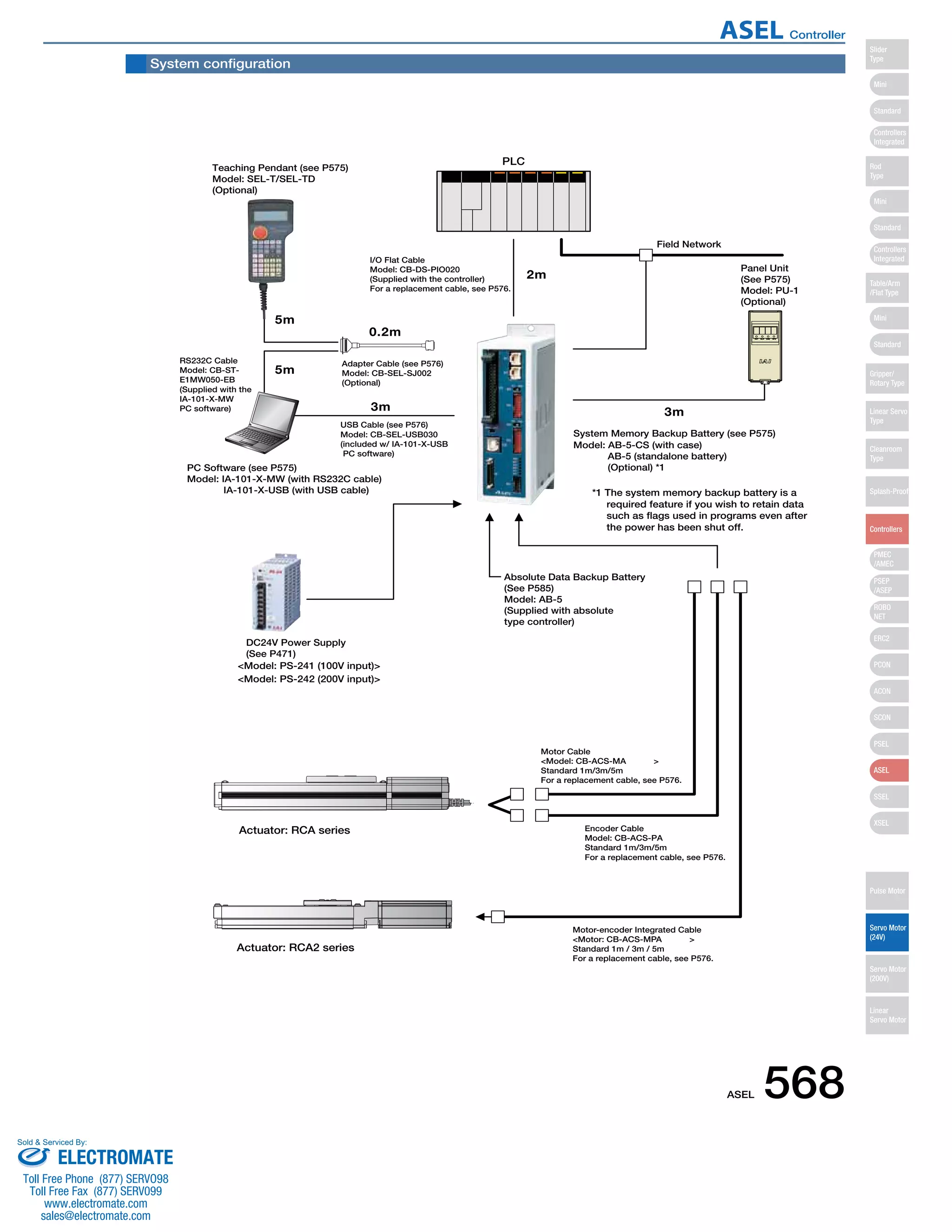
Teaching Pendant (see P575) 
Model: SEL-T/SEL-TD 
(Optional) 
I/O Flat Cable 
Model: CB-DS-PIO020 
(Supplied with the controller) 
For a replacement cable, see P576. 
Panel Unit 
(See P575) 
Model: PU-1 
(Optional) 
Field Network 
System Memory Backup Battery (see P575) 
*1 The system memory backup battery is a 
required feature if you wish to retain data 
such as flags used in programs even after 
the power has been shut off. 
Motor Cable 
Model: CB-ACS-MA 
Standard 1m/3m/5m 
For a replacement cable, see P576. 
Encoder Cable 
Model: CB-ACS-PA 
Standard 1m/3m/5m 
For a replacement cable, see P576. 
Adapter Cable (see P576) 
Model: CB-SEL-SJ002 
(Optional) 
USB Cable (see P576) 
Model: CB-SEL-USB030 
(included w/ IA-101-X-USB 
PC software) 
RS232C Cable 
Model: CB-ST-E1MW050- 
EB 
(Supplied with the 
IA-101-X-MW 
PC software) 
PC Software (see P575) 
Model: IA-101-X-MW (with RS232C cable) 
IA-101-X-USB (with USB cable) 
2m 
0.2m 
3m 3m 
5m 
5m 
DC24V Power Supply 
(See P471) 
Model: PS-241 (100V input) 
Model: PS-242 (200V input) 
PLC 
Actuator: RCA series 
Model: AB-5-CS (with case) 
AB-5 (standalone battery) 
(Optional) *1 
Absolute Data Backup Battery 
(See P585) 
Model: AB-5 
(Supplied with absolute 
type controller) 
Actuator: RCA2 series 
Motor-encoder Integrated Cable 
Motor: CB-ACS-MPA 
Standard 1m / 3m / 5m 
For a replacement cable, see P576. 
System configuration 
ASEL 568 
Slider 
Type 
Mini 
Standard 
Controllers 
Integrated 
Rod 
Type 
Mini 
Standard 
Controllers 
Integrated 
Table/Arm 
/Flat Type 
Mini 
Standard 
Gripper/ 
Rotary Type 
Linear Servo 
Type 
Cleanroom 
Type 
Splash-Proof 
Controllers 
PMEC 
/AMEC 
PSEP 
/ASEP 
ROBO 
NET 
ERC2 
PCON 
ACON 
SCON 
PSEL 
ASEL 
SSEL 
XSEL 
Pulse Motor 
Servo Motor 
(24V) 
Servo Motor 
(200V) 
Linear 
Servo Motor 
ASEL Controller 
Sold  Serviced By: 
ELECTROMATE 
Toll Free Phone (877) SERVO98 
Toll Free Fax (877) SERV099 
www.electromate.com 
sales@electromate.com
I/O Specifications 
■ Input section External input specifications 
Item 
Input voltage 
Input current 
ON/OFF voltage 
Isolation method 
Specifications 
DC24V ±10% 
7mA / circuit 
ON voltage (min.) NPN : DC16V / PNP : DC8V 
OFF voltage (max.) NPN : DC5V / PNP : DC19V 
Photocoupler 
■ Output section External output specifications 
Item 
Load Voltage 
Max. load current 
Residual voltage (Max.) 
Isolation method 
NPN Specifications NPN Specifications 
P24V 
R=560Ω 
Input terminal 
Inputs R=3.3kΩ 
External 
power 
supply 
+24V 
Internal circuit 
PNP Specifications PNP Specifications 
N 
R=560Ω 
Input terminal 
Inputs R=3.3kΩ 
External 
power 
supply 
+24V 
Specifications 
DC24V 
100mA / 1 point 400mA / 8 points in total 
Max 0.1mA / 1 point 
Photocoupler 
Internal circuit P24V 
Explanation of I/O Signal Functions 
P24 
Internal circuit Outputs Load 
N 
External 
power 
supply 
+ 2 4 V 
Outputs 
N 
Internal circuit 
External 
power 
Load supply 
+ 2 4 V 
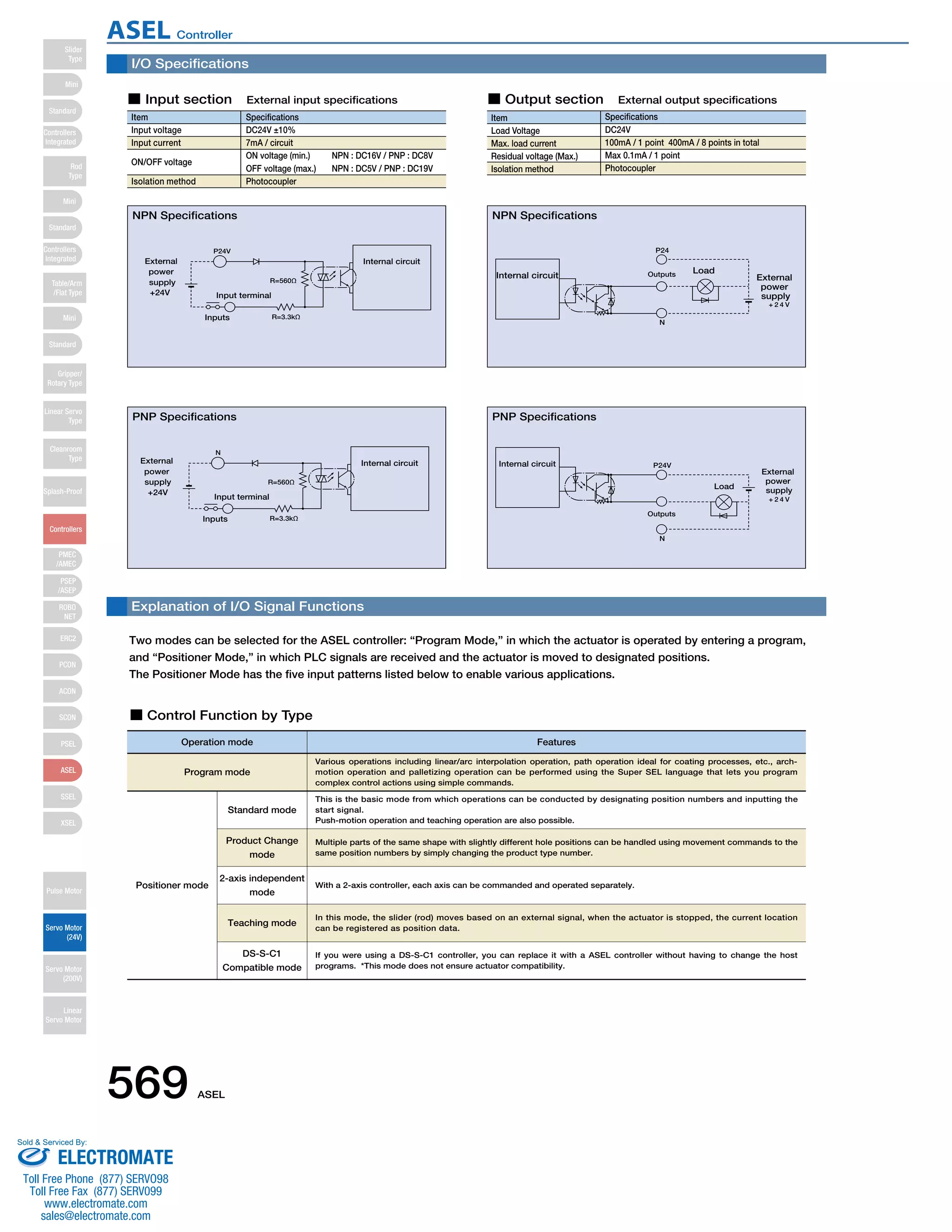
Two modes can be selected for the ASEL controller: “Program Mode,” in which the actuator is operated by entering a program, 
and “Positioner Mode,” in which PLC signals are received and the actuator is moved to designated positions. 
The Positioner Mode has the five input patterns listed below to enable various applications. 
■ Control Function by Type 
Operation mode Features 
Program mode 
Positioner mode 
Various operations including linear/arc interpolation operation, path operation ideal for coating processes, etc., arch-motion 
operation and palletizing operation can be performed using the Super SEL language that lets you program 
complex control actions using simple commands. 
This is the basic mode from which operations can be conducted by designating position numbers and inputting the 
start signal. 
Push-motion operation and teaching operation are also possible. 
Multiple parts of the same shape with slightly different hole positions can be handled using movement commands to the 
same position numbers by simply changing the product type number. 
With a 2-axis controller, each axis can be commanded and operated separately. 
In this mode, the slider (rod) moves based on an external signal, when the actuator is stopped, the current location 
can be registered as position data. 
Standard mode 
Product Change 
mode 
2-axis independent 
mode 
Teaching mode 
DS-S-C1 
Compatible mode 
If you were using a DS-S-C1 controller, you can replace it with a ASEL controller without having to change the host 
programs. *This mode does not ensure actuator compatibility. 
569 ASEL 
Slider 
Type 
Mini 
Standard 
Controllers 
Integrated 
Rod 
Type 
Mini 
Standard 
Controllers 
Integrated 
Table/Arm 
/Flat Type 
Mini 
Standard 
Gripper/ 
Rotary Type 
Linear Servo 
Type 
Cleanroom 
Type 
Splash-Proof 
Controllers 
PMEC 
/AMEC 
PSEP 
/ASEP 
ROBO 
NET 
ERC2 
PCON 
ACON 
SCON 
PSEL 
ASEL 
SSEL 
XSEL 
Pulse Motor 
Servo Motor 
(24V) 
Servo Motor 
(200V) 
Linear 
Servo Motor 
ASEL Controller 
Sold  Serviced By: 
ELECTROMATE 
Toll Free Phone (877) SERVO98 
Toll Free Fax (877) SERV099 
www.electromate.com 
sales@electromate.com
Explanation of I/O Signal Functions 
Pin Number Category 
Input 
Output 
N 
Port No. Program Mode Functions 
016 
24V input Connect 24V. 
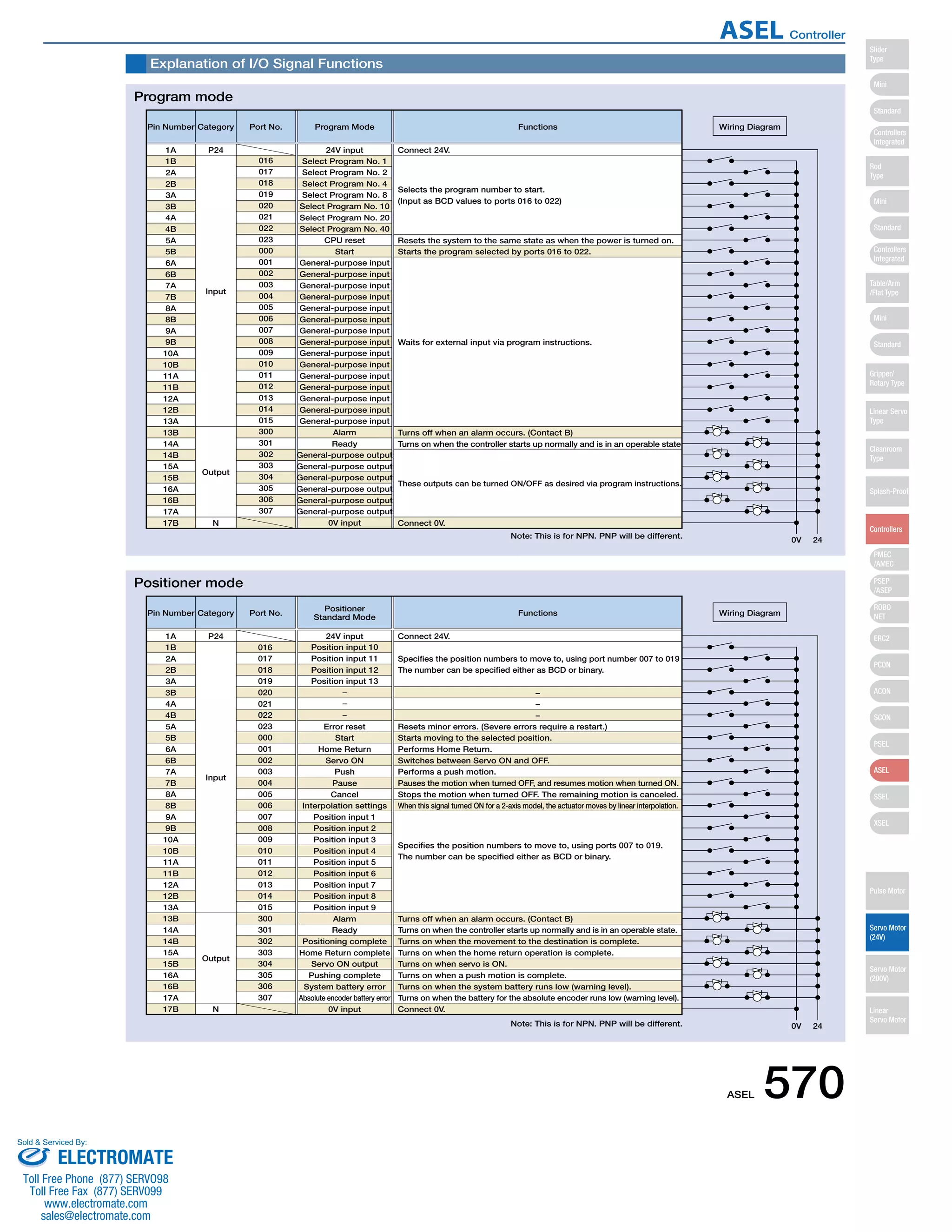
Selects the program number to start. 
(Input as BCD values to ports 016 to 022) 
Resets the system to the same state as when the power is turned on. 
Starts the program selected by ports 016 to 022. 
Waits for external input via program instructions. 
Turns off when an alarm occurs. (Contact B) 
Turns on when the controller starts up normally and is in an operable state. 
These outputs can be turned ON/OFF as desired via program instructions. 
Connect 0V. 
0V 24 
Wiring Diagram 
1A P24 
1B 
2A 
2B 
3A 
3B 
4A 
4B 
5A 
5B 
6A 
6B 
7A 
7B 
8A 
8B 
9A 
9B 
10A 
10B 
11A 
11B 
12A 
12B 
13A 
13B 
14A 
14B 
15A 
15B 
16A 
16B 
17A 
17B 
017 
018 
019 
020 
021 
022 
023 
000 
001 
002 
003 
004 
005 
006 
007 
008 
009 
010 
011 
012 
013 
014 
015 
300 
301 
302 
303 
304 
305 
306 
307 
Select Program No. 1 
Select Program No. 2 
Select Program No. 4 
Select Program No. 8 
Select Program No. 10 
Select Program No. 20 
Select Program No. 40 
CPU reset 
Start 
General-purpose input 
Alarm 
Ready 
General-purpose output 
0V input 
Pin Number Category 
Input 
Output 
N 
Port No. Positioner 
016 
Standard Mode Functions 
24V input Connect 24V. 
Specifies the position numbers to move to, using port number 007 to 019 
The number can be specified either as BCD or binary. 
− 
− 
− 
Resets minor errors. (Severe errors require a restart.) 
Starts moving to the selected position. 
Performs Home Return. 
Switches between Servo ON and OFF. 
Performs a push motion. 
Pauses the motion when turned OFF, and resumes motion when turned ON. 
Stops the motion when turned OFF. The remaining motion is canceled. 
When this signal turned ON for a 2-axis model, the actuator moves by linear interpolation. 
Specifies the position numbers to move to, using ports 007 to 019. 
The number can be specified either as BCD or binary. 
Turns off when an alarm occurs. (Contact B) 
Turns on when the controller starts up normally and is in an operable state. 
Turns on when the movement to the destination is complete. 
Turns on when the home return operation is complete. 
Turns on when servo is ON. 
Turns on when a push motion is complete. 
Turns on when the system battery runs low (warning level). 
Turns on when the battery for the absolute encoder runs low (warning level). 
Connect 0V. 
0V 24 
Wiring Diagram 
1A P24 
1B 
2A 
2B 
3A 
3B 
4A 
4B 
5A 
5B 
6A 
6B 
7A 
7B 
8A 
8B 
9A 
9B 
10A 
10B 
11A 
11B 
12A 
12B 
13A 
13B 
14A 
14B 
15A 
15B 
16A 
16B 
17A 
17B 
017 
018 
019 
020 
021 
022 
023 
000 
001 
002 
003 
004 
005 
006 
007 
008 
009 
010 
011 
012 
013 
014 
015 
300 
301 
302 
303 
304 
305 
306 
307 
Position input 10 
Position input 11 
Position input 12 
Position input 13 
Error reset 
Start 
Home Return 
Servo ON 
Push 
Pause 
Cancel 
Interpolation settings 
Position input 1 
Position input 2 
Position input 3 
Position input 4 
Position input 5 
Position input 6 
Position input 7 
Position input 8 
Position input 9 
Alarm 
Ready 
Positioning complete 
Home Return complete 
Servo ON output 
Pushing complete 
System battery error 
Absolute encoder battery error 
0V input 
Program mode 
Positioner mode 
Note: This is for NPN. PNP will be different. 
ASEL 570 
Slider 
Type 
Mini 
Standard 
Controllers 
Integrated 
Rod 
Type 
Mini 
Standard 
Controllers 
Integrated 
Table/Arm 
/Flat Type 
Mini 
Standard 
Gripper/ 
Rotary Type 
Linear Servo 
Type 
Cleanroom 
Type 
Splash-Proof 
Controllers 
PMEC 
/AMEC 
PSEP 
/ASEP 
ROBO 
NET 
ERC2 
PCON 
ACON 
SCON 
PSEL 
ASEL 
SSEL 
XSEL 
Pulse Motor 
Servo Motor 
(24V) 
Servo Motor 
(200V) 
Linear 
Servo Motor 
ASEL Controller 
Sold  Serviced By: 
ELECTROMATE 
Toll Free Phone (877) SERVO98 
Toll Free Fax (877) SERV099 
www.electromate.com 
sales@electromate.com
Explanation of I/O Signal Functions 
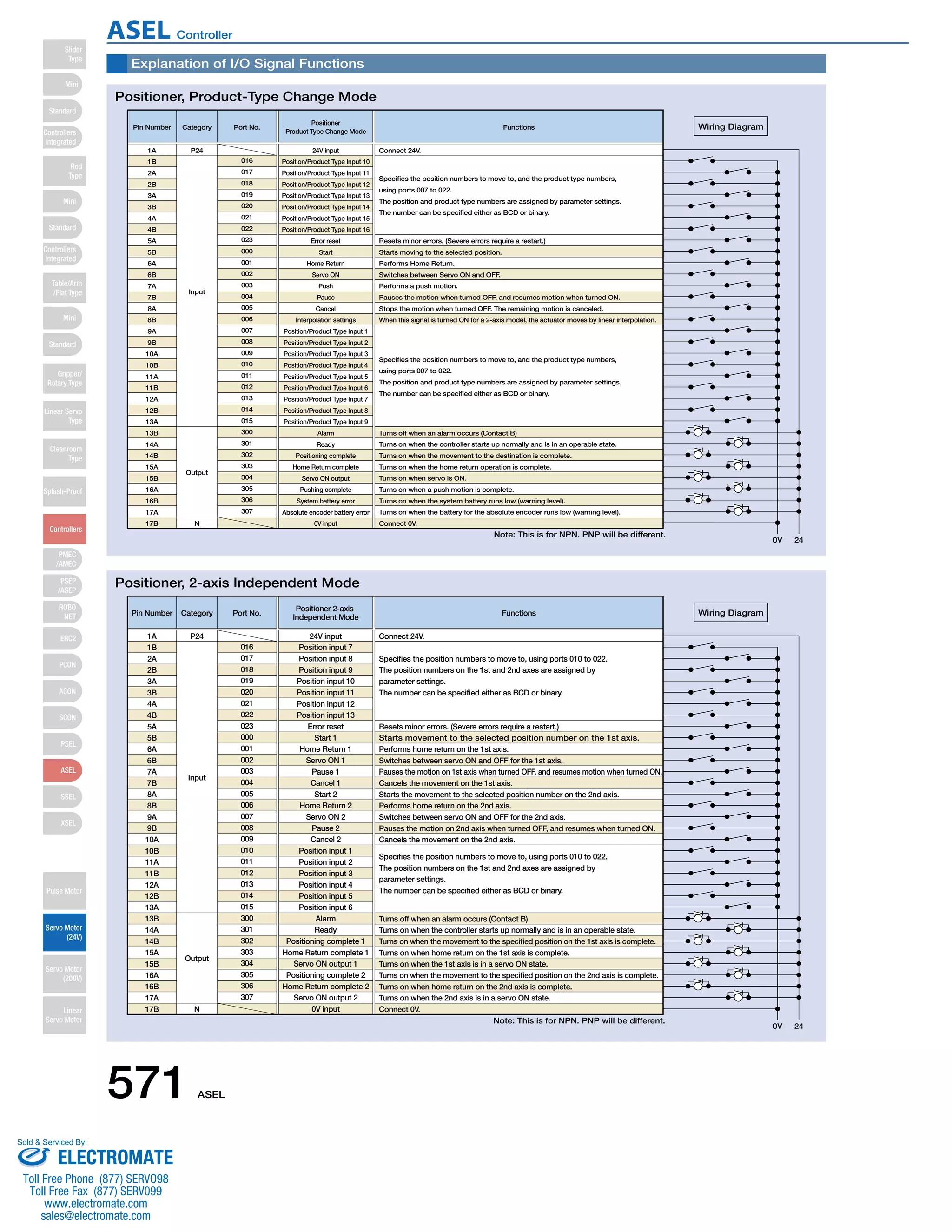
Positioner, Product-Type Change Mode 
Pin Number Category 
Input 
Output 
N 
016 
24V input Connect 24V. 
Port No. 
Positioner 
Product Type Change Mode 
Functions 
Specifies the position numbers to move to, and the product type numbers, 
using ports 007 to 022. 
The position and product type numbers are assigned by parameter settings. 
The number can be specified either as BCD or binary. 
Starts moving to the selected position. 
Performs Home Return. 
Switches between Servo ON and OFF. 
Performs a push motion. 
Pauses the motion when turned OFF, and resumes motion when turned ON. 
Stops the motion when turned OFF. The remaining motion is canceled. 
When this signal is turned ON for a 2-axis model, the actuator moves by linear interpolation. 
Specifies the position numbers to move to, and the product type numbers, 
using ports 007 to 022. 
The position and product type numbers are assigned by parameter settings. 
The number can be specified either as BCD or binary. 
Connect 0V. 
0V 24 
Wiring Diagram 
1A P24 
Resets minor errors. (Severe errors require a restart.) 
Turns off when an alarm occurs (Contact B) 
Turns on when the controller starts up normally and is in an operable state. 
Turns on when the movement to the destination is complete. 
Turns on when the home return operation is complete. 
Turns on when servo is ON. 
Turns on when a push motion is complete. 
Turns on when the system battery runs low (warning level). 
Turns on when the battery for the absolute encoder runs low (warning level). 
1B 
2A 
2B 
3A 
3B 
4A 
4B 
5A 
5B 
6A 
6B 
7A 
7B 
8A 
8B 
9A 
9B 
10A 
10B 
11A 
11B 
12A 
12B 
13A 
13B 
14A 
14B 
15A 
15B 
16A 
16B 
17A 
17B 
017 
018 
019 
020 
021 
022 
023 
000 
001 
002 
003 
004 
005 
006 
007 
008 
009 
010 
011 
012 
013 
014 
015 
300 
301 
302 
303 
304 
305 
306 
307 
Position/Product Type Input 10 
Position/Product Type Input 11 
Position/Product Type Input 12 
Position/Product Type Input 13 
Position/Product Type Input 14 
Position/Product Type Input 15 
Position/Product Type Input 16 
Error reset 
Start 
Home Return 
Servo ON 
Push 
Pause 
Cancel 
Interpolation settings 
Position/Product Type Input 1 
Position/Product Type Input 2 
Position/Product Type Input 3 
Position/Product Type Input 4 
Position/Product Type Input 5 
Position/Product Type Input 6 
Position/Product Type Input 7 
Position/Product Type Input 8 
Position/Product Type Input 9 
Alarm 
Ready 
Positioning complete 
Home Return complete 
Servo ON output 
Pushing complete 
System battery error 
Absolute encoder battery error 
0V input 
Positioner, 2-axis Independent Mode 
Pin Number Category 
Input 
Output 
N 
Port No. Positioner 2-axis 
016 
Independent Mode Functions 
24V input Connect 24V. 
Specifies the position numbers to move to, using ports 010 to 022. 
The position numbers on the 1st and 2nd axes are assigned by 
parameter settings. 
The number can be specified either as BCD or binary. 
Starts movement to the selected position number on the 1st axis. 
Performs home return on the 1st axis. 
Switches between servo ON and OFF for the 1st axis. 
Pauses the motion on 1st axis when turned OFF, and resumes motion when turned ON. 
Cancels the movement on the 1st axis. 
Starts the movement to the selected position number on the 2nd axis. 
Performs home return on the 2nd axis. 
Switches between servo ON and OFF for the 2nd axis. 
Pauses the motion on 2nd axis when turned OFF, and resumes when turned ON. 
Cancels the movement on the 2nd axis. 
Specifies the position numbers to move to, using ports 010 to 022. 
The position numbers on the 1st and 2nd axes are assigned by 
parameter settings. 
The number can be specified either as BCD or binary. 
Connect 0V. 
0V 24 
Wiring Diagram 
1A P24 
Resets minor errors. (Severe errors require a restart.) 
Turns off when an alarm occurs (Contact B) 
Turns on when the controller starts up normally and is in an operable state. 
Turns on when the movement to the specified position on the 1st axis is complete. 
Turns on when home return on the 1st axis is complete. 
Turns on when the 1st axis is in a servo ON state. 
Turns on when the movement to the specified position on the 2nd axis is complete. 
Turns on when home return on the 2nd axis is complete. 
Turns on when the 2nd axis is in a servo ON state. 
1B 
2A 
2B 
3A 
3B 
4A 
4B 
5A 
5B 
6A 
6B 
7A 
7B 
8A 
8B 
9A 
9B 
10A 
10B 
11A 
11B 
12A 
12B 
13A 
13B 
14A 
14B 
15A 
15B 
16A 
16B 
17A 
17B 
017 
018 
019 
020 
021 
022 
023 
000 
001 
002 
003 
004 
005 
006 
007 
008 
009 
010 
011 
012 
013 
014 
015 
300 
301 
302 
303 
304 
305 
306 
307 
Position input 7 
Position input 8 
Position input 9 
Position input 10 
Position input 11 
Position input 12 
Position input 13 
Error reset 
Start 1 
Home Return 1 
Servo ON 1 
Pause 1 
Cancel 1 
Start 2 
Home Return 2 
Servo ON 2 
Pause 2 
Cancel 2 
Position input 1 
Position input 2 
Position input 3 
Position input 4 
Position input 5 
Position input 6 
Alarm 
Ready 
Positioning complete 1 
Home Return complete 1 
Servo ON output 1 
Positioning complete 2 
Home Return complete 2 
Servo ON output 2 
0V input 
Note: This is for NPN. PNP will be different. 
571 ASEL 
Slider 
Type 
Mini 
Standard 
Controllers 
Integrated 
Rod 
Type 
Mini 
Standard 
Controllers 
Integrated 
Table/Arm 
/Flat Type 
Mini 
Standard 
Gripper/ 
Rotary Type 
Linear Servo 
Type 
Cleanroom 
Type 
Splash-Proof 
Controllers 
PMEC 
/AMEC 
PSEP 
/ASEP 
ROBO 
NET 
ERC2 
PCON 
ACON 
SCON 
PSEL 
ASEL 
SSEL 
XSEL 
Pulse Motor 
Servo Motor 
(24V) 
Servo Motor 
(200V) 
Linear 
Servo Motor 
ASEL Controller 
Sold  Serviced By: 
ELECTROMATE 
Toll Free Phone (877) SERVO98 
Toll Free Fax (877) SERV099 
www.electromate.com 
sales@electromate.com
Explanation of I/O Signal Functions 
Pin Number Category 
Input 
Output 
N 
016 
24V input Connect 24V. 
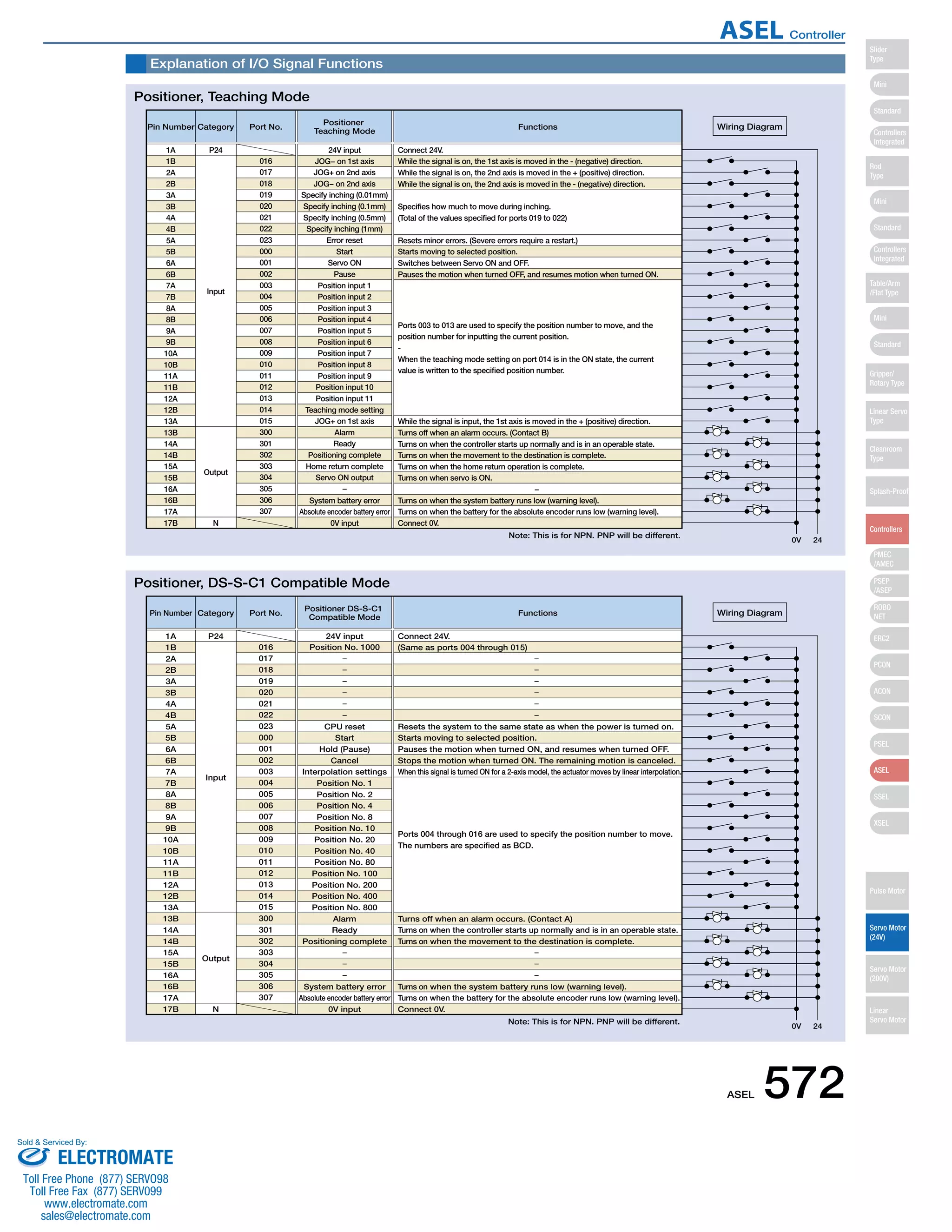
While the signal is on, the 1st axis is moved in the - (negative) direction. 
While the signal is on, the 2nd axis is moved in the + (positive) direction. 
While the signal is on, the 2nd axis is moved in the - (negative) direction. 
Specifies how much to move during inching. 
(Total of the values specified for ports 019 to 022) 
Port No. Positioner 
Teaching Mode Functions 
Starts moving to selected position. 
Switches between Servo ON and OFF. 
Pauses the motion when turned OFF, and resumes motion when turned ON. 
Ports 003 to 013 are used to specify the position number to move, and the 
position number for inputting the current position. 
- 
When the teaching mode setting on port 014 is in the ON state, the current 
value is written to the specified position number. 
While the signal is input, the 1st axis is moved in the + (positive) direction. 
Connect 0V. 
0V 24 
Wiring Diagram 
1A P24 
Resets minor errors. (Severe errors require a restart.) 
Turns off when an alarm occurs. (Contact B) 
Turns on when the controller starts up normally and is in an operable state. 
Turns on when the movement to the destination is complete. 
Turns on when the home return operation is complete. 
Turns on when servo is ON. 
− 
Turns on when the system battery runs low (warning level). 
Turns on when the battery for the absolute encoder runs low (warning level). 
1B 
2A 
2B 
3A 
3B 
4A 
4B 
5A 
5B 
6A 
6B 
7A 
7B 
8A 
8B 
9A 
9B 
10A 
10B 
11A 
11B 
12A 
12B 
13A 
13B 
14A 
14B 
15A 
15B 
16A 
16B 
17A 
17B 
017 
018 
019 
020 
021 
022 
023 
000 
001 
002 
003 
004 
005 
006 
007 
008 
009 
010 
011 
012 
013 
014 
015 
300 
301 
302 
303 
304 
305 
306 
307 
JOG− on 1st axis 
JOG+ on 2nd axis 
JOG− on 2nd axis 
Specify inching (0.01mm) 
Specify inching (0.1mm) 
Specify inching (0.5mm) 
Specify inching (1mm) 
Error reset 
Start 
Servo ON 
Pause 
Position input 1 
Position input 2 
Position input 3 
Position input 4 
Position input 5 
Position input 6 
Position input 7 
Position input 8 
Position input 9 
Position input 10 
Position input 11 
Teaching mode setting 
JOG+ on 1st axis 
Alarm 
Ready 
Positioning complete 
Home return complete 
Servo ON output 
System battery error 
Absolute encoder battery error 
0V input 
Pin Number Category 
Input 
Output 
N 
016 
24V input Connect 24V. 
(Same as ports 004 through 015) 
Port No. Positioner DS-S-C1 
Compatible Mode Functions 
Starts moving to selected position. 
Pauses the motion when turned ON, and resumes when turned OFF. 
Stops the motion when turned ON. The remaining motion is canceled. 
When this signal is turned ON for a 2-axis model, the actuator moves by linear interpolation. 
Ports 004 through 016 are used to specify the position number to move. 
The numbers are specified as BCD. 
Connect 0V. 
0V 24 
Wiring Diagram 
1A P24 
Resets the system to the same state as when the power is turned on. 
Turns off when an alarm occurs. (Contact A) 
Turns on when the controller starts up normally and is in an operable state. 
Turns on when the movement to the destination is complete. 
Turns on when the system battery runs low (warning level). 
Turns on when the battery for the absolute encoder runs low (warning level). 
1B 
2A 
2B 
3A 
3B 
4A 
4B 
5A 
5B 
6A 
6B 
7A 
7B 
8A 
8B 
9A 
9B 
10A 
10B 
11A 
11B 
12A 
12B 
13A 
13B 
14A 
14B 
15A 
15B 
16A 
16B 
17A 
17B 
017 
018 
019 
020 
021 
022 
023 
000 
001 
002 
003 
004 
005 
006 
007 
008 
009 
010 
011 
012 
013 
014 
015 
300 
301 
302 
303 
304 
305 
306 
307 
Position No. 1000 
CPU reset 
Start 
Hold (Pause) 
Cancel 
Interpolation settings 
Position No. 1 
Position No. 2 
Position No. 4 
Position No. 8 
Position No. 10 
Position No. 20 
Position No. 40 
Position No. 80 
Position No. 100 
Position No. 200 
Position No. 400 
Position No. 800 
Alarm 
Ready 
Positioning complete 
System battery error 
Absolute encoder battery error 
0V input 
Positioner, Teaching Mode 
Positioner, DS-S-C1 Compatible Mode 
Note: This is for NPN. PNP will be different. 
ASEL 572 
Slider 
Type 
Mini 
Standard 
Controllers 
Integrated 
Rod 
Type 
Mini 
Standard 
Controllers 
Integrated 
Table/Arm 
/Flat Type 
Mini 
Standard 
Gripper/ 
Rotary Type 
Linear Servo 
Type 
Cleanroom 
Type 
Splash-Proof 
Controllers 
PMEC 
/AMEC 
PSEP 
/ASEP 
ROBO 
NET 
ERC2 
PCON 
ACON 
SCON 
PSEL 
ASEL 
SSEL 
XSEL 
Pulse Motor 
Servo Motor 
(24V) 
Servo Motor 
(200V) 
Linear 
Servo Motor 
ASEL Controller 
Sold  Serviced By: 
ELECTROMATE 
Toll Free Phone (877) SERVO98 
Toll Free Fax (877) SERV099 
www.electromate.com 
sales@electromate.com
Item Specifications 
RCA/RCA2 Series Actuator 
DC24V ±10% 
Power Supply Capacity Control power supply (Max. 1.2A) + motor power supply (See the table below) 
DC500V 10MΩ or higher 
AC500V 1 min. 
Max. 30A 
XYZ directions 10 to 57Hz, One side amplitude: 0.035mm (continuous), 0.075mm (intermittent) 
58 to 150 Hz 4.9 m/s2 (continuous), 9.8 m/s2(intermittent) 
1 axis / 2 axis 
60W (30W + 30W) 
Incremental encoder / Absolute encoder 
1mm/sec and up, the maximum depends on actuator specifications 
0.01G and up, the maximum depends on the actuator 
Program operation / Positioner operation (switchable) 
Super SEL language 
64 programs 
2000 steps 
8 points 
1500 points 
FLASHROM (A system-memory backup battery can be added as an option) 
Teaching pendant or PC software 
24 input points / 8 output points (NPN or PNP selectable) 
Externally supplied 24VDC ± 10% 
CB-DS-PIO □□□ (supplied with the controller) 
RS232C (D-Sub Half-pitch connector) / USB connector 
DeviceNet, CC-Link, ProfiBus 
CB-ACS-MA □□□ (Max. 20m) 
CB-ACS-PA □□□ (Max. 20m) 
Motor overcurrent, Motor driver temperature check, Overload check, Encoder open-circuit check 
Soft limit over, system error, battery error, etc. 
0 to 40ºC 10 to 95% (non-condensing) 
Free from corrosive gases. In particular, there shall be no significant dust. 
IP20 
Approx. 450g 
43 mm (W) x 159 mm (H) x 110 mm (D) 
1-Axis specification 2-Axis specification 
Table of specifications 
Connected actuator 
Input Voltage 
Dielectric strength voltage 
Withstand voltage 
Rush current 
Vibration resistance 
Number of control axes 
Maximum total output of connected axis 
Position detection method 
Speed setting 
Acceleration setting 
Operating method 
Programming language 
Number of programs 
Number of program steps 
Number of multi-tasking programs 
Positioning Points 
Data memory device 
Data input method 
Number of I/O 
I/O power 
PIO cable 
Serial communications function 
Field Network 
Motor Cable 
Encoder cable 
Protection function 
Ambient operating humidity and temperature 
Ambient atmosphere 
Protection class 
Weight 
External dimensions 
Actuator type 
Standard specifications/high 
acceleration and deceleration model 
Power-saving 
Standard specifications/high 
acceleration and deceleration model 
Power-saving 
Rated Max. (Note2) Rated Max. (Note3) Rated Max. (Note2) Rated Max. (Note3) 
Motor 
power 
supply 
capacity 
(Note1) 
RCA 
RCA2 
10W, 20W [Model symbol: 20] 1.3A 4.4A 1.3A 2.5A 2.6A 8.8A 2.6A 5.0A 
30W 1.3A 4.4A 1.3A 2.2A 2.6A 8.8A 2.6A 4.4A 
20W [Model symbol: 20S] SA4, RA3, TA5 type dedicated 1.7A 5.1A 1.7A 3.4A 3.4A 10.2A 3.4A 6.8A 
RCL 
2W 0.8A 4.6A − − 1.6A 9.2A − − 
5W 1.0A 6.4A − − 2.0A 12.8A − − 
10W 1.3A 6.4A − − 2.6A 12.8A − − 
(80) 110 
43 
ø5 
159 
151 
137 
5 
3 
External Dimensions 
ASEL 1-axis controller 
ø5 
159 
151 
137 
5 
3 
43 
(80) 110 
ASEL 2-axis controller 
Basic Specifications 
Control 
specification 
Communication Program 
General 
specifications 
(Note 1) For both 1-axis and 2-axis specifications, approx. 30.0A inrush current flows for 5 ms when the control power supply is turned on.  
(Note 2) Max. current at accelerating/decelerating 
(Note 3) Current reaches the maximum when detecting the servo motor excitation phase at the first servo on after the power is on. (Normal: Approx. 1 to 2 sec., Max.: 10 sec) 
(Note 4) Other than motor power supply capacity, it increases 0.5A for control power. 
573 ASEL 
Slider 
Type 
Mini 
Standard 
Controllers 
Integrated 
Rod 
Type 
Mini 
Standard 
Controllers 
Integrated 
Table/Arm 
/Flat Type 
Mini 
Standard 
Gripper/ 
Rotary Type 
Linear Servo 
Type 
Cleanroom 
Type 
Splash-Proof 
Controllers 
PMEC 
/AMEC 
PSEP 
/ASEP 
ROBO 
NET 
ERC2 
PCON 
ACON 
SCON 
PSEL 
ASEL 
SSEL 
XSEL 
Pulse Motor 
Servo Motor 
(24V) 
Servo Motor 
(200V) 
Linear 
Servo Motor 
ASEL Controller 
Sold  Serviced By: 
ELECTROMATE 
Toll Free Phone (877) SERVO98 
Toll Free Fax (877) SERV099 
www.electromate.com 
sales@electromate.com
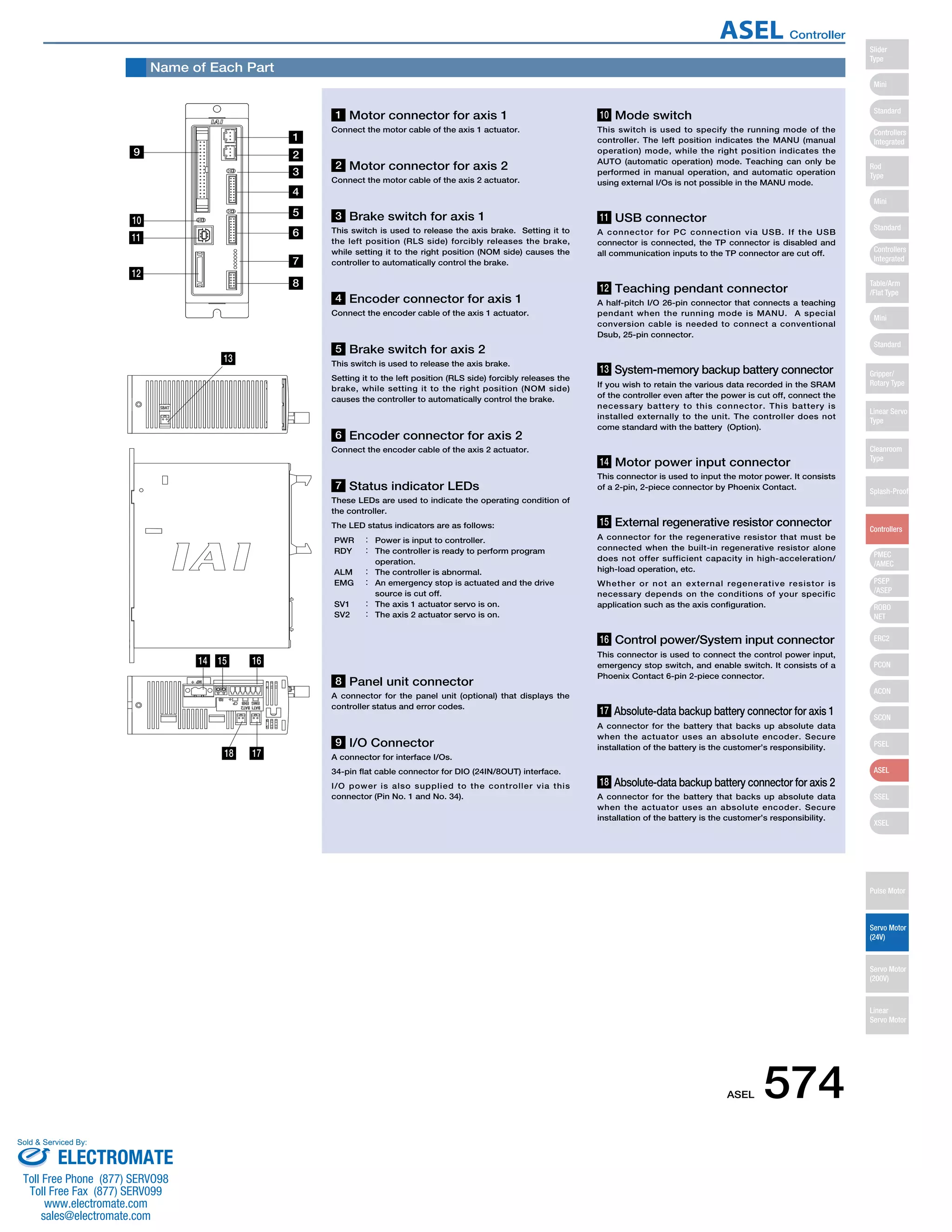
Name of Each Part 
13 
14 
1 
9 
1 Motor connector for axis 1 
Connect the motor cable of the axis 1 actuator. 
3 Brake switch for axis 1 
This switch is used to release the axis brake. Setting it to 
the left position (RLS side) forcibly releases the brake, 
while setting it to the right position (NOM side) causes the 
controller to automatically control the brake. 
5 Brake switch for axis 2 
This switch is used to release the axis brake. 
Setting it to the left position (RLS side) forcibly releases the 
brake, while setting it to the right position (NOM side) 
causes the controller to automatically control the brake. 
8 Panel unit connector 
A connector for the panel unit (optional) that displays the 
controller status and error codes. 
9 I/O Connector 
A connector for interface I/Os. 
34-pin flat cable connector for DIO (24IN/8OUT) interface. 
I/O power is also supplied to the controller via this 
connector (Pin No. 1 and No. 34). 
10 Mode switch 
This switch is used to specify the running mode of the 
controller. The left position indicates the MANU (manual 
operation) mode, while the right position indicates the 
AUTO (automatic operation) mode. Teaching can only be 
performed in manual operation, and automatic operation 
using external I/Os is not possible in the MANU mode. 
11 USB connector 
A connector for PC connection via USB. If the USB 
connector is connected, the TP connector is disabled and 
all communication inputs to the TP connector are cut off. 
12 Teaching pendant connector 
A half-pitch I/O 26-pin connector that connects a teaching 
pendant when the running mode is MANU. A special 
conversion cable is needed to connect a conventional 
Dsub, 25-pin connector. 
13 System-memory backup battery connector 
If you wish to retain the various data recorded in the SRAM 
of the controller even after the power is cut off, connect the 
necessary battery to this connector. This battery is 
installed externally to the unit. The controller does not 
come standard with the battery (Option). 
14 Motor power input connector 
This connector is used to input the motor power. It consists 
of a 2-pin, 2-piece connector by Phoenix Contact. 
15 External regenerative resistor connector 
A connector for the regenerative resistor that must be 
connected when the built-in regenerative resistor alone 
does not offer sufficient capacity in high-acceleration/ 
high-load operation, etc. 
Whether or not an external regenerative resistor is 
necessary depends on the conditions of your specific 
application such as the axis configuration. 
16 Control power/System input connector 
This connector is used to connect the control power input, 
emergency stop switch, and enable switch. It consists of a 
Phoenix Contact 6-pin 2-piece connector. 
17 Absolute-data backup battery connector for axis 1 
A connector for the battery that backs up absolute data 
when the actuator uses an absolute encoder. Secure 
installation of the battery is the customer’s responsibility. 
18 Absolute-data backup battery connector for axis 2 
A connector for the battery that backs up absolute data 
when the actuator uses an absolute encoder. Secure 
installation of the battery is the customer’s responsibility. 
2 Motor connector for axis 2 
Connect the motor cable of the axis 2 actuator. 
4 Encoder connector for axis 1 
Connect the encoder cable of the axis 1 actuator. 
6 Encoder connector for axis 2 
Connect the encoder cable of the axis 2 actuator. 
7 Status indicator LEDs 
These LEDs are used to indicate the operating condition of 
the controller. 
The LED status indicators are as follows: 
PWR : Power is input to controller. 
RDY : The controller is ready to perform program 
operation. 
ALM : The controller is abnormal. 
EMG : An emergency stop is actuated and the drive 
source is cut off. 
SV1 : The axis 1 actuator servo is on. 
SV2 : The axis 2 actuator servo is on. 
10 
11 
12 
2 
3 
4 
5 
6 
7 
8 
15 16 
18 17 
ASEL 574 
Slider 
Type 
Mini 
Standard 
Controllers 
Integrated 
Rod 
Type 
Mini 
Standard 
Controllers 
Integrated 
Table/Arm 
/Flat Type 
Mini 
Standard 
Gripper/ 
Rotary Type 
Linear Servo 
Type 
Cleanroom 
Type 
Splash-Proof 
Controllers 
PMEC 
/AMEC 
PSEP 
/ASEP 
ROBO 
NET 
ERC2 
PCON 
ACON 
SCON 
PSEL 
ASEL 
SSEL 
XSEL 
Pulse Motor 
Servo Motor 
(24V) 
Servo Motor 
(200V) 
Linear 
Servo Motor 
ASEL Controller 
Sold  Serviced By: 
ELECTROMATE 
Toll Free Phone (877) SERVO98 
Toll Free Fax (877) SERV099 
www.electromate.com 
sales@electromate.com
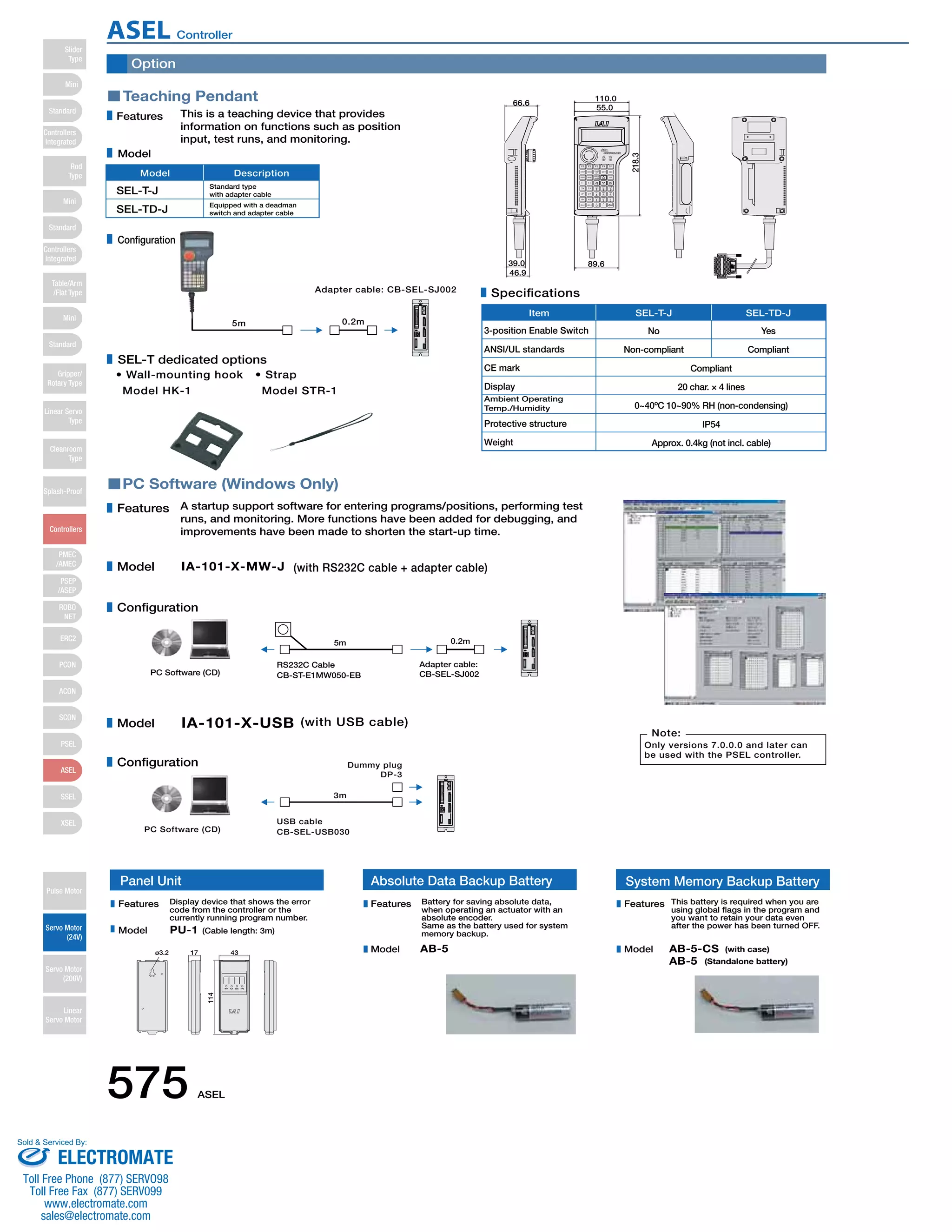
Option 
Teaching Pendant 
Features This is a teaching device that provides 
information on functions such as position 
input, test runs, and monitoring. 
Model Description 
• Wall-mounting hook 
Model HK-1 
• Strap 
Model STR-1 
PC Software (Windows Only) 
Item SEL-T-J SEL-TD-J 
39.0 
A startup support software for entering programs/positions, performing test 
runs, and monitoring. More functions have been added for debugging, and 
improvements have been made to shorten the start-up time. 
IA-101-X-MW-J (with RS232C cable + adapter cable) 
Specifications 
3-position Enable Switch No Yes 
Compliant 
SEL-T-J Standard type 
with adapter cable 
Equipped with a deadman 
switch and adapter cable 
5m 
5m 
Adapter cable: CB-SEL-SJ002 
0.2m 
0.2m 
Adapter cable: 
RS232C Cable 
CB-ST-E1MW050-EB 
PC Software (CD) CB-SEL-SJ002 
IA-101-X-USB (with USB cable) 
3m 
Dummy plug 
DP-3 
PC Software (CD) 
USB cable 
CB-SEL-USB030 
Note: 
Only versions 7.0.0.0 and later can 
be used with the PSEL controller. 
Features 
Model 
Configuration 
Model 
Configuration 
66.6 
46.9 
55.0 
89.6 
218.3 
110.0 
Model 
Configuration 
SEL-T dedicated options 
ANSI/UL standards 
CE mark 
Display 
Ambient Operating 
Temp./Humidity 
Protective structure 
Weight 
Non-compliant Compliant 
20 char. × 4 lines 
0~40ºC 10~90% RH (non-condensing) 
IP54 
Approx. 0.4kg (not incl. cable) 
SEL-TD-J 
Panel Unit 
Display device that shows the error 
code from the controller or the 
currently running program number. 
PU-1 (Cable length: 3m) 
ø3.2 17 
114 
43 
Absolute Data Backup Battery System Memory Backup Battery 
Battery for saving absolute data, 
when operating an actuator with an 
absolute encoder. 
Same as the battery used for system 
memory backup. 
AB-5 
This battery is required when you are 
using global flags in the program and 
you want to retain your data even 
after the power has been turned OFF. 
AB-5-CS 
AB-5 
(with case) 
(Standalone battery) 
Features 
Model 
Features 
Model 
Features 
Model 
575 ASEL 
Slider 
Type 
Mini 
Standard 
Controllers 
Integrated 
Rod 
Type 
Mini 
Standard 
Controllers 
Integrated 
Table/Arm 
/Flat Type 
Mini 
Standard 
Gripper/ 
Rotary Type 
Linear Servo 
Type 
Cleanroom 
Type 
Splash-Proof 
Controllers 
PMEC 
/AMEC 
PSEP 
/ASEP 
ROBO 
NET 
ERC2 
PCON 
ACON 
SCON 
PSEL 
ASEL 
SSEL 
XSEL 
Pulse Motor 
Servo Motor 
(24V) 
Servo Motor 
(200V) 
Linear 
Servo Motor 
ASEL Controller 
Sold  Serviced By: 
ELECTROMATE 
Toll Free Phone (877) SERVO98 
Toll Free Fax (877) SERV099 
www.electromate.com 
sales@electromate.com
Option 
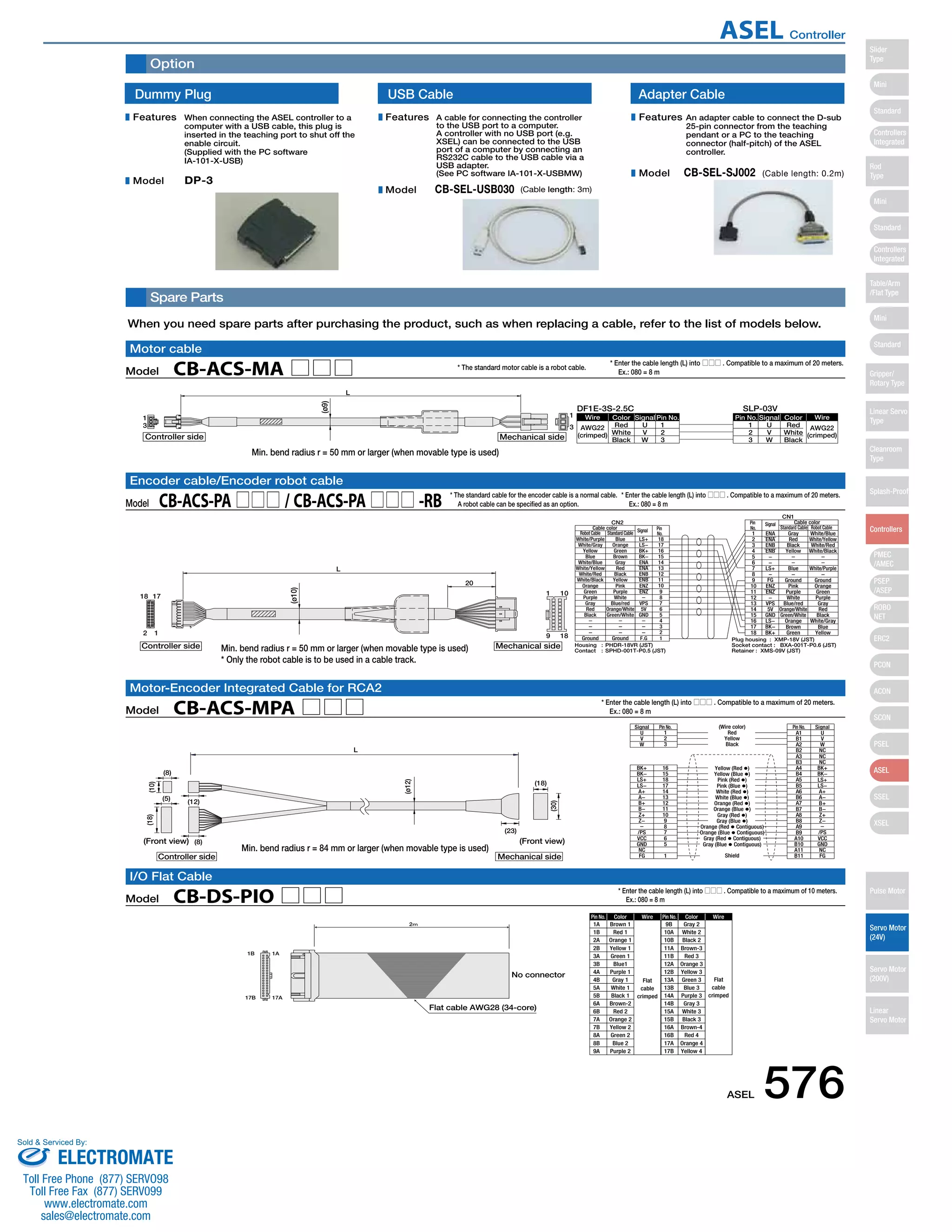
Spare Parts 
When you need spare parts after purchasing the product, such as when replacing a cable, refer to the list of models below. 
* The standard motor cable is a robot cable. 
Wire Color Signal Pin No. Pin No. 
Cable color Signal Standard Cable Robot Cable 
Robot Cable Standard Cable 1 ENA Gray White/Blue 
Signal Pin No. Pin No. Signal 
Pin No. Color Wire 
Flat 
cable 
crimped 
(Wire color) 
Red 
Yellow 
Black 
Yellow (Red ) 
Yellow (Blue ) 
Pink (Red ) 
Pink (Blue ) 
White (Red ) 
White (Blue ) 
Orange (Red ) 
Orange (Blue ) 
Gray (Red ) 
Gray (Blue ) 
Orange (Red  Contiguous) 
Orange (Blue  Contiguous) 
Gray (Red  Contiguous) 
Gray (Blue  Contiguous) 
Wire 
Flat 
cable 
crimped 
Pin No. Color 
1A Brown 1 9B Gray 2 
Min. bend radius r = 50 mm or larger (when movable type is used) 
Encoder cable/Encoder robot cable 
Motor-Encoder Integrated Cable for RCA2 
1B 1A 
17B 17A 
(Front view) 
Flat cable AWG28 (34-core) 
2㨙 
10 
No connector 
1B 
2A 
2B 
3A 
3B 
4A 
4B 
5A 
5B 
6A 
6B 
7A 
7B 
8A 
8B 
9A 
Red 1 
Orange 1 
Yellow 1 
Green 1 
Blue1 
Purple 1 
Gray 1 
White 1 
Black 1 
Brown-2 
Red 2 
Orange 2 
Yellow 2 
Green 2 
Blue 2 
Purple 2 
10A 
10B 
11A 
11B 
12A 
12B 
13A 
13B 
14A 
14B 
15A 
15B 
16A 
16B 
17A 
17B 
White 2 
Black 2 
Brown-3 
Red 3 
Orange 3 
Yellow 3 
Green 3 
Blue 3 
Purple 3 
Gray 3 
White 3 
Black 3 
Brown-4 
Red 4 
Orange 4 
Yellow 4 
Motor cable 
17 
(Front view) 
I/O Flat Cable 
(ø9) 
L 
(ø10) 
Model CB-DS-PIO □□□ 
* Enter the cable length (L) into □□□ . Compatible to a maximum of 10 meters. 
  Ex.: 080 = 8 m 
Dummy Plug 
When connecting the ASEL controller to a 
computer with a USB cable, this plug is 
inserted in the teaching port to shut off the 
enable circuit. 
(Supplied with the PC software 
IA-101-X-USB) 
A cable for connecting the controller 
to the USB port to a computer. 
A controller with no USB port (e.g. 
XSEL) can be connected to the USB 
port of a computer by connecting an 
RS232C cable to the USB cable via a 
USB adapter. 
(See PC software IA-101-X-USBMW) 
DP-3 
USB Cable Adapter Cable 
CB-SEL-USB030 (Cable length: 3m) 
An adapter cable to connect the D-sub 
25-pin connector from the teaching 
pendant or a PC to the teaching 
connector (half-pitch) of the ASEL 
controller. 
CB-SEL-SJ002 (Cable length: 0.2m) 
Features 
Model 
Features 
Model 
Features 
Model 
AWG22 
(crimped) White 
U 1 
Signal Color Wire 
Red 123 
Black 
VW 
23 
W V U 
Red 
White 
Black 
AWG22 
(crimped) 
DF1E-3S-2.5C SLP-03V 
13 
1 
3 
L 
Controller side Mechanical side 
White/Purple Blue LS+ 18 
Housing : PHDR-18VR (JST) 
Contact : SPHD-001T-P0.5 (JST) 
Plug housing : XMP-18V (JST) 
Socket contact : BXA-001T-P0.6 (JST) 
Retainer : XMS-09V (JST) 
CN2 
CN1 
Pin 
No. 
Cable color 
1 
9 18 
20 
18 
2 1 
Controller side Mechanical side 
White/Gray 
Yellow 
Blue 
White/Blue 
White/Yellow 
White/Red 
White/Black 
Orange 
Green 
Purple 
Gray 
Red 
Black 
Ground 
Orange 
Green 
Brown 
Gray 
Red 
Black 
Yellow 
Pink 
Purple 
White 
Blue/red 
Orange/White 
Green/White 
Ground 
LS− 
BK+ 
BK− 
ENA 
ENA 
ENB 
ENB 
ENZ 
ENZ 
VPS 
5V 
GND 
F.G 
17 
16 
15 
14 
13 
12 
11 
10 
987654321 
23456789 
10 
11 
12 
13 
14 
15 
16 
17 
18 
ENA 
ENB 
ENB 
−− 
LS+ 
− 
FG 
ENZ 
ENZ 
− 
VPS 
5V 
GND 
LS− 
BK− 
BK+ 
Red 
Black 
Yellow 
Blue 
Ground 
Pink 
Purple 
White 
Blue/red 
Orange/White 
Green/White 
Orange 
Brown 
Green 
White/Yellow 
White/Red 
White/Black 
White/Purple 
Ground 
Orange 
Green 
Purple 
Gray 
Red 
Black 
White/Gray 
Blue 
Yellow 
Pin 
No. 
Signal 
Model CB-ACS-MA □□□ 
* Enter the cable length (L) into □□□ . Compatible to a maximum of 20 meters. 
  Ex.: 080 = 8 m 
Model CB-ACS-PA □□□ / CB-ACS-PA □□□ -RB 
* Enter the cable length (L) into □□□ . Compatible to a maximum of 20 meters. 
  Ex.: 080 = 8 m 
* The standard cable for the encoder cable is a normal cable. 
  A robot cable can be specified as an option. 
BK− 
LS+ 
LS− 
A+ 
A− 
B+ 
B− 
Z+ 
Z− 
/PS 
VCC 
GND 
NC 
FG 
L 
UVW 
Shield 
123 
A1 U 
BK+ 16 
(10) 
(ø12) 
(18) 
(8) 
(12) 
(23) 
(8) 
(5) 
(30) 
(18) 
Controller side 
Mechanical side 
15 
18 
17 
14 
13 
12 
11 
10 
98765 
1 
B1 
A2 
B2 
A3 
B3 
A4 
B4 
A5 
B5 
A6 
B6 
A7 
B7 
A8 
B8 
A9 
B9 
A10 
B10 
A11 
B11 
VW 
NC 
NC 
NC 
BK+ 
BK− 
LS+ 
LS− 
A+ 
A− 
B+ 
B− 
Z+ 
Z− 
/PS 
VCC 
GND 
NC 
FG 
Model CB-ACS-MPA □□□ 
* Enter the cable length (L) into □□□ . Compatible to a maximum of 20 meters. 
  Ex.: 080 = 8 m 
Min. bend radius r = 50 mm or larger (when movable type is used) 
* Only the robot cable is to be used in a cable track. 
Min. bend radius r = 84 mm or larger (when movable type is used) 
ASEL 576 
Slider 
Type 
Mini 
Standard 
Controllers 
Integrated 
Rod 
Type 
Mini 
Standard 
Controllers 
Integrated 
Table/Arm 
/Flat Type 
Mini 
Standard 
Gripper/ 
Rotary Type 
Linear Servo 
Type 
Cleanroom 
Type 
Splash-Proof 
Controllers 
PMEC 
/AMEC 
PSEP 
/ASEP 
ROBO 
NET 
ERC2 
PCON 
ACON 
SCON 
PSEL 
ASEL 
SSEL 
XSEL 
Pulse Motor 
Servo Motor 
(24V) 
Servo Motor 
(200V) 
Linear 
Servo Motor 
ASEL Controller 
Sold  Serviced By: 
ELECTROMATE 
Toll Free Phone (877) SERVO98 
Toll Free Fax (877) SERV099 
www.electromate.com 
sales@electromate.com

Iai asel controller_specsheet

  • 1.
    Program controller ForRCA2/RCA List of models Program controller for operating RCA2/RCA Series actuators. One unit can handle various controls. Type C Name Program mode Positioner Mode * 2nd axis specs not applicable to the single-axis model. External view Description Model Both the actuator operation and communication with external equipment can be handled by a single controller. When two axes are connected, arc interpolation, path operations, AS E L C 0 Series Type Number of Axes Motor Encoder Option Motor Encoder Option I/O Cable Length Power/ Voltage I/O Type C Standard Type 2 2W motor 5 5W motor 10 10W motor 20S 20 20W motor (*) 20W motor 30 30W motor 1 Single-axis model 2 2-axis model I Incremental A Absolute I Incremental A Absolute NP PIO NPN (standard) PN PIO PNP DV DeviceNet CC CC-Link PR ProfiBus B Brake H Home sensor compatible HA High Accel./Decel. LA Power-saving B Brake H Home sensor compatible HA High Accel./Decel. LA Power-saving 0 DC24V 0 No cable 2 2m (standard) 3 3m 5 5m 2 2W motor 5 5W motor 10 10W motor 20S 20 20W motor (*) 20W motor 30 30W motor (Specs for 1st axis) (Specs for 2nd axis) * When connecting an RCA-RA3/ RGS3/RGD3 and RCA2-SA4/TA5, the motor type is 20S. * When connecting an RCA-RA3/ RGS3/RGD3 and RCA2-SA4/TA5, the motor type is 20S. and synchronization can be performed. Up to 1500 positioning points are supported. Push-motion operation and teaching operation are also possible. Position points 1500 points Number of control axes Up to 2 axes 567 ASEL Slider Type Mini Standard Controllers Integrated Rod Type Mini Standard Controllers Integrated Table/Arm /Flat Type Mini Standard Gripper/ Rotary Type Linear Servo Type Cleanroom Type Splash-Proof Controllers PMEC /AMEC PSEP /ASEP ROBO NET ERC2 PCON ACON SCON PSEL ASEL SSEL XSEL Pulse Motor Servo Motor (24V) Servo Motor (200V) Linear Servo Motor ASEL Controller Sold Serviced By: ELECTROMATE Toll Free Phone (877) SERVO98 Toll Free Fax (877) SERV099 www.electromate.com sales@electromate.com
  • 2.
    Teaching Pendant (seeP575) Model: SEL-T/SEL-TD (Optional) I/O Flat Cable Model: CB-DS-PIO020 (Supplied with the controller) For a replacement cable, see P576. Panel Unit (See P575) Model: PU-1 (Optional) Field Network System Memory Backup Battery (see P575) *1 The system memory backup battery is a required feature if you wish to retain data such as flags used in programs even after the power has been shut off. Motor Cable Model: CB-ACS-MA Standard 1m/3m/5m For a replacement cable, see P576. Encoder Cable Model: CB-ACS-PA Standard 1m/3m/5m For a replacement cable, see P576. Adapter Cable (see P576) Model: CB-SEL-SJ002 (Optional) USB Cable (see P576) Model: CB-SEL-USB030 (included w/ IA-101-X-USB PC software) RS232C Cable Model: CB-ST-E1MW050- EB (Supplied with the IA-101-X-MW PC software) PC Software (see P575) Model: IA-101-X-MW (with RS232C cable) IA-101-X-USB (with USB cable) 2m 0.2m 3m 3m 5m 5m DC24V Power Supply (See P471) Model: PS-241 (100V input) Model: PS-242 (200V input) PLC Actuator: RCA series Model: AB-5-CS (with case) AB-5 (standalone battery) (Optional) *1 Absolute Data Backup Battery (See P585) Model: AB-5 (Supplied with absolute type controller) Actuator: RCA2 series Motor-encoder Integrated Cable Motor: CB-ACS-MPA Standard 1m / 3m / 5m For a replacement cable, see P576. System configuration ASEL 568 Slider Type Mini Standard Controllers Integrated Rod Type Mini Standard Controllers Integrated Table/Arm /Flat Type Mini Standard Gripper/ Rotary Type Linear Servo Type Cleanroom Type Splash-Proof Controllers PMEC /AMEC PSEP /ASEP ROBO NET ERC2 PCON ACON SCON PSEL ASEL SSEL XSEL Pulse Motor Servo Motor (24V) Servo Motor (200V) Linear Servo Motor ASEL Controller Sold Serviced By: ELECTROMATE Toll Free Phone (877) SERVO98 Toll Free Fax (877) SERV099 www.electromate.com sales@electromate.com
  • 3.
    I/O Specifications ■Input section External input specifications Item Input voltage Input current ON/OFF voltage Isolation method Specifications DC24V ±10% 7mA / circuit ON voltage (min.) NPN : DC16V / PNP : DC8V OFF voltage (max.) NPN : DC5V / PNP : DC19V Photocoupler ■ Output section External output specifications Item Load Voltage Max. load current Residual voltage (Max.) Isolation method NPN Specifications NPN Specifications P24V R=560Ω Input terminal Inputs R=3.3kΩ External power supply +24V Internal circuit PNP Specifications PNP Specifications N R=560Ω Input terminal Inputs R=3.3kΩ External power supply +24V Specifications DC24V 100mA / 1 point 400mA / 8 points in total Max 0.1mA / 1 point Photocoupler Internal circuit P24V Explanation of I/O Signal Functions P24 Internal circuit Outputs Load N External power supply + 2 4 V Outputs N Internal circuit External power Load supply + 2 4 V Two modes can be selected for the ASEL controller: “Program Mode,” in which the actuator is operated by entering a program, and “Positioner Mode,” in which PLC signals are received and the actuator is moved to designated positions. The Positioner Mode has the five input patterns listed below to enable various applications. ■ Control Function by Type Operation mode Features Program mode Positioner mode Various operations including linear/arc interpolation operation, path operation ideal for coating processes, etc., arch-motion operation and palletizing operation can be performed using the Super SEL language that lets you program complex control actions using simple commands. This is the basic mode from which operations can be conducted by designating position numbers and inputting the start signal. Push-motion operation and teaching operation are also possible. Multiple parts of the same shape with slightly different hole positions can be handled using movement commands to the same position numbers by simply changing the product type number. With a 2-axis controller, each axis can be commanded and operated separately. In this mode, the slider (rod) moves based on an external signal, when the actuator is stopped, the current location can be registered as position data. Standard mode Product Change mode 2-axis independent mode Teaching mode DS-S-C1 Compatible mode If you were using a DS-S-C1 controller, you can replace it with a ASEL controller without having to change the host programs. *This mode does not ensure actuator compatibility. 569 ASEL Slider Type Mini Standard Controllers Integrated Rod Type Mini Standard Controllers Integrated Table/Arm /Flat Type Mini Standard Gripper/ Rotary Type Linear Servo Type Cleanroom Type Splash-Proof Controllers PMEC /AMEC PSEP /ASEP ROBO NET ERC2 PCON ACON SCON PSEL ASEL SSEL XSEL Pulse Motor Servo Motor (24V) Servo Motor (200V) Linear Servo Motor ASEL Controller Sold Serviced By: ELECTROMATE Toll Free Phone (877) SERVO98 Toll Free Fax (877) SERV099 www.electromate.com sales@electromate.com
  • 4.
    Explanation of I/OSignal Functions Pin Number Category Input Output N Port No. Program Mode Functions 016 24V input Connect 24V. Selects the program number to start. (Input as BCD values to ports 016 to 022) Resets the system to the same state as when the power is turned on. Starts the program selected by ports 016 to 022. Waits for external input via program instructions. Turns off when an alarm occurs. (Contact B) Turns on when the controller starts up normally and is in an operable state. These outputs can be turned ON/OFF as desired via program instructions. Connect 0V. 0V 24 Wiring Diagram 1A P24 1B 2A 2B 3A 3B 4A 4B 5A 5B 6A 6B 7A 7B 8A 8B 9A 9B 10A 10B 11A 11B 12A 12B 13A 13B 14A 14B 15A 15B 16A 16B 17A 17B 017 018 019 020 021 022 023 000 001 002 003 004 005 006 007 008 009 010 011 012 013 014 015 300 301 302 303 304 305 306 307 Select Program No. 1 Select Program No. 2 Select Program No. 4 Select Program No. 8 Select Program No. 10 Select Program No. 20 Select Program No. 40 CPU reset Start General-purpose input General-purpose input General-purpose input General-purpose input General-purpose input General-purpose input General-purpose input General-purpose input General-purpose input General-purpose input General-purpose input General-purpose input General-purpose input General-purpose input General-purpose input Alarm Ready General-purpose output General-purpose output General-purpose output General-purpose output General-purpose output General-purpose output 0V input Pin Number Category Input Output N Port No. Positioner 016 Standard Mode Functions 24V input Connect 24V. Specifies the position numbers to move to, using port number 007 to 019 The number can be specified either as BCD or binary. − − − Resets minor errors. (Severe errors require a restart.) Starts moving to the selected position. Performs Home Return. Switches between Servo ON and OFF. Performs a push motion. Pauses the motion when turned OFF, and resumes motion when turned ON. Stops the motion when turned OFF. The remaining motion is canceled. When this signal turned ON for a 2-axis model, the actuator moves by linear interpolation. Specifies the position numbers to move to, using ports 007 to 019. The number can be specified either as BCD or binary. Turns off when an alarm occurs. (Contact B) Turns on when the controller starts up normally and is in an operable state. Turns on when the movement to the destination is complete. Turns on when the home return operation is complete. Turns on when servo is ON. Turns on when a push motion is complete. Turns on when the system battery runs low (warning level). Turns on when the battery for the absolute encoder runs low (warning level). Connect 0V. 0V 24 Wiring Diagram 1A P24 1B 2A 2B 3A 3B 4A 4B 5A 5B 6A 6B 7A 7B 8A 8B 9A 9B 10A 10B 11A 11B 12A 12B 13A 13B 14A 14B 15A 15B 16A 16B 17A 17B 017 018 019 020 021 022 023 000 001 002 003 004 005 006 007 008 009 010 011 012 013 014 015 300 301 302 303 304 305 306 307 Position input 10 Position input 11 Position input 12 Position input 13 Error reset Start Home Return Servo ON Push Pause Cancel Interpolation settings Position input 1 Position input 2 Position input 3 Position input 4 Position input 5 Position input 6 Position input 7 Position input 8 Position input 9 Alarm Ready Positioning complete Home Return complete Servo ON output Pushing complete System battery error Absolute encoder battery error 0V input Program mode Positioner mode Note: This is for NPN. PNP will be different. Note: This is for NPN. PNP will be different. ASEL 570 Slider Type Mini Standard Controllers Integrated Rod Type Mini Standard Controllers Integrated Table/Arm /Flat Type Mini Standard Gripper/ Rotary Type Linear Servo Type Cleanroom Type Splash-Proof Controllers PMEC /AMEC PSEP /ASEP ROBO NET ERC2 PCON ACON SCON PSEL ASEL SSEL XSEL Pulse Motor Servo Motor (24V) Servo Motor (200V) Linear Servo Motor ASEL Controller Sold Serviced By: ELECTROMATE Toll Free Phone (877) SERVO98 Toll Free Fax (877) SERV099 www.electromate.com sales@electromate.com
  • 5.
    Explanation of I/OSignal Functions Positioner, Product-Type Change Mode Pin Number Category Input Output N 016 24V input Connect 24V. Port No. Positioner Product Type Change Mode Functions Specifies the position numbers to move to, and the product type numbers, using ports 007 to 022. The position and product type numbers are assigned by parameter settings. The number can be specified either as BCD or binary. Starts moving to the selected position. Performs Home Return. Switches between Servo ON and OFF. Performs a push motion. Pauses the motion when turned OFF, and resumes motion when turned ON. Stops the motion when turned OFF. The remaining motion is canceled. When this signal is turned ON for a 2-axis model, the actuator moves by linear interpolation. Specifies the position numbers to move to, and the product type numbers, using ports 007 to 022. The position and product type numbers are assigned by parameter settings. The number can be specified either as BCD or binary. Connect 0V. 0V 24 Wiring Diagram 1A P24 Resets minor errors. (Severe errors require a restart.) Turns off when an alarm occurs (Contact B) Turns on when the controller starts up normally and is in an operable state. Turns on when the movement to the destination is complete. Turns on when the home return operation is complete. Turns on when servo is ON. Turns on when a push motion is complete. Turns on when the system battery runs low (warning level). Turns on when the battery for the absolute encoder runs low (warning level). 1B 2A 2B 3A 3B 4A 4B 5A 5B 6A 6B 7A 7B 8A 8B 9A 9B 10A 10B 11A 11B 12A 12B 13A 13B 14A 14B 15A 15B 16A 16B 17A 17B 017 018 019 020 021 022 023 000 001 002 003 004 005 006 007 008 009 010 011 012 013 014 015 300 301 302 303 304 305 306 307 Position/Product Type Input 10 Position/Product Type Input 11 Position/Product Type Input 12 Position/Product Type Input 13 Position/Product Type Input 14 Position/Product Type Input 15 Position/Product Type Input 16 Error reset Start Home Return Servo ON Push Pause Cancel Interpolation settings Position/Product Type Input 1 Position/Product Type Input 2 Position/Product Type Input 3 Position/Product Type Input 4 Position/Product Type Input 5 Position/Product Type Input 6 Position/Product Type Input 7 Position/Product Type Input 8 Position/Product Type Input 9 Alarm Ready Positioning complete Home Return complete Servo ON output Pushing complete System battery error Absolute encoder battery error 0V input Positioner, 2-axis Independent Mode Pin Number Category Input Output N Port No. Positioner 2-axis 016 Independent Mode Functions 24V input Connect 24V. Specifies the position numbers to move to, using ports 010 to 022. The position numbers on the 1st and 2nd axes are assigned by parameter settings. The number can be specified either as BCD or binary. Starts movement to the selected position number on the 1st axis. Performs home return on the 1st axis. Switches between servo ON and OFF for the 1st axis. Pauses the motion on 1st axis when turned OFF, and resumes motion when turned ON. Cancels the movement on the 1st axis. Starts the movement to the selected position number on the 2nd axis. Performs home return on the 2nd axis. Switches between servo ON and OFF for the 2nd axis. Pauses the motion on 2nd axis when turned OFF, and resumes when turned ON. Cancels the movement on the 2nd axis. Specifies the position numbers to move to, using ports 010 to 022. The position numbers on the 1st and 2nd axes are assigned by parameter settings. The number can be specified either as BCD or binary. Connect 0V. 0V 24 Wiring Diagram 1A P24 Resets minor errors. (Severe errors require a restart.) Turns off when an alarm occurs (Contact B) Turns on when the controller starts up normally and is in an operable state. Turns on when the movement to the specified position on the 1st axis is complete. Turns on when home return on the 1st axis is complete. Turns on when the 1st axis is in a servo ON state. Turns on when the movement to the specified position on the 2nd axis is complete. Turns on when home return on the 2nd axis is complete. Turns on when the 2nd axis is in a servo ON state. 1B 2A 2B 3A 3B 4A 4B 5A 5B 6A 6B 7A 7B 8A 8B 9A 9B 10A 10B 11A 11B 12A 12B 13A 13B 14A 14B 15A 15B 16A 16B 17A 17B 017 018 019 020 021 022 023 000 001 002 003 004 005 006 007 008 009 010 011 012 013 014 015 300 301 302 303 304 305 306 307 Position input 7 Position input 8 Position input 9 Position input 10 Position input 11 Position input 12 Position input 13 Error reset Start 1 Home Return 1 Servo ON 1 Pause 1 Cancel 1 Start 2 Home Return 2 Servo ON 2 Pause 2 Cancel 2 Position input 1 Position input 2 Position input 3 Position input 4 Position input 5 Position input 6 Alarm Ready Positioning complete 1 Home Return complete 1 Servo ON output 1 Positioning complete 2 Home Return complete 2 Servo ON output 2 0V input Note: This is for NPN. PNP will be different. Note: This is for NPN. PNP will be different. 571 ASEL Slider Type Mini Standard Controllers Integrated Rod Type Mini Standard Controllers Integrated Table/Arm /Flat Type Mini Standard Gripper/ Rotary Type Linear Servo Type Cleanroom Type Splash-Proof Controllers PMEC /AMEC PSEP /ASEP ROBO NET ERC2 PCON ACON SCON PSEL ASEL SSEL XSEL Pulse Motor Servo Motor (24V) Servo Motor (200V) Linear Servo Motor ASEL Controller Sold Serviced By: ELECTROMATE Toll Free Phone (877) SERVO98 Toll Free Fax (877) SERV099 www.electromate.com sales@electromate.com
  • 6.
    Explanation of I/OSignal Functions Pin Number Category Input Output N 016 24V input Connect 24V. While the signal is on, the 1st axis is moved in the - (negative) direction. While the signal is on, the 2nd axis is moved in the + (positive) direction. While the signal is on, the 2nd axis is moved in the - (negative) direction. Specifies how much to move during inching. (Total of the values specified for ports 019 to 022) Port No. Positioner Teaching Mode Functions Starts moving to selected position. Switches between Servo ON and OFF. Pauses the motion when turned OFF, and resumes motion when turned ON. Ports 003 to 013 are used to specify the position number to move, and the position number for inputting the current position. - When the teaching mode setting on port 014 is in the ON state, the current value is written to the specified position number. While the signal is input, the 1st axis is moved in the + (positive) direction. Connect 0V. 0V 24 Wiring Diagram 1A P24 Resets minor errors. (Severe errors require a restart.) Turns off when an alarm occurs. (Contact B) Turns on when the controller starts up normally and is in an operable state. Turns on when the movement to the destination is complete. Turns on when the home return operation is complete. Turns on when servo is ON. − Turns on when the system battery runs low (warning level). Turns on when the battery for the absolute encoder runs low (warning level). 1B 2A 2B 3A 3B 4A 4B 5A 5B 6A 6B 7A 7B 8A 8B 9A 9B 10A 10B 11A 11B 12A 12B 13A 13B 14A 14B 15A 15B 16A 16B 17A 17B 017 018 019 020 021 022 023 000 001 002 003 004 005 006 007 008 009 010 011 012 013 014 015 300 301 302 303 304 305 306 307 JOG− on 1st axis JOG+ on 2nd axis JOG− on 2nd axis Specify inching (0.01mm) Specify inching (0.1mm) Specify inching (0.5mm) Specify inching (1mm) Error reset Start Servo ON Pause Position input 1 Position input 2 Position input 3 Position input 4 Position input 5 Position input 6 Position input 7 Position input 8 Position input 9 Position input 10 Position input 11 Teaching mode setting JOG+ on 1st axis Alarm Ready Positioning complete Home return complete Servo ON output System battery error Absolute encoder battery error 0V input Pin Number Category Input Output N 016 24V input Connect 24V. (Same as ports 004 through 015) Port No. Positioner DS-S-C1 Compatible Mode Functions Starts moving to selected position. Pauses the motion when turned ON, and resumes when turned OFF. Stops the motion when turned ON. The remaining motion is canceled. When this signal is turned ON for a 2-axis model, the actuator moves by linear interpolation. Ports 004 through 016 are used to specify the position number to move. The numbers are specified as BCD. Connect 0V. 0V 24 Wiring Diagram 1A P24 Resets the system to the same state as when the power is turned on. Turns off when an alarm occurs. (Contact A) Turns on when the controller starts up normally and is in an operable state. Turns on when the movement to the destination is complete. Turns on when the system battery runs low (warning level). Turns on when the battery for the absolute encoder runs low (warning level). 1B 2A 2B 3A 3B 4A 4B 5A 5B 6A 6B 7A 7B 8A 8B 9A 9B 10A 10B 11A 11B 12A 12B 13A 13B 14A 14B 15A 15B 16A 16B 17A 17B 017 018 019 020 021 022 023 000 001 002 003 004 005 006 007 008 009 010 011 012 013 014 015 300 301 302 303 304 305 306 307 Position No. 1000 CPU reset Start Hold (Pause) Cancel Interpolation settings Position No. 1 Position No. 2 Position No. 4 Position No. 8 Position No. 10 Position No. 20 Position No. 40 Position No. 80 Position No. 100 Position No. 200 Position No. 400 Position No. 800 Alarm Ready Positioning complete System battery error Absolute encoder battery error 0V input Positioner, Teaching Mode Positioner, DS-S-C1 Compatible Mode Note: This is for NPN. PNP will be different. Note: This is for NPN. PNP will be different. ASEL 572 Slider Type Mini Standard Controllers Integrated Rod Type Mini Standard Controllers Integrated Table/Arm /Flat Type Mini Standard Gripper/ Rotary Type Linear Servo Type Cleanroom Type Splash-Proof Controllers PMEC /AMEC PSEP /ASEP ROBO NET ERC2 PCON ACON SCON PSEL ASEL SSEL XSEL Pulse Motor Servo Motor (24V) Servo Motor (200V) Linear Servo Motor ASEL Controller Sold Serviced By: ELECTROMATE Toll Free Phone (877) SERVO98 Toll Free Fax (877) SERV099 www.electromate.com sales@electromate.com
  • 7.
    Item Specifications RCA/RCA2Series Actuator DC24V ±10% Power Supply Capacity Control power supply (Max. 1.2A) + motor power supply (See the table below) DC500V 10MΩ or higher AC500V 1 min. Max. 30A XYZ directions 10 to 57Hz, One side amplitude: 0.035mm (continuous), 0.075mm (intermittent) 58 to 150 Hz 4.9 m/s2 (continuous), 9.8 m/s2(intermittent) 1 axis / 2 axis 60W (30W + 30W) Incremental encoder / Absolute encoder 1mm/sec and up, the maximum depends on actuator specifications 0.01G and up, the maximum depends on the actuator Program operation / Positioner operation (switchable) Super SEL language 64 programs 2000 steps 8 points 1500 points FLASHROM (A system-memory backup battery can be added as an option) Teaching pendant or PC software 24 input points / 8 output points (NPN or PNP selectable) Externally supplied 24VDC ± 10% CB-DS-PIO □□□ (supplied with the controller) RS232C (D-Sub Half-pitch connector) / USB connector DeviceNet, CC-Link, ProfiBus CB-ACS-MA □□□ (Max. 20m) CB-ACS-PA □□□ (Max. 20m) Motor overcurrent, Motor driver temperature check, Overload check, Encoder open-circuit check Soft limit over, system error, battery error, etc. 0 to 40ºC 10 to 95% (non-condensing) Free from corrosive gases. In particular, there shall be no significant dust. IP20 Approx. 450g 43 mm (W) x 159 mm (H) x 110 mm (D) 1-Axis specification 2-Axis specification Table of specifications Connected actuator Input Voltage Dielectric strength voltage Withstand voltage Rush current Vibration resistance Number of control axes Maximum total output of connected axis Position detection method Speed setting Acceleration setting Operating method Programming language Number of programs Number of program steps Number of multi-tasking programs Positioning Points Data memory device Data input method Number of I/O I/O power PIO cable Serial communications function Field Network Motor Cable Encoder cable Protection function Ambient operating humidity and temperature Ambient atmosphere Protection class Weight External dimensions Actuator type Standard specifications/high acceleration and deceleration model Power-saving Standard specifications/high acceleration and deceleration model Power-saving Rated Max. (Note2) Rated Max. (Note3) Rated Max. (Note2) Rated Max. (Note3) Motor power supply capacity (Note1) RCA RCA2 10W, 20W [Model symbol: 20] 1.3A 4.4A 1.3A 2.5A 2.6A 8.8A 2.6A 5.0A 30W 1.3A 4.4A 1.3A 2.2A 2.6A 8.8A 2.6A 4.4A 20W [Model symbol: 20S] SA4, RA3, TA5 type dedicated 1.7A 5.1A 1.7A 3.4A 3.4A 10.2A 3.4A 6.8A RCL 2W 0.8A 4.6A − − 1.6A 9.2A − − 5W 1.0A 6.4A − − 2.0A 12.8A − − 10W 1.3A 6.4A − − 2.6A 12.8A − − (80) 110 43 ø5 159 151 137 5 3 External Dimensions ASEL 1-axis controller ø5 159 151 137 5 3 43 (80) 110 ASEL 2-axis controller Basic Specifications Control specification Communication Program General specifications (Note 1) For both 1-axis and 2-axis specifications, approx. 30.0A inrush current flows for 5 ms when the control power supply is turned on.  (Note 2) Max. current at accelerating/decelerating (Note 3) Current reaches the maximum when detecting the servo motor excitation phase at the first servo on after the power is on. (Normal: Approx. 1 to 2 sec., Max.: 10 sec) (Note 4) Other than motor power supply capacity, it increases 0.5A for control power. 573 ASEL Slider Type Mini Standard Controllers Integrated Rod Type Mini Standard Controllers Integrated Table/Arm /Flat Type Mini Standard Gripper/ Rotary Type Linear Servo Type Cleanroom Type Splash-Proof Controllers PMEC /AMEC PSEP /ASEP ROBO NET ERC2 PCON ACON SCON PSEL ASEL SSEL XSEL Pulse Motor Servo Motor (24V) Servo Motor (200V) Linear Servo Motor ASEL Controller Sold Serviced By: ELECTROMATE Toll Free Phone (877) SERVO98 Toll Free Fax (877) SERV099 www.electromate.com sales@electromate.com
  • 8.
    Name of EachPart 13 14 1 9 1 Motor connector for axis 1 Connect the motor cable of the axis 1 actuator. 3 Brake switch for axis 1 This switch is used to release the axis brake. Setting it to the left position (RLS side) forcibly releases the brake, while setting it to the right position (NOM side) causes the controller to automatically control the brake. 5 Brake switch for axis 2 This switch is used to release the axis brake. Setting it to the left position (RLS side) forcibly releases the brake, while setting it to the right position (NOM side) causes the controller to automatically control the brake. 8 Panel unit connector A connector for the panel unit (optional) that displays the controller status and error codes. 9 I/O Connector A connector for interface I/Os. 34-pin flat cable connector for DIO (24IN/8OUT) interface. I/O power is also supplied to the controller via this connector (Pin No. 1 and No. 34). 10 Mode switch This switch is used to specify the running mode of the controller. The left position indicates the MANU (manual operation) mode, while the right position indicates the AUTO (automatic operation) mode. Teaching can only be performed in manual operation, and automatic operation using external I/Os is not possible in the MANU mode. 11 USB connector A connector for PC connection via USB. If the USB connector is connected, the TP connector is disabled and all communication inputs to the TP connector are cut off. 12 Teaching pendant connector A half-pitch I/O 26-pin connector that connects a teaching pendant when the running mode is MANU. A special conversion cable is needed to connect a conventional Dsub, 25-pin connector. 13 System-memory backup battery connector If you wish to retain the various data recorded in the SRAM of the controller even after the power is cut off, connect the necessary battery to this connector. This battery is installed externally to the unit. The controller does not come standard with the battery (Option). 14 Motor power input connector This connector is used to input the motor power. It consists of a 2-pin, 2-piece connector by Phoenix Contact. 15 External regenerative resistor connector A connector for the regenerative resistor that must be connected when the built-in regenerative resistor alone does not offer sufficient capacity in high-acceleration/ high-load operation, etc. Whether or not an external regenerative resistor is necessary depends on the conditions of your specific application such as the axis configuration. 16 Control power/System input connector This connector is used to connect the control power input, emergency stop switch, and enable switch. It consists of a Phoenix Contact 6-pin 2-piece connector. 17 Absolute-data backup battery connector for axis 1 A connector for the battery that backs up absolute data when the actuator uses an absolute encoder. Secure installation of the battery is the customer’s responsibility. 18 Absolute-data backup battery connector for axis 2 A connector for the battery that backs up absolute data when the actuator uses an absolute encoder. Secure installation of the battery is the customer’s responsibility. 2 Motor connector for axis 2 Connect the motor cable of the axis 2 actuator. 4 Encoder connector for axis 1 Connect the encoder cable of the axis 1 actuator. 6 Encoder connector for axis 2 Connect the encoder cable of the axis 2 actuator. 7 Status indicator LEDs These LEDs are used to indicate the operating condition of the controller. The LED status indicators are as follows: PWR : Power is input to controller. RDY : The controller is ready to perform program operation. ALM : The controller is abnormal. EMG : An emergency stop is actuated and the drive source is cut off. SV1 : The axis 1 actuator servo is on. SV2 : The axis 2 actuator servo is on. 10 11 12 2 3 4 5 6 7 8 15 16 18 17 ASEL 574 Slider Type Mini Standard Controllers Integrated Rod Type Mini Standard Controllers Integrated Table/Arm /Flat Type Mini Standard Gripper/ Rotary Type Linear Servo Type Cleanroom Type Splash-Proof Controllers PMEC /AMEC PSEP /ASEP ROBO NET ERC2 PCON ACON SCON PSEL ASEL SSEL XSEL Pulse Motor Servo Motor (24V) Servo Motor (200V) Linear Servo Motor ASEL Controller Sold Serviced By: ELECTROMATE Toll Free Phone (877) SERVO98 Toll Free Fax (877) SERV099 www.electromate.com sales@electromate.com
  • 9.
    Option Teaching Pendant Features This is a teaching device that provides information on functions such as position input, test runs, and monitoring. Model Description • Wall-mounting hook Model HK-1 • Strap Model STR-1 PC Software (Windows Only) Item SEL-T-J SEL-TD-J 39.0 A startup support software for entering programs/positions, performing test runs, and monitoring. More functions have been added for debugging, and improvements have been made to shorten the start-up time. IA-101-X-MW-J (with RS232C cable + adapter cable) Specifications 3-position Enable Switch No Yes Compliant SEL-T-J Standard type with adapter cable Equipped with a deadman switch and adapter cable 5m 5m Adapter cable: CB-SEL-SJ002 0.2m 0.2m Adapter cable: RS232C Cable CB-ST-E1MW050-EB PC Software (CD) CB-SEL-SJ002 IA-101-X-USB (with USB cable) 3m Dummy plug DP-3 PC Software (CD) USB cable CB-SEL-USB030 Note: Only versions 7.0.0.0 and later can be used with the PSEL controller. Features Model Configuration Model Configuration 66.6 46.9 55.0 89.6 218.3 110.0 Model Configuration SEL-T dedicated options ANSI/UL standards CE mark Display Ambient Operating Temp./Humidity Protective structure Weight Non-compliant Compliant 20 char. × 4 lines 0~40ºC 10~90% RH (non-condensing) IP54 Approx. 0.4kg (not incl. cable) SEL-TD-J Panel Unit Display device that shows the error code from the controller or the currently running program number. PU-1 (Cable length: 3m) ø3.2 17 114 43 Absolute Data Backup Battery System Memory Backup Battery Battery for saving absolute data, when operating an actuator with an absolute encoder. Same as the battery used for system memory backup. AB-5 This battery is required when you are using global flags in the program and you want to retain your data even after the power has been turned OFF. AB-5-CS AB-5 (with case) (Standalone battery) Features Model Features Model Features Model 575 ASEL Slider Type Mini Standard Controllers Integrated Rod Type Mini Standard Controllers Integrated Table/Arm /Flat Type Mini Standard Gripper/ Rotary Type Linear Servo Type Cleanroom Type Splash-Proof Controllers PMEC /AMEC PSEP /ASEP ROBO NET ERC2 PCON ACON SCON PSEL ASEL SSEL XSEL Pulse Motor Servo Motor (24V) Servo Motor (200V) Linear Servo Motor ASEL Controller Sold Serviced By: ELECTROMATE Toll Free Phone (877) SERVO98 Toll Free Fax (877) SERV099 www.electromate.com sales@electromate.com
  • 10.
    Option Spare Parts When you need spare parts after purchasing the product, such as when replacing a cable, refer to the list of models below. * The standard motor cable is a robot cable. Wire Color Signal Pin No. Pin No. Cable color Signal Standard Cable Robot Cable Robot Cable Standard Cable 1 ENA Gray White/Blue Signal Pin No. Pin No. Signal Pin No. Color Wire Flat cable crimped (Wire color) Red Yellow Black Yellow (Red ) Yellow (Blue ) Pink (Red ) Pink (Blue ) White (Red ) White (Blue ) Orange (Red ) Orange (Blue ) Gray (Red ) Gray (Blue ) Orange (Red Contiguous) Orange (Blue Contiguous) Gray (Red Contiguous) Gray (Blue Contiguous) Wire Flat cable crimped Pin No. Color 1A Brown 1 9B Gray 2 Min. bend radius r = 50 mm or larger (when movable type is used) Encoder cable/Encoder robot cable Motor-Encoder Integrated Cable for RCA2 1B 1A 17B 17A (Front view) Flat cable AWG28 (34-core) 2㨙 10 No connector 1B 2A 2B 3A 3B 4A 4B 5A 5B 6A 6B 7A 7B 8A 8B 9A Red 1 Orange 1 Yellow 1 Green 1 Blue1 Purple 1 Gray 1 White 1 Black 1 Brown-2 Red 2 Orange 2 Yellow 2 Green 2 Blue 2 Purple 2 10A 10B 11A 11B 12A 12B 13A 13B 14A 14B 15A 15B 16A 16B 17A 17B White 2 Black 2 Brown-3 Red 3 Orange 3 Yellow 3 Green 3 Blue 3 Purple 3 Gray 3 White 3 Black 3 Brown-4 Red 4 Orange 4 Yellow 4 Motor cable 17 (Front view) I/O Flat Cable (ø9) L (ø10) Model CB-DS-PIO □□□ * Enter the cable length (L) into □□□ . Compatible to a maximum of 10 meters.   Ex.: 080 = 8 m Dummy Plug When connecting the ASEL controller to a computer with a USB cable, this plug is inserted in the teaching port to shut off the enable circuit. (Supplied with the PC software IA-101-X-USB) A cable for connecting the controller to the USB port to a computer. A controller with no USB port (e.g. XSEL) can be connected to the USB port of a computer by connecting an RS232C cable to the USB cable via a USB adapter. (See PC software IA-101-X-USBMW) DP-3 USB Cable Adapter Cable CB-SEL-USB030 (Cable length: 3m) An adapter cable to connect the D-sub 25-pin connector from the teaching pendant or a PC to the teaching connector (half-pitch) of the ASEL controller. CB-SEL-SJ002 (Cable length: 0.2m) Features Model Features Model Features Model AWG22 (crimped) White U 1 Signal Color Wire Red 123 Black VW 23 W V U Red White Black AWG22 (crimped) DF1E-3S-2.5C SLP-03V 13 1 3 L Controller side Mechanical side White/Purple Blue LS+ 18 Housing : PHDR-18VR (JST) Contact : SPHD-001T-P0.5 (JST) Plug housing : XMP-18V (JST) Socket contact : BXA-001T-P0.6 (JST) Retainer : XMS-09V (JST) CN2 CN1 Pin No. Cable color 1 9 18 20 18 2 1 Controller side Mechanical side White/Gray Yellow Blue White/Blue White/Yellow White/Red White/Black Orange Green Purple Gray Red Black Ground Orange Green Brown Gray Red Black Yellow Pink Purple White Blue/red Orange/White Green/White Ground LS− BK+ BK− ENA ENA ENB ENB ENZ ENZ VPS 5V GND F.G 17 16 15 14 13 12 11 10 987654321 23456789 10 11 12 13 14 15 16 17 18 ENA ENB ENB −− LS+ − FG ENZ ENZ − VPS 5V GND LS− BK− BK+ Red Black Yellow Blue Ground Pink Purple White Blue/red Orange/White Green/White Orange Brown Green White/Yellow White/Red White/Black White/Purple Ground Orange Green Purple Gray Red Black White/Gray Blue Yellow Pin No. Signal Model CB-ACS-MA □□□ * Enter the cable length (L) into □□□ . Compatible to a maximum of 20 meters.   Ex.: 080 = 8 m Model CB-ACS-PA □□□ / CB-ACS-PA □□□ -RB * Enter the cable length (L) into □□□ . Compatible to a maximum of 20 meters.   Ex.: 080 = 8 m * The standard cable for the encoder cable is a normal cable.   A robot cable can be specified as an option. BK− LS+ LS− A+ A− B+ B− Z+ Z− /PS VCC GND NC FG L UVW Shield 123 A1 U BK+ 16 (10) (ø12) (18) (8) (12) (23) (8) (5) (30) (18) Controller side Mechanical side 15 18 17 14 13 12 11 10 98765 1 B1 A2 B2 A3 B3 A4 B4 A5 B5 A6 B6 A7 B7 A8 B8 A9 B9 A10 B10 A11 B11 VW NC NC NC BK+ BK− LS+ LS− A+ A− B+ B− Z+ Z− /PS VCC GND NC FG Model CB-ACS-MPA □□□ * Enter the cable length (L) into □□□ . Compatible to a maximum of 20 meters.   Ex.: 080 = 8 m Min. bend radius r = 50 mm or larger (when movable type is used) * Only the robot cable is to be used in a cable track. Min. bend radius r = 84 mm or larger (when movable type is used) ASEL 576 Slider Type Mini Standard Controllers Integrated Rod Type Mini Standard Controllers Integrated Table/Arm /Flat Type Mini Standard Gripper/ Rotary Type Linear Servo Type Cleanroom Type Splash-Proof Controllers PMEC /AMEC PSEP /ASEP ROBO NET ERC2 PCON ACON SCON PSEL ASEL SSEL XSEL Pulse Motor Servo Motor (24V) Servo Motor (200V) Linear Servo Motor ASEL Controller Sold Serviced By: ELECTROMATE Toll Free Phone (877) SERVO98 Toll Free Fax (877) SERV099 www.electromate.com sales@electromate.com