Hyper-V 3.0 - overview


      Tudor Damian
          IT Solutions Specialist
           Virtual Machine MVP
                  tudy.tel
Agenda
• This is about the Dev Preview bits - it’s not even Beta! 
• Windows Server 8 & Hyper-V 3.0
  •   Performance and scalability improvements
  •   Disaster recovery
  •   Storage improvements
  •   New migration scenarios
  •   Snapshots, backup and control
  •   Networking improvements
  •   The power of PowerShell
• Management tools
  • SCVMM 2012 & SC AppController
• Hyper-V – a tool for developers
• Resources
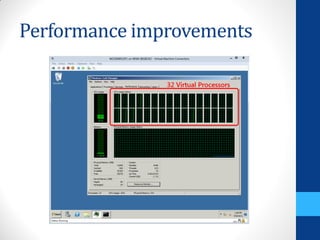
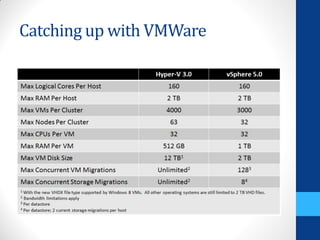
Performance improvements
Catching up with VMWare
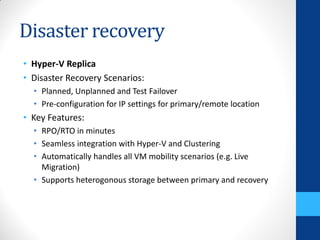
Disaster recovery
• Hyper-V Replica
• Disaster Recovery Scenarios:
  • Planned, Unplanned and Test Failover
  • Pre-configuration for IP settings for primary/remote location
• Key Features:
  • RPO/RTO in minutes
  • Seamless integration with Hyper-V and Clustering
  • Automatically handles all VM mobility scenarios (e.g. Live
    Migration)
  • Supports heterogonous storage between primary and recovery
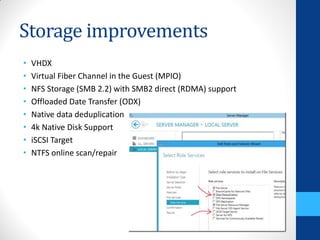
Storage improvements
•   VHDX
•   Virtual Fiber Channel in the Guest (MPIO)
•   NFS Storage (SMB 2.2) with SMB2 direct (RDMA) support
•   Offloaded Date Transfer (ODX)
•   Native data deduplication
•   4k Native Disk Support
•   iSCSI Target
•   NTFS online scan/repair
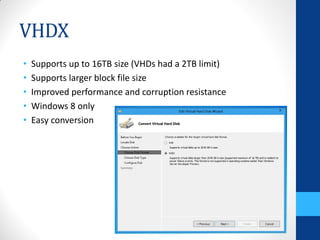
VHDX
•   Supports up to 16TB size (VHDs had a 2TB limit)
•   Supports larger block file size
•   Improved performance and corruption resistance
•   Windows 8 only
•   Easy conversion
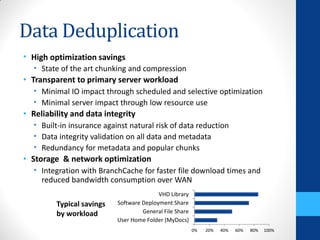
Data Deduplication
• High optimization savings
  • State of the art chunking and compression
• Transparent to primary server workload
  • Minimal IO impact through scheduled and selective optimization
  • Minimal server impact through low resource use
• Reliability and data integrity
  • Built-in insurance against natural risk of data reduction
  • Data integrity validation on all data and metadata
  • Redundancy for metadata and popular chunks
• Storage & network optimization
  • Integration with BranchCache for faster file download times and
    reduced bandwidth consumption over WAN
                                          VHD Library
         Typical savings   Software Deployment Share
         by workload                General File Share
                           User Home Folder (MyDocs)
                                                         0%   20%   40%   60%   80%   100%
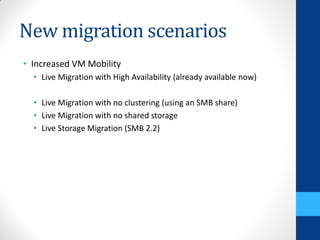
New migration scenarios
• Increased VM Mobility
  • Live Migration with High Availability (already available now)

  • Live Migration with no clustering (using an SMB share)
  • Live Migration with no shared storage
  • Live Storage Migration (SMB 2.2)
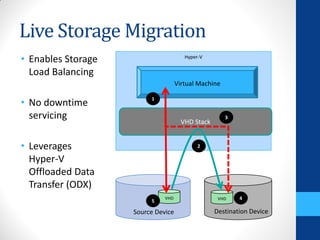
Live Storage Migration
• Enables Storage                      Hyper-V


  Load Balancing
                                    Virtual Machine

• No downtime            1


  servicing                                           3
                                      VHD Stack


• Leverages                                 2

  Hyper-V
  Offloaded Data
  Transfer (ODX)
                              VHD                  VHD    4
                         5

                    Source Device                 Destination Device
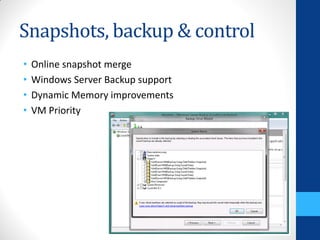
Snapshots, backup & control
•   Online snapshot merge
•   Windows Server Backup support
•   Dynamic Memory improvements
•   VM Priority
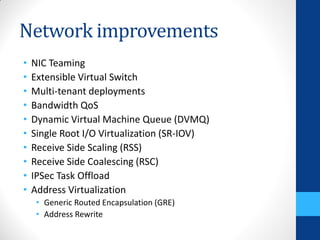
Network improvements
•   NIC Teaming
•   Extensible Virtual Switch
•   Multi-tenant deployments
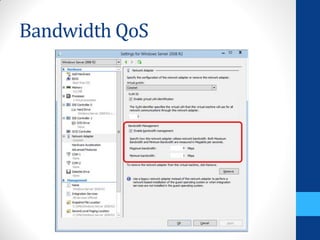
•   Bandwidth QoS
•   Dynamic Virtual Machine Queue (DVMQ)
•   Single Root I/O Virtualization (SR-IOV)
•   Receive Side Scaling (RSS)
•   Receive Side Coalescing (RSC)
•   IPSec Task Offload
•   Address Virtualization
     • Generic Routed Encapsulation (GRE)
     • Address Rewrite
Bandwidth QoS
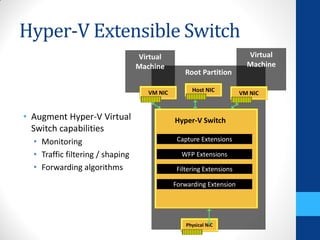
Hyper-V Extensible Switch
                                  Virtual                               Virtual
                                  Machine                               Machine
                                                  Root Partition

                                     VM NIC         Host NIC
                                                                      VM NIC


• Augment Hyper-V Virtual                     Hyper-V Switch
  Switch capabilities
  • Monitoring                                 Capture Extensions

  • Traffic filtering / shaping                 WFP Extensions
  • Forwarding algorithms                      Filtering Extensions

                                              Forwarding Extension


                                                  Physical NIC
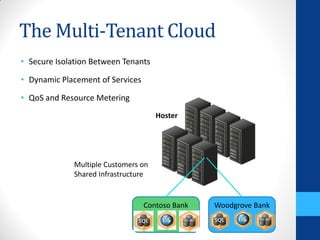
The Multi-Tenant Cloud
• Secure Isolation Between Tenants

• Dynamic Placement of Services

• QoS and Resource Metering
                                     Hoster


             Multiple Customers on
             Shared Infrastructure


                                  Contoso Bank   Woodgrove Bank
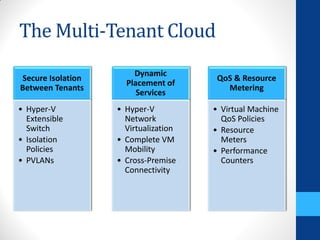
The Multi-Tenant Cloud
                       Dynamic
Secure Isolation                       QoS & Resource
                     Placement of
Between Tenants                          Metering
                        Services
• Hyper-V          • Hyper-V          • Virtual Machine
  Extensible         Network            QoS Policies
  Switch             Virtualization   • Resource
• Isolation        • Complete VM        Meters
  Policies           Mobility         • Performance
• PVLANs           • Cross-Premise      Counters
                     Connectivity
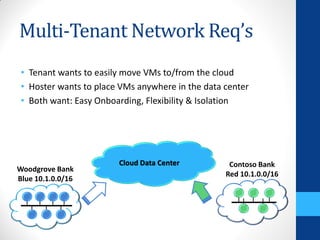
Multi-Tenant Network Req’s
 • Tenant wants to easily move VMs to/from the cloud
 • Hoster wants to place VMs anywhere in the data center
 • Both want: Easy Onboarding, Flexibility & Isolation


                        Cloud Data Center          Contoso Bank
Woodgrove Bank
                                                  Red 10.1.0.0/16
Blue 10.1.0.0/16
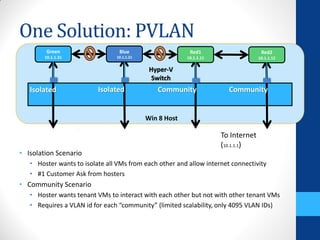
One Solution: PVLAN
        Green                    Blue                     Red1                      Red2
        10.1.1.31               10.1.1.21                10.1.1.11                 10.1.1.12

                                             Hyper-V
                                              Switch
                                                u
   Isolated               Isolated             Community               Community


                                            Win 8 Host

                                                                     To Internet
                                                                     (10.1.1.1)
• Isolation Scenario
   • Hoster wants to isolate all VMs from each other and allow internet connectivity
   • #1 Customer Ask from hosters
• Community Scenario
   • Hoster wants tenant VMs to interact with each other but not with other tenant VMs
   • Requires a VLAN id for each “community” (limited scalability, only 4095 VLAN IDs)
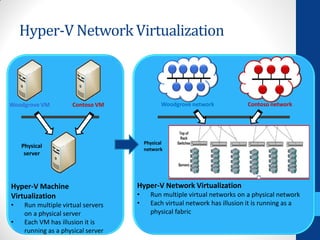
Hyper-V Network Virtualization


Woodgrove VM          Contoso VM               Woodgrove network           Contoso network


                                        Physical
    Physical
                                        network
     server


Hyper-V Machine                     Hyper-V Network Virtualization
Virtualization                      •     Run multiple virtual networks on a physical network
•    Run multiple virtual servers   •     Each virtual network has illusion it is running as a
     on a physical server                 physical fabric
•    Each VM has illusion it is
     running as a physical server
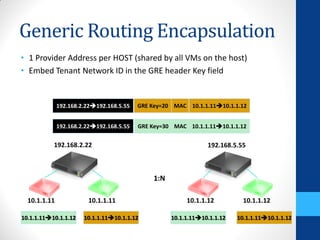
Generic Routing Encapsulation
• 1 Provider Address per HOST (shared by all VMs on the host)
• Embed Tenant Network ID in the GRE header Key field


              192.168.2.22192.168.5.55   GRE Key=20 MAC 10.1.1.1110.1.1.12


              192.168.2.22192.168.5.55   GRE Key=30 MAC 10.1.1.1110.1.1.12


           192.168.2.22                                          192.168.5.55


                                               1:N

  10.1.1.11             10.1.1.11                         10.1.1.12          10.1.1.12

10.1.1.1110.1.1.12    10.1.1.1110.1.1.12           10.1.1.1110.1.1.12   10.1.1.1110.1.1.12
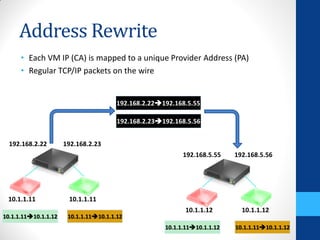
Address Rewrite
      • Each VM IP (CA) is mapped to a unique Provider Address (PA)
      • Regular TCP/IP packets on the wire


                                        192.168.2.22192.168.5.55

                                        192.168.2.23192.168.5.56


  192.168.2.22        192.168.2.23
                                                            192.168.5.55    192.168.5.56


 10.1.1.11             10.1.1.11
                                                             10.1.1.12        10.1.1.12
10.1.1.1110.1.1.12    10.1.1.1110.1.1.12
                                                      10.1.1.1110.1.1.12   10.1.1.1110.1.1.12
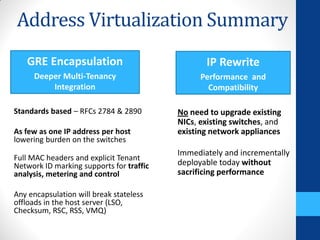
Address Virtualization Summary
   GRE Encapsulation                             IP Rewrite
     Deeper Multi-Tenancy                       Performance and
         Integration                              Compatibility

Standards based – RFCs 2784 & 2890        No need to upgrade existing
                                          NICs, existing switches, and
As few as one IP address per host         existing network appliances
lowering burden on the switches
                                          Immediately and incrementally
Full MAC headers and explicit Tenant
Network ID marking supports for traffic   deployable today without
analysis, metering and control            sacrificing performance

Any encapsulation will break stateless
offloads in the host server (LSO,
Checksum, RSC, RSS, VMQ)
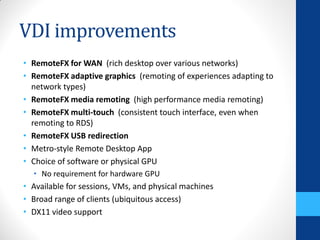
VDI improvements
• RemoteFX for WAN (rich desktop over various networks)
• RemoteFX adaptive graphics (remoting of experiences adapting to
  network types)
• RemoteFX media remoting (high performance media remoting)
• RemoteFX multi-touch (consistent touch interface, even when
  remoting to RDS)
• RemoteFX USB redirection
• Metro-style Remote Desktop App
• Choice of software or physical GPU
  • No requirement for hardware GPU
• Available for sessions, VMs, and physical machines
• Broad range of clients (ubiquitous access)
• DX11 video support
The power of PowerShell
• PowerShell support
  •   Fast & Intuitive
  •   ~150 new Hyper-V cmdlets
  •   All Hyper-V Manager UI capability can be scripted
  •   Perfect for automation


• In-box metering
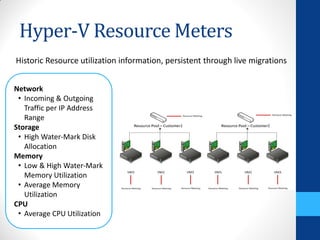
Hyper-V Resource Meters
Historic Resource utilization information, persistent through live migrations


Network
 • Incoming & Outgoing
   Traffic per IP Address
   Range
Storage
 • High Water-Mark Disk
   Allocation
Memory
 • Low & High Water-Mark
   Memory Utilization
 • Average Memory
   Utilization
CPU
 • Average CPU Utilization
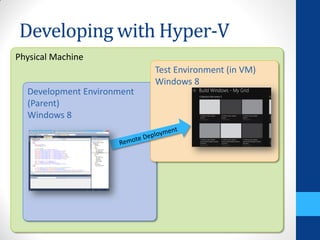
Developing with Hyper-V
Physical Machine
                            Test Environment (in VM)
                            Windows 8
  Development Environment
  (Parent)
  Windows 8
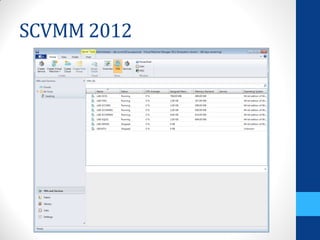
SCVMM 2012
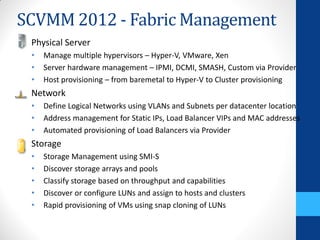
SCVMM 2012 - Fabric Management
 Physical Server
 •   Manage multiple hypervisors – Hyper-V, VMware, Xen
 •   Server hardware management – IPMI, DCMI, SMASH, Custom via Provider
 •   Host provisioning – from baremetal to Hyper-V to Cluster provisioning
 Network
 •   Define Logical Networks using VLANs and Subnets per datacenter location
 •   Address management for Static IPs, Load Balancer VIPs and MAC addresses
 •   Automated provisioning of Load Balancers via Provider
 Storage
 •   Storage Management using SMI-S
 •   Discover storage arrays and pools
 •   Classify storage based on throughput and capabilities
 •   Discover or configure LUNs and assign to hosts and clusters
 •   Rapid provisioning of VMs using snap cloning of LUNs
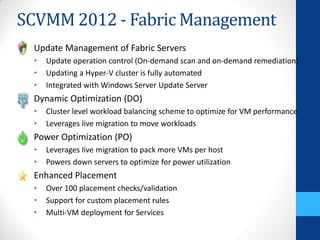
SCVMM 2012 - Fabric Management
 Update Management of Fabric Servers
 •   Update operation control (On-demand scan and on-demand remediation)
 •   Updating a Hyper-V cluster is fully automated
 •   Integrated with Windows Server Update Server
 Dynamic Optimization (DO)
 •   Cluster level workload balancing scheme to optimize for VM performance
 •   Leverages live migration to move workloads
 Power Optimization (PO)
 •   Leverages live migration to pack more VMs per host
 •   Powers down servers to optimize for power utilization
 Enhanced Placement
 •   Over 100 placement checks/validation
 •   Support for custom placement rules
 •   Multi-VM deployment for Services
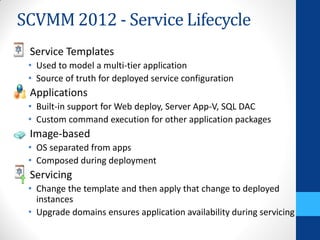
SCVMM 2012 - Service Lifecycle
 Service Templates
 • Used to model a multi-tier application
 • Source of truth for deployed service configuration
 Applications
 • Built-in support for Web deploy, Server App-V, SQL DAC
 • Custom command execution for other application packages
 Image-based
 • OS separated from apps
 • Composed during deployment
 Servicing
 • Change the template and then apply that change to deployed
   instances
 • Upgrade domains ensures application availability during servicing
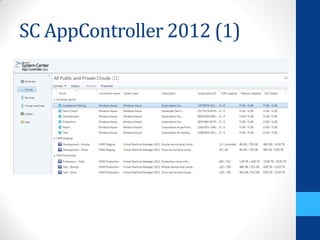
SC AppController 2012 (1)
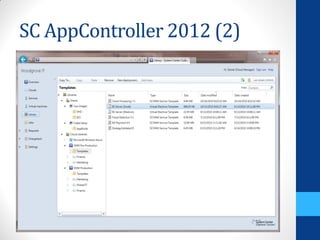
SC AppController 2012 (2)
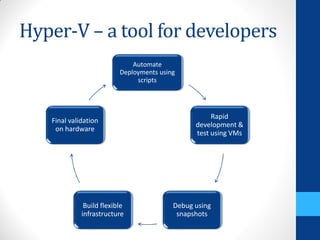
Hyper-V – a tool for developers
                              Automate
                          Deployments using
                               scripts


                                                     Rapid
   Final validation
                                                development &
    on hardware
                                                test using VMs


              Build flexible              Debug using
             infrastructure                snapshots
More resources?
• Build Conference – www.buildwindows.com
 • SAC-429T - Using Windows Server 8 for building private and public IaaS
   clouds
 • SAC-430T - Designing the building blocks for a Windows Server 8 cloud
 • SAC-437T - A deep dive into Hyper-V networking
 • SAC-439T - Enabling multi-tenancy and converged fabric for the cloud
   using QoS
 • SAC-442 - Building Secure, Scalable Multi-Tenant Clouds using Hyper-V
   Network Virtualization
 • SAC-451T - Building continuously available systems with Hyper-V
 • SAC-474T - Platform storage evolved
 • SAC-559T - Extending the Hyper-V switch
 • SAC-973T - Windows Server 8
 • TOOL-455T - Developing and Testing on Windows 8 with Client Hyper-V
Where can you find us?
• www.itspark.ro
• www.codecamp.ro
• www.itcamp.ro
 • www.vimeo.com/channels/itcamp
QUESTIONS?

Hyper-V 3.0 Overview

  • 1.
    Hyper-V 3.0 -overview Tudor Damian IT Solutions Specialist Virtual Machine MVP tudy.tel
  • 2.
    Agenda • This isabout the Dev Preview bits - it’s not even Beta!  • Windows Server 8 & Hyper-V 3.0 • Performance and scalability improvements • Disaster recovery • Storage improvements • New migration scenarios • Snapshots, backup and control • Networking improvements • The power of PowerShell • Management tools • SCVMM 2012 & SC AppController • Hyper-V – a tool for developers • Resources
  • 3.
  • 4.
  • 5.
    Disaster recovery • Hyper-VReplica • Disaster Recovery Scenarios: • Planned, Unplanned and Test Failover • Pre-configuration for IP settings for primary/remote location • Key Features: • RPO/RTO in minutes • Seamless integration with Hyper-V and Clustering • Automatically handles all VM mobility scenarios (e.g. Live Migration) • Supports heterogonous storage between primary and recovery
  • 6.
    Storage improvements • VHDX • Virtual Fiber Channel in the Guest (MPIO) • NFS Storage (SMB 2.2) with SMB2 direct (RDMA) support • Offloaded Date Transfer (ODX) • Native data deduplication • 4k Native Disk Support • iSCSI Target • NTFS online scan/repair
  • 7.
    VHDX • Supports up to 16TB size (VHDs had a 2TB limit) • Supports larger block file size • Improved performance and corruption resistance • Windows 8 only • Easy conversion
  • 8.
    Data Deduplication • Highoptimization savings • State of the art chunking and compression • Transparent to primary server workload • Minimal IO impact through scheduled and selective optimization • Minimal server impact through low resource use • Reliability and data integrity • Built-in insurance against natural risk of data reduction • Data integrity validation on all data and metadata • Redundancy for metadata and popular chunks • Storage & network optimization • Integration with BranchCache for faster file download times and reduced bandwidth consumption over WAN VHD Library Typical savings Software Deployment Share by workload General File Share User Home Folder (MyDocs) 0% 20% 40% 60% 80% 100%
  • 9.
    New migration scenarios •Increased VM Mobility • Live Migration with High Availability (already available now) • Live Migration with no clustering (using an SMB share) • Live Migration with no shared storage • Live Storage Migration (SMB 2.2)
  • 10.
    Live Storage Migration •Enables Storage Hyper-V Load Balancing Virtual Machine • No downtime 1 servicing 3 VHD Stack • Leverages 2 Hyper-V Offloaded Data Transfer (ODX) VHD VHD 4 5 Source Device Destination Device
  • 11.
    Snapshots, backup &control • Online snapshot merge • Windows Server Backup support • Dynamic Memory improvements • VM Priority
  • 12.
    Network improvements • NIC Teaming • Extensible Virtual Switch • Multi-tenant deployments • Bandwidth QoS • Dynamic Virtual Machine Queue (DVMQ) • Single Root I/O Virtualization (SR-IOV) • Receive Side Scaling (RSS) • Receive Side Coalescing (RSC) • IPSec Task Offload • Address Virtualization • Generic Routed Encapsulation (GRE) • Address Rewrite
  • 13.
  • 14.
    Hyper-V Extensible Switch Virtual Virtual Machine Machine Root Partition VM NIC Host NIC VM NIC • Augment Hyper-V Virtual Hyper-V Switch Switch capabilities • Monitoring Capture Extensions • Traffic filtering / shaping WFP Extensions • Forwarding algorithms Filtering Extensions Forwarding Extension Physical NIC
  • 15.
    The Multi-Tenant Cloud •Secure Isolation Between Tenants • Dynamic Placement of Services • QoS and Resource Metering Hoster Multiple Customers on Shared Infrastructure Contoso Bank Woodgrove Bank
  • 16.
    The Multi-Tenant Cloud Dynamic Secure Isolation QoS & Resource Placement of Between Tenants Metering Services • Hyper-V • Hyper-V • Virtual Machine Extensible Network QoS Policies Switch Virtualization • Resource • Isolation • Complete VM Meters Policies Mobility • Performance • PVLANs • Cross-Premise Counters Connectivity
  • 17.
    Multi-Tenant Network Req’s • Tenant wants to easily move VMs to/from the cloud • Hoster wants to place VMs anywhere in the data center • Both want: Easy Onboarding, Flexibility & Isolation Cloud Data Center Contoso Bank Woodgrove Bank Red 10.1.0.0/16 Blue 10.1.0.0/16
  • 18.
    One Solution: PVLAN Green Blue Red1 Red2 10.1.1.31 10.1.1.21 10.1.1.11 10.1.1.12 Hyper-V Switch u Isolated Isolated Community Community Win 8 Host To Internet (10.1.1.1) • Isolation Scenario • Hoster wants to isolate all VMs from each other and allow internet connectivity • #1 Customer Ask from hosters • Community Scenario • Hoster wants tenant VMs to interact with each other but not with other tenant VMs • Requires a VLAN id for each “community” (limited scalability, only 4095 VLAN IDs)
  • 19.
    Hyper-V Network Virtualization WoodgroveVM Contoso VM Woodgrove network Contoso network Physical Physical network server Hyper-V Machine Hyper-V Network Virtualization Virtualization • Run multiple virtual networks on a physical network • Run multiple virtual servers • Each virtual network has illusion it is running as a on a physical server physical fabric • Each VM has illusion it is running as a physical server
  • 20.
    Generic Routing Encapsulation •1 Provider Address per HOST (shared by all VMs on the host) • Embed Tenant Network ID in the GRE header Key field 192.168.2.22192.168.5.55 GRE Key=20 MAC 10.1.1.1110.1.1.12 192.168.2.22192.168.5.55 GRE Key=30 MAC 10.1.1.1110.1.1.12 192.168.2.22 192.168.5.55 1:N 10.1.1.11 10.1.1.11 10.1.1.12 10.1.1.12 10.1.1.1110.1.1.12 10.1.1.1110.1.1.12 10.1.1.1110.1.1.12 10.1.1.1110.1.1.12
  • 21.
    Address Rewrite • Each VM IP (CA) is mapped to a unique Provider Address (PA) • Regular TCP/IP packets on the wire 192.168.2.22192.168.5.55 192.168.2.23192.168.5.56 192.168.2.22 192.168.2.23 192.168.5.55 192.168.5.56 10.1.1.11 10.1.1.11 10.1.1.12 10.1.1.12 10.1.1.1110.1.1.12 10.1.1.1110.1.1.12 10.1.1.1110.1.1.12 10.1.1.1110.1.1.12
  • 22.
    Address Virtualization Summary GRE Encapsulation IP Rewrite Deeper Multi-Tenancy Performance and Integration Compatibility Standards based – RFCs 2784 & 2890 No need to upgrade existing NICs, existing switches, and As few as one IP address per host existing network appliances lowering burden on the switches Immediately and incrementally Full MAC headers and explicit Tenant Network ID marking supports for traffic deployable today without analysis, metering and control sacrificing performance Any encapsulation will break stateless offloads in the host server (LSO, Checksum, RSC, RSS, VMQ)
  • 23.
    VDI improvements • RemoteFXfor WAN (rich desktop over various networks) • RemoteFX adaptive graphics (remoting of experiences adapting to network types) • RemoteFX media remoting (high performance media remoting) • RemoteFX multi-touch (consistent touch interface, even when remoting to RDS) • RemoteFX USB redirection • Metro-style Remote Desktop App • Choice of software or physical GPU • No requirement for hardware GPU • Available for sessions, VMs, and physical machines • Broad range of clients (ubiquitous access) • DX11 video support
  • 24.
    The power ofPowerShell • PowerShell support • Fast & Intuitive • ~150 new Hyper-V cmdlets • All Hyper-V Manager UI capability can be scripted • Perfect for automation • In-box metering
  • 25.
    Hyper-V Resource Meters HistoricResource utilization information, persistent through live migrations Network • Incoming & Outgoing Traffic per IP Address Range Storage • High Water-Mark Disk Allocation Memory • Low & High Water-Mark Memory Utilization • Average Memory Utilization CPU • Average CPU Utilization
  • 26.
    Developing with Hyper-V PhysicalMachine Test Environment (in VM) Windows 8 Development Environment (Parent) Windows 8
  • 27.
  • 28.
    SCVMM 2012 -Fabric Management Physical Server • Manage multiple hypervisors – Hyper-V, VMware, Xen • Server hardware management – IPMI, DCMI, SMASH, Custom via Provider • Host provisioning – from baremetal to Hyper-V to Cluster provisioning Network • Define Logical Networks using VLANs and Subnets per datacenter location • Address management for Static IPs, Load Balancer VIPs and MAC addresses • Automated provisioning of Load Balancers via Provider Storage • Storage Management using SMI-S • Discover storage arrays and pools • Classify storage based on throughput and capabilities • Discover or configure LUNs and assign to hosts and clusters • Rapid provisioning of VMs using snap cloning of LUNs
  • 29.
    SCVMM 2012 -Fabric Management Update Management of Fabric Servers • Update operation control (On-demand scan and on-demand remediation) • Updating a Hyper-V cluster is fully automated • Integrated with Windows Server Update Server Dynamic Optimization (DO) • Cluster level workload balancing scheme to optimize for VM performance • Leverages live migration to move workloads Power Optimization (PO) • Leverages live migration to pack more VMs per host • Powers down servers to optimize for power utilization Enhanced Placement • Over 100 placement checks/validation • Support for custom placement rules • Multi-VM deployment for Services
  • 30.
    SCVMM 2012 -Service Lifecycle Service Templates • Used to model a multi-tier application • Source of truth for deployed service configuration Applications • Built-in support for Web deploy, Server App-V, SQL DAC • Custom command execution for other application packages Image-based • OS separated from apps • Composed during deployment Servicing • Change the template and then apply that change to deployed instances • Upgrade domains ensures application availability during servicing
  • 31.
  • 32.
  • 33.
    Hyper-V – atool for developers Automate Deployments using scripts Rapid Final validation development & on hardware test using VMs Build flexible Debug using infrastructure snapshots
  • 34.
    More resources? • BuildConference – www.buildwindows.com • SAC-429T - Using Windows Server 8 for building private and public IaaS clouds • SAC-430T - Designing the building blocks for a Windows Server 8 cloud • SAC-437T - A deep dive into Hyper-V networking • SAC-439T - Enabling multi-tenancy and converged fabric for the cloud using QoS • SAC-442 - Building Secure, Scalable Multi-Tenant Clouds using Hyper-V Network Virtualization • SAC-451T - Building continuously available systems with Hyper-V • SAC-474T - Platform storage evolved • SAC-559T - Extending the Hyper-V switch • SAC-973T - Windows Server 8 • TOOL-455T - Developing and Testing on Windows 8 with Client Hyper-V
  • 35.
    Where can youfind us? • www.itspark.ro • www.codecamp.ro • www.itcamp.ro • www.vimeo.com/channels/itcamp
  • 36.