LAI YOONG SENG, MVP VIRTUAL MACHINE
REDYNAMICS        LAIYS@REDYNAMICS.COM
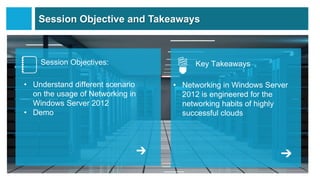
Session Objective and Takeaways


    Session Objectives:                Key Takeaways

• Understand different scenario   • Networking in Windows Server
  on the usage of Networking in     2012 is engineered for the
  Windows Server 2012               networking habits of highly
• Demo                              successful clouds
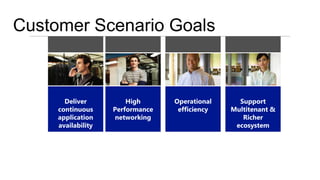
Customer Scenario Goals
         Dynamic memory Network                 Larger virtual      Open, extensible
        increase assigned
                        virtualization for   machines to support     switch to help
       to virtual machines
                       multitenancy and IP   increased workloads   support security and
       to increase capacity portability                            management needs
         with no downtime
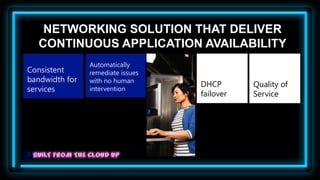
NETWORKING SOLUTION THAT DELIVER
  CONTINUOUS APPLICATION AVAILABILITY
                Automatically
Consistent      remediate issues
bandwidth for   with no human
                                   DHCP       Quality of
services        intervention
                                   failover   Service
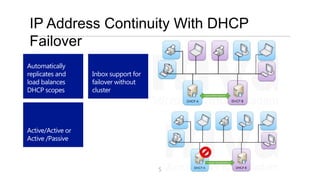
IP Address Continuity With DHCP
Failover
Automatically
replicates and     Inbox support for
load balances      failover without
DHCP scopes        cluster


Active/Active or
Active /Passive


                                       5
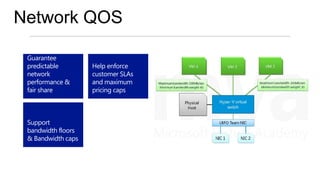
Network QOS

 Guarantee
 predictable        Help enforce
 network            customer SLAs
 performance &      and maximum
 fair share         pricing caps


 Support
 bandwidth floors
 & Bandwidth caps
Network QOS       DEMO


              7
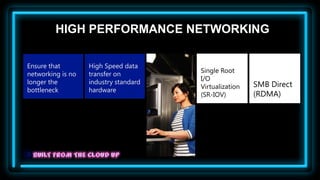
HIGH PERFORMANCE NETWORKING

Ensure that        High Speed data
                                       Single Root
networking is no   transfer on
                                       I/O
longer the         industry standard                    SMB Direct
                                       Virtualization
bottleneck         hardware
                                       (SR-IOV)         (RDMA)
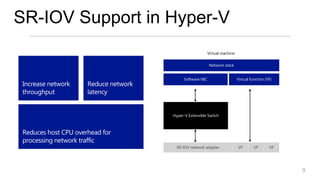
SR-IOV Support in Hyper-V
                                                            Virtual machine

                                                            Network stack


                                             Software NIC                     Virtual function (VF)
 Increase network     Reduce network
 throughput           latency


                                       Hyper-V Extensible Switch


 Reduces host CPU overhead for
 processing network traffic
                                         SR-IOV network adapter               VF        VF       VF


                                                                                                      9
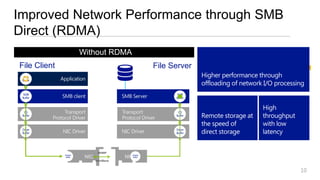
Improved Network Performance through SMB
Direct (RDMA)
                        Without RDMA
                         With RDMA
File Client                                               File Server
  App                                                                    Higher performance through
 Buffer
                                                                         offloading of network I/O processing
 SMB                                                            SMB
 Buffer                                                         Buffer


                                                                                              High
  OS                                                             OS
 Buffer                                                         Buffer   Remote storage at    throughput
                                                                         the speed of         with low
 Driver
 Buffer
                                                                Driver
                                                                Buffer   direct storage       latency

                                 iWARP
              Adapter                           Adapter
               Buffer   rNIC
                          NIC                rNIC
                                             NIC Buffer
                                InfiniBand


                                                                                                           10
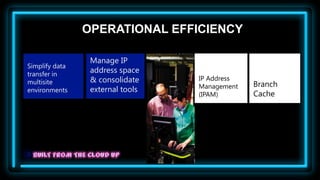
OPERATIONAL EFFICIENCY

                 Manage IP
Simplify data
transfer in
                 address space
                 & consolidate    IP Address
multisite                                      Branch
                 external tools   Management
environments
                                  (IPAM)       Cache
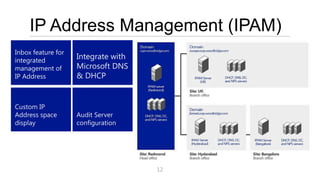
IP Address Management (IPAM)
Inbox feature for
integrated
                    Integrate with
management of       Microsoft DNS
IP Address          & DHCP


Custom IP
Address space       Audit Server
display             configuration


                                     12
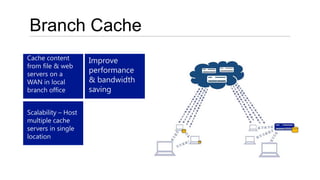
Branch Cache
Cache content        Improve
from file & web
servers on a
                     performance
WAN in local         & bandwidth
branch office        saving

Scalability – Host
multiple cache
servers in single
location
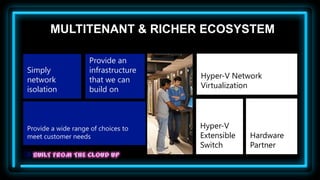
MULTITENANT & RICHER ECOSYSTEM

                    Provide an
Simply              infrastructure
network             that we can      Hyper-V Network
isolation           build on         Virtualization


Provide a wide range of choices to   Hyper-V
meet customer needs                  Extensible   Hardware
                                     Switch       Partner
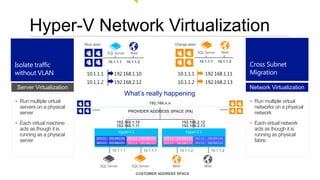
Hyper-V Network Virtualization
                          Blue sees                                                              Orange sees

                                           SQL Server         Web                                                 SQL Server           Web


Isolate traffic                                                                                                                                 Cross Subnet
                                           10.1.1.1        10.1.1.2                                                 10.1.1.1         10.1.1.2


without VLAN               10.1.1.1            192.168.1.10                                       10.1.1.1                  192.168.1.11        Migration
                           10.1.1.2            192.168.2.12                                       10.1.1.2                  192.168.2.13
Server Virtualization                                                                                                                           Network Virtualization
                                                           What’s really happening
• Run multiple virtual                                                        192.168.n.n                                                       • Run multiple virtual
  servers on a physical                                                                                                                           networks on a physical
  server                                                    PROVIDER ADDRESS SPACE (PA)                                                           network
• Each virtual machine                           192.168.1.10
                                                 192.168.1.11
                                                                                                     192.168.2.12
                                                                                                     192.168.2.13
                                                                                                                                                • Each virtual network
  acts as though it is                                                                                                                            acts as though it is
  running as a physical                                                                                                                           running as physical
                                10.1.1.1    192.168.1.10    10.1.1.1   192.168.1.11   10.1.1.1    192.168.1.11   10.1.1.1    192.168.1.10
  server                        10.1.1.2    192.168.2.12    10.1.1.2   192.168.2.13   10.1.1.2    192.168.2.13   10.1.1.2    192.168.2.12
                                                                                                                                                  fabric
                                              10.1.1.1                   10.1.1.1                   10.1.1.2                   10.1.1.2


                                   SQL Server                  SQL Server                    Web                        Web

                                                                  CUSTOMER ADDRESS SPACE
Network Virtualization in
Hyper-V                   DEMO


               16
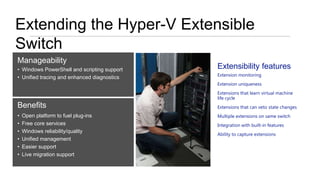
Extending the Hyper-V Extensible
Switch
Manageability
• Windows PowerShell and scripting support   Extensibility features
                                             Extension monitoring
• Unified tracing and enhanced diagnostics
                                             Extension uniqueness
                                             Extensions that learn virtual machine
                                             life cycle
Benefits                                     Extensions that can veto state changes
•   Open platform to fuel plug-ins           Multiple extensions on same switch
•   Free core services                       Integration with built-in features
•   Windows reliability/quality
                                             Ability to capture extensions
•   Unified management
•   Easier support
•   Live migration support
5Nine Extensible Switch DEMO


              18
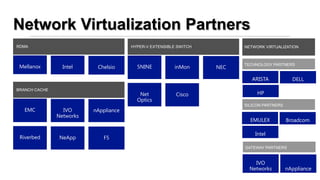
Network Virtualization Partners
RDMA                                   HYPER-V EXTENSIBLE SWITCH         NETWORK VIRTUALIZATION


 Mellanox        Intel     Chelsio       5NINE           inMon     NEC
                                                                         TECHNOLOGY PARTNERS


                                                                            ARISTA            DELL
BRANCH CACHE
                                          Net            Cisco                HP
                                         Optics
                                                                         SILICON PARTNERS
   EMC           IVO      nAppliance
               Networks
                                                                           EMULEX           Broadcom

                                                                             Intel
 Riverbed       NeApp        F5
                                                                         GATEWAY PARTNERS


                                                                             IVO
                                                                           Networks         nAppliance
                                                                                                  19
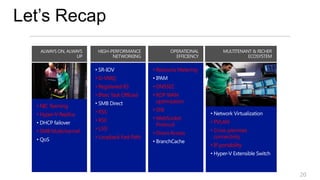
Let’s Recap

                                              • Resource Metering
                       • D-VMQ
                       • Registered-IO        • DNSSEC
                       • IPsec Task Offload   • RDP WAN
                                                optimization
  • NIC Teaming
                       • RSS                  • SNI
  • Hyper-V Replica
                       • RSC                  • WebSocket
                                                                    • PVLAN
                                                Protocol
  • SMB Multichannel   • LSO                                        • Cross-premises
                                              • Direct Access
                       • Loopback Fast Path                           connectivity
                                                                    • IP portability


                                                                                       20
Virtual
              Lai’s Blog
                                                Q&A
     www.ms4u.info

                                  DOWNLOAD Windows
     MVUG User Group
                                  Server 2012
     https://www.facebook.com/g   http://technet.microsoft.com/en-
     roups/mvuggroup/             us/evalcenter/hh670538.aspx


21
Network Virtualization in Windows Server 2012

Network Virtualization in Windows Server 2012

  • 1.
    LAI YOONG SENG,MVP VIRTUAL MACHINE REDYNAMICS LAIYS@REDYNAMICS.COM
  • 2.
    Session Objective andTakeaways Session Objectives: Key Takeaways • Understand different scenario • Networking in Windows Server on the usage of Networking in 2012 is engineered for the Windows Server 2012 networking habits of highly • Demo successful clouds
  • 3.
    Customer Scenario Goals Dynamic memory Network Larger virtual Open, extensible increase assigned virtualization for machines to support switch to help to virtual machines multitenancy and IP increased workloads support security and to increase capacity portability management needs with no downtime
  • 4.
    NETWORKING SOLUTION THATDELIVER CONTINUOUS APPLICATION AVAILABILITY Automatically Consistent remediate issues bandwidth for with no human DHCP Quality of services intervention failover Service
  • 5.
    IP Address ContinuityWith DHCP Failover Automatically replicates and Inbox support for load balances failover without DHCP scopes cluster Active/Active or Active /Passive 5
  • 6.
    Network QOS Guarantee predictable Help enforce network customer SLAs performance & and maximum fair share pricing caps Support bandwidth floors & Bandwidth caps
  • 7.
  • 8.
    HIGH PERFORMANCE NETWORKING Ensurethat High Speed data Single Root networking is no transfer on I/O longer the industry standard SMB Direct Virtualization bottleneck hardware (SR-IOV) (RDMA)
  • 9.
    SR-IOV Support inHyper-V Virtual machine Network stack Software NIC Virtual function (VF) Increase network Reduce network throughput latency Hyper-V Extensible Switch Reduces host CPU overhead for processing network traffic SR-IOV network adapter VF VF VF 9
  • 10.
    Improved Network Performancethrough SMB Direct (RDMA) Without RDMA With RDMA File Client File Server App Higher performance through Buffer offloading of network I/O processing SMB SMB Buffer Buffer High OS OS Buffer Buffer Remote storage at throughput the speed of with low Driver Buffer Driver Buffer direct storage latency iWARP Adapter Adapter Buffer rNIC NIC rNIC NIC Buffer InfiniBand 10
  • 11.
    OPERATIONAL EFFICIENCY Manage IP Simplify data transfer in address space & consolidate IP Address multisite Branch external tools Management environments (IPAM) Cache
  • 12.
    IP Address Management(IPAM) Inbox feature for integrated Integrate with management of Microsoft DNS IP Address & DHCP Custom IP Address space Audit Server display configuration 12
  • 13.
    Branch Cache Cache content Improve from file & web servers on a performance WAN in local & bandwidth branch office saving Scalability – Host multiple cache servers in single location
  • 14.
    MULTITENANT & RICHERECOSYSTEM Provide an Simply infrastructure network that we can Hyper-V Network isolation build on Virtualization Provide a wide range of choices to Hyper-V meet customer needs Extensible Hardware Switch Partner
  • 15.
    Hyper-V Network Virtualization Blue sees Orange sees SQL Server Web SQL Server Web Isolate traffic Cross Subnet 10.1.1.1 10.1.1.2 10.1.1.1 10.1.1.2 without VLAN 10.1.1.1 192.168.1.10 10.1.1.1 192.168.1.11 Migration 10.1.1.2 192.168.2.12 10.1.1.2 192.168.2.13 Server Virtualization Network Virtualization What’s really happening • Run multiple virtual 192.168.n.n • Run multiple virtual servers on a physical networks on a physical server PROVIDER ADDRESS SPACE (PA) network • Each virtual machine 192.168.1.10 192.168.1.11 192.168.2.12 192.168.2.13 • Each virtual network acts as though it is acts as though it is running as a physical running as physical 10.1.1.1 192.168.1.10 10.1.1.1 192.168.1.11 10.1.1.1 192.168.1.11 10.1.1.1 192.168.1.10 server 10.1.1.2 192.168.2.12 10.1.1.2 192.168.2.13 10.1.1.2 192.168.2.13 10.1.1.2 192.168.2.12 fabric 10.1.1.1 10.1.1.1 10.1.1.2 10.1.1.2 SQL Server SQL Server Web Web CUSTOMER ADDRESS SPACE
  • 16.
  • 17.
    Extending the Hyper-VExtensible Switch Manageability • Windows PowerShell and scripting support Extensibility features Extension monitoring • Unified tracing and enhanced diagnostics Extension uniqueness Extensions that learn virtual machine life cycle Benefits Extensions that can veto state changes • Open platform to fuel plug-ins Multiple extensions on same switch • Free core services Integration with built-in features • Windows reliability/quality Ability to capture extensions • Unified management • Easier support • Live migration support
  • 18.
  • 19.
    Network Virtualization Partners RDMA HYPER-V EXTENSIBLE SWITCH NETWORK VIRTUALIZATION Mellanox Intel Chelsio 5NINE inMon NEC TECHNOLOGY PARTNERS ARISTA DELL BRANCH CACHE Net Cisco HP Optics SILICON PARTNERS EMC IVO nAppliance Networks EMULEX Broadcom Intel Riverbed NeApp F5 GATEWAY PARTNERS IVO Networks nAppliance 19
  • 20.
    Let’s Recap • Resource Metering • D-VMQ • Registered-IO • DNSSEC • IPsec Task Offload • RDP WAN optimization • NIC Teaming • RSS • SNI • Hyper-V Replica • RSC • WebSocket • PVLAN Protocol • SMB Multichannel • LSO • Cross-premises • Direct Access • Loopback Fast Path connectivity • IP portability 20
  • 21.
    Virtual Lai’s Blog Q&A www.ms4u.info DOWNLOAD Windows MVUG User Group Server 2012 https://www.facebook.com/g http://technet.microsoft.com/en- roups/mvuggroup/ us/evalcenter/hh670538.aspx 21

Editor's Notes

  • #3 We are to group into scenario:-Ensure network solution that deliver continues app availability. Ensure support on multi tenant such as support conflict domain / ip address Leverage on existing and new hardware to get the best performance networkingWe talk about the rich partner in the market that support networking
  • #5 1st ScenarioGoals isNo interruption to your servicesEnsure consistent bandwidth available to your services. Automation to remediate issue without user interventionFinally we want to make sure that we support different vendor in networking.
  • #6 Next we are going to talk was DHCP Server. In the past, we always configure 80:20 rules. Mean 80% ip to 1 server and another 20% ip in another server.Let say if primary server down, you may not have enough ip to serve to your client. Therefore in Win2012. We provide HA DHCP Server by provide more than 1 DHCP ServerYou can setupA/A or A/PYou can have 1 DHCP in Primary site and 1 DHCP in Secondary Site.In case server, server down, the secondary DHCP will take over.If you setup A/A, both server will load balance itself to distribute IP. And cool is you do no need to setup clustering.
  • #7 Move on QOS. Let say you use virtualization. 1 NIC share with 4 VM. Some VM coz problem.With Win2012, you can configure Max & Min Bandwidth.Min Bandwidth always ensure your services will always get adequate bandwidthThen Max Bandwidth setting, ensure that we configure the cap (limit) to avoid interruption to other VM.
  • #9 In this scenario, we are looking into high performance networkingGoal:-No buffer. Slight buffer is not acceptable in the SLADeliver high speed data transfer
  • #10 Example:- When we transfer data from VM to other VM. It will go from VM NIC to Hyper-V Virtual Switch to Physical NIC.With SR-IOV we open virtual function. The VM can talk direct to physical NIC bypass your Hyper-V Switch.This give you high performance as same as running a physical server.RequirementsTo take advantage of the new Hyper‑V features for host scale and scale-up workload support, you need the following:One or more Windows Server 2012 installations with the Hyper‑V role installed. Hyper‑V requires a server that provides processor support for hardware virtualization.The number of virtual processors that may be configured in a virtual machine depends on the number of processors on the physical machine. You must have at least as many logical processors in the virtualization host as the number of virtual processors required in the virtual machine. For example, to configure a virtual machine with the maximum of 32 virtual processors, you must be running Hyper‑V in Windows Server 2012 on a virtualization host that has 32 or more logical processors.SR-IOV networking requires the following:A host system that supports SR-IOV (such as Intel VT-d2), including chipset support for interrupt and DMA remapping and proper firmware support to enable and describe the platform’s SR-IOV capabilities to the operating system.An SR-IOV–capable network adapter and driver in both the management operating system (which runs the Hyper‑V role) and each virtual machine where a virtual function is assigned.
  • #11 SMB Direct. Without attach FC attached storage, we can also achieve high performance storage.Example:- FS Client & FS ServerIt will go through different layer and Data break into smaller packet and transfer between S & C. All this consume a lot of CPU utilization.To solve this problem, with RDMA compliant network adapter, we can bypass network layer & give full performance capacity. It will bypass CPU & give it to do other thing.RDMA compatibility is currently limited to InfiniBand, iWARP, and RoCE (RDMA over Converged Ethernet)RDMA wont work in Win 2012 NIC Teaming. But MPIO and SMB Multi Channel are preferred.
  • #12 Next scenarioOur goal isTo build script for automation Able to identify the resources use for chargebackMinimize bandwidth transfer in multi site environment.Able to centrally control and monitor DNS & DHCP in your organizationHow do we enable this?
  • #13 Now let look into IP Address management. Previously we setup DHCP & DNS and we cannot centralized manage the IP. Especially when you have a multisite, it is difficult for you to monitor available IP.We want to address this by install IPAM which going to discover your entire DHCP & DNS in your multisite environment.You can also monitorAvailable IPUsed IPStatic IPConfigure scope for your DHCP
  • #14 Next feature is Branch Cache. It allow to you to have centralize data in primary site and customer at remote site will be able to access the data.The data is cache in a dedicated server or client computer. This allow you to save more bandwidth in your environment with less data transferNo configuration in client machine. You just need to configure GPO. Branch cache is now integrate with data dedup, you will have saving of data transfer as well.
  • #15 Final scenario:- Look at richer ecosystemGoal is:Work with various partnerWe built a foundation for partner to leverage on.With 2 goal, we want to have variety of choice for customer to choose.
  • #16 Let move to Hyper-V Network Virtualization.Everyone know about Hyper-V which help you to do Server Virtualization. Yesterday @Singapore launching about Storage Virtualization.Today, we are going to have Network Virtualization.Here we got 2 different set of VM: Blue VM & Orange VM hosted in the single network (both is using the same IP Address and overlap in the same physical network)Here, we are the 1st to come out with network virtualization whereby each VM will have their own VM network without causing conflict . We can do this byIsolation traffic without VLAN – Keep customers on the same server but on different IP subnetsCross Subnet Migration – Move a VM to a new subnet without changing the IP address in the VMHow we do it:-NVGREIP Address rewrite
  • #17 The 1st is we built Hyper-V Virtual Switch. Then we open our system and built the switch extensible to allow partner such as Cisco, InFlow, NEC ,5Nine, etc to build plug in and additional add-on.With this we add new functionality such as monitoring, forwarding, and filtering to the virtual switch.
  • #20 We have talked about various features, next is who is the partner who provide and support these features.RDMABranch CacheHyper-Extensible SwitchNV