© 2014 Adobe Systems Incorporated. All Rights Reserved. 1
Brent Shaffer
Introduction to HTTP - The Protocol of Our Lives
© 2014 Adobe Systems Incorporated. All Rights Reserved. 2
What is HTTP?
• Hypertext Transfer Protocol (Hypertext?!??)
• One of the least understood aspect of web development
• The language your browser speaks to web servers
• The technology used for most web traffic
• The foundation for other web technologies such as REST, AJAX, and
HTTPS
© 2014 Adobe Systems Incorporated. All Rights Reserved. 3
What isn't HTTP?
• Web Sockets - same port, different protocol
• IRC (chat), SMTP (mail), FTP (files)
• Anything prefixed with :// other than http and https
• A gooey slice of pizza
• Your mother
© 2014 Adobe Systems Incorporated. All Rights Reserved. 4
I'm so excited! What do I need?
• an HTTP Server
• the internet
• your computer
• PHP and RoR have built-in web servers
• Apache is pre-installed on OS X
© 2014 Adobe Systems Incorporated. All Rights Reserved. 5
I'm so excited! What do I need?
• an HTTP Client
• a browser
• cURL
• command-line http utility
• Telnet
• for those who like it raw
© 2014 Adobe Systems Incorporated. All Rights Reserved. 6
Is there anything else I can use?
• an HTTP Proxy
• Charles (charlesproxy.com)
• spy on your own network traffic!
© 2014 Adobe Systems Incorporated. All Rights Reserved. 7
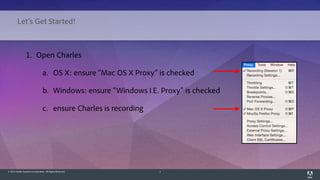
1. Open Charles
a. OS X: ensure "Mac OS X Proxy" is checked
b. Windows: ensure "Windows I.E. Proxy" is checked
c. ensure Charles is recording
Let's Get Started!
© 2014 Adobe Systems Incorporated. All Rights Reserved. 8
1. Open Charles
d. Take a moment to observe some of your
network traffic
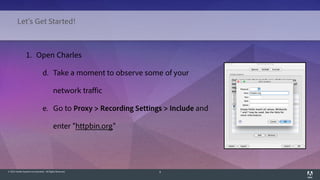
e. Go to Proxy > Recording Settings > Include and
enter "httpbin.org"
Let's Get Started!
© 2014 Adobe Systems Incorporated. All Rights Reserved. 9
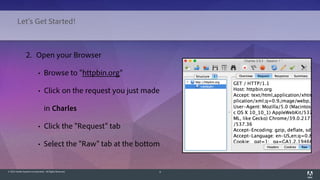
2. Open your Browser
• Browse to "httpbin.org"
• Click on the request you just made
in Charles
• Click the "Request" tab
• Select the "Raw" tab at the bottom
Let's Get Started!
© 2014 Adobe Systems Incorporated. All Rights Reserved. 10
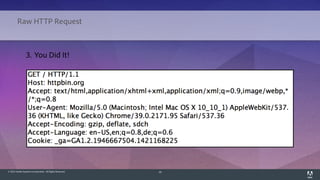
Raw HTTP Request
3. You Did It!
© 2014 Adobe Systems Incorporated. All Rights Reserved. 11
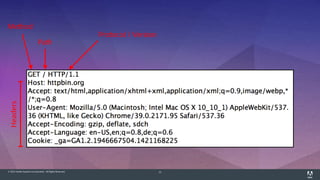
Method
Protocol / Version
Path
Headers
© 2014 Adobe Systems Incorporated. All Rights Reserved. 12
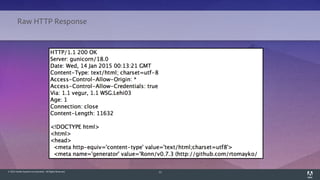
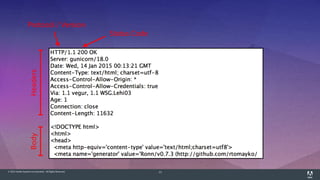
Raw HTTP Response
© 2014 Adobe Systems Incorporated. All Rights Reserved. 13
Status Code
Protocol / Version
Headers
Body
© 2014 Adobe Systems Incorporated. All Rights Reserved. 14
Browser Love
1. Using Chrome
a. Go to View > Developer > Developer Tools
b. Load (or reload) the page
c. Click Network > [url]
d. Click Headers to see the request and
response headers
© 2014 Adobe Systems Incorporated. All Rights Reserved. 15
HTTP Basics - Methods
• Possible Methods
• GET / PUT / POST / DELETE / HEAD / OPTIONS / PATCH /
TRACE / CONNECT
• Methods YOU should care about
• GET and POST
• Eventually PUT / DELETE
© 2014 Adobe Systems Incorporated. All Rights Reserved. 16
HTTP Basics - Methods
• GET
• no request body
• variables in URL via query string parameters
• safe - meaning the request does not modify a resource
• idempotent - meaning the call can be made many times without
changing the outcome
© 2014 Adobe Systems Incorporated. All Rights Reserved. 17
HTTP Basics - Methods
• POST
• variables in request body or URL
• used to modify resources
• not safe
• not idempotent
• your browser performs these on form submission
© 2014 Adobe Systems Incorporated. All Rights Reserved. 18
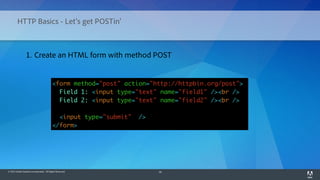
HTTP Basics - Let's get POSTin'
<form method="post" action="http://httpbin.org/post">
Field 1: <input type="text" name="field1" /><br />
Field 2: <input type="text" name="field2" /><br />
<input type="submit" />
</form>
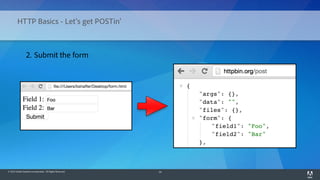
1. Create an HTML form with method POST
© 2014 Adobe Systems Incorporated. All Rights Reserved. 19
HTTP Basics - Let's get POSTin'
2. Submit the form
© 2014 Adobe Systems Incorporated. All Rights Reserved. 20
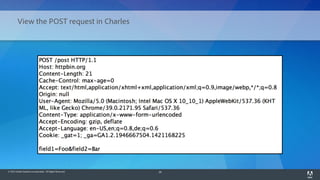
View the POST request in Charles
© 2014 Adobe Systems Incorporated. All Rights Reserved. 21
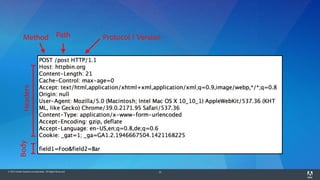
Method Protocol / Version
Path
Headers
Body
© 2014 Adobe Systems Incorporated. All Rights Reserved. 22
HTTP Basics - Status Codes
• Possible Status Codes
• Informational - 1xx (3)
• Success - 2xx (10)
• Redirection - 3xx (9)
• Client Error - 4xx (~30)
• Server Error - 5xx (14)
© 2014 Adobe Systems Incorporated. All Rights Reserved. 23
HTTP Basics - Status Codes
• Status Codes YOU should care about
• 200 OK - everything's groovy, baby
• 301 Moved Permanently - this resource now has a new URI
• 302 Found - you performed some action, now go somewhere else
• 400 Bad Request - there was a problem, and it's your fault
• 401 Unauthorized - you need to authorize before accessing this resource
• 403 Forbidden - you may have authorized, but you still don't have access
• 404 Not Found - this is not the page you are looking for
• 500 Internal Server Error - there was a problem, and it's not your fault
© 2014 Adobe Systems Incorporated. All Rights Reserved. 24
HTTP Basics - Status Codes
• Status codes which are useless but you are required to know
• 418 I'm A Teapot
• http://httpbin.org/status/418
• this WILL be on the exam
© 2014 Adobe Systems Incorporated. All Rights Reserved. 25
HTTP Basics - Headers
• Possible Headers
• Lots
• http://en.wikipedia.org/wiki/List_of_HTTP_header_fields
© 2014 Adobe Systems Incorporated. All Rights Reserved. 26
HTTP Basics - Headers
• Request Headers YOU should know about
• Host - typically required (IP + Host = Web Request)
• Accept - content type(s) your client can handle
• User-Agent - The HTTP Client for the request
• Cookie - the cookies you want to send to the web server
• Content-Type - the encoding of your request body (if applicable)
• Content-Length - the length of your request body (if applicable)
© 2014 Adobe Systems Incorporated. All Rights Reserved. 27
HTTP Basics - Headers
• Response Headers YOU should know about
• Date - the date of the response
• Content-Type - the content type of the response
• Content-Length - the length of the response
• Set-Cookie - that's how cookies are made!
• Location - where the browser should go, in the case of 301 and 302 redirects
© 2013 Adobe Systems Incorporated. All Rights Reserved. 28
• Postman (easy)
• Chrome extension for HTTP Requests
• Good for testing API calls
• Paw (easy) - https://luckymarmot.com/paw
• Native OS X app for API calls
HTTP Tools
© 2013 Adobe Systems Incorporated. All Rights Reserved. 29
HTTP Tools
• cURL (intermediate)
• just like the browser, cURL is an HTTP Client
• unlike the browser, cURL is a Command Line Interface (CLI) rather
than a Graphical User Interface (GUI)
• This is useful for making specific http requests without a browser
© 2013 Adobe Systems Incorporated. All Rights Reserved. 30
HTTP Tools
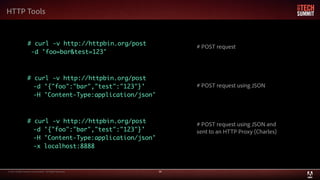
# curl -v http://httpbin.org/post
-d 'foo=bar&test=123'
# curl -v http://httpbin.org/post
-d '{"foo":"bar","test":"123"}'
-H 'Content-Type:application/json'
# curl -v http://httpbin.org/post
-d '{"foo":"bar","test":"123"}'
-H 'Content-Type:application/json'
-x localhost:8888
# POST request
# POST request using JSON
# POST request using JSON and
sent to an HTTP Proxy (Charles)
© 2013 Adobe Systems Incorporated. All Rights Reserved. 31
HTTP Tools
• Telnet (expert)
• Raw HTTP request
• You type it in!
# telnet httpbin.org 80
Trying 50.16.189.35...
Connected to httpbin.org.
Escape character is '^]'.
GET / HTTP/1.1
Host: httpbin.org
# The simplest possible HTTP request
# Press enter twice once you've finished
to complete the request
© 2014 Adobe Systems Incorporated. All Rights Reserved. Adobe Confidential.

HTTP - The Protocol of Our Lives

  • 1.
    © 2014 AdobeSystems Incorporated. All Rights Reserved. 1 Brent Shaffer Introduction to HTTP - The Protocol of Our Lives
  • 2.
    © 2014 AdobeSystems Incorporated. All Rights Reserved. 2 What is HTTP? • Hypertext Transfer Protocol (Hypertext?!??) • One of the least understood aspect of web development • The language your browser speaks to web servers • The technology used for most web traffic • The foundation for other web technologies such as REST, AJAX, and HTTPS
  • 3.
    © 2014 AdobeSystems Incorporated. All Rights Reserved. 3 What isn't HTTP? • Web Sockets - same port, different protocol • IRC (chat), SMTP (mail), FTP (files) • Anything prefixed with :// other than http and https • A gooey slice of pizza • Your mother
  • 4.
    © 2014 AdobeSystems Incorporated. All Rights Reserved. 4 I'm so excited! What do I need? • an HTTP Server • the internet • your computer • PHP and RoR have built-in web servers • Apache is pre-installed on OS X
  • 5.
    © 2014 AdobeSystems Incorporated. All Rights Reserved. 5 I'm so excited! What do I need? • an HTTP Client • a browser • cURL • command-line http utility • Telnet • for those who like it raw
  • 6.
    © 2014 AdobeSystems Incorporated. All Rights Reserved. 6 Is there anything else I can use? • an HTTP Proxy • Charles (charlesproxy.com) • spy on your own network traffic!
  • 7.
    © 2014 AdobeSystems Incorporated. All Rights Reserved. 7 1. Open Charles a. OS X: ensure "Mac OS X Proxy" is checked b. Windows: ensure "Windows I.E. Proxy" is checked c. ensure Charles is recording Let's Get Started!
  • 8.
    © 2014 AdobeSystems Incorporated. All Rights Reserved. 8 1. Open Charles d. Take a moment to observe some of your network traffic e. Go to Proxy > Recording Settings > Include and enter "httpbin.org" Let's Get Started!
  • 9.
    © 2014 AdobeSystems Incorporated. All Rights Reserved. 9 2. Open your Browser • Browse to "httpbin.org" • Click on the request you just made in Charles • Click the "Request" tab • Select the "Raw" tab at the bottom Let's Get Started!
  • 10.
    © 2014 AdobeSystems Incorporated. All Rights Reserved. 10 Raw HTTP Request 3. You Did It!
  • 11.
    © 2014 AdobeSystems Incorporated. All Rights Reserved. 11 Method Protocol / Version Path Headers
  • 12.
    © 2014 AdobeSystems Incorporated. All Rights Reserved. 12 Raw HTTP Response
  • 13.
    © 2014 AdobeSystems Incorporated. All Rights Reserved. 13 Status Code Protocol / Version Headers Body
  • 14.
    © 2014 AdobeSystems Incorporated. All Rights Reserved. 14 Browser Love 1. Using Chrome a. Go to View > Developer > Developer Tools b. Load (or reload) the page c. Click Network > [url] d. Click Headers to see the request and response headers
  • 15.
    © 2014 AdobeSystems Incorporated. All Rights Reserved. 15 HTTP Basics - Methods • Possible Methods • GET / PUT / POST / DELETE / HEAD / OPTIONS / PATCH / TRACE / CONNECT • Methods YOU should care about • GET and POST • Eventually PUT / DELETE
  • 16.
    © 2014 AdobeSystems Incorporated. All Rights Reserved. 16 HTTP Basics - Methods • GET • no request body • variables in URL via query string parameters • safe - meaning the request does not modify a resource • idempotent - meaning the call can be made many times without changing the outcome
  • 17.
    © 2014 AdobeSystems Incorporated. All Rights Reserved. 17 HTTP Basics - Methods • POST • variables in request body or URL • used to modify resources • not safe • not idempotent • your browser performs these on form submission
  • 18.
    © 2014 AdobeSystems Incorporated. All Rights Reserved. 18 HTTP Basics - Let's get POSTin' <form method="post" action="http://httpbin.org/post"> Field 1: <input type="text" name="field1" /><br /> Field 2: <input type="text" name="field2" /><br /> <input type="submit" /> </form> 1. Create an HTML form with method POST
  • 19.
    © 2014 AdobeSystems Incorporated. All Rights Reserved. 19 HTTP Basics - Let's get POSTin' 2. Submit the form
  • 20.
    © 2014 AdobeSystems Incorporated. All Rights Reserved. 20 View the POST request in Charles
  • 21.
    © 2014 AdobeSystems Incorporated. All Rights Reserved. 21 Method Protocol / Version Path Headers Body
  • 22.
    © 2014 AdobeSystems Incorporated. All Rights Reserved. 22 HTTP Basics - Status Codes • Possible Status Codes • Informational - 1xx (3) • Success - 2xx (10) • Redirection - 3xx (9) • Client Error - 4xx (~30) • Server Error - 5xx (14)
  • 23.
    © 2014 AdobeSystems Incorporated. All Rights Reserved. 23 HTTP Basics - Status Codes • Status Codes YOU should care about • 200 OK - everything's groovy, baby • 301 Moved Permanently - this resource now has a new URI • 302 Found - you performed some action, now go somewhere else • 400 Bad Request - there was a problem, and it's your fault • 401 Unauthorized - you need to authorize before accessing this resource • 403 Forbidden - you may have authorized, but you still don't have access • 404 Not Found - this is not the page you are looking for • 500 Internal Server Error - there was a problem, and it's not your fault
  • 24.
    © 2014 AdobeSystems Incorporated. All Rights Reserved. 24 HTTP Basics - Status Codes • Status codes which are useless but you are required to know • 418 I'm A Teapot • http://httpbin.org/status/418 • this WILL be on the exam
  • 25.
    © 2014 AdobeSystems Incorporated. All Rights Reserved. 25 HTTP Basics - Headers • Possible Headers • Lots • http://en.wikipedia.org/wiki/List_of_HTTP_header_fields
  • 26.
    © 2014 AdobeSystems Incorporated. All Rights Reserved. 26 HTTP Basics - Headers • Request Headers YOU should know about • Host - typically required (IP + Host = Web Request) • Accept - content type(s) your client can handle • User-Agent - The HTTP Client for the request • Cookie - the cookies you want to send to the web server • Content-Type - the encoding of your request body (if applicable) • Content-Length - the length of your request body (if applicable)
  • 27.
    © 2014 AdobeSystems Incorporated. All Rights Reserved. 27 HTTP Basics - Headers • Response Headers YOU should know about • Date - the date of the response • Content-Type - the content type of the response • Content-Length - the length of the response • Set-Cookie - that's how cookies are made! • Location - where the browser should go, in the case of 301 and 302 redirects
  • 28.
    © 2013 AdobeSystems Incorporated. All Rights Reserved. 28 • Postman (easy) • Chrome extension for HTTP Requests • Good for testing API calls • Paw (easy) - https://luckymarmot.com/paw • Native OS X app for API calls HTTP Tools
  • 29.
    © 2013 AdobeSystems Incorporated. All Rights Reserved. 29 HTTP Tools • cURL (intermediate) • just like the browser, cURL is an HTTP Client • unlike the browser, cURL is a Command Line Interface (CLI) rather than a Graphical User Interface (GUI) • This is useful for making specific http requests without a browser
  • 30.
    © 2013 AdobeSystems Incorporated. All Rights Reserved. 30 HTTP Tools # curl -v http://httpbin.org/post -d 'foo=bar&test=123' # curl -v http://httpbin.org/post -d '{"foo":"bar","test":"123"}' -H 'Content-Type:application/json' # curl -v http://httpbin.org/post -d '{"foo":"bar","test":"123"}' -H 'Content-Type:application/json' -x localhost:8888 # POST request # POST request using JSON # POST request using JSON and sent to an HTTP Proxy (Charles)
  • 31.
    © 2013 AdobeSystems Incorporated. All Rights Reserved. 31 HTTP Tools • Telnet (expert) • Raw HTTP request • You type it in! # telnet httpbin.org 80 Trying 50.16.189.35... Connected to httpbin.org. Escape character is '^]'. GET / HTTP/1.1 Host: httpbin.org # The simplest possible HTTP request # Press enter twice once you've finished to complete the request
  • 32.
    © 2014 AdobeSystems Incorporated. All Rights Reserved. Adobe Confidential.

Editor's Notes

  • #3 So here's a little about me. My name is Brent (don't stay on this page long)
  • #4 Adobe Marketing Cloud - Web Services Team - this means we are in charge of all the APIs here
  • #5 We are a folk duo, and if you're into listening to music while you code, it would mean the world to me if you checked us out Music is free at morehazards.com
  • #6 Those are probably a lot of words you don't care about, but it makes me feel important
  • #8 Web Sockets - protocol for maintaining live connections for two-way communication file:// for example is not http your mother is not http, unless you're https, and even then it's questionable
  • #9 You need an http web server. I know of one, it's called the internet! In the event the internet is broken, you can use your computer Other web servers: Ngynx, Tomcat, IIS, etc.
  • #18 Demo HTTPBin.org - /headers - compare with browser headers / charles headers - /get - show a few querystring parameters - note "post" (also "put" and "delete") as options to be shown later
  • #21 idempotent - drop this word at your job and you'll get a raise. works every time safe - slightly different - means no permanent changes were made forms - "method = post"
  • #22 idempotent - drop this word at your job and you'll get a raise. works every time safe - slightly different - means no permanent changes were made forms - "method = post"
  • #23 show POST in httpbin show POST in charles
  • #24 show POST in httpbin show POST in charles
  • #26 change method to GET in html change method to GET in browser
  • #28 404 - https://github.com/asdfasdfds 500 error - server error, code exception, syntax error, etc
  • #29 It doesn't even look like a teapot
  • #36 curl prevents you from making wrong requests... now you can!