Prepared By :- Jangezkhan A.khamo
What Are HTTP
Status Codes ?
University of Duhok
College of Science
Computer Department
Contents
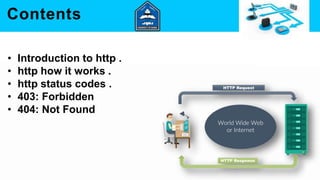
• Introduction to http .
• http how it works .
• http status codes .
• 403: Forbidden
• 404: Not Found
Introduction to http
• HTTP( Hypertext transfer protocol )
• Language of the Web
 protocol used for communication between web browsers
and web servers .
http how it works
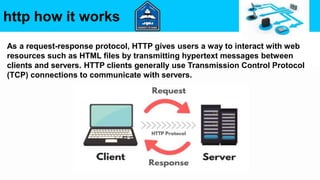
As a request-response protocol, HTTP gives users a way to interact with web
resources such as HTML files by transmitting hypertext messages between
clients and servers. HTTP clients generally use Transmission Control Protocol
(TCP) connections to communicate with servers.
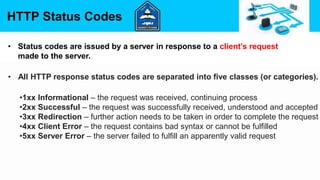
HTTP Status Codes
• Status codes are issued by a server in response to a client’s request
made to the server.
• All HTTP response status codes are separated into five classes (or categories).
•1xx Informational – the request was received, continuing process
•2xx Successful – the request was successfully received, understood and accepted
•3xx Redirection – further action needs to be taken in order to complete the request
•4xx Client Error – the request contains bad syntax or cannot be fulfilled
•5xx Server Error – the server failed to fulfill an apparently valid request
1xx Informational
• 100 – Continue .
• 101 – Switching protocol .
• 103 – Checkpoints .
• Basically, the server hasn’t fully completed the request yet and it’s
still processing the information. This is like a transitional phase
saying the server has not yet completed the request.
2xx Successful
• Basically, these are the successful requests, showing that everything
happened as planned (which is usually what you’re going for):
• 200 – OK (you will see this one the most);
• 201 – Created;
• 202 – Accepted;
• 205 – Reset Content;
• 206 – Partial Content.
3xx Redirection
• These error codes are shown when you request an address and are sent
somewhere else. There’s a bunch of different types of different types of
redirects:
• 301 – Moved Permanently;
• 302 – Found;
• 304 – Not Modified;
• 305 – Use Proxy;
• 307 – Temporary Redirect.
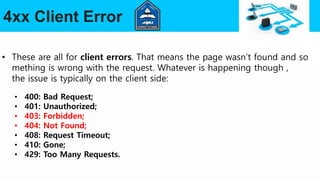
4xx Client Error
• These are all for client errors. That means the page wasn’t found and so
mething is wrong with the request. Whatever is happening though ,
the issue is typically on the client side:
• 400: Bad Request;
• 401: Unauthorized;
• 403: Forbidden;
• 404: Not Found;
• 408: Request Timeout;
• 410: Gone;
• 429: Too Many Requests.
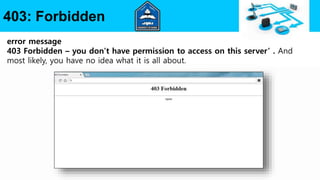
403: Forbidden
error message
403 Forbidden – you don’t have permission to access on this server’ . And
most likely, you have no idea what it is all about.
Fix the 403 forbidden error
In short, follow these steps in order to fix the 403 forbidden error:
1. Check or reset/rename your . htaccess file
2. Reset file and folder permissions
3. Disable WordPress plugins
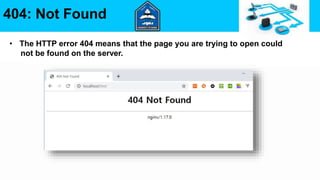
404: Not Found
• The HTTP error 404 means that the page you are trying to open could
not be found on the server.
The error message may appear as follows:
• "Error 404"
• "404 not found"
• "The requested URL was not found on the server."
• "HTTP Error 404"
• "Error 404: page not found"
404: Not Found
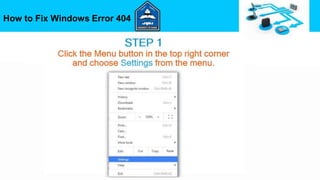
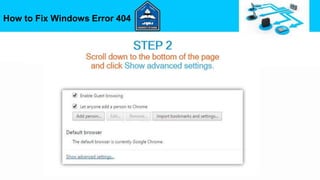
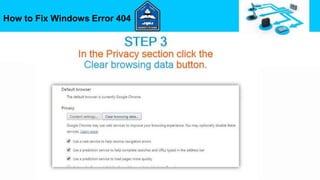
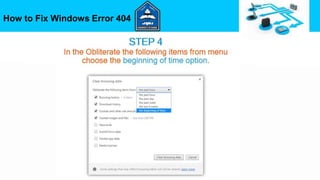
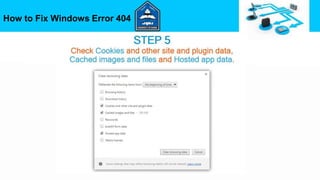
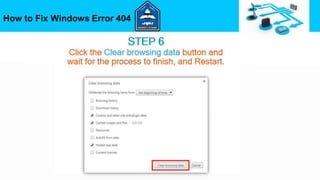
How to Fix Windows Error 404
5xx Server Error
• These appear when the client made a good request, but the server didn’t
complete it.
• So something is wrong on the server side.
• 500 – Internal Server Error;
• 502 – Bad Gateway;
• 503 – Service Unavailable;
• 504 – Gateway Timeout.
Any
Question ?
Thanks
For
Attention

HTTP

  • 1.
    Prepared By :-Jangezkhan A.khamo What Are HTTP Status Codes ? University of Duhok College of Science Computer Department
  • 2.
    Contents • Introduction tohttp . • http how it works . • http status codes . • 403: Forbidden • 404: Not Found
  • 3.
    Introduction to http •HTTP( Hypertext transfer protocol ) • Language of the Web  protocol used for communication between web browsers and web servers .
  • 4.
    http how itworks As a request-response protocol, HTTP gives users a way to interact with web resources such as HTML files by transmitting hypertext messages between clients and servers. HTTP clients generally use Transmission Control Protocol (TCP) connections to communicate with servers.
  • 5.
    HTTP Status Codes •Status codes are issued by a server in response to a client’s request made to the server. • All HTTP response status codes are separated into five classes (or categories). •1xx Informational – the request was received, continuing process •2xx Successful – the request was successfully received, understood and accepted •3xx Redirection – further action needs to be taken in order to complete the request •4xx Client Error – the request contains bad syntax or cannot be fulfilled •5xx Server Error – the server failed to fulfill an apparently valid request
  • 6.
    1xx Informational • 100– Continue . • 101 – Switching protocol . • 103 – Checkpoints . • Basically, the server hasn’t fully completed the request yet and it’s still processing the information. This is like a transitional phase saying the server has not yet completed the request.
  • 7.
    2xx Successful • Basically,these are the successful requests, showing that everything happened as planned (which is usually what you’re going for): • 200 – OK (you will see this one the most); • 201 – Created; • 202 – Accepted; • 205 – Reset Content; • 206 – Partial Content.
  • 8.
    3xx Redirection • Theseerror codes are shown when you request an address and are sent somewhere else. There’s a bunch of different types of different types of redirects: • 301 – Moved Permanently; • 302 – Found; • 304 – Not Modified; • 305 – Use Proxy; • 307 – Temporary Redirect.
  • 9.
    4xx Client Error •These are all for client errors. That means the page wasn’t found and so mething is wrong with the request. Whatever is happening though , the issue is typically on the client side: • 400: Bad Request; • 401: Unauthorized; • 403: Forbidden; • 404: Not Found; • 408: Request Timeout; • 410: Gone; • 429: Too Many Requests.
  • 10.
    403: Forbidden error message 403Forbidden – you don’t have permission to access on this server’ . And most likely, you have no idea what it is all about.
  • 11.
    Fix the 403forbidden error In short, follow these steps in order to fix the 403 forbidden error: 1. Check or reset/rename your . htaccess file 2. Reset file and folder permissions 3. Disable WordPress plugins
  • 12.
    404: Not Found •The HTTP error 404 means that the page you are trying to open could not be found on the server.
  • 13.
    The error messagemay appear as follows: • "Error 404" • "404 not found" • "The requested URL was not found on the server." • "HTTP Error 404" • "Error 404: page not found" 404: Not Found
  • 14.
    How to FixWindows Error 404
  • 15.
    How to FixWindows Error 404
  • 16.
    How to FixWindows Error 404
  • 17.
    How to FixWindows Error 404
  • 18.
    How to FixWindows Error 404
  • 19.
    How to FixWindows Error 404
  • 20.
    5xx Server Error •These appear when the client made a good request, but the server didn’t complete it. • So something is wrong on the server side. • 500 – Internal Server Error; • 502 – Bad Gateway; • 503 – Service Unavailable; • 504 – Gateway Timeout.
  • 21.
  • 22.