HTML : Forms
2
• A form is an area that can contain form elements.
• Form elements are elements that allow the user to enter
information (like text fields, textarea fields, drop-down menus,
radio buttons, checkboxes, etc.) in a form.
• A form is defined with the <form> tag.
<form>
.
input elements
.
</form>
WEB PROGRAMMING : Forms
3
HTML <form> method Attribute
• The method attribute specifies how to send form-data (the form-
data is sent to the page specified in the action attribute).
• The form-data can be sent as
• URL variables (with method="get")
• or as HTTP post (with method="post").
WEB PROGRAMMING : Forms
4
Input
• The most used form tag is the <input> tag.
• The type of input is specified with the type attribute.
• The most commonly used input types are explained below:
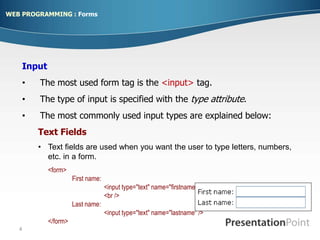
Text Fields
• Text fields are used when you want the user to type letters, numbers,
etc. in a form.
<form>
First name:
<input type="text" name="firstname" />
<br />
Last name:
<input type="text" name="lastname" />
</form>
WEB PROGRAMMING : Forms
5
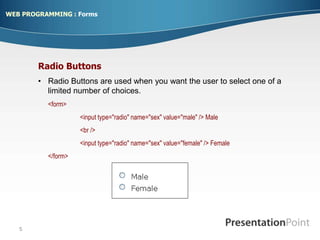
Radio Buttons
• Radio Buttons are used when you want the user to select one of a
limited number of choices.
<form>
<input type="radio" name="sex" value="male" /> Male
<br />
<input type="radio" name="sex" value="female" /> Female
</form>
WEB PROGRAMMING : Forms
6
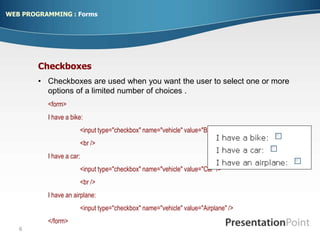
Checkboxes
• Checkboxes are used when you want the user to select one or more
options of a limited number of choices .
<form>
I have a bike:
<input type="checkbox" name="vehicle" value="Bike" />
<br />
I have a car:
<input type="checkbox" name="vehicle" value="Car" />
<br />
I have an airplane:
<input type="checkbox" name="vehicle" value="Airplane" />
</form>
WEB PROGRAMMING : Forms
7
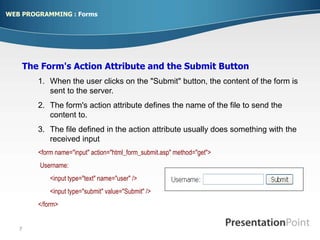
The Form's Action Attribute and the Submit Button
1. When the user clicks on the "Submit" button, the content of the form is
sent to the server.
2. The form's action attribute defines the name of the file to send the
content to.
3. The file defined in the action attribute usually does something with the
received input
<form name="input" action="html_form_submit.asp" method="get">
Username:
<input type="text" name="user" />
<input type="submit" value="Submit" />
</form>
WEB PROGRAMMING : Forms
8
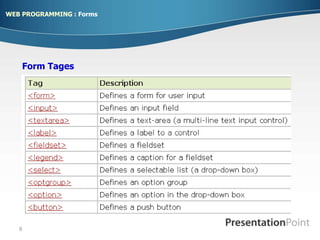
Form Tages
WEB PROGRAMMING : Forms

HTML_Forms_.ppt

  • 1.
  • 2.
    2 • A formis an area that can contain form elements. • Form elements are elements that allow the user to enter information (like text fields, textarea fields, drop-down menus, radio buttons, checkboxes, etc.) in a form. • A form is defined with the <form> tag. <form> . input elements . </form> WEB PROGRAMMING : Forms
  • 3.
    3 HTML <form> methodAttribute • The method attribute specifies how to send form-data (the form- data is sent to the page specified in the action attribute). • The form-data can be sent as • URL variables (with method="get") • or as HTTP post (with method="post"). WEB PROGRAMMING : Forms
  • 4.
    4 Input • The mostused form tag is the <input> tag. • The type of input is specified with the type attribute. • The most commonly used input types are explained below: Text Fields • Text fields are used when you want the user to type letters, numbers, etc. in a form. <form> First name: <input type="text" name="firstname" /> <br /> Last name: <input type="text" name="lastname" /> </form> WEB PROGRAMMING : Forms
  • 5.
    5 Radio Buttons • RadioButtons are used when you want the user to select one of a limited number of choices. <form> <input type="radio" name="sex" value="male" /> Male <br /> <input type="radio" name="sex" value="female" /> Female </form> WEB PROGRAMMING : Forms
  • 6.
    6 Checkboxes • Checkboxes areused when you want the user to select one or more options of a limited number of choices . <form> I have a bike: <input type="checkbox" name="vehicle" value="Bike" /> <br /> I have a car: <input type="checkbox" name="vehicle" value="Car" /> <br /> I have an airplane: <input type="checkbox" name="vehicle" value="Airplane" /> </form> WEB PROGRAMMING : Forms
  • 7.
    7 The Form's ActionAttribute and the Submit Button 1. When the user clicks on the "Submit" button, the content of the form is sent to the server. 2. The form's action attribute defines the name of the file to send the content to. 3. The file defined in the action attribute usually does something with the received input <form name="input" action="html_form_submit.asp" method="get"> Username: <input type="text" name="user" /> <input type="submit" value="Submit" /> </form> WEB PROGRAMMING : Forms
  • 8.