Top 50 HTML Interview Questions and
Answers
HTML Interview Questions and Answers
HTML is the backbone of web development, used to structure content on the web.
Understanding HTML is essential for anyone looking to build or work with websites, making it a
key topic for interviews. Mastering HTML concepts can give you a strong foundation in web
development.
In this HTML tutorial, I’ll walk you through common HTML interview questions and answers to
help you prepare effectively. Don’t worry. We’ll keep it simple and easy to follow! Ready to boost
your confidence and ace that interview? Let’s get started!
HTML Interview Questions & Answers for Beginners
1. What is HTML?
Here are some popular markup languages:
1. HTML: Hypertext Markup Language
2. KML: Keyhole Markup Language
3. SGML: Standard Generalized Markup Language
4. MathML: Mathematical Markup Language
5. XML: eXtensible Markup Language
. XHTML: eXtensible HyperText Markup Language
HTML tags are the building blocks of any HTML document. They define elements and attributes
and are generally used in pairs. The opening tag marks the start, and the closing tag marks the
end. Tags are enclosed within < and >, making them easy to identify.
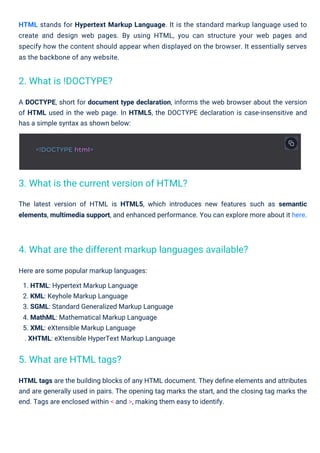
A DOCTYPE, short for document type declaration, informs the web browser about the version
of HTML used in the web page. In HTML5, the DOCTYPE declaration is case-insensitive and
has a simple syntax as shown below:
HTML stands for Hypertext Markup Language. It is the standard markup language used to
create and design web pages. By using HTML, you can structure your web pages and
specify how the content should appear when displayed on the browser. It essentially serves
as the backbone of any website.
The latest version of HTML is HTML5, which introduces new features such as semantic
elements, multimedia support, and enhanced performance. You can explore more about it here.
2. What is !DOCTYPE?
5. What are HTML tags?
3. What is the current version of HTML?
4. What are the different markup languages available?
<!DOCTYPE html>
6. What are attributes in HTML?
Attributes in HTML provide extra information about an element, andinput attributesare
specifically used to define various properties of form input elements.These attributes are
always included in the opening tag and consist of a name and a corresponding value. For
example, the style attribute can define the color of the text within an input field.
7. What are the main components of an HTML document?
The key components of an HTML document include:
9. What is the difference between <div> and <span> elements?
The <div> element is a block-level element used for grouping and structuring content, while the
<span> element is an inline element used for styling specific parts of the content.
8. Explain the difference between HTML elements and HTML tags.
Tags: Define the elements
Attributes: Provide additional details
Content: Visible text or multimedia
Comments: Non-visible notes for developers
HTML Elements
HTML elements define the structure and
content of a web page.
They consist of opening tags, content,
attributes, and comments.
HTML Tags
HTML tags are used to mark up the beginning
and end of an element.
Tags are enclosed in angle brackets and have
names like <div> or <p>.
Example of <span> usage:
For example, if you want to create a link to Google's homepage, you can write:
To create a hyperlink in HTML, you use the <a> tag along with the href attribute. The href
attribute specifies the destination URL. Hyperlinks are essential for connecting different
pages or websites, making navigation seamless. Here's the syntax:
The primary purpose of HTML is to provide a framework for structuring web pages. It organizes
content using elements, tags, and attributes, making it possible for browsers to render pages
in a user-friendly format. Without HTML, creating interactive and visually appealing websites
would not be possible.
11. How do you create a hyperlink in HTML?
10. What is the purpose of HTML in web development?
<a href="https://www.example.com">Link Text</a>
<a href="https://www.google.com">Visit Google</a>
<div>
<h2>Section Title</h2>
<p>This is a paragraph within a div element.</p>
</div>
<p>This is a <span style="color: blue;">blue</span> text.</p>
For example:
To add comments in HTML, use the following syntax:
Tags like <br> are exceptions, as they are self-closing.
Every HTML tag consists of three parts: an opening tag, the content, and a closing tag. Here's a
simple structure:
The <strong> tag highlights text with strong importance and typically displays it in bold. On the
other hand, the <em> tag is used for emphasized text and usually renders it in italics. These
tags are crucial for improving SEO and accessibility as they convey meaning to search engines
and screen readers.
Comments are not visible on the webpage and are used for documentation or debugging.
Types of comments include:
Single-line comment: Used for brief notes.
Multi-line comment: Used for detailed explanations.
Remember, comments improve the maintainability of your code, making it easier to
understand.
Pro Tip: Always ensure the href attribute points to the correct and secure URL. Use meaningful
anchor text to improve accessibility and SEO.
Best Practice: Use these tags to highlight significant or stressed words in your content,
enhancing readability and SEO rankings.
14. How are comments added in HTML?
13. What is the structure of an HTML tag?
12. Explain the difference between <strong> and <em> tags.
<em>Emphasized Text</em>
<!-- This is a comment -->
<tagname>Content</tagname>
<p>This is a paragraph.</p>
<strong>Important Text</strong>
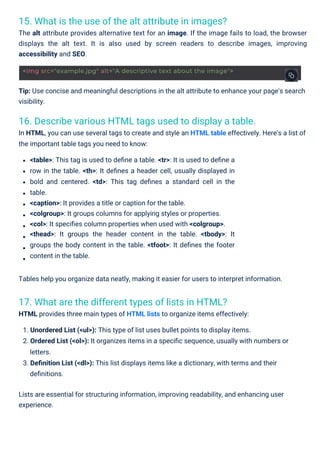
15. What is the use of the alt attribute in images?
The alt attribute provides alternative text for an image. If the image fails to load, the browser
displays the alt text. It is also used by screen readers to describe images, improving
accessibility and SEO.
17. What are the different types of lists in HTML?
HTML provides three main types of HTML lists to organize items effectively:
16. Describe various HTML tags used to display a table.
In HTML, you can use several tags to create and style an HTML table effectively. Here's a list of
the important table tags you need to know:
Tip: Use concise and meaningful descriptions in the alt attribute to enhance your page's search
visibility.
<table>: This tag is used to define a table. <tr>: It is used to define a
row in the table. <th>: It defines a header cell, usually displayed in
bold and centered. <td>: This tag defines a standard cell in the
table.
<caption>: It provides a title or caption for the table.
<colgroup>: It groups columns for applying styles or properties.
<col>: It specifies column properties when used with <colgroup>.
<thead>: It groups the header content in the table. <tbody>: It
groups the body content in the table. <tfoot>: It defines the footer
content in the table.
Tables help you organize data neatly, making it easier for users to interpret information.
1. Unordered List (<ul>): This type of list uses bullet points to display items.
2. Ordered List (<ol>): It organizes items in a specific sequence, usually with numbers or
letters.
3. Definition List (<dl>): This list displays items like a dictionary, with terms and their
definitions.
Lists are essential for structuring information, improving readability, and enhancing user
experience.
<img src="example.jpg" alt="A descriptive text about the image">
18. What are the various levels of heading tags?
HTML offers six levels of heading tags, ranging from <h1> to <h6>. Here's a breakdown:
20. What is the purpose of the <img> tag in HTML?
The <img> tag is used to embed images into your HTML documents. Here are the essential
attributes:
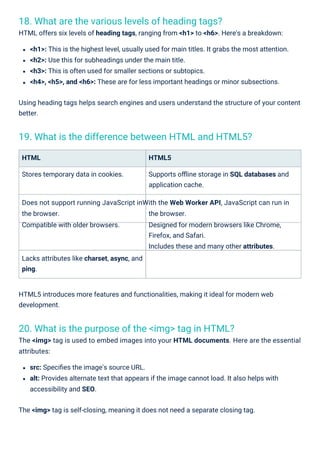
19. What is the difference between HTML and HTML5?
HTML5 introduces more features and functionalities, making it ideal for modern web
development.
HTML
Stores temporary data in cookies.
HTML5
Supports offline storage in SQL databases and
application cache.
Does not support running JavaScript inWith the Web Worker API, JavaScript can run in
the browser.
Compatible with older browsers.
the browser.
Designed for modern browsers like Chrome,
Firefox, and Safari.
Includes these and many other attributes.
Lacks attributes like charset, async, and
ping.
<h1>: This is the highest level, usually used for main titles. It grabs the most attention.
<h2>: Use this for subheadings under the main title.
<h3>: This is often used for smaller sections or subtopics.
<h4>, <h5>, and <h6>: These are for less important headings or minor subsections.
Using heading tags helps search engines and users understand the structure of your content
better.
src: Specifies the image's source URL.
alt: Provides alternate text that appears if the image cannot load. It also helps with
accessibility and SEO.
The <img> tag is self-closing, meaning it does not need a separate closing tag.
22. What are HTML entities? Provide an example.
HTML entities represent special characters using either a named entity or a numerical code.
For instance, the less-than sign (<) can be written as &lt.
21. What is the purpose of the <form> element in HTML?
HTML Forms is crucial for creating a user-friendly interface that allows users to input data. It’s
the building block for most interactive web applications. Inside the <form> tag, you can include
various HTML form elements like text fields, buttons, checkboxes, etc., to gather information
from users. Once the data is filled in, the form is submitted to the server for further processing,
like authentication or storing user information.
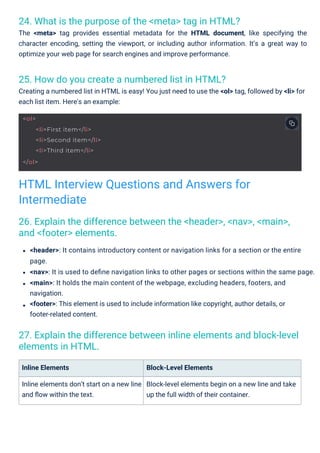
23. Explain the difference between the GET and POST methods in
HTML forms.
GET
The 'GET' method sends form data as part of
the URL query string.
The data length is limited in 'GET'.
The data is visible to the user in the 'GET'
method.
POST
The 'POST' method sends form data within
the HTTP request body.
'POST' handles larger amounts of data.
The data is hidden from the user in the 'POST'
method.
<img src="example.jpg" alt="Example Image">
<form action="/submit" method="post">
<label>Username: <input type="text" name="username"></label><br>
<label>Password: <input type="password" name="password"></label><br>
<input type="submit" value="Submit">
</form>
25. How do you create a numbered list in HTML?
Creating a numbered list in HTML is easy! You just need to use the <ol> tag, followed by <li> for
each list item. Here's an example:
24. What is the purpose of the <meta> tag in HTML?
The <meta> tag provides essential metadata for the HTML document, like specifying the
character encoding, setting the viewport, or including author information. It’s a great way to
optimize your web page for search engines and improve performance.
26. Explain the difference between the <header>, <nav>, <main>,
and <footer> elements.
27. Explain the difference between inline elements and block-level
elements in HTML.
Inline Elements
Inline elements don’t start on a new line
and flow within the text.
Block-Level Elements
Block-level elements begin on a new line and take
up the full width of their container.
<header>: It contains introductory content or navigation links for a section or the entire
page.
<nav>: It is used to define navigation links to other pages or sections within the same page.
<main>: It holds the main content of the webpage, excluding headers, footers, and
navigation.
<footer>: This element is used to include information like copyright, author details, or
footer-related content.
HTML Interview Questions and Answers for
Intermediate
<ol>
<li>First item</li>
<li>Second item</li>
<li>Third item</li>
</ol>
Read More: HTML Inline and Block Elements: Explained with Examples
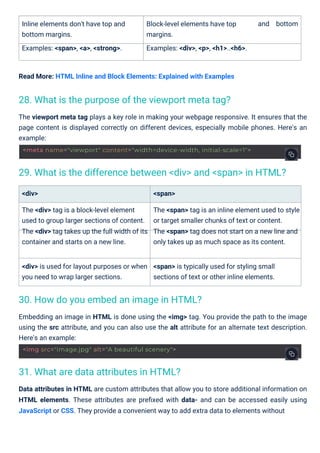
Inline elements don't have top and
bottom margins.
Examples: <span>, <a>, <strong>.
Block-level elements have top
margins.
Examples: <div>, <p>, <h1>..<h6>.
and bottom
The viewport meta tag plays a key role in making your webpage responsive. It ensures that the
page content is displayed correctly on different devices, especially mobile phones. Here's an
example:
<div>
The <div> tag is a block-level element
used to group larger sections of content.
The <div> tag takes up the full width of its
container and starts on a new line.
<span>
The <span> tag is an inline element used to style
or target smaller chunks of text or content.
The <span> tag does not start on a new line and
only takes up as much space as its content.
<div> is used for layout purposes or when
you need to wrap larger sections.
<span> is typically used for styling small
sections of text or other inline elements.
Data attributes in HTML are custom attributes that allow you to store additional information on
HTML elements. These attributes are prefixed with data- and can be accessed easily using
JavaScript or CSS. They provide a convenient way to add extra data to elements without
Embedding an image in HTML is done using the <img> tag. You provide the path to the image
using the src attribute, and you can also use the alt attribute for an alternate text description.
Here's an example:
31. What are data attributes in HTML?
30. How do you embed an image in HTML?
28. What is the purpose of the viewport meta tag?
29. What is the difference between <div> and <span> in HTML?
<img src="image.jpg" alt="A beautiful scenery">
<meta name="viewport" content="width=device-width, initial-scale=1">
affecting their visual representation. For example, you can use them to store configuration
options or pass dynamic values to scripts.
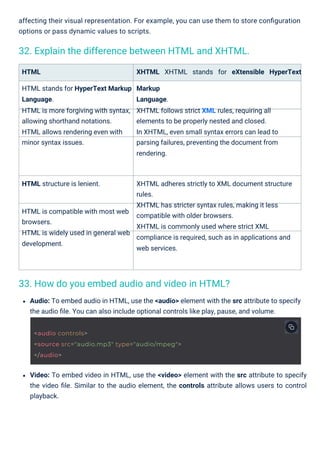
HTML
HTML stands for HyperText Markup
Language.
HTML is more forgiving with syntax,
allowing shorthand notations.
HTML allows rendering even with
minor syntax issues.
XHTML XHTML stands for eXtensible HyperText
Markup
Language.
XHTML follows strict XML rules, requiring all
elements to be properly nested and closed.
In XHTML, even small syntax errors can lead to
parsing failures, preventing the document from
rendering.
HTML structure is lenient. XHTML adheres strictly to XML document structure
rules.
XHTML has stricter syntax rules, making it less
compatible with older browsers.
XHTML is commonly used where strict XML
compliance is required, such as in applications and
web services.
HTML is compatible with most web
browsers.
HTML is widely used in general web
development.
Audio: To embed audio in HTML, use the <audio> element with the src attribute to specify
the audio file. You can also include optional controls like play, pause, and volume.
Video: To embed video in HTML, use the <video> element with the src attribute to specify
the video file. Similar to the audio element, the controls attribute allows users to control
playback.
33. How do you embed audio and video in HTML?
32. Explain the difference between HTML and XHTML.
<audio controls>
<source src="audio.mp3" type="audio/mpeg">
</audio>
Read More: Media and Graphics in HTML
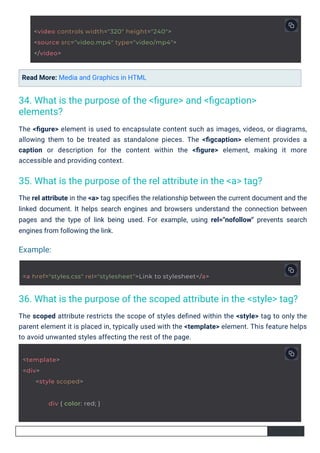
The scoped attribute restricts the scope of styles defined within the <style> tag to only the
parent element it is placed in, typically used with the <template> element. This feature helps
to avoid unwanted styles affecting the rest of the page.
The rel attribute in the <a> tag specifies the relationship between the current document and the
linked document. It helps search engines and browsers understand the connection between
pages and the type of link being used. For example, using rel="nofollow" prevents search
engines from following the link.
The <figure> element is used to encapsulate content such as images, videos, or diagrams,
allowing them to be treated as standalone pieces. The <figcaption> element provides a
caption or description for the content within the <figure> element, making it more
accessible and providing context.
34. What is the purpose of the <figure> and <figcaption>
elements?
35. What is the purpose of the rel attribute in the <a> tag?
36. What is the purpose of the scoped attribute in the <style> tag?
Example:
<template>
<div>
<style scoped>
div { color: red; }
<video controls width="320" height="240">
<source src="video.mp4" type="video/mp4">
</video>
<a href="styles.css" rel="stylesheet">Link to stylesheet</a>
37. What is the purpose of the <iframe> element?
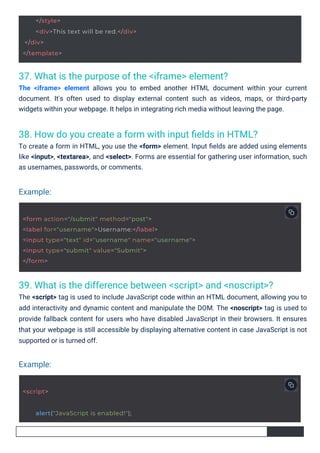
The <iframe> element allows you to embed another HTML document within your current
document. It's often used to display external content such as videos, maps, or third-party
widgets within your webpage. It helps in integrating rich media without leaving the page.
38. How do you create a form with input fields in HTML?
To create a form in HTML, you use the <form> element. Input fields are added using elements
like <input>, <textarea>, and <select>. Forms are essential for gathering user information, such
as usernames, passwords, or comments.
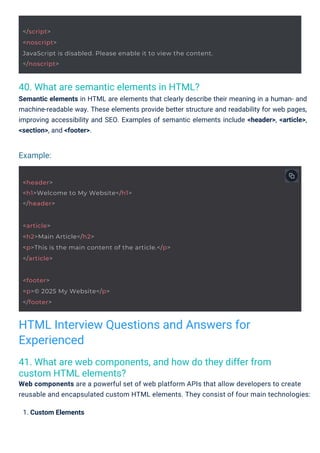
39. What is the difference between <script> and <noscript>?
The <script> tag is used to include JavaScript code within an HTML document, allowing you to
add interactivity and dynamic content and manipulate the DOM. The <noscript> tag is used to
provide fallback content for users who have disabled JavaScript in their browsers. It ensures
that your webpage is still accessible by displaying alternative content in case JavaScript is not
supported or is turned off.
Example:
Example:
<script>
alert("JavaScript is enabled!");
</style>
<div>This text will be red.</div>
</div>
</template>
<form action="/submit" method="post">
<label for="username">Username:</label>
<input type="text" id="username" name="username">
<input type="submit" value="Submit">
</form>
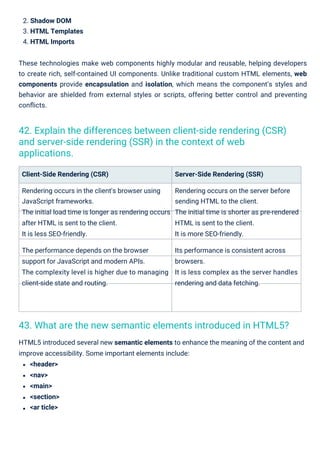
40. What are semantic elements in HTML?
Semantic elements in HTML are elements that clearly describe their meaning in a human- and
machine-readable way. These elements provide better structure and readability for web pages,
improving accessibility and SEO. Examples of semantic elements include <header>, <article>,
<section>, and <footer>.
41. What are web components, and how do they differ from
custom HTML elements?
Web components are a powerful set of web platform APIs that allow developers to create
reusable and encapsulated custom HTML elements. They consist of four main technologies:
1. Custom Elements
Example:
HTML Interview Questions and Answers for
Experienced
<footer>
<p>© 2025 My Website</p>
</footer>
<header>
<h1>Welcome to My Website</h1>
</header>
<article>
<h2>Main Article</h2>
<p>This is the main content of the article.</p>
</article>
</script>
<noscript>
JavaScript is disabled. Please enable it to view the content.
</noscript>
2. Shadow DOM
3. HTML Templates
4. HTML Imports
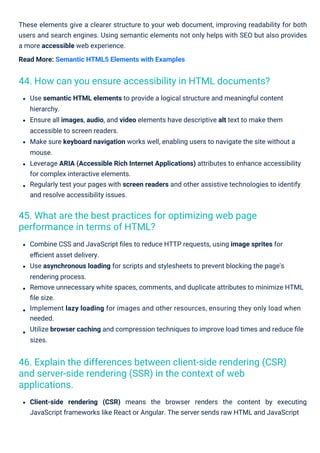
Client-Side Rendering (CSR)
Rendering occurs in the client's browser using
JavaScript frameworks.
The initial load time is longer as rendering occurs
after HTML is sent to the client.
It is less SEO-friendly.
The performance depends on the browser
support for JavaScript and modern APIs.
The complexity level is higher due to managing
client-side state and routing.
Server-Side Rendering (SSR)
Rendering occurs on the server before
sending HTML to the client.
The initial time is shorter as pre-rendered
HTML is sent to the client.
It is more SEO-friendly.
Its performance is consistent across
browsers.
It is less complex as the server handles
rendering and data fetching.
HTML5 introduced several new semantic elements to enhance the meaning of the content and
improve accessibility. Some important elements include:
<header>
<nav>
<main>
<section>
<ar ticle>
These technologies make web components highly modular and reusable, helping developers
to create rich, self-contained UI components. Unlike traditional custom HTML elements, web
components provide encapsulation and isolation, which means the component’s styles and
behavior are shielded from external styles or scripts, offering better control and preventing
conflicts.
43. What are the new semantic elements introduced in HTML5?
42. Explain the differences between client-side rendering (CSR)
and server-side rendering (SSR) in the context of web
applications.
These elements give a clearer structure to your web document, improving readability for both
users and search engines. Using semantic elements not only helps with SEO but also provides
a more accessible web experience.
Read More: Semantic HTML5 Elements with Examples
Combine CSS and JavaScript files to reduce HTTP requests, using image sprites for
efficient asset delivery.
Use asynchronous loading for scripts and stylesheets to prevent blocking the page's
rendering process.
Remove unnecessary white spaces, comments, and duplicate attributes to minimize HTML
file size.
Implement lazy loading for images and other resources, ensuring they only load when
needed.
Utilize browser caching and compression techniques to improve load times and reduce file
sizes.
Use semantic HTML elements to provide a logical structure and meaningful content
hierarchy.
Ensure all images, audio, and video elements have descriptive alt text to make them
accessible to screen readers.
Make sure keyboard navigation works well, enabling users to navigate the site without a
mouse.
Leverage ARIA (Accessible Rich Internet Applications) attributes to enhance accessibility
for complex interactive elements.
Regularly test your pages with screen readers and other assistive technologies to identify
and resolve accessibility issues.
Client-side rendering (CSR) means the browser renders the content by executing
JavaScript frameworks like React or Angular. The server sends raw HTML and JavaScript
45. What are the best practices for optimizing web page
performance in terms of HTML?
44. How can you ensure accessibility in HTML documents?
46. Explain the differences between client-side rendering (CSR)
and server-side rendering (SSR) in the context of web
applications.
bundles, and rendering happens in the browser. Server-side rendering (SSR) renders the
content on the server and sends fully rendered HTML to the client. This improves
performance and SEO, especially for large websites with heavy content.
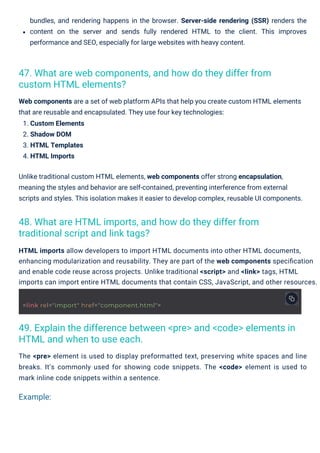
The <pre> element is used to display preformatted text, preserving white spaces and line
breaks. It’s commonly used for showing code snippets. The <code> element is used to
mark inline code snippets within a sentence.
Web components are a set of web platform APIs that help you create custom HTML elements
that are reusable and encapsulated. They use four key technologies:
1. Custom Elements
2. Shadow DOM
3. HTML Templates
4. HTML Imports
Unlike traditional custom HTML elements, web components offer strong encapsulation,
meaning the styles and behavior are self-contained, preventing interference from external
scripts and styles. This isolation makes it easier to develop complex, reusable UI components.
HTML imports allow developers to import HTML documents into other HTML documents,
enhancing modularization and reusability. They are part of the web components specification
and enable code reuse across projects. Unlike traditional <script> and <link> tags, HTML
imports can import entire HTML documents that contain CSS, JavaScript, and other resources.
48. What are HTML imports, and how do they differ from
traditional script and link tags?
47. What are web components, and how do they differ from
custom HTML elements?
49. Explain the difference between <pre> and <code> elements in
HTML and when to use each.
Example:
<link rel="import" href="component.html">
Q 1: What does HTML stand for?
(a) HyperText Markup Language
(b) HomeTool Markup Language
50. What is the purpose of the defer and async attributes in
<script> tags?
The async attribute makes the script load asynchronously, meaning it does not block the
page rendering. However, it may cause issues if the order of script execution matters.
HTML interview questions for experienced developers focus on advanced topics like web
components, client-side vs server-side rendering, accessibility, and performance
optimization. Mastering these concepts will enhance your ability to build efficient,
accessible, and SEO-friendly web applications. To further enhance your skills, consider
enrolling in the Frontend Foundation Certification Training here, or explore free courses on
HTMLand
JavaScript.
The defer attribute delays the execution of the script until the document is fully parsed,
improving the page load speed. It’s used with external scripts and allows the script to
download in parallel with page parsing.
Summary
Test Your Knowledge of HTML Interview Questions!
<script src="script.js" defer></script>
<script src="script.js" async></script>
<pre>
function greet() {
}
</pre>
<p>Use the <code>greet()</code> function to display a greeting.</p>
console.log("Hello, world!");
(a)
(b)
(a) <img>
(b) <image>
(c) <picture>
(d) <photo>
View Answer
(a) <br>
(b) <break>
(c) <lb>
(d) <newline>
View Answer
(a)
(b)
(c)
(d)
View Answer
(c) HyperTool Markup Language
(d) HyperText Modeling Language
View Answer ⬇
⬇
⬇
⬇
Q 4: How do you create a hyperlink in HTML?
Q 2: Which HTML element is used to display a picture?
Q 5: Which attribute is used to specify an alternative text for an
image, if the image cannot be displayed?
Q 3: What is the correct HTML element for inserting a line break?
alt
title
<a>link</a>
<link>link</link>
<hyperlink>link</hyperlink>
<href>link</href>
(c)
(d)
View Answer
To prepare for an HTML interview, start with reviewing basics of HTML like tags, attributes,
and document structure. Practice creating forms, tables, and lists. Then move on to
advanced topics like semantic HTML, etc.
src
placeholder
⬇
FAQs
Q1. How do I Prepare for an html Interview?
Q2. How do I showcase html Projects in an Interview?
Q3. What are Some Resources for html Interview Preparation?
Q4. What are Some Tips for Answering html Interview Questions?
HTML Interview Questions PDF By ScholarHat

  • 1.
    Top 50 HTMLInterview Questions and Answers HTML Interview Questions and Answers HTML is the backbone of web development, used to structure content on the web. Understanding HTML is essential for anyone looking to build or work with websites, making it a key topic for interviews. Mastering HTML concepts can give you a strong foundation in web development. In this HTML tutorial, I’ll walk you through common HTML interview questions and answers to help you prepare effectively. Don’t worry. We’ll keep it simple and easy to follow! Ready to boost your confidence and ace that interview? Let’s get started! HTML Interview Questions & Answers for Beginners 1. What is HTML?
  • 2.
    Here are somepopular markup languages: 1. HTML: Hypertext Markup Language 2. KML: Keyhole Markup Language 3. SGML: Standard Generalized Markup Language 4. MathML: Mathematical Markup Language 5. XML: eXtensible Markup Language . XHTML: eXtensible HyperText Markup Language HTML tags are the building blocks of any HTML document. They define elements and attributes and are generally used in pairs. The opening tag marks the start, and the closing tag marks the end. Tags are enclosed within < and >, making them easy to identify. A DOCTYPE, short for document type declaration, informs the web browser about the version of HTML used in the web page. In HTML5, the DOCTYPE declaration is case-insensitive and has a simple syntax as shown below: HTML stands for Hypertext Markup Language. It is the standard markup language used to create and design web pages. By using HTML, you can structure your web pages and specify how the content should appear when displayed on the browser. It essentially serves as the backbone of any website. The latest version of HTML is HTML5, which introduces new features such as semantic elements, multimedia support, and enhanced performance. You can explore more about it here. 2. What is !DOCTYPE? 5. What are HTML tags? 3. What is the current version of HTML? 4. What are the different markup languages available? <!DOCTYPE html>
  • 3.
    6. What areattributes in HTML? Attributes in HTML provide extra information about an element, andinput attributesare specifically used to define various properties of form input elements.These attributes are always included in the opening tag and consist of a name and a corresponding value. For example, the style attribute can define the color of the text within an input field. 7. What are the main components of an HTML document? The key components of an HTML document include: 9. What is the difference between <div> and <span> elements? The <div> element is a block-level element used for grouping and structuring content, while the <span> element is an inline element used for styling specific parts of the content. 8. Explain the difference between HTML elements and HTML tags. Tags: Define the elements Attributes: Provide additional details Content: Visible text or multimedia Comments: Non-visible notes for developers HTML Elements HTML elements define the structure and content of a web page. They consist of opening tags, content, attributes, and comments. HTML Tags HTML tags are used to mark up the beginning and end of an element. Tags are enclosed in angle brackets and have names like <div> or <p>.
  • 4.
    Example of <span>usage: For example, if you want to create a link to Google's homepage, you can write: To create a hyperlink in HTML, you use the <a> tag along with the href attribute. The href attribute specifies the destination URL. Hyperlinks are essential for connecting different pages or websites, making navigation seamless. Here's the syntax: The primary purpose of HTML is to provide a framework for structuring web pages. It organizes content using elements, tags, and attributes, making it possible for browsers to render pages in a user-friendly format. Without HTML, creating interactive and visually appealing websites would not be possible. 11. How do you create a hyperlink in HTML? 10. What is the purpose of HTML in web development? <a href="https://www.example.com">Link Text</a> <a href="https://www.google.com">Visit Google</a> <div> <h2>Section Title</h2> <p>This is a paragraph within a div element.</p> </div> <p>This is a <span style="color: blue;">blue</span> text.</p>
  • 5.
    For example: To addcomments in HTML, use the following syntax: Tags like <br> are exceptions, as they are self-closing. Every HTML tag consists of three parts: an opening tag, the content, and a closing tag. Here's a simple structure: The <strong> tag highlights text with strong importance and typically displays it in bold. On the other hand, the <em> tag is used for emphasized text and usually renders it in italics. These tags are crucial for improving SEO and accessibility as they convey meaning to search engines and screen readers. Comments are not visible on the webpage and are used for documentation or debugging. Types of comments include: Single-line comment: Used for brief notes. Multi-line comment: Used for detailed explanations. Remember, comments improve the maintainability of your code, making it easier to understand. Pro Tip: Always ensure the href attribute points to the correct and secure URL. Use meaningful anchor text to improve accessibility and SEO. Best Practice: Use these tags to highlight significant or stressed words in your content, enhancing readability and SEO rankings. 14. How are comments added in HTML? 13. What is the structure of an HTML tag? 12. Explain the difference between <strong> and <em> tags. <em>Emphasized Text</em> <!-- This is a comment --> <tagname>Content</tagname> <p>This is a paragraph.</p> <strong>Important Text</strong>
  • 6.
    15. What isthe use of the alt attribute in images? The alt attribute provides alternative text for an image. If the image fails to load, the browser displays the alt text. It is also used by screen readers to describe images, improving accessibility and SEO. 17. What are the different types of lists in HTML? HTML provides three main types of HTML lists to organize items effectively: 16. Describe various HTML tags used to display a table. In HTML, you can use several tags to create and style an HTML table effectively. Here's a list of the important table tags you need to know: Tip: Use concise and meaningful descriptions in the alt attribute to enhance your page's search visibility. <table>: This tag is used to define a table. <tr>: It is used to define a row in the table. <th>: It defines a header cell, usually displayed in bold and centered. <td>: This tag defines a standard cell in the table. <caption>: It provides a title or caption for the table. <colgroup>: It groups columns for applying styles or properties. <col>: It specifies column properties when used with <colgroup>. <thead>: It groups the header content in the table. <tbody>: It groups the body content in the table. <tfoot>: It defines the footer content in the table. Tables help you organize data neatly, making it easier for users to interpret information. 1. Unordered List (<ul>): This type of list uses bullet points to display items. 2. Ordered List (<ol>): It organizes items in a specific sequence, usually with numbers or letters. 3. Definition List (<dl>): This list displays items like a dictionary, with terms and their definitions. Lists are essential for structuring information, improving readability, and enhancing user experience. <img src="example.jpg" alt="A descriptive text about the image">
  • 7.
    18. What arethe various levels of heading tags? HTML offers six levels of heading tags, ranging from <h1> to <h6>. Here's a breakdown: 20. What is the purpose of the <img> tag in HTML? The <img> tag is used to embed images into your HTML documents. Here are the essential attributes: 19. What is the difference between HTML and HTML5? HTML5 introduces more features and functionalities, making it ideal for modern web development. HTML Stores temporary data in cookies. HTML5 Supports offline storage in SQL databases and application cache. Does not support running JavaScript inWith the Web Worker API, JavaScript can run in the browser. Compatible with older browsers. the browser. Designed for modern browsers like Chrome, Firefox, and Safari. Includes these and many other attributes. Lacks attributes like charset, async, and ping. <h1>: This is the highest level, usually used for main titles. It grabs the most attention. <h2>: Use this for subheadings under the main title. <h3>: This is often used for smaller sections or subtopics. <h4>, <h5>, and <h6>: These are for less important headings or minor subsections. Using heading tags helps search engines and users understand the structure of your content better. src: Specifies the image's source URL. alt: Provides alternate text that appears if the image cannot load. It also helps with accessibility and SEO. The <img> tag is self-closing, meaning it does not need a separate closing tag.
  • 8.
    22. What areHTML entities? Provide an example. HTML entities represent special characters using either a named entity or a numerical code. For instance, the less-than sign (<) can be written as &lt. 21. What is the purpose of the <form> element in HTML? HTML Forms is crucial for creating a user-friendly interface that allows users to input data. It’s the building block for most interactive web applications. Inside the <form> tag, you can include various HTML form elements like text fields, buttons, checkboxes, etc., to gather information from users. Once the data is filled in, the form is submitted to the server for further processing, like authentication or storing user information. 23. Explain the difference between the GET and POST methods in HTML forms. GET The 'GET' method sends form data as part of the URL query string. The data length is limited in 'GET'. The data is visible to the user in the 'GET' method. POST The 'POST' method sends form data within the HTTP request body. 'POST' handles larger amounts of data. The data is hidden from the user in the 'POST' method. <img src="example.jpg" alt="Example Image"> <form action="/submit" method="post"> <label>Username: <input type="text" name="username"></label><br> <label>Password: <input type="password" name="password"></label><br> <input type="submit" value="Submit"> </form>
  • 9.
    25. How doyou create a numbered list in HTML? Creating a numbered list in HTML is easy! You just need to use the <ol> tag, followed by <li> for each list item. Here's an example: 24. What is the purpose of the <meta> tag in HTML? The <meta> tag provides essential metadata for the HTML document, like specifying the character encoding, setting the viewport, or including author information. It’s a great way to optimize your web page for search engines and improve performance. 26. Explain the difference between the <header>, <nav>, <main>, and <footer> elements. 27. Explain the difference between inline elements and block-level elements in HTML. Inline Elements Inline elements don’t start on a new line and flow within the text. Block-Level Elements Block-level elements begin on a new line and take up the full width of their container. <header>: It contains introductory content or navigation links for a section or the entire page. <nav>: It is used to define navigation links to other pages or sections within the same page. <main>: It holds the main content of the webpage, excluding headers, footers, and navigation. <footer>: This element is used to include information like copyright, author details, or footer-related content. HTML Interview Questions and Answers for Intermediate <ol> <li>First item</li> <li>Second item</li> <li>Third item</li> </ol>
  • 10.
    Read More: HTMLInline and Block Elements: Explained with Examples Inline elements don't have top and bottom margins. Examples: <span>, <a>, <strong>. Block-level elements have top margins. Examples: <div>, <p>, <h1>..<h6>. and bottom The viewport meta tag plays a key role in making your webpage responsive. It ensures that the page content is displayed correctly on different devices, especially mobile phones. Here's an example: <div> The <div> tag is a block-level element used to group larger sections of content. The <div> tag takes up the full width of its container and starts on a new line. <span> The <span> tag is an inline element used to style or target smaller chunks of text or content. The <span> tag does not start on a new line and only takes up as much space as its content. <div> is used for layout purposes or when you need to wrap larger sections. <span> is typically used for styling small sections of text or other inline elements. Data attributes in HTML are custom attributes that allow you to store additional information on HTML elements. These attributes are prefixed with data- and can be accessed easily using JavaScript or CSS. They provide a convenient way to add extra data to elements without Embedding an image in HTML is done using the <img> tag. You provide the path to the image using the src attribute, and you can also use the alt attribute for an alternate text description. Here's an example: 31. What are data attributes in HTML? 30. How do you embed an image in HTML? 28. What is the purpose of the viewport meta tag? 29. What is the difference between <div> and <span> in HTML? <img src="image.jpg" alt="A beautiful scenery"> <meta name="viewport" content="width=device-width, initial-scale=1">
  • 11.
    affecting their visualrepresentation. For example, you can use them to store configuration options or pass dynamic values to scripts. HTML HTML stands for HyperText Markup Language. HTML is more forgiving with syntax, allowing shorthand notations. HTML allows rendering even with minor syntax issues. XHTML XHTML stands for eXtensible HyperText Markup Language. XHTML follows strict XML rules, requiring all elements to be properly nested and closed. In XHTML, even small syntax errors can lead to parsing failures, preventing the document from rendering. HTML structure is lenient. XHTML adheres strictly to XML document structure rules. XHTML has stricter syntax rules, making it less compatible with older browsers. XHTML is commonly used where strict XML compliance is required, such as in applications and web services. HTML is compatible with most web browsers. HTML is widely used in general web development. Audio: To embed audio in HTML, use the <audio> element with the src attribute to specify the audio file. You can also include optional controls like play, pause, and volume. Video: To embed video in HTML, use the <video> element with the src attribute to specify the video file. Similar to the audio element, the controls attribute allows users to control playback. 33. How do you embed audio and video in HTML? 32. Explain the difference between HTML and XHTML. <audio controls> <source src="audio.mp3" type="audio/mpeg"> </audio>
  • 12.
    Read More: Mediaand Graphics in HTML The scoped attribute restricts the scope of styles defined within the <style> tag to only the parent element it is placed in, typically used with the <template> element. This feature helps to avoid unwanted styles affecting the rest of the page. The rel attribute in the <a> tag specifies the relationship between the current document and the linked document. It helps search engines and browsers understand the connection between pages and the type of link being used. For example, using rel="nofollow" prevents search engines from following the link. The <figure> element is used to encapsulate content such as images, videos, or diagrams, allowing them to be treated as standalone pieces. The <figcaption> element provides a caption or description for the content within the <figure> element, making it more accessible and providing context. 34. What is the purpose of the <figure> and <figcaption> elements? 35. What is the purpose of the rel attribute in the <a> tag? 36. What is the purpose of the scoped attribute in the <style> tag? Example: <template> <div> <style scoped> div { color: red; } <video controls width="320" height="240"> <source src="video.mp4" type="video/mp4"> </video> <a href="styles.css" rel="stylesheet">Link to stylesheet</a>
  • 13.
    37. What isthe purpose of the <iframe> element? The <iframe> element allows you to embed another HTML document within your current document. It's often used to display external content such as videos, maps, or third-party widgets within your webpage. It helps in integrating rich media without leaving the page. 38. How do you create a form with input fields in HTML? To create a form in HTML, you use the <form> element. Input fields are added using elements like <input>, <textarea>, and <select>. Forms are essential for gathering user information, such as usernames, passwords, or comments. 39. What is the difference between <script> and <noscript>? The <script> tag is used to include JavaScript code within an HTML document, allowing you to add interactivity and dynamic content and manipulate the DOM. The <noscript> tag is used to provide fallback content for users who have disabled JavaScript in their browsers. It ensures that your webpage is still accessible by displaying alternative content in case JavaScript is not supported or is turned off. Example: Example: <script> alert("JavaScript is enabled!"); </style> <div>This text will be red.</div> </div> </template> <form action="/submit" method="post"> <label for="username">Username:</label> <input type="text" id="username" name="username"> <input type="submit" value="Submit"> </form>
  • 14.
    40. What aresemantic elements in HTML? Semantic elements in HTML are elements that clearly describe their meaning in a human- and machine-readable way. These elements provide better structure and readability for web pages, improving accessibility and SEO. Examples of semantic elements include <header>, <article>, <section>, and <footer>. 41. What are web components, and how do they differ from custom HTML elements? Web components are a powerful set of web platform APIs that allow developers to create reusable and encapsulated custom HTML elements. They consist of four main technologies: 1. Custom Elements Example: HTML Interview Questions and Answers for Experienced <footer> <p>© 2025 My Website</p> </footer> <header> <h1>Welcome to My Website</h1> </header> <article> <h2>Main Article</h2> <p>This is the main content of the article.</p> </article> </script> <noscript> JavaScript is disabled. Please enable it to view the content. </noscript>
  • 15.
    2. Shadow DOM 3.HTML Templates 4. HTML Imports Client-Side Rendering (CSR) Rendering occurs in the client's browser using JavaScript frameworks. The initial load time is longer as rendering occurs after HTML is sent to the client. It is less SEO-friendly. The performance depends on the browser support for JavaScript and modern APIs. The complexity level is higher due to managing client-side state and routing. Server-Side Rendering (SSR) Rendering occurs on the server before sending HTML to the client. The initial time is shorter as pre-rendered HTML is sent to the client. It is more SEO-friendly. Its performance is consistent across browsers. It is less complex as the server handles rendering and data fetching. HTML5 introduced several new semantic elements to enhance the meaning of the content and improve accessibility. Some important elements include: <header> <nav> <main> <section> <ar ticle> These technologies make web components highly modular and reusable, helping developers to create rich, self-contained UI components. Unlike traditional custom HTML elements, web components provide encapsulation and isolation, which means the component’s styles and behavior are shielded from external styles or scripts, offering better control and preventing conflicts. 43. What are the new semantic elements introduced in HTML5? 42. Explain the differences between client-side rendering (CSR) and server-side rendering (SSR) in the context of web applications.
  • 16.
    These elements givea clearer structure to your web document, improving readability for both users and search engines. Using semantic elements not only helps with SEO but also provides a more accessible web experience. Read More: Semantic HTML5 Elements with Examples Combine CSS and JavaScript files to reduce HTTP requests, using image sprites for efficient asset delivery. Use asynchronous loading for scripts and stylesheets to prevent blocking the page's rendering process. Remove unnecessary white spaces, comments, and duplicate attributes to minimize HTML file size. Implement lazy loading for images and other resources, ensuring they only load when needed. Utilize browser caching and compression techniques to improve load times and reduce file sizes. Use semantic HTML elements to provide a logical structure and meaningful content hierarchy. Ensure all images, audio, and video elements have descriptive alt text to make them accessible to screen readers. Make sure keyboard navigation works well, enabling users to navigate the site without a mouse. Leverage ARIA (Accessible Rich Internet Applications) attributes to enhance accessibility for complex interactive elements. Regularly test your pages with screen readers and other assistive technologies to identify and resolve accessibility issues. Client-side rendering (CSR) means the browser renders the content by executing JavaScript frameworks like React or Angular. The server sends raw HTML and JavaScript 45. What are the best practices for optimizing web page performance in terms of HTML? 44. How can you ensure accessibility in HTML documents? 46. Explain the differences between client-side rendering (CSR) and server-side rendering (SSR) in the context of web applications.
  • 17.
    bundles, and renderinghappens in the browser. Server-side rendering (SSR) renders the content on the server and sends fully rendered HTML to the client. This improves performance and SEO, especially for large websites with heavy content. The <pre> element is used to display preformatted text, preserving white spaces and line breaks. It’s commonly used for showing code snippets. The <code> element is used to mark inline code snippets within a sentence. Web components are a set of web platform APIs that help you create custom HTML elements that are reusable and encapsulated. They use four key technologies: 1. Custom Elements 2. Shadow DOM 3. HTML Templates 4. HTML Imports Unlike traditional custom HTML elements, web components offer strong encapsulation, meaning the styles and behavior are self-contained, preventing interference from external scripts and styles. This isolation makes it easier to develop complex, reusable UI components. HTML imports allow developers to import HTML documents into other HTML documents, enhancing modularization and reusability. They are part of the web components specification and enable code reuse across projects. Unlike traditional <script> and <link> tags, HTML imports can import entire HTML documents that contain CSS, JavaScript, and other resources. 48. What are HTML imports, and how do they differ from traditional script and link tags? 47. What are web components, and how do they differ from custom HTML elements? 49. Explain the difference between <pre> and <code> elements in HTML and when to use each. Example: <link rel="import" href="component.html">
  • 18.
    Q 1: Whatdoes HTML stand for? (a) HyperText Markup Language (b) HomeTool Markup Language 50. What is the purpose of the defer and async attributes in <script> tags? The async attribute makes the script load asynchronously, meaning it does not block the page rendering. However, it may cause issues if the order of script execution matters. HTML interview questions for experienced developers focus on advanced topics like web components, client-side vs server-side rendering, accessibility, and performance optimization. Mastering these concepts will enhance your ability to build efficient, accessible, and SEO-friendly web applications. To further enhance your skills, consider enrolling in the Frontend Foundation Certification Training here, or explore free courses on HTMLand JavaScript. The defer attribute delays the execution of the script until the document is fully parsed, improving the page load speed. It’s used with external scripts and allows the script to download in parallel with page parsing. Summary Test Your Knowledge of HTML Interview Questions! <script src="script.js" defer></script> <script src="script.js" async></script> <pre> function greet() { } </pre> <p>Use the <code>greet()</code> function to display a greeting.</p> console.log("Hello, world!");
  • 19.
    (a) (b) (a) <img> (b) <image> (c)<picture> (d) <photo> View Answer (a) <br> (b) <break> (c) <lb> (d) <newline> View Answer (a) (b) (c) (d) View Answer (c) HyperTool Markup Language (d) HyperText Modeling Language View Answer ⬇ ⬇ ⬇ ⬇ Q 4: How do you create a hyperlink in HTML? Q 2: Which HTML element is used to display a picture? Q 5: Which attribute is used to specify an alternative text for an image, if the image cannot be displayed? Q 3: What is the correct HTML element for inserting a line break? alt title <a>link</a> <link>link</link> <hyperlink>link</hyperlink> <href>link</href>
  • 20.
    (c) (d) View Answer To preparefor an HTML interview, start with reviewing basics of HTML like tags, attributes, and document structure. Practice creating forms, tables, and lists. Then move on to advanced topics like semantic HTML, etc. src placeholder ⬇ FAQs Q1. How do I Prepare for an html Interview? Q2. How do I showcase html Projects in an Interview? Q3. What are Some Resources for html Interview Preparation? Q4. What are Some Tips for Answering html Interview Questions?