Top 50 UI/UXInterview Questions and
Answers
Top 50 UI/UX Interview Questions and Answers
Hey there! Prepping for a UI/UX interview? That’s exciting! But also a bit nerve-wracking, right? I
mean, there is so much to cover, design principles, user research, wireframing, prototyping…
and you don't have idea what to focus on! I get it! UI/UX interviews can be quite diverse or a bit
complex. Don’t worry, that’s a common struggle! The key is to showcase your problem-solving
approach rather than just the final design. Hiring managers love to see how you think.
Well, UI/UX interview questions generally fall into categories like design process, usability
testing, user research, and even a bit of front-end knowledge.
You might be asked things like“How do you approach designing for accessibility?” or “Can you
walk us through your favorite project and the challenges you faced?” you need to prepare for
those! But don’t stress because In this interview tutorial, I’ve got a list of common UI/UX
2.
My design processincludes:
Research & Understanding - Conducting user research, and competitor analysis.
Define & Ideate - Creating user personas, journey maps, and problem statements.
Wireframing & Prototyping - Designing layouts and testing user flows.
UI Design - Applying branding, colors, typography, and interactions.
Testing & Iteration - Conducting usability tests and refining designs.
Development Handoff - Ensuring a smooth transition to developers.
interview questions and answers along with some tips on how to answer them confidently.
Let’s start!
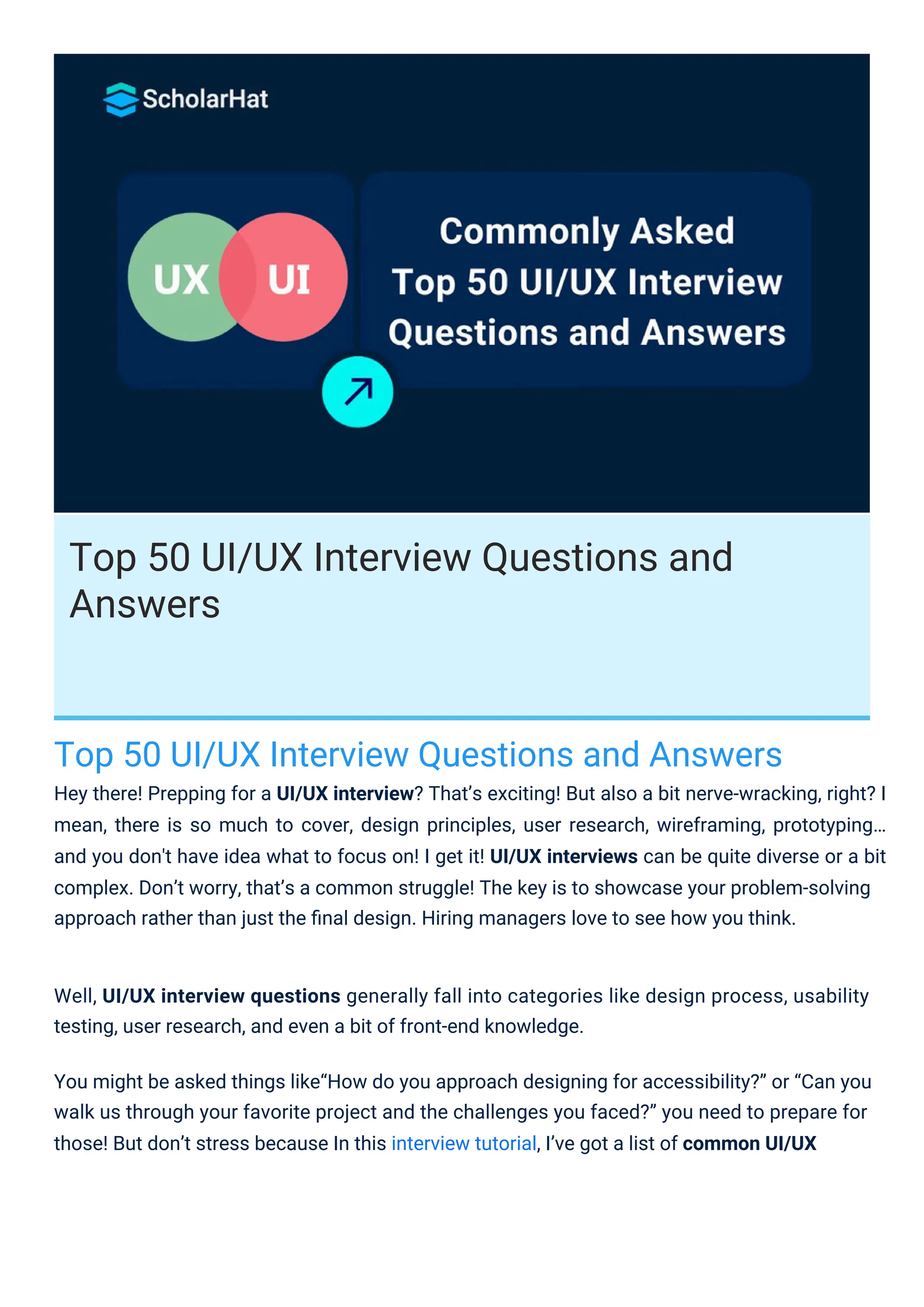
UI (User Interface) Design focuses on the visual elements of a product, including layouts,
typography, and interactive components.
UX (User Experience) Design is about the overall user journey, usability, and interaction
with the product.
Simply put, UI is about aesthetics, while UX is about functionality and ease of use.
General UI/UX Design Questions
1. What is the difference between UI and UX design?
2. Can you walk us through your design process?
3.
3. How doyou approach a new UI/UX project?
I follow a structured approach:
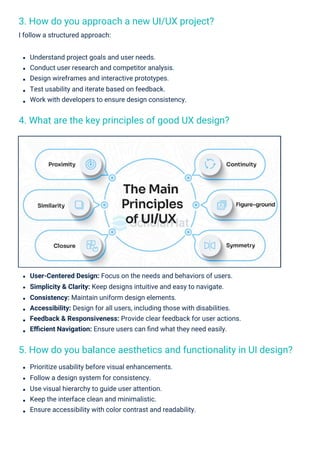
4. What are the key principles of good UX design?
5. How do you balance aesthetics and functionality in UI design?
Understand project goals and user needs.
Conduct user research and competitor analysis.
Design wireframes and interactive prototypes.
Test usability and iterate based on feedback.
Work with developers to ensure design consistency.
Prioritize usability before visual enhancements.
Follow a design system for consistency.
Use visual hierarchy to guide user attention.
Keep the interface clean and minimalistic.
Ensure accessibility with color contrast and readability.
User-Centered Design: Focus on the needs and behaviors of users.
Simplicity & Clarity: Keep designs intuitive and easy to navigate.
Consistency: Maintain uniform design elements.
Accessibility: Design for all users, including those with disabilities.
Feedback & Responsiveness: Provide clear feedback for user actions.
Efficient Navigation: Ensure users can find what they need easily.
4.
Test and iteratebased on user feedback.
Usability testing is essential to evaluate how easily users can interact with a product and
identify areas for improvement. I employ various methods depending on the project's needs:
Moderated Usability Testing – Conducting live sessions where I observe users performing
tasks and gather real-time feedback.
Unmoderated Usability Testing – Users complete tasks independently while their actions
are recorded.
A/B Testing – Comparing two versions of a webpage or feature to see which performs
better.
Remote Usability Testing – Allowing users to interact with the product remotely while
using screen recording tools.
Guerrilla Testing – Quick and informal testing with random users.
Eye Tracking & Heatmaps – Using tracking tools to see where users focus their attention.
User research is a crucial step in the design and development process to understand user
needs, behaviors, and pain points. I conduct user research using a structured approach that
includes the following steps:
Define Objectives – Clearly outline what I want to learn, such as understanding user
frustrations with an existing system or identifying potential improvements.
Identify Target Users – Create user personas based on demographics, behaviors, and
goals to ensure I’m researching the right audience.
Choose Research Methods – Depending on the project, I use a mix of qualitative
(interviews, observations) and quantitative (surveys, analytics) methods.
Conduct Research – Gather insights through surveys, usability testing, A/B testing, field
studies, or focus groups.
Analyze Data – Identify patterns, trends, and pain points to extract actionable insights.
Report Findings – Present research results in the form of personas, user journey maps, and
problem statements.
Research & User-Centered Design
6. How do you conduct user research?
7. What methods do you use for usability testing?
8. How do you ensure accessibility in your designs?
5.
Yes! In oneproject, I was designing a dashboard for an analytics platform. Initially, we placed
the most-used metrics in a dropdown menu to keep the interface clean. However, during
usability testing, users found it frustrating to open the dropdown repeatedly.
Changes based on user feedback:
Moved essential metrics to the main screen for quick access.
Used cards and widgets to display data more visually.
Added customization options, allowing users to personalize their dashboard.
These changes significantly improved user satisfaction and efficiency.
Ensuring accessibility means creating designs that are usable by people with disabilities. I
follow these key practices:
Adhering to WCAG Guidelines – Implementing the Web Content Accessibility Guidelines
(WCAG) to ensure compliance.
Keyboard Navigation & Screen Reader Compatibility – Ensuring that all elements can be
navigated using a keyboard and tested with screen readers.
Color Contrast & Text Readability – Using high-contrast colors and ensuring sufficient text
size.
Alternative Text for Images – Adding descriptive alt text for images.
Accessible Forms & Controls – Providing clear labels, placeholders, and error messages.
Testing with Real Users – Conducting accessibility testing with users who have
disabilities.
Conflicting user requirements often arise when different stakeholders have varying needs. I
handle such situations using the following approach:
Prioritize Based on User Needs & Business Goals – Identify which requirements align with
the core user experience and business objectives.
Find Common Ground – Look for overlapping needs and design solutions that satisfy
multiple user groups.
10. How do you handle conflicting user requirements?
9. Can you give an example of how user feedback changed your
design?
6.
Popular tools include:
Figma– Cloud-based with real-time collaboration.
Adobe XD – Integrates well with Adobe products.
Sketch – Ideal for macOS users.
Balsamiq – Best for low-fidelity wireframes.
Axure RP – Suitable for high-fidelity prototypes.
InVision – Turns static designs into interactive prototypes.
The level of fidelity depends on:
Project Stage: Low-fidelity for early ideas, high-fidelity for final designs.
Stakeholder Needs: Developers need detailed designs; business teams may prefer simpler
ones.
Data-Driven Decision Making – Use user research, analytics, and usability testing to
validate requirements.
Engage Stakeholders & Communicate Trade-offs – Discuss constraints and feasibility
with stakeholders.
Iterate & Test – Implement a prototype and test it with users.
By balancing user feedback, business priorities, and usability best practices, I ensure that
conflicting requirements are resolved effectively.
3. Wireframing & Prototyping
11. What tools do you use for wireframing and prototyping?
12. How do you decide the level of fidelity in a prototype?
7.
Steps to creatinga good wireframe:
Understand requirements.
Define user flow.
Choose the right fidelity level.
Use grids and layout principles.
Keep it simple.
Label components clearly.
Iterate and get feedback.
Key steps in interactive prototyping:
Define key interactions.
Choose the right tool.
Create clickable elements.
Test user flows.
Use conditional logic if needed.
Gather feedback and iterate.
Prototype validation involves:
Defining testing goals.
Conducting usability testing.
Collecting feedback.
Analyzing data and identifying issues.
Iterating and improving.
Handing off to developers.
User Testing: Navigation tests require high-fidelity prototypes.
15. How do you test and validate prototypes?
13. How do you create an effective wireframe?
14. What’s your approach to interactive prototyping?
16. What are the key principles of typography in UI design?
Visual & Interaction Design
8.
Design System &Style Guide: Define typography, colors, and layout grids.
Component Reusability: Use reusable UI components for uniformity.
Grid & Spacing Systems: Follow an 8px or 4px spacing system for alignment.
Iconography & Imagery: Use a consistent icon set and image style.
Testing & User Feedback: Conduct usability testing to detect inconsistencies.
Purposeful Use of Animations: Use subtle animations for guidance without distraction.
Smooth & Natural Motion: Apply easing functions like ease-in and ease-out.
Screen Size & Layout: Use responsive design techniques to adapt layouts.
Touch vs. Click Interaction: Ensure touch-friendly targets for mobile users.
Navigation Differences: Use compact menus for mobile and visible menus for desktop.
Performance Optimization: Optimize images and reduce heavy animations for mobile.
Context & User Behavior: Prioritize scannable content on mobile, detailed UI on desktop.
Readability & Legibility: Choose clear typefaces and avoid decorative fonts for body text.
Hierarchy & Contrast: Use font sizes, weights, and colors to establish a visual hierarchy.
Scalability & Accessibility: Use relative units and ensure proper contrast ratios for
readability.
Line Spacing & Alignment: Maintain 1.4x - 1.6x line height and left-align text for readability.
Consistency & Branding: Use a maximum of two typefaces and define font styles in a
design system.
Clear Structure & Information Architecture: Organize content logically and avoid deep
nesting.
Descriptive & Concise Labels: Use clear, action-oriented labels that match user
expectations.
Visual Hierarchy & Affordance: Use contrast and spacing to highlight navigation items.
Mobile-Friendly Navigation: Use a hamburger menu or bottom navigation for mobile.
Feedback & Confirmation: Provide hover states, active states, and breadcrumbs for
guidance.
17. How do you design intuitive navigation?
19. How do you ensure consistency in UI design?
20. How do you handle animations and micro-interactions in UI?
18. What do you consider when designing for mobile vs. desktop?
9.
Micro-Interactions for Engagement:Add hover effects, button clicks, and form validation
feedback.
Performance Considerations: Use CSS animations for smooth performance.
Accessibility & User Control: Offer a "reduce motion" option for sensitive users.
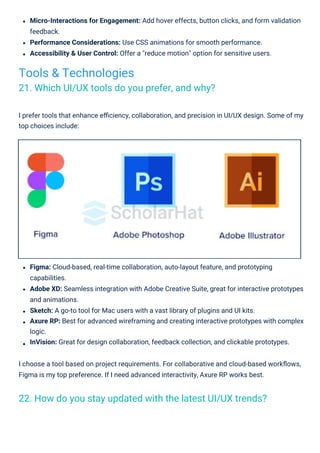
I prefer tools that enhance efficiency, collaboration, and precision in UI/UX design. Some of my
top choices include:
Figma: Cloud-based, real-time collaboration, auto-layout feature, and prototyping
capabilities.
Adobe XD: Seamless integration with Adobe Creative Suite, great for interactive prototypes
and animations.
Sketch: A go-to tool for Mac users with a vast library of plugins and UI kits.
Axure RP: Best for advanced wireframing and creating interactive prototypes with complex
logic.
InVision: Great for design collaboration, feedback collection, and clickable prototypes.
I choose a tool based on project requirements. For collaborative and cloud-based workflows,
Figma is my top preference. If I need advanced interactivity, Axure RP works best.
Tools & Technologies
21. Which UI/UX tools do you prefer, and why?
22. How do you stay updated with the latest UI/UX trends?
10.
Staying ahead inUI/UX design requires continuous learning and exploration. Here’s how I keep
myself updated:
Blogs & Websites: Smashing Magazine, UX Collective, Nielsen Norman Group.
Online Courses & Webinars: Udemy, Coursera, Interaction Design Foundation (IDF).
Following Influential Designers: Don Norman, Jared Spool, NNGroup.
Engaging in Design Communities: Reddit’s r/UXDesign, UX Mastery Community, LinkedIn
groups.
Experimentation & Research: Keep experimenting with new tools, UI patterns, and design
principles to stay adaptable.
By consistently consuming and applying new information, I ensure my designs align with the
latest trends.
Why Figma? Cloud-based, no need to install software or manage file versions. Collaboration is
easy with real-time updates. Built-in interactive prototyping reduces dependency on third-party
tools.
While I use Sketch and Adobe XD when required, Figma remains my go-to tool for most UI/UX
design projects.
Yes, I have experience with all three tools, and each has its strengths:
Figma: Cloud-based, real-time collaboration, auto-layout feature, prototyping capabilities.
Sketch: A solid option for Mac users with a rich library of design resources and plugins.
Adobe XD: Great for interactive prototyping and animation, especially for those already
working within the Adobe ecosystem.
Effective collaboration between designers and developers ensures smooth product
development. Here’s how I approach it:
Using Shared Design Systems: Create and maintain a design system in Figma for
consistency across components.
24. How do you collaborate with developers using design tools?
23. Have you worked with Figma, Sketch, or Adobe XD? Which do
you prefer?
11.
Providing Interactive Prototypes:Use Figma, Adobe XD, or InVision to create interactive
prototypes for developers.
Sharing Design Specs: Provide CSS code snippets, measurements, and assets to help
developers implement designs accurately.
Regular Sync Meetings: Hold weekly or bi-weekly standup meetings to discuss design
challenges and technical feasibility.
Using Collaboration Tools: Integrate designs with Jira, Trello, or Slack for feedback and
real-time discussions.
Version Control & Documentation: Keep design updates documented in Confluence,
Notion, or Google Drive.
Gathering Developer Feedback: Involve developers early to ensure feasibility and address
concerns proactively.
By following these practices, I ensure seamless designer-developer collaboration for
successful product delivery.
Yes, I have worked with design systems to maintain consistency across digital products. Here’s
how I approach it:
Creating a Design System: Understand product needs, define core elements like
typography, color palette, and UI components.
Building a Component Library: Create reusable UI components in Figma or Sketch with
proper naming conventions and states.
Establishing Design Guidelines: Document spacing rules, accessibility standards,
animations, and responsiveness.
25. Have you worked with design systems? If so, how do you
create or maintain them?
12.
Design constraints areinevitable in any project. I approach them with a problem-solving
By focusing on user behavior and iterative design, we significantly improved user engagement.
One of the biggest UI/UX challenges I faced was designing a mobile app for an e-commerce
platform where users had difficulty navigating product categories. Users often abandon their
search due to frustration.
Solution:
User Research: Conducted usability testing and found that users struggled with unclear
category labels.
Improved Navigation: Introduced a more intuitive category structure with icons and a
"smart search" feature.
Personalization: Added a recommendation engine to suggest categories based on
browsing history.
Feedback Loop: Launched an A/B test to measure improvements and saw a 30% increase
in product searches.
Creating Interactive Prototypes: Showcase component behaviors using Figma or Adobe
XD.
Integrating with Development: Provide CSS code snippets, variables, and design tokens for
developers to use in code.
Testing & Iteration: Conduct usability testing and refine components based on feedback.
Maintaining a Design System: - Version control via Figma’s history or GitHub for code-based
components. - Regular design reviews and sync meetings with developers. - Updating
documentation in Notion, Confluence, or ZeroHeight. - Gathering feedback from users,
designers, and developers to improve components.
Problem-Solving & Critical Thinking
26. Can you describe a UI/UX challenge you faced and how you
solved it?
27. How do you handle design constraints (e.g., time, budget, tech
limitations)?
13.
Prioritization is crucialwhen resources are limited. I use the following strategies:
MoSCoW Method: Categorize features into Must-Have, Should-Have, Could-Have, and
Won’t-Have.
Redesigning a product requires balancing user needs, business goals, and technical feasibility.
My process includes:
User Research: Analyze user pain points through surveys, heatmaps, and usability testing.
Competitive Analysis: Benchmark against industry leaders to identify areas for
improvement.
Defining Goals: Set clear objectives, whether improving usability, increasing conversions or
modernizing the UI.
Wireframing & Prototyping: Create low-fidelity wireframes to test ideas before investing in
high-fidelity designs.
User Testing: Validate new designs through A/B testing and iterate based on feedback.
Gradual Implementation: Release updates in phases to avoid overwhelming users.
By taking a user-centric and data-driven approach, I ensure that redesigns lead to measurable
improvements.
mindset:
Time Constraints: Prioritize essential features using the MoSCoW method (Must-Have,
Should-Have, Could-Have, Won’t-Have).
Budget Constraints: Leverage existing UI frameworks, design systems, and open-source
resources to minimize costs.
Technical Limitations: Collaborate closely with developers to find feasible alternatives and
create adaptable designs.
Stakeholder Communication: Set clear expectations with stakeholders to align priorities
and avoid scope creep.
By focusing on user impact and feasibility, I ensure that design solutions remain effective
despite constraints.
29. How do you prioritize features when working with limited
resources?
28. What’s your process for redesigning an existing product?
14.
By making data-drivendecisions, I ensure that limited resources are allocated effectively to
maximize product value.
Lessons Learned:
Always validate major design changes through usability testing before implementation.
Keep the checkout process simple and transparent to minimize friction.
Provide users with all essential information upfront to prevent surprises.
After reverting to a simplified checkout with inline form fields, we saw a 20% increase in
completed purchases.
Impact vs. Effort Matrix: Prioritize features that provide the highest impact with the least
effor t.
User Feedback: Focus on features that directly address user pain points and improve
usability.
Business Goals Alignment: Ensure that features align with the company’s strategic
objectives.
Agile Development: Implement features in small iterations, gathering feedback to adjust
priorities.
In one project, we redesigned a checkout process by introducing a multi-step form, believing it
would enhance user experience. However, after launch, we noticed a sharp increase in cart
abandonment rates.
What Went Wrong?
Users found the multi-step form frustrating and time-consuming.
Essential checkout details (shipping cost, payment methods) were hidden until later steps.
30. Can you share an example of a failed design decision and what
you learned?
15.
Usability & Accessibility
31.How do you conduct a heuristic evaluation of a design?
A heuristic evaluation is a usability inspection method where I analyze a design based on
established usability principles (heuristics). Here’s how I conduct it:
33. What are the key accessibility guidelines you follow?
32. How do you ensure your design is accessible to users with
disabilities?
Follow WCAG, ADA, and Section 508 guidelines.
Ensure keyboard accessibility.
Use high-contrast text for readability.
Provide alternative text for images.
Enable text resizing up to 200% without breaking layout.
Test with screen readers and assistive technologies.
Perceivable: Provide text alternatives and high contrast.
Operable: Ensure keyboard accessibility and avoid flashing content.
Understandable: Use clear navigation and readable language.
Define the Scope and Objectives: Identify the product, key user flows, and critical tasks.
Select Heuristics: Use Jakob Nielsen’s 10 usability heuristics.
Recruit Evaluators: Ideally, 3–5 usability experts.
Conduct the Evaluation: Navigate UI, document issues, and assign severity levels.
Analyze Findings: Prioritize usability problems and suggest improvements.
Follow-up Evaluation: Re-evaluate after changes are implemented.
16.
Robust: Ensure compatibilitywith assistive technologies.
Use simple and clear language.
Ensure consistent navigation and avoid distractions.
Provide visual and text-based cues.
Allow users to customize text size and colors.
Reduce cognitive load by breaking content into smaller sections.
Use Lighthouse, WAVE, and Axe DevTools for automated testing.
Test manually with screen readers (NVDA, JAWS, VoiceOver).
Check keyboard navigation and contrast ratios.
Conduct real user testing with people who have disabilities.
By fostering collaboration, I ensure that design, development, and product management work
together efficiently toward a common goal.
Collaboration between designers, developers, and product managers is crucial for a successful
product. Here’s how I ensure smooth teamwork:
Clear Communication: Regular meetings to discuss project goals, user needs, and
technical constraints.
Design Workshops: Conduct brainstorming sessions to align design with business and
technical feasibility.
Shared Design Systems: Maintain a consistent design language by using a component-
based design system in Figma.
Interactive Prototypes: Provide clickable prototypes to developers to help them
understand animations and interactions.
Documentation: Create detailed UI specifications and user flows for a seamless handoff.
Regular Feedback Loops: Conduct design reviews with developers and product managers
to refine the design iteratively.
34. How do you test your design for accessibility?
36. How do you collaborate with developers and product
managers?
35. How do you design for users with cognitive impairments?
Collaboration & Teamwork
17.
37. How doyou handle feedback from stakeholders?
Feedback is essential for improving design quality. Here’s my approach to handling
stakeholder feedback effectively:
38. Can you describe a time when you had to defend your design
decisions?
Defending design decisions requires strong reasoning backed by research and usability
principles. Here’s an example:
In a previous project, stakeholders wanted to add multiple CTA buttons on a landing page to
increase conversions. However, user research suggested that too many CTAs could
overwhelm users and reduce clarity.
My Approach: I presented heatmaps, A/B test results, and usability studies that
demonstrated the impact of cluttered CTAs on user decision-making.
Proposed Solution: I recommended a single primary CTA with supporting content, ensuring
users had a clear path to action.
Outcome: After testing, we saw a 15% increase in conversion rates, validating my design
decision.
Active Listening: Understand the concerns, pain points, and expectations before
responding.
Ask Clarifying Questions: Request specific feedback to ensure actionable insights.
Prioritization: Filter feedback based on business impact, user experience, and technical
feasibility.
Data-Driven Decisions: Support my design choices with user research, usability testing
results, and analytics.
Iterative Approach: Implement feedback in design iterations while maintaining usability
and consistency.
Feedback Loop: Communicate changes transparently and validate revisions with
stakeholders.
This structured approach helps me integrate feedback effectively while ensuring the design
remains user-centered.
18.
By using dataand user research, I successfully defended my design while maintaining a
collaborative approach with stakeholders.
Design should not only be aesthetically pleasing but also contribute to business success.
Here’s how I align design with business goals:
Understanding Business Objectives: Collaborate with stakeholders to define KPIs, target
audience, and value propositions.
User-Centric Approach: Conduct user research to ensure design meets customer needs
while fulfilling business goals.
Data-Driven Decision Making: Use analytics, A/B testing, and heatmaps to refine design
strategies.
Conversion Optimization: Ensure UX decisions support conversion rates, user
engagement, and retention.
Iterative Improvements: Continuously test and optimize designs based on feedback and
data insights.
By aligning design with measurable business objectives, I help create products that are both
user-friendly and profitable.
Yes, I have worked in Agile/Scrum environments where fast iterations and adaptability are key.
Here’s how I ensure efficiency:
Participating in Scrum Ceremonies: Attend daily stand-ups, sprint planning, and
retrospectives to stay aligned with the team.
Breaking Down Design Tasks: Deliver design work in smaller, iterative chunks to align with
development sprints.
Rapid Prototyping: Use Figma or Adobe XD to quickly iterate and test design concepts
before development.
Collaborating Closely with Developers: Provide detailed UI components and design specs
for smooth handoffs.
Prioritizing MVP Features: Focus on high-impact features first and refine the design in later
sprints.
39. How do you ensure your design aligns with business goals?
40. Have you worked in Agile/Scrum environments? How do you
adapt to fast iterations?
19.
Key Performance Indicators(KPIs) help measure and track UX design performance...
Task Success Rate (TSR)
User Error Rate
Time on Task
Retention Rate
Bounce Rate
Net Promoter Score (NPS)
System Usability Scale (SUS)
Heatmap Analysis
Conversion Rate
Customer Support Requests
The success of a UX design is measured using both qualitative and quantitative metrics...
User Satisfaction (CSAT & NPS)
Usability Testing
Task Success Rate
Time on Task
User Engagement Metrics
Conversion Rate
Drop-off & Bounce Rates
Accessibility Compliance
Retention & Churn Rate
Gathering Continuous Feedback: Use usability testing and stakeholder input to refine
designs efficiently.
By embracing Agile principles, I ensure that designs evolve quickly without compromising user
experience or business goals.
UI/UX Testing & Metrics
41. How do you measure the success of a UX design?
43. How do you analyze heatmaps and session recordings?
42. What KPIs do you track for user experience improvements?
20.
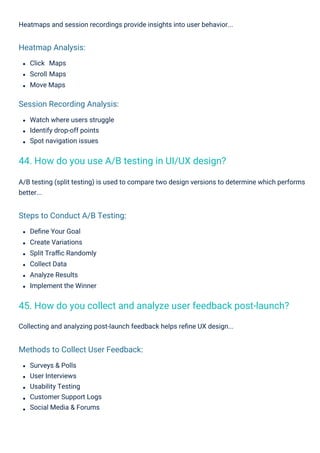
Click Maps
Scroll Maps
MoveMaps
Define Your Goal
Create Variations
Split Traffic Randomly
Collect Data
Analyze Results
Implement the Winner
Surveys & Polls
User Interviews
Usability Testing
Customer Support Logs
Social Media & Forums
Watch where users struggle
Identify drop-off points
Spot navigation issues
Heatmaps and session recordings provide insights into user behavior...
Collecting and analyzing post-launch feedback helps refine UX design...
A/B testing (split testing) is used to compare two design versions to determine which performs
better...
Heatmap Analysis:
Session Recording Analysis:
Steps to Conduct A/B Testing:
Methods to Collect User Feedback:
44. How do you use A/B testing in UI/UX design?
45. How do you collect and analyze user feedback post-launch?
21.
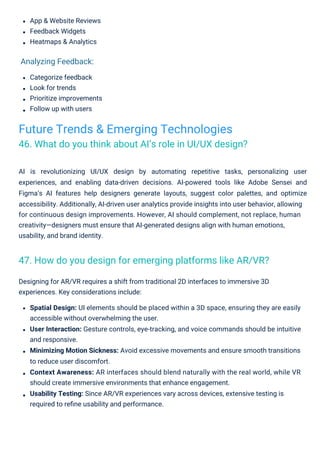
App & WebsiteReviews
Feedback Widgets
Heatmaps & Analytics
Categorize feedback
Look for trends
Prioritize improvements
Follow up with users
Designing for AR/VR requires a shift from traditional 2D interfaces to immersive 3D
experiences. Key considerations include:
Spatial Design: UI elements should be placed within a 3D space, ensuring they are easily
accessible without overwhelming the user.
User Interaction: Gesture controls, eye-tracking, and voice commands should be intuitive
and responsive.
Minimizing Motion Sickness: Avoid excessive movements and ensure smooth transitions
to reduce user discomfort.
Context Awareness: AR interfaces should blend naturally with the real world, while VR
should create immersive environments that enhance engagement.
Usability Testing: Since AR/VR experiences vary across devices, extensive testing is
required to refine usability and performance.
AI is revolutionizing UI/UX design by automating repetitive tasks, personalizing user
experiences, and enabling data-driven decisions. AI-powered tools like Adobe Sensei and
Figma’s AI features help designers generate layouts, suggest color palettes, and optimize
accessibility. Additionally, AI-driven user analytics provide insights into user behavior, allowing
for continuous design improvements. However, AI should complement, not replace, human
creativity—designers must ensure that AI-generated designs align with human emotions,
usability, and brand identity.
Analyzing Feedback:
Future Trends & Emerging Technologies
46. What do you think about AI’s role in UI/UX design?
47. How do you design for emerging platforms like AR/VR?
22.
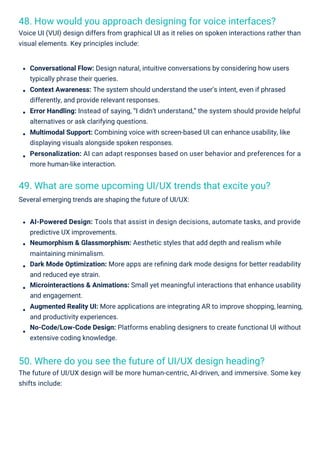
50. Where doyou see the future of UI/UX design heading?
The future of UI/UX design will be more human-centric, AI-driven, and immersive. Some key
shifts include:
49. What are some upcoming UI/UX trends that excite you?
Several emerging trends are shaping the future of UI/UX:
48. How would you approach designing for voice interfaces?
Voice UI (VUI) design differs from graphical UI as it relies on spoken interactions rather than
visual elements. Key principles include:
Conversational Flow: Design natural, intuitive conversations by considering how users
typically phrase their queries.
Context Awareness: The system should understand the user’s intent, even if phrased
differently, and provide relevant responses.
Error Handling: Instead of saying, “I didn’t understand,” the system should provide helpful
alternatives or ask clarifying questions.
Multimodal Support: Combining voice with screen-based UI can enhance usability, like
displaying visuals alongside spoken responses.
Personalization: AI can adapt responses based on user behavior and preferences for a
more human-like interaction.
AI-Powered Design: Tools that assist in design decisions, automate tasks, and provide
predictive UX improvements.
Neumorphism & Glassmorphism: Aesthetic styles that add depth and realism while
maintaining minimalism.
Dark Mode Optimization: More apps are refining dark mode designs for better readability
and reduced eye strain.
Microinteractions & Animations: Small yet meaningful interactions that enhance usability
and engagement.
Augmented Reality UI: More applications are integrating AR to improve shopping, learning,
and productivity experiences.
No-Code/Low-Code Design: Platforms enabling designers to create functional UI without
extensive coding knowledge.
23.
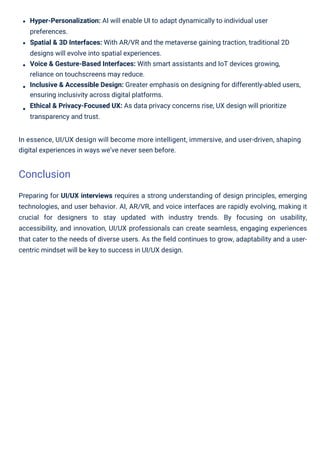
Preparing for UI/UXinterviews requires a strong understanding of design principles, emerging
technologies, and user behavior. AI, AR/VR, and voice interfaces are rapidly evolving, making it
crucial for designers to stay updated with industry trends. By focusing on usability,
accessibility, and innovation, UI/UX professionals can create seamless, engaging experiences
that cater to the needs of diverse users. As the field continues to grow, adaptability and a user-
centric mindset will be key to success in UI/UX design.
Hyper-Personalization: AI will enable UI to adapt dynamically to individual user
preferences.
Spatial & 3D Interfaces: With AR/VR and the metaverse gaining traction, traditional 2D
designs will evolve into spatial experiences.
Voice & Gesture-Based Interfaces: With smart assistants and IoT devices growing,
reliance on touchscreens may reduce.
Inclusive & Accessible Design: Greater emphasis on designing for differently-abled users,
ensuring inclusivity across digital platforms.
Ethical & Privacy-Focused UX: As data privacy concerns rise, UX design will prioritize
transparency and trust.
In essence, UI/UX design will become more intelligent, immersive, and user-driven, shaping
digital experiences in ways we’ve never seen before.
Conclusion