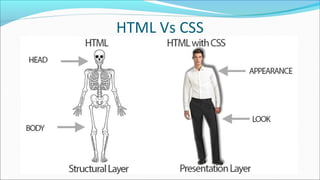
•HTML
•CSS
•Muhammad Toqeer Iqbal
•Toqeer.94@gmail.com
HTML Vs CSS
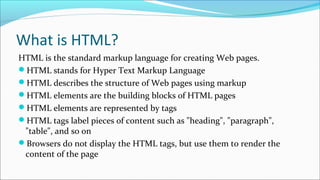
What is HTML?
HTML is the standard markup language for creating Web pages.
HTML stands for Hyper Text Markup Language
HTML describes the structure of Web pages using markup
HTML elements are the building blocks of HTML pages
HTML elements are represented by tags
HTML tags label pieces of content such as "heading", "paragraph",
"table", and so on
Browsers do not display the HTML tags, but use them to render the
content of the page
A Simple HTML Document
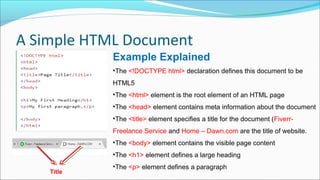
Example Explained
•The <!DOCTYPE html> declaration defines this document to be 
HTML5
•The <html> element is the root element of an HTML page
•The <head> element contains meta information about the document
•The <title> element specifies a title for the document (Fiverr-
Freelance Service and Home – Dawn.com are the title of website.
•The <body> element contains the visible page content
•The <h1> element defines a large heading
•The <p> element defines a paragraph
Title
HTML Tags
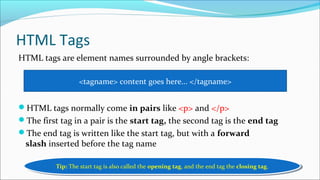
HTML tags are element names surrounded by angle brackets:
HTML tags normally come in pairs like <p> and </p>
The first tag in a pair is the start tag, the second tag is the end tag
The end tag is written like the start tag, but with a forward
slash inserted before the tag name
<tagname> content goes here... </tagname>
Tip: The start tag is also called the opening tag, and the end tag the closing tag.Tip: The start tag is also called the opening tag, and the end tag the closing tag.
Web Browsers
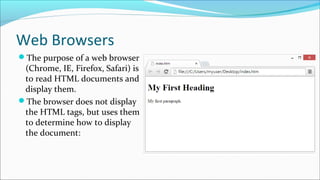
The purpose of a web browser
(Chrome, IE, Firefox, Safari) is
to read HTML documents and
display them.
The browser does not display
the HTML tags, but uses them
to determine how to display
the document:
HTML Page Structure
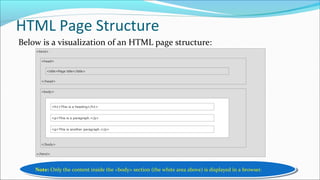
Below is a visualization of an HTML page structure:
Note: Only the content inside the <body> section (the white area above) is displayed in a browser.Note: Only the content inside the <body> section (the white area above) is displayed in a browser.
The <!DOCTYPE> Declaration
The <!DOCTYPE> declaration represents the document type, and helps
browsers to display web pages correctly.
It must only appear once, at the top of the page (before any HTML tags).
The <!DOCTYPE> declaration is not case sensitive.
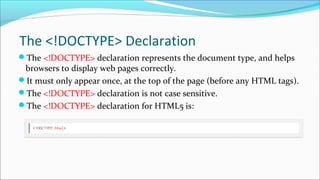
The <!DOCTYPE> declaration for HTML5 is:
HTML Versions
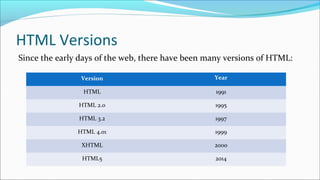
Since the early days of the web, there have been many versions of HTML:
Version Year
HTML 1991
HTML 2.0 1995
HTML 3.2 1997
HTML 4.01 1999
XHTML 2000
HTML5 2014
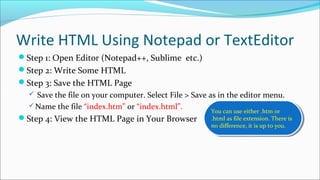
Write HTML Using Notepad or TextEditor
Step 1: Open Editor (Notepad++, Sublime etc.)
Step 2: Write Some HTML
Step 3: Save the HTML Page
 Save the file on your computer. Select File > Save as in the editor menu.
Name the file “index.htm” or “index.html”.
Step 4: View the HTML Page in Your Browser
You can use either .htm or
.html as file extension. There is
no difference, it is up to you.
You can use either .htm or
.html as file extension. There is
no difference, it is up to you.
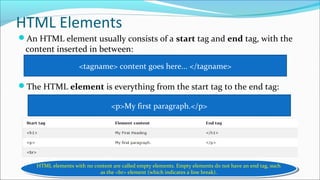
HTML Elements
An HTML element usually consists of a start tag and end tag, with the
content inserted in between:
The HTML element is everything from the start tag to the end tag:
<tagname> content goes here... </tagname>
<p>My first paragraph.</p>
HTML elements with no content are called empty elements. Empty elements do not have an end tag, such
as the <br> element (which indicates a line break).
HTML elements with no content are called empty elements. Empty elements do not have an end tag, such
as the <br> element (which indicates a line break).
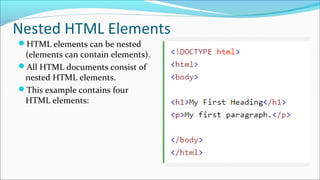
Nested HTML Elements
HTML elements can be nested
(elements can contain elements).
All HTML documents consist of
nested HTML elements.
This example contains four
HTML elements:
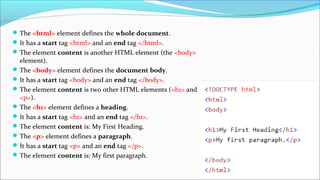
The <html> element defines the whole document.
It has a start tag <html> and an end tag </html>.
The element content is another HTML element (the <body> 
element).
The <body> element defines the document body.
It has a start tag <body> and an end tag </body>.
The element content is two other HTML elements (<h1> and 
<p>).
The <h1> element defines a heading.
It has a start tag <h1> and an end tag </h1>.
The element content is: My First Heading.
The <p> element defines a paragraph.
It has a start tag <p> and an end tag </p>.
The element content is: My first paragraph.
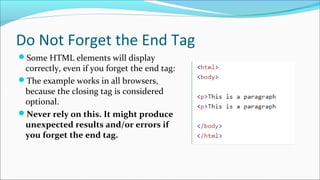
Do Not Forget the End Tag
Some HTML elements will display 
correctly, even if you forget the end tag:
The example works in all browsers, 
because the closing tag is considered 
optional.
Never rely on this. It might produce
unexpected results and/or errors if
you forget the end tag.
Use Lowercase Tags
1. HTML elements with no content are 
called empty elements.
2. <br> is an empty element without a 
closing tag (the <br> tag defines a line 
break).
3. Empty elements can be "closed" in the 
opening tag like this: <br />.
4. HTML5 does not require empty 
elements to be closed. But if you want 
stricter validation, or if you need to 
make your document readable by XML 
parsers, you must close all HTML 
elements properly.
Empty HTML Elements
1. HTML tags are not case sensitive: 
<P> means the same as <p>.
2. The HTML5 standard does not 
require lowercase tags, but 
W3C recommends lowercase in 
HTML, and demands lowercase for 
stricter document types like 
XHTML.
Professional Web 
Developers always use 
lowercase tags.
Professional Web 
Developers always use 
lowercase tags.

1. html introduction

  • 1.
  • 2.
  • 3.
    What is HTML? HTMLis the standard markup language for creating Web pages. HTML stands for Hyper Text Markup Language HTML describes the structure of Web pages using markup HTML elements are the building blocks of HTML pages HTML elements are represented by tags HTML tags label pieces of content such as "heading", "paragraph", "table", and so on Browsers do not display the HTML tags, but use them to render the content of the page
  • 4.
    A Simple HTMLDocument Example Explained •The <!DOCTYPE html> declaration defines this document to be  HTML5 •The <html> element is the root element of an HTML page •The <head> element contains meta information about the document •The <title> element specifies a title for the document (Fiverr- Freelance Service and Home – Dawn.com are the title of website. •The <body> element contains the visible page content •The <h1> element defines a large heading •The <p> element defines a paragraph Title
  • 5.
    HTML Tags HTML tagsare element names surrounded by angle brackets: HTML tags normally come in pairs like <p> and </p> The first tag in a pair is the start tag, the second tag is the end tag The end tag is written like the start tag, but with a forward slash inserted before the tag name <tagname> content goes here... </tagname> Tip: The start tag is also called the opening tag, and the end tag the closing tag.Tip: The start tag is also called the opening tag, and the end tag the closing tag.
  • 6.
    Web Browsers The purposeof a web browser (Chrome, IE, Firefox, Safari) is to read HTML documents and display them. The browser does not display the HTML tags, but uses them to determine how to display the document:
  • 7.
    HTML Page Structure Belowis a visualization of an HTML page structure: Note: Only the content inside the <body> section (the white area above) is displayed in a browser.Note: Only the content inside the <body> section (the white area above) is displayed in a browser.
  • 8.
    The <!DOCTYPE> Declaration The<!DOCTYPE> declaration represents the document type, and helps browsers to display web pages correctly. It must only appear once, at the top of the page (before any HTML tags). The <!DOCTYPE> declaration is not case sensitive. The <!DOCTYPE> declaration for HTML5 is:
  • 9.
    HTML Versions Since theearly days of the web, there have been many versions of HTML: Version Year HTML 1991 HTML 2.0 1995 HTML 3.2 1997 HTML 4.01 1999 XHTML 2000 HTML5 2014
  • 10.
    Write HTML UsingNotepad or TextEditor Step 1: Open Editor (Notepad++, Sublime etc.) Step 2: Write Some HTML Step 3: Save the HTML Page  Save the file on your computer. Select File > Save as in the editor menu. Name the file “index.htm” or “index.html”. Step 4: View the HTML Page in Your Browser You can use either .htm or .html as file extension. There is no difference, it is up to you. You can use either .htm or .html as file extension. There is no difference, it is up to you.
  • 11.
    HTML Elements An HTMLelement usually consists of a start tag and end tag, with the content inserted in between: The HTML element is everything from the start tag to the end tag: <tagname> content goes here... </tagname> <p>My first paragraph.</p> HTML elements with no content are called empty elements. Empty elements do not have an end tag, such as the <br> element (which indicates a line break). HTML elements with no content are called empty elements. Empty elements do not have an end tag, such as the <br> element (which indicates a line break).
  • 12.
    Nested HTML Elements HTMLelements can be nested (elements can contain elements). All HTML documents consist of nested HTML elements. This example contains four HTML elements:
  • 13.
  • 14.
    Do Not Forgetthe End Tag Some HTML elements will display  correctly, even if you forget the end tag: The example works in all browsers,  because the closing tag is considered  optional. Never rely on this. It might produce unexpected results and/or errors if you forget the end tag.
  • 15.
    Use Lowercase Tags 1.HTML elements with no content are  called empty elements. 2. <br> is an empty element without a  closing tag (the <br> tag defines a line  break). 3. Empty elements can be "closed" in the  opening tag like this: <br />. 4. HTML5 does not require empty  elements to be closed. But if you want  stricter validation, or if you need to  make your document readable by XML  parsers, you must close all HTML  elements properly. Empty HTML Elements 1. HTML tags are not case sensitive:  <P> means the same as <p>. 2. The HTML5 standard does not  require lowercase tags, but  W3C recommends lowercase in  HTML, and demands lowercase for  stricter document types like  XHTML. Professional Web  Developers always use  lowercase tags. Professional Web  Developers always use  lowercase tags.