

HTML FRAMES
            BY
Hafiz Muhammad Arslan Elahi
03325172005
Quiz

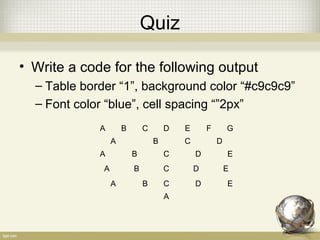
• Write a code for the following output
  – Table border “1”, background color “#c9c9c9”
  – Font color “blue”, cell spacing “”2px”
             A        B       C       D   E       F       G
                  A               B       C           D
             A            B           C       D           E
              A           B           C       D           E
                  A           B       C       D           E
                                      A
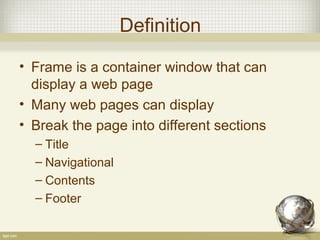
Definition

• Frame is a container window that can
  display a web page
• Many web pages can display
• Break the page into different sections
  – Title
  – Navigational
  – Contents
  – Footer
Advantages

• Keep one part static and change other
  parts
• Multiple pages in the same browser
• Reduce load on the server
  – All pages not reloaded
Disadvantages

• Difficult to print the content of all frames as
  compared to a normal web page
• Most browsers do no allow to bookmark
  an individual frame page.
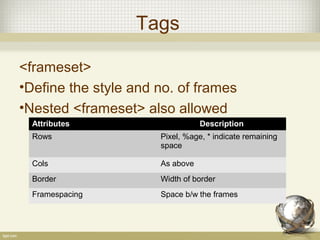
Tags

<frameset>
•Define the style and no. of frames
•Nested <frameset> also allowed
  Attributes                     Description
  Rows                Pixel, %age, * indicate remaining
                      space

  Cols                As above
  Border              Width of border
  Framespacing        Space b/w the frames
Tags contd…

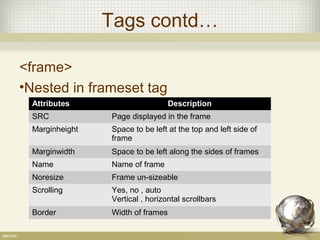
<frame>
•Nested in frameset tag
  Attributes                       Description
  SRC            Page displayed in the frame
  Marginheight   Space to be left at the top and left side of
                 frame
  Marginwidth    Space to be left along the sides of frames
  Name           Name of frame
  Noresize       Frame un-sizeable
  Scrolling      Yes, no , auto
                 Vertical , horizontal scrollbars
  Border         Width of frames
Tags contd….

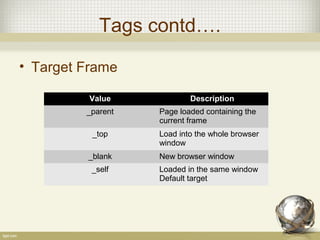
• Target Frame

          Value            Description
         _parent   Page loaded containing the
                   current frame
          _top     Load into the whole browser
                   window
         _blank    New browser window
          _self    Loaded in the same window
                   Default target
Example
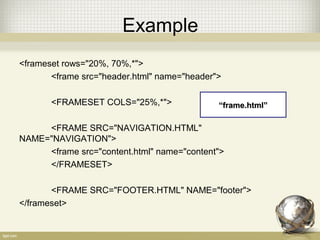
<frameset rows="20%, 70%,*">
       <frame src="header.html" name="header">

       <FRAMESET COLS="25%,*">               “frame.html”

     <FRAME SRC="NAVIGATION.HTML"
NAME="NAVIGATION">
     <frame src="content.html" name="content">
     </FRAMESET>

       <FRAME SRC="FOOTER.HTML" NAME="footer">
</frameset>
Example
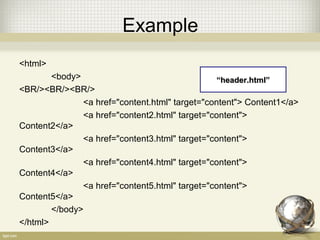
<html>
        <body>                                  “header.html”
<BR/><BR/><BR/>
               <a href="content.html" target="content"> Content1</a>
               <a href="content2.html" target="content">
Content2</a>
               <a href="content3.html" target="content">
Content3</a>
               <a href="content4.html" target="content">
Content4</a>
               <a href="content5.html" target="content">
Content5</a>
        </body>
</html>
Example
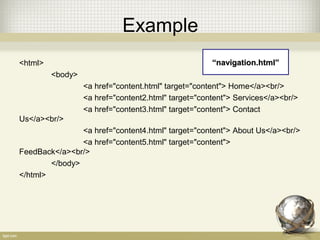
<html>                                               “navigation.html”
         <body>
                  <a href="content.html" target="content"> Home</a><br/>
                  <a href="content2.html" target="content"> Services</a><br/>
                  <a href="content3.html" target="content"> Contact
Us</a><br/>
                <a href="content4.html" target="content"> About Us</a><br/>
                <a href="content5.html" target="content">
FeedBack</a><br/>
        </body>
</html>
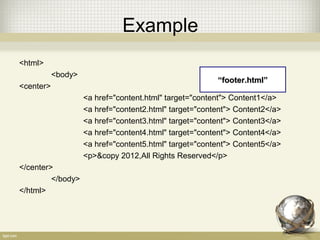
Example
<html>
           <body>
                                                        “footer.html”
<center>
                    <a href="content.html" target="content"> Content1</a>
                    <a href="content2.html" target="content"> Content2</a>
                    <a href="content3.html" target="content"> Content3</a>
                    <a href="content4.html" target="content"> Content4</a>
                    <a href="content5.html" target="content"> Content5</a>
                    <p>&copy 2012,All Rights Reserved</p>
</center>
         </body>
</html>
Output

Html frames

  • 1.
    HTML FRAMES BY Hafiz Muhammad Arslan Elahi 03325172005
  • 2.
    Quiz • Write acode for the following output – Table border “1”, background color “#c9c9c9” – Font color “blue”, cell spacing “”2px” A B C D E F G A B C D A B C D E A B C D E A B C D E A
  • 3.
    Definition • Frame isa container window that can display a web page • Many web pages can display • Break the page into different sections – Title – Navigational – Contents – Footer
  • 4.
    Advantages • Keep onepart static and change other parts • Multiple pages in the same browser • Reduce load on the server – All pages not reloaded
  • 5.
    Disadvantages • Difficult toprint the content of all frames as compared to a normal web page • Most browsers do no allow to bookmark an individual frame page.
  • 6.
    Tags <frameset> •Define the styleand no. of frames •Nested <frameset> also allowed Attributes Description Rows Pixel, %age, * indicate remaining space Cols As above Border Width of border Framespacing Space b/w the frames
  • 7.
    Tags contd… <frame> •Nested inframeset tag Attributes Description SRC Page displayed in the frame Marginheight Space to be left at the top and left side of frame Marginwidth Space to be left along the sides of frames Name Name of frame Noresize Frame un-sizeable Scrolling Yes, no , auto Vertical , horizontal scrollbars Border Width of frames
  • 8.
    Tags contd…. • TargetFrame Value Description _parent Page loaded containing the current frame _top Load into the whole browser window _blank New browser window _self Loaded in the same window Default target
  • 9.
    Example <frameset rows="20%, 70%,*"> <frame src="header.html" name="header"> <FRAMESET COLS="25%,*"> “frame.html” <FRAME SRC="NAVIGATION.HTML" NAME="NAVIGATION"> <frame src="content.html" name="content"> </FRAMESET> <FRAME SRC="FOOTER.HTML" NAME="footer"> </frameset>
  • 10.
    Example <html> <body> “header.html” <BR/><BR/><BR/> <a href="content.html" target="content"> Content1</a> <a href="content2.html" target="content"> Content2</a> <a href="content3.html" target="content"> Content3</a> <a href="content4.html" target="content"> Content4</a> <a href="content5.html" target="content"> Content5</a> </body> </html>
  • 11.
    Example <html> “navigation.html” <body> <a href="content.html" target="content"> Home</a><br/> <a href="content2.html" target="content"> Services</a><br/> <a href="content3.html" target="content"> Contact Us</a><br/> <a href="content4.html" target="content"> About Us</a><br/> <a href="content5.html" target="content"> FeedBack</a><br/> </body> </html>
  • 12.
    Example <html> <body> “footer.html” <center> <a href="content.html" target="content"> Content1</a> <a href="content2.html" target="content"> Content2</a> <a href="content3.html" target="content"> Content3</a> <a href="content4.html" target="content"> Content4</a> <a href="content5.html" target="content"> Content5</a> <p>&copy 2012,All Rights Reserved</p> </center> </body> </html>
  • 13.