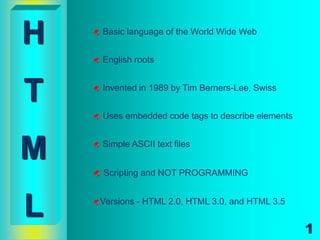
H      Basic language of the World Wide Web


       English roots


T      Invented in 1989 by Tim Berners-Lee, Swiss


       Uses embedded code tags to describe elements


M      Simple ASCII text files


       Scripting and NOT PROGRAMMING


L   Versions   - HTML 2.0, HTML 3.0, and HTML 3.5


                                                       1
Basic Tools to setup a Web Site

Text editor   - Page Spinner for Macintosh
              - NotePad for Windows

Web Browser - Google Chrome
            - Internet Explorer
            - Mozilla Firefox
A graphic program - Graphic Animator
                  - Photo Editor
                    Photoshop
                                             2
HTML Document Template
 <HTML> - tells the web browser on
               the type of document

 <HEAD> - technical information about the
               document is stated.

 <TITLE> - gives the document a name.

 <BODY> - where the actual document
               contents are placed
                                             3
HTML Document Example

<HTML>
<HEAD><TITLE> A BASIC HTML FILE </TITLE></HEAD>
<BODY>
This is a very basic HTML file showing the use
of document template tags. It’s very easy!
</BODY>
</HTML>


                                                  4
HTML Tag

 - Any Object or Element enclosed in < > angle brackets


   <tag attribute=“value“>
    Webpage       Property        Value
    Element       or Format       assigned
    or Object                     to attribute
Items enclosed by this tag is the
<BODY>                  actual document content.
  BACKGROUND = “image file”
      - the image file to be used as page background
      - this will be tiled if it is smaller than the viewing screen
  BGCOLOR = “color or Hexa Decimal”
      - defines the background color of the page
  TEXT = “color or Hexa Decimal”
      - defines the color of the normal body text
  LINK = “color string”
      - defines the text color of the hypertext link
  VLINK = “color string”
      - defines the text color of the visited links
  ALINK = “color string”
      - defines the text color of the active link
        (it’s the color that briefly flashes when the link text is clicked)
                                                                              6
formats the texts of the
<Font>...</Font>               web page

                    • Size = n (n = 1 to 7) normal size is 3
  Attributes :      • Color = “#rrggbb” or “color name”
                    • Face = “font name”

Other Text Control Tags
     <Small>...</Small>       makes text smaller
         <Big>...</Big>       makes text bigger
       <SUB>...</SUB>         makes text subscript
       <SUP>...</SUP>         makes text superscript
              <I>...</I>      makes text italic
            <B>...</B>        makes text bold
            <U>...</U>        makes text underlined
                           
                                                           7
    <STRIKE>...</STRIKE>       makes text strike
&nbsp;   - syntax for declaring single space


<br>     - bring object to the next line (line break)


              PARAGRAPHS
<P>       defines the paragraph element
          </P> is optional since a new <P>
  :      implies the end of the preceding
  :      paragraph
</P>
         <P align = left / center / right >
                                                        8
HEADING TAGS
<H1>….</H1>
<H2>….</H2>        heading tag marks
<H3>….</H3>       texts as heads
                   it has 6 level H1 to H6
<H4>….</H4>        H1 has the largest font
<H5>….</H5>       size while H6 the smallest
<H6>….</H6>

<H4 ALIGN = left / center / right >…. </H4>

                                               9
HORIZONTAL RULED LINE
                    used to separate different areas
<HR>               of a web page
                    it does not have a closing tag
Attributes :
       color = “#ffffff” defines the color of the line
      width = n (pixel width)
              = n% (certain percent of screen width)
       size = n (line thickness in pixel)

       NOSHADE ---- to turn off line shading

       align = left / center / right

Example: <HR width=80% size=4 align=right NOSHADE>
                                                         10
List

Ordered List (Numbered)
Syntax: <ol>… </ol>

Unordered List (Bulleted)
 Syntax: <ul>… </ul>
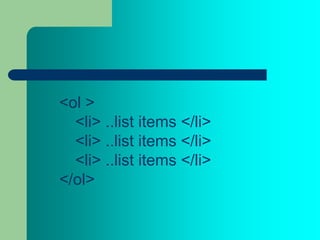
<ol >
  <li> ..list items </li>
  <li> ..list items </li>
  <li> ..list items </li>
</ol>
ANCHORED LINKS

 <A>  indicates an anchor for a piece of
   : text or image that serves as the
 </A> origin of the hyperlink
<A href = “URL”>linking text and/or image</A>

           •This URL can be another HTML document, a
           program, an image, an audio, or video file.


                                                  13
<A>…</A> attributes :
HREF = “link destination”
     • specifies the hyperlink reference : the file to be accessed, in the
        form of a filename or URL.
NAME = “bookmark”
    • gives a name to the link destination marker. It is used to identify
        a bookmark destination within an HTML file.
TARGET = “frame label”
    • Indicates the name of a specific frame into which you load the
        linked document.
Special TARGETS :
“_BLANK”             link is loaded into a new blank window
“_SELF”              link is loaded into the current browser window
“_TOP”               link is loaded into the frame where link was clicked on
“_PARENT”            link is loaded into in the immediate frameset parent

                                                                         14

HTML 101

  • 1.
    H  Basic language of the World Wide Web  English roots T  Invented in 1989 by Tim Berners-Lee, Swiss  Uses embedded code tags to describe elements M  Simple ASCII text files  Scripting and NOT PROGRAMMING L Versions - HTML 2.0, HTML 3.0, and HTML 3.5 1
  • 2.
    Basic Tools tosetup a Web Site Text editor - Page Spinner for Macintosh - NotePad for Windows Web Browser - Google Chrome - Internet Explorer - Mozilla Firefox A graphic program - Graphic Animator - Photo Editor Photoshop 2
  • 3.
    HTML Document Template <HTML> - tells the web browser on the type of document  <HEAD> - technical information about the document is stated.  <TITLE> - gives the document a name.  <BODY> - where the actual document contents are placed 3
  • 4.
    HTML Document Example <HTML> <HEAD><TITLE>A BASIC HTML FILE </TITLE></HEAD> <BODY> This is a very basic HTML file showing the use of document template tags. It’s very easy! </BODY> </HTML> 4
  • 5.
    HTML Tag -Any Object or Element enclosed in < > angle brackets <tag attribute=“value“> Webpage Property Value Element or Format assigned or Object to attribute
  • 6.
    Items enclosed bythis tag is the <BODY> actual document content. BACKGROUND = “image file” - the image file to be used as page background - this will be tiled if it is smaller than the viewing screen BGCOLOR = “color or Hexa Decimal” - defines the background color of the page TEXT = “color or Hexa Decimal” - defines the color of the normal body text LINK = “color string” - defines the text color of the hypertext link VLINK = “color string” - defines the text color of the visited links ALINK = “color string” - defines the text color of the active link (it’s the color that briefly flashes when the link text is clicked) 6
  • 7.
    formats the textsof the <Font>...</Font> web page • Size = n (n = 1 to 7) normal size is 3 Attributes : • Color = “#rrggbb” or “color name” • Face = “font name” Other Text Control Tags <Small>...</Small>  makes text smaller <Big>...</Big>  makes text bigger <SUB>...</SUB>  makes text subscript <SUP>...</SUP>  makes text superscript <I>...</I>  makes text italic <B>...</B>  makes text bold <U>...</U>  makes text underlined  7 <STRIKE>...</STRIKE> makes text strike
  • 8.
    &nbsp; - syntax for declaring single space <br> - bring object to the next line (line break) PARAGRAPHS <P>  defines the paragraph element  </P> is optional since a new <P> : implies the end of the preceding : paragraph </P> <P align = left / center / right > 8
  • 9.
    HEADING TAGS <H1>….</H1> <H2>….</H2>  heading tag marks <H3>….</H3> texts as heads  it has 6 level H1 to H6 <H4>….</H4>  H1 has the largest font <H5>….</H5> size while H6 the smallest <H6>….</H6> <H4 ALIGN = left / center / right >…. </H4> 9
  • 10.
    HORIZONTAL RULED LINE  used to separate different areas <HR> of a web page  it does not have a closing tag Attributes : color = “#ffffff” defines the color of the line width = n (pixel width) = n% (certain percent of screen width) size = n (line thickness in pixel) NOSHADE ---- to turn off line shading align = left / center / right Example: <HR width=80% size=4 align=right NOSHADE> 10
  • 11.
    List Ordered List (Numbered) Syntax:<ol>… </ol> Unordered List (Bulleted) Syntax: <ul>… </ul>
  • 12.
    <ol > <li> ..list items </li> <li> ..list items </li> <li> ..list items </li> </ol>
  • 13.
    ANCHORED LINKS <A> indicates an anchor for a piece of : text or image that serves as the </A> origin of the hyperlink <A href = “URL”>linking text and/or image</A> •This URL can be another HTML document, a program, an image, an audio, or video file. 13
  • 14.
    <A>…</A> attributes : HREF= “link destination” • specifies the hyperlink reference : the file to be accessed, in the form of a filename or URL. NAME = “bookmark” • gives a name to the link destination marker. It is used to identify a bookmark destination within an HTML file. TARGET = “frame label” • Indicates the name of a specific frame into which you load the linked document. Special TARGETS : “_BLANK”  link is loaded into a new blank window “_SELF”  link is loaded into the current browser window “_TOP”  link is loaded into the frame where link was clicked on “_PARENT”  link is loaded into in the immediate frameset parent 14