A web page is a hypertext document available on the
WWW. It is stored in a specially formatted text file,
which usually has the extension .html or .htm. Like any
other text file, it can be edited, moved around between
folders, renamed and so on.
WWW standards:
HTML: HyperText Markup Language
HTTP: HyperText Transfer Protocol
The applications that can open and display the files (on
the WWW or from a local file) are called web browsers.
Those programs that can edit html files are called
webpage editors.
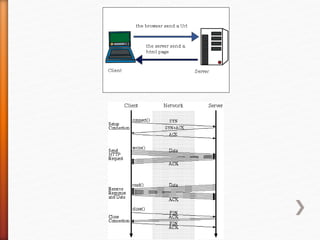
The HTML file you're opening could actually be located
anywhere in the world. To make a browser find a file remotely,
you type in the web page's address into the location bar: this
address is known as the Uniform Resource Locator, or URL. The
following is a real-life example: http://www.origo.hu/index.html
Typing something like this into the browser's location bar and
pressing Enter instructs your computer to access a distant
computer, known as a web server, and to download the HTML file
via interconnected networks (= the Internet). But you can also
create your own HTML files on your own computer and access
them locally.
Normally: the web page is rendered by a browser
To see what an HTML file really contains (i.e. its source format), click
on the right-hand mouse button anywhere on a web page in Explorer,
then choose the option, "View Source" / “Forrás megtekintése” (all
browsers offer a similar function). That's the web page in its original
“raw” form, the HTML source. (Remember to use this "View Source"
option whenever it is necessary to see the HTML form of the page).
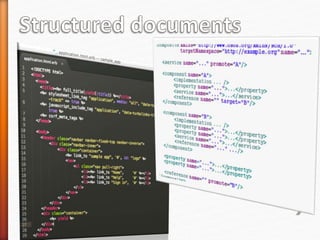
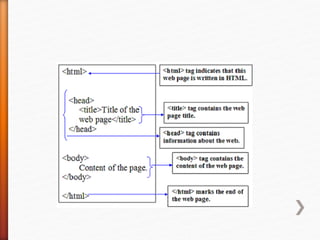
HTML source files contain human-readable text and a few symbols,
made up of usual ASCII characters. They can't directly contain images,
colours, or formatting such as italics: they contain corresponding
“commands”, we call them mark-up tags. HTML is an acronym for
HyperText Markup Language.
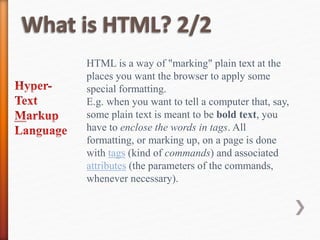
HTML is a way of "marking" plain text at the
places you want the browser to apply some
special formatting.
E.g. when you want to tell a computer that, say,
some plain text is meant to be bold text, you
have to enclose the words in tags. All
formatting, or marking up, on a page is done
with tags (kind of commands) and associated
attributes (the parameters of the commands,
whenever necessary).
A web site is a collection of web pages (several
HTML files+further data). A site will usually (but
not always) have a coherent theme (style sheet,
graphic images shared by multiple pages), and
probably a consistent visual style. But in the end
the thing that defines a site is that all the files are
stored in one place, on the same “domain” (e.g.
www.origo.hu).
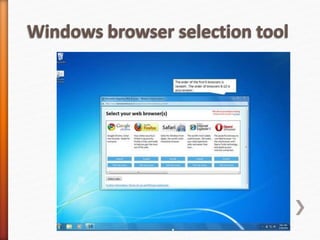
You need a web browser to display HTML files. Of course most PCs
these days come complete with Microsoft's Internet Explorer (IE). It is
no longer the dominant web browser though. Until about 1998 the
dominant web browser was Netscape. Then IE seemed to be the winner
of the browser war. Firefox reclamined its the throne in 2009 (Netscape
-> Mozilla -> Firefox). Another good choice is Chrome (2008-) offered
by the search engine giant Google. In 2011, it became more popular
than IE and in 2012, it became the market leader. Yet another free (and
good) choice is Opera.
Find the latest statistics on browser use at
http://www.w3schools.com/browsers/browsers_stats.asp
Q) Which are the three most widely-used browsers?
HTML file is plain text, human readable; you do not need any
fancy applications to create it. All you need to use is Notepad, the
simplest of all text editors.
Start Notepad using Start menu - Programs - Kellékek (Utilities)
- Jegyzettömb (Notepad).
There are WYSIWYG HTML editors, which give more help in
creating HTML code and also have better support for visual
design, but they are also more complicated to use.

Html 1 SLIDES

  • 2.
    A web pageis a hypertext document available on the WWW. It is stored in a specially formatted text file, which usually has the extension .html or .htm. Like any other text file, it can be edited, moved around between folders, renamed and so on. WWW standards: HTML: HyperText Markup Language HTTP: HyperText Transfer Protocol
  • 4.
    The applications thatcan open and display the files (on the WWW or from a local file) are called web browsers. Those programs that can edit html files are called webpage editors.
  • 5.
    The HTML fileyou're opening could actually be located anywhere in the world. To make a browser find a file remotely, you type in the web page's address into the location bar: this address is known as the Uniform Resource Locator, or URL. The following is a real-life example: http://www.origo.hu/index.html Typing something like this into the browser's location bar and pressing Enter instructs your computer to access a distant computer, known as a web server, and to download the HTML file via interconnected networks (= the Internet). But you can also create your own HTML files on your own computer and access them locally.
  • 7.
    Normally: the webpage is rendered by a browser To see what an HTML file really contains (i.e. its source format), click on the right-hand mouse button anywhere on a web page in Explorer, then choose the option, "View Source" / “Forrás megtekintése” (all browsers offer a similar function). That's the web page in its original “raw” form, the HTML source. (Remember to use this "View Source" option whenever it is necessary to see the HTML form of the page). HTML source files contain human-readable text and a few symbols, made up of usual ASCII characters. They can't directly contain images, colours, or formatting such as italics: they contain corresponding “commands”, we call them mark-up tags. HTML is an acronym for HyperText Markup Language.
  • 8.
    HTML is away of "marking" plain text at the places you want the browser to apply some special formatting. E.g. when you want to tell a computer that, say, some plain text is meant to be bold text, you have to enclose the words in tags. All formatting, or marking up, on a page is done with tags (kind of commands) and associated attributes (the parameters of the commands, whenever necessary).
  • 10.
    A web siteis a collection of web pages (several HTML files+further data). A site will usually (but not always) have a coherent theme (style sheet, graphic images shared by multiple pages), and probably a consistent visual style. But in the end the thing that defines a site is that all the files are stored in one place, on the same “domain” (e.g. www.origo.hu).
  • 11.
    You need aweb browser to display HTML files. Of course most PCs these days come complete with Microsoft's Internet Explorer (IE). It is no longer the dominant web browser though. Until about 1998 the dominant web browser was Netscape. Then IE seemed to be the winner of the browser war. Firefox reclamined its the throne in 2009 (Netscape -> Mozilla -> Firefox). Another good choice is Chrome (2008-) offered by the search engine giant Google. In 2011, it became more popular than IE and in 2012, it became the market leader. Yet another free (and good) choice is Opera. Find the latest statistics on browser use at http://www.w3schools.com/browsers/browsers_stats.asp Q) Which are the three most widely-used browsers?
  • 13.
    HTML file isplain text, human readable; you do not need any fancy applications to create it. All you need to use is Notepad, the simplest of all text editors. Start Notepad using Start menu - Programs - Kellékek (Utilities) - Jegyzettömb (Notepad). There are WYSIWYG HTML editors, which give more help in creating HTML code and also have better support for visual design, but they are also more complicated to use.

Editor's Notes

  • #9 HU: „leírónyelv” Bec. You describe how it looks and what the functions are