






On behalf of all the members of subgroup 4 (EE-1 group),
we would like to express our
special thanks of gratitude to our respected teacher Mr.
Ayushman Banerjee, who gave us the golden opportunity
to put forward this presentation on “how to write an
e-mail”.
This also helped us in doing a lot of Research work on the
topic, and, we came across so many new knowledge and
ideas. We are truly thankful to him.
The journey of preparing this presentation was really
knowledgeable, we would also like to thank our parents
and group mates, who heartily helped us in finalizing this
presentation within the given time period.
 What is an Email
 Why should we learn
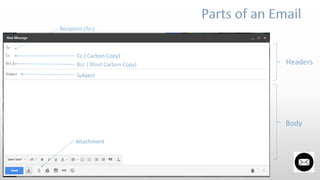
 Parts of an Email
 Types of Email
 Some methods to follow
- Subject & Subject Contents
- Greeting
- Purpose
- Attachments & Names
- End Greetings
- Email Signature
 Some Suggestion for professional Email
 Before Sending
 Comparing two emails
Electronic mail or E-mail is a method of exchanging messages
between people using electronic devices.
Email first entered substantial use in the 1960s and by mid-
1970s had taken the form new recognized as email.
In present days there are many mediums to send massages or text or send any kind of file to
anybody. Most of us prefer WhatsApp or any kind of messenger to text somebody. But still email
has kept it’s position. From Facebook to internet banking or attending a public examination
everywhere we have to provide our email address, but that’s not the reason we should learn
writing an email. Most of us know how to write an email. But many cases it has been seen that
theirs emails aren’t effective. So, many emails remains unread by the recipient.
We are engineering students here. After passing out most of us will join corporate sectors or any
Other fields. There email is very essential. Forget about the future even now we need to learn
effective Email writing.
No matter how basic a life skill,
its something you have to learn
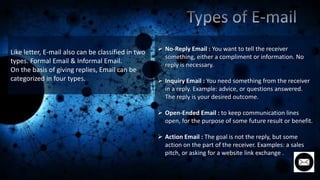
 No-Reply Email : You want to tell the receiver
something, either a compliment or information. No
reply is necessary.
 Inquiry Email : You need something from the receiver
in a reply. Example: advice, or questions answered.
The reply is your desired outcome.
 Open-Ended Email : to keep communication lines
open, for the purpose of some future result or benefit.
 Action Email : The goal is not the reply, but some
action on the part of the receiver. Examples: a sales
pitch, or asking for a website link exchange .
Like letter, E-mail also can be classified in two
types. Formal Email & Informal Email.
On the basis of giving replies, Email can be
categorized in four types.
Some Methods To Follow
Give the message a subject/title. E-mail
messages without a subject may not be
opened because of fear of viruses &
especially note that it is easy to type this
important information.
Keep the subject short & clear but avoid
such headings as:
‘Good News’, ‘Hello’, ‘Message from
_____’. These headings are common in
messages containing viruses. Short but
specific headings are needed.
GREETING
Start with a clear indication of what the
message is about in the first paragraph.
Give full details in the following paragraph(s).
Make sure that the final paragraph indicates
what should happen next.
Example:
I will send a messenger to your office one
Tuesday morning to collect the faulty goods.
e.g. Please let me have your order by the
beginning of the month.
 Make sure you refer, in the main message, to
any attachments you are adding of course make
extra sure that you remember to include the
attachment(s).
 As attachments can transmit viruses, try not to
use them, unless you are sending complicated
documents.
 If you use an attachment, make sure the file
name describes the content, and is not too
general; e.g. ‘message.doc’ is bad, but ‘QA
Report 2012.doc’ is good.
Include your name at the end of this message. It
is most annoying to receive an email which does
not include the name of the sender. The
problem is that often the email address of the
sender does not indicate exactly who it is form,
e.g. 032728@polyu.edu.hk
Example: Kind regards
Ajay Chatterjee
Human Resources Manager
END GREETINGS
th
 For a formal e-mail ( like writing e e-mail to your
boss or a person who is in a upper position than
you in your work field)
 For an informal e-mail end the e-mail in a polite
way. Common greetings are used in this matter.
Example: Yours sincerely, Best regards, best
wishes etc
The Email Signature
A professional signature makes it easy to contact you.
Your email account can automatically add these data of the bottom of the
email:
- Full professional name
- Job title
- Business phone/ fax numbers
- Business street address
- Business website, if any
- A legal disclaimer if required by your company
Depending on policy, you may also want to include a link to the company’s
website or social media pages.
Before Sending
Improper spelling, grammar and punctuation give a bad impression, and can
sometimes even change the meaning of the text. So check these things before
sending the email to the recipient.
Go through the email through in the eyes of the recipient before you send it.
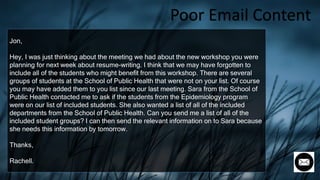
Jon,
Hey, I was just thinking about the meeting we had about the new workshop you were
planning for next week about resume-writing. I think that we may have forgotten to
include all of the students who might benefit from this workshop. There are several
groups of students at the School of Public Health that were not on your list. Of course
you may have added them to you list since our last meeting. Sara from the School of
Public Health contacted me to ask if the students from the Epidemiology program
were on our list of included students. She also wanted a list of all of the included
departments from the School of Public Health. Can you send me a list of all of the
included student groups? I can then send the relevant information on to Sara because
she needs this information by tomorrow.
Thanks,
Rachell.
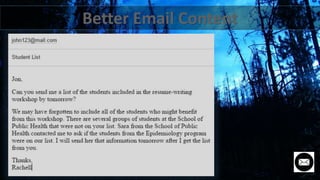
Poor Email Content
How to write an email

How to write an email

  • 3.
    On behalf ofall the members of subgroup 4 (EE-1 group), we would like to express our special thanks of gratitude to our respected teacher Mr. Ayushman Banerjee, who gave us the golden opportunity to put forward this presentation on “how to write an e-mail”. This also helped us in doing a lot of Research work on the topic, and, we came across so many new knowledge and ideas. We are truly thankful to him. The journey of preparing this presentation was really knowledgeable, we would also like to thank our parents and group mates, who heartily helped us in finalizing this presentation within the given time period.
  • 4.
     What isan Email  Why should we learn  Parts of an Email  Types of Email  Some methods to follow - Subject & Subject Contents - Greeting - Purpose - Attachments & Names - End Greetings - Email Signature  Some Suggestion for professional Email  Before Sending  Comparing two emails
  • 5.
    Electronic mail orE-mail is a method of exchanging messages between people using electronic devices. Email first entered substantial use in the 1960s and by mid- 1970s had taken the form new recognized as email.
  • 6.
    In present daysthere are many mediums to send massages or text or send any kind of file to anybody. Most of us prefer WhatsApp or any kind of messenger to text somebody. But still email has kept it’s position. From Facebook to internet banking or attending a public examination everywhere we have to provide our email address, but that’s not the reason we should learn writing an email. Most of us know how to write an email. But many cases it has been seen that theirs emails aren’t effective. So, many emails remains unread by the recipient. We are engineering students here. After passing out most of us will join corporate sectors or any Other fields. There email is very essential. Forget about the future even now we need to learn effective Email writing.
  • 7.
    No matter howbasic a life skill, its something you have to learn
  • 9.
     No-Reply Email: You want to tell the receiver something, either a compliment or information. No reply is necessary.  Inquiry Email : You need something from the receiver in a reply. Example: advice, or questions answered. The reply is your desired outcome.  Open-Ended Email : to keep communication lines open, for the purpose of some future result or benefit.  Action Email : The goal is not the reply, but some action on the part of the receiver. Examples: a sales pitch, or asking for a website link exchange . Like letter, E-mail also can be classified in two types. Formal Email & Informal Email. On the basis of giving replies, Email can be categorized in four types.
  • 10.
  • 11.
    Give the messagea subject/title. E-mail messages without a subject may not be opened because of fear of viruses & especially note that it is easy to type this important information. Keep the subject short & clear but avoid such headings as: ‘Good News’, ‘Hello’, ‘Message from _____’. These headings are common in messages containing viruses. Short but specific headings are needed.
  • 12.
  • 13.
    Start with aclear indication of what the message is about in the first paragraph. Give full details in the following paragraph(s). Make sure that the final paragraph indicates what should happen next. Example: I will send a messenger to your office one Tuesday morning to collect the faulty goods. e.g. Please let me have your order by the beginning of the month.
  • 14.
     Make sureyou refer, in the main message, to any attachments you are adding of course make extra sure that you remember to include the attachment(s).  As attachments can transmit viruses, try not to use them, unless you are sending complicated documents.  If you use an attachment, make sure the file name describes the content, and is not too general; e.g. ‘message.doc’ is bad, but ‘QA Report 2012.doc’ is good. Include your name at the end of this message. It is most annoying to receive an email which does not include the name of the sender. The problem is that often the email address of the sender does not indicate exactly who it is form, e.g. 032728@polyu.edu.hk Example: Kind regards Ajay Chatterjee Human Resources Manager
  • 15.
    END GREETINGS th  Fora formal e-mail ( like writing e e-mail to your boss or a person who is in a upper position than you in your work field)  For an informal e-mail end the e-mail in a polite way. Common greetings are used in this matter. Example: Yours sincerely, Best regards, best wishes etc
  • 16.
    The Email Signature Aprofessional signature makes it easy to contact you. Your email account can automatically add these data of the bottom of the email: - Full professional name - Job title - Business phone/ fax numbers - Business street address - Business website, if any - A legal disclaimer if required by your company Depending on policy, you may also want to include a link to the company’s website or social media pages.
  • 18.
    Before Sending Improper spelling,grammar and punctuation give a bad impression, and can sometimes even change the meaning of the text. So check these things before sending the email to the recipient. Go through the email through in the eyes of the recipient before you send it.
  • 20.
    Jon, Hey, I wasjust thinking about the meeting we had about the new workshop you were planning for next week about resume-writing. I think that we may have forgotten to include all of the students who might benefit from this workshop. There are several groups of students at the School of Public Health that were not on your list. Of course you may have added them to you list since our last meeting. Sara from the School of Public Health contacted me to ask if the students from the Epidemiology program were on our list of included students. She also wanted a list of all of the included departments from the School of Public Health. Can you send me a list of all of the included student groups? I can then send the relevant information on to Sara because she needs this information by tomorrow. Thanks, Rachell. Poor Email Content